KAIJET TECHNOLOGY JUE301 Wireless 11N USB mini Adapter User Manual V1 JUE301 302 QIG D out

KaiJet Technology International Limited Wireless 11N USB mini Adapter V1 JUE301 302 QIG D out

Users Manual

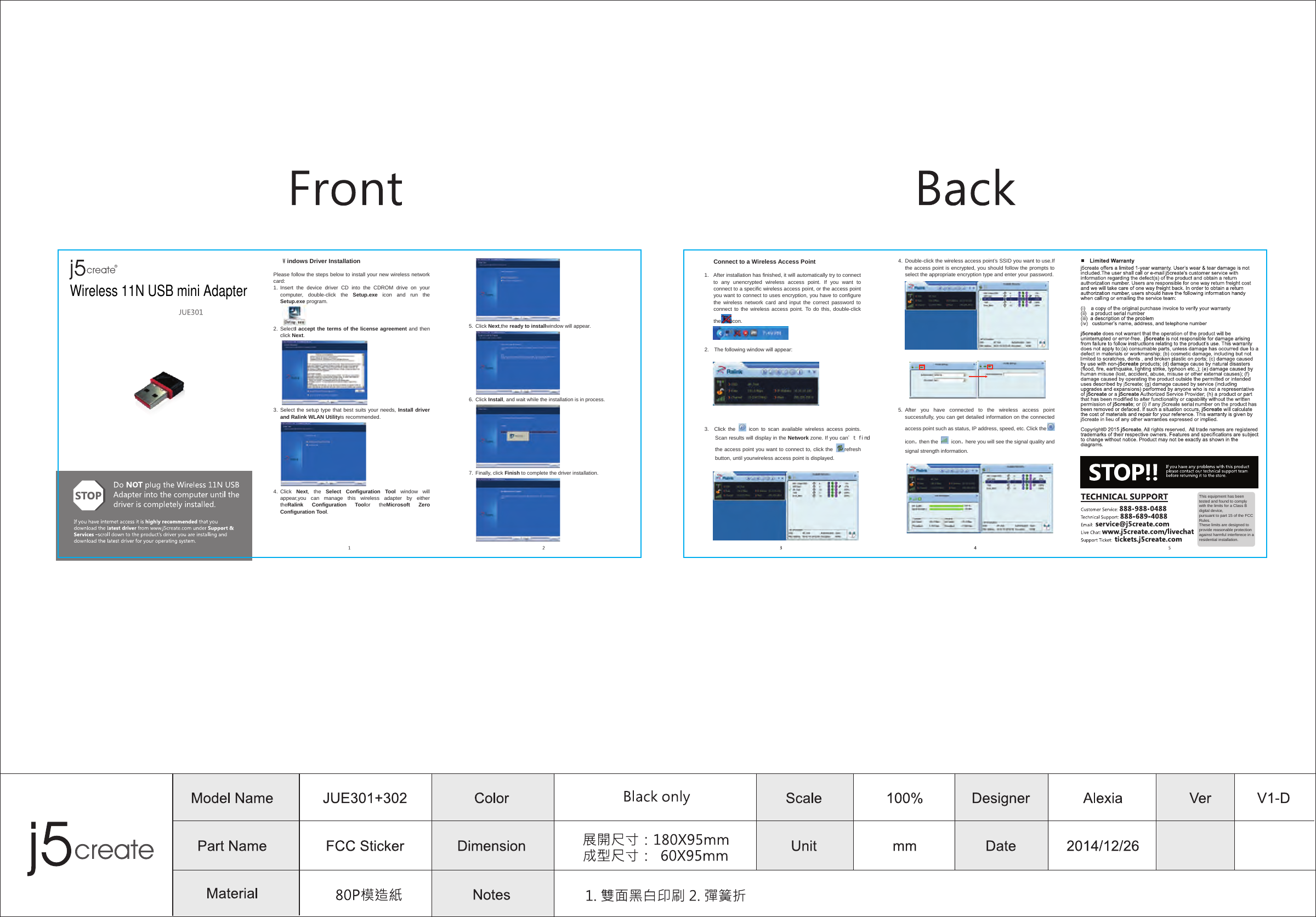
� Windows Driver Installation Please follow the steps below to install your new wireless network card: 1.  Insert  the  device  driver  CD  into  the  CDROM  drive  on  your computer,  double-click  the  Setup.exe  icon  and  run  the Setup.exe program.  2.  SelectI accept the terms of the license agreement and then click Next.  3.  Select the setup type that best suits your needs, Install driver and Ralink WLAN Utilityis recommended.  4.  Click  Next,  the  Select  Configuration  Tool  window  will appear,you  can  manage  this  wireless  adapter  by  either theRalink  Configuration  Toolor  theMicrosoft  Zero Configuration Tool.  5.  Click Next,the ready to installwindow will appear.  6.  Click Install, and wait while the installation is in process.  7.  Finally, click Finish to complete the driver installation.  � Connect to a Wireless Access Point 1.  After installation has finished, it will automatically try to connect to  any  unencrypted  wireless  access  point.  If  you  want  to connect to a specific wireless access point, or the access point you want to connect to uses encryption, you have to configure the  wireless  network  card  and  input  the  correct  password  to connect to the  wireless access point.  To do  this, double-click the icon.   2.    The following window will appear:     3.    Click  the    icon  to  scan  available  wireless  access  points. Scan results will display in the Network zone. If you can't find the access point you want to connect to, click the  refresh button, until yourwireless access point is displayed.   4. Double-click the wireless access point’s SSID you want to use.If the access point is encrypted, you should follow the prompts to select the appropriate encryption type and enter your password.5. After  you  have  connected  to  the  wireless  access  point successfully, you can get detailed information on the connected access point such as status, IP address, speed, etc. Click theicon then the  icon here you will see the signal quality and signal strength information.This equipment has been tested and found to comply with the limits for a Class B digital device,pursuant to part 15 of the FCC Rules.These limits are designed to provide reasonable protection against harmful interferece in a residential installation.Wireless 11N USB mini Adapter
 FCC Information and Copyright  This equipment has been tested and found to comply with the limits for a Class B digital device, pursuant to part 15 of the FCC Rules. These limits are designed to provide reasonable protection against harmful interference in a residential installation. This equipment generates, uses and can radiate radio frequency energy and, if not installed and used in accordance with the instructions, may cause harmful interference to radio communications. However, there is no guarantee that interference will not occur in a particular installation. If this equipment does cause harmful interference to radio or television reception, which can be determined by turning the equipment off and on, the user is encouraged to try to correct the interference by one or more of the following measures: —Reorient or relocate the receiving antenna. —Increase the separation between the equipment and receiver. —Connect the equipment into an outlet on a circuit different from that to which the receiver is connected. —Consult the dealer or an experienced radio/TV technician for help.  15.19 Labelling requirements. This device complies with part 15 of the FCC Rules. Operation is subject to the following two conditions: (1)This device may not cause harmful interference, and   (2) this device must accept any interference received, including interference that may cause undesired operation.  changes or modifications not expressly approved by the party responsible for compliance could void the user's authority to operate the equipment.  FCC RF warning statement: the device has been evaluated to meet general RF exposure requirement , The device can be used in portable exposure condition without restriction.

Navigation menu