KINGTA TECHNOLOGY P10 Bluetooth speaker User Manual
KINGTA TECHNOLOGY CO., LTD Bluetooth speaker
User manual
User Manual
Product Name: Bluetooth speaker
Model: P10,P16
Manufacture: KINGTA TECHNOLOGY CO., LTD

P10
Introduction
Thank you for choosing the P10 as your source for
e n t e r t a i n m e n t ! you can use this item with iPads ,
iPhones,iPods and many types of smartphone to stream
music ,and enjoy handsfree calling.In order to get the best
results when using the device,please read this manual first
before using.
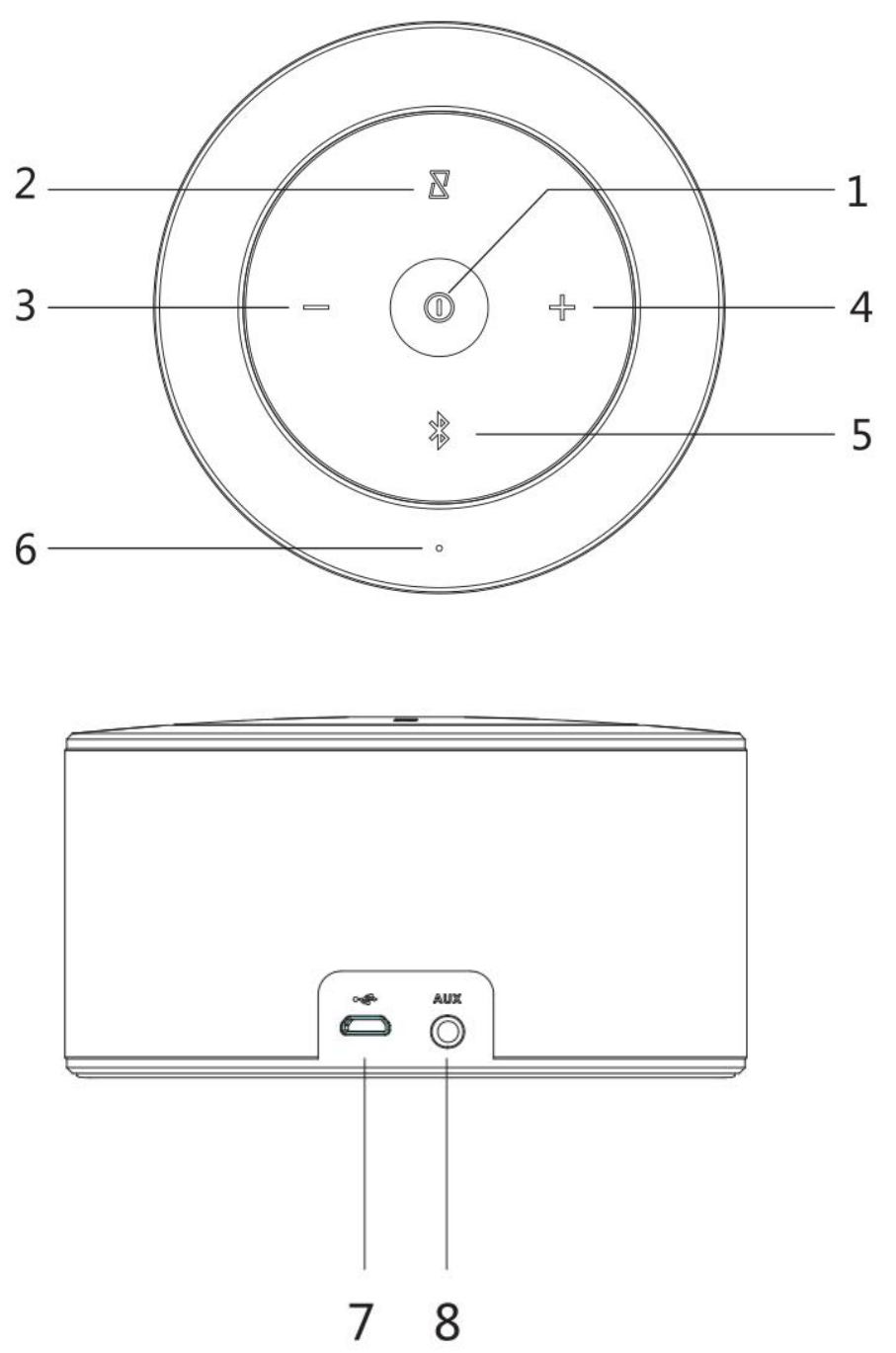
Description:
1.ON/OFF /Play/Pause/Phone button
2.multiple point button
3.Previous/Volume –
4.Next/Volume +
5.Bluetooth LED
6.MIC
7.Micro USB Charging Port
8.AUX in Port
Included:
1.Speaker
2.USB Micro Charging Cable
3.3.5 mm Audio Cable
4.User Manual

Specifications
Supported Profiles: A2DP, HFP, AVRCP,HSP
Bluetooth Range: 33ft (10m)
Dimensions: 120 mm x 120 mm x 60mm
Battery: Li-Ion 3.7V, 2400 mAh
Charging: DC5V±0.5/650mA
Weight: 412g
Operation
Powering On
Press and Hold " " button 2 seconds to power ON .
Powering Off
Press and Hold " " button 2 seconds to power off .
Begin Streaming Music
Press “ ” to start playing music
Press and Hold “ ” 2 seconds to play the next track
Press and Hold “ ” 2 seconds to play previous track
Press either “ ” or “ ” for volume control
Making and Receiving Phone Calls
When the unit is connected and paired to your device,
the unit allows you to make or receive phone calls with its
built-in microphone.
Press “ ” to accept a call
To end a call press “ ”
Bluetooth Mode
Pairing
In order to pair your Bluetooth audio device to your
Bluetooth Speaker for the first time, follow the steps
below:
1. Make sure your Bluetooth audio source is held within
ten meters of your speaker.
2. Press and hold “ “to power on the Bluetooth
Speaker, “ “ LED will be blink to indicate shave
entered pairing status.
3. Go to the Bluetooth Manager of your Bluetooth audio
source. Please refer to the User’s Manual of your
Bluetooth audio source for more information.
4. Search Bluetooth devices and select “P10”

5. Once paired, the “ “ will be solid and you can use
your speaker to listen to audio from you Bluetooth
sound source.
*** P10 support reconnection function
Note: Bluetooth Timeout :10 minutes
Aux-In Mode
Plug in the supplied 3.5 mm cable into the unit. The other
end is connected to your device. The unit will
automatically enter the Aux-In Mode .
Please note music and volume can be controlled by your
device.
Bluetooth Disconnection
When the unit is connected and paired to your device,
press and hole " “ to disconnect the Bluetooth Mode

Charging
Attach the USB cable to the unit, and plug into any USB
charger. If the unit is completely discharged, it will take
approximately 4 hours to fully charge.
Note:There will be a beep when the battery is low and
needs to be recharged.
These three key lights will be
slow lighting alternating when
charging , They will stop and
keep lighting once fully
charging .

Multiple point function ( TWS Wireless Stereo
Mode )
If you have two pieces P10, you can use TWS to achieve
wireless stereo combined playing music.
1、Make sure two P10 is without any Bluetooth
connection.
2、Power on both speakers, and press “ “button on
one of the speaker, the two speakers will connect
automatically with separate tone. When” ”LED blink on
the one speaker and “ “keeps solid
on the other one, it means the TWS connection is
successful.
3、Then you can search Bluetooth Device and select
“P10”.
4、Bluetooth Disconnection
Press and Hold “ ” 2 seconds to disconnect the
Bluetooth Mode.
5、Press and Hold " " button 2 seconds on one of
the units , both units will be power off

Troubleshooting
Unit doesn’t connect to device
Speaker needs to be
connected/re-paired to device
A tone is heard every few
seconds
Speaker needs to be charged
Unit will not power on Speaker needs to be charged
Unit doesn’t control
track(s)/volume
Speaker needs to be in
Bluetooth mode for full
control
Unit distorts at
high volume
The devices’ volume needs to
be lowered
FCC Caution.
This device complies with part 15 of the FCC Rules. Operation is subject to the following two
conditions: (1) This device may not cause harmful interference, and (2) this device must accept
any interference received, including interference that may cause undesired operation.
Any Changes or modifications not expressly approved by the party responsible for compliance
could void the user's authority to operate the equipment.
Note: This equipment has been tested and found to comply with the limits for a Class B digital
device, pursuant to part 15 of the FCC Rules. These limits are designed to provide reasonable
protection against harmful interference in a residential installation. This equipment generates
uses and can radiate radio frequency energy and, if not installed and used in accordance with the
instructions, may cause harmful interference to radio communications. However, there is no
guarantee that interference will not occur in a particular installation. If this equipment does
cause harmful interference to radio or television reception, which can be determined by turning
the equipment off and on, the user is encouraged to try to correct the interference by one or
more of the following measures:
-Reorient or relocate the receiving antenna.
-Increase the separation between the equipment and receiver.
-Connect the equipment into an outlet on a circuit different from that to which the receiver is
connected.
-Consult the dealer or an experienced radio/TV technician for help.
The device has been evaluated to meet general RF exposure requirement. The device can be used
in portable exposure condition without restriction.