Kaba Simplex 6000/6200 Changing The Code KAA1157 6000 6200
User Manual: Kaba Simplex 6000/6200 Changing the Code - KAA1157 Simplex 6200 Mechanical Lock - Kaba Access & Data Systems
Open the PDF directly: View PDF  .
.
Page Count: 2
Changing the Code/Combination
Simplex 6200
6200 Series FAQ
Changing the Code/Combination
Note: If your lock is opening on every turn of the knob or lever, except upon entering a code, this may
be a ZERO CODE. Before attempting to remove the lock from the door, refer to the troubleshooting
procedures outlined at bottom of this document for a zero code symptom/solution.
For your security the combination must be changed when the lock is in-
stalled. Perform this procedure with the door open.
The factory-set code is 2 and 4 depressed simultaneously release, followed by 3
release. This code should be changed as soon as the lock is installed.
1. Turn the thumbturn to the left (counterclockwise) to the stop position
and release. This will clear any random entries from the mechanism.
2. Enter the existing combination.
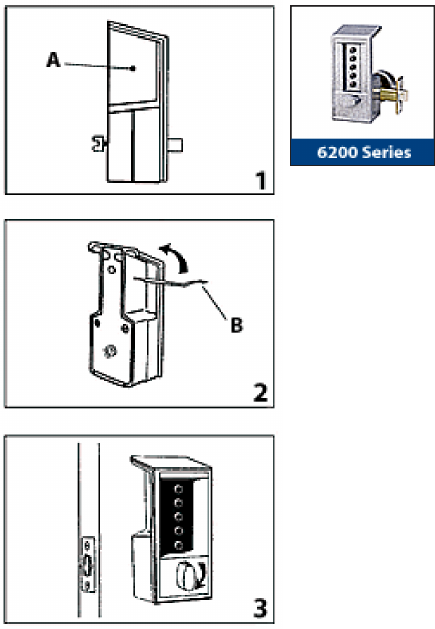
3. Gently remove the rubber cap (A) covering the combination change
hole and save (see gure 1).
4. Insert the pointed end of the spanner wrench (B) into the combination
change hole as shown (see gure 2).
5. Gently lift up until a slight click is heard or felt. Do not force.
6. Remove the spanner wrench.
7. Turn the outside thumbturn to the left (counterclockwise) to the stop
position and release to clear the old combination.
8. Select a new code and write it down (some or all of the buttons may be
used for your new code, depressed individually or simultaneously). Each
button may be used only once.
9. With the door open, enter your new code. Depress each button fully and
release. A slight click should be felt as each button is depressed.
10. Turn the thumbturn to the right (clockwise) to the stop position and
hold. The latch should retract (see gure 4).
11. Release the thumbturn.
KAA1157 0108
12. Try to turn the thumbturn to the right (clockwise) again. The thumbturn will not turn
clockwise unless the correct combination is entered.
Note: Excessive force will slip the thumbturn 180°. The slipping mechanism (force-proof clutch) pro-
tects the lock’s internal mechanism from forced entry.
13. Turn the thumbturn to the left (counterclockwise) to the stop position.
This will clear any previously depressed buttons.
14. Enter the new combination. Turn the thumbturn to the right (clockwise).
The thumbturn should rotate. The latch will be retracted ush with the face plate. The correct
combination must be entered each time you want to unlock the door.
15. Replace the rubber cap to cover the combination change hole.
Troubleshooting
Symptom/problem: Without depressing any buttons, the outside thumbturn always retracts the
latch when it is turned clockwise.
Cause: Lock is in zero combination.
Solution: Follow the procedure for changing a combination except omit step 2 (do not enter the
existing combination).
