Kandao lightforge KDOZ 3D VR Digital Camera User Manual
Kandao lightforge Co., Ltd. 3D VR Digital Camera Users Manual
UserManual.wiki
>
Kandao lightforge
>
KDOZ User Manual
Users Manual
Navigation menu
Upload a User Manual
Namespaces
Wiki Guide
HTML
PDF
Info
Views
User Manual
Discussion / Help
Navigation

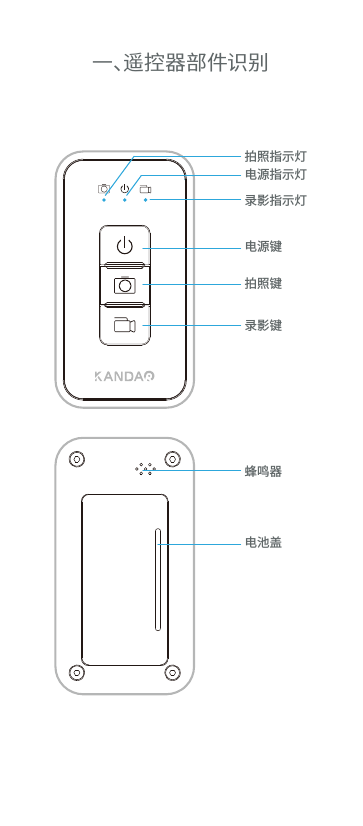
![二、通过遥控器控制相机短按遥控器[拍照键] ,[蜂鸣器]和[电源指示灯]同时响应1次,相机进入Timelapse 10秒拍照模式后,遥控器[拍照指示灯]慢闪提示,再次短按[拍照键],相机实现停止拍照功能。遥控器电池盖抠手的位置取下电池盖可装取2节7号干电池。 2.2 拍照2.1 安装电池和连接相机连接相机:先开启相机, 再任意按摇控器上的按键, 遥控器启动并进入连接状态,[电源指示灯]慢闪直到连接完成后, [电源指示灯]会灭掉 。电池短按遥控器[录像键] ,[蜂鸣器]和[电源指示灯]同时响应1次,相机进入录像模式后,遥控器录像指示灯呈慢闪提示,再次短按遥控器录像键,相机实现停止录像功能。2.3 录像](https://usermanual.wiki/Kandao-lightforge/KDOZ/User-Guide-3618151-Page-4.png)
![温馨提示:1. 遥控器只要有按键操作,[电源指示灯]和[蜂鸣器]都会同时响应;2.相机如在使用过程中出现故障,遥控器上的[指示灯]会呈快闪的方式提醒。长按遥控器[电源键] ,相机实现关机功能后遥控器自动进入休眠状态,所有指示灯灭。2.4 关机2.5 遥控器指示灯状态说明慢闪 快闪相机与遥控器正常连接,相机为待机状态相机开机状态下,但未能与遥控器配对未连上相机拍照中相机录影中相机拍照中发生异常,此时会与电源灯一起闪烁相机录像中发生异常,此时会与电源灯一起闪烁相机低电,相机不正常工作时遥控器开启状态下,短按遥控器电源键,遥控器进入休眠模式.再次短按遥控器任意键可实现遥控器唤醒。](https://usermanual.wiki/Kandao-lightforge/KDOZ/User-Guide-3618151-Page-5.png)
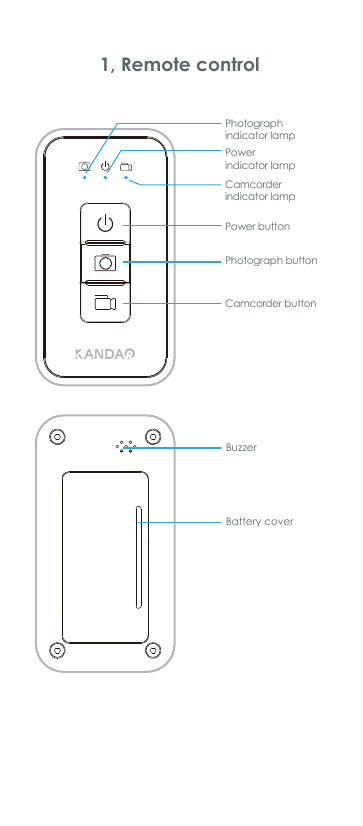
![2, Operate with remote controlShortlypress the [photograph button] on remote control, you will hear a buzz as [power indicator lamp]flashesonce. After that,the camera comes into 10-second time-lapse mode,[photograph indicator lamp] on remote control will flash slowly,shortly press [photograph button] again to stop taking photograph . Shortlypressthe[camcorder button] on the remote control, the buzzer will respond and [power indicator lamp] will flash onceasrecording starts. During the recording process, [camcorder indication lamp]on the remote control will flash slowly. Shortlypress[camera button] again to end recording.Open the battery cover of the remote control, then two AAA batteries can be installed into the remote control. 2.2 Photograph2.3 Video-record2.1 Assemble the battery and connect with cameraSwitch on camera first, then press any button on the remote control to start connecting, during this process [power indicator lamp] will flash slowly, and then go off after the connection is done.batteries](https://usermanual.wiki/Kandao-lightforge/KDOZ/User-Guide-3618151-Page-8.png)
![2.5 Indicator lamp descriptionReminder:1. In a normal working status, once a button is pressed on remote control, [power indicator lamp] and [buzzer] will both respond.2. If the camera is in abnormal status, all indicator lamps on the remote control will flash quickly.Camera is in dormancyCamera is on but disconnected with remote controlTaking a photographRecording a videoAn error has occurred during taking a photographAn error has occurred during recording a videoLow power/ camera is in abnormal statusSlow flash Quick flash2.4 Power off](https://usermanual.wiki/Kandao-lightforge/KDOZ/User-Guide-3618151-Page-9.png)