King Sound Electronic and Technology KSE-008 bluetooth headsets User Manual MI

King-Sound Electronic & Technology Co., Ltd bluetooth headsets MI

User Manual

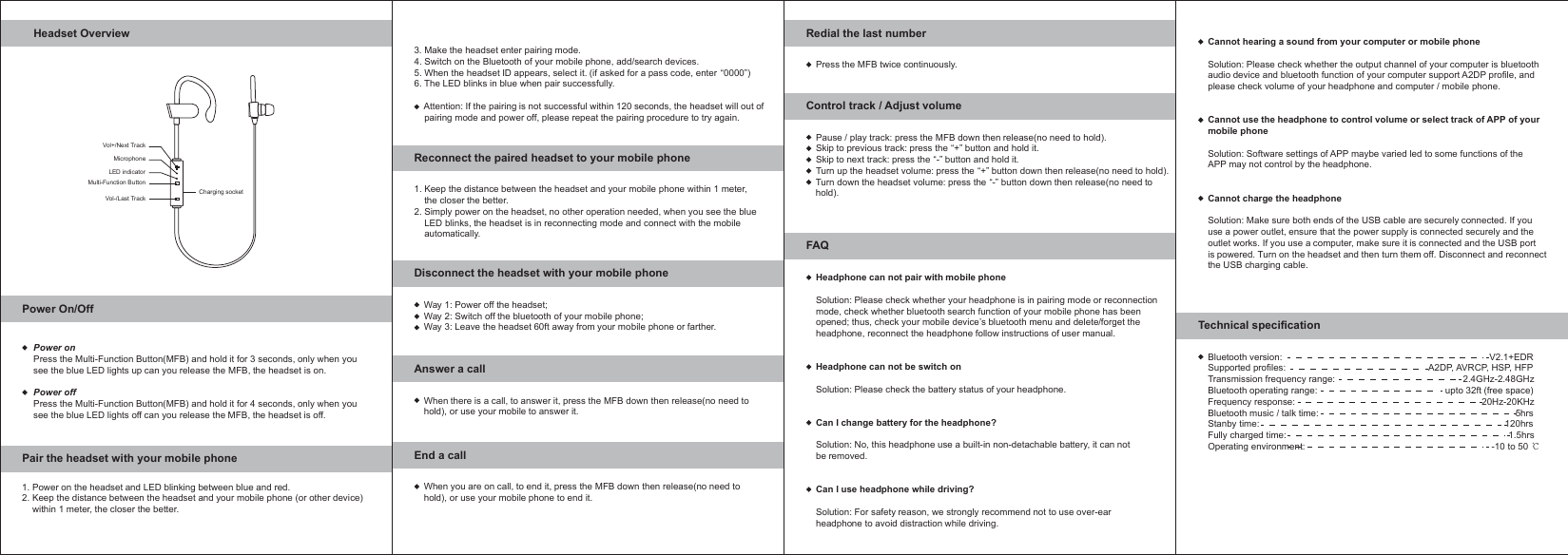
Headset OverviewPower On/OffPair the headset with your mobile phoneVol+/Next TrackVol-/Last TrackMulti-Function ButtonLED indicatorMicrophoneCharging socketPower onPress the Multi-Function Button(MFB) and hold it for 3 seconds, only when yousee the blue LED lights up can you release the MFB, the headset is on.Power offPress the Multi-Function Button(MFB) and hold it for 4 seconds, only when yousee the blue LED lights off can you release the MFB, the headset is off.1. Power on the headset and LED blinking between blue and red.2. Keep the distance between the headset and your mobile phone (or other device)    within 1 meter, the closer the better.Reconnect the paired headset to your mobile phone3. Make the headset enter pairing mode.4. Switch on the Bluetooth of your mobile phone, add/search devices.5. When the headset ID appears, select it. (if asked for a pass code, enter “0000”)6. The LED blinks in blue when pair successfully.    Attention: If the pairing is not successful within 120 seconds, the headset will out of    pairing mode and power off, please repeat the pairing procedure to try again. Way 1: Power off the headset;Way 2: Switch off the bluetooth of your mobile phone;Way 3: Leave the headset 60ft away from your mobile phone or farther.1. Keep the distance between the headset and your mobile phone within 1 meter,    the closer the better.2. Simply power on the headset, no other operation needed, when you see the blue    LED blinks, the headset is in reconnecting mode and connect with the mobile    automatically.Disconnect the headset with your mobile phoneWhen there is a call, to answer it, press the MFB down then release(no need tohold), or use your mobile to answer it.Answer a callWhen you are on call, to end it, press the MFB down then release(no need tohold), or use your mobile phone to end it.End a callPress the MFB twice continuously.Redial the last numberBluetooth version:                                                                                 V2.1+EDRSupported profiles:                                                        A2DP, AVRCP, HSP, HFPTransmission frequency range:                                                  2.4GHz-2.48GHzBluetooth operating range:                                                  upto 32ft (free space)Frequency response:                                                                         20Hz-20KHzBluetooth music / talk time:                                                                             5hrs Stanby time:                                                                                                120hrs Fully charged time:                                                                                       1.5hrsOperating environment:                                                                         -10 to 50Technical specificationPause / play track: press the MFB down then release(no need to hold).Skip to previous track: press the “+” button and hold it.Skip to next track: press the “-” button and hold it.Turn up the headset volume: press the “+” button down then release(no need to hold).Turn down the headset volume: press the “-” button down then release(no need to hold).Control track / Adjust volumeHeadphone can not pair with mobile phoneSolution: Please check whether your headphone is in pairing mode or reconnectionmode, check whether bluetooth search function of your mobile phone has beenopened; thus, check your mobile device’s bluetooth menu and delete/forget theheadphone, reconnect the headphone follow instructions of user manual.Headphone can not be switch onSolution: Please check the battery status of your headphone.Can I change battery for the headphone?Solution: No, this headphone use a built-in non-detachable battery, it can notbe removed.Can I use headphone while driving?Solution: For safety reason, we strongly recommend not to use over-earheadphone to avoid distraction while driving.FAQCannot hearing a sound from your computer or mobile phoneSolution: Please check whether the output channel of your computer is bluetoothaudio device and bluetooth function of your computer support A2DP profile, andplease check volume of your headphone and computer / mobile phone.Cannot use the headphone to control volume or select track of APP of yourmobile phoneSolution: Software settings of APP maybe varied led to some functions of theAPP may not control by the headphone.Cannot charge the headphoneSolution: Make sure both ends of the USB cable are securely connected. If youuse a power outlet, ensure that the power supply is connected securely and theoutlet works. If you use a computer, make sure it is connected and the USB portis powered. Turn on the headset and then turn them off. Disconnect and reconnectthe USB charging cable.
FCC Caution: Anychanges ormodifications not expressly approved bythe partyresponsibleforcompliancecouldvoidthe user's authoritytooperate this equipment.This devicecomplieswithPart15 of theFCC Rules.Operationissubject tothefollowingtwoconditions:(1)This devicemaynotcause harmfulinterference,and(2)thisdevicemust acceptanyinterferencereceived,includinginterference thatmaycauseundesiredoperation.NOTE:This equipment has been testedandfound to complywith thelimitsfor a ClassBdigitaldevice,pursuant toPart15 of theFCC Rules.Theselimits are designedto providereasonable protectionagainstharmfulinterferencein a residentialinstallation.This equipment generates, uses and canradiateradiofrequencyenergyand,if notinstalledandusedin accordancewith theinstructions,maycause harmfulinterferencetoradiocommunications.However,thereis noguaranteethatinterferencewillnot occurin a particularinstallation.Ifthisequipmentdoescauseharmfulinterferencetoradioortelevisionreception,whichcanbedeterminedbyturningthe equipment off and on, the useris encouraged to trytocorrect the interference byone ormore of the followingmeasures:FCC RF RadiationExposureStatement:This equipmentcomplieswithFCCradiationexposurelimitssetforthfor an uncontrolledenvironmentEndusersmustfollowthespecific operatinginstructionsforsatisfying RFexposurecompliance.This transmittermust not be collocatedor operatinginconjunctionwithanyother antenna or transmitter.The devicehas beenevaluatedtomeet general RF exposurerequirement.Thedevicecanbeusedinportableexposureconditionwithoutrestriction.

Navigation menu