Kramer Electronics KW11-R KW-11R User Manual KW 11T
Kramer Electronics Ltd. KW-11R KW 11T
Users Manual

KRAMER ELECTRONICS LTD.
USER MANUAL
MODELS:
KW-11T
Wireless High Definition
Transmitter
KW-11R
Wireless High Definition
Receiver
P/N: 2900-300194 Rev 3

KW-11T/KW-11R – Contents i
Contents
1 Introduction 1
2 Getting Started 2
2.1 Achieving the Best Performance 2
3 Overview 3
3.1 About HDMI—General Description 3
3.2 About HDCP—General Description 4
4 Defining the KW-11T/KW-11R Line Transmitter and Receiver 5
4.1 Defining the KW-11T Wireless High Definition Transmitter 5
4.2 Defining the KW-11R Wireless High Definition Receiver 6
5 Connecting the KW-11T and KW-11R 7
5.1 Connecting the KW-11T and KW-11R 7
6 Technical Specifications 9
7 FCC Radio Frequency Interference Statement 10
Figures
UFigure 1: KW-11T Wireless High Definition Transmitter Top and Side PanelsU 5
UFigure 2: KW-11R Wireless High Definition Receiver Front and Rear PanelsU 6
UFigure 3: Connecting the KW-11T and KW-11RU 7

KW-11T/KW-11R - Introduction 1
1
1 Introduction
Welcome to Kramer Electronics! Since 1981, Kramer Electronics has been
providing a world of unique, creative, and affordable solutions to the vast range of
problems that confront video, audio, presentation, and broadcasting professionals
on a daily basis. In recent years, we have redesigned and upgraded most of our
line, making the best even better!
Our 1,000-plus different models now appear in 11 groups that are clearly defined
by function: GROUP 1: Distribution Amplifiers; GROUP 2: Switchers and Routers;
GROUP 3: Control Systems; GROUP 4: Format/Standards Converters; GROUP 5:
Range Extenders and Repeaters; GROUP 6: Specialty AV Products; GROUP 7:
Scan Converters and Scalers; GROUP 8: Cables and Connectors; GROUP 9:
Room Connectivity; GROUP 10: Accessories and Rack Adapters and GROUP 11:
Sierra Video Products.
Thank you for purchasing the Kramer DigiTOOLS® KW-11T Wireless High
Definition Transmitter and KW-11R Wireless High Definition Receiver which are
ideal for:
• Home theater
• Presentation and multimedia applications
• Short range video and audio distribution
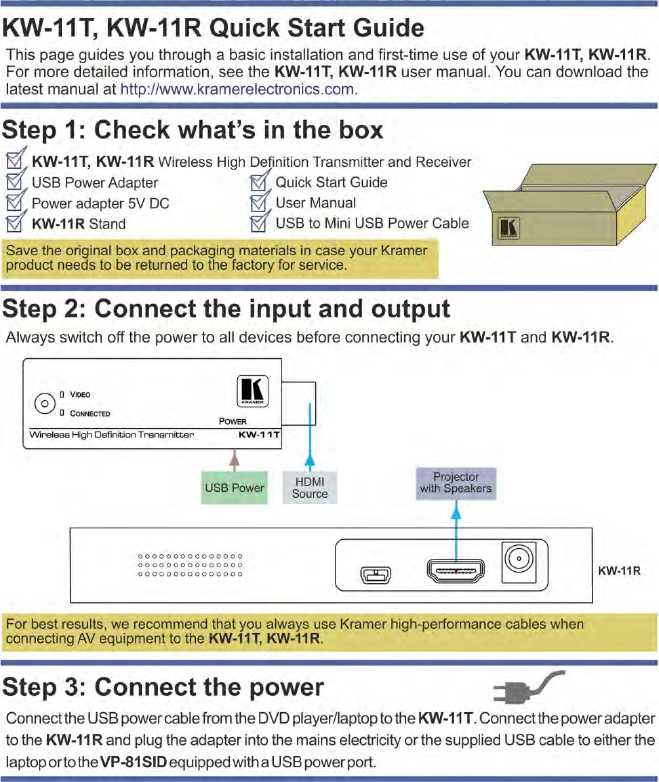
Each package includes the following items:
• KW-11T Wireless High Definition Transmitter
• KW-11R Wireless High Definition Receiver
• USB power adapter (5V DC)
• Power adapter (5V DC)
• USB to Mini USB power cable
• KW-11R vertical mounting stand
• This user manual
Download up-to-date Kramer user manuals from http://www.kramerelectronics.com

2 KW-11T/KW-11R - Getting Started
2 Getting Started
We recommend that you:
• Unpack the equipment carefully and save the original box and packaging
materials for possible future shipment
• Review the contents of this user manual
• Use Kramer high performance high resolution cables
Go to http://www.kramerelectronics.com to check for up-to-date
user manuals, application programs, and to check if firmware
upgrades are available (where appropriate).
Caution: No operator serviceable parts inside the unit
Warning: Use only the Kramer Electronics input power wall
adapter that is provided with the unit
Warning: Disconnect the power and unplug the unit from the
wall before installing
2.1 Achieving the Best Performance
To achieve the best performance:
• Use only good quality connection cables to avoid interference, deterioration
in signal quality due to poor matching, and elevated noise levels (often
associated with low quality cables)
• Always mount the KW-11R vertically using the supplied stand
• Do not place objects next to the KW-11T transmitter or KW-11R receiver
• Do not secure the cables in tight bundles or roll the slack into tight coils
• Avoid interference from neighboring electrical appliances that may adversely
influence signal quality
• Position your Kramer KW-11T and KW-11R away from moisture, excessive
sunlight and dust
i
!

KW-11T/KW-11R - Overview 3
3
3 Overview
The KW-11T and KW-11R is a high-definition, wireless, HDMI transmitter and
receiver combination for indoor use over short range distances.
The KW-11T converts an HDMI signal into a wireless signal. The KW-11R
converts the wireless signal back into HDMI.
The KW-11T and KW-11R support:
• Uncompressed video resolutions up to 1080p @60Hz
• Zero latency
• EDID
• HDCP
• CEC
• OSD (On Screen Display)
• A transmission range of up to 12m (39ft)
3.1 About HDMI—General Description
High-Definition Multimedia Interface (HDMI) is an uncompressed all-digital
audio/video interface, widely supported in the entertainment and home cinema
industry. HDMI ensures an all-digital rendering of video without the losses
associated with analog interfaces and their unnecessary digital-to-analog
conversions. It delivers the maximum high-definition image and sound quality in use
today. Note that Kramer Electronics Limited is an HDMI Adopter and an HDCP
Licensee.
HDMI, the HDMI logo and High-Definition Multimedia Interface are trademarks or registered
trademarks of HDMI licensing LLC.
In particular, HDMI:
• Provides a simple interface between any audio/video source, such as a set-
top box, DVD player, or A/V receiver and video monitor, such as a digital flat
LCD / plasma television (DTV), over a single lengthy cable
SIMPLICITY - With video and multi-channel audio combined into a single cable, the cost,
complexity, and confusion of multiple cables currently used in A/V systems is reduced

4 KW-11T/KW-11R - Overview
LENGTHY CABLE - HDMI technology has been designed to use standard copper cable
construction at up to 15m
• Supports standard, enhanced, high-definition video, and multi-channel digital
audio on a single cable
MULTI-CHANNEL DIGITAL AUDIO - HDMI supports multiple audio formats, from
standard stereo to multi-channel surround-sound. HDMI has the capacity to support
Dolby 5.1 audio and high-resolution audio formats
• Transmits all ATSC HDTV standards and supports 8-channel digital audio,
with bandwidth to spare to accommodate future enhancements and
requirements
• Benefits consumers by providing superior, uncompressed digital video quality
via a single cable, and user-friendly connector
HDMI provides the quality and functionality of a digital interface while also supporting
uncompressed video formats in a simple, cost-effective manner
• Is backward-compatible with DVI (Digital Visual Interface)
• Supports CEC, two-way communication between the video source (such as a
DVD player) and the digital television, enabling new functionality such as
automatic configuration and one-button play
• Has the capacity to support existing high-definition video formats (720p,
1080i, and 1080p @60), standard definition formats such as NTSC or PAL,
as well as 480p and 576p
3.2 About HDCP—General Description
The High-Bandwidth Digital Content Protection (HDCP) standard developed by
Intel, protects digital video and audio signals transmitted over DVI or HDMI
connections between two HDCP-enabled devices to eliminate the reproduction of
copyrighted material. To protect copyright holders (such as movie studios) from
having their programs copied and shared, the HDCP standard provides for the
secure and encrypted transmission of digital signals.
KW-11T/KW-11R - Defining the KW-11T/KW-11R Line Transmitter and Receiver 5
5
4 Defining the KW-11T/KW-11R Line
Transmitter and Receiver
This section defines the:
• KW-11T Wireless High Definition Transmitter (see Section 4.1
• KW-11R Wireless High Definition Receiver (see
)
Section 4.2
4.1 Defining the KW-11T Wireless High Definition
Transmitter
)
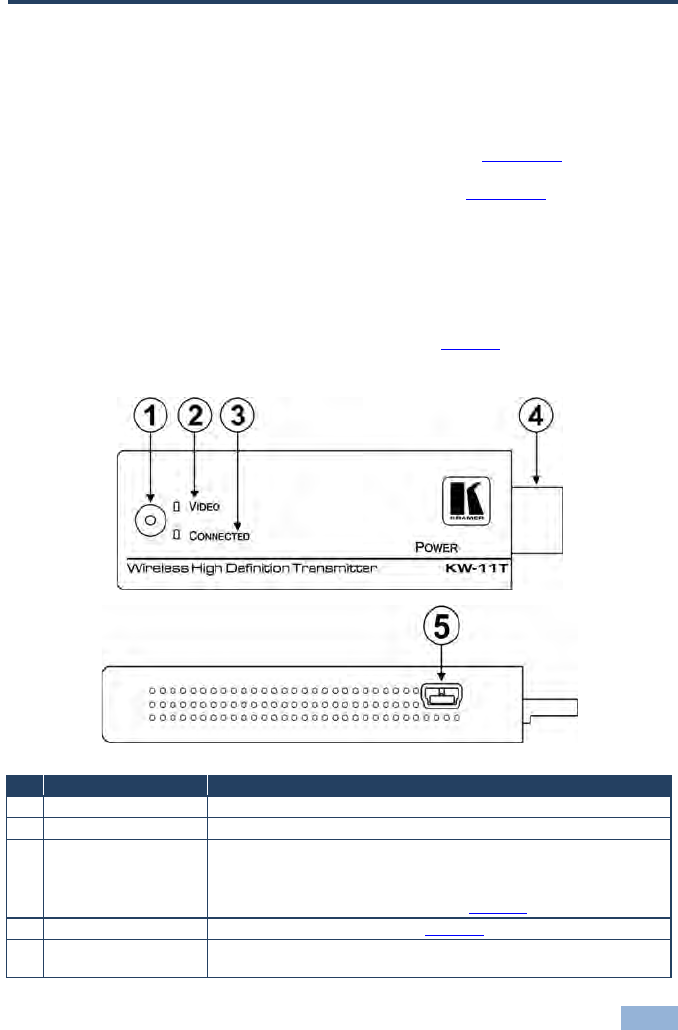
The KW-11T encodes an HDMI signal and transmits it uncompressed and without
delay over a wireless link to the KW-11R receiver. Figure 1 defines the top and
side panels of the KW-11T.
Figure 1: KW-11T Wireless High Definition Transmitter Top and Side Panels
# Feature Function
1 Code Button For factory use only
2 VIDEO LED Lights green when there is a valid HDMI input signal
3 CONNECTED LED Indicates the following:
• Lights blue when there is a wireless connection to the receiver
• Does not light when there is no connection
• Flashes to indicate a device fault (see Section 5
4
)
HDMI Input Connector Connect to the HDMI source (see Section 5
5
)
POWER Mini-USB
Connector Connect to the supplied 5V DC USB power adapter
6 KW-11T/KW-11R - Defining the KW-11T/KW-11R Line Transmitter and Receiver
4.2 Defining the KW-11R Wireless High Definition Receiver
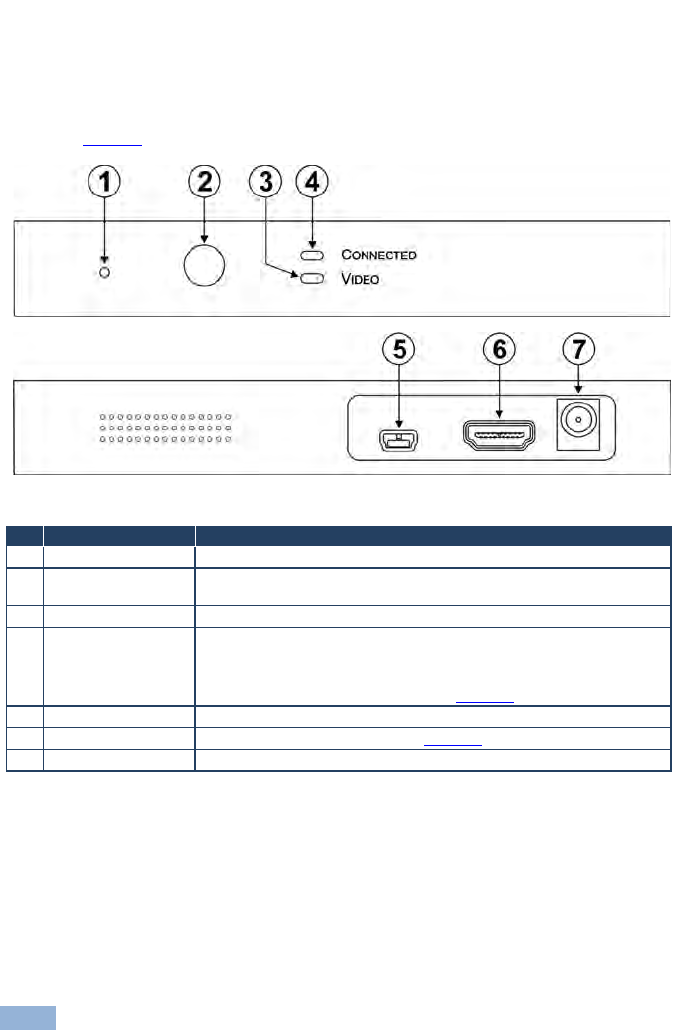
The KW-11R receives the wireless signal from the Kramer KW-11T and converts
it into an HDMI output.
Figure 2 defines the front and rear panels of the KW-11R.
Figure 2: KW-11R Wireless High Definition Receiver Front and Rear Panels
# Feature Function
1 Code Button For factory use only
2 Infrared Receiver
Window For factory use only
3 VIDEO LED Lights green when there is a valid HDMI signal
4 CONNECTED LED Indicates the following:
• Lights green when there is a wireless connection to the transmitter
• Does not light when there is no connection
• Flashes to indicate a device fault (see Section 5
5
)
USB Connector For the use of Kramer service personnel only
6 HDMI OUT Connector Connect to the HDMI acceptor (see Section 5
7
)
POWER Connector Connect to the supplied +5V DC power adapter. Center pin positive
KW-11T/KW-11R - Connecting the KW-11T and KW-11R 7
7
5 Connecting the KW-11T and KW-11R
Always switch off the power to all devices before connecting your
KW-11T and KW-11R.
5.1 Connecting the KW-11T and KW-11R
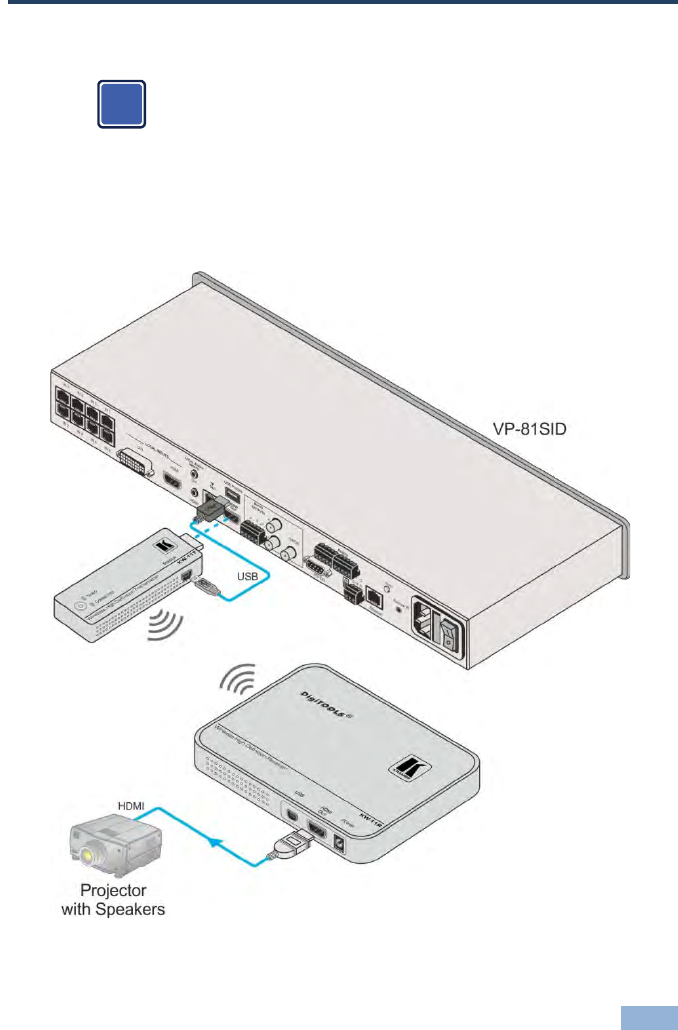
Note: For best performance always mount the KW-11R receiver vertically using
the supplied stand.
Figure 3: Connecting the KW-11T and KW-11R
i

8 KW-11T/KW-11R - Connecting the KW-11T and KW-11R
To connect the KW-11T and the KW-11R as illustrated in the example in
Figure 3:
1. On the KW-11T connect:
The HDMI source (for example, a VP-81SID or laptop computer) to the
HDMI connector
The USB Power port on the VS-81SID to the Power port on the
KW-11T using the supplied USB power cable
2. On the KW-11R connect:
The HDMI Out connector to the HDMI acceptor (for example, a
projector with speakers)
The power adapter to the Power connector and plug the power adapter
into a mains power socket
KW-11T/KW-11R - Technical Specifications 9
9
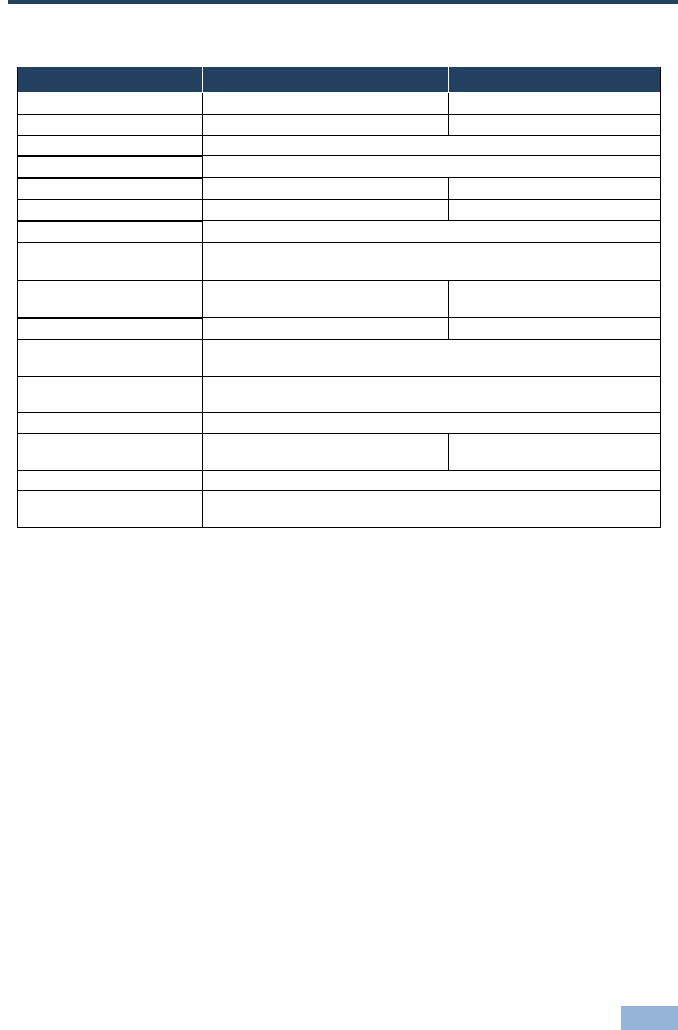
6 Technical Specifications
KW-11T KW-11R
INPUT: 1 HDMI plug on an HDMI connector Internal antenna
OUTPUT: Internal antenna 1 HDMI on an HDMI connector
VIDEO RESOLUTION: Up to SXGA, 1080p
AUDIO FORMATS: PCM, DTA, Dolby Digital
TRANSMISSION POWER: >3dBm >15dBm
RECEIVING SENSITIVITY: –75dBm –65dBm
SYSTEM LATENCY: <1ms
RF COMMUNICATION
FREQUENCY:
UNOBSTRUCTED
TRANSMISSION RANGE: 15m (49ft) 15m (49ft)
POWER CONSUMPTION: 5V DC 700mA 5V DC 1.14A
OPERATING
TEMPERATURE: 0° to +55°C (32° to 131°F)
STORAGE
TEMPERATURE: –45° to +72°C (–49° to 162°F)
HUMIDITY: 10% to 90%, RHL non-condensing
DIMENSIONS: 9.8cm x 2.9cm x 1.5cm (3.86" x 1.14"
x 0.59") W, D, H 14.8cm x 9.7cm x 1.8cm (5.83"
x 3.82" x 0.71") W, D, H
WEIGHT: 0.48kg (1.1lbs.) approx. each
ACCESSORIES: USB power supply 5V DC 2A, Power supply 5V DC 2A, HDMI cable,
receiver stand, Mini USB to USB power cable
5150-5250MHz, 5725-5825MHz

10 KW-11T/KW-11R - FCC Radio Frequency Interference Statement
7 FCC Radio Frequency Interference
Statement
This equipment has been tested and found to comply with the limits for a Class B
digital device, pursuant to part 15 of the FCC Rules. These limits are designed to
provide reasonable protection against harmful interference in a residential
installation. This equipment generates uses and can radiate radio frequency
energy and, if not installed and used in accordance with the instructions, may
cause harmful interference to radio communications. However, there is no
guarantee that interference will not occur in a particular installation. If this
equipment does cause harmful interference to radio or television reception, which
can be determined by turning the equipment off and on, the user is encouraged to
try to correct the interference by one or more of the following measures:
• Reorient or relocate the receiving antenna
• Increase the separation between the equipment and receiver
• Connect the equipment into an outlet on a circuit different from that to which
the receiver is connected
• Consult the dealer or an experienced radio/TV technician for help
Kramer Electronics is not responsible for any radio or communication interference
caused by using other than specified or recommended cables and battery or by
unauthorized changes or modifications to this equipment. Changes or
modifications not expressly approved by the manufacturer could void the user’s
authority to operate the equipment.
This device complies with part 15 of the FCC Rules. Operation is subject to the
following two conditions:
1. This device may not cause harmful interference, and
2. This device must accept any interference received, including interference
that may cause undesired operation.
11

For the latest information on our products and a list of Kramer distributors,
visit our Web site where updates to this user manual may be found.
We welcome your questions, comments, and feedback.
Web site:
E-mail:
www.kramerelectronics.com
info@kramerel.com
P/N:
2900-300194
Rev:
3
!
SAFETY WARNING
Disconnect the unit from the power
supply before opening and servicing