L T F Communication Equipment And Technology JW900B JTOUR Watch User Manual 10

L.T.F Communication Equipment And Technology CO., LTD JTOUR Watch 10

10 User Manual

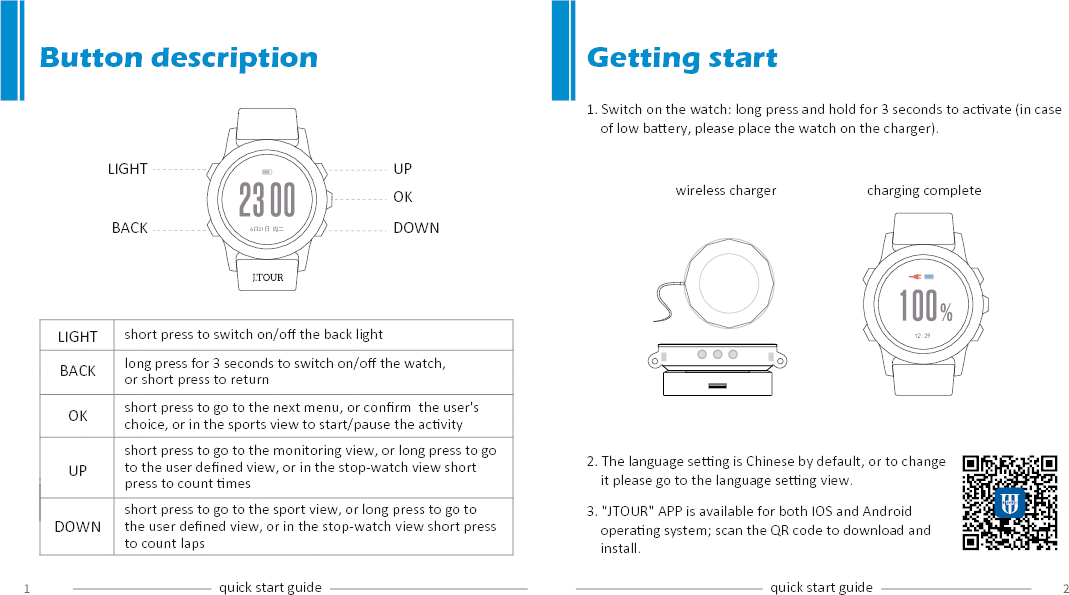
1. Switch on the watch: long press and hold for 3 seconds to acvate (in case     of low baery, please place the watch on the charger).UPOKDOWNLIGHTBACK 6月21日 周二12:29LIGHTBACKOKUPDOWNButton descriptionshort press to switch on/off the back lightlong press for 3 seconds to switch on/off the watch, or short press to return short press to go to the next menu, or confirm  the user's choice, or in the sports view to start/pause the acvityshort press to go to the monitoring view, or long press to go to the user defined view, or in the stop-watch view short press to count messhort press to go to the sport view, or long press to go to the user defined view, or in the stop-watch view short press to count lapsquick start guide quick start guideGetting startwireless charger charging complete2. The language seng is Chinese by default, or to change     it please go to the language seng view.3. "JTOUR" APP is available for both IOS and Android     operang system; scan the QR code to download and     install.

Navigation menu