L T F Communication Equipment And Technology JW900B JTOUR Watch User Manual 10
L.T.F Communication Equipment And Technology CO., LTD JTOUR Watch 10
10 User Manual
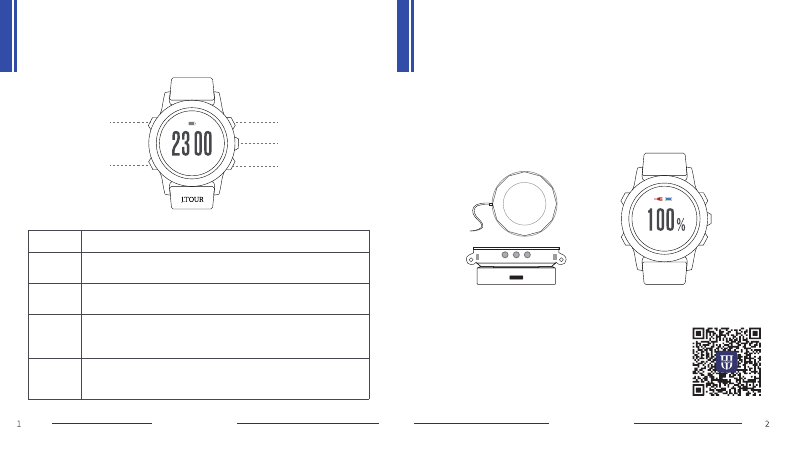
1. Switch on the watch: long press and hold for 3 seconds to acvate (in case
of low baery, please place the watch on the charger).
UP
OK
DOWN
LIGHT
BACK 6月21日 周二
12:29
LIGHT
BACK
OK
UP
DOWN
Button description
short press to switch on/off the back light
long press for 3 seconds to switch on/off the watch,
or short press to return
short press to go to the next menu, or confirm the user's
choice, or in the sports view to start/pause the acvity
short press to go to the monitoring view, or long press to go
to the user defined view, or in the stop-watch view short
press to count mes
short press to go to the sport view, or long press to go to
the user defined view, or in the stop-watch view short press
to count laps
quick start guide quick start guide
Getting start
wireless charger charging complete
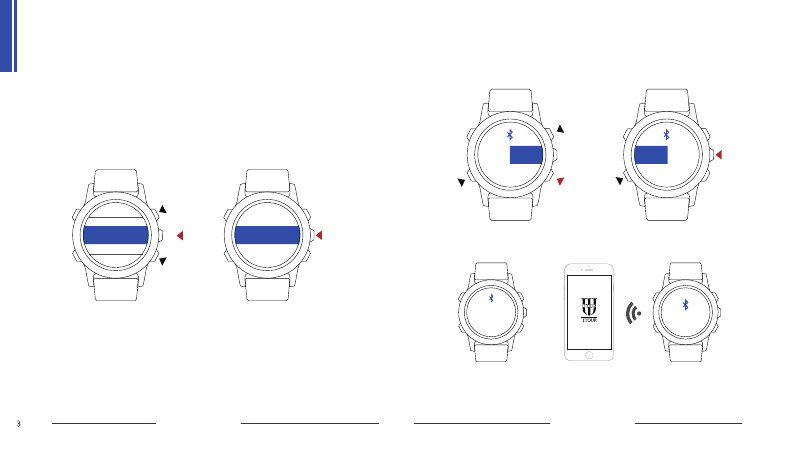
2. The language seng is Chinese by default, or to change
it please go to the language seng view.
3. "JTOUR" APP is available for both IOS and Android
operang system; scan the QR code to download and
install.
计 步
气 压
蓝 牙
语言设置
省电设置
快捷设置
训练记录
手表设置
配对码为
207056 已连接
开 关开 关
quick start guide quick start guide
Bluetooth connection
① Bluetooth seng-enter power saving seng-switch on the bluetooth;
② APP scan and pair-connect and pair the watch-transfer data.
pairing
6月21日 周二
16:56:30
徒步
16:56
16:56:30
16:56
环境监测
quick start guide quick start guide
Start using
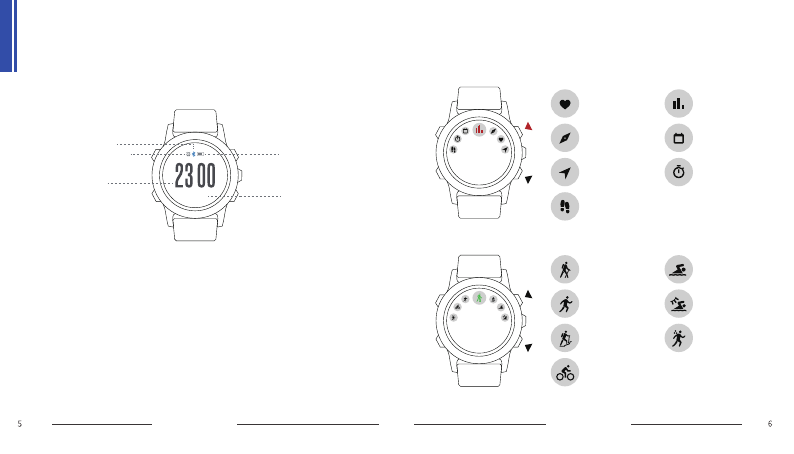
1. Standby view: me,date,baery,bluetooth and alarm.
2. funcon views:
① Monitoring funcon: heart rate, compass, posion, footstep,
environment, calendar, stop-watch;
② Sports funcon: walking, running, mountaineering, cycling,
indoor-swimming, outdoor-swimming, triathlon;
③ Seng funcon: language seng, me seng, alarm seng,
watch seng, sports records, power-saving seng, short-cut
buon seng, watch informaon.
Press up or down buon to open monitoring funcon or sports funcon,
for more detail read following illustraons:
heart rate
compass
posioning
footstep
environment
calendar
stop-watch
walking
running
mountaineering
cycling
indoor-
swimming
outdoor-
swimming
triathlon
me
date
baery
bluetooth
alarm
16:56:30
16:56:30
步数
2576
16:56:30
16:56:30
计时
0
卡路里( )
C
0:00 00
16:56:30
16:56:30
计时
20
卡路里( )
C
0:58 32
16:56:30
16:56:30
上升高度
下降高度
000
000
16:56:30
16:56:30
最近三小时
距离 m
6800
m
2
8
……………………………………………
20km/h
16:56:30
16:56:30
bmp82
60
80
100
……………………………………………
1:36 3:36 8:36 16:56:30
16:56:30
云迹地图
16:56:30 16:56:30
16:56:30
云迹导航
16:56:30
地图2
地图3
地图4
地图5
地图1
云迹导航
16:56:30
16:56:30
0.6km
N
12:30
quick start guide quick start guide
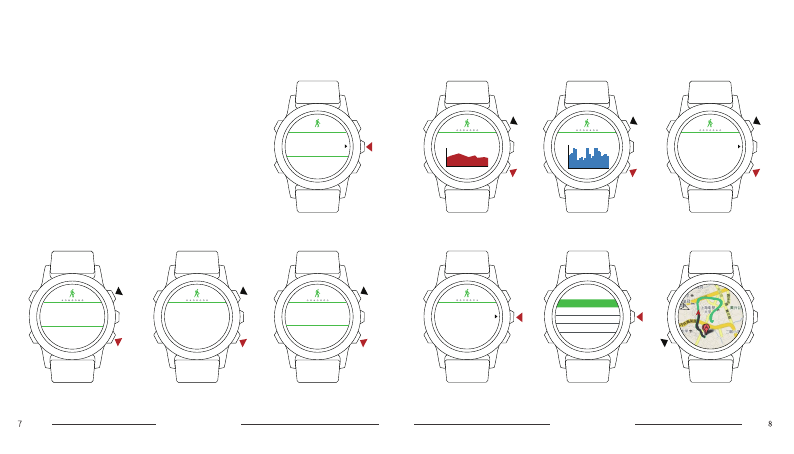
Demonstration: walking exercise
Select waling exercise, and wait for 2 seconds; press
OK buon to start acvity, and press up or down
buon to switch among sub-views including ming,
calories, footsteps, elevaon, distance, average
speed, heart rate, cloud mapping, cloud navigaon.
Press OK buon to pause and take a break, and
press BACK buon to stop and finish the acvity,
and then choose either to save or cancel the
acvity, and read the acvity analyc data.
-40°— +70°C
-30°— +65°C
quick start guide quick start guide
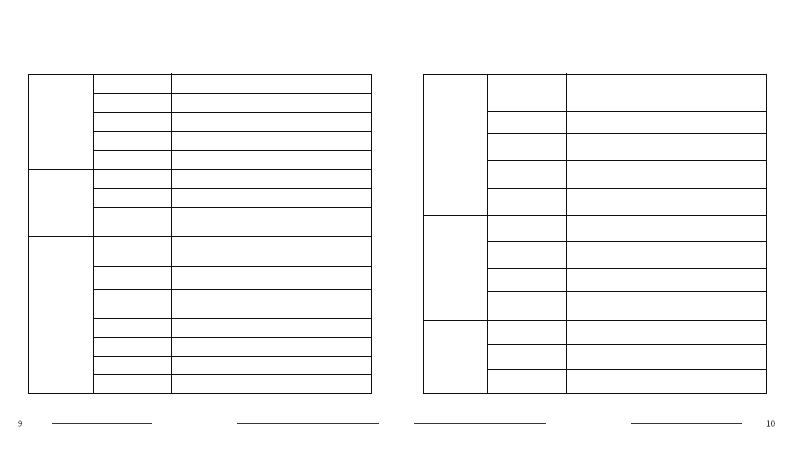
Product specifications
mechanics
size
weight
screen
baery
bluetooth
power
management
standby me
charging me
charging
methods
75grams
51.5*16.5millimeter
12”218*218 total-reflecon colored LCD
440mAh
4.1
3 months and more
2 hours
wireless
support
support
support
support
support
support
support
BeiDou
posioning
satellite ming
GPS
posioning
step count
compass
barometer
heart rate
monitoring
modules
funconal
applicaon
sports
monitoring
walking, running, mountaineering,
cycling, indoor-swimming, outdoor-
swimming, triathlon
environment atmospheric pressure, altude
posioning
navigaon BeiDou/GPS posioning, compass
phone
messaging incoming call, SMS, QQ, WeiXin
weather
informaon weekly weather, sunrise and sunset
me, PM2.5
APP
personal
funcon alarm,stop-watch
APP support Android 4.3 and above, or IOS8
and above
cloud support
firmware
upgrade wireless upgrade by APP
performance
specificaon
operang
temperature
storage
temperature
water
resistance 100 meter water-proof
FCC Warnning:
This equipment has been tested and found to comply with the limits for a Class B digital device, pursuant to part 15 of the FCC Rules. These limits are designed to provide
reasonable protection against harmful interference in a residential installation. This equipment generates, uses and can radiate radio frequency energy and, if not installed and
used in accordance with the instructions, may cause harmful interference to radio communications. However, there is no guarantee that interference will not occur in a particular
installation. If this equipment does cause harmful interference to radio or television reception, which can be determined by turning the equipment off and on, the user is
encouraged to try to correct the interference by one or more of the following measures:
• Reorient or relocate the receiving antenna.
• Increase the separation between the equipment and receiver.
• Connect the equipment into an outlet on a circuit different from that to which the receiver is connected.
• Consult the dealer or an experienced radio/TV technician for help.
Caution: Any changes or modifications to this device not explicitly approved by manufacturer could void your authority to operate this equipment.
This device complies with part 15 of the FCC Rules. Operation is subject to the following two conditions: (1) This device may not cause harmful interference, and (2) this device
must accept any interference received, including interference that may cause undesired operation.
The device has been evaluated to meet general RF exposure requirement. The device can be used in portable exposure condition without restriction.