LANYA ELECTRONIC BH703 Bluetooth Headset User Manual E BH703 6130
LANYA ELECTRONIC CO., Ltd. Bluetooth Headset E BH703 6130
User Manual

Shenzhen Lanya Electronic Co.,Ltd
Address: 3F,No.6 Building,LiJinCheng Industrial Park, East Industrial Road,LongHua Town, ShenZhen City. China.
Product Specification
Product name: Bluetooth Headset
Model NO.: BH703
Customer Approval Manufacturer
Check and sign here, date content Signature Date
Prepared by
李玉 怀
2013-02-21
Reviewed by
Approved by
Shenzhen Lanya Electronic Co.,Ltd
Address: 3F,No.6 Building,LiJinCheng Industrial Park, East Industrial Road,LongHua Town, ShenZhen City. China.
History of revision:
Version Event Page Date
01 First Issue 2013-2-21
Shenzhen Lanya Electronic Co.,Ltd
Address: 3F,No.6 Building,LiJinCheng Industrial Park, East Industrial Road,LongHua Town, ShenZhen City. China.
1.
Product introduction.
BH703 is a cost-effective bluetooth headset, it is light,comfortable to wear, clear in calls and far
communication distance.
2. Design
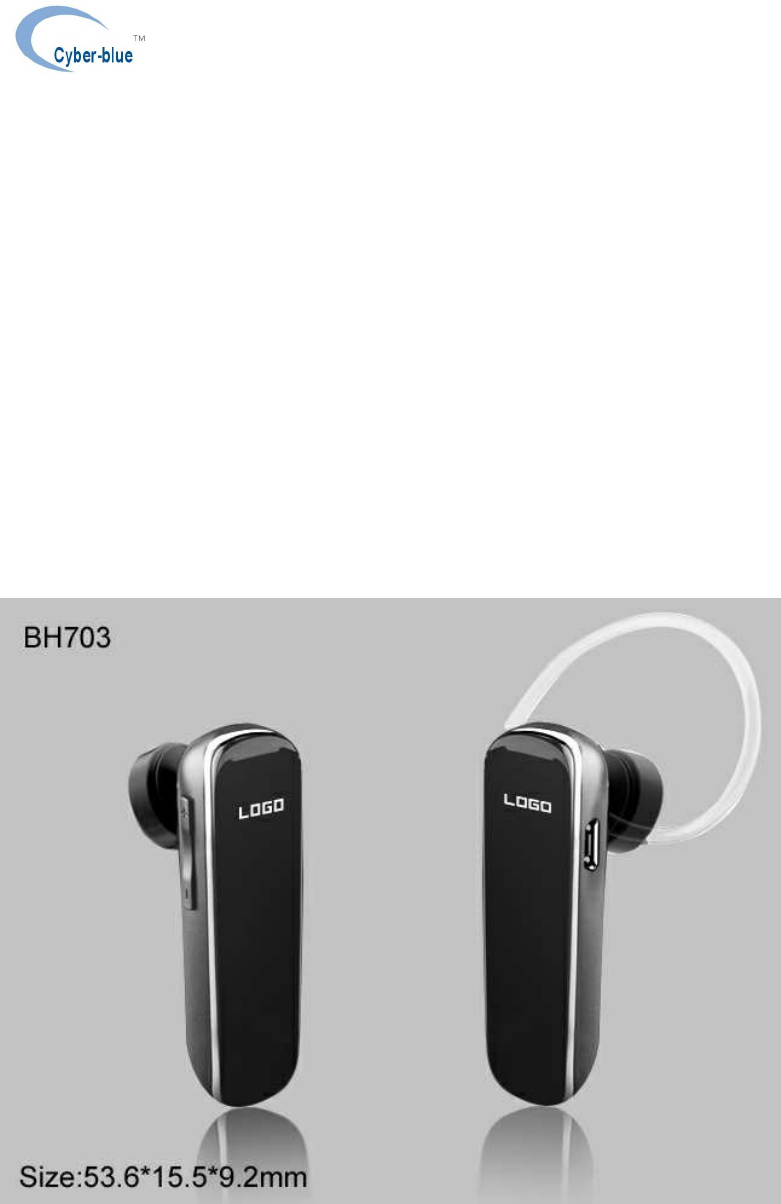
Outside drawing:
Product color and silkscreen in accordance with the prototype.
3.
Basic Specifications
Shenzhen Lanya Electronic Co.,Ltd
Address: 3F,No.6 Building,LiJinCheng Industrial Park, East Industrial Road,LongHua Town, ShenZhen City. China.
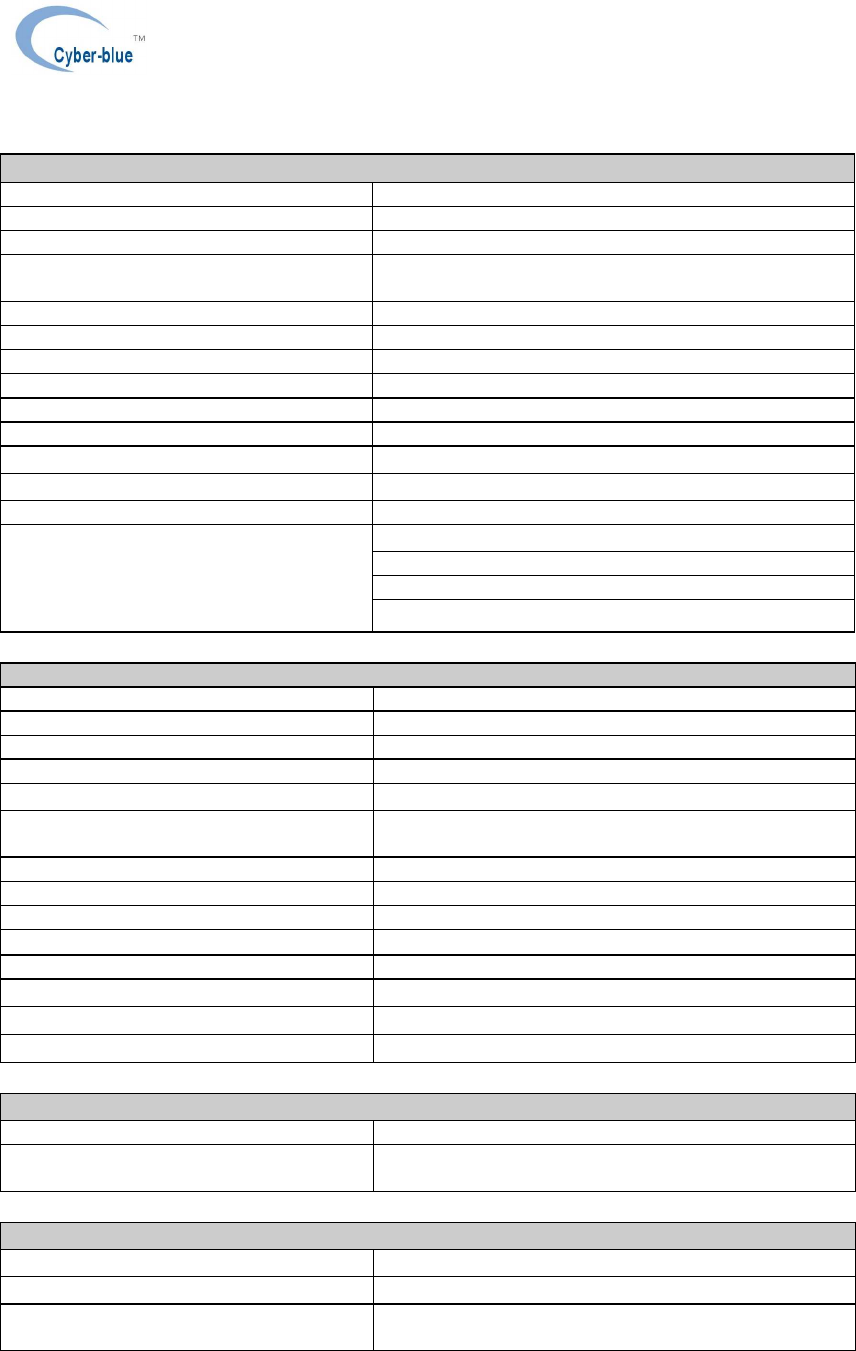
Primary features
Product name Bluetooth headset
Model NO. BH703
Pairing name According to the order
Design style Small size, light weight, stylish design, Ergonomic
ear hook design comfortable to wear.
Bluetooth version 2.4GHz Bluetooth Specification V3.0+EDR
Operation range 10 meters in open space
Button design Multi-function botton*1,VOL+,VOL-
Dimensions 53.6(L) x 15.5(W) x 9.2 (T) mm
Weight(Bare device) 8g
Battery 80mAh, 3.7V, Lithium polymer battery 401030
Talk time >7hours
Standy time >250hours
Charge time <2 hours
User Manual*1
Earhook*1
USB charging cable*1
Accessories
Hardware specifications definitions
Solution platform BC6130
Transmit power Class 2, 4 dBm
Reception sensitivity -88dbm(typical)
Working band 2.4G ISM band,2.402-2.480GHz
Modulation system GFSK,π/4 DQPSK,8DPSK
LED Red LED*1
Blue LED*1
Memory 64 kbit EEPROM
Charging port Micro USB
Antenna Blult-in PCB antenna
Speaker 32± 15% ohm,5mW,Max10mW
Microphone 4015 omni-directional -42±2dB
Battery life Cycle times>300 times
Operating temperature -10 - +50 ℃
Storage temperature -20 - 60 ℃
Software specification definition
Bluetooth headset protocol software version
V1.1
Bluetooth hands-free protocol software
version V1.5
Mechanical operation definition
Multi-function button(MFB) Pressure force 220gf±80gf ; Route 0.2mm±0.1mm
Button life >50,000 times
Charging terminal plugging and connecting
force 400gf±200gf
Shenzhen Lanya Electronic Co.,Ltd
Address: 3F,No.6 Building,LiJinCheng Industrial Park, East Industrial Road,LongHua Town, ShenZhen City. China.
Charging terminal plugging and connecting
life >1000 次
4. User interface、
、、
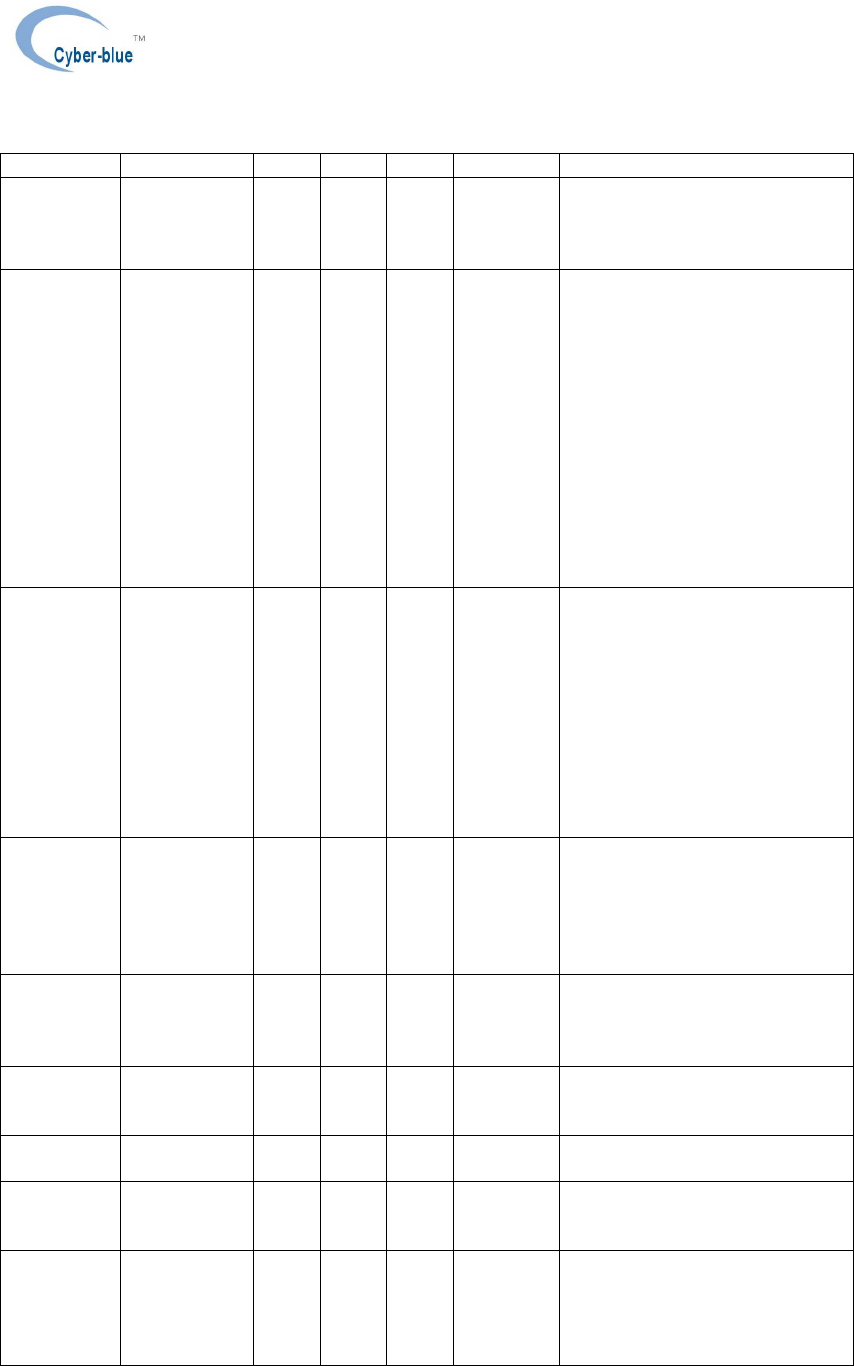
、Menu definition
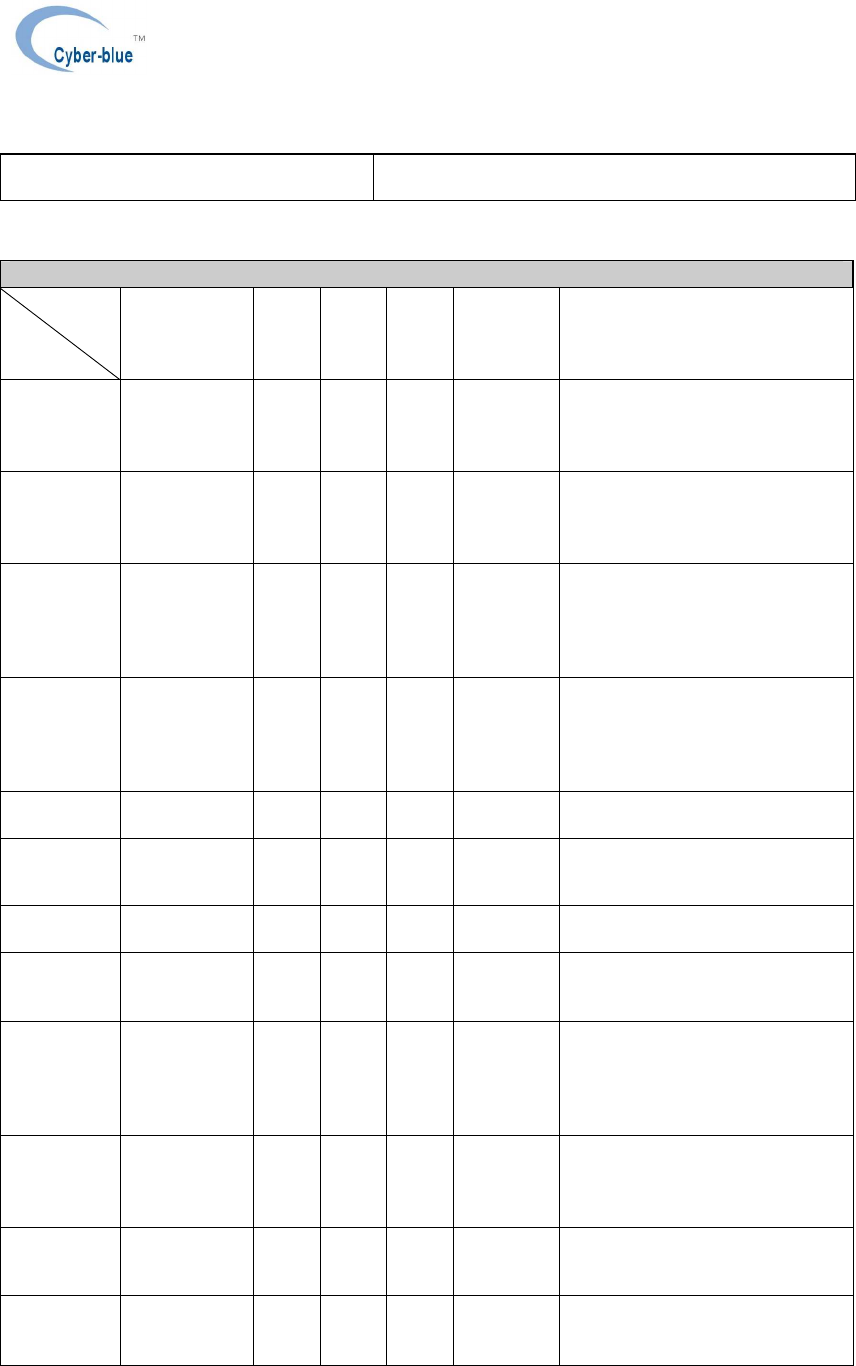
Operation and user interface definition
category
function
Preoperative
state MFB
butto
n
Volu
me+ Volu
me- LED
descriptio
n
Comments
Turn On Power off
state Long
press
for
3S
Blue LED
flashes 3
times
There is a prompt tone
Turn Off Starting up
connecting or
disconnecting
state
long
press
for
2S
Red LED
flashes 2
times
There is a promote tone
Pairing
mode Power off
state long
press
for
7S
The red
and blue
lights
flash
alternately
There is a promote tone
Answer
calls A mobile
phone rings
when there is
an incoming
call
Short
press
Blue LED
flashes 2
times
every 5
seconds
Hang up In
conversation Short
press
VOL+ In
conversation
――
Short
press
――――
―― there is a prompt tone when
meeting with the maximum value
VOL- In
conversation
――
Short
press
――――
―― there is a prompt tone when
meeting with the minumum value
Voice
dialling Connecting
state Doub
le-
click
――――
―― There is a prompt tone
Refuse
receiving
calls
A mobile
phone rings
when there is
an incoming
call
long
press
for 3
S
――――
―― There is a promote tone
Switch
voice In
conversation long
prers
s for
3S
――――
―― There is a promote tone
Last number
redail Connecting
state
――
Doub
le
click
――――
―― There is a promote tone
Mic mute In
conversation
――
Long
pres
s for
――――
――
Shenzhen Lanya Electronic Co.,Ltd
Address: 3F,No.6 Building,LiJinCheng Industrial Park, East Industrial Road,LongHua Town, ShenZhen City. China.
3S
Delete
records of
pairing
devices
―――――
―
――
――――
――
Multi-point
call switch There is an
incoming call
or in
conversition
――
Long
pres
s for
3S
――――
―― When the first phone during a
call, the second has an incoming
call,long press the VOL+ for 3S
to answer the call, at the same
time hold the the first phone call,
then long press the VOL+ for 3
seconds can switch calls between
two phones,short press the MFB
can end the present call, at the
same time connect the second
hold phone(some phone will ask
whether need to connect),press
the MFB again to end the hold
call.
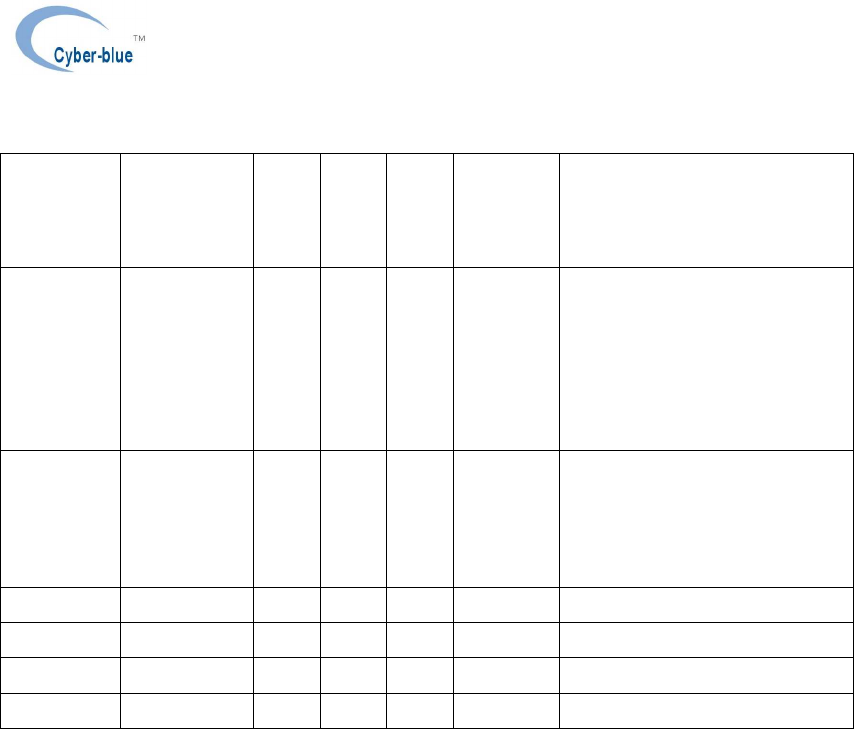
Dual-Link In standby
mode
――
Long
pres
s for
3S
1.In
pairing
mode, the
red and
blue LED
will flash.
2.Pairingfi
nished,
the blue
LED on
for 2S.
Automatic
connecting
back
Available
after starting
up if there are
pairing
records
before
――
――――
――
In charge Inserting a
charging line
――
The red
light
remains
on
Charge
finished
―――――
―
――
The red
light goes
out
Charge reset
function In on state ――
―――― Insert the charging line and
automatically reset to power off
Quit out of
pairing
mode
―――――
―
――
―――― Automatically quit out the pairing
mode when there is no pairing
finished within 5 min
Earphone
connecting
state
―――――
―
――
The blue
light
flashes
every 7
sec
Shenzhen Lanya Electronic Co.,Ltd
Address: 3F,No.6 Building,LiJinCheng Industrial Park, East Industrial Road,LongHua Town, ShenZhen City. China.
Earphone
disconnecti
ng state
―――――
―
――
The blue
light
flashes
every 5
sec
Automatic
power off No
connection
lasts for 10
min or low
voltage of the
battery is
lower than
3.2 v
――
There is a prompt tone
Low-
voltage
indication
Voltage is
less than 3.29
v
The red
light
flashes
twice
every 30
sec
There is a prompt tone
Bluetooth function operation
1) Turn on:In the off state, press and hold the multifunction key for 3 seconds until the Blue LED flashes
3 times with an indication tone.
2)
Turn off: In the standby mode, press and hold the multifunction key for 2 seconds until the Red LED
flashes 2 times with an indication tone.
3) Pairing: In the off state, press and hold the multifunction key for about 7 seconds until the red and
blue LEDs flash alternately indicate that the device is in pairing mode. Operate your phone to pair, and
there is promote tone after paired. (second phone pairing: If have connect with another phone, long
press VOL+ for 3S into pairing mode, after paired and connected, actitive the dual-link of the phone,
then manually connect first mobile phone )
4) Answer a call: Short press the multifunction botton to answer an incoming call.
5) End a call: When the call is connected successful , short press the multifunction botton to hang up, you
will hear an indication tone.
6) Reject a call: Hold the multifunction botton for 3 seconds and release to reject an incoming call.you
will hear an indication tone
7)Volume Adjustment: when answering, dialing or during a call, short press VOL+/VOL- botton to
increase/decrease volume, and you will hear an indication tone when increase to maximum or
minumum volume.

Shenzhen Lanya Electronic Co.,Ltd
Address: 3F,No.6 Building,LiJinCheng Industrial Park, East Industrial Road,LongHua Town, ShenZhen City. China.
8) Last number redial: In the standby mode, double click the VOL+ botton will redial the last outgoing
number
9) Voice dial: In the standby mode after connected, double click the multifunction botton to start voice
dial.(Need the support of the mobile phone Bluetooth)
10) Voice transfer: During a call , hold the multifunction botton for 2 seconds until hear an tone, then the
voice begin to be transfered from the Bluetooth speaker to your phone , the same operation can
transfer the sound from your phone to a Bluetooth speaker, the red LED flashes, and there is an
indication tone every 10S.
11) Microphone mute: Long press the VOL- botton for 3S can switch to open and close the mute function ,
there will an indication tone after mute(twince every 10S)
12) Voice transfer: If there is a coming call to the second phone when the first phone during a call, long
press the VOL+ for 3 seconds answer the call, and at the same time hold the first phone call,and long
press VOL+ for 3 seconds can switch between two phone calls,short press the ON/OFF key to end the
phone call, and at the same time connect the hold phone(some phone will ask whether need to
connect), press again to end the call.
LED indicator status:
Standby(Connected with Mobile phone): Blue LED flashes once every 7S.
Incoming call: Blue LED flashes twince every 5S
In communication: Blue LED flashes twince every 3S
Actitive dual phone:Blue LED on for 2S
Charging: Red indicator remains on
Charging finished: Red LED off
Charging:
Charging voltage:5V
Charging current:75~80Ma
Charging time: 1.5~2h
Fully charged battery voltage:4.10~4.20v
DOC NO:PD-SPEC-11-00045 页码:
- 9 - 12
VER-01
Battery status indicator
1. There will low pressure alarm when the battery voltage is less than 3.3V, the red light
flashes twice every 30 seconds , a beep sounds every 1 minute .
2.The device will
automatically shut down when the battery voltage is less than 3.2V , the
red flash 2 times with an indication tone
Tips:( These are mainly need to pay attention in the testing )
1.Pairing mode will last 5 minutes.other mobile phone cannot search out the bluetooth
headset.
2.Re-connecting automatically(includes two cases)
a. If the bluetooth headset turned off, it will connected to the pre-set bluetooth headset
automatically When turn on manually.
b.When the headset disconnects with mobile phone owing to exceeding effective
range(normally Link loss if exceed 10M), the bluetooth headset will re-connect with mobile
phone if back to effective range within about 10 minutes. (The device will be shut down after
10 minutes if two phones simultaneously disconnectted,there is a tone only in the beginning
of disconnection)
3.Support Bluetooth3.0 , (Do not need to enter the pairing code manually if test with
Bluetooth2.1 dongle)
5.
..
.Electrical Characteristics
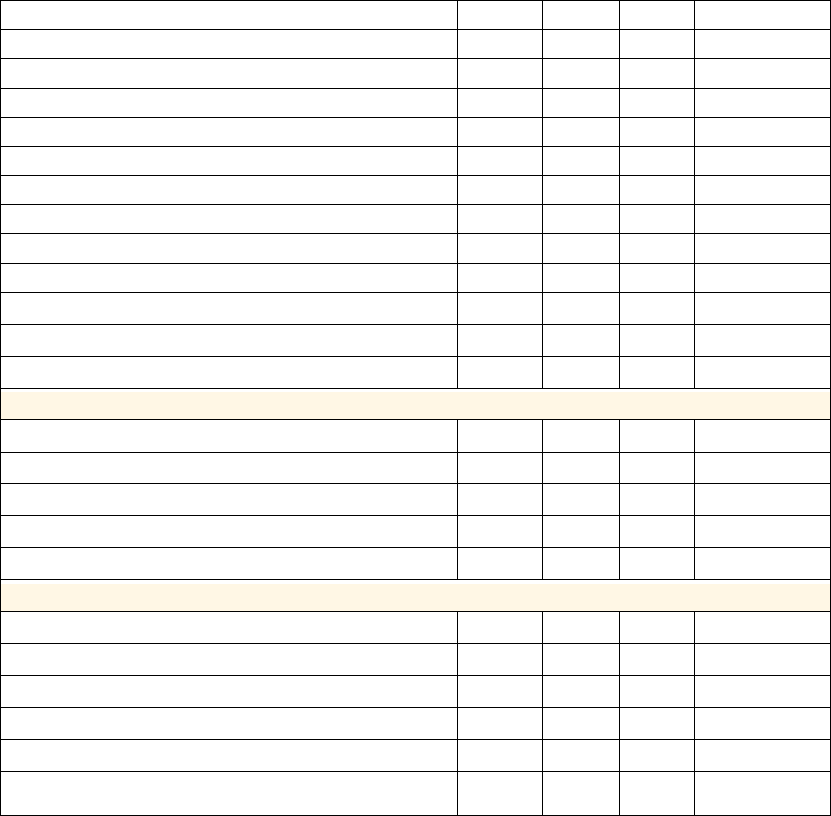
Electrical specifications:
Minmun Typical Maxmum
Units
Charging input voltage range 4.5 5V 5.5 V
Minimun current required for charger 100 500 mA
Maxmum ripple voltage noise for charger 200 mV p-p
Battery charging saturation voltage 4.2 V
Cell capacity 80 mAH
Low voltage alert 3.2 V
Automatic shutdown Voltage 2.9 V
Talking current(HV3 connection,Dc=3.7V) 10.5 mA
Standby current(ACL connection sniff mode, Dc=3.7V) 0.3 mA
Leakage current(Device is off, DC=3.7V) 0 uA
Talking time 7 H
Standby time 250 H
Audio features
Speaker output frequency range 20 4000 HZ
Distortion+noise(32ohm speaker) -72 -75 dB
Output sound pressure level(S.P.L)(1Khz in 1cm
)
100 105 dB
Microphone input frequency range 200 4000 HZ
Distortion+noise(1Khz signal to the microphone) -75 -78 dB
RF characteristics
Frequency range 2402 2480 GHZ
Transmit power 0 4 dBm
Carrier frequency offset -40 40 KHZ
Communication distance(forward) 10 Meter
Communication distance(reverse) 6 8 Meter
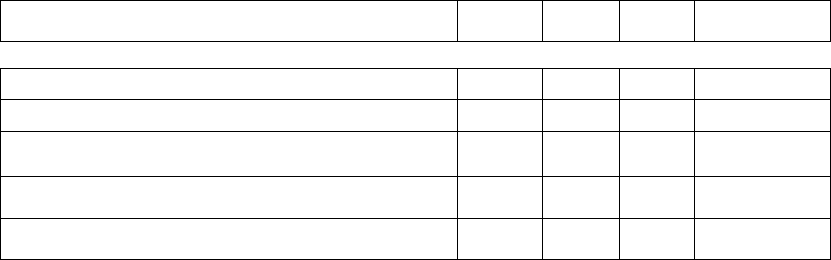
Reception sensitivity,( 0.1% BER )(Bluetooth standard ≤-
70dBm) -82 -88 dBm
DOC NO:PD-SPEC-11-00045 页码:
- 10 - 12
VER-01
Received signal strength in the 0.1% BER (Bluetooth
standard≥-20dBm) 0 3 dBm
Enviromental suitability
Type Minmum Maxmum
Unit
Operating temperature range -10 50 ℃
Storage temperature range -20 60 ℃
Working enviroment humidity range 75 %
Storage enviroment temperature range 90 %
6. Mechanical structure and packaging
6.1 Product shape and size
6.2 Explosive view
6.3 Package
In accordance with the packing requirements of customer samples
7.Surface definitions and technology standards
This part is for standard definition of apperance defects and acceptable standard of finished products
7.1Surface classification
Different plane surface is divided into five knids: AA(front), A and B, and C,D
AA.interface:refer to the surface user prolonged exposure to
A.front:Refer to the surface that the other side look directly at when use,
B.Side:Refer to the surface that the other side be able to see from top to bottom,
C.Back:Refer to the surface that cannot see when use.
D,Bottom:Refer to the surface that cannot see and reach when use.
7.2 The classifications of defect level of the surface definition.
1 level:0.0075-inch diameter checkpoint(0.18mm)
2 level:0.010 inches in diameter checkpoint(0.25)
3 level:0.015 inches in diameter checkpoint(0.38mm)
4 level:0.020 inches in diameter checkpoint(0.50mm)
5 level:0.030-inch diameter checkpoint(0.76mm)
6 level:0.040-inch diameter checkpoint(1.01mm)
7 level:0.050-inch diameter checkpoint(+ 1)
7.3 Product acceptance criteria
DOC NO:PD-SPEC-11-00045 页码:
- 11 - 12
VER-01
Product surface acceptance criteria
Surface ‘’AA” “A” “B” “C” “D”
Actual material Bottom, upper
and lower cover
of speaker
cavity
lens Four sides of
the headphone none none
The biggest defect
in the same color 4 level 2 level 4 level no no
The number of
defect points 3 4 6
Gap acceptance criteria
Gap position Acceptable level
Upper and lower cover junction Maxmum 0.2mm
The upper and lower cover junction
of the speaker cavity Maxmum 0.2mm
8.Reliability Testing standards
Reliability test
Reliability Test
Product certification CE,FCC,BQB
USB cable, headphone cable
tensile test Fix the cable, imposed 1kg pulling force, one minute later, the outer
surface of the cable has no obvious peeling or strain, and the basic
functions should be tested normal
USB cable, headphone cable
swing test Fix the cable, imposed 100g pulling force, swing angle of + -90
degrees, 40 times per minute ( + -90 degrees for once), for 1500
times, the basic functions should be tested normal.
Vibration test Frequency:10HZ∽55HZ(Frequency change is 1Hz/min)
Vibration amplitude:0.8mm
Vibration direction and time: Along the X/Y/Z directions, each for
90~100min.
Drop test
Drop from the height of 100cm onto the cement floor, free drop one
time respectively from each side(six surfaces),no damage to the
apperance after the test,allow the upper and lower cover junction but
do not separate, can exert pressure to fasten from up and down,and
the basic functions should be tested normal.
Low height drop test Drop height: 4cm, onto 20mm wood surface, In standby mode, do
100 times drop test for each side(600 times total),and the basic
functions should be tested normal after drop test.
Earhook plug intensity test Intensity of insert and pull:Maxmum 2kg, Minmum 0.5kg,300
times life to meet the intensity reuqirements
Ear hook bend test Ear hook bend range: 20cm,20 times per minute, and stop for 3
minutes every 100 times, no breaking after 300 times, position
recovery+-2mm。
Canton drop test Drop from height of 75cm, onto concrete surface, free drop one time
respectively from 6 plane and 4 corner, functionality must comply

DOC NO:PD-SPEC-11-00045 页码:
- 12 - 12
VER-01
with electrical specifications.
ESD test
Reference standard: IEC 801-2 Part 2 ;
Samples quantity: 3
(Temperature: 15℃~35℃, Humidity: 30~60%RH, Atmospheric
pressure: 68~106Kpa)
1. Contact discharge: (+/- 1KV to +/-4KV)
When product connected and in working, exert 1KV to the MFB
button, charging terminal, the upper and lower cover
junction,should ground discharge the tested products after each
high-voltage discharge, 10 times discharge; 1KV for an increment
to 4KV, Function must be normal and without damage to the
products in testing.
2. Air discharge : (+/-1KV to +/-8KV, Distance 1cm)
When product connected and in working, the outer surface close to
the region of non-isolated devices, such as microphone, speaker,
charging port, 10 discharge from 1KV, should ground discharge the
mental parts after each discharge, 1KV for an increment to 8KV,
Function must be normal and without damage to the products in
testing.
High temperature storage test Store the product 8H at+60 ℃ temperature, do function test after
recovery at room temperature for 0.5 h.
Result:No apperance damage, functionality comply with product
testing requirements.
Low temperature storage test Store the product 8H at -10 ℃ temperature, do function test after
recovery at room temperature for 0.5 h.
Result:No apperance damage, functionality comply with product
testing requirements.
FCC Regulations
FCC RegulationsFCC Regulations
FCC Regulations Warning
WarningWarning
Warning: Changes or modifications to this unit not expressly approved by
the party responsible for compliance could void the user’s authority to operate the equipment.
NOTE: This equipment has been tested and found to comply with the limits for a Class B digital
device, pursuant to Part 15 of the FCC Rules. These limits are designed to provide reasonable
protection against harmful interference in a residential installation. This equipment generates,
uses and can radiate radio frequency energy and, if not installed and used in accordance with the
instructions, may cause harmful interference to radio communications. However, there is no
guarantee that interference will not occur in a particular installation. If this equipment does cause
harmful interference to radio or television reception, which can be determined by turning the
equipment off and on, the user is encouraged to try to correct the interference by one or more of
the following measures:
Reorient or relocate the receiving antenna.
Increase the separation between the equipment and receiver.
Connect the equipment into an outlet on a circuit different from that to which the
receiver is connected.
Consult the dealer or an experienced radio/TV technician for help.
This device complies with Part 15 of the FCC Rules. Operation is subject to the following two
conditions: (1) this device may not cause harmful interference, and (2) this device must accept
any interference received, including interference that may cause undesired operation.