LANYA ELECTRONIC BSH23 Bluetooth Stereo Headset User Manual
LANYA ELECTRONIC CO., Ltd. Bluetooth Stereo Headset Users Manual
User Manual
1
BSH23 operating instructions
product name:bluetooth stereo headset
product model:BSH23
versions:Ver1
Manufacturer:LANYA ELECTRONIC Co., Ltd.
The main steps:
implementor name:BSH23, Pairing code:0000
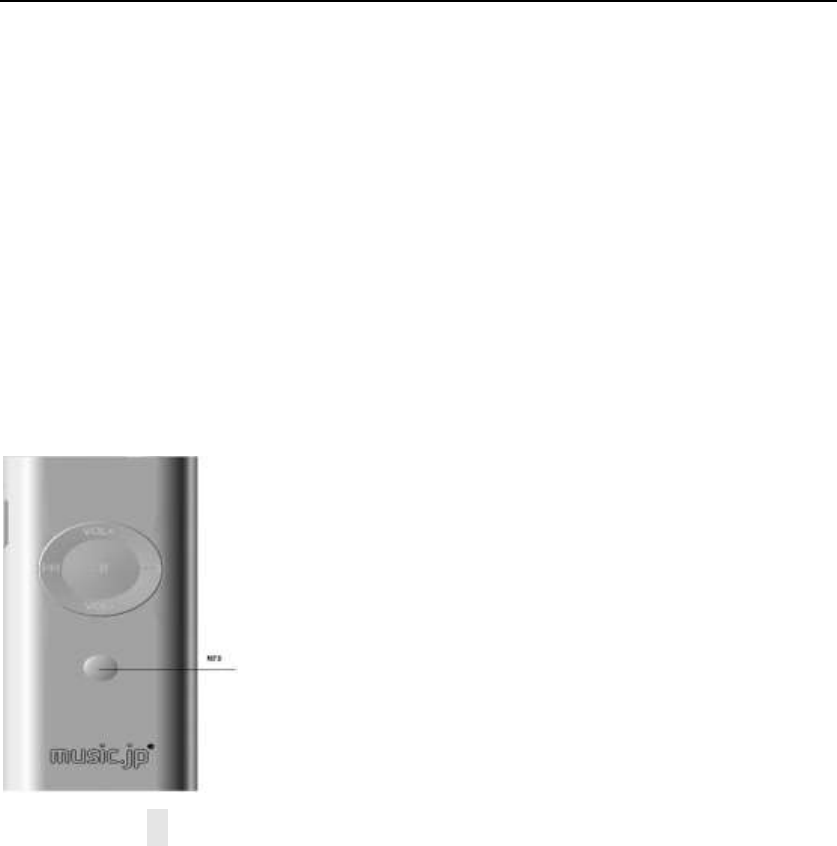
1.starting up:Confirm your headset in the shutdown state
long press “MFB” multifunction key 3 seconds,Blue lights flash 5 times, At this poi
nt thatBSH23Has been turned on。
2.Matching connection:In the condition of turning machine,Long press“MFB” mul
tifunction key,about7S,Until the alternating red and blue light flash,Loosen the b
utton,At this point that BSH23 atIn the match。With bluetooth mobile phone operat
ing and search for the bluetooth device,Connection,Until the blue lights flashing s

2
low,indicate BSH23Matching has been successful,Then the operation of the bluet
ooth phones make connections。
3.Making Calls:ConnectBSH23Bluetooth phone call directly,Can go directly to th
e BSH23 voice。
4。volume adjustment:Good connection BSH23 bluetooth mobile phone,Short press
VOL+ Can increase the volume,Short Press VOL-Can reduce the volume。
5.Phone to Pc :Good connection BSH23 bluetooth mobile phone,If there are ex
ternal calls, Blue light flashes 2 times per second,Short press “MFB” multifunction
key once Can call。
6.Do Not Call:Good connection BSH23 bluetooth mobile phone,If there are exte
rnal calls,Long hold MFB "multifunction button,prep 2S,At this time can hear a
chime,Can refuse to call。
7.VrecEng:In the process of conversation,Short press MFB "multifunction button
one time can hang up the phone,And have a short beep。
8.voice dial:Connect the bluetooth phones,Under the condition of standby,Shor
t press MFB multipurpose "key,Can voice dialing,(Need bluetooth support)
9.Last number redial :Connect the bluetooth phones,Standby Under conditions,
double-click “MFB” multifunction key,Short of a prompt sound could be heard,Mo
bile phone will dial phone number for the last time
10 Phonetic transfer:In the process of conversation,long press “MFB” multifunctio
n key,Time is about 2 s, To loosen,Voice will transfer to the phone,The same
will be transferred to BSH23 up operation。

3
11. MIC mute:In the process of conversation,Press “PLAY” multifunction key,A
bout 2S, Will hear a voice prompt,The red light flash once,By this time the voice
of the MIC is static,Each other can't hear the sound,The same can restore the
voice of the MIC。 (After open the prompt every 10 seconds)
12.Power off function:In the boot state, long press the MFB "multifunction button
for 5 seconds,The red light flash once,BSH23 will shut down。
13.A2DP activate,In the connection standby mode, short press the PLAY button,
activates cell phone music playing(This needs to be related to mobile phone suppo
rt)
14.A2DP PLAY AND PAUSE :In the mobile phone through BSH23 PLAY the ste
reo music, short press the PLAY button to pause playback,The same operations c
an resume playing。
15. song Previous Next:In the mobile phone through BSH23 play the stereo music,
short press FOR key can turn to the next song,Short press the REV button can turn
into a song。
The bluetooth indicator light condition:
starting up: Blue lights flash 5 times
Matching state: Alternating red and blue lights flashing:
Ready mode: Blue lights flash every 5 s again。
Connection Status: Blue lights flash every 5 s again
Come phone: Blue light every 1 s flash twice
the line is busy: Blue lights flash every 5 s again(play music)

4
Open the mute: The red light flash once
shutdown: The red light flash once。
Charging : The red light Chang Liang
charge complete: The red light out
low tension Alarm: Flash every 30 seconds twice,A prompt。
Caution
This equipment has been tested and found to comply with the limits for a Class B
digital device, pursuant to part 15 of the FCC Rules. These limits are designed to
provide reasonable protection against harmful interference in a residential installation.
This equipment generates, uses and can radiate radio frequency energy and, if not
installed and used in accordance with the instructions, may cause harmful interference
to radio communications. However, there is no guarantee that interference will not
occur in a particular installation. If this equipment does cause harmful interference to
radio or television reception, which can be determined by turning the equipment off
and on, the user is encouraged to try to correct the interference by one or more of the
following measures:
• Reorient or relocate the receiving antenna.
• Increase the separation between the equipment and receiver.
• Connect the equipment into an outlet on a circuit different from that to which the
receiver is connected.
• Consult the dealer or an experienced radio/TV technician for help.
Caution: Any changes or modifications to this device not explicitly approved by
manufacturer could void your authority to operate this equipment.
This device complies with part 15 of the FCC Rules. Operation is subject to the
following two conditions: (1) This device may not cause harmful interference, and (2)
this device must accept any interference received, including interference that may
cause undesired operation.
Hereby, LANYA ELECTRONIC Co., Ltd., declares that this Radio-Frequency
peripheral is in compliance with the essential requirements and other relevant
provisions of Directive 1999/5/EC.