LANYA ELECTRONIC BSK02 BLUETOOTH SPEAKER User Manual

LANYA ELECTRONIC CO., Ltd. BLUETOOTH SPEAKER Users Manual

User Manual

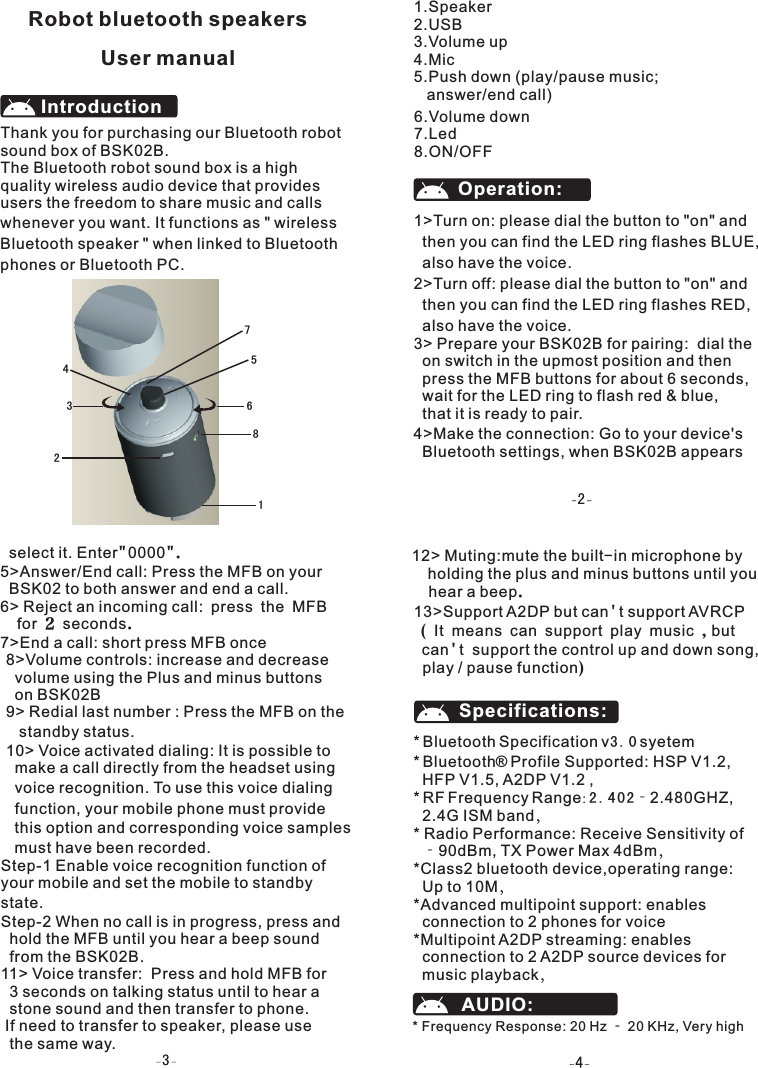
Thank you for purchasing our Bluetooth robot sound box of BSK02B.The Bluetooth robot sound box is a high quality wireless audio device that provides users the freedom to share music and calls whenever you want. It functions as " wirelessBluetooth speaker " when linked to Bluetoothphones or Bluetooth PC.IntroductionOperation: 1>Turn on: please dial the button to "on" and   then you can find the LED ring flashes BLUE,  also have the voice.2>Turn off: please dial the button to "on" and   then you can find the LED ring flashes RED,   also have the voice.3> Prepare your BSK02B for pairing:  dial the   on switch in the upmost position and then   press the MFB buttons for about 6 seconds,   wait for the LED ring to flash red & blue,    that it is ready to pair.4>Make the connection: Go to your device's   Bluetooth settings, when BSK02B appears   Robot bluetooth speakersUser manual1.Speaker2.USB3.Volume up4.Mic5.Push down (play/pause music;   answer/end call) 6.Volume down7.Led8.ON/OFF8>Volume controls: increase and decrease  volume using the Plus and minus buttons   on BSK02B9> Redial last number : Press the MFB on the    standby status.10> Voice activated dialing: It is possible to   make a call directly from the headset using   voice recognition. To use this voice dialing   function, your mobile phone must provide   this option and corresponding voice samples  must have been recorded.Step-1 Enable voice recognition function of your mobile and set the mobile to standby state.Step-2 When no call is in progress, press and  hold the MFB until you hear a beep sound  from the BSK02B.11> Voice transfer:  Press and hold MFB for   3 seconds on talking status until to hear a   stone sound and then transfer to phone. If need to transfer to speaker, please use   the same way.     select it. Enter"0000".5>Answer/End call: Press the MFB on your   BSK02 to both answer and end a call.6> Reject an incoming call: press the MFB   for 2 seconds. 7>End a call: short press MFB once  12> Muting:mute the built-in microphone by   holding the plus and minus buttons until you   hear a beep.13>Support A2DP but can't support AVRCP ( It means can support play music ,but  can't  support the control up and down song,   play / pause function) Bluetooth Specification v3.0 syetem* Bluetooth  Profile Supported: HSP V1.2,   HFP V1.5, A2DP V1.2 ,* RF Frequency Range: 2.402‐2.480GHZ,   2.4G ISM band,* Radio Performance: Receive Sensitivity of  ‐90dBm, TX Power Max 4dBm,*Class2 bluetooth device,operating range:   Up to 10M,*Advanced multipoint support: enables   connection to 2 phones for voice*Multipoint A2DP streaming: enables   connection to 2 A2DP source devices for   music playback,*®Specifications:AUDIO:* Frequency Response: 20 Hz ‐ 20 KHz, Very high     12364578
* 4 Button design: MFB, VOL+, VOL‐, Slide    switch,* LED Status Indicator: Blue, Red,* Mini 5 Pin USB charging Port* Color: greenInterface:* Rechargeable 270mAh Li‐Polymer Battery* Charger adapter Output: DC 5V&200mA* Nominal charging time: Max 2 hours* Talk time: Up to 4.5 hours*music play time: Up to 3 hours* Standby time: Up to 300 hours* Dimensions (main body): ∮56mm*88mm* Weight: 110 gramsPOWER:Troubleshooting If you cannot connect the speaker to your phone, do as follows:· Ensure that the speaker is charged, switched   on, paired with and connected to your phone.· Ensure that the Bluetooth feature is   activated on your phone.· Check that the headset is within 10 meters  (30 feet ) of your phone and that there are   no obstructions between the headset and   the phone, such as walls or other electronic  devicesIf no paring is made over a period of time, the Bluetooth speaker will retreat paring mode. You have to turn off the Bluetooth speaker and operate again. .Your device is powered by a rechargeable battery. The full performance of a new battery is achieved only after two or three complete charge and discharge cycles. The battery can be charged and discharged hundreds of Battery informationcharged battery will lose its charge over time.Leaving the device in hot or cold places, such as in a closed car in summer or winter conditions, will reduce the capacity and lifetime of the battery. Always try to keep the battery between 15℃ and 2 5℃(5 9℉ and 7 7℉). A device with a hot or cold battery may not work temporarily, even when the battery is fully charged. Battery performance is particularly limited in temperatures well below freezing.Do not dispose of batteries in a fire as they may explode. Batteries may also explode ifdamaged. Dispose of batteries according to local regulations. Please recycle when possible. Do not dispose as household waste.Care and maintenance*Operating Temperature: ‐10 ℃~50℃*Storage Temperature: ‐20 ℃~80℃times, but it will eventually wear out. Unplug the charger from the electrical plug and thedevice when not in use. Do not leave  · Do not use or store the device in dusty, dirty   areas. Its moving parts and electronic   components can be damaged.· Do not store the device in hot areas. High   temperatures can shorten the life of electr-  onic devices, damage batteries, and warp   or melt certain plastics.· Do not store the device in cold areas. When   the device returns to its normal temperature,   moisture can form inside the device and   damage electronic circuit boards.· Do not drop, knock, or shake the device.   Rough handling can break internal circuit   boards and fine mechanics.· Do ot use harsh chemicals, cleaning solve-  nts, or strong detergents to clean the device.· Do not paint the device. Paint can clog the   moving parts and prevent proper operation.  All of the above suggestions apply equally  to your device, battery, charger, or any   enhancement. If any device is not working   properly, take it to the nearest authorized   service facility.Your device is a product of superior design and craftsmanship and should be treated with care. The suggestions below will help you protect your warranty coverage.a fully chargedbattery connected to a charger, since overcharging may shorten its lifetime. If left unused, a fully ·Keep all accessories and enhancements    out of the reach of small children.Signal to Noise Ratio(SNR ):95 Db, Tota Harmonic Distortion(THD):0.1%,* Frequency Response: 60 Hz ‐ 20 kHz* 2W Speaker Output Level: 80dB at 0.5m,* Built‐in Anti‐noise Microphone, ·Keep the device dry. Precipitation, humidity,   and all types of liquids or moisture can  contain minerals that will corrode electronic     circuits.If your device does get wet, allow it   to dry completely.
  FCC WARNING  This device complies with Part 15 of the FCC Rules. Operation is subject to the following two conditions: (1) This device may not cause harmful interference, and (2) this device must accept any interference received, including interference that may cause undesired operation.  NOTE 1: This equipment has been tested and found to comply with the limits for a Class B digital device, pursuant to part 15 of the FCC Rules. These limits are designed to provide reasonable protection against harmful interference in a residential installation. This equipment generates, uses and can radiate radio frequency energy and, if not installed and used in accordance with the instructions, may cause harmful interference to radio communications. However, there is no guarantee that interference will not occur in a particular installation. If this equipment does cause harmful interference to radio or television reception, which can be determined by turning the equipment off and on, the user is encouraged to try to correct the interference by one or more of the following measures: - Reorient or relocate the receiving antenna. - Increase the separation between the equipment and receiver. -Connect the equipment into an outlet on a circuit different from that to which the receiver is connected. -Consult the dealer or an experienced radio/TV technician for help.  NOTE 2: Any changes or modifications to this unit not expressly approved by the party responsible for compliance could void the user's authority to operate the equipment.

Navigation menu