LIVALL Tech BH5X Bling Helmet User Manual

Shenzhen Qianhai LIVALL IoT Technology Co.,Ltd. Bling Helmet

User Manual

www.livall.comBH50T、BH50MBH51T、BH51MSmart cycling helmetsSmart cycling/skateboarding/skating helmetsQuick Start Guide
2一.简介二 . 包装清单欢迎使用 LIVALL 头盔,本指南会指引您如何开始使用本产品。随着本公司的产品硬件和软件的持续改良,本手册将会不定期的进行更新, 如果您需要更详细的操作说明,请查看附件中“重要信息及保修卡”。您还可以在 LIVALL 官方网站上了解头盔的更多信息。闪盔 :1 个    闪控 BR80:1 个 快速入门指南 :1 份  磁吸式 USB 充电线 :1 条  重要信息和保修卡 :1 份温馨提示 : 本图片仅供参考,如实物外形与图片不同 , 请以实物为准。麦克风前拉带 后拉带 调节扣尾部警示灯主控锁扣前部 后部蓝牙音箱蓝牙音箱
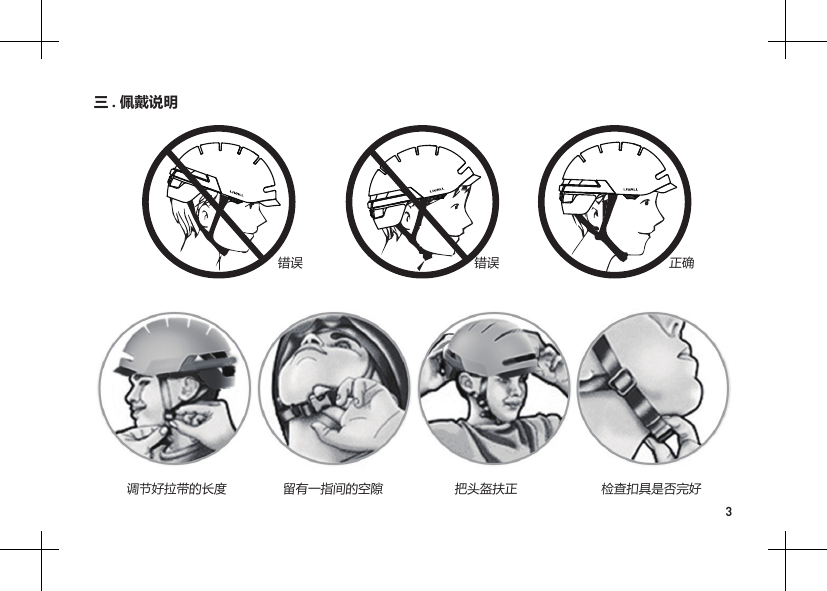
3三 . 佩戴说明错误错误 正确调节好拉带的长度 留有一指间的空隙 把头盔扶正 检查扣具是否完好
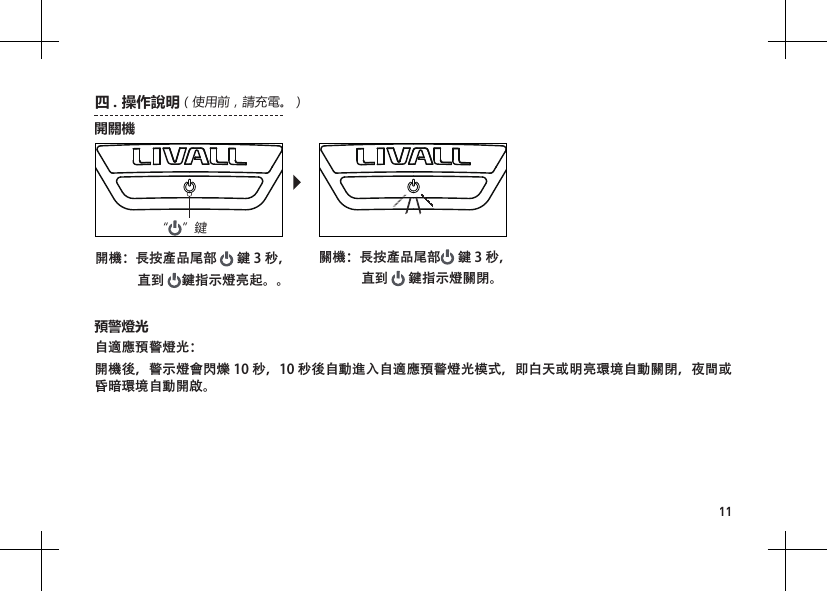
4自适应预警灯光:开机后,警示灯会闪烁 10 秒,10 秒后自动进入自适应预警灯光模式,即白天或明亮环境自动关闭,夜间或昏暗环境自动开启。预警灯光“”键四 . 操作说明(使用前请充电)开关机开机:长按产品尾部   键 3 秒,              直到   键指示灯亮起。关机:长按产品尾部   键 3 秒,              直到   键指示灯关闭。
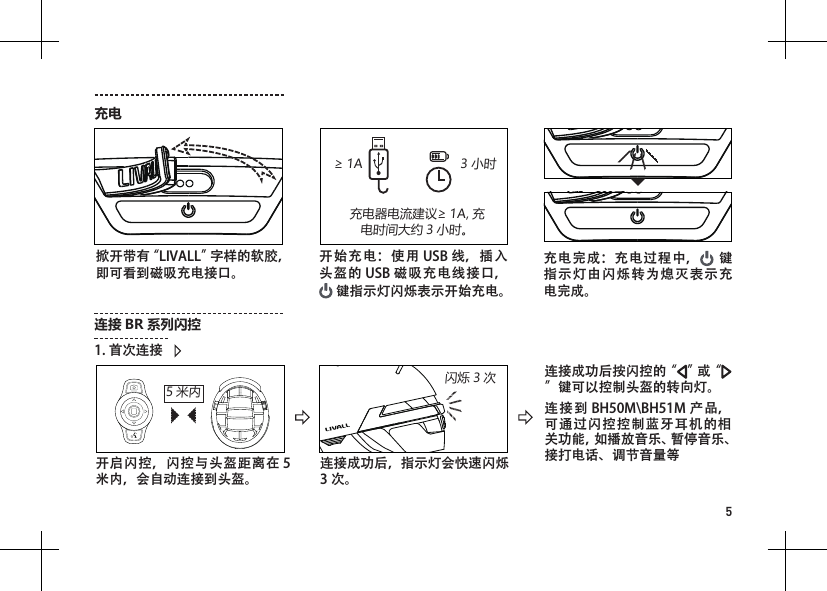
5充电开始充电:使用 USB 线,插入头盔的 USB 磁吸充电线接口, 键指示灯闪烁表示开始充电。 掀开带有“LIVALL”字样的软胶,即可看到磁吸充电接口。充电器电流建议≥ 1A, 充电时间大约 3 小时。充电完成:充电过程中,  键指示灯由闪烁转为熄灭表示充电完成。≥ 1A 3 小时开启闪控,闪控与头盔距离在 5米内,会自动连接到头盔。连接成功后,指示灯会快速闪烁3 次。连接成功后按闪控的“ ”或“”键可以控制头盔的转向灯。连接到 BH50M\BH51M 产品,可通过闪控控制蓝牙耳机的相关功能,如播放音乐、暂停音乐、接打电话、调节音量等连接 BR 系列闪控5 米内1. 首次连接闪烁3次
6Helmetphone“点击连接”关机状态下,长按产品尾部      键直到听到“Pairing mode is active”后松开打开手机蓝牙并扫描到“Helmet phone”设备。 点击进行连接,连接成功后,会提示“Connected”。键蓝牙耳机(BH50M/BH51M)“Pairing mode is active” “Connected”将开机的闪控靠近主控。 预警灯出现 1 秒 / 次的闪烁频率,表示有闪控需要接入头盔。10s 内,按 头盔的“    ”键,确认连接该闪控。2. 连接新闪控:(原闪控丢失或损坏后,需要连接新闪控时)连接成功后,指示灯会快速闪烁3 次。闪烁3次
7温馨提示:为保障连接信号的稳定性,请尽量不要将手机紧贴身体。闪控按键操作说明拍照键“上”方向键“左”方向键“下”方向键对讲键“右”方向键确认键一键调取手机摄像头,单击可进行拍照。(需连接 " 来啊骑行 "APP)单击音量 +;长按上一曲。单击开启左转向灯单击开启右转向灯单击播放暂停音乐 / 接听来电;长按表示挂断来电;双击,回拨最后一个拨出的号码。单击音量 -;长按下一曲。按住此键说话,即可与队友对讲。(需连接 " 来啊骑行 "APP 且进入组队模式)Android: 启动“来啊骑行”手机应用 , 会自动连接头盔;IOS:需要根据“来啊骑行”手机应用的指引进行连接头盔。只有连接成功后,才可实现 SOS 摔倒求救、通过 APP 控制预警灯等功能。连接“来啊骑行”手机 APP来啊骑行 APP
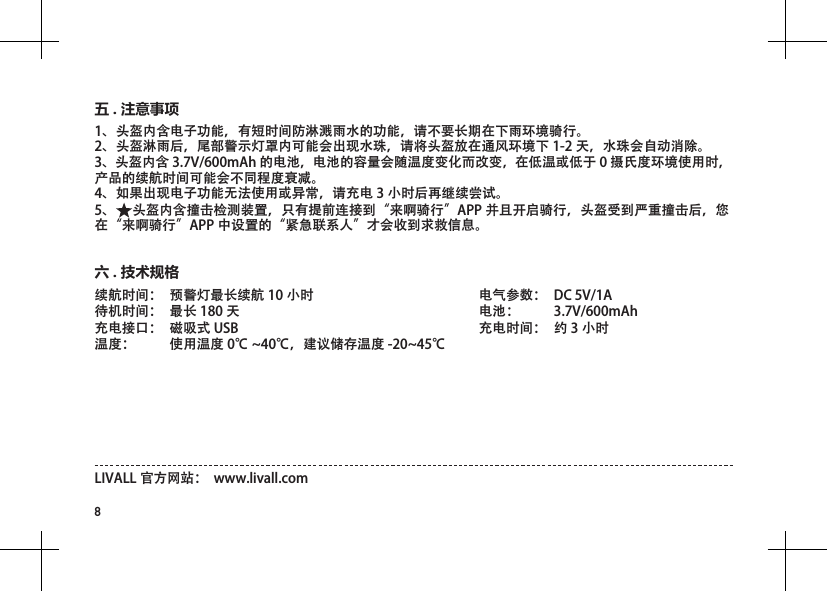
8续航时间:  预警灯最长续航 10 小时待机时间:  最长 180 天充电接口:  磁吸式 USB   温度:  使用温度 0℃ ~40℃,建议储存温度 -20~45℃电气参数:  DC 5V/1A 电池:  3.7V/600mAh充电时间:  约 3 小时六 . 技术规格LIVALL 官方网站:  www.livall.com1、头盔内含电子功能,有短时间防淋溅雨水的功能,请不要长期在下雨环境骑行。 2、头盔淋雨后,尾部警示灯罩内可能会出现水珠,请将头盔放在通风环境下 1-2 天,水珠会自动消除。 3、头盔内含 3.7V/600mAh 的电池,电池的容量会随温度变化而改变,在低温或低于 0 摄氏度环境使用时,产品的续航时间可能会不同程度衰减。 4、如果出现电子功能无法使用或异常,请充电 3 小时后再继续尝试。 5、 头盔内含撞击检测装置,只有提前连接到“来啊骑行”APP 并且开启骑行,头盔受到严重撞击后,您在“来啊骑行”APP 中设置的“紧急联系人”才会收到求救信息。五 . 注意事项
9提示:本圖片僅供參考,如實物與圖片不同,請以實物為準。麥克風前拉帶 後拉帶 調整扣尾部警示燈主控鎖扣前部 後部喇叭喇叭一、簡介歡迎使用 LIVALL 智慧型自行車頭盔,本指南將引導您如何開始使用本產品。本公司遵循永續經營策略,因此將不定期更新本手冊,若您需要更詳細的操作說明,請查看附件中「重要資訊及保固卡」。您還可以在 LIVALL 官方網站上找到有關頭盔的更多資訊。二 .包裝清單閃盔:1 個    快速入門指南:1 份閃控 BR80:1 個  磁吸式 USB 充電線:1 條  重要資訊和保固卡:1 份
10正確調整拉帶長度 請保留一指幅的間隙 把頭盔扶正 檢查扣具是否完好三 .佩戴說明錯誤 錯誤
11自適應預警燈光:開機後,警示燈會閃爍 10 秒,10 秒後自動進入自適應預警燈光模式,即白天或明亮環境自動關閉,夜間或昏暗環境自動開啟。預警燈光“”鍵開關機開機:長按產品尾部   鍵 3 秒,              直到  鍵指示燈亮起。。關機:長按產品尾部  鍵 3 秒,              直到   鍵指示燈關閉。四 .操作說明(使用前,請充電。)
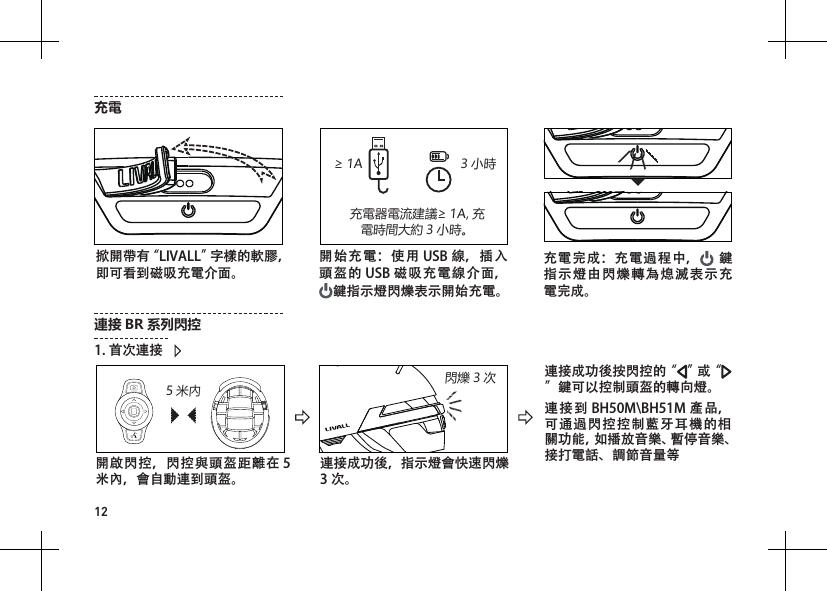
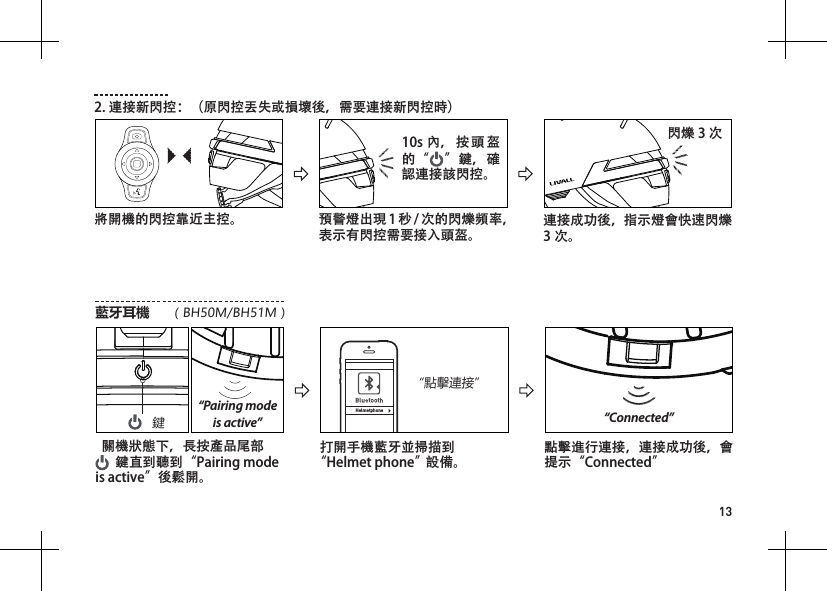
12開始充電:使用 USB 線,插入頭盔的 USB 磁吸充電線介面, 鍵指示燈閃爍表示開始充電。 掀開帶有“LIVALL”字樣的軟膠,即可看到磁吸充電介面。充電器電流建議≥ 1A, 充電時間大約 3 小時。充電完成:充電過程中,  鍵指示燈由閃爍轉為熄滅表示充電完成。≥ 1A 3 小時開啟閃控,閃控與頭盔距離在 5米內,會自動連到頭盔。連接成功後,指示燈會快速閃爍3 次。連接成功後按閃控的“ ”或“”鍵可以控制頭盔的轉向燈。連接到 BH50M\BH51M 產品,可通過閃控控制藍牙耳機的相關功能,如播放音樂、暫停音樂、接打電話、調節音量等連接 BR 系列閃控5 米內1. 首次連接閃爍3次充電
13Helmetphone“點擊連接”  關機狀態下,長按產品尾部     鍵直到聽到“Pairing mode is active”後鬆開。打開手機藍牙並掃描到“Helmet phone”設備。點擊進行連接,連接成功後,會提示“Connected”鍵藍牙耳機(BH50M/BH51M)“Pairing mode is active” “Connected”將開機的閃控靠近主控。 預警燈出現 1 秒 / 次的閃爍頻率,表示有閃控需要接入頭盔。10s 內,按 頭盔的“ ”鍵,確認連接該閃控。2. 連接新閃控:(原閃控丟失或損壞後,需要連接新閃控時)連接成功後,指示燈會快速閃爍3 次。閃爍3次
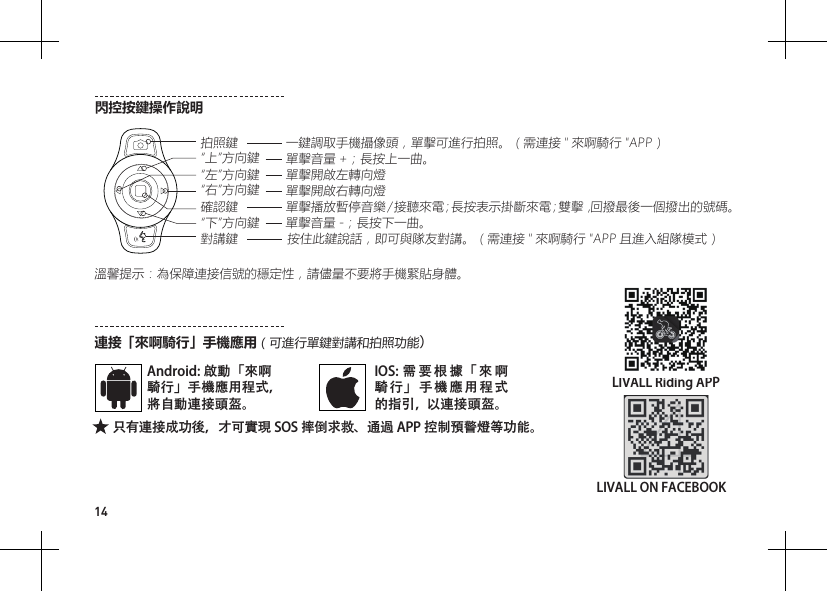
14溫馨提示:為保障連接信號的穩定性,請儘量不要將手機緊貼身體。閃控按鍵操作說明拍照鍵“上”方向鍵“左”方向鍵“下”方向鍵對講鍵“右”方向鍵確認鍵一鍵調取手機攝像頭,單擊可進行拍照。(需連接 " 來啊騎行 "APP)單擊音量 +;長按上一曲。單擊開啟左轉向燈單擊開啟右轉向燈單擊播放暫停音樂 / 接聽來電;長按表示掛斷來電;雙擊,回撥最後一個撥出的號碼。單擊音量 -;長按下一曲。按住此鍵說話,即可與隊友對講。(需連接 " 來啊騎行 "APP 且進入組隊模式)連接「來啊騎行」手機應用(可進行單鍵對講和拍照功能)Android: 啟動「來啊騎行」手機應用程式,將自動連接頭盔。IOS:需要根據「來啊騎行」手機應用程式的指引,以連接頭盔。只有連接成功後,才可實現 SOS 摔倒求救、通過 APP 控制預警燈等功能。LIVALL Riding APPLIVALL ON FACEBOOK
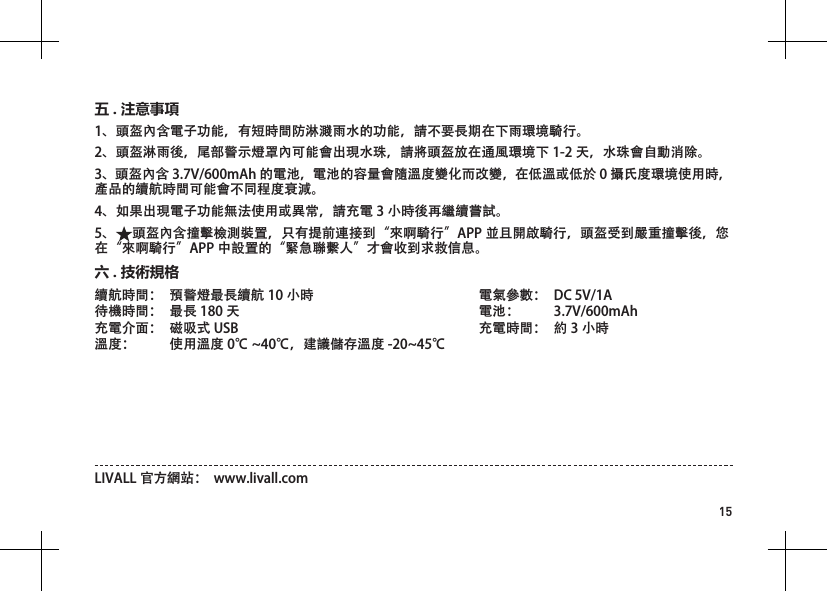
15溫馨提示:為保障連接信號的穩定性,請儘量不要將手機緊貼身體。續航時間:  預警燈最長續航 10 小時待機時間:  最長 180 天充電介面:  磁吸式 USB   溫度:  使用溫度 0℃ ~40℃,建議儲存溫度 -20~45℃電氣參數:  DC 5V/1A 電池:  3.7V/600mAh充電時間:  約 3 小時六 . 技術規格LIVALL 官方網站:  www.livall.com1、頭盔內含電子功能,有短時間防淋濺雨水的功能,請不要長期在下雨環境騎行。2、頭盔淋雨後,尾部警示燈罩內可能會出現水珠,請將頭盔放在通風環境下 1-2 天,水珠會自動消除。3、頭盔內含 3.7V/600mAh 的電池,電池的容量會隨溫度變化而改變,在低溫或低於 0 攝氏度環境使用時,產品的續航時間可能會不同程度衰減。4、如果出現電子功能無法使用或異常,請充電 3 小時後再繼續嘗試。5、 頭盔內含撞擊檢測裝置,只有提前連接到“來啊騎行”APP 並且開啟騎行,頭盔受到嚴重撞擊後,您在“來啊騎行”APP 中設置的“緊急聯繫人”才會收到求救信息。五 . 注意事項
16Ⅰ.IntroductionⅡ.Packing ListWelcome to use LIVALL smart helmets. This guide will instruct you on how to use this product. As we continuously work to improve our products’ hardware and software, this guide may be updated aperiodically. If you require more detailed usage instructions, please refer to the enclosed “Important Information and Warranty Card".Helmet x 1                                          Bling Remote Controller BR80 x 1                Quick Start Guide x 1               Magnet USB charging cable x 1Important Information and Warranty Card x 1Note: The picture is for reference only. If the actual product appears dierent from the picture, the real product shall prevail.Microphone BluetoothspeakerBluetoothspeakerFrontchinstrapRear chinstrapTension adjusterTail lightControl moduleBuckleFront Back
17Ⅲ.Wearing InstructionsIncorrect Incorrect Proper WearingAdjust the length of the chinstrapLeave a gap as thick as one ngerCorrectly position the helmetCheck whether the buckle is properly fastened
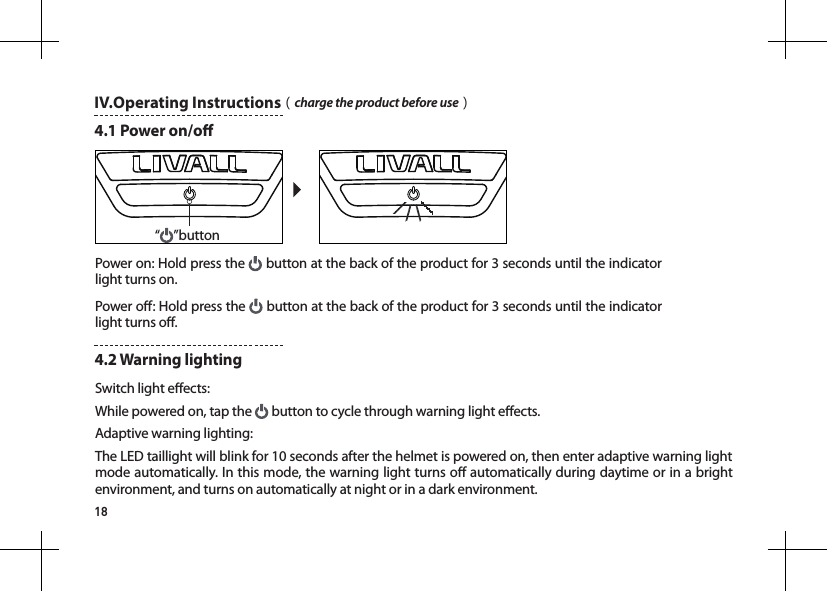
18“”buttonIV.Operating Instructions(charge the product before use)4.1 Power on/oPower on: Hold press the   button at the back of the product for 3 seconds until the indicator light turns on.Power o: Hold press the   button at the back of the product for 3 seconds until the indicator light turns o.Switch light eects: While powered on, tap the   button to cycle through warning light eects.Adaptive warning lighting:The LED taillight will blink for 10 seconds after the helmet is powered on, then enter adaptive warning light mode automatically. In this mode, the warning light turns o automatically during daytime or in a bright environment, and turns on automatically at night or in a dark environment.4.2 Warning lighting
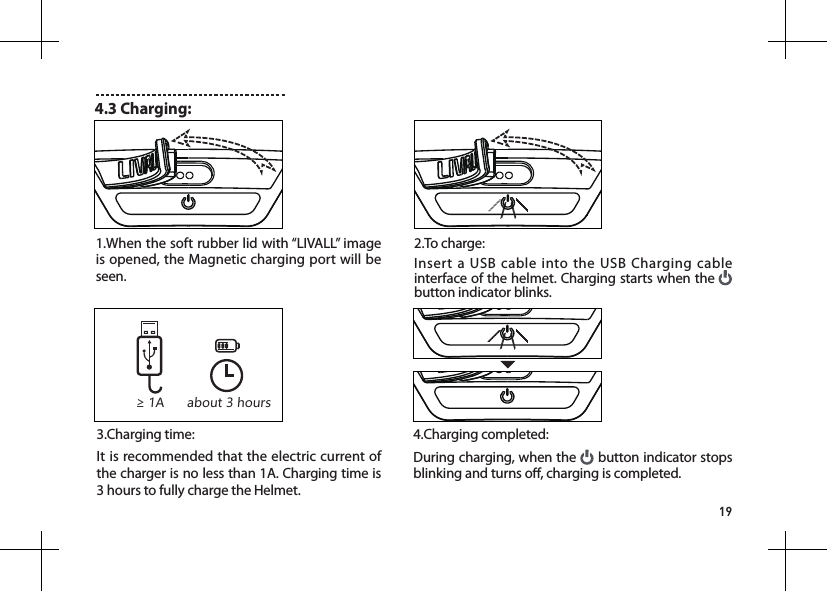
194.3 Charging:2.To charge:Insert a USB cable into the USB Charging cable interface of the helmet. Charging starts when the   button indicator blinks.1.When the soft rubber lid with “LIVALL” image is opened, the Magnetic charging port will be seen.3.Charging time:It is recommended that the electric current of the charger is no less than 1A. Charging time is 3 hours to fully charge the Helmet.4.Charging completed: During charging, when the   button indicator stops blinking and turns o, charging is completed.≥ 1A about 3 hours
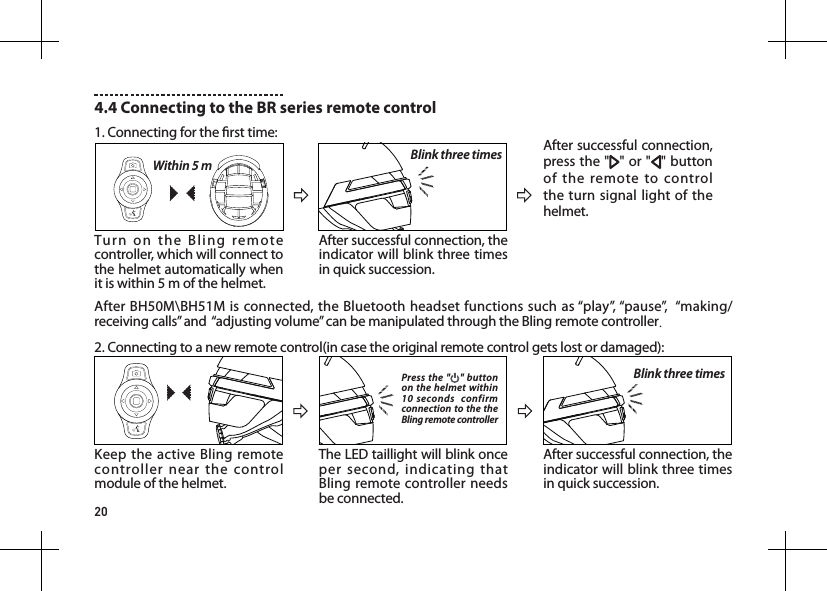
20Turn on the Bling remote controller, which will connect to the helmet automatically when it is within 5 m of the helmet. After BH50M\BH51M is connected, the Bluetooth headset functions such as “play”, “pause”,  “making/receiving calls” and  “adjusting volume” can be manipulated through the Bling remote controller.Within 5 mKeep the active Bling remote controller near the control module of the helmet.The LED taillight will blink once per second, indicating that Bling remote controller needs be connected.Press the " " button on the helmet within 10 seconds  confirm connection to the the Bling remote controllerAfter successful connection, the indicator will blink three times in quick succession.Blink three timesAfter successful connection, the indicator will blink three times in quick succession.Blink three times After successful connection, press the " " or " " button of the remote to control the turn signal light of the helmet.4.4 Connecting to the BR series remote control 1. Connecting for the rst time:2. Connecting to a new remote control(in case the original remote control gets lost or damaged):
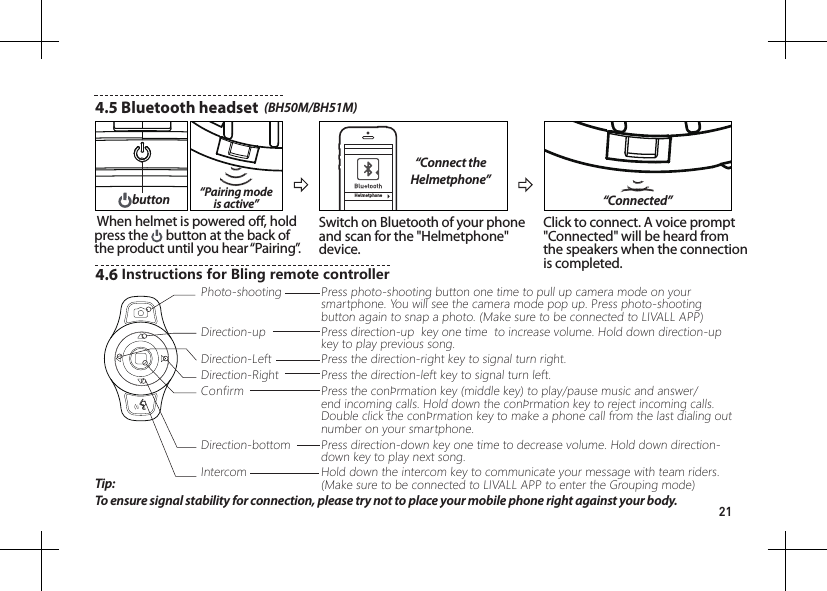
214.5 Bluetooth headset  (BH50M/BH51M)Helmetphone“Connect the Helmetphone”“Pairing mode is active” When helmet is powered o, hold press the   button at the back of the product until you hear “Pairing”.Switch on Bluetooth of your phone and scan for the "Helmetphone" device.Click to connect. A voice prompt "Connected" will be heard from the speakers when the connection is completed.“Connected”buttonTip: To ensure signal stability for connection, please try not to place your mobile phone right against your body.4.6 InstructionsforBlingremotecontrollerPhoto-shootingDirection-LeftConfirmIntercomDirection-upDirection-RightDirection-bottomPress photo-shooting button one time to pull up camera mode on your smartphone. You will see the camera mode pop up. Press photo-shooting button again to snap a photo. (Make sure to be connected to LIVALL APP)Press direction-up  key one time  to increase volume. Hold down direction-up key to play previous song.Press the direction-left key to signal turn left.Press the direction-right key to signal turn right.Press the conrmation key (middle key) to play/pause music and answer/end incoming calls. Hold down the conrmation key to reject incoming calls.  Double click the conrmation key to make a phone call from the last dialing out number on your smartphone.Press direction-down key one time to decrease volume. Hold down direction-down key to play next song.Hold down the intercom key to communicate your message with team riders. (Make sure to be connected to LIVALL APP to enter the Grouping mode)
224.7 Connecting to "LIVALL" AppFor Android: Start LIVALL Riding. The App will automatically connect to the helmet;For IOS: Follow LIVALL Riding guide to connect to the helmet.Only if the helmet is successfully connected to LIVALL APP, SOS alert feature and LED light indicators can work.LIVALL Riding APPLIVALL ON FACEBOOKV. Considerations1.    The helmet contains electronic parts inside. Please do not take a long ride in the rain although the helmet can prevent the rain from splashing. 2.    After the helmet gets wet in the rain, the water droplets might occur in the chimney of tail LED lights. The water droplets will disappear when you put the helmet under the ventilation environment for 1-2 days. 3.    The helmet contains the battery of 3.7V/600mAh. The battery capacity varies with temperature change. The battery life can decay when the helmet is used at low temperatures or below Zero degrees Celsius.4.    If the electronic functions do not work, please charge the helmet for 3 hours and then check if it works normally.5.    The helmet contains impact detection devices. Only if you connect your helmet with LIVALL APP, start ride mode on the APP and your helmet suers from the heavy impact, SOS alert feature can be triggered. Your emergency contacts set on LIVALL APP can accordingly receive your SOS messages.
23Battery life :                              Max. 10hrs for lighting timeStandby duration :     Max. 180 daysCharging port :     Magnet USB Charging cableTemperature :     Temperature for use: 0°C~40°C.  Recommended temperature for storage :   -20~45°CElectricity parameter :          DC 5V/1A Battery :                                     3.7V/600mAhCharging time :     Approximately 3 hoursLIVALL's website : www.livall.comVI. Technical Specicationsa) that the helmet can only protect if it ts well and that the buyer should try dierent sizes and choose the size which feels secure and comfortable on the head; b) that the helmet should be adjusted to t the user, e.g. the straps positioned so that they do not cover the ears, the buckle positioned away from the jawbone and the straps and buckle adjusted to be both comfortable and rm; c) how the helmet should be positioned on the head to ensure the intended protection is provided (e.g. that it should be placed so as to protect the forehead and not be pushed too far over the back of the head); d) that a helmet cannot always protect against injury; e) that a helmet subjected to a severe impact should be discarded and destroyed; f) a statement of the danger of modifying or removing any of the original component parts of the helmet other than as recommended by the manufacturer, and that helmets should not be adapted for the purpose of tting accessories in a way not recommended by the manufacturer.
24DesignedandAssembledinShenzhenChinaLIVALL HELP CENTERBH5X-QA-V1.0

Navigation menu