LPS Device NEO-4005LS LCD TV & MONITOR User Manual USERS MANUAL 1
LPS Device Co., Ltd. LCD TV & MONITOR USERS MANUAL 1
Contents
- 1. USERS MANUAL 1
- 2. USERS MANUAL 2
- 3. USERS MANUAL 3
USERS MANUAL 1
NEOVIA
40L C D T V
OWNERS
INSTRUCTION
FCC NOTE
:This equipment has been tested and found to comply with the limits for a Class B digital device,
pursuant to Part 15 of the FCC Rules. These limits are designed to provide reasonable
protection against harmful interference in a residential installation. This equipment generates,
uses and can radiate radio frequency energy and, if not installed and used in accordance with
the instructions, may cause harmful interference to radio communications.
However, there is no guarantee that interference will not occur in a particular installation. If this
equipment does cause harmful interference to radio or television reception, which can be
determined by turning the equipment off and on, the user is encouraged to try to correct the
interference by one or more of the following measures:
-- Reorient or relocate the receiving antenna.
-- Increase the separation between the equipment and receiver.
-- Connect the equipment into an outlet on a circuit different from that to which
the receiver is connected.
-- Consult the dealer or an experienced radio/TV technician for help.
THIS DEVICE COMPLIES WITH PART 15 OF THE FCC RULES.
OPERATION IS SUBJECT TO THE FOLLOWING TWO CONDITIONS:
(1) THIS DEVICE MAY NOT CAUSE HARMFUL INTERFERENCE, AND
(2) THIS DEVICE MUST ACCEPT ANY INTERFERENCE RECEIVED,
INCLUDING INTERFERENCE THAT MAY CAUSE UNDESIRED OPERATION
THE MANUFACTURER IS NOT RESPONSIBLE FOR ANY RADIO OR TV INTERFERENCE
CAUSED UNAUTHORIZED MODIFICATIONS TO THIS EQUIPMENT. SUCH
MODIFICATIONS COULD VOID THE USER'S AUTHORITY TO OPERATE THE EQUIPMENT.
NEOVIA
40LCD TV OWNERS INSTRUCTION
3
ENGLISH
TABLE OF CONTENTS
WARNING 4
IMPORTANT SAFETY INSTRUCTIONS 5
SAFETY PRECAUTIONS 6
SUPPLIED ACCESSORIES 7
PRECAUTION ON BATTERY USE 7
OVER-VIEW
Remote Control 8
Front Panel 8
Rear Connection 9
CONNECTING TO DEVICE
Connecting to TV 10
Connecting to CABLE TV / VCR 10
Connecting to SCART 11
Connecting to HDMI 12
Connecting to another output source 13
Connecting to external speaker 13
Connecting to PC 14
SETTING
TV Setting 15
Source Setting 17
Source Selection 19
OSD CONTROL
Picture 21
Image Adjustment 22
Set Up 23
Audio Setting 24
FAQ / TROUBLESHOOTING 25
SPECIFICATIONS 27
40LCD TV OWNERS INSTRUCTION
4
NEOVIA
ENGLISH
WARNING
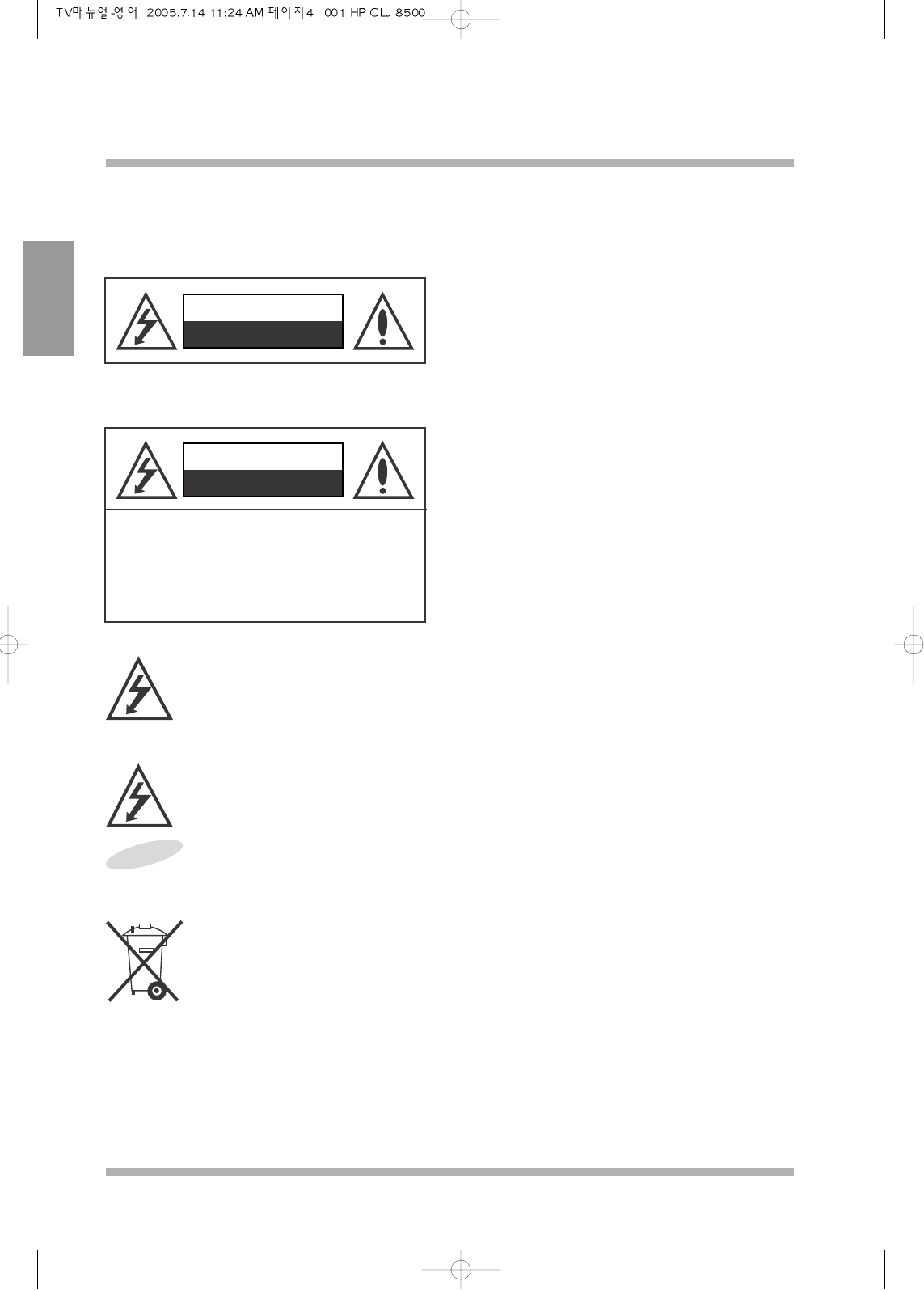
CAUTION
RISK OF ELECTRIC SHOCK
DO NOT OPEN
Shock Hazard Marking and Associated Graphical Symbol
CAUTION
RISK OF ELECTRIC SHOCK
DO NOT OPEN
Explanation of Safety Related Symbol
CAUTION : TO REDUCE THE RISK OF
ELECTRIC SHOCK. DO NOT REMOVE
COVER (OR BACK).
NO USER-SERVICEABLE PARTS
INSIDE. REFER SERVICING TO
QUALIFIED SERVICE PERSONNEL.
This symbol is intended to alert the user to the presence of uninsulted ‘dangerous voltage’ within
the products enclosure that may be of sufficient magnitute to constitude a risk of electric shock to
persons.
To preserve the environment, do not rubbish.
This symbol is intended to alert the user to the presence of important operating and maintenance
(servicing) instructions in the literature accompanying the appliance.
To reduce the risk or fire or electric shock. Do not expose this
apparatus to rain or moisture.
WARNING -
NEOVIA
40LCD TV OWNERS INSTRUCTION
5
ENGLISH
IMPORTANT SAFETY INSTRUCTIONS
1) Read these instructions.
2) Keep these instructions.
3) Heed all warnings.
4) Follow all instructions.
5) Do not use this apparatus near water.
6) Do not install near any heat sources such as radiators, heat registers, stoves, or other apparatus (including
amplifiers) that produce heat.
7) Do not defeat the safety purpose of the polarized or grounding type plug. A polarized plug has two blades
with one wider than the other. A grounding type plug has two blades and a third grounding prong. The wide
blade or the third prong is provided for your safety. When the provided plug does not fit into your outlet,
consult an electrician for replacement of the obsolete outlet.
8) Only use the attachments/accessories specified by the manufacturer.
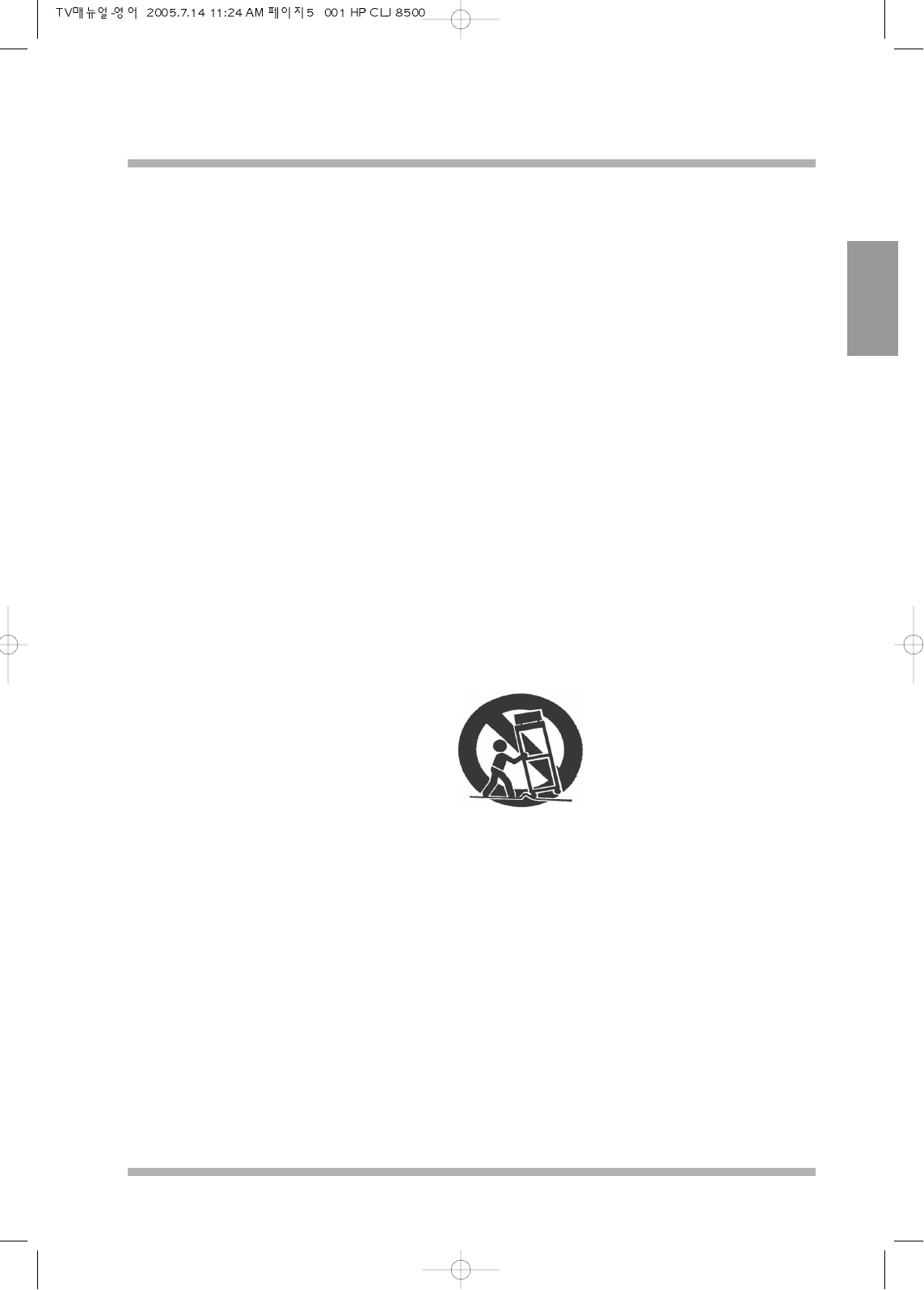
9) Use only with a cart, stand, tripod, bracket, or table specified by the manufacturer, or sold with the apparatus.
When a cart is used, use caution when moving the cart/apparatus combination to avoid injury from tip-over.
10) Unplug this apparatus during lightening storms or when unused for long periods of time.
11) Refer all servicing to qualified service personnel. Servicing is required when the apparatus has been
damaged in any way, such as power supply cord or plug is damaged, liquid has been spilled or objects have
fallen into the apparatus, the apparatus has been exposed to rain or moisture, does not operate normally, or
has been dropped.
40LCD TV OWNERS INSTRUCTION
6
NEOVIA
ENGLISH
SAFETY PRECAUTIONS
Warranty
To guard against injury, the following basic safety precautions should be observed in the installation, use and
servicing of the set.
Power Sources
This set should be operated only from the type of power source indicated on the serial label. If you are not sure
of the type of electrical power supplied to your home, consult your dealer or local power company.
Wall Outlet
Do not use a poor fitting outlet.
Insert the plug fully into the outlet. If it is loose, it may cause arcing which result fire.
Moisture
Do not handle the TV set with wet hands as it could damage the TV set and it may cause electric shock as well
as fire.
Cleaning
Be sure to unplug the TV unit before cleaning.
To minimize contact with the front of the screen surface, use dry soft cloth when cleaning front of the screen.
Do not use alcohol, benzine, thinner etc., as it damages the coating.
Should use commercially available chemical fibre cleaning cloths in accordance with their supplied
instructions.
Ventilation Holes
The slots and opening holes in the TV set are provided for necessary ventilation. To insure the reliable operation
of the set, and to protect from overheating, the holes and openings must never be blocked or covered.
Unless proper ventilation is provided, the unit may gather dust and get dirty. For proper ventilation, observe the
followings:
Do not store the unit turned backwared or sideways.
Do not store the unit turned face down or upside down.
Never cover the slots and opening with a cloth or other materials as this prevents ventilation holes.
Never store the unit on soft surface.
Never place the unit in a confined space, such as bookcase or built in cabinet, unless proper ventilation is
provided.
Do not place the unit near or over the radiator or exposed to direct sunlight.
NEOVIA
40LCD TV OWNERS INSTRUCTION
7
ENGLISH
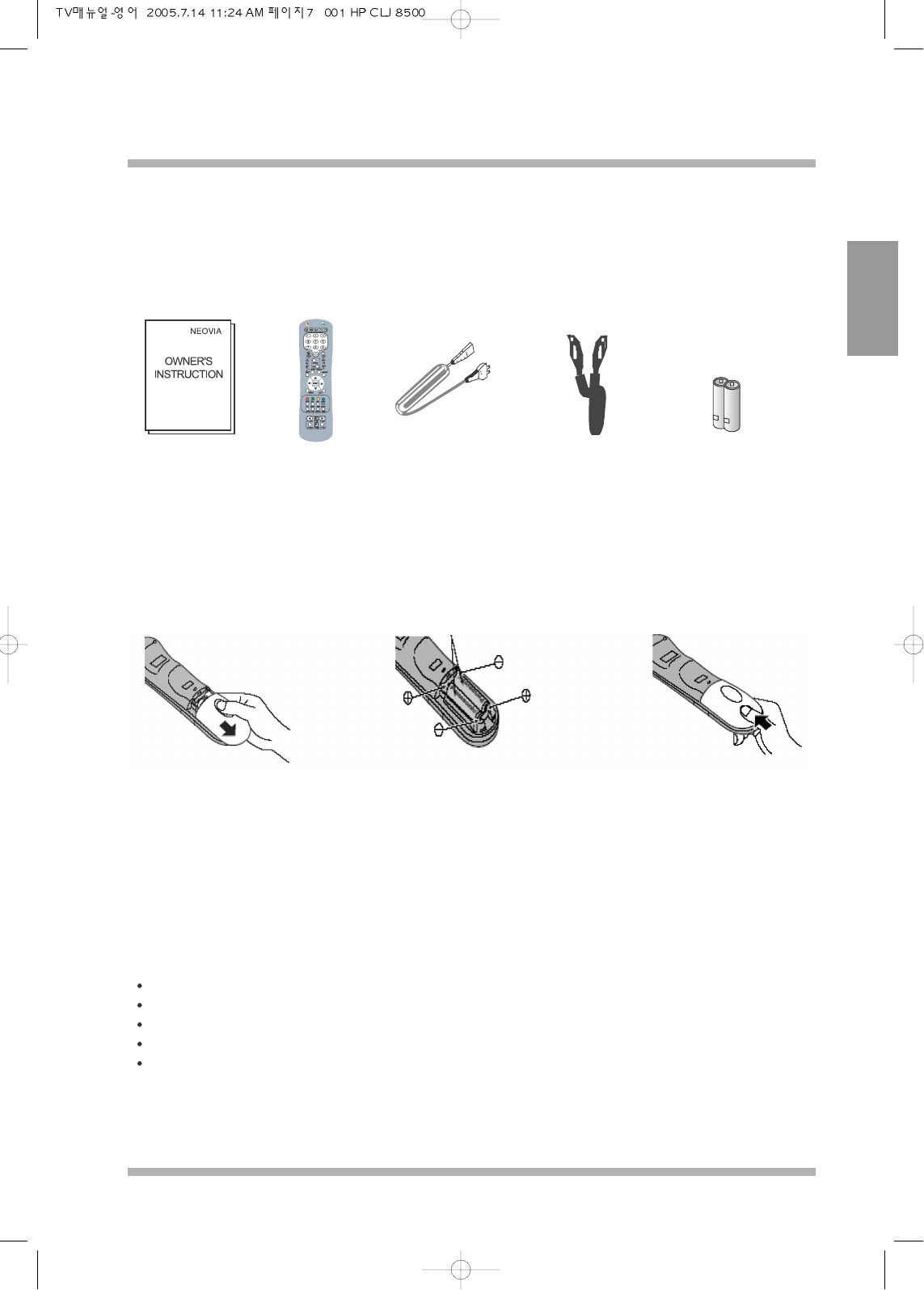
SUPPLIED ACCESSORIES
PRECAUTION ON BATTERY USE
Requires two AAA batteries.
Check the accessories before installation.
Operation Instruction
Manual
Remote Control Power Cable SCART Cable Batteries for the Remote
Controller (2 x AAA Size)
1. Open the battery cover 2. Install the batteries to the
correct polarity (+and-)
3. Replace the cover
Incorrect installation can cause battery leakage and corrosion that will damage the remote controller
1. Always use new batteries when replacing the old set.
2. Do not attempt to charge, shot-circuit, disassemble, heat or burn used batteries
3. Battery replacement is necessary when the remote control acts sporadically or fails to operate this unit.
NOTES:
Do not drop, apply shock to step on the remote controller.
Do not spill water on the remote controller.
Do not place objects between the remote control sensor and remote controller.
Do not use remote controller for other equipment at the same time.
If the TV does not operate even when using the remote controller from a close range, it is time to replace the
batteries.
40LCD TV OWNERS INSTRUCTION
8
NEOVIA
ENGLISH
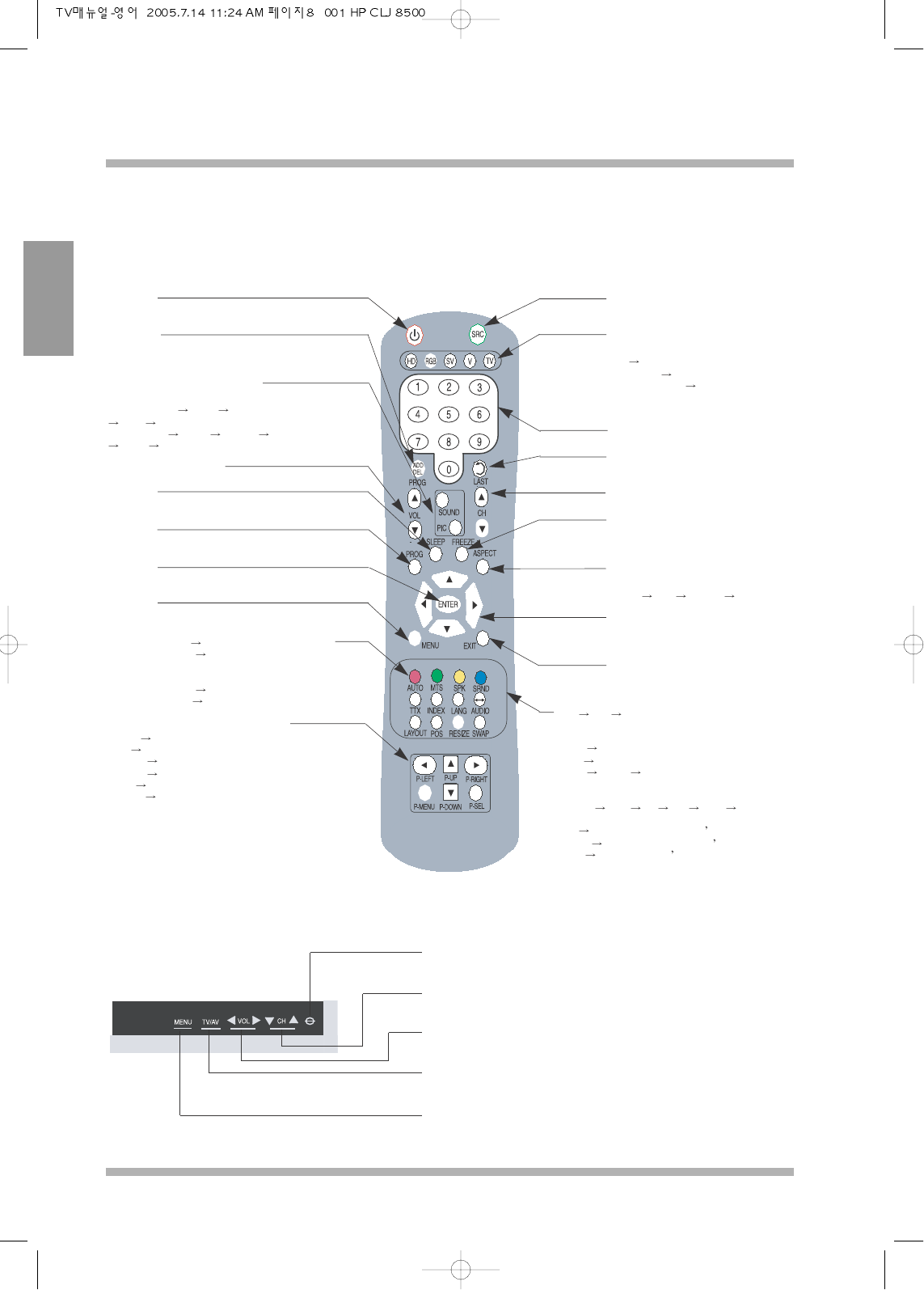
Remote Control
Front Panel
POWER
To turn ON/OFF the PICTURE
ADD/DEL
To add and delete channels
that was stored in the searched channels.
SOUND AND PICTURE MODE
To change the audio and pciture settings
PICTURE MODE NEWS NORMAL
SOFT USER.
AUDIO MODE MOVIE NORMAL MUSIC
NEWS USER.
VOLUME UP / DOWN
SLEEP
To set the timer when to turn the screen off.
MUTE
Temporarly turn the sound off/on
ENTER
To confirm the changes that user has made.
MENU
Display on screen display (OSD)
AUTO/Red key(TTX) Analog RGB auto adjust function
MTS/Green Key(TTX) (Multichannel television sound) Hot key to
listen to the TV in secondary channel if it is
transmitted by broadcasting station.
SPK/Yellow key (TTX) Internal speaker On/OFF.
SRND/Blue key(TTX) Surround sound On/OFF(option).
Picture Viewing Controls (option)
P-LEFT Selection Left Control function.
P-UP Selection Up Control function.
P-RIGHT Selection Right Control function
P-DOWN Selection Down Control function
P-SEL Confirm the selection.
P-MENU Picture Viewer On Screen Display
SOURCE
To change the Display Source
SOURCE QUICK KEY
HOT KEYS for changing the Display Source
HD1 HD 2
Analog RGB DVI S-Video
Composite Video 1 Composite Video 2
TV
NUMERICAL KEYPAD
LAST
Used in TV mode to return to previous Channel.
CHANNEL UP/DOWN
FREEZE
To temporally freeze the current picture shown
on the Screen.
ASPECT
To Alter Viewing Ratio of the Display.
Normal WIDE FILL ALL ZOOM
CURSOR CONTROL
To move the Cursor, Up/Down, Left/Right within
the OSD (ON SCREEN DISPLAY) MENU
EXIT
To Exit Instantly from the OSD MENU
TTX MIX OFF, when in Teletext mode, above four
buttons function as color buttons for
the Teletext.
INDEX Teletext Index Key.
LANG Change the OSD Language.
AUDIO Primary Secondary, to change the audio output
from Primary to Secondary only available when it is
in PIP and POP mode only.
LAYOUT MAIN PIP PBP POP3 POP 5
To change the Display setting.
POS Change the position of the PIP s secondary picture.
RESIZE
To change the size of the PIP s secondary picture
SWAP To swap the picture s between primary and
secondary picture (only available when the display
is in PIP and PBP)
POWER
Turn Picture ON/OFF
CHANNEL / CURSOR UP / DOWN
Change Channel UP / DOWN When in OSD to move Cursor Up/ Down
VOLUME UP / DOWN
Volume Increase / Decrease When in OSD to move Cursor Left / Right
TV / AV
Change the Source for Displaying
MENU
Displaying OSD (ON SCREEN DISPLAY)
OVER-VIEW
NEOVIA
40LCD TV OWNERS INSTRUCTION
9
ENGLISH
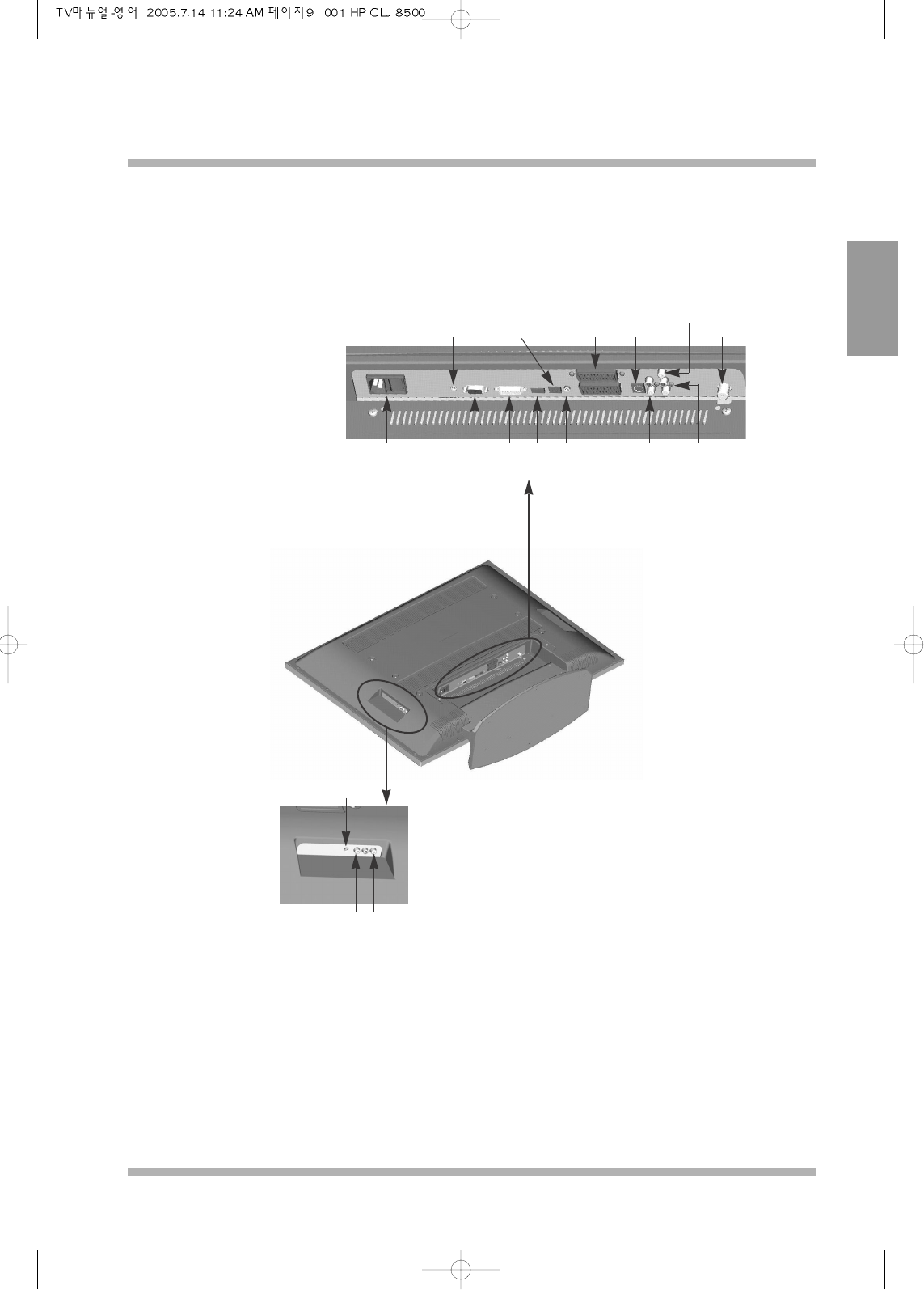
Rear Connection
View of the Rear Connection Ports
Service
Port
S/PDIF
OUT (Option)
SCART2
SCART1 / Decoder S-VIDEO
Composite Video
OUT TV
ANTENNA
SOUND
OUT
S-VIDEO
SOUND IN
A.RGB/DVI
SOUND
Earphone
Sound Out
Video
Ext.
IN
Sound
Ext.
IN
HDMIDVIAnalog
RGB
POWER
The Rear View
As shown above rear connection ports are classified into two ports(SCART 1 and SCART 2). Each port is
capable of receiving from Composite Video/Video and HD/Component (upto 1080i).
SCART 1 is for the connection with TV decoder like CANAL+ and SCART 2 is for the connection with other
video decoders like DVD Player.
Next pages will explain the various connections that are possible. There are only one input for analog RGB,
DVI, HDMI and S-Video has separate sound input port.
On the left hand side of rear view there is external video input port for easy connection to other input devices
such as camcorder etc.
40LCD TV OWNERS INSTRUCTION
10
NEOVIA
ENGLISH
Connecting to TV
Connecting to CABLE TV / VCR
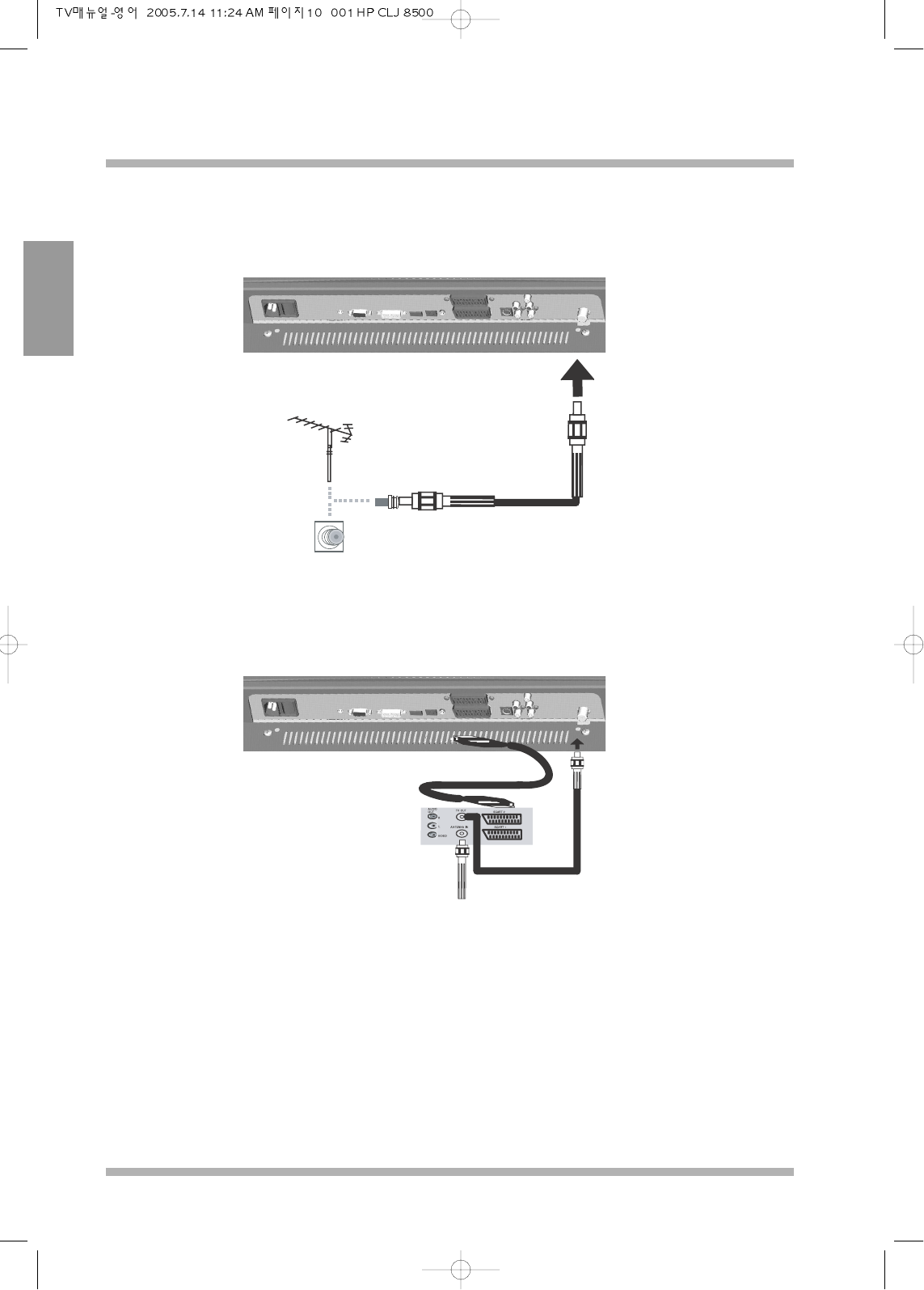
To watch the terrestrial TV connect the antenna cable to the far right port at the back of the LCD TV.
N.B because this TV is capable of inputing two SCART
connectors i.e. Composite Video, HD / Component. the diagram
is shown for one cases only, however user has option to connect
to all the Input if they require.
The following connections shows the possible of connecting DVD, VCR, satellite set top boxes and other
various input.
CONNECTING TO DEVICE
NEOVIA
40LCD TV OWNERS INSTRUCTION
11
ENGLISH
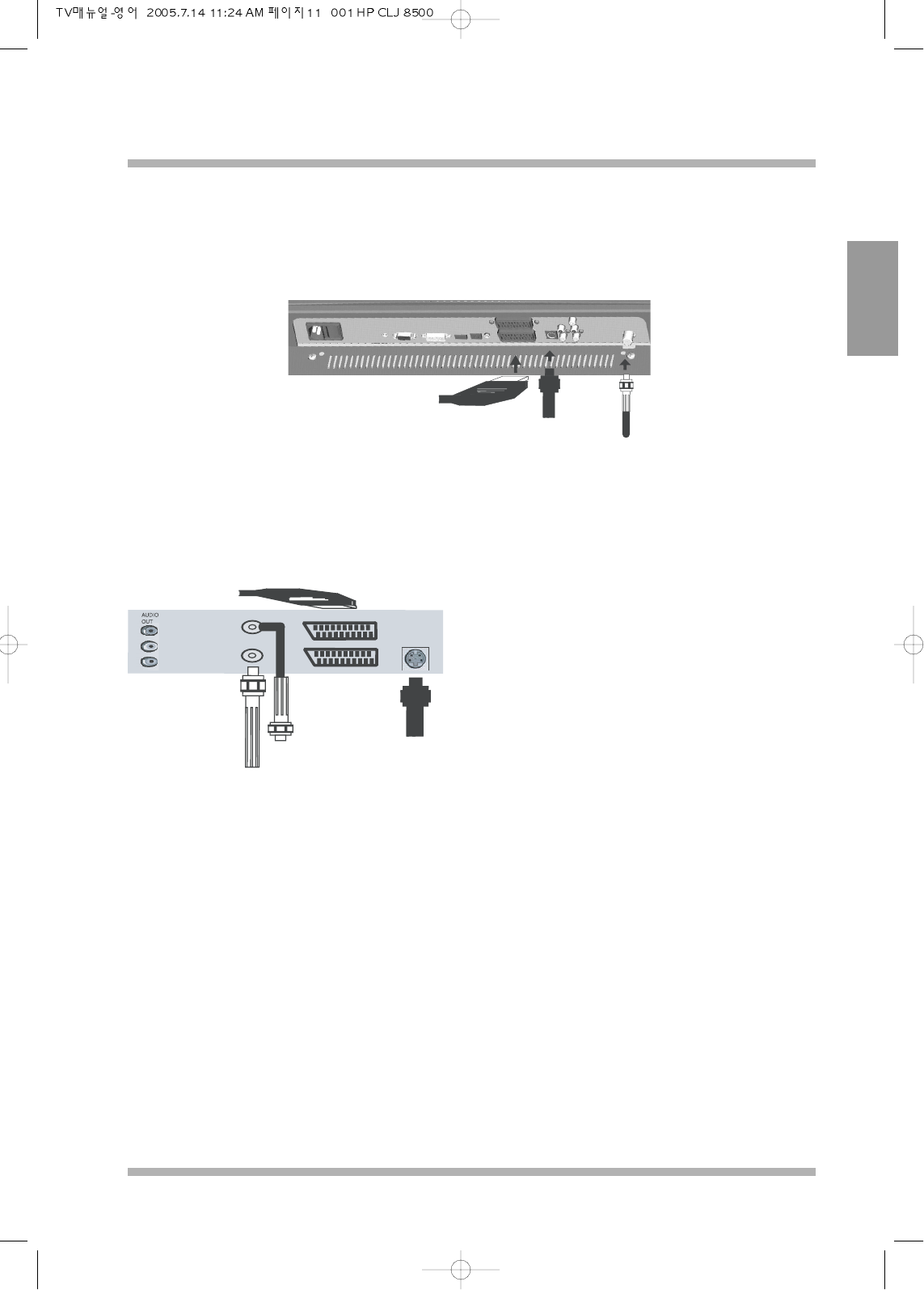
Connecting to SCART
FROM VCR
S-VIDEO
SCART
S-VIDEOTV-IN
ANTENNA
IN
S-VIDEO
TV OUT
ANTENNA IN
R
L
VIDEO
SET TOP BOX or
VCR or DVD External
DECODERS
Connect cable by its defined names
For S-VIDEO input the TV has separate sound in hance please check
if your SET TOP BOX or DVD etc has sound out for S-VIDEO.
By connecting SCART connection, this TV is capable of accepting HD / Component, S-Video, Composite
Video and sound from the one SCART connector.
If your external is capable of all these input with one scart cable then only one connector is needed for various
inputs.
40LCD TV OWNERS INSTRUCTION
12
NEOVIA
ENGLISH
Connecting to HDMI
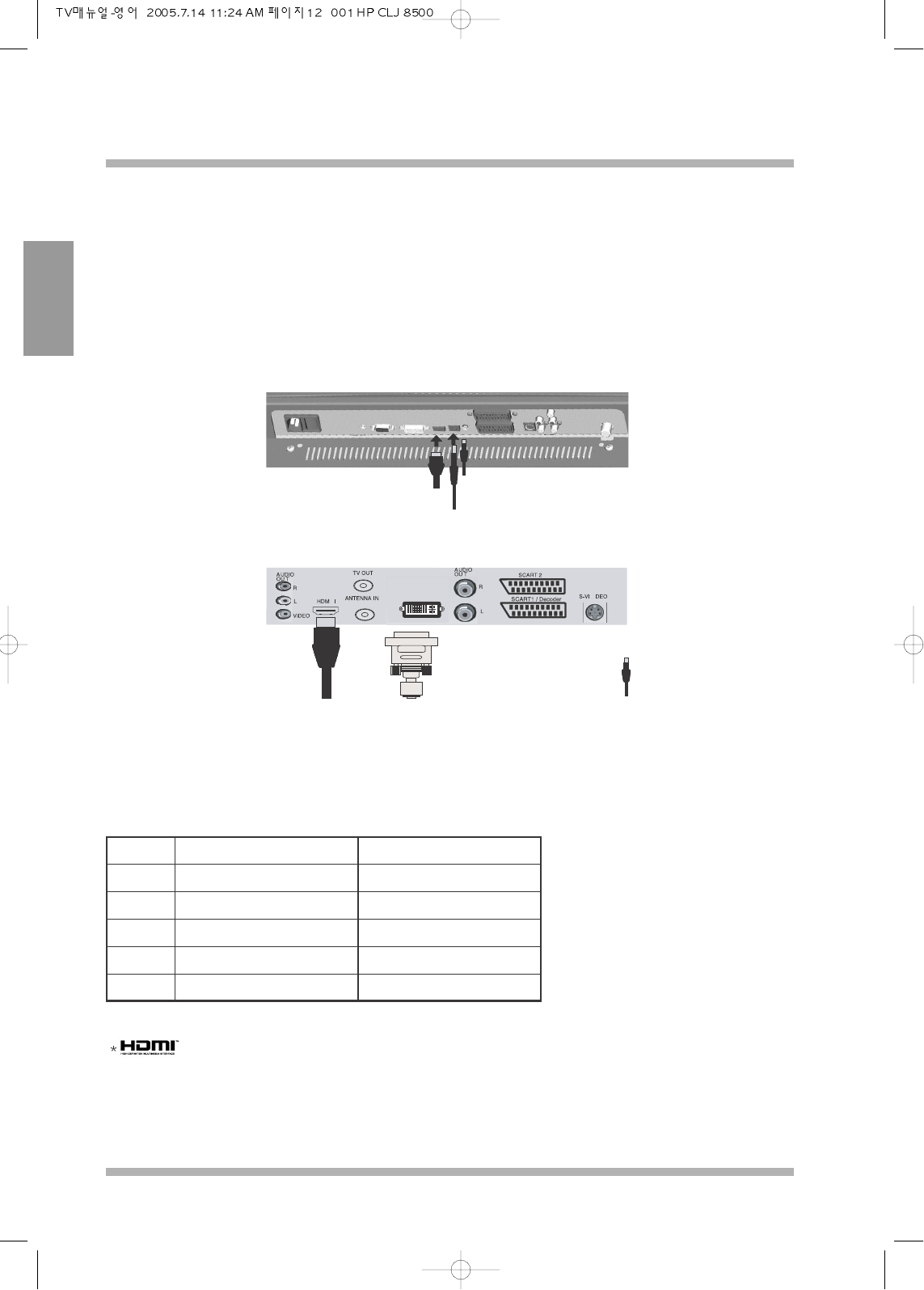
HDMI (High Definition Multimedia Interface) is the first all digital consumer electronics A/V interface that
supports high quality picture and sound without compressing high resolution video. The HDMI terminal
supports both video and audio information.
This is achieved by connecting EIA/CEA-861/861B compliant consumer electronics device, such as set top box
or DVD player with HDMI or DVI output (adapter required) to the HDMI input terminal. Connect a HDCP
(high bandwidth digital content protection) source to TV’s HDMI terminal, to display high-definition pictures
without compression of video in digital form.
HDMI
IN
HDMI
For DVI out connect the sound using the
appropriate RCA to headphone adapter.
S/PDIF OUT (Option)
to Audio Decoder
SET TOP BOX or VCR or DVD
External DECODERS
Notes;
Make sure that the power of the LCD TV is turned off before connection to RGB, DVI and HDMI.
If the external device has DVI output only, use a DVI to HDMI adapater cable to connect to the HDMI Terminal.
In this case two channel audio needs to be connected to PC RGB/DVI audio using an adapter.
and High-Definition Multimedia Interface are trademarks or registered tradmarks of HDMI Licen-
sing LLC.
EIA/ CEA-861/861B profiles compliance covers profiles for transmission of uncompressed digital video
including HDCP (high bandwidth digital content protection).
For HDMI-DVI conversion cable or an adapter consult your customer electronics dealer for availability
details.
No. of Dots (H X V) Vertical Scanning Feq (Hz)
1080i 1920 x 1080i 50
720P 1280 x 720P 50
576P 720 x 576P 50
480P 640 x 480P 50
576i 720 x 576i 50
This TV is Compatible with the following
This input terminal is not intended for use with computers.
Compatible audio sampling frequency
(LPCM): 48kHz / 44.1 kHz / 32 kHz.h
Notes:
This HDMI connector is type A.
NEOVIA
40LCD TV OWNERS INSTRUCTION
13
ENGLISH
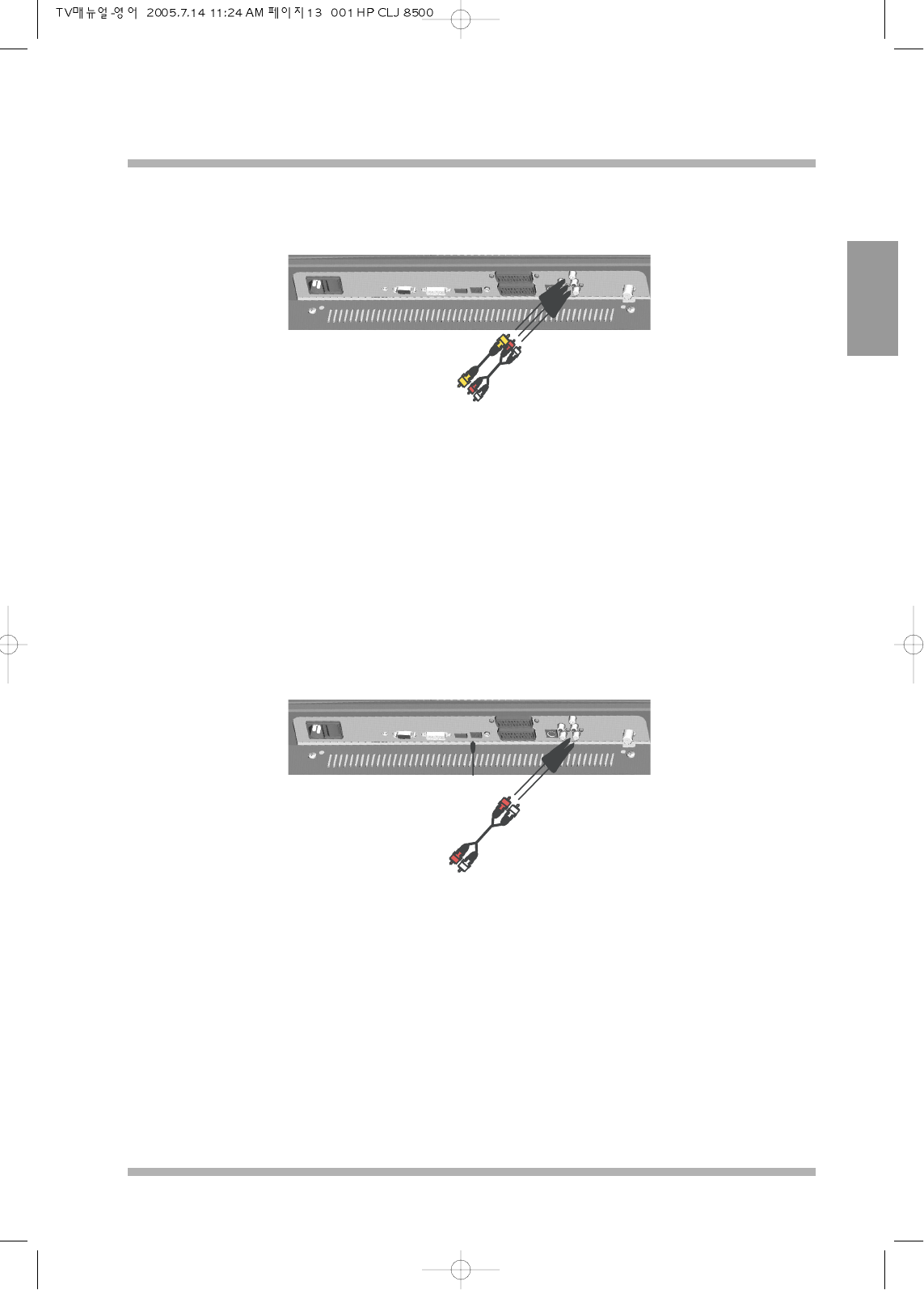
Connecting to another output source
VIDEO OUT
S/PDIF OUT
(Option)
To external
2 channel
amplifier
SOUND OUT
Video Out is used to display the input sources of this LCD TV to another display screen. Only TV and
Composite Video sources can be displayed.
If the LCD TV in Multi window mode (PIP, POP 3, POP 5), Video Out outputs to another display what is
shown in the main screen.
Connect to external amplifier for louder and perfered speakers.
S/PDIF out is only vaild for HDMI only (option)
Connecting to external speaker