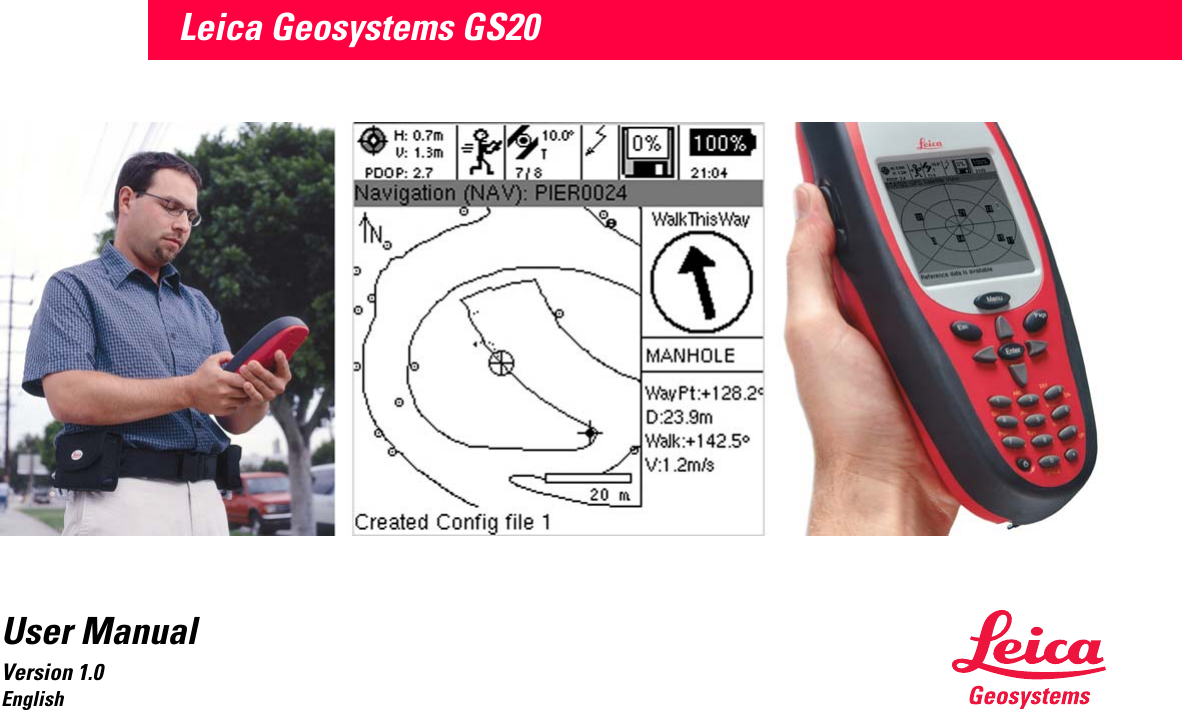
Leica Geosystems WORCS GPS Positioning System User Manual GS20 V1 0 en

Leica Geosystems, Inc. GPS Positioning System GS20 V1 0 en

User Manual

Leica Geosystems GS20User ManualVersion 1.0English
Leica Geosystems GS20 User Manual-1.0.0en 2Leica Geosystems GS20Congratulations on your purchase of a new Leica Geosystems System GS20.This manual contains important safety directions (refer to chapter "Safety directions") as well as instructions for setting up the product and operating it.  Read carefully through the User Manual before you switch on the product.Product identificationThe model and the serial number of your product are indi-cated on the typeplate.Enter the model and serial number  in your manual and always refer to this information when you need to contact your agency or authorized service workshop.GPS Receiver Type: _______Serial No.: _______Software-Version V:       _______Build:         _______External Antenna Type: _______Serial No.: _______Symbols used in this manualThe symbols used in this User Manual have the following meanings:ƽDANGER:Indicates an imminently hazardous situation which, if not avoided, will result in death or serious injury.ƽWARNING:Indicates a potentially hazardous situation or an unintended use which, if not avoided, could result in death or serious injury.ƽCAUTION:Indicates a potentially hazardous situation or an unintended use which, if not avoided, may result in minor or moderate injury and / or appreciable mate-rial, financial and environmental damage.)Important paragraphs which must be adhered to in practice as they enable the product to be used in a technically correct and efficient manner.
3Leica Geosystems GS20 User Manual-1.0.0enView of chaptersIntroduction......................................................................................... 5Description of the System ................................................................. 7Getting Started with the new GIS equipment................................. 12Care and Transport .......................................................................... 14Safety Directions .............................................................................. 15Technical Data .................................................................................. 25
Leica Geosystems GS20 User Manual-1.0.0en 4ContentsIntroduction................................................................ 5The Leica Geosystems GS20..................................... 6Overview of the User Manual ..................................... 6Description of the System ................................... 7Unpacking................................................................... 7GPS Receiver............................................................. 8Receiver Hardware ..................................................... 8Charge the Batteries.............................................. 9Set Up the Equipment ......................................... 11Post-processing software .................................... 11Getting Started with the new GIS  equipment................................................................. 12Introduction............................................................... 12Receiver Hardware ................................................... 13Leica Geosystems GS20 Sensor ........................ 13Care and Transport............................................... 14Transport .................................................................. 14Storage ..................................................................... 14Cleaning and drying.................................................. 14Safety Directions ................................................... 15Intended use of product ........................................... 15Permitted uses .................................................... 15Prohibited uses ................................................... 15Limits of use ............................................................. 16Responsibilities ........................................................ 16Hazards of use ......................................................... 17Main hazards of use............................................ 17Electromagnetic Compatability (EMC) ..................... 22FCC statement (applicable in U.S.).......................... 24Technical Data........................................................ 25
Introduction5Leica Geosystems GS20 User Manual-1.0.0enIntroductionFor decades, Leica Geosystems has enjoyed a worldwide technological lead in the manufacture of classical surveying instruments and systems. Starting in 1987, Leica Geosystems established a close business relationship with Magnavox's commercial GPS business unit for the design and construction of GPS surveying sensors. This culmi-nated into Leica Geosystems acquisition of the Magnavox GPS business unit in 1994. With this purchase, the unbroken chain of impressive "firsts" now incorporated the field of satellite navigation and positioning technology. Magnavox was one of the first pioneers in this arena, playing a leading role in the development of GPS and its predecessors. Further acquisition of the Philips Ap Navi-gator business in 1997 widened Leica Geosystems product palette to an even greater extent. In May 1999, Leica Geosystems entered the GIS/GPS data collection market with the introduction of the Leica Geosystems GS50 GPS sensor and Leica Geosystems GIS DataPRO office software. With the integration of ERDAS and LH Systems in 2001, Leica Geosystems has expanded its product areas to offer four ranges of GIS and mapping solutions - airborne data acquisition, geographic imaging, GPS/GIS, and land information systems. Leica Geosystems' airborne sensors, field data collectors, work-stations and software help customers create and update GIS databases rapidly, accurately and cost effectively. Leica Geosystems is the first choice for geographic data acquisition systems, 2D and 3D image processing and visualization, and mapping solutions. To find out more about the how Leica Geosystems products and solutions can benefit you, visit our website at  www.leica-geosystems.com
Introduction Leica Geosystems GS20 User Manual-1.0.0en 6The Leica Geosystems GS20The Leica Geosystems GS20 PDM was conceived to provide the GIS community with a GPS data collection device that combined the simplicity of a recreational GPS handheld with the power and flexibility of a professional grade mapping system. The Leica Geosystems GS20 represents a true turnkey GPS/GIS mapping solution by integrating the GPS receiver and antenna within the chassis of handheld data collector. Add to this the built-in efficiency of Bluetooth wireless technology and you only need add power and sky; the rest is up to you.Overview of the User ManualThe User Manual is intended to provide information concerning safety, storage and technical data of the Leica Geosystems GS20 and accessories. For additional infor-mation on the use and operation of Leica Geosystems GS20, please refer the GS20 Field Guide (provided sepa-rately). For information concerning the use and interaction between Leica Geosystems GIS DataPRO and the Leica Geosystems GS20, please refer to the GIS DataPRO Manual, found in the documentation directory of installa-tion, as well as the GIS DataPRO installation CD.
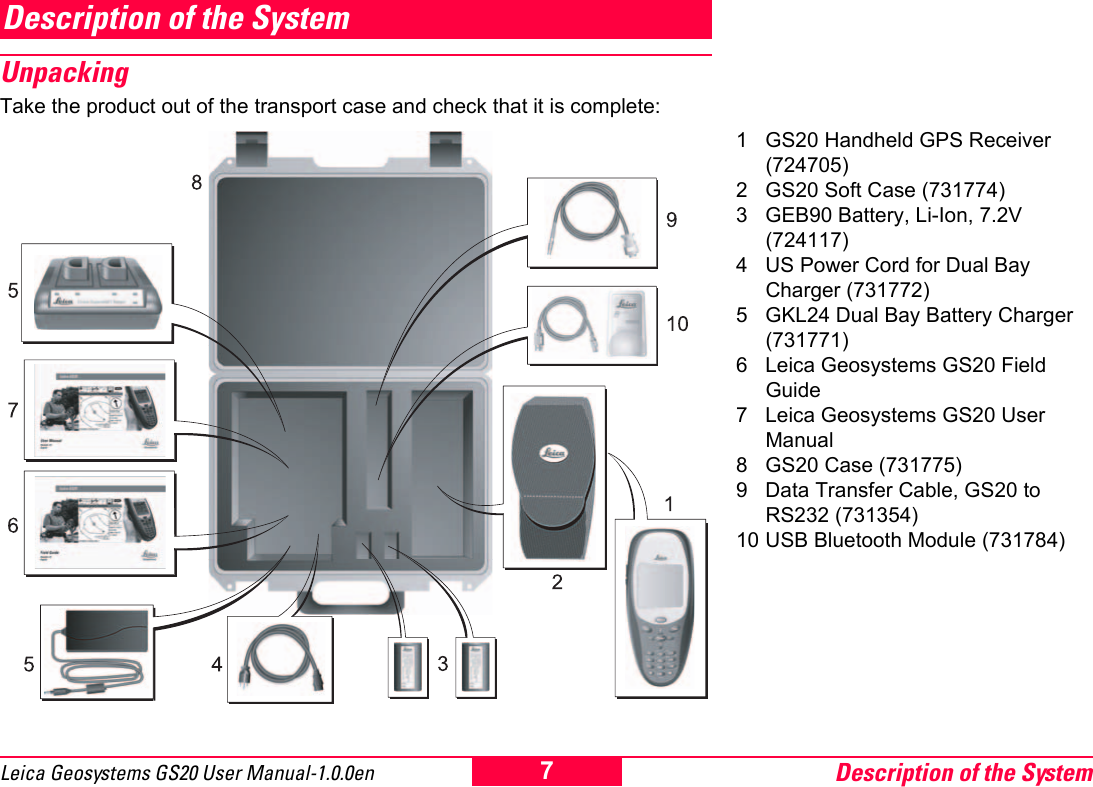
Description of the System7Leica Geosystems GS20 User Manual-1.0.0enDescription of the System UnpackingTake the product out of the transport case and check that it is complete:1 GS20 Handheld GPS Receiver (724705)2 GS20 Soft Case (731774)3 GEB90 Battery, Li-Ion, 7.2V  (724117)4 US Power Cord for Dual Bay Charger (731772)5 GKL24 Dual Bay Battery Charger (731771)6 Leica Geosystems GS20 Field Guide7 Leica Geosystems GS20 User Manual8 GS20 Case (731775)9 Data Transfer Cable, GS20 to RS232 (731354)10 USB Bluetooth Module (731784)
Description of the System Leica Geosystems GS20 User Manual-1.0.0en 8GPS ReceiverThe GPS Receiver receives the GPS signal from the NAVSTAR satellites and calculates a range to all visible satellites.The Leica Geosystems GS20 is a 12 L1 channels, code and phase handheld GPS receiver for professional data mapping (PDM). See section "Technical Data".Receiver HardwareIn most cases, a short introduction in the use of the Receiver  will be provided by the local Leica representative. If this is not the case proceed as outlined in the following sections.Alternatively refer to the FieldGuide PDF-manual available on the GISDataPro Installation CD.
Description of the System9Leica Geosystems GS20 User Manual-1.0.0enCharge the BatteriesYour Leica Geosystems GS20 is powered by a recharge-able 7.2 V, Li-Ion battery. Note that a new battery's full performance is achieved only after two or three complete charge and discharge cycles. The battery can be charged and discharged hundreds of times but it will eventually wear out. When the operation time is noticeably shorter than normal, it is time to buy a new Leica Geosystems GEB90 Li-Ion Battery. The Leica Geosystems GEB90 Li-Ion, 7.2 V, batteries may be charged using the Leica Geosystems GKL24 Dual Bay Battery Charger. Please find more information about your Leica Geosystems Dual Bay Battery Charger in the GKL24  Chargers User Manual.One batteries, fully charged, will power the GS20 for about 7 hours continuously. Operating times will be shorter when working in cold weather. ƽCAUTION:Replace Battery with the same type only. Use of an-other Battery may present a risk of personal injury from fire, explosion, leakage, or excess heat.Precautions:Use only the Leica Geosystems GEB90 Battery to power the GS20 or WoRcs.ƽCAUTION:Charge only with Leica Geosystems GKL24 Charger. Use of another charger may present risk of personal injury from fire, explosion, leakage, or excess heat.Precautions:When charging Leica Geosystems GEB90 Batteries make sure to use only the Leica Geosystems GKL24 Charger.ƽCAUTION:Never carry a Leica Geosystems GEB90 Battery loose. It can be affected by temperature extremes, accidental short circuit, shock and vibration. This may present a risk of personal Injury from fire, explo-sion, leakage or excess heat. Precautions:Always carry it in its case and secure it. When transporting the Leica Geosystems GEB90 Battery by road vehicle, rail, air or ship, always use the complete original packaging (case and cardboard box), or its equivalent, to protect it against temperature extremes, short circuit shock and vibration. ƽCAUTION:Do not dispose of battery in fire. Disposing in fire may present a risk of personal injury from fire, explo-sion, leakage, or excess heat. Precautions:Dispose Leica Geosystems GEB90 Batteries only according to local regulations (e.g. recycling).
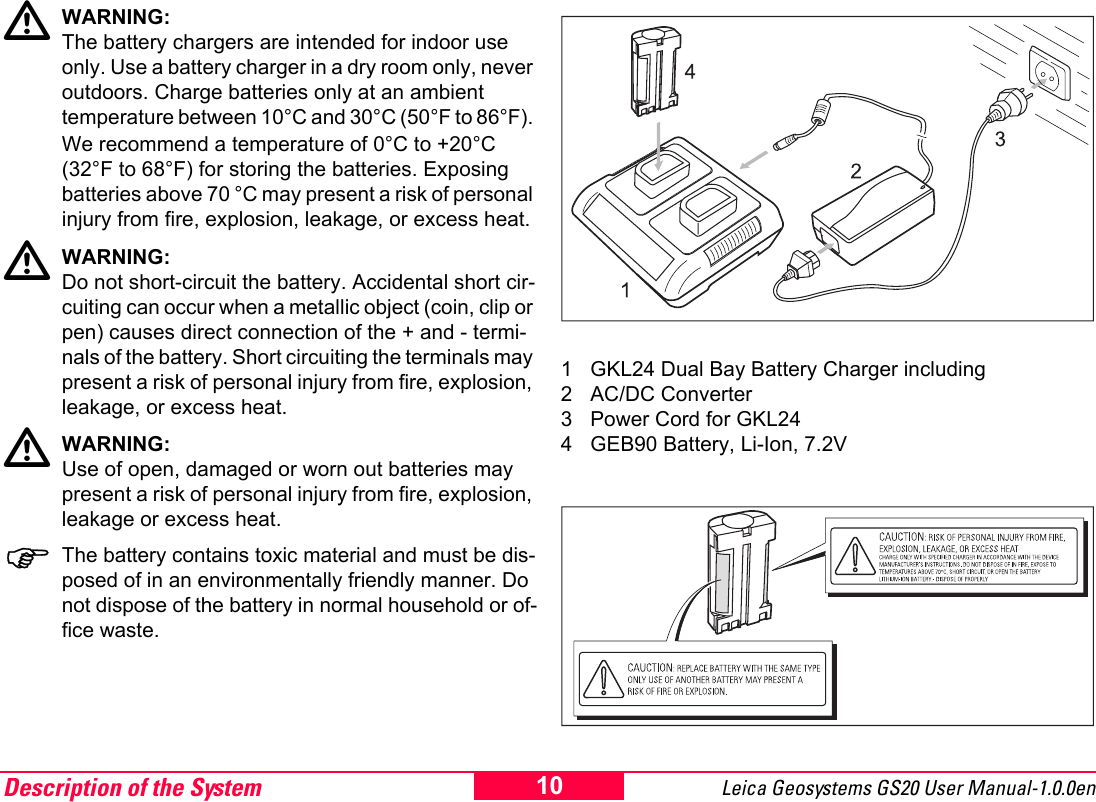
Description of the System Leica Geosystems GS20 User Manual-1.0.0en 10ƽWARNING:The battery chargers are intended for indoor use only. Use a battery charger in a dry room only, never outdoors. Charge batteries only at an ambient temperature between 10°C and 30°C (50°F to 86°F). We recommend a temperature of 0°C to +20°C (32°F to 68°F) for storing the batteries. Exposing batteries above 70 °C may present a risk of personal injury from fire, explosion, leakage, or excess heat.ƽWARNING:Do not short-circuit the battery. Accidental short cir-cuiting can occur when a metallic object (coin, clip or pen) causes direct connection of the + and - termi-nals of the battery. Short circuiting the terminals may present a risk of personal injury from fire, explosion, leakage, or excess heat.ƽWARNING:Use of open, damaged or worn out batteries may present a risk of personal injury from fire, explosion, leakage or excess heat. )The battery contains toxic material and must be dis-posed of in an environmentally friendly manner. Do not dispose of the battery in normal household or of-fice waste.1 GKL24 Dual Bay Battery Charger including2 AC/DC Converter3 Power Cord for GKL244 GEB90 Battery, Li-Ion, 7.2V
Description of the System11Leica Geosystems GS20 User Manual-1.0.0enSet Up the Equipment For best performance GPS surveys require undisturbed satellite signal reception. This means that GPS Receivers work best in locations which are free of obstructions.Press and release the Power Button located on lower left of the keyboard. The unit will reply with an audible tone, then proceed to a splash screen and then to the Main Menu.Your Leica Geosystems GS20 is now fully ready for oper-ation.When you consider to work in wireless real time the Leica Geosystems "WoRCS", Wireless Real-time Corrections System, for the DGPS is needed. The Leica Geosystems "WoRCS" consists of a belt-mounted communication hub, power supply and differen-tial module and gives you everything you need to become a self-contained mobile data collection system for real time.With built-in Bluetooth communications technology, you'll have the ability to make wireless connections to external devices such as DGPS, cellular phones, Laser Range-finders and PDAs.Please find the full settings in the Field Guide.The Leica Geosystems "WoRCS" Belt includes• Beacon receiver (Satellite correction module or custom RTCM solutions also available)• Bluetooth communication hub• "Smart" power supplyPost-processing softwareThe Post-processing software is used to process the observations taken by the Receiver in order to compute baselines and coordinates.Leica Geosystems GISDataPro Static Kinematic software is the standard post-processing software for Leica Geosys-tems receivers. Please refer to the GISDataPro Software reference manual to get detailed description.
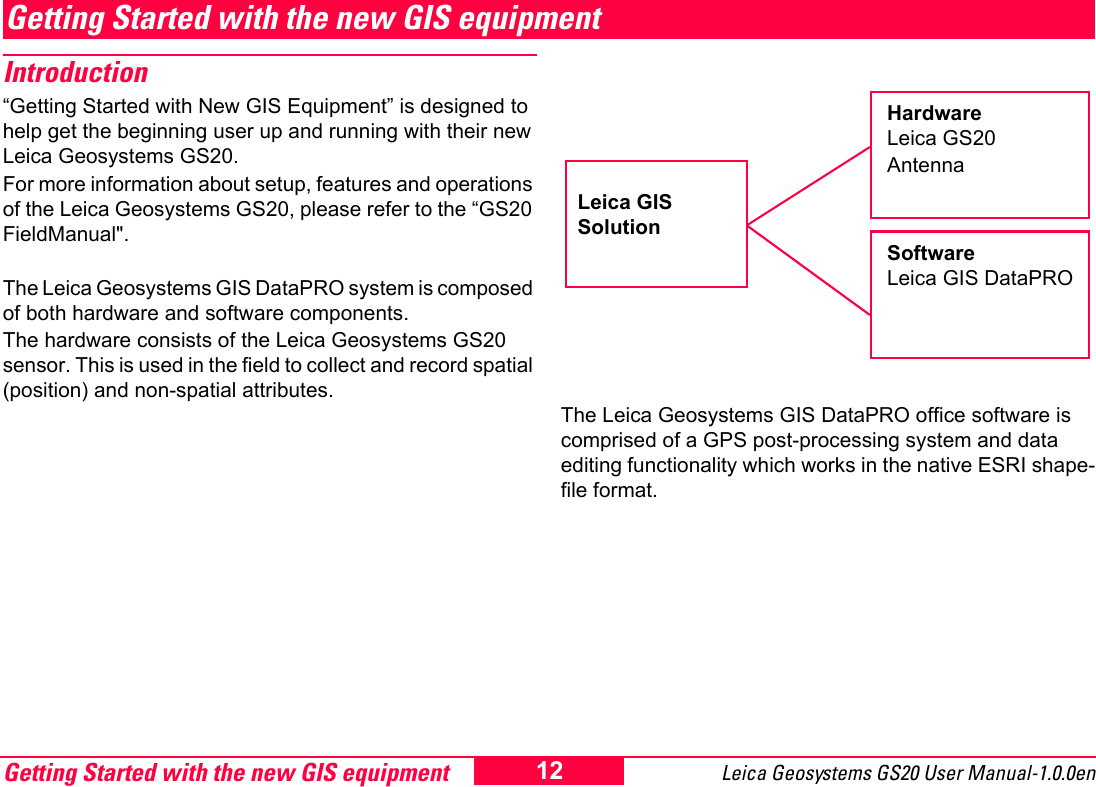
Getting Started with the new GIS equipment Leica Geosystems GS20 User Manual-1.0.0en 12Getting Started with the new GIS equipmentIntroduction“Getting Started with New GIS Equipment” is designed to help get the beginning user up and running with their new Leica Geosystems GS20.For more information about setup, features and operations of the Leica Geosystems GS20, please refer to the “GS20 FieldManual".The Leica Geosystems GIS DataPRO system is composed of both hardware and software components.  The hardware consists of the Leica Geosystems GS20 sensor. This is used in the field to collect and record spatial (position) and non-spatial attributes.The Leica Geosystems GIS DataPRO office software is comprised of a GPS post-processing system and data editing functionality which works in the native ESRI shape-file format.Hardware Leica GS20AntennaSoftwareLeica GIS DataPROLeica GIS Solution
Getting Started with the new GIS equipment13Leica Geosystems GS20 User Manual-1.0.0enLeica Geosystems GIS DataPRO Post-processing soft-wareLeica Geosystems GIS DataPRO is used for data collec-tion preparation and data post processing. Please refer to the “Getting Started with the GIS DataPRO Office Soft-ware” User Manual for more details.  To install the GIS DataPRO software:1 Insert the CD-ROM into the CD drive of your PC.2 Execute the “Setup” command.3 Follow the instructions that appear on the screen.Both a hardware and software user manual can be found on the CD in PDF format. The software itself contains a comprehensive online Help System. After the data is collected in the field, the GIS DataPRO office software allows you to import, edit and export the data to your GIS. The software can also be used to design codelists which allow you to customize the field data collec-tion process to suit your needs. To learn more about the Leica Geosystems GIS DataPRO office software, please consult the “Getting Started with the GIS DataPRO Office Software" User Manual.Receiver HardwareLeica Geosystems GS20 SensorThe Leica Geosystems GS20 is a handheld GPS receiver for professional data mapping. With the position and the field data the user is capable to collect Data for his needs in his GIS application. The GPS receiver receives the GPS signal from the NAVSTAR satellites and calculates a range to the satellites that are visible.The Leica Geosystems GS20 is a 12-channel L1 code and phase GPS receiver. The standard Leica Geosystems GS20 does record phase measurements for post processing purposes. Phase measurements are used internally to smooth pseudorange measurements for higher code positioning. Phase measurement recording for post processing is available.There are three antennas available with the Leica Geosys-tems GS20:• AT501 – tracks L1 only.• RTB Combined Antenna - tracks L1 and RTCM differ-ential signal from public and private beacon infastruc-ture.• RTS Combined Antenna - tracks L1 and  differential signals from Racal DGPS Satellite systems.Please refer to the Field Guide for the use of your Leica Geosystems GS20 equipment.
Care and Transport Leica Geosystems GS20 User Manual-1.0.0en 14Care and TransportTransport)When dispatching the product, always use the complete original Leica Geosystems packaging (case and cardboard box). When transporting the equipment in the field, always make sure that you:• either carry the product in its original transport case• or carry the tripod with its legs splayed across your shoulder, keeping the attached product upright. Never carry the product loose in a road vehicle. It can be affected by shock and vibration. Always carry it in its case and secure it.When transporting the product by rail, air or ship, always use the complete original Leica Geosystems packaging (case and cardboard box), or its equivalent, to protect it against shock and vibration.Storage)Temperature limits(-40°C to +70°C / -40°F to +158°F)  Respect the temperature limits when storing the equipment, particularly in summer if the equipment is inside a vehicle.)Damp products must be unpacked. Dry the product, the case, the foam inserts and the accessories at not more than 40°C / 108°F and clean them. Do not repack until everything is completely dry.Cleaning and drying)Use only a clean, soft, lint-free cloth for cleaning. If necessary, moisten the cloth with pure alcohol.Use no other liquids; these may attack the polymer compo-nents.)Cables and plugsKeep plugs clean and dry. Blow away any dirt lodged in the plugs of the connecting cables. Unplugging connecting cables or removing the memory card during the measurement may cause loss of data. Always switch off the product before removing the cables or the memory card.
Safety Directions15Leica Geosystems GS20 User Manual-1.0.0enSafety DirectionsThe following directions should enable the person respon-sible for the product, and the person who actually uses the equipment, to anticipate and avoid operational hazards.The person responsible for the product must ensure that all users understand these directions and adhere to them.Intended use of productPermitted usesThe product is intended for the following applications:• Measuring and computing coordinates using P-code and/or C/A-code signals from NAVSTAR GPS satellites• Carrying out measurement tasks using various GPS measuring techniques• Recording GPS and point related data• Computation and evaluation by means of software• Datatransfer via internal radio (BLUETOOTH) for real-time surveys• Datatransfer via internal radio (BLUETOOTH) for up and download of projects, coordinate systems, and configurationsProhibited uses• Use of the product without instruction• Use outside of the intended limits• Disabling safety systems • Removal of hazard notices• Opening the product using tools (screwdriver, etc.), unless this is specifically permitted for certain functions• Modification or conversion of the product• Use after misappropriation• Use with accessories from other manufacturers without the prior express approval of Leica Geosystems• Inadequate safeguards at the measuring station (e.g. when measuring on roads)ƽWARNING:Adverse use can lead to injury, malfunction and damage. It is the task of the person responsible for the equipment to inform the user about hazards and how to counteract them. The product is not to be operated until the user has been instructed how to work with it.
Safety Directions Leica Geosystems GS20 User Manual-1.0.0en 16Limits of useSee chapter "Technical Data".Environment:Suitable for use in an atmosphere appropriate for perma-nent human habitation: not suitable for use in aggressive or explosive environments.External Antenna:Use in rain is permissible. After long term use in this envi-ronment the External Antenna must be checked by a Leica Geosystems service technician.ƽDANGER:Local safety authorities and safety experts must be contacted before working in hazardous explosive areas, near to electrical installations or in extreme environment conditions by the person in charge of the product.ResponsibilitiesArea of responsibility for the manufacturer of the orig-inal equipment Leica Geosystems AG, CH-9435 Heer-brugg (hereinafter referred to as Leica Geosystems):Leica Geosystems is responsible for supplying the product, including the User Manual and original accessories, in a completely safe condition.)Responsibilities of the manufacturers of non-Leica Geosystems accessories:The manufacturers of non-Leica Geosystems accessories for product are responsible for developing, implementing and communicating safety concepts for their products, and are also responsible for the effectiveness of those safety concepts in combination with the Leica Geosystems product.
Safety Directions17Leica Geosystems GS20 User Manual-1.0.0enResponsibilities of the person in charge of the equip-ment:ƽWARNING:The person responsible for the equipment must ensure that it is used in accordance with the instruc-tions. This person is also accountable for the training and deployment of personnel who use the equip-ment and for the safety of the equipment when in use.The person in charge of the product has the following duties:• To understand the safety instructions on the product and the instructions in the User Manual.• To be familiar with local regulations relating to accident prevention.• To inform Leica Geosystems immediately if the equip-ment becomes unsafe.Hazards of useMain hazards of useƽWARNING:The absence of instruction, or the inadequate imparting of instruction, can lead to incorrect or adverse use, and can give rise to accidents with far-reaching human, material, financial and environ-mental consequences.Precautions:All users must follow the safety directions given by the manufacturer and the directions of the person responsible for the product.ƽWARNING:The charger must not be used under damp or inclement conditions. If moisture penetrates these devices, the user may receive an electric shock.Precautions:Use the charger only indoors, in dry rooms. Protect them from damp. If the devices are damp, do not use them.ƽWARNING:If you open the charger, either of the following actions may cause you to receive an electric shock:• Touching live components• Using the charger after incorrect attempts to carry out repairs
Safety Directions Leica Geosystems GS20 User Manual-1.0.0en 18Precautions:Do not open the charger yourself. Only a Leica Geosys-tems-approved service technician is entitled to repair it.ƽCAUTION:Watch out for erroneous measurements if the product has been dropped or has been misused, modified, stored for long periodes or transported.Precautions:Periodically carry out test measurements and perform the field adjustments indicated in the user manual, particularly after the product has been subjected to abnormal use and before and after important measurements.ƽWARNING:If computers intended for use indoors are used  in the field there is a danger of electric shock.Precautions:Adhere to the instructions given by the computer manufac-turer with regard to field use in conjunction with Leica Geosystems products.ƽCAUTION:If the accessories used with the equipment are not properly secured and the equipment is subjected to mechanical shock (e.g. blows, falling), the equip-ment may be damaged or people may sustain injury.Precautions:When setting-up the equipment, make sure that the acces-sories (e.g. tripod, tribrach, connecting cables) are correctly adapted, fitted, secured, and locked in position. Avoid subjecting the equipment to mechanical shock.ƽCAUTION:The product uses the GPS P-Code signal, which by U.S. policy, may be switched off without notice.ƽWARNING:Inadequate securing of the survey site can lead to dangerous situations, for example in traffic, on building sites and at industrial installations.Precautions:Always ensure that the survey site is adequately secured. Adhere to the regulations governing accident prevention and road traffic.ƽDANGER:Because of the risk of electrocution, it is very dangerous to use poles and extensions in the vicinity of electrical installations such as power cables or electrical railways.Precautions:Keep at a safe distance from electrical installations. If it is essential to work in this environment, first contact the safety authorities responsible for the electrical installations and follow their instructions.ƽCAUTION:During the transport or disposal of charged batteries it is possible for inappropriate mechanical influences to constitute a fire hazard.
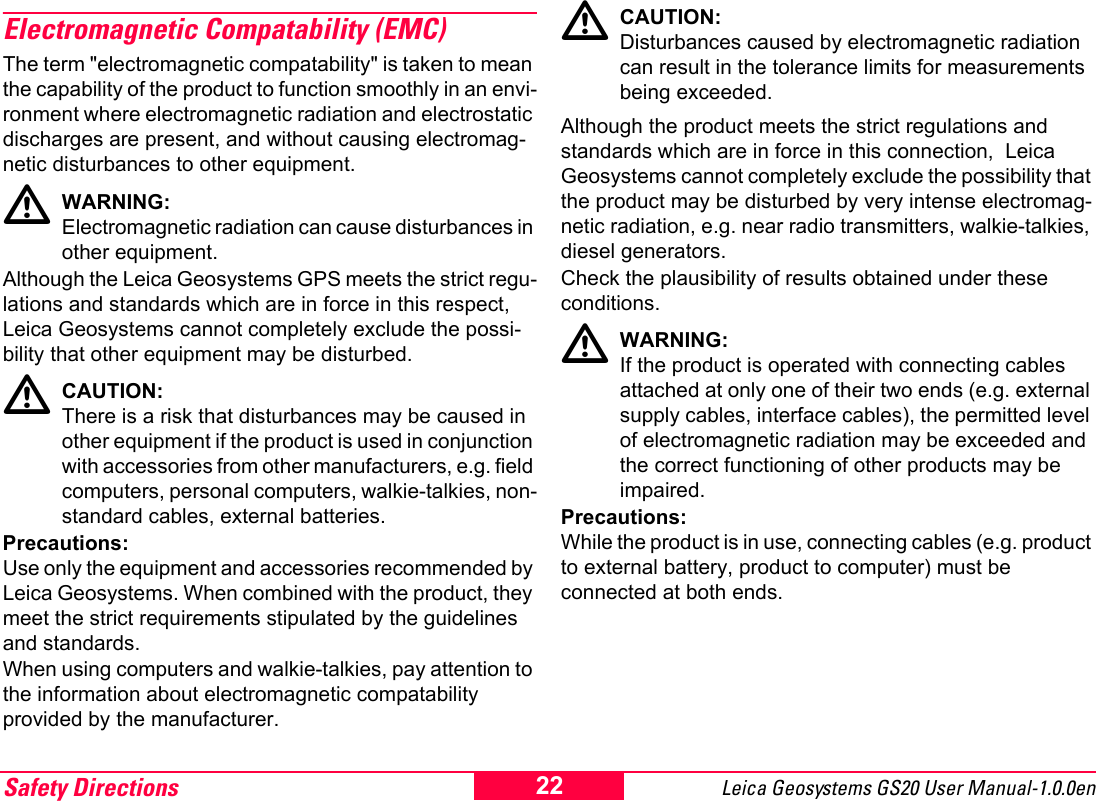
Safety Directions19Leica Geosystems GS20 User Manual-1.0.0enPrecautions:Before dispatching the equipment or disposing of it, discharge the batteries by running the product until they are flat.ƽWARNING:If an External Antenna is not properly fitted to vehi-cles or any other means for transportation it can be torn off by mechanical shock, vibration or wind, possibly causing accident and injury.Precautions:Attach the External Antenna professionally. The External Antenna must be secured additionally, e.g. by use of a safety cord. Ensure that the mounting device is correctly mounted and able to safely carry the weight of the External Antenna (>1kg).ƽWARNING:If the equipment is improperly disposed of, the following can happen:• If polymer parts are burnt, poisonous gases are produced which may impair health.• If batteries are damaged or are heated strongly, they can explode and cause poisoning, burning, corrosion or environmental contamination.• By disposing of the equipment irresponsibly you may enable unauthorized persons to use it in contravention of the regulations, exposing themselves and third parties to the risk of severe injury and rendering the environment liable to contamination.Precautions:Dispose of the equipment appropriately in accordance with the regulations in force in your country. Always prevent access to the equipment by unauthorized personnel.ƽDANGER:If the product is used in exposed locations (e.g. on masts, mountains or buildings), it is at risk from light-ning. Danger from high voltages also exists near power lines. Lightning, voltage peaks, or the touching of power lines can cause damage, injury and death.Precautions:• Do not use the product in a thunderstorm as you may increase the risk of being struck by lightning.• Be sure to remain at a safe distance from electrical installations. Do not use the product directly under or in close proximity to power lines. If it is essential to work in such an environment contact the local  statutory regula-tory bodies responsible for electrical installations and follow their instructions.• If the product has to be permanently mounted in an exposed location, it is advisable to provide a lightning conductor system. A suggestion on how to design a lightning conductor for the product is given hereinafter. • Always follow the regulations in force in your country with regard to grounding Antennas and masts. These installations must be carried out by an authorised specialist.
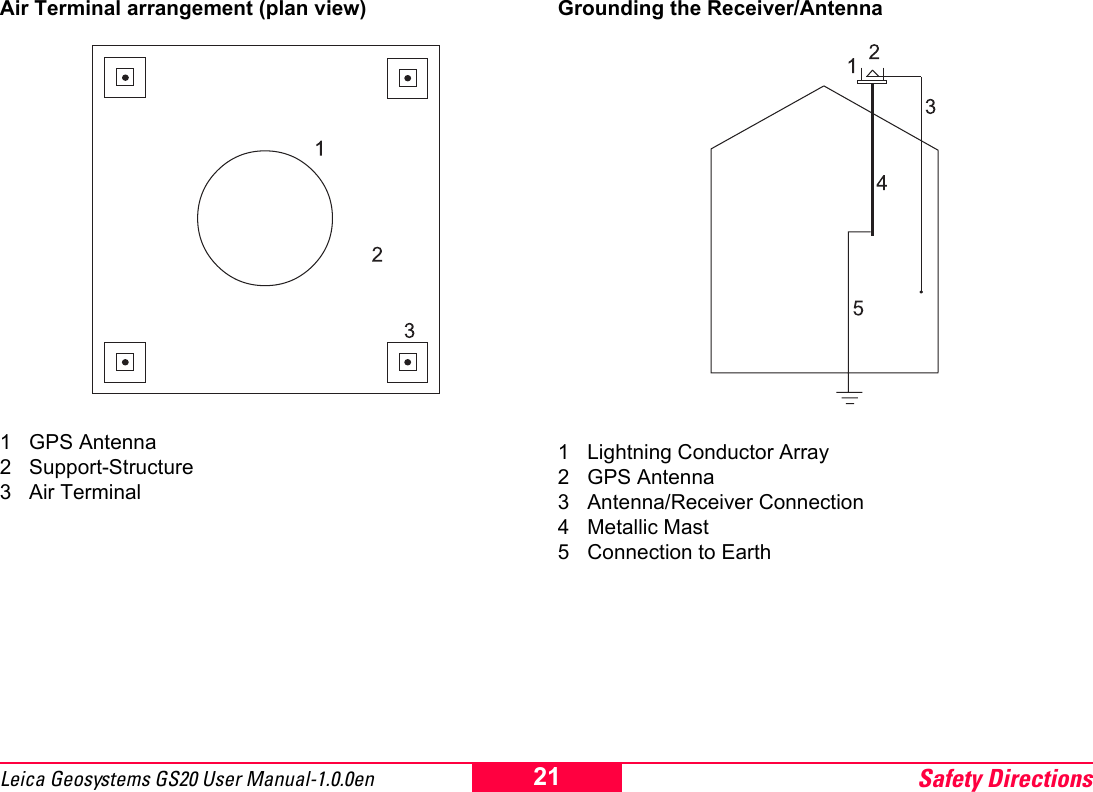
Safety Directions Leica Geosystems GS20 User Manual-1.0.0en 20• To prevent damages due to indirect lightning strikes (voltage spikes) cables (antenna, power source, modem, ...) should be protected with appropriate protection elements (lightning arrestor). These installa-tions must be carried out by an authorized, local specialist.• Additional protection against lightning: If there is a risk of a thunderstorm, or if the equipment is to remain unused and unattended for a long period, protect your product additionally by unplugging all systems components and disconnecting all connecting cables and supply cables (e.g. Receiver - Antenna).Suggestion for design of a Lightning Conductor for a GPS System1. On non-metallic structuresProtection by Air Terminals is recommended. An Air Terminal is a pointed solid or tubular rod of conducting material with proper mounting and connection to a conductor. The position of 4 Air Terminals should be uniformly distributed around the Antenna at a distance equal to the height of the Air Terminal. The Air Terminal diameter should be 12mm for copper or 15mm for aluminium. The height of the Air Terminals should be 25 to 50cm. All Air Terminals should be connected to the down conductors. The diameter of the Air Terminal should be kept to a minimum to reduce GPS signal shading.2. On metallic structuresProtection is as described for non-metallic structures, but the Air Terminals can be connected directly to the conducting structure without the need for down conduc-tors.
Safety Directions21Leica Geosystems GS20 User Manual-1.0.0enAir Terminal arrangement (plan view)1 GPS Antenna2 Support-Structure3 Air TerminalGrounding the Receiver/Antenna1 Lightning Conductor Array2 GPS Antenna3 Antenna/Receiver Connection4 Metallic Mast5 Connection to Earth
Safety Directions Leica Geosystems GS20 User Manual-1.0.0en 22Electromagnetic Compatability (EMC)The term "electromagnetic compatability" is taken to mean the capability of the product to function smoothly in an envi-ronment where electromagnetic radiation and electrostatic discharges are present, and without causing electromag-netic disturbances to other equipment.ƽWARNING:Electromagnetic radiation can cause disturbances in other equipment.Although the Leica Geosystems GPS meets the strict regu-lations and standards which are in force in this respect, Leica Geosystems cannot completely exclude the possi-bility that other equipment may be disturbed.ƽCAUTION:There is a risk that disturbances may be caused in other equipment if the product is used in conjunction with accessories from other manufacturers, e.g. field computers, personal computers, walkie-talkies, non-standard cables, external batteries.Precautions:Use only the equipment and accessories recommended by Leica Geosystems. When combined with the product, they meet the strict requirements stipulated by the guidelines and standards.  When using computers and walkie-talkies, pay attention to the information about electromagnetic compatability provided by the manufacturer.ƽCAUTION:Disturbances caused by electromagnetic radiation can result in the tolerance limits for measurements being exceeded.Although the product meets the strict regulations and standards which are in force in this connection,  Leica Geosystems cannot completely exclude the possibility that the product may be disturbed by very intense electromag-netic radiation, e.g. near radio transmitters, walkie-talkies, diesel generators. Check the plausibility of results obtained under these conditions.ƽWARNING:If the product is operated with connecting cables attached at only one of their two ends (e.g. external supply cables, interface cables), the permitted level of electromagnetic radiation may be exceeded and the correct functioning of other products may be impaired.Precautions:While the product is in use, connecting cables (e.g. product to external battery, product to computer) must be connected at both ends.
Safety Directions23Leica Geosystems GS20 User Manual-1.0.0enUse of the product with internal (BLUETOOTH) and external Radio devices:ƽWARNING: Electromagnetic radiation can cause disturbances in other equipment, in installations (e.g. medical ones such as pacemakers or hearing aids) and in aircraft. It can also affect humans and animals.Precautions:Although the product meets in combination with internal (BLUETOOTH) and external Radio devices the strict regu-lations and standards which are in force in this respect, Leica Geosystems cannot completely exclude the possi-bility that other equipment may be disturbed or that humans or animals may be affected.• Do not operate the product with internal (BLUETOOTH) and external Radio devices in the vicinity of filling stations or chemical installations, or in other areas where an explosion hazard exists.• Do not operate the product with internal (BLUETOOTH) and external Radio devices near to medical equipment.• Do not operate the product with internal (BLUETOOTH) and external Radio devices in aircraft.• Do not operate the product with internal (BLUETOOTH) and external Radio devices for long periods with it immediately next to your body.ƽWARNING: This Bluetooth transmitter must not be operating in conjunction with any other transmitter or transmitting antenna.
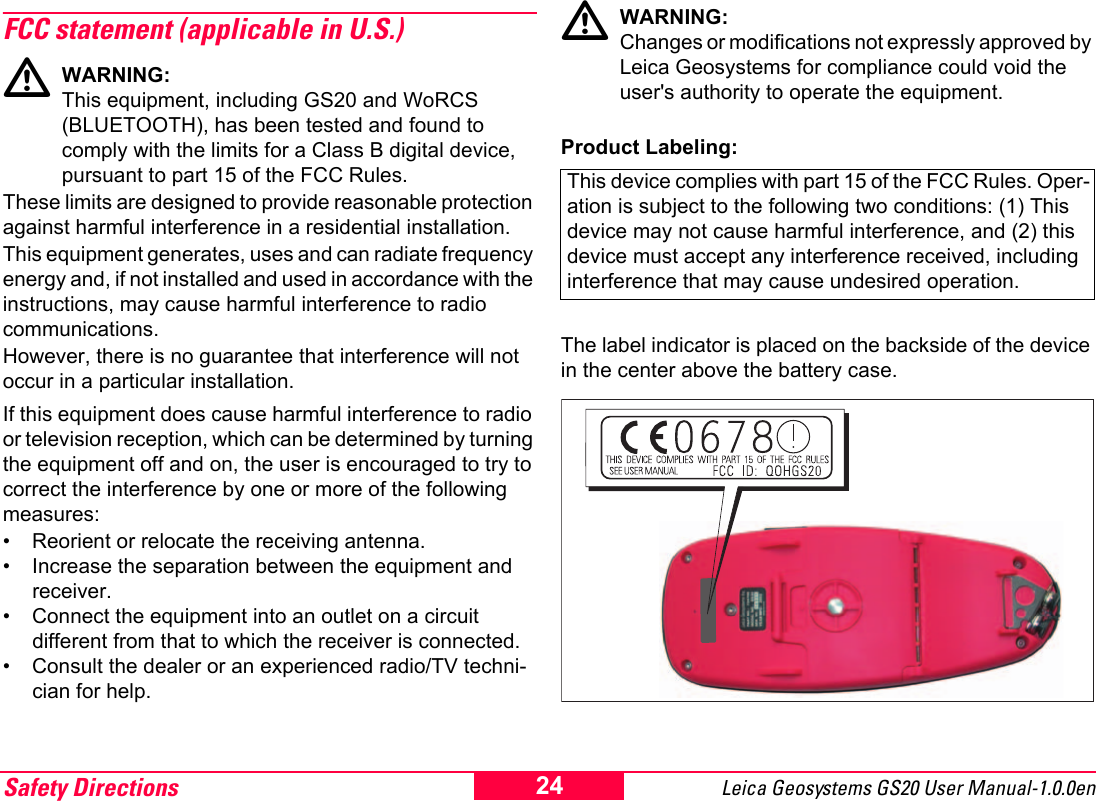
Safety Directions Leica Geosystems GS20 User Manual-1.0.0en 24FCC statement (applicable in U.S.)ƽWARNING:This equipment, including GS20 and WoRCS (BLUETOOTH), has been tested and found to comply with the limits for a Class B digital device, pursuant to part 15 of the FCC Rules.These limits are designed to provide reasonable protection against harmful interference in a residential installation.This equipment generates, uses and can radiate frequency energy and, if not installed and used in accordance with the instructions, may cause harmful interference to radio communications. However, there is no guarantee that interference will not occur in a particular installation.If this equipment does cause harmful interference to radio or television reception, which can be determined by turning the equipment off and on, the user is encouraged to try to correct the interference by one or more of the following measures:• Reorient or relocate the receiving antenna.• Increase the separation between the equipment and receiver.• Connect the equipment into an outlet on a circuit different from that to which the receiver is connected.• Consult the dealer or an experienced radio/TV techni-cian for help.ƽWARNING: Changes or modifications not expressly approved by Leica Geosystems for compliance could void the user's authority to operate the equipment.Product Labeling:The label indicator is placed on the backside of the device in the center above the battery case.This device complies with part 15 of the FCC Rules. Oper-ation is subject to the following two conditions: (1) This device may not cause harmful interference, and (2) this device must accept any interference received, including interference that may cause undesired operation.
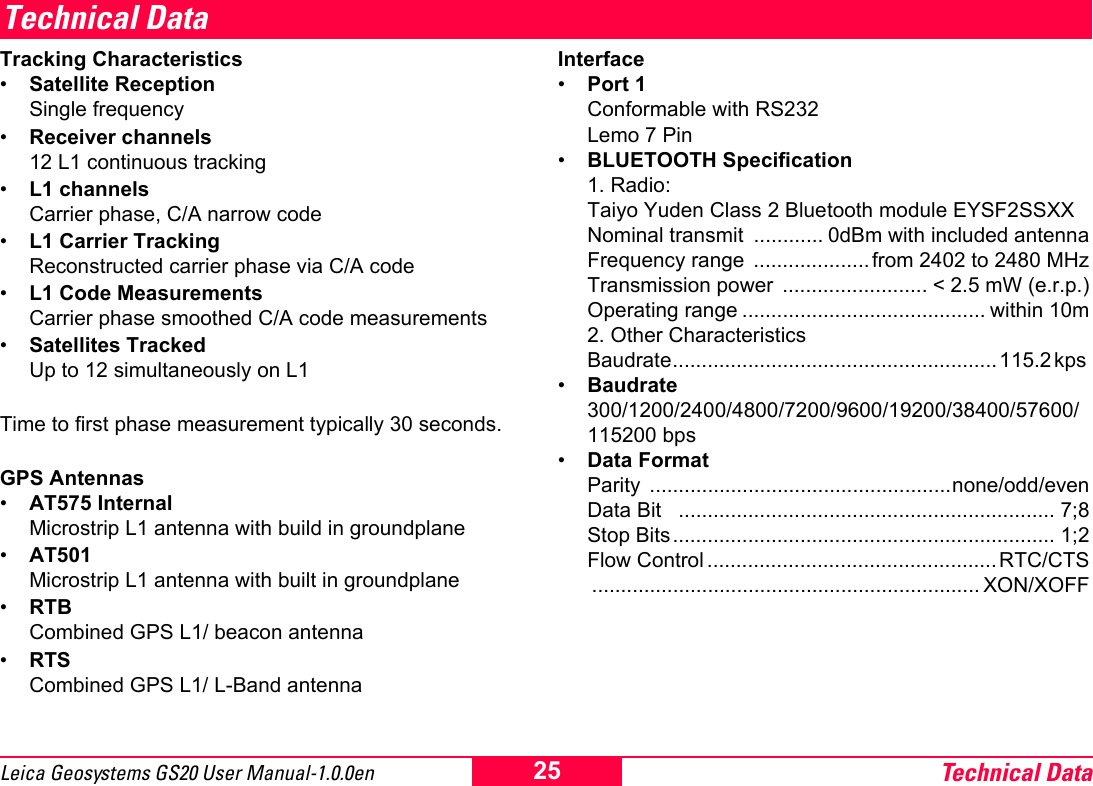
Technical Data25Leica Geosystems GS20 User Manual-1.0.0enTechnical DataTracking Characteristics•Satellite Reception Single frequency•Receiver channels 12 L1 continuous tracking•L1 channels Carrier phase, C/A narrow code•L1 Carrier Tracking Reconstructed carrier phase via C/A code•L1 Code Measurements Carrier phase smoothed C/A code measurements•Satellites Tracked Up to 12 simultaneously on L1Time to first phase measurement typically 30 seconds.GPS Antennas•AT575 Internal Microstrip L1 antenna with build in groundplane•AT501 Microstrip L1 antenna with built in groundplane•RTB Combined GPS L1/ beacon antenna•RTS  Combined GPS L1/ L-Band antennaInterface•Port 1 Conformable with RS232 Lemo 7 Pin•BLUETOOTH Specification 1. Radio: Taiyo Yuden Class 2 Bluetooth module EYSF2SSXX Nominal transmit  ............ 0dBm with included antenna Frequency range  .................... from 2402 to 2480 MHz Transmission power  ......................... < 2.5 mW (e.r.p.) Operating range .......................................... within 10m 2. Other Characteristics Baudrate........................................................115.2 kps •Baudrate 300/1200/2400/4800/7200/9600/19200/38400/57600/115200 bps•Data Format Parity ....................................................none/odd/even Data Bit   ................................................................. 7;8 Stop Bits.................................................................. 1;2 Flow Control .................................................. RTC/CTS ................................................................... XON/XOFF
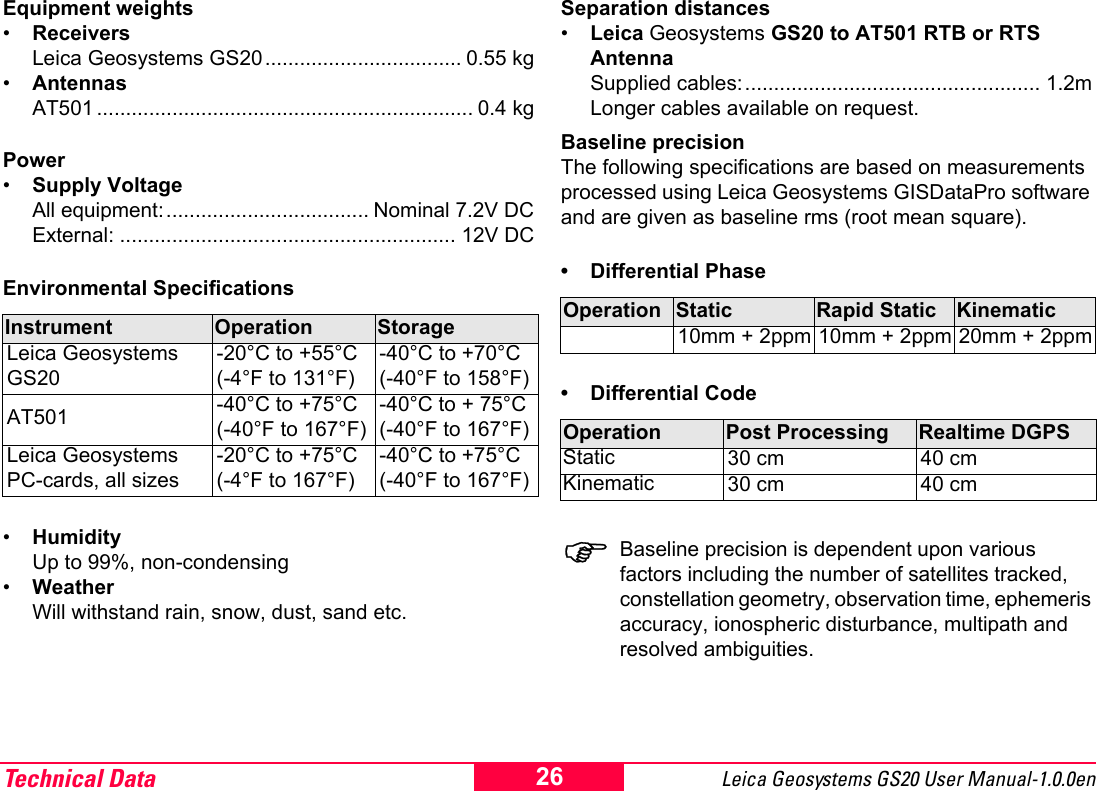
Technical Data Leica Geosystems GS20 User Manual-1.0.0en 26Equipment weights•Receivers Leica Geosystems GS20.................................. 0.55 kg•Antennas AT501 ................................................................. 0.4 kgPower•Supply Voltage All equipment:................................... Nominal 7.2V DC External: .......................................................... 12V DCEnvironmental Specifications•Humidity Up to 99%, non-condensing•Weather Will withstand rain, snow, dust, sand etc.Separation distances•Leica Geosystems GS20 to AT501 RTB or RTS Antenna Supplied cables:................................................... 1.2m Longer cables available on request.Baseline precisionThe following specifications are based on measurements processed using Leica Geosystems GISDataPro software and are given as baseline rms (root mean square).• Differential Phase• Differential Code)Baseline precision is dependent upon various factors including the number of satellites tracked, constellation geometry, observation time, ephemeris accuracy, ionospheric disturbance, multipath and resolved ambiguities.Instrument Operation StorageLeica Geosystems GS20-20°C to +55°C(-4°F to 131°F)-40°C to +70°C(-40°F to 158°F)AT501 -40°C to +75°C(-40°F to 167°F)-40°C to + 75°C(-40°F to 167°F)Leica Geosystems PC-cards, all sizes-20°C to +75°C(-4°F to 167°F)-40°C to +75°C(-40°F to 167°F)Operation Static Rapid Static Kinematic10mm + 2ppm 10mm + 2ppm 20mm + 2ppmOperation Post Processing Realtime DGPSStatic 30 cm 40 cmKinematic 30 cm 40 cm
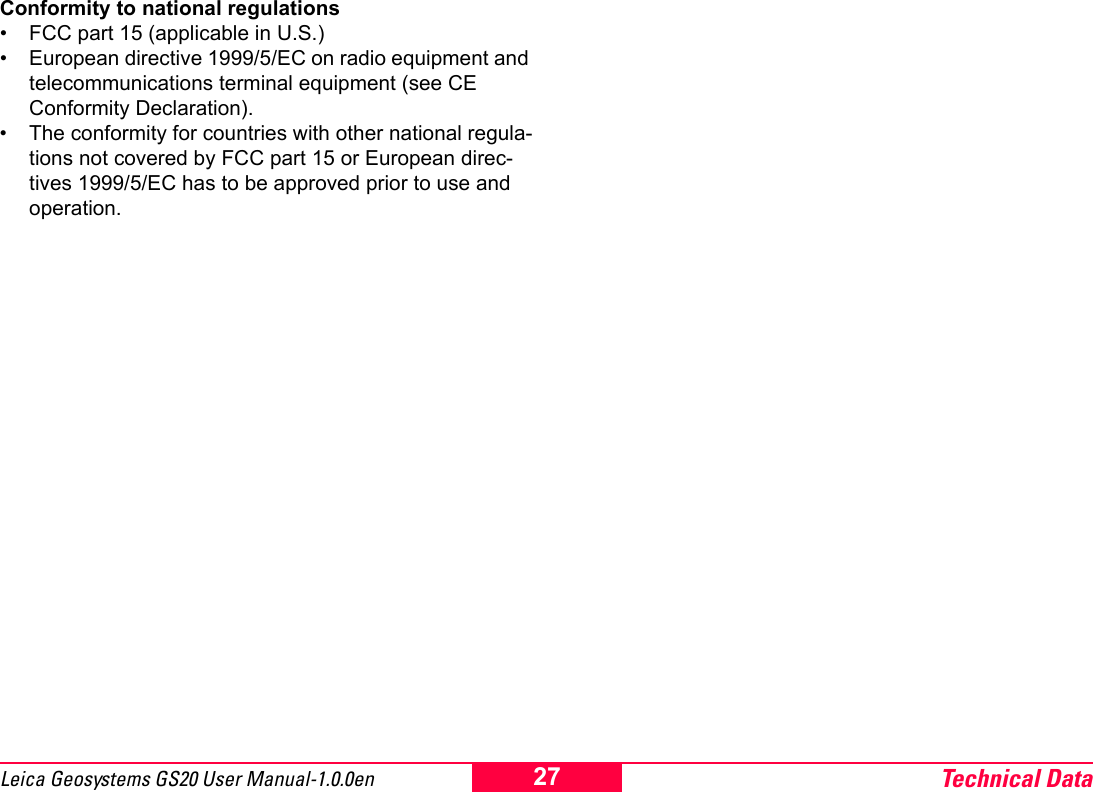
Technical Data27Leica Geosystems GS20 User Manual-1.0.0enConformity to national regulations• FCC part 15 (applicable in U.S.)• European directive 1999/5/EC on radio equipment and telecommunications terminal equipment (see CE Conformity Declaration).• The conformity for countries with other national regula-tions not covered by FCC part 15 or European direc-tives 1999/5/EC has to be approved prior to use and operation.
Leica Geosystems AGCH-9435 Heerbrugg(Switzerland)Phone +41 71 727 31 31Fax +41 71 727 46 73www.leica-geosystems.comLeica Geosystems AG, Heerbrugg, Switzerland, has been certified as being equipped with a quality system which meets the International  Standards of Quality Management and Quality Systems (ISO standard 9001) and Environmental Management Systems (ISO standard 14001).733603-1.0.0enPrinted in Switzerland - Copyright Leica Geosystems AG, Heerbrugg, Switzerland 2003Original textTotal Quality Management- Our commitment to total customer satisfaction.Ask your local Leica agent for more information about our TQM program.

Navigation menu