Leica TPS1200 _TPS1200_UserManual User Manual To The F5f7f112 E122 480b Ab7c 990e4211a2e9
User Manual: Leica TPS1200 to the manual
Open the PDF directly: View PDF  .
.
Page Count: 226 [warning: Documents this large are best viewed by clicking the View PDF Link!]
- Introduction
- Table of Contents
- How to Use this Manual
- Description of the System
- User Interface
- Operation
- Check & Adjust
- Care and Transport
- Safety Directions
- Technical Data
- 8.1 Angle Measurement
- 8.2 Distance Measurement - Infrared IR
- 8.3 Distance Measurement - Reflectorless RL
- 8.4 Distance Measurement - Long Range LO
- 8.5 Automatic Target Recognition ATR
- 8.6 PowerSearch PS
- 8.7 SmartStation
- 8.8 Conformity to National Regulations
- 8.9 General Technical Data of the Instrument
- 8.10 Scale Correction
- 8.11 Reduction Formulas
- Index

2TPS1200
Introduction
Introduction
Purchase Congratulations on the purchase of a TPS1200 series instrument.
This manual contains important safety directions as well as instructions for setting
up the product and operating it. Refer to "7 Safety Directions" for further information.
Read carefully through the User Manual before you switch on the product.
Product
identification
The type and the serial number of your product are indicated on the type plate.
Enter the type and serial number in your manual and always refer to this information
when you need to contact your agency or Leica Geosystems authorized service
workshop.
Type: _______________
Serial No.: _______________

Introduction TPS1200 3
Symbols The symbols used in this manual have the following meanings:
Trademarks • Windows and Windows CE are a registered trademark of Microsoft Corporation
• CompactFlash and CF are trademarks of SanDisk Corporation
• Bluetooth is a registered trademark of Bluetooth SIG, Inc
All other trademarks are the property of their respective owners.
Type Description
Danger Indicates an imminently hazardous situation which, if not
avoided, will result in death or serious injury.
Warning Indicates a potentially hazardous situation or an unintended
use which, if not avoided, could result in death or serious
injury.
Caution Indicates a potentially hazardous situation or an unintended
use which, if not avoided, may result in minor or moderate
injury and/or appreciable material, financial and environmental
damage.
)Important paragraphs which must be adhered to in practice as
they enable the product to be used in a technically correct and
efficient manner.

4TPS1200
Table of Contents
Table of Contents
In this manual Chapter Page
1 How to Use this Manual 8
2 Description of the System 12
2.1 System Components 12
2.2 System Concept 19
2.2.1 Software Concept 19
2.2.2 Data Storage and Data Conversion Concept 21
2.2.3 Power Concept 23
2.3 Container Contents 24
2.4 Instrument Components 28
3 User Interface 32
3.1 Keyboard 32
3.2 Screen 36
3.3 Operating Principles 38
3.4 Icons 44
4 Operation 50
4.1 Instrument Setup 50

Table of Contents TPS1200 5
4.2 Autodetect Behaviour 53
4.3 Instrument Setup as SmartStation 55
4.3.1 SmartStation Setup 55
4.3.2 LED Indicators on SmartAntenna 59
4.3.3 Working with the Clip-On-Housings for Devices 61
4.3.4 LED Indicators on Clip-On-Housings 65
4.4 Instrument Setup for Remote Control 70
4.4.1 Remote Control Setup 70
4.4.2 LED Indicators on RadioHandle 72
4.5 Battery 74
4.5.1 Operating Principles 74
4.5.2 Instrument Battery 76
4.5.3 SmartAntenna Battery 78
4.6 Working with the CompactFlash Card 80
4.7 Accessing Survey Application Program 83
4.8 Guidelines for Correct Results 86
5 Check & Adjust 90
5.1 Overview 90
5.2 Preparation 94
5.3 Combined Adjustment (l, t, i, c and ATR) 96
5.4 Tilting Axis Adjustment (a) 101
5.5 Adjustment of the Circular Level 106
5.6 Adjustment of the Reflectorless EDM 109

6TPS1200
Table of Contents
5.7 Adjustment of the Laser Plummet 114
5.8 Service of the Tripod 118
6 Care and Transport 120
6.1 Transport 120
6.2 Storage 122
6.3 Cleaning and Drying 123
6.4 Maintenance 124
7 Safety Directions 126
7.1 General Introduction 126
7.2 Intended Use 127
7.3 Limits of Use 129
7.4 Responsibilities 130
7.5 International Warranty, Software Licence Agreement 131
7.6 Hazards of Use 133
7.7 Laser Classification 139
7.7.1 Integrated Distancer, Invisible Laser 139
7.7.2 Integrated Distancer, Visible Laser 142
7.7.3 Automatic Target Recognition ATR 148
7.7.4 PowerSearch PS 150
7.7.5 Electronic Guide Light EGL 152
7.7.6 Laser Plummet 154
7.8 Electromagnetic Compatibility EMC 158
7.9 FCC Statement, Applicable in U.S. 161

Table of Contents TPS1200 7
8 Technical Data 168
8.1 Angle Measurement 168
8.2 Distance Measurement - Infrared IR 169
8.3 Distance Measurement - Reflectorless RL 172
8.4 Distance Measurement - Long Range LO 175
8.5 Automatic Target Recognition ATR 177
8.6 PowerSearch PS 179
8.7 SmartStation 180
8.7.1 SmartStation Accuracy 180
8.7.2 SmartStation Dimensions 182
8.7.3 SmartAntenna Technical Data 183
8.8 Conformity to National Regulations 187
8.8.1 Communication side cover with Bluetooth 187
8.8.2 GFU17, Siemens MC45 188
8.8.3 GFU24, Siemens MC75 190
8.8.4 GFU19 (US), GFU25 (CAN) CDMA MultiTech MTMMC-C 192
8.8.5 RadioHandle 194
8.8.6 SmartAntenna with Bluetooth 196
8.9 General Technical Data of the Instrument 198
8.10 Scale Correction 205
8.11 Reduction Formulas 211
Index 216

8TPS1200
How to Use this Manual
1 How to Use this Manual
)It is recommended to set-up the instrument while reading through this manual.
Path Main Menu: Manage...\Data stands for this working sequence:
From the Main Menu select Manage... and then select Data.
Screen CONFIGURE General Menu describes the name of the screen.
Page Screens can have more than one page. Units page describes a specific page of a
screen. For example: ’...in CONFIGURE Units & Formats, Units page...’
Fields and options Fields displayed on the screen are described as <Coord System:> or <Coord
System: Swiss>, if ’Swiss’ is the selected coordinate system.
Index The index is at the end of the manual.
)Keys, fields and options on the screens which are considered as self-explanatory are
not explained.
Validity of this
manual
This manual applies to all TPS1200 instruments. Differences between the various
models are marked and described.

How to Use this Manual TPS1200 9
Available
documentation
General description
Name of documentation Description
User Manual All instructions required in order to operate the instru-
ment to a basic level are contained in this User
Manual. Provides an overview of the instrument
together with technical data and safety directions.
Name of documentation Description
System Field Manual Describes the general working of the instrument in
standard use. Intended as a quick reference field
guide.

10TPS1200
How to Use this Manual
Available documentation depending on use case
Applications Field Manual Describes specific onboard application programs in
standard use. Intended as a quick reference field
guide. The RoadRunner application program is
described in a separate manual.
Technical Reference
Manual
Overall comprehensive guide to the instrument and
program functions. Included are detailed descriptions
of special software/hardware settings and soft-
ware/hardware functions intended for technical
specialists.
Use case User Manual System Field
Manual
Application
Programs
Field Manual
Technical
Reference
Manual
for for for for
TPS TPS1200 TPS1200 TPS1200 TPS1200
TPS RCS RX1200 TPS1200 TPS1200 TPS1200
Name of documentation Description

How to Use this Manual TPS1200 11
Format of the
documentation
The TPS1200 CD contains the entire TPS1200 documentation in electronic format.
All manuals are also available in printed form except for the Technical Reference
Manuals.
GPS GPS1200 GPS1200 GPS1200 GPS1200
GPS
SmartRover
RX1200 GPS1200 GPS1200 GPS1200
Use case User Manual System Field
Manual
Application
Programs
Field Manual
Technical
Reference
Manual
for for for for
12TPS1200
Description of the System
2 Description of the System
2.1 System Components
Main components
Component Description
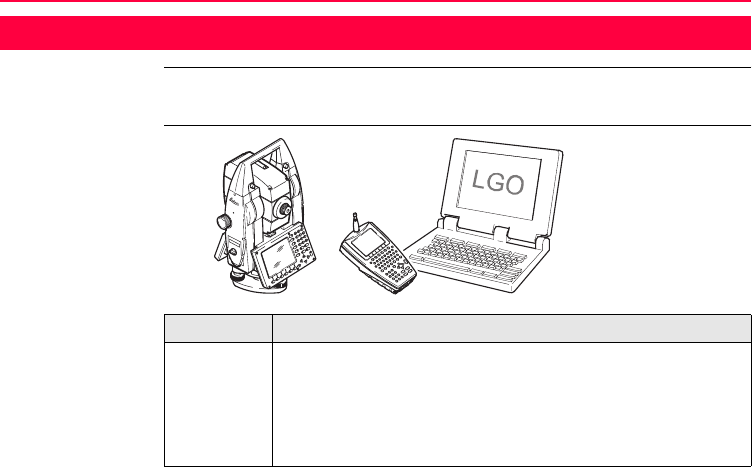
TPS1200 • an instrument for measuring, calculating and capturing data.
• comprised of various models with a range of accuracy classes.
• integrated with an add-on GNSS system to form SmartStation.
• combined with RX1200 to conduct remote control surveys.
• connected with LGO to view, exchange and manage data.
TPS12_198
TPS1200
RX1200

Description of the System TPS1200 13
Terminology The following terms and abbreviations may be found in this manual:
RX1200 A multi-purpose controller enabling the remote control of TPS1200.
LGO An office software consisting of a suite of standard and extended
programs for the viewing, exchange and management of data.
Component Description
Term Description
TPS Total Station Positioning System
GNSS Global Navigation Satellite System (generic term for satellite
based navigation systems like GPS, GLONASS, SBAS)
RCS Remote Control Surveying
LGO LEICA Geo Office
EDM Electronic Distance Measurement
EDM refers to the laser distancer incorporated into the instru-
ment which enables distance measurement.

14TPS1200
Description of the System
Three measuring modes are available:
• infrared laser measurement mode IR.
• visible red laser measurement mode RL.
• long range visible red laser measurement mode LO.
EDM
Infrared IR
This EDM refers to the infrared laser and the ability to measure
distances to prisms.
EDM
Reflectorless RL
This EDM refers to the visible red laser and the ability to measure
distances without prisms.
EDM
Reflectorless LO
This EDM refers to the visible red laser and the ability to measure
extended distances to prisms.
PinPoint PinPoint refers to the Reflectorless EDM technology which
enables an increased measuring range with a smaller laser spot
size. Two options are available: R100 and R300.
EGL Electronic Guide Light
An EGL fitted to an instrument assists with prism targeting. It
consists of two differently coloured flashing lights located in the
instrument telescope housing. The person holding the prism can
align him/herself into the instrument’s line of sight.
Term Description

Description of the System TPS1200 15
Motorised Instruments fitted with internal motors, enabling automatic hori-
zontal and vertical turning are referred to as Motorised.
ATR Automatic Target Recognition
ATR refers to the instrument sensor which enables the automatic
fine pointing to a prism.
Automated Instruments fitted with ATR are referred to as Automated.
Three automation modes are available with ATR:
• None: no ATR - no automation and no tracking.
• ATR: automatic fine pointing to a prism.
• LOCK: automatic tracking of an already targeted prism.
PowerSearch PowerSearch refers to the instrument sensor which enables the
automatic rapid finding of a prism.
SmartStation A TPS1200 instrument integrated with an add-on GNSS system,
comprising hardware and software components, forms
SmartStation.
Term Description

16TPS1200
Description of the System
Components of SmartStation include SmartAntenna,
SmartAntenna Adapter with attached clip-on-housing and
antenna for a communication device and Communication side
cover.
SmartStation provides an additional instrument set-up method
for determining instrument station coordinates.
The GNSS principles and functionality of SmartStation derive
from the principles and functionality of GPS1200 instruments.
SmartAntenna SmartAntenna with integrated Bluetooth is a component of
SmartStation. It can also be used independently on a pole, with
a GNSS receiver and remote controller.
RadioHandle A component of RCS is RadioHandle. It is both an integrated
radio modem with attached antenna and instrument carry
handle.
Communication
side cover
Communication side cover with integrated Bluetooth is a compo-
nent of SmartStation. In combination with RadioHandle it is also
a component of RCS.
Term Description

Description of the System TPS1200 17
Instrument models
LEICA Geo Office • LGO supports GPS1200 and TPS1200 instruments. It also supports all other
Leica TPS instruments.
• LGO is based on a graphical user interface with standard Windows® operating
procedures.
• LGO provides the following functionality:
Model Description
TC1200 Basis electronic tachymeter.
TCR1200 Additional components: Reflectorless EDM.
TCRM1200 Additional components: Reflectorless EDM, Motorised.
TCA1200 Additional components: Automated, Motorised.
TCP1200 Additional components: Automated, Motorised, PowerSearch.
TCRA1200 Additional components: Reflectorless EDM, Automated, Motorised.
TCRP1200 Additional components: Reflectorless EDM, Automated, Motorised,
PowerSearch.

18TPS1200
Description of the System
• Supported operating systems: Windows® XP, Windows® 2000, Windows® ME.
• Refer to the online help of LGO for additional information.
Functionality Description
Standard
Functionality
Includes data exchange between computer and instrument, data
management including viewing and editing, reporting, creation
and management of codelists, creation and use of format files for
data conversion, uploading and deleting of system software and
application programs.
Extended
Functionality
Includes Coordinate transformations, GPS and GLONASS post
processing, Level data processing, Network adjustment, GIS
and CAD Export.

Description of the System TPS1200 19
2.2 System Concept
2.2.1 Software Concept
Description TPS1200 instruments use the same software concept.
Software type Software type Description
System
software
This software comprises the central functions of the instrument.
It is also referred to as firmware.
The programs Survey and Setup are integrated into the firmware
and cannot be deleted.
The English language is integrated into the firmware and cannot
be deleted.
Language
software
Numerous languages are available for the TPS1200 instru-
ments. This software is also referred to as system language.
The system software enables a maximum of three languages
which can be stored at any one time - the English language and
two other languages. The English language is the default
language and cannot be deleted. One language is chosen as the
active language.

20TPS1200
Description of the System
Software upload All instrument software is stored in the System RAM of the instrument. The software
can be uploaded onto the instrument using the following methods:
• Using LGO the software is transferred via the serial interface to the Compact-
Flash card in the instrument, which is then stored to the System RAM.
• By connecting the CompactFlash card directly to the computer either via an
internal card slot housing or an external OMNI drive, the software is transferred
to the card, which is then stored to the System RAM.
Application
programs
A suite of optional survey-specific application programs are
available for the instrument.
Some of the programs are activated freely and require no licence
key and others require purchasing and are only activated with a
licence key.
Customised
application
programs
Customised software specific to user requirements can be devel-
oped using the GeoC++ development kit. Information on the
GeoC++ development environment is available on request from
a Leica Geosystems representative.
Software type Description

Description of the System TPS1200 21
2.2.2 Data Storage and Data Conversion Concept
Description Data is stored within a job in a database on a memory device. This is either a
CompactFlash card or an internal memory if fitted.
Memory device
)Unplugging connecting cables or removing the CompactFlash card during the meas-
urement may cause loss of data. Always return to TPS1200 Main Menu before
removing the CompactFlash card and switch off the instrument before removing
cables.
CompactFlash card: A CompactFlash card housing is standard. A Compact-
Flash card can be inserted and removed. Various storing
capacities are available.
)Whilst other CompactFlash cards may be used,
Leica recommends Leica CompactFlash cards
and cannot be held responsible for data loss or
any other error that may occur when using a
non-Leica card.
Internal memory: An internal memory is optional. It resides inside the instru-
ment. Available capacity: 64 MB.

22TPS1200
Description of the System
Data conversion Export
Data can be exported from a job in a wide range of ASCII formats. The export format
is defined in Format Manager which is a PC tool in LEICA Geo Office. Refer to the
online help of LGO for information on creating format files.
Import
Data can be imported from ASCII, GSI8 or GSI16 format.
Transfer raw data
to LGO
Raw data can be transferred between the database on the CompactFlash card or
the internal memory of the instrument and LGO in two ways:
• From the CompactFlash card or the internal memory directly via a serial inter-
face to a project in LGO on a PC.
• From the CompactFlash card using for example an OMNI drive as supplied by
Leica Geosystems to a project in LGO on a PC.
)CompactFlash cards can be used directly in an OMNI drive as supported by Leica
Geosystems. Other PC card drives may require an adapter.

Description of the System TPS1200 23
2.2.3 Power Concept
General Use the Leica Geosystems batteries, chargers and accessories or accessories
recommended by Leica Geosystems to ensure the correct functionality of the instru-
ment.
Power options Instrument
Power for the instrument can be supplied either internally or externally. An external
battery is connected to the instrument using a LEMO cable.
SmartAntenna
Power for the antenna is supplied internally.
Internal battery: One GEB221 battery fitted into the battery compartment.
External battery: One GEB171 battery connected via cable, or
One GEB70 battery connected via cable.
Internal battery: One GEB211 battery fitted into the antenna.
24TPS1200
Description of the System
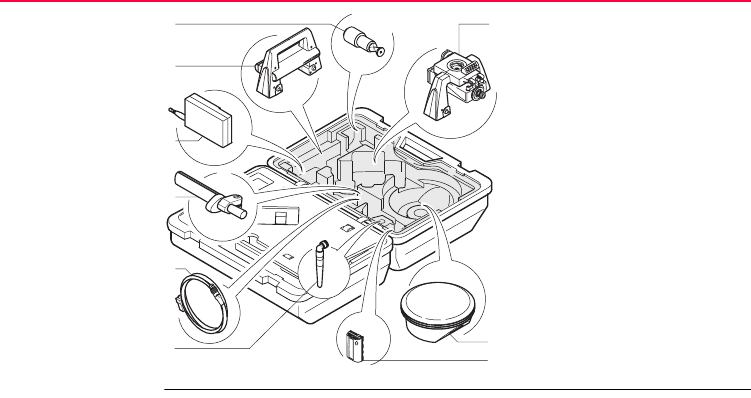
2.3 Container Contents
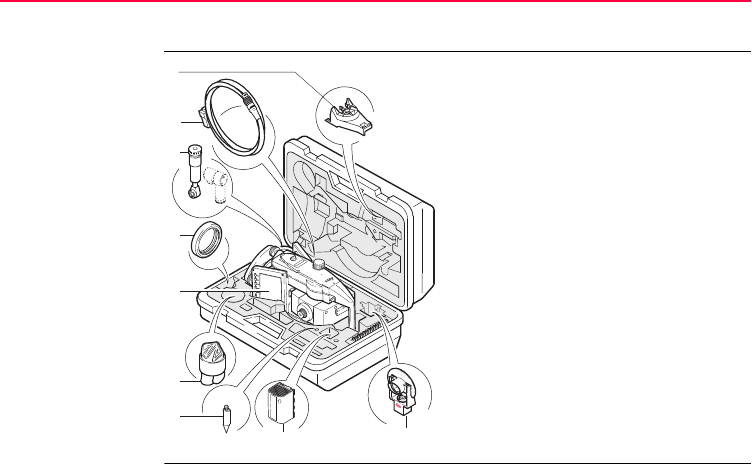
Container for
instrument and
delivered
accessories
part 1 of 2 a) Tribrach bracket for height meter
b) Data transfer cable GEV102
c) Diagonal eyepiece GFZ3 or zenith
eyepiece GOK6 (eyepiece for steep
sighting) - optional
d) Counterweight for diagonal eyepiece or
zenith eyepiece - optional
e) Instrument with supplied stylus and
tribrach (with standard carry handle or
RadioHandle attached)
f) Protective cover for instrument and
sunshade for objective lens
g) Tip for mini prism
h) Internal battery GEB221
i) Mini prism and holder
TPS12_010a
c
b
a
d
f
g
i
e
h
Description of the System TPS1200 25
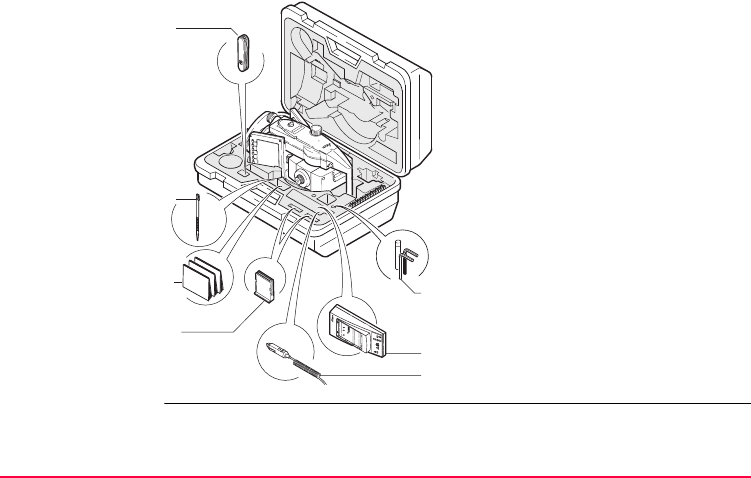
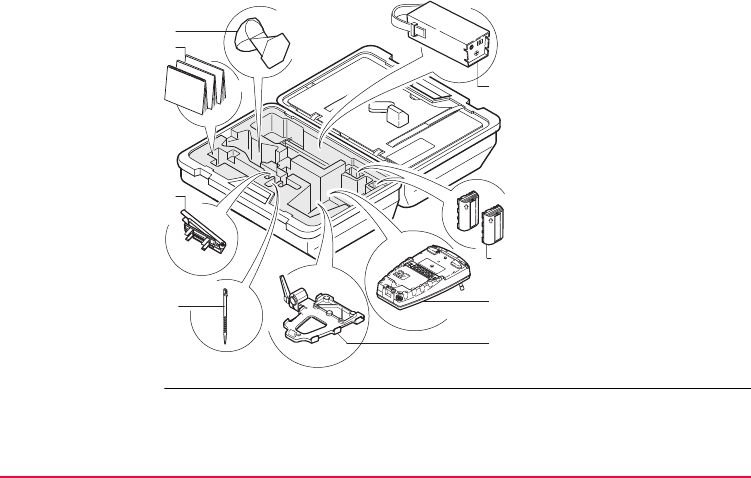
Container for
instrument and
delivered
accessories
part 2 of 2
a) Pocket knife - optional
b) Spare stylus
c) User manual
d) 2 x CompactFlash cards and covers
e) Tool set for circular level and EDM
adjustments - comprising two adjusting
pins, one allen key and one screwdriver
f) Battery charger
g) Car adapter power plug for battery
charger (stored under battery charger)
d
c
a
b
g
TPS12_010b
f
e
26TPS1200
Description of the System
Container for
SmartStation/RCS
components
part 1 of 2
a) 360° mini prism with adapter
GRZ101
b) RadioHandle
c) Radio modem with antenna
TCPS27
d) Grip with circular bubble and
fixing element GHT25
(without clamp)
e) Y-cable GEV186 / battery
cable GEV52 (stored over
grip)
f) Antenna for communication
device in clip-on-housing
g) SmartAntenna Adapter with
communication device in
clip-on-housing
h) SmartAntenna
i) Internal battery GEB211
RX12_012
a g
h
i
b
c
d
f
e
Description of the System TPS1200 27
Container for
SmartStation/RCS
components
part 2 of 2
a) 360° prism GRZ4
b) User manual
c) Tripod adapter for radio
modem GHT43
d) Spare stylus
e) External battery - GEB70 or
GEB171
f) 2 x internal batteries GEB211
g) RX1220 controller
with stylus and antenna
h) Pole holder GHT39
(with clamp) (stored under
RX1220 controller)
RX12_004
a
b
c
d
f
h
g
e
28TPS1200
Description of the System
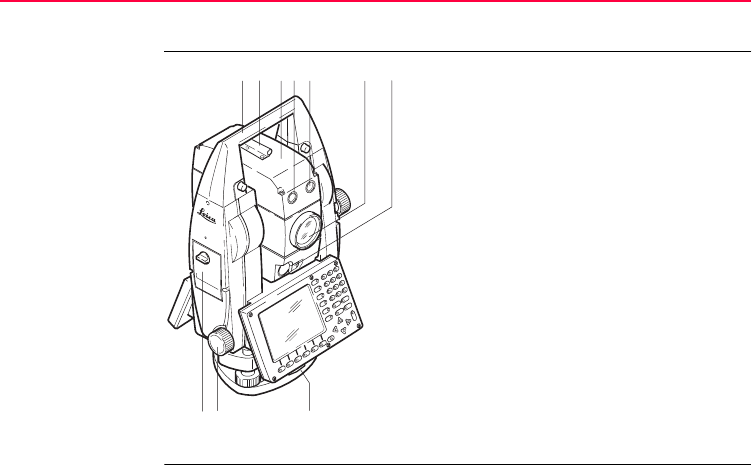
2.4 Instrument Components
Instrument
components
part 1 of 2
a) Carry handle
b) Optical sight
c) Telescope, integrating EDM, ATR, EGL, PS
d) EGL flashing diode - yellow
e) EGL flashing diode - red
f) Coaxial optics for angle and distance meas-
urement, and exit port of visible laser beam
for reflectorless instruments
g) PowerSearch
h) CompactFlash card compartment
i) Horizontal drive
j) Tribrach securing screw
ab cde f g
hi j
TPS12_001a
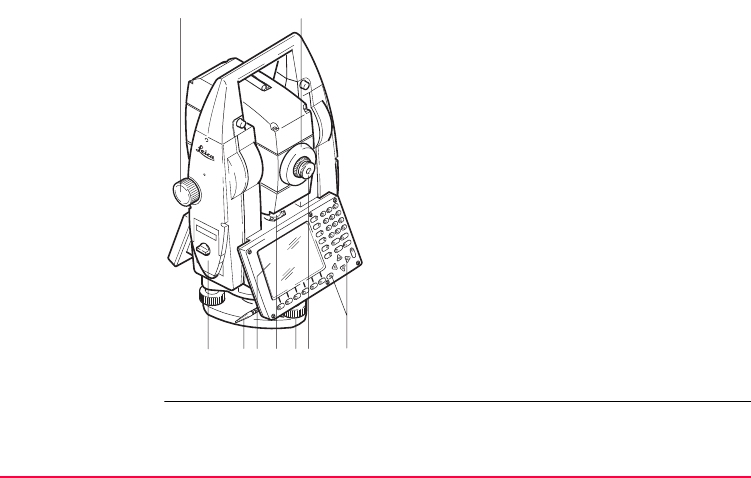
Description of the System TPS1200 29
Instrument
components
part 2 of 2
k) Vertical drive
l) Focusing ring
m) Battery compartment
n) Stylus for touch screen
o) Screen
p) Circular level
q) Tribrach footscrew
r) Interchangeable eyepiece
s) Keyboard
TPS12_001b
kl
mrnpqos
30TPS1200
Description of the System
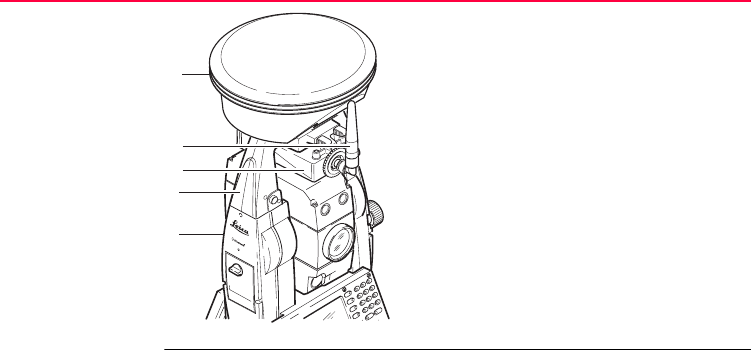
Instrument
components for
SmartStation
a) SmartAntenna
b) Antenna for communication device
c) Clip-on-housing for communication device
d) SmartAntenna Adapter
e) Communication side cover
TPS12_197
c
a
d
e
b
Description of the System TPS1200 31
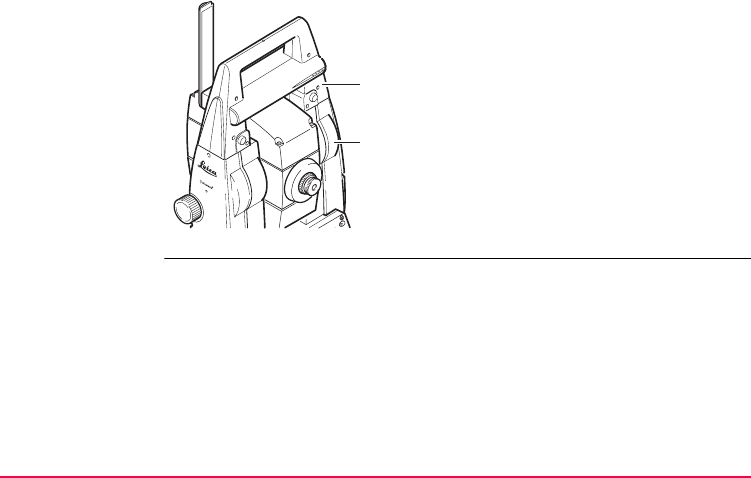
Instrument
components for
RCS
a) RadioHandle
b) Communication side cover
TPS12_199
a
b
32TPS1200
User Interface
3 User Interface
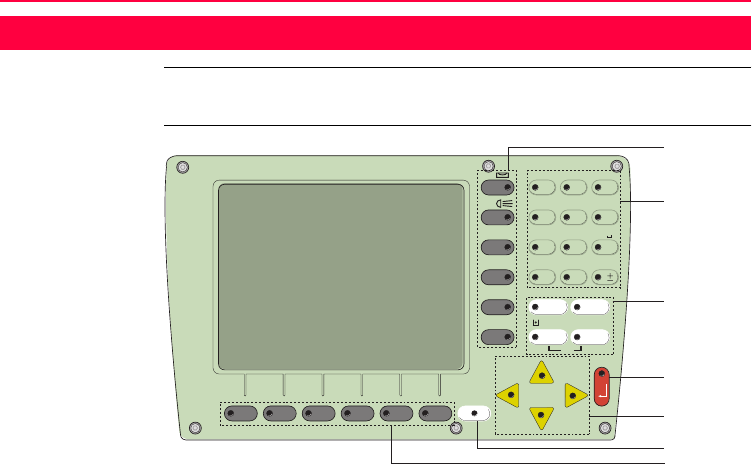
3.1 Keyboard
Keyboard
TPS12_070
a
b
c
d
e
f
g
F2F1 F3 F4 F5 F6
SHIFT
PgDn
PgUp
F7
F8 CE ESC
USER PROG
F9
F10
F11
F12 789
456
123
0.
ABC DEF GHI
JKL MNO PQR
STU VWX YZ
/$% _@& *?!
ON
OFF

User Interface TPS1200 33
Keys
a) Hot keys F7-F12
b) Alphanumeric keys
c) CE, ESC, USER, PROG
d) ENTER
e) Arrow keys
f) SHIFT
g) Function keys F1-F6
Key Description
Hot keys F7-F12 • User definable keys to execute commands or access
chosen screens.
Alphanumeric keys • To type letters and numbers.
CE • Clears all entry at the beginning of user input.
• Clears the last character during user input.
ESC • Leaves the current menu or dialog without storing
changes made.
USER • Calls the user defined menu.
PROG (ON) • If the instrument is off: to turn instrument on.
• If the sensor is on: press at any time to select an applica-
tion program.

34TPS1200
User Interface
Key combinations
ENTER • Selects the highlighted line and leads to the next logical
dialog/menu.
• Starts the edit mode for edit fields.
• Opens a list box.
SHIFT • Changes between the first and the second level of func-
tion keys.
Arrow keys • Move the focus on the screen.
Function keys F1-F6 • Correspond to the six softkeys that appear on the bottom
of the screen when the screen is activated.
Key Description
Keys Description
PROG plus USER Turns instrument off.
SHIFT F12 Calls STATUS Level & Laser Plummet.
SHIFT F11 Calls CONFIGURE Lights, Display, Beeps, Text, Lights
page.
SHIFT USER Calls QUICK SET Change Settings to:.

User Interface TPS1200 35
SHIFT Pages up.
SHIFT Pages down.
Keys Description
36TPS1200
User Interface
3.2 Screen
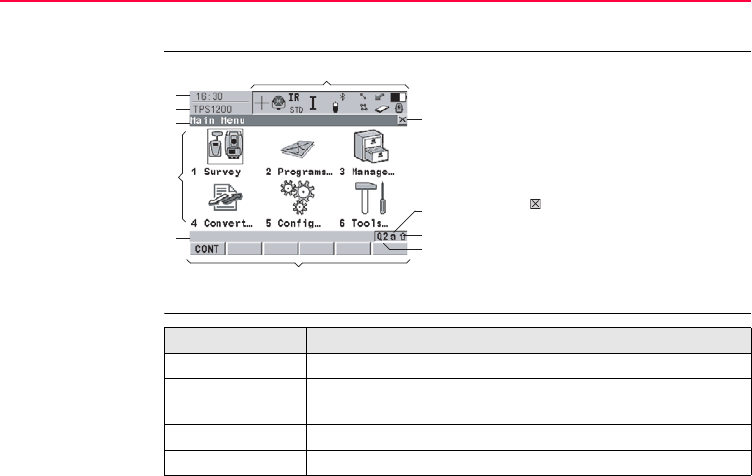
Screen
Elements of the
screen
a) Time
b) Caption
c) Title
d) Screen area
e) Message line
f) Icons
g) ESC
h) CAPS
i) SHIFT icon
j) Quick coding icon
k) Softkeys
a
g
j
i
h
b
c
d
e
k
f
TPS12_081
Element Description
Time The current local time is shown.
Caption Shows location either in Main Menu, under PROG key or
USER key.
Title Name of the screen is shown.
Screen area The working area of the screen.

User Interface TPS1200 37
Message line Messages are shown for 10 s.
Icons Shows current status information of the instrument. Refer to
"3.4 Icons". Can be used with touch screen.
ESC Can be used with touch screen. Same functionality as the fixed
key ESC. The last operation will be undone.
CAPS The caps mode for upper case letters is active.The caps mode
is activated and deactivated by pressing UPPER (F5) or
LOWER (F5) in some screens.
SHIFT icon Shows the status of the SHIFT key; either first or second level
of softkeys is selected. Can be used with touch screen and has
the same functionality as the fixed key SHIFT.
Quick coding icon Shows the quick coding configuration. Can be used with touch
screen to turn quick coding on and off.
Softkeys Commands can be executed using F1-F6 keys. The
commands assigned to the softkeys are screen dependent.
Can be used directly with touch screen.
Scroll bar Scrolls the screen area up and down.
Element Description

38TPS1200
User Interface
3.3 Operating Principles
Keyboard and
touch screen
The user interface is operated either by the keyboard or by the touch screen with
supplied stylus. The workflow is the same for keyboard and touch screen entry, the
only difference lies in the way information is selected and entered.
Turn instrument on Press and hold PROG for 2 s.
Turn instrument off
step-by-step
Lock/Unlock
keyboard
Step Description
)The instrument can only be turned off in TPS1200 Main Menu.
1. Press and hold both USER and PROG simultaneously.
2. Press YES (F6) to continue or NO (F4) to cancel.
Option Description
Lock To lock the keyboard press and hold SHIFT for 3 s. The message
’Keyboard locked’ is momentarily displayed on the Message Line.
Unlock To unlock the keyboard press and hold SHIFT for 3 s. The message
’Keyboard unlocked’ is momentarily displayed on the Message Line.
User Interface TPS1200 39
Selecting
from a menu
Selecting a page
Appearance Description
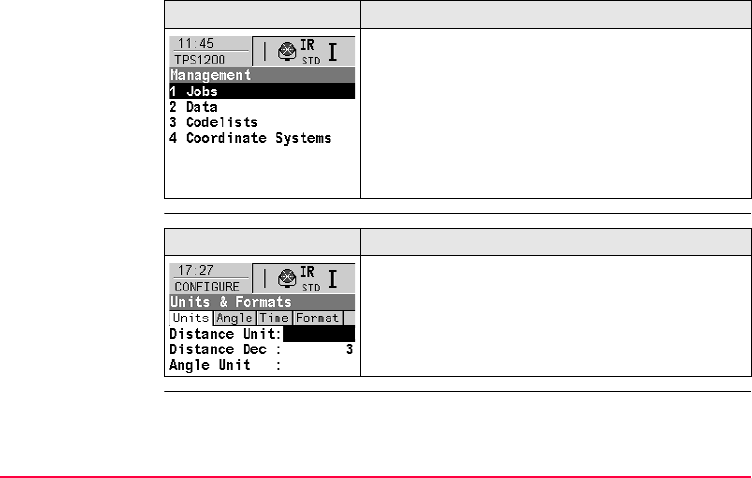
To select an item from a menu, do one of the following:
Move the focus to the item. ENTER or CONT (F1).
OR
Type the complete selection number in front of the
item. ENTER or CONT (F1) are not required.
OR
Tap on the item with the stylus.
Appearance Description
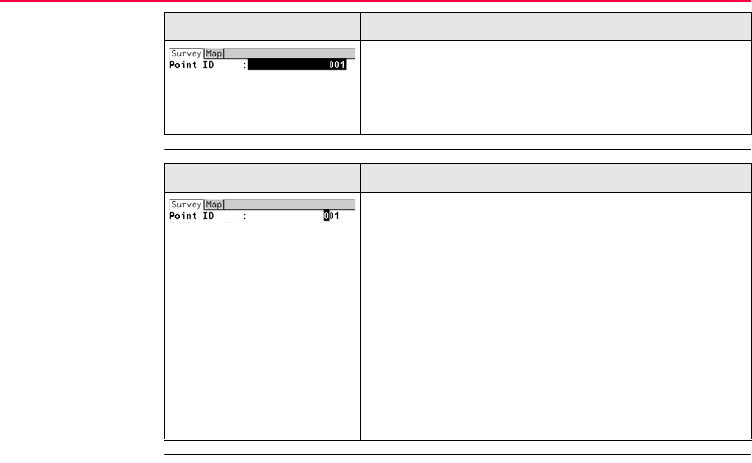
To select a page in a screen, do one of the following:
PAGE (F6).
OR
Tap on the page tab with the stylus.
40TPS1200
User Interface
Edit an entire value
in input fields
Edit an individual
character in input
fields
Appearance Description
1. Highlight the field.
2. Type numeric and/or alphanumeric characters to
overwrite.
3. ENTER or tap outside of the field.
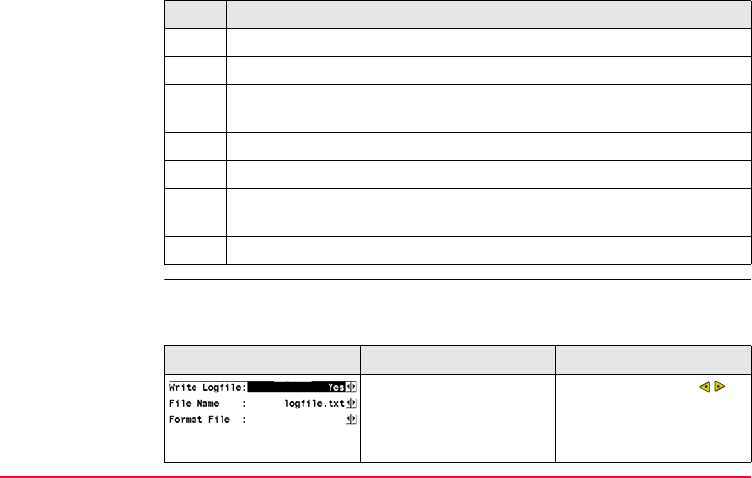
Appearance Description
A character can be inserted or overwritten. The proce-
dure is the same for both cases.
1. Highlight the field.
2. For the keyboard: ENTER. The edit mode is acti-
vated where additional functions like insert and
overwrite are available.
3. For the touch screen: Highlight the characters to
be changed.
4. Type numeric and/or alphanumeric characters.
5. ENTER or tap outside of the field.
User Interface TPS1200 41
Access special
alphanumeric
characters for
input
Appearance and
selection from a
choicelist
Choicelists have various appearances.
Closed choicelist
Step Description
1. Highlight the input field.
2. For the keyboard: ENTER.
3. Toggle to the desired special character set by using the up/down arrow
keys.
4. Press the function key assigned to the required character group.
5. Press the function key with the required character.
6. Repeat step 4. and 5. for entering more special characters of the same
character set.
7. ENTER.
Appearance Description Selection
Triangles on the right indi-
cate further available
choices.
Use the arrow keys to
change through the list or
tap the triangles on the
screen.

42TPS1200
User Interface
ENTER or tap on the field to access the choicelist. Opening a choicelist reveals
either a simple listbox or a comprehensive listbox dialog.
Simple listbox
.
Appearance Description Selection
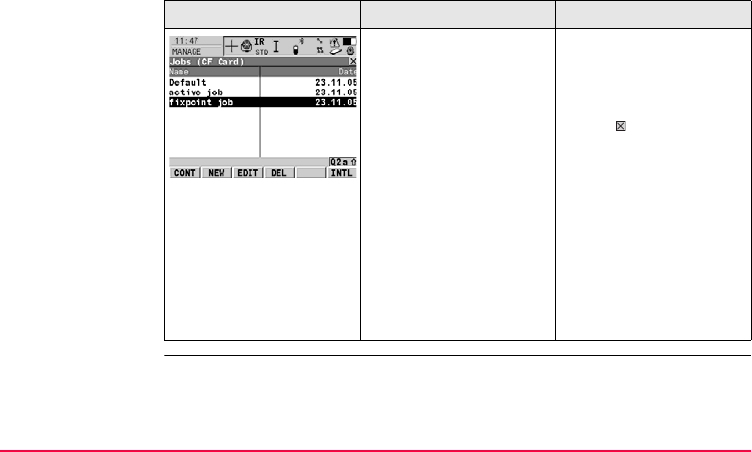
• Choicelist shows
items to select.
• A search field is
shown if necessary.
• A scroll bar is shown if
necessary.
• Highlight the item and
ENTER.
• To exit without
changes ESC, tap
or outside the simple
listbox.
User Interface TPS1200 43
Listbox dialog
.
Appearance Description Selection
• Choicelist fills the
whole screen.
• A search field is
shown.
• A scroll bar is shown if
necessary.
• Highlight the item and
CONT (F1).
• To exit without
changes press ESC or
tap .
• The functionality
comprise adding,
editing and deleting of
items.
• Listbox dialogs are
explained in detail at
appropriate places in
the manuals.
44TPS1200
User Interface
3.4 Icons
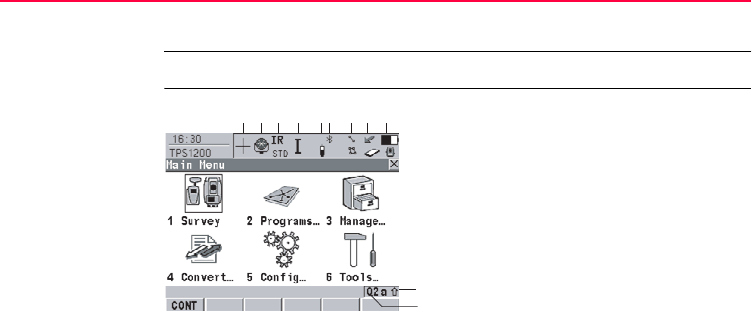
Description The screen icons display the current status information of the instrument.
Position of the
icons on the screen a) ATR/LOCK/PS
b) Reflector
c) EDM
d) Compensator/face I&II
e) RCS
f) Bluetooth
g) Line/area
h) CompactFlash card/internal memory
i) Battery
j) SHIFT
k) Quick coding
j
a
TPS12_172
b c d e f g h i
k
User Interface TPS1200 45
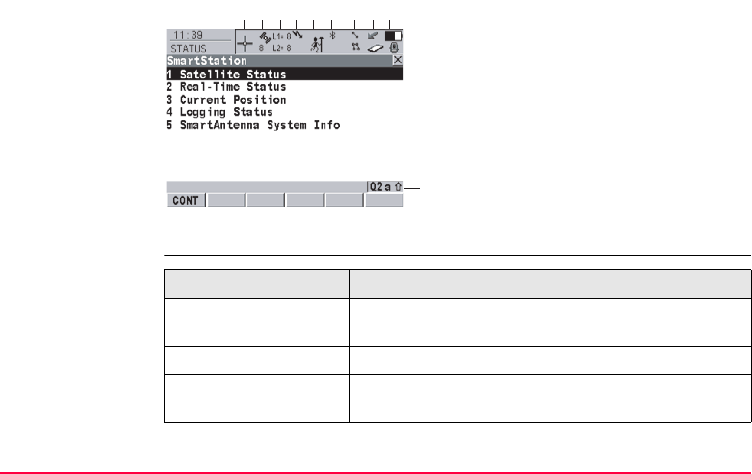
TPS specific icons
a) GNSS position status
b) Number of visible satellites
c) Contributing satellites
d) Real-time device and real-time
status, Internet online status
e) Position mode
f) Bluetooth
g) Line/area
h) CompactFlash card/internal memory
i) Battery
j) SHIFT
k) Quick coding
j
a
TPS12_172a
bcde f ghi
Icon Description
ATR/LOCK/PS The currently active ATR/LOCK/PS settings or searches
are displayed.
Reflector The currently active reflector is displayed.
EDM The currently active EDM measurement settings are
displayed.

46TPS1200
User Interface
GPS specific icons
Compensator/face I&II Compensator off, out of range or face I&II icon is
displayed.
RCS RCS settings are displayed.
Icon Description
Icon Description
GNSS Position status Displays the status of the current position. As soon as
this icon becomes visible the receiver is in a stage where
practical operation can commence.
Number of visible
satellites
Displays the number of theoretically visible satellites
above the configured cut off angle according to the
current almanac.
Contributing
satellites
Displays the number of satellites that are contributing to
the currently computed position solution.

User Interface TPS1200 47
Common icons
)The number of contributing satellites can differ
from the number of visible satellites. This may
be either because satellites cannot be viewed
or the observations to these satellites are
considered to be too noisy to be used in the
position solution.
Real-time device and
real-time status
Displays the real-time device configured to be used and
its status.
Internet online status Receiver is online in the Internet.
Position mode Displays the current position mode.
Icon Description
Icon Description
Bluetooth The status of each Bluetooth port and any Bluetooth
connection is displayed.
Line/area The number of lines and areas currently open in the
active job is displayed.

48TPS1200
User Interface
CompactFlash
card/internal memory
The status of the CompactFlash card and internal
memory if fitted are displayed.
• For the CompactFlash card, the capacity of used
space is shown in seven levels.
• For the internal memory if fitted, the capacity of used
memory is shown in nine levels.
Battery The status and source of the battery is displayed. The
percentage of remaining power capacity for all batteries
are displayed numerically and graphically. For internal
and external battery being attached at the same time the
internal battery is used until it is empty and then the
external battery is used.
SHIFT The status of the SHIFT key is displayed.
Quick coding Shows the quick coding configuration. Can be used with
touch screen to turn quick coding on and off.
Icon Description

User Interface TPS1200 49

50TPS1200
Operation
4 Operation
4.1 Instrument Setup
Description This topic describes an instrument setup over a marked ground point using the laser
plummet. It is always possible to set up the instrument without the need for a marked
ground point.
)Important features:
• It is always recommended to shield the instrument from direct sunlight and
avoid uneven temperatures around the instrument.
• The laser plummet described in this topic is built into the vertical axis of the
instrument. It projects a red spot onto the ground, making it appreciably easier
to centre the instrument.
• The laser plummet cannot be used in conjunction with a tribrach equipped
with an optical plummet.
• Refer to "TPS1200 Technical Reference Manual" for additional information on
using the laser plummet.
Operation TPS1200 51
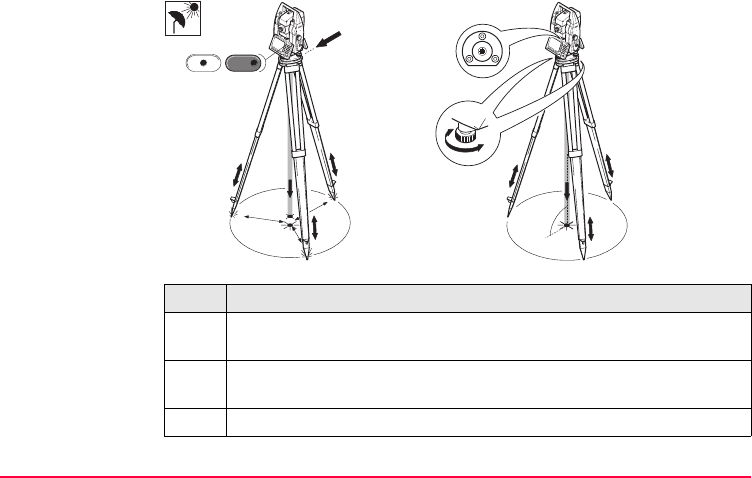
Setup step-by-step
Step Description
)Shield the instrument from direct sunlight and avoid uneven temperatures
around the instrument.
1. Extend the tripod legs to allow for a comfortable working posture. Position
the tripod over the marked ground point, centring it as well as possible.
2. Fasten the tribrach and instrument onto the tripod.
TPS12_019
2
6
7
54
5
5
1
3
1
1
SHIFT
F12

52TPS1200
Operation
3. Turn on the instrument by pressing PROG for 2 s. Press SHIFT (F12) to
access STATUS Level & Laser Plummet, activating the laser plummet.
4. Move the tripod legs (1) and use the tribrach footscrews (6) to centre the
plummet (4) over the ground point.
5. Adjust the tripod legs to level the circular level (7).
6. By using the electronic level turn the tribrach footscrews (6) to precisely
level the instrument.
7. Centre the instrument precisely over the ground point (4) by shifting the
tribrach on the tripod plate (2).
8. Repeat steps 6. and 7. until the required accuracy is achieved.
Step Description

Operation TPS1200 53
4.2 Autodetect Behaviour
Description • The instrument incorporates an autodetect behaviour and automatically detects
the following devices:
• SmartAntenna
• RadioHandle
• radios/modems in clip-on-housings
• Whenever a device is attached, the instrument responds with two short beeps.
• Whenever a device is removed, the instrument responds with one long beep.
SmartAntenna
Adapter
• SmartAntenna Adapter cannot be detected by the instrument but the devices
that are attached to SmartAntenna Adapter are automatically detected. These
devices are SmartAntenna and radios/modems in clip-on-housings.
Radio/Modem
in clip-on housing
• All radios and modems that are built into a clip-on housing are automatically
detected by the instrument when attached to SmartAntenna Adapter, but the
device settings are not automatically set.
SmartAntenna • SmartAntenna is automatically detected by the instrument when it is attached
and STATUS Interfaces is automatically updated.
• Certain functionality can only be executed if SmartAntenna is attached.

54TPS1200
Operation
• In addition to the autodetect behaviour, SmartAntenna can also be manually
turned on/off using the ON/OFF button located on the underside. This action
overrides all automatic settings but is only possible when SmartAntenna is fitted
with an internal battery.
• If turned off, SmartAntenna is automatically turned on:
• by the Setup application, when <Station Coord: From GPS>
• by the GPS Survey application, in the GPS SURVEY screen.
• in the STATUS SmartStation menu
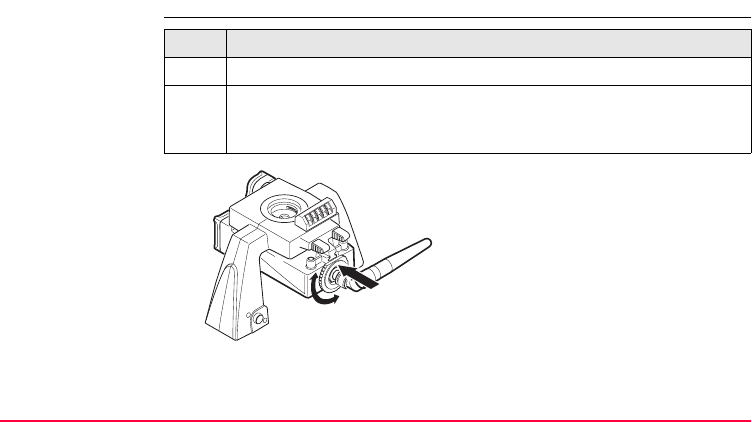
RadioHandle • RadioHandle is automatically detected by the instrument when it is attached.
• When RadioHandle is attached and RCS Mode is activated via the quick settings
in SHIFT USER, the appropriate port and device settings are set.
Operation TPS1200 55
4.3 Instrument Setup as SmartStation
4.3.1 SmartStation Setup
Setup step-by-step Step Description
)Refer to "4.5 Battery" to change the internal battery of the SmartAntenna.
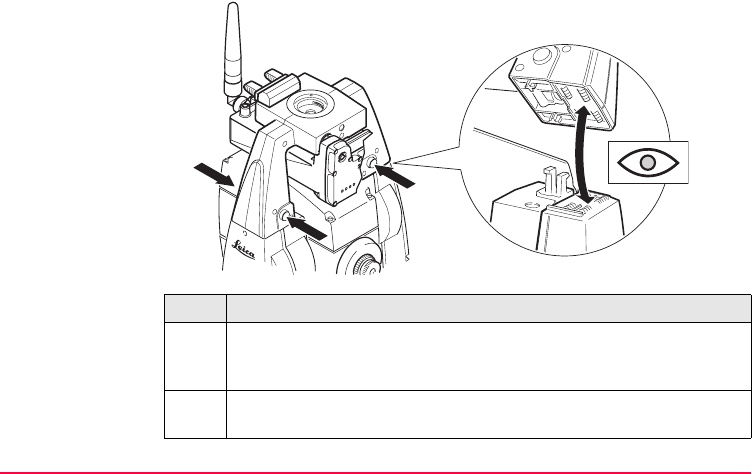
)Refer to "4.1 Instrument Setup" for the initial instrument setup onto a
tripod. Remove the instrument carry handle by simultaneously pressing
and holding-in the four push buttons.
TPS12_194

56TPS1200
Operation
Step Description
1. A circular screw is located at one end of the clip-on-housing. Ensure that
the circular screw is in the unlocked position. Turn it anticlockwise, as
shown by the lock and arrow symbols on the screw.
2. Slide the clip-on-housing into position underneath the SmartAntenna
Adapter, such that the guide rails on the clip-on-housing and the guide
rails on the SmartAntenna Adapter are aligned.
)Ensure that the connector located at the end of the clip-on-housing fits into
its port of the SmartAntenna Adapter.
3. Lock the circular screw by turning it clockwise, as shown by the lock and
arrow symbols on the screw. The clip-on-housing is now locked into posi-
tion.
4. Thread the antenna onto the clip-on-housing.
Operation TPS1200 57
Step Description
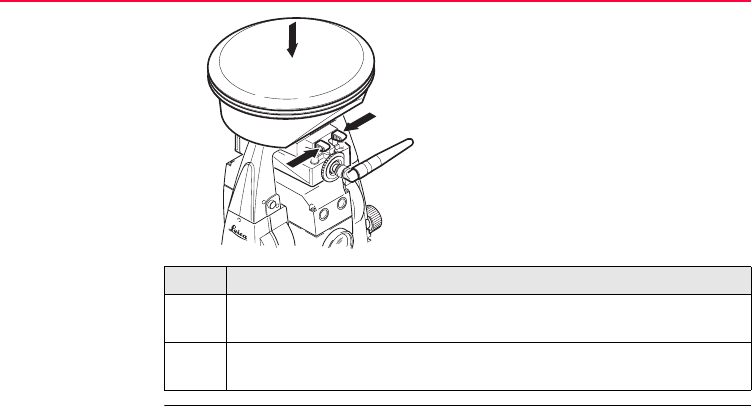
5. Place the SmartAntenna Adapter with attached clip-on-housing onto the
instrument by simultaneously pressing and holding-in the four push
buttons.
)Ensure that the interface connection on the underside of the SmartAn-
tenna Adapter is on the same side as the Communication side cover.
TPS12_195
58TPS1200
Operation
Step Description
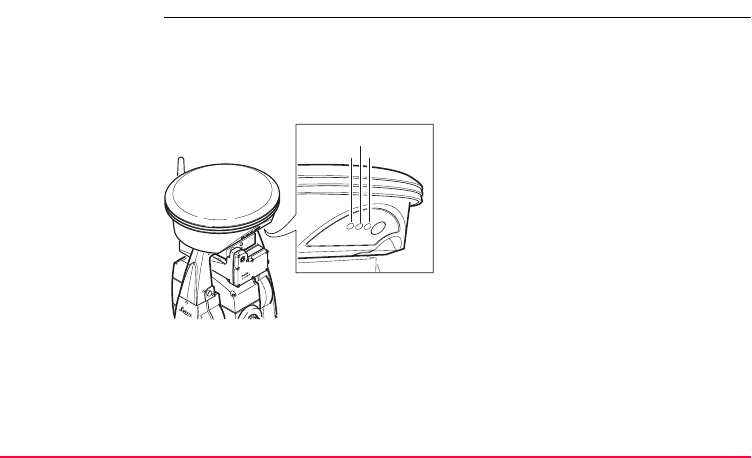
6. Place the SmartAntenna onto the SmartAntenna Adapter by simultane-
ously pressing and holding-in the two press clips.
)Ensure that the clip-on-contacts on the underside of the SmartAntenna
are aligned to the clip-on-contacts of the SmartAntenna Adapter.
TPS12_209
Operation TPS1200 59
4.3.2 LED Indicators on SmartAntenna
LED Indicators Description
SmartAntenna has Light Emitting Diode indicators. They indicate the basic antenna
status.
Diagram of LED Indicators
TRK Tracking LED
BT Bluetooth LED
PWR Power LED
TPS12_200
TRK
BT
PWR
TRK
BT
PWR
ON
OFF

60TPS1200
Operation
Description of LED Indicators
IF the is THEN
TRK off no satellites are tracked.
flashing green less than four satellites are tracked, a position is not
yet available.
green enough satellites are tracked to compute a position.
BT green Bluetooth is in data mode and ready for connecting.
purple Bluetooth is connecting.
blue Bluetooth has connected.
flashing blue data is being transferred.
PWR off power is off.
green power is okay.
flashing green power is low. The remaining time for which enough
power is available depends on the type of survey, the
temperature and the age of the battery.

Operation TPS1200 61
4.3.3 Working with the Clip-On-Housings for Devices
Devices fitting into
a clip-on-housing
Digital cellular phones fitting into a clip-on-housing
Radios fitting into a clip-on-housing
Digital cellular phone Clip-on-housing
Siemens MC45 GFU17
Siemens MC75 GFU24
CDMA MultiTech MTMMC-C (US) GFU19
CDMA MultiTech MTMMC-C (CAN) GFU25
Radio Clip-on-housing
Pacific Crest PDL, receive GFU15
Satelline 3AS, transceive GFU14

62TPS1200
Operation
Attach/detach a
clip-on-housing
step-by-step
Attach a clip-on-housing
Refer to "4.3.1 SmartStation Setup" for detailed information.
Detach a clip-on-housing
Insert a SIM card
step-by-step
For those digital cellular phones that require SIM cards.
Step Description
1. A circular screw is located at one end of the clip-on-housing. To unlock
and release the clip-on-housing from the SmartAntenna Adapter turn the
screw anticlockwise, as shown by the lock and arrow symbols on the
screw.
2. Slide the clip-on-housing away from the SmartAntenna Adapter until the
connector is completely unplugged from its port.
Step Description
1. Take the SIM card, a coin and a pen.
2. Locate the SIM card screw, that covers the SIM card slot, at the end of the
clip-on-housing.
3. Insert the coin into the groove of the SIM card screw.
4. Turn the coin anticlockwise to loosen the SIM card screw.

Operation TPS1200 63
5. Remove the SIM card screw from the housing.
6. Using the pen, press the small button of the SIM card slot to eject the SIM
card holder.
7. Take the SIM card holder out off the housing.
8. Put the SIM card into the SIM card holder, the chip facing up.
9. Insert the SIM card holder into the SIM card slot, the chip facing the
connectors inside the slot.
10. Place the SIM card screw back onto the housing.
11. Insert the coin into the groove of the SIM card screw.
12. Turn the coin clockwise to tighten the SIM card screw.
Step Description

64TPS1200
Operation
Remove a SIM card
step-by-step
For those digital cellular phones that require SIM cards.
Step Description
1. Take a coin and a pen.
2. Locate the SIM card screw, that covers the SIM card slot, at the end of the
clip-on-housing.
3. Insert the coin into the groove of the SIM card screw.
4. Turn the coin anticlockwise to loosen the SIM card screw.
5. Remove the SIM card screw from the housing.
6. Using the pen, press the small button of the SIM card slot to eject the SIM
card holder.
7. Take the SIM card holder out off the SIM card slot.
8. Take the SIM card out of the SIM card holder.
9. Put the SIM card holder back into the SIM card slot, the even side not
facing the contacts inside the slot.
10. Place the SIM card screw back onto the housing.
11. Turn the coin clockwise to tighten the SIM card screw.
Operation TPS1200 65
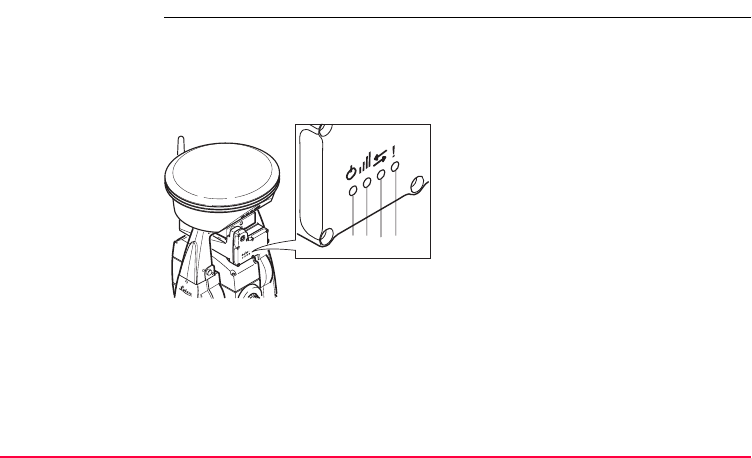
4.3.4 LED Indicators on Clip-On-Housings
LED Indicators Description
Each clip-on-housing for a radio or a digital cellular phone has Light Emitting Diode
indicators. They indicate the basic device status.
Diagram of the LED Indicators
a) Power LED
b) Signal strength LED
c) Data transfer LED
d) Warning LED,
available for Satelline 3AS
TPS12_211
abcd

66TPS1200
Operation
Description of the LED Indicators
IF the on is THEN
Warning
LED
GFU14 with
Satelline 3AS
red the device is in the configuration
mode controlled from the PC via
cable.
Data
transfer
LED
any device off data is not being transferred.
green or
flashing green
data is being transferred.

Operation TPS1200 67
Signal
strength
LED
GFU19 (US),
GFU25 (CAN)
with CDMA
MultiTech
MTMMC-C
red device is on, not registered on
the network.
flashing red device is on, registered on the
network.
off download mode or device is off.
GFU17 with
Siemens MC45
red call is in progress.
red: long flash,
short break
no SIM card inserted, no PIN
entered or network search, user
authentication or network login in
progress.
red: short flash,
long break
logged onto network, no call in
progress.
off device is off.
IF the on is THEN

68TPS1200
Operation
GFU24 with
Siemens MC75
red call is in progress.
red: long flash, long
break
no SIM card inserted, no PIN
entered or network search, user
authentication or network login in
progress.
red: short flash,
long break
logged onto network, no call in
progress.
red: flashing red,
long break
GPRS PDP context activated.
red: long flash,
short break
Packet switched data transfer is
in progress.
off device is off.
IF the on is THEN

Operation TPS1200 69
GFU15 with
Pacific Crest
PDL
red or
flashing red
the communication link, Data
Carrier Detection, is okay on the
roving receiver.
off the DCD is not okay.
GFU14 with
Satelline 3AS
red or
flashing red
the communication link, Data
Carrier Detection, is okay on the
roving receiver.
off the DCD is not okay.
Power
LED
any device off power is off.
green power is okay.
IF the on is THEN
70TPS1200
Operation
4.4 Instrument Setup for Remote Control
4.4.1 Remote Control Setup
Setup step-by-step
Step Description
)Refer to "4.1 Instrument Setup" for the initial instrument setup onto a
tripod. Remove the instrument carry handle by simultaneously pressing
and holding-in the four push buttons.
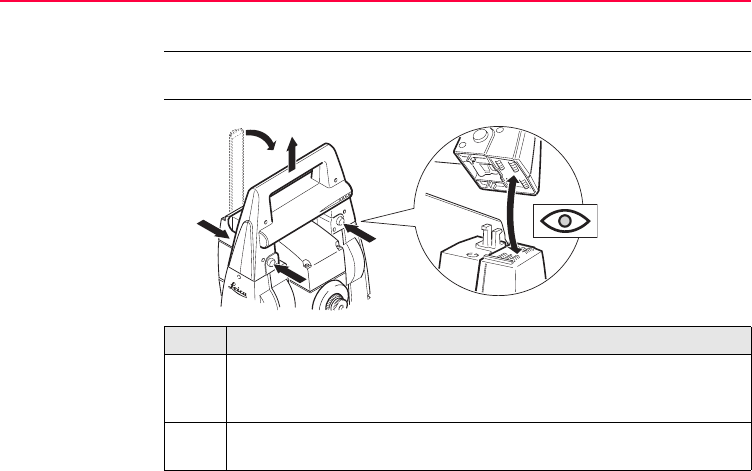
1. Place the RadioHandle onto the instrument by simultaneously pressing
and holding-in the four push buttons.
2
2
2
3
4
1
TPS12_196

Operation TPS1200 71
)Ensure that the interface connection on the underside of the RadioHandle
is on the same side as the Communication side cover.
2. Swing the RadioHandle antenna into an upright position.
)Refer to "RX1200 User Manual" for additional information.
Step Description
72TPS1200
Operation
4.4.2 LED Indicators on RadioHandle
LED Indicators Description
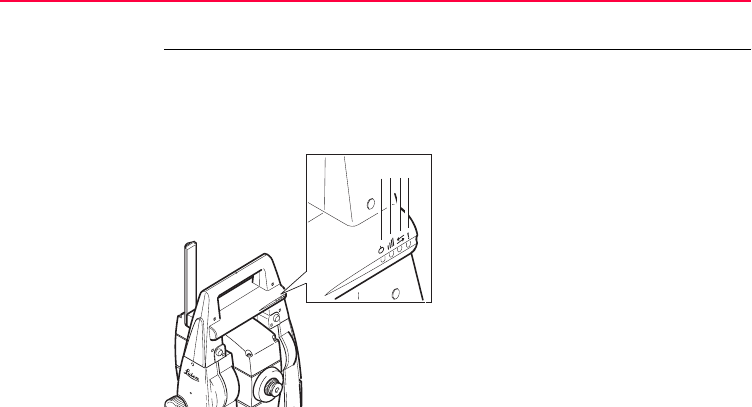
The RadioHandle has Light Emitting Diode indicators. They indicate the basic
RadioHandle status.
Diagram of the LED Indicators
a) Power LED
b) Link LED
c) Data Transfer LED
d) Mode LED
abc d

Operation TPS1200 73
Description of the LED Indicators
IF the is THEN
Power LED off power is off.
green power is on.
Link LED off no radio link to remote controller.
red radio link to remote controller.
Data Transfer LED off no data transfer to/from remote controller.
green or
green flashing
data transfer to/from remote controller.
Mode LED off data mode.
red configuration mode.

74TPS1200
Operation
4.5 Battery
4.5.1 Operating Principles
)Primary use/charging
• The battery must be charged prior to using it for the first time because it is deliv-
ered with an energy content as low as possible.
• For new batteries or batteries that have been stored for a long time (> three
months), it is effectual to make only one charge/discharge cycle.
• For Li-Ion batteries, a single discharging and charging cycle is sufficient. We
recommend carrying out the process when the battery capacity indicated on the
charger or on a Leica Geosystems product deviates significantly form the actual
battery capacity available.
• The permissible temperature range for charging is between 0°C to +40°C/+32°F
to +104°F. For optimal charging we recommend charging the batteries at a low
ambient temperature of +10°C to +20°C/+50°F to +68°F if possible.
• It is normal for the battery to become warm during charging. Using the chargers
recommended by Leica Geosystems, it is not possible to charge the battery if
the temperature is too high.

Operation TPS1200 75
Operation/Discharging
• The batteries can be operated from -20°C to +55°C/-4°F to +131°F.
• Low operating temperatures reduce the capacity that can be drawn; very high
operating temperatures reduce the service life of the battery.
76TPS1200
Operation
4.5.2 Instrument Battery
Change battery
step-by-step
Step Description
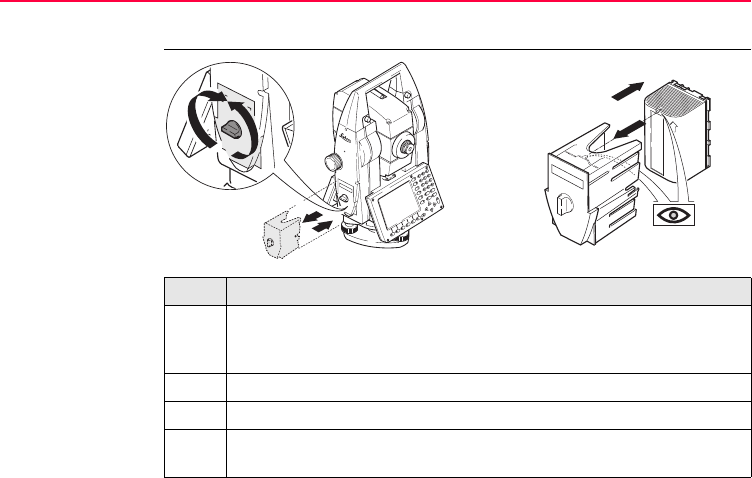
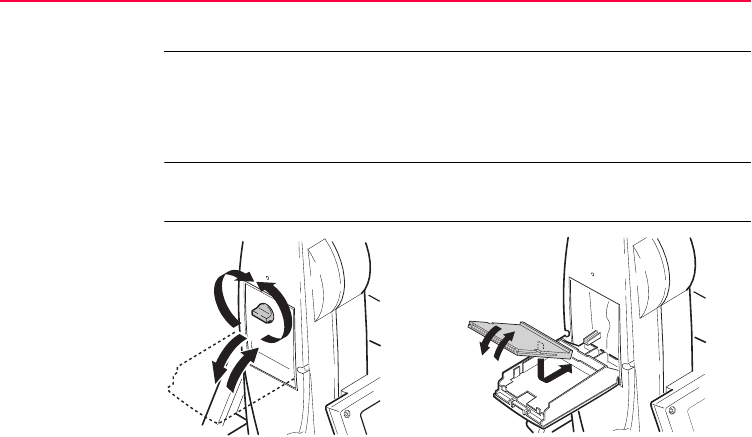
1. Face the instrument so that the vertical drive screw is on the left. The
battery compartment is now on the left side of the instrument. Turn the
knob to the vertical position, opening the lid of the battery compartment.
2. Pull out the battery housing.
3. Pull the battery from the battery housing.
4. A pictogram of the battery is displayed inside the battery housing. This is
a visual aid to assist in placing the battery correctly.
TPS12_011
2
6
1
7
3
5
4

Operation TPS1200 77
5. Place the battery into the battery housing, ensuring that the contacts are
facing outward. Click the battery into position.
6. Place the battery housing into the battery compartment. Push the battery
housing in until it fits completely into the battery compartment.
7. Turn the knob to lock the battery compartment. Ensure that the knob is
returned to its original horizontal position.
Step Description
78TPS1200
Operation
4.5.3 SmartAntenna Battery
Change battery
step-by-step
Step Description
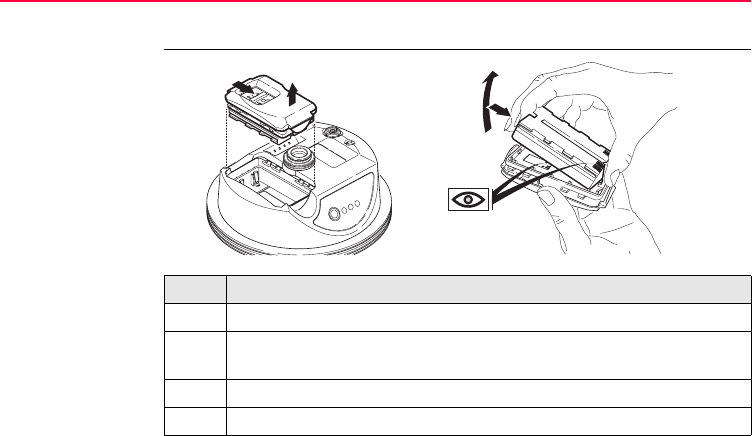
)Turn SmartAntenna over to gain access to the battery compartment.
1. Open the battery compartment by pushing the slide fastener in the direc-
tion of the arrow with the open-lock symbol.
2. Pull out the battery housing. The battery is attached to the housing.
3. Hold the battery housing and pull the battery from the battery housing.
12
TPS12_193
3
4

Operation TPS1200 79
4. A polarity of the battery is displayed inside the battery housing. This is a
visual aid to assist in placing the battery correctly.
5. Place the battery onto the battery housing, ensuring that the contacts are
facing outward. Click the battery into position.
6. Close the battery compartment by pushing the slide fastener in the direc-
tion of the arrow with the close-lock symbol.
Step Description
80TPS1200
Operation
4.6 Working with the CompactFlash Card
)• Keep the card dry.
• Use it only within the specified temperature range.
• Do not bend the card.
• Protect the card from direct impacts.
)Failure to follow these instructions could result in data loss and/or permanent
damage to the card.
Insert and remove
a CompactFlash
card step-by-step
TPS12_016
1
7
264
53

Operation TPS1200 81
Format a
CompactFlash card
step-by-step
Formatting the CompactFlash card before starting to store data is required if a
completely new CompactFlash card is used or if all existing data needs to be
deleted.
Step Description
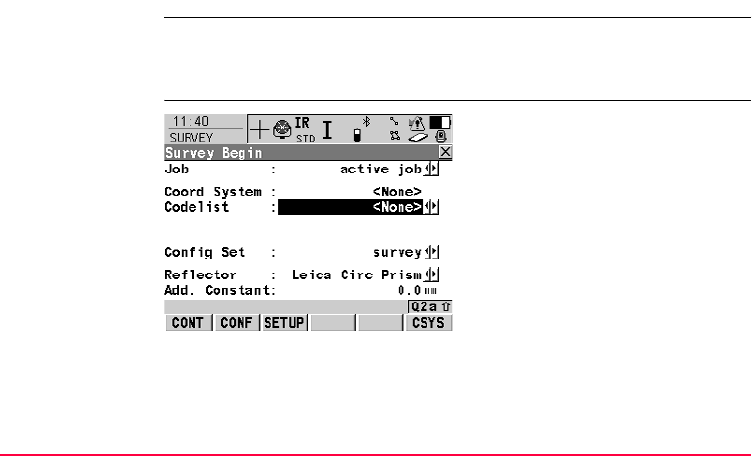
1. Face the instrument so that the vertical drive screw is on the left. The
CompactFlash card compartment is now on the right side of the instru-
ment. Turn the knob to the vertical position, opening the lid of the
CompactFlash card compartment.
2. Open the lid of the CompactFlash card compartment.
3. Pull the front of the CompactFlash card up and take the card out of the lid.
4. Place the lower end of the CompactFlash card at the lower end of the
CompactFlash card compartment. The extended edge of the card has to
be on the upper side as shown on the pictogram in the CompactFlash card
compartment.
5. Press the card down on the lid.
6. Close the lid.
7. Turn the knob to lock the CompactFlash card compartment. The lid is
closed correctly when the knob is turned to a horizontal position.

82TPS1200
Operation
Step Description
1. Main Menu: Tools...\Format Memory Device.
2. TOOLS Format Memory Device
<Memory Device: CF Card>
<Format Method: Format Quick>
Select the memory device to be formatted.
)By activating the format command all data will be lost. Make sure that all
important data on the CompactFlash card has been backed up before
formatting the card. Before formatting the internal memory make sure that
all important data is first transferred to the PC.
)To exit the screen without formatting the memory device, press ESC. This
returns to the previous screen without execution of any command.
3. CONT (F1).
4. YES (F4) to complete the formatting of the CompactFlash card.
)NO (F6) to abort the formatting of the CompactFlash card and return to
TOOLS Format Memory Device.
5. Once the formatting of the CompactFlash card is completed the system
returns to TPS1200 Main Menu.
Operation TPS1200 83
4.7 Accessing Survey Application Program
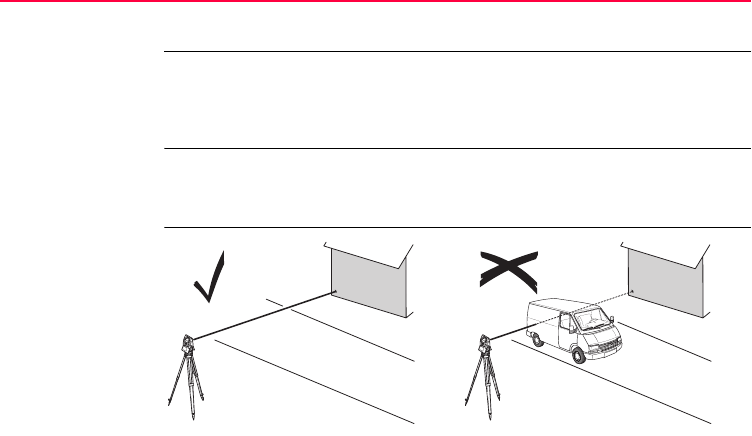
Access Select Main Menu: Survey.
OR
Press PROG. Highlight Survey. CONT (F1).
SURVEY
Survey Begin
CONT (F1)
To accept changes and access the
subsequent screen. The chosen
settings become active.
CONF (F2)
To access SURVEY Configuration.
SETUP (F3)
Opens SETUP Station Setup to set
station and orientation.
CSYS (F6)
To select a different coordinate
system.

84TPS1200
Operation
Description of fields
Field Option Description
<Job:> Choicelist The active job. All jobs from Main Menu:
Manage...\Jobs can be selected.
<Coord System:> Output The coordinate system currently attached to the
selected <Job:>.
<Codelist:> Choicelist No codes are stored in the selected <Job:>. All
codelists from Main Menu:
Manage...\Codelists can be selected.
Output Codes have already been stored in the selected
<Job:>. If codes had been copied from a
System RAM codelist, then the name of the
codelist is displayed. If codes have not been
copied from a System RAM codelist but typed in
manually, then the name of the active job is
displayed.
<Config Set:> Choicelist The active configuration set. All configuration
sets from Main Menu: Manage...\Configura-
tion Sets can be selected.

Operation TPS1200 85
Next step
CONT (F1) to access SURVEY Survey: Job Name, where measurements can be
performed with ALL (F1) or DIST (F2) and/or REC (F3).
The instrument has numerous user configura-
tion parameters and functions. This allows a
variety of preferences to be addressed. The
configuration of the parameters and functions
for an individual measuring technique are
combined in a configuration set.
<Reflector:> Choicelist Displays the active reflector. All reflectors from
Main Menu: Manage...\Reflectors. All listed
reflectors can be selected.
<Add. Constant:> Output Displays the additive constant stored with the
chosen reflector.
Field Option Description
86TPS1200
Operation
4.8 Guidelines for Correct Results
General TPS1200 instruments measure a distance using an invisible infrared laser beam
which emerges coaxial from the telescope objective. For application programs
without reflector a visible red laser beam is used which emerges in the same
manner. The visible red laser beam is available for reflectorless instruments.
)Very short distances may be measured reflectorless with the infrared EDM to well
reflecting targets. Note that the distances are corrected with the additive constant
defined for the active reflector.
Distance
measurement
TPS12_002

Operation TPS1200 87
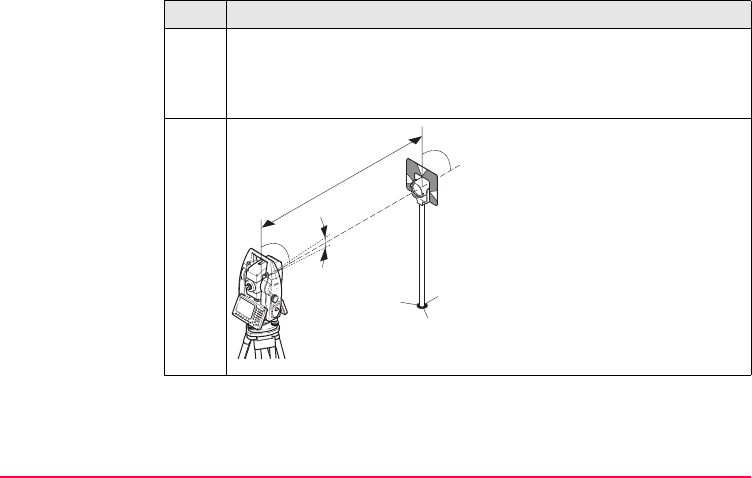
When measurements are being made using the red laser EDM, the results may be
influenced by objects passing between the EDM and the intended target surface.
This occurs because reflectorless measurements are made to the first surface
returning sufficient energy to allow the measurement to take place. For example, if
the intended target surface is the surface of a road, but a vehicle passes between
the EDM and the target surface as DIST (F2) or ALL (F1) is pressed, the measure-
ment may be made to the side of the vehicle. The result is the distance to the vehicle,
not to the road surface.
If using the red laser EDM for long range measurements to a prism, and an object
passes within 30 m of the EDM as DIST (F2) or ALL (F1) is pressed, the distance
measurement may be similarly effected due to the strength of the laser signal.
Due to laser safety regulations and measuring accuracy, using the Long Range
Reflectorless EDM is only allowed to prisms that are more than 1000 m (3300 ft)
away.
)Accurate measurements to prisms should be made in Infrared EDM mode.
)When a distance measurement is triggered, the EDM measures to the object which
is in the beam path at that moment. If a temporary obstruction, for example a passing
vehicle, heavy rain, fog or snow is between the instrument and the point to be meas-
ured, the EDM may measure to the obstruction.

88TPS1200
Operation
)Do not measure with two instruments to the same target simultaneously to avoid
getting mixed return signals.
ATR/lock Instruments equipped with an ATR sensor permit automatic angle and distance
measurements to prisms. The prism is sighted with the optical sight. After initiating
a distance measurement, the instrument sights the prism centre automatically.
Vertical and horizontal angles and the distance are measured to the centre of the
prism. The lock mode enables the instrument to follow a moving prism.
)As with all other instrument errors, the collimation error of the automatic target recog-
nition must be redetermined periodically. Refer to "5 Check & Adjust" about checking
and adjusting instruments.
)When a measurement is triggered while the prism is still moving, distance and angle
measurements may not be made for the same position and wrong coordinates may
be calculated.
)If the prism location is changed too quickly, the target may be lost. Make sure that
the speed does not exceed the figure given in the technical data.

Operation TPS1200 89

90TPS1200
Check & Adjust
5 Check & Adjust
5.1 Overview
Description Leica instruments are manufactured, assembled and adjusted to the best possible
quality. Quick temperature changes, shock or stress can cause deviations and
decrease the instrument accuracy.
It is therefore recommended to check and adjust the instrument from time to time.
This can be done in the field by running through specific measurement procedures.
The procedures are guided and have to be followed carefully and precisely as
described in the following chapters. Some other instrument errors and mechanical
parts can be adjusted mechanically.
Electronic
adjustment
The following instrument errors can be checked and adjusted electronically:
l, t Compensator longitudinal and transversal index errors
i Vertical index error, related to the standing axis
c Hz collimation error, also called line of sight error
a Tilting axis error
ATR ATR zero point error for Hz and V - option

Check & Adjust TPS1200 91
Every angle measured in the daily work is corrected automatically if the compensator
and the Hz-corrections are activated in the instrument configuration. Select Main
Menu: Config...\Instrument Settings...\Compensator to check the settings.
View current
adjustment errors
The currently used adjustment errors can be viewed under Main Menu:
Tools.../Check & Adjust...\Current Values.
Mechanical
adjustment
The following instrument parts can be adjusted mechanically:
• Circular level on instrument and tribrach
• Visible red laser beam of reflectorless EDM - option
• Laser plummet
• Optical plummet - option on tribrach
• Allen screws on tripod
Precise
measurements
To get precise measurements in the daily work, it is important:
• To check and adjust the instrument from time to time.
• To take high precision measurements during the check and adjust procedures.
• To measure targets in two faces. Some of the instrument errors are eliminated
by averaging the angles from both faces.
• Refer to "5.2 Preparation" to find more important points.

92TPS1200
Check & Adjust
)During the manufacturing process, the instrument errors are carefully determined
and set to zero. As mentioned above, these errors can change and it is highly recom-
mended to redetermine them in the following situations:
• Before the first use
• Before every high precision survey
• After rough or long transportations
• After long working periods
• After long storage periods
• If the temperature difference between current environment and the temperature
at the last calibration is more than 20°C

Check & Adjust TPS1200 93
Summary of errors
to be adjusted
electronically
Instrument error Effects
Hz
Effects
V
Elimination
with two face
measurement
Automatically
corrected with
proper adjust-
ment
c - Line of sight error 9 --- 9 9
a - Tilting axis error 9 --- 9 9
l - Compensator index
error
--- 9 9 9
t - Compensator index
error 9 --- 9 9
i - V-Index error --- 9 9 9
ATR Collimation error 9 9 --- 9

94TPS1200
Check & Adjust
5.2 Preparation
)
)
)Before starting to work, the instrument has to become acclimatised to the ambient
temperature. Approximately two minutes per °C of temperature difference from
storage to working environment but at least 15 min should be taken into account.
)Note, that even after good adjustment of the ATR, the crosshairs might not be posi-
tioned exactly on the centre of the prism after an ATR measurement has been
executed. This is a normal effect. To speed up the ATR measurement, the telescope
is normally not positioned exactly on the centre of the prism. The small rest devia-
tions, the ATR offsets are measured individually for each measurement and
Before determining the instrument errors, the instrument has to be levelled-
up using the electronic level. SHIFT F12 to access STATUS Level & Laser
Plummet, Level page.
The tribrach, the tripod and the underground should be very stable and
secure from vibrations or other disturbances.
The instrument should be protected from direct sunlight in order to avoid
thermal warming.
It is also recommended to avoid strong heat shimmer and air turbulence.
The best conditions are usually early in the morning or with overcast sky.

Check & Adjust TPS1200 95
corrected electronically. This means that the Hz- and V- angles are corrected twice:
first by the determined ATR errors for Hz and V and then by the individual small devi-
ations of the current pointing.
Next step IF the task is to THEN
adjust a combination of
instrument errors
Refer to "5.3 Combined Adjustment (l, t, i, c and ATR)"
adjust the tilting axis Refer to "5.4 Tilting Axis Adjustment (a)"
adjust the circular level Refer to "5.5 Adjustment of the Circular Level"
adjust the EDM Refer to "5.6 Adjustment of the Reflectorless EDM"
adjust the laser/optical
plummet
Refer to "5.7 Adjustment of the Laser Plummet"
adjust the tripod Refer to "5.8 Service of the Tripod"

96TPS1200
Check & Adjust
5.3 Combined Adjustment (l, t, i, c and ATR)
Description The combined adjustment procedure determines the following instrument errors in
one process:
Combined
adjustment
procedure
step-by-step
The following table explains the most common settings.
l, t Compensator longitudinal and transversal index errors
i Vertical index error, related to the standing axis
c Hz collimation error, also called line of sight error
ATR Hz ATR zero point error for Hz angle - option
ATR V ATR zero point error for V angle - option
Step Description
1. Main Menu: Tools...\Check & Adjust...
2. TOOLS Check & Adjust Menu
Select the option: Combined (l,t,i,c,ATR)
3. TOOLS Combined I
Check & Adjust TPS1200 97
<ATR Adjust: On> Includes the determination of the ATR Hz and V
adjustment errors if an ATR is available.
)It is recommended to use a clean Leica circular prism as target.
Do not use a 360° prism.
4. Aim the telescope accurately at a
target at about 100 m distant. The
target must be positioned within
± 9°/± 10 gon of the horizontal plane.
The procedure can be started in any
telescope face.
Step Description
TPS12_024
± 9°
~ 100 m
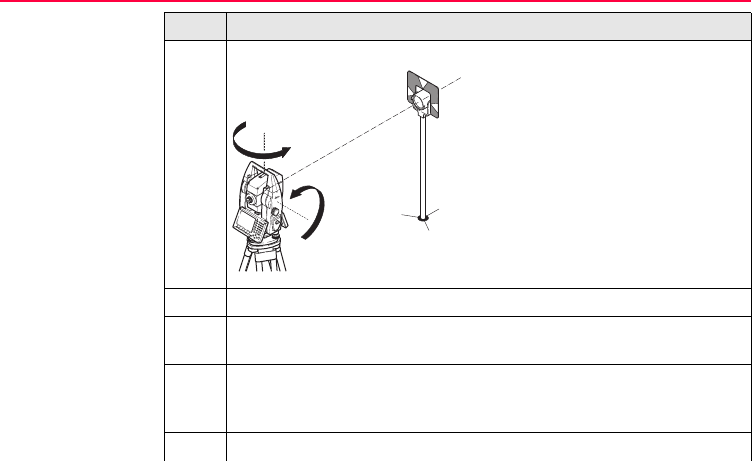
98TPS1200
Check & Adjust
5. MEAS (F1) to measure and to continue to the next screen.
Motorised instruments change auto-
matically to the other face.
Non-motorised instruments guide to
the other face.
)The fine pointing has to be
performed manually in both faces.
6. TOOLS Combined II
MEAS (F1) to measure the same target in the other face and to calculate
the instrument errors.
)If one or more errors are bigger than the predefined limits, the procedure
has to be repeated. All measurements of the current run are rejected and
none of them is averaged with the results from previous runs.
7. TOOLS Adjustment Accuracy
Step Description
TPS12_025
180°
180°

Check & Adjust TPS1200 99
<No.of Meas:> Shows the number of runs executed. One run consists of
a measurement in face I and face II.
<σ l Comp:> and similar lines show the standard deviations of the deter-
mined adjustment errors. The standard deviations can be calculated from
the second run onwards.
)It is recommended to measure at least two runs.
8. MEAS (F5) if more runs have to be added. Continue with step 3.
OR
CONT (F1) to accept the measurements and to proceed to TOOLS
Adjustment Results. No more runs can be added later.
Step Description

100TPS1200
Check & Adjust
Next step IF the results are THEN
to be stored CONT (F1) overwrites the old adjustment errors with the new
ones, if the Use status is set to Yes.
to be determined
again
REDO (F2) rejects all new determined adjustment errors and
repeats the whole procedure. Refer to step 3. of paragraph
"Combined adjustment procedure step-by-step".

Check & Adjust TPS1200 101
5.4 Tilting Axis Adjustment (a)
Description This adjustment procedure determines the following instrument error:
Determination of
tilting axis error
step-by-step
The following table explains the most common settings.
a Tilting axis error
Step Description
)The Hz collimation error (c) has to be determined before starting this
procedure.
1. Main Menu: Tools...\Check & Adjust...
2. TOOLS Check & Adjust Menu
Select the option: Tilting Axis (a)
102TPS1200
Check & Adjust
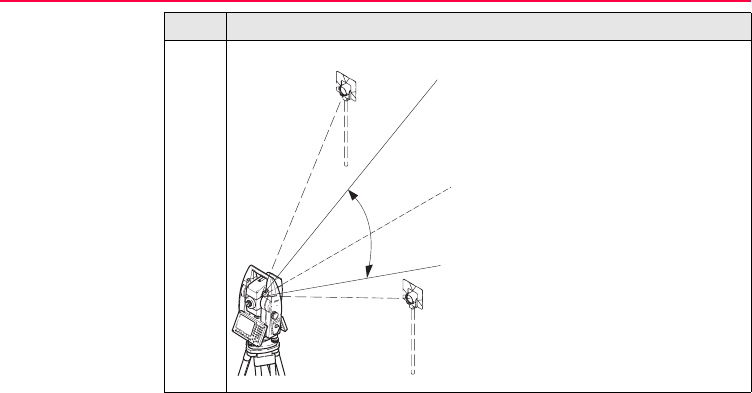
3. TOOLS Tilting-Axis Adjustment I
Aim the telescope accurately at a target
at about 100 m distance or less if not
possible. The target must be positioned
at least 27°/30 gon above or beneath the
horizontal plane.
The procedure can be started in any
telescope face.
Step Description
TPS12_024a
V=90°
+ 27°
- 27°
Check & Adjust TPS1200 103
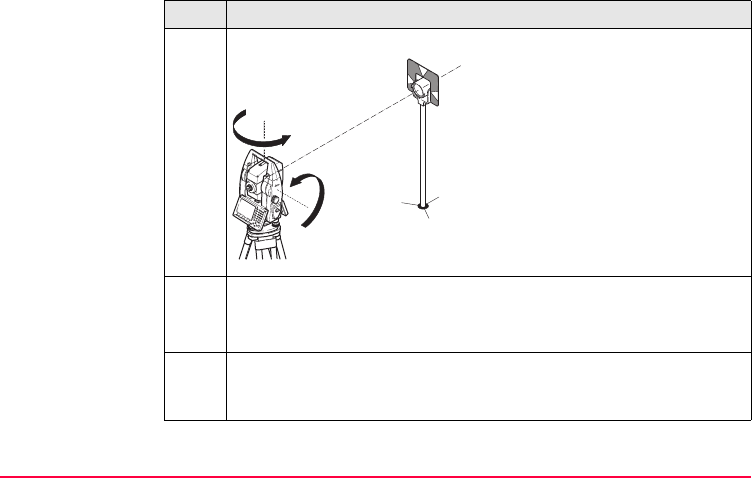
4. MEAS (F1) to measure and to continue to the next screen.
Motorised instruments change auto-
matically to the other face.
Non-motorised instruments guide to
the other face.
)The fine pointing has to be
performed manually in both faces.
5. TOOLS Tilting-Axis Adjustment II
MEAS (F1) to measure the same target in the other face and to calculate
the tilting axis error.
)If the error is bigger than the predefined limit, the procedure has to be
repeated. The tilting axis measurements of the current run are then
rejected and not averaged with the results from previous runs.
Step Description
TPS12_025
180°
180°

104TPS1200
Check & Adjust
6. TOOLS T-Axis Adjustment Accuracy
<No.of Meas:> Shows the number of runs executed. One run consists of
a measurement in face I and face II.
<σ a T-axis:> shows the standard deviation of the determined tilting axis
error. The standard deviation can be calculated from the second run
onwards.
)It is recommended to measure at least two runs.
7. MEAS (F5) if more runs have to be added. Continue with step 3.
OR
CONT (F1) to accept the measurements and to proceed to TOOLS T-Axis
Adjustment Result. No more runs can be added later.
Step Description

Check & Adjust TPS1200 105
Next step IF the results are THEN
to be stored CONT (F1) overwrites the old tilting axis error with the new
one.
to be determined
again
REDO (F2) rejects the new determined tilting axis error and
repeats the whole procedure. Refer to step 3. of paragraph
"Determination of tilting axis error step-by-step".
106TPS1200
Check & Adjust
5.5 Adjustment of the Circular Level
On the instrument
step-by-step
Step Description
1. Level up the instrument in advance with the electronic level, assuming that
the electronic level is correctly adjusted. SHIFT F12 to access STATUS
Level & Laser Plummet.
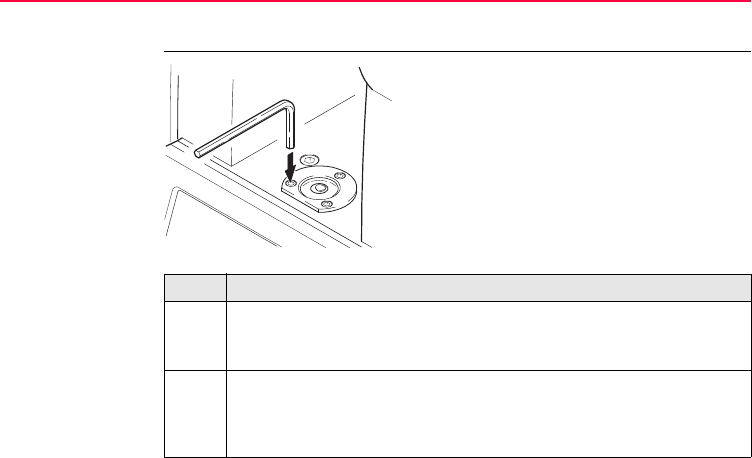
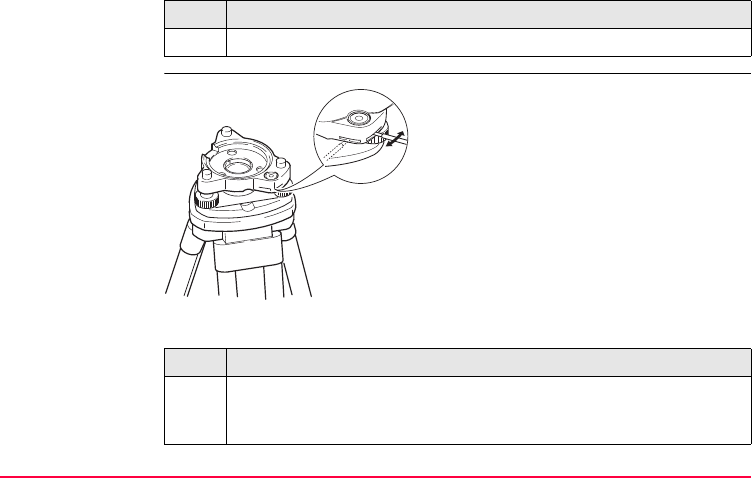
2. The bubble must be centered. If it extends beyond the circle, use the allen
keys supplied to centre it with the adjustment screws. Turn the instrument
slowly 200 gon (180°). Repeat the adjustment procedure if the bubble
does not stay centered.
TPS12_030
Check & Adjust TPS1200 107
On the tribrach
step-by-step
The following table explains the most common settings.
)After the adjustment, no screw shall be loose.
Step Description
Step Description
1. Level up the instrument with the electronic level, assuming that the elec-
tronic level is correctly adjusted. SHIFT F12 to access STATUS Level &
Laser Plummet. Then remove it from the tribrach.
TPS12_31

108TPS1200
Check & Adjust
2. The bubble of the tribrach must be centered. If it extends beyond the
circle, use the adjusting pin in conjunction with the two cross headed
adjustment screws to centre it.
)After the adjustment, no screw shall be loose.
Step Description

Check & Adjust TPS1200 109
5.6 Adjustment of the Reflectorless EDM
General The red laser beam used for measuring without reflector is arranged coaxially with
the line of sight of the telescope, and emerges from the objective port. If the instru-
ment is well adjusted, the red measuring beam coincides with the visual line of sight.
External influences such as shock, stress or large temperature fluctuations can
displace the red measuring beam relative to the line of sight.
)The direction of the beam should be inspected before precise measurements of
distances are attempted, because an excessive deviation of the laser beam from the
line of sight can result in imprecise distance measurements.
Warning Direct intrabeam viewing is always hazardous.
Precautions:
Do not stare into the beam or direct it towards other people unnecessarily. These
measures are also valid for the reflected beam.
110TPS1200
Check & Adjust
Inspecting the
direction of the
beam step-by-step
The following table explains the most common settings.
Step Description
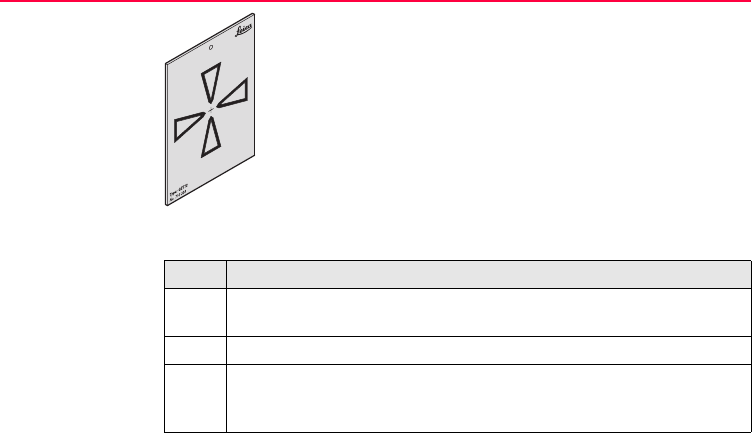
1. Set up the provided target plate between 5 m and 20 m with the grey
reflective side facing the instrument.
2. Move the telescope to face II.
3. Switch on the red laser beam by activating the laser pointer function.
SHIFT F11 to access CONFIGURE Lights, Display, Beeps, Text and
then select the Lights page.
TPS12_36

Check & Adjust TPS1200 111
4. Align the instrument crosshairs to the centre of the target plate, and then
inspect the position of the red laser dot on the target plate.
)Generally speaking the red dot cannot be seen through the tele-
scope, so look at the target plate from just above the telescope
or from just to the side of it.
5. If the dot illuminates the cross on the plate, the achievable adjustment
precision has been reached; if it lies outside the limits of the cross, the
direction of the beam needs to be adjusted. Refer to paragraph "Adjusting
the direction of the beam step-by-step".
)If the dot on the more reflective side of the plate is too bright and
dazzling, use the white side instead to carry out the inspection.
Step Description
112TPS1200
Check & Adjust
Adjusting the
direction of the
beam step-by-step
The following table explains the most common settings.
a) Rear
adjustment port
b) Front
adjustment port
Step Description
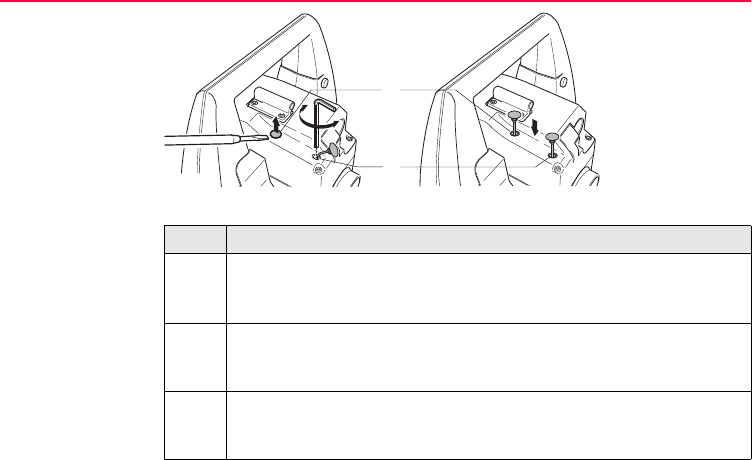
1. Pull the two plugs softly out from the adjustment ports on top side of the
telescope housing in face II.
)Make sure not to break the strings of the two plugs.
2. To correct the height of the beam, insert the screwdriver supplied into the
rear adjustment port and turn it clockwise to move the dot on the target
plate obliquely upwards or anticlockwise to move it downwards.
3. To correct the beam laterally, insert the screwdriver into the front adjust-
ment port and turn it clockwise to move the dot on the target plate to the
right or anticlockwise to move it to the left.
TPS12_037
b
a

Check & Adjust TPS1200 113
)Throughout the adjustment procedure, keep the telescope pointing to the
target plate.
4. After each adjustment, put back the plugs in the ports to keep out damp
and dirt.
Step Description

114TPS1200
Check & Adjust
5.7 Adjustment of the Laser Plummet
)The laser plummet is located in the vertical axis of the instrument. Under normal
conditions of use, the laser plummet does not need adjusting. If an adjustment is
necessary due to external influences, the instrument has to be returned to any Leica
Geosystems authorized service workshop.
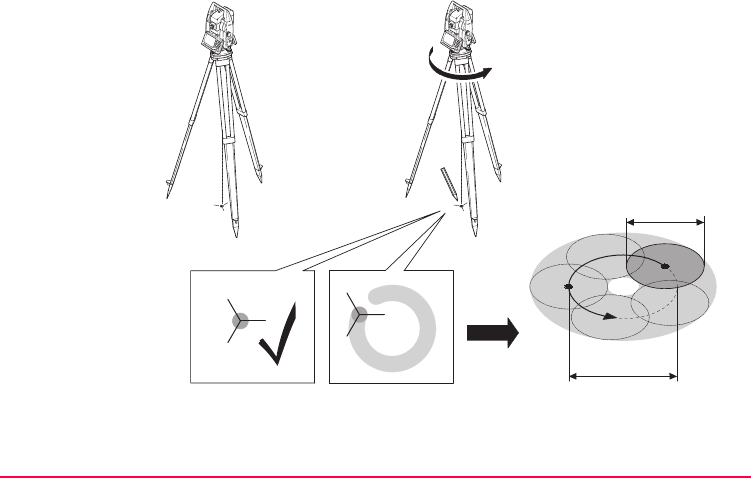
Check & Adjust TPS1200 115
Inspecting laser
plummet
step-by-step
The following table explains the most common settings.
1
2
3
360°
≤ 3 mm / 1.5 m
Ø 2.5 mm / 1.5 m
TPS12_035

116TPS1200
Check & Adjust
Step Description
1. Setup the instrument on a tripod (1).
2. Level up the instrument with the electronic level. SHIFT F12 to access
STATUS Level & Laser Plummet.
3. PAGE (F6) to access the Laser Plummet page. Switch on the laser
plummet.
)Inspection of the laser plummet should be carried out on a bright, smooth
and horizontal surface, such like a sheet of paper.
4. Mark the centre of the red dot on the ground (2).
5. Slowly turn the instrument through 360°, carefully observing the move-
ment of the red laser dot (3).
)The maximum diameter of the circular movement described by the centre
of the laser point should not exceed 3 mm at a distance of 1.5 m.
6. IF the centre of the laser dot describes a perceptible circular movement or
moves more than 3 mm away from the point which was first marked, an
adjustment may be required. Inform your nearest Leica Geosystems
authorized service workshop.

Check & Adjust TPS1200 117
Depending on brightness and surface, the diameter of the laser dot can vary. At a
distance of 1.5 m it is about 2.5 mm.
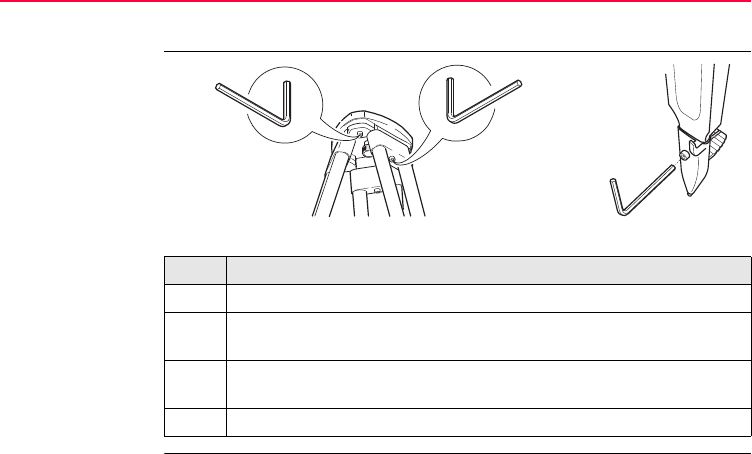
118TPS1200
Check & Adjust
5.8 Service of the Tripod
Service tripod
step-by-step
The following table explains the most common settings.
Step Description
)The connections between timber and metal must be firm and tight.
1. Moderately tighten the allen screws (1) with the allen key supplied with the
tripod.
2. Tighten articulated joints just enough to keep the tripod legs open when
lifting the tripod of the ground (2).
3. Tighten the allen screws of the tripod legs (3).
TPS12_029
12
3

Check & Adjust TPS1200 119

120TPS1200
Care and Transport
6 Care and Transport
6.1 Transport
Transport in the
field
When transporting the equipment in the field, always make sure that you
• either carry the product in its original transport container,
• or carry the tripod with its legs splayed across your shoulder, keeping the
attached product upright.
Transport in a road
vehicle
Never carry the product loose in a road vehicle, as it can be affected by shock and
vibration. Always carry the product in its transport container and secure it.
Shipping When transporting the product by rail, air or sea, always use the complete original
Leica Geosystems packaging, transport container and cardboard box, or its equiva-
lent, to protect against shock and vibration.
Shipping, transport
of batteries
When transporting or shipping batteries, the person in charge of the product must
ensure that the applicable national and international rules and regulations are
observed. Before transportation or shipping, contact your local passenger or freight
transport company.

Care and Transport TPS1200 121
Field adjustment After transport inspect the field adjustment parameters given in this user manual
before using the product.

122TPS1200
Care and Transport
6.2 Storage
Product Respect the temperature limits when storing the equipment, particularly in summer
if the equipment is inside a vehicle. Refer to "8 Technical Data" for information about
temperature limits.
Field adjustment After long periods of storage inspect the field adjustment parameters given in this
user manual before using the product.
Li-Ion batteries • Refer to "8.9 General Technical Data of the Instrument" for information about
storage temperature range.
• A storage temperature range of -20°C to +30°C/-4°F to 68°F in a dry environ-
ment is recommended to minimize self-discharging of the battery.
• At the recommended storage temperature range, batteries containing a 10% to
50% charge can be stored for up to one year. After this storage period the
batteries must be recharged.
• Remove batteries from the product and the charger before storing.
• After storage recharge batteries before using.
• Protect batteries from damp and wetness. Wet or damp batteries must be dried
before storing or use.

Care and Transport TPS1200 123
6.3 Cleaning and Drying
Objective, eyepiece
and prisms
• Blow dust off lenses and prisms.
• Never touch the glass with your fingers.
• Use only a clean, soft, lint-free cloth for cleaning. If necessary, moisten the cloth
with water or pure alcohol. Do not use other liquids; these may attack the
polymer components.
Fogging of prisms Reflector prisms that are cooler than the ambient temperature tend to fog. It is not
enough simply to wipe them. Keep them for some time inside your jacket or in the
vehicle to allow them to adjust to the ambient temperature.
Damp products Dry the product, the transport container, the foam inserts and the accessories at a
temperature not greater than 40°C / 108°F and clean them. Do not repack until
everything is completely dry.
Cables and plugs Keep plugs clean and dry. Blow away any dirt lodged in the plugs of the connecting
cables.

124TPS1200
Care and Transport
6.4 Maintenance
Motorisation An inspection of the motorisation in motorised products must be done in a Leica
Geosystems authorized service workshop.
Following conditions:
• After about 4000 hours operation.
• Twice a year in case of permanent use of the product, for example in monitoring
applications.

Care and Transport TPS1200 125

126TPS1200
Safety Directions
7 Safety Directions
7.1 General Introduction
Description The following directions should enable the person responsible for the product, and
the person who actually uses the equipment, to anticipate and avoid operational
hazards.
The person responsible for the product must ensure that all users understand these
directions and adhere to them.

Safety Directions TPS1200 127
7.2 Intended Use
Permitted use • Measuring horizontal and vertical angles.
• Measuring distances.
• Recording measurements.
• Automatic target search, recognition and -tracking.
• Visualizing the aiming direction and vertical axis.
• Remote control of surveying products.
• Data transmission to external appliances.
• Transmitting and receiving data.
• Measuring raw data and computing coordinates using carrier phase and code
signal from GNSS (Global Navigation Satellite System) satellites.
• Carrying out measurement tasks using various GNSS measuring techniques.
• Recording GNSS and point related data.
• Computation and evaluation by means of software.
• Data transfer via radio or digital cellular phone for real-time kinematic surveys.
Adverse use • Use of the product without instruction.
• Use outside of the intended limits.
• Disabling safety systems.

128TPS1200
Safety Directions
• Removal of hazard notices.
• Opening the product using tools, for example screwdriver, unless this is specifi-
cally permitted for certain functions.
• Modification or conversion of the product.
• Use after misappropriation.
• Use of products with obviously recognizable damages or defects.
• Use with accessories from other manufacturers without the prior explicit
approval of Leica Geosystems.
• Aiming directly into the sun.
• Inadequate safeguards at the surveying site, for example when measuring on
roads.
• Deliberate dazzling of third parties.
• Controlling of machines, moving objects or similar monitoring application without
additional control- and safety installations.
Warning Adverse use can lead to injury, malfunction and damage.
It is the task of the person responsible for the equipment to inform the user about
hazards and how to counteract them. The product is not to be operated until the user
has been instructed on how to work with it.

Safety Directions TPS1200 129
7.3 Limits of Use
Environment Suitable for use in an atmosphere appropriate for permanent human habitation: not
suitable for use in aggressive or explosive environments.
Danger Local safety authorities and safety experts must be contacted before working in
hazardous areas, or in close proximity to electrical installations or similar situations
by the person in charge of the product.

130TPS1200
Safety Directions
7.4 Responsibilities
Manufacturer of the
product
Leica Geosystems AG, CH-9435 Heerbrugg, hereinafter referred to as Leica
Geosystems, is responsible for supplying the product, including the user manual and
original accessories, in a completely safe condition.
Manufacturers of
non
Leica Geosystems
accessories
The manufacturers of non Leica Geosystems accessories for the product are
responsible for developing, implementing and communicating safety concepts for
their products, and are also responsible for the effectiveness of those safety
concepts in combination with the Leica Geosystems product.
Person in charge of
the product
The person in charge of the product has the following duties:
• To understand the safety instructions on the product and the instructions in the
user manual.
• To be familiar with local regulations relating to safety and accident prevention.
• To inform Leica Geosystems immediately if the product and the application
becomes unsafe.
Warning The person responsible for the product must ensure that it is used in accordance
with the instructions. This person is also accountable for the training and the deploy-
ment of personnel who use the product and for the safety of the equipment in use.

Safety Directions TPS1200 131
7.5 International Warranty, Software Licence Agreement
International
Warranty
The International Warranty can be downloaded from the Leica Geosystems home
page at http://www.leica-geosystems.com/internationalwarranty or received from
your Leica Geosystems dealer.
Software Licence
Agreement
This product contains software that is preinstalled on the product, or that is supplied
to you on a data carrier medium, or that can be downloaded by you online pursuant
to prior authorization from Leica Geosystems. Such software is protected by copy-
right and other laws and its use is defined and regulated by the Leica Geosystems
Software Licence Agreement, which covers aspects such as, but not limited to,
Scope of the Licence, Warranty, Intellectual Property Rights, Limitation of Liability,
Exclusion of other Assurances, Governing Law and Place of Jurisdiction. Please
make sure, that at any time you fully comply with the terms and conditions of the
Leica Geosystems Software Licence Agreement.
Such agreement is provided together with all products and can also be found at the
Leica Geosystems home page at http://www.leica-geosystems.com/swlicense
or your Leica Geosystems dealer.
You must not install or use the software unless you have read and accepted the
terms and conditions of the Leica Geosystems Software Licence Agreement. Instal-

132TPS1200
Safety Directions
lation or use of the software or any part thereof, is deemed to be an acceptance of
all the terms and conditions of such licence agreement. If you do not agree to all or
some of the terms of such licence agreement, you may not download, install or use
the software and you must return the unused software together with its accompa-
nying documentation and the purchase receipt to the dealer from whom you
purchased the product within ten (10) days of purchase to obtain a full refund of the
purchase price.

Safety Directions TPS1200 133
7.6 Hazards of Use
Warning The absence of instruction, or the inadequate imparting of instruction, can lead to
incorrect or adverse use, and can give rise to accidents with far-reaching human,
material, financial and environmental consequences.
Precautions:
All users must follow the safety directions given by the manufacturer and the direc-
tions of the person responsible for the product.
Caution Watch out for erroneous measurement results if the product has been dropped or
has been misused, modified, stored for long periods or transported.
Precautions:
Periodically carry out test measurements and perform the field adjustments indi-
cated in the user manual, particularly after the product has been subjected to
abnormal use and before and after important measurements.
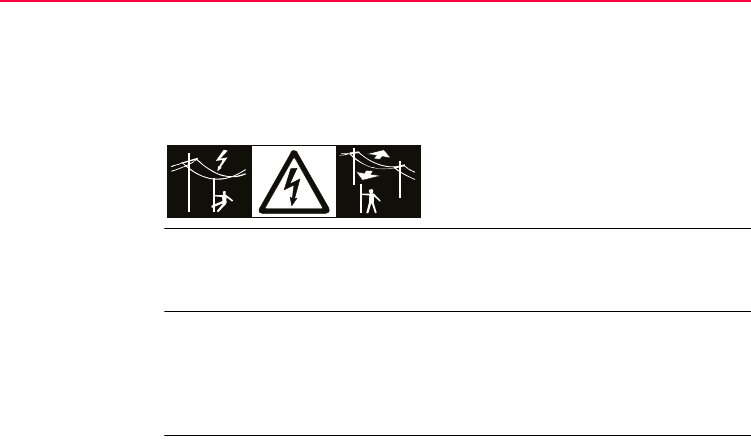
134TPS1200
Safety Directions
Danger Because of the risk of electrocution, it is very dangerous to use poles and extensions
in the vicinity of electrical installations such as power cables or electrical railways.
Precautions:
Keep at a safe distance from electrical installations. If it is essential to work in this
environment, first contact the safety authorities responsible for the electrical instal-
lations and follow their instructions.
Warning By surveying during a thunderstorm you are at risk from lightning.
Precautions:
Do not carry out field surveys during thunderstorms.
Caution Be careful when pointing the product towards the sun, because the telescope func-
tions as a magnifying glass and can injure your eyes and/or cause damage inside
the product.
Precautions:
Do not point the product directly at the sun.

Safety Directions TPS1200 135
Warning During dynamic applications, for example stakeout procedures there is a danger of
accidents occurring if the user does not pay attention to the environmental conditions
around, for example obstacles, excavations or traffic.
Precautions:
The person responsible for the product must make all users fully aware of the
existing dangers.
Warning Inadequate securing of the surveying site can lead to dangerous situations, for
example in traffic, on building sites, and at industrial installations.
Precautions:
Always ensure that the survey site is adequately secured. Adhere to the regulations
governing safety and accident prevention and road traffic.
Warning Only Leica Geosystems authorized service workshops are entitled to repair these
products.
Warning If computers intended for use indoors are used in the field there is a danger of elec-
tric shock.
Precautions:
Adhere to the instructions given by the computer manufacturer with regard to field
use in conjunction with Leica Geosystems products.

136TPS1200
Safety Directions
Caution If the accessories used with the product are not properly secured and the product is
subjected to mechanical shock, for example blows or falling, the product may be
damaged or people may sustain injury.
Precautions:
When setting-up the product, make sure that the accessories, for example tripod,
tribrach, connecting cables, are correctly adapted, fitted, secured, and locked in
position.
Avoid subjecting the product to mechanical stress.
Caution During the transport, shipping or disposal of batteries it is possible for inappropriate
mechanical influences to constitute a fire hazard.
Precautions:
Before shipping the product or disposing of it, discharge the batteries by running the
product until they are flat.
When transporting or shipping batteries, the person in charge of the product must
ensure that the applicable national and international rules and regulations are
observed. Before transportation or shipping contact your local passenger or freight
transport company.

Safety Directions TPS1200 137
Warning Using a battery charger not recommended by Leica Geosystems can destroy the
batteries. This can cause fire or explosions.
Precautions:
Only use chargers recommended by Leica Geosystems to charge the batteries.
Warning High mechanical stress, high ambient temperatures or immersion into fluids can
cause leakage, fire or explosions of the batteries.
Precautions:
Protect the batteries from mechanical influences and high ambient temperatures. Do
not drop or immerse batteries into fluids.
Warning Short circuited battery terminals can overheat and cause injury or fire, for example
by storing or transporting in pockets if battery terminals come in contact with jewel-
lery, keys, metallized paper or other metals.
Precautions:
Make sure that the battery terminals do not come into contact with metallic objects.
Warning If the product is improperly disposed of, the following can happen:
• If polymer parts are burnt, poisonous gases are produced which may impair
health.
• If batteries are damaged or are heated strongly, they can explode and cause
poisoning, burning, corrosion or environmental contamination.

138TPS1200
Safety Directions
• By disposing of the product irresponsibly you may enable unauthorized persons
to use it in contravention of the regulations, exposing themselves and third
parties to the risk of severe injury and rendering the environment liable to
contamination.
Precautions:
Product specific treatment and waste management information can be downloaded
from the Leica Geosystems home page at http://www.leica-geosystems.com/treat-
ment or received from your Leica Geosystems dealer.
Caution The product uses the GPS P-Code signal which by U.S. policy may be switched off
without notice.
The product must not be disposed with household waste.
Dispose of the product appropriately in accordance with the national
regulations in force in your country.
Always prevent access to the product by unauthorized personnel.

Safety Directions TPS1200 139
7.7 Laser Classification
7.7.1 Integrated Distancer, Invisible Laser
General The EDM module built into the product produces an invisible laser beam which
emerges from the telescope objective.
The product is a Class 1 Laser Product in accordance with:
• IEC 60825-1 (2001-08): "Safety of Laser Products".
• EN 60825-1:1994 + A11:1996 + A2:2001: "Safety of Laser Products".
Class 1 Laser Products are safe under reasonably foreseeable conditions of opera-
tion and are not harmful to the eyes provided that the products are used and main-
tained in accordance with the instructions.

140TPS1200
Safety Directions
Description Value
Maximum average radiant power 0.33 mW ± 5%
Maximum peak radiant power 4.12 mW ± 5%
Pulse duration 800 ps
Pulse repetition frequency 100 MHz
Beam divergence 1.5 mrad x 3 mrad
TCA1201M: 0.6 mrad x 1.3 mrad
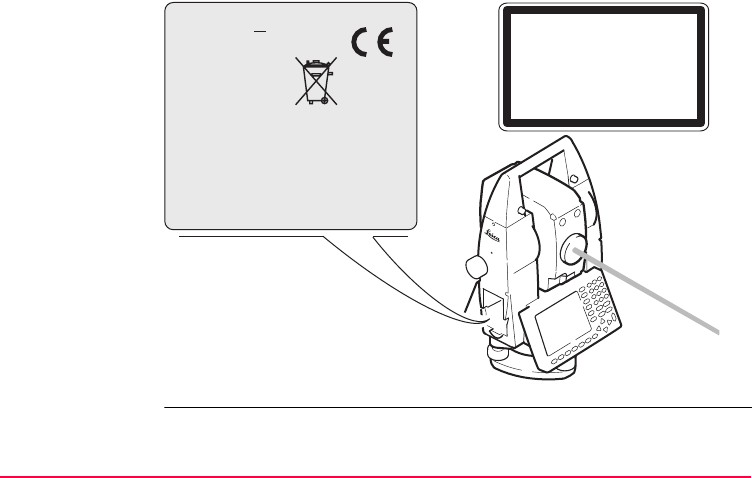
Safety Directions TPS1200 141
Labelling
a) Laser beam
Type: TC.... Art.No.: ......
Power: 12V/6V ---, 1A max
Leica Geosystems AG
CH-9435 Heerbrugg
Manufactured: 2003
Made in Switzerland S.No.: ......
Complies with 21 CFR 1040.10 and 1040.11
except for deviations pursuant to Laser Notice
No.50, dated July 26,2001.
This device complies with part 15 of the FCC
Rules. Operation is subject to the following two
conditions: (1) This device may not cause harm-
ful interference, and (2) this device must accept
any interference received, including inter-
ference that may cause undesired operation.
Class 1 Laser Product
according to IEC 60825-1
( 2001 - 08 )
TPS12_044
a

142TPS1200
Safety Directions
7.7.2 Integrated Distancer, Visible Laser
General As an alternative to the invisible laser, the EDM incorporated into the product
produces a visible red laser beam which emerges from the telescope objective.
Warning The two types R100 and R300 of distancers with visible laser are available, identifi-
able by the type plate.
The products are Class 3R Laser Products in accordance with:
• IEC 60825-1 (2001-08): "Safety of Laser Products".
• EN 60825-1:1994 + A11:1996 + A2:2001: "Safety of Laser Products".
Class 3R Laser Products:
For safety aspects direct intrabeam viewing should always be considered as
hazardous. Avoid direct eye exposure. The accessible emission limit is within five
times the accessible emission limits of Class 2 in the wavelength range from 400 nm
to 700 nm.

Safety Directions TPS1200 143
Warning For safety aspects direct intrabeam viewing should always be considered as
hazardous.
Precautions:
Do not stare into the beam or direct it towards other people unnecessarily. These
measures are also valid for the reflected beam.
Warning Looking directly into the reflected laser beam could be dangerous to the eyes when
the laser beam is aimed at areas that reflect like a mirror or emit reflections unex-
pectedly, for example prisms, mirrors, metallic surfaces or windows.
Precautions:
Do not aim at areas that are essentially reflective, such as a mirror, or which could
emit unwanted reflections.
Description R100 R300
Maximum average radiant power 4.75 mW ± 5% 4.75 mW ± 5%
Maximum peak radiant power 59 mW ± 5% 59 mW ± 5%
Pulse duration 800 ps 800 ps
Pulse repetition frequency 100 MHz 100 MHz - 150 MHz
Beam divergence 0.15 mrad x 0.35 mrad 0.15 mrad x 0.5 mrad

144TPS1200
Safety Directions
Do not look through or beside the optical sight at prisms or reflecting objects when
the laser is switched on, in laserpointer or distance measurement mode. Aiming at
prisms is only permitted when looking through the telescope.
Warning The use of Laser Class 3R equipment can be dangerous.
Precautions:
To counteract hazards, it is essential for every user to respect the safety precautions
and control measures specified in the standard IEC 60825-1 (2001-08) resp.
EN 60825-1:1994 + A11:1996 + A2:2001, within the hazard distance *); pay partic-
ular attention to Section Three "User's Guide".
Following an interpretation of the main points in the relevant section of the standard
quoted.
Class 3R Laser Products used on construction sites and outdoors, for example
surveying, alignment, levelling:
a) Only qualified and trained persons should be assigned to install, adjust and
operate the laser equipment.
b) Areas in which these lasers are used should be posted with an appropriate laser
warning sign.
c) Precautions should be taken to ensure that persons do not look directly, with or
without an optical instrument, into the beam.

Safety Directions TPS1200 145
d) The laser beam should be terminated at the end of its useful beam path and
should in all cases be terminated if the hazardous beam path extends beyond
the limit (hazard distance *)) of the area in which the presence and activities of
personnel are monitored for reasons of protection from laser radiation.
e) The laser beam path should be located well above or below eye level wherever
practicable.
f) When not in use the Laser Product should be stored in a location where unau-
thorized personnel cannot gain access.
g) Precautions should be taken to ensure that the laser beam is not unintentionally
directed at mirror-like, specular surfaces for example mirrors, metal surfaces or
windows. But, more importantly, at flat or concave mirror-like surfaces.
*) The hazard distance is the distance from the laser at which beam irradiance or
radiant exposure equals the maximum permissible value to which personnel
may be exposed without being exposed to a health risk.
Products with an integrated distancer of laser class 3R this hazard distance is
68 m / 224 ft. At this distance, the laser beam rates as Class 1M, that means direct
intrabeam viewing is not hazardous.
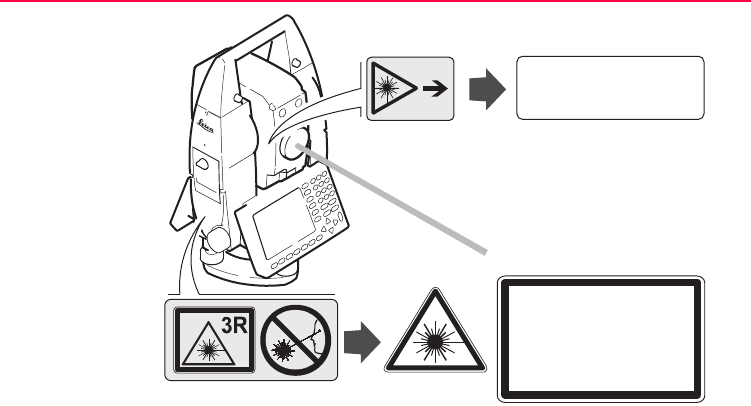
146TPS1200
Safety Directions
Labelling
a) Laser beam
Laser Radiation
Avoid direct eye exposure
Class 3R Laser Product
according to IEC 60825-1
( 2001 - 08 )
Po ≤ 4.75 mW
λ = 650 - 690 nm
Laser Aperture
TPS12_045
a
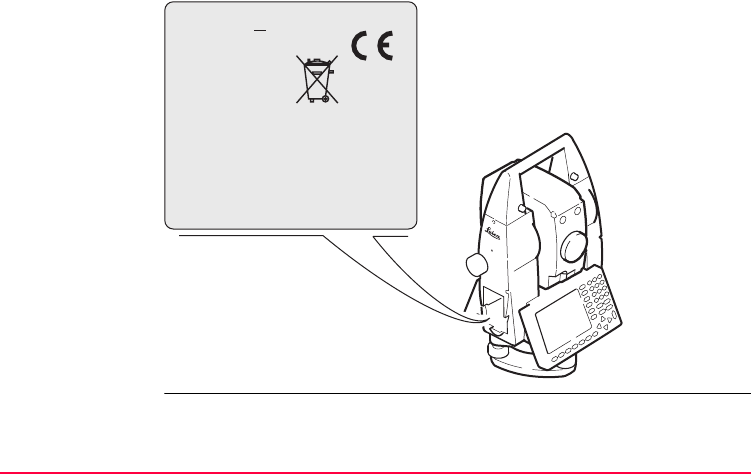
Safety Directions TPS1200 147
Type: TC.... Art.No.: ......
Power: 12V/6V ---, 1A max
Leica Geosystems AG
CH-9435 Heerbrugg
Manufactured: 2003
Made in Switzerland S.No.: ......
Complies with 21 CFR 1040.10 and 1040.11
except for deviations pursuant to Laser Notice
No.50, dated July 26,2001.
This device complies with part 15 of the FCC
Rules. Operation is subject to the following two
conditions: (1) This device may not cause harm-
ful interference, and (2) this device must accept
any interference received, including inter-
ference that may cause undesired operation.
TPS12_065

148TPS1200
Safety Directions
7.7.3 Automatic Target Recognition ATR
General The integrated automatic target recognition produces an invisible laser beam which
emerges from the telescope objective.
The product is a Class 1 Laser Product in accordance with:
• IEC 60825-1 (2001-08): "Safety of Laser Products".
• EN 60825-1:1994 + A11:1996 + A2:2001: "Safety of Laser Products".
Class 1 Laser Products are safe under reasonably foreseeable conditions of opera-
tion and are not harmful to the eyes provided that the products are used and main-
tained in accordance with the instructions.
Description Value
Maximum average radiant power 8 mW ± 5%
Maximum peak radiant power 8 mW ± 5%
Pulse duration 21.8 ms
Pulse repetition frequency 46 Hz
Beam divergence 1.4°
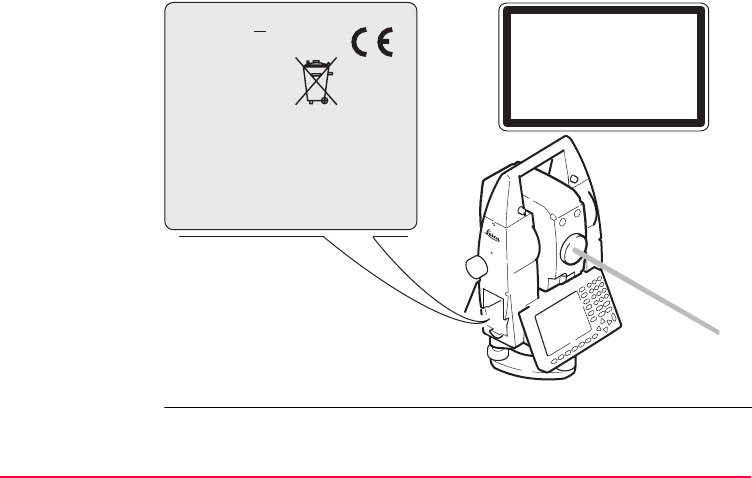
Safety Directions TPS1200 149
Labelling
a) Laser beam
Type: TC.... Art.No.: ......
Power: 12V/6V ---, 1A max
Leica Geosystems AG
CH-9435 Heerbrugg
Manufactured: 2003
Made in Switzerland S.No.: ......
Complies with 21 CFR 1040.10 and 1040.11
except for deviations pursuant to Laser Notice
No.50, dated July 26,2001.
This device complies with part 15 of the FCC
Rules. Operation is subject to the following two
conditions: (1) This device may not cause harm-
ful interference, and (2) this device must accept
any interference received, including inter-
ference that may cause undesired operation.
Class 1 Laser Product
according to IEC 60825-1
( 2001 - 08 )
TPS12_044
a

150TPS1200
Safety Directions
7.7.4 PowerSearch PS
General The integrated PowerSearch generates an invisible laser from the lower front side of
the telescope.
The product is a Class 1 Laser Product in accordance with:
• IEC 60825-1 (2001-08): "Safety of Laser Products".
• EN 60825-1:1994 + A11:1996 + A2:2001: "Safety of Laser Products".
Class 1 Laser Products are safe under reasonably foreseeable conditions of opera-
tion and are not harmful to the eyes provided that the products are used and main-
tained in accordance with the instructions.
Description Value
Maximum average radiant power 11 mW ± 5%
Maximum peak radiant power 5.3 W, 0.66 W ± 5%
Pulse duration 40 ns, 80 ns
Pulse repetition frequency 24.4 kHz
Beam divergence 0.4 mrad x 700 mrad
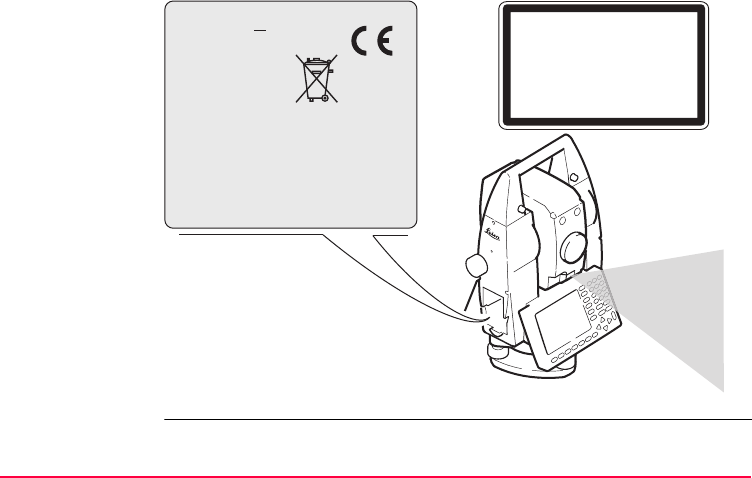
Safety Directions TPS1200 151
Labelling
a) Laser beam
Type: TC.... Art.No.: ......
Power: 12V/6V ---, 1A max
Leica Geosystems AG
CH-9435 Heerbrugg
Manufactured: 2003
Made in Switzerland S.No.: ......
Complies with 21 CFR 1040.10 and 1040.11
except for deviations pursuant to Laser Notice
No.50, dated July 26,2001.
This device complies with part 15 of the FCC
Rules. Operation is subject to the following two
conditions: (1) This device may not cause harm-
ful interference, and (2) this device must accept
any interference received, including inter-
ference that may cause undesired operation.
Class 1 Laser Product
according to IEC 60825-1
( 2001 - 08 )
TPS12_046
a

152TPS1200
Safety Directions
7.7.5 Electronic Guide Light EGL
General The integrated electronic guide light produces a visible LED beam from the front side
of the telescope. Depending on the type of telescope the EGL may be designed
differently.
The product is a Class 1 LED product in accordance with:
• IEC 60825-1 (2001-08): "Safety of Laser Products".
• EN 60825-1:1994 + A11:1996 + A2:2001: "Safety of Laser Products".
Class 1 LED products are safe under reasonably foreseeable conditions of operation
and are not harmful to the eyes provided that the products are used and maintained
in accordance with the instructions.
Flashing LED Yellow Red
Maximum average radiant power 0.28 mW ± 5% 0.47 mW ± 5%
Maximum peak radiant power 0.75 mW ± 5% 2.5 mW ± 5%
Pulse duration 2 x 10⁵ ms 1 x 10⁵ ms
Pulse repetition frequency 1.786 Hz 1.786 Hz
Beam divergence 2.4 ° 2.4 °
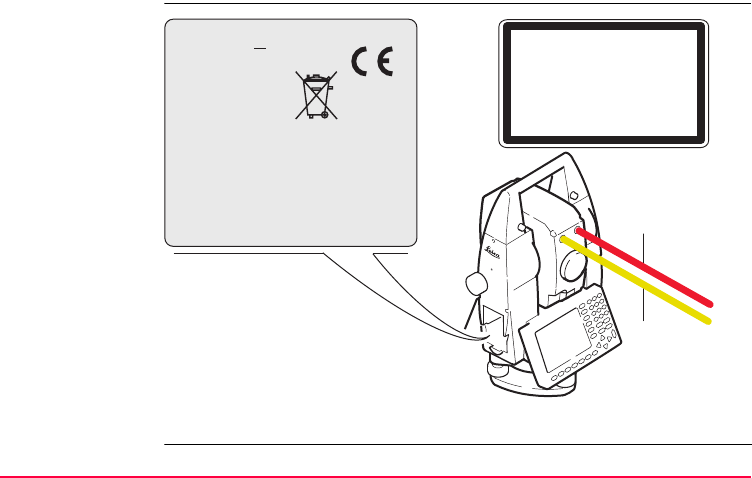
Safety Directions TPS1200 153
Labelling
a) LED beam red
b) LED beam yellow
Type: TC.... Art.No.: ......
Power: 12V/6V ---, 1A max
Leica Geosystems AG
CH-9435 Heerbrugg
Manufactured: 2003
Made in Switzerland S.No.: ......
Complies with 21 CFR 1040.10 and 1040.11
except for deviations pursuant to Laser Notice
No.50, dated July 26,2001.
This device complies with part 15 of the FCC
Rules. Operation is subject to the following two
conditions: (1) This device may not cause harm-
ful interference, and (2) this device must accept
any interference received, including inter-
ference that may cause undesired operation.
Class 1 LED Product
according to IEC 60825-1
( 2001 - 08 )
TPS12_064
a
b

154TPS1200
Safety Directions
7.7.6 Laser Plummet
General The laser plummet built into the product produces a visible red laser beam which
emerges from the bottom of the product.
The product is a Class 2 Laser Product in accordance with:
• IEC 60825-1 (2001-08): "Safety of Laser Products".
• EN 60825-1:1994 + A11:1996 + A2:2001: "Safety of Laser Products".
Class 2 Laser Products:
Do not stare into the beam or direct it unnecessarily at other persons. Eye protection
is normally afforded by aversion responses including the blink reflex.
Description Value
Maximum average radiant power 0.95 mW ± 5%
Pulse duration c.w.
Beam divergence 0.16 mrad x 0.6 mrad

Safety Directions TPS1200 155
Warning It can be dangerous to look into the beam with optical equipment, for example binoc-
ulars or telescopes.
Precautions:
Do not look directly into the beam with optical equipment.
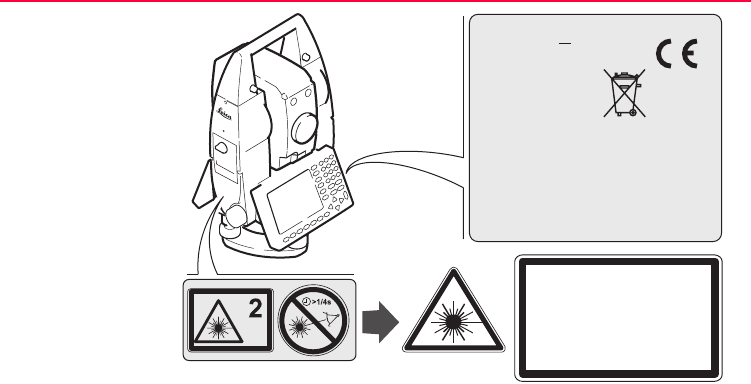
156TPS1200
Safety Directions
Labelling
a) Will be replaced by a Class 3R warning label if applicable
TPS12_047
Laser Radiation
Do not stare into the beam
Class 2 Laser Product
according to IEC 60825-1
( 2001 - 08 )
Po ≤ 0.95 mW
λ = 620 - 690 nm
Type: TC.... Art.No.: ......
Power: 12V/6V ---, 1A max
Leica Geosystems AG
CH-9435 Heerbrugg
Manufactured: 2003
Made in Switzerland S.No.: ......
Complies with 21 CFR 1040.10 and 1040.11
except for deviations pursuant to Laser Notice
No.50, dated July 26,2001.
This device complies with part 15 of the FCC
Rules. Operation is subject to the following two
conditions: (1) This device may not cause harm-
ful interference, and (2) this device must accept
any interference received, including inter-
ference that may cause undesired operation.
a
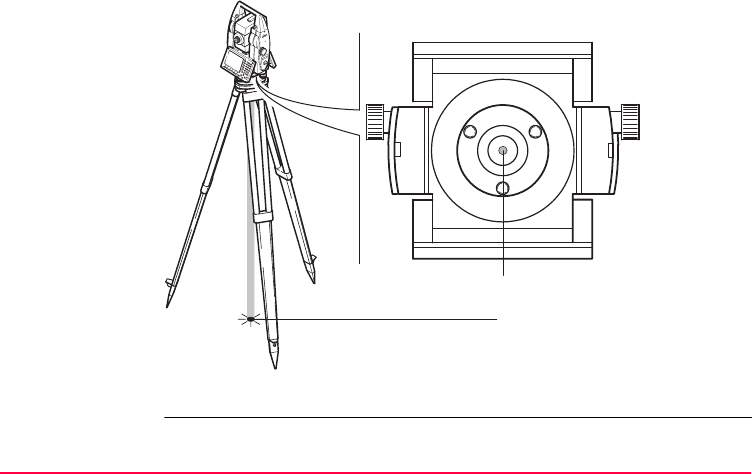
Safety Directions TPS1200 157
a) Laser beam
b) Exit for laser beam
b
TPS12_048
a

158TPS1200
Safety Directions
7.8 Electromagnetic Compatibility EMC
Description The term Electromagnetic Compatibility is taken to mean the capability of the
product to function smoothly in an environment where electromagnetic radiation and
electrostatic discharges are present, and without causing electromagnetic distur-
bances to other equipment.
Warning Electromagnetic radiation can cause disturbances in other equipment.
Although the product meets the strict regulations and standards which are in force
in this respect, Leica Geosystems cannot completely exclude the possibility that
other equipment may be disturbed.
Caution There is a risk that disturbances may be caused in other equipment if the product is
used in conjunction with accessories from other manufacturers, for example field
computers, personal computers, two-way radios, non-standard cables or external
batteries.
Precautions:
Use only the equipment and accessories recommended by Leica Geosystems.
When combined with the product, they meet the strict requirements stipulated by the
guidelines and standards. When using computers and two-way radios, pay attention
to the information about electromagnetic compatibility provided by the manufacturer.

Safety Directions TPS1200 159
Caution Disturbances caused by electromagnetic radiation can result in erroneous measure-
ments.
Although the product meets the strict regulations and standards which are in force
in this respect, Leica Geosystems cannot completely exclude the possibility that the
product may be disturbed by very intense electromagnetic radiation, for example,
near radio transmitters, two-way radios or diesel generators.
Precautions:
Check the plausibility of results obtained under these conditions.
Warning If the product is operated with connecting cables attached at only one of their two
ends, for example external supply cables, interface cables, the permitted level of
electromagnetic radiation may be exceeded and the correct functioning of other
products may be impaired.
Precautions:
While the product is in use, connecting cables, for example product to external
battery, product to computer, must be connected at both ends.

160TPS1200
Safety Directions
Radios, digital
cellular phones or
SmartAntenna with
Bluetooth
Use of product with radio, digital cellular phone devices or SmartAntenna with Blue-
tooth:
Warning Electromagnetic radiation can cause disturbances in other equipment, in installa-
tions, in medical devices, for example pacemakers or hearing aids and in aircraft. It
can also affect humans and animals.
Precautions:
Although the product meets in combination with radio or digital cellular phone
devices recommended by Leica Geosystems the strict regulations and standards
which are in force in this respect, Leica Geosystems cannot completely exclude the
possibility that other equipment may be disturbed or that humans or animals may be
affected.
• Do not operate the product with radio or digital cellular phone devices in the
vicinity of filling stations or chemical installations, or in other areas where an
explosion hazard exists.
• Do not operate the product with radio or digital cellular phone devices near to
medical equipment.
• Do not operate the product with radio or digital cellular phone devices in aircraft.
• Do not operate the product with radio or digital cellular phone devices for long
periods immediately next to your body.

Safety Directions TPS1200 161
7.9 FCC Statement, Applicable in U.S.
Applicability The greyed paragraph below is only applicable for products of the TPS1200 System
without radio, digital cellular phone devices or Bluetooth.
Warning This equipment has been tested and found to comply with the limits for a Class B
digital device, pursuant to part 15 of the FCC rules.
These limits are designed to provide reasonable protection against harmful interfer-
ence in a residential installation.
This equipment generates, uses and can radiate radio frequency energy and, if not
installed and used in accordance with the instructions, may cause harmful interfer-
ence to radio communications. However, there is no guarantee that interference will
not occur in a particular installation.
If this equipment does cause harmful interference to radio or television reception,
which can be determined by turning the equipment off and on, the user is encour-
aged to try to correct the interference by one or more of the following measures:
• Reorient or relocate the receiving antenna.
• Increase the separation between the equipment and the receiver.
• Connect the equipment into an outlet on a circuit different from that to which the
receiver is connected.
• Consult the dealer or an experienced radio/TV technician for help.
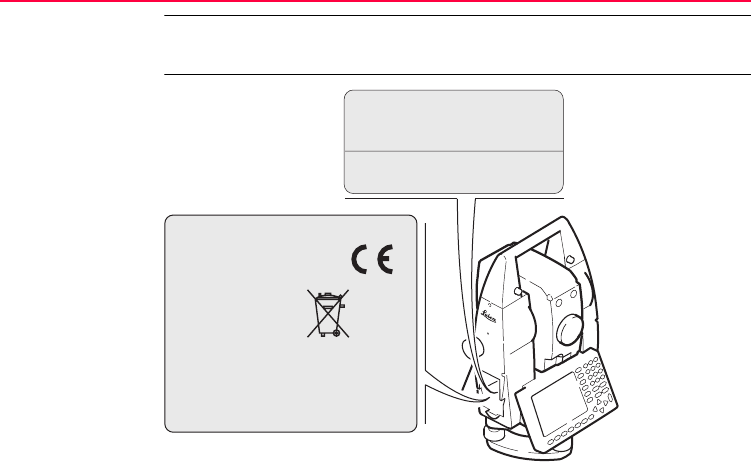
162TPS1200
Safety Directions
Warning Changes or modifications not expressly approved by Leica Geosystems for compli-
ance could void the user's authority to operate the equipment.
Labelling
TPS1200
TPS12_049
........ ..............
. . . . . . . .
. . . . . . . . . . . . . . . . . . . . .
. . . . . . . . . . . . . . . . . . . . .
. . . . . . . . . . . . . . . . .
. . . . . . . . . . . . . . . . . . . . . .
. . . . . . . . . . . . . . . . . . .
This device complies with part 15 of the FCC
Rules. Operation is subject to the following two
conditions: (1) This device may not cause harm-
ful interference, and (2) this device must accept
any interference received, including inter-
ference that may cause undesired operation.
Patents (one or more): US
4,668,862 5,159,760 5,371,951 5,815,251
5,987,763 6,031,606 6,123,427 6,411,371
6,504,602 5,077,557
This device contains a transmitter:
FCC ID: PVH070101
Bluetooth OPL: B00931
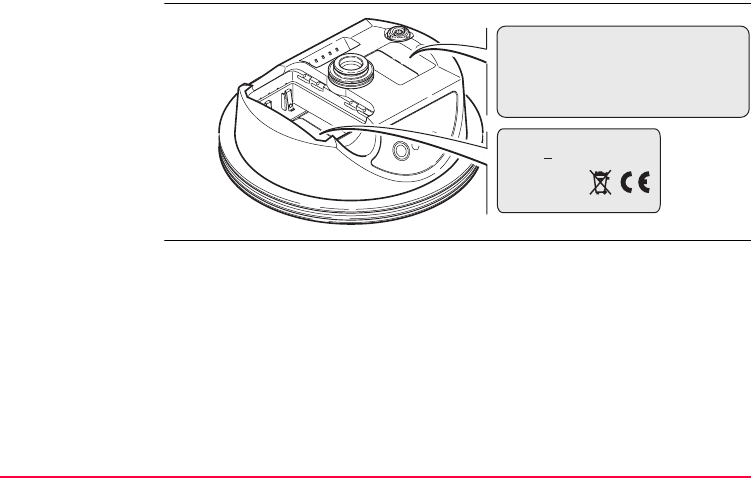
Safety Directions TPS1200 163
Labelling
SmartAntenna
TPS12_208
This device complies with part 15 of the FCC
Rules. Operation is subject to the following two
conditions: (1) This device may not cause harm-
ful interference, and (2) this device must accept
any interference received, including inter-
ference that may cause undesired operation.
Type: AT.... Art.No.: ......
Equip.No.: XXXXXX S.No.: ......
Power: 12V---, nominal 1/0.5A max.
Leica Geosystems AG
CH-9435 Heerbrugg
Manufactured: 2004
Made in Switzerland S.No.: ......
164TPS1200
Safety Directions
Labelling
clip-on-housings
GFU17 and GFU24
GPS12_103
This device complies with part 15 of the FCC
Rules. Operation is subject to the following two
conditions: (1) This device may not cause
harmful interference, and (2) this device must
accept any interference received, including
interference that may cause undesired
Type: GFUXX . . . . . . . . .
. . . . . . . . . . . . . . . . .
. . . . . . . . . . . . . . . . . . .
. . . . . . . . . . . . . . . . . . .
. . . . . . . . . . . . . . . . . . .
. . . . . . . . . . . . . . . . . . .
. . . . . . . . . . . . . . . . . . .
. . . . . . . . . . . . . . . . . . .
Safety Directions TPS1200 165
Labelling
clip-on-housings
GFU19, GFU25
TPS12_218
This device complies with part 15 of the FCC
Rules. Operation is subject to the following two
conditions: (1) This device may not cause
harmful interference, and (2) this device must
accept any interference received, including
interference that may cause undesired
operation.
Type: GFUXX . . . . . . . . .
. . . . . . . . . . . . . . . . .
. . . . . . . . . . . . . . . . . . .
. . . . . . . . . . . . . . . . . . .
. . . . . . . . . . . . . . . . . . .
. . . . . . . . . . . . . . . . . . .
. . . . . . . . . . . . . . . . . . .
. . . . . . . . . . . . . . . . . . .
166TPS1200
Safety Directions
Labelling
internal battery
GEB211, GEB221
TPS12_082
.................. ...............
.......................
......................
................................ .................... ......................
.... ..........
.................................................................................
This device complies with part 15 of the FCC Rules. Operation
is subject to the following two conditions: (1) This device
may not cause harmful interference, and (2) this device
must accept any interference received, including
interference that may cause undesired operation.
Safety Directions TPS1200 167
Labelling
RadioHandle
TPS12_214
This device complies
with part 15 of the FCC
Rules. Operation is
subject to the
following two
conditions: (1) This
device may not cause
harmful interference,
and (2) this device
must accept any
interference received,
including interference
that may cause
undesired operation.
Type: RH.... Art.No.: ......
Power: 7.4/12V---, nominal 0.2A max.
100mW EIRP
Leica Geosystems AG
CH-9435 Heerbrugg
Manufactured: 2004
Made in Switzerland
This device contains
a transmitter:
FCC ID: HSW-2410M S.No.: XXXXXX

168TPS1200
Technical Data
8 Technical Data
8.1 Angle Measurement
Accuracy
Characteristics Absolute, continuous, diametric.
Type Standard deviation Hz, V,
ISO 17123-3
Display least count
["] [mgon] ["] [mgon]
1201 1 0.3 0.1 0.1
1202 2 0.6 0.1 0.1
1203 3 1.0 0.1 0.5
1205 5 1.5 0.1 0.5

Technical Data TPS1200 169
8.2 Distance Measurement - Infrared IR
Range
1) This data is specific to the TCA1201M instrument, an automated total station for
long range distance monitoring.
Reflector Range A Range B Range C
[m] [ft] [m] [ft] [m] [ft]
Standard prism 1800
4500 1)
6000
14700 1)
3000
8000 1)
10000
26200 1)
3500
>8000 1)
12000
>26200 1)
3 standard prisms 2300 7500 4500 14700 5400 17700
360° prism 800 2600 1500 5000 2000 7000
360° Mini prism 450 1500 800 2600 1000 3300
Mini prism 800 2600 1200 4000 2000 7000
Reflector tape
60 mm x 60 mm
150 500 250 800 250 800
Shortest measuring distance 1.5 m
5.0 m 1)

170TPS1200
Technical Data
Atmospheric
conditions
)Measurements can be made to reflector tapes over the entire range without external
ancillary optics.
Accuracy Accuracy refers to measurements to standard prisms.
Beam interruptions, severe heat shimmer and moving objects within the beam path
can result in deviations of the specified accuracy.
The display resolution is 0.1 mm.
A: Strong haze, visibility 5 km; or strong sunlight, severe heat shimmer
B: Light haze, visibility about 20 km; or moderate sunlight, slight heat shimmer
C: Overcast, no haze, visibility about 40 km; no heat shimmer
EDM
measuring
program
Standard
deviation,
ISO 17123-4,
standard prism
Standard
deviation,
ISO 17123-4,
tape
Measurement
time, typical [s]
Standard 2 mm + 2 ppm 5 mm + 2 ppm 1.5
Fast 5 mm + 2 ppm 5 mm + 2 ppm 0.8
Tracking 5 mm + 2 ppm 5 mm + 2 ppm < 0.15
Averaging 2 mm + 2 ppm 5 mm + 2 ppm -

Technical Data TPS1200 171
Characteristics Principle: Phase measurement
Type: Coaxial, infrared laser class 1
Carrier wave: 780 nm
Measuring system: Special frequency system basis 100 MHz 1.5 m

172TPS1200
Technical Data
8.3 Distance Measurement - Reflectorless RL
Range
Atmospheric
conditions
Type Kodak Gray
Card
Range D Range E Range F
[m] [ft] [m] [ft] [m] [ft]
R100 White side, 90 %
reflective
140 460 170 560 >170 >560
R100 Grey side, 18 %
reflective
70 230 100 330 >100 >330
R300 White side, 90 %
reflective
300 990 500 1640 >500 >1640
R300 Grey side, 18 %
reflective
200 660 300 990 >300 >990
Range of measurement: 1.5 m to 760 m
Display unambiguous: Up to 760 m
D: Object in strong sunlight, severe heat shimmer
E: Object in shade, sky overcast
F: Underground, night and twilight

Technical Data TPS1200 173
Accuracy
Object in shade, sky overcast.
Beam interruptions, severe heat shimmer and moving objects within the beam path
can result in deviations of the specified accuracy.
The display resolution is 0.1 mm.
Characteristics
Standard
measuring
Standard
deviation,
ISO 17123-4
Measure time,
typical [s]
Measure time,
maximum [s]
Reflectorless
1.5 m - 500 m
3 mm + 2 ppm 3 - 6 12
Reflectorless
>500 m
5 mm + 2 ppm 3 - 6 12
Measuring system R100: Special frequency system basis 100 MHz 1.5 m
Measuring system R300: System analyser basis 100 MHz - 150 MHz
Type: Coaxial, visible red laser class 3R
Carrier wave: 670 nm

174TPS1200
Technical Data
Laser dot size Distance [m] Laser dot size, approximately [mm]
at 20 7 x 14
at 100 12 x 40
at 200 25 x 80
at 300 36 x 120
at 400 48 x 160
at 500 60 x 200

Technical Data TPS1200 175
8.4 Distance Measurement - Long Range LO
Range The range of the long range measurements is the same for R100 and R300.
Atmospheric
conditions
Reflector Range A Range B Range C
[m] [ft] [m] [ft] [m] [ft]
Standard prism 2200 7300 7500 24600 >10000 >32800
Range of measurement to prism: From 1000 m up
Display unambiguous: Up to 12000 m
A: Strong haze, visibility 5 km; or strong sunlight, severe heat shimmer
B: Light haze, visibility about 20 km; or moderate sunlight, slight heat shimmer
C: Overcast, no haze, visibility about 40 km; no heat shimmer

176TPS1200
Technical Data
Accuracy
Beam interruptions, severe heat shimmer and moving objects within the beam path
can result in deviations of the specified accuracy.
The display resolution is 0.1 mm.
Characteristics
Standard
measuring
Standard
deviation,
ISO 17123-4
Measure time,
typical [s]
Measure time,
maximum [s]
Long Range 5 mm + 2 ppm 2.5 12
Principle: Phase measurement
Type: Coaxial, visible red laser class 3R
Carrier wave: 670 nm

Technical Data TPS1200 177
8.5 Automatic Target Recognition ATR
Range ATR/LOCK
2) Activating and working in lock mode is not recommended for the TCA1201M
instrument, an automated total station for long range distance monitoring.
Shortest
measuring
distance
Reflector Range ATR mode Range Lock mode 2)
[m] [ft] [m] [ft]
Standard prism 1000 3300 800 2600
360° prism 600 2000 500 1600
360° Mini prism 350 1150 300 1000
Mini prism 500 1600 400 1300
Reflector tape
60 mm x 60 mm
55 175 not qualified
360° prism ATR: 1.5 m
360° prism LOCK: 5 m

178TPS1200
Technical Data
Accuracy
Maximum speed
LOCK mode
Searching
Characteristics
Positioning accuracy: < 2 mm
Measuring time: 3-4 s
Accuracy and measurement time refer to standard prism.
Maximum tangential speed: 5 m/s at 20 m; 25 m/s at 100 m
Maximum radial speed with
<EDM Mode: Tracking>:4m/s
Typical search time in field of view: 3 s
Field of view: 1°30’/1.66 gon
Definable search windows: Yes
Principle: Digital image processing
Type: Infrared laser class 1

Technical Data TPS1200 179
8.6 PowerSearch PS
Range
Measurements at the vertical limits of the fan or under unfavourable atmospheric
conditions may reduce the maximum range. (*aligned to the instrument optimal)
Shortest
measure distance
Searching
Characteristics
Reflector Range PS
[m] [ft]
Standard prism 200 650
360° prism 200* 650*
Mini prism 100 330
360° prism: 5 m
Typical search time: <10 s
Default search area: Hz: 400 gon, V: 40 gon
Definable search windows: Yes
Principle: Digital signal processing
Type: Infrared laser class 1

180TPS1200
Technical Data
8.7 SmartStation
8.7.1 SmartStation Accuracy
)Measurement precision and accuracy in position and accuracy in height are
dependent upon various factors including the number of satellites tracked, constel-
lation geometry, observation time, ephemeris accuracy, ionospheric disturbance,
multipath and resolved ambiguities. Figures quoted assume normal to favourable
conditions.
Accuracy
Initialisation
Position accuracy: Horizontal: 10 mm + 1 ppm
Vertical: 20 mm + 1 ppm
When used within reference station networks the posi-
tion accuracy is in accordance with the accuracy speci-
fications provided by the reference station network.
Method: Real time (RTK)
Reliability of initialisation: Better than 99.99 %
Time of initialisation: Typically 8 s, with 5 or more satellites on L1 and L2
Range: Up to 50 km, assuming reliable data-link is available

Technical Data TPS1200 181
RTK data formats Formats for data reception: Leica proprietary format,
CMR, CMR+, RTCM V2.1 / 2.2 / 2.3 / 3.0
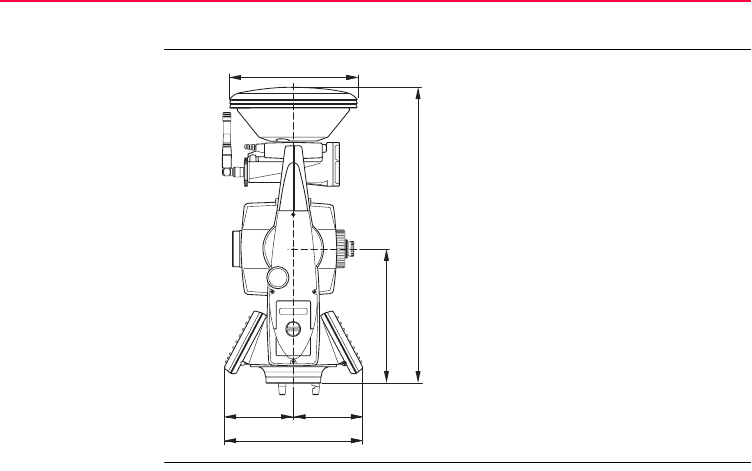
182TPS1200
Technical Data
8.7.2 SmartStation Dimensions
SmartStation
Dimensions
TPS12_202
101.5 mm101.5 mm
196 mm
432 mm
203 mm
186 mm

Technical Data TPS1200 183
8.7.3 SmartAntenna Technical Data
Description and
use
The SmartAntenna is selected for use based upon the application. The table gives
a description and the intended use of the SmartAntenna.
Dimensions
Connector • 8 pin LEMO-1 socket to connect antenna cable (only applicable when SmartAn-
tenna is used independently on a pole with RX1250).
• Special clip-on interface for connecting SmartAntenna to SmartAntenna Adapter
on a TPS1200 instrument.
Mounting 5/8" Whitworth
Weight 1.1 kg including internal battery GEB211
Type Description Use
ATX1230 GG/
ATX1230
L1/L2 SmartTrack+/SmartTrack
antenna with built in ground-
plane.
With RX1250 or TPS1200.
Height: 0.890 m
Diameter: 0.186 m

184TPS1200
Technical Data
Power
Battery internal
Electrical data
Power consumption: 1.8 W typically, 270 mA
External supply voltage: Nominal 12 V DC ( , GEV197 SmartAntenna to PC for
data transfer and to external power supply), voltage
range 5-28 V DC
Type: Li-Ion
Voltage: 7.4 V
Capacity: GEB211: 1.9 Ah
Typical operating time: 5 h
Type ATX1230 GG ATX1230
Voltage - -
Current - -
Frequency GPS L1 1575.42 MHz GPS L1 1575.42 MHz
GPS L2 1227.60 MHz GPS L2 1227.60 MHz
GLONASS L1 1602.5625-
1611.5 MHz
GLONASS L2 1246.4375-
1254.3 MHz

Technical Data TPS1200 185
Environmental
specifications
Temperature
Protection against water, dust and sand
Gain Typically 27 dBi Typically 27 dBi
Noise Figure Typically < 2 dBi Typically < 2 dBi
BW, -3 dBiW - -
BW, -30 dBi - -
Type ATX1230 GG ATX1230
Operating temperature [°C] Storage temperature [°C]
-40 to +65 -40 to +80
Bluetooth: -30 to +65
Protection
IP67 (IEC 60529)
Dusttight
Protected against water jets

186TPS1200
Technical Data
Humidity
Waterproof to 1 m temporary immersion
Protection
Up to 100 %
The effects of condensation are to be effectively counteracted by periodically
drying out the antenna.
Protection

Technical Data TPS1200 187
8.8 Conformity to National Regulations
8.8.1 Communication side cover with Bluetooth
Conformity to
national
regulations
Frequency band 2402 - 2480 MHz
Output power
Antenna
• FCC Part 15 (applicable in US)
• Hereby, Leica Geosystems AG, declares that the Communication side cover
with Bluetooth is in compliance with the essential requirements and other rele-
vant provisions of Directive 1999/5/EC. The declaration of conformity may be
consulted at http://www.leica-geosystems.com/ce.
Class 1 equipment according European Directive 1999/5/EC
(R&TTE) can be placed on the market and be put into service without
restrictions in any EU Member state.
• The conformity for countries with other national regulations not covered by the
FCC part 15 or European directive 1999/5/EC has to be approved prior to use
and operation.
Bluetooth: 5 mW
Type Internal Microstrip antenna
Gain 1.5 dBi

188TPS1200
Technical Data
8.8.2 GFU17, Siemens MC45
Conformity to
national regula-
tions
Frequency band Tri-Band EGSM900 / GSM1800 / GSM1900 MHz
Output power
• FCC Part 15 and 24 (applicable in US)
• Hereby, Leica Geosystems AG, declares that the GFU17 is in compliance with
the essential requirements and other relevant provisions of Directive 1999/5/EC.
The declaration of conformity may be consulted at http://www.leica-geosys-
tems.com/ce.
Class 1 equipment according European Directive 1999/5/EC
(R&TTE) can be placed on the market and be put into service without
restrictions in any EU Member state.
• The conformity for countries with other national regulations not covered by the
FCC part 15 and 24 or European directive 1999/5/EC has to be approved prior
to use and operation.
EGSM900: 2 W
GSM1800: 1 W
GSM1900: 1 W

Technical Data TPS1200 189
Antennas
Specific
Absorption Rate
(SAR)
The product meets the limits for the maximum permissible exposure of the guide-
lines and standards which are force in this respect. The product must be used with
the recommended antenna. A separation distance of at least 20 centimeters should
be kept between the antenna and the body of the user or nearby person within the
intended application.
Type GAT 1203 GAT 1204
Frequency band 900 / 1800 MHz 850 / 1900 MHz
Type Detachable λ/4 antenna Detachable λ/4 antenna
Gain 0 dBi 0 dBi
Connector TNC TNC

190TPS1200
Technical Data
8.8.3 GFU24, Siemens MC75
Conformity to
national regula-
tions
Frequency band Quad-Band EGSM850 / EGSM900 / GSM1800 / GSM1900 MHz
Output power
• FCC Part 15, 22 and 24 (applicable in US)
• Hereby, Leica Geosystems AG, declares that the GFU24 is in compliance with
the essential requirements and other relevant provisions of Directive 1999/5/EC.
The declaration of conformity may be consulted at http://www.leica-geosys-
tems.com/ce.
Class 1 equipment according European Directive 1999/5/EC
(R&TTE) can be placed on the market and be put into service without
restrictions in any EU Member state.
• The conformity for countries with other national regulations not covered by the
FCC part 15, 22 and 24 or European directive 1999/5/EC has to be approved
prior to use and operation.
EGSM850: 2 W
EGSM900: 2 W
GSM1800: 1 W
GSM1900: 1 W

Technical Data TPS1200 191
Antennas
Specific Absorp-
tion Rate (SAR)
The product meets the limits for the maximum permissible exposure of the guide-
lines and standards which are force in this respect. The product must be used with
the recommended antenna. A separation distance of at least 20 centimeters should
be kept between the antenna and the body of the user or nearby person within the
intended application.
Type GAT 3 GAT 5
Frequency band 900 or 1800 MHz 850 or 1900 MHz
Type Detachable λ/2 antenna Detachable λ/2 antenna
Gain 0 dBi 0 dBi
Connector TNC TNC

192TPS1200
Technical Data
8.8.4 GFU19 (US), GFU25 (CAN) CDMA MultiTech MTMMC-C
Conformity to
National
Regulations
• FCC Part 15, 22 and 24 (applicable in US).
• European Directive 1999/5/EC on radio equipment and telecommunication
terminal equipment (see CE Conformity Declaration).
• The conformity for countries with other national regulations not covered by the
FCC part 15, 22 and 24 or European directive 1999/5/EC has to be approved
prior to use and operation.
Frequency band Dual-Band CDMA850 / CDMA1900 MHz
Output power
Antenna
CDMA850: 2 W
CDMA1900: 0.4 W
Type GAT 1204
Frequency band 850 / 1900 MHz
Type Detachable λ/4 antenna
Gain 0 dBi
Connector TNC

Technical Data TPS1200 193
Specific
Absorption Rate
(SAR)
The product meets the limits for the maximum permissible exposure of the guide-
lines and standards which are force in this respect. The product must be used with
the recommended antenna. A separation distance of at least 20 centimeters should
be kept between the antenna and the body of the user or nearby person within the
intended application.

194TPS1200
Technical Data
8.8.5 RadioHandle
Conformity to
national regula-
tions
Frequency band Limited to 2409 - 2435 MHz
Output power < 100 mW (e. i. r. p.)
• FCC Part 15 (applicable in US)
• Hereby, Leica Geosystems AG, declares that the RadioHandle is in compliance
with the essential requirements and other relevant provisions of Directive
1999/5/EC. The declaration of conformity may be consulted at http://www.leica-
geosystems.com/ce.
Class 2 equipment according European Directive
1999/5/EC (R&TTE) for which following EEA Member
States apply restrictions on the placing on the market or on
the putting into service or require authorization for use:
• France
• Italy
• Norway (if used in the geographical area within a radius
of 20km from the centre of Ny-Ålesund)
• The conformity for countries with other national regulations not covered by the
FCC part 15 or European directive 1999/5/EC has to be approved prior to use
and operation.

Technical Data TPS1200 195
Antenna Type: Patch antenna (omnidirectional)
Gain: 2 dBi
Connector: SMB
196TPS1200
Technical Data
8.8.6 SmartAntenna with Bluetooth
Conformity to
national
regulations
Frequency band
• FCC Part 15 (applicable in US)
• Hereby, Leica Geosystems AG, declares that the SmartAntenna with Bluetooth
is in compliance with the essential requirements and other relevant provisions of
Directive 1999/5/EC. The declaration of conformity may be consulted at
http://www.leica-geosystems.com/ce.
Class 1 equipment according European Directive 1999/5/EC
(R&TTE) can be placed on the market and be put into service without
restrictions in any EU Member state.
• The conformity for countries with other national regulations not covered by the
FCC part 15 or European directive 1999/5/EC has to be approved prior to use
and operation.
Type Frequency band [MHz]
ATX1230 GG/ATX1230 1227.60
1575.42
ATX1230 GG 1246.4375 - 1254.3
1602.4375 - 1611.5
Bluetooth 2402 - 2480

Technical Data TPS1200 197
Output power
Antenna
Type Output power [mW]
GNSS Receive only
Bluetooth 5
GNSS Internal GNSS antenna element (receive only)
Bluetooth Type: Internal Microstrip antenna
Gain: 1.5 dBi

198TPS1200
Technical Data
8.9 General Technical Data of the Instrument
Telescope
Compensator
Level
Magnification: 30 x
Clear objective diameter: 40 mm
Focusing: 1.7 m/5.6 ft to infinity
Field of view: 1°30’/1.66 gon
2.7 m at 100 m
Type Setting accuracy Setting range
["] [mgon] [’] [gon]
1201 0.5 0.2 4 0.07
1202 0.5 0.2 4 0.07
1203 1 0.3 4 0.07
1205 1.5 0.5 4 0.07
Circular level sensitivity: 6’/2 mm
Electronic level resolution: 2"

Technical Data TPS1200 199
Control unit
Instrument Ports
Display: 1/4 VGA (320 x 240 pixels), monochrome, graphics
capable LCD, illumination, optional touch screen
Keyboard: 34 keys
including 12 function keys and 12 alphanumeric keys,
illumination
Angle Display: 360°’", 360° decimal, 400 gon, 6400 mil, V %
Distance Display: m, ft int, ft us, ft int inch, ft us inch
Position: In both faces, face two is optional
Touch screen if fitted: Toughened film on glass
Port Name Description
Port 1 Port 1 • 5 pin LEMO-0 for power, communication, data transfer.
• This port is located at the base of the instrument.
Port 2 Handle • Hotshoe connection for RadioHandle with RCS and
SmartAntenna Adapter with SmartStation.
• This port is located on top of Communication side cover.
Port 3 BT • Bluetooth module for communication.
• This port is housed within Communication side cover.
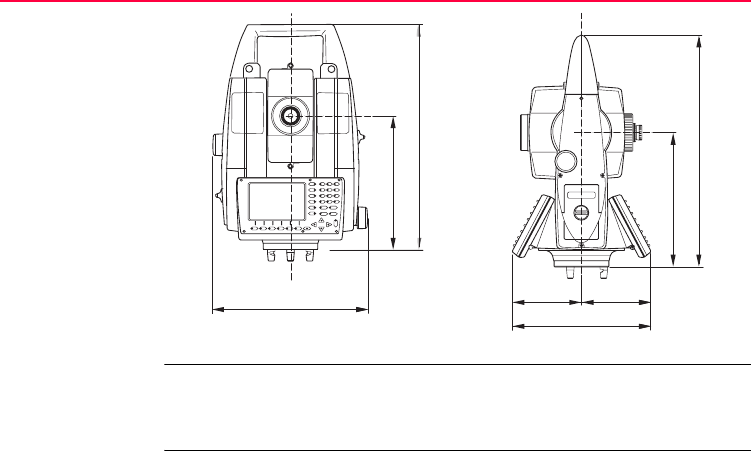
200TPS1200
Technical Data
Instrument
Dimensions
Weight
TPS12_212
196 mm
328 mm
226 mm
TPS12_213
101.5 mm101.5 mm
196 mm
328 mm
203 mm
Instrument: 4.8 - 5.5 kg
Tribrach: 0.8 kg
Internal battery GEB221: 0.2 kg

Technical Data TPS1200 201
Recording Data can be recorded onto a CompactFlash card or into internal memory if fitted.
Laser plummet
Drives
Motorisation
Power
Type Capacity [MB] Number of measurements
per MB
CompactFlash card • 64
• 256
• 1024
1750
Internal memory - optional • 64 1750
Type: Visible red laser class 2
Location: In standing axis of instrument
Accuracy: Deviation from plumbline:
1.5 mm at 1.5 m instrument height
Diameter of laser point: 2.5 mm at 1.5 m instrument height
Type: Endless horizontal and vertical drives
Maximum rotating speed: 50 gon/s
External supply voltage: Nominal voltage 12.8 V DC, Range 11.5 V-13.5 V

202TPS1200
Technical Data
Internal battery
External battery
Environmental
specifications
Temperature
Type: Li-Ion
Voltage: 7.4 V
Capacity: GEB221: 3.8 Ah
Typical operating time: 6 - 8 h
Type: NiMH
Voltage: 12 V
Capacity: GEB171: 8.0 Ah
Typical operating time: 20 - 24 h
Type Operating temperature [°C] Storage temperature [°C]
TPS1200 -20 to +50 -40 to +70
Leica CompactFlash
cards, all sizes
-40 to +80 -40 to +80
Battery internal -20 to +55 -40 to +70
Bluetooth -30 to +60 -40 to +80

Technical Data TPS1200 203
Protection against water, dust and sand
Humidity
Reflectors
Type Protection
TPS1200 IP54 (IEC 60529)
Type Protection
TPS1200 Max 95 % non condensing
The effects of condensation are to be effectively counter-
acted by periodically drying out the instrument.
Type Additive Constant
[mm]
ATR PS
Standard prism,
GPR1
0.0 yes yes
Mini prism,
GMP101
+17.5 yes yes
360° prism,
GRZ4
+23.1 yes yes

204TPS1200
Technical Data
There are no special prisms required for ATR or for PS.
Electronic Guide
Light EGL
Automatic
corrections
The following automatic corrections are made:
360° Mini prism,
GRZ121
+30.0 yes not recommended
Reflector tape S,
M, L
+34.4 yes no
Reflectorless +34.4 no no
Type Additive Constant
[mm]
ATR PS
Working range: 5 - 150 m
Positioning accuracy: 5 cm at 100 m
• Line of sight error • Vertical index error
• Tilting axis error • Standing axis tilt
• Earth curvature • Refraction
• Circle eccentricity • ATR zero point error
• Compensator index error

Technical Data TPS1200 205
8.10 Scale Correction
Use By entering a scale correction, reductions proportional to distance can be taken into
account.
• Atmospheric correction
• Reduction to mean sea level
• Projection distortion
Atmospheric
correction ΔD1
The slope distance displayed is correct if the scale correction in ppm, mm/km, which
has been entered corresponds to the atmospheric conditions prevailing at the time
of the measurement.
The atmospheric correction includes:
• Adjustments for air pressure
• Air temperature
• Relative humidity
For highest precision distance measurements, the atmospheric correction should be
determined with an accuracy of 1 ppm. The following parameters must be redeter-
mined:
• Air temperature to 1°C
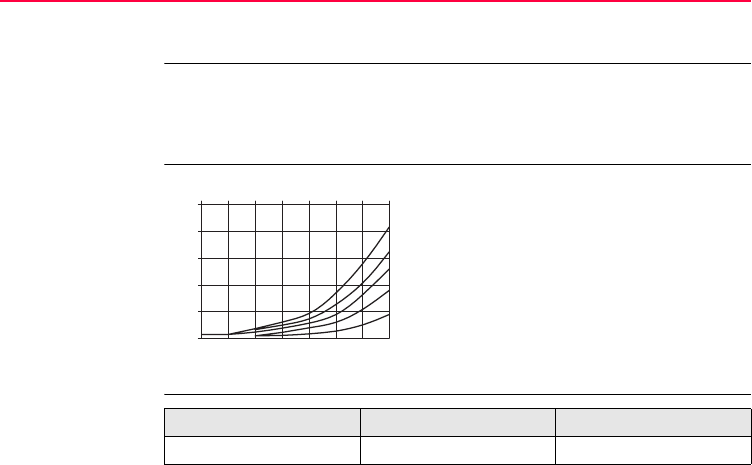
206TPS1200
Technical Data
• Air pressure to 3 mbar
• Relative humidity to 20 %
Air humidity The air humidity influences the distance measurement if the climate is extremely hot
and damp.
For high precision measurements, the relative humidity must be measured and
entered along with the air pressure and the temperature.
Air humidity
correction
Index n
ppm Air humidity correction [mm/km]
% Relative humidity [%]
C° Air temperature [°C]
ppm
+5
+1
+2
+3
+4
+0 -10-20 0 10 20 30 40 50 °C
100%
80%
60%
40%
20%
TPS12_050
Type Index n carrier wave [nm]
infrared EDM 1.0002830 780
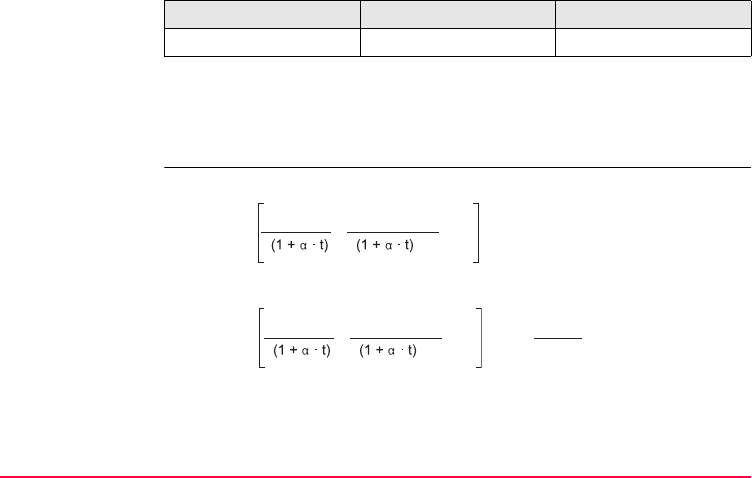
Technical Data TPS1200 207
The index n is calculated from the formula of Barrel and Sears, and is valid for:
Formulas
If the basic value of 60 % relative humidity as used by the EDM is retained, the
maximum possible error in the calculated atmospheric correction is 2 ppm,
2 mm/km.
visible red laser 1.0002859 670
Air pressure p: 1013.25 mbar
Air temperature t: 12 °C
Relative air humidity h: 60 %
Type Index n carrier wave [nm]
Formula for infrared EDM
ΔD1 Atmospheric correction [ppm]
p Air pressure [mbar]
t Air temperature [°C]
h Relative humidity [%]
α
x (7.5 * t/(237.3 + t)) + 0.7857
Formula for visible red laser
1
273.15
TPS12_051
ΔD1= 283.05 - 0.29196 · p · 10x
4.126 · 10-4 · h
-
TPS12_052
ΔD1= 285.93 - 0.29493 · p · 10x
4.126 · 10-4 · h
-

208TPS1200
Technical Data
Reduction to mean
sea level ΔD2
The values for ΔD2 are always negative and are derived from the following formula:
Projection
distortion ΔD3
The magnitude of the projection distortion is in accordance with the projection
system used in a particular country, for which official tables are generally available.
The following formula is valid for cylindrical projections such as that of Gauss-
Krüger:
In countries where the scale factor is not unity, this formula cannot be directly
applied.
ΔD2 Reduction to mean sea level [ppm]
H Height of EDM above sea level [m]
R 6.378 * 106 m
TPS12_053
ΔD
2
= - H
R· 10
3
ΔD3Projection distortion [ppm]
X Northing, distance from projection
zero line with the scale factor 1 [km]
R 6.378 * 106m
TPS12_054
ΔD
3
= - X
2
2R
2
· 10
3
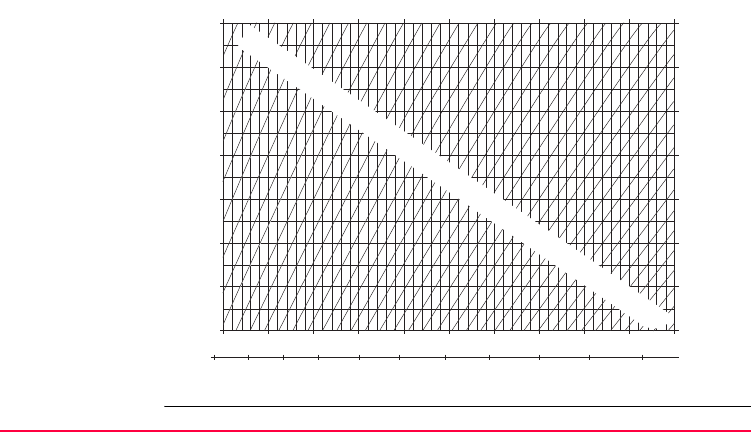
Technical Data TPS1200 209
Atmospheric
corrections °C
Atmospheric corrections in ppm with temperature [°C], air pressure [mb] and height
[m] at 60 % relative humidity.
TPS12_055
-40
-35
-30
-25
-20
-15
-10
-5
0
5
10
15
20
25
30
35
40
45
50
55
60
65
70
75
80
85
90
95
100
105
110
115
120
125
130
135
140
50°C50°C
40°C40°C
30°C30°C
20°C20°C
10°C10°C
0°C 0°C
-10°C-10°C
-20°C-20°C
550 mb
5000 m 4500
600 650 700 750 800 850 900 950 1000 1050 mb
550 mb 600 650 700 750 800 850 900 950 1000 1050 mb
4000 3500 3000 2500 2000 1500 1000 500 0 m
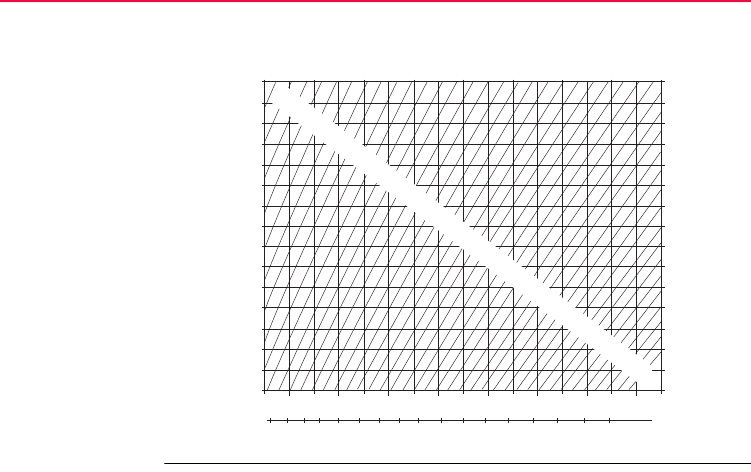
210TPS1200
Technical Data
Atmospheric
correction F
Atmospheric correction in ppm with temperature [F], air pressure [inch Hg] and
height [ft] at 60 % relative humidity.
TPS12_056
130°F
120°F
110°F
100°F
90°F
80°F
70°F
60°F
50°F
40°F
30°F
20°F
10°F
0°F
-10°F
-20°F
130°F
120°F
110°F
100°F
90°F
80°F
70°F
60°F
50°F
40°F
30°F
20°F
10°F
0°F
-10°F
-20°F
16
[ ft ]
17 18 19 20 21 22 23 24 25 26 27 28 29 30 31 32 inch Hg
16 17 18 19 20 21 22 23 24 25 26 27 28 29 30 31 32 inch Hg
16000
15000
14000
13000
12000
11000
10000
9000
8000
7000
6000
5000
4000
3000
2000
1000
o ft
-15
-20
-25
-30
-35
-40
-45
-50
-55
-10
-5
0
5
10
15
20
25
30
35
40
45
50
55
60
65
70
75
80
85
90
95
100
105
110
115
120
125
130
135
140
145
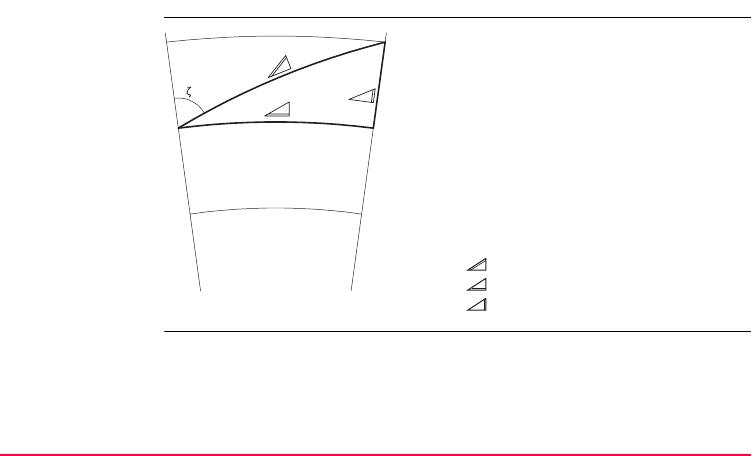
Technical Data TPS1200 211
8.11 Reduction Formulas
Height
measurement
a) Mean Sea Level
b) Instrument
c) Reflector
Slope distance
Horizontal distance
Height difference
c
a
b
TPS12_057

212TPS1200
Technical Data
Formula The instrument calculates in accordance with the following formula:
• slope distance
• horizontal distance
• height difference
Earth curvature and mean refraction coefficient k = 0.13 are taken into account auto-
matically. The calculated horizontal distance relates to the station height, not to the
reflector height.
Displayed slope distance [m]
D0Uncorrected distance [m]
ppm Scale correction [mm/km]
mm Additive constant, prism [mm]
Horizontal distance [m]
Height difference [m]
Y * |sinζ|
X * cosζ
ζVertical circle reading
A (1 - k/2)/R = 1.47 * 10-7 [m-1]
B (1 - k)/2R = 6.83 * 10-8 [m-1]
k0.13
R 6.378 * 106m
TPS12_058
= D0 · ( 1 + ppm · 10-6 ) + mm
TPS12_059
= Y - A · X · Y
TPS12_060
= X + B · Y
2
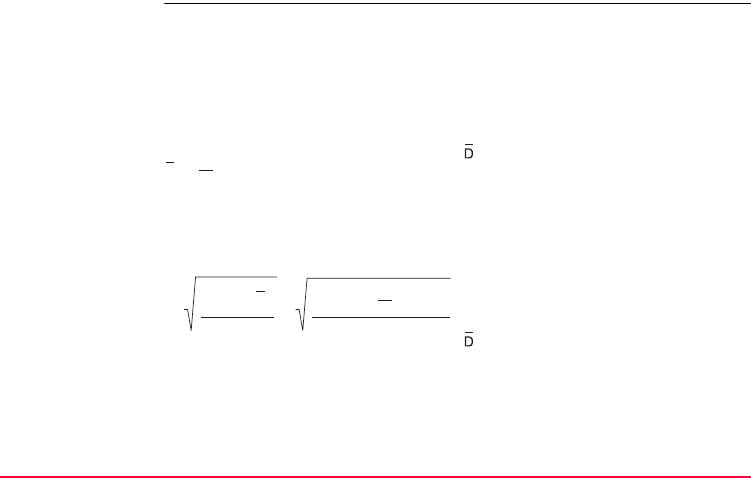
Technical Data TPS1200 213
Distance
measuring
program Averaging
In the distance measuring program Averaging, the following values are displayed:
D Slope distance as arithmetic mean of all measurements
s Standard deviation of a single measurement
n Number of measurements
These values are calculated as follows:
Slope distance as arithmetic mean
of all measurements
ΣSum
DiSingle slope distance measure-
ment
n Number of measurements
s Standard deviation of a single slope
distance measurement
ΣSum
Slope distance as arithmetic mean
of all measurements
DiSingle slope distance measure-
ment
n Number of distance measurements
TPS12
_
061
· ∑ Di
D =
1
n
n
i = 1
TPS12_062
s =
(D
i
- D)
2
n - 1
=
Di
2
-
n - 1
( D
i
)
2
∑
n
i = 1 ∑
n
i = 1
∑
n
i = 1
1
n

214TPS1200
Technical Data
The standard deviation of the arithmetic mean of the distance can be calculated
as follows:
Standard deviation of the arithmetic
mean of the distance
s Standard deviation of a single
measurement
n Number of measurements
TPS12_063
SD =n
s

Technical Data TPS1200 215

216TPS1200
Index
Index
A
Abbreviations ....................................................... 12
Acclimatise to the ambient temperature ..............94
Accuracy
Angle measurement .....................................168
Automatic Target Recognition ATR .............. 178
Infrared IR .................................................... 170
Long Range LO ............................................ 176
Reflectorless RL ...........................................173
SmartStation ................................................ 180
Adjustment
Adjusting the direction of the beam ............. 112
Combined (l, t, i, c and ATR) ......................... 96
Electronic ....................................................... 90
Inspecting the direction of the beam ............ 110
Inspecting the laser plummet ....................... 115
Mechanical ..................................................... 91
Of circular level on instrument ..................... 106
Of circular level on tribrach .......................... 107
Of laser plummet ......................................... 114
Of Reflectorless EDM .................................. 109
Preparation .................................................... 94
Titling axis (a) .............................................. 101
Adjustment Errors
View current ................................................... 91
Angle Measurement .......................................... 168

Index TPS1200 217
Antenna
Communication side cover ........................... 187
GFU17 clip-on-housing with device .............189
GFU19 clip-on-housing with device .............192
RadioHandle ................................................ 195
SmartAntenna .............................................. 197
Antennas
Type ............................................................. 183
Autodetect behaviour ..........................................53
RadioHandle .................................................. 54
Radios/Modems ............................................. 53
SmartAntenna ................................................ 53
SmartAntenna Adapter ................................... 53
Automatic Corrections ....................................... 204
Automatic Target Recognition ATR
Accuracy ...................................................... 178
Description ................................................... 148
Positioning of crosshairs ................................ 94
B
Battery
For instrument ................................................ 76
For SmartAntenna ......................................... 78
Icon ................................................................ 48
Internal, SmartAntenna ................................ 184
Overview ........................................................ 74
Technical data GEB171 ............................... 202
Technical data GEB221 ............................... 202
Bluetooth, icon .................................................... 47
C
CE ....................................................................... 33
Check & Adjust ................................................... 90
Cleaning and Drying ......................................... 123
Clip-On-Housing
Attach and detach .......................................... 62
Devices for ..................................................... 61
Insert SIM card .............................................. 62
LED indicators ............................................... 65
Remove SIM card .......................................... 64

218TPS1200
Index
Communication side cover
Graphical overview with RadioHandle ...........31
Graphical overview with SmartStation ...........30
Technical data .............................................. 187
CompactFlash Card ...................................... 21, 80
Format card ....................................................81
Icon ................................................................ 48
Insert card ...................................................... 80
Remove card .................................................. 80
Safety instructions .......................................... 80
Compensator ..................................................... 198
Connector
SmartAntenna .............................................. 183
Container Contents
For instrument .......................................... 24, 25
For SmartStation and RCS ......................26, 27
Control unit ........................................................ 199
Conversion, data conversion ...............................22
Corrections
Automatic ..................................................... 204
Scale ............................................................ 205
D
Data Conversion ................................................. 21
Data Storage ....................................................... 21
Dimensions
Of instrument ............................................... 200
Of SmartStation ........................................... 182
SmartAntenna .............................................. 183
Distance Measurement
Infrared IR .................................................... 169
Long Range LO ........................................... 175
Reflectorless RL .......................................... 172
Documentation ...................................................... 9
Drive
OMNI ............................................................. 22
Drives ................................................................ 201

Index TPS1200 219
E
Edit
Value in input field .......................................... 40
Electrical data, SmartAntenna ...........................184
Electromagnetic Compatibility EMC .................. 158
Electronic Adjustment .......................................... 90
Electronic Distance Measurement EDM
Description ..................................................... 13
Infrared IR ...................................................... 14
Long Range LO .............................................. 14
PinPoint R100, PinPoint R300 ....................... 14
Reflectorless RL .............................................14
Screen icons ............................................44, 45
Electronic Guide Light EGL
Description ............................................. 14, 152
Technical data .............................................. 204
ENTER ................................................................ 34
Environmental Specifications ............................202
Environmental specifications
SmartAntenna .............................................. 185
ESC ..................................................................... 33
F
FCC Statement ................................................. 161
Fields and Options ................................................ 8
Flashing LED on clip-on-housing ........................ 68
Formulas, reduction .......................................... 211
Frequency Band
Communication side cover .......................... 187
GFU17 clip-on-housing with device ............. 188
GFU19 clip-on-housing with device ............. 192
RadioHandle ................................................ 194
SmartAntenna .............................................. 196
Frequency band
GFU17, Siemens MC45 ............................... 190
G
GAT 3, antenna ................................................. 191
GeoC++ Software Development Kit .................... 20
GFU19 .............................................................. 192
GFU24 .............................................................. 190
GFU25 .............................................................. 192
GNSS = Global Navigation Satellite System ...... 13
Guidelines for Correct Results ............................ 86

220TPS1200
Index
H
Hazards of Use .................................................. 133
I
Icons
Overview ........................................................ 44
Specific for GPS ............................................. 46
Specific for TPS .............................................45
Instrument
Dimensions .................................................. 200
Ports ............................................................. 199
Technical data .............................................. 198
Turn on and turn off ........................................ 38
Weight .......................................................... 200
Instrument Components ...................................... 28
Instrument Models ............................................... 17
Instrument Setup
As SmartStation ............................................. 55
Conventional .................................................. 50
For remote control .......................................... 70
Intended Use .....................................................127
Internal Memory .................................................. 21
Internal memory, icon ......................................... 48
K
Keyboard ....................................................... 32, 38
Locking and unlocking ................................... 38
Operating principles ....................................... 38
Keys .................................................................... 33
Keys, Alphanumeric ............................................ 33
Keys, Arrow ......................................................... 34
Keys, Combinations ............................................ 34
Keys, Function .................................................... 34
Keys, Hot ............................................................ 33

Index TPS1200 221
L
Laser Classification ...........................................139
Automatic Target Recognition ATR .............. 148
Electronic Guide Light EGL ..........................152
Integrated Distancer, Invisible Laser ............139
Integrated Distancer, Visible Laser .............. 142
Laser Plummet ............................................. 154
PowerSearch PS .......................................... 150
Laser Plummet
Adjustment ................................................... 114
Technical data .............................................. 201
LED Indicators
For clip-on-housing ........................................ 65
For RadioHandle ............................................ 72
For SmartAntenna .......................................... 59
LEICA Geo Office LGO, description ..............13, 17
Level ............................................................ 34, 198
Lights ................................................................... 34
Li-Ion battery ..................................................... 184
Lock, keyboard .................................................... 38
M
Maintenance ..................................................... 124
Manual
Application Field Manuals .............................. 10
Available formats ........................................... 11
Description of manuals .................................... 9
How to use ....................................................... 8
System Field Manuals ..................................... 9
Technical Reference Manual ......................... 10
Validity of user manual .................................... 8
Mechanical Adjustment ....................................... 91
Menu, selecting from a ........................................ 39
Mount, SmartAntenna ....................................... 183
MultiTech MTMMC-C
GFU19/GFU25, technical data .................... 192

222TPS1200
Index
O
OMNI drive .......................................................... 22
ON ....................................................................... 33
Operating Temperature
SmartAntenna .............................................. 185
Output Power
Communication side cover ........................... 187
GFU17 clip-on-housing with device .............188
GFU19 clip-on-housing with device .............192
RadioHandle ................................................ 194
SmartAntenna .............................................. 197
Output power
GFU17, Siemens MC45 ............................... 190
P
Page
Description ....................................................... 8
Selecting from a ............................................. 39
Pages down ........................................................ 35
Pages up ............................................................. 35
Path Sequence ..................................................... 8
Ports .................................................................. 199
Power
SmartAntenna .............................................. 184
Power Supply ...................................................... 23
PowerSearch PS ............................................... 179
Precise Measurements ....................................... 91
PROG ................................................................. 33
Q
Quick coding, icon ............................................... 48
Quick settings ..................................................... 34

Index TPS1200 223
R
R100 ............................................................ 14, 142
R300 ............................................................ 14, 142
RadioHandle
Container contents ......................................... 26
Description ..................................................... 16
LED indicators ................................................ 72
Setup for remote control ................................. 70
Technical data .............................................. 194
Raw data transfer to LGO ...................................22
Recording .......................................................... 201
Reduction Formulas .......................................... 211
Reflectorless EDM, adjustment ......................... 109
Reflectors .......................................................... 203
Responsibilities ................................................. 130
S
Safety Directions ............................................... 126
Scale Correction ............................................... 205
Screen ................................................................. 36
Screen Name ........................................................ 8
Scroll bar, description ......................................... 37
Service, of tripod ............................................... 118
Setup
As SmartStation ............................................. 55
Conventional .................................................. 50
For remote control ......................................... 70
SHIFT ............................................................ 34, 48
Siemens MC75
GFU24, technical data ................................. 190
SmartAntenna
Battery ........................................................... 78
Description ..................................................... 16
Dimensions .................................................. 182
Power supply ................................................. 23
Status ............................................................. 59
Technical data ............................................. 196

224TPS1200
Index
SmartStation
Communication side cover ............................. 16
Components ................................................... 16
Container contents ................................... 26, 27
Description ..................................................... 15
Graphical overview ......................................... 30
Setup .............................................................. 55
SmartAntenna ................................................ 16
Technical Data
Accuracy ................................................. 180
Clip-on-housing with device ....................188
Communication side cover ......................187
Dimensions ............................................. 182
SmartAntenna ......................................... 196
Software
Application programs ..................................... 20
Customised application programs ................. 20
Language software ........................................ 19
Software type ................................................. 19
Software upload ............................................. 20
System software ............................................ 19
Software Concept ............................................... 19
Specifications, environmental
SmartAntenna .............................................. 185
Status
Device in clip-on-housing ............................... 65
RadioHandle .................................................. 72
SmartAntenna ................................................ 59
Storage ............................................................. 122
Storage Temperature
SmartAntenna .............................................. 185
Survey Application .............................................. 83
System Concept .................................................. 19

Index TPS1200 225
T
Technical Data .................................................. 168
Telescope .......................................................... 198
Temperature
Battery Internal
Operating ................................................ 202
Storage ................................................... 202
Bluetooth
Operating ................................................ 202
Storage ................................................... 202
CompactFlash Card
Operating ................................................ 202
Storage ................................................... 202
Instrument
Operating ................................................ 202
Storage ................................................... 202
Terminology ......................................................... 12
Touch Screen, operating principles .....................38
Transfer raw data to LGO .................................... 22
Transport ........................................................... 120
Tripod, service of ...............................................118
U
Unlock, keyboard ................................................ 38
USER .................................................................. 33
User Interface ..................................................... 32
V
Value
Edit in input field ............................................ 40
View Current Adjustment Errors ......................... 91
W
Weight
Of instrument ............................................... 200
SmartAntenna .............................................. 183

Total Quality Management: Our commitment to total customer satisfaction.
Leica Geosystems AG, Heerbrugg, Switzerland, has been
certified as being equipped with a quality system which
meets the International Standards of Quality Management
and Quality Systems (ISO standard 9001) and Environmental
Management Systems (ISO standard 14001).
Ask your local Leica Geosystems dealer for more information about our TQM
program.
733527-4.0.0en Original text
Printed in Switzerland © 2006 Leica Geosystems AG, Heerbrugg, Switzerland
Leica Geosystems AG
Heinrich-Wild-Strasse
CH-9435 Heerbrugg
Switzerland
Phone +41 71 727 31 31
www.leica-geosystems.com
