Lemobile Information Technology LEX727 Mobile phone User Manual

Lemobile Information Technology (Beijing) Co., Ltd Mobile phone Users Manual

User manual

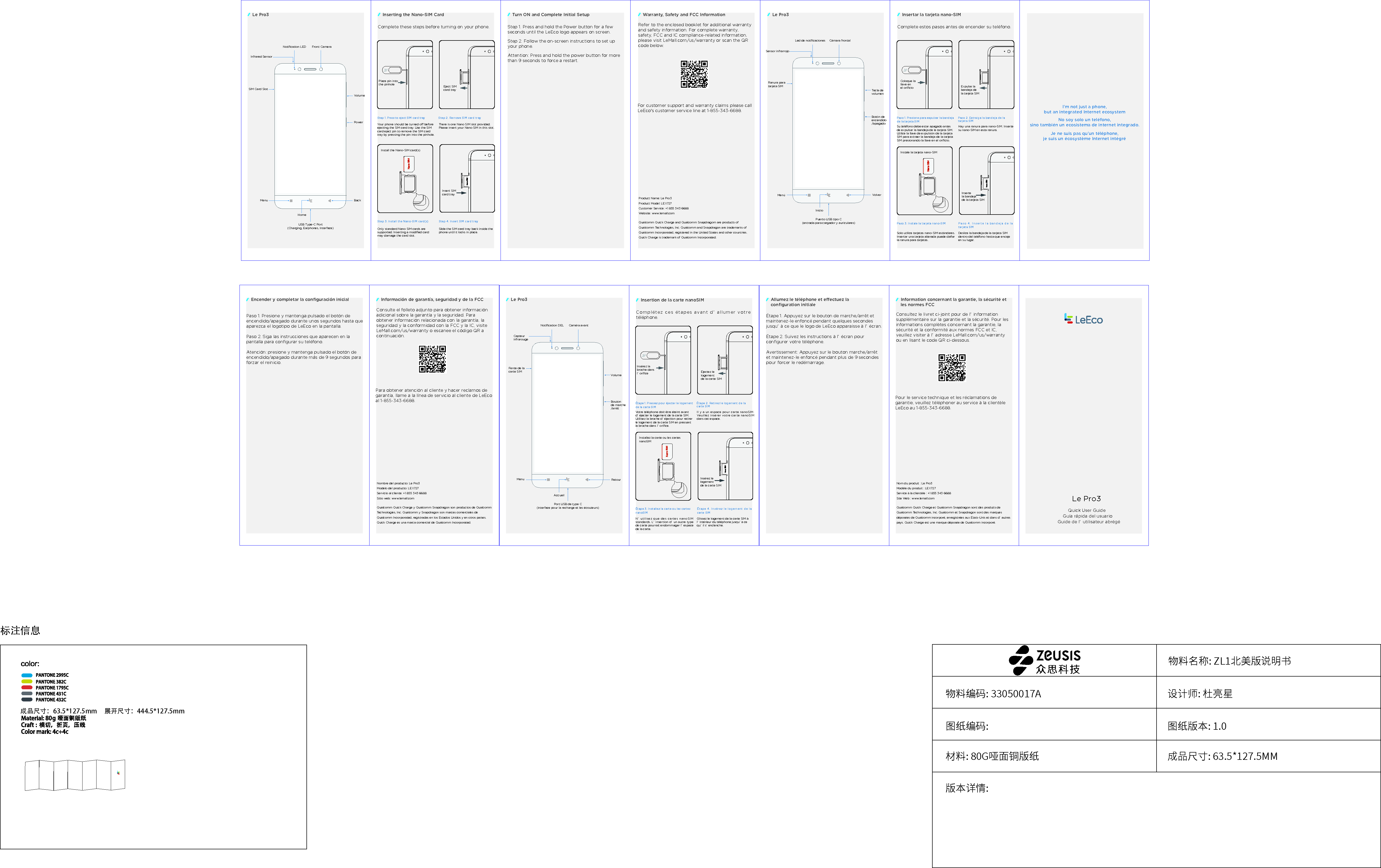
标注信息物料名称: ZL1北美版说明书图纸编码: 图纸版本: 1.0材料: 80G哑面铜版纸版本详情:成品尺寸: 63.5*127.5MM物料编码: 33050017A 设计师: 杜亮星展开尺寸:444.5*127.5mm成品尺寸:63.5*127.5mmGuía rápida del usuario(entrada para cargador y auriculares)Ranura para tarjeta SIMCámara frontalSensor infrarrojoLed de notificacionesTecla de volumenBotón de encendido/apagadoInicioVolverMenúPuerto USB tipo CQuick User GuideRefer to the enclosed booklet for additional warranty and safety information. For complete warranty, safety, FCC and IC compliance-related information, please visit LeMall.com/us/warranty or scan the QR code below. For customer support and warranty claims please call LeEco's customer service line at 1-855-343-6688. Product Name: Le Pro3Product Model: LEX727Customer Service: +1 855 343 6688 Website: www.lemall.comQualcomm Quick Charge and Qualcomm Snapdragom are products of Qualcomm Technologies, Inc. Qualcomm and Snapdragon are trademarks of Qualcomm Incorporated, registered in the United States and other countries. Quick Charge is trademark of Qualcomm Incorporated.Guide de l’ utilisateur abrégé(interface pour la recharge et les écouteurs)Fente de la carte SIMCaméra avantCapteur infrarougeNotification DELVolumeBouton de marche/arrêtAccueilRetourMenuPort USB de type CNo soy solo un teléfono, sino también un ecosistema de internet integrado.I'm not just a phone,but an integrated Internet ecosystemJe ne suis pas qu’un téléphone, je suis un écosystème Internet intégréPlace pin into the pinhole Install the Nano-SIM card(s) Step 2. Remove SIM card tray Step 1. Press to eject SIM card tray Step 3. Install the Nano-SIM card(s)   Step 4. Insert SIM card tray Your phone should be turned o before ejecting the SIM card tray. Use the SIM card eject pin to remove the SIM card tray by pressing the pin into the pinhole. Only standard Nano SIM cards are supported. Inserting a modified card may damage the card slot. Slide the SIM card tray back inside the phone until it locks in place. There is one Nano SIM slot provided. Please insert your Nano SIM in this slot. Insert SIM card trayEject SIM card tray Step 1. Press and hold the Power button for a few seconds until the LeEco logo appears on screen. Step 2. Follow the on-screen instructions to set up your phone. Attention: Press and hold the power button for more than 9 seconds to force a restart. Le Pro3Le Pro3 Inserting the Nano-SIM Card Turn ON and Complete Initial SetupNotification LEDInfrared SensorSIM Card SlotVolumeFront CameraPowerBackMenuHomeUSB Type-C Port(Charging, Earphones, Interface)Complete these steps before turning on your phone.Warranty, Safety and FCC InformationColoque la llave en el orificioInstale la tarjeta nano-SIMPaso 2. Extraiga la bandeja de la tarjeta SIMPaso 1. Presione para expulsar la bandeja de la tarjeta SIMPaso 3. Instale la tarjeta nano-SIM Paso 4. Inserte la bandeja de la tarjeta SIMSu teléfono debe estar apagado antes de expulsar la bandeja de la tarjeta SIM. Utilice la llave de expulsión de la tarjeta SIM para extraer la bandeja de la tarjeta SIM presionando la llave en el orificio.Solo utilice tarjetas nano-SIM estándares. Insertar una tarjeta alterada puede dañar la ranura para tarjetas.Deslice la bandeja de la tarjeta SIM dentro del teléfono hasta que encaje en su lugar.Hay una ranura para nano-SIM. Inserte su nano-SIM en esta ranura.Inserte la bandeja de la tarjeta SIMExpulse la bandeja de la tarjeta SIMInsertar la tarjeta nano-SIMComplete estos pasos antes de encender su teléfono.Insérez la broche dans l’ orificeInstallez la carte ou les cartes nanoSIMÉtape 2. Retirez le logement de la carte SIMÉtape 1. Pressez pour éjecter le logement de la carte SIMÉtape 3. Installez la carte ou les cartes nanoSIMÉtape 4. Insérez le logement de la carte SIMVotre téléphone doit être éteint avant d’ éjecter le logement de la carte SIM. Utilisez la broche d’ éjection pour retirer le logement de la carte SIM en pressant la broche dans l’ orifice.N’ utilisez que des cartes nanoSIM standards. L’ insertion d’ un autre type de carte pourrait endommager l’ espace de la carte.Glissez le logement de la carte SIM à l’ intérieur du téléphone jusqu’ à ce qu’ il s’ enclenche.Il y a un espace pour carte nanoSIM. Veuillez insérer votre carte nanoSIM dans cet espace.Insérez le logement de la carte SIMÉjectez le logement de la carte SIMInsertion de la carte nanoSIMComplétez ces étapes avant d’ allumer votre téléphone.Le Pro3Le Pro3Paso 1. Presione y mantenga pulsado el botón de encendido/apagado durante unos segundos hasta que aparezca el logotipo de LeEco en la pantalla.Paso 2. Siga las instrucciones que aparecen en la pantalla para configurar su teléfono.Atención: presione y mantenga pulsado el botón de encendido/apagado durante más de 9 segundos para forzar el reinicio.Consulte el folleto adjunto para obtener información adicional sobre la garantía y la seguridad. Para obtener información relacionada con la garantía, la seguridad y la conformidad con la FCC y la IC, visite LeMall.com/us/warranty o escanee el código QR a continuación.Para obtener atención al cliente y hacer reclamos de garantía, llame a la línea de servicio al cliente de LeEco al 1-855-343-6688.Nombre del producto: Le Pro3Modelo del producto: LEX727Servicio al cliente: +1 855 343 6688Sitio web: www.lemall.comQualcomm Quick Charge y Qualcomm Snapdragon son productos de Qualcomm Technologies, Inc. Qualcomm y Snapdragon son marcas comerciales de Qualcomm Incorporated, registradas en los Estados Unidos y en otros países. Quick Charge es una marca comercial de Qualcomm Incorporated.Encender y completar la configuración inicial Información de garantía, seguridad y de la FCCÉtape 1. Appuyez sur le bouton de marche/arrêt et maintenez-le enfoncé pendant quelques secondes jusqu’ à ce que le logo de LeEco apparaisse à l’ écran.Étape 2. Suivez les instructions à l’ écran pour configurer votre téléphone.Avertissement: Appuyez sur le bouton marche/arrêt et maintenez-le enfoncé pendant plus de 9 secondes pour forcer le redémarrage.Consultez le livret ci-joint pour de l’ information supplémentaire sur la garantie et la sécurité. Pour les informations complètes concernant la garantie, la sécurité et la conformité aux normes FCC et IC, veuillez visiter à l’ adresse LeMall.com/us/warranty ou en lisant le code QR ci-dessous.Pour le service technique et les réclamations de garantie, veuillez téléphoner au service à la clientèle LeEco au 1-855-343-6688.Nom du produit : Le Pro3Modèle du produit : LEX727Service à la clientèle : +1 855 343 6688Site Web : www.lemall.comQualcomm Quick Charge et Qualcomm Snapdragon sont des produits de Qualcomm Technologies, Inc. Qualcomm et Snapdragon sont des marques déposées de Qualcomm incorporé, enregistrées aux États-Unis et dans d’ autres pays. Quick Charge est une marque déposée de Qualcomm incorporé.Allumez le téléphone et eectuez la configuration initialeInformation concernant la garantie, la sécurité et les normes FCC

Navigation menu