Lenovo Helix Swsg En Sp40F29976 ThinkPad User Manual (English) Safety, Warranty And Setup Guide (Type 3xxx) Laptop (Think Pad)
2013-03-25
User Manual: Lenovo Helix Swsg En Sp40F29976 (English) Safety, Warranty and Setup Guide Helix (Type 3xxx) Laptop (ThinkPad) ThinkPad Helix (Type 3xxx)
Open the PDF directly: View PDF  .
.
Page Count: 2
- Unpack
- Initial setup instructions
- Controls
- Accessing your User Guide
- Read before using your tablet
- Read first — regulatory information
- Downloading publications
- Service and Support information
- Safety information
- Lenovo Limited Warranty notice
- Warranty Information
- Customer Replaceable Units
- Customer Replaceable Units (CRUs) are parts that can be upgraded or replaced by the customer. If a CRU is determined to be defective during the warranty period, a replacement CRU will be provided to the customer. Customers are responsible for installing the self-service CRUs for this product. Customers also can install optional-service CRUs, which might require some technical skills or tools, or request that a technician install the optional-service CRU under the terms of the applicable warranty service type for your country or region. The following tables list CRUs for your tablet and tell where to find the replacement instructions.
- Self-service CRUs
- Electronic emission notices
- Recycling and environmental information
- Legal notices
PN: SP40F29976
Printed in China
Safety, Warranty, and Setup Guide
Brief user notices
ThinkPad Helix
http://www.lenovo.com/support
Lenovo® electronic manuals... for a greener planet!
Refer to the electronic User Guide for detailed product information:
http://www.lenovo.com/thinkuserguides
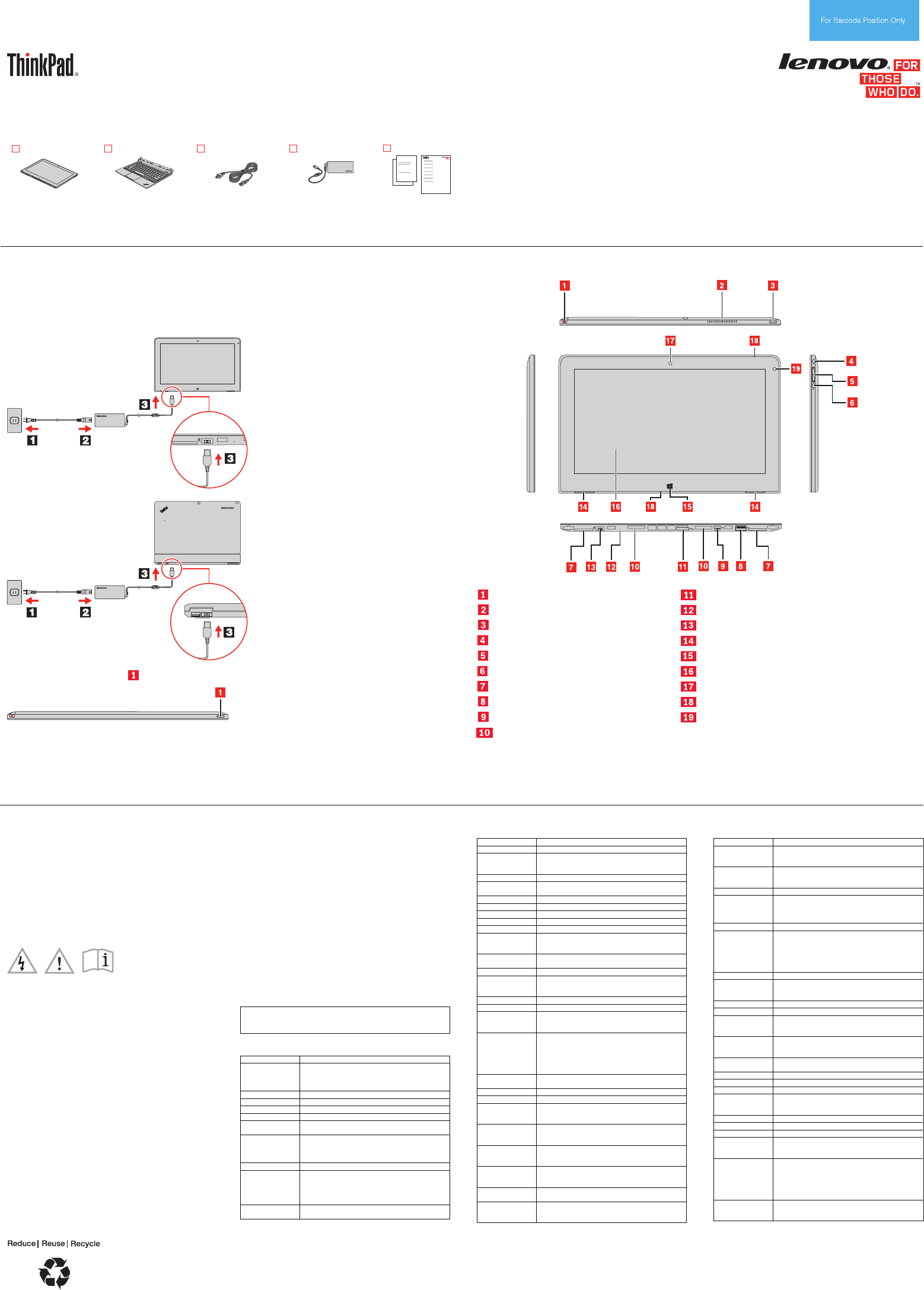
Unpack
ThinkPad® Helix
Enhanced
Keyboard Dock for
ThinkPad Helix
(on some models)
Power cord
ac power adapter
Publications
Note: Recovery discs are not provided. Instead, everything needed for recovering factory-installed files
and applications is provided in the Lenovo_Recovery partition on your mSATA solid-state drive. If you
decide to remove the Lenovo_Recovery partition, be sure to create a recovery disc first. For more
information, see “Recovery overview” in the User Guide. See “Accessing your User Guide” for instructions
on opening the electronic User Guide provided on your tablet.
Initial setup instructions
1. Connect to power. Ensure that all power cord connectors are securely and completely plugged into
receptacles. Use one of the following methods:
• Connect the tablet to power
• Install the tablet into the keyboard dock. Then, connect the keyboard dock to power.
2. Press the power button to turn on the tablet.
3. Configure the operating system following the on-screen instructions to complete the initial setup. This
process takes several minutes.
Additional information about using your tablet is in the User Guide. See “Accessing your User Guide” later
in this document.
Controls
Tablet Digitizer Pen storage SIM card tray
Fan louvers Emergency reset hole
Power button Power connector
Combo audio jack Built-in stereo speakers
Volume control buttons Windows® button
Screen rotation lock button Multi-touch screen
Label trays Front-facing camera
USB 2.0 connector Microphones
Mini DisplayPort connector Ambient light sensor
Keyboard dock connectors
Accessing your User Guide
Your User Guide contains detailed information about your tablet. To
access your User Guide, use one of the following methods:
• Go to http://www.lenovo.com/ThinkPadUserGuides and follow the
instructions on the screen.
• Start your tablet. Tap Lenovo Support on the Start screen. Then
tap User Guide.
• Open Windows Help and Support. Then tap Lenovo User Guide.
Read before using your tablet
The following sections provide critical safety and regulatory
information for Lenovo computers and instructions on how to access
electronic versions of the publications developed for your tablet.
Read first — regulatory information
Third Edition (January 2014)
© Copyright Lenovo 2013, 2014.
LIMITED AND RESTRICTED RIGHTS NOTICE: If data or software is delivered pursuant a General Services Administration “GSA” contract, use,
reproduction, or disclosure is subject to restrictions set forth in Contract No. GS-35F-05925.
Tablet models equipped with wireless communications comply with
the radio frequency and safety standards of any country or region in
which it has been approved for wireless use. In addition, if your
product contains a telecom modem, it complies with the requirements
for connection to the telephone network in your country.
Be sure to read the Regulatory Notice for your country or region
before using the wireless devices contained in your tablet. To obtain a
PDF version of the Regulatory Notice, refer to the “Downloading
publications” section below.
Downloading publications
Electronic versions of your tablet publications are available from the
Lenovo Support Web site. To download the publications for your
tablet, go to http://www.lenovo.com/ThinkPadUserGuides and follow
the instructions on the screen.
Service and Support information
The following information describes the technical support that is
available for your product, during the warranty period or throughout
the life of your product. Refer to the Lenovo Limited Warranty for a full
explanation of Lenovo warranty terms. See “Lenovo Limited Warranty
notice” later in this document for details on accessing the full warranty.
If you purchased Lenovo services, refer to the following terms and
conditions for detailed information:
• For Lenovo Warranty Service Upgrades or Extensions, go to:
http://support.lenovo.com/lwsu
• For Lenovo Accidental Damage Protection Services, go to:
http://support.lenovo.com/ladps
Online technical support
Online technical support is available during the lifetime of a product at
http://www.lenovo.com/support.
Telephone technical support
You can get help and information from the Customer Support Center
by telephone. Before contacting a Lenovo technical support
representative, have the following information available: model and
serial number, the exact wording of any error message, and a
description of the problem.
Your technical support representative might want to walk you through
the problem while you are at your tablet during the call.
Worldwide Lenovo Support telephone list
Important: Telephone numbers are subject to change without notice.
The most up-to-date telephone list for the Customer Support Center is
always available at http://www.lenovo.com/support/phone.
If the telephone number for your country or region is not listed,
contact your Lenovo reseller or Lenovo marketing representative.
Country or region Telephone number
Africa
Africa: +44 (0)1475-555-055
South Africa: 0800110756 (English, Afrikaans)
Central Africa: Contact the nearest Lenovo Business
Partner
Algeria +33 6 7348 1739 (French, English)
Argentina 0800-666-0011 (Spanish)
Australia 1800 041 267 (English)
Austria 01-24592-5901 (German)
Bahrain Kanoo IT: 00 973 1771 1722
Bahrain Business Machine LLC: 00 973 1758 4302
Belgium 02-210-9820
+32 (0)2 339 3611 (Warranty service and support)
(Dutch)
02-210-9800 (French)
Bolivia 0800-10-0189 (Spanish)
Brazil Calls made from within the Sao Paulo region:
(11) 3889-8986
Calls made from outside the Sao Paulo region:
0800-701-4815
(Brazilian Portuguese)
Brunei Dial 800-1111, then dial 866-273-5446
(English and Bahasa Melayu)
Country or region Telephone number
Canada 1-800-565-3344 (English, French)
Caribbean
(Bermuda,
Jamaica, Tortola)
1-800 426 7378 (English)
Chile 800-361-213 (Spanish)
China Technical Support Line
800-990-8888, 86-10-58851110 (Mandarin)
Colombia 1-800-912-3021 (Spanish)
Costa Rica 0-800-011-1029 (Spanish)
Croatia 0800-0426
Cyprus 80092537 (Greek)
Czech Republic +420-2-7213-1316
Denmark 4520-8200
7010-5150 (Warranty service and support)
(Danish)
Dominican
Republic
1-866-434-2080 (Spanish)
Ecuador 1-800-426911 OPCION 4 (Spanish)
Egypt 800-0000-418 (Toll free)
002-02-2594-8500 (Standard charges apply)
(English, Arabic)
El Salvador 800-6264 (Spanish)
Estonia +372 66 00 800, +372 6776793
Finland 09-459-6960
+358-800-1-4260 (Warranty service and support)
(Finnish)
France 0238-557-450
Hardware: 0810-631-213 (Warranty service and
support)
Software: 0810-631-020 (Warranty service and
support)
(French)
Germany 01805-00 46 18 (Warranty service and support)
(German)
Greece 0080044149702 (Greek)
Guatemala 1800-624-0051 (Spanish)
Honduras Tegucigalpa: 232-4222
San Pedro Sula: 552-2234
(Spanish)
Hong Kong 800-964-173 /
3071-3561
(Cantonese, English, Mandarin)
Hungary +36 1 3825716
+36 1 3825720
(English, Hungarian)
India 1800-425-2666 or 1800-102-3692
Email: smcindia@in.ibm.com
(English)
Indonesia 001-803-442-425
(English, Bahasa Indonesia)
Ireland 01-815-9202
01-881-1444 (Warranty service and support)
(English)
Country or region Telephone number
Israel Givat Shmuel Service Center:
+972-3-531-3900
(Hebrew and English)
Italy 02-7031-6101
+39-800-820094 (Warranty service and support)
(Italian)
Japan 0120-000-817
Jordan Jordan Business Systems:
00 962 6 5000999 (ext. 713/127)
General Computer & Electronic (GCE):
00 962 6 551 3879
Korea 080-513-0880 (Korean)
Kuwait Easa Hussain Al Yousifi: 00 965 2244 5280
AM. KHORAFI: 00 965 2200 1100 1127
Khorafi Business Machines (KBM): 00 965 2259 4611
Diyar United Company: 00 965 4378 383
Redington Kuwait: 00 965 2433 3203, 25456250 /
25456251
Latvia +371 7070360
Lebanon Quantech: 00 961 1999 500
Computer Business Machine (CBM): 00 961 1680 180
El Haceb S.A.L: 00 961 1771 300
Lithuania +370 5 278 66 00
Libya +33 6 7348 1739 (French, English)
Luxembourg +32 (0)2 339 3611
+35 229 8977 5063
(French)
Macau 0800-807 /
(852) 3071-3559
(Cantonese, English, Mandarin)
Malaysia 1800-88-0013
(English, Bahasa Melayu)
Malta +35621445566
Mexico 001-866-434-2080 (Spanish)
Middle East +44 (0)1475-555-055
Morocco +212 5 22 509035
+212 5 22 509017
(Arabic)
Netherlands +31 (0)20 513 3939 (Dutch)
New Zealand 0508 770 506 (English)
Nicaragua 001-800-220-1830 (Spanish)
Norway 6681-1100
8152-1550 (Warranty service and support)
(Norwegian)
Oman Khimji Ramdas Computer Communication Systems:
00 968 2469 6255
Overseas Business Machines (OBM): 00 968 2460
1072, 2460 5018
Gulf Business Machines Services (GBMS): 00 968
2455 9831
Pakistan International Office Products (pvt) Ltd.:
00 92 212 422 569, 00 92 213 241 2023
Selling Business Systems:
region Country or Telephone number
00 92 21 568 9823
Panama
2080 (Lenovo Customer Support Center
206-6047
001-866-434-
- Toll free)
(Spanish)
Paraguay 009-800-52-10026 (Spanish)
Peru 0-800-50-866 OPCION 2 (Spanish)
Philippines
nal Toll Free)
180089086454 (Domestic Toll Free)
180014410719 (Internatio
(Tagalog, English)
Poland +48 22 760 7300 (Polish)
Portugal +351 21 892 7046 (Portuguese)
Qatar
1 212
5
Al Mana Computer Services: 00 974 4489 966 (ext.
1992)
Qatar Computer Services W.L.L: 00 974 444
Gulf Business Machines: 00-974 462 139
Romania +4-021-224-4015
Russia 8-800-555-0317 (Toll free num
(Russian)
ber)
Saudi Arabia 8008445128 (English, Arabic)
Singapore mber only)
ID)
800 6011 343 (Local nu
+603 8315 6856 (D
(English)
Slovakia +421 2 4974 8888
Slovenia +386-1-200-50-60 (Slovenian)
Spain 0901-100-000 (Spanish)
Sri Lanka +9411 2493547, +9411 2493548 (English)
Sweden
Warranty service and support)
08-477-4420
077-117-1040 (
(Swedish)
Switzerland
ervice and support)
058-333-0900
0800-55-54-54 (Warranty s
(German, French, Italian)
Taiwan 0800-000-702 (Mandarin)
Thailand 001 800 4415 734
(Thai, English)
Turkey
165
0212 336 03 66
00800 448 825
(Turkish)
Ukraine 0800 502 235
(Ukrainian, Russian, English)
United Arab
Emirates
800 04447023 (English, Arabic)
United Kingdom
ort)
01475-897-163
08705-500-900 (Standard warranty supp
(English)
United States n #1”) 1-800-426-7378 (Select “Optio
(English)
Uruguay 000-411-005-6649 (Spanish)
Venezuela 0-800-100-2011 (Spanish)
Vietnam
d Charges Apply)
120-11072 (Toll Free)
+(84) 8 3521 8000 (Standar
(Vietnamese, English)
Yemen
achines (YBM):
Al Khirbash and Agencies:
00 967 1209 8278
Yemen Business M
00-967 3 213324,
00-967 3 214655,
00-967 3 213909
Lenovo product service information for Taiwan
Safety information
This section contains important safety information for Lenovo
products. Additional safety information is provided in the User Guide
for your product. See “Accessing your User Guide” for additional
ay from
ion.
ion
ory replacement.
information.
g notice Plastic ba
CAUTION:
Plastic bags can be dangerous. Keep plastic bags aw
babies and children to avoid danger of suffocat
Built-in rechargeable battery notice
DANGER
Do not attempt to replace the internal rechargeable lithium
battery. Contact Lenovo Support for fact
Lithium coin cell battery notice
DANGER
Danger of explosion if battery is incorrectly replaced.
Do not:
• Throw or immerse into water
• Heat to more than 100°C (212°F)
s.
wing statement applies to users in the state of California,
dioxide lithium coin cell batteries
ly, See
ling.
The following is a safety notice for users in Australia.
et mode.
• Repair or disassemble
Dispose of the battery as required by local ordinances or regulation
The follo
U.S.A.
California Perchlorate Information:
Products containing manganese
may contain perchlorate.
Perchlorate Material - special handling may app
www.dtsc.ca.gov/hazardouswaste/perchlorate
Polyvinyl Chloride (PVC) cable and cord notice
WARNING: Handling the cord on this product or cords associated
with accessories sold with this product will expose you to lead, a
chemical known to the State of California to cause cancer, and birth
defects or other reproductive harm. Wash hands after hand
rs Notice for tablet personal computer use
DANGER
Do not connect phone line while using tabl
Using headphones or earphones
CAUTION:
Excessive sound pressure from earphones and headphones ca
cause hearing loss. Adjustment of the equalizer to maximum
increases the earphone and headphone output voltage and the
sound pressure level. Therefore, to pr
n
otect your hearing, adjust
0332-2 can be dangerous due to excessive
0332-1 can be dangerous
ed, you can view the warranty on your tablet by doing the
dge of the screen to display the charms,
n, tap Warranty Information.
Lenovo Support window opens.
cal Lenovo office or reseller to obtain a printed
H
e Region of Warranty Period
e
the equalizer to an appropriate level.
Excessive use of headphones or earphones for a long period of time
at high volume can be dangerous if the output of the headphone or
earphone connectors do not comply with specifications of EN 50332-2.
The headphone output connector of your computer complies with EN
50332-2 Sub clause 7. This specification limits the computer’s
maximum wide band true RMS output voltage to 150 mV. To help
protect against hearing loss, ensure that the headphones or
earphones you use also comply with EN 50332-2 (Clause 7 Limits) or
a wide band characteristic voltage of 75 mV. Using headphones that
do not comply with EN 5
sound pressure levels.
If your Lenovo computer came with headphones or earphones in the
package, as a set, the combination of the headphones or earphones
and the computer already complies with the specifications of EN
50332-1. If different headphones or earphones are used, ensure that
they comply with EN 50332-1 (Clause 6.5 Limitation Values). Using
headphones that do not comply with EN 5
due to excessive sound pressure levels.
Lenovo Limited Warranty notice
This product is covered by the terms of the Lenovo Limited Warranty,
version L505-0010-02 08/2011. Read the Lenovo Limited Warranty
(LLW) at http://www.lenovo.com/warranty/llw_02. You can view the
LLW in a number of languages from this Web site. The LLW also is
displayed on your tablet during the initial setup. After the initial setup
has complet
following:
• From the desktop or the Start screen
1. Swipe in from the right e
and then tap Search.
2. From the Apps scree
• From the Start screen
1. Tap Lenovo Support. The
2. Tap Service & Warranty.
If you cannot view the LLW either from the Web site or from your
tablet, contact your lo
version of the LLW.
formation Warranty In
ThinkPad
Machin
elix
Country or
Type Purchase
Type of
Warranty
Servic
US, Canada, Mexico,
Brazil, Australia, Japan
nd Labor – 3 3
Parts a
years
Battery Pack – 1 year
1,
3
Turkey nd Labor – 3 4
Parts a
years
Battery Pack – 2
years
1,
4
China nd Labor – 3 Parts a
years
Battery Pack – 1 year
4
4
3698
3701
Other nd Labor – 3 4
Parts a
years
Battery Pack – 1 year
1,
4
US, Canada, Mexico,
Brazil, Australia, Japan
d Labor – 1 3
Parts an
year
Battery Pack – 1 year
1,
3
Turkey nd Labor – 2
Pack – 2
4
Parts a
years
Battery
years
1,
4
China d Labor – 1 Parts an
year
Battery Pack – 1 year
4
4
3697
3700
Other d Labor – 1 4
Parts an
year
Battery Pack – 1 year
1,
4
Turkey nd Labor – 3 2
Parts a
years
Battery Pack – 2
years
1,
2
China nd Labor – 3 Parts a
years
Battery Pack – 1 year
2
2
3702
Other nd Labor – 3 2
Parts a
years
Battery Pack – 1 year 2
1,
Note: All batteries and Tablet Digitizer Pens have a one-year
(“CRU”) Service
ervice
full
Warranty notice” for details on
mitada de Lenovo y será efectivo única y exclusivamente para los
de conflicto, se aplicarán los
ier
do por Usted o instalado
a se cargarán al usuario final,
a
s
a de los Centros de servicio autorizados, por
com/mx/es/servicios
e C.V.
éxico
he
r your tablet and tell where to find the
up
uide
warranty unless otherwise specified.
Types of Warranty Service
1. Customer Replaceable Unit
2. On-site Service
3. Courier or Depot Service
4. Customer Carry-In Service
5. Mail-in Service
6. Customer Two-Way Mail-in S
7. Product Exchange Service
For a full explanation of the types of warranty service, refer to the
warranty. See “Lenovo Limited
accessing the full warranty.
Suplemento de Garantía para México
Este Suplemento se considera parte integrante de la Garantía
productos distribuidos y comercializados dentro del Territorio de los
Estados Unidos Mexicanos. En caso
Li
términos de este Suplemento.
Todos los programas de software precargados en el equipo sólo
tendrán una garantía de treinta (30) días por defectos de instalación
desde la fecha de compra. Lenovo no es responsable de la
información incluida en dichos programas de software y/o cualqu
programa de software adicional instala
después de la compra del producto.
Los servicios no cubiertos por la garantí
previa obtención de una autorización.
En el caso de que se precise una reparación cubierta por la garantía,
por favor, llame al Centro de soporte al cliente al 001-866-434-2080,
donde le dirigirán al Centro de servicio autorizado más cercano. Si no
existiese ningún Centro de servicio autorizado en su ciudad,
población o en un radio de 70 kilómetros de su ciudad o población, l
garantía incluirá cualquier gasto de entrega razonable relacionado
con el transporte del producto a su Centro de servicio autorizado má
cercano. Por favor, llame al Centro de servicio autorizado más
cercano para obtener las aprobaciones necesarias o la información
relacionada con el envío del producto y la dirección de envío.
Para obtener una list
favor, visite:
http://www.lenovo.
Importado por:
Lenovo México S. de R.L. d
Av. Santa Fe 505, Piso 15
Col. Cruz Manca
Cuajimalpa, D.F., M
C.P. 05349
Tel. (55) 5000 8500
Customer Replaceable Units
Customer Replaceable Units (CRUs) are parts that can be upgraded
or replaced by the customer. If a CRU is determined to be defective
during the warranty period, a replacement CRU will be provided to t
customer. Customers are responsible for installing the self-service
CRUs for this product. Customers also can install optional-service
CRUs, which might require some technical skills or tools, or request
that a technician install the optional-service CRU under the terms of
the applicable warranty service type for your country or region. The
following tables list CRUs fo
replacement instructions.
service CRUs Self-
CRU This set
sheet
User G
ac power adapter X X
Power cord for ac power adapter X X
Tablet Digitizer Pen X
CRU installation instructions are in the User Guide for the resp
product. See “Accessing your User Guid
ective
e” and “Downloading
ormation.
publications” for additional information.
Electronic emission notices
This device has been tested and found to comply with the limits for a
Class B digital device. The User Guide for this product provides the
complete Class B compliance statements that are applicable for this
device. See “Accessing your User Guide” for additional inf
Korean Class B compliance statement
Lenovo, Einsteinova 21, 851 01 Bratislava, Slovakia
European Union conformity
EU Contact :
Radio and Telecommunications Terminal
Equipment Directive
This product is in compliance with the essential requirements and
other relevant provisions of the Radio and Telecommunications
Terminal Equipment Directive, 1999/5/EC. The Declaration of
Conformity information is located in the Regulatory Notice, which you
can download from the Lenovo Support W
eb site. See “Downloading
products. For information on recycling
publications” for additional information.
Recycling and environmental information
Lenovo encourages owners of information technology (IT) equipment
to responsibly recycle their equipment when it is no longer needed.
Lenovo offers a variety of programs and services to assist equipment
owners in recycling their IT
Lenovo products, go to:
http://www.lenovo.com/recycling
Important WEEE information
Country-specific information is available at:
http://www.lenovo.com/recycling
Recycling information for Japan
Recycling information for China
Additional recycling statements
Additional information about recycling computer components and
batteries is in your User Guide. See “Accessing your User Guide” for
after March 1, 2007 for sale in the People’s
details.
Restriction of Hazardous Substances Directive
(RoHS)
China RoHS
The information in the following table is applicable for products
manufactured on or
Republic of China.
Turkish RoHS
The Lenovo product meets the requirements of the Republic of
Turkey Directive on the Restriction of the Use of Certain Ha
Substances in Electrical and Electronic Equipment (EEE).
zardous
Ukraine RoHS
India RoHS
RoHS compliant as per E-Waste (Management & Handling) Rules,
2011.
Eurasian compliance mark
Модели, относящиеся к настоящей серии (семейству) продуктов
и впервые выпущенные в обращение до 14 февраля 2013 года,
сертифицированы по требованиям Системы сертификации ГОСТ
Р и/или по требованиям единой системы сертификации
Таможенного Союза, действовавшим в момент сертификации, и
в
енимых
маркируются знаком соответствия ГОСТ Р.
Модели, относящиеся к настоящей серии (семейству) продукто
и впервые выпущенные в обращение после 14 февраля 2013
года, сертифицированы в единой системе сертификации
Таможенного Союза на соответствие требованиям прим
и маркируются знаком EAC. Технических Регламентов
California BC mark
ENERGY STAR
GY
ee “Accessing
Select models conform to ENER
STAR requirements. Additional
ENERGY STAR information is in
your User Guide. S
yo User Guide.” ur
Legal notices
Lenovo, For Those Who Do., the Lenovo logo, and ThinkPad are
trademarks of Lenovo in the United States, other countries, or both.
Windows is a trademark of the Microsoft group of companies.
Other company, product, or service names may be trademarks or
service marks of others.
For additional legal notices, refer to the User Guide for your tablet.
See "Accessing your User Guide" for additional information.
