Lenovo Tab7 Hmm V1.0 201708 HMM_EN User Manual Hardware Maintenance Tab 7 (Lenovo TB 7504F/X) (TB 7504F, 7504X)
Tab 7 - Hardware Maintenance Manual tab7_hmm_en User Guide for Lenovo Tablet and eReader, Free Instruction Manual - 2
2017-09-25
User Manual: Lenovo Tab7 Hmm V1.0 201708 Hardware Maintenance Manual - Lenovo Tab 7 (Lenovo TB-7504F/X) TAB 7 (TB-7504F, TB-7504X) TAB 7 (TB-7504F, TB-7504X)
Open the PDF directly: View PDF  .
.
Page Count: 60

Lenovo TAB 7
Lenovo TB-7504F
Lenovo TB-7504X
Hardware
Maintenance
Manual

Note:
Beforeusingthisinformationandtheproductitsupports,besuretoreadthegeneralinformation
under“Notices”onpage 54.
First Edition (August 2017)
© Copyright Lenovo 2017. All rights reserved.
LENOVOproducts,data,computersoftware,andserviceshavebeendevelopedexclusivelyatprivate
expenseandaresoldtogovernmentalentitiesascommercialitemsasdefinedby48C.F.R.2.101with
limitedandrestrictedrightstouse,reproductionanddisclosure.
LIMITEDANDRESTRICTEDRIGHTSNOTICE:Ifproducts,data,computersoftware,orservicesare
deliveredpursuantaGeneralServicesAdministration“GSA”contract,use,reproduction,ordisclo‐
sureissubjecttorestrictionssetforthinContractNo.GS‐35F‐05925.
©2017Lenovo

iii
About this manual........................................iv
Safety information.........................................1
Generalsafety....................................................... 2
Electricalsafety .................................................... 3
Safetyinspectionguide....................................... 5
Handlingdevicesthataresensitivetoelectro‐
staticdischarge..................................................... 6
Groundingrequirements.................................... 6
Safetynotices:multilingualtranslations .......... 7
Lasercompliancestatement ............................. 14
Important service information ...................16
StrategyforreplacingFRUs ............................. 16
Importantnoticeforreplacingamainboard
17
ImportantinformationaboutreplacingRoHS
compliantFRUs.................................................. 18
General checkout ........................................19
Whattodofirst .................................................. 20
Powersystemcheckout .................................... 21
CheckingtheTabACCharger................... 21
Checkingtheinternalbatterystatus ......... 21
Related service information .......................23
Security................................................................ 23
Powermanagement........................................... 23
Activating/DeactivatingtheDisplay ........ 23
Lenovo TAB 7 ..............................................24
FRUreplacementnotices.................................. 25
Screwnotices ................................................ 25
RemovingandreplacinganFRU .................... 26
1010BackCover........................................... 27
1020Battery .................................................. 29
1030SubBoard............................................. 32
1040MainFPC ............................................. 34
1050RearCamera ........................................ 38
1060Sidekey ................................................. 40
1070SpeakerBox ......................................... 42
1080MainBoard .......................................... 44
1090FrontCamera....................................... 47
Locations ............................................................. 49
Partslist............................................................... 50
Overall...........................................................51
ACAdapter .................................................. 53
Screw ............................................................. 53
Others ............................................................ 53
Notices .........................................................54
Trademarks .........................................................55
Contents
iv
LenovoTAB7HardwareMaintenanceManual
Thismanualcontainsserviceandreferenceinformationforthefollowing
Lenovoproduct:
Lenovo TAB 7
Usethismanualtotroubleshootproblems.
Themanualisdividedintothefollowingsections:
•Thecommonsectionsprovidegeneralinformation,guidelines,andsafety
informationrequiredforservicingcomputers.
•Theproduct‐specificsectionincludesservice,reference,andproduct‐specific
partsinformation.
About this manual
Important:
Thismanualisintendedonlyfortrainedservicerswhoarefamiliarwith
Lenovoproducts.Usethismanualtotroubleshootproblemseffectively.
BeforeservicingaLenovoproduct,makesuretoreadalltheinformation
under“Safetyinformation”onpage 1and“Importantserviceinformation”
onpage 16.

Safetyinformation
1
Thischapterpresentsthefollowingsafetyinformationthatyouneedtoget
familiarwithbeforeyouserviceaLenovocomputer:
•“Generalsafety”onpage 2
•“Electricalsafety”onpage 3
•“Safetyinspectionguide”onpage 5
•“Handlingdevicesthataresensitivetoelectrostaticdischarge”onpage 6
•“Groundingrequirements”onpage 6
•“Safetynotices:multilingualtranslations”onpage 7
•“Lasercompliancestatement”onpage 14
Safety information

LenovoTAB7HardwareMaintenanceManual
2
Followtheserulesbelowtoensuregeneralsafety:
•Observeagoodhousekeepingintheareawherethemachinesareputduring
andafterthemaintenance.
•Whenliftinganyheavyobject:
1. Makesurethatyoucanstandsafelywithoutslipping.
2. Distributetheweightoftheobjectequallybetweenyourfeet.
3. Useaslowliftingforce.Nevermovesuddenlyortwistwhenyouattempt
toliftit.
4. Liftitbystandingorpushingupwithyourlegmuscles;thisactioncould
avoidthestrainfromthemusclesinyourback.Donotattempttoliftany
objectthatweighsmorethan16kg(35lb)orthatyouthinkistooheavyfor
you.
•Donotperformanyactionthatcauseshazardstothecustomer,orthatmakes
themachineunsafe.
•Beforeyoustartthemachine,makesurethatotherservicerepresentatives
andthecustomerarenotinahazardousposition.
•Placeremovedcoversandotherpartsinasafeplace,keepingthemaway
fromallpersonnel,whileyouareservicingthemachine.
•Keepyourtoolcaseawayfromwalkareassothatotherpeoplewillnottripit
over.
•Donotwearlooseclothingthatcanbetrappedinthemovingpartsofthe
machine.Makesurethatyoursleevesarefastenedorrolledupaboveyour
elbows.Ifyourhairislong,fastenit.
•Inserttheendsofyournecktieorscarfinsideclothingorfastenitwiththe
nonconductiveclip,about8centimeters(3inches)fromtheend.
•Donotwearjewelry,chains,metal‐frameeyeglasses,ormetalfastenersfor
yourclothing.
Attention:Metalobjectsaregoodelectricalconductors.
•Wearsafetyglasseswhenyouarehammering,drilling,soldering,cutting
wire,attachingsprings,usingsolvents,orworkinginanyotherconditions
thatmaybehazardoustoyoureyes.
•Afterservice,reinstallallsafetyshields,guards,labels,andgroundwires.
Replaceanysafetydevicethatiswornordefective.
•Reinstallallcoverscorrectlybeforereturningthemachinetothecustomer.
•Fanlouversonthemachinehelptopreventtheoverheatingofinternal
components.Donotobstructfanlouversorcoverthemwithlabelsor
stickers.
General safety
Safetyinformation
3
Observethefollowingruleswhenworkingonelectricalequipments.
•Findtheroomemergencypower‐off(EPO)switch,disconnectingtheswitch
orelectricaloutlet.Ifanelectricalaccidentoccurs,youcanthenoperatethe
switchorunplugthepowercordquickly.
•Donotworkaloneunderhazardousconditionsorneartheequipmentthat
hashazardousvoltages.
•Disconnectallpowerbefore:
–Performingamechanicalinspection
–Workingnearpowersupplies
–Removingorinstallingmainunits
•Beforeyoustarttoworkonthemachine,unplugthepowercord.Ifyou
cannotunplugit,askthecustomertopower‐offthewallboxthatsupplies
powertothemachine,andtolockthewallboxintheoffposition.
•Ifyouneedtoworkonamachinethathasexposedelectricalcircuits,observe
thefollowingprecautions:
–Ensurethatanotherperson,familiarwiththepower‐offcontrols,isnear
you.
Attention:Anotherpersonmustbetheretoswitchoffthepower,if
necessary.
–Useonlyonehandwhenworkingwithpowered‐onelectricalequipment;
keeptheotherhandinyourpocketorbehindyourback.
Attention:Anelectricalshockcanoccuronlywhenthereisacomplete
circuit.Byobservingtheaboverule,youmaypreventacurrentfrom
passingthroughyourbody.
–Whenusingtesters,setthecontrolscorrectlyandusetheapprovedprobe
leadsandaccessoriesforthattester.
–Standonsuitablerubbermats(obtainedlocally,ifnecessary)toinsulate
youfromgroundssuchasmetalfloorstripsandmachineframes.
Observethespecialsafetyprecautionswhenyouworkwithveryhighvoltages;
instructionsfortheseprecautionsareinthesafetysectionsofmaintenance
information.Beextremelycarefulwhenyoumeasurethehighvoltages.
•Regularlyinspectandmaintainyourelectricalhandtoolsforsafeoperational
condition.
•Donotusewornorbrokentoolsandtesters.
•Neverassumethatpowerhasbeendisconnectedfromacircuit.First,checkit
tomakesurethatithasbeenpoweredoff.
Electrical safety
Important:
Useonlyapprovedtoolsandtestequipments.Somehandtoolshave
handlescoveredwithasoftmaterialthatdoesnotinsulateyouwhen
workingwithliveelectricalcurrents.
Manycustomershaverubberfloormatsneartheirmachinesthatcontain
smallconductivefiberstodecreaseelectrostaticdischarges.Donotusesuch
kindofmattoprotectyourselffromelectricalshock.

LenovoTAB7HardwareMaintenanceManual
4
•Alwayslookcarefullyforpossiblehazardsinyourworkarea.Examplesof
thesehazardsaremoistfloors,nongroundedpowerextensioncables,power
surges,andmissingsafetygrounds.
•Donottouchliveelectricalcircuitswiththereflectivesurfaceofaplastic
dentalmirror.Thesurfaceisconductive;suchtouchingcancausepersonal
injuryandmachinedamage.
•Donotservicethefollowingpartswiththepoweronwhentheyareremoved
fromtheirnormaloperatingplacesinamachine:
–Powersupplyunits
–Pumps
–Blowersandfans
–Motorgenerators
andsimilarunits.(Thispracticeensurescorrectgroundingoftheunits.)
•Ifanelectricalaccidentoccurs:
–Caution:donotbecomeavictimyourself.
–Switchoffthepower.
–Sendthevictimtogetmedicalaid.

Safetyinformation
5
Thepurposeofthisinspectionguideistoassistyouinidentifyingpotential
unsafeconditions.Aseachmachinewasdesignedandbuilt,requiredsafety
itemswereinstalledtoprotectusersandservicepersonnelfrominjury.This
guideaddressesonlythoseitems.Youshouldusegoodjudgmenttoidentify
potentialsafetyhazardsaccordingtotheattachmentofnon‐Lenovofeaturesor
optionsnotcoveredbythisinspectionguide.
Ifanyunsafeconditionsarepresent,youmustdeterminehowseriousthe
apparenthazardcouldbeandwhetheryoucancontinuewithoutfirstcorrecting
theproblem.
Considertheseconditionsandthesafetyhazardstheypresent:
•Electricalhazards,especiallyprimarypower(primaryvoltageontheframe
cancauseseriousorfatalelectricalshock)
•Explosivehazards,suchasadamagedCRTfaceorabulgingcapacitor
•Mechanicalhazards,suchaslooseormissinghardware
Todeterminewhetherthereareanypotentialunsafeconditions,usethe
followingchecklistatthebeginningofeveryservicetask.Beginthecheckswith
thepoweroff,andthepowercorddisconnected.
Checklist:
1. Checkexteriorcoversfordamage(loose,broken,orsharpedges).
2. Turnoffthecomputer.Disconnectthepowercord.
3. Checkthepowercordfor:
a. Athird‐wiregroundconnectoringoodcondition.Useametertomeasure
third‐wiregroundcontinuityfor0.1ohmorlessbetweentheexternal
groundpinandtheframeground.
b. Thepowercordshouldbethetypespecifiedinthepartslist.
c. Insulationmustnotbefrayedorworn.
4. Checkforcrackedorbulgingbatteries.
5. Removethecover.
6. Checkforanyobviousnon‐Lenovoalterations.Usegoodjudgmentastothe
safetyofanynon‐Lenovoalterations.
7. Checkinsidetheunitforanyobviousunsafeconditions,suchasmetalfilings,
contamination,waterorotherliquids,orsignsoffireorsmokedamage.
8. Checkforworn,frayed,orpinchedcables.
9. Checkthatthepower‐supplycoverfasteners(screwsorrivets)havenotbeen
removedortamperedwith.
Safety inspection guide
LenovoTAB7HardwareMaintenanceManual
6
Anycomputerpartcontainingtransistorsorintegratedcircuits(ICs)shouldbe
consideredsensitivetoelectrostaticdischarge(ESD).ESDdamagecanoccur
whenthereisadifferenceinchargebetweenobjects.ProtectagainstESDdamage
byequalizingthechargesothatthemachine,thepart,theworkmat,andthe
personhandlingthepartareallatthesamecharge.
WhenhandlingESD‐sensitiveparts:
•Keepthepartsinprotectivepackagesuntiltheyareinsertedintotheproduct.
•Avoidcontactwithotherpeople.
•Wearagroundedwriststrapagainstyourskintoeliminatestaticonyour
body.
•Preventthepartfromtouchingyourclothing.Mostclothingisinsulativeand
retainsachargeevenwhenyouarewearingawriststrap.
•Usetheblacksideofagroundedworkmattoprovideastatic‐freework
surface.ThematisespeciallyusefulwhenhandlingESD‐sensitivedevices.
•Selectagroundingsystem,suchasthoselistedbelow,toprovideprotection
thatmeetsthespecificservicerequirement.
–AttachtheESDgroundcliptoanyframeground,groundbraid,orgreen‐
wireground.
–Whenworkingonadouble‐insulatedorbattery‐operatedsystem,usean
ESDcommongroundorreferencepoint.Youcanusecoaxorconnector‐
outsideshellsonthesesystems.
–Usetheroundgroundprongoftheacplugonac‐operatedcomputers.
Electricalgroundingofthecomputerisrequiredforoperatorsafetyandcorrect
systemfunction.Propergroundingoftheelectricaloutletcanbeverifiedbya
certifiedelectrician.
Handling devices that are sensitive to electrostatic discharge
Notes:
1. Useproduct‐specificESDprocedureswhentheyexceedthe
requirementsnotedhere.
2. MakesurethattheESDprotectivedevicesyouusehavebeencertified
(ISO9000)asfullyeffective.
Notes:
TheuseofagroundingsystemtoguardagainstESDdamageisdesirablebut
notnecessary.
Grounding requirements
Safetyinformation
7
ThesafetynoticesinthissectionareprovidedinEnglish,French,German,
Hebrew,Italian,Japanese,andSpanish.
Safety notices: multilingual translations
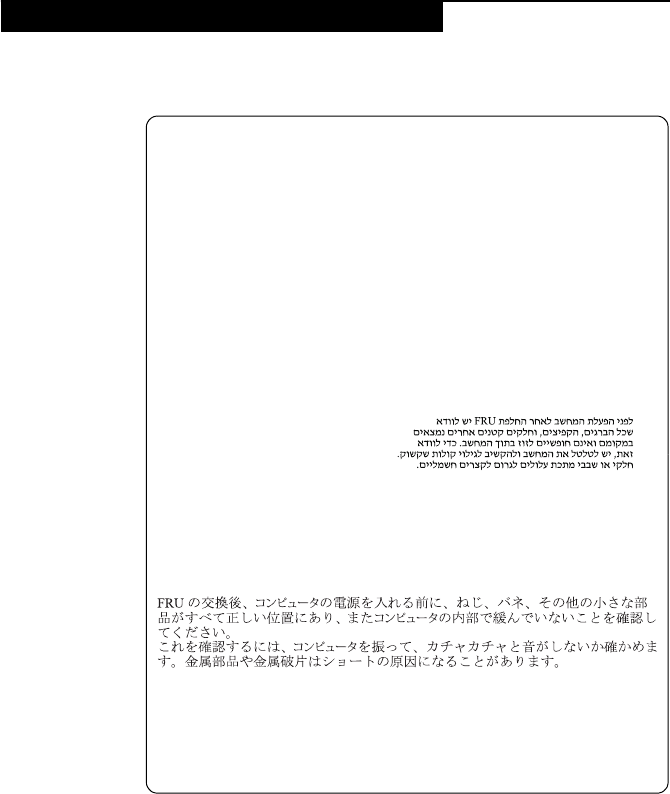
Safety notice 1
BeforethecomputerispoweredonafterFRUreplacement,makesureall
screws,springs,andothersmallpartsareinplaceandarenotleftloose
insidethecomputer.Verifythisbyshakingthecomputerandlisteningfor
rattlingsounds.Metallicpartsormetalflakescancauseelectricalshorts.
Avantderemettrel’ordinateursoustensionaprèsremplacementd’uneunité
enclientèle,vérifiezquetouslesressorts,visetautrespiècessontbienen
placeetbienfixées.Pourcefaire,secouezl’unitéetassurez‐vousqu’aucun
bruitsuspectneseproduit.Despiècesmétalliquesoudescopeauxdemétal
pourraientcauseruncourt‐circuit.
BevornacheinemFRU‐AustauschderComputerwiederangeschlossen
wird,mußsichergestelltwerden,daßkeineSchrauben,Federnoderandere
KleinteilefehlenoderimGehäusevergessenwurden.DerComputermuß
geschütteltundaufKlappergeräuschegeprüftwerden.Metallteileoder‐
splitterkönnenKurzschlüsseerzeugen.
Primadiaccenderel’elaboratoredopocheéstataeffettuatalasostituzionedi
unaFRU,accertarsichetutteleviti,lemolleetuttelealtripartidipiccole
dimensionisianonellacorrettaposizioneenonsianosparseall’interno
dell’elaboratore.Verificareciòscuotendol’elaboratoreeprestando
attenzioneadeventualirumori;eventualipartiopezzettimetallicipossono
provocarecortocircuitipericolosi.
AntesdeencenderelsistemadespuesdesustituirunaFRU,compruebeque
todoslostornillos,muellesydemáspiezaspequeñasseencuentranensu
sitioynoseencuentransueltasdentrodelsistema.Compruébeloagitandoel
sistemayescuchandolosposiblesruidosqueprovocarían.Laspiezas
metálicaspuedencausarcortocircuitoseléctricos.
LenovoTAB7HardwareMaintenanceManual
8
Safety notice 2
DANGER
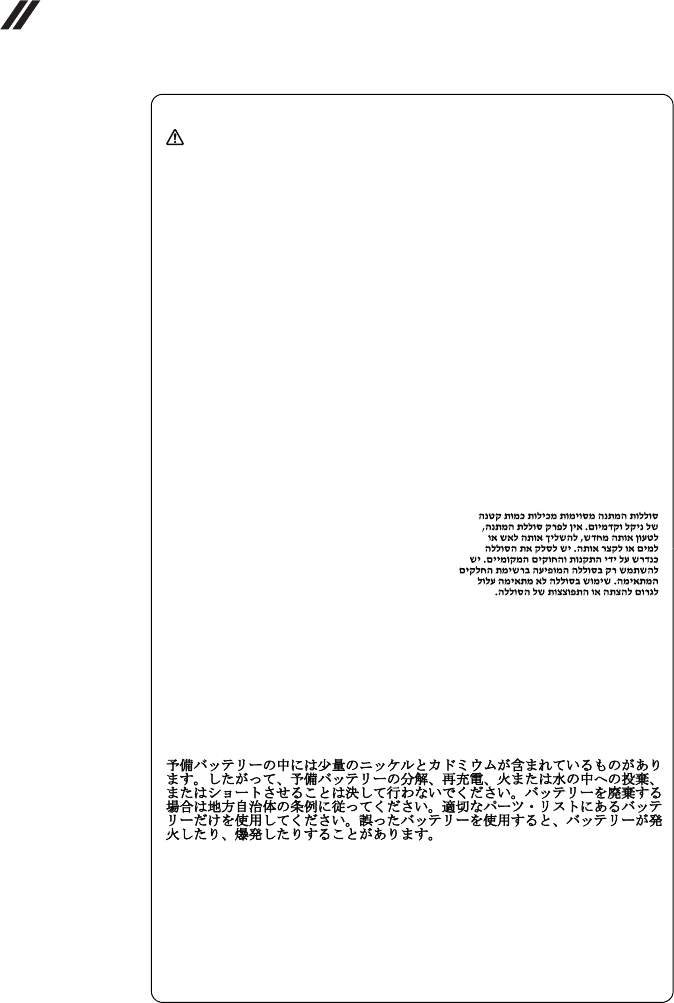
Somestandbybatteriescontainasmallamountofnickelandcadmium.Do
notdisassembleastandbybattery,rechargeit,throwitintofireorwater,or
short‐circuitit.Disposeofthebatteryasrequiredbylocalordinancesor
regulations.Useonlythebatteryintheappropriatepartslisting.Useofan
incorrectbatterycanresultinignitionorexplosionofthebattery.
Certainesbatteriesdesecourscontiennentdunickeletducadmium.Neles
démontezpas,nelesrechargezpas,nelesexposezniaufeuniàl’eau.Ne
lesmettezpasencourt‐circuit.Pourlesmettreaurebut,conformez‐vousà
laréglementationenvigueur.Lorsquevousremplacezlapiledesauvegarde
oucelledel’horlogetempsréel,veillezàn’utiliserquelesmodèlescitésdans
lalistedepiècesdétachéesadéquate.Unebatterieouunepileinappropriée
risquedeprendrefeuoud’exploser.
DieBereitschaftsbatterie,diesichunterdemDiskettenlaufwerkbefindet,
kanngeringeMengenNickelundCadmiumenthalten.Siedarfnicht
zerlegt,wiederaufgeladen,kurzgeschlossen,oderFeueroderWasser
ausgesetztwerden.BeiderEntsorgungdieörtlichenBestimmungenfür
Sondermüllbeachten.BeimErsetzenderBereitschafts‐oderSystembatterie
nurBatteriendesTypsverwenden,derinderErsatzteillisteaufgeführtist.
DerEinsatzfalscherBatterienkannzuEntzündungoderExplosionführen.
Alcunebatteriediriservacontengonounapiccolaquantitàdinichele
cadmio.Nonsmontarle,ricaricarle,gettarlenelfuocoonell’acquané
cortocircuitarle.Smaltirlesecondolanormativainvigore(DPR915/82,
successivedisposizioniedisposizionilocali).Quandosisostituiscela
batteriadell’RTC(realtimeclock)olabatteriadisupporto,utilizzare
soltantoitipiinseritinell’appropriatoCatalogoparti.L’impiegodiuna
batterianonadattapotrebbedeterminarel’incendiool’esplosionedella
batteriastessa.
Algunasbateríasdereservacontienenunapequeñacantidaddeníquely
cadmio.Nolasdesmonte,nirecargue,nilasechealfuegooalaguanilas
cortocircuite.Deséchelastalcomodisponelanormativalocal.Utilicesólo
bateríasqueseencuentrenenlalistadepiezas.Lautilizacióndeunabatería
noapropiadapuedeprovocarlaigniciónoexplosióndelamisma.
Safetyinformation
9
Safety notice 3
DANGER
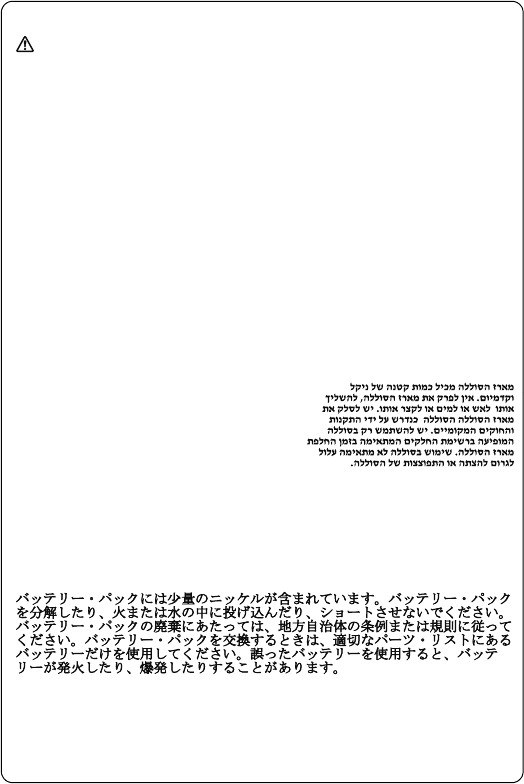
Thebatterypackcontainssmallamountsofnickel.Donotdisassembleit,
throwitintofireorwater,orshort‐circuitit.Disposeofthebatterypackas
requiredbylocalordinancesorregulations.Useonlythebatteryinthe
appropriatepartslistingwhenreplacingthebatterypack.Useofan
incorrectbatterycanresultinignitionorexplosionofthebattery.
Labatteriecontientdunickel.Neladémontezpas,nel’exposezniaufeuni
àl’eau.Nelamettezpasencourt‐circuit.Pourlamettreaurebut,
conformez‐vousàlaréglementationenvigueur.Lorsquevousremplacezla
batterie,veillezàn’utiliserquelesmodèlescitésdanslalistedepièces
détachéesadéquate.Eneffet,unebatterieinappropriéerisquedeprendre
feuoud’exploser.
AkkusenthaltengeringeMengenvonNickel.Siedürfennichtzerlegt,
wiederaufgeladen,kurzgeschlossen,oderFeueroderWasserausgesetzt
werden.BeiderEntsorgungdieörtlichenBestimmungenfürSondermüll
beachten.BeimErsetzenderBatterienurBatteriendesTypsverwenden,der
inderErsatzteillisteaufgeführtist.DerEinsatzfalscherBatterienkannzu
EntzündungoderExplosionführen.
Labatteriacontienepiccolequantitàdinichel.Nonsmontarla,gettarlanel
fuocoonell’acquanécortocircuitarla.Smaltirlasecondolanormativain
vigore(DPR915/82,successivedisposizioniedisposizionilocali).Quandosi
sostituiscelabatteria,utilizzaresoltantoitipiinseritinell’appropriato
Catalogoparti.L’impiegodiunabatterianonadattapotrebbedeterminare
l’incendiool’esplosionedellabatteriastessa.
Lasbateríascontienenpequeñascantidadesdeníquel.Nolasdesmonte,ni
recargue,nilasechealfuegooalaguanilascortocircuite.Deséchelastal
comodisponelanormativalocal.Utilicesólobateríasqueseencuentrenen
lalistadepiezasalsustituirlabatería.Lautilizacióndeunabateríano
apropiadapuedeprovocarlaigniciónoexplosióndelamisma.
LenovoTAB7HardwareMaintenanceManual
10
Safety notice 4
DANGER
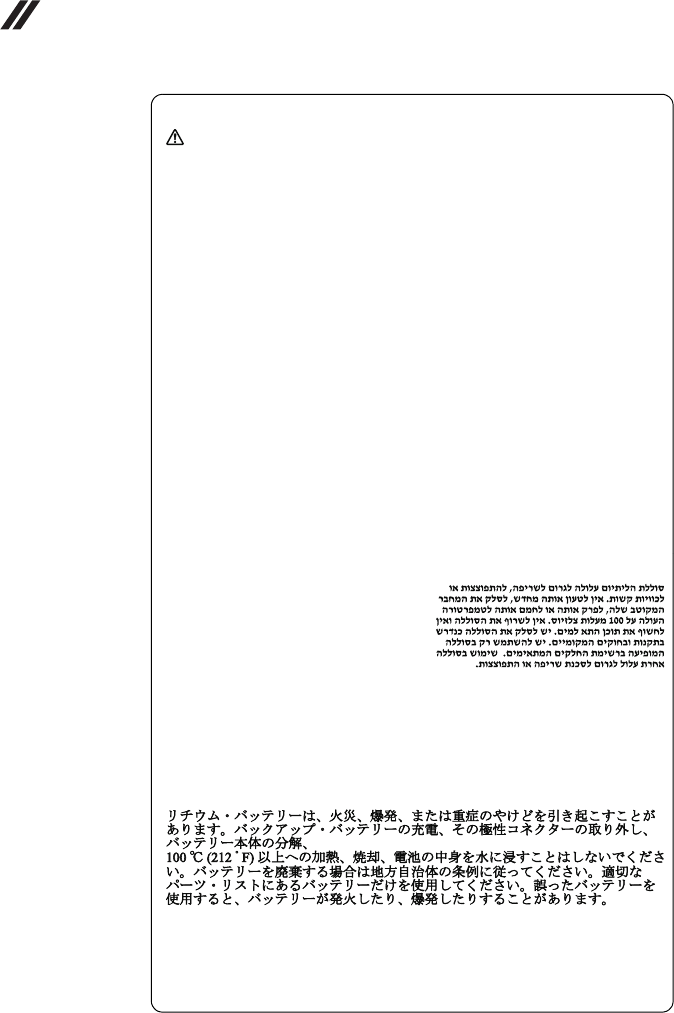
Thelithiumbatterycancauseafire,anexplosion,orasevereburn.Donot
rechargeit,removeitspolarizedconnector,disassembleit,heatitabove
100°C(212°F),incinerateit,orexposeitscellcontentstowater.Disposeof
thebatteryasrequiredbylocalordinancesorregulations.Useonlythe
batteryintheappropriatepartslisting.Useofanincorrectbatterycanresult
inignitionorexplosionofthebattery.
Lapiledesauvegardecontientdulithium.Elleprésentedesrisques
d’incendie,d’explosionoudebrûluresgraves.Nelarechargezpas,ne
retirezpassonconnecteurpolariséetneladémontezpas.Nel’exposezpas
àunetemperaturesupérieureà100°C,nelafaitespasbrûleretn’enexposez
paslecontenuàl’eau.Mettezlapileaurebutconformémentàla
réglementationenvigueur.Unepileinappropriéerisquedeprendrefeuou
d’exploser.
DieSystembatterieisteineLithiumbatterie.Siekannsichentzünden,
explodierenoderschwereVerbrennungenhervorrufen.Batteriendieses
Typsdürfennichtaufgeladen,zerlegt,über100Cerhitztoderverbrannt
werden.AuchdarfihrInhaltnichtmitWasserinVerbindunggebrachtoder
derzurrichtigenPolungangebrachteVerbindungssteckerentferntwerden.
BeiderEntsorgungdieörtlichenBestimmungenfürSondermüllbeachten.
BeimErsetzenderBatterienurBatteriendesTypsverwenden,derinder
Ersatzteillisteaufgeführtist.DerEinsatzfalscherBatterienkannzu
EntzündungoderExplosionführen.
Labatteriadisupportoeunabatteriaallitioepuoincendiarsi,esplodereo
procuraregraviustioni.Evitarediricaricarla,smontarneilconnettore
polarizzato,smontarla,riscaldarlaadunatemperaturasuperioreai100
gradicentigradi,incendiarlaogettarlainacqua.Smaltirlasecondola
normativainvigore(DPR915/82,successivedisposizioniedisposizioni
locali).L’impiegodiunabatterianonadattapotrebbedeterminare
l’incendiool’esplosionedellabatteriastessa.
Labateríaderepuestoesunabateríadelitioypuedeprovocarincendios,
explosionesoquemadurasgraves.Nolarecargue,niquiteelconector
polarizado,niladesmonte,nicalienteporencimadelos100°C(212°F),nila
incinereniexpongaelcontenidodesusceldasalagua.Deséchelatalcomo
disponelanormativalocal.
Safetyinformation
11
Safety notice 5
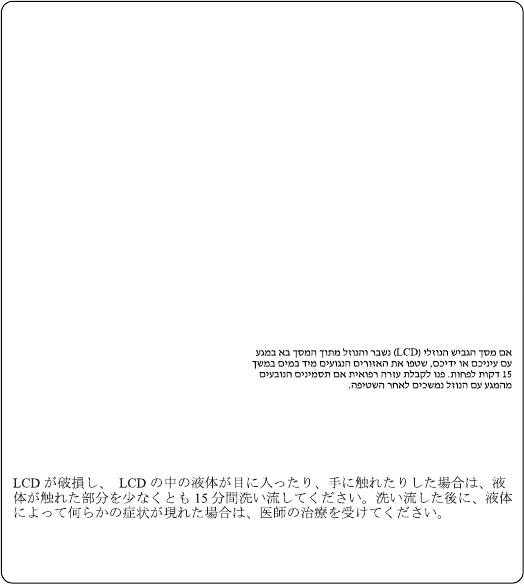
IftheLCDbreaksandthefluidfrominsidetheLCDgetsintoyoureyesor
onyourhands,immediatelywashtheaffectedareaswithwateratleastfor
15minutes.Seekmedicalcareifanysymptomscausedbythefluidare
presentafterwashing.
Silepanneaud’affichageàcristauxliquidessebriseetquevousrecevezdans
lesyeuxousurlesmainsunepartiedufluide,rincez‐lesabondamment
pendantaumoinsquinzeminutes.Consultezunmédecinsidessymptômes
persistentaprèslelavage.
DieLeuchtstoffröhreimLCD‐BildschirmenthältQuecksilber.Beider
EntsorgungdieörtlichenBestimmungenfürSondermüllbeachten.Der
LCD‐BildschirmbestehtausGlasundkannzerbrechen,wenner
unsachgemäßbehandeltwirdoderderComputeraufdenBodenfällt.Wenn
derBildschirmbeschädigtistunddiedarinbefindlicheFlüssigkeitin
KontaktmitHautundAugengerät,solltendiebetroffenenStellen
mindestens15MinutenmitWasserabgespültundbeiBeschwerden
anschließendeinArztaufgesuchtwerden.
Nelcasochecasol’LCDsidovesserompereedilliquidoinessocontenuto
entrasseincontattocongliocchiolemani,lavareimmediatamenteleparti
interessateconacquacorrenteperalmeno15minuti;poiconsultareun
medicoseisintomidovesseropermanere.
SilaLCDserompeyelfluidodesuinteriorentraencontactoconsusojoso
susmanos,laveinmediatamentelasáreasafectadasconaguadurante
15minutoscomomínimo.Obtengaatenciónmedicasisepresentaalgún
LenovoTAB7HardwareMaintenanceManual
12
Safety notice 6
DANGER
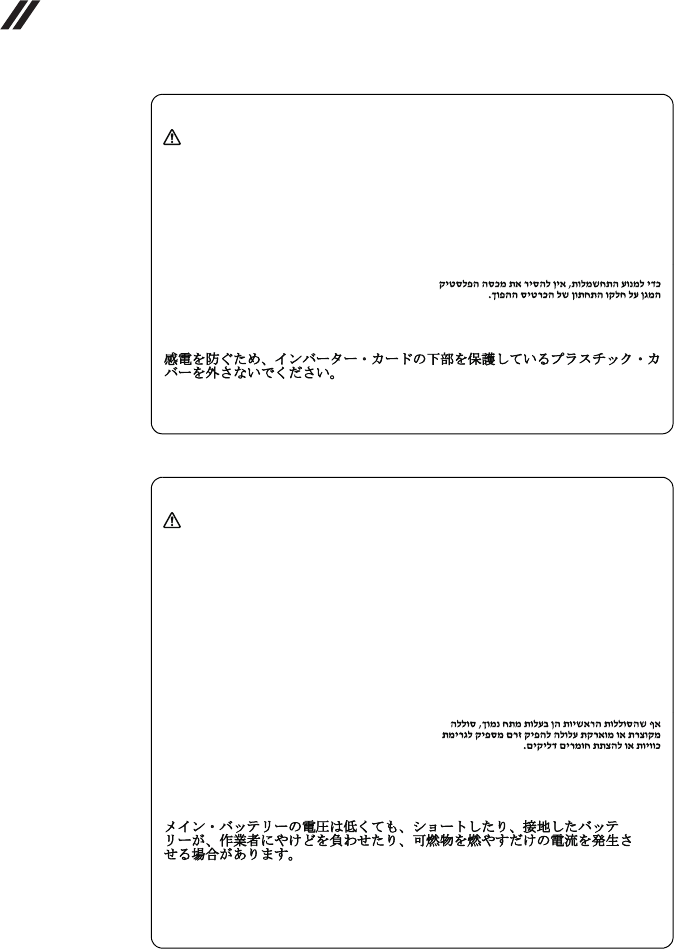
Toavoidshock,donotremovetheplasticcoverthatprotectsthelowerpart
oftheinvertercard.
Afind’évitertoutrisquedechocélectrique,neretirezpaslecacheen
plastiqueprotégeantlapartieinférieuredelacarted’alimentation.
AusSicherheitsgründendieKunststoffabdeckung,diedenunterenTeilder
Spannungswandlerplatineumgibt,nichtentfernen.
Perevitarescosseelettriche,nonrimuoverelacoperturainplasticache
avvolgelaparteinferioredellaschedainvertitore.
Paraevitardescargas,noquitelacubiertadeplásticoquerodealapartebaja
delatarjetainvertida.
Safety notice 7
DANGER
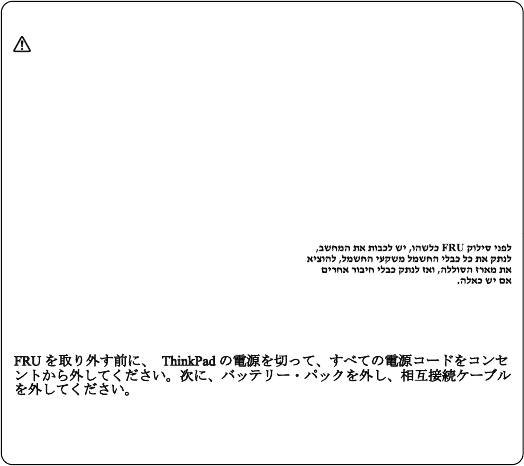
Thoughthemainbatterieshavelowvoltage,ashortedorgroundedbattery
canproduceenoughcurrenttoburnpersonnelorcombustiblematerials.
Bienquelevoltagedesbatteriesprincipalessoitpeuélevé,lecourt‐circuitou
lamiseàlamassed’unebatteriepeutproduiresuffisammentdecourant
pourbrûlerdesmatériauxcombustiblesoucauserdesbrûlurescorporelles
graves.
ObwohlHauptbatterieneineniedrigeSpannunghaben,könnensiedochbei
KurzschlußoderErdunggenugStromabgeben,umbrennbareMaterialien
zuentzündenoderVerletzungenbeiPersonenhervorzurufen.
Sebbenelebatteriedialimentazionesianoabassovoltaggio,unabatteriain
cortocircuitooamassapuòfornirecorrentesufficientedabruciaremateriali
combustibilioprovocareustioniaitecnicidimanutenzione.
Aunquelasbateríasprincipalestienenunvoltajebajo,unabatería
cortocircuitadaoconcontactoatierrapuedeproducirlacorrientesuficiente
comoparaquemarmaterialcombustibleoprovocarquemadurasenel
personal.
Safetyinformation
13
Safety notice 8
DANGER
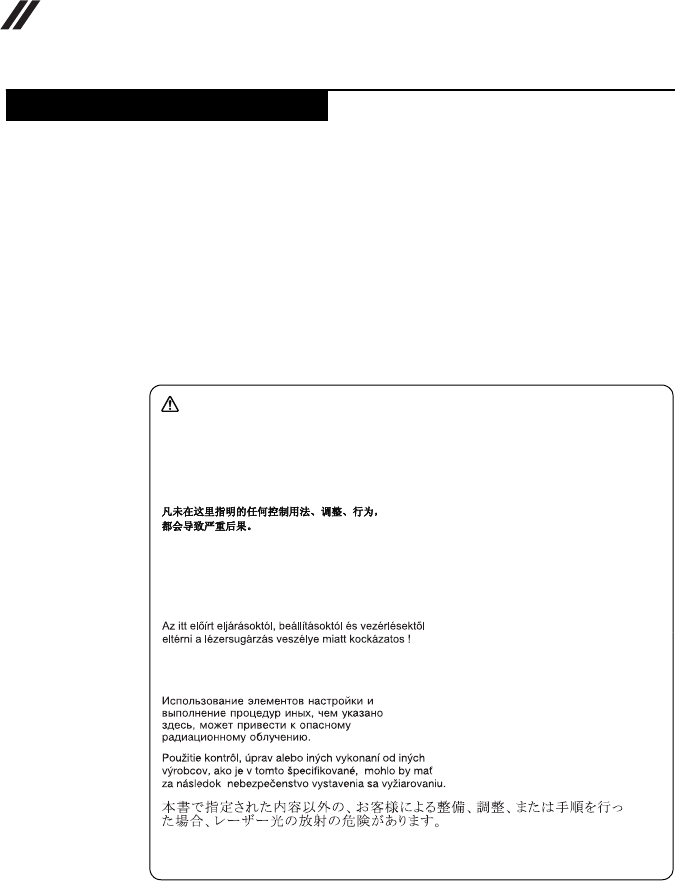
BeforeremovinganyFRU,turnoffthecomputer,unplugallpowercords
fromelectricaloutlets,removethebatterypack,andthendisconnectany
interconnectingcables.
Avantderetireruneunitéremplaçableenclientèle,mettezlesystèmehors
tension,débrancheztouslescordonsd’alimentationdessoclesdeprisede
courant,retirezlabatterieetdéconnecteztouslescordonsd’interface.
DieStromzufuhrmußabgeschaltet,alleStromkabelausderSteckdose
gezogen,derAkkuentferntundalleVerbindungskabelabgenommensein,
bevoreineFRUentferntwird.
PrimadirimuoverequalsiasiFRU,spegnereilsistema,scollegaredalleprese
elettrichetuttiicavidialimentazione,rimuoverelabatteriaepoiscollegare
icavidiinterconnessione.
AntesdequitarunaFRU,apagueelsistema,desenchufetodosloscablesde
lastomasdecorrienteeléctrica,quitelabateríay,acontinuación,desconecte
cualquiercabledeconexiónentredispositivos.
LenovoTAB7HardwareMaintenanceManual
14
SomemodelsofLenovocomputerareequippedfromthefactorywithanoptical
storagedevicesuchasaCD‐ROMdriveoraDVD‐ROMdrive.Suchdevicesare
alsosoldseparatelyasoptions.Ifoneofthesedrivesisinstalled,itiscertifiedin
theU.S.toconformtotherequirementsoftheDepartmentofHealthandHuman
Services21CodeofFederalRegulations(DHHS21CFR)SubchapterJforClass
1laserproducts.Elsewhere,thedriveiscertifiedtoconformtotherequirements
oftheInternationalElectrotechnicalCommission(IEC)825andCENELECEN60
825forClass1laserproducts.
IfaCD‐ROMdrive,aDVD‐ROMdrive,oranotherlaserdeviceisinstalled,note
thefollowing:
OpeningtheCD‐ROMdrive,theDVD‐ROMdrive,oranyotheropticalstorage
devicecouldresultinexposuretohazardouslaserradiation.Thereareno
serviceablepartsinsidethosedrives.Do not open.
Laser compliance statement
CAUTION
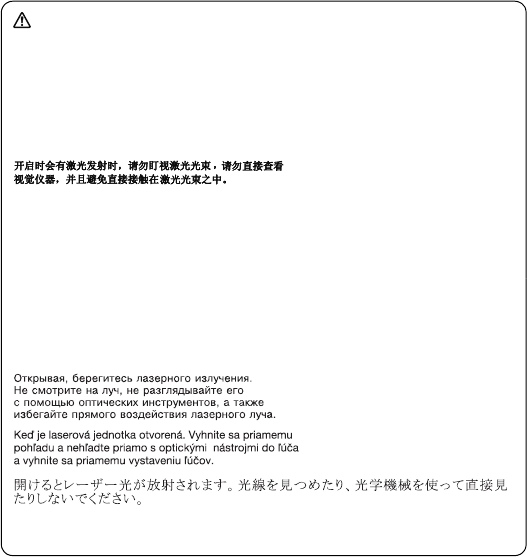
Useofcontrolsoradjustmentsorperformanceofproceduresotherthan
thosespecifiedhereinmightresultinhazardousradiationexposure.
Ousodecontroles,ajustesoudesempenhodeprocedimentosdiferentes
daquelesaquiespecificadospoderesultaremperigosaexposiçãoàradiação.
Pourévitertoutrisqued’expositionaurayonlaser,respectezlesconsignes
deréglageetd’utilisationdescommandes,ainsiquelesprocéduresdécrites.
WerdenSteuer‐undEinstellelementeandersalshierfestgesetztverwendet,
kanngefährlicheLaserstrahlungauftreten.
L’utilizzodicontrolli,regolazioniol’esecuzionediprocedurediverseda
quellespecificatepossonoprovocarel’esposizionea.
Elusodecontrolesoajustesolaejecucióndeprocedimientosdistintosdelos
aquíespecificadospuedeprovocarlaexposiciónaradiacionespeligrosas.
Safetyinformation
15
ACD‐ROMdrive,aDVD‐ROMdrive,oranyotherstoragedeviceinstalledmay
containanembeddedClass3AorClass3Blaserdiode.Notethefollowing:
DANGER
Emitsvisibleandinvisiblelaserradiationwhenopen.Donotstareintothe
beam,donotviewdirectlywithopticalinstruments,andavoiddirect
exposuretothebeam.
Radiaçãoporraiolaseraoabrir.Nãoolhefixonofeixedeluz,nãoolhe
diretamentepormeiodeinstrumentosóticoseeviteexposiçãodiretacomo
feixedeluz.
Rayonnementlasersicarterouvert.Évitezdefixerlefaisceau,deleregarder
directementavecdesinstrumentsoptiques,oudevousexposeraurayon.
LaserstrahlungbeigeöffnetemGerät.Nichtdirektoderüberoptische
InstrumenteindenLaserstrahlsehenunddenStrahlungsbereichmeiden.
Kinyitáskorlézersugár!Nenézzenbeleseszabadszemmel,seoptikai
eszközökkel.Kerüljeasugárnyalábbalvalóérintkezést!
Aprendol’unitàvengonoemesseradiazionilaser.Nonfissareilfascio,non
guardarlodirettamenteconstrumentiotticieevitarel’esposizionedirettaal
fascio.
Radiaciónláseralabrir.Nomirefijamenteniexamineconinstrumental
ópticoelhazdeluz.Evitelaexposicióndirectaalhaz.
LenovoTAB7HardwareMaintenanceManual
16
Thischapterpresentsthefollowingimportantserviceinformation:
•“StrategyforreplacingFRUs”onpage 16
–“Importantnoticeforreplacingamainboard”onpage 17
•“ImportantinformationaboutreplacingRoHScompliantFRUs”onpage 18
Before replacing parts:
Makesurethatallsoftwarefixes,drivers,andBIOSdownloadsareinstalled
beforereplacinganyFRUslistedinthismanual.
Afteramainboardisreplaced,ensurethatthelatestBIOSisloadedtothemain
boardbeforecompletingtheserviceaction.
Todownloadsoftwarefixes,drivers,andBIOS,followthestepsbelow:
1. Gotohttp://support.lenovo.com/.
2. EnteraserialnumberorselectaproductoruseLenovosmartdownloading.
3. SelecttheBIOS/Driver/Applicationsanddownload.
4. Followthedirectionsonthescreenandinstallthenecessarysoftware.
Important service information
Important:
BIOSanddevicedriverfixesarecustomer‐installable.TheBIOSanddevice
driversarepostedonthecustomersupportsite:
http://support.lenovo.com/.
Strategy for replacing FRUs
Importantserviceinformation
17
Usethefollowingstrategytopreventunnecessaryexpenseforreplacingand
servicingFRUs:
•IfyouareinstructedtoreplaceanFRU,butthereplacementdoesnotsolve
theproblem,reinstalltheoriginalFRUbeforeyoucontinue.
•Somecomputershavebothaprocessorboardandamainboard.Ifyouare
instructedtoreplaceeitherofthem,andreplacingoneofthemdoesnotsolve
theproblem,reinstallthatboard,andthenreplacetheotherone.
•IfanadapteroradeviceconsistsofmorethanoneFRU,anyoftheFRUsmay
bethecauseoftheerror.Beforereplacingtheadapterordevice,removethe
FRUsonebyonetoseeifthesymptomschange.ReplaceonlytheFRUthat
changedthesymptoms.
Attention:Thesetupconfigurationonthecomputeryouareservicingmayhave
beencustomized.RunningAutomaticConfigurationmayalterthesettings.Note
thecurrentconfigurationsettings(usingtheViewConfigurationoption);then,
whenservicehasbeencompleted,verifythatthosesettingsremainineffect.
Important notice for replacing a main board
Somecomponentsmountedonamainboardareverysensitive.Improper
handlingcancausedamagetothosecomponents,andmaycauseasystem
malfunction.
Attention:Whenhandlingamainboard:
•Donotdropthemainboardorapplyanyexcessiveforcetoit.
•Avoidroughhandlingofanykind.
•Avoidbendingthemainboardandhardpushingtopreventcrackingateach
BGA(BallGridArray)chipset.
LenovoTAB7HardwareMaintenanceManual
18
RoHS, The Restriction of Hazardous Substances in Electrical and
Electronic Equipment Directive (2002/95/EC) is a European Union legal
requirement affecting the global electronics industry. RoHS requirements
must be implemented on Lenovo products placed on the market after June
2006. Products on the market before June 2006 are not required to have
RoHS compliant parts. If the original FRU parts are non-compliant,
replacement parts can also be non-compliant. In all cases if the original
FRU parts are RoHS compliant, the replacement part must also be RoHS
compliant.
Note:RoHSandnon‐RoHSFRUpartnumberswiththesamefitandfunctionare
identifiedwithuniqueFRUpartnumbers.
LenovoplanstotransittoRoHScompliancewellbeforetheimplementationdate
andexpectsitssupplierstobereadytosupportLenovo’srequirementsand
scheduleintheEU.Productssoldin2005and2006willcontainsomeRoHS
compliantFRUs.Thefollowingstatementpertainstotheseproductsandany
productLenovoproducescontainingRoHScompliantFRUs.
RoHScompliantFRUshaveuniqueFRUpartnumbers.BeforeoraftertheRoHS
implementationdate,failedRoHScompliantpartsmustalwaysbereplacedwith
RoHScompliantones,soonlytheFRUsidentifiedascompliantinthesystem
HMMordirectsubstitutionsforthoseFRUsmaybeused.
Note:AdirectsubstitutionisapartwithadifferentFRUpartnumberthatis
automaticallyshippedbythedistributioncenteratthetimeoftheorder.
Products marketed before June 2006 Products marketed after June 2006
Current or
original part
Replacement
FRU
Current or
original part
Replacement
FRU
Non‐RoHS CanbeNon‐RoHS
MustbeRoHS MustbeRoHS
Non‐RoHS CanbeRoHS
Non‐RoHS CansubtoRoHS
RoHS MustbeRoHS
Important information about replacing RoHS compliant FRUs

Generalcheckout
19
Thischapterpresentsthefollowinginformation:
•“Whattodofirst”onpage 20
•“Powersystemcheckout”onpage 21
Beforeyougotothecheckout,makesuretoreadthefollowingimportantnotes:
General checkout
Important notes:
•Only certified trained personnel can service the computer.
•Before replacing any FRU, read the entire page on removing and
replacing FRUs.
•When you replace FRUs, use new nylon-coated screws.
•Be extremely careful during such write operations as copying,
saving, or formatting. Drivesinthecomputerthatyouareservicing
sequencemighthavebeenaltered.Ifyouselectanincorrectdrive,data
orprogramsmightbeoverwritten.
•Replace an FRU only with another FRU of the correct model. When
youreplaceanFRU,makesurethatthemachinemodelandtheFRUpart
numberarecorrectbyreferringtotheFRUpartslist.
•An FRU should not be replaced just because of a single,
unreproducible failure. Singlefailurescanoccurforavarietyofreasons
thathavenothingtodowithahardwaredefect,suchascosmic
radiation,electrostaticdischarge,orsoftwareerrors.Considerreplacing
anFRUonlywhenaproblemrecurs.IfyoususpectthatanFRUis
defective,cleartheerrorlogsandrunthetestagain.Iftheerrordoesnot
recur,donotreplacetheFRU.
•Be careful not to replace a nondefective FRU.

LenovoTAB7HardwareMaintenanceManual
20
WhenyoudoreturnanFRU,youmustincludethefollowinginformationinthe
partsexchangeformorpartsreturnformthatyouattachtoit:
1. Nameandphonenumberofservicer
2. Dateofservice
3. Dateonwhichthemachinefailed
4. Dateofpurchase
5. ProcedureindexandpagenumberinwhichthefailingFRUwasdetected
6. FailingFRUnameandpartnumber
7. Machinetype,modelnumber,andserialnumber
8. Customer’snameandaddress
Note for warranty:Duringthewarrantyperiod,thecustomermaybe
responsibleforrepaircostsifthecomputerdamagewascausedbymisuse,
accident,modification,unsuitablephysicaloroperatingenvironment,or
impropermaintenancebythecustomer.
Thefollowingisalistofsomecommonitemsthatarenotcoveredunder
warrantyandsomesymptomsthatmightindicatethatthesystemwassubjected
tostressbeyondnormaluse.
Beforecheckingproblemswiththecomputer,determinewhetherthedamageis
coveredunderthewarrantybyreferringtothefollowinglist:
The following are not covered under warranty:
•LCDpanelcrackedfromtheapplicationofexcessiveforceorfrombeing
dropped
•Scratched(cosmetic)parts
•Distortion,deformation,ordiscolorationofthecosmeticparts
•Plasticparts,latches,pins,orconnectorsthathavebeencrackedorbrokenby
excessiveforce
•Damagecausedbyliquidspilledintothesystem
•DamagecausedbytheimproperinsertionofaPCCardortheinstallationof
anincompatiblecard
•Improperdiskinsertionoruseofanopticaldrive
•Diskettedrivedamagecausedbypressureonthediskettedrivecover,
foreignmaterialinthedrive,ortheinsertionofadiskettewithmultiple
labels
•Damagedorbentdisketteejectbutton
•Fusesblownbyattachmentofanonsupporteddevice
•Forgottencomputerpassword(makingthecomputerunusable)
•Stickykeyscausedbyspillingaliquidontothekeyboard
•UseofanincorrectACadapteronlaptopproducts
The following symptoms might indicate damage caused by nonwarranted
activities:
•Missingpartsmightbeasymptomofunauthorizedserviceormodification.
•Ifthespindleofaharddiskdrivebecomesnoisy,itmayhavebeensubjected
toexcessiveforce,ordropped.
What to do first
Generalcheckout
21
Toverifyasymptom,followthestepsbelow:
1. Turnoffthecomputer.
2. Removethebatterypack.
3. ConnecttheACadapter.
4. Makesurethatpowerissuppliedwhenyouturnonthecomputer.
5. Turnoffthecomputer.
6. DisconnecttheACadapterandinstallthechargedbatterypack.
7. Makesurethatthebatterypacksuppliespowerwhenyouturnonthe
computer.
Ifyoususpectapowerproblem,seetheappropriateoneofthefollowingpower
supplycheckouts:
•“CheckingtheTabACCharger”onpage 21
•“Checkingtheinternalbatterystatus”onpage 21
Checking the Tab AC Charger
WhenyouusetheIdeaTabACChargertochargethetabletbutnopoweris
charged,seetheinstructionsinthistopictochecktheIdeaTabACCharger.
TochecktheIdeaTabACCharger,dothefollowing:
1. Disconnectthemicro‐USBcablefromthetablet.
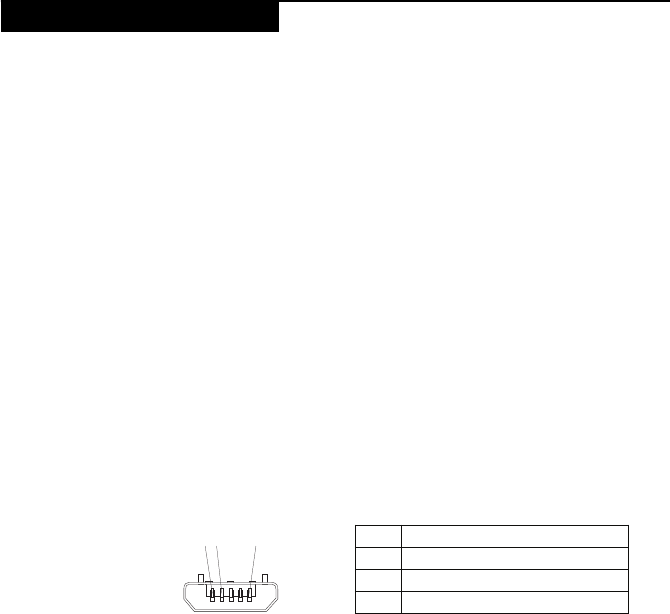
2. MeasuretheoutputvoltageacrosstheconnectormarkedBofthemicro‐USB
cable.Refertothefollowingfigure:
Note:Theoutputvoltageacrosspin3ofthemicro‐Bconnectormightbe
differentfromtheoneyouareservicing.
3. Ifthevoltageisnotcorrect,replacethemicro‐USBcable.
4. Ifthevoltageisacceptable,replacethemainboard.
Checking the internal battery status
Tocheckthebatterystatusofthetablet,doeitherofthefollowing:
•Approximate information about the battery status
Gettheapproximatestatusofthebatteryatanytimebycheckingthebattery
statusicononthesystembarintheupper‐rightcornerofthescreen.The
shorterthegreenbaris,thelessthebatterypowerremains.
•Accurate information about the battery status
Togettheaccurateinformationaboutthebatterystatusofthetablet,dothe
following:
Power system checkout
Pin Voltage (V dc)
1Ground
20
3+5
12 3 (5V)

LenovoTAB7HardwareMaintenanceManual
22
1.OpentheAndroidSettingsscreen.
ToopentheAndroidSettingsscreen,doeitherofthefollowing:
–FromthemainHomescreen,touchtheAndroidSettingsiconon
LenovoLaunchZone.TheAndroidSettingsscreenisdisplayed.
–TouchtheapplicationiconfromtheactionbarandthentouchSettings.
TheAndroidSettingsscreenisdisplayed.
2.TouchAboutTabletontheAndroidSettingsscreen.
3.TouchStatustoviewtheaccuratepercentageoftheremainingbattery
power.YoualsocantouchBatteryusetocheckwhatapplicationsare
consumingbatterypower.
Relatedserviceinformation
23
Thischapterpresentsthefollowinginformation:
•“Security”onpage 23
•“Powermanagement”onpage 23
Securitysettingsinclude:SCREENSECURITY,SIMCARDLOCK(3Gversion
only),PASSWORDS,DEVICEADMINISTRATIONandCREDENTIAL
STORAGE.
Note:PowermanagementmodesarenotsupportedforAPMoperatingsystem.
Toreducepowerconsumption,thecomputerhasthreepowermanagement
modes:screenblank,sleep(standby),andhibernation.
Activating/Deactivating the Display
Withthedisplaydeactivated,pressthePowerbuttononthetablettoactivatethe
display.Thedisplaywillthenilluminate,indicatingthatithasbeenactivated.
Ifyoudonotneedtouseyourtablettemporarily,youcanpressthePowerbutton
todeactivatethedisplay.Yourtabletwillthenenterstandbymodetosave
power.
Related service information
Security
Power management

LenovoTAB7
25
Thissectionpresentsnoticesrelatedtoremovingandreplacingparts.Readthis
sectioncarefullybeforereplacinganyFRU.
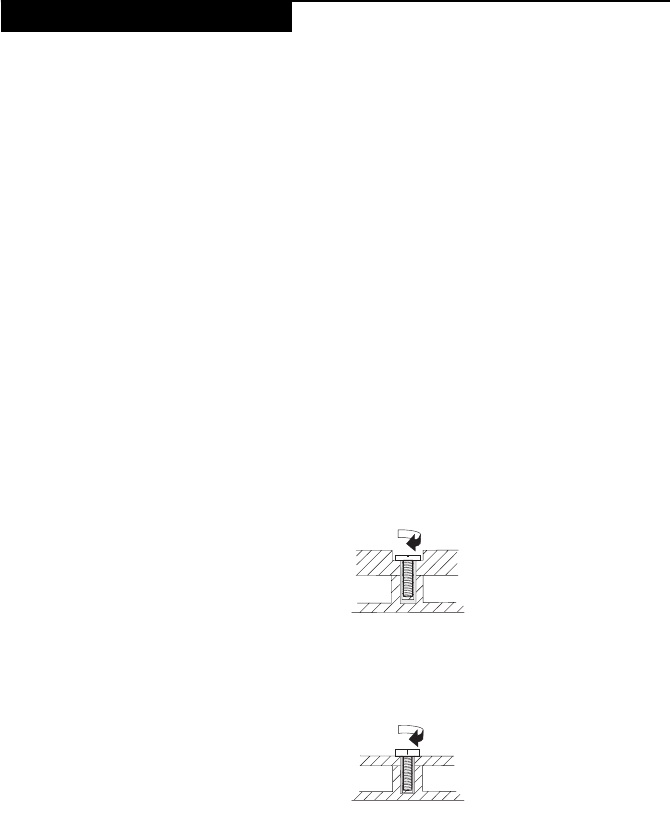
Screw notices
Loosescrewscancauseareliabilityproblem.IntheLenovocomputer,this
problemisaddressedwithspecialnylon‐coatedscrewsthathavethefollowing
characteristics:
•Theymaintaintightconnections.
•Theydonoteasilycomeloose,evenwithshockorvibration.
•Theyarehardertotighten.
•Eachoneshouldbeusedonlyonce.
Dothefollowingwhenyouservicethismachine:
•Keepthescrewkitinyourtoolbag.
•CarefullyremovescrewsforreusewhenreplacingFRUs.
•Useatorquescrewdriverifyouhaveone.
Tightenscrewsasfollows:
•Plastic to plastic
Turnanadditional90°afterthescrewheadtouchesthesurfaceoftheplastic
part:
•Logic card to plastic
Turnanadditional180°afterthescrewheadtouchesthesurfaceofthelogic
card:
•Torque driver
Ifyouhaveatorquescrewdriver,refertothe“Torque”columnforeachstep.
•Makesurethatyouusethecorrectscrews.Ifyouhaveatorquescrewdriver,
tightenallscrewsfirmlytothetorqueshowninthetable.Never use a screw
that you removed. Use a new one. Make sure that all screws are
tightened firmly.
•Ensuretorquescrewdriversarecalibratedcorrectlyfollowingcountry
specifications.
FRU replacement notices
more than 90°
(Cross-section)
more than 180°
(Cross-section)
LenovoTAB7HardwareMaintenanceManual
26
Thissectionpresentsexplodedfigureswiththeinstructionstoindicatehowto
removeandreplacetheFRU.Makesuretoobservethefollowinggeneralrules:
1. Donotattempttoserviceanycomputerunlessyouhavebeentrainedand
certified.Anuntrainedpersonrunstheriskofdamagingparts.
2. BeforereplacinganyFRU,review“FRUreplacementnotices”onpage 25.
3. BeginbyremovinganyFRUsthathavetoberemovedbeforethefailingFRU.
AnyofsuchFRUsarelistedatthetopofthepage.Removethemintheorder
inwhichtheyarelisted.
4. FollowthecorrectsequenceinthestepstoremovetheFRU,asgiveninthe
figuresbythenumbersinsquarecallouts.
5. WhenturningascrewtoreplaceanFRU,turnitinthedirectionasgivenby
thearrowinthefigure.
6. WhenremovingtheFRU,moveitinthedirectionasgivenbythearrowinthe
figure.
7. ToputthenewFRUinplace,reversetheremovalproceduresandfollowany
ofthenotesthatpertaintoreplacement.Forinformationaboutconnecting
andarranginginternalcables,see“Locations”onpage 49.
8. WhenreplacinganFRU,usethecorrectscrewasshownintheprocedures.
Attention:AfterreplacinganFRU,donotturnonthecomputeruntilyouhave
madesurethatallscrews,springs,andothersmallpartsareinplaceandnone
arelooseinsidethecomputer.Verifythisbyshakingthecomputergentlyand
listeningforrattlingsounds.Metallicpartsormetalflakescancauseelectrical
shortcircuits.
Attention:Themainboardissensitiveto,andcanbedamagedby,electrostatic
discharge.Beforetouchingit,establishpersonalgroundingbytouchinga
groundpointwithonehandorusinganelectrostaticdischarge(ESD)strap
(P/N6405959)toremovepotentialshockreasons.
Removing and replacing an FRU
DANGER
BeforeremovinganyFRU,turnoffthecomputer,unplugallpowercords
fromelectricaloutlets,removethebatterypack,andthendisconnectanyof
theinterconnectingcables.
LenovoTAB7
27
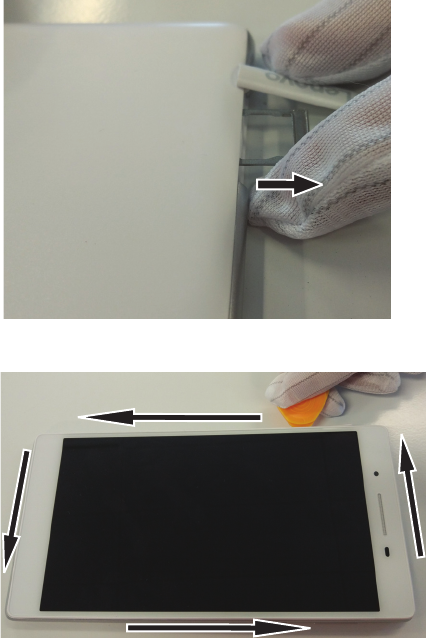
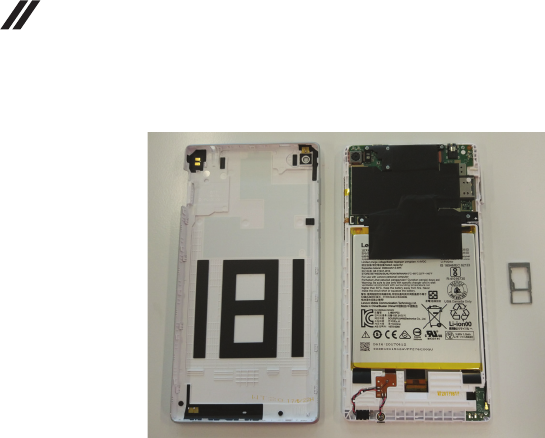
1010 Back Cover
Figure1.Removalstepsofbackcover
OpentheSIMcardslotcoverandtakeouttheSIMcardtray.
Usingadisassemblytool,pryopentherearcoverinthedirectionofthearrows,
startingfromtheSIMcardslot.
LenovoTAB7HardwareMaintenanceManual
28
Figure1.Removalstepsofbackcover(continued)
LenovoTAB7
29
1020 Battery
Foraccess,removethisFRU:
•“1010BackCover”onpage 27
Figure2.Removalstepsofbattery
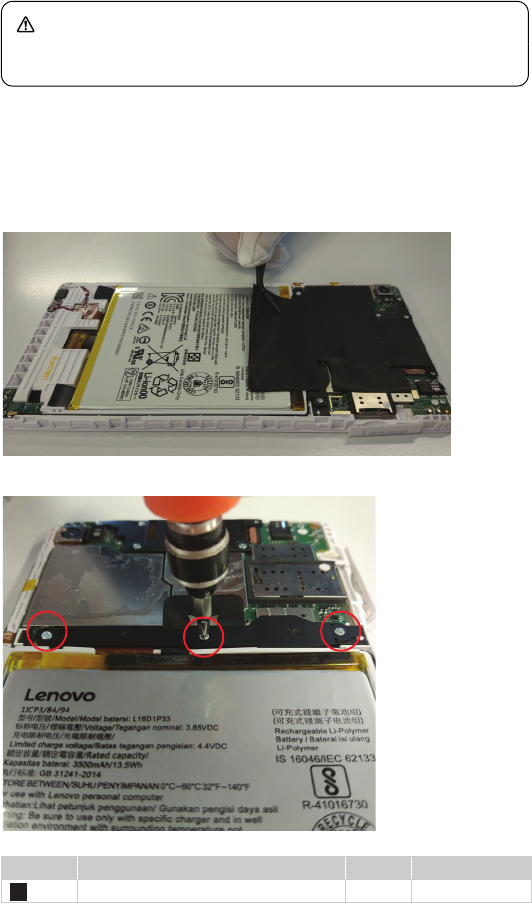
Tearoffthebatteryradiationfilmfromthedeviceslowly.
Unscrewthethreescrewsonthebatteryconnectorbracketandremoveit.
Step Screw (quantity) Color Torque
M1.4*3.0(3) Silver 0.7N
DANGER
Onlyusethebatteryspecifiedinthepartslistforyourcomputer.Anyother
batterycouldigniteorexplode.
1
LenovoTAB7HardwareMaintenanceManual
30
Figure2.Removalstepsofbattery(continued)
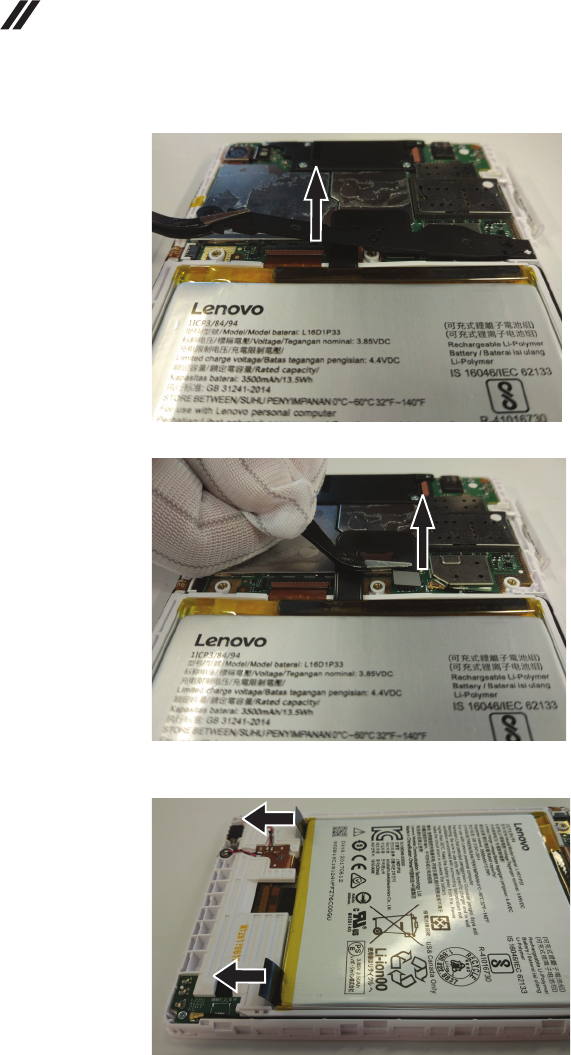
DisconnectthebatteryFPCinthedirectionofthearrow.
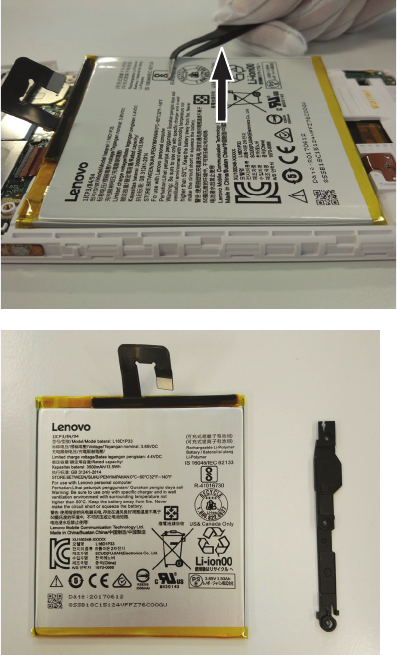
Peeloffandpullouttheteartapealongthedirectionofthebattery.Takeoutthe
battery.
LenovoTAB7
31
Figure2.Removalstepsofbattery(continued)
LenovoTAB7HardwareMaintenanceManual
32
1030 Sub Board
Foraccess,removethisFRU:
•“1010BackCover”onpage 27
•“1020Battery”onpage 29
Figure3.Removalstepsofsubboard
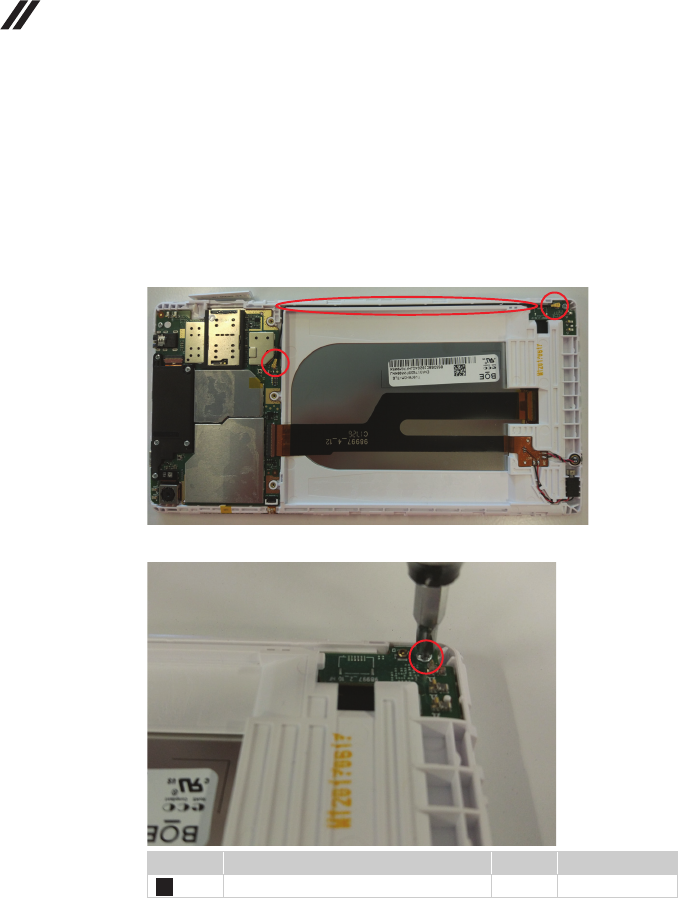
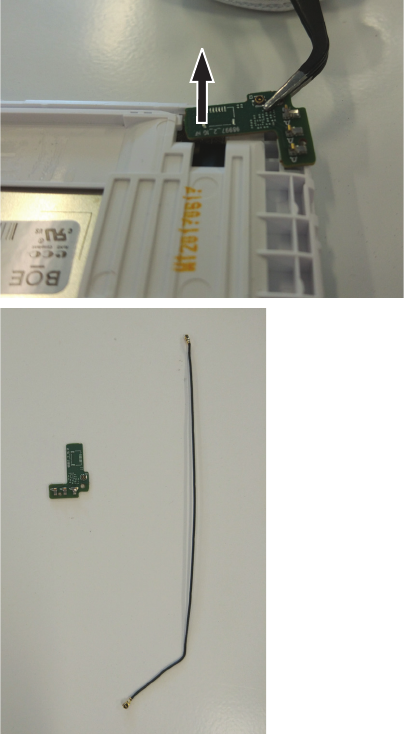
DisconnecttheendsoftheRFcableandremovetheRFcablefromtherouting
groove.
Unscrewthescrewonthesubboardandremovethesubboard.
Step Screw (quantity) Color Torque
M1.4*3.0(1) Silver 0.7N
1
LenovoTAB7
33
Figure3.Removalstepsofsubboard(continued)
LenovoTAB7
35
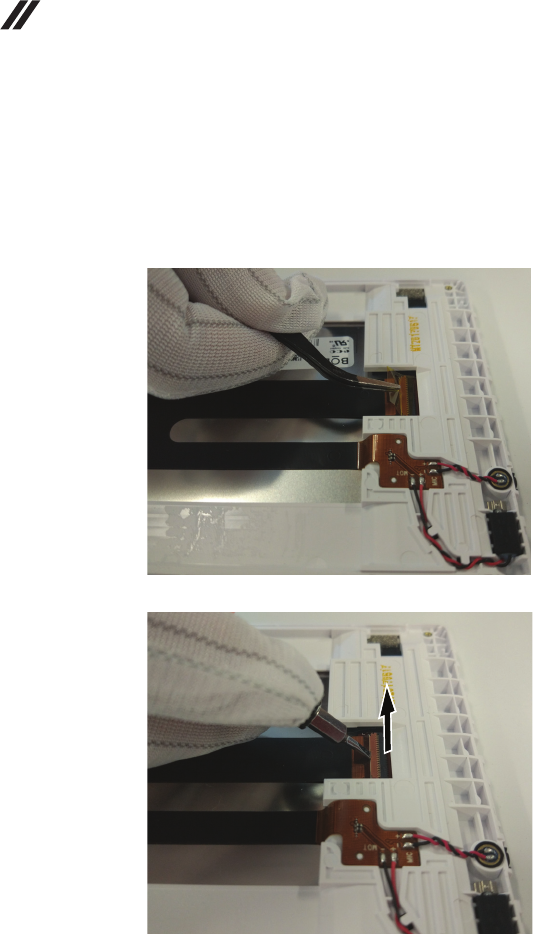
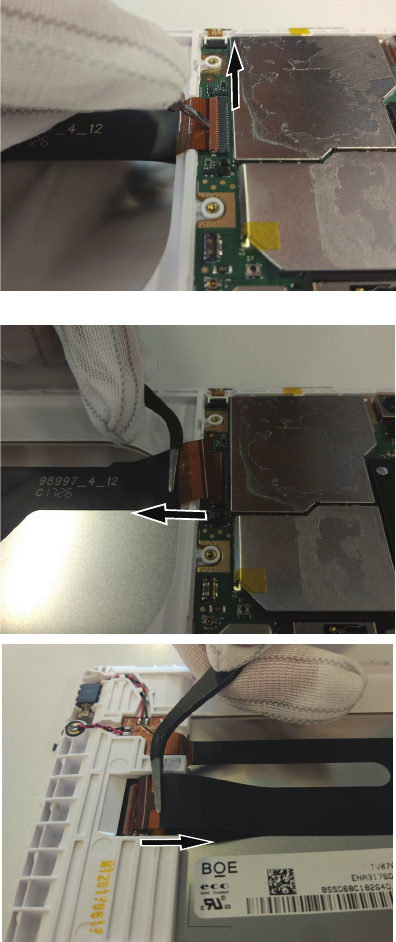
Figure4.RemovalstepsofmainFPC(continued)
PullouttheFPCinthedirectionofthearrow.
LenovoTAB7HardwareMaintenanceManual
36
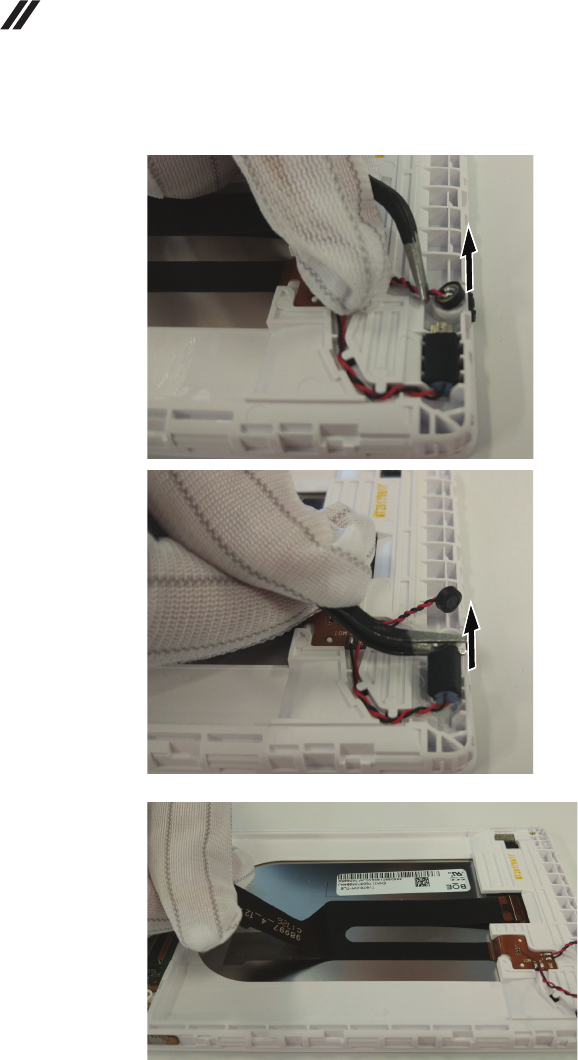
Figure4.RemovalstepsofmainFPC(continued)
RemovethevibratorandMICfromthefrontcover.
SlowlyseparatethemainFPCfromthefrontcasing.
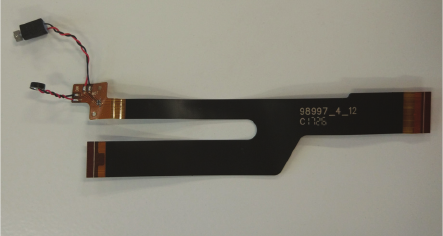
LenovoTAB7
37
Figure4.RemovalstepsofmainFPC(continued)
SolderboththevibratorandtheMICofffromthemainFPCwithasolderingiron
atatemperatureof330‐350.
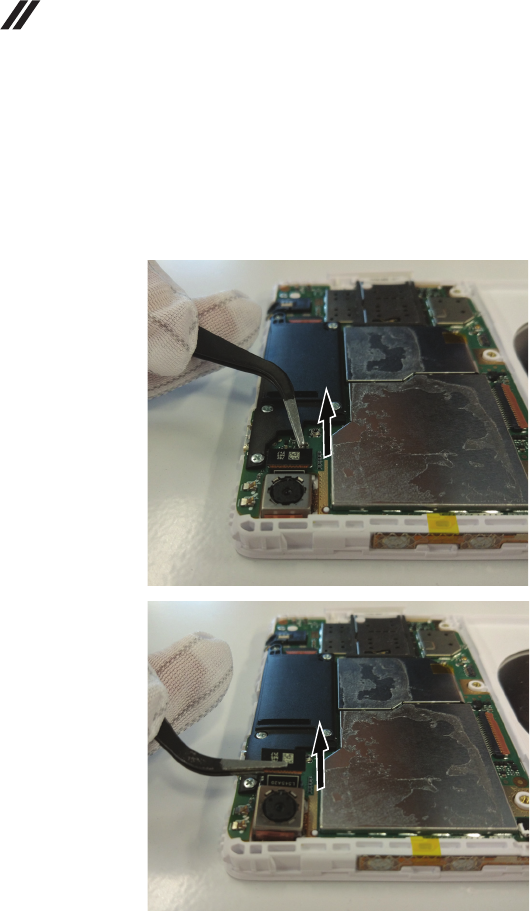
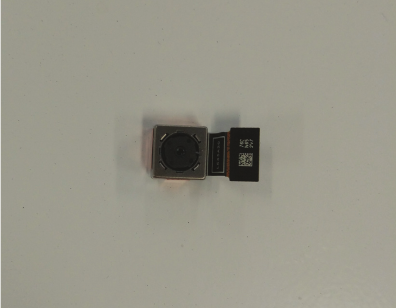
LenovoTAB7
39
Figure5.Removalstepsofrearcamera(continued)
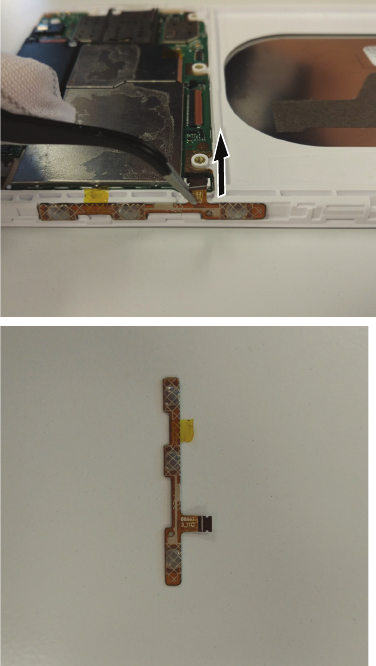
LenovoTAB7
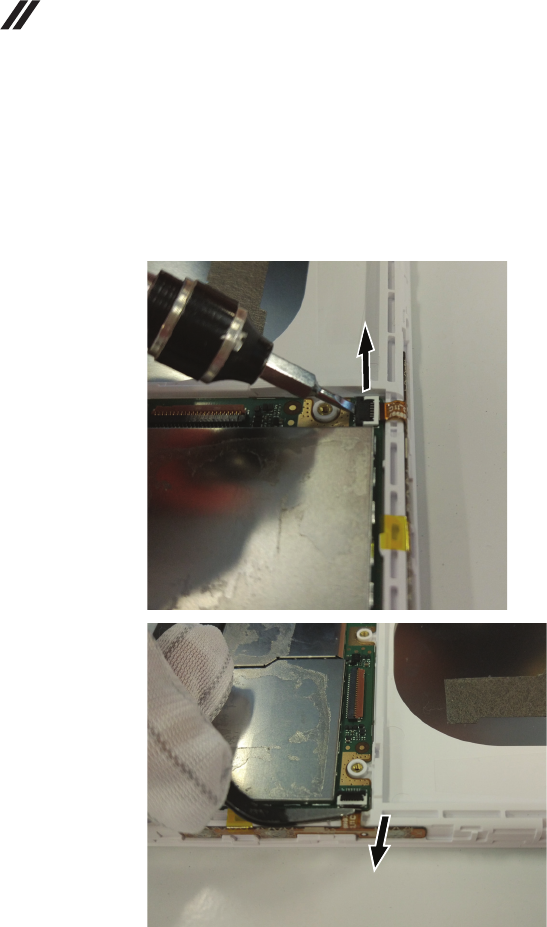
41
Figure6.Removalstepsofsidekey(continued)
Removethesidekeyinthedirectionofthearrow.
LenovoTAB7HardwareMaintenanceManual
42
1070 Speaker Box
Foraccess,removetheseFRUsinorder:
•“1010BackCover”onpage 27
•“1020Battery”onpage 29
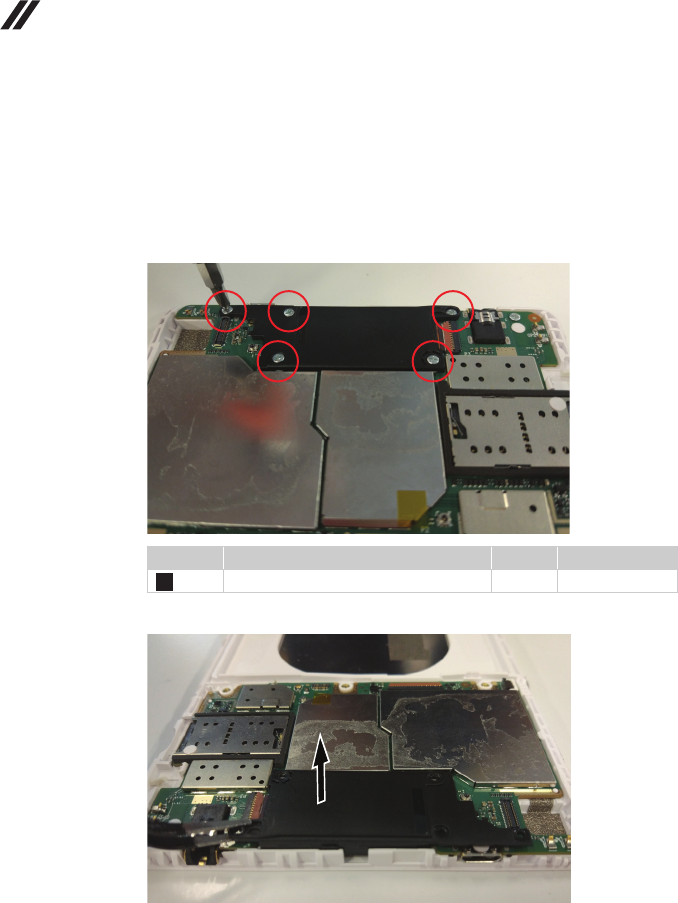
Figure7.Removalstepsofspeakerbox
Unscrewthefivescrewsonthespeakerbox.
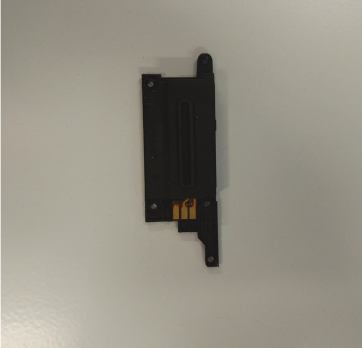
Removethespeakerboxinthedirectionofthearrow.
Step Screw (quantity) Color Torque
M1.4*3.0(5) Silver 0.7N
1
LenovoTAB7
43
Figure7.Removalstepsofspeakerbox(continued)
LenovoTAB7HardwareMaintenanceManual
44
1080 Main Board
Foraccess,removetheseFRUsinorder:
•“1010BackCover”onpage 27
•“1020Battery”onpage 29
•“1030SubBoard”onpage 32
•“1040MainFPC”onpage 34
•“1050RearCamera”onpage 38
•“1060Sidekey”onpage 40
•“1070SpeakerBox”onpage 42
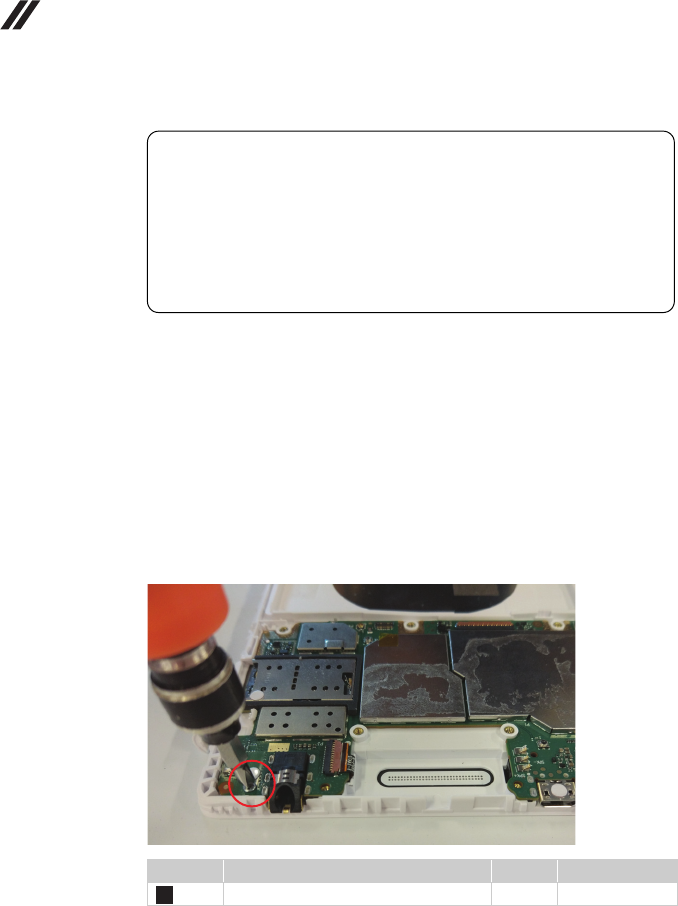
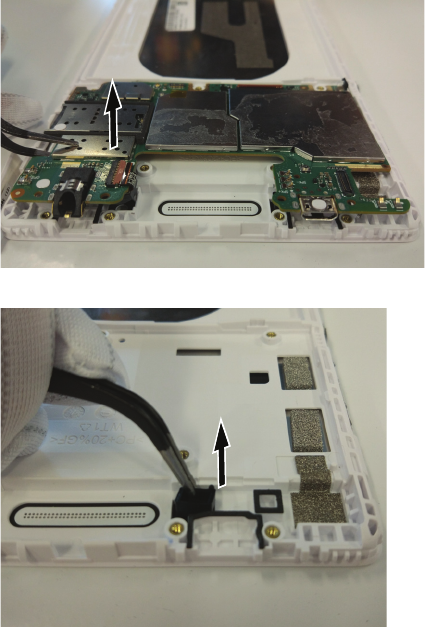
Figure8.Removalstepsofmainboard
Unscrewthescrewonthemainboard.
Step Screw (quantity) Color Torque
M1.4*3.0(1) Silver 0.7N
Important notices for handling the main board:
Whenhandlingthemainboard,bearthefollowinginmind.
•Becarefulnottodropthemainboardonabenchtopthathasahard
surface,suchasmetal,wood,orcomposite.
•Avoidroughhandlingofanykind.
•Throughouttheprocess,makesurenottodroporstackthemainboard.
•Ifyouputthemainboarddown,makesuretoputitonlyonapadded
surfacesuchasanESDmatorconductivecorrugatedmaterial.
1
LenovoTAB7
45
Figure8.Removalstepsofmainboard(continued)
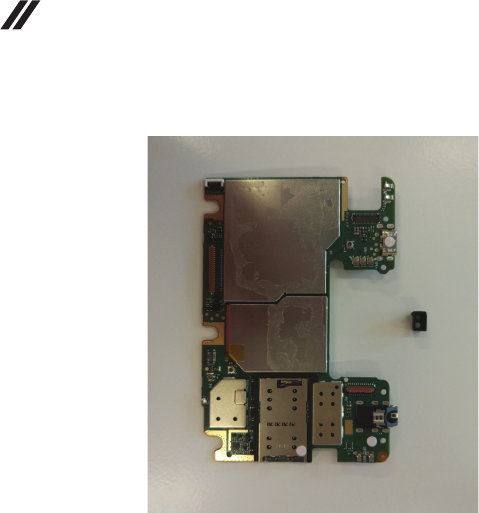
Removethemainboardinthedirectionofthearrow.
Removethesensorrubber.
LenovoTAB7HardwareMaintenanceManual
46
Figure8.Removalstepsofmainboard(continued)
LenovoTAB7
47
1090 Front Camera
Foraccess,removetheseFRUsinorder:
•“1010BackCover”onpage 27
•“1020Battery”onpage 29
•“1030SubBoard”onpage 32
•“1040MainFPC”onpage 34
•“1050RearCamera”onpage 38
•“1060Sidekey”onpage 40
•“1070SpeakerBox”onpage 42
•“1080MainBoard”onpage 44
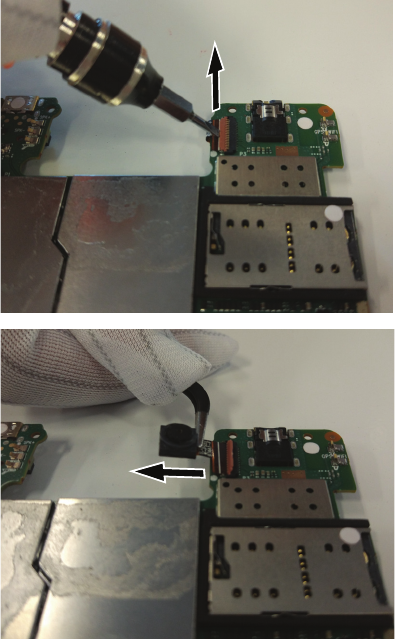
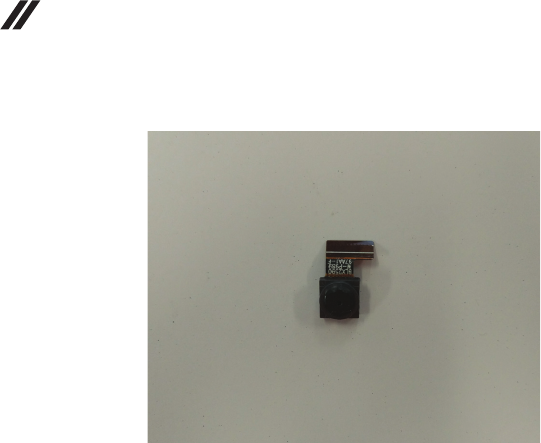
Figure9.Removalstepsoffrontcamera
DisconnectthefrontcameraFPCconnectorandpullouttheFPC.
LenovoTAB7HardwareMaintenanceManual
48
Figure9.Removalstepsoffrontcamera(continued)
LenovoTAB7
49
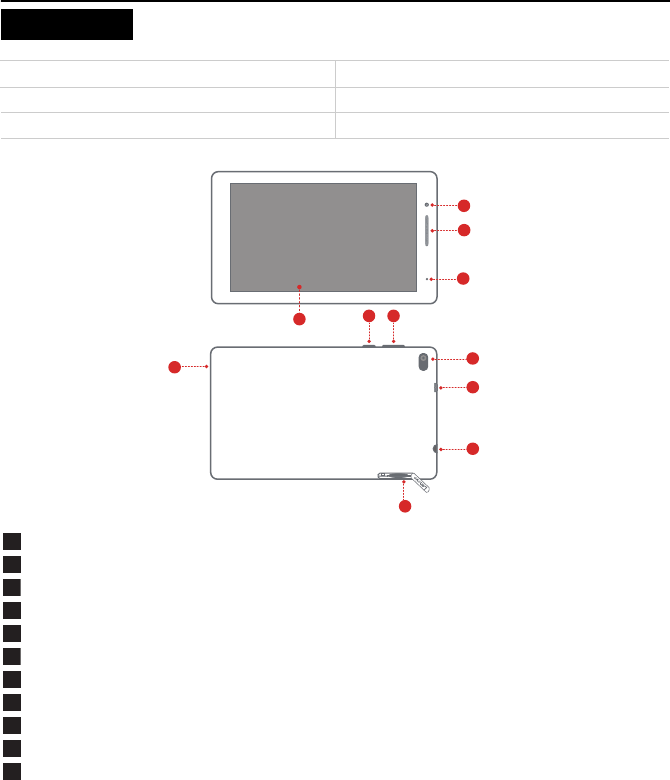
Frontcamera
Speaker/Receiver
Indicator
Touchscreen
Powerbutton
Volumebuttons
Rearcamera
MicroUSBconnector
Headsetconnector
Cardtray
Microphone
Notes:TheWLANversion(LenovoTB‐7504F)doesnothaveaNano‐SIMcardslot.
Model Version
LenovoTB‐7504F WLAN
LenovoTB‐7504X WLAN+LTE
Locations
1
2
5
3
56
7
8
9
10
11
4
1
2
3
4
5
6
7
8
9
10
11

LenovoTAB7
51
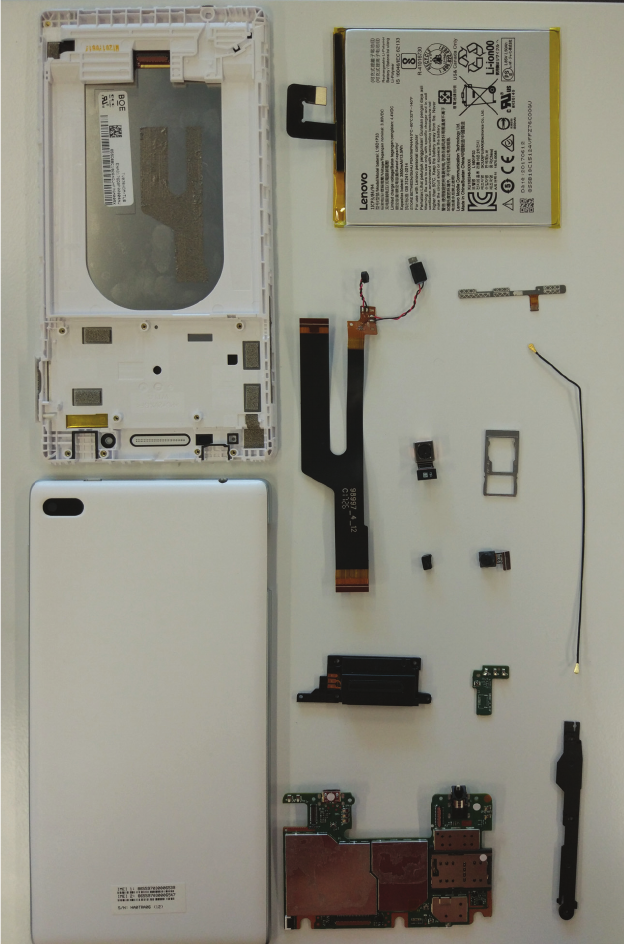
Overall
3
10 13
14
11
12
7
8
6
15
16
1
4
2
9
5

LenovoTAB7HardwareMaintenanceManual
52
Table1.Partslist—Overall
No. FRU FRU no. CRU
ID
1MB,TB‐7504XMB1_16G&*715201004761
MB,TB‐7504XMB2_16G&*715201004771
MB,TB‐7504FMB1_16G&*715201004841
5B28C09337
5B28C09338
5B28C09340
N
2TPLCMAssʹy,TB‐7504TPLCM
Assy_W&*712601005351
TPLCMAssʹy,TB‐7504TPLCM
Assy_B&*712601005361
5D68C09342
5D68C09343
N
3SUBBoard,TB‐7504XSUBBoard&*715201004861CS 5P68C09344 N
4FPC,TB‐7504MainFPCAssy*712601005381CS
FPC,TB‐7504MainFPC&*713300193021CS
5F78C09345
5F78C09369
N
5MechaincalParts,TB‐7504XBatteryCover
_B&*712601005391
MechaincalParts,TB‐7504XBatteryCover
_W&*712601005401
MechaincalParts,TB‐7504FBatteryCover
_B&*712601005411
MechaincalParts,TB‐7504FBatteryCover
_W&*712601005421
5S58C09346
5S58C09347
5S58C09348
5S58C09349
N
6FPC,TB‐7504SidekeyFPC&*713300193011CS 5F78C09321 N
7MechaincalParts,TB‐7504Battery
Frame&*711500193031CS
5S58C09322 N
8 Camera,(B/S)CCML545A205MHi545COB24PIN
BtoB
5SC28C14455 N
9 Battery,(B/S)XWD‐AL16D1P333.85V13.5Wh1cell
bty
SB18C15123 N
10 Camera,TB‐7504FCamera&*710200193021CS 5C28C09329 N
11 Rubber,TB‐7504P‐sencerubber&*712300193011CS 5MO8C09334 N
12 Speaker,TB‐7504FSpeaker&*710320000061CS
Speaker,TB‐7504XSpeaker&*710320100121CS
5SB8C09326
5SB8C09327
N
13 Cable,TB‐7504XRFCable&*715302000451CS 5C18C09323 N
14 Metal,TB‐7504XSIMCard&*715308002501CS
Metal,TB‐7504FSIMCard&*715308002571CS
5M88C09324
5M88C09325
N
15 Motor,TB‐7504Vibrator&*710621000041CS 5M78C09368 N
16 Mic,TB‐7504XMic&*710521000331CS 5M48C09370 N

LenovoTAB7
53
AC Adapter
Table2.Partslist—ACAdapters
Screw
Table3.Partslist—Screw
Others
Table4.Partslist—Others
FRU FRU no. CRU
ID
(B/S)charger&*5V*&1AUKBLACKC‐P58 5A19A464M6 N
(B/S)ACAdapter;C‐P58;5V/1A;UK;black SA18C01244 N
(B/S)charger&*5V*&1AEUBLACKC‐P57 5A19A464M5 N
(B/S)ACAdapter;C‐P57;5V/1A;EU;black SA18C01243 N
(B/S)Adapter&*5V*&1AAUBlackC‐P59 5A19A464M7 N
(B/S)charger&*5V*&1AUSBLACKC‐P56 5A19A464M4 N
(B/S)ACAdapter;C‐P56;5V/1A;UL;black SA18C01242 N
(B/S)ACAdapter;C‐P45;5V/1A;BISlogo;IN;Black SA18C08973 N
(B/S)Charger&*5V*&1ASKBLACKC‐P61 5A19A464M9 N
(B/S)Adapter&*5V*&1AARBLACKC‐P60 5A19A464M8 N
FRU FRU no. CRU
ID
TB‐7504Screw&*710922000481CS 5M88C09331 N
FRU FRU no. CRU
ID
TB‐7504BBfoil&*715000193011CS 5D78C09330 N
TB‐7504TPmylar&*712100193021CS 5D78C09333 N
TB‐7504Sealinglabel&*712700157211CS 5L18C09335 N

LenovoTAB7HardwareMaintenanceManual
54
Lenovomaynotoffertheproducts,services,orfeaturesdiscussedinthis
documentinallcountries.ConsultyourlocalLenovorepresentativefor
informationontheproductsandservicescurrentlyavailableinyourarea.Any
referencetoaLenovoproduct,program,orserviceisnotintendedtostateor
implythatonlythatLenovoproduct,program,orservicemaybeused.Any
functionallyequivalentproduct,program,orservicethatdoesnotinfringeany
Lenovointellectualpropertyrightmaybeusedinstead.However,itistheuser’s
responsibilitytoevaluateandverifytheoperationofanyotherproduct,
program,orservice.
Lenovomayhavepatentsorpendingpatentapplicationscoveringsubject
matterdescribedinthisdocument.Thefurnishingofthisdocumentdoesnot
giveyouanylicensetothesepatents.
LENOVOGROUPLTD.PROVIDESTHISPUBLICATION“ASIS”WITHOUT
WARRANTYOFANYKIND,EITHEREXPRESSORIMPLIED,INCLUDING,
BUTNOTLIMITEDTO,THEIMPLIEDWARRANTIESOFNON‐
INFRINGEMENT,MERCHANTABILITYORFITNESSFORAPARTICULAR
PURPOSE.Somejurisdictionsdonotallowdisclaimerofexpressorimplied
warrantiesincertaintransactions,therefore,thisstatementmaynotapplyto
you.
Thisinformationcouldincludetechnicalinaccuraciesortypographicalerrors.
Changesareperiodicallymadetotheinformationherein;thesechangeswillbe
incorporatedinneweditionsofthepublication.Lenovomaymake
improvementsand/orchangesintheproduct(s)and/ortheprogram(s)described
inthispublicationatanytimewithoutnotice.
Theproductsdescribedinthisdocumentarenotintendedforusein
implantationorotherlifesupportapplicationswheremalfunctionmayresultin
injuryordeathtopersons.Theinformationcontainedinthisdocumentdoesnot
affectorchangeLenovoproductspecificationsorwarranties.Nothinginthis
documentshalloperateasanexpressorimpliedlicenseorindemnityunderthe
intellectualpropertyrightsofLenovoorthirdparties.Allinformationcontained
inthisdocumentwasobtainedinspecificenvironmentsandispresentedasan
illustration.Theresultobtainedinotheroperatingenvironmentsmayvary.
Lenovomayuseordistributeanyoftheinformationyousupplyinanywayit
believesappropriatewithoutincurringanyobligationtoyou.
Anyreferencesinthispublicationtonon‐LenovoWebsitesareprovidedfor
convenienceonlyanddonotinanymannerserveasanendorsementofthose
Websites.ThematerialsatthoseWebsitesarenotpartofthematerialsforthis
Lenovoproduct,anduseofthoseWebsitesisatyourownrisk.
Notices

Notices
55
Anyperformancedatacontainedhereinwasdeterminedinacontrolled
environment.Therefore,theresultobtainedinotheroperatingenvironments
mayvarysignificantly.Somemeasurementsmayhavebeenmadeon
development‐levelsystemsandthereisnoguaranteethatthesemeasurements
willbethesameongenerallyavailablesystems.Furthermore,some
measurementsmayhavebeenestimatedthroughextrapolation.Actualresults
mayvary.Usersofthisdocumentshouldverifytheapplicabledatafortheir
specificenvironment.
ThefollowingtermsareeitherregisteredtrademarksortrademarksofLenovoin
theUnitedStatesand/orothercountries:
Lenovo®
Lenovologo®
IdeaPad®
VeriFace®
OneKeyRescue®(OneKeyRecovery,OneKeyAntivirus)
APS®
PowerExpress®
EnergyManagementandReadyComm®
ThefollowingtermsaretrademarksofMicrosoftCorporationintheUnited
States,othercountries,orboth:
Windows®
Windows®7
ThefollowingaretrademarksofIntelCorporationoritssubsidiariesinthe
UnitedStates,othercountries,orboth:
Intel®
Intel®Core™2Duo
Othercompany,product,orservicenamesmaybethetrademarksorservice
marksofothers.
Trademarks

LenovoTAB7HardwareMaintenanceManual
56
