Lenovo (Arabic) User Guide (Small Form Factor) Think Station P320 (type 30BJ, 30BK, And 30BS) Workstation (Think Station) Type 30BG Sff Ug Ar
2018-08-16
User Manual: Lenovo (Arabic) User guide - (Small Form Factor) ThinkStation P320 (type 30BJ, 30BK, and 30BS) P320 Workstation (ThinkStation) - Type 30BG 30BG
Open the PDF directly: View PDF  .
.
Page Count: 136 [warning: Documents this large are best viewed by clicking the View PDF Link!]
- ﺍﻗﺮﺃ ﻫﺬﺍ ﺍﻟﺠﺰﺀ ﺃﻭﻻ: ﻣﻌﻠﻮﻣﺎﺕ ﻣﻬﻤﺔ ﺣﻮﻝ ﺍﻟﺴﻼﻣﺔ
- ﻗﺒﻞ ﺍﺳﺘﺨﺪﺍﻡ ﻫﺬﺍ ﺍﻟﺪﻟﻴﻞ
- ﺍﻟﺨﺪﻣﺔ ﻭﺍﻟﺘﺮﻗﻴﺎﺕ
- ﺍﻟﻮﻗﺎﻳﺔ ﻣﻦ ﺍﻟﻜﻬﺮﺑﺎﺀ ﺍﻟﺴﺎﻛﻨﺔ
- ﺃﺳﻼﻙ ﺍﻟﻄﺎﻗﺔ ﻭﻣﺤﻮﻻﺕ ﺍﻟﻄﺎﻗﺔ
- ﺃﺳﻼﻙ ﺍﻹﻃﺎﻟﺔ ﻭﺍﻷﺟﻬﺰﺓ ﺫﺍﺕ ﺍﻟﺼﻠﺔ
- ﺍﻟﻤﺂﺧﺬ ﻭﺍﻟﻤﻘﺎﺑﺲ
- ﺍﻷﺟﻬﺰﺓ ﺍﻟﺨﺎﺭﺟﻴﺔ
- ﺍﻟﺤﺮﺍﺭﺓ ﻭﺗﻬﻮﻳﺔ ﺍﻟﻤﻨﺘﺞ
- ﺇﺷﻌﺎﺭﺍﺕ ﺣﻮﻝ ﻣﻮﺿﻊ ﺍﻟﻜﻤﺒﻴﻮﺗﺮ
- ﺑﻴﺌﺔ ﺍﻟﺘﺸﻐﻴﻞ
- ﺑﻴﺎﻥ ﺗﻮﺍﻓﻖ ﻣﻨﺘﺠﺎﺕ ﺍﻟﻠﻴﺰﺭ
- ﺑﻴﺎﻥ ﺧﺎﺹ ﺑﻤﺴﺘﻮﻳﺎﺕ ﺍﻟﻄﺎﻗﺔ ﺍﻟﺨﻄﻴﺮﺓ
- ﺍﻹﺷﻌﺎﺭ ﺍﻟﺨﺎﺹ ﺑﺒﻄﺎﺭﻳﺔ ﺍﻟﻠﻴﺜﻴﻮﻡ ﺍﻟﺨﻠﻮﻳﺔ ﺍﻟﺪﺍﺋﺮﻳﺔ
- ﺍﺳﺘﺨﺪﺍﻡ ﺳﻤﺎﻋﺎﺕ ﺍﻷﺫﻥ ﺃﻭ ﺳﻤﺎﻋﺎﺕ ﺍﻟﺮﺃﺱ ﺃﻭ ﻣﺠﻤﻮﻋﺔ ﺳﻤﺎﻋﺎﺕ ﺍﻟﺮﺃﺱ
- ﺍﻟﺘﻨﻈﻴﻒ ﻭﺍﻟﺼﻴﺎﻧﺔ
- ﺍﻟﻤﻠﺤﻖ١. ﻧﻈﺮﺓ ﻋﺎﻣﺔ ﻋﻠﻰ ﺍﻟﻤﻨﺘﺞ
- ﺍﻟﻤﻠﺤﻖ٢. ﺍﺳﺘﺨﺪﺍﻡ ﺍﻟﻜﻤﺒﻴﻮﺗﺮ
- ﺍﻟﻤﻠﺤﻖ٣. ﺃﻧﺖ ﻭﺍﻟﻜﻤﺒﻴﻮﺗﺮ ﺍﻟﺨﺎﺹ ﺑﻚ
- ﺍﻟﻤﻠﺤﻖ٤. ﺍﻷﻣﺎﻥ
- ﺍﻟﻤﻠﺤﻖ٥. ﺍﻟﺘﻜﻮﻳﻦ ﺍﻟﻤﺘﻘﺪﻡ
- ﺍﺳﺘﺨﺪﺍﻡ ﺑﺮﻧﺎﻣﺞ Setup Utility
- ﺑﺪﺀ ﺑﺮﻧﺎﻣﺞ Setup Utility
- ﺗﻐﻴﻴﺮ ﻟﻐﺔ ﺍﻟﻌﺮﺽ ﻓﻲ ﺑﺮﻧﺎﻣﺞ Setup Utility
- ﺗﻤﻜﻴﻦ ﺟﻬﺎﺯ ﺃﻭ ﺗﻌﻄﻴﻠﻪ
- ﺗﻤﻜﻴﻦ ﻣﻴﺰﺓ ﺍﻟﺘﺸﻐﻴﻞ ﺍﻟﺘﻠﻘﺎﺋﻲ ﻟﻠﻜﻤﺒﻴﻮﺗﺮ ﺃﻭ ﺗﻌﻄﻴﻠﻬﺎ
- ﺗﻤﻜﻴﻦ ﻭﺿﻊ ﺍﻟﺘﻮﺍﻓﻖ ErP LPS ﺃﻭ ﺗﻌﻄﻴﻠﻪ
- ﺍﻟﺘﺒﺪﻳﻞ ﺑﻴﻦ ﺃﺩﺍﺀ ﺻﻮﺗﻲ ﺃﻓﻀﻞ ﻭﺃﺩﺍﺀ ﺣﺮﺍﺭﻱ ﺃﻓﻀﻞ
- ﺗﻤﻜﻴﻦ ﺍﻟﻨﻈﺎﻡ ﻣﻦ ﺗﺴﺠﻴﻞ ﺳﺠﻼﺕ ﺍﻟﺘﻨﺒﻴﻪ ﺍﻟﺤﺮﺍﺭﻱ ﺃﻭ ﺗﻌﻄﻴﻠﻪ
- ﺗﻤﻜﻴﻦ ﻣﻴﺰﺓ ﺍﻛﺘﺸﺎﻑ ﺗﻐﻴﻴﺮ ﺍﻟﺘﻜﻮﻳﻦ ﺃﻭ ﺗﻌﻄﻴﻠﻬﺎ
- ﺗﻐﻴﻴﺮ ﺇﻋﺪﺍﺩﺍﺕ BIOS ﻗﺒﻞ ﺗﺜﺒﻴﺖ ﻧﻈﺎﻡ ﺗﺸﻐﻴﻞ ﺟﺪﻳﺪ
- ﺍﺳﺘﺨﺪﺍﻡ ﻛﻠﻤﺎﺕ ﻣﺮﻭﺭ ﻧﻈﺎﻡ BIOS
- ﺗﺤﺪﻳﺪ ﺟﻬﺎﺯ ﺑﺪﺀ ﺗﺸﻐﻴﻞ
- ﺍﻟﺨﺮﻭﺝ ﻣﻦ ﺑﺮﻧﺎﻣﺞ Setup Utility
- ﺗﺤﺪﻳﺚ ﻧﻈﺎﻡ BIOS ﻭﺍﺳﺘﺮﺩﺍﺩﻩ
- ﺗﻜﻮﻳﻦ RAID
- ﺍﺳﺘﺨﺪﺍﻡ ﺑﺮﻧﺎﻣﺞ Setup Utility
- ﺍﻟﻤﻠﺤﻖ٦. ﺍﺳﺘﻜﺸﺎﻑ ﺍﻷﺧﻄﺎﺀ ﻭﺇﺻﻼﺣﻬﺎ ﻭﻋﻤﻠﻴﺎﺕ ﺍﻟﺘﺸﺨﻴﺺ ﻭﺍﻻﺳﺘﺮﺩﺍﺩ
- ﺍﻟﻤﻠﺤﻖ٧. ﺇﺧﺮﺍﺝ ﺍﻷﺟﻬﺰﺓ ﻭﺗﺮﻛﻴﺒﻬﺎ
- ﺍﻟﺘﻌﺎﻣﻞ ﻣﻊ ﺍﻷﺟﻬﺰﺓ ﺍﻟﺤﺴﺎﺳﺔ ﺍﺳﺘﺎﺗﻴﻜﻴﺎ
- ﺇﻋﺪﺍﺩ ﺍﻟﻜﻤﺒﻴﻮﺗﺮ ﻭﻧﺰﻉ ﻏﻄﺎﺀ ﺍﻟﻜﻤﺒﻴﻮﺗﺮ
- ﺗﺮﻛﻴﺐ ﺍﻟﺠﻬﺎﺯ ﺃﻭ ﺍﺳﺘﺒﺪﺍﻟﻪ
- ﺍﻻﺧﺘﻴﺎﺭﺍﺕ ﺍﻟﺨﺎﺭﺟﻴﺔ
- ﺍﻟﻮﺍﺟﻬﺔ ﺍﻷﻣﺎﻣﻴﺔ
- ﺑﻄﺎﻗﺔ PCIe
- ﻣﺤﺮﻙ ﺍﻷﻗﺮﺍﺹ ﺫﻭ ﺍﻟﺤﺎﻟﺔ ﺍﻟﺼﻠﺒﺔ M.2
- ﺍﻟﺒﻄﺎﺭﻳﺔ ﺍﻟﺨﻠﻮﻳﺔ ﺍﻟﺪﺍﺋﺮﻳﺔ
- ﻭﺣﺪﺓ ﺍﻟﺬﺍﻛﺮﺓ
- ﻣﺤﺮﻙ ﺍﻷﻗﺮﺍﺹ ﺍﻟﻀﻮﺋﻴﺔ
- ﻣﺤﺮﻙ ﺍﻷﻗﺮﺍﺹ ﺍﻟﺜﺎﺑﺘﺔ ﻓﻲ ﺣﺎﻭﻳﺔ ﺍﻟﺘﺨﺰﻳﻦ ﺍﻷﻣﺎﻣﻴﺔ
- ﺟﻬﺎﺯ ﻓﻲ ﺣﺰﻣﺔ ﺗﺤﻮﻳﻞ ﻣﺤﺮﻛﺎﺕ ﺃﻗﺮﺍﺹ ﻣﺘﻌﺪﺩﺓ
- ﻣﺤﺮﻙ ﺍﻷﻗﺮﺍﺹ ﺫﻭ ﺍﻟﺤﺎﻟﺔ ﺍﻟﺼﻠﺒﺔ
- ﻣﻤﺘﺺ ﺍﻟﺤﺮﺍﺭﺓ ﻭﻣﺠﻤﻮﻋﺔ ﺍﻟﻤﺮﻭﺣﺔ
- ﻣﺠﻤﻮﻋﺔ ﺇﻣﺪﺍﺩ ﺍﻟﻄﺎﻗﺔ
- ﻣﺤﺮﻙ ﺍﻷﻗﺮﺍﺹ ﺍﻟﺜﺎﺑﺘﺔ ﺍﻷﺳﺎﺳﻲ
- ﻣﺤﺮﻙ ﺍﻷﻗﺮﺍﺹ ﺍﻟﺜﺎﺑﺘﺔ ﺍﻟﺜﺎﻧﻮﻱ
- ﺍﺳﺘﻜﻤﺎﻝ ﻋﻤﻠﻴﺔ ﺍﺳﺘﺒﺪﺍﻝ ﺍﻟﻘﻄﻊ
- ﺍﻟﻤﻠﺤﻖ٨. ﺍﻟﺤﺼﻮﻝ ﻋﻠﻰ ﺍﻟﻤﻌﻠﻮﻣﺎﺕ ﻭﺍﻟﻤﺴﺎﻋﺪﺓ ﻭﺍﻟﺨﺪﻣﺔ
- ﺇﺷﻌﺎﺭ ﺗﺼﻨﻴﻒ ﺍﻟﺼﺎﺩﺭﺍﺕ
- ﺇﺷﻌﺎﺭﺍﺕ ﺍﻻﻧﺒﻌﺎﺛﺎﺕ ﺍﻹﻟﻜﺘﺮﻭﻧﻴﺔ
- ﻋﻼﻣﺔ ﺍﻟﺘﻮﺍﻓﻖ ﻣﻊ ﺃﻭﺭﺍﺳﻴﺎ
- ﺍﻹﻋﻼﻡ ﺍﻟﺼﻮﺗﻲ ﻟﻠﺒﺮﺍﺯﻳﻞ
- ﻣﻌﻠﻮﻣﺎﺕ ﺍﻟﺘﻮﺍﻓﻖ ﻣﻊ ﺍﻟﺮﺍﺩﻳﻮ ﺍﻟﻼﺳﻠﻜﻲ ﻓﻲ ﺍﻟﻤﻜﺴﻴﻚ
- ﻣﻌﻠﻮﻣﺎﺕ ﺗﻨﻈﻴﻤﻴﺔ ﺇﺿﺎﻓﻴﺔ
- ﻣﻌﻠﻮﻣﺎﺕ ﻣﻬﻤﺔ ﺣﻮﻝ ﻧﻔﺎﻳﺎﺕ ﺍﻷﺟﻬﺰﺓ ﺍﻟﻜﻬﺮﺑﺎﺋﻴﺔ ﻭﺍﻹﻟﻜﺘﺮﻭﻧﻴﺔ (WEEE)
- ﻣﻌﻠﻮﻣﺎﺕ ﺇﻋﺎﺩﺓ ﺍﻟﺘﺪﻭﻳﺮ ﻓﻲ ﺍﻟﻴﺎﺑﺎﻥ
- ﻣﻌﻠﻮﻣﺎﺕ ﺇﻋﺎﺩﺓ ﺍﻟﺘﺪﻭﻳﺮ ﻟﻠﺒﺮﺍﺯﻳﻞ
- ﻣﻌﻠﻮﻣﺎﺕ ﺇﻋﺎﺩﺓ ﺗﺪﻭﻳﺮ ﺍﻟﺒﻄﺎﺭﻳﺔ ﻓﻲ ﺗﺎﻳﻮﺍﻥ
- ﻣﻌﻠﻮﻣﺎﺕ ﺇﻋﺎﺩﺓ ﺗﺪﻭﻳﺮ ﺍﻟﺒﻄﺎﺭﻳﺔ ﻓﻲ ﺍﻻﺗﺤﺎﺩ ﺍﻷﻭﺭﻭﺑﻲ

ﺩﻟﻴﻞﻣﺴﺘﺨﺪﻡP320
ﺃﻧﻮﺍﻉﺍﻷﺟﻬﺰﺓ:30BJﻭ30BKﻭ30BS
ﻤﻠﺎﺣﻈﺔ:ﻘﺒﻞﺎﺳﺘﺨﺪﺍﻡﻬﺬﻩﺎﻟﻤﻌﻠﻮﻣﺎﺕﻮﺍﻟﻤﻨﺘﺞﺎﻟﺬﻱﺘﺪﻋﻤﻪ،ﺘﺄﻛﺪﻤﻦﻘﺮﺍﺀﺓ"ﺎﻗﺮﺃﻬﺬﺍﺎﻟﺠﺰﺀﺄﻭﻟﺎ
ً
:ﻤﻌﻠﻮﻣﺎﺕﻤﻬﻤﺔﺤﻮﻝﺎﻟﺴﻠﺎﻣﺔ"ﻌﻠﻰﺎﻟﺼﻔﺤﺔiiiﻮﺍﻟﻤﻠﺤﻖ૭
"ﺎﻟﺈﺷﻌﺎﺭﺍﺕ"ﻌﻠﻰﺎﻟﺼﻔﺤﺔ١٢١ﻮﻓﻬﻤﻬﻤﺎ.
ﺍﻟﻄﺒﻌﺔﺍﻟﺮﺍﺑﻌﺔ)ﻣﺎﻳﻮ2018(
© Copyright Lenovo 2017, 2018.
ﺇﺷﻌﺎﺭﺍﻟﺤﻘﻮﻕﺍﻟﻤﺤﺪﻭﺩﺓﻭﺍﻟﻤﻘﻴﺪﺓ:ﻓﻲﺣﺎﻟﺔﺗﺴﻠﻴﻢﺍﻟﺒﻴﺎﻧﺎﺕﺃﻭﺍﻟﺒﺮﺍﻣﺞﻭﻓﻘ
ً
ﺎﻟﻌﻘﺪﺇﺩﺍﺭﺓﺧﺪﻣﺎﺕﻋﺎﻣﺔ"GSA"،ﻳﺨﻀﻊﺍﺳﺘﺨﺪﺍﻣﻬﺎﺃﻭﻧﺴﺨﻬﺎﺃﻭﺍﻟﻜﺸﻒﻋﻨﻬﺎﻟﻠﻘﻴﻮﺩﺍﻟﻤﺤﺪﺩﺓﻓﻲ
ﺍﻟﻌﻘﺪﺭﻗﻢGS-35F-05925.

ﺎﻟﻤﺤﺘﻮﻳﺎﺕ
ﺎﻗﺮﺃﻬﺬﺍﺎﻟﺠﺰﺀﺄﻭﻟﺎ
ً
:ﻤﻌﻠﻮﻣﺎﺕﻤﻬﻤﺔﺤﻮﻝﺎﻟﺴﻠﺎﻣﺔ....iii
ﻘﺒﻞﺎﺳﺘﺨﺪﺍﻡﻬﺬﺍﺎﻟﺪﻟﻴﻞ...............iii
ﺎﻟﺨﺪﻣﺔﻮﺍﻟﺘﺮﻗﻴﺎﺕ.................iii
ﺎﻟﻮﻗﺎﻳﺔﻤﻦﺎﻟﻜﻬﺮﺑﺎﺀﺎﻟﺴﺎﻛﻨﺔ..............iv
ﺄﺳﻠﺎﻙﺎﻟﻄﺎﻗﺔﻮﻣﺤﻮﻟﺎﺕﺎﻟﻄﺎﻗﺔ.............iv
ﺄﺳﻠﺎﻙﺎﻟﺈﻃﺎﻟﺔﻮﺍﻟﺄﺟﻬﺰﺓﺬﺍﺕﺎﻟﺼﻠﺔ............iv
ﺎﻟﻤﺂﺧﺬﻮﺍﻟﻤﻘﺎﺑﺲ..................v
ﺎﻟﺄﺟﻬﺰﺓﺎﻟﺨﺎﺭﺟﻴﺔ..................v
ﺎﻟﺤﺮﺍﺭﺓﻮﺗﻬﻮﻳﺔﺎﻟﻤﻨﺘﺞ................v
ﺈﺷﻌﺎﺭﺍﺕﺤﻮﻝﻤﻮﺿﻊﺎﻟﻜﻤﺒﻴﻮﺗﺮ............vi
ﺒﻴﺌﺔﺎﻟﺘﺸﻐﻴﻞ..................vi
ﺒﻴﺎﻥﺘﻮﺍﻓﻖﻤﻨﺘﺠﺎﺕﺎﻟﻠﻴﺰﺭ..............vi
ﺒﻴﺎﻥﺨﺎﺹﺒﻤﺴﺘﻮﻳﺎﺕﺎﻟﻄﺎﻗﺔﺎﻟﺨﻄﻴﺮﺓ...........vii
ﺎﻟﺈﺷﻌﺎﺭﺎﻟﺨﺎﺹﺒﺒﻄﺎﺭﻳﺔﺎﻟﻠﻴﺜﻴﻮﻡﺎﻟﺨﻠﻮﻳﺔﺎﻟﺪﺍﺋﺮﻳﺔ........vii
ﺎﺳﺘﺨﺪﺍﻡﺴﻤﺎﻋﺎﺕﺎﻟﺄﺫﻥﺄﻭﺴﻤﺎﻋﺎﺕﺎﻟﺮﺃﺱﺄﻭﻤﺠﻤﻮﻋﺔﺴﻤﺎﻋﺎﺕ
ﺎﻟﺮﺃﺱ....................viii
ﺎﻟﺘﻨﻈﻴﻒﻮﺍﻟﺼﻴﺎﻧﺔ................viii
ﺍﻟﻤﻠﺤﻖ١.ﻨﻈﺮﺓﻌﺎﻣﺔﻌﻠﻰﺎﻟﻤﻨﺘﺞ..........١
ﻤﻮﺍﻗﻊﺎﻟﺄﺟﻬﺰﺓ...................١
ﻤﺸﻬﺪﻠﻠﺠﺎﻧﺐﺎﻟﺄﻣﺎﻣﻲ...............١
ﻤﺸﻬﺪﻠﻠﺠﺎﻧﺐﺎﻟﺨﻠﻔﻲ...............٢
ﻤﻜﻮﻧﺎﺕﺎﻟﻜﻤﺒﻴﻮﺗﺮ................٥
ﺎﻟﺄﺟﺰﺍﺀﻌﻠﻰﻠﻮﺣﺔﺎﻟﻨﻈﺎﻡ..............٥
ﻤﺤﺮﻛﺎﺕﺄﻗﺮﺍﺹﺎﻟﺘﺨﺰﻳﻦﺎﻟﺪﺍﺧﻠﻴﺔ...........٧
ﻤﻠﺼﻖﻨﻮﻉﺎﻟﺠﻬﺎﺯﻮﻃﺮﺍﺯﻩ.............٨
ﻤﻴﺰﺍﺕﺎﻟﻜﻤﺒﻴﻮﺗﺮ..................٨
ﻤﻮﺍﺻﻔﺎﺕﺎﻟﻜﻤﺒﻴﻮﺗﺮ................١٢
ﺎﻟﺒﺮﺍﻣﺞ...................١٢
ﺎﻟﻮﺻﻮﻝﺈﻟﻰﺒﺮﻧﺎﻣﺞﺒﺎﻟﻜﻤﺒﻴﻮﺗﺮ...........١٢
ﺘﺜﺒﻴﺖﺒﺮﻧﺎﻣﺞﺠﺎﻫﺰﻠﻠﺘﺜﺒﻴﺖ)ﻔﻲﻨﻈﺎﻡﺎﻟﺘﺸﻐﻴﻞWindows 7
ﻔﻘﻂ(..................١٣
ﻤﻘﺪﻣﺔﺈﻟﻰﺒﺮﺍﻣﺞLenovo............١٣
ﺍﻟﻤﻠﺤﻖ٢.ﺎﺳﺘﺨﺪﺍﻡﺎﻟﻜﻤﺒﻴﻮﺗﺮ...........١٥
ﺘﺴﺠﻴﻞﺎﻟﻜﻤﺒﻴﻮﺗﺮ.................١٥
ﺘﻌﻴﻴﻦﻤﺴﺘﻮﻯﺼﻮﺕﺎﻟﻜﻤﺒﻴﻮﺗﺮ.............١٥
ﺎﺳﺘﺨﺪﺍﻡﻘﺮﺹ.................١٥
ﺈﺭﺷﺎﺩﺍﺕﺤﻮﻝﺎﺳﺘﺨﺪﺍﻡﻤﺤﺮﻙﺎﻟﺄﻗﺮﺍﺹﺎﻟﻀﻮﺋﻴﺔ......١٥
ﺎﻟﺘﻌﺎﻣﻞﻤﻊﺎﻟﺄﻗﺮﺍﺹﻮﺗﺨﺰﻳﻨﻬﺎ...........١٥
ﺘﺸﻐﻴﻞﻘﺮﺹﻮﺇﺯﺍﻟﺘﻪ..............١٦
ﺘﺴﺠﻴﻞﻘﺮﺹ................١٦
ﺎﻟﺎﺗﺼﺎﻝﺒﺎﻟﺸﺒﻜﺔ.................١٧
ﺍﻟﻤﻠﺤﻖ٣.ﺄﻧﺖﻮﺍﻟﻜﻤﺒﻴﻮﺗﺮﺎﻟﺨﺎﺹﺒﻚ........١٩
ﺘﺮﺗﻴﺐﻤﺴﺎﺣﺔﺎﻟﻌﻤﻞ................١٩
ﺎﻟﺈﺿﺎﺀﺓﻮﺩﺭﺟﺔﺎﻟﺴﻄﻮﻉ.............١٩
ﺪﻭﺭﺓﺎﻟﻬﻮﺍﺀ................١٩
ﻤﻮﺍﻗﻊﺎﻟﻤﺂﺧﺬﺎﻟﻜﻬﺮﺑﺎﺋﻴﺔﻮﺃﻃﻮﺍﻝﺎﻟﻜﺎﺑﻠﺎﺕ........١٩
ﺎﻟﺮﺍﺣﺔ..................١٩
ﻤﻌﻠﻮﻣﺎﺕﻮﺻﻮﻝﺬﻭﻱﺎﻟﺎﺣﺘﻴﺎﺟﺎﺕﺎﻟﺨﺎﺻﺔ..........٢٠
ﺘﻨﻈﻴﻒﺎﻟﻜﻤﺒﻴﻮﺗﺮ.................٢٢
ﺎﻟﺼﻴﺎﻧﺔ...................٢٣
ﻨﺼﺎﺋﺢﺄﺳﺎﺳﻴﺔﻠﻠﺼﻴﺎﻧﺔ.............٢٣
ﻤﻤﺎﺭﺳﺎﺕﺎﻟﺼﻴﺎﻧﺔﺎﻟﺠﻴﺪﺓ.............٢٣
ﺘﺤﺪﻳﺚﺎﻟﻜﻤﺒﻴﻮﺗﺮ...............٢٣
ﻨﻘﻞﺎﻟﻜﻤﺒﻴﻮﺗﺮ..................٢٤
ﺍﻟﻤﻠﺤﻖ٤.ﺎﻟﺄﻣﺎﻥ................٢٥
ﻘﻔﻞﺎﻟﻜﻤﺒﻴﻮﺗﺮ..................٢٥
ﺘﻮﺻﻴﻞﻘﻔﻞﺎﻟﻠﻮﺣﺔ..............٢٥
ﺘﻮﺻﻴﻞﻘﻔﻞﺎﻟﻜﺎﺑﻞﺒﺄﺳﻠﻮﺏKensington........٢٥
ﺘﻮﺻﻴﻞﻘﻔﻞﺎﻟﻜﺎﺑﻞ...............٢٦
ﻌﺮﺽﻮﺗﻐﻴﻴﺮﺈﻋﺪﺍﺩﺍﺕﺎﻟﺄﻣﺎﻥﻔﻲﺒﺮﻧﺎﻣﺞSetup Utility.....٢٧
ﺎﺳﺘﺨﺪﺍﻡﻜﻠﻤﺎﺕﺎﻟﻤﺮﻭﺭﻮﺣﺴﺎﺑﺎﺕWindows.........٢٧
ﺎﺳﺘﺨﺪﺍﻡﻤﺼﺎﺩﻗﺔﺒﺼﻤﺔﺎﻟﺈﺻﺒﻊ.............٢٨
ﺎﺳﺘﺨﺪﺍﻡﻤﻔﺘﺎﺡﻮﺟﻮﺩﺎﻟﻐﻄﺎﺀ..............٢٨
ﺎﺳﺘﺨﺪﺍﻡﺠﺪﺭﺍﻥﺎﻟﺤﻤﺎﻳﺔ...............٢٨
ﺤﻤﺎﻳﺔﺎﻟﺒﻴﺎﻧﺎﺕﻤﻦﺎﻟﻔﻴﺮﻭﺳﺎﺕ.............٢٩
ﻴﺘﻢﺪﻣﺞﺒﺮﻧﺎﻣﺞComputrace Agentﻔﻲﺎﻟﺒﺮﺍﻣﺞﺎﻟﺜﺎﺑﺘﺔ.....٢٩
Trusted Platform Module (TPM)..........٢٩
ﺍﻟﻤﻠﺤﻖ٥.ﺎﻟﺘﻜﻮﻳﻦﺎﻟﻤﺘﻘﺪﻡ............٣١
ﺎﺳﺘﺨﺪﺍﻡﺒﺮﻧﺎﻣﺞSetup Utility............٣١
ﺒﺪﺀﺒﺮﻧﺎﻣﺞSetup Utility............٣١
ﺘﻐﻴﻴﺮﻠﻐﺔﺎﻟﻌﺮﺽﻔﻲﺒﺮﻧﺎﻣﺞSetup Utility.......٣١
ﺘﻤﻜﻴﻦﺠﻬﺎﺯﺄﻭﺘﻌﻄﻴﻠﻪ.............٣١
ﺘﻤﻜﻴﻦﻤﻴﺰﺓﺎﻟﺘﺸﻐﻴﻞﺎﻟﺘﻠﻘﺎﺋﻲﻠﻠﻜﻤﺒﻴﻮﺗﺮﺄﻭﺘﻌﻄﻴﻠﻬﺎ......٣١
ﺘﻤﻜﻴﻦﻮﺿﻊﺎﻟﺘﻮﺍﻓﻖErP LPSﺄﻭﺘﻌﻄﻴﻠﻪ........٣٢
ﺎﻟﺘﺒﺪﻳﻞﺒﻴﻦﺄﺩﺍﺀﺼﻮﺗﻲﺄﻓﻀﻞﻮﺃﺩﺍﺀﺤﺮﺍﺭﻱﺄﻓﻀﻞ......٣٢
ﺘﻤﻜﻴﻦﺎﻟﻨﻈﺎﻡﻤﻦﺘﺴﺠﻴﻞﺴﺠﻠﺎﺕﺎﻟﺘﻨﺒﻴﻪﺎﻟﺤﺮﺍﺭﻱﺄﻭﺘﻌﻄﻴﻠﻪ...٣٣
ﺘﻤﻜﻴﻦﻤﻴﺰﺓﺎﻛﺘﺸﺎﻑﺘﻐﻴﻴﺮﺎﻟﺘﻜﻮﻳﻦﺄﻭﺘﻌﻄﻴﻠﻬﺎ.......٣٣
ﺘﻐﻴﻴﺮﺈﻋﺪﺍﺩﺍﺕBIOSﻘﺒﻞﺘﺜﺒﻴﺖﻨﻈﺎﻡﺘﺸﻐﻴﻞﺠﺪﻳﺪ......٣٣
ﺎﺳﺘﺨﺪﺍﻡﻜﻠﻤﺎﺕﻤﺮﻭﺭﻨﻈﺎﻡBIOS..........٣٣
ﺘﺤﺪﻳﺪﺠﻬﺎﺯﺒﺪﺀﺘﺸﻐﻴﻞ.............٣٥
ﺎﻟﺨﺮﻭﺝﻤﻦﺒﺮﻧﺎﻣﺞSetup Utility.........٣٦
ﺘﺤﺪﻳﺚﻨﻈﺎﻡBIOSﻮﺍﺳﺘﺮﺩﺍﺩﻩ.............٣٦
ﺘﻜﻮﻳﻦRAID.................٣٦
ﻤﺴﺘﻮﻯRAID...............٣٧
ﺘﻮﺻﻴﻒBIOSﺎﻟﻨﻈﺎﻡﻠﺎﺗﺎﺣﺔﻮﻇﺎﺋﻒSATA RAID....٣٧
ﺈﻧﺸﺎﺀﻮﺣﺪﺍﺕﺘﺨﺰﻳﻦRAID............٣٧
ﺤﺬﻑﻮﺣﺪﺍﺕﺘﺨﺰﻳﻦRAID...........٣٧
ﺈﻋﺎﺩﺓﺘﻌﻴﻴﻦﺎﻟﺄﻗﺮﺍﺹﺈﻟﻰﺄﻗﺮﺍﺹﺨﻠﺎﻑRAID......٣٨
ﺍﻟﻤﻠﺤﻖ٦.ﺎﺳﺘﻜﺸﺎﻑﺎﻟﺄﺧﻄﺎﺀﻮﺇﺻﻠﺎﺣﻬﺎﻮﻋﻤﻠﻴﺎﺕ ﺎﻟﺘﺸﺨﻴﺺﻮﺍﻟﺎﺳﺘﺮﺩﺍﺩ..............٣٩
ﺎﻟﺈﺟﺮﺍﺀﺍﺕﺎﻟﺄﺳﺎﺳﻴﺔﻠﺤﻞﻤﺸﻜﻠﺎﺕﺎﻟﻜﻤﺒﻴﻮﺗﺮ.........٣٩
ﻤﺸﻜﻠﺎﺕﺒﺪﺀﺎﻟﺘﺸﻐﻴﻞ................٣٩
© Copyright Lenovo 2017, 2018i
ﻤﺸﻜﻠﺎﺕﺒﺪﺀﺎﻟﺘﺸﻐﻴﻞ..............٤٠
ﻤﺸﻜﻠﺎﺕﺎﻟﺼﻮﺕ...............٤٠
ﻤﺸﻜﻠﺎﺕﻘﺮﺹCDﺄﻭDVD...........٤١
ﺎﻟﻤﺸﺎﻛﻞﺎﻟﻤﺘﻘﻄﻌﺔ...............٤٢
ﻤﺸﻜﻠﺎﺕﺄﻗﺮﺍﺹﺎﻟﺘﺨﺰﻳﻦ.............٤٢
ﻤﺸﻜﻠﺎﺕﺸﺒﻜﺔEthernet LAN...........٤٢
ﻤﺸﻜﻠﺔﺸﺒﻜﺔLANﺎﻟﻠﺎﺳﻠﻜﻴﺔ............٤٣
ﻤﺸﻜﻠﺎﺕBluetooth..............٤٤
ﻤﺸﻜﻠﺎﺕﺎﻟﺄﺩﺍﺀ................٤٥
Serial connector problem...........٤٦
ﻤﺸﺎﻛﻞﺘﺘﻌﻠﻖﺒﺄﺟﻬﺰﺓUSB............٤٦
ﻤﺸﻜﻠﺎﺕﺎﻟﺒﺮﺍﻣﺞﻮﺑﺮﺍﻣﺞﺎﻟﺘﺸﻐﻴﻞ...........٤٦
ﺘﺸﺨﻴﺺﺎﻟﻤﺸﻜﻠﺎﺕ................٤٧
ﻤﻌﻠﻮﻣﺎﺕﺎﻟﺎﺳﺘﺮﺩﺍﺩ................٤٨
ﺍﻟﻤﻠﺤﻖ٧.ﺈﺧﺮﺍﺝﺎﻟﺄﺟﻬﺰﺓﻮﺗﺮﻛﻴﺒﻬﺎ.........٥١
ﺎﻟﺘﻌﺎﻣﻞﻤﻊﺎﻟﺄﺟﻬﺰﺓﺎﻟﺤﺴﺎﺳﺔﺎﺳﺘﺎﺗﻴﻜﻴ
ً
ﺎ...........٥١
ﺈﻋﺪﺍﺩﺎﻟﻜﻤﺒﻴﻮﺗﺮﻮﻧﺰﻉﻐﻄﺎﺀﺎﻟﻜﻤﺒﻴﻮﺗﺮ...........٥١
ﺘﺮﻛﻴﺐﺎﻟﺠﻬﺎﺯﺄﻭﺎﺳﺘﺒﺪﺍﻟﻪ..............٥٢
ﺎﻟﺎﺧﺘﻴﺎﺭﺍﺕﺎﻟﺨﺎﺭﺟﻴﺔ..............٥٢
ﺎﻟﻮﺍﺟﻬﺔﺎﻟﺄﻣﺎﻣﻴﺔ...............٥٢
ﺒﻄﺎﻗﺔPCIe................٥٣
ﻤﺤﺮﻙﺎﻟﺄﻗﺮﺍﺹﺬﻭﺎﻟﺤﺎﻟﺔﺎﻟﺼﻠﺒﺔM.2.........٥٥
ﺎﻟﺒﻄﺎﺭﻳﺔﺎﻟﺨﻠﻮﻳﺔﺎﻟﺪﺍﺋﺮﻳﺔ.............٥٨
ﻮﺣﺪﺓﺎﻟﺬﺍﻛﺮﺓ................٥٩
ﻤﺤﺮﻙﺎﻟﺄﻗﺮﺍﺹﺎﻟﻀﻮﺋﻴﺔ.............٦٢
ﻤﺤﺮﻙﺎﻟﺄﻗﺮﺍﺹﺎﻟﺜﺎﺑﺘﺔﻔﻲﺤﺎﻭﻳﺔﺎﻟﺘﺨﺰﻳﻦﺎﻟﺄﻣﺎﻣﻴﺔ......٦٥
ﺠﻬﺎﺯﻔﻲﺤﺰﻣﺔﺘﺤﻮﻳﻞﻤﺤﺮﻛﺎﺕﺄﻗﺮﺍﺹﻤﺘﻌﺪﺩﺓ......٧١
ﻤﺤﺮﻙﺎﻟﺄﻗﺮﺍﺹﺬﻭﺎﻟﺤﺎﻟﺔﺎﻟﺼﻠﺒﺔ..........٨٢
ﻤﻤﺘﺺﺎﻟﺤﺮﺍﺭﺓﻮﻣﺠﻤﻮﻋﺔﺎﻟﻤﺮﻭﺣﺔ..........٨٦
ﻤﺠﻤﻮﻋﺔﺈﻣﺪﺍﺩﺎﻟﻄﺎﻗﺔ..............٨٨
ﻤﺤﺮﻙﺎﻟﺄﻗﺮﺍﺹﺎﻟﺜﺎﺑﺘﺔﺎﻟﺄﺳﺎﺳﻲ...........٩٢
ﻤﺤﺮﻙﺎﻟﺄﻗﺮﺍﺹﺎﻟﺜﺎﺑﺘﺔﺎﻟﺜﺎﻧﻮﻱ...........٩٤
ﺎﺳﺘﻜﻤﺎﻝﻌﻤﻠﻴﺔﺎﺳﺘﺒﺪﺍﻝﺎﻟﻘﻄﻊ.............٩٨
ﺍﻟﻤﻠﺤﻖ٨.ﺎﻟﺤﺼﻮﻝﻌﻠﻰﺎﻟﻤﻌﻠﻮﻣﺎﺕﻮﺍﻟﻤﺴﺎﻋﺪﺓ ﻮﺍﻟﺨﺪﻣﺔ..................١٠١
ﻤﺼﺎﺩﺭﺎﻟﻤﻌﻠﻮﻣﺎﺕ................١٠١
ﺎﻟﻮﺻﻮﻝﺈﻟﻰﺪﻟﻴﻞﺎﻟﻤﺴﺘﺨﺪﻡﺒﻠﻐﺎﺕﻤﺘﻌﺪﺩﺓ........١٠١
ﻨﻈﺎﻡﺎﻟﻤﺴﺎﻋﺪﺓﻠـWindows............١٠١
ﺎﻟﺴﻠﺎﻣﺔﻮﺍﻟﻀﻤﺎﻥ...............١٠١
ﻤﻮﻗﻊﺎﻟﻮﻳﺐﺎﻟﺨﺎﺹﺒﺸﺮﻛﺔLenovo.........١٠١
ﻤﻮﻗﻊﻮﻳﺐﺪﻋﻢLenovo.............١٠١
ﺎﻟﺄﺳﺌﻠﺔﺎﻟﺘﻲﻴﻜﺜﺮﺴﺆﺍﻟﻬﺎ.............١٠٢
ﺎﻟﻤﺴﺎﻋﺪﺓﻮﺍﻟﺨﺪﻣﺔ.................١٠٢
ﻄﻠﺐﺎﻟﺨﺪﻣﺔ................١٠٢
ﺎﺳﺘﺨﺪﺍﻡﺨﺪﻣﺎﺕﺄﺧﺮﻯ.............١٠٣
ﺸﺮﺍﺀﺨﺪﻣﺎﺕﺈﺿﺎﻓﻴﺔ..............١٠٣
ﺍﻟﻤﻠﺤﻖ૧.ﺴﺮﻋﺔﺬﺍﻛﺮﺓﺎﻟﻨﻈﺎﻡ.........١٠٥
ﺍﻟﻤﻠﺤﻖ૨.ﻤﻌﻠﻮﻣﺎﺕﺈﺿﺎﻓﻴﺔﺤﻮﻝﻨﻈﺎﻡﺎﻟﺘﺸﻐﻴﻞ Ubuntu.................١٠٧
ﺍﻟﻤﻠﺤﻖ૩.ﺎﻟﻤﻌﻠﻮﻣﺎﺕﺎﻟﺘﻨﻈﻴﻤﻴﺔ.........١٠٩
ﺈﺷﻌﺎﺭﺘﺼﻨﻴﻒﺎﻟﺼﺎﺩﺭﺍﺕ..............١٠٩
ﺈﺷﻌﺎﺭﺍﺕﺎﻟﺎﻧﺒﻌﺎﺛﺎﺕﺎﻟﺈﻟﻜﺘﺮﻭﻧﻴﺔ.............١٠٩
ﺒﻴﺎﻥﺎﻟﺘﻮﺍﻓﻖﻤﻊﻤﺘﻄﻠﺒﺎﺕﻠﺠﻨﺔﺎﻟﺎﺗﺼﺎﻟﺎﺕﺎﻟﻔﻴﺪﺭﺍﻟﻴﺔ......١٠٩
ﻌﻠﺎﻣﺔﺎﻟﺘﻮﺍﻓﻖﻤﻊﺄﻭﺭﺍﺳﻴﺎ...............١١١
ﺎﻟﺈﻋﻠﺎﻡﺎﻟﺼﻮﺗﻲﻠﻠﺒﺮﺍﺯﻳﻞ...............١١١
ﻤﻌﻠﻮﻣﺎﺕﺎﻟﺘﻮﺍﻓﻖﻤﻊﺎﻟﺮﺍﺩﻳﻮﺎﻟﻠﺎﺳﻠﻜﻲﻔﻲﺎﻟﻤﻜﺴﻴﻚ........١١١
ﻤﻌﻠﻮﻣﺎﺕﺘﻨﻈﻴﻤﻴﺔﺈﺿﺎﻓﻴﺔ..............١١١
ﺍﻟﻤﻠﺤﻖ૪.ﻤﻌﻠﻮﻣﺎﺕﺤﻮﻝﻨﻔﺎﻳﺎﺕﺎﻟﺄﺟﻬﺰﺓﺎﻟﻜﻬﺮﺑﺎﺋﻴﺔ ﻮﺍﻟﺈﻟﻜﺘﺮﻭﻧﻴﺔ)WEEE(ﻮﺇﻋﺎﺩﺓﺎﻟﺘﺪﻭﻳﺮ......١١٣
ﻤﻌﻠﻮﻣﺎﺕﻤﻬﻤﺔﺤﻮﻝﻨﻔﺎﻳﺎﺕﺎﻟﺄﺟﻬﺰﺓﺎﻟﻜﻬﺮﺑﺎﺋﻴﺔﻮﺍﻟﺈﻟﻜﺘﺮﻭﻧﻴﺔ
)WEEE(..................١١٣
ﻤﻌﻠﻮﻣﺎﺕﺈﻋﺎﺩﺓﺎﻟﺘﺪﻭﻳﺮﻔﻲﺎﻟﻴﺎﺑﺎﻥ............١١٣
ﻤﻌﻠﻮﻣﺎﺕﺈﻋﺎﺩﺓﺎﻟﺘﺪﻭﻳﺮﻠﻠﺒﺮﺍﺯﻳﻞ.............١١٤
ﻤﻌﻠﻮﻣﺎﺕﺈﻋﺎﺩﺓﺘﺪﻭﻳﺮﺎﻟﺒﻄﺎﺭﻳﺔﻔﻲﺘﺎﻳﻮﺍﻥ..........١١٤
ﻤﻌﻠﻮﻣﺎﺕﺈﻋﺎﺩﺓﺘﺪﻭﻳﺮﺎﻟﺒﻄﺎﺭﻳﺔﻔﻲﺎﻟﺎﺗﺤﺎﺩﺎﻟﺄﻭﺭﻭﺑﻲ.......١١٥
ﺍﻟﻤﻠﺤﻖ૫.ﺘﻮﺟﻴﻪﻘﻴﻮﺩﺎﺳﺘﺨﺪﺍﻡﺎﻟﻤﻮﺍﺩﺎﻟﺨﻄﺮﺓ (RoHS).................١١٧
ﺍﻟﻤﻠﺤﻖ૬.ﻤﻌﻠﻮﻣﺎﺕﺎﻟﻄﺮﺍﺯENERGY STAR..................١١٩
ﺍﻟﻤﻠﺤﻖ૭.ﺎﻟﺈﺷﻌﺎﺭﺍﺕ.............١٢١
ﺍﻟﻤﻠﺤﻖ૮.ﺎﻟﻌﻠﺎﻣﺎﺕﺎﻟﺘﺠﺎﺭﻳﺔ..........١٢٣
iiﻭﺩﻟﻴﻞﻣﺴﺘﺨﺪﻡP320
ﺎﻗﺮﺃﻬﺬﺍﺎﻟﺠﺰﺀﺄﻭﻟﺎ
ً
:ﻤﻌﻠﻮﻣﺎﺕﻤﻬﻤﺔﺤﻮﻝﺎﻟﺴﻠﺎﻣﺔ
ﻴﺤﺘﻮﻱﻬﺬﺍﺎﻟﻔﺼﻞﻌﻠﻰﻤﻌﻠﻮﻣﺎﺕﺎﻟﺴﻠﺎﻣﺔﺎﻟﺘﻲﻴﺠﺐﺄﻥﺘﻜﻮﻥﻤﻠﻤ
ً
ﺎﺒﻬﺎ.
ﻘﺒﻞﺎﺳﺘﺨﺪﺍﻡﻬﺬﺍﺎﻟﺪﻟﻴﻞ
ﺘﺤﺬﻳﺮ: ﻘﺒﻞﺎﺳﺘﺨﺪﺍﻡﻬﺬﺍﺎﻟﺪﻟﻴﻞ،ﻤﻦﺎﻟﻤﻬﻢﻘﺮﺍﺀﺓﻮﻓﻬﻢﻜﻞﺎﻟﻤﻌﻠﻮﻣﺎﺕﺎﻟﺄﻣﻨﻴﺔﺎﻟﻤﺘﻌﻠﻘﺔﺒﻬﺬﺍﺎﻟﻤﻨﺘﺞ.ﺮﺍﺟﻊﺎﻟﻤﻌﻠﻮﻣﺎﺕﺎﻟﻮﺍﺭﺩﺓﻔﻲﻬﺬﺍﺎﻟﻘﺴﻢﻮﻣﻌﻠﻮﻣﺎﺕﺎﻟﺄﻣﺎﻥ ﺎﻟﻮﺍﺭﺩﺓﻔﻲ"ﺪﻟﻴﻞﺎﻟﺄﻣﺎﻥﻮﺍﻟﻀﻤﺎﻥﻮﺍﻟﺈﻋﺪﺍﺩ"ﺎﻟﺬﻱﺎﺳﺘﻠﻤﺘﻪﻤﻊﻬﺬﺍﺎﻟﻤﻨﺘﺞ.ﺘﺆﺩﻱﻘﺮﺍﺀﺓﻮﻓﻬﻢﻤﻌﻠﻮﻣﺎﺕﺎﻟﺴﻠﺎﻣﺔﻬﺬﻩﺈﻟﻰﺎﻟﺤﺪﻤﻦﻤﺨﺎﻃﺮﺎﻟﺘﻌﺮﺽ ﻠﺈﺻﺎﺑﺎﺕﺸﺨﺼﻴﺔﺄﻭﺤﺪﻭﺙﺘﻠﻒﻔﻲﺎﻟﻤﻨﺘﺞﺎﻟﺨﺎﺹﺒﻚ.
ﺈﺫﺍﻠﻢﻴﻌﺪﻠﺪﻳﻚﻨﺴﺨﺔﻤﻦ"ﺪﻟﻴﻞﺎﻟﺄﻣﺎﻥﻮﺍﻟﻀﻤﺎﻥﻮﺍﻟﺈﻋﺪﺍﺩ"،ﻔﻴﻤﻜﻨﻚﺎﻟﺤﺼﻮﻝﻌﻠﻰﻨﺴﺨﺔﺒﺘﻨﺴﻴﻖa Portable Document Format (PDF)ﻤﻦﻤﻮﻗﻊ
ﻮﻳﺐﺪﻋﻢLenovo®
ﻌﻠﻰﺎﻟﻌﻨﻮﺍﻥhttps://support.lenovo.com.ﻜﻤﺎﻴﻮﻓﺮﻤﻮﻗﻊﺪﻋﻢLenovoﻌﻠﻰﺸﺒﻜﺔﺎﻟﻮﻳﺐ"ﺪﻟﻴﻞﺎﻟﺄﻣﺎﻥﻮﺍﻟﻀﻤﺎﻥﻮﺍﻟﺈﻋﺪﺍﺩ"
ﻮ"ﺪﻟﻴﻞﺎﻟﻤﺴﺘﺨﺪﻡ"ﻬﺬﺍﺒﻠﻐﺎﺕﺈﺿﺎﻓﻴﺔ.
ﺎﻟﺨﺪﻣﺔﻮﺍﻟﺘﺮﻗﻴﺎﺕ
ﻠﺎﺘﺤﺎﻭﻝﺈﺻﻠﺎﺡﺎﻟﺠﻬﺎﺯﺒﻨﻔﺴﻚ،ﺈﻟﺎﺈﺫﺍﻄ
ُ
ﻠﺐﻤﻨﻚﻌﻤﻞﺬﻟﻚﻤﻦﻘﺒﻞﻤﺮﻛﺰﺪﻋﻢﺎﻟﻌﻤﻠﺎﺀ،ﺄﻭﺈﺫﺍﺬ
ُ
ﻛﺮﺬﻟﻚﻔﻲﺎﻟﻮﺛﻴﻘﺔ.ﻴﺠﺐﺎﻟﺎﺳﺘﻌﺎﻧﺔﺒﻤﻮﻓﺮﻱﺎﻟﺨﺪﻣﺔﺎﻟﻤﻌﺘﻤﺪﻳﻦ
ﻔﻘﻂﻠﺈﺻﻠﺎﺡﺎﻟﻤﻨﺘﺞﺎﻟﺨﺎﺹﺒﻚ.
ﻤﻠﺎﺣﻈﺔ:ﻴﺴﺘﻄﻴﻊﺎﻟﻌﻤﻴﻞﺘﺮﻗﻴﺔﺒﻌﺾﺄﺟﺰﺍﺀﺠﻬﺎﺯﺎﻟﻜﻤﺒﻴﻮﺗﺮﺄﻭﺎﺳﺘﺒﺪﺍﻟﻬﺎ.ﻌﺎﺩﺓ
ً
ﻤﺎﻴﺸﺎﺭﺈﻟﻰﺎﻟﺘﺤﺪﻳﺜﺎﺕﻌﻠﻰﺄﻧﻬﺎﺎﺧﺘﻴﺎﺭﺍﺕ.ﺘﺘﻢﺎﻟﺈﺷﺎﺭﺓﺈﻟﻰﺄﺟﺰﺍﺀﺎﻟﺎﺳﺘﺒﺪﺍﻝ
ﺎﻟﻤﻌﺘﻤﺪﺘﺮﻛﻴﺒﻬﺎﻤﻦﻘﺒﻞﺎﻟﻌﻤﻠﺎﺀﻌﻠﻰﺄﻧﻬﺎﻮﺣﺪﺍﺕﻴﻤﻜﻦﺎﺳﺘﺒﺪﺍﻟﻬﺎﺒﻮﺍﺳﻄﺔﺎﻟﻌﻤﻴﻞﺄﻭ)ﻮﺣﺪﺍﺕCRU(.ﺘﺘﻴﺢﺸﺮﻛﺔLenovoﻮﺛﻴﻘﺔﺒﺎﻟﺘﻌﻠﻴﻤﺎﺕﺘﺸﻴﺮﺈﻟﻰﺎﻟﻮﻗﺖ
ﺎﻟﻤﻨﺎﺳﺐﺎﻟﺬﻱﻴﺴﺘﻄﻴﻊﻔﻴﻪﺎﻟﻌﻤﻠﺎﺀﺘﺮﻛﻴﺐﺎﺧﺘﻴﺎﺭﺍﺕﺄﻭﺎﺳﺘﺒﺪﺍﻝﻮﺣﺪﺍﺕCRU.ﻴﻌﺪﻀﺮﻭﺭﻳ
ً
ﺎﺄﻥﺘﻠﺘﺰﻡﺒﺘﻨﻔﻴﺬﻜﻞﺎﻟﺘﻌﻠﻴﻤﺎﺕﻌﻨﺪﺘﺮﻛﻴﺐﺄﻭﺎﺳﺘﺒﺪﺍﻝﺎﻟﺄﺟﺰﺍﺀ.
ﺎﻟﺤﺎﻟﺔOffﻠﻠﻄﺎﻗﺔﻠﺎﺘﻌﻨﻲﺒﺎﻟﻀﺮﻭﺭﺓﺄﻥﻤﺴﺘﻮﻯﺎﻟﻔﻮﻟﺖﺪﺍﺧﻞﺎﻟﻤﻨﺘﺞﻬﻮﺼﻔﺮ.ﻘﺒﻞﺈﺯﺍﻟﺔﺎﻟﺄﻏﻄﻴﺔﻌﻦﻤﻨﺘﺞﻤﺰﻭﺩﺒﺴﻠﻚﻠﻠﻄﺎﻗﺔ،ﺘﺄﻛﺪﺪﺍﺋﻤ
ً
ﺎﻤﻦﺈﻃﻔﺎﺀﺎﻟﻄﺎﻗﺔ
ﻮﻓﺼﻞﺎﻟﻤﻨﺘﺞﻌﻦﺄﻱﻤﺼﺪﺭﻠﻠﺘﻴﺎﺭﺎﻟﻜﻬﺮﺑﺎﺋﻲ.ﻠﻤﺰﻳﺪﻤﻦﺎﻟﻤﻌﻠﻮﻣﺎﺕﺤﻮﻝﻮﺣﺪﺍﺕCRU،ﺮﺍﺟﻊﺍﻟﻤﻠﺤﻖ٧"ﺈﺧﺮﺍﺝﺎﻟﺄﺟﻬﺰﺓﻮﺗﺮﻛﻴﺒﻬﺎ"ﻌﻠﻰﺎﻟﺼﻔﺤﺔ٥١.ﻔﻲ
ﺤﺎﻟﺔﻮﺟﻮﺩﺄﻱﺄﺳﺌﻠﺔﺄﻭﺎﺳﺘﻔﺴﺎﺭﺍﺕﻠﺪﻳﻚ،ﺎﺗﺼﻞﺒﻤﺮﻛﺰﺪﻋﻢﺎﻟﻌﻤﻠﺎﺀ.
ﺒﺎﻟﺮﻏﻢﻤﻦﻌﺪﻡﻮﺟﻮﺩﺄﺟﺰﺍﺀﻤﺘﺤﺮﻛﺔﺪﺍﺧﻞﺎﻟﻜﻤﺒﻴﻮﺗﺮﺒﻌﺪﻔﺼﻞﺴﻠﻚﺎﻟﻄﺎﻗﺔ،ﻴﻠﺰﻡﺎﻟﺎﻟﺘﺰﺍﻡﺒﺎﻟﺘﺤﺬﻳﺮﺍﺕﺎﻟﺘﺎﻟﻴﺔﺤﺮﺻ
ً
ﺎﻌﻠﻰﺴﻠﺎﻣﺘﻚﺎﻟﺸﺨﺼﻴﺔ.
ﺘﺤﺬﻳﺮ:
ﺎﺣﺮﺹﻌﻠﻰﺈﺑﻘﺎﺀﺎﻟﺄﺻﺎﺑﻊﻮﺃﺟﺰﺍﺀﺄﺧﺮﻯﻤﻦﺠﺴﺪﻙﺒﻌﻴﺪًﺍﻌﻦﺎﻟﺄﺟﺰﺍﺀﺎﻟﻤﺘﺤﺮﻛﺔﺎﻟﺘﻲﺘﻨﻄﻮﻱﻌﻠﻰﺨﻄﻮﺭﺓ.ﺈﺫﺍﺘﻌﺮ
ّ
ﺿﺖﻠﺈﺻﺎﺑﺔﻤﺎ،ﻔﺎﺳﺘﻌﻦﺒﺎﻟﺮﻋﺎﻳﺔﺎﻟﻄﺒﻴﺔ ﻌﻠﻰﺎﻟﻔﻮﺭ.
ﺘﺤﺬﻳﺮ:
ﺘﺠﻨﺐﻤﻠﺎﻣﺴﺔﺎﻟﻤﻜﻮﻧﺎﺕﺎﻟﺴﺎﺧﻨﺔﺪﺍﺧﻞﺎﻟﻜﻤﺒﻴﻮﺗﺮ.ﺄﺛﻨﺎﺀﺎﻟﺘﺸﻐﻴﻞ،ﺘﺰﺩﺍﺩﺴﺨﻮﻧﺔﺒﻌﺾﺎﻟﻤﻜﻮﻧﺎﺕﺒﺸﻜﻞﻜﺎﻑٍﻠﻠﺘﺴﺒﺐﻔﻲﺤﺮﻕﺎﻟﺒﺸﺮﺓ.ﻘﺒﻞﻔﺘﺢﻐﻄﺎﺀ ﺎﻟﻜﻤﺒﻴﻮﺗﺮ،ﺄﻭﻗﻒﺘﺸﻐﻴﻞﺎﻟﻜﻤﺒﻴﻮﺗﺮﻮﺍﻓﺼﻞﺎﻟﻄﺎﻗﺔﻮﺍﻧﺘﻈﺮ10ﺪﻗﺎﺋﻖﺘﻘﺮﻳﺒ
ً
ﺎﺤﺘﻰﺘﺒﺮﺩﺎﻟﻤﻜﻮﻧﺎﺕ.
ﺘﺤﺬﻳﺮ:
ﺒﻌﺪﺎﺳﺘﺒﺪﺍﻝﻮﺣﺪﺓCRU،ﺄﻋﺪﺘﺮﻛﻴﺐﻜﻞﺎﻟﺄﻏﻄﻴﺔﺎﻟﻮﺍﻗﻴﺔ،ﺒﻤﺎﻔﻴﻬﺎﻐﻄﺎﺀﺎﻟﻜﻤﺒﻴﻮﺗﺮ،ﻘﺒﻞﺘﻮﺻﻴﻞﺎﻟﻄﺎﻗﺔﻮﺗﺸﻐﻴﻞﺎﻟﻜﻤﺒﻴﻮﺗﺮ.ﻴ
ُ
ﻌﺪﻬﺬﺍﺎﻟﺈﺟﺮﺍﺀﻀﺮﻭﺭﻳ
ً
ﺎﻠﻠﻤﺴﺎﻋﺪﺓﻔﻲﻤﻨﻊﺤﺪﻭﺙﺼﻌﻖﻜﻬﺮﺑﺎﺋﻲﻐﻴﺮﻤﺘﻮﻗﻊ،ﻮﺃﻳﻀ
ً
ﺎﻠﻠﻤﺴﺎﻋﺪﺓﻔﻲﻀﻤﺎﻥﺎﺣﺘﻮﺍﺀﺤﺮﻳﻖﻐﻴﺮﻤﺘﻮﻗﻊﻘﺪﻴﺤﺪﺙﻔﻲﻈﺮﻭﻑﻨﺎﺩﺭﺓﻠﻠﻐﺎﻳﺔ.
ﺘﺤﺬﻳﺮ:
ﻌﻨﺪﺎﺳﺘﺒﺪﺍﻝﻮﺣﺪﺍﺕCRU،ﻴﺠﺐﺘﻮﺧﻲﺎﻟﺤﺬﺭﻤﻦﺎﻟﺤﻮﺍﻑﺄﻭﺎﻟﺰﻭﺍﻳﺎﺎﻟﺤﺎﺩﺓﺎﻟﺘﻲﻘﺪﺘﺘﺴﺒﺐﻔﻲﻮﻗﻮﻉﺈﺻﺎﺑﺔ.ﺈﺫﺍﺘﻌﺮ
ّ
ﺿﺖﻠﺈﺻﺎﺑﺔﻤﺎ،ﻔﺎﺳﺘﻌﻦﺒﺎﻟﺮﻋﺎﻳﺔ ﺎﻟﻄﺒﻴﺔﻌﻠﻰﺎﻟﻔﻮﺭ.
© Copyright Lenovo 2017, 2018iii
ﺎﻟﻮﻗﺎﻳﺔﻤﻦﺎﻟﻜﻬﺮﺑﺎﺀﺎﻟﺴﺎﻛﻨﺔ
ﻘﺪﺘﻌﺮ
ّ
ﺽﺎﻟﻜﻬﺮﺑﺎﺀﺎﻟﺴﺎﻛﻨﺔ،ﺒﺎﻟﺮﻏﻢﻤﻦﺄﻧﻬﺎﻠﺎﺘﺸﻜﻞﺄﻱﻀﺮﺭﻌﻠﻴﻚ،ﻤﻜﻮﻧﺎﺕﺎﻟﻜﻤﺒﻴﻮﺗﺮﻮﺍﻟﻘﻄﻊﺎﻟﺎﺧﺘﻴﺎﺭﻳﺔﻠﺘﻠﻒﺨﻄﻴﺮ.ﻮﻗﺪﻴﺆﺩﻱﺎﻟﺘﻌﺎﻣﻞﻐﻴﺮﺎﻟﺴﻠﻴﻢﻤﻊ
ﺎﻟﻘﻄﻊﺬﺍﺕﺎﻟﺤﺴﺎﺳﻴﺔﻠﻠﻜﻬﺮﺑﺎﺋﻴﺔﺎﻟﺴﺎﻛﻨﺔﺈﻟﻰﺘﻠﻒﺎﻟﻘﻄﻌﺔ.ﻌﻨﺪﺎﻟﺮﺟﻮﻉﻌﻦﺄﺣﺪﺎﻟﺎﺧﺘﻴﺎﺭﺍﺕﺄﻭﻔﻚﻮﺣﺪﺓCRU،ﻠﺎﺘﻘﻢﺒﻔﺘﺢﺎﻟﻠﻔﺔﺎﻟﺤﺎﻣﻴﺔﺎﻟﺎﺳﺘﺎﺗﻴﻜﻴﺔﺎﻟﺘﻲ
ﺘﺘﻀﻤﻦﺎﻟﺠﺰﺀﺤﺘﻰﺘﺮﺷﺪﻙﺎﻟﺘﻌﻠﻴﻤﺎﺕﺈﻟﻰﺘﺮﻛﻴﺒﻬﺎ.
ﻌﻨﺪﺎﻟﺘﻌﺎﻣﻞﻤﻊﺎﻟﺎﺧﺘﻴﺎﺭﺍﺕﺄﻭﺎﻟﻮﺣﺪﺍﺕﺎﻟﺘﻲﻴﻤﻜﻦﺎﺳﺘﺒﺪﺍﻟﻬﺎﺒﻮﺍﺳﻄﺔﺎﻟﻌﻤﻴﻞ،ﺄﻭﺎﻟﻘﻴﺎﻡﺒﺄﻱﻌﻤﻞﺪﺍﺧﻞﺎﻟﺤﺎﺳﺐ،ﺎﺗﺨﺬﺎﻟﺎﺣﺘﻴﺎﻃﺎﺕﺎﻟﺘﺎﻟﻴﺔﻠﺘﻔﺎﺩﻱﺄﻱﺘﻠﻒﻨﺎﻧﺘﺞ
ﻤﻦﺎﻟﻜﻬﺮﺑﺎﺋﻴﺔﺎﻟﺴﺎﻛﻨﺔ:
•ﻘﻢﺒﺘﻘﻠﻴﻞﺤﺮﻛﺘﻚ.ﺤﻴﺚﺈﻧﻪﻴﻤﻜﻦﺄﻥﺘﺆﺩﻱﺰﻳﺎﺩﺓﺎﻟﺤﺮﻛﺔﺈﻟﻰﺘﻜﻮﻳﻦﻤﺠﺎﻝﻜﻬﺮﺑﺎﺋﻲﺤﻮﻟﻚ.
•ﻴﺠﺐﺪﺍﺋﻤ
ً
ﺎﺎﻟﺘﻌﺎﻣﻞﻤﻊﺎﻟﻤﻜﻮﻧﺎﺕﺒﺤﺮﺹﺸﺪﻳﺪ.ﺘﻌﺎﻣﻞﻤﻊﺎﻟﻤﻬﺎﻳﺌﺎﺕ،ﻮﻭﺣﺪﺍﺕﺎﻟﺬﺍﻛﺮﺓﻮﻟﻮﺣﺎﺕﺎﻟﺪﻭﺍﺋﺮﺎﻟﺄﺧﺮﻯﻤﻦﺨﻠﺎﻝﺎﻟﺤﻮﺍﻑ.ﻠﺎﺘﻘﻢﺒﻠﻤﺲﺪﺍﺋﺮﺓ
ﻜﻬﺮﺑﺎﺋﻴﺔﻤﻜﺸﻮﻓﺔ.
•ﻴﺠﺐﻤﻨﻊﺎﻟﺂﺧﺮﻳﻦﻤﻦﻠﻤﺲﺎﻟﻤﻜﻮﻧﺎﺕ.
•ﻌﻨﺪﺎﻟﻘﻴﺎﻡﺘﺮﻛﻴﺐﺎﺧﺘﻴﺎﺭﺤﺴﺎﺳﻴﺔﺎﺳﺘﺎﺗﻴﻜﻴﺔﺄﻭﻮﺣﺪﺓCRU،ﻴﺠﺐﺄﻥﺘﻠﺎﻣﺲﺎﻟﺤﺎﻭﻳﺔﺎﻟﺤﺎﻣﻴﺔﻠﻠﺠﺰﺀﻠﺄﻱﺴﻄﺢﻤﻌﺪﻧﻲﺒﺠﻬﺎﺯﺎﻟﻜﻤﺒﻴﻮﺗﺮﺄﻭﺄﻱﺴﻄﻊﻤﻌﺪﻧﻲ
ﻐﻴﺮﻤﻄﻠﻲﻠﻤﺪﺓﺜﺎﻧﻴﺘﻴﻦﻌﻠﻰﺎﻟﺄﻗﻞ.ﺤﻴﺚﻴﺆﺩﻱﺬﻟﻚﺈﻟﻰﺘﻘﻠﻴﻞﺎﻟﻜﻬﺮﺑﺎﺀﺎﻟﺎﺳﺘﺎﺗﻴﻜﻴﺔﻔﻲﺎﻟﺤﺎﻭﻳﺔﻮﺟﺴﻤﻚ.
•ﺈﺫﺍﺄﻣﻜﻦ،ﻘﻢﺒﺈﺯﺍﻟﺔﺎﻟﺠﺰﺀﺎﻟﺤﺴﺎﺱﻠﻠﺸﺤﻨﺔﺎﻟﺎﺳﺘﺎﺗﻴﻜﻴﺔﻤﻦﺎﻟﺤﺎﻭﻳﺔﺎﻟﺤﺎﻣﻴﺔﻠﻪ،ﺜﻢﻘﻢﺒﺘﺮﻛﻴﺒﻪﻤﺒﺎﺷﺮﺓ
ً
ﺪﻭﻥﻮﺿﻌﻪﻌﻠﻰﺎﻟﺄﺭﺽ.ﻔﻲﺤﺎﻟﺔﻌﺪﻡﺈﻣﻜﺎﻧﻴﺔﺘﻨﻔﻴﺬ
ﺬﻟﻚ،ﻀﻊﺎﻟﺤﺎﻭﻳﺔﺎﻟﺤﺎﻣﻴﺔﻌﻠﻰﺴﻄﺢﺄﻣﻠﺲﻮﻣﺴﺘﻮ،ﺜﻢﻀﻊﺎﻟﺠﺰﺀﻌﻠﻴﻪ.
•ﻠﺎﺘﻀﻊﺎﻟﺠﺰﺀﻌﻠﻰﻐﻄﺎﺀﺎﻟﻜﻤﺒﻴﻮﺗﺮﺄﻭﻌﻠﻰﺄﻱﺴﻄﺢﻤﻌﺪﻧﻲﺄﺧﺮ.
ﺄﺳﻠﺎﻙﺎﻟﻄﺎﻗﺔﻮﻣﺤﻮﻟﺎﺕﺎﻟﻄﺎﻗﺔ
ﺎﺳﺘﺨﺪﻡﺄﺳﻠﺎﻙﺎﻟﻄﺎﻗﺔﻮﻣﺤﻮﻟﺎﺕﺎﻟﻄﺎﻗﺔﺎﻟﻤﺰﻭ
ّ
ﺩﺓﻤﻦﻘﺒﻞﺠﻬﺔﺘﺼﻨﻴﻊﺎﻟﻤﻨﺘﺞﻔﻘﻂ.ﻠﺎﺘﺴﺘﺨﺪﻡﺄﺳﻠﺎﻙﻄﺎﻗﺔﺎﻟﺘﻴﺎﺭﺎﻟﻤﺘﺮﺩﺩﺎﻟﺨﺎﺻﺔﺒﺄﺟﻬﺰﺓﺄﺧﺮﻯ.
ﻴﺠﺐﺄﻥﺘﻜﻮﻥﺄﺳﻠﺎﻙﺎﻟﻄﺎﻗﺔﻤﺘﻮﺍﻓﻘﺔﻤﻊﻤﻌﺎﻳﻴﺮﺎﻟﺴﻠﺎﻣﺔ.ﺒﺎﻟﻨﺴﺒﺔﻠﺄﻟﻤﺎﻧﻴﺎ،ﻴﺠﺐﺄﻥﺘﻜﻮﻥH05VV-Fﻮ3Gﻮ0.75ﻤﻠﻠﻴﻤﺘﺮ
2
،ﺄﻭﺄﻓﻀﻞ.ﺒﺎﻟﻨﺴﺒﺔﺈﻟﻰﺎﻟﺪﻭﻝ
ﺎﻟﺄﺧﺮﻯ،ﻴﺠﺐﺎﺳﺘﺨﺪﺍﻡﺎﻟﺄﻧﻮﺍﻉﺎﻟﻤﻨﺎﺳﺒﺔ.
ﻠﺎﺘﻘﻢﺒﻠﻒﺴﻠﻚﺎﻟﻄﺎﻗﺔﺤﻮﻝﻤﺤﻮﻝﻄﺎﻗﺔﺄﻭﻌﻨﺼﺮﺂﺧﺮﻤﻄﻠﻘ
ً
ﺎ.ﺤﻴﺚﻴﺘﺴﺒﺐﻠﻒﺎﻟﺴﻠﻚﺒﻬﺬﻩﺎﻟﻄﺮﻳﻘﺔﻔﻲﻘﻄﻊﺎﻟﺴﻠﻚﺄﻭﺘﺠﻌﺪﻩﺄﻭﺘﺸﻘﻘﻪ.ﻮﺑﺎﻟﺘﺎﻟﻲﻴﻜﻮﻥﻤﻦ
ﺎﻟﻤﺤﺘﻤﻞﺎﻟﺘﻌﺮﺽﻠﺨﻄﻮﺭﺓﺸﺪﻳﺪﺓﻤﻦﺎﻟﻨﺎﺣﻴﺔﺎﻟﺄﻣﻨﻴﺔ.
ﻘﻢﺒﺘﻮﺟﻴﻪﻤﺴﺎﺭﺍﺕﻜﺎﺑﻠﺎﺕﺎﻟﻜﻬﺮﺑﺎﺀﺪﺍﺋﻤ
ً
ﺎﺒﺤﻴﺚﻠﺎﻴﺘﻢﺎﻟﺴﻴﺮﻔﻮﻗﻬﺎﺄﻭﺎﻟﺘﻌﺜﺮﻔﻴﻬﺎﺄﻭﺎﻟﻀﻐﻂﻌﻠﻴﻬﺎﺒﻮﺍﺳﻄﺔﺄﻯﺸﻲء.
ﻘﻢﺒﺤﻤﺎﻳﺔﺴﻠﻚﺎﻟﻜﻬﺮﺑﺎﺀﻮﻣﺤﻮﻟﺎﺕﺎﻟﻄﺎﻗﺔﻤﻦﺎﻟﺘﻌﺮﺽﻠﻠﺴﻮﺍﺋﻞ.ﻌﻠﻰﺴﺒﻴﻞﺎﻟﻤﺜﺎﻝ،ﻠﺎﺘﺘﺮﻙﺴﻠﻚﺎﻟﻄﺎﻗﺔﺎﻟﺨﺎﺹﺒﻚﺄﻭﻤﺤﻮﻝﺎﻟﻄﺎﻗﺔﺒﺎﻟﻘﺮﺏﻤﻦﺎﻟﺤﻮﺽﺄﻭ
ﺎﻟﻤﺮﺣﺎﺽﺄﻭﻠﺎﺘﺘﺮﻛﻪﻌﻠﻰﺎﻟﺄﺭﺽﺒﻌﺪﺘﻨﻈﻴﻔﻬﺎﺒﻤﻨﻈﻔﺎﺕﺴﺎﺋﻠﺔ.ﻴﻤﻜﻦﺄﻥﺘﺘﺴﺒﺐﺎﻟﺴﻮﺍﺋﻞﻔﻲﺤﺪﻭﺙﺪﺍﺋﺮﺓﻘﺼﺮ،ﺨﺎﺻﺔﺈﺫﺍﺘﻢﺎﻟﻀﻐﻂﻌﻠﻰﺴﻠﻚﺎﻟﻄﺎﻗﺔﺄﻭ
ﻤﺤﻮﻝﺎﻟﻄﺎﻗﺔﻨﺘﻴﺠﺔﻠﻠﺎﺳﺘﻌﻤﺎﻝﺎﻟﺨﺎﻃﺊ.ﺒﺈﻣﻜﺎﻥﺎﻟﺴﻮﺍﺋﻞﺄﻳﻀ
ً
ﺎﺈﺣﺪﺍﺙﺘﺂﻛﻞﺘﺪﺭﻳﺠﻲﻠﺄﻃﺮﺍﻑﺴﻠﻚﺎﻟﻄﺎﻗﺔﻮ/ﺄﻭﺄﻃﺮﺍﻑﺎﻟﻤﻮﺻﻠﺎﺕﺎﻟﻤﻮﺟﻮﺩﺓﺒﻤﺤﻮﻝﺎﻟﻄﺎﻗﺔ،
ﻤﻤﺎﻘﺪﻴﺘﺴﺒﺐﻔﻲﻨﻬﺎﻳﺔﺎﻟﺄﻣﺮﻔﻲﺰﻳﺎﺩﺓﺎﻟﺴﺨﻮﻧﺔ.
ﺘﺄﻛﺪﻤﻦﺘﻮﺻﻴﻞﺠﻤﻴﻊﻤﻮﺻﻠﺎﺕﺴﻠﻚﺎﻟﻄﺎﻗﺔﺒﺈﺣﻜﺎﻡﻮﺑﺸﻜﻞﺘﺎﻡﻔﻲﺎﻟﻤﻘﺎﺑﺲ.
ﻠﺎﺘﺴﺘﺨﺪﻡﻤﺤﻮﻝﺎﻟﻄﺎﻗﺔﺎﻟﺬﻱﺒﻪﺘﺂﻛﻞﻌﻨﺪﺴﻦﻤﺪﺧﻞﺎﻟﻜﻬﺮﺑﺎﺀﺄﻭﺎﻟﺬﻱﺎﺭﺗﻔﻌﺖﺪﺭﺟﺔﺴﺨﻮﻧﺘﻪ)ﻌﻠﻰﺴﺒﻴﻞﺎﻟﻤﺜﺎﻝﺘﻐﻴﻴﺮﺸﻜﻞﺎﻟﺒﻠﺎﺳﺘﻚ(ﻌﻨﺪﻤﺪﺧﻞﺎﻟﻜﻬﺮﺑﺎﺀﺄﻭ
ﻔﻲﺄﻱﻤﻜﺎﻥﻌﻠﻰﻤﺤﻮﻝﺎﻟﻄﺎﻗﺔ.
ﻠﺎﺘﻘﻢﺒﺎﺳﺘﺨﺪﺍﻡﺄﻱﺄﺳﻠﺎﻙﻄﺎﻗﺔﺘﻈﻬﺮﻨﻘﺎﻁﺎﻟﺎﺗﺼﺎﻝﺎﻟﻜﻬﺮﺑﺎﺋﻴﺔﻠﻬﺎﻌﻨﺪﻜﻠﺎﺎﻟﻨﻬﺎﻳﺘﻴﻦﺈﺷﺎﺭﺍﺕﻠﻮﺟﻮﺩﺘﺂﻛﻞﺄﻭﺰﻳﺎﺩﺓﻔﻲﺪﺭﺟﺔﺎﻟﺤﺮﺍﺭﺓﺄﻭﺘﻈﻬﺮﺤﺪﻭﺙﺘﻠﻒ
ﺒﺴﻠﻚﺎﻟﻄﺎﻗﺔﺒﺄﻱﺤﺎﻝ.
ﺄﺳﻠﺎﻙﺎﻟﺈﻃﺎﻟﺔﻮﺍﻟﺄﺟﻬﺰﺓﺬﺍﺕﺎﻟﺼﻠﺔ
ﺘﺄﻛﺪﻤﻦﺄﻥﺄﺳﻠﺎﻙﺎﻟﺈﻃﺎﻟﺔﻮﺃﺟﻬﺰﺓﺎﻟﺤﻤﺎﻳﺔﻤﻦﺎﻟﺎﺭﺗﻔﺎﻉﺎﻟﻤﻔﺎﺟﺊﻔﻲﺎﻟﺘﻴﺎﺭﺎﻟﻜﻬﺮﺑﺎﺋﻲﻮﻣﻮﺍﺭﺩﺎﻟﻄﺎﻗﺔﻐﻴﺮﺎﻟﻘﺎﺑﻠﺔﻠﻠﺎﻧﻘﻄﺎﻉﻮﻣﻘﺎﺑﺲﺎﻟﻄﺎﻗﺔﺎﻟﺘﻲﺘﺴﺘﺨﺪﻣﻬﺎﺤﺎﺻﻠﺔ
ﻌﻠﻰﺘﺼﻨﻴﻒﻴﻔﻲﺒﺎﻟﻤﺘﻄﻠﺒﺎﺕﺎﻟﻜﻬﺮﺑﺎﺋﻴﺔﺎﻟﺨﺎﺻﺔﺒﺎﻟﻤﻨﺘﺞ.ﻠﺎﺘﻘﻢﺒﺰﻳﺎﺩﺓﺘﺤﻤﻴﻞﻬﺬﻩﺎﻟﺄﺟﻬﺰﺓﻤﻄﻠﻘ
ً
ﺎ.ﺈﺫﺍﺘﻢﺎﺳﺘﺨﺪﺍﻡﺎﻟﺸﺮﺍﺋﺢﺎﻟﻜﻬﺮﺑﺎﺋﻴﺔ،ﻔﻴﺠﺐﺄﻟﺎﻴﺘﻌﺪﻯﺎﻟﺤﻤﻞ
ﻤﻌﺪﻝﺘﺰﻭﻳﺪﺎﻟﺸﺮﻳﺤﺔﺎﻟﻜﻬﺮﺑﺎﺋﻴﺔﺒﺎﻟﻄﺎﻗﺔ.ﻴﻤﻜﻨﻚﺎﻟﺮﺟﻮﻉﺈﻟﻰﻜﻬﺮﺑﺎﺋﻲﺈﺫﺍﻜﺎﻧﺖﻠﺪﻳﻚﺄﻱﺄﺳﺌﻠﺔﺤﻮﻝﺄﺣﻤﺎﻝﺎﻟﻄﺎﻗﺔﺄﻭﻤﺘﻄﻠﺒﺎﺕﺎﻟﻄﺎﻗﺔﺄﻭﻤﻌﺪﻟﺎﺕﺎﻟﺈﺩﺧﺎﻝ.
ivﻭ
ﺩﻟﻴﻞﻣﺴﺘﺨﺪﻡP320
ﺎﻟﻤﺂﺧﺬﻮﺍﻟﻤﻘﺎﺑﺲ
ﻔﻲﺤﺎﻟﺔﻈﻬﻮﺭﺘﻠﻒﺄﻭﺘﺂﻛﻞﺒﺎﻟﻤﻘﺒﺲ)ﻤﺄﺧﺬﺎﻟﻄﺎﻗﺔ(ﺎﻟﻤﺮﺍﺩﺎﺳﺘﺨﺪﺍﻣﻪﻤﻊﺠﻬﺎﺯﺎﻟﻜﻤﺒﻴﻮﺗﺮ،ﻠﺎﺘﺴﺘﺨﺪﻡﺎﻟﻤﺄﺧﺬﺤﺘﻰﻴﺘﻢﺎﺳﺘﺒﺪﺍﻟﻪﺒﻮﺍﺳﻄﺔﺄﺣﺪﺎﻟﻔﻨﻴﻴﻦﺎﻟﻤﺆﻫﻠﻴﻦ.
ﻠﺎﺘﻘﻢﺒﺜﻨﻲﺄﻭﺘﻐﻴﻴﺮﺎﻟﻤﻘﺒﺲ.ﺈﺫﺍﺤﺪﺙﺘﻠﻒﺒﺎﻟﻘﺎﺑﺲ،ﻔﺎﺗﺼﻞﺒﺠﻬﺔﺎﻟﺘﺼﻨﻴﻊﻠﻠﺤﺼﻮﻝﻌﻠﻰﺎﻟﺒﺪﻳﻞ.
ﻠﺎﺘﺸﺎﺭﻙﻔﻲﺎﺳﺘﺨﺪﺍﻡﻤﺄﺧﺬﻜﻬﺮﺑﺎﺋﻲﻤﻊﺄﺟﻬﺰﺓﺄﺧﺮﻯﻤﻨﺰﻟﻴﺔﺄﻭﺘﺠﺎﺭﻳﺔﺘﺴﺘﻬﻠﻚﻜﻤﻴﺎﺕﻜﺒﻴﺮﺓﻤﻦﺎﻟﻜﻬﺮﺑﺎﺀ.ﻮﺇﻟﺎ،ﻔﻘﺪﻴﺘﺴﺒﺐﺎﻟﺠﻬﺪﺎﻟﻜﻬﺮﺑﺎﺋﻲﻐﻴﺮﺎﻟﻤﺴﺘﻘﺮﻔﻲ
ﺈﻟﺤﺎﻕﺎﻟﻀﺮﺭﺒﺎﻟﻜﻤﺒﻴﻮﺗﺮﺄﻭﺎﻟﺒﻴﺎﻧﺎﺕﺄﻭﺎﻟﺄﺟﻬﺰﺓﺎﻟﻤﺘﺼﻠﺔ.
ﺘﻜﻮﻥﺒﻌﺾﺎﻟﻤﻨﺘﺠﺎﺕﻤﺰﻭﺩﺓﺒﻤﻘﺒﺲﺬﻱﺜﻠﺎﺛﺔﺘﺸﻌﺒﺎﺕ.ﻴﻠﺎﺋﻢﻬﺬﺍﺎﻟﻘﺎﺑﺲﺎﻟﻤﺂﺧﺬﺎﻟﻜﻬﺮﺑﺎﺋﻴﺔﺎﻟﺘﻲﺘﻢﺘﻮﺻﻴﻠﻬﺎﺄﺭﺿﻴ
ً
ﺎ.ﺘﻌﺪﻬﺬﻩﺎﻟﺨﺎﺻﻴﺔﺈﺣﺪﻯﺎﻟﺨﻮﺍﺹﺎﻟﺄﻣﻨﻴﺔ.ﻠﺎ
ﺘﻘﻢﺒﺈﻟﻐﺎﺀﺨﺎﺻﻴﺔﺎﻟﺄﻣﺎﻥﻬﺬﻩﺒﻤﺤﺎﻭﻟﺔﺈﺩﺭﺍﺟﻪﻔﻲﻤﺄﺧﺬﻐﻴﺮﺄﺭﺿﻲ.ﺈﺫﺍﺘﻌﺬﺭﻌﻠﻴﻚﺈﺩﺧﺎﻝﺎﻟﻤﻘﺒﺲﻔﻲﺎﻟﻤﺄﺧﺬ،ﻔﺎﺗﺼﻞﺒﻔﻨﻲﻜﻬﺮﺑﺎﺋﻲﻠﻠﺤﺼﻮﻝﻌﻠﻰﻤﺤﻮﻝﻤﺄﺧﺬ
ﻤﻌﺘﻤﺪﺄﻭﻠﺎﺳﺘﺒﺪﺍﻝﺎﻟﻤﺄﺧﺬﺒﺂﺧﺮﻴﻮﻓﺮﻤﻴﺰﺓﺎﻟﺴﻠﺎﻣﺔﻬﺬﻩ.ﻠﺎﺘﻘﻢﻤﻄﻠﻘ
ً
ﺎﺒﺘﺤﻤﻴﻞﺎﻟﻤﺄﺧﺬﺎﻟﻜﻬﺮﺑﺎﺋﻲﺤﻤﻠﺎ
ً
ﺈﺿﺎﻓﻴ
ً
ﺎ.ﻠﺎﻴﻤﻜﻦﺄﻥﻴﺘﻌﺪﻯﺎﻟﺤﻤﻞﺎﻟﻌﺎﻡﻠﻠﻨﻈﺎﻡﻨﺴﺒﺔ80ﻔﻲ
ﺎﻟﻤﺌﺔﻤﻦﻤﻌﺪﻝﺎﻟﺪﺍﺋﺮﺓﺎﻟﻔﺮﻋﻴﺔ.ﺎﺳﺘﺸﺮﺎﻟﻔﻨﻲﻠﻠﺤﺼﻮﻝﻌﻠﻰﻤﺰﻳﺪﻤﻦﺎﻟﻤﻌﻠﻮﻣﺎﺕﺈﺫﺍﻜﺎﻧﺖﻠﺪﻳﻚﺄﺳﺌﻠﺔﻌﻦﺄﺣﻤﺎﻝﺎﻟﻄﺎﻗﺔﻮﻣﻌﺪﻟﺎﺕﺎﻟﺪﺍﺋﺮﺓﺎﻟﻔﺮﻋﻴﺔ.
ﺘﺄﻛﺪﻤﻦﺄﻥﺎﻟﻤﺄﺧﺬﺎﻟﻜﻬﺮﺑﺎﺋﻲﺎﻟﺠﺎﺭﻱﺎﺳﺘﺨﺪﺍﻣﻪﻤﻮﺻﻞﺒﻄﺮﻳﻘﺔﺴﻠﻴﻤﺔ،ﻮﻳﻤﻜﻦﺎﺳﺘﺨﺪﺍﻣﻪﺒﺴﻬﻮﻟﺔﺒﺎﻟﺈﺿﺎﻓﺔﺈﻟﻰﻮﺟﻮﺩﻩﺒﺎﻟﻘﺮﺏﻤﻦﺎﻟﺠﻬﺎﺯ.ﻠﺎﺘﻘﻢﺒﻤﺪﺄﺳﻠﺎﻙ
ﺎﻟﻄﺎﻗﺔﺒﺎﻟﻜﺎﻣﻞﺒﻄﺮﻳﻘﺔﺘﺆﺩﻱﺈﻟﻰﺎﻟﻀﻐﻂﻌﻠﻰﺎﻟﺄﺳﻠﺎﻙ.
ﺘﺄﻛﺪﻤﻦﺄﻥﺎﻟﻤﺄﺧﺬﺎﻟﻜﻬﺮﺑﺎﺋﻲﻴﺘﻴﺢﺎﻟﻔﻮﻟﺖﻮﺍﻟﺘﻴﺎﺭﺎﻟﻜﻬﺮﺑﺎﺋﻲﺎﻟﺼﺤﻴﺢﻠﻠﻤﻨﺘﺞﺎﻟﺬﻱﺘﻘﻮﻡﺒﺘﺮﻛﻴﺒﻪ.
ﻘﻢﺒﺘﻮﺻﻴﻞﻮﻓﺼﻞﺎﻟﺄﺟﻬﺰﺓﻌﻦﺎﻟﻤﺄﺧﺬﺎﻟﻜﻬﺮﺑﺎﺋﻲ.
ﺎﻟﺄﺟﻬﺰﺓﺎﻟﺨﺎﺭﺟﻴﺔ
ﻠﺎﺘﻘﻢﺒﺘﻮﺻﻴﻞﺄﻭﻔﺼﻞﺄﻱﻜﺎﺑﻠﺎﺕﺄﺟﻬﺰﺓﺨﺎﺭﺟﻴﺔﺄﺧﺮﻯﺒﺨﻠﺎﻑﻜﺎﺑﻠﺎﺕﺎﻟﻨﺎﻗﻞﺎﻟﺘﺴﻠﺴﻠﻲﺎﻟﻌﺎﻟﻤﻲ(USB)ﻌﻨﺪﻣﺎﻴﻜﻮﻥﺎﻟﺤﺎﺳﺐﻤﺘﺼﻠﺎ
ً
ﺒﺎﻟﻄﺎﻗﺔ؛ﻮﺑﺨﻠﺎﻑﺬﻟﻚ،
ﻘﺪﺘﺘﺴﺒﺐﻔﻲﺈﺗﻠﺎﻑﺎﻟﺤﺎﺳﺐﺎﻟﺨﺎﺹﺒﻚ.ﻠﺘﻔﺎﺩﻱﺄﻱﺘﻠﻒﻤﺤﺘﻤﻞﻠﻠﺄﺟﻬﺰﺓﺎﻟﻤﺮﻓﻘﺔ،ﺎﻧﺘﻈﺮﺨﻤﺲﺜﻮﺍﻥ
ٍ
ﻌﻠﻰﺎﻟﺄﻗﻞﺒﻌﺪﺈﻏﻠﺎﻕﺠﻬﺎﺯﺎﻟﻜﻤﺒﻴﻮﺗﺮﻠﻔﺼﻞﺎﻟﺄﺟﻬﺰﺓ
ﺎﻟﺨﺎﺭﺟﻴﺔ.
ﺎﻟﺤﺮﺍﺭﺓﻮﺗﻬﻮﻳﺔﺎﻟﻤﻨﺘﺞ
ﺘﻮﻟﺪﺄﺟﻬﺰﺓﺎﻟﻜﻤﺒﻴﻮﺗﺮﻮﻣﺤﻮﻟﺎﺕﺎﻟﻄﺎﻗﺔﻮﺍﻟﻌﺪﻳﺪﻤﻦﺎﻟﺄﺟﻬﺰﺓﺎﻟﻤﻠﺤﻘﺔﺤﺮﺍﺭﺓﻌﻨﺪﺘﺸﻐﻴﻠﻬﺎﻮﻋﻨﺪﺸﺤﻦﺎﻟﺒﻄﺎﺭﻳﺎﺕ.ﺎﺗﺒﻊﻬﺬﻩﺎﻟﺈﺟﺮﺍﺀﺍﺕﺎﻟﻮﻗﺎﺋﻴﺔﺎﻟﺄﺳﺎﺳﻴﺔﺪﺍﺋﻤ
ً
ﺎ:
•ﻠﺎﺘﺘﺮﻙﺠﻬﺎﺯﺎﻟﻜﻤﺒﻴﻮﺗﺮﺄﻭﻤﺤﻮﻝﺎﻟﻄﺎﻗﺔﺄﻭﺎﻟﻜﻤﺎﻟﻴﺎﺕﻤﻠﺎﻣﺴﺔﻠﺄﻱﺠﺰﺀﻤﻦﺠﺴﻤﻚﻠﻔﺘﺮﺓﻄﻮﻳﻠﺔﻌﻨﺪﻣﺎﺘﻜﻮﻥﻔﻌﺎﻟﺔﺄﻭﻌﻨﺪﺸﺤﻦﺎﻟﺒﻄﺎﺭﻳﺔ.ﺠﻬﺎﺯﺎﻟﻜﻤﺒﻴﻮﺗﺮ
ﻮﻣﺤﻮﻝﺎﻟﻄﺎﻗﺔﻮﻛﺜﻴﺮﻤﻦﺎﻟﻜﻤﺎﻟﻴﺎﺕﻴﻨﺘﺞﻌﻨﻬﺎﺤﺮﺍﺭﺓﺨﻠﺎﻝﺎﻟﺘﺸﻐﻴﻞﺎﻟﻌﺎﺩﻱ.ﻘﺪﻴﺆﺩﻱﺎﻟﺘﻠﺎﻣﺲﺎﻟﻄﻮﻳﻞﺒﺎﻟﺠﺴﻢﺈﻟﻰﺎﻟﺸﻌﻮﺭﺒﻌﺪﻡﺎﻟﺮﺍﺣﺔﺄﻭﺤﺮﻕﺎﻟﺠﻠﺪ.
•ﻠﺎﺘﻘﻢﺒﺸﺤﻦﺎﻟﺒﻄﺎﺭﻳﺔﺄﻭﺘﺸﻐﻴﻞﺠﻬﺎﺯﺎﻟﻜﻤﺒﻴﻮﺗﺮﺄﻭﻤﺤﻮﻝﺎﻟﻄﺎﻗﺔﺄﻭﺎﻟﻜﻤﺎﻟﻴﺎﺕﺒﺠﺎﻧﺐﻤﻮﺍﺩﻘﺎﺑﻠﺔﻠﻠﺎﺷﺘﻌﺎﻝﺄﻭﺒﻴﺌﺔﺘﺸﻐﻴﻞﻘﺎﺑﻠﺔﻠﻠﺎﻧﻔﺠﺎﺭ.
•ﻴﺘﻢﺘﻮﻓﻴﺮﻔﺘﺤﺎﺕﺎﻟﺘﻬﻮﻳﺔ،ﺎﻟﻤﺮﺍﻭﺡﻮﺑﺆﺭﺎﻟﺤﺮﺍﺭﺓﻤﻊﺎﻟﻤﻨﺘﺞﻠﻠﺄﻣﺎﻥﻮﺍﻟﺮﺍﺣﺔﻮﺍﻟﺘﺸﻐﻴﻞﺎﻟﻤﻮﺛﻮﻕﺒﻪ.ﻘﺪﺘﺘﻢﺈﻋﺎﻗﺔﻬﺬﻩﺎﻟﺨﺼﺎﺋﺺﺒﺸﻜﻞﻐﻴﺮﻤﻘﺼﻮﺩﻤﻦ
ﺨﻠﺎﻝﻮﺿﻊﺎﻟﻤﻨﺘﺞﻌﻠﻰﺴﺮﻳﺮﺄﻭﺄﺭﻳﻜﺔﺄﻭﺴﺠﺎﺩﺓﺄﻭﺴﻄﺢﻤﺮﻥﺂﺧﺮ.ﻠﺎﺘﻘﻢﻤﻄﻠﻘ
ً
ﺎﺒﺴﺪﺄﻭﺘﻐﻄﻴﺔﺄﻭﺘﻌﻄﻴﻞﻬﺬﻩﺎﻟﺨﻮﺍﺹ.
ﺘﻔﻘ
َّ
ﺪﺠﻬﺎﺯﺎﻟﻜﻤﺒﻴﻮﺗﺮﺎﻟﻤﻮﺟﻮﺩﻌﻠﻰﺎﻟﻤﻜﺘﺐﻠﻌﺪﻡﺘﺮﺍﻛﻢﺎﻟﺄﺗﺮﺑﺔﻌﻠﻰﺎﻟﺄﻗﻞﻤﺮﺓﻜﻞﺜﻠﺎﺛﺔﺄﺷﻬﺮ.ﻘﺒﻞﻔﺤﺺﺠﻬﺎﺯﺎﻟﻜﻤﺒﻴﻮﺗﺮ،ﻘﻢﺒﺈﻳﻘﺎﻑﺘﺸﻐﻴﻞﺎﻟﻜﻬﺮﺑﺎﺀﻮﻧﺰﻉﺴﻠﻚ
ﺎﻟﻄﺎﻗﺔﺎﻟﺨﺎﺹﺒﺠﻬﺎﺯﺎﻟﻜﻤﺒﻴﻮﺗﺮﻤﻦﺎﻟﻤﺄﺧﺬﺎﻟﻜﻬﺮﺑﺎﺋﻲ،ﺜﻢﻘﻢﺒﺘﻨﻈﻴﻒﺄﻱﻐﺒﺎﺭﻤﻮﺟﻮﺩﻔﻲﻤﺮﺍﻛﺰﺎﻟﺘﻬﻮﻳﺔ.ﺈﺫﺍﻠﺎﺣﻈﺖﺘﻜﺪﺱﺎﻟﻐﺒﺎﺭ،ﻔﺘﺤﻘﻖﻤﻨﻪﻮﻗﻢﺒﺈﺯﺍﻟﺘﻪﻤﻦ
ﺪﺍﺧﻞﺠﻬﺎﺯﺎﻟﻜﻤﺒﻴﻮﺗﺮﺒﻤﺎﻔﻲﺬﻟﻚﻔﺘﺤﺎﺕﺎﻟﺘﻬﻮﻳﺔﻠﻤﻤﺘﺺﺎﻟﺤﺮﺍﺭﺓﻮﺍﻟﻤﺮﺍﻭﺡ.ﻘﻢﺪﺍﺋﻤ
ً
ﺎﺒﺈﻳﻘﺎﻑﺘﺸﻐﻴﻞﻮﻓﺼﻞﻤﻘﺒﺲﺠﻬﺎﺯﺎﻟﻜﻤﺒﻴﻮﺗﺮﻘﺒﻞﻔﺘﺢﺎﻟﻐﻄﺎﺀ.ﺈﻥﺄﻣﻜﻦ،
ﺤﺎﻭﻝﺘﻔﺎﺩﻱﺘﺸﻐﻴﻞﺠﻬﺎﺯﺎﻟﻜﻤﺒﻴﻮﺗﺮﻌﻠﻰﺒ
ُ
ﻌﺪﻘﺪﻣﻴﻦﻤﻦﺎﻟﻤﻨﺎﻃﻖﺎﻟﻤﺰﺩﺣﻤﺔ.ﺎﺫﺍﻜﺎﻥﻀﺮﻭﺭﻳﺎﺘﺸﻐﻴﻞﺎﻟﺤﺎﺳﺐﺎﻟﺂﻟﻲﻔﻲﺄﻭﺒﺎﻟﻘﺮﺏﻤﻦﺎﻟﺄﻣﺎﻛﻦﺸﺪﻳﺪﺓﺎﻟﺎﺯﺩﺣﺎﻡ،
ﺘﻔﺤﺺ،ﻮﺍﺫﺍﺘﻄﻠﺐﺎﻟﺄﻣﺮ،ﻘﻢﺒﺘﻨﻈﻴﻒﺎﻟﺠﻬﺎﺯﻌﻠﻰﻔﺘﺮﺍﺕﻤﺘﻘﺎﺭﺑﺔ.
ﻠﺴﻠﺎﻣﺘﻚﻮﻟﻠﺤﻔﺎﻅﻌﻠﻰﺎﻟﺄﺩﺍﺀﺎﻟﺄﻣﺜﻞﻠﺠﻬﺎﺯﺎﻟﻜﻤﺒﻴﻮﺗﺮ،ﻴﺠﺐﺎﺗﺒﺎﻉﺎﻟﺈﺟﺮﺍﺀﺍﺕﺎﻟﻮﻗﺎﺋﻴﺔﺎﻟﺄﺳﺎﺳﻴﺔﺎﻟﺘﺎﻟﻴﺔﺒﺠﻬﺎﺯﺎﻟﻜﻤﺒﻴﻮﺗﺮﺎﻟﻤﻜﺘﺒﻲ:
•ﺎﺟﻌﻞﺎﻟﻐﻄﺎﺀﻤﻐﻠﻘ
ً
ﺎ،ﻌﻨﺪﻣﺎﻴﻜﻮﻥﺠﻬﺎﺯﺎﻟﻜﻤﺒﻴﻮﺗﺮﻤﺘﺼﻠﺎ
ً
ﺒﺎﻟﻜﻬﺮﺑﺎﺀ.
•ﺘﻔﻘﺪﺒﺎﺳﺘﻤﺮﺍﺭﺎﻟﺠﺰﺀﺎﻟﺨﺎﺭﺟﻲﻤﻦﺠﻬﺎﺯﺎﻟﻜﻤﺒﻴﻮﺗﺮﻤﻦﺤﻴﺚﺘﺮﺍﻛﻢﺎﻟﺄﺗﺮﺑﺔ.
© Copyright Lenovo 2017, 2018v
•ﺎﺯﺍﻟﺔﺎﻟﺄﺗﺮﺑﺔﻤﻦﺎﻟﻔﺘﺤﺎﺕﻮﺃﻱﺜﻘﻮﺏﻔﻲﺎﻟﻮﺍﺟﻬﺔﺎﻟﺄﻣﺎﻣﻴﺔ.ﻘﺪﺘﻜﻮﻥﻌﻤﻠﻴﺎﺕﺎﻟﺘﻨﻈﻴﻒﺎﻟﻤﺘﺘﺎﻟﻴﺔﻤﻄﻠﻮﺑﺔﻠﺄﺟﻬﺰﺓﺎﻟﻜﻤﺒﻴﻮﺗﺮﺎﻟﺘﻲﺘﻮﺟﺪﻔﻲﻤﻨﺎﻃﻖﺘﻜﺜﺮﺒﻬﺎ
ﺎﻟﺄﺗﺮﺑﺔﺄﻭﻔﻲﺎﻟﻤﻨﺎﻃﻖﺎﻟﻤﺰﺩﺣﻤﺔ.
•ﻠﺎﺘﻘﻢﺒﺴﺪﺄﻱﻔﺘﺤﺎﺕﺘﻬﻮﻳﺔ.
•ﻠﺎﺘﻘﻢﺒﺘﺨﺰﻳﻦﺄﻭﺘﺸﻐﻴﻞﺠﻬﺎﺯﺎﻟﻜﻤﺒﻴﻮﺗﺮﻔﻲﺎﻟﻤﻔﺮﻭﺷﺎﺕ،ﺤﻴﺚﺈﻥﻴﻤﻜﻦﺄﻥﻴﺆﺩﻱﺬﻟﻚﻠﻤﻮﺍﺟﻬﺔﺨﻄﺮﺰﻳﺎﺩﺓﺎﻟﺤﺮﺍﺭﺓ.
•ﻴﺠﺐﺄﻟﺎﺘﺘﺠﺎﻭﺯﺪﺭﺟﺔﺤﺮﺍﺭﺓﺎﻟﻬﻮﺍﺀﺎﻟﻤﺘﺪﻓﻖﻔﻲﺎﻟﻜﻤﺒﻴﻮﺗﺮ35°ﻤﺌﻮﻳﺔ)95°ﻔﻬﺮﻧﻬﺎﻳﺖ(.
•ﻠﺎﺘﻘﻢﺒﺘﺮﻛﻴﺐﺄﺟﻬﺰﺓﺘﻨﻘﻴﺢﺎﻟﻬﻮﺍﺀ.ﻔﻘﺪﺘﺘﻌﺎﺭﺽﺘﻠﻚﺎﻟﺄﺟﻬﺰﺓﻤﻊﺎﻟﺘﺒﺮﻳﺪﺎﻟﻤﻨﺎﺳﺐ.
ﺈﺷﻌﺎﺭﺍﺕﺤﻮﻝﻤﻮﺿﻊﺎﻟﻜﻤﺒﻴﻮﺗﺮ
ﻘﺪﻴﺆﺩﻱﻮﺿﻊﺎﻟﻜﻤﺒﻴﻮﺗﺮﻔﻲﻤﻜﺎﻥﻐﻴﺮﻤﻠﺎﺋﻢﺈﻟﻰﺈﻟﺤﺎﻕﺎﻟﻀﺮﺭﺒﺎﻟﺄﻃﻔﺎﻝ.
•ﻀﻊﺎﻟﻜﻤﺒﻴﻮﺗﺮﻌﻠﻰﻘﻄﻌﺔﺄﺛﺎﺙﺜﺎﺑﺘﺔﻮﻣﻨﺨﻔﻀﺔﺎﻟﺎﺭﺗﻔﺎﻉﺄﻭﻘﻄﻊﺄﺛﺎﺙﺘﻢﺘﺜﺒﻴﺘﻬﺎﻔﻲﻤﻜﺎﻧﻬﺎ.
•ﻠﺎﺘﻀﻊﺎﻟﻜﻤﺒﻴﻮﺗﺮﻌﻠﻰﺤﺎﻓﺔﻘﻄﻊﺎﻟﺄﺛﺎﺙ.
•ﻀﻊﻜﺒﻠﺎﺕﺎﻟﻜﻤﺒﻴﻮﺗﺮﺒﻌﻴﺪ
ً
ﺍﻌﻦﻤﺘﻨﺎﻭﻝﺎﻟﺄﻃﻔﺎﻝ.
•ﻘﺪﺘﺠﺬﺏﺒﻌﺾﺎﻟﺄﺷﻴﺎﺀ،ﻜﺎﻟﺄﻟﻌﺎﺏﻤﺜﻠﺎ
ً
،ﺎﻟﺄﻃﻔﺎﻝ.ﺎﺣﺮﺹﻌﻠﻰﺈﺑﻘﺎﺀﻬﺬﻩﺎﻟﺄﺷﻴﺎﺀﺒﻌﻴﺪ
ً
ﺍﻌﻦﺎﻟﻜﻤﺒﻴﻮﺗﺮ.
ﺮﺍﻗﺐﺎﻟﺄﻃﻔﺎﻝﻔﻲﺎﻟﻐﺮﻑﺤﻴﺚﻴﺘﻌﺬﺭﺘﻨﻔﻴﺬﺈﺭﺷﺎﺩﺍﺕﺎﻟﺴﻠﺎﻣﺔﺄﻋﻠﺎﻩﺒﺸﻜﻞﻜﺎﻣﻞ.
ﺒﻴﺌﺔﺎﻟﺘﺸﻐﻴﻞ
ﺘﺘﺮﺍﻭﺡﺪﺭﺟﺔﺤﺮﺍﺭﺓﺒﻴﺌﺔﺎﻟﺘﺸﻐﻴﻞﺎﻟﻤﺜﺎﻟﻴﺔﻠﺎﺳﺘﺨﺪﺍﻡﺎﻟﻜﻤﺒﻴﻮﺗﺮﻤﺎﺒﻴﻦ10°ﻤﺌﻮﻳﺔ–35°ﻤﺌﻮﻳﺔ)50°ﻔﻬﺮﻧﻬﺎﻳﺖ–95°ﻔﻬﺮﻧﻬﺎﻳﺖ(ﻤﻊﻨﺴﺒﺔﺮﻃﻮﺑﺔﺘﺘﺮﺍﻭﺡﻤﺎ
ﺒﻴﻦ35%ﻮ80%.ﺎﺫﺍﺘﻢﺘﺨﺰﻳﻦﺎﻟﻜﻤﺒﻴﻮﺗﺮﺄﻭﻨﻘﻠﻪﻔﻲﺄﻣﺎﻛﻦﺘﻘﻞﻔﻴﻬﺎﺪﺭﺟﺎﺕﺎﻟﺤﺮﺍﺭﺓﻌﻦ10°ﻤﺌﻮﻳﺔ)50°ﻔﻬﺮﻧﻬﺎﻳﺖ(،ﻔﻴﺠﺐﺎﻟﺴﻤﺎﺡﺒﺄﻥﺘﺮﺗﻔﻊﺪﺭﺟﺔ
ﺤﺮﺍﺭﺓﺎﻟﻜﻤﺒﻴﻮﺗﺮﺎﻟﺒﺎﺭﺩﺘﺪﺭﻳﺠﻴ
ً
ﺎﺒﺤﻴﺚﺘﺼﻞﺎﻟﻰﺪﺭﺟﺔﺤﺮﺍﺭﺓﺎﻟﺘﺸﻐﻴﻞﺎﻟﻤﺜﺎﻟﻴﺔﺎﻟﺘﻲﺘﺘﺮﺍﻭﺡﻤﺎﺒﻴﻦ10°ﻤﺌﻮﻳﺔ–35°ﻤﺌﻮﻳﺔ)50°ﻔﻬﺮﻧﻬﺎﻳﺖ–95°ﻔﻬﺮﻧﻬﺎﻳﺖ(
ﻘﺒﻞﺎﺳﺘﺨﺪﺍﻣﻪ.ﻘﺪﺘﺴﺘﻐﺮﻕﻬﺬﻩﺎﻟﻌﻤﻠﻴﺔﺴﺎﻋﺘﻴﻦﻔﻲﺎﻟﻈﺮﻭﻑﺎﻟﻘﺼﻮﻯ.ﻔﺸﻞﺈﺗﺎﺣﺔﻮﻗﺖﻠﺠﻬﺎﺯﺎﻟﻜﻤﺒﻴﻮﺗﺮﺤﺘﻰﺘﺮﺗﻔﻊﺤﺮﺍﺭﺗﻪﺈﻟﻰﺪﺭﺟﺔﺎﻟﺘﺸﻐﻴﻞﺎﻟﻤﺜﺎﻟﻴﺔﻘﺒﻞ
ﺎﻟﺎﺳﺘﺨﺪﺍﻡﻘﺪﻴﻨﺘﺞﻌﻨﻪﻀﺮﺭﺒﺠﻬﺎﺯﺎﻟﻜﻤﺒﻴﻮﺗﺮﻠﺎﻴﻤﻜﻦﺈﺻﻠﺎﺣﻪ.
ﺈﻥﺄﻣﻜﻦ،ﻘﻢﺒﻮﺿﻊﺠﻬﺎﺯﺎﻟﻜﻤﺒﻴﻮﺗﺮ،ﻔﻲﻤﻨﻄﻘﺔﺠﻴﺪﺓﺎﻟﺘﻬﻮﻳﺔﻮﺟﺎﻓﺔﺪﻭﻥﺎﻟﺘﻌﺮﺽﺒﺸﻜﻞﻤﺒﺎﺷﺮﻠﺄﺷﻌﺔﺎﻟﺸﻤﺲ.
ﺎﺣﺘﻔﻆﺒﺎﻟﺄﺟﻬﺰﺓﺎﻟﻜﻬﺮﺑﺎﺋﻴﺔﻤﺜﻞﺎﻟﻤﺮﻭﺣﺔﺎﻟﻜﻬﺮﺑﺎﺋﻴﺔﻮﺍﻟﺮﺍﺩﻳﻮﻮﻣﻜﺒﺮﺍﺕﺎﻟﺼﻮﺕﻮﻣﻜﻴﻔﺎﺕﺎﻟﻬﻮﺍﺀﻮﺍﻟﻤﻴﻜﺮﻭﻭﻳﻒﺒﻌﻴﺪ
ً
ﺍﻌﻦﺠﻬﺎﺯﺎﻟﻜﻤﺒﻴﻮﺗﺮ،ﻠﺄﻥﺎﻟﻤﺠﺎﻟﺎﺕ
ﺎﻟﻤﻐﻨﺎﻃﻴﺴﻴﺔﺎﻟﻘﻮﻳﺔﺎﻟﻨﺎﺗﺠﺔﻌﻦﺘﻠﻚﺎﻟﺄﺟﻬﺰﺓﻴﻤﻜﻦﺄﻥﺘﺘﻠﻒﺠﻬﺎﺯﺎﻟﻌﺮﺽﻮﺍﻟﺒﻴﺎﻧﺎﺕﺎﻟﻤﻮﺟﻮﺩﺓﻌﻠﻰﻤﺤﺮﻙﺎﻟﺄﻗﺮﺍﺹﺎﻟﺜﺎﺑﺘﺔ.
ﻠﺎﺘﻘﻢﺒﻮﺿﻊﺄﻱﻤﺸﺮﻭﺑﺎﺕﻌﻠﻰﺄﻭﺒﺠﺎﻧﺐﺠﻬﺎﺯﺎﻟﻜﻤﺒﻴﻮﺗﺮﺄﻭﺄﻱﻤﻦﺎﻟﺄﺟﻬﺰﺓﺎﻟﻤﺘﺼﻠﺔ.ﺈﺫﺍﺘﻢﺴﻜﺐﺴﺎﺋﻞﻌﻠﻰﺄﻭﻔﻲﺠﻬﺎﺯﺎﻟﻜﻤﺒﻴﻮﺗﺮﺄﻭﺎﻟﺄﺟﻬﺰﺓﺎﻟﻤﺘﺼﻠﺔ،ﻔﻘﺪ
ﻴﺤﺪﺙﻘﺼﺮﻔﻲﺎﻟﺪﺍﺋﺮﺓﺎﻟﻜﻬﺮﺑﺎﺋﻴﺔﺄﻭﺄﻱﺸﻜﻞﺂﺧﺮﻤﻦﺄﺷﻜﺎﻝﺎﻟﺘﻠﻒ.
ﻠﺎﺘﺄﻛﺪﺄﻭﺘﺪﺧ
ّ
ﻦﻔﻮﻕﻠﻮﺣﺔﺎﻟﻤﻔﺎﺗﻴﺢ.ﺎﻟﻔﻀﻠﺎﺕﺎﻟﺘﻲﺘﺴﻘﻂﺪﺍﺧﻞﻠﻮﺣﺔﺎﻟﻤﻔﺎﺗﻴﺢﺎﻟﺨﺎﺻﺔﺒﻚﻘﺪﻴﻨﺘﺞﻌﻨﻬﺎﺘﻠﻒ.
ﺒﻴﺎﻥﺘﻮﺍﻓﻖﻤﻨﺘﺠﺎﺕﺎﻟﻠﻴﺰﺭ
ﺘﺤﺬﻳﺮ:
ﻌﻨﺪﺘﺮﻛﻴﺐﻤﻨﺘﺠﺎﺕﺎﻟﻠﻴﺰﺭ)ﻤﺜﻞﺎﻟﺄﻗﺮﺍﺹﺎﻟﻤﻀﻐﻮﻃﺔﺄﻭﻤﺤﺮﻛﺎﺕﺄﻗﺮﺍﺹDVDﺄﻭﺄﺟﻬﺰﺓﺎﻟﺄﻟﻴﺎﻑﺎﻟﻀﻮﺋﻴﺔﺄﻭﺄﺟﻬﺰﺓﺎﻟﺈﺭﺳﺎﻝ(،ﻠﺎﺣﻆﻤﺎﻴﻠﻲ:
•ﻠﺎﺘﻘﻢﺒﻨﺰﻉﺎﻟﺄﻏﻄﻴﺔ.ﻔﻘﺪﻴﻨﺘﺞﻌﻦﻨﺰﻉﺄﻏﻄﻴﺔﻤﻨﺘﺠﺎﺕﺎﻟﻠﻴﺰﺭﺎﻟﺘﻌﺮﺽﻠﺄﺷﻌﺔﻠﻴﺰﺭﻔﻲﻤﻨﺘﻬﻰﺎﻟﺨﻄﻮﺭﺓ.ﻠﺎﺘﻮﺟﺪﺄﺟﺰﺍﺀﻴﻤﻜﻦﺼﻴﺎﻧﺘﻬﺎﺪﺍﺧﻞﺎﻟﺠﻬﺎﺯ.
•ﻘﺪﻴﻨﺘﺞﻌﻦﺎﺳﺘﺨﺪﺍﻡﻤﻔﺎﺗﻴﺢﺄﻭﺘﻨﻔﻴﺬﻌﻤﻠﻴﺎﺕﻀﺒﻂﺄﻭﺎﺟﺮﺍﺀﺍﺕﺒﻄﺮﻳﻘﺔﻤﺨﺘﻠﻔﺔﻌﻤﺎﻬﻮﻤﺤﺪﺩﻬﻨﺎﺎﻟﺘﻌﺮﺽﻠﺄﺷﻌﺔﻠﻴﺰﺭﻔﻲﻤﻨﺘﻬﻰﺎﻟﺨﻄﻮﺭﺓ.
ﺨﻄﺮ
ﺘﺤﺘﻮﻱﺒﻌﺾﻤﻨﺘﺠﺎﺕﺎﻟﻠﻴﺰﺭﻌﻠﻰﺼﻤﺎﻡﻠﻴﺰﺭﺜﻨﺎﺋﻲﻤﻀﻤﻦﻤﻦﺎﻟﻔﺌﺔ3Aﺄﻭ3B.ﻠﺎﺣﻆﻤﺎﻴﻠﻲ:
ﻴﻮﺟﺪﺸﻌﺎﻉﻠﻴﺰﺭﻌﻨﺪﺎﻟﻔﺘﺢ.ﻠﺎﺘﺤﺪﻕﻔﻲﺎﻟﺸﻌﺎﻉﻮﻟﺎﺘﻨﻈﺮﺒﻄﺮﻳﻘﺔﻤﺒﺎﺷﺮﺓﺒﺎﺳﺘﺨﺪﺍﻡﺄﺩﻭﺍﺕﺒﺼﺮﻳﺔﻮﺗﺠﻨﺐﺎﻟﺘﻌﺮﺽﺎﻟﻤﺒﺎﺷﺮﻠﻠﺸﻌﺎﻉ.
viﻭ
ﺩﻟﻴﻞﻣﺴﺘﺨﺪﻡP320
ﺒﻴﺎﻥﺨﺎﺹﺒﻤﺴﺘﻮﻳﺎﺕﺎﻟﻄﺎﻗﺔﺎﻟﺨﻄﻴﺮﺓ
ﺨﻄﺮ
ﺎﻓﺼﻞﻜﻞﺄﺳﻠﺎﻙﺎﻟﻄﺎﻗﺔﻌﻦﺎﻟﻤﺂﺧﺬﺎﻟﻜﻬﺮﺑﺎﺋﻴﺔﻘﺒﻞﻨﺰﻉﻐﻄﺎﺀﺎﻟﻜﻤﺒﻴﻮﺗﺮﺄﻭﺄﻱﻘﻄﻌﺔﺘﻢﻮﺿﻊﺎﻟﻤﻠﺼﻖﺄﻋﻠﺎﻩﻌﻠﻴﻬﺎ.
ﻠﺎﺘﻌﻤﻞﻌﻠﻰﺘﻔﻜﻴﻚﺎﻟﻤﻜﻮﻧﺎﺕﺎﻟﺘﻲﺘﻢﻮﺿﻊﺎﻟﻤﻠﺼﻖﺄﻋﻠﺎﻩﻌﻠﻴﻬﺎ.ﻠﺎﺘﻮﺟﺪﺄﺟﺰﺍﺀﻴﻤﻜﻦﺼﻴﺎﻧﺘﻬﺎﺪﺍﺧﻞﺘﻠﻚﺎﻟﻤﻜﻮﻧﺎﺕ.
ﺘﻢﺘﺼﻤﻴﻢﺎﻟﻤﻨﺘﺞﻠﻠﺎﺳﺘﺨﺪﺍﻡﺎﻟﺂﻣﻦ.ﻮﻣﻊﺬﻟﻚ،ﻴﻮﺟﺪﺠﻬﺪﻜﻬﺮﺑﺎﺋﻲﻮﺗﻴﺎﺭﻜﻬﺮﺑﺎﺋﻲﻮﻃﺎﻗﺔﻔﻲﻤﻨﺘﻬﻰﺎﻟﺨﻄﻮﺭﺓﺒﺪﺍﺧﻞﺄﻱﻤﻜﻮﻥﺘﻢﻮﺿﻊﻬﺬﺍﺎﻟﻤﻠﺼﻖﻌﻠﻴﻪ.ﻘﺪ
ﻴﺘﺴﺒﺐﺘﻔﻜﻴﻚﻬﺬﻩﺎﻟﻤﻜﻮﻧﺎﺕﻔﻲﻮﻗﻮﻉﺤﺮﻳﻖﺄﻭﺤﺘﻰﺈﻟﻰﺎﻟﻮﻓﺎﺓ.ﺈﺫﺍﻜﻨﺖﺘﺸﻚﻔﻲﻮﺟﻮﺩﻤﺸﻜﻠﺔﻔﻲﺄﺣﺪﺘﻠﻚﺎﻟﺄﺟﺰﺍﺀ،ﻔﺎﺗﺼﻞﺒﻔﻨﻲﺎﻟﺨﺪﻣﺔ.
ﺎﻟﺈﺷﻌﺎﺭﺎﻟﺨﺎﺹﺒﺒﻄﺎﺭﻳﺔﺎﻟﻠﻴﺜﻴﻮﻡﺎﻟﺨﻠﻮﻳﺔﺎﻟﺪﺍﺋﺮﻳﺔ
ﺨﻄﺮ
ﻴﻤﻜﻦﻤﻮﺍﺟﻬﺔﺨﻄﺮﺎﻟﺎﻧﻔﺠﺎﺭﺎﺫﺍﺘﻢﺎﺳﺘﺒﺪﺍﻝﺎﻟﺒﻄﺎﺭﻳﺔﺒﻄﺮﻳﻘﺔﻐﻴﺮﺼﺤﻴﺤﺔ.
ﻌﻨﺪﺎﺳﺘﺒﺪﺍﻝﺒﻄﺎﺭﻳﺔﺎﻟﻠﻴﺜﻴﻮﻡﺎﻟﺨﻠﻮﻳﺔﺎﻟﺪﺍﺋﺮﻳﺔ،ﺎﺳﺘﺨﺪﻡﺒﻄﺎﺭﻳﺔﻤﻦﺎﻟﻨﻮﻉﻨﻔﺴﻪﺄﻭﺒﻄﺎﺭﻳﺔﻤﻦﻨﻮﻉﻤﻜﺎﻓﺊﺘﻮﺻﻲﺒﻬﺎﺎﻟﺸﺮﻛﺔﺎﻟﻤﺼﻨﻌﺔ.ﺘﺤﺘﻮﻱﺎﻟﺒﻄﺎﺭﻳﺔﻌﻠﻰ
ﻤﺎﺩﺓﺎﻟﻠﻴﺜﻴﻮﻡﻮﻗﺪﺘﻨﻔﺠﺮﺈﺫﺍﺘﻢﺎﺳﺘﺨﺪﺍﻣﻬﺎﺄﻭﺎﻟﺘﻌﺎﻣﻞﻤﻌﻬﺎﺄﻭﺎﻟﺘﺨﻠﺺﻤﻨﻬﺎﺒﻄﺮﻳﻘﺔﻐﻴﺮﺴﻠﻴﻤﺔ.ﻘﺪﻴﺆﺩﻱﺎﺑﺘﻠﺎﻉﺒﻄﺎﺭﻳﺔﺎﻟﻠﻴﺜﻴﻮﻡﺎﻟﺨﻠﻮﻳﺔﺎﻟﺪﺍﺋﺮﻳﺔﺈﻟﻰﺤﺪﻭﺙ
ﺎﺧﺘﻨﺎﻕﺄﻭﻌﺪﺓﺤﺮﻭﻕﺪﺍﺧﻠﻴﺔﺨﻄﻴﺮﺓﻔﻲﻐﻀﻮﻥﺴﺎﻋﺘﻴﻦﻔﻘﻂ،ﻮﻗﺪﻴﺆﺩﻱﺄﻳﻀ
ً
ﺎﺈﻟﻰﺎﻟﻮﻓﺎﺓ.
ﺎﺣﺘﻔﻆﺒﺎﻟﺒﻄﺎﺭﻳﺎﺕﺒﻌﻴﺪ
ً
ﺍﻌﻦﻤﺘﻨﺎﻭﻝﺎﻟﺄﻃﻔﺎﻝ.ﺈﺫﺍﺘﻢﺎﺑﺘﻠﺎﻉﺒﻄﺎﺭﻳﺔﺎﻟﻠﻴﺜﻴﻮﻡﺎﻟﺨﻠﻮﻳﺔﺎﻟﺪﺍﺋﺮﻳﺔﺄﻭﻮﺿﻌﻬﺎﻔﻲﻤﻜﺎﻥﻤﺎﺪﺍﺧﻞﺄﻱﺠﺰﺀﻤﻦﺠﺴﺪﻙ،ﻔﺎﺳﺘﻌﻦﺒﺎﻟﺮﻋﺎﻳﺔ
ﺎﻟﻄﺒﻴﺔﻌﻠﻰﺎﻟﻔﻮﺭ.
ﻠﺎﺘﻘﻢﺒﻤﺎﻴﻠﻲ:
•ﺈﻟﻘﺎﺀﺎﻟﺒﻄﺎﺭﻳﺔﺄﻭﻐﻤﺮﻫﺎﻔﻲﺎﻟﻤﺎﺀ
•ﺎﻟﺘﺴﺨﻴﻦﻠﺄﻛﺜﺮﻤﻦ100°ﺪﺭﺟﺔﻤﺌﻮﻳﺔ)212°ﻔﻬﺮﻧﻬﺎﻳﺖ(.
•ﺈﺻﻠﺎﺣﻬﺎﺄﻭﻤﺤﺎﻭﻟﺔﻔﻜﻬﺎ
•ﺘﺮﻛﻬﺎﻔﻲﺒﻴﺌﺔﺬﺍﺕﻀﻐﻂﺠﻮﻱﻤﻨﺨﻔﺾﻠﻠﻐﺎﻳﺔ
•ﺘﺮﻛﻬﺎﻔﻲﺒﻴﺌﺔﺬﺍﺕﺪﺭﺟﺔﺤﺮﺍﺭﺓﻤﺮﺗﻔﻌﺔﻠﻠﻐﺎﻳﺔ
•ﺘﺤﻄﻴﻤﻬﺎﺄﻭﺜﻘﺒﻬﺎﺄﻭﺘﻘﻄﻴﻌﻬﺎﺄﻭﺤﺮﻗﻬﺎ
ﺘﺨﻠﺺﻤﻦﺎﻟﺒﻄﺎﺭﻳﺔﻮﻓﻘ
ً
ﺎﻠﻠﻘﻮﺍﻧﻴﻦﺄﻭﺎﻟﻠﻮﺍﺋﺢﺎﻟﻤﺤﻠﻴﺔ.
ﺎﻟﻌﺒﺎﺭﺓﺎﻟﺘﺎﻟﻴﺔﺘﻨﻄﺒﻖﻌﻠﻰﺎﻟﻤﺴﺘﺨﺪﻣﻴﻦﻔﻲﻮﻟﺎﻳﺔﻜﺎﻟﻴﻔﻮﺭﻧﻴﺎ،ﺎﻟﻮﻟﺎﻳﺎﺕﺎﻟﻤﺘﺤﺪﺓ.
ﻤﻌﻠﻮﻣﺎﺕﻌﻦﻤﺎﺩﺓﺎﻟﺒﺮﻛﻠﻮﺭﺍﺕﻠﻜﺎﻟﻴﻔﻮﺭﻧﻴﺎ:
ﺎﻟﻤﻨﺘﺠﺎﺕﺎﻟﺘﻲﺘﺤﺘﻮﻱﻌﻠﻰﺒﻄﺎﺭﻳﺎﺕﺎﻟﻠﻴﺜﻴﻮﻡﺎﻟﺨﻠﻮﻳﺔﺎﻟﺪﺍﺋﺮﻳﺔﺎﻟﺘﻲﻴﺪﺧﻞﻔﻲﺘﺮﻛﻴﺒﻬﺎﺜﺎﻧﻲﺄﻛﺴﻴﺪﺎﻟﻤﻨﺠﻨﻴﺰﻘﺪﺘﺤﺘﻮﻱﻌﻠﻰﻤﺎﺩﺓﺎﻟﺒﺮﻛﻠﻮﺭﺍﺕ.
ﻤﺎﺩﺓﺎﻟﺒﺮﻛﻠﻮﺭﺍﺕ-ﻘﺪﺘﺤﺘﺎﺝﺈﻟﻰﺄﺳﻠﻮﺏﺨﺎﺹﻠﻠﺘﻌﺎﻣﻞﻤﻌﻬﺎ،ﺮﺍﺟﻊ
https://www.dtsc.ca.gov/hazardouswaste/perchlorate/.
© Copyright Lenovo 2017, 2018vii

ﺎﺳﺘﺨﺪﺍﻡﺴﻤﺎﻋﺎﺕﺎﻟﺄﺫﻥﺄﻭﺴﻤﺎﻋﺎﺕﺎﻟﺮﺃﺱﺄﻭﻤﺠﻤﻮﻋﺔﺴﻤﺎﻋﺎﺕﺎﻟﺮﺃﺱ
•ﺎﺫﺍﻜﺎﻥﺎﻟﻜﻤﺒﻴﻮﺗﺮﻤﺰﻭ
ّ
ﺩ
ً
ﺍﺒﻤﻮﺻﻞﺴﻤﺎﻋﺎﺕﺮﺃﺱﻮﻣﻮﺻﻞﺨﺮﺝﺎﻟﺼﻮﺕ،ﻔﺎﺳﺘﺨﺪﻡﺪﺍﺋﻤ
ً
ﺎﻤﻮﺻﻞﺴﻤﺎﻋﺎﺕﺎﻟﺮﺃﺱﻠﺴﻤﺎﻋﺎﺕﺎﻟﺄﺫﻥﺄﻭﺴﻤﺎﻋﺎﺕﺎﻟﺮﺃﺱﺄﻭ
ﻤﺠﻤﻮﻋﺔﺴﻤﺎﻋﺎﺕﺎﻟﺮﺃﺱ.ﻮﻣﻊﺬﻟﻚ،ﻠﺎﻴﺪﻋﻢﻤﻮﺻﻞﺴﻤﺎﻋﺎﺕﺎﻟﺮﺃﺱﻤﻴﻜﺮﻭﻓﻮﻥﻤﺠﻤﻮﻋﺔﺴﻤﺎﻋﺎﺕﺎﻟﺮﺃﺱ.
•ﺎﺫﺍﻜﺎﻥﺎﻟﻜﻤﺒﻴﻮﺗﺮﻤﺰﻭ
ّ
ﺩ
ً
ﺍﺒﻤﻮﺻﻞﻤﺠﻤﻮﻋﺔﺴﻤﺎﻋﺎﺕﺎﻟﺮﺃﺱﻮﻣﻮﺻﻞﺨﺮﺝﺎﻟﺼﻮﺕ،ﻔﺎﺳﺘﺨﺪﻡﺪﺍﺋﻤ
ً
ﺎﻤﻮﺻﻞﺴﻤﺎﻋﺎﺕﺎﻟﺮﺃﺱﻠﺴﻤﺎﻋﺎﺕﺎﻟﺄﺫﻥﺄﻭﺴﻤﺎﻋﺎﺕ
ﺎﻟﺮﺃﺱﺄﻭﻤﺠﻤﻮﻋﺔﺴﻤﺎﻋﺎﺕﺎﻟﺮﺃﺱ.
ﺘﺤﺬﻳﺮ:
ﻘﺪﺘﺘﺴﺒﺐﺰﻳﺎﺩﺓﺎﻟﻀﻐﻂﺎﻟﺴﻤﻌﻲﻤﻦﺴﻤﺎﻋﺎﺕﺎﻟﺄﺫﻥﺄﻭﺴﻤﺎﻋﺎﺕﺎﻟﺮﺃﺱﻔﻲﻔﻘﺪﺍﻥﺎﻟﺴﻤﻊ.ﻴﺆﺩﻱﻀﺒﻂﻮﺣﺪﺓﺘﻨﺎﻏﻢﺎﻟﺄﺻﻮﺍﺕﻠﻠﺤﺪﺎﻟﺄﻗﺼﻰﺈﻟﻰﺰﻳﺎﺩﺓﺎﻟﺠﻬﺪ ﺎﻟﻜﻬﺮﺑﺎﺋﻲﻠﻤﺨﺮﺟﺎﺕﺴﻤﺎﻋﺎﺕﺎﻟﺄﺫﻥﺄﻭﺴﻤﺎﻋﺎﺕﺎﻟﺮﺃﺱﻮﺑﺎﻟﺘﺎﻟﻲﻤﺴﺘﻮﻯﻀﻐﻂﺎﻟﺼﻮﺕ.ﻮﻟﺬﻟﻚ،ﻠﺤﻤﺎﻳﺔﺤﺎﺳﺔﺎﻟﺴﻤﻊﻠﺪﻳﻚ،ﺎﺿﺒﻂﻮﺣﺪﺓﺘﻨﺎﻏﻢﺎﻟﺄﺻﻮﺍﺕ ﻌﻠﻰﻤﺴﺘﻮﻯﻤﻨﺎﺳﺐ.
ﻘﺪﻴﻤﺜﻞﺎﻟﺎﻓﺮﺍﻁﻔﻲﺎﺳﺘﺨﺪﺍﻡﺴﻤﺎﻋﺎﺕﺎﻟﺮﺃﺱﺄﻭﺴﻤﺎﻋﺎﺕﺎﻟﺄﺫﻥﻠﻔﺘﺮﺓﻄﻮﻳﻠﺔﻮﺑﺪﺭﺟﺔﺼﻮﺕﻤﺮﺗﻔﻌﺔﺨﻄﺮ
ً
ﺍﻜﺒﻴﺮ
ً
ﺍﻮﺫﻟﻚﺈﺫﺍﻜﺎﻧﺖﻤﺨﺮﺟﺎﺕﺎﻟﻤﻮﺻﻠﺎﺕﺎﻟﺨﺎﺻﺔ
ﺒﺴﻤﺎﻋﺎﺕﺎﻟﺮﺃﺱﺄﻭﺎﻟﺄﺫﻥﻠﺎﺘﺘﻮﺍﻓﻖﻤﻊﻤﻮﺍﺻﻔﺎﺕEN 50332-2.ﻴﺘﻮﺍﻓﻖﻤﻮﺻﻞﻤﺨﺮﺝﺴﻤﺎﻋﺎﺕﺎﻟﺮﺃﺱﺎﻟﺨﺎﺹﺒﺎﻟﻜﻤﺒﻴﻮﺗﺮﻤﻊﻤﻮﺍﺻﻔﺎﺕﺎﻟﺎﺗﺤﺎﺩﺎﻟﺄﻭﺭﻭﺑﻲ
ﺎﻟﻔﻘﺮﺓﺎﻟﻔﺮﻋﻴﺔ7.ﺘﺤﺪﺩﻬﺬﻩﺎﻟﻤﻮﺍﺻﻔﺎﺕﺎﻟﺤﺪﺎﻟﺄﻗﺼﻰﻠﻔﻮﻟﺖﻤﺨﺮﺝﻨﻄﺎﻕﺎﻟﻤﺪﻯﺎﻟﻮﺍﺳﻊﺎﻟﺨﺎﺹﺒﺎﻟﻜﻤﺒﻴﻮﺗﺮﺒـ150ﻤﻠﻲﻔﻮﻟﺖ.ﻠﻠﻤﺴﺎﻋﺪﺓﻔﻲﺎﻟﺤﻤﺎﻳﺔﻤﻦ
ﺎﻟﺘﻌﺮﺽﻠﻔﻘﺪﺍﻥﺎﻟﺴﻤﻊ،ﺘﺄﻛﺪﻤﻦﺘﻮﺍﻓﻖﺴﻤﺎﻋﺎﺕﺎﻟﺮﺃﺱﺄﻭﺴﻤﺎﻋﺎﺕﺎﻟﺄﺫﻥﺎﻟﺘﻲﺘﺴﺘﺨﺪﻣﻬﺎﻤﻊﺎﻟﻤﻌﻴﺎﺭEN 50332-2)ﻀﻤﻦﺤﺪﻭﺩﺎﻟﻔﻘﺮﺓ7(ﺄﻭﺎﻟﺠﻬﺪ
ﺎﻟﻜﻬﺮﺑﺎﺋﻲﻠﻨﻄﺎﻕﺎﻟﻤﺪﻯﺎﻟﻮﺍﺳﻊﺎﻟﺬﻱﻴﺒﻠﻎ75ﻤﻠﻠﻲﻔﻮﻟﺖ.ﻘﺪﻴﺆﺩﻱﺎﺳﺘﺨﺪﺍﻡﺴﻤﺎﻋﺎﺕﺎﻟﺮﺃﺱﺎﻟﺘﻲﻠﺎﺘﺘﻮﺍﻓﻖﻤﻊEN 50332-2ﺈﻟﻰﺎﺣﺘﻤﺎﻟﻴﺔﺎﻟﺘﻌﺮﺽﻠﻤﺨﺎﻃﺮ
ﻮﺫﻟﻚﻨﺘﻴﺠﺔﻠﺸﺪﺓﺎﻟﺼﻮﺕﺎﻟﺘﻲﺘﺼﺪﺭﻌﻦﺘﻠﻚﺎﻟﺴﻤﺎﻋﺎﺕ.
ﺈﺫﺍﺘﻢﺈﺭﻓﺎﻕﺴﻤﺎﻋﺎﺕﺮﺃﺱﺄﻭﺴﻤﺎﻋﺎﺕﺄﺫﻥﻤﻊﺤﺎﺳﺐLenovoﺎﻟﺨﺎﺹﺒﻚﻜﻤﺠﻤﻮﻋﺔ،ﻔﺈﻥﻤﺠﻤﻮﻋﺔﺴﻤﺎﻋﺎﺕﺎﻟﺮﺃﺱﺄﻭﺎﻟﺄﺫﻥﻮﺍﻟﻜﻤﺒﻴﻮﺗﺮﺘﺘﻮﺍﻓﻖﺒﺎﻟﻔﻌﻞﻤﻊ
ﺘﺤﺪﻳﺪﺍﺕEN 50332-1.ﻮﺇﺫﺍﺘﻢﺎﺳﺘﺨﺪﺍﻡﺴﻤﺎﻋﺎﺕﺮﺃﺱﺄﻭﺴﻤﺎﻋﺎﺕﺄﺫﻥﻤﺨﺘﻠﻔﺔ،ﻔﺘﺄﻛﺪﻤﻦﺘﻮﺍﻓﻘﻬﺎﻤﻊEN 50332-1)ﺎﻟﻔﻘﺮﺓ6.5ﻘﻴﻢﺎﻟﺤﺪﻭﺩ(.ﻘﺪﻴﺆﺩﻱ
ﺎﺳﺘﺨﺪﺍﻡﺴﻤﺎﻋﺎﺕﺎﻟﺮﺃﺱﺎﻟﺘﻲﻠﺎﺘﺘﻮﺍﻓﻖﻤﻊEN 50332-1ﺈﻟﻰﺎﺣﺘﻤﺎﻟﻴﺔﺎﻟﺘﻌﺮﺽﻠﻤﺨﺎﻃﺮﻮﺫﻟﻚﻨﺘﻴﺠﺔﺸﺪﺓﺎﻟﺼﻮﺕﺎﻟﺘﻲﺘﺼﺪﺭﻌﻦﺘﻠﻚﺎﻟﺴﻤﺎﻋﺎﺕ.
ﺎﻟﺘﻨﻈﻴﻒﻮﺍﻟﺼﻴﺎﻧﺔ
ﺤﺎﻓﻆﺪﺍﺋﻤ
ً
ﺎﻌﻠﻰﻨﻈﺎﻓﺔﺠﻬﺎﺯﺎﻟﻜﻤﺒﻴﻮﺗﺮﻮﻣﻜﺎﻥﺎﻟﻌﻤﻞ.ﺄﻏﻠﻖﺠﻬﺎﺯﺎﻟﻜﻤﺒﻴﻮﺗﺮ،ﺜﻢﺎﻓﺼﻞﺴﻠﻚﺎﻟﻄﺎﻗﺔﻘﺒﻞﺘﻨﻈﻴﻒﺠﻬﺎﺯﺎﻟﻜﻤﺒﻴﻮﺗﺮ.ﻠﺎﺘﻘﻢﺒﺮﺵﺄﻱﺴﺎﺋﻞﻤﺒﺎﺷﺮﺓ
ﻌﻠﻰﺠﻬﺎﺯﺎﻟﻜﻤﺒﻴﻮﺗﺮﺄﻭﺎﺳﺘﺨﺪﺍﻡﺄﻱﻤﻨﻈﻒﻴﺤﺘﻮﻱﻌﻠﻰﻤﻮﺍﺩﻘﺎﺑﻠﺔﻠﻠﺎﺷﺘﻌﺎﻝﻠﺘﻨﻈﻴﻒﺠﻬﺎﺯﺎﻟﻜﻤﺒﻴﻮﺗﺮ.ﻘﻢﺒﺮﺵﻤﻨﻈﻒﻌﻠﻰﻘﻄﻌﺔﻘﻤﺎﺵﻨﺎﻋﻤﺔ،ﺜﻢﺎﻣﺴﺢﺄﺳﻄﺢ
ﺠﻬﺎﺯﺎﻟﻜﻤﺒﻴﻮﺗﺮ.
viiiﻭ
ﺩﻟﻴﻞﻣﺴﺘﺨﺪﻡP320
ﺍﻟﻤﻠﺤﻖ١.ﻨﻈﺮﺓﻌﺎﻣﺔﻌﻠﻰﺎﻟﻤﻨﺘﺞ
ﻴﻮﻓﺮﻬﺬﺍﺎﻟﻔﻀﻞﻤﻌﻠﻮﻣﺎﺕﺄﺳﺎﺳﻴﺔﻤﻦﺸﺄﻧﻬﺎﻤﺴﺎﻋﺪﺗﻚﻔﻲﺎﻟﺘﻌ
ّ
ﺮﻑﻌﻠﻰﺎﻟﻜﻤﺒﻴﻮﺗﺮ.
ﻤﻮﺍﻗﻊﺎﻟﺄﺟﻬﺰﺓ
ﻴﻮﻓﺮﻬﺬﺍﺎﻟﻘﺴﻢﻤﻌﻠﻮﻣﺎﺕﺤﻮﻝﻤﻮﺍﻗﻊﺄﺟﻬﺰﺓﺎﻟﻜﻤﺒﻴﻮﺗﺮ.
ﻤﺸﻬﺪﻠﻠﺠﺎﻧﺐﺎﻟﺄﻣﺎﻣﻲ
ﻤﻠﺎﺣﻈﺔ:ﻘﺪﺘﺨﺘﻠﻒﺄﺟﻬﺰﺓﺎﻟﻜﻤﺒﻴﻮﺗﺮﺎﺧﺘﻠﺎﻓ
ً
ﺎﻄﻔﻴﻔ
ً
ﺎﻌﻤﺎﻬﻮﻤﻮﺿﺢﻔﻲﺎﻟﺸﻜﻞﺎﻟﺘﻮﺿﻴﺤﻲ.
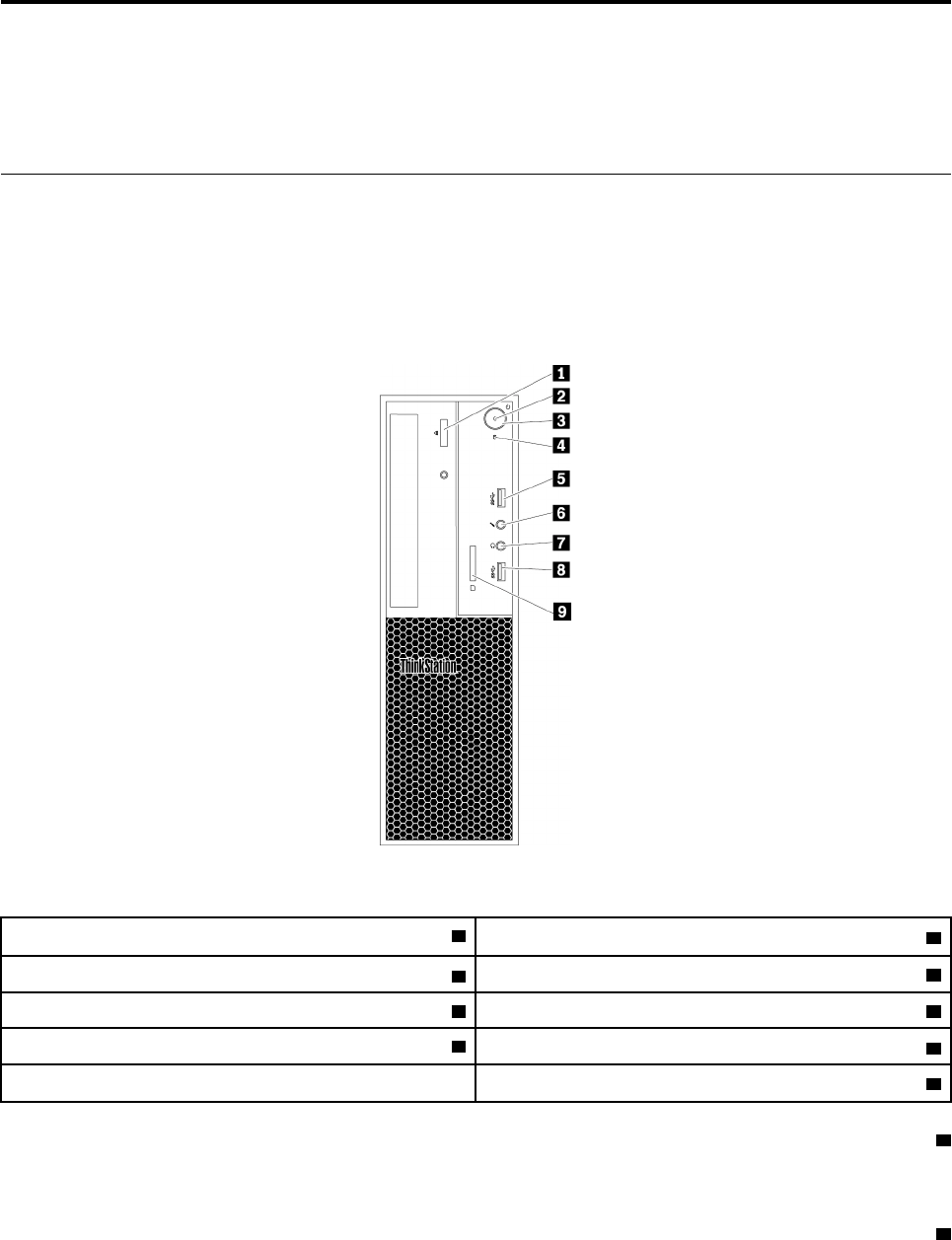
ﺎﻟﺸﻜﻞ١.ﺎﻟﻤﻮﺻﻠﺎﺕﻮﻟﻮﺣﺎﺕﺎﻟﺘﺤﻜﻢﻮﺍﻟﻤﺆﺷﺮﺍﺕﺎﻟﺄﻣﺎﻣﻴﺔ
1ﺰﺭﺈﺧﺮﺍﺝ/ﺈﻏﻠﺎﻕﻤﺤﺮﻙﺎﻟﺄﻗﺮﺍﺹﺎﻟﻀﻮﺋﻴﺔ
2ﻤﺆﺷﺮﺎﻟﻄﺎﻗﺔ
3ﺰﺭﺎﻟﻄﺎﻗﺔ
4ﻤﺆﺷﺮﻨﺸﺎﻁﻤﺤﺮﻙﺄﻗﺮﺍﺹﺎﻟﺘﺨﺰﻳﻦ
5ﻤﻮﺻﻞUSB 3.06ﻤﻮﺻﻞﺎﻟﻤﻴﻜﺮﻭﻓﻮﻥ
7ﻤﻮﺻﻞﺴﻤﺎﻋﺔﺎﻟﺮﺃﺱ
8ﻤﻮﺻﻞUSB 3.0
9ﻘﺎﺭﺉﺎﻟﺒﻄﺎﻗﺎﺕ)ﺒﻌﺾﺎﻟﻄ
ُ
ﺮﺯ(
1ﺰﺭﺈﺧﺮﺍﺝ/ﺈﻏﻠﺎﻕﻤﺤﺮﻙﺎﻟﺄﻗﺮﺍﺹﺎﻟﻀﻮﺋﻴﺔ
ﺎﺿﻐﻂﻌﻠﻰﺎﻟﺰﺭﻠﺈﺧﺮﺍﺝﻔﺘﺤﺔﻤﺤﺮﻙﺎﻟﺄﻗﺮﺍﺹﺎﻟﻀﻮﺋﻴﺔﺄﻭﺈﻏﻠﺎﻗﻬﺎ.
2ﻤﺆﺷﺮﺎﻟﻄﺎﻗﺔ
ﻌﻨﺪﻣﺎﻴﻜﻮﻥﻤﺆﺷﺮﺎﻟﻄﺎﻗﺔﻤﻀﺎﺀ
ً
،ﻴﻜﻮﻥﺎﻟﻜﻤﺒﻴﻮﺗﺮﻘﻴﺪﺎﻟﺘﺸﻐﻴﻞ.
© Copyright Lenovo 2017, 2018١

3ﺰﺭﺎﻟﻄﺎﻗﺔ
ﺎﺿﻐﻂﻌﻠﻰﺰﺭﺎﻟﻄﺎﻗﺔﻠﺘﺸﻐﻴﻞﺎﻟﻜﻤﺒﻴﻮﺗﺮ.ﺈﺫﺍﺘﻮﻗﻒﺎﻟﻜﻤﺒﻴﻮﺗﺮﻌﻦﺎﻟﺎﺳﺘﺠﺎﺑﺔ،ﻔﻴﻤﻜﻨﻚﺈﻳﻘﺎﻑﺘﺸﻐﻴﻠﻪﺒﺎﻟﻀﻐﻂﺒﺎﺳﺘﻤﺮﺍﺭﻌﻠﻰﺰﺭﺎﻟﻄﺎﻗﺔﻠﻤﺪﺓﺄﺭﺑﻊﺜﻮﺍﻥ
ٍ
ﺄﻭﺄﻛﺜﺮ.
4ﻤﺆﺷﺮﻨﺸﺎﻁﻤﺤﺮﻙﺄﻗﺮﺍﺹﺎﻟﺘﺨﺰﻳﻦ
ﻴ
ُ
ﻈﻬﺮﻬﺬﺍﺎﻟﻤﺆﺷﺮﺤﺎﻟﺔﻤﺤﺮﻛﺎﺕﺄﻗﺮﺍﺹﺎﻟﺘﺨﺰﻳﻦﺎﻟﺪﺍﺧﻠﻴﺔ)ﻤﺜﻞﻤﺤﺮﻙﺎﻟﺄﻗﺮﺍﺹﺎﻟﺜﺎﺑﺘﺔﺄﻭﻤﺤﺮﻛﺎﺕﺎﻟﺄﻗﺮﺍﺹﺬﺍﺕﺎﻟﺤﺎﻟﺔﺎﻟﺼﻠﺒﺔ(.
ﻘﻴﺪﺎﻟﺘﺸﻐﻴﻞ:ﻤﺤﺮﻛﺎﺕﺄﻗﺮﺍﺹﺎﻟﺘﺨﺰﻳﻦﻨﺸﻄﺔﻮﻋﻤﻠﻴﺔﻨﻘﻞﺎﻟﺒﻴﺎﻧﺎﺕﺠﺎﺭﻳﺔ.
ﻤﺘﻮﻗﻒﻌﻦﺎﻟﺘﺸﻐﻴﻞ)ﻌﻨﺪﺘﺰﻭﻳﺪﺎﻟﻜﻤﺒﻴﻮﺗﺮﺒﺎﻟﻄﺎﻗﺔ(:ﻠﺎﻴﺘﻢﻨﻘﻞﺎﻟﺒﻴﺎﻧﺎﺕﺄﻭﻤﺤﺮﻛﺎﺕﺄﻗﺮﺍﺹﺎﻟﺘﺨﺰﻳﻦﻠﻴﺴﺖﻘﻴﺪﺎﻟﺎﺳﺘﺨﺪﺍﻡ.
58ﻤﻮﺻﻞUSB 3.0
ﺎﺳﺘﺨﺪﻡﻬﺬﺍﺎﻟﻤﻮﺻﻞﻠﺘﻮﺻﻴﻞﺠﻬﺎﺯﻤﺘﻮﺍﻓﻖﻤﻊUSB،ﻜﻠﻮﺣﺔﻤﻔﺎﺗﻴﺢﺄﻭﻤﺎﻭﺱﺄﻭﺠﻬﺎﺯﺘﺨﺰﻳﻦﺄﻭﻄﺎﺑﻌﺔUSB.
6ﻤﻮﺻﻞﺎﻟﻤﻴﻜﺮﻭﻓﻮﻥ
ﺎﺳﺘﺨﺪﻡﻬﺬﺍﺎﻟﻤﻮﺻﻞﻔﻲﺘﻮﺻﻴﻞﻤﻴﻜﺮﻭﻓﻮﻥﺈﻟﻰﺠﻬﺎﺯﺎﻟﻜﻤﺒﻴﻮﺗﺮﻌﻨﺪﻣﺎﺘﺮﻏﺐﻔﻲﺘﺴﺠﻴﻞﺎﻟﺼﻮﺕﺄﻭﺈﺫﺍﻜﻨﺖﺘﺴﺘﺨﺪﻡﺒﺮﻧﺎﻣﺞﻤﻦﺒﺮﺍﻣﺞﺎﻟﺘﻌﺮﻑﻌﻠﻰﺎﻟﻜﻠﺎﻡ.
7ﻤﻮﺻﻞﺴﻤﺎﻋﺔﺎﻟﺮﺃﺱ
ﺎﺳﺘﺨﺪﻡﻬﺬﺍﺎﻟﻤﻮﺻﻞﻠﺘﻮﺻﻴﻞﺴﻤﺎﻋﺔﺮﺃﺱﺒﺠﻬﺎﺯﺎﻟﻜﻤﺒﻴﻮﺗﺮ.
9ﻘﺎﺭﺉﺎﻟﺒﻄﺎﻗﺎﺕ)ﻤﺘﻮﻓﺮﺓﻔﻲﺒﻌﺾﺎﻟﻄ
ُ
ﺮﺯ(
ﻬﺬﺍﻘﺎﺭﺉﺒﻄﺎﻗﺎﺕ9ﻔﻲ1.ﻴ
ُ
ﺴﺘﺨﺪﻡﻠﺈﺩﺧﺎﻝﻮﺳﻴﻂﺘﺨﺰﻳﻦﻤﻌﺘﻤﺪﻌﻠﻰﺸﻜﻞﺒﻄﺎﻗﺔﻠﻘﺮﺍﺀﺓﺎﻟﺒﻴﺎﻧﺎﺕﻌﻠﻰﺎﻟﻮﺳﻴﻂ.
ﻤﺸﻬﺪﻠﻠﺠﺎﻧﺐﺎﻟﺨﻠﻔﻲ
ﺘﻜﻮﻥﺒﻌﺾﺎﻟﻤﻮﺻﻠﺎﺕﺎﻟﻤﻮﺟﻮﺩﺓﻔﻲﺠﻬﺔﺎﻟﻜﻤﺒﻴﻮﺗﺮﺎﻟﺨﻠﻔﻴﺔﻤﻠﻮﻧﺔﺒﺤﻴﺚﺘﺴﺎﻋﺪﻙﻔﻲﺘﺤﺪﻳﺪﺄﻣﺎﻛﻦﺘﻮﺻﻴﻞﺎﻟﻜﺎﺑﻠﺎﺕﻌﻠﻰﺎﻟﻜﻤﺒﻴﻮﺗﺮ.
ﻤﻠﺎﺣﻈﺔ:ﻘﺪﺘﺨﺘﻠﻒﺄﺟﻬﺰﺓﺎﻟﻜﻤﺒﻴﻮﺗﺮﺎﺧﺘﻠﺎﻓ
ً
ﺎﻄﻔﻴﻔ
ً
ﺎﻌﻤﺎﻬﻮﻤﻮﺿﺢﻔﻲﺎﻟﺸﻜﻞﺎﻟﺘﻮﺿﻴﺤﻲ.
٢
ﺩﻟﻴﻞﻣﺴﺘﺨﺪﻡP320
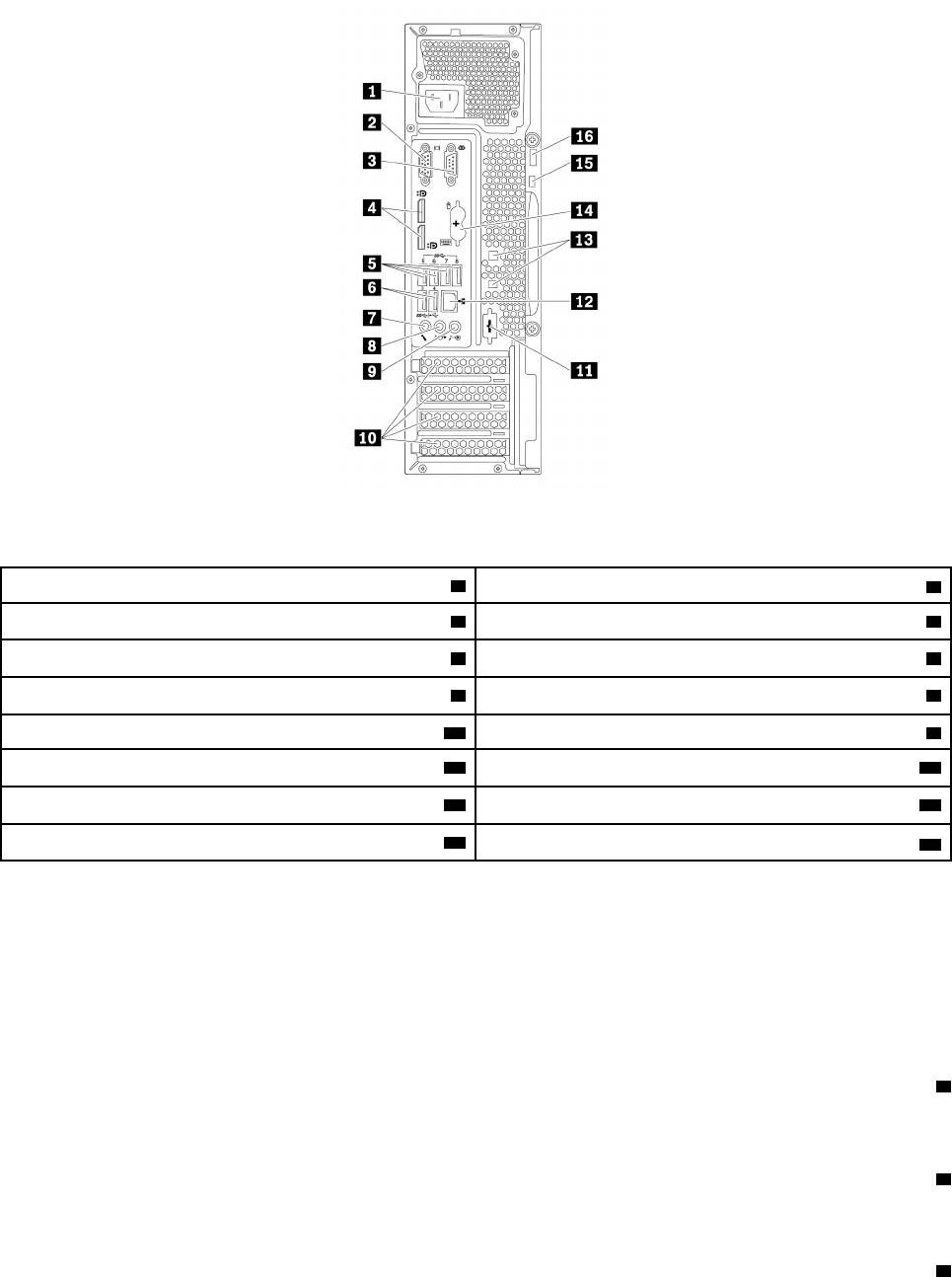
ﺎﻟﺸﻜﻞ٢.ﺎﻟﻠﻮﺣﺔﺎﻟﺨﻠﻔﻴﺔ
1ﻤﻮﺻﻞﺴﻠﻚﺎﻟﻄﺎﻗﺔ
2ﻤﻮﺻﻞVGA
3ﺎﻟﻤﻮﺻﻞﺎﻟﺘﺴﻠﺴﻠﻲ4ﻤﻮﺻﻠﺎﺕDisplayPort®
)2(
5ﻤﻮﺻﻠﺎﺕUSB 3.0)4(6ﻤﻮﺻﻠﺎﺕUSB 2.0)2(
7ﻤﻮﺻﻞﺎﻟﻤﻴﻜﺮﻭﻓﻮﻥ8ﻤﻮﺻﻞﺨﺮﺝﺎﻟﺼﻮﺕ
9ﻤﻮﺻﻞﺪﺧﻞﺎﻟﺼﻮﺕ
10ﻤﻨﻄﻘﺔﺒﻄﺎﻗﺔPCIe*
11ﺎﻟﻤﻮﺻﻞﺎﻟﺘﺴﻠﺴﻠﻲﺎﻟﺎﺧﺘﻴﺎﺭﻱ12ﻤﻮﺻﻞEthernet
13ﻔﺘﺤﺎﺕﻘﻔﻞﺎﻟﻜﺎﺑﻞ(2)
14ﻤﻮﺻﻠﺎﻠﻮﺣﺔﻤﻔﺎﺗﻴﺢﻮﻣﺎﻭﺱPS/2)ﻔﻲﺒﻌﺾﺎﻟﻄ
ُ
ﺮﺯ(
15ﻔﺘﺤﺔﻘﻔﻞﺎﻟﺄﻣﺎﻥ
16ﺤﻠﻘﺔﻘﻔﻞﺎﻟﻠﻮﺣﺔ
ﻤﻠﺎﺣﻈﺎﺕ:*ﻴﻤﻜﻦﺘﺮﻛﻴﺐﺒﻄﺎﻗﺔﺮﺳﻮﻣﺎﺕﻤﻨﻔﺼﻠﺔﺄﻭﻤﺤﻮﻝﺸﺒﻜﺔﻔﻲﻔﺘﺤﺔﺒﻄﺎﻗﺔPCI-Express (PCIe)ﺎﻟﻤﻨﺎﺳﺒﺔ.ﺈﺫﺍﺘﻢﺘﺮﻛﻴﺐﻤﺜﻞﻬﺬﻩﺎﻟﺒﻄﺎﻗﺔ،
ﻔﺎﺳﺘﺨﺪﻡﺎﻟﻤﻮﺻﻠﺎﺕﻌﻠﻰﺎﻟﺒﻄﺎﻗﺔﺒﺪﻟﺎ
ً
ﻤﻦﺎﻟﻤﻮﺻﻠﺎﺕﺎﻟﻤﻨﺎﻇﺮﺓﻠﻬﺎﻌﻠﻰﺎﻟﻜﻤﺒﻴﻮﺗﺮﻠﺘﺤﺴﻴﻦﺎﻟﺄﺩﺍﺀ.ﺘﺒﻌ
ً
ﺎﻠﻄﺮﺍﺯﺎﻟﻜﻤﺒﻴﻮﺗﺮﻠﺪﻳﻚ،ﻘﺪﺘﺨﺘﻠﻒﺎﻟﺒﻄﺎﻗﺎﺕﺎﻟﻤﺮﻛ
ّ
ﺒﺔ
ﻤﺴﺒﻘ
ً
ﺎ.ﻘﺪﻴﺘﻢﺘﺮﻛﻴﺐﺒﻄﺎﻗﺔﺮﺳﻮﻣﺎﺕﻮﺍﺣﺪﺓﺄﻭﺄﻛﺜﺮﻠﺘﻮﻓﻴﺮﺎﻟﻤﻮﺻﻠﺎﺕﺎﻟﺘﺎﻟﻴﺔ:
•ﻤﻮﺻﻞﻮﺍﺟﻬﺔﻤﺮﺋﻴﺔﺮﻗﻤﻴﺔ)DVI)
•ﻤﻮﺻﻞDisplayPort®
•ﻤﻮﺻﻞMini DisplayPort®
1ﻤﻮﺻﻞﺴﻠﻚﺎﻟﻄﺎﻗﺔ
ﻘﻢﺒﺘﻮﺻﻴﻞﺴﻠﻚﺎﻟﻄﺎﻗﺔﺒﺠﻬﺎﺯﺎﻟﻜﻤﺒﻴﻮﺗﺮﻠﺈﻣﺪﺍﺩﻩﺒﺎﻟﻄﺎﻗﺔ.
2ﻤﻮﺻﻞVGA
ﻴ
ُ
ﺴﺘﺨﺪﻡﻠﺘﻮﺻﻴﻞﺠﻬﺎﺯﻌﺮﺽﻤﺼﻔﻮﻓﺔﺮﺳﻮﻣﺎﺕﻔﻴﺪﻳﻮ(VGA)ﺄﻭﺄﺟﻬﺰﺓﺄﺧﺮﻯﺘﺴﺘﺨﺪﻡﻤﻮﺻﻞVGA.
3ﻤﻮﺻﻞﺘﺴﻠﺴﻠﻲ
ﺍﻟﻤﻠﺤﻖ١.ﻧﻈﺮﺓﻋﺎﻣﺔﻋﻠﻰﺍﻟﻤﻨﺘﺞ٣

ﺎﺳﺘﺨﺪﻡﻬﺬﺍﺎﻟﻤﻮﺻﻞﻠﺘﻮﺻﻴﻞﻤﻮﺩﻡﺨﺎﺭﺟﻲ،ﺄﻭﻄﺎﺑﻌﺔﺘﺴﻠﺴﻠﻴﺔ،ﺄﻭﺄﻱﺄﺟﻬﺰﺓﺄﺧﺮﻯﺘﺴﺘﺨﺪﻡﻤﻮﺻﻠﺎ
ً
ﺘﺴﻠﺴﻠﻴ
ً
ﺎﺬﺍ9ﺄﻃﺮﺍﻑﺘﻮﺻﻴﻞ.
4ﻤﻮﺻﻞDisplayPort(2)
ﺎﺳﺘﺨﺪﻡﻬﺬﺍﺎﻟﻤﻮﺻﻞﻠﺘﻮﺻﻴﻞﺠﻬﺎﺯﻌﺮﺽﻌﺎﻟﻲﺎﻟﺄﺩﺍﺀﺄﻭﺠﻬﺎﺯﻌﺮﺽﻴﻌﻤﻞﺒﺸﻜﻞﻤﺒﺎﺷﺮﺄﻭﺄﺟﻬﺰﺓﺄﺧﺮﻯﻤﺘﻮﺍﻓﻘﺔ.
5ﻤﻮﺻﻠﺎﺕUSB 3.0)4(
ﺎﺳﺘﺨﺪﻡﻬﺬﺍﺎﻟﻤﻮﺻﻞﻠﺘﻮﺻﻴﻞﺠﻬﺎﺯﻤﺘﻮﺍﻓﻖﻤﻊUSB،ﻜﻠﻮﺣﺔﻤﻔﺎﺗﻴﺢﺄﻭﻤﺎﻭﺱﺄﻭﺠﻬﺎﺯﺘﺨﺰﻳﻦﺄﻭﻄﺎﺑﻌﺔUSB.
6ﻤﻮﺻﻠﺎﺕUSB 2.0)2(
ﺎﺳﺘﺨﺪﻡﻬﺬﺍﺎﻟﻤﻮﺻﻞﻠﺘﻮﺻﻴﻞﺠﻬﺎﺯﻤﺘﻮﺍﻓﻖﻤﻊUSB،ﻜﻠﻮﺣﺔﻤﻔﺎﺗﻴﺢﺄﻭﻤﺎﻭﺱﺄﻭﺠﻬﺎﺯﺘﺨﺰﻳﻦﺄﻭﻄﺎﺑﻌﺔUSB.
7ﻤﻮﺻﻞﺎﻟﻤﻴﻜﺮﻭﻓﻮﻥ
ﺎﺳﺘﺨﺪﻡﻬﺬﺍﺎﻟﻤﻮﺻﻞﻔﻲﺘﻮﺻﻴﻞﻤﻴﻜﺮﻭﻓﻮﻥﺈﻟﻰﺠﻬﺎﺯﺎﻟﻜﻤﺒﻴﻮﺗﺮﻌﻨﺪﻣﺎﺘﺮﻏﺐﻔﻲﺘﺴﺠﻴﻞﺎﻟﺼﻮﺕﺄﻭﺈﺫﺍﻜﻨﺖﺘﺴﺘﺨﺪﻡﺒﺮﻧﺎﻣﺞﻤﻦﺒﺮﺍﻣﺞﺎﻟﺘﻌﺮﻑﻌﻠﻰﺎﻟﻜﻠﺎﻡ.
8ﻤﻮﺻﻞﺨﺮﺝﺎﻟﺼﻮﺕ
ﺴﺘﺨﺪﻡﻤﻮﺻﻞﺨﺮﺝﺎﻟﺼﻮﺕﻠﺈﺭﺳﺎﻝﺎﻟﺈﺷﺎﺭﺍﺕﺎﻟﺼﻮﺗﻴﺔﻤﻦﺎﻟﻜﻤﺒﻴﻮﺗﺮﺈﻟﻰﺎﻟﺄﺟﻬﺰﺓﺎﻟﺨﺎﺭﺟﻴﺔ،ﻤﺜﻞﺴﻤﺎﻋﺎﺕﺎﻟﺮﺃﺱ.
9ﻤﻮﺻﻞﺪﺧﻞﺎﻟﺼﻮﺕ
ﻴ
ُ
ﺴﺘﺨﺪﻡﻤﻮﺻﻞﺪﺧﻞﺎﻟﺼﻮﺕﻠﺎﺳﺘﻘﺒﺎﻝﺎﻟﺈﺷﺎﺭﺍﺕﺎﻟﺼﻮﺗﻴﺔﻤﻦﺠﻬﺎﺯﺼﻮﺕﺨﺎﺭﺟﻲ،ﻤﺜﻞﻨﻈﺎﻡﺎﻟﺎﺳﺘﻴﺮﻳﻮ.ﻌﻨﺪﺘﻮﺻﻴﻞﺠﻬﺎﺯﺼﻮﺕﺨﺎﺭﺟﻲ،ﻴﻨﺸﺄﺎﺗﺼﺎﻝ
ﻜﺎﺑﻞﺒﻴﻦﻤﻮﺻﻞﺨﺮﺝﺎﻟﺼﻮﺕﻔﻲﺎﻟﺠﻬﺎﺯﻮﻣﻮﺻﻞﺪﺧﻞﺎﻟﺼﻮﺕﻔﻲﺎﻟﻜﻤﺒﻴﻮﺗﺮ.
10ﻤﻨﻄﻘﺔﺒﻄﺎﻗﺔPCIe)ﺘﻮﻓﺮﺎﻟﺒﻄﺎﻗﺎﺕﺎﻟﺄﺧﺮﻯﻤﻮﺻﻠﺎﺕﻤﺨﺘﻠﻔﺔ(
ﻠﺘﺤﺴﻴﻦﺎﻟﺄﺩﺍﺀﺎﻟﺘﺸﻐﻴﻠﻲﻠﺠﻬﺎﺯﺎﻟﻜﻤﺒﻴﻮﺗﺮ،ﻴﻤﻜﻨﻚﺘﺮﻛﻴﺐﺒﻄﺎﻗﺎﺕPeripheral Component Interconnect Express (PCIe)ﺄﻭﺎﺳﺘﺒﺪﺍﻟﻬﺎﻔﻲﻬﺬﻩ
ﺎﻟﻤﻨﻄﻘﺔ.ﺘﺒﻌ
ً
ﺎﻠﻄﺮﺍﺯﺎﻟﻜﻤﺒﻴﻮﺗﺮﻠﺪﻳﻚ،ﻘﺪﺘﺨﺘﻠﻒﺎﻟﺒﻄﺎﻗﺎﺕﺎﻟﻤﺮﻛ
ّ
ﺒﺔﻔﻲﻬﺬﻩﺎﻟﻤﻨﻄﻘﺔ.
ﻤﻠﺎﺣﻈﺔ:ﻴﻤﻜﻦﺘﺮﻛﻴﺐﺒﻄﺎﻗﺔﺮﺳﻮﻣﺎﺕﻤﻨﻔﺼﻠﺔ،ﺄﻭﺒﻄﺎﻗﺔﻮﺍﺟﻬﺔﺸﺒﻜﺔ،ﺄﻭﺒﻄﺎﻗﺔﺼﻮﺕﻔﻲﻔﺘﺤﺔﺒﻄﺎﻗﺔPCIeﺎﻟﻤﻨﺎﺳﺒﺔ.ﺈﺫﺍﺘﻢﺘﺮﻛﻴﺐﻤﺜﻞﻬﺬﻩﺎﻟﺒﻄﺎﻗﺔ،ﻔﺘﺄﻛﺪ
ﻤﻦﺎﺳﺘﺨﺪﺍﻡﺎﻟﻤﻮﺻﻠﺎﺕﻌﻠﻰﺎﻟﺒﻄﺎﻗﺔﺒﺪﻟﺎ
ً
ﻤﻦﺎﻟﻤﻮﺍﺻﻠﺎﺕﺎﻟﻤﻜﺎﻓﺌﺔﻠﻬﺎﻌﻠﻰﺎﻟﻜﻤﺒﻴﻮﺗﺮ.
12ﻤﻮﺻﻠﺎﺕEthernet
ﻘﻢﺒﺘﻮﺻﻴﻞﻜﺎﺑﻞEthernetﻠﺸﺒﻜﺔﺎﺗﺼﺎﻟﺎﺕﻤﺤﻠﻴﺔ(LAN).
ﻤﻠﺎﺣﻈﺔ:ﻠﺘﺸﻐﻴﻞﺎﻟﻜﻤﺒﻴﻮﺗﺮﻔﻲﺤﺪﻭﺩﻤﻌﺎﻳﻴﺮﻤﻔﻮﺿﻴﺔﺎﻟﺎﺗﺼﺎﻟﺎﺕﺎﻟﻔﻴﺪﺭﺍﻟﻴﺔ(FCC)ﺎﻟﻔﺌﺔB،ﺎﺳﺘﺨﺪﻡﻜﺎﺑﻞEthernetﻤﻦﺎﻟﻔﺌﺔ5.
13ﻔﺘﺤﺎﺕﻘﻔﻞﺎﻟﻜﺎﺑﻞ(2)
ﺘ
ُ
ﺴﺘﺨﺪﻡﻠﺘﺜﺒﻴﺖﺒﻌﺾﺎﻟﻜﺎﺑﻠﺎﺕﺒﺈﺣﻜﺎﻡ.ﺮﺍﺟﻊ"ﺘﻮﺻﻴﻞﻘﻔﻞﺎﻟﻜﺎﺑﻞ"ﻌﻠﻰﺎﻟﺼﻔﺤﺔ٢٦.
14ﻤﻮﺻﻞPS/2ﻠﻠﻮﺣﺔﺎﻟﻤﻔﺎﺗﻴﺢﻮﺍﻟﻤﺎﻭﺱ)ﻤﺘﻮﻓﺮﻔﻲﺒﻌﺾﺎﻟﻄ
ُ
ﺮﺯ(
ﺎﺳﺘﺨﺪﻡﻬﺬﺍﺎﻟﻤﻮﺻﻞﻠﺘﻮﺻﻴﻞﻠﻮﺣﺔﻤﻔﺎﺗﻴﺢPersonal System/2 (PS/2)ﺄﻭﻤﺎﻭﺱPS/2.
15ﻔﺘﺤﺔﻘﻔﻞﺎﻟﺄﻣﺎﻥ
ﻘﻢﺒﺘﻮﺻﻴﻞﻘﻔﻞﻜﺎﺑﻞﺒﺄﺳﻠﻮﺏKensingtonﺒﻔﺘﺤﺔﻘﻔﻞﺎﻟﺄﻣﺎﻥﻠﺤﻤﺎﻳﺔﺎﻟﻜﻤﺒﻴﻮﺗﺮ.ﻠﻤﺰﻳﺪﻤﻦﺎﻟﻤﻌﻠﻮﻣﺎﺕ،ﺎﻧﻈﺮ"ﺘﻮﺻﻴﻞﻘﻔﻞﺎﻟﻜﺎﺑﻞﺒﺄﺳﻠﻮﺏKensington"
ﻌﻠﻰﺎﻟﺼﻔﺤﺔ٢٥.
16ﺤﻠﻘﺔﻘﻔﻞﺎﻟﻠﻮﺣﺔ
٤
ﺩﻟﻴﻞﻣﺴﺘﺨﺪﻡP320
ﻘﻢﺒﺘﻮﺻﻴﻞﻘﻔﻞﺎﻟﻠﻮﺣﺔﻠﺤﻤﺎﻳﺔﺎﻟﻜﻤﺒﻴﻮﺗﺮ.ﻠﻤﺰﻳﺪﻤﻦﺎﻟﻤﻌﻠﻮﻣﺎﺕ،ﺎﻧﻈﺮ"ﺘﻮﺻﻴﻞﻘﻔﻞﺎﻟﻠﻮﺣﺔ"ﻌﻠﻰﺎﻟﺼﻔﺤﺔ٢٥.
ﻤﻜﻮﻧﺎﺕﺎﻟﻜﻤﺒﻴﻮﺗﺮ
ﻤﻠﺎﺣﻈﺎﺕ:
•ﺘﺒﻌ
ً
ﺎﻠﻠﻄﺮﺍﺯﺎﻟﺬﻱﺘﺴﺘﺨﺪﻣﻪ،ﻘﺪﻴﺨﺘﻠﻒﺎﻟﻜﻤﺒﻴﻮﺗﺮﺎﻟﺨﺎﺹﺒﻚﺎﺧﺘﻠﺎﻓ
ً
ﺎﻄﻔﻴﻔ
ً
ﺎﻌﻤﺎﻬﻮﻤﺒﻴﻦﺒﺎﻟﺮﺳﻢﺎﻟﺘﻮﺿﻴﺤﻲ.
•ﻠﺈﺯﺍﻟﺔﻐﻄﺎﺀﺎﻟﻜﻤﺒﻴﻮﺗﺮ،ﺮﺍﺟﻊ"ﺈﻋﺪﺍﺩﺎﻟﻜﻤﺒﻴﻮﺗﺮﻮﻧﺰﻉﻐﻄﺎﺀﺎﻟﻜﻤﺒﻴﻮﺗﺮ"ﻌﻠﻰﺎﻟﺼﻔﺤﺔ٥١.
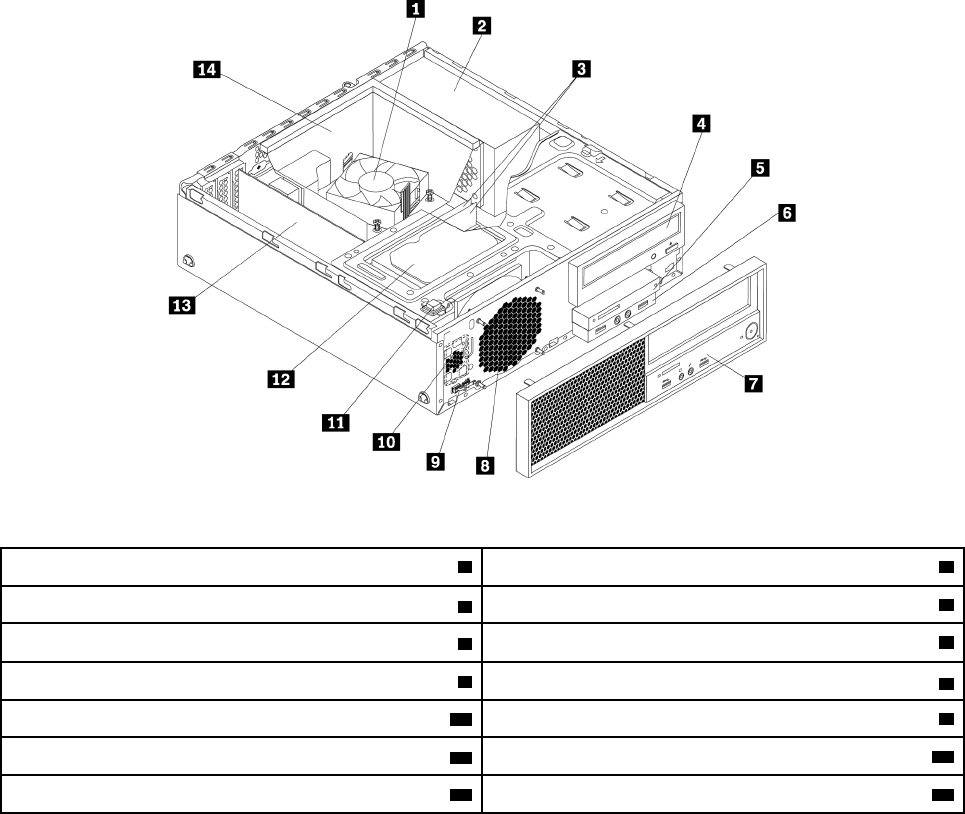
ﺎﻟﺸﻜﻞ٣.ﺄﻣﺎﻛﻦﺎﻟﻤﻜﻮﻧﺎﺕ
1ﻤﻤﺘﺺﺎﻟﺤﺮﺍﺭﺓﻮﻣﺠﻤﻮﻋﺔﺎﻟﻤﺮﻭﺣﺔ*2ﻮﺣﺪﺓﺘﻐﺬﻳﺔﺎﻟﺘﻴﺎﺭﺎﻟﻜﻬﺮﺑﺎﺋﻲ
3ﻮﺣﺪﺍﺕﺎﻟﺬﺍﻛﺮﺓ*
4ﻤﺤﺮﻙﺎﻟﺄﻗﺮﺍﺹﺎﻟﻀﻮﺋﻴﺔ*
5ﻮﺣﺪﺓﻘﺮﺍﺀﺓﺎﻟﺒﻄﺎﻗﺔ*
6ﺎﻟﻤﻮﺻﻞﺎﻟﺼﻮﺗﻲﺎﻟﺄﻣﺎﻣﻲﻮﻣﺠﻤﻮﻋﺔUSB
7ﺎﻟﻮﺍﺟﻬﺔﺎﻟﺄﻣﺎﻣﻴﺔ
8ﻤﺮﻭﺣﺔﺎﻟﻨﻈﺎﻡ*
9ﻮﺣﺪﺓﺎﺳﺘﺸﻌﺎﺭﺤﺮﺍﺭﻱ
10ﺴﻤﺎﻋﺔﺪﺍﺧﻠﻴﺔ
11ﻤﻔﺘﺎﺡﻮﺟﻮﺩﺎﻟﻐﻄﺎﺀ)ﻤﻔﺘﺎﺡﺎﻟﺈﺩﺧﺎﻝ(*
12ﻤﺤﺮﻙﺎﻟﺄﻗﺮﺍﺹﺎﻟﺜﺎﺑﺘﺔ
13ﺒﻄﺎﻗﺔPCIe)ﺒﻌﺾﺎﻟﻄ
ُ
ﺮﺯ(
14ﻤﻨﻔﺬﺎﻟﺤﺮﺍﺭﺓﻮﻣﺠﺮﻯﺎﻟﻤﺮﻭﺣﺔ
*ﻴﺨﺘﻠﻒﺎﻟﺘﻜﻮﻳﻦﺒﺎﺧﺘﻠﺎﻑﻄ
ُ
ﺮﺯﺎﻟﻜﻤﺒﻴﻮﺗﺮ.
ﺎﻟﺄﺟﺰﺍﺀﻌﻠﻰﻠﻮﺣﺔﺎﻟﻨﻈﺎﻡ
ﻤﻠﺎﺣﻈﺔ:ﻘﺪﺘﺨﺘﻠﻒﻠﻮﺣﺔﺎﻟﻨﻈﺎﻡﺎﺧﺘﻠﺎﻓ
ً
ﺎﻄﻔﻴﻔ
ً
ﺎﻌﻤﺎﻬﻮﻤﻮﺿﺢﺒﺎﻟﺮﺳﻮﻡﺎﻟﺘﻮﺿﻴﺤﻴﺔ.
ﻴﺒﻴﻦﺎﻟﺸﻜﻞﺎﻟﺘﻮﺿﻴﺤﻲﺎﻟﺘﺎﻟﻲﺄﻣﺎﻛﻦﺎﻟﺄﺟﺰﺍﺀﺒﻠﻮﺣﺔﺎﻟﻨﻈﺎﻡ.
ﺍﻟﻤﻠﺤﻖ١.ﻧﻈﺮﺓﻋﺎﻣﺔﻋﻠﻰﺍﻟﻤﻨﺘﺞ٥
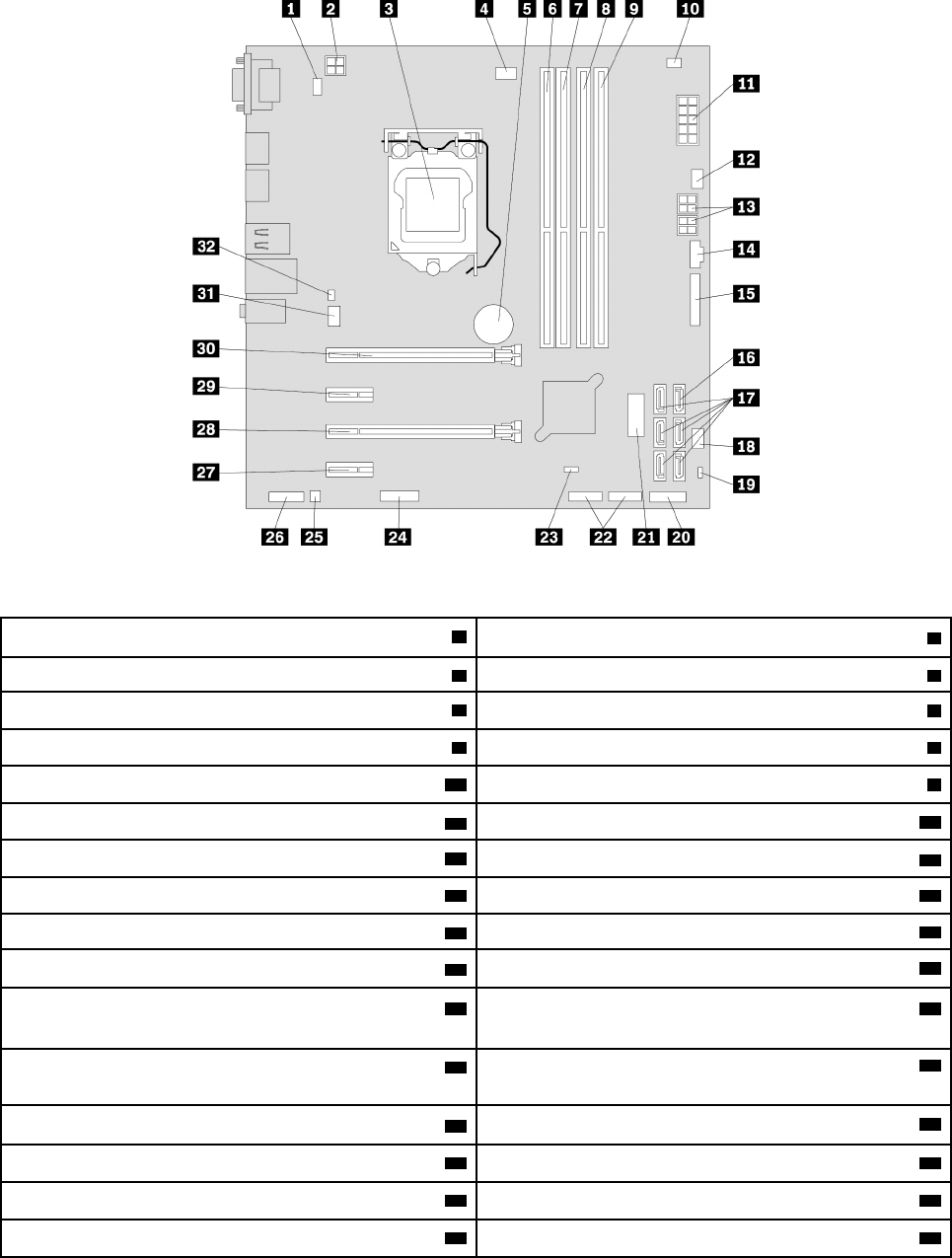
ﺎﻟﺸﻜﻞ٤.ﺎﻟﺄﺟﺰﺍﺀﻌﻠﻰﻠﻮﺣﺔﺎﻟﻨﻈﺎﻡ
1ﻤﻮﺻﻞﻠﻮﺣﺔﺎﻟﻤﻔﺎﺗﻴﺢﻮﺍﻟﻔﺄﺭﺓPS/2
2ﻤﻮﺻﻞﻄﺎﻗﺔﺬﻭ4ﺴﻨﻮﻥ
3ﺎﻟﻤﺸﻐﻞﺎﻟﺪﻗﻴﻖ4ﻤﻮﺻﻞﻤﺮﻭﺣﺔﺎﻟﻤﺸﻐﻞﺎﻟﺪﻗﻴﻖ
5ﺎﻟﺒﻄﺎﺭﻳﺔ
6ﻔﺘﺤﺔﺎﻟﺬﺍﻛﺮﺓﺮﻗﻢ1(DIMM1)
7ﻔﺘﺤﺔﺎﻟﺬﺍﻛﺮﺓﺮﻗﻢ2(DIMM2)8ﻔﺘﺤﺔﺎﻟﺬﺍﻛﺮﺓﺮﻗﻢ3(DIMM3)
9ﻔﺘﺤﺔﺎﻟﺬﺍﻛﺮﺓﺮﻗﻢ4(DIMM4)10ﻤﻮﺻﻞﻮﺣﺪﺓﺎﺳﺘﺸﻌﺎﺭﺤﺮﺍﺭﻱ
11ﻤﻮﺻﻞﻄﺎﻗﺔﺬﻭ10ﺴﻨﻮﻥ
12ﻤﻮﺻﻞﻤﺮﻭﺣﺔﻤﺤﺮﻙﺎﻟﺄﻗﺮﺍﺹﺎﻟﺜﺎﺑﺘﺔ
13ﻤﻮﺻﻠﺎﺕﻄﺎﻗﺔSATAﻤﺰﻭﺩﺓﺒﺄﺭﺑﻌﺔﺄﻃﺮﺍﻑﺘﻮﺻﻴﻞ
14ﻤﻮﺻﻞThunderbolt™
15ﻤﻮﺻﻞﻌﻠﻰﺎﻟﺘﻮﺍﺯﻱ16ﻤﻮﺻﻞeSATA
17ﻤﻮﺻﻠﺎﺕSATA
18ﻤﻮﺻﻞﻤﺮﻭﺣﺔﺎﻟﻄﺎﻗﺔ
19ﻌﻨﻮﺍﻥﺘﻌﻄﻴﻞﺠﻬﺎﺯUSB
20ﻤﻮﺻﻞﺎﻟﻮﺍﺟﻬﺔﺎﻟﺄﻣﺎﻣﻴﺔ)ﻠﺘﻮﺻﻴﻞﻤﺆﺷﺮﺍﺕLEDﻮﺯﺭﺎﻟﻄﺎﻗﺔ(
21ﻤﻮﺻﻞUSB 3.0ﺎﻟﺄﻣﺎﻣﻲ)ﻠﺘﻮﺻﻴﻞﻤﻮﺻﻠﺎﺕUSBﺒﺎﻟﻠﻮﺣﺔﺎﻟﺄﻣﺎﻣﻴﺔ(22ﻤﻮﺻﻠﺎﺕUSB 2.0)ﻠﺘﻮﺻﻴﻞﻤﻮﺻﻞUSB 2.0ﺎﻟﺄﻣﺎﻣﻲﺄﻭﻤﻮﺻﻞﻘﺎﺭﺉ
ﺎﻟﺒﻄﺎﻗﺎﺕﺄﻭﻤﻮﺻﻞBluetooth(
23Clear CMOS (Complementary Metal Oxide Semiconductor)
/Recoveryﻮﺻﻠﺔﺘﺨﻄﻲ
24ﻤﻮﺻﻞ(COM2)ﺎﻟﺘﺴﻠﺴﻠﻲ
25ﻤﻮﺻﻞﺎﻟﺴﻤﺎﻋﺎﺕﺎﻟﺪﺍﺧﻠﻴﺔ
26ﻤﻮﺻﻞﺼﻮﺗﻲﺄﻣﺎﻣﻲ
27ﻔﺘﺤﺔﺒﻄﺎﻗﺔPCIe x1ﻌﺪﺩ(4)28ﺎﻟﻔﺘﺤﺔ3ﻠﺒﻄﺎﻗﺔPCIe x4)ﺎﺭﺗﺒﺎﻁﺒﻌﺮﺽﻘﺎﺑﻞﻠﻠﺘﻐﻴﻴﺮx4،x1(
29ﻔﺘﺤﺔﺒﻄﺎﻗﺔPCIe x1ﻌﺪﺩ(2)30ﺎﻟﻔﺘﺤﺔ1ﻠﺒﻄﺎﻗﺔPCIe x16)ﺘﺘﻮﻓﺮﺒﻄﺎﻗﺔﺎﻟﺮﺳﻮﻣﺎﺕﻔﻲﺒﻌﺾﺎﻟﻄ
ُ
ﺮﺯ(
31ﻤﻮﺻﻞﻤﺮﻭﺣﺔﺎﻟﻨﻈﺎﻡ32ﻤﻮﺻﻞﻤﻔﺘﺎﺡﻮﺟﻮﺩﺎﻟﻐﻄﺎﺀ)ﻤﻮﺻﻞﻤﻔﺘﺎﺡﺎﻟﺈﺩﺧﺎﻝ(
٦ﺩﻟﻴﻞﻣﺴﺘﺨﺪﻡP320
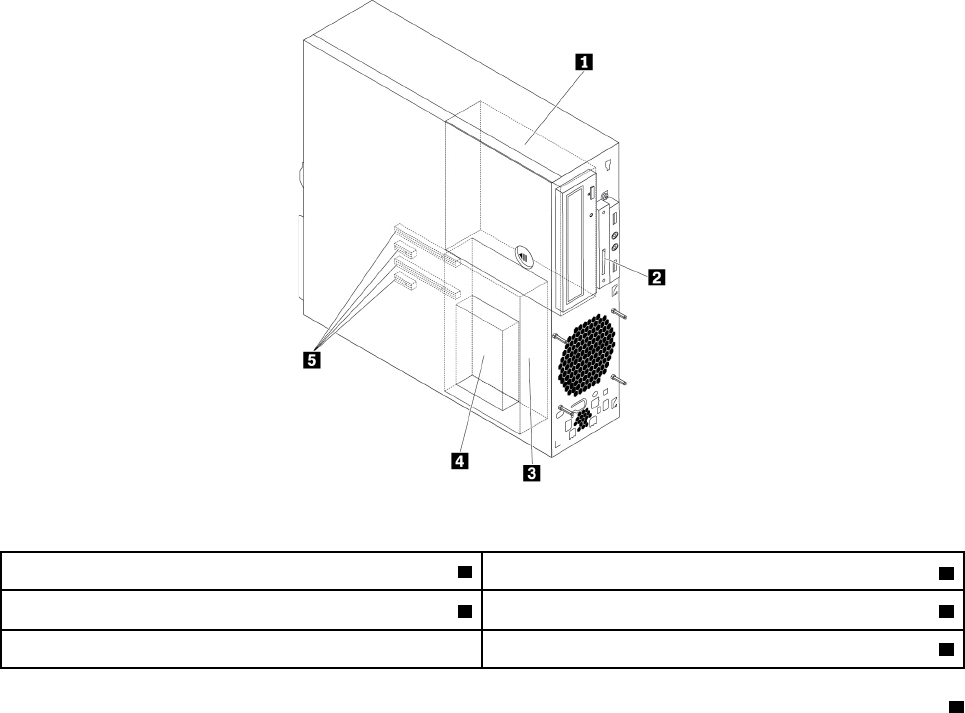
ﻤﺤﺮﻛﺎﺕﺄﻗﺮﺍﺹﺎﻟﺘﺨﺰﻳﻦﺎﻟﺪﺍﺧﻠﻴﺔ
ﺎﻟﻤﺸﻐﻠﺎﺕﺎﻟﺪﺍﺧﻠﻴﺔﻬﻲﺄﺟﻬﺰﺓﻴﺴﺘﺨﺪﻣﻬﺎﺠﻬﺎﺯﺎﻟﻜﻤﺒﻴﻮﺗﺮﻠﻘﺮﺍﺀﺓﺎﻟﺒﻴﺎﻧﺎﺕﻮﺗﺨﺰﻳﻨﻬﺎ.ﻴﻤﻜﻨﻚﺈﺿﺎﻓﺔﺄﻗﺮﺍﺹﺘﺸﻐﻴﻞﻠﺠﻬﺎﺯﺎﻟﻜﻤﺒﻴﻮﺗﺮﻠﺰﻳﺎﺩﺓﺴﻌﺔﺎﻟﺘﺨﺰﻳﻦﻮﻟﺈﺗﺎﺣﺔ
ﺎﻟﺈﻣﻜﺎﻧﺎﺕﻠﺠﻬﺎﺯﺎﻟﻜﻤﺒﻴﻮﺗﺮﺤﺘﻰﻴﻘﺮﺃﺄﻧﻮﺍﻉﺎﻟﻮﺳﺎﺋﻂﺎﻟﺄﺧﺮﻯ.ﻴﺘﻢﺘﺮﻛﻴﺐﺄﻗﺮﺍﺹﺎﻟﺘﺸﻐﻴﻞﺎﻟﺪﺍﺧﻠﻴﺔﻔﻲﺨﺎﻧﺎﺕ.
ﻌﻨﺪﺘﺮﻛﻴﺐﻤﺤﺮﻙﺄﻗﺮﺍﺹﺪﺍﺧﻠﻲﺄﻭﺎﺳﺘﺒﺪﺍﻟﻪ،ﻠﺎﺣﻆﻨﻮﻉﻤﺤﺮﻙﺎﻟﺄﻗﺮﺍﺹﺎﻟﺬﻱﺘﺪﻋﻤﻪﻜﻞﻔﺘﺤﺔﻮﺣﺠﻤﻪﻮﻗﻢﺒﺘﻮﺻﻴﻞﺎﻟﻜﺎﺑﻠﺎﺕﺎﻟﻤﻄﻠﻮﺑﺔﺒﺸﻜﻞﺼﺤﻴﺢ.ﺎﺭﺟﻊ
ﺈﻟﻰﺎﻟﻘﺴﻢﺎﻟﻤﻨﺎﺳﺐﻔﻲﺍﻟﻤﻠﺤﻖ٧"ﺈﺧﺮﺍﺝﺎﻟﺄﺟﻬﺰﺓﻮﺗﺮﻛﻴﺒﻬﺎ"ﻌﻠﻰﺎﻟﺼﻔﺤﺔ٥١ﻠﻠﺤﺼﻮﻝﻌﻠﻰﺘﻌﻠﻴﻤﺎﺕﺘﻮﺿﺢﻜﻴﻔﻴﺔﺘﺮﻛﻴﺐﺄﻭﺎﺳﺘﺒﺪﺍﻝﻤﺤﺮﻛﺎﺕﺎﻟﺄﻗﺮﺍﺹ
ﺎﻟﺪﺍﺧﻠﻴﺔﻠﻠﻜﻤﺒﻴﻮﺗﺮﺎﻟﺨﺎﺹﺒﻚ.
ﻴ
ُ
ﺒﻴﻦﺎﻟﺸﻜﻞﺎﻟﺘﻮﺿﻴﺤﻲﺎﻟﺘﺎﻟﻲﺄﻣﺎﻛﻦﻔﺘﺤﺎﺕﻤﺤﺮﻛﺎﺕﺎﻟﺄﻗﺮﺍﺹ.
ﻤﻠﺎﺣﻈﺔ:ﻘﺪﺘﺨﺘﻠﻒﺄﺟﻬﺰﺓﺎﻟﻜﻤﺒﻴﻮﺗﺮﺎﺧﺘﻠﺎﻓ
ً
ﺎﻄﻔﻴﻔ
ً
ﺎﻌﻤﺎﻬﻮﻤﻮﺿﺢﺒﺎﻟﺮﺳﻮﻡﺎﻟﺘﻮﺿﻴﺤﻴﺔ.
ﺎﻟﺸﻜﻞ٥.ﺄﻣﺎﻛﻦﻔﺘﺤﺎﺕﻤﺤﺮﻛﺎﺕﺎﻟﺄﻗﺮﺍﺹ
1ﻔﺘﺤﺔﻤﺤﺮﻙﺎﻟﺄﻗﺮﺍﺹﺎﻟﻀﻮﺋﻴﺔ
2ﻔﺘﺤﺔﻘﺎﺭﺉﺎﻟﺒﻄﺎﻗﺎﺕ)ﻤﺘﻮﻓﺮﺓﻔﻲﺒﻌﺾﺎﻟﻄ
ُ
ﺮﺯ(
3ﻔﺘﺤﺔﻤﺤﺮﻙﺎﻟﺄﻗﺮﺍﺹﺎﻟﺜﺎﺑﺘﺔﺎﻟﺜﺎﻧﻮﻱ4ﻔﺘﺤﺔﻤﺤﺮﻙﺎﻟﺄﻗﺮﺍﺹﺎﻟﺜﺎﺑﺘﺔﺎﻟﺄﺳﺎﺳﻲ
5ﻔﺘﺤﺎﺕﺒﻄﺎﻗﺔPCIe(4)
1ﻔﺘﺤﺔﻤﺤﺮﻙﺎﻟﺄﻗﺮﺍﺹﺎﻟﻀﻮﺋﻴﺔ
ﺘﺪﻋﻢﻔﺘﺤﺔﻤﺤﺮﻙﺎﻟﺄﻗﺮﺍﺹﺎﻟﻀﻮﺋﻴﺔﺎﻟﺄﺟﻬﺰﺓﺎﻟﺘﺎﻟﻴﺔ.ﻘﺪﺘﺤﺘﻮﻱﺈﺣﺪﻯﺎﻟﻔﺘﺤﺘﻴﻦﻌﻠﻰﺠﻬﺎﺯﻤﻨﻬﻤﺎﺘﺒﻌ
ً
ﺎﻠﻄﺮﺍﺯﺎﻟﻜﻤﺒﻴﻮﺗﺮ:
•ﻤﺤﺮﻙﺎﻟﺄﻗﺮﺍﺹﺎﻟﻀﻮﺋﻴﺔ
•ﻮﺣﺪﺓﻤﺮﻧﺔﻤﻘﺎﺱ5.25ﺒﻮﺻﺔﻤﺰﻭﺩﺓﺒﺒﻌﺾﺄﻭﺠﻤﻴﻊﺎﻟﻤﻜﻮﻧﺎﺕﺎﻟﺘﺎﻟﻴﺔ:
–ﻤﺤﺮﻙﺎﻟﺄﻗﺮﺍﺹﺎﻟﻀﻮﺋﻴﺔﺎﻟﻨﺤﻴﻒ
–ﻘﺎﺭﺉﺎﻟﺒﻄﺎﻗﺎﺕ)9ﻔﻲ1(
–ﻤﻮﺻﻞeSATA
–ﻤﻮﺻﻞIEEE 1394
–ﺤﺰﻣﺔﻤﺤﻮﻝThunderbolt
ﺍﻟﻤﻠﺤﻖ١.ﻧﻈﺮﺓﻋﺎﻣﺔﻋﻠﻰﺍﻟﻤﻨﺘﺞ٧
•ﺤﺎﻭﻳﺔﺎﻟﺘﺨﺰﻳﻦﺎﻟﺄﻣﺎﻣﻴﺔ
•ﻤﺤﻮﻝﻤﺤﺮﻙﺎﻟﺄﻗﺮﺍﺹﺎﻟﻀﻮﺋﻴﺔﺎﻟﺮﻓﻴﻊ
•ﺤﺰﻣﺔﺘﺤﻮﻳﻞﻤﺤﺮﻛﺎﺕﺄﻗﺮﺍﺹﻤﺘﻌﺪﺩﺓ
2ﻔﺘﺤﺔﻘﺎﺭﺉﺎﻟﺒﻄﺎﻗﺎﺕ)ﻤﺘﻮﻓﺮﺓﻔﻲﺒﻌﺾﺎﻟﻄ
ُ
ﺮﺯ(
ﻘﺪﺘﺤﺘﻮﻱﻬﺬﻩﺎﻟﻔﺘﺤﺔﻌﻠﻰﻘﺎﺭﺉﺒﻄﺎﻗﺎﺕﻤﺮﻛ
ّ
ﺐﻔﻴﻬﺎ.
3ﻔﺘﺤﺔﻤﺤﺮﻙﺎﻟﺄﻗﺮﺍﺹﺎﻟﺜﺎﺑﺘﺔﺎﻟﺜﺎﻧﻮﻱ
ﻘﺪﺘﺤﺘﻮﻱﻬﺬﻩﺎﻟﻔﺘﺤﺔﻌﻠﻰﻤﺤﺮﻙﺄﻗﺮﺍﺹﺜﺎﺑﺘﺔﺄﻭﻤﺤﺮﻙﺄﻗﺮﺍﺹﺬﻱﺤﺎﻟﺔﺼﻠﺒﺔﻤﻘﺎﺱ2.5ﺒﻮﺻﺔ.
4ﻔﺘﺤﺔﻤﺤﺮﻙﺎﻟﺄﻗﺮﺍﺹﺎﻟﺜﺎﺑﺘﺔﺎﻟﺄﺳﺎﺳﻲ
ﻘﺪﺘﺤﺘﻮﻱﻬﺬﻩﺎﻟﻔﺘﺤﺔﻌﻠﻰﻤﺤﺮﻙﺄﻗﺮﺍﺹﺜﺎﺑﺘﺔﻤﻘﺎﺱ3.5ﺒﻮﺻﺔﺄﻭﻤﺤﺮﻙﺄﻗﺮﺍﺹﻤﺨﺘﻠﻂﻤﻘﺎﺱ3.5ﺒﻮﺻﺔﺄﻭﻤﺤﺮﻙﺄﻗﺮﺍﺹﺬﻱﺤﺎﻟﺔﺼﻠﺒﺔﻤﻘﺎﺱ2.5
ﺒﻮﺻﺔ.
5ﻔﺘﺤﺎﺕﺒﻄﺎﻗﺔPCIe(4)
ﻴﻤﻜﻦﺄﻳﻀ
ً
ﺎﺘﺮﻛﻴﺐﻤﺤﺮﻛﺎﺕﺄﻗﺮﺍﺹﺬﺍﺕﺎﻟﺤﺎﻟﺔﺎﻟﺼﻠﺒﺔPCIeﺄﻭﺒﻄﺎﻗﺎﺕPCIeﺄﺧﺮﻯﻔﻲﻬﺬﻩﺎﻟﻔﺘﺤﺎﺕ.
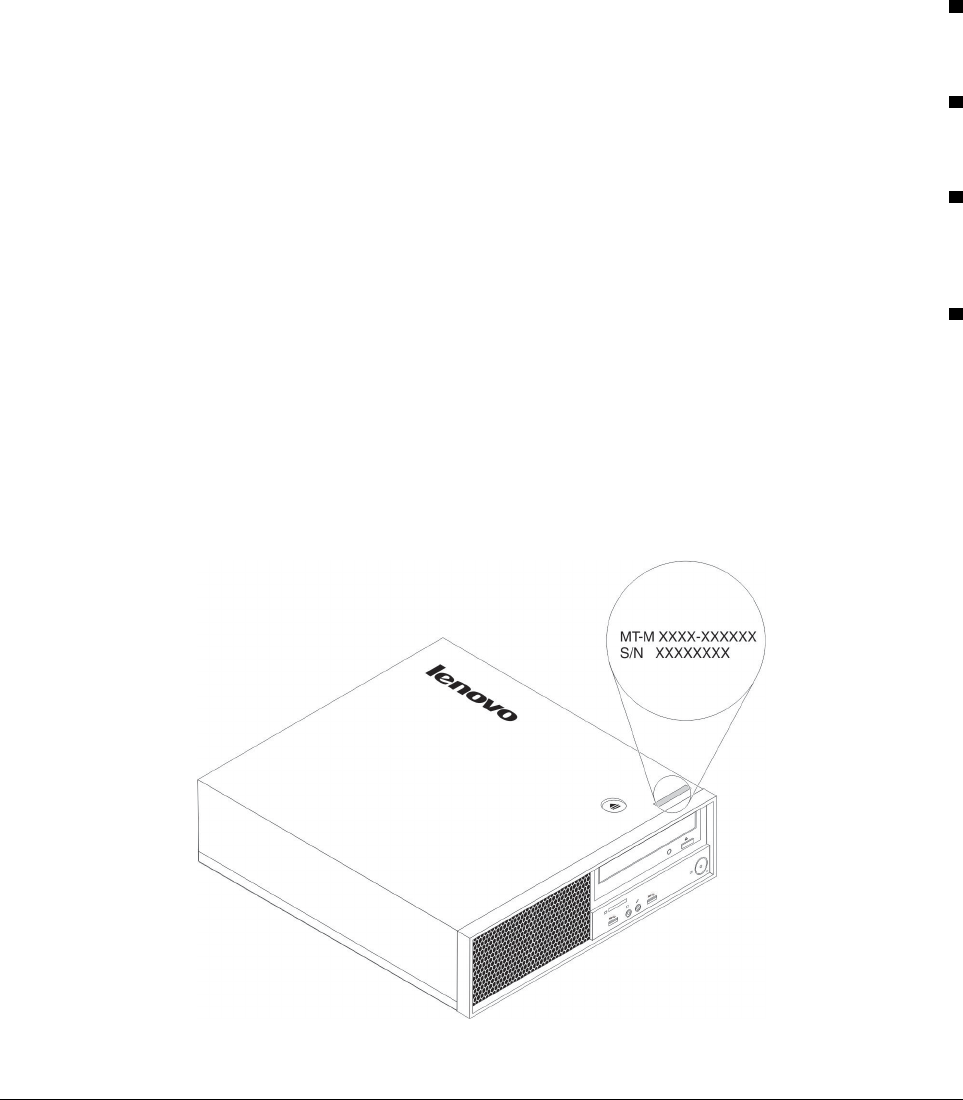
ﻤﻠﺼﻖﻨﻮﻉﺎﻟﺠﻬﺎﺯﻮﻃﺮﺍﺯﻩ
ﺈﻥﺎﻟﻬﺪﻑﻤﻦﻤﻠﺼﻖﻨﻮﻉﺎﻟﺠﻬﺎﺯﻮﻃﺮﺍﺯﻩﻬﻮﺘﻌﺮﻳﻒﺎﻟﻜﻤﺒﻴﻮﺗﺮ.ﻌﻨﺪﺎﻟﺎﺗﺼﺎﻝﺒﺸﺮﻛﺔLenovoﻠﻄﻠﺐﺎﻟﻤﺴﺎﻋﺪﺓ،ﺘﻌﻤﻞﻤﻌﻠﻮﻣﺎﺕﻨﻮﻉﺎﻟﺠﻬﺎﺯﻮﻃﺮﺍﺯﻩﻌﻠﻰ
ﻤﺴﺎﻋﺪﺓﻔﻨﻲﺎﻟﺪﻋﻢﻔﻲﺘﻌﺮﻳﻒﺎﻟﻜﻤﺒﻴﻮﺗﺮﻮﺑﺎﻟﺘﺎﻟﻲﺘﻮﻓﻴﺮﺨﺪﻣﺎﺕﺄﺳﺮﻉ.
ﻴﻜﻮﻥﻤﻠﺼﻖﻨﻮﻉﺎﻟﺠﻬﺎﺯﻮﻃﺮﺍﺯﻩﻤﺜﺒﺘ
ً
ﺎﻌﻠﻰﻤﻘﺪﻣﺔﺎﻟﻜﻤﺒﻴﻮﺗﺮﻜﻤﺎﻬﻮﻤﻮﺿﺢ.
ﺎﻟﺸﻜﻞ٦.ﻤﻠﺼﻖﻨﻮﻉﺎﻟﺠﻬﺎﺯﻮﻃﺮﺍﺯﻩ
ﻤﻴﺰﺍﺕﺎﻟﻜﻤﺒﻴﻮﺗﺮ
ﻘﺪﺘﺨﺘﻠﻒﺒﻌﺾﺎﻟﻤﻴﺰﺍﺕﺄﻭﻘﺪﻠﺎﺘﺘﻮﻓﺮ،ﻮﻫﺬﺍﻴﺘﻮﻗﻒﻌﻠﻰﻄﺮﺍﺯﺎﻟﻜﻤﺒﻴﻮﺗﺮﺎﻟﻤﺤﺪﺩﺎﻟﺬﻱﺘﺴﺘﺨﺪﻣﻪ.
٨
ﺩﻟﻴﻞﻣﺴﺘﺨﺪﻡP320
ﻤﻌﻠﻮﻣﺎﺕﻌﻦﺎﻟﻜﻤﺒﻴﻮﺗﺮ
•ﻠﻌﺮﺽﻤﻌﻠﻮﻣﺎﺕﺄﺳﺎﺳﻴﺔ)ﻤﺜﻞﺎﻟﻤﻌﺎﻟﺞﺎﻟﺪﻗﻴﻖﻮﻣﻌﻠﻮﻣﺎﺕﺎﻟﺬﺍﻛﺮﺓ(ﺎﻟﺨﺎﺻﺔﺒﺎﻟﻜﻤﺒﻴﻮﺗﺮ،ﻘﻢﺒﻤﺎﻴﻠﻲ:
١.ﺎﻧﻘﺮﻔﻮﻕﺎﻟﺰﺭ"ﺎﺑﺪﺃ"ﻠﻔﺘﺢﻘﺎﺋﻤﺔ"ﺎﺑﺪﺃ".
٢.ﺘﺒﻌ
ً
ﺎﻠﻨﻈﺎﻡﺎﻟﺘﺸﻐﻴﻞMicrosoft®Windows®
ﺎﻟﺬﻱﺘﺴﺘﺨﺪﻣﻪ،ﻘﻢﺒﻮﺍﺣﺪﻤﻤﺎﻴﻠﻲ:
–ﺒﺎﻟﻨﺴﺒﺔﺈﻟﻰﻨﻈﺎﻡﺎﻟﺘﺸﻐﻴﻞWindows 7:ﺎﻧﻘﺮﺒﺰﺭﺎﻟﻤﺎﻭﺱﺎﻟﺄﻳﻤﻦﻔﻮﻕﻜﻤﺒﻴﻮﺗﺮ،ﺜﻢﺎﻧﻘﺮﻔﻮﻕﺨﺼﺎﺋﺺ.
–ﺒﺎﻟﻨﺴﺒﺔﺈﻟﻰﻨﻈﺎﻡﺎﻟﺘﺸﻐﻴﻞWindows 10:ﺎﻧﻘﺮﻔﻮﻕﺎﻟﺈﻋﺪﺍﺩﺍﺕ��ﺎﻟﻨﻈﺎﻡ��ﺤﻮﻝ.
•ﻠﻌﺮﺽﻤﻌﻠﻮﻣﺎﺕﻤ
ُ
ﻔﺼ
َّ
ﻠﺔﻌﻦﺎﻟﺄﺟﻬﺰﺓ)ﻤﺜﻞﻤﺤﺮﻙﺎﻟﺄﻗﺮﺍﺹﺎﻟﻀﻮﺋﻴﺔﻮﻣﺤﻮﻟﺎﺕﺎﻟﺸﺒﻜﺔ(ﻌﻠﻰﺠﻬﺎﺯﺎﻟﻜﻤﺒﻴﻮﺗﺮﻠﺪﻳﻚ،ﻘﻢﺒﻤﺎﻴﻠﻲ:
١.ﺘﺒﻌ
ً
ﺎﻠﺈﺻﺪﺍﺭWindows،ﻘﻢﺒﺄﺣﺪﺎﻟﺈﺟﺮﺍﺀﺍﺕﺎﻟﺘﺎﻟﻴﺔ:
–ﺒﺎﻟﻨﺴﺒﺔﺈﻟﻰﻨﻈﺎﻡﺎﻟﺘﺸﻐﻴﻞWindows 7:ﺎﻧﻘﺮﻔﻮﻕﺰﺭﺎﺑﺪﺃﻠﻔﺘﺢﻘﺎﺋﻤﺔﺎﺑﺪﺃ.ﺎﻧﻘﺮﺒﺰﺭﺎﻟﻤﺎﻭﺱﺎﻟﺄﻳﻤﻦﻔﻮﻕﻜﻤﺒﻴﻮﺗﺮﺜﻢﺎﻧﻘﺮﻔﻮﻕﺨﺼﺎﺋﺺ.
–ﺒﺎﻟﻨﺴﺒﺔﺈﻟﻰﻨﻈﺎﻡﺎﻟﺘﺸﻐﻴﻞWindows 10:ﺎﻧﻘﺮﺒﺰﺭﺎﻟﻤﺎﻭﺱﺎﻟﺄﻳﻤﻦﻔﻮﻕﺰﺭﺎﺑﺪﺃﻠﻔﺘﺢﺎﻟﻘﺎﺋﻤﺔﺎﻟﺴﻴﺎﻗﻴﺔﺎﺑﺪﺃ.
٢.ﺎﻧﻘﺮﻔﻮﻕﺈﺩﺍﺭﺓﺎﻟﺄﺟﻬﺰﺓ.
٣.ﺤﺪﺩﻤﻮﻗﻊﺎﻟﺠﻬﺎﺯﻔﻲﺈﺩﺍﺭﺓﺎﻟﺄﺟﻬﺰﺓﻮﺍﻧﻘﺮﻨﻘﺮ
ً
ﺍﻤﺰﺩﻭﺟ
ً
ﺎﻔﻮﻗﻪﻠﻌﺮﺽﺨﺼﺎﺋﺼﻪ.ﺎﻛﺘﺐﻜﻠﻤﺔﻤﺮﻭﺭﺎﻟﻤﺴﺆﻭﻝﺄﻭﺄﺩﺧﻞﺎﻟﺘﺄﻛﻴﺪﺈﺫﺍﺘﻤﺖﻤﻄﺎﻟﺒﺘﻚﺒﺬﻟﻚ.
ﺎﻟﺬﺍﻛﺮﺓ
ﻴﺪﻋﻢﺎﻟﻜﻤﺒﻴﻮﺗﺮﻤﺎﻴﺼﻞﻠﻐﺎﻳﺔﺄﺭﺑﻊﻮﺣﺪﺍﺕﺬﺍﻛﺮﺓﺒﻀﻌﻒﻤﻌﺪﻝﻨﻘﻞﺎﻟﺒﻴﺎﻧﺎﺕ4(DDR4)ﻮﺭﻣﺰﺘﺼﺤﻴﺢﺎﻟﺄﺧﻄﺎﺀ)ECC(،ﻮﻫﻲﻮﺣﺪﺍﺕﻤﻀﻤﻨﺔﻤﺰﺩﻭﺟﺔ
ﻮﻏﻴﺮﻘﺎﺑﻠﺔﻠﻠﺘﺨﺰﻳﻦﺎﻟﻤﺆﻗﺖ(UDIMMs)ﻮﻭﺣﺪﺍﺕﺬﺍﻛﺮﺓﻐﻴﺮ-ECC UDIMM.
ﻤﺤﺮﻛﺎﺕﺄﻗﺮﺍﺹﺎﻟﺘﺨﺰﻳﻦ
ﻴﺪﻋﻢﺎﻟﻜﻤﺒﻴﻮﺗﺮﻤﺤﺮﻛﺎﺕﺄﻗﺮﺍﺹﺎﻟﺘﺨﺰﻳﻦﺎﻟﺘﺎﻟﻴﺔ:
•ﻘﺎﺭﺉﺎﻟﺒﻄﺎﻗﺎﺕ)9ﻔﻲ1،ﻤﺘﻮﻓﺮﻔﻲﺒﻌﺾﺎﻟﻄ
ُ
ﺮﺯ(
•ﻤﺤﺮﻙﺄﻗﺮﺍﺹﻀﻮﺋﻴﺔ)ﻤﺘﻮﻓﺮﻔﻲﺒﻌﺾﺎﻟﻄﺮﺯ(
•ﻤﺤﺮﻙﺎﻟﺄﻗﺮﺍﺹﺎﻟﺜﺎﺑﺘﺔﻤﻦSerial Advanced Technology Attachment (SATA)
•ﻤﺤﺮﻙﺄﻗﺮﺍﺹﻤﺨﺘﻠﻂSATA)ﻤﺘﻮﻓﺮﻔﻲﺒﻌﺾﺎﻟﻄ
ُ
ﺮﺯ(
•ﻤﺤﺮﻙﺄﻗﺮﺍﺹSATAﺬﻭﺤﺎﻟﺔﺼﻠﺒﺔ)ﻤﺘﻮﻓﺮﻔﻲﺒﻌﺾﺎﻟﻄ
ُ
ﺮﺯ(
•ﻤﺤﺮﻙﺎﻟﺄﻗﺮﺍﺹﺬﻭﺎﻟﺤﺎﻟﺔﺎﻟﺼﻠﺒﺔPCIe)ﻤﺤﺮﻙﺎﻟﺄﻗﺮﺍﺹﺬﻭﺎﻟﺤﺎﻟﺔﺎﻟﺼﻠﺒﺔM.2()ﻤﺘﻮﻓﺮﻔﻲﺒﻌﺾﺎﻟﻄ
ُ
ﺮﺯ(
•ﺬﺍﻛﺮﺓIntel®Optane™)ﻤﺘﻮﻓﺮﺓﻔﻲﺒﻌﺾﺎﻟﻄ
ُ
ﺮﺯ(
ﻠﻌﺮﺽﻤﻘﺪﺍﺭﻤﺴﺎﺣﺔﻤﺤﺮﻙﺄﻗﺮﺍﺹﺎﻟﺘﺨﺰﻳﻦ،ﻘﻢﺒﺘﻨﻔﻴﺬﻤﺎﻴﻠﻲ:
١.ﺘﺒﻌ
ً
ﺎﻠﺈﺻﺪﺍﺭWindows،ﻘﻢﺒﺄﺣﺪﺎﻟﺈﺟﺮﺍﺀﺍﺕﺎﻟﺘﺎﻟﻴﺔ:
•ﺒﺎﻟﻨﺴﺒﺔﺈﻟﻰﻨﻈﺎﻡﺎﻟﺘﺸﻐﻴﻞWindows 7:ﺎﻧﻘﺮﻔﻮﻕﺰﺭﺎﺑﺪﺃﻠﻔﺘﺢﻘﺎﺋﻤﺔﺎﺑﺪﺃ.ﺎﻧﻘﺮﺒﺰﺭﺎﻟﻤﺎﻭﺱﺎﻟﺄﻳﻤﻦﻔﻮﻕﻜﻤﺒﻴﻮﺗﺮﺜﻢﺎﻧﻘﺮﻔﻮﻕﺈﺩﺍﺭﺓ.
•ﺒﺎﻟﻨﺴﺒﺔﺈﻟﻰﻨﻈﺎﻡﺎﻟﺘﺸﻐﻴﻞWindows 10:ﺎﻧﻘﺮﺒﺰﺭﺎﻟﻤﺎﻭﺱﺎﻟﺄﻳﻤﻦﻔﻮﻕﺰﺭﺎﺑﺪﺃﻠﻔﺘﺢﺎﻟﻘﺎﺋﻤﺔﺎﻟﺴﻴﺎﻗﻴﺔﺎﺑﺪﺃ.
٢.ﺎﻧﻘﺮﻔﻮﻕﺈﺩﺍﺭﺓﺎﻟﺄﻗﺮﺍﺹ،ﺜﻢﺎﺗﺒﻊﺎﻟﺈﺭﺷﺎﺩﺍﺕﺎﻟﺘﻲﺘﻈﻬﺮﻌﻠﻰﺎﻟﺸﺎﺷﺔ.
ﻤﻴﺰﺍﺕﺎﻟﻔﻴﺪﻳﻮ
•ﺘﺪﻋﻢﺎﻟﺮﺳﻮﻣﺎﺕﺎﻟﻤﺘﻜﺎﻣﻠﺔﺎﻟﻤﻮﺻﻠﺎﺕﺎﻟﺘﺎﻟﻴﺔﺒﺎﻟﻜﻤﺒﻴﻮﺗﺮﻠﺪﻳﻚ:
–ﻤﻮﺻﻞDisplayPort
–ﻤﻮﺻﻞVGA
•ﺒﻄﺎﻗﺔﺮﺳﻮﻣﺎﺕﻤﻨﻔﺼﻠﺔﻤﺮﻛﺒﺔﻔﻲﺈﺣﺪﻯﻔﺘﺤﺎﺕﺒﻄﺎﻗﺔﺮﺳﻮﻣﺎﺕPCIe x16)ﻤﺘﻮﻓﺮﺓﻔﻲﺒﻌﺾﺎﻟﻄ
ُ
ﺮﺯ()ﺘﺨﺘﻠﻒﺎﻟﻤﻮﺻﻠﺎﺕﺒﺤﺴﺐﺒﻄﺎﻗﺔﺎﻟﺮﺳﻮﻣﺎﺕ(
ﻤﻴﺰﺍﺕﺎﻟﺼﻮﺕ
•ﺘﺪﻋﻢﻮﺣﺪﺓﺎﻟﺘﺤﻜﻢﻔﻲﺎﻟﺼﻮﺕﺎﻟﻤﺘﻜﺎﻣﻠﺔﺎﻟﻤﻮﺻﻠﺎﺕﻮﺍﻟﺄﺟﻬﺰﺓﺎﻟﺘﺎﻟﻴﺔﺒﺎﻟﻜﻤﺒﻴﻮﺗﺮﻠﺪﻳﻚ:
–ﻤﻮﺻﻞﺪﺧﻞﺎﻟﺼﻮﺕ
–ﻤﻮﺻﻞﺨﺮﺝﺎﻟﺼﻮﺕ
ﺍﻟﻤﻠﺤﻖ١.ﻧﻈﺮﺓﻋﺎﻣﺔﻋﻠﻰﺍﻟﻤﻨﺘﺞ٩
–ﻤﻮﺻﻞﺴﻤﺎﻋﺔﺎﻟﺮﺃﺱ
–ﺎﻟﺴﻤﺎﻋﺔﺎﻟﺪﺍﺧﻠﻴﺔ
–ﻤﻮﺻﻞﺎﻟﻤﻴﻜﺮﻭﻓﻮﻥ
•ﺒﻄﺎﻗﺔﺼﻮﺕﻤﻨﻔﺼﻠﺔﻤﺮﻛﺒﺔﻔﻲﺄﺣﺪﻔﺘﺤﺎﺕﺒﻄﺎﻗﺔPCIe)ﻤﺘﻮﻓﺮﺓﻔﻲﺒﻌﺾﺎﻟﻄ
ُ
ﺮﺯ()ﺘﺨﺘﻠﻒﺎﻟﻤﻮﺻﻠﺎﺕﺤﺴﺐﺒﻄﺎﻗﺔﺎﻟﺼﻮﺕ(
ﻤﻴﺰﺍﺕﺎﻟﺈﺩﺧﺎﻝ/ﺎﻟﺈﺧﺮﺍﺝ(I/O)
•ﻤﻮﺻﻞEthernet100/1000ﻤﻴﺠﺎﺑﺖﻔﻲﺎﻟﺜﺎﻧﻴﺔ.
•ﻤﻮﺻﻠﺎﺕﺼﻮﺗﻴﺔ)ﻤﻮﺻﻞﺪﺧﻞﺎﻟﺼﻮﺕﻮﻣﻮﺻﻞﺨﺮﺝﺎﻟﺼﻮﺕﻮﻣﻮﺻﻞﺎﻟﻤﻴﻜﺮﻭﻓﻮﻥﻮﻣﻮﺻﻞﺴﻤﺎﻋﺔﺎﻟﺮﺃﺱ(
•ﻤﻮﺻﻠﺎﺕﺎﻟﺸﺎﺷﺔ)ﻤﻮﺻﻞDisplayPortﻮﻣﻮﺻﻞVGA()ﻴﺨﺘﻠﻒﺒﺤﺴﺐﺒﻄﺎﻗﺔﺎﻟﺮﺳﻮﻣﺎﺕ(
•ﻤﻮﺻﻞﻠﻮﺣﺔﺎﻟﻤﻔﺎﺗﻴﺢPS/2
•ﻤﻮﺻﻞﺎﻟﻤﺎﻭﺱPS/2
•ﻤﻮﺻﻠﺎﺕﺘﺴﻠﺴﻠﻴﺔ
•ﻤﻮﺻﻠﺎﺕUSB
ﺎﻟﺘﻮﺳﻊ
•ﻔﺘﺤﺔﻘﺎﺭﺉﺎﻟﺒﻄﺎﻗﺎﺕ)ﻤﺘﻮﻓﺮﺓﻔﻲﺒﻌﺾﺎﻟﻄ
ُ
ﺮﺯ(
•ﻔﺘﺤﺎﺕﻤﺤﺮﻛﺎﺕﺄﻗﺮﺍﺹﺜﺎﺑﺘﺔ
•ﻔﺘﺤﺎﺕﺬﺍﻛﺮﺓ
•ﻔﺘﺤﺎﺕﻤﺤﺮﻛﺎﺕﺎﻟﺄﻗﺮﺍﺹﺎﻟﻀﻮﺋﻴﺔ
•ﻔﺘﺤﺎﺕﺒﻄﺎﻗﺔPCIe x1
•ﻔﺘﺤﺔﺒﻄﺎﻗﺔPCIe x4)ﺎﺭﺗﺒﺎﻁﺒﻌﺮﺽﻘﺎﺑﻞﻠﻠﺘﻐﻴﻴﺮx4،x1(
•ﻔﺘﺤﺔﺒﻄﺎﻗﺔPCIe x16)ﺘﺘﻮﻓﺮﺒﻄﺎﻗﺔﺎﻟﺮﺳﻮﻣﺎﺕﻔﻲﺒﻌﺾﺎﻟﻄ
ُ
ﺮﺯ(
ﻮﺣﺪﺓﺘﻐﺬﻳﺔﺎﻟﺘﻴﺎﺭﺎﻟﻜﻬﺮﺑﺎﺋﻲ
ﻴﺄﺗﻲﺎﻟﺤﺎﺳﺐﺎﻟﺨﺎﺹﺒﻚﻤﺼﺤﻮﺑﺎﺒﻮﺍﺣﺪﻤﻦﻮﺣﺪﺍﺕﺘﻐﺬﻳﺔﺎﻟﺘﻴﺎﺭﺎﻟﻜﻬﺮﺑﺎﺋﻲﺎﻟﺘﺎﻟﻴﺔ:
•ﻮﺣﺪﺓﺈﻣﺪﺍﺩﻄﺎﻗﺔ210ﻮﺍﻁﺬﺍﺕﺎﺳﺘﺸﻌﺎﺭﺘﻠﻘﺎﺋﻲﻠﻠﺠﻬﺪﺎﻟﻜﻬﺮﺑﺎﺋﻲ85%
•ﻮﺣﺪﺓﺈﻣﺪﺍﺩﻄﺎﻗﺔ210ﻮﺍﻁﺬﺍﺕﺎﺳﺘﺸﻌﺎﺭﺘﻠﻘﺎﺋﻲﻠﻠﺠﻬﺪﺎﻟﻜﻬﺮﺑﺎﺋﻲ92%
ﺎﻟﻤﻴﺰﺍﺕﺎﻟﻠﺎﺳﻠﻜﻴﺔ
ﺘﺒﻌ
ً
ﺎﻠﻄﺮﺍﺯﺎﻟﻜﻤﺒﻴﻮﺗﺮﻠﺪﻳﻚ،ﻴﺘﻢﺪﻋﻢﺎﻟﻤﻴﺰﺍﺕﺎﻟﻠﺎﺳﻠﻜﻴﺔﺎﻟﺘﺎﻟﻴﺔ:
•ﺸﺒﻜﺔﺎﺗﺼﺎﻝﻤﺤﻠﻴﺔ(LAN)ﻠﺎﺳﻠﻜﻴﺔ
•Bluetooth
ﺨﺼﺎﺋﺺﺈﺩﺍﺭﺓﺎﻟﻨﻈﺎﻡ
•ﺈﻣﻜﺎﻧﻴﺔﺘﺨﺰﻳﻦﻨﺘﺎﺋﺞﺎﺧﺘﺒﺎﺭﺎﻟﺠﻬﺎﺯpower-on self-test (POST)
•ﻮﺍﺟﻬﺔﺈﺩﺍﺭﺓﺴﻄﺢﺎﻟﻤﻜﺘﺐ(DMI)
ﺘﻮﻓﺮ"ﻮﺍﺟﻬﺔﺈﺩﺍﺭﺓﺴﻄﺢﺎﻟﻤﻜﺘﺐ"ﻤﺴﺎﺭ
ً
ﺍﻤﺸﺘﺮﻛ
ً
ﺎﻠﻠﻤﺴﺘﺨﺪﻣﻴﻦﻴﺴﻤﺢﻠﻬﻢﺒﺎﻟﻮﺻﻮﻝﺈﻟﻰﻤﻌﻠﻮﻣﺎﺕﺘﺘﻨﺎﻭﻝﻜﻞﺠﻮﺍﻧﺐﺎﻟﻜﻤﺒﻴﻮﺗﺮ.ﻮﺗﺘﻀﻤ
ّ
ﻦﻬﺬﻩﺎﻟﻤﻌﻠﻮﻣﺎﺕ
ﻨﻮﻉﺎﻟﻤﻌﺎﻟﺞﻮﺗﺎﺭﻳﺦﺎﻟﺘﺜﺒﻴﺖﻮﺍﻟﻄﺎﺑﻌﺎﺕﻮﺍﻟﺄﺟﻬﺰﺓﺎﻟﻄﺮﻓﻴﺔﺎﻟﺄﺧﺮﻯﺎﻟﻤﺘﺼﻠﺔﻮﻣﺼﺎﺩﺭﺎﻟﻄﺎﻗﺔﻮﺳﺠﻞﺎﻟﺼﻴﺎﻧﺔ.
•ﻮﺿﻊﺎﻟﺘﻮﺍﻓﻖErP LPS
ﻴﻌﻤﻞﻮﺿﻊﺘﻮﺍﻓﻖﺘﻮﺟﻴﻪﺎﻟﻤﻨﺘﺠﺎﺕﺎﻟﻜﻬﺮﺑﺎﺋﻴﺔ(ErP)ﺤﺎﻟﺔﺎﻟﻄﺎﻗﺔﺎﻟﺪﻧﻴﺎ(LPS)ﻌﻠﻰﺘﻘﻠﻴﻞﺎﺳﺘﻬﻠﺎﻙﺎﻟﻄﺎﻗﺔﺎﻟﻜﻬﺮﺑﺎﺋﻴﺔﻌﻨﺪﻣﺎﻴﻜﻮﻥﺎﻟﻜﻤﺒﻴﻮﺗﺮﻔﻲﻮﺿﻊ
ﺎﻟﺴﻜﻮﻥﺄﻭﺈﻳﻘﺎﻑﺎﻟﺘﺸﻐﻴﻞ.
•Intelligent Cooling Engine (ICE)
Intelligent Cooling Engineﻬﻮﻌﺒﺎﺭﺓﻌﻦﺤﻞﺈﺩﺍﺭﺓﺤﺮﺍﺭﻳﺔﻠﻠﻨﻈﺎﻡﻴﻌﻤﻞﻌﻠﻰﺘﺤﺴﻴﻦﺘﺸﻐﻴﻞﺎﻟﻜﻤﺒﻴﻮﺗﺮﺒﺄﻓﻀﻞﺄﺩﺍﺀﺤﺮﺍﺭﻱﻮﺳﻤﻌﻲ.ﻜﻤﺎﺘﺮﺍﻗﺐ
ﻮﻇﻴﻔﺔICEﺎﻟﺄﺩﺍﺀﺎﻟﺤﺮﺍﺭﻱﻠﻠﻜﻤﺒﻴﻮﺗﺮﻠﻠﺘﻌﺮﻑﻌﻠﻰﺎﻟﻤﺸﻜﻠﺎﺕﺎﻟﺤﺮﺍﺭﻳﺔ.
١٠
ﺩﻟﻴﻞﻣﺴﺘﺨﺪﻡP320
•Intel®Standard Manageability (ISM)
ﺘﻘﻮﻡﺘﻘﻨﻴﺔIntel Standard Manageabilityﺒﺒﻨﺎﺀﺒﻌﺾﺎﻟﻮﻇﺎﺋﻒﻔﻲﺎﻟﺄﺟﻬﺰﺓﻮﺍﻟﺒﺮﺍﻣﺞﺎﻟﺜﺎﺑﺘﺔﺎﻟﻤﻮﺟﻮﺩﺓﻔﻲﺎﻟﻜﻤﺒﻴﻮﺗﺮ.ﻮﺑﺎﻟﺘﺎﻟﻲ،ﺴﺘﻜﻮﻥﺄﺟﻬﺰﺓ
ﺎﻟﻜﻤﺒﻴﻮﺗﺮﺄﻗﻞﺘﻜﻠﻔﺔﺒﺎﻟﻨﺴﺒﺔﺈﻟﻰﺎﻟﺸﺮﻛﺎﺕ،ﻜﻤﺎﺄﻥﻌﻤﻠﻴﺎﺕﻤﺮﺍﻗﺒﺘﻬﺎﻮﺻﻴﺎﻧﺘﻬﺎﻮﺗﺤﺪﻳﺜﻬﺎﻮﺗﺮﻗﻴﺘﻬﺎﻮﺇﺻﻠﺎﺣﻬﺎﺴﺘﻜﻮﻥﺄﺳﻬﻞ.
•Intel Active Management Technology (Intel AMT)
ﺘﺴﻤﺢﺘﻘﻨﻴﺔIntel Active Management Technologyﻠﻤﺴﺆﻭﻟﻲﺘﻘﻨﻴﺔﺎﻟﻤﻌﻠﻮﻣﺎﺕﺄﻭﻤﻮﻓﺮﻱﺎﻟﺨﺪﻣﺎﺕﺎﻟﻤﺪﺍﺭﺓﺒﺎﻛﺘﺸﺎﻑﺄﺻﻮﻝﺎﻟﺤﻮﺳﺒﺔﺎﻟﻤﺮﺗﺒﻄﺔ
ﺒﺎﻟﺸﺒﻜﺔﻮﺇﺻﻠﺎﺣﻬﺎﻮﺣﻤﺎﻳﺘﻬﺎﺒﻄﺮﻳﻘﺔﺴﻬﻠﺔﻮﻋﻦﺒ
ُ
ﻌﺪ،ﻮﺫﻟﻚﻤﻦﺨﻠﺎﻝﺎﺳﺘﺨﺪﺍﻡﻘﺪﺭﺍﺕﻤﻌﻴﻨﺔﻔﻲﺎﻟﻨﻈﺎﻡﺎﻟﺄﺳﺎﺳﻲIntelﻮﺗﻄﺒﻴﻘﺎﺕﺨﺎﺻﺔﺒﺎﻟﺈﺩﺍﺭﺓﻮﺍﻟﺄﻣﺎﻥ
ﻤﻦﺠﻬﺎﺕﺨﺎﺭﺟﻴﺔ.
•ﻤﺪﻳﺮﺘﺨﺰﻳﻦIntel Matrix
ﺈﻥIntel Matrix Storage Managerﻌﺒﺎﺭﺓﻌﻦﺒﺮﻧﺎﻣﺞﺘﺸﻐﻴﻞﺠﻬﺎﺯﻴﻮﻓﺮﺪﻋﻤ
ً
ﺎﻠﻤﺼﻔﻮﻓﺎﺕSATA RAID 5ﻔﻲﻠﻮﺣﺎﺕﺄﻧﻈﻤﺔﺘﺴﺘﺨﺪﻡﻤﺠﻤﻮﻋﺔ
ﺸﺮﺍﺋﺢIntelﻤﻌﻴﻨﺔﺒﻐﺮﺽﺘﺤﺴﻴﻦﺄﺩﺍﺀﺎﻟﻘﺮﺹﺎﻟﺜﺎﺑﺖ.
•Preboot Execution Environment (PXE)
ﺘﺴﻤﺢﻠﻚﺘﻘﻨﻴﺔPreboot Execution Environmentﺒﺒﺪﺀﺘﺸﻐﻴﻞﺄﺟﻬﺰﺓﺎﻟﻜﻤﺒﻴﻮﺗﺮﺒﺎﺳﺘﺨﺪﺍﻡﻮﺍﺟﻬﺔﺎﻟﺸﺒﻜﺔ.ﻮﺗ
ُ
ﻌﺪﻬﺬﻩﺎﻟﻄﺮﻳﻘﺔﻤﺴﺘﻘﻠﺔﻌﻦﺒﺪﺀﺘﺸﻐﻴﻞ
ﺄﺟﻬﺰﺓﺎﻟﻜﻤﺒﻴﻮﺗﺮﻤﻦﺄﺟﻬﺰﺓﺘﺨﺰﻳﻦﺎﻟﺒﻴﺎﻧﺎﺕ)ﻤﺜﻞﻤﺤﺮﻙﺎﻟﺄﻗﺮﺍﺹﺎﻟﺜﺎﺑﺘﺔ(ﺄﻭﺄﻧﻈﻤﺔﺎﻟﺘﺸﻐﻴﻞﺎﻟﻤﺜﺒﺘﺔ.
•System Management (SM)ﻨﻈﺎﻡﺎﻟﺈﺩﺧﺎﻝ/ﺎﻟﺈﺧﺮﺍﺝﺎﻟﺄﺳﺎﺳﻲ(BIOS)ﻮﺑﺮﺍﻣﺞSM
ﺘﺤﺪﺩﻤﻮﺍﺻﻔﺎﺕSM BIOSﻬﻴﺎﻛﻞﺎﻟﺒﻴﺎﻧﺎﺕﻮﺃﺳﺎﻟﻴﺐﺎﻟﻮﺻﻮﻝﻔﻲﻨﻈﺎﻡBIOS.ﻮﺑﺎﻟﺘﺎﻟﻲ،ﻴﺴﺘﻄﻴﻊﺎﻟﻤﺴﺘﺨﺪﻡﺄﻭﺎﻟﺘﻄﺒﻴﻖﺘﺨﺰﻳﻦﺎﻟﻤﻌﻠﻮﻣﺎﺕﺎﻟﺨﺎﺻﺔ
ﺒﺎﻟﻜﻤﺒﻴﻮﺗﺮﺎﻟﻤﻌﻨﻲﻮﺍﺳﺘﺮﺩﺍﺩﻫﺎ.
•Wake on LAN (WOL)
Wake on LANﻌﺒﺎﺭﺓﻌﻦﻤﻌﻴﺎﺭﺸﺒﻜﺎﺕﻜﻤﺒﻴﻮﺗﺮEthernetﻴﺘﻴﺢﺘﺸﻐﻴﻞﺎﻟﻜﻤﺒﻴﻮﺗﺮﺄﻭﺘﻨﺸﻴﻄﻪﻤﻦﺨﻠﺎﻝﺮﺳﺎﻟﺔﻌﺒﺮﺎﻟﺸﺒﻜﺔ.ﻔﻌﺎﺩﺓﻤﺎﻴﺘﻢﺈﺭﺳﺎﻝﺎﻟﺮﺳﺎﻟﺔ
ﻮﺍﺳﻄﺔﺒﺮﻧﺎﻣﺞﻴﺘﻢﺘﺸﻐﻴﻠﻪﻌﻠﻰﻜﻤﺒﻴﻮﺗﺮﺂﺧﺮﻌﻠﻰﻨﻔﺲﺎﻟﺸﺒﻜﺔﺎﻟﻤﺤﻠﻴﺔ.
•Wake on Ring
ﻤﻴﺰﺓWake on Ring،ﻮﺍﻟﺘﻲﻴ
ُ
ﺸﺎﺭﺈﻟﻴﻬﺎﺄﺣﻴﺎﻧ
ً
ﺎﺒﺎﺳﻢWake on Modem،ﻌﺒﺎﺭﺓﻌﻦﻤﻮﺍﺻﻔﺎﺕﺘﺘﻴﺢﻠﺄﺟﻬﺰﺓﺎﻟﻜﻤﺒﻴﻮﺗﺮﻮﺍﻟﺄﺟﻬﺰﺓﺎﻟﻤﻌﺘﻤﺪﺓﻤﺘﺎﺑﻌﺔ
ﺎﻟﻌﻤﻞﻤﻦﻮﺿﻊﺎﻟﺴﻜﻮﻥﺄﻭﺎﻟﺈﺳﺒﺎﺕ.
•Windows Management Instrumentation (WMI)
Windows Management InstrumentationﻌﺒﺎﺭﺓﻌﻦﻤﺠﻤﻮﻋﺔﻤﻦﺎﻟﻤﻠﺤﻘﺎﺕﻠﻄﺮﺍﺯﺒﺮﻧﺎﻣﺞﺘﺸﻐﻴﻞWindows.ﻔﻬﻮﻴﻮﻓﺮﻮﺍﺟﻬﺔﻨﻈﺎﻡﺘﺸﻐﻴﻞ
ﺘﻮﻓﺮﻤﻜﻮﻧﺎﺕﺎﻟﺄﺟﻬﺰﺓﻤﻦﺨﻠﺎﻟﻬﺎﻤﻌﻠﻮﻣﺎﺕﻮﺇﻋﻠﺎﻣﺎﺕ.
ﻤﻴﺰﺍﺕﺎﻟﺄﻣﺎﻥ
•ﺎﻟﻘﺪﺭﺓﻌﻠﻰﺘﻤﻜﻴﻦﺠﻬﺎﺯﻮﺗﻌﻄﻴﻠﻪ
•ﺎﻟﻘﺪﺭﺓﻌﻠﻰﺘﻤﻜﻴﻦﻤﻮﺻﻠﺎﺕUSBﺄﻭﺘﻌﻄﻴﻠﻬﺎﻜﻞﻌﻠﻰﺤﺪﺓ
•ﺒﺮﻧﺎﻣﺞﻤﻜﺎﻓﺤﺔﺎﻟﻔﻴﺮﻭﺳﺎﺕ
•ﻴﺘﻢﺪﻣﺞﺒﺮﻧﺎﻣﺞComputrace Agentﻔﻲﺎﻟﺒﺮﺍﻣﺞﺎﻟﺜﺎﺑﺘﺔ
•ﻤﻔﺘﺎﺡﺎﻟﻐﻄﺎﺀ)ﻴﺴﻤﻰﺎﻳﻀﺎﻤﻔﺘﺎﺡﺘﺪﺧﻞ(
•ﻜﻠﻤﺎﺕﻤﺮﻭﺭBIOSﻮﺣﺴﺎﺑﺎﺕWindowsﻠﻤﻨﻊﺎﻟﺎﺳﺘﺨﺪﺍﻡﻐﻴﺮﺎﻟﻤﺼﺮ
ّ
ﺡﺒﻪﻠﻠﻜﻤﺒﻴﻮﺗﺮ
•ﺎﻟﻤﺼﺎﺩﻗﺔﻌﻠﻰﺒﺼﻤﺎﺕﺎﻟﺄﺻﺎﺑﻊ)ﻤﺘﻮﻓﺮﺓﻔﻲﺒﻌﺾﺎﻟﻄ
ُ
ﺮﺯ(
•ﺠﺪﺭﺍﻥﺎﻟﺤﻤﺎﻳﺔ
•ﺎﻟﺘﺤﻜﻢﺒﺘﺴﻠﺴﻞﺒﺪﺀﺎﻟﺘﺸﻐﻴﻞ
•ﺒﺪﺀﺎﻟﺘﺸﻐﻴﻞﺒﺪﻭﻥﺎﺳﺘﺨﺪﺍﻡﻠﻮﺣﺔﺎﻟﻤﻔﺎﺗﻴﺢﺄﻭﺎﻟﻤﺎﻭﺱ
•ﺪﻋﻢﻘﻔﻞﺎﻟﻜﺎﺑﻞﺒﺄﺳﻠﻮﺏKensington
•ﺪﻋﻢﻘﻔﻞﺎﻟﻠﻮﺣﺔ
•Trusted Platform Module (TPM)
ﻨﻈﺎﻡﺘﺸﻐﻴﻞﻤﺴﺒﻖﺎﻟﺘﺜﺒﻴﺖ
ﺘﻢﺘﺜﺒﻴﺖﻨﻈﺎﻡﺎﻟﺘﺸﻐﻴﻞWindows 7ﺄﻭWindows 10ﻤﺴﺒﻘ
ً
ﺎﻌﻠﻰﺠﻬﺎﺯﺎﻟﻜﻤﺒﻴﻮﺗﺮﻠﺪﻳﻚ.ﻘﺪﻴﺘﻢﺘﻌﺮﻳﻒﺄﻧﻈﻤﺔﺘﺸﻐﻴﻞﺈﺿﺎﻓﻴﺔﺒﻮﺍﺳﻄﺔLenovoﻜﺄﻧﻈﻤﺔ
ﻤﺘﻮﺍﻓﻘﺔﻤﻊﺎﻟﻜﻤﺒﻴﻮﺗﺮ.ﻠﺘﺤﺪﻳﺪﻤﺎﺈﺫﺍﻜﺎﻥﻨﻈﺎﻡﺎﻟﺘﺸﻐﻴﻞﻘﺪﺘﻢﺘﺮﺧﻴﺼﻪﺄﻭﺎﺧﺘﺒﺎﺭﻩﺒﺎﻟﻨﺴﺒﺔﺈﻟﻰﻠﺘﻮﺍﻓﻖ،ﻴﻤﻜﻨﻚﺰﻳﺎﺭﺓﻤﻮﻗﻊﻮﻳﺐﺎﻟﺨﺎﺹﺒﻤﻮﻓﺮﻨﻈﺎﻡﺎﻟﺘﺸﻐﻴﻞ.
ﺍﻟﻤﻠﺤﻖ١.ﻧﻈﺮﺓﻋﺎﻣﺔﻋﻠﻰﺍﻟﻤﻨﺘﺞ١١

ﻤﻮﺍﺻﻔﺎﺕﺎﻟﻜﻤﺒﻴﻮﺗﺮ
ﻴﺴﺮﺩﻬﺬﺍﺎﻟﻘﺴﻢﺎﻟﻤﻮﺍﺻﻔﺎﺕﺎﻟﻤﺎﺩﻳﺔﻠﻠﻜﻤﺒﻴﻮﺗﺮﺎﻟﺨﺎﺹﺒﻚ.
ﺎﻟﺄﺑﻌﺎﺩ
•ﺎﻟﻌﺮﺽ:100ﻤﻢ)3.94ﺒﻮﺻﺔ(
•ﺎﻟﺎﺭﺗﻔﺎﻉ:339ﻤﻢ)13.35ﺒﻮﺻﺔ(
•ﺎﻟﻌﻤﻖ:381ﻤﻢ)15ﺒﻮﺻﺔ(
ﺎﻟﻮﺯﻥ
ﺎﻟﺤﺪﺎﻟﺄﻗﺼﻰﻠﻠﺘﻜﻮﻳﻦﻜﻤﺎﺘﻢﺸﺤﻨﻪ:7.8ﻜﺠﻢ)17.2ﺮﻃﻞ(
ﺒﻴﺌﺔﺎﻟﻌﻤﻞ
•ﺪﺭﺟﺔﺤﺮﺍﺭﺓﺎﻟﻬﻮﺍﺀ:
–ﺎﻟﺘﺸﻐﻴﻞ:ﻤﻦ10°ﻤﺌﻮﻳﺔ)50°ﻔﻬﺮﻧﻬﺎﻳﺖ(ﺈﻟﻰ35°ﻤﺌﻮﻳﺔ)95°ﻔﻬﺮﻧﻬﺎﻳﺖ(
–ﺎﻟﺘﺨﺰﻳﻦﻔﻲﻌﺒﻮﺓﺎﻟﺸﺤﻦﺎﻟﺄﺻﻠﻴﺔ:ﻤﻦ-40°ﻤﺌﻮﻳﺔ)-40°ﻔﻬﺮﻧﻬﺎﻳﺖ(ﺈﻟﻰ60°ﻤﺌﻮﻳﺔ)140°ﻔﻬﺮﻧﻬﺎﻳﺖ(
–ﺎﻟﺘﺨﺰﻳﻦﻤﻦﺪﻭﻥﻌﺒﻮﺓ:ﻤﻦ-10°ﻤﺌﻮﻳﺔ)14°ﻔﻬﺮﻧﻬﺎﻳﺖ(ﺈﻟﻰ60°ﻤﺌﻮﻳﺔ)140°ﻔﻬﺮﻧﻬﺎﻳﺖ(
•ﺎﻟﺮﻃﻮﺑﺔ:
–ﺎﻟﺘﺸﻐﻴﻞ:ﻤﻦ20%ﺈﻟﻰ80%)ﺒﺪﻭﻥﺘﻜﺜﻒ(
–ﺎﻟﺘﺨﺰﻳﻦ:ﻤﻦ20%ﺈﻟﻰ90%)ﺒﺪﻭﻥﺘﻜﺜﻒ(
•ﺎﻟﺎﺭﺗﻔﺎﻉ:
–ﺎﻟﺘﺸﻐﻴﻞ:ﻤﻦ-15.2ﻢ)-50ﻘﺪﻣ
ً
ﺎ(ﺈﻟﻰ3 048ﻢ)10 000ﻘﺪﻡ(
–ﺎﻟﺘﺨﺰﻳﻦ:ﻤﻦ-15.2ﻢ)-50ﻘﺪﻣ
ً
ﺎ(ﺈﻟﻰ10 668ﻢ)35 000ﻘﺪﻡ(
ﺈﺩﺧﺎﻝﻜﻬﺮﺑﺎﺋﻲ
•ﺎﻟﺠﻬﺪﺎﻟﻜﻬﺮﺑﺎﺋﻲﻠﻠﺈﺩﺧﺎﻝ:ﻤﻦ100ﺈﻟﻰ240ﻔﻮﻟﺖﺘﻴﺎﺭﻤﺘﺮﺩﺩ
•ﺘﺮﺩﺩﺎﻟﺈﺩﺧﺎﻝ:50/60ﻬﺮﺗﺰ
ﺎﻟﺒﺮﺍﻣﺞ
ﻴﻮﻓﺮﻬﺬﺍﺎﻟﻘﺴﻢﻤﻌﻠﻮﻣﺎﺕﻌﻦﺎﻟﺒﺮﺍﻣﺞﺎﻟﻤﻮﺟﻮﺩﺓﻌﻠﻰﺠﻬﺎﺯﺎﻟﻜﻤﺒﻴﻮﺗﺮ.
ﺎﻟﻮﺻﻮﻝﺈﻟﻰﺒﺮﻧﺎﻣﺞﺒﺎﻟﻜﻤﺒﻴﻮﺗﺮ
ﻤﻠﺎﺣﻈﺔ:ﺒﺎﻟﻨﺴﺒﺔﺈﻟﻰﻨﻈﺎﻡﺎﻟﺘﺸﻐﻴﻞWindows 7،ﻮﺗﺒﻌ
ً
ﺎﻠﻄﺮﺍﺯﺎﻟﻜﻤﺒﻴﻮﺗﺮﻠﺪﻳﻚ،ﻘﺪﺘﻜﻮﻥﺒﻌﺾﺒﺮﺍﻣﺞLenovoﺠﺎﻫﺰﺓﻠﺘﺜﺒﻴﺘﻬﺎ،ﻠﺬﺍﻴﺘﻌﻴ
ّ
ﻦﻌﻠﻴﻚﺘﺜﺒﻴﺘﻬﺎ
ﻴﺪﻭﻳ
ً
ﺎ.ﺒﻌﺪﺬﻟﻚ،ﻴﻤﻜﻨﻚﺎﻟﻮﺻﻮﻝﻮﺍﺳﺘﺨﺪﺍﻡﻬﺬﻩﺎﻟﺒﺮﺍﻣﺞ.
ﻠﻠﻮﺻﻮﻝﺈﻟﻰﺒﺮﻧﺎﻣﺞﻌﻠﻰﺎﻟﻜﻤﺒﻴﻮﺗﺮ،ﻘﻢﺒﺘﻨﻔﻴﺬﺄﻱﻤﻤﺎﻴﻠﻲ:
•ﻤﻦﺨﺪﻣﺔﺎﻟﺒﺤﺚﻔﻲWindows:
١.ﺘﺒﻌ
ً
ﺎﻠﺈﺻﺪﺍﺭWindows،ﻘﻢﺒﺄﺣﺪﺎﻟﺈﺟﺮﺍﺀﺍﺕﺎﻟﺘﺎﻟﻴﺔ:
–ﺒﺎﻟﻨﺴﺒﺔﺈﻟﻰﻨﻈﺎﻡﺎﻟﺘﺸﻐﻴﻞWindows 7:ﺎﻧﻘﺮﻔﻮﻕﺰﺭﺎﺑﺪﺃﻠﻔﺘﺢﻘﺎﺋﻤﺔﺎﻟﺒﺪﺀ،ﺜﻢﺎﻛﺘﺐﺎﺳﻢﺎﻟﺒﺮﻧﺎﻣﺞﻔﻲﻤﺮﺑﻊﺎﻟﺒﺤﺚ.
–ﺒﺎﻟﻨﺴﺒﺔﺈﻟﻰﻨﻈﺎﻡﺎﻟﺘﺸﻐﻴﻞWindows 10:ﺎﻛﺘﺐﺎﺳﻢﺎﻟﺒﺮﻧﺎﻣﺞﻔﻲﻤﺮﺑﻊﺎﻟﺒﺤﺚﺎﻟﻤﺠﺎﻭﺭﻠﺰﺭﺎﺑﺪﺃ.
٢.ﻤﻦﻨﺘﺎﺋﺞﺎﻟﺒﺤﺚ،ﺎﻧﻘﺮﻔﻮﻕﺎﺳﻢﺎﻟﺒﺮﻧﺎﻣﺞﺎﻟﻤﺮﻏﻮﺏﻠﺘﺸﻐﻴﻠﻪ.
•ﻤﻦﻘﺎﺋﻤﺔﺎﺑﺪﺃﺄﻭﻠﻮﺣﺔﺎﻟﺘﺤﻜﻢ:
١.ﺘﺒﻌ
ً
ﺎﻠﺈﺻﺪﺍﺭWindows،ﻘﻢﺒﺄﺣﺪﺎﻟﺈﺟﺮﺍﺀﺍﺕﺎﻟﺘﺎﻟﻴﺔ:
١٢
ﺩﻟﻴﻞﻣﺴﺘﺨﺪﻡP320
–ﺒﺎﻟﻨﺴﺒﺔﺈﻟﻰﻨﻈﺎﻡﺎﻟﺘﺸﻐﻴﻞWindows 7:ﺎﻧﻘﺮﻔﻮﻕﺰﺭﺎﺑﺪﺃﻠﻔﺘﺢﻘﺎﺋﻤﺔﺎﺑﺪﺃ.ﺈﺫﺍﻠﻢﻴﻈﻬﺮﺎﺳﻢﺎﻟﺒﺮﻧﺎﻣﺞ،ﻔﺎﻧﻘﺮﻔﻮﻕﻜﺎﻓﺔﺎﻟﺒﺮﺍﻣﺞﻠﻌﺮﺽﻘﺎﺋﻤﺔ
ﺎﻟﺒﺮﺍﻣﺞ.ﺜﻢﺎﻧﻘﺮﻔﻮﻕﺎﺳﻢﺎﻟﺒﺮﻧﺎﻣﺞﺎﻟﻤﺮﻏﻮﺏﻠﺘﺸﻐﻴﻠﻪ.
–ﺒﺎﻟﻨﺴﺒﺔﺈﻟﻰﻨﻈﺎﻡﺎﻟﺘﺸﻐﻴﻞWindows 10:ﺎﻧﻘﺮﻔﻮﻕﺎﻟﺰﺭ"ﺎﺑﺪﺃ"ﻠﻔﺘﺢﻘﺎﺋﻤﺔ"ﺎﺑﺪﺃ".ﺜﻢﺎﻧﻘﺮﻔﻮﻕﺎﺳﻢﺎﻟﺒﺮﻧﺎﻣﺞﺎﻟﻤﺮﻏﻮﺏﻠﺘﺸﻐﻴﻠﻪ.
٢.ﺈﺫﺍﻠﻢﻴﻈﻬﺮﺎﺳﻢﺎﻟﺒﺮﻧﺎﻣﺞﻔﻲﻘﺎﺋﻤﺔﺎﺑﺪﺃ،ﻔﻘﻢﺒﺎﻟﻮﺻﻮﻝﺈﻟﻰﺎﻟﺒﺮﻧﺎﻣﺞﻤﻦﻠﻮﺣﺔﺎﻟﺘﺤﻜﻢ.
a.ﺎﻧﻘﺮﻔﻮﻕﺎﻟﺰﺭ"ﺎﺑﺪﺃ"ﻠﻔﺘﺢﻘﺎﺋﻤﺔ"ﺎﺑﺪﺃ".
b.ﺘﺒﻌ
ً
ﺎﻠﺈﺻﺪﺍﺭWindows،ﻘﻢﺒﺄﺣﺪﺎﻟﺈﺟﺮﺍﺀﺍﺕﺎﻟﺘﺎﻟﻴﺔ:
–ﺒﺎﻟﻨﺴﺒﺔﺈﻟﻰﻨﻈﺎﻡﺎﻟﺘﺸﻐﻴﻞWindows 7:ﺎﻧﻘﺮﻔﻮﻕﻠﻮﺣﺔﺎﻟﺘﺤﻜﻢ.
–ﺒﺎﻟﻨﺴﺒﺔﺈﻟﻰﻨﻈﺎﻡﺎﻟﺘﺸﻐﻴﻞWindows 10:ﺎﻧﻘﺮﻔﻮﻕﻨﻈﺎﻡWindows��ﻠﻮﺣﺔﺎﻟﺘﺤﻜﻢ.
c.ﺎﻋﺮﺽﻠﻮﺣﺔﺎﻟﺘﺤﻜﻢﺒﺎﺳﺘﺨﺪﺍﻡﺄﻳﻘﻮﻧﺎﺕﻜﺒﻴﺮﺓﺄﻭﺄﻳﻘﻮﻧﺎﺕﺼﻐﻴﺮﺓ،ﺜﻢﺎﻧﻘﺮﻔﻮﻕﺎﺳﻢﺎﻟﺒﺮﻧﺎﻣﺞﺎﻟﻤﻄﻠﻮﺏﻠﺘﺸﻐﻴﻠﻪ.
ﺘﺜﺒﻴﺖﺒﺮﻧﺎﻣﺞﺠﺎﻫﺰﻠﻠﺘﺜﺒﻴﺖ)ﻔﻲﻨﻈﺎﻡﺎﻟﺘﺸﻐﻴﻞWindows 7ﻔﻘﻂ(
ﻔﻲﻨﻈﺎﻡﺎﻟﺘﺸﻐﻴﻞWindows 7،ﻠﺘﺜﺒﻴﺖﺒﺮﻧﺎﻣﺞﺠﺎﻫﺰﻠﻠﺘﺜﺒﻴﺖ،ﻘﻢﺒﻤﺎﻴﻠﻲ:
١.ﺎﻓﺘﺢﺒﺮﻧﺎﻣﺞLenovo ThinkVantage®Tools.ﺮﺍﺟﻊ"ﺎﻟﻮﺻﻮﻝﺈﻟﻰﺒﺮﻧﺎﻣﺞﺒﺎﻟﻜﻤﺒﻴﻮﺗﺮ"ﻌﻠﻰﺎﻟﺼﻔﺤﺔ١٢.
٢.ﺎﻧﻘﺮﻔﻮﻕﻌﺮﺽ��ﺈﻃﺎﺭﺍﺕﻤﺘﺠﺎﻧﺒﺔﻠﻌﺮﺽﺮﻣﻮﺯﺎﻟﺒﺮﺍﻣﺞ.
٣.ﺎﺗﺒﻊﺎﻟﺈﺭﺷﺎﺩﺍﺕﺎﻟﻤﻮﺟﻮﺩﺓﺄﺳﻔﻞﺎﻟﺮﻣﻮﺯﻐﻴﺮﺎﻟﺮﻣﺎﺩﻳﺔﻠﺘﺤﺪﻳﺪﻤﻮﻗﻊﺎﻟﺮﻣﺰﺎﻟﺨﺎﺹﺒﺎﻟﺒﺮﻧﺎﻣﺞﺎﻟﻤﻄﻠﻮﺏ.ﺒﻌﺪﺬﻟﻚ،ﺎﻧﻘﺮﻨﻘﺮ
ً
ﺍﻤﺰﺩﻭﺟ
ً
ﺎﻔﻮﻕﺎﻟﺮﻣﺰﻠﺘﺜﺒﻴﺖ
ﺎﻟﺒﺮﻧﺎﻣﺞ.
ﻤﻘﺪﻣﺔﺈﻟﻰﺒﺮﺍﻣﺞLenovo
ﻴﻮﻓﺮﻬﺬﺍﺎﻟﻘﺴﻢﻤﻌﻠﻮﻣﺎﺕﻌﻦﺒﺮﺍﻣﺞLenovoﺎﻟﻤﺘﺎﺣﺔﻔﻲﻨﻈﺎﻡﺎﻟﺘﺸﻐﻴﻞﻠﺪﻳﻚ.
ﻤﻠﺎﺣﻈﺔ:ﺘﺒﻌ
ً
ﺎﻠﻄﺮﺍﺯﺎﻟﻜﻤﺒﻴﻮﺗﺮﻠﺪﻳﻚ،ﻘﺪﻠﺎﺘﻜﻮﻥﺎﻟﺒﺮﺍﻣﺞﺎﻟﺘﺎﻟﻴﺔﻤﺜﺒﺘﺔﺒﺸﻜﻞﻤﺴﺒﻖ.
Fingerprint Manager Proﺄﻭ
ThinkVantage Fingerprint Software
(Windows 7)
ﻴﺘﻴﺢﻠﻚﺒﺮﻧﺎﻣﺞFingerprint Manager ProﺄﻭThinkVantage Fingerprint Softwareﺎﺳﺘﺨﺪﺍﻡ
ﻘﺎﺭﺉﺒﺼﻤﺔﺎﻟﺈﺻﺒﻊ.ﻴﺘﻴﺢﻠﻚﻘﺎﺭﺉﺒﺼﻤﺎﺕﺎﻟﺄﺻﺎﺑﻊﺎﻟﻤﺘﻜﺎﻣﻞ،ﺎﻟﻤﺘﻮﻓﺮﻌﻠﻰﺒﻌﺾﻠﻮﺣﺎﺕﺎﻟﻤﻔﺎﺗﻴﺢ،ﺈﻣﻜﺎﻧﻴﺔ
ﺘﺴﺠﻴﻞﺒﺼﻤﺘﻚﻮﺇﺭﻓﺎﻗﻬﺎﻤﻊﻜﻠﻤﺔﻤﺮﻭﺭﺎﻟﺘﺸﻐﻴﻞﻮﻛﻠﻤﺔﻤﺮﻭﺭﺎﻟﻘﺮﺹﺎﻟﺜﺎﺑﺖﻮﻛﻠﻤﺔﻤﺮﻭﺭWindows.ﻨﺘﻴﺠﺔ
ﻠﺬﻟﻚ،ﻴﻤﻜﻦﻠﺘﻮﺛﻴﻖﺎﻟﺒﺼﻤﺔﺎﺳﺘﺒﺪﺍﻝﻜﻠﻤﺎﺕﺎﻟﻤﺮﻭﺭﻮﻳﺴﻤﺢﺒﺎﻟﻮﺻﻮﻝﺎﻟﺒﺴﻴﻂﺎﻟﺂﻣﻦﻠﻠﻤﺴﺘﺨﺪﻡ.
Lenovo Vantage
(Windows 10)
ﻴﻨﺒﻐﻲﺄﻥﺘﻜﻮﻥﺄﻓﻀﻞﻤﻴﺰﺍﺕﻮﺇﻣﻜﺎﻧﺎﺕﺎﻟﻜﻤﺒﻴﻮﺗﺮﺴﻬﻠﺔﻮﻣﻔﻬﻮﻣﺔ.ﻮﻫﻲﻜﺬﻟﻚﺒﺎﺳﺘﺨﺪﺍﻡLenovo Vantage.
ﺎﺳﺘﺨﺪﻡLenovo Vantageﻠﻠﻘﻴﺎﻡﺒﻤﺎﻴﻠﻲ:
•ﺈﺩﺍﺭﺓﺎﻟﺘﺤﺪﻳﺜﺎﺕ،ﻮﺍﻟﺤﺼﻮﻝﻌﻠﻰﺄﺣﺪﺙﺒﺮﺍﻣﺞﺎﻟﺘﺸﻐﻴﻞ،ﻮﺗﺤﺪﻳﺚﺎﻟﺒﺮﺍﻣﺞﺎﻟﻤﻮﺟﻮﺩﺓﻌﻠﻰﺎﻟﻜﻤﺒﻴﻮﺗﺮﺎﻟﺨﺎﺹ
ﺒﻚﺒﺎﺳﺘﻤﺮﺍﺭ.
•ﺤﻤﺎﻳﺔﻨﻔﺴﻚﻤﻦﺸﺒﻜﺎﺕWi-Fiﺎﻟﻀﺎﺭﺓ.
•ﺘﺤﺴﻴﻦﺄﺩﺍﺀﺎﻟﻜﻤﺒﻴﻮﺗﺮﻮﻣﺮﺍﻗﺒﺔﺤﺎﻟﺔﺎﻟﻜﻤﺒﻴﻮﺗﺮﻮﺇﺩﺍﺭﺓﺎﻟﺘﺤﺪﻳﺜﺎﺕ.
•ﺎﻟﻮﺻﻮﻝﺈﻟﻰﺪﻟﻴﻞﺎﻟﻤﺴﺘﺨﺪﻡﻮﺍﻟﺘﺤﻘﻖﻤﻦﺤﺎﻟﺔﺎﻟﻀﻤﺎﻥﻮﻋﺮﺽﺎﻟﺒﺮﺍﻣﺞﺎﻟﻤﻠﺤﻘﺔﺎﻟﻤﺨﺼﺼﺔﻠﻠﻜﻤﺒﻴﻮﺗﺮ.
•ﻘﺮﺍﺀﺓﻤﻘﺎﻟﺎﺕﺈﺭﺷﺎﺩﻳﺔﻮﺍﺳﺘﻜﺸﺎﻑﻤﻨﺘﺪﻳﺎﺕLenovoﻮﺍﻟﺒﻘﺎﺀﻌﻠﻰﺎﻃﻠﺎﻉﺪﺍﺋﻢﻌﻠﻰﺄﺣﺪﺙﺄﺧﺒﺎﺭﺎﻟﺘﻘﻨﻴﺎﺕ
ﺒﻮﺍﺳﻄﺔﻤﻘﺎﻟﺎﺕﻮﻣﺪﻭﻧﺎﺕﻤﻦﻤﺼﺎﺩﺭﻤﻮﺛﻮﻗﺔ.
•ﺘﻜﻮﻳﻦﺈﻋﺪﺍﺩﺍﺕﺎﻟﺄﺟﻬﺰﺓ.
•ﺈﻧﺸﺎﺀLenovo IDﻮﺇﺩﺍﺭﺗﻪ.
ﻴﺘﻀﻤ
ّ
ﻦﻬﺬﺍﺎﻟﺘﻄﺒﻴﻖﻤﺤﺘﻮﻯ
ً
ﺤﺼﺮﻳ
ً
ﺎﻤﻦLenovoﺒﻬﺪﻑﻤﺴﺎﻋﺪﺗﻚﻌﻠﻰﻤﻌﺮﻓﺔﺎﻟﻤﺰﻳﺪﺤﻮﻝﺎﻟﻤﻬﺎﻡﺎﻟﺘﻲﻴﻤﻜﻨﻚ
ﺘﻨﻔﻴﺬﻫﺎﺒﺎﺳﺘﺨﺪﺍﻡﻜﻤﺒﻴﻮﺗﺮLenovo.
Lenovo PC Experience
(Windows 7)
ﻴﺴﺎﻋﺪﻙﻬﺬﺍﺎﻟﺒﺮﻧﺎﻣﺞﻌﻠﻰﺎﻟﻌﻤﻞﺒﺼﻮﺭﺓﺄﻛﺜﺮﺴﻬﻮﻟﺔﻮﺃﻣﺎﻧ
ً
ﺎﻤﻦﺨﻠﺎﻝﺘﻮﻓﻴﺮﺈﻣﻜﺎﻧﻴﺔﺎﻟﻮﺻﻮﻝﺎﻟﺴﻬﻞﺈﻟﻰ
ﻤﺠﻤﻮﻋﺔﻤﺘﻨﻮﻋﺔﻤﻦﺎﻟﺒﺮﺍﻣﺞ.
ﻤﻠﺎﺣﻈﺔ:ﻠﺎﻴﻤﻜﻦﺎﻟﻌﺜﻮﺭﻌﻠﻰﻬﺬﺍﺎﻟﺒﺮﻧﺎﻣﺞﻤﻦﻘﺎﺋﻤﺔﺠﻤﻴﻊﺎﻟﺒﺮﺍﻣﺞﺄﻭﻔﻲﻤﺮﺑﻊﺎﻟﺒﺤﺚ.ﻠﻠﻮﺻﻮﻝﺈﻟﻰﻬﺬﺍ
ﺎﻟﺒﺮﻧﺎﻣﺞ،ﺎﻧﺘﻘﻞﺈﻟﻰﻠﻮﺣﺔﺎﻟﺘﺤﻜﻢ.ﺎﻋﺮﺽﻠﻮﺣﺔﺎﻟﺘﺤﻜﻢﺒﺎﺳﺘﺨﺪﺍﻡﺎﻟﻔﺌﺔ،ﺜﻢﺎﻧﻘﺮﻔﻮﻕﺎﻟﺄﺟﻬﺰﺓﻮﺍﻟﺼﻮﺕ
��ﺎﻟﺄﺟﻬﺰﺓﻮﺍﻟﻄﺎﺑﻌﺎﺕ،ﺜﻢﺎﻧﻘﺮﻨﻘﺮ
ً
ﺍﻤﺰﺩﻭﺟ
ً
ﺎﻔﻮﻕﺎﻟﺠﻬﺎﺯﻤﻊﺎﺳﻢﺎﻟﻜﻤﺒﻴﻮﺗﺮﺎﻟﺬﻱﺘﺴﺘﺨﺪﻣﻪ.
Lenovo PowerENGAGE
ﻴﻮﻓﺮﺎﻟﺒﺮﻧﺎﻣﺞLenovo PowerENGAGEﻮﻇﻴﻔﺔﺈﺩﺍﺭﺓﺎﻟﻄﺎﻗﺔ.
ﺍﻟﻤﻠﺤﻖ١.ﻧﻈﺮﺓﻋﺎﻣﺔﻋﻠﻰﺍﻟﻤﻨﺘﺞ١٣
(Windows 7)
Lenovo Solution Center
(Windows 7)
ﻴﺘﻴﺢﻠﻚﺒﺮﻧﺎﻣﺞLenovo Solution Centerﺈﻣﻜﺎﻧﻴﺔﺎﺳﺘﻜﺸﺎﻑﺄﺧﻄﺎﺀﺎﻟﻜﻤﺒﻴﻮﺗﺮﻮﺇﺻﻠﺎﺣﻬﺎ.ﻔﻬﻮﻴﺠﻤﻊﺒﻴﻦ
ﺎﺧﺘﺒﺎﺭﺍﺕﺘﺸﺨﻴﺼﻴﺔﻮﺗﺠﻤﻴﻊﻠﻤﻌﻠﻮﻣﺎﺕﺎﻟﻨﻈﺎﻡﻮﺍﻟﺤﺎﻟﺔﺎﻟﺄﻣﻨﻴﺔﻮﻣﻌﻠﻮﻣﺎﺕﺎﻟﺪﻋﻢ،ﺈﻟﻰﺠﺎﻧﺐﺘﻨﻮﻳﻬﺎﺕﻮﺗﻠﻤﻴﺤﺎﺕ
ﻠﻠﺤﺼﻮﻝﻌﻠﻰﺄﻗﺼﻰﺄﺩﺍﺀﻠﻠﻨﻈﺎﻡ.
Lenovo ThinkVantage Tools
(Windows 7)
ﻴﻮﻓﺮﺒﺮﻧﺎﻣﺞLenovo ThinkVantage Toolsﺈﻣﻜﺎﻧﻴﺔﺎﻟﻮﺻﻮﻝﺎﻟﺴﻬﻞﺈﻟﻰﺄﺩﻭﺍﺕﻤﺨﺘﻠﻔﺔﻠﻤﺴﺎﻋﺪﺗﻚﻌﻠﻰ
ﺎﻟﻌﻤﻞﺒﻤﺰﻳﺪﻤﻦﺎﻟﺴﻬﻮﻟﺔﻮﺍﻟﺄﻣﺎﻥ.
Recovery Media
(Windows 7)
ﻴﻤﻜ
ّ
ﻨﻚﺒﺮﻧﺎﻣﺞRecovery Mediaﻤﻦﺎﺳﺘﻌﺎﺩﺓﻤﺤﺘﻮﻳﺎﺕﻤﺤﺮﻙﺎﻟﺄﻗﺮﺍﺹﺎﻟﺜﺎﺑﺘﺔﺈﻟﻰﺈﻋﺪﺍﺩﺍﺕﺎﻟﻤﺼﻨﻊ
ﺎﻟﺎﻓﺘﺮﺍﺿﻴﺔ.
System Update
(Windows 7)
ﻴﻮﻓﺮﺒﺮﻧﺎﻣﺞSystem Updateﺈﻣﻜﺎﻧﻴﺔﺎﻟﻮﺻﻮﻝﺒﺼﻔﺔﻤﻨﺘﻈﻤﺔﺈﻟﻰﺘﺤﺪﻳﺜﺎﺕﺎﻟﻨﻈﺎﻡﺎﻟﺨﺎﺻﺔﺒﺎﻟﻜﻤﺒﻴﻮﺗﺮ،ﻤﺜﻞ
ﺘﺤﺪﻳﺜﺎﺕﺒﺮﻧﺎﻣﺞﺘﺸﻐﻴﻞﺎﻟﺠﻬﺎﺯﻮﺗﺤﺪﻳﺜﺎﺕﺎﻟﺒﺮﺍﻣﺞﻮﺗﺤﺪﻳﺜﺎﺕBIOS.ﻴﺠﻤﻊﺎﻟﺒﺮﻧﺎﻣﺞﻤﻌﻠﻮﻣﺎﺕﻤﻦLenovo
Help Centerﺒﺸﺄﻥﺘﺤﺪﻳﺜﺎﺕﺎﻟﻜﻤﺒﻴﻮﺗﺮﺎﻟﺠﺪﻳﺪﺓ،ﺜﻢﻴﻔﺮﺯﺎﻟﺘﺤﺪﻳﺜﺎﺕﻮﻳﻌﺮﺿﻬﺎﻠﺘﻨﺰﻳﻠﻬﺎﻮﺗﺜﺒﻴﺘﻬﺎ.ﺄﻧﺖﺘﻤﻠﻚ
ﺎﻟﺘﺤﻜﻢﺎﻟﻜﺎﻣﻞﻔﻲﺎﻟﺘﺤﺪﻳﺜﺎﺕﺎﻟﺘﻲﻴﻤﻜﻦﺘﻨﺰﻳﻠﻬﺎﻮﺗﺜﺒﻴﺘﻬﺎ.
١٤ﺩﻟﻴﻞﻣﺴﺘﺨﺪﻡP320
ﺍﻟﻤﻠﺤﻖ٢.ﺎﺳﺘﺨﺪﺍﻡﺎﻟﻜﻤﺒﻴﻮﺗﺮ
ﻴﻮﻓﺮﻬﺬﺍﺎﻟﻔﺼﻞﻤﻌﻠﻮﻣﺎﺕﻤﻦﺸﺄﻧﻬﺎﻤﺴﺎﻋﺪﺗﻚﻌﻠﻰﺎﺳﺘﺨﺪﺍﻡﻤﺨﺘﻠﻒﺎﻟﻤﻴﺰﺍﺕﺎﻟﺘﻲﻴﻮﻓﺮﻫﺎﺎﻟﻜﻤﺒﻴﻮﺗﺮ.
ﺘﺴﺠﻴﻞﺎﻟﻜﻤﺒﻴﻮﺗﺮ
ﻌﻨﺪﺘﺴﺠﻴﻞﺎﻟﻜﻤﺒﻴﻮﺗﺮﻤﻊLenovo،ﻔﺈﻧﻚﺘ
ُ
ﺪﺧﻞﺎﻟﻤﻌﻠﻮﻣﺎﺕﺎﻟﻤﻄﻠﻮﺑﺔﻔﻲﻘﺎﻋﺪﺓﺒﻴﺎﻧﺎﺕLenovo.ﺘﺘﻴﺢﺎﻟﻤﻌﻠﻮﻣﺎﺕﻠﺸﺮﻛﺔLenovoﺎﻟﺎﺗﺼﺎﻝﺒﻚﻌﻨﺪﺎﺳﺘﺪﻋﺎﺀ
ﺎﻟﻤﻨﺘﺞﺄﻭﻌﻨﺪﺤﺪﻭﺙﻤﺸﻜﻠﺔﻜﺒﻴﺮﺓﺄﺧﺮﻯﻮﺗﻮﻓﻴﺮﺨﺪﻣﺔﺄﺳﺮﻉﻌﻨﺪﺎﻟﺎﺗﺼﺎﻝﺒﺸﺮﻛﺔLenovoﻠﻠﺤﺼﻮﻝﻌﻠﻰﺎﻟﻤﺴﺎﻋﺪﺓ.ﻮﻋﻠﺎﻭﺓﻌﻠﻰﺬﻟﻚ،ﺘﻮﻓﺮﺒﻌﺾﺎﻟﻤﻮﺍﻗﻊ
ﺎﻣﺘﻴﺎﺯﺍﺕﻮﺧﺪﻣﺎﺕﺈﺿﺎﻓﻴﺔﻠﻠﻤﺴﺘﺨﺪﻣﻴﻦﺎﻟﻤﺴﺠﻠﻴﻦ.
ﻠﺘﺴﺠﻴﻞﺎﻟﻜﻤﺒﻴﻮﺗﺮﻠﺪﻯﺸﺮﻛﺔLenovo،ﺎﺫﻫﺐﺈﻟﻰ
https://support.lenovo.com/productregistrationﻮﺍﺗﺒﻊﺎﻟﺈﺭﺷﺎﺩﺍﺕﺎﻟﺘﻲﺘﻈﻬﺮﻌﻠﻰﺎﻟﺸﺎﺷﺔ.
ﺘﻌﻴﻴﻦﻤﺴﺘﻮﻯﺼﻮﺕﺎﻟﻜﻤﺒﻴﻮﺗﺮ
ﻠﺘﻌﻴﻴﻦﻤﺴﺘﻮﻯﺼﻮﺕﺎﻟﻜﻤﺒﻴﻮﺗﺮ،ﻘﻢﺒﺘﻨﻔﻴﺬﻤﺎﻴﻠﻲ:
١.ﺎﻧﻘﺮﻔﻮﻕﺮﻣﺰﻤﺴﺘﻮﻯﺎﻟﺼﻮﺕﻔﻲﻤﻨﻄﻘﺔﺈﻋﻠﺎﻡﻨﻈﺎﻡWindowsﻌﻠﻰﺸﺮﻳﻂﺎﻟﻤﻬﺎﻡ.
ﻤﻠﺎﺣﻈﺔ:ﺈﺫﺍﻠﻢﻴﺘﻢﻌﺮﺽﺮﻣﺰﺎﻟﺼﻮﺕﻔﻲﻤﻨﻄﻘﺔﺈﻋﻠﺎﻡWindows،ﻔﺄﺿﻒﺎﻟﺮﻣﺰﺈﻟﻰﻤﻨﻄﻘﺔﺎﻟﺈﻋﻠﺎﻡ.ﺮﺍﺟﻊﻨﻈﺎﻡﺎﻟﻤﺴﺎﻋﺪﺓﻠﻨﻈﺎﻡﺎﻟﺘﺸﻐﻴﻞ
Windows.
٢.ﺎﺗﺒﻊﺎﻟﺈﺭﺷﺎﺩﺍﺕﺎﻟﺘﻲﺘﻈﻬﺮﻌﻠﻰﺎﻟﺸﺎﺷﺔﻮﺍﻟﻨﺺﺎﻟﺬﻱﻴﻈﻬﺮﻌﻨﺪﺘﻤﺮﻳﺮﺎﻟﻤﺎﻭﺱﻠﻀﺒﻂﻤﺴﺘﻮﻯﺎﻟﺼﻮﺕﻮﻛﺘﻢﺎﻟﺴﻤﺎﻋﺎﺕﺄﻭﺈﻟﻐﺎﺀﻜﺘﻤﻬﺎ.
ﺎﺳﺘﺨﺪﺍﻡﻘﺮﺹ
ﻴﻮﻓﺮﻬﺬﺍﺎﻟﻘﺴﻢﺈﺭﺷﺎﺩﺍﺕﺤﻮﻝﻜﻴﻔﻴﺔﺎﺳﺘﺨﺪﺍﻡﻘﺮﺹﻮﻣﺤﺮﻙﺎﻟﺄﻗﺮﺍﺹﺎﻟﻀﻮﺋﻴﺔ.
ﺈﺭﺷﺎﺩﺍﺕﺤﻮﻝﺎﺳﺘﺨﺪﺍﻡﻤﺤﺮﻙﺎﻟﺄﻗﺮﺍﺹﺎﻟﻀﻮﺋﻴﺔ
ﻌﻨﺪﺎﺳﺘﺨﺪﺍﻡﻤﺤﺮﻙﺎﻟﺄﻗﺮﺍﺹﺎﻟﻀﻮﺋﻴﺔ،ﺎﺗﺒﻊﺎﻟﺈﺭﺷﺎﺩﺍﺕﺎﻟﺘﺎﻟﻴﺔ:
•ﺘﺠﻨﺐﻮﺿﻊﺎﻟﻜﻤﺒﻴﻮﺗﺮﻔﻲﻤﻜﺎﻥﻴﺘﻌﺮﺽﻔﻴﻪﻤﺤﺮﻙﺎﻟﺄﻗﺮﺍﺹﻠﺄﻱﻤﻦﺎﻟﻈﺮﻭﻑﺎﻟﺘﺎﻟﻴﺔ:
–ﺪﺭﺟﺔﺎﻟﺤﺮﺍﺭﺓﺎﻟﻤﺮﺗﻔﻌﺔ
–ﺎﻟﺮﻃﻮﺑﺔﺎﻟﻤﺮﺗﻔﻌﺔ
–ﻐﺒﺎﺭﺰﺍﺋﺪ
–ﺎﻫﺘﺰﺍﺯﺰﺍﺋﺪﺄﻭﺎﺻﻄﺪﺍﻡﻤﻔﺎﺟﺊ
–ﺴﻄﺢﻤﻨﺤﺪﺭ
–ﻀﻮﺀﺎﻟﺸﻤﺲﺎﻟﻤﺒﺎﺷﺮ
•ﻠﺎﺘﻘﻢﺒﻮﺿﻊﺄﻱﺄﺟﺴﺎﻡﺒﺨﻠﺎﻑﺎﻟﻘﺮﺹﻔﻲﻤﺤﺮﻙﺎﻟﺄﻗﺮﺍﺹ.
•ﻠﺎﺘﻘﻢﺒﻮﺿﻊﺎﻟﺄﻗﺮﺍﺹﺎﻟﺘﺎﻟﻔﺔﻔﻲﻤﺤﺮﻙﺎﻟﺄﻗﺮﺍﺹ.ﻔﻘﺪﺘﺆﺩﻱﺎﻟﺄﻗﺮﺍﺹﺎﻟﻤﻐﻠﻔﺔﺄﻭﺎﻟﻤﺨﺪﻭﺷﺔﺄﻭﺎﻟﻤﺘﺴﺨﺔﺈﻟﻰﺘﻠﻒﻤﺤﺮﻙﺎﻟﺄﻗﺮﺍﺹ.
•ﻘﺒﻞﻨﻘﻞﺎﻟﻜﻤﺒﻴﻮﺗﺮ،ﺄﺧﺮﺝﺎﻟﻘﺮﺹﻤﻦﻤﺤﺮﻙﺎﻟﺄﻗﺮﺍﺹ.
ﺎﻟﺘﻌﺎﻣﻞﻤﻊﺎﻟﺄﻗﺮﺍﺹﻮﺗﺨﺰﻳﻨﻬﺎ
ﻌﻨﺪﺎﻟﺘﻌﺎﻣﻞﻤﻊﺎﻟﺄﻗﺮﺍﺹﻮﺗﺨﺰﻳﻨﻬﺎ،ﺎﺗﺒﻊﺎﻟﺈﺭﺷﺎﺩﺍﺕﺎﻟﺘﺎﻟﻴﺔ:
•ﺄﻣﺴﻚﺎﻟﻘﺮﺹﻤﻦﺤﻮﺍﻓﻪ.ﻠﺎﺘﻠﻤﺲﺴﻄﺢﺎﻟﺠﺎﻧﺐﺎﻟﺬﻱﻠﺎﻴﻮﺿﻊﻌﻠﻴﻪﻤﻠﺼﻖ.
•ﻠﺈﺯﺍﻟﺔﺎﻟﻐﺒﺎﺭﺄﻭﺒﺼﻤﺎﺕﺎﻟﺄﺻﺎﺑﻊ،ﺎﻣﺴﺢﺎﻟﻘﺮﺹﺒﺎﺳﺘﺨﺪﺍﻡﻘﻄﻌﺔﻘﻤﺎﺵﻨﻈﻴﻔﺔﻮﻧﺎﻋﻤﺔﻤﻦﺎﻟﻮﺳﻂﺈﻟﻰﺎﻟﺨﺎﺭﺝ.ﻔﻘﺪﻴﺆﺩﻱﻤﺴﺢﺎﻟﻘﺮﺹﺒﺤﺮﻛﺎﺕﺪﺍﺋﺮﻳﺔﺈﻟﻰ
ﻔﻘﺪﺎﻟﺒﻴﺎﻧﺎﺕ.
•ﻠﺎﺘﻜﺘﺐﻌﻠﻰﺎﻟﻘﺮﺹﺄﻭﺘﻠﺼﻖﺄﻭﺭﺍﻕﻌﻠﻴﻪ.
© Copyright Lenovo 2017, 2018١٥
•ﺘﺠﻨﺐﺨﺪﺵﺎﻟﻘﺮﺹﺄﻭﻮﺿﻊﻌﻠﺎﻣﺎﺕﻌﻠﻴﻪ.
•ﻠﺎﺘﻀﻊﺎﻟﻘﺮﺹﺄﻭﺘﺨﺰﻧﻪﻔﻲﻀﻮﺀﺎﻟﺸﻤﺲﺎﻟﻤﺒﺎﺷﺮ.
•ﺘﺠﻨﺐﺎﺳﺘﺨﺪﺍﻡﺎﻟﺒﻨﺰﻳﻦﺄﻭﺎﻟﺘﻨﺮﺄﻭﺎﻟﻤﻨﻈﻔﺎﺕﺎﻟﺄﺧﺮﻯﻠﺘﻨﻈﻴﻒﺎﻟﻘﺮﺹ.
•ﺘﺠﻨﺐﺈﺳﻘﺎﻁﺎﻟﻘﺮﺹﺄﻭﺜﻨﻴﻪ.
ﺘﺸﻐﻴﻞﻘﺮﺹﻮﺇﺯﺍﻟﺘﻪ
ﻠﺘﺸﻐﻴﻞﻘﺮﺹ،ﻘﻢﺒﻤﺎﻴﻠﻲ:
١.ﺒﻌﺪﺘﺸﻐﻴﻞﺎﻟﻜﻤﺒﻴﻮﺗﺮ،ﺎﺿﻐﻂﻌﻠﻰﺰﺭﺎﻟﺈﺧﺮﺍﺝ/ﺎﻟﺈﻏﻠﺎﻕﺒﺎﻟﺠﺰﺀﺎﻟﺄﻣﺎﻣﻲﻤﻦﻤﺤﺮﻙﺎﻟﺄﻗﺮﺍﺹﺎﻟﻀﻮﺋﻴﺔ.ﻴﺨﺮﺝﺎﻟﺪﺭﺝﻤﻦﻤﺤﺮﻙﺎﻟﺄﻗﺮﺍﺹ.
٢.ﺄﺩﺧﻞﻘﺮﺻ
ً
ﺎﻔﻲﺎﻟﺪﺭﺝ.ﺒﻌﺾﻤﺤﺮﻛﺎﺕﺎﻟﺄﻗﺮﺍﺹﺎﻟﻀﻮﺋﻴﺔﻤﺰﻭﺩﺓﺒﻤﺤﻮﺭﺈﻏﻠﺎﻕﻔﻲﻤﻨﺘﺼﻒﺎﻟﺪﺭﺝ.ﺈﺫﺍﺘﻀﻤ
ّ
ﻦﻤﺤﺮﻙﺎﻟﺄﻗﺮﺍﺹﻤﺤﻮﺭﺈﻏﻠﺎﻕ،ﻔﺎﺳﻨﺪ
ﺎﻟﺪﺭﺝﺒﺈﺣﺪﻯﻴﺪﻳﻚﺜﻢﺎﺩﻓﻊﺎﻟﺠﺰﺀﺎﻟﺄﻭﺳﻂﻤﻦﺎﻟﻘﺮﺹﺤﺘﻰﻴﺴﺘﻘﺮﻔﻲﻤﻮﺿﻌﻪ.
٣.ﺎﺿﻐﻂﻌﻠﻰﺰﺭﺎﻟﺈﺧﺮﺍﺝ/ﺎﻟﺈﻏﻠﺎﻕﻤﺮﺓﺄﺧﺮﻯﺄﻭﺎﺩﻓﻊﺎﻟﺪﺭﺝﻠﻠﺄﻣﺎﻡﺒﺮﻓﻖﻠﺈﻏﻠﺎﻗﻪ.ﻴﺘﻢﺒﺪﺀﺘﺸﻐﻴﻞﺒﺮﻧﺎﻣﺞﻤﺸﻐﻞﺎﻟﺄﻗﺮﺍﺹﺘﻠﻘﺎﺋﻴ
ً
ﺎ.ﻠﻤﺰﻳﺪﻤﻦﺎﻟﻤﻌﻠﻮﻣﺎﺕ،
ﺮﺍﺟﻊﻨﻈﺎﻡﺎﻟﺘﻌﻠﻴﻤﺎﺕﺎﻟﺨﺎﺹﺒﺒﺮﻧﺎﻣﺞﻤﺸﻐﻞﺎﻟﺄﻗﺮﺍﺹ.
ﻠﺈﺧﺮﺍﺝﻘﺮﺹﻤﻦﻤﺤﺮﻙﺎﻟﺄﻗﺮﺍﺹﺎﻟﻀﻮﺋﻴﺔ،ﻘﻢﺒﺘﻨﻔﻴﺬﻤﺎﻴﻠﻲ:
١.ﺒﻌﺪﺘﺸﻐﻴﻞﺎﻟﻜﻤﺒﻴﻮﺗﺮ،ﺎﺿﻐﻂﻌﻠﻰﺰﺭﺎﻟﺈﺧﺮﺍﺝ/ﺎﻟﺈﻏﻠﺎﻕﺒﺎﻟﺠﺰﺀﺎﻟﺄﻣﺎﻣﻲﻤﻦﻤﺤﺮﻙﺎﻟﺄﻗﺮﺍﺹﺎﻟﻀﻮﺋﻴﺔ.ﻴﺨﺮﺝﺎﻟﺪﺭﺝﻤﻦﻤﺤﺮﻙﺎﻟﺄﻗﺮﺍﺹ.
٢.ﺄﺧﺮﺝﺎﻟﻘﺮﺹﻤﻦﺎﻟﺪﺭﺝﺒﺤﺮﺹ.
٣.ﺎﺿﻐﻂﻌﻠﻰﺰﺭﺎﻟﺈﺧﺮﺍﺝ/ﺎﻟﺈﻏﻠﺎﻕﻤﺮﺓﺄﺧﺮﻯﺄﻭﺎﺩﻓﻊﺎﻟﺪﺭﺝﻠﻠﺄﻣﺎﻡﺒﺮﻓﻖﻠﺈﻏﻠﺎﻗﻪ.
ﻤﻠﺎﺣﻈﺔ:ﺈﺫﺍﻠﻢﻴﺨﺮﺝﺎﻟﺪﺭﺝﻤﻦﻤﺤﺮﻙﺎﻟﺄﻗﺮﺍﺹﻌﻨﺪﺎﻟﻀﻐﻂﻌﻠﻰﺰﺭﺎﻟﺈﺧﺮﺍﺝ/ﺎﻟﺈﻏﻠﺎﻕ،ﻔﻘﻢﺒﺈﻳﻘﺎﻑﺘﺸﻐﻴﻞﺎﻟﻜﻤﺒﻴﻮﺗﺮ.ﺜﻢﺄﺩﺧﻞﻤﺸﺒﻚﻮﺭﻕﻤﺴﺘﻘﻴﻤ
ً
ﺎﻔﻲﻔﺘﺤﺔ
ﺎﻟﺈﺧﺮﺍﺝﺎﻟﺨﺎﺻﺔﺒﺤﺎﻟﺎﺕﺎﻟﻄﻮﺍﺭﺉﺎﻟﻤﻮﺟﻮﺩﺓﺒﺠﻮﺍﺭﺰﺭﺎﻟﺈﺧﺮﺍﺝ/ﺎﻟﺈﻏﻠﺎﻕ.ﻠﺎﺘﺴﺘﺨﺪﻡﻔﺘﺤﺔﺎﻟﺈﺧﺮﺍﺝﻔﻲﺤﺎﻟﺎﺕﺎﻟﻄﻮﺍﺭﺉﺴﻮﻯﻔﻲﺤﺎﻟﺎﺕﺎﻟﻄﻮﺍﺭﺉ.
ﺘﺴﺠﻴﻞﻘﺮﺹ
ﺈﺫﺍﻜﺎﻥﻤﺤﺮﻙﺎﻟﺄﻗﺮﺍﺹﺎﻟﻀﻮﺋﻴﺔﻠﺪﻳﻚﻴﺪﻋﻢﺎﻟﺘﺴﺠﻴﻞ،ﻴﻤﻜﻨﻚﺘﺴﺠﻴﻞﻘﺮﺹ.
ﺘﺴﺠﻴﻞﻘﺮﺹﺒﺎﺳﺘﺨﺪﺍﻡﺄﺩﻭﺍﺕWindows
ﻠﺘﺴﺠﻴﻞﻘﺮﺹﺒﺎﺳﺘﺨﺪﺍﻡﺄﺩﻭﺍﺕWindows،ﻘﻢﺒﺄﺣﺪﺎﻟﺈﺟﺮﺍﺀﺍﺕﺎﻟﺘﺎﻟﻴﺔ:
•ﺎﻧﺴﺦﻘﺮﺹﻤﻀﻐﻮﻁﺒﺎﺳﺘﺨﺪﺍﻡﻨﺎﻓﺬﺓﺘﺸﻐﻴﻞﺘﻠﻘﺎﺋﻲ.
١.ﺘﺄﻛﺪﻤﻦﺘﺸﻐﻴﻞﺎﻟﻘﺮﺹﺘﻠﻘﺎﺋﻴ
ً
ﺎ.
a.ﺎﻧﻘﺮﻔﻮﻕﺎﻟﺰﺭ"ﺎﺑﺪﺃ"ﻠﻔﺘﺢﻘﺎﺋﻤﺔ"ﺎﺑﺪﺃ".
b.ﺘﺒﻌ
ً
ﺎﻠﺈﺻﺪﺍﺭWindows،ﻘﻢﺒﺄﺣﺪﺎﻟﺈﺟﺮﺍﺀﺍﺕﺎﻟﺘﺎﻟﻴﺔ:
–ﺒﺎﻟﻨﺴﺒﺔﺈﻟﻰﻨﻈﺎﻡﺎﻟﺘﺸﻐﻴﻞWindows 7:ﺎﻧﻘﺮﻔﻮﻕﻠﻮﺣﺔﺎﻟﺘﺤﻜﻢ.ﺎﻋﺮﺽﻠﻮﺣﺔﺎﻟﺘﺤﻜﻢﺒﺎﺳﺘﺨﺪﺍﻡ"ﺮﻣﻮﺯﻜﺒﻴﺮﺓ"ﺄﻭ"ﺮﻣﻮﺯﺼﻐﻴﺮﺓ"،ﺜﻢ
ﺎﻧﻘﺮﻔﻮﻕﺘﺸﻐﻴﻞﺘﻠﻘﺎﺋﻲ.
–ﺒﺎﻟﻨﺴﺒﺔﺈﻟﻰﻨﻈﺎﻡﺎﻟﺘﺸﻐﻴﻞWindows 10:ﺎﻧﻘﺮﻔﻮﻕﺎﻟﺈﻋﺪﺍﺩﺍﺕ��ﺎﻟﺄﺟﻬﺰﺓ��ﻘﺮﺍﺀﺓﺘﻠﻘﺎﺋﻴﺔ.
c.ﺤﺪﺩﺄﻭﻘﻢﺒﺘﺸﻐﻴﻞﺎﺳﺘﺨﺪﺍﻡﺎﻟﺘﺸﻐﻴﻞﺎﻟﺘﻠﻘﺎﺋﻲﻠﺠﻤﻴﻊﺎﻟﻮﺳﺎﺋﻂﻮﺍﻟﺄﺟﻬﺰﺓ.
٢.ﺄﺩﺧﻞﻘﺮﺹﻘﺎﺑﻞﻠﻠﺘﺴﺠﻴﻞﺈﻟﻰﻤﺤﺮﻙﺎﻟﺄﻗﺮﺍﺹﺎﻟﻀﻮﺋﻴﺔﺎﻟﺬﻱﻴﺪﻋﻢﺎﻟﺘﺴﺠﻴﻞ.ﺘﻔﺘﺢﻨﺎﻓﺬﺓ"ﺘﺸﻐﻴﻞﺘﻠﻘﺎﺋﻲ".
٣.ﺎﺗﺒﻊﺎﻟﺘﻌﻠﻴﻤﺎﺕﺎﻟﺘﻲﻴﺘﻢﻌﺮﺿﻬﺎﻌﻠﻰﺎﻟﺸﺎﺷﺔ.
•ﺎﻧﺴﺦﻘﺮﺹﻤﻀﻐﻮﻁﺒﺎﺳﺘﺨﺪﺍﻡﻤﺸﻐﻞWindows Media®Player.
١.ﺄﺩﺧﻞﻘﺮﺹﻘﺎﺑﻞﻠﻠﺘﺴﺠﻴﻞﺈﻟﻰﻤﺤﺮﻙﺎﻟﺄﻗﺮﺍﺹﺎﻟﻀﻮﺋﻴﺔﺎﻟﺬﻱﻴﺪﻋﻢﺎﻟﺘﺴﺠﻴﻞ.
٢.ﺎﻓﺘﺢﺒﺮﻧﺎﻣﺞWindows Media Player.ﺮﺍﺟﻊ"ﺎﻟﻮﺻﻮﻝﺈﻟﻰﺒﺮﻧﺎﻣﺞﺒﺎﻟﻜﻤﺒﻴﻮﺗﺮ"ﻌﻠﻰﺎﻟﺼﻔﺤﺔ١٢.
٣.ﺎﺗﺒﻊﺎﻟﺘﻌﻠﻴﻤﺎﺕﺎﻟﺘﻲﻴﺘﻢﻌﺮﺿﻬﺎﻌﻠﻰﺎﻟﺸﺎﺷﺔ.
•ﺎﻧﺴﺦﻘﺮﺹﻤﻀﻐﻮﻁﻤﻦﻤﻠﻒISO.
١.ﺄﺩﺧﻞﻘﺮﺹﻘﺎﺑﻞﻠﻠﺘﺴﺠﻴﻞﺈﻟﻰﻤﺤﺮﻙﺎﻟﺄﻗﺮﺍﺹﺎﻟﻀﻮﺋﻴﺔﺎﻟﺬﻱﻴﺪﻋﻢﺎﻟﺘﺴﺠﻴﻞ.
٢.ﺎﻧﻘﺮﻨﻘﺮ
ً
ﺍﻤﺰﺩﻭﺟ
ً
ﺎﻔﻮﻕﻤﻠﻒISO.
١٦
ﺩﻟﻴﻞﻣﺴﺘﺨﺪﻡP320
٣.ﺎﺗﺒﻊﺎﻟﺘﻌﻠﻴﻤﺎﺕﺎﻟﺘﻲﻴﺘﻢﻌﺮﺿﻬﺎﻌﻠﻰﺎﻟﺸﺎﺷﺔ.
ﺘﺴﺠﻴﻞﻘﺮﺹﺒﺎﺳﺘﺨﺪﺍﻡﺒﺮﺍﻣﺞﻤﺜﺒﺘﺔﻤﺴﺒﻘ
ً
ﺎ
ﻠﺘﺴﺠﻴﻞﻘﺮﺹﺒﺎﺳﺘﺨﺪﺍﻡﺒﺮﺍﻣﺞﻤﺜﺒﺘﺔﻤﺴﺒﻘ
ً
ﺎ،ﻘﻢﺒﻤﺎﻴﻠﻲ:
١.ﺄﺩﺧﻞﻘﺮﺹﻘﺎﺑﻞﻠﻠﺘﺴﺠﻴﻞﺈﻟﻰﻤﺤﺮﻙﺎﻟﺄﻗﺮﺍﺹﺎﻟﻀﻮﺋﻴﺔﺎﻟﺬﻱﻴﺪﻋﻢﺎﻟﺘﺴﺠﻴﻞ.
٢.ﺎﻓﺘﺢﺒﺮﻧﺎﻣﺞPowerDVD CreateﺄﻭPowerProducerﺄﻭPower2Go.ﺮﺍﺟﻊ"ﺎﻟﻮﺻﻮﻝﺈﻟﻰﺒﺮﻧﺎﻣﺞﺒﺎﻟﻜﻤﺒﻴﻮﺗﺮ"ﻌﻠﻰﺎﻟﺼﻔﺤﺔ١٢.
٣.ﺎﺗﺒﻊﺎﻟﺘﻌﻠﻴﻤﺎﺕﺎﻟﺘﻲﻴﺘﻢﻌﺮﺿﻬﺎﻌﻠﻰﺎﻟﺸﺎﺷﺔ.
ﺎﻟﺎﺗﺼﺎﻝﺒﺎﻟﺸﺒﻜﺔ
ﻴﻮﻓﺮﻬﺬﺍﺎﻟﻘﺴﻢﺈﺭﺷﺎﺩﺍﺕﺤﻮﻝﻜﻴﻔﻴﺔﺎﻟﺎﺗﺼﺎﻝﺒﺸﺒﻜﺔ.
ﺎﻟﺎﺗﺼﺎﻝﺒﺸﺒﻜﺔEthernet LAN
ﻴﻤﻜﻨﻚﺘﻮﺻﻴﻞﺎﻟﻜﻤﺒﻴﻮﺗﺮﺒﺸﺒﻜﺔEthernet LANﻌﻦﻄﺮﻳﻖﺘﻮﺻﻴﻞﻜﺎﺑﻞEthernetﺒﻤﻮﺻﻞEthernet.
ﺨﻄﺮ
ﻠﺘﺠﻨﺐﻤﺨﺎﻃﺮﺤﺪﻭﺙﺼﺪﻣﺎﺕﻜﻬﺮﺑﺎﺋﻴﺔ،ﻠﺎﺘﻘﻢﺒﺘﻮﺻﻴﻞﻜﺎﺑﻞﺎﻟﻬﺎﺗﻒﺒﻤﻮﺻﻞEthernet.
ﺎﻟﺎﺗﺼﺎﻝﺒﺸﺒﻜﺔLANﻠﺎﺳﻠﻜﻴﺔ
ﻴﻤﻜﻨﻚﺘﻮﺻﻴﻞﺎﻟﻜﻤﺒﻴﻮﺗﺮﺒﺸﺒﻜﺔLANﺎﻟﻠﺎﺳﻠﻜﻴﺔﺪﻭﻥﺎﺳﺘﺨﺪﺍﻡﻜﺎﺑﻞEthernetﻌﻦﻄﺮﻳﻖﻤﻮﺟﺎﺕﺎﻟﺮﺍﺩﻳﻮﻔﻘﻂ.
ﻤﻠﺎﺣﻈﺔ:ﺘﺘﻮﻓﺮﻤﻴﺰﺓﺸﺒﻜﺔLANﺎﻟﻠﺎﺳﻠﻜﻴﺔﻔﻲﺒﻌﺾﺎﻟﻄ
ُ
ﺮﺯﻔﻘﻂ.
ﻠﺈﻧﺸﺎﺀﺎﺗﺼﺎﻝﺸﺒﻜﺔLANﻠﺎﺳﻠﻜﻴﺔ،ﻘﻢﺒﻤﺎﻴﻠﻲ:
١.ﺘﺄﻛﺪﻤﻦﺄﻥﺸﺒﻜﺔLANﺎﻟﻠﺎﺳﻠﻜﻴﺔﻤﺘﺎﺣﺔﻮﺃﻥﻤﻴﺰﺓﺸﺒﻜﺔLANﺎﻟﻠﺎﺳﻠﻜﻴﺔﺘﻌﻤﻞﻌﻠﻰﺠﻬﺎﺯﺎﻟﻜﻤﺒﻴﻮﺗﺮﻠﺪﻳﻚ.
٢.ﺎﻧﻘﺮﻔﻮﻕﺮﻣﺰﺤﺎﻟﺔﺎﻟﺎﺗﺼﺎﻝﺒﺎﻟﺸﺒﻜﺔﺎﻟﻠﺎﺳﻠﻜﻴﺔﺒﻤﻨﻄﻘﺔﺈﻋﻠﺎﻡﻨﻈﺎﻡWindowsﻠﻌﺮﺽﻘﺎﺋﻤﺔﺎﻟﺸﺒﻜﺎﺕﺎﻟﻠﺎﺳﻠﻜﻴﺔﺎﻟﻤﺘﻮﻓﺮﺓ.
ﻤﻠﺎﺣﻈﺔ:ﺈﺫﺍﻠﻢﻴﻜﻦﺮﻣﺰﺤﺎﻟﺔﺎﻟﺎﺗﺼﺎﻝﺒﺎﻟﺸﺒﻜﺔﺎﻟﻠﺎﺳﻠﻜﻴﺔﻤﻌﺮﻭﺿ
ً
ﺎﻔﻲﻤﻨﻄﻘﺔﺈﻋﻠﺎﻡWindows،ﻔﺄﺿﻒﺎﻟﺮﻣﺰﺈﻟﻰﻤﻨﻄﻘﺔﺎﻟﺈﻋﻠﺎﻡ.ﺮﺍﺟﻊﻨﻈﺎﻡ
ﺎﻟﻤﺴﺎﻋﺪﺓﻠﻨﻈﺎﻡﺎﻟﺘﺸﻐﻴﻞWindows.
٣.ﺎﻧﻘﺮﻔﻮﻕﺸﺒﻜﺔLANﺎﻟﻠﺎﺳﻠﻜﻴﺔ،ﺜﻢﺎﻧﻘﺮﻔﻮﻕﺎﺗﺼﺎﻝﻠﺎﺗﺼﺎﻝﺎﻟﻜﻤﺒﻴﻮﺗﺮﺒﻬﺎ.ﻘﻢﺒﺘﻮﻓﻴﺮﺎﻟﻤﻌﻠﻮﻣﺎﺕﺎﻟﻤﻄﻠﻮﺑﺔﺈﺫﺍﻠﺰﻡﺎﻟﺄﻣﺮ.
ﺎﻟﺎﺗﺼﺎﻝﺒﺠﻬﺎﺯﻤ
ُ
ﻤﻜ
ِّ
ﻦﺒﻪﻤﻴﺰﺓBluetooth
Bluetoothﻌﺒﺎﺭﺓﻌﻦﺘﻘﻨﻴﺔﺎﺗﺼﺎﻟﺎﺕﻠﺎﺳﻠﻜﻴﺔﻘﺼﻴﺮﺓﺎﻟﻤﺪﻯ.ﺎﺳﺘﺨﺪﻡﺘﻘﻨﻴﺔBluetoothﻠﺈﻧﺸﺎﺀﺎﺗﺼﺎﻝﻠﺎﺳﻠﻜﻲﺒﻴﻦﺎﻟﻜﻤﺒﻴﻮﺗﺮﻮﺟﻬﺎﺯﺂﺧﺮﻤﻤﻜ
ّ
ﻦﻠﺎﺳﺘﺨﺪﺍﻡ
Bluetoothﻔﻲﻨﻄﺎﻕﻤﺴﺎﻓﺔﺘﺒﻠﻎﻨﺤﻮ10ﺄﻣﺘﺎﺭ)32.8ﻘﺪﻡ(.
ﻤﻠﺎﺣﻈﺔ:ﺘﺘﻮﻓﺮﻤﻴﺰﺓBluetoothﻔﻲﺒﻌﺾﺎﻟﻄ
ُ
ﺮﺯﻔﻘﻂ.
ﻠﻠﺎﺗﺼﺎﻝﺒﺠﻬﺎﺯﻤ
ُ
ﻤﻜ
َّ
ﻦﻠﺎﺳﺘﺨﺪﺍﻡBluetooth،ﻘﻢﺒﻤﺎﻴﻠﻲ:
١.ﺸﻐ
ّ
ﻞﻤﻴﺰﺓBluetoothﻠﻠﻜﻤﺒﻴﻮﺗﺮ.ﺘﺄﻛﺪﻤﻦﺄﻥﺎﻟﺠﻬﺎﺯﺎﻟﻤ
ُ
ﻤﻜ
ّ
ﻦﻠﺎﺳﺘﺨﺪﺍﻡBluetoothﻴﻘﻊﻔﻲﻨﻄﺎﻕﻤﺴﺎﻓﺔﺘﺒﻠﻎﻨﺤﻮ10ﺄﻣﺘﺎﺭ)32.8ﻘﺪﻡ(ﻤﻦﺠﻬﺎﺯ
ﺎﻟﻜﻤﺒﻴﻮﺗﺮ.
٢.ﺎﻧﻘﺮﻔﻮﻕﺮﻣﺰBluetoothﻔﻲﻤﻨﻄﻘﺔﺈﻋﻠﺎﻡﻨﻈﺎﻡWindowsﻌﻠﻰﺸﺮﻳﻂﺎﻟﻤﻬﺎﻡ.ﺒﻌﺪﺬﻟﻚ،ﺎﻧﻘﺮﻔﻮﻕﺈﺿﺎﻓﺔﺠﻬﺎﺯﻮﺍﺗﺒﻊﺎﻟﺈﺭﺷﺎﺩﺍﺕﺎﻟﺘﻲﺘﻈﻬﺮﻌﻠﻰ
ﺎﻟﺸﺎﺷﺔ.
ﻤﻠﺎﺣﻈﺔ:ﺈﺫﺍﻠﻢﻴﻜﻦﺮﻣﺰBluetoothﻤﻌﺮﻭﺿ
ً
ﺎﻔﻲﻤﻨﻄﻘﺔﺈﻋﻠﺎﻡWindows،ﻔﺄﺿﻒﺎﻟﺮﻣﺰﺈﻟﻰﻤﻨﻄﻘﺔﺎﻟﺈﻋﻠﺎﻡ.ﺮﺍﺟﻊﻨﻈﺎﻡﺎﻟﻤﺴﺎﻋﺪﺓﻠﻨﻈﺎﻡﺎﻟﺘﺸﻐﻴﻞ
Windows.
ﺍﻟﻤﻠﺤﻖ٢.ﺍﺳﺘﺨﺪﺍﻡﺍﻟﻜﻤﺒﻴﻮﺗﺮ١٧
١٨ﺩﻟﻴﻞﻣﺴﺘﺨﺪﻡP320
ﺍﻟﻤﻠﺤﻖ٣.ﺄﻧﺖﻮﺍﻟﻜﻤﺒﻴﻮﺗﺮﺎﻟﺨﺎﺹﺒﻚ
ﻴﻮﻓﺮﻬﺬﺍﺎﻟﻔﺼﻞﻤﻌﻠﻮﻣﺎﺕﺤﻮﻝﺈﻣﻜﺎﻧﻴﺔﻮﺻﻮﻝﺬﻭﻱﺎﻟﺎﺣﺘﻴﺎﺟﺎﺕﺎﻟﺨﺎﺻﺔﻮﺍﻟﺴﻠﺎﻣﺔﺎﻟﺼﺤﻴﺔﻮﺍﻟﺼﻴﺎﻧﺔﻮﺍﻟﺘﻨﻈﻴﻒ.
ﺘﺮﺗﻴﺐﻤﺴﺎﺣﺔﺎﻟﻌﻤﻞ
ﻘﻢﺒﺘﺮﺗﻴﺐﻤﺴﺎﺣﺔﺎﻟﻌﻤﻞﻠﺘﻨﺎﺳﺐﺎﺣﺘﻴﺎﺟﺎﺗﻚﻮﻃﺒﻴﻌﺔﺎﻟﻌﻤﻞﺎﻟﺬﻱﺘﻘﻮﻡﺒﻪ.ﻴﻮﻓﺮﻬﺬﺍﺎﻟﻘﺴﻢﻤﻌﻠﻮﻣﺎﺕﻌﻦﺎﻟﻌﻮﺍﻣﻞﺬﺍﺕﺎﻟﺘﺄﺛﻴﺮﻌﻠﻰﻄﺮﻳﻘﺔﺘﺮﺗﻴﺐﻤﺴﺎﺣﺔﺎﻟﻌﻤﻞ
ﻠﺪﻳﻚ.
ﺎﻟﺈﺿﺎﺀﺓﻮﺩﺭﺟﺔﺎﻟﺴﻄﻮﻉ
ﺎﺧﺘﺮﻠﺠﻬﺎﺯﺎﻟﻌﺮﺽﻮﺿﻌﻴﺔﻴﻤﻜﻨﻬﺎﺘﻘﻠﻴﻞﺎﻟﻮﻫﺞﻮﺍﻟﺎﻧﻌﻜﺎﺳﺎﺕﺎﻟﺼﺎﺩﺭﺓﻌﻦﺎﻟﺄﺿﻮﺍﺀﺎﻟﻌﻠﻮﻳﺔﻮﺍﻟﻨﻮﺍﻓﺬﻮﻏﻴﺮﻫﺎﻤﻦﻤﺼﺎﺩﺭﺎﻟﻀﻮﺀ.ﺒﺈﻣﻜﺎﻥﺎﻟﻀﻮﺀﺎﻟﻤﻨﻌﻜﺲﻤﻦ
ﺎﻟﺄﺳﻄﺢﺎﻟﻠﺎﻣﻌﺔﺄﻥﻴﺘﺴﺒ
ّ
ﺐﻔﻲﺤﺪﻭﺙﺎﻧﻌﻜﺎﺳﺎﺕﻤﺰﻋﺠﺔﻌﻠﻰﺎﻟﺸﺎﺷﺔ.ﺎﺿﺒﻂﻮﺿﻊﺠﻬﺎﺯﺎﻟﻌﺮﺽﺒﺤﻴﺚﻴﻜﻮﻥﺒﺰﺍﻭﻳﺔﻘﺎﺋﻤﺔﺒﺎﻟﻨﺴﺒﺔﺈﻟﻰﺎﻟﻨﻮﺍﻓﺬﻮﻏﻴﺮﻫﺎﻤﻦ
ﻤﺼﺎﺩﺭﺎﻟﻀﻮﺀ،ﻜﻠﻤﺎﺄﻣﻜﻦﺬﻟﻚ.ﻌﻨﺪﺎﻟﻀﺮﻭﺭﺓ،ﻘﻢﺒﺘﻘﻠﻴﻞﺄﻱﺈﺿﺎﺀﺓﺮﺃﺳﻴﺔﻤﻦﺨﻠﺎﻝﺈﻏﻠﺎﻕﺄﻱﺈﺿﺎﺀﺓﺄﻭﺎﺳﺘﺨﺪﺍﻡﻤﺼﺒﺎﺡﻠﻪﻘﻮﺓﻜﻬﺮﺑﺎﺋﻴﺔﻀﻌﻴﻔﺔﺒﺎﻟﻮﺍﻁ.ﺈﺫﺍ
ﺘﻢﺘﺮﻛﻴﺐﺠﻬﺎﺯﺎﻟﻌﺮﺽﺒﺎﻟﻘﺮﺏﻤﻦﺎﻟﻨﺎﻓﺬﺓ،ﻔﺎﺳﺘﺨﺪﻡﺎﻟﺴﺘﺎﺋﺮﺎﻟﻌﺎﺩﻳﺔﺄﻭﺎﻟﺴﺘﺎﺋﺮﺎﻟﺤﺎﺟﺒﺔﻠﻠﻀﻮﺀﻠﻤﻨﻊﺪﺧﻮﻝﻀﻮﺀﺎﻟﺸﻤﺲ.ﻴﻤﻜﻨﻚﻀﺒﻂﻤﻔﺎﺗﻴﺢﺎﻟﺘﺤﻜﻢﻔﻲ
ﺎﻟﺴﻄﻮﻉﻮﺍﻟﺘﺒﺎﻳﻦﻌﻠﻰﺠﻬﺎﺯﺎﻟﻌﺮﺽﻌﻨﺪﻣﺎﺘﺘﻐﻴ
ّ
ﺮﺪﺭﺟﺎﺕﺈﺿﺎﺀﺓﺎﻟﻐﺮﻓﺔﺨﻠﺎﻝﺄﻭﻗﺎﺕﺎﻟﻨﻬﺎﺭ.
ﻔﻲﺤﺎﻟﺔﻌﺪﻡﺈﻣﻜﺎﻧﻴﺔﺘﻔﺎﺩﻱﺎﻟﺎﻧﻌﻜﺎﺳﺎﺕﺄﻭﻀﺒﻂﺎﻟﺈﺿﺎﺀﺓ،ﻴﻤﻜﻦﺎﺳﺘﺨﺪﺍﻡﻤﺮﺷﺢﻀﺪﺎﻟﺴﻄﻮﻉﻮﻳﺘﻢﻮﺿﻌﻪﻌﻠﻰﺎﻟﺸﺎﺷﺔ.ﻠﻜﻦ،ﻬﺬﻩﺎﻟﻤﺮﺷﺤﺎﺕﻴﻤﻜﻦﺄﻥﺘﺆﺛﺮ
ﻌﻠﻰﺪﺭﺟﺔﻮﺿﻮﺡﺎﻟﺼﻮﺭﺓﺎﻟﺘﻲﻴﺘﻢﻌﺮﺿﻬﺎﻤﻦﺨﻠﺎﻝﺎﻟﺸﺎﺷﺔﻮﻟﺬﻟﻚﻴﺠﺐﺄﻟﺎﻴﺘﻢﺎﺳﺘﺨﺪﺍﻣﻬﺎﺈﻟﺎﺒﻌﺪﺎﺳﺘﻨﻔﺎﺩﻤﺤﺎﻭﻟﺎﺕﺘﻘﻠﻴﻞﺪﺭﺟﺔﺎﻟﺴﻄﻮﻉﺒﺎﻟﻄﺮﻕﺎﻟﺄﺧﺮﻯ.
ﺪﻭﺭﺓﺎﻟﻬﻮﺍﺀ
ﻴﺆﺩﻱﺘﺸﻐﻴﻞﺎﻟﻜﻤﺒﻴﻮﺗﺮﺈﻟﻰﺈﺣﺪﺍﺙﺴﺨﻮﻧﺔ.ﻴﺤﺘﻮﻱﺎﻟﻜﻤﺒﻴﻮﺗﺮﻌﻠﻰﻤﺮﻭﺣﺔﺘﺠﺬﺏﺎﻟﻬﻮﺍﺀﺎﻟﻨﻘﻲﺈﻟﻰﺎﻟﺪﺍﺧﻞﻮﺗﺪﻓﻊﺎﻟﻬﻮﺍﺀﺎﻟﺴﺎﺧﻦﻠﻠﺨﺎﺭﺝﻌﺒﺮﻔﺘﺤﺎﺕﺎﻟﺘﻬﻮﻳﺔ.ﻘﺪ
ﻴﺆﺩﻱﺎﻧﺴﺪﺍﺩﻔﺘﺤﺎﺕﺎﻟﺘﻬﻮﻳﺔﺈﻟﻰﺈﺣﺪﺍﺙﺴﺨﻮﻧﺔﺰﺍﺋﺪﺓ،ﻤﻤﺎﻘﺪﻴﺆﺩﻱﺈﻟﻰﺘﻠﻒﺄﻭﻘﺼﻮﺭﻔﻲﺎﻟﺄﺩﺍﺀ.ﻀﻊﺎﻟﻜﻤﺒﻴﻮﺗﺮﻮﺟﻬﺎﺯﺎﻟﻌﺮﺽﺒﻄﺮﻳﻘﺔﺘﻤﻨﻊﻔﻴﻬﺎﺄﻱﺠﺴﻢ
ﻤﻦﺴﺪ
ّ
ﻔﺘﺤﺎﺕﺎﻟﺘﻬﻮﻳﺔ،ﻮﻋﺎﺩﺓ
ً
ﻤﺎﺘﻜﻮﻥﻤﺴﺎﺣﺔﺎﻟﻬﻮﺍﺀﻤﻦ51ﻤﻠﻠﻴﻤﺘﺮ)ﺒﻮﺻﺘﻴﻦ(ﻜﺎﻓﻴﺔ.ﺘﺄﻛﺪﺄﻳﻀ
ً
ﺎﻤﻦﺄﻥﺎﻟﻬﻮﺍﺀﺎﻟﺨﺎﺭﺝﻤﻦﻔﺘﺤﺎﺕﺎﻟﺘﻬﻮﻳﺔﻐﻴﺮﻤﻮﺟﻪﺈﻟﻰ
ﺎﻟﺄﺷﺨﺎﺹ.
ﻤﻮﺍﻗﻊﺎﻟﻤﺂﺧﺬﺎﻟﻜﻬﺮﺑﺎﺋﻴﺔﻮﺃﻃﻮﺍﻝﺎﻟﻜﺎﺑﻠﺎﺕ
ﻘﺪﺘﺤﺪﺩﺎﻟﻌﻮﺍﻣﻞﺎﻟﺘﺎﻟﻴﺔﺎﻟﻤﻮﺿﻊﺎﻟﻨﻬﺎﺋﻲﻠﻠﻜﻤﺒﻴﻮﺗﺮ:
•ﻤﻮﻗﻊﺎﻟﻤﺂﺧﺬﺎﻟﻜﻬﺮﺑﺎﺋﻴﺔ
•ﻄﻮﻝﺄﺳﻠﺎﻙﺎﻟﻄﺎﻗﺔﺄﻭﻤﺤﻮﻟﺎﺕﺎﻟﻄﺎﻗﺔ
•ﻄﻮﻝﺎﻟﻜﺎﺑﻠﺎﺕﺎﻟﻤﺘﺼﻠﺔﺒﺎﻟﺄﺟﻬﺰﺓﺎﻟﺄﺧﺮﻯ
ﻠﻤﺰﻳﺪﻤﻦﺎﻟﻤﻌﻠﻮﻣﺎﺕﺒﺸﺄﻥﺄﺳﻠﺎﻙﺎﻟﻄﺎﻗﺔﺄﻭﻤﺤﻮﻟﺎﺕﺎﻟﻄﺎﻗﺔ،ﺎﻧﻈﺮ"ﺄﺳﻠﺎﻙﺎﻟﻄﺎﻗﺔﻮﻣﺤﻮﻟﺎﺕﺎﻟﻄﺎﻗﺔ"ﻌﻠﻰﺎﻟﺼﻔﺤﺔiv.
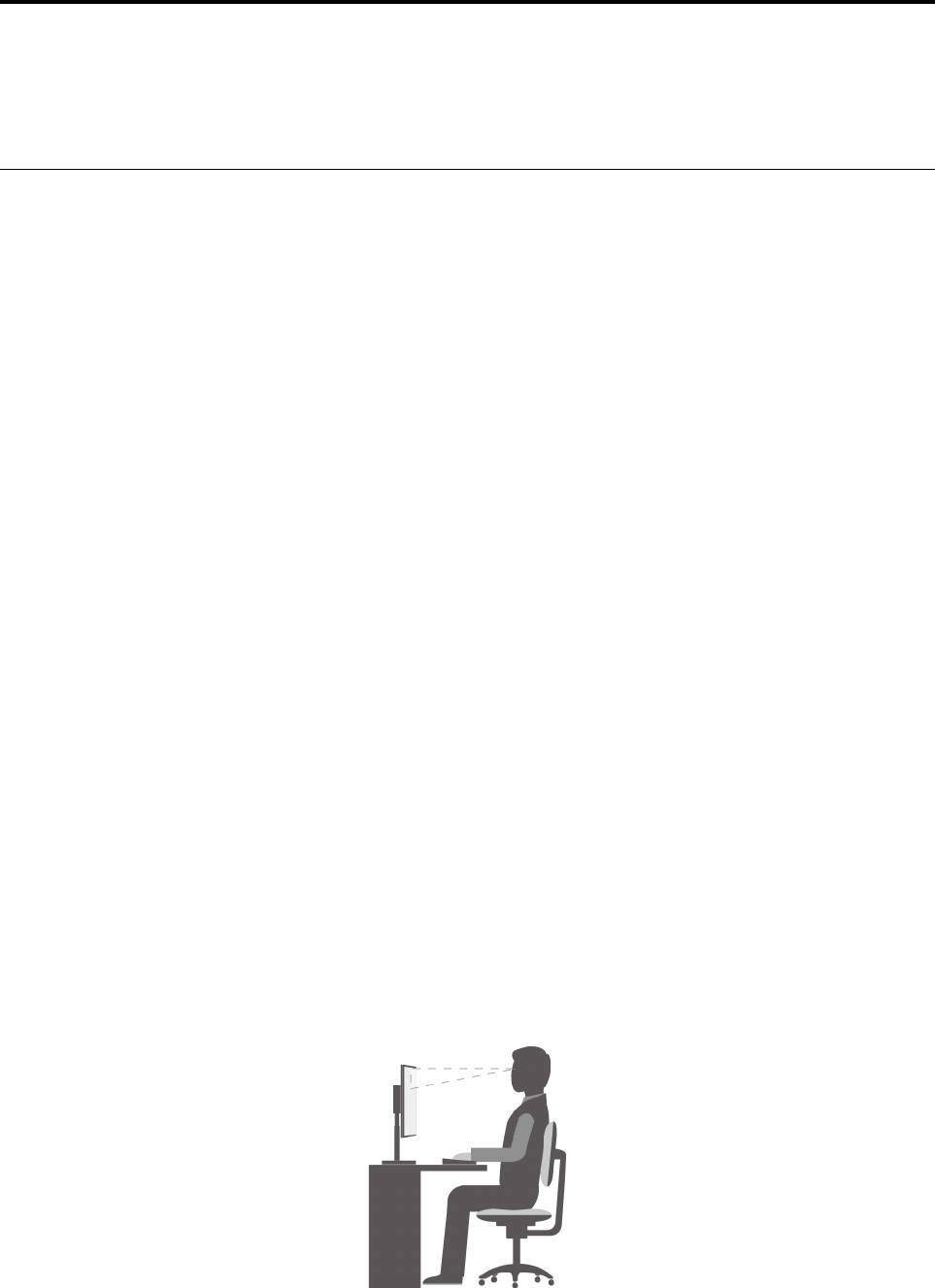
ﺎﻟﺮﺍﺣﺔ
ﺒﺎﻟﺮﻏﻢﻤﻦﻌﺪﻡﻮﺟﻮﺩﺄﻱﻤﻮﺿﻊﻌﻤﻞﻤﺜﺎﻟﻲﻠﻜﻞﻔﺮﺩ،ﺈﻟﺎﺄﻥﻬﻨﺎﻙﺒﻌﺾﺎﻟﺈﺭﺷﺎﺩﺍﺕﺎﻟﻤﻮﺿﻮﻋﺔﻠﻤﺴﺎﻋﺪﺗﻚﻔﻲﺎﻟﻌﺜﻮﺭﻌﻠﻰﻤﻮﺿﻊﻴﻨﺎﺳﺐﻤﺘﻄﻠﺒﺎﺗﻚﻮﻫﻲ
ﻜﺎﻟﺂﺗﻲ.ﻴﻌﺘﺒﺮﺎﻟﺸﻜﻞﺎﻟﺘﺎﻟﻲﻤﺜﺎﻟﺎ
ً
ﻜﻤﺮﺟﻊﻠﻚ.
© Copyright Lenovo 2017, 2018١٩

•ﻮﺿﻌﻴﺔﺎﻟﺸﺎﺷﺔ:ﻀﻊﺎﻟﺸﺎﺷﺔﻌﻠﻰﻤﺴﺎﻓﺔﺘﺴﻤﺢﺒﺎﻟﻤﺸﺎﻫﺪﺓﺎﻟﻤﺮﻳﺤﺔ،ﻮﻋﺎﺩﺓﻤﺎﺘﻜﻮﻥﻤﻦ51ﺈﻟﻰ61ﺴﻢ)20ﺈﻟﻰ24ﺒﻮﺻﺔ(.ﻮﺑﻌﺪﺬﻟﻚ،ﺎﺿﺒﻂﺎﻟﺸﺎﺷﺔ
ﺒﺤﻴﺚﻴﻜﻮﻥﺎﻟﺠﺰﺀﺎﻟﻌﻠﻮﻱﻠﻠﺸﺎﺷﺔﻌﻨﺪﻤﺴﺘﻮﻯﺎﻟﻨﻈﺮﺄﻭﺄﺩﻧﻰﻤﻨﻪﺒﻘﻠﻴﻞ،ﻮﻳﻤﻜﻨﻚﻤﺸﺎﻫﺪﺗﻬﺎﺪﻭﻥﺄﻥﻴﺘﺴﺒ
ّ
ﺐﺬﻟﻚﻔﻲﺎﻟﺘﻮﺍﺀﺠﺴﻤﻚ.
•ﻮﺿﻌﻴﺔﺎﻟﻤﻘﻌﺪ:ﺎﺳﺘﺨﺪﻡﻤﻘﻌﺪ
ً
ﺍﺒﻪﺪﻋﻢﺠﻴﺪﻠﻠﻈﻬﺮﻮﺇﻣﻜﺎﻧﻴﺔﻀﺒﻂﺎﻟﺎﺭﺗﻔﺎﻉ.ﺎﺿﺒﻂﺎﻟﻤﻘﻌﺪﺒﻤﺎﻴﻨﺎﺳﺐﺎﻟﻮﺿﻊﺎﻟﻤﺮﻏﻮﺏﺒﺄﻓﻀﻞﺼﻮﺭﺓ.
•ﻮﺿﻌﻴﺔﺎﻟﺮﺃﺱ:ﺤﺎﻓﻆﻌﻠﻰﻮﺿﻊﻤﺮﻳﺢﻮﻣﺘﻮﺍﺯﻥ)ﻌﻤﻮﺩﻱﺄﻭﺮﺃﺳﻲ(ﻠﻠﺮﺃﺱﻮﺍﻟﺮﻗﺒﺔ.
•ﻮﺿﻊﺎﻟﺬﺭﺍﻉﻮﺍﻟﻴﺪ:ﺤﺎﻓﻆﻌﻠﻰﺎﻟﺴﺎﻋﺪﻳﻦﻮﺍﻟﺮﺳﻐﻴﻦﻮﺍﻟﻴﺪﻳﻦﻔﻲﻮﺿﻊﻤﺴﺘﺮﺥ
ٍ
ﻮﻣﺘﻮﺍﺯﻥ)ﺄﻓﻘﻲ(.ﺎﻛﺘﺐﺒﻠﻮﺣﺔﺎﻟﻤﻔﺎﺗﻴﺢﺒﻠﻤﺲﺎﻟﻤﻔﺎﺗﻴﺢﺒﺮﻓﻖ.
•ﻮﺿﻊﺎﻟﺴﺎﻕ:ﺤﺎﻓﻆﻌﻠﻰﻤﻮﺍﺯﺍﺓﻔﺨﺬﻳﻚﺒﺎﻟﺄﺭﺽﻮﺍﺳﺘﻮﺍﺀﻘﺪﻣﻴﻚﻌﻠﻰﺎﻟﺄﺭﺽﺄﻭﻌﻠﻰﻤﺴﻨﺪﻱﺎﻟﻘﺪﻣﻴﻦ.
ﻘﻢﺒﺈﺟﺮﺍﺀﺘﻌﺪﻳﻠﺎﺕﻄﻔﻴﻔﺔﻌﻠﻰﻮﺿﻊﺎﻟﻌﻤﻞﻠﻤﻨﻊﺎﻟﺸﻌﻮﺭﺒﻌﺪﻡﺎﻟﺮﺍﺣﺔﺎﻟﺬﻱﺘﺴﺒﺒﻪﻔﺘﺮﺍﺕﺎﻟﻌﻤﻞﺎﻟﻄﻮﻳﻠﺔﻔﻲﻨﻔﺲﺎﻟﻤﻮﺿﻊ.ﻜﻤﺎﺄﻥﻔﺘﺮﺍﺕﺎﻟﺮﺍﺣﺔﺎﻟﻘﺼﻴﺮﺓ
ﺎﻟﻤﺘﻜﺮﺭﺓﺘﺴﺎﻋﺪﻌﻠﻰﻤﻨﻊﺄﻱﺸﻌﻮﺭﻄﻔﻴﻒﺒﻌﺪﻡﺎﻟﺮﺍﺣﺔﺒﺴﺒﺐﻮﺿﻌﻴﺔﺎﻟﻌﻤﻞ.
ﻤﻌﻠﻮﻣﺎﺕﻮﺻﻮﻝﺬﻭﻱﺎﻟﺎﺣﺘﻴﺎﺟﺎﺕﺎﻟﺨﺎﺻﺔ
ﺘﻠﺘﺰﻡﺸﺮﻛﺔLenovoﺒﺘﻮﻓﻴﺮﺈﻣﻜﺎﻧﻴﺔﻮﺻﻮﻝﻤﺤﺴ
ّ
ﻨﺔﺈﻟﻰﺎﻟﻤﻌﻠﻮﻣﺎﺕﻮﺍﻟﺘﻘﻨﻴﺎﺕﻠﻠﺄﺷﺨﺎﺹﺎﻟﺬﻳﻦﻴﺸﻜﻮﻥﻤﻦﺈﻋﺎﻗﺎﺕﺴﻤﻌﻴﺔﻮﺑﺼﺮﻳﺔﻮﺣﺮﻛﻴﺔ.ﻴﻮﻓﺮﻬﺬﺍﺎﻟﻘﺴﻢ
ﻤﻌﻠﻮﻣﺎﺕﺤﻮﻝﺎﻟﻄﺮﻕﺎﻟﺘﻲﻴﻤﻜﻦﻤﻦﺨﻠﺎﻟﻬﺎﻤﺴﺎﻋﺪﺓﻬﺆﻟﺎﺀﺎﻟﻤﺴﺘﺨﺪﻣﻴﻦﻌﻠﻰﺘﺤﻘﻴﻖﺎﻟﺎﺳﺘﻔﺎﺩﺓﺎﻟﻘﺼﻮﻯﻤﻦﺘﺠﺮﺑﺔﺎﺳﺘﺨﺪﺍﻡﺎﻟﻜﻤﺒﻴﻮﺗﺮ.ﻴﻤﻜﻨﻚﺄﻳﻀ
ً
ﺎﺎﻟﺤﺼﻮﻝ
ﻌﻠﻰﺄﺣﺪﺙﺎﻟﻤﻌﻠﻮﻣﺎﺕﺎﻟﻤﺘﻌﻠﻘﺔﺒﺈﻣﻜﺎﻧﻴﺔﻮﺻﻮﻝﺬﻭﻱﺎﻟﺎﺣﺘﻴﺎﺟﺎﺕﺎﻟﺨﺎﺻﺔﻤﻦﻤﻮﻗﻊﻮﻳﺐﺎﻟﺘﺎﻟﻲ:
https://www.lenovo.com/accessibility
ﻤﻔﺎﺗﻴﺢﺎﻟﺎﺧﺘﺼﺎﺭ
ﺘﺤﺘﻮﻱﺎﻟﻘﺎﺋﻤﺔﺎﻟﺘﺎﻟﻴﺔﻌﻠﻰﻤﻔﺎﺗﻴﺢﺎﻟﺎﺧﺘﺼﺎﺭﺎﻟﺘﻲﻴﻤﻜﻨﻬﺎﺄﻥﺘﻀﻔﻲﺎﻟﻤﺰﻳﺪﻤﻦﺎﻟﺴﻬﻮﻟﺔﻌﻠﻰﺎﺳﺘﺨﺪﺍﻡﺎﻟﻜﻤﺒﻴﻮﺗﺮ.
ﻤﻠﺎﺣﻈﺔ:ﻘﺪﻠﺎﺘﺘﻮﻓﺮﺒﻌﺾﻤﻔﺎﺗﻴﺢﺎﻟﺎﺧﺘﺼﺎﺭﺎﻟﺘﺎﻟﻴﺔ،ﻮﻫﺬﺍﻴﺘﻮﻗﻒﻌﻠﻰﻠﻮﺣﺔﺎﻟﻤﻔﺎﺗﻴﺢﺎﻟﺘﻲﺘﺴﺘﺨﺪﻣﻬﺎ.
•ﻤﻔﺘﺎﺡﺸﻌﺎﺭWindows+U:ﻔﺘﺢﻤﺮﻛﺰﺴﻬﻮﻟﺔﺎﻟﻮﺻﻮﻝ
•ﻤﻔﺘﺎﺡShiftﺎﻟﺄﻳﻤﻦﻠﻤﺪﺓﺜﻤﺎﻥﺜﻮﺍﻥ:ﺘﺸﻐﻴﻞﻤﻔﺎﺗﻴﺢﺎﻟﺘﺼﻔﻴﺔﺄﻭﺈﻳﻘﺎﻑﺘﺸﻐﻴﻠﻬﺎ
•ﻤﻔﺘﺎﺡShiftﺨﻤﺲﻤﺮﺍﺕ:ﺘﺸﻐﻴﻞﺜﺒﺎﺕﺎﻟﻤﻔﺎﺗﻴﺢﺄﻭﺈﻳﻘﺎﻑﺘﺸﻐﻴﻠﻪ
•ﻤﻔﺘﺎﺡNum Lockﻠﻤﺪﺓﺨﻤﺲﺜﻮﺍﻥ:ﺘﺸﻐﻴﻞﺘﺒﺪﻳﻞﺎﻟﻤﻔﺎﺗﻴﺢﺄﻭﺈﻳﻘﺎﻑﺘﺸﻐﻴﻠﻪ
•ﻤﻔﺘﺎﺡAltﺎﻟﺄﻳﺴﺮ+ﻤﻔﺘﺎﺡShiftﺎﻟﺄﻳﺴﺮ+ﻤﻔﺘﺎﺡNum Lock:ﺘﺸﻐﻴﻞﻤﻔﺎﺗﻴﺢﺎﻟﻤﺎﻭﺱﺄﻭﺈﻳﻘﺎﻑﺘﺸﻐﻴﻠﻬﺎ
•ﻤﻔﺘﺎﺡAltﺎﻟﺄﻳﺴﺮ+ﻤﻔﺘﺎﺡShiftﺎﻟﺄﻳﺴﺮ+PrtScn)ﺄﻭPrtSc(:ﺘﺸﻐﻴﻞﺎﻟﺘﺒﺎﻳﻦﺎﻟﻌﺎﻟﻲﺄﻭﺈﻳﻘﺎﻑﺘﺸﻐﻴﻠﻪ
ﻠﻤﺰﻳﺪﻤﻦﺎﻟﻤﻌﻠﻮﻣﺎﺕ،ﺎﻧﺘﻘﻞﺈﻟﻰ
https://windows.microsoft.com/،ﺜﻢﺎﺑﺤﺚﺒﻜﺘﺎﺑﺔﺄﻱﻮﺍﺣﺪﺓﻤﻦﺎﻟﻜﻠﻤﺎﺕﺎﻟﺄﺳﺎﺳﻴﺔﺎﻟﺘﺎﻟﻴﺔ:اختصاراتلوحة
المفاتيحﺄﻭمجموعاتالمفاتيحﺄﻭمفاتيحالاختصار.
ﻤﺮﻛﺰﺴﻬﻮﻟﺔﺎﻟﻮﺻﻮﻝ
ﻴﺴﻤﺢﻠﻚ"ﻤﺮﻛﺰﺴﻬﻮﻟﺔﺎﻟﻮﺻﻮﻝ"ﻔﻲﻨﻈﺎﻡﺎﻟﺘﺸﻐﻴﻞWindowsﺒﺘﻜﻮﻳﻦﺎﻟﻜﻤﺒﻴﻮﺗﺮﻠﻜﻲﻴﺘﻠﺎﺀﻡﻤﻊﺎﺣﺘﻴﺎﺟﺎﺗﻚﺎﻟﻤﺎﺩﻳﺔﻮﺍﻟﻤﻌﺮﻓﻴﺔ.
ﻠﺎﺳﺘﺨﺪﺍﻡ"ﻤﺮﻛﺰﺴﻬﻮﻟﺔﺎﻟﻮﺻﻮﻝ"،ﻘﻢﺒﺘﻨﻔﻴﺬﻤﺎﻴﻠﻲ:
١.ﺎﻧﻘﺮﻔﻮﻕﺎﻟﺰﺭ"ﺎﺑﺪﺃ"ﻠﻔﺘﺢﻘﺎﺋﻤﺔ"ﺎﺑﺪﺃ".
٢.ﺘﺒﻌ
ً
ﺎﻠﺈﺻﺪﺍﺭWindows،ﻘﻢﺒﺄﺣﺪﺎﻟﺈﺟﺮﺍﺀﺍﺕﺎﻟﺘﺎﻟﻴﺔ:
•ﺒﺎﻟﻨﺴﺒﺔﺈﻟﻰﻨﻈﺎﻡﺎﻟﺘﺸﻐﻴﻞWindows 7:ﺎﻧﻘﺮﻔﻮﻕﻠﻮﺣﺔﺎﻟﺘﺤﻜﻢ.ﺎﻋﺮﺽﻠﻮﺣﺔﺎﻟﺘﺤﻜﻢﺒﺎﺳﺘﺨﺪﺍﻡﺮﻣﻮﺯﻜﺒﻴﺮﺓﺄﻭﺮﻣﻮﺯﺼﻐﻴﺮﺓ،ﺜﻢﺎﻧﻘﺮﻔﻮﻕﻤﺮﻛﺰ
ﺴﻬﻮﻟﺔﺎﻟﻮﺻﻮﻝ.
•ﺒﺎﻟﻨﺴﺒﺔﺈﻟﻰﻨﻈﺎﻡﺎﻟﺘﺸﻐﻴﻞWindows 10:ﺎﻧﻘﺮﻔﻮﻕﺈﻋﺪﺍﺩﺍﺕ��ﺴﻬﻮﻟﺔﺎﻟﻮﺻﻮﻝ.
٣.ﺎﺧﺘﺮﺎﻟﺄﺩﺍﺓﺎﻟﻤﻨﺎﺳﺒﺔﺒﺎﺗﺒﺎﻉﺎﻟﺈﺭﺷﺎﺩﺍﺕﺎﻟﺘﻲﺘﻈﻬﺮﻌﻠﻰﺎﻟﺸﺎﺷﺔ.
ﻴﺘﻀﻤ
ّ
ﻦ"ﻤﺮﻛﺰﺴﻬﻮﻟﺔﺎﻟﻮﺻﻮﻝ"ﺒﺸﻜﻞﺄﺳﺎﺳﻲﺎﻟﺄﺩﻭﺍﺕﺎﻟﺘﺎﻟﻴﺔ:
•ﺎﻟﻤﻜﺒﺮ
ﺈﻥ"ﺎﻟﻤﻜﺒﺮ"ﻌﺒﺎﺭﺓﻌﻦﺄﺩﺍﺓﻤﻔﻴﺪﺓﺘﻘﻮﻡﺒﺘﻜﺒﻴﺮﺎﻟﺸﺎﺷﺔﺒﺎﻟﻜﺎﻣﻞﺄﻭﺠﺰﺀﻤﻦﺎﻟﺸﺎﺷﺔﻠﺘﻤﻜﻴﻨﻚﻤﻦﺮﺅﻳﺔﺎﻟﻌﻨﺎﺻﺮﺒﺸﻜﻞﺄﻓﻀﻞ.
•ﺎﻟﺮﺍﻭﻱ
ﺎﻟﺮﺍﻭﻱﻬﻮﻘﺎﺭﺉﺸﺎﺷﺔﺎﻟﺬﻱﻴﻘﻮﻡﺒﻘﺮﺍﺀﺓﻤﺎﻴﺘﻢﻌﺮﺿﻪﻌﻠﻰﺎﻟﺸﺎﺷﺔﺒﺼﻮﺕﻌﺎﻝ
ٍ
ﻮﻳﺼﻒﺎﻟﺄﺣﺪﺍﺙﻤﺜﻞﺮﺳﺎﺋﻞﺎﻟﺨﻄﺄ.
٢٠
ﺩﻟﻴﻞﻣﺴﺘﺨﺪﻡP320
•ﻠﻮﺣﺔﺎﻟﻤﻔﺎﺗﻴﺢﻌﻠﻰﺎﻟﺸﺎﺷﺔ
ﻠﺈﺩﺧﺎﻝﺎﻟﺒﻴﺎﻧﺎﺕﻔﻲﺎﻟﻜﻤﺒﻴﻮﺗﺮﺒﺎﺳﺘﺨﺪﺍﻡﻤﺎﻭﺱﺄﻭﻌﺼﺎﺄﻟﻌﺎﺏﺄﻭﺄﺟﻬﺰﺓﺘﺄﺷﻴﺮﺄﺧﺮﻯﺒﺪﻟﺎ
ً
ﻤﻦﻠﻮﺣﺔﻤﻔﺎﺗﻴﺢﻔﻌﻠﻴﺔ،ﻴﻤﻜﻨﻚﺎﺳﺘﺨﺪﺍﻡﻠﻮﺣﺔﺎﻟﻤﻔﺎﺗﻴﺢﻌﻠﻰ
ﺎﻟﺸﺎﺷﺔ.
•ﺎﻟﺘﺒﺎﻳﻦﺎﻟﻌﺎﻟﻲ
ﺈﻥ"ﺎﻟﺘﺒﺎﻳﻦﺎﻟﻌﺎﻟﻲ"ﻌﺒﺎﺭﺓﻌﻦﻤﻴﺰﺓﺘﻘﻮﻡﺒﺰﻳﺎﺩﺓﺘﺒﺎﻳﻦﺎﻟﺄﻟﻮﺍﻥﻔﻲﺒﻌﺾﺎﻟﻨﺺﻮﺍﻟﺼﻮﺭﻌﻠﻰﺎﻟﺸﺎﺷﺔ.ﻮﻧﺘﻴﺠﺔﻠﺬﻟﻚ،ﺘﻈﻬﺮﺘﻠﻚﺎﻟﻌﻨﺎﺻﺮﺒﻄﺮﻳﻘﺔﻤﻤﻴﺰﺓ
ﻮﻳﻜﻮﻥﻤﻦﺎﻟﺄﺳﻬﻞﺎﻟﺘﻌﺮ
ّ
ﻑﻌﻠﻴﻬﺎ.
•ﻠﻮﺣﺔﺎﻟﻤﻔﺎﺗﻴﺢﺎﻟﻤﺨﺼﺼﺔ
ﺎﺿﺒﻂﺈﻋﺪﺍﺩﺍﺕﻠﻮﺣﺔﺎﻟﻤﻔﺎﺗﻴﺢﻠﻜﻲﺘﺘﻤﻜ
ّ
ﻦﻤﻦﺎﺳﺘﺨﺪﺍﻡﻠﻮﺣﺔﺎﻟﻤﻔﺎﺗﻴﺢﺒﻄﺮﻳﻘﺔﺄﺳﻬﻞ.ﻌﻠﻰﺴﺒﻴﻞﺎﻟﻤﺜﺎﻝ،ﻴﻤﻜﻨﻚﺎﺳﺘﺨﺪﺍﻡﻠﻮﺣﺔﺎﻟﻤﻔﺎﺗﻴﺢﻠﺪﻳﻚﻠﻠﺘﺤﻜﻢﻔﻲ
ﺎﻟﻤﺆﺷﺮﻮﻛﺘﺎﺑﺔﺒﻌﺾﻤﺠﻤﻮﻋﺎﺕﺎﻟﻤﻔﺎﺗﻴﺢﺒﻄﺮﻳﻘﺔﺄﻛﺜﺮﺴﻬﻮﻟﺔ.
•ﺎﻟﻤﺎﻭﺱﺎﻟﻤﺨﺼﺺ
ﺎﺿﺒﻂﺈﻋﺪﺍﺩﺍﺕﺎﻟﻤﺎﻭﺱﻠﻜﻲﺘﺘﻤﻜ
ّ
ﻦﻤﻦﺎﺳﺘﺨﺪﺍﻡﺎﻟﻤﺎﻭﺱﺒﻄﺮﻳﻘﺔﺄﺳﻬﻞ.ﻌﻠﻰﺴﺒﻴﻞﺎﻟﻤﺜﺎﻝ،ﻴﻤﻜﻨﻚﺘﻐﻴﻴﺮﻤﻈﻬﺮﺎﻟﻤﺆﺷﺮﻮﺟﻌﻞﺎﺳﺘﺨﺪﺍﻣﻪﺄﻛﺜﺮﺴﻬﻮﻟﺔﻠﺈﺩﺍﺭﺓ
ﺎﻟﻨﻮﺍﻓﺬﺒﺎﺳﺘﺨﺪﺍﻡﺎﻟﻤﺎﻭﺱ.
ﺎﻟﺘﻌﺮﻑﻌﻠﻰﺎﻟﻜﻠﺎﻡ
ﺘﺴﺎﻋﺪﻙﻤﻴﺰﺓﺎﻟﺘﻌﺮﻑﻌﻠﻰﺎﻟﻜﻠﺎﻡﻌﻠﻰﺎﻟﺘﺤﻜﻢﻔﻲﺠﻬﺎﺯﺎﻟﻜﻤﺒﻴﻮﺗﺮﺎﻟﺨﺎﺹﺒﻚﻌﻦﻄﺮﻳﻖﺎﻟﺼﻮﺕ.
ﺒﺎﺳﺘﺨﺪﺍﻡﺼﻮﺗﻚﻔﻘﻂ،ﻴﻤﻜﻨﻚﺒﺪﺀﺘﺸﻐﻴﻞﺎﻟﺒﺮﺍﻣﺞ،ﻮﻓﺘﺢﺎﻟﻘﻮﺍﺋﻢ،ﻮﺍﻟﻨﻘﺮﻔﻮﻕﺎﻟﻜﺎﺋﻨﺎﺕﺎﻟﺄﺧﺮﻯﻌﻠﻰﺎﻟﺸﺎﺷﺔ،ﻮﺇﻣﻠﺎﺀﺎﻟﻨﺺﺈﻟﻰﺎﻟﻤﺴﺘﻨﺪﺍﺕ،ﻮﻛﺘﺎﺑﺔﺮﺳﺎﺋﻞﺎﻟﺒﺮﻳﺪ
ﺎﻟﺈﻟﻜﺘﺮﻭﻧﻲﻮﺇﺭﺳﺎﻟﻬﺎ.ﺠﻤﻴﻊﺎﻟﺄﺷﻴﺎﺀﺎﻟﺘﻲﻴﻤﻜﻦﺘﻨﻔﻴﺬﻫﺎﺒﺎﺳﺘﺨﺪﺍﻡﻠﻮﺣﺔﺎﻟﻤﻔﺎﺗﻴﺢﻮﺍﻟﻤﺎﻭﺱﻴﻤﻜﻦﺎﻟﻘﻴﺎﻡﺒﻬﺎﺒﺎﺳﺘﺨﺪﺍﻡﺼﻮﺗﻚﻔﻘﻂ.
ﻠﺎﺳﺘﺨﺪﺍﻡﻤﻴﺰﺓ"ﺎﻟﺘﻌﺮﻑﻌﻠﻰﺎﻟﻜﻠﺎﻡ"،ﻘﻢﺒﻤﺎﻴﻠﻲ:
١.ﺎﻧﻘﺮﻔﻮﻕﺎﻟﺰﺭ"ﺎﺑﺪﺃ"ﻠﻔﺘﺢﻘﺎﺋﻤﺔ"ﺎﺑﺪﺃ".
٢.ﺘﺒﻌ
ً
ﺎﻠﺈﺻﺪﺍﺭWindows،ﻘﻢﺒﺄﺣﺪﺎﻟﺈﺟﺮﺍﺀﺍﺕﺎﻟﺘﺎﻟﻴﺔ:
•ﺒﺎﻟﻨﺴﺒﺔﺈﻟﻰﻨﻈﺎﻡﺎﻟﺘﺸﻐﻴﻞWindows 7:ﺎﻧﻘﺮﻔﻮﻕﻠﻮﺣﺔﺎﻟﺘﺤﻜﻢ.
•ﺒﺎﻟﻨﺴﺒﺔﺈﻟﻰﻨﻈﺎﻡﺎﻟﺘﺸﻐﻴﻞWindows 10:ﺎﻧﻘﺮﻔﻮﻕﻨﻈﺎﻡWindows��ﻠﻮﺣﺔﺎﻟﺘﺤﻜﻢ.
٣.ﺎﻋﺮﺽﻠﻮﺣﺔﺎﻟﺘﺤﻜﻢﺒﺎﺳﺘﺨﺪﺍﻡﺄﻳﻘﻮﻧﺎﺕﻜﺒﻴﺮﺓﺄﻭﺄﻳﻘﻮﻧﺎﺕﺼﻐﻴﺮﺓ،ﺜﻢﺎﻧﻘﺮﻔﻮﻕﺎﻟﺘﻌﺮﻑﻌﻠﻰﺎﻟﻜﻠﺎﻡ.
٤.ﺎﺗﺒﻊﺎﻟﺘﻌﻠﻴﻤﺎﺕﺎﻟﺘﻲﻴﺘﻢﻌﺮﺿﻬﺎﻌﻠﻰﺎﻟﺸﺎﺷﺔ.
ﺘﻘﻨﻴﺎﺕﻘﺎﺭﺉﺎﻟﺸﺎﺷﺔ
ﺘﺮﻛﺰﺘﻘﻨﻴﺎﺕﻘﺎﺭﺉﺎﻟﺸﺎﺷﺔﺒﺼﻔﺔﺄﺳﺎﺳﻴﺔﻌﻠﻰﻮﺍﺟﻬﺎﺕﺎﻟﺒﺮﺍﻣﺞ،ﻮﺃﻧﻈﻤﺔﻤﻌﻠﻮﻣﺎﺕﺎﻟﺘﻌﻠﻴﻤﺎﺕﻮﻣﺠﻤﻮﻋﺔﻤﺘﻨﻮﻋﺔﻤﻦﺎﻟﻤﺴﺘﻨﺪﺍﺕﻌﺒﺮﺎﻟﺈﻧﺘﺮﻧﺖ.ﻠﻠﺤﺼﻮﻝﻌﻠﻰ
ﻤﻌﻠﻮﻣﺎﺕﺈﺿﺎﻓﻴﺔﺤﻮﻝﻘﺎﺭﺉﺎﻟﺸﺎﺷﺔ،ﺮﺍﺟﻊﻤﺎﻴﻠﻲ:
•ﺎﺳﺘﺨﺪﺍﻡﻤﻠﻔﺎﺕPDFﻤﻊﻘﺎﺭﺉﺎﻟﺸﺎﺷﺔ:
https://www.adobe.com/accessibility.html?promoid=DJGVE
•ﺎﺳﺘﺨﺪﺍﻡﻘﺎﺭﺉﺎﻟﺸﺎﺷﺔJAWS:
https://www.freedomscientific.com/Products/Blindness/JAWS
•ﺎﺳﺘﺨﺪﺍﻡﻘﺎﺭﺉﺎﻟﺸﺎﺷﺔNVDA:
https://www.nvaccess.org/
ﺪﻗﺔﺎﻟﺸﺎﺷﺔ
ﻴﻤﻜﻨﻚﺠﻌﻞﺎﻟﻨﺼﻮﺹﻮﺍﻟﺼﻮﺭﻌﻠﻰﺎﻟﺸﺎﺷﺔﺴﻬﻠﺔﺎﻟﻘﺮﺍﺀﺓﻤﻦﺨﻠﺎﻝﻀﺒﻂﺪﻗﺔﺎﻟﺸﺎﺷﺔﻌﻠﻰﺎﻟﻜﻤﺒﻴﻮﺗﺮ.
ﻠﻀﺒﻂﺪﻗﺔﺎﻟﺸﺎﺷﺔ،ﻘﻢﺒﻤﺎﻴﻠﻲ:
١.ﺎﻧﻘﺮﺒﺰﺭﺎﻟﻤﺎﻭﺱﺎﻟﺄﻳﻤﻦﻔﻮﻕﻤﺴﺎﺣﺔﻔﺎﺭﻏﺔﻌﻠﻰﺴﻄﺢﺎﻟﻤﻜﺘﺐ.
٢.ﺘﺒﻌ
ً
ﺎﻠﺈﺻﺪﺍﺭWindows،ﻘﻢﺒﺄﺣﺪﺎﻟﺈﺟﺮﺍﺀﺍﺕﺎﻟﺘﺎﻟﻴﺔ:
•ﺒﺎﻟﻨﺴﺒﺔﺈﻟﻰﻨﻈﺎﻡﺎﻟﺘﺸﻐﻴﻞWindows 7:ﺎﻧﻘﺮﻔﻮﻕﺎﻟﺰﺭﺪﻗﺔﺎﻟﺸﺎﺷﺔ.
•ﺒﺎﻟﻨﺴﺒﺔﺈﻟﻰﻨﻈﺎﻡﺎﻟﺘﺸﻐﻴﻞWindows 10:ﺎﻧﻘﺮﻔﻮﻕﺈﻋﺪﺍﺩﺍﺕﺎﻟﻌﺮﺽ��ﺠﻬﺎﺯﺎﻟﻌﺮﺽ.
٣.ﺎﺗﺒﻊﺎﻟﺘﻌﻠﻴﻤﺎﺕﺎﻟﺘﻲﻴﺘﻢﻌﺮﺿﻬﺎﻌﻠﻰﺎﻟﺸﺎﺷﺔ.
ﺍﻟﻤﻠﺤﻖ٣.ﺃﻧﺖﻭﺍﻟﻜﻤﺒﻴﻮﺗﺮﺍﻟﺨﺎﺹﺑﻚ٢١

ﻤﻠﺎﺣﻈﺔ:ﻘﺪﻴﺆﺩﻱﺘﻌﻴﻴﻦﺎﻟﺪﻗﺔﻌﻠﻰﺪﺭﺟﺔﻤﻨﺨﻔﻀﺔﺠﺪ
ً
ﺍﺈﻟﻰﻤﻨﻊﺎﺳﺘﻴﻌﺎﺏﺒﻌﺾﺎﻟﻌﻨﺎﺻﺮﻌﻠﻰﺎﻟﺸﺎﺷﺔ.
ﺤﺠﻢﻌﻨﺼﺮﻘﺎﺑﻞﻠﻠﺘﺨﺼﻴﺺ
ﻴﻤﻜﻨﻚﺠﻌﻞﻘﺮﺍﺀﺓﺎﻟﻌﻨﺎﺻﺮﻌﻠﻰﺎﻟﺸﺎﺷﺔﺄﻛﺜﺮﺴﻬﻮﻟﺔﻤﻦﺨﻠﺎﻝﺘﻐﻴﻴﺮﺤﺠﻢﺎﻟﻌﻨﺼﺮ.
•ﻠﺘﻐﻴﻴﺮﺤﺠﻢﺎﻟﻌﻨﺼﺮﺒﺸﻜﻞﻤﺆﻗﺖ،ﺎﺳﺘﺨﺪﻡﺄﺩﺍﺓ"ﺎﻟﻤﻜﺒﺮ"ﻔﻲ"ﻤﺮﻛﺰﺴﻬﻮﻟﺔﺎﻟﻮﺻﻮﻝ".
•ﻠﺘﻐﻴﻴﺮﺤﺠﻢﻌﻨﺼﺮﺒﺸﻜﻞﺪﺍﺋﻢ،ﻘﻢﺒﻤﺎﻴﻠﻲ:
–ﻐﻴ
ّ
ﺮﺤﺠﻢﻜﻞﺎﻟﻌﻨﺎﺻﺮﻌﻠﻰﺎﻟﺸﺎﺷﺔ.
–ﺒﺎﻟﻨﺴﺒﺔﺈﻟﻰﻨﻈﺎﻡﺎﻟﺘﺸﻐﻴﻞWindows 7:
١.ﺎﻧﻘﺮﺒﺰﺭﺎﻟﻤﺎﻭﺱﺎﻟﺄﻳﻤﻦﻔﻮﻕﻤﺴﺎﺣﺔﻔﺎﺭﻏﺔﻌﻠﻰﺴﻄﺢﺎﻟﻤﻜﺘﺐ.
٢.ﺎﻧﻘﺮﻔﻮﻕﺪﻗﺔﺎﻟﺸﺎﺷﺔ��ﺠﻌﻞﺎﻟﻨﺼﻮﺹﻮﺍﻟﻌﻨﺎﺻﺮﺎﻟﺄﺧﺮﻯﺄﻛﺒﺮﺄﻭﺄﺻﻐﺮ.
٣.ﺎﺗﺒﻊﺎﻟﺘﻌﻠﻴﻤﺎﺕﺎﻟﻤﻌﺮﻭﺿﺔﻌﻠﻰﺎﻟﺸﺎﺷﺔﻠﺘﻐﻴﻴﺮﺤﺠﻢﺎﻟﻌﻨﺼﺮ.
٤.ﺎﻧﻘﺮﻔﻮﻕﺘﻄﺒﻴﻖ.ﺴﻴﺴﺮﻱﻬﺬﺍﺎﻟﺘﻐﻴﻴﺮﻔﻲﺎﻟﻤﺮﺓﺎﻟﺘﺎﻟﻴﺔﺎﻟﺘﻲﺘﺴﺠ
ّ
ﻞﻔﻴﻬﺎﺪﺧﻮﻟﻚﺈﻟﻰﻨﻈﺎﻡﺎﻟﺘﺸﻐﻴﻞ.
–ﺒﺎﻟﻨﺴﺒﺔﺈﻟﻰﻨﻈﺎﻡﺎﻟﺘﺸﻐﻴﻞWindows 10:
١.ﺎﻧﻘﺮﺒﺰﺭﺎﻟﻤﺎﻭﺱﺎﻟﺄﻳﻤﻦﻔﻮﻕﻤﺴﺎﺣﺔﻔﺎﺭﻏﺔﻌﻠﻰﺴﻄﺢﺎﻟﻤﻜﺘﺐ.
٢.ﺎﻧﻘﺮﻔﻮﻕﺈﻋﺪﺍﺩﺍﺕﺎﻟﻌﺮﺽ��ﺠﻬﺎﺯﺎﻟﻌﺮﺽ.
٣.ﺎﺗﺒﻊﺎﻟﺘﻌﻠﻴﻤﺎﺕﺎﻟﻤﻌﺮﻭﺿﺔﻌﻠﻰﺎﻟﺸﺎﺷﺔﻠﺘﻐﻴﻴﺮﺤﺠﻢﺎﻟﻌﻨﺼﺮ.ﺒﺎﻟﻨﺴﺒﺔﺈﻟﻰﺒﻌﺾﺎﻟﺘﻄﺒﻴﻘﺎﺕ،ﻘﺪﻠﺎﻴﺴﺮﻱﺎﻟﺘﻜﻮﻳﻦﺈﻟﺎﺒﻌﺪﺄﻥﺘﺴﺠﻞﺨﺮﻭﺟﻚﺜﻢ
ﺘﺴﺠﻞﺪﺧﻮﻟﻚﻤﻦﺠﺪﻳﺪ.
–ﻐﻴ
ّ
ﺮﺤﺠﻢﻜﻞﺎﻟﻌﻨﺎﺻﺮﻌﻠﻰﺼﻔﺤﺔﻮﻳﺐ.
ﺎﺿﻐﻂﺒﺎﺳﺘﻤﺮﺍﺭﻌﻠﻰﺎﻟﻤﻔﺘﺎﺡCtrl،ﺜﻢﺎﺿﻐﻂﻌﻠﻰﻤﻔﺘﺎﺡﻌﻠﺎﻣﺔﺎﻟﺠﻤﻊ)+(ﻠﺘﻜﺒﻴﺮﺤﺠﻢﺎﻟﻨﺺﺄﻭﻤﻔﺘﺎﺡﻌﻠﺎﻣﺔﺎﻟﻄﺮﺡ)-(ﻠﺘﺼﻐﻴﺮﺤﺠﻢﺎﻟﻨﺺ.
–ﻐﻴ
ّ
ﺮﺤﺠﻢﺎﻟﻌﻨﺎﺻﺮﻌﻠﻰﺴﻄﺢﺎﻟﻤﻜﺘﺐﺄﻭﻨﺎﻓﺬﺓ.
ﻤﻠﺎﺣﻈﺔ:ﻘﺪﻠﺎﺘﻌﻤﻞﻬﺬﻩﺎﻟﻮﻇﻴﻔﺔﻌﻠﻰﺒﻌﺾﺎﻟﻨﻮﺍﻓﺬ.
ﺈﺫﺍﺘﻀﻤ
ّ
ﻦﺎﻟﻤﺎﻭﺱﻌﺠﻠﺔ،ﻔﺎﺿﻐﻂﺒﺎﺳﺘﻤﺮﺍﺭﻌﻠﻰﺎﻟﻤﻔﺘﺎﺡCtrl،ﺜﻢﻘﻢﺒﺘﻤﺮﻳﺮﺎﻟﻌﺠﻠﺔﻠﺘﻐﻴﻴﺮﺤﺠﻢﺎﻟﻌﻨﺼﺮ.
ﺎﻟﻤﻮﺻﻠﺎﺕﺎﻟﻘﻴﺎﺳﻴﺔﻔﻲﺎﻟﺼﻨﺎﻋﺔ
ﻴﻮﻓﺮﺠﻬﺎﺯﺎﻟﻜﻤﺒﻴﻮﺗﺮﻤﻮﺻﻠﺎﺕﺘﻠﺒﻲﺎﻟﻤﻌﺎﻳﻴﺮﺎﻟﺼﻨﺎﻋﻴﺔﻮﺗﻤﻜ
ّ
ﻨﻚﻤﻦﺘﻮﺻﻴﻞﺎﻟﺄﺟﻬﺰﺓﺎﻟﻤﺴﺎﻋﺪﺓ.
ﻠﻠﺤﺼﻮﻝﻌﻠﻰﺎﻟﻤﺰﻳﺪﻤﻦﺎﻟﻤﻌﻠﻮﻣﺎﺕﺤﻮﻝﻤﻮﻗﻊﻜﻞﻤﻮﺻﻞﻮﻭﻇﺎﺋﻔﻪ،ﺮﺍﺟﻊ"ﻤﻮﺍﻗﻊﺎﻟﺄﺟﻬﺰﺓ"ﻌﻠﻰﺎﻟﺼﻔﺤﺔ١.
ﻤﻮﺩﻡﺘﺤﻮﻳﻞTTY/TDD
ﻴﺪﻋﻢﺠﻬﺎﺯﺎﻟﻜﻤﺒﻴﻮﺗﺮﺎﻟﺨﺎﺹﺒﻚﺎﺳﺘﺨﺪﺍﻡﺎﻟﻬﺎﺗﻒﺎﻟﻨﺼﻲ(TTY)ﺄﻭﻤﻮﺩﻡﺘﺤﻮﻳﻞﺠﻬﺎﺯﺎﻟﺎﺗﺼﺎﻟﺎﺕﺎﻟﺨﺎﺹﺒﻔﺎﻗﺪﻱﺤﺎﺳﺔﺎﻟﺴﻤﻊ(TDD).ﻴﺠﺐﺘﻮﺻﻴﻞ
ﺎﻟﻤﻮﺩﻡﺒﻴﻦﺎﻟﻜﻤﺒﻴﻮﺗﺮﻮﻫﺎﺗﻒTTY/TDD.ﺜﻢﻴﻤﻜﻨﻚﻜﺘﺎﺑﺔﺮﺳﺎﻟﺔﻌﻠﻰﺠﻬﺎﺯﺎﻟﻜﻤﺒﻴﻮﺗﺮﺎﻟﺨﺎﺹﺒﻚﻮﺇﺭﺳﺎﻟﻬﺎﺈﻟﻰﺎﻟﻬﺎﺗﻒ.
ﺎﻟﻮﺛﺎﺋﻖﺒﺘﻨﺴﻴﻘﺎﺕﻴﺴﻬﻞﺎﻟﻮﺻﻮﻝﺈﻟﻴﻬﺎ
ﺘﻮﻓﺮLenovoﻮﺛﺎﺋﻖﺈﻟﻜﺘﺮﻭﻧﻴﺔﺒﺘﻨﺴﻴﻘﺎﺕﻴﻤﻜﻦﺎﻟﻮﺻﻮﻝﺈﻟﻴﻬﺎﺒﺴﻬﻮﻟﺔ،ﻤﺜﻞﻤﻠﻔﺎﺕPDFﺎﻟﻤﻌﻠﻤﺔﺒﺸﻜﻞﻤﻠﺎﺋﻢﺄﻭﻠﻐﺔﺘﺮﻣﻴﺰﺎﻟﻨﺺﺎﻟﺘﺸﻌﺒﻲ(HTML).ﻠﻘﺪﺘﻢ
ﺘﻄﻮﻳﺮﻮﺛﺎﺋﻖLenovoﺎﻟﺈﻟﻜﺘﺮﻭﻧﻴﺔﻠﻀﻤﺎﻥﺈﻣﻜﺎﻧﻴﺔﻘﺮﺍﺀﺗﻬﺎﻤﻦﻘ
ِ
ﺒﻞﺎﻟﺄﺷﺨﺎﺹﺎﻟﻀﻌﻴﻔﻲﺎﻟﺒﺼﺮﻤﻦﺨﻠﺎﻝﻘﺎﺭﺉﺸﺎﺷﺔ.ﻌﻠﺎﻭﺓ
ً
ﻌﻠﻰﺬﻟﻚ،ﺘﺸﺘﻤﻞﻜﻞﺼﻮﺭﺓﻔﻲ
ﺎﻟﻮﺛﺎﺋﻖﻌﻠﻰﻨﺺﺒﺪﻳﻞﻤﻠﺎﺋﻢﻠﺘﻤﻜﻴﻦﺎﻟﻤﺴﺘﺨﺪﻣﻴﻦﺎﻟﻀﻌﻴﻔﻲﺎﻟﺒﺼﺮﻤﻦﻔﻬﻢﺎﻟﺼﻮﺭﺓﻌﻨﺪﺎﺳﺘﺨﺪﺍﻡﻘﺎﺭﺉﺸﺎﺷﺔ.
ﺘﻨﻈﻴﻒﺎﻟﻜﻤﺒﻴﻮﺗﺮ
ﺘﻨﺒﻴﻪ:ﻠﺎﺘﻔﺘﺢﺎﻟﻜﻤﺒﻴﻮﺗﺮﺄﻭﺘﺤﺎﻭﻝﺈﺻﻠﺎﺣﻪﻘﺒﻞﻘﺮﺍﺀﺓﻮﻓﻬﻢ"ﺎﻗﺮﺃﻬﺬﺍﺎﻟﺠﺰﺀﺄﻭﻟﺎ
ً
:ﻤﻌﻠﻮﻣﺎﺕﻤﻬﻤﺔﺤﻮﻝﺎﻟﺴﻠﺎﻣﺔ"ﻌﻠﻰﺎﻟﺼﻔﺤﺔiii.ﺎﻧﺰﻉﻐﻄﺎﺀﺎﻟﻜﻤﺒﻴﻮﺗﺮﺄﻭ
ﺮﻛﺒ
ّ
ﻪﺒﺸﻜﻞﺼﺤﻴﺢ.ﺎﻧﻈﺮﺍﻟﻤﻠﺤﻖ٧"ﺈﺧﺮﺍﺝﺎﻟﺄﺟﻬﺰﺓﻮﺗﺮﻛﻴﺒﻬﺎ"ﻌﻠﻰﺎﻟﺼﻔﺤﺔ٥١.
ﺘﺤﺬﻳﺮ: ﻘﻢﺒﺈﺧﺮﺍﺝﺄﻱﻮﺳﺎﺋﻂﻤﻦﻤﺤﺮﻛﺎﺕﺎﻟﺄﻗﺮﺍﺹ،ﺜﻢﻘﻢﺒﺈﻳﻘﺎﻑﺘﺸﻐﻴﻞﻜﺎﻓﺔﺎﻟﺄﺟﻬﺰﺓﺎﻟﻤﺘﺼﻠﺔﻮﺍﻟﻜﻤﺒﻴﻮﺗﺮ.ﺒﻌﺪﺬﻟﻚ،ﺎﻓﺼﻞﻜﻞﺄﺳﻠﺎﻙﺎﻟﻄﺎﻗﺔﻤﻦﺎﻟﻤﺂﺧﺬ ﺎﻟﻜﻬﺮﺑﺎﺋﻴﺔﻮﺍﻧﺰﻉﻜﻞﺎﻟﻜﺎﺑﻠﺎﺕﺎﻟﺘﻲﺘﻢﺘﻮﺻﻴﻠﻬﺎﺒﺎﻟﻜﻤﺒﻴﻮﺗﺮ.
٢٢
ﺩﻟﻴﻞﻣﺴﺘﺨﺪﻡP320

ﻤﻦﺎﻟﻤﻬﻢﺘﻨﻈﻴﻒﺎﻟﻜﻤﺒﻴﻮﺗﺮﺒﺸﻜﻞﺪﻭﺭﻱﻠﺤﻤﺎﻳﺔﺎﻟﺄﺳﻄﺢﻮﺿﻤﺎﻥﺎﻟﺘﺸﻐﻴﻞﺎﻟﺴﻠﺲ.ﺎﺳﺘﺨﺪﻡﻔﻘﻂﻤﺤﺎﻟﻴﻞﺘﻨﻈﻴﻒﻤﻌﺘﺪﻟﺔﻮﻗﻄﻌﺔﻘﻤﺎﺵﻨﻈﻴﻔﺔﻠﺘﻨﻈﻴﻒﺎﻟﺄﺳﻄﺢ
ﺎﻟﻤﻄﻠﺎﺓﻠﻠﻜﻤﺒﻴﻮﺗﺮ.
ﻴﺘﺴﺒﺐﺘﺮﺍﻛﻢﺎﻟﺄﺗﺮﺑﺔﻔﻲﻤﺸﻜﻠﺎﺕﻤﺮﺗﺒﻄﺔﺒﺎﻟﺈﺿﺎﺀﺓ،ﻠﺬﻟﻚﺘﺬﻛﺮﺘﻨﻈﻴﻒﺎﻟﺸﺎﺷﺔﺪﻭﺭﻳ
ً
ﺎ.ﺎﻣﺴﺢﺎﻟﺴﻄﺢﺎﻟﺰﺟﺎﺟﻲﺒﺮﻓﻖﺒﺎﺳﺘﺨﺪﺍﻡﻘﻄﻌﺔﻘﻤﺎﺵﺠﺎﻓﺔﻮﻧﺎﻋﻤﺔﻮﺧﺎﻟﻴﺔ
ﻤﻦﺎﻟﻜﺘﺎﻥﺄﻭﺎﻧﻔﺦﻌﻠﻰﺎﻟﺸﺎﺷﺔﻠﺈﺯﺍﻟﺔﺎﻟﺄﻭﺳﺎﺥﻮﺍﻟﺄﺟﺴﺎﻡﺎﻟﺄﺧﺮﻯ.ﺘﺒﻌ
ً
ﺎﻠﻨﻮﻉﺎﻟﺸﺎﺷﺔ،ﺘﻨﺎﻭﻝﻘﻄﻌﺔﻘﻤﺎﺵﻤﺮﻃﺒﺔﻮﻧﺎﻋﻤﺔﻮﺧﺎﻟﻴﺔﻤﻦﺎﻟﻜﺘﺎﻥﻤﻊﻤﺎﺳﺢﺸﺎﺷﺔ
ﺎﻟﻜﺮﻳﺴﺘﺎﻝﺎﻟﺴﺎﺋﻞ)LCD(ﺄﻭﻤﻨﻈﻒﺴﺎﺋﻞﻠﻠﺰﺟﺎﺝﺜﻢﺎﻣﺴﺢﺴﻄﺢﺎﻟﺸﺎﺷﺔ.
ﺎﻟﺼﻴﺎﻧﺔ
ﺒﻔﻀﻞﺘﻮﺧﻲﺎﻟﺤﺬﺭﺎﻟﺸﺪﻳﺪﻮﺇﺟﺮﺍﺀﺎﻟﺼﻴﺎﻧﺔﺎﻟﺪﻭﺭﻳﺔ،ﺴﻴﻈﻞﺎﻟﻜﻤﺒﻴﻮﺗﺮﻴﻘﻮﻡﺒﻮﻇﺎﺋﻔﻪﺒﺸﻜﻞﻤﻮﺛﻮﻕ.ﻴﻮﻓﺮﻬﺬﺍﺎﻟﻘﺴﻢﺈﺭﺷﺎﺩﺍﺕﺤﻮﻝﻜﻴﻔﻴﺔﺼﻴﺎﻧﺔﺠﻬﺎﺯ
ﺎﻟﻜﻤﺒﻴﻮﺗﺮﻠﺘﻤﻜﻴﻨﻪﻤﻦﻤﻮﺍﺻﻠﺔﺎﻟﺄﺩﺍﺀﻔﻲﻈﺮﻭﻑﺄﻓﻀﻞ.
ﻨﺼﺎﺋﺢﺄﺳﺎﺳﻴﺔﻠﻠﺼﻴﺎﻧﺔ
ﺈﻟﻴﻚﺒﻌﺾﺎﻟﻨﻘﺎﻁﺎﻟﺄﺳﺎﺳﻴﺔﺒﺸﺄﻥﺎﻟﺤﻔﺎﻅﻌﻠﻰﺤﺎﻟﺔﻌﻤﻞﺎﻟﻜﻤﺒﻴﻮﺗﺮﺒﺸﻜﻞﺴﻠﻴﻢ:
•ﺎﺣﺘﻔﻆﺒﺎﻟﻜﻤﺒﻴﻮﺗﺮﺎﻟﺨﺎﺹﺒﻚﻔﻲﺒﻴﺌﺔﻨﻈﻴﻔﺔﻮﺟﺎﻓﺔ.ﺘﺄﻛﺪﻤﻦﺘﺜﺒﻴﺖﺎﻟﻜﻤﺒﻴﻮﺗﺮﻌﻠﻰﺴﻄﺢﻤﺴﺘﻮ
ٍ
ﻮﺛﺎﺑﺖ.
•ﻠﺎﺘﻘﻮﻡﺒﺘﻐﻄﻴﺔﺄﻱﻔﺘﺤﺎﺕﺘﻬﻮﻳﺔ.ﻔﻬﺬﻩﺎﻟﻔﺘﺤﺎﺕﺘﻮﻓﺮﺘﺪﻓﻖﺎﻟﻬﻮﺍﺀﻠﺤﻤﺎﻳﺔﺎﻟﻜﻤﺒﻴﻮﺗﺮﻤﻦﺎﻟﺴﺨﻮﻧﺔﺎﻟﺰﺍﺋﺪﺓ.
•ﺎﺣﺘﻔﻆﺒﺎﻟﺄﻃﻌﻤﺔﻮﺍﻟﻤﺸﺮﻭﺑﺎﺕﺒﻌﻴﺪ
ً
ﺍﻌﻦﺠﻤﻴﻊﺄﺟﺰﺍﺀﺎﻟﻜﻤﺒﻴﻮﺗﺮ.ﻔﻘﺪﺘﺘﺴﺒﺐﺠﺰﻳﺌﺎﺕﺎﻟﻄﻌﺎﻡﻮﺍﻟﺴﻮﺍﺋﻞﺎﻟﻤﻨﺴﻜﺒﺔﻔﻲﺎﻟﺘﺼﺎﻕﻠﻮﺣﺔﺎﻟﻤﻔﺎﺗﻴﺢﻮﺍﻟﻤﺎﻭﺱ
ﻮﺟﻌﻠﻬﻤﺎﻐﻴﺮﻘﺎﺑﻠﺘﻴﻦﻠﻠﺎﺳﺘﺨﺪﺍﻡ.
•ﺘﺠﻨﺐﺒﻠﻞﻤﻔﺎﺗﻴﺢﺎﻟﻄﺎﻗﺔﺄﻭﻌﻨﺎﺻﺮﺎﻟﺘﺤﻜﻢﺎﻟﺄﺧﺮﻯ.ﻔﻘﺪﺘﺆﺩﻱﺎﻟﺮﻃﻮﺑﺔﺈﻟﻰﺈﺗﻠﺎﻑﻬﺬﻩﺎﻟﺄﺟﺰﺍﺀﻮﺗﺘﺴﺒﺐﻔﻲﺤﺪﻭﺙﻤﺨﺎﻃﺮﻜﻬﺮﺑﺎﺋﻴﺔ.
•ﺎﻓﺼﻞﺴﻠﻚﺎﻟﻄﺎﻗﺔﺪﺍﺋﻤ
ً
ﺎﻤﻦﺨﻠﺎﻝﺎﻟﺈﻣﺴﺎﻙﺒﺎﻟﻤﻘﺒﺲﻮﻟﻴﺲﺎﻟﺴﻠﻚ.
ﻤﻤﺎﺭﺳﺎﺕﺎﻟﺼﻴﺎﻧﺔﺎﻟﺠﻴﺪﺓ
ﻤﻦﺨﻠﺎﻝﺎﻟﻘﻴﺎﻡﺒﻤﻤﺎﺭﺳﺎﺕﺼﻴﺎﻧﺔﺠﻴﺪﺓ،ﻴﻤﻜﻨﻚﺎﻟﺤﻔﺎﻅﻌﻠﻰﻤﺴﺘﻮﻯﺄﺩﺍﺀﺠﻴﺪﻠﻠﻜﻤﺒﻴﻮﺗﺮﻮﺣﻤﺎﻳﺔﺎﻟﺒﻴﺎﻧﺎﺕﻮﺍﻟﺎﺳﺘﻌﺪﺍﺩﻠﺄﻳﺔﺤﺎﻟﺔﻤﻦﺤﺎﻟﺎﺕﻔﺸﻞﺎﻟﻜﻤﺒﻴﻮﺗﺮ.
•ﺄﻓﺮﻍﺴﻠﺔﺎﻟﻤﻬﻤﻠﺎﺕﻠﺪﻳﻚﺒﺸﻜﻞﻤﻨﺘﻈﻢ.
•ﺎﺳﺘﺨﺪﻡﻤﻴﺰﺓﺈﻟﻐﺎﺀﺘﺠﺰﺋﺔﺎﻟﻘﺮﺹﺄﻭﺘﺤﺴﻴﻦﺄﺩﺍﺀﺎﻟﻘﺮﺹﺎﻟﻤﻮﺟﻮﺩﺓﺒﻨﻈﺎﻡﺎﻟﺘﺸﻐﻴﻞﻠﺪﻳﻚﻤﻦﺤﻴﻦﻠﺂﺧﺮﻠﻤﻨﻊﻤﺸﻜﻠﺎﺕﺎﻟﺄﺩﺍﺀﺎﻟﺘﻲﺘﻨﺠﻢﻌﻦﺰﻳﺎﺩﺓﻌﺪﺩ
ﺎﻟﻤﻠﻔﺎﺕﺎﻟﺘﻲﺘﻤﺖﺘﺠﺰﺋﺘﻬﺎﺒﺼﻮﺭﺓﻜﺒﻴﺮﺓ.
•ﻘﻢﺒﺘﻨﻈﻴﻒﻤﺠﻠﺪﺍﺕﻌﻠﺒﺔﺎﻟﻮﺍﺭﺩﻮﺍﻟﻌﻨﺎﺻﺮﺎﻟﻤﺮﺳﻠﺔﻮﺍﻟﻌﻨﺎﺻﺮﺎﻟﻤﺤﺬﻭﻓﺔﻔﻲﺘﻄﺒﻴﻖﺎﻟﺒﺮﻳﺪﺎﻟﺈﻟﻜﺘﺮﻭﻧﻲﻠﺪﻳﻚﺒﺸﻜﻞﻤﻨﺘﻈﻢ.
•ﺎﻋﻤﻞﻌﻠﻰﺈﻧﺸﺎﺀﻨﺴﺦﺎﺣﺘﻴﺎﻃﻴﺔﻠﻠﺒﻴﺎﻧﺎﺕﺎﻟﻤﻬﻤﺔ،ﺒﺸﻜﻞﻤﻨﺘﻈﻢ،ﻌﻠﻰﺬﺍﻛﺮﺓﻮﺳﺎﺋﻂﻘﺎﺑﻠﺔﻠﻠﺈﺯﺍﻟﺔ،ﻜﺎﻟﺄﻗﺮﺍﺹﻮﺃﺟﻬﺰﺓﺘﺨﺰﻳﻦUSB،ﻮﺧﺰ
ّ
ﻥﺎﻟﻮﺳﺎﺋﻂﺎﻟﻘﺎﺑﻠﺔ
ﻠﻠﺈﺯﺍﻟﺔﻔﻲﻤﻜﺎﻥﺂﻣﻦ.ﻴﻌﺘﻤﺪﻤﺪﻯﺘﻜﺮﺍﺭﺈﻧﺸﺎﺀﺎﻟﻨﺴﺦﺎﻟﺎﺣﺘﻴﺎﻃﻴﺔﻌﻠﻰﻤﺪﻯﺄﻫﻤﻴﺔﺎﻟﺒﻴﺎﻧﺎﺕﺒﺎﻟﻨﺴﺒﺔﻠﻚﻮﻟﺄﻋﻤﺎﻟﻚ.
•ﻘﻢﺒﺘﺨﺰﻳﻦﺎﻟﺒﻴﺎﻧﺎﺕﺎﺣﺘﻴﺎﻃﻴ
ً
ﺎﻌﻠﻰﻤﺤﺮﻙﺄﻗﺮﺍﺹﺎﻟﺘﺨﺰﻳﻦﺒﺎﻧﺘﻈﺎﻡ.
•ﺎﺣﺮﺹﻌﻠﻰﺘﺤﺪﻳﺚﺒﺮﺍﻣﺞﺎﻟﻜﻤﺒﻴﻮﺗﺮﻮﺑﺮﺍﻣﺞﺘﺸﻐﻴﻞﺎﻟﺄﺟﻬﺰﺓﻮﻧﻈﺎﻡﺎﻟﺘﺸﻐﻴﻞﺒﺎﺳﺘﻤﺮﺍﺭ.
•ﺎﺣﺘﻔﻆﺒﺪﻓﺘﺮﻠﻠﺴﺠﻞ.ﻘﺪﺘﺘﻀﻤﻦﺎﻟﺈﺩﺧﺎﻟﺎﺕﺘﻐﻴﻴﺮﺍﺕﻜﺒﻴﺮﺓﻔﻲﺎﻟﺒﺮﺍﻣﺞﺄﻭﺎﻟﺄﺟﻬﺰﺓﻮﺗﺤﺪﻳﺜﺎﺕﺒﺮﺍﻣﺞﺎﻟﺘﺸﻐﻴﻞﻮﺍﻟﻤﺸﻜﻠﺎﺕﺎﻟﺘﻲﺘﺤﺪﺙﺒﺸﻜﻞﻤﺘﻘﻄﻊﻮﻣﺎﻔﻌﻠﺘﻪ
ﻠﺤﻠﻬﺎﻮﺃﻳﺔﻤﺸﻜﻠﺎﺕﺼﻐﻴﺮﺓﺄﺧﺮﻯﻘﺪﺘﻮﺍﺟﻬﻚ.ﻘﺪﻴﻌﻮﺩﺴﺒﺐﺎﻟﻤﺸﻜﻠﺔﺈﻟﻰﺤﺪﻭﺙﺘﻐﻴﻴﺮﻔﻲﺎﻟﺄﺟﻬﺰﺓ،ﺄﻭﺤﺪﻭﺙﺘﻐﻴﻴﺮﻔﻲﺎﻟﺒﺮﺍﻣﺞ،ﺄﻭﺄﻱﺈﺟﺮﺍﺀﺍﺕﺄﺧﺮﻯ
ﻘﺪﺤﺪﺛﺖ.ﺒﺈﻣﻜﺎﻥﺪﻓﺘﺮﺴﺠﻞﺄﻥﻴﺴﺎﻋﺪﻔﻨﻲﺎﻟﺪﻋﻢﻤﻦLenovoﻌﻠﻰﺘﺤﺪﻳﺪﺴﺒﺐﺎﻟﻤﺸﻜﻠﺔ.
•ﺈﻧﺸﺎﺀﺄﻗﺮﺍﺹProduct Recoveryﻠﺎﺳﺘﺮﺩﺍﺩﺎﻟﻤﻨﺘﺠﺎﺕ.
ﺘﺤﺪﻳﺚﺎﻟﻜﻤﺒﻴﻮﺗﺮ
ﻔﻲﺒﻌﺾﺎﻟﺤﺎﻟﺎﺕ،ﻘﺪﻴﻜﻮﻥﻤﻦﺎﻟﺄﻓﻀﻞﺄﻥﻴﺘﻮﺍﻓﺮﻠﺪﻳﻚﺄﺣﺪﺙﻤﻠﻔﺎﺕﺘﺼﺤﻴﺢﻨﻈﺎﻡﺎﻟﺘﺸﻐﻴﻞﻮﺍﻟﺒﺮﺍﻣﺞﻮﺑﺮﺍﻣﺞﺘﺸﻐﻴﻞﺎﻟﻨﻈﺎﻡ.ﻴﻮﻓﺮﻬﺬﺍﺎﻟﻘﺴﻢﺈﺭﺷﺎﺩﺍﺕﺤﻮﻝ
ﻜﻴﻔﻴﺔﺎﻟﺤﺼﻮﻝﻌﻠﻰﺂﺧﺮﺎﻟﺘﺤﺪﻳﺜﺎﺕﻠﺠﻬﺎﺯﺎﻟﻜﻤﺒﻴﻮﺗﺮ.
ﺎﻟﺤﺼﻮﻝﻌﻠﻰﺂﺧﺮﺘﺤﺪﻳﺜﺎﺕﺎﻟﻨﻈﺎﻡ
ﻠﻠﺤﺼﻮﻝﻌﻠﻰﺂﺧﺮﺘﺤﺪﻳﺜﺎﺕﺎﻟﻨﻈﺎﻡﻠﺠﻬﺎﺯﺎﻟﻜﻤﺒﻴﻮﺗﺮﻠﺪﻳﻚ،ﺘﺄﻛﺪﻤﻦﺘﻮﺻﻴﻞﺎﻟﻜﻤﺒﻴﻮﺗﺮﺒﺎﻟﺈﻧﺘﺮﻧﺖﺜﻢﻘﻢﺒﺄﻱﻤﻤﺎﻴﻠﻲ:
•ﺎﺳﺘﺨﺪﻡﺒﺮﻧﺎﻣﺞLenovoﺎﻟﻤﻨﺎﺳﺐﻠﻠﺤﺼﻮﻝﻌﻠﻰﺘﺤﺪﻳﺜﺎﺕﺎﻟﻨﻈﺎﻡ،ﻤﺜﻞﺘﺤﺪﻳﺜﺎﺕﺒﺮﺍﻣﺞﺘﺸﻐﻴﻞﺎﻟﺄﺟﻬﺰﺓﻮﺗﺤﺪﻳﺜﺎﺕﺎﻟﺒﺮﺍﻣﺞﻮﺗﺤﺪﻳﺜﺎﺕBIOS:
–ﺒﺎﻟﻨﺴﺒﺔﺈﻟﻰﻨﻈﺎﻡﺎﻟﺘﺸﻐﻴﻞWindows 7:ﺎﺳﺘﺨﺪﻡﺒﺮﻧﺎﻣﺞSystem Update.
–ﺒﺎﻟﻨﺴﺒﺔﺈﻟﻰﻨﻈﺎﻡﺎﻟﺘﺸﻐﻴﻞWindows 10:ﺎﺳﺘﺨﺪﻡﺒﺮﻧﺎﻣﺞLenovo Vantage.
ﺍﻟﻤﻠﺤﻖ٣.ﺃﻧﺖﻭﺍﻟﻜﻤﺒﻴﻮﺗﺮﺍﻟﺨﺎﺹﺑﻚ٢٣

ﻠﻔﺘﺢﺒﺮﻧﺎﻣﺞSystem UpdateﺄﻭLenovo Vantage،ﺮﺍﺟﻊ"ﺎﻟﻮﺻﻮﻝﺈﻟﻰﺒﺮﻧﺎﻣﺞﺒﺎﻟﻜﻤﺒﻴﻮﺗﺮ"ﻌﻠﻰﺎﻟﺼﻔﺤﺔ١٢.ﻠﻤﺰﻳﺪﻤﻦﺎﻟﻤﻌﻠﻮﻣﺎﺕﺤﻮﻝﻜﻴﻔﻴﺔ
ﺎﺳﺘﺨﺪﺍﻡﺎﻟﺒﺮﻧﺎﻣﺞ،ﺮﺍﺟﻊﻨﻈﺎﻡﺘﻌﻠﻴﻤﺎﺕﺎﻟﺒﺮﻧﺎﻣﺞ.
•ﺎﺳﺘﺨﺪﻡﻤﻮﻗﻊWindows Updateﻠﻠﺤﺼﻮﻝﻌﻠﻰﺘﺤﺪﻳﺜﺎﺕﺎﻟﻨﻈﺎﻡ،ﻤﺜﻞﺎﻟﺘﺼﺤﻴﺤﺎﺕﺎﻟﺨﺎﺻﺔﺒﺎﻟﺄﻣﺎﻥﻮﺍﻟﺈﺻﺪﺍﺭﺍﺕﺎﻟﺠﺪﻳﺪﺓﻤﻦﻤﻜﻮﻧﺎﺕWindows
ﻮﺗﺤﺪﻳﺜﺎﺕﺒﺮﺍﻣﺞﺘﺸﻐﻴﻞﺎﻟﺄﺟﻬﺰﺓ.
١.ﺎﻧﻘﺮﻔﻮﻕﺎﻟﺰﺭ"ﺎﺑﺪﺃ"ﻠﻔﺘﺢﻘﺎﺋﻤﺔ"ﺎﺑﺪﺃ".
٢.ﺘﺒﻌ
ً
ﺎﻠﺈﺻﺪﺍﺭWindows،ﻘﻢﺒﺄﺣﺪﺎﻟﺈﺟﺮﺍﺀﺍﺕﺎﻟﺘﺎﻟﻴﺔ:
–ﺒﺎﻟﻨﺴﺒﺔﺈﻟﻰﻨﻈﺎﻡﺎﻟﺘﺸﻐﻴﻞWindows 7:ﺎﻧﻘﺮﻔﻮﻕﻠﻮﺣﺔﺎﻟﺘﺤﻜﻢ.ﺎﻋﺮﺽﻠﻮﺣﺔﺎﻟﺘﺤﻜﻢﺒﺎﺳﺘﺨﺪﺍﻡﺮﻣﻮﺯﻜﺒﻴﺮﺓﺄﻭﺮﻣﻮﺯﺼﻐﻴﺮﺓ،ﺜﻢﺎﻧﻘﺮﻔﻮﻕ
Windows Update.
–ﺒﺎﻟﻨﺴﺒﺔﺈﻟﻰﻨﻈﺎﻡﺎﻟﺘﺸﻐﻴﻞWindows 10:ﺎﻧﻘﺮﻔﻮﻕﺎﻟﺈﻋﺪﺍﺩﺍﺕ��ﺎﻟﺘﺤﺪﻳﺚﻮﺍﻟﺄﻣﺎﻥ��Windows Update.
٣.ﺎﺗﺒﻊﺎﻟﺘﻌﻠﻴﻤﺎﺕﺎﻟﺘﻲﻴﺘﻢﻌﺮﺿﻬﺎﻌﻠﻰﺎﻟﺸﺎﺷﺔ.
ﻤﻠﺎﺣﻈﺔ:ﻘﺪﻠﺎﺘﺨﻀﻊﺒﺮﺍﻣﺞﺘﺸﻐﻴﻞﺎﻟﺄﺟﻬﺰﺓﺎﻟﻤﻘﺪﻣﺔﻤﻦWindows UpdateﺈﻟﻰﺎﻟﺎﺧﺘﺒﺎﺭﻤﻦﻘﺒﻞLenovo.ﻤﻦﺎﻟﻤﺴﺘﺤﺴﻦﺎﻟﺤﺼﻮﻝﻌﻠﻰﺒﺮﺍﻣﺞﺘﺸﻐﻴﻞ
ﺎﻟﺄﺟﻬﺰﺓﺒﺎﺳﺘﺨﺪﺍﻡﺒﺮﺍﻣﺞLenovoﺄﻭﻤﻦﻤﻮﻗﻊLenovoﻌﻠﻰﺎﻟﻮﻳﺐﻌﻠﻰﺎﻟﻌﻨﻮﺍﻥ
https://support.lenovo.com.
ﺎﻟﺤﺼﻮﻝﻌﻠﻰﺂﺧﺮﺘﺤﺪﻳﺜﺎﺕﺎﻟﻨﻈﺎﻡ
ﻠﻠﺤﺼﻮﻝﻌﻠﻰﺂﺧﺮﺘﺤﺪﻳﺜﺎﺕﺎﻟﻨﻈﺎﻡﻠﺠﻬﺎﺯﺎﻟﻜﻤﺒﻴﻮﺗﺮﻠﺪﻳﻚ،ﺘﺄﻛﺪﻤﻦﺘﻮﺻﻴﻞﺎﻟﻜﻤﺒﻴﻮﺗﺮﺒﺎﻟﺈﻧﺘﺮﻧﺖﺜﻢﻘﻢﺒﺄﻱﻤﻤﺎﻴﻠﻲ:
•ﺎﺳﺘﺨﺪﻡﺒﺮﻧﺎﻣﺞLenovoﺎﻟﻤﻨﺎﺳﺐﻠﻠﺤﺼﻮﻝﻌﻠﻰﺘﺤﺪﻳﺜﺎﺕﺎﻟﻨﻈﺎﻡ،ﻤﺜﻞﺘﺤﺪﻳﺜﺎﺕﺒﺮﺍﻣﺞﺘﺸﻐﻴﻞﺎﻟﺄﺟﻬﺰﺓﻮﺗﺤﺪﻳﺜﺎﺕﺎﻟﺒﺮﺍﻣﺞﻮﺗﺤﺪﻳﺜﺎﺕBIOS:
–
–
. System Updateﺞﻣﺎﻧﺮﺒ مﺪﺨﺘﺳﺎ : Windows 7ﻞﯿﻐﺸﺘﻟﺎ مﺎﻈﻨ ﻰﻟﺈ ﺔﺒﺴﻨﻟﺎﺒ
. Lenovo Vantageﺞﻣﺎﻧﺮﺒ مﺪﺨﺘﺳﺎ : Windows 10ﻞﯿﻐﺸﺘﻟﺎ مﺎﻈﻨ ﻰﻟﺈ ﺔﺒﺴﻨﻟﺎﺒ
•
لﻮﺤ تﺎﻣﻮﻠﻌﻤﻟﺎ ﻦﻤ ﺪﯾﺰﻤﻠ . ١٢ﺔﺤﻔﺼﻟﺎ ﻰﻠﻌ "ﺮﺗﻮﯿﺒﻤﻜﻟﺎﺒ ﺞﻣﺎﻧﺮﺒ ﻰﻟﺈ لﻮﺻﻮﻟﺎ" ﻊﺟاﺮ ، Lenovo Vantageوﺄ System Updateﺞﻣﺎﻧﺮﺒ ﺢﺘﻔﻠ
.ﺞﻣﺎﻧﺮﺒﻟﺎ تﺎﻤﯿﻠﻌﺘ مﺎﻈﻨ ﻊﺟاﺮ ،ﺞﻣﺎﻧﺮﺒﻟﺎ ماﺪﺨﺘﺳﺎ ﺔﯿﻔﯿﻜ
Windowsتﺎﻧﻮﻜﻤ ﻦﻤ ةﺪﯾﺪﺠﻟﺎ تاراﺪﺻﻹاﻮ نﺎﻣﻷﺎﺒ ﺔﺻﺎﺨﻟﺎ تﺎﺤﯿﺤﺼﺘﻟﺎ ﻞﺜﻤ ،مﺎﻈﻨﻟﺎ تﺎﺜﯾﺪﺤﺘ ﻰﻠﻌ لﻮﺼﺤﻠﻠ Windows Updateﻊﻗﻮﻤ مﺪﺨﺘﺳﺎ
ﻮﺗﺤﺪﻳﺜﺎﺕﺒﺮﺍﻣﺞﺘﺸﻐﻴﻞﺎﻟﺄﺟﻬﺰﺓ.
١.ﺎﻧﻘﺮﻔﻮﻕﺎﻟﺰﺭ"ﺎﺑﺪﺃ"ﻠﻔﺘﺢﻘﺎﺋﻤﺔ"ﺎﺑﺪﺃ".
٢.ﺘﺒﻌ
ً
ﺎﻠﺈﺻﺪﺍﺭWindows،ﻘﻢﺒﺄﺣﺪﺎﻟﺈﺟﺮﺍﺀﺍﺕﺎﻟﺘﺎﻟﻴﺔ:
–ﺒﺎﻟﻨﺴﺒﺔﺈﻟﻰﻨﻈﺎﻡﺎﻟﺘﺸﻐﻴﻞWindows 7:ﺎﻧﻘﺮﻔﻮﻕﻠﻮﺣﺔﺎﻟﺘﺤﻜﻢ.ﺎﻋﺮﺽﻠﻮﺣﺔﺎﻟﺘﺤﻜﻢﺒﺎﺳﺘﺨﺪﺍﻡﺮﻣﻮﺯﻜﺒﻴﺮﺓﺄﻭﺮﻣﻮﺯﺼﻐﻴﺮﺓ،ﺜﻢﺎﻧﻘﺮﻔﻮﻕ
Windows Update.
–ﺒﺎﻟﻨﺴﺒﺔﺈﻟﻰﻨﻈﺎﻡﺎﻟﺘﺸﻐﻴﻞWindows 10:ﺎﻧﻘﺮﻔﻮﻕﺎﻟﺈﻋﺪﺍﺩﺍﺕ��ﺎﻟﺘﺤﺪﻳﺚﻮﺍﻟﺄﻣﺎﻥ��Windows Update.
٣.ﺎﺗﺒﻊﺎﻟﺘﻌﻠﻴﻤﺎﺕﺎﻟﺘﻲﻴﺘﻢﻌﺮﺿﻬﺎﻌﻠﻰﺎﻟﺸﺎﺷﺔ.
ﻤﻠﺎﺣﻈﺔ:ﻘﺪﻠﺎﺘﺨﻀﻊﺒﺮﺍﻣﺞﺘﺸﻐﻴﻞﺎﻟﺄﺟﻬﺰﺓﺎﻟﻤﻘﺪﻣﺔﻤﻦWindows UpdateﺈﻟﻰﺎﻟﺎﺧﺘﺒﺎﺭﻤﻦﻘﺒﻞLenovo.ﻤﻦﺎﻟﻤﺴﺘﺤﺴﻦﺎﻟﺤﺼﻮﻝﻌﻠﻰﺒﺮﺍﻣﺞﺘﺸﻐﻴﻞ
ﺎﻟﺄﺟﻬﺰﺓﺒﺎﺳﺘﺨﺪﺍﻡﺒﺮﺍﻣﺞLenovoﺄﻭﻤﻦﻤﻮﻗﻊLenovoﻌﻠﻰﺎﻟﻮﻳﺐﻌﻠﻰﺎﻟﻌﻨﻮﺍﻥ
http://www.lenovo.com/support.
ﻨﻘﻞﺎﻟﻜﻤﺒﻴﻮﺗﺮ
ﻘﺒﻞﻨﻘﻞﺠﻬﺎﺯﺎﻟﻜﻤﺒﻴﻮﺗﺮﻠﺪﻳﻚ،ﺎﺗﺨﺬﺎﻟﺎﺣﺘﻴﺎﻃﺎﺕﺎﻟﺘﺎﻟﻴﺔ:
١.ﺎﻧﺴﺦﺎﻟﺒﻴﺎﻧﺎﺕﺎﺣﺘﻴﺎﻃﻴ
ً
ﺎﻌﻠﻰﻤﺤﺮﻙﺄﻗﺮﺍﺹﺎﻟﺘﺨﺰﻳﻦ.
٢.ﻘﻢﺒﺈﺧﺮﺍﺝﺄﻱﻮﺳﺎﺋﻂﻤﻦﻤﺤﺮﻛﺎﺕﺎﻟﺄﻗﺮﺍﺹ،ﺜﻢﻘﻢﺒﺈﻳﻘﺎﻑﺘﺸﻐﻴﻞﻜﺎﻓﺔﺎﻟﺄﺟﻬﺰﺓﺎﻟﻤﺘﺼﻠﺔﻮﺍﻟﻜﻤﺒﻴﻮﺗﺮ.ﺒﻌﺪﺬﻟﻚ،ﺎﻓﺼﻞﻜﻞﺄﺳﻠﺎﻙﺎﻟﻄﺎﻗﺔﻤﻦﺎﻟﻤﺂﺧﺬ
ﺎﻟﻜﻬﺮﺑﺎﺋﻴﺔﻮﺍﻧﺰﻉﻜﻞﺎﻟﻜﺎﺑﻠﺎﺕﺎﻟﺘﻲﺘﻢﺘﻮﺻﻴﻠﻬﺎﺒﺎﻟﻜﻤﺒﻴﻮﺗﺮ.
٣.ﺈﺫﺍﻘﻤﺖﺒﺤﻔﻆﻌﻠﺐﻜﺮﺗﻮﻥﺎﻟﺸﺤﻦﻮﻣﻮﺍﺩﺎﻟﺘﻌﺒﺌﺔﺎﻟﺄﺻﻠﻴﺔ،ﻔﺎﺳﺘﺨﺪﻣﻬﺎﻠﺘﻌﺒﺌﺔﺎﻟﻮﺣﺪﺍﺕ.ﺄﻣﺎﺈﺫﺍﻜﻨﺖﺘﺴﺘﺨﺪﻡﻌﻠﺐﻜﺮﺗﻮﻥﻤﺨﺘﻠﻔﺔ،ﻔﻴﺠﺐﺘﺒﻄﻴﻦﺎﻟﻮﺣﺪﺍﺕ
ﻠﺘﺠﻨﺐﺤﺪﻭﺙﺘﻠﻒ.
ﻨﻘﻞﺎﻟﻜﻤﺒﻴﻮﺗﺮﺈﻟﻰﺒﻠﺪﺄﻭﻤﻨﻄﻘﺔﺄﺧﺮﻯ
ﻌﻨﺪﻨﻘﻞﺎﻟﻜﻤﺒﻴﻮﺗﺮﺎﻟﺨﺎﺹﺒﻚﺈﻟﻰﺒﻠﺪﺄﻭﻤﻨﻄﻘﺔﺄﺧﺮﻯ،ﻴﺠﺐﻮﺿﻊﻤﻌﺎﻳﻴﺮﺎﻟﺴﻠﺎﻣﺔﺎﻟﻤﺤﻠﻴﺔﻔﻴﻤﺎﻴﺘﻌﻠﻖﺒﺎﺳﺘﺨﺪﺍﻡﺎﻟﻜﻬﺮﺑﺎﺀﻔﻲﺎﻟﺎﻋﺘﺒﺎﺭ.ﺈﺫﺍﻜﺎﻥﻨﻤﻂﺎﻟﻤﺄﺧﺬ
ﺎﻟﻜﻬﺮﺑﺎﺋﻲﺎﻟﻤﺤﻠﻲﻤﺨﺘﻠﻔ
ً
ﺎﻌﻦﺎﻟﻨﻮﻉﺎﻟﺬﻱﺘﺴﺘﺨﺪﻣﻪﺤﺎﻟﻴ
ً
ﺎ،ﻔﻴﻤﻜﻨﻚﺎﺳﺘﺨﺪﺍﻡﻤﺤﻮ
ّ
ﻝﻘﺎﺑﺲﻜﻬﺮﺑﺎﺋﻲﺄﻭﺴﻠﻚﻄﺎﻗﺔﺠﺪﻳﺪ.ﻠﺸﺮﺍﺀﻤﺜﻞﻬﺬﻩﺎﻟﺄﺻﻨﺎﻑ،ﺎﺗﺼﻞﺒﻤﺮﻛﺰ
ﺪﻋﻢﻌﻤﻠﺎﺀﺸﺮﻛﺔLenovo.ﻠﻠﺎﻃﻠﺎﻉﻌﻠﻰﻘﺎﺋﻤﺔﺒﺄﺭﻗﺎﻡﻬﻮﺍﺗﻒﺪﻋﻢLenovo،ﺎﻧﺘﻘﻞﺈﻟﻰ
http://www.lenovo.com/support/phone.ﺈﺫﺍﺘﻌﺬﺭﻌﻠﻴﻚ
ﺎﻟﻌﺜﻮﺭﻌﻠﻰﺮﻗﻢﻬﺎﺗﻒﺎﻟﺪﻋﻢﺎﻟﺨﺎﺹﺒﺪﻭﻟﺘﻚﺄﻭﻤﻨﻄﻘﺘﻚ،ﻔﺎﺗﺼﻞﺒﻤﻮﺯﻉLenovo.
٢٤
ﺩﻟﻴﻞﻣﺴﺘﺨﺪﻡP320
ﺍﻟﻤﻠﺤﻖ٤.ﺎﻟﺄﻣﺎﻥ
ﻴﻮﻓﺮﻬﺬﺍﺎﻟﻔﺼﻞﻤﻌﻠﻮﻣﺎﺕﺤﻮﻝﻜﻴﻔﻴﺔﺤﻤﺎﻳﺔﺎﻟﻜﻤﺒﻴﻮﺗﺮﻤﻦﺎﻟﺎﺳﺘﺨﺪﺍﻡﻐﻴﺮﺎﻟﻤﺨﻮﻝ.
ﻘﻔﻞﺎﻟﻜﻤﺒﻴﻮﺗﺮ
ﻴﻮﻓﺮﻬﺬﺍﺎﻟﻘﺴﻢﺈﺭﺷﺎﺩﺍﺕﺤﻮﻝﻜﻴﻔﻴﺔﺈﻗﻔﺎﻝﺎﻟﻜﻤﺒﻴﻮﺗﺮﺒﺎﺳﺘﺨﺪﺍﻡﺄﺟﻬﺰﺓﺎﻟﺈﻗﻔﺎﻝﻠﻠﻤﺤﺎﻓﻈﺔﻌﻠﻰﺴﻠﺎﻣﺔﺎﻟﻜﻤﺒﻴﻮﺗﺮ.
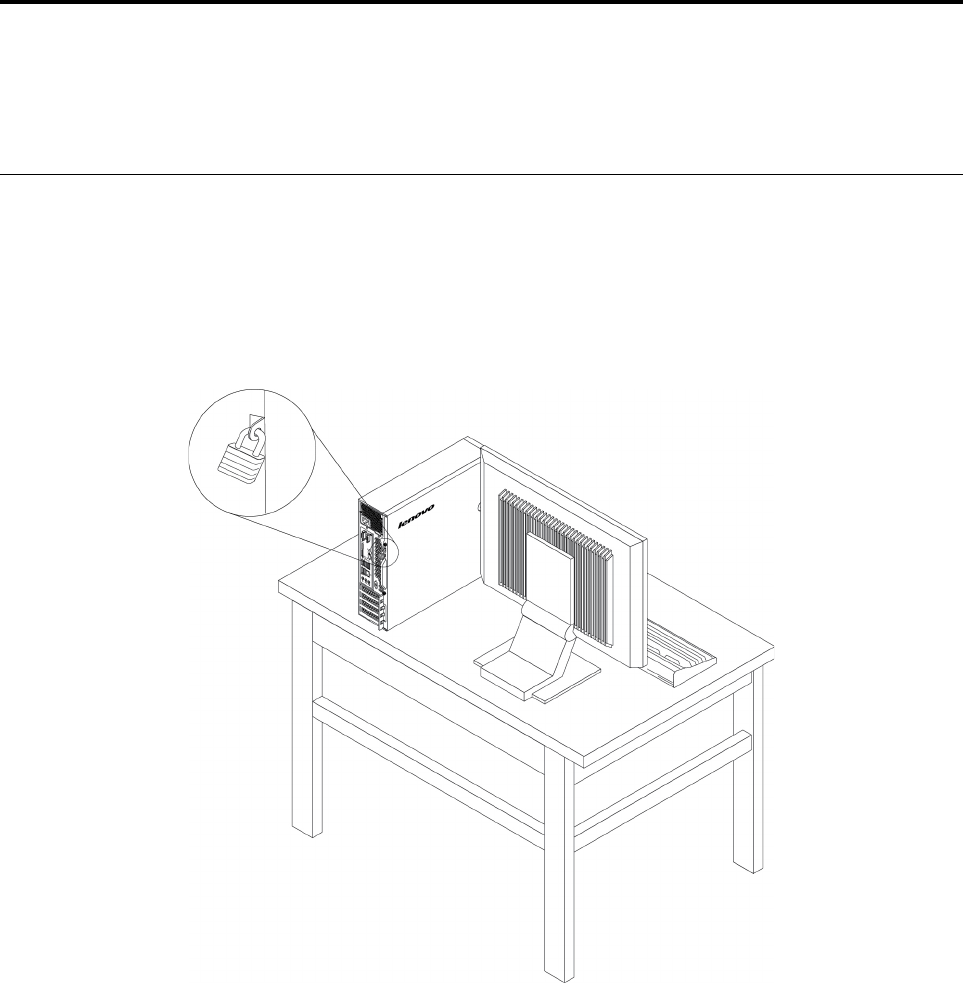
ﺘﻮﺻﻴﻞﻘﻔﻞﺎﻟﻠﻮﺣﺔ
ﻴﺴﺎﻋﺪﻘﻔﻞﻐﻄﺎﺀﺎﻟﻜﻤﺒﻴﻮﺗﺮﻔﻲﻤﻨﻊﺎﻟﺄﺷﺨﺎﺹﻐﻴﺮﺎﻟﻤﺮﺧﺼﻴﻦﻤﻦﺎﻟﻮﺻﻮﻝﺈﻟﻰﺪﺍﺧﻞﺎﻟﻜﻤﺒﻴﻮﺗﺮ.ﻴﺄﺗﻲﺎﻟﻜﻤﺒﻴﻮﺗﺮﺎﻟﺨﺎﺹﺒﻚﻤﺰﻭﺩ
ً
ﺍﺒﺤﻠﻘﺔﻘﻔﻞﻐﻄﺎﺀﺒﺤﻴﺚﻠﺎ
ﻴﻤﻜﻦﺈﺯﺍﻟﺔﺎﻟﻐﻄﺎﺀﻔﻲﺤﺎﻟﺔﺘﺮﻛﻴﺐﺎﻟﻘﻔﻞ.
ﺎﻟﺸﻜﻞ٧.ﻘﻔﻞﺎﻟﻠﻮﺣﺔ
ﺘﻮﺻﻴﻞﻘﻔﻞﺎﻟﻜﺎﺑﻞﺒﺄﺳﻠﻮﺏKensington
ﻴﻤﻜﻨﻚﺎﺳﺘﺨﺪﺍﻡﻘﻔﻞﺎﻟﻜﺎﺑﻞﺒﺄﺳﻠﻮﺏKensingtonﻠﺘﺜﺒﻴﺖﺎﻟﻜﻤﺒﻴﻮﺗﺮﻔﻲﻤﻜﺘﺐﺄﻭﻄﺎﻭﻟﺔﺄﻭﺄﻱﺄﺛﺎﺙﺂﺧﺮﻐﻴﺮﺪﺍﺋﻢ.ﻴﺘﺼﻞﻘﻔﻞﺎﻟﻜﺎﺑﻞﺒﻔﺘﺤﺔﻘﻔﻞﺎﻟﺄﻣﺎﻥﻔﻲ
ﺎﻟﺠﺰﺀﺎﻟﺨﻠﻔﻲﻤﻦﺎﻟﻜﻤﺒﻴﻮﺗﺮ.ﺒﺤﺴﺐﺎﻟﻨﻮﻉﺎﻟﻤﺤﺪﺩ،ﻴﻤﻜﻦﺘﺸﻐﻴﻞﻘﻔﻞﺎﻟﻜﺎﺑﻞﺒﻮﺍﺳﻄﺔﻤﻔﺘﺎﺡﺄﻭﻤﺠﻤﻮﻋﺔﻤﻔﺎﺗﻴﺢ.ﻴﻘﻮﻡﻘﻔﻞﺎﻟﻜﺒﻞﺄﻳﻀ
ً
ﺎﺒﺈﻗﻔﺎﻝﺎﻟﻤﻔﺎﺗﻴﺢﺎﻟﻤﺴﺘﺨﺪﻣﺔ
ﻠﻔﺘﺢﻐﻄﺎﺀﺎﻟﻜﻤﺒﻴﻮﺗﺮ.ﻬﺬﺍﻬﻮﻨﻮﻉﺎﻟﻘﻔﻞﻨﻔﺴﻪﺎﻟﻤﺴﺘﺨﺪﻡﻤﻊﺎﻟﻜﺜﻴﺮﻤﻦﺄﺟﻬﺰﺓﺎﻟﻜﻤﺒﻴﻮﺗﺮﺎﻟﻤﺤﻤﻮﻝ.ﻴﻤﻜﻨﻚﻄﻠﺐﻘﻔﻞﻜﺎﺑﻞﻤﻦﻬﺬﺍﺎﻟﻨﻮﻉﻤﺒﺎﺷﺮﺓﻤﻦﺸﺮﻛﺔ
LenovoﺒﺎﻟﺒﺤﺚﻌﻦKensingtonﻔﻲﺎﻟﻤﻮﻗﻊ:
http://www.lenovo.com/support
© Copyright Lenovo 2017, 2018٢٥
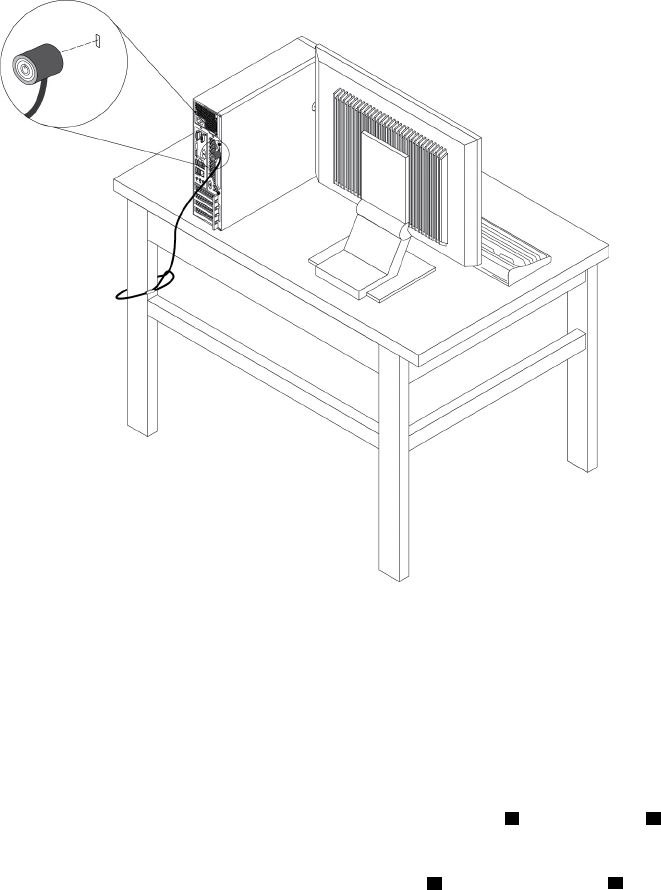
ﺎﻟﺸﻜﻞ٨.ﻘﻔﻞﺎﻟﻜﺎﺑﻞﺒﺄﺳﻠﻮﺏKensington
ﺘﻮﺻﻴﻞﻘﻔﻞﺎﻟﻜﺎﺑﻞ
ﻴﻤﻜﻦﺎﺳﺘﺨﺪﺍﻡﻘﻔﻞﺎﻟﻜﺎﺑﻞﻠﺘﺜﺒﻴﺖﺎﻟﺄﺟﻬﺰﺓﻤﺜﻞﻠﻮﺣﺔﺎﻟﻤﻔﺎﺗﻴﺢﻮﺍﻟﻤﺎﻭﺱﻌﻦﻄﺮﻳﻖﻘﻔﻞﻜﺎﺑﻠﺎﺕﺎﻟﺄﺟﻬﺰﺓﺈﻟﻰﺎﻟﻜﻤﺒﻴﻮﺗﺮ.ﻴﺘﺼﻞﻘﻔﻞﺎﻟﻜﺎﺑﻞﺒﻔﺘﺤﺎﺕﻘﻔﻞﺎﻟﻜﺎﺑﻞﻔﻲ
ﺨﻠﻔﻴﺔﺎﻟﻜﻤﺒﻴﻮﺗﺮ.
ﻠﺘﻮﺻﻴﻞﻘﻔﻞﺎﻟﻜﺎﺑﻞ،ﻘﻢﺒﺘﻨﻔﻴﺬﻤﺎﻴﻠﻲ:
١.ﺄﺩﺧﻞﺎﻟﻤﺸﺒﻚ
1ﻔﻲﻔﺘﺤﺔﻘﻔﻞﺎﻟﻜﺎﺑﻞ4.
٢.ﺎﺳﺤﺐﺎﻟﻜﺎﺑﻠﺎﺕﺎﻟﺘﻲﺘﺮﻳﺪﻘﻔﻠﻬﺎﻌﺒﺮﺎﻟﺄﺳﻨﺎﻥﺎﻟﻤﻮﺟﻮﺩﺓﻔﻲﻘﻔﻞﺎﻟﻜﺎﺑﻞ.
٣.ﺎﺿﻐﻂﻌﻠﻰﺎﻟﻤﺸﺒﻚ
2ﺈﻟﻰﺪﺍﺧﻞﻔﺘﺤﺔﻘﻔﻞﺎﻟﻜﺎﺑﻞ3ﺈﻟﻰﺄﻥﻴﺴﺘﻘﺮﻔﻲﻤﻜﺎﻧﻪ.
٢٦
ﺩﻟﻴﻞﻣﺴﺘﺨﺪﻡP320
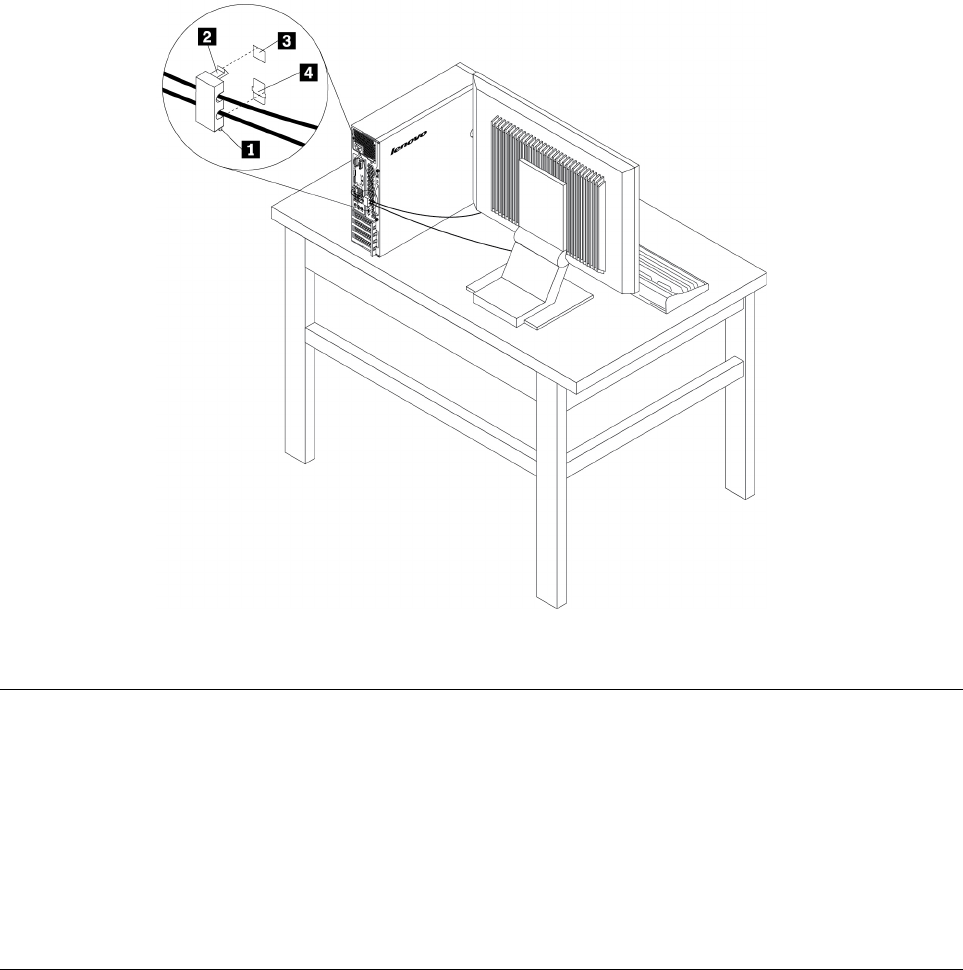
ﺎﻟﺸﻜﻞ٩.ﻘﻔﻞﻜﺎﺑﻞ
ﻌﺮﺽﻮﺗﻐﻴﻴﺮﺈﻋﺪﺍﺩﺍﺕﺎﻟﺄﻣﺎﻥﻔﻲﺒﺮﻧﺎﻣﺞSetup Utility
ﻠﻌﺮﺽﻮﺗﻐﻴﻴﺮﺈﻋﺪﺍﺩﺍﺕﺎﻟﺄﻣﺎﻥﻔﻲﺒﺮﻧﺎﻣﺞSetup Utility،ﻘﻢﺒﻤﺎﻴﻠﻲ:
١.ﺎﺑﺪﺃﺘﺸﻐﻴﻞﺒﺮﻧﺎﻣﺞSetup Utility.ﺮﺍﺟﻊ"ﺒﺪﺀﺒﺮﻧﺎﻣﺞSetup Utility"ﻌﻠﻰﺎﻟﺼﻔﺤﺔ٣١.
٢.ﺤﺪﺩSecurity.
٣.ﺎﺗﺒﻊﺎﻟﺈﺭﺷﺎﺩﺍﺕﺎﻟﺘﻲﺘﻈﻬﺮﻴﻤﻴﻦﺎﻟﺸﺎﺷﺔﻠﻌﺮﺽﻮﺗﻐﻴﻴﺮﺈﻋﺪﺍﺩﺍﺕﺎﻟﺄﻣﺎﻥ.ﻴﻤﻜﻨﻚﺎﻟﺮﺟﻮﻉﺈﻟﻰ"ﺎﺳﺘﺨﺪﺍﻡﺒﺮﻧﺎﻣﺞSetup Utility"ﻌﻠﻰﺎﻟﺼﻔﺤﺔ٣١
ﻠﻠﺤﺼﻮﻝﻌﻠﻰﻤﻌﻠﻮﻣﺎﺕﺄﺳﺎﺳﻴﺔﺤﻮﻝﺒﻌﺾﺈﻋﺪﺍﺩﺍﺕﺎﻟﺄﻣﺎﻥﺎﻟﺮﺋﻴﺴﻴﺔ.
٤.ﻠﺤﻔﻆﺎﻟﺈﻋﺪﺍﺩﺍﺕﻮﺍﻟﺨﺮﻭﺝﻤﻦﺒﺮﻧﺎﻣﺞSetup Utility،ﺎﺿﻐﻂﻌﻠﻰF10ﺄﻭFn+F10)ﺘﺒﻌ
ً
ﺎﻠﺈﻋﺪﺍﺩﺍﺕﻠﻮﺣﺔﺎﻟﻤﻔﺎﺗﻴﺢ(،ﺜﻢﺤﺪﺩYesﻔﻲﺎﻟﻨﺎﻓﺬﺓ
ﺎﻟﻤﻌﺮﻭﺿﺔ،ﻮﺍﺿﻐﻂﻌﻠﻰﻤﻔﺘﺎﺡEnter.
ﺎﺳﺘﺨﺪﺍﻡﻜﻠﻤﺎﺕﺎﻟﻤﺮﻭﺭﻮﺣﺴﺎﺑﺎﺕWindows
ﻴﻤﻜﻨﻚﺎﺳﺘﺨﺪﺍﻡﻜﻠﻤﺎﺕﻤﺮﻭﺭﻨﻈﺎﻡBIOSﻮﺣﺴﺎﺑﺎﺕWindowsﻠﻤﻨﻊﺎﻟﻮﺻﻮﻝﻐﻴﺮﺎﻟﻤﺮﺧﺺﺈﻟﻰﺎﻟﻜﻤﺒﻴﻮﺗﺮﻮﺍﻟﺒﻴﺎﻧﺎﺕﻠﺪﻳﻚ.ﻠﺎﺳﺘﺨﺪﺍﻡﻜﻠﻤﺎﺕﻤﺮﻭﺭBIOS
ﺄﻭﺤﺴﺎﺑﺎﺕWindows،ﻘﻢﺒﻤﺎﻴﻠﻲ:
•ﻠﺎﺳﺘﺨﺪﺍﻡﻜﻠﻤﺎﺕﻤﺮﻭﺭﻨﻈﺎﻡBIOS،ﺎﻧﻈﺮ"ﺎﺳﺘﺨﺪﺍﻡﻜﻠﻤﺎﺕﻤﺮﻭﺭﻨﻈﺎﻡBIOS"ﻌﻠﻰﺎﻟﺼﻔﺤﺔ٣٣.
•ﻠﺎﺳﺘﺨﺪﺍﻡﺤﺴﺎﺑﺎﺕWindows،ﻘﻢﺒﻤﺎﻴﻠﻲ:
١.ﺎﻧﻘﺮﻔﻮﻕﺎﻟﺰﺭ"ﺎﺑﺪﺃ"ﻠﻔﺘﺢﻘﺎﺋﻤﺔ"ﺎﺑﺪﺃ".
٢.ﺘﺒﻌ
ً
ﺎﻠﺈﺻﺪﺍﺭWindows،ﻘﻢﺒﺄﺣﺪﺎﻟﺈﺟﺮﺍﺀﺍﺕﺎﻟﺘﺎﻟﻴﺔ:
–ﺒﺎﻟﻨﺴﺒﺔﺈﻟﻰﻨﻈﺎﻡﺎﻟﺘﺸﻐﻴﻞWindows 7:ﺎﻧﻘﺮﻔﻮﻕﻠﻮﺣﺔﺎﻟﺘﺤﻜﻢ��ﺤﺴﺎﺑﺎﺕﺎﻟﻤﺴﺘﺨﺪﻡ.
–ﺒﺎﻟﻨﺴﺒﺔﺈﻟﻰﻨﻈﺎﻡﺎﻟﺘﺸﻐﻴﻞWindows 10:ﺎﻧﻘﺮﻔﻮﻕﺎﻟﺈﻋﺪﺍﺩﺍﺕ��ﺤﺴﺎﺑﺎﺕ.
٣.ﺎﺗﺒﻊﺎﻟﺘﻌﻠﻴﻤﺎﺕﺎﻟﺘﻲﻴﺘﻢﻌﺮﺿﻬﺎﻌﻠﻰﺎﻟﺸﺎﺷﺔ.
ﺍﻟﻤﻠﺤﻖ٤.ﺍﻷﻣﺎﻥ٢٧
ﺎﺳﺘﺨﺪﺍﻡﻤﺼﺎﺩﻗﺔﺒﺼﻤﺔﺎﻟﺈﺻﺒﻊ
ﺈﺫﺍﻜﺎﻧﺖﻠﻮﺣﺔﺎﻟﻤﻔﺎﺗﻴﺢﺘﺤﺘﻮﻱﻌﻠﻰﻘﺎﺭﺉﺒﺼﻤﺔﺎﻟﺈﺻﺒﻊ،ﻴﻤﻜﻨﻚﺎﺳﺘﺨﺪﺍﻡﻤﺼﺎﺩﻗﺔﺒﺼﻤﺔﺎﻟﺈﺻﺒﻊﻠﺎﺳﺘﺒﺪﺍﻝﻜﻠﻤﺎﺕﺎﻟﻤﺮﻭﺭﻠﺘﺤﻘﻴﻖﻮﺻﻮﻝﺴﻬﻞﻮﺁﻣﻦ
ﻠﻠﻤﺴﺘﺨﺪﻡ.ﻠﺎﺳﺘﺨﺪﺍﻡﻤﺼﺎﺩﻗﺔﺒﺼﻤﺔﺎﻟﺈﺻﺒﻊ،ﻌﻠﻴﻚﺘﺴﺠﻴﻞﺒﺼﻤﺔﺈﺻﺒﻌﻚﺄﻭﻟﺎ
ً
ﺜﻢﺈﻗﺮﺍﻧﻬﺎﺒﻜﻠﻤﺎﺕﺎﻟﻤﺮﻭﺭ)ﻤﺜﻞﻜﻠﻤﺔﺎﻟﻤﺮﻭﺭﺒﺪﺀﺎﻟﺘﺸﻐﻴﻞ،ﻮﻛﻠﻤﺔﻤﺮﻭﺭﻤﺤﺮﻙ
ﺎﻟﺄﻗﺮﺍﺹﺎﻟﺜﺎﺑﺘﺔ،ﻮﻛﻠﻤﺔﻤﺮﻭﺭWindows(.ﺎﺳﺘﺨﺪﻡﻘﺎﺭﺉﺒﺼﻤﺔﺎﻟﺈﺻﺒﻊﻮﺑﺮﻧﺎﻣﺞﺒﺼﻤﺔﺎﻟﺈﺻﺒﻊﻠﺈﺗﻤﺎﻡﻬﺬﺍﺎﻟﺈﺟﺮﺍﺀ.
ﻠﺎﺳﺘﺨﺪﺍﻡﻤﺼﺎﺩﻗﺔﺒﺼﻤﺔﺎﻟﺄﺻﺒﻊ،ﻘﻢﺒﺄﺣﺪﺎﻟﺈﺟﺮﺍﺀﺍﺕﺎﻟﺘﺎﻟﻴﺔ:
•ﺒﺎﻟﻨﺴﺒﺔﺈﻟﻰﻨﻈﺎﻡﺎﻟﺘﺸﻐﻴﻞWindows 7:ﺎﺳﺘﺨﺪﻡﺒﺮﻧﺎﻣﺞFingerprint Manager ProﺄﻭThinkVantage Fingerprint Softwareﺎﻟﻤﻘﺪﻡﻤﻦ
Lenovo.ﻠﻔﺘﺢﺎﻟﺒﺮﻧﺎﻣﺞ،ﺎﻧﻈﺮ"ﺎﻟﻮﺻﻮﻝﺈﻟﻰﺒﺮﻧﺎﻣﺞﺒﺎﻟﻜﻤﺒﻴﻮﺗﺮ"ﻌﻠﻰﺎﻟﺼﻔﺤﺔ١٢.ﻠﻤﺰﻳﺪﻤﻦﺎﻟﻤﻌﻠﻮﻣﺎﺕﺤﻮﻝﻜﻴﻔﻴﺔﺎﺳﺘﺨﺪﺍﻡﺎﻟﺒﺮﻧﺎﻣﺞ،ﺮﺍﺟﻊﻨﻈﺎﻡ
ﺘﻌﻠﻴﻤﺎﺕﺎﻟﺒﺮﻧﺎﻣﺞ.
•ﺒﺎﻟﻨﺴﺒﺔﺈﻟﻰﻨﻈﺎﻡﺎﻟﺘﺸﻐﻴﻞWindows 10:ﺎﺳﺘﺨﺪﻡﺄﺩﺍﺓﺒﺼﻤﺔﺎﻟﺈﺻﺒﻊﺎﻟﺘﻲﻴﻮﻓﺮﻫﺎﻨﻈﺎﻡﺎﻟﺘﺸﻐﻴﻞWindows.ﺎﻧﻘﺮﻔﻮﻕﺎﻟﺰﺭ"ﺎﺑﺪﺃ"ﻠﻔﺘﺢﻘﺎﺋﻤﺔ"ﺎﺑﺪﺃ"،
ﺜﻢﺎﻧﻘﺮﻔﻮﻕﺎﻟﺈﻋﺪﺍﺩﺍﺕ��ﺤﺴﺎﺑﺎﺕ��ﺨﻴﺎﺭﺍﺕﺘﺴﺠﻴﻞﺎﻟﺪﺧﻮﻝ.ﺎﺗﺒﻊﺎﻟﺘﻌﻠﻴﻤﺎﺕﺎﻟﺘﻲﻴﺘﻢﻌﺮﺿﻬﺎﻌﻠﻰﺎﻟﺸﺎﺷﺔ.
ﻠﺎﺳﺘﺨﺪﺍﻡﻘﺎﺭﺉﺒﺼﻤﺎﺕﺎﻟﺄﺻﺎﺑﻊ،ﺮﺍﺟﻊﺎﻟﻮﺛﺎﺋﻖﺎﻟﻤﺮﺳﻠﺔﻤﻊﻠﻮﺣﺔﻤﻔﺎﺗﻴﺢﻘﺎﺭﺉﺒﺼﻤﺎﺕﺎﻟﺄﺻﺎﺑﻊﺄﻭﺎﻟﻤﻮﺟﻮﺩﺓﻌﻠﻰﻤﻮﻗﻊﻮﻳﺐﺪﻋﻢLenovoﻌﻠﻰ
https://
pcsupport.lenovo.com/solutions/pd014444
.
ﺎﺳﺘﺨﺪﺍﻡﻤﻔﺘﺎﺡﻮﺟﻮﺩﺎﻟﻐﻄﺎﺀ
ﻴﺤﻮﻝﻤﻔﺘﺎﺡﻮﺟﻮﺩﺎﻟﻐﻄﺎﺀﺪﻭﻥﺪﺧﻮﻝﺎﻟﻜﻤﺒﻴﻮﺗﺮﺎﻟﺨﺎﺹﺒﻚﺈﻟﻰﻨﻈﺎﻡﺎﻟﺘﺸﻐﻴﻞﻔﻲﺤﺎﻟﺔﻌﺪﻡﺘﺮﻛﻴﺐﻐﻄﺎﺀﺎﻟﻜﻤﺒﻴﻮﺗﺮﺄﻭﺈﻏﻠﺎﻗﻪﺒﺸﻜﻞﺼﺤﻴﺢ.
ﻠﺎﺳﺘﺨﺪﺍﻡﻤﻔﺘﺎﺡﻮﺟﻮﺩﺎﻟﻐﻄﺎﺀ،ﻴﺠﺐﺘﻤﻜﻴﻦﻤﻮﺻﻞﻤﻔﺘﺎﺡﻮﺟﻮﺩﺎﻟﻐﻄﺎﺀﺎﻟﻤﻮﺟﻮﺩﻌﻠﻰﻠﻮﺣﺔﺎﻟﻨﻈﺎﻡﺄﻭﻟﺎ
ً
.ﻠﺘﺤﻘﻴﻖﺬﻟﻚ،ﻘﻢﺒﻤﺎﻴﻠﻲ:
١.ﺎﺑﺪﺃﺘﺸﻐﻴﻞﺒﺮﻧﺎﻣﺞSetup Utility.ﺮﺍﺟﻊ"ﺒﺪﺀﺒﺮﻧﺎﻣﺞSetup Utility"ﻌﻠﻰﺎﻟﺼﻔﺤﺔ٣١.
٢.ﺤﺪﺩSecurity��Chassis Intrusion DetectionﻮﺍﺿﻐﻂﻌﻠﻰﻤﻔﺘﺎﺡEnter.
٣.ﺤﺪﺩEnabledﺜﻢﺎﺿﻐﻂEnter.
٤.ﻠﺤﻔﻆﺎﻟﺈﻋﺪﺍﺩﺍﺕﻮﺍﻟﺨﺮﻭﺝﻤﻦﺒﺮﻧﺎﻣﺞSetup Utility،ﺎﺿﻐﻂﻌﻠﻰF10،ﻮﺣﺪﺩYesﻔﻲﺎﻟﻨﺎﻓﺬﺓﺎﻟﺘﻲﺘﻈﻬﺮ،ﺜﻢﺎﺿﻐﻂﻌﻠﻰﺎﻟﻤﻔﺘﺎﺡEnter.ﻴﺘﻢﺘﻤﻜﻴﻦ
ﻤﻮﺻﻞﻤﻔﺘﺎﺡﻮﺟﻮﺩﺎﻟﻐﻄﺎﺀﻌﻠﻰﻠﻮﺣﺔﺎﻟﻨﻈﺎﻡ.
ﻤﻠﺎﺣﻈﺔ:ﺒﺎﻟﻨﺴﺒﺔﻠﺒﻌﺾﻄﺮﺍﺯﺍﺕﻠﻮﺣﺎﺕﺎﻟﻤﻔﺎﺗﻴﺢ،ﻘﺪﺘﻜﻮﻥﺒﺤﺎﺟﺔﺈﻟﻰﺎﻟﻀﻐﻂﻌﻠﻰﻤﻔﺘﺎﺣﻲFn+F10ﻠﻠﺨﺮﻭﺝﻤﻦﺒﺮﻧﺎﻣﺞSetup Utility.
ﻴﺒﺪﺃﻤﻔﺘﺎﺡﻮﺟﻮﺩﺎﻟﻐﻄﺎﺀﺒﺎﻟﻌﻤﻞ.ﺈﺫﺍﺎﻛﺘﺸﻒﺎﻟﻤﻔﺘﺎﺡﺄﻥﻐﻄﺎﺀﺎﻟﻜﻤﺒﻴﻮﺗﺮﻐﻴﺮﻤﺮﻛ
ّ
ﺐﺄﻭﻤﻐﻠﻖﺒﺸﻜﻞﺼﺤﻴﺢ،ﻔﺴﺘﻈﻬﺮﺮﺳﺎﻟﺔﺨﻄﺄﻌﻨﺪﺘﺸﻐﻴﻞﺎﻟﻜﻤﺒﻴﻮﺗﺮ.ﻠﺈﺻﻠﺎﺡ
ﺎﻟﺨﻄﺄﻮﺗﺴﺠﻴﻞﺎﻟﺪﺧﻮﻝﺈﻟﻰﻨﻈﺎﻡﺎﻟﺘﺸﻐﻴﻞ،ﻘﻢﺒﻤﺎﻴﻠﻲ:
١.ﻘﻢﺒﺘﺮﻛﻴﺐﻐﻄﺎﺀﺎﻟﻜﻤﺒﻴﻮﺗﺮﺄﻭﺈﻏﻠﺎﻗﻪﺒﺸﻜﻞﺼﺤﻴﺢ.ﺮﺍﺟﻊﺍﻟﻤﻠﺤﻖ٧"ﺈﺧﺮﺍﺝﺎﻟﺄﺟﻬﺰﺓﻮﺗﺮﻛﻴﺒﻬﺎ"ﻌﻠﻰﺎﻟﺼﻔﺤﺔ٥١.
٢.ﺎﺑﺪﺃﺜﻢﻘﻢﺒﺎﻟﺨﺮﻭﺝﻤﻦﺒﺮﻧﺎﻣﺞSetup Utility.ﺎﻧﻈﺮ"ﺒﺪﺀﺒﺮﻧﺎﻣﺞSetup Utility"ﻌﻠﻰﺎﻟﺼﻔﺤﺔ٣١ﻮ"ﺎﻟﺨﺮﻭﺝﻤﻦﺒﺮﻧﺎﻣﺞSetup Utility"
ﻌﻠﻰﺎﻟﺼﻔﺤﺔ٣٦.
ﺎﺳﺘﺨﺪﺍﻡﺠﺪﺭﺍﻥﺎﻟﺤﻤﺎﻳﺔ
ﻴﻤﻜﻦﺄﻥﻴﻜﻮﻥﺠﺪﺍﺭﺎﻟﺤﻤﺎﻳﺔﺠﻬﺎﺯ
ً
ﺍﺄﻭﺒﺮﻧﺎﻣﺠ
ً
ﺎﺄﻭﻤﺠﻤﻮﻋﺔﻤﻦﺎﻟﺄﺟﻬﺰﺓﻮﺍﻟﺒﺮﺍﻣﺞ،ﺤﻴﺚﻴﺘﻮﻗﻒﺬﻟﻚﻌﻠﻰﻤﺴﺘﻮﻯﺎﻟﺄﻣﺎﻥﺎﻟﻤﻄﻠﻮﺏ.ﺘﻌﻤﻞﺠﺪﺭﺍﻥﺎﻟﺤﻤﺎﻳﺔﻮﻓﻘ
ً
ﺎ
ﻠﻤﺠﻤﻮﻋﺔﻤﻦﺎﻟﻘﻮﺍﻋﺪﺒﻐﺮﺽﺘﺤﺪﻳﺪﺎﻟﺎﺗﺼﺎﻟﺎﺕﺎﻟﻮﺍﺭﺩﺓﻮﺍﻟﺼﺎﺩﺭﺓﺎﻟﻤﻌﺘﻤﺪﺓ.ﺈﺫﺍﻜﺎﻥﺎﻟﻜﻤﺒﻴﻮﺗﺮﺎﻟﺨﺎﺹﺒﻚﻤﺜﺒﺘ
ً
ﺎﻌﻠﻴﻪﻤﺴﺒﻘ
ً
ﺎﺒﺮﻧﺎﻣﺞﺠﺪﺍﺭﺤﻤﺎﻳﺔ،ﻔﺴﻴﺴﺎﻋﺪﻔﻲ
ﺎﻟﺤﻤﺎﻳﺔﻤﻦﺘﻬﺪﻳﺪﺍﺕﺄﻣﺎﻥﺎﻟﺈﻧﺘﺮﻧﺖﻮﺍﻟﻮﺻﻮﻝﻐﻴﺮﺎﻟﻤﺮﺧﺺﻮﻋﻤﻠﻴﺎﺕﺎﻟﺎﻗﺘﺤﺎﻡﻮﻫﺠﻤﺎﺕﺎﻟﺈﻧﺘﺮﻧﺖ.ﻜﻤﺎﺄﻧﻪﻴﺤﻤﻲﺎﻟﺨﺼﻮﺻﻴﺔ.ﻠﻤﺰﻳﺪﻤﻦﺎﻟﻤﻌﻠﻮﻣﺎﺕﻌﻦﻜﻴﻔﻴﺔ
ﺎﺳﺘﺨﺪﺍﻡﺒﺮﻧﺎﻣﺞﺠﺪﺍﺭﺎﻟﺤﻤﺎﻳﺔ،ﺎﺭﺟﻊﺈﻟﻰﻨﻈﺎﻡﺎﻟﻤﺴﺎﻋﺪﺓﺎﻟﺨﺎﺹﺒﺒﺮﻧﺎﻣﺞﺠﺪﺍﺭﺎﻟﺤﻤﺎﻳﺔ.
ﻠﺎﺳﺘﺨﺪﺍﻡﺠﺪﺍﺭﺎﻟﺤﻤﺎﻳﺔﻠـWindows،ﻘﻢﺒﻤﺎﻴﻠﻲ:
١.ﺎﻧﻘﺮﻔﻮﻕﺎﻟﺰﺭ"ﺎﺑﺪﺃ"ﻠﻔﺘﺢﻘﺎﺋﻤﺔ"ﺎﺑﺪﺃ".
٢.ﺘﺒﻌ
ً
ﺎﻠﺈﺻﺪﺍﺭWindows،ﻘﻢﺒﺄﺣﺪﺎﻟﺈﺟﺮﺍﺀﺍﺕﺎﻟﺘﺎﻟﻴﺔ:
•ﺒﺎﻟﻨﺴﺒﺔﺈﻟﻰﻨﻈﺎﻡﺎﻟﺘﺸﻐﻴﻞWindows 7:ﺎﻧﻘﺮﻔﻮﻕﻠﻮﺣﺔﺎﻟﺘﺤﻜﻢ.
•ﺒﺎﻟﻨﺴﺒﺔﺈﻟﻰﻨﻈﺎﻡﺎﻟﺘﺸﻐﻴﻞWindows 10:ﺎﻧﻘﺮﻔﻮﻕﻨﻈﺎﻡWindows��ﻠﻮﺣﺔﺎﻟﺘﺤﻜﻢ.
٣.ﺎﻋﺮﺽﻠﻮﺣﺔﺎﻟﺘﺤﻜﻢﺒﺎﺳﺘﺨﺪﺍﻡ"ﺄﻳﻘﻮﻧﺎﺕﻜﺒﻴﺮﺓ"ﺄﻭ"ﺄﻳﻘﻮﻧﺎﺕﺼﻐﻴﺮﺓ"،ﺜﻢﺎﻧﻘﺮﻔﻮﻕﺠﺪﺍﺭﺤﻤﺎﻳﺔWindows Defender.
٢٨
ﺩﻟﻴﻞﻣﺴﺘﺨﺪﻡP320
٤.ﺎﺗﺒﻊﺎﻟﺘﻌﻠﻴﻤﺎﺕﺎﻟﺘﻲﻴﺘﻢﻌﺮﺿﻬﺎﻌﻠﻰﺎﻟﺸﺎﺷﺔ.
ﺤﻤﺎﻳﺔﺎﻟﺒﻴﺎﻧﺎﺕﻤﻦﺎﻟﻔﻴﺮﻭﺳﺎﺕ
ﻠﻘﺪﺘﻢﺘﺜﺒﻴﺖﺒﺮﻧﺎﻣﺞﻤﻜﺎﻓﺤﺔﺎﻟﻔﻴﺮﻭﺳﺎﺕﻌﻠﻰﺎﻟﻜﻤﺒﻴﻮﺗﺮﺎﻟﺨﺎﺹﺒﻚﻤﺴﺒﻘ
ً
ﺎﻮﺫﻟﻚﻠﻤﺴﺎﻋﺪﺗﻚﻌﻠﻰﺎﻟﺤﻤﺎﻳﺔﻤﻦﺎﻟﻔﻴﺮﻭﺳﺎﺕﻮﺍﻛﺘﺸﺎﻓﻬﺎﻮﺍﻟﺘﺨﻠﺺﻤﻨﻬﺎ.
ﺘﻘﺪﻡﺸﺮﻛﺔLenovoﻨﺴﺨﺔﻜﺎﻣﻠﺔﻤﻦﺒﺮﻧﺎﻣﺞﺎﻟﺤﻤﺎﻳﺔﻤﻦﺎﻟﻔﻴﺮﻭﺳﺎﺕﻌﻠﻰﺎﻟﺤﺎﺳﺐﺎﻟﺨﺎﺹﺒﻚﻤﻊﺎﺷﺘﺮﺍﻙﻤﺠﺎﻧﻲﻠﻤﺪﺓ30ﻴﻮﻡ.ﺒﻌﺪ30ﻴﻮﻣﺎ،ﻴﺠﺐﺄﻥﺘﻘﻮﻡ
ﺒﺘﺠﺪﻳﺪﺎﻟﺘﺮﺧﻴﺺﻠﻠﺎﺳﺘﻤﺮﺍﺭﺒﺎﺳﺘﻠﺎﻡﺘﺤﺪﻳﺜﺎﺕﺒﺮﻧﺎﻣﺞﺎﻟﺤﻤﺎﻳﺔﻤﻦﺎﻟﻔﻴﺮﻭﺳﺎﺕ.
ﻤﻠﺎﺣﻈﺔ:ﻴﺠﺐﺪﻭﻣ
ً
ﺎﺘﺤﺪﻳﺚﻤﻠﻔﺎﺕﺘﻌﺮﻳﻒﺎﻟﻔﻴﺮﻭﺳﺎﺕﻠﻠﺤﻤﺎﻳﺔﻤﻦﺎﻟﻔﻴﺮﻭﺳﺎﺕﺎﻟﺠﺪﻳﺪﺓ.
ﻠﻤﺰﻳﺪﻤﻦﺎﻟﻤﻌﻠﻮﻣﺎﺕﻌﻦﻜﻴﻔﻴﺔﺎﺳﺘﺨﺪﺍﻡﺒﺮﻧﺎﻣﺞﺎﻟﺤﻤﺎﻳﺔﻤﻦﺎﻟﻔﻴﺮﻭﺳﺎﺕ،ﺎﺭﺟﻊﺈﻟﻰﻨﻈﺎﻡﺎﻟﻤﺴﺎﻋﺪﺓﺎﻟﺨﺎﺹﺒﺒﺮﻧﺎﻣﺞﺎﻟﺤﻤﺎﻳﺔﻤﻦﺎﻟﻔﻴﺮﻭﺳﺎﺕ.
ﻴﺘﻢﺪﻣﺞﺒﺮﻧﺎﻣﺞComputrace Agentﻔﻲﺎﻟﺒﺮﺍﻣﺞﺎﻟﺜﺎﺑﺘﺔ
ﺒﺮﻧﺎﻣﺞComputrace Agentﻌﺒﺎﺭﺓﻌﻦﺤﻞﻠﺈﺩﺍﺭﺓﺄﺻﻮﻝﺘﻘﻨﻴﺔﺎﻟﻤﻌﻠﻮﻣﺎﺕﻮﺍﺳﺘﺮﺩﺍﺩﺎﻟﻜﻤﺒﻴﻮﺗﺮﺒﻌﺪﺘﻌﺮﺿﻪﻠﻠﺴﺮﻗﺔ.ﺤﻴﺚﻴﻜﺘﺸﻒﻬﺬﺍﺎﻟﺒﺮﻧﺎﻣﺞﺈﺫﺍﻤﺎﻜﺎﻧﺖ
ﻬﻨﺎﻙﺘﻐﻴﻴﺮﺍﺕﺘﺘﻢﻌﻠﻰﺎﻟﻜﻤﺒﻴﻮﺗﺮ،ﻤﺜﻞﺘﻐﻴﻴﺮﺍﺕﺎﻟﺄﺟﻬﺰﺓﺄﻭﺎﻟﺒﺮﺍﻣﺞﺄﻭﻤﻮﻗﻊﺎﺗﺼﺎﻝﺎﻟﻜﻤﺒﻴﻮﺗﺮ.ﻘﺪﻴﻠﺰﻣﻚﺸﺮﺍﺀﺎﺷﺘﺮﺍﻙﻠﺘﻨﺸﻴﻂﺒﺮﻧﺎﻣﺞComputrace
Agent.
Trusted Platform Module (TPM)
ﺈﻥﻮﺣﺪﺓTPMﻌﺒﺎﺭﺓﻌﻦﻤﻌﺎﻟﺞﺘﺸﻔﻴﺮﺂﻣﻦﻴﺨﺰ
ّ
ﻥﻤﻔﺎﺗﻴﺢﺘﺸﻔﻴﺮﺘﻌﻤﻞﺒﺪﻭﺭﻫﺎﻌﻠﻰﺤﻤﺎﻳﺔﺎﻟﻤﻌﻠﻮﻣﺎﺕﺎﻟﻤﺨﺰﻧﺔﻔﻲﺎﻟﻜﻤﺒﻴﻮﺗﺮ.
ﺍﻟﻤﻠﺤﻖ٤.ﺍﻷﻣﺎﻥ٢٩
٣٠ﺩﻟﻴﻞﻣﺴﺘﺨﺪﻡP320

ﺍﻟﻤﻠﺤﻖ٥.ﺎﻟﺘﻜﻮﻳﻦﺎﻟﻤﺘﻘﺪﻡ
ﻴﻮﻓﺮﻬﺬﺍﺎﻟﻔﺼﻞﻤﻌﻠﻮﻣﺎﺕﻠﻤﺴﺎﻋﺪﺗﻚﻌﻠﻰﺈﺟﺮﺍﺀﺎﻟﻤﺰﻳﺪﻤﻦﻌﻤﻠﻴﺎﺕﺎﻟﺘﻜﻮﻳﻦﻌﻠﻰﺎﻟﻜﻤﺒﻴﻮﺗﺮ.
ﺎﺳﺘﺨﺪﺍﻡﺒﺮﻧﺎﻣﺞSetup Utility
ﻴﺴﺘﺨﺪﻡﺒﺮﻧﺎﻣﺞSetup Utilityﻠﻌﺮﺽﻮﺗﻐﻴﻴﺮﺈﻋﺪﺍﺩﺍﺕﺎﻟﺘﻜﻮﻳﻦﻠﺠﻬﺎﺯﺎﻟﻜﻤﺒﻴﻮﺗﺮﻠﺪﻳﻚ.ﻴﻮﻓﺮﻬﺬﺍﺎﻟﻘﺴﻢﻤﻌﻠﻮﻣﺎﺕﻌﻦﺈﻋﺪﺍﺩﺍﺕﺎﻟﺘﻜﻮﻳﻦﺎﻟﺮﺋﻴﺴﻴﺔﺎﻟﻤﺘﺎﺣﺔﻔﻲ
ﺎﻟﺒﺮﻧﺎﻣﺞ.
ﻤﻠﺎﺣﻈﺔ:ﻴﻤﻜﻦﻤﻦﺨﻠﺎﻝﺈﻋﺪﺍﺩﺍﺕﻨﻈﺎﻡﺎﻟﺘﺸﻐﻴﻞﺘﺠﺎﻭﺯﺄﻱﺈﻋﺪﺍﺩﺍﺕﻤﺸﺎﺑﻬﺔﻔﻲﺒﺮﻧﺎﻣﺞSetup Utility.
ﺒﺪﺀﺒﺮﻧﺎﻣﺞSetup Utility
ﻠﺒﺪﺀﺒﺮﻧﺎﻣﺞSetup Utility،ﻘﻢﺒﻤﺎﻴﻠﻲ:
١.ﻘﻢﺒﺘﺸﻐﻴﻞﺎﻟﻜﻤﺒﻴﻮﺗﺮﺄﻭﺈﻋﺎﺩﺓﺘﺸﻐﻴﻠﻪ.
٢.ﻘﺒﻞﺄﻥﻴﺒﺪﺃﺘﺸﻐﻴﻞﻨﻈﺎﻡﺎﻟﺘﺸﻐﻴﻞWindows،ﺎﺿﻐﻂﺒﺸﻜﻞﻤﺘﻜﺮﺭﻌﻠﻰﺎﻟﻤﻔﺘﺎﺡF1ﺄﻭFn+F1ﻮﺣﺮﺭﻩ)ﺘﺒﻌ
ً
ﺎﻠﻠﻮﺣﺔﺎﻟﻤﻔﺎﺗﻴﺢ(ﺈﻟﻰﺄﻥﻴﻔﺘﺢﺒﺮﻧﺎﻣﺞ
Setup Utility.ﺎﺫﺍﺘﻢﺘﺤﺪﻳﺪﻜﻠﻤﺔﺴﺮﻳﺔBIOS،ﻔﻠﻦﻴﻌﻤﻞﺒﺮﻧﺎﻣﺞSetup Utilityﺤﺘﻰﺘﻘﻮﻡﺒﺈﺩﺧﺎﻝﻜﻠﻤﺔﺎﻟﻤﺮﻭﺭﺎﻟﺼﺤﻴﺤﺔ.ﻠﻤﺰﻳﺪﻤﻦﺎﻟﻤﻌﻠﻮﻣﺎﺕ،
ﺎﻧﻈﺮ"ﺎﺳﺘﺨﺪﺍﻡﻜﻠﻤﺎﺕﻤﺮﻭﺭﻨﻈﺎﻡBIOS"ﻌﻠﻰﺎﻟﺼﻔﺤﺔ٣٣.
ﻠﻌﺮﺽﻮﺗﻐﻴﻴﺮﺈﻋﺪﺍﺩﺍﺕﺎﻟﺘﻜﻮﻳﻦ،ﺎﺗﺒﻊﺎﻟﺈﺭﺷﺎﺩﺍﺕﺎﻟﺘﻲﺘﻈﻬﺮﻴﻤﻴﻦﺎﻟﺸﺎﺷﺔ.ﺘ
ُ
ﺴﺘﺨﺪﻡﺎﻟﻤﻔﺎﺗﻴﺢﻠﺘﻨﻔﻴﺬﺎﻟﻤﻬﺎﻡﺎﻟﻤﺨﺘﻠﻔﺔﺄﺳﻔﻞﻜﻞﺸﺎﺷﺔ.
ﺘﻐﻴﻴﺮﻠﻐﺔﺎﻟﻌﺮﺽﻔﻲﺒﺮﻧﺎﻣﺞSetup Utility
ﻴﺪﻋﻢﺒﺮﻧﺎﻣﺞSetup Utilityﺜﻠﺎﺙﻠﻐﺎﺕﻌﺮﺽ:ﺎﻟﺈﻧﺠﻠﻴﺰﻳﺔﻮﺍﻟﻔﺮﻧﺴﻴﺔﻮﺍﻟﺼﻴﻨﻴﺔﺎﻟﻤﺒﺴﻄﺔ.
ﻠﺘﻐﻴﻴﺮﻠﻐﺔﺎﻟﻌﺮﺽﻔﻲﺒﺮﻧﺎﻣﺞSetup Utility،ﻘﻢﺒﺘﻨﻔﻴﺬﻤﺎﻴﻠﻲ:
١.ﺎﺑﺪﺃﺘﺸﻐﻴﻞﺒﺮﻧﺎﻣﺞSetup Utility.ﺮﺍﺟﻊ"ﺒﺪﺀﺒﺮﻧﺎﻣﺞSetup Utility"ﻌﻠﻰﺎﻟﺼﻔﺤﺔ٣١.
٢.ﻤﻦﺎﻟﻮﺍﺟﻬﺔﺎﻟﺮﺋﻴﺴﻴﺔ،ﺤﺪﺩSystem Language،ﺜﻢﺤﺪﺩﻠﻐﺔﺎﻟﻌﺮﺽﻮﻓﻘ
ً
ﺎﻠﺎﺣﺘﻴﺎﺟﺎﺗﻚ.
ﺘﻤﻜﻴﻦﺠﻬﺎﺯﺄﻭﺘﻌﻄﻴﻠﻪ
ﻴﻮﻓﺮﻬﺬﺍﺎﻟﻘﺴﻢﻤﻌﻠﻮﻣﺎﺕﻌﻦﻜﻴﻔﻴﺔﺘﻤﻜﻴﻦﺄﻭﺘﻌﻄﻴﻞﻮﺻﻮﻝﺎﻟﻤﺴﺘﺨﺪﻡﻠﻠﺄﺟﻬﺰﺓ)ﻤﺜﻞﻤﻮﺻﻠﺎﺕUSBﺄﻭﺄﺟﻬﺰﺓﺎﻟﺘﺨﺰﻳﻦ(.
ﻠﺘﻤﻜﻴﻦﺄﻭﺘﻌﻄﻴﻞﺠﻬﺎﺯ،ﺎﺗﺒﻊﺎﻟﺨﻄﻮﺍﺕﺎﻟﺘﺎﻟﻴﺔ:
١.ﺎﺑﺪﺃﺘﺸﻐﻴﻞﺒﺮﻧﺎﻣﺞSetup Utility.ﺮﺍﺟﻊ"ﺒﺪﺀﺒﺮﻧﺎﻣﺞSetup Utility"ﻌﻠﻰﺎﻟﺼﻔﺤﺔ٣١.
٢.ﺤﺪﺩDevices.
٣.ﺤﺪﺩﺎﻟﺠﻬﺎﺯﺎﻟﺬﻱﻴﺮﻏﺐﻔﻲﺘﻤﻜﻴﻨﻪﺄﻭﺘﻌﻄﻴﻠﻪﺜﻢﺎﺿﻐﻂﻌﻠﻰﻤﻔﺘﺎﺡEnter.
٤.ﺤﺪﺩﺎﻟﺈﻋﺪﺍﺩﺍﺕﺎﻟﻤﺮﻏﻮﺑﺔﺜﻢﺎﺿﻐﻂﻌﻠﻰﻤﻔﺘﺎﺡEnter.
٥.ﻠﺤﻔﻆﺎﻟﺈﻋﺪﺍﺩﺍﺕﻮﺍﻟﺨﺮﻭﺝﻤﻦﺒﺮﻧﺎﻣﺞSetup Utility،ﺎﺿﻐﻂﻌﻠﻰF10ﺄﻭFn+F10)ﺘﺒﻌ
ً
ﺎﻠﺈﻋﺪﺍﺩﺍﺕﻠﻮﺣﺔﺎﻟﻤﻔﺎﺗﻴﺢ(،ﺜﻢﺤﺪﺩYesﻔﻲﺎﻟﻨﺎﻓﺬﺓ
ﺎﻟﻤﻌﺮﻭﺿﺔ،ﻮﺍﺿﻐﻂﻌﻠﻰﻤﻔﺘﺎﺡEnter.
ﺘﻤﻜﻴﻦﻤﻴﺰﺓﺎﻟﺘﺸﻐﻴﻞﺎﻟﺘﻠﻘﺎﺋﻲﻠﻠﻜﻤﺒﻴﻮﺗﺮﺄﻭﺘﻌﻄﻴﻠﻬﺎ
ﻴﻮﻓﺮﺎﻟﻌﻨﺼﺮAutomatic Power OnﻔﻲﺒﺮﻧﺎﻣﺞSetup Utilityﺨﻴﺎﺭﺍﺕﻤﺘﻨﻮﻋﺔﻠﺠﻌﻞﺘﺸﻐﻴﻞﺎﻟﻜﻤﺒﻴﻮﺗﺮﻴﺒﺪﺃﺒﺸﻜﻞﺘﻠﻘﺎﺋﻲ.
ﻠﺘﻤﻜﻴﻦﺄﻭﺘﻌﻄﻴﻞﻤﻴﺰﺍﺕﺎﻟﺘﺸﻐﻴﻞﺎﻟﺘﻠﻘﺎﺋﻲ،ﻘﻢﺒﻤﺎﻴﻠﻲ:
١.ﺎﺑﺪﺃﺘﺸﻐﻴﻞﺒﺮﻧﺎﻣﺞSetup Utility.
٢.ﺤﺪﺩPower��Automatic Power OnﺜﻢﺎﺿﻐﻂﻌﻠﻰﻤﻔﺘﺎﺡEnter.
© Copyright Lenovo 2017, 2018٣١
٣.ﺤﺪﺩﺎﻟﻤﻴﺰﺓﺎﻟﺘﻲﺘﺮﻏﺐﻔﻲﺘﻤﻜﻴﻨﻬﺎﺄﻭﺘﻌﻄﻴﻬﺎﺜﻢﺎﺿﻐﻂﻌﻠﻰﻤﻔﺘﺎﺡEnter.
٤.ﺤﺪﺩﺎﻟﺈﻋﺪﺍﺩﺍﺕﺎﻟﻤﺮﻏﻮﺑﺔﺜﻢﺎﺿﻐﻂﻌﻠﻰﻤﻔﺘﺎﺡEnter.
٥.ﻠﺤﻔﻆﺎﻟﺈﻋﺪﺍﺩﺍﺕﻮﺍﻟﺨﺮﻭﺝﻤﻦﺒﺮﻧﺎﻣﺞSetup Utility،ﺎﺿﻐﻂﻌﻠﻰF10ﺄﻭFn+F10)ﺘﺒﻌ
ً
ﺎﻠﺈﻋﺪﺍﺩﺍﺕﻠﻮﺣﺔﺎﻟﻤﻔﺎﺗﻴﺢ(،ﺜﻢﺤﺪﺩYesﻔﻲﺎﻟﻨﺎﻓﺬﺓ
ﺎﻟﻤﻌﺮﻭﺿﺔ،ﻮﺍﺿﻐﻂﻌﻠﻰﻤﻔﺘﺎﺡEnter.
ﺘﻤﻜﻴﻦﻮﺿﻊﺎﻟﺘﻮﺍﻓﻖErP LPSﺄﻭﺘﻌﻄﻴﻠﻪ
ﺘﺘﻮﺍﻓﻖﺄﺟﻬﺰﺓﻜﻤﺒﻴﻮﺗﺮLenovoﻤﻊﻤﺘﻄﻠﺒﺎﺕﺎﻟﺘﺼﻤﻴﻢﺎﻟﺒﻴﺌﻴﺔﻠﺘﺸﺮﻳﻊErP Lot 3.ﻠﻠﺤﺼﻮﻝﻌﻠﻰﻤﺰﻳﺪﻤﻦﺎﻟﻤﻌﻠﻮﻣﺎﺕ،ﺎﺫﻫﺐﺈﻟﻰ:
http://www.lenovo.com/ecodeclaration
ﺘﺴﺘﻄﻴﻊﺘﻤﻜﻴﻦﻮﺿﻊﺎﻟﺘﻮﺍﻓﻖErP LPSﻔﻲﺒﺮﻧﺎﻣﺞSetup Utilityﻠﺘﻘﻠﻴﻞﺎﺳﺘﻬﻠﺎﻙﺎﻟﻜﻬﺮﺑﺎﺀﻌﻨﺪﻣﺎﻴﻜﻮﻥﺎﻟﻜﻤﺒﻴﻮﺗﺮﻤﺘﻮﻗﻔ
ً
ﺎﻌﻦﺎﻟﺘﺸﻐﻴﻞﺄﻭﻔﻲﻮﺿﻊﺎﻟﺴﻜﻮﻥ.
ﻠﺘﻤﻜﻴﻦﻮﺿﻊﺎﻟﺘﻮﺍﻓﻖErP LPSﺄﻭﺘﻌﻄﻴﻠﻪ،ﻘﻢﺒﻤﺎﻴﻠﻲ:
١.ﺎﺑﺪﺃﺘﺸﻐﻴﻞﺒﺮﻧﺎﻣﺞSetup Utility.
٢.ﺤﺪﺩﻮﺿﻊPower��Enhanced Power Saving ModeﺜﻢﺎﺿﻐﻂﻌﻠﻰﻤﻔﺘﺎﺡEnter.
٣.ﺤﺪﺩEnabledﺄﻭDisabledﺒﺤﺴﺐﺎﺣﺘﻴﺎﺟﺎﺗﻚ،ﺜﻢﺎﺿﻐﻂﻌﻠﻰEnter.ﺈﺫﺍﺤﺪﺩﺕEnabled،ﻔﺴﺘﺤﺘﺎﺝﺄﻳﻀ
ً
ﺎﺈﻟﻰﺘﻌﻄﻴﻞﻤﻴﺰﺓWake on
LAN.
٤.ﻠﺤﻔﻆﺎﻟﺈﻋﺪﺍﺩﺍﺕﻮﺍﻟﺨﺮﻭﺝﻤﻦﺒﺮﻧﺎﻣﺞSetup Utility،ﺎﺿﻐﻂﻌﻠﻰF10ﺄﻭFn+F10)ﺘﺒﻌ
ً
ﺎﻠﺈﻋﺪﺍﺩﺍﺕﻠﻮﺣﺔﺎﻟﻤﻔﺎﺗﻴﺢ(،ﺜﻢﺤﺪﺩYesﻔﻲﺎﻟﻨﺎﻓﺬﺓ
ﺎﻟﻤﻌﺮﻭﺿﺔ،ﻮﺍﺿﻐﻂﻌﻠﻰﻤﻔﺘﺎﺡEnter.
ﻌﻨﺪﺘﻤﻜﻴﻦﻮﺿﻊﺎﻟﺘﻮﺍﻓﻖErP LPS،ﻴﻤﻜﻨﻚﺘﻨﺸﻴﻂﺎﻟﻜﻤﺒﻴﻮﺗﺮﻤﻦﺨﻠﺎﻝﺎﻟﻘﻴﺎﻡﺒﺄﺣﺪﺎﻟﺈﺟﺮﺍﺀﺍﺕﺎﻟﺘﺎﻟﻴﺔ:
•ﺎﺿﻐﻂﻌﻠﻰﺰﺭﺎﻟﻄﺎﻗﺔ.
•ﺘﺘﻴﺢﻤﻴﺰﺓWake Up on Alarmﺘﻨﺸﻴﻂﺎﻟﻜﻤﺒﻴﻮﺗﺮﻔﻲﻮﻗﺖﻤﻌﻴﻦ.
•ﻘﻢﺒﺘﻤﻜﻴﻦﻤﻴﺰﺓAfter Power Lossﻠﺘﻨﺸﻴﻂﺎﻟﻜﻤﺒﻴﻮﺗﺮﻌﻨﺪﺎﺳﺘﺌﻨﺎﻑﻮﺣﺪﺓﺘﺰﻭﻳﺪﺎﻟﻄﺎﻗﺔﻠﻠﻌﻤﻞﺒﻌﺪﺎﻟﻔﻘﺪﺍﻥﺎﻟﻤﻔﺎﺟﺊﻠﻠﻜﻬﺮﺑﺎﺀ.
ﻠﺘﻤﻜﻴﻦﻤﻴﺰﺓAfter Power Loss،ﻘﻢﺒﻤﺎﻴﻠﻲ:
١.ﺎﺑﺪﺃﺘﺸﻐﻴﻞﺒﺮﻧﺎﻣﺞSetup Utility.
٢.ﺤﺪﺩPower��After Power LossﺜﻢﺎﺿﻐﻂﻌﻠﻰﻤﻔﺘﺎﺡEnter.
٣.ﺤﺪﺩPower Onﺜﻢﺎﺿﻐﻂﻌﻠﻰﻤﻔﺘﺎﺡﺎﻟﺈﺩﺧﺎﻝ.
٤.ﻠﺤﻔﻆﺎﻟﺈﻋﺪﺍﺩﺍﺕﻮﺍﻟﺨﺮﻭﺝﻤﻦﺒﺮﻧﺎﻣﺞSetup Utility،ﺎﺿﻐﻂﻌﻠﻰF10ﺄﻭFn+F10)ﺘﺒﻌ
ً
ﺎﻠﺈﻋﺪﺍﺩﺍﺕﻠﻮﺣﺔﺎﻟﻤﻔﺎﺗﻴﺢ(،ﺜﻢﺤﺪﺩYesﻔﻲﺎﻟﻨﺎﻓﺬﺓ
ﺎﻟﻤﻌﺮﻭﺿﺔ،ﻮﺍﺿﻐﻂﻌﻠﻰﻤﻔﺘﺎﺡEnter.
ﺎﻟﺘﺒﺪﻳﻞﺒﻴﻦﺄﺩﺍﺀﺼﻮﺗﻲﺄﻓﻀﻞﻮﺃﺩﺍﺀﺤﺮﺍﺭﻱﺄﻓﻀﻞ
ﻴﻤﻜﻨﻚﻀﺒﻂﺎﻟﺄﺩﺍﺀﺎﻟﺼﻮﺗﻲﻮﺍﻟﺤﺮﺍﺭﻱﻠﻠﻜﻤﺒﻴﻮﺗﺮﻠﺪﻳﻚﻤﻦﺨﻠﺎﻝﺎﻟﻘﺎﺋﻤﺔICE Performance Mode.ﻴﺘﻮﻓﺮﺨﻴﺎﺭﺍﻥ:
•Better Acoustic Performance)ﺎﻟﺈﻋﺪﺍﺩﺎﻟﺎﻓﺘﺮﺍﺿﻲ(:ﻴﻌﻤﻞﺎﻟﻜﻤﺒﻴﻮﺗﺮﺒﻀﻮﺿﺎﺀﺄﻗﻞﻔﻲﻤﺴﺘﻮﻯﺤﺮﺍﺭﻱﻌﺎﺩﻱ.
•Better Thermal Performance:ﻴﻌﻤﻞﺎﻟﻜﻤﺒﻴﻮﺗﺮﺒﻤﺴﺘﻮﻯﺤﺮﺍﺭﻱﺄﻓﻀﻞﻤﻊﺎﻟﺄﺩﺍﺀﺎﻟﺼﻮﺗﻲﺎﻟﻌﺎﺩﻱ.
ﻠﻠﺘﺒﺪﻳﻞﺒﻴﻦ"ﺄﺩﺍﺀﺼﻮﺗﻲﺄﻓﻀﻞ"ﻮ"ﺄﺩﺍﺀﺤﺮﺍﺭﻱﺄﻓﻀﻞ"،ﻘﻢﺒﻤﺎﻴﻠﻲ:
١.ﺎﺑﺪﺃﺘﺸﻐﻴﻞﺒﺮﻧﺎﻣﺞSetup Utility.
٢.ﺤﺪﺩPower��Intelligent Cooling Engine (ICE)ﻮﺍﺿﻐﻂﻌﻠﻰﻤﻔﺘﺎﺡEnter.
٣.ﺤﺪﺩICE Performance ModeﺜﻢﺎﺿﻐﻂﻌﻠﻰﻤﻔﺘﺎﺡEnter.
٤.ﺤﺪﺩBetter Acoustic PerformanceﺄﻭBetter Thermal PerformanceﻜﻤﺎﻬﻮﻤﺮﻏﻮﺏﺜﻢﺎﺿﻐﻂﻌﻠﻰﻤﻔﺘﺎﺡEnter.
٥.ﻠﺤﻔﻆﺎﻟﺈﻋﺪﺍﺩﺍﺕﻮﺍﻟﺨﺮﻭﺝﻤﻦﺒﺮﻧﺎﻣﺞSetup Utility،ﺎﺿﻐﻂﻌﻠﻰF10ﺄﻭFn+F10)ﺘﺒﻌ
ً
ﺎﻠﺈﻋﺪﺍﺩﺍﺕﻠﻮﺣﺔﺎﻟﻤﻔﺎﺗﻴﺢ(،ﺜﻢﺤﺪﺩYesﻔﻲﺎﻟﻨﺎﻓﺬﺓ
ﺎﻟﻤﻌﺮﻭﺿﺔ،ﻮﺍﺿﻐﻂﻌﻠﻰﻤﻔﺘﺎﺡEnter.
٣٢
ﺩﻟﻴﻞﻣﺴﺘﺨﺪﻡP320
ﺘﻤﻜﻴﻦﺎﻟﻨﻈﺎﻡﻤﻦﺘﺴﺠﻴﻞﺴﺠﻠﺎﺕﺎﻟﺘﻨﺒﻴﻪﺎﻟﺤﺮﺍﺭﻱﺄﻭﺘﻌﻄﻴﻠﻪ
ﻌﻨﺪﺘﻤﻜﻴﻦﻤﻴﺰﺓﺎﻟﺘﻨﺒﻴﻪﺎﻟﺤﺮﺍﺭﻱﻠـICE،ﺴﺘﺘﻢﻜﺘﺎﺑﺔﺴﺠﻞﺘﻨﺒﻴﻪﻔﻲﺴﺠﻞﻨﻈﺎﻡWindowsﻌﻨﺪﺤﺪﻭﺙﻈﺮﻭﻑﺤﺮﺍﺭﻳﺔﺤﺮﺟﺔ.ﺒﺈﻣﻜﺎﻥﺴﺠﻞﺎﻟﺘﻨﺒﻴﻬﺎﺕﺄﻥ
ﻴﺴﺎﻋﺪﻙﻌﻠﻰﺘﺤﺪﻳﺪﺎﻟﻤﺸﺎﻛﻞﺎﻟﺤﺮﺍﺭﻳﺔ،ﻜﺄﻋﻄﺎﻝﺎﻟﻤﺮﺍﻭﺡﺄﻭﺎﻟﺎﺭﺗﻔﺎﻉﻐﻴﺮﺎﻟﻄﺒﻴﻌﻲﻔﻲﺪﺭﺟﺔﺎﻟﺤﺮﺍﺭﺓﺄﻭﻀﻌﻒﺄﺩﺍﺀﺎﻟﺘﺒﺮﻳﺪ.
ﻠﺘﻤﻜﻴﻦﺎﻟﻨﻈﺎﻡﻤﻦﺘﺴﺠﻴﻞﺴﺠﻠﺎﺕﺎﻟﺘﻨﺒﻴﻪﺎﻟﺤﺮﺍﺭﻱﺄﻭﺘﻌﻄﻴﻠﻪ،ﻘﻢﺒﻤﺎﻴﻠﻲ:
١.ﺎﺑﺪﺃﺘﺸﻐﻴﻞﺒﺮﻧﺎﻣﺞSetup Utility.
٢.ﺤﺪﺩPower��Intelligent Cooling Engine (ICE)ﻮﺍﺿﻐﻂﻌﻠﻰﻤﻔﺘﺎﺡEnter.
٣.ﺤﺪﺩICE Thermal AlertﺜﻢﺎﺿﻐﻂﻌﻠﻰﻤﻔﺘﺎﺡEnter.
٤.ﺤﺪﺩﺎﻟﺈﻋﺪﺍﺩﺍﺕﺎﻟﻤﺮﻏﻮﺑﺔﺜﻢﺎﺿﻐﻂﻌﻠﻰﻤﻔﺘﺎﺡEnter.
٥.ﻠﺤﻔﻆﺎﻟﺈﻋﺪﺍﺩﺍﺕﻮﺍﻟﺨﺮﻭﺝﻤﻦﺒﺮﻧﺎﻣﺞSetup Utility،ﺎﺿﻐﻂﻌﻠﻰF10ﺄﻭFn+F10)ﺘﺒﻌ
ً
ﺎﻠﺈﻋﺪﺍﺩﺍﺕﻠﻮﺣﺔﺎﻟﻤﻔﺎﺗﻴﺢ(،ﺜﻢﺤﺪﺩYesﻔﻲﺎﻟﻨﺎﻓﺬﺓ
ﺎﻟﻤﻌﺮﻭﺿﺔ،ﻮﺍﺿﻐﻂﻌﻠﻰﻤﻔﺘﺎﺡEnter.
ﺘﻤﻜﻴﻦﻤﻴﺰﺓﺎﻛﺘﺸﺎﻑﺘﻐﻴﻴﺮﺎﻟﺘﻜﻮﻳﻦﺄﻭﺘﻌﻄﻴﻠﻬﺎ
ﻌﻨﺪﺘﻤﻜﻴﻦﻤﻴﺰﺓﺎﻛﺘﺸﺎﻑﺘﻐﻴﻴﺮﺎﻟﺘﻜﻮﻳﻦ،ﺈﺫﺍﺎﻛﺘﺸﻒﺎﺧﺘﺒﺎﺭPOSTﻮﺟﻮﺩﺘﻐﻴﻴﺮﺍﺕﻔﻲﺘﻜﻮﻳﻦﺒﻌﺾﺎﻟﺄﺟﻬﺰﺓ)ﻤﺜﻞﻤﺤﺮﻛﺎﺕﺄﻗﺮﺍﺹﺎﻟﺘﺨﺰﻳﻦﺄﻭﻮﺣﺪﺍﺕ
ﺎﻟﺬﺍﻛﺮﺓ(،ﻔﺴﺘﻈﻬﺮﺮﺳﺎﻟﺔﺨﻄﺄ.
ﻠﺘﻤﻜﻴﻦﻤﻴﺰﺓﺎﻛﺘﺸﺎﻑﺘﻐﻴﻴﺮﺎﻟﺘﻜﻮﻳﻦﺄﻭﺘﻌﻄﻴﻠﻬﺎ،ﻘﻢﺒﻤﺎﻴﻠﻲ:
١.ﺎﺑﺪﺃﺘﺸﻐﻴﻞﺒﺮﻧﺎﻣﺞSetup Utility.
٢.ﺤﺪﺩSecurity��Configuration Change DetectionﻮﺍﺿﻐﻂﻌﻠﻰﻤﻔﺘﺎﺡEnter.
٣.ﺤﺪﺩﺎﻟﺈﻋﺪﺍﺩﺍﺕﺎﻟﻤﺮﻏﻮﺑﺔﺜﻢﺎﺿﻐﻂﻌﻠﻰﻤﻔﺘﺎﺡEnter.
٤.ﻠﺤﻔﻆﺎﻟﺈﻋﺪﺍﺩﺍﺕﻮﺍﻟﺨﺮﻭﺝﻤﻦﺒﺮﻧﺎﻣﺞSetup Utility،ﺎﺿﻐﻂﻌﻠﻰF10ﺄﻭFn+F10)ﺘﺒﻌ
ً
ﺎﻠﺈﻋﺪﺍﺩﺍﺕﻠﻮﺣﺔﺎﻟﻤﻔﺎﺗﻴﺢ(،ﺜﻢﺤﺪﺩYesﻔﻲﺎﻟﻨﺎﻓﺬﺓ
ﺎﻟﻤﻌﺮﻭﺿﺔ،ﻮﺍﺿﻐﻂﻌﻠﻰﻤﻔﺘﺎﺡEnter.
ﻠﺘﺠﺎﻭﺯﺮﺳﺎﻟﺔﺎﻟﺨﻄﺄﻮﺗﺴﺠﻴﻞﺎﻟﺪﺧﻮﻝﺈﻟﻰﻨﻈﺎﻡﺎﻟﺘﺸﻐﻴﻞ،ﻘﻢﺒﺄﻱﻤﻤﺎﻴﻠﻲ:
•ﺎﺿﻐﻂﻌﻠﻰﺎﻟﻤﻔﺘﺎﺡF2ﺄﻭFn+F2)ﺘﺒﻌ
ً
ﺎﻠﺈﻋﺪﺍﺩﺍﺕﻠﻮﺣﺔﺎﻟﻤﻔﺎﺗﻴﺢ(.
•ﺎﺑﺪﺃﺜﻢﻘﻢﺒﺎﻟﺨﺮﻭﺝﻤﻦﺒﺮﻧﺎﻣﺞSetup Utility.
ﺘﻐﻴﻴﺮﺈﻋﺪﺍﺩﺍﺕBIOSﻘﺒﻞﺘﺜﺒﻴﺖﻨﻈﺎﻡﺘﺸﻐﻴﻞﺠﺪﻳﺪ
ﺘﺨﺘﻠﻒﺈﻋﺪﺍﺩﺍﺕBIOSﺒﺎﺧﺘﻠﺎﻑﻨﻈﺎﻡﺎﻟﺘﺸﻐﻴﻞ.ﻐﻴ
ّ
ﺮﺈﻋﺪﺍﺩﺍﺕBIOSﻘﺒﻞﺘﺜﺒﻴﺖﻨﻈﺎﻡﺘﺸﻐﻴﻞﺠﺪﻳﺪ
ﻠﺘﻐﻴﻴﺮﺈﻋﺪﺍﺩﺍﺕBIOS،ﻘﻢﺒﻤﺎﻴﻠﻲ:
١.ﺎﺑﺪﺃﺘﺸﻐﻴﻞﺒﺮﻧﺎﻣﺞSetup Utility.
٢.ﻤﻦﺎﻟﻮﺍﺟﻬﺔﺎﻟﺮﺋﻴﺴﻴﺔ،ﺤﺪﺩExit��OS Optimized DefaultﻮﺍﺿﻐﻂﻌﻠﻰﺎﻟﻤﻔﺘﺎﺡEnter.
٣.ﺘﺒﻌ
ً
ﺎﻠﻨﻈﺎﻡﺎﻟﺘﺸﻐﻴﻞﺎﻟﺬﻱﺘﺮﻳﺪﺘﺜﺒﻴﺘﻪ،ﻘﻢﺒﻮﺍﺣﺪﻤﻤﺎﻴﻠﻲ:
•ﻠﺘﺜﺒﻴﺖﻨﻈﺎﻡﺎﻟﺘﺸﻐﻴﻞWindows 10)64ﺒﺖ(،ﺤﺪﺩEnabledﻮﺍﺿﻐﻂﻌﻠﻰﺎﻟﻤﻔﺘﺎﺡEnter.
•ﻠﺘﺜﺒﻴﺖﻨﻈﺎﻡﺘﺸﻐﻴﻞﺂﺧﺮﻐﻴﺮWindows 10)64ﺒﺖ(،ﺤﺪﺩDisabledﻮﺍﺿﻐﻂﻌﻠﻰﺎﻟﻤﻔﺘﺎﺡEnter.
٤.ﺤﺪﺩYesﻔﻲﺎﻟﻨﺎﻓﺬﺓﺎﻟﻤﻌﺮﻭﺿﺔﻮﺍﺿﻐﻂﻌﻠﻰEnterﻠﺘﺄﻛﻴﺪﺎﻟﺘﺤﺪﻳﺪ.
٥.ﻠﺤﻔﻆﺎﻟﺈﻋﺪﺍﺩﺍﺕﻮﺍﻟﺨﺮﻭﺝﻤﻦﺒﺮﻧﺎﻣﺞSetup Utility،ﺎﺿﻐﻂﻌﻠﻰF10ﺄﻭFn+F10)ﺘﺒﻌ
ً
ﺎﻠﺈﻋﺪﺍﺩﺍﺕﻠﻮﺣﺔﺎﻟﻤﻔﺎﺗﻴﺢ(،ﺜﻢﺤﺪﺩYesﻔﻲﺎﻟﻨﺎﻓﺬﺓ
ﺎﻟﻤﻌﺮﻭﺿﺔ،ﻮﺍﺿﻐﻂﻌﻠﻰﻤﻔﺘﺎﺡEnter.
ﺎﺳﺘﺨﺪﺍﻡﻜﻠﻤﺎﺕﻤﺮﻭﺭﻨﻈﺎﻡBIOS
ﻤﻦﺨﻠﺎﻝﺎﺳﺘﺨﺪﺍﻡﺒﺮﻧﺎﻣﺞSetup Utility،ﻴﻤﻜﻨﻚﺘﺤﺪﻳﺪﻜﻠﻤﺎﺕﻤﺮﻭﺭﻠﻤﻨﻊﺎﻟﺄﺷﺨﺎﺹﻐﻴﺮﺎﻟﻤﺼﺮﺡﻠﻬﻢﻤﻦﺎﻟﻮﺻﻮﻝﺈﻟﻰﺎﻟﺒﻴﺎﻧﺎﺕﻮﺟﻬﺎﺯﺎﻟﻜﻤﺒﻴﻮﺗﺮ.
ﻠﺴﺖﻤﻀﻄﺮ
ً
ﺍﺈﻟﻰﺘﺤﺪﻳﺪﺄﻱﻜﻠﻤﺎﺕﻤﺮﻭﺭﻠﺎﺳﺘﺨﺪﺍﻡﺠﻬﺎﺯﺎﻟﻜﻤﺒﻴﻮﺗﺮ.ﻮﻟﻜﻦ،ﻴﺆﺩﻱﺎﺳﺘﺨﺪﺍﻡﻜﻠﻤﺎﺕﺎﻟﻤﺮﻭﺭﺈﻟﻰﺘﺤﺴﻴﻦﺄﻣﺎﻥﺎﻟﻜﻤﺒﻴﻮﺗﺮ.ﺈﺫﺍﻘﺮﺭﺕﺘﻌﻴﻴﻦﺄﻱ
ﻜﻠﻤﺎﺕﻤﺮﻭﺭ،ﻔﺎﺣﺮﺹﻌﻠﻰﻘﺮﺍﺀﺓﺎﻟﻤﻮﺿﻮﻋﺎﺕﺎﻟﺘﺎﻟﻴﺔ.
ﺍﻟﻤﻠﺤﻖ٥.ﺍﻟﺘﻜﻮﻳﻦﺍﻟﻤﺘﻘﺪﻡ٣٣
ﺄﻧﻮﺍﻉﻜﻠﻤﺎﺕﺎﻟﻤﺮﻭﺭ
ﺘﺘﻮﻓﺮﺄﻧﻮﺍﻉﻜﻠﻤﺎﺕﺎﻟﻤﺮﻭﺭﺎﻟﺘﺎﻟﻴﺔﻔﻲﺒﺮﻧﺎﻣﺞSetup Utility:
•ﻜﻠﻤﺔﻤﺮﻭﺭﺒﺪﺀﺎﻟﺘﺸﻐﻴﻞ
ﻌﻨﺪﺘﻌﻴﻴﻦﻜﻠﻤﺔﻤﺮﻭﺭﺒﺪﺀﺎﻟﺘﺸﻐﻴﻞ،ﺘﺘﻢﻤﻄﺎﻟﺒﺘﻚﺒﺈﺩﺧﺎﻝﻜﻠﻤﺔﻤﺮﻭﺭﺼﺎﻟﺤﺔﻔﻲﻜﻞﻤﺮﺓﻴﺘﻢﻔﻴﻬﺎﺘﺸﻐﻴﻞﺎﻟﻜﻤﺒﻴﻮﺗﺮ.ﻠﺎﻴﻤﻜﻦﺎﺳﺘﺨﺪﺍﻡﺠﻬﺎﺯﺎﻟﻜﻤﺒﻴﻮﺗﺮﺈﻟﻰ
ﺄﻥﻴﺘﻢﺈﺩﺧﺎﻝﻜﻠﻤﺔﺎﻟﻤﺮﻭﺭﺎﻟﺼﺤﻴﺤﺔ.
•ﻜﻠﻤﺔﻤﺮﻭﺭﻤﺴﺌﻮﻝﺎﻟﻨﻈﺎﻡ
ﻴﺆﺩﻱﺘﻌﻴﻴﻦﻜﻠﻤﺔﻤﺮﻭﺭﻤﺴﺆﻭﻝﺈﻟﻰﻤﻨﻊﺘﻐﻴﻴﺮﺈﻋﺪﺍﺩﺍﺕﺎﻟﺘﻜﻮﻳﻦﺒﻮﺍﺳﻄﺔﺎﻟﻤﺴﺘﺨﺪﻣﻴﻦﻐﻴﺮﺎﻟﻤﻌﺘﻤﺪﻳﻦ.ﺈﺫﺍﻜﻨﺖﻤﺴﺆﻭﻟﺎ
ً
ﻌﻦﺎﻟﺤﻔﺎﻅﻌﻠﻰﺈﻋﺪﺍﺩﺍﺕﺎﻟﺘﻜﻮﻳﻦ
ﻠﻤﺠﻤﻮﻋﺔﻤﻦﺄﺟﻬﺰﺓﺎﻟﻜﻤﺒﻴﻮﺗﺮ،ﻔﻘﺪﺘﺮﻏﺐﻔﻲﺘﻌﻴﻴﻦﻜﻠﻤﺔﻤﺮﻭﺭﻤﺴﺆﻭﻝ.
ﻌﻨﺪﺘﻌﻴﻴﻦﻜﻠﻤﺔﻤﺮﻭﺭﻤﺴﺆﻭﻝ،ﺘﺘﻢﻤﻄﺎﻟﺒﺘﻚﺒﺈﺩﺧﺎﻝﻜﻠﻤﺔﻤﺮﻭﺭﺼﺎﻟﺤﺔﻔﻲﻜﻞﻤﺮﺓﺘﺤﺎﻭﻝﻔﻴﻬﺎﺎﻟﻮﺻﻮﻝﺈﻟﻰﺒﺮﻧﺎﻣﺞSetup Utility.ﻠﺎﻴﻤﻜﻦﺎﻟﻮﺻﻮﻝ
ﺈﻟﻰﺒﺮﻧﺎﻣﺞSetup Utility،ﺈﻟﺎﺈﺫﺍﺘﻢﺈﺩﺧﺎﻝﻜﻠﻤﺔﻤﺮﻭﺭﺼﺤﻴﺤﺔ.
ﻔﻲﺤﺎﻟﺔﺘﻌﻴﻴﻦﻜﻠﻤﺔﻤﺮﻭﺭﺒﺪﺀﺎﻟﺘﺸﻐﻴﻞﻮﻛﻠﻤﺔﻤﺮﻭﺭﺎﻟﻤﺴﺆﻭﻝ،ﻴﻤﻜﻨﻚﺈﺩﺧﺎﻝﺄﻱﻤﻨﻬﻤﺎ.ﻮﻟﻜﻦ،ﻴﺠﺐﺎﺳﺘﺨﺪﺍﻡﻜﻠﻤﺔﻤﺮﻭﺭﺎﻟﻤﺴﺆﻭﻝﻠﺘﻐﻴﻴﺮﺄﻱﻤﻦ
ﺈﻋﺪﺍﺩﺍﺕﺎﻟﺘﻜﻮﻳﻦ.
•ﻜﻠﻤﺔﻤﺮﻭﺭﺎﻟﻘﺮﺹﺎﻟﺜﺎﺑﺖ
ﻴﺆﺩﻱﺘﻌﻴﻴﻦﻜﻠﻤﺔﻤﺮﻭﺭﺎﻟﻘﺮﺹﺎﻟﺜﺎﺑﺖﺈﻟﻰﻤﻨﻊﺎﻟﻮﺻﻮﻝﻐﻴﺮﺎﻟﻤﺼﺮﺡﺒﻪﺈﻟﻰﺎﻟﺒﻴﺎﻧﺎﺕﺎﻟﻤﻮﺟﻮﺩﺓﻌﻠﻰﻤﺤﺮﻙﺄﻗﺮﺍﺹﺎﻟﺘﺨﺰﻳﻦﺎﻟﺪﺍﺧﻠﻲ)ﻜﻤﺤﺮﻙﺎﻟﺄﻗﺮﺍﺹ
ﺎﻟﺜﺎﺑﺘﺔ(.ﻌﻨﺪﺘﻌﻴﻴﻦﻜﻠﻤﺔﻤﺮﻭﺭﻠﻠﻘﺮﺹﺎﻟﺜﺎﺑﺖ،ﺘﺘﻢﻤﻄﺎﻟﺒﺘﻚﺒﺈﺩﺧﺎﻝﻜﻠﻤﺔﻤﺮﻭﺭﺼﺎﻟﺤﺔﻔﻲﻜﻞﻤﺮﺓﺘﺤﺎﻭﻝﻔﻴﻬﺎﺎﻟﻮﺻﻮﻝﺈﻟﻰﻤﺤﺮﻙﺄﻗﺮﺍﺹﺎﻟﺘﺨﺰﻳﻦ.
ﻤﻠﺎﺣﻈﺎﺕ:
–ﻮﺗﺒﻘﻰﻜﻠﻤﺔﻤﺮﻭﺭﺎﻟﻘﺮﺹﺎﻟﺜﺎﺑﺖﺼﺎﻟﺤﺔ،ﺤﺘﻰﻠﻮﺘﻢﺈﺧﺮﺍﺝﻤﺤﺮﻙﺄﻗﺮﺍﺹﺎﻟﺘﺨﺰﻳﻦﻤﻦﺠﻬﺎﺯﻜﻤﺒﻴﻮﺗﺮﻮﺗﺮﻛﻴﺒﻪﻔﻲﺠﻬﺎﺯﻜﻤﺒﻴﻮﺗﺮﺂﺧﺮ.
–ﻔﻲﺤﺎﻟﺔﻨﺴﻴﺎﻥﻜﻠﻤﺔﻤﺮﻭﺭﺎﻟﻘﺮﺹﺎﻟﺜﺎﺑﺖ،ﻠﻦﻴﻜﻮﻥﺒﺎﻟﺈﻣﻜﺎﻥﺈﻋﺎﺩﺓﺘﻌﻴﻴﻦﻜﻠﻤﺔﺎﻟﻤﺮﻭﺭﺄﻭﺎﺳﺘﺮﺩﺍﺩﺎﻟﺒﻴﺎﻧﺎﺕﻤﻦﻤﺤﺮﻙﻘﺮﺹﺎﻟﺘﺨﺰﻳﻦ.
ﺎﻋﺘﺒﺎﺭﺍﺕﻜﻠﻤﺔﺎﻟﻤﺮﻭﺭ
ﻴﻤﻜﻦﺄﻥﺘﺘﻜﻮﻥﻜﻠﻤﺔﺎﻟﻤﺮﻭﺭﻤﻦﺄﻱﻤﺠﻤﻮﻋﺔﻤﻦﺎﻟﺤﺮﻭﻑﺘﺼﻞﺒﺤﺪﺄﻗﺼﻰﺈﻟﻰ64ﺤﺮﻓ
ً
ﺎﺄﺑﺠﺪﻳ
ً
ﺎﻮﺭﻗﻤﻴ
ً
ﺎ.ﻠﺄﺳﺒﺎﺏﺘﺘﻌﻠﻖﺒﺎﻟﺄﻣﺎﻥ،ﻴﻜﻮﻥﻤﻦﺎﻟﻤﻔﻀﻞﺎﺳﺘﺨﺪﺍﻡ
ﻜﻠﻤﺔﻤﺮﻭﺭﻤﺮﻛﺒﺔﺒﺤﻴﺚﻠﺎﻴﻤﻜﻦﺘﺨﻤﻴﻨﻬﺎﺒﺴﻬﻮﻟﺔ.
ﻤﻠﺎﺣﻈﺔ:ﺘﻌﺘﺒﺮﻜﻠﻤﺎﺕﺎﻟﻤﺮﻭﺭﻔﻲﺒﺮﻧﺎﻣﺞSetup Utilityﺤﺴﺎﺳﺔﻠﺤﺎﻟﺔﺎﻟﺄﺣﺮﻑ.
ﻠﺘﻌﻴﻴﻦﻜﻠﻤﺔﻤﺮﻭﺭﻘﻮﻳﺔ،ﻠﺎﺣﻆﺎﻟﺈﺭﺷﺎﺩﺍﺕﺎﻟﺘﺎﻟﻴﺔ:
•ﺄﻥﺘﺤﺘﻮﻱﻌﻠﻰﺜﻤﺎﻧﻴﺔﺤﺮﻭﻑﻌﻠﻰﺎﻟﺄﻗﻞ
•ﺄﻥﺘﺤﺘﻮﻱﻌﻠﻰﺤﺮﻑﺄﺑﺠﺪﻱﻮﺍﺣﺪﻮﺣﺮﻑﺮﻗﻤﻲﻮﺍﺣﺪﻌﻠﻰﺎﻟﺄﻗﻞ
•ﻴﺠﺐﺄﻟﺎﺘﻜﻮﻥﻌﺒﺎﺭﺓﻌﻦﺎﺳﻤﻚﺄﻭﺎﺳﻢﺎﻟﻤﺴﺘﺨﺪﻡ
•ﻴﺠﺐﺄﻟﺎﺘﻜﻮﻥﻌﺒﺎﺭﺓﻌﻦﻜﻠﻤﺔﻤﻌﺘﺎﺩﺓﺄﻭﺎﺳﻢﻤﻌﺘﺎﺩ
•ﻴﺠﺐﺄﻥﺘﻜﻮﻥﻤﺨﺘﻠﻔﺔﺘﻤﺎﻣ
ً
ﺎﻌﻦﻜﻠﻤﺎﺕﺎﻟﻤﺮﻭﺭﺎﻟﺴﺎﺑﻘﺔ
ﺘﺤﺪﻳﺪﻜﻠﻤﺔﻤﺮﻭﺭﺄﻭﺘﻐﻴﻴﺮﻫﺎﺄﻭﺤﺬﻓﻬﺎ
ﻠﺘﺤﺪﻳﺪﺄﻭﺘﻐﻴﻴﺮﺄﻭﺤﺬﻑﻜﻠﻤﺔﻤﺮﻭﺭ،ﻘﻢﺒﻤﺎﻴﻠﻲ:
١.ﺎﺑﺪﺃﺘﺸﻐﻴﻞﺒﺮﻧﺎﻣﺞSetup Utility.
٢.ﺤﺪﺩSecurity.
٣.ﺘﺒﻌ
ً
ﺎﻠﻨﻮﻉﻜﻠﻤﺔﺎﻟﻤﺮﻭﺭ،ﺤﺪﺩSet Power-On Password،ﺄﻭSet Administrator Password،ﺄﻭHard Disk Passwordﺜﻢﺎﺿﻐﻂ
ﻌﻠﻰﻤﻔﺘﺎﺡEnter.
٤.ﺎﺗﺒﻊﺎﻟﺘﻌﻠﻴﻤﺎﺕﺎﻟﺘﻲﺘﻈﻬﺮﻔﻲﺎﻟﺠﺎﻧﺐﺎﻟﻴﻤﻴﻦﻤﻦﺎﻟﺸﺎﺷﺔﻠﺘﺤﺪﻳﺪﺄﻭﺘﻐﻴﻴﺮﺄﻭﺤﺬﻑﻜﻠﻤﺔﻤﺮﻭﺭ.
ﻤﻠﺎﺣﻈﺔ:ﻴﻤﻜﻦﺄﻥﺘﺘﻜﻮﻥﻜﻠﻤﺔﺎﻟﻤﺮﻭﺭﻤﻦﺄﻱﻤﺠﻤﻮﻋﺔﻤﻦﺎﻟﺤﺮﻭﻑﺘﺼﻞﺒﺤﺪﺄﻗﺼﻰﺈﻟﻰ64ﺤﺮﻓ
ً
ﺎﺄﺑﺠﺪﻳ
ً
ﺎﻮﺭﻗﻤﻴ
ً
ﺎ.
٥.ﻠﺤﻔﻆﺎﻟﺈﻋﺪﺍﺩﺍﺕﻮﺍﻟﺨﺮﻭﺝﻤﻦﺒﺮﻧﺎﻣﺞSetup Utility،ﺎﺿﻐﻂﻌﻠﻰF10ﺄﻭFn+F10)ﺘﺒﻌ
ً
ﺎﻠﺈﻋﺪﺍﺩﺍﺕﻠﻮﺣﺔﺎﻟﻤﻔﺎﺗﻴﺢ(،ﺜﻢﺤﺪﺩYesﻔﻲﺎﻟﻨﺎﻓﺬﺓ
ﺎﻟﻤﻌﺮﻭﺿﺔ،ﻮﺍﺿﻐﻂﻌﻠﻰﻤﻔﺘﺎﺡEnter.
ﺈﺯﺍﻟﺔﻜﻠﻤﺎﺕﺎﻟﻤﺮﻭﺭﺎﻟﺘﻲﻠﺎﻴﻤﻜﻦﺘﺬﻛﺮﻫﺎﺄﻭﺘﻢﻔﻘﺪﻫﺎ)ﻤﺴﺢCMOS(
ﻴﻮﻓﺮﻬﺬﺍﺎﻟﻘﺴﻢﺘﻌﻠﻴﻤﺎﺕﻌﻦﻜﻴﻔﻴﺔﺈﺯﺍﻟﺔﺒﻌﺾﻜﻠﻤﺎﺕﺎﻟﻤﺮﻭﺭﺎﻟﺘﻲﻠﺎﻴﻤﻜﻦﺘﺬﻛﺮﻫﺎﺄﻭﺎﻟﺘﻲﺘﻢﻔﻘﺪﺍﻧﻬﺎ،ﻤﺜﻞﻜﻠﻤﺔﻤﺮﻭﺭﺎﻟﻤﺴﺘﺨﺪﻡ.
٣٤
ﺩﻟﻴﻞﻣﺴﺘﺨﺪﻡP320
ﻤﻠﺎﺣﻈﺔ:ﻠﺎﺘﻨﻄﺒﻖﺎﻟﺈﺭﺷﺎﺩﺍﺕﺎﻟﻮﺍﺭﺩﺓﻔﻲﻬﺬﺍﺎﻟﻘﺴﻢﻌﻠﻰﻜﻠﻤﺔﻤﺮﻭﺭﺎﻟﻘﺮﺹﺎﻟﺜﺎﺑﺖ.
ﻠﺈﺯﺍﻟﺔﻜﻠﻤﺔﺎﻟﻤﺮﻭﺭﺎﻟﺘﻲﺘﻢﻔﻘﺪﺍﻧﻬﺎﺄﻭﻠﺎﻴﻤﻜﻦﺘﺬﻛﺮﻫﺎ،ﻘﻢﺒﺘﻨﻔﻴﺬﻤﺎﻴﻠﻲ:
١.ﻘﻢﺒﺈﺯﺍﻟﺔﺄﻱﻮﺳﺎﺋﻂﻤﻦﻤﺤﺮﻛﺎﺕﺎﻟﺄﻗﺮﺍﺹ،ﺜﻢﻘﻢﺒﺈﻳﻘﺎﻑﺘﺸﻐﻴﻞﻜﺎﻓﺔﺎﻟﺄﺟﻬﺰﺓﺎﻟﻤﺘﺼﻠﺔﻮﺍﻟﻜﻤﺒﻴﻮﺗﺮ.ﺒﻌﺪﺬﻟﻚ،ﺎﻓﺼﻞﻜﻞﺄﺳﻠﺎﻙﺎﻟﻄﺎﻗﺔﻤﻦﺎﻟﻤﺂﺧﺬ
ﺎﻟﻜﻬﺮﺑﺎﺋﻴﺔﻮﺍﻧﺰﻉﻜﻞﺎﻟﻜﺎﺑﻠﺎﺕﺎﻟﺘﻲﺘﻢﺘﻮﺻﻴﻠﻬﺎﺒﺎﻟﻜﻤﺒﻴﻮﺗﺮ.
٢.ﺎﻧﺰﻉﻐﻄﺎﺀﺎﻟﻜﻤﺒﻴﻮﺗﺮ.
٣.ﺤﺪﺩﻤﻮﻗﻊﺸﺒﻪﺎﻟﻤﻮﺻﻞﺎﻟﺈﺿﺎﻓﻲﺄﻛﺴﻴﺪﻱﺎﻟﻤﻌﺪﻥﺎﻟﺨﺎﺹﺒﺎﻟﻤﺴﺢ(CMOS)/ﻮﺻﻠﺔﺎﻟﺎﺳﺘﺮﺩﺍﺩﻌﻠﻰﻠﻮﺣﺔﺎﻟﻨﻈﺎﻡ.
٤.ﺎﻧﻘﻞﻮﺻﻠﺔﺎﻟﺘﺨﻄﻲﻤﻦﺎﻟﻤﻮﺿﻊﺎﻟﻘﻴﺎﺳﻲ)ﻄﺮﻑﺎﻟﺘﻮﺻﻴﻞ1ﻮﻃﺮﻑﺎﻟﺘﻮﺻﻴﻞ2(ﺈﻟﻰﻤﻮﺿﻊﺎﻟﺼﻴﺎﻧﺔ)ﻄﺮﻑﺎﻟﺘﻮﺻﻴﻞ2ﻮﻃﺮﻑﺎﻟﺘﻮﺻﻴﻞ3(.
٥.ﻘﻢﺒﺈﻋﺎﺩﺓﺘﺮﻛﻴﺐﻐﻄﺎﺀﺎﻟﻜﻤﺒﻴﻮﺗﺮﻮﺗﻮﺻﻴﻞﺴﻠﻚﺎﻟﻄﺎﻗﺔ.
٦.ﺎﺑﺪﺃﺘﺸﻐﻴﻞﺠﻬﺎﺯﺎﻟﻜﻤﺒﻴﻮﺗﺮﻮﺍﺗﺮﻛﻪﺤﻮﺍﻟﻲ10ﺜﻮﺍﻥ
ٍ
.ﺜﻢﻘﻢﺒﺈﻳﻘﺎﻑﺘﺸﻐﻴﻞﺎﻟﻜﻤﺒﻴﻮﺗﺮﺒﺎﻟﻀﻐﻂﻌﻠﻰﺰﺭﺎﻟﻄﺎﻗﺔﻠﻤﺪﺓﺨﻤﺲﺜﻮﺍﻥ
ٍ
ﺘﻘﺮﻳﺒ
ً
ﺎ.
٧.ﻘﻢﺒﺘﻜﺮﺍﺭﺎﻟﺨﻄﻮﺓ1ﻮﺍﻟﺨﻄﻮﺓ2.
٨.ﺎﻧﻘﻞﻮﺻﻠﺔﻤﺴﺢCMOS/ﺎﻟﺎﺳﺘﺮﺩﺍﺩﻤﺮﺓﺜﺎﻧﻴﺔﺈﻟﻰﺎﻟﻤﻮﺿﻊﺎﻟﻘﻴﺎﺳﻲ)ﻄﺮﻑﺎﻟﺘﻮﺻﻴﻞ1ﻮﻃﺮﻑﺎﻟﺘﻮﺻﻴﻞ2(.
٩.ﻘﻢﺒﺈﻋﺎﺩﺓﺘﺮﻛﻴﺐﻐﻄﺎﺀﺎﻟﻜﻤﺒﻴﻮﺗﺮﻮﺗﻮﺻﻴﻞﺴﻠﻚﺎﻟﻄﺎﻗﺔ.
ﺘﺤﺪﻳﺪﺠﻬﺎﺯﺒﺪﺀﺘﺸﻐﻴﻞ
ﺈﺫﺍﺘﻌﺬﺭﺒﺪﺀﺘﺸﻐﻴﻞﺎﻟﻜﻤﺒﻴﻮﺗﺮﻤﻦﺎﻟﺠﻬﺎﺯﺎﻟﻤﺘﻮﻗﻊ،ﻔﻴﻤﻜﻨﻚﺘﻐﻴﻴﺮﺘﺴﻠﺴﻞﺒﺪﺀﺎﻟﺘﺸﻐﻴﻞﺄﻭﺘﺤﺪﻳﺪﺠﻬﺎﺯﺒﺪﺀﺘﺸﻐﻴﻞﻤﺆﻗﺖ.
ﺘﻐﻴﻴﺮﺘﺴﻠﺴﻞﺠﻬﺎﺯﺒﺪﺀﺎﻟﺘﺸﻐﻴﻞﺪﺍﺋﻤ
ً
ﺎ
ﻠﺘﻐﻴﻴﺮﺘﺴﻠﺴﻞﺄﺟﻬﺰﺓﺒﺪﺀﺎﻟﺘﺸﻐﻴﻞﺪﺍﺋﻤ
ً
ﺎ،ﻘﻢﺒﻤﺎﻴﻠﻲ:
١.ﺒﺤﺴﺐﻨﻮﻉﺠﻬﺎﺯﺎﻟﺘﺨﺰﻳﻦ،ﻘﻢﺒﺄﻱﻤﻤﺎﻴﻠﻲ:
•ﺈﺫﺍﻜﺎﻥﺠﻬﺎﺯﺎﻟﺘﺨﺰﻳﻦﺪﺍﺧﻠﻴ
ً
ﺎ،ﻔﺎﻧﺘﻘﻞﺈﻟﻰﺎﻟﺨﻄﻮﺓ2.
•ﺈﺫﺍﻜﺎﻥﺠﻬﺎﺯﺎﻟﺘﺨﺰﻳﻦﻌﺒﺎﺭﺓﻌﻦﻘﺮﺹ،ﻔﺘﺄﻛﺪﻤﻦﺄﻥﺎﻟﻜﻤﺒﻴﻮﺗﺮﻘﻴﺪﺎﻟﺘﺸﻐﻴﻞ.ﻮﺑﻌﺪﺬﻟﻚ،ﺄﺩﺧﻞﺎﻟﻘﺮﺹﻔﻲﻤﺤﺮﻙﺎﻟﺄﻗﺮﺍﺹﺎﻟﻀﻮﺋﻲ.
•ﺈﺫﺍﻜﺎﻥﺠﻬﺎﺯﺎﻟﺘﺨﺰﻳﻦﺠﻬﺎﺯ
ً
ﺍﺨﺎﺭﺟﻴ
ً
ﺎﻐﻴﺮﺎﻟﻘﺮﺹ،ﻔﻘﻢﺒﺘﻮﺻﻴﻞﺠﻬﺎﺯﺎﻟﺘﺨﺰﻳﻦﺒﺎﻟﻜﻤﺒﻴﻮﺗﺮ.
٢.ﺎﺑﺪﺃﺘﺸﻐﻴﻞﺒﺮﻧﺎﻣﺞSetup Utility.
٣.ﺤﺪﺩStartup.
٤.ﺎﺗﺒﻊﺎﻟﺈﺭﺷﺎﺩﺍﺕﺎﻟﺘﻲﺘﻈﻬﺮﻴﻤﻴﻦﺎﻟﺸﺎﺷﺔﻠﺘﻐﻴﻴﺮﺈﻋﺪﺍﺩﺍﺕﺘﺴﻠﺴﻞﺄﺟﻬﺰﺓﺒﺪﺀﺎﻟﺘﺸﻐﻴﻞ.
٥.ﻠﺤﻔﻆﺎﻟﺈﻋﺪﺍﺩﺍﺕﻮﺍﻟﺨﺮﻭﺝﻤﻦﺒﺮﻧﺎﻣﺞSetup Utility،ﺎﺿﻐﻂﻌﻠﻰF10ﺄﻭFn+F10)ﺘﺒﻌ
ً
ﺎﻠﺈﻋﺪﺍﺩﺍﺕﻠﻮﺣﺔﺎﻟﻤﻔﺎﺗﻴﺢ(،ﺜﻢﺤﺪﺩYesﻔﻲﺎﻟﻨﺎﻓﺬﺓ
ﺎﻟﻤﻌﺮﻭﺿﺔ،ﻮﺍﺿﻐﻂﻌﻠﻰﻤﻔﺘﺎﺡEnter.
ﺘﺤﺪﻳﺪﺠﻬﺎﺯﺒﺪﺀﺘﺸﻐﻴﻞﻤﺆﻗﺖ
ﻤﻠﺎﺣﻈﺔ:ﻠﺎﺘﻜﻮﻥﻜﻞﺎﻟﺄﻗﺮﺍﺹﻮﻣﺤﺮﻛﺎﺕﺄﻗﺮﺍﺹﺎﻟﺘﺨﺰﻳﻦﻘﺎﺑﻠﺔﻠﻠﺘﻤﻬﻴﺪ.
ﻠﺘﺤﺪﻳﺪﺠﻬﺎﺯﺒﺪﺀﺘﺸﻐﻴﻞﻤﺆﻗﺖ،ﺎﺗﺒﻊﺎﻟﺨﻄﻮﺍﺕﺎﻟﺘﺎﻟﻴﺔ:
١.ﺒﺤﺴﺐﻨﻮﻉﺠﻬﺎﺯﺎﻟﺘﺨﺰﻳﻦ،ﻘﻢﺒﺄﻱﻤﻤﺎﻴﻠﻲ:
•ﺈﺫﺍﻜﺎﻥﺠﻬﺎﺯﺎﻟﺘﺨﺰﻳﻦﺪﺍﺧﻠﻴ
ً
ﺎ،ﻔﺎﻧﺘﻘﻞﺈﻟﻰﺎﻟﺨﻄﻮﺓ2.
•ﺈﺫﺍﻜﺎﻥﺠﻬﺎﺯﺎﻟﺘﺨﺰﻳﻦﻌﺒﺎﺭﺓﻌﻦﻘﺮﺹ،ﻔﺘﺄﻛﺪﻤﻦﺄﻥﺎﻟﻜﻤﺒﻴﻮﺗﺮﻘﻴﺪﺎﻟﺘﺸﻐﻴﻞ.ﻮﺑﻌﺪﺬﻟﻚ،ﺄﺩﺧﻞﺎﻟﻘﺮﺹﻔﻲﻤﺤﺮﻙﺎﻟﺄﻗﺮﺍﺹﺎﻟﻀﻮﺋﻲ.
•ﺈﺫﺍﻜﺎﻥﺠﻬﺎﺯﺎﻟﺘﺨﺰﻳﻦﺠﻬﺎﺯ
ً
ﺍﺨﺎﺭﺟﻴ
ً
ﺎﻐﻴﺮﺎﻟﻘﺮﺹ،ﻔﻘﻢﺒﺘﻮﺻﻴﻞﺠﻬﺎﺯﺎﻟﺘﺨﺰﻳﻦﺒﺎﻟﻜﻤﺒﻴﻮﺗﺮ.
٢.ﻘﻢﺒﺘﺸﻐﻴﻞﺎﻟﻜﻤﺒﻴﻮﺗﺮﺄﻭﺈﻋﺎﺩﺓﺘﺸﻐﻴﻠﻪ.ﻘﺒﻞﺄﻥﻴﺒﺪﺃﺘﺸﻐﻴﻞﻨﻈﺎﻡﺎﻟﺘﺸﻐﻴﻞWindows،ﺎﺿﻐﻂﺒﺸﻜﻞﻤﺘﻜﺮﺭﻌﻠﻰﺎﻟﻤﻔﺘﺎﺡF12ﺄﻭFn+F12ﻮﺣﺮﺭﻩ
)ﺘﺒﻌ
ً
ﺎﻠﺈﻋﺪﺍﺩﺍﺕﻠﻮﺣﺔﺎﻟﻤﻔﺎﺗﻴﺢ(ﺤﺘﻰﻈﻬﻮﺭStartup Device Menu.
٣.ﺤﺪﺩﺠﻬﺎﺯﺎﻟﺘﺨﺰﻳﻦﺎﻟﻤﺮﻏﻮﺏ،ﺜﻢﺎﺿﻐﻂﻌﻠﻰEnter.ﻌﻨﺪﺋﺬ
ٍ
ﻴﺒﺪﺃﺘﺸﻐﻴﻞﺎﻟﻜﻤﺒﻴﻮﺗﺮﻤﻦﺎﻟﺠﻬﺎﺯﺎﻟﺬﻱﺤﺪﺩﺗﻪ.
ﺈﺫﺍﻜﻨﺖﺘﺮﻏﺐﻔﻲﺘﺤﺪﻳﺪﺠﻬﺎﺯﺒﺪﺀﺘﺸﻐﻴﻞﺪﺍﺋﻢ،ﻔﺤﺪﺩEnter SetupﻤﻦStartup Device MenuﺜﻢﺎﺿﻐﻂﻌﻠﻰﻤﻔﺘﺎﺡEnterﻠﺒﺪﺀﺒﺮﻧﺎﻣﺞSetup
Utility.
ﺍﻟﻤﻠﺤﻖ٥.ﺍﻟﺘﻜﻮﻳﻦﺍﻟﻤﺘﻘﺪﻡ٣٥

ﺎﻟﺨﺮﻭﺝﻤﻦﺒﺮﻧﺎﻣﺞSetup Utility
ﻠﻠﺨﺮﻭﺝﻤﻦﺒﺮﻧﺎﻣﺞSetup Utility،ﻘﻢﺒﺄﻱﻤﻤﺎﻴﻠﻲ:
•ﺈﺫﺍﺄﺭﺩﺕﺤﻔﻆﺎﻟﺈﻋﺪﺍﺩﺍﺕﺎﻟﺠﺪﻳﺪﺓ،ﻔﺎﺿﻐﻂﻌﻠﻰF10ﺄﻭFn+F10)ﺘﺒﻌ
ً
ﺎﻠﺈﻋﺪﺍﺩﺍﺕﻠﻮﺣﺔﺎﻟﻤﻔﺎﺗﻴﺢ(.ﺜﻢﺤﺪﺩYesﻔﻲﺎﻟﻨﺎﻓﺬﺓﺎﻟﻤﻌﺮﻭﺿﺔﻮﺍﺿﻐﻂﻌﻠﻰﻤﻔﺘﺎﺡ
Enter.
•ﺈﺫﺍﻜﻨﺖﻠﺎﺘﺮﻳﺪﺤﻔﻆﺎﻟﺈﻋﺪﺍﺩﺍﺕﺎﻟﺠﺪﻳﺪﺓ،ﻔﺤﺪﺩExit��Discard Changes and ExitﺜﻢﺎﺿﻐﻂﻌﻠﻰﻤﻔﺘﺎﺡEnter.ﺜﻢﺤﺪﺩYesﻔﻲﺎﻟﻨﺎﻓﺬﺓ
ﺎﻟﻤﻌﺮﻭﺿﺔﻮﺍﺿﻐﻂﻌﻠﻰﻤﻔﺘﺎﺡEnter.
ﺘﺤﺪﻳﺚﻨﻈﺎﻡBIOSﻮﺍﺳﺘﺮﺩﺍﺩﻩ
ﻴﻌﺘﺒﺮﻨﻈﺎﻡBIOSﻬﻮﺎﻟﺒﺮﻧﺎﻣﺞﺎﻟﺄﻭﻝﺎﻟﺬﻱﻴﻘﻮﻡﺒﺘﺸﻐﻴﻠﻪﺎﻟﻜﻤﺒﻴﻮﺗﺮﻌﻨﺪﻘﻴﺎﻣﻚﺒﺘﺸﻐﻴﻞﺎﻟﺤﺎﺳﺐ.ﻴﻘﻮﻡﻨﻈﺎﻡBIOSﺒﺘﻬﻴﺌﺔﻤﻜﻮﻧﺎﺕﺎﻟﺄﺟﻬﺰﺓﻮﺗﺤﻤﻴﻞﻨﻈﺎﻡ
ﺎﻟﺘﺸﻐﻴﻞﻮﺍﻟﺒﺮﺍﻣﺞﺎﻟﺄﺧﺮﻯ.
ﺘﺤﺪﻳﺚBIOS
ﻌﻨﺪﻣﺎﺘﻘﻮﻡﺒﺘﺜﺒﻴﺖﺒﺮﻧﺎﻣﺞﺠﺪﻳﺪﺄﻭﺠﻬﺎﺯﺄﻭﺒﺮﻧﺎﻣﺞﺘﺸﻐﻴﻞﺎﻟﺠﻬﺎﺯ،ﻔﻘﺪﻴﺘﻢﺈﺧﻄﺎﺭﻙﺒﺘﺤﺪﻳﺚﻨﻈﺎﻡBIOS.ﻴﻤﻜﻨﻚﺘﺤﺪﻳﺚﻨﻈﺎﻡBIOSﻤﻦﻨﻈﺎﻡﺎﻟﺘﺸﻐﻴﻞﺄﻭ
ﻘﺮﺹﺘﺤﺪﻳﺚﺎﻟﻔﻠﺎﺵ)ﻤﺘﻮﻓﺮﻔﻲﺒﻌﺾﺎﻟﻄ
ُ
ﺮﺯﻔﻘﻂ(.
ﻠﺘﺤﺪﻳﺚﻨﻈﺎﻡBIOS،ﺎﺗﺒﻊﺎﻟﺨﻄﻮﺍﺕﺎﻟﺘﺎﻟﻴﺔ:
١.ﺎﻧﺘﻘﻞﺈﻟﻰ
http://www.lenovo.com/support.
٢.ﻠﺘﺤﺪﻳﺚBIOSﻤﻦﻨﻈﺎﻡﺎﻟﺘﺸﻐﻴﻞ،ﻘﻢﺒﺘﻨﺰﻳﻞﺒﺮﻧﺎﻣﺞﺘﺸﻐﻴﻞﺘﺤﺪﻳﺚBIOSﺎﻟﻤﻮﺟﻮﺩﻔﻲﺬﺍﻛﺮﺓﻔﻠﺎﺵﻮﻓﻘ
ً
ﺎﻠﺈﺻﺪﺍﺭﻨﻈﺎﻡﺎﻟﺘﺸﻐﻴﻞﺎﻟﺬﻱﺘﺴﺘﺨﺪﻣﻪ.ﻠﺘﺤﺪﻳﺚ
BIOSﻤﻦﻘﺮﺹﺘﺤﺪﻳﺚﻔﻠﺎﺵ،ﻘﻢﺒﺘﻨﺰﻳﻞﺼﻮﺭﺓﻨﻈﺎﻡﺎﻟﺘﺸﻐﻴﻞ)ﺘﺴﺘﺨﺪﻡﻠﺈﻧﺸﺎﺀﻘﺮﺹﺘﺤﺪﻳﺚﻔﻠﺎﺵ(.ﺒﻌﺪﺬﻟﻚ،ﻘﻢﺒﺘﻨﺰﻳﻞﺘﻌﻠﻴﻤﺎﺕﺎﻟﺘﺜﺒﻴﺖﺎﻟﺨﺎﺻﺔ
ﺒﺒﺮﻧﺎﻣﺞﺘﺤﺪﻳﺚBIOSﻔﻲﺬﺍﻛﺮﺓﻔﻠﺎﺵ.
٣.ﻘﻢﺒﻄﺒﺎﻋﺔﺘﻌﻠﻴﻤﺎﺕﺎﻟﺘﺮﻛﻴﺐﺎﻟﺬﻱﻘﻤﺖﺒﺘﻨﺰﻳﻠﻬﺎﻮﺍﺗﺒﻊﺎﻟﺈﺭﺷﺎﺩﺍﺕﻠﺘﺤﺪﻳﺚﻨﻈﺎﻡBIOS.
ﻤﻠﺎﺣﻈﺔ:ﺈﺫﺍﻜﻨﺖﺘﺮﻏﺐﻔﻲﺘﺤﺪﻳﺚﻨﻈﺎﻡBIOSﻤﻦﻘﺮﺹﺘﺤﺪﻳﺚﻔﻠﺎﺵ،ﻔﻘﺪﻠﺎﺘﻘﺪﻡﺈﺭﺷﺎﺩﺍﺕﺎﻟﺘﺮﻛﻴﺐﺈﺭﺷﺎﺩﺍﺕﺘﺘﻌﻠﻖﺒﻜﻴﻔﻴﺔﺘﺴﺠﻴﻞﻘﺮﺹﺎﻟﺘﺤﺪﻳﺚ.
ﺎﻟﺎﺳﺘﻌﺎﺩﺓﻤﻦﺤﺎﻟﺔﻔﺸﻞﺘﺤﺪﻳﺚﻨﻈﺎﻡBIOS
ﻠﻠﺎﺳﺘﻌﺎﺩﺓﻤﻦﺤﺎﻟﺔﻔﺸﻞﺘﺤﺪﻳﺚﻨﻈﺎﻡBIOS،ﻘﻢﺒﺎﻟﺈﺟﺮﺍﺀﺍﺕﺎﻟﺘﺎﻟﻴﺔ:
١.ﻘﻢﺒﺈﺧﺮﺍﺝﺄﻱﻮﺳﺎﺋﻂﻤﻦﻤﺤﺮﻛﺎﺕﺎﻟﺄﻗﺮﺍﺹ،ﺜﻢﻘﻢﺒﺈﻳﻘﺎﻑﺘﺸﻐﻴﻞﻜﺎﻓﺔﺎﻟﺄﺟﻬﺰﺓﺎﻟﻤﺘﺼﻠﺔﻮﺍﻟﻜﻤﺒﻴﻮﺗﺮ.ﺒﻌﺪﺬﻟﻚ،ﺎﻓﺼﻞﻜﻞﺄﺳﻠﺎﻙﺎﻟﻄﺎﻗﺔﻤﻦﺎﻟﻤﺂﺧﺬ
ﺎﻟﻜﻬﺮﺑﺎﺋﻴﺔﻮﺍﻧﺰﻉﻜﻞﺎﻟﻜﺎﺑﻠﺎﺕﺎﻟﺘﻲﺘﻢﺘﻮﺻﻴﻠﻬﺎﺒﺎﻟﻜﻤﺒﻴﻮﺗﺮ.
٢.ﺎﻧﺰﻉﻐﻄﺎﺀﺎﻟﻜﻤﺒﻴﻮﺗﺮ.
٣.ﺤﺪﺩﻤﻮﻗﻊﻮﺻﻠﺔﻤﺴﺢCMOS/ﺎﻟﺎﺳﺘﺮﺩﺍﺩﻌﻠﻰﻠﻮﺣﺔﺎﻟﻨﻈﺎﻡ..
٤.ﻘﻢﺒﺈﺯﺍﻟﺔﺄﻱﺄﺟﺰﺍﺀﺄﻭﻜﺎﺑﻠﺎﺕﺘﻌﻮﻕﺎﻟﻮﺻﻮﻝﺈﻟﻰﻮﺻﻠﺔﻤﺴﺢCMOS/ﺎﻟﺎﺳﺘﺮﺩﺍﺩ.
٥.ﺎﻧﻘﻞﻮﺻﻠﺔﺎﻟﺘﺨﻄﻲﻤﻦﺎﻟﻤﻮﺿﻊﺎﻟﻘﻴﺎﺳﻲ)ﻄﺮﻑﺎﻟﺘﻮﺻﻴﻞ1ﻮﻃﺮﻑﺎﻟﺘﻮﺻﻴﻞ2(ﺈﻟﻰﻤﻮﺿﻊﺎﻟﺼﻴﺎﻧﺔ)ﻄﺮﻑﺎﻟﺘﻮﺻﻴﻞ2ﻮﻃﺮﻑﺎﻟﺘﻮﺻﻴﻞ3(.
٦.ﺄﻋﺪﺘﺮﻛﻴﺐﺎﻟﺄﺟﺰﺍﺀﻮﺍﻟﻜﺎﺑﻠﺎﺕﺎﻟﺘﻲﻘﻤﺖﺒﺈﺯﺍﻟﺘﻬﺎ.
٧.ﺄﻋﺪﺘﺮﻛﻴﺐﻐﻄﺎﺀﺎﻟﻜﻤﺒﻴﻮﺗﺮﻮﺃﻋﺪﺘﻮﺻﻴﻞﺄﻱﻜﺎﺑﻠﺎﺕﻘﺪﻴﻜﻮﻥﻘﺪﺘﻢﻔﺼﻠﻬﺎ.
٨.ﻘﻢﺒﺘﺸﻐﻴﻞﺎﻟﻜﻤﺒﻴﻮﺗﺮﺜﻢﺄﺩﺧﻞﻘﺮﺹﺘﺤﺪﻳﺚBIOSﻔﻲﻤﺤﺮﻙﺎﻟﺄﻗﺮﺍﺹﺎﻟﻀﻮﺋﻴﺔ.ﺎﻧﺘﻈﺮﺒﻀﻊﺪﻗﺎﺋﻖ.ﺘﺒﺪﺃﻌﻤﻠﻴﺔﺎﻟﺎﺳﺘﺮﺩﺍﺩ.ﺒﻌﺪﺎﻛﺘﻤﺎﻝﻌﻤﻠﻴﺔ
ﺎﻟﺎﺳﺘﺮﺩﺍﺩ،ﺴﻴﺘﻢﺈﻳﻘﺎﻑﺘﺸﻐﻴﻞﺎﻟﻜﻤﺒﻴﻮﺗﺮﺘﻠﻘﺎﺋﻴ
ً
ﺎ.
ﻤﻠﺎﺣﻈﺔ:ﺈﺫﺍﻠﻢﻴﺒﺪﺃﺘﺸﻐﻴﻞﺠﻬﺎﺯﺎﻟﻜﻤﺒﻴﻮﺗﺮﻤﻦﺎﻟﻘﺮﺹ،ﻔﺤﺪﺩﺎﻟﻘﺮﺹﻜﺠﻬﺎﺯﺒﺪﺀﺎﻟﺘﺸﻐﻴﻞ.
٩.ﻜﺮﺭﺎﻟﺨﻄﻮﺍﺕﻤﻦ1ﺈﻟﻰ4.
١٠.ﺎﻧﻘﻞﻮﺻﻠﺔﻤﺴﺢCMOS/ﺎﻟﺎﺳﺘﺮﺩﺍﺩﻤﺮﺓﺜﺎﻧﻴﺔﺈﻟﻰﺎﻟﻤﻮﺿﻊﺎﻟﻘﻴﺎﺳﻲ)ﻄﺮﻑﺎﻟﺘﻮﺻﻴﻞ1ﻮﻃﺮﻑﺎﻟﺘﻮﺻﻴﻞ2(.
١١.ﻜﺮﺭﺎﻟﺨﻄﻮﺗﻴﻦ6ﻮ7،ﺜﻢﺸﻐ
ّ
ﻞﺎﻟﻜﻤﺒﻴﻮﺗﺮ.
ﺘﻜﻮﻳﻦRAID
ﻴﻮﻓﺮﻬﺬﺍﺎﻟﻔﺼﻞﻤﻌﻠﻮﻣﺎﺕﺘﻮﺿﺢﻜﻴﻔﻴﺔﺘﻜﻮﻳﻦﺼﻔﻴﻒﻤﺘﻜﺮﺭﻤﻦﺎﻟﺄﻗﺮﺍﺹﺎﻟﻤﺴﺘﻘﻠﺔ)RAID(ﻠﻠﻜﻤﺒﻴﻮﺗﺮ.
٣٦
ﺩﻟﻴﻞﻣﺴﺘﺨﺪﻡP320
ﻤﺴﺘﻮﻯRAID
ﻴﺠﺐﺄﻥﻴﺘﻢ،ﻌﻠﻰﺎﻟﺤﺎﺳﺐﺎﻟﺨﺎﺹﺒﻚ،ﺘﺮﻛﻴﺐﺎﻟﺤﺪﺎﻟﺄﺩﻧﻰﻤﻦﻌﺪﺩﻤﺸﻐﻠﺎﺕﺎﻟﺄﻗﺮﺍﺹﺎﻟﺜﺎﺑﺘﺔSATAﻠﻠﻤﺴﺘﻮﻯﺎﻟﺬﻱﻴﺘﻢﺪﻋﻤﻪﻤﻦRAID:
•ﺎﻟﻤﺴﺘﻮﻯ0ﻠـRAID–Striped Disk Array
–ﻤﺸﻐﻠﻲﺄﻗﺮﺍﺹﺜﺎﺑﺘﺔﺒﺤﺪﺄﺩﻧﻲ
–ﻤﺴﺘﻮﻯﺄﺩﺍﺀﺄﻓﻀﻞﻮﻋﺪﻡﺎﺣﺘﻤﺎﻟﻴﺔﺤﺪﻭﺙﺄﺧﻄﺎﺀ
•ﺎﻟﻤﺴﺘﻮﻯ1ﻠـRAID–Mirrored disk array
–ﻤﺸﻐﻠﻲﺄﻗﺮﺍﺹﺜﺎﺑﺘﺔﺒﺤﺪﺄﺩﻧﻲ
–ﺘﺤﺴﻦﻤﺴﺘﻮﻯﺎﻟﻘﺮﺍﺀﺓﺒﻨﺴﺒﺔ100%
ﻠﺘﺮﻛﻴﺐﻤﺤﺮﻙﺄﻗﺮﺍﺹﺜﺎﺑﺘﺔﺜﺎﻧﻮﻱ،ﺮﺍﺟﻊ"ﻤﺤﺮﻙﺎﻟﺄﻗﺮﺍﺹﺎﻟﺜﺎﺑﺘﺔﺎﻟﺜﺎﻧﻮﻱ"ﻌﻠﻰﺎﻟﺼﻔﺤﺔ٩٤.
ﺘﻮﺻﻴﻒBIOSﺎﻟﻨﻈﺎﻡﻠﺎﺗﺎﺣﺔﻮﻇﺎﺋﻒSATA RAID
ﻴﻮﺿﺢﻬﺬﺍﺎﻟﻘﺴﻢﻜﻴﻔﻴﺔﺘﻮﺻﻴﻒBIOSﺎﻟﻨﻈﺎﻡﻠﺎﺗﺎﺣﺔﻮﻇﺎﺋﻒSATA.
ﻤﻠﺎﺣﻈﺔ:ﺎﺳﺘﺨﺪﻡﻤﻔﺎﺗﻴﺢﺎﻟﺄﺳﻬﻢﺎﻟﻤﻮﺟﻮﺩﺓﻌﻠﻰﻠﻮﺣﺔﺎﻟﻤﻔﺎﺗﻴﺢﻠﺘﺤﺪﻳﺪﺎﺧﺘﻴﺎﺭﺍﺕ.
ﻠﺘﻤﻜﻴﻦﺎﻟﻮﻇﻴﻔﺔSATA RAID،ﻘﻢﺒﻤﺎﻴﻠﻲ:
١.ﺎﺑﺪﺃﺘﺸﻐﻴﻞﺒﺮﻧﺎﻣﺞSetup Utility.ﺮﺍﺟﻊ"ﺒﺪﺀﺒﺮﻧﺎﻣﺞSetup Utility"ﻌﻠﻰﺎﻟﺼﻔﺤﺔ٣١.
٢.ﺤﺪﺩDevices��ATA Drive Setup.
٣.ﺤﺪﺩConfigure SATA asﻮﺍﺿﻐﻂﻌﻠﻰEnter.
٤.ﺤﺪﺩRAIDﻮﺍﺿﻐﻂﻌﻠﻰEnter.
٥.ﺎﺿﻐﻂﻌﻠﻰF10ﺄﻭFn+F10)ﺘﺒﻌ
ً
ﺎﻠﻠﻮﺣﺔﺎﻟﻤﻔﺎﺗﻴﺢ(،ﻠﺤﻔﻆﺎﻟﺈﻋﺪﺍﺩﺍﺕﺎﻟﺠﺪﻳﺪﺓﻮﺍﻟﺨﺮﻭﺝﻤﻦﺒﺮﻧﺎﻣﺞSetup Utility.
ﺈﻧﺸﺎﺀﻮﺣﺪﺍﺕﺘﺨﺰﻳﻦRAID
ﻠﺈﻧﺸﺎﺀﻮﺣﺪﺍﺕﺘﺨﺰﻳﻦRAID،ﻘﻢﺒﺘﻨﻔﻴﺬﺎﻟﺘﺎﻟﻲ:
١.ﺎﺿﻐﻂﻌﻠﻰCtrl+IﻌﻨﺪﻣﺎﻴﻄﻠﺐﻤﻨﻚﺎﻟﺪﺧﻮﻝﺈﻟﻰﺎﻟﺄﺩﺍﺓﺎﻟﻤﺴﺎﻋﺪﺓﻠﺘﻜﻮﻳﻦROMﻀﻤﻦﺨﻴﺎﺭIntel Matrix Storage Managerﺄﺛﻨﺎﺀﺒﺪﺀﺘﺸﻐﻴﻞ
ﺎﻟﻜﻤﺒﻴﻮﺗﺮ.
٢.ﺎﺳﺘﺨﺪﻡﻤﻔﺎﺗﻴﺢﺎﻟﺄﺳﻬﻢﻠﺄﻋﻠﻰﻮﻟﺄﺳﻔﻞﻠﺘﺤﺪﻳﺪﺎﻟﺎﺧﺘﻴﺎﺭCreate RAID Volume،ﺜﻢﺎﺿﻐﻂﻌﻠﻰEnter.
٣.ﺄﺩﺧﻞﺎﺳﻢﻮﺣﺪﺓﺘﺨﺰﻳﻦRAIDﻤﻨﺎﺳﺐﻔﻲﺎﻟﻤﺠﺎﻝNameﺜﻢﺎﺿﻐﻂﻌﻠﻰTab.
٤.ﺎﺳﺘﺨﺪﻡﻤﻔﺎﺗﻴﺢﺎﻟﺄﺳﻬﻢﻠﺘﺤﺪﻳﺪﻤﺴﺘﻮﻯRAIDﻔﻲﺎﻟﻤﺠﺎﻝRAID LevelﺜﻢﺎﺿﻐﻂﻌﻠﻰTab.
٥.ﻘﻢ،ﺎﻥﺄﻣﻜﻦ،ﺒﺎﺳﺘﺨﺪﺍﻡﻤﻔﺎﺗﻴﺢﺎﻟﺄﺳﻬﻢﻠﺘﺤﺪﻳﺪﺤﺠﻢﺎﻟﺸﺮﻳﻂﻔﻲﺎﻟﻤﺠﺎﻝStripe SizeﺜﻢﺎﺿﻐﻂﻌﻠﻰTab.
٦.ﺎﻛﺘﺐﺤﺠﻢﻮﺣﺪﺓﺎﻟﺘﺨﺰﻳﻦﻔﻲﺤﻘﻞCapacityﻮﺍﺿﻐﻂﻌﻠﻰTab.
٧.ﺎﺿﻐﻂﻌﻠﻰEnterﻠﻠﺒﺪﺀﻔﻲﺘﻜﻮﻳﻦﻮﺣﺪﺓﺘﺨﺰﻳﻦ.
٨.ﻘﻢ،ﻌﻨﺪﺎﻟﻄﻠﺐ،ﺒﺎﻟﻀﻐﻂﻌﻠﻰYﻠﻠﻤﻮﺍﻓﻘﺔﻌﻠﻰﺎﻟﺮﺳﺎﻟﺔﺎﻟﺘﺤﺬﻳﺮﻳﺔﻮﺗﻜﻮﻳﻦﻮﺣﺪﺓﺎﻟﺘﺨﺰﻳﻦ.
٩.ﺎﺭﺟﻊﺎﻟﻰﺎﻟﺨﻄﻮﺓ2ﻠﺘﻜﻮﻳﻦﻮﺣﺪﺍﺕﺘﺨﺰﻳﻦRAIDﺎﺿﺎﻓﻴﺔ،ﺄﻭﺤﺪﺩExitﻮﺎﺿﻐﻂEnter.
١٠.ﺎﺿﻐﻂY،ﻌﻨﺪﻣﺎﻴﻄﻠﺐﻤﻨﻚ،ﻠﺘﺄﻛﻴﺪﺎﻟﺨﺮﻭﺝ.
ﺤﺬﻑﻮﺣﺪﺍﺕﺘﺨﺰﻳﻦRAID
ﻠﺤﺬﻑﻮﺣﺪﺍﺕﺘﺨﺰﻳﻦRAID،ﻘﻢﺒﺘﻨﻔﻴﺬﻤﺎﻴﻠﻲ:
١.ﺎﺿﻐﻂﻌﻠﻰCtrl+IﻌﻨﺪﻣﺎﻴﻄﻠﺐﻤﻨﻚﺎﻟﺪﺧﻮﻝﺈﻟﻰﺎﻟﺄﺩﺍﺓﺎﻟﻤﺴﺎﻋﺪﺓﻠﺘﻜﻮﻳﻦROMﻀﻤﻦﺨﻴﺎﺭIntel Matrix Storage Managerﺄﺛﻨﺎﺀﺒﺪﺀﺘﺸﻐﻴﻞ
ﺎﻟﻜﻤﺒﻴﻮﺗﺮ.
٢.ﺎﺳﺘﺨﺪﻡﻤﻔﺎﺗﻴﺢﺎﻟﺄﺳﻬﻢﻠﺄﻋﻠﻰﻮﻟﺄﺳﻔﻞﻠﺘﺤﺪﻳﺪﺎﻟﺎﺧﺘﻴﺎﺭDelete RAID VolumeﺜﻢﺎﺿﻐﻂﻌﻠﻰEnter.
٣.ﺎﺳﺘﺨﺪﻡﻤﻔﺎﺗﻴﺢﺎﻟﺄﺳﻬﻢﻠﺘﺤﺪﻳﺪﻮﺣﺪﺓﺘﺨﺰﻳﻦRAIDﺎﻟﻤﻄﻠﻮﺏﺤﺬﻓﻬﺎﺜﻢﺎﺿﻐﻂﻌﻠﻰﻤﻔﺘﺎﺡDelete.
ﺍﻟﻤﻠﺤﻖ٥.ﺍﻟﺘﻜﻮﻳﻦﺍﻟﻤﺘﻘﺪﻡ٣٧
٤.ﻘﻢ،ﻌﻨﺪﺎﻟﻄﻠﺐ،ﺒﺎﻟﻀﻐﻂﻌﻠﻰYﻠﺘﺄﻛﻴﺪﻌﻤﻠﻴﺔﺤﺬﻑﻮﺣﺪﺓﺘﺨﺰﻳﻦRAIDﺎﻟﻤﺤﺪﺩﺓ.ﺴﻴﺆﺩﻱﺤﺬﻑﻮﺣﺪﺓﺘﺨﺰﻳﻦRAIDﺎﻟﻰﺎﺭﺟﺎﻉﻤﺸﻐﻠﺎﺕﺎﻟﻘﺮﺹ
ﺎﻟﺜﺎﺑﺖﺎﻟﻰnon-RAID.
٥.ﺒﻌﺪﺤﺬﻑﻮﺣﺪﺓﺘﺨﺰﻳﻦRAID،ﻴﻤﻜﻨﻚ:
•ﺎﺭﺟﻊﺎﻟﻰﺎﻟﺨﻄﻮﺓ2ﻠﺤﺬﻑﻮﺣﺪﺍﺕﺘﺨﺰﻳﻦRAIDﺎﻟﺎﺿﺎﻓﻴﺔ.
•ﺎﻟﺮﺟﻮﻉﺎﻟﻰ"ﺈﻧﺸﺎﺀﻮﺣﺪﺍﺕﺘﺨﺰﻳﻦRAID"ﻌﻠﻰﺎﻟﺼﻔﺤﺔ٣٧ﻠﺘﻜﻮﻳﻦﻮﺣﺪﺓﺘﺨﺰﻳﻦRAID.
•ﺎﺳﺘﺨﺪﻡﻤﻔﺎﺗﻴﺢﺎﻟﺄﺳﻬﻢﻠﺄﻋﻠﻰﻮﻟﺄﺳﻔﻞﻠﺘﺤﺪﻳﺪﺎﻟﺎﺧﺘﻴﺎﺭExitﺜﻢﺎﺿﻐﻂﻌﻠﻰEnter.
ﺈﻋﺎﺩﺓﺘﻌﻴﻴﻦﺎﻟﺄﻗﺮﺍﺹﺈﻟﻰﺄﻗﺮﺍﺹﺨﻠﺎﻑRAID
ﻠﺈﻋﺎﺩﺓﺘﻌﻴﻴﻦﻤﺤﺮﻛﺎﺕﺎﻟﺄﻗﺮﺍﺹﺎﻟﺜﺎﺑﺘﺔﺈﻟﻰﻤﺤﺮﻛﺎﺕﺄﻗﺮﺍﺹﺨﻠﺎﻑRAID،ﻘﻢﺒﺘﻨﻔﻴﺬﻤﺎﻴﻠﻲ:
١.ﺎﺿﻐﻂﻌﻠﻰCtrl+IﻌﻨﺪﻣﺎﻴﻄﻠﺐﻤﻨﻚﺎﻟﺪﺧﻮﻝﺈﻟﻰﺎﻟﺄﺩﺍﺓﺎﻟﻤﺴﺎﻋﺪﺓﻠﺘﻜﻮﻳﻦROMﻀﻤﻦﺨﻴﺎﺭIntel Matrix Storage Managerﺄﺛﻨﺎﺀﺒﺪﺀﺘﺸﻐﻴﻞ
ﺎﻟﻜﻤﺒﻴﻮﺗﺮ.
٢.ﺎﺳﺘﺨﺪﻡﻤﻔﺎﺗﻴﺢﺎﻟﺄﺳﻬﻢﻠﺄﻋﻠﻰﻮﻟﺄﺳﻔﻞﻠﺘﺤﺪﻳﺪﺎﻟﺎﺧﺘﻴﺎﺭReset Disks to Non-RAIDﺜﻢﺎﺿﻐﻂﻌﻠﻰEnter.
٣.ﺎﺳﺘﺨﺪﻡﻤﻔﺎﺗﻴﺢﺎﻟﺄﺳﻬﻢﻮﻣﺴﻄﺮﺓﺎﻟﻤﺴﺎﻓﺎﺕﻔﻲﺘﻌﻠﻴﻢﺎﻟﻤﺸﻐﻠﺎﺕﺎﻟﻔﻌﻠﻴﺔﺎﻟﻤﺘﻔﺮﺩﺓﺎﻟﻤﻄﻠﻮﺏﺎﻋﺎﺩﺓﻀﺒﻄﻬﺎ،ﺜﻢﺎﺿﻐﻂﻌﻠﻰEnterﻠﺎﺳﺘﻜﻤﺎﻝﺎﻟﺎﺧﺘﻴﺎﺭ.
٤.ﻘﻢ،ﻌﻨﺪﺎﻟﻄﻠﺐ،ﺒﺎﻟﻀﻐﻂﻌﻠﻰYﻠﺘﺄﻛﻴﺪﺘﺼﺮﻑﺎﻋﺎﺩﺓﺎﻟﻀﺒﻂ.
٥.ﺒﻌﺪﺈﻋﺎﺩﺓﺘﻌﻴﻴﻦﻤﺤﺮﻛﺎﺕﺎﻟﺄﻗﺮﺍﺹﺎﻟﺜﺎﺑﺘﺔﺈﻟﻰﺄﻗﺮﺍﺹﺄﺧﺮﻯﻐﻴﺮRAID،ﻴﻤﻜﻨﻚ:
•ﺮﺍﺟﻊ"ﺤﺬﻑﻮﺣﺪﺍﺕﺘﺨﺰﻳﻦRAID"ﻌﻠﻰﺎﻟﺼﻔﺤﺔ٣٧ﻠﺤﺬﻑﻮﺣﺪﺍﺕﺘﺨﺰﻳﻦRAID.
•ﺎﻟﺮﺟﻮﻉﺎﻟﻰ"ﺈﻧﺸﺎﺀﻮﺣﺪﺍﺕﺘﺨﺰﻳﻦRAID"ﻌﻠﻰﺎﻟﺼﻔﺤﺔ٣٧ﻠﺘﻜﻮﻳﻦﻮﺣﺪﺓﺘﺨﺰﻳﻦRAID.
•ﺎﺳﺘﺨﺪﻡﻤﻔﺎﺗﻴﺢﺎﻟﺄﺳﻬﻢﻠﺄﻋﻠﻰﻮﻟﺄﺳﻔﻞﻠﺘﺤﺪﻳﺪﺎﻟﺎﺧﺘﻴﺎﺭExitﺜﻢﺎﺿﻐﻂﻌﻠﻰEnter.
٣٨
ﺩﻟﻴﻞﻣﺴﺘﺨﺪﻡP320
ﺍﻟﻤﻠﺤﻖ٦.ﺎﺳﺘﻜﺸﺎﻑﺎﻟﺄﺧﻄﺎﺀﻮﺇﺻﻠﺎﺣﻬﺎﻮﻋﻤﻠﻴﺎﺕﺎﻟﺘﺸﺨﻴﺺﻮﺍﻟﺎﺳﺘﺮﺩﺍﺩ
ﻴﻮﻓﺮﻬﺬﺍﺎﻟﻔﺼﻞﺤﻠﻮﻟﺎ
ً
ﻌﻦﺤﻞﻤﺸﻜﻠﺎﺕﺎﻟﻜﻤﺒﻴﻮﺗﺮﺎﻟﺨﺎﺹﺒﻚ.ﺎﺗﺒﻊﺎﻟﺨﻄﻮﺍﺕﺎﻟﻤﻮﺟﻮﺩﺓﻔﻲﺎﻟﺈﺟﺮﺍﺀﺍﺕﺎﻟﺄﺳﺎﺳﻴﺔﻠﺤﻞﻤﺸﻜﻠﺎﺕﺎﻟﻜﻤﺒﻴﻮﺗﺮ،ﻮﺍﻟﺘﻲﺘﺴﺎﻋﺪﻙﻌﻠﻰ
ﺎﻟﺎﺳﺘﺨﺪﺍﻡﺎﻟﺠﻴﺪﻠﻤﻌﻠﻮﻣﺎﺕﺎﺳﺘﻜﺸﺎﻑﺎﻟﺄﺧﻄﺎﺀﻮﺇﺻﻠﺎﺣﻬﺎﻮﻋﻤﻠﻴﺎﺕﺎﻟﺘﺸﺨﻴﺺﻮﺍﻟﺎﺳﺘﺮﺩﺍﺩ.
ﺎﻟﺈﺟﺮﺍﺀﺍﺕﺎﻟﺄﺳﺎﺳﻴﺔﻠﺤﻞﻤﺸﻜﻠﺎﺕﺎﻟﻜﻤﺒﻴﻮﺗﺮ
ﻴﻮﺻﻰﺒﺄﻥﺘﺴﺘﺨﺪﻡﺎﻟﺈﺟﺮﺍﺀﺎﻟﺘﺎﻟﻲﻠﺤﻞﺎﻟﻤﺸﻜﻠﺎﺕﺎﻟﺘﻲﺘﻮﺍﺟﻬﻚﻌﻨﺪﺎﺳﺘﺨﺪﺍﻡﺎﻟﻜﻤﺒﻴﻮﺗﺮ:
١.ﺘﺄﻛﺪﻤﻤﺎﻴﻠﻲ:
a.ﺄﻥﺘﻜﻮﻥﺎﻟﻜﺎﺑﻠﺎﺕﺎﻟﺨﺎﺻﺔﺒﺠﻤﻴﻊﺎﻟﺄﺟﻬﺰﺓﺎﻟﻤﺘﺼﻠﺔﺒﺼﻮﺭﺓﺼﺤﻴﺤﺔﻮﻣﺤﻜﻤﺔ.
b.ﺄﻥﺘﻜﻮﻥﺠﻤﻴﻊﺎﻟﺄﺟﻬﺰﺓﺎﻟﻤﺘﺼﻠﺔﺎﻟﺘﻲﺘﺘﻄﻠﺐﻄﺎﻗﺔﺎﻟﺘﻴﺎﺭﺎﻟﻤﺘﺮﺩﺩﻤﺘﺼﻠﺔﺒﻤﺂﺧﺬﻜﻬﺮﺑﺎﺋﻴﺔﻨﺸﻄﺔﻮﻣﺆﺭﺿﺔﺒﺼﻮﺭﺓﺼﺤﻴﺤﺔ.
c.ﺄﻥﺠﻤﻴﻊﺎﻟﺄﺟﻬﺰﺓﺎﻟﻤﺘﺼﻠﺔﻤﻤﻜ
ّ
ﻨﺔﻔﻲﺈﻋﺪﺍﺩﺍﺕBIOSﺎﻟﺨﺎﺻﺔﺒﺎﻟﻜﻤﺒﻴﻮﺗﺮ.
ﺈﺫﺍﻠﻢﺘﻔﻴﺪﻬﺬﻩﺎﻟﺈﺟﺮﺍﺀﺍﺕﻔﻲﺤﻞﺎﻟﻤﺸﻜﻠﺔ،ﻔﺘﺎﺑﻊﺈﻟﻰﺎﻟﺨﻄﻮﺓﺎﻟﺘﺎﻟﻴﺔ.
٢.ﺎﺳﺘﺨﺪﻡﺒﺮﻧﺎﻣﺞﻠﻤﻜﺎﻓﺤﺔﺎﻟﻔﻴﺮﻭﺳﺎﺕﻠﻤﻌﺮﻓﺔﻤﺎﺈﺫﺍﻜﺎﻥﺎﻟﻜﻤﺒﻴﻮﺗﺮﻘﺪﺘﻌﺮﺽﻠﺈﺻﺎﺑﺔﺒﻔﻴﺮﻭﺱﺄﻡﻠﺎ.ﺈﺫﺍﺎﻛﺘﺸﻒﺎﻟﺒﺮﻧﺎﻣﺞﻮﺟﻮﺩﻔﻴﺮﻭﺱ،ﻔﺄﺯﻝﺎﻟﻔﻴﺮﻭﺱ.
ﺈﺫﺍﻠﻢﻴﺤﻞﺒﺮﻧﺎﻣﺞﻤﻜﺎﻓﺤﺔﺎﻟﻔﻴﺮﻭﺳﺎﺕﺎﻟﻤﺸﻜﻠﺔ،ﻔﺘﺎﺑﻊﺈﻟﻰﺎﻟﺨﻄﻮﺓﺎﻟﺘﺎﻟﻴﺔ.
٣.ﺎﻧﺘﻘﻞﺈﻟﻰﻤﻮﺿﻮﻉﺎﺳﺘﻜﺸﺎﻑﺎﻟﺄﺧﻄﺎﺀﻮﺇﺻﻠﺎﺣﻬﺎﻮﺍﺗﺒﻊﺎﻟﺈﺭﺷﺎﺩﺍﺕﺎﻟﺨﺎﺻﺔﺒﻨﻮﻉﺎﻟﻤﺸﻜﻠﺔﺎﻟﺘﻲﺘﻮﺍﺟﻬﻬﺎ.ﺈﺫﺍﻠﻢﺘﻔﻴﺪﺘﻌﻠﻴﻤﺎﺕﺎﺳﺘﻜﺸﺎﻑﺎﻟﺄﺧﻄﺎﺀ
ﻮﺇﺻﻠﺎﺣﻬﺎﻔﻲﺤﻞﺎﻟﻤﺸﻜﻠﺔ،ﻔﺘﺎﺑﻊﺈﻟﻰﺎﻟﺨﻄﻮﺓﺎﻟﺘﺎﻟﻴﺔ.
٤.ﻘﻢﺒﺘﺸﻐﻴﻞﺎﻟﺒﺮﻧﺎﻣﺞﺎﻟﺘﺸﺨﻴﺼﻲ.ﺈﺫﺍﻠﻢﻴﺤﻞﺎﻟﺒﺮﻧﺎﻣﺞﺎﻟﺘﺸﺨﻴﺼﻲﺎﻟﻤﺸﻜﻠﺔ،ﻔﺘﺎﺑﻊﺈﻟﻰﺎﻟﺨﻄﻮﺓﺎﻟﺘﺎﻟﻴﺔ.
٥.ﺎﺳﺘﺮﺩﺍﺩﻨﻈﺎﻡﺎﻟﺘﺸﻐﻴﻞ.
٦.ﺈﺫﺍﻠﻢﺘﻔﻴﺪﺄﻱﻤﻦﻬﺬﻩﺎﻟﺈﺟﺮﺍﺀﺍﺕﻔﻲﺤﻞﺎﻟﻤﺸﻜﻠﺔ،ﻔﺎﺗﺼﻞﺒﻤﺮﻛﺰﺪﻋﻢﻌﻤﻠﺎﺀﺸﺮﻛﺔLenovo.ﻠﻠﺎﻃﻠﺎﻉﻌﻠﻰﻘﺎﺋﻤﺔﺒﺄﺭﻗﺎﻡﻬﻮﺍﺗﻒﺪﻋﻢLenovo،ﺎﻧﺘﻘﻞ
ﺈﻟﻰ
http://www.lenovo.com/support/phone.
ﻤﺸﻜﻠﺎﺕﺒﺪﺀﺎﻟﺘﺸﻐﻴﻞ
ﻠﺎﻴﺒﺪﺃﺘﺸﻐﻴﻞﺎﻟﻜﻤﺒﻴﻮﺗﺮﻌﻨﺪﺎﻟﻀﻐﻂﻌﻠﻰﺰﺭﺎﻟﻄﺎﻗﺔ.
ﺎﻟﺤﻠﻮﻝ:
ﺘﺄﻛﺪﻤﻤﺎﻴﻠﻲ:
•ﺴﻠﻚﺎﻟﻜﻬﺮﺑﺎﺀﺘﻢﺘﻮﺻﻴﻠﻪﺒﻄﺮﻳﻘﺔﺼﺤﻴﺤﺔﺒﺎﻟﺠﺰﺀﺎﻟﺨﻠﻔﻲﻤﻦﺎﻟﺤﺎﺳﺐﻮﺑﻤﺨﺮﺝﻜﻬﺮﺑﺎﺋﻲﻔﻌﺎﻝ.
•ﺈﺫﺍﻜﺎﻥﺒﺎﻟﻜﻤﺒﻴﻮﺗﺮﻤﻔﺘﺎﺡﻄﺎﻗﺔﺜﺎﻧﻮﻱﻔﻲﺎﻟﺠﺰﺀﺎﻟﺨﻠﻔﻲ،ﻔﺘﺄﻛﺪﻤﻦﺘﺸﻐﻴﻠﻪ.
•ﻤﺆﺷﺮﺎﻟﻜﻬﺮﺑﺎﺀﻔﻲﻤﻘﺪﻣﺔﺎﻟﺤﺎﺳﺐﻴﻌﻤﻞ.
•ﺎﻟﺠﻬﺪﺎﻟﻜﻬﺮﺑﺎﺋﻲﻠﻠﻜﻤﺒﻴﻮﺗﺮﻴﻄﺎﺑﻖﺎﻟﺠﻬﺪﺎﻟﻜﻬﺮﺑﺎﺋﻲﺎﻟﻤﺘﺎﺡﻔﻲﺎﻟﻤﺄﺧﺬﺎﻟﻜﻬﺮﺑﺎﺋﻲﻔﻲﺎﻟﺒﻠﺪﺄﻭﺎﻟﻤﻨﻄﻘﺔﺤﻴﺚﺘﺘﻮﺍﺟﺪ.
ﻔﺸﻞﺒﺪﺀﺘﺸﻐﻴﻞﻨﻈﺎﻡﺎﻟﺘﺸﻐﻴﻞ.
ﺎﻟﺤﻞ:
ﺘﺄﻛﺪﻤﻦﺄﻥﺘﺴﻠﺴﻞﺄﺟﻬﺰﺓﺒﺪﺀﺎﻟﺘﺸﻐﻴﻞﺎﻟﻤﻌﻴ
ّ
ﻦﻔﻲﺒﺮﻧﺎﻣﺞSetup Utilityﻴﺘﻀﻤ
ّ
ﻦﺎﻟﺠﻬﺎﺯﺤﻴﺚﻴﻘﻴﻢﻨﻈﺎﻡﺎﻟﺘﺸﻐﻴﻞ.ﻴﻮﺣﺪﻨﻈﺎﻡﺎﻟﺘﺸﻐﻴﻞﻌﺎﺩﺓ
ً
ﻌﻠﻰﻤﺤﺮﻙ
ﺄﻗﺮﺍﺹﺎﻟﺘﺨﺰﻳﻦﺎﻟﺪﺍﺧﻠﻲ.
ﻴﺼﺪﺭﺎﻟﻜﻤﺒﻴﻮﺗﺮﺼﻮﺕﺼﻔﻴﺮﻌﺪﺓﻤﺮﺍﺕﻘﺒﻞﺒﺪﺀﺘﺸﻐﻴﻞﻨﻈﺎﻡﺎﻟﺘﺸﻐﻴﻞ.
ﺎﻟﺤﻞ:
ﺘﺄﻛﺪﻌﺪﻡﻮﺟﻮﺩﺄﻱﻤﻔﺎﺗﻴﺢﻤﻠﺘﺼﻘﺔ.
© Copyright Lenovo 2017, 2018٣٩
ﻤﺸﻜﻠﺎﺕﺒﺪﺀﺎﻟﺘﺸﻐﻴﻞ
ﻠﺎﻴﺒﺪﺃﺘﺸﻐﻴﻞﺎﻟﻜﻤﺒﻴﻮﺗﺮﻌﻨﺪﺎﻟﻀﻐﻂﻌﻠﻰﺰﺭﺎﻟﻄﺎﻗﺔ.
ﺎﻟﺤﻠﻮﻝ:
ﺘﺄﻛﺪﻤﻤﺎﻴﻠﻲ:
•ﺴﻠﻚﺎﻟﻜﻬﺮﺑﺎﺀﺘﻢﺘﻮﺻﻴﻠﻪﺒﻄﺮﻳﻘﺔﺼﺤﻴﺤﺔﺒﺎﻟﺠﺰﺀﺎﻟﺨﻠﻔﻲﻤﻦﺎﻟﺤﺎﺳﺐﻮﺑﻤﺨﺮﺝﻜﻬﺮﺑﺎﺋﻲﻔﻌﺎﻝ.
•ﺈﺫﺍﻜﺎﻥﺒﺎﻟﻜﻤﺒﻴﻮﺗﺮﻤﻔﺘﺎﺡﻄﺎﻗﺔﺜﺎﻧﻮﻱﻔﻲﺎﻟﺠﺰﺀﺎﻟﺨﻠﻔﻲ،ﻔﺘﺄﻛﺪﻤﻦﺘﺸﻐﻴﻠﻪ.
•ﻤﺆﺷﺮﺎﻟﻜﻬﺮﺑﺎﺀﻔﻲﻤﻘﺪﻣﺔﺎﻟﺤﺎﺳﺐﻴﻌﻤﻞ.
•ﺎﻟﺠﻬﺪﺎﻟﻜﻬﺮﺑﺎﺋﻲﻠﻠﻜﻤﺒﻴﻮﺗﺮﻴﻄﺎﺑﻖﺎﻟﺠﻬﺪﺎﻟﻜﻬﺮﺑﺎﺋﻲﺎﻟﻤﺘﺎﺡﻔﻲﺎﻟﻤﺄﺧﺬﺎﻟﻜﻬﺮﺑﺎﺋﻲﻔﻲﺎﻟﺒﻠﺪﺄﻭﺎﻟﻤﻨﻄﻘﺔﺤﻴﺚﺘﺘﻮﺍﺟﺪ.
ﻔﺸﻞﺒﺪﺀﺘﺸﻐﻴﻞﻨﻈﺎﻡﺎﻟﺘﺸﻐﻴﻞ.
ﺎﻟﺤﻞ:
ﺘﺄﻛﺪﻤﻦﺄﻥﺘﺴﻠﺴﻞﺄﺟﻬﺰﺓﺒﺪﺀﺎﻟﺘﺸﻐﻴﻞﺎﻟﻤﻌﻴ
ّ
ﻦﻔﻲﺒﺮﻧﺎﻣﺞSetup Utilityﻴﺘﻀﻤ
ّ
ﻦﺎﻟﺠﻬﺎﺯﺤﻴﺚﻴﻘﻴﻢﻨﻈﺎﻡﺎﻟﺘﺸﻐﻴﻞ.ﻴﻮﺣﺪﻨﻈﺎﻡﺎﻟﺘﺸﻐﻴﻞﻌﺎﺩﺓ
ً
ﻌﻠﻰﻤﺤﺮﻙ
ﺄﻗﺮﺍﺹﺎﻟﺘﺨﺰﻳﻦﺎﻟﺪﺍﺧﻠﻲ.
ﻴﺼﺪﺭﺎﻟﻜﻤﺒﻴﻮﺗﺮﺼﻮﺕﺼﻔﻴﺮﻌﺪﺓﻤﺮﺍﺕﻘﺒﻞﺒﺪﺀﺘﺸﻐﻴﻞﻨﻈﺎﻡﺎﻟﺘﺸﻐﻴﻞ.
ﺎﻟﺤﻞ:
ﺘﺄﻛﺪﻌﺪﻡﻮﺟﻮﺩﺄﻱﻤﻔﺎﺗﻴﺢﻤﻠﺘﺼﻘﺔ.
ﻤﺸﻜﻠﺎﺕﺎﻟﺼﻮﺕ
ﻴﺘﻌﺬﺭﺴﻤﺎﻉﺎﻟﺼﻮﺕﻔﻲﻨﻈﺎﻡﺎﻟﺘﺸﻐﻴﻞWindows.
ﺎﻟﺤﻠﻮﻝ:
•ﺈﺫﺍﻜﻨﺖﺘﺴﺘﺨﺪﻡﻤﻜﺒﺮﺍﺕﺼﻮﺕﺨﺎﺭﺟﻴﺔﻤﺰﻭ
ّ
ﺩﺓﺒﺎﻟﻄﺎﻗﺔﻮﻓﻴﻬﺎﻌﻨﺼﺮﺘﺤﻜﻢﺘﺸﻐﻴﻞ/ﺈﻳﻘﺎﻑﺘﺸﻐﻴﻞ،ﻔﺘﺄﻛﺪﻤﻦﺎﻟﺄﻣﻮﺭﺎﻟﺘﺎﻟﻴﺔ:
–ﺘﻢﺘﻌﻴﻴﻦﻌﻨﺼﺮﺘﺤﻜﻢﺘﺸﻐﻴﻞ/ﺈﻳﻘﺎﻑﺈﻟﻰﺎﻟﻮﺿﻊﺘﺸﻐﻴﻞ.
–ﺘﻮﺻﻴﻞﻜﺒﻞﺎﻟﻄﺎﻗﺔﻔﻲﻤﻜﺒﺮﺎﻟﺼﻮﺕﺒﻤﺄﺧﺬﻜﻬﺮﺑﺎﺋﻲﻤﺆﺭﺽﻮﻳﻌﻤﻞﺒﺸﻜﻞﺼﺤﻴﺢ.
•ﺈﺫﺍﻜﺎﻧﺖﺎﻟﺴﻤﺎﻋﺎﺕﺎﻟﺨﺎﺭﺟﻴﺔﺘﺸﺘﻤﻞﻌﻠﻰﻤﻔﺘﺎﺡﻠﻠﺘﺤﻜﻢﻔﻲﻤﺴﺘﻮﻯﺎﻟﺼﻮﺕ،ﻔﺘﺄﻛﺪﻤﻦﻌﺪﻡﺘﻌﻴﻴﻦﻤﺴﺘﻮﻯﺎﻟﺼﻮﺕﻌﻠﻰﺪﺭﺟﺔﻤﻨﺨﻔﻀﺔﻠﻠﻐﺎﻳﺔ.
•ﺎﻧﻘﺮﻔﻮﻕﺮﻣﺰﻤﺴﺘﻮﻯﺎﻟﺼﻮﺕﻔﻲﻤﻨﻄﻘﺔﺈﻋﻠﺎﻡﻨﻈﺎﻡWindowsﻌﻠﻰﺸﺮﻳﻂﺎﻟﻤﻬﺎﻡ.ﺘﺄﻛﺪﻤﻦﻌﺪﻡﺘﺤﺪﻳﺪﺈﻋﺪﺍﺩﺍﺕﻜﺘﻢﺼﻮﺕﺎﻟﺴﻤﺎﻋﺎﺕﻮﻋﺪﻡﺘﻌﻴﻴﻦﺄﻱ
ﻤﻦﺈﻋﺪﺍﺩﺍﺕﻤﺴﺘﻮﻯﺎﻟﺼﻮﺕﻌﻠﻰﺪﺭﺟﺔﻤﻨﺨﻔﻀﺔﻠﻠﻐﺎﻳﺔ.
ﻤﻠﺎﺣﻈﺔ:ﺈﺫﺍﻠﻢﻴﺘﻢﻌﺮﺽﺮﻣﺰﺎﻟﺼﻮﺕﻔﻲﻤﻨﻄﻘﺔﺈﻋﻠﺎﻡWindows،ﻔﺄﺿﻒﺎﻟﺮﻣﺰﺈﻟﻰﻤﻨﻄﻘﺔﺎﻟﺈﻋﻠﺎﻡ.ﺮﺍﺟﻊﻨﻈﺎﻡﺎﻟﻤﺴﺎﻋﺪﺓﻠﻨﻈﺎﻡﺎﻟﺘﺸﻐﻴﻞWindows.
•ﺒﺎﻟﻨﺴﺒﺔﺈﻟﻰﺒﻌﺾﺄﺟﻬﺰﺓﺎﻟﻜﻤﺒﻴﻮﺗﺮﺎﻟﻤﺰﻭ
ّ
ﺩﺓﺒﻠﻮﺣﺔﺼﻮﺕﺄﻣﺎﻣﻴﺔ،ﺘﺄﻛﺪﻤﻦﻌﺪﻡﻀﺒﻂﻤﺴﺘﻮﻯﺎﻟﺼﻮﺕﻌﻠﻰﺪﺭﺟﺔﻤﻨﺨﻔﻀﺔﻠﻠﻐﺎﻳﺔ.
•ﺘﺄﻛﺪﻤﻦﺘﻮﺻﻴﻞﺎﻟﺴﻤﺎﻋﺎﺕﺎﻟﺨﺎﺭﺟﻴﺔ)ﻮﺳﻤﺎﻋﺎﺕﺎﻟﺮﺃﺱﻔﻲﺤﺎﻟﺔﺎﺳﺘﺨﺪﺍﻣﻬﺎ(ﺒﻤﻮﺻﻠﺎﺕﺎﻟﺼﻮﺕﺎﻟﺼﺤﻴﺤﺔﻔﻲﺎﻟﻜﻤﺒﻴﻮﺗﺮ.ﺘﺄﺗﻲﻤﻌﻈﻢﻜﺎﺑﻠﺎﺕﺎﻟﺴﻤﺎﻋﺎﺕ
ﻤﻠﻮﻧﺔﺒﺤﻴﺚﺘﺘﻄﺎﺑﻖﻤﻊﺎﻟﻤﻮﺻﻠﺎﺕ.
ﻤﻠﺎﺣﻈﺔ:ﻌﻨﺪﺘﻮﺻﻴﻞﻜﺎﺑﻠﺎﺕﺎﻟﺴﻤﺎﻋﺔﺎﻟﺨﺎﺭﺟﻴﺔﺄﻭﺴﻤﺎﻋﺎﺕﺎﻟﺮﺃﺱﺒﻤﻮﺻﻠﺎﺕﺎﻟﺼﻮﺕ،ﻴﺘﻢﺘﻌﻄﻴﻞﺎﻟﺴﻤﺎﻋﺔﺎﻟﺪﺍﺧﻠﻴﺔ،ﺈﻥﻮﺟﺪﺕ.ﻔﻲﻤﻌﻈﻢﺎﻟﺤﺎﻟﺎﺕ،ﻔﻲ
ﺤﺎﻟﺔﺘﺜﺒﻴﺖﻤﺤﻮ
ّ
ﻝﺼﻮﺕﻔﻲﺈﺣﺪﻯﻔﺘﺤﺎﺕﺎﻟﺘﻮﺳﻌﺔ،ﻴﺘﻢﺘﻌﻄﻴﻞﻮﻇﻴﻔﺔﺎﻟﺼﻮﺕﺎﻟﻤﻀﻤﻨﺔﻔﻲﻠﻮﺣﺔﺎﻟﻨﻈﺎﻡ.ﻮﺑﺎﻟﺘﺎﻟﻲ،ﻴﻤﻜﻨﻚﺎﺳﺘﺨﺪﺍﻡﻤﻮﺻﻠﺎﺕﺎﻟﺼﻮﺕ
ﻌﻠﻰﻤﺤﻮﻝﺎﻟﺼﻮﺕ.
•ﺘﺄﻛﺪﻤﻦﺄﻥﺎﻟﺒﺮﻧﺎﻣﺞﺎﻟﺬﻱﺘﻘﻮﻡﺒﺘﺸﻐﻴﻠﻪﻤﺼﻤﻢﻠﻠﺎﺳﺘﺨﺪﺍﻡﻔﻲﻨﻈﺎﻡﺎﻟﺘﺸﻐﻴﻞWindows.ﺈﺫﺍﻜﺎﻥﺎﻟﺒﺮﻧﺎﻣﺞﻤﺼﻤﻤ
ً
ﺎﺒﺤﻴﺚﻴﺘﻢﺘﺸﻐﻴﻠﻪﻔﻲDOS،ﻔﻠﻦ
ﻴﺴﺘﺨﺪﻡﻤﻴﺰﺓﺎﻟﺼﻮﺕﻔﻲWindows.ﻴﺠﺐﺘﻜﻮﻳﻦﺎﻟﺒﺮﻧﺎﻣﺞﻠﺎﺳﺘﺨﺪﺍﻡﻤﺤﺎﻛﺎﺓSound Blaster ProﺄﻭSound Blaster.
•ﺘﺄﻛﺪﻤﻦﺘﺜﺒﻴﺖﺒﺮﺍﻣﺞﺘﺸﻐﻴﻞﺄﺟﻬﺰﺓﺎﻟﺼﻮﺕﺒﺼﻮﺭﺓﺼﺤﻴﺤﺔ.
ﻴﺼﺪﺭﺎﻟﺼﻮﺕﻤﻦﺈﺣﺪﻯﺎﻟﺴﻤﺎﻋﺎﺕﺎﻟﺨﺎﺭﺟﻴﺔ.
ﺎﻟﺤﻠﻮﻝ:
٤٠
ﺩﻟﻴﻞﻣﺴﺘﺨﺪﻡP320
•ﺘﺄﻛﺪﻤﻦﺈﺩﺧﺎﻝﻜﺎﺑﻞﺎﻟﺴﻤﺎﻋﺔﺤﺘﻰﻨﻬﺎﻳﺘﻪﻔﻲﺎﻟﻤﻮﺻﻞﺎﻟﻤﻮﺟﻮﺩﻌﻠﻰﺎﻟﻜﻤﺒﻴﻮﺗﺮ.
•ﺘﺒﻌ
ً
ﺎﻠﺈﺻﺪﺍﺭWindows،ﻘﻢﺒﺄﺣﺪﺎﻟﺈﺟﺮﺍﺀﺍﺕﺎﻟﺘﺎﻟﻴﺔ:
–ﺒﺎﻟﻨﺴﺒﺔﺈﻟﻰﻨﻈﺎﻡﺎﻟﺘﺸﻐﻴﻞWindows 7:ﺎﻧﻘﺮﻔﻮﻕﺮﻣﺰﻤﺴﺘﻮﻯﺎﻟﺼﻮﺕﻔﻲﻤﻨﻄﻘﺔﺈﻋﻠﺎﻡﻨﻈﺎﻡWindowsﻌﻠﻰﺸﺮﻳﻂﺎﻟﻤﻬﺎﻡ.ﺜﻢﺎﻧﻘﺮﻔﻮﻕﺮﻣﺰ
ﺎﻟﺴﻤﺎﻋﺎﺕﺎﻟﻤﻮﺟﻮﺩﺒﺎﻟﺠﺰﺀﺎﻟﻌﻠﻮﻱﻤﻦﻌﻨﺼﺮﺎﻟﺘﺤﻜﻢﻔﻲﺎﻟﺼﻮﺕ.
–ﺒﺎﻟﻨﺴﺒﺔﺈﻟﻰﻨﻈﺎﻡﺎﻟﺘﺸﻐﻴﻞWindows 10:ﺎﻧﻘﺮﺒﺰﺭﺎﻟﻤﺎﻭﺱﺎﻟﺄﻳﻤﻦﻔﻮﻕﺮﻣﺰﻤﺴﺘﻮﻯﺎﻟﺼﻮﺕﻔﻲﻤﻨﻄﻘﺔﺈﻋﻠﺎﻡﻨﻈﺎﻡWindowsﻌﻠﻰﺸﺮﻳﻂﺎﻟﻤﻬﺎﻡ.
ﺒﻌﺪﺬﻟﻚ،ﺎﻧﻘﺮﻔﻮﻕﻔﺘﺢﺨﺎﻟﻂﻤﺴﺘﻮﻯﺎﻟﺼﻮﺕ،ﻮﺣﺪﺩﺎﻟﺴﻤﺎﻋﺔﺎﻟﻤﻄﻠﻮﺑﺔ.
ﺎﻧﻘﺮﻔﻮﻕﻌﻠﺎﻣﺔﺎﻟﺘﺒﻮﻳﺐﺎﻟﻤﺴﺘﻮﻳﺎﺕﻮﺗﺄﻛﺪﻤﻦﺘﻌﻴﻴﻦﺈﻋﺪﺍﺩﺍﺕﺎﻟﺘﻮﺍﺯﻥﺒﺼﻮﺭﺓﺼﺤﻴﺤﺔ.
ﻤﻠﺎﺣﻈﺔ:ﺈﺫﺍﻠﻢﻴﺘﻢﻌﺮﺽﺮﻣﺰﺎﻟﺼﻮﺕﻔﻲﻤﻨﻄﻘﺔﺈﻋﻠﺎﻡWindows،ﻔﺄﺿﻒﺎﻟﺮﻣﺰﺈﻟﻰﻤﻨﻄﻘﺔﺎﻟﺈﻋﻠﺎﻡ.ﺮﺍﺟﻊﻨﻈﺎﻡﺎﻟﻤﺴﺎﻋﺪﺓﻠﻨﻈﺎﻡﺎﻟﺘﺸﻐﻴﻞWindows.
ﻤﺸﻜﻠﺎﺕﻘﺮﺹCDﺄﻭDVD
ﺎﻟﻘﺮﺹﺎﻟﻤﻀﻐﻮﻁﺄﻭﻘﺮﺹDVDﻠﺎﻴﻌﻤﻞ.
ﺎﻟﺤﻠﻮﻝ:
•ﺘﺄﻛﺪﻤﻦﺘﻮﺻﻴﻞﻜﺎﺑﻞﺎﻟﻄﺎﻗﺔﻮﻛﺎﺑﻞﺎﻟﺈﺷﺎﺭﺓﺒﻤﺤﺮﻙﺎﻟﺄﻗﺮﺍﺹﺒﺈﺣﻜﺎﻡ.
•ﺘﺄﻛﺪﻤﻦﺈﺩﺧﺎﻝﺎﻟﻘﺮﺹﺒﺼﻮﺭﺓﺼﺤﻴﺤﺔ،ﻌﻠﻰﺄﻥﻴﻜﻮﻥﺎﻟﻮﺟﻪﺎﻟﺬﻱﻴﺤﻤﻞﺎﻟﻤﻠﺼﻖﻠﺄﻋﻠﻰ.
•ﺘﺄﻛﺪﻤﻦﻨﻈﺎﻓﺔﺎﻟﻘﺮﺹﺎﻟﺬﻱﺘﺴﺘﺨﺪﻣﻪ.ﻠﺈﺯﺍﻟﺔﺎﻟﻐﺒﺎﺭﺄﻭﺒﺼﻤﺎﺕﺎﻟﺄﺻﺎﺑﻊ،ﺎﻣﺴﺢﺎﻟﻘﺮﺹﺒﺎﺳﺘﺨﺪﺍﻡﻘﻄﻌﺔﻘﻤﺎﺵﻨﻈﻴﻔﺔﻮﻧﺎﻋﻤﺔﻤﻦﺎﻟﻮﺳﻂﺈﻟﻰﺎﻟﺨﺎﺭﺝ.ﻔﻘﺪ
ﻴﺆﺩﻱﻤﺴﺢﺎﻟﻘﺮﺹﺒﺤﺮﻛﺎﺕﺪﺍﺋﺮﻳﺔﺈﻟﻰﻔﻘﺪﺎﻟﺒﻴﺎﻧﺎﺕ.
•ﺘﺄﻛﺪﻤﻦﻌﺪﻡﻮﺟﻮﺩﺨﺪﻭﺵﺄﻭﺘﻠﻒﺒﺎﻟﻘﺮﺹﺎﻟﻤﺴﺘﺨﺪﻡ.ﺤﺎﻭﻝﺈﺩﺧﺎﻝﻘﺮﺹﺂﺧﺮﺘﺮﻯﺄﻧﻪﺴﻠﻴﻢ.ﺈﺫﺍﻠﻢﺘﺘﻤﻜﻦﻤﻦﺎﻟﻘﺮﺍﺀﺓﻤﻦﻘﺮﺹﺴﻠﻴﻢ،ﻔﻤﻦﺎﻟﻤﺤﺘﻤﻞﺄﻥ
ﺘﻜﻮﻥﺎﻟﻤﺸﻜﻠﺔﺎﻟﺘﻲﺘﻮﺍﺟﻬﻬﺎﺴﺒﺒﻬﺎﻤﺤﺮﻙﺎﻟﺄﻗﺮﺍﺹﺎﻟﻀﻮﺋﻴﺔﺄﻭﺘﻮﺻﻴﻠﺎﺕﺎﻟﻜﺎﺑﻠﺎﺕﺒﻤﺤﺮﻙﺎﻟﺄﻗﺮﺍﺹ.
•ﺈﺫﺍﺘﻢﺘﺮﻛﻴﺐﻌﺪﺓﻤﺤﺮﻛﺎﺕﺄﻗﺮﺍﺹCDﺄﻭDVD)ﺄﻭﻤﺠﻤﻮﻋﺔﻤﻦﻤﺤﺮﻛﺎﺕﺄﻗﺮﺍﺹCDﻮDVD(،ﻔﺤﺎﻭﻝﺈﺩﺧﺎﻝﺎﻟﻘﺮﺹﻔﻲﻤﺤﺮﻙﺄﻗﺮﺍﺹﺂﺧﺮ.
ﻔﻲﺒﻌﺾﺎﻟﺤﺎﻟﺎﺕ،ﻴﺘﻢﺘﻮﺻﻴﻞﻤﺤﺮﻙﺄﻗﺮﺍﺹﻮﺍﺣﺪﻔﻘﻂﺒﺎﻟﻨﻈﺎﻡﺎﻟﻔﺮﻋﻲﻠﻠﺼﻮﺕ.
ﻴﺘﻌﺬﺭﺎﺳﺘﺨﺪﺍﻡﻮﺳﻴﻂﺎﺳﺘﺮﺩﺍﺩﻘﺎﺑﻞﻠﻠﺘﻤﻬﻴﺪ،ﻤﺜﻞﺎﻟﻘﺮﺹﺎﻟﻤﻀﻐﻮﻁProduct Recovery،ﻠﺒﺪﺀﺘﺸﻐﻴﻞﺎﻟﻜﻤﺒﻴﻮﺗﺮ.
ﺎﻟﺤﻞ:
ﺘﺄﻛﺪﻤﻦﺘﻌﻴﻴﻦﻤﺤﺮﻙﺎﻟﺄﻗﺮﺍﺹﺎﻟﻤﻀﻐﻮﻃﺔCDﺄﻭﻤﺤﺮﻙﺄﻗﺮﺍﺹDVDﻜﺄﻭﻟﻮﻳﺔﻌﻠﻴﺎﻠﺘﺮﺗﻴﺐﺄﻭﻟﻮﻳﺔﺎﻟﺘﻤﻬﻴﺪBoot Priority OrderﻔﻲﺒﺮﻧﺎﻣﺞSetup
Utility.
ﻤﻠﺎﺣﻈﺔ:ﻔﻲﺒﻌﺾﻄ
ُ
ﺮﺯﺎﻟﻜﻤﺒﻴﻮﺗﺮ،ﻴﺘﻢﺘﻌﻴﻴﻦﺘﺴﻠﺴﻞﺒﺪﺀﺎﻟﺘﺸﻐﻴﻞﺒﺸﻜﻞﺪﺍﺋﻢﻮﻟﺎﻴﻤﻜﻦﺘﻐﻴﻴﺮﻩ.
ﺘﻈﻬﺮﺸﺎﺷﺔﺴﻮﺩﺍﺀﺒﺪﻟﺎ
ً
ﻤﻦﻔﻴﺪﻳﻮDVD.
ﺎﻟﺤﻠﻮﻝ:
•ﺄﻋﺪﺘﺸﻐﻴﻞﺒﺮﻧﺎﻣﺞﻤﺸﻐﻞﺄﻗﺮﺍﺹDVD.
•ﺠﺮ
ّ
ﺏﺎﺳﺘﺨﺪﺍﻡﺪﻗﺔﺸﺎﺷﺔﺄﻭﻌﻤﻖﻠﻮﻥﺄﻗﻞ.
•ﺄﻏﻠﻖﺄﻱﻤﻠﻔﺎﺕﻤﻔﺘﻮﺣﺔﺜﻢﺄﻋﺪﺘﺸﻐﻴﻞﺎﻟﻜﻤﺒﻴﻮﺗﺮ.
ﻴﺘﻌﺬﺭﺘﺸﻐﻴﻞﻔﻴﻠﻢDVD.
ﺎﻟﺤﻠﻮﻝ:
•ﺘﺄﻛﺪﺄﻥﺴﻄﺢﺎﻟﻘﺮﺹﻨﻈﻴﻒﻮﻟﺎﻴﺤﺘﻮﻱﻌﻠﻰﺨﺪﻭﺵ.
•ﺘﺤﻘﻖﻤﻦﺎﻟﻘﺮﺹﺄﻭﺎﻟﺤﺰﻣﺔﻮﻓﻘ
ً
ﺎﻠﻠﺮﻣﻮﺯﺎﻟﺨﺎﺻﺔﺒﺎﻟﻤﻨﻄﻘﺔ.ﻘﺪﻴﻠﺰﻣﻚﺸﺮﺍﺀﻘﺮﺹﺒﺪﻭﻥﺮﻣﻮﺯﻠﻠﻤﻨﻄﻘﺔﺎﻟﺘﻲﺘﺴﺘﺨﺪﻡﺎﻟﻜﻤﺒﻴﻮﺗﺮﻔﻴﻬﺎ.
ﻠﺎﻴﻮﺟﺪﺼﻮﺕﺄﻭﻴﺼﺪﺭﺼﻮﺕﻤﺘﻘﻄﻊﻔﻘﻂﺄﺛﻨﺎﺀﺘﺸﻐﻴﻞﻔﻴﻠﻢDVD.
ﺎﻟﺤﻠﻮﻝ:
•ﺘﺤﻘﻖﻤﻦﺈﻋﺪﺍﺩﺍﺕﻌﻨﺎﺻﺮﺎﻟﺘﺤﻜﻢﻔﻲﻤﺴﺘﻮﻯﺎﻟﺼﻮﺕﺎﻟﻤﻮﺟﻮﺩﺓﻌﻠﻰﺎﻟﻜﻤﺒﻴﻮﺗﺮﻮﺍﻟﺴﻤﺎﻋﺎﺕ.
•ﺘﺄﻛﺪﺄﻥﺴﻄﺢﺎﻟﻘﺮﺹﻨﻈﻴﻒﻮﻟﺎﻴﺤﺘﻮﻱﻌﻠﻰﺨﺪﻭﺵ.
ﺍﻟﻤﻠﺤﻖ٦.ﺍﺳﺘﻜﺸﺎﻑﺍﻷﺧﻄﺎﺀﻭﺇﺻﻼﺣﻬﺎﻭﻋﻤﻠﻴﺎﺕﺍﻟﺘﺸﺨﻴﺺﻭﺍﻻﺳﺘﺮﺩﺍﺩ٤١
•ﺎﻓﺤﺺﺠﻤﻴﻊﺘﻮﺻﻴﻠﺎﺕﺎﻟﻜﺎﺑﻠﺎﺕﺎﻟﻤﻮﺻﻠﺔﺈﻟﻰﻮﺍﻟﻘﺎﺩﻣﺔﻤﻦﺎﻟﺴﻤﺎﻋﺎﺕ.
•ﺎﺳﺘﺨﺪﻡﻘﺎﺋﻤﺔDVDﺎﻟﺨﺎﺻﺔﺒﺎﻟﻔﻴﺪﻳﻮﻠﺘﺤﺪﻳﺪﻤﺎﺩﺓﺼﻮﺗﻴﺔﻤﺨﺘﻠﻔﺔ.
ﺎﻟﺘﺸﻐﻴﻞﺒﻄﻲءﺄﻭﻤﺘﻘﻄﻊ.
ﺎﻟﺤﻠﻮﻝ:
•ﻘﻢﺒﺘﻌﻄﻴﻞﺎﻟﺒﺮﺍﻣﺞﺎﻟﺘﻲﺘﻌﻤﻞﻔﻲﺎﻟﺨﻠﻔﻴﺔ،ﻤﺜﻞﺒﺮﻧﺎﻣﺞﻤﻜﺎﻓﺤﺔﺎﻟﻔﻴﺮﻭﺳﺎﺕﺄﻭﻤﻮﺿﻮﻋﺎﺕﺴﻄﺢﺎﻟﻤﻜﺘﺐ.
•ﺘﺄﻛﺪﻤﻦﺄﻥﺪﻗﺔﺎﻟﻔﻴﺪﻳﻮﺘﻘﻞﻌﻦ1152×864ﺒﻜﺴﻞ.
ﺘﻈﻬﺮﺮﺳﺎﻟﺔﺘﻔﻴﺪﺒﺄﻥﺎﻟﻘﺮﺹﻐﻴﺮﺼﺎﻟﺢﺄﻭﺒﺄﻧﻪﻠﻢﻴﺘﻢﺎﻟﻌﺜﻮﺭﻌﻠﻰﻘﺮﺹ.
ﺎﻟﺤﻠﻮﻝ:
•ﺘﺄﻛﺪﻤﻦﻮﺟﻮﺩﺎﻟﻘﺮﺹﺪﺍﺧﻞﻤﺤﺮﻙﺎﻟﺄﻗﺮﺍﺹﻮﻣﻦﺘﻮﺟﻴﻪﺠﺎﻧﺒﻪﺎﻟﻠﺎﻣﻊﻨﺤﻮﺎﻟﺄﺳﻔﻞ.
•ﺘﺄﻛﺪﻤﻦﺄﻥﺪﻗﺔﺎﻟﻔﻴﺪﻳﻮﺘﻘﻞﻌﻦ1152×864ﺒﻜﺴﻞ.
•ﺘﺄﻛﺪﻤﻦﺈﺩﺧﺎﻝﻘﺮﺹDVDﺄﻭﺎﻟﻘﺮﺹﺎﻟﻤﻀﻐﻮﻁﻔﻲﻤﺤﺮﻙﺎﻟﺄﻗﺮﺍﺹﺎﻟﻀﻮﺋﻴﺔﺎﻟﺼﺤﻴﺢ.ﻌﻠﻰﺴﺒﻴﻞﺎﻟﻤﺜﺎﻝ،ﻠﺎﺘﺪﺧﻞﻘﺮﺹDVDﻔﻲﻤﺤﺮﻙ
ﻤﺨﺼﺺﻠﻠﻘﺮﺹﺎﻟﻤﻀﻐﻮﻁCDﻔﻘﻂ.
ﺎﻟﻤﺸﺎﻛﻞﺎﻟﻤﺘﻘﻄﻌﺔ
ﺘﺸﻴﺮﺎﻟﻤﺸﺎﻛﻞﺎﻟﻤﺘﻘﻄﻌﺔﺈﻟﻰﺎﻟﻤﺸﺎﻛﻞﺎﻟﺘﻲﺘﺤﺪﺙﻤﻦﻮﻗﺖﺈﻟﻰﺂﺧﺮﻔﻘﻂﻮﻳﺼﻌﺐﺘﻜﺮﺍﺭﻫﺎ.
ﺎﻟﺤﻠﻮﻝ:
•ﺘﺄﻛﺪﺄﻥﺠﻤﻴﻊﺎﻟﻜﺒﻠﺎﺕﻮﺍﻟﺄﺳﻠﺎﻙﻤﺘﺼﻠﺔﺒﺈﺣﻜﺎﻡﺒﺎﻟﻜﻤﺒﻴﻮﺗﺮﻮﺍﻟﺄﺟﻬﺰﺓﺎﻟﻤﺘﺼﻠﺔ.
•ﺘﺄﻛﺪﻤﻦﻌﺪﻡﺴﺪﺸﺒﻜﺔﺎﻟﻤﺮﻭﺣﺔﺄﺛﻨﺎﺀﺘﺸﻐﻴﻞﺎﻟﻜﻤﺒﻴﻮﺗﺮ)ﻮﺟﻮﺩﻤﺠﺮﻯﻬﻮﺍﺀﺤﻮﻝﺎﻟﺸﺒﻜﺔ(،ﻮﺃﻥﺎﻟﻤﺮﺍﻭﺡﺘﻌﻤﻞ.ﻔﻔﻲﺤﺎﻟﺔﺎﻧﺤﺴﺎﺭﺎﻟﻬﻮﺍﺀﺎﻟﻤﺘﺪﻓﻖﺄﻭﻔﻲ
ﺤﺎﻟﺔﻌﺪﻡﺘﺸﻐﻴﻞﺎﻟﻤﺮﻭﺣﺔ،ﻘﺪﺘﺰﺩﺍﺩﺪﺭﺟﺔﺤﺮﺍﺭﺓﺎﻟﻜﻤﺒﻴﻮﺗﺮ.
•ﺈﺫﺍﻜﺎﻧﺖﺄﺟﻬﺰﺓﻮﺍﺟﻬﺔﻨﻈﺎﻡﺎﻟﻜﻤﺒﻴﻮﺗﺮﺎﻟﺼﻐﻴﺮﺓ(SCSI)ﻤﺮﻛﺒﺔ
ً
،ﻔﺘﺄﻛﺪﺄﻥﺎﻟﺠﻬﺎﺯﺎﻟﺨﺎﺭﺟﻲﺎﻟﺄﺧﻴﺮﻔﻲﻜﻞﺴﻠﺴﻠﺔSCSIﻤﺘﺼﻞﺒﺸﻜﻞﺼﺤﻴﺢ.ﻠﻤﺰﻳﺪﻤﻦ
ﺎﻟﻤﻌﻠﻮﻣﺎﺕ،ﺮﺍﺟﻊﻮﺛﺎﺋﻖSCSI.
ﻤﺸﻜﻠﺎﺕﺄﻗﺮﺍﺹﺎﻟﺘﺨﺰﻳﻦ
ﻔﻘﺪﺍﻥﺒﻌﺾﻤﺤﺮﻛﺎﺕﺄﻗﺮﺍﺹﺎﻟﺘﺨﺰﻳﻦﺄﻭﺠﻤﻴﻌﻬﺎﻤﻦﺒﺮﻧﺎﻣﺞSetup Utility.
ﺎﻟﺤﻠﻮﻝ:
•ﺘﺄﻛﺪﻤﻦﺘﻮﺻﻴﻞﻜﺎﺑﻠﺎﺕﺎﻟﺈﺷﺎﺭﺓﻮﻛﺎﺑﻠﺎﺕﺎﻟﻄﺎﻗﺔﻔﻲﺠﻤﻴﻊﻤﺤﺮﻛﺎﺕﺄﻗﺮﺍﺹﺎﻟﺘﺨﺰﻳﻦﺒﺸﻜﻞﺼﺤﻴﺢ.
•ﺈﺫﺍﺘﻢﺘﺮﻛﻴﺐﺎﻟﻜﻤﺒﻴﻮﺗﺮﻤﻊﻤﺤﺮﻛﺎﺕﺄﻗﺮﺍﺹﺘﺨﺰﻳﻦSAS،ﻔﺘﺄﻛﺪﻤﻦﺘﻮﺻﻴﻞﻤﺤﻮﻝAVAGO MegaRAID SASﺒﺸﻜﻞﺼﺤﻴﺢ.
ﻴﺘﻌﺬﺭﺒﺪﺀﺘﺸﻐﻴﻞﺎﻟﻜﻤﺒﻴﻮﺗﺮﻤﻦﻤﺤﺮﻙﺄﻗﺮﺍﺹﺎﻟﺘﺨﺰﻳﻦﺎﻟﺼﺤﻴﺢﺄﻭﺘﻈﻬﺮﺎﻟﺮﺳﺎﻟﺔ"No Operating System Found".
ﺎﻟﺤﻠﻮﻝ:
•ﺘﺄﻛﺪﻤﻦﺘﻮﺻﻴﻞﻜﺎﺑﻠﺎﺕﺎﻟﺈﺷﺎﺭﺓﻮﻛﺎﺑﻠﺎﺕﺎﻟﻄﺎﻗﺔﻔﻲﺠﻤﻴﻊﻤﺤﺮﻛﺎﺕﺄﻗﺮﺍﺹﺎﻟﺘﺨﺰﻳﻦﺒﺸﻜﻞﺼﺤﻴﺢ.
•ﺘﺄﻛﺪﻤﻦﺒﺪﺀﺘﺸﻐﻴﻞﺎﻟﻜﻤﺒﻴﻮﺗﺮﻤﻦﻤﺤﺮﻙﺄﻗﺮﺍﺹﺎﻟﺘﺨﺰﻳﻦﺎﻟﺼﺤﻴﺢ.ﻌﻴ
ّ
ﻦﻤﺤﺮﻙﺄﻗﺮﺍﺹﺎﻟﺘﺨﺰﻳﻦ،ﺤﻴﺚﻴﻘﻴﻢﻨﻈﺎﻡﺎﻟﺘﺸﻐﻴﻞ،ﻜﺠﻬﺎﺯﺒﺪﺀﺎﻟﺘﺸﻐﻴﻞﺎﻟﺄﻭﻝﻔﻲ
ﺒﺮﻧﺎﻣﺞSetup Utility.
ﻤﻠﺎﺣﻈﺔ:ﻔﻲﺤﺎﻟﺎﺕﻨﺎﺩﺭﺓ،ﻘﺪﻴﺘﻠﻒﻤﺤﺮﻙﻘﺮﺹﺎﻟﺘﺨﺰﻳﻦﻤﻊﻨﻈﺎﻡﺎﻟﺘﺸﻐﻴﻞ.ﺈﺫﺍﺤﺪﺛﺖﻬﺬﻩﺎﻟﻤﺸﻜﻠﺔ،ﻔﺎﺳﺘﺒﺪﻝﻤﺤﺮﻙﺄﻗﺮﺍﺹﺎﻟﺘﺨﺰﻳﻦ.
ﻤﺸﻜﻠﺎﺕﺸﺒﻜﺔEthernet LAN
ﻴﺘﻌﺬﺭﻌﻠﻰﺎﻟﻜﻤﺒﻴﻮﺗﺮﺎﻟﺎﺗﺼﺎﻝﺒﺸﺒﻜﺔEthernet LAN.
ﺎﻟﺤﻠﻮﻝ:
•ﻘﻢﺒﺘﻮﺻﻴﻞﺎﻟﻜﺒﻞﻤﻦﻤﻮﺻﻞEthernetﺒﻤﻮﺻﻞRJ45ﺒﻠﻮﺣﺔﺎﻟﻮﺻﻠﺎﺕ.
٤٢
ﺩﻟﻴﻞﻣﺴﺘﺨﺪﻡP320
•ﻘﻢﺒﺘﻤﻜﻴﻦﻤﻴﺰﺓEthernet LANﻔﻲﺒﺮﻧﺎﻣﺞSetup Utility.
•ﻘﻢﺒﺘﻤﻜﻴﻦﻤﺤﻮﻝEthernet LAN.
١.ﺎﻧﻘﺮﻔﻮﻕﺎﻟﺰﺭ"ﺎﺑﺪﺃ"ﻠﻔﺘﺢﻘﺎﺋﻤﺔ"ﺎﺑﺪﺃ".
٢.ﺘﺒﻌ
ً
ﺎﻠﺈﺻﺪﺍﺭWindows،ﻘﻢﺒﺄﺣﺪﺎﻟﺈﺟﺮﺍﺀﺍﺕﺎﻟﺘﺎﻟﻴﺔ:
–ﺒﺎﻟﻨﺴﺒﺔﺈﻟﻰﻨﻈﺎﻡﺎﻟﺘﺸﻐﻴﻞWindows 7:ﺎﻧﻘﺮﻔﻮﻕﻠﻮﺣﺔﺎﻟﺘﺤﻜﻢ.
–ﺒﺎﻟﻨﺴﺒﺔﺈﻟﻰﻨﻈﺎﻡﺎﻟﺘﺸﻐﻴﻞWindows 10:ﺎﻧﻘﺮﻔﻮﻕﻨﻈﺎﻡWindows��ﻠﻮﺣﺔﺎﻟﺘﺤﻜﻢ.
٣.ﺎﻋﺮﺽﻠﻮﺣﺔﺎﻟﺘﺤﻜﻢﺒﺎﺳﺘﺨﺪﺍﻡ"ﺄﻳﻘﻮﻧﺎﺕﻜﺒﻴﺮﺓ"ﺄﻭ"ﺄﻳﻘﻮﻧﺎﺕﺼﻐﻴﺮﺓ"،ﺜﻢﺎﻧﻘﺮﻔﻮﻕﻤﺮﻛﺰﺎﻟﺸﺒﻜﺔﻮﺍﻟﻤﺸﺎﺭﻛﺔ��ﺘﻐﻴﻴﺮﺈﻋﺪﺍﺩﺍﺕﺎﻟﻤﺤﻮﻝ.
٤.ﺎﻧﻘﺮﺒﺰﺭﺎﻟﻤﺎﻭﺱﺎﻟﺄﻳﻤﻦﻔﻮﻕﺮﻣﺰﻤﺤﻮﻝEthernet LANﺜﻢﺎﻧﻘﺮﻔﻮﻕﺘﻤﻜﻴﻦ.
•ﻘﻢﺒﺘﺤﺪﻳﺚﺄﻭﺈﻋﺎﺩﺓﺘﺜﺒﻴﺖﺒﺮﻧﺎﻣﺞﺘﺸﻐﻴﻞEthernet LAN.ﺮﺍﺟﻊ"ﺘﺤﺪﻳﺚﺎﻟﻜﻤﺒﻴﻮﺗﺮ"ﻌﻠﻰﺎﻟﺼﻔﺤﺔ٢٣.
•ﻘﻢﺒﺘﺜﺒﻴﺖﺠﻤﻴﻊﺒﺮﺍﻣﺞﺸﺒﻜﺔﺎﻟﺎﺗﺼﺎﻝﺎﻟﻠﺎﺯﻣﺔﻠﺒﻴﺌﺔﺎﻟﺸﺒﻜﺔﺎﻟﺨﺎﺻﺔﺒﻚ.ﺘﺤﻘﻖﻤﻦﻤﺴﺆﻭﻝﺸﺒﻜﺔLANﻠﻤﻌﺮﻓﺔﺒﺮﺍﻣﺞﺎﻟﺸﺒﻜﺎﺕﺎﻟﻤﻄﻠﻮﺑﺔ.
•ﻘﻢﺒﺘﻌﻴﻴﻦﻨﻔﺲﻮﺿﻊﺎﻟﺎﺯﺩﻭﺍﺝﻠﻤﻨﻔﺬﺎﻟﻤﻔﺘﺎﺡﻮﺍﻟﻤﺤﻮﻝ.ﺈﺫﺍﻘﻤﺖﺒﺘﻜﻮﻳﻦﻤﺤﻮﻝﻠﻠﺎﺯﺩﻭﺍﺝﺎﻟﻜﺎﻣﻞ،ﻔﺘﺄﻛﺪﻤﻦﺘﻜﻮﻳﻦﻤﻨﻔﺬﺎﻟﻤﻔﺘﺎﺡﻠﻠﺎﺯﺩﻭﺍﺝﺎﻟﻜﺎﻣﻞﺄﻳﻀ
ً
ﺎ.ﻔﻘﺪ
ﻴﺆﺩﻱﺘﻌﻴﻴﻦﻮﺿﻊﺎﻟﺎﺯﺩﻭﺍﺝﺒﺸﻜﻞﺨﺎﻃﺊﺈﻟﻰﺎﻧﺨﻔﺎﺽﻤﺴﺘﻮﻯﺎﻟﺄﺩﺍﺀﺄﻭﻔﻘﺪﺍﻥﺎﻟﺒﻴﺎﻧﺎﺕﺄﻭﺎﻟﺎﺗﺼﺎﻟﺎﺕ.
ﻌﻨﺪﺎﺳﺘﺨﺪﺍﻡﻄﺮﺍﺯGigabit Ethernetﺒﺴﺮﻋﺔﺘﺰﻳﺪﻌﻦ1000ﻤﻴﺠﺎﺑﺖﻔﻲﺎﻟﺜﺎﻧﻴﺔ،ﺴﻴﺆﺩﻱﺬﻟﻚﺈﻟﻰﻔﺸﻞﺎﺗﺼﺎﻝEthernet LANﺄﻭﺤﺪﻭﺙﺄﺧﻄﺎﺀ.
ﺎﻟﺤﻞ:
ﻘﻢﺒﺘﻮﺻﻴﻞﻜﺒﻞﺎﻟﺸﺒﻜﺔﺒﻤﻮﺻﻞEthernetﺒﺎﺳﺘﺨﺪﺍﻡﺄﺳﻠﺎﻙﻤﻦﺎﻟﻔﺌﺔﺎﻟﺨﺎﻣﺴﺔﻮﻟﻮﺣﺔﻮﺻﻞ/ﻤﻔﺘﺎﺡ100BASE-T)ﻮﻟﻴﺲ100BASE-X(.
ﻴﺠﺐﺄﻥﻴﺘﺼﻞﺎﻟﻜﻤﺒﻴﻮﺗﺮﺎﻟﺬﻱﻴﺴﺘﺨﺪﻡﻨﻤﻮﺫﺝGigabit Ethernetﺒﺎﻟﺸﺒﻜﺔﺒﺴﺮﻋﺔ1000ﻤﻴﺠﺎﺑﺖﻔﻲﺎﻟﺜﺎﻧﻴﺔ،ﻮﻟﻜﻨﻪﻴﺘﺼﻞﻔﻘﻂﺒﺴﺮﻋﺔ100ﻤﻴﺠﺎﺑﺖ ﻔﻲﺎﻟﺜﺎﻧﻴﺔ.
ﺎﻟﺤﻠﻮﻝ:
•ﺠﺮ
ّ
ﺏﺎﺳﺘﺨﺪﺍﻡﻜﺎﺑﻞﺂﺧﺮ.
•ﻘﻢﺒﺘﻌﻴﻴﻦﻄﺮﻑﺎﻟﻮﺻﻠﺔﻌﻠﻰﻮﺿﻊﺎﻟﺘﻔﺎﻭﺽﺎﻟﺘﻠﻘﺎﺋﻲ.
•ﻘﻢﺒﺘﻌﻴﻴﻦﺎﻟﻤﻔﺘﺎﺡﻠﻜﻲﻴﻜﻮﻥﻤﺘﻮﺍﻓﻘ
ً
ﺎﻤﻊﺎﻟﻤﻌﻴﺎﺭ802.3ab)ﺠﻴﺠﺎﺑﺖﻌﺒﺮﺎﻟﻨﺤﺎﺱ(.
ﻤﻴﺰﺓWake on LANﻠﺎﺘﻌﻤﻞ.
ﺎﻟﺤﻞ:
ﻘﻢﺒﺘﻤﻜﻴﻦﻤﻴﺰﺓWake On LANﻔﻲﺒﺮﻧﺎﻣﺞSetup Utility.
ﻤﺸﻜﻠﺔﺸﺒﻜﺔLANﺎﻟﻠﺎﺳﻠﻜﻴﺔ
ﻤﻠﺎﺣﻈﺔ:ﺘﺘﻮﻓﺮﻤﻴﺰﺓﺸﺒﻜﺔLANﺎﻟﻠﺎﺳﻠﻜﻴﺔﻔﻲﺒﻌﺾﺎﻟﻄ
ُ
ﺮﺯﻔﻘﻂ.
ﻤﻴﺰﺓﺸﺒﻜﺔLANﺎﻟﻠﺎﺳﻠﻜﻴﺔﻠﺎﺘﻌﻤﻞ.
ﺎﻟﺤﻠﻮﻝ:
•ﻘﻢﺒﺘﻤﻜﻴﻦﻤﻴﺰﺓﺸﺒﻜﺔLANﻠﺎﺳﻠﻜﻴﺔﻔﻲﺒﺮﻧﺎﻣﺞSetup Utility.
•ﺒﺎﻟﻨﺴﺒﺔﺈﻟﻰﻨﻈﺎﻡﺎﻟﺘﺸﻐﻴﻞWindows 10:ﻘﻢﺒﺘﻤﻜﻴﻦﻤﻴﺰﺓﺸﺒﻜﺔLANﺎﻟﻠﺎﺳﻠﻜﻴﺔﻔﻲﺈﻋﺪﺍﺩﺍﺕWindows.ﺎﻧﻘﺮﻔﻮﻕﺰﺭﺒﺪﺀﻠﻔﺘﺢﻘﺎﺋﻤﺔﺎﻟﺒﺪﺀ،ﺜﻢﺎﻧﻘﺮ
ﻔﻮﻕﺎﻟﺈﻋﺪﺍﺩﺍﺕ��ﺎﻟﺸﺒﻜﺔﻮﺍﻟﺈﻧﺘﺮﻧﺖ��Wi-Fi.ﻘﻢﺒﺘﺸﻐﻴﻞﻤﻴﺰﺓWi-Fi.
•ﻘﻢﺒﺘﻤﻜﻴﻦﻤﺤﻮﻝﺸﺒﻜﺔLANﺎﻟﻠﺎﺳﻠﻜﻴﺔ.
١.ﺎﻧﻘﺮﻔﻮﻕﺎﻟﺰﺭ"ﺎﺑﺪﺃ"ﻠﻔﺘﺢﻘﺎﺋﻤﺔ"ﺎﺑﺪﺃ".
٢.ﺘﺒﻌ
ً
ﺎﻠﺈﺻﺪﺍﺭWindows،ﻘﻢﺒﺄﺣﺪﺎﻟﺈﺟﺮﺍﺀﺍﺕﺎﻟﺘﺎﻟﻴﺔ:
–ﺒﺎﻟﻨﺴﺒﺔﺈﻟﻰﻨﻈﺎﻡﺎﻟﺘﺸﻐﻴﻞWindows 7:ﺎﻧﻘﺮﻔﻮﻕﻠﻮﺣﺔﺎﻟﺘﺤﻜﻢ.
–ﺒﺎﻟﻨﺴﺒﺔﺈﻟﻰﻨﻈﺎﻡﺎﻟﺘﺸﻐﻴﻞWindows 10:ﺎﻧﻘﺮﻔﻮﻕﻨﻈﺎﻡWindows��ﻠﻮﺣﺔﺎﻟﺘﺤﻜﻢ.
٣.ﺎﻋﺮﺽﻠﻮﺣﺔﺎﻟﺘﺤﻜﻢﺒﺎﺳﺘﺨﺪﺍﻡ"ﺄﻳﻘﻮﻧﺎﺕﻜﺒﻴﺮﺓ"ﺄﻭ"ﺄﻳﻘﻮﻧﺎﺕﺼﻐﻴﺮﺓ"،ﺜﻢﺎﻧﻘﺮﻔﻮﻕﻤﺮﻛﺰﺎﻟﺸﺒﻜﺔﻮﺍﻟﻤﺸﺎﺭﻛﺔ��ﺘﻐﻴﻴﺮﺈﻋﺪﺍﺩﺍﺕﺎﻟﻤﺤﻮﻝ.
ﺍﻟﻤﻠﺤﻖ٦.ﺍﺳﺘﻜﺸﺎﻑﺍﻷﺧﻄﺎﺀﻭﺇﺻﻼﺣﻬﺎﻭﻋﻤﻠﻴﺎﺕﺍﻟﺘﺸﺨﻴﺺﻭﺍﻻﺳﺘﺮﺩﺍﺩ٤٣
٤.ﺎﻧﻘﺮﺒﺰﺭﺎﻟﻤﺎﻭﺱﺎﻟﺄﻳﻤﻦﻔﻮﻕﺮﻣﺰﻤﺤﻮﻝLANﺎﻟﻠﺎﺳﻠﻜﻲﺜﻢﺎﻧﻘﺮﻔﻮﻕﺘﻤﻜﻴﻦ.
•ﻘﻢﺒﺘﺤﺪﻳﺚﺄﻭﺈﻋﺎﺩﺓﺘﺜﺒﻴﺖﺒﺮﻧﺎﻣﺞﺘﺸﻐﻴﻞLANﺎﻟﻠﺎﺳﻠﻜﻴﺔ.ﺮﺍﺟﻊ"ﺘﺤﺪﻳﺚﺎﻟﻜﻤﺒﻴﻮﺗﺮ"ﻌﻠﻰﺎﻟﺼﻔﺤﺔ٢٣.
ﻤﺸﻜﻠﺎﺕBluetooth
ﻤﻠﺎﺣﻈﺔ:ﺘﺘﻮﻓﺮﻤﻴﺰﺓBluetoothﻔﻲﺒﻌﺾﺎﻟﻄ
ُ
ﺮﺯﻔﻘﻂ.
ﻤﻴﺰﺓBluetoothﻠﺎﺘﻌﻤﻞ.
ﺎﻟﺤﻠﻮﻝ:
•ﻘﻢﺒﺘﻤﻜﻴﻦﻤﻴﺰﺓBluetoothﻔﻲﺒﺮﻧﺎﻣﺞSetup Utility.
•ﻘﻢﺒﺘﻤﻜﻴﻦﺄﺟﻬﺰﺓBluetooth.ﺘﺒﻌ
ً
ﺎﻠﺈﺻﺪﺍﺭWindows،ﻘﻢﺒﺄﺣﺪﺎﻟﺈﺟﺮﺍﺀﺍﺕﺎﻟﺘﺎﻟﻴﺔ:
–ﺒﺎﻟﻨﺴﺒﺔﺈﻟﻰﻨﻈﺎﻡﺎﻟﺘﺸﻐﻴﻞWindows 7:
١.ﺎﻧﻘﺮﻔﻮﻕﺎﻟﺰﺭ"ﺎﺑﺪﺃ"ﻠﻔﺘﺢﻘﺎﺋﻤﺔ"ﺎﺑﺪﺃ".ﺎﻧﻘﺮﺒﺰﺭﺎﻟﻤﺎﻭﺱﺎﻟﺄﻳﻤﻦﻔﻮﻕﻜﻤﺒﻴﻮﺗﺮﺜﻢﺎﻧﻘﺮﻔﻮﻕﺨﺼﺎﺋﺺ.
٢.ﺎﻧﻘﺮﻔﻮﻕﺈﺩﺍﺭﺓﺎﻟﺄﺟﻬﺰﺓ.ﺎﻛﺘﺐﻜﻠﻤﺔﻤﺮﻭﺭﺎﻟﻤﺴﺆﻭﻝﺄﻭﺄﺩﺧﻞﺎﻟﺘﺄﻛﻴﺪﺈﺫﺍﺘﻤﺖﻤﻄﺎﻟﺒﺘﻚﺒﺬﻟﻚ.
٣.ﻘﻢﺒﺘﻮﺳﻴﻊﺄﺟﻬﺰﺓﺮﺍﺩﻳﻮBluetoothﻠﻌﺮﺽﺄﺟﻬﺰﺓﺮﺍﺩﻳﻮBluetooth.ﺒﻌﺪﺬﻟﻚ،ﺎﻧﻘﺮﺒﺰﺭﺎﻟﻤﺎﻭﺱﺎﻟﺄﻳﻤﻦﻔﻮﻕﻜﻞﺠﻬﺎﺯBluetooth،ﺜﻢ
ﺎﻧﻘﺮﻔﻮﻕﺘﻤﻜﻴﻦ.
٤.ﻘﻢﺒﺘﻮﺳﻴﻊﻤﺤﻮﻟﺎﺕﺎﻟﺸﺒﻜﺔ.ﺒﻌﺪﺬﻟﻚ،ﺎﻧﻘﺮﺒﺰﺭﺎﻟﻤﺎﻭﺱﺎﻟﺄﻳﻤﻦﻔﻮﻕﻜﻞﺠﻬﺎﺯBluetooth،ﺜﻢﺎﻧﻘﺮﻔﻮﻕﺘﻤﻜﻴﻦ.
–ﺒﺎﻟﻨﺴﺒﺔﺈﻟﻰﻨﻈﺎﻡﺎﻟﺘﺸﻐﻴﻞWindows 10:
١.ﺎﻧﻘﺮﺒﺰﺭﺎﻟﻤﺎﻭﺱﺎﻟﺄﻳﻤﻦﻔﻮﻕﺰﺭﺎﺑﺪﺃﻠﻔﺘﺢﺎﻟﻘﺎﺋﻤﺔﺎﻟﺴﻴﺎﻗﻴﺔﺎﺑﺪﺃ.
٢.ﺎﻧﻘﺮﻔﻮﻕﺈﺩﺍﺭﺓﺎﻟﺄﺟﻬﺰﺓ.ﺎﻛﺘﺐﻜﻠﻤﺔﻤﺮﻭﺭﺎﻟﻤﺴﺆﻭﻝﺄﻭﺄﺩﺧﻞﺎﻟﺘﺄﻛﻴﺪﺈﺫﺍﺘﻤﺖﻤﻄﺎﻟﺒﺘﻚﺒﺬﻟﻚ.
٣.ﻘﻢﺒﺘﻮﺳﻴﻊBluetoothﻠﻌﺮﺽﺄﺟﻬﺰﺓﺮﺍﺩﻳﻮBluetooth.ﺒﻌﺪﺬﻟﻚ،ﺎﻧﻘﺮﺒﺰﺭﺎﻟﻤﺎﻭﺱﺎﻟﺄﻳﻤﻦﻔﻮﻕﻜﻞﺠﻬﺎﺯBluetooth،ﺜﻢﺎﻧﻘﺮﻔﻮﻕ
ﺘﻤﻜﻴﻦﺎﻟﺠﻬﺎﺯ.
٤.ﻘﻢﺒﺘﻮﺳﻴﻊﻤﺤﻮﻟﺎﺕﺎﻟﺸﺒﻜﺔ.ﺒﻌﺪﺬﻟﻚ،ﺎﻧﻘﺮﺒﺰﺭﺎﻟﻤﺎﻭﺱﺎﻟﺄﻳﻤﻦﻔﻮﻕﻜﻞﺠﻬﺎﺯBluetooth،ﺜﻢﺎﻧﻘﺮﻔﻮﻕﺘﻤﻜﻴﻦﺎﻟﺠﻬﺎﺯ.
•ﺸﻐ
ّ
ﻞﺮﺍﺩﻳﻮBluetoothﻌﻠﻰWindows 10،ﻘﻢﺒﻤﺎﻴﻠﻲ:
١.ﺎﻧﻘﺮﻔﻮﻕﺎﻟﺰﺭ"ﺎﺑﺪﺃ"ﻠﻔﺘﺢﻘﺎﺋﻤﺔ"ﺎﺑﺪﺃ".
٢.ﺎﻧﻘﺮﻔﻮﻕﺎﻟﺈﻋﺪﺍﺩﺍﺕ��ﺄﺟﻬﺰﺓ��Bluetoothﻮﺃﺟﻬﺰﺓﺄﺧﺮﻯ.
٣.ﻘﻢﺒﺘﺸﻐﻴﻞﻤﻔﺘﺎﺡBluetoothﻠﺘﻤﻜﻴﻦﻤﻴﺰﺓBluetooth.
•ﻘﻢﺒﺘﺤﺪﻳﺚﺄﻭﺈﻋﺎﺩﺓﺘﺜﺒﻴﺖﺒﺮﻧﺎﻣﺞﺘﺸﻐﻴﻞBluetooth.ﺮﺍﺟﻊ"ﺘﺤﺪﻳﺚﺎﻟﻜﻤﺒﻴﻮﺗﺮ"ﻌﻠﻰﺎﻟﺼﻔﺤﺔ٢٣.
ﻠﺎﻴﺼﺪﺭﺄﻱﺼﻮﺕﻤﻦﺴﻤﺎﻋﺎﺕﺎﻟﺮﺃﺱﺄﻭﻤﺠﻤﻮﻋﺔﺴﻤﺎﻋﺎﺕﺎﻟﺮﺃﺱBluetooth.
ﺎﻟﺤﻞ:
ﻌﻴ
ّ
ﻦﺴﻤﺎﻋﺎﺕﺎﻟﺮﺃﺱﺄﻭﻤﺠﻤﻮﻋﺔﺴﻤﺎﻋﺎﺕﺎﻟﺮﺃﺱBluetoothﻜﺠﻬﺎﺯﺎﻓﺘﺮﺍﺿﻲ.
١.ﻘﻢﺒﺈﻧﻬﺎﺀﺎﻟﺘﻄﺒﻴﻖﺎﻟﺬﻱﻴﺴﺘﺨﺪﻡﺠﻬﺎﺯﺎﻟﺼﻮﺕ)ﻌﻠﻰﺴﺒﻴﻞﺎﻟﻤﺜﺎﻝ،Windows Media Player(.
٢.ﺎﻧﻘﺮﺒﺰﺭﺎﻟﻤﺎﻭﺱﺎﻟﺄﻳﻤﻦﻔﻮﻕﺮﻣﺰﻤﺴﺘﻮﻯﺎﻟﺼﻮﺕﻔﻲﻤﻨﻄﻘﺔﺈﻋﻠﺎﻡﻨﻈﺎﻡWindowsﻌﻠﻰﺸﺮﻳﻂﺎﻟﻤﻬﺎﻡ.
ﻤﻠﺎﺣﻈﺔ:ﺈﺫﺍﻠﻢﻴﺘﻢﻌﺮﺽﺮﻣﺰﺎﻟﺼﻮﺕﻔﻲﻤﻨﻄﻘﺔﺈﻋﻠﺎﻡWindows،ﻔﺄﺿﻒﺎﻟﺮﻣﺰﺈﻟﻰﻤﻨﻄﻘﺔﺎﻟﺈﻋﻠﺎﻡ.ﺮﺍﺟﻊﻨﻈﺎﻡﺎﻟﻤﺴﺎﻋﺪﺓﻠﻨﻈﺎﻡﺎﻟﺘﺸﻐﻴﻞ
Windows.
٣.ﺎﻧﻘﺮﻔﻮﻕﺄﺟﻬﺰﺓﺎﻟﺘﺸﻐﻴﻞ.
٤.ﺈﺫﺍﻜﻨﺖﺘﺴﺘﺨﺪﻡﻤﻠﻒﺘﻌﺮﻳﻒﺴﻤﺎﻋﺔﺎﻟﺮﺃﺱ،ﻔﺤﺪﺩﺠﻬﺎﺯﺼﻮﺕﺴﻤﺎﻋﺎﺕﺮﺃﺱﻠﺎﺳﻠﻜﻴﺔBluetoothﺜﻢﺎﻧﻘﺮﻔﻮﻕﺘﻌﻴﻴﻦﻜﺎﻓﺘﺮﺍﺿﻲ.ﺈﺫﺍﻜﻨﺖﺘﺴﺘﺨﺪﻡ
ﻤﻠﻒﺘﻌﺮﻳﻒAV،ﻔﺤﺪﺩﺼﻮﺕﺴﺘﺮﻳﻮﺜﻢﺎﻧﻘﺮﻔﻮﻕﺘﻌﻴﻴﻦﻜﺎﻓﺘﺮﺍﺿﻲ.
٥.ﺎﺿﻐﻂﻤﻮﺍﻓﻖ.
٤٤
ﺩﻟﻴﻞﻣﺴﺘﺨﺪﻡP320
ﻤﺸﻜﻠﺎﺕﺎﻟﺄﺩﺍﺀ
ﻮﺟﻮﺩﺎﻟﻜﺜﻴﺮﻤﻦﺎﻟﻤﻠﻔﺎﺕﺎﻟﻤﺠﺰﺃﺓﻌﻠﻰﻤﺤﺮﻛﺎﺕﺄﻗﺮﺍﺹﺎﻟﺘﺨﺰﻳﻦ.
ﺎﻟﺤﻞ:
ﺎﺳﺘﺨﺪﻡﻤﻴﺰﺓﺈﻟﻐﺎﺀﺘﺠﺰﺋﺔﺎﻟﻘﺮﺹﺄﻭﺘﺤﺴﻴﻦﺄﺩﺍﺀﺎﻟﻘﺮﺹﻤﻦWindowsﻠﺘﻨﻈﻴﻒﺎﻟﻤﻠﻔﺎﺕ.
ﻤﻠﺎﺣﻈﺔ:ﻘﺪﺘﺴﺘﻐﺮﻕﻌﻤﻠﻴﺔﺈﻟﻐﺎﺀﺘﺠﺰﺋﺔﺎﻟﻘﺮﺹﻔﺘﺮﺓﺘﺼﻞﺈﻟﻰﺒﻀﻊﺴﺎﻋﺎﺕ،ﺘﺒﻌ
ً
ﺎﻠﺤﺠﻢﻤﺤﺮﻛﺎﺕﺄﻗﺮﺍﺹﺎﻟﺘﺨﺰﻳﻦﻮﻛﻤﻴﺔﺎﻟﺒﻴﺎﻧﺎﺕﺎﻟﻤﺨﺰﻧﺔﻌﻠﻴﻬﺎ.
١.ﺄﻏﻠﻖﺄﻱﺒﺮﺍﻣﺞﻮﻧﻮﺍﻓﺬﻤﻔﺘﻮﺣﺔ.
٢.ﺎﻧﻘﺮﻔﻮﻕﺎﻟﺰﺭ"ﺎﺑﺪﺃ"ﻠﻔﺘﺢﻘﺎﺋﻤﺔ"ﺎﺑﺪﺃ".
٣.ﺘﺒﻌ
ً
ﺎﻠﺈﺻﺪﺍﺭWindows،ﻘﻢﺒﺄﺣﺪﺎﻟﺈﺟﺮﺍﺀﺍﺕﺎﻟﺘﺎﻟﻴﺔ:
•ﺒﺎﻟﻨﺴﺒﺔﺈﻟﻰﻨﻈﺎﻡﺎﻟﺘﺸﻐﻴﻞWindows 7:ﺎﻧﻘﺮﻔﻮﻕﻜﻤﺒﻴﻮﺗﺮ.
•ﺒﺎﻟﻨﺴﺒﺔﺈﻟﻰﻨﻈﺎﻡﺎﻟﺘﺸﻐﻴﻞWindows 10:ﺎﻧﻘﺮﻔﻮﻕﻨﻈﺎﻡWindows��ﻤﺴﺘﻜﺸﻒﺎﻟﻤﻠﻔﺎﺕ��ﻬﺬﺍﺎﻟﻜﻤﺒﻴﻮﺗﺮ.
٤.ﺎﻧﻘﺮﺒﺰﺭﺎﻟﻤﺎﻭﺱﺎﻟﺄﻳﻤﻦﻔﻮﻕﻤﺤﺮﻙﺎﻟﺄﻗﺮﺍﺹCﺜﻢﺎﻧﻘﺮﻔﻮﻕﺨﺼﺎﺋﺺ.
٥.ﺎﻧﻘﺮﻔﻮﻕﻌﻠﺎﻣﺔﺎﻟﺘﺒﻮﻳﺐﺄﺩﻭﺍﺕ.
٦.ﺘﺒﻌ
ً
ﺎﻠﺈﺻﺪﺍﺭWindows،ﻘﻢﺒﺄﺣﺪﺎﻟﺈﺟﺮﺍﺀﺍﺕﺎﻟﺘﺎﻟﻴﺔ:
•ﺒﺎﻟﻨﺴﺒﺔﺈﻟﻰﻨﻈﺎﻡﺎﻟﺘﺸﻐﻴﻞWindows 7:ﺎﻧﻘﺮﻔﻮﻕﺈﻟﻐﺎﺀﺎﻟﺘﺠﺰﺋﺔﺎﻟﺂﻥ.
•ﺒﺎﻟﻨﺴﺒﺔﺈﻟﻰﻨﻈﺎﻡﺎﻟﺘﺸﻐﻴﻞWindows 10:ﺎﻧﻘﺮﻔﻮﻕﺘﺤﺴﻴﻦ.ﺤﺪﺩﻤﺤﺮﻙﺎﻟﺄﻗﺮﺍﺹﺎﻟﻤﻄﻠﻮﺏ،ﺜﻢﺎﻧﻘﺮﻔﻮﻕﺘﺤﺴﻴﻦ.
٧.ﺎﺗﺒﻊﺎﻟﺘﻌﻠﻴﻤﺎﺕﺎﻟﺘﻲﻴﺘﻢﻌﺮﺿﻬﺎﻌﻠﻰﺎﻟﺸﺎﺷﺔ.
ﺎﻟﻤﺴﺎﺣﺔﺎﻟﻤﺘﻮﻓﺮﺓﻌﻠﻰﻤﺤﺮﻙﺄﻗﺮﺍﺹﺎﻟﺘﺨﺰﻳﻦﻐﻴﺮﻜﺎﻓﻴﺔ.
ﺎﻟﺤﻠﻮﻝ:
ﺤﺮﺭﻤﺴﺎﺣﺔﻌﻠﻰﻤﺤﺮﻙﺄﻗﺮﺍﺹﺎﻟﺘﺨﺰﻳﻦ.
•ﻘﻢﺒﺘﻨﻈﻴﻒﻤﺠﻠﺪﺍﺕﻌﻠﺒﺔﺎﻟﻮﺍﺭﺩﻮﺍﻟﻌﻨﺎﺻﺮﺎﻟﻤﺮﺳﻠﺔﻮﺍﻟﻌﻨﺎﺻﺮﺎﻟﻤﺤﺬﻭﻓﺔﻔﻲﺘﻄﺒﻴﻖﺎﻟﺒﺮﻳﺪﺎﻟﺈﻟﻜﺘﺮﻭﻧﻲﻠﺪﻳﻚﺒﺸﻜﻞﻤﻨﺘﻈﻢ.
•ﻘﻢﺒﺘﻨﻈﻴﻒﻤﺤﺮﻙﺎﻟﺄﻗﺮﺍﺹC.
١.ﺎﻧﻘﺮﻔﻮﻕﺎﻟﺰﺭ"ﺎﺑﺪﺃ"ﻠﻔﺘﺢﻘﺎﺋﻤﺔ"ﺎﺑﺪﺃ".
٢.ﺘﺒﻌ
ً
ﺎﻠﺈﺻﺪﺍﺭWindows،ﻘﻢﺒﺄﺣﺪﺎﻟﺈﺟﺮﺍﺀﺍﺕﺎﻟﺘﺎﻟﻴﺔ:
–ﺒﺎﻟﻨﺴﺒﺔﺈﻟﻰﻨﻈﺎﻡﺎﻟﺘﺸﻐﻴﻞWindows 7:ﺎﻧﻘﺮﻔﻮﻕﻜﻤﺒﻴﻮﺗﺮ.
–ﺒﺎﻟﻨﺴﺒﺔﺈﻟﻰﻨﻈﺎﻡﺎﻟﺘﺸﻐﻴﻞWindows 10:ﺎﻧﻘﺮﻔﻮﻕﻨﻈﺎﻡWindows��ﻤﺴﺘﻜﺸﻒﺎﻟﻤﻠﻔﺎﺕ��ﻬﺬﺍﺎﻟﻜﻤﺒﻴﻮﺗﺮ.
٣.ﺎﻧﻘﺮﺒﺰﺭﺎﻟﻤﺎﻭﺱﺎﻟﺄﻳﻤﻦﻔﻮﻕﻤﺤﺮﻙﺎﻟﺄﻗﺮﺍﺹCﺜﻢﺎﻧﻘﺮﻔﻮﻕﺨﺼﺎﺋﺺ.
٤.ﺘﺤﻘﻖﻤﻦﻤﻘﺪﺍﺭﺎﻟﻤﺴﺎﺣﺔﺎﻟﻔﺎﺭﻏﺔﺜﻢﺎﻧﻘﺮﻔﻮﻕﺘﻨﻈﻴﻒﺎﻟﻘﺮﺹ.
٥.ﻴﺘﻢﻌﺮﺽﻘﺎﺋﻤﺔﺒﻔﺌﺎﺕﺎﻟﻤﻠﻔﺎﺕﻐﻴﺮﺎﻟﻀﺮﻭﺭﻳﺔ.ﺤﺪﺩﻜﻞﻔﺌﺔﻤﻠﻔﺎﺕﺘﺮﻳﺪﺤﺬﻓﻬﺎ،ﺜﻢﺎﻧﻘﺮﻔﻮﻕﻤﻮﺍﻓﻖ.
•ﻘﻢﺒﺈﻳﻘﺎﻑﺘﺸﻐﻴﻞﻤﻴﺰﺍﺕWindowsﺄﻭﺈﺯﺍﻟﺔﺒﻌﺾﺎﻟﺒﺮﺍﻣﺞﻐﻴﺮﺎﻟﻀﺮﻭﺭﻳﺔ.
١.ﺎﻧﻘﺮﻔﻮﻕﺎﻟﺰﺭ"ﺎﺑﺪﺃ"ﻠﻔﺘﺢﻘﺎﺋﻤﺔ"ﺎﺑﺪﺃ".
٢.ﺘﺒﻌ
ً
ﺎﻠﺈﺻﺪﺍﺭWindows،ﻘﻢﺒﺄﺣﺪﺎﻟﺈﺟﺮﺍﺀﺍﺕﺎﻟﺘﺎﻟﻴﺔ:
–ﺒﺎﻟﻨﺴﺒﺔﺈﻟﻰﻨﻈﺎﻡﺎﻟﺘﺸﻐﻴﻞWindows 7:ﺎﻧﻘﺮﻔﻮﻕﻠﻮﺣﺔﺎﻟﺘﺤﻜﻢ.
–ﺒﺎﻟﻨﺴﺒﺔﺈﻟﻰﻨﻈﺎﻡﺎﻟﺘﺸﻐﻴﻞWindows 10:ﺎﻧﻘﺮﻔﻮﻕﻨﻈﺎﻡWindows��ﻠﻮﺣﺔﺎﻟﺘﺤﻜﻢ
٣.ﺎﻋﺮﺽﻠﻮﺣﺔﺎﻟﺘﺤﻜﻢﺒﺎﺳﺘﺨﺪﺍﻡﺄﻳﻘﻮﻧﺎﺕﻜﺒﻴﺮﺓﺄﻭﺄﻳﻘﻮﻧﺎﺕﺼﻐﻴﺮﺓ،ﺜﻢﺎﻧﻘﺮﻔﻮﻕﺎﻟﺒﺮﺍﻣﺞﻮﺍﻟﻤﻴﺰﺍﺕ.
٤.ﻘﻢﺒﺄﻱﻤﻤﺎﻴﻠﻲ:
–ﻠﺈﻳﻘﺎﻑﺘﺸﻐﻴﻞﺒﻌﺾﻤﻴﺰﺍﺕWindows،ﺎﻧﻘﺮﻔﻮﻕﺘﺸﻐﻴﻞﻤﻴﺰﺍﺕWindowsﺄﻭﺈﻳﻘﺎﻑﺘﺸﻐﻴﻠﻬﺎ.ﺎﺗﺒﻊﺎﻟﺘﻌﻠﻴﻤﺎﺕﺎﻟﺘﻲﻴﺘﻢﻌﺮﺿﻬﺎﻌﻠﻰ
ﺎﻟﺸﺎﺷﺔ.
ﺍﻟﻤﻠﺤﻖ٦.ﺍﺳﺘﻜﺸﺎﻑﺍﻷﺧﻄﺎﺀﻭﺇﺻﻼﺣﻬﺎﻭﻋﻤﻠﻴﺎﺕﺍﻟﺘﺸﺨﻴﺺﻭﺍﻻﺳﺘﺮﺩﺍﺩ٤٥
–ﻠﺈﺯﺍﻟﺔﺒﻌﺾﺎﻟﺒﺮﺍﻣﺞﻐﻴﺮﺎﻟﻀﺮﻭﺭﻳﺔ،ﺤﺪﺩﺎﻟﺒﺮﻧﺎﻣﺞﺎﻟﺬﻱﺘﺮﻏﺐﻔﻲﺈﺯﺍﻟﺘﻪ،ﺜﻢﺎﻧﻘﺮﻔﻮﻕﺈﺯﺍﻟﺔﺎﻟﺘﺜﺒﻴﺖ/ﺎﻟﺘﻐﻴﻴﺮﺄﻭﺈﺯﺍﻟﺔﺎﻟﺘﺜﺒﻴﺖ.
ﻤﺴﺎﺣﺔﺎﻟﺬﺍﻛﺮﺓﺎﻟﻤﺘﻮﻓﺮﺓﻐﻴﺮﻜﺎﻓﻴﺔ.
ﺎﻟﺤﻠﻮﻝ:
•ﺎﻧﻘﺮﺒﺰﺭﺎﻟﻤﺎﻭﺱﺎﻟﺄﻳﻤﻦﻔﻮﻕﻤﺴﺎﺣﺔﻔﺎﺭﻏﺔﻌﻠﻰﺸﺮﻳﻂﺎﻟﻤﻬﺎﻡﻮﺍﻓﺘﺢﻤﺪﻳﺮﺎﻟﻤﻬﺎﻡ.ﻮﺑﻌﺪﺬﻟﻚ،ﻘﻢﺒﺈﻧﻬﺎﺀﺒﻌﺾﺎﻟﻤﻬﺎﻡﺎﻟﺘﻲﻠﻢﺘﻘﻮﻡﺒﺘﻨﻔﻴﺬﻫﺎ.
•ﻘﻢﺒﺘﺮﻛﻴﺐﻮﺣﺪﺍﺕﺬﺍﻛﺮﺓﺈﺿﺎﻓﻴﺔ.ﻠﺸﺮﺍﺀﻮﺣﺪﺍﺕﺎﻟﺬﺍﻛﺮﺓ،ﺎﺫﻫﺐﺈﻟﻰ:
http://www.lenovo.com
Serial connector problem
ﻤﺸﺎﻛﻞﺘﺘﻌﻠﻖﺒﺄﺟﻬﺰﺓUSB
ﻴﺘﻌﺬ
ّ
ﺭﺎﻟﻮﺻﻮﻝﺈﻟﻰﺠﻬﺎﺯUSB.
ﺎﻟﺤﻠﻮﻝ:
•ﻘﻢﺒﺘﻮﺻﻴﻞﻜﺒﻞUSBﻤﻦﻤﻮﺻﻞUSBﺒﺠﻬﺎﺯUSB.ﺈﺫﺍﻜﺎﻥﺠﻬﺎﺯUSBﻴﺸﺘﻤﻞﻌﻠﻰﺴﻠﻚﻄﺎﻗﺔﺨﺎﺹﺒﻪ،ﻔﻘﻢﺒﺘﻮﺻﻴﻞﺎﻟﺴﻠﻚﺒﻤﺄﺧﺬﻜﻬﺮﺑﺎﺋﻲ
ﻤﺆﺭﺽ.
•ﻘﻢﺒﺘﺸﻐﻴﻞﺠﻬﺎﺯUSBﻮﺗﻮﺻﻴﻠﻪﺒﺎﻟﺸﺒﻜﺔ.
•ﻘﻢﺒﺘﺜﺒﻴﺖﺄﻱﺒﺮﺍﻣﺞﺘﺸﻐﻴﻞﺄﺟﻬﺰﺓﺄﻭﺒﺮﺍﻣﺞﻤﺮﻓﻘﺔﻤﻊﺠﻬﺎﺯUSB.ﺮﺍﺟﻊﺎﻟﻮﺛﺎﺋﻖﺎﻟﻤﺮﻓﻘﺔﺒﺠﻬﺎﺯUSBﻠﻠﺤﺼﻮﻝﻌﻠﻰﻤﺰﻳﺪﻤﻦﺎﻟﻤﻌﻠﻮﻣﺎﺕ.
•ﺎﻓﺼﻞﻤﻮﺻﻞUSBﻮﻋﺎﻭﺩﺘﻮﺻﻴﻠﻪﻠﺈﻋﺎﺩﺓﺘﻌﻴﻴﻦﺠﻬﺎﺯUSB.
ﻴﺘﻌﺬﺭﺘﺜﺒﻴﺖﻨﻈﺎﻡﺎﻟﺘﺸﻐﻴﻞWindows 7ﻤﻦﻤﺤﺮﻙﺄﻗﺮﺍﺹﻀﻮﺋﻴﺔﺨﺎﺭﺟﻲﺄﻭﺠﻬﺎﺯUSBﺨﺎﺭﺟﻲ.
ﺎﻟﺤﻞ:
ﺎﻧﺘﻘﻞﺈﻟﻰ
https://support.lenovo.com/us/en/documents/ht104142ﻠﻠﺤﺼﻮﻝﻌﻠﻰﻤﺰﻳﺪﻤﻦﺎﻟﻤﻌﻠﻮﻣﺎﺕ.
ﻤﺸﻜﻠﺎﺕﺎﻟﺒﺮﺍﻣﺞﻮﺑﺮﺍﻣﺞﺎﻟﺘﺸﻐﻴﻞ
ﺒﺎﻟﻨﺴﺒﺔﺈﻟﻰﺒﻌﺾﺎﻟﺒﺮﺍﻣﺞ،ﻴﺘﻌﺬﺭﻔﺮﺯﺎﻟﺘﻮﺍﺭﻳﺦﺒﺎﻟﺘﺮﺗﻴﺐﺎﻟﺼﺤﻴﺢ.
ﺎﻟﺤﻞ:
ﺘﺴﺘﺨﺪﻡﺒﻌﺾﺎﻟﺒﺮﺍﻣﺞﺎﻟﺘﻲﺘﻢﺘﻄﻮﻳﺮﻫﺎﻘﺒﻞﺎﻟﻌﺎﻡ2000ﺂﺧﺮﺮﻗﻤﻴﻦﻔﻘﻂﻤﻦﺎﻟﻌﺎﻡﻠﻔﺮﺯﺎﻟﺘﻮﺍﺭﻳﺦ،ﻤﻊﺎﻓﺘﺮﺍﺽﺄﻥﺄﻭﻝﺮﻗﻤﻴﻦﻬﻤﺎ19.ﻮﺑﺎﻟﺘﺎﻟﻲ،ﻠﺎﻴﻤﻜﻦﻔﺮﺯ
ﺎﻟﺘﻮﺍﺭﻳﺦﺒﺎﻟﺘﺮﺗﻴﺐﺎﻟﺼﺤﻴﺢﻔﻲﻬﺬﻩﺎﻟﺄﻳﺎﻡ.ﺘﺤﻘﻖﻤﻦﺎﻟﺠﻬﺔﺎﻟﻤﺼﻨﻌﺔﻠﻠﺒﺮﻧﺎﻣﺞﻠﻤﻌﺮﻓﺔﻤﺎﺈﺫﺍﻜﺎﻧﺖﻬﻨﺎﻙﺘﺤﺪﻳﺜﺎﺕﻤﺘﻮﻓﺮﺓ.ﺘﻮﻓﺮﺎﻟﻜﺜﻴﺮﻤﻦﺠﻬﺎﺕﺘﺼﻨﻴﻊ
ﺎﻟﺒﺮﺍﻣﺞﺎﻟﺘﺤﺪﻳﺜﺎﺕﻤﻦﺨﻠﺎﻝﻤﻮﻗﻊﺎﻟﻮﻳﺐﺎﻟﻌﺎﻟﻤﻲ.
ﺒﻌﺾﺎﻟﺒﺮﺍﻣﺞﻠﺎﺘﻌﻤﻞﺒﺎﻟﺸﻜﻞﺎﻟﻤﺘﻮﻗﻊ.
ﺎﻟﺤﻠﻮﻝ:
١.ﺘﺤﻘﻖﻤﺎﺈﺫﺍﻜﺎﻧﺖﺎﻟﻤﺸﻜﻠﺔﻨﺎﺟﻤﺔﻌﻦﺄﺣﺪﺎﻟﺒﺮﺍﻣﺞ.
a.ﺘﺄﻛﺪﻤﻦﺘﻮﺍﻓﻖﺎﻟﺒﺮﻧﺎﻣﺞﻤﻊﺎﻟﻜﻤﺒﻴﻮﺗﺮ.ﺮﺍﺟﻊﺎﻟﻤﻌﻠﻮﻣﺎﺕﺎﻟﻤﺮﻓﻘﺔﻤﻊﺎﻟﺒﺮﻧﺎﻣﺞﻠﻠﺤﺼﻮﻝﻌﻠﻰﻤﺰﻳﺪﻤﻦﺎﻟﻤﻌﻠﻮﻣﺎﺕ.
b.ﺘﺄﻛﺪﻤﻦﻌﻤﻞﺎﻟﺒﺮﺍﻣﺞﺎﻟﺄﺧﺮﻯﺒﺸﻜﻞﺼﺤﻴﺢﻌﻠﻰﺎﻟﻜﻤﺒﻴﻮﺗﺮ.
c.ﺘﺄﻛﺪﻤﻦﻌﻤﻞﺎﻟﺒﺮﻧﺎﻣﺞﺎﻟﺬﻱﺘﺴﺘﺨﺪﻣﻪﻌﻠﻰﻜﻤﺒﻴﻮﺗﺮﺂﺧﺮ.
٢.ﺈﺫﺍﻜﺎﻧﺖﺎﻟﻤﺸﻜﻠﺔﻨﺎﺟﻤﺔﻌﻦﺄﺣﺪﺎﻟﺒﺮﺍﻣﺞ:
•ﺮﺍﺟﻊﺎﻟﻮﺛﺎﺋﻖﺎﻟﻤﻄﺒﻮﻋﺔﺎﻟﻤﺮﻓﻘﺔﻤﻊﺎﻟﺒﺮﻧﺎﻣﺞﺄﻭﻨﻈﺎﻡﺎﻟﻤﺴﺎﻋﺪﺓﺒﺎﻟﺒﺮﻧﺎﻣﺞﻠﻠﺤﺼﻮﻝﻌﻠﻰﻤﻌﻠﻮﻣﺎﺕﺤﻮﻝﺎﺳﺘﻜﺸﺎﻑﺎﻟﺄﺧﻄﺎﺀﻮﺇﺻﻠﺎﺣﻬﺎ.
•ﻘﻢﺒﺘﺤﺪﻳﺚﺎﻟﺒﺮﻧﺎﻣﺞ.ﺮﺍﺟﻊ"ﺘﺤﺪﻳﺚﺎﻟﻜﻤﺒﻴﻮﺗﺮ"ﻌﻠﻰﺎﻟﺼﻔﺤﺔ٢٣.
•ﻘﻢﺒﺈﻟﻐﺎﺀﺘﺜﺒﻴﺖﺎﻟﺒﺮﻧﺎﻣﺞﻮﺃﻋﺪﺘﺜﺒﻴﺘﻪ.ﻠﺘﻨﺰﻳﻞﺒﺮﻧﺎﻣﺞﻤﺜﺒﺖﻤﺴﺒﻘ
ً
ﺎﻌﻠﻰﺎﻟﻜﻤﺒﻴﻮﺗﺮ،ﺎﻧﺘﻘﻞﺈﻟﻰ
https://support.lenovo.comﻮﺍﺗﺒﻊﺎﻟﺈﺭﺷﺎﺩﺍﺕﺎﻟﺘﻲ
ﺘﻈﻬﺮﻌﻠﻰﺎﻟﺸﺎﺷﺔ.
٤٦
ﺩﻟﻴﻞﻣﺴﺘﺨﺪﻡP320

ﺄﺣﺪﺎﻟﺄﺟﻬﺰﺓﻠﺎﻴﻌﻤﻞﺒﺸﻜﻞﺼﺤﻴﺢﻨﻈﺮ
ً
ﺍﻠﻮﺟﻮﺩﻤﺸﺎﻛﻞﻔﻲﺒﺮﻧﺎﻣﺞﺘﺸﻐﻴﻞﺎﻟﺠﻬﺎﺯ.
ﺎﻟﺤﻞ:
ﺤﺪ
ّ
ﺙﺒﺮﻧﺎﻣﺞﺘﺸﻐﻴﻞﺎﻟﺠﻬﺎﺯ.ﺮﺍﺟﻊ"ﺘﺤﺪﻳﺚﺎﻟﻜﻤﺒﻴﻮﺗﺮ"ﻌﻠﻰﺎﻟﺼﻔﺤﺔ٢٣.
ﺘﺸﺨﻴﺺﺎﻟﻤﺸﻜﻠﺎﺕ
ﻴﻤﻜﻦﺤﻞﺎﻟﻜﺜﻴﺮﻤﻦﻤﺸﻜﻠﺎﺕﺎﻟﻜﻤﺒﻴﻮﺗﺮﺒﺪﻭﻥﻤﺴﺎﻋﺪﺓﺨﺎﺭﺟﻴﺔ.ﺈﺫﺍﻮﺍﺟﻬﺘﻚﻤﺸﻜﻠﺔﻔﻲﺎﻟﻜﻤﺒﻴﻮﺗﺮﺎﻟﺨﺎﺹﺒﻚ،ﻔﺈﻥﺄﻭﻝﻤﻜﺎﻥﻠﻠﺒﺪﺀﻤﻨﻪﻬﻮﻤﻌﻠﻮﻣﺎﺕﺎﺳﺘﻜﺸﺎﻑ
ﺎﻟﺄﺧﻄﺎﺀﻮﺇﺻﻠﺎﺣﻬﺎﺎﻟﻤﻮﺟﻮﺩﺓﻔﻲﻤﺴﺘﻨﺪﺍﺕﺎﻟﻜﻤﺒﻴﻮﺗﺮ.ﺈﺫﺍﻜﻨﺖﺘﺸﻚﻔﻲﻮﺟﻮﺩﻤﺸﻜﻠﺔﺒﺄﺣﺪﺎﻟﺒﺮﺍﻣﺞ،ﻔﺮﺍﺟﻊﺎﻟﻮﺛﺎﺋﻖ،ﺒﻤﺎﻔﻲﺬﻟﻚﺎﻟﻤﻠﻔﺎﺕﺎﻟﺘﻤﻬﻴﺪﻳﺔﻮﺃﻧﻈﻤﺔ
ﻤﻌﻠﻮﻣﺎﺕﺎﻟﻤﺴﺎﻋﺪﺓﺎﻟﻤﺮﻓﻘﺔﻤﻊﻨﻈﺎﻡﺎﻟﺘﺸﻐﻴﻞﺄﻭﺎﻟﺒﺮﻧﺎﻣﺞ.ﺘﻢﺘﺰﻭﻳﺪﺄﺟﻬﺰﺓﺎﻟﻜﻤﺒﻴﻮﺗﺮﺎﻟﻤﺤﻤﻮﻝThinkStationﺒﻤﺠﻤﻮﻋﺔﻤﻦﺎﻟﺒﺮﺍﻣﺞﺎﻟﺘﺸﺨﻴﺼﻴﺔﺎﻟﺘﻲﻴﻤﻜﻨﻚ
ﺎﺳﺘﺨﺪﺍﻣﻬﺎﻠﻤﺴﺎﻋﺪﺗﻚﻔﻲﺘﺤﺪﻳﺪﻤﺸﺎﻛﻞﺎﻟﺄﺟﻬﺰﺓ.
ﺘﺸﺨﻴﺺﺎﻟﻤﺸﺎﻛﻞﺒﺎﺳﺘﺨﺪﺍﻡﺒﺮﻧﺎﻣﺞLenovo Solution CenterﻌﻠﻰﻨﻈﺎﻡﺎﻟﺘﺸﻐﻴﻞWindows 7
ﻴﺘﻢﺘﺜﺒﻴﺖﺒﺮﻧﺎﻣﺞLenovo Solution Centerﺒﺸﻜﻞﻤﺴﺒﻖﻌﻠﻰﺎﻟﻜﻤﺒﻴﻮﺗﺮ،ﻜﻤﺎﻴﻤﻜﻦﺘﻨﺰﻳﻠﻪﻤﻦﺎﻟﻤﻮﻗﻊ:
http://www.lenovo.com/diags
ﻤﻠﺎﺣﻈﺎﺕ:
•ﺈﺫﺍﻜﻨﺖﺘﺴﺘﺨﺪﻡﻨﻈﺎﻡﺘﺸﻐﻴﻞWindowsﺂﺧﺮﺒﺨﻠﺎﻑﻨﻈﺎﻡﺎﻟﺘﺸﻐﻴﻞWindows 7،ﻔﻴﻤﻜﻨﻚﺎﻟﻌﺜﻮﺭﻌﻠﻰﺄﺣﺪﺙﺎﻟﻤﻌﻠﻮﻣﺎﺕﺤﻮﻝﻌﻤﻠﻴﺎﺕﺘﺸﺨﻴﺺ
ﺎﻟﻜﻤﺒﻴﻮﺗﺮﻌﻠﻰ:
http://www.lenovo.com/diagnose
•ﺈﺫﺍﻠﻢﺘﺘﻤﻜﻦﻤﻦﻌﺰﻝﺎﻟﻤﺸﻜﻠﺔﻮﺇﺻﻠﺎﺣﻬﺎﺒﻨﻔﺴﻚﺒﻌﺪﺘﺸﻐﻴﻞLenovo Solution Center،ﻔﺎﺣﻔﻆﻤﻠﻔﺎﺕﺎﻟﺴﺠﻠﺎﺕﺎﻟﺘﻲﺘﻢﺈﻧﺸﺎﺅﻫﺎﺒﻮﺍﺳﻄﺔﺎﻟﺒﺮﻧﺎﻣﺞ
ﻮﺍﻃﺒﻌﻬﺎ.ﺴﺘﺤﺘﺎﺝﺈﻟﻰﻤﻠﻔﺎﺕﺎﻟﺴﺠﻞﻌﻨﺪﻣﺎﺘﺘﺤﺪﺙﺈﻟﻰﺄﺣﺪﻤﻤﺜﻠﻲﺎﻟﺪﻋﻢﺎﻟﺘﻘﻨﻲﻠﺸﺮﻛﺔLenovo.
ﻴﺘﻴﺢﻠﻚﺒﺮﻧﺎﻣﺞLenovo Solution Centerﺈﻣﻜﺎﻧﻴﺔﺎﺳﺘﻜﺸﺎﻑﺄﺧﻄﺎﺀﺎﻟﻜﻤﺒﻴﻮﺗﺮﻮﺇﺻﻠﺎﺣﻬﺎ.ﻔﻬﻮﻴﺠﻤﻊﺒﻴﻦﺎﺧﺘﺒﺎﺭﺍﺕﺘﺸﺨﻴﺼﻴﺔﻮﺗﺠﻤﻴﻊﻠﻤﻌﻠﻮﻣﺎﺕﺎﻟﻨﻈﺎﻡ
ﻮﺣﺎﻟﺔﺎﻟﺄﻣﺎﻥﻮﻣﻌﻠﻮﻣﺎﺕﺎﻟﺪﻋﻢ،ﺈﻟﻰﺠﺎﻧﺐﺘﻨﻮﻳﻬﺎﺕﻮﺗﻠﻤﻴﺤﺎﺕﻠﻠﺤﺼﻮﻝﻌﻠﻰﺄﻓﻀﻞﺄﺩﺍﺀﻠﻠﻨﻈﺎﻡ.
ﺄﺛﻨﺎﺀﺈﻋﺪﺍﺩﺎﻟﻜﻤﺒﻴﻮﺗﺮ،ﺴﻴﻄﺎﻟﺒﻚﺒﺮﻧﺎﻣﺞLenovo Solution Centerﺒﺈﻧﺸﺎﺀﻮﺳﺎﺋﻂﺎﺳﺘﺮﺩﺍﺩ.ﻴﻤﻜﻨﻚﺎﺳﺘﺨﺪﺍﻡﻮﺳﺎﺋﻂﺎﻟﺎﺳﺘﺮﺩﺍﺩﻠﺎﺳﺘﻌﺎﺩﺓﻤﺤﺮﻙﺄﻗﺮﺍﺹ
ﺎﻟﺘﺨﺰﻳﻦﺈﻟﻰﺈﻋﺪﺍﺩﺍﺕﺎﻟﻤﺼﻨﻊﺎﻟﺎﻓﺘﺮﺍﺿﻴﺔ.
ﻠﻠﺤﺼﻮﻝﻌﻠﻰﻤﻌﻠﻮﻣﺎﺕﺈﺿﺎﻓﻴﺔ،ﺮﺍﺟﻊﻨﻈﺎﻡﺘﻌﻠﻴﻤﺎﺕﺒﺮﻧﺎﻣﺞLenovo Solution Center.
ﺘﺸﺨﻴﺺﺎﻟﻤﺸﺎﻛﻞﺒﺎﺳﺘﺨﺪﺍﻡﺒﺮﻧﺎﻣﺞLenovo VantageﻌﻠﻰﻨﻈﺎﻡﺎﻟﺘﺸﻐﻴﻞWindows 10
ﻴﺘﻢﺘﺜﺒﻴﺖﺒﺮﻧﺎﻣﺞLenovo Vantageﺒﺸﻜﻞﻤﺴﺒﻖﻔﻲﺎﻟﻜﻤﺒﻴﻮﺗﺮ،ﻜﻤﺎﻴﻤﻜﻦﺘﻨﺰﻳﻠﻪﻤﻦﺎﻟﻤﻮﻗﻊ:
https://shop.lenovo.com/us/en/accessories/software/apps/lenovo-apps/companion/
ﻤﻠﺎﺣﻈﺔ:ﺈﺫﺍﻠﻢﺘﺘﻤﻜﻦﻤﻦﻌﺰﻝﺎﻟﻤﺸﻜﻠﺔﻮﺇﺻﻠﺎﺣﻬﺎﺒﻨﻔﺴﻚﺒﻌﺪﺘﺸﻐﻴﻞﺒﺮﻧﺎﻣﺞLenovo Vantage،ﻔﺎﺣﻔﻆﻤﻠﻔﺎﺕﺎﻟﺴﺠﻠﺎﺕﺎﻟﺘﻲﺄﻧﺸﺄﻫﺎﺎﻟﺒﺮﻧﺎﻣﺞﻮﺍﻃﺒﻌﻬﺎ.
ﺴﺘﺤﺘﺎﺝﺈﻟﻰﻤﻠﻔﺎﺕﺎﻟﺴﺠﻞﻌﻨﺪﻣﺎﺘﺘﺤﺪﺙﺈﻟﻰﺄﺣﺪﻤﻤﺜﻠﻲﺎﻟﺪﻋﻢﺎﻟﺘﻘﻨﻲﻠﺸﺮﻛﺔLenovo.
ﻴﺪﻋﻢLenovo Vantageﻮﻇﻴﻔﺔﻔﺤﺺﺎﻟﺄﺟﻬﺰﺓ.ﻔﻬﻮﻴﺠﻤﻊﺒﻴﻦﺎﺧﺘﺒﺎﺭﺍﺕﺘﺸﺨﻴﺼﻴﺔﻮﺗﺠﻤﻴﻊﻠﻤﻌﻠﻮﻣﺎﺕﺎﻟﻨﻈﺎﻡﻮﺣﺎﻟﺔﺎﻟﺄﻣﺎﻥﻮﻣﻌﻠﻮﻣﺎﺕﺎﻟﺪﻋﻢ،ﺈﻟﻰﺠﺎﻧﺐ
ﺘﻨﻮﻳﻬﺎﺕﻮﺗﻠﻤﻴﺤﺎﺕﻠﻠﺤﺼﻮﻝﻌﻠﻰﺄﻓﻀﻞﺄﺩﺍﺀﻠﻠﻨﻈﺎﻡ.
ﺘﺨﺒﺮﻙﻤﻌﻠﻮﻣﺎﺕﺎﺳﺘﻜﺸﺎﻑﺎﻟﺄﺧﻄﺎﺀﻮﺇﺻﻠﺎﺣﻬﺎﺄﻭﺎﻟﺒﺮﺍﻣﺞﺎﻟﺘﺸﺨﻴﺼﻴﺔﻌﻦﺎﻟﺤﺎﺟﺔﺈﻟﻰﺒﺮﺍﻣﺞﺘﺸﻐﻴﻞﺄﺟﻬﺰﺓﺈﺿﺎﻓﻴﺔﺄﻭﻤﺤﺪﺛﺔﺄﻭﺒﺮﺍﻣﺞﺄﺧﺮﻯ.ﻴﻤﻜﻨﻚ
ﺎﻟﺤﺼﻮﻝﻌﻠﻰﺄﺣﺪﺙﺎﻟﻤﻌﻠﻮﻣﺎﺕﺎﻟﺘﻘﻨﻴﺔﻮﺗﺤﻤﻴﻞﺒﺮﺍﻣﺞﺘﺸﻐﻴﻞﺎﻟﺄﺟﻬﺰﺓﻮﺍﻟﺘﺤﺪﻳﺜﺎﺕﻤﻦﻤﻮﻗﻊﺪﻋﻢLenovoﻌﻠﻰﺎﻟﻮﻳﺐﻌﻠﻰﺎﻟﻌﻨﻮﺍﻥ:
http://www.lenovo.com/support
ﻠﻠﺤﺼﻮﻝﻌﻠﻰﻤﻌﻠﻮﻣﺎﺕﺈﺿﺎﻓﻴﺔ،ﺮﺍﺟﻊﻨﻈﺎﻡﺘﻌﻠﻴﻤﺎﺕﺒﺮﻧﺎﻣﺞLenovo Vantage.
ﺍﻟﻤﻠﺤﻖ٦.ﺍﺳﺘﻜﺸﺎﻑﺍﻷﺧﻄﺎﺀﻭﺇﺻﻼﺣﻬﺎﻭﻋﻤﻠﻴﺎﺕﺍﻟﺘﺸﺨﻴﺺﻭﺍﻻﺳﺘﺮﺩﺍﺩ٤٧

ﻤﻌﻠﻮﻣﺎﺕﺎﻟﺎﺳﺘﺮﺩﺍﺩ
ﻴﻮﻓﺮﻬﺬﺍﺎﻟﻘﺴﻢﺈﺭﺷﺎﺩﺍﺕﺤﻮﻝﻜﻴﻔﻴﺔﺎﺳﺘﺮﺩﺍﺩﻨﻈﺎﻡﺎﻟﺘﺸﻐﻴﻞ.
ﻤﻠﺎﺣﻈﺔ:ﺈﺫﺍﻠﻢﻴﻌﻤﻞﺎﻟﺠﻬﺎﺯﻌﻠﻰﺎﻟﻨﺤﻮﺎﻟﺼﺤﻴﺢﺒﻌﺪﺎﺳﺘﺮﺩﺍﺩﻨﻈﺎﻡﺎﻟﺘﺸﻐﻴﻞ،ﻔﻘﻢﺒﺘﺤﺪﻳﺚﺒﺮﻧﺎﻣﺞﺘﺸﻐﻴﻞﺎﻟﺠﻬﺎﺯ.ﺮﺍﺟﻊ"ﺘﺤﺪﻳﺚﺎﻟﻜﻤﺒﻴﻮﺗﺮ"ﻌﻠﻰﺎﻟﺼﻔﺤﺔ٢٣.
ﻤﻌﻠﻮﻣﺎﺕﺎﻟﺎﺳﺘﺮﺩﺍﺩﻠﻨﻈﺎﻡWindows 7
ﻠﺎﺳﺘﺮﺩﺍﺩﻨﻈﺎﻡﺘﺸﻐﻴﻞWindows 7،ﺎﺳﺘﺨﺪﻡﺎﻟﺤﻠﻮﻝﺎﻟﺘﺎﻟﻴﺔ:
•ﺎﺳﺘﺨﺪﻡﺤﻠﻮﻝﺎﻟﺎﺳﺘﺮﺩﺍﺩﻤﻦWindows.
–ﺎﺳﺘﺨﺪﻡﺎﺳﺘﻌﺎﺩﺓﺎﻟﻨﻈﺎﻡﻠﺎﺳﺘﻌﺎﺩﺓﻤﻠﻔﺎﺕﺎﻟﻨﻈﺎﻡﻮﺍﻟﺈﻋﺪﺍﺩﺍﺕﺈﻟﻰﻨﻘﻄﺔﺴﺎﺑﻘﺔ.
١.ﺎﻧﻘﺮﻔﻮﻕﺎﻟﺰﺭ"ﺎﺑﺪﺃ"ﻠﻔﺘﺢﻘﺎﺋﻤﺔ"ﺎﺑﺪﺃ".
٢.ﺎﻧﻘﺮﻔﻮﻕﻠﻮﺣﺔﺎﻟﺘﺤﻜﻢ.ﺎﻋﺮﺽﻠﻮﺣﺔﺎﻟﺘﺤﻜﻢﺒﺎﺳﺘﺨﺪﺍﻡﺄﻳﻘﻮﻧﺎﺕﻜﺒﻴﺮﺓﺄﻭﺄﻳﻘﻮﻧﺎﺕﺼﻐﻴﺮﺓ،ﺜﻢﺎﻧﻘﺮﻔﻮﻕﺎﺳﺘﺮﺩﺍﺩ��ﻔﺘﺢﺎﺳﺘﻌﺎﺩﺓﺎﻟﻨﻈﺎﻡ.
٣.ﺎﺗﺒﻊﺎﻟﺘﻌﻠﻴﻤﺎﺕﺎﻟﺘﻲﻴﺘﻢﻌﺮﺿﻬﺎﻌﻠﻰﺎﻟﺸﺎﺷﺔ.
–ﺎﺳﺘﺨﺪﻡﺒﻴﺌﺔﺎﺳﺘﺮﺩﺍﺩWindowsﻌﻦﻄﺮﻳﻖﺈﺟﺮﺍﺀﺄﻱﻤﻤﺎﻴﻠﻲ:
–ﺒﻌﺪﻔﺸﻞﻤﺤﺎﻭﻟﺎﺕﺘﻤﻬﻴﺪﻤﺘﻌﺪﺩﺓﻮﻣﺘﺘﺎﻟﻴﺔ،ﻘﺪﺘﺒﺪﺃﺒﻴﺌﺔﺎﺳﺘﺮﺩﺍﺩWindowsﺘﻠﻘﺎﺋﻴ
ً
ﺎ.ﺎﺗﺒﻊﺎﻟﺈﺭﺷﺎﺩﺍﺕﺎﻟﺘﻲﺘﻈﻬﺮﻌﻠﻰﺎﻟﺸﺎﺷﺔﻠﺎﺧﺘﻴﺎﺭﺤﻞﺎﻟﺎﺳﺘﺮﺩﺍﺩ
ﺎﻟﺴﻠﻴﻢ.
–ﻘﻢﺒﺘﺸﻐﻴﻞﺎﻟﻜﻤﺒﻴﻮﺗﺮﺄﻭﺈﻋﺎﺩﺓﺘﺸﻐﻴﻠﻪ.ﺒﻌﺪﺬﻟﻚ،ﺎﺿﻐﻂﺒﺸﻜﻞﻤﺘﻜﺮﺭﻌﻠﻰﺎﻟﻤﻔﺘﺎﺡF8ﺄﻭFn+F8)ﺘﺒﻌ
ً
ﺎﻠﺈﻋﺪﺍﺩﺍﺕﻠﻮﺣﺔﺎﻟﻤﻔﺎﺗﻴﺢ(ﻮﺣﺮﺭﻩﺤﺘﻰ
ﺘﻔﺘﺢﻨﺎﻓﺬﺓAdvanced Boot Options.ﺤﺪﺩﺈﺻﻠﺎﺡﺎﻟﻜﻤﺒﻴﻮﺗﺮ،ﻮﺍﺿﻐﻂﻌﻠﻰﻤﻔﺘﺎﺡEnter،ﻮﺍﺗﺒﻊﺎﻟﺈﺭﺷﺎﺩﺍﺕﺎﻟﺘﻲﺘﻈﻬﺮﻌﻠﻰﺎﻟﺸﺎﺷﺔﻠﺎﺧﺘﻴﺎﺭ
ﺤﻞﺎﻟﺎﺳﺘﺮﺩﺍﺩﺎﻟﻤﻨﺎﺳﺐ.
•ﺎﺳﺘﺨﺪﻡﻮﺳﻴﻂﺎﺳﺘﺮﺩﺍﺩﺄﻧﺸﺄﺗﻪﻔﻲﻮﻗﺖﺴﺎﺑﻖﺒﺎﺳﺘﺨﺪﺍﻡﺒﺮﻧﺎﻣﺞCreate Recovery MediaﻠﺎﺳﺘﻌﺎﺩﺓﻤﺤﺮﻙﺎﻟﺄﻗﺮﺍﺹCﻔﻘﻂﺄﻭﻤﺤﺮﻙﺄﻗﺮﺍﺹ
ﺎﻟﺘﺨﺰﻳﻦﺎﻟﻜﺎﻣﻞﺈﻟﻰﺈﻋﺪﺍﺩﺍﺕﺎﻟﻤﺼﻨﻊﺎﻟﺎﻓﺘﺮﺍﺿﻴﺔ.
١.ﺤﺪﺩﻮﺳﻴﻂﺎﻟﺎﺳﺘﺮﺩﺍﺩﻌﻠﻰﺄﻧﻪﺠﻬﺎﺯﺒﺪﺀﺎﻟﺘﺸﻐﻴﻞ.
٢.ﺎﺗﺒﻊﺎﻟﺈﺭﺷﺎﺩﺍﺕﺎﻟﺘﻲﺘﻈﻬﺮﻌﻠﻰﺎﻟﺸﺎﺷﺔﻠﺎﺧﺘﻴﺎﺭﺤﻞﺎﻟﺎﺳﺘﺮﺩﺍﺩﺎﻟﺴﻠﻴﻢ.
•ﺎﺳﺘﺨﺪﺍﻡﻤﺠﻤﻮﻋﺔﻘﺮﺹﺎﻟﺎﺳﺘﺮﺩﺍﺩﺎﻟﻤﻘﺪﻣﺔﻤﻦLenovoﻠﺎﺳﺘﻌﺎﺩﺓﻘﺮﺹﺎﻟﺘﺨﺰﻳﻦﺒﺎﻟﻜﺎﻣﻞﺈﻟﻰﺈﻋﺪﺍﺩﺍﺕﺎﻟﻤﺼﻨﻊﺎﻟﺎﻓﺘﺮﺍﺿﻴﺔ.
–ﺈﺫﺍﻜﺎﻥﺠﻬﺎﺯﺎﻟﻜﻤﺒﻴﻮﺗﺮﻠﺪﻳﻚﻤﺰﻭﺩ
ً
ﺍﺒﻤﺠﻤﻮﻋﺔﻘﺮﺹﺎﺳﺘﺮﺩﺍﺩ،ﻔﺎﺗﺒﻊﺎﻟﺈﺭﺷﺎﺩﺍﺕﺎﻟﻤﺮﻓﻘﺔﺒﻤﺠﻤﻮﻋﺔﺎﻟﻘﺮﺹ.
–ﺈﺫﺍﻠﻢﻴﻜﻦﺠﻬﺎﺯﺎﻟﻜﻤﺒﻴﻮﺗﺮﻠﺪﻳﻚﻤﺮﻓﻖﺒﻪﻤﺠﻤﻮﻋﺔﻘﺮﺹﺎﻟﺎﺳﺘﺮﺩﺍﺩ،ﻔﺎﺗﺼﻞﺒﻤﺮﻛﺰﺪﻋﻢﻌﻤﻠﺎﺀﺸﺮﻛﺔLenovoﻠﻄﻠﺐﻤﺠﻤﻮﻋﺔﻘﺮﺹﺎﻟﺎﺳﺘﺮﺩﺍﺩ.
ﻤﻌﻠﻮﻣﺎﺕﺎﻟﺎﺳﺘﺮﺩﺍﺩﻠﻨﻈﺎﻡﺎﻟﺘﺸﻐﻴﻞWindows 10
ﻠﺎﺳﺘﺮﺩﺍﺩﻨﻈﺎﻡﺘﺸﻐﻴﻞWindows 10،ﺎﺳﺘﺨﺪﻡﺎﻟﺤﻠﻮﻝﺎﻟﺘﺎﻟﻴﺔ:
•ﺎﺳﺘﺨﺪﻡﺤﻠﻮﻝﺎﻟﺎﺳﺘﺮﺩﺍﺩﻤﻦWindows.
–ﺎﺳﺘﺨﺪﻡﺤﻠﻮﻝﺎﻟﺎﺳﺘﺮﺩﺍﺩﻔﻲﺈﻋﺪﺍﺩﺍﺕWindows.
١.ﺎﻧﻘﺮﻔﻮﻕﺎﻟﺰﺭ"ﺎﺑﺪﺃ"ﻠﻔﺘﺢﻘﺎﺋﻤﺔ"ﺎﺑﺪﺃ".
٢.ﺎﻧﻘﺮﻔﻮﻕﺎﻟﺈﻋﺪﺍﺩﺍﺕ��ﺎﻟﺘﺤﺪﻳﺚﻮﺍﻟﺄﻣﺎﻥ��ﺎﺳﺘﺮﺩﺍﺩ.
٣.ﺎﺗﺒﻊﺎﻟﺈﺭﺷﺎﺩﺍﺕﺎﻟﺘﻲﺘﻈﻬﺮﻌﻠﻰﺎﻟﺸﺎﺷﺔﻠﺎﺧﺘﻴﺎﺭﺤﻞﺎﻟﺎﺳﺘﺮﺩﺍﺩﺎﻟﺴﻠﻴﻢ.
–ﺎﺳﺘﺨﺪﻡﺎﺳﺘﻌﺎﺩﺓﺎﻟﻨﻈﺎﻡﻠﺎﺳﺘﻌﺎﺩﺓﻤﻠﻔﺎﺕﺎﻟﻨﻈﺎﻡﻮﺍﻟﺈﻋﺪﺍﺩﺍﺕﺈﻟﻰﻨﻘﻄﺔﺴﺎﺑﻘﺔ.
١.ﺎﻧﻘﺮﻔﻮﻕﺎﻟﺰﺭ"ﺎﺑﺪﺃ"ﻠﻔﺘﺢﻘﺎﺋﻤﺔ"ﺎﺑﺪﺃ".
٢.ﺎﻧﻘﺮﻔﻮﻕﻨﻈﺎﻡWindows��ﻠﻮﺣﺔﺎﻟﺘﺤﻜﻢ.
٣.ﺎﻋﺮﺽﻠﻮﺣﺔﺎﻟﺘﺤﻜﻢﺒﺎﺳﺘﺨﺪﺍﻡﺄﻳﻘﻮﻧﺎﺕﻜﺒﻴﺮﺓﺄﻭﺄﻳﻘﻮﻧﺎﺕﺼﻐﻴﺮﺓ،ﺜﻢﺎﻧﻘﺮﻔﻮﻕﺎﺳﺘﺮﺩﺍﺩ��ﻔﺘﺢﺎﺳﺘﻌﺎﺩﺓﺎﻟﻨﻈﺎﻡ.
٤.ﺎﺗﺒﻊﺎﻟﺘﻌﻠﻴﻤﺎﺕﺎﻟﺘﻲﻴﺘﻢﻌﺮﺿﻬﺎﻌﻠﻰﺎﻟﺸﺎﺷﺔ.
–ﺎﺳﺘﺨﺪﻡﺄﺩﺍﺓﻤﺤﻔﻮﻇﺎﺕﺎﻟﻤﻠﻔﺎﺕﻠﺎﺳﺘﻌﺎﺩﺓﺎﻟﻤﻠﻔﺎﺕﻤﻦﻨﺴﺨﺔﺎﺣﺘﻴﺎﻃﻴﺔ.
ﻤﻠﺎﺣﻈﺔ:ﺈﺫﺍﻜﻨﺖﺘﺴﺘﺨﺪﻡﺄﺩﺍﺓﻤﺤﻔﻮﻇﺎﺕﺎﻟﻤﻠﻔﺎﺕﻠﺎﺳﺘﻌﺎﺩﺓﺎﻟﻤﻠﻔﺎﺕﻤﻦﻨﺴﺨﺔﺎﺣﺘﻴﺎﻃﻴﺔ،ﻔﺘﺄﻛﺪﻤﻦﺄﻧﻚﺄﺟﺮﻳﺖﻨﺴﺨﺔﺎﺣﺘﻴﺎﻃﻴﺔﻠﻠﺒﻴﺎﻧﺎﺕﻔﻲﻮﻗﺖﺴﺎﺑﻖ
ﺒﺎﺳﺘﺨﺪﺍﻡﻬﺬﻩﺎﻟﺄﺩﺍﺓ.
١.ﺎﻧﻘﺮﻔﻮﻕﺎﻟﺰﺭ"ﺎﺑﺪﺃ"ﻠﻔﺘﺢﻘﺎﺋﻤﺔ"ﺎﺑﺪﺃ".
٤٨
ﺩﻟﻴﻞﻣﺴﺘﺨﺪﻡP320
٢.ﺎﻧﻘﺮﻔﻮﻕﻨﻈﺎﻡWindows��ﻠﻮﺣﺔﺎﻟﺘﺤﻜﻢ.
٣.ﺎﻋﺮﺽﻠﻮﺣﺔﺎﻟﺘﺤﻜﻢﺒﺎﺳﺘﺨﺪﺍﻡﺄﻳﻘﻮﻧﺎﺕﻜﺒﻴﺮﺓﺄﻭﺄﻳﻘﻮﻧﺎﺕﺼﻐﻴﺮﺓ،ﺜﻢﺎﻧﻘﺮﻔﻮﻕﻤﺤﻔﻮﻇﺎﺕﺎﻟﻤﻠﻔﺎﺕ��ﺎﺳﺘﻌﺎﺩﺓﺎﻟﻤﻠﻔﺎﺕﺎﻟﺸﺨﺼﻴﺔ.
٤.ﺎﺗﺒﻊﺎﻟﺘﻌﻠﻴﻤﺎﺕﺎﻟﺘﻲﻴﺘﻢﻌﺮﺿﻬﺎﻌﻠﻰﺎﻟﺸﺎﺷﺔ.
–ﺎﺳﺘﺨﺪﻡﺒﻴﺌﺔﺎﺳﺘﺮﺩﺍﺩWindowsﻌﻦﻄﺮﻳﻖﺈﺟﺮﺍﺀﺄﻱﻤﻤﺎﻴﻠﻲ:
–ﺒﻌﺪﻔﺸﻞﻤﺤﺎﻭﻟﺎﺕﺘﻤﻬﻴﺪﻤﺘﻌﺪﺩﺓﻮﻣﺘﺘﺎﻟﻴﺔ،ﻘﺪﺘﺒﺪﺃﺒﻴﺌﺔﺎﺳﺘﺮﺩﺍﺩWindowsﺘﻠﻘﺎﺋﻴ
ً
ﺎ.ﺎﺗﺒﻊﺎﻟﺈﺭﺷﺎﺩﺍﺕﺎﻟﺘﻲﺘﻈﻬﺮﻌﻠﻰﺎﻟﺸﺎﺷﺔﻠﺎﺧﺘﻴﺎﺭﺤﻞﺎﻟﺎﺳﺘﺮﺩﺍﺩ
ﺎﻟﺴﻠﻴﻢ.
–ﺤﺪﺩﻮﺳﻴﻂﺎﺳﺘﺮﺩﺍﺩﺄﻧﺸﺄﺗﻪﻔﻲﻮﻗﺖﺴﺎﺑﻖﺒﺎﺳﺘﺨﺪﺍﻡﺄﺩﺍﺓWindowsﻜﺠﻬﺎﺯﻠﺒﺪﺀﺎﻟﺘﺸﻐﻴﻞ.ﺜﻢﺎﺗﺒﻊﺎﻟﺈﺭﺷﺎﺩﺍﺕﺎﻟﺘﻲﺘﻈﻬﺮﻌﻠﻰﺎﻟﺸﺎﺷﺔﻠﺎﺧﺘﻴﺎﺭﺤﻞ
ﺎﺳﺘﺮﺩﺍﺩﺴﻠﻴﻢ.
•ﺎﺳﺘﺨﺪﻡﻤﻔﺘﺎﺡUSBﻠﻠﺎﺳﺘﺮﺩﺍﺩﺎﻟﻤﻘﺪﻡﻤﻦLenovoﻠﺎﺳﺘﻌﺎﺩﺓﻤﺤﺮﻙﺄﻗﺮﺍﺹﺎﻟﺘﺨﺰﻳﻦﺒﺎﻟﻜﺎﻣﻞﺈﻟﻰﺈﻋﺪﺍﺩﺍﺕﺎﻟﻤﺼﻨﻊﺎﻟﺎﻓﺘﺮﺍﺿﻴﺔ.
–ﺈﺫﺍﻜﺎﻥﺠﻬﺎﺯﺎﻟﻜﻤﺒﻴﻮﺗﺮﻠﺪﻳﻚﻤﺰﻭﺩ
ً
ﺍﺒﻤﻔﺘﺎﺡUSBﻠﻠﺎﺳﺘﺮﺩﺍﺩ،ﻔﺎﺗﺒﻊﺎﻟﺈﺭﺷﺎﺩﺍﺕﺎﻟﻤﺮﻓﻘﺔﺒﻤﻔﺘﺎﺡUSBﻠﻠﺎﺳﺘﺮﺩﺍﺩ.
–ﺈﺫﺍﻠﻢﻴﺘﻢﺘﺰﻭﻳﺪﺎﻟﻜﻤﺒﻴﻮﺗﺮﺒﻤﻔﺘﺎﺡUSBﻠﻠﺎﺳﺘﺮﺩﺍﺩ،ﻔﺎﺗﺼﻞﺒﻤﺮﻛﺰﺪﻋﻢﻌﻤﻠﺎﺀﺸﺮﻛﺔLenovoﻠﻄﻠﺐﻤﻔﺘﺎﺡUSBﻠﻠﺎﺳﺘﺮﺩﺍﺩ.
ﺍﻟﻤﻠﺤﻖ٦.ﺍﺳﺘﻜﺸﺎﻑﺍﻷﺧﻄﺎﺀﻭﺇﺻﻼﺣﻬﺎﻭﻋﻤﻠﻴﺎﺕﺍﻟﺘﺸﺨﻴﺺﻭﺍﻻﺳﺘﺮﺩﺍﺩ٤٩
٥٠ﺩﻟﻴﻞﻣﺴﺘﺨﺪﻡP320
ﺍﻟﻤﻠﺤﻖ٧.ﺈﺧﺮﺍﺝﺎﻟﺄﺟﻬﺰﺓﻮﺗﺮﻛﻴﺒﻬﺎ
ﻴﻮﻓﺮﻬﺬﺍﺎﻟﻔﺼﻞﺈﺭﺷﺎﺩﺍﺕﺤﻮﻝﻜﻴﻔﻴﺔﺈﺧﺮﺍﺝﺎﻟﺄﺟﻬﺰﺓﻤﻦﺎﻟﻜﻤﺒﻴﻮﺗﺮﻮﻛﻴﻔﻴﺔﺘﺮﻛﻴﺒﻬﺎﻔﻴﻪ.
ﺎﻟﺘﻌﺎﻣﻞﻤﻊﺎﻟﺄﺟﻬﺰﺓﺎﻟﺤﺴﺎﺳﺔﺎﺳﺘﺎﺗﻴﻜﻴ
ً
ﺎ
ﻠﺎﺘﻔﺘﺢﺎﻟﻌﺒﻮﺓﺎﻟﻮﺍﻗﻴﺔﻤﻦﺎﻟﺸﺤﻨﺎﺕﺎﻟﻜﻬﺮﺑﺎﺋﻴﺔﺎﻟﺴﺎﻛﻨﺔﺎﻟﺘﻲﺘﺤﺘﻮﻱﻌﻠﻰﺎﻟﻘﻄﻌﺔﺎﻟﺠﺪﻳﺪﺓﺈﻟﺎﺒﻌﺪﺈﺯﺍﻟﺔﺎﻟﻘﻄﻌﺔﺎﻟﺘﺎﻟﻔﺔﻮﺍﻟﺘﺄﻛﺪﻤﻦﺄﻧﻚﺄﺻﺒﺤﺖﺠﺎﻫﺰ
ً
ﺍﻠﺘﺮﻛﻴﺐ
ﺎﻟﻘﻄﻌﺔﺎﻟﺠﺪﻳﺪﺓ.ﻘﺪﺘﻌﺮ
ّ
ﺽﺎﻟﻜﻬﺮﺑﺎﺀﺎﻟﺴﺎﻛﻨﺔ،ﺒﺎﻟﺮﻏﻢﻤﻦﺄﻧﻬﺎﻠﺎﺘﺸﻜﻞﺄﻱﻀﺮﺭﻌﻠﻴﻚ،ﻤﻜﻮﻧﺎﺕﺎﻟﻜﻤﺒﻴﻮﺗﺮﻮﺍﻟﻘﻄﻊﺎﻟﺎﺧﺘﻴﺎﺭﻳﺔﻠﺘﻠﻒﺨﻄﻴﺮ.
ﻌﻨﺪﺎﻟﺘﻌﺎﻣﻞﻤﻊﺎﻟﺨﻴﺎﺭﺍﺕﻮﻣﻜﻮﻧﺎﺕﺠﻬﺎﺯﺎﻟﻜﻤﺒﻴﻮﺗﺮﺎﻟﺄﺧﺮﻯ،ﻴﺠﺐﺎﺗﺒﺎﻉﻬﺬﻩﺎﻟﺘﺪﺍﺑﻴﺮﺎﻟﻮﻗﺎﺋﻴﺔﻠﺘﻔﺎﺩﻱﺤﺪﻭﺙﺄﻱﺘﻠﻒﻨﺎﺗﺞﻌﻦﺎﻟﺸﺤﻨﺎﺕﺎﻟﻜﻬﺮﺑﺎﺋﻴﺔﺎﻟﺴﺎﻛﻨﺔ:
•ﻘﻢﺒﺘﻘﻠﻴﻞﺤﺮﻛﺘﻚ.ﺈﺫﻘﺪﺘﺆﺩﻱﺎﻟﺤﺮﻛﺔﺎﻟﻰﺘﻜﻮﻳﻦﺎﻟﻜﻬﺮﺑﺎﺀﺎﻟﺴﺎﻛﻨﺔﺤﻮﻟﻚ.
•ﺘﻌﺎﻣﻞﺪﺍﺋﻤ
ً
ﺎﻤﻊﻘﻄﻊﺎﻟﻜﻤﺒﻴﻮﺗﺮﻮﻣﻜﻮﻧﺎﺗﻪﺎﻟﺄﺧﺮﻯﺒﺘﺄﻥ
ٍ
.ﺄﻣﺴﻚﺒﺒﻄﺎﻗﺎﺕPCIﻮﻭﺣﺪﺍﺕﺎﻟﺬﺍﻛﺮﺓﻮﻟﻮﺣﺎﺕﺎﻟﻨﻈﺎﻡﻮﺍﻟﻤﻌﺎﻟﺠﺎﺕﺎﻟﺪﻗﻴﻘﺔﻤﻦﺤﻮﺍﻓﻬﺎ.ﻠﺎﺘﻘﻢﻤﻄﻠﻘ
ً
ﺎ
ﺒﻠﻤﺲﺄﻱﺪﺍﺋﺮﺓﻜﻬﺮﺑﺎﺋﻴﺔﻤﻜﺸﻮﻓﺔ.
•ﺎﻣﻨﻊﺎﻟﺄﺷﺨﺎﺹﺎﻟﺂﺧﺮﻳﻦﻤﻦﻠﻤﺲﺎﻟﺨﻴﺎﺭﺍﺕﻮﻣﻜﻮﻧﺎﺕﺠﻬﺎﺯﺎﻟﻜﻤﺒﻴﻮﺗﺮﺎﻟﺄﺧﺮﻯ.
•ﺪﻉﺎﻟﻌﺒﻮﺓﺎﻟﻮﺍﻗﻴﺔﻤﻦﺎﻟﺸﺤﻨﺎﺕﺎﻟﻜﻬﺮﺑﺎﺋﻴﺔﺎﻟﺴﺎﻛﻨﺔﺎﻟﺘﻲﺘﺤﺘﻮﻱﻌﻠﻰﺎﻟﻘﻄﻌﺔﺘﻠﺎﻣﺲﻐﻄﺎﺀﻔﺘﺤﺔﺎﻟﺘﻮﺳﻌﺔﺎﻟﻤﻌﺪﻧﻴﺔﺄﻭﺄﻱﺴﻄﺢﻤﻌﺪﻧﻲﺂﺧﺮﻐﻴﺮﻤﻄﻠﻲﻌﻠﻰ
ﺎﻟﻜﻤﺒﻴﻮﺗﺮﻠﻤﺪﺓﺜﺎﻧﻴﺘﻴﻦﻌﻠﻰﺎﻟﺄﻗﻞ.ﻴﺆﺩﻱﻬﺬﺍﺎﻟﺄﻣﺮﺈﻟﻰﺨﻔﺾﻜﻤﻴﺔﺎﻟﻜﻬﺮﺑﺎﺀﺎﻟﺴﺎﻛﻨﺔﻤﻦﺎﻟﻌﺒﻮﺓﻮﺟﺴﻤﻚﻘﺒﻞﺘﺮﻛﻴﺐﻘﻄﻌﺔﺠﺪﻳﺪﺓﺄﻭﺎﺳﺘﺒﺪﺍﻟﻬﺎ.
•ﺈﺫﺍﺄﻣﻜﻦ،ﺄﺧﺮﺝﺎﻟﻘﻄﻌﺔﺎﻟﺠﺪﻳﺪﺓﻤﻦﺎﻟﻌﺒﻮﺓﺎﻟﻮﺍﻗﻴﺔﻤﻦﺎﻟﺸﺤﻨﺎﺕﺎﻟﻜﻬﺮﺑﺎﺋﻴﺔﺎﻟﺴﺎﻛﻨﺔﻮﻗﻢﺒﺘﺮﻛﻴﺒﻬﺎﻤﺒﺎﺷﺮﺓ
ً
ﻔﻲﺎﻟﻜﻤﺒﻴﻮﺗﺮﺪﻭﻥﻮﺿﻊﺎﻟﻘﻄﻌﺔﻌﻠﻰﺄﻱﺴﻄﺢ.
ﻔﻲﺤﺎﻟﺔﺘﻌﺬﺭﺎﻟﻘﻴﺎﻡﺒﻬﺬﺍﺎﻟﺈﺟﺮﺍﺀ،ﻀﻊﺎﻟﻌﺒﻮﺓﺎﻟﻮﺍﻗﻴﺔﻤﻦﺎﻟﺸﺤﻨﺎﺕﺎﻟﻜﻬﺮﺑﺎﺋﻴﺔﺎﻟﺴﺎﻛﻨﺔﻌﻠﻰﺴﻄﺢﺄﻣﻠﺲﻮﻣﺴﺘﻮﺜﻢﻀﻊﺎﻟﻘﻄﻌﺔﻌﻠﻰﺎﻟﻌﺒﻮﺓ.
•ﻠﺎﺘﻀﻊﺎﻟﻘﻄﻌﺔﻌﻠﻰﻐﻄﺎﺀﺎﻟﻜﻤﺒﻴﻮﺗﺮﺄﻭﻌﻠﻰﺄﻱﺴﻄﺢﻤﻌﺪﻧﻲﺂﺧﺮ.
ﺈﻋﺪﺍﺩﺎﻟﻜﻤﺒﻴﻮﺗﺮﻮﻧﺰﻉﻐﻄﺎﺀﺎﻟﻜﻤﺒﻴﻮﺗﺮ
ﺘﻨﺒﻴﻪ:ﻠﺎﺘﻔﺘﺢﺎﻟﻜﻤﺒﻴﻮﺗﺮﺄﻭﺘﺤﺎﻭﻝﺈﺻﻠﺎﺣﻪﻘﺒﻞﻘﺮﺍﺀﺓﻮﻓﻬﻢ"ﺎﻗﺮﺃﻬﺬﺍﺎﻟﺠﺰﺀﺄﻭﻟﺎ
ً
:ﻤﻌﻠﻮﻣﺎﺕﻤﻬﻤﺔﺤﻮﻝﺎﻟﺴﻠﺎﻣﺔ"ﻌﻠﻰﺎﻟﺼﻔﺤﺔiii.
ﺘﺤﺬﻳﺮ:
ﺘﺠﻨﺐﻤﻠﺎﻣﺴﺔﺎﻟﻤﻜﻮﻧﺎﺕﺎﻟﺴﺎﺧﻨﺔﺪﺍﺧﻞﺎﻟﻜﻤﺒﻴﻮﺗﺮ.ﺄﺛﻨﺎﺀﺎﻟﺘﺸﻐﻴﻞ،ﺘﺰﺩﺍﺩﺴﺨﻮﻧﺔﺒﻌﺾﺎﻟﻤﻜﻮﻧﺎﺕﺒﺸﻜﻞﻜﺎﻑٍﻠﻠﺘﺴﺒﺐﻔﻲﺤﺮﻕﺎﻟﺒﺸﺮﺓ.ﻘﺒﻞﻔﺘﺢﻐﻄﺎﺀ ﺎﻟﻜﻤﺒﻴﻮﺗﺮ،ﺄﻭﻗﻒﺘﺸﻐﻴﻞﺎﻟﻜﻤﺒﻴﻮﺗﺮﻮﺍﻓﺼﻞﺎﻟﻄﺎﻗﺔﻮﺍﻧﺘﻈﺮ10ﺪﻗﺎﺋﻖﺘﻘﺮﻳﺒ
ً
ﺎﺤﺘﻰﺘﺒﺮﺩﺎﻟﻤﻜﻮﻧﺎﺕ.
ﻘﺒﻞﺘﺮﻛﻴﺐﺄﻱﻤﻦﻤﻜﻮﻧﺎﺕﺎﻟﺄﺟﻬﺰﺓﻔﻲﺎﻟﻜﻤﺒﻴﻮﺗﺮﺄﻭﺈﺯﺍﻟﺘﻪﻤﻨﻪ،ﻨﻔ
ّ
ﺬﻤﺎﻴﻠﻲﻠﺈﻋﺪﺍﺩﺎﻟﻜﻤﺒﻴﻮﺗﺮﻮﻧﺰﻉﻐﻄﺎﺋﻪ:
١.ﻘﻢﺒﺎﺯﺍﻟﺔﺄﻱﺸﻲءﻤﻮﺟﻮﺩﻔﻲﺎﻟﻤﺸﻐﻠﺎﺕﺜﻢﻘﻢﺒﺎﻏﻠﺎﻕﻨﻈﺎﻡﺎﻟﺘﺸﻐﻴﻞﻮﻛﻞﺎﻟﺄﺟﻬﺰﺓﺎﻟﻤﺘﺼﻠﺔﺒﻪﻮﺍﻟﺤﺎﺳﺐ.ﺒﻌﺪﺬﻟﻚ،ﺎﻓﺼﻞﻜﻞﺄﺳﻠﺎﻙﺎﻟﻄﺎﻗﺔﻤﻦﺎﻟﻤﺂﺧﺬ
ﺎﻟﻜﻬﺮﺑﺎﺋﻴﺔﻮﺍﻧﺰﻉﻜﻞﺎﻟﻜﺎﺑﻠﺎﺕﺎﻟﺘﻲﺘﻢﺘﻮﺻﻴﻠﻬﺎﺒﺎﻟﻜﻤﺒﻴﻮﺗﺮ.
٢.ﻘﻢﺒﺈﻟﻐﺎﺀﻘﻔﻞﺄﻱﺠﻬﺎﺯﻘﻔﻞﻴﺜﺒﺖﻐﻄﺎﺀﺎﻟﻜﻤﺒﻴﻮﺗﺮ.ﺮﺍﺟﻊ"ﻘﻔﻞﺎﻟﻜﻤﺒﻴﻮﺗﺮ"ﻌﻠﻰﺎﻟﺼﻔﺤﺔ٢٥.
٣.ﻔﻚﺎﻟﻤﺴﻤﺎﺭﻳﻦﺎﻟﺬﻳﻦﻴﺜﺒ
ّ
ﺘﺎﻥﻐﻄﺎﺀﺎﻟﻜﻤﺒﻴﻮﺗﺮ.
٤.ﺎﺿﻐﻂﻌﻠﻰﻤﻔﺘﺎﺡﻔﻚﺎﻟﻐﻄﺎﺀﺎﻟﻤﻮﺟﻮﺩﻔﻲﺠﺎﻧﺐﻐﻄﺎﺀﺎﻟﻜﻤﺒﻴﻮﺗﺮ،ﺜﻢﺎﺳﺤﺐﺎﻟﻐﻄﺎﺀﻠﻠﺨﻠﻒﻮﻗﻢﺒﺈﺯﺍﻟﺘﻪ.
© Copyright Lenovo 2017, 2018٥١
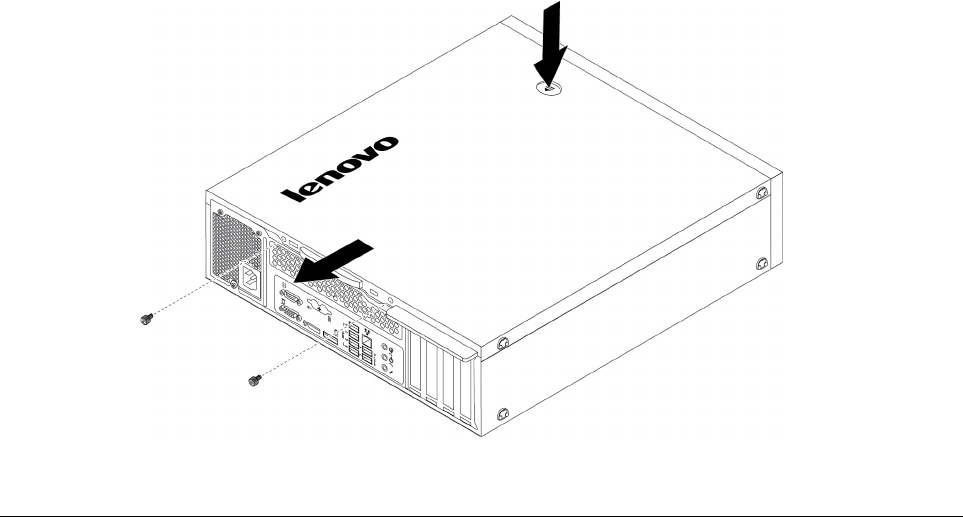
ﺎﻟﺸﻜﻞ١٠.ﺈﺧﺮﺍﺝﻐﻄﺎﺀﺎﻟﻜﻤﺒﻴﻮﺗﺮ
ﺘﺮﻛﻴﺐﺎﻟﺠﻬﺎﺯﺄﻭﺎﺳﺘﺒﺪﺍﻟﻪ
ﻴﻮﻓﺮﻬﺬﺍﺎﻟﻘﺴﻢﺘﻌﻠﻴﻤﺎﺕﻌﻦﺘﺮﻛﻴﺐﺄﻭﺎﺳﺘﺒﺪﺍﻝﺎﻟﺄﺟﻬﺰﺓﺎﻟﺪﺍﺧﻠﻴﺔﻠﺠﻬﺎﺯﺎﻟﻜﻤﺒﻴﻮﺗﺮ.ﻴﻤﻜﻨﻚﺰﻳﺎﺩﺓﺈﻣﻜﺎﻧﺎﺕﺠﻬﺎﺯﺎﻟﻜﻤﺒﻴﻮﺗﺮﻮﺻﻴﺎﻧﺘﻪﺒﺘﺮﻛﻴﺐﺄﻭﺎﺳﺘﺒﺪﺍﻝﺄﺟﻬﺰﺓ.
ﺘﻨﺒﻴﻪ:ﻠﺎﺘﻔﺘﺢﺎﻟﻜﻤﺒﻴﻮﺗﺮﺄﻭﺘﺤﺎﻭﻝﺈﺻﻠﺎﺣﻪﻘﺒﻞﻘﺮﺍﺀﺓﻮﻓﻬﻢ"ﺎﻗﺮﺃﻬﺬﺍﺎﻟﺠﺰﺀﺄﻭﻟﺎ
ً
:ﻤﻌﻠﻮﻣﺎﺕﻤﻬﻤﺔﺤﻮﻝﺎﻟﺴﻠﺎﻣﺔ"ﻌﻠﻰﺎﻟﺼﻔﺤﺔiii.
ﻤﻠﺎﺣﻈﺎﺕ:
•ﺘﺒﻌ
ً
ﺎﻠﻄﺮﺍﺯﺎﻟﻜﻤﺒﻴﻮﺗﺮﻠﺪﻳﻚ،ﻔﻘﺪﻠﺎﺘﺘﻮﻓﺮﺒﻌﺾﻘﻄﻊﺎﻟﺄﺟﻬﺰﺓﻔﻲﻬﺬﻩﺎﻟﻘﺴﻢ.
•ﻴﺠﺐﺎﺳﺘﺨﺪﺍﻡﺄﺟﺰﺍﺀﺎﻟﺤﺎﺳﺐﺎﻟﻤﺘﺎﺣﺔﻤﻦﺨﻠﺎﻝLenovoﻔﻘﻂ.
•ﻌﻨﺪﺘﺮﻛﻴﺐﺄﻭﺎﺳﺘﺒﺪﺍﻝﺄﺣﺪﺎﻟﺎﺧﺘﻴﺎﺭﺍﺕ،ﺎﺗﺒﻊﺎﻟﺘﻌﻠﻴﻤﺎﺕﺎﻟﻤﻨﺎﺳﺒﺔﺎﻟﻤﺘﺎﺣﺔﻔﻲﻬﺬﺍﺎﻟﻘﺴﻢﻤﻊﺎﻟﺘﻌﻠﻴﻤﺎﺕﺎﻟﺘﻲﺘﺄﺗﻲﻤﻊﻬﺬﺍﺎﻟﺎﺧﺘﻴﺎﺭ.
•ﻔﻲﺄﻏﻠﺐﺎﻟﻤﻨﺎﻃﻖﻔﻲﺎﻟﻌﺎﻟﻢ،ﺘﻄﺎﻟﺐﺸﺮﻛﺔLenovoﺒﺈﻋﺎﺩﺓCRUﺎﻟﺘﻲﺒﻬﺎﻌﻄﻞ.ﺴﻴﺘﻢﺈﺭﻓﺎﻕﺎﻟﻤﻌﻠﻮﻣﺎﺕﺎﻟﻤﻄﻠﻮﺑﺔﻤﻊﻮﺣﺪﺓCRUﺄﻭﺴﻴﺘﻢﺈﺭﺳﺎﻟﻬﺎﺒﻌﺪ
ﻌﺪﺓﺄﻳﺎﻡﻤﻦﻮﺻﻮﻝﻮﺣﺪﺓCRU.
ﺎﻟﺎﺧﺘﻴﺎﺭﺍﺕﺎﻟﺨﺎﺭﺟﻴﺔ
ﻴﻤﻜﻨﻚﺘﻮﺻﻴﻞﺎﺧﺘﻴﺎﺭﺍﺕﺨﺎﺭﺟﻴﺔﻠﺠﻬﺎﺯﺎﻟﻜﻤﺒﻴﻮﺗﺮ،ﻤﺜﻞﺎﻟﺴﻤﺎﻋﺎﺕﺎﻟﺨﺎﺭﺟﻴﺔﺄﻭﻮﺣﺪﺓﺎﻟﻄﺒﺎﻋﺔﺄﻭﺎﻟﻤﺎﺳﺢﺎﻟﻀﻮﺋﻲ.ﺒﺎﻟﻨﺴﺒﺔﺈﻟﻰﺒﻌﺾﺎﻟﺎﺧﺘﻴﺎﺭﺍﺕﺎﻟﺨﺎﺭﺟﻴﺔ،
ﻴﺠﺐﺄﻥﺘﻘﻮﻡﺒﺘﺜﺒﻴﺖﺒﺮﺍﻣﺞﺈﺿﺎﻓﻴﺔﻠﺈﺟﺮﺍﺀﺘﻮﺻﻴﻞﻔﻌﻠﻲ.ﻌﻨﺪﺘﺮﻛﻴﺐﺎﺧﺘﻴﺎﺭﺨﺎﺭﺟﻲ،ﺎﺭﺟﻊﺎﻟﻰ"ﻤﺸﻬﺪﻠﻠﺠﺎﻧﺐﺎﻟﺄﻣﺎﻣﻲ"ﻌﻠﻰﺎﻟﺼﻔﺤﺔ١ﻮ"ﻤﺸﻬﺪﻠﻠﺠﺎﻧﺐ
ﺎﻟﺨﻠﻔﻲ"ﻌﻠﻰﺎﻟﺼﻔﺤﺔ٢ﻠﺘﻌﺮﻳﻒﺎﻟﻤﻮﺻﻞﺎﻟﻤﻄﻠﻮﺏ.ﺒﻌﺪﺬﻟﻚ،ﺎﺗﺒﻊﺎﻟﺘﻌﻠﻴﻤﺎﺕﺎﻟﺘﻲﻴﺘﻢﺈﺭﺳﺎﻟﻬﺎﻤﻊﺎﻟﺎﺧﺘﻴﺎﺭﻠﻤﺴﺎﻋﺪﺗﻚﻔﻲﺘﺮﻛﻴﺐﺎﻟﻮﺻﻠﺔﻮﺗﺮﻛﻴﺐﺄﻱﺒﺮﺍﻣﺞ
ﺄﻭﻤﺸﻐﻠﺎﺕﺄﺟﻬﺰﺓﻤﻄﻠﻮﺑﺔﻠﻠﺎﺧﺘﻴﺎﺭ.
ﺎﻟﻮﺍﺟﻬﺔﺎﻟﺄﻣﺎﻣﻴﺔ
ﺘﻨﺒﻴﻪ:ﻠﺎﺘﻔﺘﺢﺎﻟﻜﻤﺒﻴﻮﺗﺮﺄﻭﺘﺤﺎﻭﻝﺈﺻﻠﺎﺣﻪﻘﺒﻞﻘﺮﺍﺀﺓﻮﻓﻬﻢ"ﺎﻗﺮﺃﻬﺬﺍﺎﻟﺠﺰﺀﺄﻭﻟﺎ
ً
:ﻤﻌﻠﻮﻣﺎﺕﻤﻬﻤﺔﺤﻮﻝﺎﻟﺴﻠﺎﻣﺔ"ﻌﻠﻰﺎﻟﺼﻔﺤﺔiii.
ﻠﺎﺯﺍﻟﺔﺜﻢﺎﻋﺎﺩﺓﺘﺮﻛﻴﺐﺎﻟﻮﺍﺟﻬﺔﺎﻟﺄﻣﺎﻣﻴﺔ،ﻘﻢﺒﺘﻨﻔﻴﺬﻤﺎﻴﻠﻲ:
١.ﺎﻋﻤﻞﻌﻠﻰﺈﻋﺪﺍﺩﺎﻟﻜﻤﺒﻴﻮﺗﺮ.ﺮﺍﺟﻊ"ﺈﻋﺪﺍﺩﺎﻟﻜﻤﺒﻴﻮﺗﺮﻮﻧﺰﻉﻐﻄﺎﺀﺎﻟﻜﻤﺒﻴﻮﺗﺮ"ﻌﻠﻰﺎﻟﺼﻔﺤﺔ٥١.
٢.ﺤﺮ
ّ
ﺭﺎﻟﺄﻟﺴﻨﺔﺎﻟﺒﻠﺎﺳﺘﻴﻜﻴﺔﺎﻟﺜﻠﺎﺛﺔﺎﻟﻤﻮﺟﻮﺩﺓﺄﻋﻠﻰﺎﻟﻮﺍﺟﻬﺔﺎﻟﺄﻣﺎﻣﻴﺔﻮﻗﻢﺒﺘﺪﻭﻳﺮﺎﻟﻮﺍﺟﻬﺔﺎﻟﺄﻣﺎﻣﻴﺔﻠﻠﺨﺎﺭﺝﻠﻔﻜﻬﺎﻤﻦﺎﻟﻜﻤﺒﻴﻮﺗﺮ.
٥٢
ﺩﻟﻴﻞﻣﺴﺘﺨﺪﻡP320
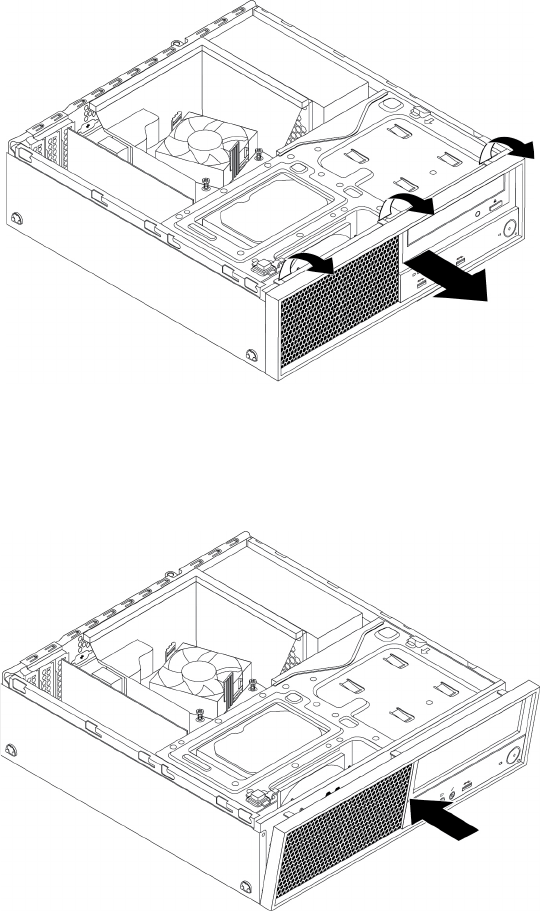
ﺎﻟﺸﻜﻞ١١.ﺎﺯﺍﻟﺔﺎﻟﻮﺍﺟﻬﺔﺎﻟﺄﻣﺎﻣﻴﺔ
٣.ﻠﺈﻋﺎﺩﺓﺘﺮﻛﻴﺐﺎﻟﻮﺍﺟﻬﺔﺎﻟﺄﻣﺎﻣﻴﺔ،ﻘﻢﺄﻭﻟﺎ
ً
ﺒﻤﺤﺎﺫﺍﺓﺎﻟﺄﻟﺴﻨﺔﺎﻟﺒﻠﺎﺳﺘﻴﻜﻴﺔﺎﻟﺜﻠﺎﺛﺔﻔﻲﺄﺳﻔﻞﺎﻟﻮﺍﺟﻬﺔﺎﻟﺄﻣﺎﻣﻴﺔﻤﻊﺎﻟﺜﻘﻮﺏﺎﻟﻤﻨﺎﻇﺮﺓﻠﻬﺎﻔﻲﺎﻟﻬﻴﻜﻞ.ﺜﻢﻘﻢﺒﺘﺪﻭﻳﺮ
ﺎﻟﻮﺍﺟﻬﺔﺎﻟﺄﻣﺎﻣﻴﺔﻠﻠﺪﺍﺧﻞﺤﺘﻰﺘﺴﺘﻘﺮﻔﻲﻤﻜﺎﻧﻬﺎ.
ﺎﻟﺸﻜﻞ١٢.ﺈﻋﺎﺩﺓﺘﺮﻛﻴﺐﺎﻟﻮﺍﺟﻬﺔﺎﻟﺄﻣﺎﻣﻴﺔ
ﻤﺎﻴﺠﺐﺎﻟﻘﻴﺎﻡﺒﻪﺒﻌﺪﺬﻟﻚ:
•ﻠﻠﺘﻌﺎﻣﻞﻤﻊﺠﺰﺀﺂﺧﺮﻤﻦﺎﻟﺠﻬﺎﺯ،ﺎﺫﻫﺐﺈﻟﻰﺎﻟﻘﺴﻢﺎﻟﻤﻨﺎﺳﺐ.
•ﻠﺎﺳﺘﻜﻤﺎﻝﻌﻤﻠﻴﺔﺎﻟﺘﺮﻛﻴﺐﺄﻭﺎﻟﺎﺳﺘﺒﺪﺍﻝ،ﺎﺫﻫﺐﺈﻟﻰ"ﺎﺳﺘﻜﻤﺎﻝﻌﻤﻠﻴﺔﺎﺳﺘﺒﺪﺍﻝﺎﻟﻘﻄﻊ"ﻌﻠﻰﺎﻟﺼﻔﺤﺔ٩٨.
ﺒﻄﺎﻗﺔPCIe
ﺘﻨﺒﻴﻪ:ﻠﺎﺘﻔﺘﺢﺎﻟﻜﻤﺒﻴﻮﺗﺮﺄﻭﺘﺤﺎﻭﻝﺈﺻﻠﺎﺣﻪﻘﺒﻞﻘﺮﺍﺀﺓﻮﻓﻬﻢ"ﺎﻗﺮﺃﻬﺬﺍﺎﻟﺠﺰﺀﺄﻭﻟﺎ
ً
:ﻤﻌﻠﻮﻣﺎﺕﻤﻬﻤﺔﺤﻮﻝﺎﻟﺴﻠﺎﻣﺔ"ﻌﻠﻰﺎﻟﺼﻔﺤﺔiii.
ﻴﺤﺘﻮﻱﺎﻟﻜﻤﺒﻴﻮﺗﺮﻌﻠﻰﻔﺘﺤﺘﻴﻦﻠﺒﻄﺎﻗﺔPCIe x1،ﻮﻓﺘﺤﺔﻠﺒﻄﺎﻗﺔPCIe x4)ﺎﺭﺗﺒﺎﻁﺒﻌﺮﺽﻘﺎﺑﻞﻠﻠﺘﻐﻴﻴﺮx4 ،x1(ﻮﻓﺘﺤﺔﻠﺒﻄﺎﻗﺔﺮﺳﻮﻣﺎﺕPCIe x16.
ﻠﺘﺮﻛﻴﺐﺒﻄﺎﻗﺔPCIeﺄﻭﺎﺳﺘﺒﺪﺍﻟﻬﺎ،ﻘﻢﺒﻤﺎﻴﻠﻲ:
١.ﺎﻋﻤﻞﻌﻠﻰﺈﻋﺪﺍﺩﺎﻟﻜﻤﺒﻴﻮﺗﺮ.ﺮﺍﺟﻊ"ﺈﻋﺪﺍﺩﺎﻟﻜﻤﺒﻴﻮﺗﺮﻮﻧﺰﻉﻐﻄﺎﺀﺎﻟﻜﻤﺒﻴﻮﺗﺮ"ﻌﻠﻰﺎﻟﺼﻔﺤﺔ٥١.
٢.ﻘﻢﺒﺘﺪﻭﻳﺮﻤﺜﺒﺖﺒﻄﺎﻗﺔPCIeﺈﻟﻰﻤﻮﺿﻊﺎﻟﻔﺘﺢ.ﺒﺤﺴﺐﻘﻴﺎﻣﻚﺒﺘﺮﻛﻴﺐﺒﻄﺎﻗﺔPCIeﺄﻭﺎﺳﺘﺒﺪﺍﻟﻬﺎ،ﻘﻢﺒﺄﺣﺪﺎﻟﺈﺟﺮﺍﺀﺍﺕﺎﻟﺘﺎﻟﻴﺔ:
ﺍﻟﻤﻠﺤﻖ٧.ﺇﺧﺮﺍﺝﺍﻷﺟﻬﺰﺓﻭﺗﺮﻛﻴﺒﻬﺎ٥٣
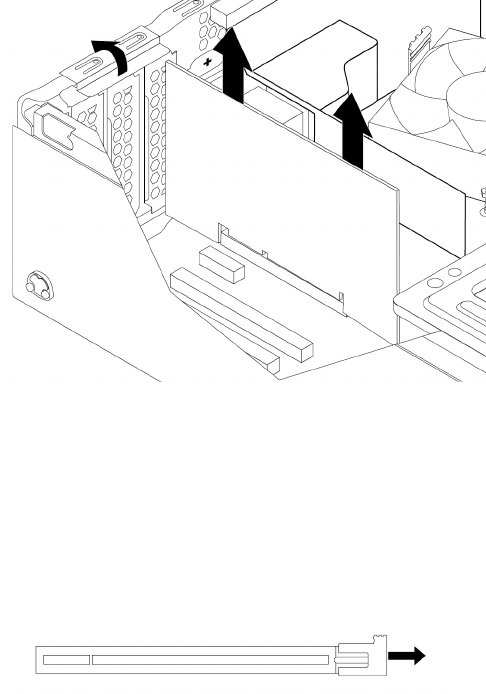
•ﺎﺫﺍﻜﻨﺖﺘﻌﻤﻞﻌﻠﻰﺘﺮﻛﻴﺐﺒﻄﺎﻗﺔPCIe،ﻔﺎﻧﺰﻉﻐﻄﺎﺀﺎﻟﻔﺘﺤﺔﺎﻟﻤﻌﺪﻧﻴﺔﺎﻟﻤﻨﺎﺳﺒﺔ.
•ﺈﺫﺍﻜﻨﺖﺒﺼﺪﺩﺎﺳﺘﺒﺪﺍﻝﺒﻄﺎﻗﺔPCIeﻘﺪﻳﻤﺔ،ﻔﺄﻣﺴﻚﺎﻟﺒﻄﺎﻗﺔﺎﻟﻘﺪﻳﻤﺔﺜﻢﺎﺳﺤﺒﻬﺎﺒﺮﻓﻖﺨﺎﺭﺝﺎﻟﻔﺘﺤﺔ.
ﺎﻟﺸﻜﻞ١٣.ﺈﺧﺮﺍﺝﺒﻄﺎﻗﺔPCIe
ﻤﻠﺎﺣﻈﺎﺕ:
–ﻴﺠﺐﺘﺮﻛﻴﺐﺎﻟﺒﻄﺎﻗﺔﺒﺸﻜﻞﻤﺤﻜﻢﻔﻲﺎﻟﻔﺘﺤﺔ.ﺎﺫﺍﻠﺰﻡﺎﻟﺄﻣﺮ،ﺤﺮ
ّ
ﻙﻜﻞﺠﺎﻧﺐﻤﻦﺠﺎﻧﺒﻲﺎﻟﺒﻄﺎﻗﺔﺒﺎﻟﺘﻨﺎﻭﺏﺒﻤﻘﺪﺍﺭﻘﻠﻴﻞﺤﺘﻰﺈﺧﺮﺍﺝﺎﻟﺒﻄﺎﻗﺔﻤﻦ
ﻔﺘﺤﺘﻬﺎ.
–ﻔﻲﺤﺎﻟﺔﺘﺜﺒﻴﺖﺎﻟﺒﻄﺎﻗﺔﻔﻲﻤﻜﺎﻧﻬﺎﻤﻦﺨﻠﺎﻝﻤﺰﻟﺎﺝﺘﺜﺒﻴﺖ،ﻘﻢﺒﻔﻚﻤﺰﻟﺎﺝﺘﺜﺒﻴﺖﺎﻟﺒﻄﺎﻗﺔﺎﻟﻤﻮﺟﻮﺩﻔﻲﻔﺘﺤﺔﺒﻄﺎﻗﺔPCIe.ﺜﻢﺎﻣﺴﻚﺎﻟﺒﻄﺎﻗﺔ
ﻮﺍﺳﺤﺒﻬﺎﺒﺮﻓﻖﺈﻟﻰﺨﺎﺭﺝﺎﻟﻔﺘﺤﺔ.
ﺎﻟﺸﻜﻞ١٤.ﺘﺤﺮﻳﺮﻘﻔﻞﺎﻟﺒﻄﺎﻗﺔ
٣.ﺄﺧﺮﺝﺒﻄﺎﻗﺔPCIeﺎﻟﺠﺪﻳﺪﺓﻤﻦﻌﺒﻮﺗﻬﺎﺎﻟﻮﺍﻗﻴﺔﻤﻦﺎﻟﺸﺤﻨﺎﺕﺎﻟﻜﻬﺮﺑﻴﺔﺎﻟﺴﺎﻛﻨﺔ.
٤.ﻘﻢﺒﺘﺮﻛﻴﺐﺎﻟﺒﻄﺎﻗﺔﺎﻟﺠﺪﻳﺪﺓﻔﻲﺎﻟﻔﺘﺤﺔﺎﻟﻤﻨﺎﺳﺒﺔﺒﻠﻮﺣﺔﺎﻟﻨﻈﺎﻡ.ﺮﺍﺟﻊ"ﺎﻟﺄﺟﺰﺍﺀﻌﻠﻰﻠﻮﺣﺔﺎﻟﻨﻈﺎﻡ"ﻌﻠﻰﺎﻟﺼﻔﺤﺔ٥.ﻘﻢﺒﺘﺪﻭﻳﺮﺤﺎﺟﺰﺘﺜﺒﻴﺖﺒﻄﺎﻗﺔPCIe
ﺈﻟﻰﻤﻮﺿﻊﺎﻟﺈﻏﻠﺎﻕ.
٥٤
ﺩﻟﻴﻞﻣﺴﺘﺨﺪﻡP320
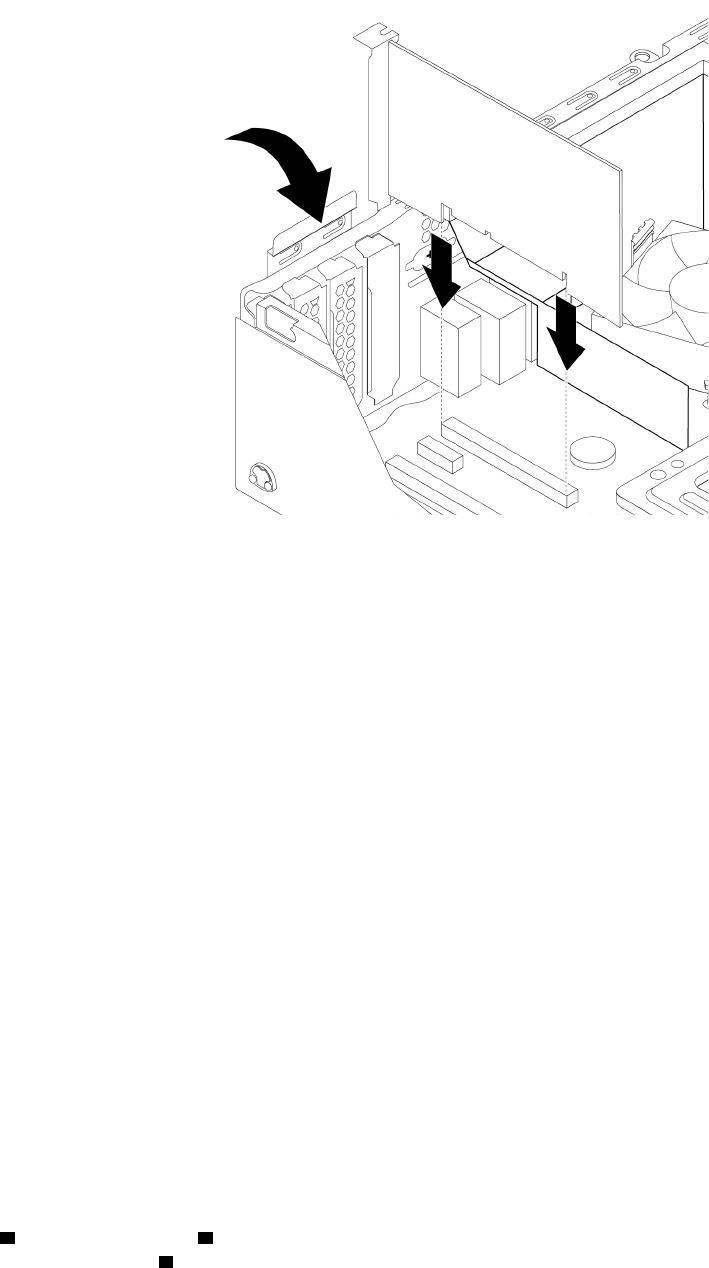
ﺎﻟﺸﻜﻞ١٥.ﺘﺮﻛﻴﺐﺒﻄﺎﻗﺔPCIe
ﻤﻠﺎﺣﻈﺔ:ﺈﺫﺍﻜﻨﺖﺒﺼﺪﺩﺘﺮﻛﻴﺐﺒﻄﺎﻗﺔﺮﺳﻮﻣﺎﺕPCIe x16،ﻔﺘﺄﻛﺪﻤﻦﺈﻏﻠﺎﻕﻤﺸﺎﺑﻚﺘﺜﺒﻴﺖﻔﺘﺤﺔﺎﻟﺬﺍﻛﺮﺓﻘﺒﻞﺘﺮﻛﻴﺐﺎﻟﺒﻄﺎﻗﺔﻠﺘﻔﺎﺩﻱﺄﻱﺘﺸﻮﻳﺶﻘﺪ
ﻴﺤﺼﻞﺄﺛﻨﺎﺀﺎﻟﺘﺮﻛﻴﺐ.
ﻤﺎﻴﺠﺐﺎﻟﻘﻴﺎﻡﺒﻪﺒﻌﺪﺬﻟﻚ:
•ﻠﻠﺘﻌﺎﻣﻞﻤﻊﺠﺰﺀﺂﺧﺮﻤﻦﺎﻟﺠﻬﺎﺯ،ﺎﺫﻫﺐﺈﻟﻰﺎﻟﻘﺴﻢﺎﻟﻤﻨﺎﺳﺐ.
•ﻠﺎﺳﺘﻜﻤﺎﻝﻌﻤﻠﻴﺔﺎﻟﺘﺮﻛﻴﺐﺄﻭﺎﻟﺎﺳﺘﺒﺪﺍﻝ،ﺎﺫﻫﺐﺈﻟﻰ"ﺎﺳﺘﻜﻤﺎﻝﻌﻤﻠﻴﺔﺎﺳﺘﺒﺪﺍﻝﺎﻟﻘﻄﻊ"ﻌﻠﻰﺎﻟﺼﻔﺤﺔ٩٨.
ﻤﺤﺮﻙﺎﻟﺄﻗﺮﺍﺹﺬﻭﺎﻟﺤﺎﻟﺔﺎﻟﺼﻠﺒﺔM.2
ﺘﻨﺒﻴﻪ:ﻠﺎﺘﻔﺘﺢﺎﻟﻜﻤﺒﻴﻮﺗﺮﺄﻭﺘﺤﺎﻭﻝﺈﺻﻠﺎﺣﻪﻘﺒﻞﻘﺮﺍﺀﺓﻮﻓﻬﻢ"ﺎﻗﺮﺃﻬﺬﺍﺎﻟﺠﺰﺀﺄﻭﻟﺎ
ً
:ﻤﻌﻠﻮﻣﺎﺕﻤﻬﻤﺔﺤﻮﻝﺎﻟﺴﻠﺎﻣﺔ"ﻌﻠﻰﺎﻟﺼﻔﺤﺔiii.
ﺘﻨﻄﺒﻖﺄﻳﻀ
ً
ﺎﺎﻟﺈﺭﺷﺎﺩﺍﺕﺎﻟﻤﺘﻌﻠﻘﺔﺒﻜﻴﻔﻴﺔﺘﺮﻛﻴﺐﻤﺤﺮﻙﺄﻗﺮﺍﺹﺬﻱﺤﺎﻟﺔﺼﻠﺒﺔM.2ﺄﻭﺎﺳﺘﺒﺪﺍﻟﻪﻌﻠﻰﺬﺍﻛﺮﺓIntel Optane.ﻘﺒﻞﺎﺳﺘﺒﺪﺍﻝﺬﺍﻛﺮﺓIntel
Optane،ﺎﺣﺮﺹﻌﻠﻰﺘﻌﻄﻴﻞﺬﺍﻛﺮﺓIntel OptaneﻤﻦIntel Rapid Storage Technology (Intel RST) Console.ﻮﺇﻟﺎ،ﻔﻘﺪﺘﻔﻘﺪﺠﻤﻴﻊﺎﻟﺒﻴﺎﻧﺎﺕ
ﻌﻠﻰﻤﺤﺮﻙﺄﻗﺮﺍﺹﺎﻟﺘﺨﺰﻳﻦ.ﻠﻤﺰﻳﺪﻤﻦﺎﻟﻤﻌﻠﻮﻣﺎﺕ،ﺮﺍﺟﻊﺎﻟﺈﺭﺷﺎﺩﺍﺕﻌﻠﻰ
https://www.intel.com/content/www/us/en/support/memory-and-
storage/intel-optane-memory/000023989.html
.
ﻠﺘﺮﻛﻴﺐﻤﺤﺮﻙﺎﻟﺄﻗﺮﺍﺹM.2ﺬﻱﺎﻟﺤﺎﻟﺔﺎﻟﺼﻠﺒﺔﺄﻭﺎﺳﺘﺒﺪﺍﻟﻪ،ﻘﻢﺒﻤﺎﻴﻠﻲ:
ﻤﻠﺎﺣﻈﺔ:ﺘﻨﻄﺒﻖﺄﻳﻀ
ً
ﺎﺎﻟﺈﺭﺷﺎﺩﺍﺕﺎﻟﻤﺘﻌﻠﻘﺔﺒﻜﻴﻔﻴﺔﺘﺮﻛﻴﺐﻤﺤﺮﻙﺄﻗﺮﺍﺹﺬﻱﺤﺎﻟﺔﺼﻠﺒﺔM.2ﺄﻭﺎﺳﺘﺒﺪﺍﻟﻪﻌﻠﻰﺬﺍﻛﺮﺓIntel Optane.
١.ﺎﻋﻤﻞﻌﻠﻰﺈﻋﺪﺍﺩﺎﻟﻜﻤﺒﻴﻮﺗﺮ.ﺮﺍﺟﻊ"ﺈﻋﺪﺍﺩﺎﻟﻜﻤﺒﻴﻮﺗﺮﻮﻧﺰﻉﻐﻄﺎﺀﺎﻟﻜﻤﺒﻴﻮﺗﺮ"ﻌﻠﻰﺎﻟﺼﻔﺤﺔ٥١.
٢.ﻘﻢﺒﻮﺿﻊﺠﻬﺎﺯﺎﻟﻜﻤﺒﻴﻮﺗﺮﻌﻠﻰﺠﺎﻧﺒﻪﻠﻠﻮﺻﻮﻝﺈﻟﻰﻠﻮﺣﺔﺎﻟﻨﻈﺎﻡﺒﻄﺮﻳﻘﺔﺄﺳﻬﻞ.
٣.ﺒﺤﺴﺐﻘﻴﺎﻣﻚﺒﺘﺮﻛﻴﺐﻤﺤﺮﻙﺎﻟﺄﻗﺮﺍﺹM.2ﺬﻱﺎﻟﺤﺎﻟﺔﺎﻟﺼﻠﺒﺔﺄﻭﺎﺳﺘﺒﺪﺍﻟﻪ،ﻘﻢﺒﺄﺣﺪﺎﻟﺈﺟﺮﺍﺀﺍﺕﺎﻟﺘﺎﻟﻴﺔ:
•ﺈﺫﺍﻜﻨﺖﺘﻘﻮﻡﺒﺎﺳﺘﺒﺪﺍﻝﻤﺤﺮﻙﺄﻗﺮﺍﺹM.2ﺬﻱﺎﻟﺤﺎﻟﺔﺎﻟﺼﻠﺒﺔ،ﻔﻘﻢﺒﻤﺎﻴﻠﻲ:
a.ﺤﺪﺩﻤﻮﻗﻊﻤﺤﻮﻝﻤﺤﺮﻙﺎﻟﺄﻗﺮﺍﺹﺬﻱﺎﻟﺤﺎﻟﺔﺎﻟﺼﻠﺒﺔM.2ﻮﺍﻋﻤﻞﻌﻠﻰﺈﺧﺮﺍﺟﻪ.ﺮﺍﺟﻊ"ﺒﻄﺎﻗﺔPCIe"ﻌﻠﻰﺎﻟﺼﻔﺤﺔ٥٣.
b.ﻴﺘﻢﺘﺜﺒﻴﺖﻤﻤﺘﺺﺎﻟﺤﺮﺍﺭﺓﻔﻲﻤﻜﺎﻧﻪﺒﺈﺣﻜﺎﻡﺒﻮﺍﺳﻄﺔﺰﺭﻱﺘﺮﻛﻴﺐ.ﺎﺿﻐﻂﻌﻠﻰﻤﺸﺎﺑﻚﺎﻟﺄﺯﺭﺍﺭﻨﺤﻮﺎﻟﺪﺍﺧﻞ
1ﻮﺍﺿﻐﻂﻌﻠﻰﺎﻟﺄﺯﺭﺍﺭﻠﻠﺄﻋﻠﻰ2
ﻠﺘﺤﺮﻳﺮﻤﻤﺘﺺﺎﻟﺤﺮﺍﺭﺓ.ﺒﻌﺪﺬﻟﻚ،ﺎﺭﻓﻊﻤﻤﺘﺺﺎﻟﺤﺮﺍﺭﺓﺨﺎﺭﺝﻤﺤﻮﻝﻤﺤﺮﻙﺎﻟﺄﻗﺮﺍﺹﺬﻱﺎﻟﺤﺎﻟﺔﺎﻟﺼﻠﺒﺔM.2.3.
ﺍﻟﻤﻠﺤﻖ٧.ﺇﺧﺮﺍﺝﺍﻷﺟﻬﺰﺓﻭﺗﺮﻛﻴﺒﻬﺎ٥٥
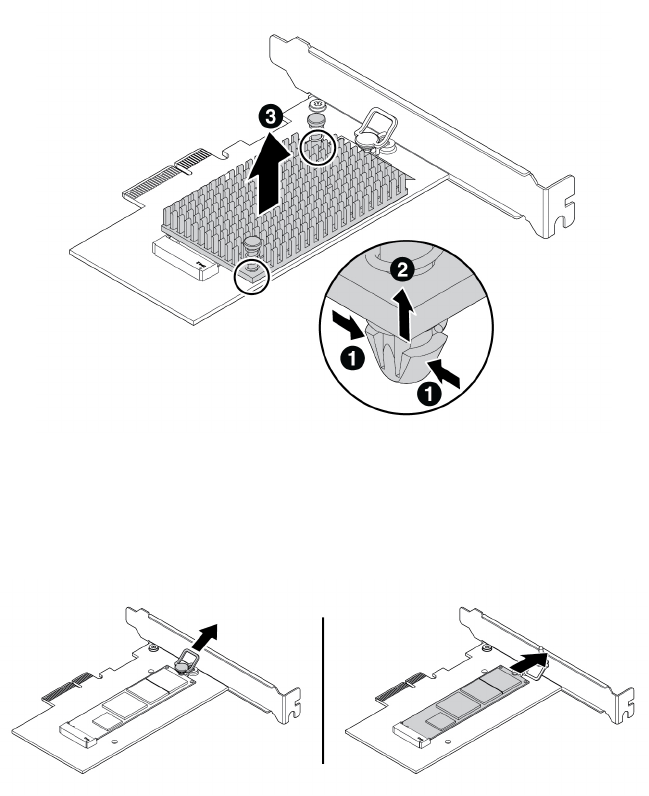
ﺎﻟﺸﻜﻞ١٦.ﺈﺧﺮﺍﺝﻤﻤﺘﺺﺎﻟﺤﺮﺍﺭﺓﻤﻦﻤﺤﻮﻝﻤﺤﺮﻙﺎﻟﺄﻗﺮﺍﺹﺬﻱﺎﻟﺤﺎﻟﺔﺎﻟﺼﻠﺒﺔM.2
c.ﻴﺘﻢﺘﺜﺒﻴﺖﻤﺤﺮﻙﺎﻟﺄﻗﺮﺍﺹﺬﻱﺎﻟﺤﺎﻟﺔﺎﻟﺼﻠﺒﺔM.2ﻔﻲﻤﻜﺎﻧﻪﺒﺈﺣﻜﺎﻡﺒﻮﺍﺳﻄﺔﻤﺰﻟﺎﺝﺘﺜﺒﻴﺖ.ﺎﺳﺤﺐﻤﻘﺒﺾﻤﺰﻟﺎﺝﺎﻟﺘﺜﺒﻴﺖﺈﻟﻰﺎﻟﺨﺎﺭﺝﻠﺘﺤﺮﻳﺮ
ﻤﺤﺮﻙﺎﻟﺄﻗﺮﺍﺹﺬﻱﺎﻟﺤﺎﻟﺔﺎﻟﺼﻠﺒﺔM.2.ﺒﻌﺪﺬﻟﻚ،ﺎﺳﺤﺐﻤﺤﺮﻙﺎﻟﺄﻗﺮﺍﺹﺬﺍﺎﻟﺤﺎﻟﺔﺎﻟﺼﻠﺒﺔM.2ﺒﺮﻓﻖﻤﻦﻔﺘﺤﺔM.2.
ﺎﻟﺸﻜﻞ١٧.ﺈﺧﺮﺍﺝﻤﺤﺮﻙﺎﻟﺄﻗﺮﺍﺹﺬﻱﺎﻟﺤﺎﻟﺔﺎﻟﺼﻠﺒﺔM.2
•ﺈﺫﺍﻜﻨﺖﺘﻌﻤﻞﻌﻠﻰﺘﺮﻛﻴﺐﻤﺤﺮﻙﺄﻗﺮﺍﺹﺬﻱﺤﺎﻟﺔﺼﻠﺒﺔM.2،ﻔﺎﺳﺤﺐﻤﻘﺒﺾﻤﺰﻟﺎﺝﺎﻟﺘﺜﺒﻴﺖﻔﻲﻤﺤﻮﻝﻤﺤﺮﻙﺎﻟﺄﻗﺮﺍﺹﺬﻱﺎﻟﺤﺎﻟﺔﺎﻟﺼﻠﺒﺔM.2
ﻨﺤﻮﺎﻟﺨﺎﺭﺝ.
٤.ﺘﺄﻛﺪﻤﻦﻮﺿﻊﻠﻮﺣﺔﺤﺮﺍﺭﻳﺔﻔﻲﻤﻜﺎﻧﻬﺎﻌﻠﻰﻤﺤﻮﻝﻤﺤﺮﻙﺎﻟﺄﻗﺮﺍﺹﺬﻱﺎﻟﺤﺎﻟﺔﺎﻟﺼﻠﺒﺔM.2.
٥٦
ﺩﻟﻴﻞﻣﺴﺘﺨﺪﻡP320
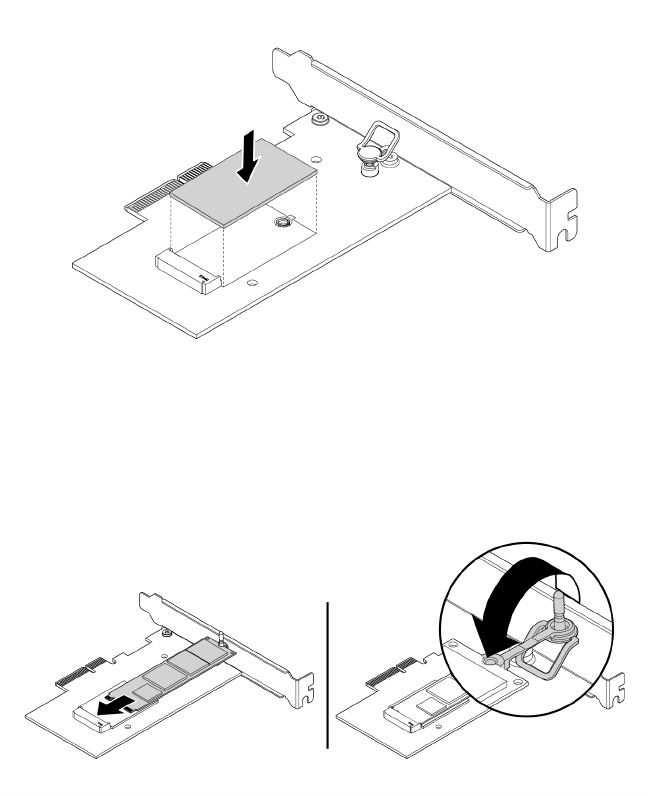
ﺎﻟﺸﻜﻞ١٨.ﺘﺮﻛﻴﺐﺎﻟﻠﻮﺣﺔﺎﻟﺤﺮﺍﺭﻳﺔ
٥.ﺄﺩﺧﻞﻤﺤﺮﻙﺎﻟﺄﻗﺮﺍﺹﺬﺍﺎﻟﺤﺎﻟﺔﺎﻟﺼﻠﺒﺔM.2ﺎﻟﺠﺪﻳﺪﻔﻲﻔﺘﺤﺔM.2.ﺒﻌﺪﺬﻟﻚ،ﺄﺩﺧﻞﻤﻘﺒﺲﻤﺰﻟﺎﺝﺎﻟﺘﺜﺒﻴﺖﻔﻲﺎﻟﻔﺘﺤﺔﻠﺘﺜﺒﻴﺖﻤﺤﺮﻙﺎﻟﺄﻗﺮﺍﺹﺎﻟﺠﺪﻳﺪﻔﻲ
ﻤﻜﺎﻧﻪﺒﺈﺣﻜﺎﻡ.
ﺎﻟﺸﻜﻞ١٩.ﺘﺮﻛﻴﺐﻤﺤﺮﻙﺎﻟﺄﻗﺮﺍﺹM.2ﺬﻱﺎﻟﺤﺎﻟﺔﺎﻟﺼﻠﺒﺔ
٦.ﻀﻊﻤﻤﺘﺺﺎﻟﺤﺮﺍﺭﺓﻌﻠﻰﻤﺤﻮﻝﻤﺤﺮﻙﺎﻟﺄﻗﺮﺍﺹﺬﻱﺎﻟﺤﺎﻟﺔﺎﻟﺼﻠﺒﺔM.2.ﺘﺄﻛﺪﻤﻦﻤﺤﺎﺫﺍﺓﺰﺭﻱﺎﻟﺘﺮﻛﻴﺐﻔﻲﻤﻤﺘﺺﺎﻟﺤﺮﺍﺭﺓﻤﻊﺎﻟﻔﺘﺤﺎﺕﻔﻲﻤﺤﻮﻝ
ﻤﺤﺮﻙﺎﻟﺄﻗﺮﺍﺹﺬﻱﺎﻟﺤﺎﻟﺔﺎﻟﺼﻠﺒﺔM.2.ﺒﻌﺪﺬﻟﻚ،ﺎﺿﻐﻂﻌﻠﻰﺰﺭﻱﺎﻟﺘﺮﻛﻴﺐﻨﺤﻮﺎﻟﺄﻋﻠﻰﻠﺘﺜﺒﻴﺖﻤﻤﺘﺺﺎﻟﺤﺮﺍﺭﺓﻔﻲﺎﻟﻤﺤﻮﻝﺒﺈﺣﻜﺎﻡ.
ﺍﻟﻤﻠﺤﻖ٧.ﺇﺧﺮﺍﺝﺍﻷﺟﻬﺰﺓﻭﺗﺮﻛﻴﺒﻬﺎ٥٧
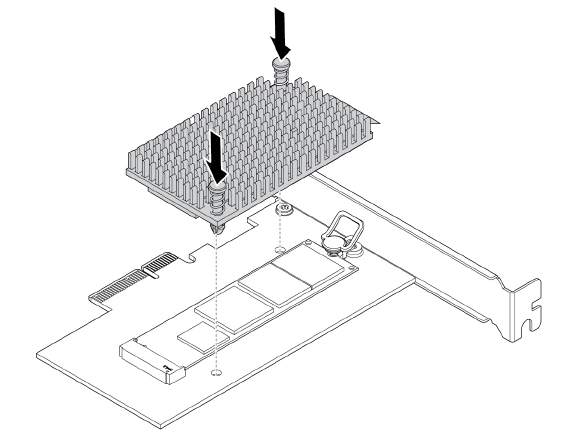
ﺎﻟﺸﻜﻞ٢٠.ﺘﺮﻛﻴﺐﻤﻤﺘﺺﺎﻟﺤﺮﺍﺭﺓ
٧.ﺮﻛ
ّ
ﺐﻤﺤﻮﻝﻤﺤﺮﻙﺎﻟﺄﻗﺮﺍﺹﺬﻱﺎﻟﺤﺎﻟﺔﺎﻟﺼﻠﺒﺔM.2ﻔﻲﻔﺘﺤﺔﺒﻄﺎﻗﺔPCIeﺎﻟﻤﻨﺎﺳﺒﺔﻌﻠﻰﻠﻮﺣﺔﺎﻟﻨﻈﺎﻡ.ﺮﺍﺟﻊ"ﺒﻄﺎﻗﺔPCIe"ﻌﻠﻰﺎﻟﺼﻔﺤﺔ٥٣.
ﻤﻠﺎﺣﻈﺔ:ﻤﻦﺎﻟﻤﺴﺘﺤﺴﻦﺄﻥﺘﻘﻮﻡﺒﺘﺮﻛﻴﺐﻤﺤﻮﻝﻤﺤﺮﻙﺎﻟﺄﻗﺮﺍﺹﺬﻱﺎﻟﺤﺎﻟﺔﺎﻟﺼﻠﺒﺔM.2ﻔﻲﻔﺘﺤﺔﺒﻄﺎﻗﺔPCIe x4.ﺮﺍﺟﻊ"ﺎﻟﺄﺟﺰﺍﺀﻌﻠﻰﻠﻮﺣﺔﺎﻟﻨﻈﺎﻡ"
ﻌﻠﻰﺎﻟﺼﻔﺤﺔ٥.
ﻤﺎﻴﺠﺐﺎﻟﻘﻴﺎﻡﺒﻪﺒﻌﺪﺬﻟﻚ:
•ﻠﻠﺘﻌﺎﻣﻞﻤﻊﺠﺰﺀﺂﺧﺮﻤﻦﺎﻟﺠﻬﺎﺯ،ﺎﺫﻫﺐﺈﻟﻰﺎﻟﻘﺴﻢﺎﻟﻤﻨﺎﺳﺐ.
•ﻠﺎﺳﺘﻜﻤﺎﻝﻌﻤﻠﻴﺔﺎﻟﺘﺮﻛﻴﺐﺄﻭﺎﻟﺎﺳﺘﺒﺪﺍﻝ،ﺎﺫﻫﺐﺈﻟﻰ"ﺎﺳﺘﻜﻤﺎﻝﻌﻤﻠﻴﺔﺎﺳﺘﺒﺪﺍﻝﺎﻟﻘﻄﻊ"ﻌﻠﻰﺎﻟﺼﻔﺤﺔ٩٨.
ﺎﻟﺒﻄﺎﺭﻳﺔﺎﻟﺨﻠﻮﻳﺔﺎﻟﺪﺍﺋﺮﻳﺔ
ﺘﻨﺒﻴﻪ:ﻠﺎﺘﻔﺘﺢﺎﻟﻜﻤﺒﻴﻮﺗﺮﺄﻭﺘﺤﺎﻭﻝﺈﺻﻠﺎﺣﻪﻘﺒﻞﻘﺮﺍﺀﺓﻮﻓﻬﻢ"ﺎﻗﺮﺃﻬﺬﺍﺎﻟﺠﺰﺀﺄﻭﻟﺎ
ً
:ﻤﻌﻠﻮﻣﺎﺕﻤﻬﻤﺔﺤﻮﻝﺎﻟﺴﻠﺎﻣﺔ"ﻌﻠﻰﺎﻟﺼﻔﺤﺔiii.
ﻴﺘﻀﻤ
ّ
ﻦﺎﻟﻜﻤﺒﻴﻮﺗﺮﻨﻮﻋ
ً
ﺎﺨﺎﺻ
ً
ﺎﻤﻦﺎﻟﺬﺍﻛﺮﺓﻴﺤﺎﻓﻆﻌﻠﻰﺎﻟﻮﻗﺖﻮﺍﻟﺘﺎﺭﻳﺦﻮﺍﻟﺈﻋﺪﺍﺩﺍﺕﺎﻟﺨﺎﺻﺔﺒﺎﻟﻤﻴﺰﺍﺕﺎﻟﻤﻀﻤﻨﺔ.ﺘﻌﻤﻞﺎﻟﺒﻄﺎﺭﻳﺔﺎﻟﺨﻠﻮﻳﺔﺎﻟﺪﺍﺋﺮﻳﺔﻌﻠﻰﺈﺑﻘﺎﺀﻬﺬﻩ
ﺎﻟﻤﻌﻠﻮﻣﺎﺕﻨﺸﻄﺔﻌﻨﺪﺈﻳﻘﺎﻑﺘﺸﻐﻴﻞﺎﻟﻜﻤﺒﻴﻮﺗﺮ.
ﻠﺎﺘﺘﻄﻠﺐﺎﻟﺒﻄﺎﺭﻳﺔﺎﻟﺨﻠﻮﻳﺔﺎﻟﺪﺍﺋﺮﻳﺔﻌﺎﺩﺓﺈﺟﺮﺍﺀﺄﻱﻌﻤﻠﻴﺔﺸﺤﻦﺄﻭﺼﻴﺎﻧﺔﺨﻠﺎﻝﻔﺘﺮﺓﻌﻤﻠﻬﺎ.ﻠﻜﻦ،ﻤﺎﻤﻦﺒﻄﺎﺭﻳﺔﺨﻠﻮﻳﺔﺪﺍﺋﺮﻳﺔﺘﺪﻭﻡﺈﻟﻰﺎﻟﺄﺑﺪ.ﺈﺫﺍﺤﺪﺙﻌﻄﻞﻔﻲ
ﺎﻟﺒﻄﺎﺭﻳﺔﺎﻟﺨﻠﻮﻳﺔﺎﻟﺪﺍﺋﺮﻳﺔ،ﻔﺴﻴﺘﻢﻔﻘﺪﺍﻥﻤﻌﻠﻮﻣﺎﺕﺎﻟﺘﺎﺭﻳﺦﻮﺍﻟﻮﻗﺖﻮﺍﻟﺘﻜﻮﻳﻦ)ﺒﻤﺎﻔﻴﻬﺎﻜﻠﻤﺎﺕﺎﻟﻤﺮﻭﺭ(.ﺴﻴﺘﻢﻌﺮﺽﺮﺳﺎﻟﺔﺨﻄﺄﻌﻨﺪﺘﺸﻐﻴﻞﺠﻬﺎﺯﺎﻟﻜﻤﺒﻴﻮﺗﺮ.
ﺮﺍﺟﻊ"ﺈﺷﻌﺎﺭﺒﻄﺎﺭﻳﺔﺎﻟﻠﻴﺜﻴﻮﻡﺎﻟﺨﻠﻮﻳﺔ"ﻔﻲ"ﺪﻟﻴﻞﺎﻟﺄﻣﺎﻥﻮﺍﻟﻀﻤﺎﻥﻮﺍﻟﺈﻋﺪﺍﺩ"ﻠﻠﺤﺼﻮﻝﻌﻠﻰﻤﻌﻠﻮﻣﺎﺕﺤﻮﻝﺎﺳﺘﺒﺪﺍﻝﺎﻟﺒﻄﺎﺭﻳﺔﺎﻟﺨﻠﻮﻳﺔﺎﻟﺪﺍﺋﺮﻳﺔﻮﺍﻟﺘﺨﻠﺺﻤﻨﻬﺎ.
ﻠﺎﺳﺘﺒﺪﺍﻝﺎﻟﺒﻄﺎﺭﻳﺔﺎﻟﺨﻠﻮﻳﺔﺎﻟﺪﺍﺋﺮﻳﺔ،ﻘﻢﺒﻤﺎﻴﻠﻲ:
١.ﺎﻋﻤﻞﻌﻠﻰﺈﻋﺪﺍﺩﺎﻟﻜﻤﺒﻴﻮﺗﺮ.ﺮﺍﺟﻊ"ﺈﻋﺪﺍﺩﺎﻟﻜﻤﺒﻴﻮﺗﺮﻮﻧﺰﻉﻐﻄﺎﺀﺎﻟﻜﻤﺒﻴﻮﺗﺮ"ﻌﻠﻰﺎﻟﺼﻔﺤﺔ٥١.
٢.ﺤﺪﺩﻤﻮﻗﻊﺎﻟﺒﻄﺎﺭﻳﺔﺎﻟﺨﻠﻮﻳﺔﺎﻟﺪﺍﺋﺮﻳﺔ.ﺮﺍﺟﻊ"ﺎﻟﺄﺟﺰﺍﺀﻌﻠﻰﻠﻮﺣﺔﺎﻟﻨﻈﺎﻡ"ﻌﻠﻰﺎﻟﺼﻔﺤﺔ٥.
٣.ﺄﺯﻝﺎﻟﺒﻄﺎﺭﻳﺔﺎﻟﺨﻠﻮﻳﺔﺎﻟﺪﺍﺋﺮﻳﺔﺎﻟﻘﺪﻳﻤﺔ.
٥٨
ﺩﻟﻴﻞﻣﺴﺘﺨﺪﻡP320
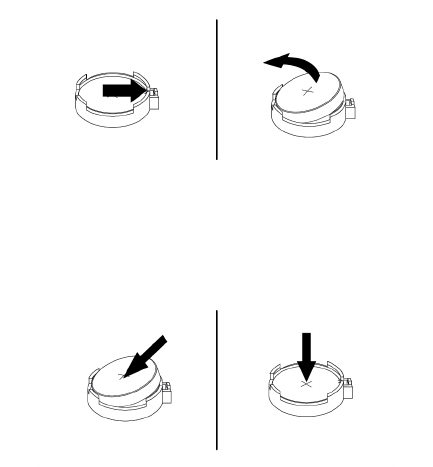
ﺎﻟﺸﻜﻞ٢١.ﺈﺯﺍﻟﺔﺎﻟﺒﻄﺎﺭﻳﺔﺎﻟﺨﻠﻮﻳﺔﺎﻟﺪﺍﺋﺮﻳﺔﺎﻟﻘﺪﻳﻤﺔ
٤.ﺮﻛ
ّ
ﺐﺒﻄﺎﺭﻳﺔﺨﻠﻮﻳﺔﺪﺍﺋﺮﻳﺔﺠﺪﻳﺪﺓ.
ﺎﻟﺸﻜﻞ٢٢.ﺘﺮﻛﻴﺐﺒﻄﺎﺭﻳﺔﺨﻠﻮﻳﺔﺪﺍﺋﺮﻳﺔﺠﺪﻳﺪﺓ
٥.ﺄﻋﺪﺘﺮﻛﻴﺐﻐﻄﺎﺀﺎﻟﻜﻤﺒﻴﻮﺗﺮﻮﺗﻮﺻﻴﻞﺎﻟﺄﺳﻠﺎﻙ.ﺮﺍﺟﻊ"ﺎﺳﺘﻜﻤﺎﻝﻌﻤﻠﻴﺔﺎﺳﺘﺒﺪﺍﻝﺎﻟﻘﻄﻊ"ﻌﻠﻰﺎﻟﺼﻔﺤﺔ٩٨.
ﻤﻠﺎﺣﻈﺔ:ﻌﻨﺪﺘﺸﻐﻴﻞﺎﻟﻜﻤﺒﻴﻮﺗﺮﻠﻠﻤﺮﺓﺎﻟﺄﻭﻟﻰﺒﻌﺪﺎﺳﺘﺒﺪﺍﻝﺎﻟﺒﻄﺎﺭﻳﺔﺎﻟﺨﻠﻮﻳﺔﺎﻟﺪﺍﺋﺮﻳﺔ،ﻘﺪﻴﺘﻢﻌﺮﺽﺮﺳﺎﻟﺔﺨﻄﺄ.ﻮﻳﻌﺪﻬﺬﺍﺄﻣﺮ
ً
ﺍﻄﺒﻴﻌﻴ
ً
ﺎ،ﺒﻌﺪﺎﺳﺘﺒﺪﺍﻝ
ﺎﻟﺒﻄﺎﺭﻳﺔﺎﻟﺨﻠﻮﻳﺔﺎﻟﺪﺍﺋﺮﻳﺔ.
٦.ﻘﻢﺒﺘﺸﻐﻴﻞﺠﻬﺎﺯﺎﻟﻜﻤﺒﻴﻮﺗﺮﻮﻛﻞﺎﻟﺄﺟﻬﺰﺓﺎﻟﻤﺘﺼﻠﺔﺒﻪ.
٧.ﺎﺳﺘﺨﺪﻡﺒﺮﻧﺎﻣﺞSetup Utilityﻠﻀﺒﻂﺎﻟﺘﺎﺭﻳﺦﻮﺍﻟﻮﻗﺖﻮﺃﻱﻜﻠﻤﺎﺕﻤﺮﻭﺭ.ﺮﺍﺟﻊ"ﺎﺳﺘﺨﺪﺍﻡﺒﺮﻧﺎﻣﺞSetup Utility"ﻌﻠﻰﺎﻟﺼﻔﺤﺔ٣١.
ﻤﺎﻴﺠﺐﺎﻟﻘﻴﺎﻡﺒﻪﺒﻌﺪﺬﻟﻚ:
•ﻠﻠﺘﻌﺎﻣﻞﻤﻊﺠﺰﺀﺂﺧﺮﻤﻦﺎﻟﺠﻬﺎﺯ،ﺎﺫﻫﺐﺈﻟﻰﺎﻟﻘﺴﻢﺎﻟﻤﻨﺎﺳﺐ.
•ﻠﺎﺳﺘﻜﻤﺎﻝﻌﻤﻠﻴﺔﺎﻟﺘﺮﻛﻴﺐﺄﻭﺎﻟﺎﺳﺘﺒﺪﺍﻝ،ﺎﺫﻫﺐﺈﻟﻰ"ﺎﺳﺘﻜﻤﺎﻝﻌﻤﻠﻴﺔﺎﺳﺘﺒﺪﺍﻝﺎﻟﻘﻄﻊ"ﻌﻠﻰﺎﻟﺼﻔﺤﺔ٩٨.
ﻮﺣﺪﺓﺎﻟﺬﺍﻛﺮﺓ
ﺘﻨﺒﻴﻪ:ﻠﺎﺘﻔﺘﺢﺎﻟﻜﻤﺒﻴﻮﺗﺮﺄﻭﺘﺤﺎﻭﻝﺈﺻﻠﺎﺣﻪﻘﺒﻞﻘﺮﺍﺀﺓﻮﻓﻬﻢ"ﺎﻗﺮﺃﻬﺬﺍﺎﻟﺠﺰﺀﺄﻭﻟﺎ
ً
:ﻤﻌﻠﻮﻣﺎﺕﻤﻬﻤﺔﺤﻮﻝﺎﻟﺴﻠﺎﻣﺔ"ﻌﻠﻰﺎﻟﺼﻔﺤﺔiii.
ﻴﺘﻀﻤ
ّ
ﻦﺎﻟﻜﻤﺒﻴﻮﺗﺮﺄﺭﺑﻊﻔﺘﺤﺎﺕﺬﺍﻛﺮﺓﻠﺘﺮﻛﻴﺐﻮﺣﺪﺍﺕDDR4 UDIMMﺎﻟﺘﻲﺘﻮﻓﺮﺬﺍﻛﺮﺓﻨﻈﺎﻡﻴﺼﻞﺤﺠﻤﻬﺎﻠﻐﺎﻳﺔ64ﺠﻴﺠﺎﺑﺎﻳﺖﻜﺤﺪ
ٍ
ﺄﻗﺼﻰﺄﻭﺎﺳﺘﺒﺪﺍﻟﻬﺎ.
ﻌﻨﺪﺘﺮﻛﻴﺐﻮﺣﺪﺓﺬﺍﻛﺮﺓﺄﻭﺎﺳﺘﺒﺪﺍﻟﻬﺎ،ﺎﺳﺘﺨﺪﻡﻮﺣﺪﺍﺕﺬﺍﻛﺮﺓDDR4 UDIMMﺒﺴﻌﺔ4ﺠﻴﺠﺎﺑﺎﻳﺖﺄﻭ8ﺠﻴﺠﺎﺑﺎﻳﺖﺄﻭ16ﺠﻴﺠﺎﺑﺎﻳﺖﺒﺄﻱﺘﻮﻟﻴﻔﺔﻠﺘﻮﻓﻴﺮﺬﺍﻛﺮﺓ
ﺒﺤﺠﻢﻴﺼﻞﺈﻟﻰ64ﺠﻴﺠﺎﺑﺎﻳﺖﺒﺤﺪﺄﻗﺼﻰ.ﻠﺎﺘﻤﺰﺝﺄﻱﻤﺠﻤﻮﻋﺔﺘﻀﻢ
ّ
ﻮﺣﺪﺍﺕECC UDIMMﻮﻭﺣﺪﺍﺕﻐﻴﺮECC UDIMMﻌﻠﻰﺎﻟﻜﻤﺒﻴﻮﺗﺮﻨﻔﺴﻪ.
ﻤﻠﺎﺣﻈﺔ:ﺮﻛ
ّ
ﺐﺪﺍﺋﻤ
ً
ﺎﻮﺣﺪﺍﺕﺎﻟﺬﺍﻛﺮﺓﺒﺎﻟﺘﺮﺗﻴﺐﺎﻟﺄﺑﺠﺪﻱ،ﻜﻤﺎﻬﻮﻤﻮﺿﺢ.
ﺍﻟﻤﻠﺤﻖ٧.ﺇﺧﺮﺍﺝﺍﻷﺟﻬﺰﺓﻭﺗﺮﻛﻴﺒﻬﺎ٥٩
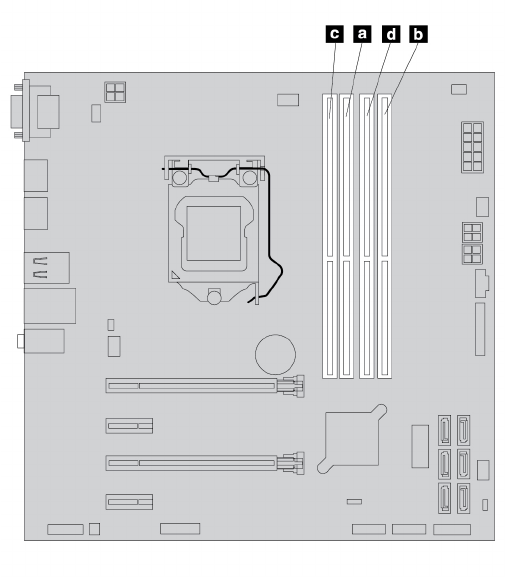
ﺎﻟﺸﻜﻞ٢٣.ﺘﺮﺗﻴﺐﺘﺮﻛﻴﺐﻮﺣﺪﺍﺕﺎﻟﺬﺍﻛﺮﺓ
ﻠﺘﺮﻛﻴﺐﺄﻭﺎﺳﺘﺒﺪﺍﻝﻮﺣﺪﺍﺕﺎﻟﺬﺍﻛﺮﺓ،ﻘﻢﺒﺘﻨﻔﻴﺬﻤﺎﻴﻠﻲ:
١.ﺎﻋﻤﻞﻌﻠﻰﺈﻋﺪﺍﺩﺎﻟﻜﻤﺒﻴﻮﺗﺮ.ﺮﺍﺟﻊ"ﺈﻋﺪﺍﺩﺎﻟﻜﻤﺒﻴﻮﺗﺮﻮﻧﺰﻉﻐﻄﺎﺀﺎﻟﻜﻤﺒﻴﻮﺗﺮ"ﻌﻠﻰﺎﻟﺼﻔﺤﺔ٥١.
٢.ﻘﻢﺒﻮﺿﻊﺠﻬﺎﺯﺎﻟﻜﻤﺒﻴﻮﺗﺮﻌﻠﻰﺠﺎﻧﺒﻪﻠﻠﻮﺻﻮﻝﺈﻟﻰﻠﻮﺣﺔﺎﻟﻨﻈﺎﻡﺒﻄﺮﻳﻘﺔﺄﺳﻬﻞ.
٣.ﻴﺠﺐﺘﺤﺪﻳﺪﻤﻜﺎﻥﺨﺎﻧﺎﺕﺎﻟﺬﺍﻛﺮﺓ.ﺮﺍﺟﻊ"ﺎﻟﺄﺟﺰﺍﺀﻌﻠﻰﻠﻮﺣﺔﺎﻟﻨﻈﺎﻡ"ﻌﻠﻰﺎﻟﺼﻔﺤﺔ٥.
٤.ﻘﻢﺒﺈﺯﺍﻟﺔﺄﻱﺄﺟﺰﺍﺀﻘﺪﺘﻤﻨﻊﺎﻟﻮﺻﻮﻝﺈﻟﻰﺨﺎﻧﺎﺕﺎﻟﺬﺍﻛﺮﺓ.ﺒﻨﺎﺀ
ً
ﻌﻠﻰﻄﺮﺍﺯﺠﻬﺎﺯﺎﻟﻜﻤﺒﻴﻮﺗﺮ،ﻘﺪﺘﺤﺘﺎﺝﺈﻟﻰﺈﺧﺮﺍﺝﺒﻄﺎﻗﺔﺎﻟﺮﺳﻮﻣﺎﺕPCIe x16ﻠﻠﻮﺻﻮﻝ
ﺒﻄﺮﻳﻘﺔﺄﺳﻬﻞﺈﻟﻰﻔﺘﺤﺎﺕﺎﻟﺬﺍﻛﺮﺓ.ﺮﺍﺟﻊ"ﺒﻄﺎﻗﺔPCIe"ﻌﻠﻰﺎﻟﺼﻔﺤﺔ٥٣.
٥.ﻮﻓﻘ
ً
ﺎﻠﻤﺎﺈﺫﺍﻜﺎﻥﺴﻴﺘﻢﺘﺮﻛﻴﺐﻮﺣﺪﺓﺎﻟﺬﺍﻛﺮﺓﺄﻭﺎﺳﺘﺒﺪﺍﻟﻬﺎ،ﻘﻢﺒﺄﺣﺪﺎﻟﺈﺟﺮﺍﺀﺍﺕﺎﻟﺘﺎﻟﻴﺔ:
•ﺎﺫﺍﻜﻨﺖﺘﻘﻮﻡﺒﺎﺳﺘﺒﺪﺍﻝﻮﺣﺪﺍﺕﺬﺍﻛﺮﺓﻘﺪﻳﻤﺔ،ﻘﻢﺒﻔﺘﺢﻜﻠﺒﺴﺎﺕﺎﻟﺎﻏﻠﺎﻕﻮﺍﺯﺍﻟﺔﻮﺣﺪﺍﺕﺎﻟﺬﺍﻛﺮﺓﻮﺳﺤﺒﻬﺎﻠﺨﺎﺭﺝﺨﺎﻧﺔﺎﻟﺬﺍﻛﺮﺓ.
٦٠
ﺩﻟﻴﻞﻣﺴﺘﺨﺪﻡP320
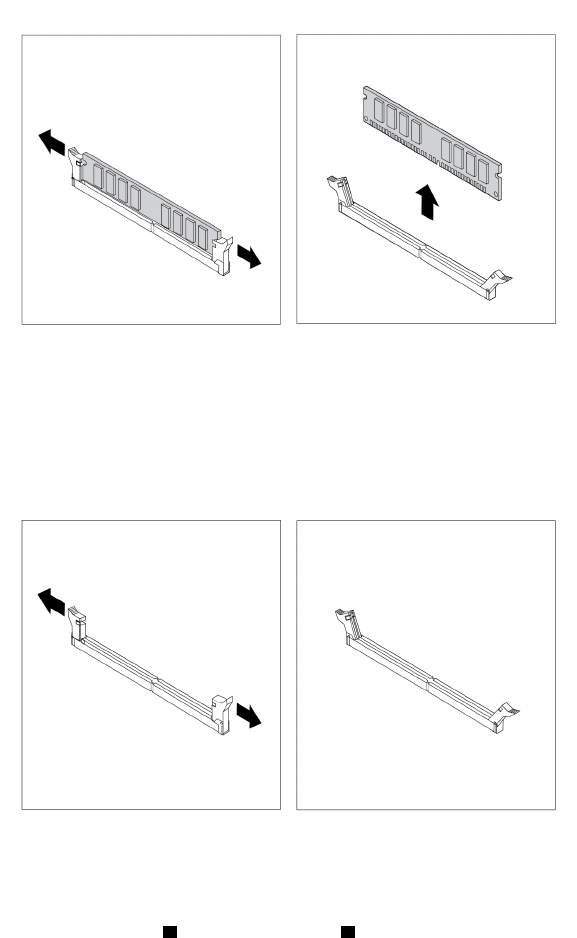
ﺎﻟﺸﻜﻞ٢٤.ﺎﺯﺍﻟﺔﻮﺣﺪﺍﺕﺎﻟﺬﺍﻛﺮﺓ
•ﺈﺫﺍﻜﻨﺖﺘﺜﺒﺖﻮﺣﺪﺓﺬﺍﻛﺮﺓ،ﺎﻓﺘﺢﻤﺸﺎﺑﻚﺎﻟﺘﺜﺒﻴﺖﺎﻟﺨﺎﺻﺔﺒﺨﺎﻧﺔﺎﻟﺬﺍﻛﺮﺓﺎﻟﺘﻲﺘﺮﻳﺪﺘﺮﻛﻴﺐﻮﺣﺪﺓﺎﻟﺬﺍﻛﺮﺓﺎﻟﺠﺪﻳﺪﺓﻔﻴﻬﺎ.
ﺎﻟﺸﻜﻞ٢٥.ﻔﺘﺢﻤﺸﺎﺑﻚﺎﻟﺘﺜﺒﻴﺖ
٦.ﻀﻊﻮﺣﺪﺓﺎﻟﺬﺍﻛﺮﺓﺎﻟﺠﺪﻳﺪﺓﻌﻠﻰﺨﺎﻧﺔﺎﻟﺬﺍﻛﺮﺓ.ﺘﺄﻛﺪﻤﻦﻤﺤﺎﺫﺍﺓﺎﻟﺤﺰ1ﺒﻮﺣﺪﺓﺎﻟﺬﺍﻛﺮﺓﻤﻊﺎﻟﻤﻔﺘﺎﺡ2ﺒﺎﻟﻔﺘﺤﺔ.ﺎﺩﻓﻊﻮﺣﺪﺓﺎﻟﺬﺍﻛﺮﺓﻤﺒﺎﺷﺮﺓ
ً
ﻠﻠﺄﺳﻔﻞﻔﻲﺎﻟﻔﺘﺤﺔ
ﺤﺘﻰﺈﻏﻠﺎﻕﻤﺸﺎﺑﻚﺎﻟﺘﺜﺒﻴﺖﺒﺸﻜﻞﺘﺎﻡ.
ﺍﻟﻤﻠﺤﻖ٧.ﺇﺧﺮﺍﺝﺍﻷﺟﻬﺰﺓﻭﺗﺮﻛﻴﺒﻬﺎ٦١
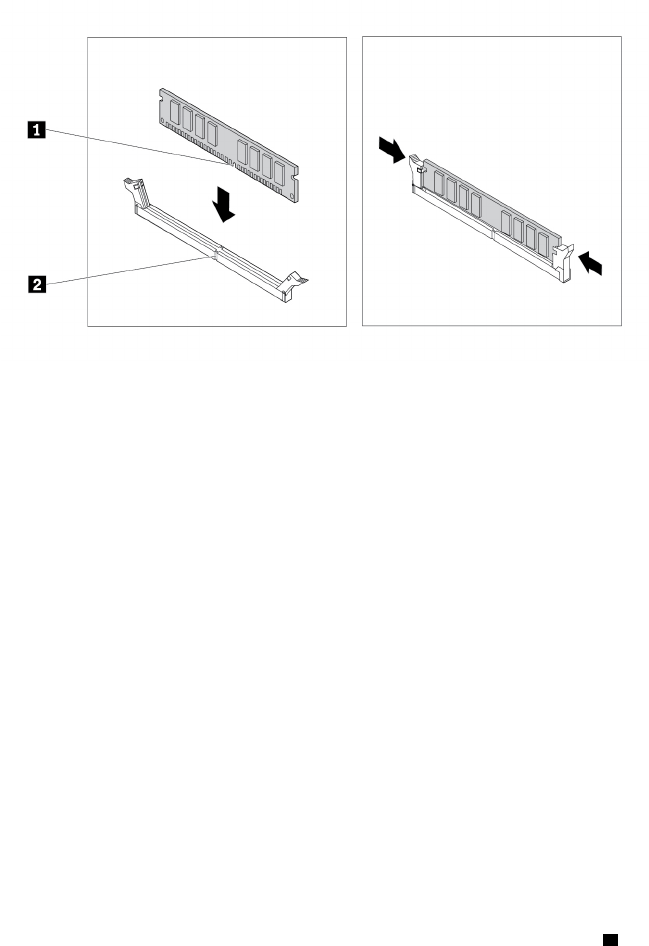
ﺎﻟﺸﻜﻞ٢٦.ﺘﺮﻛﻴﺐﻮﺣﺪﺓﺬﺍﻛﺮﺓ
٧.ﺄﻋﺪﺘﺮﻛﻴﺐﺒﻄﺎﻗﺔﺎﻟﺮﺳﻮﻣﺎﺕPCIe x16،ﺈﺫﺍﻜﻨﺖﻘﺪﻘﻤﺖﺒﺈﺧﺮﺍﺟﻬﺎ.
ﻤﺎﻴﺠﺐﺎﻟﻘﻴﺎﻡﺒﻪﺒﻌﺪﺬﻟﻚ:
•ﻠﻠﺘﻌﺎﻣﻞﻤﻊﺠﺰﺀﺂﺧﺮﻤﻦﺎﻟﺠﻬﺎﺯ،ﺎﺫﻫﺐﺈﻟﻰﺎﻟﻘﺴﻢﺎﻟﻤﻨﺎﺳﺐ.
•ﻠﺎﺳﺘﻜﻤﺎﻝﻌﻤﻠﻴﺔﺎﻟﺘﺮﻛﻴﺐﺄﻭﺎﻟﺎﺳﺘﺒﺪﺍﻝ،ﺎﺫﻫﺐﺈﻟﻰ"ﺎﺳﺘﻜﻤﺎﻝﻌﻤﻠﻴﺔﺎﺳﺘﺒﺪﺍﻝﺎﻟﻘﻄﻊ"ﻌﻠﻰﺎﻟﺼﻔﺤﺔ٩٨.
ﻤﺤﺮﻙﺎﻟﺄﻗﺮﺍﺹﺎﻟﻀﻮﺋﻴﺔ
ﺘﻨﺒﻴﻪ:ﻠﺎﺘﻔﺘﺢﺎﻟﻜﻤﺒﻴﻮﺗﺮﺄﻭﺘﺤﺎﻭﻝﺈﺻﻠﺎﺣﻪﻘﺒﻞﻘﺮﺍﺀﺓﻮﻓﻬﻢ"ﺎﻗﺮﺃﻬﺬﺍﺎﻟﺠﺰﺀﺄﻭﻟﺎ
ً
:ﻤﻌﻠﻮﻣﺎﺕﻤﻬﻤﺔﺤﻮﻝﺎﻟﺴﻠﺎﻣﺔ"ﻌﻠﻰﺎﻟﺼﻔﺤﺔiii.
ﺒﺎﻟﻨﺴﺒﺔﺈﻟﻰﺒﻌﺾﻄ
ُ
ﺮﺯﺎﻟﻜﻤﺒﻴﻮﺗﺮ،ﻘﺪﻴﺘﻢﺘﺮﻛﻴﺐﻔﺘﺤﺔﻤﺤﺮﻙﺎﻟﺄﻗﺮﺍﺹﺎﻟﻀﻮﺋﻴﺔﻤﻊﺠﻬﺎﺯﻜﻤﺤﺮﻙﺄﻗﺮﺍﺹﻀﻮﺋﻴﺔﺄﻭﻮﺣﺪﺓﻤﺮﻧﺔﻤﻘﺎﺱ5.25ﺒﻮﺻﺔﺄﻭ
ﺤﺎﻭﻳﺔﺘﺨﺰﻳﻦﺄﻣﺎﻣﻴﺔﺄﻭﻤﺤﻮﻝﻤﺤﺮﻙﺄﻗﺮﺍﺹﻀﻮﺋﻴﺔﺮﻓﻴﻊﺄﻭﺤﺰﻣﺔﺘﺤﻮﻳﻞﻤﺤﺮﻛﺎﺕﺄﻗﺮﺍﺹﻤﺘﻌﺪﺩﺓ.
ﻴﻮﻓﺮﻬﺬﺍﺎﻟﻘﺴﻢﺈﺭﺷﺎﺩﺍﺕﺤﻮﻝﻜﻴﻔﻴﺔﺘﺮﻛﻴﺐﻤﺤﺮﻙﺄﻗﺮﺍﺹﻀﻮﺋﻴﺔﺄﻭﺎﺳﺘﺒﺪﺍﻟﻪ.ﺒﺎﻟﻨﺴﺒﺔﺈﻟﻰﺄﻱﺠﻬﺎﺯﺂﺧﺮﻔﻲﻔﺘﺤﺔﻤﺤﺮﻙﺎﻟﺄﻗﺮﺍﺹﺎﻟﻀﻮﺋﻴﺔ،ﻴﻜﻮﻥﺈﺟﺮﺍﺀ
ﺎﻟﺘﺮﻛﻴﺐﺄﻭﺎﻟﺎﺳﺘﺒﺪﺍﻝﻤﻤﺎﺛﻠﺎ
ً
.
ﻠﺘﺮﻛﻴﺐﺄﻭﺎﺳﺘﺒﺪﺍﻝﻤﺤﺮﻙﺄﻗﺮﺍﺹﻀﻮﺋﻴﺔ،ﻘﻢﺒﺘﻨﻔﻴﺬﻤﺎﻴﻠﻲ:
١.ﺎﻋﻤﻞﻌﻠﻰﺈﻋﺪﺍﺩﺎﻟﻜﻤﺒﻴﻮﺗﺮ.ﺮﺍﺟﻊ"ﺈﻋﺪﺍﺩﺎﻟﻜﻤﺒﻴﻮﺗﺮﻮﻧﺰﻉﻐﻄﺎﺀﺎﻟﻜﻤﺒﻴﻮﺗﺮ"ﻌﻠﻰﺎﻟﺼﻔﺤﺔ٥١.
٢.ﻘﻢﺒﺎﺯﺍﻟﺔﺎﻟﻮﺍﺟﻬﺔﺎﻟﺄﻣﺎﻣﻴﺔ.ﺮﺍﺟﻊ"ﺎﻟﻮﺍﺟﻬﺔﺎﻟﺄﻣﺎﻣﻴﺔ"ﻌﻠﻰﺎﻟﺼﻔﺤﺔ٥٢.
٣.ﺎﺿﻐﻂﻌﻠﻰﻤﺸﺒﻚﺎﻟﺘﺤﺮﻳﺮ
1ﻜﻤﺎﻬﻮﻤﻮﺿﺢﻮﻗﻢﺒﺘﺪﻭﻳﺮﻤﺠﻤﻮﻋﺔﻔﺘﺤﺔﻤﺤﺮﻙﺎﻟﺄﻗﺮﺍﺹﻠﻠﺄﻋﻠﻰ.
٦٢
ﺩﻟﻴﻞﻣﺴﺘﺨﺪﻡP320
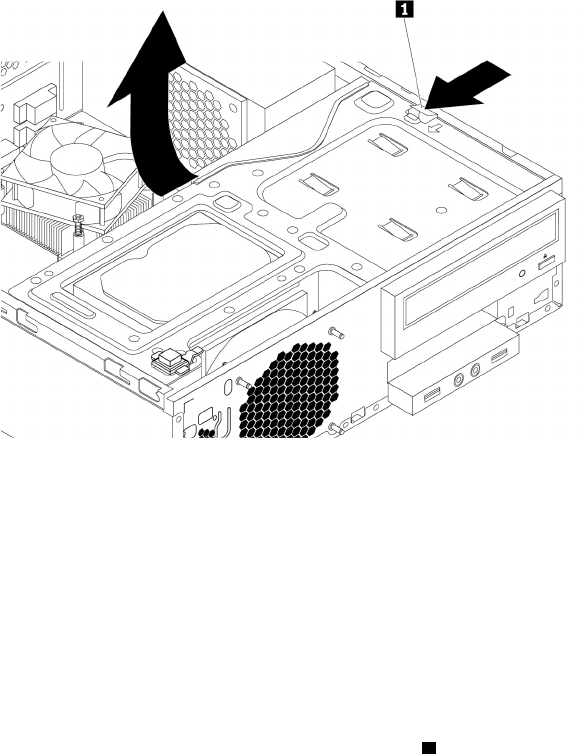
ﺎﻟﺸﻜﻞ٢٧.ﺘﺪﻭﻳﺮﻤﺠﻤﻮﻋﺔﺨﺎﻧﺔﺎﻟﻤﺸﻐﻞﻠﺄﻋﻠﻰ
٤.ﺒﻨﺎﺀ
ً
ﻌﻠﻰﻤﺎﺈﺫﺍﻜﺎﻥﻴﺘﻢﺘﺮﻛﻴﺐﺄﻭﺎﺳﺘﺒﺪﺍﻝﻤﺤﺮﻙﺄﻗﺮﺍﺹﻀﻮﺋﻴﺔ،ﻘﻢﺒﺘﻨﻔﻴﺬﻤﺎﻴﻠﻲ:
•ﻔﻲﺤﺎﻟﺔﺘﺮﻛﻴﺐﻤﺤﺮﻙﺄﻗﺮﺍﺹﻀﻮﺋﻴﺔﺠﺪﻳﺪ،ﻘﻢﺒﺘﻨﻔﻴﺬﻤﺎﻴﻠﻲ:
a.ﺄﺧﺮﺝﻮﺍﻗﻲﺸﺤﻨﺎﺕﺎﻟﻜﻬﺮﺑﺎﺋﻴﺔﺎﻟﺴﺎﻛﻨﺔﺎﻟﻤﻌﺪﻧﻲﻤﻦﺎﻟﻔﺘﺤﺔ.
b.ﺤﺪﺩﻤﻜﺎﻥﻤﺜﺒﺖﻤﺤﺮﻙﺎﻟﺄﻗﺮﺍﺹﺎﻟﻀﻮﺋﻴﺔﻌﻠﻰﺎﻟﺠﺎﻧﺐﺎﻟﺄﻳﺴﺮﻠﻠﻜﻤﺒﻴﻮﺗﺮ.ﺎﺩﻓﻊﻤﺜﺒﺖﻤﺤﺮﻙﺎﻟﺄﻗﺮﺍﺹﺎﻟﻀﻮﺋﻴﺔﻠﻠﺄﺳﻔﻞﻠﺈﻟﻐﺎﺀﻘﻔﻞﺎﻟﻤﺜﺒﺖ.ﺒﻌﺪ
ﺬﻟﻚ،ﺎﺭﻓﻊﻤﺜﺒﺖﻤﺤﺮﻙﺎﻟﺄﻗﺮﺍﺹﺎﻟﻀﻮﺋﻴﺔﻠﺈﺧﺮﺍﺟﻪﻤﻦﺎﻟﻬﻴﻜﻞ.
•ﻔﻲﺤﺎﻟﺔﺎﺳﺘﺒﺪﺍﻝﻤﺤﺮﻙﺎﻟﺄﻗﺮﺍﺹﺎﻟﻀﻮﺋﻴﺔ،ﻘﻢﺒﺘﻨﻔﻴﺬﻤﺎﻴﻠﻲ:
a.ﺎﻓﺼﻞﺠﻤﻴﻊﺎﻟﻜﺎﺑﻠﺎﺕﻤﻦﺎﻟﺠﺰﺀﺎﻟﺨﻠﻔﻲﻠﻤﺤﺮﻙﺎﻟﺄﻗﺮﺍﺹﺎﻟﻀﻮﺋﻴﺔ.
b.ﺎﺿﻐﻂﻌﻠﻰﻘﻔﻞﻤﺤﺮﻙﺎﻟﺄﻗﺮﺍﺹﺎﻟﻀﻮﺋﻴﺔ
1ﺎﻟﻤﻮﺟﻮﺩﺒﺎﻟﺠﺎﻧﺐﺎﻟﺄﻳﻤﻦﻠﻤﺠﻤﻮﻋﺔﻔﺘﺤﺔﻤﺤﺮﻙﺎﻟﺄﻗﺮﺍﺹ،ﺜﻢﺄﺧﺮﺝﻤﺤﺮﻙﺎﻟﺄﻗﺮﺍﺹﺎﻟﻀﻮﺋﻴﺔ
ﻤﻦﺎﻟﺠﺰﺀﺎﻟﺨﻠﻔﻲﻠﻠﻔﺘﺤﺔ.ﺒﻌﺪﺬﻟﻚ،ﺄﺧﺮﺝﻤﺜﺒﺖﻤﺤﺮﻙﺎﻟﺄﻗﺮﺍﺹﺎﻟﻀﻮﺋﻴﺔﻤﻦﺎﻟﺠﺎﻧﺐﺎﻟﺄﻳﺴﺮﻠﻠﻤﺤﺮﻙ.
ﺍﻟﻤﻠﺤﻖ٧.ﺇﺧﺮﺍﺝﺍﻷﺟﻬﺰﺓﻭﺗﺮﻛﻴﺒﻬﺎ٦٣
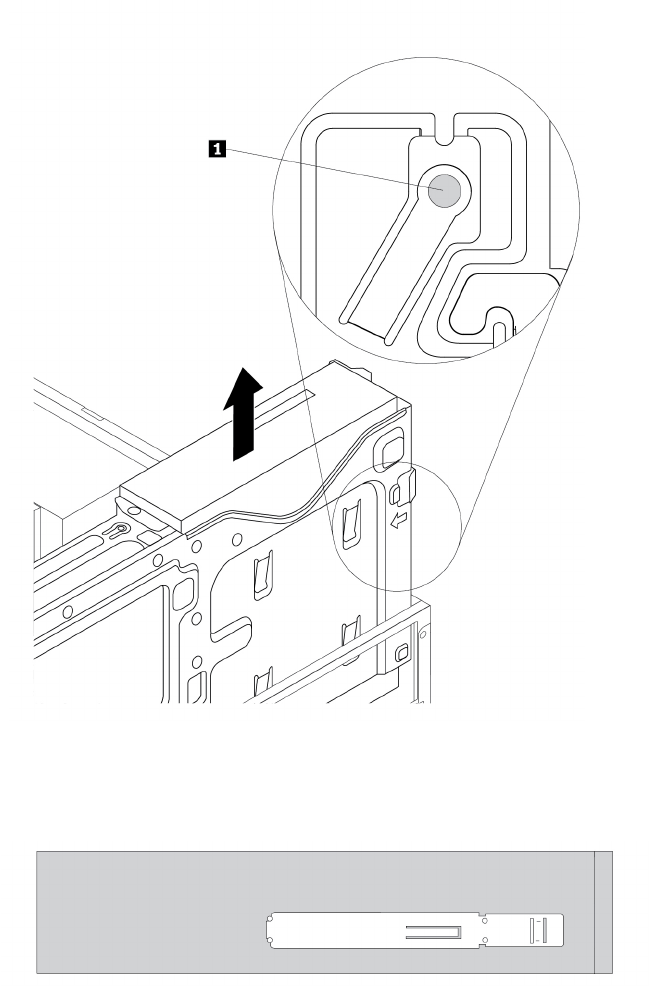
ﺎﻟﺸﻜﻞ٢٨.ﺎﺯﺍﻟﺔﻤﺤﺮﻙﺎﻟﺄﻗﺮﺍﺹﺎﻟﻀﻮﺋﻴﺔ
٥.ﺮﻛ
ّ
ﺐﻤﺜﺒﺖﻤﺤﺮﻙﺎﻟﺄﻗﺮﺍﺹﺎﻟﻀﻮﺋﻴﺔﻌﻠﻰﺠﺎﻧﺐﻤﺤﺮﻙﺎﻟﺄﻗﺮﺍﺹﺎﻟﻀﻮﺋﻴﺔﺎﻟﺠﺪﻳﺪ.
ﺎﻟﺸﻜﻞ٢٩.ﺘﺮﻛﻴﺐﻤﺜﺒﺖﻤﺤﺮﻙﺎﻟﺄﻗﺮﺍﺹﺎﻟﻀﻮﺋﻴﺔ
٦.ﺄﺩﺧﻞﻤﺤﺮﻙﺎﻟﺄﻗﺮﺍﺹﺎﻟﻀﻮﺋﻴﺔﺎﻟﺠﺪﻳﺪﻔﻲﻔﺘﺤﺔﻤﺤﺮﻙﺎﻟﺄﻗﺮﺍﺹﺈﻟﻰﺄﻥﻴﺴﺘﻘﺮﻔﻲﻤﻜﺎﻧﻪ.
٦٤
ﺩﻟﻴﻞﻣﺴﺘﺨﺪﻡP320
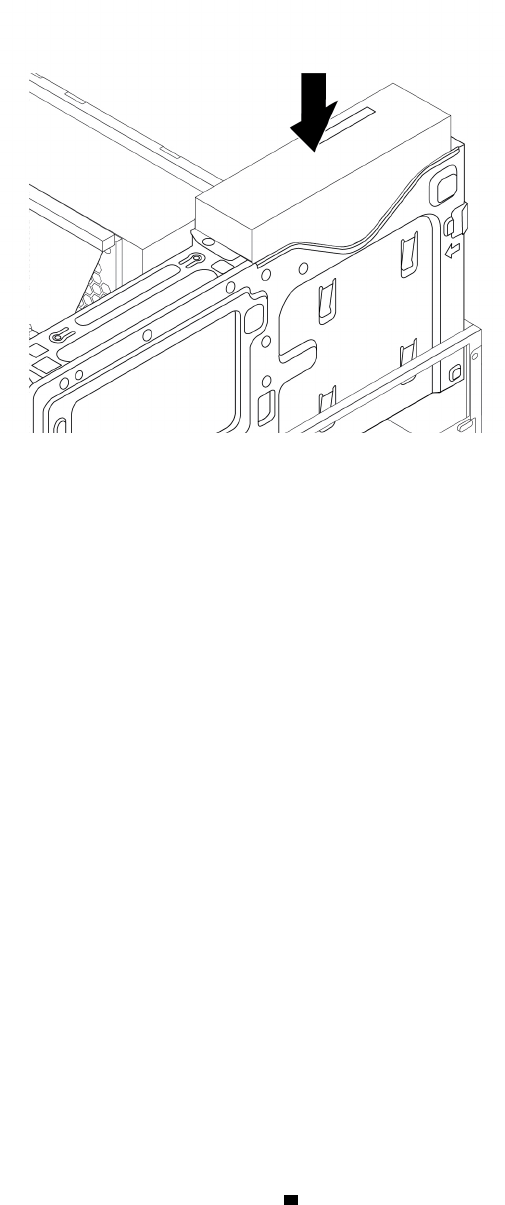
ﺎﻟﺸﻜﻞ٣٠.ﺘﺮﻛﻴﺐﻤﺤﺮﻙﺎﻟﺄﻗﺮﺍﺹﺎﻟﻀﻮﺋﻴﺔ
٧.ﻘﻢﺒﺘﻮﺻﻴﻞﺄﻱﻜﺒﻠﺎﺕﻀﺮﻭﺭﻳﺔ.ﺒﺎﻟﻨﺴﺒﺔﻠﻤﺤﺮﻙﺎﻟﺄﻗﺮﺍﺹﺎﻟﻀﻮﺋﻴﺔ،ﻘﻢﺒﺘﻮﺻﻴﻞﻜﺒﻞﺎﻟﻄﺎﻗﺔﻮﻛﺒﻞﺎﻟﺈﺷﺎﺭﺓﺒﺎﻟﺠﺰﺀﺎﻟﺨﻠﻔﻲﻠﻤﺤﺮﻙﺎﻟﺄﻗﺮﺍﺹﺎﻟﻀﻮﺋﻴﺔ.
ﻤﺎﻴﺠﺐﺎﻟﻘﻴﺎﻡﺒﻪﺒﻌﺪﺬﻟﻚ:
•ﻠﻠﺘﻌﺎﻣﻞﻤﻊﺠﺰﺀﺂﺧﺮﻤﻦﺎﻟﺠﻬﺎﺯ،ﺎﺫﻫﺐﺈﻟﻰﺎﻟﻘﺴﻢﺎﻟﻤﻨﺎﺳﺐ.
•ﻠﺎﺳﺘﻜﻤﺎﻝﻌﻤﻠﻴﺔﺎﻟﺘﺮﻛﻴﺐﺄﻭﺎﻟﺎﺳﺘﺒﺪﺍﻝ،ﺎﺫﻫﺐﺈﻟﻰ"ﺎﺳﺘﻜﻤﺎﻝﻌﻤﻠﻴﺔﺎﺳﺘﺒﺪﺍﻝﺎﻟﻘﻄﻊ"ﻌﻠﻰﺎﻟﺼﻔﺤﺔ٩٨.
ﻤﺤﺮﻙﺎﻟﺄﻗﺮﺍﺹﺎﻟﺜﺎﺑﺘﺔﻔﻲﺤﺎﻭﻳﺔﺎﻟﺘﺨﺰﻳﻦﺎﻟﺄﻣﺎﻣﻴﺔ
ﺘﻨﺒﻴﻪ:ﻠﺎﺘﻔﺘﺢﺎﻟﻜﻤﺒﻴﻮﺗﺮﺄﻭﺘﺤﺎﻭﻝﺈﺻﻠﺎﺣﻪﻘﺒﻞﻘﺮﺍﺀﺓﻮﻓﻬﻢ"ﺎﻗﺮﺃﻬﺬﺍﺎﻟﺠﺰﺀﺄﻭﻟﺎ
ً
:ﻤﻌﻠﻮﻣﺎﺕﻤﻬﻤﺔﺤﻮﻝﺎﻟﺴﻠﺎﻣﺔ"ﻌﻠﻰﺎﻟﺼﻔﺤﺔiii.
ﻴﻤﻜﻨﻚﺘﺮﻛﻴﺐﻤﺤﺮﻙﺄﻗﺮﺍﺹﺎﻟﺘﺨﺰﻳﻦﻔﻲﺤﺎﻭﻳﺔﺎﻟﺘﺨﺰﻳﻦﺎﻟﺄﻣﺎﻣﻴﺔﺄﻭﺎﺳﺘﺒﺪﺍﻟﻪﻔﻴﻬﺎ.ﺒﺈﻣﻜﺎﻥﻤﺤﺮﻙﺄﻗﺮﺍﺹﺎﻟﺘﺨﺰﻳﻦﺄﻥﻴﻜﻮﻥﺄﻳﻀ
ً
ﺎﻘﺎﺑﻠﺎ
ً
ﻠﻠﺘﺒﺪﻳﻞﺒﻴﻨﻤﺎﻴﻜﻮﻥ
ﺎﻟﻜﻤﺒﻴﻮﺗﺮﻘﻴﺪﺎﻟﺘﺸﻐﻴﻞ،ﻤﻤﺎﻴﻌﻨﻲﺄﻧﻪﻴﻤﻜﻨﻚﺘﺮﻛﻴﺐﻤﺤﺮﻙﺎﻟﺄﻗﺮﺍﺹﺄﻭﺎﺳﺘﺒﺪﺍﻟﻪﺤﺘﻰﻤﻦﺪﻭﻥﺄﻥﺘﺤﺘﺎﺝﺈﻟﻰﺈﻳﻘﺎﻑﺘﺸﻐﻴﻞﺎﻟﻜﻤﺒﻴﻮﺗﺮ.ﻮﺑﺎﻟﺘﺎﻟﻲ،ﺄﻗﻔﻞﻐﻄﺎﺀ
ﺎﻟﺤﺎﻭﻳﺔﻠﺘﻔﺎﺩﻱﺈﺧﺮﺍﺟﻪﺒﻄﺮﻳﻘﺔﻐﻴﺮﻤﺘﻮﻗﻌﺔ.ﻮﺗﻜﻮﻥﺎﻟﻤﻔﺎﺗﻴﺢﻤﻮﺻﻮﻟﺔﺒﺠﻬﺔﺎﻟﻜﻤﺒﻴﻮﺗﺮﺎﻟﺨﻠﻔﻴﺔ.ﻘﻢﺒﺘﺨﺰﻳﻦﺎﻟﻤﻔﺎﺗﻴﺢﻔﻲﻤﻜﺎﻥﺄﻣﻦ.
ﻴﻜﻮﻥﻤﺤﺮﻙﺎﻟﺄﻗﺮﺍﺹﺎﻟﺜﺎﺑﺘﺔﻔﻲﺤﺎﻭﻳﺔﺎﻟﺘﺨﺰﻳﻦﺎﻟﺄﻣﺎﻣﻴﺔﻘﺎﺑﻠﺎ
ً
ﻠﻠﺘﺒﺪﻳﻞﻤﻦﺪﻭﻥﺈﻳﻘﺎﻑﺘﺸﻐﻴﻞﺎﻟﻜﻤﺒﻴﻮﺗﺮﻔﻘﻂﻌﻨﺪﺘﻠﺒﻴﺔﺎﻟﺸﺮﻃﻴﻦﺎﻟﺘﺎﻟﻴﻴﻦ:
•ﺘﻢﺘﻮﺻﻴﻞﻜﺒﻞSATAﻠﺤﺎﻭﻳﺔﺎﻟﺘﺨﺰﻳﻦﺎﻟﺄﻣﺎﻣﻴﺔﺒﻤﻮﺻﻞeSATAﻌﻠﻰﻠﻮﺣﺔﺎﻟﻨﻈﺎﻡ.ﻠﻠﺘﺤﻘﻖﻤﻦﺎﺗﺼﺎﻝﺎﻟﻜﺒﻞ،ﺮﺍﺟﻊ"ﺈﻋﺪﺍﺩﺎﻟﻜﻤﺒﻴﻮﺗﺮﻮﻧﺰﻉﻐﻄﺎﺀ
ﺎﻟﻜﻤﺒﻴﻮﺗﺮ"ﻌﻠﻰﺎﻟﺼﻔﺤﺔ٥١ﻮ"ﺎﻟﺄﺟﺰﺍﺀﻌﻠﻰﻠﻮﺣﺔﺎﻟﻨﻈﺎﻡ"ﻌﻠﻰﺎﻟﺼﻔﺤﺔ٥ﻠﻠﺤﺼﻮﻝﻌﻠﻰﻤﺰﻳﺪﻤﻦﺎﻟﻤﻌﻠﻮﻣﺎﺕ.
•ﻠﺎﻴﻘﻴﻢﻨﻈﺎﻡﺘﺸﻐﻴﻞﺎﻟﻜﻤﺒﻴﻮﺗﺮﻌﻠﻰﻤﺤﺮﻙﺎﻟﺄﻗﺮﺍﺹﺎﻟﺜﺎﺑﺘﺔﺎﻟﻤﺮﻛ
ّ
ﺐﻔﻲﺤﺎﻭﻳﺔﺎﻟﺘﺨﺰﻳﻦﺎﻟﺄﻣﺎﻣﻴﺔ.
ﺘﻨﺒﻴﻪ:ﻔﻲﺤﺎﻝﻌﺪﻡﺘﻠﺒﻴﺔﺄﻱﻮﺍﺣﺪﻤﻦﺎﻟﺸﺮﻃﻴﻦﺄﻋﻠﺎﻩ،ﻠﺎﺘﺮﻛ
ّ
ﺐﻤﺤﺮﻙﺎﻟﺄﻗﺮﺍﺹﺎﻟﺜﺎﺑﺘﺔﺄﻭﺘﺴﺘﺒﺪﻟﻪﻌﻨﺪﻣﺎﻴﻜﻮﻥﺎﻟﻜﻤﺒﻴﻮﺗﺮﻘﻴﺪﺎﻟﺘﺸﻐﻴﻞ.ﻮﺇﻟﺎ،ﻔﻘﺪﺘﺘﻌﺮﺽ
ﺎﻟﺒﻴﺎﻧﺎﺕﺎﻟﻤﺨﺰﻧﺔﻌﻠﻰﻤﺤﺮﻙﺎﻟﺄﻗﺮﺍﺹﺎﻟﺜﺎﺑﺘﺔﻠﻠﺘﻠﻒ.
ﻤﺤﺮﻙﺄﻗﺮﺍﺹﺘﺨﺰﻳﻦﺒﺤﺠﻢ3.5ﺒﻮﺻﺔ
ﻠﺈﺧﺮﺍﺝﻤﺤﺮﻙﺄﻗﺮﺍﺹﺘﺨﺰﻳﻦﺒﺤﺠﻢ3.5ﺒﻮﺻﺔﺄﻭﺘﺮﻛﻴﺒﻪ،ﻘﻢﺒﻤﺎﻴﻠﻲ:
١.ﻘﺒﻞﺈﺧﺮﺍﺝﻤﺤﺮﻙﺄﻗﺮﺍﺹﺘﺨﺰﻳﻦﻘﺪﻳﻢﺒﺤﺠﻢ3.5ﺒﻮﺻﺔ،ﻌﻠﻴﻚﺈﺧﺮﺍﺝﻤﺤﺮﻙﺄﻗﺮﺍﺹﺎﻟﺘﺨﺰﻳﻦﺎﻟﻘﺪﻳﻢﺒﺄﻣﺎﻥﻤﻦﻨﻈﺎﻡﺎﻟﺘﺸﻐﻴﻞﺄﻭﻟﺎ
ً
.ﻠﻤﺰﻳﺪﻤﻦ
ﺎﻟﻤﻌﻠﻮﻣﺎﺕ،ﺮﺍﺟﻊﻨﻈﺎﻡﺎﻟﻤﺴﺎﻋﺪﺓﻠﻨﻈﺎﻡﺎﻟﺘﺸﻐﻴﻞWindows.
٢.ﺎﻓﺘﺢﻐﻄﺎﺀﺎﻟﺤﺎﻭﻳﺔﺒﺎﺳﺘﺨﺪﺍﻡﺎﻟﻤﻔﺘﺎﺡﻜﻤﺎﻬﻮﻤﺒﻴ
ّ
ﻦ.ﺎﺿﻐﻂﻌﻠﻰﺎﻟﺤﺰ
aﻠﻔﺘﺢﻐﻄﺎﺀﺎﻟﺤﺎﻭﻳﺔ.
ﺍﻟﻤﻠﺤﻖ٧.ﺇﺧﺮﺍﺝﺍﻷﺟﻬﺰﺓﻭﺗﺮﻛﻴﺒﻬﺎ٦٥
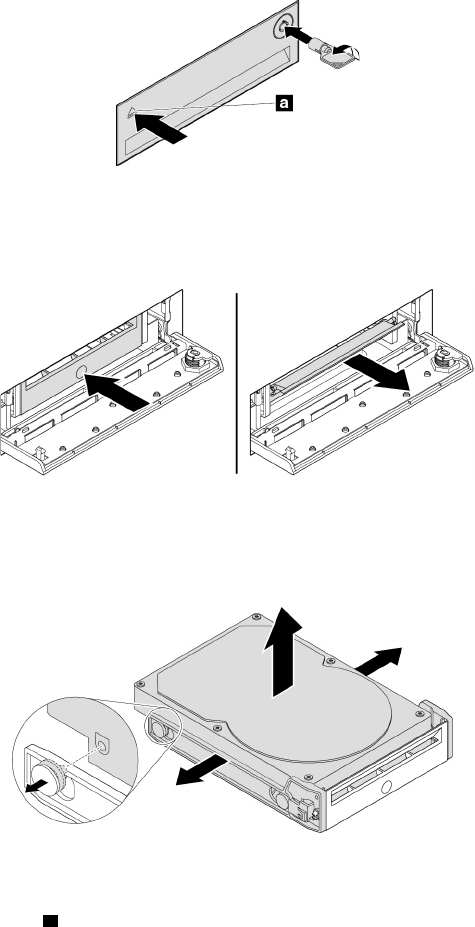
ﺎﻟﺸﻜﻞ٣١.ﻔﺘﺢﻐﻄﺎﺀﺤﺎﻭﻳﺔﺎﻟﺘﺨﺰﻳﻦﺎﻟﺄﻣﺎﻣﻴﺔ
٣.ﺎﺿﻐﻂﻌﻠﻰﺎﻟﺜﻘﺐﺎﻟﻤﻮﺟﻮﺩﻌﻠﻰﻐﻄﺎﺀﺎﻟﺤﺎﻣﻞ،ﺜﻢﺄﻣﺴﻚﺎﻟﻐﻄﺎﺀﺎﻟﺬﻱﺘﻤﺖﺈﻣﺎﻟﺘﻪﻠﺴﺤﺐﺎﻟﺤﺎﻣﻞﺨﺎﺭﺝﺤﺎﻭﻳﺔﺎﻟﺘﺨﺰﻳﻦﺎﻟﺄﻣﺎﻣﻴﺔ.
ﺎﻟﺸﻜﻞ٣٢.ﺈﺧﺮﺍﺝﺎﻟﺤﺎﻣﻞﻤﻦﺤﺎﻭﻳﺔﺎﻟﺘﺨﺰﻳﻦﺎﻟﺄﻣﺎﻣﻴﺔ
٤.ﻠﺈﺧﺮﺍﺝﻤﺤﺮﻙﺄﻗﺮﺍﺹﺎﻟﺘﺨﺰﻳﻦﺒﺤﺠﻢ3.5ﺒﻮﺻﺔ،ﻘﻢﺒﺜﻨﻲﺠﺎﻧﺒﻲﺎﻟﺤﺎﻣﻞﻠﺈﺧﺮﺍﺝﻤﺤﺮﻙﺄﻗﺮﺍﺹﺎﻟﺘﺨﺰﻳﻦﺒﺤﺠﻢ3.5ﺒﻮﺻﺔﻤﻦﺎﻟﺤﺎﻣﻞ.
ﺎﻟﺸﻜﻞ٣٣.ﺈﺧﺮﺍﺝﻤﺤﺮﻙﺄﻗﺮﺍﺹﺎﻟﺘﺨﺰﻳﻦﺒﺤﺠﻢ3.5ﺒﻮﺻﺔﻤﻦﺎﻟﺤﺎﻣﻞ
٥.ﻠﺘﺮﻛﻴﺐﻤﺤﺮﻙﺄﻗﺮﺍﺹﺘﺨﺰﻳﻦﺠﺪﻳﺪﺒﺤﺠﻢ3.5ﺒﻮﺻﺔ،ﻘﻢﺒﺜﻨﻲﺠﺎﻧﺒﻲﺎﻟﺤﺎﻣﻞﻮﻣﺤﺎﺫﺍﺓﺄﻃﺮﺍﻑﺎﻟﺘﻮﺻﻴﻞ1ﻌﻠﻰﺎﻟﺤﺎﻣﻞﻤﻊﺎﻟﻔﺘﺤﺎﺕﺎﻟﻤﻨﺎﻇﺮﺓﻠﻬﺎﻔﻲ
ﻤﺤﺮﻙﺎﻟﺄﻗﺮﺍﺹ.
ﻤﻠﺎﺣﻈﺎﺕ:
•ﺘﺄﻛﺪﻤﻦﺄﻥﻠﻮﺣﺔﺎﻟﺪﻭﺍﺋﺮﺎﻟﻜﻬﺮﺑﺎﺋﻴﺔﻤﻮﺟ
ّ
ﻬﺔﻨﺤﻮﺎﻟﺄﺳﻔﻞﻮﻣﻦﺄﻥﺎﻟﻤﻮﺻﻠﺎﺕﻤﻮﺟ
ّ
ﻬﺔﻨﺤﻮﺎﻟﺠﻬﺔﺎﻟﺨﻠﻔﻴﺔﻠﻠﺤﺎﻭﻳﺔ.
•ﻠﺎﺘﻠﻤﺲﻠﻮﺣﺔﺎﻟﺪﻭﺍﺋﺮﺎﻟﻜﻬﺮﺑﺎﺋﻴﺔﻌﻠﻰﻤﺤﺮﻙﺄﻗﺮﺍﺹﺎﻟﺘﺨﺰﻳﻦﺄﺛﻨﺎﺀﺘﻨﻔﻴﺬﺎﻟﻌﻤﻠﻴﺔ.
٦٦
ﺩﻟﻴﻞﻣﺴﺘﺨﺪﻡP320
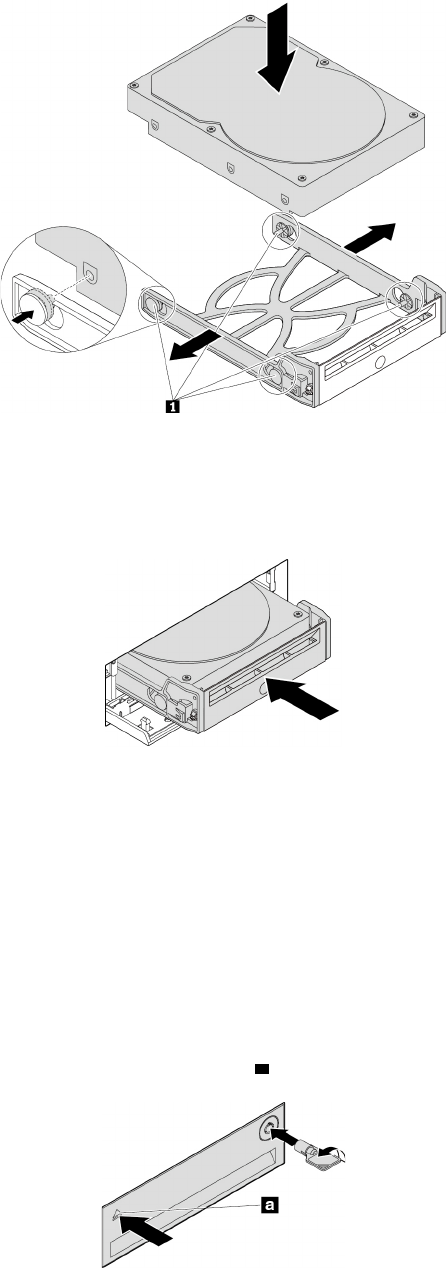
ﺎﻟﺸﻜﻞ٣٤.ﺘﺮﻛﻴﺐﻤﺤﺮﻙﺄﻗﺮﺍﺹﺎﻟﺘﺨﺰﻳﻦ3.5ﺒﻮﺻﺔﻔﻲﺎﻟﺤﺎﻣﻞ
٦.ﺤﺮ
ّ
ﻙﺎﻟﺤﺎﻣﻞﻤﻊﻤﺤﺮﻙﺄﻗﺮﺍﺹﺎﻟﺘﺨﺰﻳﻦﺎﻟﺠﺪﻳﺪﺒﺤﺠﻢ3.5ﺒﻮﺻﺔﺈﻟﻰﺪﺍﺧﻞﺤﺎﻭﻳﺔﺎﻟﺘﺨﺰﻳﻦﺎﻟﺄﻣﺎﻣﻴﺔﺈﻟﻰﺄﻥﻴﺴﺘﻘﺮﻔﻲﻤﻜﺎﻧﻪ.ﺎﺿﻐﻂﻌﻠﻰﺎﻟﺤﺰﻠﺘﺜﺒﻴﺖ
ﻐﻄﺎﺀﺎﻟﺤﺎﻭﻳﺔﺒﺈﺣﻜﺎﻡﻮﺇﻗﻔﺎﻟﻪﺒﻮﺍﺳﻄﺔﺎﻟﻤﻔﺘﺎﺡ.
ﺎﻟﺸﻜﻞ٣٥.ﺘﺮﻛﻴﺐﻤﺤﺮﻙﺄﻗﺮﺍﺹﺎﻟﺘﺨﺰﻳﻦﺒﺤﺠﻢ3.5ﺒﻮﺻﺔﻔﻲﺤﺎﻭﻳﺔﺎﻟﺘﺨﺰﻳﻦﺎﻟﺄﻣﺎﻣﻴﺔ
ﻤﺎﻴﺠﺐﺎﻟﻘﻴﺎﻡﺒﻪﺒﻌﺪﺬﻟﻚ:
•ﻠﻠﺘﻌﺎﻣﻞﻤﻊﺠﺰﺀﺂﺧﺮﻤﻦﺎﻟﺠﻬﺎﺯ،ﺎﺫﻫﺐﺈﻟﻰﺎﻟﻘﺴﻢﺎﻟﻤﻨﺎﺳﺐ.
•ﻠﺎﺳﺘﻜﻤﺎﻝﻌﻤﻠﻴﺔﺎﻟﺘﺮﻛﻴﺐﺄﻭﺎﻟﺎﺳﺘﺒﺪﺍﻝ،ﺎﺫﻫﺐﺈﻟﻰ"ﺎﺳﺘﻜﻤﺎﻝﻌﻤﻠﻴﺔﺎﺳﺘﺒﺪﺍﻝﺎﻟﻘﻄﻊ"ﻌﻠﻰﺎﻟﺼﻔﺤﺔ٩٨.
ﻤﺤﺮﻙﺄﻗﺮﺍﺹﺘﺨﺰﻳﻦﺒﺤﺠﻢ2.5ﺒﻮﺻﺔ
ﻠﺈﺧﺮﺍﺝﻤﺤﺮﻙﺄﻗﺮﺍﺹﺘﺨﺰﻳﻦﺒﺤﺠﻢ2.5ﺒﻮﺻﺔﺄﻭﺘﺮﻛﻴﺒﻪ،ﻘﻢﺒﻤﺎﻴﻠﻲ:
١.ﻘﺒﻞﺈﺧﺮﺍﺝﻤﺤﺮﻙﺄﻗﺮﺍﺹﺘﺨﺰﻳﻦﻘﺪﻳﻢﺒﺤﺠﻢ2.5ﺒﻮﺻﺔ،ﻌﻠﻴﻚﺈﺧﺮﺍﺝﻤﺤﺮﻙﺄﻗﺮﺍﺹﺎﻟﺘﺨﺰﻳﻦﺎﻟﻘﺪﻳﻢﺒﺄﻣﺎﻥﻤﻦﻨﻈﺎﻡﺎﻟﺘﺸﻐﻴﻞﺄﻭﻟﺎ
ً
.ﻠﻤﺰﻳﺪﻤﻦ
ﺎﻟﻤﻌﻠﻮﻣﺎﺕ،ﺮﺍﺟﻊﻨﻈﺎﻡﺎﻟﻤﺴﺎﻋﺪﺓﻠﻨﻈﺎﻡﺎﻟﺘﺸﻐﻴﻞWindows.
٢.ﺎﻓﺘﺢﻐﻄﺎﺀﺎﻟﺤﺎﻭﻳﺔﺒﺎﺳﺘﺨﺪﺍﻡﺎﻟﻤﻔﺘﺎﺡﻜﻤﺎﻬﻮﻤﺒﻴ
ّ
ﻦ.ﺎﺿﻐﻂﻌﻠﻰﺎﻟﺤﺰ
aﻠﻔﺘﺢﻐﻄﺎﺀﺎﻟﺤﺎﻭﻳﺔ.
ﺎﻟﺸﻜﻞ٣٦.ﻔﺘﺢﻐﻄﺎﺀﺤﺎﻭﻳﺔﺎﻟﺘﺨﺰﻳﻦﺎﻟﺄﻣﺎﻣﻴﺔ
ﺍﻟﻤﻠﺤﻖ٧.ﺇﺧﺮﺍﺝﺍﻷﺟﻬﺰﺓﻭﺗﺮﻛﻴﺒﻬﺎ٦٧
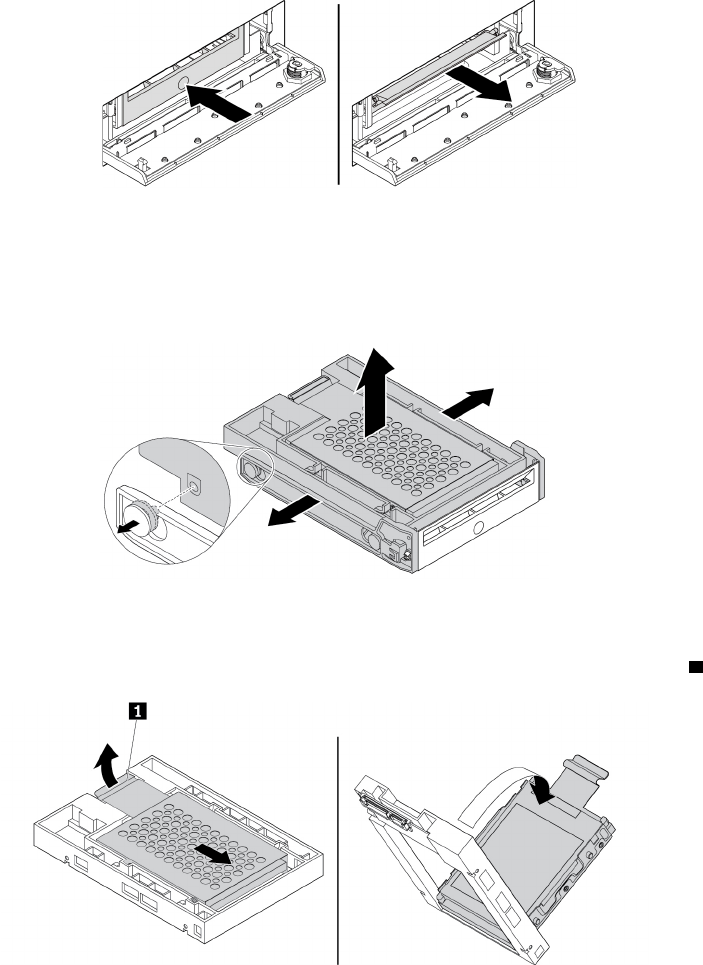
٣.ﺎﺿﻐﻂﻌﻠﻰﺎﻟﺜﻘﺐﺎﻟﻤﻮﺟﻮﺩﻌﻠﻰﻐﻄﺎﺀﺎﻟﺤﺎﻣﻞ،ﺜﻢﺄﻣﺴﻚﺎﻟﻐﻄﺎﺀﺎﻟﺬﻱﺘﻤﺖﺈﻣﺎﻟﺘﻪﻠﺴﺤﺐﺎﻟﺤﺎﻣﻞﺨﺎﺭﺝﺤﺎﻭﻳﺔﺎﻟﺘﺨﺰﻳﻦﺎﻟﺄﻣﺎﻣﻴﺔ.
ﺎﻟﺸﻜﻞ٣٧.ﺈﺧﺮﺍﺝﺎﻟﺤﺎﻣﻞﻤﻦﺤﺎﻭﻳﺔﺎﻟﺘﺨﺰﻳﻦﺎﻟﺄﻣﺎﻣﻴﺔ
٤.ﻠﺈﺧﺮﺍﺝﻤﺤﺮﻙﺄﻗﺮﺍﺹﺎﻟﺘﺨﺰﻳﻦﻤﻘﺎﺱ2.5ﺒﻮﺻﺔ،ﻘﻢﺒﺘﻨﻔﻴﺬﻤﺎﻴﻠﻲ:
a.ﻘﻢﺒﺜﻨﻲﺠﺎﻧﺒﻲﺎﻟﺤﺎﻣﻞﻠﺈﺧﺮﺍﺝﻤﺤﺮﻙﺄﻗﺮﺍﺹﺎﻟﺘﺨﺰﻳﻦﺒﺤﺠﻢ2.5ﺒﻮﺻﺔﻤﻦﺎﻟﺤﺎﻣﻞ.
ﺎﻟﺸﻜﻞ٣٨.ﺈﺧﺮﺍﺝﻤﺤﺮﻙﺄﻗﺮﺍﺹﺎﻟﺘﺨﺰﻳﻦﺒﺤﺠﻢ2.5ﺒﻮﺻﺔﻤﻦﺎﻟﺤﺎﻣﻞ
b.ﺎﺭﻓﻊﻠﺴﺎﻥ1ﺎﻟﺤﺎﻣﻞﺎﻟﻤﻌﺪﻧﻲ،ﻮﺍﺩﻓﻊﺎﻟﺤﺎﻣﻞﺎﻟﻤﻌﺪﻧﻲﺒﻘﻮﺓ،ﻜﻤﺎﻬﻮﻤﻮﺿﺢ.ﺒﻌﺪﺬﻟﻚ،ﺤﺮ
ّ
ﻙﺎﻟﺤﺎﻣﻞﻮﺍﻋﻤﻞﻌﻠﻰﺈﺧﺮﺍﺟﻪﻤﻦﺎﻟﺈﻃﺎﺭﺎﻟﺒﻠﺎﺳﺘﻴﻜﻲ.
ﺎﻟﺸﻜﻞ٣٩.ﺈﺧﺮﺍﺝﺎﻟﺤﺎﻣﻞﺎﻟﻤﻌﺪﻧﻲﻤﻦﺎﻟﺈﻃﺎﺭﺎﻟﺒﻠﺎﺳﺘﻴﻜﻲﻠﻠﻤﺤﻮﻝ
c.ﻘﻢﺒﺜﻨﻲﺠﺎﻧﺒﻲﺎﻟﺤﺎﻣﻞﺎﻟﻤﻌﺪﻧﻲﺒﺘﺄﻥ
ٍ
ﻠﺈﺧﺮﺍﺝﻤﺤﺮﻙﺄﻗﺮﺍﺹﺎﻟﺘﺨﺰﻳﻦﻤﻦﺎﻟﺤﺎﻣﻞ.
٦٨
ﺩﻟﻴﻞﻣﺴﺘﺨﺪﻡP320
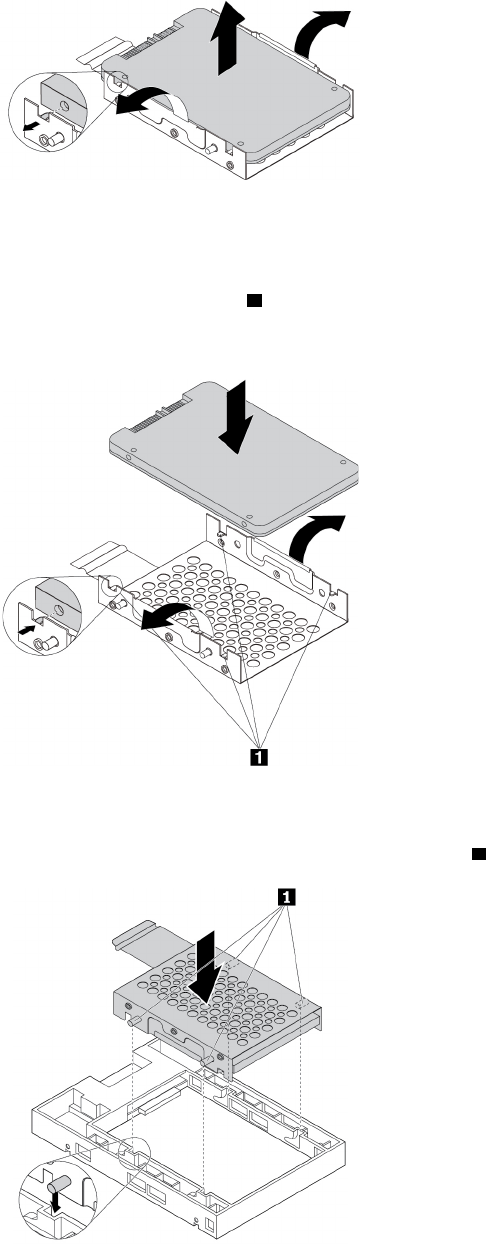
ﺎﻟﺸﻜﻞ٤٠.ﺈﺧﺮﺍﺝﻤﺤﺮﻙﺄﻗﺮﺍﺹﺎﻟﺘﺨﺰﻳﻦﻤﻦﺎﻟﺤﺎﻣﻞﺎﻟﻤﻌﺪﻧﻲ
٥.ﻠﺘﺮﻛﻴﺐﻤﺤﺮﻙﺄﻗﺮﺍﺹﺘﺨﺰﻳﻦﺠﺪﻳﺪﺒﺤﺠﻢ2.5ﺒﻮﺻﺔﻔﻲﺤﺎﻭﻳﺔﺎﻟﺘﺨﺰﻳﻦﺎﻟﺄﻣﺎﻣﻴﺔ،ﻘﻢﺒﻤﺎﻴﻠﻲ:
a.ﻘﻢﺒﺜﻨﻲﺠﺎﻧﺒﻲﺎﻟﺤﺎﻣﻞﺎﻟﻤﻌﺪﻧﻲﺒﺘﺄﻥ
ٍ
ﻮﻣﺤﺎﺫﺍﺓﺎﻟﺄﻟﺴﻨﺔﺎﻟﺄﺭﺑﻌﺔ
1ﻌﻠﻰﺎﻟﺤﺎﻣﻞﺎﻟﻤﻌﺪﻧﻲﻤﻊﺎﻟﻔﺘﺤﺎﺕﺎﻟﻤﻨﺎﻇﺮﺓﻠﻬﺎﻔﻲﻤﺤﺮﻙﺄﻗﺮﺍﺹﺎﻟﺘﺨﺰﻳﻦﺎﻟﺠﺪﻳﺪ.
ﻤﻠﺎﺣﻈﺔ:ﺘﺄﻛﺪﻤﻦﺄﻥﻤﻮﺻﻠﺎﺕﻤﺤﺮﻙﺄﻗﺮﺍﺹﺎﻟﺘﺨﺰﻳﻦﻤﻮﺟ
ّ
ﻬﺔﻨﺤﻮﻠﺴﺎﻥﺎﻟﺤﺎﻣﻞﺎﻟﻤﻌﺪﻧﻲ.
ﺎﻟﺸﻜﻞ٤١.ﺘﺮﻛﻴﺐﻤﺤﺮﻙﺄﻗﺮﺍﺹﺎﻟﺘﺨﺰﻳﻦﺒﺤﺠﻢ2.5ﺒﻮﺻﺔﻔﻲﺎﻟﺤﺎﻣﻞﺎﻟﻤﻌﺪﻧﻲ
b.ﺄﺩﺧﻞﺎﻟﺪﻋﺎﻣﺎﺕﺎﻟﺄﺭﺑﻊ1ﺎﻟﻤﻮﺟﻮﺩﺓﻌﻠﻰﺎﻟﺤﺎﻣﻞﺎﻟﻤﻌﺪﻧﻲﻔﻲﺎﻟﻔﺘﺤﺎﺕﺎﻟﻤﻨﺎﻇﺮﺓﻠﻬﺎﻔﻲﺎﻟﺈﻃﺎﺭﺎﻟﺒﻠﺎﺳﺘﻴﻜﻲﻜﻤﺎﻬﻮﻤﻮﺿﺢ.
ﺎﻟﺸﻜﻞ٤٢.ﺈﺩﺧﺎﻝﺎﻟﺤﺎﻣﻞﺎﻟﻤﻌﺪﻧﻲﻔﻲﺎﻟﺈﻃﺎﺭﺎﻟﺒﻠﺎﺳﺘﻴﻜﻲﻠﻠﻤﺤﻮﻝ
ﺍﻟﻤﻠﺤﻖ٧.ﺇﺧﺮﺍﺝﺍﻷﺟﻬﺰﺓﻭﺗﺮﻛﻴﺒﻬﺎ٦٩
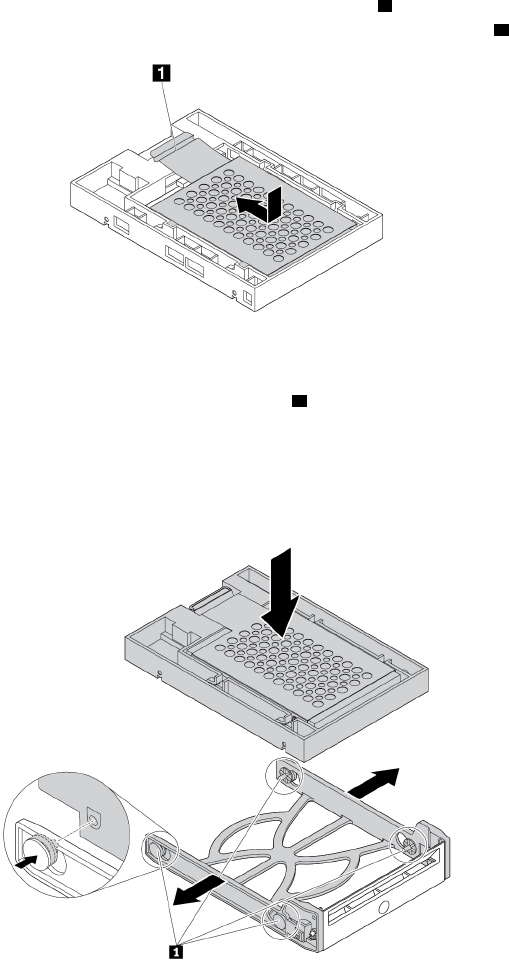
c.ﺎﺩﻓﻊﺎﻟﺤﺎﻣﻞﺎﻟﻤﻌﺪﻧﻲﻠﻠﺄﺳﻔﻞﺤﺘﻰﻴﺘﺨﺬﺎﻟﻠﺴﺎﻥ1ﺸﻜﻠﺎ
ً
ﻤﻨﺤﻨﻴ
ً
ﺎﺒﻌﺾﺎﻟﺸﻲء.ﺒﻌﺪﺬﻟﻚ،ﺎﺩﻓﻊﺎﻟﺤﺎﻣﻞﻤﻊﻤﺤﺮﻙﺄﻗﺮﺍﺹﺎﻟﺘﺨﺰﻳﻦﺈﻟﻰﺎﻟﺄﻣﺎﻡﻜﻤﺎﻬﻮ
ﻤﻮﺿﺢﺤﺘﻰﻴﺴﺘﻘﺮﺎﻟﻠﺴﺎﻥ
1ﻔﻲﻤﻜﺎﻧﻪ.
ﺎﻟﺸﻜﻞ٤٣.ﺘﺮﻛﻴﺐﺎﻟﺤﺎﻣﻞﺎﻟﻤﻌﺪﻧﻲﻔﻲﺎﻟﺈﻃﺎﺭﺎﻟﺒﻠﺎﺳﺘﻴﻜﻲﻠﻠﻤﺤﻮﻝ
d.ﻘﻢﺒﺜﻨﻲﺠﺎﻧﺒﻲﺎﻟﺤﺎﻣﻞﺎﻟﺒﻠﺎﺳﺘﻴﻜﻲﻮﻣﺤﺎﺫﺍﺓﺄﻃﺮﺍﻑﺎﻟﺘﻮﺻﻴﻞ1ﻌﻠﻰﺎﻟﺤﺎﻣﻞﺎﻟﺒﻠﺎﺳﺘﻴﻜﻲﻤﻊﺎﻟﻔﺘﺤﺎﺕﺎﻟﻤﻨﺎﻇﺮﺓﻠﻬﺎﻔﻲﺎﻟﺈﻃﺎﺭﺎﻟﺒﻠﺎﺳﺘﻴﻜﻲﻌﻠﻰﺎﻟﻤﻐﻴ
ّ
ﺮ.
ﻤﻠﺎﺣﻈﺎﺕ:
•ﺘﺄﻛﺪﻤﻦﺄﻥﻠﻮﺣﺔﺎﻟﺪﻭﺍﺋﺮﺎﻟﻜﻬﺮﺑﺎﺋﻴﺔﻤﻮﺟ
ّ
ﻬﺔﻨﺤﻮﺎﻟﺄﺳﻔﻞﻮﻣﻦﺄﻥﺎﻟﻤﻮﺻﻠﺎﺕﻤﻮﺟ
ّ
ﻬﺔﻨﺤﻮﺎﻟﺠﻬﺔﺎﻟﺨﻠﻔﻴﺔﻠﻠﺤﺎﻭﻳﺔ.
•ﻠﺎﺘﻠﻤﺲﻠﻮﺣﺔﺎﻟﺪﻭﺍﺋﺮﺎﻟﻜﻬﺮﺑﺎﺋﻴﺔﻌﻠﻰﻤﺤﺮﻙﺄﻗﺮﺍﺹﺎﻟﺘﺨﺰﻳﻦﺄﺛﻨﺎﺀﺘﻨﻔﻴﺬﺎﻟﻌﻤﻠﻴﺔ.
ﺎﻟﺸﻜﻞ٤٤.ﺘﺮﻛﻴﺐﺎﻟﻤﻐﻴ
ّ
ﺮﻤﻊﻤﺤﺮﻙﺄﻗﺮﺍﺹﺎﻟﺘﺨﺰﻳﻦﻤﻘﺎﺱ2.5ﺒﻮﺻﺔﻔﻲﺎﻟﺤﺎﻣﻞﺎﻟﺒﻠﺎﺳﺘﻴﻜﻲ
٦.ﺤﺮ
ّ
ﻙﺎﻟﺤﺎﻣﻞﺎﻟﺒﻠﺎﺳﺘﻴﻜﻲﻤﻊﻤﺤﺮﻙﺄﻗﺮﺍﺹﺎﻟﺘﺨﺰﻳﻦﺎﻟﺠﺪﻳﺪﻤﻘﺎﺱ2.5ﺒﻮﺻﺔﺈﻟﻰﺪﺍﺧﻞﺤﺎﻭﻳﺔﺎﻟﺘﺨﺰﻳﻦﺎﻟﺄﻣﺎﻣﻴﺔﺈﻟﻰﺄﻥﻴﺴﺘﻘﺮﻔﻲﻤﻜﺎﻧﻪ.ﺎﺿﻐﻂﻌﻠﻰ
ﺎﻟﺤﺰﻠﺘﺜﺒﻴﺖﻐﻄﺎﺀﺎﻟﺤﺎﻭﻳﺔﺒﺈﺣﻜﺎﻡﻮﺇﻗﻔﺎﻟﻪﺒﻮﺍﺳﻄﺔﺎﻟﻤﻔﺘﺎﺡ.
٧٠
ﺩﻟﻴﻞﻣﺴﺘﺨﺪﻡP320
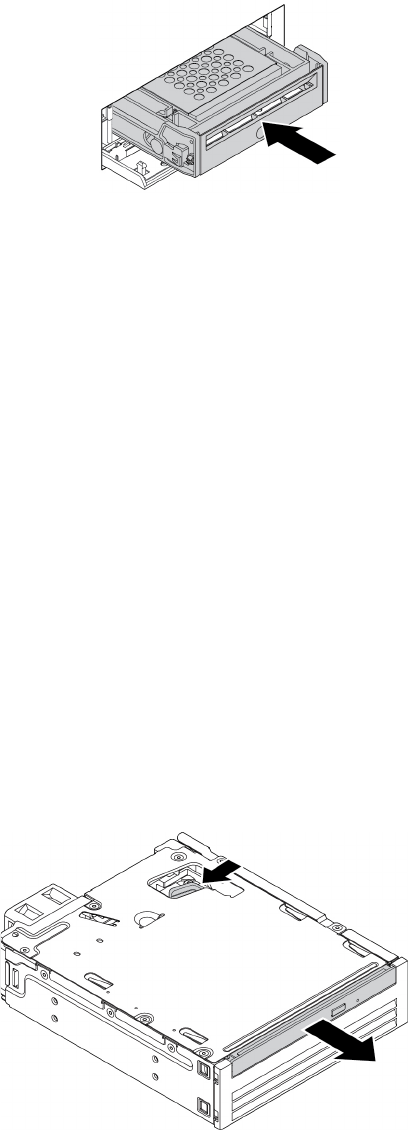
ﺎﻟﺸﻜﻞ٤٥.ﺘﺮﻛﻴﺐﺎﻟﺤﺎﻣﻞﻤﻊﻤﺤﺮﻙﺄﻗﺮﺍﺹﺎﻟﺘﺨﺰﻳﻦﺒﺤﺠﻢ2.5ﺒﻮﺻﺔﻔﻲﺤﺎﻭﻳﺔﺎﻟﺘﺨﺰﻳﻦﺎﻟﺄﻣﺎﻣﻴﺔ
ﻤﺎﻴﺠﺐﺎﻟﻘﻴﺎﻡﺒﻪﺒﻌﺪﺬﻟﻚ:
•ﻠﻠﺘﻌﺎﻣﻞﻤﻊﺠﺰﺀﺂﺧﺮﻤﻦﺎﻟﺠﻬﺎﺯ،ﺎﺫﻫﺐﺈﻟﻰﺎﻟﻘﺴﻢﺎﻟﻤﻨﺎﺳﺐ.
•ﻠﺎﺳﺘﻜﻤﺎﻝﻌﻤﻠﻴﺔﺎﻟﺘﺮﻛﻴﺐﺄﻭﺎﻟﺎﺳﺘﺒﺪﺍﻝ،ﺎﺫﻫﺐﺈﻟﻰ"ﺎﺳﺘﻜﻤﺎﻝﻌﻤﻠﻴﺔﺎﺳﺘﺒﺪﺍﻝﺎﻟﻘﻄﻊ"ﻌﻠﻰﺎﻟﺼﻔﺤﺔ٩٨.
ﺠﻬﺎﺯﻔﻲﺤﺰﻣﺔﺘﺤﻮﻳﻞﻤﺤﺮﻛﺎﺕﺄﻗﺮﺍﺹﻤﺘﻌﺪﺩﺓ
ﺘﻨﺒﻴﻪ:ﻠﺎﺘﻔﺘﺢﺎﻟﻜﻤﺒﻴﻮﺗﺮﺄﻭﺘﺤﺎﻭﻝﺈﺻﻠﺎﺣﻪﻘﺒﻞﻘﺮﺍﺀﺓﻮﻓﻬﻢ"ﺎﻗﺮﺃﻬﺬﺍﺎﻟﺠﺰﺀﺄﻭﻟﺎ
ً
:ﻤﻌﻠﻮﻣﺎﺕﻤﻬﻤﺔﺤﻮﻝﺎﻟﺴﻠﺎﻣﺔ"ﻌﻠﻰﺎﻟﺼﻔﺤﺔiii.
ﻘﺪﺘﻜﻮﻥﺤﺰﻣﺔﺘﺤﻮﻳﻞﻤﺤﺮﻛﺎﺕﺄﻗﺮﺍﺹﻤﺘﻌﺪﺩﺓ)ﻴ
ُ
ﺸﺎﺭﺈﻟﻴﻬﺎﻔﻴﻤﺎﺒﻌﺪﺒﺎﻟﺤﺰﻣﺔ(ﻤﺰﻭ
ّ
ﺩﺓﺒﺄﺣﺪﺎﻟﻤﻜﻮﻧﻴﻦﺎﻟﺘﺎﻟﻴﻴﻦﺄﻭﻜﻠﻴﻬﻤﺎ:
•ﻤﺤﺮﻙﺎﻟﺄﻗﺮﺍﺹﺎﻟﻀﻮﺋﻴﺔﺎﻟﻨﺤﻴﻒ
•ﻤﺤﺮﻙﺄﻗﺮﺍﺹﺎﻟﺘﺨﺰﻳﻦﺎﻟﺪﺍﺧﻠﻲ)ﻜﻤﺤﺮﻙﺎﻟﺄﻗﺮﺍﺹﺎﻟﺜﺎﺑﺘﺔﺄﻭﻤﺤﺮﻙﺎﻟﺄﻗﺮﺍﺹﺬﻱﺎﻟﺤﺎﻟﺔﺎﻟﺼﻠﺒﺔﺄﻭﻤﺤﺮﻙﺎﻟﺄﻗﺮﺍﺹﺎﻟﻤﺨﺘﻠﻂ(
ﻤﺤﺮﻙﺎﻟﺄﻗﺮﺍﺹﺎﻟﻀﻮﺋﻴﺔﺎﻟﻨﺤﻴﻒ
ﻠﺘﺮﻛﻴﺐﻤﺤﺮﻙﺄﻗﺮﺍﺹﻀﻮﺋﻴﺔﺮﻓﻴﻊﺄﻭﺎﺳﺘﺒﺪﺍﻟﻪﻔﻲﺎﻟﺤﺰﻣﺔ،ﻘﻢﺒﻤﺎﻴﻠﻲ:
ﻤﻠﺎﺣﻈﺔ:ﺘﻨﻄﺒﻖﺎﻟﺈﺭﺷﺎﺩﺍﺕﺤﻮﻝﻜﻴﻔﻴﺔﺘﺮﻛﻴﺐﻤﺤﺮﻙﺄﻗﺮﺍﺹﻀﻮﺋﻴﺔﺮﻓﻴﻊﺄﻭﺎﺳﺘﺒﺪﺍﻟﻪﻔﻲﺎﻟﺤﺰﻣﺔﻌﻠﻰﻤﺤﻮﻝﻤﺤﺮﻙﺎﻟﺄﻗﺮﺍﺹﺎﻟﻀﻮﺋﻴﺔﺎﻟﺮﻓﻴﻊﺄﻳﻀ
ً
ﺎ.
١.ﺤﺮ
ّ
ﻙﺎﻟﺤﺰﻣﺔﻠﺈﺧﺮﺍﺟﻬﺎﻤﻦﺎﻟﻬﻴﻜﻞ.ﺮﺍﺟﻊ"ﻤﺤﺮﻙﺎﻟﺄﻗﺮﺍﺹﺎﻟﻀﻮﺋﻴﺔ"ﻌﻠﻰﺎﻟﺼﻔﺤﺔ٦٢.
٢.ﺈﺫﺍﻜﻨﺖﺘﻌﻤﻞﻌﻠﻰﺎﺳﺘﺒﺪﺍﻝﻤﺤﺮﻙﺄﻗﺮﺍﺹﻀﻮﺋﻴﺔﺮﻓﻴﻊﻘﺪﻳﻢ،ﻘﻢﺒﻤﺎﻴﻠﻲ:
a.ﺎﺿﻐﻂﻌﻠﻰﺎﻟﻤﺸﺒﻚﻌﺒﺮﺎﻟﻔﺘﺤﺔﻔﻲﺄﻋﻠﻰﺎﻟﺤﺰﻣﺔﻜﻤﺎﻬﻮﻤﺒﻴ
ّ
ﻦ،ﻮﺍﺩﻓﻊﻤﺤﺮﻙﺎﻟﺄﻗﺮﺍﺹﺎﻟﻀﻮﺋﻴﺔﺎﻟﺮﻓﻴﻊﺈﻟﻰﺎﻟﺄﻣﺎﻡ.ﺒﻌﺪﺬﻟﻚ،ﺤﺮ
ّ
ﻙﻤﺤﺮﻙﺎﻟﺄﻗﺮﺍﺹ
ﺎﻟﻀﻮﺋﻴﺔﻠﺈﺧﺮﺍﺟﻪﻤﻦﺎﻟﺤﺰﻣﺔ.
ﺎﻟﺸﻜﻞ٤٦.ﺈﺧﺮﺍﺝﻤﺤﺮﻙﺎﻟﺄﻗﺮﺍﺹﺎﻟﻀﻮﺋﻴﺔﺎﻟﺮﻓﻴﻊﻤﻦﺎﻟﺤﺰﻣﺔ
b.ﺎﺳﺤﺐﺎﻟﺤﺎﻣﻞﻌﻠﻰﺎﻟﻨﺤﻮﺎﻟﻤﺒﻴﻦﻠﺈﺧﺮﺍﺟﻪﻤﻦﻤﺤﺮﻙﺎﻟﺄﻗﺮﺍﺹﺎﻟﻀﻮﺋﻴﺔﺎﻟﺮﻓﻴﻊ.
ﺍﻟﻤﻠﺤﻖ٧.ﺇﺧﺮﺍﺝﺍﻷﺟﻬﺰﺓﻭﺗﺮﻛﻴﺒﻬﺎ٧١
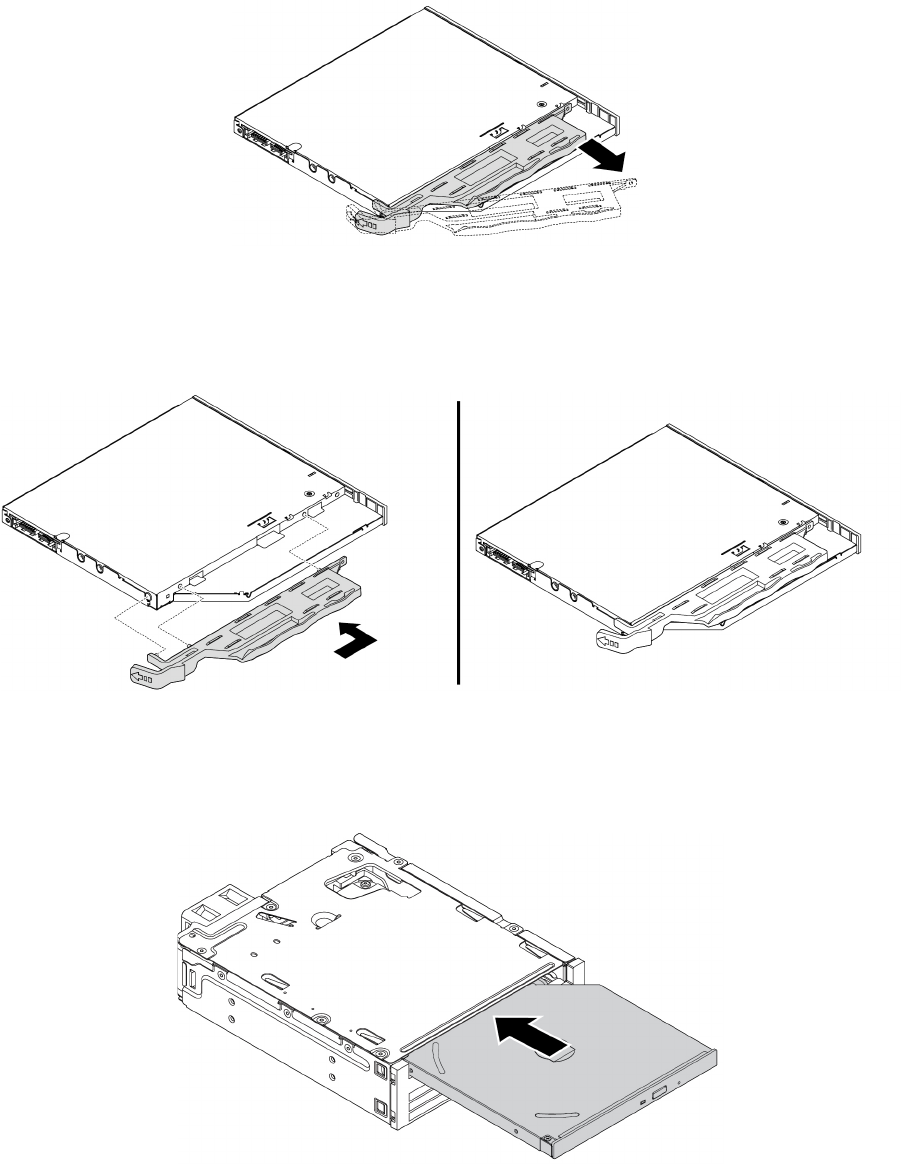
ﺎﻟﺸﻜﻞ٤٧.ﺈﺧﺮﺍﺝﺎﻟﺤﺎﻣﻞﻤﻦﻤﺤﺮﻙﺎﻟﺄﻗﺮﺍﺹﺎﻟﻀﻮﺋﻴﺔﺎﻟﺮﻓﻴﻊ
٣.ﺎﻋﻤﻞﻌﻠﻰﻤﺤﺎﺫﺍﺓﺎﻟﺄﻟﺴﻨﺔﺎﻟﺜﻠﺎﺛﺔﻌﻠﻰﺎﻟﺤﺎﻣﻞﻤﻊﺎﻟﻔﺘﺤﺎﺕﺎﻟﻤﻨﺎﻇﺮﺓﻔﻲﻤﺤﺮﻙﺎﻟﺄﻗﺮﺍﺹﺎﻟﻀﻮﺋﻴﺔﺎﻟﺮﻓﻴﻊﺎﻟﺠﺪﻳﺪ،ﻮﺭﻛ
ّ
ﺐﺎﻟﺤﺎﻣﻞﻌﻠﻰﻤﺤﺮﻙﺎﻟﺄﻗﺮﺍﺹ
ﺎﻟﻀﻮﺋﻴﺔﺎﻟﺮﻓﻴﻊﺎﻟﺠﺪﻳﺪ.
ﺎﻟﺸﻜﻞ٤٨.ﺘﺮﻛﻴﺐﺎﻟﺤﺎﻣﻞﻌﻠﻰﻤﺤﺮﻙﺎﻟﺄﻗﺮﺍﺹﺎﻟﻀﻮﺋﻴﺔﺎﻟﺮﻓﻴﻊﺎﻟﺠﺪﻳﺪ
٤.ﺄﺩﺧﻞﻤﺤﺮﻙﺎﻟﺄﻗﺮﺍﺹﺎﻟﻀﻮﺋﻴﺔﺎﻟﺮﻓﻴﻊﺎﻟﺠﺪﻳﺪﻔﻲﺎﻟﺤﺰﻣﺔﺤﺘﻰﺘﺴﻤﻊﺼﻮﺕﺎﺳﺘﻘﺮﺍﺭﻩﻔﻲﻤﻮﺿﻌﻪ.ﺘﻢﺘﺜﺒﻴﺖﻤﺤﺮﻙﺎﻟﺄﻗﺮﺍﺹﺎﻟﻀﻮﺋﻴﺔﺎﻟﺮﻓﻴﻊﻔﻲ
ﻤﻜﺎﻧﻪ.
ﺎﻟﺸﻜﻞ٤٩.ﺘﺮﻛﻴﺐﻤﺤﺮﻙﺎﻟﺄﻗﺮﺍﺹﺎﻟﻀﻮﺋﻴﺔﺎﻟﺮﻓﻴﻊﻔﻲﺎﻟﺤﺰﻣﺔ
ﻤﺤﺮﻙﺄﻗﺮﺍﺹﺘﺨﺰﻳﻦﺪﺍﺧﻠﻲﺒﺤﺠﻢ3.5ﺒﻮﺻﺔ
ﻠﺘﺮﻛﻴﺐﻤﺤﺮﻙﺄﻗﺮﺍﺹﺘﺨﺰﻳﻦﺪﺍﺧﻠﻲﺒﺤﺠﻢ3.5ﺒﻮﺻﺔﻔﻲﺎﻟﺤﺰﻣﺔﺄﻭﺎﺳﺘﺒﺪﺍﻟﻪ،ﻘﻢﺒﻤﺎﻴﻠﻲ:
٧٢
ﺩﻟﻴﻞﻣﺴﺘﺨﺪﻡP320
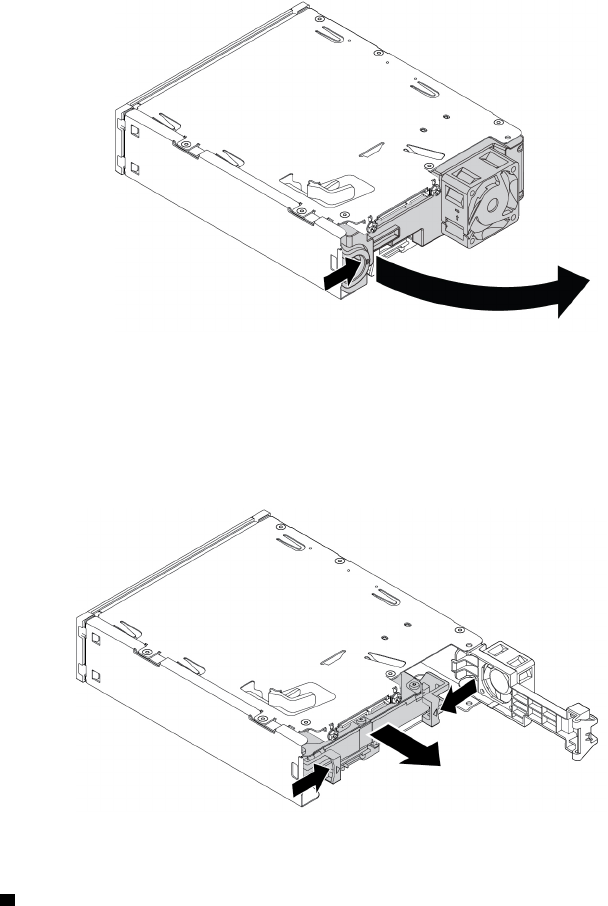
١.ﺤﺮ
ّ
ﻙﺎﻟﺤﺰﻣﺔﻠﺈﺧﺮﺍﺟﻬﺎﻤﻦﺎﻟﻬﻴﻜﻞ.ﺮﺍﺟﻊ"ﻤﺤﺮﻙﺎﻟﺄﻗﺮﺍﺹﺎﻟﻀﻮﺋﻴﺔ"ﻌﻠﻰﺎﻟﺼﻔﺤﺔ٦٢.
٢.ﺎﺿﻐﻂﻌﻠﻰﺎﻟﻤﺸﺒﻚ،ﻜﻤﺎﻬﻮﻤﺒﻴ
ّ
ﻦ،ﻠﻔﺘﺢﺎﻟﻐﻄﺎﺀﺎﻟﺨﻠﻔﻲﻠﻠﺤﺰﻣﺔ.
ﺎﻟﺸﻜﻞ٥٠.ﻔﺘﺢﺎﻟﺤﺰﻣﺔﻤﻦﺎﻟﺠﻬﺔﺎﻟﺨﻠﻔﻴﺔ
٣.ﺈﺫﺍﻜﻨﺖﺒﺼﺪﺩﺎﺳﺘﺒﺪﺍﻝﻤﺤﺮﻙﺄﻗﺮﺍﺹﺘﺨﺰﻳﻦﺪﺍﺧﻠﻲﻘﺪﻳﻢﺒﺤﺠﻢ3.5ﺒﻮﺻﺔ،ﻔﻘﻢﺒﻤﺎﻴﻠﻲ:
a.ﺒﻌﺪﺬﻟﻚ،ﺎﺿﻐﻂﻌﻠﻰﺎﻟﻤﺸﺒﻜﻴﻦﻔﻲﺎﻟﻮﻗﺖﻨﻔﺴﻪﺒﺎﺗﺠﺎﻩﺒﻌﻀﻬﻤﺎ،ﻮﺍﺩﻓﻊﻤﺤﺮﻙﺄﻗﺮﺍﺹﺎﻟﺘﺨﺰﻳﻦﺎﻟﺪﺍﺧﻠﻲﺒﺤﺠﻢ3.5ﺒﻮﺻﺔﺨﺎﺭﺝﺎﻟﺠﻬﺔﺎﻟﺨﻠﻔﻴﺔ
ﻠﻠﺤﺰﻣﺔ.
ﺎﻟﺸﻜﻞ٥١.ﺈﺧﺮﺍﺝﻤﺤﺮﻙﺄﻗﺮﺍﺹﺎﻟﺘﺨﺰﻳﻦﺎﻟﺪﺍﺧﻠﻲﺒﺤﺠﻢ3.5ﺒﻮﺻﺔﻤﻦﺎﻟﺠﻬﺔﺎﻟﺨﻠﻔﻴﺔ
b.ﻘﻢﺒﺜﻨﻲﺠﺎﻧﺒﻲﺎﻟﺤﺎﻣﻞﻠﺈﺧﺮﺍﺝﻤﺤﺮﻙﺄﻗﺮﺍﺹﺎﻟﺘﺨﺰﻳﻦﺎﻟﺪﺍﺧﻠﻲﺒﺤﺠﻢ3.5ﺒﻮﺻﺔﻤﻦﺎﻟﺤﺎﻣﻞ.ﻠﺎﺘﻠﻤﺲﻠﻮﺣﺔﺎﻟﺪﻭﺍﺋﺮﺎﻟﻜﻬﺮﺑﺎﺋﻴﺔ1ﻌﻠﻰﻤﺤﺮﻙ
ﺄﻗﺮﺍﺹﺎﻟﺘﺨﺰﻳﻦﺎﻟﺪﺍﺧﻠﻲ.
ﺍﻟﻤﻠﺤﻖ٧.ﺇﺧﺮﺍﺝﺍﻷﺟﻬﺰﺓﻭﺗﺮﻛﻴﺒﻬﺎ٧٣
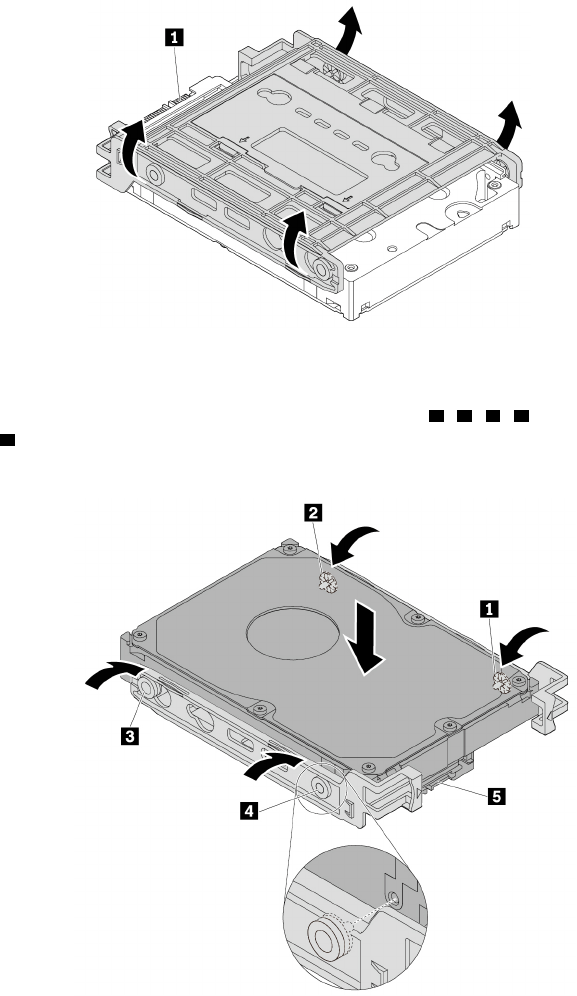
ﺎﻟﺸﻜﻞ٥٢.ﺜﻨﻲﺠﺎﻧﺒﻲﺎﻟﺤﺎﻣﻞﻠﺈﺧﺮﺍﺝﻤﺤﺮﻙﺄﻗﺮﺍﺹﺎﻟﺘﺨﺰﻳﻦﺎﻟﺪﺍﺧﻠﻲﺒﺤﺠﻢ3.5ﺒﻮﺻﺔ
٤.ﻘﻢﺒﺜﻨﻲﺎﻟﺤﺎﻣﻞﻮﻣﺤﺎﺫﺍﺓﺄﻃﺮﺍﻑﺎﻟﺘﻮﺻﻴﻞ1ﻮ2ﻮ3ﻮ4ﻌﻠﻰﺎﻟﺤﺎﻣﻞﻤﻊﺎﻟﻔﺘﺤﺎﺕﺎﻟﻤﻨﺎﻇﺮﺓﻠﻬﺎﻔﻲﻤﺤﺮﻙﺄﻗﺮﺍﺹﺎﻟﺘﺨﺰﻳﻦﺎﻟﺪﺍﺧﻠﻲﺎﻟﺠﺪﻳﺪﺒﺤﺠﻢ3.5
ﺒﻮﺻﺔ.ﺒﻌﺪﺬﻟﻚ،ﺮﻛ
ّ
ﺐﻤﺤﺮﻙﺄﻗﺮﺍﺹﺎﻟﺘﺨﺰﻳﻦﺎﻟﺪﺍﺧﻠﻲﺎﻟﺠﺪﻳﺪﺒﺤﺠﻢ3.5ﺒﻮﺻﺔﻔﻲﺎﻟﺤﺎﻣﻞ.ﻠﺎﺘﻠﻤﺲﻠﻮﺣﺔﺎﻟﺪﻭﺍﺋﺮﺎﻟﻜﻬﺮﺑﺎﺋﻴﺔ
5ﻌﻠﻰﻤﺤﺮﻙﺄﻗﺮﺍﺹ
ﺎﻟﺘﺨﺰﻳﻦﺎﻟﺪﺍﺧﻠﻲ.
ﺎﻟﺸﻜﻞ٥٣.ﺘﺮﻛﻴﺐﻤﺤﺮﻙﺄﻗﺮﺍﺹﺎﻟﺘﺨﺰﻳﻦﺎﻟﺪﺍﺧﻠﻲﺎﻟﺠﺪﻳﺪﺒﺤﺠﻢ3.5ﺒﻮﺻﺔﻔﻲﺎﻟﺤﺎﻣﻞ
٥.ﺄﺩﺧﻞﻤﺤﺮﻙﺄﻗﺮﺍﺹﺎﻟﺘﺨﺰﻳﻦﺎﻟﺪﺍﺧﻠﻲﺎﻟﺠﺪﻳﺪﺒﺤﺠﻢ3.5ﺒﻮﺻﺔﻔﻲﺎﻟﺤﺰﻣﺔﻤﻦﺎﻟﺠﻬﺔﺎﻟﺨﻠﻔﻴﺔﺤﺘﻰﻴﺴﺘﻘﺮﻤﺤﺮﻙﺄﻗﺮﺍﺹﺎﻟﺘﺨﺰﻳﻦﺎﻟﺪﺍﺧﻠﻲﻔﻲﻤﻮﺿﻌﻪ.
٧٤
ﺩﻟﻴﻞﻣﺴﺘﺨﺪﻡP320
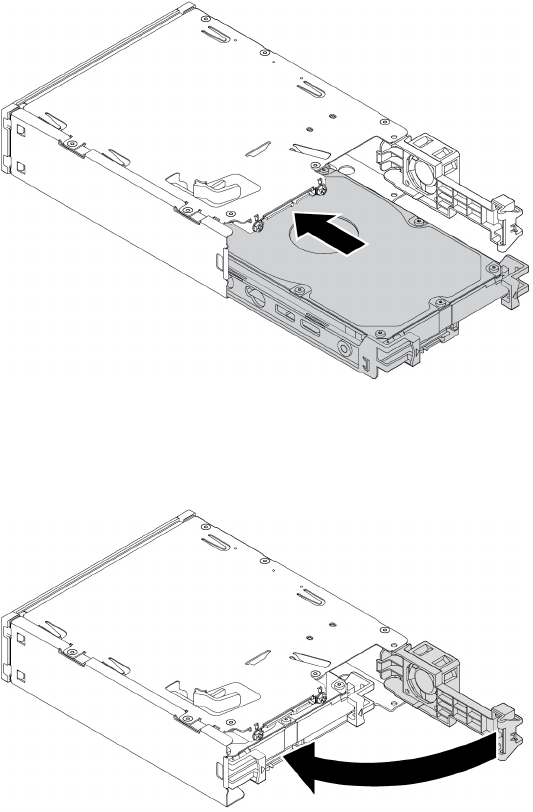
ﺎﻟﺸﻜﻞ٥٤.ﺪﻓﻊﻤﺤﺮﻙﺄﻗﺮﺍﺹﺎﻟﺘﺨﺰﻳﻦﺎﻟﺪﺍﺧﻠﻲﺎﻟﺠﺪﻳﺪﺒﺤﺠﻢ3.5ﺒﻮﺻﺔﺈﻟﻰﺪﺍﺧﻞﺎﻟﺤﺰﻣﺔ
٦.ﻘﻢﺒﺘﺪﻭﻳﺮﺎﻟﻐﻄﺎﺀﺎﻟﺨﻠﻔﻲﻠﻠﺤﺰﻣﺔﻨﺤﻮﺎﻟﺪﺍﺧﻞﺤﺘﻰﺘﺴﻤﻊﺼﻮﺕﺎﺳﺘﻘﺮﺍﺭﻩﻔﻲﻤﻮﺿﻌﻪ.ﺘﻢﺘﺜﺒﻴﺖﺎﻟﻐﻄﺎﺀﺎﻟﺨﻠﻔﻲﺒﺈﺣﻜﺎﻡﻔﻲﻤﻜﺎﻧﻪ.
ﺎﻟﺸﻜﻞ٥٥.ﺘﺪﻭﻳﺮﺎﻟﻐﻄﺎﺀﺎﻟﺨﻠﻔﻲﻠﻠﺪﺍﺧﻞ
ﻤﺤﺮﻙﺄﻗﺮﺍﺹﺘﺨﺰﻳﻦﺪﺍﺧﻠﻲﺒﺤﺠﻢ2.5ﺒﻮﺻﺔ
ﻠﺘﺮﻛﻴﺐﻤﺤﺮﻙﺄﻗﺮﺍﺹﺘﺨﺰﻳﻦﺪﺍﺧﻠﻲﺒﺤﺠﻢ2.5ﺒﻮﺻﺔﻔﻲﺎﻟﺤﺰﻣﺔﺄﻭﺎﺳﺘﺒﺪﺍﻟﻪ،ﻘﻢﺒﻤﺎﻴﻠﻲ:
١.ﺤﺮ
ّ
ﻙﺎﻟﺤﺰﻣﺔﻠﺈﺧﺮﺍﺟﻬﺎﻤﻦﺎﻟﻬﻴﻜﻞ.ﺮﺍﺟﻊ"ﻤﺤﺮﻙﺎﻟﺄﻗﺮﺍﺹﺎﻟﻀﻮﺋﻴﺔ"ﻌﻠﻰﺎﻟﺼﻔﺤﺔ٦٢.
٢.ﺎﺿﻐﻂﻌﻠﻰﺎﻟﻤﺸﺒﻚ،ﻜﻤﺎﻬﻮﻤﺒﻴ
ّ
ﻦ،ﻠﻔﺘﺢﺎﻟﻐﻄﺎﺀﺎﻟﺨﻠﻔﻲﻠﻠﺤﺰﻣﺔ.
ﺍﻟﻤﻠﺤﻖ٧.ﺇﺧﺮﺍﺝﺍﻷﺟﻬﺰﺓﻭﺗﺮﻛﻴﺒﻬﺎ٧٥
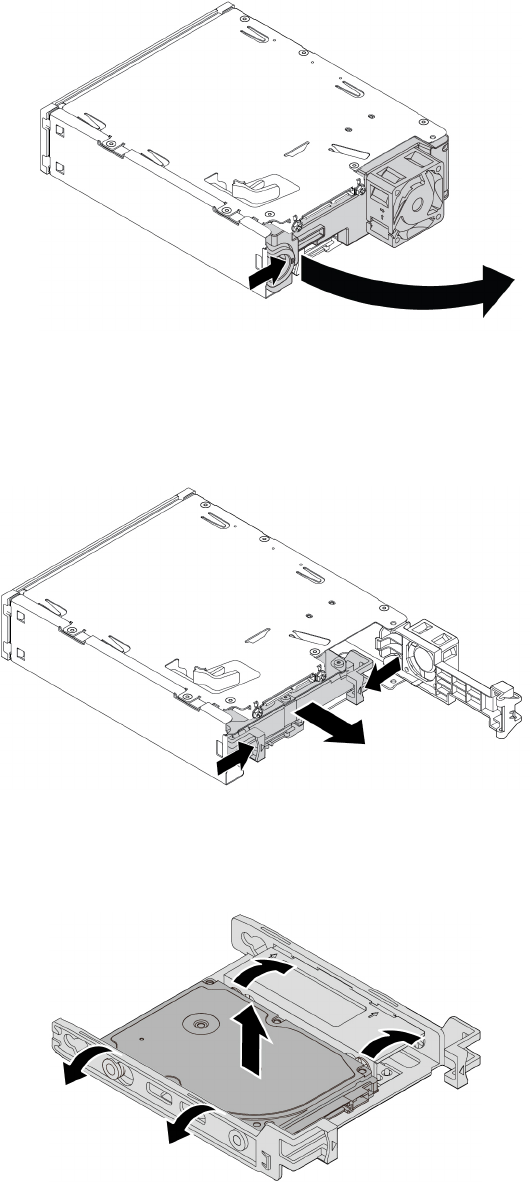
ﺎﻟﺸﻜﻞ٥٦.ﻔﺘﺢﺎﻟﺤﺰﻣﺔﻤﻦﺎﻟﺠﻬﺔﺎﻟﺨﻠﻔﻴﺔ
٣.ﺈﺫﺍﻜﻨﺖﺒﺼﺪﺩﺎﺳﺘﺒﺪﺍﻝﻤﺤﺮﻙﺄﻗﺮﺍﺹﺘﺨﺰﻳﻦﺪﺍﺧﻠﻲﻘﺪﻳﻢﺒﺤﺠﻢ2.5ﺒﻮﺻﺔ،ﻔﻘﻢﺒﻤﺎﻴﻠﻲ:
a.ﺎﺿﻐﻂﻌﻠﻰﺎﻟﻤﺸﺒﻜﻴﻦﻔﻲﺎﻟﻮﻗﺖﻨﻔﺴﻪﺒﺎﺗﺠﺎﻩﺒﻌﻀﻬﻤﺎ،ﻮﺍﺩﻓﻊﻤﺤﺮﻙﺄﻗﺮﺍﺹﺎﻟﺘﺨﺰﻳﻦﺎﻟﺪﺍﺧﻠﻲﺒﺤﺠﻢ2.5ﺒﻮﺻﺔﺨﺎﺭﺝﺎﻟﺠﻬﺔﺎﻟﺨﻠﻔﻴﺔﻠﻠﺤﺰﻣﺔ.
ﺎﻟﺸﻜﻞ٥٧.ﺈﺧﺮﺍﺝﻤﺤﺮﻙﺄﻗﺮﺍﺹﺎﻟﺘﺨﺰﻳﻦﺎﻟﺪﺍﺧﻠﻲﺒﺤﺠﻢ2.5ﺒﻮﺻﺔﻤﻦﺎﻟﺠﻬﺔﺎﻟﺨﻠﻔﻴﺔ
b.ﻘﻢﺒﺜﻨﻲﺠﺎﻧﺒﻲﺎﻟﺤﺎﻣﻞﻠﺈﺧﺮﺍﺝﻤﺤﺮﻙﺄﻗﺮﺍﺹﺎﻟﺘﺨﺰﻳﻦﺎﻟﺪﺍﺧﻠﻲﺒﺤﺠﻢ2.5ﺒﻮﺻﺔﻤﻦﺎﻟﺤﺎﻣﻞ.
ﺎﻟﺸﻜﻞ٥٨.ﺜﻨﻲﺠﺎﻧﺒﻲﺎﻟﺤﺎﻣﻞﻠﺈﺧﺮﺍﺝﻤﺤﺮﻙﺄﻗﺮﺍﺹﺎﻟﺘﺨﺰﻳﻦﺎﻟﺪﺍﺧﻠﻲﺒﺤﺠﻢ2.5ﺒﻮﺻﺔﻤﻦﺎﻟﺤﺎﻣﻞ
٧٦ﺩﻟﻴﻞﻣﺴﺘﺨﺪﻡP320
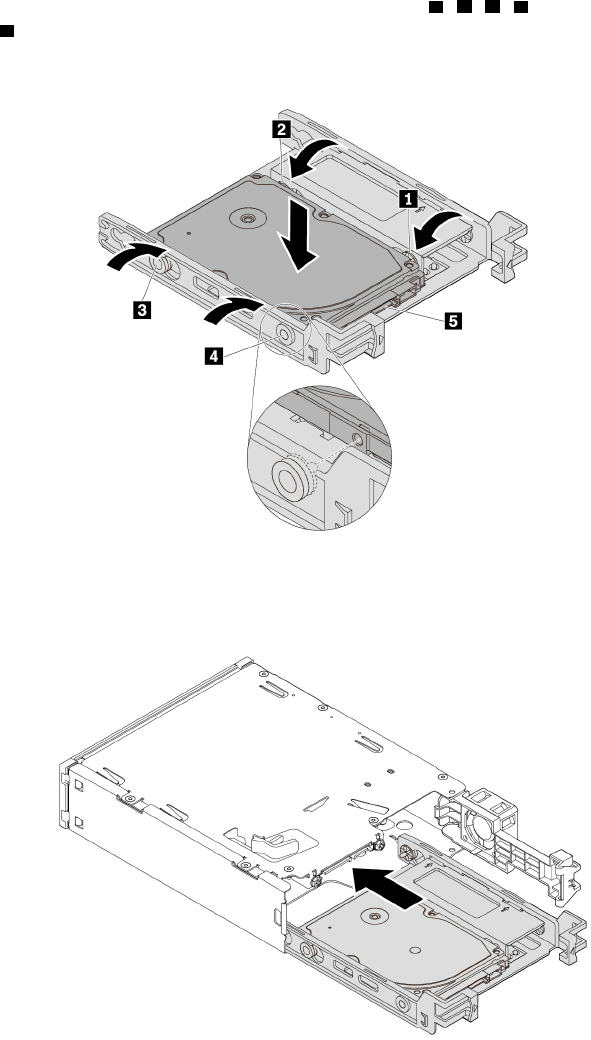
٤.ﻘﻢﺒﺜﻨﻲﺎﻟﺤﺎﻣﻞﻮﻣﺤﺎﺫﺍﺓﺄﻃﺮﺍﻑﺎﻟﺘﻮﺻﻴﻞ1ﻮ2ﻮ3ﻮ4ﻌﻠﻰﺎﻟﺤﺎﻣﻞﻤﻊﺎﻟﻔﺘﺤﺎﺕﺎﻟﻤﻨﺎﻇﺮﺓﻠﻬﺎﻔﻲﻤﺤﺮﻙﺄﻗﺮﺍﺹﺎﻟﺘﺨﺰﻳﻦﺎﻟﺪﺍﺧﻠﻲﺎﻟﺠﺪﻳﺪﺒﺤﺠﻢ2.5
ﺒﻮﺻﺔ.ﺒﻌﺪﺬﻟﻚ،ﺮﻛ
ّ
ﺐﻤﺤﺮﻙﺄﻗﺮﺍﺹﺎﻟﺘﺨﺰﻳﻦﺎﻟﺪﺍﺧﻠﻲﺎﻟﺠﺪﻳﺪﺒﺤﺠﻢ2.5ﺒﻮﺻﺔﻔﻲﺎﻟﺤﺎﻣﻞ.ﻠﺎﺘﻠﻤﺲﻠﻮﺣﺔﺎﻟﺪﻭﺍﺋﺮﺎﻟﻜﻬﺮﺑﺎﺋﻴﺔ
5ﻌﻠﻰﻤﺤﺮﻙﺄﻗﺮﺍﺹ
ﺎﻟﺘﺨﺰﻳﻦﺎﻟﺪﺍﺧﻠﻲ.
ﺎﻟﺸﻜﻞ٥٩.ﺘﺮﻛﻴﺐﻤﺤﺮﻙﺄﻗﺮﺍﺹﺎﻟﺘﺨﺰﻳﻦﺎﻟﺪﺍﺧﻠﻲﺎﻟﺠﺪﻳﺪﺒﺤﺠﻢ2.5ﺒﻮﺻﺔﻔﻲﺎﻟﺤﺎﻣﻞ
٥.ﺄﺩﺧﻞﻤﺤﺮﻙﺄﻗﺮﺍﺹﺎﻟﺘﺨﺰﻳﻦﺎﻟﺪﺍﺧﻠﻲﺎﻟﺠﺪﻳﺪﺒﺤﺠﻢ2.5ﺒﻮﺻﺔﻔﻲﺎﻟﺤﺰﻣﺔﻤﻦﺎﻟﺠﻬﺔﺎﻟﺨﻠﻔﻴﺔﺤﺘﻰﻴﺴﺘﻘﺮﻤﺤﺮﻙﺄﻗﺮﺍﺹﺎﻟﺘﺨﺰﻳﻦﺎﻟﺪﺍﺧﻠﻲﻔﻲﻤﻮﺿﻌﻪ.
ﺎﻟﺸﻜﻞ٦٠.ﺈﺩﺧﺎﻝﻤﺤﺮﻙﺄﻗﺮﺍﺹﺎﻟﺘﺨﺰﻳﻦﺎﻟﺪﺍﺧﻠﻲﺎﻟﺠﺪﻳﺪﺒﺤﺠﻢ2.5ﺒﻮﺻﺔﻔﻲﺎﻟﺤﺰﻣﺔ
٦.ﻘﻢﺒﺘﺪﻭﻳﺮﺎﻟﻐﻄﺎﺀﺎﻟﺨﻠﻔﻲﻠﻠﺤﺰﻣﺔﻨﺤﻮﺎﻟﺪﺍﺧﻞﺤﺘﻰﺘﺴﻤﻊﺼﻮﺕﺎﺳﺘﻘﺮﺍﺭﻩﻔﻲﻤﻮﺿﻌﻪ.ﺘﻢﺘﺜﺒﻴﺖﺎﻟﻐﻄﺎﺀﺎﻟﺨﻠﻔﻲﺒﺈﺣﻜﺎﻡﻔﻲﻤﻜﺎﻧﻪ.
ﺍﻟﻤﻠﺤﻖ٧.ﺇﺧﺮﺍﺝﺍﻷﺟﻬﺰﺓﻭﺗﺮﻛﻴﺒﻬﺎ٧٧
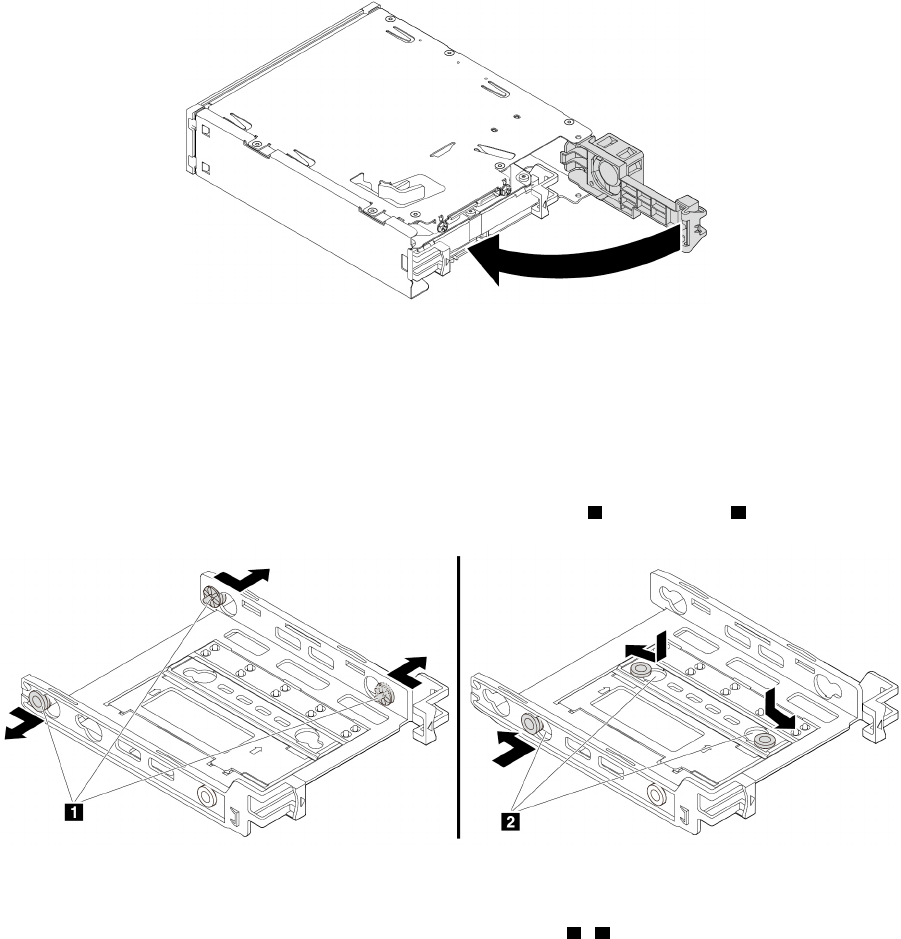
ﺎﻟﺸﻜﻞ٦١.ﺘﺪﻭﻳﺮﺎﻟﻐﻄﺎﺀﺎﻟﺨﻠﻔﻲﻠﻠﺪﺍﺧﻞ
ﺎﺳﺘﺒﺪﺍﻝﻤﺤﺮﻙﺄﻗﺮﺍﺹﺘﺨﺰﻳﻦﺪﺍﺧﻠﻲﺒﺤﺠﻢ3.5ﺒﻮﺻﺔﺒﻤﺤﺮﻙﺄﻗﺮﺍﺹﺘﺨﺰﻳﻦﺪﺍﺧﻠﻲﺒﺤﺠﻢ2.5ﺒﻮﺻﺔ
ﻠﺎﺳﺘﺒﺪﺍﻝﻤﺤﺮﻙﺄﻗﺮﺍﺹﺘﺨﺰﻳﻦﺪﺍﺧﻠﻲﺒﺤﺠﻢ3.5ﺒﻮﺻﺔﺒﻤﺤﺮﻙﺄﻗﺮﺍﺹﺘﺨﺰﻳﻦﺪﺍﺧﻠﻲﺒﺤﺠﻢ2.5ﺒﻮﺻﺔ،ﻘﻢﺒﻤﺎﻴﻠﻲ:
١.ﺘﺄﻛﺪﻤﻦﺈﺧﺮﺍﺝﻤﺤﺮﻙﺄﻗﺮﺍﺹﺎﻟﺘﺨﺰﻳﻦﺎﻟﺪﺍﺧﻠﻲﺒﺤﺠﻢ3.5ﺒﻮﺻﺔﻤﻦﺎﻟﺤﺎﻣﻞﺄﻭﻟﺎ
ً
.ﺮﺍﺟﻊ"ﻤﺤﺮﻙﺄﻗﺮﺍﺹﺘﺨﺰﻳﻦﺪﺍﺧﻠﻲﺒﺤﺠﻢ3.5ﺒﻮﺻﺔ"ﻌﻠﻰ
ﺎﻟﺼﻔﺤﺔ٧٢.
٢.ﺎﻧﺰﻉﺜﻠﺎﺛﺔﺄﻃﺮﺍﻑﺘﻮﺻﻴﻞ
1ﻮﺭﻛ
ّ
ﺒﻬﺎﻔﻲﺎﻟﻔﺘﺤﺎﺕ2.
ﺎﻟﺸﻜﻞ٦٢.ﻨﺰﻉﺜﻠﺎﺛﺔﺄﻃﺮﺍﻑﺘﻮﺻﻴﻞﻮﺗﺮﻛﻴﺒﻬﺎﻔﻲﻔﺘﺤﺎﺕﺠﺪﻳﺪﺓ
٣.ﻘﻢﺒﺘﺪﻭﻳﺮﺎﻟﺤﺎﻣﻞ،ﻜﻤﺎﻬﻮﻤﺒﻴﻦ،ﻠﺘﺤﺮﻳﺮﺎﻟﻠﺴﺎﻧﻴﻦ1ﻮ3ﻤﻦﺎﻟﻔﺘﺤﺎﺕ.
٧٨
ﺩﻟﻴﻞﻣﺴﺘﺨﺪﻡP320
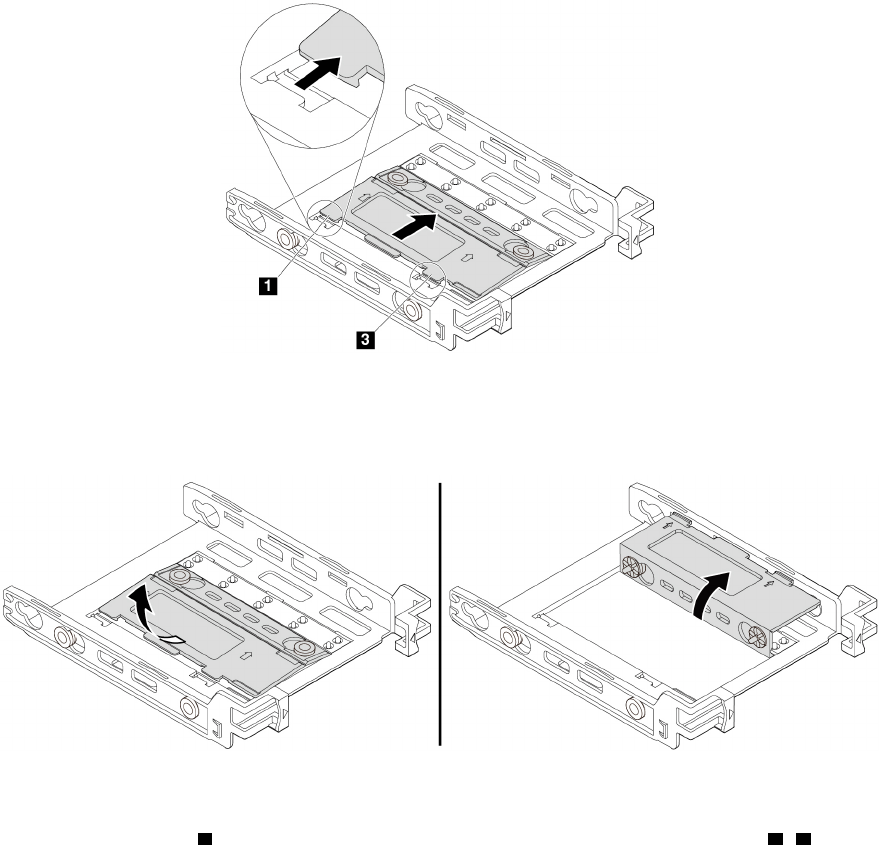
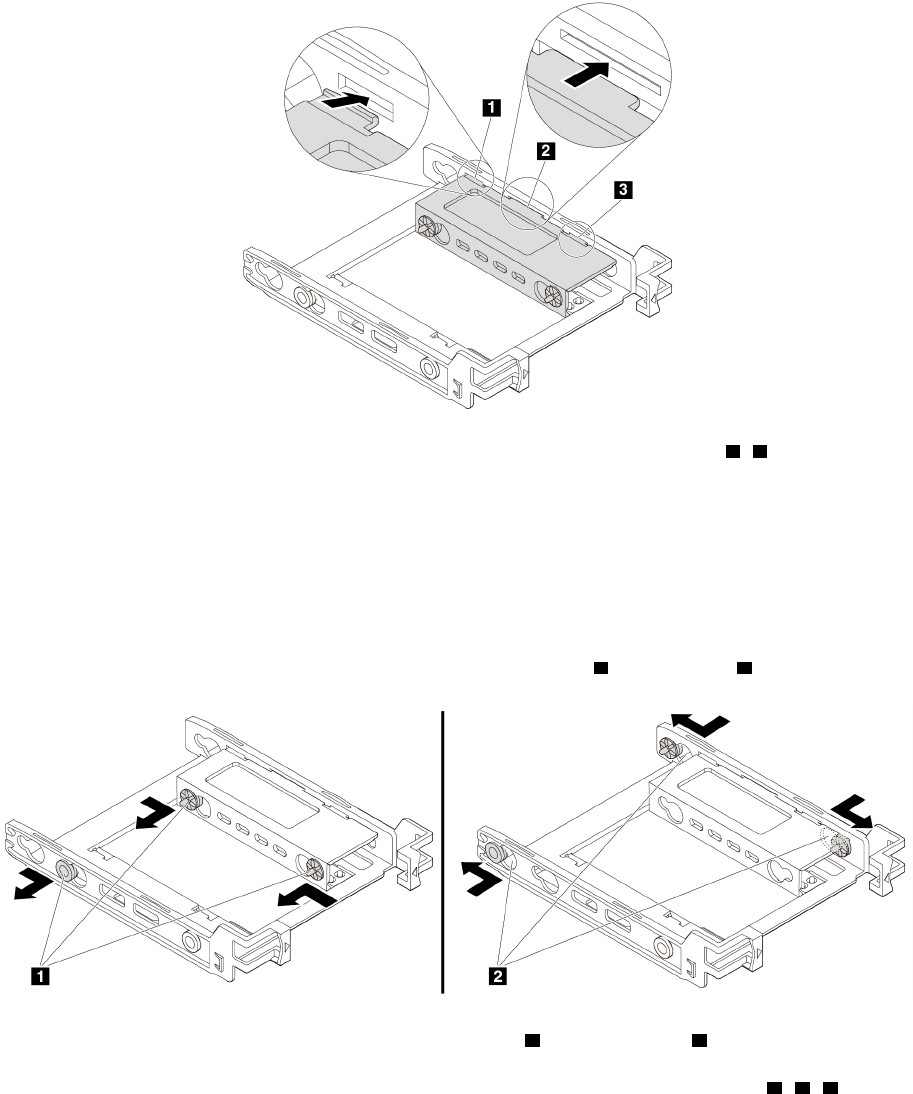
ﺎﻟﺸﻜﻞ٦٥.ﺈﺩﺧﺎﻝﺎﻟﻠﺴﺎﻧﻴﻦ1ﻮ3ﻔﻲﺎﻟﻔﺘﺤﺎﺕﺎﻟﻤﻨﺎﻇﺮﺓ
٦.ﺮﻛ
ّ
ﺐﻤﺤﺮﻙﺄﻗﺮﺍﺹﺎﻟﺘﺨﺰﻳﻦﺎﻟﺪﺍﺧﻠﻲﺒﺤﺠﻢ2.5ﺒﻮﺻﺔﻔﻲﺎﻟﺤﺎﻣﻞ.ﺮﺍﺟﻊ"ﻤﺤﺮﻙﺄﻗﺮﺍﺹﺘﺨﺰﻳﻦﺪﺍﺧﻠﻲﺒﺤﺠﻢ2.5ﺒﻮﺻﺔ"ﻌﻠﻰﺎﻟﺼﻔﺤﺔ٧٥.
ﺎﺳﺘﺒﺪﺍﻝﻤﺤﺮﻙﺄﻗﺮﺍﺹﺘﺨﺰﻳﻦﺪﺍﺧﻠﻲﺒﺤﺠﻢ2.5ﺒﻮﺻﺔﺒﻤﺤﺮﻙﺄﻗﺮﺍﺹﺘﺨﺰﻳﻦﺪﺍﺧﻠﻲﺒﺤﺠﻢ3.5ﺒﻮﺻﺔ
ﻠﺎﺳﺘﺒﺪﺍﻝﻤﺤﺮﻙﺄﻗﺮﺍﺹﺘﺨﺰﻳﻦﺪﺍﺧﻠﻲﺒﺤﺠﻢ2.5ﺒﻮﺻﺔﺒﻤﺤﺮﻙﺄﻗﺮﺍﺹﺘﺨﺰﻳﻦﺪﺍﺧﻠﻲﺒﺤﺠﻢ3.5ﺒﻮﺻﺔ،ﻘﻢﺒﻤﺎﻴﻠﻲ:
١.ﺘﺄﻛﺪﻤﻦﺈﺧﺮﺍﺝﻤﺤﺮﻙﺄﻗﺮﺍﺹﺎﻟﺘﺨﺰﻳﻦﺎﻟﺪﺍﺧﻠﻲﺒﺤﺠﻢ2.5ﺒﻮﺻﺔﻤﻦﺎﻟﺤﺎﻣﻞ.ﺮﺍﺟﻊ"ﻤﺤﺮﻙﺄﻗﺮﺍﺹﺘﺨﺰﻳﻦﺪﺍﺧﻠﻲﺒﺤﺠﻢ2.5ﺒﻮﺻﺔ"ﻌﻠﻰﺎﻟﺼﻔﺤﺔ
٧٥.
٢.ﺎﻧﺰﻉﺜﻠﺎﺛﺔﺄﻃﺮﺍﻑﺘﻮﺻﻴﻞ
1ﻮﺭﻛ
ّ
ﺒﻬﺎﻔﻲﺎﻟﻔﺘﺤﺎﺕ2.
ﺎﻟﺸﻜﻞ٦٦.ﻨﺰﻉﺜﻠﺎﺛﺔﺄﻃﺮﺍﻑﺘﻮﺻﻴﻞ1ﻮﺗﺮﻛﻴﺒﻬﺎﻔﻲﻔﺘﺤﺎﺕﺠﺪﻳﺪﺓ2
٣.ﺤﺮﺭﺎﻟﺄﻟﺴﻨﺔ1ﻮ2ﻮ3ﻤﻦﺎﻟﻔﺘﺤﺎﺕﺎﻟﻤﻨﺎﻇﺮﺓ.
٨٠
ﺩﻟﻴﻞﻣﺴﺘﺨﺪﻡP320
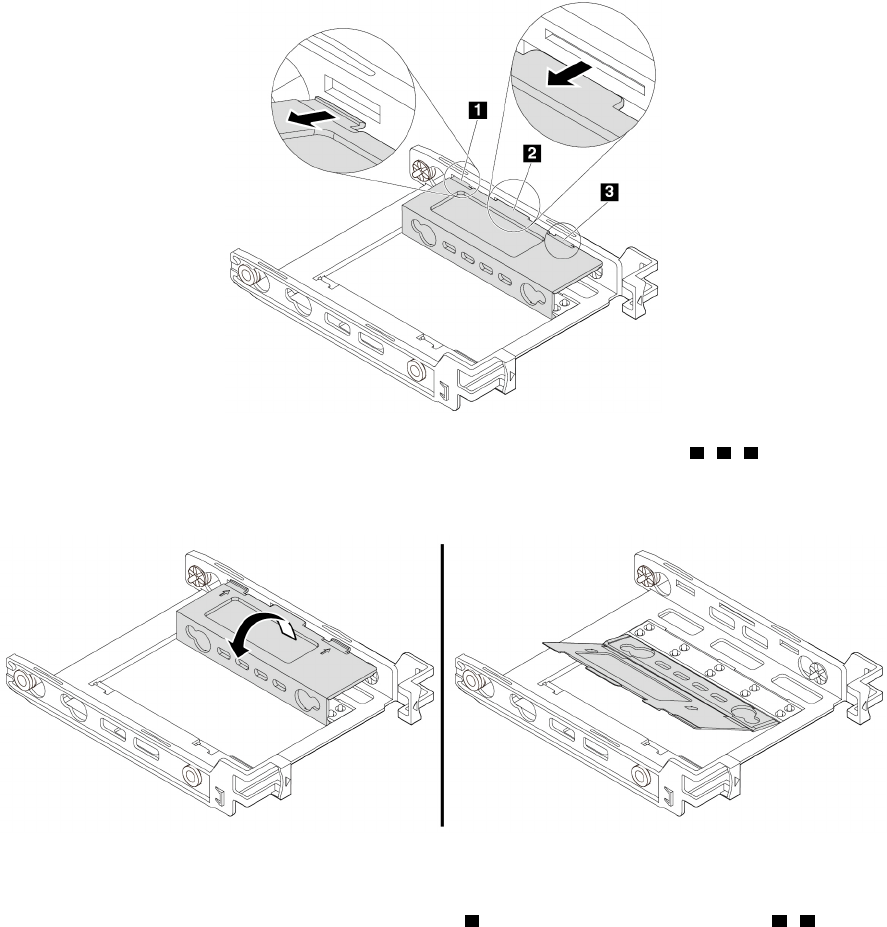
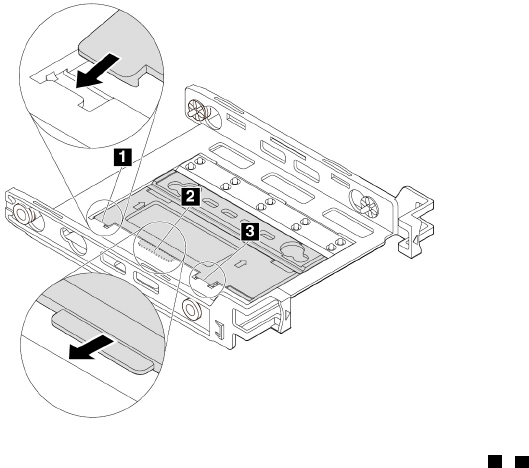
ﺎﻟﺸﻜﻞ٦٩.ﺈﺩﺧﺎﻝﺎﻟﻠﺴﺎﻧﻴﻦ1ﻮ3ﻔﻲﺎﻟﻔﺘﺤﺎﺕﺎﻟﻤﻨﺎﻇﺮﺓ
٦.ﺮﻛ
ّ
ﺐﻤﺤﺮﻙﺄﻗﺮﺍﺹﺎﻟﺘﺨﺰﻳﻦﺎﻟﺪﺍﺧﻠﻲﺒﺤﺠﻢ3.5ﺒﻮﺻﺔﻔﻲﺎﻟﺤﺎﻣﻞ.ﺮﺍﺟﻊ"ﻤﺤﺮﻙﺄﻗﺮﺍﺹﺘﺨﺰﻳﻦﺪﺍﺧﻠﻲﺒﺤﺠﻢ3.5ﺒﻮﺻﺔ"ﻌﻠﻰﺎﻟﺼﻔﺤﺔ٧٢.
ﻤﺎﻴﺠﺐﺎﻟﻘﻴﺎﻡﺒﻪﺒﻌﺪﺬﻟﻚ:
•ﻠﻠﺘﻌﺎﻣﻞﻤﻊﺠﺰﺀﺂﺧﺮﻤﻦﺎﻟﺠﻬﺎﺯ،ﺎﺫﻫﺐﺈﻟﻰﺎﻟﻘﺴﻢﺎﻟﻤﻨﺎﺳﺐ.
•ﻠﺎﺳﺘﻜﻤﺎﻝﻌﻤﻠﻴﺔﺎﻟﺘﺮﻛﻴﺐﺄﻭﺎﻟﺎﺳﺘﺒﺪﺍﻝ،ﺎﺫﻫﺐﺈﻟﻰ"ﺎﺳﺘﻜﻤﺎﻝﻌﻤﻠﻴﺔﺎﺳﺘﺒﺪﺍﻝﺎﻟﻘﻄﻊ"ﻌﻠﻰﺎﻟﺼﻔﺤﺔ٩٨.
ﻤﺤﺮﻙﺎﻟﺄﻗﺮﺍﺹﺬﻭﺎﻟﺤﺎﻟﺔﺎﻟﺼﻠﺒﺔ
ﻴﺘﻮﻓﺮﻤﺤﺮﻙﺎﻟﺄﻗﺮﺍﺹﺬﻭﺎﻟﺤﺎﻟﺔﺎﻟﺼﻠﺒﺔﻔﻲﺒﻌﺾﺎﻟﻄ
ُ
ﺮﺯﻔﻘﻂ.
ﺘﻨﺒﻴﻪ:ﻠﺎﺘﻔﺘﺢﺎﻟﻜﻤﺒﻴﻮﺗﺮﺄﻭﺘﺤﺎﻭﻝﺈﺻﻠﺎﺣﻪﻘﺒﻞﻘﺮﺍﺀﺓﻮﻓﻬﻢ"ﺎﻗﺮﺃﻬﺬﺍﺎﻟﺠﺰﺀﺄﻭﻟﺎ
ً
:ﻤﻌﻠﻮﻣﺎﺕﻤﻬﻤﺔﺤﻮﻝﺎﻟﺴﻠﺎﻣﺔ"ﻌﻠﻰﺎﻟﺼﻔﺤﺔiii.
ﺘﺮﻛﻴﺐﻤﺤﺮﻙﺎﻟﺄﻗﺮﺍﺹﺬﻱﺎﻟﺤﺎﻟﺔﺎﻟﺼﻠﺒﺔ
ﻠﺘﺮﻛﻴﺐﻤﺤﺮﻙﺎﻟﺄﻗﺮﺍﺹﺬﻱﺎﻟﺤﺎﻟﺔﺎﻟﺼﻠﺒﺔ،ﻘﻢﺒﻤﺎﻴﻠﻲ:
١.ﺎﻋﻤﻞﻌﻠﻰﺈﻋﺪﺍﺩﺎﻟﻜﻤﺒﻴﻮﺗﺮ.ﺮﺍﺟﻊ"ﺈﻋﺪﺍﺩﺎﻟﻜﻤﺒﻴﻮﺗﺮﻮﻧﺰﻉﻐﻄﺎﺀﺎﻟﻜﻤﺒﻴﻮﺗﺮ"ﻌﻠﻰﺎﻟﺼﻔﺤﺔ٥١.
٢.ﻘﻢﺒﺘﺮﻛﻴﺐﻤﺤﺮﻙﺎﻟﺄﻗﺮﺍﺹﺬﻱﺎﻟﺤﺎﻟﺔﺎﻟﺼﻠﺒﺔﻔﻲﻤﺤﻮﻝﺎﻟﺘﺨﺰﻳﻦﺎﻟﻤﺮﻓﻖﻤﻊﻤﺤﺮﻙﺎﻟﺄﻗﺮﺍﺹﺬﻱﺎﻟﺤﺎﻟﺔﺎﻟﺼﻠﺒﺔ.ﺜﻢﻘﻢﺒﺘﺮﻛﻴﺐﺎﻟﻤﺴﺎﻣﻴﺮﺎﻟﺄﺭﺑﻌﺔ
ﻠﺘﺜﺒﻴﺖﻤﺤﺮﻙﺎﻟﺄﻗﺮﺍﺹﺬﻱﺎﻟﺤﺎﻟﺔﺎﻟﺼﻠﺒﺔﻔﻲﻤﺤﻮﻝﺎﻟﺘﺨﺰﻳﻦ.
٨٢
ﺩﻟﻴﻞﻣﺴﺘﺨﺪﻡP320
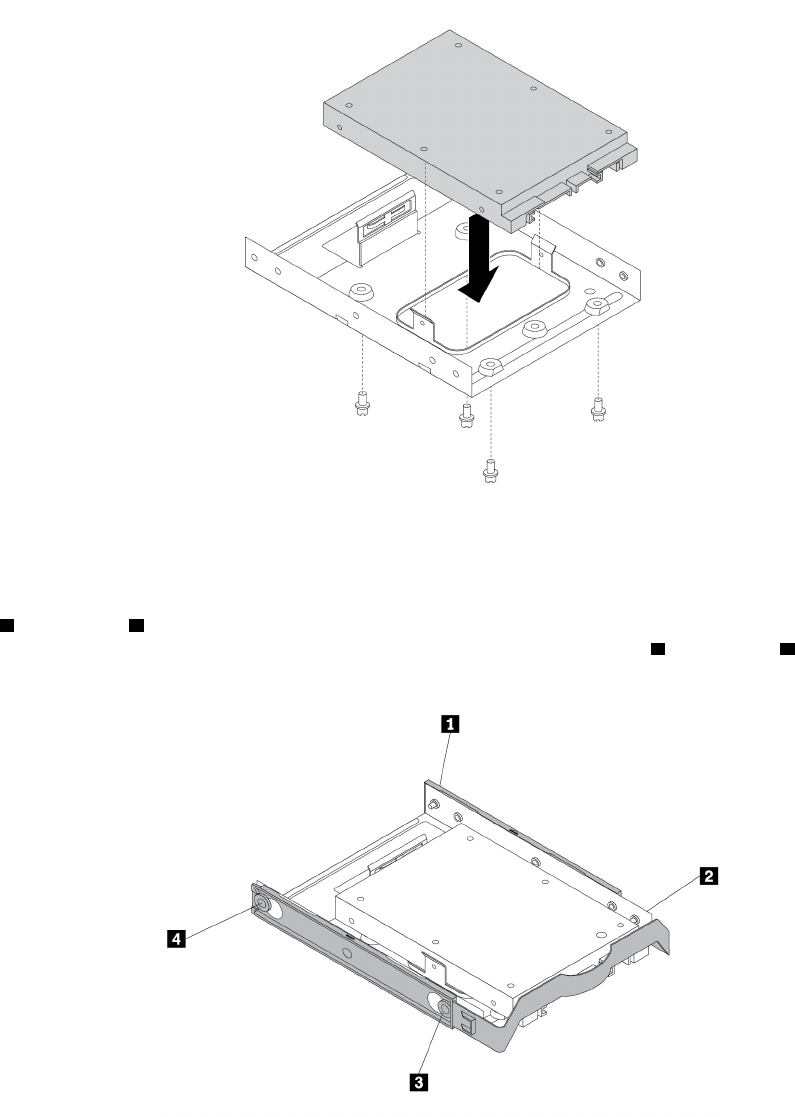
ﺎﻟﺸﻜﻞ٧٠.ﺘﺮﻛﻴﺐﻤﺤﺮﻙﺎﻟﺄﻗﺮﺍﺹﺬﻱﺎﻟﺤﺎﻟﺔﺎﻟﺼﻠﺒﺔﻔﻲﻤﺤﻮﻝﺎﻟﺘﺨﺰﻳﻦ
٣.ﺄﺧﺮﺝﺤﺎﻣﻞﻤﺤﺮﻙﺄﻗﺮﺍﺹﺎﻟﺘﺨﺰﻳﻦﻤﻘﺎﺱ3.5ﺒﻮﺻﺔﻤﻦﺎﻟﻬﻴﻜﻞ.
٤.ﻠﺘﺮﻛﻴﺐﻤﺤﻮﻝﻮﺣﺪﺓﺎﻟﺘﺨﺰﻳﻦﻔﻲﺤﺎﻣﻞﻤﺤﺮﻙﺄﻗﺮﺍﺹﺎﻟﺘﺨﺰﻳﻦﻤﻘﺎﺱ3.5ﺒﻮﺻﺔ،ﻘﻢﺒﺜﻨﻲﺎﻟﺤﺎﻣﻞﻮﻣﺤﺎﺫﺍﺓﻄﺮﻑﺎﻟﺘﻮﺻﻴﻞ
1ﻮﻃﺮﻑﺎﻟﺘﻮﺻﻴﻞ2
ﻮﻃﺮﻑﺎﻟﺘﻮﺻﻴﻞ3ﻮﻃﺮﻑﺎﻟﺘﻮﺻﻴﻞ4ﻌﻠﻰﺎﻟﺤﺎﻣﻞﻤﻊﺎﻟﻔﺘﺤﺎﺕﺎﻟﻤﻨﺎﻇﺮﺓﻔﻲﻤﺤﻮﻝﻮﺣﺪﺓﺎﻟﺘﺨﺰﻳﻦ.
ﺎﻟﺸﻜﻞ٧١.ﺘﺮﻛﻴﺐﻤﺤﻮﻝﻮﺣﺪﺓﺎﻟﺘﺨﺰﻳﻦﻤﻊﻤﺤﺮﻙﺎﻟﺄﻗﺮﺍﺹﺬﻱﺎﻟﺤﺎﻟﺔﺎﻟﺼﻠﺒﺔﻔﻲﺤﺎﻣﻞﻤﺤﺮﻙﺄﻗﺮﺍﺹﺎﻟﺘﺨﺰﻳﻦ
٥.ﺮﻛ
ّ
ﺐﻤﺤﻮﻝﻮﺣﺪﺓﺎﻟﺘﺨﺰﻳﻦﻤﻊﺎﻟﺤﺎﻣﻞﻔﻲﻔﺘﺤﺔﻤﺤﺮﻙﺄﻗﺮﺍﺹﺎﻟﺘﺨﺰﻳﻦﺎﻟﻤﻄﻠﻮﺏ.ﺮﺍﺟﻊ"ﻤﺤﺮﻙﺎﻟﺄﻗﺮﺍﺹﺎﻟﺜﺎﺑﺘﺔﺎﻟﺄﺳﺎﺳﻲ"ﻌﻠﻰﺎﻟﺼﻔﺤﺔ٩٢ﺄﻭ
"ﻤﺤﺮﻙﺎﻟﺄﻗﺮﺍﺹﺎﻟﺜﺎﺑﺘﺔﺎﻟﺜﺎﻧﻮﻱ"ﻌﻠﻰﺎﻟﺼﻔﺤﺔ٩٤.
٦.ﻘﻢﺒﺘﻮﺻﻴﻞﻜﺎﺑﻞﺎﻟﺎﺷﺎﺭﺓﻮﻛﺒﻞﺎﻟﻄﺎﻗﺔﺒﻤﺤﺮﻙﺎﻟﺄﻗﺮﺍﺹﺬﻱﺎﻟﺤﺎﻟﺔﺎﻟﺼﻠﺒﺔ.
ﺍﻟﻤﻠﺤﻖ٧.ﺇﺧﺮﺍﺝﺍﻷﺟﻬﺰﺓﻭﺗﺮﻛﻴﺒﻬﺎ٨٣
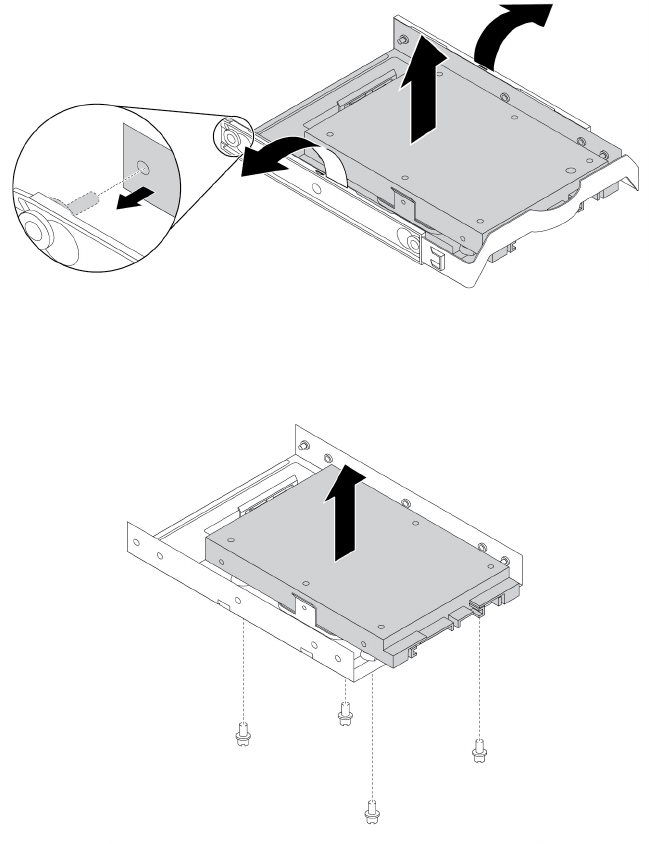
ﺎﺳﺘﺒﺪﺍﻝﻤﺤﺮﻙﺎﻟﺄﻗﺮﺍﺹﺬﻱﺎﻟﺤﺎﻟﺔﺎﻟﺼﻠﺒﺔ
ﻠﺎﺳﺘﺒﺪﺍﻝﻤﺤﺮﻙﺎﻟﺄﻗﺮﺍﺹﺬﻱﺎﻟﺤﺎﻟﺔﺎﻟﺼﻠﺒﺔ،ﻘﻢﺒﻤﺎﻴﻠﻲ:
١.ﺎﻋﻤﻞﻌﻠﻰﺈﻋﺪﺍﺩﺎﻟﻜﻤﺒﻴﻮﺗﺮ.ﺮﺍﺟﻊ"ﺈﻋﺪﺍﺩﺎﻟﻜﻤﺒﻴﻮﺗﺮﻮﻧﺰﻉﻐﻄﺎﺀﺎﻟﻜﻤﺒﻴﻮﺗﺮ"ﻌﻠﻰﺎﻟﺼﻔﺤﺔ٥١.
٢.ﺤﺪﺩﻤﻮﻗﻊﻔﺘﺤﺔﻤﺤﺮﻙﺄﻗﺮﺍﺹﺎﻟﺘﺨﺰﻳﻦﺎﻟﻤﻄﻠﻮﺏ.ﺮﺍﺟﻊ"ﻤﺤﺮﻛﺎﺕﺄﻗﺮﺍﺹﺎﻟﺘﺨﺰﻳﻦﺎﻟﺪﺍﺧﻠﻴﺔ"ﻌﻠﻰﺎﻟﺼﻔﺤﺔ٧.
٣.ﺎﻓﺼﻞﻜﺒﻞﺎﻟﺈﺷﺎﺭﺓﻮﻛﺒﻞﺎﻟﻄﺎﻗﺔﻤﻦﻤﺤﺮﻙﺎﻟﺄﻗﺮﺍﺹﺬﻱﺎﻟﺤﺎﻟﺔﺎﻟﺼﻠﺒﺔ.
٤.ﺄﺧﺮﺝﻤﺤﻮﻝﻮﺣﺪﺓﺎﻟﺘﺨﺰﻳﻦﻤﻊﻤﺤﺮﻙﺎﻟﺄﻗﺮﺍﺹﺬﻱﺎﻟﺤﺎﻟﺔﺎﻟﺼﻠﺒﺔﻤﻦﻔﺘﺤﺔﻤﺤﺮﻙﺄﻗﺮﺍﺹﺎﻟﺘﺨﺰﻳﻦ.ﺮﺍﺟﻊ"ﻤﺤﺮﻙﺎﻟﺄﻗﺮﺍﺹﺎﻟﺜﺎﺑﺘﺔﺎﻟﺄﺳﺎﺳﻲ"ﻌﻠﻰ
ﺎﻟﺼﻔﺤﺔ٩٢ﺄﻭ"ﻤﺤﺮﻙﺎﻟﺄﻗﺮﺍﺹﺎﻟﺜﺎﺑﺘﺔﺎﻟﺜﺎﻧﻮﻱ"ﻌﻠﻰﺎﻟﺼﻔﺤﺔ٩٤.
٥.ﻘﻢﺒﺜﻨﻲﺠﺎﻧﺒﻲﺤﺎﻣﻞﻤﺤﺮﻙﺄﻗﺮﺍﺹﺎﻟﺘﺨﺰﻳﻦﺎﻟﺒﻠﺎﺳﺘﻴﻜﻲﻤﻘﺎﺱ3.5ﺒﻮﺻﺔﻠﺈﺧﺮﺍﺝﻤﺤﻮﻝﻮﺣﺪﺓﺎﻟﺘﺨﺰﻳﻦﻤﻦﺎﻟﺤﺎﻣﻞ.
ﺎﻟﺸﻜﻞ٧٢.ﺈﺧﺮﺍﺝﻤﺤﻮﻝﻮﺣﺪﺓﺎﻟﺘﺨﺰﻳﻦﻤﻦﺤﺎﻣﻞﻤﺤﺮﻙﺄﻗﺮﺍﺹﺎﻟﺘﺨﺰﻳﻦﻤﻘﺎﺱ3.5ﺒﻮﺻﺔ
٦.ﻘﻢﺒﻔﻚﺎﻟﺒﺮﺍﻏﻲﺎﻟﺄﺭﺑﻌﺔﺎﻟﺘﻲﺘﺜﺒ
ّ
ﺖﻤﺤﺮﻙﺎﻟﺄﻗﺮﺍﺹﺬﺍﺎﻟﺤﺎﻟﺔﺎﻟﺼﻠﺒﺔ.ﺜﻢﺎﺳﺤﺐﻤﺤﺮﻙﺎﻟﺄﻗﺮﺍﺹﺬﺍﺎﻟﺤﺎﻟﺔﺎﻟﺼﻠﺒﺔﻤﻦﻤﺤﻮﻝﻮﺣﺪﺓﺎﻟﺘﺨﺰﻳﻦ.
ﺎﻟﺸﻜﻞ٧٣.ﺈﺯﺍﻟﺔﻤﺤﺮﻙﺎﻟﺄﻗﺮﺍﺹﺬﻱﺎﻟﺤﺎﻟﺔﺎﻟﺼﻠﺒﺔﻤﻦﻤﺤﻮﻝﺎﻟﺘﺨﺰﻳﻦ
٧.ﺮﻛ
ّ
ﺐﻤﺤﺮﻙﺄﻗﺮﺍﺹﺬﺍﺤﺎﻟﺔﺼﻠﺒﺔﺠﺪﻳﺪ
ً
ﺍﺒﻤﺤﻮﻝﻮﺣﺪﺓﺎﻟﺘﺨﺰﻳﻦ.ﺜﻢﺮﻛ
ّ
ﺐﺎﻟﺒﺮﺍﻏﻲﺎﻟﺄﺭﺑﻌﺔﻠﺘﺜﺒﻴﺖﻤﺤﺮﻙﺎﻟﺄﻗﺮﺍﺹﺬﻱﺎﻟﺤﺎﻟﺔﺎﻟﺼﻠﺒﺔﺎﻟﺠﺪﻳﺪﺒﻤﺤﻮﻝ
ﻮﺣﺪﺓﺎﻟﺘﺨﺰﻳﻦ.
٨٤
ﺩﻟﻴﻞﻣﺴﺘﺨﺪﻡP320
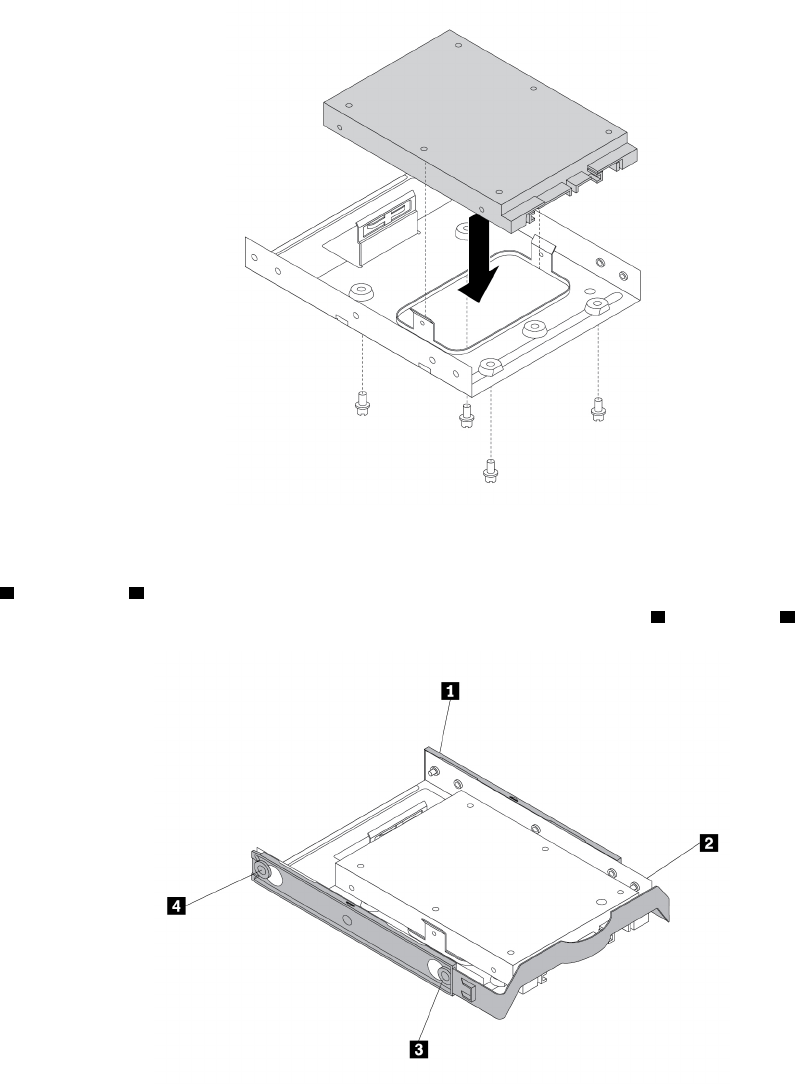
ﺎﻟﺸﻜﻞ٧٤.ﺘﺮﻛﻴﺐﻤﺤﺮﻙﺎﻟﺄﻗﺮﺍﺹﺬﻱﺎﻟﺤﺎﻟﺔﺎﻟﺼﻠﺒﺔﺎﻟﺠﺪﻳﺪﺒﻤﺤﻮﻝﻮﺣﺪﺓﺎﻟﺘﺨﺰﻳﻦ
٨.ﻠﺘﺮﻛﻴﺐﻤﺤﻮﻝﻮﺣﺪﺓﺎﻟﺘﺨﺰﻳﻦﻔﻲﺤﺎﻣﻞﻤﺤﺮﻙﺄﻗﺮﺍﺹﺎﻟﺘﺨﺰﻳﻦﻤﻘﺎﺱ3.5ﺒﻮﺻﺔ،ﻘﻢﺒﺜﻨﻲﺎﻟﺤﺎﻣﻞﻮﻣﺤﺎﺫﺍﺓﻄﺮﻑﺎﻟﺘﻮﺻﻴﻞ1ﻮﻃﺮﻑﺎﻟﺘﻮﺻﻴﻞ2
ﻮﻃﺮﻑﺎﻟﺘﻮﺻﻴﻞ3ﻮﻃﺮﻑﺎﻟﺘﻮﺻﻴﻞ4ﻌﻠﻰﺎﻟﺤﺎﻣﻞﻤﻊﺎﻟﻔﺘﺤﺎﺕﺎﻟﻤﻨﺎﻇﺮﺓﻔﻲﻤﺤﻮﻝﻮﺣﺪﺓﺎﻟﺘﺨﺰﻳﻦ.
ﺎﻟﺸﻜﻞ٧٥.ﺘﺮﻛﻴﺐﻤﺤﻮﻝﻮﺣﺪﺓﺎﻟﺘﺨﺰﻳﻦﻤﻊﻤﺤﺮﻙﺎﻟﺄﻗﺮﺍﺹﺬﻱﺎﻟﺤﺎﻟﺔﺎﻟﺼﻠﺒﺔﺎﻟﺠﺪﻳﺪﻔﻲﺤﺎﻣﻞﻤﺤﺮﻙﺄﻗﺮﺍﺹﺎﻟﺘﺨﺰﻳﻦ
٩.ﺮﻛ
ّ
ﺐﻤﺤﻮﻝﻮﺣﺪﺓﺎﻟﺘﺨﺰﻳﻦﻤﻊﺎﻟﺤﺎﻣﻞﻔﻲﻔﺘﺤﺔﻤﺤﺮﻙﺄﻗﺮﺍﺹﺎﻟﺘﺨﺰﻳﻦ.ﺮﺍﺟﻊ"ﻤﺤﺮﻙﺎﻟﺄﻗﺮﺍﺹﺎﻟﺜﺎﺑﺘﺔﺎﻟﺄﺳﺎﺳﻲ"ﻌﻠﻰﺎﻟﺼﻔﺤﺔ٩٢ﺄﻭ"ﻤﺤﺮﻙ
ﺎﻟﺄﻗﺮﺍﺹﺎﻟﺜﺎﺑﺘﺔﺎﻟﺜﺎﻧﻮﻱ"ﻌﻠﻰﺎﻟﺼﻔﺤﺔ٩٤.
١٠.ﻘﻢﺒﺘﻮﺻﻴﻞﻜﺎﺑﻞﺎﻟﺎﺷﺎﺭﺓﻮﻛﺒﻞﺎﻟﻄﺎﻗﺔﺒﻤﺤﺮﻙﺎﻟﺄﻗﺮﺍﺹﺬﻱﺎﻟﺤﺎﻟﺔﺎﻟﺼﻠﺒﺔ.
ﻤﺎﻴﺠﺐﺎﻟﻘﻴﺎﻡﺒﻪﺒﻌﺪﺬﻟﻚ:
•ﻠﻠﺘﻌﺎﻣﻞﻤﻊﺠﺰﺀﺂﺧﺮﻤﻦﺎﻟﺠﻬﺎﺯ،ﺎﺫﻫﺐﺈﻟﻰﺎﻟﻘﺴﻢﺎﻟﻤﻨﺎﺳﺐ.
ﺍﻟﻤﻠﺤﻖ٧.ﺇﺧﺮﺍﺝﺍﻷﺟﻬﺰﺓﻭﺗﺮﻛﻴﺒﻬﺎ٨٥
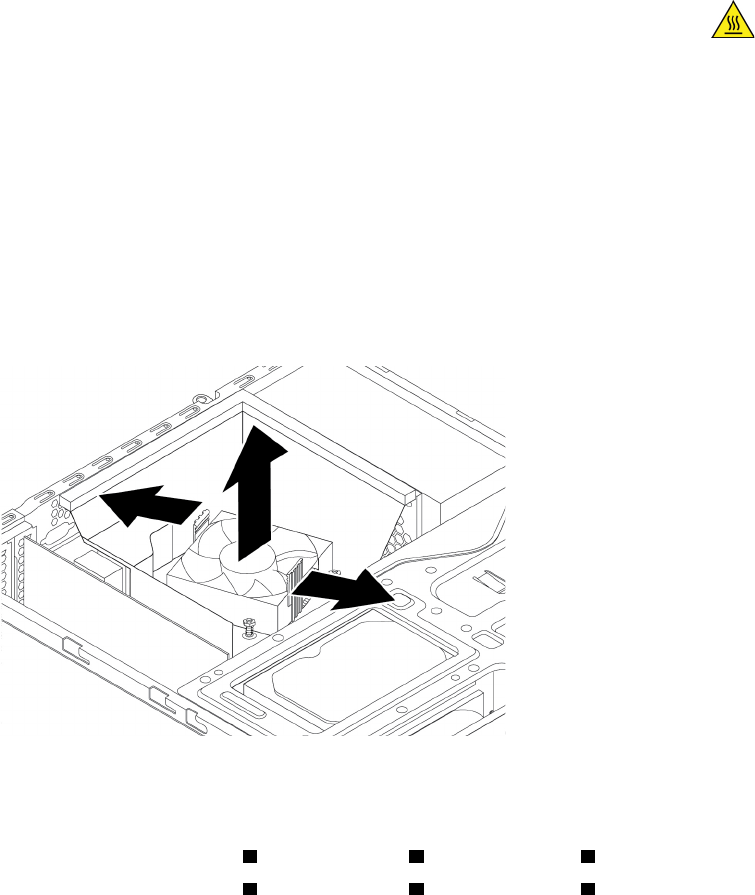
•ﻠﺎﺳﺘﻜﻤﺎﻝﻌﻤﻠﻴﺔﺎﻟﺘﺮﻛﻴﺐﺄﻭﺎﻟﺎﺳﺘﺒﺪﺍﻝ،ﺎﺫﻫﺐﺈﻟﻰ"ﺎﺳﺘﻜﻤﺎﻝﻌﻤﻠﻴﺔﺎﺳﺘﺒﺪﺍﻝﺎﻟﻘﻄﻊ"ﻌﻠﻰﺎﻟﺼﻔﺤﺔ٩٨.
ﻤﻤﺘﺺﺎﻟﺤﺮﺍﺭﺓﻮﻣﺠﻤﻮﻋﺔﺎﻟﻤﺮﻭﺣﺔ
ﺘﻨﺒﻴﻪ:ﻠﺎﺘﻔﺘﺢﺎﻟﻜﻤﺒﻴﻮﺗﺮﺄﻭﺘﺤﺎﻭﻝﺈﺻﻠﺎﺣﻪﻘﺒﻞﻘﺮﺍﺀﺓﻮﻓﻬﻢ"ﺎﻗﺮﺃﻬﺬﺍﺎﻟﺠﺰﺀﺄﻭﻟﺎ
ً
:ﻤﻌﻠﻮﻣﺎﺕﻤﻬﻤﺔﺤﻮﻝﺎﻟﺴﻠﺎﻣﺔ"ﻌﻠﻰﺎﻟﺼﻔﺤﺔiii.
ﺘﺤﺬﻳﺮ:
ﺘﺠﻨﺐﻤﻠﺎﻣﺴﺔﺎﻟﻤﻜﻮﻧﺎﺕﺎﻟﺴﺎﺧﻨﺔﺪﺍﺧﻞﺎﻟﻜﻤﺒﻴﻮﺗﺮ.ﺄﺛﻨﺎﺀﺎﻟﺘﺸﻐﻴﻞ،ﺘﺰﺩﺍﺩﺴﺨﻮﻧﺔﺒﻌﺾﺎﻟﻤﻜﻮﻧﺎﺕﺒﺸﻜﻞﻜﺎﻑٍﻠﻠﺘﺴﺒﺐﻔﻲﺤﺮﻕﺎﻟﺒﺸﺮﺓ.ﻘﺒﻞﻔﺘﺢﻐﻄﺎﺀ ﺎﻟﻜﻤﺒﻴﻮﺗﺮ،ﺄﻭﻗﻒﺘﺸﻐﻴﻞﺎﻟﻜﻤﺒﻴﻮﺗﺮﻮﺍﻓﺼﻞﺎﻟﻄﺎﻗﺔﻮﺍﻧﺘﻈﺮ10ﺪﻗﺎﺋﻖﺘﻘﺮﻳﺒ
ً
ﺎﺤﺘﻰﺘﺒﺮﺩﺎﻟﻤﻜﻮﻧﺎﺕ.
ﻠﺎﺳﺘﺒﺪﺍﻝﻤﻤﺘﺺﺎﻟﺤﺮﺍﺭﺓﻮﻣﺠﻤﻮﻋﺔﺎﻟﻤﺮﻭﺣﺔ،ﻘﻢﺒﺘﻨﻔﻴﺬﻤﺎﻴﻠﻲ:
١.ﺎﻋﻤﻞﻌﻠﻰﺈﻋﺪﺍﺩﺎﻟﻜﻤﺒﻴﻮﺗﺮ.ﺮﺍﺟﻊ"ﺈﻋﺪﺍﺩﺎﻟﻜﻤﺒﻴﻮﺗﺮﻮﻧﺰﻉﻐﻄﺎﺀﺎﻟﻜﻤﺒﻴﻮﺗﺮ"ﻌﻠﻰﺎﻟﺼﻔﺤﺔ٥١.
٢.ﻘﻢﺒﻮﺿﻊﺠﻬﺎﺯﺎﻟﻜﻤﺒﻴﻮﺗﺮﻌﻠﻰﺠﺎﻧﺒﻪﻠﻠﻮﺻﻮﻝﺈﻟﻰﻠﻮﺣﺔﺎﻟﻨﻈﺎﻡﺒﻄﺮﻳﻘﺔﺄﺳﻬﻞ.
٣.ﻴﺠﺐﺘﺤﺪﻳﺪﻤﻮﺿﻊﻤﻤﺘﺺﺎﻟﺤﺮﺍﺭﺓﻮﻣﺠﻤﻮﻋﺔﺎﻟﻤﺮﻭﺣﺔ.ﺮﺍﺟﻊ"ﺎﻟﺄﺟﺰﺍﺀﻌﻠﻰﻠﻮﺣﺔﺎﻟﻨﻈﺎﻡ"ﻌﻠﻰﺎﻟﺼﻔﺤﺔ٥.
٤.ﺎﻓﺼﻞﻜﺎﺑﻞﻤﻤﺘﺺﺎﻟﺤﺮﺍﺭﺓﻮﻣﺠﻤﻮﻋﺔﺎﻟﻤﺮﻭﺣﺔﻤﻦﻤﻮﺻﻞﻤﺮﻭﺣﺔﺎﻟﻤﺸﻐﻞﺎﻟﺪﻗﻴﻖﺎﻟﻤﻮﺟﻮﺩﻌﻠﻰﻠﻮﺣﺔﺎﻟﻨﻈﺎﻡ.ﺮﺍﺟﻊ"ﺎﻟﺄﺟﺰﺍﺀﻌﻠﻰﻠﻮﺣﺔﺎﻟﻨﻈﺎﻡ"ﻌﻠﻰ
ﺎﻟﺼﻔﺤﺔ٥.
٥.ﻘﻢﺒﺘﺪﻭﻳﺮﻤﺸﺒﻜﻲﺎﻟﺘﺜﺒﻴﺖﺎﻟﺒﻠﺎﺳﺘﻴﻜﻴﻴﻦﺎﻟﻠﺬﺍﻥﻴﺜﺒﺘﺎﻥﻤﺠﺮﻯﻤﺮﻭﺣﺔﻤﻤﺘﺺﺎﻟﺤﺮﺍﺭﺓﻠﻠﺨﺎﺭﺝ.ﺜﻢﺄﺯﻝﻤﻨﻔﺬﺎﻟﺤﺮﺍﺭﺓﻮﻣﺠﺮﻯﺎﻟﻤﺮﻭﺣﺔﻤﻦﻤﻨﻔﺬﺎﻟﺤﺮﺍﺭﺓ
ﻮﻣﺠﻤﻮﻋﺔﺎﻟﻤﺮﻭﺣﺔ.
ﺎﻟﺸﻜﻞ٧٦.ﻨﺰﻉﻤﻨﻔﺬﺎﻟﺤﺮﺍﺭﺓﻮﻣﺠﺮﻯﺎﻟﻤﺮﻭﺣﺔ
٦.ﺎﺗﺒﻊﺎﻟﺨﻄﻮﺍﺕﺎﻟﻤﺴﻠﺴﻠﺔﻬﺬﻩﻠﻨﺰﻉﺎﻟﻤﺴﺎﻣﻴﺮﺎﻟﺄﺭﺑﻌﺔﺎﻟﺘﻲﺘﺜﺒﺖﻤﻨﻔﺬﺎﻟﺤﺮﺍﺭﺓﻮﻣﺠﻤﻮﻋﺔﺎﻟﻤﺮﻭﺣﺔﺒﻠﻮﺣﺔﺎﻟﻨﻈﺎﻡ:
a.ﺎﻧﺰﻉﺎﻟﻤﺴﻤﺎﺭ
1ﺠﺰﺋﻴ
ً
ﺎ،ﺜﻢﺎﻧﺰﻉﺎﻟﻤﺴﻤﺎﺭ2ﺘﻤﺎﻣ
ً
ﺎ،ﺜﻢﺎﻧﺰﻉﺎﻟﻤﺴﻤﺎﺭ1ﺘﻤﺎﻣ
ً
ﺎ.
b.ﺎﻧﺰﻉﺎﻟﻤﺴﻤﺎﺭ
3ﺠﺰﺋﻴ
ً
ﺎ،ﺜﻢﺎﻧﺰﻉﺎﻟﻤﺴﻤﺎﺭ4ﺘﻤﺎﻣ
ً
ﺎ،ﺜﻢﺎﻧﺰﻉﺎﻟﻤﺴﻤﺎﺭ3ﺘﻤﺎﻣ
ً
ﺎ.
ﻤﻠﺎﺣﻈﺔ:ﺎﻧﺰﻉﺎﻟﻤﺴﺎﻣﻴﺮﺎﻟﺄﺭﺑﻌﺔﺒﺘﺄﻥ
ٍ
ﻠﺘﻔﺎﺩﻱﺄﻱﺘﻠﻒﻘﺪﻴﻠﺤﻖﺒﻠﻮﺣﺔﺎﻟﻨﻈﺎﻡ.ﻠﺎﻴﻤﻜﻦﺈﺯﺍﻟﺔﺎﻟﻤﺴﺎﻣﻴﺮﺎﻟﺄﺭﺑﻌﺔﻤﻦﻤﻤﺘﺺﺎﻟﺤﺮﺍﺭﺓﻮﻣﺠﻤﻮﻋﺔﺎﻟﻤﺮﻭﺣﺔ.
٨٦
ﺩﻟﻴﻞﻣﺴﺘﺨﺪﻡP320
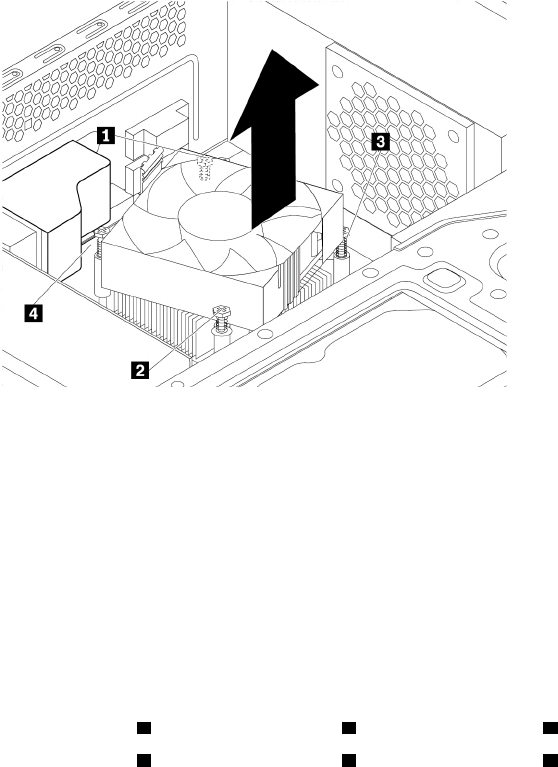
ﺎﻟﺸﻜﻞ٧٧.ﺎﻟﻤﺴﺎﻣﻴﺮﺎﻟﺘﻲﺘﺤﻤﻲﻤﻤﺘﺺﺎﻟﺤﺮﺍﺭﺓﻮﻣﺠﻤﻮﻋﺔﺎﻟﻤﺮﻭﺣﺔ
٧.ﺎﺭﻓﻊﻤﻤﺘﺺﺎﻟﺤﺮﺍﺭﺓﺎﻟﻤﻌﻄﻞﻮﻣﺠﻤﻮﻋﺔﺎﻟﻤﺮﻭﺣﺔﺒﻌﻴﺪ
ً
ﺍﻌﻦﻠﻮﺣﺔﺎﻟﻨﻈﺎﻡ.
ﻤﻠﺎﺣﻈﺎﺕ:
•ﻘﺪﻴﺘﻌﻴ
ّ
ﻦﻌﻠﻴﻚﻠﻒ
ّ
ﻤﻤﺘﺺﺎﻟﺤﺮﺍﺭﺓﻮﻣﺠﻤﻮﻋﺔﺎﻟﻤﺮﻭﺣﺔﺒﺮﻓﻖﻠﺘﺤﺮﻳﺮﻫﻤﺎﻤﻦﺎﻟﻤﺸﻐﻞﺎﻟﺪﻗﻴﻖ.
•ﻠﺎﺘﻘﻢﺒﻠﻤﺲﺎﻟﺸﺤﻢﺎﻟﺤﺮﺍﺭﻱﺄﺛﻨﺎﺀﺎﻟﺘﻌﺎﻣﻞﻤﻊﻤﻤﺘﺺﺎﻟﺤﺮﺍﺭﺓﻮﻣﺠﻤﻮﻋﺔﺎﻟﻤﺮﻭﺣﺔ.
٨.ﻀﻊﻤﻤﺘﺺﺎﻟﺤﺮﺍﺭﺓﻮﻣﺠﻤﻮﻋﺔﺎﻟﻤﺮﻭﺣﺔﺎﻟﺠﺪﻳﺪﻳﻦﻌﻠﻰﻠﻮﺣﺔﺎﻟﻨﻈﺎﻡﺒﺤﻴﺚﺘﻜﻮﻥﺎﻟﻤﺴﺎﻣﻴﺮﺎﻟﺄﺭﺑﻌﺔﺒﻤﺤﺎﺫﺍﺓﺎﻟﻔﺘﺤﺎﺕﺎﻟﻤﻮﺟﻮﺩﺓﺒﻠﻮﺣﺔﺎﻟﻨﻈﺎﻡ.
ﻤﻠﺎﺣﻈﺔ:ﺘﺄﻛﺪﻤﻦﺘﻮﺟﻴﻪﻜﺎﺑﻞﻤﻤﺘﺺﺎﻟﺤﺮﺍﺭﺓﻮﻣﺠﻤﻮﻋﺔﺎﻟﻤﺮﻭﺣﺔﻨﺤﻮﻤﻮﺻﻞﻤﺮﻭﺣﺔﺎﻟﻤﻌﺎﻟﺞﺎﻟﺪﻗﻴﻖﻌﻠﻰﻠﻮﺣﺔﺎﻟﻨﻈﺎﻡ.
٩.ﺎﺗﺒﻊﺎﻟﺨﻄﻮﺍﺕﺎﻟﻤﺴﻠﺴﻠﺔﺎﻟﺘﺎﻟﻴﺔﻠﺘﺮﻛﻴﺐﺎﻟﻤﺴﺎﻣﻴﺮﺎﻟﺄﺭﺑﻌﺔﻠﺘﺜﺒﻴﺖﻤﺠﻤﻮﻋﺔﻤﻨﻔﺬﺎﻟﺤﺮﺍﺭﺓﻮﺍﻟﻤﺮﻭﺣﺔﺎﻟﺠﺪﻳﺪﺓ.ﻠﺎﺘﻀﻐﻂﺒﺸﺪﺓﻌﻠﻰﺎﻟﻤﺴﺎﻣﻴﺮ.
a.ﺄﺣﻜﻢﺘﺜﺒﻴﺖﺎﻟﻤﺴﻤﺎﺭ
1ﺠﺰﺋﻴ
ً
ﺎ،ﻮﺃﺣﻜﻢﺘﺜﺒﻴﺖﺎﻟﻤﺴﻤﺎﺭ2ﺘﻤﺎﻣ
ً
ﺎ،ﺜﻢﺄﺣﻜﻢﺘﺜﺒﻴﺖﺎﻟﻤﺴﻤﺎﺭ1ﺘﻤﺎﻣ
ً
ﺎ.
b.ﺄﺣﻜﻢﺘﺜﺒﻴﺖﺎﻟﻤﺴﻤﺎﺭ
3ﺠﺰﺋﻴ
ً
ﺎ،ﻮﺃﺣﻜﻢﺘﺜﺒﻴﺖﺎﻟﻤﺴﻤﺎﺭ4ﺘﻤﺎﻣ
ً
ﺎ،ﺜﻢﺄﺣﻜﻢﺘﺜﺒﻴﺖﺎﻟﻤﺴﻤﺎﺭ3ﺘﻤﺎﻣ
ً
ﺎ.
١٠.ﻘﻢﺒﺘﻮﺻﻴﻞﻜﺎﺑﻞﻤﻤﺘﺺﺎﻟﺤﺮﺍﺭﺓﻮﻣﺠﻤﻮﻋﺔﺎﻟﻤﺮﻭﺣﺔﺒﻤﻮﺻﻞﻤﺮﻭﺣﺔﺎﻟﻤﺸﻐﻞﺎﻟﺪﻗﻴﻖﺎﻟﻤﻮﺟﻮﺩﻌﻠﻰﻠﻮﺣﺔﺎﻟﻨﻈﺎﻡ.ﺮﺍﺟﻊ"ﺎﻟﺄﺟﺰﺍﺀﻌﻠﻰﻠﻮﺣﺔﺎﻟﻨﻈﺎﻡ"
ﻌﻠﻰﺎﻟﺼﻔﺤﺔ٥.
١١.ﻘﻢﺒﺨﻔﺾﻤﺠﺮﻯﻤﺮﻭﺣﺔﻤﻤﺘﺺﺎﻟﺤﺮﺍﺭﺓﻮﺿﻌﻪﺄﻋﻠﻰﻤﻤﺘﺺﺎﻟﺤﺮﺍﺭﺓﻮﻣﺠﻤﻮﻋﺔﺎﻟﻤﺮﻭﺣﺔﺤﺘﻰﻴﺴﺘﻘﺮﻔﻲﻤﻜﺎﻧﻪ.
ﺍﻟﻤﻠﺤﻖ٧.ﺇﺧﺮﺍﺝﺍﻷﺟﻬﺰﺓﻭﺗﺮﻛﻴﺒﻬﺎ٨٧
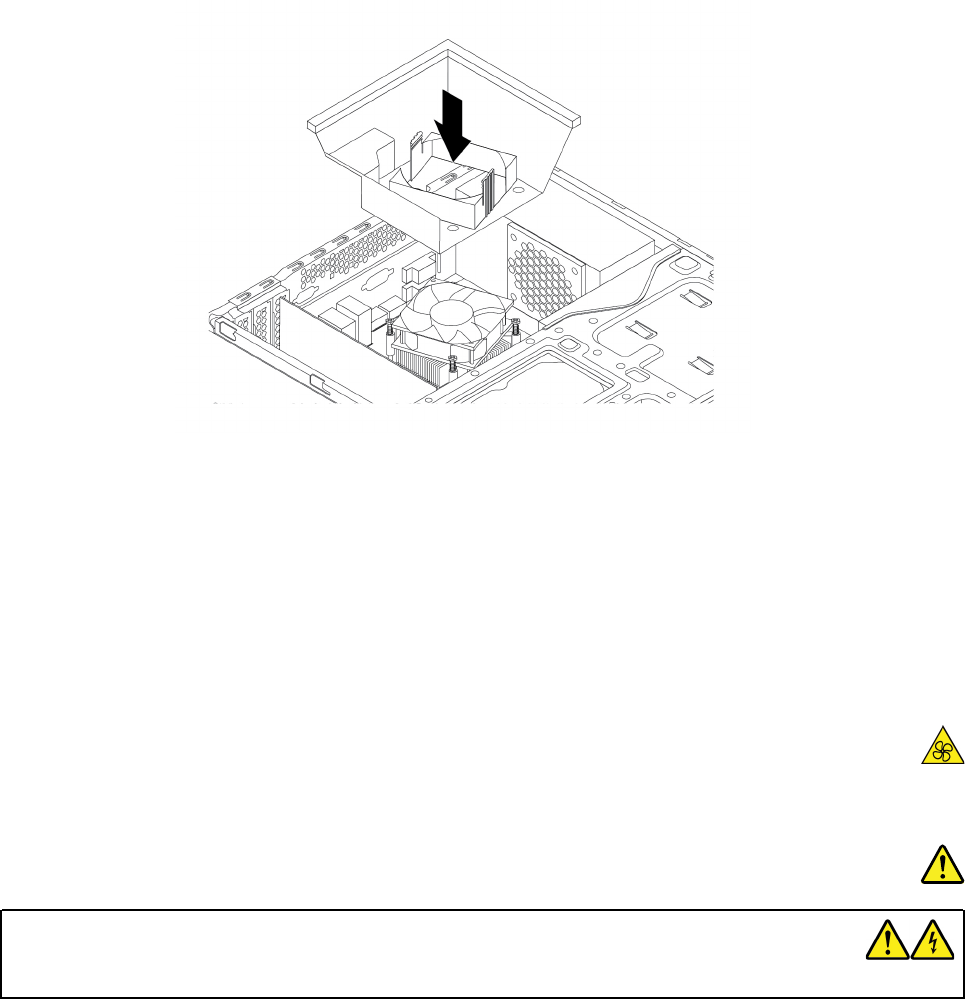
ﺎﻟﺸﻜﻞ٧٨.ﺘﺮﻛﻴﺐﻤﺠﺮﻯﺎﻟﻤﺮﻭﺣﺔﻠﻤﻤﺘﺺﺎﻟﺤﺮﺍﺭﺓ
ﻤﺎﻴﺠﺐﺎﻟﻘﻴﺎﻡﺒﻪﺒﻌﺪﺬﻟﻚ:
•ﻠﻠﺘﻌﺎﻣﻞﻤﻊﺠﺰﺀﺂﺧﺮﻤﻦﺎﻟﺠﻬﺎﺯ،ﺎﺫﻫﺐﺈﻟﻰﺎﻟﻘﺴﻢﺎﻟﻤﻨﺎﺳﺐ.
•ﻠﺎﺳﺘﻜﻤﺎﻝﻌﻤﻠﻴﺔﺎﻟﺘﺮﻛﻴﺐﺄﻭﺎﻟﺎﺳﺘﺒﺪﺍﻝ،ﺎﺫﻫﺐﺈﻟﻰ"ﺎﺳﺘﻜﻤﺎﻝﻌﻤﻠﻴﺔﺎﺳﺘﺒﺪﺍﻝﺎﻟﻘﻄﻊ"ﻌﻠﻰﺎﻟﺼﻔﺤﺔ٩٨.
ﻤﺠﻤﻮﻋﺔﺈﻣﺪﺍﺩﺎﻟﻄﺎﻗﺔ
ﺘﻨﺒﻴﻪ:ﻠﺎﺘﻔﺘﺢﺎﻟﻜﻤﺒﻴﻮﺗﺮﺄﻭﺘﺤﺎﻭﻝﺈﺻﻠﺎﺣﻪﻘﺒﻞﻘﺮﺍﺀﺓﻮﻓﻬﻢ"ﺎﻗﺮﺃﻬﺬﺍﺎﻟﺠﺰﺀﺄﻭﻟﺎ
ً
:ﻤﻌﻠﻮﻣﺎﺕﻤﻬﻤﺔﺤﻮﻝﺎﻟﺴﻠﺎﻣﺔ"ﻌﻠﻰﺎﻟﺼﻔﺤﺔiii.
ﺘﺤﺬﻳﺮ:
ﺎﺣﺮﺹﻌﻠﻰﺈﺑﻘﺎﺀﺎﻟﺄﺻﺎﺑﻊﻮﺃﺟﺰﺍﺀﺄﺧﺮﻯﻤﻦﺠﺴﺪﻙﺒﻌﻴﺪًﺍﻌﻦﺎﻟﺄﺟﺰﺍﺀﺎﻟﻤﺘﺤﺮﻛﺔﺎﻟﺘﻲﺘﻨﻄﻮﻱﻌﻠﻰﺨﻄﻮﺭﺓ.ﺈﺫﺍﺘﻌﺮ
ّ
ﺿﺖﻠﺈﺻﺎﺑﺔﻤﺎ،ﻔﺎﺳﺘﻌﻦﺒﺎﻟﺮﻋﺎﻳﺔﺎﻟﻄﺒﻴﺔ ﻌﻠﻰﺎﻟﻔﻮﺭ.
ﺨﻄﺮ
ﺎﻓﺼﻞﻜﻞﺄﺳﻠﺎﻙﺎﻟﻄﺎﻗﺔﻌﻦﺎﻟﻤﺂﺧﺬﺎﻟﻜﻬﺮﺑﺎﺋﻴﺔﻘﺒﻞﻨﺰﻉﻐﻄﺎﺀﺎﻟﻜﻤﺒﻴﻮﺗﺮﺄﻭﺄﻱﻘﻄﻌﺔﺘﻢﻮﺿﻊﺎﻟﻤﻠﺼﻖﺄﻋﻠﺎﻩﻌﻠﻴﻬﺎ.
ﻠﺎﺘﻌﻤﻞﻌﻠﻰﺘﻔﻜﻴﻚﺎﻟﻤﻜﻮﻧﺎﺕﺎﻟﺘﻲﺘﻢﻮﺿﻊﺎﻟﻤﻠﺼﻖﺄﻋﻠﺎﻩﻌﻠﻴﻬﺎ.ﻠﺎﺘﻮﺟﺪﺄﺟﺰﺍﺀﻴﻤﻜﻦﺼﻴﺎﻧﺘﻬﺎﺪﺍﺧﻞﺘﻠﻚﺎﻟﻤﻜﻮﻧﺎﺕ.
ﺘﻢﺘﺼﻤﻴﻢﺎﻟﻤﻨﺘﺞﻠﻠﺎﺳﺘﺨﺪﺍﻡﺎﻟﺂﻣﻦ.ﻮﻣﻊﺬﻟﻚ،ﻴﻮﺟﺪﺠﻬﺪﻜﻬﺮﺑﺎﺋﻲﻮﺗﻴﺎﺭﻜﻬﺮﺑﺎﺋﻲﻮﻃﺎﻗﺔﻔﻲﻤﻨﺘﻬﻰﺎﻟﺨﻄﻮﺭﺓﺒﺪﺍﺧﻞﺄﻱﻤﻜﻮﻥﺘﻢﻮﺿﻊﻬﺬﺍﺎﻟﻤﻠﺼﻖﻌﻠﻴﻪ.ﻘﺪ
ﻴﺘﺴﺒﺐﺘﻔﻜﻴﻚﻬﺬﻩﺎﻟﻤﻜﻮﻧﺎﺕﻔﻲﻮﻗﻮﻉﺤﺮﻳﻖﺄﻭﺤﺘﻰﺈﻟﻰﺎﻟﻮﻓﺎﺓ.ﺈﺫﺍﻜﻨﺖﺘﺸﻚﻔﻲﻮﺟﻮﺩﻤﺸﻜﻠﺔﻔﻲﺄﺣﺪﺘﻠﻚﺎﻟﺄﺟﺰﺍﺀ،ﻔﺎﺗﺼﻞﺒﻔﻨﻲﺎﻟﺨﺪﻣﺔ.
ﻠﺎﺳﺘﺒﺪﺍﻝﻤﺠﻤﻮﻋﺔﻮﺣﺪﺓﺘﻐﺬﻳﺔﺎﻟﺘﻴﺎﺭﺎﻟﻜﻬﺮﺑﺎﺋﻲ،ﻘﻢﺒﺘﻨﻔﻴﺬﻤﺎﻴﻠﻲ:
١.ﺎﻋﻤﻞﻌﻠﻰﺈﻋﺪﺍﺩﺎﻟﻜﻤﺒﻴﻮﺗﺮ.ﺮﺍﺟﻊ"ﺈﻋﺪﺍﺩﺎﻟﻜﻤﺒﻴﻮﺗﺮﻮﻧﺰﻉﻐﻄﺎﺀﺎﻟﻜﻤﺒﻴﻮﺗﺮ"ﻌﻠﻰﺎﻟﺼﻔﺤﺔ٥١.
٢.ﻘﻢﺒﺎﺯﺍﻟﺔﺎﻟﻮﺍﺟﻬﺔﺎﻟﺄﻣﺎﻣﻴﺔ.ﺮﺍﺟﻊ"ﺎﻟﻮﺍﺟﻬﺔﺎﻟﺄﻣﺎﻣﻴﺔ"ﻌﻠﻰﺎﻟﺼﻔﺤﺔ٥٢.
٣.ﻘﻢﺒﺘﺪﻭﻳﺮﻤﺸﺒﻜﻲﺎﻟﺘﺜﺒﻴﺖﺎﻟﺒﻠﺎﺳﺘﻴﻜﻴﻴﻦﺎﻟﻠﺬﻳﻦﻴﺜﺒﺘﺎﻥﻤﺠﺮﻯﻤﺮﻭﺣﺔﻤﻤﺘﺺﺎﻟﺤﺮﺍﺭﺓﻠﻠﺨﺎﺭﺝﺒﺮﻓﻖ،ﺜﻢﺎﺭﻓﻊﻤﺠﺮﻯﻤﺮﻭﺣﺔﻤﻤﺘﺺﺎﻟﺤﺮﺍﺭﺓﺨﺎﺭﺝ
ﺎﻟﻬﻴﻜﻞ.
٨٨
ﺩﻟﻴﻞﻣﺴﺘﺨﺪﻡP320
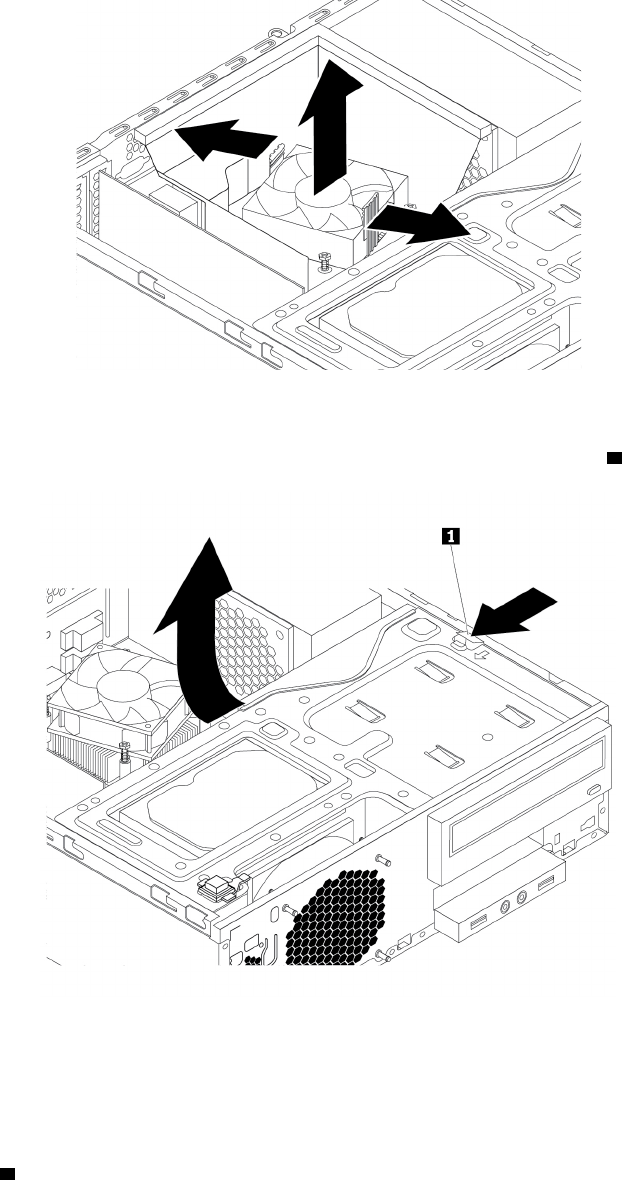
ﺎﻟﺸﻜﻞ٧٩.ﻨﺰﻉﻤﻨﻔﺬﺎﻟﺤﺮﺍﺭﺓﻮﻣﺠﺮﻯﺎﻟﻤﺮﻭﺣﺔ
٤.ﺎﺿﻐﻂﻌﻠﻰﻤﺸﺒﻚﺎﻟﺘﺤﺮﻳﺮ1ﻜﻤﺎﻬﻮﻤﻮﺿﺢﻮﻗﻢﺒﺘﺪﻭﻳﺮﻤﺠﻤﻮﻋﺔﻔﺘﺤﺔﻤﺤﺮﻙﺎﻟﺄﻗﺮﺍﺹﻠﻠﺄﻋﻠﻰ.
ﺎﻟﺸﻜﻞ٨٠.ﺘﺪﻭﻳﺮﻤﺠﻤﻮﻋﺔﺨﺎﻧﺔﺎﻟﻤﺸﻐﻞﻠﺄﻋﻠﻰ
٥.ﻘﻢﺒﺘﺴﺠﻴﻞﻤﺴﺎﺭﺎﻟﻜﺒﻠﺎﺕﻮﻣﻮﺻﻠﺎﺕﺎﻟﻜﺒﻠﺎﺕ.ﺒﻌﺪﺬﻟﻚ،ﺎﻓﺼﻞﻜﺒﻠﺎﺕﻤﺠﻤﻮﻋﺔﺈﻣﺪﺍﺩﺎﻟﻄﺎﻗﺔﻤﻦﺠﻤﻴﻊﻤﺤﺮﻛﺎﺕﺎﻟﺄﻗﺮﺍﺹﻮﻣﻦﻠﻮﺣﺔﺎﻟﻨﻈﺎﻡ.ﺮﺍﺟﻊ
"ﺎﻟﺄﺟﺰﺍﺀﻌﻠﻰﻠﻮﺣﺔﺎﻟﻨﻈﺎﻡ"ﻌﻠﻰﺎﻟﺼﻔﺤﺔ٥.
٦.ﺤﺮﺭﻜﺎﺑﻠﺎﺕﻤﺠﻤﻮﻋﺔﺈﻣﺪﺍﺩﺎﻟﻄﺎﻗﺔﻤﻦﺄﻱﻤﺸﺎﺑﻚﺄﻭﺮﻭﺍﺑﻂﻜﺎﺑﻠﺎﺕ.
٧.ﻤﻦﺨﻠﻔﻴﺔﺎﻟﺤﺎﺳﺐ،ﺎﻧﺰﻉﺎﻟﻤﺴﺎﻣﻴﺮﺎﻟﺜﻠﺎﺛﺔﺎﻟﺘﻲﺘﺜﺒﺖﻤﺠﻤﻮﻋﺔﺘﻐﺬﻳﺔﺎﻟﺘﻴﺎﺭﺎﻟﻜﻬﺮﺑﺎﺋﻲ.ﺎﺿﻐﻂﻌﻠﻰﻤﺸﺒﻚﺘﻐﺬﻳﺔﺎﻟﺘﻴﺎﺭﺎﻟﻜﻬﺮﺑﺎﺋﻲ
1ﻠﺄﺳﻔﻞﻠﺘﺤﺮﻳﺮ
ﻤﺠﻤﻮﻋﺔﺘﻐﺬﻳﺔﺎﻟﺘﻴﺎﺭﺎﻟﻜﻬﺮﺑﺎﺋﻲﺜﻢﺄﺯﺡﻤﺠﻤﻮﻋﺔﺘﻐﺬﻳﺔﺎﻟﺘﻴﺎﺭﺎﻟﻜﻬﺮﺑﺎﺋﻲﺈﻟﻰﻤﻘﺪﻣﺔﺎﻟﺤﺎﺳﺐ.ﺎﺭﻓﻊﻤﺠﻤﻮﻋﺔﺘﻐﺬﻳﺔﺎﻟﺘﻴﺎﺭﺎﻟﻜﻬﺮﺑﺎﺋﻲﺨﺎﺭﺝﺎﻟﺤﺎﺳﺐ.
ﺍﻟﻤﻠﺤﻖ٧.ﺇﺧﺮﺍﺝﺍﻷﺟﻬﺰﺓﻭﺗﺮﻛﻴﺒﻬﺎ٨٩
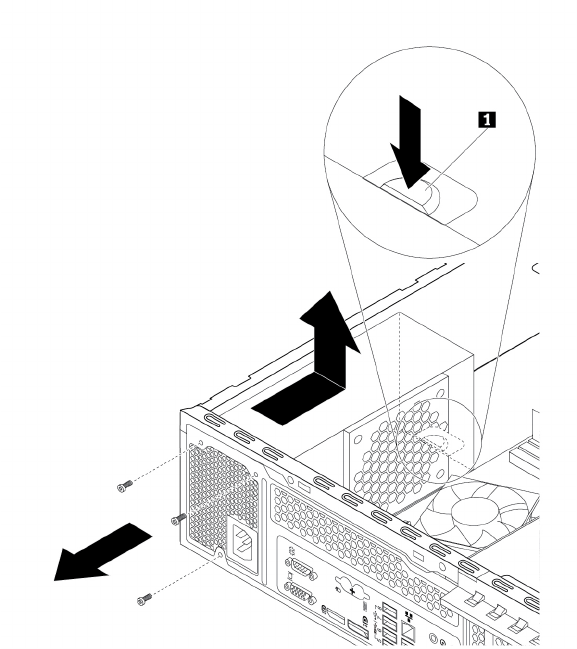
ﺎﻟﺸﻜﻞ٨١.ﺎﺯﺍﻟﺔﺤﺎﻭﻳﺔﺘﺠﻤﻴﻊﺄﺳﻠﺎﻙﻮﺣﺪﺓﺘﻐﺬﻳﺔﺎﻟﺘﻴﺎﺭﺎﻟﻜﻬﺮﺑﺎﺋﻲ
٨.ﺘﺄﻛﺪﻤﻦﺄﻥﻤﺠﻤﻮﻋﺔﺈﻣﺪﺍﺩﺎﻟﻄﺎﻗﺔﺎﻟﺘﻲﺘﻢﺎﺳﺘﺒﺪﺍﻟﻬﺎﺼﺤﻴﺤﺔ.
٩.ﻘﻢﺒﺘﺮﻛﻴﺐﻤﺠﻤﻮﻋﺔﻮﺣﺪﺓﺘﻐﺬﻳﺔﺎﻟﺘﻴﺎﺭﺎﻟﻜﻬﺮﺑﺎﺋﻲﺎﻟﺠﺪﻳﺪﺓﺪﺍﺧﻞﺎﻟﻬﻴﻜﻞﺒﺤﻴﺚﺘﺼﺒﺢﺎﻟﺜﻘﻮﺏﺎﻟﺨﺎﺻﺔﺒﺎﻟﻤﺴﺎﻣﻴﺮﺎﻟﻤﻮﺟﻮﺩﺓﺒﻤﺠﻤﻮﻋﺔﺘﻐﺬﻳﺔﺎﻟﺘﻴﺎﺭ
ﺎﻟﻜﻬﺮﺑﺎﺋﻲﻤﺤﺎﺫﻳﺔﻠﺘﻠﻚﺎﻟﺜﻘﻮﺏﺎﻟﻤﻮﺟﻮﺩﺓﻔﻲﺨﻠﻔﻴﺔﺎﻟﻬﻴﻜﻞ.ﺜﻢﻘﻢﺒﺘﺮﻛﻴﺐﺎﻟﻤﺴﺎﻣﻴﺮﺎﻟﺜﻠﺎﺛﺔﻠﺘﺜﺒﻴﺖﻤﺠﻤﻮﻋﺔﺘﻐﺬﻳﺔﺎﻟﺘﻴﺎﺭﺎﻟﻜﻬﺮﺑﺎﺋﻲﺎﻟﺠﺪﻳﺪﺓﻔﻲﻤﻜﺎﻧﻬﺎ.
ﻤﻠﺎﺣﻈﺔ:ﺎﺳﺘﺨﺪﻡﺘﻠﻚﺎﻟﻤﺴﺎﻣﻴﺮﺎﻟﺘﻲﺘﺘﻴﺤﻬﺎﺸﺮﻛﺔLenovo.
٩٠
ﺩﻟﻴﻞﻣﺴﺘﺨﺪﻡP320
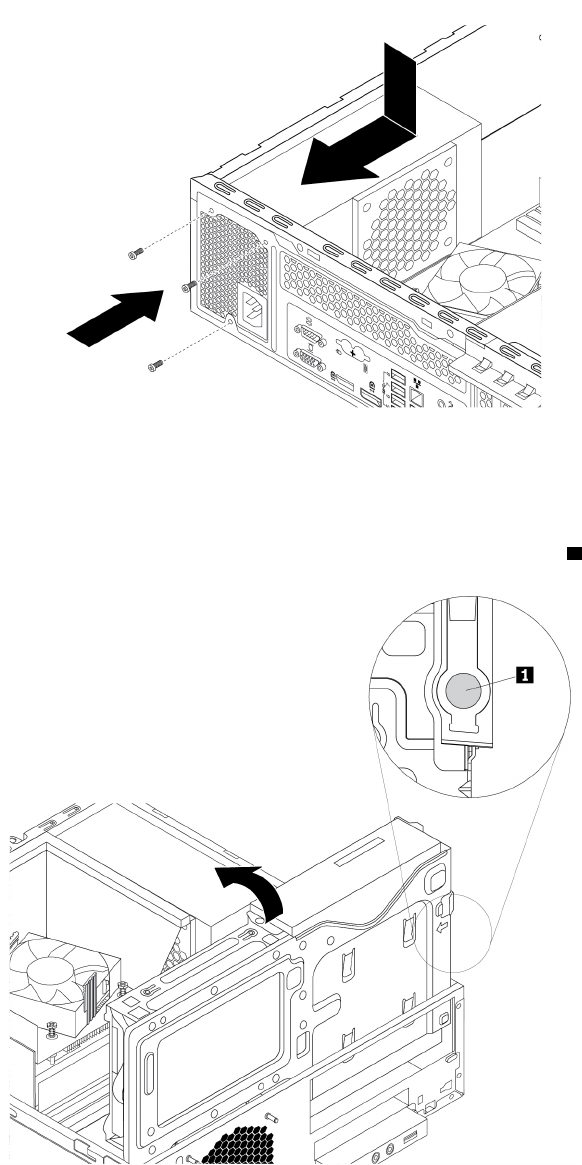
ﺎﻟﺸﻜﻞ٨٢.ﺘﺮﻛﻴﺐﻤﺠﻤﻮﻋﺔﻮﺣﺪﺓﺘﻐﺬﻳﺔﺎﻟﺘﻴﺎﺭﺎﻟﻜﻬﺮﺑﺎﺋﻲ
١٠.ﻘﻢﺒﺘﻮﺻﻴﻞﻜﺎﺑﻠﺎﺕﻤﺠﻤﻮﻋﺔﻮﺣﺪﺓﺘﻐﺬﻳﺔﺎﻟﺘﻴﺎﺭﺎﻟﻜﻬﺮﺑﺎﺋﻲﺎﻟﺠﺪﻳﺪﺓﺒﺠﻤﻴﻊﺎﻟﻤﺸﻐﻠﺎﺕﻮﺑﻠﻮﺣﺔﺎﻟﻨﻈﺎﻡ.ﺮﺍﺟﻊ"ﺎﻟﺄﺟﺰﺍﺀﻌﻠﻰﻠﻮﺣﺔﺎﻟﻨﻈﺎﻡ"ﻌﻠﻰﺎﻟﺼﻔﺤﺔ٥.
١١.ﺎﺿﻐﻂﻌﻠﻰﻤﺸﺒﻚﺎﻟﺘﺤﺮﻳﺮ
1ﻜﻤﺎﻬﻮﻤﻮﺿﺢﻮﻗﻢﺒﺘﺪﻭﻳﺮﻤﺠﻤﻮﻋﺔﻔﺘﺤﺔﻤﺤﺮﻙﺎﻟﺄﻗﺮﺍﺹﻠﺄﺳﻔﻞﺈﻟﻰﺄﻥﺘﺴﺘﻘﺮﻔﻲﻤﻜﺎﻧﻬﺎ.
ﺎﻟﺸﻜﻞ٨٣.ﺘﺪﻭﻳﺮﻤﺠﻤﻮﻋﺔﻔﺘﺤﺔﻤﺤﺮﻙﺎﻟﺄﻗﺮﺍﺹﻠﺄﺳﻔﻞ
١٢.ﻀﻊﻤﺠﺮﻯﻤﺮﻭﺣﺔﻤﻤﺘﺺﺎﻟﺤﺮﺍﺭﺓﻔﻲﺄﻋﻠﻰﻤﻤﺘﺺﺎﻟﺤﺮﺍﺭﺓﻜﻤﺎﻬﻮﻤﻮﺿﺢ.ﺜﻢﺎﺧﻔﺾﻤﺠﺮﻯﻤﺮﻭﺣﺔﻤﻤﺘﺺﺎﻟﺤﺮﺍﺭﺓﻠﺄﺳﻔﻞﺘﻤﺎﻣ
ً
ﺎﺈﻟﻰﺄﻥﻴﺴﺘﻘﺮﻔﻲ
ﻤﻜﺎﻧﻪ.
ﺍﻟﻤﻠﺤﻖ٧.ﺇﺧﺮﺍﺝﺍﻷﺟﻬﺰﺓﻭﺗﺮﻛﻴﺒﻬﺎ٩١
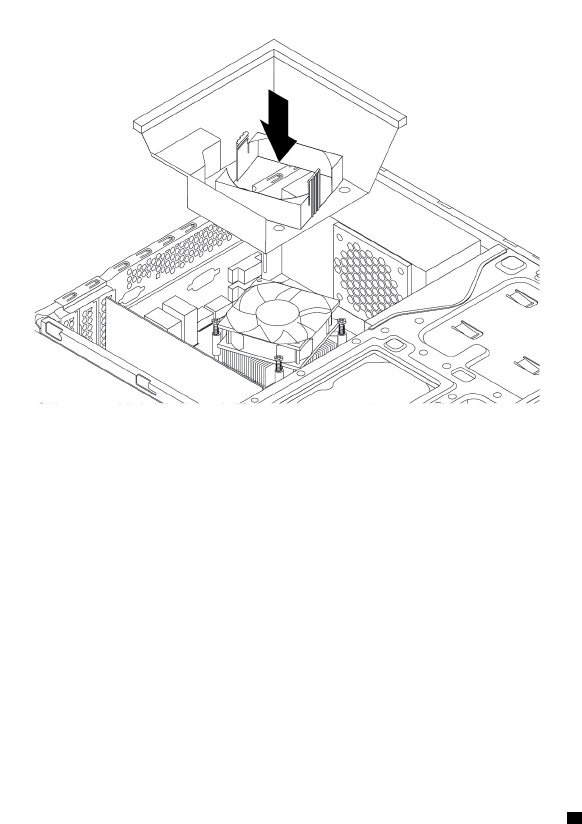
ﺎﻟﺸﻜﻞ٨٤.ﺘﺮﻛﻴﺐﻤﺠﺮﻯﺎﻟﻤﺮﻭﺣﺔﻠﻤﻤﺘﺺﺎﻟﺤﺮﺍﺭﺓ
ﻤﺎﻴﺠﺐﺎﻟﻘﻴﺎﻡﺒﻪﺒﻌﺪﺬﻟﻚ:
•ﻠﻠﺘﻌﺎﻣﻞﻤﻊﺠﺰﺀﺂﺧﺮﻤﻦﺎﻟﺠﻬﺎﺯ،ﺎﺫﻫﺐﺈﻟﻰﺎﻟﻘﺴﻢﺎﻟﻤﻨﺎﺳﺐ.
•ﻠﺎﺳﺘﻜﻤﺎﻝﻌﻤﻠﻴﺔﺎﻟﺘﺮﻛﻴﺐﺄﻭﺎﻟﺎﺳﺘﺒﺪﺍﻝ،ﺎﺫﻫﺐﺈﻟﻰ"ﺎﺳﺘﻜﻤﺎﻝﻌﻤﻠﻴﺔﺎﺳﺘﺒﺪﺍﻝﺎﻟﻘﻄﻊ"ﻌﻠﻰﺎﻟﺼﻔﺤﺔ٩٨.
ﻤﺤﺮﻙﺎﻟﺄﻗﺮﺍﺹﺎﻟﺜﺎﺑﺘﺔﺎﻟﺄﺳﺎﺳﻲ
ﺘﻨﺒﻴﻪ:ﻠﺎﺘﻔﺘﺢﺎﻟﻜﻤﺒﻴﻮﺗﺮﺄﻭﺘﺤﺎﻭﻝﺈﺻﻠﺎﺣﻪﻘﺒﻞﻘﺮﺍﺀﺓﻮﻓﻬﻢ"ﺎﻗﺮﺃﻬﺬﺍﺎﻟﺠﺰﺀﺄﻭﻟﺎ
ً
:ﻤﻌﻠﻮﻣﺎﺕﻤﻬﻤﺔﺤﻮﻝﺎﻟﺴﻠﺎﻣﺔ"ﻌﻠﻰﺎﻟﺼﻔﺤﺔiii.
ﻠﺎﺳﺘﺒﺪﺍﻝﻤﺤﺮﻙﺎﻟﺄﻗﺮﺍﺹﺎﻟﺜﺎﺑﺘﺔﺎﻟﺄﺳﺎﺳﻲ،ﻘﻢﺒﺘﻨﻔﻴﺬﻤﺎﻴﻠﻲ:
١.ﺎﻋﻤﻞﻌﻠﻰﺈﻋﺪﺍﺩﺎﻟﻜﻤﺒﻴﻮﺗﺮ.ﺮﺍﺟﻊ"ﺈﻋﺪﺍﺩﺎﻟﻜﻤﺒﻴﻮﺗﺮﻮﻧﺰﻉﻐﻄﺎﺀﺎﻟﻜﻤﺒﻴﻮﺗﺮ"ﻌﻠﻰﺎﻟﺼﻔﺤﺔ٥١.
٢.ﻘﻢﺒﺎﺯﺍﻟﺔﺎﻟﻮﺍﺟﻬﺔﺎﻟﺄﻣﺎﻣﻴﺔ.ﺮﺍﺟﻊ"ﺎﻟﻮﺍﺟﻬﺔﺎﻟﺄﻣﺎﻣﻴﺔ"ﻌﻠﻰﺎﻟﺼﻔﺤﺔ٥٢.
٣.ﺎﺿﻐﻂﻌﻠﻰﻤﺸﺒﻚﺎﻟﺘﺤﺮﻳﺮ
1ﻜﻤﺎﻬﻮﻤﻮﺿﺢﻮﻗﻢﺒﺘﺪﻭﻳﺮﻤﺠﻤﻮﻋﺔﻔﺘﺤﺔﻤﺤﺮﻙﺎﻟﺄﻗﺮﺍﺹﻠﻠﺄﻋﻠﻰ.
٩٢
ﺩﻟﻴﻞﻣﺴﺘﺨﺪﻡP320
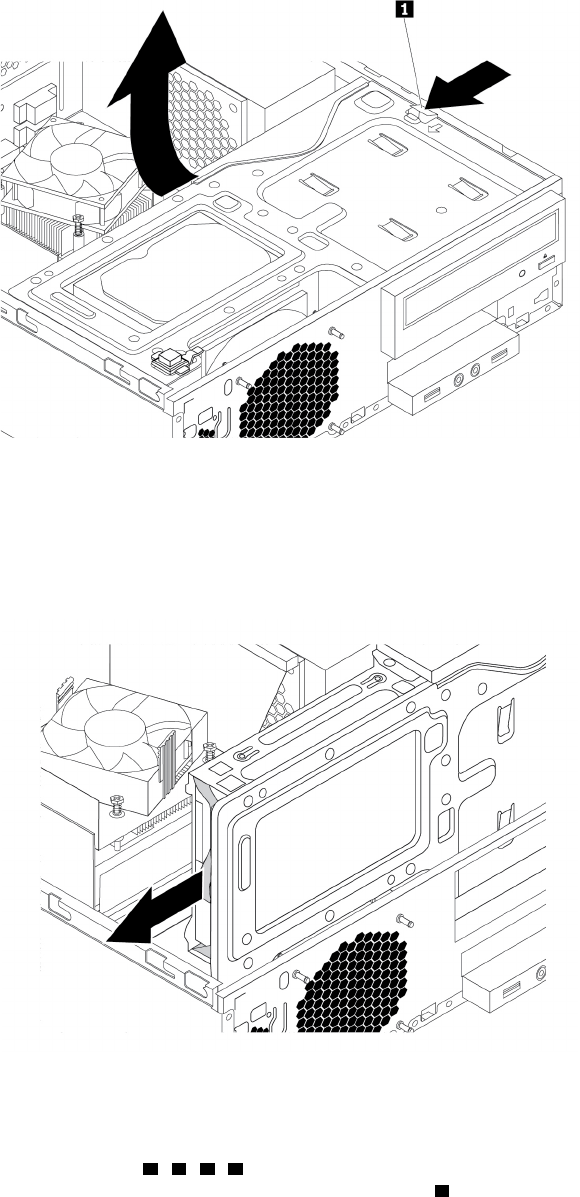
ﺎﻟﺸﻜﻞ٨٥.ﺘﺪﻭﻳﺮﻤﺠﻤﻮﻋﺔﺨﺎﻧﺔﺎﻟﻤﺸﻐﻞﻠﺄﻋﻠﻰ
٤.ﺤﺪﺩﻤﻮﻗﻊﻤﺤﺮﻙﺎﻟﺄﻗﺮﺍﺹﺎﻟﺜﺎﺑﺘﺔﺎﻟﺄﺳﺎﺳﻲ.ﺮﺍﺟﻊ"ﻤﺤﺮﻛﺎﺕﺄﻗﺮﺍﺹﺎﻟﺘﺨﺰﻳﻦﺎﻟﺪﺍﺧﻠﻴﺔ"ﻌﻠﻰﺎﻟﺼﻔﺤﺔ٧.
٥.ﺎﻓﺼﻞﻜﺎﺑﻠﻲﺎﻟﺈﺷﺎﺭﺓﻮﺍﻟﻄﺎﻗﺔﻤﻦﻤﺤﺮﻙﺎﻟﺄﻗﺮﺍﺹﺎﻟﺜﺎﺑﺘﺔ.
٦.ﺎﺳﺤﺐﺎﻟﻤﻘﺒﺾﺎﻟﺄﺯﺭﻕﺒﺤﻴﺚﺘﺘﻤﻜﻦﻤﻦﺴﺤﺐﻤﺤﺮﻙﺎﻟﺄﻗﺮﺍﺹﺎﻟﺜﺎﺑﺘﺔﺈﻟﻰﺨﺎﺭﺝﺘﺠﻮﻳﻒﻤﺤﺮﻙﺎﻟﺄﻗﺮﺍﺹ.
ﺎﻟﺸﻜﻞ٨٦.ﺈﺯﺍﻟﺔﻤﺤﺮﻙﺎﻟﺄﻗﺮﺍﺹﺎﻟﺜﺎﺑﺘﺔﺎﻟﺄﺳﺎﺳﻲ
٧.ﻘﻢﺒﺜﻨﻲﺠﺎﻧﺒﻲﺎﻟﺴﻨﺎﺩﺎﻟﺄﺯﺭﻕﺤﺘﻰﻴﻤﻜﻦﺈﺯﺍﻟﺔﻤﺤﺮﻙﺎﻟﺄﻗﺮﺍﺹﺎﻟﺜﺎﺑﺘﺔﻤﻦﺎﻟﺴﻨﺎﺩ.
٨.ﻠﺘﺮﻛﻴﺐﻤﺸﻐﻞﻘﺮﺹﺜﺎﺑﺖﺠﺪﻳﺪﻔﻲﺎﻟﺴﻨﺎﺩﺎﻟﺄﺯﺭﻕ،ﻘﻢﺒﺜﻨﻲﺎﻟﺴﻨﺎﺩﻮﻣﺤﺎﺫﺍﺓﺎﻟﺴﻨﻮﻥ
1ﻮ2ﻮ3ﻮ4ﺎﻟﻤﻮﺟﻮﺩﺓﻌﻠﻰﺎﻟﺴﻨﺎﺩﺒﺎﻟﺜﻘﻮﺏﺎﻟﻤﻨﺎﻇﺮﺓﻔﻲﻤﺤﺮﻙ
ﺎﻟﺄﻗﺮﺍﺹﺎﻟﺜﺎﺑﺘﺔ.ﻠﺎﺘﻠﻤﺲﻠﻮﺣﺔﺎﻟﺪﺍﺋﺮﺓﺎﻟﻜﻬﺮﺑﺎﺋﻴﺔ
5ﺎﻟﻤﻮﺟﻮﺩﺓﺄﺳﻔﻞﻤﺤﺮﻙﺎﻟﺄﻗﺮﺍﺹﺎﻟﺜﺎﺑﺘﺔ.
ﺍﻟﻤﻠﺤﻖ٧.ﺇﺧﺮﺍﺝﺍﻷﺟﻬﺰﺓﻭﺗﺮﻛﻴﺒﻬﺎ٩٣
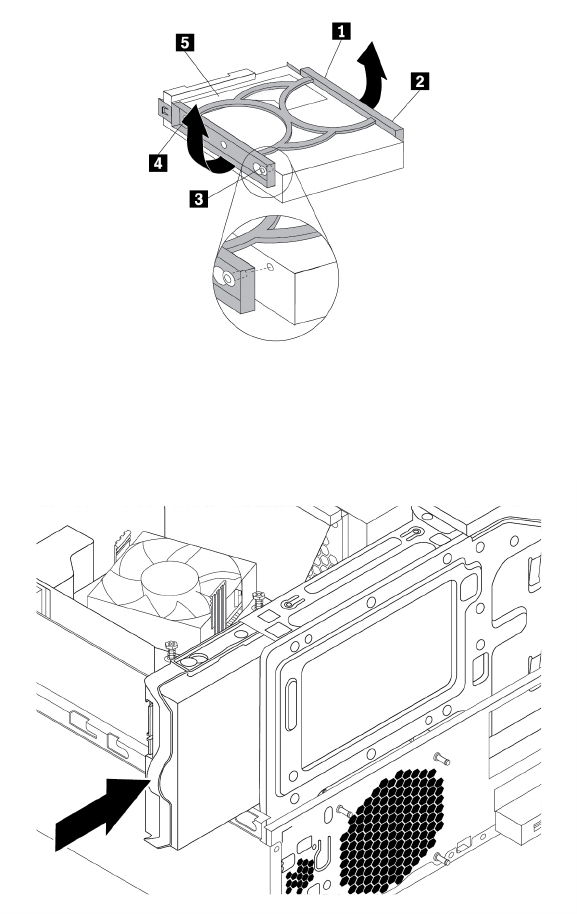
ﺎﻟﺸﻜﻞ٨٧.ﺘﺮﻛﻴﺐﻤﺤﺮﻙﺎﻟﺄﻗﺮﺍﺹﺎﻟﺜﺎﺑﺘﺔﻔﻲﺎﻟﺤﺎﻣﻞ
٩.ﻘﻢﺒﺈﺯﺍﺣﺔﻤﺤﺮﻙﺎﻟﺄﻗﺮﺍﺹﺎﻟﺜﺎﺑﺘﺔﺎﻟﺠﺪﻳﺪﺈﻟﻰﺪﺍﺧﻞﺼﻨﺪﻭﻕﻮﺣﺪﺓﺎﻟﺘﺸﻐﻴﻞﺈﻟﻰﺄﻥﻴﺜﺒﺖﻔﻲﻤﻮﺿﻌﻪ.
ﺎﻟﺸﻜﻞ٨٨.ﺘﺮﻛﻴﺐﻤﺤﺮﻙﺎﻟﺄﻗﺮﺍﺹﺎﻟﺜﺎﺑﺘﺔﺎﻟﺄﺳﺎﺳﻲ
١٠.ﻘﻢﺒﺘﻮﺻﻴﻞﻜﺎﺑﻠﺎﺕﺎﻟﻄﺎﻗﺔﻮﺍﻟﺎﺷﺎﺭﺓﺈﻟﻰﻘﺮﺹﺎﻟﺘﺸﻐﻴﻞﺎﻟﺜﺎﺑﺖﺎﻟﺠﺪﻳﺪ.
ﻤﺎﻴﺠﺐﺎﻟﻘﻴﺎﻡﺒﻪﺒﻌﺪﺬﻟﻚ:
•ﻠﻠﺘﻌﺎﻣﻞﻤﻊﺠﺰﺀﺂﺧﺮﻤﻦﺎﻟﺠﻬﺎﺯ،ﺎﺫﻫﺐﺈﻟﻰﺎﻟﻘﺴﻢﺎﻟﻤﻨﺎﺳﺐ.
•ﻠﺎﺳﺘﻜﻤﺎﻝﻌﻤﻠﻴﺔﺎﻟﺘﺮﻛﻴﺐﺄﻭﺎﻟﺎﺳﺘﺒﺪﺍﻝ،ﺎﺫﻫﺐﺈﻟﻰ"ﺎﺳﺘﻜﻤﺎﻝﻌﻤﻠﻴﺔﺎﺳﺘﺒﺪﺍﻝﺎﻟﻘﻄﻊ"ﻌﻠﻰﺎﻟﺼﻔﺤﺔ٩٨.
ﻤﺤﺮﻙﺎﻟﺄﻗﺮﺍﺹﺎﻟﺜﺎﺑﺘﺔﺎﻟﺜﺎﻧﻮﻱ
ﺘﻨﺒﻴﻪ:ﻠﺎﺘﻔﺘﺢﺎﻟﻜﻤﺒﻴﻮﺗﺮﺄﻭﺘﺤﺎﻭﻝﺈﺻﻠﺎﺣﻪﻘﺒﻞﻘﺮﺍﺀﺓﻮﻓﻬﻢ"ﺎﻗﺮﺃﻬﺬﺍﺎﻟﺠﺰﺀﺄﻭﻟﺎ
ً
:ﻤﻌﻠﻮﻣﺎﺕﻤﻬﻤﺔﺤﻮﻝﺎﻟﺴﻠﺎﻣﺔ"ﻌﻠﻰﺎﻟﺼﻔﺤﺔiii.
ﻤﻠﺎﺣﻈﺔ:ﻴﺘﻮﻓﺮﻤﺤﺮﻙﺎﻟﺄﻗﺮﺍﺹﺎﻟﺜﺎﺑﺘﺔﺎﻟﺜﺎﻧﻮﻱﻔﻲﺒﻌﺾﺎﻟﻄ
ُ
ﺮﺯﻔﻘﻂ.
ﻠﺎﺳﺘﺒﺪﺍﻝﻤﺤﺮﻙﺎﻟﺄﻗﺮﺍﺹﺎﻟﺜﺎﺑﺘﺔﺎﻟﺜﺎﻧﻮﻱ،ﻘﻢﺒﺘﻨﻔﻴﺬﻤﺎﻴﻠﻲ:
٩٤
ﺩﻟﻴﻞﻣﺴﺘﺨﺪﻡP320
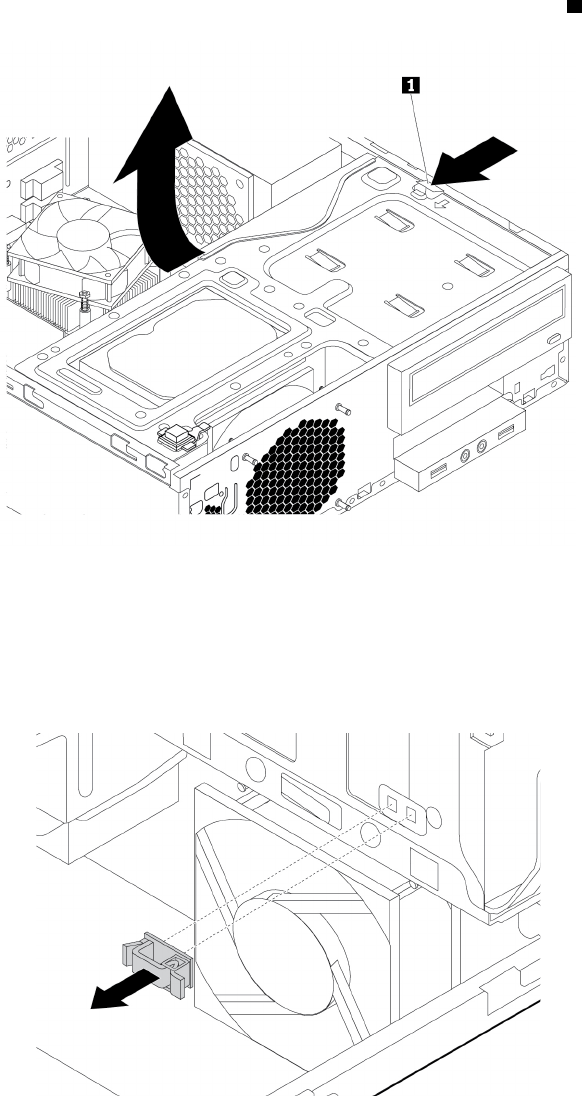
١.ﺎﻋﻤﻞﻌﻠﻰﺈﻋﺪﺍﺩﺎﻟﻜﻤﺒﻴﻮﺗﺮ.ﺮﺍﺟﻊ"ﺈﻋﺪﺍﺩﺎﻟﻜﻤﺒﻴﻮﺗﺮﻮﻧﺰﻉﻐﻄﺎﺀﺎﻟﻜﻤﺒﻴﻮﺗﺮ"ﻌﻠﻰﺎﻟﺼﻔﺤﺔ٥١.
٢.ﻘﻢﺒﺎﺯﺍﻟﺔﺎﻟﻮﺍﺟﻬﺔﺎﻟﺄﻣﺎﻣﻴﺔ.ﺮﺍﺟﻊ"ﺎﻟﻮﺍﺟﻬﺔﺎﻟﺄﻣﺎﻣﻴﺔ"ﻌﻠﻰﺎﻟﺼﻔﺤﺔ٥٢.
٣.ﺎﺿﻐﻂﻌﻠﻰﻤﺸﺒﻚﺎﻟﺘﺤﺮﻳﺮ
1ﻜﻤﺎﻬﻮﻤﻮﺿﺢﻮﻗﻢﺒﺘﺪﻭﻳﺮﻤﺠﻤﻮﻋﺔﻔﺘﺤﺔﻤﺤﺮﻙﺎﻟﺄﻗﺮﺍﺹﻠﻠﺄﻋﻠﻰ.
ﺎﻟﺸﻜﻞ٨٩.ﺘﺪﻭﻳﺮﻤﺠﻤﻮﻋﺔﺨﺎﻧﺔﺎﻟﻤﺸﻐﻞﻠﺄﻋﻠﻰ
٤.ﺤﺪﺩﻤﻮﻗﻊﻤﺤﺮﻙﺎﻟﺄﻗﺮﺍﺹﺎﻟﺜﺎﺑﺘﺔﺎﻟﺜﺎﻧﻮﻱ.ﺮﺍﺟﻊ"ﻤﻜﻮﻧﺎﺕﺎﻟﻜﻤﺒﻴﻮﺗﺮ"ﻌﻠﻰﺎﻟﺼﻔﺤﺔ٥.
٥.ﺎﻓﺼﻞﻜﺎﺑﻠﻲﺎﻟﺈﺷﺎﺭﺓﻮﺍﻟﻄﺎﻗﺔﻤﻦﻤﺤﺮﻙﺎﻟﺄﻗﺮﺍﺹﺎﻟﺜﺎﺑﺘﺔ.
٦.ﻘﻢﺒﺈﺯﺍﻟﺔﻤﺸﺒﻚﺎﻟﻜﺒﻞﺎﻟﻤﻮﺟﻮﺩﻔﻲﺄﺳﻔﻞﻔﺘﺤﺔﻤﺤﺮﻙﺎﻟﺄﻗﺮﺍﺹﺎﻟﺜﺎﺑﺘﺔﺎﻟﺄﺳﺎﺳﻲﻜﻤﺎﻬﻮﻤﺒﻴ
ّ
ﻦ.
ﺎﻟﺸﻜﻞ٩٠.ﺈﺯﺍﻟﺔﻤﺸﺒﻚﺎﻟﻜﺒﻞ
٧.ﻘﻢﺒﻤﺤﺎﺫﺍﺓﺎﻟﻔﺘﺤﺎﺕﺎﻟﺄﺭﺑﻊﺎﻟﻤﻮﺟﻮﺩﺓﻔﻲﺘﺠﻮﻳﻒﻤﺤﺮﻙﺎﻟﺄﻗﺮﺍﺹﺎﻟﺜﺎﺑﺘﺔﺎﻟﺜﺎﻧﻮﻱﻤﻊﺎﻟﺄﻟﺴﻨﺔﺎﻟﺄﺭﺑﻌﺔﺎﻟﻤﻨﺎﻇﺮﺓﻔﻲﺄﺳﻔﻞﺎﻟﻔﺘﺤﺔﻜﻤﺎﻬﻮﻤﺒﻴ
ّ
ﻦ.ﺒﻌﺪﺬﻟﻚ،
ﻀﻊﺎﻟﺘﺠﻮﻳﻒﻔﻲﺄﺳﻔﻞﻔﺘﺤﺔﻤﺤﺮﻙﺎﻟﺄﻗﺮﺍﺹﺎﻟﺜﺎﺑﺘﺔﺎﻟﺄﺳﺎﺳﻲﺒﺤﻴﺚﺘﻤﺮﺎﻟﺄﻟﺴﻨﺔﺎﻟﻤﻮﺟﻮﺩﺓﻌﻠﻰﺎﻟﻔﺘﺤﺔﻌﺒﺮﺎﻟﻔﺘﺤﺎﺕﺎﻟﻤﻮﺟﻮﺩﺓﻔﻲﺎﻟﺘﺠﻮﻳﻒ.
ﺍﻟﻤﻠﺤﻖ٧.ﺇﺧﺮﺍﺝﺍﻷﺟﻬﺰﺓﻭﺗﺮﻛﻴﺒﻬﺎ٩٥
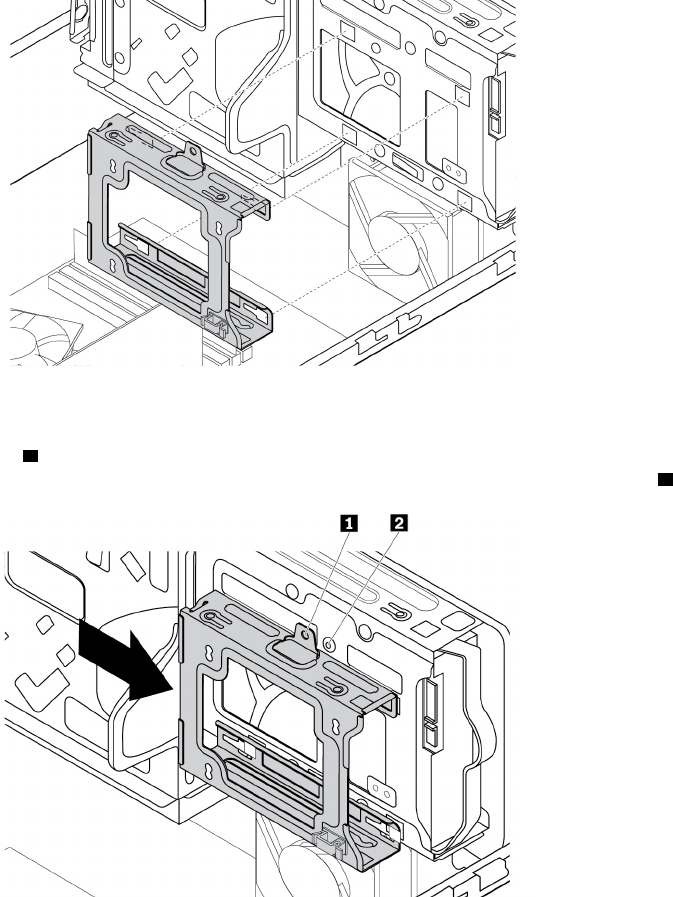
ﺎﻟﺸﻜﻞ٩١.ﻮﺿﻊﺎﻟﺘﺠﻮﻳﻒﻔﻲﺄﺳﻔﻞﻔﺘﺤﺔﻤﺤﺮﻙﺎﻟﺄﻗﺮﺍﺹﺎﻟﺜﺎﺑﺘﺔﺎﻟﺄﺳﺎﺳﻲ
٨.ﺤﺮ
ّ
ﻙﺘﺠﻮﻳﻒﻤﺤﺮﻙﺎﻟﺄﻗﺮﺍﺹﺎﻟﺜﺎﺑﺘﺔﺎﻟﺜﺎﻧﻮﻱﺈﻟﻰﻴﺴﺎﺭﺎﻟﻬﻴﻜﻞﺤﺘﻰﻴﺴﺘﻘﺮﻔﻲﻤﻜﺎﻧﻪﻮﺣﺘﻰﻤﺤﺎﺫﺍﺓﻔﺘﺤﺔﺎﻟﻤﺴﻤﺎﺭ1ﺎﻟﻤﻮﺟﻮﺩﺓﻔﻲﺎﻟﺘﺠﻮﻳﻒﻤﻊﻔﺘﺤﺔ
ﺎﻟﻤﺴﻤﺎﺭ
2ﺎﻟﻤﻮﺟﻮﺩﺓﻔﻲﺎﻟﻔﺘﺤﺔ.
ﺎﻟﺸﻜﻞ٩٢.ﺘﺮﻛﻴﺐﺘﺠﻮﻳﻒﻤﺤﺮﻙﺎﻟﺄﻗﺮﺍﺹﺎﻟﺜﺎﺑﺘﺔﺎﻟﺜﺎﻧﻮﻱ
٩.ﺮﻛ
ّ
ﺐﺎﻟﻤﺴﻤﺎﺭﻠﺘﺜﺒﻴﺖﺘﺠﻮﻳﻒﻤﺤﺮﻙﺎﻟﺄﻗﺮﺍﺹﺎﻟﺜﺎﺑﺘﺔﺎﻟﺜﺎﻧﻮﻱﺒﺎﻟﻬﻴﻜﻞ.
٩٦
ﺩﻟﻴﻞﻣﺴﺘﺨﺪﻡP320
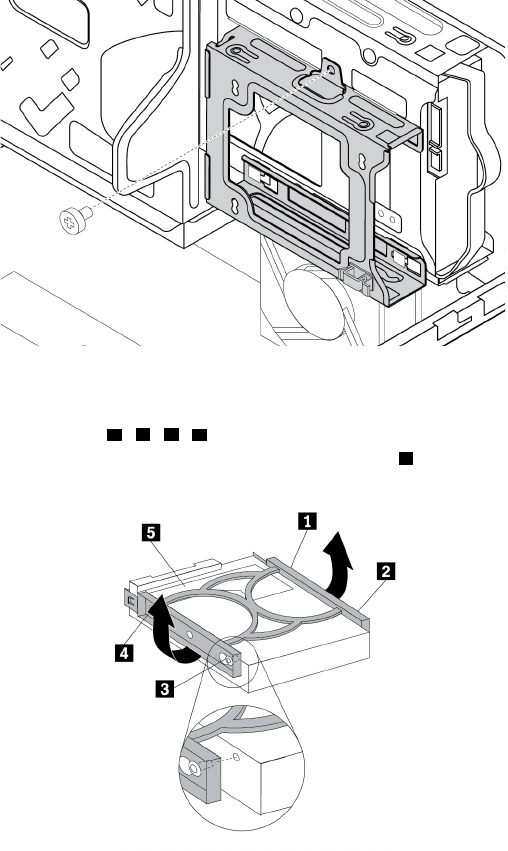
ﺎﻟﺸﻜﻞ٩٣.ﺘﺮﻛﻴﺐﺎﻟﻤﺴﻤﺎﺭﻠﺘﺜﺒﻴﺖﺘﺠﻮﻳﻒﻤﺤﺮﻙﺎﻟﺄﻗﺮﺍﺹﺎﻟﺜﺎﺑﺘﺔﺎﻟﺜﺎﻧﻮﻱ
١٠.ﻠﺘﺮﻛﻴﺐﻤﺸﻐﻞﻘﺮﺹﺜﺎﺑﺖﺠﺪﻳﺪﻔﻲﺎﻟﺴﻨﺎﺩﺎﻟﺄﺯﺭﻕ،ﻘﻢﺒﺜﻨﻲﺎﻟﺴﻨﺎﺩﻮﻣﺤﺎﺫﺍﺓﺎﻟﺴﻨﻮﻥ1ﻮ2ﻮ3ﻮ4ﺎﻟﻤﻮﺟﻮﺩﺓﻌﻠﻰﺎﻟﺴﻨﺎﺩﺒﺎﻟﺜﻘﻮﺏﺎﻟﻤﻨﺎﻇﺮﺓﻔﻲﻤﺤﺮﻙ
ﺎﻟﺄﻗﺮﺍﺹﺎﻟﺜﺎﺑﺘﺔ.ﻠﺎﺘﻠﻤﺲﻠﻮﺣﺔﺎﻟﺪﺍﺋﺮﺓﺎﻟﻜﻬﺮﺑﺎﺋﻴﺔ
5ﺎﻟﻤﻮﺟﻮﺩﺓﺄﺳﻔﻞﻤﺤﺮﻙﺎﻟﺄﻗﺮﺍﺹﺎﻟﺜﺎﺑﺘﺔ.
ﺎﻟﺸﻜﻞ٩٤.ﺘﺮﻛﻴﺐﻤﺤﺮﻙﺎﻟﺄﻗﺮﺍﺹﺎﻟﺜﺎﺑﺘﺔﻔﻲﺎﻟﺤﺎﻣﻞ
١١.ﺄﺩﺧﻞﻤﺤﺮﻙﺎﻟﺄﻗﺮﺍﺹﺎﻟﺜﺎﺑﺘﺔﺎﻟﺜﺎﻧﻮﻱﺎﻟﺠﺪﻳﺪﻔﻲﺘﺠﻮﻳﻒﻤﺤﺮﻙﺎﻟﺄﻗﺮﺍﺹﺎﻟﺜﺎﺑﺘﺔﺈﻟﻰﺄﻥﻴﺴﺘﻘﺮﻔﻲﻤﻜﺎﻧﻪ.
ﺍﻟﻤﻠﺤﻖ٧.ﺇﺧﺮﺍﺝﺍﻷﺟﻬﺰﺓﻭﺗﺮﻛﻴﺒﻬﺎ٩٧
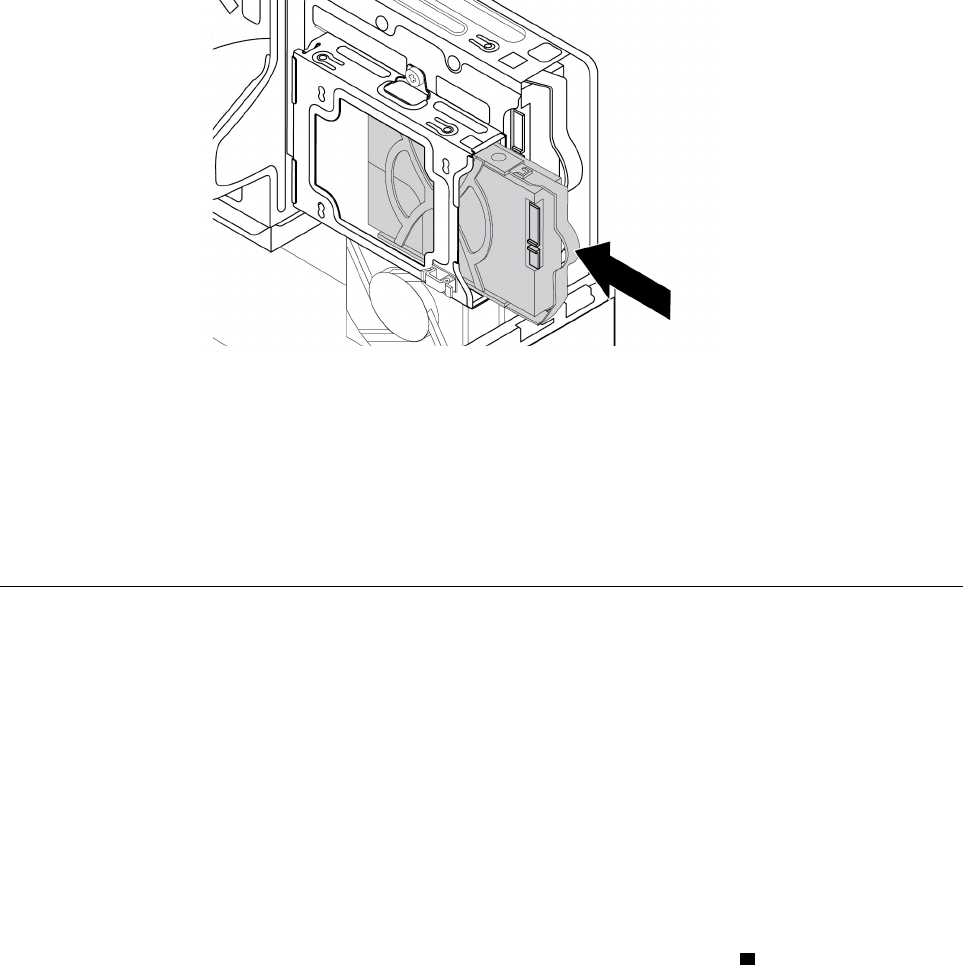
ﺎﻟﺸﻜﻞ٩٥.ﺘﺮﻛﻴﺐﻤﺤﺮﻙﺎﻟﺄﻗﺮﺍﺹﺎﻟﺜﺎﺑﺘﺔﺎﻟﺜﺎﻧﻮﻱ
١٢.ﻘﻢﺒﺘﻮﺻﻴﻞﻜﺒﻞﺎﻟﺈﺷﺎﺭﺓﻮﻛﺒﻞﺎﻟﻄﺎﻗﺔﺒﻤﺤﺮﻙﺎﻟﺄﻗﺮﺍﺹﺎﻟﺜﺎﺑﺘﺔﺎﻟﺜﺎﻧﻮﻱﺎﻟﺠﺪﻳﺪ.
ﻤﺎﻴﺠﺐﺎﻟﻘﻴﺎﻡﺒﻪﺒﻌﺪﺬﻟﻚ:
•ﻠﻠﺘﻌﺎﻣﻞﻤﻊﺠﺰﺀﺂﺧﺮﻤﻦﺎﻟﺠﻬﺎﺯ،ﺎﺫﻫﺐﺈﻟﻰﺎﻟﻘﺴﻢﺎﻟﻤﻨﺎﺳﺐ.
•ﻠﺎﺳﺘﻜﻤﺎﻝﻌﻤﻠﻴﺔﺎﻟﺘﺮﻛﻴﺐﺄﻭﺎﻟﺎﺳﺘﺒﺪﺍﻝ،ﺎﺫﻫﺐﺈﻟﻰ"ﺎﺳﺘﻜﻤﺎﻝﻌﻤﻠﻴﺔﺎﺳﺘﺒﺪﺍﻝﺎﻟﻘﻄﻊ"ﻌﻠﻰﺎﻟﺼﻔﺤﺔ٩٨.
ﺎﺳﺘﻜﻤﺎﻝﻌﻤﻠﻴﺔﺎﺳﺘﺒﺪﺍﻝﺎﻟﻘﻄﻊ
ﺘﺤﺬﻳﺮ: ﺒﻌﺪﺎﺳﺘﺒﺪﺍﻝﻮﺣﺪﺓCRU،ﺄﻋﺪﺘﺮﻛﻴﺐﻜﻞﺎﻟﺄﻏﻄﻴﺔﺎﻟﻮﺍﻗﻴﺔ،ﺒﻤﺎﻔﻴﻬﺎﻐﻄﺎﺀﺎﻟﻜﻤﺒﻴﻮﺗﺮ،ﻘﺒﻞﺘﻮﺻﻴﻞﺎﻟﻄﺎﻗﺔﻮﺗﺸﻐﻴﻞﺎﻟﻜﻤﺒﻴﻮﺗﺮ.ﻴ
ُ
ﻌﺪﻬﺬﺍﺎﻟﺈﺟﺮﺍﺀﻀﺮﻭﺭﻳ
ً
ﺎﻠﻠﻤﺴﺎﻋﺪﺓﻔﻲﻤﻨﻊﺤﺪﻭﺙﺼﻌﻖﻜﻬﺮﺑﺎﺋﻲﻐﻴﺮﻤﺘﻮﻗﻊ،ﻮﺃﻳﻀ
ً
ﺎﻠﻠﻤﺴﺎﻋﺪﺓﻔﻲﻀﻤﺎﻥﺎﺣﺘﻮﺍﺀﺤﺮﻳﻖﻐﻴﺮﻤﺘﻮﻗﻊﻘﺪﻴﺤﺪﺙﻔﻲﻈﺮﻭﻑﻨﺎﺩﺭﺓﻠﻠﻐﺎﻳﺔ.
ﺒﻌﺪﺈﺗﻤﺎﻡﻌﻤﻠﻴﺔﺘﺮﻛﻴﺐﺄﻭﺎﺳﺘﺒﺪﺍﻝﻜﻞﺎﻟﺄﺟﺰﺍﺀ،ﺄﻋﺪﺘﺮﻛﻴﺐﻐﻄﺎﺀﺎﻟﻜﻤﺒﻴﻮﺗﺮﻮﺃﻋﺪﺘﻮﺻﻴﻞﺎﻟﻜﺎﺑﻠﺎﺕ.ﺄﻳﻀ
ً
ﺎ،ﻮﺑﻨﺎﺀ
ً
ﻌﻠﻰﺎﻟﺄﺟﺰﺍﺀﺎﻟﺘﻲﺘﻢﺘﺮﻛﻴﺒﻬﺎﺄﻭﺎﺳﺘﺒﺪﺍﻟﻬﺎ،ﻘﺪ
ﻴﻜﻮﻥﻀﺮﻭﺭﻳ
ً
ﺎﺎﻟﺘﺄﻛﻴﺪﻌﻠﻰﺎﻟﻤﻌﻠﻮﻣﺎﺕﺎﻟﺘﻲﺘﻢﺘﺤﺪﻳﺜﻬﺎﻔﻲﺒﺮﻧﺎﻣﺞSetup Utility.ﺎﺭﺟﻊﺈﻟﻰ"ﺎﺳﺘﺨﺪﺍﻡﺒﺮﻧﺎﻣﺞSetup Utility"ﻌﻠﻰﺎﻟﺼﻔﺤﺔ٣١.
ﻠﺈﻋﺎﺩﺓﺘﺮﻛﻴﺐﻐﻄﺎﺀﺎﻟﻜﻤﺒﻴﻮﺗﺮﻮﺇﻋﺎﺩﺓﺘﻮﺻﻴﻞﺎﻟﻜﺎﺑﻠﺎﺕﻠﺠﻬﺎﺯﺎﻟﻜﻤﺒﻴﻮﺗﺮ،ﻘﻢﺒﺘﻨﻔﻴﺬﻤﺎﻴﻠﻲ:
١.ﺘﺄﻛﺪﻤﻦﺈﻋﺎﺩﺓﺘﺠﻤﻴﻊﻜﻞﺎﻟﻤﻜﻮﻧﺎﺕﺒﺸﻜﻞﺼﺤﻴﺢﻮﻣﻦﻌﺪﻡﺘﺮﻙﺄﻱﺄﺩﻭﺍﺕﺄﻭﻤﺴﺎﻣﻴﺮﺮﺧﻮﺓﺪﺍﺧﻞﺎﻟﻜﻤﺒﻴﻮﺗﺮ.ﺮﺍﺟﻊ"ﻤﻜﻮﻧﺎﺕﺎﻟﻜﻤﺒﻴﻮﺗﺮ"ﻌﻠﻰﺎﻟﺼﻔﺤﺔ
٥ﻠﻠﺘﻌﺮ
ّ
ﻑﻌﻠﻰﻤﻮﺍﻗﻊﻤﺨﺘﻠﻒﺎﻟﻤﻜﻮﻧﺎﺕﺎﻟﻤﻮﺟﻮﺩﺓﻔﻲﺎﻟﻜﻤﺒﻴﻮﺗﺮ.
٢.ﺘﺄﻛﺪﻤﻦﺘﻮﺟﻴﻪﺎﻟﻜﺒﻠﺎﺕﺒﻄﺮﻳﻘﺔﺼﺤﻴﺤﺔﻘﺒﻞﺈﻋﺎﺩﺓﺘﺮﻛﻴﺐﻐﻄﺎﺀﺎﻟﻜﻤﺒﻴﻮﺗﺮ.ﺄﺑﻖﺎﻟﻜﺎﺑﻠﺎﺕﺒﻌﻴﺪﺓﻌﻦﻤﻔﺼﻠﺎﺕﻮﺟﻮﺍﻧﺐﻬﻴﻜﻞﺎﻟﺠﻬﺎﺯﺄﺛﻨﺎﺀﺈﻋﺎﺩﺓﺘﺮﻛﻴﺐ
ﻐﻄﺎﺀﺎﻟﻜﻤﺒﻴﻮﺗﺮ.
٣.ﺎﺿﻐﻂﻌﻠﻰﻤﺸﺒﻚﺎﻟﺘﺤﺮﻳﺮ
1ﻜﻤﺎﻬﻮﻤﻮﺿﺢﻮﻗﻢﺒﺘﺪﻭﻳﺮﻤﺠﻤﻮﻋﺔﻔﺘﺤﺔﻤﺤﺮﻙﺎﻟﺄﻗﺮﺍﺹﻠﺄﺳﻔﻞﺈﻟﻰﺄﻥﺘﺴﺘﻘﺮﻔﻲﻤﻜﺎﻧﻬﺎ.
٩٨
ﺩﻟﻴﻞﻣﺴﺘﺨﺪﻡP320
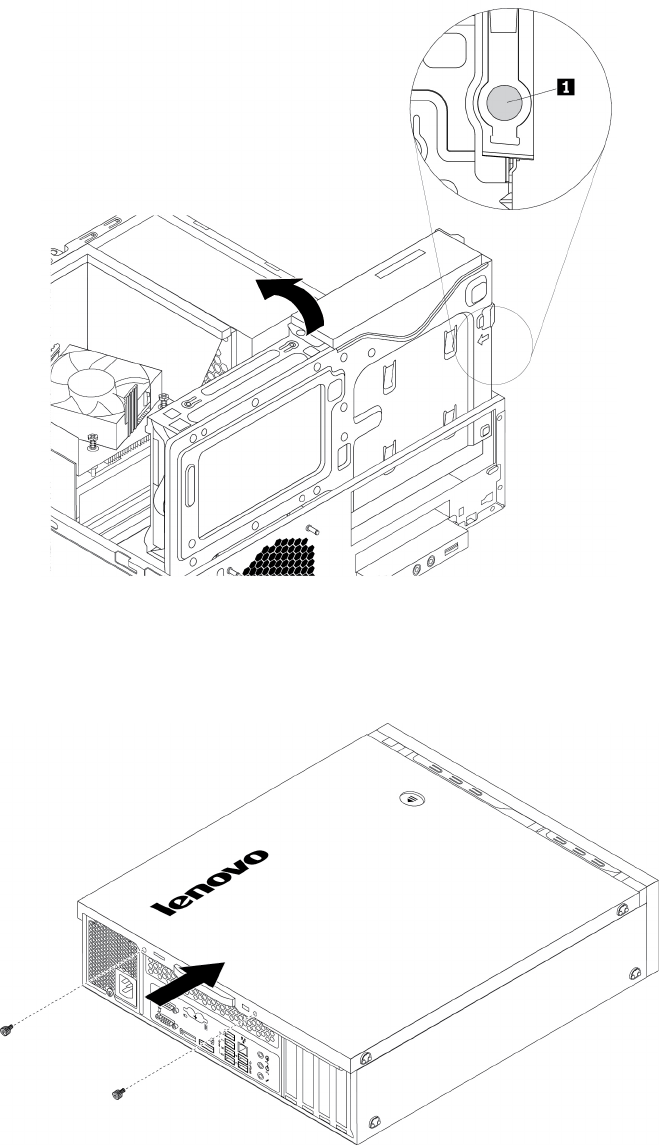
ﺎﻟﺸﻜﻞ٩٦.ﺘﺪﻭﻳﺮﻤﺠﻤﻮﻋﺔﻔﺘﺤﺔﻤﺤﺮﻙﺎﻟﺄﻗﺮﺍﺹﻠﺄﺳﻔﻞ
٤.ﻀﻊﻐﻄﺎﺀﺎﻟﻜﻤﺒﻴﻮﺗﺮﻌﻠﻰﺎﻟﻬﻴﻜﻞﺒﺤﻴﺚﻴﺘﻢﺘﻌﺸﻴﻖﻤﻮﺟﻬﺎﺕﺎﻟﻘﻀﺒﺎﻥﺎﻟﻤﻮﺟﻮﺩﺓﺄﺳﻔﻞﻐﻄﺎﺀﺎﻟﻜﻤﺒﻴﻮﺗﺮﻤﻊﺎﻟﻘﻀﺒﺎﻥﺎﻟﻤﻮﺟﻮﺩﺓﻔﻲﺎﻟﻬﻴﻜﻞ.ﻘﻢﺒﻌﺪﺬﻟﻚ
ﺒﺎﻟﻀﻐﻂﻌﻠﻰﺎﻟﻐﻄﺎﺀﻔﻲﺎﺗﺠﺎﻩﺎﻟﺠﺰﺀﺎﻟﺄﻣﺎﻣﻲﻤﻦﺠﻬﺎﺯﺎﻟﻜﻤﺒﻴﻮﺗﺮﺤﺘﻰﻴﺘﻢﺘﺮﻛﻴﺒﻪﻮﺗﺜﺒﻴﺘﻪﻔﻲﻤﻮﺿﻌﻪ.
ﺎﻟﺸﻜﻞ٩٧.ﺈﻋﺎﺩﺓﺘﺮﻛﻴﺐﻐﻄﺎﺀﺎﻟﻜﻤﺒﻴﻮﺗﺮ
٥.ﻘﻢﺒﺘﺮﻛﻴﺐﺎﻟﻤﺴﺎﻣﻴﺮﺎﻟﺘﻲﺘﺤﻤﻲﻐﻄﺎﺀﺎﻟﻜﻤﺒﻴﻮﺗﺮ.
٦.ﻀﻊﺎﻟﻜﻤﺒﻴﻮﺗﺮﻔﻲﻮﺿﻊﻌﻤﻮﺩﻱ.
٧.ﺄﻗﻔﻞﻐﻄﺎﺀﺎﻟﻜﻤﺒﻴﻮﺗﺮﺈﺫﺍﺘﻮﻓﺮﺠﻬﺎﺯﻘﻔﻞ.ﺮﺍﺟﻊ"ﻘﻔﻞﺎﻟﻜﻤﺒﻴﻮﺗﺮ"ﻌﻠﻰﺎﻟﺼﻔﺤﺔ٢٥.
ﺍﻟﻤﻠﺤﻖ٧.ﺇﺧﺮﺍﺝﺍﻷﺟﻬﺰﺓﻭﺗﺮﻛﻴﺒﻬﺎ٩٩
٨.ﺄﻋﺪﺘﻮﺻﻴﻞﺎﻟﻜﺎﺑﻠﺎﺕﺎﻟﺨﺎﺭﺟﻴﺔﻮﺃﺳﻠﺎﻙﺎﻟﻄﺎﻗﺔﺒﺎﻟﻤﻮﺻﻠﺎﺕﺎﻟﺨﺎﺻﺔﺒﻜﻞﻤﻨﻬﺎﺒﺠﻬﺎﺯﺎﻟﻜﻤﺒﻴﻮﺗﺮ.ﺮﺍﺟﻊ"ﻤﻮﺍﻗﻊﺎﻟﺄﺟﻬﺰﺓ"ﻌﻠﻰﺎﻟﺼﻔﺤﺔ١.
٩.ﺤﺪ
ّ
ﺙﺘﻜﻮﻳﻦﺎﻟﻜﻤﺒﻴﻮﺗﺮ.ﺮﺍﺟﻊ"ﺎﺳﺘﺨﺪﺍﻡﺒﺮﻧﺎﻣﺞSetup Utility"ﻌﻠﻰﺎﻟﺼﻔﺤﺔ٣١.
١٠.ﺈﺫﺍﻠﻢﻴﻌﻤﻞﺄﺣﺪﻤﻜﻮﻧﺎﺕﺎﻟﺄﺟﻬﺰﺓﺎﻟﺬﻱﺘﻢﺘﺮﻛﻴﺒﻪﻤﺆﺧﺮ
ً
ﺍﺒﺸﻜﻞﺼﺤﻴﺢ،ﻔﻌﻠﻴﻚﺘﺤﺪﻳﺚﺒﺮﻧﺎﻣﺞﺘﺸﻐﻴﻞﺎﻟﺠﻬﺎﺯ.ﺮﺍﺟﻊ"ﺘﺤﺪﻳﺚﺎﻟﻜﻤﺒﻴﻮﺗﺮ"ﻌﻠﻰﺎﻟﺼﻔﺤﺔ
٢٣.
١٠٠
ﺩﻟﻴﻞﻣﺴﺘﺨﺪﻡP320

ﺍﻟﻤﻠﺤﻖ٨.ﺎﻟﺤﺼﻮﻝﻌﻠﻰﺎﻟﻤﻌﻠﻮﻣﺎﺕﻮﺍﻟﻤﺴﺎﻋﺪﺓﻮﺍﻟﺨﺪﻣﺔ
ﻴﻮﻓﺮﻬﺬﺍﺎﻟﻔﺼﻞﻤﻌﻠﻮﻣﺎﺕﺤﻮﻝﺎﻟﺤﺼﻮﻝﻌﻠﻰﺎﻟﻤﺴﺎﻋﺪﺓﻮﺍﻟﺪﻋﻢﻤﻦﺸﺮﻛﺔLenovo.
ﻤﺼﺎﺩﺭﺎﻟﻤﻌﻠﻮﻣﺎﺕ
ﻴﻤﻜﻨﻚﺎﺳﺘﺨﺪﺍﻡﺎﻟﻤﻌﻠﻮﻣﺎﺕﺎﻟﻤﻮﺟﻮﺩﺓﻔﻲﻬﺬﺍﺎﻟﻘﺴﻢﻠﻠﻮﺻﻮﻝﺈﻟﻰﻤﺼﺎﺩﺭﻤﻔﻴﺪﺓﺘﺘﻌﻠﻖﺒﺎﺳﺘﺨﺪﺍﻣﺎﺕﺠﻬﺎﺯﺎﻟﻜﻤﺒﻴﻮﺗﺮ.
ﺎﻟﻮﺻﻮﻝﺈﻟﻰﺪﻟﻴﻞﺎﻟﻤﺴﺘﺨﺪﻡﺒﻠﻐﺎﺕﻤﺘﻌﺪﺩﺓ
ﻠﻠﻮﺻﻮﻝﺈﻟﻰﺪﻟﻴﻞﺎﻟﻤﺴﺘﺨﺪﻡﺒﻠﻐﺎﺕﻤﺨﺘﻠﻔﺔ،ﺎﺫﻫﺐﺈﻟﻰ:
https://support.lenovo.com
ﻨﻈﺎﻡﺎﻟﻤﺴﺎﻋﺪﺓﻠـWindows
ﻴﻮﻓﺮﻠﻚﻨﻈﺎﻡﺎﻟﻤﺴﺎﻋﺪﺓﻠـWindowsﻤﻌﻠﻮﻣﺎﺕﺘﻔﺼﻴﻠﻴﺔﺤﻮﻝﺎﺳﺘﺨﺪﺍﻡﻨﻈﺎﻡﺎﻟﺘﺸﻐﻴﻞWindows.
ﻠﻠﻮﺻﻮﻝﺈﻟﻰﻨﻈﺎﻡﻤﺴﺎﻋﺪﺓWindows،ﻘﻢﺒﻤﺎﻴﻠﻲ:
١.ﺎﻧﻘﺮﻔﻮﻕﺎﻟﺰﺭ"ﺎﺑﺪﺃ"ﻠﻔﺘﺢﻘﺎﺋﻤﺔ"ﺎﺑﺪﺃ".
٢.ﺘﺒﻌ
ً
ﺎﻠﺈﺻﺪﺍﺭWindows،ﻘﻢﺒﺄﺣﺪﺎﻟﺈﺟﺮﺍﺀﺍﺕﺎﻟﺘﺎﻟﻴﺔ:
•ﺒﺎﻟﻨﺴﺒﺔﺈﻟﻰﻨﻈﺎﻡﺎﻟﺘﺸﻐﻴﻞWindows 7:ﺎﻧﻘﺮﻔﻮﻕﺎﻟﺘﻌﻠﻴﻤﺎﺕﻮﺍﻟﺪﻋﻢ.ﻴﻤﻜﻨﻚﺎﺧﺘﻴﺎﺭﺎﺳﺘﺨﺪﺍﻡﺎﻟﻤﺴﺎﻋﺪﺓﻌﺒﺮﺎﻟﺈﻧﺘﺮﻧﺖﺄﻭﺎﻟﻤﺴﺎﻋﺪﺓﻐﻴﺮﺎﻟﻤﺘﺼﻠﺔ
ﺒﺎﻟﺈﻧﺘﺮﻧﺖﻤﻦﺄﺳﻔﻞﺎﻟﺸﺎﺷﺔ.
•ﺒﺎﻟﻨﺴﺒﺔﺈﻟﻰﻨﻈﺎﻡﺎﻟﺘﺸﻐﻴﻞWindows 10:ﺎﻧﻘﺮﻔﻮﻕﺎﻟﺤﺼﻮﻝﻌﻠﻰﺎﻟﻤﺴﺎﻋﺪﺓ.
ﻤﻠﺎﺣﻈﺔ:ﻴﺘﻄﻠﺐﺎﺳﺘﺨﺪﺍﻡﺎﻟﺘﻌﻠﻴﻤﺎﺕﻌﺒﺮﺎﻟﺈﻧﺘﺮﻧﺖﻠﻨﻈﺎﻡﺎﻟﺘﺸﻐﻴﻞWindows 7ﺄﻭﻨﻈﺎﻡﺎﻟﻤﺴﺎﻋﺪﺓﻠﻨﻈﺎﻡﺎﻟﺘﺸﻐﻴﻞWindows 10ﻮﺟﻮﺩﺎﺗﺼﺎﻝﺒﺎﻟﺈﻧﺘﺮﻧﺖ.
ﺎﻟﺴﻠﺎﻣﺔﻮﺍﻟﻀﻤﺎﻥ
ﻴﺤﺘﻮﻱ"ﺪﻟﻴﻞﺎﻟﺄﻣﺎﻥﻮﺍﻟﻀﻤﺎﻥﻮﺍﻟﺈﻋﺪﺍﺩ"ﺎﻟﻤﺘﻮﻓﺮﻤﻊﺎﻟﻜﻤﺒﻴﻮﺗﺮﺎﻟﺨﺎﺹﺒﻚﻌﻠﻰﻤﻌﻠﻮﻣﺎﺕﺎﻟﺴﻠﺎﻣﺔﻮﺷﺮﻭﻁﻀﻤﺎﻥﺎﻟﻤﻨﺘﺞﻮﺇﺟﺮﺍﺀﺍﺕﺎﻟﺈﻋﺪﺍﺩﺎﻟﺄﻭﻟﻲ
ﻮﺍﻟﺈﺷﻌﺎﺭﺍﺕﺎﻟﻘﺎﻧﻮﻧﻴﺔ.ﺘﺄﻛﺪﻤﻦﻘﺮﺍﺀﺓﺠﻤﻴﻊﻤﻌﻠﻮﻣﺎﺕﺎﻟﺄﻣﺎﻥﺎﻟﻤﺘﻮﻓﺮﺓﻔﻲ"ﺪﻟﻴﻞﺎﻟﺄﻣﺎﻥﻮﺍﻟﻀﻤﺎﻥﻮﺍﻟﺈﻋﺪﺍﺩ"ﻮﻓﻬﻤﻬﺎﻘﺒﻞﺎﻟﺸﺮﻭﻉﻔﻲﺎﺳﺘﺨﺪﺍﻡﺎﻟﻜﻤﺒﻴﻮﺗﺮ.
ﺈﺿﺎﻓﺔﻠﺬﻟﻚ،ﻴﺮﺟﻰﻘﺮﺍﺀﺓﻮﻓﻬﻢ"ﺎﻗﺮﺃﻬﺬﺍﺎﻟﺠﺰﺀﺄﻭﻟﺎ
ً
:ﻤﻌﻠﻮﻣﺎﺕﻤﻬﻤﺔﺤﻮﻝﺎﻟﺴﻠﺎﻣﺔ"ﻌﻠﻰﺎﻟﺼﻔﺤﺔiiiﻘﺒﻞﺎﻟﺸﺮﻭﻉﻔﻲﺎﺳﺘﺨﺪﺍﻡﺎﻟﻜﻤﺒﻴﻮﺗﺮ.ﺘﻘﺪﻡﻬﺬﻩﺎﻟﻮﺍﺟﻬﺔ
ﻤﻌﻠﻮﻣﺎﺕﺎﻟﺴﻠﺎﻣﺔﺎﻟﺈﺿﺎﻓﻴﺔﺎﻟﺘﻲﺘﻨﻄﺒﻖﻌﻠﻰﺎﻟﻤﻮﺿﻮﻋﺎﺕﻮﺍﻟﻤﻬﺎﻡﺎﻟﻤﻮﺿﺤﺔﻔﻲ"ﺪﻟﻴﻞﺎﻟﻤﺴﺘﺨﺪﻡ".
ﻤﻮﻗﻊﺎﻟﻮﻳﺐﺎﻟﺨﺎﺹﺒﺸﺮﻛﺔLenovo
ﻴﻮﻓﺮﻤﻮﻗﻊﻮﻳﺐLenovo)https://www.lenovo.com(ﻤﻌﻠﻮﻣﺎﺕﻮﺧﺪﻣﺎﺕﻤﺤﺪﺛﺔﺘﺴﺎﻋﺪﻙﻔﻲﺸﺮﺍﺀﺎﻟﻜﻤﺒﻴﻮﺗﺮﻮﺗﺮﻗﻴﺘﻪﻮﺻﻴﺎﻧﺘﻪ.ﻴﻤﻜﻨﻚﺄﻳﻀ
ً
ﺎﺎﻟﻘﻴﺎﻡﺒﻤﺎ
ﻴﻠﻲ:
•ﺎﻟﺘﺠﻮﻝﻠﺸﺮﺍﺀﺄﺟﻬﺰﺓﺎﻟﻜﻤﺒﻴﻮﺗﺮﺎﻟﻤﺤﻤﻮﻟﺔﻮﺃﺟﻬﺰﺓﻜﻤﺒﻴﻮﺗﺮﺴﻄﺢﺎﻟﻤﻜﺘﺐﻮﻭﺣﺪﺍﺕﻌﺮﺽﻮﻭﺣﺪﺍﺕﺈﺭﺳﺎﻝﻮﺍﻟﺘﺤﺪﻳﺜﺎﺕﻮﺍﻟﻜﻤﺎﻟﻴﺎﺕﺎﻟﺨﺎﺻﺔﺒﺎﻟﺤﺎﺳﺐ
ﺎﻟﺨﺎﺹﺒﻚ،ﺒﺈﻟﺎﺿﺎﻓﺔﺈﻟﻰﺒﻌﺾﺎﻟﻌﺮﻭﺽﺎﻟﺨﺎﺻﺔ.
•ﺸﺮﺍﺀﺨﺪﻣﺎﺕﺈﺿﺎﻓﻴﺔ،ﻤﺜﻞﺪﻋﻢﺎﻟﺄﺟﻬﺰﺓ،ﻮﺃﻧﻈﻤﺔﺎﻟﺘﺸﻐﻴﻞ،ﻮﺍﻟﺒﺮﺍﻣﺞ،ﻮﺇﻋﺪﺍﺩﺎﻟﺸﺒﻜﺎﺕﻮﺗﻜﻮﻳﻨﻬﺎ،ﻮﻋﻤﻠﻴﺎﺕﺎﻟﺘﺜﺒﻴﺖﺎﻟﻤﺨﺼﺼﺔ.
•ﺸﺮﺍﺀﺎﻟﺘﺤﺪﻳﺜﺎﺕﻮﺧﺪﻣﺎﺕﺈﺻﻠﺎﺡﺎﻟﺄﺟﻬﺰﺓﺎﻟﻤﻮﺳﻌﺔ.
•ﺎﻟﺎﻃﻠﺎﻉﻌﻠﻰﻤﻌﻠﻮﻣﺎﺕﺎﺳﺘﻜﺸﺎﻑﺎﻟﺄﺧﻄﺎﺀﻮﺇﺻﻠﺎﺣﻬﺎﻮﻣﻌﻠﻮﻣﺎﺕﺎﻟﺪﻋﻢﺎﻟﺨﺎﺻﺔﺒﻄﺮﺍﺯﺠﻬﺎﺯﺎﻟﻜﻤﺒﻴﻮﺗﺮﻮﺍﻟﻤﻨﺘﺠﺎﺕﺎﻟﺄﺧﺮﻯﺎﻟﻤﺪﻋﻮﻣﺔ.
•ﺎﻟﻌﺜﻮﺭﻌﻠﻰﻤﻮﻓﺮﺨﺪﻣﺔﺒﺎﻟﻘﺮﺏﻤﻨﻚ.
ﻤﻮﻗﻊﻮﻳﺐﺪﻋﻢLenovo
ﺘﺘﻮﻓﺮﻤﻌﻠﻮﻣﺎﺕﺎﻟﺪﻋﻢﺎﻟﺘﻘﻨﻲﻌﻠﻰﻤﻮﻗﻊﻮﻳﺐﺪﻋﻢLenovoﻌﻠﻰ:
https://support.lenovo.com
© Copyright Lenovo 2017, 2018١٠١

ﻴﺘﻢﺘﺤﺪﻳﺚﻤﻮﻗﻊﺎﻟﻮﻳﺐﻬﺬﺍﺒﺄﺣﺪﺙﻤﻌﻠﻮﻣﺎﺕﺎﻟﺪﻋﻢﻤﺜﻞﻤﺎﻴﻠﻲ:
•ﺒﺮﺍﻣﺞﺎﻟﺘﺸﻐﻴﻞﻮﺍﻟﺒﺮﺍﻣﺞ
•ﺎﻟﺤﻠﻮﻝﺎﻟﺘﺸﺨﻴﺼﻴﺔ
•ﻀﻤﺎﻥﺎﻟﻤﻨﺘﺞﻮﺍﻟﺼﻴﺎﻧﺔ
•ﺘﻔﺎﺻﻴﻞﺎﻟﻤﻨﺘﺞﻮﺍﻟﺄﺟﺰﺍﺀ
•ﺄﺩﻟﺔﺎﻟﻤﺴﺘﺨﺪﻣﻴﻦ
•ﻘﺎﻋﺪﺓﺎﻟﻤﻌﺎﺭﻑﻮﺍﻟﺄﺳﺌﻠﺔﺎﻟﻤﺘﺪﺍﻭﻟﺔ
•ﺄﺭﻗﺎﻡﻬﻮﺍﺗﻒﺪﻋﻢLenovo
ﺎﻟﺄﺳﺌﻠﺔﺎﻟﺘﻲﻴﻜﺜﺮﺴﺆﺍﻟﻬﺎ
ﻠﻠﺤﺼﻮﻝﻌﻠﻰﺈﺟﺎﺑﺎﺕﻌﻠﻰﺎﻟﺄﺳﺌﻠﺔﺎﻟﻤﺘﺪﺍﻭﻟﺔﺤﻮﻝﺎﻟﻜﻤﺒﻴﻮﺗﺮ،ﺎﺫﻫﺐﺈﻟﻰ:
http://www.lenovo.com/support/faq
ﺎﻟﻤﺴﺎﻋﺪﺓﻮﺍﻟﺨﺪﻣﺔ
ﻴﺘﻴﺢﻬﺬﺍﺎﻟﻘﺴﻢﻤﻌﻠﻮﻣﺎﺕﺘﻮﺿﺢﻜﻴﻔﻴﺔﺎﻟﺤﺼﻮﻝﻌﻠﻰﺎﻟﻤﺴﺎﻋﺪﺓﻮﺍﻟﺨﺪﻣﺎﺕ.
ﻄﻠﺐﺎﻟﺨﺪﻣﺔ
ﺨﻠﺎﻝﻔﺘﺮﺓﺎﻟﻀﻤﺎﻥﻴﻤﻜﻨﻚﺎﻟﺤﺼﻮﻝﻌﻠﻰﺎﻟﻤﺴﺎﻋﺪﺓﻮﻣﻌﻠﻮﻣﺎﺕﻌﻦﻄﺮﻳﻖﺎﻟﻬﺎﺗﻒﻤﻦﺨﻠﺎﻝﻤﺮﻛﺰﺪﻋﻢﺎﻟﻌﻤﻠﺎﺀ.ﻠﻠﺘﻌﺮﻑﻌﻠﻰﻔﺘﺮﺓﺎﻟﻀﻤﺎﻥﻠﺠﻬﺎﺯﺎﻟﻜﻤﺒﻴﻮﺗﺮ
ﻠﺪﻳﻚ،ﺘﻔﻀﻞﺒﺰﻳﺎﺭﺓ
https://www.lenovo.com/warranty-status.ﻠﻠﺎﻃﻠﺎﻉﻌﻠﻰﻘﺎﺋﻤﺔﺒﺄﺭﻗﺎﻡﻬﻮﺍﺗﻒﺪﻋﻢLenovo،ﺎﻧﺘﻘﻞﺈﻟﻰhttps://
pcsupport.lenovo.com/supportphonelist
.
ﻤﻠﺎﺣﻈﺔ:ﺄﺭﻗﺎﻡﺎﻟﻬﻮﺍﺗﻒﻌﺮﺿﺔﻠﻠﺘﻐﻴﻴﺮﺪﻭﻥﺈﺷﻌﺎﺭ.ﺈﺫﺍﻠﻢﻴﻜﻦﺎﻟﺮﻗﻢﺎﻟﺨﺎﺹﺒﺒﻠﺪﻙﺄﻭﻤﻨﻄﻘﺘﻚﻤﺪﺭﺟ
ً
ﺎ،ﻔﺎﺗﺼﻞﺒﻤﻮﺯﻉLenovoﺄﻭﻤﻨﺪﻭﺏﺘﺴﻮﻳﻖ
Lenovo.
ﺘﻜﻮﻥﺎﻟﺨﺪﻣﺎﺕﺎﻟﺘﺎﻟﻴﺔﻤﺘﺎﺣﺔﺄﺛﻨﺎﺀﻔﺘﺮﺓﺎﻟﻀﻤﺎﻥ:
•ﺘﺤﺪﻳﺪﺎﻟﻤﺸﻜﻠﺔ-ﻴﻮﺟﺪﺄﻓﺮﺍﺩﻌﺎﻣﻠﻮﻥﻤﺪﺭﺑﻮﻥﻌﻠﻰﺎﻟﺨﺪﻣﺔﻠﻤﺴﺎﻋﺪﺗﻚﻔﻲﺘﺤﺪﻳﺪﻤﺸﻜﻠﺎﺕﺎﻟﺄﺟﻬﺰﺓﻮﺗﺤﺪﻳﺪﺎﻟﺘﺼﺮﻑﺎﻟﻠﺎﺯﻡﻠﺤﻞﺎﻟﻤﺸﻜﻠﺔ.
•ﺈﺻﻠﺎﺡﺎﻟﺠﻬﺎﺯ-ﺈﺫﺍﻜﺎﻥﺎﻟﺴﺒﺐﻔﻲﻬﺬﻩﺎﻟﻤﺸﻜﻠﺔﻬﻮﺠﻬﺎﺯﻠﺎﻴﺰﺍﻝﻤﻮﺟﻮﺩ
ً
ﺍﻔﻲﻔﺘﺮﺓﺎﻟﻀﻤﺎﻥ،ﻔﻴﻜﻮﻥﻌﻨﺪﺋﺬ
ٍ
ﻔﻨﻴ
ّ
ﻮﺎﻟﺨﺪﻣﺔﺎﻟﻤﺪﺭﺑﻮﻥﻤﺘﺎﺣﻴﻦﺒﺤﻴﺚﻴﻤﻜﻨﻬﻢ
ﺘﻮﻓﻴﺮﻤﺴﺘﻮﻯﺎﻟﺨﺪﻣﺔﺎﻟﺬﻱﻴﻤﻜﻦﺘﻄﺒﻴﻘﻪ.
•ﺈﺩﺍﺭﺓﺎﻟﺘﻐﻴﻴﺮﺍﺕﺎﻟﻬﻨﺪﺳﻴﺔ-ﻘﺪﺘﻜﻮﻥﻬﻨﺎﻙﺒﻌﺾﺎﻟﺘﻐﻴﻴﺮﺍﺕﻤﻄﻠﻮﺑﺔﺒﻌﺪﺸﺮﺍﺀﺎﻟﻤﻨﺘﺞ.ﺴﺘﻘﻮﻡﺸﺮﻛﺔLenovoﺄﻭﺎﻟﻤﻮﺯﻉﺎﻟﻤﻌﺘﻤﺪ،ﺒﺈﺗﺎﺣﺔﺎﻟﺘﻐﻴﻴﺮﺍﺕ
ﺎﻟﻬﻨﺪﺳﻴﺔEngineering Changes (ECs)ﺎﻟﻤﺤﺪﺩﺓﻮﺍﻟﺘﻲﻴﻤﻜﻦﺄﻥﺘﻨﻄﺒﻖﻌﻠﻰﺎﻟﺠﻬﺎﺯﺎﻟﺨﺎﺹﺒﻚ.
ﻠﺎﻴﺸﻤﻞﺎﻟﻀﻤﺎﻥﺎﻟﺒﻨﻮﺩﺎﻟﺘﺎﻟﻴﺔ:
•ﺎﺳﺘﺒﺪﺍﻝﺄﻭﺎﺳﺘﺨﺪﺍﻡﺎﻟﺄﺟﺰﺍﺀﺎﻟﺘﻲﻠﻢﻴﺘﻢﺘﺼﻨﻴﻌﻬﺎﻤﻦﺄﺟﻞﺄﻭﻤﻦﻘﺒﻞﺸﺮﻛﺔLenovoﺄﻭﺄﺟﺰﺍﺀLenovoﺎﻟﺘﻲﻠﺎﻴﺴﺮﻱﻌﻠﻴﻬﺎﺎﻟﻀﻤﺎﻥ
•ﺘﺤﺪﻳﺪﻤﺼﺎﺩﺭﻤﺸﻜﻠﺎﺕﺎﻟﺒﺮﺍﻣﺞ
•ﺘﻜﻮﻳﻦBIOSﻜﺠﺰﺀﻤﻦﻌﻤﻠﻴﺔﺎﻟﺘﺜﺒﻴﺖﺄﻭﺎﻟﺘﺮﻗﻴﺔ
•ﺈﺟﺮﺍﺀﻌﻤﻠﻴﺎﺕﺘﻐﻴﻴﺮﺄﻭﺘﺮﻗﻴﺔ،ﺄﻭﺘﻄﻮﻳﺮﻤﺸﻐﻠﺎﺕﺎﻟﺄﺟﻬﺰﺓ
•ﺘﺮﻛﻴﺐﻮﺻﻴﺎﻧﺔﺄﻧﻈﻤﺔﺘﺸﻐﻴﻞﺸﺒﻜﺎﺕﺎﻟﺎﺗﺼﺎﻟﺎﺕ(NOS)
•ﺘﺜﺒﻴﺖﺎﻟﺒﺮﺍﻣﺞﻮﺻﻴﺎﻧﺘﻬﺎ
ﻜﻦﻘﺮﻳﺒ
ً
ﺎﻤﻦﺠﻬﺎﺯﺎﻟﻜﻤﺒﻴﻮﺗﺮﺄﺛﻨﺎﺀﻄﻠﺐﺎﻟﺨﺪﻣﺔ،ﺈﻥﺄﻣﻜﻦ.ﻴﺠﺐﺘﻘﺪﻳﻢﺎﻟﻤﻌﻠﻮﻣﺎﺕﺎﻟﺘﺎﻟﻴﺔ:
•ﻨﻮﻉﻮﻃﺮﺍﺯﺎﻟﺠﻬﺎﺯ
•ﺎﻟﺄﺭﻗﺎﻡﺎﻟﺘﺴﻠﺴﻠﻴﺔﻠﻠﺄﺟﻬﺰﺓﻠﺪﻳﻚ
•ﻮﺻﻒﺎﻟﻤﺸﻜﻠﺔ
•ﻨﺺﺄﻱﺮﺳﺎﺋﻞﺨﻄﺄ
•ﻤﻌﻠﻮﻣﺎﺕﺘﻜﻮﻳﻦﺎﻟﺄﺟﻬﺰﺓﻮﺍﻟﺒﺮﺍﻣﺞ
١٠٢
ﺩﻟﻴﻞﻣﺴﺘﺨﺪﻡP320
ﺎﺳﺘﺨﺪﺍﻡﺨﺪﻣﺎﺕﺄﺧﺮﻯ
ﻘﺪﺘﺼﻄﺤﺐﻤﻌﻚﺎﻟﻜﻤﺒﻴﻮﺗﺮﺄﺛﻨﺎﺀﺎﻟﺴﻔﺮﺄﻭﺘﻨﻘﻠﻪﺈﻟﻰﺒﻠﺪﺄﻭﻤﻨﻄﻘﺔﺄﺧﺮﻯﺤﻴﺚﻴﺘﻢﺒﻴﻊﻨﻮﻉﺎﻟﺠﻬﺎﺯﻠﻜﻤﺒﻴﻮﺗﺮﺴﻄﺢﺎﻟﻤﻜﺘﺐﺄﻭﺎﻟﻜﻤﺒﻴﻮﺗﺮﺎﻟﻤﺤﻤﻮﻝﺎﻟﺬﻱ
ﺘﺴﺘﺨﺪﻣﻪ.ﻮﻓﻲﻤﺜﻞﻬﺬﻩﺎﻟﺤﺎﻟﺔ،ﻘﺪﻴﻜﻮﻥﺎﻟﻜﻤﺒﻴﻮﺗﺮﻤﺆﻫﻠﺎ
ً
ﻠﺨﺪﻣﺔﺎﻟﻀﻤﺎﻥﺎﻟﺪﻭﻟﻴﺔ،ﺎﻟﺘﻲﺘﺴﻤﺢﻠﻚﺒﺎﻟﺤﺼﻮﻝﻌﻠﻰﺨﺪﻣﺔﺎﻟﻀﻤﺎﻥﺨﻠﺎﻝﻔﺘﺮﺓﺎﻟﻀﻤﺎﻥﺘﻠﻘﺎﺋﻴ
ً
ﺎ.
ﺴﻴﺠﺮﻱﺎﻟﺨﺪﻣﺔ)ﺎﻟﺼﻴﺎﻧﺔ(ﻤﻘﺪﻣﻮﺎﻟﺨﺪﻣﺎﺕﺎﻟﻤﻌﺘﻤﺪﻭﻥﺎﻟﻤﺨﺘﺼﻮﻥﺒﺄﺩﺍﺀﺨﺪﻣﺔﺎﻟﻀﻤﺎﻥ.
ﺘﺨﺘﻠﻒﺄﺳﺎﻟﻴﺐﻮﺇﺟﺮﺍﺀﺍﺕﺎﻟﺨﺪﻣﺔﺒﺎﺧﺘﻠﺎﻑﺎﻟﺪﻭﻝ،ﻮﺑﻌﺾﺎﻟﺨﺪﻣﺎﺕﻘﺪﻠﺎﺘﻜﻮﻥﻤﺘﺎﺣﺔﻔﻲﻜﻞﺎﻟﺪﻭﻝ.ﻴﺘﻢﺘﻘﺪﻳﻢﺨﺪﻣﺔﺎﻟﻀﻤﺎﻥﺎﻟﺪﻭﻟﻴﺔﻤﻦﺨﻠﺎﻝﺄﺳﻠﻮﺏﺎﻟﺨﺪﻣﺔ
)ﻤﺜﻞﺘﺠﻤﻴﻊﺎﻟﺂﻟﺎﺕﻠﺈﺭﺳﺎﻟﻬﺎﻠﻠﺈﺻﻠﺎﺡ،ﺄﻭﺤﻤﻞﺎﻟﺂﻟﺔﻠﻤﻜﺎﻥﺄﺩﺍﺀﺎﻟﺨﺪﻣﺔ،ﺄﻭﻔﻲﺎﻟﻤﻮﻗﻊ(ﺎﻟﻤﻘﺪﻡﻔﻲﺎﻟﺪﻭﻟﺔﺎﻟﺘﻲﻴﺘﻢﺒﻬﺎﺘﻘﺪﻳﻢﺎﻟﺨﺪﻣﺔ.ﻘﺪﻠﺎﺘﺘﻤﻜﻦﻤﺮﺍﻛﺰﺎﻟﺨﺪﻣﺔ
ﻔﻲﺪﻭﻝﻤﻌﻴﻨﺔﻤﻦﺘﻘﺪﻳﻢﺎﻟﺨﺪﻣﺔﻠﻜﻞﺎﻟﻄﺮﺯﻤﻦﻨﻮﻉﺂﻟﺔﺒﻌﻴﻨﻪ.ﻔﻲﺒﻌﺾﺎﻟﺪﻭﻝ،ﻘﺪﺘﻨﻄﺒﻖﺎﻟﺮﺳﻮﻡﻮﺍﻟﻘﻴﻮﺩﻔﻲﻮﻗﺖﺘﻘﺪﻳﻢﺎﻟﺨﺪﻣﺔ.
ﻠﺘﺤﺪﻳﺪﻤﺎﺈﺫﺍﻜﺎﻥﺎﻟﻜﻤﺒﻴﻮﺗﺮﺎﻟﺬﻱﺘﻘﺘﻨﻴﻪﻤﺆﻫﻠﺎ
ً
ﻠﺨﺪﻣﺔﺎﻟﻀﻤﺎﻥﺎﻟﺪﻭﻟﻴﺔﻮﻋﺮﺽﻘﺎﺋﻤﺔﺎﻟﺒﻠﺪﺍﻥﺄﻭﺎﻟﻤﻨﺎﻃﻖﺎﻟﺘﻲﺘﺘﻮﻓﺮﻔﻴﻬﺎﺎﻟﺨﺪﻣﺔ،ﺎﻧﺘﻘﻞﺈﻟﻰ
https://
support.lenovo.com
.
ﻠﻠﺤﺼﻮﻝﻌﻠﻰﺎﻟﻤﺴﺎﻋﺪﺓﺎﻟﺘﻘﻨﻴﺔﻔﻴﻤﺎﻴﺘﻌﻠﻖﺒﻌﻤﻠﻴﺔﺎﻟﺘﺜﺒﻴﺖﺄﻭﺎﻟﺄﺳﺌﻠﺔﺎﻟﺨﺎﺻﺔﺒﺤﺰﻡﺎﻟﺨﺪﻣﺎﺕﻠﻤﻨﺘﺞMicrosoft Windowsﺎﻟﻤﺜﺒﺖﻤﺴﺒﻘ
ً
ﺎ،ﺎﻧﺘﻘﻞﺈﻟﻰﺎﻟﻤﻮﻗﻊ
https://support.microsoft.com.ﻴﻤﻜﻨﻚﺄﻳﻀ
ً
ﺎﺎﻟﺎﺗﺼﺎﻝﺒﻤﺮﻛﺰﺪﻋﻢﻌﻤﻠﺎﺀﺸﺮﻛﺔLenovoﻠﻠﺤﺼﻮﻝﻌﻠﻰﺎﻟﻤﺴﺎﻋﺪﺓ.ﻘﺪﻴﺘﻢﺘﻄﺒﻴﻖﺒﻌﺾﺎﻟﺮﺳﻮﻡ.
ﺸﺮﺍﺀﺨﺪﻣﺎﺕﺈﺿﺎﻓﻴﺔ
ﻴﻤﻜﻨﻚﺸﺮﺍﺀﺎﻟﺨﺪﻣﺎﺕﺎﻟﺘﺎﻟﻴﺔﺄﺛﻨﺎﺀﻔﺘﺮﺓﺎﻟﻀﻤﺎﻥﻮﺑﻌﺪﻫﺎ:ﺘﺸﺘﻤﻞﺎﻟﺄﻣﺜﻠﺔﻌﻦﻬﺬﻩﺎﻟﺨﺪﻣﺎﺕﺎﻟﺈﺿﺎﻓﻴﺔﻌﻠﻰ:
•ﺪﻋﻢﺎﻟﺄﺟﻬﺰﺓﻮﺃﻧﻈﻤﺔﺎﻟﺘﺸﻐﻴﻞﻮﺍﻟﺒﺮﺍﻣﺞ
•ﺨﺪﻣﺎﺕﺈﻋﺪﺍﺩﺎﻟﺸﺒﻜﺔﻮﺗﻜﻮﻳﻨﻬﺎ
•ﺨﺪﻣﺎﺕﺈﺻﻠﺎﺡﺎﻟﺄﺟﻬﺰﺓﺒﻌﺪﺘﺮﻗﻴﺘﻬﺎﺄﻭﺘﻤﺪﻳﺪﻫﺎ
•ﺨﺪﻣﺎﺕﺎﻟﺘﺜﺒﻴﺖﺎﻟﻤﺨﺼﺼﺔ
ﻘﺪﻴﺨﺘﻠﻒﻨﻄﺎﻕﺘﻮﺍﻓﺮﺎﻟﺨﺪﻣﺔﻮﺍﺳﻢﺎﻟﺨﺪﻣﺔﺒﺎﺧﺘﻠﺎﻑﺎﻟﺪﻭﻝﺄﻭﺎﻟﺄﻗﺎﻟﻴﻢ.ﻠﻠﺤﺼﻮﻝﻌﻠﻰﻤﺰﻳﺪﻤﻦﺎﻟﻤﻌﻠﻮﻣﺎﺕﻌﻦﻬﺬﻩﺎﻟﺨﺪﻣﺎﺕ،ﺎﻧﺘﻘﻞﺈﻟﻰﻤﻮﻗﻊLenovoﻌﻠﻰ
ﺎﻟﻮﻳﺐ:
https://www.lenovo.com
ﺍﻟﻤﻠﺤﻖ٨.ﺍﻟﺤﺼﻮﻝﻋﻠﻰﺍﻟﻤﻌﻠﻮﻣﺎﺕﻭﺍﻟﻤﺴﺎﻋﺪﺓﻭﺍﻟﺨﺪﻣﺔ١٠٣
١٠٤ﺩﻟﻴﻞﻣﺴﺘﺨﺪﻡP320

ﺍﻟﻤﻠﺤﻖ૧.ﺴﺮﻋﺔﺬﺍﻛﺮﺓﺎﻟﻨﻈﺎﻡ
ﺘﺘﻀﻤﻦﻌﺎﺋﻠﺎﺕﺎﻟﻤﻌﺎﻟﺠﺎﺕﺎﻟﺪﻗﻴﻘﺔIntel Xeon®
ﻮIntel Core™ﻮIntel Pentium®
ﺎﻟﺘﻲﺘﺘﻮﺍﻓﻖﻤﻊﻜﻤﺒﻴﻮﺗﺮThinkStationﻬﺬﺍﻮﺣﺪﺓﻤﺘﻜﺎﻣﻠﺔﻠﻠﺘﺤﻜﻢ
ﻔﻲﺎﻟﺬﺍﻛﺮﺓ.ﺘﻮﻓﺮﻮﺣﺪﺓﺎﻟﺘﺤﻜﻢﻔﻲﺎﻟﺬﺍﻛﺮﺓﻠﻠﻤﻌﺎﻟﺞﺎﻟﺪﻗﻴﻖﺈﻣﻜﺎﻧﻴﺔﺎﻟﻮﺻﻮﻝﺎﻟﻤﺒﺎﺷﺮﺈﻟﻰﺬﺍﻛﺮﺓﺎﻟﻨﻈﺎﻡ.ﻮﻧﺘﻴﺠﺔﻠﺬﻟﻚ،ﻴﺘﻢﺘﺤﺪﻳﺪﺴﺮﻋﺔﺬﺍﻛﺮﺓﺎﻟﻨﻈﺎﻡﻮﻓﻘ
ً
ﺎﻠﻨﻮﻉ
ﻮﺣﺪﺓﺎﻟﺬﻛﺮﺓﻮﺗﺮﺩﺩﻫﺎﻮﺣﺠﻤﻬﺎ)ﺴﻌﺘﻬﺎ(ﺒﺎﻟﺈﺿﺎﻓﺔﺈﻟﻰﻌﺪﺩﻮﺣﺪﺍﺕﺎﻟﺬﺍﻛﺮﺓﺎﻟﺘﻲﺘﻢﺘﺮﻛﻴﺒﻬﺎﻮﻃﺮﺍﺯﺎﻟﻤﻌﺎﻟﺞﺎﻟﺪﻗﻴﻖ.
ﻴﻤﻜﻨﻚﺎﻟﺮﺟﻮﻉﺈﻟﻰﺎﻟﻤﻌﻠﻮﻣﺎﺕﺎﻟﺘﺎﻟﻴﺔﺤﻮﻝﻮﺣﺪﺍﺕﺬﺍﻛﺮﺓﺎﻟﻨﻈﺎﻡ:
•ﻨﻮﻉﻮﺣﺪﺍﺕﺎﻟﺬﺍﻛﺮﺓ:DDR4 UDIMM
•ﻔﻮﻟﺘﻴﺔﺘﺸﻐﻴﻞﻮﺣﺪﺍﺕﺎﻟﺬﺍﻛﺮﺓ:1.2ﻔﻮﻟﺖ
•ﺘﺮﺩﺩﻮﺣﺪﺍﺕﺎﻟﺬﺍﻛﺮﺓ:2400ﻤﻴﺠﺎﺑﺎﻳﺖﻤﻨﻘﻮﻟﺔﻔﻲﺎﻟﺜﺎﻧﻴﺔ
•ﻄﺮﺍﺯﺎﻟﻤﻌﺎﻟﺞﺎﻟﺪﻗﻴﻖ:
–Intel Xeon:
–ﻠﻠﻄ
ُ
ﺮﺯﺎﻟﺘﻲﺘﻌﻤﻞﺒﻨﻈﺎﻡﺎﻟﺘﺸﻐﻴﻞWindows 10:E3-1280 v6،E3-1275 v6،E3-1270 v6،E3-1245 v6،E3-1240 v6،E3-
1230 v6،E3-1225 v6،E3-1220 v6
–ﻠﻠﻄ
ُ
ﺮﺯﺎﻟﺘﻲﺘﻌﻤﻞﺒﻨﻈﺎﻡﺎﻟﺘﺸﻐﻴﻞWindows 7: E3-1270 v5، E3-1245 v5، E3-1240 v5، E3-1230 v5، E3-1225 v5، E3-
1220 v5
–Intel Pentium)ﻠﻠﻄ
ُ
ﺮﺯﺎﻟﺘﻲﺘﻌﻤﻞﺒﻨﻈﺎﻡﺎﻟﺘﺸﻐﻴﻞWindows 10(:G4560
–Intel Core:
–ﻠﻠﻄ
ُ
ﺮﺯﺎﻟﺘﻲﺘﻌﻤﻞﺒﻨﻈﺎﻡﺎﻟﺘﺸﻐﻴﻞWindows 10:i7-7700K،i7-7700،i5-7600،i5-7500،i5-7400،i3-7300،i3-7100
–ﻠﻠﻄ
ُ
ﺮﺯﺎﻟﺘﻲﺘﻌﻤﻞﺒﻨﻈﺎﻡﺎﻟﺘﺸﻐﻴﻞWindows 7:i7-6700،i5-6500،i5-6400،i3-6100
© Copyright Lenovo 2017, 2018١٠٥
١٠٦ﺩﻟﻴﻞﻣﺴﺘﺨﺪﻡP320

ﺍﻟﻤﻠﺤﻖ૨.ﻤﻌﻠﻮﻣﺎﺕﺈﺿﺎﻓﻴﺔﺤﻮﻝﻨﻈﺎﻡﺎﻟﺘﺸﻐﻴﻞUbuntu
ﺘﻮﻓﺮﺸﺮﻛﺔLenovoﻠﻌﻤﻠﺎﺋﻬﺎ،ﻔﻲﺒﻠﺪﺍﻥﺄﻭﻤﻨﺎﻃﻖﻤﺤﺪﺩﺓ،ﺨﻴﺎﺭ
ً
ﺍﻴﺴﻤﺢﻠﻬﻢﺒﻄﻠﺐﺸﺮﺍﺀﺄﺟﻬﺰﺓﻜﻤﺒﻴﻮﺗﺮﺘﻢﻔﻴﻬﺎﺘﺜﺒﻴﺖﻨﻈﺎﻡﺎﻟﺘﺸﻐﻴﻞUbuntu®
ﺒﺸﻜﻞ
ﻤﺴﺒﻖ.
ﺈﺫﺍﻜﺎﻥﻨﻈﺎﻡﺎﻟﺘﺸﻐﻴﻞUbuntuﻤﺘﻮﻓﺮ
ً
ﺍﻌﻠﻰﺎﻟﻜﻤﺒﻴﻮﺗﺮ،ﻔﺎﻗﺮﺃﺎﻟﻤﻌﻠﻮﻣﺎﺕﺎﻟﺘﺎﻟﻴﺔﻘﺒﻞﺎﺳﺘﺨﺪﺍﻡﺎﻟﻜﻤﺒﻴﻮﺗﺮ.ﺘﺠﺎﻫﻞﺄﻱﻤﻌﻠﻮﻣﺎﺕﺬﺍﺕﺼﻠﺔﺒﺎﻟﺒﺮﺍﻣﺞﻮﺍﻟﺄﺩﻭﺍﺕ
ﺎﻟﻤﺴﺎﻋﺪﺓﺎﻟﻘﺎﺋﻤﺔﻌﻠﻰWindowsﻮﺗﻄﺒﻴﻘﺎﺕLenovoﺎﻟﻤﺜﺒﺘﺔﺒﺸﻜﻞﻤﺴﺒﻖﻔﻲﻬﺬﻩﺎﻟﻮﺛﺎﺋﻖ.
ﺎﻟﻮﺻﻮﻝﺈﻟﻰﺎﻟﻀﻤﺎﻥﺎﻟﻤﺤﺪﻭﺩﻤﻦLenovo
ﻴﺨﻀﻊﻬﺬﺍﺎﻟﻤﻨﺘﺞﻠﺸﺮﻭﻁﻀﻤﺎﻥLenovoﺎﻟﻤﺤﺪﻭﺩ)LLW(،ﺎﻟﺈﺻﺪﺍﺭL505-0010-02 08/2011.ﻴﻤﻜﻦﻌﺮﺽﻀﻤﺎﻥLenovoﺎﻟﻤﺤﺪﻭﺩﺒﻌﺪﺩﻤﻦ
ﺎﻟﻠﻐﺎﺕﻤﻦﻤﻮﻗﻊﻮﻳﺐﺎﻟﺘﺎﻟﻲ.ﺎﻗﺮﺃﻀﻤﺎﻥLenovoﺎﻟﻤﺤﺪﻭﺩﻌﻠﻰ:
https://www.lenovo.com/warranty/llw_02
ﻴﺘﻢﺄﻳﻀ
ً
ﺎﺘﺜﺒﻴﺖﻀﻤﺎﻥLenovoﺎﻟﻤﺤﺪﻭﺩﺒﺸﻜﻞﻤﺴﺒﻖﻌﻠﻰﺎﻟﻜﻤﺒﻴﻮﺗﺮ.ﻠﻠﻮﺻﻮﻝﺈﻟﻰﻀﻤﺎﻥLenovoﺎﻟﻤﺤﺪﻭﺩ،ﺎﻧﺘﻘﻞﺈﻟﻰﺎﻟﺪﻟﻴﻞﺎﻟﺘﺎﻟﻲ:
/usr/share/doc/lenovo-doc
ﻌﻨﺪﺘﻌﺬﺭﻌﺮﺽﻀﻤﺎﻥLenovoﺎﻟﻤﺤﺪﻭﺩﻤﻦﺨﻠﺎﻝﻤﻮﻗﻊﺎﻟﻮﻳﺐﺄﻭﺎﻟﻜﻤﺒﻴﻮﺗﺮ،ﺎﺗﺼﻞﺒﻤﻜﺘﺐﺄﻭﻤﻮﺯﻉLenovoﺎﻟﻤﺤﻠﻲﻠﻠﺤﺼﻮﻝﻌﻠﻰﻨﺴﺨﺔﻤﻄﺒﻮﻋﺔﻤﻦ
ﻀﻤﺎﻥLenovoﺎﻟﻤﺤﺪﻭﺩ.
ﺎﻟﻮﺻﻮﻝﺈﻟﻰﻨﻈﺎﻡﺎﻟﻤﺴﺎﻋﺪﺓﻠﻨﻈﺎﻡﺎﻟﺘﺸﻐﻴﻞUbuntu
ﻴﻮﻓﺮﻠﻚﻨﻈﺎﻡﺎﻟﻤﺴﺎﻋﺪﺓﻠﻨﻈﺎﻡﺎﻟﺘﺸﻐﻴﻞUbuntuﻤﻌﻠﻮﻣﺎﺕﺤﻮﻝﻜﻴﻔﻴﺔﺎﺳﺘﺨﺪﺍﻡﻨﻈﺎﻡﺎﻟﺘﺸﻐﻴﻞUbuntu.ﻠﻠﻮﺻﻮﻝﺈﻟﻰﻨﻈﺎﻡﺎﻟﻤﺴﺎﻋﺪﺓﻤﻦﺎﻟﻮﺣﺪﺓ،ﺤﺮ
ّ
ﻙ
ﺎﻟﻤﺎﻭﺱﺈﻟﻰﺸﺮﻳﻂﺎﻟﺘﺸﻐﻴﻞ،ﺜﻢﺎﻧﻘﺮﻔﻮﻕﺮﻣﺰﺎﻟﻤﺴﺎﻋﺪﺓ.ﺈﺫﺍﺘﻌﺬ
ّ
ﺭﻌﻠﻴﻚﺎﻟﻌﺜﻮﺭﻌﻠﻰﺮﻣﺰﺎﻟﻤﺴﺎﻋﺪﺓﻤﻦﺸﺮﻳﻂﺎﻟﺘﺸﻐﻴﻞ،ﻔﺎﻧﻘﺮﻔﻮﻕﺎﻟﺮﻣﺰﺒﺤﺚ،ﻮﺍﻛﺘﺐ
ﺎﻟﻤﺴﺎﻋﺪﺓﻠﻠﺒﺤﺚﻌﻨﻪ.
ﻠﻤﻌﺮﻓﺔﺎﻟﻤﺰﻳﺪﺤﻮﻝﻨﻈﺎﻡﺎﻟﺘﺸﻐﻴﻞUbuntu،ﺎﻧﺘﻘﻞﺈﻟﻰ:
https://www.ubuntu.com
ﺎﻟﺤﺼﻮﻝﻌﻠﻰﻤﻌﻠﻮﻣﺎﺕﺎﻟﺪﻋﻢ
ﺈﺫﺍﺎﺣﺘﺠﺖﺈﻟﻰﻤﺴﺎﻋﺪﺓﺄﻭﺨﺪﻣﺔﺄﻭﻤﺴﺎﻋﺪﺓﺘﻘﻨﻴﺔﺄﻭﺈﻟﻰﻤﺰﻳﺪﻤﻦﺎﻟﻤﻌﻠﻮﻣﺎﺕﺤﻮﻝﻨﻈﺎﻡﺎﻟﺘﺸﻐﻴﻞUbuntuﺄﻭﺘﻄﺒﻴﻘﺎﺕﺄﺧﺮﻯ،ﻔﺎﺗﺼﻞﺒﻤﻮﻓﺮﻨﻈﺎﻡﺎﻟﺘﺸﻐﻴﻞ
Ubuntuﺄﻭﻤﻮﻓﺮﺎﻟﺘﻄﺒﻴﻖ.ﺄﻣﺎﺈﺫﺍﺎﺣﺘﺠﺖﺈﻟﻰﺎﻟﺨﺪﻣﺔﺄﻭﺎﻟﺪﻋﻢﻠﻤﻜﻮﻧﺎﺕﺎﻟﺄﺟﻬﺰﺓﺎﻟﺘﻲﺘﻢﺸﺤﻨﻬﺎﻤﻊﺎﻟﻜﻤﺒﻴﻮﺗﺮ،ﻔﺎﺗﺼﻞﺒﺸﺮﻛﺔLenovo.ﻠﻤﺰﻳﺪﻤﻦ
ﺎﻟﻤﻌﻠﻮﻣﺎﺕﺤﻮﻝﻜﻴﻔﻴﺔﺎﻟﺎﺗﺼﺎﻝﺒﺸﺮﻛﺔLenovo،ﻴﻤﻜﻨﻚﻤﺮﺍﺟﻌﺔ"ﺪﻟﻴﻞﺎﻟﻤﺴﺘﺨﺪﻡ"ﻮﺃﻳﻀ
ً
ﺎ"ﺪﻟﻴﻞﺎﻟﺄﻣﺎﻥﻮﺍﻟﻀﻤﺎﻥﻮﺍﻟﺈﻋﺪﺍﺩ".
ﻠﻠﻮﺻﻮﻝﺈﻟﻰ"ﺪﻟﻴﻞﺎﻟﻤﺴﺘﺨﺪﻡ"ﻮﺇﻟﻰ"ﺪﻟﻴﻞﺎﻟﺄﻣﺎﻥﻮﺍﻟﻀﻤﺎﻥﻮﺍﻟﺈﻋﺪﺍﺩ"ﺎﻟﺄﺣﺪﺙ،ﺎﻧﺘﻘﻞﺈﻟﻰ:
https://support.lenovo.com
ﻤﻠﺎﺣﻈﺔ:ﻠﻠﺤﺼﻮﻝﻌﻠﻰﻤﻌﻠﻮﻣﺎﺕﺤﻮﻝﺘﻜﻮﻳﻦRAIDﻔﻲﺒﻴﺌﺔLinux®
،ﻴ
ُ
ﺮﺟﻰﺎﻟﺎﺗﺼﺎﻝﺒﻤﻮﻓﺮﺒﺮﻧﺎﻣﺞLinux.
© Copyright Lenovo 2017, 2018١٠٧
١٠٨ﺩﻟﻴﻞﻣﺴﺘﺨﺪﻡP320
ﺍﻟﻤﻠﺤﻖ૩.ﺎﻟﻤﻌﻠﻮﻣﺎﺕﺎﻟﺘﻨﻈﻴﻤﻴﺔ
ﺘﺘﻮﻓﺮﺎﻟﻤﻌﻠﻮﻣﺎﺕﺎﻟﺄﺧﻴﺮﺓﺤﻮﻝﺎﻟﺘﻮﺍﻓﻖﻔﻲﺎﻟﻤﻮﻗﻊ:
https://www.lenovo.com/compliance
ﺈﺷﻌﺎﺭﺘﺼﻨﻴﻒﺎﻟﺼﺎﺩﺭﺍﺕ
ﻴﺨﻀﻊﻬﺬﺍﺎﻟﻤﻨﺘﺞﻠﻠﻮﺍﺋﺢﻬﻴﺌﺔﺎﻟﺘﺼﺪﻳﺮﻔﻲﺎﻟﻮﻟﺎﻳﺎﺕﺎﻟﻤﺘﺤﺪﺓ(EAR)ﻮﻳﺤﻤﻞﺮﻗﻢﺎﻟﺮﻗﺎﺑﺔﻌﻠﻰﺘﺼﻨﻴﻒﺎﻟﺼﺎﺩﺭﺍﺕ(ECCN)ﻮﻫﻮ5A992.c.ﻮﻳﻤﻜﻦﺈﻋﺎﺩﺓ
ﺘﺼﺪﻳﺮﻩﻠﺠﻤﻴﻊﺎﻟﺪﻭﻝ،ﻔﻴﻤﺎﻌﺪﺍﺄﻱﻤﻦﺎﻟﺪﻭﻝﺎﻟﻤﺤﻈﻮﺭﺓﻮﺍﻟﻤﺒﻴﻨﺔﻔﻲﻘﺎﺋﻤﺔﺪﻭﻝEAR E1.
ﺈﺷﻌﺎﺭﺍﺕﺎﻟﺎﻧﺒﻌﺎﺛﺎﺕﺎﻟﺈﻟﻜﺘﺮﻭﻧﻴﺔ
ﺒﻴﺎﻥﺎﻟﺘﻮﺍﻓﻖﻤﻊﻤﺘﻄﻠﺒﺎﺕﻠﺠﻨﺔﺎﻟﺎﺗﺼﺎﻟﺎﺕﺎﻟﻔﻴﺪﺭﺍﻟﻴﺔ
ﺘﺸﻴﺮﺎﻟﻤﻌﻠﻮﻣﺎﺕﺎﻟﺘﺎﻟﻴﺔﺈﻟﻰﺄﻧﻮﺍﻉﺄﺟﻬﺰﺓﻜﻤﺒﻴﻮﺗﺮLenovoﺎﻟﺸﺨﺼﻴﺔ30BJﻮ30BKﻮ30BS.
This equipment has been tested and found to comply with the limits for a Class B digital device, pursuant to Part 15 of
the FCC Rules. These limits are designed to provide reasonable protection against harmful interference in a residential
installation. This equipment generates, uses, and can radiate radio frequency energy and, if not installed and used in
accordance with the instructions, may cause harmful interference to radio communications. However, there is no
guarantee that interference will not occur in a particular installation. If this equipment does cause harmful interference to
radio or television reception, which can be determined by turning the equipment off and on, the user is encouraged to try
to correct the interference by one or more of the following measures:
•Reorient or relocate the receiving antenna.
•Increase the separation between the equipment and receiver.
•Connect the equipment into an outlet on a circuit different from that to which the receiver is connected.
•Consult an authorized dealer or service representative for help.
Lenovo is not responsible for any radio or television interference caused by using other than specified or recommended
cables and connectors or by unauthorized changes or modifications to this equipment. Unauthorized changes or
modifications could void the user's authority to operate the equipment.
This device complies with Part 15 of the FCC Rules. Operation is subject to the following two conditions: (1) this
device may not cause harmful interference, and (2) this device must accept any interference received, including
interference that may cause undesired operation.
Responsible Party:
Lenovo (United States) Incorporated
1009Think Place - Building One
Morrisville, NC 27560
Phone Number: 919-294-5900
ﺒﻴﺎﻥﺎﻟﺘﻮﺍﻓﻖﻤﻊﻤﺘﻄﻠﺒﺎﺕﺎﻟﺈﺷﻌﺎﻉﻠﻠﺄﺟﻬﺰﺓﻤﻦﺎﻟﻔﺌﺔBﻠﻠﺼﻨﺎﻋﺎﺕﺎﻟﻜﻨﺪﻳﺔ
CAN ICES-3(B)/NMB-3(B)
© Copyright Lenovo 2017, 2018١٠٩

ﺎﻟﺘﻮﺍﻓﻖﻤﻊﺘﻮﺟﻴﻬﺎﺕﺎﻟﺎﺗﺤﺎﺩﺎﻟﺄﻭﺭﻭﺑﻲ
ﺠﻬﺔﺎﻟﺎﺗﺼﺎﻝﻔﻲﺎﻟﺎﺗﺤﺎﺩﺎﻟﺄﻭﺭﻭﺑﻲ:Lenovo, Einsteinova 21, 851 01 Bratislava, Slovakia
ﺒﻴﺎﻥﺘﻮﺟﻴﻪEMC:ﻴﺘﻮﺍﻓﻖﻬﺬﺍﺎﻟﻤﻨﺘﺞﻤﻊﻤﺘﻄﻠﺒﺎﺕﺎﻟﻮﻗﺎﻳﺔﺎﻟﻤﻨﺼﻮﺹﻌﻠﻴﻬﺎﻔﻲﺘﻮﺟﻴﻪﻤﺠﻠﺲﺎﻟﺎﺗﺤﺎﺩﺎﻟﺄﻭﺭﻭﺑﻲ2014/30/EUﺤﻮﻝﻤﻘﺎﺭﺑﺔﻘﻮﺍﻧﻴﻦﺎﻟﺪﻭﻝ
ﺎﻟﺄﻋﻀﺎﺀﺎﻟﻤﺘﻌﻠﻘﺔﺒﺎﻟﺘﻮﺍﻓﻖﺎﻟﻜﻬﺮﻭﻣﻐﻨﺎﻃﻴﺴﻲ.
ﺘﻢﺎﺧﺘﺒﺎﺭﻬﺬﺍﺎﻟﻤﻨﺘﺞﻮﺗﺒﻴ
ّ
ﻦﺄﻧﻪﻴﺘﻮﺍﻓﻖﻤﻊﺤﺪﻭﺩﻤﻌﺪﺍﺕﺎﻟﻔﺌﺔﺐﻮﻓﻘ
ً
ﺎﻠﻠﻤﻌﺎﻳﻴﺮﺎﻟﺄﻭﺭﻭﺑﻴﺔﺎﻟﺘﻲﺘﻢﺘﻨﻈﻴﻤﻬﺎﻔﻲﺈﻃﺎﺭﺘﻮﺟﻴﻬﺎﺕﺎﻟﺘﻮﺍﻓﻖ.ﺈﻥﻤﺘﻄﻠﺒﺎﺕﺎﻟﻔﺌﺔﺐ
ﻠﻠﻤﻌﺪﺍﺕﻤﺨﺼﺼﺔﻠﺘﻮﻓﻴﺮﺎﻟﺤﻤﺎﻳﺔﺎﻟﻜﺎﻓﻴﺔﻠﺨﺪﻣﺎﺕﺎﻟﺒﺚﻀﻤﻦﺎﻟﺒﻴﺌﺎﺕﺎﻟﺴﻜﻨﻴﺔ.
ﺒﻴﺎﻥﺎﻟﺘﻮﺟﻴﻪﺎﻟﺨﺎﺹﺒﺎﻟﻤﻌﺪﺍﺕﺎﻟﻠﺎﺳﻠﻜﻴﺔ:ﻴﺘﻮﺍﻓﻖﻬﺬﺍﺎﻟﻤﻨﺘﺞﻤﻊﺠﻤﻴﻊﺎﻟﻤﺘﻄﻠﺒﺎﺕﻮﺍﻟﺄﻋﺮﺍﻑﺎﻟﻀﺮﻭﺭﻳﺔﺎﻟﺘﻲﺘﻨﻄﺒﻖﻌﻠﻰﺘﻮﺟﻴﻪﻤﺠﻠﺲﺎﻟﺎﺗﺤﺎﺩﺎﻟﺄﻭﺭﻭﺑﻲ
ﺎﻟﺨﺎﺹﺒﺎﻟﺄﺟﻬﺰﺓﺎﻟﻄﺮﻓﻴﺔﻠﻠﺎﺗﺼﺎﻟﺎﺕﺎﻟﻠﺎﺳﻠﻜﻴﺔﻮﺍﻟﺎﺗﺼﺎﻟﺎﺕﻌﻦﺒ
ُ
ﻌﺪ2014/53/EUﺤﻮﻝﻤﻘﺎﺭﺑﺔﻘﻮﺍﻧﻴﻦﺎﻟﺪﻭﻝﺎﻟﺄﻋﻀﺎﺀﺎﻟﻤﺘﻌﻠﻘﺔﺒﺎﻟﻤﻌﺪﺍﺕﺎﻟﻠﺎﺳﻠﻜﻴﺔ.ﻴﺘﻮﻓﺮ
ﺎﻟﻨﺺﺎﻟﻜﺎﻣﻞﻠﺈﻋﻠﺎﻥﻨﻈﺎﻡﺎﻟﺎﺗﺤﺎﺩﺎﻟﺄﻭﺭﻭﺑﻲﺎﻟﺨﺎﺹﺒﺎﻟﺘﻮﺍﻓﻖﻮﺇﻋﻠﺎﻧﺎﺕﺎﻟﺎﺗﺤﺎﺩﺎﻟﺄﻭﺭﻭﺑﻲﺎﻟﺨﺎﺻﺔﺒﺎﻟﻮﺣﺪﺓﺎﻟﻠﺎﺳﻠﻜﻴﺔﻌﻠﻰﻌﻨﺎﻭﻳﻦﺎﻟﺈﻧﺘﺮﻧﺖﺎﻟﺘﺎﻟﻴﺔ:
http://
www.lenovo.com/eu-doc-workstations
ﻠﻦﺘﻘﻮﻡLenovoﺒﻘﺒﻮﻝﺄﻳﺔﻤﺴﺆﻭﻟﻴﺔﻨﺎﺗﺠﺔﻌﻦﺄﻱﻔﺸﻞﻔﻲﺘﺤﻘﻴﻖﻤﺘﻄﻠﺒﺎﺕﺎﻟﺤﻤﺎﻳﺔﻨﺘﻴﺠﺔﺎﻟﺘﻌﺪﻳﻞﻐﻴﺮﺎﻟﻤﺼﺮﺡﺒﻪﻠﻠﻤﻨﺘﺞ،ﺒﻤﺎﻔﻲﺬﻟﻚﺘﺮﻛﻴﺐﺒﻄﺎﻗﺎﺕ
ﺎﺧﺘﻴﺎﺭﻳﺔﻤﻦﺠﻬﺎﺕﺘﺼﻨﻴﻊﺄﺧﺮﻯ.
ﺒﻴﺎﻥﺎﻟﺘﻮﺍﻓﻖﺎﻟﺄﻟﻤﺎﻧﻲ،ﺎﻟﻔﺌﺔB
Deutschsprachiger EU Hinweis:
Hinweis für Geräte der Klasse B EU-Richtlinie zur Elektromagnetischen Verträglichkeit
Dieses Produkt entspricht den Schutzanforderungen der EU-Richtlinie 2014/30/EU zur Angleichung der
Rechtsvorschriften über die elektromagnetische Verträglichkeit in den EU-Mitgliedsstaaten und hält die Grenzwerte der
Klasse B der Norm gemäß Richtlinie.
Um dieses sicherzustellen, sind die Geräte wie in den Handbüchern beschrieben zu installieren und zu betreiben. Des
Weiteren dürfen auch nur von der Lenovo empfohlene Kabel angeschlossen werden. Lenovo übernimmt keine
Verantwortung für die Einhaltung der Schutzanforderungen, wenn das Produkt ohne Zustimmung der Lenovo verändert
bzw. wenn Erweiterungskomponenten von Fremdherstellern ohne Empfehlung der Lenovo gesteckt/eingebaut werden.
Deutschland:
Einhaltung des Gesetzes über die elektromagnetische Verträglichkeit von Betriebsmitteln
Dieses Produkt entspricht dem „Gesetz über die elektromagnetische Verträglichkeit von Betriebsmitteln“ EMVG (früher
„Gesetz über die elektromagnetische Verträglichkeit von Geräten“). Dies ist die Umsetzung der EMV EU-Richtlinie
2014/30/EU in der Bundesrepublik Deutschland.
Zulassungsbescheinigung laut dem Deutschen Gesetz über die elektromagnetische Verträglichkeit von Betriebsmitteln,
EMVG vom 20. Juli 2007 (früher Gesetz über die elektromagnetische Verträglichkeit von Geräten), bzw. der EMV EU
Richtlinie 2014/30/EU, für Geräte der Klasse B.
Dieses Gerät ist berechtigt, in Übereinstimmung mit dem Deutschen EMVG das EG-Konformitätszeichen - CE - zu
führen. Verantwortlich für die Konformitätserklärung nach Paragraf 5 des EMVG ist die Lenovo (Deutschland) GmbH,
Meitnerstr. 9, D-70563 Stuttgart.
Informationen in Hinsicht EMVG Paragraf 4 Abs. (1) 4:
Das Gerät erfüllt die Schutzanforderungen nach EN 55024 und EN 55032 Klasse B.
١١٠
ﺩﻟﻴﻞﻣﺴﺘﺨﺪﻡP320
ﻤﻌﻠﻮﻣﺎﺕﺎﻟﺘﻮﺍﻓﻖﻤﻊﺎﻟﺮﺍﺩﻳﻮﺎﻟﻠﺎﺳﻠﻜﻲﻔﻲﻜﻮﺭﻳﺎ
ﺒﻴﺎﻥﺎﻟﺘﻮﺍﻓﻖﺎﻟﻴﺎﺑﺎﻧﻲVCCIﺎﻟﻔﺌﺔB
ﺒﻴﺎﻥﺎﻟﺘﻮﺍﻓﻖﺎﻟﻴﺎﺑﺎﻧﻲﻠﻠﻤﻨﺘﺠﺎﺕﺎﻟﻤﺘﺼﻠﺔﺒﺎﻟﺘﻴﺎﺭﺎﻟﺮﺋﻴﺴﻲﺎﻟﺬﻱﺘﻜﻮﻥﺸﺪﺗﻪﺄﻗﻞﻤﻦﺄﻭﺘﺴﺎﻭﻱ20ﺄﻣﺒﻴﺮﻠﻜﻞﻤﺮﺣﻠﺔ
ﺈﺷﻌﺎﺭﺎﻟﻴﺎﺑﺎﻥﺎﻟﺨﺎﺹﺒﺴﻠﻚﻄﺎﻗﺔﺎﻟﺘﻴﺎﺭﺎﻟﻤﺘﺮﺩﺩ
The ac power cord shipped with your product can be used only for this specific product. Do not use the ac power cord
for other devices.
ﻤﻌﻠﻮﻣﺎﺕﺨﺪﻣﺔﻤﻨﺘﺞLenovoﺒﺎﻟﻨﺴﺒﺔﻠﺘﺎﻳﻮﺍﻥ
ﺒﻴﺎﻥﺘﻮﺍﻓﻖﻠﻮﺣﺔﺎﻟﻤﻔﺎﺗﻴﺢﻮﺍﻟﻔﺎﺭﺓﺒﺎﻟﻨﺴﺒﺔﺈﻟﻰﺘﺎﻳﻮﺍﻥ
ﻌﻠﺎﻣﺔﺎﻟﺘﻮﺍﻓﻖﻤﻊﺄﻭﺭﺍﺳﻴﺎ
ﺎﻟﺈﻋﻠﺎﻡﺎﻟﺼﻮﺗﻲﻠﻠﺒﺮﺍﺯﻳﻞ
Ouvir sons com mais de 85 decibéis por longos períodos pode provocar danos ao sistema auditivo.
ﻤﻌﻠﻮﻣﺎﺕﺎﻟﺘﻮﺍﻓﻖﻤﻊﺎﻟﺮﺍﺩﻳﻮﺎﻟﻠﺎﺳﻠﻜﻲﻔﻲﺎﻟﻤﻜﺴﻴﻚ
Advertencia: En Mexico la operación de este equipo estásujeta a las siguientes dos condiciones: (1) es posible que este
equipo o dispositivo no cause interferencia perjudicial y (2) este equipo o dispositivo debe aceptar cualquier
interferencia, incluyendo la que pueda causar su operación no deseada.
ﻤﻌﻠﻮﻣﺎﺕﺘﻨﻈﻴﻤﻴﺔﺈﺿﺎﻓﻴﺔ
ﻠﻤﺰﻳﺪﻤﻦﺎﻟﻤﻌﻠﻮﻣﺎﺕﺎﻟﺘﻨﻈﻴﻤﻴﺔ،ﺎﺭﺟﻊﺈﻟﻰ"ﺎﻟﺈﺷﻌﺎﺭﺎﻟﺘﻨﻈﻴﻤﻲ"ﺎﻟﻤﺮﻓﻖﻤﻊﺎﻟﻜﻤﺒﻴﻮﺗﺮ.ﻮﻭﻓﻘ
ً
ﺎﻠﻠﺘﻜﻮﻳﻦﺎﻟﻤﻮﺟﻮﺩﻌﻠﻰﺎﻟﻜﻤﺒﻴﻮﺗﺮﻠﺪﻳﻚﻮﺍﻟﺒﻠﺪﺄﻭﺎﻟﻤﻨﻄﻘﺔﺎﻟﺘﻲﺘﻢ
ﺸﺮﺍﺀﺎﻟﻜﻤﺒﻴﻮﺗﺮﻤﻨﻬﺎ،ﻔﻘﺪﺘﺘﻠﻘﻰﺈﺷﻌﺎﺭﺍﺕﺘﻨﻈﻴﻤﻴﺔﺄﺧﺮﻯﻤﻄﺒﻮﻋﺔ.ﺘﺘﻮﻓﺮﺠﻤﻴﻊﺎﻟﺈﺷﻌﺎﺭﺍﺕﺎﻟﺘﻨﻈﻴﻤﻴﺔﻌﻠﻰﻤﻮﻗﻊﺪﻋﻢLenovoﻌﻠﻰﺎﻟﻮﻳﺐﺒﺘﻨﺴﻴﻖﺈﻟﻜﺘﺮﻭﻧﻲ.
ﻠﻠﻮﺻﻮﻝﺈﻟﻰﻨﺴﺦﺈﻟﻜﺘﺮﻭﻧﻴﺔﻤﻦﺎﻟﻮﺛﺎﺋﻖ،ﺘﻔﻀﻞﺒﺰﻳﺎﺭﺓﺎﻟﻤﻮﻗﻊ
https://support.lenovo.com.
ﺍﻟﻤﻠﺤﻖ૩.ﺍﻟﻤﻌﻠﻮﻣﺎﺕﺍﻟﺘﻨﻈﻴﻤﻴﺔ١١١
١١٢ﺩﻟﻴﻞﻣﺴﺘﺨﺪﻡP320
ﺍﻟﻤﻠﺤﻖ૪.ﻤﻌﻠﻮﻣﺎﺕﺤﻮﻝﻨﻔﺎﻳﺎﺕﺎﻟﺄﺟﻬﺰﺓﺎﻟﻜﻬﺮﺑﺎﺋﻴﺔﻮﺍﻟﺈﻟﻜﺘﺮﻭﻧﻴﺔ)WEEE(ﻮﺇﻋﺎﺩﺓﺎﻟﺘﺪﻭﻳﺮ
ﺘﺸﺠﻊﺸﺮﻛﺔLenovoﻤﺎﻟﻜﻲﻤﻌﺪﺍﺕﺘﻘﻨﻴﺔﺎﻟﻤﻌﻠﻮﻣﺎﺕ(IT)ﻌﻠﻰﺎﻟﺘﺨﻠﺺﺒﺸﻜﻞﻤﻨﺎﺳﺐﻤﻦﺎﻟﻤﻌﺪﺍﺕﺎﻟﺨﺎﺻﺔﺒﻬﻢﻌﻨﺪﻌﺪﻡﺎﻟﺤﺎﺟﺔﺈﻟﻴﻬﺎ.ﺘﻘﺪ
ّ
ﻡLenovoﺒﺮﺍﻣﺞ
ﻮﺧﺪﻣﺎﺕﻤﺘﻨﻮﻋﺔﻬﺪﻓﻬﺎﻤﺴﺎﻋﺪﺓﻤﺎﻟﻜﻲﺎﻟﻤﻌﺪﺍﺕﻌﻠﻰﺈﻋﺎﺩﺓﺘﺪﻭﻳﺮﻤﻨﺘﺠﺎﺕﺘﻘﻨﻴﺎﺕﺎﻟﻤﻌﻠﻮﻣﺎﺕ.ﺘﺘﻮﻓﺮﺎﻟﻤﻌﻠﻮﻣﺎﺕﺎﻟﺒﻴﺌﻴﺔﺎﻟﺄﺧﻴﺮﺓﻔﻲﺎﻟﻤﻮﻗﻊ:
https://www.lenovo.com/ecodeclaration
ﻤﻌﻠﻮﻣﺎﺕﻤﻬﻤﺔﺤﻮﻝﻨﻔﺎﻳﺎﺕﺎﻟﺄﺟﻬﺰﺓﺎﻟﻜﻬﺮﺑﺎﺋﻴﺔﻮﺍﻟﺈﻟﻜﺘﺮﻭﻧﻴﺔ)WEEE(
ﺘﺴﺮﻱﻌﻠﺎﻣﺔﻨﻔﺎﻳﺎﺕﺎﻟﺄﺟﻬﺰﺓﺎﻟﻜﻬﺮﺑﺎﺋﻴﺔﻮﺍﻟﺈﻟﻜﺘﺮﻭﻧﻴﺔ)WEEE(ﺎﻟﻤﻮﺟﻮﺩﺓﻌﻠﻰﻤﻨﺘﺠﺎﺕLenovoﻌﻠﻰﺎﻟﺒﻠﺪﺍﻥﺎﻟﺘﻲﺘﻄﺒﻖﻠﻮﺍﺋﺢﻨﻔﺎﻳﺎﺕﺎﻟﺄﺟﻬﺰﺓﺎﻟﻜﻬﺮﺑﺎﺋﻴﺔ
ﻮﺍﻟﺈﻟﻜﺘﺮﻭﻧﻴﺔ)WEEE(ﻮﻟﻮﺍﺋﺢﺎﻟﺘﺨﻠﺺﻤﻦﻨﻔﺎﻳﺎﺕﺎﻟﺄﺟﻬﺰﺓﺎﻟﺈﻟﻜﺘﺮﻭﻧﻴﺔ)ﻌﻠﻰﺴﺒﻴﻞﺎﻟﻤﺜﺎﻝ،ﺘﻮﺟﻴﻪﻨﻔﺎﻳﺎﺕﺎﻟﺄﺟﻬﺰﺓﺎﻟﻜﻬﺮﺑﺎﺋﻴﺔﻮﺍﻟﺈﻟﻜﺘﺮﻭﻧﻴﺔ)WEEE(
ﺎﻟﺄﻭﺭﻭﺑﻲ،ﻮﻗﻮﺍﻋﺪﺈﺩﺍﺭﺓﻮﻣﻌﺎﻟﺠﺔﻨﻔﺎﻳﺎﺕﺎﻟﺄﺟﻬﺰﺓﺎﻟﺈﻟﻜﺘﺮﻭﻧﻴﺔﻔﻲﺎﻟﻬﻨﺪ(.ﻴﺘﻢﺘﻌﻠﻴﻢﺎﻟﺄﺟﻬﺰﺓﻮﻓﻘ
ً
ﺎﻠﻠﻮﺍﺋﺢﺎﻟﻤﺤﻠﻴﺔﺎﻟﺨﺎﺻﺔﺒﻨﻔﺎﻳﺎﺕﺎﻟﺄﺟﻬﺰﺓﺎﻟﻜﻬﺮﺑﺎﺋﻴﺔﻮﺍﻟﺈﻟﻜﺘﺮﻭﻧﻴﺔ
(WEEE).ﻮﺗ
ُ
ﺤﺪﺩﻬﺬﻩﺎﻟﻠﻮﺍﺋﺢﺈﻃﺎﺭﺎﻟﻌﻤﻞﺎﻟﺬﻱﻴﺘﻢﻤﻦﺨﻠﺎﻟﻪﺈﻋﺎﺩﺓﺎﻟﺄﺟﻬﺰﺓﺎﻟﻤﺴﺘﻌﻤﻠﺔﻮﺇﻋﺎﺩﺓﺘﺪﻭﻳﺮﻫﺎﺤﺴﺐﺎﻟﻤﻌﻤﻮﻝﺒﻪﻔﻲﻜﻞﻤﻨﻄﻘﺔﺠﻐﺮﺍﻓﻴﺔ.ﻴﻮﺟﺪﻬﺬﺍ
ﺎﻟﻤﻠﺼﻖﻌﻠﻰﺎﻟﻌﺪﻳﺪﻤﻦﺎﻟﻤﻨﺘﺠﺎﺕﻠﻠﺈﺷﺎﺭﺓﺈﻟﻰﻀﺮﻭﺭﺓﻌﺪﻡﺎﻟﺘﺨﻠﺺﻤﻦﺎﻟﻤﻨﺘﺞﺒﺈﻟﻘﺎﺋﻪﻔﻲﺴﻠﺔﺎﻟﻤﻬﻤﻠﺎﺕ،ﺒﻞﻔﻲﻮﺿﻌﻪﻔﻲﺄﻧﻈﻤﺔﺎﻟﺘﺠﻤﻴﻊﺎﻟﻤﺨﺼﺼﺔﻠﻠﺘﺨﻠﺺ
ﻤﻦﻬﺬﻩﺎﻟﻤﻨﺘﺠﺎﺕﻤﻨﺘﻬﻴﺔﺎﻟﺼﻠﺎﺣﻴﺔ.
ﻴﺠﺐﺄﻟﺎﻴﺘﺨﻠﺺﻤﺴﺘﺨﺪﻣﻮﺎﻟﺄﺟﻬﺰﺓﺎﻟﻜﻬﺮﺑﺎﺋﻴﺔﻮﺍﻟﺈﻟﻜﺘﺮﻭﻧﻴﺔ(EEE)ﺎﻟﺘﻲﺘﺤﻤﻞﻌﻠﺎﻣﺔﻨﻔﺎﻳﺎﺕﺎﻟﺄﺟﻬﺰﺓﺎﻟﻜﻬﺮﺑﺎﺋﻴﺔﻮﺍﻟﺈﻟﻜﺘﺮﻭﻧﻴﺔ)WEEE(ﻤﻦﺎﻟﻤﻌﺪﺍﺕ
ﺎﻟﻜﻬﺮﺑﺎﺋﻴﺔﻮﺍﻟﺈﻟﻜﺘﺮﻭﻧﻴﺔﻤﻨﺘﻬﻴﺔﺎﻟﺼﻠﺎﺣﻴﺔﺒﺎﻋﺘﺒﺎﺭﻫﺎﻨﻔﺎﻳﺎﺕﺄﺟﻬﺰﺓﻜﻬﺮﺑﺎﺋﻴﺔﻮﺇﻟﻜﺘﺮﻭﻧﻴﺔ)WEEE(ﻠﻢﻴﺘﻢﻔﺮﺯﻫﺎ،ﻮﻟﻜﻦﻴﺠﺐﺎﺳﺘﺨﺪﺍﻡﺈﻃﺎﺭﻌﻤﻞﺎﻟﺘﺠﻤﻴﻊ
ﺎﻟﻤﺘﺎﺡﻠﻬﻢﻠﺈﻋﺎﺩﺗﻬﺎﻮﺇﻋﺎﺩﺓﺘﺪﻭﻳﺮﻫﺎﻮﺍﺳﺘﺮﺩﺍﺩﻫﺎﺒﺎﻟﺈﺿﺎﻓﺔﺈﻟﻰﺎﻟﺘﻘﻠﻴﻞﻤﻦﺄﻱﺘﺄﺛﻴﺮﺍﺕﻤﺤﺘﻤﻠﺔﻠﻠﻤﻌﺪﺍﺕﺎﻟﻜﻬﺮﺑﺎﺋﻴﺔﻮﺍﻟﺈﻟﻜﺘﺮﻭﻧﻴﺔﻌﻠﻰﺎﻟﺒﻴﺌﺔﻮﺻﺤﺔﺎﻟﺈﻧﺴﺎﻥﻮﺫﻟﻚ
ﻨﺘﻴﺠﺔﻠﻮﺟﻮﺩﻤﻮﺍﺩﺨﻄﺮﺓﺒﻬﺎ.ﻘﺪﺘﺤﺘﻮﻱﺄﺟﻬﺰﺓLenovoﺎﻟﺈﻟﻜﺘﺮﻭﻧﻴﺔﻮﺍﻟﻜﻬﺮﺑﺎﺋﻴﺔ(EEE)ﻌﻠﻰﻘﻄﻊﻮﻣﻜﻮﻧﺎﺕ،ﻘﺪﻴﺘﻢﻮﺻﻔﻬﺎﺒﺎﻟﻨﻔﺎﻳﺎﺕﺎﻟﺨﻄﺮﺓﻔﻲﻨﻬﺎﻳﺔﻔﺘﺮﺓ
ﻌﻤﻠﻬﺎ.
ﻴﻤﻜﻦﺘﺴﻠﻴﻢﺎﻟﺄﺟﻬﺰﺓﺎﻟﻜﻬﺮﺑﺎﺋﻴﺔﻮﺍﻟﺈﻟﻜﺘﺮﻭﻧﻴﺔﻮﻧﻔﺎﻳﺎﺕﺎﻟﺄﺟﻬﺰﺓﺎﻟﻜﻬﺮﺑﺎﺋﻴﺔﻮﺍﻟﺈﻟﻜﺘﺮﻭﻧﻴﺔ(WEEE)ﻤﺠﺎﻧ
ً
ﺎﺈﻟﻰﻤﻜﺎﻥﺎﻟﺒﻴﻊﺄﻭﺄﻱﺠﻬﺔﺘﻮﺯﻳﻊﺘﺒﻴﻊﺎﻟﺄﺟﻬﺰﺓ
ﺎﻟﻜﻬﺮﺑﺎﺋﻴﺔﻮﺍﻟﺈﻟﻜﺘﺮﻭﻧﻴﺔﺬﺍﺕﺎﻟﻄﺒﻴﻌﺔﻮﺍﻟﻮﻇﺎﺋﻒﻨﻔﺴﻬﺎﺎﻟﺘﻲﺘﺘﻤﻴﺰﺒﻬﺎﺎﻟﺄﺟﻬﺰﺓﺎﻟﻜﻬﺮﺑﺎﺋﻴﺔﻮﺍﻟﺈﻟﻜﺘﺮﻭﻧﻴﺔﺎﻟﻤﺴﺘﻌﻤﻠﺔﺄﻭﻨﻔﺎﻳﺎﺕﺎﻟﺄﺟﻬﺰﺓﺎﻟﻜﻬﺮﺑﺎﺋﻴﺔﻮﺍﻟﺈﻟﻜﺘﺮﻭﻧﻴﺔ
)WEEE(.
ﻠﻠﺤﺼﻮﻝﻌﻠﻰﻤﻌﻠﻮﻣﺎﺕﺈﺿﺎﻓﻴﺔﺤﻮﻝﻨﻔﺎﻳﺎﺕﺎﻟﺄﺟﻬﺰﺓﺎﻟﻜﻬﺮﺑﺎﺋﻴﺔﻮﺍﻟﺈﻟﻜﺘﺮﻭﻧﻴﺔ)WEEE(،ﺎﺫﻫﺐﺎﻟﻰ:
https://www.lenovo.com/recycling
ﻤﻌﻠﻮﻣﺎﺕﺤﻮﻝﻨﻔﺎﻳﺎﺕﺎﻟﺄﺟﻬﺰﺓﺎﻟﻜﻬﺮﺑﺎﺋﻴﺔﻮﺍﻟﺈﻟﻜﺘﺮﻭﻧﻴﺔ)WEEE(ﻠﻠﻤﺠﺮ
ﺘﺘﺤﻤ
ّ
ﻞﺸﺮﻛﺔLenovo،ﺒﻮﺻﻔﻬﺎﺎﻟﺸﺮﻛﺔﺎﻟﻤﻨﺘﺠﺔ،ﺎﻟﺘﻜﺎﻟﻴﻒﺎﻟﺘﻲﻴﺘﻢﺘﻜﺒ
ّ
ﺪﻫﺎﻮﺫﺍﺕﺎﻟﺼﻠﺔﺒﺎﻟﻮﻓﺎﺀﺒﺎﻟﺘﺰﺍﻣﺎﺕﺸﺮﻛﺔLenovoﺒﻤﻮﺟﺐﺎﻟﻘﺎﻧﻮﻥﺎﻟﻤﺠﺮﻱﺮﻗﻢ
197/2014)VIII.1.(،ﺎﻟﻤﻘﺎﻃﻊﺎﻟﻔﺮﻋﻴﺔ)1(-)5(ﻤﻦﺎﻟﻤﻘﻄﻊ12.
ﻤﻌﻠﻮﻣﺎﺕﺈﻋﺎﺩﺓﺎﻟﺘﺪﻭﻳﺮﻔﻲﺎﻟﻴﺎﺑﺎﻥ
Collecting and recycling a disused Lenovo computer or monitor
If you are a company employee and need to dispose of a Lenovo computer or monitor that is the property of the
company, you must do so in accordance with the Law for Promotion of Effective Utilization of Resources. Computers
and monitors are categorized as industrial waste and should be properly disposed of by an industrial waste disposal
contractor certified by a local government. In accordance with the Law for Promotion of Effective Utilization of
Resources, Lenovo Japan provides, through its PC Collecting and Recycling Services, for the collecting, reuse, and
© Copyright Lenovo 2017, 2018١١٣
recycling of disused computers and monitors. For details, visit the Lenovo Web site at https://www.lenovo.com/recycling/
japan. Pursuant to the Law for Promotion of Effective Utilization of Resources, the collecting and recycling of home-
used computers and monitors by the manufacturer was begun on October 1, 2003. This service is provided free of
charge for home-used computers sold after October 1, 2003. For details, visit the Lenovo Web site at https://
www.lenovo.com/recycling/japan
.
Disposing of Lenovo computer components
Some Lenovo computer products sold in Japan may have components that contain heavy metals or other environmental
sensitive substances. To properly dispose of disused components, such as a printed circuit board or drive, use the
methods described above for collecting and recycling a disused computer or monitor.
Disposing of disused lithium batteries from Lenovo computers
A button-shaped lithium battery is installed inside your Lenovo computer to provide power to the computer clock while
the computer is off or disconnected from the main power source. If you need to replace it with a new one, contact your
place of purchase or contact Lenovo for service. If you need to dispose of a disused lithium battery, insulate it with vinyl
tape, contact your place of purchase or an industrial-waste-disposal operator, and follow their instructions. Disposal of a
lithium battery must comply with local ordinances and regulations.
ﻤﻌﻠﻮﻣﺎﺕﺈﻋﺎﺩﺓﺎﻟﺘﺪﻭﻳﺮﻠﻠﺒﺮﺍﺯﻳﻞ
Declarações de Reciclagem no Brasil
Descarte de um Produto Lenovo Fora de Uso
Equipamentos elétricos e eletrônicos não devem ser descartados em lixo comum, mas enviados à pontos de coleta,
autorizados pelo fabricante do produto para que sejam encaminhados e processados por empresas especializadas no
manuseio de resíduos industriais, devidamente certificadas pelos orgãos ambientais, de acordo com a legislação local.
A Lenovo possui um canal específico para auxiliá-lo no descarte desses produtos. Caso você possua um produto Lenovo
em situação de descarte, ligue para o nosso SAC ou encaminhe um e-mail para: reciclar@lenovo.com, informando o
modelo, número de série e cidade, a fim de enviarmos as instruções para o correto descarte do seu produto Lenovo.
ﻤﻌﻠﻮﻣﺎﺕﺈﻋﺎﺩﺓﺘﺪﻭﻳﺮﺎﻟﺒﻄﺎﺭﻳﺔﻔﻲﺘﺎﻳﻮﺍﻥ
١١٤ﺩﻟﻴﻞﻣﺴﺘﺨﺪﻡP320
ﻤﻌﻠﻮﻣﺎﺕﺈﻋﺎﺩﺓﺘﺪﻭﻳﺮﺎﻟﺒﻄﺎﺭﻳﺔﻔﻲﺎﻟﺎﺗﺤﺎﺩﺎﻟﺄﻭﺭﻭﺑﻲ
ﺈﺷﻌﺎﺭ:ﻬﺬﻩﺎﻟﻌﻠﺎﻣﺔﺴﺎﺭﻳﺔﻔﻘﻂﻔﻲﺎﻟﺪﻭﻝﺎﻟﺄﻋﻀﺎﺀﻔﻲﺎﻟﺎﺗﺤﺎﺩﺎﻟﺄﻭﺭﻭﺑﻲ)EU(.
ﺘﺤﻤﻞﺎﻟﺒﻄﺎﺭﻳﺎﺕﺄﻭﺄﻏﻠﻔﺔﺎﻟﺒﻄﺎﺭﻳﺎﺕﻤﻠﺼﻘﺎﺕﻮﻓﻘ
ً
ﺎﻠﻠﺘﻮﺟﻴﻪﺎﻟﺄﻭﺭﻭﺑﻲ2006/66/ECﺒﺨﺼﻮﺹﺎﻟﺒﻄﺎﺭﻳﺎﺕﻮﺍﻟﺒﻄﺎﺭﻳﺎﺕﺎﻟﻤﺨﺰﻧﺔﻮﻧﻔﺎﻳﺎﺕﺎﻟﺒﻄﺎﺭﻳﺎﺕ
ﻮﺍﻟﺒﻄﺎﺭﻳﺎﺕﺎﻟﻤﺨﺰﻧﺔ.ﻴ
ُ
ﺤﺪﺩﺎﻟﺘﻮﺟﻴﻪﺈﻃﺎﺭﺎﻟﻌﻤﻞﺎﻟﺬﻱﻴﺘﻢﻤﻦﺨﻠﺎﻟﻪﺈﺭﺟﺎﻉﺎﻟﺒﻄﺎﺭﻳﺎﺕﻮﺍﻟﺨﺰﺍﻧﺎﺕﺎﻟﻤﺴﺘﻌﻤﻠﺔﻮﺇﻋﺎﺩﺓﺘﺪﻭﻳﺮﻫﺎﻮﻓﻘ
ً
ﺎﻠﻤﺎﻬﻮﺴﺎﺭ
ٍ
ﻔﻲﺠﻤﻴﻊﺪﻭﻝ
ﺎﻟﺎﺗﺤﺎﺩﺎﻟﺄﻭﺭﻭﺑﻲ.ﻴﺘﻢﻮﺿﻊﻬﺬﺍﺎﻟﻤﻠﺼﻖﻌﻠﻰﺎﻟﻌﺪﻳﺪﻤﻦﺎﻟﺒﻄﺎﺭﻳﺎﺕﻠﻠﺈﺷﺎﺭﺓﺈﻟﻰﺄﻧﻪﻴﺠﺐﺄﻟﺎﻴﺘﻢﺎﻟﺘﺨﻠﺺﻤﻦﺎﻟﺒﻄﺎﺭﻳﺔﺒﺈﻟﻘﺎﺋﻬﺎ،ﺒﻞﺘﺠﺐﺈﻋﺎﺩﺗﻬﺎﻌﻨﺪﺎﻧﺘﻬﺎﺀ
ﻌﻤﺮﻫﺎﺎﻟﺎﻓﺘﺮﺍﺿﻲﺒﺤﺴﺐﻬﺬﺍﺎﻟﺘﻮﺟﻴﻪ.
ﺒﻤﻮﺟﺐﺎﻟﺘﻮﺟﻴﻪﺎﻟﺄﻭﺭﻭﺑﻲ2006/66/EC،ﺘﺤﻤﻞﺎﻟﺒﻄﺎﺭﻳﺎﺕﻮﺍﻟﺨﺰﺍﻧﺎﺕﻤﻠﺼﻘﺎﺕﺘﺸﻴﺮﺈﻟﻰﺄﻧﻪﻴﺘﻢﺠﻤﻌﻬﺎﺒﺸﻜﻞﻤﻨﻔﺼﻞﻮﺇﻋﺎﺩﺓﺘﺪﻭﻳﺮﻫﺎﻌﻨﺪﺎﻧﺘﻬﺎﺀﻌﻤﺮﻫﺎ
ﺎﻟﺎﻓﺘﺮﺍﺿﻲ.ﻜﻤﺎﻘﺪﻴﺘﻀﻤﻦﺎﻟﻤﻠﺼﻖﺎﻟﻤﻮﺟﻮﺩﻌﻠﻰﺎﻟﺒﻄﺎﺭﻳﺔﺮﻣﺰ
ً
ﺍﻜﻴﻤﻴﺎﺋﻴ
ً
ﺎﻠﻠﻤﻌﺪﻥﺎﻟﻤﺘﻀﻤﻦﻔﻲﺎﻟﺒﻄﺎﺭﻳﺔ)PbﻠﻠﺮﺻﺎﺹﻮHgﻠﻠﺰﺋﺒﻖﻮCdﻠﻠﻜﺎﺩﻣﻴﻮﻡ(.ﻴﺠﺐ
ﻌﻠﻰﻤﺴﺘﺨﺪﻣﻲﺎﻟﺒﻄﺎﺭﻳﺎﺕﻮﺍﻟﺨﺰﺍﻧﺎﺕﻌﺪﻡﺎﻟﺘﺨﻠﺺﻤﻦﺎﻟﺒﻄﺎﺭﻳﺎﺕﻮﺍﻟﺨﺰﺍﻧﺎﺕﺒﺎﻋﺘﺒﺎﺭﻫﺎﻨﻔﺎﻳﺎﺕﻤﺤﻠﻴﺔ،ﺒﻞﻴﺠﺐﻌﻠﻴﻬﻢﺎﺳﺘﺨﺪﺍﻡﺈﻃﺎﺭﻌﻤﻞﺎﻟﺘﺠﻤﻴﻊﺎﻟﻤﺘﻮﻓﺮ
ﻠﻠﻌﻤﻠﺎﺀﻠﺈﺭﺟﺎﻉﺎﻟﺒﻄﺎﺭﻳﺎﺕﻮﺍﻟﺨﺰﺍﻧﺎﺕﻮﺇﻋﺎﺩﺓﺘﺪﻭﻳﺮﻫﺎﻮﻣﻌﺎﻟﺠﺘﻬﺎ.ﺘﻤﺜﻞﻤﺸﺎﺭﻛﺔﺎﻟﻌﻤﻴﻞﻌﻨﺼﺮ
ً
ﺍﻤﻬﻤ
ً
ﺎﻠﺘﻘﻠﻴﻞﺄﻱﺘﺄﺛﻴﺮﺍﺕﻤﺤﺘﻤﻠﺔﻠﻠﺒﻄﺎﺭﻳﺎﺕﻮﺍﻟﺒﻄﺎﺭﻳﺎﺕ
ﺎﻟﻤﺨﺰﻧﺔﻌﻠﻰﺎﻟﺒﻴﺌﺔﻮﺻﺤﺔﺎﻟﺈﻧﺴﺎﻥﺒﺴﺒﺐﺎﺣﺘﻤﺎﻝﻮﺟﻮﺩﻤﻮﺍﺩﺨﻄﺮﺓ.
ﻘﺒﻞﻮﺿﻊﺎﻟﺄﺟﻬﺰﺓﺎﻟﻜﻬﺮﺑﺎﺋﻴﺔﻮﺍﻟﺈﻟﻜﺘﺮﻭﻧﻴﺔ(EEE)ﻔﻲﺠﺪﻭﻝﺠﻤﻊﺎﻟﻨﻔﺎﻳﺎﺕﺄﻭﻔﻲﺎﻟﻤﻨﺸﺂﺕﺎﻟﺨﺎﺻﺔﺒﺠﻤﻊﺎﻟﻨﻔﺎﻳﺎﺕ،ﻴﺘﻌﻴ
ّ
ﻦﻌﻠﻰﺎﻟﻤﺴﺘﺨﺪﻡﺎﻟﻨﻬﺎﺋﻲﻠﻠﺄﺟﻬﺰﺓﺎﻟﺘﻲ
ﺘﺤﺘﻮﻱﻌﻠﻰﺒﻄﺎﺭﻳﺎﺕﻮ/ﺄﻭﺨﺰﺍﻧﺎﺕﺈﺯﺍﻟﺔﻬﺬﻩﺎﻟﺒﻄﺎﺭﻳﺎﺕﻮﺍﻟﺨﺰﺍﻧﺎﺕﻠﺠﻤﻌﻬﺎﺒﺸﻜﻞﻤﻨﻔﺼﻞ.
ﺎﻟﺘﺨﻠﺺﻤﻦﺒﻄﺎﺭﻳﺎﺕﺎﻟﻠﻴﺜﻴﻮﻡﻮﺣﺰﻡﺎﻟﺒﻄﺎﺭﻳﺎﺕﻤﻦﻤﻨﺘﺠﺎﺕLenovo
ﻤﻦﺎﻟﻤﺤﺘﻤﻞﺄﻥﻴﻜﻮﻥﻘﺪﺘﻢﺘﺮﻛﻴﺐﺒﻄﺎﺭﻳﺔﻠﻴﺜﻴﻮﻡﺨﻠﻮﻳﺔﺪﺍﺋﺮﻳﺔﺪﺍﺧﻞﻤﻨﺘﺞLenovo.ﻴﻤﻜﻨﻚﺎﻟﻌﺜﻮﺭﻌﻠﻰﺘﻔﺎﺻﻴﻞﺤﻮﻝﺎﻟﺒﻄﺎﺭﻳﺔﻔﻲﻮﺛﺎﺋﻖﺎﻟﻤﻨﺘﺞ.ﺈﺫﺍﻜﺎﻥ
ﻴﺠﺐﺎﺳﺘﺒﺪﺍﻝﺎﻟﺒﻄﺎﺭﻳﺔ،ﻔﺎﺗﺼﻞﺒﻤﻜﺎﻥﺎﻟﺸﺮﺍﺀﺄﻭﺎﺗﺼﻞﺒﺸﺮﻛﺔLenovoﻠﻄﻠﺐﺎﻟﺨﺪﻣﺔ.ﺈﺫﺍﺎﺣﺘﺠﺖﺈﻟﻰﺎﻟﺘﺨﻠﺺﻤﻦﺒﻄﺎﺭﻳﺔﻠﻴﺜﻴﻮﻡ،ﻔﺎﻋﺰﻟﻬﺎﺒﺸﺮﻳﻂﻔﻴﻨﻴﻞ،
ﻮﺍﺗﺼﻞﺒﻤﻜﺎﻥﺎﻟﺸﺮﺍﺀﺄﻭﻌﺎﻣﻞﺎﻟﺘﺨﻠﺺﻤﻦﺎﻟﻨﻔﺎﻳﺎﺕﻮﺍﺗﺒﻊﺈﺭﺷﺎﺩﺍﺗﻪ.
ﺎﻟﺘﺨﻠﺺﻤﻦﺤﺰﻡﺎﻟﺒﻄﺎﺭﻳﺎﺕﻤﻦﻤﻨﺘﺠﺎﺕLenovo
ﻘﺪﻴﺤﺘﻮﻱﺠﻬﺎﺯLenovoﻌﻠﻰﺤﺰﻣﺔﺒﻄﺎﺭﻳﺔﺄﻳﻮﻥﺎﻟﻠﻴﺜﻴﻮﻡﺄﻭﺒﻄﺎﺭﻳﺔﻬﻴﺪﺭﻳﺪﻤﻌﺪﻥﺎﻟﻨﻴﻜﻞ.ﻴﻤﻜﻨﻚﺎﻟﻌﺜﻮﺭﻌﻠﻰﺘﻔﺎﺻﻴﻞﺤﻮﻝﺤﺰﻣﺔﺎﻟﺒﻄﺎﺭﻳﺔﻔﻲﻮﺛﺎﺋﻖ
ﺎﻟﻤﻨﺘﺞ.ﺈﺫﺍﺎﺣﺘﺠﺖﺈﻟﻰﺎﻟﺘﺨﻠﺺﻤﻦﺤﺰﻣﺔﺒﻄﺎﺭﻳﺔ،ﻔﺎﻋﺰﻟﻬﺎﺒﺸﺮﻳﻂﻔﻴﻨﻴﻞ،ﻮﺍﺗﺼﻞﺒﻤﺒﻴﻌﺎﺕﺄﻭﺨﺪﻣﺔLenovoﺄﻭﻤﻜﺎﻥﺎﻟﺸﺮﺍﺀﺄﻭﻌﺎﻣﻞﺎﻟﺘﺨﻠﺺﻤﻦﺎﻟﻨﻔﺎﻳﺎﺕ
ﻮﺍﺗﺒﻊﺈﺭﺷﺎﺩﺍﺗﻪ.ﻴﻤﻜﻨﻚﺄﻳﻀ
ً
ﺎﺎﻟﺮﺟﻮﻉﺈﻟﻰﺎﻟﺈﺭﺷﺎﺩﺍﺕﺎﻟﻤﺘﻮﻓﺮﺓﻔﻲﺪﻟﻴﻞﺎﻟﻤﺴﺘﺨﺪﻡﺎﻟﺨﺎﺹﺒﺎﻟﻤﻨﺘﺞ.
ﻠﻤﻌﺮﻓﺔﺄﺳﻠﻮﺏﺎﻟﺘﺠﻤﻴﻊﻮﺍﻟﻤﻌﺎﻟﺠﺔﺎﻟﺼﺤﻴﺢ،ﺎﺫﻫﺐﺈﻟﻰ:
https://www.lenovo.com/environment
ﺍﻟﻤﻠﺤﻖ૪.ﻣﻌﻠﻮﻣﺎﺕﺣﻮﻝﻧﻔﺎﻳﺎﺕﺍﻷﺟﻬﺰﺓﺍﻟﻜﻬﺮﺑﺎﺋﻴﺔﻭﺍﻹﻟﻜﺘﺮﻭﻧﻴﺔ)WEEE(ﻭﺇﻋﺎﺩﺓﺍﻟﺘﺪﻭﻳﺮ١١٥
١١٦ﺩﻟﻴﻞﻣﺴﺘﺨﺪﻡP320
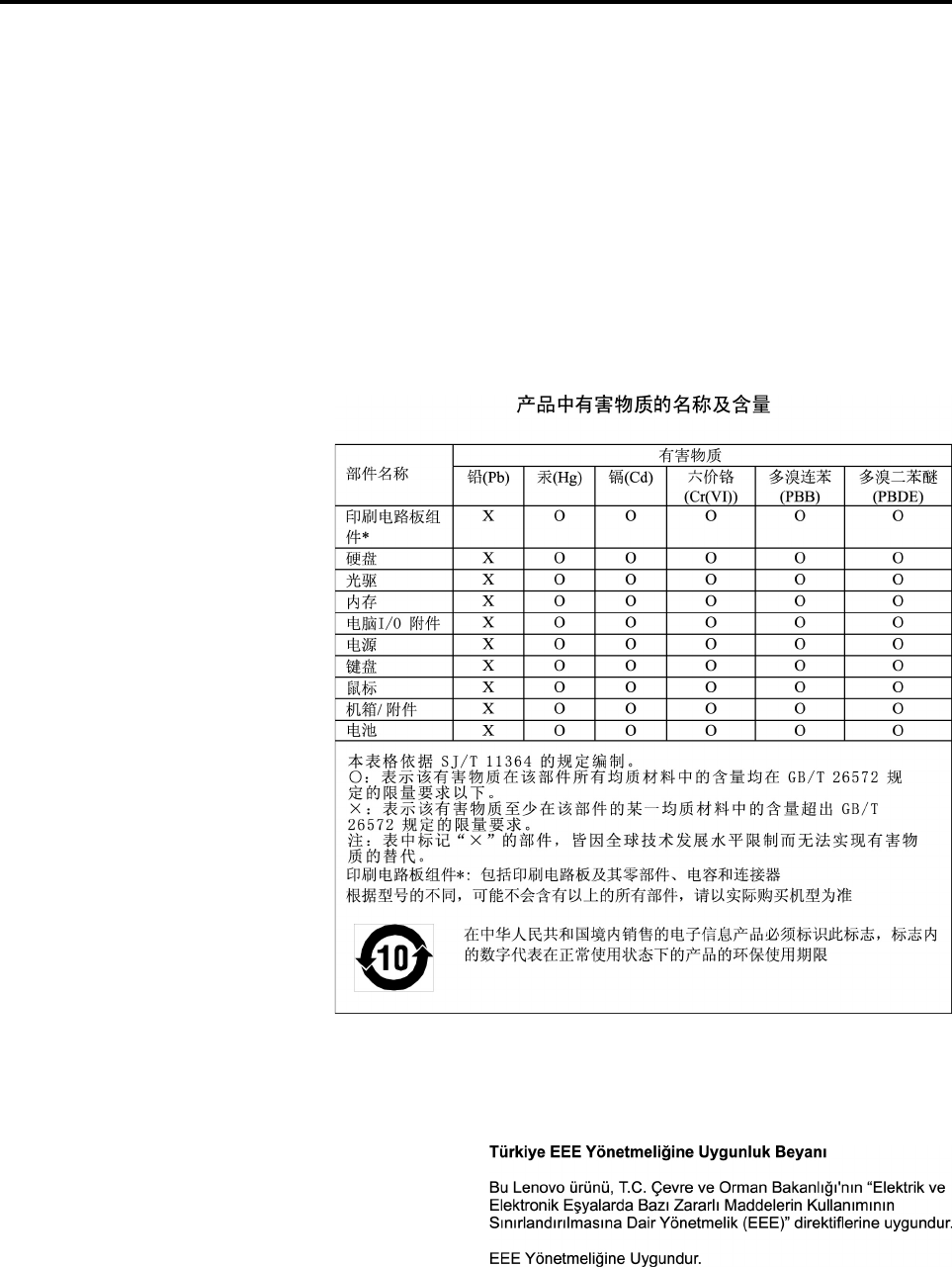
ﺍﻟﻤﻠﺤﻖ૫.ﺘﻮﺟﻴﻪﻘﻴﻮﺩﺎﺳﺘﺨﺪﺍﻡﺎﻟﻤﻮﺍﺩﺎﻟﺨﻄﺮﺓ(RoHS)
ﺘﺘﻮﻓﺮﺎﻟﻤﻌﻠﻮﻣﺎﺕﺎﻟﺒﻴﺌﻴﺔﺎﻟﺄﺧﻴﺮﺓﻔﻲﺎﻟﻤﻮﻗﻊ:
https://www.lenovo.com/ecodeclaration
ﺘﻮﺟﻴﻪﻘﻴﻮﺩﺎﺳﺘﺨﺪﺍﻡﺎﻟﻤﻮﺍﺩﺎﻟﺨﻄﺮﺓ)RoHS(ﻔﻲﺎﻟﺎﺗﺤﺎﺩﺎﻟﺄﻭﺭﻭﺑﻲ
ﻴﻠﺒﻲﻤﻨﺘﺞLenovoﻬﺬﺍ،ﻤﻊﺎﻟﻘﻄﻊﺎﻟﻤﻀﻤﻨﺔﻔﻴﻪ)ﺎﻟﻜﺒﻠﺎﺕﻮﺍﻟﺄﺳﻠﺎﻙﻮﻏﻴﺮﺬﻟﻚ(،ﻤﺘﻄﻠﺒﺎﺕﺎﻟﺘﻮﺟﻴﻪ2011/65/EUﺤﻮﻝﻘﻴﻮﺩﺎﺳﺘﺨﺪﺍﻡﺒﻌﺾﺎﻟﻤﻮﺍﺩﺎﻟﺨﻄﺮﺓ
ﻔﻲﺎﻟﺄﺟﻬﺰﺓﺎﻟﻜﻬﺮﺑﺎﺋﻴﺔﻮﺍﻟﺈﻟﻜﺘﺮﻭﻧﻴﺔ)"RoHS recast"ﺄﻭ"RoHS 2"(.
ﻠﻤﺰﻳﺪﻤﻦﺎﻟﻤﻌﻠﻮﻣﺎﺕﺤﻮﻝﺎﻣﺘﺜﺎﻝLenovoﻔﻲﻤﺨﺘﻠﻒﺄﻧﺤﺎﺀﺎﻟﻌﺎﻟﻢﻠﺘﻮﺟﻴﻪﻘﻴﻮﺩﺎﺳﺘﺨﺪﺍﻡﺎﻟﻤﻮﺍﺩﺎﻟﺨﻄﺮﺓ)RoHS(،ﺎﻧﺘﻘﻞﺈﻟﻰ:
https://www.lenovo.com/rohs-communication
ﺘﻮﺟﻴﻪﻘﻴﻮﺩﺎﺳﺘﺨﺪﺍﻡﺎﻟﻤﻮﺍﺩﺎﻟﺨﻄﺮﺓ)RoHS(ﻔﻲﺎﻟﺼﻴﻦ
ﺘﻮﺟﻴﻪﻘﻴﻮﺩﺎﺳﺘﺨﺪﺍﻡﺎﻟﻤﻮﺍﺩﺎﻟﺨﻄﺮﺓ)RoHS(ﻔﻲﺘﺮﻛﻴﺎ
The Lenovo product meets the requirements of the Republic of Turkey Directive on the Restriction of the Use of Certain
Hazardous Substances in Waste Electrical and Electronic Equipment (WEEE).
© Copyright Lenovo 2017, 2018١١٧
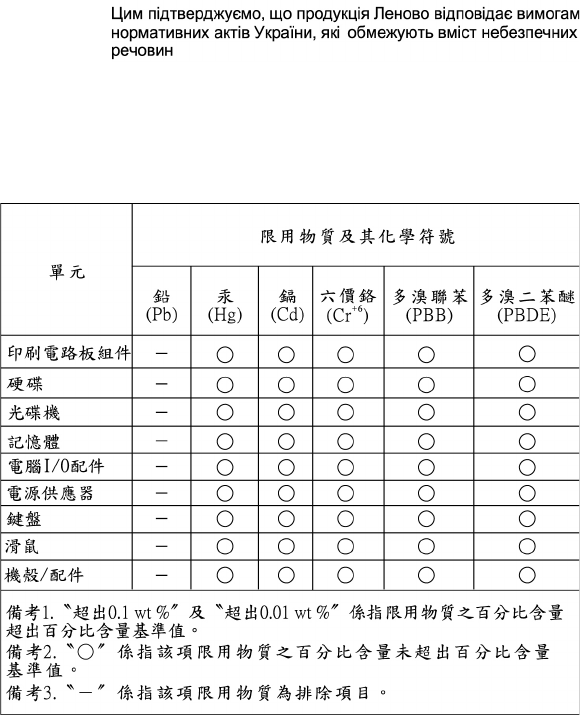
ﺘﻮﺟﻴﻪﻘﻴﻮﺩﺎﺳﺘﺨﺪﺍﻡﺎﻟﻤﻮﺍﺩﺎﻟﺨﻄﺮﺓ)RoHS(ﻔﻲﺄﻭﻛﺮﺍﻧﻴﺎ
ﺘﻮﺟﻴﻪﻘﻴﻮﺩﺎﺳﺘﺨﺪﺍﻡﺎﻟﻤﻮﺍﺩﺎﻟﺨﻄﺮﺓ)RoHS(ﻔﻲﺎﻟﻬﻨﺪ
RoHS compliant as per E-Waste (Management) Rules.
ﺘﻮﺟﻴﻪﻘﻴﻮﺩﺎﺳﺘﺨﺪﺍﻡﺎﻟﻤﻮﺍﺩﺎﻟﺨﻄﺮﺓ)RoHS(ﻔﻲﺘﺎﻳﻮﺍﻥ
١١٨ﺩﻟﻴﻞﻣﺴﺘﺨﺪﻡP320

ﺍﻟﻤﻠﺤﻖ૬.ﻤﻌﻠﻮﻣﺎﺕﺎﻟﻄﺮﺍﺯENERGY STAR
ﻴﻌﺘﺒﺮENERGY STAR®
ﺒﺮﻧﺎﻣﺞﻤﺸﺘﺮﻙﺒﻴﻦﻮﻛﺎﻟﺔﺤﻤﺎﻳﺔﺎﻟﺒﻴﺌﺔﺎﻟﺄﻣﺮﻳﻜﻴﺔ)U.S. Environmental Protection Agency(ﻮﻭﺯﺍﺭﺓﺎﻟﻄﺎﻗﺔ
ﺎﻟﺄﻣﺮﻳﻜﻴﺔ)U.S. Department of Energy(ﻴﻬﺪﻑﺈﻟﻰﺘﻮﻓﻴﺮﺎﻟﻤﺎﻝﻮﺣﻤﺎﻳﺔﺎﻟﺒﻴﺌﺔﻤﻦﺨﻠﺎﻝﻤﻨﺘﺠﺎﺕﻮﻣﻤﺎﺭﺳﺎﺕﻤﻮﻓﺮﺓﻠﻠﻄﺎﻗﺔﻮﺗﺤﺴﻦﺎﺳﺘﺨﺪﺍﻣﻬﺎ.
ﺘﻔﺘﺨﺮﺸﺮﻛﺔLenovoﺒﺘﻘﺪﻳﻢﻤﻨﺘﺠﺎﺕﺒﺘﺼﻤﻴﻢENERGY STARﻠﻌﻤﻠﺎﺋﻨﺎ.ﺘﻢﺘﺼﻤﻴﻢﺒﻌﺾﻄ
ُ
ﺮﺯﺎﻟﺄﺟﻬﺰﺓﺎﻟﺘﺎﻟﻴﺔﻮﺍﺧﺘﺒﺎﺭﻫﺎﻠﺘﺘﻮﺍﻓﻖﻤﻊﻤﺘﻄﻠﺒﺎﺕﺒﺮﻧﺎﻣﺞ
ENERGY STARﻠﺄﺟﻬﺰﺓﺎﻟﻜﻤﺒﻴﻮﺗﺮﻔﻲﻮﻗﺖﺎﻟﺘﺼﻨﻴﻊ:30BJﻮ30BKﻮ30BS.ﻠﻠﺤﺼﻮﻝﻌﻠﻰﻤﺰﻳﺪﻤﻦﺎﻟﻤﻌﻠﻮﻣﺎﺕﻌﻦﺘﺼﻨﻴﻔﺎﺕENERGY
STARﻠﺄﺟﻬﺰﺓﻜﻤﺒﻴﻮﺗﺮLenovo،ﺎﺫﻫﺐﺎﻟﻰ:
http://www.lenovo.com
ﺒﺎﺳﺘﺨﺪﺍﻡﺎﻟﻤﻨﺘﺠﺎﺕﺎﻟﻤﺘﻮﺍﻓﻘﺔﻤﻊENERGY STARﻮﺍﻟﺎﺳﺘﻔﺎﺩﺓﻤﻦﺨﻮﺍﺹﺈﺩﺍﺭﺓﺎﻟﻄﺎﻗﺔﺎﻟﺨﺎﺻﺔﺒﺠﻬﺎﺯﺎﻟﻜﻤﺒﻴﻮﺗﺮ،ﻔﺈﻧﻚﺒﺬﻟﻚﺘﻘﻠﻞﻤﻦﺎﺳﺘﻬﻠﺎﻛﻚﻠﻠﻜﻬﺮﺑﺎﺀ.
ﺘﻘﻠﻴﻞﺎﺳﺘﻬﻠﺎﻙﺎﻟﻜﻬﺮﺑﺎﺀﻴﺆﺩﻱﺈﻟﻰﺎﺩﺧﺎﺭﺍﺕﻤﺎﻟﻴﺔﻔﻌﻠﻴﺔ،ﻮﺑﻴﺌﺔﺄﻧﻈﻒ،ﻮﺍﻟﺘﻘﻠﻴﻞﻤﻦﺎﻧﺒﻌﺎﺛﺎﺕﻐﺎﺯﺍﺕﺎﻟﺒﻴﻮﺕﺎﻟﺰﺟﺎﺟﻴﺔ.
ﻠﻤﺰﻳﺪﻤﻦﺎﻟﻤﻌﻠﻮﻣﺎﺕﺤﻮﻝENERGY STAR،ﺎﻧﺘﻘﻞﺈﻟﻰ:
http://www.energystar.gov
ﺘﺸﺠﻌﻚﺸﺮﻛﺔLenovoﻌﻠﻰﺎﻟﺎﺳﺘﺨﺪﺍﻡﺎﻟﺄﻣﺜﻞﻠﻠﻄﺎﻗﺔﻜﺠﺰﺀﻠﺎﻴﺘﺠﺰﺃﻤﻦﻌﻤﻠﻴﺎﺗﻚﺎﻟﻴﻮﻣﻴﺔ.ﻠﻠﻤﺴﺎﻋﺪﺓﻔﻲﻬﺬﺍﺎﻟﻤﻘﺼﺪ،ﺤﺪﺩﺨﻮﺍﺹﺈﺩﺍﺭﺓﺎﻟﻄﺎﻗﺔﺎﻟﺘﺎﻟﻴﺔﻠﺘﻜﻮﻥ
ﻔﻌﺎﻟﺔﻌﻨﺪﻌﺪﻡﺎﺳﺘﺨﺪﺍﻡﺠﻬﺎﺯﺎﻟﻜﻤﺒﻴﻮﺗﺮﻠﻔﺘﺮﺓﻤﺤﺪﺩﺓﻤﻦﺎﻟﻮﻗﺖ:
ﺍﻟﺠﺪﻭﻝ١.ﻤﻴﺰﺍﺕﺈﺩﺍﺭﺓﺎﻟﻄﺎﻗﺔﺒﺒﺮﻧﺎﻣﺞENERGY STAR
ﻨﻈﺎﻡﺎﻟﺘﺸﻐﻴﻞWindows 7ﺄﻭWindows 10
ﻤﺨﻄﻂﺎﻟﻄﺎﻗﺔ:ﺎﻓﺘﺮﺍﺿﻲ
•ﺈﻳﻘﺎﻑﺘﺸﻐﻴﻞﺎﻟﺸﺎﺷﺔ:ﺒﻌﺪ10ﺪﻗﻴﻘﺔ
•ﻮﺿﻊﺎﻟﺤﺎﺳﺐﻔﻲﺤﺎﻟﺔﺈﻳﻘﺎﻑﻤﺆﻗﺖ:ﺒﻌﺪ25ﺪﻗﻴﻘﺔ
•ﺈﻋﺪﺍﺩﺍﺕﺎﻟﻄﺎﻗﺔﺎﻟﻤﺘﻘﺪﻣﺔ:
–ﺈﻳﻘﺎﻑﺘﺸﻐﻴﻞﻤﺤﺮﻛﺎﺕﺎﻟﺄﻗﺮﺍﺹﺎﻟﺜﺎﺑﺘﺔ:ﺒﻌﺪ20ﺪﻗﻴﻘﺔ
–ﺈﺳﺒﺎﺕ:ﺄﺑﺪ
ً
ﺍ
ﻠﺈﺧﺮﺍﺝﺎﻟﻜﻤﺒﻴﻮﺗﺮﻤﻦﻮﺿﻊ"ﺎﻟﺴﻜﻮﻥ"،ﺎﺿﻐﻂﻌﻠﻰﺄﻱﻤﻔﺘﺎﺡﻔﻲﻠﻮﺣﺔﺎﻟﻤﻔﺎﺗﻴﺢ.
ﻠﺘﻐﻴﻴﺮﺈﻋﺪﺍﺩﺍﺕﺎﻟﻄﺎﻗﺔ،ﻘﻢﺒﺎﻟﺈﺟﺮﺍﺀﺍﺕﺎﻟﺘﺎﻟﻴﺔ:
١.ﺎﻧﻘﺮﻔﻮﻕﺎﻟﺰﺭ"ﺎﺑﺪﺃ"ﻠﻔﺘﺢﻘﺎﺋﻤﺔ"ﺎﺑﺪﺃ".
٢.ﺘﺒﻌ
ً
ﺎﻠﺈﺻﺪﺍﺭWindows،ﻘﻢﺒﺄﺣﺪﺎﻟﺈﺟﺮﺍﺀﺍﺕﺎﻟﺘﺎﻟﻴﺔ:
•ﺒﺎﻟﻨﺴﺒﺔﺈﻟﻰﻨﻈﺎﻡﺎﻟﺘﺸﻐﻴﻞWindows 7:ﺎﻧﻘﺮﻔﻮﻕﻠﻮﺣﺔﺎﻟﺘﺤﻜﻢ.
•ﺒﺎﻟﻨﺴﺒﺔﺈﻟﻰﻨﻈﺎﻡﺎﻟﺘﺸﻐﻴﻞWindows 10:ﺎﻧﻘﺮﻔﻮﻕﻨﻈﺎﻡWindows��ﻠﻮﺣﺔﺎﻟﺘﺤﻜﻢ.
٣.ﺎﻋﺮﺽﻠﻮﺣﺔﺎﻟﺘﺤﻜﻢﺒﺎﺳﺘﺨﺪﺍﻡﺄﻳﻘﻮﻧﺎﺕﻜﺒﻴﺮﺓﺄﻭﺄﻳﻘﻮﻧﺎﺕﺼﻐﻴﺮﺓ،ﺜﻢﺎﻧﻘﺮﻔﻮﻕﺨﻴﺎﺭﺍﺕﺎﻟﻄﺎﻗﺔ.
٤.ﺎﺗﺒﻊﺎﻟﺘﻌﻠﻴﻤﺎﺕﺎﻟﺘﻲﻴﺘﻢﻌﺮﺿﻬﺎﻌﻠﻰﺎﻟﺸﺎﺷﺔ.
© Copyright Lenovo 2017, 2018١١٩
١٢٠ﺩﻟﻴﻞﻣﺴﺘﺨﺪﻡP320

ﺍﻟﻤﻠﺤﻖ૭.ﺎﻟﺈﺷﻌﺎﺭﺍﺕ
ﻘﺪﻠﺎﺘﻘﺪﻡﺸﺮﻛﺔLenovoﺎﻟﻤﻨﺘﺠﺎﺕ،ﺄﻭﺎﻟﺨﺪﻣﺎﺕ،ﺄﻭﺎﻟﺨﺼﺎﺋﺺﺎﻟﻤﺬﻛﻮﺭﺓﻔﻲﻬﺬﻩﺎﻟﻮﺛﻴﻘﺔﻔﻲﻜﻞﺎﻟﺪﻭﻝ.ﺎﺭﺟﻊﺈﻟﻰﻤﻤﺜﻞﺸﺮﻛﺔLenovoﺎﻟﻤﺤﻠﻲﻠﻠﺤﺼﻮﻝ
ﻌﻠﻰﻤﻌﻠﻮﻣﺎﺕﺤﻮﻝﺎﻟﻤﻨﺘﺠﺎﺕﻮﺍﻟﺨﺪﻣﺎﺕﺎﻟﻤﺘﺎﺣﺔﺤﺎﻟﻴﺎﻔﻲﺎﻟﻤﻨﻄﻘﺔﺎﻟﺨﺎﺻﺔﺒﻚ.ﻜﻤﺎﺄﻥﺄﻱﺎﺷﺎﺭﺓﺈﻟﻰﻤﻨﺘﺠﺎﺕﺄﻭﺒﺮﺍﻣﺞﺄﻭﺨﺪﻣﺎﺕLenovoﻠﺎﻴﻌﻨﻲﺄﻧﻪﻠﺎﺑﺪ
ﻤﻦﺎﺳﺘﺨﺪﺍﻡﻤﻨﺘﺠﺎﺕﺄﻭﺒﺮﺍﻣﺞﺄﻭﺨﺪﻣﺎﺕLenovoﻔﻘﻂ.ﻴﻤﻜﻦﺎﺳﺘﺨﺪﺍﻡﺄﻱﻤﻨﺘﺞﺄﻭﺒﺮﻧﺎﻣﺞﺄﻭﺨﺪﻣﺔﻤﻌﺎﺩﻟﺔﻮﻇﻴﻔﻴﺎﺒﺸﺮﻁﺄﻥﻠﺎﺘﺘﻌﺎﺭﺽﻤﻊﺄﻱﺤﻖﻤﻦ
ﺤﻘﻮﻕﺎﻟﻤﻠﻜﻴﺔﺎﻟﻔﻜﺮﻳﺔﺎﻟﺨﺎﺻﺔﺒﺸﺮﻛﺔLenovo.ﻤﻦﻨﺎﺣﻴﺔﺄﺧﺮﻯ،ﻴﻌﺪﺎﻟﻤﺴﺘﺨﺪﻡﻤﺴﺌﻮﻟﺎ
ً
ﻌﻦﺘﻘﻴﻴﻢﻮﺍﻟﺘﺤﻘﻖﻤﻦﻌﻤﻠﻴﺎﺕﺘﺸﻐﻴﻞﺄﻱﻤﻨﺘﺞﺄﻭﺒﺮﻧﺎﻣﺞﺄﻭﺨﺪﻣﺔ
ﺄﺧﺮﻯ.
ﻘﺪﺘﻜﻮﻥﻠﺸﺮﻛﺔLenovoﺤﻘﻮﻕﻔﻜﺮﻳﺔﺄﻭﻄﻠﺒﺎﺕﺤﻘﻮﻕﻔﻜﺮﻳﺔﻤﺤﻞﺎﻟﻨﻈﺮﺘﻐﻄﻲﺎﻟﻤﻮﺿﻮﻋﺎﺕﺎﻟﺘﻲﺘﺘﻨﺎﻭﻟﻬﺎﻬﺬﻩﺎﻟﻮﺛﻴﻘﺔ.ﻠﺎﻴﻤﻨﺤﻚﺎﻗﺘﻨﺎﺀﻬﺬﻩﺎﻟﻮﺛﻴﻘﺔﺄﻱ
ﺘﺮﺧﻴﺺﻠﺒﺮﺍﺀﺍﺕﺎﻟﺎﺧﺘﺮﺍﻉ.ﻴﻤﻜﻨﻚﺎﺭﺳﺎﻝﺎﻟﺎﺳﺘﻌﻠﺎﻣﺎﺕﻌﻦﺎﻟﺘﺮﺍﺧﻴﺺﻜﺘﺎﺑﻴﺎﺎﻟﻰ:
Lenovo (United States), Inc.
1009 Think Place - Building One
Morrisville, NC 27560
U.S.A.
Attention: Lenovo Director of Licensing
ﺘﻘﺪﻡﺸﺮﻛﺔLENOVOﻬﺬﺍﺎﻟﻤﻨﺸﻮﺭ"ﻜﻤﺎﻬﻮ"ﺒﺪﻭﻥﺄﻱﻀﻤﺎﻧﺎﺕﻤﻦﺄﻱﻨﻮﻉﻜﺎﻥ،ﺼﺮﻳﺤﺔﺄﻡﻀﻤﻨﻴﺔ،ﺒﻤﺎﻔﻲﺬﻟﻚ،ﻌﻠﻰﺴﺒﻴﻞﺎﻟﻤﺜﺎﻝﻠﺎﺎﻟﺤﺼﺮ،ﺎﻟﻀﻤﺎﻧﺎﺕ
ﺎﻟﻀﻤﻨﻴﺔﺎﻟﺨﺎﺻﺔﺒﻌﺪﻡﺎﻟﺎﻧﺘﻬﺎﻙﺄﻭﻘﺎﺑﻠﻴﺔﺎﻟﺘﺴﻮﻳﻖﺄﻭﺎﻟﻤﻠﺎﺀﻣﺔﻠﻐﺮﺽﻤﻌﻴﻦ.ﻠﺎﺘﺴﻤﺢﺒﻌﺾﺎﻟﺴﻠﻄﺎﺕﺎﻟﻘﻀﺎﺋﻴﺔﺒﺎﻟﺘﻨﺎﺯﻝﺎﻟﺼﺮﻳﺢﺄﻭﺎﻟﻀﻤﻨﻲﻌﻦﺤﻘﻮﻕ
ﺎﻟﻀﻤﺎﻥﻔﻲﺒﻌﺾﺎﻟﻤﻌﺎﻣﻠﺎﺕ؛ﻠﺬﻟﻚ،ﻘﺪﻠﺎﻴﺴﺮﻱﻬﺬﺍﺎﻟﺒﻴﺎﻥﻌﻠﻴﻚ.
ﻘﺪﺘﺘﻀﻤﻦﻬﺬﻩﺎﻟﻤﻌﻠﻮﻣﺎﺕﺄﺧﻄﺎﺀ
ً
ﻔﻨﻴﺔﺄﻭﻤﻄﺒﻌﻴﺔ.ﻴﺘﻢﻌﻤﻞﺎﻟﺘﻐﻴﻴﺮﺍﺕﺒﺼﻮﺭﺓﺪﻭﺭﻳﺔﻌﻠﻰﺎﻟﻤﻌﻠﻮﻣﺎﺕﺎﻟﻮﺍﺭﺩﺓﻬﻨﺎ؛ﻮﺗﻠﻚﺎﻟﻤﻌﻠﻮﻣﺎﺕﻴﺘﻢﺘﻀﻤﻴﻨﻬﺎﻔﻲﺎﻟﻨﺴﺦ
ﺎﻟﺠﺪﻳﺪﺓﻤﻦﺎﻟﺈﺻﺪﺍﺭﺍﺕ.ﻘﺪﺘﻘﻮﻡﺸﺮﻛﺔLenovoﺒﺈﺩﺧﺎﻝﺘﺤﺴﻴﻨﺎﺕﻮ/ﺄﻭﺘﻐﻴﻴﺮﺍﺕﻌﻠﻰﺎﻟﻤﻨﺘﺠﺎﺕﻮ/ﺄﻭﺎﻟﺒﺮﺍﻣﺞﺎﻟﻮﺍﺭﺩﻮﺻﻔﻬﺎﻔﻲﻬﺬﺍﺎﻟﻤﻨﺸﻮﺭﻔﻲﺄﻱﻮﻗﺖ
ﺒﺪﻭﻥﺈﺷﻌﺎﺭﻤﺴﺒﻖ.
ﻠﻦﻴﺘﻢﺎﺳﺘﺨﺪﺍﻡﺎﻟﻤﻨﺘﺠﺎﺕﺎﻟﻤﻮﺿﺤﺔﻔﻲﻬﺬﻩﺎﻟﻮﺛﻴﻘﺔﻤﻊﺘﻄﺒﻴﻘﺎﺕﺎﻟﺪﻋﻢﺎﻟﺄﺧﺮﻯﺤﻴﺚﻘﺪﻴﺆﺩﻱﺴﻮﺀﺎﺳﺘﺨﺪﺍﻣﻬﺎﺈﻟﻰﺎﻟﺘﻌﺮﺽﻠﺈﺻﺎﺑﺎﺕﺠﺴﻴﻤﺔﺄﻭﺈﻟﻰﺎﻟﻮﻓﺎﺓ.
ﺎﻟﻤﻌﻠﻮﻣﺎﺕﺎﻟﻤﺘﻀﻤﻨﺔﻔﻲﻬﺬﻩﺎﻟﻮﺛﻴﻘﺔﻠﺎﺘﺆﺛﺮﻌﻠﻰﺄﻭﺘﻐﻴﺮﺒﺄﻱﺸﻜﻞﻤﻦﺎﻟﺄﺷﻜﺎﻝﻤﻮﺍﺻﻔﺎﺕﺎﻟﻤﻨﺘﺞﺄﻭﺎﻟﻀﻤﺎﻧﺎﺕﺎﻟﺘﻲﺘﻨﺺﻌﻠﻴﻬﺎﺸﺮﻛﺔLenovo.ﻠﺎﻴﻮﺟﺪﺄﻱ
ﺸﻲءﻔﻲﻬﺬﻩﺎﻟﻮﺛﻴﻘﺔﻴﻤﻜﻦﺎﺳﺘﺨﺪﺍﻣﻪﻠﻴﻜﻮﻥﺘﺮﺧﻴﺺﺼﺮﻳﺢﺄﻭﻀﻤﻨﻲﺄﻭﻜﺄﻣﺎﻥﻤﻦﺄﻱﻀﺮﺭﻔﻲﻈﻞﺤﻘﻮﻕﺎﻟﻤﻠﻜﻴﺔﺎﻟﻔﻜﺮﻳﺔﻠـLenovoﺄﻭﻄﺮﻑﺜﺎﻟﺚ.ﺘﻢ
ﺎﻟﺤﺼﻮﻝﻌﻠﻰﺎﻟﻤﻌﻠﻮﻣﺎﺕﺎﻟﻤﺘﻀﻤﻨﺔﻔﻲﻬﺬﻩﺎﻟﻮﺛﻴﻘﺔﻤﻦﺒﻴﺌﺔﻤﻌﻴﻨﺔﻮﺗﻢﻌﺮﺿﻬﺎﻜﺮﺳﻢﺘﻮﺿﻴﺤﻲ.ﻘﺪﺘﺨﺘﻠﻒﺎﻟﻨﺘﺎﺋﺞﺎﻟﺘﻲﻴﺘﻢﺎﻟﺤﺼﻮﻝﻌﻠﻴﻬﺎﻔﻲﺒﻴﺌﺎﺕﺎﻟﺘﺸﻐﻴﻞ
ﺎﻟﺄﺧﺮﻯ.
ﻴﻤﻜﻦﻠﺸﺮﻛﺔLenovoﺄﻥﺘﻘﻮﻡﺒﺎﺳﺘﺨﺪﺍﻡﺄﻭﺘﻮﺯﻳﻊﺄﻱﻤﻦﺎﻟﻤﻌﻠﻮﻣﺎﺕﺎﻟﺘﻲﺘﻘﺪﻣﻬﺎﺄﻧﺖﺒﺄﻱﻄﺮﻳﻘﺔﺘﺮﺍﻫﺎﻤﻨﺎﺳﺒﺔﺒﺪﻭﻥﺄﻥﺘﺘﺤﻤﻞﺄﻱﺎﻟﺘﺰﺍﻡﻤﻦﺄﻱﻨﻮﻉ
ﺘﺠﺎﻫﻚ.
ﺄﻱﺬﻛﺮﻔﻲﻬﺬﺍﺎﻟﺈﺻﺪﺍﺭﺈﻟﻰﺄﻱﻤﻮﻗﻊﻠﻴﺲﺘﺎﺑﻊﻠﺸﺮﻛﺔLenovoﺎﻧﻤﺎﻴﺘﻢﺘﻘﺪﻳﻤﻪﻠﻠﺘﻴﺴﻴﺮﻔﻘﻂ،ﺈﻟﺎﺄﻧﻪﻠﺎﻴﻌﺪﺒﺄﻱﺸﻜﻞﻤﻦﺎﻟﺄﺷﻜﺎﻝﺒﻤﺜﺎﺑﺔﺘﺼﺪﻳﻖﻌﻠﻰﺘﻠﻚ
ﺎﻟﻤﻮﺍﻗﻊ.ﻮﻟﺎﺘﻌﺪﺎﻟﻤﻮﺍﺩﺎﻟﻤﻨﺸﻮﺭﺓﻌﻠﻰﻬﺬﻩﺎﻟﻤﻮﺍﻗﻊﺠﺰﺀﺍﻤﻦﺎﻟﻤﻮﺍﺩﺎﻟﺨﺎﺻﺔﺒﻤﻨﺘﺞﺸﺮﻛﺔLenovoﺎﻟﻮﺍﺭﺩﻮﺻﻔﻪﻔﻲﻬﺬﺍﺎﻟﺈﺻﺪﺍﺭﻮﻳﺘﻢﺎﺳﺘﺨﺪﺍﻡﺘﻠﻚﺎﻟﻤﻮﺍﺩ
ﺎﻟﻤﺬﻛﻮﺭﺓﻔﻲﺘﻠﻚﺎﻟﻤﻮﺍﻗﻊﻌﻠﻰﻤﺴﺌﻮﻟﻴﺘﻚ.
ﻴﺘﻢﺘﺤﺪﻳﺪﺄﻱﺒﻴﺎﻧﺎﺕﺄﺩﺍﺀﻤﻮﺟﻮﺩﺓﻬﻨﺎﻔﻲﺒﻴﺌﺔﻴﺘﻢﺎﻟﺘﺤﻜﻢﻔﻴﻬﺎ.ﻮﺑﺎﻟﺘﺎﻟﻲ،ﻘﺪﺘﺨﺘﻠﻒﺎﻟﻨﺘﺎﺋﺞﺎﻟﺘﻲﻴﺘﻢﺎﻟﺤﺼﻮﻝﻌﻠﻴﻬﺎﻔﻲﺒﻌﺾﺒﻴﺌﺎﺕﺎﻟﺘﺸﻐﻴﻞﺎﻟﺄﺧﺮﻯﺒﺼﻮﺭﺓ
ﻜﺒﻴﺮﺓ.ﺮﺑﻤﺎﻘﺪﺘﻢﻌﻤﻞﺒﻌﺾﺎﻟﻘﻴﺎﺳﺎﺕﻌﻠﻰﺄﻧﻈﻤﺔﺬﺍﺕﻤﺴﺘﻮﻯﻤﺘﻄﻮﺭﻮﻟﺎﻴﻤﻜﻦﻀﻤﺎﻥﺄﻥﺘﻜﻮﻥﺘﻠﻚﺎﻟﻘﻴﺎﺳﺎﺕﻮﺍﺣﺪﺓﻌﻠﻰﻐﺎﻟﺒﻴﺔﺎﻟﺄﻧﻈﻤﺔﺎﻟﻤﺘﺎﺣﺔ.ﺒﺎﻟﺈﺿﺎﻓﺔ
ﺈﻟﻰﺬﻟﻚ،ﻴﻤﻜﻦﺘﻮﻗﻊﺒﻌﺾﻬﺬﻩﺎﻟﻘﻴﺎﺳﺎﺕﻤﻦﺨﻠﺎﻝﺘﻘﺪﻳﺮﻫﺎﺘﻘﺪﻳﺮ
ً
ﺍﺎﺳﺘﻘﺮﺍﺋﻴ
ً
ﺎ.ﻘﺪﺘﻮﺟﺪﺒﻌﺾﺎﻟﺎﺧﺘﻠﺎﻓﺎﺕﻔﻲﺎﻟﻨﺘﺎﺋﺞﺎﻟﺤﺎﻟﻴﺔ.ﻴﺠﺐﻌﻠﻰﻤﺴﺘﺨﺪﻣﻲﻬﺬﻩﺎﻟﻮﺛﻴﻘﺔ
ﺎﻟﺘﺄﻛﺪﻤﻦﺎﻟﺒﻴﺎﻧﺎﺕﺎﻟﻤﻨﺎﺳﺒﺔﻠﺒﻴﺌﺔﺎﻟﺘﺸﻐﻴﻞﺎﻟﺘﻲﻴﻌﻤﻠﻮﻥﻌﻠﻴﻬﺎ.
© Copyright Lenovo 2017, 2018١٢١
١٢٢ﺩﻟﻴﻞﻣﺴﺘﺨﺪﻡP320

ﺍﻟﻤﻠﺤﻖ૮.ﺎﻟﻌﻠﺎﻣﺎﺕﺎﻟﺘﺠﺎﺭﻳﺔ
ﺘﻌﺪﺎﻟﻤﺼﻄﻠﺤﺎﺕﺎﻟﺘﺎﻟﻴﺔﻌﻠﺎﻣﺎﺕﺘﺠﺎﺭﻳﺔﻠﺸﺮﻛﺔLenovoﻔﻲﺎﻟﻮﻟﺎﻳﺎﺕﺎﻟﻤﺘﺤﺪﺓ،ﺄﻭﺎﻟﺒﻠﺪﺍﻥﺎﻟﺄﺧﺮﻯ،ﺄﻭﻜﻠﻴﻬﻤﺎ:
Lenovo
ﺸﻌﺎﺭ Lenovo
ThinkStation
ﺸﻌﺎﺭ ThinkStation
ThinkVantage
ﺘﻌﺪﻜﻞﻤﻦMicrosoftﻮWindowsﻮWindows MediaﻌﻠﺎﻣﺎﺕﺘﺠﺎﺭﻳﺔﻠﻤﺠﻤﻮﻋﺔﺸﺮﻛﺎﺕMicrosoft.
ﻜﻤﺎﺘﻌﺪIntelﻮIntel XeonﻮIntel CoreﻮIntel PentiumareﻮOptaneﻮThunderboltﻌﻠﺎﻣﺎﺕﺘﺠﺎﺭﻳﺔﻠﺸﺮﻛﺔIntel Corporationﻔﻲ
ﺎﻟﻮﻟﺎﻳﺎﺕﺎﻟﻤﺘﺤﺪﺓﻮ/ﺄﻭﺒﻠﺪﺍﻥﺄﺧﺮﻯ.
ﺘﻌﺪLinuxﻌﻠﺎﻣﺔﺘﺠﺎﺭﻳﺔﻤﺴﺠﻠﺔﻠﺸﺮﻛﺔLinus Torvalds.
ﻜﻤﺎﺄﻥDisplayPortﻌﺒﺎﺭﺓﻌﻦﻌﻠﺎﻣﺔﺘﺠﺎﺭﻳﺔﻠﻤﺆﺳﺴﺔﻤﻌﺎﻳﻴﺮﺈﻟﻜﺘﺮﻭﻧﻴﺎﺕﺎﻟﻔﻴﺪﻳﻮ.
ﺘﻌﺪUbuntuﻌﻠﺎﻣﺔﺘﺠﺎﺭﻳﺔﻤﺴﺠﻠﺔﻠﺸﺮﻛﺔCanonical Ltd.
ﻘﺪﺘﻜﻮﻥﺄﺳﻤﺎﺀﺎﻟﺸﺮﻛﺎﺕﻮﺍﻟﻤﻨﺘﺠﺎﺕﻮﺍﻟﺨﺪﻣﺎﺕﺎﻟﺄﺧﺮﻯﻌﻠﺎﻣﺎﺕﺘﺠﺎﺭﻳﺔﺄﻭﻌﻠﺎﻣﺎﺕﺨﺪﻣﺔﻠﺸﺮﻛﺎﺕﺄﺧﺮﻯ.
© Copyright Lenovo 2017, 2018١٢٣
١٢٤ﺩﻟﻴﻞﻣﺴﺘﺨﺪﻡP320