Liftmaster Mh Quick Start Guide 01 34219
2014-07-19
: Liftmaster Liftmaster-Mh-Quick-Start-Guide liftmaster-mh-quick-start-guide liftmaster pdf
Open the PDF directly: View PDF  .
.
Page Count: 2
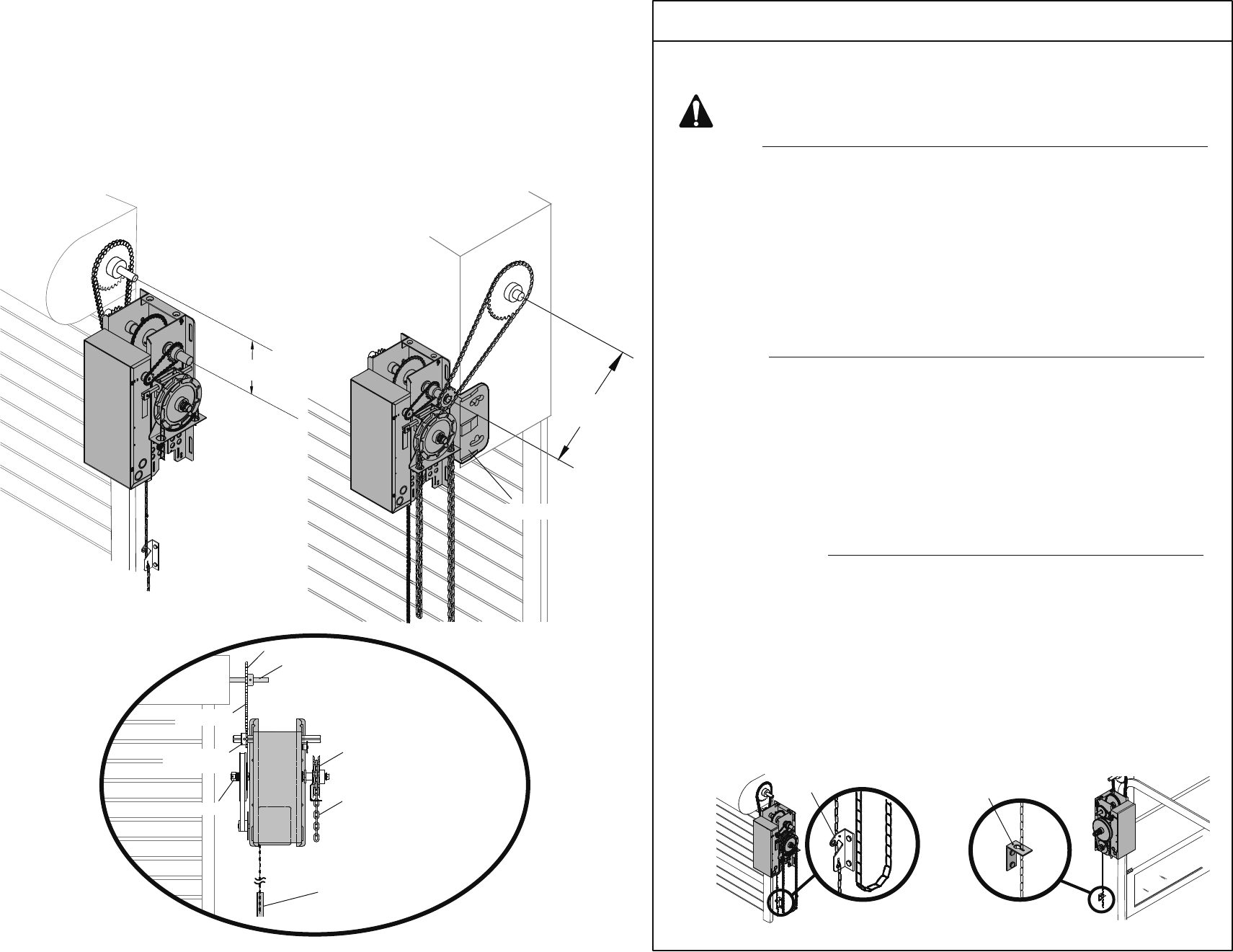
Be sure door sprocket is properly
aligned with operator drive sprocket before
securing to the shaft.
Chain Retaining Bracket
(4 feet above floor)
Optimum Distance
12" - 15"
Optimum Distance
12" - 15"
This operator has provisions for manually operating the door in case of emergency or power
failure. Refer to the appropriate instructions below for your model operator.
Keyhole Bracket
ELECTRICAL INTERLOCK WITH HOIST
FOR MODELS MH AND MHS
This QuickStart is intended to highlight a typical installation. These instructions are not intended to be comprehensive. Since each application is unique, it is the
responsibility of the purchaser, designer, installer and end user to ensure that the total door system is safe for its intended use. Please consult the manual and/or a
qualified technician for further information.
NOTE: Intended for Professional Installation Only. Visit www.liftmaster.com to locate a professional installing dealer in your area.
AN ENTRAPMENT PROTECTION DEVICE IS HIGHLY RECOMMENDED
QuickStart for the Model MJ/MH/MHS/MGJ Door Operator MEDIUM DUTY LOGIC
INSTALLATION
Determine Mounting Location for Operator
Wall Mount: The operator should generally be installed below
the door shaft, and as close to the door as possible.
Bracket Shelf Mount: The operator may be mounted either
above or below the door shaft.
NOTE: The optimum distance between the door shaft and
operator drive shaft is between 12 - 15 inches.
Install the Operator
Place door sprocket on the door shaft. Do not insert the key at
this time.
Place drive sprocket on the appropriate side of the operator.
Do not insert the key or set screw at this time.
Wrap chain drive around door sprocket and join roller chain
ends together with master link.
Raise operator to approximate mounting position and position
chain over operator sprocket.
Raise or lower operator until the chain is taut (not tight). Make
sure the operator output shaft is parallel to door shaft and
sprockets are aligned. When in position, secure the operator to
wall or mounting bracket.
Align sprockets, insert key into keyway, and secure.
Place hand chain around hand chain wheel (if provided).
1
2
3
4
5
6
7
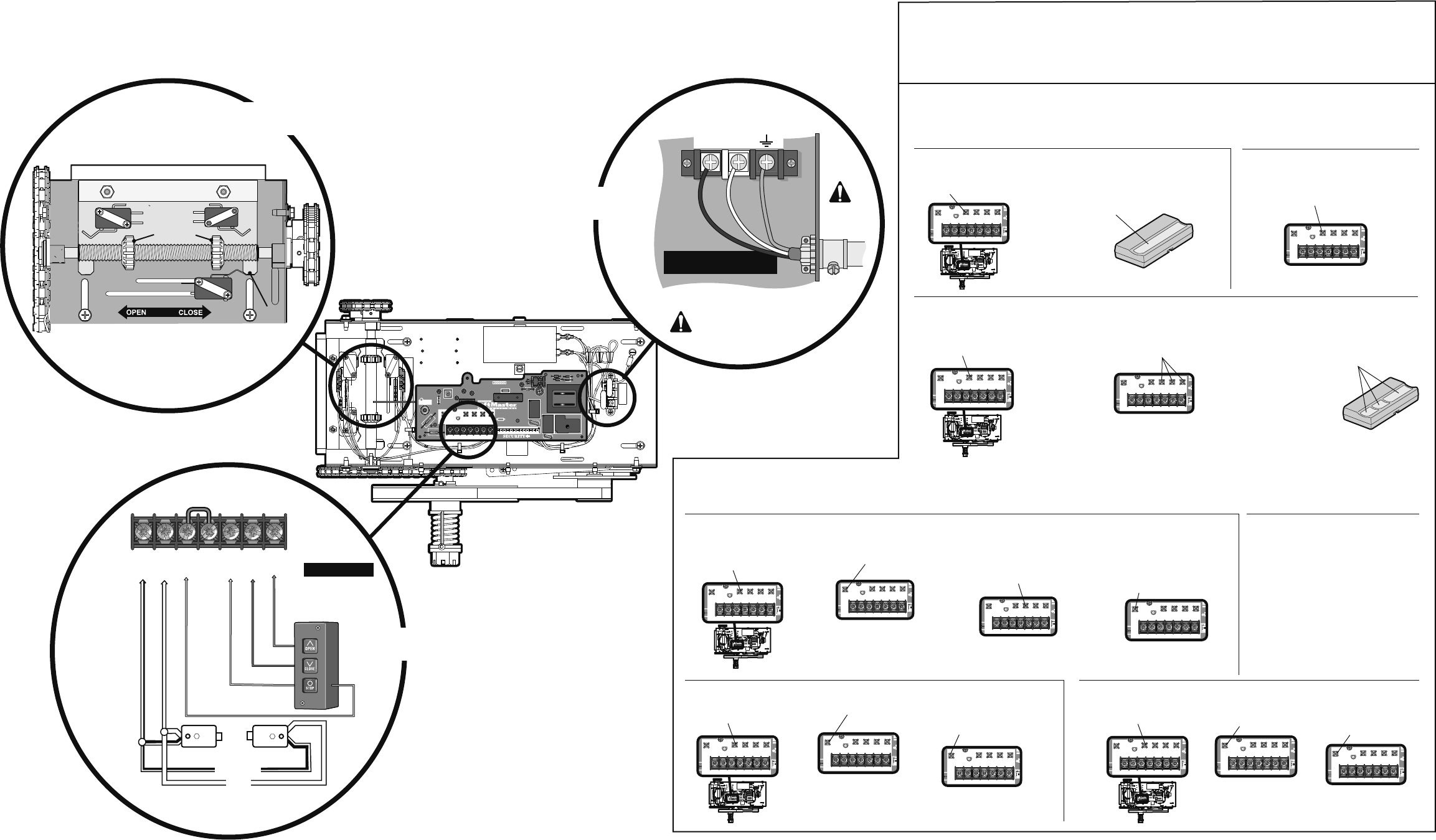
Power and Ground Wiring Connections
Run the power wires through the power wiring conduit hole in
the electrical box enclosure. Connect the power to the operator.
Connect the earth ground to the ground screw in the electrical
box enclosure. Follow ALL local electrical codes.
Run control wires through the control wiring conduit hole in the
electrical box enclosure. Follow ALL local electrical codes.
8
9
Adjust the limit switches to open and close door properly. Make
sure the limit nuts are positioned between the limit switches
before proceeding with adjustments.
Remove cotter pin from nut on the clutch shaft. Back off clutch
nut until there is very little tension on the clutch spring. Tighten
clutch nut gradually until there is just enough tension to permit
the operator to move the door smoothly but to allow the clutch
to slip if the door is obstructed. Reinstall cotter pin when
finished.
Adjustments
10
11
Troubleshooting instructions inside cover of operator.
Wall Mount Bracket Shelf Mount
Optional Mounting Bracket
Door Shaft
Door Sprocket
Operator Drive
Sprocket
Drive Chain
Hand Chain
Hand Chain Wheel
Clutch Shaft
MANUAL DISCONNECT
1
2
3
Model MH
Pull the disconnect chain (sash chain) to engage the hoist mechanism. The disconnect
chain may be locked in position by slipping the end through the keyhole of the chain
keeper mounted on the wall.
Operate the door in the desired direction by pulling on one side or the other of the
continuous loop hoist chain.
The disconnect chain must be released from the chain retaining bracket before the door
will operate again electrically.
1
2
3
Models MJ and MGJ
To disengage, pull the chain and secure in the disengaged position by slipping the end
through the keyhole bracket mounted on the wall. Or if emergency egress device is used,
pull handle to disengage operator from door.
The door may now be pushed up or pulled down manually.
Release the disconnect chain or reset the emergency egress device to operate the door
again electronically.
This operator has a floor level disconnect chain to disconnect the door from the door operator.
These operators are equipped with a manual hoist. An electrical interlock will disable the
electrical controls when the hoist is used.
1
2
Model MHS
Refer to Model MH instructions for hoist operation.
Refer to Model MJ instructions for manual operation.
This operator includes both a floor level disconnect sash chain to disconnect the door from
the door operator and a disconnect sash chain with manual hoist operation that electrically
disables the operator controls.
Chain Keeper
Turn off power to the operator BEFORE manually operating your door.
When operator is disconnected by manual operation chain, hoist and electrical operation
will not function.
MANUAL DISCONNECT FOR MODELS MJ
TTC
LED
AUX ANT
R27
L5
TP1 C20
C9
C29
R24
J2
C21
J4
K2
LT
P1
C32
U4
D7
D6
D5
D4
R25
U1
C31
D14
C18
014A1030
^^^^
D9
LEARN
12 34 567
LMEP1 LMEP2 INTRLKCOM STOP CLOSE OPEN
STOP CLOSE OPEN
AUX ANT
© 2009, The Chamberlain Group Inc.
All Rights Reserved
01-34219
This QuickStart is intended to highlight a typical installation. These instructions are not intended to be comprehensive. Since each application is unique, it is the
responsibility of the purchaser, designer, installer and end user to ensure that the total door system is safe for its intended use. Please consult the manual and/or a
qualified technician for further information.
NOTE: Intended for Professional Installation Only. Visit www.liftmaster.com to locate a professional installing dealer in your area.
AN ENTRAPMENT PROTECTION DEVICE IS HIGHLY RECOMMENDED
CONTROL WIRING
USE COPPER WIRE ONLY
16-22 AWG
COM
INTRLK
STOP
OPEN
CLOSE
1
LMEP1
LMEP2
234567
Direction Limit Nut Will Move During Travel
Retaining Plate
Limit Nuts
Push
SAFETY
CLOSE
OPEN
115 V PH. 1 Power Connection
9
14 AWG Minimum
POWER WIRING
USE COPPER WIRE ONLY
Power
Wiring
ONLY!
Follow ALL local electrical codes
L1 L2
LiftMaster Monitored Entrapment
Protection (LMEP)
White/Black
White
PROGRAMMING
D14
COM INTRLK STOP
LED
OPENCLOSE
TTC LEARN
1
LMEP1 LMEP2
234567
STOP CLOSE OPEN
R27
AUXANT
^^^^
AUXANT
AUX ANT
D14
COMINTRLK STOP
LED
OPENCLOSE
TTC LEARN
1
LMEP1LMEP2
234567
STOP CLOSE OPEN
REMOTE CONTROLS
Built in 315 MHz radio receiver permits as many as 20 Security✚® remote controls or dip switch
remote controls in any combination.
Single Button Remote Control
1Press and release the LEARN
button (LED will light). 2Press and hold the button on the remote
control until the LED flashes rapidly, then
release to complete programming
(LED will go out).
3-Button Remote Control to Operate as a Wireless 3-Button Control Station
D14
COM INTRLK STOP
LED
OPENCLOSE
TTC LEARN
1
LMEP1 LMEP2
2345 67
STOP CLOSE OPEN
R27
AUXANT
^^^^
AUXANT
AUX ANT
D14
COMINTRLK STOP
LED
OPENCLOSE
TTC LEARN
1
LMEP1LMEP2
234567
STOP CLOSE OPEN
1Press and release the LEARN
button (LED will light).
D14
COM INTRLK STOP
LED
OPENCLOSE
TTC LEARN
1
LMEP1 LMEP2
234567
STOP CLOSE OPEN
R27
Press the desired button on the logic board
(OPEN, CLOSE or STOP). Release both buttons.
23Press and hold the desired button of
the remote control until LED flashes
rapidly, then release.
Repeat steps 1 and 2 for additional remote controls.
To Erase All Remote Controls
D14
COM INTRLK STOP
LED
OPENCLOSE
TTC LEARN
1
LMEP1 LMEP2
234567
STOP CLOSE OPEN
R27
1Press and hold the LEARN button (over 5
seconds) until the LED goes out. All
programmed remote controls will be erased.
TIMER-TO-CLOSE
Timer-to-Close feature enables the operator to close from the open limit after a preset time, adjustable from 5 to 60 seconds.
To Program
D14
COM INTRLK STOP
LED
OPENCLOSE
TTC LEARN
1
LMEP1 LMEP2
234567
STOP CLOSE OPEN
R27
AUXANT
^^^^
AUXANT
AUX ANT
D14
COMINTRLK STOP
LED
OPENCLOSE
TTC LEARN
1
LMEP1LMEP2
234567
STOP CLOSE OPEN
1Press and release the LEARN
button (LED will light). 2
D14
COM INTRLK STOP
LED
OPENCLOSE
TTC LEARN
1
LMEP1 LMEP2
23 45 67
STOP CLOSE OPEN
R27
Press and release the TCC
button. 3Every press and release of the STOP button
will add 5 seconds to the Timer-to-Close.
Example: 30 second TTC = 6 presses of the
STOP button.
D14
COM INTRLK STOP
LED
OPENCLOSE
TTC LEARN
1
LMEP1 LMEP2
234567
STOP CLOSE OPEN
R27
4Press and release the TTC button
to exit programming mode.
The LED will flash once per 5
seconds of timer setting.
D14
COM INTRLK STOP
LED
OPENCLOSE
TTC LEARN
1
LMEP1 LMEP2
23 45 67
STOP CLOSE OPEN
R27
To Verify the Timer-To-Close (TCC) Setting
D14
COM INTRLK STOP
LED
OPENCLOSE
TTC LEARN
1
LMEP1 LMEP2
234567
STOP CLOSE OPEN
R27
AUXANT
^^^^
AUXANT
AUX ANT
D14
COMINTRLK STOP
LED
OPENCLOSE
TTC LEARN
1
LMEP1LMEP2
234567
STOP CLOSE OPEN
1Press and hold the LEARN
button (LED will light). 2
D14
COM INTRLK STOP
LED
OPENCLOSE
TTC LEARN
1
LMEP1 LMEP2
234567
STOP CLOSE OPEN
R27
Press and release the TCC
button. 3
D14
COM INTRLK STOP
LED
OPENCLOSE
TTC LEARN
1
LMEP1 LMEP2
23 45 67
STOP CLOSE OPEN
R27
Press and release the TTC button a
second time. The LED will flash once
per 5 seconds of timer setting.
NOTE: The feature will use 3 of the 20 memory channels in the operator.
Repeat steps 1 through 3 to program additional buttons.
The TTC will become active after completion of the next open cycle.
NOTE: The LED does not indicate that timer is running.
Clear the Timer-To-Close (TCC)
D14
COM INTRLK STOP
LED
OPENCLOSE
TTC LEARN
1
LMEP1 LMEP2
23 45 67
STOP CLOSE OPEN
R27
AUXANT
^^^^
AUXANT
AUX ANT
D14
COMINTRLK STOP
LED
OPENCLOSE
TTC LEARN
1
LMEP1LMEP2
234567
STOP CLOSE OPEN
1Press and release the LEARN
button (LED will light). 2
D14
COM INTRLK STOP
LED
OPENCLOSE
TTC LEARN
1
LMEP1 LMEP2
234567
STOP CLOSE OPEN
R27
Press and hold the
TCC button for 6 seconds. 3
D14
COM INTRLK STOP
LED
OPENCLOSE
TTC LEARN
1
LMEP1 LMEP2
23 45 67
STOP CLOSE OPEN
R27
Release the TTC button (LED
will go out). The TTC will no
longer be active.
Timer Defeat
The TTC can be temporarily
disabled by pressing a STOP
button. TTC will become enabled
after the next open command.
Begin with the door in fully closed position.
Requires LiftMaster Monitored Entrapment Protection (LMEP) device. See installation manual
for LiftMaster Monitored Entrapment Protection (LMEP) device selection and installation.
QuickStart for the Model MJ/MH/MHS/MGJ Door Operator MEDIUM DUTY LOGIC
POWER WIRING
CONTROL WIRING
LIMIT SWITCHES
