Lumi Legend SLS-1 Smart Light Speaker User Manual
Lumi Legend Corporation Smart Light Speaker
User manual
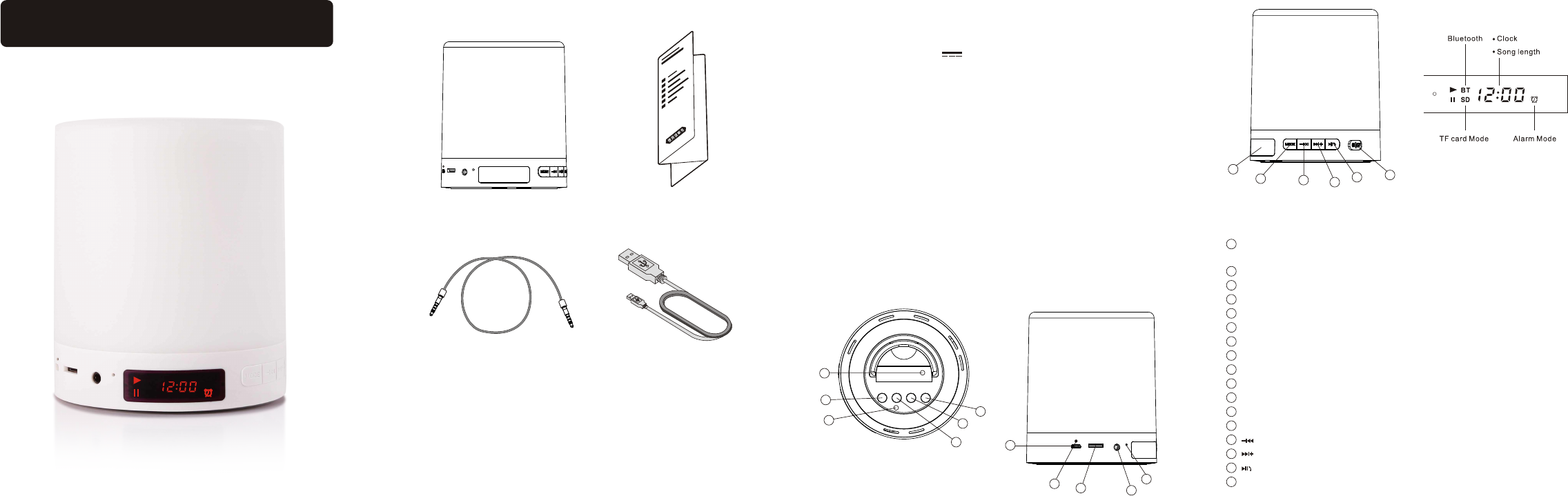
Smart Touch Lamp Speaker
Packing list
user manual
USB data cable
Specifications
Product Name: Smart Light Speaker
Model No.: SLS-1
Power Input: Micro USB,DC5V 1000mA
Battery Capacity: 3.7V/2200mA
Charging Time: 2.5-4hours
Speaker Spec: 2.5Inch,4ohm/5W
Frequency Response: 70Hz-20KHz
Distortion: ≤0.5%
Signal to Noise Ratio: ≥65db
Material: ABS/Silica-gel
Music Playing Time: 15 hours at volume level 15.
Lighting Time: 15 hours at lowest brightness.
Button Functions
Smart touch lamp speaker is a product which integrates touchable lamp and bluetooth
speaker. The touchable lamp can be easily switched on/off and into different brightness
level by hand touching on top centre of the product. The Bluetooth speaker is a smart
device which integrates audio player(Bluetooth mode, SD mode, Line In mode), FM
player and clock function. Please check detail operations in each function description in
following paragraph.
Introduction 2
3
4
5
6
Button/Indicator List
1
8910
11
7
12
13 14 15 16 17
Power Switch: it's used to cut off the power supply under safety purpose in delivery.
The product can't get power supply when this switch is off.
Alarm Set: enter alarm set mode.
Sleep Indicator: it will light when sleep mode is turned on.
Sleep: turn on/off automatic sleep mode.
Alarm On: turn on/off the alarm.
Clock Set: enter clock set mode.
Charging Port: micro USB port as input power.
Charging Indicator: to show whether battery's charging?
TF Port: port to insert TF card.
Line In: 3.5mm port to connect line in signal.
Micro Phone: micro phone for hand free call in bluetooth mode.
LED Display
Mode: switch speaker in different mode: bluetooth, TF, line in, FM tuner.
: play back/volume down/number down.
: play forward/volume up/number up.
: play/pause/pick up
ON/OFF: switch to active/sleep mode.
1
2
3
4
5
6
7
8
9
10
11
12
13
14
15
16
17
User Manual
3.5mm audio cable
BT
SD
FM
speaker
SLS-1
TF Card Music Mode
Insert a TF card with stored music, press ”Mode” button to get into ”TF Card Music Mode”,
the speaker will automatically play music in priority of stored date.
Touch Lamp
Touch the top centre of the speaker grill, the lamp will switch different lighting level after
each touch. There are 3 lighting levels and off level.
ON/OFF
Slide the ON/OFF switch to turn the speaker into Active or Sleep mode. In Active
mode, all the function is available. In Sleep mode, only alarm/clock is running and
battery consumes in lowest speed.
17
Automatic Sleep Mode
Press the sleep button to turn on sleep mode, blue indicator(8)will light, speaker
and lamp will automatically be in sleep mode after 20minutes.
4
Clock Setting
Long press Clock Set button to get into Clock Setting Mode, the hour number
displayed will flash. Press to switch hour or minutes setting.
Press to set displayed numbers. Short press “Clock Set”(6) to
finish and quit clock setting.
6
15 14
16
Alarm Setting
Long press Alarm Setting button to get into Alarm Setting Mode, the hour number
displayed will flash. Press to switch hour or minutes setting.
Press to set displayed numbers. Short press Alarm Setting to
finish and quit alarm setting, the alarm will be effective then.
Alarm On button is to simply turn on and off the alarm.
2
16
15 14 2
5
When the Bluetooth device connected last time is open, the speaker will connect it
automatically.
New Bluetooth connection can’t be built if last connection is not cut off.
If the Bluetooth connection can’t be built successfully, try to forget the speaker Bluetooth
name in your phone and reboot the speaker by turning on and turning off Power
Switch.
1
2
3
Note:
1
Line In Mode
Press “Mode” button to get into “Line In Mode”, connect speaker to an audio source with
3.5mm connector.
Volume Up: long press
Volume Down: long press
15
14
Volume Up: long press
Volume Down: long press
Last Song: short press
Next Song : short press
Play/Pause: short press
15
14
14
16
14
Bluetooth Mode
Press Mode button to get into Bluetooth mode, the speaker will be ready for paring,
the screen displays “blue”. Open Bluetooth setting on your Bluetooth device and search
the speaker, click “LampSpk-SLS1” to choose and connect, the speaker will say
“ bluetooth is connected” when connection succeed.
13
Volume Up: long press
Volume Down: long press
Last Song: short press
Next Song : short press
Play/Pause: short press
15
14
14
16
14
FM Tuner Mode
Press Mode button to get into “FM Tuner Mode”, connect USB cable to power port as
FM radio antenna. Press the speaker will automatically search and
store available FM radio channel. Press to switch and play stored channel.
The speaker can store up to 99 channels.
,
16
14
USB data cable
as FM antenna
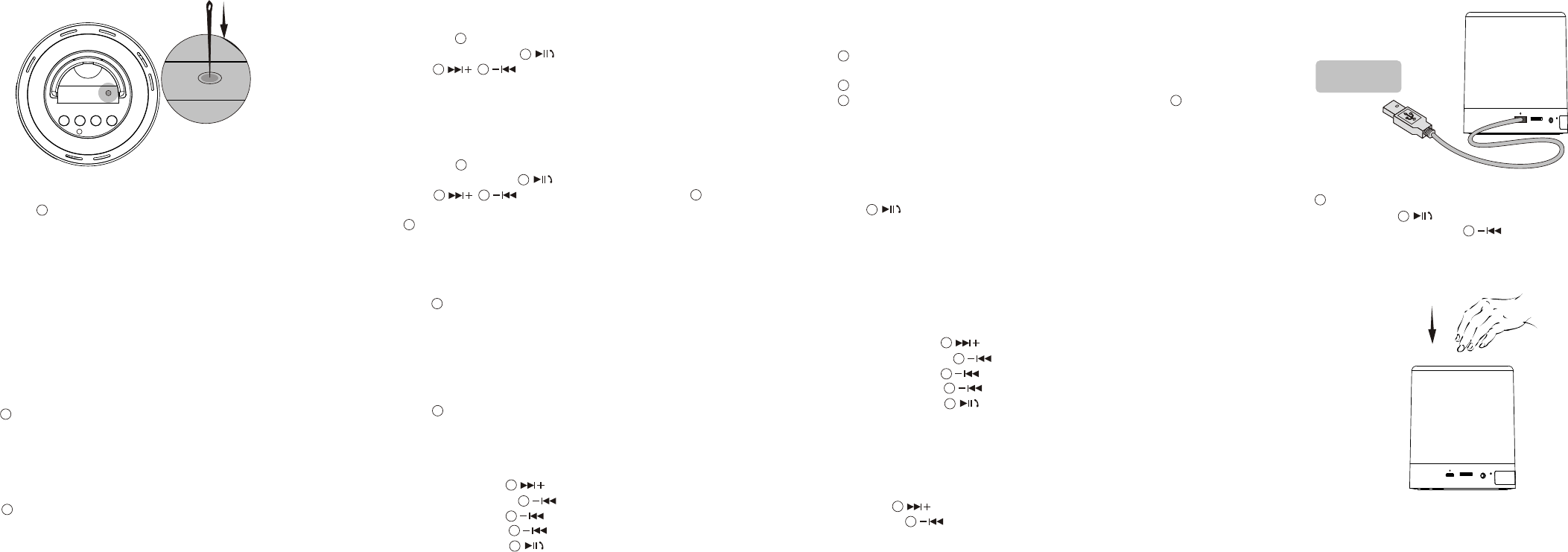
Power On and Charging
Caution: Turn on power switch before first use by pressing with a pin, this is the
switch of product power supply, normally it’s off before handing over, the product can't
work if this switch is off.
Charge the speaker with the provided USB cable which is compatible with any cell
phone charger( the output voltage is 5V, and output current should be 1000mA and
above).
The charging indicator is red while charging and will be off when the speaker is fully
charged.
1
Speaker Mode Selection
Press Mode button once after once to cycle speaker in different mode: Bluetooth
mode, TF card music mode, line in mode, FM tuner mode, standby mode. If there are
no TF card inserted in TF port, the mode cycle will pass TF card music mode.
13
Bluetooth Hand Free Call
In bluetooth connection, the speaker will read the calling number when a call is coming in,
press to pick up a hand free call. Closer to micro phone to get better voice quality.
16
13
FCC Caution:
This device complies with part 15 of the FCC Rules. Operation is subject to the
following two conditions: (1) This device may not cause harmful interference, and (2)
this device must accept any interference received, including interference that may
cause undesired operation.
Any Changes or modifications not expressly approved by the party responsible for
compliance could void the user's authority to operate the equipment.
Note: This equipment has been tested and found to comply with the limits for a Class
B digital device, pursuant to part 15 of the FCC Rules. These limits are designed to
provide reasonable protection against harmful interference in a residential installation.
This equipment generates uses and can radiate radio frequency energy and, if not
installed and used in accordance with the instructions, may cause harmful interference
to radio communications. However, there is no guarantee that interference will not
occur in a particular installation. If this equipment does cause harmful interference to
radio or television reception, which can be determined by turning the equipment off
and on, the user is encouraged to try to correct the interference by one or more of the
following measures:
-Reorient or relocate the receiving antenna.
-Increase the separation between the equipment and receiver.
-Connect the equipment into an outlet on a circuit different from that to which the
receiver is connected.
-Consult the dealer or an experienced radio/TV technician for help.