Lumisource BM-1TX Boomchair Transmitter User Manual
Lumisource, Inc. Boomchair Transmitter Users Manual
Users Manual
1
OWNER’S MANUAL
Audio transmitter
#!54)/.
for Boomchair
FCC STATEMENT
1. This device complies with Part 15 of the FCC Rules. Operation is subject to the following two
(1) This device may not cause harmful interference, and
(2) This device must accept any interference received, including interference that may cause
2. Changes or modifications not expressly approved by the party responsible for compliance could
conditions:
undesired operation.
void the user's authority to operate the equipment.
M/N: BM-1
FCC ID: U7YBM-1TX
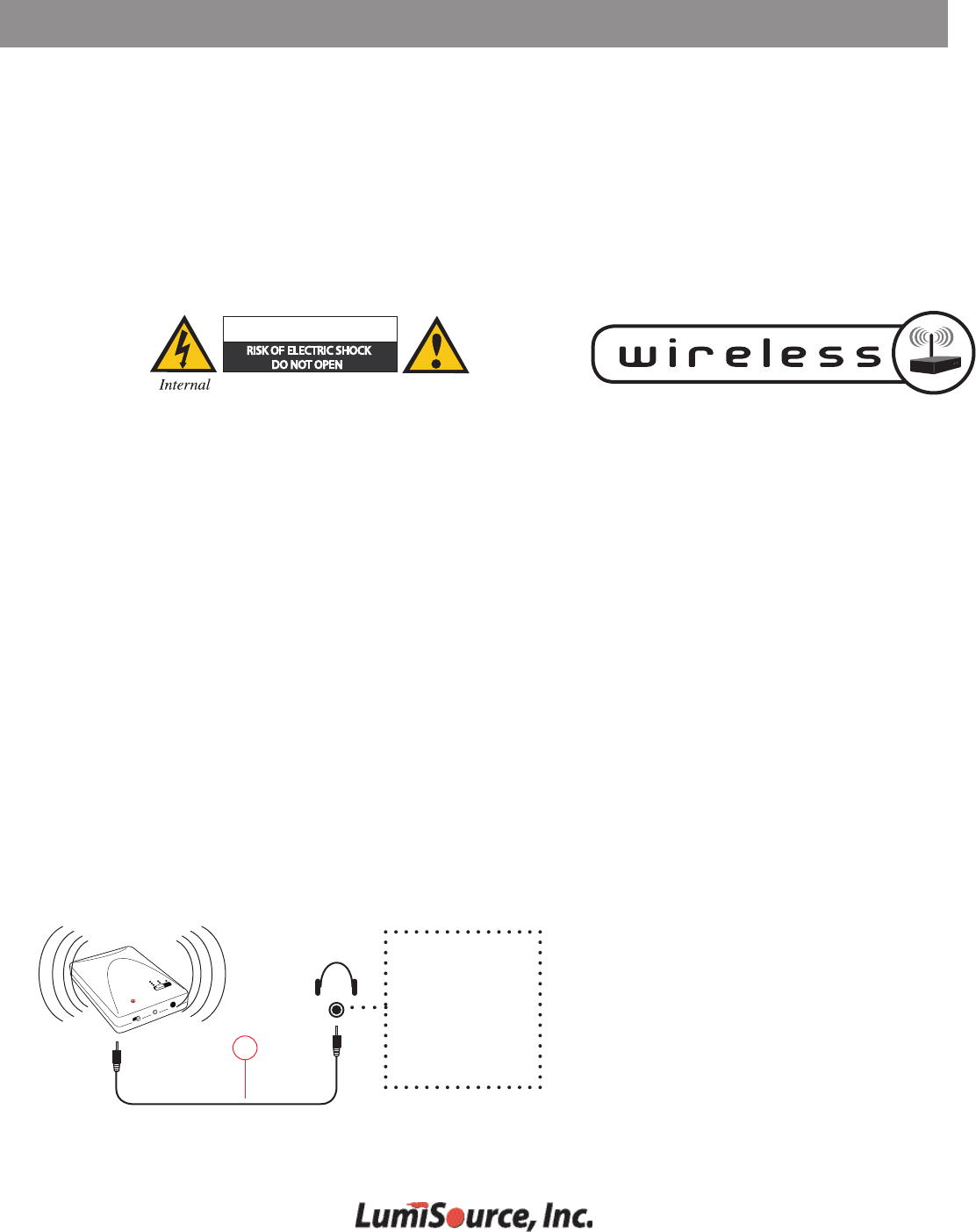
WIRELESS CONNECTION - BE SURE THE WIRELESS CHANNEL SELECTOR NUMBER ON THE CHAIR MATCHES
9
iPod
MP3 Player
Portable Audio Device
PSP
Nintendo DS
Portable Game
Step 1: Insert 4 AA batteries (not included) into wireless
transmitter. Turn power switch on.
Step 2: Connect one end of the wireless audio cord (9)
into the wireless transmitter.
Step 3: Connect the other end of the wireless audio cord
(9) into the headphone jack of your device.
Step 4: Turn Boomchair™ on by turning Power knob (C)
clockwise.
Step 5: Set transmitter and Boomchair™ channel switch
(E) to matching frequency.
THE TRANSMITTER WITH CORRESPONDING NUMBER OF DOTS.
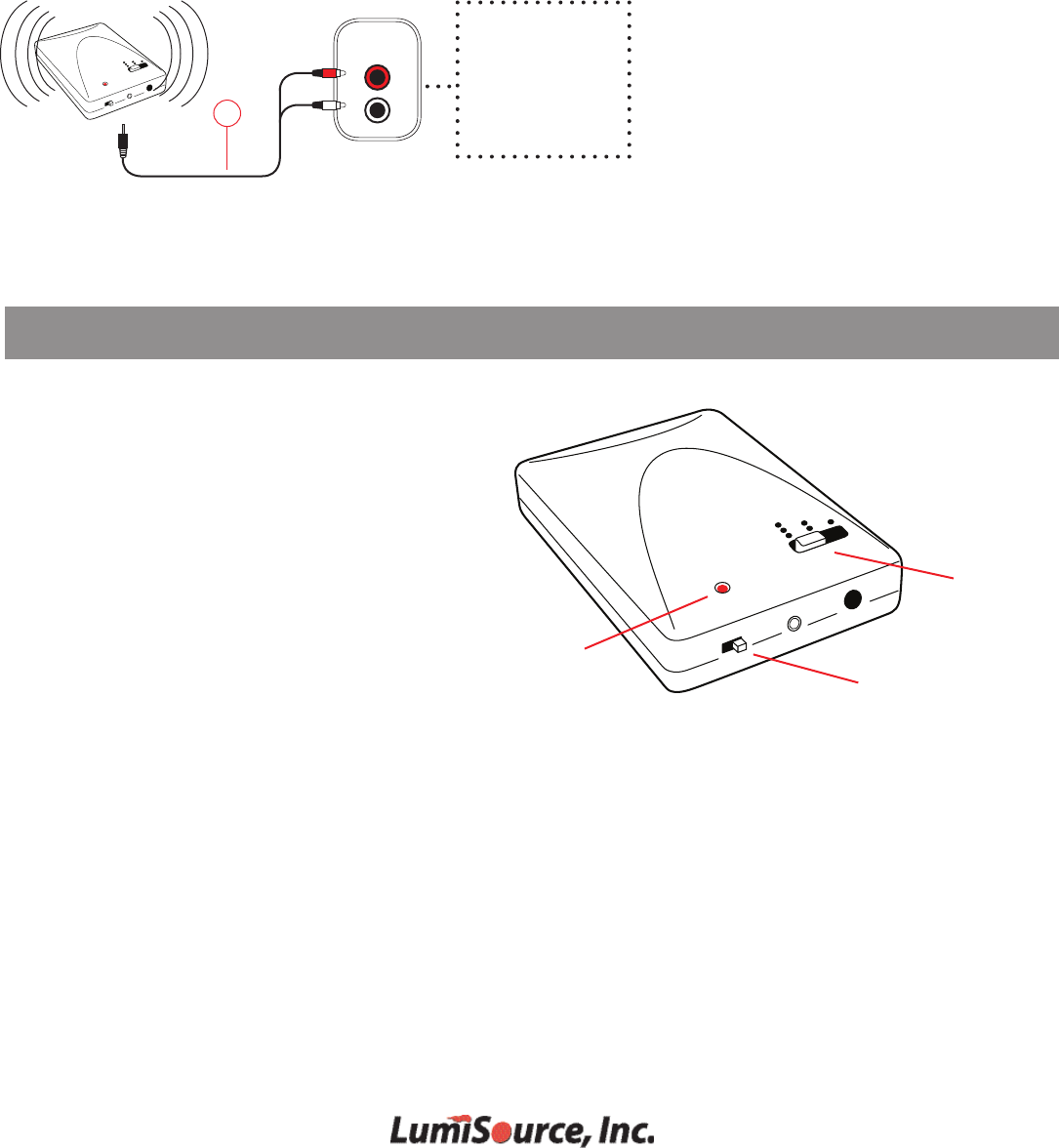
WIRELESS CONNECTION - BE SURE THE WIRELESS CHANNEL SELECTOR NUMBER ON THE CHAIR MATCHES
2
3a
AUDIO
OUT
Step 1: Insert 4 AA batteries (not included) into
wireless transmitter. Turn power switch on.
Step 2: Connect single end of RCA cord (3a) into
the wireless transmitter.
Step 3: Connect other end of RCA cord (3a) into
AUDIO OUTPUT of Audio/Video device.
Step 4: Turn Boomchair™ on by turning Power
knob (C) clockwise.
Step 5: Set transmitter and Boomchair™ channel
switch (E) to matching frequency.
TV
VCR
DVD
Stereo
Satellite Receiver
Other Devices
WIRELESS CONNECTION - BE SURE THE WIRELESS CHANNEL SELECTOR NUMBER ON THE CHAIR MATCHES
THE TRANSMITTER WITH CORRESPONDING NUMBER OF DOTS.
Should interference occur, switch the channel on the wireless
transmitter using the top slider bar (Fig. 1).
Switch the channel selector on the Boomchair™ (Fig. 2) to the
same channel as the transmitter.The number corresponds
Make sure all cables are securely connected.
Make sure batteries are correctly installed in the transmitter,
and that the power is on, as indicated by the red LED (Fig. 3)
.
WIRELESS CONNECTION TIPS
Fig. 1
Fig. 3
Power Switch
to the number of dots on the transmitter. Select for
"0"
non-wireless connections.
Supply voltage, VCC . . . . . . . . . . . . . . . . . . . . . . . . . . . . . . . . . . . . . . . . . . . . . . . . . . . .
. . . . . . . . . . . . . . . . . . . . . . . . . . . . . . . . . . . . . . . . . . . . . . . . . . . . .
. . . . . . . . . . . . . . . . . . . . . . . . . . . . . . . . . . . . . . . . . . . . . . . . . . . .
. . . . . . . . . . . . . . . . . . . . . . . . . . . . . . . . . . . . . . . . . . . . . . . . . . . .
. . . . . . . . . . . . . . . . . . . . . . . . . . . . . . . . . . . . . . . . . . . . . . . . . . . .
. . . . . . . . . . . . . . . . . . . . . . . . . . . . . . . . . . . . . . . . . . . . . . . . . . .
2950 Old Higgins Road, Elk Grove Village, IL 60007
E-mail: customerservice@lumisource.com
www.BoomChair.com • www.LumiSource.com
Phone: 1-888-461-5864
DC 5 V to 7 V
Recommended Operating Conditions
Current 45 mA
Output frequency 914 MHz
914.5 MHz
915 MHz
Power 0.25 W