MERGE HEALTHCARE KMY8202F Self Service Kiosk User Manual

MERGE HEALTHCARE Self Service Kiosk

User Manual

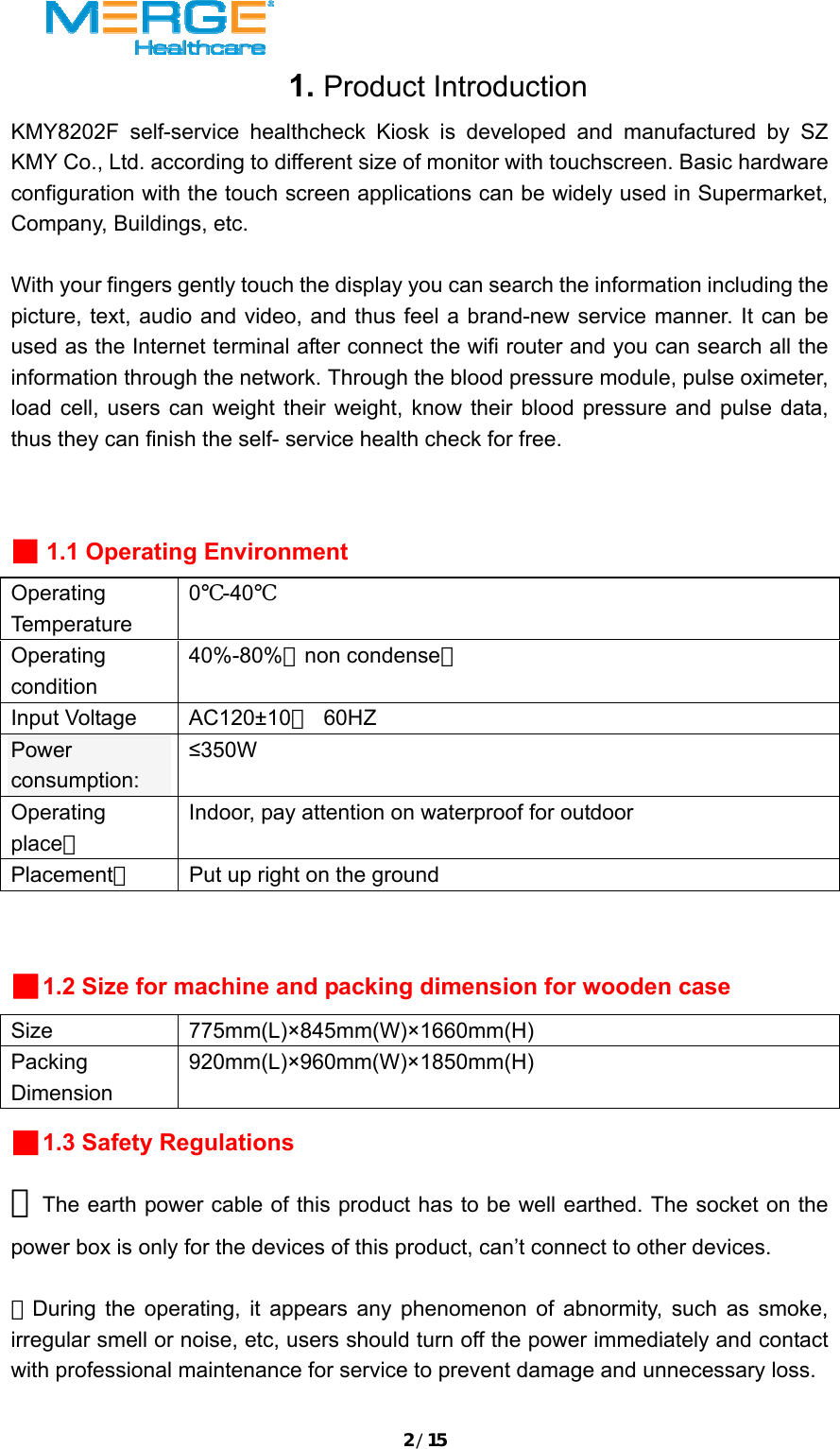
1/15Table of Content  1、 Product Introduction………………………………2-3  2、 Technical Index……………………………………3-10  3、 Working Principle……………………………………11  4、 Hardware Configuration…………………………12-13  5、 Unpack and Install………………………………13-14  6、 Operate and Maintenance…………………………14-15  
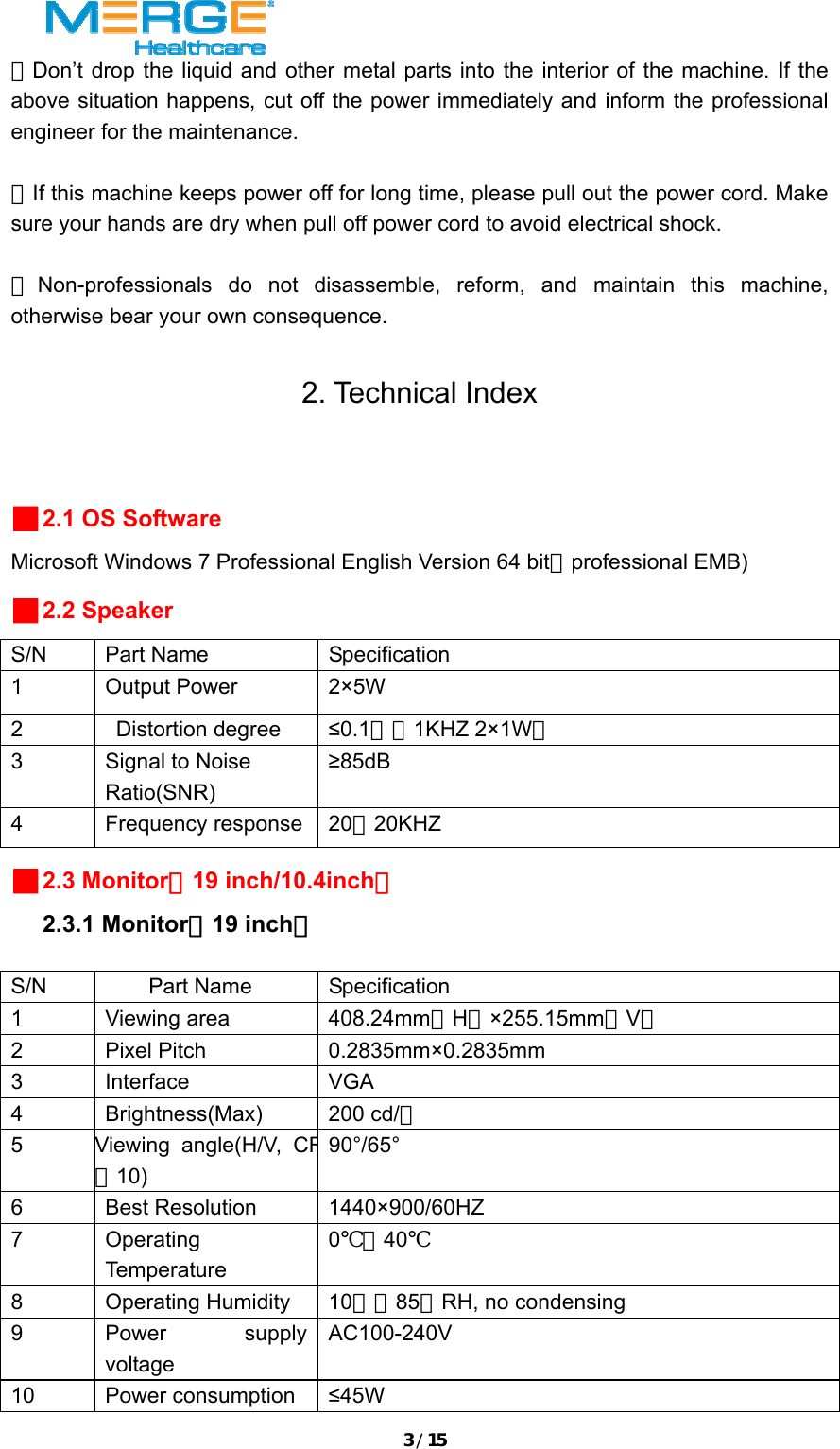
2/151. Product Introduction KMY8202F self-service healthcheck Kiosk is developed and manufactured by SZ KMY Co., Ltd. according to different size of monitor with touchscreen. Basic hardware configuration with the touch screen applications can be widely used in Supermarket, Company, Buildings, etc.    With your fingers gently touch the display you can search the information including the picture, text, audio and video, and thus feel a brand-new service manner. It can be used as the Internet terminal after connect the wifi router and you can search all the information through the network. Through the blood pressure module, pulse oximeter, load cell, users can weight their weight, know their blood pressure and pulse data, thus they can finish the self- service health check for free.    ■ 1.1 Operating Environment Operating Temperature 0℃-40℃ Operating condition 40%-80%(non condense) Input Voltage  AC120±10% 60HZ Power consumption:  ≤350W Operating place: Indoor, pay attention on waterproof for outdoor Placement:  Put up right on the ground  ■1.2 Size for machine and packing dimension for wooden case Size 775mm(L)×845mm(W)×1660mm(H) Packing Dimension 920mm(L)×960mm(W)×1850mm(H) ■1.3 Safety Regulations ★The earth power cable of this product has to be well earthed. The socket on the power box is only for the devices of this product, can’t connect to other devices.  ★During the operating, it appears any phenomenon of abnormity, such as smoke, irregular smell or noise, etc, users should turn off the power immediately and contact with professional maintenance for service to prevent damage and unnecessary loss.
3/15★Don’t drop the liquid and other metal parts into the interior of the machine. If the above situation happens, cut off the power immediately and inform the professional engineer for the maintenance.  ★If this machine keeps power off for long time, please pull out the power cord. Make sure your hands are dry when pull off power cord to avoid electrical shock.  ★Non-professionals do not disassemble, reform, and maintain this machine, otherwise bear your own consequence.  2. Technical Index  ■2.1 OS Software Microsoft Windows 7 Professional English Version 64 bit(professional EMB) ■2.2 Speaker S/N Part Name  Specification 1 Output Power  2×5W 2 Distortion degree ≤0.1%(1KHZ 2×1W) 3  Signal to Noise Ratio(SNR) ≥85dB 4 Frequency response 20~20KHZ ■2.3 Monitor(19 inch/10.4inch)   2.3.1 Monitor(19 inch)  S/N Part Name Specification 1 Viewing area  408.24mm(H)×255.15mm(V) 2 Pixel Pitch  0.2835mm×0.2835mm  3 Interface  VGA 4 Brightness(Max) 200 cd/㎡ 5 Viewing angle(H/V, CR≧10) 90°/65° 6 Best Resolution 1440×900/60HZ 7 Operating Temperature 0℃~40℃ 8 Operating Humidity 10﹪~85﹪RH, no condensing 9 Power supply voltage AC100-240V 10 Power consumption ≤45W
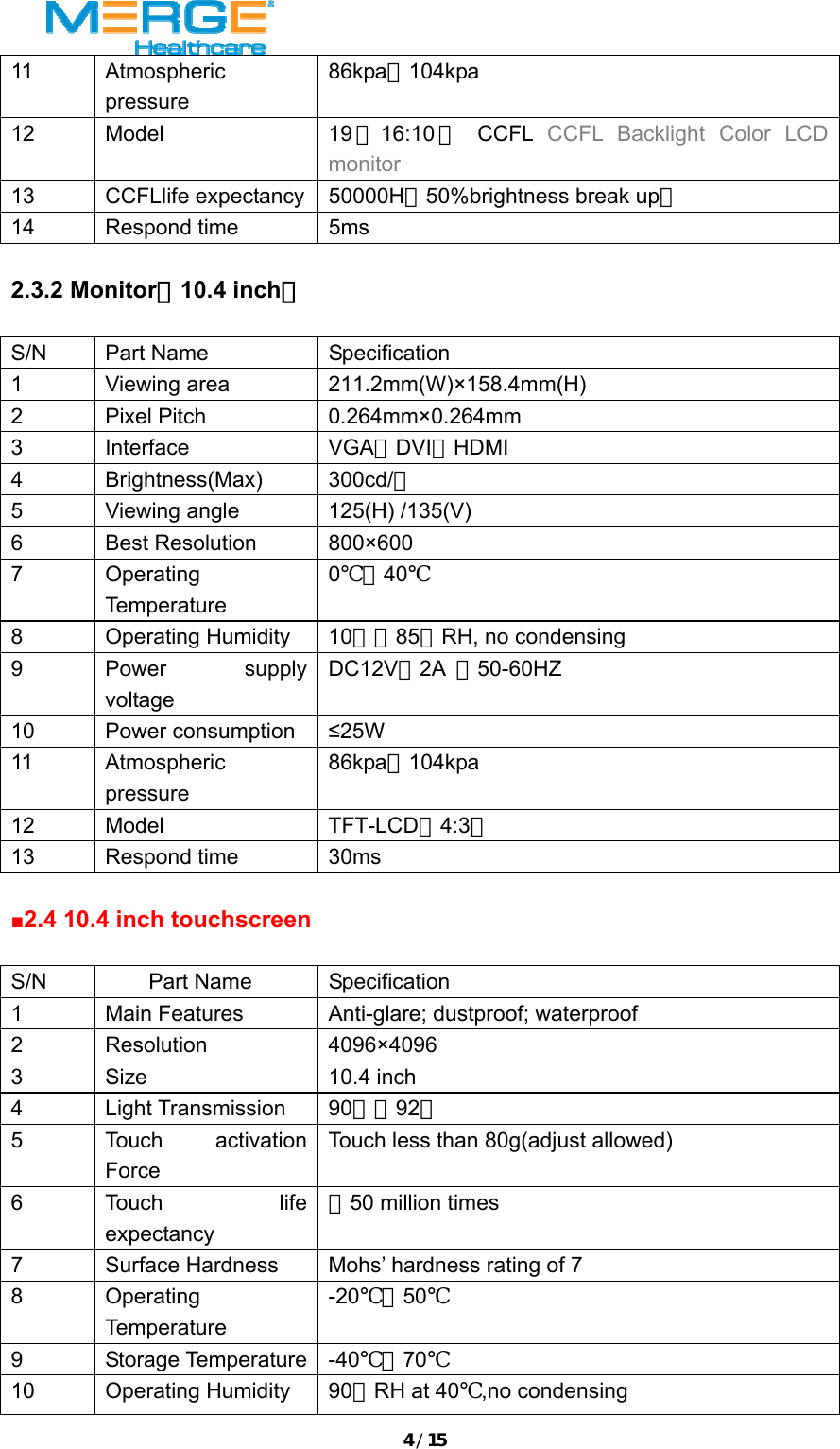
4/1511 Atmospheric pressure 86kpa~104kpa 12 Model  19 (16:10 ) CCFL CCFL Backlight Color LCD monitor 13 CCFLlife expectancy 50000H(50%brightness break up) 14 Respond time  5ms    2.3.2 Monitor(10.4 inch)  S/N Part Name  Specification 1 Viewing area  211.2mm(W)×158.4mm(H) 2 Pixel Pitch  0.264mm×0.264mm 3 Interface  VGA、DVI、HDMI 4 Brightness(Max) 300cd/㎡ 5  Viewing angle  125(H) /135(V) 6 Best Resolution 800×600 7 Operating Temperature 0℃~40℃ 8 Operating Humidity 10﹪~85﹪RH, no condensing 9 Power supply voltage DC12V、2A  、50-60HZ 10 Power consumption ≤25W 11 Atmospheric pressure 86kpa~104kpa 12 Model  TFT-LCD(4:3) 13 Respond time  30ms  ■2.4 10.4 inch touchscreen  S/N Part Name Specification 1  Main Features  Anti-glare; dustproof; waterproof 2 Resolution  4096×4096 3 Size  10.4 inch 4 Light Transmission 90﹪~92﹪ 5 Touch activation Force Touch less than 80g(adjust allowed) 6 Touch  life expectancy >50 million times 7  Surface Hardness  Mohs’ hardness rating of 7 8 Operating Temperature -20℃~50℃ 9 Storage Temperature -40℃~70℃ 10 Operating Humidity 90﹪RH at 40℃,no condensing
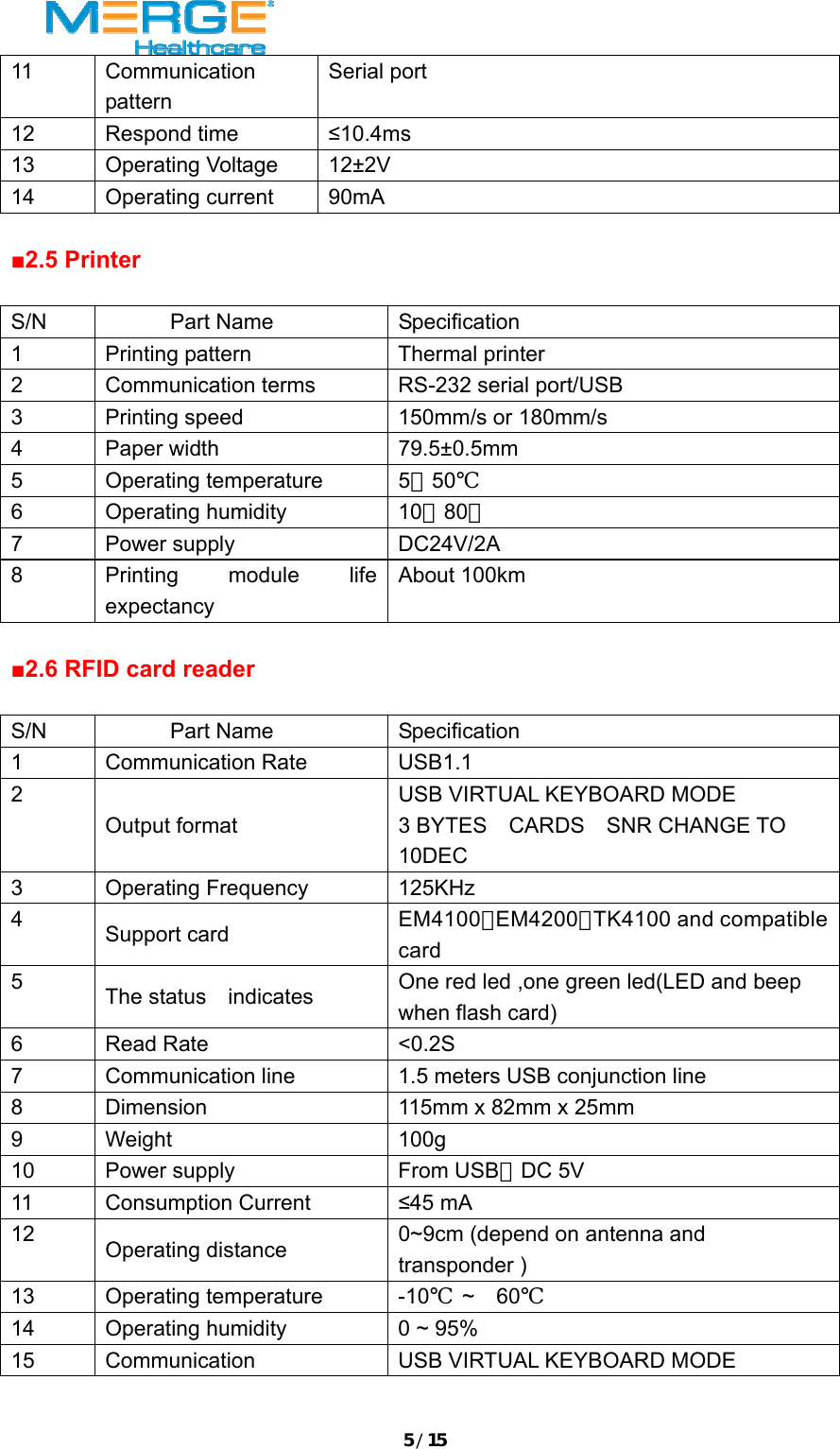
5/1511 Communication pattern Serial port 12 Respond time  ≤10.4ms 13 Operating Voltage 12±2V 14 Operating current 90mA  ■2.5 Printer    S/N Part Name Specification 1  Printing pattern  Thermal printer 2  Communication terms  RS-232 serial port/USB 3  Printing speed  150mm/s or 180mm/s 4 Paper width  79.5±0.5mm 5 Operating temperature 5~50℃ 6 Operating humidity  10~80% 7 Power supply  DC24V/2A 8  Printing module life expectancy About 100km  ■2.6 RFID card reader  S/N Part Name Specification 1 Communication Rate  USB1.1 2 Output format USB VIRTUAL KEYBOARD MODE 3 BYTES  CARDS  SNR CHANGE TO  10DEC 3 Operating Frequency  125KHz 4  Support card  EM4100,EM4200,TK4100 and compatible card 5  The status    indicates  One red led ,one green led(LED and beep when flash card) 6 Read Rate  <0.2S 7  Communication line  1.5 meters USB conjunction line 8  Dimension  115mm x 82mm x 25mm 9 Weight  100g 10  Power supply  From USB,DC 5V 11 Consumption Current  ≤45 mA 12  Operating distance  0~9cm (depend on antenna and transponder ) 13 Operating temperature  -10℃ ~  60℃ 14  Operating humidity  0 ~ 95%   15  Communication  USB VIRTUAL KEYBOARD MODE
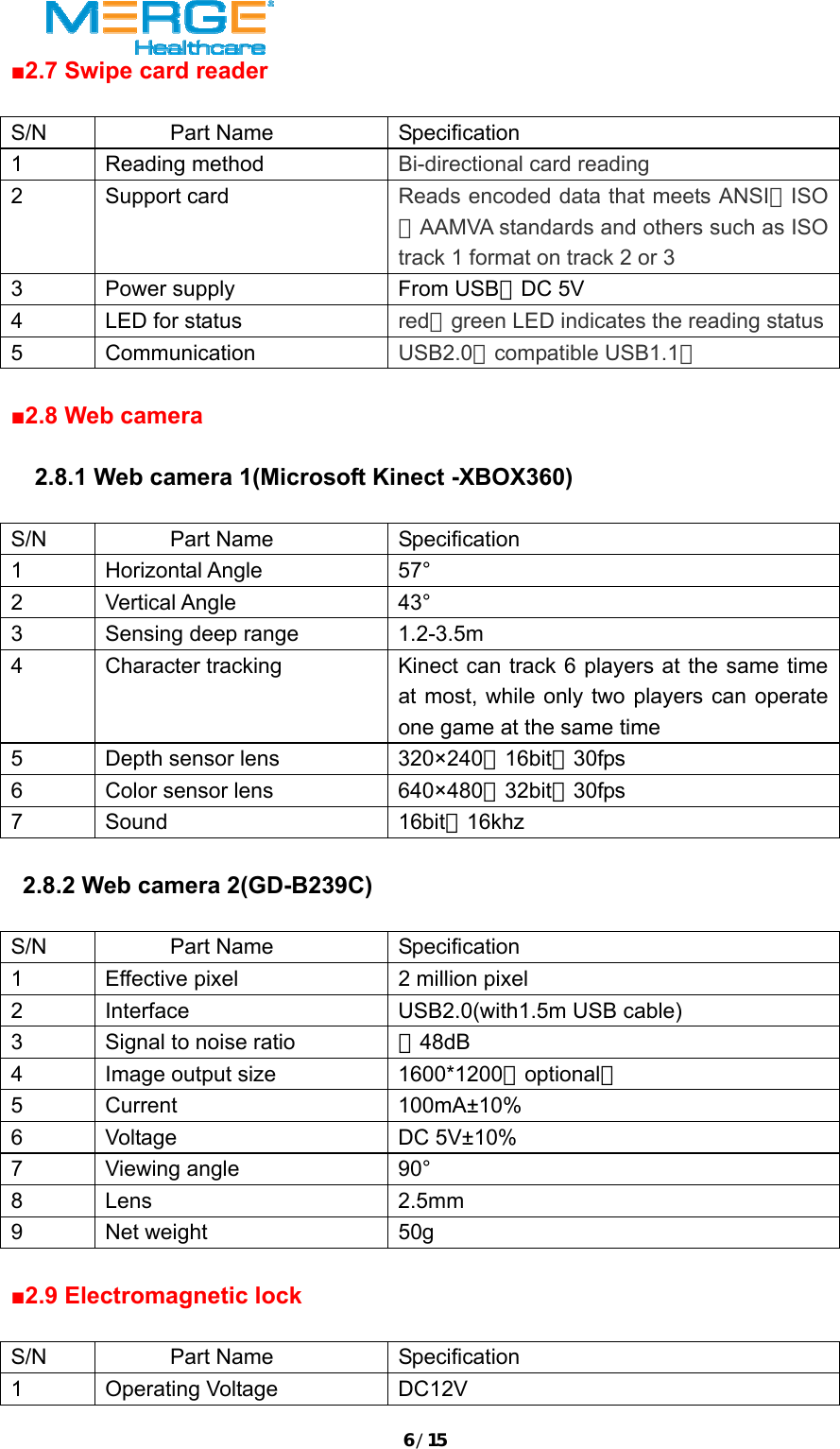
6/15■2.7 Swipe card reader  S/N Part Name  Specification 1 Reading method  Bi-directional card reading 2 Support card  Reads encoded data that meets ANSI/ISO/AAMVA standards and others such as ISO track 1 format on track 2 or 3   3  Power supply  From USB,DC 5V 4  LED for status  red/green LED indicates the reading status5 Communication  USB2.0(compatible USB1.1)  ■2.8 Web camera    2.8.1 Web camera 1(Microsoft Kinect -XBOX360)  S/N Part Name Specification 1 Horizontal Angle  57° 2 Vertical Angle  43° 3  Sensing deep range  1.2-3.5m 4  Character tracking  Kinect can track 6 players at the same time at most, while only two players can operate one game at the same time 5  Depth sensor lens  320×240,16bit,30fps 6  Color sensor lens  640×480,32bit,30fps 7 Sound  16bit,16khz     2.8.2 Web camera 2(GD-B239C)  S/N Part Name  Specification 1  Effective pixel  2 million pixel 2  Interface  USB2.0(with1.5m USB cable) 3  Signal to noise ratio  >48dB 4  Image output size  1600*1200(optional) 5 Current  100mA±10% 6 Voltage  DC 5V±10% 7 Viewing angle  90° 8 Lens  2.5mm 9 Net weight  50g  ■2.9 Electromagnetic lock  S/N Part Name Specification 1 Operating Voltage  DC12V
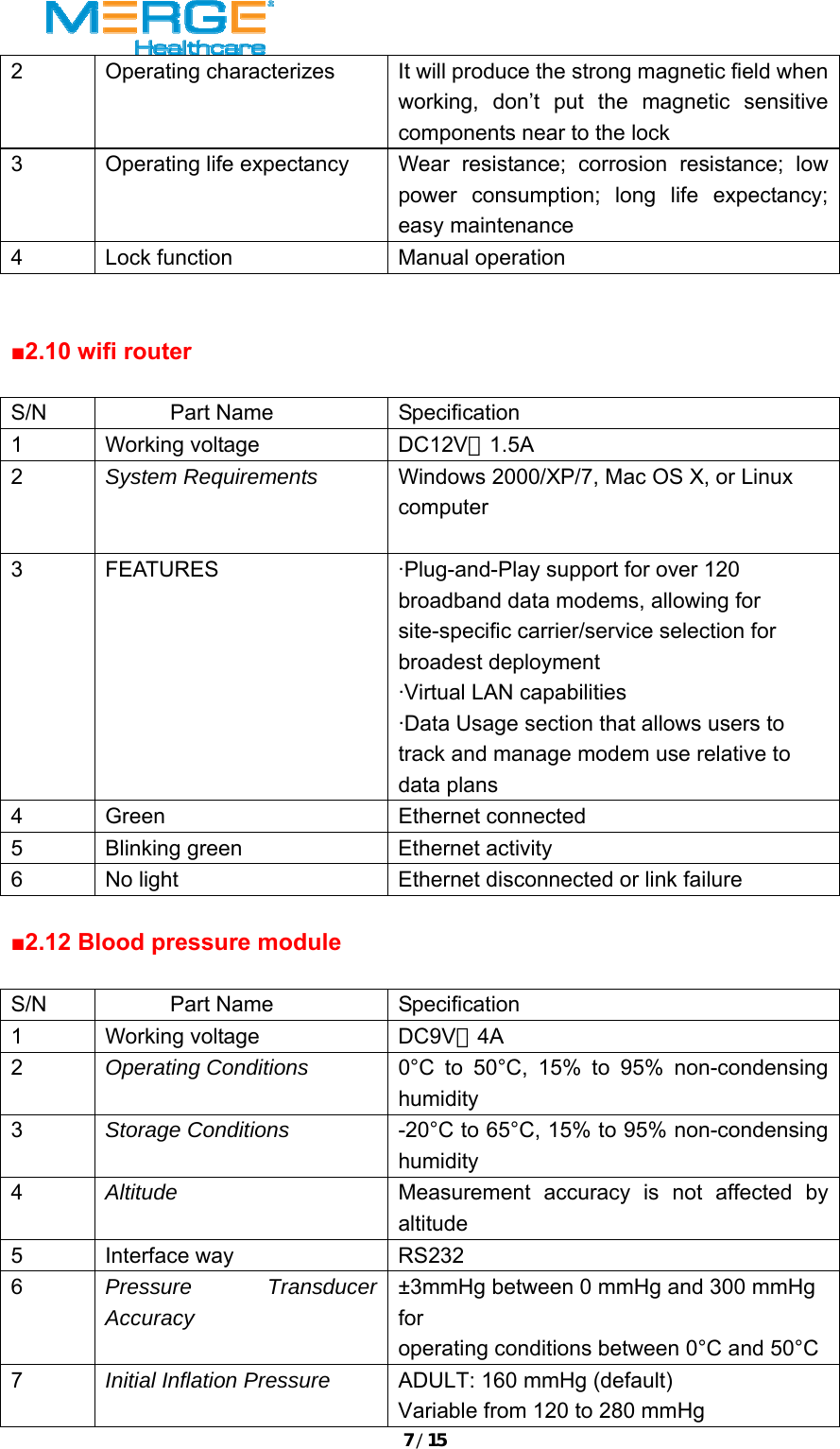
7/152  Operating characterizes  It will produce the strong magnetic field when working, don’t put the magnetic sensitive components near to the lock 3  Operating life expectancy  Wear resistance; corrosion resistance; low power consumption; long life expectancy; easy maintenance 4  Lock function  Manual operation   ■2.10 wifi router  S/N Part Name Specification 1 Working voltage  DC12V,1.5A 2  System Requirements  Windows 2000/XP/7, Mac OS X, or Linux computer   3  FEATURES  ·Plug-and-Play support for over 120 broadband data modems, allowing for site-specific carrier/service selection for broadest deployment   ·Virtual LAN capabilities   ·Data Usage section that allows users to track and manage modem use relative to data plans   4  Green   Ethernet connected  5  Blinking green    Ethernet activity   6  No light    Ethernet disconnected or link failure    ■2.12 Blood pressure module  S/N Part Name Specification 1 Working voltage  DC9V,4A 2  Operating Conditions  0°C to 50°C, 15% to 95% non-condensing humidity 3  Storage Conditions  -20°C to 65°C, 15% to 95% non-condensing humidity 4  Altitude  Measurement accuracy is not affected by altitude 5 Interface way  RS232 6  Pressure Transducer Accuracy ±3mmHg between 0 mmHg and 300 mmHg for operating conditions between 0°C and 50°C 7  Initial Inflation Pressure  ADULT: 160 mmHg (default) Variable from 120 to 280 mmHg
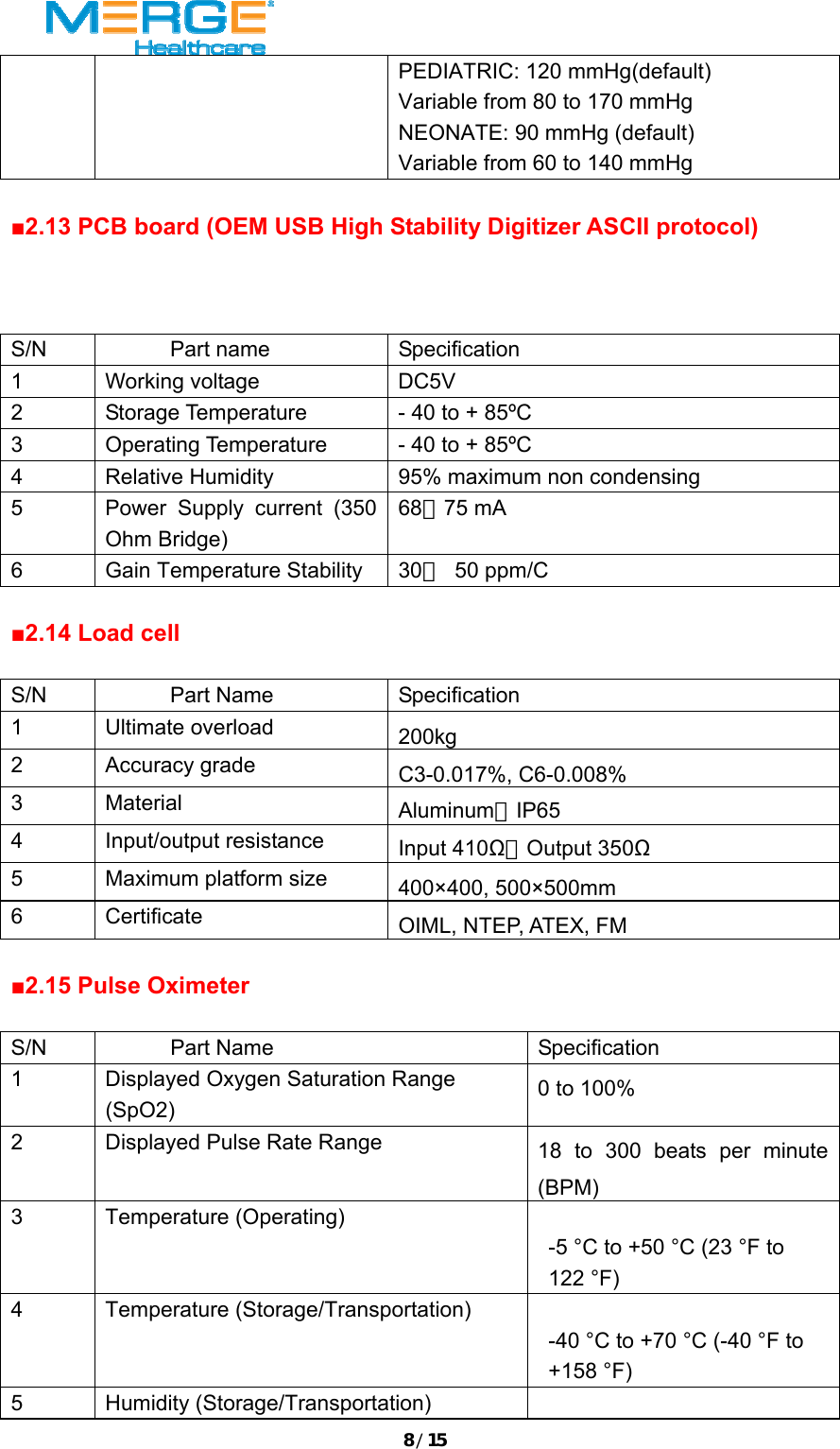
8/15PEDIATRIC: 120 mmHg(default) Variable from 80 to 170 mmHg NEONATE: 90 mmHg (default) Variable from 60 to 140 mmHg  ■2.13 PCB board (OEM USB High Stability Digitizer ASCII protocol)    S/N Part name  Specification 1 Working voltage  DC5V 2  Storage Temperature  - 40 to + 85ºC 3  Operating Temperature  - 40 to + 85ºC 4  Relative Humidity  95% maximum non condensing  5  Power Supply current (350 Ohm Bridge) 68~75 mA 6  Gain Temperature Stability  30~ 50 ppm/C  ■2.14 Load cell  S/N Part Name Specification 1 Ultimate overload 200kg 2 Accuracy grade C3-0.017%, C6-0.008% 3 Material Aluminum,IP65 4 Input/output resistance Input 410Ω,Output 350Ω 5  Maximum platform size 400×400, 500×500mm 6 Certificate OIML, NTEP, ATEX, FM  ■2.15 Pulse Oximeter  S/N Part Name  Specification 1  Displayed Oxygen Saturation Range (SpO2) 0 to 100% 2  Displayed Pulse Rate Range  18 to 300 beats per minute (BPM) 3 Temperature (Operating)    -5 °C to +50 °C (23 °F to 122 °F)    4 Temperature (Storage/Transportation)  -40 °C to +70 °C (-40 °F to +158 °F)    5 Humidity (Storage/Transportation)
9/1510 to 95% non-condensing  6 Power Draw   68 mW typical operation  7 Voltage Input   2 to 6 VDC, w/100 mV max. ripple   8 I/O Signals   0 to +5.0 VDC (nominal)  9 Dimensions   1.26 x 1.25 x 2 inches (32 x 32 x 51 millimeters)    10 Weight   100 g (3.5 oz.) (including 1m cable and connector)     ■2.16 Power supply  S/N        Part Name  Specification 1 Output Voltage  DC24V/12V 2  Rated Current  V1:24V/5A  V2:12V/3A  ■2.17Industrial PC  S/N Part Name  Specification 1  CPU  Intel corei7-2600, 3.4G 2  Memory  Kingstone4G  DDR3×2 3  Video card  PCI Express x16,1G 4  Hard disk  SATA Interface 500G 5 Operating temperature 0℃-50℃ 6  Size of the motherboard 170mm×170mm 7 Operating humidity 20%~93% no condensing 8 Operating voltage AC110V,50HZ 9 Power consumption ≤150W 10  Power supply for the PC ATX-350P4(updated version),350W 11  External Interface  1 VGA port,1 DVI interface,6 RS232 port,7 USB port, 1 four port USB HUB, 1 RJ-45 internet interface,1 PS/2 mouse interface、keyboard interface,1 I/O interface microphone, sound input and output)。
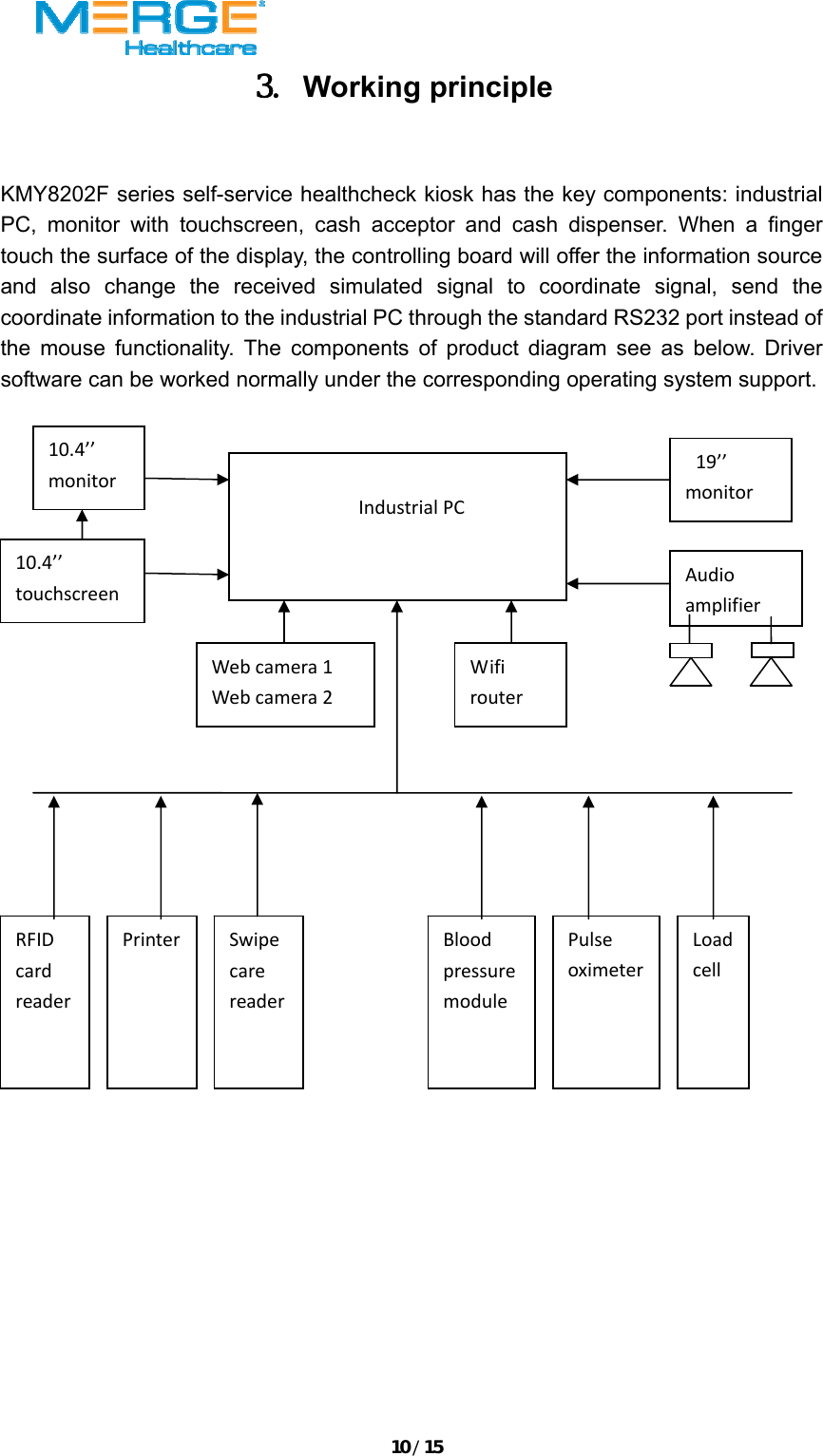
10/153. Working principle  KMY8202F series self-service healthcheck kiosk has the key components: industrial PC, monitor with touchscreen, cash acceptor and cash dispenser. When a finger touch the surface of the display, the controlling board will offer the information source and also change the received simulated signal to coordinate signal, send the coordinate information to the industrial PC through the standard RS232 port instead of the mouse functionality. The components of product diagram see as below. Driver software can be worked normally under the corresponding operating system support.    IndustrialPC10.4’’monitor10.4’’touchscreenWebcamera1Webcamera2WifirouterAudioamplifierRFIDcardreaderPrinter SwipecarereaderBloodpressuremodulePulseoximeterLoadcell19’’monitor
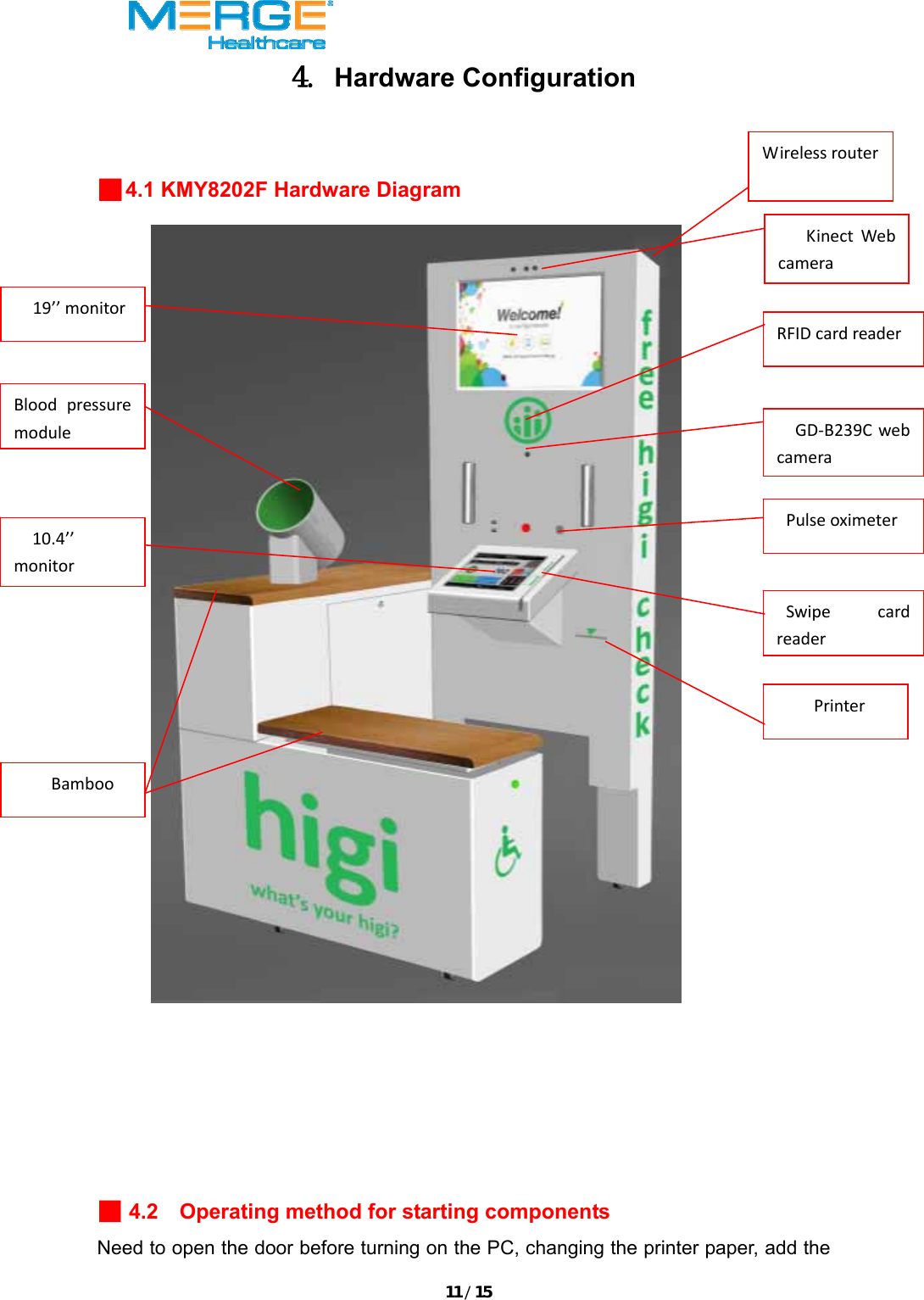
11/154. Hardware Configuration  ■4.1 KMY8202F Hardware Diagram    ■ 4.2    Operating method for starting components Need to open the door before turning on the PC, changing the printer paper, add the 19’’monitorGD‐B239CwebcameraPulseoximeterBloodpressuremoduleKinectWebcameraRFIDcardreaderSwipecardreaderPrinterBamboo10.4’’monitorWirelessrouter
12/15cash or other operating process.    a.  Turn on-Open the door and then press on the “start” button. b.  Volume adjustment-open the door, and press on the “volume” button to adjust the proper volume c.  Change the printer paper-open the door to change the printer paper directly.   d.  Adjust the monitor-Usually use the settlement of adjusting automatically for the standard brightness, contrast, etc. If need the special parameter, use the “adjustment” button below the display 5. Unpack and Install  (1)Please check whether the accessories are complete and not damaged one by one after unpacking.    (2)After unpacking, connect the power cord into the power outlet AC110V, then turn on the PC. Check whether the monitor is normal working; whether the touchscreen is sensitive, if not, please calibrate again; Test whether the web camera can catch the high definition video and picture; Whether the printing is clear; Whether the RFID card reader can read the data of the RFID card; Whether the swipe card reader can read the data of magnetic card;whether the wifi router can connect the internet normally;  Whether the data of the blood pressure is accurate;Whether the data of the pulse oximeter is accurate; whether the load cell can weigh the right weight; whether the electromagnetic lock and separate when the outage, and suck together when power on;whether the speaker work normally, the sound volume is same for both side.    (3)Please make sure all the components work normally, and keep the warranty card.   For more enquiries or details please call our International Sales Hot-Line: +86-755-88353453   Fax: +86-755-82507172   Email to: info@kmychina.com.cn or sales@kmychina.com.cn  Headquarters Office Add:  Room A,B,C, 14th Floor (13A), Block B, XueSong Building,   Terra 6th Road, Chegongmiao, Futian District, Shenzhen,China.             Zip: 518040  Factory Add:    BLD A, Dezhaoji Industry Park, Baigong'ao Industrial Zone, Xikeng New Village,
13/15Fuming Community, Guanlan Town Bao'an District, Shenzhen, China.       Zip: 518110  6.    Operate and Maintenance ■6.1 Operate  a. Switch On  Connect the power cord into the AC120V power outlet; pull the switch of the main power supply to the open status, then press on the switch of PC power supply, the industrial PC will start the application automatically.    b. Operate  This machine is for self-service health check and information checking. When the users need to check some information, they just need to find out and click the related item in the software interface.  C. Switch off  After finish the working everyday, exit the current application before turning off the device and return to the Windows interface, then switch off the industrial PC normally. At this moment, the industrial PC has stopped working, then turn off the main power supply switch.   ■6.2 Maintenance Keep the screen surfaces cleaning. Find screen surface is water, oil and dirt shall clean up immediately once find water, oil and something dirty. Avoid using the wet object, should clean up by the soft cloth.    ■6.3 Troubleshooting  a. Appearance Inspection    ★Whether the controller for the touch screen connect external loose.    ★Whether the controller for the touch screen connect the PC power cord loose.    ★Whether the connection lines are disconnected.  b. Boot observation
14/15 There is a blue LED light between the controller external pin. When the touch screen is under the working condition, it will shine without touch. Will flash per second without connecting the touch screen; if connected, the light will flash a few seconds and then recover to shine all the time.    Judge the malfunction according to the following method:    ★The LED light is not bright: +12 power supply or connection is abnormal  ★The LED light is bright all the time: there is something dirty on the surface of screen or the RS232 port is abnormal.  ★The LED light shine normally, while after touch the screen, it will be bright all the time, can’t recover to shine: the RS232 port can’t read the data or set the wrong parameter of the RS232 port.     Notes: When need to remove the related components for the maintenance, it should be operated by professional maintenance personnel. It is strictly prohibited to non-professional staff engaged in this product maintenance. There are warnings inside of the kiosk, in case of risk, must switch off the power supply before remove the components.  FCC WARNNING: ThisdevicecomplieswithPart15oftheFCCRules.Operationissubjecttothefollowingtwoconditions:(1)thisdevicemaynotcauseharmfulinterference,and(2)thisdevicemustacceptanyinterferencereceived,includinginterferencethatmaycauseundesiredoperation.changesormodificationsnotexpresslyapprovedbythepartyresponsibleforcompliancecouldvoidtheuser'sauthoritytooperatetheequipment.NOTE:ThisequipmenthasbeentestedandfoundtocomplywiththelimitsforaClassBdigitaldevice,pursuanttoPart15oftheFCCRules.Theselimitsaredesignedtoprovidereasonableprotectionagainstharmfulinterferenceinaresidentialinstallation.Thisequipmentgenerates,usesandcanradiateradiofrequencyenergyand,ifnotinstalledandusedinaccordancewiththeinstructions,maycauseharmfulinterferencetoradiocommunications.However,thereisnoguaranteethatinterferencewillnotoccurinaparticularinstallation.Ifthisequipmentdoescauseharmfulinterferencetoradioortelevisionreception,whichcanbedeterminedbyturningtheequipmentoffandon,theuserisencouragedtotrytocorrecttheinterferencebyoneormoreofthefollowing
15/15measures:‐‐Reorientorrelocatethereceivingantenna.‐‐Increasetheseparationbetweentheequipmentandreceiver.‐‐Connecttheequipmentintoanoutletonacircuitdifferentfromthattowhichthereceiverisconnected.‐‐Consultthedealeroranexperiencedradio/TVtechnicianforhelp.RFExposureStatementTomaintaincompliancewithFCC’sRFExposureguidelines,Thisequipmentshouldbeinstalledandoperatedwithminimumdistancebetween20cmtheradiatoryourbody:Useonlythesuppliedantenna.

Navigation menu