MOBINTEL KPAU02 Smart phone User Manual

MOBINTEL PTY LTD Smart phone

User manual

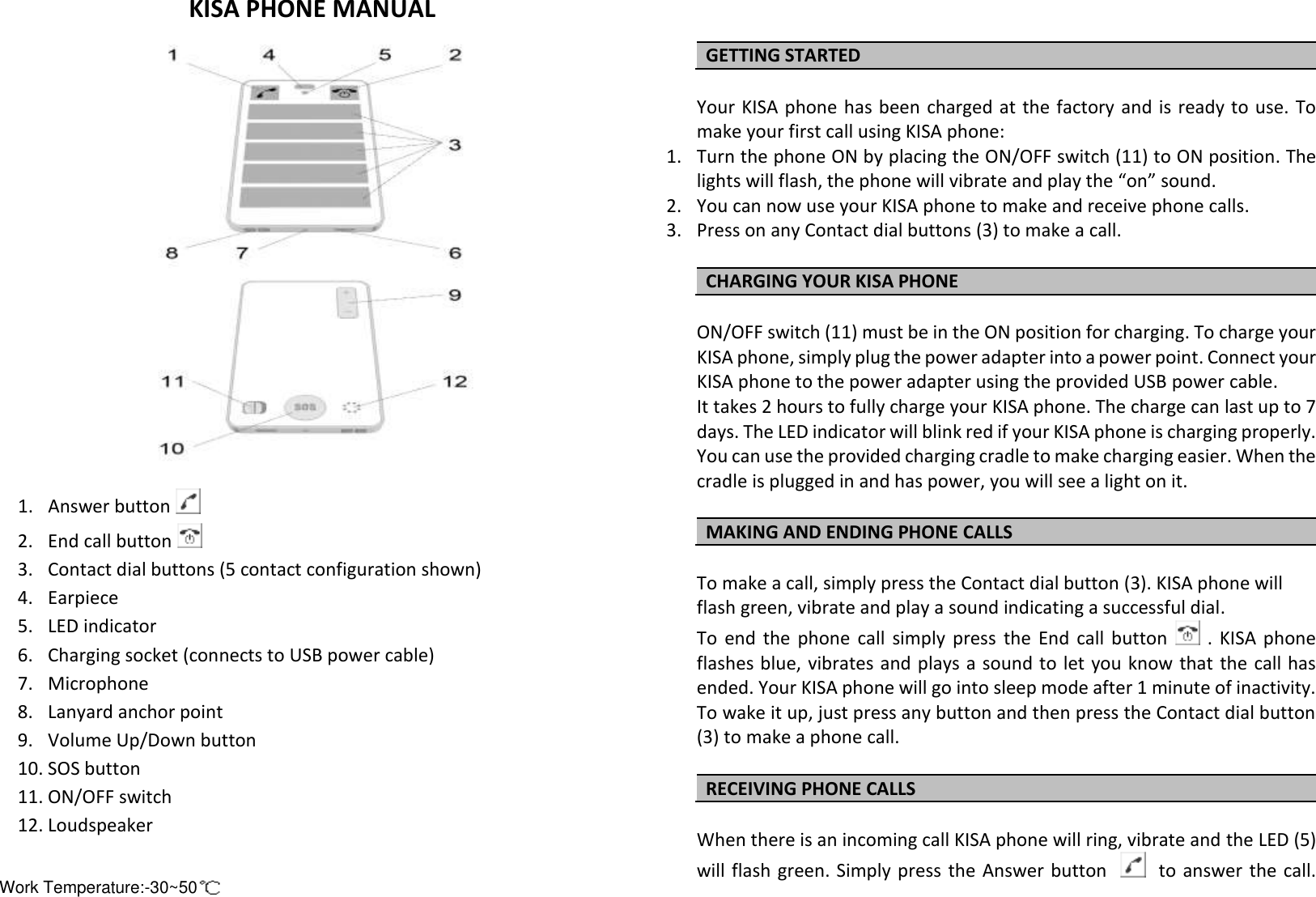
KISA PHONE MANUAL                1. Answer button   2. End call button   3. Contact dial buttons (5 contact configuration shown) 4. Earpiece 5. LED indicator 6. Charging socket (connects to USB power cable) 7. Microphone  8. Lanyard anchor point 9. Volume Up/Down button 10. SOS button 11. ON/OFF switch 12. Loudspeaker   GETTING STARTED  Your KISA phone has been charged at the factory and is ready to use. To make your first call using KISA phone: 1. Turn the phone ON by placing the ON/OFF switch (11) to ON position. The lights will flash, the phone will vibrate and play the “on” sound. 2. You can now use your KISA phone to make and receive phone calls. 3. Press on any Contact dial buttons (3) to make a call.  CHARGING YOUR KISA PHONE  ON/OFF switch (11) must be in the ON position for charging. To charge your KISA phone, simply plug the power adapter into a power point. Connect your KISA phone to the power adapter using the provided USB power cable.  It takes 2 hours to fully charge your KISA phone. The charge can last up to 7 days. The LED indicator will blink red if your KISA phone is charging properly.  You can use the provided charging cradle to make charging easier. When the cradle is plugged in and has power, you will see a light on it.  MAKING AND ENDING PHONE CALLS  To make a call, simply press the Contact dial button (3). KISA phone will flash green, vibrate and play a sound indicating a successful dial.  To  end  the  phone  call  simply  press  the  End  call  button    .  KISA  phone flashes blue, vibrates and plays a sound to  let you know that the call has ended. Your KISA phone will go into sleep mode after 1 minute of inactivity. To wake it up, just press any button and then press the Contact dial button (3) to make a phone call.  RECEIVING PHONE CALLS  When there is an incoming call KISA phone will ring, vibrate and the LED (5) will flash green. Simply press  the  Answer button     to answer the call. Work Temperature:-30~50ÿ
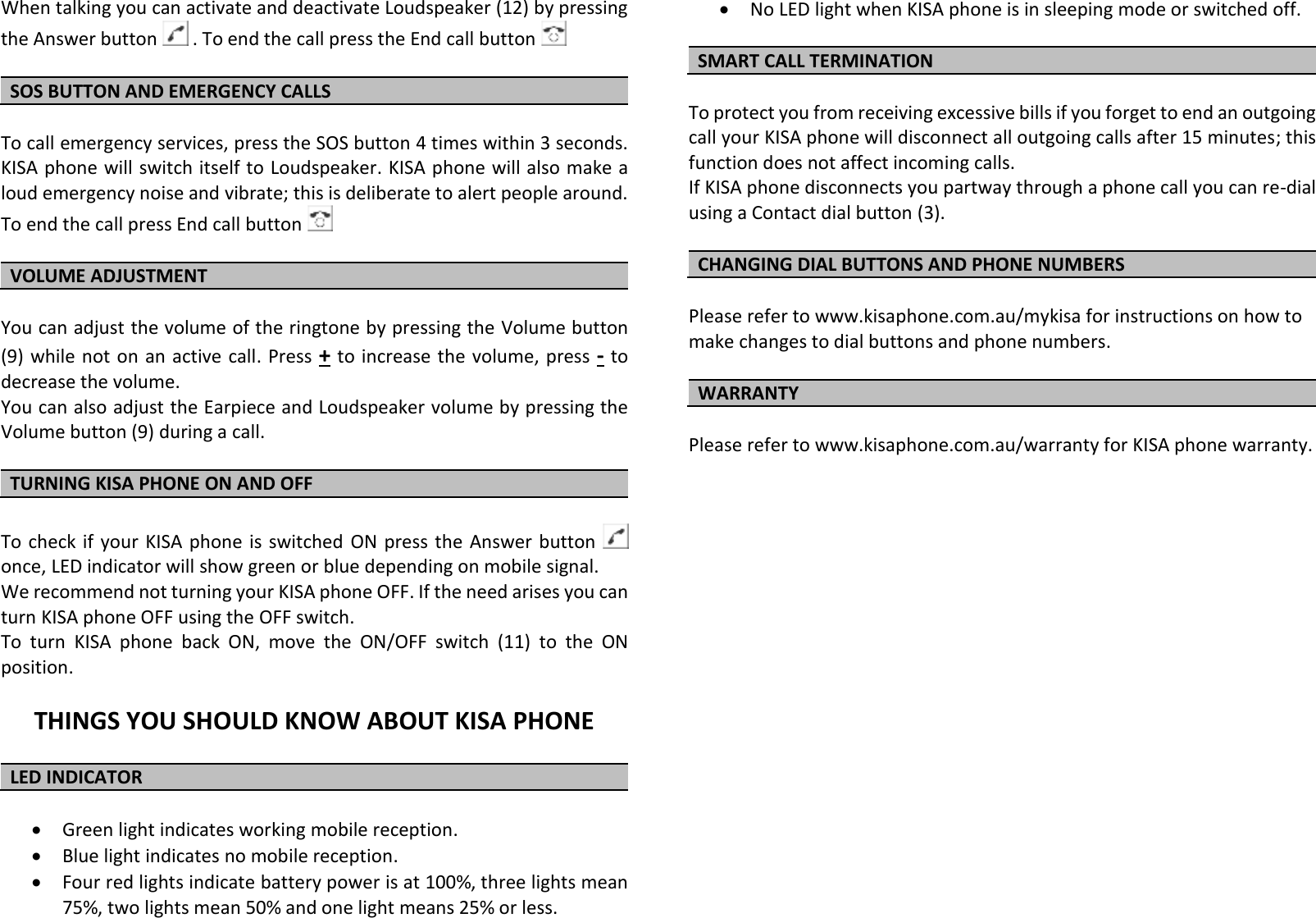
When talking you can activate and deactivate Loudspeaker (12) by pressing the Answer button   . To end the call press the End call button    SOS BUTTON AND EMERGENCY CALLS   To call emergency services, press the SOS button 4 times within 3 seconds. KISA phone will switch itself to Loudspeaker. KISA phone will also make a loud emergency noise and vibrate; this is deliberate to alert people around. To end the call press End call button    VOLUME ADJUSTMENT  You can adjust the volume of the ringtone by pressing the Volume button (9) while not on  an active call. Press + to increase the  volume, press - to decrease the volume.  You can also adjust the Earpiece and Loudspeaker volume by pressing the Volume button (9) during a call.                                                                               TURNING KISA PHONE ON AND OFF  To check if your  KISA  phone  is  switched  ON press the Answer button    once, LED indicator will show green or blue depending on mobile signal. We recommend not turning your KISA phone OFF. If the need arises you can turn KISA phone OFF using the OFF switch. To  turn  KISA  phone  back  ON,  move  the  ON/OFF  switch  (11)  to  the  ON position.  THINGS YOU SHOULD KNOW ABOUT KISA PHONE  LED INDICATOR    Green light indicates working mobile reception.   Blue light indicates no mobile reception.  Four red lights indicate battery power is at 100%, three lights mean 75%, two lights mean 50% and one light means 25% or less.  No LED light when KISA phone is in sleeping mode or switched off.  SMART CALL TERMINATION  To protect you from receiving excessive bills if you forget to end an outgoing call your KISA phone will disconnect all outgoing calls after 15 minutes; this function does not affect incoming calls. If KISA phone disconnects you partway through a phone call you can re-dial using a Contact dial button (3).   CHANGING DIAL BUTTONS AND PHONE NUMBERS  Please refer to www.kisaphone.com.au/mykisa for instructions on how to make changes to dial buttons and phone numbers.  WARRANTY  Please refer to www.kisaphone.com.au/warranty for KISA phone warranty.
 Federal Communications Commission (FCC) Statement  This device complies with part 15 of the FCC Rules. Operation is subject to the following two conditions: (1) This device may not cause harmful interference, and (2) this device must accept any interference received, including interference that may cause undesired operation.      Note: This equipment has been tested and found to comply with the limits for a Class B digital device, pursuant to part 15 of the FCC Rules. These limits are designed to provide reasonable protection against harmful interference in a residential installation. This equipment generates, uses and can radiate radio frequency energy and, if not installed and used in accordance with the instructions, may cause harmful interference to radio communications. However, there is no guarantee that interference will not occur in a particular installation. If this equipment does cause harmful interference to radio or television reception, which can be determined by turning the equipment off and on, the user is encouraged to try to correct the interference by one or more of the following measures:        ●Reorient or relocate the receiving antenna. ●Increase the separation between the equipment and receiver.             ●Connect the equipment into an outlet on a circuit different from that to which the receiver is connected.       ●Consult the dealer or an experienced radio/TV technician for help.          Warning: Changes or modifications made to this device not expressly approved by Shenzhen Hollyland Technology Co.,Ltd may void the FCC authorization to operate this device.          Note:  The manufacturer is not responsible for any radio or tv interference caused by unauthorized modifications to this equipment. Such modifications could void the user’s authority to operate the equipment.
SAR Information Statement Your wireless phone is a radio transmitter and receiver. It is designed and manufactured not to exceed the emission limits for exposure to radiofrequency (RF) energy set by the Federal Communications Commission of the U.S. Government. These limits are part of comprehensive guidelines and establish permitted levels of RF energy for the general population. The guidelines are based on standards that were developed by independent scientific organizations through periodic and thorough evaluation of scientific studies. The standards include a substantial safety margin designed to assure the safety of all persons, regardless of age and health. The exposure standard for wireless mobile phones employs a unit of measurement known as the Specific Absorption Rate, or SAR. The SAR limit set by the FCC is 1.6 W/kg. * Tests for SAR are conducted with the phone transmitting at its highest certified power level in all tested frequency bands. Although the SAR is determined at the highest certified power level, the actual SAR level of the phone while operating can be well below the maximum value. This is because the phone is designed to operate at multiple power levels so as to use only the power required to reach the network. In general, the closer you are to a wireless base station antenna, the lower the power output. Before a phone model is available for sale to the public, it must be tested and certified to the FCC that it does not exceed the limit established by the government adopted requirement for safe exposure. The tests are performed in positions and locations (e.g., at the ear and worn on the body) as required by the FCC for each model. The highest SAR value for this model phone when tested for use at the ear is 0.80 W/Kg and when worn on the body, as described in this user guide, is 0.27 W/Kg (Body-worn measurements differ among phone models, depending upon available accessories and FCC requirements). While there may be differences between the SAR levels of various phones and at various positions, they all meet the government requirement for safe exposure. The FCC has granted an Equipment Authorization for this model phone with all reported SAR levels evaluated as in compliance with the FCC RF exposure guidelines. SAR information on this model phone is on file with the FCC and can be found under the Display Grant section of http://www.fcc.gov/ oet/fccid after searching on  FCC ID: 2AHS8-KPAU02 Additional information on Specific Absorption Rates (SAR) can be found on the Cellular Telecommunications Industry Asso-ciation (CTIA) web-site at http://www.wow-com.com. * In the United States and Canada, the SAR limit for mobile phones used by the public is 1.6watts/kg (W/kg) averaged over one gram of tissue. The standard incorporates a sub-stantial margin of safety to give additional protection for the public and to account for any variations in measurements.  Body-worn Operation This device was tested for typical body-worn operations. To comply with RF exposure requirements, a minimum separation distance of 10 mm must be maintained between the user’s body and the handset, including the antenna. Third-party belt-clips, holsters, and similar accessories used by this device should not contain any metallic components. Body-worn accessories that do not meet these requirements may not comply with RF exposure requirements and should be avoided.

Navigation menu