MOX GROUP M5 Mobile Phone User Manual

MOX GROUP LIMITED Mobile Phone

user manual

            Mobile Phone  Model Name: M5  Brand Name: MOX  FCC ID: 2ABBS-M5
1TableTableTableTable ofofofof ContentsContentsContentsContents1.1.1.1. ForewordForewordForewordForeword............................................................................................................................................................................................55552.2.2.2. QuickQuickQuickQuick startstartstartstart................................................................................................................................................................................9999Icon Explain .............................................. 9Knowing the Keys...............................9Install SIM card ...................................... 10Install T-flash card .................................11Installing Battery ....................................11Battery Charging ....................................11Switching on/off ..................................... 123.3.3.3. CallCallCallCall functionfunctionfunctionfunction ............................................................................................................................................................ 14141414Dialing telephone ................................... 14Receiving telephone ............................. 15call in the menu ..................................... 154.4.4.4. MessagesMessagesMessagesMessages ................................................................................................................................................................................ 17171717Write message ....................................... 17Inbox ....................................................... 17Drafts ...................................................... 18Outbox .................................................... 18Sent messages ...................................... 19Service messages ................................. 19SMS settings .......................................... 195.5.5.5. PhonebookPhonebookPhonebookPhonebook .................................................................................................................................................................... 21212121Quick search .......................................... 21Browse contacts .................................... 21Add new contact .................................... 226.6.6.6. CallCallCallCall centercentercentercenter ........................................................................................................................................................................ 23232323Call history ............................................. 23
2Call settings ........................................... 237.7.7.7. SettingsSettingsSettingsSettings ............................................................................................................................................................................................ 27272727Dual SIM settings .................................. 27Phone settings ....................................... 27Network settings .................................... 29Security Settings ................................... 29Connectivity ........................................... 32Restore factory settings ........................ 348.8.8.8. MultimediaMultimediaMultimediaMultimedia ........................................................................................................................................................................ 35353535Image viewer .......................................... 35Video recorder ....................................... 36Video player ........................................... 37Audio player ........................................... 37Sound recorder ...................................... 38FM radio ................................................. 399.9.9.9. ExtraExtraExtraExtra ........................................................................................................................................................................................................ 40404040Torch ....................................................... 40Calculator ............................................... 40Calendar ................................................. 40Alarm ....................................................... 4110.10.10.10. FileFileFileFile managermanagermanagermanager ............................................................................................................................................ 4242424211.11.11.11. ServicesServicesServicesServices............................................................................................................................................................................43434343Homepage .............................................. 43Bookmarks ............................................. 43Input URL ............................................... 43Recent pages ......................................... 43Settings ................................................... 4412.12.12.12. Fun&GamesFun&GamesFun&GamesFun&Games................................................................................................................................................4545454513.13.13.13. InputInputInputInput methodsmethodsmethodsmethods ................................................................................................................................ 46464646
314.14.14.14. PhonePhonePhonePhone maintenancemaintenancemaintenancemaintenance ............................................................................................ 4747474715.15.15.15. AccessoriesAccessoriesAccessoriesAccessories................................................................................................................................................4949494916.16.16.16. EnvironmentEnvironmentEnvironmentEnvironment ............................................................................................................................................ 5050505017.17.17.17. TechnicalSpecificationsTechnicalSpecificationsTechnicalSpecificationsTechnicalSpecifications ............................................................ 51515151
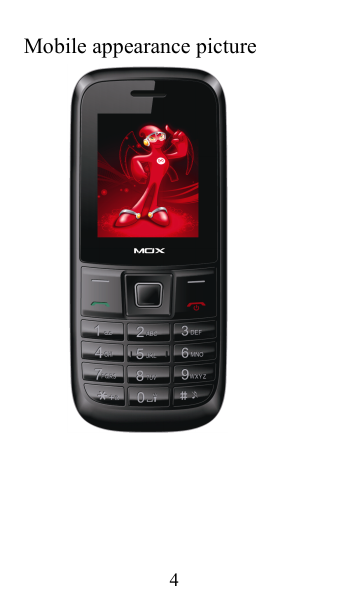
4Mobile appearance picture
51.1.1.1. ForewordForewordForewordForewordHonorific mobile phones user, thank you forchoosing our mobile phone!Our cellular phones is according with thecommunication industry standards of PRC, andalso according with the standards of European,and are approved for GSM networks.Your phone may be used internationally withvarious networks depending on your roamingarrangements with your service provider.Touse this phone you must subscribe to a GSMservice from a provider. We have included manyfeatures in this device but their function dependson the features available with your subscribedwireless network. Please contact your serviceprovider for more information.We strongly recommend you carefully read andunderstand this manual before using your phonein order to keep it under best conditions for youreffective usage and utmost satisfaction.SafetySafetySafetySafetyNever attempt to disassemble your phone.Youalone are responsible for how you use your phoneand any consequences of its use.As a general rule, always switch off your phonewherever the use of a phone is prohibited.Use of your phone is subject to safety measuresdesigned to protect users and their environment.Do not use your phone in damp areas (bathroom,swimming pool … ). Protect it from liquids and othermoisture.Do not expose your phone to extremetemperatures lower than - 10 ° C and higher than +
650°C.The physicochemical processes created bychargers impose temperature limits whencharging the battery. Your phone automaticallyprotects the batteries in extreme temperatures.Do not leave your phone within the reach of smallchildren (certain removable parts may beaccidentally ingested).Electrical safetyOnly use the chargers listed in the manufacturer’scatalogue. Using any other charger may bedangerous; it would also invalidate your warranty.Line voltage must be exactly the one indicated onthe charger ’ s serial plate.Aircraft safetyWhen traveling by plane, you will need to switchyour phone off when so instructed by the cabincrew or the warning signs. Using a mobile phonemay be dangerous to the operation of the aircraftand may disrupt the phone network.Its use is illegal and you could be prosecuted orbanned from using cellular networks in the future ifyou do not abide by these regulations.Explosive materialsPlease comply with warning signs at petrol stationwhen personnel asking you to switch your phoneoff.Youwill need to comply with radio equipmentusage restrictions in places such as chemicalplants, fuel depots and at any location whereblasting operations are under way.Electronic equipmentToavoid the risk of demagnetization, do not letelectronic devices close to your phone for a longtime.
7Electronic medical equipmentYour phone is a radio transmitter which mayinterfere with electronic medical equipment orimplants, such as hearing aids, pacemakers,insulin pumps, etc. It is recommended that aminimum separation of 15cm be maintainedbetween the phone and an implant. Your doctor orthe manufacturers of such equipment will be ableto give you any advice you may need in this area.HospitalsAlways make sure that your phone is switched offin hospitals when so instructed by warning signsor by medical staff.Road safetyDo not use your phone when driving. In order togive your full attention to driving, stop and parksafely before making a call.Youmust comply withany current legislation.Distance of operationThis phone model has been tested and meetsradiofrequency exposure guidelines when usedAs follows:· Against the ear: place or receive a phone call andhold the phone as you would a wire line telephone.· Body worn: when transmitting, place the phone ina carry accessory that contains no metal andpositions the phone a minimum of  0.5cmformyourbody. Use of other accessories may not ensurecompliance with radiofrequency exposureguidelines. If you do not use a body wornaccessory and are not holding the phone at theear, position the phone a minimum of  0.5cmfromyour body,· Data operation: when using a data feature,
8position the phone a minimum of  0.5cmfromyourbody for the whole duration of the datatransmission.
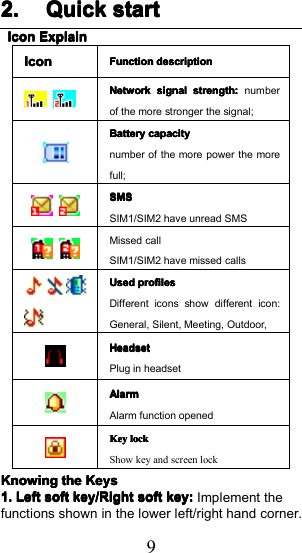
92.2.2.2. QuickQuickQuickQuick startstartstartstartIconIconIconIconExplainExplainExplainExplainIconIconIconIconFunctionFunctionFunctionFunction descriptiondescriptiondescriptiondescriptionNetworkNetworkNetworkNetwork signalsignalsignalsignal strength:strength:strength:strength: numberof the more stronger the signal;BatteryBatteryBatteryBattery capacitycapacitycapacitycapacitynumber of the more power the morefull;SMSSMSSMSSMSSIM1/SIM2 have unread SMSMissed callSIM1/SIM2 have missed callsUsedUsedUsedUsed profilesprofilesprofilesprofilesDifferent icons show different icon:General, Silent, Me e ting, Outdoor ,HeadsetHeadsetHeadsetHeadsetPlug in headsetAlarmAlarmAlarmAlarmAlarm function openedKeyKeyKeyKey locklocklocklockShow key and screen lockKnowingKnowingKnowingKnowingthethethetheKeysKeysKeysKeys1.1.1.1.LeftLeftLeftLeftsoftsoftsoftsoftkey/Rightkey/Rightkey/Rightkey/Rightsoftsoftsoftsoftkey:key:key:key:Implement thefunctions shown in the lower left/right hand corner.
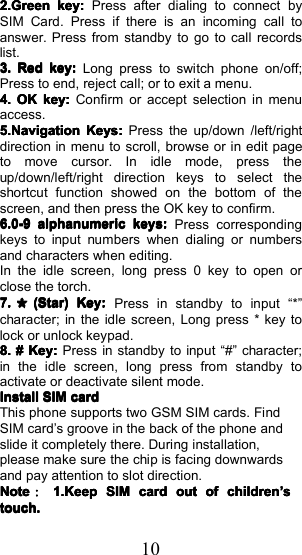
102.Green2.Green2.Green2.Greenkey:key:key:key:Press after dialing to connect bySIM Card. Press if there is an incoming call toanswer. Press from standby to go to call recordslist.3.3.3.3.RedRedRedRedkey:key:key:key:Long press to switch phone on/off;Press to end, reject call; or to exit a menu.4.4.4.4.OKOKOKOKkey:key:key:key:Confirm or accept selection in menuaccess.5.Navigation5.Navigation5.Navigation5.NavigationKeys:Keys:Keys:Keys:Press the up/down /left/rightdirection in menu to scroll, browse or in edit pageto move cursor. In idle mode, press theup/down/left/right direction keys to select theshortcut function showed on the bottom of thescreen, and then press the OK key to confirm.6.0-96.0-96.0-96.0-9alphanumericalphanumericalphanumericalphanumerickeys:keys:keys:keys:Press correspondingkeys to input numbers when dialing or numbersand characters when editing.In the idle screen, long press 0 key to open orclose the torch.7.7.7.7.*(Star)(Star)(Star)(Star)Key:Key:Key:Key:Press in standby to input “ * ”character; in the idle screen, Long press * key tolock or unlock key pad.8.8.8.8.####Key:Key:Key:Key:Press in standby to input “ # ” character;in the idle screen, long press from standby toactivate or deactivate silent mode.InstallInstallInstallInstallSIMSIMSIMSIMcardcardcardcardThis phone supports two GSM SIM cards. FindSIM card ’ s groove in t he back of the phone andslide it completely there. During installation,please make sure the chip is facing downwardsand pay attention to slot direction.NoteNoteNoteNote::::1.Keep1.Keep1.Keep1.KeepSIMSIMSIMSIMcardcardcardcardoutoutoutoutofofofofchildrenchildrenchildrenchildren’’’’sssstouch.touch.touch.touch.
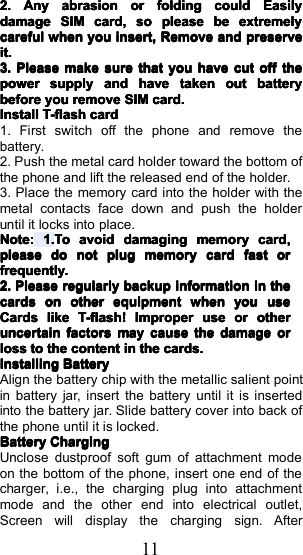
112.2.2.2.AnyAnyAnyAnyabrasionabrasionabrasionabrasionororororfoldingfoldingfoldingfoldingcouldcouldcouldcouldEasilyEasilyEasilyEasilydamagedamagedamagedamageSIMSIMSIMSIMcard,card,card,card,sosososopleasepleasepleasepleasebebebebeextremelyextremelyextremelyextremelycarefulcarefulcarefulcarefulwhenwhenwhenwhenyouyouyouyouinsert,insert,insert,insert,RRRRemoveemoveemoveemoveandandandandpreservepreservepreservepreserveit.it.it.it.3.3.3.3.PleasePleasePleasePleasemakemakemakemakesuresuresuresurethatthatthatthatyouyouyouyouhavehavehavehavecutcutcutcutoffoffoffoffthethethethepowerpowerpowerpowersupplysupplysupplysupplyandandandandhavehavehavehavetakentakentakentakenoutoutoutoutbatterybatterybatterybatterybeforebeforebeforebeforeyouyouyouyouremoveremoveremoveremoveSIMSIMSIMSIMcard.card.card.card.InstallInstallInstallInstallT-flashT-flashT-flashT-flashcardcardcardcard1. First switch off the phone and remove thebattery.2. Push the metal card holder toward the bottom ofthe phone and l ift the released end of the holder.3. Place the memory card into the holder with themetal contacts face down and push the holderuntil it locks into place.NoteNoteNoteNote::::1.1.1.1.TTTTooooavoidavoidavoidavoiddamagdamagdamagdamagingingingingmemorymemorymemorymemorycardcardcardcard,,,,pleasepleasepleasepleasedodododonotnotnotnotplugplugplugplugmemorymemorymemorymemorycardcardcardcardfastfastfastfastororororfrequently.frequently.frequently.frequently.2.2.2.2.PleasePleasePleasePleaseregularlyregularlyregularlyregularlybackupbackupbackupbackupinformationinformationinformationinformationininininthethethethecardscardscardscardsononononotherotherotherotherequipmentequipmentequipmentequipmentwhenwhenwhenwhenyouyouyouyouuseuseuseuseCardsCardsCardsCardslikelikelikelikeT-flash!T-flash!T-flash!T-flash!ImproperImproperImproperImproperuseuseuseuseororororotheotheotheotherrrruncertainuncertainuncertainuncertainfactorsfactorsfactorsfactorsmaymaymaymaycausecausecausecausethethethethedamagedamagedamagedamageororororlosslosslosslosstotototothethethethecontentcontentcontentcontentininininthethethethecards.cards.cards.cards.InstallingInstallingInstallingInstallingBatteryBatteryBatteryBatteryAlign the battery chip with the metallic salient pointin battery jar, insert the battery until it is insertedinto the battery jar. Slide battery cover into back ofthe phone until it is locked.BatteryBatteryBatteryBatteryChargingChargingChargingChargingUnclose dustproof soft gum of attachment modeon the bottom of the phone, insert one end of thecharger, i.e., the charging plug into attachmentmode and the other end into electrical outlet,Screen will display the charging sign. After
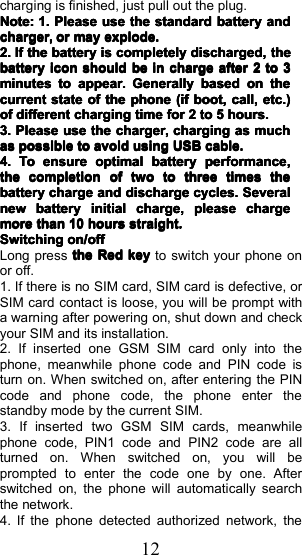
12charging is finished, just pull out the plug.Note:Note:Note:Note:1.1.1.1.PleasePleasePleasePleaseuseuseuseusethethethethestandardstandardstandardstandardbatterybatterybatterybatteryandandandandcharger,charger,charger,charger,orororormaymaymaymayexplode.explode.explode.explode.2.2.2.2.IfIfIfIfthethethethebatterybatterybatterybatteryisisisiscompletelycompletelycompletelycompletelydischarged,discharged,discharged,discharged,thethethethebatterybatterybatterybatteryiconiconiconiconshouldshouldshouldshouldbebebebeininininchargechargechargechargeafterafterafterafter2222totototo3333minutesminutesminutesminutestotototoappear.appear.appear.appear.GenerallyGenerallyGenerallyGenerallybasedbasedbasedbasedononononthethethethecurrentcurrentcurrentcurrentstatestatestatestateofofofofthethethethephonephonephonephone(if(if(if(ifboot,boot,boot,boot,call,call,call,call,etc.)etc.)etc.)etc.)ofofofofdifferentdifferentdifferentdifferentchargingchargingchargingchargingtimetimetimetimeforforforfor2222totototo5555hours.hours.hours.hours.3.3.3.3.PleasePleasePleasePleaseuseuseuseusethethethethecharger,charger,charger,charger,chargingchargingchargingchargingasasasasmuchmuchmuchmuchasasasaspossiblepossiblepossiblepossibletotototoavoidavoidavoidavoidusingusingusingusingUSBUSBUSBUSBcable.cable.cable.cable.4.4.4.4.ToToToToensureensureensureensureoptimaloptimaloptimaloptimalbatterybatterybatterybatteryperformance,performance,performance,performance,thethethethecompletioncompletioncompletioncompletionofofofoftwotwotwotwototototothreethreethreethreetimestimestimestimesthethethethebatterybatterybatterybatterychargechargechargechargeandandandanddischargedischargedischargedischargecycles.cycles.cycles.cycles.SeveralSeveralSeveralSeveralnewnewnewnewbatterybatterybatterybatteryinitialinitialinitialinitialcharge,charge,charge,charge,pleasepleasepleasepleasechargechargechargechargemoremoremoremorethanthanthanthan10101010hourshourshourshoursstraight.straight.straight.straight.SwitchingSwitchingSwitchingSwitchingon/offon/offon/offon/offLong p ress thethethetheRedRedRedRedkeykeykeykeyto switch your phone onor off.1. If there is no SIM card, SIM card is defective, orSIM card contact is loose, you will be prompt witha warning after powering on, shut down and checkyour SIM and its installation.2. If inserted one GSM SIM card only into thephone, meanwhile phone code and PIN code isturn on. When switched on, after entering the PINcode and phone code, the phone enter thestandby mode by the current SIM.3. If inserted two GSM SIM cards, meanwhilephone code, PIN1 code and PIN2 code are allturned on. When switched on, you will beprompted to enter the code one by one. Afterswitched on, the phone will automatically searchthe network.4. If the phone detected authorized network, the
13screen will display network name and signalstrength ;If there is no authorized network isfound ,the phone can only make emergency callsor use non-communications features.
143.3.3.3. CallCallCallCall functionfunctionfunctionfunctionDialingDialingDialingDialingtelephonetelephonetelephonetelephone1. Direct dialIn standby mode, press the correspondingnumeric keys to enter the phone number that youwant to dial, including necessary area codes.Short Press the Right soft key [Clear] to deleteone character, and Long Press delete all inputs, ifinserted only one SIM card, press the Green keycan directly to dial, if inserted two SIM card, pressthe Green key into the SIM select screen.2 . Making an International Call:Tomake an international call, long press * keyuntil the prefix symbol " +" of international calldisplays in screen.3 . Dialing from PhonebookEnter the Phonebook via the menu, use theUp/Down Navigator keys to scroll to the desiredcontact, or press the first letter of the name of thedesired contact as saved in your phonebook forquick access to names beginning with the letterthen scroll to the desired, press the green key todial.4 . Dialing from Call historyEnter the Call center (press the Green key fromstandby or via the menu), use the Up/ Downnavigator keys to scroll to the desired contact,press the green key can direct dial.5 . Dial emergency serviceYoucan directly dial the emergency servicenumber without SIM card. Different networks usedifferent urgency service numbers, so for details
15please inquire the network operation company .ReceivingReceivingReceivingReceivingtelephonetelephonetelephonetelephoneWhen there is an incoming call, the phone will givecorresponding alert, if your network supports callerID, the screen will display caller’s name or number(depending on whether there is information of thecaller in your phonebook).1. Press the green key or press the Left soft keyand confirm [ Answer ] to answer the incoming call.2. If function of [ call center /call set ting / Advancedsetting / Answer mode] is selected as [Any - key],p ress the any key to answer the incoming callexcept the Right soft key or the Red key.3. If you do not want to answer an incoming call,press the Red key or the Right soft key [Reject] toreject it.Youcan also press the Red key to end acall.4. During a call, you can press the Up/Downnavigator key to adjust receiver volume.callcallcallcallininininthethethethemenumenumenumenuDuring a call, press the right soft key can alsoopen / close the hands - free function , press the leftsoft-key into the options:----Swap*:Swap*:Swap*:Swap*:Is maintained in the current call andswitch between calls-Conference*:-Conference*:-Conference*:-Conference*:Into the multi-party conference call,you can follow the prompts to answer the waitingcall , to add multi- session conference call will bemaintained ; and the party conference in privateconversation , the call to keep all other parties ; theparties to keep the party ; the end of the currentCalls and all calls remain .-EndEndEndEndsinglesinglesinglesinglecall*call*call*call*::::end off the current call.
16-End-End-End-Endallallallallcalls*calls*calls*calls*:end off the current call and the holdcall-Transfer*:-Transfer*:-Transfer*:-Transfer*:the function need network support.-NewNewNewNewcall:call:call:call:enter the dial-up interfaces.-Phonebook-Phonebook-Phonebook-Phonebook::::enter the phonebook list ofinterfaces.----MessageMessageMessageMessagessss::::access to the message menu.-Sound-Sound-Sound-Soundrecorderrecorderrecorderrecorder::::record the current call.Note:Note:Note:Note:RecordingRecordingRecordingRecordingofofofofthethethethecall,call,call,call,ininininsomesomesomesomecountriescountriescountriescountriesisisisisillegal.illegal.illegal.illegal.Therefore,Therefore,Therefore,Therefore,whenwhenwhenwhenyouyouyouyoutalktalktalktalktotototoRecording,Recording,Recording,Recording,shouldshouldshouldshouldseekseekseekseekpriorpriorpriorpriorapprovalapprovalapprovalapprovalfromfromfromfromthethethetheotherotherotherotherparty'sparty'sparty'sparty'sconsent.consent.consent.consent.----Mute:Mute:Mute:Mute:mute on or off, open the case in the quietdo not send local voice.-VloumeVloumeVloumeVloume::::into the volume screen, you can pressthe up/down navigation to adjust volume.Note:Note:Note:Note:DenotesDenotesDenotesDenotesmenumenumenumenuitemsitemsitemsitemsonlyonlyonlyonlyappearappearappearappearininininspecificspecificspecificspecificcircumstances.circumstances.circumstances.circumstances.SuchSuchSuchSuchas:as:as:as:[[[[SwapSwapSwapSwap]]]]existexistexistexistonlyonlyonlyonlyininininthethethethestatestatestatestateofofofofthethethethephonephonephonephoneandandandandcallcallcallcallthethethethephonephonephonephoneonlyonlyonlyonlyappearsappearsappearsappearstotototobebebebesuspended.suspended.suspended.suspended.AtAtAtAtthethethethesamesamesamesametimetimetimetimeforforforforthethethetheconferencing,conferencing,conferencing,conferencing,youyouyouyouneedneedneedneedtotototothethethetheappropriateappropriateappropriateappropriateserviceserviceserviceserviceproviderproviderproviderprovidertotototosubscribe.subscribe.subscribe.subscribe.
174.4.4.4. MessagesMessagesMessagesMessagesMessage service is a network dependent function,which allows you to send, receive and edit allkinds of messages. Please contact the networkoperator for more details.WriteWriteWriteWritemessagemessagemessagemessageEdit a new message, save or send it to therecipient.Note:Note:Note:Note:TTTToooosendsendsendsendSMS,SMS,SMS,SMS,youyouyouyouneedneedneedneedtotototosetsetsetsetthethethethecorrectcorrectcorrectcorrectSMSSMSSMSSMSserviceserviceserviceservicecentercentercentercenternumbernumbernumbernumberwhichwhichwhichwhichcancancancanbebebebeobtainedobtainedobtainedobtainedfromfromfromfromnetworknetworknetworknetworkprovider.provider.provider.provider.While editing, press the # key to change inputmethod, a text message can be up to 612characters in length.Press the OK Key , into add recipient interface, youcan enter number and add from phonebook, youcan add one number or more number, press theLeft Soft key [Options] to select options whenediting:-Send-Send-Send-Sendtotototo::::Enter the destination number is sent, orpress OK into the address book to find thenecessary records, you can select the type of SIMcard, confirmed, you can send----InputInputInputInputmethod:method:method:method:you can select input method.----SaveSaveSaveSavetotototoDraftsDraftsDraftsDrafts::::Save the edited message to theoutbox-Advanced:-Advanced:-Advanced:-Advanced:you can select insert number, insertname, insert bookmark.InboxInboxInboxInboxReceived SMS messages can be stored either inphone or in SIM1/SIM2 memory, and areaccessed here.
18When you have received a message, the tones orvibration to alert you and message mark will alsobe shown on the screen. Press the Left soft key[Read] or the OK key to read the new message,press the Right soft key [Back] to return, and youcan also access the inbox to read the newmessage.If the message memory is full, the indication“ Memory full ” and the message icon will be shownon the screen and flashed. Before you can receivenew messages, delete some of your oldmessages in the inbox folder. If the capacity ofnew messages is beyond the capacity of the inbox,the information will be lost and incomplete.In message list, press the OK key to read theselected message, press the Left soft key [Options]to make the following menu:-View:-View:-View:-View:view the current message-Reply:-Reply:-Reply:-Reply:Reply SMS to the message senderdirectly.-Call-Call-Call-CallSenderSenderSenderSender::::Select to call the sender number-Forward:-Forward:-Forward:-Forward:forward the current message to othernumber.-Delete:-Delete:-Delete:-Delete:Delete the messages.-Delete-Delete-Delete-Deleteall:all:all:all:delete all messages in inbox.-Save-Save-Save-Savetotototophonebook:phonebook:phonebook:phonebook:Save the information in thesender number to the phonebook.----FilterFilterFilterFilterby:by:by:by:you can select SIM1/phone to filter themessage in the inbox.DraftsDraftsDraftsDraftsNot send SMS, will be stored in the mail within, theoperation is the same with inboxOutboxOutboxOutboxOutboxNot send SMS or sent successfully SMS, will be
19stored in the mail within, the operation is the samewith inboxSentSentSentSentmessagesmessagesmessagesmessagesIf SMS sent successfully, then be stored in theletter box. Automatically save messages need toselect [ SMS Settings → Save sent message ],other operation is the same with inboxServiceServiceServiceServicemessagesmessagesmessagesmessagesInbox: received service messages will be stored inthe box.Service messagesEnable push: you can select accept all pushmessages or disable.Enable service loading: you can select prompt,Auto launch or disable.SMSSMSSMSSMSsettingssettingssettingssettingsSIMSIMSIMSIMsetting:setting:setting:setting:you can setting SIM parameter ,including the center number, Validity period andMessage type .Delivery report: Open the function, after asuccessful send text messages, the system willreturn to report .Reply path: If the network allows, open thefunction , the recipient receives a text message,the system will send a confirmation message .Voicemail server: When you can not answer thephone, automatically incoming calls to voice mailnumber, you can let the other party to yourmessage, a message stored in the network's voicemail system, and afterwards, you can access thevoice mail system to listen to a message.Into the voice mail sub-menu, you can see thecurrent voice message (up to the establishment oftwo voice mail)
20Voice mail function needs the support of networkoperator, you may need to subscribe to the service.For details, please contact with the operator .MemoryMemoryMemoryMemorystatusstatusstatusstatus::::can view the memory storagestatus.SaveSaveSaveSavesentsentsentsentmessage:message:message:message:open the function, After thesuccess of SMS will be automatically saved in theOutbox .PreferredPreferredPreferredPreferredstorage:storage:storage:storage:you can choose to givepriority to messages stored in SIM card or mobilephone.
215.5.5.5. PhonebookPhonebookPhonebookPhonebookThe Phone for your well-prepared high-capacityphone storage space.Youcan use the phone'scontacts feature to save the contact name,number and caller ring-tone . The phone can save20 0 phonebook records, SIM card number ofrecords stored phone numbers vary because oftheir capacity.QuickQuickQuickQuicksearchsearchsearchsearchIn order to facilitate you to quickly search thephone book to the desired number, the phoneprompts you to quickly find features .In the contact list interface, you press # key toswitch input method, enter the contact name of thefirst characters to locate search .After searching for the name, press the Green keyto dial the number and press the Red key to enddialing.BrowseBrowseBrowseBrowsecontactscontactscontactscontactsIInthephonebooklistscreen,presstheup/downnavigation key to select the contact record, pressthe green key to dial the number in the record, thenthe red key to end the dialing. Press the OK Key todisplay the details of the selected record. In thephonebook list screen, select either the phonebookrecord, press the left key to perform the followingoperation :-View:-View:-View:-View:view the select-Send-Send-Send-Sendtexttexttexttextmessagemessagemessagemessage::::send SMS to the selectnumber-Call-Call-Call-Call::::call the select number-Edit-Edit-Edit-Edit::::you can edit the select record 。
22----Delete:Delete:Delete:Delete:D elete th e select record----Copy:Copy:Copy:Copy:this record can copy to “ SIM1 ” “ SIM2 ” or“ phone ”-Phonebook-Phonebook-Phonebook-Phonebooksettingssettingssettingssettings::::Preferred storage: you can set the preferredstorage as SIM or Phone or all.Extra numbers : set this number to own numberMemory Status : Query "SIM1", "SIM2", "phone"memory address book using statusAddAddAddAddnewnewnewnewcontactcontactcontactcontact-SIM1-SIM1-SIM1-SIM1:New records added to the SIM1, eachname can only be stored under a number.-SIM2-SIM2-SIM2-SIM2:New records added to the SIM 2 , eachname can only be stored under a number.----PPPPhonehonehonehone:you can input name, number and setcaller ring-tone. T his Records stored in yourphone .
236.6.6.6. CallCallCallCall centercentercentercenterThis phone can record all received , dialed andmissed calls as well as their call time. Only whenrelated function is supported by network andphone is switched on and in network service area,it can record the answered and missed calls. Callrecords may be accessed by pressing the Greenkey from standby or accessing through the menu.Access the Call Center menu using the normalmenu path, the submenus are as follow:CallCallCallCallhistoryhistoryhistoryhistoryMissed/dialed/Received/all callsIn the call history list , Once on the call records list,press the Green key to make a call; press the OKkey to view the details of current call record; pressthe left soft key to make the following options:-View-View-View-View::::View the details of current call record.-Call-Call-Call-Call::::call current record.-Send-Send-Send-Sendtexttexttexttextmessagemessagemessagemessage::::send SMS to the selectnumber----SaveSaveSaveSavetotototophonebookphonebookphonebookphonebook::::Store the number as aphonebook entry.-Delete-Delete-Delete-Delete::::Delete the current call record.-Edit-Edit-Edit-Editbeforebeforebeforebeforecallcallcallcall::::Edit number before the callhistoryCallCallCallCallsettingssettingssettingssettings-SIM-SIM-SIM-SIMcallcallcallcallsettingssettingssettingssettingsCall waiting:You can choose to Activate, Deactivate or Querystatus of this feature.Activate this feature, if you call any other incomingcall, the phone beeps, and the screen will displaythe caller number or name and call waiting
24information.Call divert:This feature allows you to play to your phone callstransferred to your voice mailbox or another phonenumber you specify. This function needs thesupport of network operator, please contact thenetwork operator.Transfer in the following ways, each way can beset to enable, disable, and query status. Whenturned on, the on-screen prompts to transfer thephone number.Divert all voice call: Transfer all voice calls to yoursettings in the phone number or voice mailDivert if unreachable: When your phone is off ornot on the network service area, the transfer of allvoice calls to your phone number or set voice mailDivert if no answer: No answer transfer all voicecalls to your phone number or set voice mailDivert if busy: When the call is busy, the transfer ofall voice calls to your phone number or set voicemailDivert all data calls: Transfer all the data calls tothe phone number you set, this function issupported by the network operator, please contactthe network operator.Cancel all diverts: cancel all call forwarding type.Ca ll barring:Set limits each case to answer or dial the phone.Network operators must first apply for internationalcalling features, and limit access networkpassword, to set the limit function.This function needs the support of networkoperator, please contact the network operator.Call restrictions can be set for activate , deactivate
25and query statusLine switching:Can switch to Line 1 or Line 2, Line 1 is default, ifyou choose line 2, then there may be no phonecall.-Advanced-Advanced-Advanced-Advanced settingssettingssettingssettingsAuto redial:Youcan enable or disable this feature, the featureis turned on, after the dial-up, then if the otherparty does not answer the phone over a period oftime will be automatically re-dial, redial thenumber up to 10 times, in this period, the user cannot call any other phone , to end the re-dial, simplypress the right soft key to cancel.C all time reminder: Can set the prompt typeOff: When the phone call, no minutes of tone.Single: Select 1-3000 seconds after the promptenter either of the time, when you call the phone atthe time when prompted.Periodic: Select 30-60 seconds after the input inany one time, when you call for every minute thephone will be reminded of the time.Auto quick end:In order to save the cost of calls , you can turn onauto quick end function , set automatically end time ,when the time to call , the mobile phone willautomatically hang upAnswer mode:Any key: Select the feature, all incoming calls, inaddition to the red key and right soft keys, all keyscan answer the callAuto answer when headset: Enable this feature,when the phone is in headset mode, there are
26about 2 seconds after the incoming call, the phonewill automatically answer the call.
277.7.7.7. SettingsSettingsSettingsSettingsDualDualDualDualSIMSIMSIMSIMsettingssettingssettingssettingsYoucan choose dual-mode card, only SIM1 openor SIM2 open .PhonePhonePhonePhonesettingssettingssettingssettingsTimeTimeTimeTimeandandandanddatedatedatedateSet home city :Youcan choose a phone providedin the city as the current time zone of your locationS et time/ date: Under this you can set the phone tothe current date and time. The phone allows you toset the date range of calendar 2000 to 2030 .Set format : Under this you can set the time anddate display formatLLLLanguageanguageanguageanguageUnder this you can choose the language providedby the phone .Pref.Pref.Pref.Pref.inputinputinputinputmethodmethodmethodmethodYou can set default input method.DisplayDisplayDisplayDisplayW allpaper: The standby interface is used to setthe background wallpaper.Youcan choose from the built-in wallpaper canalso be selected from File Manager image file .Power on display: The animation can be set toboot , you can choose preset animation for mobilephones , but also into the File Manager , select thedesired animation.Power off display: The animation can be set toshutdown , set with the power on displayShow date and time:Youcan set the idle screentime display on or off .DedicatedDedicatedDedicatedDedicatedkeykeykeykeyYou can change navigation keys function
28corresponding to the shortcut in the idle screenFlightFlightFlightFlightmodemodemodemodeThis optiona l mode in which the phone is normalmode or flight mode, flight mode if you choose , thephone can only use some of the functions ofnon- communicationsMisc.Misc.Misc.Misc.settingssettingssettingssettingsUnder this function can be left / right navigationkey on the backlight to adjust the brightness andbacklight timeUserUserUserUserprofilesprofilesprofilesprofilesThe phone provides you with five profiles : general,silent, meeting, outdoor. I t’s help you according tothe different events and environments in differentcustom ring tones. according to differentscenarios, choose a different profile, then you onlyneed to personalize your profile and activate.Note:Note:Note:Note:TheTheTheThefactoryfactoryfactoryfactorysettingsettingsettingsettingvariousvariousvariousvariousmodesmodesmodesmodessetsetsetsethashashashasbeenbeenbeenbeendonedonedonedoneandandandandhashashashasbeenbeenbeenbeenthethethethegeneralgeneralgeneralgeneralpatternpatternpatternpatternofofofofthethethethedefaultdefaultdefaultdefaultstartstartstartstartActivate:Activate:Activate:Activate:Start the selected profile.Customize:Customize:Customize:Customize:Youcan set all kinds of effects to yourown needs. In the Settings screen, press thedown navigation key to move the highlight to theitem needs to be set .Alert type: Press the left/right navigation key toselect: vibrate only, vibrate and ring, vibrate thenring or ring only.Ring type: Press the left/right navigation key toselect: Repeat, Ascending, Beep onceIncoming call: There are ten built-in ring tones tochoose for you, and you may also to choose yourfavorite audio file as your ring - tone from filemanagement.
29Ring-tone volume: Press the left/right navigationkey to adjust the ring-tone volume.Message ring-tone: There are five built-in ringtones to choose for you, and you may also tochoose your favorite audio file as your ring - tonefrom file management.Message volume: Press the left/right navigationkey to adjust the ring-tone volume.Keypad: Press the left/right navigation key toselect click, or tone.Key-tone volume: Press the left/right navigationkey to adjust the key-tone volume.Power on/off: Phone preset five tone to choose foryou, you can also choose silent to turn off thepower on/off tone.System alert:You can set whether to open systemalert tone.Reset:Reset:Reset:Reset:restore the default settings.NetworkNetworkNetworkNetworksettingssettingssettingssettingsCan be set automatically or manually select thenetwork, select Automatic, the phone will be SIMcard based on the network where the firstselection, select Manual , you need to select theSIM card registered with the network operator canuse the same networkSecuritySecuritySecuritySecuritySettingsSettingsSettingsSettingsSIMSIMSIMSIMsecuritysecuritysecuritysecurityYoucan use the PIN code, PIN2 code, set theboot password and set security features to protectinformation security.PIN password (PIN1) is the SIM card PIN. If theuser don ’ t changes the password ,the originalpassword is 1234 or 0000. If you enable the bootPIN code, then after each start 4-digit PIN code is
30necessary to input, PIN code can be amended, toprotect their SIM card is not used by others. Notethat, if the input PIN code wrong three times, thephone card will automatically lock and unlockprompted to enter PUK code, this time close to theedge of danger, so if unauthorized modification ofthe PIN code, we must bear in mind.PUK password (PUK1) from consists of 8 digits,which users can not change. PIN code when thephone is locked, and when prompted enter thePUK password , do not act rashly, because thePUK code input opportunities is only 10 times andif enter the wrong words for 10 times, SIM card willbe permanently locked, that is scrapped. Part ofthe SIM card PUK code is never used when theuser comes with the card, while the other part ofthe network operators will need to obtain the PINcode if you do not know the PUK code locked, donot random input, then the correct way is to callthe SIM card hotline operators, after a simple userdata are verified, you can obtain the PUKpassword to unlock the phone lock, the service isfree of charge.NoteNoteNoteNote::::PleasePleasePleasePleaseuseuseuseusethisthisthisthisfeaturefeaturefeaturefeaturewithwithwithwithcaution,caution,caution,caution,ififififforgetforgetforgetforgetPUKPUKPUKPUKpassword,password,password,password,pleasepleasepleasepleasecontactcontactcontactcontactthethethethenetworknetworknetworknetworkoperator.operator.operator.operator.IfIfIfIfinputinputinputinputPUKPUKPUKPUKcodecodecodecodeininininerrorerrorerrorerrorforforforfor10101010timestimestimestimesconsecutiveconsecutiveconsecutiveconsecutivelylylyly,,,,SIMSIMSIMSIMcardcardcardcardwillwillwillwillbebebebescrapped.scrapped.scrapped.scrapped.PIN lockUnder this you can enable or disable PINpassword , PIN code on or off are required to enterthe correct PIN password . When open this feature,every time you turn the phone prompts you toenter the PIN password .
31Change PINIf the current PIN password is already open, youcan make changes to the PIN password . Firstenter the old PIN password , after repeated twiceto determine and identify new password.Change PIN2PIN2 (PersonalIdentificationNumber2 )password isto enter a particular function (such as setting afixed number, set the call billing, etc.) to enter thepersonal identification number.Pin2 password is provided by suppliers for SIMcard to another password, used to qualify the dialpersonal identification password , Mainly used toeliminate the call cost information, set the phonecalls and the billing currency unit, the cost limitfunction, limited dial-up ("Security settings "---"limited dial-up" can only be opened after thephone call which can be used to set the numberand do not call this). My phone's S IM cardpredictive value is 12345. Pin2 after input errorpassword 3 will be locked, needed Puk2 to unlock.PIN2 password is used to set the phone billing. Ifyou enter three times wrong, the phone will needPUK2 unlock password , the process described inthe previous PIN password , PUK password thesame. However, both the password and networkSIM card billing and modify the internal data, it willnot open, and even if PIN2 password locked, it willnot affect the normal use of mobile phones. Thus,PIN2 password , and not to deliberately ignorePUK2 password .Note:Note:Note:Note:PleasePleasePleasePleaseuseuseuseusethisthisthisthisfeaturefeaturefeaturefeaturewithwithwithwithcaution,caution,caution,caution,IfIfIfIf
32inputinputinputinputPUKPUKPUKPUKcodecodecodecodeininininerrorerrorerrorerrorforforforfor10101010timestimestimestimesconsecutiveconsecutiveconsecutiveconsecutivelylylyly,,,,SIMSIMSIMSIMcardcardcardcardwillwillwillwillbebebebescrapped.scrapped.scrapped.scrapped.Change operation with the PIN1.PhonePhonePhonePhonesecuritysecuritysecuritysecurityUnder this password there you can set the phoneto avoid unauthorized use of your mobile phonePhone lockUnder this you can enable or disable phonepassword , phone password on or off are requiredto enter the correct phone password . When openthis feature, every time you turn the phoneprompts you to enter the phone password .Change passwordYou can make changes to the phone password .First enter the old phone password , after repeatedtwice to determine and identify new password.AutoAutoAutoAutokeypadkeypadkeypadkeypadlocklocklocklockUnder this you can set the time to open or closethe keyboard lock keyboard lock feature. Set thekeyboard lock time, the idle screen, mobile phonewithin the set time the keyboard does not performany operation, it will be automatically locked, thenyou can press the # key to unlock .Note:Note:Note:Note:KeyboardKeyboardKeyboardKeyboardlockedlockedlockedlockedandandandandthethethethebacklightbacklightbacklightbacklightisisisisoff,off,off,off,totototobebebebeselectedselectedselectedselectedbuttonbuttonbuttonbuttonlightslightslightslightsupupupupthethethethescreen,screen,screen,screen,thenthenthenthenpresspresspresspressthethethethe####keykeykeykeytotototounlockunlockunlockunlockConnectivityConnectivityConnectivityConnectivityBluetoothBluetoothBluetoothBluetoothThe phone supports Bluetooth , users can turn thefeature on according to demand .Bluetooth technology can connect electronicdevices wirelessly. Because Bluetoothcommunic ate by radio, so in your phone andanother Bluetooth device do not need to in the
33opposite direction, please maintain the maximumdistance that between two devices is not morethan 10 meters during communicating. In somecountries or regions may be developed within anumber of provisions restricting the use ofBluetooth devices, please contact your localauthorities.Power : Press the OK key or the left soft key toopen or close the Bluetooth function. If close somefunction, then you will end all the Bluetoothconnection. Bluetooth connection will consumebattery power, reducing cell phone operation time,when using the phone to perform other operations,please consider this factor.V isibility : Press the OK key or the left soft key toswitch on or off , if you select on , other Bluetoothdevices can find the phone ; if you select off, otherBluetooth devices can ’ t find the phone.My device : Select to add new equipment, searchfor Bluetooth devices within range of the signal.After the Bluetooth device is found, you can selectthe matching connections.Search audio device: Search within signal rangeof Bluetooth hands-free devices, such asBluetooth headsets.My name: Display the Bluetooth device name ofthe machine can access to vies and edit.Advanced:Audio path: set the audio path, is leave in phone orforward to Bluetooth headsets.Storage : set storage location in phone or memorycard.My address : Display the Bluetooth deviceaddress.
34DataDataDataDataaccountaccountaccountaccountYouc an choose the Internet account.Youc an addInternet accounts by yourself .In the Internet interface, press [Options], you cando operations as followed:Edit: Edit selected network count.Add PS account: Mobile support 6 maximumdata account. E very account to edit theinformation : account name, APN, user name,password, auth type, SIM selection, advancedsettings etc.Delete: delete the selected Internet accountChange default: select this function to restoredefault.RestoreRestoreRestoreRestorefactoryfactoryfactoryfactorysettingssettingssettingssettingsReset the parameter value mobile phone, makeyour phone reset to default settings. Please entera privacy password (initial password is 1234),restore factory settings.
358.8.8.8. MultimediaMultimediaMultimediaMultimediaCameraCameraCameraCameraYour phone is fitted with camera allows you to takephotos whenever possible.Youcan store thepictures in phone or customize the wallpaper.In the multimedia menu, select the camera into thecamera preview screen, Press the OK key to takephoto, press the right soft key to return, press theleft soft key to option:SwitchSwitchSwitchSwitchtotototovideovideovideovideorecorder:recorder:recorder:recorder:select the function candirectly switch to video preview screen.Photos:Photos:Photos:Photos:select the function into image viewer.CameraCameraCameraCamerasettings:settings:settings:settings:Press the OK key to adjust thefollowing options, including Anti-flicker and Delaytimer, Profile that is complete, press the left softkey or the OK key to confirm the current setting .ImageImageImageImagesettings:settings:settings:settings:can set the image quality andimage size.WWWWhitehitehitehitebalance:balance:balance:balance:can set white balanceSceneSceneSceneScenemode:mode:mode:mode:can set the photo mode as auto ornight.Storage:Storage:Storage:Storage:Can choose phone or memory card asthe storage locationRestoreRestoreRestoreRestoredefault:default:default:default:select the function andconfirmed, the camera parameters can berestored to the default locationAfter taking pictures, press the back button toreturn camera preview screen, press the left softkey to enter options, can take pictures to send ordeleteImageImageImageImageviewerviewerviewerviewerThis feature is convenient for users to view thephotos stored in albums, press the OK key to open
36the picture, press the left soft key to open theoption menu:View:View:View:View:open the current image to view.ImageImageImageImageinformation:information:information:information:can display the current imageinformation.BrowseBrowseBrowseBrowsestyle:style:style:style:can set to list style or Matrix style.SendSendSendSend:Pictures can be selected through"Bluetooth" method to send.Rename:Rename:Rename:Rename:Change the name of the selectedpicture.DeleteDeleteDeleteDelete:Delete the select image.StorageStorageStorageStorage:Can choose phone or memory card asthe storage locationNote:Note:Note:Note:WhenWhenWhenWhennonononopicturespicturespicturespicturesininininImageImageImageImageviewerviewerviewerviewer,,,,thethethetheoptionsoptionsoptionsoptionsmenumenumenumenuonlyonlyonlyonlydisplaysdisplaysdisplaysdisplaysthethethethebrowsbrowsbrowsbrowseeeestylestylestylestyleandandandandstorage.storage.storage.storage.VideoVideoVideoVideorecorderrecorderrecorderrecorderIn the multimedia menu, select the video recorderinto the video preview screen, Press up/downnavigation key to adjust [Focal distance], press theleft soft key into options menu:SwitchSwitchSwitchSwitchtotototocamera:camera:camera:camera:select the function candirectly switch to camera preview screen.CamcorderCamcorderCamcorderCamcordersettings:settings:settings:settings:Press the OK key to adjustthe Anti-flicker.VideoVideoVideoVideosettings:settings:settings:settings:Can set the video qualityStorage:Storage:Storage:Storage:Can choose view image in the phone ormemory card locationPress the OK key to start recorder, recording ,press the OK key to pause or resume recording;Press the right soft key to stop recording, thescreen will be auto save video and auto back to
37the video preview screen.VideoVideoVideoVideoplayerplayerplayerplayerThis feature can be played stored in the mobile Udisk or video files, supported formats to 3gp, mp4,Avi file player.I n the multimedia menu, select the video playerinto the video list, press left soft key open theoption menu:PlayPlayPlayPlay:Play the current video fileSend:Send:Send:Send:can be selected video through "Bluetooth"method to send.RenameRenameRenameRename:Change the name of the selected video .DeleteDeleteDeleteDelete:Delete the select video .StorageStorageStorageStorage:Can choose phone or memory card asthe storage locationAudioAudioAudioAudioplayerplayerplayerplayerPlay the audio files saved in the phone or memorycard.In playing interface, press the OK key to start orpause playing, press the up navigation key intothe play list screen, press the down navigationkey to stop play, press the left/right navigat ionkey to switch previous/next song; press the */#key to adjust the volume,In playing interface, press the red key or the rightsoft key to exit player interface, Phone into thebackground playing mode, while the idle screenshows the name of the music.Press the left soft key into the play list, play the leftsoft key into option menu :PlayPlayPlayPlay:play the current song.DetailsDetailsDetailsDetails:can view the current song information,include song size and time.
38RefreshRefreshRefreshRefreshlist:list:list:list:can refresh the play list.SettingsSettingsSettingsSettings:Pre. P lay list: Press the left/right navigation key toswitch phone or memory card.List auto gen.: Select this option enabled, eachtime the player list will automatically update .Repeat:Youcan choose play mode repeat all,repeat one or off.Shuffle: When you select on , the player will notplay in order by list .Background play: Select ON when playing the exitmusic player can continue playing .SoundSoundSoundSoundrecorderrecorderrecorderrecorderEnter the recording screen, press the left key intooptions menu:NewNewNewNewrecord:record:record:record:when you choose the function, startnew record, In recording, press the left soft key topause/ continue record, press the right soft key tostop record, the screen will be prompted to savevideo, press the left soft key to save and return tothe record screen, press the right soft key to notsave and directly Back to the record screen.Play*:Play*:Play*:Play*:can play the current recording.Rename*:Rename*:Rename*:Rename*:Change the name of the currentrecorder fileDelete*:Delete*:Delete*:Delete*:Delete the current recording.List:List:List:List:Display recorder files listSettings:Settings:Settings:Settings:you can set storage location and audioquality.UseUseUseUseas*:as*:as*:as*:You can set the current recorder ascoming call ring-tone.Send*:Send*:Send*:Send*:Can be current recorder through“ Bluetooth ” method to send.
39FMFMFMFMradioradioradioradioFM radio is supported by the phone. Access thefunction only when you have plugged theearphone.In FM radio interface, press the up/downnavigation key to move forward/backward 0.1MHZ. , press the left/right navigation key to moveforward/backward auto search until the search tothe channel so far. P ress the ok key toopen/close the FM function, Press the */# key toadjust play volume. Press the right soft key or redkey to exit FM radio , and FM plays in thebackground. Press the left soft key to the optionmenu:ChannelChannelChannelChannellistlistlistlist:Display channel listManualManualManualManualinputinputinputinput:Manual enter frequency to identify,Radio interface automatically skip to the frequencyto listen.AutoAutoAutoAutosearchsearchsearchsearch:Can auto search channel and savechannelSettings:Settings:Settings:Settings:BackgroundBackgroundBackgroundBackgroundplayplayplayplay:Phone back to the idle screenafter Select the function, FM plays in thebackground.Note:Note:Note:Note:QualityQualityQualityQualityofofofofradioradioradioradiosubscriptionsubscriptionsubscriptionsubscriptionisisisispossiblepossiblepossiblepossibleinfluencedinfluencedinfluencedinfluencedbybybybyenvironmentenvironmentenvironmentenvironmentlikelikelikelikeindoorindoorindoorindoorororororunderunderunderundershield.shield.shield.shield.YouYouYouYoucancancancanimproveimproveimproveimprovethisthisthisthissituationsituationsituationsituationasasasasfollowing:following:following:following:standstandstandstandcloserclosercloserclosertotototothethethethewindow,window,window,window,adjustadjustadjustadjustthethethethepositionpositionpositionpositionofofofofearphoneearphoneearphoneearphonelinelinelinelineororororadjustadjustadjustadjustthethethethechannelchannelchannelchannelmanuallymanuallymanuallymanually
409.9.9.9. ExtraExtraExtraExtraTorchTorchTorchTorchI nto the Torch interface, press the OK key or theleft soft key to on/off the Torch. Standby interface,long press the 0 key, Torch on or off quicklyCalculatorCalculatorCalculatorCalculatorInto the calculator, the calculator interface:Press 0 - 9 numeric keys to enter the number to becalculated,Press the navigation key to select the location onthe screen corresponding to add, subtract, multiplyand divide symbols for computingPress the # key for a decimal point.Press the right soft key to clear the last bit can beinput or the result (no input figures, has withdrawnfrom the calculator function)Press the left soft key or the OK button to displaythe results.CalendarCalendarCalendarCalendarChoose to enter the calendar, the screen willdisplay the system date on the calendar month,and have a background box marked the currentdate. Press the navigation key to select the date,calendar information on the screen will be updatedaccordingly.Select any date, press the left soft key to enteroptions to the following:JumpJumpJumpJumptotototodate:date:date:date:Jump the selected date.GoGoGoGotototototoday:today:today:today:the date of the input query calendarinformationGoGoGoGototototoweekly/monthlyweekly/monthlyweekly/monthlyweekly/monthlyview:view:view:view:can set thecalendar display mode through week or month.
41AlarmAlarmAlarmAlarmYoucan use the phone as alarm clock, this featureallows you to set time arrives, make the phonering or vibrate to remind issue.When the alarm is turned on state, the alarmsymbol is displayed in the top of the screen.When the alarm clock for reminders, press the leftsoft key to terminate the alarm reminder, press theright soft key is the alarm clock to sleep .The phone number of alarm clocks available , bothin the off or silent mode , set the alarm clockfunction has been effective.Select any of the alarm clock , press the left softkey or OK key to the following:1, can be turned on or off the selected alarm toopen before the alarm clock icon will be displayed2, set the alarm, reminder time3 , according to the time you need to set the alarmclock to remind the period of a day, week orcustom to be reminded of a few days4, the selected option when the alarm time toremind ring-tone5 , you can set the alarm time to remind theselected mode : ring and vibration, ring , vibration6 , you can set sleep timeSet the required entry, press the right soft key tosave and return directly .
4210.10.10.10. FileFileFileFile managermanagermanagermanagerIn document management, you can open files inthe Phone or Memory card, you can select file orfolder to press the left soft key into [Options], youcan do the following ( Perform different fileoperations are also different, depending on thespecific operation by the file ) :-Open:-Open:-Open:-Open:open the file or folder.----NewNewNewNewFolder:Folder:Folder:Folder:the folder in the selected directoryNew Folder.-Rename:-Rename:-Rename:-Rename:you can rename the select folder.----Delete:Delete:Delete:Delete:delete the selected file or folder.----UseUseUseUseasasasas::::if the selected file is audio files, can setthe file use as SIM1/SIM2 incoming call; if theselected file is image file, can set the file use aswallpaper, Screen saver, Power on display orPower off display.-Sea-Sea-Sea-Searrrrchchchch::::memory card can be customized to findall the documents.-S-S-S-Sortortortortbybybyby::::can "name", “ time ” , "size" , "type" or“ none ” .-Send:-Send:-Send:-Send:the select file can send by bluetooth----CopyCopyCopyCopy::::you can copy the select file to otherfolders.-Move:-Move:-Move:-Move:you can move the select file to otherfolders.----DetailsDetailsDetailsDetails::::you can view the select file information.Note:Memory card as the default save path, order tofacilitate the use of multimedia features, pleasecopy the appropriate files to Audio, My music,Photos, Videos etc. folders.
4311.11.11.11. ServicesServicesServicesServicesThe Internet is the combination of wirelesscommunications and Internet applicationplatform that enables you to get rich by phoneand ecommerce and other Internet informationresources application.Note:Note:Note:Note:1.1.1.1.YourYourYourYourISPISPISPISPmaymaymaymaynotnotnotnotsupportsupportsupportsupportsomesomesomesomefeatures,features,features,features,ininininorderorderorderordertotototoensureensureensureensurethethethethenormalnormalnormalnormaloperationoperationoperationoperationofofofofthethethethebrowser,browser,browser,browser,makemakemakemakesuresuresuresureyouryouryouryourSIMSIMSIMSIMcardcardcardcardisisisissupportedsupportedsupportedsupportedandandandandopenopenopenopenInternetInternetInternetInternetaccess.access.access.access.2.2.2.2.IfIfIfIfyouyouyouyoubrowsebrowsebrowsebrowsethethethetheweb,web,web,web,youyouyouyouneedneedneedneedtotototochargechargechargechargefeesfeesfeesfeesrelatedrelatedrelatedrelatedtototototraffic.traffic.traffic.traffic.HomepageHomepageHomepageHomepageThis is the W AP settings you set in thehom e page address , if you have no other setwill have a direct connection to the phonepre-set or the default home page.BookmarksBookmarksBookmarksBookmarksIn this menu, the display has all the bookmarks inthe bookmark, you can add and save youfrequently visit the site name and address forfuture quick access .InputInputInputInputURLURLURLURLEnter the need to access the WAP services, andURL addresses, complete, can be connected tothe WAP site you want to connect. From thesurface in the bookmarks, web history, other thanto provide you a flexible way to access thenetwork.RecentRecentRecentRecentpagespagespagespagesList of pages you have recently visited records tofacilitate your browsing history in selected cases,
44can directly select [Enter] to access the page, therecord could be deleted.SettingsSettingsSettingsSettingsHomepage:Homepage:Homepage:Homepage:Into th e function, you can se lec tdefault homepage or user-defined .SelectSelectSelectSelectprofile:profile:profile:profile:You can select alwaysask/SIM1/SIM2.DataDataDataDataaccount:account:account:account:Into the function, you can setcorrespond SIM card data account.BrowserBrowserBrowserBrowseroptions:options:options:options:Clear the temporary bufferinformation and cookie, it ’ s can avoid congestionand improve web browsing speed, periodicallyclear.Preferences:Preferences:Preferences:Preferences:Youcan set the appropriateparameters, including the display time, displaypictures, cache and cookie.
4512.12.12.12. Fun&GamesFun&GamesFun&GamesFun&GamesF1F1F1F1raceraceraceraceT he phone for you built-in games for a racing.For specific operations, please refer to thedirections of the game.GamesGamesGamesGamessettingssettingssettingssettingsSelect this function, you can set the game soundeffect and volume etc.
4613.13.13.13. InputInputInputInput methodsmethodsmethodsmethodsThis phone provides diversified input modes foryou to enter letter information when editing SMSand adding phonebook.Use the # key to switch between different inputmethods.When editing the key controls:TheTheTheTheLeftLeftLeftLeftsoftsoftsoftsoftkey:key:key:key:Generally representsconfirmation.TheTheTheTheRightRightRightRightsoftsoftsoftsoftkey:key:key:key:Press to clear one character,long press to clear all.TheTheTheTheEnd/PowerEnd/PowerEnd/PowerEnd/Powerkey:key:key:key:Return to the idle screen.[*][*][*][*]key:key:key:key:In every input status, press this key to callout punctuation and symbol input frame.ABCABCABCABC(abc)(abc)(abc)(abc)inputinputinputinputmethodmethodmethodmethodEach key is used to input several characters. Fastand repeatedly press key until your requiredcharacter appears.When you need to input English punctuation andsome special signs, press the [*] numeric key tocall out special sign input box in English inputstatusPress the [0] key to input blank once.TheTheTheTheNumericNumericNumericNumericinputinputinputinputmethodmethodmethodmethodToinput numerical values, press the respectivenumeric keys.
4714.14.14.14. PhonePhonePhonePhone maintenancemaintenancemaintenancemaintenanceMobile is a high-precision electronic products,please carefully maintained. The followingsuggestions can help you maintain phone, toextend the lifespan: - P hone and its accessoriesshould be placed out of the reach of children.- Keep the device dry. Rain, humidity or moisturewill corrode the circuit board. If the phone isaccidentally flooded, shall promptly remove thebattery, and immediately sent to a local authorizedservice center for processing. - Do notplace your phone in dusty places, this may affectthe normal use of mobile phones.- LCD display is easily damaged cell phone parts,mobile phone dropped onto the ground should beavoided or be strong vibration; prohibit the use ofsharp objects to touch the screen.- Do not place the phone where the temperature istoo high. High temperatures can shorten the life ofelectronic devices, damage batteries, and warp ormelt plastic shell phone.- Do not place the phone where the temperature istoo low. Otherwise, when the phone temperatureto normal temperature, moisture will be generatedinternally, could damage the device electroniccircuit boards. - Do not drop,knock or severe shaking the phone, so as not todamage the internal circuit boards and precisionmobile structure.- Do not use chemicals, cleaning solvents or strongdetergents to clean the device, apply a soft clothsoaked in soapy water and gently scrub.- Do not use paint pigment cell phone to avoid
48moving parts and be stuck to proper operation.- Use a clean soft lens cleaning cloth. Such as:camera lens.-R eplacement antenna, use only the supplied ordesignated by the antenna. Use of unauthorizedantennas, cell phone accessories or modifications,could damage the device and may violateregulations governing radio devices.
4915.15.15.15. AccessoriesAccessoriesAccessoriesAccessoriesUse only batteries, chargers, and accessoriesapproved by the manufacturer with this device.Use of any other types will invalidate the warrantyand may be dangerous. Check with your dealer foravailable accessories.Youmay opt to buy:ExtraExtraExtraExtraBatteryBatteryBatteryBatteryExtra batteries of various capacities are availablefrom our company or through your dealer.ChargerChargerChargerChargerPlug,Plug,Plug,Plug,chargerchargerchargerchargercablecablecablecableCharger plug used to connect with the chargercable for charging on wall outlets. Also you canuse the charger cable to connect with the otherdevices such as the personal computers to chargethe phone.Charging time is about 2 to 3 hours. The chargingcondition is displayed on screen.Youmay useyour phone while charging.EarphoneEarphoneEarphoneEarphoneAmini, practical, hands-free device; you can useits button to answer and end calls. Some modelsmay also come with a volume control knob.Do not plug or unplug the earphone whenconnecting dialed or incoming calls.Please to adjust the incoming call alert volume tothe felicitousness before you plug in the earphone.
5016.16.16.16. EnvironmentEnvironmentEnvironmentEnvironmentPackagingPackagingPackagingPackagingTofacilitate the recycling of packaging materials,please obey the sorting rules instituted locally forthis type of waste.BatteriesBatteriesBatteriesBatteriesSpent batteries must be deposited at thedesignated collection points.TheTheTheTheproductproductproductproductThe crossed-out waste bin mark affixed to theproduct means that it belongs to the family ofelectrical and electronic equipment.Topromote the recycling and recovery of wasteelectrical and electronic equipment (WEEE) and atthe same time safeguard the environment,European regulations require you to obey thesorting rules instituted locally for this type ofwaste.
5117.17.17.17. TechnicalSpecificationsTechnicalSpecificationsTechnicalSpecificationsTechnicalSpecificationsWeight: 6 2 g (including the Battery and Batterycover)Dimensions: 106*45*14.5mmBattery: Li-ion Battery, 3.7VBand: 850/900/1800/1900Battery Capacity: 10 00mAhTalk Time: about 4 hStandby Time: about 260 hNote: Actual operating conditions depend on thelocal network environment, SIM, and userbehavior.Warning: Any consequence caused by misuse,abuse, or not following any and all of theabove-written suggestions and instructions shallnot hold the producer in any way responsible toany degree.Announcement: The manufacturer reserves theright to change or upgrade specifications orsoftware versions without prior or separate notice.Trademarks mentioned or used in this materialbelong to their respective owners.
 FCC RF EXPOSURE INFORMATION: WARNING!! Read this information before using your phone In August 1986 the Federal Communications Commission (FCC) of the United States with its action in Report and Outer FCC 96-326 adopted an updated safety standard for human exposure to radio frequency (RF) electromagnetic energy emitted by FCC regulated transmitters. Those guidelines are consistent with the safety standard previously set by both U.S. and international standards bodies. The design of this phone complies with the FCC guidelines and these international standards. Use only the supplied or an approved antenna. Unauthorized antennas modifications, or attachments could impair call quality, damage the phone, or result in violation of FCC regulations. Do not use the phone with a damaged antenna. If a damaged antenna comes into contact with the skin, a minor burn may result. Please contact your local dealer for replacement antenna.  BODY-WORN OPERATION: This device was tested for typical body-worn operations with the back of the phone kept 0.5cm from the body. To comply with FCC RF exposure requirements, a minimum separation distance of 0.5cm must be maintained between the user's body and the back of the phone, including the antenna, whether extended or retracted. Third-party belt-clips, holsters and similar accessories containing metallic components shall not be used. Body-worn accessories that cannot maintain 0.5cm separation distance between the user’s body and the back of the phone, and have not been tested for typical body-worn operations may not comply with FCC RF exposure limits and should be avoided. For more information about RF exposure, please visit the FCC website at www.fcc.gov  Your wireless handheld portable telephone is a low power radio transmitter and receiver. When it is ON, it receives and also sends out radio frequency (RF) signals. In August, 1996, the Federal Communications Commissions (FCC) adopted RF exposure guidelines with safety levels for hand-held wireless phones. Those guidelines are consistent with the safety standards previously set by both U.S. and international standards bodies:  <ANSIC95.1> (1992) / <NCRP Report 86> (1986) / <ICIMIRP> (1996)  Those standards were based on comprehensive and periodic evaluations of the relevant scientific literature. For example, over 120 scientists, engineers, and physicians from universities, government health agencies, and industry reviewed the available body of research to develop the ANSI Standard (C95.1). Nevertheless, we recommend that you use a hands-free kit with your phone (such as an earpiece or headset) to avoid potential exposure to RF energy. The design of your phone complies with the FCC guidelines (and those standards).  Use only the supplied or an approved replacement antenna. Unauthorized antennas, modifications, or attachments could damage the phone and may violate FCC regulations.   NORMAL POSITION:  Hold the phone as you would any other telephone with the antenna pointed up and over your shoulder.  TIPS ON EFFICIENT OPERATION:  For your phone to operate most efficiently: • Extend your antenna fully. • Do  not touch the antenna unnecessarily when the phone is in use. Contact with the antenna affects call quality and may cause the phone to operate at a higher power level than otherwise needed.  RF Exposure Information: FCC RF Exposure requirements: The highest SAR value reported under this standard during product certification for use next to the body with the minimum separation distance of 0.5cm is 1.074W/kg; next to the head is 0.815W/kg. This transmitter must not be collocated or operating in conjunction with any other antenna or transmitter.
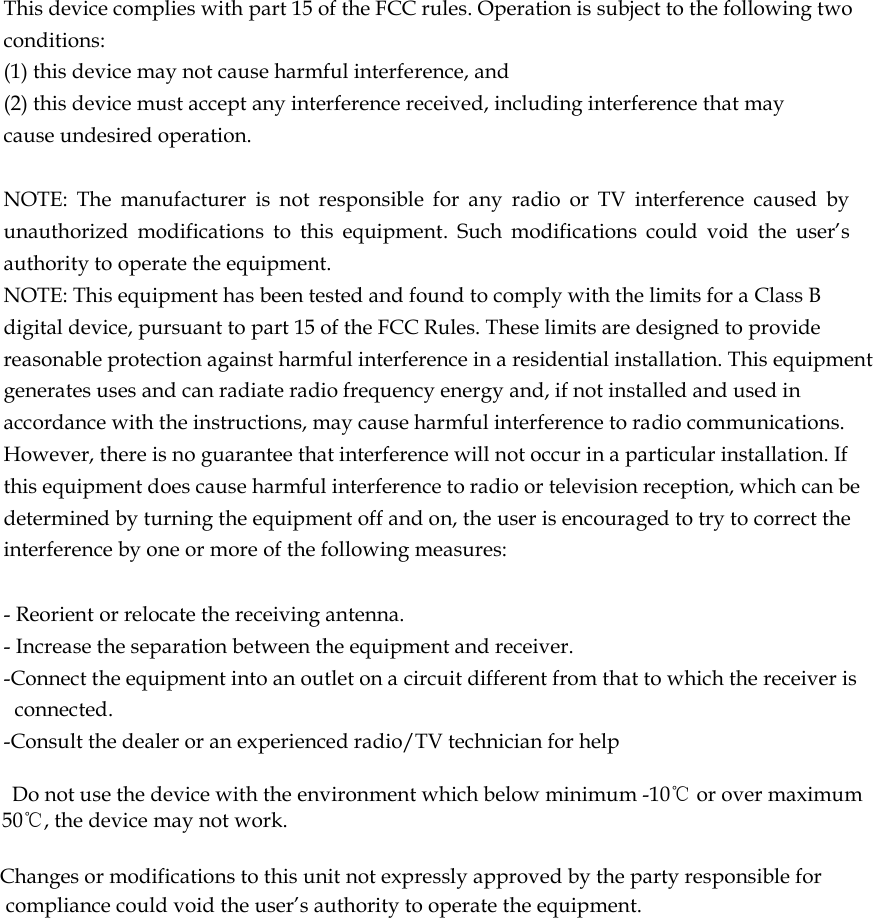
 This device complies with part 15 of the FCC rules. Operation is subject to the following two conditions: (1) this device may not cause harmful interference, and (2) this device must accept any interference received, including interference that may cause undesired operation.   NOTE:  The  manufacturer  is  not  responsible  for  any  radio  or  TV  interference  caused  by unauthorized  modifications  to  this  equipment.  Such  modifications  could  void  the  user’s authority to operate the equipment. NOTE: This equipment has been tested and found to comply with the limits for a Class B digital device, pursuant to part 15 of the FCC Rules. These limits are designed to provide reasonable protection against harmful interference in a residential installation. This equipment generates uses and can radiate radio frequency energy and, if not installed and used in accordance with the instructions, may cause harmful interference to radio communications. However, there is no guarantee that interference will not occur in a particular installation. If this equipment does cause harmful interference to radio or television reception, which can be determined by turning the equipment off and on, the user is encouraged to try to correct the interference by one or more of the following measures:   - Reorient or relocate the receiving antenna. - Increase the separation between the equipment and receiver. -Connect the equipment into an outlet on a circuit different from that to which the receiver is connected. -Consult the dealer or an experienced radio/TV technician for help      Do not use the device with the environment which below minimum -10℃ or over maximum 50℃, the device may not work.        Changes or modifications to this unit not expressly approved by the party responsible for compliance could void the user’s authority to operate the equipment.

Navigation menu