MYSTIC Z100 3G Mobile Phone User Manual Warranty Details
MYSTIC CORPORATION S.A. 3G Mobile Phone Warranty Details
MYSTIC >
Users Manual
3G Mobile Phone
Mystic
Z100
MYSTIC CORPORATION S.A.
FCC ID: 2ABWM-Z100

Contents
Contents
Contents
Contents
General
General
General
GeneralSafety
Safety
Safety
SafetyInstructions
Instructions
Instructions
Instructions………………………………………………………………
………………………………………………………………
………………………………………………………………
……………………………………………………………….
.
.
.4
4
4
4
HandlingandMaintenance…………………………………………………………………………………….4
UsageEnvironment……………………………………………………………………………………………….4
Safety……………………………………………………………………………………………………………………4
Accessories………………………………………………………………………………………………………………5
Usageconditionsandrestrictions……………………………………………………………………………5
Abbreviations/Terminology…………………………………………………………………………………….6
Product
Product
Product
ProductOverview
Overview
Overview
Overview……………………………………………………………………………
……………………………………………………………………………
……………………………………………………………………………
……………………………………………………………………………..
..
..
..7
7
7
7
Getting
Getting
Getting
GettingStared
Stared
Stared
Stared…………………………………………………………………………………
…………………………………………………………………………………
…………………………………………………………………………………
…………………………………………………………………………………8
8
8
8
BeforeFirstUse……………………………………………………………………………………………………….8
MicroSDCard………………………………………………………………………………………………………….8
SIMCard(2G/3G)……………………………………………………………………………………………………8
InsertingtheSIMCard(s)andBattery…………………………………………………………………….8
Charging…………………………………………………………………………………………………………………..9
SwitchOn/Off………………………………………………………………………………………....................9
TurnOn/OfftheScreen………………………………………………………………………………………….9
Volume…………………………………………………………………………………………………………………10
LinkingWithYourGoogleAccount………………………………………………………………………...10
SIMManagement…………………………………………………………………………………………………10
Operation
Operation
Operation
Operation………………………………………………………………………………………
………………………………………………………………………………………
………………………………………………………………………………………
……………………………………………………………………………………….12
.12
.12
.12
EnteringYourPIN……………………………………………………………………………………………………12
ScreenOperation……………………………………………………………………………………………………12
PhoneCalls……………………………………………………………………………………………………………13
CallSettings………………………………………………………………………………………………………….18
Contacts……………………………………………………………………………………………………………….18
Messaging…………………………………………………………………………………………………………….19
ApplicationsandWidgets……………………………………………………………………………………..20
AddandManageDesktopIcons………………………………………………………………………….21
ConnectWithComputer……………………………………………………………………………………….22
Browser………………………………………………………………………………………………………………..23
ScreenCompatibility…………………………………………………………………………………………….24
BackgroundApplications……………………………………………………………………………………..24
GetandInstallApplications………………………………………………………………………………….24
UninstallApplications…………………………………………………………………………………………..25
PlayStoreandCalendarErrorMessages………………………………………………………………25
Settings……………………………………………………………………………………………....................26
WirelessandNetworks………………………………………………………………………………………..26
Bluetooth…………………………………………………………………………………………………………….28
Device…………………………………………………………………………………………………………………28
Personalization……………………………………………………………………………………………………29
System………………………………………………………………………………………………………………..32
Camera………………………………………………………………………………………………………………..32
DownloadFilesManagement……………………………………………………………………………….33
Page2Content

Radio……………………………………………………………………………………………………………………33
Specifications
Specifications
Specifications
Specifications……………………………………………………………………………………………
……………………………………………………………………………………………
……………………………………………………………………………………………
……………………………………………………………………………………………..
..
..
..34
34
34
34
Repair
Repair
Repair
Repairand
and
and
andRefurbished
Refurbished
Refurbished
Refurbished…………………………………………………………………
…………………………………………………………………
…………………………………………………………………
………………………………………………………………….
.
.
.35
35
35
35
Warranty
Warranty
Warranty
WarrantyDetails
Details
Details
Details……………………………………………………………………………
……………………………………………………………………………
……………………………………………………………………………
……………………………………………………………………………36
36
36
36
Page3Content

General
General
General
GeneralSafety
Sa fety
Safety
SafetyInstructions
In structions
Instructions
Instructions
Readthismanualthoroughlybeforefirstuseandkeepitinasafeplaceforfuture
reference,alongwiththecompletedwarrantycard,purchasereceiptandcarton.The
safetyprecautionsenclosedhereinreducetheriskoffire,electricshockandinjury
whencorrectlyadheredto.
Handling
Handling
Handling
Handlingand
an d
and
andmaintenance
ma intenance
maintenance
maintenance
�Water:
Water:
Water:
Water:Ensurethatthisproductdoesnotgetwetandprotectitfromwater
splashes,rain,excessivehumidityandsweat.Contactwithwaterwillcausethe
phonetoshort-circuit,corrodeorcauseelectricshock.Donotuseitwhereitcan
fallintowater(suchasnearapool,pond,bathetc.).Donotuseitwithwet
hands.Donotimmerseitinwater.Donotturnitonifitiswet.Donottrytodry
itinamicrowaveoven.
�Handling:
Handling:
Handling:
Handling:
To
avoiddamagingthephone,batteryorcharger,donotdropitor
shakeitvigorouslyasthismaycausedeviceorbatteryfailure,fireorexplosion.
�Repair:
Repair:
Repair:
Repair:Thisdeviceisahighprecisionelectronicproduct.Itcontainsnouser
serviceablepartsinside.Donottrytodismantle,modifyorrepairthedeviceor
chargeryourself.Anymodificationscouldvoidyourwarranty
Usage
Usage
Usage
Usageenvironment
en vironment
environment
environment
�Environment:
Environment:
Environment:
Environment:Donotusethisproductwhereitisexcessivelyhotcold,dustyor
humid,orwhereitisexposedtostrongmagneticfieldorlongperiodsof
sunshine.Exposuretoveryloworveryhightemperaturesmaycausedeviceor
batteryfailure,fireorexplosion.
�Heat
Heat
Heat
Heatsources:
so urces:
sources:
sources:Donotleavetheproductnearanyheatsources,stoves,ovensor
otherappliances(includingamplifiers)thatproduceheat
�Interference:Donotusethephonenearotherelectronicdevicesthatuseradio
frequencysignals.Avoidusingitwithina15cmrangeofapacemaker(ifyouhave
apacemaker,donotcarrythephoneinabreastpocket).
Safety
Safety
Safety
Safety
�Road
Ro ad
Road
Roadsafety:
sa fety:
safety:
safety:Obeyallocallawsandregulationsontheuseofmobiledevicein
theareawhereyoudrive.Payfullattentiontodrivingandtheroad.Keepyour
handsfreetooperatethevehicleatthetimes;usehand-freeoperationif
phoneusageisrequired.
�Health
Health
Health
Healthfacilities:
fa cilities:
facilities:
facilities:Observerelevantrulesorregulationsregardingmobilephone
useinhealthfacilities.Turnoffthephoneinthevicinityofmedicaldevicesand
whereverdirectedtodosobypostedsigns.Mobilephoner adiationmay
interferewithpacemakers,hearingaidsandothermedicalequipment.
Page4GeneralSafetyInstruction

�Aircraft:
Ai rcraft:
Aircraft:
Aircraft:Turnoffthesmartphonewhenboardinganairplaneinordertoavoid
interferencewithaircraftradiosignals.
�Magnetic
Magnetic
Magnetic
Magneticequipment:
eq uipment:
equipment:
equipment:Stayawayfrommagneticequipmenttoavoidtheriskof
interferingwithorerasingtheinformationstoredonthedevice.
�Volume:
Volume:
Volume:
Volume:Alwaysselecttheappropriatevolumewhenusingthemusicorvideo
function.Thevolumeshouldnotbetooloudwhenusingearphones.
�Explosive
Explosive
Explosive
Explosiveenvironments:
en vironments:
environments:
environments:Turnoffthephoneinblastingareasandinany
potentiallyexplosiveenvironment(suchasatapetrolstationorotherrefueling
points).
�Back-up:
Back-up:
Back-up:
Back-up:
To
avoidlossofdata,werecommendalwaysbackingupanyimportant
totheeyesofpeopleorpets.
Accessories
Accessories
Accessories
Accessories
�Accessories:
Ac cessories:
Accessories:
Accessories:OnlyusethedevicewiththemicroUSBcableandbatterycharger
supplied.Useofotheraccessoriesnotrecommendedinthismanualmaycause
damagetotheunitandvoidyourwarranty.
�Battery
Battery
Battery
Batterycharger:
ch arger:
charger:
charger:Onlyusethechargerprovided.Donotusethephonewhileitis
charging.Donotdroporcauseanimpacttothecharger.
�Battery
Battery
Battery
Batteryhandling:
ha ndling:
handling:
handling:Donotexposethebatterytohightemperatures.
Take
care
whenhandleachargedbattery,particularlywhenplacingitinsideyourpocket,
purseorothercontainerwithmetalobjects.
�Power
Power
Power
Powercord:
co rd:
cord:
cord:Donotbendanddamagethecableofbatterycharger.
�Damage:
Damage:
Damage:
Damage:Donotusethechargerifthecableorplugisdamaged.Incaseof
damage,contacttheaftersalessupportlineforadvice.
�Disconnect:
Disconnect:
Disconnect:
Disconnect:Griptheplugwhendisconnectingthecharger;donotpullonthe
cord.
�Memory
Memory
Memory
Memorycard:
ca rd:
card:
card:Alwayshandlethephone
’
smemorycard(s)withcare.Protectthe
card(s)fromstaticelectricityandstrongshocks.
Usage
Usage
Usage
Usageconditions
co nditions
conditions
conditionsand
an d
and
andrestrictions
re strictions
restrictions
restrictions
�Packaging:
Packaging:
Packaging:
Packaging:Plasticpackagingmaterialscanpresentsuffocationhardforyoung
childrenandbabies.Keepallpackagingmaterialsoutofchildren
’
sreachto
ensuretheydonotplaywiththese.
�Personal
Personal
Personal
Personalusage:
us age:
usage:
usage:Donotusethisproductforanythingotherthanitsintended
purpose,andonlyuseitasdescribedinthismanual.
�Restricted
Restricted
Restricted
Restrictedusage:
us age:
usage:
usage:Theequipmentisnotintendedforusebypersons(including
children)withreducedphysical,sensoryormentalcapabilities,orlackof
experienceandknowledge,unlesstheyhavebeengivensupervisionor
instructionconcerninguseoftheequipmentbyapersonresponsiblefortheir
safety.
GeneralSafetyInstruction
Page5GeneralSafetyInstruction

Wi-Fi
Wi-Fi
Wi-Fi
Wi-Fi
WirelessFidelity
BT
BT
BT
BT
Bluetooth
SD
SD
SD
SDcard
ca rd
card
card
SecureDigitalFlashMemoryCard
SIM
SIM
SIM
SIMcard
ca rd
card
card
SubscriberIdentityModule(MobileServiceCard)
�Children:
Ch ildren:
Children:
Children:Thisphoneisnotatoy.Keepthephone,batteryandchargeraway
fromyoungchildren.Superviseyoungchildrenwhenthephoneisgoingtobe
usedbyornearyoungchildren.
�Cleaning:
Cleaning:
Cleaning:
Cleaning:Cleanthehousingofthedevicelightlywithadrycottoncloth.Donot
usealcohol,thinners,benzeneoranyotherchemicalcleaningsolutions.
�Lost
Lost
Lost
Lostphone:
ph one:
phone:
phone:Werecommendyouinformyourtelecommunicationsservice
providertoblockyourSIMcard(s)whenyourphoneislost.Youmayalsowantto
askthemtoblockthephone
’
sIMEInumber(s),theseareprintedonalabel
insidethephoneunderneaththebattery.(Alternatively,thenumber(s)willbe
includedonalabelwiththepackaging.)Pleasenotedownthisnumberssoyou
havethemhandyincaseyourphoneislost.
�Disposal:
Disposal:
Disposal:
Disposal:Whendiscardingthisdevice,observelocalregulationsanddisposeofit
appropriatelyforrecycling.Neverdisposeofthebatteryinafire.Contactyour
localauthoritiesforadviceonfacilities.
�Noncompliance:
Noncompliance:
Noncompliance:
Noncompliance:Weacceptnoliabilityforanydamagecausedbynoncompliance
withtheseinstructionsoranyotherimproperuseormishandling.
Abbreviations/Te
Abbreviations/Te
Abbreviations/Te
Abbreviations/Ter
r
r
rminology
mi nology
minology
minology
Page6GeneralSafetyInstruction
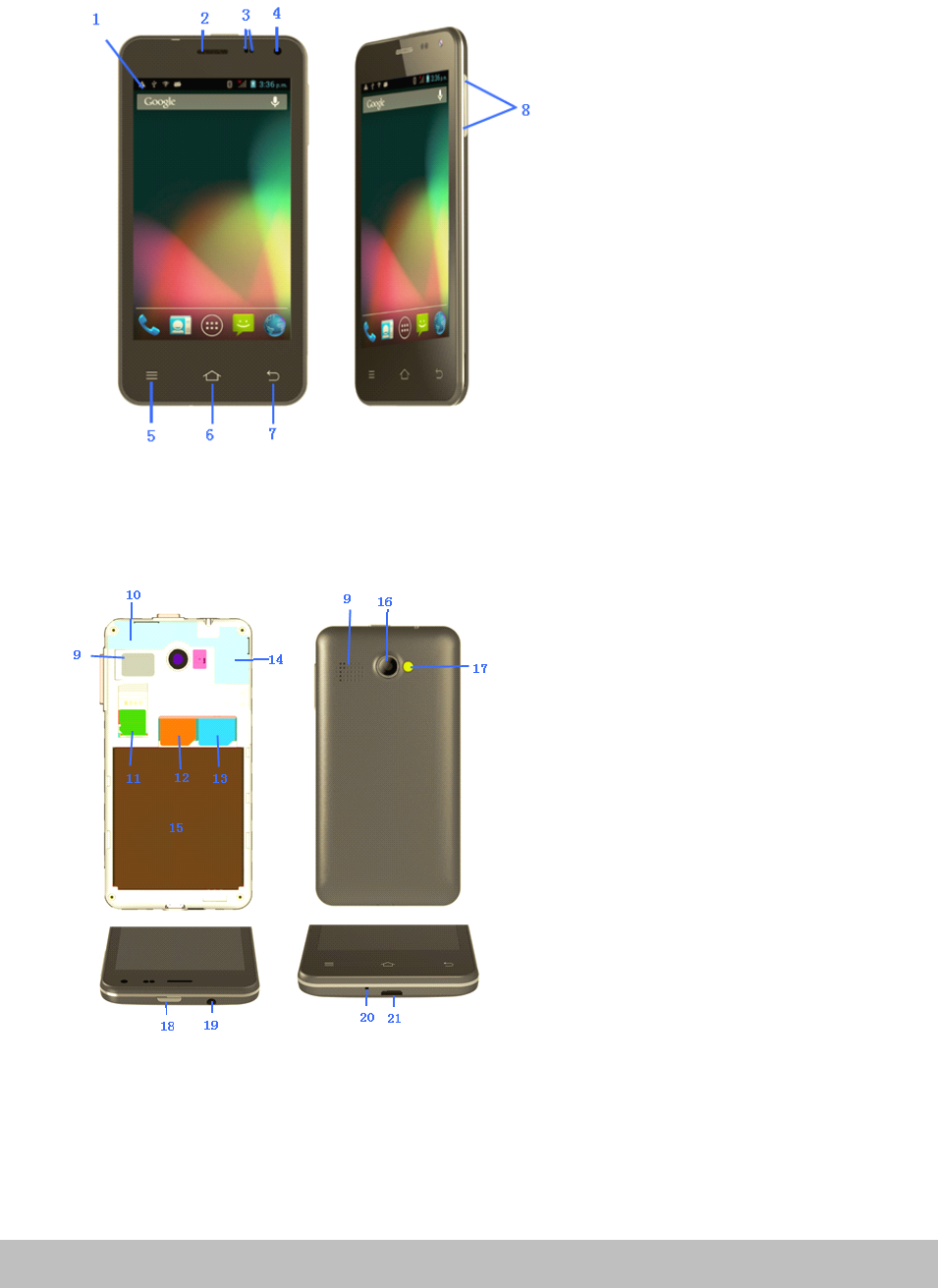
Product
Product
Product
ProductOvervie
Ov ervie
Overvie
Overview
w
w
w
Pic1.
Pic2.
1.
1.
1.
1.Notification
No tification
Notification
NotificationBar
Ba r
Bar
Bar
2.
2.
2.
2.Earpiece
Ea rpiece
Earpiece
Earpiece
3.
3.
3.
3.Light
Li ght
Light
Lightand
an d
and
andproximity
pr oximity
proximity
proximitysensors
se nsors
sensors
sensors
4.
4.
4.
4.Front
Fr ont
Front
FrontCamera
Ca mera
Camera
Camera
5.
5.
5.
5.Resent
Re sent
Resent
ResentApps/Options
Ap ps/Options
Apps/Options
Apps/OptionsMenu
Me nu
Menu
Menu
6.
6.
6.
6.Home
Ho me
Home
Home
7.
7.
7.
7.Back/Return
Ba ck/Return
Back/Return
Back/Return
8.
8.
8.
8.Volume
Vo lume
Volume
Volume+/-
+/-
+ /-
+/-
9.
9.
9.
9.Loud
Lo ud
Loud
LoudSpeaker
Sp eaker
Speaker
Speaker
10.
10.
10.
10.WI-FI
WI -FI
WI-FI
WI-FI/Bluetooth
/Bl uetooth
/Bluetooth
/BluetoothAntenna
An tenna
Antenna
Antenna
11.
11.
11.
11.Micro
Mi cro
Micro
MicroSD
SD
S D
SDCard
Ca rd
Card
CardSlot
Sl ot
Slot
Slot
12.
12.
12.
12.S
S
S
SIM
IM
I M
IMBay1-Supports
Ba y1-Supports
Bay1-Supports
Bay1-Supports2G/3G
2G /3G
2G/3G
2G/3G(Micro
(M icro
(Micro
(Micro
S
S
S
SIM
IM
IM
IMcard)
ca rd)
card)
card)
13.
13.
13.
13.S
S
S
SIM
IM
I M
IMBay2-Support
Ba y2-Support
Bay2-Support
Bay2-Support2G
2G
2 G
2G/3G
/3G
/3 G
/3G(
(
(
(MINI
MI NI
MINI
MINI
S
S
S
SIM
IM
IM
IMCard)
Ca rd)
Card)
Card)
14.
14.
14.
14.Cellular
Ce llular
Cellular
CellularAntenna
An tenna
Antenna
Antenna
15.
15.
15.
15.Battery
Ba ttery
Battery
BatteryBay
Ba y
Bay
Bay
16.
16.
16.
16.Rear
Re ar
Rear
RearCamera
Ca mera
Camera
Camera
17.
17.
17.
17.Camera
Ca mera
Camera
CameraFlash
Fl ash
Flash
Flash
18.
18.
18.
18.Power
Po wer
Power
PowerButton
Bu tton
Button
Button
19.
19.
19.
19.3.5mm
3. 5mm
3.5mm
3.5mmHeadset
He adset
Headset
HeadsetSocket
So cket
Socket
Socket
20.
20.
20.
20.Microphone
Mi crophone
Microphone
Microphone
21.
21.
21.
21.Micro
Mi cro
Micro
MicroUSB
US B
USB
USBSocket
So cket
Socket
Socket
Page7ProductionOverview
Getting
Getting
Getting
GettingStarted
St arted
Started
Started
Before
Before
Before
Beforefirst
fi rst
first
firstuse
us e
use
use
�Unpacktheproductbutkeepallpackagingmaterialsuntilyouhavemadesure
yournew3Gsmartphoneisundamagedandingodworkingorder.Plastic
wrappingcanbeasuffocationhazardforbabiesandyoungchildren,soensure
allpackagingmaterialsareoutoftheirreach.
�UnwindtheUSBcableandbatterychargingadaptorandinspectthemfor
damage.Donotusethecablesorthechargerifanypartisdamaged.Incaseof
damage,contactouraftersalessupportlineforadviceonexamination,repairor
returnofthedamagedproduct.
�Readthismanualtofamiliarizeyourselfwithallthefeaturesandoperating
principlesofyournew3GSmartphone.Payparticularattentiontothesafety
instructionsonthepreviouspages.
Micro
Micro
Micro
MicroSD
SD
S D
SDCard
Ca rd
Card
Card
�MysticsmartphoneiscompatiblewithClass10MicroSDHCcards,upto32GBin
capacity.
�PoweroffyourPhone,theninsertyourMicroSDcardintotheSDslotontherear
ofthePhone,makingsurethegoldcontactsarefacingtothefrontofthePhone.
�
To
removetheSDcard,poweroffthePhoneandremovethebattery,thengently
pulltheSDcardout.
SIM
SIM
SIM
SIMCard
Ca rd
Card
Card(2G/3G)
(2 G/3G)
(2G/3G)
(2G/3G)
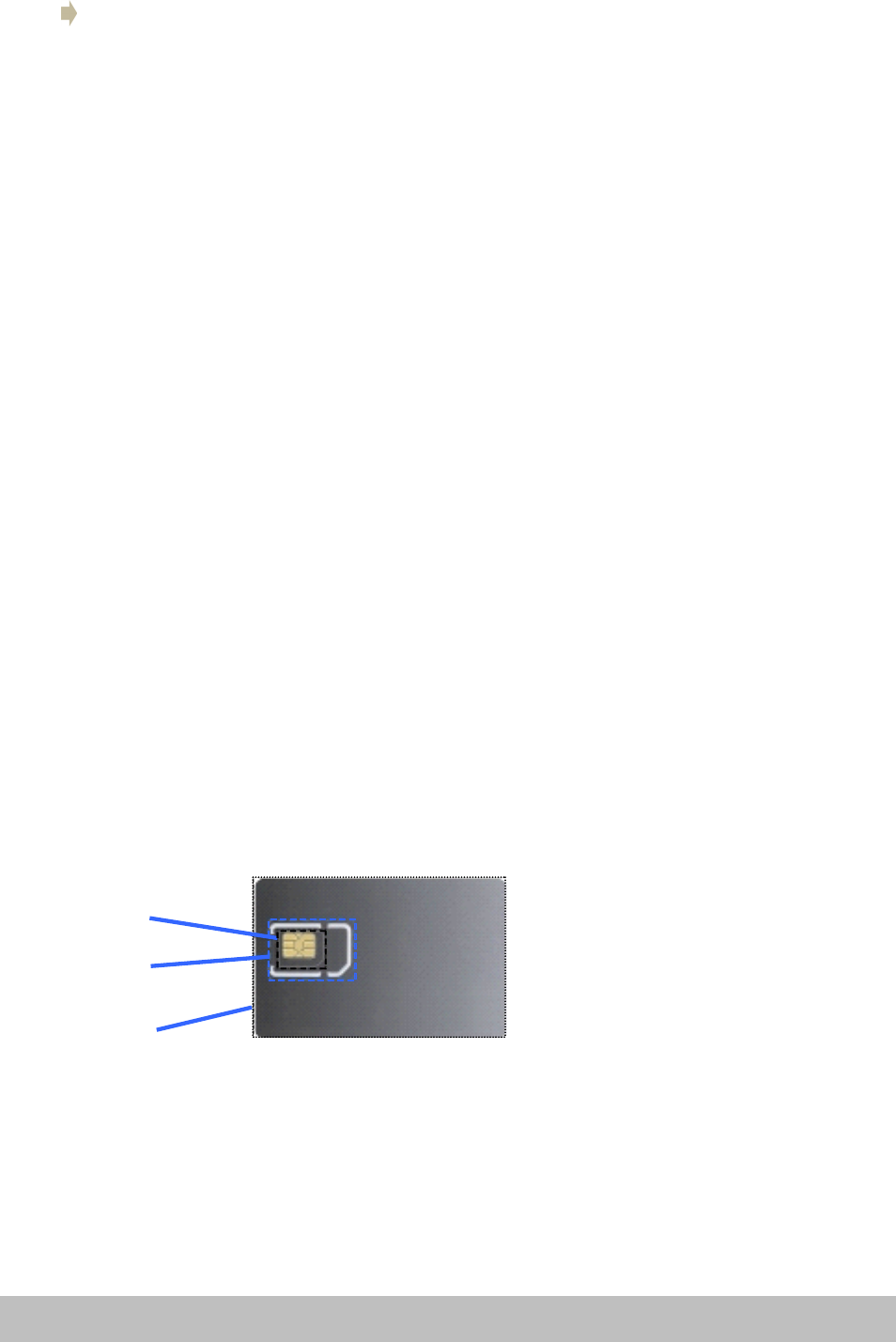
�MysticsmartPhonecardiscompatiblewith‘Mini’and‘Micro’sizedSIMcard.
Note:SIMcardsizeadaptorshouldnotbeusedastheymaycausedamageor
becomestuck.
MicroSIM
MiniSIM
NormalSIM
Inserting
Inserting
Inserting
Insertingthe
th e
the
theSIM
SI M
SIM
SIMCard(s)
Ca rd(s)
Card(s)
Card(s)and
an d
and
andbattery
ba ttery
battery
battery
�Placeyourfingerinthesmallrecessinthecornerofthemobilephoneandwith
yourfingernail,carefullypriseitopenandliftoffthebackcover.
�Ifthebatteryisinplace,removeit.
Page8GettingStarted

�InsertyourSIMcard(s)intothededicatedbays.Baynumber(1)supportsMicro
SIMCardsfor3Gand2G;baynumber(2)supportsMiniSIMCardsfor2Gonly.If
required,insertamicroSDcardintoitsdedicatedspace.
�OncetheSIMandSDcardsaresecurelyinplace,insertthebattery(supplied)
intothephone,makingsuretoalignthepinswiththecontact
�Reinstallthebackcover.Itwilllockintoplace.
NOTE:
NOTE:
NOTE:
NOTE:SomeSIMcardsrequireaPINnumbertobeenteredbeforeuse(seepage13
fordetails).ThisPINmaybeprintedontheSIMcardpackaging,oryoumayhaveto
contactyourserviceproviderforthenumber.
Charging
Charging
Charging
Charging
Thebatteryhasbeenpartiallychargedatthefactory.
To
performallfunctions,we
recommendyoufullyrechargeitasfollows:
�
To
To
T o
To
charger
ch arger
charger
chargerthe
th e
the
thedevice
de vice
device
devicewith
wi th
with
withthe
th e
the
thebattery
ba ttery
battery
batterycharger,
ch arger,
charger,
charger,plugthelargeendoftheUSB
cableintothechargingadaptorandthesmallerendintothemicroUSBporton
the3GSmartphone.Plugthechargerintoyourmainspowersupply.
�
To
To
To
To
charge
ch arge
charge
chargethe
th e
the
thedevice
de vice
device
deviceusing
us ing
using
usingthe
th e
the
theUSB
US B
USB
USBcable
ca ble
cable
cableand
an d
and
andcomputer,
co mputer,
computer,
computer,plugthelargeendof
theUSBcableintoaUSBportonyourcomputerandthesmallerendintothe
microUSBportonthe3GSmartphone.Ensureyourcomputeristurnedon.
�Whenthephoneindicatesafullcharge(thebatterystatusiconislocatedinthe
toprightcornerofthedisplay),disconnectthechargerorUSBcable.
�Followoneofthesechargingprocedureswheneveryour3GSmartphone
indicatesalowbatterycharge.
Switch
Switch
Switch
Switchon/off
on /off
on/off
on/off
Power
Power
Power
Powerbutton
bu tton
button
button
�Longpresstoturnon,
�Wheninpower-onstate,presstoturnonoroffthescreen.
�Wheninpower-onstate,longpresstodisplaythepoweroffmenu.
NOTE:
NOTE:
NOTE:
NOTE:ifphonebecomesunresponsive,removeandreinsertthebattery
Switch
Switch
Switch
Switchon
on
o n
on
�Whenthepower-onstate,pressandholdthepowerfor2secondsandthe
devicewillstartup.
Switch
Switch
Switch
Switchoff
of f
off
off
�Pressandholdthepowerfor2seconds:anoptionslistwillappearonthescreen.
�Choosetoswitchoffthedevice.
Turn
Turn
Turn
Turnon/off
on /off
on/off
on/offthe
th e
the
thescreen
sc reen
screen
screen
Thescreenwillautomaticallyturnoffwheninidletime
Page9GettingStarted

�Afteraperiodofinactivity,thescreenautomaticallyturnsofftosavebattery
power.Thiscanbesetusingthe‘Sleep’settingfromthedisplaymenuinthe
devicesettingsmenu.
�Ifafteralongtimeinsleepstatethescreendoesnotturnon,removethen
reinsertthebattery.Thenpressthepowerbuttontoturnonagain.
Turn
Turn
Turn
Turnon
on
o n
onthe
th e
the
thescreen
sc reen
screen
screen
�Ifthescreenisoff,Pressthepowerbuttontoturnitbackon
Volume
Volume
Volume
Volume
�
To
adjusttheringervolume,presstheVolumeDownbuttonsontherightsideof
the3GSmartphonetothedesiredlevel.Whileadjustingtheringervolume,a
windowwillappearonthescreendisplayingthevolumelevels.
Linking
Linking
Linking
Linkingwith
wi th
with
withyour
yo ur
your
yourGoogle
Go ogle
Google
Googleaccount
ac count
account
account
Whenyouturnonthephoneforthefirsttime,youcansignintoyourGoogle
Account,soyoucansynchronizeGmail/GoogleMail,CalendarandContactsbetween
yourphoneandtheweb.YoualsoneedtosignintoaGoogleAccounttouseGoogle
AppssuchasGoogleTalk™andPlayStore.
Onyourphone,goto‘Settings’andtap‘ppAccount’>‘Google’>‘Existing
’
.
Tap“signin
”
,enteryourusernameandpasswordandthentap“Signin
”
.After
signingin,allemails,contacts,andcalendareventsonyourGoogleAccountwill
automaticallysynchronizewithyourphone.
NOTE:
NOTE:
NOTE:
NOTE:
Tap
“Create”ifyoudonothaveaGoogleAccountyet.
Google
Google
Google
GoogleAccount
Ac count
Account
Accountpassword
pa ssword
password
password
IfyoucannotrememberyourGoogleAccountpassword,followthestepsbelowto
retrieveit:
�Onyourcomputer,openyourbrowserandgotohttp://google.com/accounts.
�Ontherightsideofthepage,tap“Can’taccessyouraccount
”
.
�Inthe“Havingtroublesigningin?”section,select“Idon’tknowmypassword
”
.
�Followtheprocedureonhowtorecoveryourpassword.
SIM
SIM
SIM
SIMmanagement
ma nagement
management
management
This3GSmartphonecanbeusedwithtwoSIMcards:WhenyouhavetwoSIMcards
inserted,youcanchoosetouseeitherSIM1orSIM2,orbothofthem.Unlessyou
havedetermineduseofoneparticularSIMcardasyourdefaultcardinthesettings,
youwillbepromptedtochooseanappropriateSIMcardeverytimeyouwantto
makeacallorsendamessage.
NOTE:
NOTE:
NOTE:
NOTE:OnlySIMcardbaynumber1supports3Gdataconnection.
Page10GettingStarted
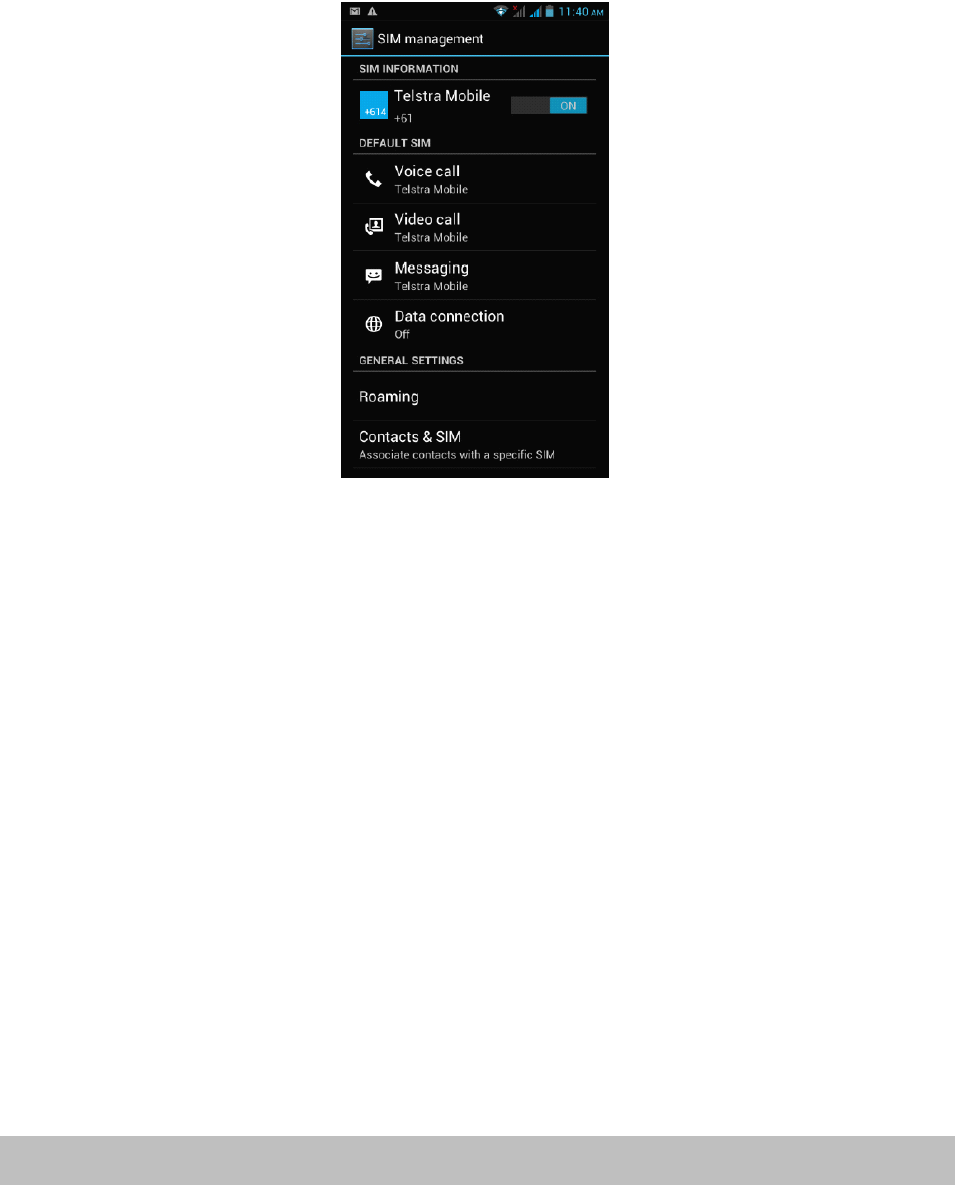
SIM
SIM
SIM
SIMInformation
In formation
Information
Information
TapthecheckboxtochooseenableordisableaSIMcard,ortapaSIMcardto
changeitsinformation.
Default
Default
Default
DefaultSIM
SI M
SIM
SIM
YoucouldchoosethedefaultSIMcardforyourvoicecalls,videocalls,messagesor
connection.
General
General
General
Generalsettings
se ttings
settings
settings
YoucouldchangeroamingsettingsorassociatecontactswithaspecificSIM.
Page11GettingStarted
Click/ShortPress
Whenusingtheon-screenkeyboard,openinganapplicationor
selectingitems
LongPress
Pressandholdforseveralsecondsonanitem(suchasatextboxor
webpagelink)todisplaytheactionorsubmenuforan
item,ifavailable.SlideorRapidSlide
Slidingorfastslidingmeansverticalorhorizontaldragaction.
Drag
Whendragging,youmustholdtheiconwithyourfingerandkeep
pressureuntilitreachesdestination.
DisplayRotation
Formostofthescreens,thecontentwillchangebetweenlandscape
andportraitmode,accordingtothedevice
orientation.
Operation
Operation
Operation
Operation
Entering
Entering
Entering
Enteringyour
yo ur
your
yourPIN
PI N
PIN
PIN
IfyouwanttouseaSIMcardwhichispresetwithaPIN(personalidentification
number),youwillhavetoenterthePINtoproceed.Justfollowthepromptstoenter
theSIMPINandthentap“OK
”
.
Screen
Screen
Screen
Screenoperation
op eration
operation
operation
Unlocking
Un locking
Unlocking
Unlockingthe
th e
the
themain
ma in
main
mainscreen
sc reen
screen
screen
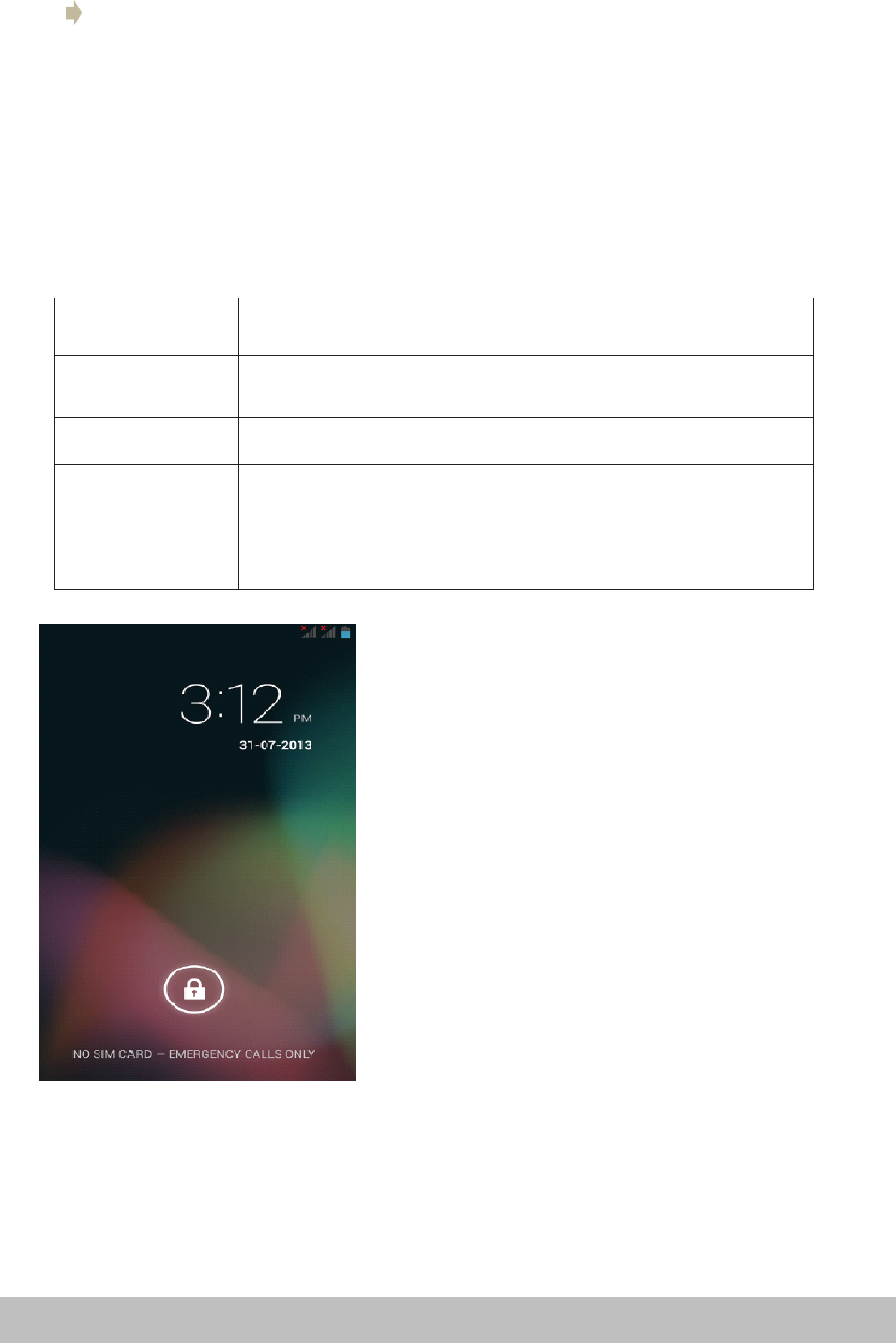
�Dragthelocktotherightsidetounlockthe
screen
�Afterunlockingthescreen,youwillseethe
lastitemyouhadopenonthemainscreen,
whichhasfivewindowsorpages.Youcan
viewthepagesbydraggingyourfingerleft
andrightacrossthescreen.
�
To
returnquicklytothemainscreen,press
thehomebutton.
Page12Operation
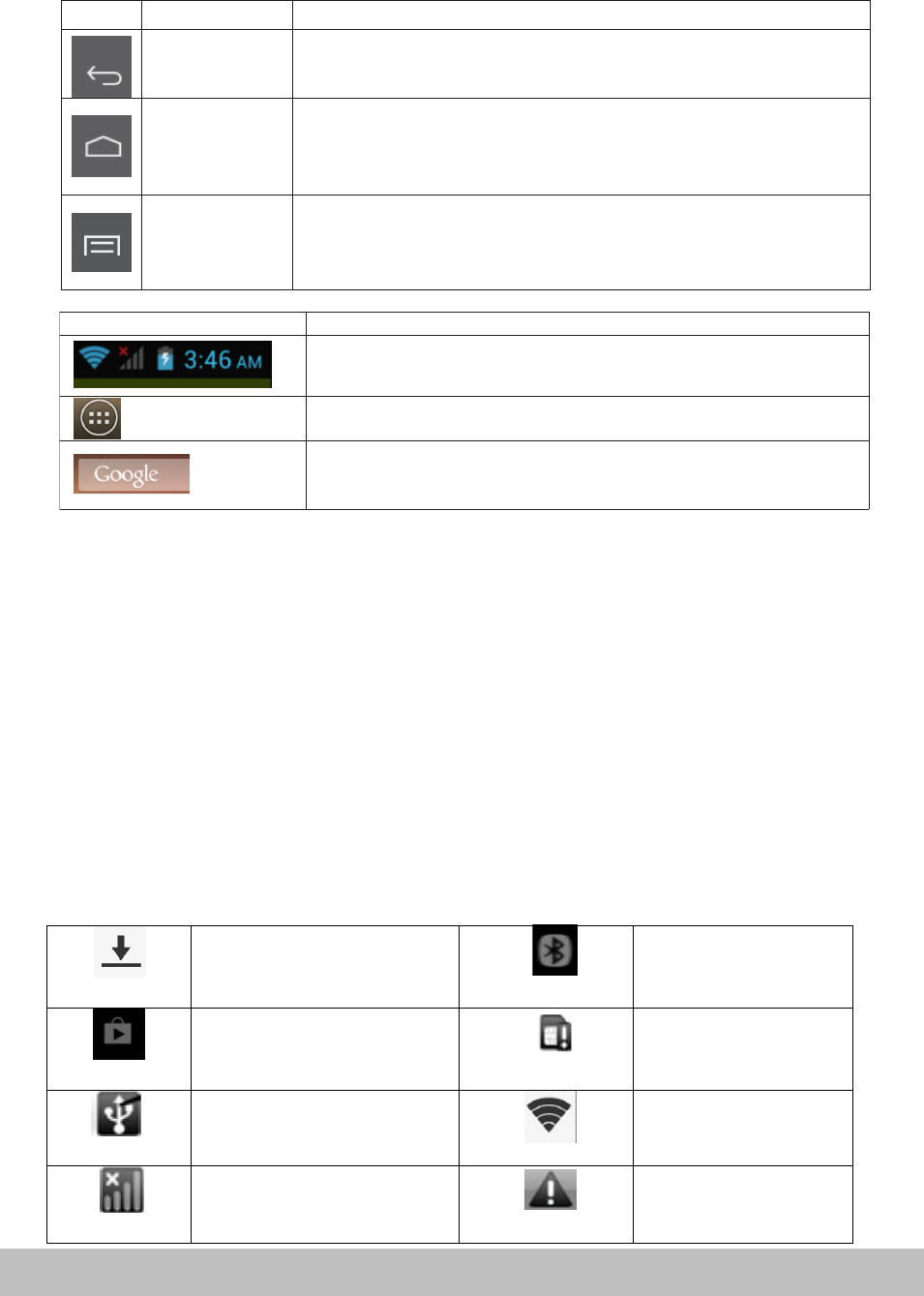
Icons
Icons
Icons
Icons Description
Description
Description
Description
·Fromlefttoright:Wi-FiSignalStatus,SIMSignalStatus,Battery
Status,CurrentTime(dependsoncurrentapplications).
·Clicktodisplayalistofallapplicationsandwidgets.
·Clicktosearchforafileorapplicationonthe3GSmartphone,
ortosearchtheinternet
Button
Button
Button
Button Name
Name
Name
Name Description
Description
Description
Description
Back
·Gotothelastpage(eveninanotherapplication).Whenreturned
tothemainscreen,youcannotgotothelastpageagain.
Home
(GoogleNow)
·Onekeytoreturntothemainpage(themiddlepageamongthe
fivepages)
·LongpresstodisplayGoogleNowWindows
Recent
applications
(Optionsmenu)
·Displayalistofrecentlyusedapplications/background
applications
·Longpresstodisplayoptions/settingsmenuwheninapps
Screen
Screen
Screen
Screenbuttons
bu ttons
buttons
buttons
Therearethreebuttonsatthebottomofthescreen.Nomatterwhatfunctionsyou
areusing,youcanreturntothelastpageormainscreenbyusingthesebuttons.
Notifications
Notifications
Notifications
Notifications
Thenotificationbarshowsyouataquickglancethestatusofyourphone.Itcanbe
expandedtoshowmoreinformationandquickaccesstosettings.
Notificationiconsinformyouofthereceiptofnewmessages,calendarevents,set
alarmsandongoingsettingsforthingssuchasactivecallforwardingorthecurrent
callstatus.
Belowisadescriptionoftheirmeanings.Clickonthecolumnboxtoopenthe
notificationlist.
Expanding
Expanding
Expanding
Expandingand
an d
and
andclosing
cl osing
closing
closingthe
th e
the
thenotifications
no tifications
notifications
notificationspanel
pa nel
panel
panel
�
T
oexpandthenotificationbartoseealltheoptional,placeyourfingeronthe
notificationbarthenswipe/draginadownwardmotion.
�
To
hidethenotification
bar,
pressthebackbutton.
Filebeingdownloaded Bluetooth
PlayStore NoSDcard
ConnectedwithPC Wi-Ficonnected
GSMsignal Common
notification
Page13Operation
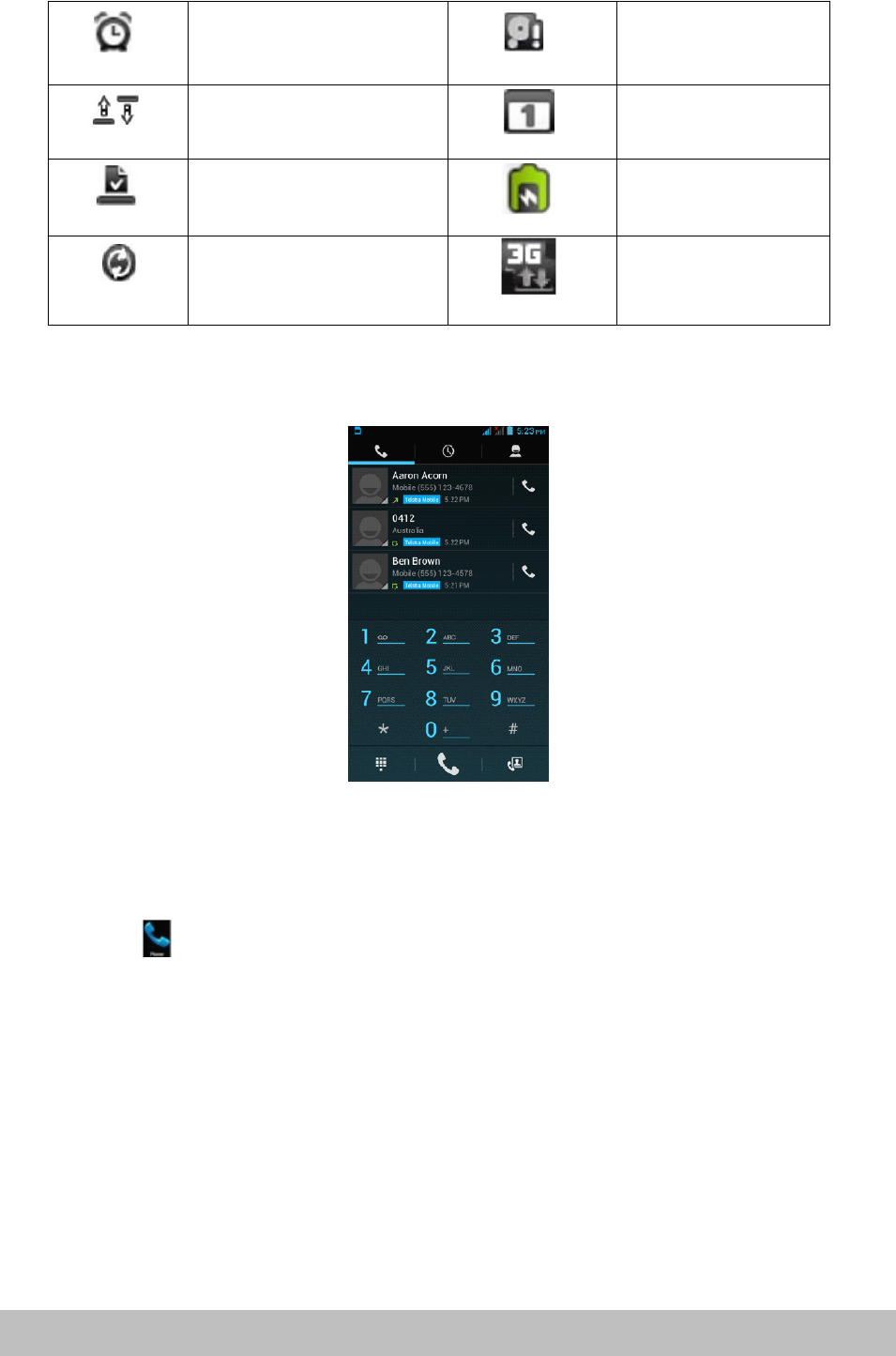
FilebeingdownloadBluetooth
playstoreNoSDcard
ConnectedwithPCWi-Ficonnected
GMSsignalCommon
notification
AlarmclockonMicroSDspacenot
enough
Uploading/downloadingTo-doevents
DownloadingfinishedCharging
Datasynchronization3G
Alarmclockon MicroSDspacenot
enough
Uploading/downloading To-doevents
Downloadfinished Charging
DataSynchronization 3G
Phone
Phone
Phone
Phonecalls
ca lls
calls
calls
Making
Making
Making
Makinga
a
a
acall
ca ll
call
call
Youcanmakeaphonecallanumberofdifferentways
Calling
Calling
Calling
Callingusing
us ing
using
usingthe
th e
the
thedialer
di aler
dialer
dialer
�Tap(call/phone)atthebottomofthescreentoenterthedialerscreen.
�
�
�
�Indialermode,whenyouinputanumber,youhavetwooptionstomakeacall.
1.Directlytap“Call”onthekeyboardandthenchoosewhichSIMcardyouwant
touse(ifyouhavetwoSIMcardsinserted).
2.Slidetotherighttochoosethenumberinyourcallhistory.
NOTE:
NOTE:
NOTE:
NOTE:*IfyouhaveonlyoneSIMcardinserted,youcannotuseanotherSIMcardto
makeacall.WhenoneSIMcardisusedforacall,theotheristemporarily
unavailable.
Calling
Calling
Calling
Callinga
a
a
aphone
ph one
phone
phonenumber
nu mber
number
numberin
in
i n
ina
a
a
atext
te xt
text
textmessage
me ssage
message
message
Whileviewingatextmessage,youcanplaceacalltoanumberthatisinthebodyof
themessage.
Page14Operation

�Tapthemessagewiththephonenumber.
�Tapthenumberyouwanttocallonthe“selectaction”screen.Thedialerscreen
thenopenswiththephonenumberautomaticallyfilledinandreadytobe
dialed.
�
To
placethecall,tap“Call”(andselecttheSIMcardyouwanttouse,if
appropriate).
Calling
Calling
Calling
Callinga
a
a
aphone
ph one
phone
phonenumber
nu mber
number
numberin
in
i n
incontacts
co ntacts
contacts
contacts
T
ocallanumberfromyourcontacts,enterthecontactslistandselectthecontact,
thentapthe
‘
call’iconbehindthenumberyouwanttocall.
Making
Making
Making
Makingan
an
a n
anemergency
em ergency
emergency
emergencycall
ca ll
call
call
�Dialtheappreciatedemergencynumber(000or112inAustralia),andthentap
“Call
”
.
�Ifyourphoneislockedwithapasscode,youmaystillbeabletomakean
emergencycall.Onthe“Enterpasscode”screen,tap“Emergencycall
”
,then
entertheemergencynumberandtapthecallbutton.
Incoming
Incoming
Incoming
Incomingphone
ph one
phone
phonecalls
ca lls
calls
calls
�Receiving
Receiving
Receiving
Receivinga
a
a
aphone
ph one
phone
phonenumber
nu mber
number
numberfrom
fr om
from
froma
a
a
acontact
co ntact
contact
contact:Whenyoureceiveaphonecallfrom
acontact,theincomingcallscreenappears,displayingthecallicon,nameand
thephonenumberofthecallingparty.
�When
When
When
Whenyou
yo u
you
youreceive
re ceive
receive
receivea
a
a
aphone
ph one
phone
phonecall
ca ll
call
callfrom
fr om
from
fromsomeone
so meone
someone
someoneelse
el se
else
else(whosecontactdetailsare
notstoredinyourcontacts),onlythedefaultcallerIDiconandphonenumber
willappearontheincomingcallscreen.
Answering
Answering
Answering
Answeringa
a
a
acall
ca ll
call
call
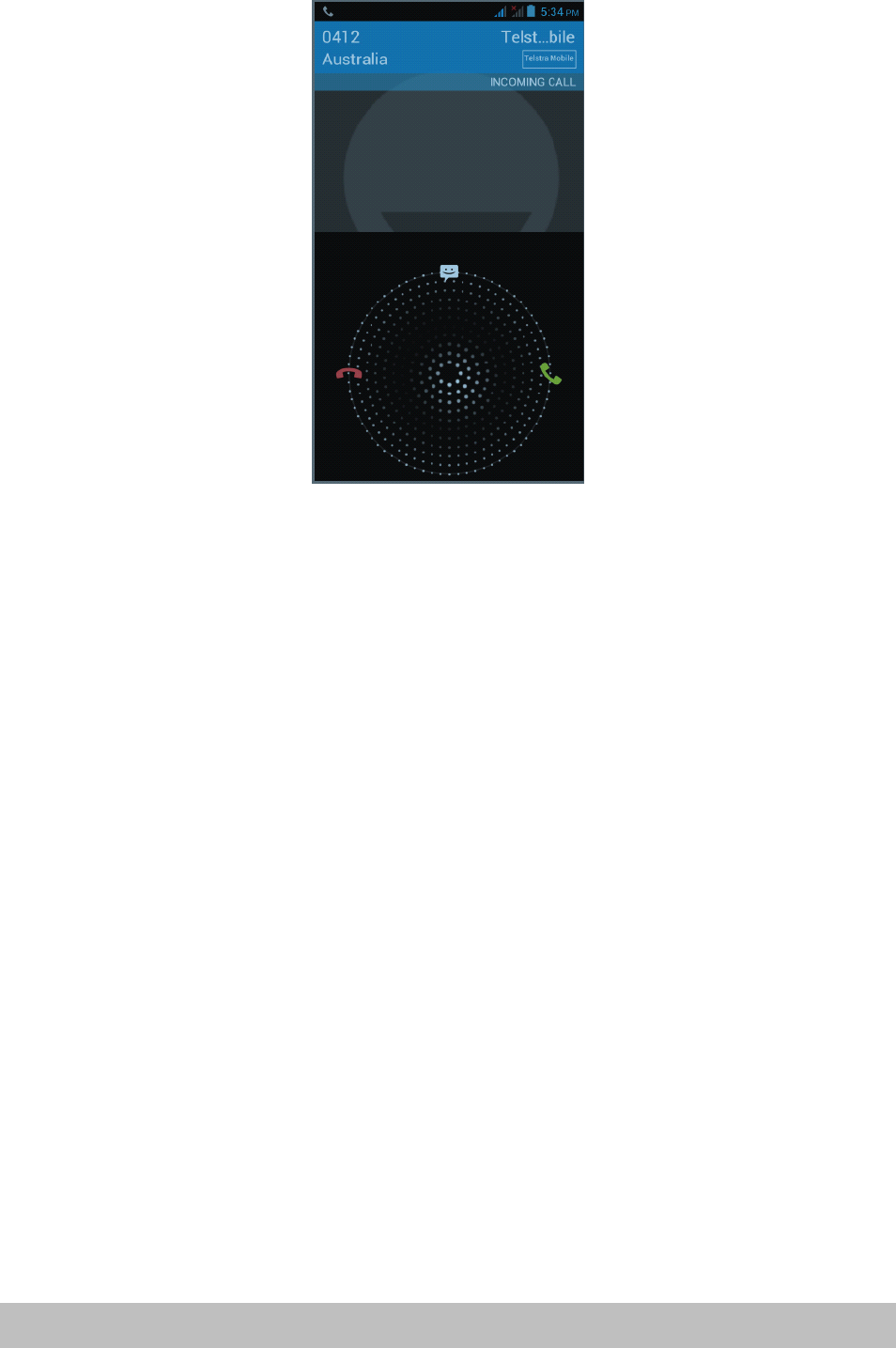
Slidethe“Call”iconacrossthescreentoansweranincomingcall.
Rejecting
Rejecting
Rejecting
Rejectinga
a
a
acall
ca ll
call
call
Slidetothe“Endcall”icontoreject.
Muting
Muting
Muting
Mutingthe
th e
the
thering
ri ng
ring
ringsound
so und
sound
sound
To
mutetheringsoundwithoutrejectingthecall,presstheVolumeDownbuttonor
Powerbutton.Youcanalsomutetheringsoundbyfirsttapping“Menu
”
,then
“Mute”
In-call
In-call
In-call
In-calloptions
op tions
options
options
Whenacallisinprogress,youcanstilloperatekeyoptions.Taptheavailablebuttons
toputacallonhold,dialanothercontactforaphoneconference,mutethephone
microphone,andmore.
NOTE:
NOTE:
NOTE:
NOTE:Whenthephoneisdialing,onlythe“Endcall”and“Speakeron”iconsare
available.
Page15Operation
Muting
Muting
Muting
Mutingthe
th e
the
themicrophone
mi crophone
microphone
microphone
Tap"Mute”toturnthemicrophoneonoroff.Whenthemicrophoneisturnedoff,
the“Mute”iconappearsinthestatus
bar.
Putting
Putting
Putting
Puttinga
a
a
acall
ca ll
call
callon
on
o n
onhold
ho ld
hold
hold
TapHoldtoputthecallonhold.Whenyouputacallonhold,the“Holdcall”icon
appearsinthestatus
bar.
Tap“Unhold”toresumethecall.
Turning
Turning
Turning
Turningthe
th e
the
thespeakerphone
sp eakerphone
speakerphone
speakerphoneon/off
on /off
on/off
on/off
�Whenyouareonacall,tap“speaker”totogglebetweenturningthe
speakerphoneonoroff.The“speakerphone”iconappearsonthestatusbar
whenthespeakerphoneison.
�WARNING!
WARNING!
WARNING!
WARNING!Protectyourhearing!Donotholdthephoneagainstyourearwhen
theloudspeakeristurnedon.
Ending
Ending
Ending
Endinga
a
a
acall
ca ll
call
call
Youhavetwooptionstoendacall:
�Tap“Endcall
”
.
�Ifyouareusingawiredheadset,pressandholdthebuttontoendthecall.
Video
Video
Video
Videocalls
ca lls
calls
calls
Usethisfunctionwhenyouwanttoseeaswellashearthepersonyouarephoning,
ifthatperson
’
smobilephonesupportsthisfunction.
NOTE:
NOTE:
NOTE:
NOTE:Notallmobilephonesandnetworkssupportvideocalling.Contactyour
serviceproviderfordetails.Videocallingmayincurextracharges.
Page16Operation
Call
Call
Call
Calllog
lo g
log
logtab
ta b
tab
tab
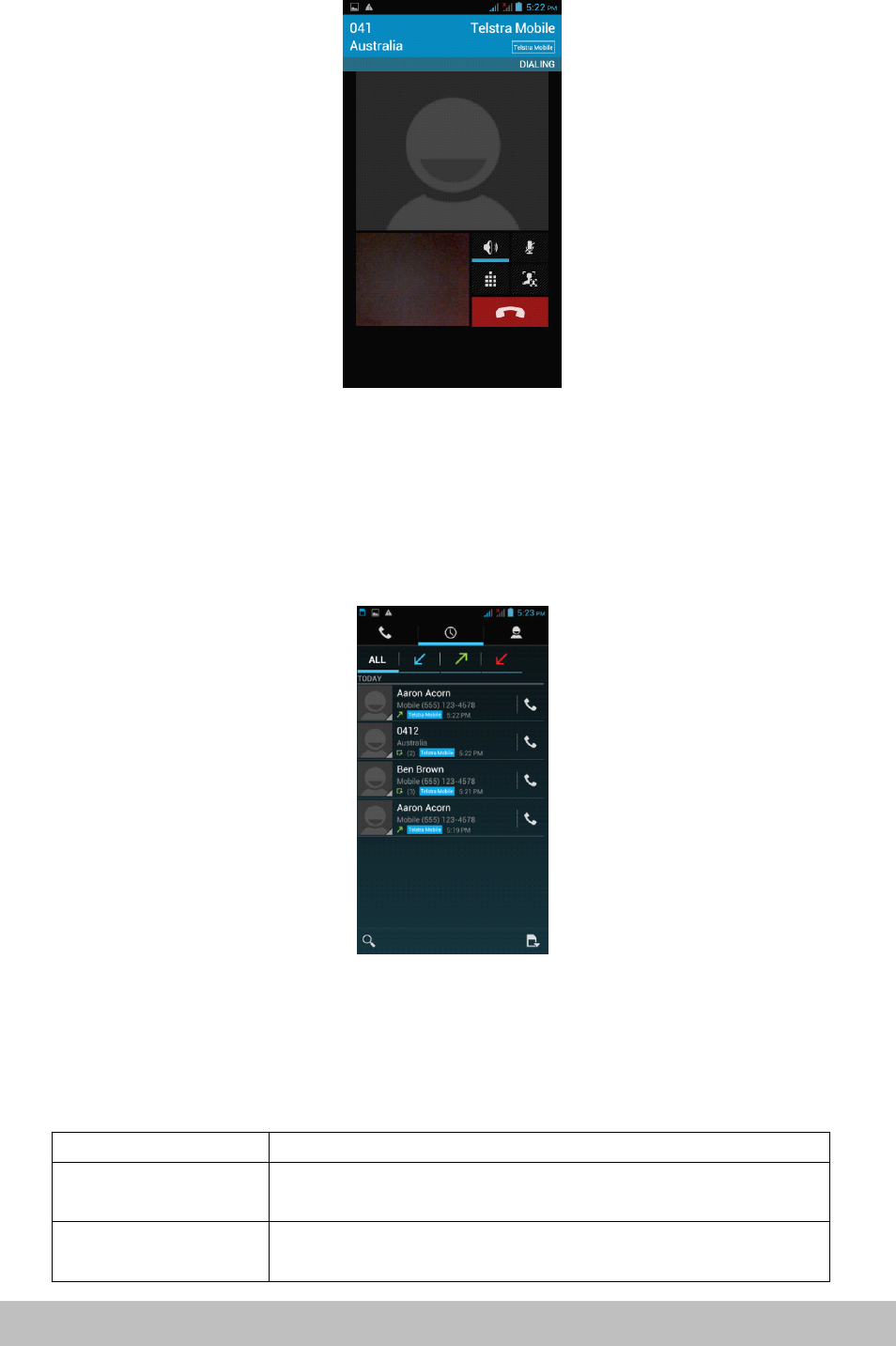
Enterthedialnumberandslidetotherighttothecalllog.Thenselectto:
Tapthenameandnumberinthelisttophonethecontact.
Tapthecontacticonofanameornumberinthelisttodisplaytheoptionsmenu
whereyoucanchoosefromthefollowoptions:“Viewcontactinformation”(ifthe
numberisstoredinyourcontactslist),“Editnumberbeforecall
”
,“Sendtext
message
”
,or“Removefromcalllog
”
.
Phone
Phone
Phone
Phonesettings
se ttings
settings
settings
Youcanadjustthephonesettingsofyourphonesuchasyourvoicemailnumber,or
enableadditionalcallservicesfromyournetworkserviceprovider.
To
openthephonesettingsmenu,selectSIM1orSIM2asappropriate,thentab
“Home”>“Menu”andthentap“Settings”>“Callsettings
”
.
Options
Options
Options
OptionsDescription
De scription
Description
Description
FixeddialingnumbersRestrictoutgoingcallstoafixedsetofnumbers.
To
enablethis
featureyoumustknowyourSIMcard
’
sPIN2code.
VoicemailSpecifyanothervoicemailnumberasidefromthevoicemail
numberonyourSIMcard.
Page17Operation

Autoanswer1ring,2ring,3ring,NeverAnswer(default)
CallforwardingSelecthowyouwantyourphonetohandle
callswhenbusy,
unansweredandunreachable.
Youcanalsosetcallforwardingoptionsforallincomingcalls.
CallbarringSelectbarringoutgoingorincomingcalls.
Contactyournetworkserviceprovider(s)toactivatethisfunction.
Additionalcallsettings
Enableordisableoperatorservicessuchascaller
IDandcallwaiting.
Call
Call
Call
Callsettings
se ttings
settings
settings
Voice
Voice
Voice
Voicecall
ca ll
call
call
Selectthisoptiontochangesettingsforyourvoicemailserviceandnumber,voice
callforwarding,voicecallbarring,phonenumberandcallwaitingsettings.
Video
Video
Video
Videocall
ca ll
call
call
Selectthisoptiontochangeyourvideocallsettingssuchassetapicturetodisplay
whenthecameranotinuse,sizeofpeervideoandlocalvideo,etc.
Internet
Internet
Internet
Internetcall
ca ll
call
call
SelectthisoptiontologintoanInternetcallaccount.
Other
Other
Other
Othersettings
se ttings
settings
settings
Selectthisoptiontomanagefixeddialingnumbers,callcostinformation,mobile
broadcastsettingsandminutereminder.
Airplane
Airplane
Airplane
Airplanemode
mo de
mode
mode
To
enable/disableairplanemode,chooseoneofthefollowingoptions:
Airplane
Airplane
Airplane
Airplanemode
mo de
mode
mode
To
enable/disableairplanemode,chooseoneofthefollowingoptions:
Press“Home”>“Menu
”
,thentap“Settings”>“Wirelesscontrols
”
.
PressandholdthePowerbuttonandthentap
“
Airplanemode
”
.
Inthenotification
bar,
tapthe
“
Airplanemode”shortcuttoturnairplanemodeonor
off.
NOTE:
NOTE:
NOTE:
NOTE:Whenyoudisableairplanemode,thephonefunctionisturnedbackonand
thepreviousBluetoothandWi-Fistatesarerestored.
Contacts
Contacts
Contacts
Contacts
Thecontactsapplicationletsyoumanageyourphone,messagingandemail
communicationswiththecontactsinyourcontactslist.Ifyouaresynchronizing
contactswithyourGoogleaccountviayourPCtools,anycontactsstoredinthose
accountswilldisplayed.
Page18Operation

Contacts
Contacts
Contacts
Contactslist
li st
list
list
Adding
Adding
Adding
Addinga
a
a
anew
ne w
new
newcontact
co ntact
contact
contact
�Onthecontactslistscreen,pressthe button,thentap
“
createcontact”
�Enterthecontactinformationinthefieldsprovided.
�Scrolltothebottomofthescreenandtap“Save
”
.
Searching
Searching
Searching
Searchingfor
fo r
for
fora
a
a
acontact
co ntact
contact
contact
Pressthebuttontoenterthesearchmenu,asearchbarwillappearatthetop
oftheContactslistscreen,matchingcontactswillbedisplayed.
NOTE:
NOTE:
NOTE:
NOTE:Ifthelistofmatchingcontactsislong,taptohidetheon-screenkeyboardto
viewmoreresults.
Deleting
Deleting
Deleting
Deletinga
a
a
acontact
co ntact
contact
contact
OntheContactslistscreen,press“Menu”andthentap“Deletecontact
”
.
OntheDeletescreen,youcanselect“Multiplechoice
”
,or“Markall
”
.
WARNING:
WARNING:
WARNING:
WARNING:Thisoperationwilldeletethecontact.
Take
carewhenusingit.
Displayoptions
Choosethissettingtocustomizeyourdisplayoptions,includingdefaultandGmail
accountdisplayoptions.
NOTE:
NOTE:
NOTE:
NOTE:AftersynchronizingcontactswithyourGoogleaccount,addthecontacttothe
phoneandselect
“
Allothercontacts”inyourGmailaccountdisplayoptionstodisplay
thecontactsinthelist.
Messaging
Messaging
Messaging
Messaging
Messagingletsyoucomposeandsendtext(SMS)andmultimediamessages(MMS)
toothermobilephones.
Page19Operation
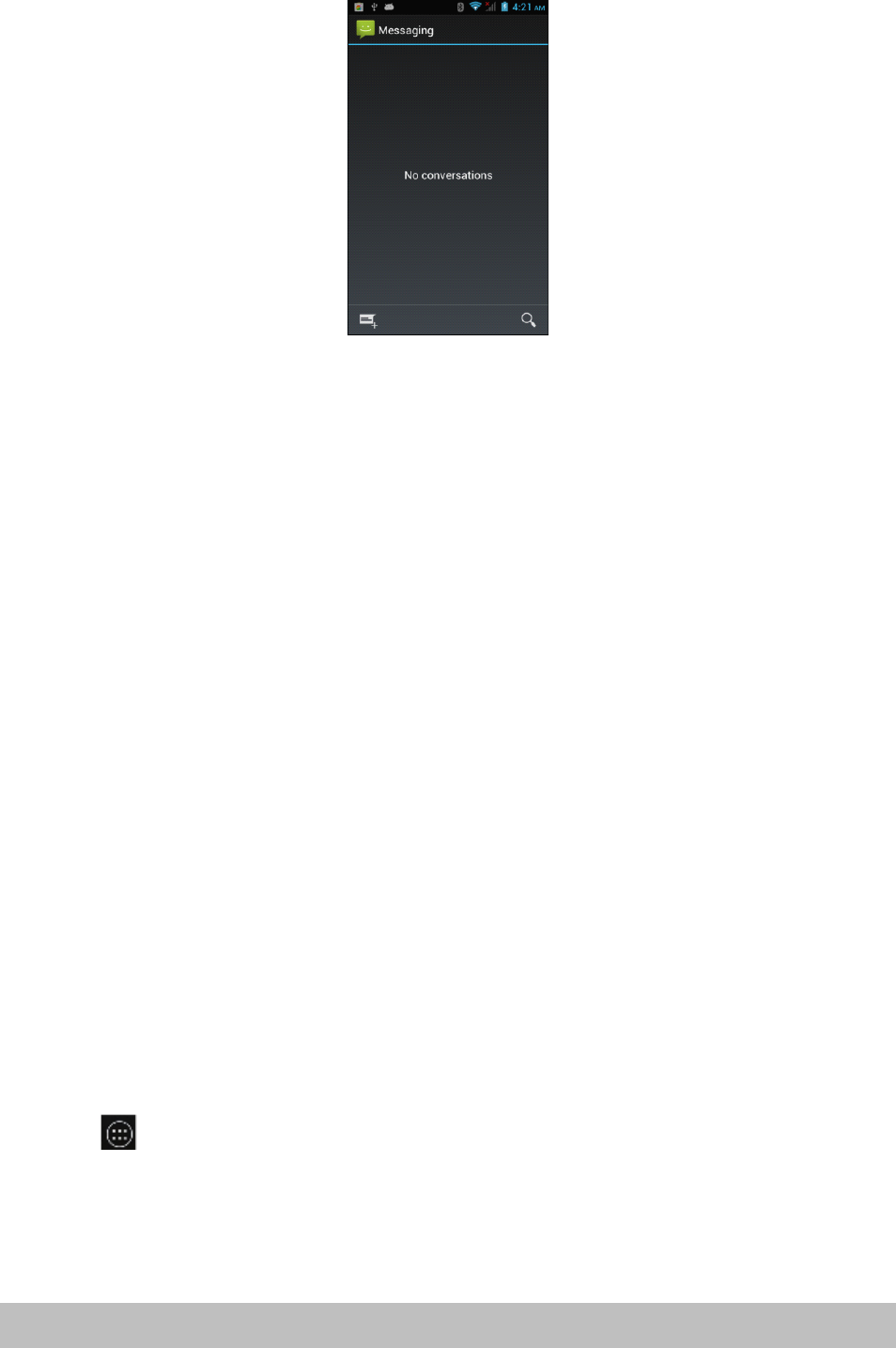
Creating
Creating
Creating
Creatingand
an d
and
andsending
se nding
sending
sendingSMS
SM S
SMS
SMSand
an d
and
andMMS
MM S
MMS
MMSmessages
me ssages
messages
messages
�Anytext(SMS)messagesyoucomposethatcontainupto160characterswillbe
deliveredasonemessage.Ifyourmessagecontainsmorethan160characters,it
willstillbedeliveredasonebutitwillcountasmorethanonemessage.Your
serviceprovidermaychargeyouextraforsuchlinked(concatenated)messages.
�Multimedia(MMS)messagescancontaintextandapicture,arecordedvoice,an
audioorvideofileorapictureslideshow.
�
To
createandsendatextmessage,tap“Create”ontheAllmessagesscreenand
enterthephonenumberofthemessagerecipientinthe
To
fieldonthe
Composescreen.Anymatchingcontactswillappearonthescreen.
Tap
a
recipientorcontinueenteringtherecipient
’
sphonenumber.Tapthetextbox
thatcontainsthetext“Typemessage
”
,andthenstartcomposingyourmessage.
Whendone,tap“Send”tosendthemessage.
NOTE:
NOTE:
NOTE:
NOTE:
�Asyoucomposethemessage,acounterinthetoprightcornerofthetextbox
willkeeptrackofthenumberofcharacters.Onceyougoover160characters,
anewmessageiscreatedbutautomaticallylinkedintoonewhenreceived.
�
To
receivedeliveryreportsandnotificationswhenatextmessageisreceived,
press“Menu”andthentap“Settings”ontheAllthreadsscreen.IntheSMS
settingssection,selectthe“Deliveryreports”checkbox.
Applications
Applications
Applications
Applicationsand
an d
and
andwidgets
wi dgets
widgets
widgets
Enter
Enter
Enter
Enterapplications
ap plications
applications
applications
Click toenterthelistofallapplicationsandwidgets.
ClickontheAPPStabinthetopleftcorner.
�Thiswindowwilldisplayalistoftheapplications.
�Asyouinstallmoreapplications,thefirstpagewillfillupandtheapplication
iconswillautomaticallyspreadontootherpages.
Page20Operation
�Swipeleftandrighttoseetheotherpages.
Add
Add
Add
Addand
an d
and
andmanage
ma nage
manage
managedesktop
de sktop
desktop
desktopicons
ic ons
icons
icons
Add
Add
Add
Adddesktop
de sktop
desktop
desktopicons
ic ons
icons
icons
Attheapplicationlistorwidgetlist,longpressanyapplicationorwidgetandthe
devicewillshiftintodesktop,thendragtheicontoanyplaceonthedesktop.
Desktop
Desktop
Desktop
Desktopshortcuts
sh ortcuts
shortcuts
shortcutsmanagement
ma nagement
management
management
To
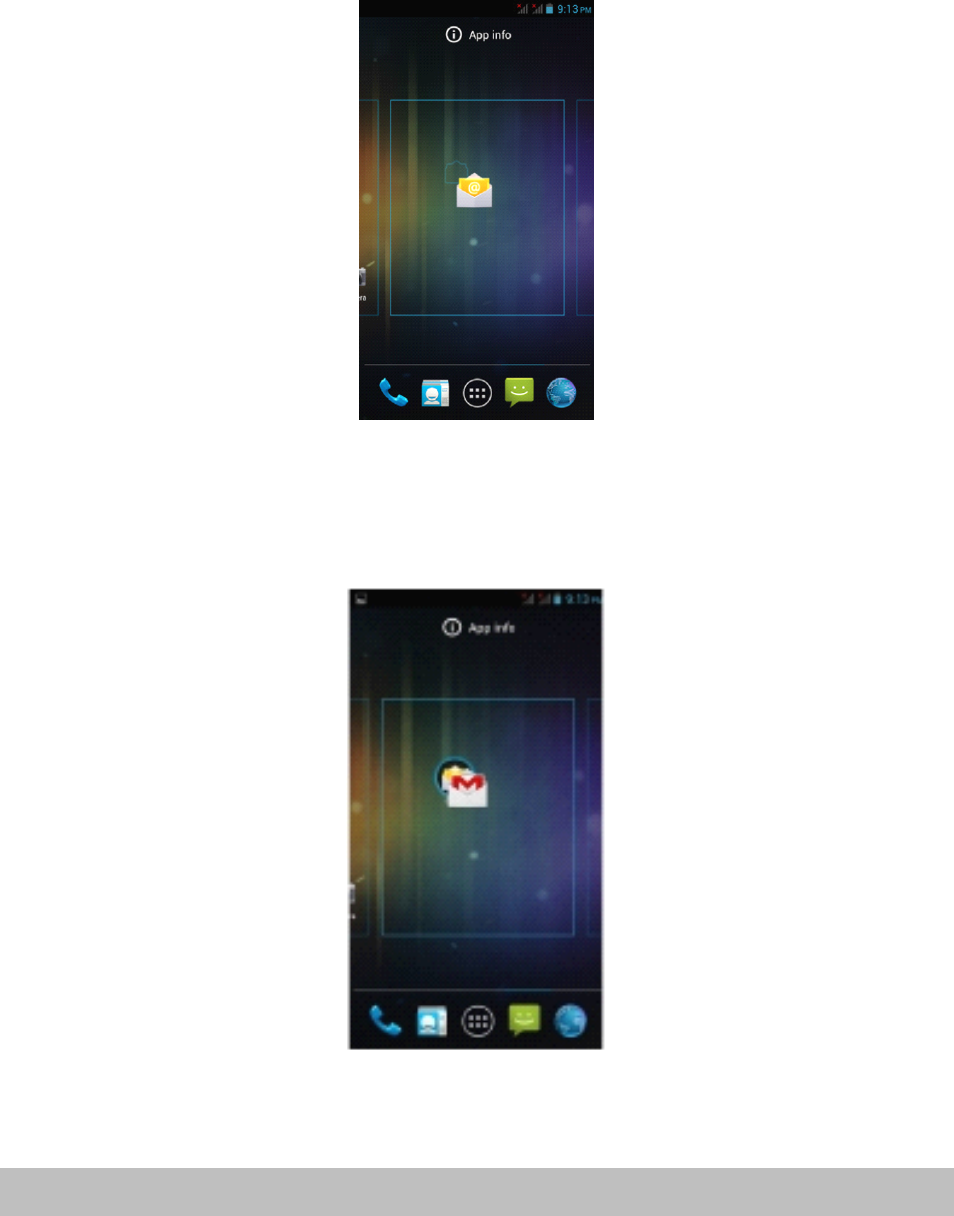
createafolderonthemainscreens,justdragandoverlayanyiconontoanother
icon,thenrelease.Anewfolderwillbecreatedcontainingthetwoapplications.It
willappearasablackcirclewithsmalliconsofyourappsontop.
Thenyoucanviewthefoldercontentsbyclickingonthefoldericonanditwilldisplay
aspicturedbelow.
Page21Operation
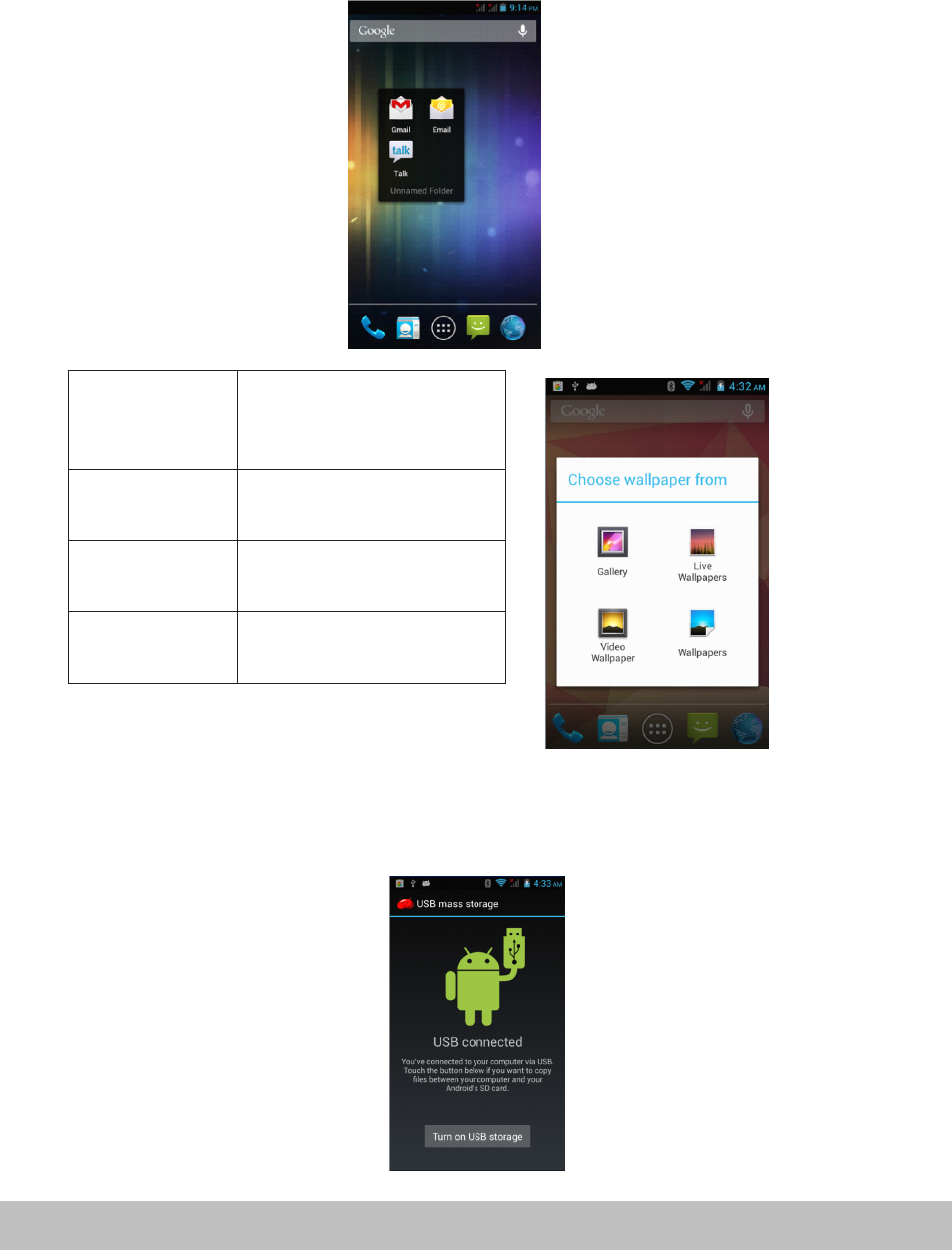
Gallery Choosefromthepictures
storedonyour3GSmart
phone
cameragalleryWallpaper Choosefromthedefault
wallpapers.
LiveWallpaper Chooseamovingwallpaper
VideoWallpaper Chooseavideotoasyour
wallpaper
Youcanchangetheiconpositionsinsidethefolderbylongpressingthem,then
draggingtothenewposition.
Ifyouwanttoremoveaniconfromthefolder,longpresstheiconanddragto
outsidethefolder.
To
changethefoldername,clickonthefolder,thentap“Unnamedfolder
”
.A
keyboardwillappear.Typethenewname,thentap“Enter”toapplyit.
Connect
Connect
Connect
Connectwith
wi th
with
withcomputer
co mputer
computer
computer
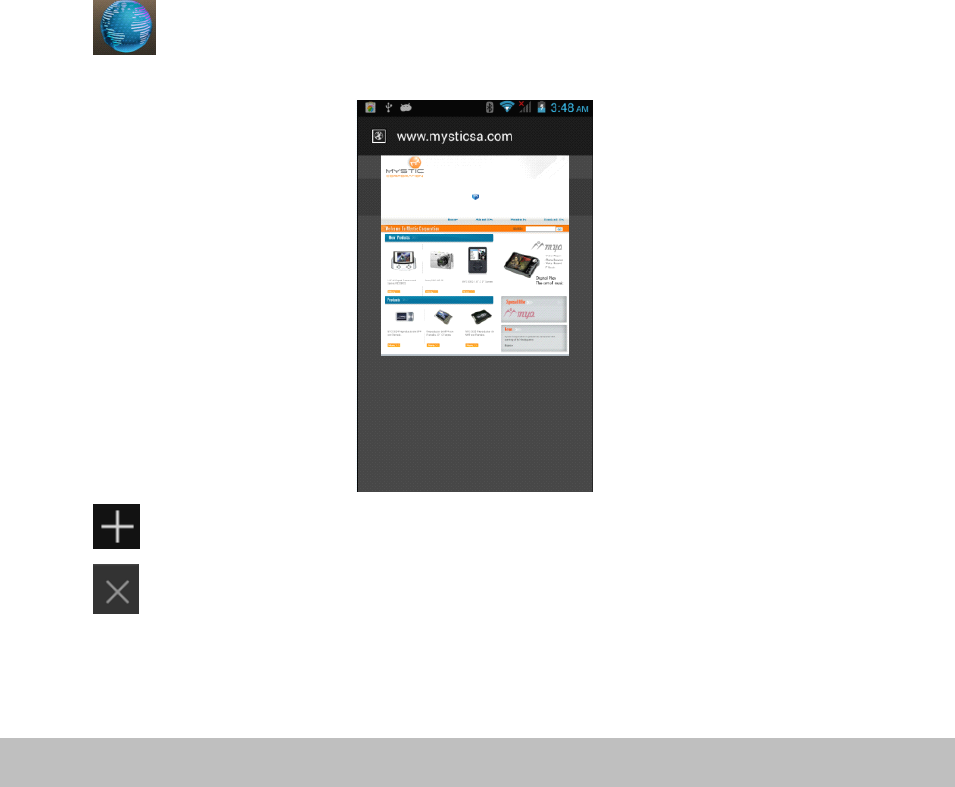
ConnectthedevicetoacomputerwithaUSBcable.Whenconnectedwitha
computer,amessagewillappearinthenotificationbarwhichwilldescribewhich
USBmodethePhoneisin.
Page22Operation
Thereare4optionsavailabletochoosefrom:
�USBStorage
�MediaDevice(MTP)
�Camera(PTP)
�Chargeonly
Somedevicesorcomputersmayonlybeabletodetectthetabletif‘USBStorage’is
selected.Afterchoosinganoption,youmayneedtodisconnecttheUSBcable,then
reconnectit.When‘USBStorage’modeisselected,youwillneedtoclickon“Turnon
USBstorage”whenthemessageappears.
NOTE:
NOTE:
NOTE:
NOTE:USBStoragemodewillonlyshowthecontentsoftheMicroSDcard(if
inserted).
Ifthemessagedoesnotappearwhenyouconnectthetablettoyourcomputerwith
aUSBcable,orifthedevicedoesnotappearonyourcomputer,trythefollowing.
�Checkandensurethatyouhaveturnedthetableton.Checkandensureyou’re
yourcomputeristurnedon.
�UnplugtheUSBcable,thenreconnectittothesameUSBport.
�IfyourcomputerhasUSBportsontherear,tryconnectingtoone.
�TryadifferentUSBcable.
Browser
Browser
Browser
Browser
Tap toopenthebrowser.
Tap toopenanewbrowserwindow.
Taptoclosethecurrentbrowserwindow.
Whentheinternetsignalispoorandthewebpagedoesnotload,tap“Refresh”inhe
menutotryloadingthewebpageagain.Therearemanyusefuladvancedoptionsin
“Settings
”
.
Page23Operation
Screen
Screen
Screen
Screencompatibility
co mpatibility
compatibility
compatibility
Whenthedeviceisinstalledwithprogramsdesignedforsmallscreenandcannot
showinfullscreen,ascreenzoommenuwillpopup.Youmustconfirmittoopen
thoseprograms.
Background
Background
Background
BackgroundApplications
Ap plications
Applications
Applications
Tapthe“backgroundapplications”(recentapplications)on-screenbuttontoshowall
programsrunninginthebackground.Tapanitemtore-openit.
Dragtheitemstotheleftorrighttocloseandremovetheapplicationfromthelist.
Get
Get
Get
Getand
an d
and
andinstall
in stall
install
installapplications
ap plications
applications
applications
Therearetwowaystogetapplicationssoftware:downloadthroughthisdeviceor
copyfromcomputer.
Option
Option
Option
Option1:
1:
1 :
1:Download
Dow nload
Download
Downloadusing
us ing
using
usinga
a
a
a“
“
“
“Market
Ma rket
Market
Market”
”
”
”or
or
o r
or‘“
‘“
‘ “
‘“Store
St ore
Store
Store”
”
”
”application
ap plication
application
application
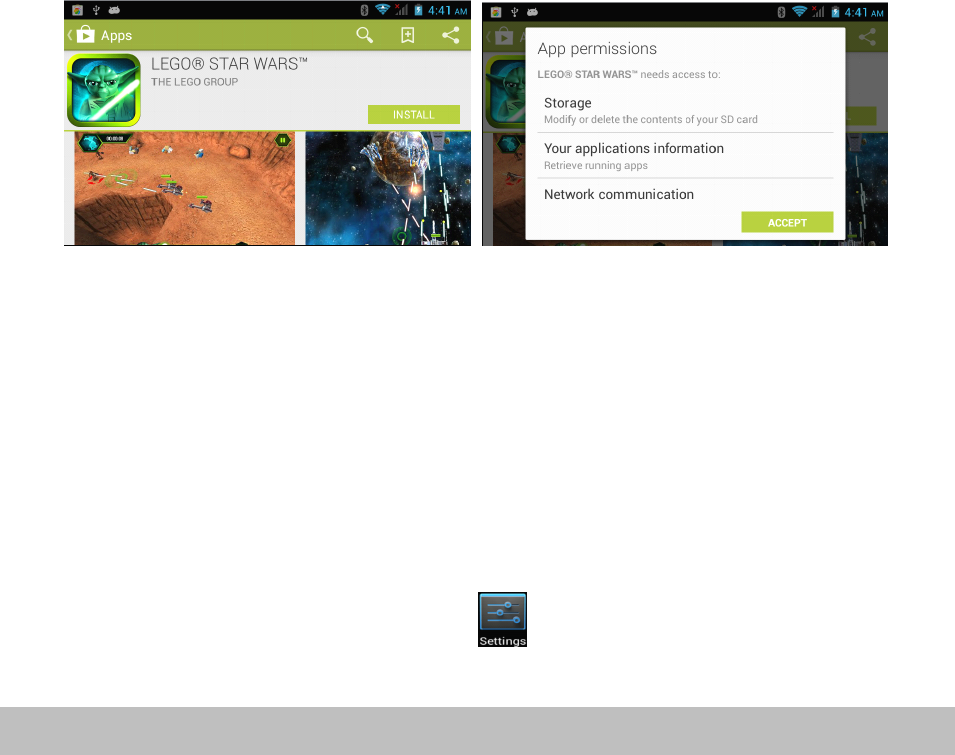
DownloadapplicationssoftwareusingapplicationssuchasGoogle
’
s“PlayStore
”
.
Belowarephotosshowingtheprocessofdownloading
“
Angrybirds”from“Play
Store
”
.
Afterdownloading,theapplicationwillautomaticallyinstallthesoftware.
NOTE:
NOTE:
NOTE:
NOTE:Someapplicationsmaynotbecompatibleduetohardwarerequirementsor
geographiclocationlimitationsoftheapplication.
Option
Option
Option
Option2:
2:
2 :
2:Copy
Co py
Copy
Copyinstallation
in stallation
installation
installationfile
fi le
file
filefrom
fr om
from
fromcomputer
co mputer
computer
computer
Copyanapplicationinstallfile(APK)fromacomputertothestorageofthe3GSmart
phone,thenfindandinstallthemusing“Filemanager
”
.Taponthefiletoinstallit.
Uninstall
Uninstall
Uninstall
Uninstallapplications
ap plications
applications
applications
�Opentheapplicationwindowandtap ,thentaponAppsfromthemenuon
theleft.
Page24Operation

�Usethetabatthetopandscrollupanddownthroughthelistofapplications
untilyoufindtheapplicationyouwishtouninstall.
�Clickontheapplication,thenanAppinfopagewillappear.
�ClickontheUninstallbuttonandtheapplicationwillberemoved.
�
Play
Play
Play
PlayStore
St ore
Store
Storeand
an d
and
andCalendar
Ca lendar
Calendar
Calendarerror
er ror
error
errormessages
me ssages
messages
messages
OccasionallywhenlinkinganewGoogleaccounttoyour3GSmartphone,youmay
receivevariouserrormessagessuchas
“
...error(-101)...”inthePlayStore,oryour
Calendarappointmentsandeventsmaynotappear.
To
fixthisissueandre-syncronizethe3GSmartphonewithyourGoogleaccount,
pleasefollowthestepsbelow.
1.Opentheapplicationswindowandtap ,thentapon
“
Apps”fromthemenu
ontheleft
2.Inthewindowontheright-handside,tapthe
“
All”tabatthetop.
3.Scrollupanddownthroughthelistofapplicationsuntilyoufind“Google.
Services.Framework”andclickonit.
4.Tapthe“Cleardata”icon.
5.Clickon“Yes
”
.
6.PressandholdthePowerbuttonfor2seconds.
7.Tap“
Yes
”toagreetoturnoffthe3GSmartphone.
8.Oncethephonehasfinishedshuttingdown,turnthephonebackon.
9.Openthe“PlayStore”appandwaitfortheimagestoload.Oncetheyhave
finishedloading,presstheBackbutton.
10.Waitfor30secondsthenreopen‘PlayStore’app.
11.Youmaynowopen“Calendar”andcheckyourentriesarethere,oropen“Play
Store”anddownloadtheapplicationyouthatwasgivingtheerrormessage.
Page24Operation
Settings
Settings
Settings
Settings
Thesettingfunctiononthis3GSmartphoneislikethatonacomputercontrolpanel.
Youcanaccessthesettingspagefromthenotificationsbaror“Setting”iconinthe
applicationslist.
Wireless
Wireless
Wireless
Wirelessand
an d
and
andnetworks
ne tworks
networks
networks
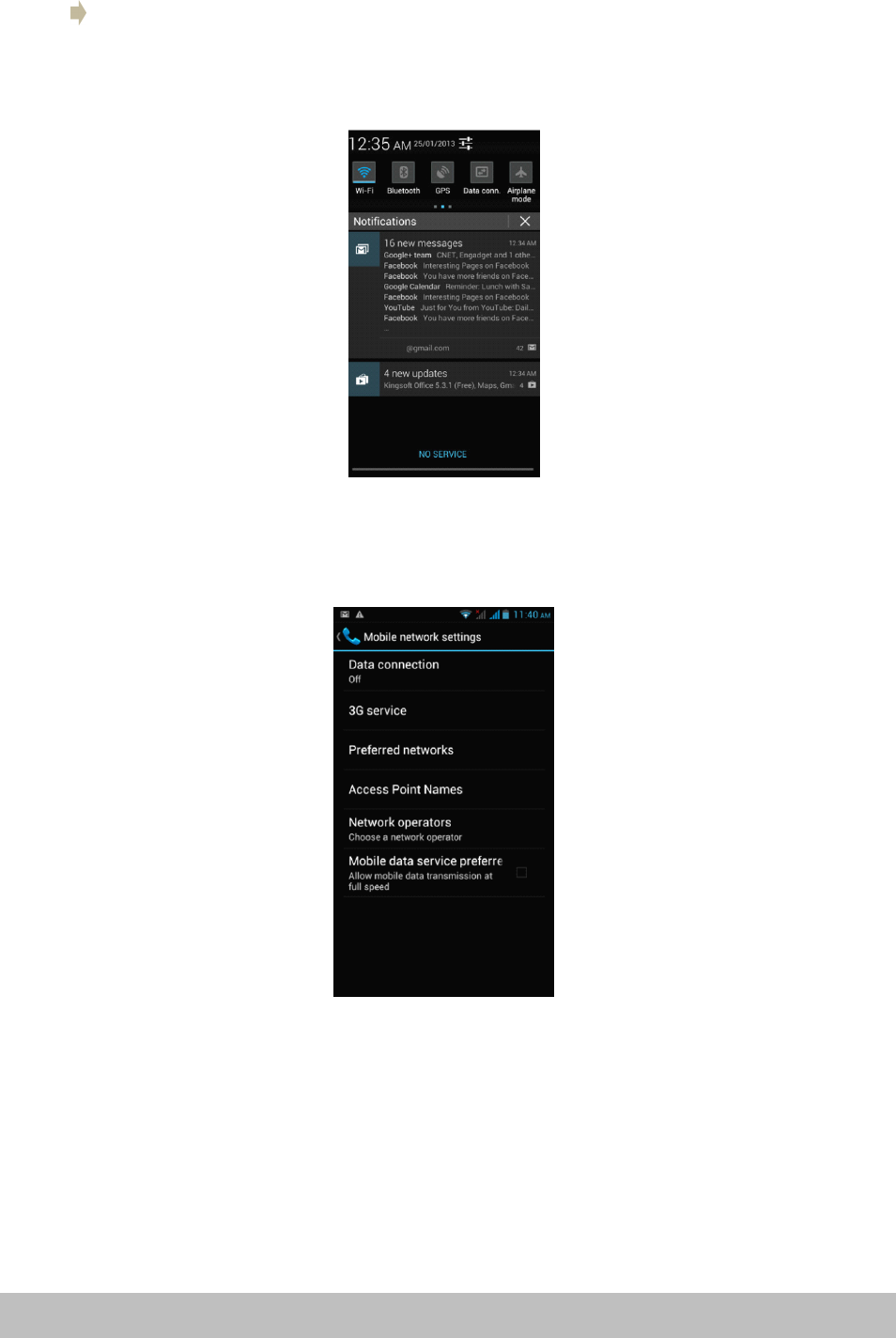
The“MobileNetworks”sectionislocatedunderthe“More”option.
�
To
activatedatawithusingyourSIMcardselect“Dataconnection
”
.
�Theremainingsettingsshouldbeleftwithdefaultvaluesunlessyourlocal
serviceprovideradvisesyouotherwise.
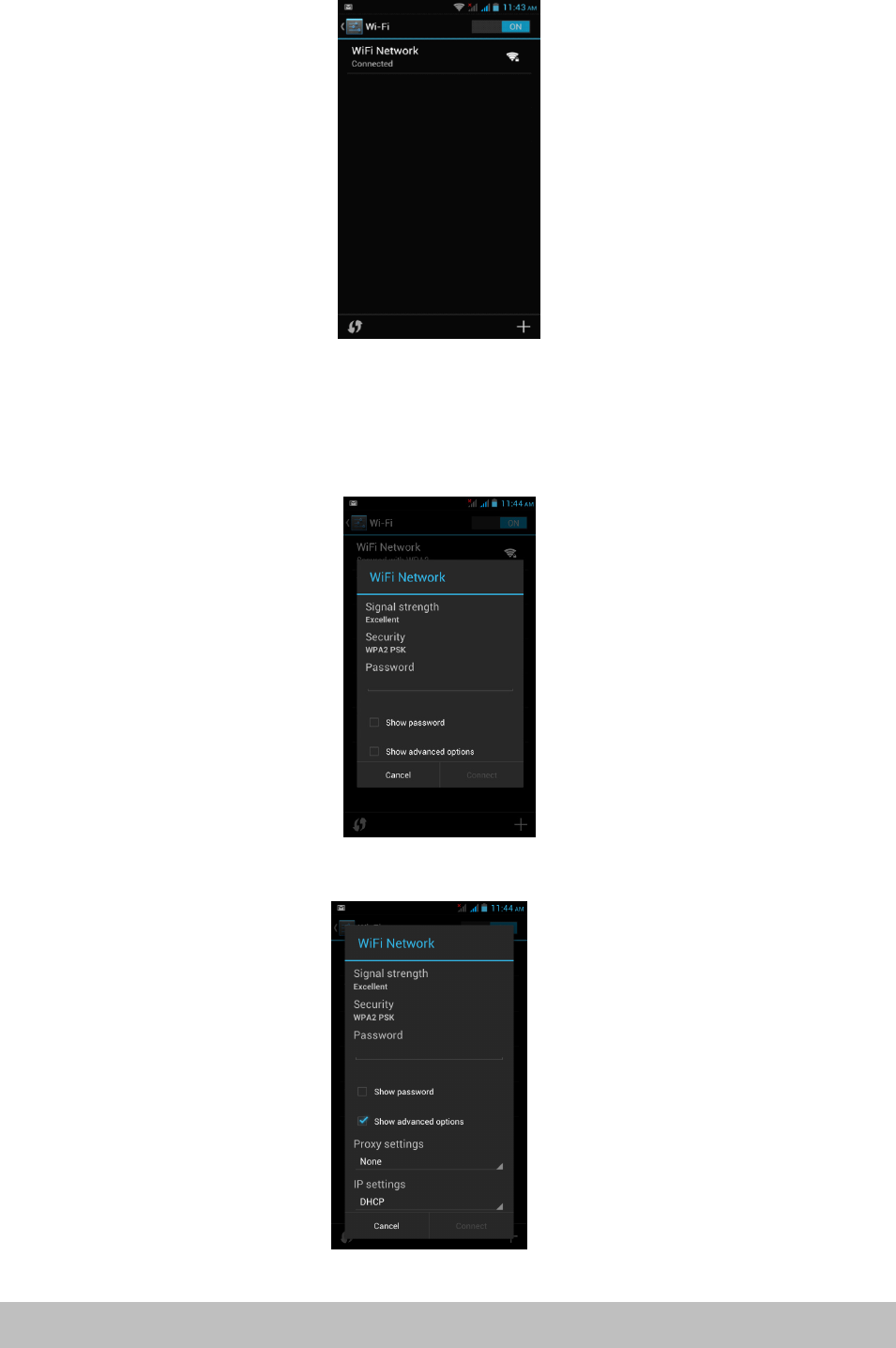
�Tap“Wi-Fi”toopenthe“Wi-Fi”function
�
To
therightofthe“Wi-Fi”labelisthebuttontoenableanddisable“Wi-Fi
”
.
�Presstheon/offbuttontoturnthe“Wi-Fi”functiononoroff
�Clickonthenetworkyouwishtoconnectto.
Page26Settings
Connecting
Connecting
Connecting
ConnectingWi-Fi
Wi -Fi
Wi-Fi
Wi-Fi
WhentheWi-Finetworkisnotprotected,itwillconnectwiththedevice
automatically.Forinformationsecurityreasons,becarefulusingunprotectedWi-Fi
sources.WhenyouclickonaprotectedWi-Fi,awindowwillpopuptoinputa
password.
TherearemoreusefuladvancedWi-Fisettingswhenyouchooseto“Showadvanced
options
”
.
Page27Settings
Bluetooth
Bluetooth
Bluetooth
Bluetooth
1.Tap“Settings” atthemainmenuorapplicationslist.
2.Inthewireless&networks”menu,tap“Bluetooth
”
.
3.Taptheon/offbuttoninthemenuonthelefttoturn“Bluetooth”onoroff.
Change
Change
Change
ChangeBluetooth
Bl uetooth
Bluetooth
Bluetoothdevice
de vice
device
devicename
na me
name
name
Bydefault,theBluetoothdevicewillhaveaname.
To
makeyourdevicesmoreeasily
identifiable,youcanrenameitasfollows.
1.Goto“Settings”>“Wireless&networks”andmakesureBluetoothison.
2.Choose“Bluetooth
”
.
3.Inputthenewname.
Pair
Pair
Pair
Pairwith
wi th
with
withother
ot her
other
otherBluetooth
Bl uetooth
Bluetooth
Bluetoothdevice
de vice
device
device
Tap“Searchfordevices
”
,thedevicewillscanforallavailableBluetoothdevices.Ifit
cannotfindtheoneyouwant,checkiftheotherdeviceBluetoothison.
TapaBluetoothIDto
pair.
Ifitispasswordprotected,inputthepasswordatboth
devices.
Device
Device
Device
Device
Audio
Audio
Audio
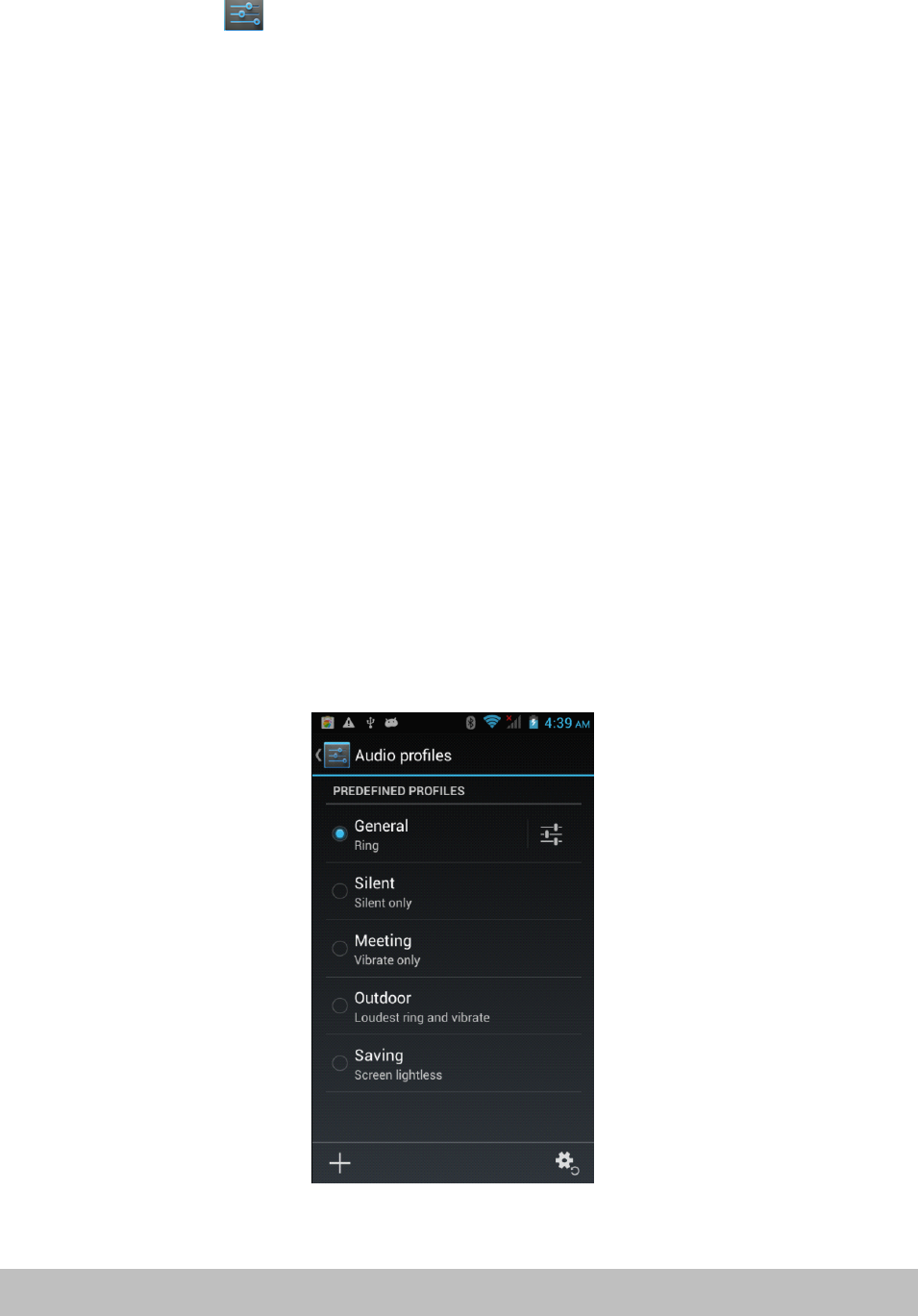
Audioprofiles
pr ofiles
profiles
profiles
Setallsoundoptionshere.
Clickon“Volumes”tochangethevolumelevelsformultimediaplayersand
applicationsandalsofornotificationsandalarms.
Display
Display
Display
Display
Youcansetbrightness,wallpaper,auto-rotate,andfontsizeoptions.
Page28Settings
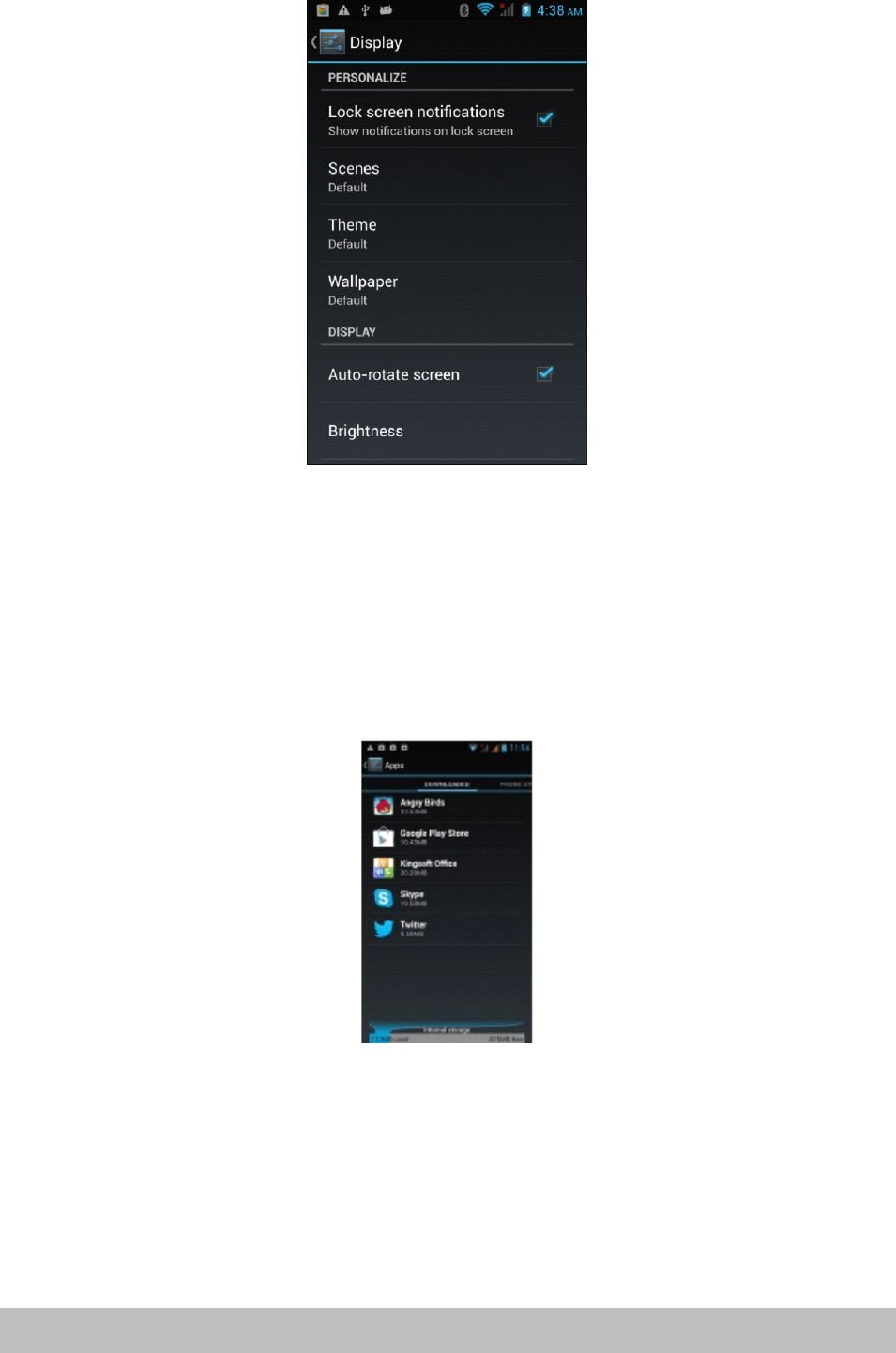
Storage
Storage
Storage
Storage
Internalstorage:spaceforinstallationofapplications(APKsoftware)
ExternalSD:storagespaceontheremovableSDcard(ifinserted)
Battery
Battery
Battery
Battery
Showbatterybalanceandconsumption.
Applications
Applications
Applications
Applications
Hereyoucanmanageapplications,suchasuninstallthemorclearapplicationdata.
Personali
Personali
Personali
Personaliz
z
z
zation
at ion
ation
ation
Location
Location
Location
Locationaccess
ac cess
access
access
AllowsyoutoenableordisablethevariouslocationservicessuchasGPS.
Page29Settings
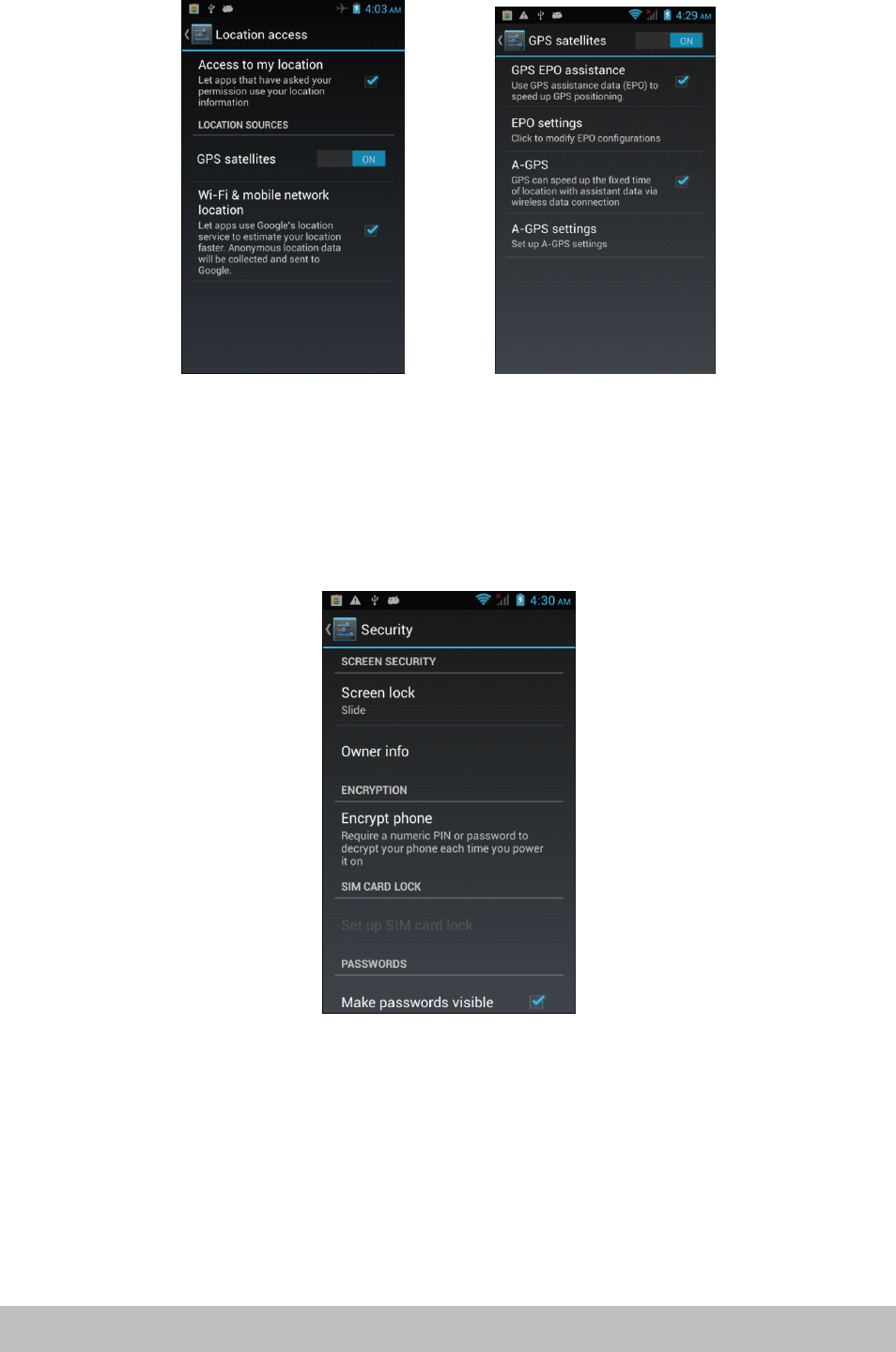
Security
Security
Security
Security
Thesecuritymenucontainsmanyusefuloptionsforsecuringyour3GSmartphone
anddata.
Screen
Screen
Screen
Screenlock:
lo ck:
lock:
lock:Changeorsetaprotectionmethodforlockingscreen.
Owner
Owner
Owner
Ownerinfo:
in fo:
info:
info:Entertextthatwillbedisplayedonthelockscreen.Thisisamessage
thatotherscanseewithouthavingtounlockphone.
Encrypt
Encrypt
Encrypt
Encryptphone:
ph one:
phone:
phone:
Applyencryptiontoalldataonthe3GSmartphone.AlsorequiresyoutoenteraPIN
orpasswordtouseyourphoneeachtimeyouturniton.
WARNING:
WARNING:
WARNING:
WARNING:DatacannotberecoveredifyouforgetthePINorpasswordyouset!
Unknown
Unknown
Unknown
UnknownSource:
So urce:
Source:
Source:Enablethisifyouwishtoinstallapplications(APKfiles)thatare
notfrom“PlayStore
”
.
NOTE:
NOTE:
NOTE:
NOTE:Ifyouforgetthescreenlockpassword,PINorpattern,youmustperforma
firmwareresetonthedevice.Passwordscannotberecovered.
Page30Settings
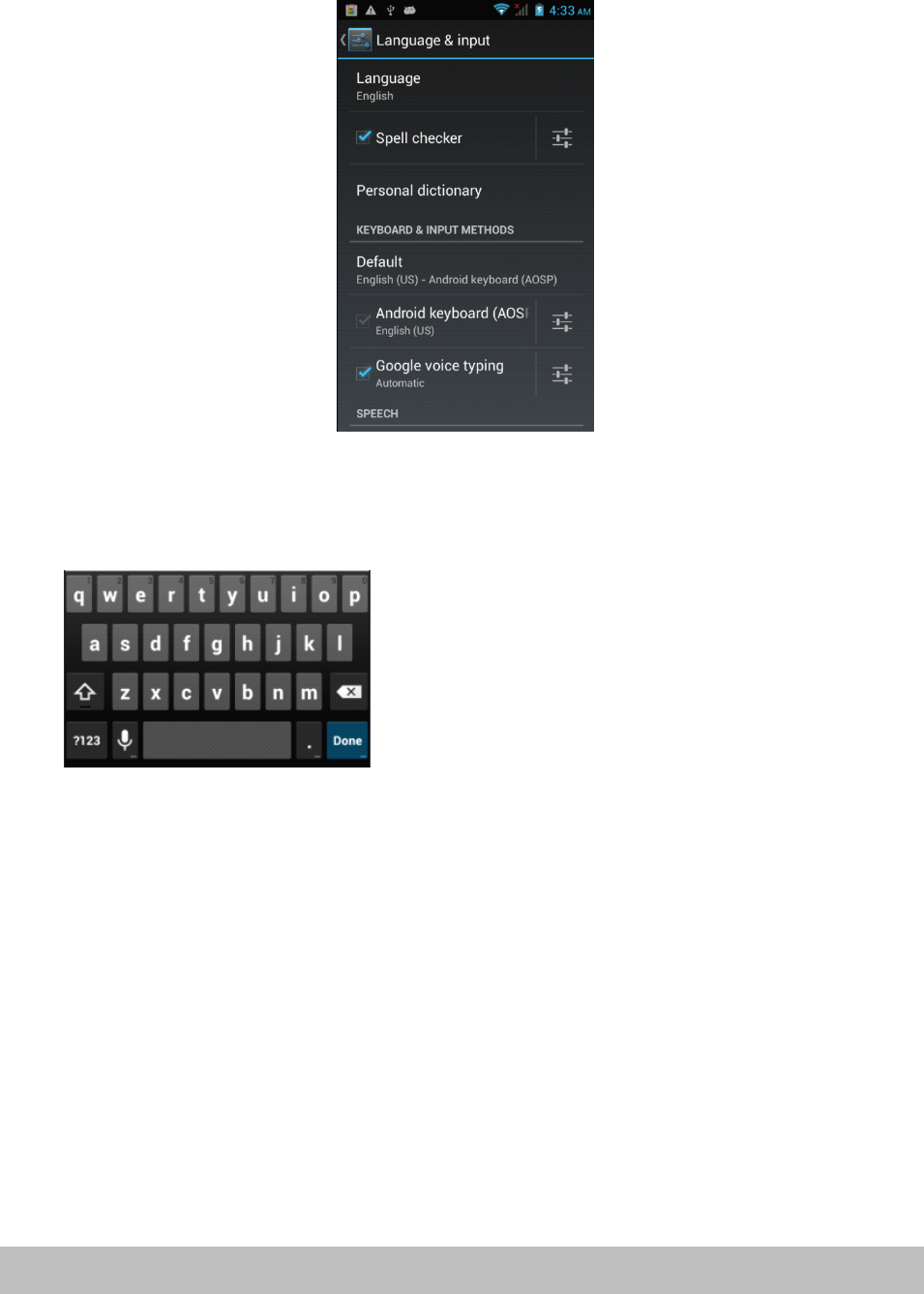
Language
Language
Language
Languageand
an d
and
andinput
in put
input
input
Inthisareayoucanchangethesystemlanguageandchangesettingsforthe
keyboard.
Keyboard
Keyboard
Keyboard
Keyboard
Someapplicationscanopenthekeyboardautomatically;othersrequireyoutoclick
inaninputfield/areafirst.
YoucanhidethekeyboardbyholdingdowntheBackbutton.
Text
Text
Text
Text
selection
se lection
selection
selection-
-
-
-Copy,
Co py,
Copy,
Copy,Share,
Sh are,
Share,
Share,Find
Fi nd
Find
Find
�Pressandholdononeofthewordsyouwishtoselect.Thewordwillhighlightin
blueandabluetapwillappearatbothends.
�Pressanddragthebluetabstohighlightthetextyouwishtoselect.
�Choosethetaskyouwishtoperformfromthemenuthatappearsatthetopof
thescreen.
Text
Text
Text
Text
selection
se lection
selection
selection–
–
–
–Paste
Pa ste
Paste
Paste
�Oneyouhaveusedtheabovemethodtocopytexttotheclipboard,pressand
holdonafileinanapplicationorareaofadocumentwhereyouwishtoinput
thecopiedtext.
�Abluetabwillappear,dragittothepositionyouwantthetextinserted,then
click“Paste
”
.
Page31Settings

Other
Other
Other
Otheroperations
op erations
operations
operations
�
To
inputcapitalletters:
�Presstheshift buttonorkeeppressingonshift whileinputtingletters.
To
To
To
To
switch
sw itch
switch
switchto
to
t o
tocapital
ca pital
capital
capitalletters:
le tters:
letters:
letters:
�Pressandholdtheshift buttonwhilealowcasemode,theiconwillchange
into.Pressagaintoswitchbacktolowercasemode
�Featuresandnumbers:
�Pressthe“?123”button.Youcanthenpressthe“~\{”buttonformorechoices.
Frequently
Frequently
Frequently
Frequentlyused
us ed
used
usedsymbols:
sy mbols:
symbols:
symbols:
�Pressandholdasymbolbuttontoenterthealternatesymboldisplayedingrey
aboveit.
�Pressshift andclickthespecialsymbolwhichisshowningreyatthecorner
andofanyletterstoinputthesymbol.
Mouse/trackpad
Mouse/trackpad
Mouse/trackpad
Mouse/trackpad
Thisallowsyoutoadjustthepointerspeedofanyattachedmouseortrackpaddevice,
suchasaBluetoothmouse.
Backup
Backup
Backup
Backupand
an d
and
andreset
re set
reset
reset
Reset
Reset
Reset
Resetto
to
t o
tofactory
fa ctory
factory
factorysettings:
se ttings:
settings:
settings:Whensomeapplicationsorthephoneitselfdowork
properly,youcanusethisfunctiontoreturnthe3GSmartphonetofactorydefault
settings.Butyouwilllosealluserinstalledapplicationsanddata.Itistherefore
importantthatyoubackupimportantdatafirst.
System
System
System
System
Date
Date
Date
Dateand
an d
and
andtime
ti me
time
time
Containsoptionsforsettingthedate,timeandtimezone
Accessibility
Accessibility
Accessibility
Accessibility
Containssettingsforeasyuseofapplicationsandservices(ifinstalled)
About
About
About
About
Displayssomeinformationaboutthedevice
Camera
Camera
Camera
Camera
Page32Settings

Thecamerahasphoto-takingandvideo-recordingfunctions.Therearetwocameras
onthephone.
Youcanfindyourcameraphotosandvideofootageat>Applications>Gallery,orsee
cameravideosandallothervideofilesat>Applications>VideoPlayer
Click totakephotos.
�ThefirsttimeyouopentheCameraapplicationashortanimationwillplay
showingyouhowtousethecameraoptions…
Downloaded
Downloaded
Downloaded
Downloadedfiles
fi les
files
filesmanagement
ma nagement
management
management
Whendownloadingfiles,youcancheckdownloadstatus,view,reopenordelete
themusing“Downloadmanagement
”
.
Manage
Manage
Manage
Managedownloaded
do wnloaded
downloaded
downloadedfiles
fi les
files
files
�Applications>Downloadedfiles
�Tapanyonetoopenit.
�Chooseanyfileyouwanttosharewithothers,thentap“Sharing” ,then
chooseawaytoshare
�Chooseanyfileyouwanttodeletebytapping.
�Click“Bysize”or“Bydate”toarraythefiles.
Radio
Radio
Radio
Radio
To
useyour3GSmartphonetolistentotheradio,firstinsettheearphones,thentap
“FMRadio
”
.
Selectable
Selectable
Selectable
Selectablechannel
ch annel
channel
channel
�Tap“OK”toselect or icontoscanthefrequencybandorfine-tunea
channel.
Adjust
Adjust
Adjust
Adjustthe
th e
the
thevolume
vo lume
volume
volume
�Tapmenu,thenselectthe“Mute”andmutethesound;select“Mute”againto
restorethesound.
�Withtheearphonesdisconnected,tap“Menu
”
,thenselect“Speaker”tolistento
theradiovolumethroughtheexternalspeaker.
Scan
Scan
Scan
Scanand
an d
and
andsave
sa ve
save
save
Pressthesettingbuttonand“Select&save”
Ifyoutap“OK
”
,allpresetswillberemovedandtheradiowillscanforavailable
channels.
Page33Settings

Specifications
Specifications
Specifications
Specifications
CPU MTK6572DualCore1.2GHzCortexASeries
OS Android4.2
Display 4.3”
Resolution 800x480resolution
Internalmemory Built-in4GB
RAM 512MB
Touchscreen Capacitivescreen(5points)
Battery Built-in1350mAh(removable)
WiFi IEEE802.1b/g/n
Bluetooth Version2.1+EDR
SIM DualSIM/Standby
2G/3Gmodule 2G:GPRS/EDGE,3G:WCDMA/HSPA
Frequency UMTS(850/1900)MHz;
GPS Built-inGPSmodule
Gsensor ScreenRotationsensor
Cameras Front:0.3MP,rear:2.0MPAutoFocus
MicroSD Supportsupto32GBMicroSDHCclass10cards
Microphone Built-inmicrophone
I/OPorts 1x3.5mmHands-freeHeadphonesocket
1xMicroUSB
1xMicroSDCard(Coveredbybatterycase)
1xMiniSIMCard
1xMicroSIMCard
Page34Specifications

Repair Repair Repair Repairand and and andRefurbished Refurbished Refurbished Refurbished
Goods Goods Goods Goodsor or or orParts Parts Parts PartsNotice Notice Notice Notice
Unfortunately,fromtimetotime,faultyproductsaremanufacturedwhichneedto
bereturnedtothesupplierforrepair.
Pleasebeawarethatifyourproductiscapableofretaininguser-generateddata
(suchasfilesstoredonacomputerharddrive,telephonenumbersstoredona
mobiletelephone,songsstoredonaportablemediaplayer,gamessavedonagames
consoleorfilesstoredonaUSBmemorystick)duringtheprocessofrepair,someor
allofyourstoreddatamaybelost.We We We Werecommend recommend recommend recommendyou you you yousave save save savethis this this thisdata data data dataelsewhere elsewhere elsewhere elsewhere
prior prior prior priorto to to tosending sending sending sendingthe the the theproduct product product productfor for for forrepair. repair. repair. repair.
Youshouldalsobeawarethatratherthanrepairinggoods,wemayreplacethem
withrefurbishedgoodsofthesametypeoruserefurbishedpartsintherepair
process.
Page35RepairandRefurbished

Warranty Warranty Warranty WarrantyDetails Details Details Details
Theproductisguaranteedtobefreefromdefectsinworkmanshipandpartsfora
periodof12monthsfromthedateofpurchase.Defectsthatoccurwithinthis
warrantyperiod,undernormaluseandcare,willberepaired,replacedorrefunded
atourdiscretion,solelyatouroptionwithnochargeforpartsandlabour.The
benefitsconferredbythiswarrantyareinadditiontoallrightsandremediesin
respectoftheproductthattheconsumerhasundertheCompetitionandConsumer
Act2010andsimilarstateandterritorylaws.
OurgoodscomewithguaranteesthatcannotbeexcludedunderthePanama
ConsumerLaw.Youareentitledtoareplacementorrefundforamajorfailureand
forcompensationforanyotherreasonablyforeseeablelossordamage.Youarealso
entitledtohavethegoodsrepairedorreplacedifthegoodsfailtobeofacceptable
qualityandthefailuredoesnotamounttoamajorfailure.
Page36WarrantyDetails
48
FCC RF Exposure Information and Statement
The SAR limit of USA (FCC) is 1.6 W/kg averaged over one gram of tissue.
Device types: Z100(FCC ID: 2ABWM-Z100) has also been tested against this
SAR limit. The highest SAR value reported under this standard during product
certification for use at the ear is 1.155W/kg and when properly worn on the body
is 0.746W/kg. This device was tested for typical body-worn operations with the
back of the handset kept 1.0cm from the body. To maintain compliance with FCC
RF exposure requirements, use accessories that maintain a 1.0cm separation
distance between the user's body and the back of the handset. The use of belt
clips, holsters and similar accessories should not contain metallic components
in its assembly. The use of accessories that do not satisfy these requirements
may not comply with FCC RF exposure requirements, and should be avoided.
This device complies with part 15 of the FCC rules. Operation is subject to the
following two conditions: (1) this device may not cause harmful interference,
and (2) this device must accept any interference received, including
interference that may cause undesired operation.
NOTE: The manufacturer is not responsible for any radio or TV interference
caused by unauthorized modifications to this equipment. Such modifications
could void the user’s authority to operate the equipment.
NOTE: This equipment has been tested and found to comply with the limits for
a Class B digital device, pursuant to part 15 of the FCC Rules. These limits
are designed to provide reasonable protection against harmful interference in
a residential installation. This equipment generates uses and can radiate
radio frequency energy and, if not installed and used in accordance with the
instructions, may cause harmful interference to radio communications.
However, there is no guarantee that interference will not occur in a particular
installation.
If this equipment does cause harmful interference to radio or television
reception, which can be determined by turning the equipment off and on, the
user is encouraged to try to correct the interference by one or more of the
following measures:
- Reorient or relocate the receiving antenna.
- Increase the separation between the equipment and receiver.
-Connect the equipment into an outlet on a circuit different from that to which
the receiver is connected.
-Consult the dealer or an experienced radio/TV technician for help.