Pdf GTB UHD600 HBTL Manual
2018-01-03
: Manual Pdf Gtb-Uhd600-Hbtl Manual pdf_GTB-UHD600-HBTL_manual GTB-UHD600-HBTL products
Open the PDF directly: View PDF  .
.
Page Count: 30
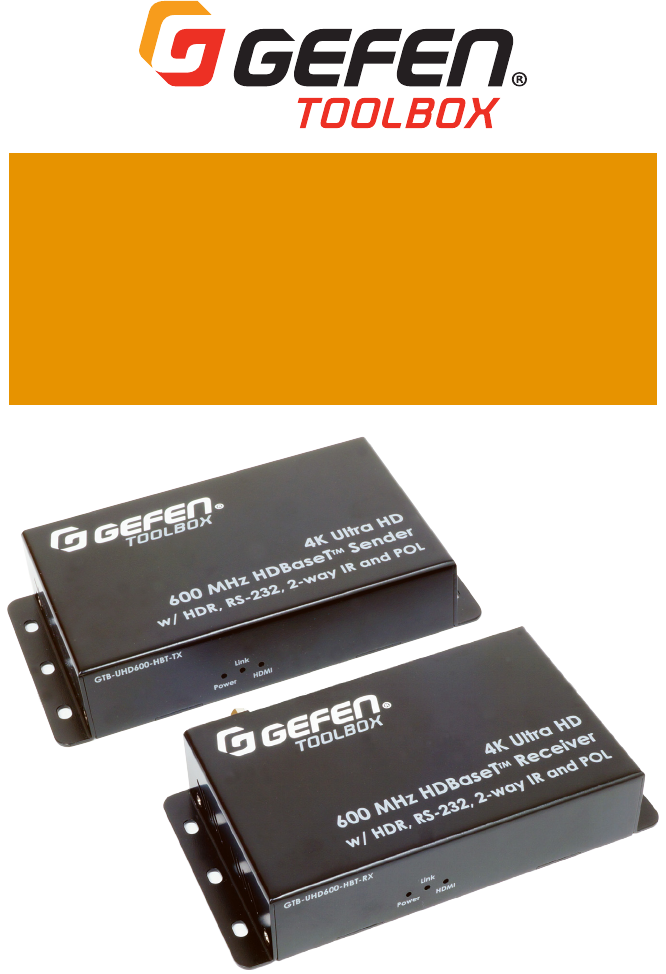
GTB-UHD600-HBT
GTB-UHD600-HBTL
User Manual
Version A2
4K Ultra HD 600 MHz
HDBaseT™ Extenders

2
Important Safety Instructions
1. Read these instructions.
2. Keep these instructions.
3. Heed all warnings.
4. Follow all instructions.
5. Do not use this product near water.
6. Clean only with a dry cloth.
7. Do not block any ventilation openings. Install in accordance with the manufacturer’s
instructions.
8. Do not install or place this product near any heat sources such as radiators, heat registers,
9. Do not defeat the safety purpose of the polarized or grounding-type plug. A polarized
plug has two blades with one wider than the other. A grounding type plug has two blades
and a third grounding prong. The wide blade or the third prong are provided for your
-
ment of the obsolete outlet.
10. Protect the power cord from being walked on or pinched particularly at plugs,
convenience receptacles, and the point where they exit from the apparatus.
11.
12. To reduce the risk of electric shock and/or damage to this product, never handle or touch
this unit or power cord if your hands are wet or damp. Do not expose this
product to rain or moisture.
13. Unplug this apparatus during lightning storms or when unused for long periods of time.
14.
apparatus has been damaged in any way, such as power-supply cord or plug is
damaged, liquid has been spilled or objects have fallen into the apparatus,
the apparatus has been exposed to rain or moisture, does not operate normally,
or has been dropped.
15. Batteries that may be included with this product and/or accessories should never be
according to the instructions.


4
Contact Us
Technical Support
1-707-283-5900 1-800-472-5555
Email
support@gefen.com
Web
http://www.gefen.com
Mailing Address
Gefen
Core Brands, LLC
© 2017 Core Brands, LLC. All Rights Reserved.
All trademarks are the property of their respective owners.
Gefen and Core Brands, LLC reserve the right to make changes in the hardware,
packaging, and any accompanying documentation without prior notice.

5
Operating Notes
•
Important
•
6A may be acceptable depending on cable quality. Care should always be given
to keep these cables away from power lines and other sources of electromagnetic
interference.
• Cable quality is critical when handling 600 MHz HDMI signals. We highly
recommend 10-foot or shorter Gefen Locking HDMI cables. They have been
designed and tested to work at 600 MHz and reliably transport the the full 18.2
Gbps throughput of HDMI 2.0.
•
under a self-adhesive cover. This product is shipped with its DIP switches set to
• The GTB-UHD600-HBT and GTB-UHD600-HBTL vary in maximum extension
distances, based on resolution / timing and color depth. Refer to the Features
section on pages 6 and 7 for more information .
•
power over the link cable. The GTB-UHD600-HBT and GTB-UHD600-HBTL feature
• The information in this manual has been carefully checked and is believed
to be accurate. However, Gefen and Core Brands, LLC assume no responsibility for
any inaccuracies that may be contained in this manual. In no event will Gefen and
Core Brands, LLC be liable for direct, indirect, special, incidental, or consequential
damages resulting from any defect or omission in this manual.
• All information contained herein is subject to change without notice.
This product uses UL-Listed power supplies

6
Features (GTB-UHD600-HBT)*
•
•
*
*
*
•
*
* HDR-10: 10-bit color at 4K 60 Hz 4:2:0 and 4K 24 Hz 4:4:4
* Dolby® Vision™ HDR: 12-bit color at 4K 60Hz 4:2:0 and 4K 24 Hz 4:4:4
* HDCP 2.2 and 1.4
*
* Uncompressed LPCM digital audio up to 7.1 channels
*
* 3DTV pass-through
* CEC pass-through
*
•
•
•
•
cable - only one side will need external power
• Uses Gefen’s implementation of HDBaseT™ technology with proprietary algorithms and
enhanced features
• Advanced EDID Management
•
• Locking power connector
•
•
• Compact enclosures are easy to install and can be hidden away
All trademarks and registered trademarks are properties of their respective owners.
Features & Packing List

7
Features (GTB-UHD600-HBTL)*
•
•
*
*
*
•
*
* HDR-10: 10-bit color at 4K 60 Hz 4:2:0 and 4K 24 Hz 4:4:4
* Dolby® Vision™ HDR: 12-bit color at 4K 60Hz 4:2:0 and 4K 24 Hz 4:4:4
* HDCP 2.2 and 1.4
*
* Uncompressed LPCM digital audio up to 7.1 channels
*
* 3DTV pass-through
* CEC pass-through
*
•
•
•
cable - only one side will need external power
• Uses Gefen’s implementation of HDBaseT™ technology with proprietary algorithms and
enhanced features
• Advanced EDID Management
•
• Locking power connector
•
•
• Compact enclosures are easy to install and can be hidden away
All trademarks and registered trademarks are properties of their respective owners.
Features & Packing List

8
Packing List* (GTB-UHD600-HBT)
The following items are included in the GTB-UHD600-HBT package. If any of these items are
as possible.
Packing List* (GTB-UHD600-HBTL)
The following items are included in the GTB-UHD600-HBTL. If any of these items are not
possible.
•
•
•
•
•
•
Features & Packing List
All trademarks and registered trademarks are properties of their respective owners.

9
Table of Contents
Introduction ................................................................................................................... 10
GTB-UHD600-HBT ...............................................................................................................10
GTB-UHD600-HBTL.............................................................................................................. 15
Installation ....................................................................................................................20
Connection Instructions....................................................................................................... 20
..................................................................................................... 21
LED Status ......................................................................................................................22
IR Control .......................................................................................................................23
.............................................................23
..............................................................24
...................25
.............................................................................................26
EDID Management ...............................................................................................................26
RS-232* ...........................................................................................................................27
Firmware Update ..........................................................................................................28
................................................................................................................29
* GTB-UHD600-HBT only
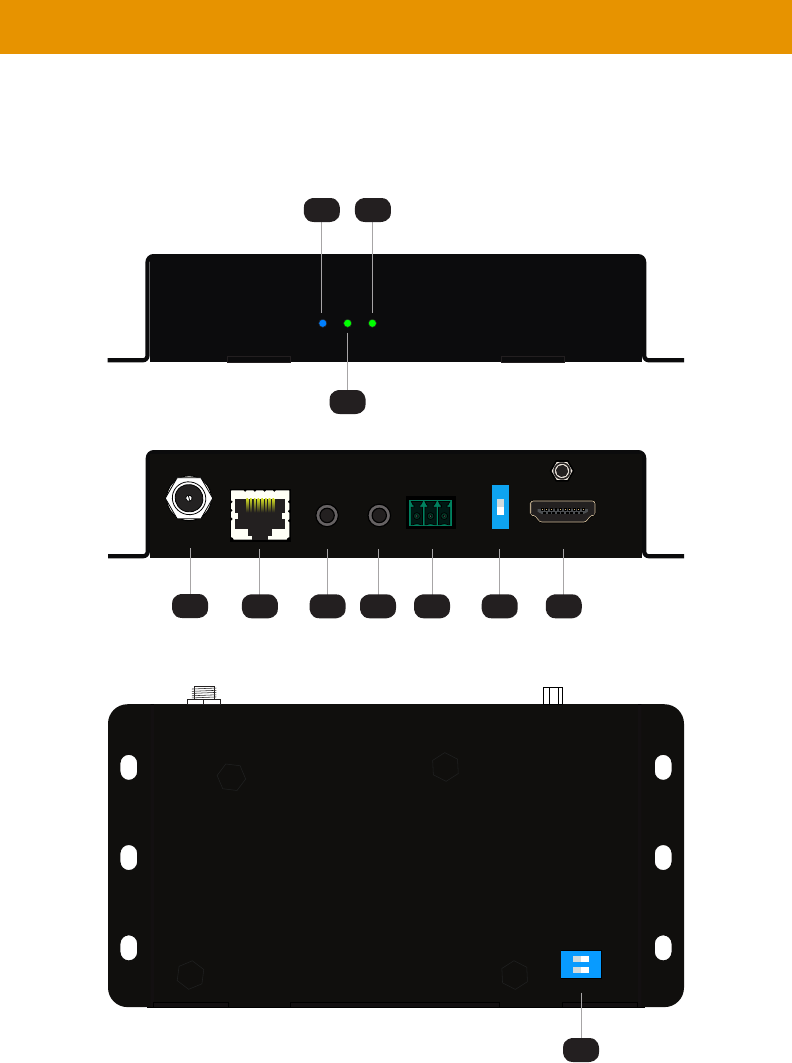
10
GTB-UHD600-HBT-TX
Link
Power HDMI
GTB-UHD600-HBT
31
2
Link
12V DC IR In/Ext HDMI In
IR Out Prog
Tx Rx
On
Off
G
RS-232
ON
1
ON
1 2
45 6 7 8 9 10
11
Introduction

11
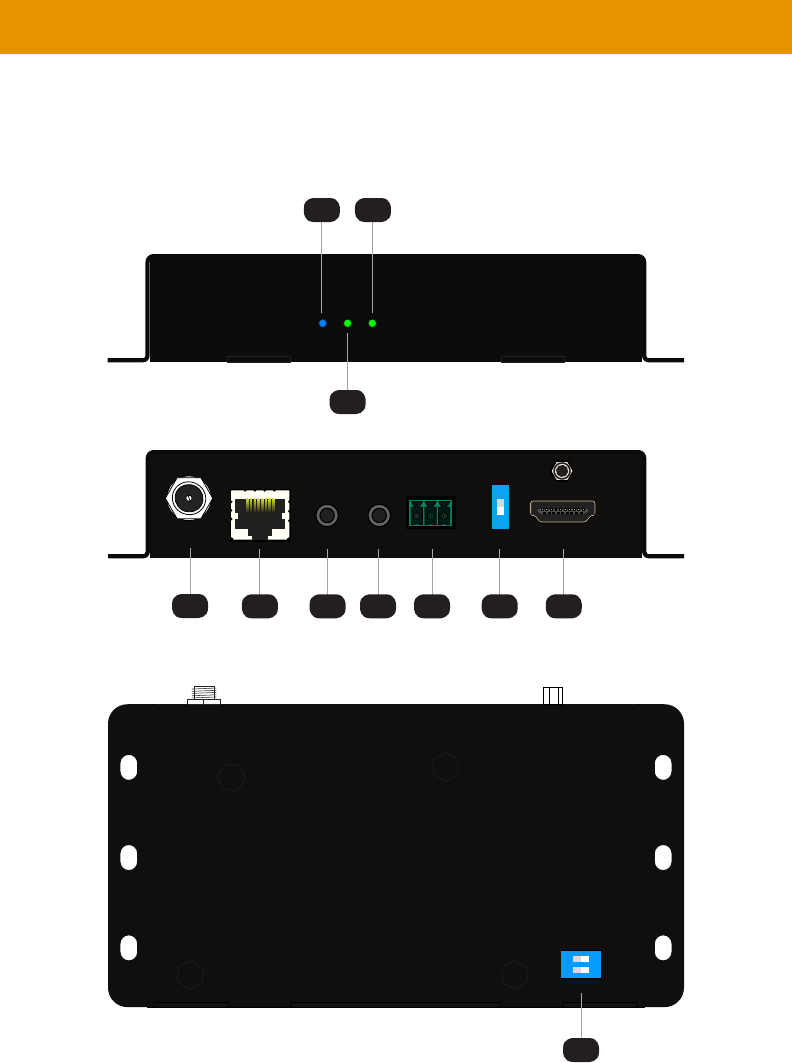
ID Description
1Power This LED indicator glows solid blue when the
for more information.
2 Link This LED glows solid green when a link
for
more information.
3 HDMI This LED indicator glows solid green when
a source is connected to the HDMI In port.
for more
information.
4 12V DC This power receptacle is used to connect the
included 12V DC power supply. Only one power
supply is required for the extender system to
operate. The power supply can be connected
5 Link Connect a CAT-5e or better cable, shielded CAT-
6A preferred, up to the recommended length
for a given resolution, from this port to the Link
port on the Receiver unit.
6 IR In/Ext 3.5mm mini-stereo jack. Connect an IR
to this port. Alternatively, connect a 3.5mm
mini-stereo connector from this port to the
output of an automation system with an
electrical IR output.
for more
information on using IR.
7 IR Out IR Emitter (1 pc
device to be controlled.
for more
information on using IR.
Introduction
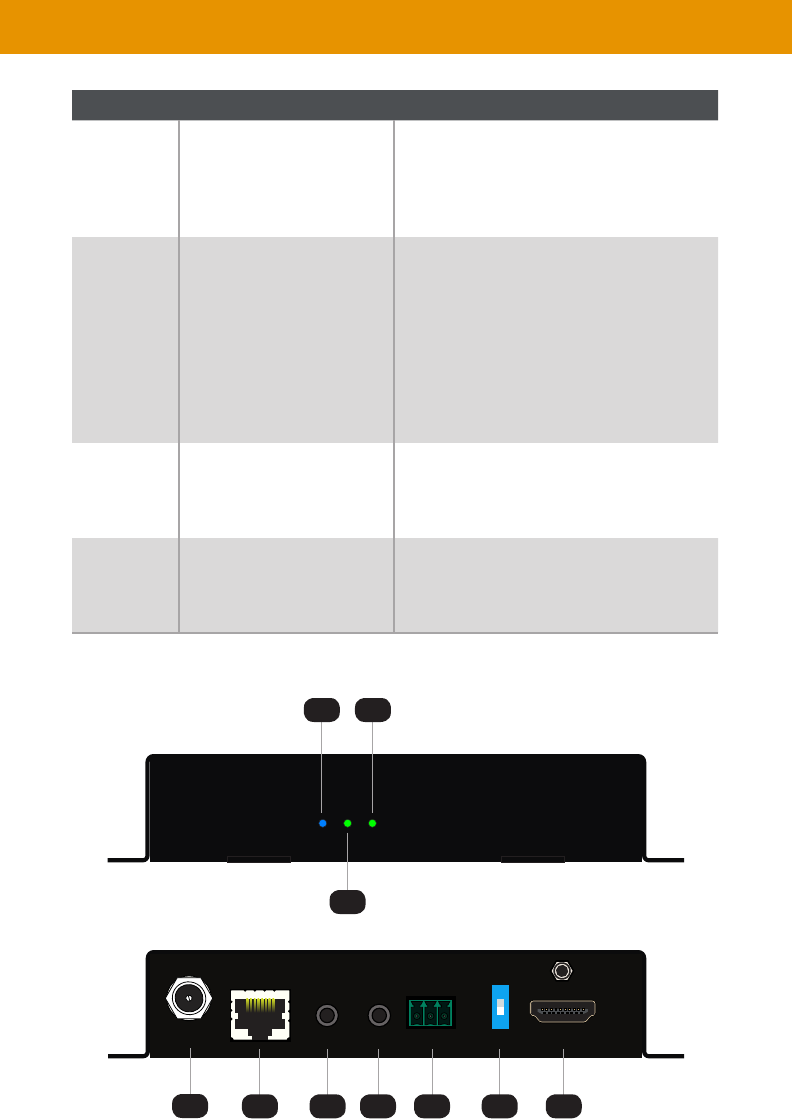
12
Introduction
ID Description
8
an automation control device, using the
connector that is attached to the RS-232
9Prog For normal operation, this switch should be in
the
to the On
or the Receiver switch is in On position,
extenders will not work. For the new setting
10 HDMI In Use the included Locking HDMI cable to
connect an Ultra HD source to this HDMI
port.
11 These DIP switches provide EDID
(page 26 for more information.
GTB-UHD600-HBT-RX
Link
Power HDMI
Receiver Unit
31
2
Link
12V DC IR In/Ext HDMI Out
IR Out Prog
Tx Rx
On
Off
G
RS-232
ON
1
45 6 7 8 9 10

13
Introduction
ID Description
1Power This LED indicator glows solid blue when the
for more information.
2 Link This LED glows solid green when a link
for
more information.
3 HDMI This LED indicator glows solid green when
a source is connected to the HDMI In port.
for more
information.
4 12V DC This power receptacle can be used to connect
the included 12V DC power supply. Only one
power supply is required for the extender
system to operate. The power supply can be
unit.
5 Link Connect a CAT-5e or better cable, shielded CAT-
6A preferred, up to the recommended length
for a given resolution, from this port to the Link
6 IR In/Ext 3.5mm mini-stereo jack. Connect an IR
to this port. Alternatively, connect a 3.5mm
mini-stereo connector from this port to the
output of an automation system with an
electrical IR output.
for more
information on using IR.
7 IR Out IR Emitter (1 pc
device to be controlled.
for more
information on using IR.
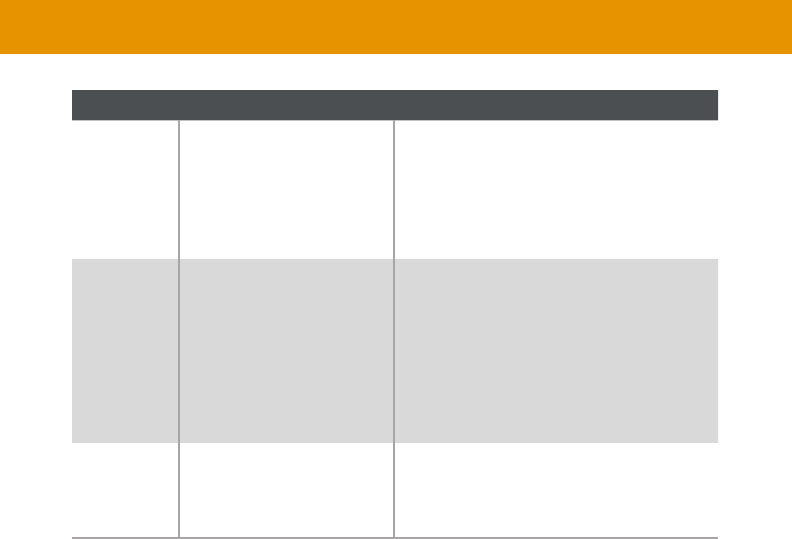
14
Introduction
ID Description
8 Connect Tx, Rx, and Ground from an
automation control device, using the
connector that is attached to the RS-232
port of the Receiver unit.
9Prog For normal operation, this switch should be in
the
to the On
or the Receiver switch is in On position,
extenders will not work. For the new setting
10 HDMI Out Use a Gefen Locking HDMI cable, up to 10
feet long, to connect an Ultra HD display to
this HDMI port.
15
GTB-UHD600-HBTL-TX
Link
Power HDMI
GTB-UHD600-HBTL
31
2
Link
12V DC IR In/Ext HDMI In
IR Out Prog
Tx Rx
On
Off
G
Syner-G™
ON
1
ON
1 2
45 6 7 8 9 10
11
Introduction

16
Introduction
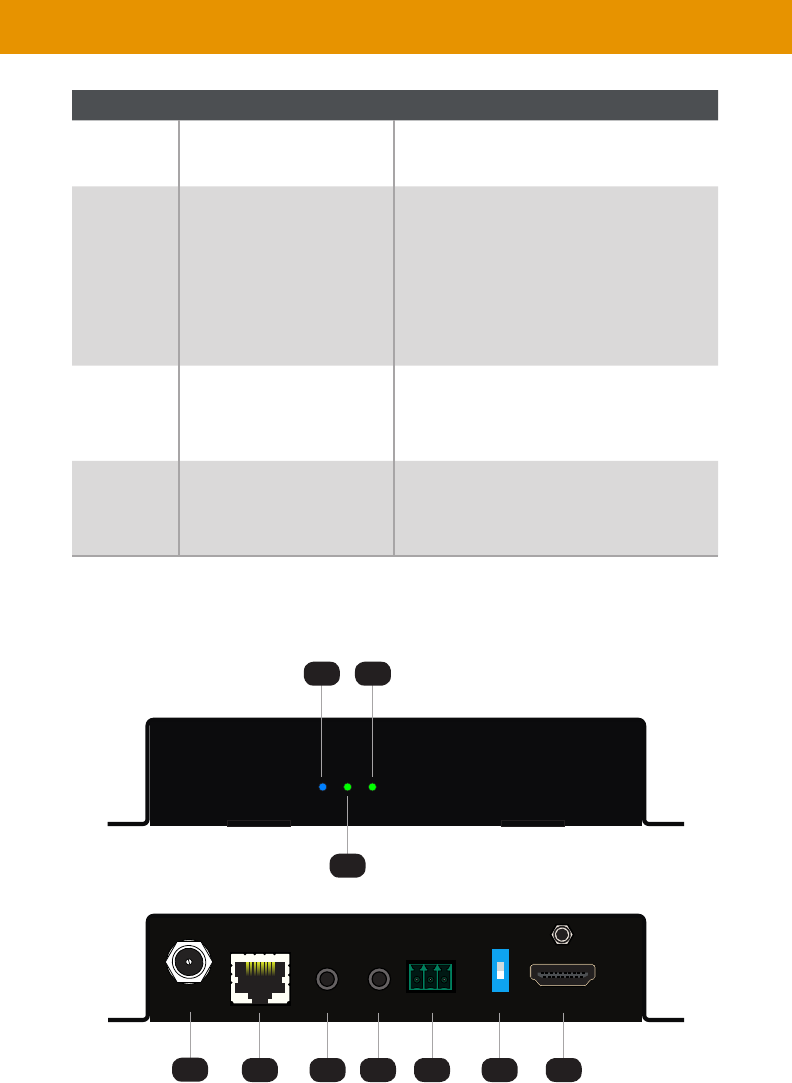
ID Description
1Power This LED indicator glows solid blue when the
for more information.
2 Link This LED glows solid green when a link
for
more information.
3 HDMI This LED indicator glows solid green when
a source is connected to the HDMI In port.
for more
information.
4 12V DC This power receptacle can be used to connect
the included 12V DC power supply. Only one
power supply is required for the extender
system to operate. The power supply can be
unit.
5 Link Connect a CAT-5e or better cable, shielded CAT-
6A preferred, up to the recommended length
for a given resolution, from this port to the Link
port on the Receiver unit.
6 IR In/Ext 3.5mm mini-stereo jack. Connect an IR
to this port. Alternatively, connect a 3.5mm
mini-stereo connector from this port to the
output of an automation system with an
electrical IR output.
for more
information on using IR.
7 IR Out IR Emitter (1 pc
device to be controlled.
for more
information on using IR.
17
Introduction
ID Description
8 This port is used for firmware update using
9Prog For normal operation, this switch should be in
the
to the On
or the Receiver switch is in On position,
extenders will not work. For the new setting
10 HDMI In Use the included Locking HDMI cable to
connect an Ultra HD source to this HDMI
port.
11 These DIP switches provide EDID
(page 26 for more information.
GTB-UHD600-HBTL-RX
Link
Power HDMI
Receiver Unit
31
2
Link
12V DC IR In/Ext HDMI Out
IR Out Prog
Tx Rx
On
Off
G
Syner-G™
ON
1
45 6 7 8 9 10

18
Introduction
ID Description
1Power This LED indicator glows solid blue when the
for more information.
2 Link This LED glows solid green when a link
for
more information.
3 HDMI This LED indicator glows bright blue when an
source is connected to the HDMI In port.
4 12V DC This power receptacle can be used to connect
the included 12V DC power supply. Only one
power supply is required for the extender
system to operate. The power supply can be
unit.
5 Link Connect a CAT-5e or better cable, shielded CAT-
6A preferred, up to the recommended length
for a given resolution, from this port to the Link
6 IR In/Ext 3.5mm mini-stereo jack. Connect an IR
to this port. Alternatively, connect a 3.5mm
mini-stereo connector from this port to the
output of an automation system with an
electrical IR output.
for more
information on using IR.
7 IR Out IR Emitter (1 pc
device to be controlled.
for more
information on using IR.
8 This port is used for firmware update using

19
Introduction
ID Description
9Prog For normal operation, this switch should be in
the
to the On
or the Receiver switch is in On position,
extenders will not work. For the new setting
10 HDMI Out Use a Gefen Locking HDMI cable, up to 10
feet long, to connect an Ultra HD display to
this HDMI port.

20
Installation
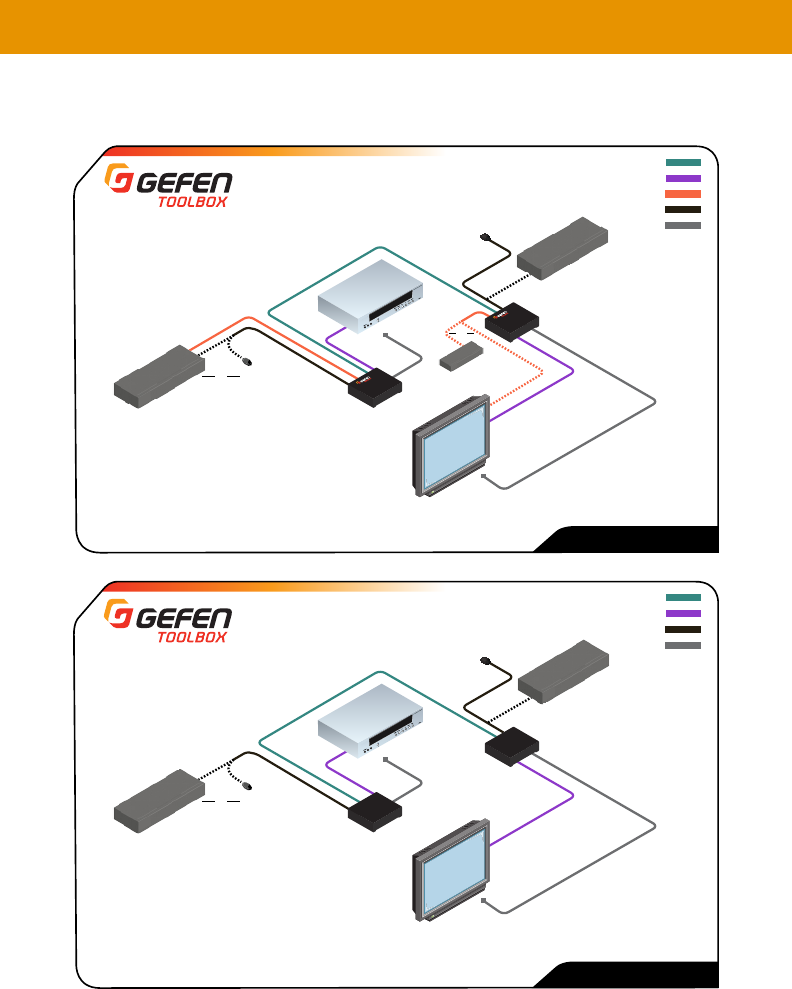
Connection Instructions
►Video
1. Connect the included HDMI locking cable between the Ultra Hi-Def source and the
HDMI In
2. Connect an Ultra HD display to the HDMI Out port on the Receiver unit using another
Gefen HDMI locking cable.
►CAT-5
3. Connect a CAT-5e or better cable, shielded CAT-6A preferred, from the Link port on the
Link port on the Receiver unit.
►IR
4. Refer to for details on connecting IR devices.
►
5.
that is attached to the RS-232
►Power
6.
or Receiver unit. Power to the other unit will be supplied through the Link cable.
7. Connect the AC plug of the power supply to an available electrical outlet.
Note
21
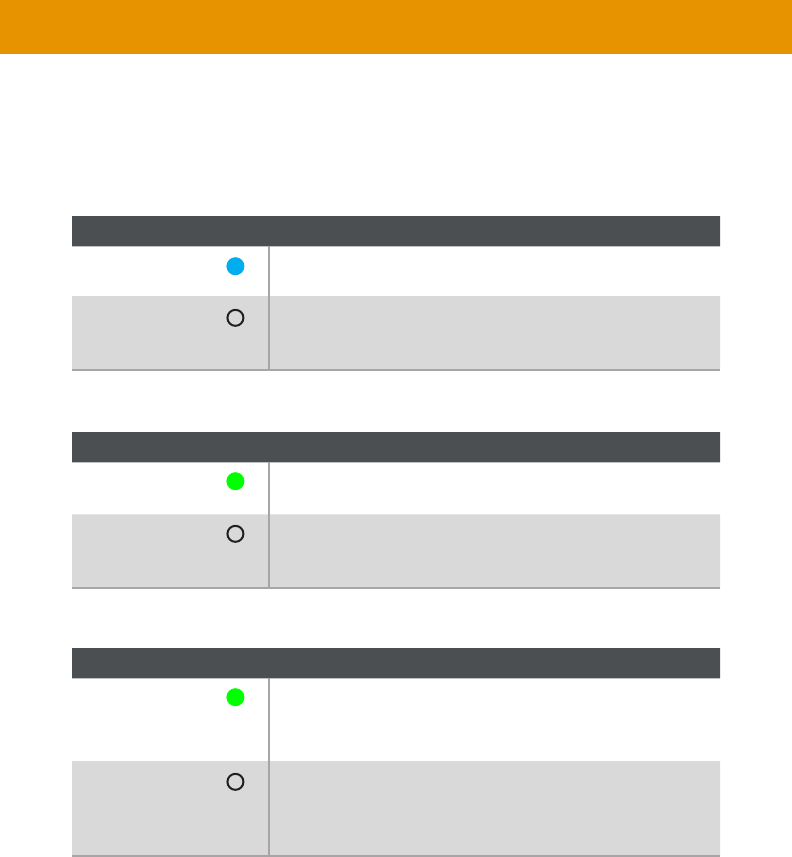
Sample Wiring Diagrams
Installation
IR IN
IR OUT
CAT-5e or better CABLE
HDMI CABLE
IR Emitter
IR Emitter
GTB-UHD600-HBTL
IR Extender
(EXT-RMT-EXTIRN)
OR
Automation
Control Device
OR
Automation
Control Device
IR Extender
(EXT-RMT-EXTIRN)
GTB-UHD600-HBTL-TX
Sender Unit
GTB-UHD600-HBTL-RX
Receiver Unit
4K Ultra HD 600 MHz Display
4K Ultra HD
600 MHz Source
Notes
CAT-5e CABLE
HDMI CABLE
RS232 CABLE
IR IN
RS-232 Controlled
Device
IR Emitter
(EXT-IREMIT)
4K Ultra HD 600 MHz Display
4K Ultra HD
600 MHz Source
GTB-UHD600-HBT-TX
Sender Unit
GTB-UHD600-HBT-RX
Receiver Unit
OR
IR OUT
GTB-UHD600-HBT
IR Extender
(EXT-RMT-EXTIRN)
OR
OR
Automation
Control Device
Automation
Control Device
IR Extender
(EXT-RMT-EXTIRN)
IR Emitter
(EXT-IREMIT)
22
LED Status
The Power, Link, and HDMI
information on the current status of each unit.
Power Description
•
• Check the power supply and the Link connection between
Link Description
•
• Check the power supply and the Link connection between
HDMI Description
•
• Receiver: Display / sink device is connected and powered.
•
to the Receiver unit. Make sure both source and sink are
powered.
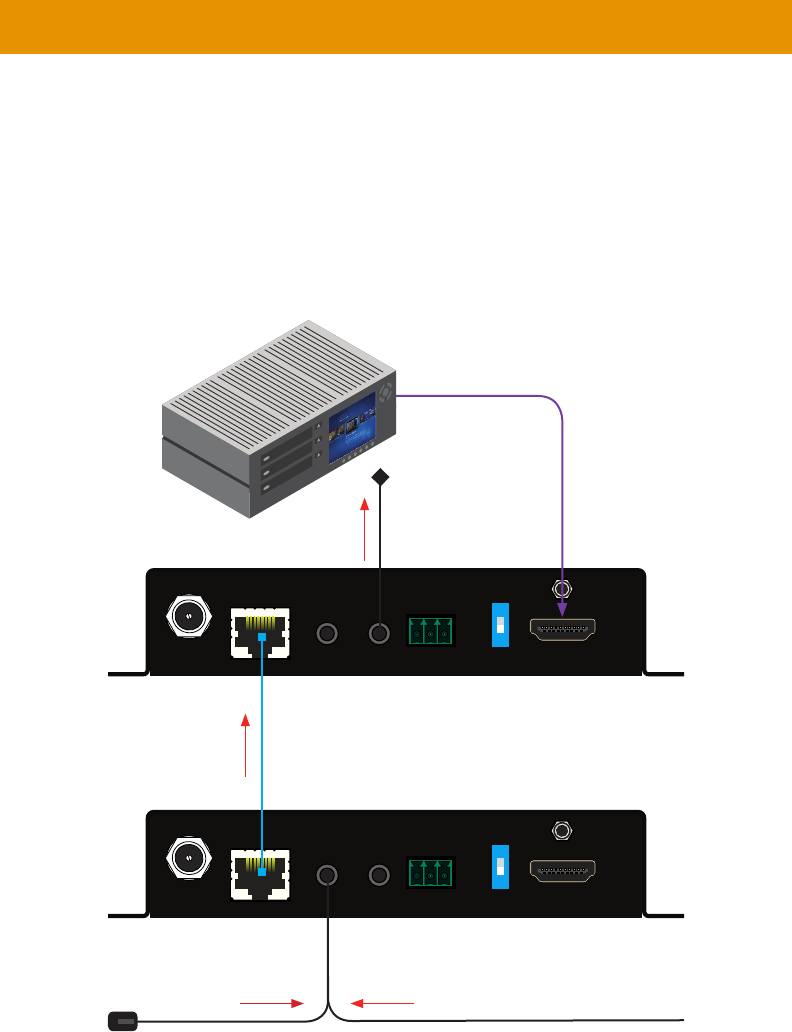
23
1. port on the Receiver
unit. If using an automation system, connect the 3.5mm mini-stereo connector from the IR
port on the Receiver unit to the IR Output port of the automation system. IR signals
will be transmitted over the Link cable.
2. IR Out
unit, to the IR sensor window on the source device.
IR Control
Link
12V DC IR In/Ext HDMI Out
IR Out Prog
Tx Rx
On
Off
G
Syner-G™
ON
1
Link
12V DC IR In/Ext HDMI In
IR Out Prog
Tx Rx
On
Off
G
Syner-G™
ON
1
IR signals
IR signals
IR signals
IR signals
IR extender or from Automation
System
to Ultra HD display
Ultra HD source
Sender unit
Receiver unit
IR emitter
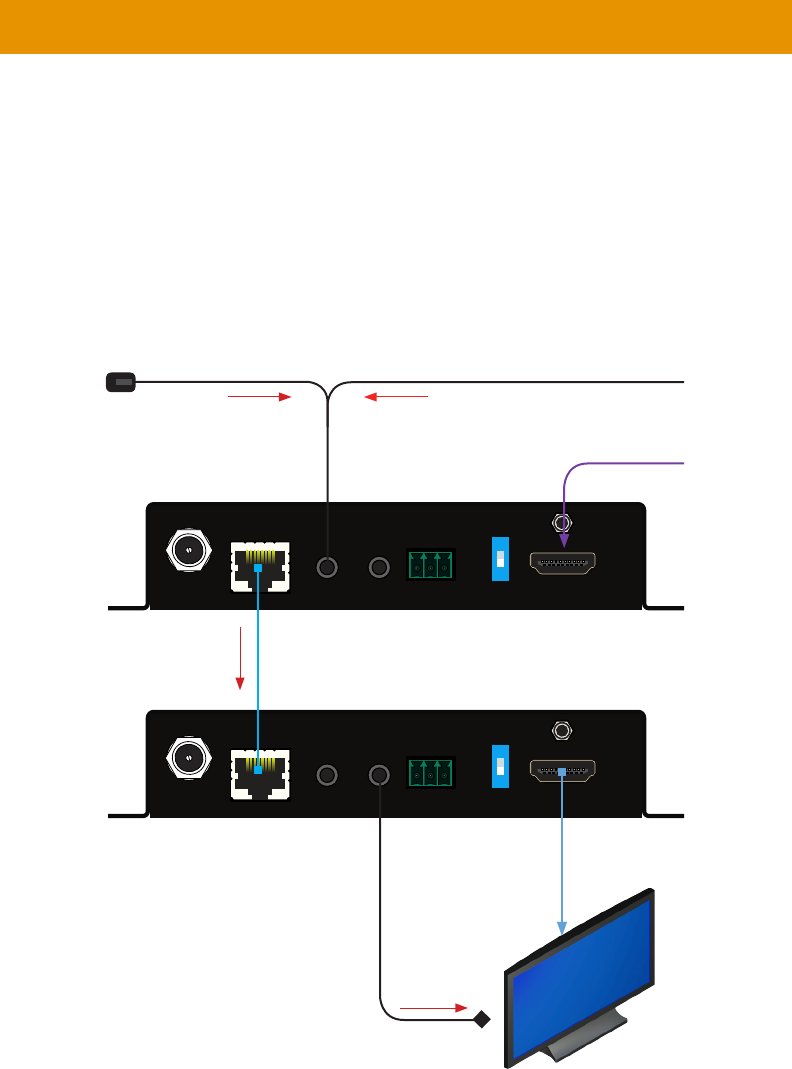
24
1.
unit. If using an automation system, connect the 3.5mm mini-stereo connector from the IR
port on the Receiver unit to the IR Output of the automation system. IR signals will be
transmitted over the Link cable.
2. IR Out port on the Receiver unit to
the IR sensor on the display.
IR extender
Link
12V DC IR In/Ext HDMI Out
IR Out Prog
Tx Rx
On
Off
G
Syner-G™
ON
1
Link
12V DC IR In/Ext HDMI In
IR Out Prog
Tx Rx
On
Off
G
Syner-G™
ON
1
IR signalsIR signals
IR signals
IR emitter
Ultra HD display
or from Automation
System
Sender unit
Receiver unit
from Ultra HD source
IR Control
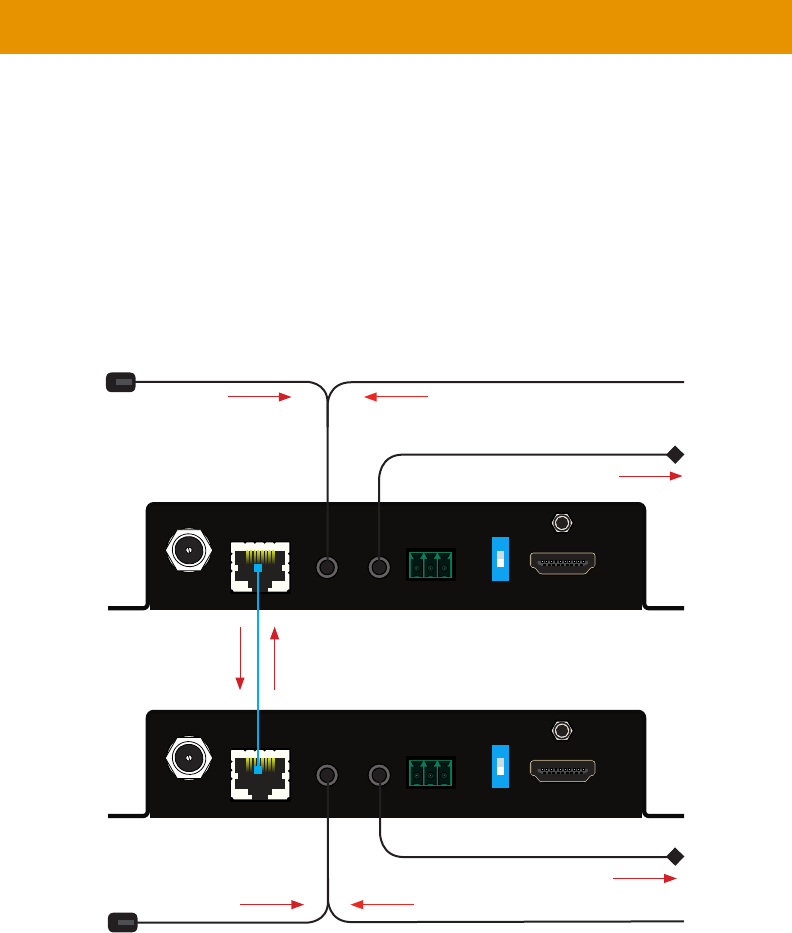
25
1.
your Gefen distributor.
2. Follow instructions on page 23 and 24.
IR Control
Link
12V DC IR In/Ext HDMI Out
IR Out Prog
Tx Rx
On
Off
G
Syner-G™
ON
1
Link
12V DC IR In/Ext HDMI In
IR Out Prog
Tx Rx
On
Off
G
Syner-G™
ON
1
IR signalsIR signals
IR signals
IR emitter
IR emitter
or
IR extender from Automation
System
Sender unit
Receiver unit
IR Signals from
Receiver unit
IR Signals from
Sender unit
IR signalsIR signals
IR extender or from Automation
System
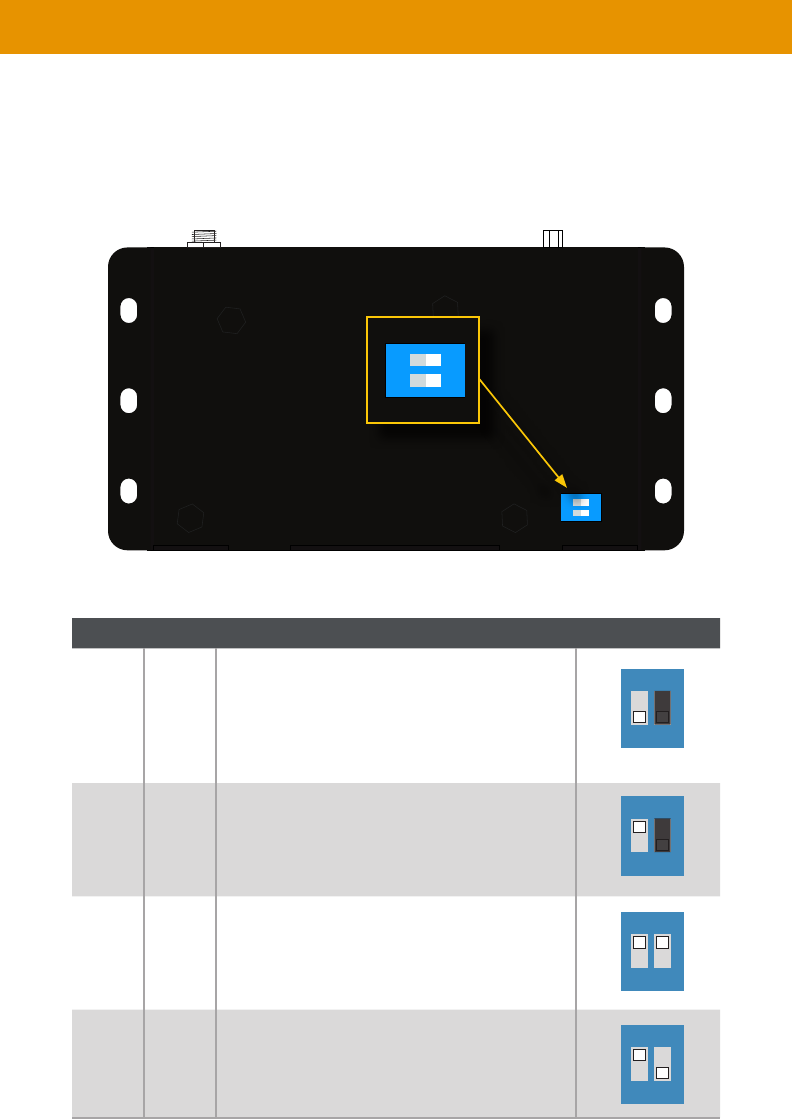
26
DIP Switch Conguration
adhesive cover.
This product is shipped with its DIP switches set to enable 4K with 2-Channel Audio mode
Refer to the table below for DIP switch settings.
EDID Management
EDID Mode
OFF
• Allows all video and audio features of the
connected device to be passed to the source
device.
Internal EDID mode
•
4K 600 Multichannel Audio EDID mode
• 4K 600 MHz w/ Multichannel Audio
OFF
• 4K 600 MHz w/ 2-Channel Audio
ON
1 2
ON
1 2
ON
1 2
ON
1 2
ON
1 2
ON
1 2
27
RS-232*
Connecting RS-232 Devices*
1.
RS-232
has a male DB-9 port and you prefer to not do the wiring, you can purchase an ADA-PH-
2-DB9-MF-AB adaptor cable from your Gefen distributor. This adaptor cable has a female
DB-9 on one end and a 3-pin Phoenix connector on the other.
2. -
RS-232 port of the
you wish to control has a female DB-9 port and you prefer to not do the wiring, you can
purchase an ADA-PH-2-DB9-MM-AB adaptor cable from your Gefen distributor. This
adaptor cable has a male DB-9 on one end and a 3-pin Phoenix connector on the other.
3. -
cation, you can also connect the automation controller to the receiver and the device-to-
be-controlled to the sender.
Important
The Prog switch must be set to the OFF position in order to enable serial (RS-232)
included.
Link
12V DC IR In/Ext HDMI Out
IR Out Prog
Tx Rx
On
Off
G
RS-232
ON
1
* GTB-UHD600-HBT only

28
Firmeware Update
Firmware Update
1.
always update both units.
2.
RS-232 port of the GTB-UHD600-HBT or the port of the GTB-UHD600-HBTL.
adaptor.
3. Remove power from the unit to be updated, by disconnecting the 12V DC power supply
and the Link connector. Make sure that the Prog
On
supply to the 12V DC port and to an available electrical outlet. The power LED will glow to
indicate that the unit is receiving power.
4.
RS-232 or
prefer to not do the wiring, you can purchase an ADA-PH-2-DB9-MF-AB adaptor cable
from your Gefen distributor. This adaptor cable has a female DB-9 on one end and a 3-pin
Phoenix connector on the other.
5.
unit.
6. Once a unit has successfully been updated, remove power from the unit, set the Prog
switch to
29
Maximum Video Resolution/Timing •
•
•
• 1 x HDMI Type A 19-pin, locking, female
• 1 x HDMI Type A 19-pin, locking, female
• 1 x RJ-45, shielded
•
•
• 1 x 3.5mm mini-stereo, female
• 1 x 3.5mm mini-stereo, female
• 1 x 12V DC, locking, 5.5mm barrel/2.1mm pin
• 1 x LED, blue
• 1 x LED, green
• 1 x LED, green
Operational
• 600 MHz
Video Bandwidth • 18.2 Gbps
•
Operating Temperature •
Operating Humidity • 5% to 90% RH, non-condensing
•
• 0% to 95% RH, non-condensing
MTBF • 50000 hours
Physical
not including connectors
•
•
All trademarks and registered trademarks are properties of their respective owners.
Copyright© 2017 Core Brands, LLC
Specications*

1-707-283-5900 1-800-472-5555
Copyright© 2017 Core Brands, LLC.
