Medicalgorithmics PECGT-III Pocket ECG Monitor User Manual Part 1 092414

Medicalgorithmics S.A. Pocket ECG Monitor Users Manual Part 1 092414

Contents

Users Manual Part 1 092414

   revised: September 09, 2014    USER MANUAL   PocketECG III  DUAL CHANNEL       Warsaw 2014   0197
   Page 2 of 118  Copyright 2014 MEDICALGORITHMICS. No one is permitted to reproduce or duplicate, in any form, this manual or any part thereof without permission from MEDICALGORITHMICS.    MEDICALGORITHMICS assumes no responsibility for any injury or for any illegal or improper use of the product that may result from failure to use this product in accordance with the instructions, cautions, warnings, or statement of intended use published in this manual.   Manufactured by:    MEDICALGORITHMICS SA Al. Jerozolimskie 81,  02-001 Warsaw, Poland tel./fax.: +48 22 825 12 49 e-mail: technical@medicalgorithmics.com web: www.medicalgorithmics.com
   Page 3 of 118  TABLE OF CONTENTS 1. PocketECG III description 1.1. PocketECG III components 1.2. PocketECG III architecture 1.2.1. Transmission and analysis delay 1.3. Data transmission technologies 1.3.1. Mobile telephony network 1.3.2. Encrypted internet channel 1.3.3. Micro SD card (optional) 1.3.4 Information to user 2. Symbols glossary 3. Warnings and cautions 3.1. Warnings 3.1.1. PocketECG transmitter 3.1.2. PC client application 3.2. Cautions 4. Intended use 5. Contraindications 6. Accessories A. POCKETECG TRANSMITTER 7. Handling the device and its accessories 7.1. Starting the device 7.2. Main and backup batteries 7.2.1. Main battery charging 7.2.2. Backup battery charging 7.3. Stopping the device 7.4. SIM and flash memory cards 8. Test preparation 9. Supervisor and patient views 9.1. Supervisor view 9.1.1. Start/stop button 9.1.2. View tab 9.1.3. Settings tab
   Page 4 of 118  9.2. Patient view 9.3. Method for calculating pause and heart rate 10. Alarms 11. Data structure and transmission to the remote server 12. Maintenance 12.1. Inspection of the device 12.2. Testing the device 12.3. Cleaning the device 12.4. Storing the device 12.5. Software updates 13. Safety rules for using the PocketECG transmitter  13.1. Electromagnetic compatibility (EMC)  B. PC CLIENT SOFTWARE 14. Equipment requirements 15. Installation 16. Distribution 17. Overview 17.1. Communication with remote server 18. Navigator 18.1. Introduction 18.2. Navigator toolbar 18.3. Adding and editing patient and specialist data 18.3.1. Patients 18.3.2. Specialists 18.3.3.  Relations  between  specialists,  patients  and  PocketECG transmitters 18.4. Assigning patients / specialists to recording session 18.5. Downloading and removing recording session data 18.6. Remote communication with the transmitter 18.7. Communication with the SD card through USB 19.Event View 19.1. Introduction 19.2. Filtering and sorting of the events list 19.3. Events reviewing
   Page 5 of 118  19.4. Navigation through the ECG recording 19.5. ECG display settings and transmitter settings 20. Full Disclosure 20.1. Introduction 20.2. Navigation through the ECG recording 20.3. ECG display settings and re-annotations 21. Trends 21.1. Acceleration trend 22. Impressions and Findings 23. Reports 23.1. Introduction 23.2. Reports viewing 23.3. Reports editing 24. Garbage 25. Archive 26. Tools Menu  C. ADDITIONAL INFORMATION 27. Medical incident 28. Troubleshooting 29. Technical parameters 30. Service 31. Declaration of conformity 32. Limited warranty statement 33. Software license agreement
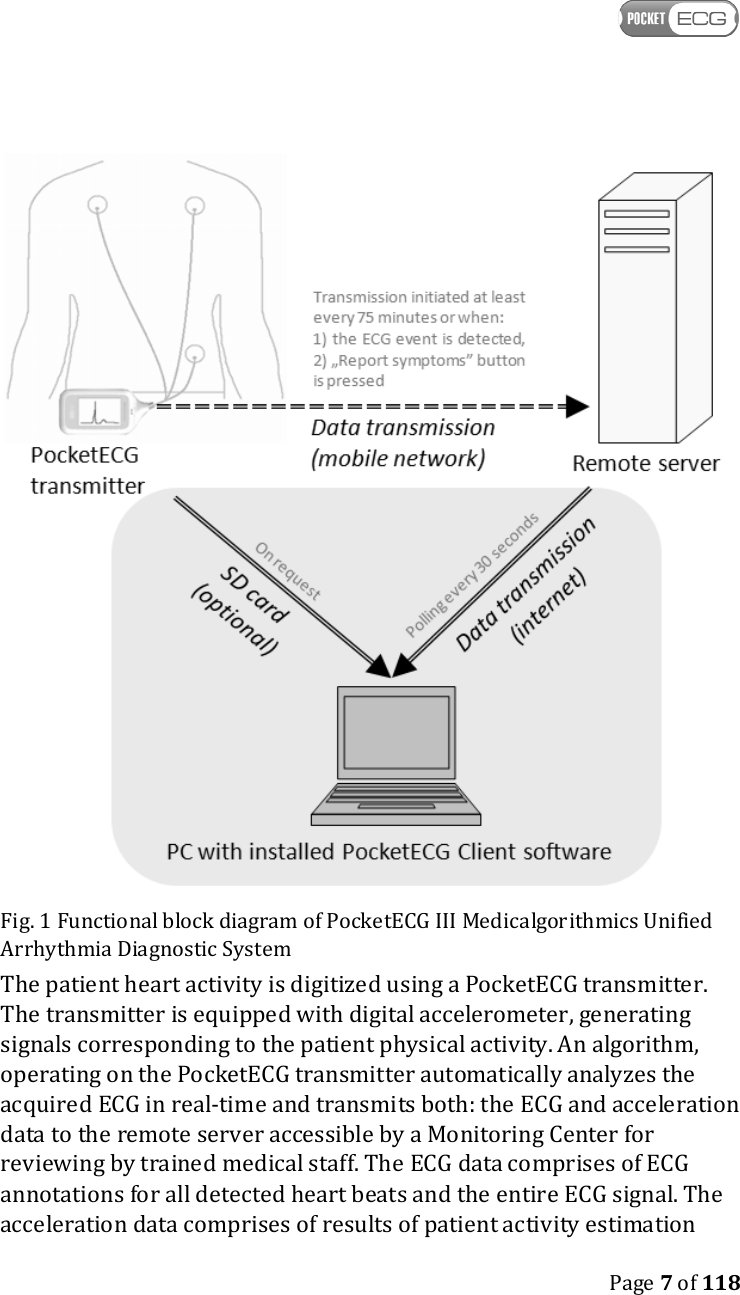
   Page 6 of 118  1. POCKETECG III DESCRIPTION 1.1. PocketECG III components The Medicalgorithmics Unified Arrhythmia Diagnostic System PocketECG III consists of: • PocketECG transmitter, model: PocketECG III, type: PECGT-III with the following accessories: o Two rechargeable batteries, type: PECGB-III, o The AC plug-in battery charger, type: PECGC-III, • PC Client software • User manual (hardcopy) for the patients The Medicalgorithmics Unified Arrhythmia Diagnostic System PocketECG III is compliant with: • the essential requirements of the Council Directive 93/42/EEC, • the requirements of the United States Food and Drugs Administration. • the requirements of the Health Canada Medical Devices Regulations. This user manual describes PocketECG transmitter, its accessories and PocketECG PC client software. 1.2. PocketECG III architecture The functional block diagram of PocketECG III – Medicalgorithmics Unified Arrhythmia Diagnostic System in combination with the data transmission to the remote server is presented in Fig. 1.
   Page 7 of 118   Fig. 1 Functional block diagram of PocketECG III Medicalgorithmics Unified Arrhythmia Diagnostic System The patient heart activity is digitized using a PocketECG transmitter. The transmitter is equipped with digital accelerometer, generating signals corresponding to the patient physical activity. An algorithm, operating on the PocketECG transmitter automatically analyzes the acquired ECG in real-time and transmits both: the ECG and acceleration data to the remote server accessible by a Monitoring Center for reviewing by trained medical staff. The ECG data comprises of ECG annotations for all detected heart beats and the entire ECG signal. The acceleration data comprises of results of patient activity estimation
   Page 8 of 118  along with the waveforms of the acceleration signals. All detection results along with the waveforms of the ECG and acceleration signals may be reviewed using a PocketECG Client - PC based application. Optionally, the ECG and acceleration data may be downloaded to the Pocket ECG Client application from the SD card of PocketECG transmitter using standard SD card reader connected to the PC through USB interface. 1.2.1 Transmission and analysis delay The ECG signal is interpreted by the software of PocketECG transmitter with few seconds delay, which is relatively quick considering the monitoring duration of a patient  – i.e. which may last from one day to several weeks. Therefore analysis with such short delay is considered as performed in real-time. The transmission of data chunks is also performed fairly frequently, with regard to the potential monitoring. The use of this approach is to provide the arrhythmia analysis results to the physician with short delay on an ongoing basis, which allows for making a decision whether monitoring should be carried on (in order to collect more data) or whether it should be terminated, assuming that conclusive results were generated. This is beneficial for the patient, who do not have to wear the device unnecessarily and also allows for limiting the cost of monitoring – no need to transmit and analyze unnecessary data. In the worst case conditions, which are lack of mobile network signal, the data will not be transmitted at all. However, acquired data is stored on the micro SD card and can be optionally downloaded to the PC using wired USB connection when the recording session is finished (micro SD card reader is required). In case of limited access to the mobile network, the data may be transmitted when the patient is in the network range – limited times per day. Therefore the user has to be aware of limitations related to monitoring and transmission using a mobile network infrastructure. The ECG signals are presented on the device screen about 1 second after they are sampled by the PocketECG transmitter.
   Page 9 of 118  The PocketECG transmitter initializes the data transmission to the remote server: 1. at least every 75 minutes, 2. when the ECG event/abnormality is detected, 3. when "Report symptoms" button is pressed by the patient. The PC Client software polls the remote server every 30 seconds. If new data related to the selected recording session are available, the PC Client downloads them automatically. In order to download data stored on the micro SD card of the PocketECG transmitter, the card must be removed from the transmitter and inserted into the USB micro SD card reader. The PC Client user may request to download the data from the micro SD card when successful USB connection between micro SD card reader and PC is already established. 1.3. Data transmission technologies The description of the data transmission technologies utilized by the PocketECG device is given in the following subsections.  1.3.1 Mobile telephony network The Pocket ECG transmitter is equipped with communication module providing access to mobile telephony network (quad band GSM EDGE, UMTS 850 / 1900 / 2100MHz Diversity (850, 1900MHz)). The wireless data transmission technologies used by the mobile telephony network carriers like: GPRS, EDGE, HSDPA, HSUPA, are utilized to transmit the ECG and acceleration data along with the results of automated signals analysis to the remote server. The exact technology used for data transmission depends on its availability. The data transmission is triggered automatically based on results of the automated ECG signal analysis, manually by the patient or
   Page 10 of 118  periodically. The data transmission is initiated immediately after detecting irregularities in the ECG signal or after pressing the "Report symptoms" button on the transmitter by the patient (refer to Section 9.2 for detailed description). Otherwise, the data transmission is triggered at least once every 75 minutes. Depending on the transmission quality of service the time needed to upload patient related data to the remote server may vary. There is no minimal rate for data upload required for proper operation of the PocketECG. However, a user must be aware that when the data rate is extremely low the period of time required to transmit the data may be very long. Therefore, it is recommended to ensure that the mobile network allows data uploading with at least 10 kbps (average) on the area where the patient is going to be monitored. It is easily achievable in most of the existing mobile networks in the US/EU. The PocketECG transmitter only transmits ECG and acceleration data along with automatic analysis results related to a specific recording session ID. The session ID is a unique identifier which consists of the timestamp of the session start with 1 second accuracy and the unique ID of the PocketECG transmitter. No personal data is entered on the PocketECG transmitter nor transmitted through mobile telephony network. The connection to the server comprises TCP/IP sockets and is based on the transfer of the data files. 1.3.2. Encrypted internet channel The internet encrypted channel is used by the PC client application for reviewing the ECG and acceleration data that was sent to the remote server by the patient monitors (PocketECG transmitter). Since the data which is exchanged between the PC Client and the server includes personal data, all of the communication channels need to be encrypted. The PocketECG III uses a SSL-like authentication, authorization and encryption mechanisms. The encrypted data is transmitted over TCP/IP sockets in a binary form. The symmetric key exchange algorithm uses the RSA cryptographic model while the block encryption utilizes Triple Data Encryption Algorithm (TDEA). The recommended minimal download and upload speed of the internet
   Page 11 of 118  connection is 512 kbps and 64 kbps, respectively. The internet connection of a lower speed may also be used. However, the user must be aware that the access and reviewing of the ECG and acceleration data stored on the remote server will be more time-consuming. Only the server listens on TCP/IP sockets to accept incoming connection requests. Neither the PocketECG transmitter nor the PC Client need to open any ports, so the incoming connection rules don’t have to be changed in the firewall software. If the PC Client is installed in an environment which filters the outbound traffic, a rule which enables connecting to the remote TCP port needs to be added to the firewall software. 1.3.3. Micro SD card (optional) The PocketECG transmitter is not equipped with USB connector. It does not have any external connector and cannot be connected to any other electronic equipment. The only data path for ECG and acceleration data goes through mobile phone link between PocketECG transmitter and a remote server. The ECG and acceleration data processed by the PocketECG transmitter are:  1) stored on the flash memory card (microSD) of the PocketECG transmitter,  2) transmitted using cellular networks technology to the remote server. In some circumstances like: • no cellular phone service on the area where the patient is monitored • mobile network failure • problems with internet connection on the PC with PC Client application installed - data cannot be downloaded from a remote server
   Page 12 of 118  the data may be downloaded from the micro SD card to the PC using card reader. The card reader either integrated with PC (most laptops do have them) or connected to the PC through USB 2.0 interface may be used. The data can be downloaded by the medical staff providing the service to the patient when the recording session is already finished. The USB transmission should be performed using wired connection established between USB card reader and PC. The micro SD card must be removed from the PocketECG transmitter and inserted into the socket of USB card reader. The communication based on the file transfer is safe as no personal data is stored on micro SD card.  1.3.4  FCC Requirements FCC id: 2AB2MPECGT-III This device complies with part 15 of the FCC Rules. Operation is subject  to the following two conditions: (1) This device may not cause harmful interference, and (2) this device must accept any interference received, including interference that may cause undesired operation. Changes or modifications of any kind not expressly approved by Medicalgorithmics SA could void the uses authority to use ECG.
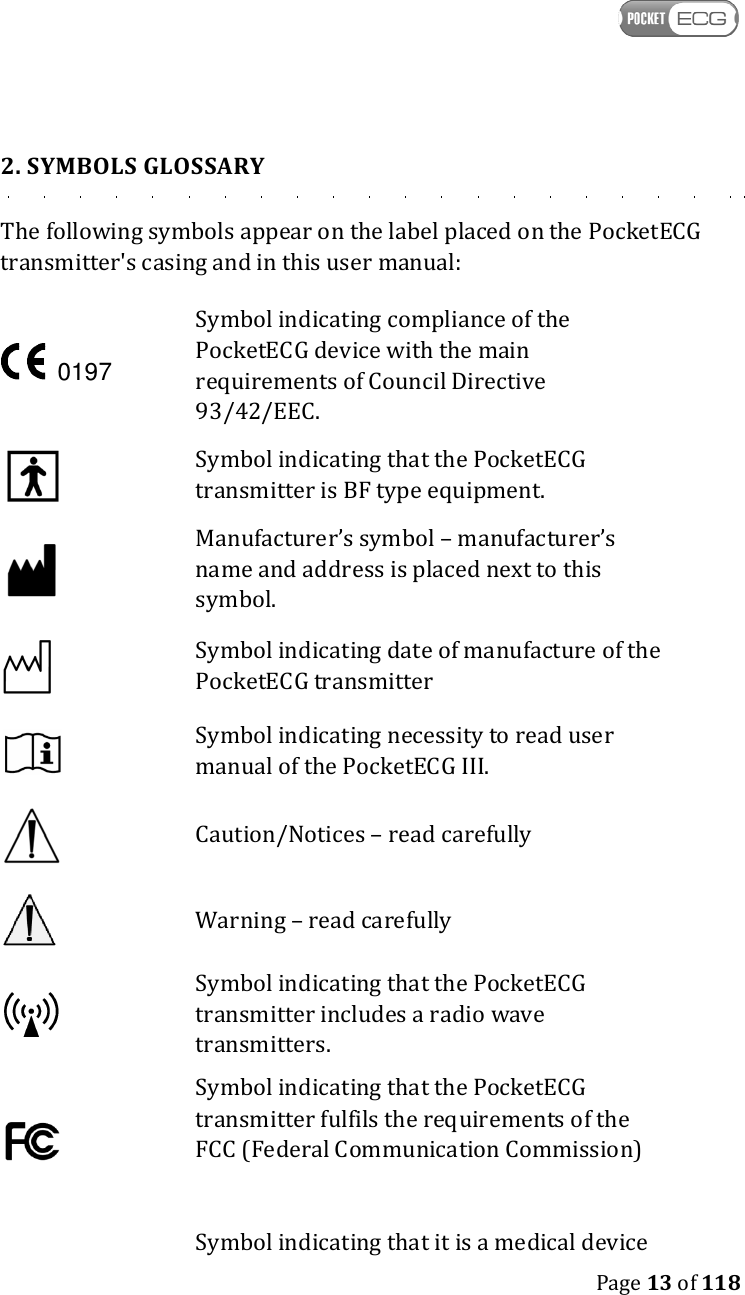
   Page 13 of 118  2. SYMBOLS GLOSSARY The following symbols appear on the label placed on the PocketECG transmitter's casing and in this user manual:  Symbol indicating compliance of the PocketECG device with the main requirements of Council Directive 93/42/EEC.    Symbol indicating that the PocketECG transmitter is BF type equipment.  Manufacturer’s symbol – manufacturer’s name and address is placed next to this symbol.  Symbol indicating date of manufacture of the PocketECG transmitter  Symbol indicating necessity to read user manual of the PocketECG III.  Caution/Notices – read carefully   Warning – read carefully  Symbol indicating that the PocketECG transmitter includes a radio wave transmitters.   Symbol indicating that the PocketECG transmitter fulfils the requirements of the FCC (Federal Communication Commission)   Symbol indicating that it is a medical device  0197
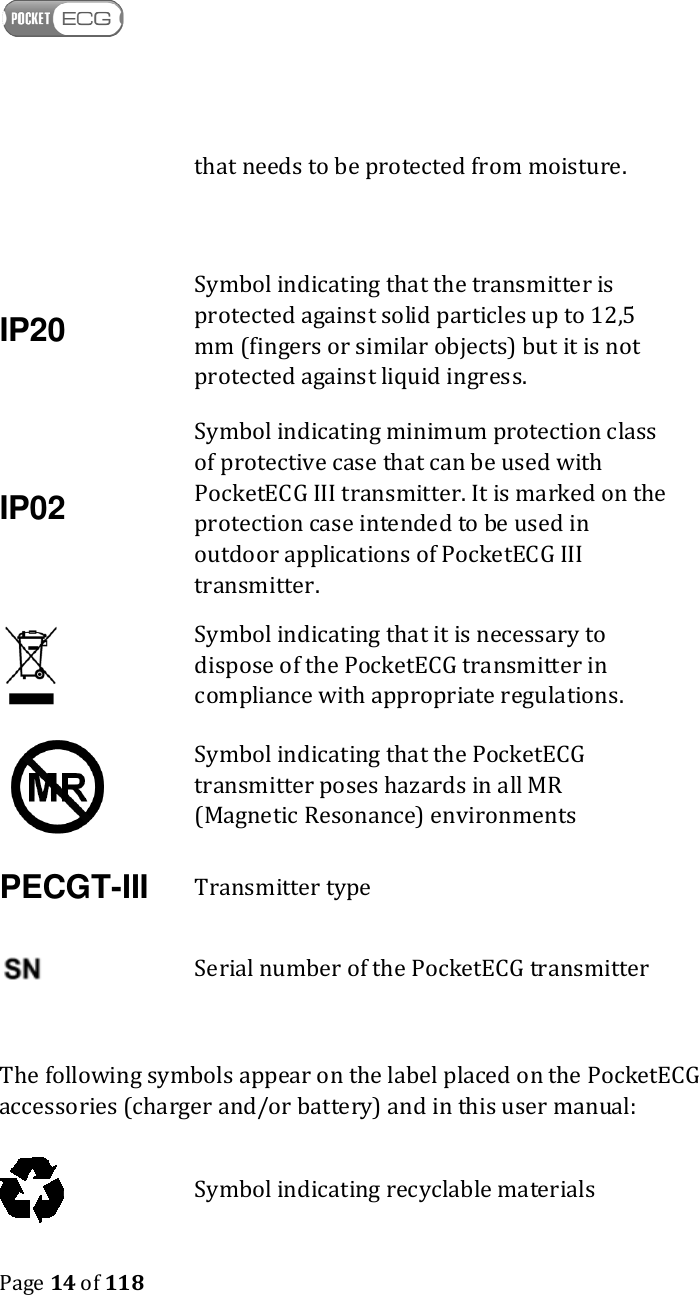
   Page 14 of 118   that needs to be protected from moisture. IP20 Symbol indicating that the transmitter is protected against solid particles up to 12,5 mm (fingers or similar objects) but it is not protected against liquid ingress. IP02 Symbol indicating minimum protection class of protective case that can be used with PocketECG III transmitter. It is marked on the protection case intended to be used in outdoor applications of PocketECG III transmitter.    Symbol indicating that it is necessary to dispose of the PocketECG transmitter in compliance with appropriate regulations.  Symbol indicating that the PocketECG transmitter poses hazards in all MR (Magnetic Resonance) environments PECGT-III Transmitter type  Serial number of the PocketECG transmitter  The following symbols appear on the label placed on the PocketECG accessories (charger and/or battery) and in this user manual:  Symbol indicating recyclable materials
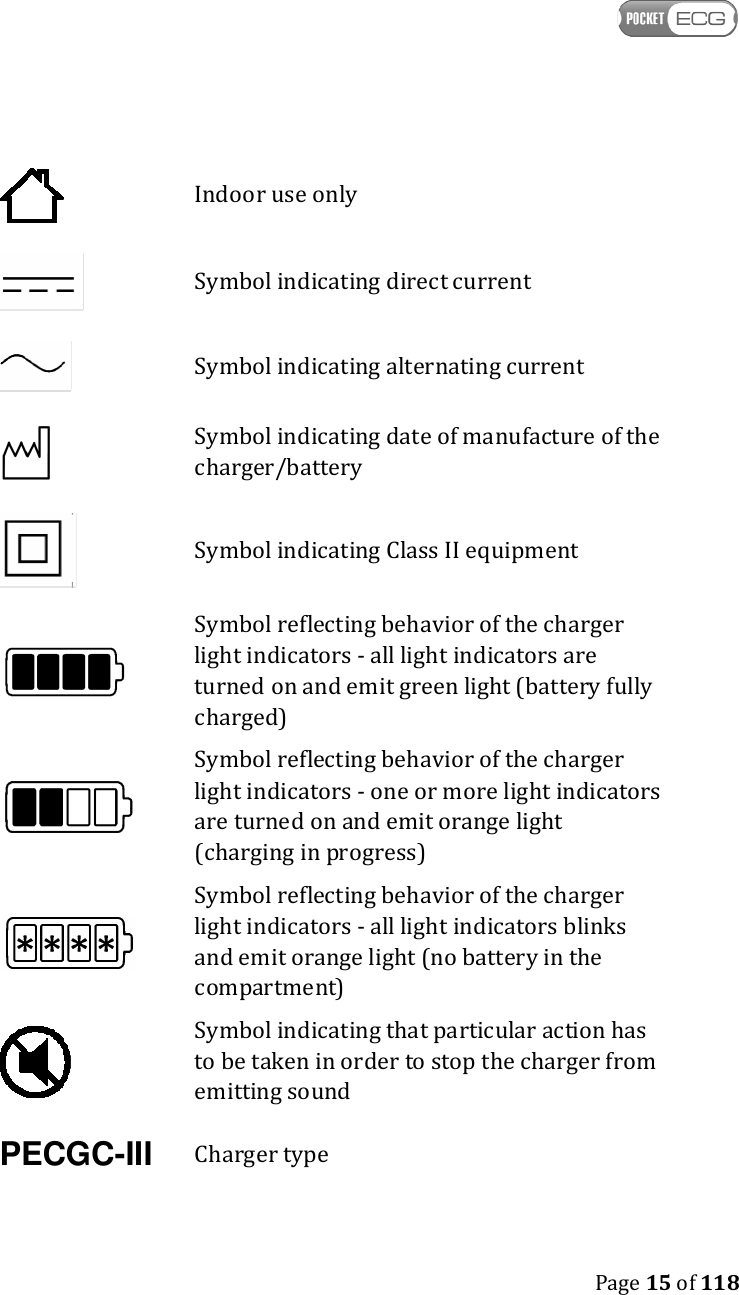
   Page 15 of 118   Indoor use only  Symbol indicating direct current  Symbol indicating alternating current  Symbol indicating date of manufacture of the charger/battery  Symbol indicating Class II equipment  Symbol reflecting behavior of the charger light indicators - all light indicators are turned on and emit green light (battery fully charged)  Symbol reflecting behavior of the charger light indicators - one or more light indicators are turned on and emit orange light (charging in progress)  Symbol reflecting behavior of the charger light indicators - all light indicators blinks and emit orange light (no battery in the compartment)  Symbol indicating that particular action has to be taken in order to stop the charger from emitting sound PECGC-III Charger type
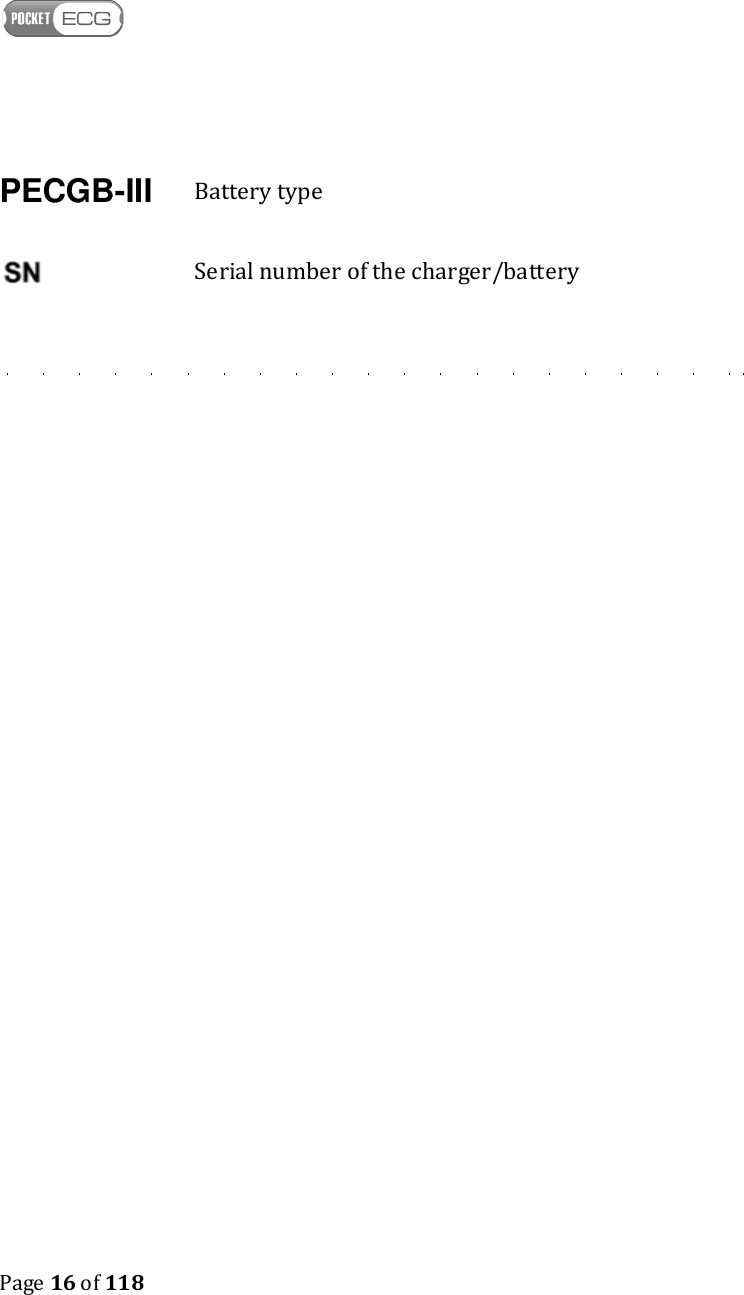
   Page 16 of 118  PECGB-III Battery type  Serial number of the charger/battery
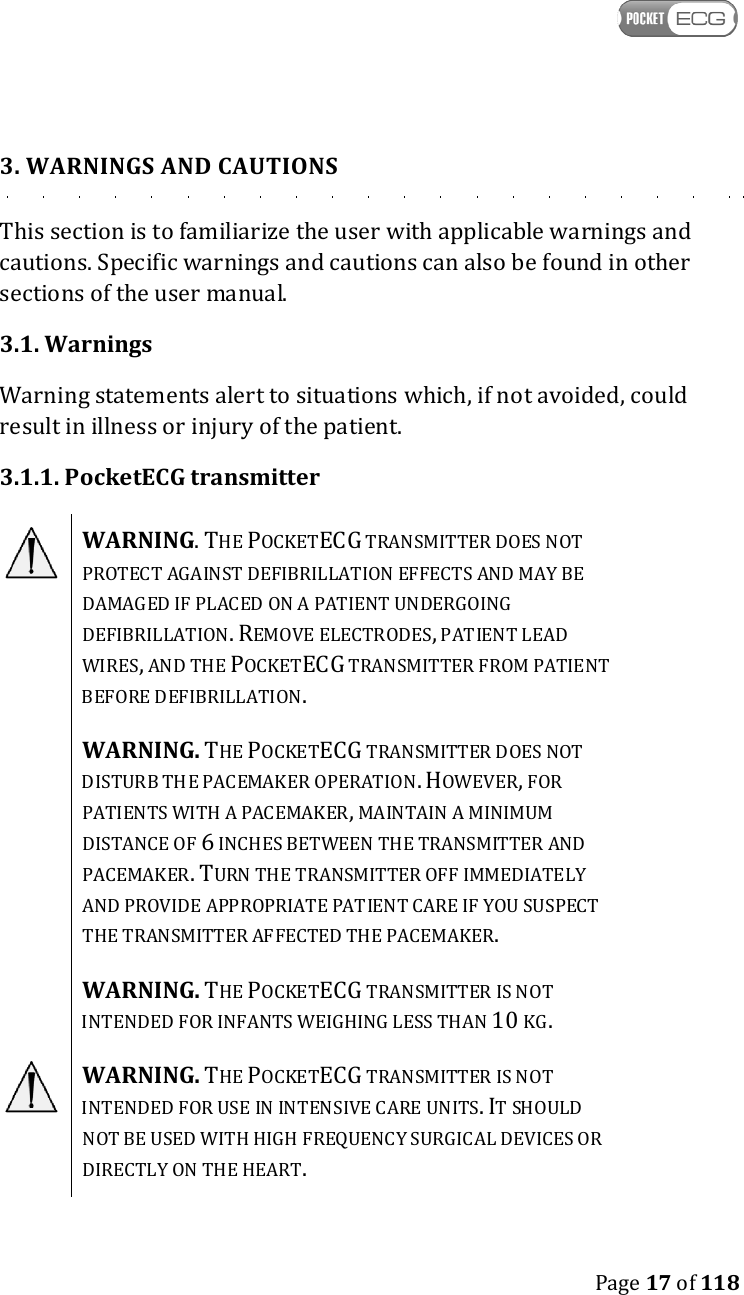
   Page 17 of 118  3. WARNINGS AND CAUTIONS This section is to familiarize the user with applicable warnings and cautions. Specific warnings and cautions can also be found in other sections of the user manual. 3.1. Warnings Warning statements alert to situations which, if not avoided, could result in illness or injury of the patient. 3.1.1. PocketECG transmitter  WARNING. THE POCKETECG TRANSMITTER DOES NOT PROTECT AGAINST DEFIBRILLATION EFFECTS AND MAY BE DAMAGED IF PLACED ON A PATIENT UNDERGOING DEFIBRILLATION. REMOVE ELECTRODES, PATIENT LEAD WIRES, AND THE POCKETECG TRANSMITTER FROM PATIENT BEFORE DEFIBRILLATION.  WARNING. THE POCKETECG TRANSMITTER DOES NOT DISTURB THE PACEMAKER OPERATION. HOWEVER, FOR PATIENTS WITH A PACEMAKER, MAINTAIN A MINIMUM DISTANCE OF 6 INCHES BETWEEN THE TRANSMITTER AND PACEMAKER. TURN THE TRANSMITTER OFF IMMEDIATELY AND PROVIDE APPROPRIATE PATIENT CARE IF YOU SUSPECT THE TRANSMITTER AFFECTED THE PACEMAKER.  WARNING. THE POCKETECG TRANSMITTER IS NOT INTENDED FOR INFANTS WEIGHING LESS THAN 10 KG.  WARNING. THE POCKETECG TRANSMITTER IS NOT INTENDED FOR USE IN INTENSIVE CARE UNITS. IT SHOULD NOT BE USED WITH HIGH FREQUENCY SURGICAL DEVICES OR DIRECTLY ON THE HEART.
   Page 18 of 118   WARNING. DISCARD ELECTRODES AFTER EACH USE.  WARNING. DO NOT USE IN THE PRESENCE OF A FLAMMABLE ANESTHETIC MIXTURE WITH AIR OR OXYGEN OR NITROUS OXIDE.  WARNING. TO AVOID DANGER OF SWALLOWING KEEP THE POCKETECG TRANSMITTER PARTS AND ITS ACCESSORIES AWAY FROM BABIES AND CHILDREN.  WARNING. DO NOT USE ACCESSORIES OTHER THAN THOSE RECOMMENDED BY THE MANUFACTURER. IT MAY BE DANGEROUS TO THE USER AND MAY AFFECT ELECTROMAGNETIC COMPATIBILITY OF THE POCKETECG TRANSMITTER.  WARNING. THE POCKETECG TRANSMITTER CONTAINS A LITHIUM-ION BATTERY. THERE IS A RISK OF FIRE AND BURNS IF THE BATTERY PACK IS HANDLED IMPROPERLY. DO NOT ATTEMPT TO OPEN OR SERVICE NEITHER THE BATTERY PACK NOR TRANSMITTER. DO NOT DISASSEMBLE, CRUSH, PUNCTURE, AND SHORT EXTERNAL CONTACTS OR CIRCUITS, DISPOSE OF IN FIRE OR WATER, OR EXPOSE TO TEMPERATURES HIGHER THAN 60° C (140ºF). REPLACE ONLY WITH BATTERIES SPECIFIED BY THE DEVICE MANUFACTURER. RECYCLE OR DISPOSE OF USED BATTERIES ACCORDING TO THE LOCAL REGULATIONS OR REFERENCE GUIDE SUPPLIED WITH YOUR PRODUCT.   WARNING. DO  NOT  USE  THE POCKETECG  TRANSMITTER AT  GAS  STATIONS,  FUEL  DEPOTS,  CHEMICAL  PLANTS  OR WHERE  BLASTING  OPERATIONS  ARE  IN  PROGRESS,  OR  IN POTENTIALLY  EXPLOSIVE  ATMOSPHERES  SUCH  AS  FUELLING AREAS, FUEL STOREHOUSES, BELOW DECK ON BOATS, FUEL OR CHEMICAL  TRANSFER  OR  STORAGE  FACILITIES,  AND  AREAS WHERE  THE AIR  CONTAINS CHEMICALS  OR  PARTICLES,  SUCH
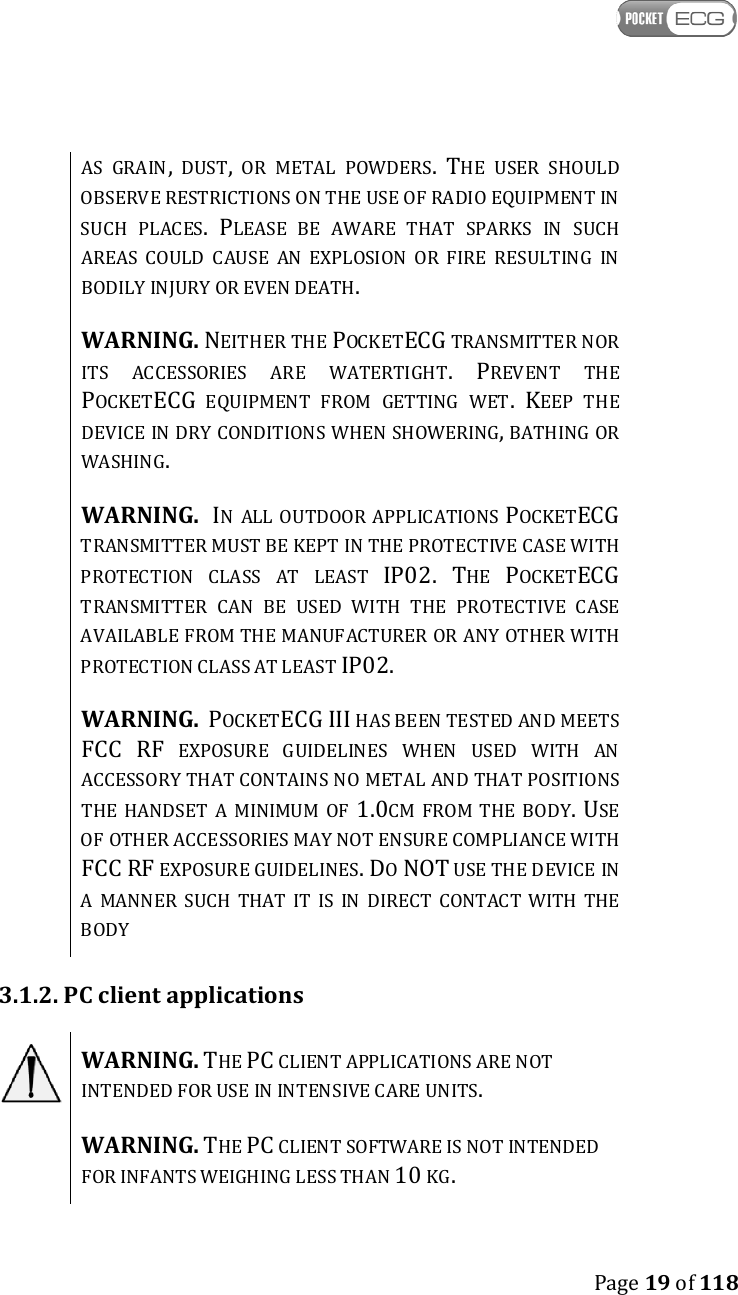
   Page 19 of 118  AS  GRAIN,  DUST,  OR  METAL  POWDERS. THE  USER  SHOULD OBSERVE RESTRICTIONS ON THE USE OF RADIO EQUIPMENT IN SUCH  PLACES. PLEASE  BE  AWARE  THAT  SPARKS  IN  SUCH AREAS  COULD  CAUSE  AN  EXPLOSION  OR  FIRE  RESULTING  IN BODILY INJURY OR EVEN DEATH.  WARNING. NEITHER THE POCKETECG TRANSMITTER NOR ITS  ACCESSORIES  ARE  WATERTIGHT. PREVENT  THE POCKETECG  EQUIPMENT  FROM  GETTING  WET. KEEP  THE DEVICE IN DRY CONDITIONS WHEN SHOWERING, BATHING OR WASHING.   WARNING.  IN  ALL OUTDOOR APPLICATIONS POCKETECG TRANSMITTER MUST BE KEPT IN THE PROTECTIVE CASE WITH PROTECTION  CLASS  AT  LEAST IP02. THE POCKETECG TRANSMITTER  CAN  BE  USED  WITH  THE  PROTECTIVE  CASE AVAILABLE FROM THE MANUFACTURER OR ANY OTHER WITH PROTECTION CLASS AT LEAST IP02.  WARNING.  POCKETECG III HAS BEEN TESTED AND MEETS FCC RF  EXPOSURE  GUIDELINES  WHEN  USED  WITH  AN ACCESSORY THAT CONTAINS NO METAL AND THAT POSITIONS THE  HANDSET  A  MINIMUM  OF 1.0CM  FROM  THE  BODY. USE OF OTHER ACCESSORIES MAY NOT ENSURE COMPLIANCE WITH FCC RF EXPOSURE GUIDELINES. DO NOT USE THE DEVICE IN A  MANNER  SUCH  THAT  IT  IS  IN  DIRECT  CONTACT  WITH  THE BODY 3.1.2. PC client applications  WARNING. THE PC CLIENT APPLICATIONS ARE NOT INTENDED FOR USE IN INTENSIVE CARE UNITS.  WARNING. THE PC CLIENT SOFTWARE IS NOT INTENDED FOR INFANTS WEIGHING LESS THAN 10 KG.
   Page 20 of 118   WARNING. DEVICE OPERATING PC CLIENT APPLICATIONS SHOULD BE USED IN THE TEMPERATURE RANGE DEFINED BY THE MANUFACTURER.  WARNING. DO NOT USE DEVICE OPERATING PC CLIENT APPLICATION IN GAS STATIONS, FUEL DEPOTS, CHEMICAL PLANTS OR WHERE BLASTING OPERATIONS ARE IN PROGRESS, OR IN POTENTIALLY EXPLOSIVE ATMOSPHERES SUCH AS FUELLING AREAS, FUEL STOREHOUSES, BELOW DECK ON BOATS, FUEL OR CHEMICAL TRANSFER OR STORAGE FACILITIES, AND AREAS WHERE THE AIR CONTAINS CHEMICALS OR PARTICLES, SUCH AS GRAIN, DUST, OR METAL POWDERS. THE USER SHOULD OBSERVE RESTRICTIONS RELATED TO THE USE OF RADIO EQUIPMENT IN SUCH AREAS. BE AWARE THAT SPARKS IN SUCH AREAS COULD CAUSE EXPLOSION OR FIRE AND MAY RESULT IN BODY INJURY OR EVEN DEATH.  3.2. Cautions Caution statements alert to situations which, if not avoided, may result in equipment failure, equipment damage, or data loss.  Caution. Prior to starting a diagnostic session read the PocketECG device manual carefully.  Caution. US Federal Law restricts this device to sale by or on the order of a physician.  Caution. The ECG cables should not be bent, pulled and wrapped around the device.  Caution. The batteries should be charged before the first usage.
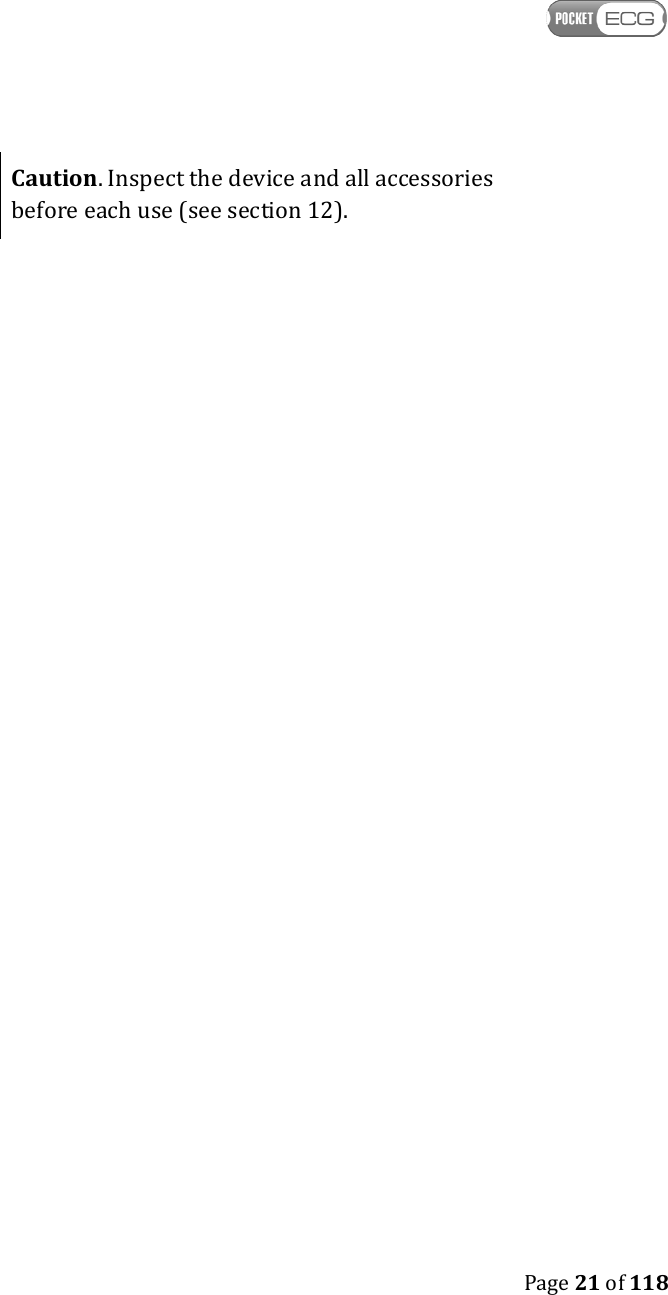
   Page 21 of 118   Caution. Inspect the device and all accessories before each use (see section 12).
   Page 22 of 118  4. INTENDED USE The PocketECG transmitter constitutes a part of the Medicalgorithmics Unified Arrhythmia Diagnostic System PocketECG III and is intended to: • acquire, • analyze, • visualize, • record or/and transmit  the ECG and acceleration data. The PocketECG transmitter is attached to patient’s body with three electrodes. The device is battery powered from Lithium-ion battery with rated voltage of 3.7 V and is designed for continuous use. The results of arrhythmia and ST elevation detection are displayed, stored or/and transmitted along with ECG signals. The acceleration signals are analyzed in order to determine the physical activity of patient. It is assumed that the device can further transmit the ECG and acceleration signals along with analysis results using available wireless technologies.  The PocketECG III is intended for use under supervision of a physician or those knowledgeable in all aspects of ECG morphology, rhythm and arrhythmia. Having fulfilled the working conditions specified in the manual, the device may be used when the patient is in the following places: clinic, hospital, outpatient cardiology clinic, house, business establishment, etc. The PC client software is used for reporting and reviewing ECG/arrhythmia diagnostic sessions. The reviewed ECG and acceleration data is being transmitted from patients’ PocketECG transmitter, through mobile telephony network to a remote server. The PC client software connects with the remote server and downloads the data which can then be viewed locally. The PC client software allows for reviewing of the ECG and acceleration signals along with the
   Page 23 of 118  annotations and creating the reports summarizing the recording session results.  5. CONTRAINDICATIONS The Medicalgorithmics Unified Arrhythmia Diagnostic System PocketECG III, which consists of the PocketECG transmitter, and/or PC client software is not intended to be used by patients who have been diagnosed with life threatening arrhythmias and require hospitalization or patients who require inpatient monitoring using a life-saving device. The Pocket ECG III is not intended for use in surgical rooms, intensive care units, intermediate or step-down units, emergency vehicles. The PocketECG III is MR unsafe and should not be used in any magnetic resonance environment. 6. ACCESSORIES The following accessories are provided by the manufacturer in a package with the PocketECG transmitter: –  A Lithium-ion battery pack providing rated voltage of 3.7 V, type: PECGB-III, with capacity of 1700 mAh. Use only battery of this type. –  AC plug-in charger type PECGC-III suitable for charging PECGB-III type batteries.  WARNING. UNDER NO CIRCUMSTANCES THE DEVICE MAY BE PLUGGED TO A DIFFERENT SOURCE OF POWER THAN INTENDED BY THE MANUFACTURER. USING A DIFFERENT POWER SOURCE IS HAZARDOUS AND MAY IMPAIR FUNCTIONING OF THE EQUIPMENT OR RESULT IN SERIOUS INJURY TO THE USER. WARNING. IN ALL OUTDOOR APPLICATIONS POCKETECG TRANSMITTER MUST BE KEPT IN THE PROTECTIVE CASE WITH
   Page 24 of 118  PROTECTION CLASS AT LEAST IP02. THE POCKETECG CAN BE USED WITH THE PROTECTIVE CASE AVAILABLE FROM THE MANUFACTURER OR ANY OTHER WITH PROTECTION CLASS AT LEAST IP02.   The following other accessories are needed for proper operation of the device but are not enclosed in the PocketECG transmitter package: –  micro SD memory card –  SIM card –  ECG electrodes
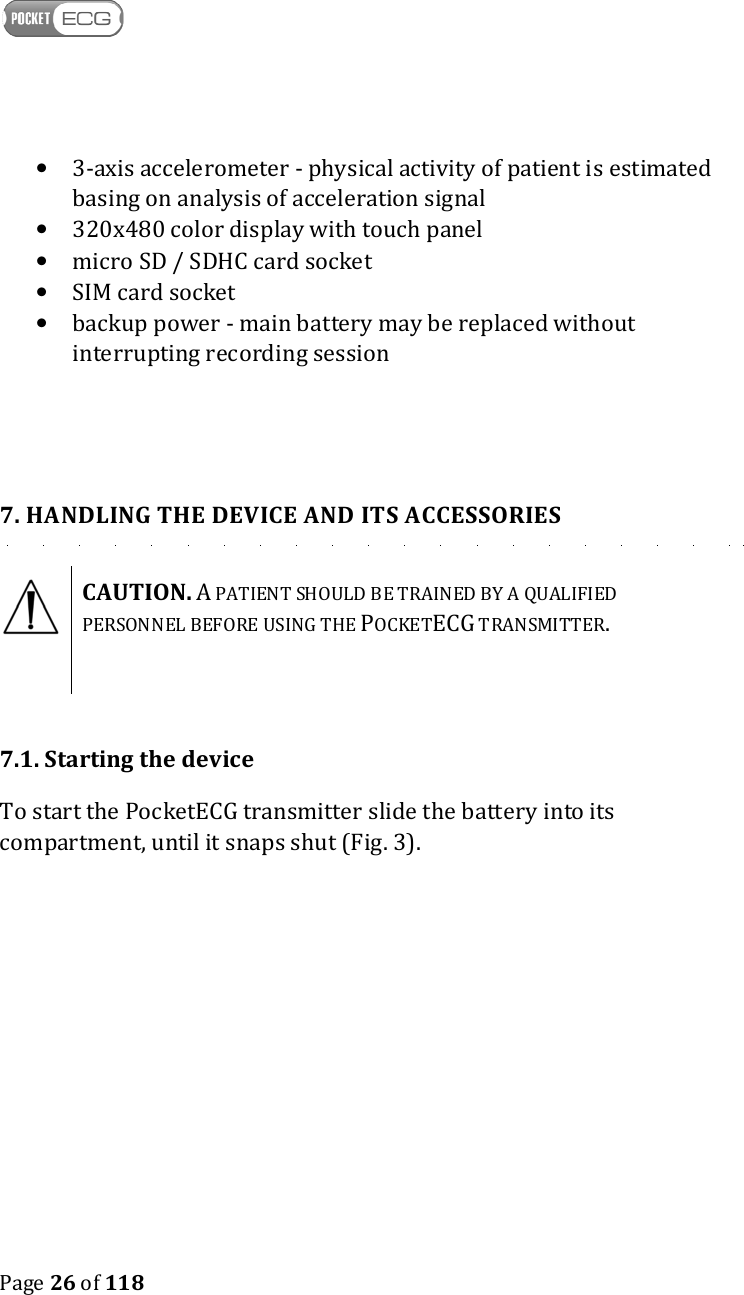
   Page 25 of 118  A. POCKETECG TRANSMITTER The PocketECG device (see Fig.2) transmits both the ECG and acceleration signals along with the results of their analysis to a remote server.   Fig. 2 PocketECG transmitter   The features of the PocketECG transmitter are as follows:  • processing of two ECG channels
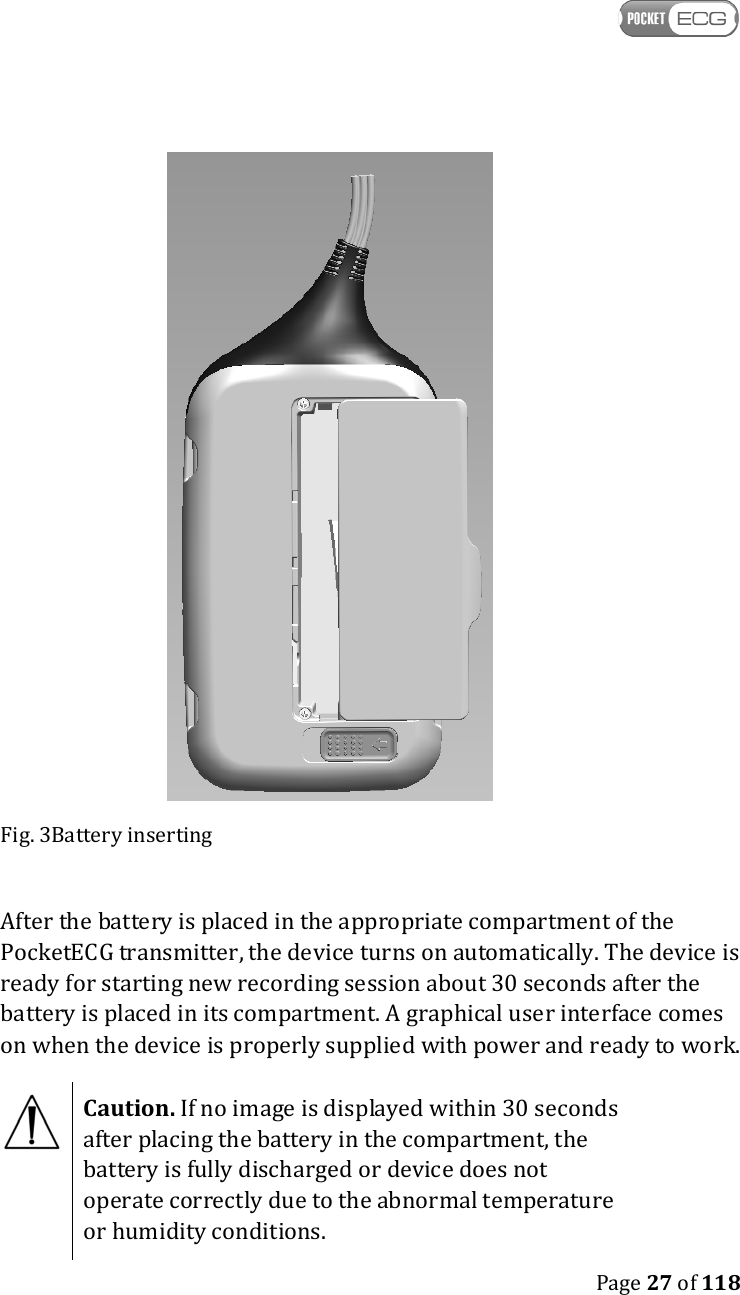
   Page 26 of 118  • 3-axis accelerometer - physical activity of patient is estimated basing on analysis of acceleration signal • 320x480 color display with touch panel • micro SD / SDHC card socket • SIM card socket • backup power - main battery may be replaced without interrupting recording session   7. HANDLING THE DEVICE AND ITS ACCESSORIES  CAUTION. A PATIENT SHOULD BE TRAINED BY A QUALIFIED PERSONNEL BEFORE USING THE POCKETECG TRANSMITTER.    7.1. Starting the device To start the PocketECG transmitter slide the battery into its compartment, until it snaps shut (Fig. 3).
   Page 27 of 118   Fig. 3Battery inserting  After the battery is placed in the appropriate compartment of the PocketECG transmitter, the device turns on automatically. The device is ready for starting new recording session about 30 seconds after the battery is placed in its compartment. A graphical user interface comes on when the device is properly supplied with power and ready to work.   Caution. If no image is displayed within 30 seconds after placing the battery in the compartment, the battery is fully discharged or device does not operate correctly due to the abnormal temperature or humidity conditions.
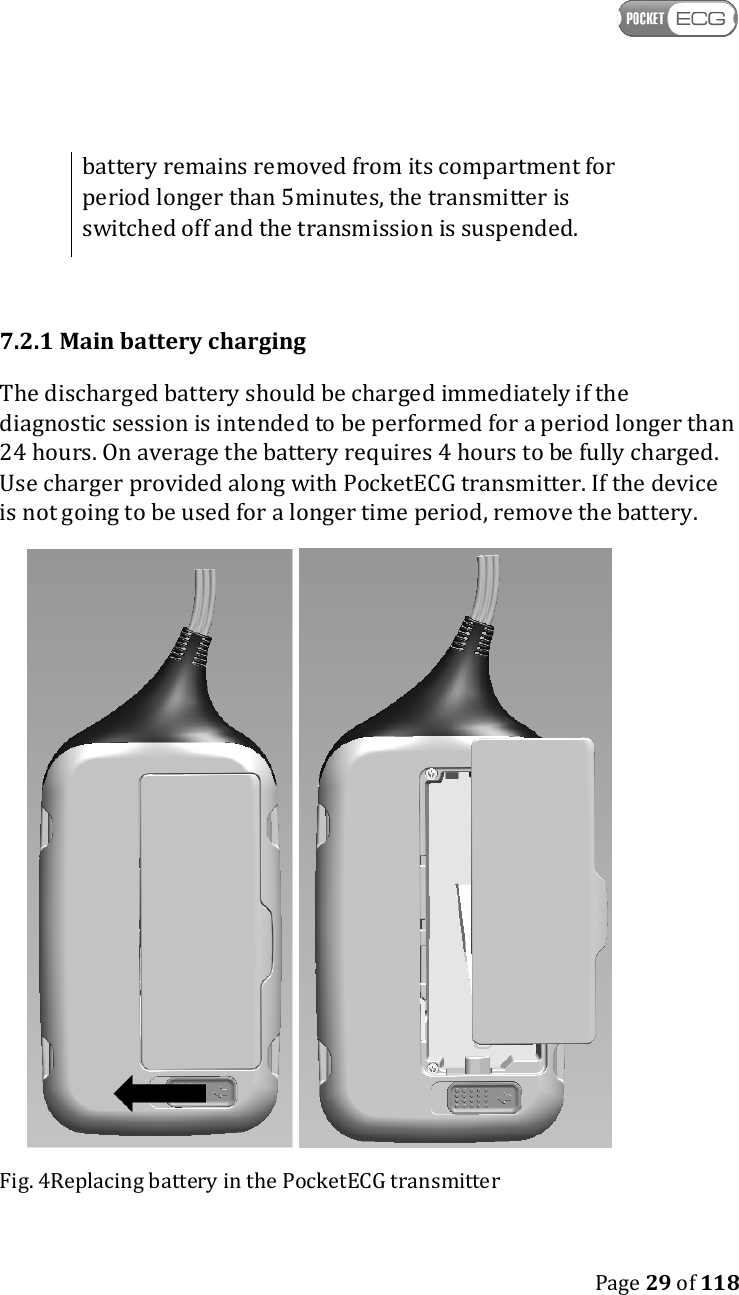
   Page 28 of 118   7.2. Main and backup batteries A fully charged battery makes it possible to continuously monitor the patient's ECG and acceleration signals using the PocketECG transmitter for at least 24 hours.  In order to replace the battery follow the instructions (see Figs. 4): 1. Slide the battery lock to release the battery; 2. Remove the battery; 3. Place fully charged battery until the lock clicks back into its original position;   Caution. When replacing the battery, make sure the contacts face the interior of the battery compartment. If slipping the battery in requires excessive force, check if you are putting it into the case the right way. The PocketECG transmitter is equipped with backup battery that is intended to supply the device when the main battery is being replaced. Removing main battery when the recording session has not been initiated or has already been finished does not activate backup power (the device turns off). When the main battery is being removed during ongoing session, the transmitter operates continuously for up to 5 minutes powered from backup battery. After placing fully charged main battery into its compartment, the transmitter starts to be powered from main battery automatically.  Caution. The backup power is activated only when recording session is ongoing.  Caution. If the level of main battery is low, replace it with fully charged one, immediately. If the main
   Page 29 of 118  battery remains removed from its compartment for period longer than 5minutes, the transmitter is switched off and the transmission is suspended.  7.2.1 Main battery charging The discharged battery should be charged immediately if the diagnostic session is intended to be performed for a period longer than 24 hours. On average the battery requires 4 hours to be fully charged. Use charger provided along with PocketECG transmitter. If the device is not going to be used for a longer time period, remove the battery.    Fig. 4Replacing battery in the PocketECG transmitter
   Page 30 of 118  When the battery gets damaged or worn out, follow standard disposal procedure for Lithium-ion batteries.  Caution. The AC plug-in charger may require suitable adapter and/or converter to convert to the proper voltage when used outside the territory of a country where it was provided by the Medicalgorithmics distributor.   WARNING. DO NOT USE OTHER CHARGERS THAN THOSE INTENDED FOR THE TYPE OF BATTERY USED IN THE POCKETECG TRANSMITTER IN ORDER TO PREVENT DANGER OF BATTERY EXPLOSION. In order to charge the battery, follow the instructions: 1. Plug the charger into the AC mains; 2. Check whether a sound is generated indicating ready to use state of the charger; 3. Put the battery into the charger cradle and verify whether light indicator flashes orange indicating that the charging is in progress; 4. Wait until the light indicator of the charger changes from orange to indicating that the battery is fully charged. 7.2.2 Backup battery charging The backup battery is installed inside the PocketECG transmitter and cannot be removed. The charging of the backup battery is started automatically and does not require interaction from the user. The charging of backup battery is initiated when its state of charge falls below predefined level and the main battery powering the device is fully charged. Therefore, the discharged main battery should be always replaced with a fully charged one.
   Page 31 of 118  7.3. Stopping the device In order to switch the transmitter off ensure that the recording session is finished and remove the battery from its compartment.  7.4 SIM and flash memory cards The PocketECG transmitter is equipped with a socket for a SIM and micro SD memory cards (see Fig. 5). The ECG and acceleration data are stored on SD card during recording session and further transmitted through mobile telephony network to a remote server.  The SIM card is required in order to allow data transmission through a mobile telephony network. This card is provided by the mobile network operator. If your transmitter is not already equipped with SIM card please contact your PocketECG service provider for assistance.  In case of limited access to mobile telephony network data are stored on SD card until they can be successfully transmitted. It is recommended to use reliable SD cards of minimum 1 GB capacity produced by the Verbatim, SanDisk and other experienced manufacturers. The PocketECG transmitter operates with the micro SD and micro SDHC (high capacity) cards.  Caution. The SIM and micro SD cards must be placed in its compartment before new recording session is started.   8. TEST PREPARATION Only high quality electrodes with fast conducting gel should be used with the PocketECG transmitter. We recommend using electrodes designed for Holter monitoring. Single-use electrodes last for a limited time period and should not be used for longer than specified by their manufacturer. Fresh electrodes contain wet gel; if the gel is spongy the
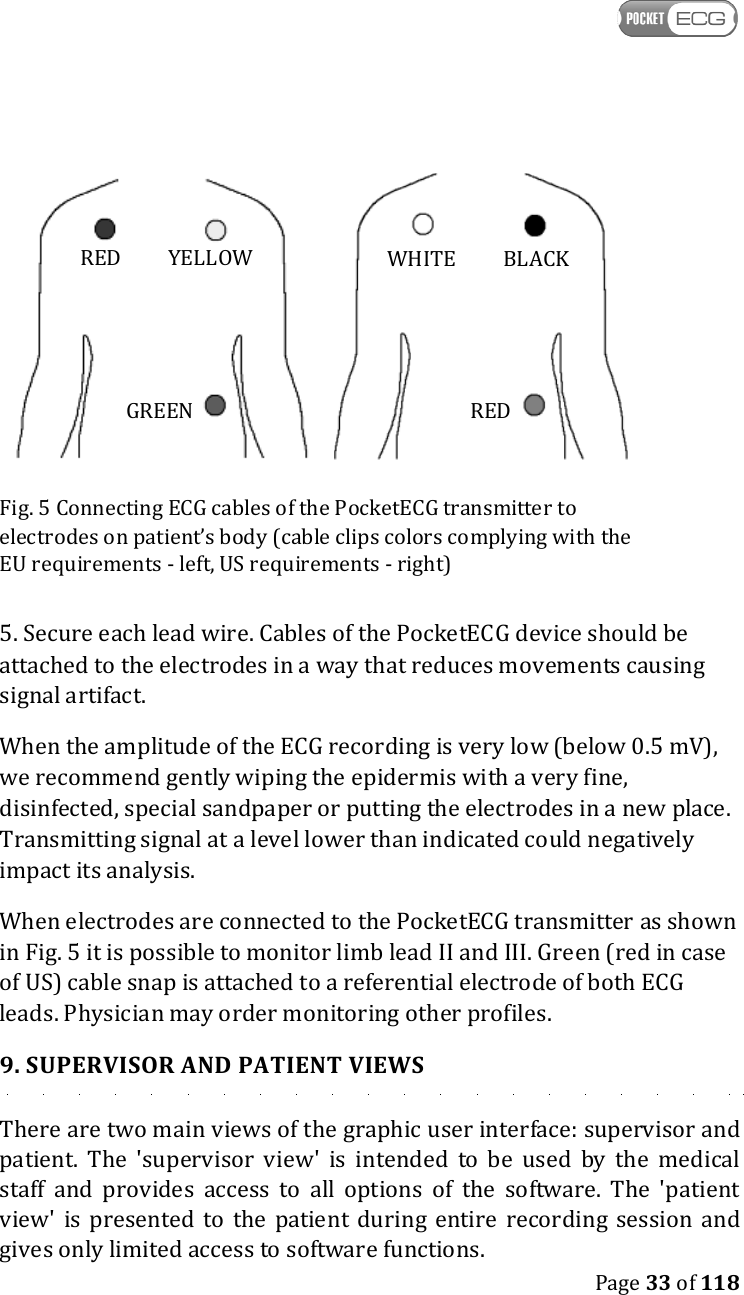
   Page 32 of 118  electrodes are of poor quality or past their use-by date. Usually, electrodes last no longer than 2-3 weeks after opening the box.  Caution. Verify the use-by dates on applied electrodes to make sure they have not expired.  Caution. ECG electrodes can cause skin irritation. Examine the skin for signs of irritation or inflammation and avoid placing of the electrode in those areas.  WARNING. THE SNAPS OF THE ECG LEAD WIRES ARE MADE OF METAL CONDUCTING THE CURRENT AND ARE INTENDED TO BE CONNECTED WITH ELECTRODES PLACED ON A PATIENT'S BODY. THE SNAPS OF THE LEAD WIRE SHOULD BE CONNECTED NEITHER TO ANY OF THE POCKETECG ACCESSORIES NOR OTHER EQUIPMENT. NEVER CONNECT THE LEAD WIRE SNAPS WITH ANY SOURCE OF ELECTRIC POWER SUCH AS POWER OUTLETS, POWER SUPPLIERS AND BATTERIES. A special preparation should be applied to patient’s skin before placing the electrodes. Do not use high-proof alcohol as it may dry up the epidermis and distort the ECG signal transmitted by the PocketECG device. In order to prepare patient’s skin follow these instruction: 1. Explain the procedure to the patient; 2. Remove hair from the place where the electrode is to be attached;  3. Degrease and prepare the skin; 4. Place the electrodes on patient’s body and connect the ECG cables of the PocketECG transmitter as shown in Figs. 5.  Caution. Always make sure that the electrodes are placed correctly.
   Page 33 of 118    Fig. 5 Connecting ECG cables of the PocketECG transmitter to electrodes on patient’s body (cable clips colors complying with the EU requirements - left, US requirements - right) 5. Secure each lead wire. Cables of the PocketECG device should be attached to the electrodes in a way that reduces movements causing signal artifact. When the amplitude of the ECG recording is very low (below 0.5 mV), we recommend gently wiping the epidermis with a very fine, disinfected, special sandpaper or putting the electrodes in a new place. Transmitting signal at a level lower than indicated could negatively impact its analysis. When electrodes are connected to the PocketECG transmitter as shown in Fig. 5 it is possible to monitor limb lead II and III. Green (red in case of US) cable snap is attached to a referential electrode of both ECG leads. Physician may order monitoring other profiles. 9. SUPERVISOR AND PATIENT VIEWS There are two main views of the graphic user interface: supervisor and patient.  The  'supervisor  view'  is  intended  to  be  used  by  the  medical staff  and  provides  access  to  all  options  of  the  software.  The  'patient view'  is  presented  to  the  patient  during  entire  recording  session and gives only limited access to software functions. GREEN RED YELLOW RED WHITE BLACK
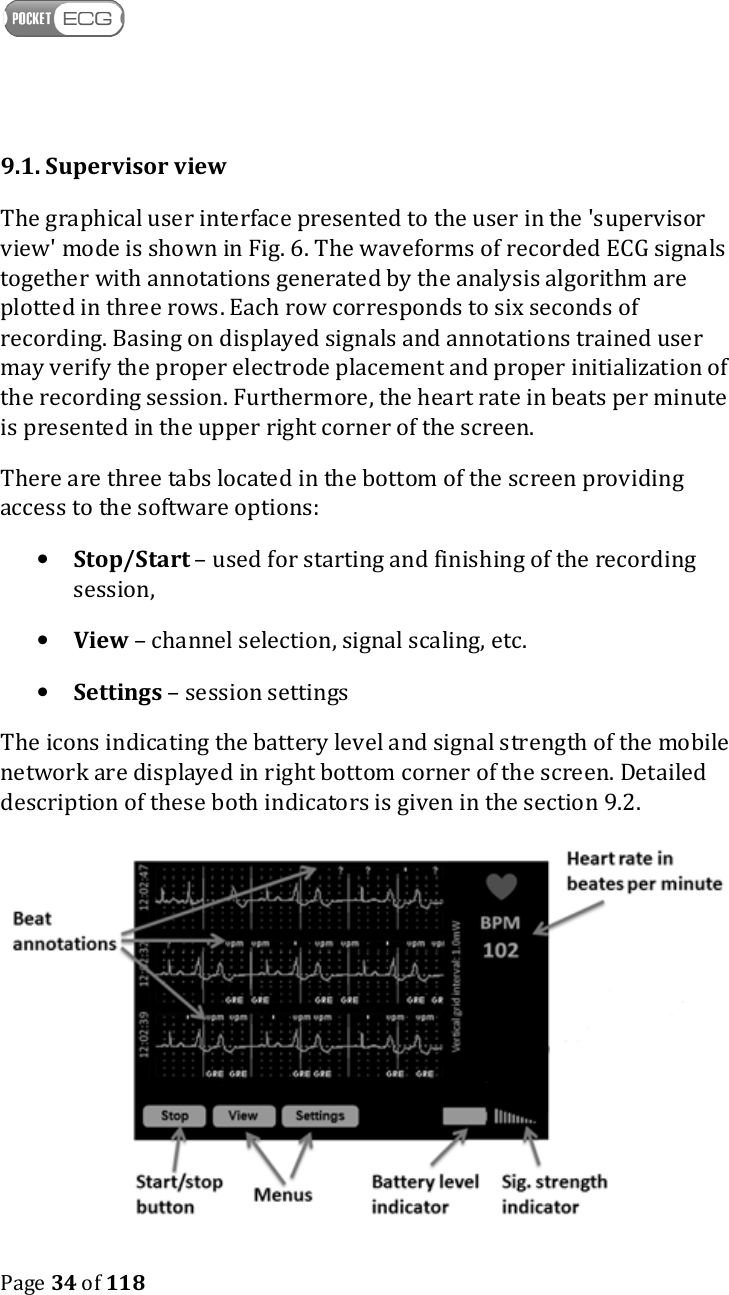
   Page 34 of 118  9.1. Supervisor view The graphical user interface presented to the user in the 'supervisor view' mode is shown in Fig. 6. The waveforms of recorded ECG signals together with annotations generated by the analysis algorithm are plotted in three rows. Each row corresponds to six seconds of recording. Basing on displayed signals and annotations trained user may verify the proper electrode placement and proper initialization of the recording session. Furthermore, the heart rate in beats per minute is presented in the upper right corner of the screen.  There are three tabs located in the bottom of the screen providing access to the software options: • Stop/Start – used for starting and finishing of the recording session, • View – channel selection, signal scaling, etc. • Settings – session settings The icons indicating the battery level and signal strength of the mobile network are displayed in right bottom corner of the screen. Detailed description of these both indicators is given in the section 9.2.
   Page 35 of 118  Fig. 6 'Supervisor view' of the graphical user interface  9.1.1. Start/stop button The  Start/Stop  button  enables  starting  and  finishing  recording sessions. When session is not yet initiated the button is displayed as a "Start" button. Otherwise, the button is marked with "Stop" command - when pressed cause the recording session to finish. When the recording session begins the ECG signal is displayed on  the screen along with annotations of the classified beats and arrhythmias. The  patient’s  heart  rate  is  displayed  in  the  top  right  corner  of  the screen  of  the  PocketECG  transmitter.  After  starting  a  new  recording session,  verification  of  electrodes  placement should  be  performed.  In order to verify the electrodes placement, follow the instructions: 1. Make sure that colors of the ECG clips correspond to those presented in Fig. 5a (EU) or 5b (US). 2.  Verify the ECG signal quality for both available channels by observing the ECG signal waveform on the screen.  Caution. If the ECG signals are not presented on the PDA display and/or the "EL" annotation is displayed, the ECG signal is not analyzed due to the overload of the PocketECG transmitter or incorrect connection between lead wires and patient's electrodes. The similar effect may occur when ECG electrodes are used and should and signal quality is insufficient.  9.1.2. View tab The View tab contains the following options:
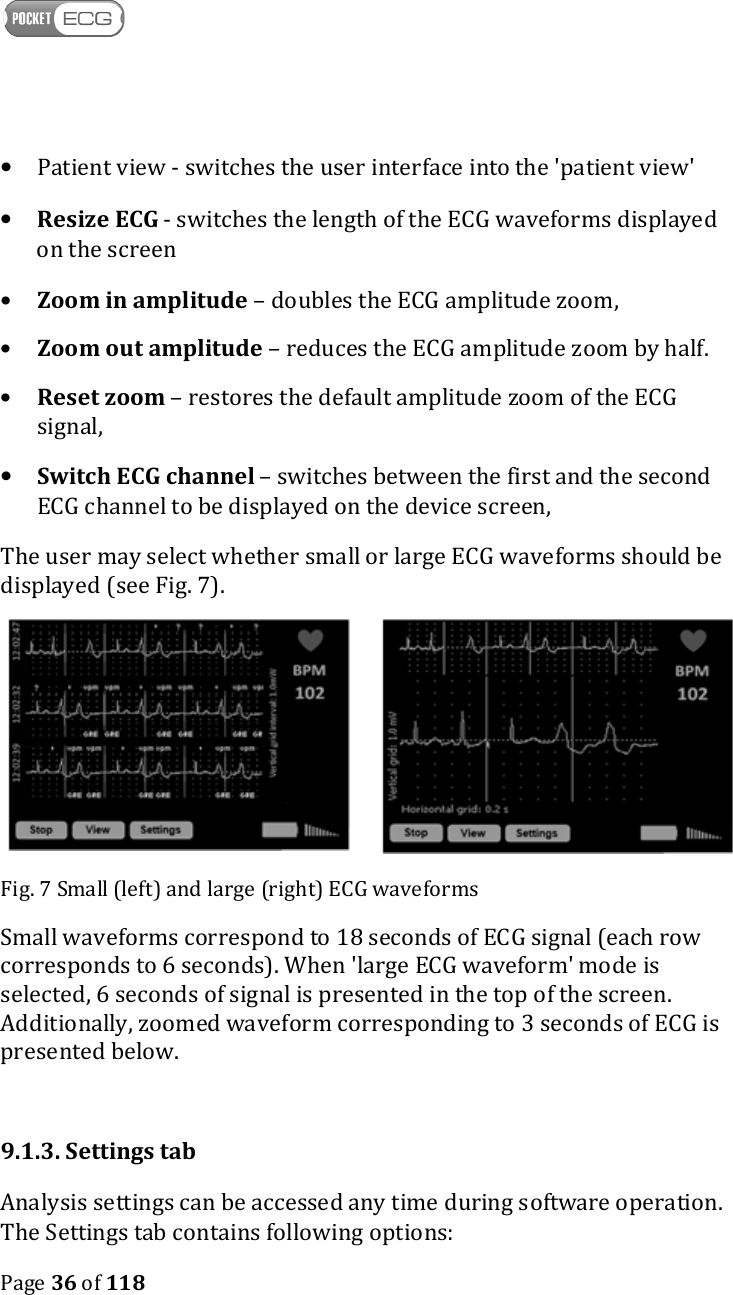
   Page 36 of 118  • Patient view - switches the user interface into the 'patient view' • Resize ECG - switches the length of the ECG waveforms displayed on the screen • Zoom in amplitude – doubles the ECG amplitude zoom, • Zoom out amplitude – reduces the ECG amplitude zoom by half. • Reset zoom – restores the default amplitude zoom of the ECG signal, • Switch ECG channel – switches between the first and the second ECG channel to be displayed on the device screen, The user may select whether small or large ECG waveforms should be displayed (see Fig. 7).   Fig. 7 Small (left) and large (right) ECG waveforms Small waveforms correspond to 18 seconds of ECG signal (each row corresponds to 6 seconds). When 'large ECG waveform' mode is selected, 6 seconds of signal is presented in the top of the screen. Additionally, zoomed waveform corresponding to 3 seconds of ECG is presented below.  9.1.3. Settings tab Analysis settings can be accessed any time during software operation. The Settings tab contains following options:
   Page 37 of 118  • Arrhythmia Settings – parameters for arrhythmia classification: o Pause: N ms – pause above N milliseconds , o Asystole: above N ms – asystole above N milliseconds, o Bradycardia: below N BPM – bradycardia below N beats per minute, o V tachycardia: above N BPM – ventricular tachycardia  above N beats per minute, o SV tachycardia: above N BPM – supraventricular tachycardia above N beats per minute, o Premature: above N % - premature ectopic beats above N % o Multiform: sensitivity N – N level of  sensitivity for detection of multiform ventricular events, o Pacer: On/Off – pacemaker switched on/off.  • Session Settings - configuration of the PocketECG transmitter: o Power saving – when set the device is automatically switched to power saving mode after a short period of inactivity on the patient view (display is off, etc.), o Send ECG events through Internet – ECG events are transmitted when this option is selected (default), o Stream ECG and annotations – ECG data are streamed to the remote server when this option is selected (default is off), o ECG strip at least every N minutes – ECG transmission is triggered at least once every N minutes, o Comm. srv– remote server address and port number, where processing results and signals are sent, o Ftp srv– remote server address,
   Page 38 of 118  o Path: /XXX – remote server folder name, o User name: - name of the user logging in to remote server o Password: ******* - hidden password – area showing whether password was entered, o Restore Defaults – button for restoring standard remote server settings. • About - contains following options: o Software version - displays version of software operating PocketECG transmitter, o Session info - displays window with following information related to the recording session: - COM: [ xxx ][ nnnnnnn ][ nnnnnnnnn ] – communication status (first brackets from the left), the number of files transmitted to the server (second brackets from the left), the number of files queued for transmission (third brackets from the left) - TIME: DDd HHh MMm SSs – time elapsed since the beginning of the session (DAYS HOURS MINUTES SECONDS), - MEM: XXXXX MB free: space available on the micro SD memory card • ID: YYYYMMDDHHMMSS_XXXXXXXXXXXXXXXXX(…): Unique session ID.
   Page 39 of 118   Caution. The first bracket of the communication text field informs about the status of the wireless connection between the PocketECG transmitter and the remote server. The '[OK]' text string indicates that the connection has been established successfully. Otherwise, an error code will be displayed.  The settings related to the connection with the remote server (Comm. srv, Ftp srv, Path, User name, Password) are read-only. These parameters are configured automatically during the installation and are stored in the 'settings.xml' file. The user should not modify the settings.xml file unless instructed by the PocketECG service technical support.  Caution. The PocketECG  transmitter configures  the connection with the remote server automatically. If any problems  with  the  configuration  occur,  please  contact your PocketECG distributor or service provider.
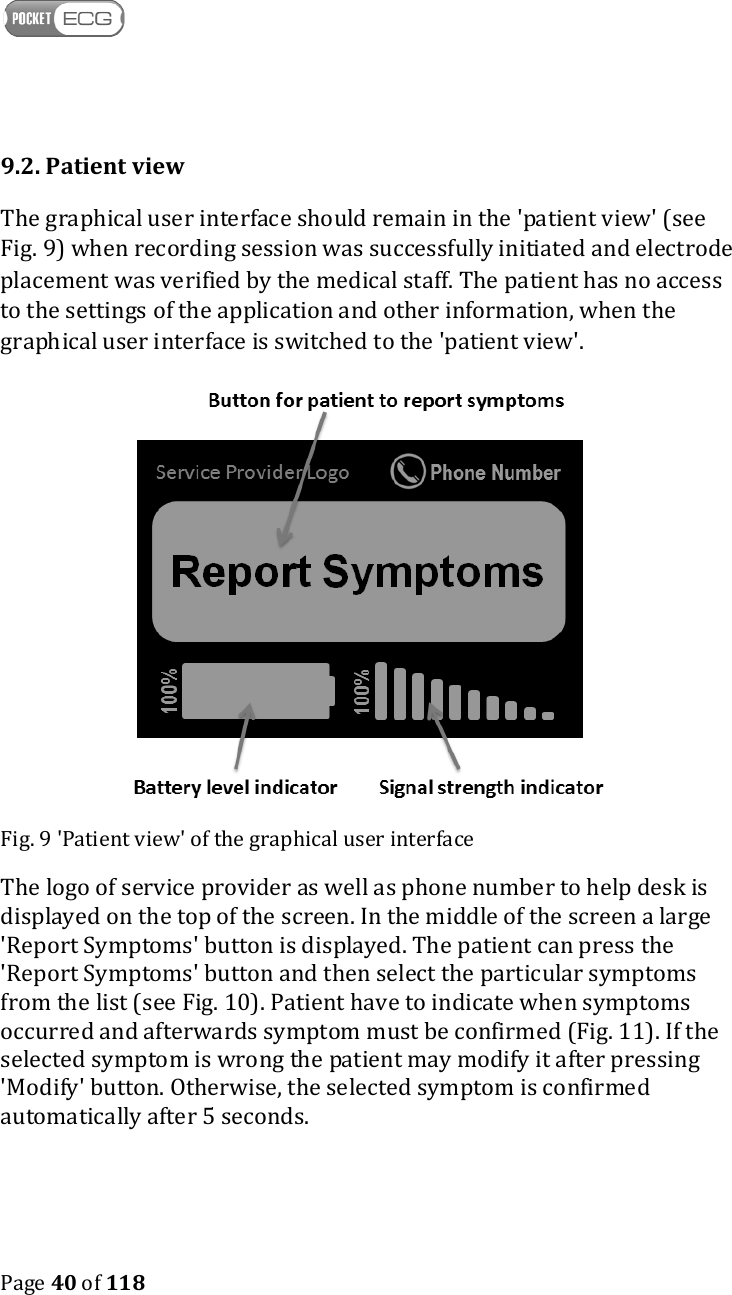
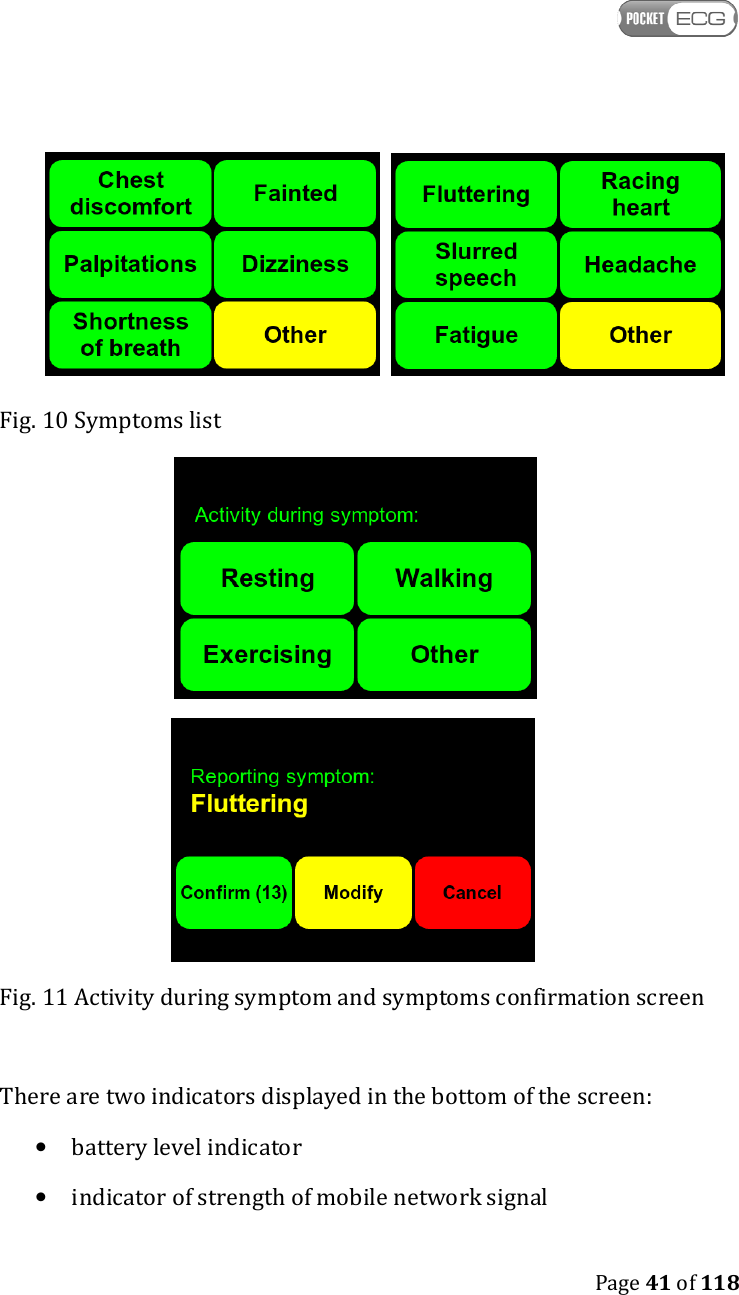
   Page 40 of 118  9.2. Patient view The graphical user interface should remain in the 'patient view' (see Fig. 9) when recording session was successfully initiated and electrode placement was verified by the medical staff. The patient has no access to the settings of the application and other information, when the graphical user interface is switched to the 'patient view'.  Fig. 9 'Patient view' of the graphical user interface The logo of service provider as well as phone number to help desk is displayed on the top of the screen. In the middle of the screen a large 'Report Symptoms' button is displayed. The patient can press the 'Report Symptoms' button and then select the particular symptoms from the list (see Fig. 10). Patient have to indicate when symptoms occurred and afterwards symptom must be confirmed (Fig. 11). If the selected symptom is wrong the patient may modify it after pressing 'Modify' button. Otherwise, the selected symptom is confirmed automatically after 5 seconds.
   Page 41 of 118      Fig. 10 Symptoms list   Fig. 11 Activity during symptom and symptoms confirmation screen  There are two indicators displayed in the bottom of the screen: • battery level indicator • indicator of strength of mobile network signal
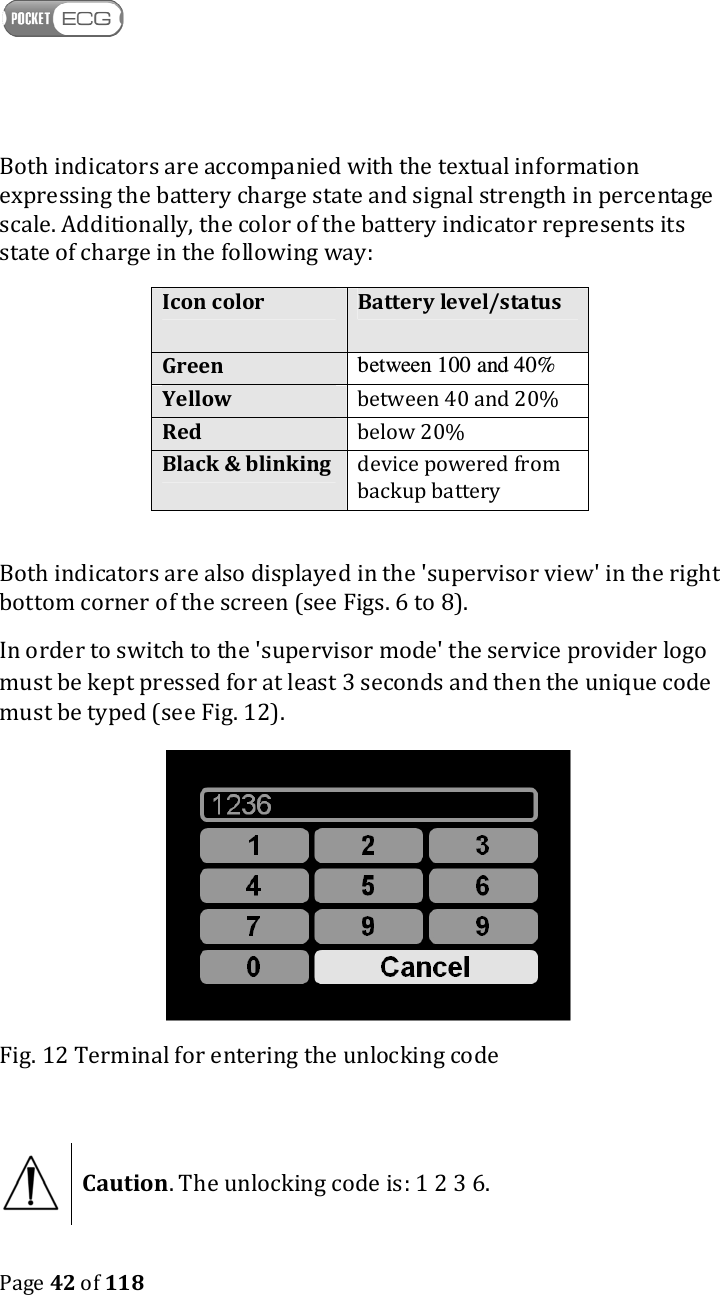
   Page 42 of 118  Both indicators are accompanied with the textual information expressing the battery charge state and signal strength in percentage scale. Additionally, the color of the battery indicator represents its state of charge in the following way: Icon color Battery level/status Green between 100 and 40% Yellow between 40 and 20% Red below 20% Black & blinking device powered from backup battery  Both indicators are also displayed in the 'supervisor view' in the right bottom corner of the screen (see Figs. 6 to 8). In order to switch to the 'supervisor mode' the service provider logo must be kept pressed for at least 3 seconds and then the unique code must be typed (see Fig. 12).  Fig. 12 Terminal for entering the unlocking code   Caution. The unlocking code is: 1 2 3 6.
   Page 43 of 118  9.3. Method for calculating pause and heart rate Pause is calculated using (as an input) QRS detection results. If a distance between consecutive QRS complexes exceeds predefined (pause) threshold, then the beat label annotation is marked as pause. Heart rate is calculated using (as an input) QRS detection results. HR is calculated for minute intervals: If within the analyzed minute, there is a sufficient number of QRS complexes, then minutely HR value is a median value of R-R intervals within that minute. Practically at least 10 R-R pairs are required to calculate the heart rate.
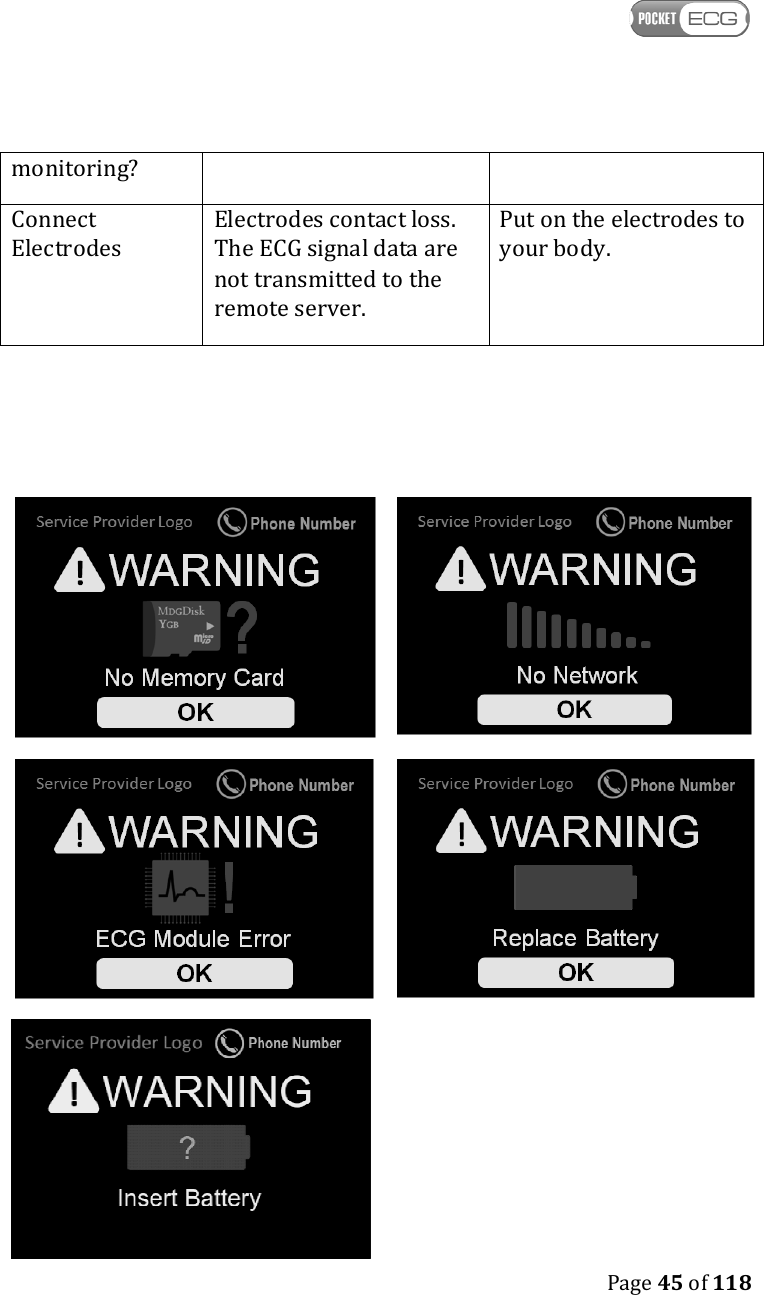
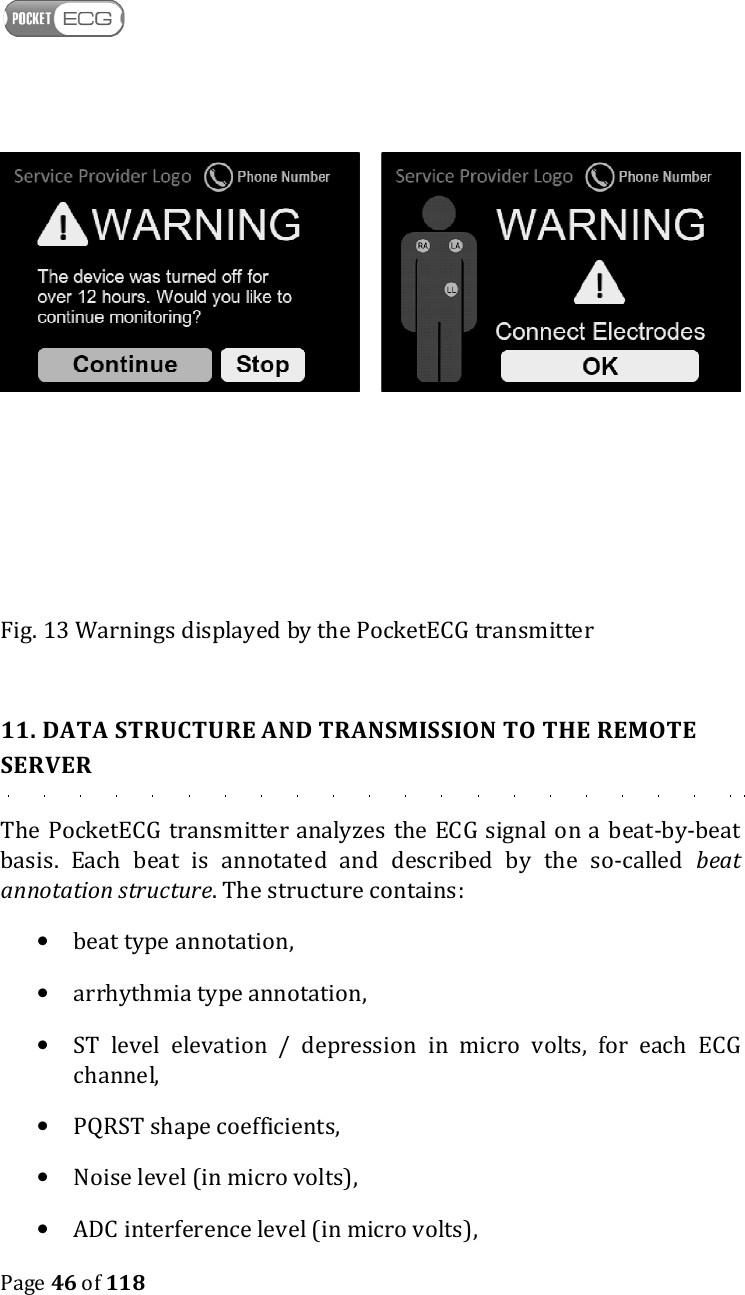
   Page 44 of 118  10. ALARMS The PocketECG transmitter generates following alarms requiring user attention (see Fig. 13): Alarm  Description  Action No memory card The micro SD card is not installed in its compartment and the session cannot be initialized. Install micro SD card or replace damaged one No network The PocketECG transmitter cannot connect to the mobile phone network - data cannot be transmitted. Keep the PocketECG transmitter in the area where mobile network is accessible.  Replace battery The battery is discharged. The data are not transmitted to the remote server. Replace the battery with the fully charged. Insert battery The PocketECG transmitter cannot find the battery Insert the battery to the PocketECG transmitter ECG module error The ECG module malfunction. Turn off and then turn on the device. If the module still does not operate correctly, call service provider. The device was turned off for over 12 hours. Would you like to continue The PocketECG transmitter was turned off for over 12 hours.  Make sure, that you have to stop or continue secession, call service provider.
   Page 45 of 118  monitoring? Connect Electrodes Electrodes contact loss. The ECG signal data are not transmitted to the remote server. Put on the electrodes to your body.
   Page 46 of 118         Fig. 13 Warnings displayed by the PocketECG transmitter  11. DATA STRUCTURE AND TRANSMISSION TO THE REMOTE SERVER The PocketECG  transmitter analyzes the ECG signal on a beat-by-beat basis.  Each  beat  is  annotated  and  described  by  the  so-called  beat annotation structure. The structure contains: • beat type annotation, • arrhythmia type annotation, • ST  level  elevation  /  depression  in  micro  volts,  for  each  ECG channel, • PQRST shape coefficients, • Noise level (in micro volts), • ADC interference level (in micro volts),
   Page 47 of 118  Depending on the circumstances and signal characteristics, registered data can be sent to a remote server specified in the settings if the ‘Send ECG events through Internet’ option has been selected. Signal is transmitted automatically based on the data analysis, or periodically or the transmission is triggered by the patient (by pressing the ‘Report symptoms’ button. The data is transmitted via the mobile telephony network.
   Page 48 of 118  12. MAINTENANCE The PocketECG transmitter type: PECGT-III and battery charger type: PECGC-III, manufactured by Medicalgorithmics S.A. are designed for 5 years continuous use if properly operated. After the devices have been used for 5 years it should be recycled according to the local recycling program or refurbished by the manufacturer. If you have any questions or problems please contact Medicalgorithmics S.A. service using contact details from section “30. Service”.  The capacity of the PocketECG Li-Ion battery decreases with normal use over time. The battery must be replaced with a new one after 300 charging cycles or after 2 years of using. The maximal life time of a particular version of PC Client software is determined either by support period provided by Microsoft for the latest version of MS Windows operating system, that is compatible with technical specification of a particular version of PC Client software, or by support period provided by Microsoft for the Microsoft.NET Framework version used to build a particular version of PC Client software, whichever expires first. 12.1 Inspection of the device Prior to starting a recording session, the user should check the device in accordance with the following instructions: 1. Inspect the patient cable bends, cuts and cracks on the case; 2. After placing the fully charged battery into its compartment check whether proper graphical interface is displayed;  12.2 Testing the device At least one a year the user responsible for efficient operation of the device, should check its functional efficiency and verify the correctness
   Page 49 of 118  of displayed messages and check the condition of the equipment, especially the cables by performing the following operations: 1. Connect ECG simulator (e.g. Netech MiniSim 1000 or similar) to the patient cable of the PocketECG transmitter and adjust typical parameters (heart rate, amplitude) of generated ECG signal; 2. Start a new recording session; 3. Check for normal appearance of the waveforms with appropriate amplitude and without excessive noise. Check if signal annotations are properly displayed. If ECG simulator allows for arrhythmia simulating you may decide to check whether they are properly detected (it will prove appropriate operation of the device); 4. Try to bend the patient cable simulating typical bending caused by patient’s movements and verify whether this causes distortions of the ECG signal. 5. Remove the main battery and check whether device operates without interruptions (device is switched to a backup power automatically). If the PocketECG transmitter falls or gets hit, a functional efficiency check should be performed by the patient (simply try to start new diagnostic session) or person responsible for efficient operation of the device according to the above instructions. If you suspect that something is wrong with the device contact the manufacturer’s service.   Caution. Do not remove the casing of the PocketECG transmitter and do not attempt to repair the device if it does not function properly. This may damage the device.  12.3. Cleaning the device
   Page 50 of 118  The outer surface of the device and lead wires can be wiped with a wet soft cloth and soft soap dissolved in water or an alcohol-based disinfecting agent. The device should be cleaned appropriately for intended use and following procedures binding for the institution where the equipment is used.  Caution. Do not let soap or water get inside the PocketECG transmitter. It is not waterproof.  When cleaning or using the equipment, never get the cables and the connectors wet.  Should the PocketECG transmitter get accidentally wet, dry it immediately (leave the device with removed battery cover in the warm and wet room for at least 24 hours). After drying turn the device on to check if it functions properly. Should you have doubts whether the device functions properly, contact the manufacturer’s service. 12.4. Storing the device Remove the rechargeable battery from the device before storing it. This prevents the battery from accidental discharge and reduces the risk of its damage. Observe the environmental storage conditions. See section 29 Technical parameters of PocketECG transmitter.  12.5. Software updates The software operating PocketECG transmitter should not be modified or  updated  by  anyone  except  the  manufacturer  or  technical  staff responsible  for  its  servicing. There are  two  methods  for  updating  the software of the PocketECG transmitter: • The  installer  of  new  software  version  must  be  stored  on  the microSD  card.  After  powering  the  device  the  installer  is automatically  launched.  It  removes  previous  version  of  the software and installs the new one.
   Page 51 of 118  • The PocketECG transmitter must be connected to the computer using  USB  port  available  after  casing  removal.  When  the connection  is  successfully  established,  the  software  installer must be executed on the PC. The installer updates the software version in the PocketECG internal memory.
   Page 52 of 118  13. SAFETY RULES FOR USING THE POCKETECG TRANSMITTER 1. One device is intended to monitor only one patient at a time. 2. It is recommended for the device to work in room temperature. 3. Air in rooms where the device works should be free of caustic gasses, steam and dust. Although the device is powered from 3.7V and does not allow for power intake larger than 3A it is not guaranteed that it cannot produce spark which could initiate explosion.  4. The patient should check with the appropriate airline carrier to confirm that PocketECG transmitter which is similar to the regular mobile phone may be used on the airplane during take-off, flight and landing. 5. Due caution should be exercised when handling the device. It is necessary to avoid excessive stretching and sudden jerking of cables connecting the PocketECG transmitter with electrodes placed on patient’s body. 6. Parts that wear out and are intended for single use should be used in accordance with binding regulations and cannot be re-used. This especially concerns the electrodes placed on patient’s body, which should be replaced with new ones after no longer than 24 hours if the diagnostic session is to be continued. Users (physicians, patients, etc) are trained in this respect and are advised to get familiar with this instruction. 7. The ECG cable is permanently attached to the PocketECG transmitter. In case of damage, do not repair or replace it, because it may negatively influence the electromagnetic compatibility of the device. Damaged ECG cable can be replaced only by the manufacturer’s service. 8. Manufacturer is not liable for damage to the PocketECG transmitter caused by improper operation of the device or neglecting guidelines included in the user manual.
   Page 53 of 118  9. Manufacturer accepts liability for safe operation of the PocketECG transmitter, only when the device is used as intended and in accordance with the user manual. 10. The PocketECG QRS detection algorithm adapts to noise and disturbances level obscuring the signal, i.e. in case of higher noise level, the QRS detection procedure becomes less sensitive. The minimum QRS detection level is set to 0.16 mV.  WARNING. THE RESULTS OF AUTOMATED ECG SIGNAL ANALYSIS MAY BE INACCURATE IF AMPLITUDE OF THE QRS COMPLEXES IS LOWER THAN 0.16 mV.  11. The capacity of the PocketECG Li-Ion battery decreases with normal use over time. The battery must be replaced with a new one after 300 charging cycles or after 2 years of using. 12. The conductive parts of ECG cables are intended to be connected only to the ECG electrodes. They should not be connected to any conductive parts of any objects including earth. 13.1 Electromagnetic compatibility (EMC) The PocketECG transmitter needs special precautions regarding EMC and needs to be installed and put into service according to the EMC information provided in the user manual.    WARNING. THE POCKETECG TRANSMITTER IS MR UNSAFE, AND SHOULD NOT BE USED IN ANY MAGNETIC RESONANCE ENVIRONMENT.   WARNING. USE OF ACCESSORIES OTHER THAN THOSE SPECIFIED IN SECTION 6, WITH THE EXCEPTION OF THE ACCESSORIES SOLD BY THE MANUFACTURER OF THE POCKETECG TRANSMITTER AS REPLACEMENT PARTS FOR INTERNAL
   Page 54 of 118  COMPONENTS, MAY RESULT IN INCREASED EMISSION OR DECREASED IMMUNITY OF THE POCKETECG TRANSMITTER.  Caution. Sources of electromagnetic radiation like: • portable and mobile radio frequency (RF) communications equipment (e.g. cellular phones, mobile radio), • radio frequency identification systems (RFID) • devices using one or more of the following wireless technologies: WiFi (IEEE 802.11), Bluetooth (IEEE 802.15), ZigBee (IEEE 802.15.4), WiMax(IEEE 802.16), Ant, etc,  • base stations for radio (cellular/cordless) telephones and land mobile radios, amateur radio, AM and FM radio broadcast and TV broadcast, • metal detectors can affect the PocketECG transmitter.   Caution. Sources of strong electromagnetic radiation such as radio transmitters, wireless personal transmitters working in the 80-2500 MHz frequency band may disturb the ECG signal and disturb the automated ECG signal analysis. It is recommended to keep the PocketECG transmitter as far as possible from all equipment combining RF transmitters. Try to reorient or/and relocate PocketECG transmitter when the ECG signal displayed on the screen of is partially masked by disturbing signal despite the ECG electrodes are properly placed on the patient skin. In case of further problems with the equipment operation, the medical service provider should be contacted for support.
   Page 55 of 118  PocketECG III device and any of its components should not be used for patient monitoring during any diagnostic tests or medical treatment performed using: • computed tomography (CT) systems, • positron emission technology (PET), • diathermy systems If the patient is going to be examined/treated using any of the above diagnostic systems while being monitored with the PocketECG III device, it is recommended to follow the instructions: 1. Contact your medical service provider or medical professional supervising your recording session to inform that you are going to remove the PocketECG transmitter for some time due to the medical examination/treatment. 2. Disconnect the ECG lead wires of the PocketECG transmitter from the electrodes placed on your body. 3. Leave the PocketECG transmitter in a place where it will not be exposed to any disturbing radiation generated by the medical system that is going to be used. Do not stop the recording session. 4. When the examination/treatment is finished, replace the electrodes if necessary and connect the lead wires of the PocketECG transmitter to the electrodes.
   Page 56 of 118  Guidance and manufacturer's declaration- electromagnetic emission The PocketECG transmitter is intended for use in the electromagnetic environment specified below. The customer or the user of the PocketECG transmitter should assure that it is used in such emission environment. Emissions test  Compliance  Electromagnetic environment - guidance RF emissions CISPR 11  Group 1 The PocketECG transmitter uses RF energy only for its internal function and transmission of the data through mobile phone network. The transmitter does not radiate any RF energy for diagnostic purposes.  RF emissions CISPR 11  Class B The PocketECG transmitter is suitable for use in all establishments, including domestic establishments. The device has no connection to the public low-voltage power supply network. Harmonic emissions IEC 61000-3-2 Not applicable Voltage fluctuations/ flicker emissions IEC 61000-3-3 Not applicable  Guidance and manufacturer's declaration- electromagnetic immunity The PocketECG transmitter is intended for use in the electromagnetic environment specified below. The customer or the user of the PocketECG transmitter should assure that it is used in such emission environment. Immunity test  IEC 60601 test level  Compliance level  Electromagnetic environment - guidance Electrostatic discharge (ESD) IEC 61000-4-2 ± 6 kV contact ± 8 kV air ± 6 kV contact ± 8 kV air Floors should be wood, concrete, or ceramic tile. If floors are covered with synthetic material, the relative humidity should be at least 30%. Electrical fast transient/burst IEC 61000-4-4 ±2 kV for power supply lines ±1 kV for input/output lines Not applicable   Surge IEC 61000-4-5 ±1 kV line(s) to line(s) ±2 kV line(s) to earth  Not applicable   Voltage dips, short interruptions, and voltage variations on power supply input lines. <5 % UT (>95 % dip in UT) for 0.5 cycle 40 % UT (60 % dip in UT) for 5 cycles 70 % UT (30 % dip in Not applicable
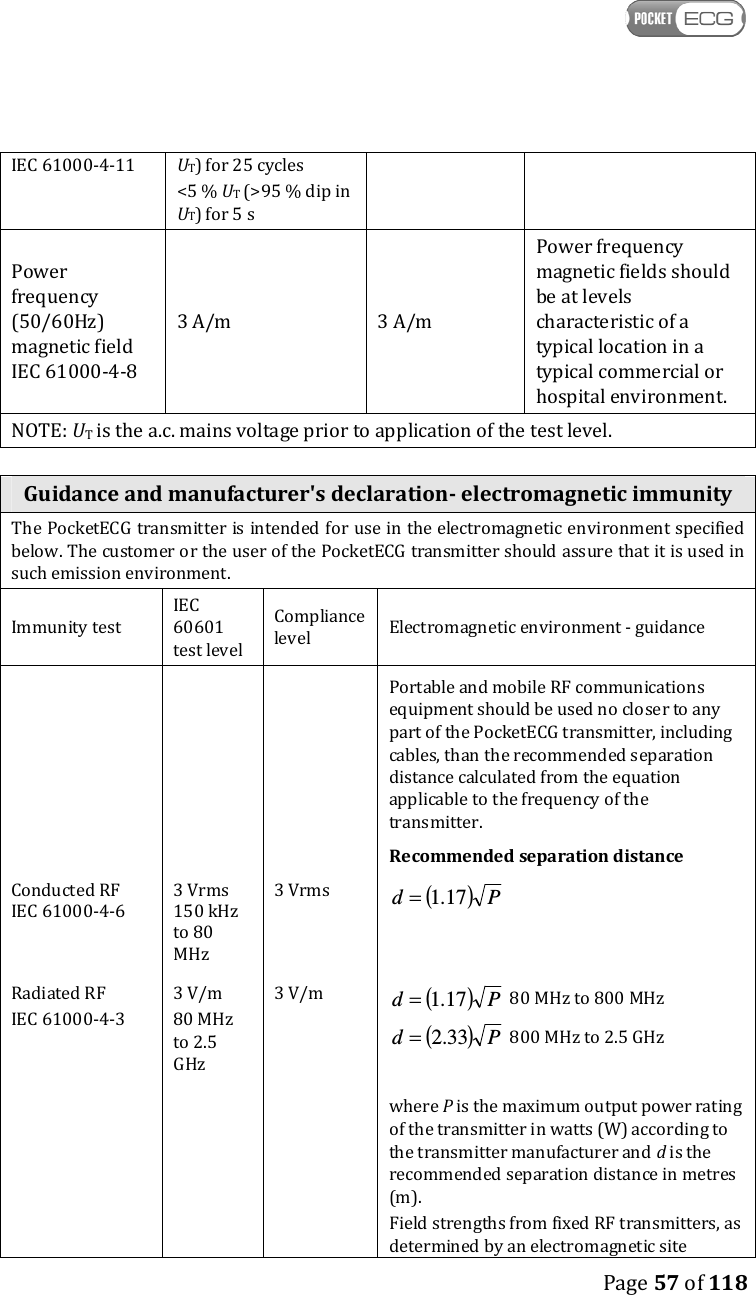
   Page 57 of 118  IEC 61000-4-11  UT) for 25 cycles <5 % UT (>95 % dip in UT) for 5 s Power frequency (50/60Hz) magnetic field IEC 61000-4-8 3 A/m  3 A/m Power frequency magnetic fields should be at levels characteristic of a typical location in a typical commercial or hospital environment. NOTE: UT is the a.c. mains voltage prior to application of the test level.  Guidance and manufacturer's declaration- electromagnetic immunity The PocketECG transmitter is intended for use in the electromagnetic environment specified below. The customer or the user of the PocketECG transmitter should assure that it is used in such emission environment. Immunity test IEC 60601 test level Compliance level  Electromagnetic environment - guidance Conducted RF  IEC 61000-4-6 3 Vrms 150 kHz to 80 MHz 3 Vrms Portable and mobile RF communications equipment should be used no closer to any part of the PocketECG transmitter, including cables, than the recommended separation distance calculated from the equation applicable to the frequency of the transmitter. Recommended separation distance ( )Pd 17.1=   Radiated RF IEC 61000-4-3 3 V/m 80 MHz to 2.5 GHz 3 V/m ( )Pd 17.1= 80 MHz to 800 MHz ( )Pd 33.2= 800 MHz to 2.5 GHz       where P is the maximum output power rating of the transmitter in watts (W) according to the transmitter manufacturer and d is the recommended separation distance in metres (m). Field strengths from fixed RF transmitters, as determined by an electromagnetic site
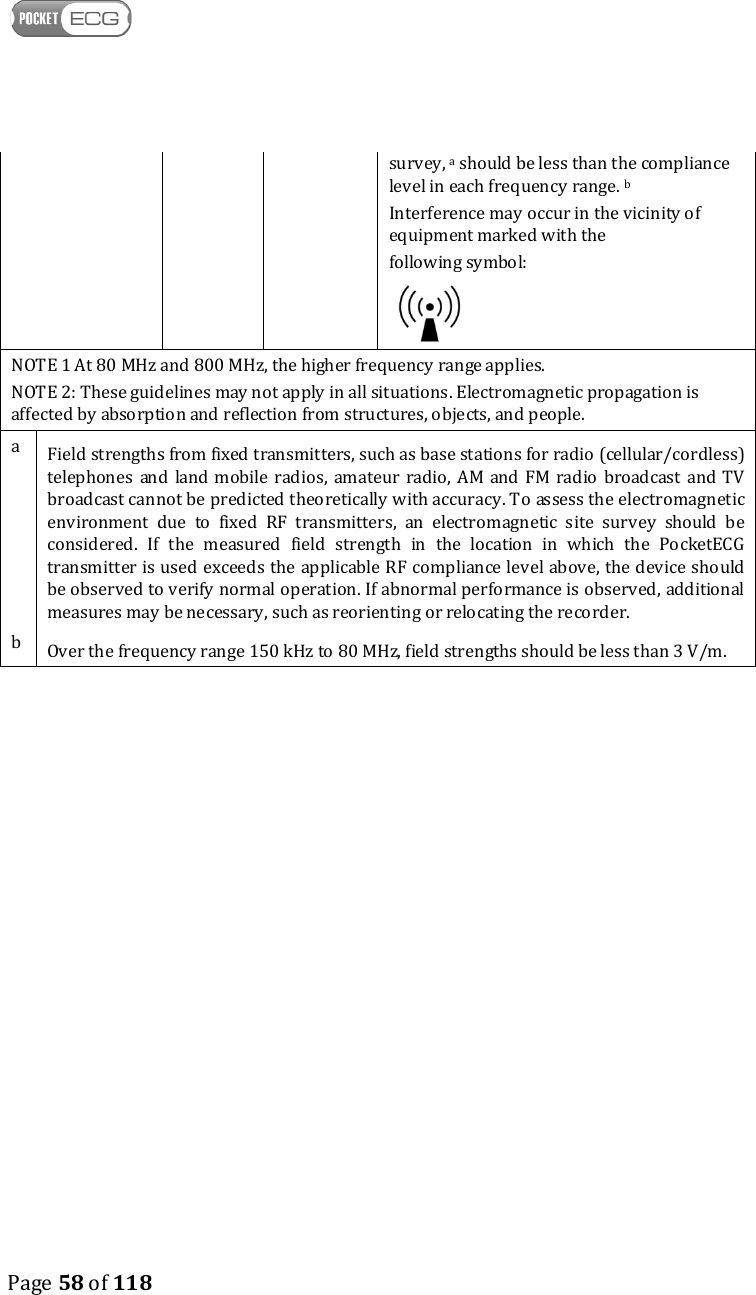
   Page 58 of 118  survey, a should be less than the compliance level in each frequency range. b Interference may occur in the vicinity of equipment marked with the following symbol:  NOTE 1 At 80 MHz and 800 MHz, the higher frequency range applies. NOTE 2: These guidelines may not apply in all situations. Electromagnetic propagation is affected by absorption and reflection from structures, objects, and people. a  Field strengths from fixed transmitters, such as base stations for radio (cellular/cordless) telephones  and  land mobile  radios,  amateur  radio, AM  and FM  radio  broadcast and TV broadcast cannot be predicted theoretically with accuracy. To assess the electromagnetic environment  due  to  fixed  RF  transmitters,  an  electromagnetic  site  survey  should  be considered.  If  the  measured  field  strength  in  the  location  in  which  the  PocketECG transmitter is used exceeds the applicable RF compliance level above, the device should be observed to verify normal operation. If abnormal performance is observed, additional measures may be necessary, such as reorienting or relocating the recorder. b  Over the frequency range 150 kHz to 80 MHz, field strengths should be less than 3 V/m.
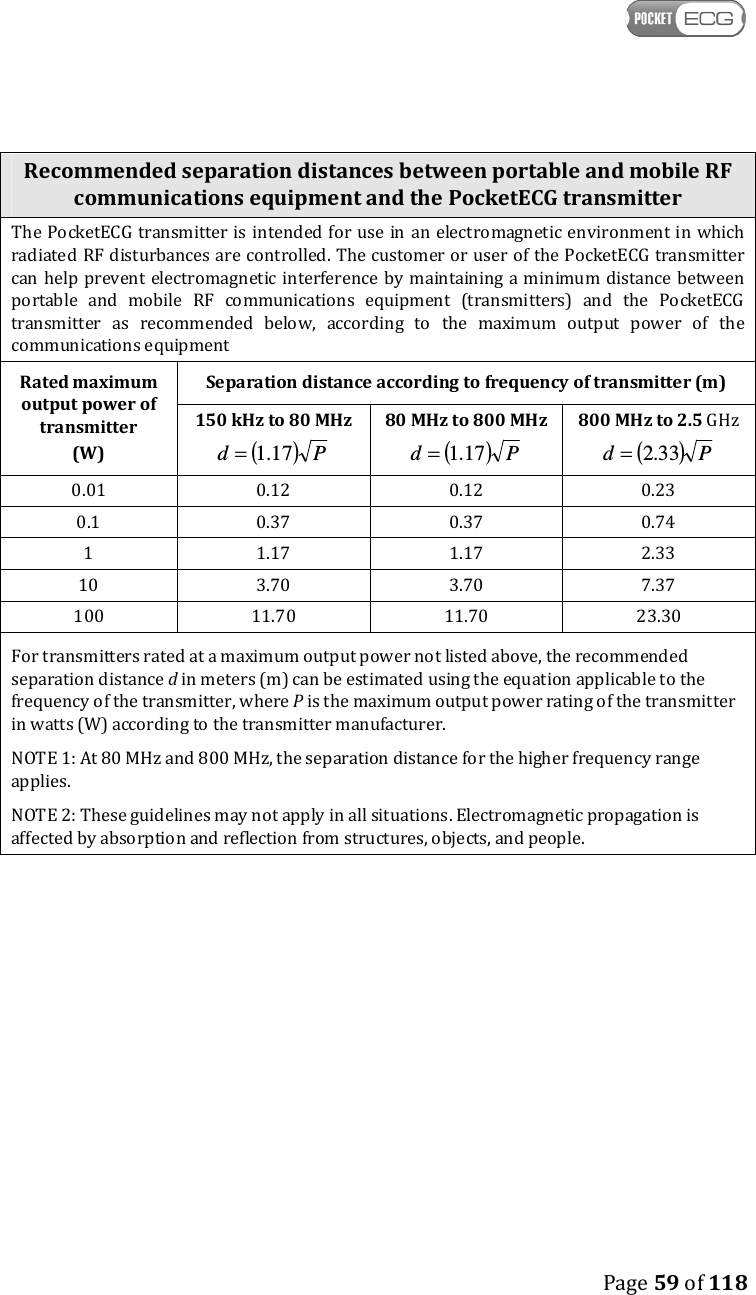
   Page 59 of 118  Recommended separation distances between portable and mobile RF communications equipment and the PocketECG transmitter The PocketECG transmitter is intended  for use  in an electromagnetic environment in which radiated RF disturbances are controlled. The customer or user of the PocketECG transmitter can help prevent  electromagnetic  interference by  maintaining a minimum distance  between portable  and  mobile  RF  communications  equipment  (transmitters)  and  the  PocketECG transmitter  as  recommended  below,  according  to  the  maximum  output  power  of  the communications equipment Rated maximum output power of transmitter (W) Separation distance according to frequency of transmitter (m) 150 kHz to 80 MHz ( )Pd 17.1= 80 MHz to 800 MHz ( )Pd 17.1= 800 MHz to 2.5 GHz ( )Pd 33.2= 0.01  0.12  0.12  0.23 0.1  0.37  0.37  0.74 1  1.17  1.17  2.33 10  3.70  3.70  7.37 100  11.70  11.70  23.30 For transmitters rated at a maximum output power not listed above, the recommended separation distance d in meters (m) can be estimated using the equation applicable to the frequency of the transmitter, where P is the maximum output power rating of the transmitter in watts (W) according to the transmitter manufacturer. NOTE 1: At 80 MHz and 800 MHz, the separation distance for the higher frequency range applies. NOTE 2: These guidelines may not apply in all situations. Electromagnetic propagation is affected by absorption and reflection from structures, objects, and people.
   Page 60 of 118  B. POCKETECG PC CLIENT SOFTWARE 14. EQUIPMENT REQUIREMENTS The  PocketECG  PC  client  software  should  be  used  with  personal computers  or  tablets  with  Microsoft  Windows  XP,  Vista  or  7  OS installed. The PC/tablet should meet the following requirements: • At least 1 GB of RAM (2 GB recommended), • 1 GHz CPU (1,5 GHz recommended), • Free space on HDD – at least 20 GB (40 GB recommended), • Internet connection – at least 512 kbps (downlink).  15. INSTALLATION In order to install the PocketECG PC Client software, the PC user is required to have administrative rights. The installation wizard will guide the user through the entire installation process which consists of a few steps. It is recommended to close all running applications before starting the installation. The PC client software is normally installed in the Program Files folder, however the user may select alternative directory. After user selects the destination folder, copying of the PocketECG files starts. During this step the user will be requested to accept installation of the following software packages that are distributed along with the PocketECG program: VC++ 2008 SP1 redistributable, Windows Mobile Device Center, Microsoft J# Redistributable and Adobe Reader. These packages are required for proper PocketECG Client operation.  During the installation of the PocketECG PC Client, a Windows registry entries are created which specify the server aliases along with their specific configuration parameters. Each alias consists of its own name and server parameters which are needed to establish a proper
   Page 61 of 118  connection. One of them is set as default and is used for first login action. Each installer is dedicated for one of the servers and normally there should be no need to change the default alias. It is impossible to create a new server alias using the PC Client software as all of them are included in the installer. If there is such need, it is necessary to contact service provider or a distributor of the PocketECG software. 16. DISTRIBUTION The PC client application is distributed to users using either a traditional method (DVD-R / CD-R), or electronically. The electronic distribution process is through password protected access to a SSL FTP server to obtain the installer. 17. OVERVIEW The PC client application allows for managing the recording sessions and reviewing the ECG data that was sent to the remote server by the patient monitors. The PC client user is able to manage ongoing sessions, review and modify the results of the ECG analysis and generate reports which summarize the detection results. After selecting a recording session in the Navigator window the user may start reviewing the ECG and the labeled arrhythmias. The ECG data, analysis results and application functions can be accessed through five viewing modes:
   Page 62 of 118    Navigator – main session’s manager window. Allows for selecting a particular session, which can be accessed through the following viewing modes:   Event View– contains a list of ECG events / arrhythmias detected by the system   Full Disclosure – allows for viewing the ECG waveform recorded during the monitoring   Trends – contains diagrams illustrating variations of the averaged heart rate and other ECG parameters   Impressions and Findings – notepad for entering comments which will be included in the generated reports   Reports– contains a list of reports which summarize the analysis results  Garbage – folder containing deleted recording sessions  Archive – folder containing archived recording sessions  17.1. Communication with remote server The PC Client application utilizes regular internet connection in order to perform its functions. The application monitors the state of the connection with the remote server. If connection cannot be established or is disturbed the “No internet” warning is displayed in the upper left corner of the screen. The internet connection is required only for transferring ECG data between the PC Client application and the remote server. Only those functions of the application that require internet communication are disabled when the problems with internet connection occurs. The user can still review the already downloaded ECG data, review trends, generate reports, etc.  If "No internet" warning is displayed in the upper left part of the screen, the user should verify the state of internet connection. In order to do this, the user should run an internet browser and check whether it is possible to connect with any server and visit popular websites.
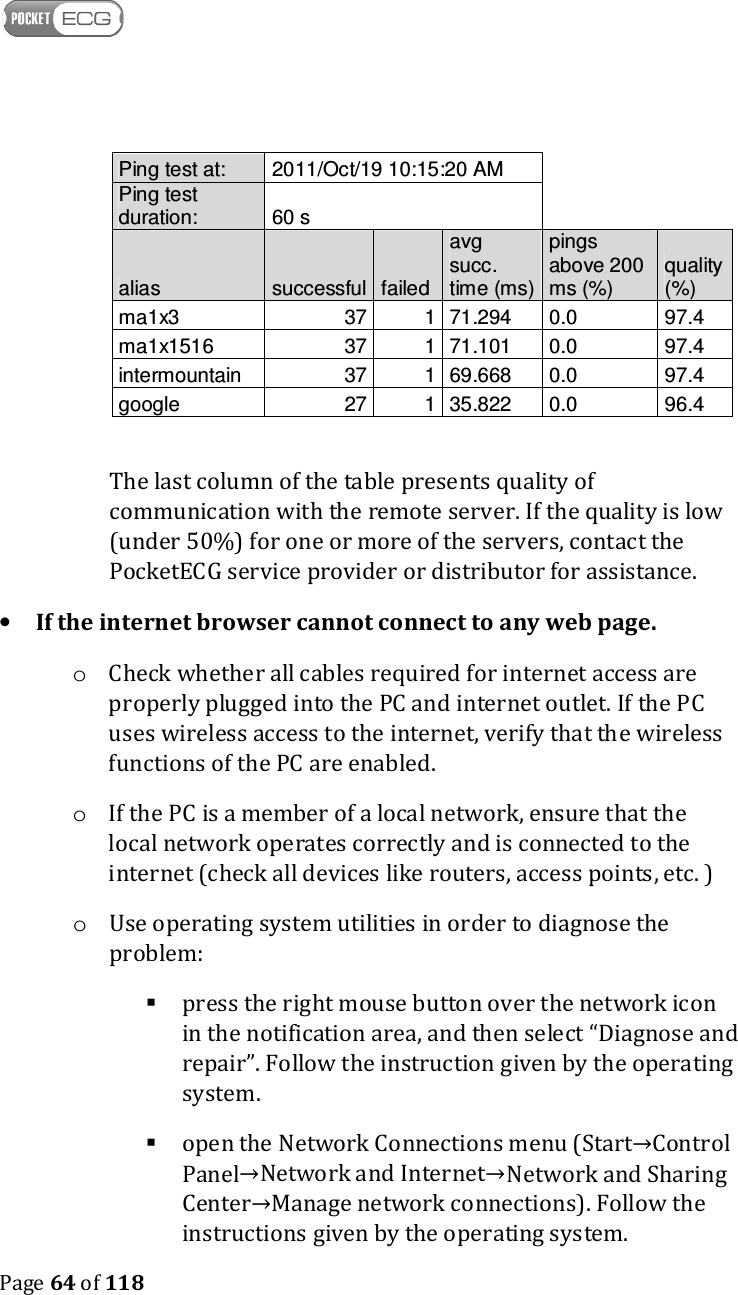
   Page 63 of 118  Following below instructions can be helpful in solving the problem with the remote server communication. • If the internet browser responds properly o Check configuration of the firewall application installed on the PC. The firewall application should allow PocketECG Client to make outgoing connections. If there is no rule already created for the PocketECG Client software, the solution may be to create a rule allowing PocketECG Client software to make outgoing connections. o The PC Client stores information related to the connection quality to remote server in log files. The log files with *.csv extension are saved in LocalDataRoot\Log directory. In order to verify the quality of communication with remote server, open the log file using any spreadsheet application or simple text editor. The sample of the log file is presented below.
   Page 64 of 118  Ping test at:  2011/Oct/19 10:15:20 AM   Ping test duration:  60 s   alias  successful failed avg succ. time (ms) pings above 200 ms (%) quality (%) ma1x3  37 1 71.294  0.0  97.4 ma1x1516  37 1 71.101  0.0  97.4 intermountain  37 1 69.668  0.0  97.4 google  27 1 35.822  0.0  96.4  The last column of the table presents quality of communication with the remote server. If the quality is low (under 50%) for one or more of the servers, contact the PocketECG service provider or distributor for assistance. • If the internet browser cannot connect to any web page. o Check whether all cables required for internet access are properly plugged into the PC and internet outlet. If the PC uses wireless access to the internet, verify that the wireless functions of the PC are enabled. o If the PC is a member of a local network, ensure that the local network operates correctly and is connected to the internet (check all devices like routers, access points, etc. ) o Use operating system utilities in order to diagnose the problem:  press the right mouse button over the network icon in the notification area, and then select “Diagnose and repair”. Follow the instruction given by the operating system.   open the Network Connections menu (Start→Control Panel→Network and Internet→Network and Sharing Center→Manage network connections). Follow the instructions given by the operating system.
   Page 65 of 118  If none of the abovementioned solutions help in establishing the reliable communication with remote server, contact the PocketECG provider or distributor for assistance.

Navigation menu