Merrychef 412SMTV6DK Microwave Combination Oven User Manual

Merrychef Limited Microwave Combination Oven

User Manual

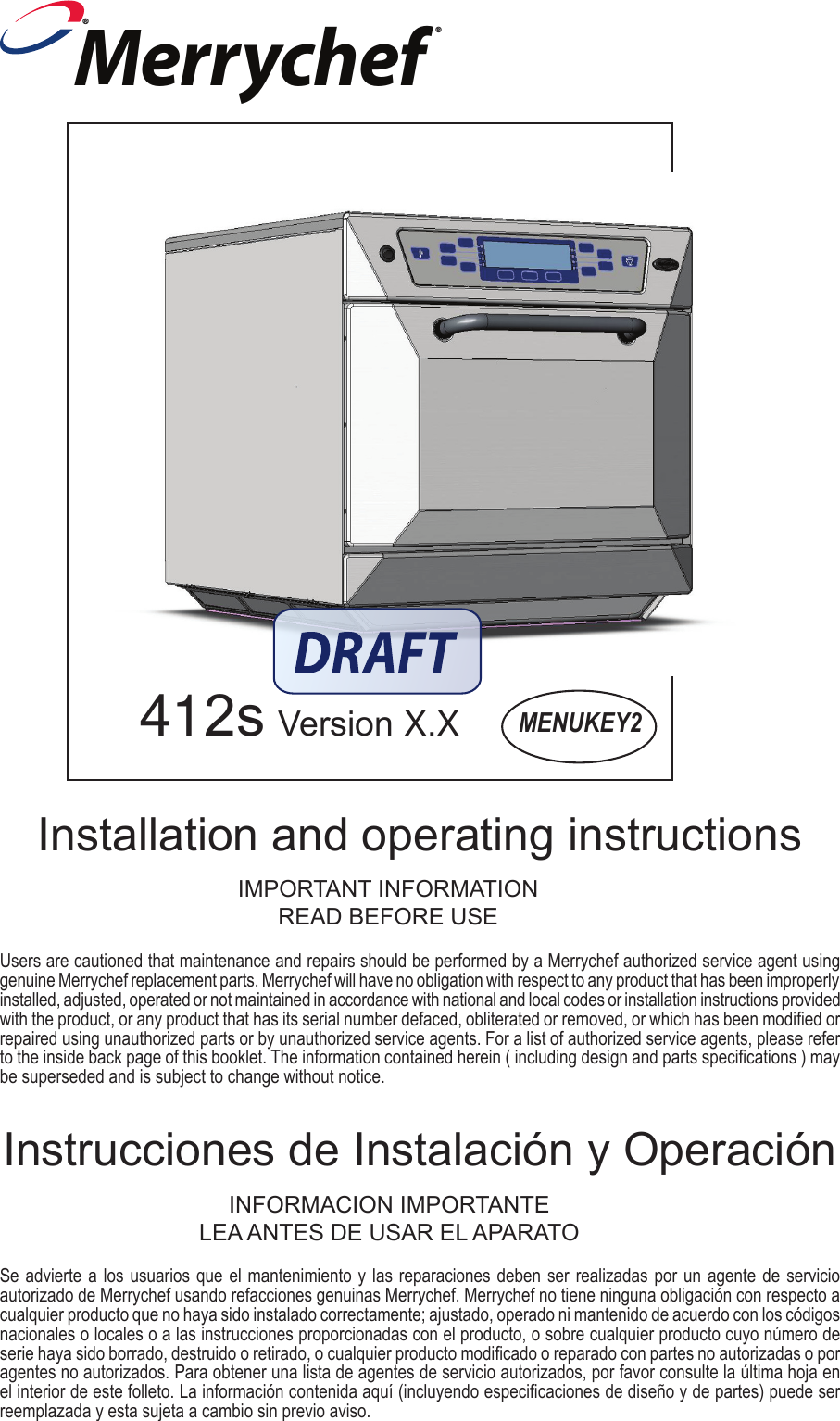
Se advierte a los usuarios que el mantenimiento y las reparaciones deben ser realizadas por un agente de servicio autorizado de Merrychef usando refacciones genuinas Merrychef. Merrychef no tiene ninguna obligación con respecto a cualquier producto que no haya sido instalado correctamente; ajustado, operado ni mantenido de acuerdo con los códigos nacionales o locales o a las instrucciones proporcionadas con el producto, o sobre cualquier producto cuyo número de serie haya sido borrado, destruido o retirado, o cualquier producto modicado o reparado con partes no autorizadas o por agentes no autorizados. Para obtener una lista de agentes de servicio autorizados, por favor consulte la última hoja en el interior de este folleto. La información contenida aquí (incluyendo especicaciones de diseño y de partes) puede ser reemplazada y esta sujeta a cambio sin previo aviso.MENUKEY2412s Version X.XInstrucciones de Instalación y OperaciónUsers are cautioned that maintenance and repairs should be performed by a Merrychef authorized service agent using genuine Merrychef replacement parts. Merrychef will have no obligation with respect to any product that has been improperly installed, adjusted, operated or not maintained in accordance with national and local codes or installation instructions provided with the product, or any product that has its serial number defaced, obliterated or removed, or which has been modied or repaired using unauthorized parts or by unauthorized service agents. For a list of authorized service agents, please refer to the inside back page of this booklet. The information contained herein ( including design and parts specications ) may be superseded and is subject to change without notice.Installation and operating instructionsIMPORTANT INFORMATIONREAD BEFORE USEINFORMACION IMPORTANTELEA ANTES DE USAR EL APARATOMerrychef®®
2      Safety instructions .............................................3     Installation instructions .......................................6    Introduction ........................................................8     Main features ................................................9-10     Usingtheovenforthersttime .................. 11-12     RunningaProgram ..........................................13   Operatinginstructions:Manualmode .............. 14  Operatinginstructions:Programmode ......15 -17     MenuKey:Changingovenprograms .............18     Daily cleaning 1, 2 Cool Down Mode & 3 ....19-21   Technicalspecication .....................................22 a)Donotattempttooperatethisovenwiththedoor open since open-door operation can result inharmfulexposuretomicrowaveenergy.Itisimportantnottodefeatortamperwiththesafetyinterlocks.b) Do not place any object between the oven front face and the door or allow soil or cleaner resi-duetoaccumalateonsealingsurfaces.PRECAUTIONS TO AVOID POSSIBLE EXPOSURE TO EXCESSIVE MICROWAVE ENERGY  c)Donotoperatetheovenifitisdamaged.Itisparticularlyimportantthattheovendoor closes properly and that there is no damagetothe(1)door(bent) (2)hingesandlatches(brokenorloosened)(3)doorsealsandsealingsurfaces.d) The oven should not be adjusted or repairedbyanyoneexceptproperlyqualiedservicepersonnelPLEASE READ THE FOLLOWING SAFETY INSTRUCTIONS CAREFULLYMerrychef USA2227 Welbilt BoulevardNew Port RicheyFL 34655Phone:1-(727)375-1944Fax:1-(727)569-1574e-mail:info@merrychefusa.com
3When using electrical appliances basic safety precautions should be followed, including the following:WARNING To reduce the risk of burns, electric shock, re,injurytopersons,orexposuretoexcessivemicrowaveenergy:1. Read all instructions before using the appliance.2.Readandfollowthespecic“PRECAUTIONSTOAVOID POSSIBLE EXPOSURE TO EXCESSIVE MICROWAVE ENERGY” FOUND ON PAGE 2.3.Thisappliancemustbegrounded.Connectonlytoa properly grounded outlet. See“GROUNDINGINSTRUCTIONS”foundonpage4.4. Install or locate this appliance only in accordance with the provided installation instructions5.Someproductssuchaswholeeggsandsealedcontainers—forexample,closedjars—mayexplodeand should not be heated in this oven.6. Use this appliance only for its intended use as describedinthemanual.Donotusecorrosivechemicalsorvaporsinthisappliance.Thistypeofovenisspecicallydesignedtoheat,cookordryfood.It is not designed for industrial or laboratory use.7. This appliance should not be used by children.8.Donotoperatethisapplianceifithasadamagedcord or plug, if it is not working properly, or if it has beendamagedordropped.9.Thisapplianceshouldbeservicedonlybyqualiedservice personnel. Contact the nearest authorized servicefacilityforexamination,repairoradjustment.10 Do not cover or block any openings on the applianceincludingairvents/ltersandsteamoutlet.11 Do not store this appliance outdoors. Do not use thisproductnearwater—–forexample,nearakitchensink,inawetbasement,ornearaswimmingpool, and the like.12.Donotimmersethecordorpluginwater.13.Keepthecordawayfromheatedsurfaces.14. Do not let cord hang over edge of table or counter.15. Either:i) When cleaning surfaces of door and oven thatcometogetheronclosingthedoor,useonlymildnon-abrasivesoaps,ordetergentsapplied with a sponge or soft cloth.ii) When separate cleaning instructions are provided, see door surface cleaning instructions.IMPORTANT SAFETY INSTRUCTIONSSAVE THESE INSTRUCTIONSiii)Ifmaterialsinsidetheovenshouldignite,keepoven door closed, turn oven off, and disconnect the power cord , or shut off power at the fuse or circuit breaker panel.iv) Do not use the cavity for storage purposes. Do not leave paper products, cooking utensils or food in the cavity when not in use.17.DONOToperateusingmicrowaveonlyorcombina-tion function without food or liquid inside the oven as thismayresultinoverheatingandmaycausedamage. 18.NEVERremovetheexterioroftheoven. 19.NEVERremoveanyxedinternalpartsoftheoven. 20.NEVERtamperwiththecontrolpanel,door,seals,or any other part oven. 21.DONOTobstructairvents/ltersorsteamoutlet. 22. NEVER hang dish towels or cloths on any part of the oven. 23.Ifthedoorsealsaredamaged,theovenmustberepaired by an approved Service Agent. 24.IfthepowercableisdamagedinanywayitMUSTbe replaced by an approved Service Agent. 25. When handling hot liquids, foods, and containers, care should be taken to avoid scalds and burns. 26.Whenheatingliquidsusingmicrowaveonlyorcom-bination function, the contents should be stirred prior to heating to avoid eruptive boiling. 27. Feeding bottles and baby food jars should be opened when heating, the contents stirred or shaken andthetemperaturecheckedpriortoconsumptiontoavoid burns. 28. Never use the oven to heat alcohol, e.g. brandy, rumetc.Also,foodcontainingalcoholcanmoreeasilycatchreifoverheated. 29.Neverattempttodeepfryintheoven.16.Toreduceriskofreinthecavity:i) Do not overcook food. Carefully attend appliance if paper, plastic or other combustiblematerialsareplacedinsidetheoven to facilitate cooking.ii)Removewiretwist-tiesfrompaperorplasticbags before placing bag in oven
4For all cord connected appliances:GROUNDING INSTRUCTIONSThisappliancemustbegrounded.Intheeventofanelectricalshortcircuit,groundingreducestheriskofelectric shock by providing an escape wire for the electric current. This appliance is equipped with a cord havingagroundingwirewithagroundingplug.Theplugmustbepluggedintoanoutletthatisproperlyinstalled and grounded.WARNING—Improperuseofthegroundingcanresultintheriskofelectricshock.ConsultaqualiedelectricianorServicemanifthegroundinginstructionsarenotcompletelyunderstoodorifdoubtexistsastowhethertheapplianceisproperlygrounded.Donotuseanextensioncord.Ifthepowersupplycordistooshort,haveaqualiedelectricianorservicemaninstallanoutletneartheappliance.Forapermanentlyconnectedappliance:GROUNDING INSTRUCTIONSThisappliancemustbeconnectedtoagrounded,metallic,permanentwiringsystem,oranequipmentgroundingconductorshouldberunwiththecircuitconductorsandconnectedtotheequipmentgroundingterminalorleadontheappliance.ELECTRICAL INSTALLATIONIn case of Radio or Television InterferenceThisequipmentgeneratesandusesradiofrequencyenergyandifnotinstalledandoperatedcorrectly,instrictaccordancewiththemanufacturer’sinstructions,maycauseharmfulinterferencetoauthorizedradiocommunicationservices.IthasbeentypetestedandfoundtocomplywiththelimitsforPart18.307conductedemissionsforconsumerequipmentandPart18.305radiatedemissions,whicharedesignedtoprovidereasonableprotection against such interference. However, there is no guarantee that interference will not occur in a particularinstallation.Ifthisequipmentdoescauseinterferencetoradioortelevisionreception,whichcanbedeterminedbyturningtheequipmentoffandon,theuserisencouragedtotryandcorrecttheinterferencebyoneormoreofthefollowingmeasures:1)  Re-orientate the receiving antenna.2)Relocatethemicrowavewithrespecttothereceiver.3)Plugthemicrowaveintoadifferentoutletsothatthereceiverandmicrowaveareondifferentbranchcircuits.Ifnecessarytheusershouldconsultthedealeroranexperiencedradio/televisiontechnicianforadditionalsuggestions.Note:Modicationsshouldonlybecarriedoutbythemanufacturerorauthorizedrepresentativetoensurecontinuingconformance.POWER SUPPLY: CIRCUIT BREAKERSIf the oven is connected to a ground fault detection device, it is required that the GFP or GFEP will allow a minimumof30milliampsgroundcurrentwithoutinterruptingthecircuit.
51. Readthismanualbeforeusingyouroven.2.  As with all electrical appliances, it is wise to have the electrical connections inspect-ed periodically.3.  The oven interior and door seals should be cleaned frequently, following the instruc-tions described in the CLEANING section.4. Thereisnoneedtoswitchoffyourovenaftereachfunctionbutremembertoswitchoff at the end of the day or period of operation.5. Microwaveenergyshouldnotbeusedtodrylinenorwarmplates.6. Aswithanycookingappliance,careshouldbetakentoavoidcombustionoftheitemswithintheoven.PRECAUTIONS TO BE OBSERVED7.  Ensure food is placed in the centre of the oven cavity for best results.8. Whenusingthemicrowaveonlyfunction,coverthefoodtopreventsplashingthewalls of the cavity.9. Foodincombustibleplasticorpapercontainersshouldonlybeusedinmicrowaveonly function and checked frequently to avoid the possibility of ignition.10. Itemsshouldbeunwrappedwhenusingconvectionandcombinationfunctions.11.  Eggs and whole hard-boiled eggs should notbeheatedusingthemicrowaveorcom-binationfunctionastheymayexplode.12.  Food with a skin, e.g. potatoes, apples, sausages, etc. should be pierced before heating.13. Foodshouldnotbeheatedinacompletelysealedcontainerasthebuild-upofsteammaycauseittoexplode.14. Excessfatshouldberemovedduring‘roasting’andbeforeliftingheavycontainersfromtheoven.15.  In the event of glass breaking or shattering within the oven, ensure that food is totally free of glass particles. If in doubt, dispose of any food that was in the oven at the timeofthebreakage.If smoke is observed:Switch offIsolatefromtheelectricalsupplyKeepthedoorclosedtostieanyames
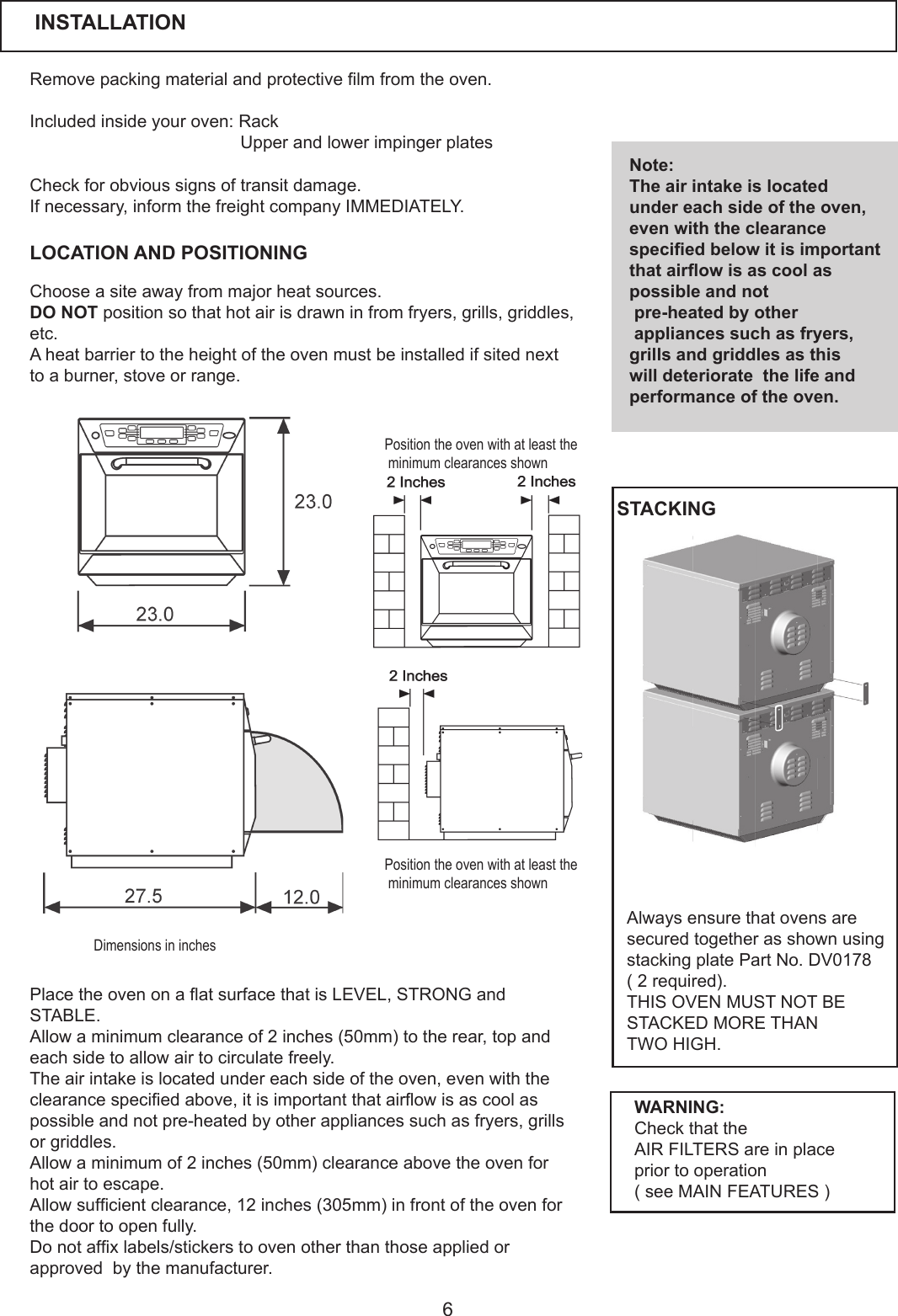
6Removepackingmaterialandprotectivelmfromtheoven.Included inside your oven: Rack UpperandlowerimpingerplatesLOCATION AND POSITIONINGCheckforobvioussignsoftransitdamage.Ifnecessary,informthefreightcompanyIMMEDIATELY.Chooseasiteawayfrommajorheatsources.DO NOTpositionsothathotairisdrawninfromfryers,grills,griddles,etc. Aheatbarriertotheheightoftheovenmustbeinstalledifsitednextto a burner, stove or range. Note:The air intake is located under each side of the oven, even with the clearance specied below it is important that airow is as cool as possible and not pre-heated by other appliances such as fryers, grills and griddles as this will deteriorate  the life and performance of the oven.PlacetheovenonaatsurfacethatisLEVEL,STRONGandSTABLE. Allowaminimumclearanceof2inches(50mm)totherear,topandeach side to allow air to circulate freely. The air intake is located under each side of the oven, even with the clearancespeciedabove,itisimportantthatairowisascoolaspossible and not pre-heated by other appliances such as fryers, grills or griddles. Allowaminimumof2inches(50mm)clearanceabovetheovenforhot air to escape. Allowsufcientclearance,12inches(305mm)infrontoftheovenforthe door to open fully. Donotafxlabels/stickerstoovenotherthanthoseappliedorapprovedbythemanufacturer.WARNING:Check that the AIR FILTERS are in place prior to operation (seeMAINFEATURES)INSTALLATIONPosition the oven with at least the minimum clearances shownPosition the oven with at least the minimum clearances shownDimensions in inchesAlways ensure that ovens are secured together as shown using stacking plate Part No. DV0178(2required).THIS OVEN MUST NOT BE STACKED MORE THAN TWO HIGH.STACKING
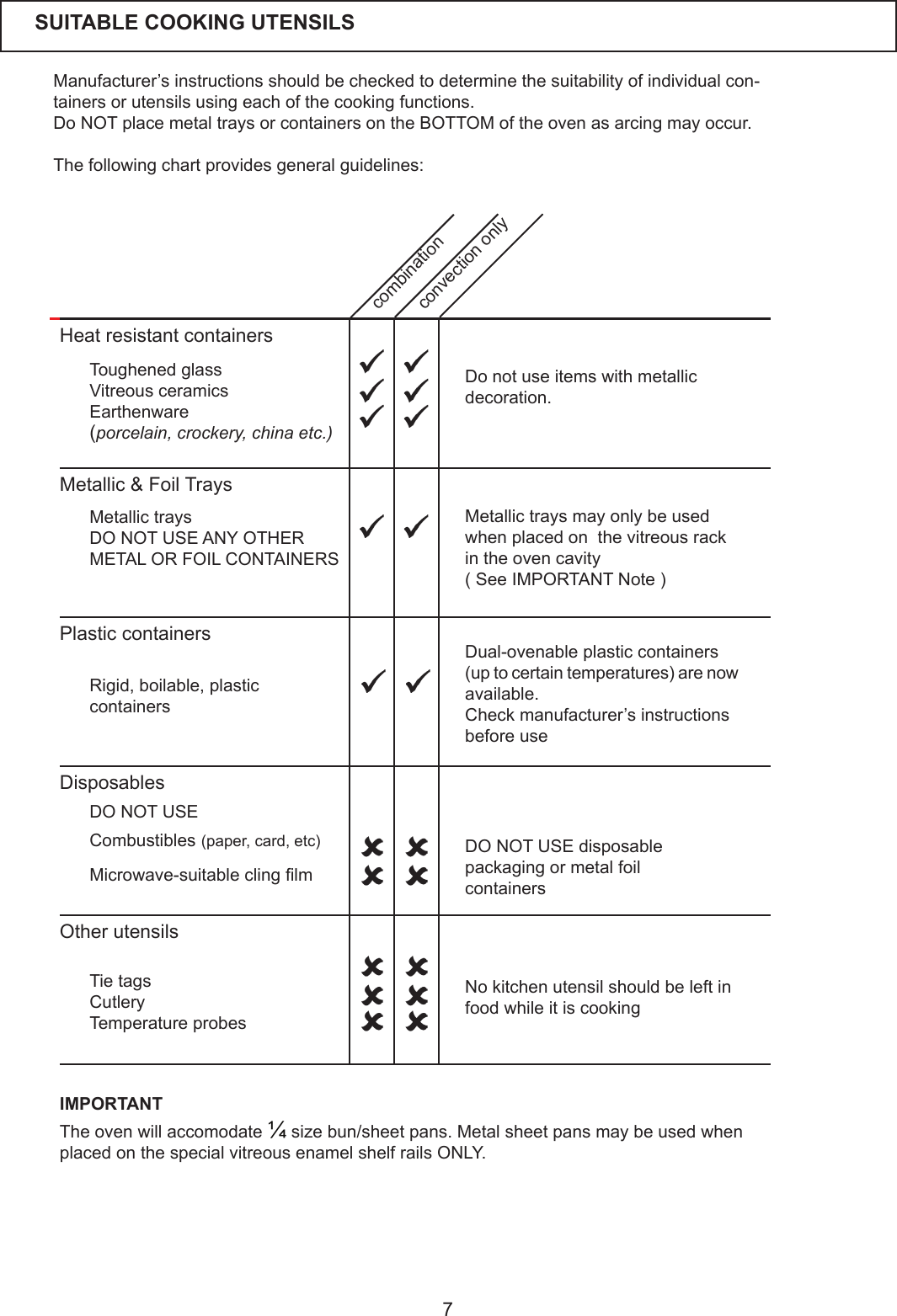
7Manufacturer’sinstructionsshouldbecheckedtodeterminethesuitabilityofindividualcon-tainers or utensils using each of the cooking functions.DoNOTplacemetaltraysorcontainersontheBOTTOMoftheovenasarcingmayoccur.The following chart provides general guidelines:SUITABLE COOKING UTENSILS IMPORTANTTheovenwillaccomodate¼sizebun/sheetpans.MetalsheetpansmaybeusedwhenplacedonthespecialvitreousenamelshelfrailsONLY.Heat resistant containersMetallic & Foil TraysPlastic containersDisposablesOther utensilsDonotuseitemswithmetallicdecoration.Metallictraysmayonlybeusedwhen placed on  the vitreous rack in the oven cavity(SeeIMPORTANTNote)Dual-ovenable plastic containers(uptocertaintemperatures)arenowavailable.Checkmanufacturer’sinstructionsbefore use No kitchen utensil should be left in food while it is cookingToughened glassVitreousceramicsEarthenware(porcelain, crockery, china etc.)Metallic traysDO NOT USE ANY OTHER METAL OR FOIL CONTAINERS Rigid, boilable, plasticcontainersCombustibles (paper,card,etc)Microwave-suitableclinglm Tie tagsCutleryTemperatureprobescombinationconvection onlyDO NOT USE disposable packagingormetalfoilcontainersDO NOT USE
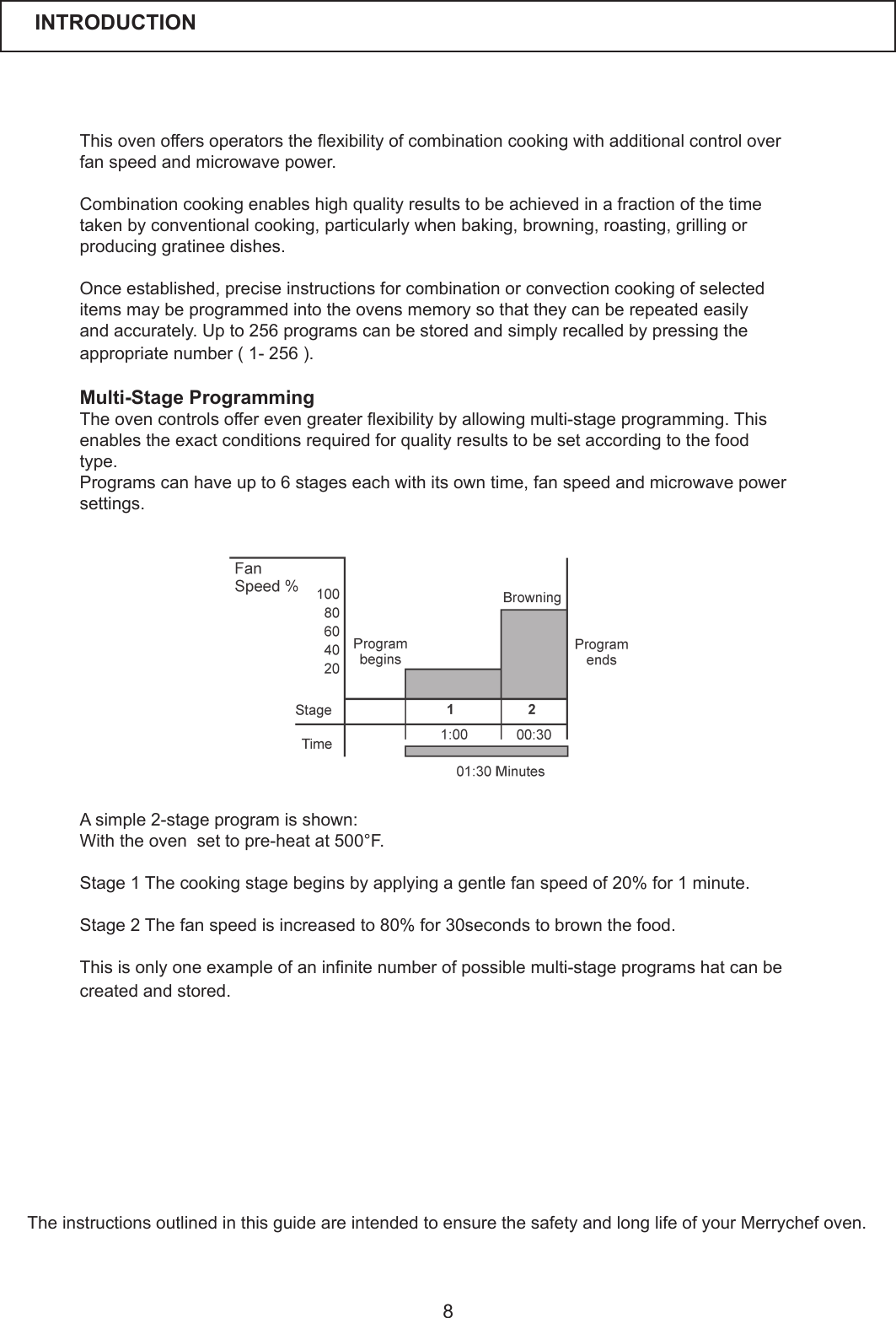
8Thisovenoffersoperatorstheexibilityofcombinationcookingwithadditionalcontroloverfanspeedandmicrowavepower.  Combinationcookingenableshighqualityresultstobeachievedinafractionofthetimetaken by conventional cooking, particularly when baking, browning, roasting, grilling or producing gratinee dishes.  Onceestablished,preciseinstructionsforcombinationorconvectioncookingofselecteditemsmaybeprogrammedintotheovensmemorysothattheycanberepeatedeasilyandaccurately.Upto256programscanbestoredandsimplyrecalledbypressingtheappropriatenumber(1-256).  Multi-Stage Programming Theovencontrolsofferevengreaterexibilitybyallowingmulti-stageprogramming.Thisenablestheexactconditionsrequiredforqualityresultstobesetaccordingtothefoodtype.Programscanhaveupto6stageseachwithitsowntime,fanspeedandmicrowavepowersettings.   Asimple2-stageprogramisshown:With the oven  set to pre-heat at 500°F.Stage1Thecookingstagebeginsbyapplyingagentlefanspeedof20%for1minute.Stage 2 The fan speed is increased to 80% for 30seconds to brown the food. Thisisonlyoneexampleofaninnitenumberofpossiblemulti-stageprogramshatcanbecreated and stored. The instructions outlined in this guide are intended to ensure the safety and long life of your Merrychef oven.INTRODUCTION
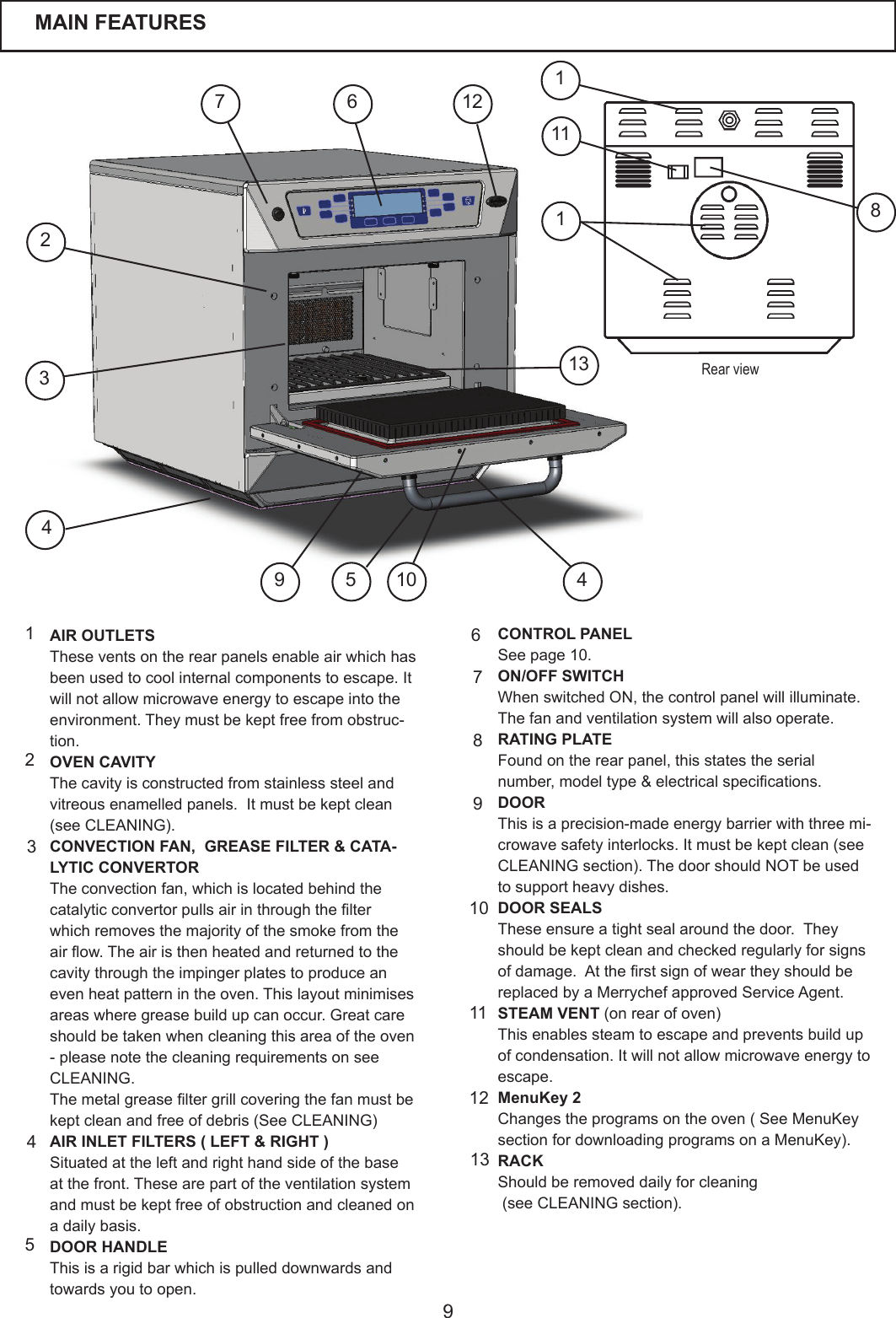
9AIR OUTLETSThese vents on the rear panels enable air which has beenusedtocoolinternalcomponentstoescape.Itwillnotallowmicrowaveenergytoescapeintotheenvironment.Theymustbekeptfreefromobstruc-tion.OVEN CAVITYThecavityisconstructedfromstainlesssteelandvitreousenamelledpanels.Itmustbekeptclean(seeCLEANING).CONVECTION FAN,  GREASE FILTER & CATA-LYTIC CONVERTORThe convection fan, which is located behind the catalyticconvertorpullsairinthroughthelterwhichremovesthemajorityofthesmokefromtheairow.Theairisthenheatedandreturnedtothecavitythroughtheimpingerplatestoproduceanevenheatpatternintheoven.Thislayoutminimisesareas where grease build up can occur. Great care should be taken when cleaning this area of the oven -pleasenotethecleaningrequirementsonseeCLEANING.Themetalgreaseltergrillcoveringthefanmustbekeptcleanandfreeofdebris(SeeCLEANING)AIR INLET FILTERS ( LEFT & RIGHT )Situated at the left and right hand side of the base atthefront.Thesearepartoftheventilationsystemandmustbekeptfreeofobstructionandcleanedona daily basis.DOOR HANDLEThis is a rigid bar which is pulled downwards and towards you to open.CONTROL PANELSee page 10.ON/OFF SWITCHWhenswitchedON,thecontrolpanelwillilluminate.Thefanandventilationsystemwillalsooperate.RATING PLATE Found on the rear panel, this states the serial number,modeltype&electricalspecications.DOORThisisaprecision-madeenergybarrierwiththreemi-crowavesafetyinterlocks.Itmustbekeptclean(seeCLEANING section). The door should NOT be used to support heavy dishes.DOOR SEALSThese ensure a tight seal around the door.  They should be kept clean and checked regularly for signs ofdamage.Attherstsignofweartheyshouldbereplaced by a Merrychef approved Service Agent.STEAM VENT(onrearofoven)Thisenablessteamtoescapeandpreventsbuildupofcondensation.Itwillnotallowmicrowaveenergytoescape.MenuKey 2Changestheprogramsontheoven(SeeMenuKeysectionfordownloadingprogramsonaMenuKey).RACKShouldberemoveddailyforcleaning(seeCLEANINGsection).12345789101112613MAIN FEATURES369241275 10 4Rear view1311811
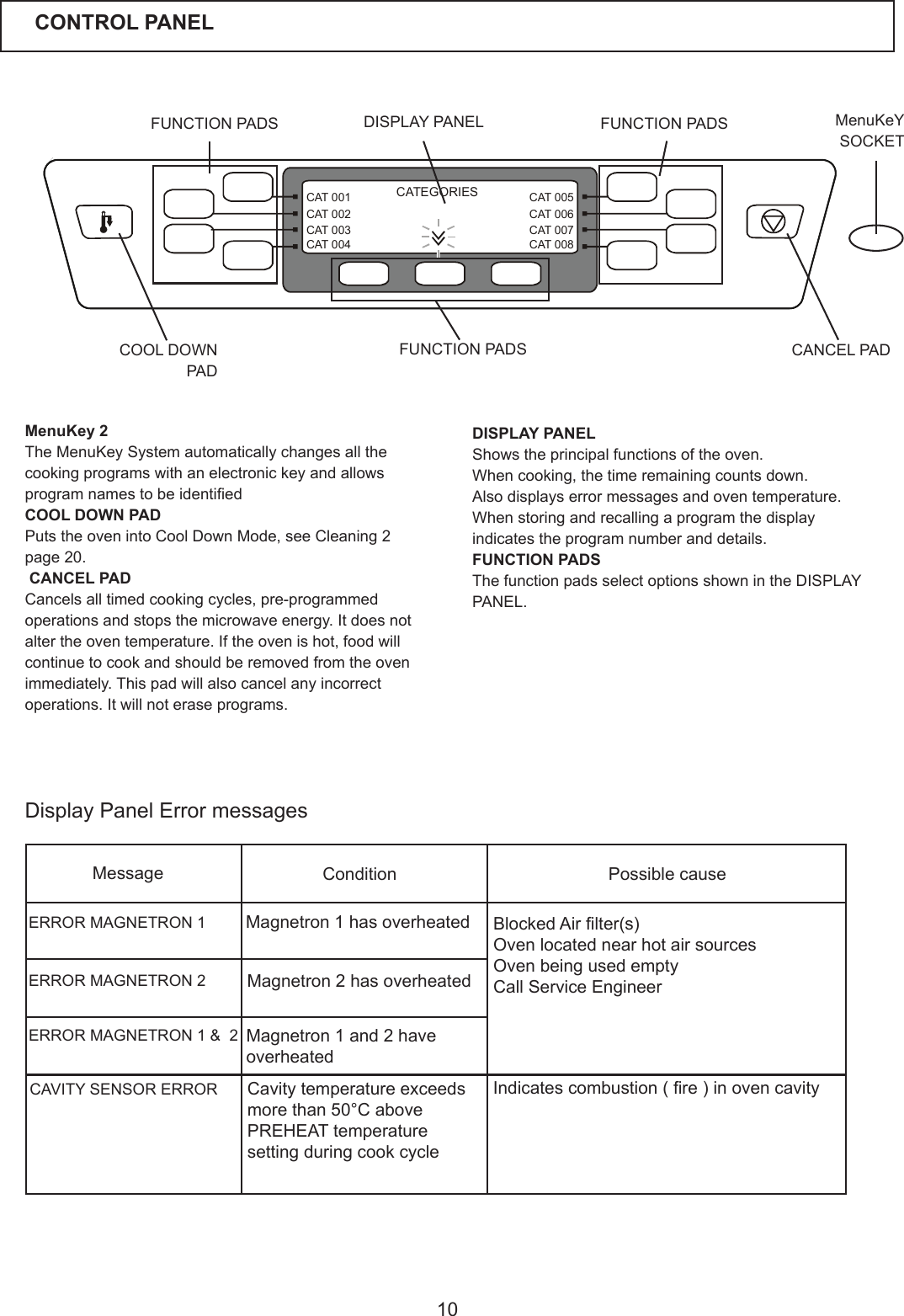
10CAT 005CAT 006CAT 007CAT 008CAT 001CAT 002CAT 003CAT 004CATEGORIESDISPLAY PANELShows the principal functions of the oven.Whencooking,thetimeremainingcountsdown.Alsodisplayserrormessagesandoventemperature.Whenstoringandrecallingaprogramthedisplayindicatestheprogramnumberanddetails.FUNCTION PADSThe function pads select options shown in the DISPLAY PANEL.CONTROL PANELFUNCTION PADS  DISPLAY PANEL MenuKeY    SOCKETCANCEL PADCOOL DOWN PADFUNCTION PADSMenuKey 2TheMenuKeySystemautomaticallychangesallthecookingprogramswithanelectronickeyandallowsprogramnamestobeidentiedCOOL DOWN PADPuts the oven into Cool Down Mode, see Cleaning 2 page 20. CANCEL PADCancelsalltimedcookingcycles,pre-programmedoperationsandstopsthemicrowaveenergy.Itdoesnotaltertheoventemperature.Iftheovenishot,foodwillcontinuetocookandshouldberemovedfromtheovenimmediately.Thispadwillalsocancelanyincorrectoperations.Itwillnoteraseprograms.FUNCTION PADSDisplayPanelErrormessagesMessage Condition Possible causeERROR MAGNETRON 1ERROR MAGNETRON 2Magnetron 1 has overheatedMagnetron 2 has overheatedERROR MAGNETRON 1 &  2 Magnetron 1 and 2 have overheatedCAVITY SENSOR ERROR Cavitytemperatureexceedsmorethan50°CabovePREHEATtemperaturesetting during cook cycleBlockedAirlter(s)Oven located near hot air sourcesOvenbeingusedemptyCall Service Engineer Indicatescombustion(re)inovencavity
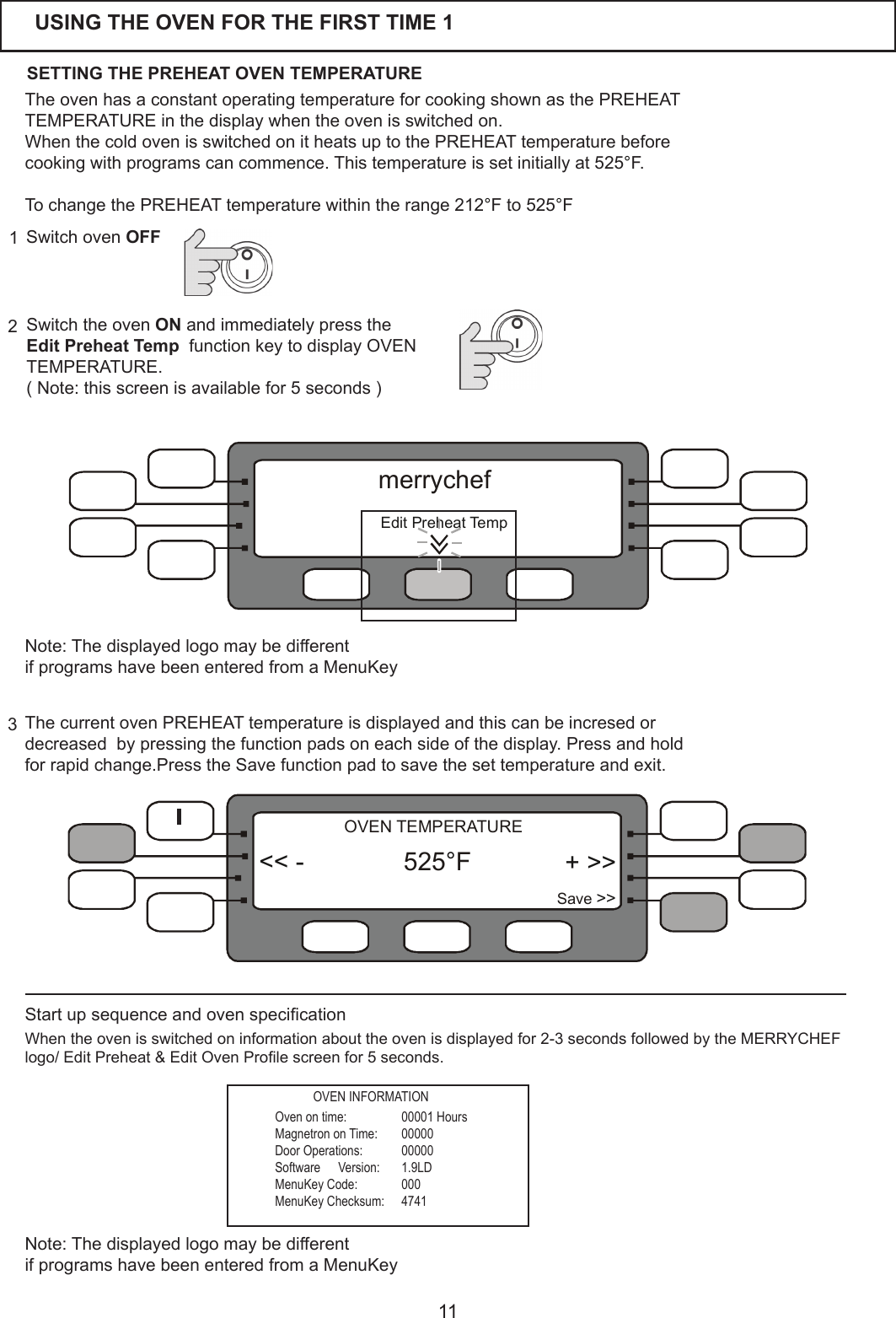
11Switch the oven ONandimmediatelypresstheEdit Preheat Temp  function key to display OVEN TEMPERATURE.(Note:thisscreenisavailablefor5seconds)23Switch oven OFF1USING THE OVEN FOR THE FIRST TIME 1ThecurrentovenPREHEATtemperatureisdisplayedandthiscanbeincresedordecreased  by pressing the function pads on each side of the display. Press and hold forrapidchange.PresstheSavefunctionpadtosavethesettemperatureandexit.TheovenhasaconstantoperatingtemperatureforcookingshownasthePREHEATTEMPERATURE in the display when the oven is switched on.WhenthecoldovenisswitchedonitheatsuptothePREHEATtemperaturebeforecookingwithprogramscancommence.Thistemperatureissetinitiallyat525°F.TochangethePREHEATtemperaturewithintherange212°F to 525°FStartupsequenceandovenspecicationWhentheovenisswitchedoninformationabouttheovenisdisplayedfor2-3secondsfollowedbytheMERRYCHEFlogo/EditPreheat&EditOvenProlescreenfor5seconds.Oven on time:  00001 HoursMagnetron on Time:  00000Door Operations:  00000Software   Version:  1.9LDMenuKey Code:  000MenuKey Checksum:  4741SETTING THE PREHEAT OVEN TEMPERATURE + >>Save >><< - 525 F°OVEN TEMPERATURENote:ThedisplayedlogomaybedifferentifprogramshavebeenenteredfromaMenuKeyOVEN INFORMATIONNote:ThedisplayedlogomaybedifferentifprogramshavebeenenteredfromaMenuKey  EditPreheatTempmerrychef
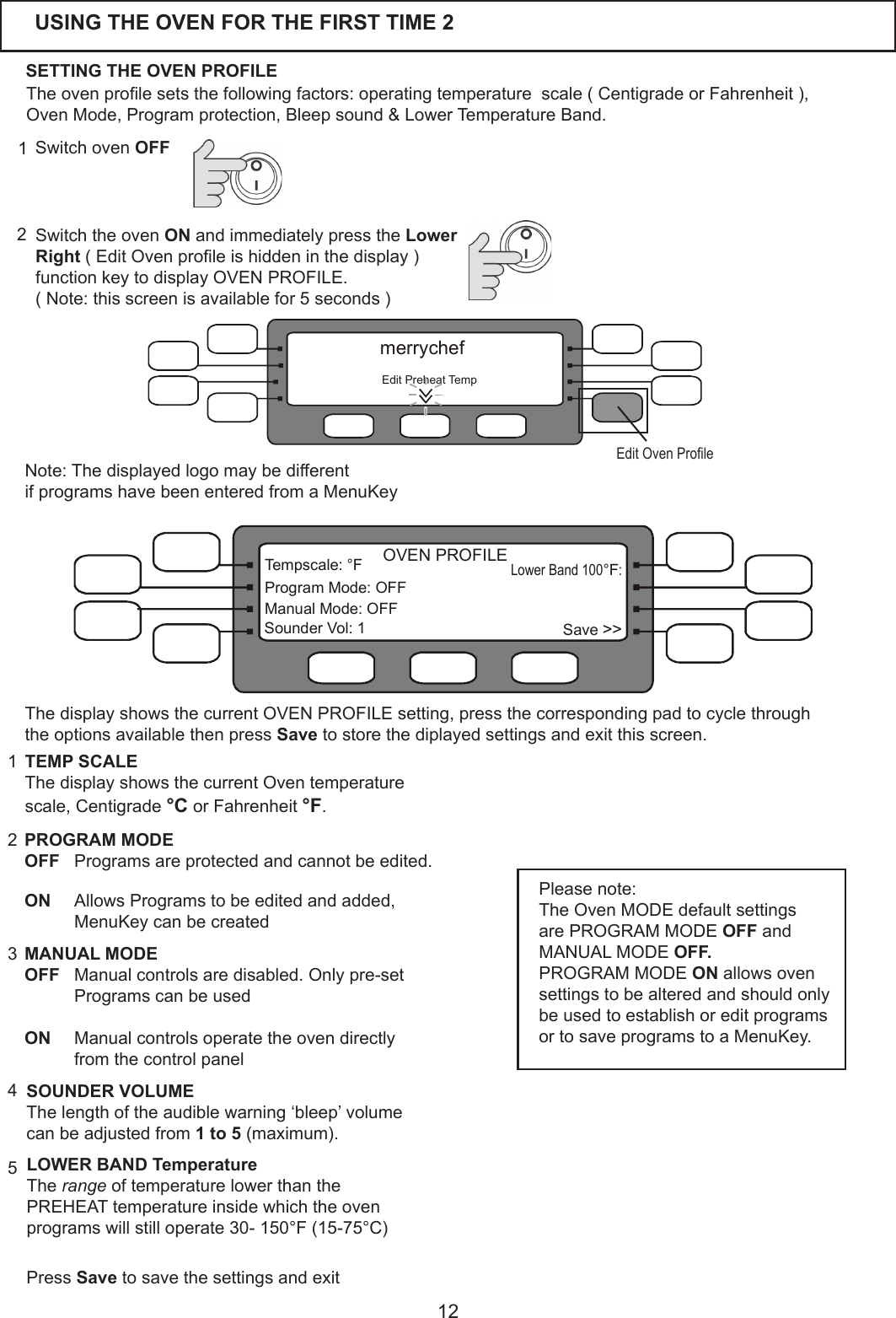
12USING THE OVEN FOR THE FIRST TIME 2Theovenprolesetsthefollowingfactors:operatingtemperaturescale(CentigradeorFahrenheit),OvenMode,Programprotection,Bleepsound&LowerTemperatureBand.SETTING THE OVEN PROFILESwitch the oven ONandimmediatelypresstheLower Right (EditOvenproleishiddeninthedisplay)function key to display OVEN PROFILE.(Note:thisscreenisavailablefor5seconds)2Switch oven OFF11PROGRAM MODEOFF Programsareprotectedandcannotbeedited.   ON  AllowsProgramstobeeditedandadded, MenuKey can be created 2TEMP SCALEThedisplayshowsthecurrentOventemperaturescale, Centigrade °C or Fahrenheit °F.3SOUNDER VOLUMEThelengthoftheaudiblewarning‘bleep’volumecanbeadjustedfrom1 to 5(maximum).5LOWER BAND TemperatureThe rangeoftemperaturelowerthanthePREHEATtemperatureinsidewhichtheovenprogramswillstilloperate30-150°F(15-75°C)Please note:The Oven MODE default settings are PROGRAM MODE OFF and MANUAL MODE OFF.PROGRAM MODE ON allows oven settings to be altered and should only beusedtoestablishoreditprogramsortosaveprogramstoaMenuKey.MANUAL MODEOFF  Manual controls are disabled. Only pre-set ProgramscanbeusedON   Manual controls operate the oven directly fromthecontrolpanel   Press Savetosavethesettingsandexit4Note:ThedisplayedlogomaybedifferentifprogramshavebeenenteredfromaMenuKeyEditPreheatTempmerrychefEdit Oven ProleLower Band 100 :°FSave >>Tempscale:°FProgramMode:OFFManual Mode: OFFSounder Vol: 1OVEN PROFILEThe display shows the current OVEN PROFILE setting, press the corresponding pad to cycle through the options available then press Savetostorethediplayedsettingsandexitthisscreen.
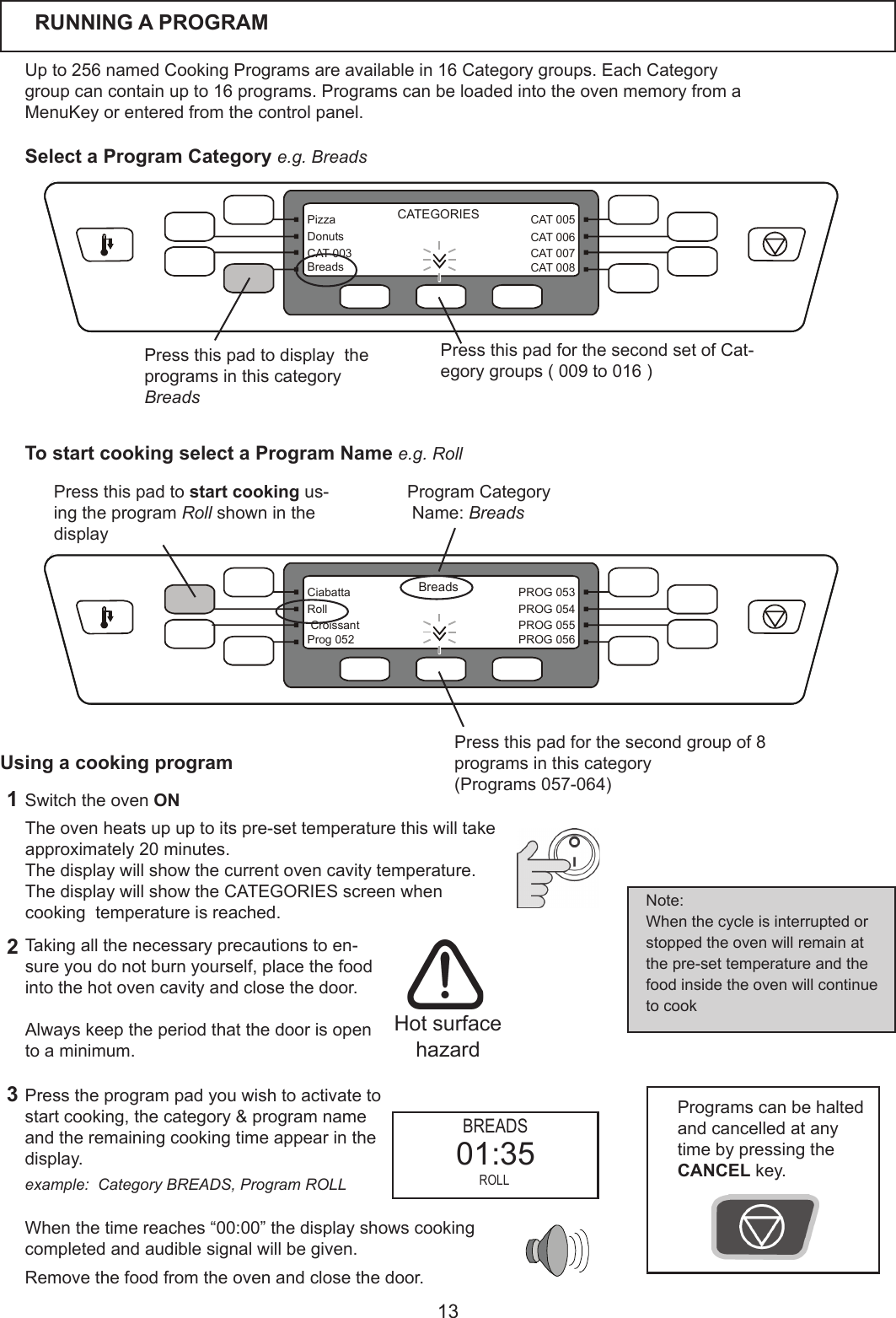
13CAT 005CAT 006CAT 007CAT 008PizzaDonutsCAT 003BreadsCATEGORIESBreadsPROG 053PROG 054PROG 055PROG 056CiabattaRoll CroissantProg 052RUNNING A PROGRAMUpto256namedCookingProgramsareavailablein16Categorygroups.EachCategorygroupcancontainupto16programs.ProgramscanbeloadedintotheovenmemoryfromaMenuKeyorenteredfromthecontrolpanel.  Presstheprogrampadyouwishtoactivatetostart cooking, thecategory&programnameandtheremainingcookingtimeappearinthedisplay.   Whenthetimereaches“00:00”thedisplayshowscookingcompletedandaudiblesignalwillbegiven.Removethefoodfromtheovenandclosethedoor.Theovenheatsupuptoitspre-settemperaturethiswilltakeapproximately20minutes.Thedisplaywillshowthecurrentovencavitytemperature.The display will show the CATEGORIES screen when cookingtemperatureisreached.1Switch the oven ON32Taking all the necessary precautions to en-sure you do not burn yourself, place the food into the hot oven cavity and close the door.Always keep the period that the door is open toaminimum.Programscanbehaltedand cancelled at any timebypressingthe CANCEL key.Note:When the cycle is interrupted or stoppedtheovenwillremainatthepre-settemperatureandthefood inside the oven will continue to cook Hot surface hazardUsing a cooking program Press this pad for the second group of 8 programsinthiscategory(Programs057-064)Press this pad to start cooking us-ingtheprogramRoll shown in the display ProgramCategoryName:Breads Press this pad for the second set of Cat-egorygroups(009to016)Press this pad to display  the programsinthiscategoryBreadsSelect a Program Category e.g. BreadsTo start cooking select a Program Name e.g. Rollexample:  Category BREADS, Program ROLL BREADS ROLL01:35
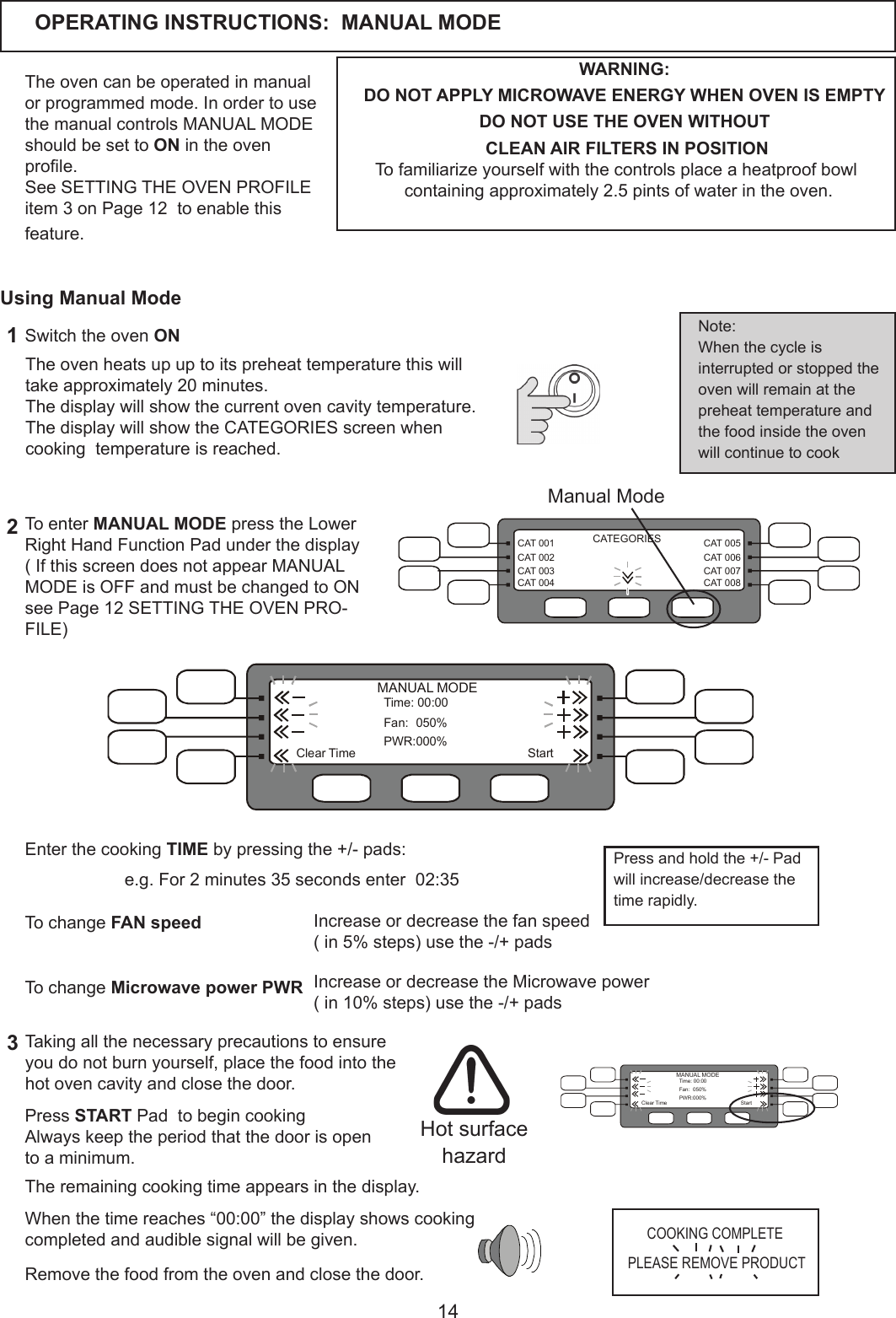
14CAT 005CAT 006CAT 007CAT 008CAT 001CAT 002CAT 003CAT 004CATEGORIESOPERATING INSTRUCTIONS:  MANUAL MODETheovencanbeoperatedinmanualorprogrammedmode.InordertousethemanualcontrolsMANUALMODEshould be set to ON in the oven prole.See SETTING THE OVEN PROFILE item3onPage12toenablethisfeature. WARNING:DO NOT APPLY MICROWAVE ENERGY WHEN OVEN IS EMPTYDO NOT USE THE OVEN WITHOUT  CLEAN AIR FILTERS IN POSITIONTofamiliarizeyourselfwiththecontrolsplaceaheatproofbowlcontainingapproximately2.5pintsofwaterintheoven.To enter MANUAL MODE press the Lower Right Hand Function Pad under the display(IfthisscreendoesnotappearMANUALMODEisOFFandmustbechangedtoONsee Page 12 SETTING THE OVEN PRO-FILE)  Whenthetimereaches“00:00”thedisplayshowscookingcompletedandaudiblesignalwillbegiven.Removethefoodfromtheovenandclosethedoor.Theovenheatsupuptoitspreheattemperaturethiswilltakeapproximately20minutes.Thedisplaywillshowthecurrentovencavitytemperature.The display will show the CATEGORIES screen when cookingtemperatureisreached.1Switch the oven ON23Taking all the necessary precautions to ensure you do not burn yourself, place the food into the hot oven cavity and close the door.Note:When the cycle is interrupted or stopped the ovenwillremainatthepreheattemperatureandthe food inside the oven will continue to cook Hot surface hazardUsing Manual ModeManual ModeTheremainingcookingtimeappearsinthedisplay.  Enter the cooking TIME by pressing the +/- pads: StartTime:00:00Fan: 050%PWR:000%ClearTimeMANUAL MODEIncrease or decrease the fan speed(in5%steps)usethe-/+padsTo change FAN speed To change Microwave power PWR Increase or decrease the Microwave power  (in10%steps)usethe-/+padsPress START Pad  to begin cooking Always keep the period that the door is open toaminimum.COOKING COMPLETEPLEASE REMOVE PRODUCTe.g.For2minutes35secondsenter02:35StartTime:00:00Fan: 050%PWR:000%ClearTimeMANUAL MODEPress and hold the +/- Pad will increase/decrease the timerapidly.
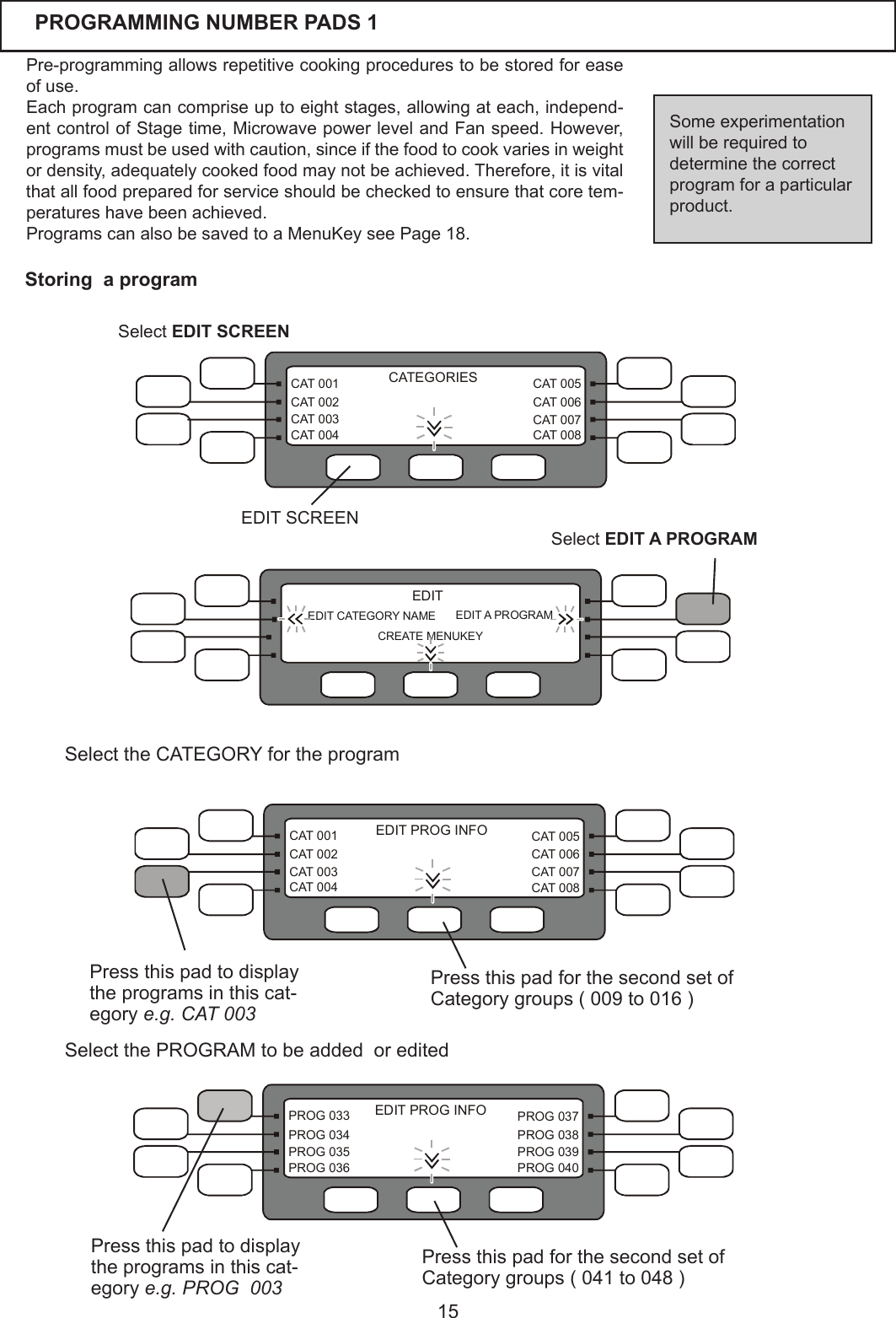
15CAT 005CAT 006CAT 007CAT 008CAT 001CAT 002CAT 003CAT 004CATEGORIESPROG 037PROG 038PROG 039PROG 040PROG 033PROG 034PROG 035PROG 036EDIT PROG INFOEachprogramcancompriseuptoeightstages,allowingateach,independ-entcontrolofStagetime,MicrowavepowerlevelandFanspeed.However,programsmustbeusedwithcaution,sinceifthefoodtocookvariesinweightordensity,adequatelycookedfoodmaynotbeachieved.Therefore,itisvitalthatallfoodpreparedforserviceshouldbecheckedtoensurethatcoretem-peratures have been achieved.ProgramscanalsobesavedtoaMenuKeyseePage18.Someexperimentationwill be required to determinethecorrectprogramforaparticularproduct.Pre-programmingallowsrepetitivecookingprocedurestobestoredforeaseof use. PROGRAMMING NUMBER PADS 1Press this pad to display  theprogramsinthiscat-egory e.g. CAT 003Storing  a programSelect EDIT A PROGRAMSelect EDIT SCREENEDIT SCREENEDIT CATEGORY NAME CREATE MENUKEYEDIT A PROGRAMEDITCAT 005CAT 006CAT 007CAT 008CAT 001CAT 002CAT 003CAT 004EDIT PROG INFOPress this pad for the second set of Categorygroups(009to016)SelecttheCATEGORYfortheprogramPress this pad for the second set of Categorygroups(041to048)Press this pad to display  theprogramsinthiscat-egory e.g. PROG  003Select the PROGRAM to be added  or edited
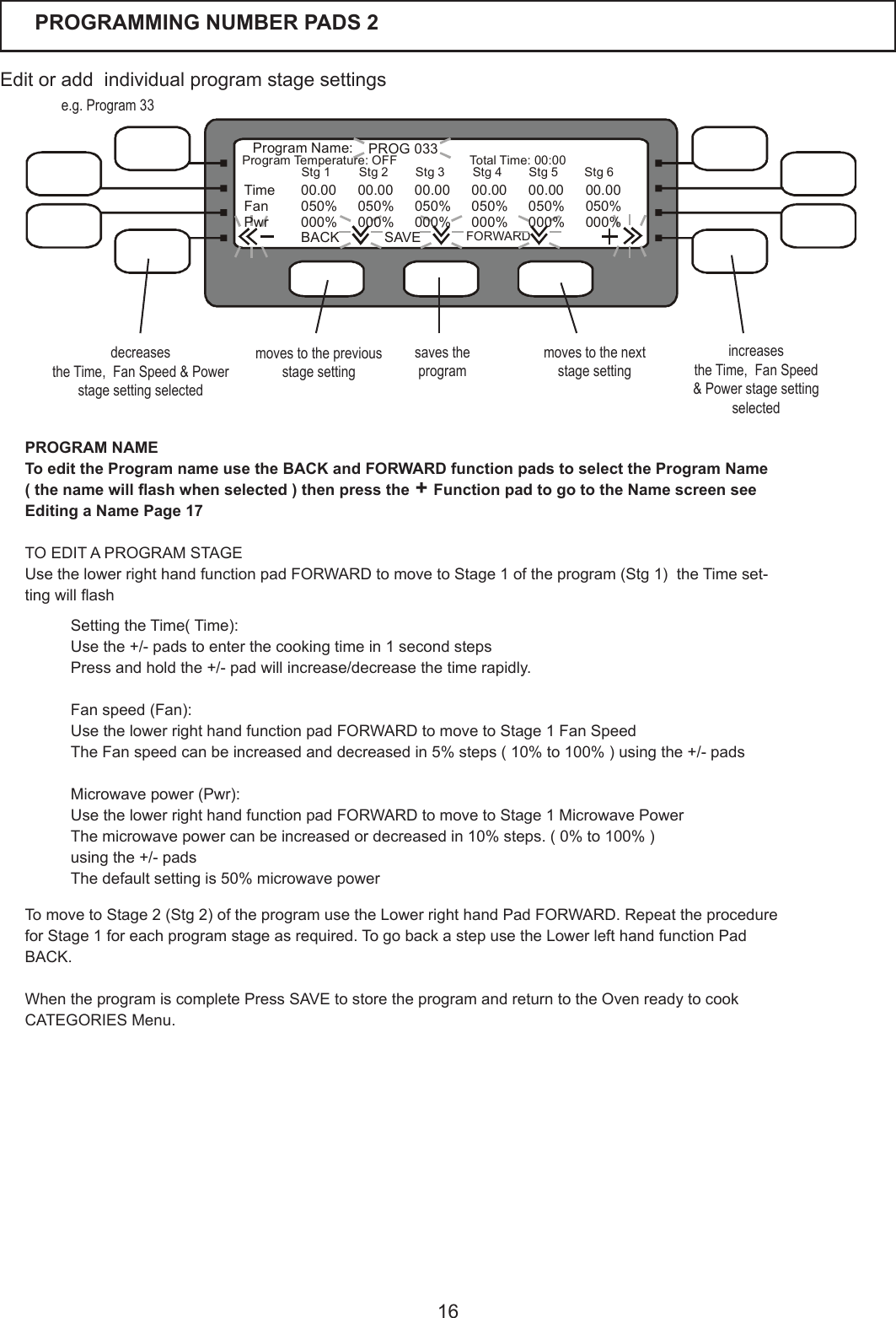
16PROGRAMMING NUMBER PADS 2  PROG 033ProgramName:ProgramTemperature:OFF TotalTime:00:00BACK SAVEFORWARDTime 00.00 00.00 00.00 00.00 00.00 00.00Fan 050% 050% 050% 050% 050% 050%Pwr 000% 000% 000% 000% 000% 000%Stg 1 Stg 2 Stg 3 Stg 4 Stg 5 Stg 6Editoraddindividualprogramstagesettingsmoves to the previous stage settingsaves the programmoves to the next stage settingdecreasesthe Time,  Fan Speed & Power stage setting selectedincreasesthe Time,  Fan Speed & Power stage setting selectede.g. Program 33PROGRAM NAMETo edit the Program name use the BACK and FORWARD function pads to select the Program Name ( the name will ash when selected ) then press the + Function pad to go to the Name screen see Editing a Name Page 17TO EDIT A PROGRAM STAGE UsethelowerrighthandfunctionpadFORWARDtomovetoStage1oftheprogram(Stg1)theTimeset-tingwillashSettingtheTime(Time):Usethe+/-padstoenterthecookingtimein1secondstepsPressandholdthe+/-padwillincrease/decreasethetimerapidly.Fanspeed(Fan):UsethelowerrighthandfunctionpadFORWARDtomovetoStage1FanSpeedTheFanspeedcanbeincreasedanddecreasedin5%steps(10%to100%)usingthe+/-padsMicrowavepower(Pwr):UsethelowerrighthandfunctionpadFORWARDtomovetoStage1MicrowavePowerThemicrowavepowercanbeincreasedordecreasedin10%steps.(0%to100%)using the +/- pads Thedefaultsettingis50%microwavepowerTomovetoStage2(Stg2)oftheprogramusetheLowerrighthandPadFORWARD.RepeattheprocedureforStage1foreachprogramstageasrequired.TogobackastepusetheLowerlefthandfunctionPadBACK.WhentheprogramiscompletePressSAVEtostoretheprogramandreturntotheOvenreadytocook CATEGORIES Menu.
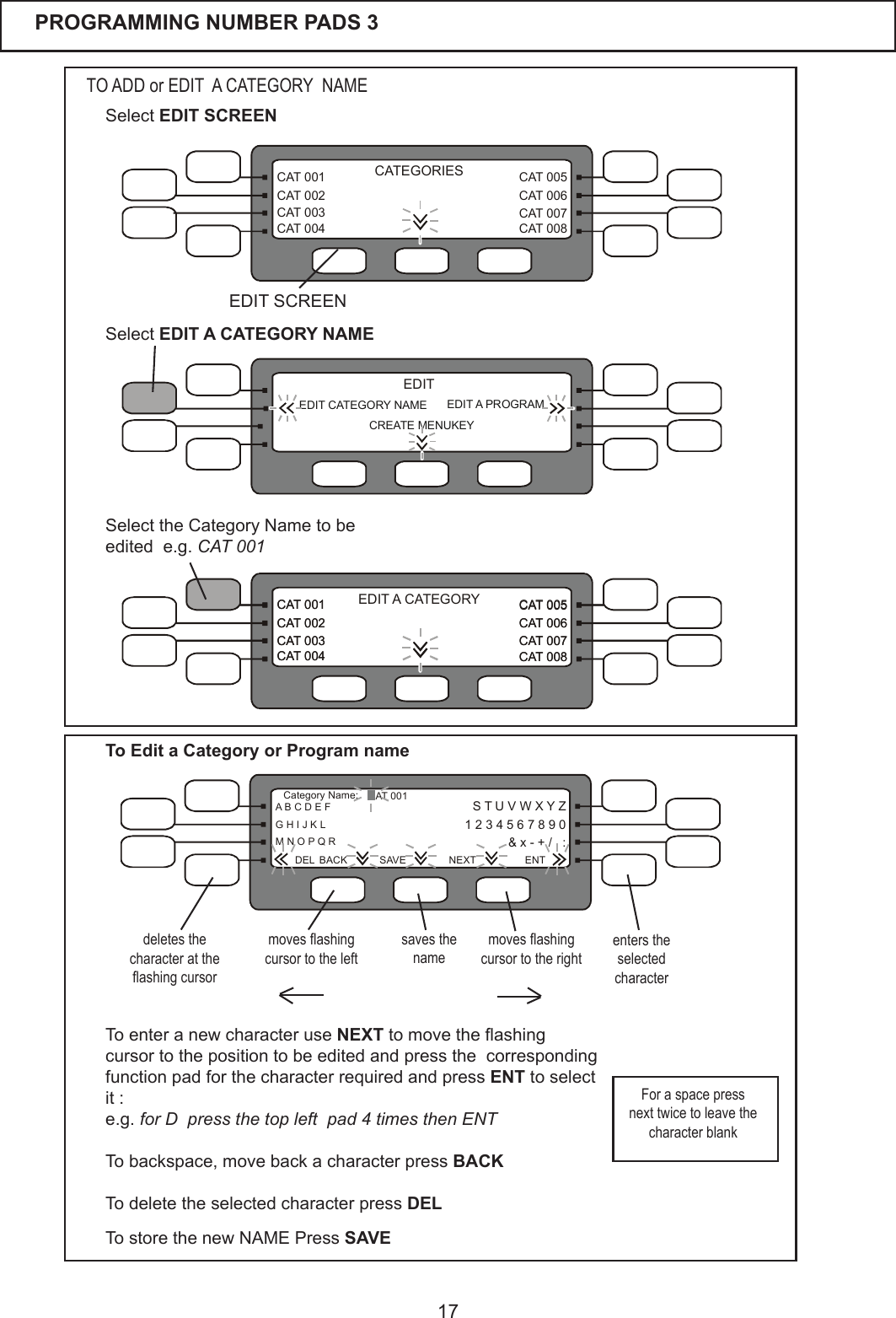
17CAT 005CAT 006CAT 007CAT 008CAT 001CAT 002CAT 003CAT 004EDIT A CATEGORYCAT 005CAT 006CAT 007CAT 008CAT 001CAT 002CAT 003CAT 004CAT 005CAT 006CAT 007CAT 008CAT 001CAT 002CAT 003CAT 004CATEGORIESEDIT CATEGORY NAME CREATE MENUKEYEDIT A PROGRAMEDITPROGRAMMING NUMBER PADS 3  Select EDIT A CATEGORY NAMETO ADD or EDIT  A CATEGORY  NAMETo enter a new character use NEXTtomovetheashingcursor to the position to be edited and press the  corresponding function pad for the character required and press ENT to select it :e.g. for D  press the top left  pad 4 times then ENTTobackspace,movebackacharacterpress BACKTo delete the selected character press DELSelecttheCategoryNametobeedited  e.g. CAT 001S T U V W X Y Z  1 2 3 4 5 6 7 8 9 0&x-+/,:A B C D E F CAT 001G H I J K LM N O P Q RCategoryName:ENTDEL BACK SAVE NEXTmoves ashing cursor to the leftsaves the namemoves ashing cursor to the rightdeletes the character at the ashing cursorenters the selected characterSelect EDIT SCREENEDIT SCREENTo store the new NAME Press SAVE For a space press next twice to leave the character blankTo Edit a Category or Program name
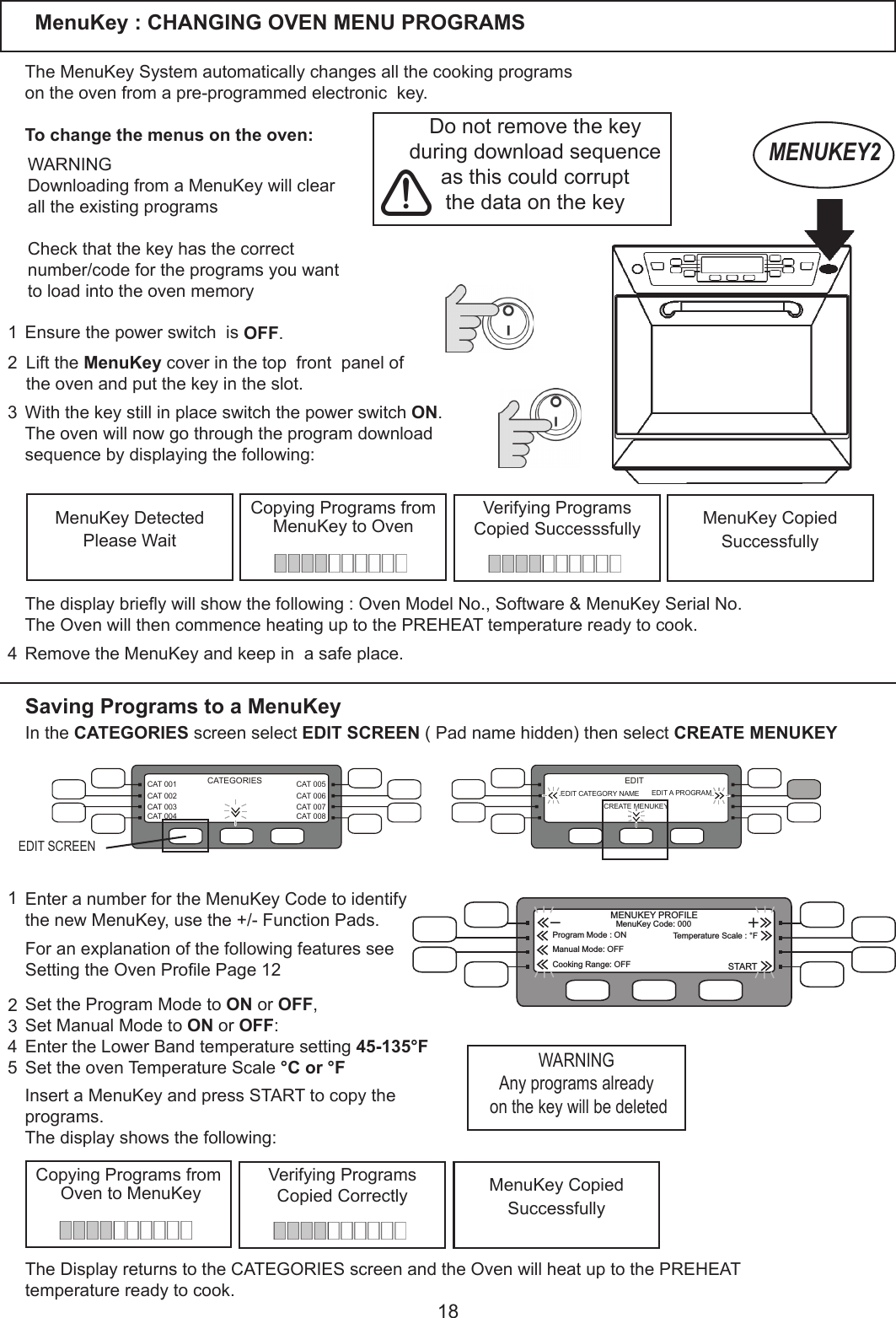
18MenuKey : CHANGING OVEN MENU PROGRAMS 123Lift the MenuKey cover in the top  front  panel of the oven and put the key in the slot.   TheMenuKeySystemautomaticallychangesallthecookingprogramsontheovenfromapre-programmedelectronickey.To change the menus on the oven:Ensure the power switch  is OFF.    With the key still in place switch the power switch ON.Theovenwillnowgothroughtheprogramdownloadsequence by displaying the following:MENUKEY2MenuKey DetectedPlease WaitWARNINGDownloadingfromaMenuKeywillclearalltheexistingprogramsCheck that the key has the correct number/codefortheprogramsyouwanttoloadintotheovenmemoryDonotremovethekeyduring download sequenceas this could corruptthe data on the keyCopyingProgramsfromMenuKey to OvenRemovetheMenuKeyandkeepinasafeplace.Thedisplaybrieywillshowthefollowing:OvenModelNo.,Software&MenuKeySerialNo.TheOvenwillthencommenceheatinguptothePREHEATtemperaturereadytocook.VerifyingProgramsCopied Successsfully MenuKey CopiedSuccessfully4Saving Programs to a MenuKeyEDIT CATEGORY NAME CREATE MENUKEYEDIT A PROGRAMEDITCAT 005CAT 006CAT 007CAT 008CAT 001CAT 002CAT 003CAT 004CATEGORIESIn the CATEGORIES screen select EDIT SCREEN(Padnamehidden)thenselect CREATE MENUKEYCopyingProgramsfrom Oven to MenuKey VerifyingProgramsCopied Correctly MenuKey CopiedSuccessfullyThe Display returns to the CATEGORIES screen and the Oven will heat up to the PREHEAT temperaturereadytocook.SettheProgramModetoON or OFF, Set Manual Mode to ON or OFF:EntertheLowerBandtemperaturesetting45-135°FSettheovenTemperatureScale°C or °F  1234EDIT SCREEN5Insert a MenuKey and press START to copy the programs.The display shows the following: ForanexplanationofthefollowingfeaturesseeSettingtheOvenProlePage12EnteranumberfortheMenuKeyCodetoidentifythe new MenuKey, use the +/- Function Pads.WARNINGAny programs already on the key will be deleted STARTMenuKey Code: 000Program Mode : ON Temperature Scale : °FManual Mode: OFFCooking Range: OFFMENUKEY PROFILE
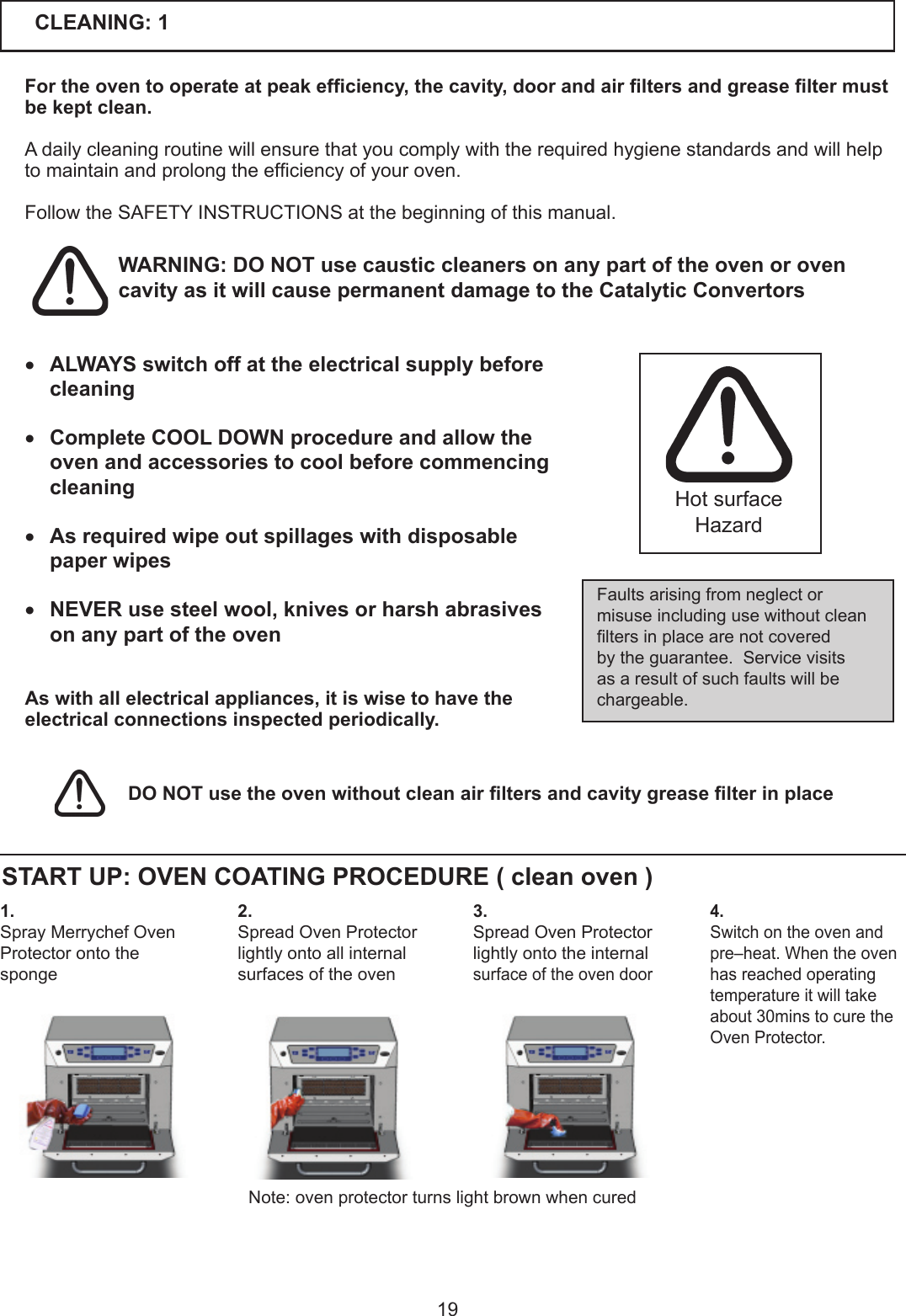
19CLEANING: 1For the oven to operate at peak efciency, the cavity, door and air lters and grease lter must be kept clean.Adailycleaningroutinewillensurethatyoucomplywiththerequiredhygienestandardsandwillhelptomaintainandprolongtheefciencyofyouroven. FollowtheSAFETYINSTRUCTIONSatthebeginningofthismanual.Faultsarisingfromneglectormisuseincludingusewithoutcleanltersinplacearenotcoveredby the guarantee.  Service visits as a result of such faults will be chargeable.Hot surface HazardWARNING: DO NOT use caustic cleaners on any part of the oven or oven cavity as it will cause permanent damage to the Catalytic Convertors DO NOT use the oven without clean air lters and cavity grease lter in place 1.Spray Merrychef Oven Protector onto the spongeSTART UP: OVEN COATING PROCEDURE ( clean oven )4.Switch on the oven and pre–heat. When the oven has reached operating temperatureitwilltakeabout30minstocuretheOven Protector. 3.Spread Oven Protector lightly onto the internal surface of the oven door2.Spread Oven Protector lightly onto all internal surfaces of the ovenNote: oven protector turns light brown when cured• ALWAYS switch off at the electrical supply before cleaning• Complete COOL DOWN procedure and allow the oven and accessories to cool before commencing cleaning• As required wipe out spillages with disposable paper wipes • NEVER use steel wool, knives or harsh abrasives on any part of the oven  As with all electrical appliances, it is wise to have the electrical connections inspected periodically.
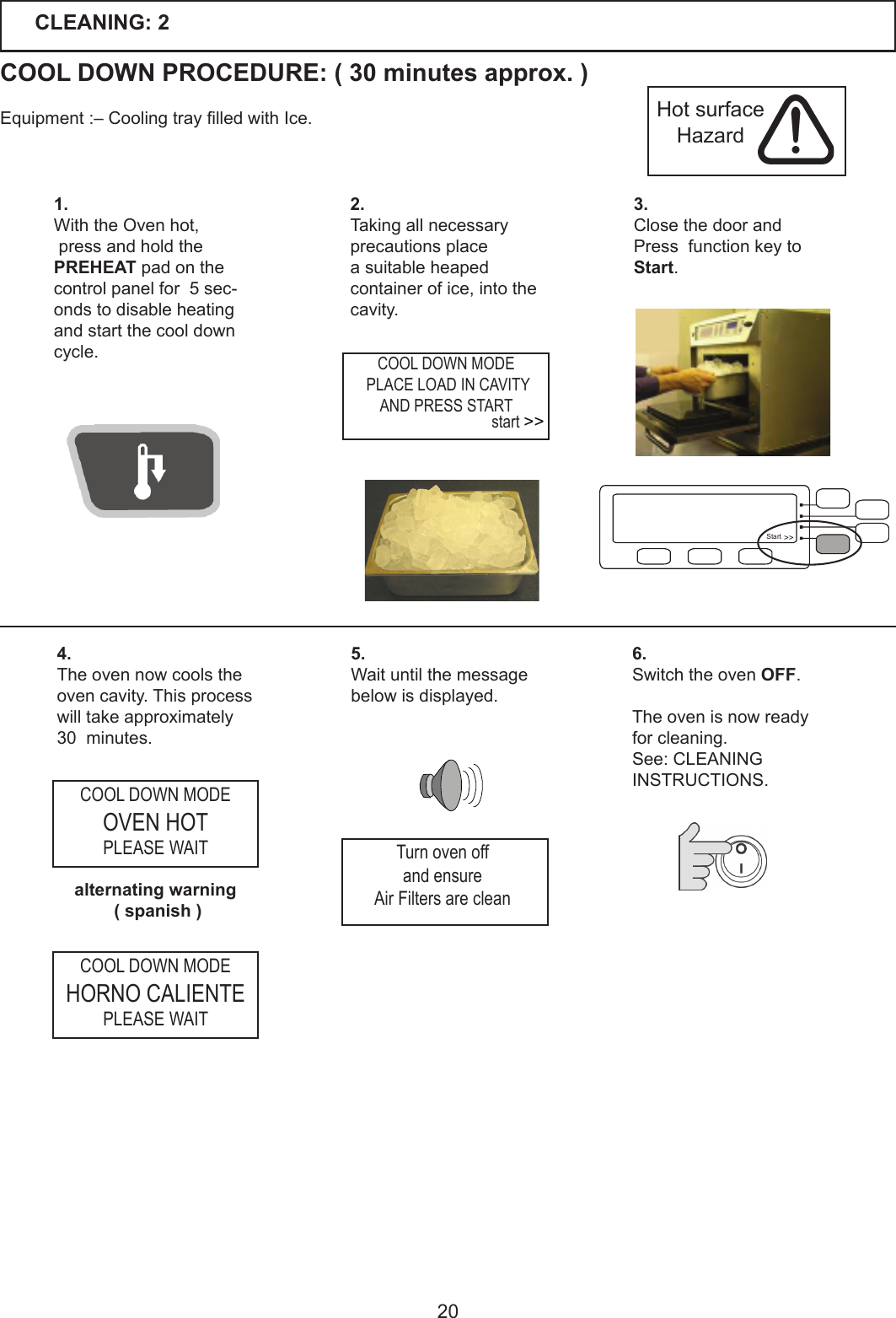
201.With the Oven hot, press and hold thePREHEAT pad on the control panel for  5 sec-onds to disable heating and start the cool down cycle.3.Close the door and Press  function key to Start.2.Taking all necessary precautions place a suitable heaped container of ice, into the cavity.4.The oven now cools the oven cavity. This process willtakeapproximately30minutes.5.Waituntilthemessagebelow is displayed.6.Switch the oven OFF.The oven is now ready for cleaning.See: CLEANING INSTRUCTIONS.CLEANING: 2COOL DOWN PROCEDURE: ( 30 minutes approx. )Equipment:–CoolingtraylledwithIce. Hot surface Hazardalternating warning ( spanish )COOL DOWN MODE PLACE LOAD IN CAVITYAND PRESS STARTCOOL DOWN MODEOVEN HOTPLEASE WAITCOOL DOWN MODEHORNO CALIENTEPLEASE WAITTurn oven offand ensureAir Filters are cleanstart >>Start >>
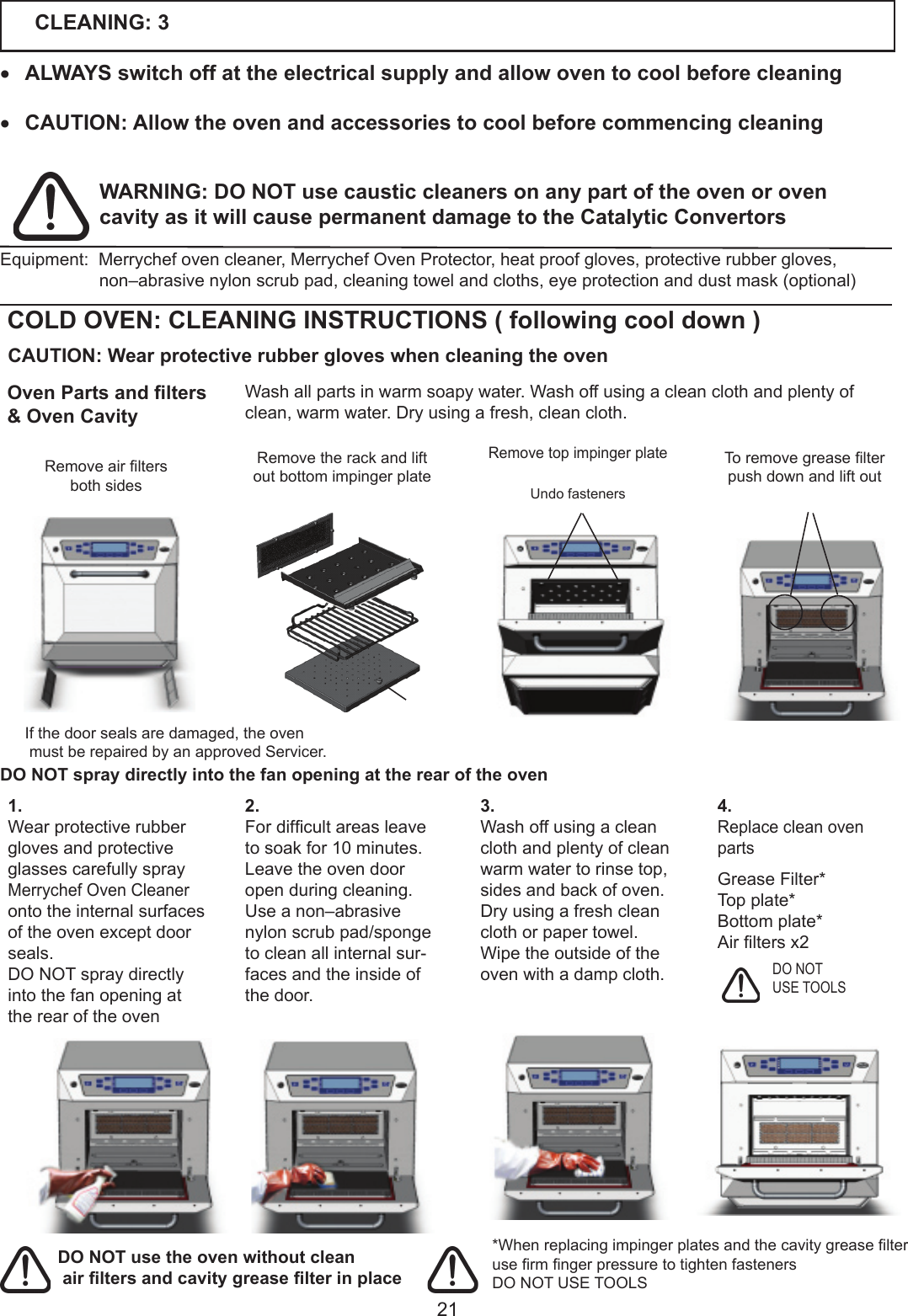
21CLEANING: 3• ALWAYS switch off at the electrical supply and allow oven to cool before cleaning• CAUTION: Allow the oven and accessories to cool before commencing cleaning*WhenreplacingimpingerplatesandthecavitygreaselterusermngerpressuretotightenfastenersDO NOT USE TOOLSDO NOT USE TOOLSWARNING: DO NOT use caustic cleaners on any part of the oven or oven cavity as it will cause permanent damage to the Catalytic Convertors DO NOT spray directly into the fan opening at the rear of the ovenEquipment:Merrychefovencleaner,MerrychefOvenProtector,heatproofgloves,protectiverubbergloves,non–abrasivenylonscrubpad,cleaningtowelandcloths,eyeprotectionanddustmask(optional)COLD OVEN: CLEANING INSTRUCTIONS ( following cool down )Washallpartsinwarmsoapywater.Washoffusingacleanclothandplentyofclean,warmwater.Dryusingafresh,cleancloth.RemovetopimpingerplateRemovetherackandliftoutbottomimpingerplateUndo fastenersToremovegreaselterpush down and lift out3. Wash off using a clean cloth and plenty of clean warmwatertorinsetop,sides and back of oven.Dry using a fresh clean cloth or paper towel.Wipe the outside of the ovenwithadampcloth.1.Wear protective rubber gloves and protective glasses carefully spray Merrychef Oven Cleaner onto the internal surfaces oftheovenexceptdoorseals. DO NOT spray directly into the fan opening at the rear of the oven2. Fordifcultareasleavetosoakfor10minutes. Leave the oven door open during cleaning.Use a non–abrasive nylon scrub pad/sponge to clean all internal sur-faces and the inside of the door. 4.Replace clean oven partsGrease Filter*Top plate*Bottomplate*Airltersx2 CAUTION: Wear protective rubber gloves when cleaning the ovenRemoveairltersboth sides Oven Parts and lters& Oven CavityIfthedoorsealsaredamaged,theovenmustberepairedbyanapprovedServicer.DO NOT use the oven without clean air lters and cavity grease lter in place
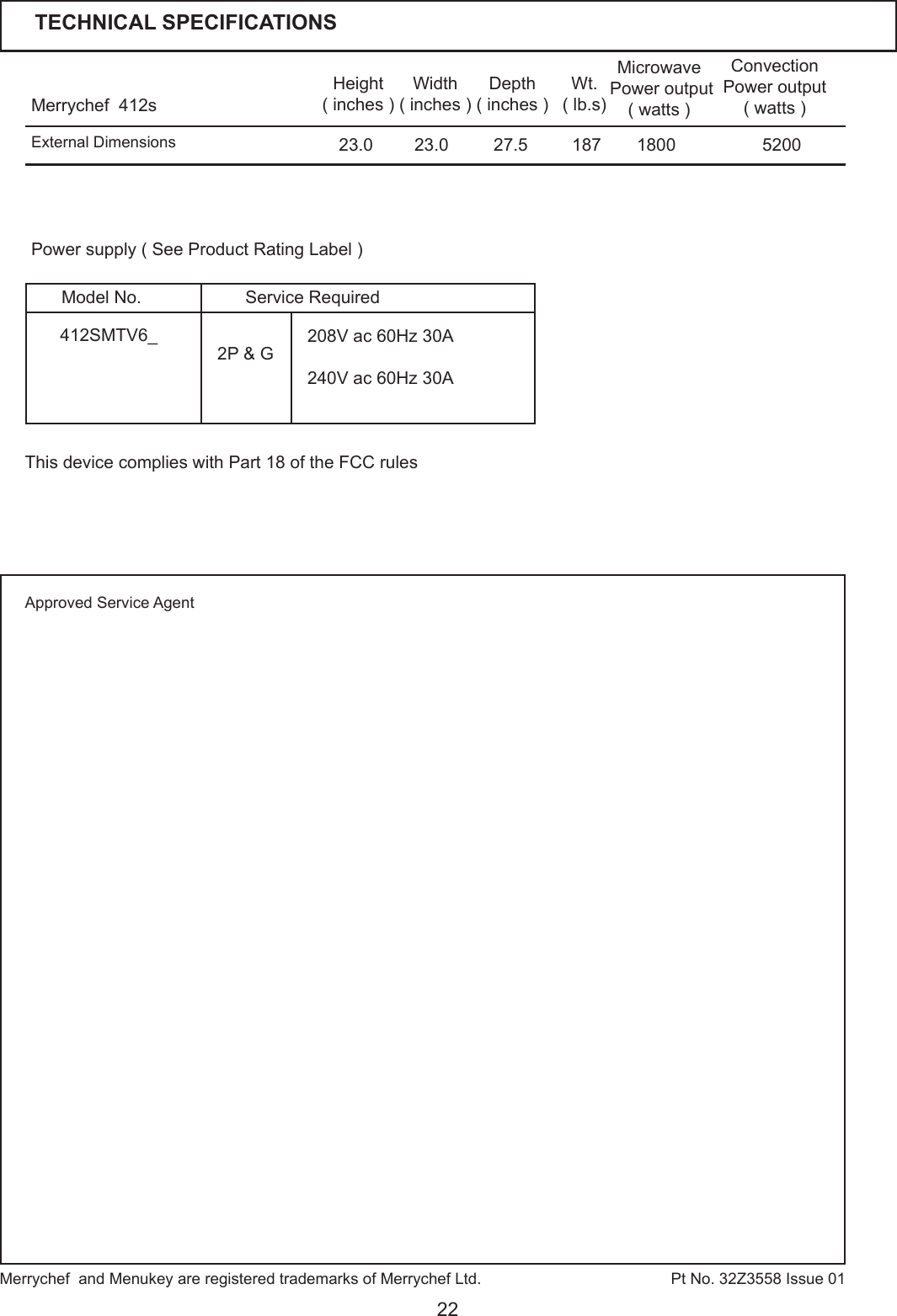
22Merrychef  412s Height( inches )Width( inches )Depth( inches )23.023.0 27.5Microwave Power output ( watts )Convection Power output( watts )1800 5200Wt.( lb.s)187Pt No. 32Z3558 Issue 01Power supply ( See Product Rating Label )External DimensionsMerrychef  and Menukey are registered trademarks of Merrychef Ltd. TECHNICAL SPECIFICATIONSApproved Service Agent2P & G 208V ac 60Hz 30A240V ac 60Hz 30A412SMTV6_Service RequiredModel No.This device complies with Part 18 of the FCC rules

Navigation menu