Merrychef MF124603A Microwave Oven User Manual MF3 Operations Manual

Merrychef Limited Microwave Oven MF3 Operations Manual

Manaul

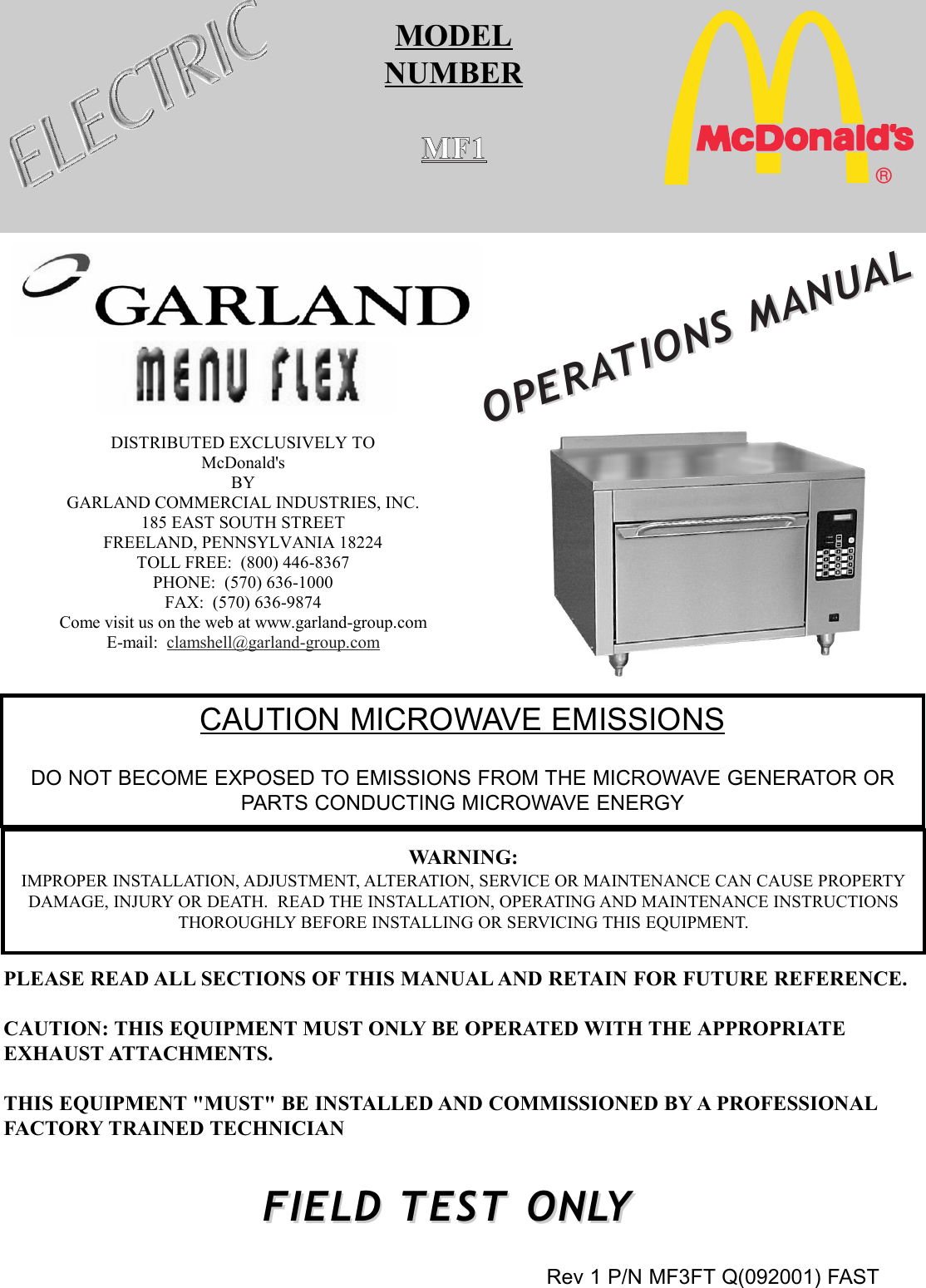
MODELNUMBERMF1OPERAOPERATIONS MANUALTIONS MANUALWARNING:IMPROPER INSTALLATION, ADJUSTMENT, ALTERATION, SERVICE OR MAINTENANCE CAN CAUSE PROPERTYDAMAGE, INJURY OR DEATH.  READ THE INSTALLATION, OPERATING AND MAINTENANCE INSTRUCTIONSTHOROUGHLY BEFORE INSTALLING OR SERVICING THIS EQUIPMENT.PLEASE READ ALL SECTIONS OF THIS MANUAL AND RETAIN FOR FUTURE REFERENCE.CAUTION: THIS EQUIPMENT MUST ONLY BE OPERATED WITH THE APPROPRIATEEXHAUST ATTACHMENTS.THIS EQUIPMENT "MUST" BE INSTALLED AND COMMISSIONED BY A PROFESSIONALFACTORY TRAINED TECHNICIAN®DISTRIBUTED EXCLUSIVELY TO McDonald's BY GARLAND COMMERCIAL INDUSTRIES, INC. 185 EAST SOUTH STREET FREELAND, PENNSYLVANIA 18224 TOLL FREE:  (800) 446-8367 PHONE:  (570) 636-1000 FAX:  (570) 636-9874 Come visit us on the web at www.garland-group.com E-mail:  clamshell@garland-group.com Rev 1 P/N MF3FT Q(092001) FASTCAUTION MICROWAVE EMISSIONSDO NOT BECOME EXPOSED TO EMISSIONS FROM THE MICROWAVE GENERATOR ORPARTS CONDUCTING MICROWAVE ENERGYFIELD TESTFIELD TEST ONLONLYY
VERY IMPORTANTPLEASE READ CAREFULLYThe QSR team is very proud to announce a new addition to our product offering.  In addition to theClam Grill manufactured exclusively for McDonald's Corp, we bring you the "Menu-Flex Oven".  The"Menu-Flex Oven" is unique in many ways and you have been chosen to be one of a few to initiallytest it!What's so unique about it ? Well, this is a Rapid Heat, Menu Flexible Microwave AssistedConvection Oven ! …. Yes, that's right, a Microwave Assisted Convection Oven.  A Convection Oventhat will be programmed to add a sudden burst of Microwave power when needed resulting inreduced cook times without jeopardizing the Food Quality, Taste and Safety. The oven has a unique controller that will control menu items and categorize them!  With the ovens’flexible capabilities, you can program numerous menu items to satisfy your needs.The enclosed information will serve as a guideline through its testing phase, as well as preliminaryservice information for the local service representative.  Please read all information thoroughly andcarefully.  Please fill out all pertinent information as required and if there are any questions at all, feelfree to call us at 1-800-446-8367, 24 hours a day, 7 days a week... Or drop us an email atclamshell@garland-group.com.Thank you for working with the QSR team on this excitingnew project,“The Menu-Flex Oven” brought to you exclusively by:Garland Commercial Industries Inc.185 East South StreetFreeland, PA 18224Phone:(570)636-1000Toll Free:(800)424-2411Fax:(570)636-9874
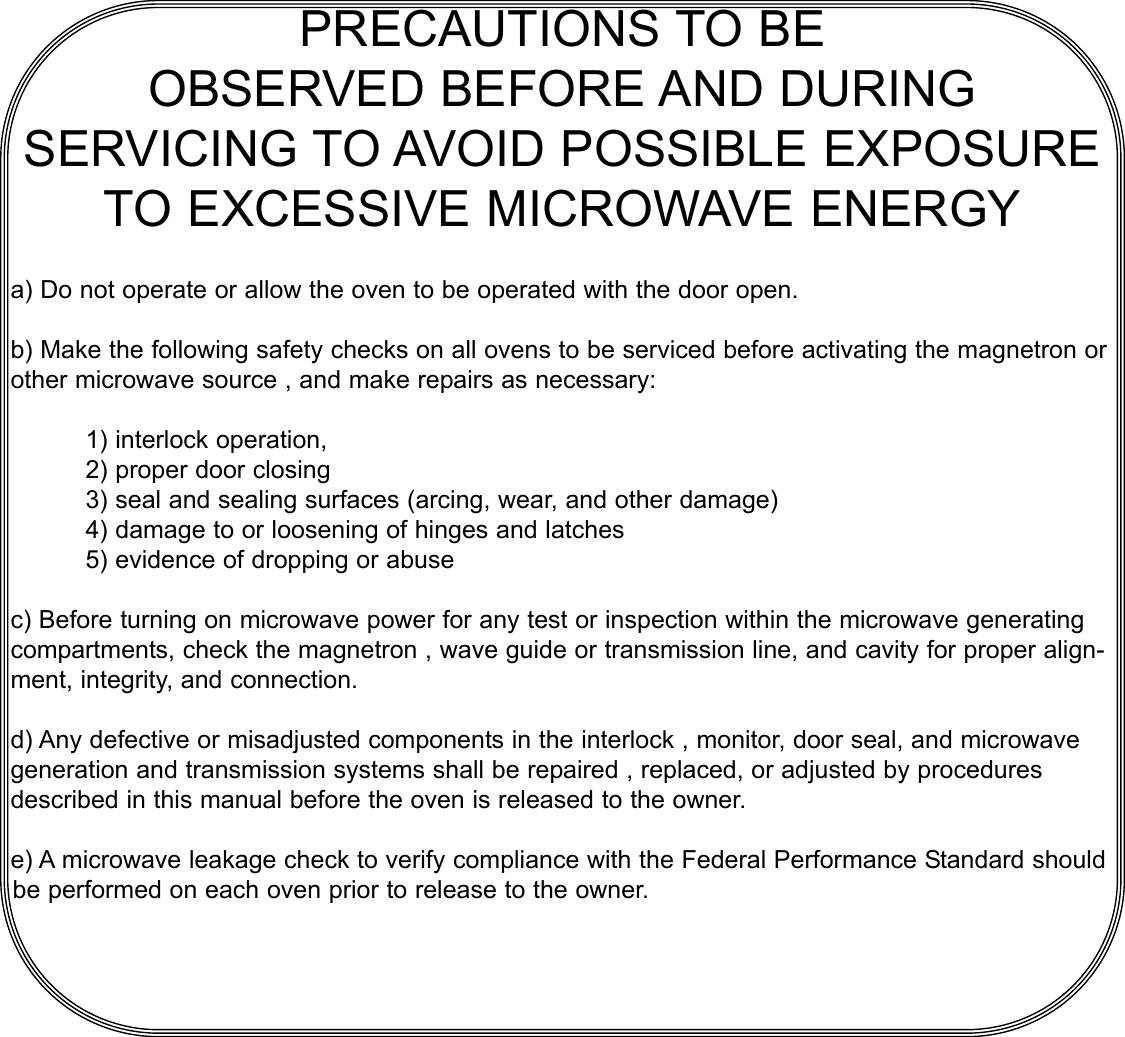
PRECAUTIONS TO BEOBSERVED BEFORE AND DURINGSERVICING TO AVOID POSSIBLE EXPOSURETO EXCESSIVE MICROWAVE ENERGYa) Do not operate or allow the oven to be operated with the door open.b) Make the following safety checks on all ovens to be serviced before activating the magnetron orother microwave source , and make repairs as necessary:1) interlock operation,2) proper door closing3) seal and sealing surfaces (arcing, wear, and other damage)4) damage to or loosening of hinges and latches 5) evidence of dropping or abusec) Before turning on microwave power for any test or inspection within the microwave generatingcompartments, check the magnetron , wave guide or transmission line, and cavity for proper align-ment, integrity, and connection.d) Any defective or misadjusted components in the interlock , monitor, door seal, and microwavegeneration and transmission systems shall be repaired , replaced, or adjusted by proceduresdescribed in this manual before the oven is released to the owner.e) A microwave leakage check to verify compliance with the Federal Performance Standard shouldbe performed on each oven prior to release to the owner.
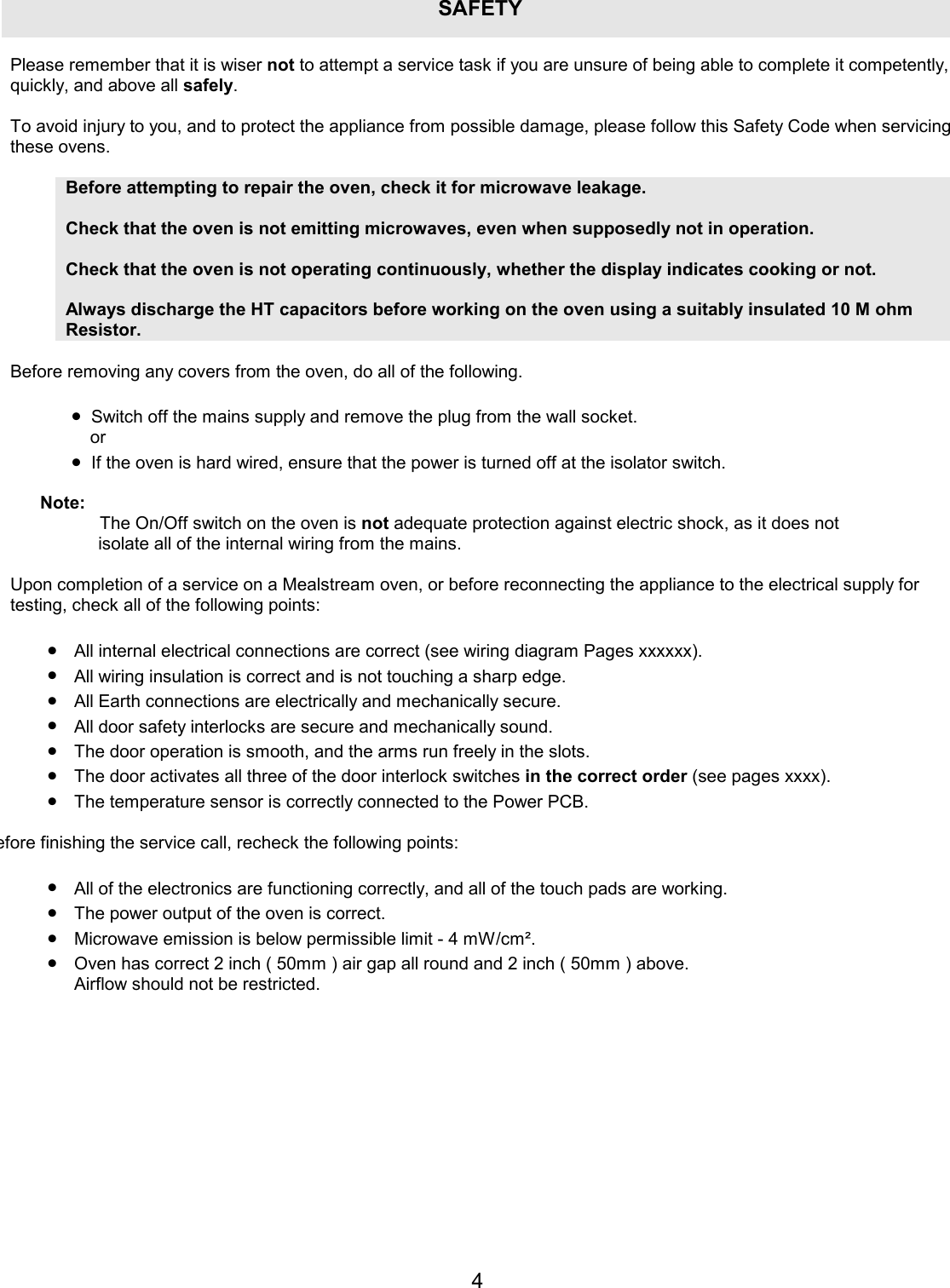
4SAFETYPlease remember that it is wiser not to attempt a service task if you are unsure of being able to complete it competently, quickly, and above all safely.  To avoid injury to you, and to protect the appliance from possible damage, please follow this Safety Code when servicing these ovens.  Before attempting to repair the oven, check it for microwave leakage.   Check that the oven is not emitting microwaves, even when supposedly not in operation.  Check that the oven is not operating continuously, whether the display indicates cooking or not.  Always discharge the HT capacitors before working on the oven using a suitably insulated 10 M ohm Resistor.  Before removing any covers from the oven, do all of the following.  •  Switch off the mains supply and remove the plug from the wall socket.  or •  If the oven is hard wired, ensure that the power is turned off at the isolator switch.  Note:  The On/Off switch on the oven is not adequate protection against electric shock, as it does not isolate all of the internal wiring from the mains.  Upon completion of a service on a Mealstream oven, or before reconnecting the appliance to the electrical supply for testing, check all of the following points:  •  All internal electrical connections are correct (see wiring diagram Pages xxxxxx). •  All wiring insulation is correct and is not touching a sharp edge. •  All Earth connections are electrically and mechanically secure. •  All door safety interlocks are secure and mechanically sound. •  The door operation is smooth, and the arms run freely in the slots. •  The door activates all three of the door interlock switches in the correct order (see pages xxxx). •  The temperature sensor is correctly connected to the Power PCB. efore finishing the service call, recheck the following points: •  All of the electronics are functioning correctly, and all of the touch pads are working. •  The power output of the oven is correct. •  Microwave emission is below permissible limit - 4 mW/cm². •  Oven has correct 2 inch ( 50mm ) air gap all round and 2 inch ( 50mm ) above. Airflow should not be restricted.
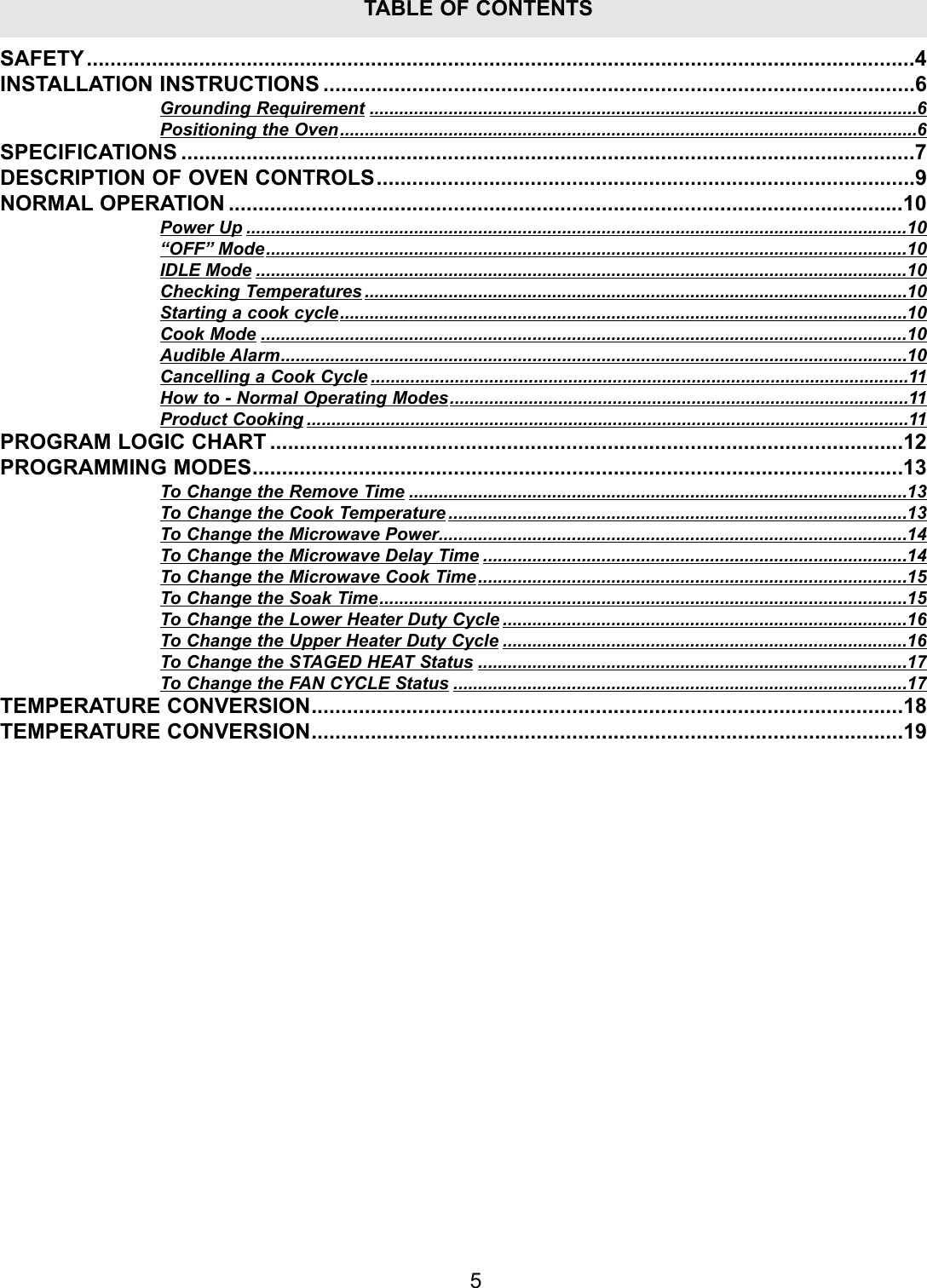
5TABLE OF CONTENTSSAFETY............................................................................................................................................4INSTALLATION INSTRUCTIONS ....................................................................................................6Grounding Requirement ...............................................................................................................6Positioning the Oven.....................................................................................................................6SPECIFICATIONS ............................................................................................................................7DESCRIPTION OF OVEN CONTROLS...........................................................................................9NORMAL OPERATION ..................................................................................................................10Power Up ......................................................................................................................................10“OFF” Mode..................................................................................................................................10IDLE Mode ....................................................................................................................................10Checking Temperatures ..............................................................................................................10Starting a cook cycle...................................................................................................................10Cook Mode ...................................................................................................................................10Audible Alarm...............................................................................................................................10Cancelling a Cook Cycle .............................................................................................................11How to - Normal Operating Modes.............................................................................................11Product Cooking ..........................................................................................................................11PROGRAM LOGIC CHART ...........................................................................................................12PROGRAMMING MODES..............................................................................................................13To Change the Remove Time .....................................................................................................13To Change the Cook Temperature .............................................................................................13To Change the Microwave Power...............................................................................................14To Change the Microwave Delay Time ......................................................................................14To Change the Microwave Cook Time.......................................................................................15To Change the Soak Time...........................................................................................................15To Change the Lower Heater Duty Cycle ..................................................................................16To Change the Upper Heater Duty Cycle ..................................................................................16To Change the STAGED HEAT Status .......................................................................................17To Change the FAN CYCLE Status ............................................................................................17TEMPERATURE CONVERSION....................................................................................................18TEMPERATURE CONVERSION....................................................................................................19
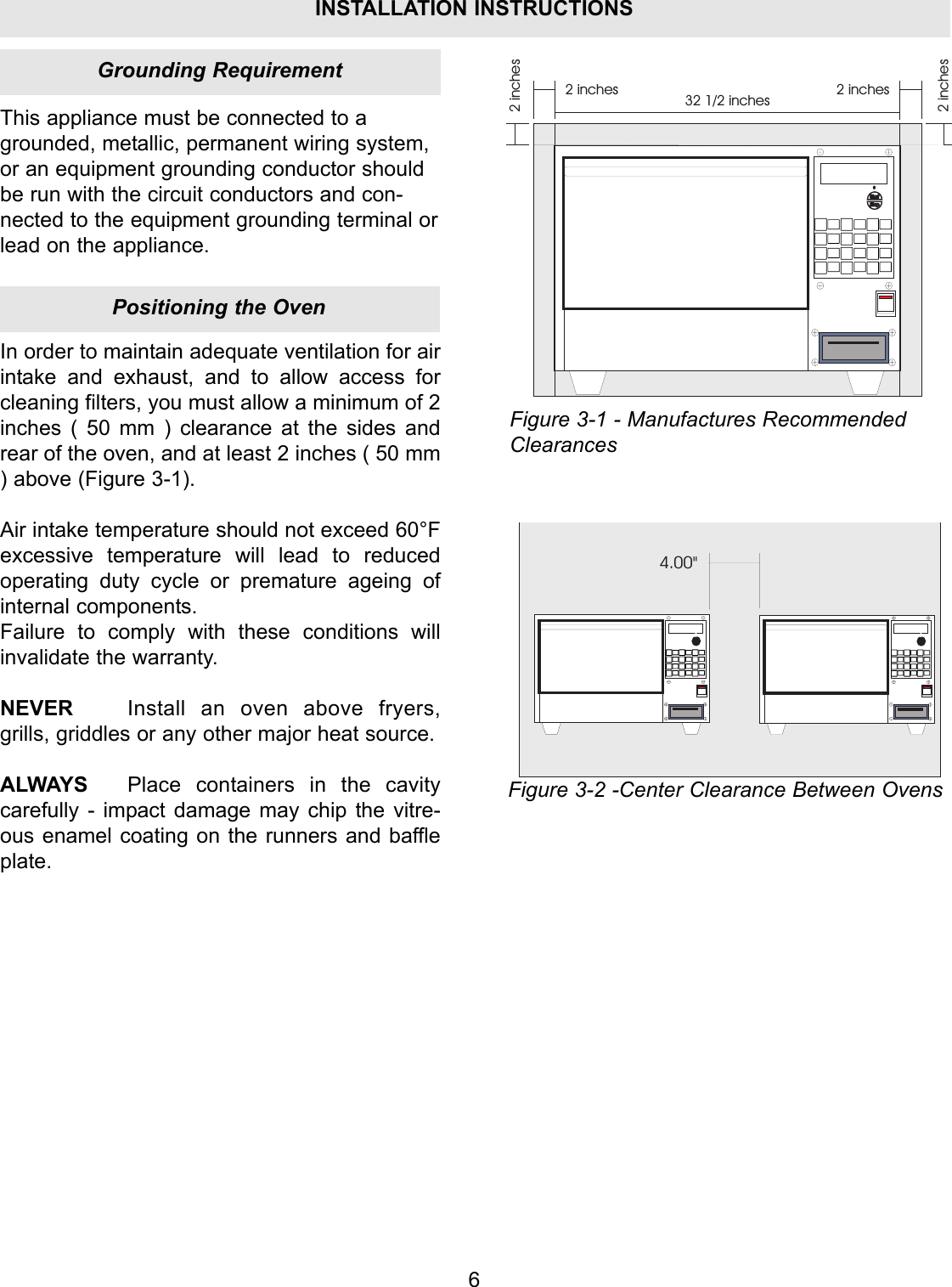
6This appliance must be connected to agrounded, metallic, permanent wiring system,or an equipment grounding conductor shouldbe run with the circuit conductors and con-nected to the equipment grounding terminal orlead on the appliance.2 inches2 inches 2 inches2 inches32 1/2 inchesIn order to maintain adequate ventilation for airintake and exhaust, and to allow access forcleaning filters, you must allow a minimum of 2inches ( 50 mm ) clearance at the sides andrear of the oven, and at least 2 inches ( 50 mm) above (Figure 3-1).Air intake temperature should not exceed 60°Fexcessive temperature will lead to reducedoperating duty cycle or premature ageing ofinternal components.Failure to comply with these conditions willinvalidate the warranty.NEVER Install an oven above fryers,grills, griddles or any other major heat source.ALWAYS Place containers in the cavitycarefully - impact damage may chip the vitre-ous enamel coating on the runners and baffleplate.4.00"Figure 3-1 - Manufactures RecommendedClearancesFigure 3-2 -Center Clearance Between OvensPositioning the OvenGrounding RequirementINSTALLATION INSTRUCTIONS
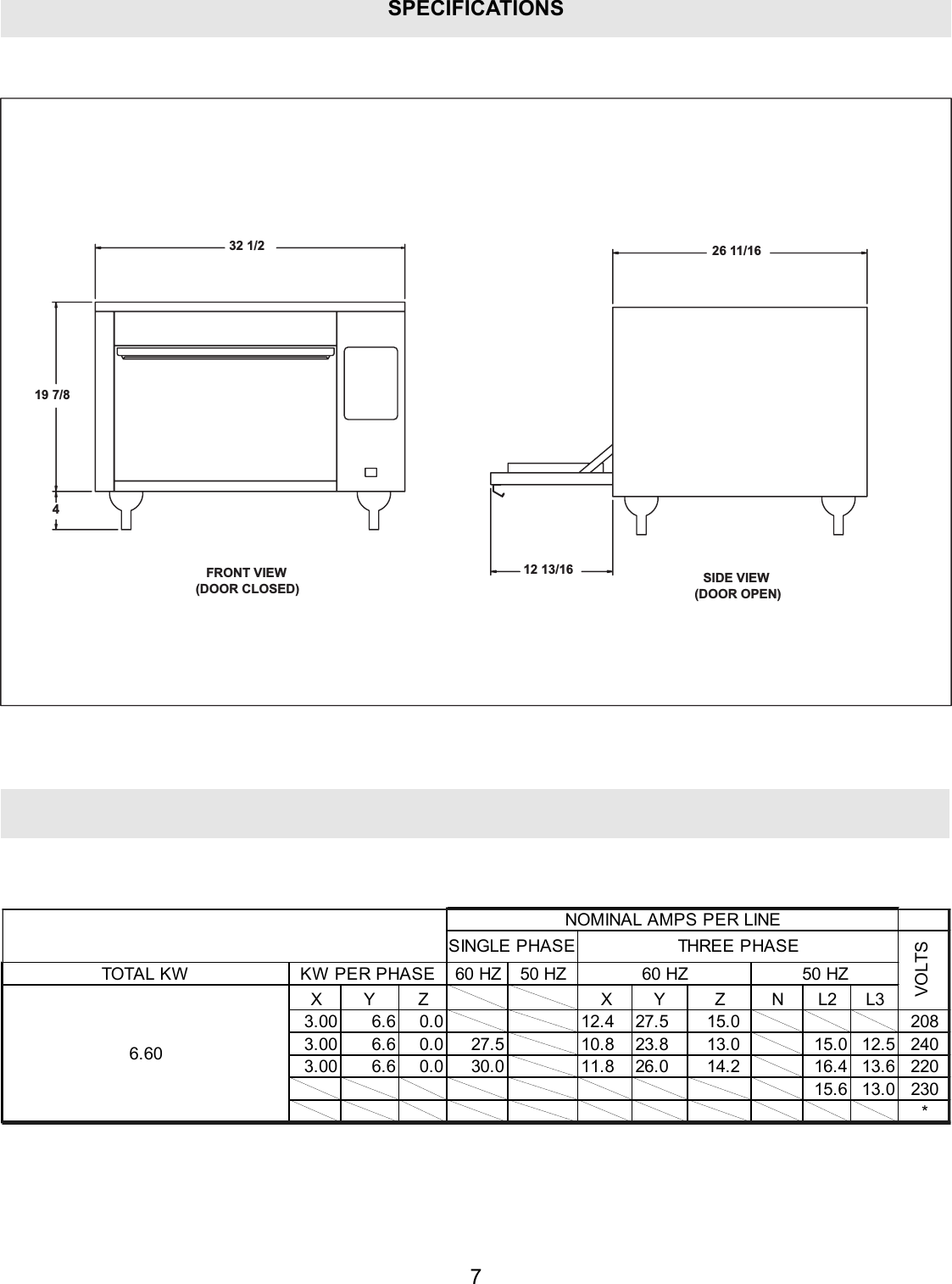
SPECIFICATIONSSIDE VIEW(DOOR OPEN)FRONT VIEW(DOOR CLOSED)12 13/16432 1/219 7/826 11/1660 HZ 50 HZXYZ XY Z NL2L33.00 6.6 0.0 12.4 27.5 15.0 2083.00 6.6 0.0 27.5 10.8 23.8 13.0 15.0 12.5 2403.00 6.6 0.0 30.0 11.8 26.0 14.2 16.4 13.6 22015.6 13.0 230*VOLTSNOMINAL AMPS PER LINE60 HZKW PER PHASE6.6050 HZTOTA L KWSINGLE PHASETHREE PHASE7
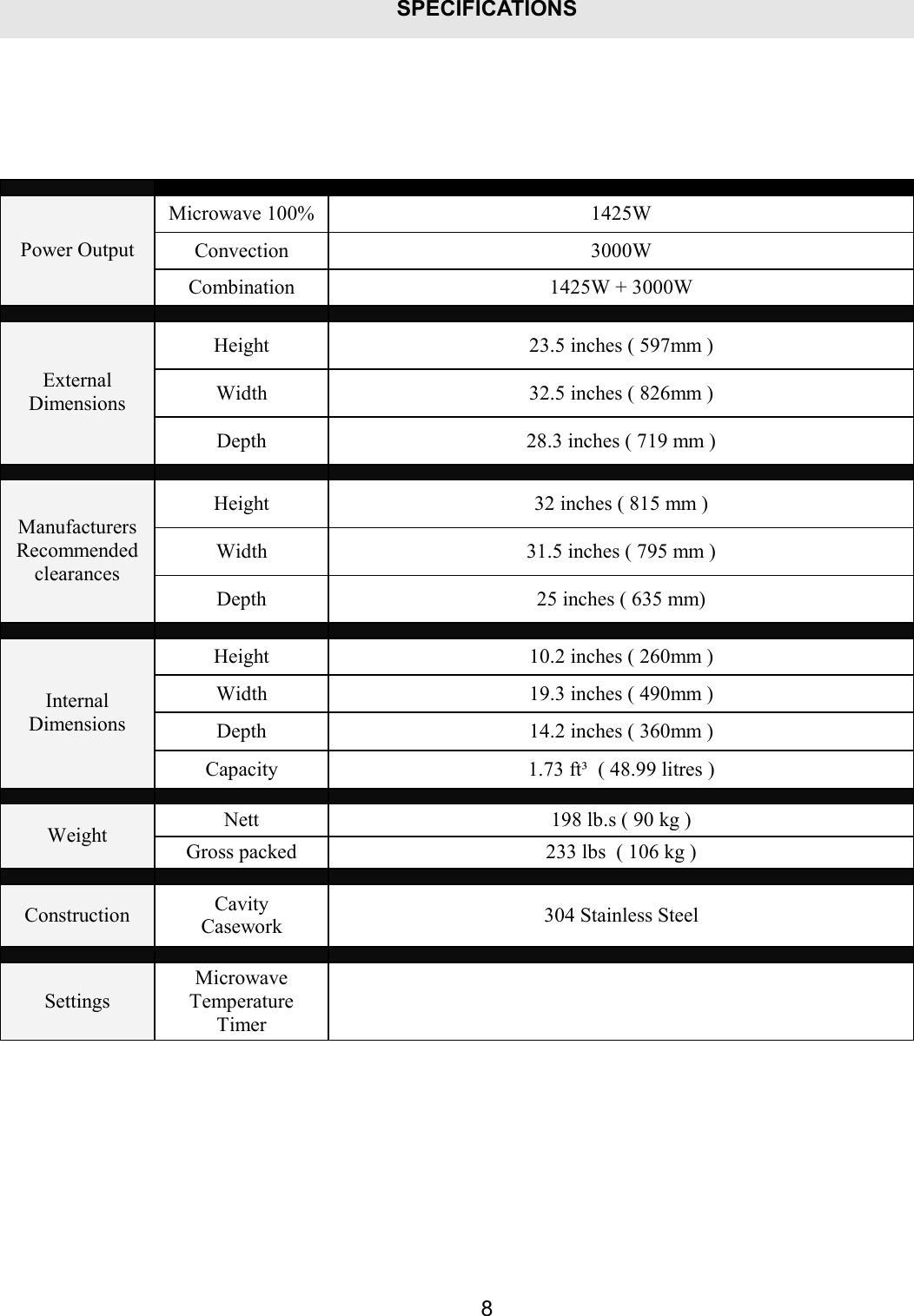
SPECIFICATIONS8   Microwave 100% 1425W Convection 3000W Power Output Combination 1425W + 3000W    Height 23.5 inches ( 597mm ) Width 32.5 inches ( 826mm ) External Dimensions Depth 28.3 inches ( 719 mm )    Height 32 inches ( 815 mm ) Width 31.5 inches ( 795 mm ) Manufacturers Recommended clearances  Depth 25 inches ( 635 mm)    Height 10.2 inches ( 260mm ) Width 19.3 inches ( 490mm ) Depth 14.2 inches ( 360mm ) Internal Dimensions Capacity 1.73 ft³  ( 48.99 litres )    Nett 198 lb.s ( 90 kg ) Weight Gross packed 233 lbs  ( 106 kg )    Construction Cavity Casework 304 Stainless Steel    Settings Microwave Temperature Timer
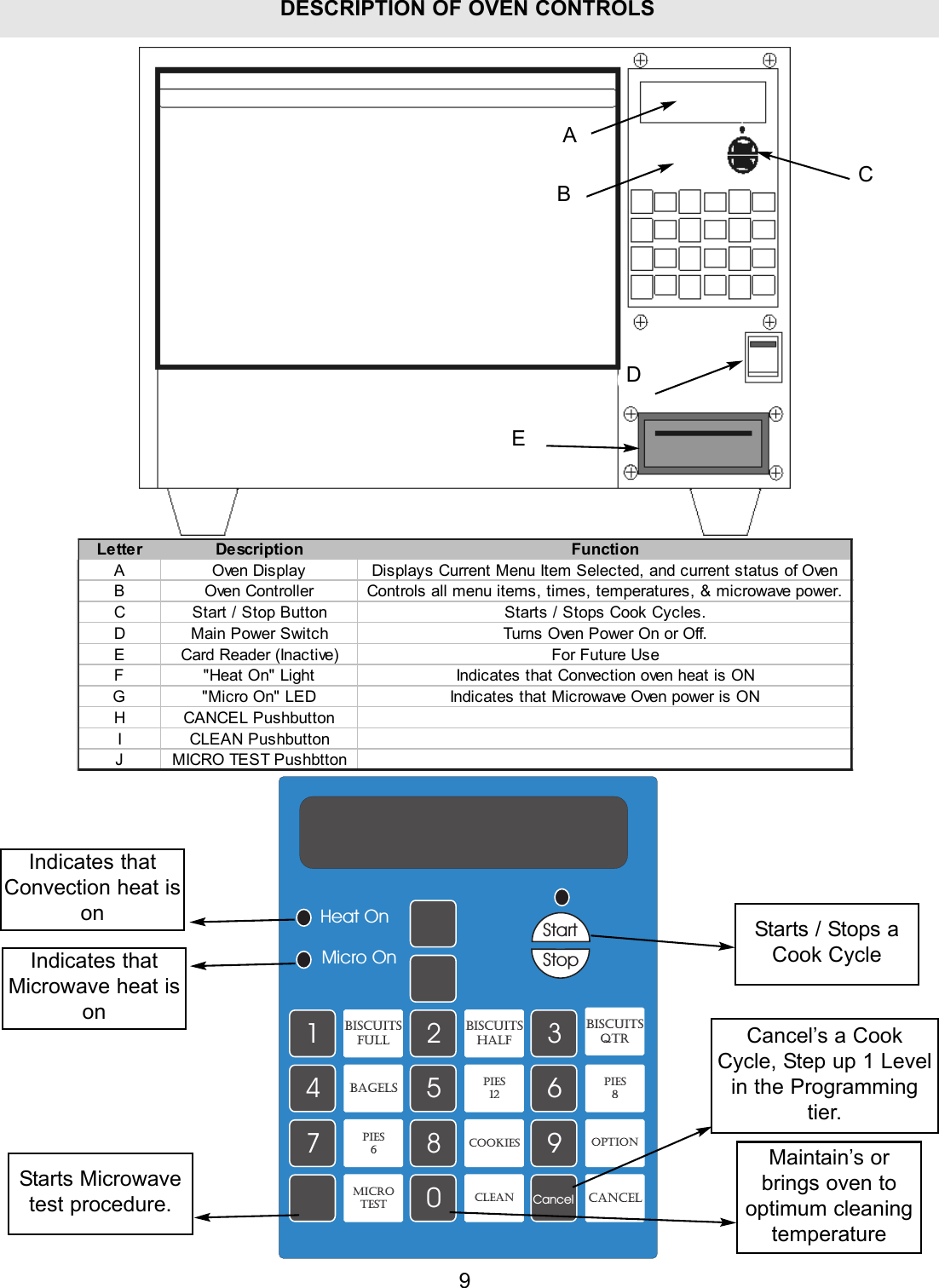
9DESCRIPTION OF OVEN CONTROLSAEDCBLetter Description FunctionA Oven Display Displays Current Menu Item Selected, and current status of OvenB Oven Controller Controls all menu items, times, temperatures, & microwave power.C Start / Stop Button Starts / Stops Cook Cycles.D Main Power Switch Turns Oven Power On or Off.E Card Reader (Inactive) For Future UseF "Heat On" Light Indicates that Convection oven heat is ONG "Micro On" LED Indicates that Microwave Oven power is ONH CANCEL PushbuttonI CLEAN PushbuttonJ MICRO TEST Pushbtton1234567890CancelStartStopHeat OnMicro OnBiscuitsFULLBiscuitsHalfBiscuitsQtrBAGELS Pies12Pies8COOKIESOptionCLEANMicrotest CANCELPies6Indicates thatConvection heat isonIndicates thatMicrowave heat isonStarts / Stops aCook CycleCancel’s a CookCycle, Step up 1 Levelin the Programmingtier.Maintain’s orbrings oven tooptimum cleaningtemperatureStarts Microwavetest procedure.
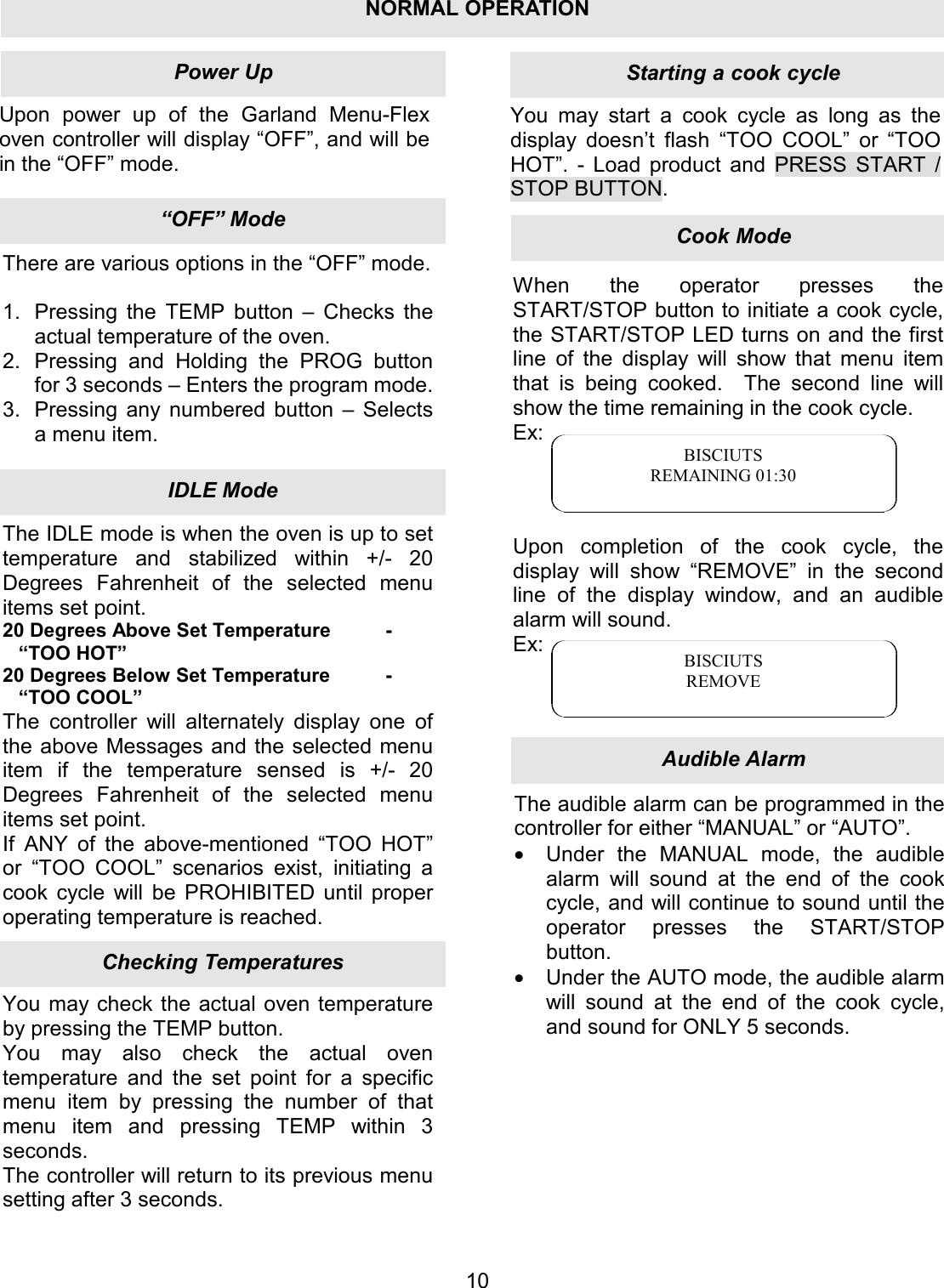
Upon power up of the Garland Menu-Flex oven controller will display “OFF”, and will be in the “OFF” mode. You may start a cook cycle as long as the display doesn’t flash “TOO COOL” or “TOO HOT”.  - Load product and PRESS START / STOP BUTTON. 10There are various options in the “OFF” mode.  1.  Pressing the TEMP button – Checks the actual temperature of the oven. 2.  Pressing and Holding the PROG button for 3 seconds – Enters the program mode. 3.  Pressing any numbered button – Selects a menu item. The IDLE mode is when the oven is up to set temperature and stabilized within +/- 20 Degrees Fahrenheit of the selected menu items set point. 20 Degrees Above Set Temperature  - “TOO HOT” 20 Degrees Below Set Temperature  - “TOO COOL” The controller will alternately display one of the above Messages and the selected menu item if the temperature sensed is +/- 20 Degrees Fahrenheit of the selected menu items set point. If ANY of the above-mentioned “TOO HOT” or “TOO COOL” scenarios exist, initiating a cook cycle will be PROHIBITED until proper operating temperature is reached. You may check the actual oven temperature by pressing the TEMP button. You may also check the actual oven temperature and the set point for a specific menu item by pressing the number of that menu item and pressing TEMP within 3 seconds. The controller will return to its previous menu setting after 3 seconds. When the operator presses the START/STOP button to initiate a cook cycle, the START/STOP LED turns on and the first line of the display will show that menu item that is being cooked.  The second line will show the time remaining in the cook cycle. Ex:     Upon completion of the cook cycle, the display will show “REMOVE” in the second line of the display window, and an audible alarm will sound. Ex:    BISCIUTS REMAINING 01:30 BISCIUTS REMOVE The audible alarm can be programmed in the controller for either “MANUAL” or “AUTO”. •  Under the MANUAL mode, the audible alarm will sound at the end of the cook cycle, and will continue to sound until the operator presses the START/STOP button. •  Under the AUTO mode, the audible alarm will sound at the end of the cook cycle, and sound for ONLY 5 seconds. Audible AlarmCook ModeStarting a cook cycleChecking TemperaturesIDLE Mode“OFF” ModePower UpNORMAL OPERATION
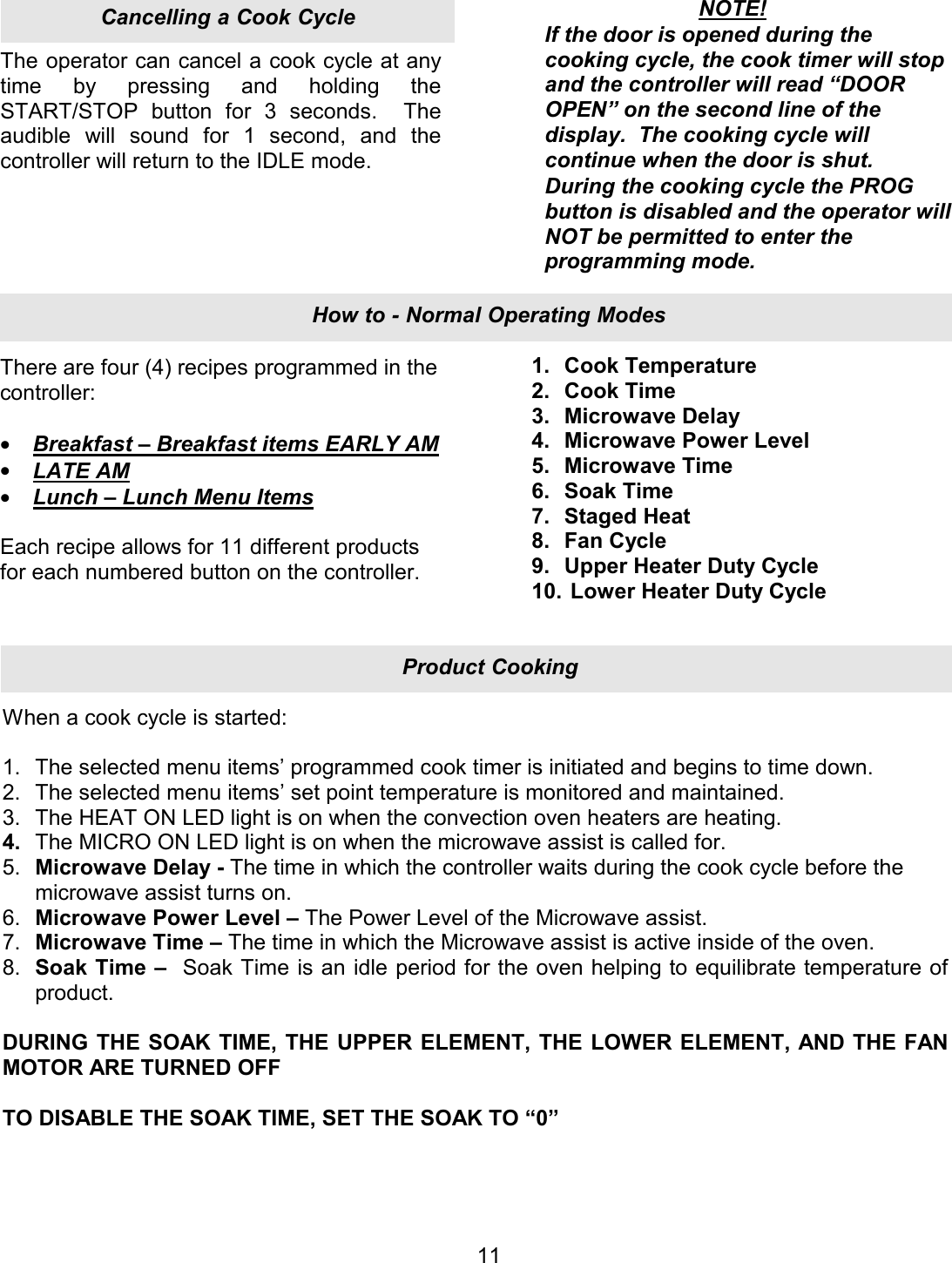
The operator can cancel a cook cycle at any time by pressing and holding the START/STOP button for 3 seconds.  The audible will sound for 1 second, and the controller will return to the IDLE mode. There are four (4) recipes programmed in the controller:  •  Breakfast – Breakfast items EARLY AM •  LATE AM •  Lunch – Lunch Menu Items  Each recipe allows for 11 different products for each numbered button on the controller.  11NOTE! If the door is opened during the cooking cycle, the cook timer will stop and the controller will read “DOOR OPEN” on the second line of the display.  The cooking cycle will continue when the door is shut. During the cooking cycle the PROG button is disabled and the operator will NOT be permitted to enter the programming mode. 1. Cook Temperature 2. Cook Time 3. Microwave Delay 4. Microwave Power Level 5. Microwave Time 6. Soak Time 7. Staged Heat 8. Fan Cycle 9. Upper Heater Duty Cycle 10.  Lower Heater Duty Cycle When a cook cycle is started:  1. The selected menu items’ programmed cook timer is initiated and begins to time down. 2. The selected menu items’ set point temperature is monitored and maintained. 3. The HEAT ON LED light is on when the convection oven heaters are heating. 4. The MICRO ON LED light is on when the microwave assist is called for. 5. Microwave Delay - The time in which the controller waits during the cook cycle before the microwave assist turns on. 6. Microwave Power Level – The Power Level of the Microwave assist. 7. Microwave Time – The time in which the Microwave assist is active inside of the oven. 8. Soak Time –  Soak Time is an idle period for the oven helping to equilibrate temperature of product.  DURING THE SOAK TIME, THE UPPER ELEMENT, THE LOWER ELEMENT, AND THE FAN MOTOR ARE TURNED OFF  TO DISABLE THE SOAK TIME, SET THE SOAK TO “0” Product CookingHow to - Normal Operating ModesCancelling a Cook Cycle
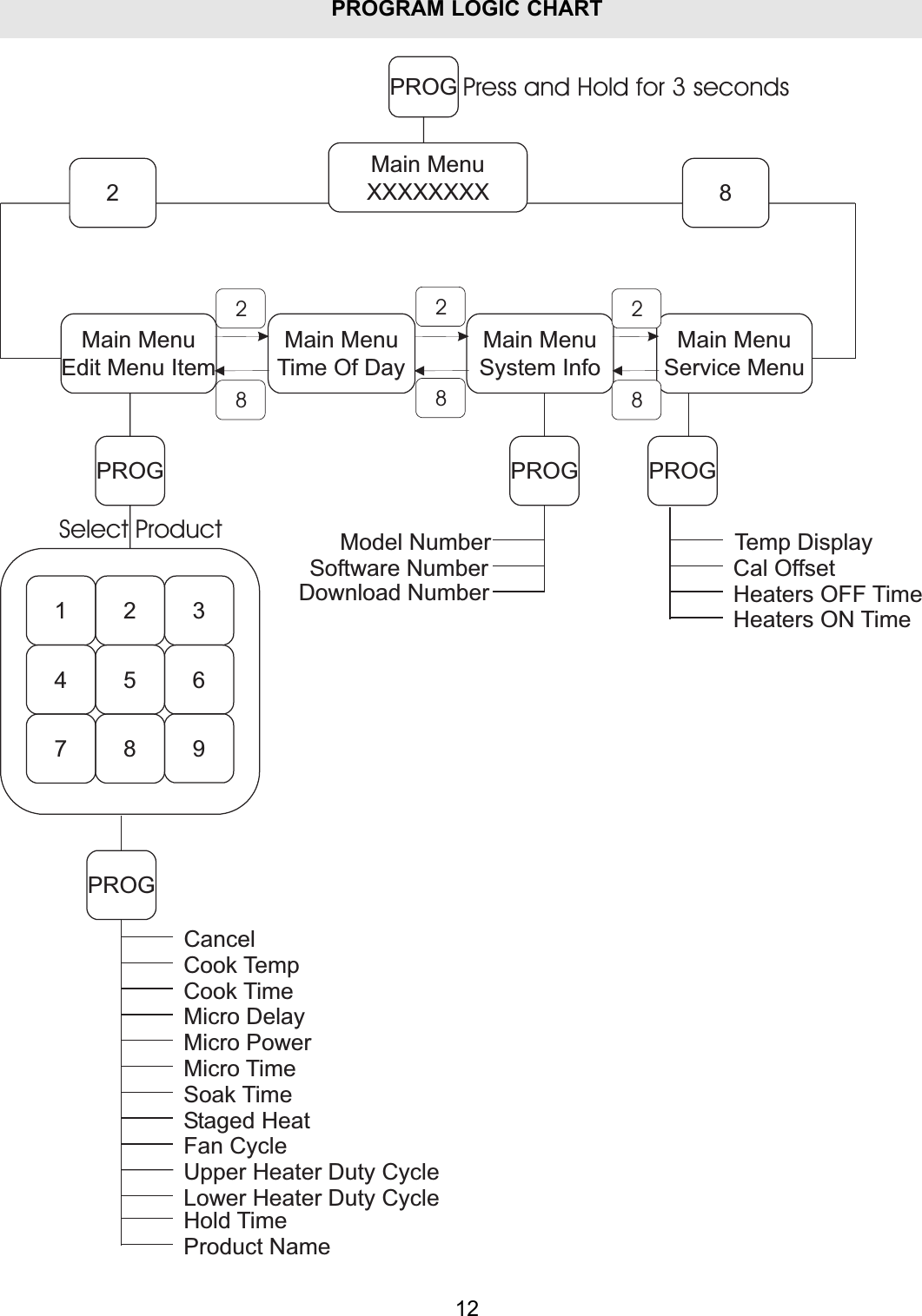
PROGRAM LOGIC CHART12PROGMain MenuTime Of DayMain MenuSystem InfoMain MenuService Menu2 8Main MenuXXXXXXXXMain MenuEdit Menu Item1 2 34 5 67 8PROG9PROGCancelCook TempCook TimeMicro DelayMicro PowerMicro TimeSoak TimeStaged HeatFan CycleUpper Heater Duty CycleLower Heater Duty CycleProduct NamePROGModel NumberSoftware NumberDownload NumberPROGTemp DisplayCal OffsetHeaters OFF TimeHeaters ON TimePress and Hold for 3 secondsHold TimeSelect Product222888
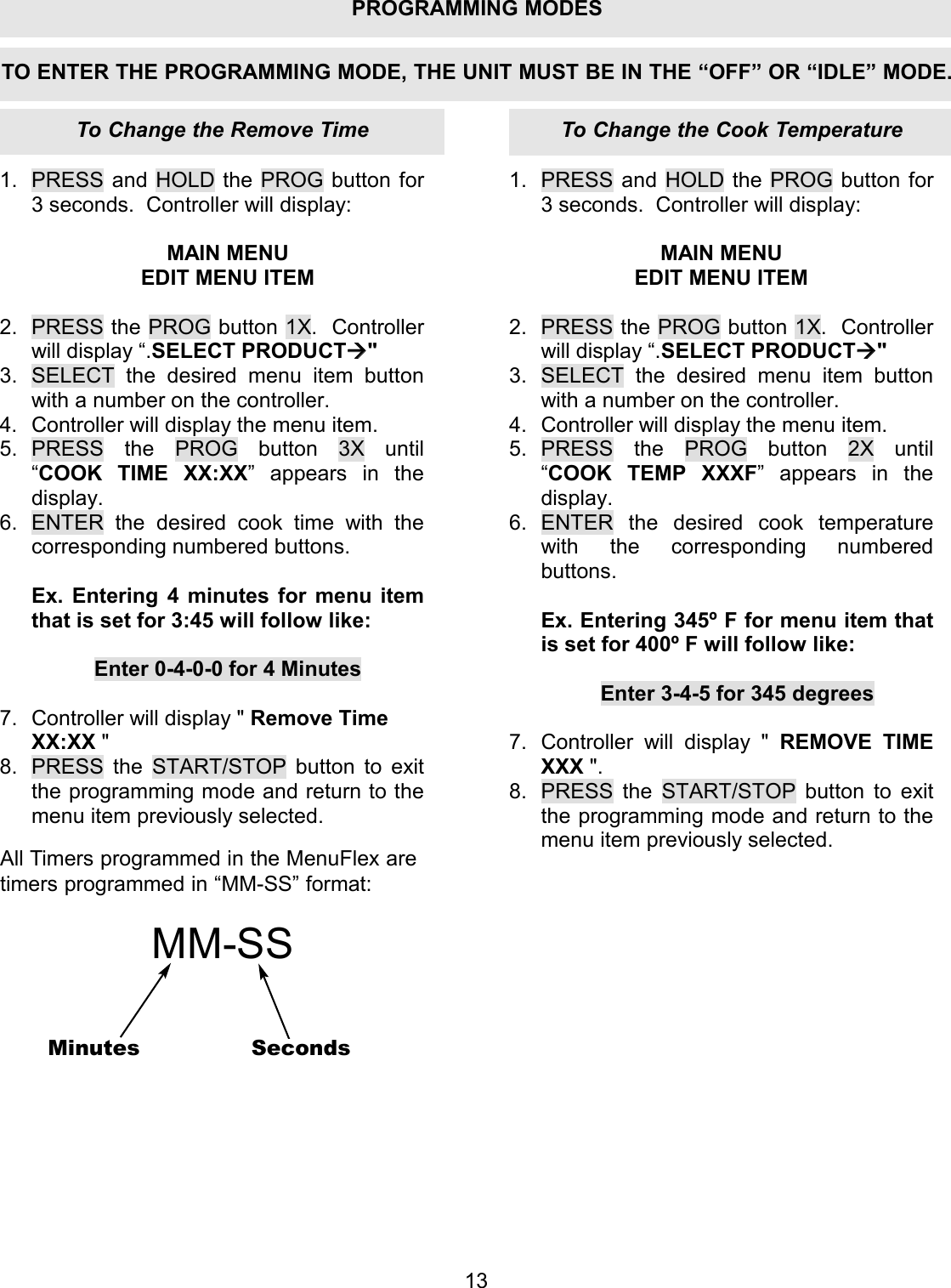
1.  PRESS and HOLD the PROG button for 3 seconds.  Controller will display:  MAIN MENU EDIT MENU ITEM  2.  PRESS the PROG button 1X.  Controller will display “.SELECT PRODUCT" 3.  SELECT the desired menu item button with a number on the controller. 4.  Controller will display the menu item. 5. PRESS the PROG button 3X until “COOK TIME XX:XX” appears in the display. 6.  ENTER the desired cook time with the corresponding numbered buttons.  Ex. Entering 4 minutes for menu item that is set for 3:45 will follow like:  Enter 0-4-0-0 for 4 Minutes  7.  Controller will display " Remove Time XX:XX " 8.  PRESS the START/STOP button to exit the programming mode and return to the menu item previously selected. 1. PRESS and HOLD the PROG button for 3 seconds.  Controller will display:  MAIN MENU EDIT MENU ITEM  2. PRESS the PROG button 1X.  Controller will display “.SELECT PRODUCT" 3. SELECT the desired menu item button with a number on the controller. 4. Controller will display the menu item. 5. PRESS the PROG button 2X until “COOK TEMP XXXF” appears in the display. 6. ENTER the desired cook temperature with the corresponding numbered buttons.  Ex. Entering 345º F for menu item that is set for 400º F will follow like:  Enter 3-4-5 for 345 degrees  7. Controller will display " REMOVE TIME XXX ". 8. PRESS the START/STOP button to exit the programming mode and return to the menu item previously selected. 13TO ENTER THE PROGRAMMING MODE, THE UNIT MUST BE IN THE “OFF” OR “IDLE” MODE.All Timers programmed in the MenuFlex aretimers programmed in “MM-SS” format:MM-SSMinutes SecondsTo Change the Cook TemperatureTo Change the Remove TimePROGRAMMING MODES
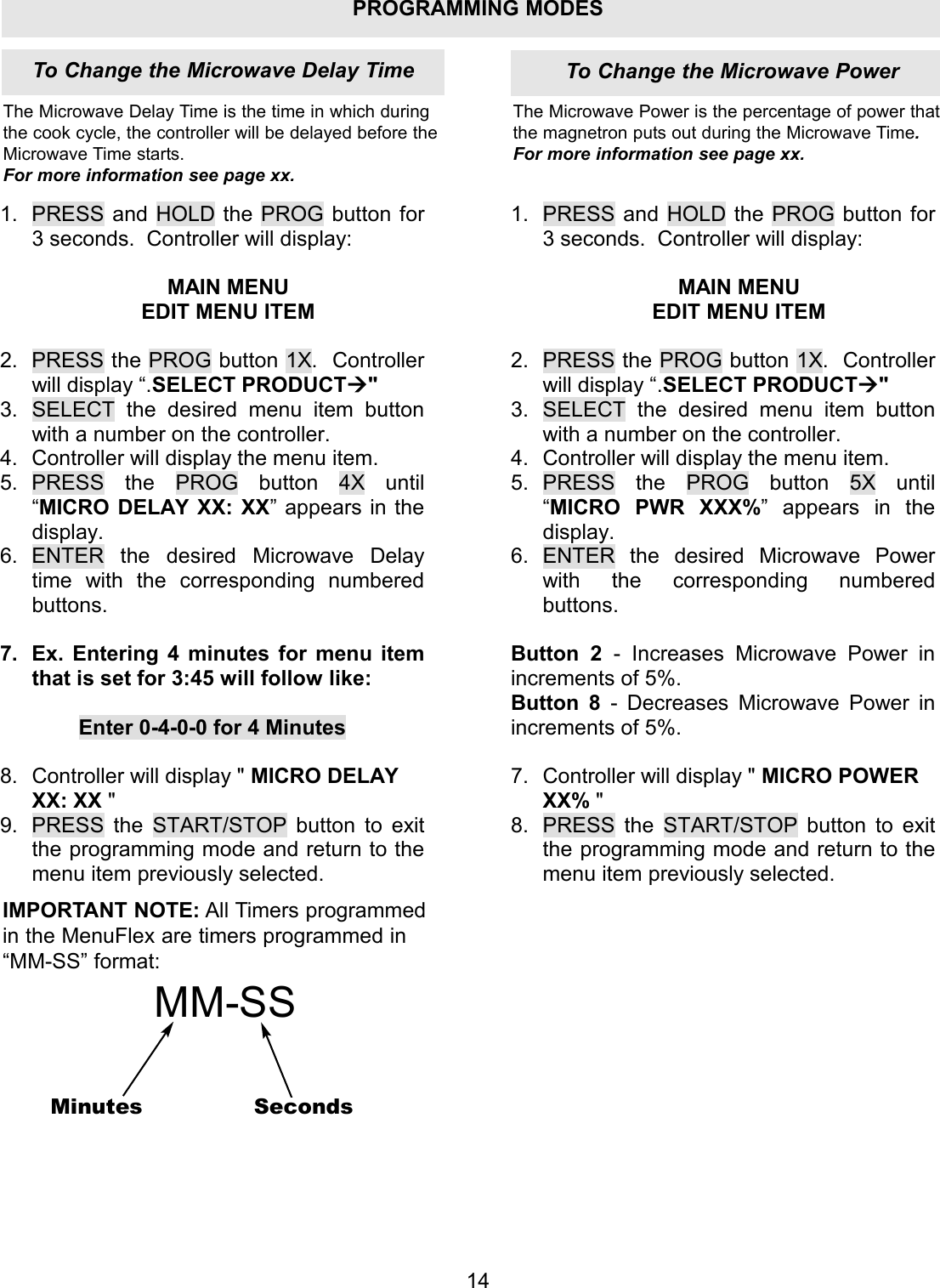
PROGRAMMING MODES1.  PRESS and HOLD the PROG button for 3 seconds.  Controller will display:  MAIN MENU EDIT MENU ITEM  2.  PRESS the PROG button 1X.  Controller will display “.SELECT PRODUCT" 3.  SELECT the desired menu item button with a number on the controller. 4.  Controller will display the menu item. 5. PRESS the PROG button 4X until “MICRO DELAY XX: XX” appears in the display. 6. ENTER the desired Microwave Delay time with the corresponding numbered buttons.  7.  Ex. Entering 4 minutes for menu item that is set for 3:45 will follow like:  Enter 0-4-0-0 for 4 Minutes  8.  Controller will display " MICRO DELAY XX: XX " 9.  PRESS the START/STOP button to exit the programming mode and return to the menu item previously selected. 1. PRESS and HOLD the PROG button for 3 seconds.  Controller will display:  MAIN MENU EDIT MENU ITEM  2. PRESS the PROG button 1X.  Controller will display “.SELECT PRODUCT" 3. SELECT the desired menu item button with a number on the controller. 4. Controller will display the menu item. 5. PRESS the PROG button 5X until “MICRO PWR XXX%” appears in the display. 6. ENTER the desired Microwave Power with the corresponding numbered buttons.  Button 2  - Increases Microwave Power in increments of 5%. Button 8  - Decreases Microwave Power in increments of 5%.  7. Controller will display " MICRO POWER XX% " 8. PRESS the START/STOP button to exit the programming mode and return to the menu item previously selected. To Change the Microwave Delay Time To Change the Microwave Power14The Microwave Delay Time is the time in which duringthe cook cycle, the controller will be delayed before theMicrowave Time starts. For more information see page xx.The Microwave Power is the percentage of power thatthe magnetron puts out during the Microwave Time.For more information see page xx.IMPORTANT NOTE: All Timers programmedin the MenuFlex are timers programmed in“MM-SS” format:MM-SSMinutes Seconds
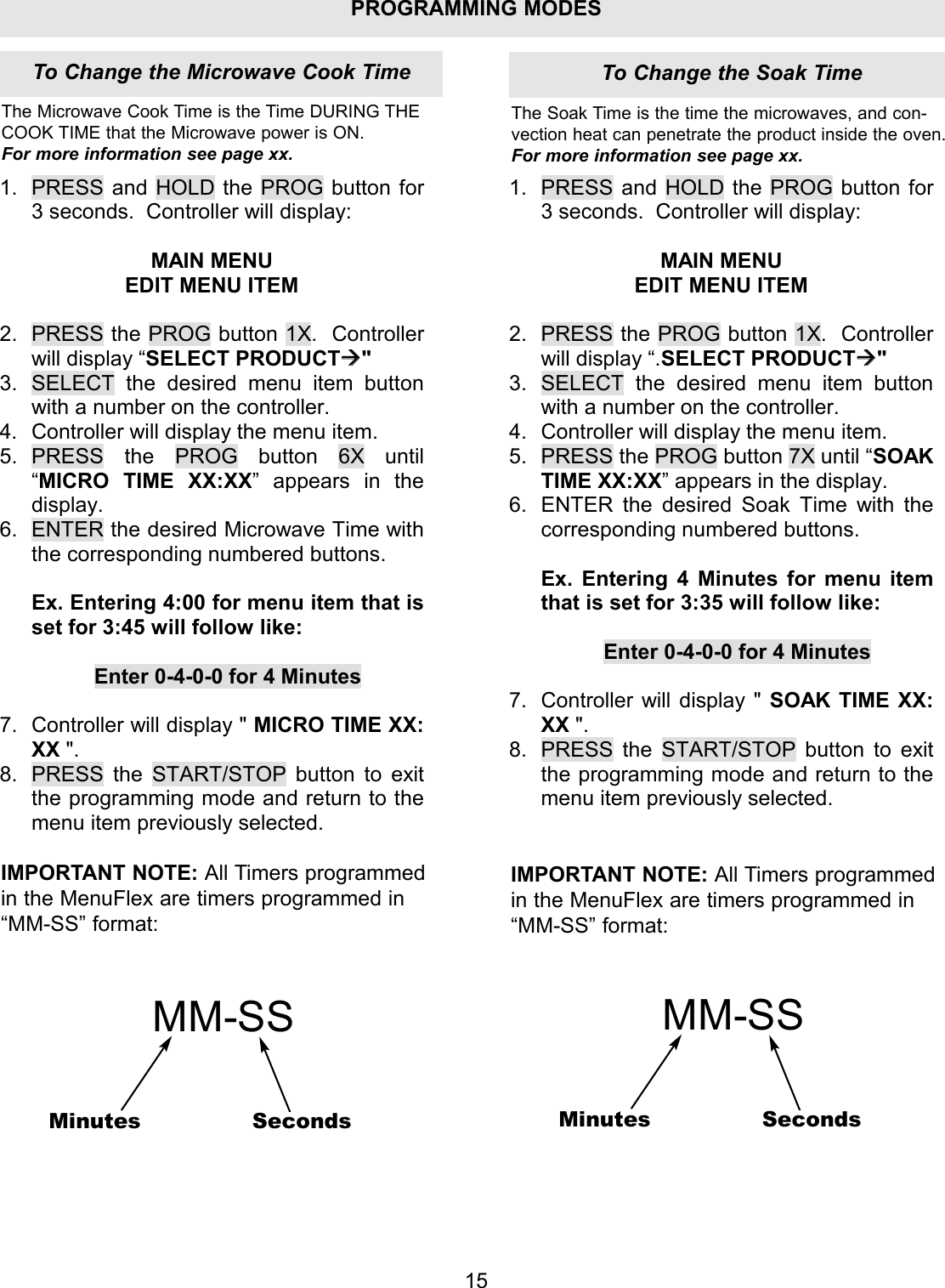
PROGRAMMING MODES1.  PRESS and HOLD the PROG button for 3 seconds.  Controller will display:  MAIN MENU EDIT MENU ITEM  2.  PRESS the PROG button 1X.  Controller will display “SELECT PRODUCT" 3.  SELECT the desired menu item button with a number on the controller. 4.  Controller will display the menu item. 5. PRESS the PROG button 6X until “MICRO TIME XX:XX” appears in the display. 6.  ENTER the desired Microwave Time with the corresponding numbered buttons.  Ex. Entering 4:00 for menu item that is set for 3:45 will follow like:  Enter 0-4-0-0 for 4 Minutes  7.  Controller will display " MICRO TIME XX: XX ". 8.  PRESS the START/STOP button to exit the programming mode and return to the menu item previously selected. 1. PRESS and HOLD the PROG button for 3 seconds.  Controller will display:  MAIN MENU EDIT MENU ITEM  2. PRESS the PROG button 1X.  Controller will display “.SELECT PRODUCT" 3. SELECT the desired menu item button with a number on the controller. 4. Controller will display the menu item. 5. PRESS the PROG button 7X until “SOAK TIME XX:XX” appears in the display. 6. ENTER the desired Soak Time with the corresponding numbered buttons.  Ex. Entering 4 Minutes for menu item that is set for 3:35 will follow like:  Enter 0-4-0-0 for 4 Minutes  7. Controller will display " SOAK TIME XX: XX ". 8. PRESS the START/STOP button to exit the programming mode and return to the menu item previously selected. 15The Microwave Cook Time is the Time DURING THECOOK TIME that the Microwave power is ON.For more information see page xx.The Soak Time is the time the microwaves, and con-vection heat can penetrate the product inside the oven.For more information see page xx.IMPORTANT NOTE: All Timers programmedin the MenuFlex are timers programmed in“MM-SS” format:MM-SSMinutes SecondsIMPORTANT NOTE: All Timers programmedin the MenuFlex are timers programmed in“MM-SS” format:MM-SSMinutes SecondsTo Change the Soak TimeTo Change the Microwave Cook Time
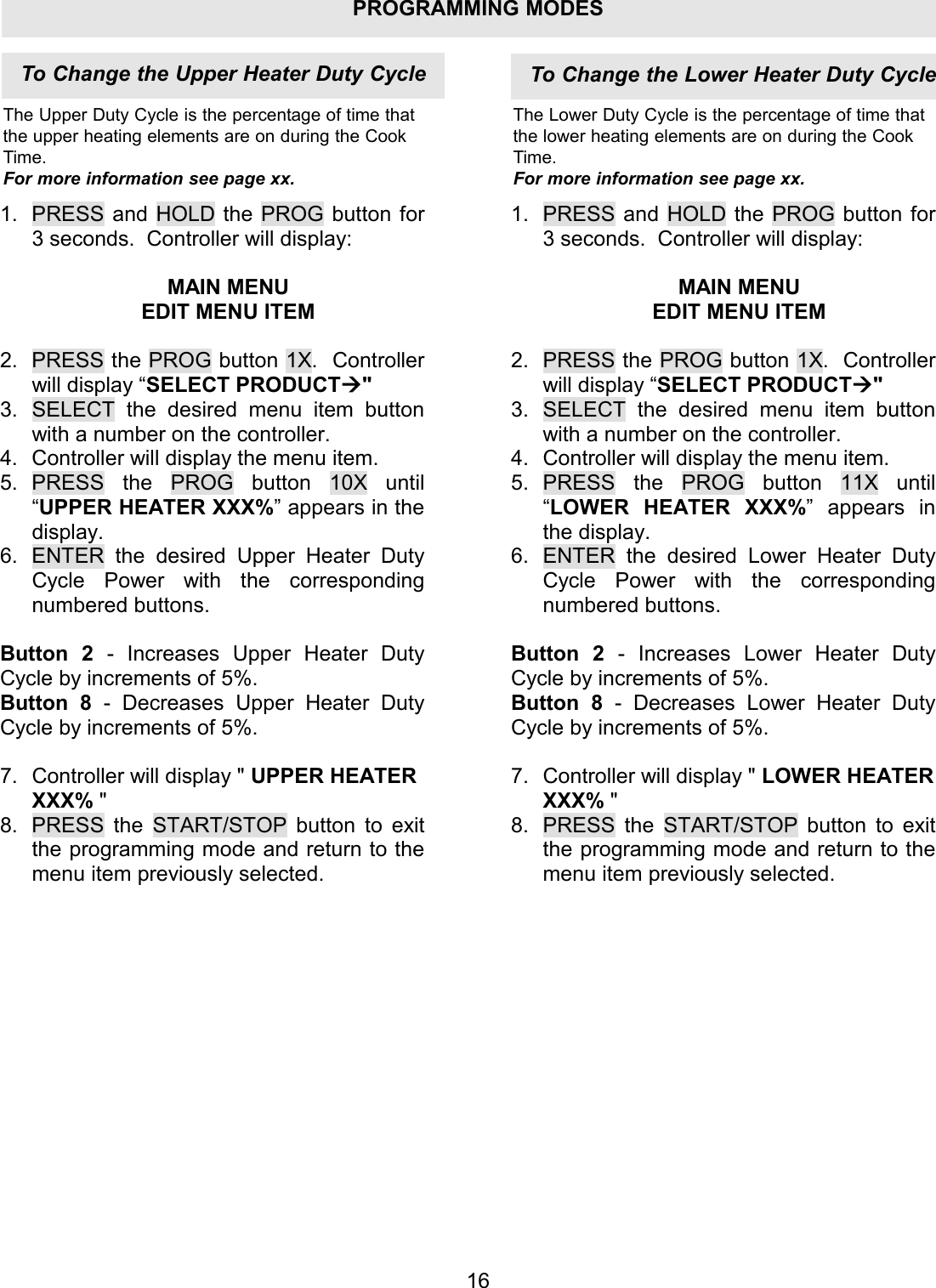
PROGRAMMING MODES1.  PRESS and HOLD the PROG button for 3 seconds.  Controller will display:  MAIN MENU EDIT MENU ITEM  2.  PRESS the PROG button 1X.  Controller will display “SELECT PRODUCT" 3.  SELECT the desired menu item button with a number on the controller. 4.  Controller will display the menu item. 5. PRESS the PROG button 10X until “UPPER HEATER XXX%” appears in the display. 6.  ENTER the desired Upper Heater Duty Cycle Power with the corresponding numbered buttons.  Button 2 - Increases Upper Heater Duty Cycle by increments of 5%. Button 8 - Decreases Upper Heater Duty Cycle by increments of 5%.  7.  Controller will display " UPPER HEATER XXX% " 8.  PRESS the START/STOP button to exit the programming mode and return to the menu item previously selected. 1. PRESS and HOLD the PROG button for 3 seconds.  Controller will display:  MAIN MENU EDIT MENU ITEM  2. PRESS the PROG button 1X.  Controller will display “SELECT PRODUCT" 3. SELECT the desired menu item button with a number on the controller. 4. Controller will display the menu item. 5. PRESS the PROG button 11X until “LOWER HEATER XXX%” appears in the display. 6. ENTER the desired Lower Heater Duty Cycle Power with the corresponding numbered buttons.  Button 2  - Increases Lower Heater Duty Cycle by increments of 5%. Button 8  - Decreases Lower Heater Duty Cycle by increments of 5%.  7. Controller will display " LOWER HEATER XXX% " 8. PRESS the START/STOP button to exit the programming mode and return to the menu item previously selected. 16To Change the Upper Heater Duty CycleThe Upper Duty Cycle is the percentage of time thatthe upper heating elements are on during the CookTime.For more information see page xx.The Lower Duty Cycle is the percentage of time thatthe lower heating elements are on during the CookTime.For more information see page xx.To Change the Lower Heater Duty Cycle
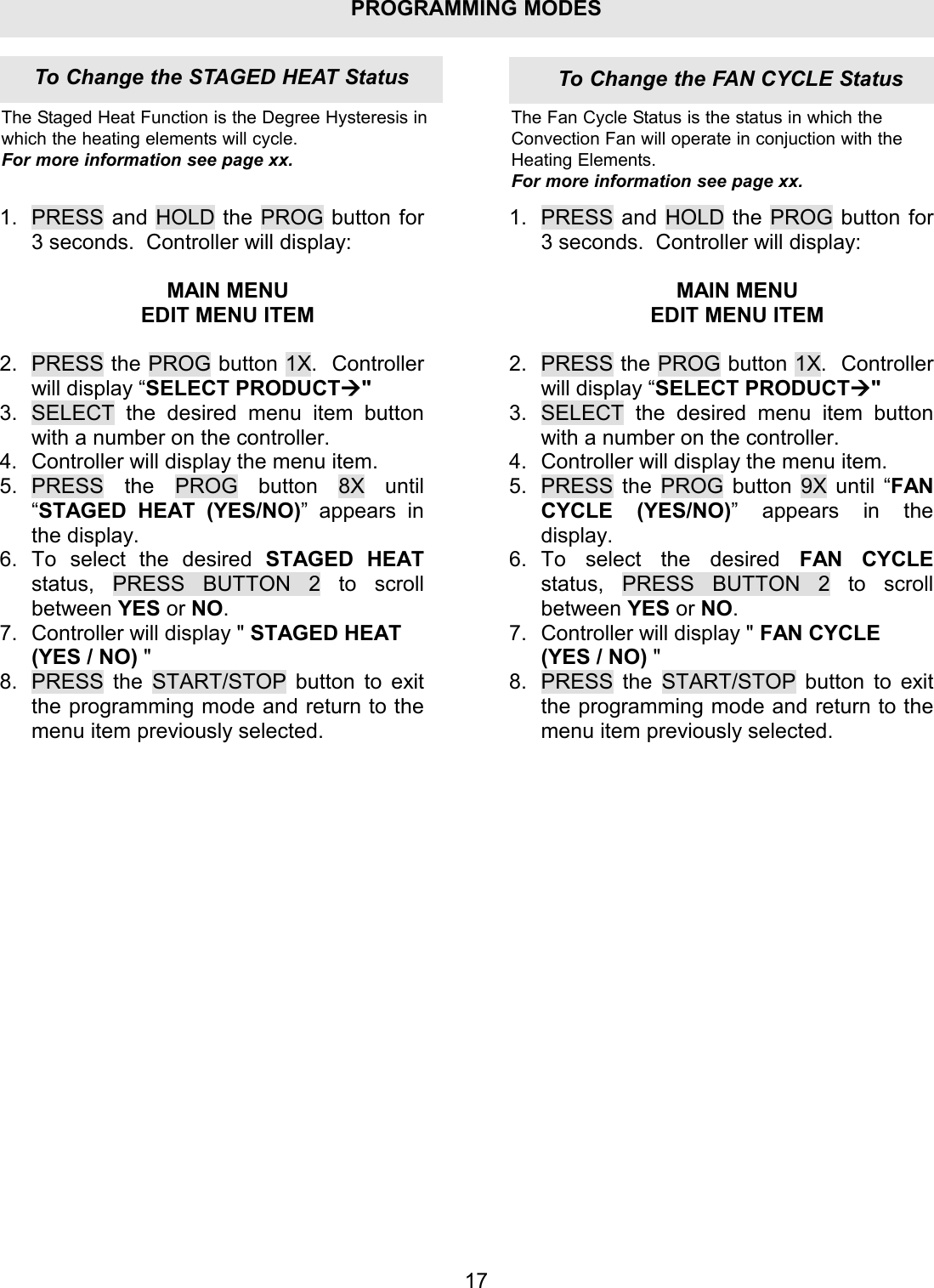
PROGRAMMING MODES1.  PRESS and HOLD the PROG button for 3 seconds.  Controller will display:  MAIN MENU EDIT MENU ITEM  2.  PRESS the PROG button 1X.  Controller will display “SELECT PRODUCT" 3.  SELECT the desired menu item button with a number on the controller. 4.  Controller will display the menu item. 5. PRESS the PROG button 8X until “STAGED HEAT (YES/NO)” appears in the display. 6. To select the desired STAGED HEAT status, PRESS BUTTON 2 to scroll between YES or NO. 7.  Controller will display " STAGED HEAT (YES / NO) " 8.  PRESS the START/STOP button to exit the programming mode and return to the menu item previously selected. 1. PRESS and HOLD the PROG button for 3 seconds.  Controller will display:  MAIN MENU EDIT MENU ITEM  2. PRESS the PROG button 1X.  Controller will display “SELECT PRODUCT" 3. SELECT the desired menu item button with a number on the controller. 4. Controller will display the menu item. 5. PRESS the PROG button 9X until “FAN CYCLE (YES/NO)” appears in the display. 6. To select the desired FAN CYCLE status,  PRESS BUTTON 2 to scroll between YES or NO. 7. Controller will display " FAN CYCLE (YES / NO) " 8. PRESS the START/STOP button to exit the programming mode and return to the menu item previously selected. 17The Staged Heat Function is the Degree Hysteresis inwhich the heating elements will cycle.For more information see page xx.The Fan Cycle Status is the status in which theConvection Fan will operate in conjuction with theHeating Elements.For more information see page xx.To Change the FAN CYCLE StatusTo Change the STAGED HEAT Status
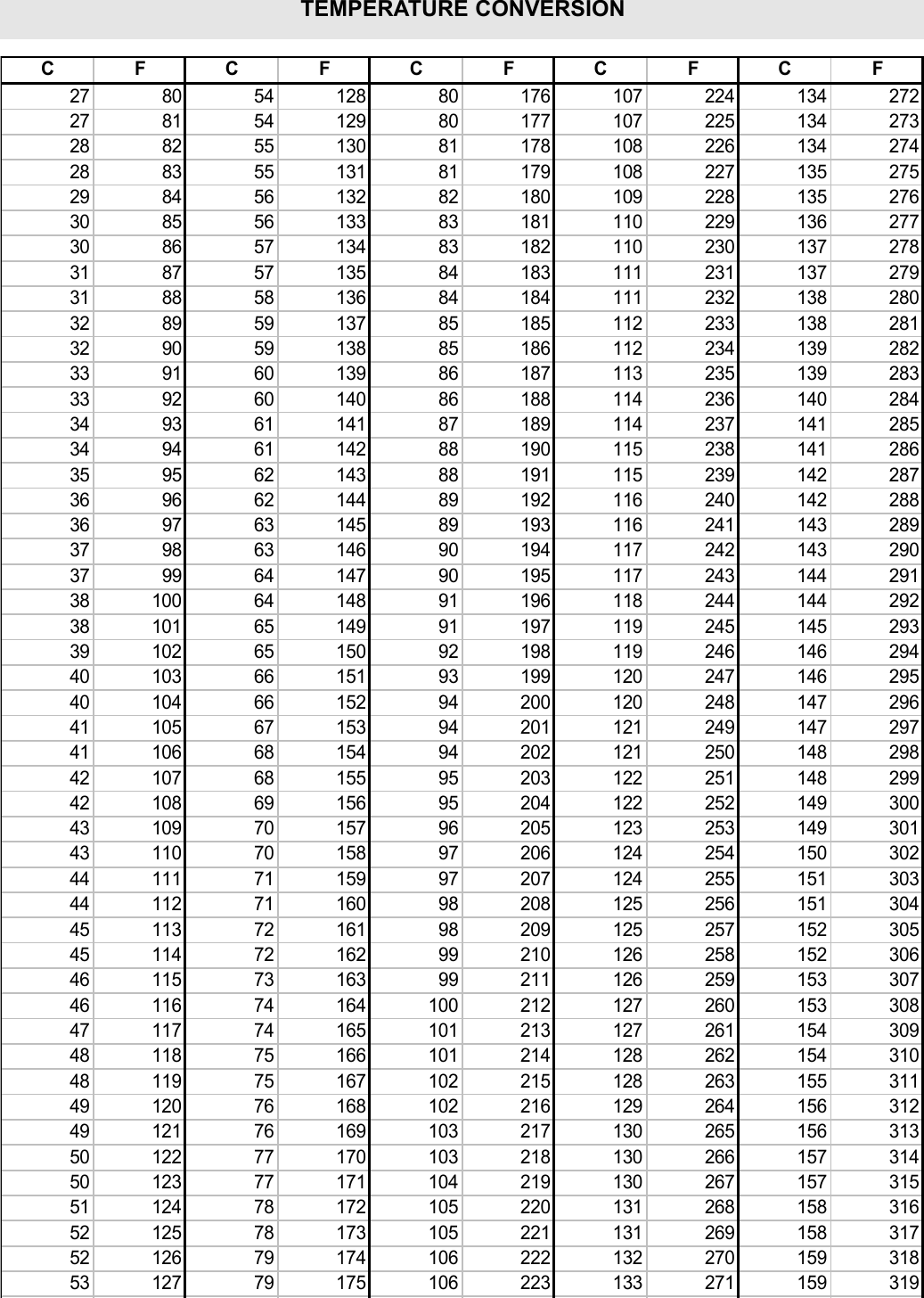
 CFCFCFCFCF27 80 54 128 80 176 107 224 134 27227 81 54 129 80 177 107 225 134 27328 82 55 130 81 178 108 226 134 27428 83 55 131 81 179 108 227 135 27529 84 56 132 82 180 109 228 135 27630 85 56 133 83 181 110 229 136 27730 86 57 134 83 182 110 230 137 27831 87 57 135 84 183 111 231 137 27931 88 58 136 84 184 111 232 138 28032 89 59 137 85 185 112 233 138 28132 90 59 138 85 186 112 234 139 28233 91 60 139 86 187 113 235 139 28333 92 60 140 86 188 114 236 140 28434 93 61 141 87 189 114 237 141 28534 94 61 142 88 190 115 238 141 28635 95 62 143 88 191 115 239 142 28736 96 62 144 89 192 116 240 142 28836 97 63 145 89 193 116 241 143 28937 98 63 146 90 194 117 242 143 29037 99 64 147 90 195 117 243 144 29138 100 64 148 91 196 118 244 144 29238 101 65 149 91 197 119 245 145 29339 102 65 150 92 198 119 246 146 29440 103 66 151 93 199 120 247 146 29540 104 66 152 94 200 120 248 147 29641 105 67 153 94 201 121 249 147 29741 106 68 154 94 202 121 250 148 29842 107 68 155 95 203 122 251 148 29942 108 69 156 95 204 122 252 149 30043 109 70 157 96 205 123 253 149 30143 110 70 158 97 206 124 254 150 30244 111 71 159 97 207 124 255 151 30344 112 71 160 98 208 125 256 151 30445 113 72 161 98 209 125 257 152 30545 114 72 162 99 210 126 258 152 30646 115 73 163 99 211 126 259 153 30746 116 74 164 100 212 127 260 153 30847 117 74 165 101 213 127 261 154 30948 118 75 166 101 214 128 262 154 31048 119 75 167 102 215 128 263 155 31149 120 76 168 102 216 129 264 156 31249 121 76 169 103 217 130 265 156 31350 122 77 170 103 218 130 266 157 31450 123 77 171 104 219 130 267 157 31551 124 78 172 105 220 131 268 158 31652 125 78 173 105 221 131 269 158 31752 126 79 174 106 222 132 270 159 31853 127 79 175 106 223 133 271 159 319TEMPERATURE CONVERSION
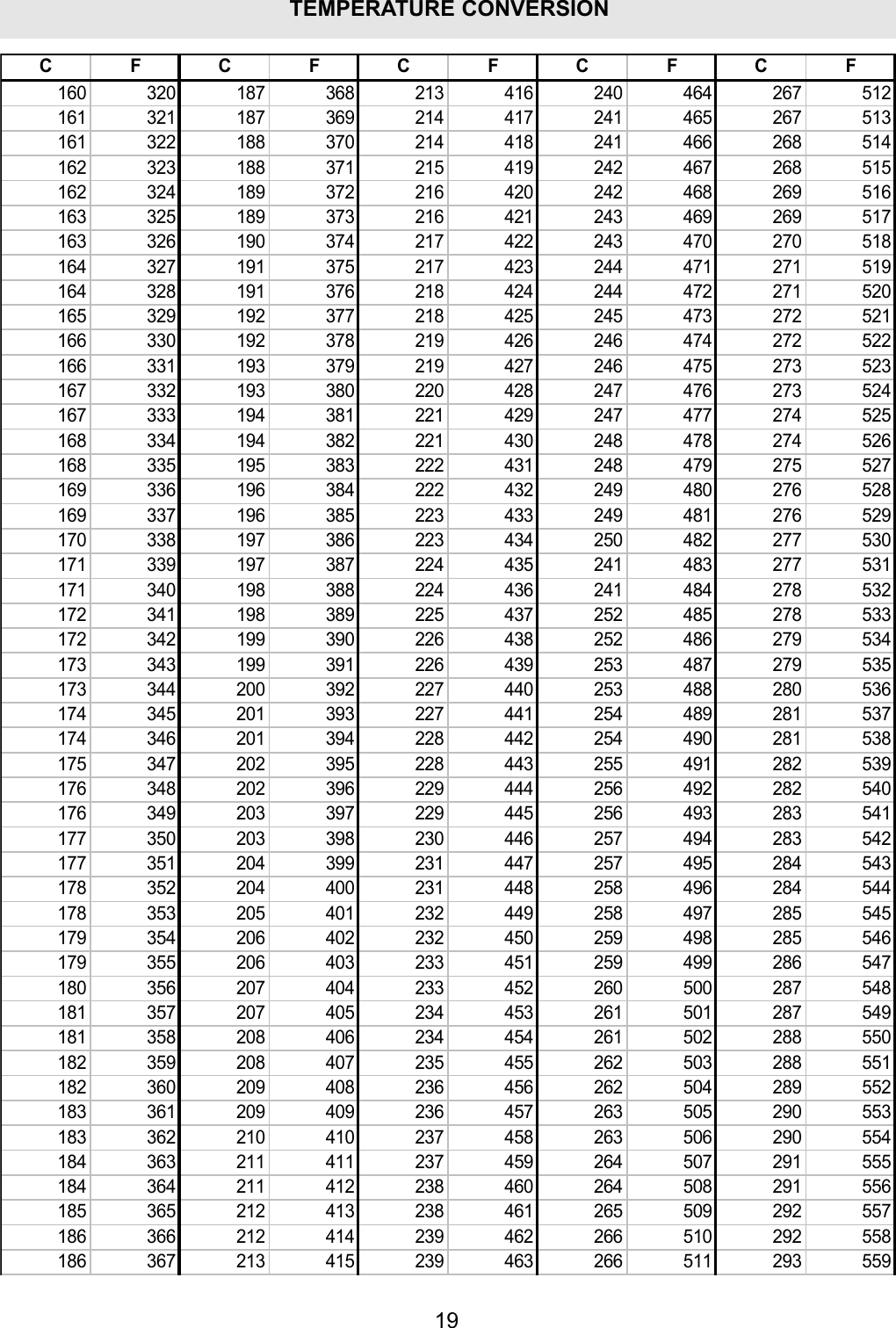
19TEMPERATURE CONVERSION CFCFCFCFCF160 320 187 368 213 416 240 464 267 512161 321 187 369 214 417 241 465 267 513161 322 188 370 214 418 241 466 268 514162 323 188 371 215 419 242 467 268 515162 324 189 372 216 420 242 468 269 516163 325 189 373 216 421 243 469 269 517163 326 190 374 217 422 243 470 270 518164 327 191 375 217 423 244 471 271 519164 328 191 376 218 424 244 472 271 520165 329 192 377 218 425 245 473 272 521166 330 192 378 219 426 246 474 272 522166 331 193 379 219 427 246 475 273 523167 332 193 380 220 428 247 476 273 524167 333 194 381 221 429 247 477 274 525168 334 194 382 221 430 248 478 274 526168 335 195 383 222 431 248 479 275 527169 336 196 384 222 432 249 480 276 528169 337 196 385 223 433 249 481 276 529170 338 197 386 223 434 250 482 277 530171 339 197 387 224 435 241 483 277 531171 340 198 388 224 436 241 484 278 532172 341 198 389 225 437 252 485 278 533172 342 199 390 226 438 252 486 279 534173 343 199 391 226 439 253 487 279 535173 344 200 392 227 440 253 488 280 536174 345 201 393 227 441 254 489 281 537174 346 201 394 228 442 254 490 281 538175 347 202 395 228 443 255 491 282 539176 348 202 396 229 444 256 492 282 540176 349 203 397 229 445 256 493 283 541177 350 203 398 230 446 257 494 283 542177 351 204 399 231 447 257 495 284 543178 352 204 400 231 448 258 496 284 544178 353 205 401 232 449 258 497 285 545179 354 206 402 232 450 259 498 285 546179 355 206 403 233 451 259 499 286 547180 356 207 404 233 452 260 500 287 548181 357 207 405 234 453 261 501 287 549181 358 208 406 234 454 261 502 288 550182 359 208 407 235 455 262 503 288 551182 360 209 408 236 456 262 504 289 552183 361 209 409 236 457 263 505 290 553183 362 210 410 237 458 263 506 290 554184 363 211 411 237 459 264 507 291 555184 364 211 412 238 460 264 508 291 556185 365 212 413 238 461 265 509 292 557186 366 212 414 239 462 266 510 292 558186 367 213 415 239 463 266 511 293 559
®MANUFACTURED EXCLUSIVELY FOR McDonald's BY Merrychef Limited. Station Road West Ash Vale Aldershot Hampshire GU12 5XA United Kingdom PHONE:  +44 (0) 1252 371000 FAX:  +44 (0) 1252 371007 Come visit us on the web at http://www.merrychef.co.uk/ E-mail:  marketing@merrychef.co.uk

Navigation menu