Migear Group FBX2109 SPEAKER User Manual C8ABD2B3B4ABD5E6CDBCC6AC
Migear International LLC SPEAKER C8ABD2B3B4ABD5E6CDBCC6AC
User Manual
厂
Ι
Before using this machine, please read all the safety and oper-
ating instructions. Please adhere to all the instructions herein,
and save this information in a safe place for future use.
1. Please ensure the power cord for this unit is out of the path
of foot traffic. Do not place heavy objects on the power cord
as it will cause damage to the cord. Always firmly grasp the
plug and pull the plug from the power supply, never yank the
cable in order to pull out the plug. Avoid the use of an exten-
sion cable.
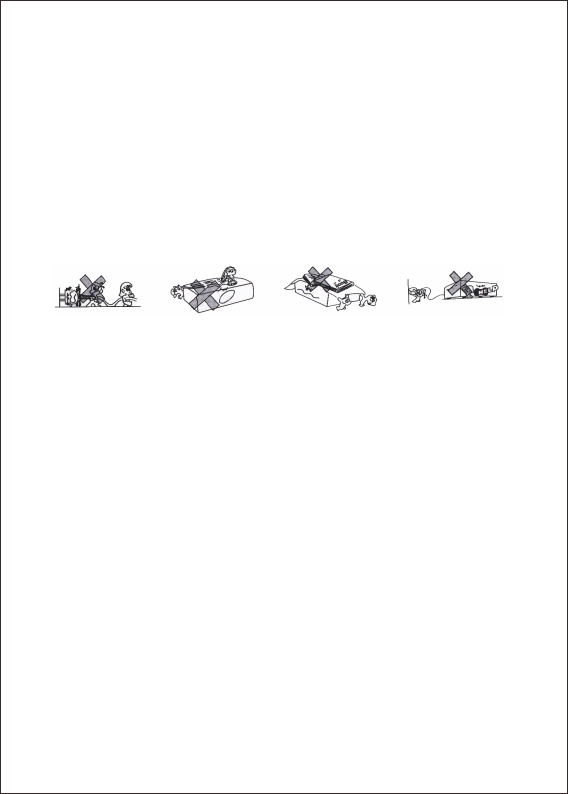
2. Ventilation: This unit should be placed in a well ventilated sp-
ace where it has no less than 10cm ventilation space on eith-
er side of it. Do not cover the unit with a cloth or blanket. Do
not put it on a bed, sofa, or carpet as this will stifle the ventil-
ation of the unit.
3. Casing Dismantling: DO NOT dismantle the casing . There
are no usable parts inside the unit. Make use of a service
center in order to have your unit repaired.
4. Should the unit emit any smell or smoke, immediately turn
off the power supply. Take the unit to the service center from
which you bought it for repairs.
IMPORTANT SAFETY MEASURES
THANK YOU FOR PURCHASING OUR SPEAKER. PLEASE
READ THE MANUAL CAREFULLY BEFORE OPERATING.
1
厂
Ι
1

FEATURES
●Bluetooth
● / / .
●FM radio
●Guitar input
●Microphone inputs
●5 Band graphic equalizer
Built-in 12V/7A rechargeable battery
●Super dynamic sound speaker
CONNECTING
1. This set applies to AC 110V-240V, 50/60Hz
2. AC power: battery can be charged when connected to AC power.
Red light on battery is charging, it will change to green once bat-
tery complete charge.
3. Internal battery will be charged even device switch off when plu-
gged in to AC power
4. Speaker battery can be charged using 12V external car battery
as well(connect cable not included) by "DC 12V input". Please
make sure "+" and "-" in right connection.
5
BLUETOOTH INSTRUCTION
Change the mode into"BLUE", the bluetooth sign light twinkles,
and speaker will give an alarm. Ensure you enable the Bluetooth
function on your Bluetooth device. Search for Bluetooth connection
until you find device model and pair.
Plays Mp3 files stored in SD card USB drive external audio device
Remote control
●
. Adjust function keys to your personal audio preference.
22
●Microphone priority on/off switch
●
REMOTE CONTROL
3
BATTERY & CHARGING
1. The units takes approximately 8 hours to fully charge. It will
automatically begin charging once the power cord is connected.
2. If the battery power is low may caused sound distortion or stop
play, pls charging the battery ontime.
3. To maximize the battery's lifespan, please charging the battery
immediately. When the unit is not used for prolonged periods of
time,the battery will gradually lose its power. It is recommended
to fully charge the battery at least every 30days.
4. To saving battery, please power off once stop using.
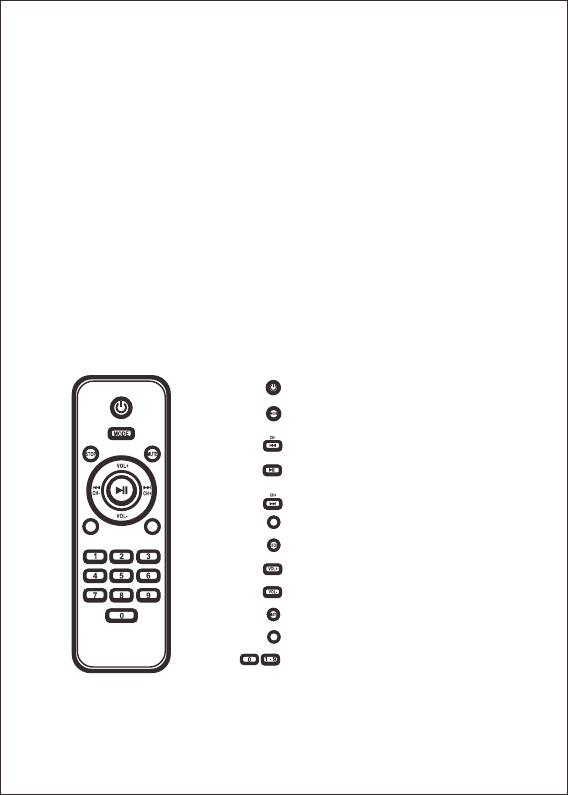
RPT EQ
Standby Button
Play/Pau e/FM Tuner Button
Volume Increase Button
Volume Decrease Button
USB/SD/LINE/BLUE (Audio input)
Prev/FM CH- Button
s
Next/FM CH+ Button
Repeat Button
Stop Button
Mute Button
Equalizer Button
Number Buttons
RPT
EQ
CONTROL PANEL
4
①②
③
④
⑤
⑥
⑦
⑧
⑨
⑩
⑪
⑫
⑬
⑭
⑮
⑯
⑰
⑱

5
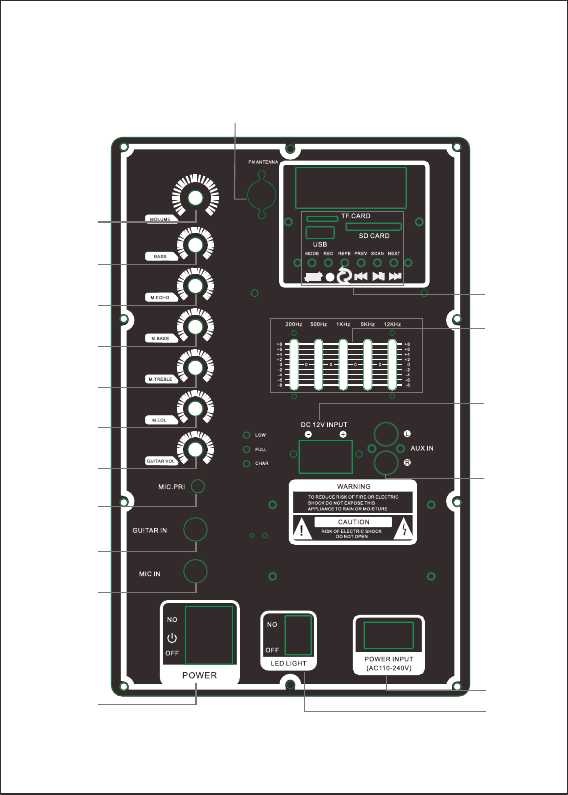
:PLAY/PAUSE; FM STATION AUTO SEARCHING
:PREVIOUS
:NEXT
MODE: MODE SELECT
REP: REPEAT
REC: RECORD: INSERT THE USB MEMORY/SD CARD AND PRESS
THIS BUTTON TO START RECORDING. PRESSING THE
BUTTON AGAIN TO STOP.
⑯ EQUALIZER
⑫ GUITAR IN: GUITAR INPUT
⑪ MIC PRI.: MICROPHONE PRIORITY ON/OFF SWITCH
CONTROL PANEL FUNCTION
① ON/OFF POWER SWITCH
② LED LIGHT ON/OFF SWITCH
③ POWER INPUT
④ VOLUME: MASTER VOLUME ADJUST
⑤ BASS:BASS ADJUST
⑥ MIC. ECHO: ECHO ADJUST
⑦ MIC BASS: MICROPHONE BASS VOLUME ADJUST
⑧ MIC TREBLE: MICROPHONE TREBLE VOLUME ADJUST
⑨ MIC VOL. : MICROPHONE VOLUME ADJUST
⑩ GUITAR VOL.: GUITAR VOLUME ADJUST
⑬ MIC IN: MICROPHONE INPUT
⑭ FM ANTENNA
⑮ USB PANEL FUNCTION:
⑰ 12V EXTERNAL INPUT
⑱ AUX INPUT
FCC Radiation Exposure Statement:
This equipment complies with FCC radiation exposure limits set forth for an uncontrolled
environment. This equipment should be installed and operated with minimum distance 20cm
between the radiator & your body.
FCC Warning
This device complies with Part 15 of the FCC Rules. Operation is subject to the following two
conditions:
(1) This device may not cause harmful interference, and (2) this device must accept any
interference received, including interference that may cause undesired operation.
NOTE: Any changes or modifications to this unit not expressly approved by the party responsible
for compliance could void the user's authority to operate the equipment.