Mitsubishi Electric Inazawa Works 4D454C2D5002 Card Reader User Manual MITSUBISHI

Mitsubishi Electric Corporation Inazawa Works Card Reader MITSUBISHI

Users Manual

March, 2012   Access Control System MELSAFETY  Proximity Card Readers Plain Type UCR-8203-P-E-UD    Keypad Type UCR-8213-P-E-UD    Users Manual    ● Precautions ● ・ Please read this Operation Manual thoroughly before starting operating the Card Reader, and be sure to use the Card Reader properly. ・ Please keep this Manual in an area accessible to all users, together with the “Contact for Repair and After Sales Service, Mitsubishi Electric Corporation”, which is provided with this Manual. ・ The company names, product names and logo marks mentioned in this Manual are trademarks or registered trademarks of the respective companies.  ■ Warning ・ No part of this Operation Manual may be reprinted or reproduced in any form without the prior permission of Mitsubishi Electric Corporation. ・ Although we endeavor to keep the contents of this Manual updated whenever there have been revisions to related software and/or hardware, on occasions this may not be possible strictly in time with the revisions.
Contents     1 Safety Precautions·········································································································3  2 Before Starting Operation  2-1 Operating Precautions     2-1-1  Operating of Card Readers ··························································································· 4     2-1-2  Handling of Cards ······································································································· 5     2-1-3  How to Hold Cards toward Card readers ·········································································· 6     2-1-4  Operation of Function Keys and Number Keys ·································································· 6  2-2 About Proximity Card Readers························································································ 7   2-3  Name and Function of Each Item     2-3-1  Proximity Card Readers, Plain Type················································································ 7     2-3-2  Proximity Card Readers, Keypad Type ············································································ 8      2
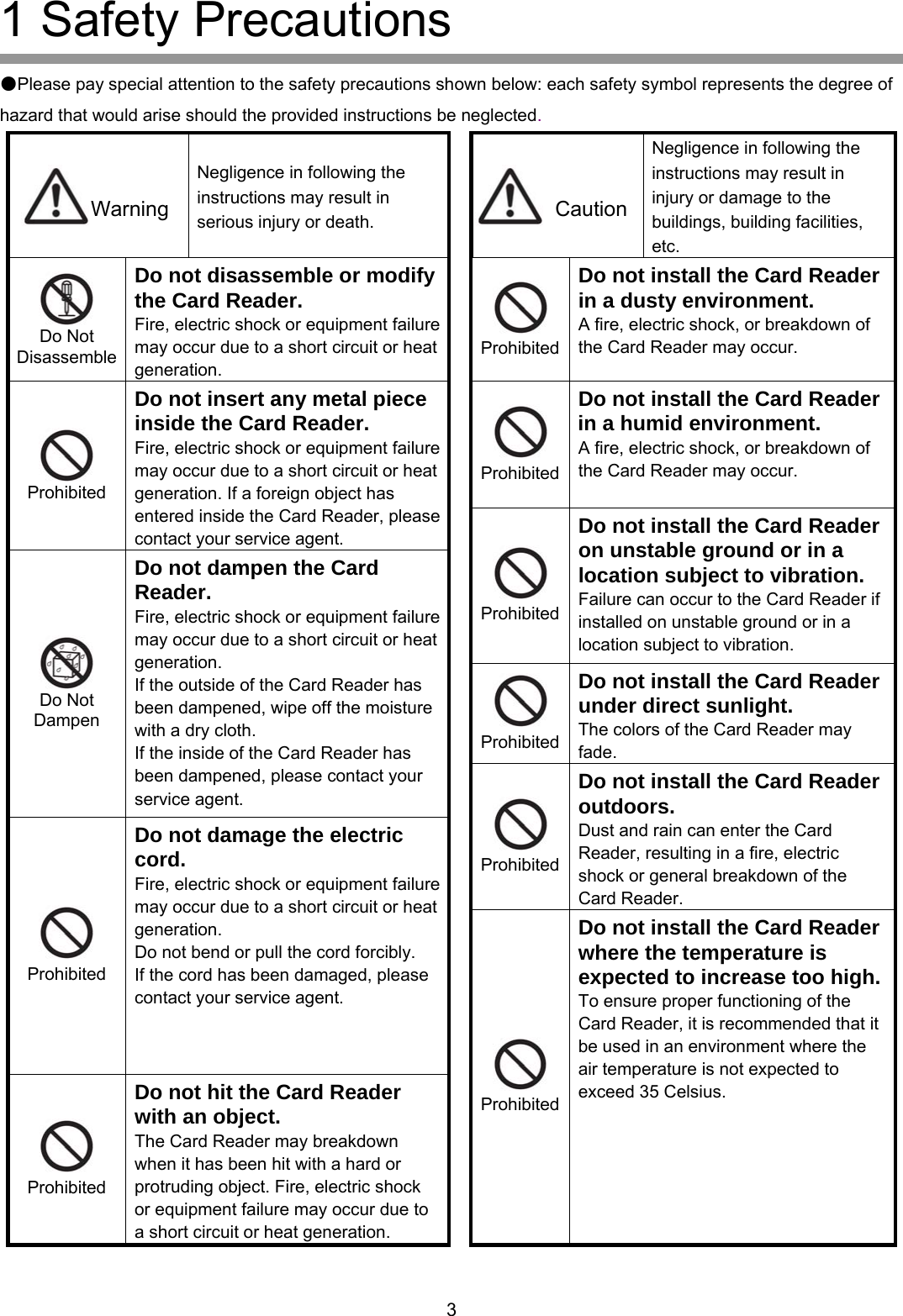
1 Safety Precautions  ●Please pay special attention to the safety precautions shown below: each safety symbol represents the degree of hazard that would arise should the provided instructions be neglected. Negligence in following the instructions may result in injury or damage to the buildings, building facilities, etc. Negligence in following the instructions may result in serious injury or death. Warning  CautionDo not disassemble or modify the Card Reader.  Do not install the Card Reader in a dusty environment.  Fire, electric shock or equipment failure may occur due to a short circuit or heat generation. A fire, electric shock, or breakdown of the Card Reader may occur.  Do Not Disassemble  Prohibited ProhibitedDo not install the Card Reader in a humid environment. A fire, electric shock, or breakdown of the Card Reader may occur. Do not insert any metal piece inside the Card Reader. Fire, electric shock or equipment failure may occur due to a short circuit or heat generation. If a foreign object has entered inside the Card Reader, please contact your service agent.   Prohibited Do not install the Card Reader on unstable ground or in a location subject to vibration.  Prohibited Failure can occur to the Card Reader if installed on unstable ground or in a location subject to vibration. Do not dampen the Card Reader.  ProhibitedDo not install the Card Reader under direct sunlight. The colors of the Card Reader may fade. Fire, electric shock or equipment failure may occur due to a short circuit or heat generation. If the outside of the Card Reader has been dampened, wipe off the moisture with a dry cloth. If the inside of the Card Reader has been dampened, please contact your service agent.  Do Not Dampen Do not install the Card Reader outdoors. Dust and rain can enter the Card Reader, resulting in a fire, electric shock or general breakdown of the Card Reader.  ProhibitedDo not damage the electric cord. Fire, electric shock or equipment failure may occur due to a short circuit or heat generation. Do not bend or pull the cord forcibly.   If the cord has been damaged, please contact your service agent.  Prohibited Do not install the Card Reader where the temperature is expected to increase too high.To ensure proper functioning of the Card Reader, it is recommended that it be used in an environment where the air temperature is not expected to xceed 35 Celsius.    Do not hit the Card Reader with an object. e ProhibitedThe Card Reader may breakdown when it has been hit with a hard or protruding object. Fire, electric shock or equipment failure may occur due to a short circuit or heat generation.      Prohibited      3
2 Before Starting Operation  2-1 Operating Precautions     2-1-1 Operation of Card Readers  1) Before starting to operate of the Card Reader, please read the related instruction/operation manuals, and operate the Card Reader properly at all times     2) This Card Reader has been designed to control “locking and unlocking” of electric lock devices (electric keys) for the purpose of limiting access to facilities, and has not been designed to prevent crimes such as burglars.   Please note that Mitsubishi Electric Corporation and its sales agents shall not be responsible for any events such as burglars or property loss due to crimes. 3) In the event that abnormal smell, excessive heat or smoke is detected from any device used for the Card Reader, shut off the breakers that supply power to the device. 4) Please note that Mitsubishi Electric Corporation and its sales agents shall not be responsible for any secondary damage that arises from equipment failure. 5) Because the proximity Card Reader utilizes radio waves, items such as a metal object, electric appliance or power cable placed near the Card Reader will interfere with or completely disable the functioning of the Card Reader, preventing it from reading the data on the cards. The Card Reader could also be significantly affected by other radio waves (from a radio, TV set or inverter).    Do not place such objects near the Card Reader. 6) Some medical apparatuses utilize radio waves of the same frequency (13.56 MHz).    The Card Reader may malfunction when such medical apparatuses are placed near the Card Reader. 7) This device complies with Part 15 of the FCC Rules. Operation is subject to the following two conditions: (1) this device may not cause harmful interference, and (2) this device must accept any interference received, including interference that may cause undesired operation. 8) FCC WARNING Changes or modifications not expressly approved by the party responsible for compliance could void the user’s authority to operate the equipment. 9) Properly shielded and grounded cables and ferrite cores must be used for connection to controllers in order to meet FCC emission limits. 10) Note: This equipment has been tested and found to comply with the limits for a Class A digital device, pursuant to part 15 of the FCC Rules. These limits are designed to provide reasonable protection against harmful interference when the equipment is operated in a commercial environment. This equipment generates, uses, and can radiate radio frequency energy and, if not installed and used in accordance with the instruction manual, may cause harmful interference to radio communications. Operation of this equipment in a residential area is likely to cause harmful interference in which case the user will be required to correct the interference at his own expense.         4
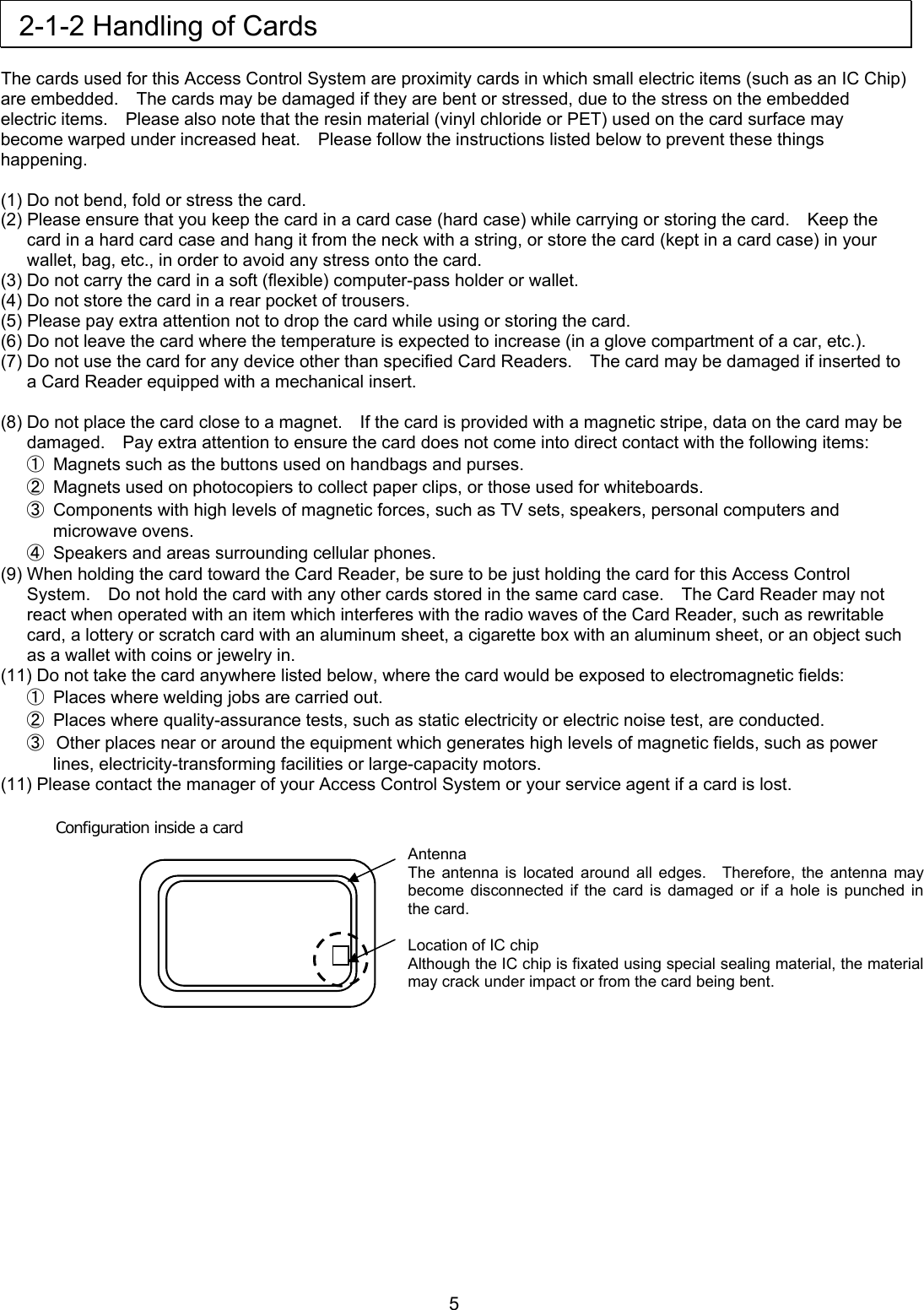
 2-1-2 Handling of Cards  The cards used for this Access Control System are proximity cards in which small electric items (such as an IC Chip) are embedded.    The cards may be damaged if they are bent or stressed, due to the stress on the embedded electric items.    Please also note that the resin material (vinyl chloride or PET) used on the card surface may become warped under increased heat.    Please follow the instructions listed below to prevent these things happening.  (1) Do not bend, fold or stress the card. (2) Please ensure that you keep the card in a card case (hard case) while carrying or storing the card.    Keep the card in a hard card case and hang it from the neck with a string, or store the card (kept in a card case) in your wallet, bag, etc., in order to avoid any stress onto the card.   (3) Do not carry the card in a soft (flexible) computer-pass holder or wallet.   (4) Do not store the card in a rear pocket of trousers. (5) Please pay extra attention not to drop the card while using or storing the card. (6) Do not leave the card where the temperature is expected to increase (in a glove compartment of a car, etc.). (7) Do not use the card for any device other than specified Card Readers.    The card may be damaged if inserted to a Card Reader equipped with a mechanical insert.  (8) Do not place the card close to a magnet.    If the card is provided with a magnetic stripe, data on the card may be damaged.    Pay extra attention to ensure the card does not come into direct contact with the following items: ①  Magnets such as the buttons used on handbags and purses. ②  Magnets used on photocopiers to collect paper clips, or those used for whiteboards. ③  Components with high levels of magnetic forces, such as TV sets, speakers, personal computers and microwave ovens. ④  Speakers and areas surrounding cellular phones. (9) When holding the card toward the Card Reader, be sure to be just holding the card for this Access Control System.    Do not hold the card with any other cards stored in the same card case.    The Card Reader may not react when operated with an item which interferes with the radio waves of the Card Reader, such as rewritable card, a lottery or scratch card with an aluminum sheet, a cigarette box with an aluminum sheet, or an object such as a wallet with coins or jewelry in. (11) Do not take the card anywhere listed below, where the card would be exposed to electromagnetic fields: ①  Places where welding jobs are carried out. ②  Places where quality-assurance tests, such as static electricity or electric noise test, are conducted.   ③  Other places near or around the equipment which generates high levels of magnetic fields, such as power lines, electricity-transforming facilities or large-capacity motors. (11) Please contact the manager of your Access Control System or your service agent if a card is lost.  Configuration inside a card  Antenna The antenna is located around all edges.  Therefore, the antenna may become disconnected if the card is damaged or if a hole is punched in the card.  Location of IC chip Although the IC chip is fixated using special sealing material, the material may crack under impact or from the card being bent.            5
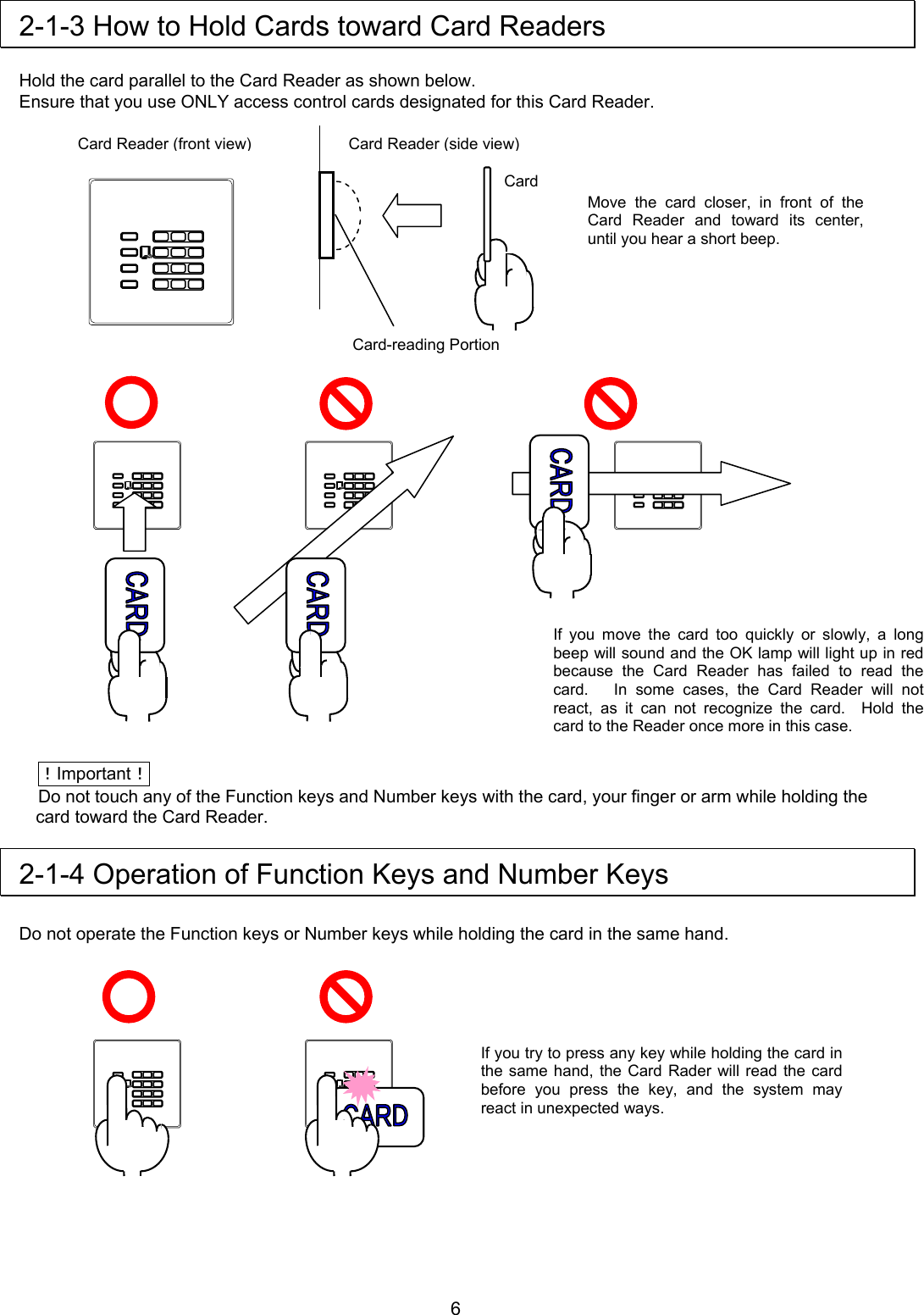
 2-1-3 How to Hold Cards toward Card Readers  Hold the card parallel to the Card Reader as shown below. Ensure that you use ONLY access control cards designated for this Card Reader.                                 !Important! Do not touch any of the Function keys and Number keys with the card, your finger or arm while holding the card toward the Card Reader.  2-1-4 Operation of Function Keys and Number Keys  Do not operate the Function keys or Number keys while holding the card in the same hand.         Card Card Reader (side view)Card-reading Portion Card Reader (front view)Move the card closer, in front of the Card Reader and toward its center, until you hear a short beep. If you move the card too quickly or slowly, a long beep will sound and the OK lamp will light up in red because the Card Reader has failed to read the card.   In some cases, the Card Reader will not react, as it can not recognize the card.  Hold the card to the Reader once more in this case. If you try to press any key while holding the card in the same hand, the Card Rader will read the card before you press the key, and the system may react in unexpected ways.      6
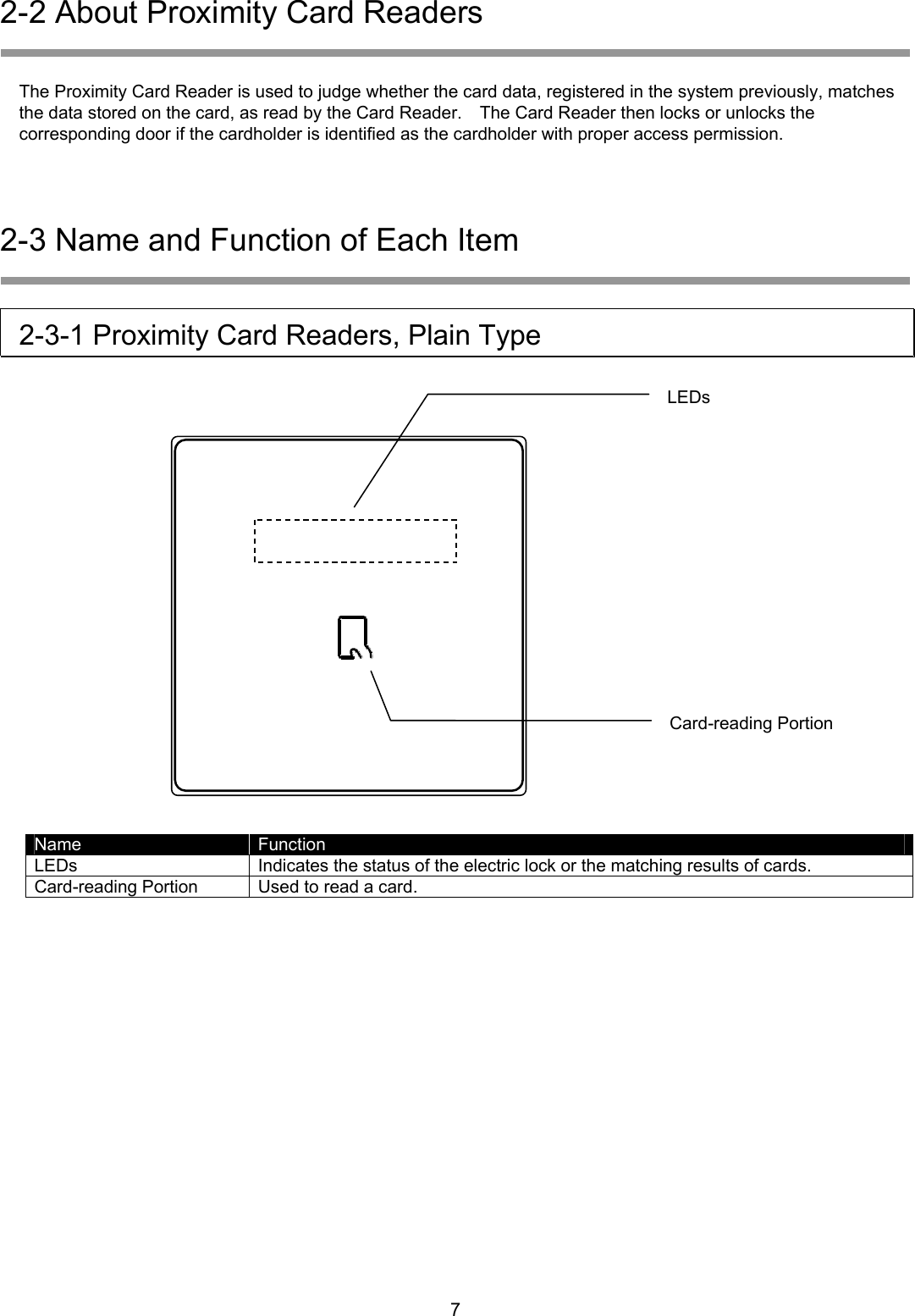
2-2 About Proximity Card Readers   The Proximity Card Reader is used to judge whether the card data, registered in the system previously, matches the data stored on the card, as read by the Card Reader.    The Card Reader then locks or unlocks the corresponding door if the cardholder is identified as the cardholder with proper access permission.  2-3 Name and Function of Each Item   2-3-1 Proximity Card Readers, Plain Type  LEDs            Card-reading Portion    Name  Function LEDs  Indicates the status of the electric lock or the matching results of cards. Card-reading Portion  Used to read a card.      7
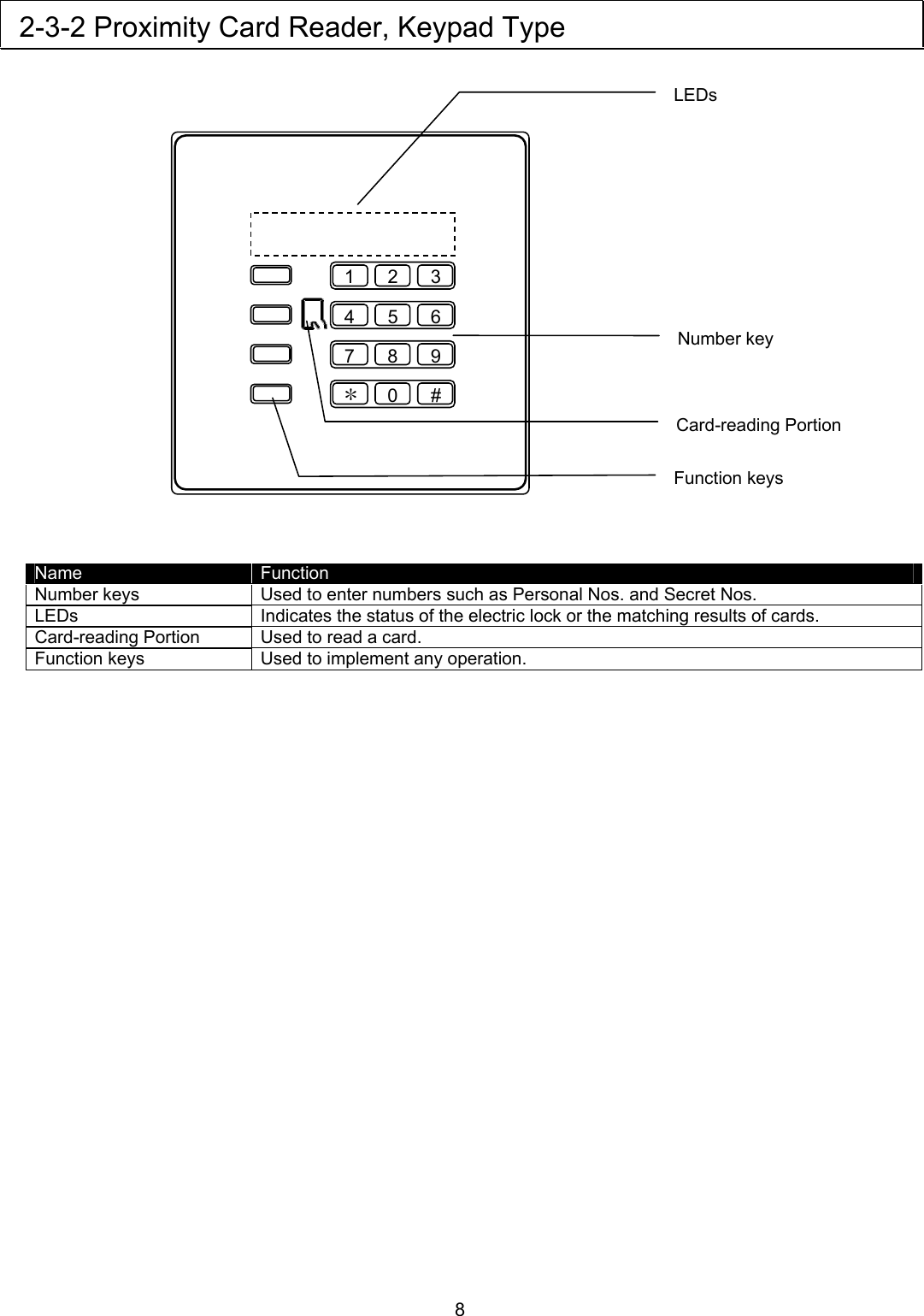
 2-3-2 Proximity Card Reader, Keypad Type   LEDs     8     231  564         Name  Function Number keys  Used to enter numbers such as Personal Nos. and Secret Nos. LEDs  Indicates the status of the electric lock or the matching results of cards. Card-reading Portion  Used to read a card. Function keys  Used to implement any operation.  7  89* 0#Number key Card-reading Portion Function keys

Navigation menu