Mizco SWISHQ Bluetooth Headphone Adaptor User Manual

Mizco International Inc. Bluetooth Headphone Adaptor

User Manual

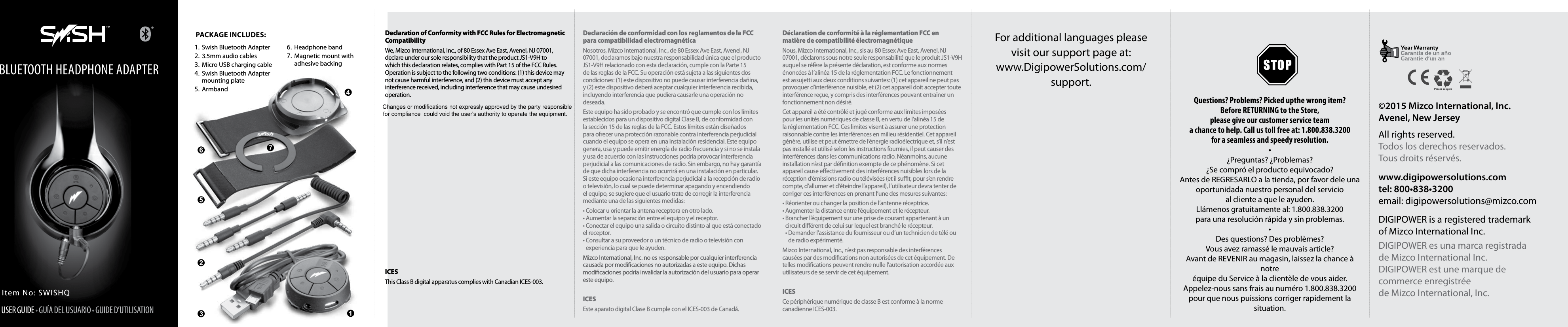
For additional languages please  visit our support page at:www.DigipowerSolutions.com/ support.Questions? Problems? Picked upthe wrong item?Before RETURNING to the Store,  please give our customer service teama chance to help. Call us toll free at: 1.800.838.3200for a seamless and speedy resolution.•¿Preguntas? ¿Problemas? ¿Se compró el producto equivocado?Antes de REGRESARLO a la tienda, por favor dele unaoportunidada nuestro personal del servicio  al cliente a que le ayuden.Llámenos gratuitamente al: 1.800.838.3200  para una resolución rápida y sin problemas.•Des questions? Des problèmes?Vous avez ramassé le mauvais article?Avant de REVENIR au magasin, laissez la chance à notreéquipe du Service à la clientèle de vous aider.Appelez-nous sans frais au numéro 1.800.838.3200  pour que nous puissions corriger rapidement la situation.Declaration of Conformity with FCC Rules for Electromagnetic CompatibilityWe, Mizco International, Inc., of 80 Essex Ave East, Avenel, NJ 07001, declare under our sole responsibility that the product JS1-V9H to which this declaration relates, complies with Part 15 of the FCC Rules. Operation is subject to the following two conditions: (1) this device may not cause harmful interference, and (2) this device must accept any interference received, including interference that may cause undesired operation.  ICESThis Class B digital apparatus complies with Canadian ICES-003.Declaración de conformidad con los reglamentos de la FCC para compatibilidad electromagnéticaNosotros, Mizco International, Inc., de 80 Essex Ave East, Avenel, NJ 07001, declaramos bajo nuestra responsabilidad única que el producto JS1-V9H relacionado con esta declaración, cumple con la Parte 15 de las reglas de la FCC. Su operación está sujeta a las siguientes dos condiciones: (1) este dispositivo no puede causar interferencia dañina, y (2) este dispositivo deberá aceptar cualquier interferencia recibida, incluyendo interferencia que pudiera causarle una operación no deseada.Este equipo ha sido probado y se encontró que cumple con los límites establecidos para un dispositivo digital Clase B, de conformidad con la sección 15 de las reglas de la FCC. Estos límites están diseñados para ofrecer una protección razonable contra interferencia perjudicial cuando el equipo se opera en una instalación residencial. Este equipo genera, usa y puede emitir energía de radio frecuencia y si no se instala y usa de acuerdo con las instrucciones podría provocar interferencia perjudicial a las comunicaciones de radio. Sin embargo, no hay garantía de que dicha interferencia no ocurrirá en una instalación en particular. Si este equipo ocasiona interferencia perjudicial a la recepción de radio o televisión, lo cual se puede determinar apagando y encendiendo el equipo, se sugiere que el usuario trate de corregir la interferencia mediante una de las siguientes medidas:• Colocar u orientar la antena receptora en otro lado. • Aumentar la separación entre el equipo y el receptor. • Conectar el equipo una salida o circuito distinto al que está conectado el receptor. •  Consultar a su proveedor o un técnico de radio o televisión con experiencia para que le ayuden.Mizco International, Inc. no es responsable por cualquier interferencia causada por modicaciones no autorizadas a este equipo. Dichas modicaciones podría invalidar la autorización del usuario para operar este equipo.ICESEste aparato digital Clase B cumple con el ICES-003 de Canadá.Déclaration de conformité à la réglementation FCC en matière de compatibilité électromagnétiqueNous, Mizco International, Inc., sis au 80 Essex Ave East, Avenel, NJ 07001, déclarons sous notre seule responsabilité que le produit JS1-V9H auquel se réfère la présente déclaration, est conforme aux normes énoncées à l’alinéa 15 de la réglementation FCC. Le fonctionnement est assujetti aux deux conditions suivantes: (1) cet appareil ne peut pas provoquer d’interférence nuisible, et (2) cet appareil doit accepter toute interférence reçue, y compris des interférences pouvant entraîner un fonctionnement non désiré.Cet appareil a été contrôlé et jugé conforme aux limites imposées pour les unités numériques de classe B, en vertu de l’alinéa 15 de la réglementation FCC. Ces limites visent à assurer une protection raisonnable contre les interférences en milieu résidentiel. Cet appareil génère, utilise et peut émettre de l’énergie radioélectrique et, s’il n’est pas installé et utilisé selon les instructions fournies, il peut causer des interférences dans les communications radio. Néanmoins, aucune installation n’est par dénition exempte de ce phénomène. Si cet appareil cause eectivement des interférences nuisibles lors de la réception d’émissions radio ou télévisées (et il sut, pour s’en rendre compte, d’allumer et d’éteindre l’appareil), l’utilisateur devra tenter de corriger ces interférences en prenant l’une des mesures suivantes:• Réorienter ou changer la position de l’antenne réceptrice. • Augmenter la distance entre l’équipement et le récepteur. •  Brancher l’équipement sur une prise de courant appartenant à un circuit diérent de celui sur lequel est branché le récepteur. •  Demander l’assistance du fournisseur ou d’un technicien de télé ou de radio expérimenté.Mizco International, Inc., n’est pas responsable des interférences causées par des modications non autorisées de cet équipement. De telles modications peuvent rendre nulle l’autorisation accordée aux utilisateurs de se servir de cet équipement.ICESCe périphérique numérique de classe B est conforme à la norme canadienne ICES-003.Item No: SWISHQUSER GUIDE • GUÍA DEL USUARIO • GUIDE D’UTILISATIONBLUETOOTH HEADPHONE ADAPTER Package Includes:1.  Swish Bluetooth Adapter2.  3.5mm audio cables3.  Micro USB charging cable4.  Swish Bluetooth Adapter mounting plate5.  Armband6.  Headphone band7.  Magnetic mount with adhesive backing©2015 Mizco International, Inc. Avenel, New JerseyAll rights reserved.Todos los derechos reservados.Tous droits réservés.www.digipowersolutions.comtel: 800•838•3200email: digipowersolutions@mizco.comDIGIPOWER is a registered trademark  of Mizco International Inc.DIGIPOWER es una marca registrada  de Mizco International Inc.DIGIPOWER est une marque de  commerce enregistrée  de Mizco International, Inc.Changes or modifications not expressly approved by the party responsible for compliance  could void the user's authority to operate the equipment.
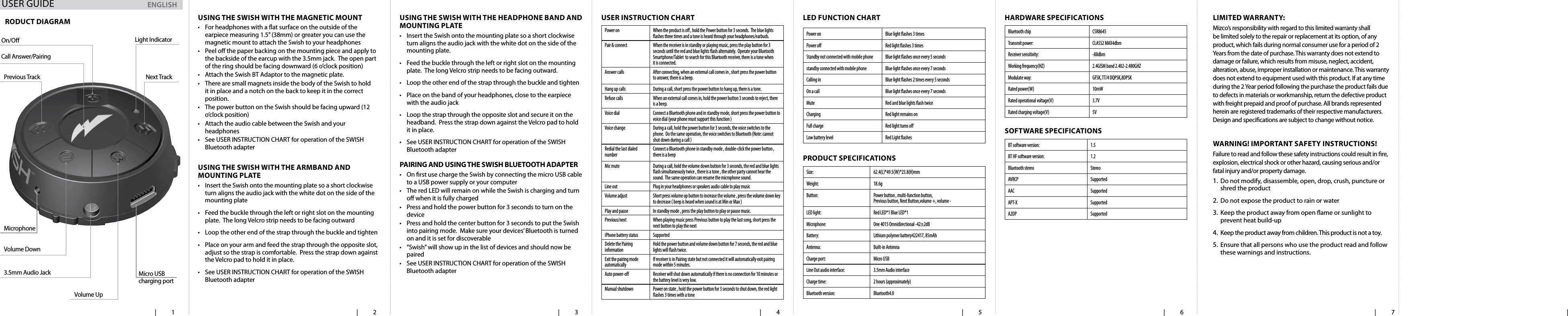
  | 1   | 2   | 3   | 4    | 5   | 6   | 7   | usIng the swIsh wIth the magnetIc mount•  For headphones with a at surface on the outside of the earpiece measuring 1.5” (38mm) or greater you can use the magnetic mount to attach the Swish to your headphones•  Peel o the paper backing on the mounting piece and apply to the backside of the earcup with the 3.5mm jack.  The open part of the ring should be facing downward (6 o’clock position)•  Attach the Swish BT Adaptor to the magnetic plate.  •  There are small magnets inside the body of the Swish to hold it in place and a notch on the back to keep it in the correct position.  •  The power button on the Swish should be facing upward (12 o’clock position)•  Attach the audio cable between the Swish and your headphones•  See USER INSTRUCTION CHART for operation of the SWISH Bluetooth adapter usIng the swIsh wIth the aRmBand and mountIng Plate•  Insert the Swish onto the mounting plate so a short clockwise turn aligns the audio jack with the white dot on the side of the mounting plate •  Feed the buckle through the left or right slot on the mounting plate.  The long Velcro strip needs to be facing outward•  Loop the other end of the strap through the buckle and tighten•  Place on your arm and feed the strap through the opposite slot, adjust so the strap is comfortable.  Press the strap down against the Velcro pad to hold it in place.  •  See USER INSTRUCTION CHART for operation of the SWISH Bluetooth adapterusIng the swIsh wIth the headPhone Band and mountIng Plate•  Insert the Swish onto the mounting plate so a short clockwise turn aligns the audio jack with the white dot on the side of the mounting plate. •  Feed the buckle through the left or right slot on the mounting plate.  The long Velcro strip needs to be facing outward.•  Loop the other end of the strap through the buckle and tighten•  Place on the band of your headphones, close to the earpiece with the audio jack•  Loop the strap through the opposite slot and secure it on the headband.  Press the strap down against the Velcro pad to hold it in place.  •  See USER INSTRUCTION CHART for operation of the SWISH Bluetooth adapterPaIRIng and usIng the swIsh Bluetooth adaPteR•  On rst use charge the Swish by connecting the micro USB cable to a USB power supply or your computer•  The red LED will remain on while the Swish is charging and turn o when it is fully charged•  Press and hold the power button for 3 seconds to turn on the device•  Press and hold the center button for 3 seconds to put the Swish into pairing mode.  Make sure your devices’ Bluetooth is turned on and it is set for discoverable•  “Swish” will show up in the list of devices and should now be paired•  See USER INSTRUCTION CHART for operation of the SWISH Bluetooth adapteruseR InstRuctIon chaRtPower on When the product is o , hold the Power button for 3 seconds.  The blue lights ashes three times and a tone is heard through your headphones/earbuds.Pair & connect When the receiver is in standby or playing music, press the play button for 3 seconds until the red and blue lights ash alternately.  Operate your Bluetooth Smartphone/Tablet  to search for this Bluetooth receiver, there is a tone when it is connected.Answer calls After connecting, when an external call comes in , short press the power button to answer, there is a beep.Hang up calls During a call, short press the power button to hang up, there is a tone.Refuse calls When an external call comes in, hold the power button 3 seconds to reject, there is a beep.Voice dial Connect a Bluetooth phone and in standby mode, short press the power button to voice dial (your phone must support this function )Voice change During a call, hold the power button for 3 seconds, the voice switches to the phone.  Do the same operation, the voice switches to Bluetooth (Note: cannot shut down during a call )Redial the last dialed number Connect a Bluetooth phone in standby mode , double-click the power button , there is a beepMic mute During a call, hold the volume down button for 3 seconds, the red and blue lights ash simultaneously twice , there is a tone , the other party cannot hear the sound.  The same operation can resume the microphone sound.Line out Plug in your headphones or speakers audio cable to play musicVolume adjust Short press volume up button to increase the volume , press the volume down key to decrease ( beep is heard when sound is at Min or Max )Play and pause In standby mode , press the play button to play or pause music.Previous/next When playing music press Previous button to play the last song, short press the next button to play the next iPhone battery status SupportedDelete the Pairing information Hold the power button and volume down button for 7 seconds, the red and blue lights will ash twice.Exit the pairing mode automatically If receiver is in Pairing state but not connected it will automatically exit pairing mode within 5 minutes.Auto power-o Receiver will shut down automatically if there is no connection for 10 minutes or the battery level is very low. Manual shutdown Power on state , hold the power button for 3 seconds to shut down, the red light ashes 3 times with a toneled FunctIon chaRtPower on Blue light ashes 3 timesPower o Red light ashes 3 timesStandby not connected with mobile phone  Blue light ashes once every 5 secondsstandby connected with mobile phone  Blue light ashes once every 7 secondsCalling in Blue light ashes 2 times every 5 secondsOn a call Blue light ashes once every 7 secondsMute Red and blue lights ash twiceCharging Red light remains onFull charge Red light turns oLow battery level Red Light ashes PRoduct sPecIFIcatIonsSize: 62.4(L)*49.5(W)*23.8(H)mmWeight: 18.6gButton: Power button , multi-function button, Previous button, Next Button,volume +, volume -LED light: Red LED*1 Blue LED*1Microphone: One 4015 Omnidirectional -42±2dBBattery: Lithium polymer battery422417, 85mAhAntenna: Built-in AntennaCharge port: Micro USBLine Out audio interface: 3.5mm Audio interfaceCharge time:  2 hours (approximately)Bluetooth version: Bluetooth4.0haRdwaRe sPecIFIcatIonsBluetooth chip CSR8645Transmit power: CLASS2 MAX4dbmReceiver sensitivity: -88dbmWorking frequency(HZ) 2.4GISM band 2.402-2.480GHZModulate way: GFSK, TT/4 DQPSK,8DPSKRated power(W) 10mWRated operational voltage(V) 3.7VRated charging voltage(V) 5VsoFtwaRe sPecIFIcatIonsBT software version: 1.5BT HF software version: 1.2Bluetooth stereo StereoAVRCP SupportedAAC SupportedAPT-X SupportedA2DP SupportedRoduct dIagRamOn/O Light IndicatorNext TrackCall Answer/PairingVolume UpMicro USB  charging port3.5mm Audio JackVolume DownPrevious TrackMicrophonelImIted waRRanty:Mizco’s responsibility with regard to this limited warranty shall be limited solely to the repair or replacement at its option, of any product, which fails during normal consumer use for a period of 2 Years from the date of purchase. This warranty does not extend to damage or failure, which results from misuse, neglect, accident, alteration, abuse, improper installation or maintenance. This warranty does not extend to equipment used with this product. If at any time during the 2 Year period following the purchase the product fails due to defects in materials or workmanship, return the defective product with freight prepaid and proof of purchase. All brands represented herein are registered trademarks of their respective manufacturers. Design and specications are subject to change without notice. waRnIng! ImPoRtant saFety InstRuctIons!Failure to read and follow these safety instructions could result in re, explosion, electrical shock or other hazard, causing serious and/or fatal injury and/or property damage.1.  Do not modify, disassemble, open, drop, crush, puncture or shred the product2.  Do not expose the product to rain or water3.  Keep the product away from open ame or sunlight to prevent heat build-up4.  Keep the product away from children. This product is not a toy. 5.  Ensure that all persons who use the product read and follow these warnings and instructions.ENGLISHUSER GUIDE

Navigation menu