Montblanc Simplo GC183209 Bluetooth Low Energy Wristband User Manual MB SG eStrap 150601 indd
Montblanc Simplo GmbH Bluetooth Low Energy Wristband MB SG eStrap 150601 indd
Users Manual
© ® Montblanc® 06 / 2015 Ident. No. 1111093 Printed in Germany
e-Strap
Quick Start Guide
2
3
5
1
6
4
For more information, user manual and list of compatible devices
visit www.montblanc.com / e-strap
1 Gehäuse · support · supporto · soporte · suporte · ホルダー ·
外壳 · 外殼 · 홀더 · держатель
2 Armband · bracelet · cinturino · correa · correia · ストラップ ·
腕带 · 腕帶 · 스트랩 · ремешок
3 Touchscreen · écran tactile · touchscreen · pantalla táctil ·
ecrã táctil · タッ チ ディスプレ イ · 触摸显示器 · 觸控式螢幕 ·
터치 디스플레이 · сенсорный дисплей
6 Reset-Knopf · bouton de réinitialisation · pulsante reset ·
botón de reinicio · botão de reiniciar · リセットボタン · 重置按钮 ·
重設按鈕 · 리셋 버튼 · кнопка перезагрузки системы
5 Abdeckung · couvercle · cover · cover · tapa · tampa · カバー ·
密封盖 · 密封蓋 · 커버 · защитный элемент
4 Ladeanschluss · port de chargement · slot ricarica · puerto de
carga · porta de carregamento · 充電ポート · 充电接口 · 充電接口 ·
충전 단자 · разъем для зарядки
e-Strap overview · e-Strap – Übersicht · Aperçu de l’e-Strap ·
panoramica e-Strap · Sinopsis del e-Strap · Descrição geral
da e-Strap · e-スト の 概 要 · e-Strap概览 · e-Strap概覽 · e-Strap
개요 · Общая информация о e-Strap
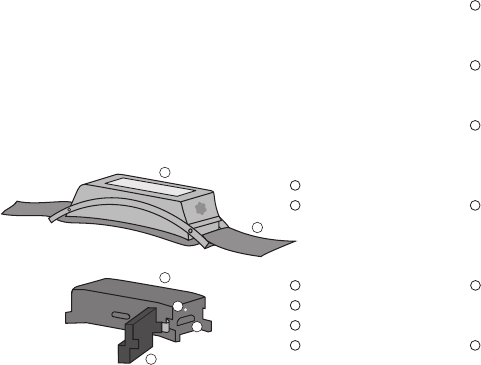
1 holder
2 strap
3 touch display
4 charging port
5 cover
6 reset button
Die App „Montblanc e-Strap“
herunterladen
Téléchargez l’application
« Montblanc e-Strap »
Scaricate l’applicazione
“Montblanc e-Strap”
Descargue la aplicación
«Montblanc e-Strap»
Transferir a aplicação da
“Montblanc e-Strap”
「モンブラン e-ス ト ラ ッ プ 」ア プ
リをダウンロードしてください
下载“Montblanc e-Strap”
应用程序
下 載「 Montblanc e-Strap」
應用程式
“Montblanc e-Strap” 어플리케
이션 내려받기
Загрузите приложение
„Montblanc e-Strap“
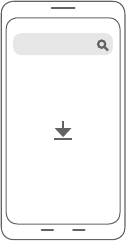
1. Download the “Montblanc e-Strap” application
Montblanc e-Strap
Setting up the e-Strap · Einrichten des e-Strap · Paramé-
trage de l’e-Strap · Configurazione dell’e-Strap · Configura-
ción del e-Strap · Configurar a e-Strap · e-ストラップ の 設 定 ·
设置e-Strap · 設置e-Strap · e-Strap 설정하기 ·
Н
астройка
e-Strap
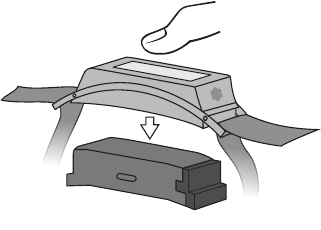
2. Remove device from holder
Device aus dem Gehäuse
nehmen
Retirez l’appareil du support
Togliete il dispositivo dal
supporto
Retire el dispositivo del
soporte
Remova o dispositivo do
suporte
デバイスをホルダーから取り外し
てください
从外壳中取下设备
從外殼中取出設備
홀더에서 기기를 분리한다
Снимите устройство с
держателя
2
3
5
1
6
4
Abdeckung entfernen und das
Device mittels Mikro-USB-Kabel
an das Ladegerät anschließen
Retirez le couvercle et branchez
l’appareil à votre chargeur via
le câble micro-USB
Rimuovete la cover e inserite il
dispositivo nel caricabatteria
tramite il cavo micro USB
Retire la tapa y conecte el
dispositivo a su cargador
mediante el cable micro-USB
Remova a tampa e ligue o
dispositivo ao seu carregador
através do cabo micro-USB
カバーを外し、micro-USBケーブ
ル を 使 ってデ バイスを お 持 ち の 充
電 器 に 接 続 してくだ さい
取下密封盖,并通过微型USB电缆
将设备与充电器进行连接
取 下 密 封 蓋 ,並 透 過 微 型 USB纜線
將設備與充電器進行連接
커버를 분리하고 마이크로 USB
케이블로 충전기에 연결한다
Снимите защитный элемент
и подключите устройство к
зарядному устройству при
помощи микро-USB кабеля
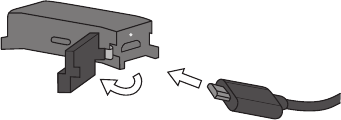
3. Remove cover and plug device into your charger via micro-USB
cable
2
3
5
1
6
4
2
3
5
1
6
4
Retirez le câble USB lorsque le
chargement est complété et
replacez le couvercle. Vérifiez que
le couvercle soit bien enclenché.
Una volta caricato completa-
mente, rimuovete il cavo USB e
rimettete la cover. Assicuratevi
che sia ben fissa in posizione.
Cuando esté completamente
cargado, retire el cable USB
y ponga la tapa de nuevo.
Asegúrese de que la tapa está
firmemente presionada.
Quando estiver completamente
carregado, remova o cabo USB e
introduza a tampa. Certifique-se
de que a tampa está firmemente
inserida.
充電が完了したら、USBケーブル
を 外 し 、カ バ ー を 取 り 付 け て く だ さ
い 。カ バ ー が し っ か り と は ま っ て い
るか を 確 認 してくだ さい 。
当充电完毕后,拔下USB电 缆 ,并 插
入密封盖。确保密封盖牢固压紧。
當充電完畢後,拔下USB纜 線 ,並 插
入密封蓋。確保密封蓋牢固壓緊。
충전이 완료되면 USB케이블을 뽑
고 커버를 꽂는다. 커버가 단단히 닫
히도록 한다.
После полной зарядки выньте
USB кабель и наденьте защитный
элемент. Убедитесь, что защитный
элемент плотно прижат.
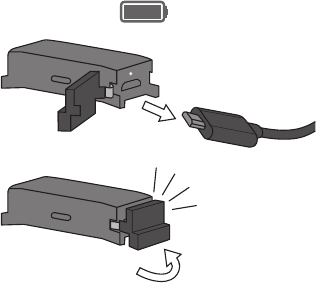
4. When fully charged remove the USB cable and insert cover.
Ensure that the cover is firmly pressed in.
Nach vollständiger Aufladung das USB-Kabel entfernen und die
Ab
deckung mit festem Druck aufsetzen.
2
3
5
1
6
4
click!
1.
2.
Das Device in das Gehäuse
einsetzen
Insérez l’appareil dans le
support
Inserite il dispositivo nel
supporto
Inserte el dispositivo en el
soporte
Introduza o dispositivo no
suporte
デバイスをホルダーに挿入して
ください
将设备插入外壳
將設備插入外殼
기기를 홀더에 삽입한다
Поставьте устройство на
держатель
1.
2.
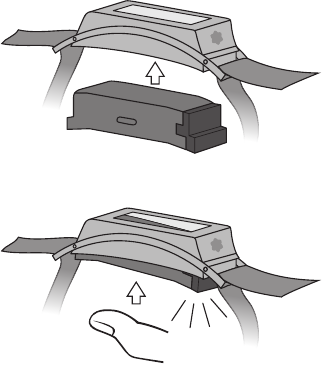
5. Insert device into holder
2
3
5
1
6
4
2
3
5
1
6
4
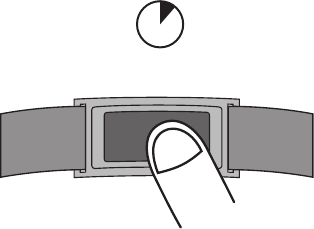
6. Turn device ON
Device einschalten
Allumez l’appareil (ON)
Accendete il dispositivo
Encienda el dispositivo
LIGUE o dispositivo
デバイスをONにしてくだ さい
开启设备
開啟設備
기기 전원을 켠다
Включите устройство
3 sec.
2
3
5
1
6
4
7. Open the e-Strap application and follow the instructions
Die e-Strap-App öffnen und
die Anweisungen befolgen
Ouvrez l’application e-Strap
et suivez les instructions
Aprite l’applicazione e-Strap
e seguite le istruzioni
Abra la aplicación e-Strap y
siga las instrucciones
Abra a aplicação e-Strap e
siga as instruções
e-ストラップ・アプリを開いて、
説 明 にした がって進 んでく
ださい
打开e-Strap应 用 程 序 ,并 按 照
指示进行操作
打開e-Strap應 用 程 式 ,並 按 照
指示進行操作
e-Strap 어플리케이션을 켜고
설명대로 조작한다
Откройте приложение
e-Strap и следуйте
инструкциям
Features Funktionen Fonctionnalités Caratteristiche Caracterís-
ticas Características 機能 产品功能 產品功能 기능
С
войства
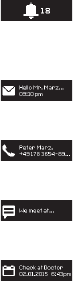
1. Notifications
email · E-Mail · e-mail · correio eletrónico · Eメール ·
电子邮件 · 電子郵件 · 이메일 · e-mail · электронная почта
notifications · Mitteilungen · notifications · notifiche ·
notificaciones · notificações · 通知 · 提醒 · 通知 ·
알림 · уведомления
call · Anruf · appel · chiamata · llamada · chamada ·
電話 · 呼叫 · 呼叫 · 호출 · звонок
text · Text · message · messaggio · SMS · mensagem ·
テ キストメッ セ ージ · 消息 · 訊息 · 문자 · текст
calendar · Kalender · calendrier · calendario ·
calendario · calendário · カレン ダー · 日历 · 日曆 ·
달력 · календарь
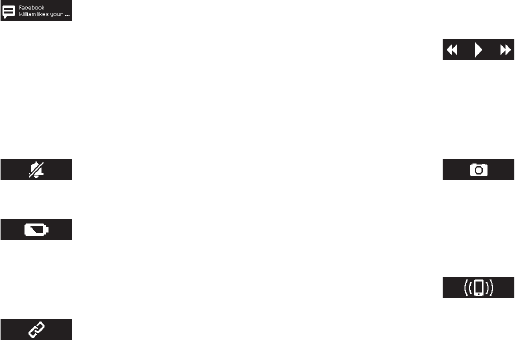
2. Options
mute · Stumm · veille · muto · en silencio · silêncio ·
ミュート · 静音 · 静音 · 음소거 · отключение звука
battery status · Batteriestatus · état de la pile ·
livello batteria · estado de la batería · estado da
bateria · 電池の状態 · 电池状态 · 電池狀態 · 배터리
상태 · индикатор уровня заряда аккумулятора
connection status · Verbindungsstatus · état de
la connexion · stato connessione · estado de la
conexión · estado da ligação · 接続状況 · 连接状态 ·
連接狀態 · 연결 상태 · уровень сигнала сети
trigger camera · Kamera auslösen · déclencheur
de l’appareil photo · attivazione fotocamera ·
disparar cámara · acionar câmara · カメラのシャッ
ターを切る · 照相机快门 · 照相機快門 · 트리거 카메
라 · включение камеры
3. Remote functions
music controls · Musiksteuerung · fonction baladeur ·
comandi musicali · controles de reproducción de
música · controlos da música · 音楽の操作 · 音乐控制 ·
音樂操控 · 뮤직 컨트롤 · навигация для прослуши-
вания музыки
find phone · Telefonsuche · trouver un téléphone ·
trova telefono · encontrar teléfono · encontrar
telefone · スマ ートフォン の 所 在 を 探 索 · 寻找手机 ·
找尋手機 · 폰 찾기 · поиск телефона
social · Soziale Netzwerke · réseaux sociaux ·
social media · redes sociales · redes social · ソ
ー シ ャル メディア · 社交媒体 · 社交媒體 · SNS ·
социальные сети

4. Activity tracker
number of steps taken today · Heute gelaufene
Schritte · nombre de pas effectués aujourd’hui ·
numero di passi effettuati oggi · número de pasos
dados hoy · número de passos dados hoje · 今日の
歩数 · 今日所完成步数 · 今日所完成步數 · 오늘 사용
한 단계 수 · количество сделанных сегодня шагов
Safety instructions
· Refrain from putting high pressure on the device or placing it near
or in a heat source. The device should be used in temperatures
between 32–95°F (0–35°C).
· Never forget to put the cover on the device and put it into the holder
after charging the battery. Otherwise liquids may enter the device,
leading to corrosion. If liquids do enter the device, please refrain
from using it and contact a Montblanc Boutique or an authorized
Montblanc Retailer.
· The cover only provides limited protection against water. Refrain
from using the device for swimming, diving, showering or other
activities where the device could come into continuous contact with
water or humidity. Your device is water-resistant in compliance with
the Ingress Protection rating IP 65 (splash-proof). To view more in-
formation go to www.montblanc.com/e-Strap. Water-resistance is
only ensured when the device with cover is inserted into the holder.
· Never let the micro-USB cable come into contact with liquids.
Please read the following warning and safety information carefully to
prevent incidents. Any configuration or use other than what is in line
with the suggested and intended use is not covered or guaranteed.
· Do not disassemble, repair, modify, open, drop, puncture, crush,
shred or try otherwise to damage the device. Do not use the device
when the enclosure or screen is cracked or broken.
· Any damage to the cover may affect the protection negatively.
Please consult a Montblanc Boutique or an authorized Montblanc
Retailer if you believe that the cover needs to be replaced.
· The device comes with a rechargeable lithium-ion battery. The
battery is not replaceable. Please consult a Montblanc Boutique
or an authorized Montblanc Retailer. if you believe that the bat-
tery needs to be replaced.
· In case of a leaking battery, refrain from handling or touching it.
Avoid any contact, in particular with your eyes or skin. Contact
a Montblanc Boutique or an authorized Montblanc Retailer.
· Please refrain from using the device while operating a vehicle
as it may distract you.
· Only use the USB cable provided for charging the device and
take care to use a stable power source for charging.
· Do not use excessive force when navigating with the touch
screen. The touch screen works best with a light touch. Do not
use any objects for navigating.
· The device is not a toy. Keep the device and accessories away
from small children.
· Do not service the device yourself. For service and maintenance
contact a Montblanc Boutique or an authorized Montblanc
Retailer.
· Do not hold the screen too close to your eyes and ensure there
is some ambient light while reading the display.
Declaration of conformity
Montblanc declares that this product is in compliance with the es-
sential requirements of European Directive 1999/5/EC on Radio and
Telecommunications Terminal Equipment (R&TTE). A copy of the Dec-
laration of Conformity for this product may be obtained by clicking on
the Compliance Documentation at www.montblanc.com/e-strap.
FCC and Industry Canada Statement
This device complies with Part 15 of the FCC rules and Industry
Canada licence-exempt RSS standard(s). Operation is subject
to the following two conditions: (1) This device may not cause
harmful interference, and (2) this device must accept any
interference received, including interference that may cause
undesired operation. Modifications not expressly approved by
Montblanc may void the user’s authority to operate the device
under FCC regulations and must not be made.
Cleaning
When cleaning the device, only use a soft cloth. Apply soft
pressure when cleaning. Do not use any aggressive chemicals,
detergents or solutions. Avoid getting moisture in any openings.
Disposal
Please dispose of the product according to your local environmental
laws and guidelines. Do not dispose with other household waste.
Déclaration FCC et Industry Canada
Cet appareil est conforme à la partie 15 de la réglementation
FCC et aux normes RSS exemptes de licence d‘Industry Canada.
Toute opération est sujette aux deux conditions suivantes : (1)
Cet appareil ne doit pas provoquer d‘interférence nuisible et (2)
cet appareil doit accepter toute interférence reçue, y compris les
interfèrences pouvant provoquer un fonctionnement inattendu.
Montblanc products are only available in Montblanc Boutiques
and from specialised retailers authorised by Montblanc with
due consideration to the product category.
You can find the location of your nearest
Montblanc Boutique at:
www.montblanc.com.
FCC: 2AENP-MB150611
IC: 20163-MB150611
Les modifications non expressément approuvés par Montblanc
peuvent annuler le droit d‘usage de l‘utilisateur sur cet appareil
en vertu de la réglementation FCC et sont interdites.