User manual
º
temperature places (over 40 C), especially not in a car with the
windows closed in summer. Keep the speaker away from strong
magnetic fields. Slide the speaker's buttons gently. Sliding it too
hard can damage the speaker. Do not use the speaker in an
electronics-prohibited area, such as in an airplane. Do not use the
speaker in an extremely dry environment as this can lead to static
discharge, which can damage the speaker. Do not subject the
product to harsh impacts. Do not drop the appliance. This may
result in damage to the product. Do not attempt to dismantle or
repair this unit yourself. Repairs should only be performed by
qualified personnel.
Do not allow your speaker to be submerged in water. Do not expose
US B socket or the speaker to water, as water entering the set may
cause major damage.
Active mobile phones in the vicinity may cause interference.
We will not be responsible for any memory loss caused by product
damage, repairs or other reasons. Please operate the unit correctly
as stated in this manual.
Disconnect the appliance from the power source when cleaning.
Use a slightly dampened lint-free cloth to clean this appliance.
Do not dismantle the speaker or use alcohol, thinners or benzene
to clean the surface of the player.
The supplier or retailer accepts no liability for lost, corrupted or
damaged data. It remains the responsibility of the user to ensure
that they perform consistent data backups during the use of this
product. This product is not intended for commercial use.
It is for household use only.
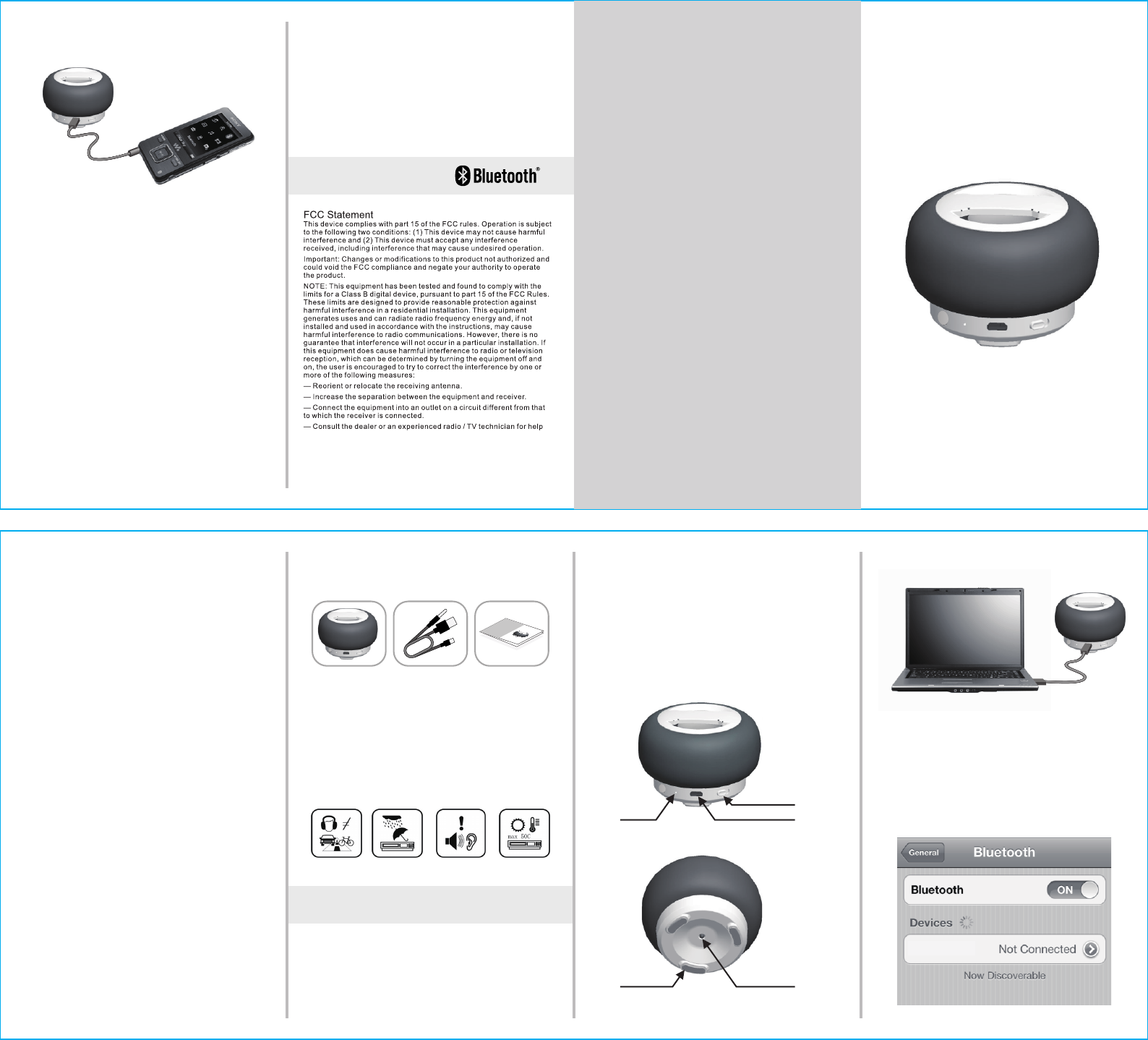
CHARGING INDICATOR AUX IN / DC IN
POWER SWITCH
BLUE LED MOOD LIGHTRUBBER FOOT
1/ Slide the power switch to turn on the speaker and a blue light will be
flashing shows bluetooth pairing.
2/ Turn on the bluetooth function in your music device and connect
ZEPO as the speaker unit. The blue mood light will be ON as paired.
3/ Play music and control the volume by using the device.
ZEPO
Bluetooth Speaker
User Manual
Model : ZEPO
Thank you for your purchase.
Please read this manual carefully
Before using the speaker.
Introduction
Congratulations on the purchase of your new bluetooth speaker!
Before operating the speaker, please read this manual throughly
and keep it for future reference. It will help you to use many of the
exciting features, which makes your experience more enjoyable.
This manual contains important safety and operating information.
Please read all the information carefully before you use the device
to avoid accidents.
Important Safety Precautions
To use this speaker safely, please read and follow the instructions
carefully before using this speaker.
The product shall not be exposed to dripping or splashing and
no objects filled with liquids, such as vases, shall be placed over
the product. Dry location use only.
No naked flames sources, such as candles, should be placed over
or near the product.
Line-in cables may be hazardous to young children. Store the
product carefully when it is not in use.
Listen at a moderate volume. Do not listen to music at very high
volumes as this can permanently damage your hearing.
To establish a safe volume level. Set your volume control at a low
setting. Slowly increase the sound until you can hear it comfortably
and clearly, without distortion.
Listen for reasonable periods of time: Prolonged exposure to sound
can also cause hearing loss, be sure to use your equipment
reasonably and take appropriate breaks. Keep the speaker clean
and never store it next to a heat source or in dirty, humid or wet
places. Keep it out of direct sunlight. Do not put the speaker in high
Package Contents
Please make sure that the items shown below are included in the
package. Should an item be missing, please contact the local
retailer from which you purchased this product.
2/ USB~Line-in Cable 3/ Instruction Manual
Bluetooth Speaker
User Manual
Model : TABT04
Thank you for your purchase.
Please read this manual carefully
Before using the speaker.
1/ Speaker Unit
Attention:
We have done our best to produce a complete and accurate manual.
However, we cannot ensure that there are no errors or omissions
during the printing process.
We cannot take responsibility for any damages caused by
unauthorised attempts to upgrade software or for any data
corruption while the product is being repaired.
Please note:
This device contains a built-in battery. Please observe the local
regulations regarding the disposal of old equipment and battery.
Basic Functions :
Bluetooth speaker with AUX IN function
1W output power
Blue LED mood light as Bluetooth indicator
Built-in 600mAH Li-ion rechargeable battery
Micro USB socket for battery charging
Red LED charging indicator
*
*
*
*
*
*
Preparation before Use :
Overview of controls and connection3
4/ If the music player is without bluetooth function, you can use the
AUX IN socket and audio cable provided to connect the speaker.
Remark :
* If the device has already been paired to the speaker before, then just
select ZEPO and it will pair again.
* Please don’t play music via AUX-IN function while charging in progress.
SAFETY INSTRUCTIONS
To prevent fire or electric shock hazard, do not expose the unit to rain
or moisture.
Do not expose the product to water ( dripping or splashing ) and no
objects filled with liquids, such as vases, should be placed on the unit.
Keep the product away from direct sunlight and heat source such as
radiators or stoves.Product operation temperature 0 ~ 40 C
*
*
*
TROUBLE SHOOTING
Make sure Bluetooth on you device is active and that it is paired
with your speaker.
You might be experiencing wireless interference, try moving your
Bluetooth device and the speaker away from other wireless sources.
Make sure your Bluetooth device is within range of the speaker.
Try turning off your speaker and then restart the bluetooth connection.
*
*
*
*
Problem in connecting BT device :-
Your audio source might be out of the wireless range of your speaker,
try to move closer.
You could be experiencing interference, try moving away from other
sources of wireless signal.
Make sure that your speaker has enough battery power.
Try adjusting the volume on you audio device.
Try restarting your speaker and the audio device.
*
*
*
*
*
No sound on the speaker :-
HOW TO USE
* Plug the USB by using the cable provided for charging six hours
before the first use.
* Red charging indicator will be ON while it is charging and OFF once
battery is full.