New Force communication Technology NFC-9814 INTERROGATOR User Manual VM7NFC 9814 InstructionManual

Shenzhen New Force communication Technology Co.,Ltd INTERROGATOR VM7NFC 9814 InstructionManual

USERS MANUAL

Instruction of 9814 interrogator     Esteemed customers: You are appreciated for your supports and  trust. We   will  provide circumspect   and   all-sided service and technology support with all our heart! The instruction will detailedly tell you how to use the NFC-9814 interrogator, which is researched and designed by ourselves. You are suggested to read the instruction detailedly before using it so that you can taste the advantage and efficiency of our products.   If any comments and suggestions about our products in using, please don’t hesitate to contact us, we shall service for you with all our heart!                                The copyright of the instruction is owened to Shenzhen NFC communication Technology Co., Ltd. Not perrmits and authorization, please don’t tran-print, publish, diffuse or other use.
Instruction of 9814 interrogator    Instruction of 9814 interrgator 9814 interrogator is one of products researched and designed by Shenzhen NFC communication and technology Co., Ltd. It has many perfect characteristices such as non-touching, not being effected by environment, long-distance reading and writing, good capability of applying to object high speed moving, convenient operating, anti-conflict and so on. It is very usefull far-ranging. At present, NFC-9814 interrogator is applied to no stopping and charging fee management of high-speed road(bridge),  indentifying car’s brand  management, car management of  organizing into  groups and attempering,   management   of   intelligent   park, management of checking cars’ entering and leaving frontier, supervising material’s being out and in and identifying management,     baggage and package’s identifying management and containers on dock management and other fields. .   1、 summary   9814 is a kind of 915M RFID interrgator, which is full frame and function. It includes RF module, digital signal managing, input/output port and serial communication port, synchronization function. 9814   interrgator is multi-protocol UHF interrgator, which supports ISO18000-6B and EPC potocol international standard, it can read and write UCODE, TI, Alian and othes label, besides it can optimize main applying label clip. It is convenient to upgrade interrogator’s software    to satisfy protocol expanding and function expanding to protect user’s investment.  2、 Function brief introdution   z  Support multi-protocol: 9814 interrgator supports ISO18000-6B, EPC Class 1, EPC Class 1 GEN 2 standard, and also support many protocols and function expanding by through upgrading interrogator software. z  Label capability optimizing: NFC serial interrgators can optimize Label’s operating used far-ranging. It uses different labels’ expanding function to enhance the price-quality ratio of system’s applying. z  Out off line function: the interrogator is designed with nonvolatile memory place. When the   interrogator fail to communicate with applying suetem, it can memory identified ID Label into the interrgator to make sure the system is stable. z  ID match function: the interrogator is designed with nonvolatile memory place. In a close applying system, it can memory ID Label into the interrgator in advance. When the interrogator indentifies Label ID, It can compare   with the ID memoried the local   PC, then depending on the result, it can run the interrgator’s predefining or user designing’action. z  Synchronization function: In practice, many interrgators must be installed a near place, to make sure the reliability when interrgators working, NFC serial interrgators were designed especially with   synchronization   function to   make   sure the   reliability of   identifying   label
Instruction of 9814 interrogator   and reading rate. z  Time function: There is real-time clock within interrgator, which can setup and read interrgator’s time,identify time-stamp function under out off line. It can exactly satisfy the applying design that uses were sensitive for time. z  Input  and  output  function:  the  interrgator  is  designed  2-way  triggering  input,  which   can identify the label when occuring outer things to satisfy green environment protecting and decrease  energy  consuming.  It  is  especial  suitable  for  parking  port   and   producing   line manegement. It is designed 2-way relay output, which user can use for outer controling so that saving user’s cost of applying system designed. User can transfer and control relay’s switch status through the API function of NFC-interrgator SDK and also can customize the controling relationship according to the number of indentified Label ID. z  Launching power separated control: can setup separated every channel’s launching power to  meet  applying  and  installing’s  complexity,  which  is  the  first  designed  and  created  in internal country.  3、 Technology parameter   9814 interrgator technology parameter as belows: Form 1  9814 interrgator’s technology parameter Specification Explanation Operating Frequency 902MHz~928MHz RF protocol ISO18000-6B、EPC Class 1、EPC Class 1 GEN 2 Operating Method fixed frequency Antenna ports 4ports,SMA Max RF power                                          1 mW(e.i.r.p) Power smoothness <0.5 DB RF power range                                         0.5~1mW,Adjustable by software   Identify tag mode Fixed time automatically reads the tag;external trigger control reads the tag or the software control reads the tag,Identify tag mode can be setted Identify tag time <8ms(Identify single tag)  Reading/Writing tag time Reads every 8 bytes to be smaller than 5ms,writes every 4 bytes to be smaller than 25ms Reading/Writing tag distance >8m(antenna dependent)   Communication interface Type A:RS-232、RS-485、Wiegand26/34 Type B:RS-232、RS-485、Wiegand、USB Type E:RS-232、Wiegand、EthernetInput/output 2triggering inputs,2 relays outputs Power supply DC 5V Power consumption ≤5W Size 200mm×190mm×80mm Weight
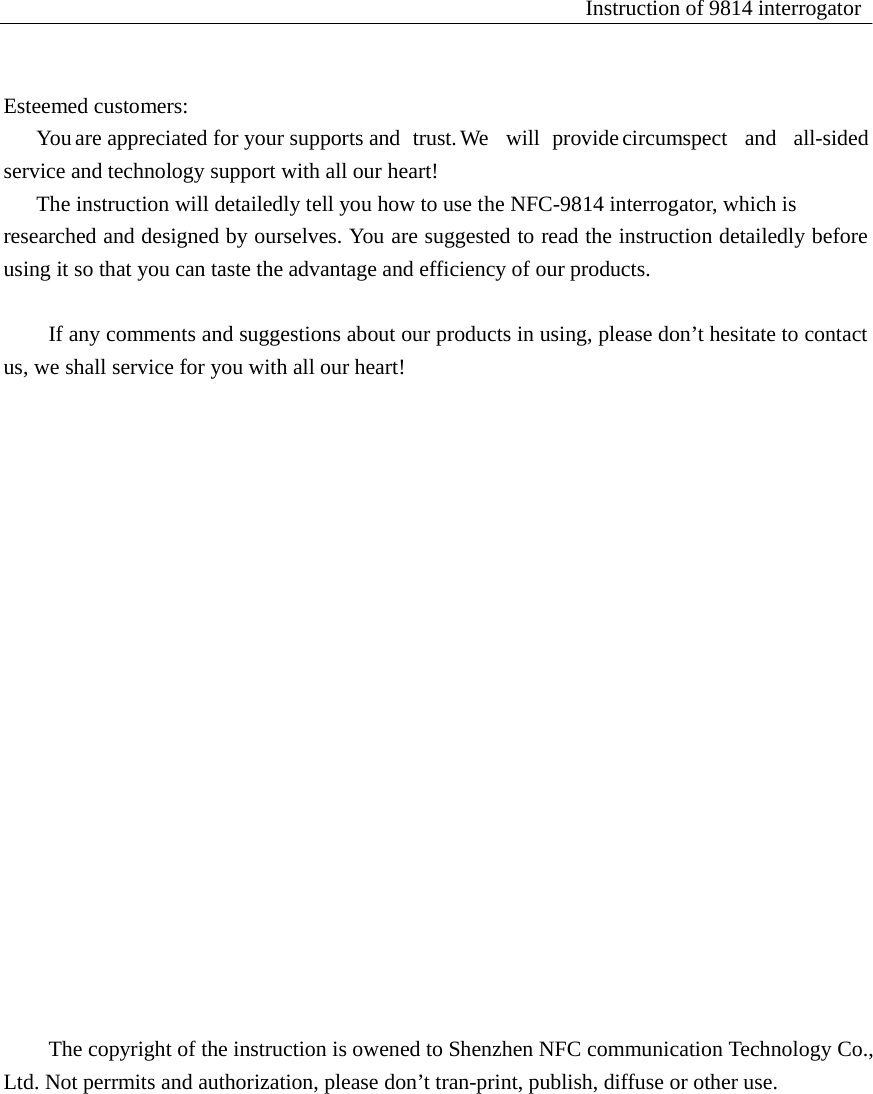
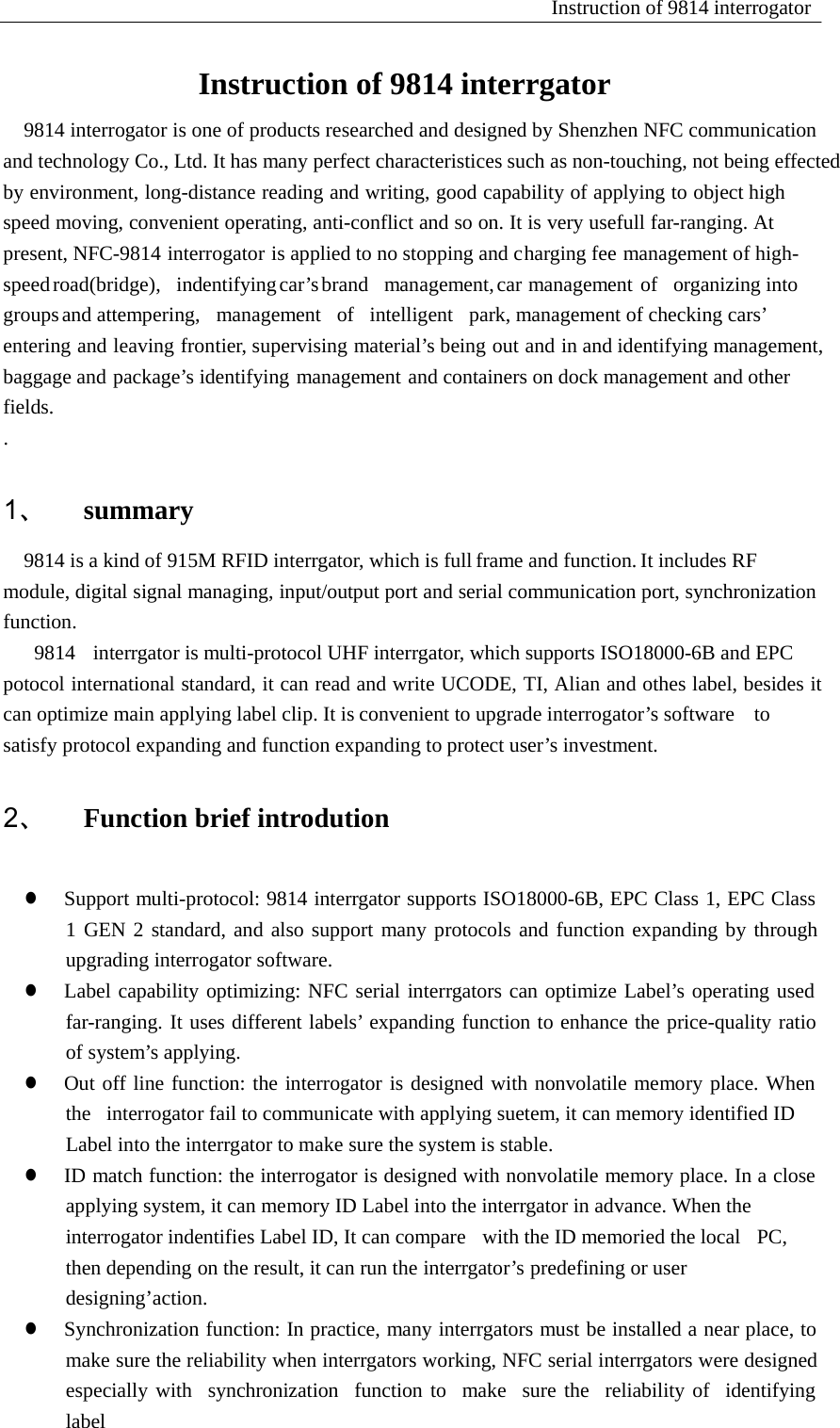
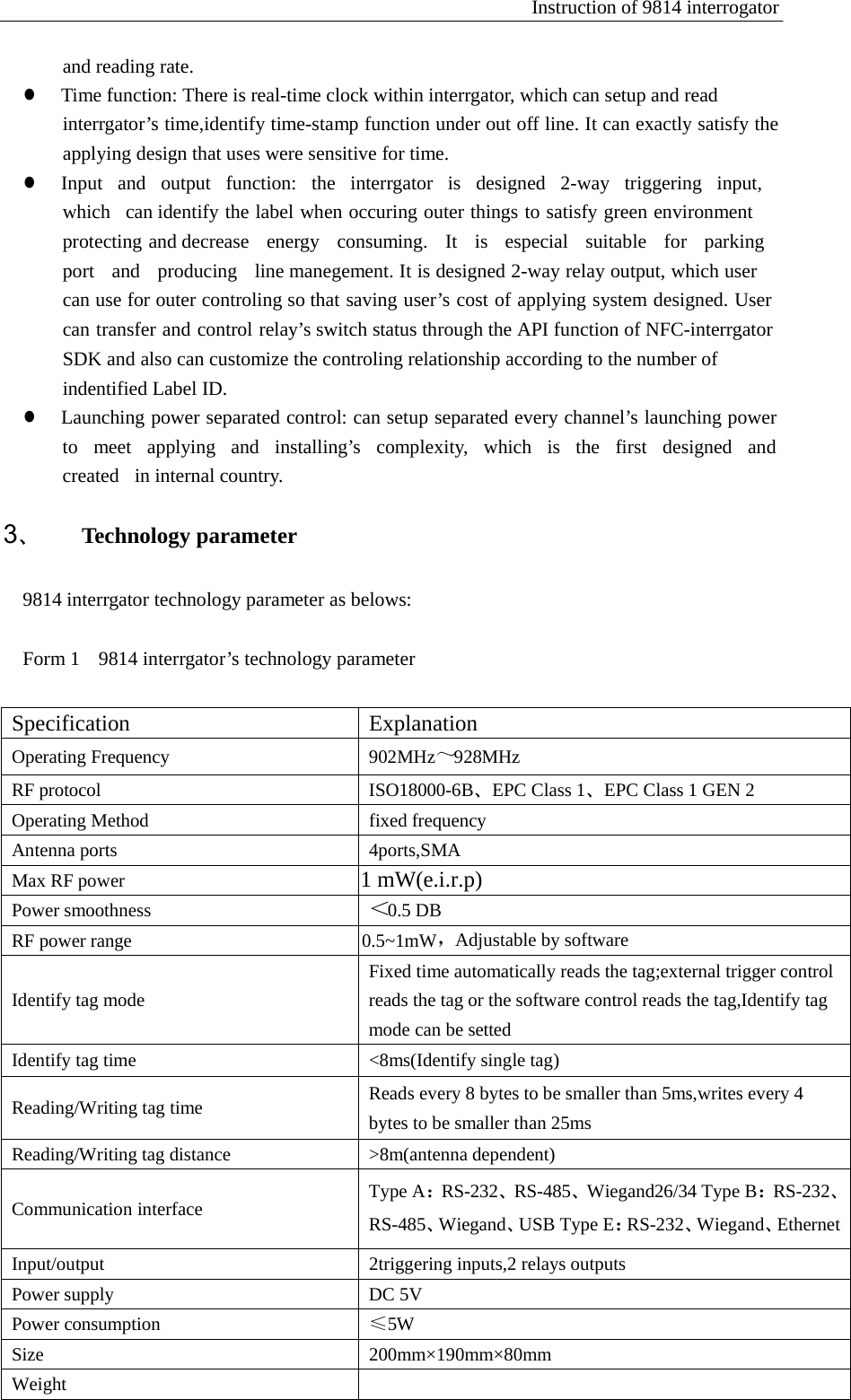
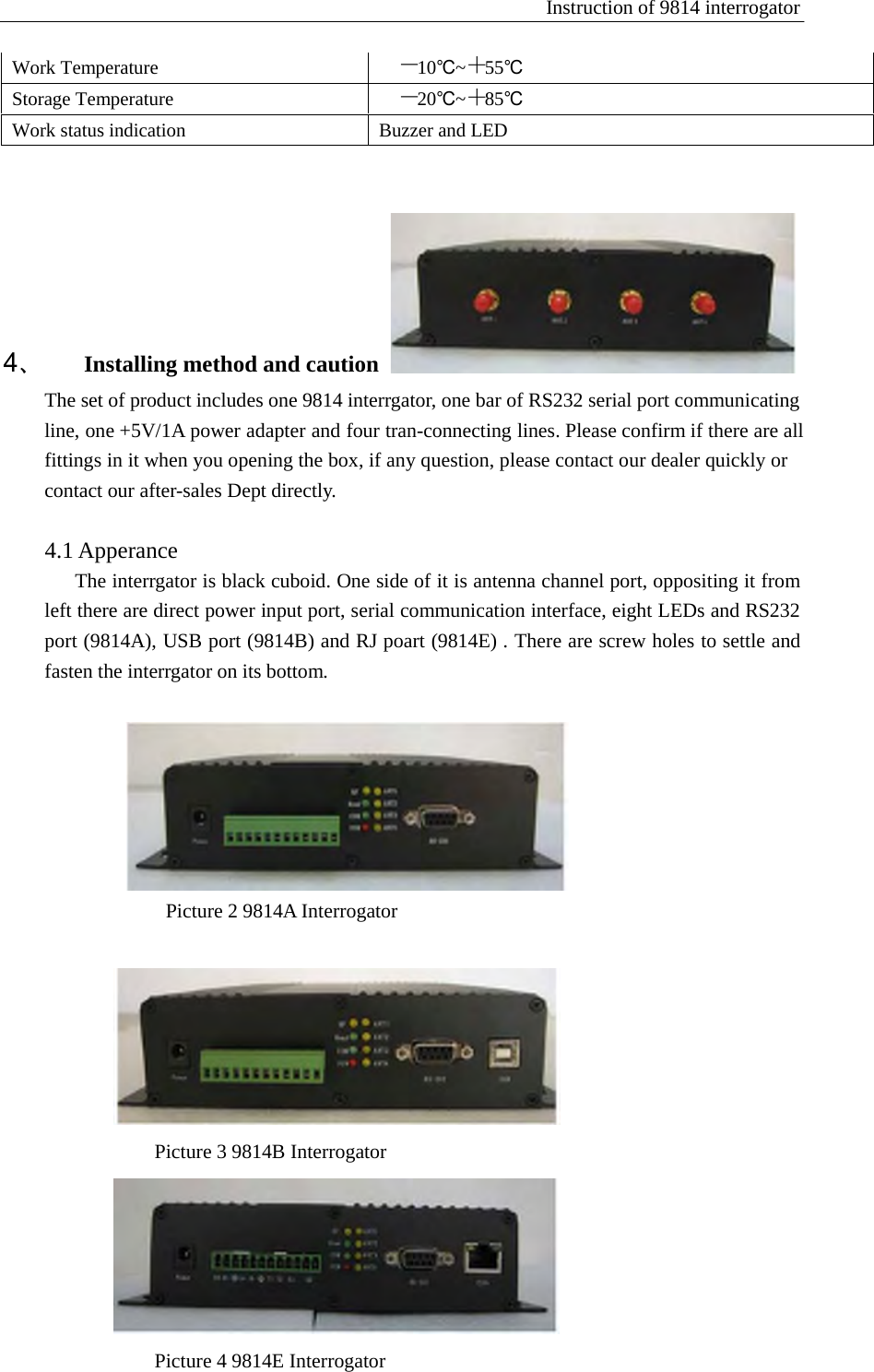
Instruction of 9814 interrogator   Work Temperature -10℃~+55℃ Storage Temperature -20℃~+85℃ Work status indication Buzzer and LED            4、 Installing method and caution  The set of product includes one 9814 interrgator, one bar of RS232 serial port communicating   line, one +5V/1A power adapter and four tran-connecting lines. Please confirm if there are all fittings in it when you opening the box, if any question, please contact our dealer quickly or contact our after-sales Dept directly.    4.1 Apperance The interrgator is black cuboid. One side of it is antenna channel port, oppositing it from left there are direct power input port, serial communication interface, eight LEDs and RS232 port (9814A), USB port (9814B) and RJ poart (9814E) . There are screw holes to settle and fasten the interrgator on its bottom.     Picture 2 9814A Interrogator     Picture 3 9814B Interrogator    Picture 4 9814E Interrogator
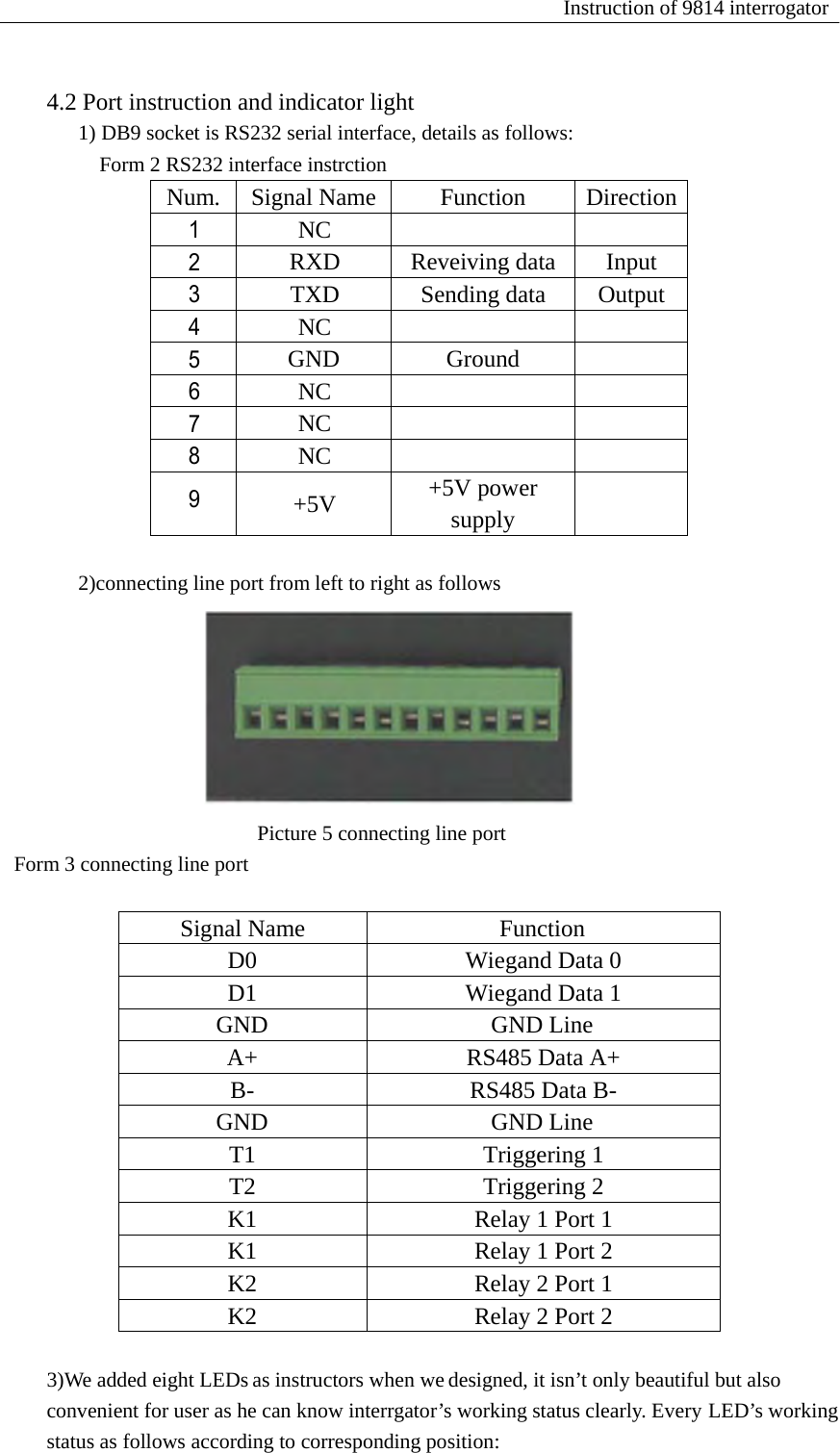
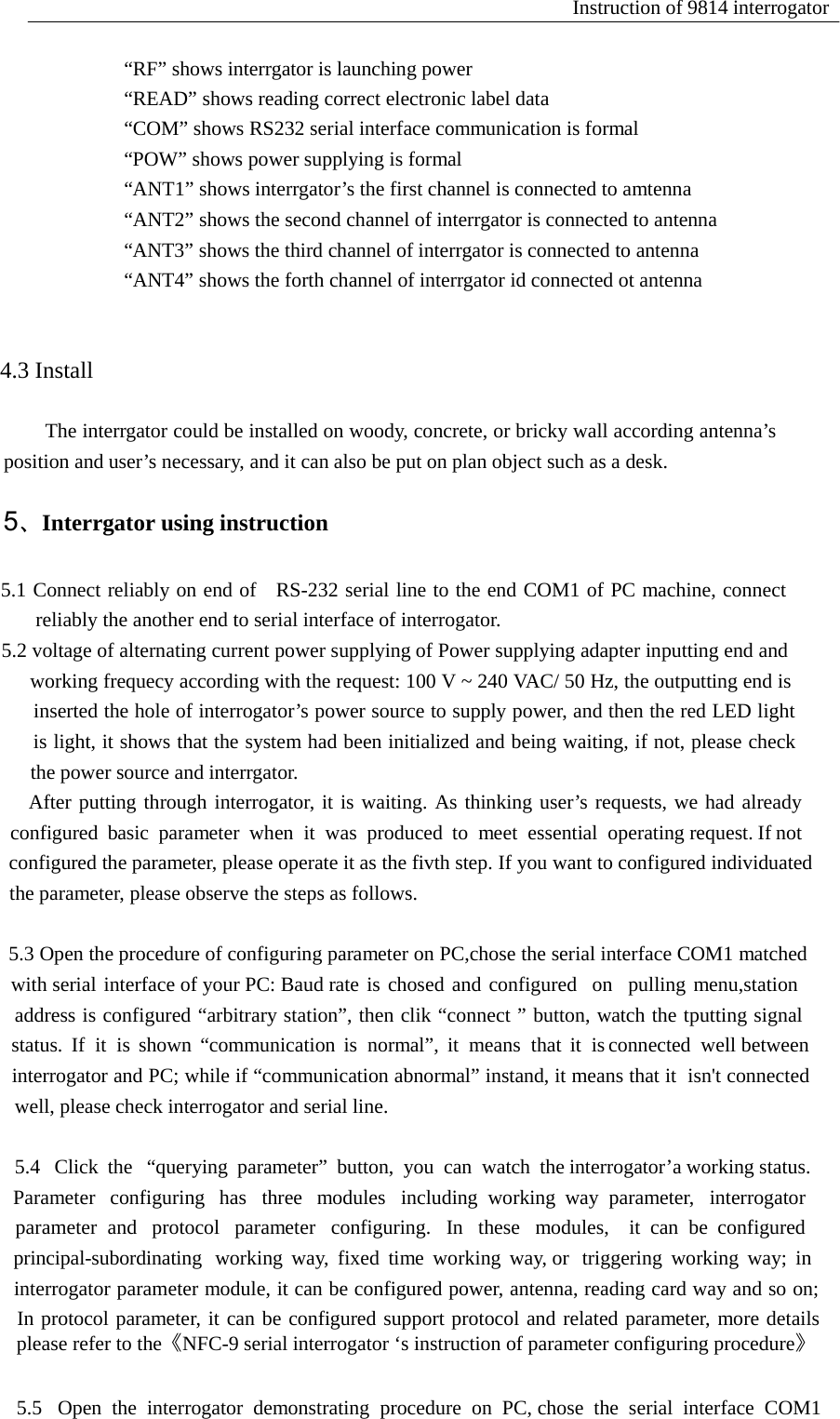
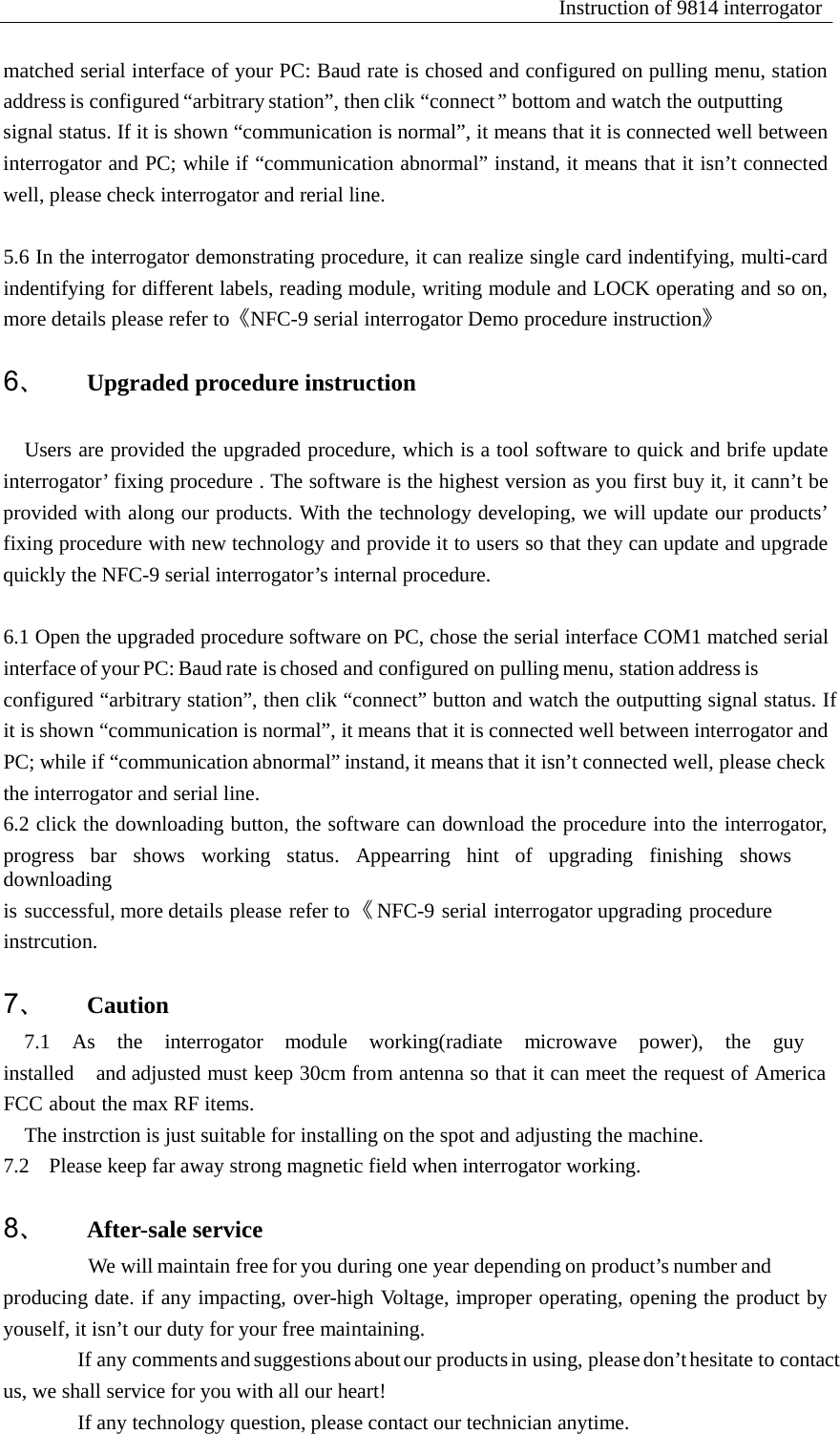
Num. Signal Name Function  Direction 1 NC    2 RXD Reveiving data Input 3 TXD Sending data Output 4 NC    5 GND Ground  6 NC    7 NC    8 NC    9  +5V  +5V power supply  Instruction of 9814 interrogator     4.2 Port instruction and indicator light 1) DB9 socket is RS232 serial interface, details as follows: Form 2 RS232 interface instrction                    2)connecting line port from left to right as follows     Form 3 connecting line port Picture 5 connecting line port   Signal Name  Function D0  Wiegand Data 0 D1  Wiegand Data 1 GND GND Line A+  RS485 Data A+ B-  RS485 Data B- GND GND Line T1 Triggering 1 T2 Triggering 2 K1  Relay 1 Port 1 K1  Relay 1 Port 2 K2  Relay 2 Port 1 K2  Relay 2 Port 2   3)We added eight LEDs as instructors when we designed, it isn’t only beautiful but also convenient for user as he can know interrgator’s working status clearly. Every LED’s working status as follows according to corresponding position:
Instruction of 9814 interrogator   “RF” shows interrgator is launching power “READ” shows reading correct electronic label data “COM” shows RS232 serial interface communication is formal “POW” shows power supplying is formal “ANT1” shows interrgator’s the first channel is connected to amtenna “ANT2” shows the second channel of interrgator is connected to antenna “ANT3” shows the third channel of interrgator is connected to antenna “ANT4” shows the forth channel of interrgator id connected ot antenna                                              4.3 Install                                  The interrgator could be installed on woody, concrete, or bricky wall according antenna’s                          position and user’s necessary, and it can also be put on plan object such as a desk.                                      5、Interrgator using instruction   5                      5.1 Connect reliably on end of  RS-232 serial line to the end COM1 of PC machine, connect                          reliably the another end to serial interface of interrogator. 5.                            5.2 voltage of alternating current power supplying of Power supplying adapter inputting end and                                working frequecy according with the request: 100 V ~ 240 VAC/ 50 Hz, the outputting end is                                inserted the hole of interrogator’s power source to supply power, and then the red LED light                             is light, it shows that the system had been initialized and being waiting, if not, please check                           the power source and interrgator.                          After putting through interrogator, it is waiting. As thinking user’s requests, we had already co                                 configured  basic  parameter  when  it  was  produced  to  meet  essential  operating request. If not co                                configured the parameter, please operate it as the fivth step. If you want to configured individuated the                               the parameter, please observe the steps as follows.   5.                                5.3 Open the procedure of configuring parameter on PC,chose the serial interface COM1 matched w                with serial interface of your PC: Baud rate is chosed and configured  on  pulling menu,station  st                         address is configured “arbitrary station”, then clik “connect ” button, watch the tputting signal ou                                 status.  If  it  is  shown  “communication  is  normal”,  it  means  that  it  is connected  well between w                             interrogator and PC; while if “communication abnormal” instand, it means that it  isn't connected                                 well, please check interrogator and serial line.   5.4                                   5.4   Click  the   “querying  parameter”  button,  you  can  watch  the interrogator’a working status.     Par                                Parameter   configuring   has   three   modules   including  working  way  parameter,   interrogator       and                                parameter  and   protocol   parameter   configuring.   In   these   modules,    it  can  be  configured   w                                        principal-subordinating   working  way,  fixed  time  working  way, or   triggering  working  way;  in  m                            interrogator parameter module, it can be configured power, antenna, reading card way and so on;                                 In protocol parameter, it can be configured support protocol and related parameter, more details p                                    please refer to the《NFC-9 serial interrogator ‘s instruction of parameter configuring procedure》   5.5                                 5.5   Open  the  interrogator  demonstrating  procedure  on  PC, chose  the  serial  interface  COM1
Instruction of 9814 interrogator   matched serial interface of your PC: Baud rate is chosed and configured on pulling menu, station address is configured “arbitrary station”, then clik “connect” bottom and watch the outputting signal status. If it is shown “communication is normal”, it means that it is connected well between interrogator and PC; while if “communication abnormal” instand, it means that it isn’t connected well, please check interrogator and rerial line.  5.6 In the interrogator demonstrating procedure, it can realize single card indentifying, multi-card indentifying for different labels, reading module, writing module and LOCK operating and so on, more details please refer to《NFC-9 serial interrogator Demo procedure instruction》  6、 Upgraded procedure instruction   Users are provided the upgraded procedure, which is a tool software to quick and brife update interrogator’ fixing procedure . The software is the highest version as you first buy it, it cann’t be provided with along our products. With the technology developing, we will update our products’ fixing procedure with new technology and provide it to users so that they can update and upgrade quickly the NFC-9 serial interrogator’s internal procedure.   6.1 Open the upgraded procedure software on PC, chose the serial interface COM1 matched serial interface of your PC: Baud rate is chosed and configured on pulling menu, station address is configured “arbitrary station”, then clik “connect” button and watch the outputting signal status. If it is shown “communication is normal”, it means that it is connected well between interrogator and PC; while if “communication abnormal” instand, it means that it isn’t connected well, please check the interrogator and serial line. 6.2 click the downloading button, the software can download the procedure into the interrogator, progress  bar  shows  working  status.  Appearring  hint  of  upgrading  finishing  shows  downloading is successful, more details please refer to 《 NFC-9  serial  interrogator upgrading  procedure instrcution.  7、 Caution 7.1  As  the  interrogator  module  working(radiate  microwave  power),  the  guy  installed    and adjusted must keep 30cm from antenna so that it can meet the request of America FCC about the max RF items. The instrction is just suitable for installing on the spot and adjusting the machine. 7.2  Please keep far away strong magnetic field when interrogator working.  8、 After-sale service We will maintain free for you during one year depending on product’s number and producing date. if any impacting, over-high Voltage, improper operating, opening the product by youself, it isn’t our duty for your free maintaining. If any comments and suggestions about our products in using, please don’t hesitate to contact us, we shall service for you with all our heart! If any technology question, please contact our technician anytime.
Instruction  of  9  series  interrogator       Esteemed customers: You are   appreciated for your supports and trust. We will provide circumspect and all-sided service and technology support with all our heart! The instruction will detailedly tell you how to use the DRF series interrogator demonstrating procedure, which is researched and designed by ourselves. You are suggested to read the struction detailedly before using it so that you can taste the advantage and efficiency of our products.   If any comments and suggestions about our products in using, please don’t hesitate to contact us, we shall serve for you with all our heart!
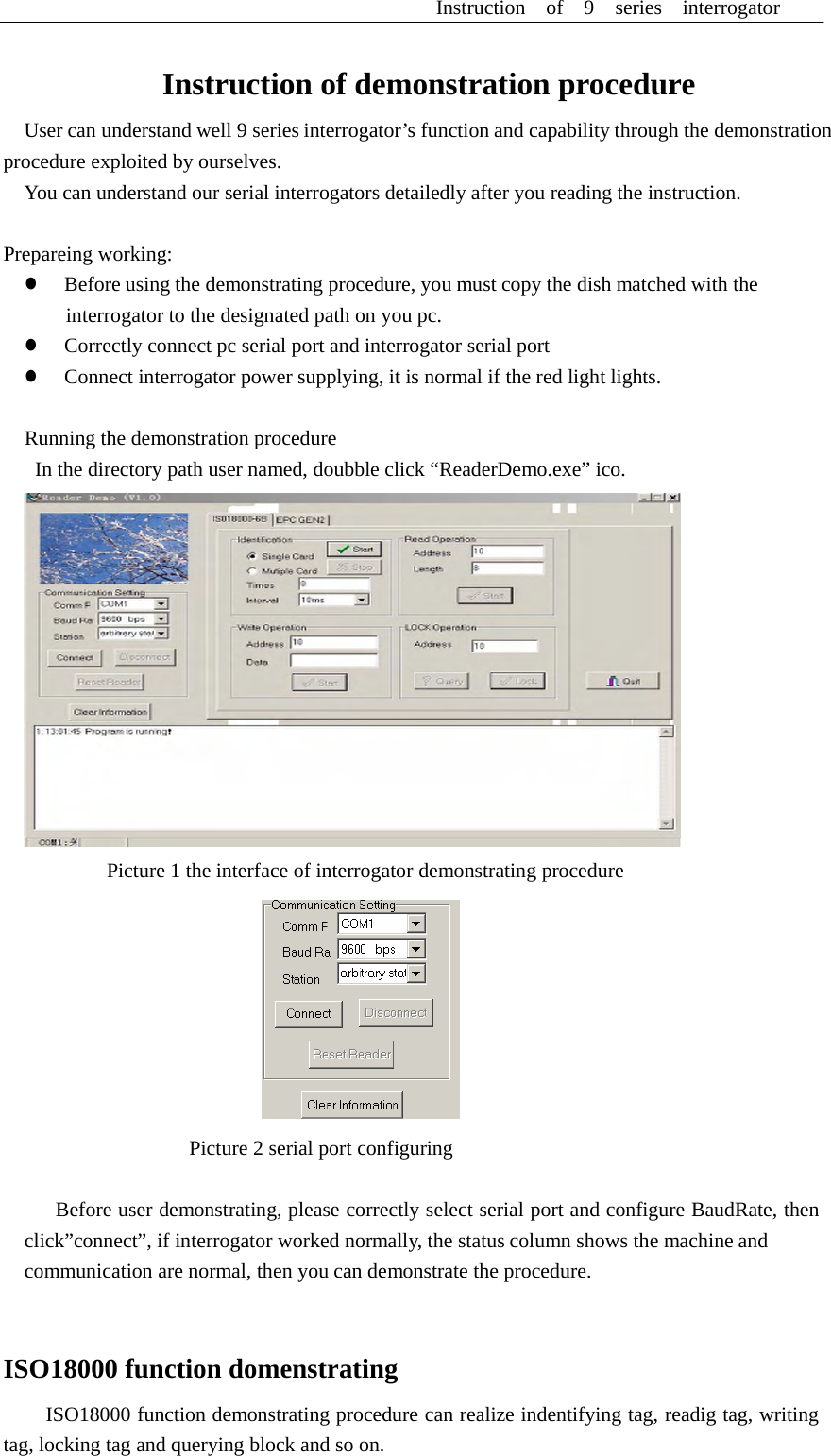
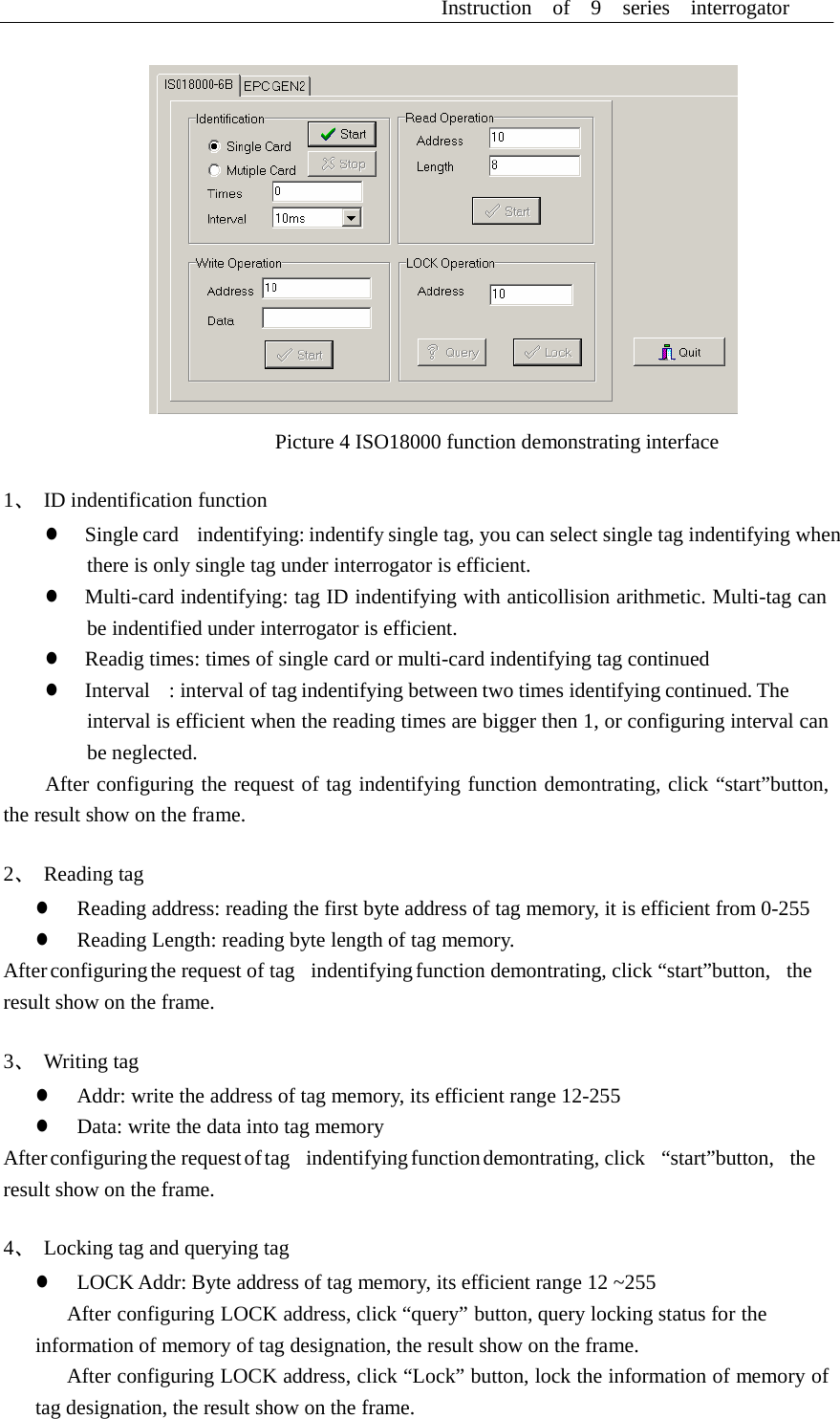
Instruction  of  9  series  interrogator      Instruction of demonstration procedure  User can understand well 9 series interrogator’s function and capability through the demonstration procedure exploited by ourselves. You can understand our serial interrogators detailedly after you reading the instruction.   Prepareing working: z  Before using the demonstrating procedure, you must copy the dish matched with the interrogator to the designated path on you pc. z  Correctly connect pc serial port and interrogator serial port z  Connect interrogator power supplying, it is normal if the red light lights.   Running the demonstration procedure In the directory path user named, doubble click “ReaderDemo.exe” ico.    Picture 1 the interface of interrogator demonstrating procedure    Picture 2 serial port configuring   Before user demonstrating, please correctly select serial port and configure BaudRate, then click”connect”, if interrogator worked normally, the status column shows the machine and communication are normal, then you can demonstrate the procedure.    ISO18000 function domenstrating  ISO18000 function demonstrating procedure can realize indentifying tag, readig tag, writing tag, locking tag and querying block and so on.
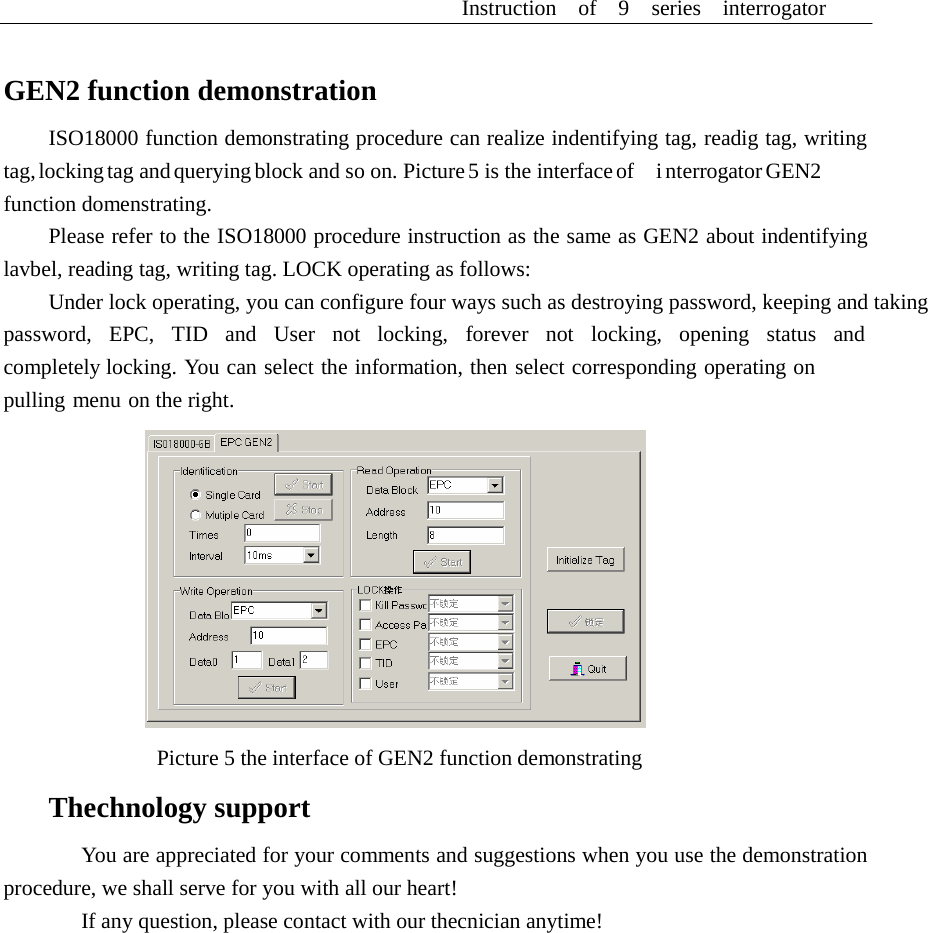
Instruction  of  9  series  interrogator       Picture 4 ISO18000 function demonstrating interface  1、 ID indentification function z  Single card   indentifying: indentify single tag, you can select single tag indentifying when there is only single tag under interrogator is efficient. z  Multi-card indentifying: tag ID indentifying with anticollision arithmetic. Multi-tag can be indentified under interrogator is efficient. z  Readig times: times of single card or multi-card indentifying tag continued z  Interval    : interval of tag indentifying between two times identifying continued. The interval is efficient when the reading times are bigger then 1, or configuring interval can be neglected. After configuring the request of tag indentifying function demontrating, click “start”button, the result show on the frame.  2、 Reading tag z  Reading address: reading the first byte address of tag memory, it is efficient from 0-255 z  Reading Length: reading byte length of tag memory. After configuring the request of tag   indentifying function demontrating, click “start”button,   the result show on the frame.  3、 Writing tag z  Addr: write the address of tag memory, its efficient range 12-255 z  Data: write the data into tag memory After configuring the  request of tag    indentifying function demontrating,  click    “start”button,    the result show on the frame.  4、  Locking tag and querying tag z  LOCK Addr: Byte address of tag memory, its efficient range 12 ~255 After configuring LOCK address, click “query” button, query locking status for the information of memory of tag designation, the result show on the frame. After configuring LOCK address, click “Lock” button, lock the information of memory of tag designation, the result show on the frame.
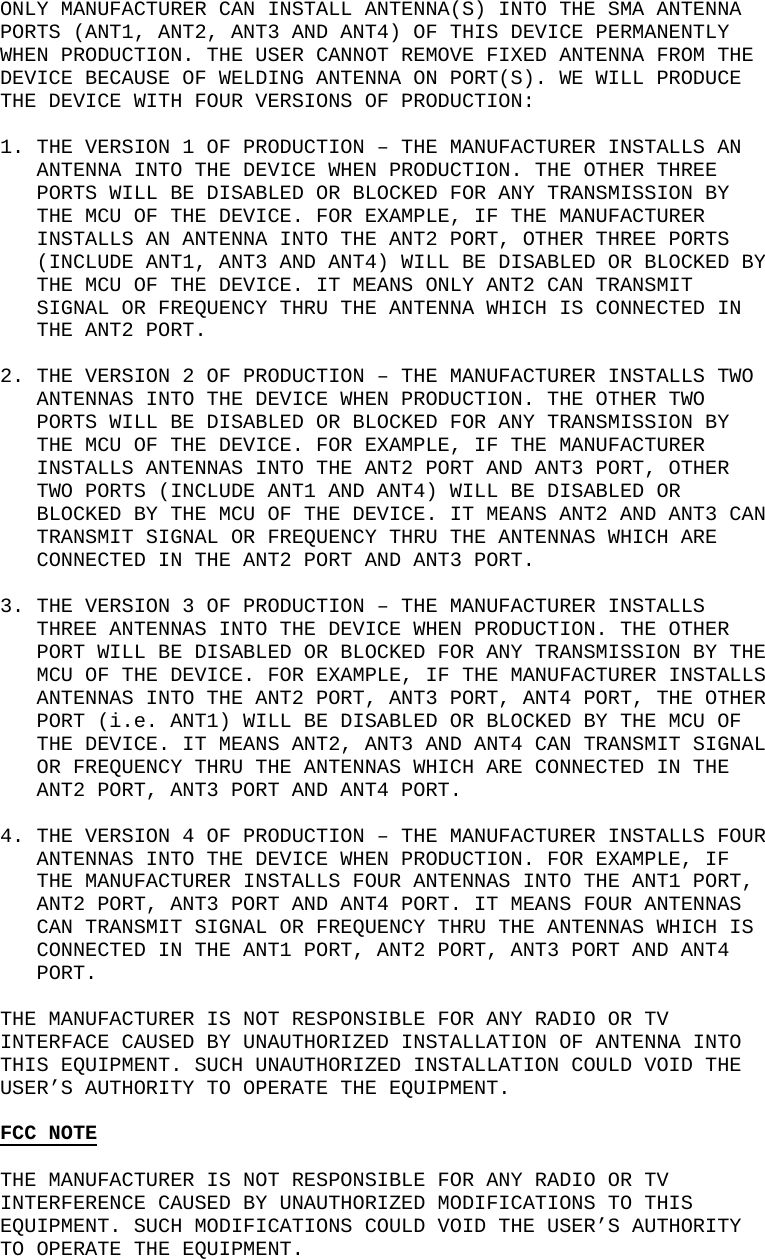
Instruction  of  9  series  interrogator      GEN2 function demonstration  ISO18000 function demonstrating procedure can realize indentifying tag, readig tag, writing tag, locking tag and querying block and so on. Picture 5 is the interface of    i nterrogator GEN2 function domenstrating. Please refer to the ISO18000 procedure instruction as the same as GEN2 about indentifying lavbel, reading tag, writing tag. LOCK operating as follows: Under lock operating, you can configure four ways such as destroying password, keeping and taking password,  EPC,  TID  and  User  not  locking,  forever  not  locking,  opening  status  and  completely locking. You can select the information, then select corresponding operating on pulling menu on the right.    Picture 5 the interface of GEN2 function demonstrating  Thechnology support  You are appreciated for your comments and suggestions when you use the demonstration procedure, we shall serve for you with all our heart! If any question, please contact with our thecnician anytime!
   ONLY MANUFACTURER CAN INSTALL ANTENNA(S) INTO THE SMA ANTENNA PORTS (ANT1, ANT2, ANT3 AND ANT4) OF THIS DEVICE PERMANENTLY WHEN PRODUCTION. THE USER CANNOT REMOVE FIXED ANTENNA FROM THE DEVICE BECAUSE OF WELDING ANTENNA ON PORT(S). WE WILL PRODUCE THE DEVICE WITH FOUR VERSIONS OF PRODUCTION:  1. THE VERSION 1 OF PRODUCTION – THE MANUFACTURER INSTALLS AN ANTENNA INTO THE DEVICE WHEN PRODUCTION. THE OTHER THREE PORTS WILL BE DISABLED OR BLOCKED FOR ANY TRANSMISSION BY THE MCU OF THE DEVICE. FOR EXAMPLE, IF THE MANUFACTURER INSTALLS AN ANTENNA INTO THE ANT2 PORT, OTHER THREE PORTS (INCLUDE ANT1, ANT3 AND ANT4) WILL BE DISABLED OR BLOCKED BY THE MCU OF THE DEVICE. IT MEANS ONLY ANT2 CAN TRANSMIT SIGNAL OR FREQUENCY THRU THE ANTENNA WHICH IS CONNECTED IN THE ANT2 PORT.  2. THE VERSION 2 OF PRODUCTION – THE MANUFACTURER INSTALLS TWO ANTENNAS INTO THE DEVICE WHEN PRODUCTION. THE OTHER TWO PORTS WILL BE DISABLED OR BLOCKED FOR ANY TRANSMISSION BY THE MCU OF THE DEVICE. FOR EXAMPLE, IF THE MANUFACTURER INSTALLS ANTENNAS INTO THE ANT2 PORT AND ANT3 PORT, OTHER TWO PORTS (INCLUDE ANT1 AND ANT4) WILL BE DISABLED OR BLOCKED BY THE MCU OF THE DEVICE. IT MEANS ANT2 AND ANT3 CAN TRANSMIT SIGNAL OR FREQUENCY THRU THE ANTENNAS WHICH ARE CONNECTED IN THE ANT2 PORT AND ANT3 PORT.  3. THE VERSION 3 OF PRODUCTION – THE MANUFACTURER INSTALLS THREE ANTENNAS INTO THE DEVICE WHEN PRODUCTION. THE OTHER PORT WILL BE DISABLED OR BLOCKED FOR ANY TRANSMISSION BY THE MCU OF THE DEVICE. FOR EXAMPLE, IF THE MANUFACTURER INSTALLS ANTENNAS INTO THE ANT2 PORT, ANT3 PORT, ANT4 PORT, THE OTHER PORT (i.e. ANT1) WILL BE DISABLED OR BLOCKED BY THE MCU OF THE DEVICE. IT MEANS ANT2, ANT3 AND ANT4 CAN TRANSMIT SIGNAL OR FREQUENCY THRU THE ANTENNAS WHICH ARE CONNECTED IN THE ANT2 PORT, ANT3 PORT AND ANT4 PORT.  4. THE VERSION 4 OF PRODUCTION – THE MANUFACTURER INSTALLS FOUR ANTENNAS INTO THE DEVICE WHEN PRODUCTION. FOR EXAMPLE, IF THE MANUFACTURER INSTALLS FOUR ANTENNAS INTO THE ANT1 PORT, ANT2 PORT, ANT3 PORT AND ANT4 PORT. IT MEANS FOUR ANTENNAS CAN TRANSMIT SIGNAL OR FREQUENCY THRU THE ANTENNAS WHICH IS CONNECTED IN THE ANT1 PORT, ANT2 PORT, ANT3 PORT AND ANT4 PORT.  THE MANUFACTURER IS NOT RESPONSIBLE FOR ANY RADIO OR TV INTERFACE CAUSED BY UNAUTHORIZED INSTALLATION OF ANTENNA INTO THIS EQUIPMENT. SUCH UNAUTHORIZED INSTALLATION COULD VOID THE USER’S AUTHORITY TO OPERATE THE EQUIPMENT.        FCC NOTE  THE MANUFACTURER IS NOT RESPONSIBLE FOR ANY RADIO OR TV INTERFERENCE CAUSED BY UNAUTHORIZED MODIFICATIONS TO THIS EQUIPMENT. SUCH MODIFICATIONS COULD VOID THE USER’S AUTHORITY TO OPERATE THE EQUIPMENT.

Navigation menu