New focus Lighting and Power Technology PP100FM XPower Pocket Inv FM User Manual XPower pocket inv FM

New focus Lighting & Power Technology (Shanghai) Co., Ltd. XPower Pocket Inv FM XPower pocket inv FM

User Guide

                XPower_pocket_inv_FM.book  Page ii  Tuesday, May 22, 2007  9:00 AM   Caution: This device complies with part15 of the FCC Rules. Operation is subject to the following two conditions :(1) this device may not cause harmful interference, and (2) this device must accept any interference received, including interference that may cause undesired operation.    Note: THE MANUFACTURER IS NOT RESPONSIBLE FOR ANY RADIO OR TV INTERFERENCE CAUSED BY UNAUTHORIZED MODIFICATIONS TO THIS EQUIPMENT. SUCH MODIFICATIONS COULD VOID THE USER’S AUTHORITY TO OPERATE THE EQUIPMENT.  Operation is subject to the following two conditions: (1) this device may not cause interference, and (2) this device must accept any interference, including interference that may cause undesired operation of the device.
                XPower_pocket_inv_FM.book  Page i  Tuesday, May 22, 2007  9:00 AM    About Xantrex Xantrex Technology Inc. is a world-leading supplier of advanced power electronics and controls with products from 50 watt mobile units to 1 MW utility-scale systems for wind, solar, batteries, fuel cells, microturbines, and backup power applications in both grid- connected and stand-alone systems. Xantrex products include inverters, battery chargers, programmable power supplies, and variable speed drives that convert, supply, control, clean, and distribute electrical power. Trademarks XPower by Xantrex is a trademark of Xantrex International. Xantrex is a registered trademark of Xantrex International. Other trademarks, registered trademarks, and product names are the property of their respective owners and are used herein for identification purposes only. Notice of Copyright XPower Pocket Inverter FM Owner’s Guide © May 2007 Xantrex International. All rights reserved. Exclusion for Documentation Unless specifically agreed to in writing, Xantrex Technology Inc. (“Xantrex”) (A)    MAKES NO WARRANTY AS TO THE ACCURACY, SUFFICIENCY OR SUITABILITY OF ANY TECHNICAL OR OTHER INFORMATION PROVIDED IN ITS MANUALS OR OTHER DOCUMENTATION.
                XPower_pocket_inv_FM.book  Page ii  Tuesday, May 22, 2007  9:00 AM    (B)    ASSUMES NO RESPONSIBILITY OR LIABILITY FOR LOSSES, DAMAGES, COSTS OR EXPENSES, WHETHER SPECIAL, DIRECT, INDIRECT, CONSEQUENTIAL OR INCIDENTAL, WHICH MIGHT ARISE OUT OF THE USE OF SUCH INFORMATION. THE USE OF ANY SUCH INFORMATION WILL BE ENTIRELY AT THE USER’S RISK; AND (C)    REMINDS YOU THAT IF THIS MANUAL IS IN ANY LANGUAGE OTHER THAN ENGLISH, ALTHOUGH STEPS HAVE BEEN TAKEN TO MAINTAIN THE ACCURACY OF THE TRANSLATION, THE ACCURACY CANNOT BE GUARANTEED. APPROVED XANTREX CONTENT IS CONTAINED WITH THE ENGLISH LANGUAGE VERSION WHICH IS POSTED AT WWW.XANTREX.COM. Date and Revision May 2007 Revision A Product Number 813-0281-01 Part Number 975-0361-01-01 Contact Information Telephone:   1 360-925-5059 Fax: 1 360-925-5143 Web: www.xantrex.com/support
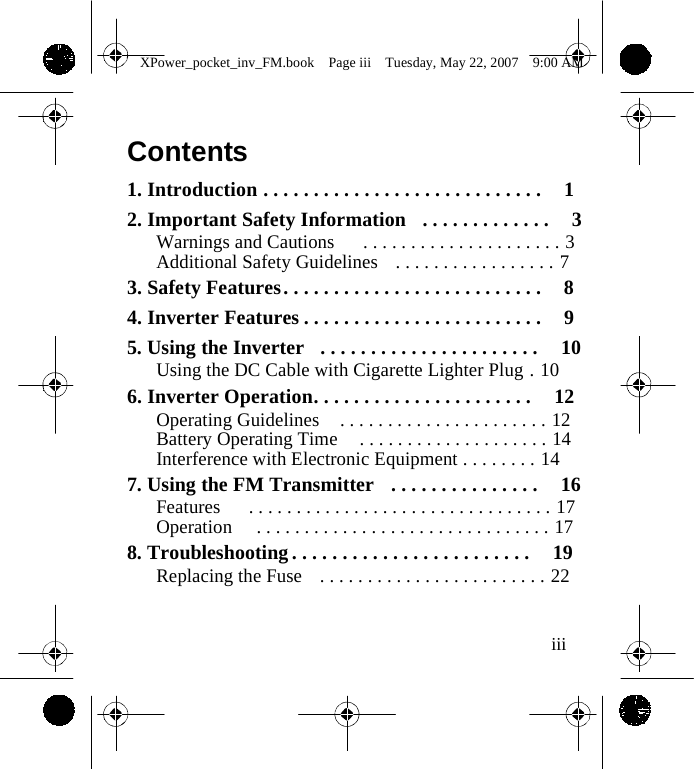
                XPower_pocket_inv_FM.book  Page iii  Tuesday, May 22, 2007  9:00 AM    Contents  1. Introduction . . . . . . . . . . . . . . . . . . . . . . . . . . . .  1 2. Important Safety Information  . . . . . . . . . . . . .  3 Warnings and Cautions   . . . . . . . . . . . . . . . . . . . . . 3 Additional Safety Guidelines  . . . . . . . . . . . . . . . . . 7 3. Safety Features . . . . . . . . . . . . . . . . . . . . . . . . . .  8 4. Inverter Features . . . . . . . . . . . . . . . . . . . . . . . .  9 5. Using the Inverter  . . . . . . . . . . . . . . . . . . . . . .  10 Using the DC Cable with Cigarette Lighter Plug . 10 6. Inverter Operation. . . . . . . . . . . . . . . . . . . . . .  12 Operating Guidelines  . . . . . . . . . . . . . . . . . . . . . . 12 Battery Operating Time  . . . . . . . . . . . . . . . . . . . . 14 Interference with Electronic Equipment . . . . . . . . 14 7. Using the FM Transmitter  . . . . . . . . . . . . . . .  16 Features   . . . . . . . . . . . . . . . . . . . . . . . . . . . . . . . . 17 Operation   . . . . . . . . . . . . . . . . . . . . . . . . . . . . . . . 17 8. Troubleshooting . . . . . . . . . . . . . . . . . . . . . . . .  19 Replacing the Fuse  . . . . . . . . . . . . . . . . . . . . . . . . 22   iii
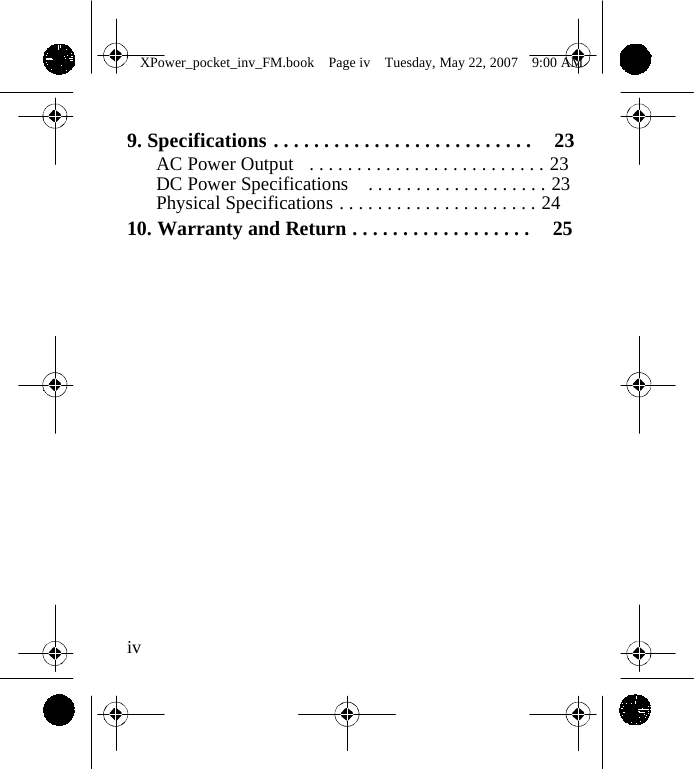
                XPower_pocket_inv_FM.book  Page iv  Tuesday, May 22, 2007  9:00 AM    9. Specifications . . . . . . . . . . . . . . . . . . . . . . . . . .  23 AC Power Output  . . . . . . . . . . . . . . . . . . . . . . . . . 23 DC Power Specifications  . . . . . . . . . . . . . . . . . . . 23 Physical Specifications . . . . . . . . . . . . . . . . . . . . . 24 10. Warranty and Return . . . . . . . . . . . . . . . . . .  25                     iv
                XPower_pocket_inv_FM.book  Page 1  Tuesday, May 22, 2007  9:00 AM   1  Introduction Thank you for purchasing the XPower Pocket Inverter FM. The XPower inverter is part of a family of advanced high-performance power inverters from Xantrex, the leader in high-frequency inverter design. Connected to the 12 volt outlet in your vehicle, the XPower inverter efficiently and reliably powers a wide variety of loads through the AC outlet. With a built-in FM transmitter, you can plug an iPod™ and other audio devices through the audio input port and listen to the sound via your vehicle’s factory-installed or third-party stereo/radio tuner. The XPower inverter uses reliable solid state power electronics for years of safe, trouble-free operation and includes automatic safety monitoring circuitry to protect it, and your battery, from inadvertent overload conditions. Read this guide before connecting or using the XPower inverter, and save it for future reference. The main topics in the guide are: • Safety information (page 3) • XPower inverter features (page 9) 1
                XPower_pocket_inv_FM.book  Page 2  Tuesday, May 22, 2007  9:00 AM    • Instructions for connecting the inverter (page 10) • Operating guidelines (page 12) • Operating the FM Transmitter (page 16) • Troubleshooting information (page 19) • Specifications (page 23) • Warranty and service information (page 25)                  2
                XPower_pocket_inv_FM.book  Page 3  Tuesday, May 22, 2007  9:00 AM   2  Important Safety Information Misusing or incorrectly connecting the XPower inverter may damage the equipment or create hazardous conditions for users. Read the following safety instructions and pay special attention to all Caution and Warning statements in the guide. Warnings identify conditions that may result in personal injury or loss of life. Cautions identify conditions or practices that may damage the unit or other equipment.  Warnings and Cautions  WARNING Keep children away from the XPower inverter. The inverter generates the same potentially lethal AC power as a normal household wall outlet. Treat the outlet with respect!      3
                XPower_pocket_inv_FM.book  Page 4  Tuesday, May 22, 2007  9:00 AM     WARNING The XPower inverter housing may become uncomfortably warm, reaching 140° F (60° C) under extended high power operation. During operation, keep it away from materials that may be affected by high temperatures.  WARNING Do not use the XPower inverter in the presence of flammable fumes or gases, such as in the bilge of a gasoline powered boat, or near propane tanks. Do not use the XPower inverter in an enclosure containing automotive-type, lead-acid batteries. These batteries, unlike sealed batteries, vent explosive hydrogen gas, which can be ignited by sparks from electrical connections.         4
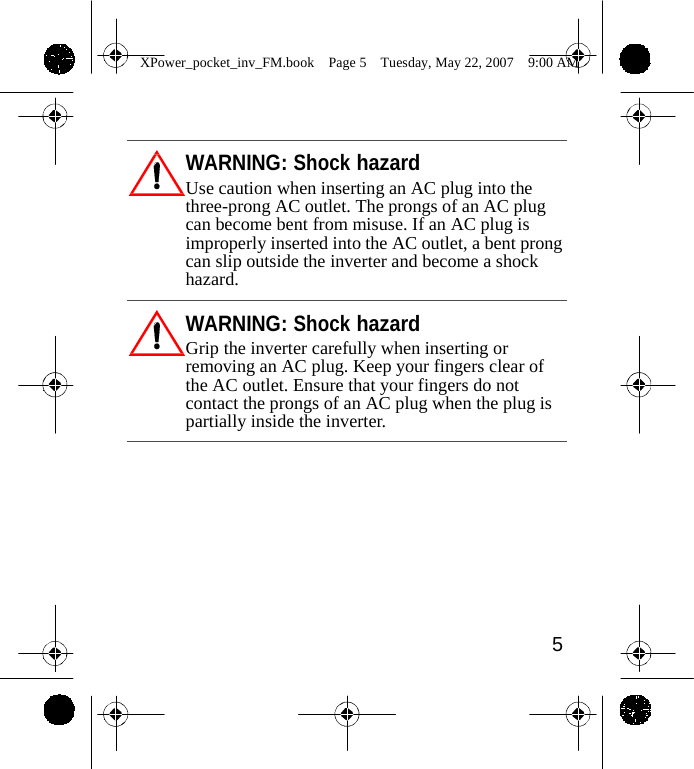
                XPower_pocket_inv_FM.book  Page 5  Tuesday, May 22, 2007  9:00 AM     WARNING: Shock hazard Use caution when inserting an AC plug into the three-prong AC outlet. The prongs of an AC plug can become bent from misuse. If an AC plug is improperly inserted into the AC outlet, a bent prong can slip outside the inverter and become a shock hazard.  WARNING: Shock hazard Grip the inverter carefully when inserting or removing an AC plug. Keep your fingers clear of the AC outlet. Ensure that your fingers do not contact the prongs of an AC plug when the plug is partially inside the inverter.           5
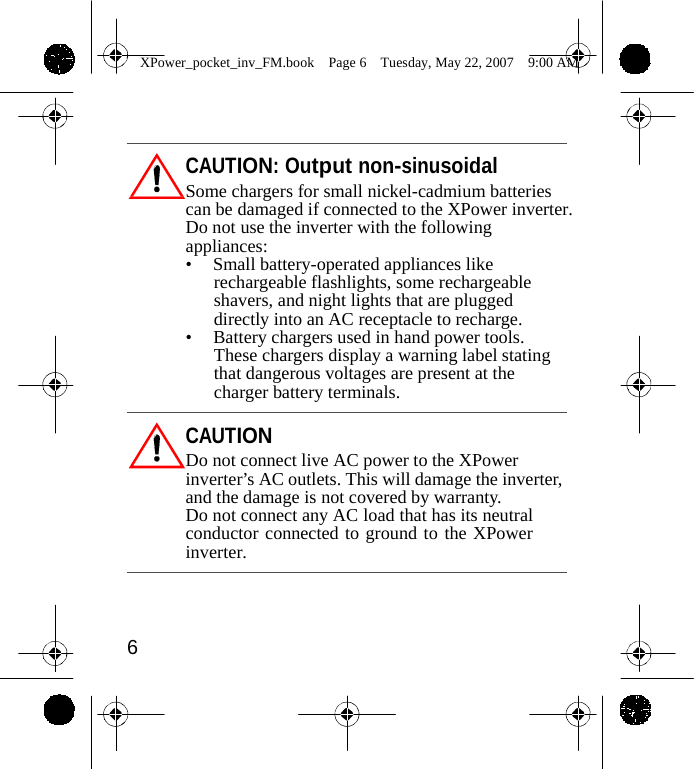
                XPower_pocket_inv_FM.book  Page 6  Tuesday, May 22, 2007  9:00 AM     CAUTION: Output non-sinusoidal Some chargers for small nickel-cadmium batteries can be damaged if connected to the XPower inverter. Do not use the inverter with the following appliances: •  Small battery-operated appliances like rechargeable flashlights, some rechargeable shavers, and night lights that are plugged directly into an AC receptacle to recharge. •  Battery chargers used in hand power tools. These chargers display a warning label stating that dangerous voltages are present at the charger battery terminals.  CAUTION Do not connect live AC power to the XPower inverter’s AC outlets. This will damage the inverter, and the damage is not covered by warranty. Do not connect any AC load that has its neutral conductor connected to ground to the XPower inverter.     6
                XPower_pocket_inv_FM.book  Page 7  Tuesday, May 22, 2007  9:00 AM    Additional Safety Guidelines • Do not insert foreign objects in the XPower inverter outlets or other openings. • Never connect the inverter to power utility AC distribution wiring. • Do not use the XPower inverter in temperatures over 100° F (40° C). • Do not expose the XPower inverter to water, rain, snow, or spray. Failure to follow these safety guidelines may cause personal injury and/or damage to the XPower inverter. It may also void your product warranty.             7
                XPower_pocket_inv_FM.book  Page 8  Tuesday, May 22, 2007  9:00 AM    3  Safety Features These advanced safety features are built into the XPower inverter: • Electronic overload protection with automatic shutdown • User-replaceable 8 A Slow-blow fuse • Low battery voltage shutdown • High-input voltage protection with automatic shutdown • Overheat protection with automatic shutdown • Output short circuit protection.             8
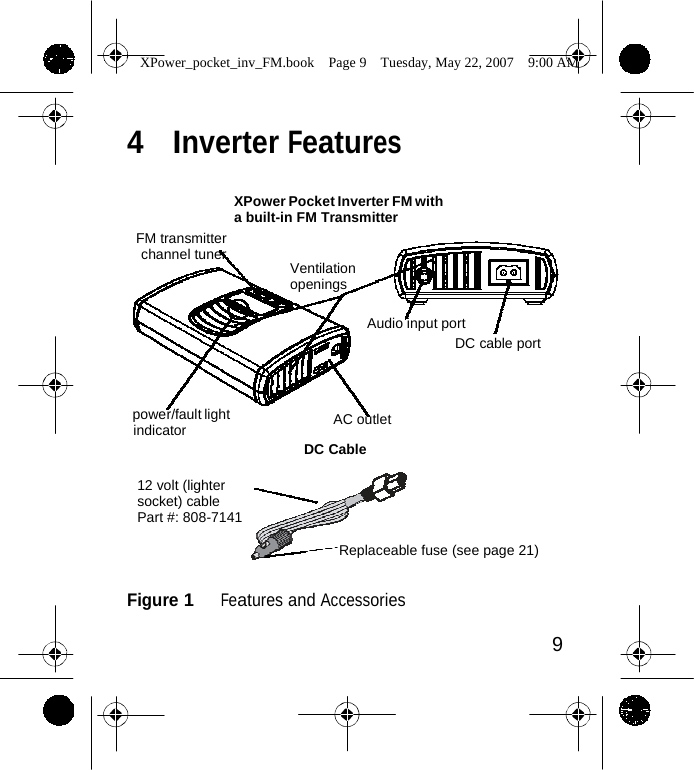
                XPower_pocket_inv_FM.book  Page 9  Tuesday, May 22, 2007  9:00 AM    4  Inverter Features     FM transmitter channel tuner XPower Pocket Inverter FM with a built-in FM Transmitter   Ventilation openings  Audio input port DC cable port    power/fault light indicator AC outlet  DC Cable  12 volt (lighter socket) cable Part #: 808-7141  Replaceable fuse (see page 21)   Figure 1   Features and Accessories  9
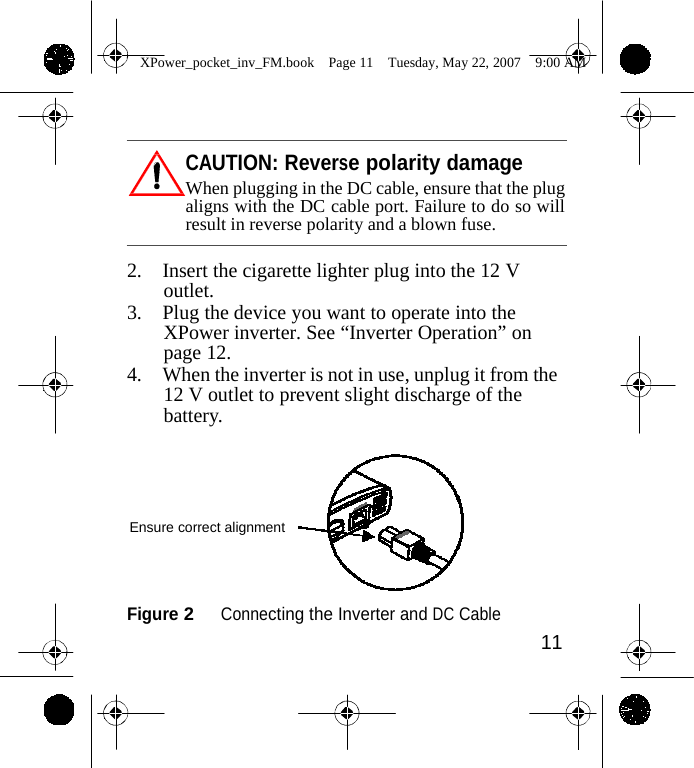
                XPower_pocket_inv_FM.book  Page 10  Tuesday, May 22, 2007  9:00 AM    5  Using the Inverter Through its AC outlet, the XPower inverter is capable of powering most 120 V AC products that use 100 W or less. The XPower inverter’s AC output waveform, called “modified sine wave,” is designed to function similarly to the sine wave shape of utility power.  Using the DC Cable with Cigarette Lighter Plug Due to the limitations of 12 V outlets in vehicles or boats, the XPower inverter should only be used to supply AC power to products that require 100 W (about 0.8 A) or less. 1. Plug the DC cable (Xantrex part number: 808-7141) into the DC cable port on the XPower inverter. Observe correct polarity. See Figure 2.       10
                XPower_pocket_inv_FM.book  Page 11  Tuesday, May 22, 2007  9:00 AM     CAUTION: Reverse polarity damage When plugging in the DC cable, ensure that the plug aligns with the DC cable port. Failure to do so will result in reverse polarity and a blown fuse.  2. Insert the cigarette lighter plug into the 12 V outlet. 3. Plug the device you want to operate into the XPower inverter. See “Inverter Operation” on page 12. 4. When the inverter is not in use, unplug it from the 12 V outlet to prevent slight discharge of the battery.      Ensure correct alignment    Figure 2   Connecting the Inverter and DC Cable 11
                XPower_pocket_inv_FM.book  Page 12  Tuesday, May 22, 2007  9:00 AM    6  Inverter Operation 1. When properly connected to a 12 V outlet the power/fault light indicator will glow green, indicating the inverter is ready. 2. Plug the product(s) you want to operate into the AC outlet and switch them on (if necessary).  Operating Guidelines • As the battery is used, its voltage begins to fall. When the XPower inverter senses that the voltage at its DC input has dropped to 10.5 V, the inverter automatically shuts down and the light glows red, indicating a fault. This prevents the battery from being damaged. Turn off any devices that the XPower inverter is powering.  Important:  Vehicle batteries are designed to provide brief periods of very high current needed for engine starting. They are not intended for constant deep discharge. Regularly operating the XPower inverter from a vehicle battery until low-voltage shutdown occurs will shorten the life of the battery.   12
                XPower_pocket_inv_FM.book  Page 13  Tuesday, May 22, 2007  9:00 AM    • If an AC product rated higher than 100 W is plugged into the XPower inverter, the inverter will shut down. The red fault light comes on. • If the XPower inverter exceeds a safe operating temperature, due to insufficient ventilation or a high-temperature environment, it automatically shuts down. The red fault light comes on. • Should a defective battery charging system cause the battery voltage to rise to dangerously high levels, the XPower inverter automatically shuts down. The red fault light comes on.  CAUTION Although the XPower inverter incorporates protection against over-voltage, it may still be damaged if the input voltage exceeds 16 V.  • In the event of an overload, low battery voltage or overheating, the XPower inverter automatically shuts down.     13
                XPower_pocket_inv_FM.book  Page 14  Tuesday, May 22, 2007  9:00 AM    Battery Operating Time Operating time will vary depending on the charge level of the battery, its capacity and the power level drawn by the particular AC load. With a typical vehicle battery and an 80 W load, an operating time of 4 to 5 hours or more can be expected. When using a vehicle battery as a power source, it is strongly recommended to start the vehicle every hour or two to recharge the battery before its capacity drops too low. The XPower inverter can operate while the engine is running, but the normal voltage drop that occurs during starting of the engine may trigger the inverter’s low voltage shutdown feature.  Interference with Electronic Equipment Generally, most AC products operate with the XPower inverter just as they would with household AC power. Below is information concerning two possible exceptions.      14
                XPower_pocket_inv_FM.book  Page 15  Tuesday, May 22, 2007  9:00 AM    Buzzing sound in audio systems and radios Some inexpensive stereo systems and AM-FM radios have inadequate internal power supply filtering and “buzz” slightly when powered by the XPower inverter. Generally, the only solution is an audio product with a higher quality filter. Television interference The XPower inverter is shielded to minimize its interference with TV signals. However, with weak TV signals interference may be visible in the form of lines scrolling across the screen. The following should minimize or eliminate the problem: • Increase the distance between the XPower inverter and the TV, antenna and cables. • Adjust the orientation of the XPower inverter, television, antenna and cables. • Maximize TV signal strength by using a better antenna and use shielded antenna cable where possible.     15
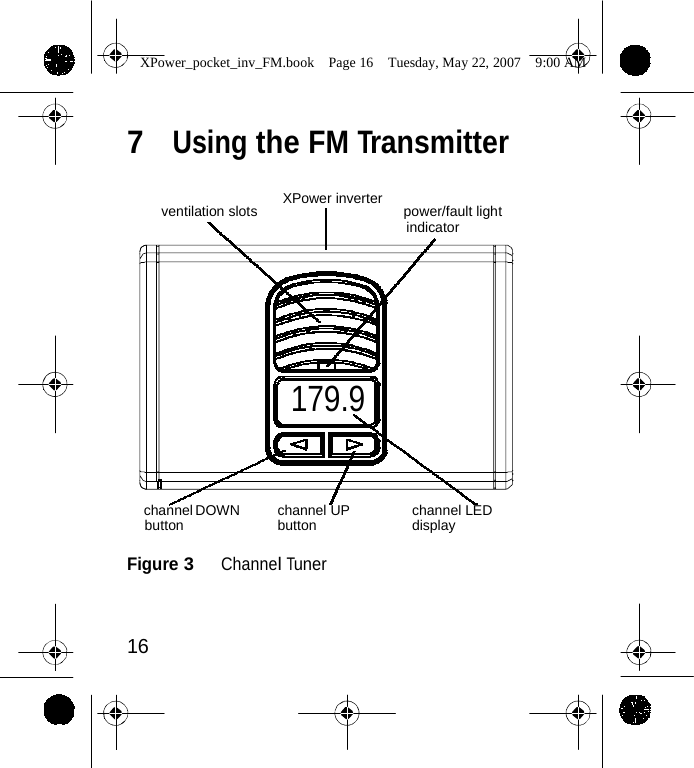
                 XPower_pocket_inv_FM.book  Page 16  Tuesday, May 22, 2007  9:00 AM    7  Using the FM Transmitter   XPower inverter ventilation slots power/fault light indicator        179.9     channel DOWN button channel UP button channel LED display  Figure 3   Channel Tuner    16
                XPower_pocket_inv_FM.book  Page 17  Tuesday, May 22, 2007  9:00 AM    Features • Channel tuner covers complete North American FM channels • Bright LED displays FM channel frequency • UP and DOWN buttons provide easy tuning • Last selected channel memorization for quick setup  Operation 1. Plug the DC cable into the DC cable port on the XPower inverter. Observe correct polarity. 2. Insert the cigarette lighter plug into the 12 V outlet. 3. Insert the male plug of a standard 3.5mm stereo cable (not supplied by Xantrex) into the audio device’s headphone jack. 4. Insert the other male plug of the stereo cable into the XPower inverter’s audio input port. The channel LED display lights up and shows the last selected channel frequency 5. Tune the vehicle’s FM radio to a non- broadcasting FM channel while on ground level.  17
                XPower_pocket_inv_FM.book  Page 18  Tuesday, May 22, 2007  9:00 AM     Important:  Certain areas, especially in underground parking lots, generally obscure FM channel reception. When you select an FM channel while underground, the channel may in fact be broadcasting when the vehicle is on ground level.  6. Match the XPower inverter’s FM transmitter channel tuner frequency to the vehicle’s FM channel frequency. 7. Turn on and start operating the audio device.  Important:  It may become necessary to adjust the volume of the audio device to higher levels if the sound in the vehicle remains faint even after adjusting its stereo/radio tuner’s volume.          18
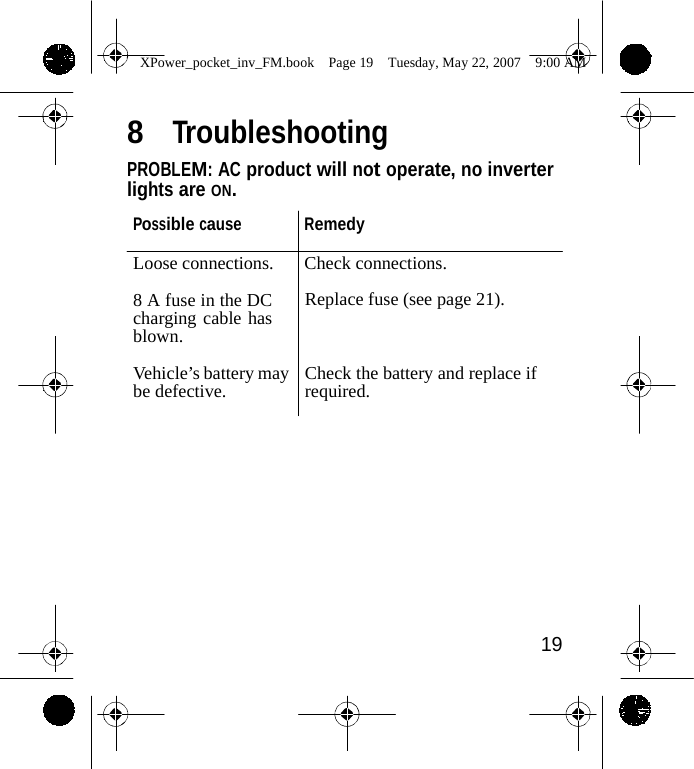
                XPower_pocket_inv_FM.book  Page 19  Tuesday, May 22, 2007  9:00 AM   8  Troubleshooting PROBLEM: AC product will not operate, no inverter lights are ON.  Possible cause Remedy  Loose connections.  Check connections.  8 A fuse in the DC charging cable has blown.  Vehicle’s battery may be defective.  Replace fuse (see page 21).    Check the battery and replace if required.             19
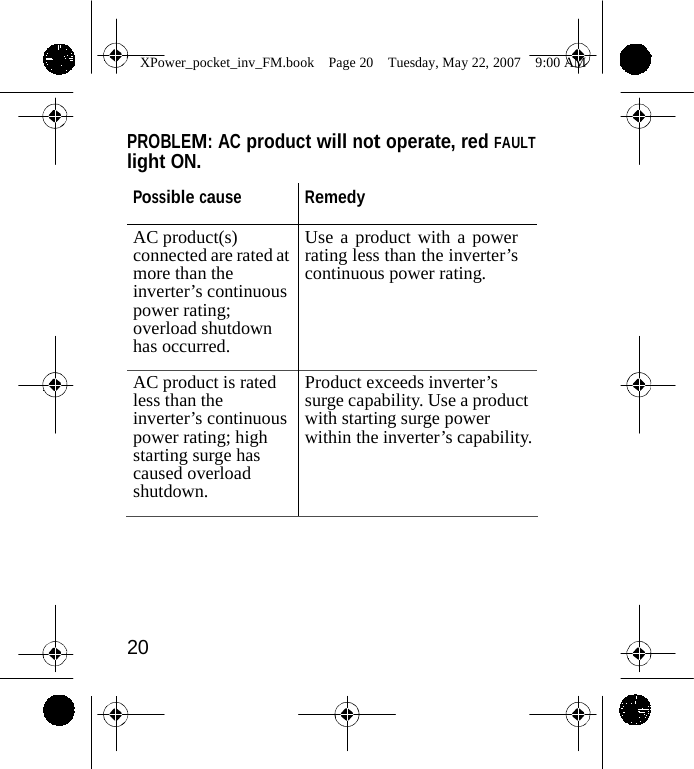
                XPower_pocket_inv_FM.book  Page 20  Tuesday, May 22, 2007  9:00 AM    PROBLEM: AC product will not operate, red FAULT light ON.  Possible cause Remedy AC product(s) connected are rated at more than the inverter’s continuous power rating; overload shutdown has occurred. Use a product with a power rating less than the inverter’s continuous power rating. AC product is rated less than the inverter’s continuous power rating; high starting surge has caused overload shutdown. Product exceeds inverter’s surge capability. Use a product with starting surge power within the inverter’s capability.      20
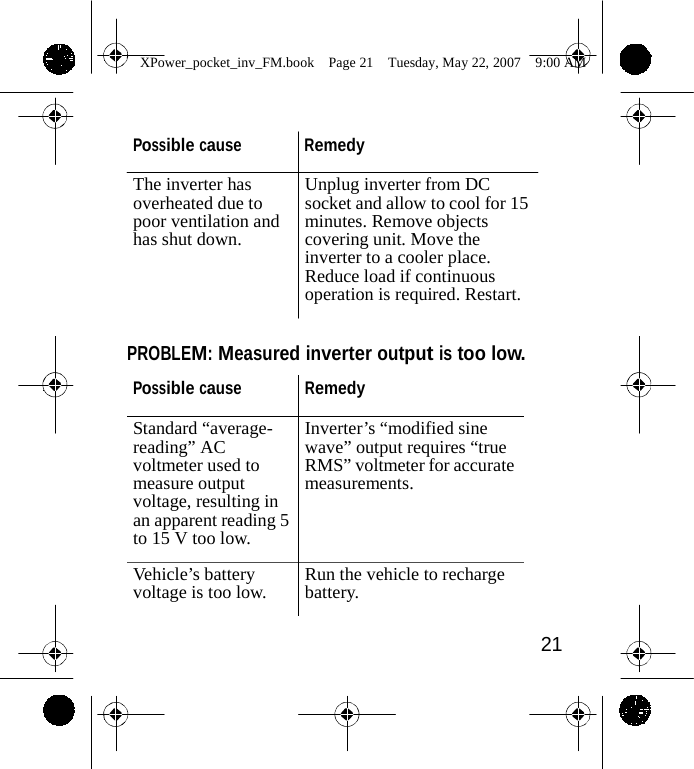
                XPower_pocket_inv_FM.book  Page 21  Tuesday, May 22, 2007  9:00 AM    Possible cause Remedy  The inverter has overheated due to poor ventilation and has shut down. Unplug inverter from DC socket and allow to cool for 15 minutes. Remove objects covering unit. Move the inverter to a cooler place. Reduce load if continuous operation is required. Restart.   PROBLEM: Measured inverter output is too low.  Possible cause Remedy Standard “average- reading” AC voltmeter used to measure output voltage, resulting in an apparent reading 5 to 15 V too low. Inverter’s “modified sine wave” output requires “true RMS” voltmeter for accurate measurements. Vehicle’s battery voltage is too low. Run the vehicle to recharge battery.  21
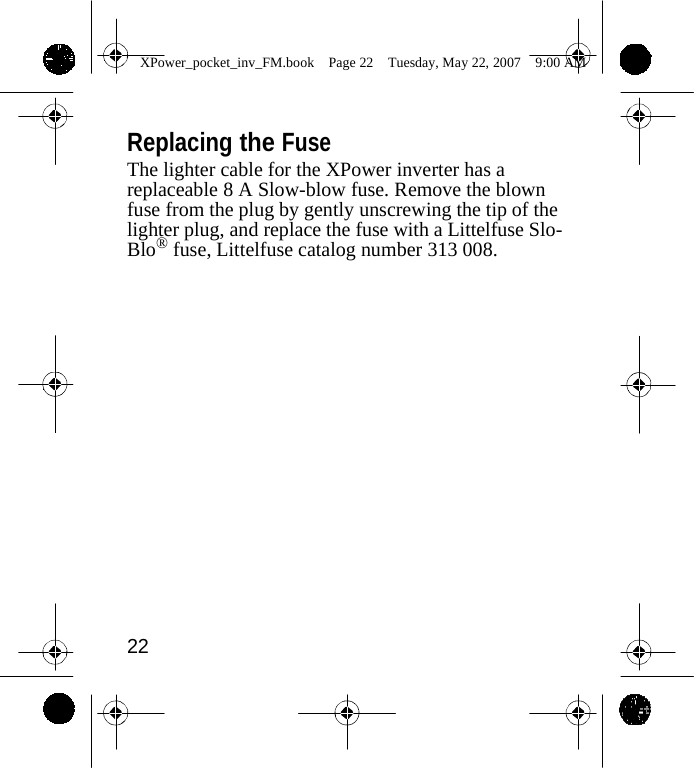
                XPower_pocket_inv_FM.book  Page 22  Tuesday, May 22, 2007  9:00 AM    Replacing the Fuse The lighter cable for the XPower inverter has a replaceable 8 A Slow-blow fuse. Remove the blown fuse from the plug by gently unscrewing the tip of the lighter plug, and replace the fuse with a Littelfuse Slo- Blo® fuse, Littelfuse catalog number 313 008.                    22
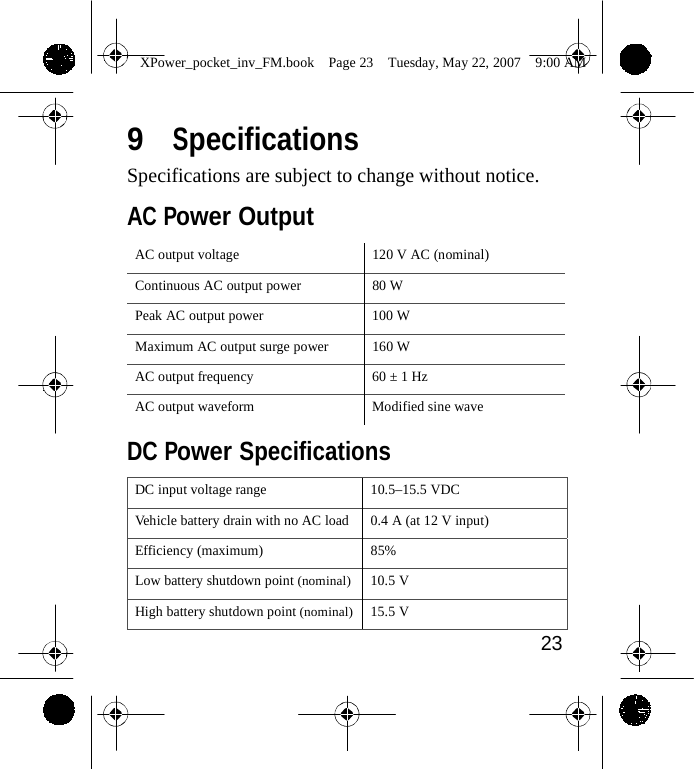
                XPower_pocket_inv_FM.book  Page 23  Tuesday, May 22, 2007  9:00 AM   9  Specifications Specifications are subject to change without notice.  AC Power Output  AC output voltage 120 V AC (nominal) Continuous AC output power 80 W Peak AC output power 100 W Maximum AC output surge power 160 W AC output frequency 60 ± 1 Hz AC output waveform Modified sine wave  DC Power Specifications  DC input voltage range 10.5–15.5 VDC Vehicle battery drain with no AC load 0.4 A (at 12 V input) Efficiency (maximum) 85% Low battery shutdown point (nominal)10.5 V High battery shutdown point (nominal)15.5 V 23
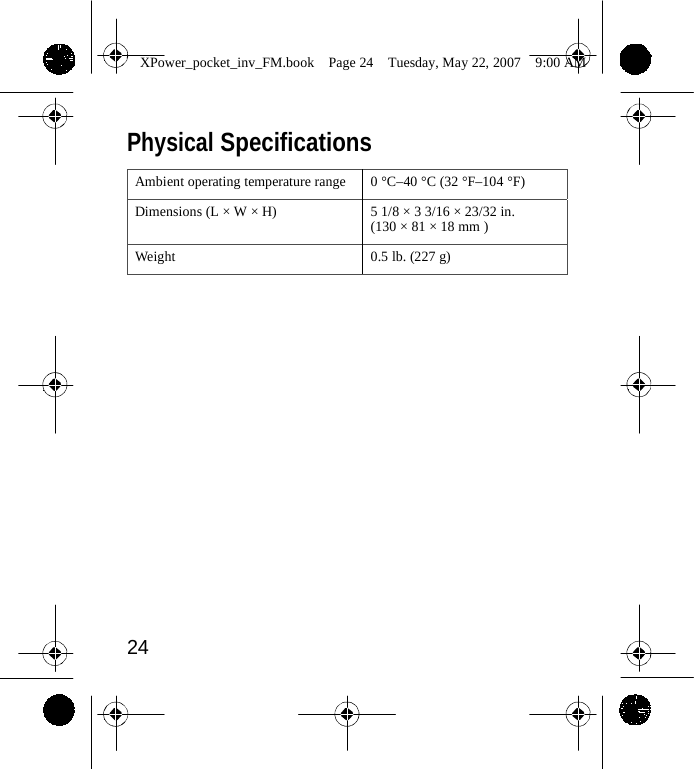
                XPower_pocket_inv_FM.book  Page 24  Tuesday, May 22, 2007  9:00 AM    Physical Specifications  Ambient operating temperature range 0 °C–40 °C (32 °F–104 °F) Dimensions (L × W × H) 5 1/8 × 3 3/16 × 23/32 in. (130 × 81 × 18 mm ) Weight 0.5 lb. (227 g)                   24
                XPower_pocket_inv_FM.book  Page 25  Tuesday, May 22, 2007  9:00 AM   10  Warranty and Return  Warranty What does this warranty cover?  This Limited Warranty is provided by Xantrex Technology, Inc. ("Xantrex") and covers defects in workmanship and materials in your XPower inverter. This warranty period lasts for 1 year from the date of purchase at the point of sale to you, the original end user customer. You require proof of purchase to make warranty claims. What will Xantrex do?      Xantrex will, at its option, repair or replace the defective product free of charge, provided that you notify Xantrex of the product defect within the Warranty Period, and provided that Xantrex through inspection establishes the existence of such a defect and that it is covered by this Limited Warranty. Xantrex will, at its option, use new and/or reconditioned parts in performing warranty repair and building replacement products. Xantrex reserves the right to use parts or products of original or improved design in the repair or replacement. If Xantrex repairs or replaces a product, its warranty continues for the remaining portion of the original Warranty Period or 90 days from the date of the return    25
                XPower_pocket_inv_FM.book  Page 26  Tuesday, May 22, 2007  9:00 AM    shipment to the customer, whichever is greater. All replaced products and all parts removed from repaired products become the property of Xantrex. Xantrex covers both parts and labor necessary to repair the product, and return shipment to the customer via a Xantrex- selected non-expedited surface freight within the contiguous United States and Canada. Alaska and Hawaii are excluded. Contact Xantrex Customer Service for details on freight policy for return shipments outside of the contiguous United States and Canada. How do you get service? If your product requires troubleshooting or warranty service, contact your dealer. If you are unable to contact your dealer, or the dealer is unable to provide service, contact Xantrex directly at:  Telephone:   1 360-925-5059 Fax: 1 360-925-5143 Website: www.xantrex.com/support  Direct returns may be performed according to the Xantrex Return Material Authorization Policy described in your product manual. For some products, Xantrex maintains a network of regional Authorized Service Centers. Call Xantrex or check our website to see if your product can be repaired at one of these facilities. 26
                XPower_pocket_inv_FM.book  Page 27  Tuesday, May 22, 2007  9:00 AM    What proof of purchase is required?    In any warranty claim, dated proof of purchase must accompany the product and the product must not have been disassembled or modified without prior written authorization by Xantrex. Proof of purchase may be in any one of the following forms: •  The dated purchase receipt from the original purchase of the product at point of sale to the end user, or •  The dated dealer invoice or purchase receipt showing original equipment manufacturer (OEM) status, or •  The dated invoice or purchase receipt showing the product exchanged under warranty               27
                XPower_pocket_inv_FM.book  Page 28  Tuesday, May 22, 2007  9:00 AM    What does this warranty not cover?    This Limited Warranty does not cover normal wear and tear of the product or costs related to the removal, installation, or troubleshooting of the customer's electrical systems.    This warranty does not apply to and Xantrex will not be responsible for any defect in or damage to: a)  the product if it has been misused, neglected, improp- erly installed, physically damaged or altered, either internally or externally, or damaged from improper use or use in an unsuitable environment; b)  the product if it has been subjected to fire, water, generalized  corrosion, biological infestations, or input voltage that creates operating conditions beyond the maximum or minimum limits listed in the Xantrex product specifications including high input voltage from generators and lightning strikes; c)  the product if repairs have been done to it other than by Xantrex or its authorized service centers (hereafter "ASCs"); d)  the product if it is used as a component part of a prod- uct expressly warranted by another manufacturer; e)  the product if its original identification (trade-mark, serial number) markings have been defaced, altered, or removed.   28
                XPower_pocket_inv_FM.book  Page 29  Tuesday, May 22, 2007  9:00 AM    Disclaimer Product THIS LIMITED WARRANTY IS THE SOLE AND EXCLUSIVE WARRANTY PROVIDED BY XANTREX IN CONNECTION WITH YOUR XANTREX PRODUCT AND IS, WHERE PERMITTED BY LAW, IN LIEU OF ALL OTHER WARRANTIES, CONDITIONS, GUARANTEES, REPRESENTATIONS, OBLIGATIONS AND LIABILITIES, EXPRESS OR IMPLIED, STATUTORY OR OTHERWISE IN CONNECTION WITH THE PRODUCT, HOWEVER ARISING (WHETHER BY CONTRACT, TORT, NEGLIGENCE, PRINCIPLES OF MANUFACTURER'S LIABILITY, OPERATION OF LAW, CONDUCT, STATEMENT OR OTHERWISE), INCLUDING WITHOUT RESTRICTION ANY IMPLIED WARRANTY OR CONDITION OF QUALITY, MERCHANTABILITY OR FITNESS FOR A PARTICULAR PURPOSE.  ANY IMPLIED WARRANTY OF MERCHANTABILITY OR FITNESS FOR A PARTICULAR PURPOSE TO THE EXTENT REQUIRED UNDER APPLICABLE LAW TO APPLY TO THE PRODUCT SHALL BE LIMITED IN DURATION TO THE PERIOD STIPULATED UNDER THIS LIMITED WARRANTY. IN NO EVENT WILL XANTREX BE LIABLE FOR ANY SPECIAL, INDIRECT, INCIDENTAL OR CONSEQUENTIAL DAMAGES, LOSSES, COSTS OR EXPENSES HOWEVER ARISING WHETHER IN CONTRACT OR TORT INCLUDING WITHOUT RESTRICTION ANY ECONOMIC LOSSES OF ANY KIND, ANY LOSS OR DAMAGE TO PROPERTY, ANY PERSONAL INJURY, ANY DAMAGE OR INJURY ARISING FROM OR AS A RESULT OF MISUSE OR ABUSE, OR THE INCORRECT INSTALLATION, INTEGRATION OR OPERATION OF THE PRODUCT.  29
                XPower_pocket_inv_FM.book  Page 30  Tuesday, May 22, 2007  9:00 AM    Exclusions If this product is a consumer product, federal law does not allow an exclusion of implied warranties.    To the extent you are entitled to implied warranties under federal law, to the extent permitted by applicable law they are limited to the duration of this Limited Warranty.    Some states and provinces do not allow limitations or exclusions on implied warranties or on the duration of an implied warranty or on the limitation or exclusion of incidental or consequential damages, so the above limitation(s) or exclusion(s) may not apply to you.    This Limited Warranty gives you specific legal rights.    You may have other rights which may vary from state to state or province to province.  Warning: Limitations On Use Please refer to your product manual for limitations on uses of the product. SPECIFICALLY, PLEASE NOTE THAT THE XPOWER INVERTER SHOULD NOT BE USED IN CONNECTION WITH LIFE SUPPORT SYSTEMS OR OTHER MEDICAL EQUIPMENT OR DEVICES. WITHOUT LIMITING THE GENERALITY OF THE FOREGOING, XANTREX MAKES NO REPRESENTATIONS OR WARRANTIES REGARDING THE USE OF THE XANTREX XPOWER INVERTER IN CONNECTION WITH LIFE SUPPORT SYSTEMS OR OTHER MEDICAL EQUIPMENT OR DEVICES.   30
                XPower_pocket_inv_FM.book  Page 31  Tuesday, May 22, 2007  9:00 AM    Please note that the XPower inverter is not intended for use as an uninterruptible power supply and Xantrex makes no warranty or representation in connection with any use of the product for such purposes.  Return Material Authorization Policy Before returning a product directly to Xantrex you must obtain a Return Material Authorization (RMA) number and the correct factory "Ship To" address. Products must also be shipped prepaid.  Product shipments will be refused and returned at your expense if they are unauthorized, returned without an RMA number clearly marked on the outside of the shipping box, if they are shipped collect, or if they are shipped to the wrong location. When you contact Xantrex to obtain service, please have your instruction manual ready for reference and be prepared to supply: •  The serial number of your product •  Information about the installation and use of the unit •  Information about the failure and/or reason for the return •  A copy of your dated proof of purchase     31
                XPower_pocket_inv_FM.book  Page 32  Tuesday, May 22, 2007  9:00 AM    Return Procedure 1.  Package the unit safely, preferably using the original box and packing materials. Please ensure that your product is shipped fully insured in the original packaging or equivalent. This warranty will not apply where the product is damaged due to improper packaging. 2. Include the following: •  The RMA number supplied by Xantrex Technology, Inc. clearly marked on the outside of the box. •  A return address where the unit can be shipped. Post office boxes are not acceptable. •  A contact telephone number where you can be reached during work hours. •  A brief description of the problem. 3.  Ship the unit prepaid to the address provided by your Xantrex customer service representative. If you are returning a product from outside of the USA or Canada    In addition to the above, you MUST include return freight funds and are fully responsible for all documents, duties, tariffs, and deposits.    32
                XPower_pocket_inv_FM.book  Page 33  Tuesday, May 22, 2007  9:00 AM    If you are returning a product to a Xantrex Authorized Service Center (ASC)    A Xantrex return material authorization (RMA) number is not required. However, you must contact the ASC prior to returning the product or presenting the unit to verify any return procedures that may apply to that particular facility.  Out of Warranty Service If the warranty period for your XPower inverter has expired, if the unit was damaged by misuse or incorrect installation, if other conditions of the warranty have not been met, or if no dated proof of purchase is available, your inverter may be serviced or replaced for a flat fee. To return your XPower inverter for out of warranty service, contact Xantrex Customer Service for a Return Material Authorization (RMA) number and follow the other steps outlined in “Return Procedure” on page 32. Payment options such as credit card or money order will be explained by the Customer Service Representative. In cases where the minimum flat fee does not apply, as with incomplete units or units with excessive damage, an additional fee will be charged. If applicable, you will be contacted by Customer Service once your unit has been received.   33
                XPower_pocket_inv_FM.book  Page 34  Tuesday, May 22, 2007  9:00 AM                                                                                                          34

Navigation menu