Newidea Technology 51206 Bluetooth dongle User Manual
Shenzhen Newidea Technology Co., Limited Bluetooth dongle
User Manual

USER
MANUAL
Bluetooth dongle
51206
1
Bluetooth 4.0
Transmission range up to 50 m
Miniature dimensions
LED control lamp
Low energy consumption
Able to connect up to 7 devices at the same time
CSR harmony as a part of the package
Compatible with Windows 8/8.1
2 Installation
1. Insert bluetooth dongle to USB port of the computer.
2. Wait for installation of drivers.
For use of APTX function for pairing the bluetooth dongle with a headset or speaker you
must install the utility from the attached CD. Installation needs the access to Internet.
During the installation it may be displayed a warning about installation of non-signed
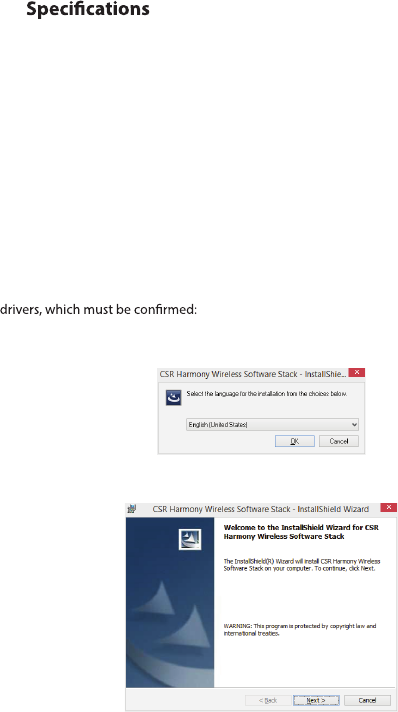
1. Start the installation by clicking the setup.exe.
2. Select the language and click OK.
3. Click Next.
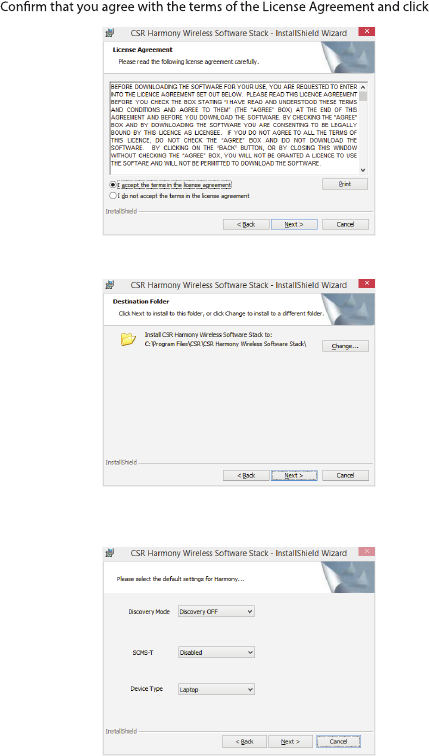
4. Next.
5. Select the installation directory (recommended to use the preset) and click Next.
6. Select the device type, Laptop or PC/Desktop. You may keep the original values of
options of Discovery Mode and SCMS-T. Click Next.
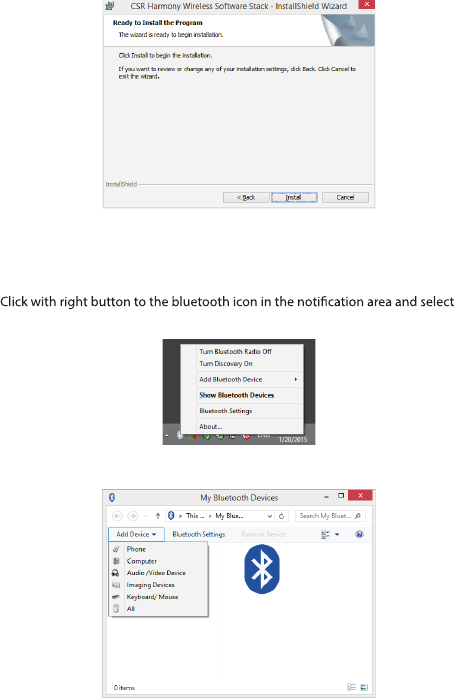
7. Click Install.
8. Click Finish.
3 Pairing
1. Show
Bluetooth Devices.
2. Click Add Device and select, for example, Audio/Video device.
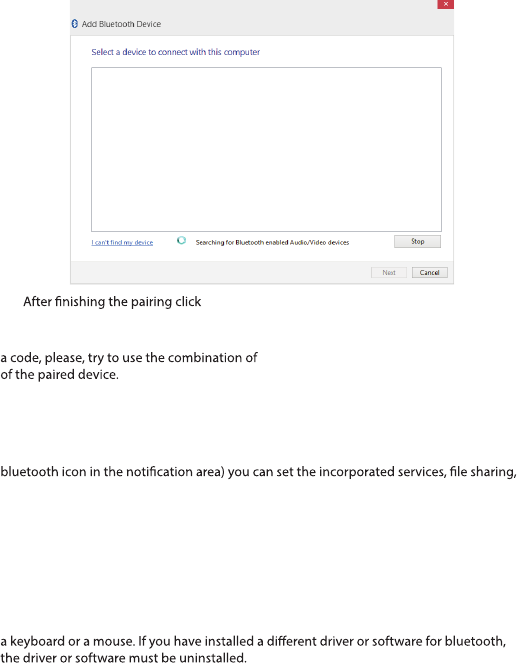
3. Make sure that the device is visible during the searching. Select the found out device
from the list and click Next.
4. Finish.
During the pairing you may be prompted to enter the pairing code. You must enter the
identical code to both devices. If you pair the earphones that do not enable to enter
0000 or 1234, or have a look at the manual
4 Additional information
In setting the Bluetooth (the item in the menu after clicking with right button to the
COM ports, PIM and others.
5 Problem solving
Installation was carried out smoothly but the dongle is not detected by
computer.
Make sure that the USB port used for the dongle is functioning via connecting e.g.
RF warning statement:
The dongle is functioning but in searching no device is displayed.
Make sure that the searched device is within the range - 50 m in the open space without
obstacles or 10 m in the building. Make sure that the device is switched on and ready and
in the searching mode.
FCC STATEMENT :
This device complies with Part 15 of the FCC Rules. Operation is subject to the following
two conditions:
(1) This device may not cause harmful interference, and (2) This device must accept any
interference received, including interference that may cause undesired operation.
Warning: Changes or modifications not expressly approved by the party responsible for
compliance could void the user's authority to operate the equipment.
NOTE: This equipment has been tested and found to comply with the limits for a Class B
digital device, pursuant to Part 15 of the FCC Rules. These limits are designed to provide
reasonable protection against harmful interference in a residential installation. This
equipment generates uses and can radiate radio frequency energy and, if not installed
and used in accordance with the instructions, may cause harmful interference to radio
communications. However, there is no guarantee that interference will not occur in a
particular installation. If this equipment does cause harmful interference to radio or
television reception, which can be determined by turning the equipment off and on, the
user is encouraged to try to correct the interference by one or more of the following
measures:
Reorient or relocate the receiving antenna.
Increase the separation between the equipment and receiver.
Connect the equipment into an outlet on a circuit different from that to which the
receiver is connected.
Consult the dealer or an experienced radio/TV technician for help.
The device has been evaluated to meet general RF exposure requirement. The device
can be used in portable exposure condition without restriction.