Niles Audio Sps 6 Users Manual DS00098A/SPS
SPS-6 to the manual 382ebd7c-36f8-e994-bdf3-537e851d7ba5
2015-02-02
: Niles-Audio Niles-Audio-Sps-6-Users-Manual-439359 niles-audio-sps-6-users-manual-439359 niles-audio pdf
Open the PDF directly: View PDF  .
.
Page Count: 2
• Pre-printed Room Labels
are included for easy identi-
fication of speaker ON/OFF
buttons.
• Isolated left and right chan-
nel ground returns make
the SPS-6 compatible with
all types of amplifiers.
• May be used with 4, 6 or 8
ohm speaker systems.
• Self-cleaning, silver-plated
switch contacts assure
years of trouble free use.
• 100% tested, electronically
and acoustically, for fre-
quency response, distortion
and power handling.
• Protection circuit safeguards
your receiver or amplifier.
• Spring-loaded push termi-
nal connectors accommo-
date up to 14 gauge wire or
"pins", making the SPS-6
compatible with most high
definition speaker cables.
• Ten year parts and labor
warranty.
FEATURES & BENEFITS
FEATURES & BENEFITS
INTRODUCTION
SSPPSS--66SPEAKER SELECTION SYSTEM
PROTECTION
132 456
NILES
NILES TECHNICAL DATA SHEET
SPECIFICATIONS
Audio Power Handling
100 watts/channel con-
tinuous music power
Mounting
Table-top component
Frequency Response
+0 dB, -0 dB (flat) from
20 Hz to 20 kHz
Wiring Requirements
Individual runs of
2-conductor speaker
wire. Connectors
accommodate wire
sizes 14-22 gauge. 16
gauge recommended
Overall Dimensions
11-1/4" wide x 2" high
x 6-3/4" deep
Weight
2-1/4 lb.
SPS-6
Speaker Selection System
BLENDING HIGH FIDELITY
AND ARCHITECTURE®
INTRODUCTION
The SPS-6 enables you to connect up to six pairs of speakers to
your stereo receiver or amplifier and play one pair, any combi-
nation of pairs or all pairs at once.
CONTINUED OTHER SIDE ➯
SPEAKER 2 SPEAKER 1SPEAKER 4 SPEAKER 3SPEAKER 5SPEAKER 6
LR
AMPLIFIER
LRLR
++++
----
++++
----
LRLR
++++
----
LRLR
++++
----
Niles Audio
Corporation,Inc.
Miami, Florida USA
NILES
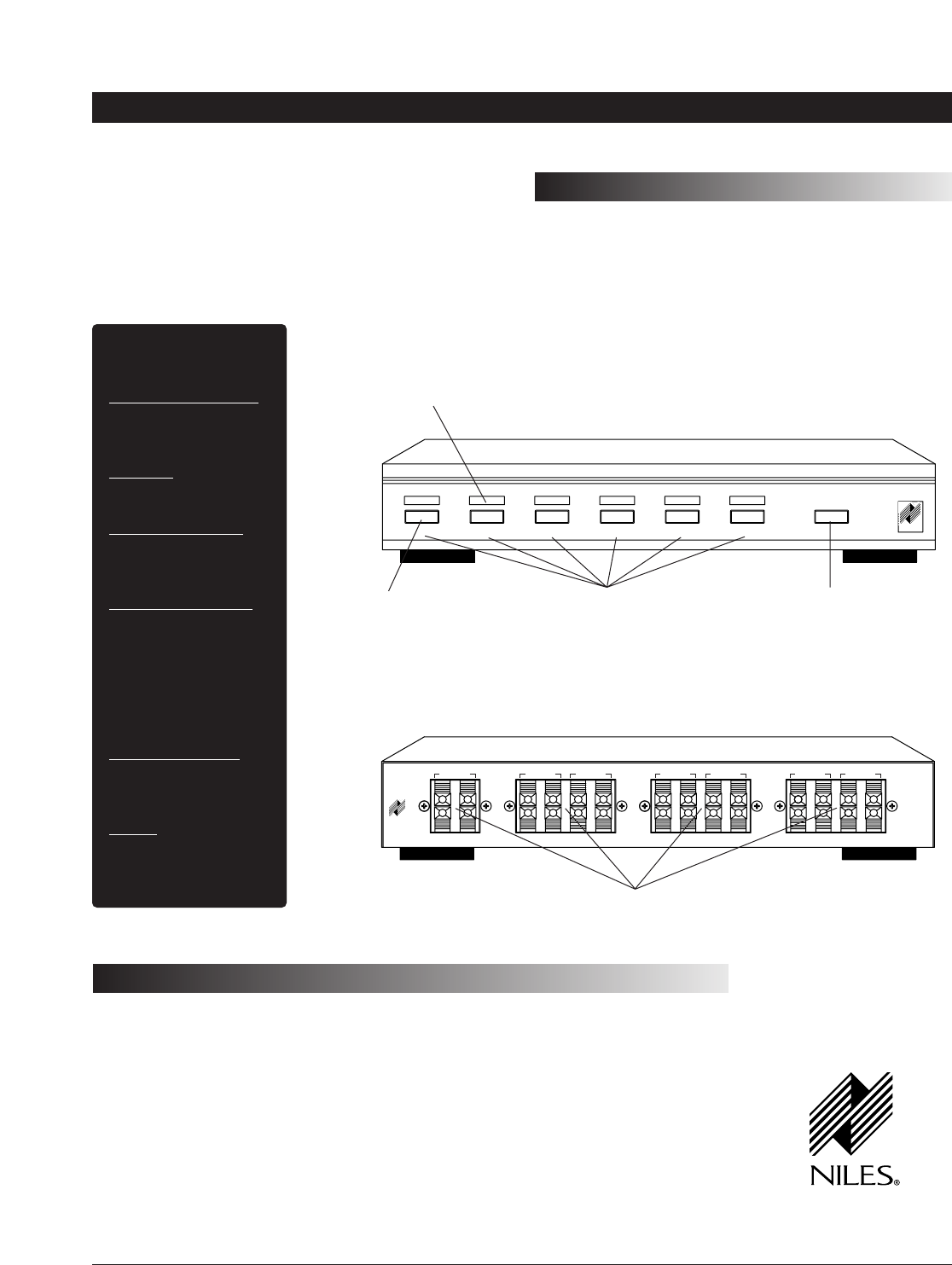
Recessed areas for
custom room labels
Simple push-button
operation Connect up to six
pairs of speakers
Spring-loaded push
connectors
Attractive low-profile design
Protection switch safeguards your
receiver or amplifier even with all
6 pairs of speakers playing
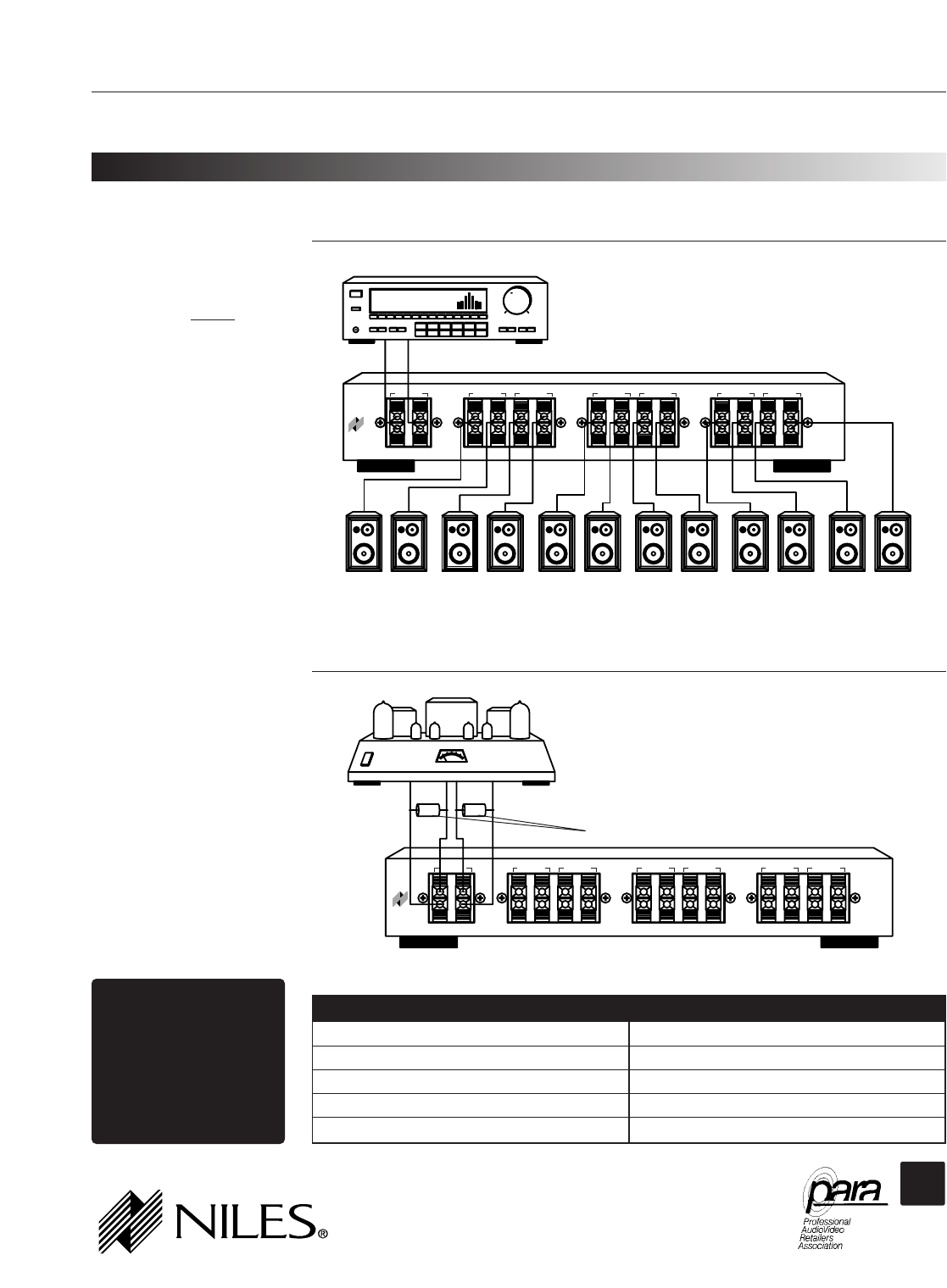
Connections
If your amplifier or receiver
has "A" and "B" speaker pair
outputs, connect the SPS-6 to
the "A" points. Do not con-
nect anything to "B". This
will prevent the amplifier or
receiver from driving an
unusually low impedance
load.
Using the SPS-6 with Tube
Type Amplifiers
Virtually all tube amplifiers
must have a load connected
at all times. If the amplifier to
be connected to the SPS-6 is
a tube amplifier, be sure to
always have at least one pair
of speakers switched on at all
times. An alternative is to per-
manently connect a 150 ohm,
5 watt resistor across the tube
amplifier's output in parallel
with the SPS-6.
Impedance Matching
You will need to activate the
SPS-6's PROTECTION button
whenever the overall system
impedance might fall below
4 ohms.
TUNER 94.9
15
SPEAKER 2 SPEAKER 1SPEAKER 4 SPEAKER 3SPEAKER 5SPEAKER 6
LR
AMPLIFIER
LRLR
++++
----
++++
----
LRLR
++++
----
LRLR
++++
----
Niles Audio
Corporation, Inc.
Miami, Florida USA
NILES
150 150
SPEAKER 2 SPEAKER 1SPEAKER 4 SPEAKER 3SPEAKER 5SPEAKER 6
LR
AMPLIFIER
LRLR
++++
----
++++
----
LRLR
++++
----
LRLR
++++
----
Niles Audio
Corporation, Inc.
Miami, Florida USA
NILES
TOOLS REQUIRED
• 1/8" Standard Slotted
Screwdriver
• Wire Stripper
MODEL SPS-6 Speaker Selection System (continued)
NILES AUDIO CORPORATION
12331 S.W. 130 STREET MIAMI, FLORIDA 33186
TEL: (305) 238-4373 FAX: (305) 238-0185 INTERNET: www.nilesaudio.com
©1999 Niles Audio Corporation. Niles, the Niles logo and Blending High Fidelity and Architecture are registered trademarks of Niles Audio Corporation. Printed in USA DS00098A
Connections
Receiver
Speaker Pairs
Protecting a Tube Amplifier
Tube Amplifier
150 ohm, 5 watt Resistors
APPLICATION NOTES
APPLICATION NOTES
When playing the following speakers:
1 or 2 pair of 8-ohm speakers
3 or more pairs of 8-ohm speakers
1 pair of 4-ohm speaker
2, or more pairs of 4-ohm speakers
Any combination of 4 and 8 ohm speakers
The Protection button should be:
OFF
ON
OFF
ON
ON
CEDIA
CUSTOM
ELECTRONIC
DESIGN &
INSTALLATION
ASSOCIATION
CHARTER MEMBER
