Nortek Security and Control 2GIG CAMHD100 IP Network Camera User Manual 2GIG HD100 Camera Install Instructions online
2GIG Technologies, Inc. IP Network Camera 2GIG HD100 Camera Install Instructions online
user manual
2GI
http://dealer.2gig.com/qr/hd100
INSTALL INSTRUCTIONS
Thisdocumentdescribesthebasicinstallationinformationforthe2GIG
Technolo giesHD100Camera(2GIG‐CAM‐HD100).ToinstalltheHD100
Camera,youwillneedaPCwithinternetaccess.
Box Contents
•Camera
•Camerabase
•Wireretentionclip
•Poweradapter
•4non‐slipadhesivefeet
SPECIFICATIONS
INSTALLING THE HD100 CAMERA
WiFi to the On-Site Router (WPS)
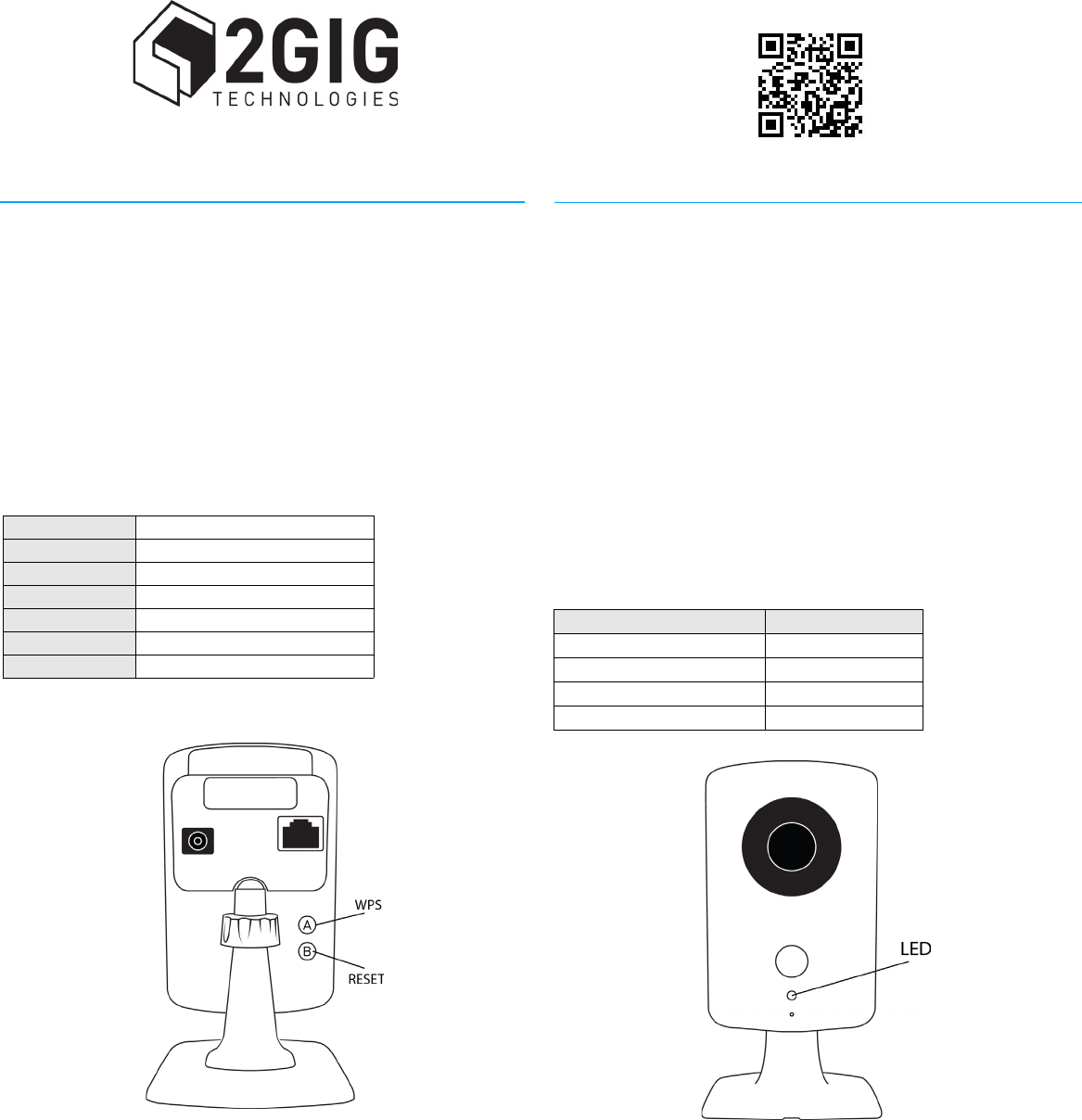
1Iftheon‐siteroutersupportsWPS,presstheWPSbuttonuntilthe
routergoesintoWPSmode(thiswilldifferslightlyfromrouterto
router).ThisactioncausestheroutertolistenforanewWPSdevice.
2PresstheWPSbutton(A)ontheHD100Camera.Thisactioncauses
thecameratoannounceitselftotherouterasaWPSdevice.While
thecameraisinWPSmode,thecameradisplaysablinkingyellow
LED.
3DonotpressanybuttonsontheHD100CamerauntilthecameraLED
displaysgreen,indicatingthatthecamerahassuccessfullyconnected
tothenetwork.
4FromtheAlarm.comwebsiteaddandconfigurethecamera.
WiFi to the On-Site Router
1ConnectthecameradirectlytotherouterusinganEthernetcable.
2FromtheAlarm.comwebsiteaddandconfigurethecamerato
connectusingWiFi.
3DisconnecttheEthernetcablefromthecamera.AWiFiconnection
willbeestablished.
Ethernet to the Router
1ConnectthecameradirectlytotherouterusinganEthernetcable.
2FromtheAlarm.comwebsiteaddandconfigurethecamera.
RESET TO DEFAULTS
•Pressandholdbutton(B)untilthecameraLEDchangestoyellow
(approximately10seconds).WhenthecameraLEDchangestoyellow,
releasebutton(B)toresetthecameratofactorydefaults.
LED States
Ethernet 10/100Mbps
WiFi 802.11b/g/n
PIR Max5mcoverage
IRLED 5millumination
Adapter 12V,1A
HDVideo Upto720p15fps
Protocols H.264,MJPEG
State LEDPattern
NormalOperation SolidGreen
ConnectivityProblems BlinkingRed
WPSTransactioninProgress BlinkingYellow
Booting SolidYellow
2GI
2GIG HD100 CAMERA
IndoorHDcamerawithnightvision
IMPORTANT SAFETY INSTRUCTIONS
1Donotinstallthisdevicenearwater.
2Donotinstallnearanyheatsourcessuchasradiators,heatregisters,
stoves,orotherapparatus(includingamplifiers)thatproduceheat.
3Onlyuseattachmentsandaccessoriesspecifiedby2GIGTechnologies.
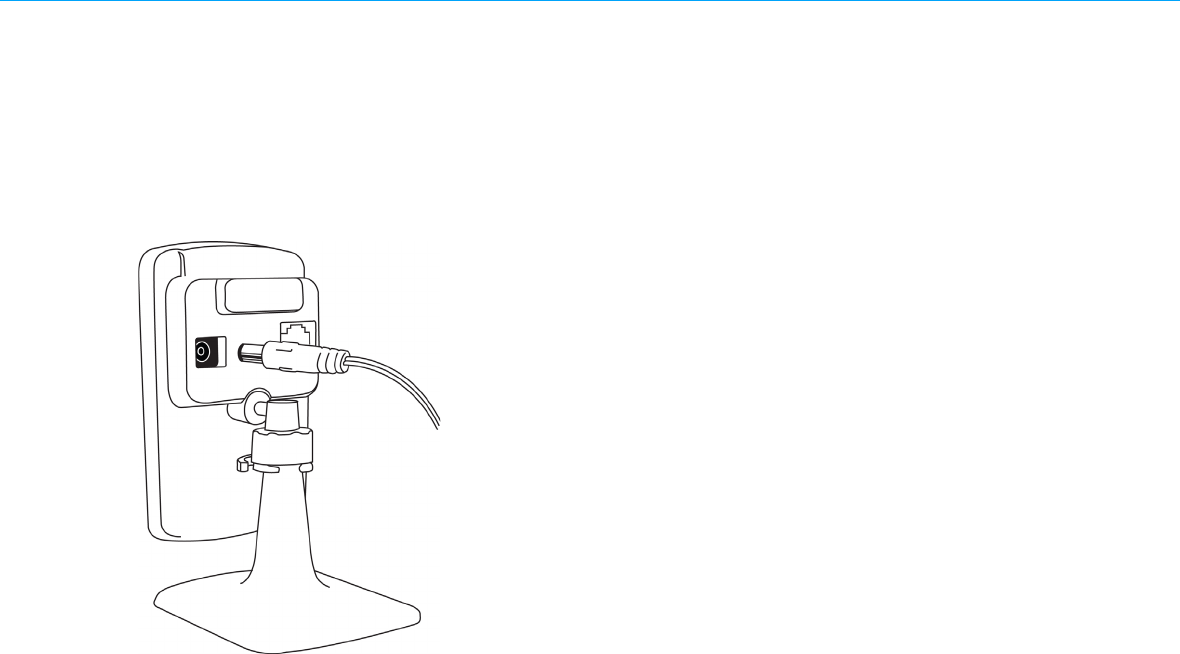
4Protectthepowercordfrombeingwalkedonorpinchedparticularly
atthepointwhereitexitsfromthedevice.(Seefigurebelow)
REGULATORY INFORMATION
Notice:Unauthorizedchangesormodificationscouldvoidtheuser’s
authoritytooperatetheequipment.
ThisdevicecomplieswithPart15oftheFCCRulesandIndustryCanada
license‐exemptRSSstandard(s).Operatingissubjecttothefollowingtwo
conditions:(1)Thisdevicemaynotcauseharmfulinterference,and(2)
thisdevicemustacceptanyinterferencereceived,includinginterference
thatmaycauseundesiredoperationofthedevice.
Thisequipmenthasbeentestedandfoundtocomplywiththelimitsfora
ClassBcomputingdevice,pursuanttoPart15ofFCCRules.Theselimits
aredesignedtoprovidereasonableprotectionagainstharmful
interferenceinaresidentialinstallation.Thisequipmentgenerates,uses
andcanradiateradiofrequencyenergyandifnotinstalledandusedin
accordancewiththeinstructions,maycauseharmfulinterferencetoradio
communications.
However,thereisnoguaranteethatinterferencewillnotoccurina
particularinstallation.Ifthisequipmentdoescauseharmfulinterference
toradioortelevisionreception,whichcanbedeterminedbyturningthe
equipmentoffandon,theuserisencouragedtotrytocorrectthe
interferencebyoneormoreofthefollowingmeasures:
•Reorientorrelocatethereceivingantenna
•Increasetheseparationbetweentheequipmentandthereceiver
•Consultthedealeroranexperiencedradio/televisiontechnicianfor
help
LIMITED WARRANTY
This2GIGTechnologiesproductiswarrantedagainstdefectsinmaterial
andworkmanshipfor1year.Thiswarrantyextendsonlytowholesale
customerswhobuydirectfrom2GIGTechnologiesorthrough2GIG
Technologies’normaldistributionchannels.2GIGTechnologiesdoesnot
warrantthisproducttoconsumers.Consumersshouldinquirefromtheir
sellingdealerastothenatureofthedealer’swarranty,ifany.
Therearenoobligationsorliabilitiesonthepartof2GIGTechnologiesfor
consequentialdamagesarisingoutoforinconnectionwithuseor
performanceofthisproductorotherindirectdamageswithrespectto
lossofproperty,revenue,orprofit,orcostofremoval,installation,or
reinstallation.Allimpliedwarrantiesforfunctionality,arevalidonlyuntil
thewarrantyexpires.This2GIGTechnologiesWarrantyisinlieuofall
otherwarrantiesexpressedorimplied.
AllproductsreturnedforwarrantyservicerequireaReturnProduct
AuthorizationNumber(RPA#).Contact2GIGTechnologiesat1(866)670‐
1591foranRPA#andotherimportantdetails.
Warrantyservicereturnaddress:
2GIGTechnologies,Inc.
2961WMapleLoopDrive
Lehi,Utah84043
TechnicalSupportContactInformation
TollFree:1(800)2GIG‐TECH/1(800)244‐4832
Email:techsupport@2gig.com
Internet:dealer.2gig.com
PN:77‐100001‐001Rev.D