Nortek Security and Control 2GIG TS1Y Remote Keypad User Manual 2GIG TS1 Install Instructions print

2GIG Technologies, Inc. Remote Keypad 2GIG TS1 Install Instructions print

User Manual

INSTALL INSTRUCTIONSThis document describes the basic installaon informaon for the 2GIG-2GIG-TS1 and the steps necessary to “pair” (or learn in) the Touchscreen Wireless Keypad to the Control Panel. Box Contents• 2GIG-TS1• AC Power Supply• AC Power Supply Bracket• Screws and anchorsTIP: The box contents will vary depending on whether the 2GIG-TS1 was purchased as part of a kit or not.BEFORE YOU BEGINIs the 900 MHz Transceiver installed in the Panel? For the 2GIG-TS1 to communicate with the Control Panel, the 900 MHz Transceiver (2GIG-XCVR2) must be already be installed in the Control Panel.Is the 2GIG-TS1 paired with the Control Panel?The 2GIG-TS1 and the Control Panel have to be paired to communicate with each other.To check for to see if the 2GIG-TS1 is paired with the Control PanelUpon power up, the 2GIG-TS1 displays the following screen:2GIG-TS1 PRODUCT OVERVIEWThe Model 2GIG-2GIG-TS1 Touch Screen Wireless Keypad is a remote control device that offers the funconality of a system keypad but also extends all user control of the 2GIG Control panel to other locaons in a user’s home. Using the 2GIG-TS1, users can control lights, thermostat and door locks and see the status of every zone in their home using the exact same and familiar interface found on the Control Panel. The keypad is designed for indoor use only.IMPORTANT: Not for UL 985 installaons.The panel   and   buons serve as controls as well as indicators. Pressing the   (Emergency) buon displays emergency icons on the display for Panic, Fire, and Emergency alarm acvaon (each has programmable opons and can be enabled or disabled). Pressing the   (Home) buon changes the system display to the Home Screen. The keypad is powered from a plug-in power supply. The 2GIG-TS1 exchanges informaon through a secure 2-way wireless connecon with the Control Panel.NOTE: Before using the 2GIG-TS1 it must be “learned” into the Control Panel. Mounting ToolsSome special tools may be required to mount the 2GIG-TS1 onto the wall:• Screwdriver• Pencil• Wire stripper• Staple gun• Drywall saw (or equivalent)• LadderPREPARING THE KEYPADNOTE: Check that the 2GIG-TS1 Keypad is funconing before selecng a locaon for the Keypad.1Remove the screw.2Flip open the back cover of the 2GIG-TS1.3Disconnect the hanging strap.4Use the back cover as the mounting plate. 2GITouch Screen Wireless KeypadFor Remote Control of the 2GIG Security SystemINSTRUCTIONS, INSTALL 2GIG-TS1 P/N: 77000090-001 REV D - INK: BLACK - MATERIAL: 20 LB MEAD BOND - SIZE 8.5000” X 11.0000 - SCALE 1 - 1 (FIRST OF FIVE PAGES) PRINTING FRONT AND BACK FOLDING: FOLD TO FIT IN BOX
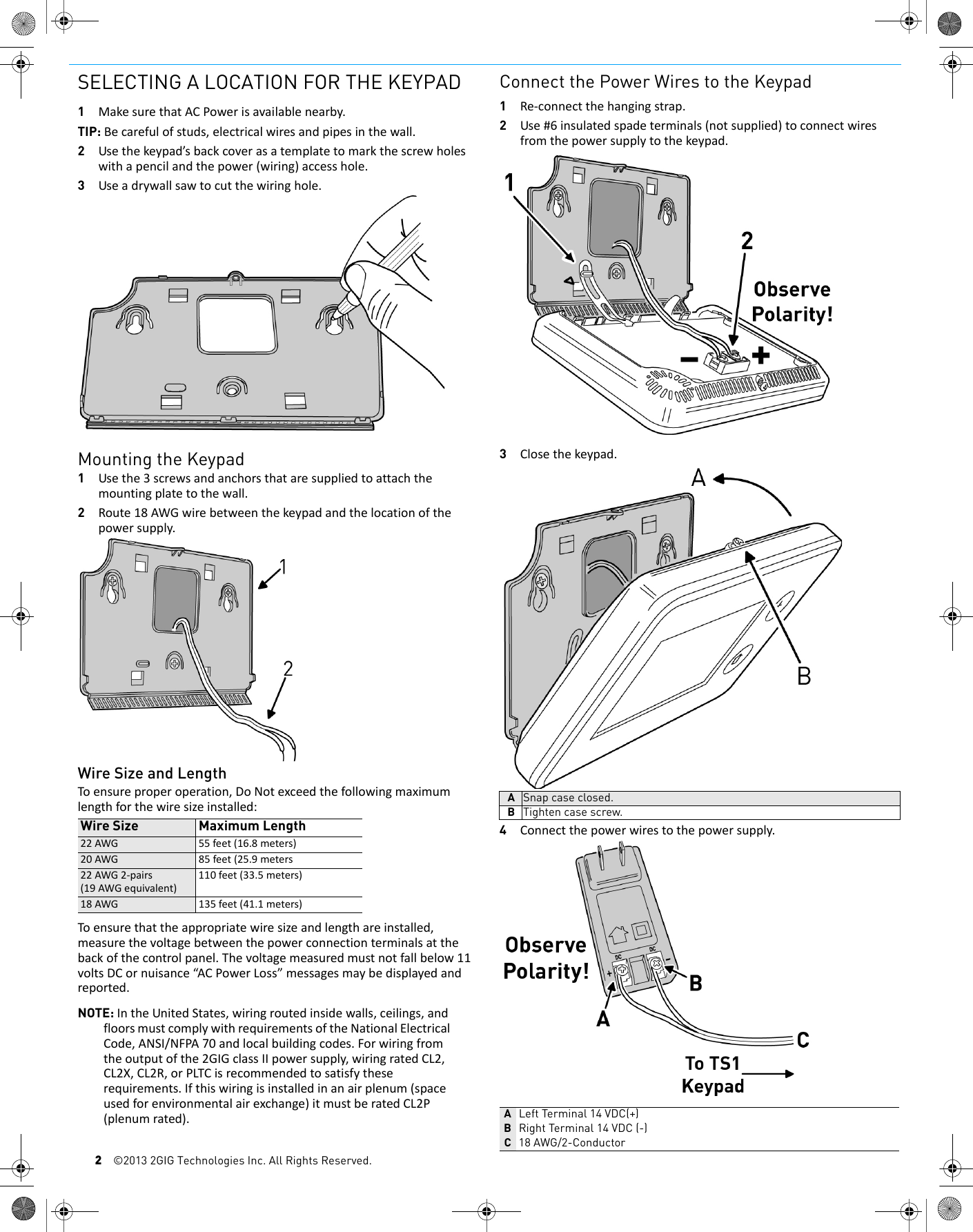
2©2013 2GIG Technologies Inc. All Rights Reserved.SELECTING A LOCATION FOR THE KEYPAD1MakesurethatACPowerisavailablenearby.TIP: Becarefulofstuds,electricalwiresandpipesinthewall.2Usethekeypad’sbackcoverasatemplatetomarkthescrewholeswithapencilandthepower(wiring)accesshole.3Useadrywallsawtocutthewiringhole.Mounting the Keypad1Usethe3screwsandanchorsthataresuppliedtoattachthemountingplatetothewall.2Route18AWGwirebetweenthekeypadandthelocationofthepowersupply.Wire Size and LengthToensureproperoperation,DoNotexceedthefollowingmaximumlengthforthewiresizeinstalled:Toensurethattheappropriatewiresizeandlengthareinstalled,measurethevoltagebetweenthepowerconnectionterminalsatthebackofthecontrolpanel.Thevoltagemeasuredmustnotfallbelow11voltsDCornuisance“ACPowerLoss”messagesmaybedisplayedandreported.NOTE: IntheUnitedStates,wiringroutedinsidewalls,ceilings,andfloorsmustcomplywithrequirementsoftheNationalElectricalCode,ANSI/NFPA70andlocalbuildingcodes.Forwiringfromtheoutputofthe2GIGclassIIpowersupply,wiringratedCL2,CL2X,CL2R,orPLTCisrecommendedtosatisfytheserequirements.Ifthiswiringisinstalledinanairplenum(spaceusedforenvironmentalairexchange)itmustberatedCL2P(plenumrated).Connect the Power Wires to the Keypad1Re‐connectthehangingstrap.2Use#6insulatedspadeterminals(notsupplied)toconnectwiresfromthepowersupplytothekeypad.3Closethekeypad.4Connectthepowerwirestothepowersupply.Wire Size Maximum Length22AWG 55feet(16.8meters)20AWG 85feet(25.9meters22AWG2‐pairs(19AWGequivalent)110feet(33.5meters)18AWG 135feet(41.1meters)ASnap case closed.BTighten case screw.ALeft Terminal 14 VDC(+)BRight Terminal 14 VDC (-)C18 AWG/2-Conductor
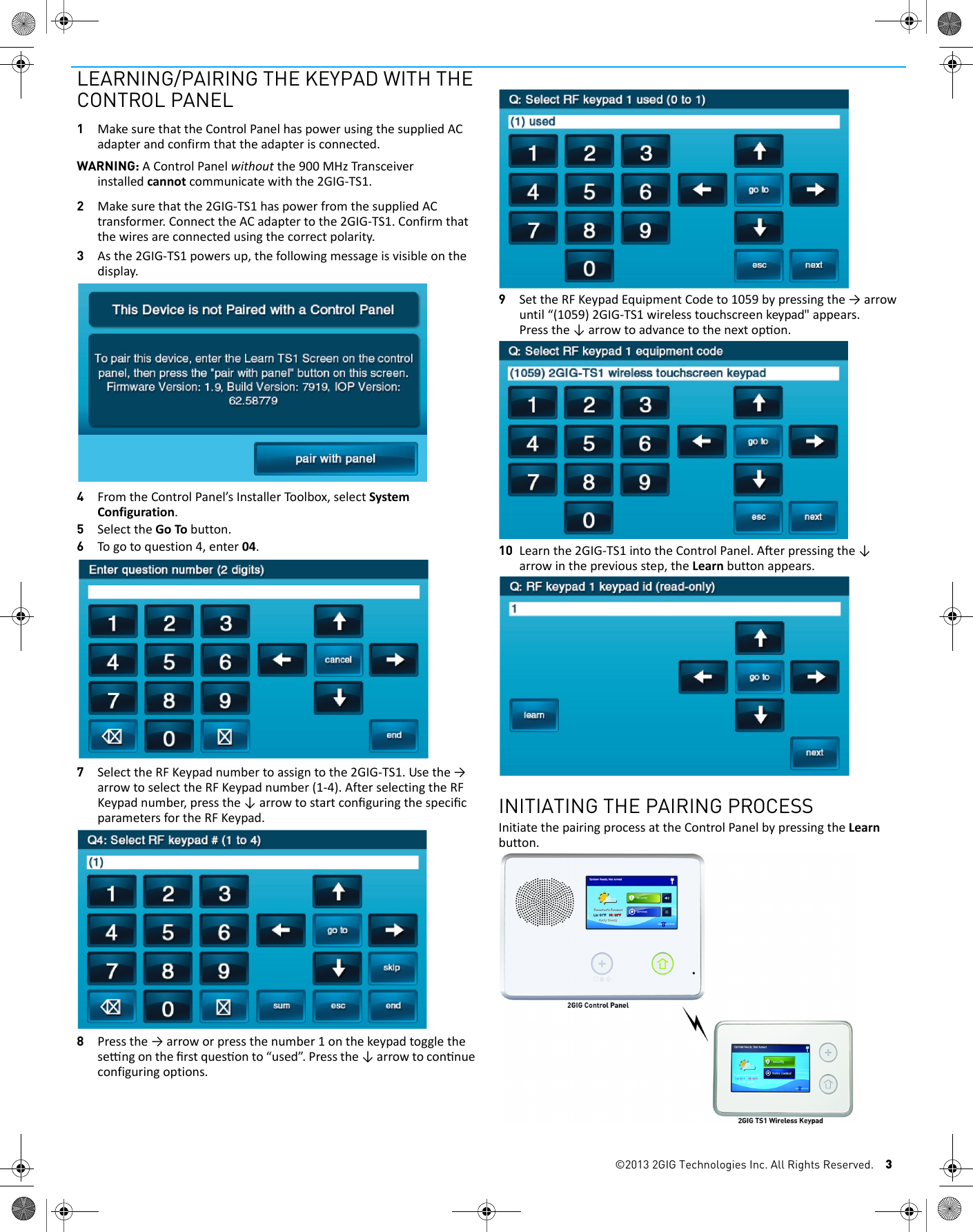
©2013 2GIG Technologies Inc. All Rights Reserved. 3LEARNING/PAIRING THE KEYPAD WITH THE CONTROL PANEL1MakesurethattheControlPanelhaspowerusingthesuppliedACadapterandconfirmthattheadapterisconnected.WARNING: AControlPanelwithoutthe900MHzTransceiverinstalledcannotcommunicatewiththe2GIG‐TS1.2Makesurethatthe2GIG‐TS1haspowerfromthesuppliedACtransformer.ConnecttheACadaptertothe2GIG‐TS1.Confirmthatthewiresareconnectedusingthecorrectpolarity.3Asthe2GIG‐TS1powersup,thefollowingmessageisvisibleonthedisplay.4FromtheControlPanel’sInstallerToolbox,selectSystemConfiguration.5SelecttheGoTobutton.6Togotoquestion4,enter04.7SelecttheRFKeypadnumbertoassigntothe2GIG‐TS1.Usethe→arrowtoselecttheRFKeypadnumber(1‐4).AfterselectingtheRFKeypadnumber,pressthe↓arrowtostartconfiguringthespecificparametersfortheRFKeypad.8Pressthe→arroworpressthenumber1onthekeypadtogglethesengonthefirstquesonto“used”.Pressthe↓arrowtoconnueconfiguringoptions.9SettheRFKeypadEquipmentCodeto1059bypressingthe→arrowuntil“(1059)2GIG-TS1 wireless touchscreen keypad"appears.Pressthe↓arrowtoadvancetothenextopon.10 Learnthe2GIG‐TS1intotheControlPanel.Aerpressingthe↓arrowinthepreviousstep,theLearnbuttonappears.INITIATING THE PAIRING PROCESSInitiatethepairingprocessattheControlPanelbypressingtheLearnbutton.
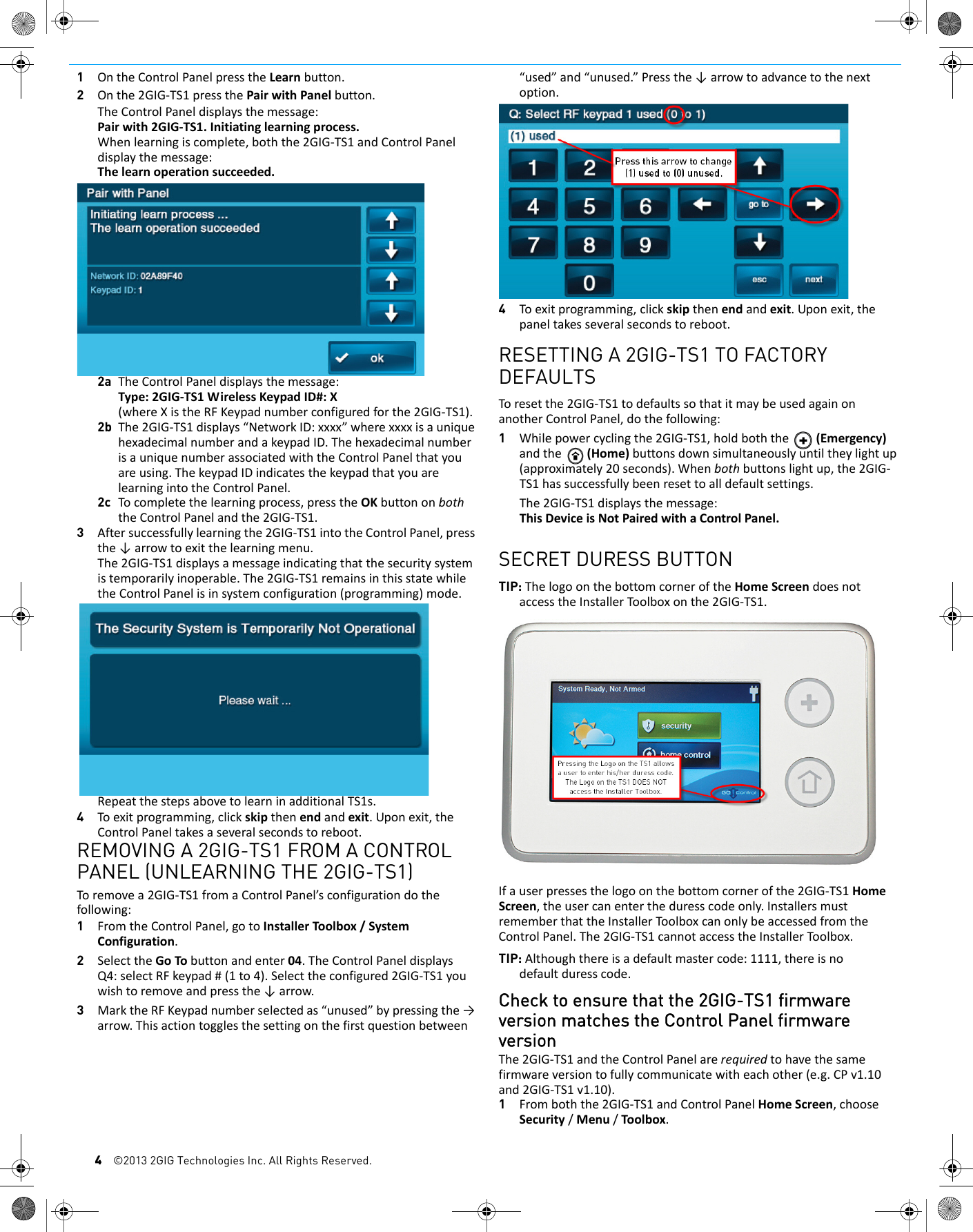
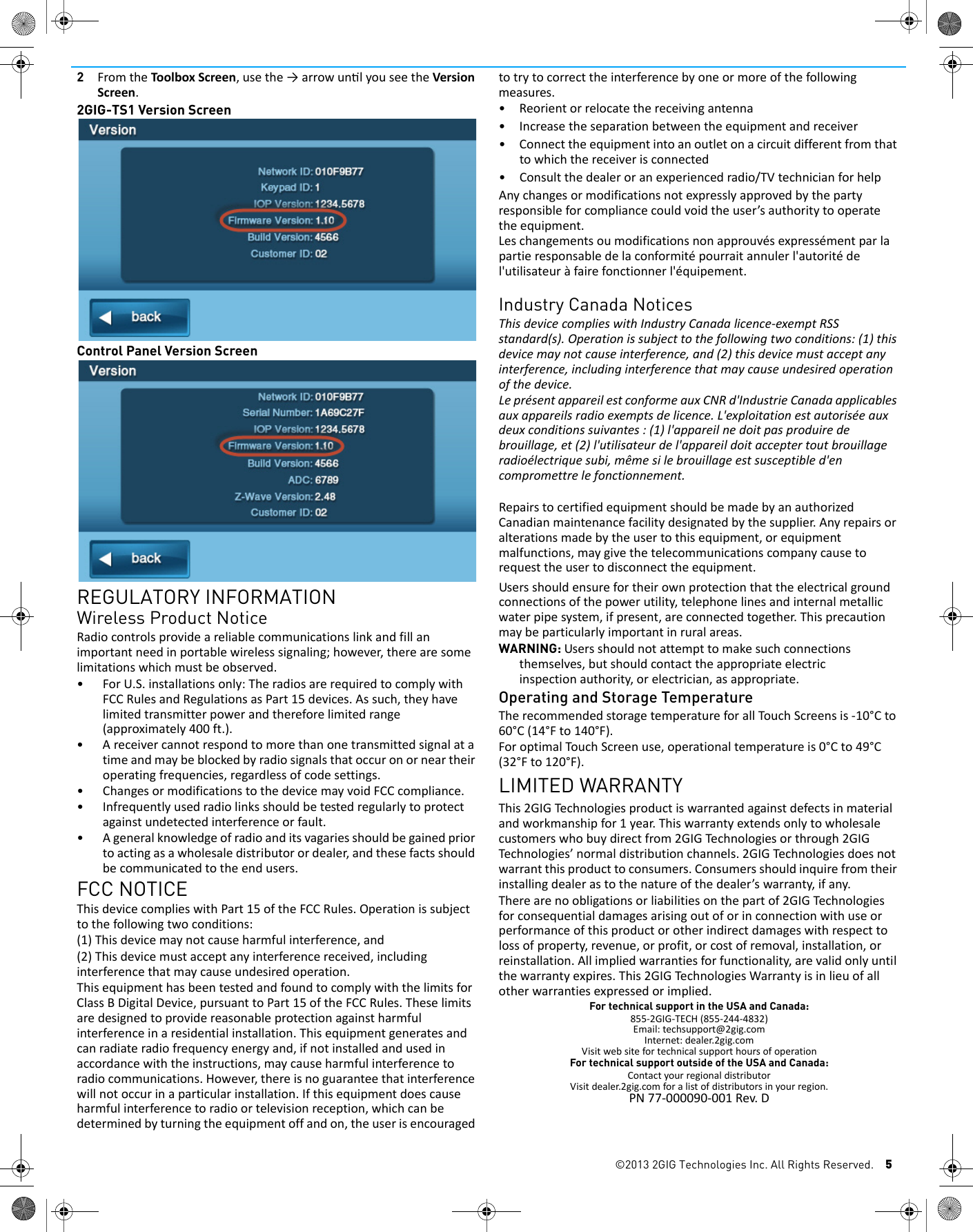
4©2013 2GIG Technologies Inc. All Rights Reserved.1OntheControlPanelpresstheLearnbutton.2Onthe2GIG‐TS1pressthePairwithPanelbutton.TheControlPaneldisplaysthemessage:Pairwith2GIG‐TS1.Initiatinglearningprocess.Whenlearningiscomplete,boththe2GIG‐TS1andControlPaneldisplaythemessage:Thelearnoperationsucceeded.2a TheControlPaneldisplaysthemessage:Type:2GIG‐TS1WirelessKeypadID#:X(whereXistheRFKeypadnumberconfiguredforthe2GIG‐TS1).2b The2GIG‐TS1displays“NetworkID:xxxx”wherexxxxisauniquehexadecimalnumberandakeypadID.ThehexadecimalnumberisauniquenumberassociatedwiththeControlPanelthatyouareusing.ThekeypadIDindicatesthekeypadthatyouarelearningintotheControlPanel.2c Tocompletethelearningprocess,presstheOKbuttononboththeControlPanelandthe2GIG‐TS1.3Aftersuccessfullylearningthe2GIG‐TS1intotheControlPanel,pressthe↓arrowtoexitthelearningmenu.The2GIG‐TS1displaysamessageindicatingthatthesecuritysystemistemporarilyinoperable.The2GIG‐TS1remainsinthisstatewhiletheControlPanelisinsystemconfiguration(programming)mode.RepeatthestepsabovetolearninadditionalTS1s.4Toexitprogramming,clickskipthenendandexit.Uponexit,theControlPaneltakesaseveralsecondstoreboot.REMOVING A 2GIG-TS1 FROM A CONTROL PANEL (UNLEARNING THE 2GIG-TS1)Toremovea2GIG‐TS1fromaControlPanel’sconfigurationdothefollowing:1FromtheControlPanel,gotoInstallerToolbox/SystemConfiguration.2SelecttheGoTobuttonandenter04.TheControlPaneldisplaysQ4:selectRFkeypad#(1to4).Selecttheconfigured2GIG‐TS1youwishtoremoveandpressthe↓arrow.3MarktheRFKeypadnumberselectedas“unused”bypressingthe→arrow.Thisactiontogglesthesettingonthefirstquestionbetween“used”and“unused.”Pressthe↓arrowtoadvancetothenextoption.4Toexitprogramming,clickskipthenendandexit.Uponexit,thepaneltakesseveralsecondstoreboot.RESETTING A 2GIG-TS1 TO FACTORY DEFAULTSToresetthe2GIG‐TS1todefaultssothatitmaybeusedagainonanotherControlPanel,dothefollowing:1Whilepowercyclingthe2GIG‐TS1,holdboththe(Emergency)andthe(Home)buttonsdownsimultaneouslyuntiltheylightup(approximately20seconds).Whenbothbuttonslightup,the2GIG‐TS1hassuccessfullybeenresettoalldefaultsettings.The2GIG‐TS1displaysthemessage:ThisDeviceisNotPairedwithaControlPanel.SECRET DURESS BUTTONTIP: ThelogoonthebottomcorneroftheHomeScreendoesnotaccesstheInstallerToolboxonthe2GIG‐TS1.Ifauserpressesthelogoonthebottomcornerofthe2GIG‐TS1HomeScreen,theusercanentertheduresscodeonly.InstallersmustrememberthattheInstallerToolboxcanonlybeaccessedfromtheControlPanel.The2GIG‐TS1cannotaccesstheInstallerToolbox.TIP: Althoughthereisadefaultmastercode:1111,thereisnodefaultduresscode.Check to ensure that the 2GIG-TS1 firmware version matches the Control Panel firmware versionThe2GIG‐TS1andtheControlPanelarerequiredtohavethesamefirmwareversiontofullycommunicatewitheachother(e.g.CPv1.10and2GIG‐TS1v1.10).1Fromboththe2GIG‐TS1andControlPanelHomeScreen,chooseSecurity/Menu/Toolbox.
©2013 2GIG Technologies Inc. All Rights Reserved. 52FromtheToolboxScreen,usethe→arrowunlyouseetheVersionScreen.2GIG-TS1 Version ScreenControl Panel Version ScreenREGULATORY INFORMATIONWireless Product NoticeRadiocontrolsprovideareliablecommunicationslinkandfillanimportantneedinportablewirelesssignaling;however,therearesomelimitationswhichmustbeobserved.•ForU.S.installationsonly:TheradiosarerequiredtocomplywithFCCRulesandRegulationsasPart15devices.Assuch,theyhavelimitedtransmitterpowerandthereforelimitedrange(approximately400ft.).•Areceivercannotrespondtomorethanonetransmittedsignalatatimeandmaybeblockedbyradiosignalsthatoccuronorneartheiroperatingfrequencies,regardlessofcodesettings.• ChangesormodificationstothedevicemayvoidFCCcompliance.• Infrequentlyusedradiolinksshouldbetestedregularlytoprotectagainstundetectedinterferenceorfault.•Ageneralknowledgeofradioanditsvagariesshouldbegainedpriortoactingasawholesaledistributorordealer,andthesefactsshouldbecommunicatedtotheendusers.FCC NOTICEThisdevicecomplieswithPart15oftheFCCRules.Operationissubjecttothefollowingtwoconditions:(1)Thisdevicemaynotcauseharmfulinterference,and(2)Thisdevicemustacceptanyinterferencereceived,includinginterferencethatmaycauseundesiredoperation.ThisequipmenthasbeentestedandfoundtocomplywiththelimitsforClassBDigitalDevice,pursuanttoPart15oftheFCCRules.Theselimitsaredesignedtoprovidereasonableprotectionagainstharmfulinterferenceinaresidentialinstallation.Thisequipmentgeneratesandcanradiateradiofrequencyenergyand,ifnotinstalledandusedinaccordancewiththeinstructions,maycauseharmfulinterferencetoradiocommunications.However,thereisnoguaranteethatinterferencewillnotoccurinaparticularinstallation.Ifthisequipmentdoescauseharmfulinterferencetoradioortelevisionreception,whichcanbedeterminedbyturningtheequipmentoffandon,theuserisencouragedtotrytocorrecttheinterferencebyoneormoreofthefollowingmeasures.•Reorientorrelocatethereceivingantenna•Increasetheseparationbetweentheequipmentandreceiver• Connecttheequipmentintoanoutletonacircuitdifferentfromthattowhichthereceiverisconnected•Consultthedealeroranexperiencedradio/TVtechnicianforhelpAnychangesormodificationsnotexpresslyapprovedbythepartyresponsibleforcompliancecouldvoidtheuser’sauthoritytooperatetheequipment.Leschangementsoumodificationsnonapprouvésexpressémentparlapartieresponsabledelaconformitépourraitannulerl'autoritédel'utilisateuràfairefonctionnerl'équipement.Industry Canada NoticesThisdevicecomplieswithIndustryCanadalicence‐exemptRSSstandard(s).Operationissubjecttothefollowingtwoconditions:(1)thisdevicemaynotcauseinterference,and(2)thisdevicemustacceptanyinterference,includinginterferencethatmaycauseundesiredoperationofthedevice.LeprésentappareilestconformeauxCNRd'IndustrieCanadaapplicablesauxappareilsradioexemptsdelicence.L'exploitationestautoriséeauxdeuxconditionssuivantes:(1)l'appareilnedoitpasproduiredebrouillage,et(2)l'utilisateurdel'appareildoitacceptertoutbrouillageradioélectriquesubi,mêmesilebrouillageestsusceptibled'encompromettrelefonctionnement.RepairstocertifiedequipmentshouldbemadebyanauthorizedCanadianmaintenancefacilitydesignatedbythesupplier.Anyrepairsoralterationsmadebytheusertothisequipment,orequipmentmalfunctions,maygivethetelecommunicationscompanycausetorequesttheusertodisconnecttheequipment.Usersshouldensurefortheirownprotectionthattheelectricalgroundconnectionsofthepowerutility,telephonelinesandinternalmetallicwaterpipesystem,ifpresent,areconnectedtogether.Thisprecautionmaybeparticularlyimportantinruralareas.WARNING: Usersshouldnotattempttomakesuchconnectionsthemselves,butshouldcontacttheappropriateelectricinspectionauthority,orelectrician,asappropriate.Operating and Storage TemperatureTherecommendedstoragetemperatureforallTo u c hScreensis‐10°Cto60°C(14°Fto140°F).ForoptimalTouchScreenuse,operationaltemperatureis0°Cto49°C(32°Fto120°F).LIMITED WARRANTYThis2GIGTechnologiesproductiswarrantedagainstdefectsinmaterialandworkmanshipfor1year.Thiswarrantyextendsonlytowholesalecustomerswhobuydirectfrom2GIGTechnologiesorthrough2GIGTechnologies’normaldistributionchannels.2GIGTechnologiesdoesnotwarrantthisproducttoconsumers.Consumersshouldinquirefromtheirinstallingdealerastothenatureofthedealer’swarranty,ifany.Therearenoobligationsorliabilitiesonthepartof2GIGTechnologiesforconsequentialdamagesarisingoutoforinconnectionwithuseorperformanceofthisproductorotherindirectdamageswithrespecttolossofproperty,revenue,orprofit,orcostofremoval,installation,orreinstallation.Allimpliedwarrantiesforfunctionality,arevalidonlyuntilthewarrantyexpires.This2GIGTechnologiesWarrantyisinlieuofallotherwarrantiesexpressedorimplied.For technical support in the USA and Canada:855‐2GIG‐TECH(855‐244‐4832)Email:techsupport@2gig.comInternet:dealer.2gig.comVisitwebsitefortechnicalsupporthoursofoperationFor technical support outside of the USA and Canada:ContactyourregionaldistributorVisitdealer.2gig.comforalistofdistributorsinyourregion.PN77‐000090‐001Rev.D

Navigation menu