Nxcontrol System NXREMOTE01 NxRemote Kit User Manual
Nxcontrol System Co., Ltd. NxRemote Kit Users Manual
User Manual
Device Type
Wireless Type
IR Code Learning
Interface
Personal Scenario Seng
Operang System
Color
Sizes (LxWxH)
Weight
Remote Dongle
ZigBee
Yes
Micro USB
Yes
Android 4.0 above, USB OTG Supported
Black / White
49.8 x 22.0 x 7.0 mm
15g
Device Type
Wireless Type
Networking Range
IR Frequency
Power
Color
Sizes (RxH)
Weight
RF to IR Adapter
ZigBee
30 m above (In door)
36 KHz ~ 56 KHz
3V CR2032 Lithium Baery
Black / White
R13.0 x 7.3 mm
10g
Power Light IR Code Learning Light
IR Receiver
Micro USB
IR Transmier
Status Light
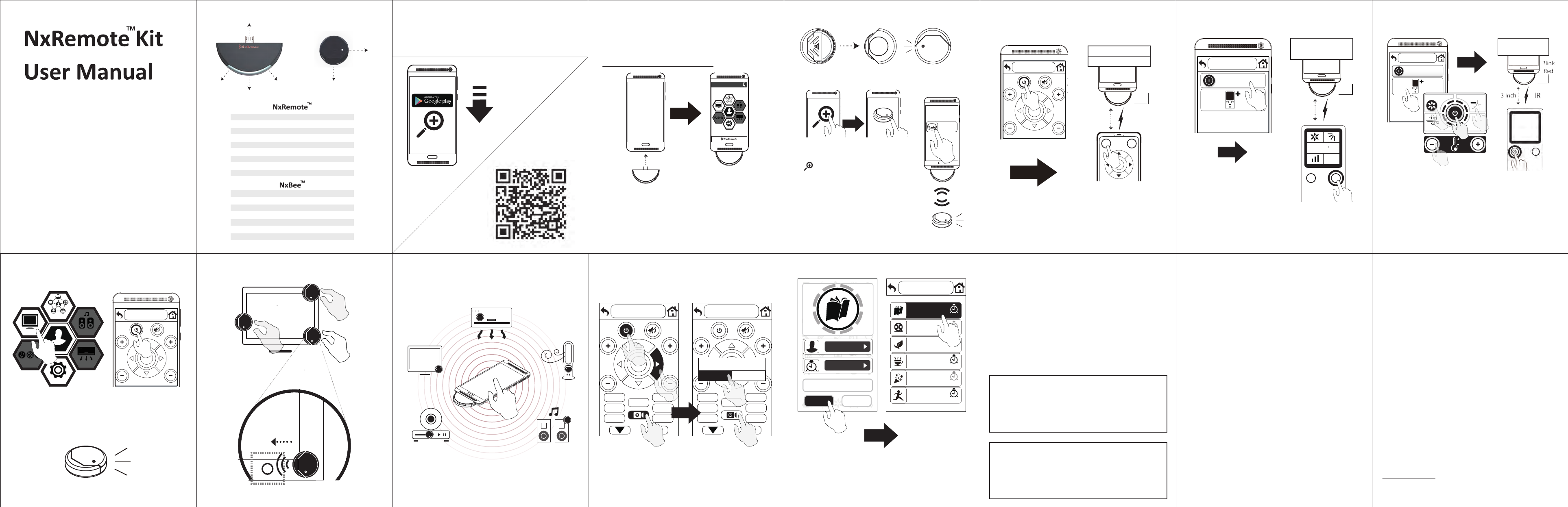
1. Download APP 2. Plug in
2. When noce message shows up, make sure to check
“Use by default for this USB device” to allow the app to
access your USB device.
(Some devices need to enable USB OTG funcon. e.g.
Sony : Sengs -> Xperia Connecvity -> USB Connecvity
-> Detect USB device)
APP
1. Check your Android phone / tablet supporng USB
OTG funcon.
List of Android Phones and Tablet supports OTG Funcon:
hp://www.nxcontrol.com/OTG.html
Scan QR code or search “NxRemote” for downloading
APP on Google Play.
©2015 NxControl System Co, Ltd. All right reserved.
All other trademarks are the property of their
respecve owners.
The use of the word partner does not imply a
partnership relaonship and any other company.
NxControl assures no responsibility for any errors
that may appear in the manual.
Informaon contained here in is subject to change
without noce.
NxRemote NxBee
TM TM 3. Pair
Search NxBee
APP
APP
Remove NxBee back cover, and pull out the baery
tab. The green light will start blinking.
1. Follow this step on APP to search
NxBee: Seng -> Device Setup and click
search buon.
2. Select NxBee (Blink Red) and
enter comfirmaon number, it will stop
blink and show up on the screen.
3. Click NxBee icon. If it connects with
NxRemote correctly, the green light will
blink. If not, please replace baery and
try again.
2MUUDE0002 2015.12
NxRemote Connected
A/C
Listen
Settings
Scenario
Profile
Watch
Others
4. Setup & Learn IR codes
Click corresponding key on your original remote to learn
IR code. If the countdown message disappears, the buon
learning process is completed.
VOL CH
Original Remote
3 Inch IR
4
21 3
8
65
7
0
9
ON
Blink
Red
Learning.....
10 seconds
4.2 Learn A/C (ON Buon)
OFF
MODE
TEMPFAN SPEED
SWING
70
F
Original Remote
Learning.....
10 seconds
1. Adjust the status (Temp., Mode,
Fan Spd, Swing, etc) on original remote
and NxRemote with the same status what you prefer.
2. Click “ Power ” buon to begin learning process, point your
original remote at the boom of NxRemote and click the
power key to learn the IR code.
*A/C remote must be turned “OFF” before learning.
4.1 Learn A/C (OFF Buon)
1. Click “OFF” buon to begin
learning process.
2. Point your original remote at the boom of Nx Remote,
and dick OFF key to learn the IR code.
*A/C remote must be
turned “ON” before learning.
OFF
Original Remote
OFF
3 Inch IR
Blink
Red
0
25
C
Learning.....
10 seconds
5. Try Your NxRemote 7. Control 8. Scenario Setup
NxRemote Kit should only be used in environments with
ambient temperatures between 0°C (32°F) and 35°C (95°F)
1. Press Home key or back buon on top le side
to home page, the device icons will light up.
2. Press Power key on your NxRemote APP to check
if the device works.
Green light will blink when you press the buon key.
VOL CH
A/C
Listen
Settings
Scenario
Profile
Watch
Others
SOURCE
VOL CH
SOURCE
VOL CH
Save Scenario?
CANCELOK
1. Press record buon to start up.
2. Start your control process, and click record buon again
when you finish all acons.
3. Save your acon to move on next step.
Important Safety Informaon Limited Warranty Statement
When using this product, the safety precauons below must be taken avoid possible legal liabilies and
damages.
Retain and follow all product safety and operaon instrucons.
Observe all warnings in the operaon instrucons on the product.
To reduce the risk of bodily injury, electric shock, fire and damage to the equipment. Observe the following
precauons.
Care
Do not open NxRemote. There are no user-serviceable parts inside. Do not allow moisture to enter the
unit. Moisture will corrode the inner electronics. Any changes or modificaons not expressly approved by
NxControl void the user’s authority to operate the device and could void the warranty. The product should
only be used in environments with ambient temperatures between 0 degree C (32 degree F) and 35 degree
C (95 degree F).
Handle Baery Carefully
NxBee contains an lithium non-rechargeable baery. Baery life is dependent upon usage. Heavy daily use
will result in shorter baery life. There is a risk of fire and burns if the baery is handle improperly. Do not
disassemble, crush, puncture, short external contacts or circuits, dispose of in fire or water, or expose a
baery to temperatures higher than 60 degree C (140 degree F).
End-of-life Baery Disposal Instrucons
If baery is end-of-life, consult local laws and regulaons for proper baery disposal in your area. If there
are no local regulaons concerning baery disposal, please dispose of the dead baery in a waste bin for
electronic devices. KEEP ALL BATTERIES OUT OF THE REACH OF CHILDREN.
Disposal and Recycling Informaon
The symbol indicates that your product must be disposed of properly according to local laws and
regulaons. When your product reaches its end of life, contact your local authories to learn about
recycling opons.
European Union – Disposal Informaon
The symbol above means that according to local laws and regulaons your product and/or its baery shall
be disposed of separately from household waste. When this product reaches its end of like, take it to a
collecon point designated by local authories. The separate collecon and recycling of your product
and/or it baery at the me of disposal will help conserve natural resources and ensure that it is recycled
in a manner that protects human health and the environment.
Safety Precauon for Small Children
Do not leave your product within the reach of small children or allow them to play with it. They could hurt
themselves or others, or could accidentally damage the product. Your product contains small parts with sharp
edges that may cause an injury or which could become detached and create chocking hazard. Consult the
doctor immediately if the accessories or baery are swallowed..
Do not disassemble it or aempt to recharge it outside the system. Do not crush, puncture, dispose of in fi re,
short the external contacts, or expose to water or other liquids. Dispose of the baery in accordance with local
regulaons and instrucons from your service provider.
The Limited Warranty Statement is a voluntary manufacturer's warranty. It provides
rights separate to rights provided by consumer law, including but not limited to those
relang to non-conforming goods. As such, the Limited Warranty Statement benefits are
in addion to, and not instead of, rights provided by consumer law.
Your hardware product is warranted against defects in materials and workmanship for a
period of ONE (1) YEAR from the date of original retail purchase ("Warranty Period"). If a
defect arises during the Warranty Period, NxControl, at its opon and to the extent
permied by law will (1) repair the product at no charge using new parts or parts that are
equivalent to new in performance and reliability, or (2) exchange the product with a
funconally equivalent product that is new or equivalent to new in performance and
reliability. This warranty excludes damage resulng from abuse, accident, modificaons
or other causes that are not defects in materials and workmanship.
Other than the consumer law rights to which you are entled, all warranes, condions
and other terms not set out in this warranty document are excluded from the Limited
Warranty Statement. Some countries do not allow limitaons on how long such
warranes, condions and / or implied terms may last, so the limitaon described above
may not apply to you. NxControl does not warrant, represent or undertake that it will be
able to repair or replace any NxControl Product under this warranty without risk to and
/ or loss of informaon and / or data stored on the NxControl Product. In no event shall
NxControl be liable for (a) any losses that were not caused by our breach of this warranty
document; (b) any loss or damage that was not, at the me of your purchase of the
product, a reasonably foreseeable consequence of NxControl breaching this warranty
document; or (c) losses relang to any business of yours, loss of profits, loss of data or
loss of opportunity. The provisions of this warranty document shall not apply to (i) death
or personal injury, (ii) fraud or gross negligence; or (iii) fraudulent misrepresentaon; or
(iv) any other liability that cannot be limited or excluded as a maer of law.
Some countries do not allow limitaons on how long an implied warranty lasts, or allow
exclusion or limitaon of incidental or consequenal damages, so the above limitaons
or exclusions may not apply to you. This warranty gives you specific legal rights, and you
may also have other rights, which vary from country to country. Proof of purchase may
be required to verify eligibility.
For more informaon and contact support, please refer to NxControl webpage at
hp://www.nxcontrol.com
Warranty Informaon Form
Mr./Mrs./Ms./Miss: _______________________________________________________
Telephone Number: _______________________________________________________
Address: ________________________________________________________________
________________________________________________________________________
E-mail: __________________________________________________________________
Purchase Date: ____________ /____________ /____________________ (DD/MM/YYYY)
Dealer's Name: ___________________________________________________________
Dealer's Telephone Number: ________________________________________________
Dealer's Address: _________________________________________________________
4. Choose your scenario icon and select user if already
add one, set delay me for each buons if necessary,
name your mode and save it.
5. Try and enjoy your Scenario by one click.
CANCEL
SAVE
Reading Mode
John
Delay Time
John
Reading Mode
Movie Mode
ECO Mode
Relax Mode
Party Mode
Exercise Mode
14:00
16:00
6. Adhere NxBee
IR receiving area (Do NOT cover power light.)
IR transmission
direcon
1. Place NxBee close to IR receiving
area (near power light usually) and try turn on/off.
2. Find an available IR receving area and then
adhere NxBee.
Federal Communication Commission Interference Statement
This equipment has been tested and found to comply with the limits for a Class B digital device, pursuant to Part 15 of the FCC Rules. These limits are designed to provide reasonable protection against harmful interference in a residential installation. This equipment generates, uses and can radiate radio frequency energy and, if not installed and used in accordance with the instructions, may cause harmful interference to
radio communications. However, there is no guarantee that interference will not occur in a particular installation. If this equipment does cause harmful interference to radio or television reception, which can be determined by turning the equipment off and on, the user is encouraged to try to correct the interference by one or more of the following measures:
Reorient or relocate the receiving antenna.
Increase the separation between the equipment and receiver.
Connect the equipment into an outlet on a circuit different from that to which the receiver is connected.
Consult the dealer or an experienced radio/TV technician for help.
FCC Caution: Any changes or modifications not expressly approved by the party responsible for compliance could void the user's authority to operate this equipment.
This device complies with Part 15 of the FCC Rules. Operation is subject to the following two conditions: (1) This device may not cause harmful interference, and (2) this device must accept any interference received, including interference that may cause undesired operation.
This device complies with Industry Canada's licence-exempt RSSs. Operation is subject to the following two conditions:
(1) This device may not cause interference; and
(2) This device must accept any interference, including interference that may cause undesired operation of the device.
Le présent appareil est conforme aux CNR d'Industrie Canada applicables aux appareils radio exempts de licence. L'exploitation est autorisée aux deux conditions suivantes : (1) l'appareil ne doit pas produire de brouillage, et (2) l'utilisateur de l'appareil doit accepter tout brouillage radioélectrique subi, même si le brouillage est susceptible d'en compromettre le fonctionnement.
CAN ICES-3 (B)/NMB-3(B)
IMPORTANT NOTE:
IC Radiation Exposure Statement:
This equipment complies with IC RSS-102 radiation exposure limits set forth for an uncontrolled environment.
Cet équipement est conforme aux limites d'exposition aux rayonnements IC établies pour un environnement non contrôlé.