OKAYO Electronics BX-501701 Bluetooth Chip User Manual

OKAYO Electronics Co., Ltd. Bluetooth Chip

User Manual

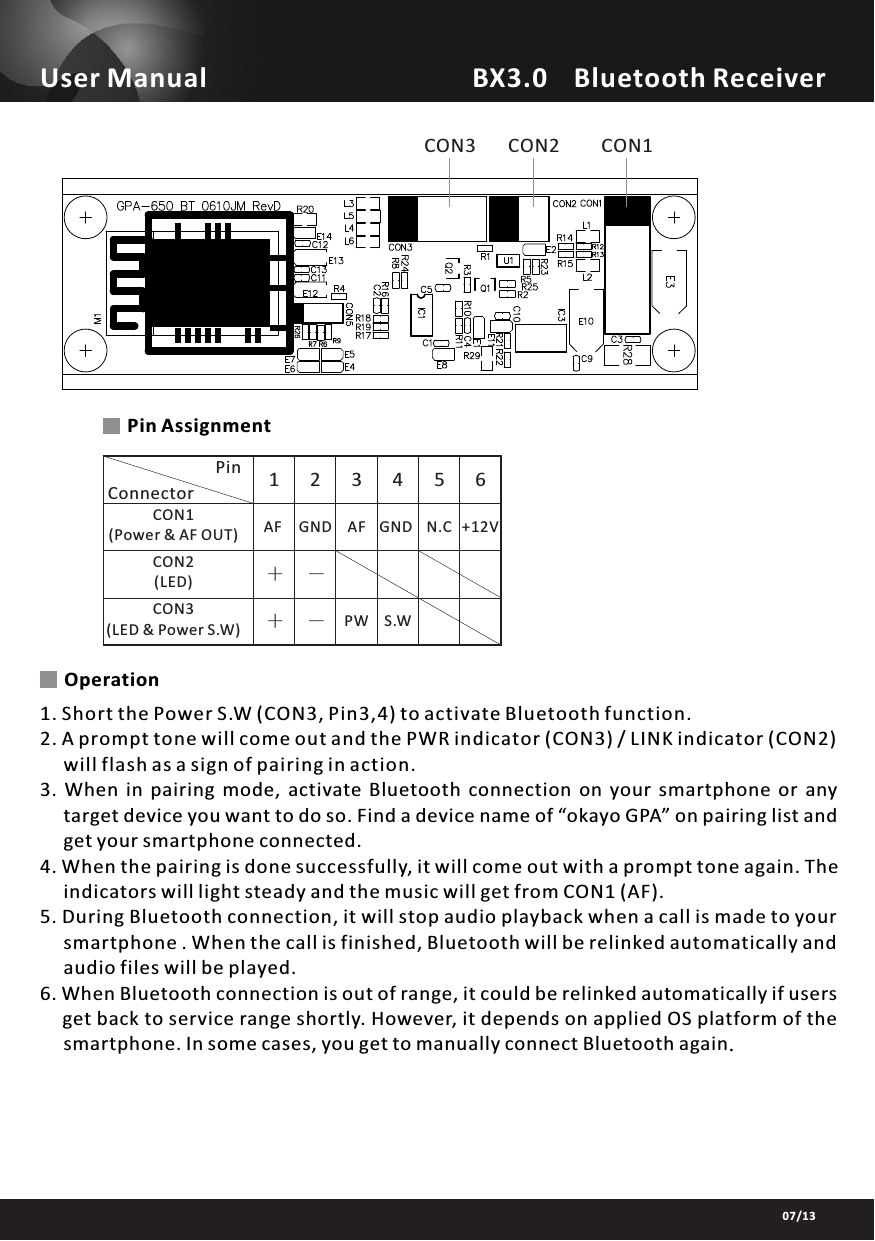
BX3.0    Bluetooth ReceiverUser Manual07/13              +                  +    CON1(Power & AF OUT)CON2(LED)CON3(LED & Power S.W)               Pin 1AFConnector--23 4 56GND AF GND N.C +12VS.W               PW  CON1CON2CON3Pin AssignmentOperation6. When Bluetooth connection is out of range, it could be relinked automatically if users      get back to service range shortly. However, it depends on applied OS platform of the      smartphone. In some cases, you get to manually connect Bluetooth again.5. During Bluetooth connection, it will stop audio playback when a call is made to your      smartphone . When the call is finished, Bluetooth will be relinked automatically and      audio files will be played.4. When the pairing is done successfully, it will come out with a prompt tone again. The     indicators will light steady and the music will get from CON1 (AF).3.  When  in  pairing  mode,  activate  Bluetooth  connection  on  your  smartphone  or  any      target device you want to do so. Find a device name of “okayo GPA” on pairing list and     get your smartphone connected.1. Short the Power S.W (CON3, Pin3,4) to activate Bluetooth function.2. A prompt tone will come out and the PWR indicator (CON3) / LINK indicator (CON2)      will flash as a sign of pairing in action.
※Specifications are subject to changeBX3.0    Bluetooth ReceiverUser Manual07/13FEDERAL COMMUNICATIONS COMMISSION INTERFERENCE STATEMENTThis equipment has been tested and found to comply with the limit s for a Class Bdigital device, pursuant to Part 15 of the FCC Rules. These limits are designed toprovide reasonable protection against harmful interference in a residential installation.This equipment generates, uses and can radiate radio frequency energy and, if notinstalled and used in accordance with the instructions, may cause harmfulinterference to radio communications. However, there is no guarantee thatinterference will not occur in a particular installation. If this equipment does causeharmful interference to radio or television reception, which can be determined byturning the equipment of f and on, the user is encouraged to try to correct theinterference by one or more of the following measures:-- Reorient or relocate the receiving antenna.-- Increase the separation between the equipment and receiver.-- Connect the equipment into an outlet on a circuit different from that to which thereceiver is connected.-- Consult the dealer or an experienced radio/TV technician for help.CAUTION:Any changes or modifications not expressly approved by the p arty responsible forcompliance could void the user's authority to operate the equipment.This device complies with part 15 of the FCC Rules. Operation is subject to the following twoconditions: (1) This device may not cause harmful interference, and (2) this device must accept anyinterference received, including interference that may cause undesired operation.FCC RF Radiation Exposure Statement:1. This Transmitter must not be co-located or operating in conjunction with any other antenna or transmitter.2. This equipment complies with FCC RF radiation exposure limits set forth for an uncontrolled environment.This equipment should be installed and operated with a minimum distance of 20 centimeters between the radiator and your body.Label for end product must include “Contains FCC ID: NTMBX-501701” or “A RF transmitter inside, FCC ID: NTMBX-501701”.

Navigation menu