OKAYO Electronics DLH-9 Digital Handheld Microphone User Manual

OKAYO Electronics Co., Ltd. Digital Handheld Microphone

User Manual

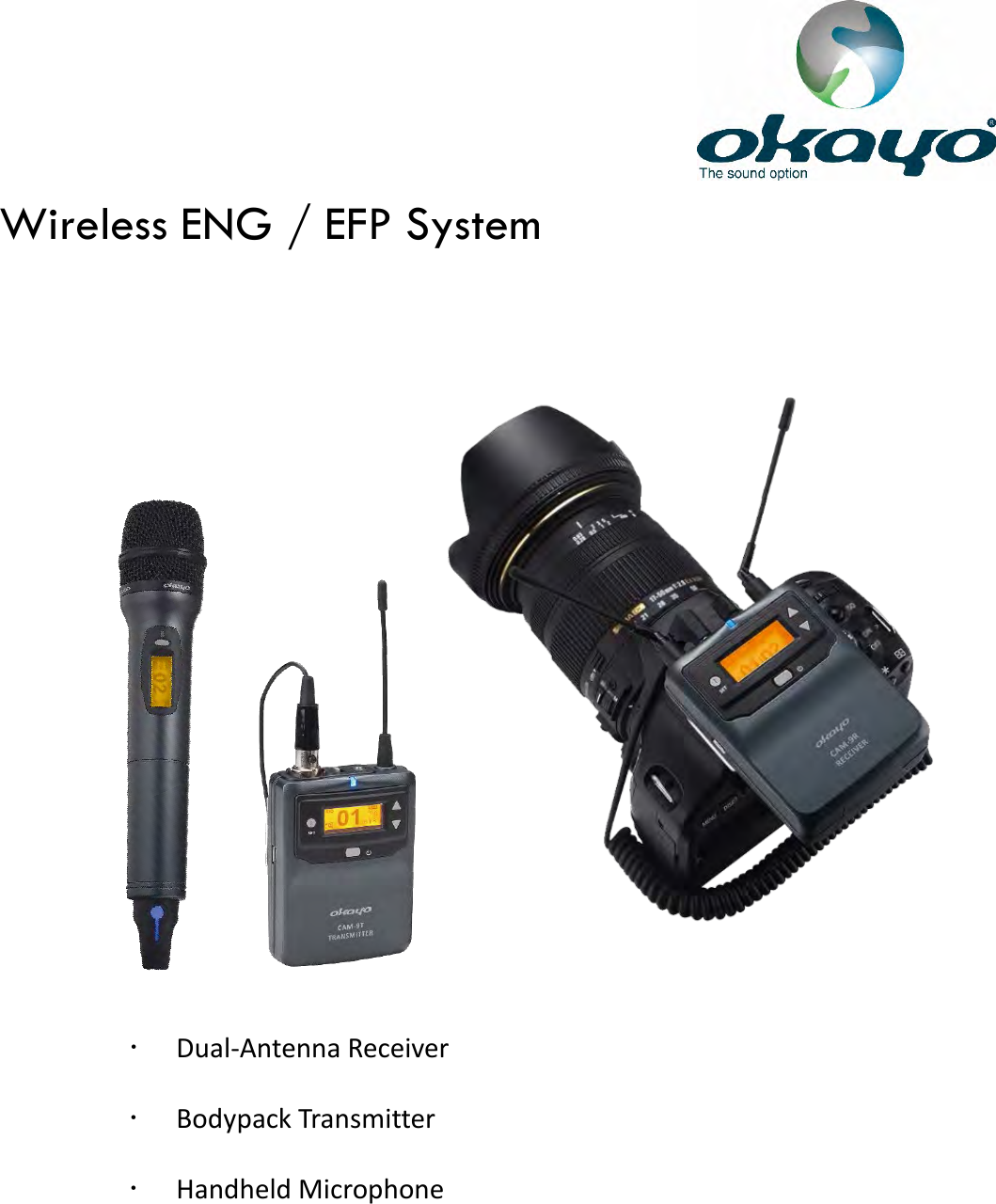
                                        Wireless ENG / EFP System   Dual-Antenna Receiver    Bodypack Transmitter  Handheld Microphone
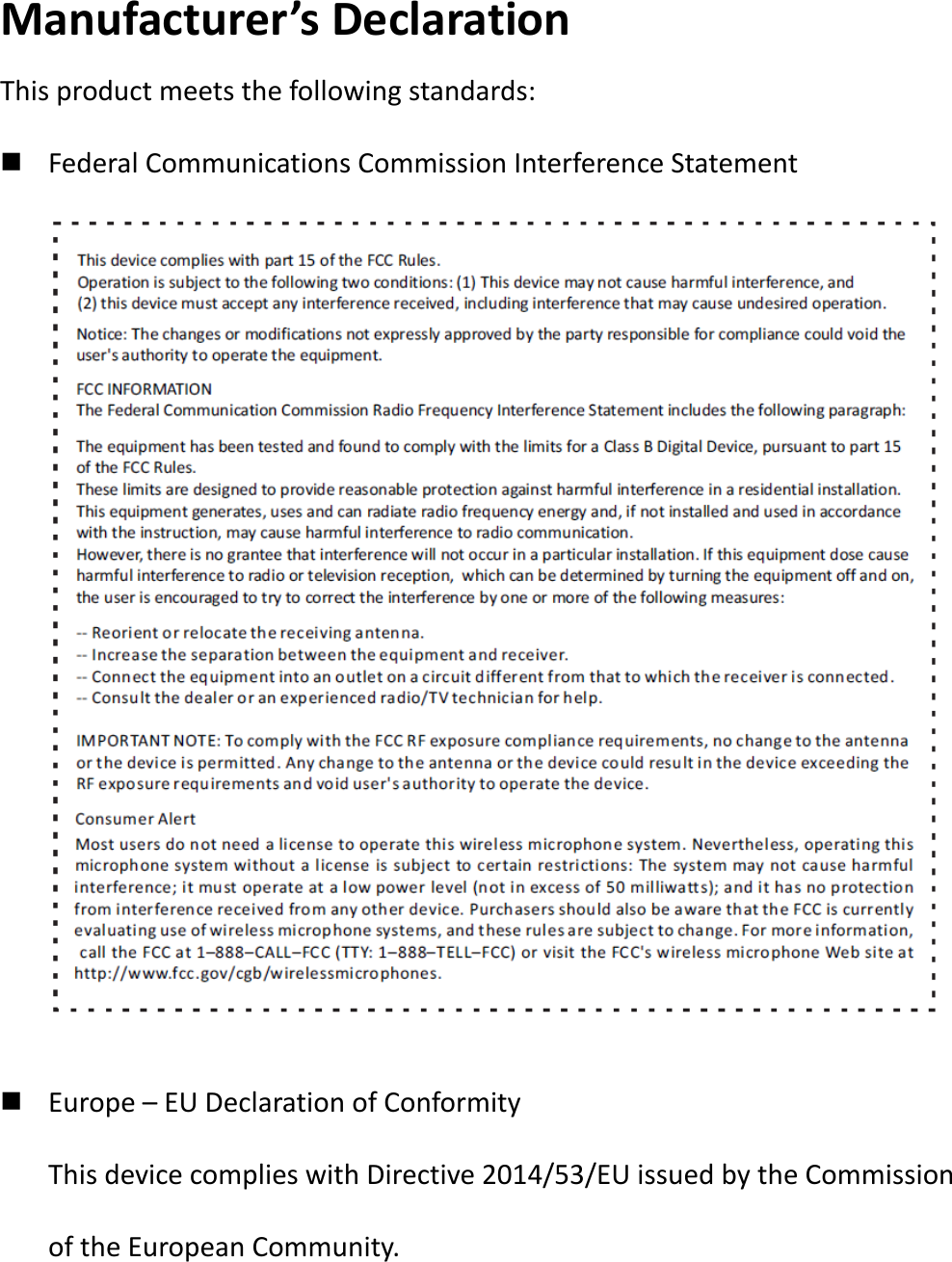
Manufacturer’s Declaration This product meets the following standards:  Federal Communications Commission Interference Statement              Europe – EU Declaration of Conformity This device complies with Directive 2014/53/EU issued by the Commission of the European Community.
 WEEE Statement Electrical and electronic equipment   must be disposed of at the end of their   lifespan separately from household waste. Please dispose of this equipment at your local   waste collection or recycling center. Please help to   protect our environment.   Safety and Electromagnetic Emissions Certificates Standard Compliance  RoHs compliant  European Directive 2011/65/EU Certificates  CE  FCC           This equipment complies with FCC RF radiation exposure limits set forth for an uncontrolled environment. This device was tested for typical lap held operations with the device contacted directly to the human body to the back side of the notebook computer. To maintain compliance with FCC RF exposure compliance requirements, avoid direct contact to the transmitting antenna during transmitting.   SAR information    0.256 W/kg@1g (body)
 Table of contents p. 1 ~ p. 4            Quick start p. 5                 Package p. 6 ~ p. 8            Illustration   p. 9 ~ p. 11           Operation       p. 12 ~ p. 17          Advanced operation    p. 18                Troubleshooting (Not ready yet) p. 19                Specification (Not ready yet)  Inserting batteries  Powering on  Adjusting channels manually  Checking frequency of selected channel  Tuning volume to appropriate level  Connecting correctly to camera or recording device  Powering off  Finding clean channels  Pairing receiver and transmitter automatically  Adjusting settings  Back to default  Dual-Antenna Receiver    Bodypack Transmitter    Handheld Microphone
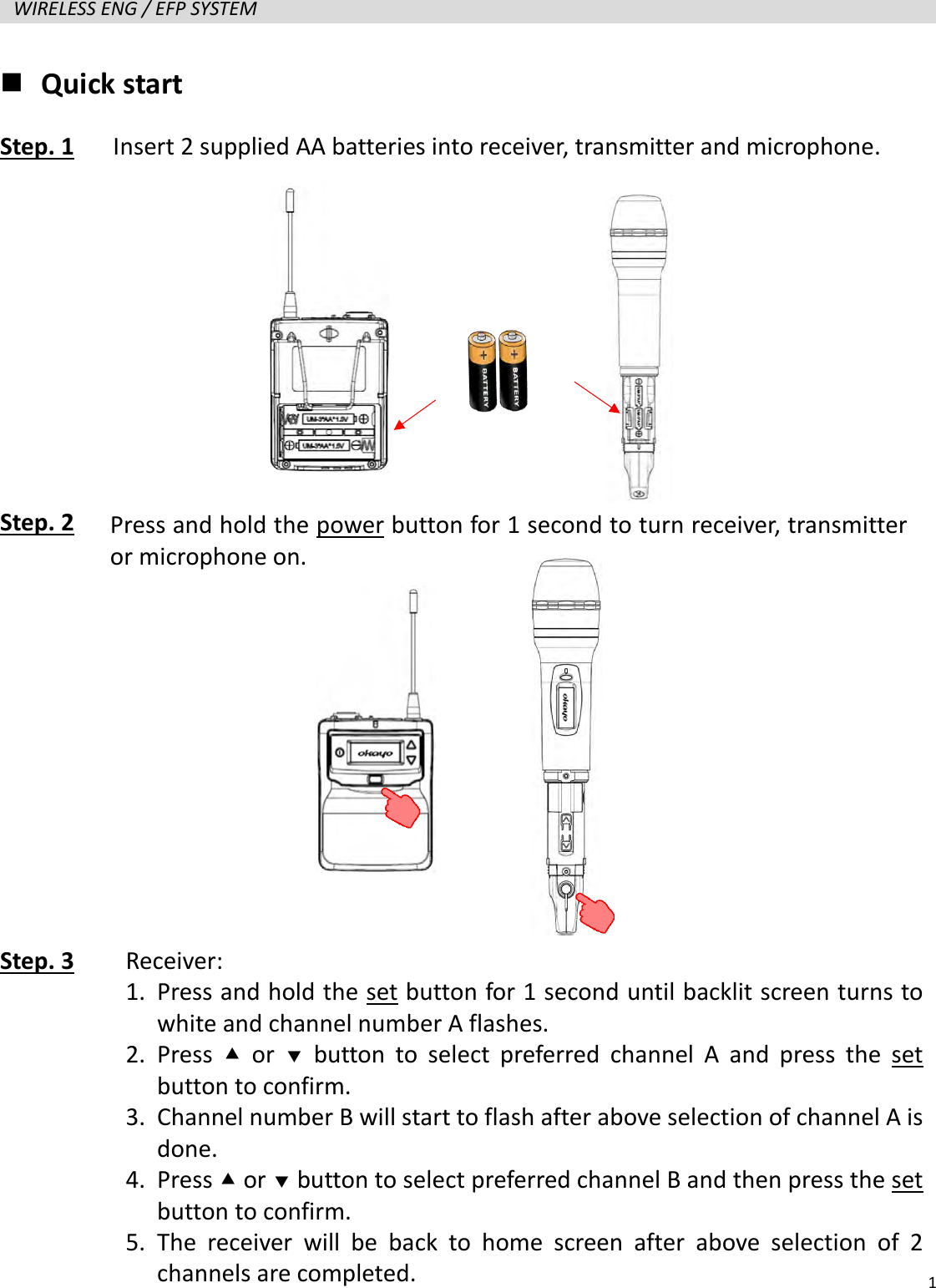
  1  WIRELESS ENG / EFP SYSTEM    Quick start Step. 1   Insert 2 supplied AA batteries into receiver, transmitter and microphone.      Step. 2            Step. 3     Press and hold the power button for 1 second to turn receiver, transmitter or microphone on. Receiver: 1. Press and hold the set button for 1 second until backlit screen turns to white and channel number A flashes. 2. Press   or   button to select preferred channel A and press the set button to confirm. 3. Channel number B will start to flash after above selection of channel A is done. 4. Press  or  button to select preferred channel B and then press the set button to confirm. 5. The receiver will be back to home screen after above selection of 2 channels are completed.
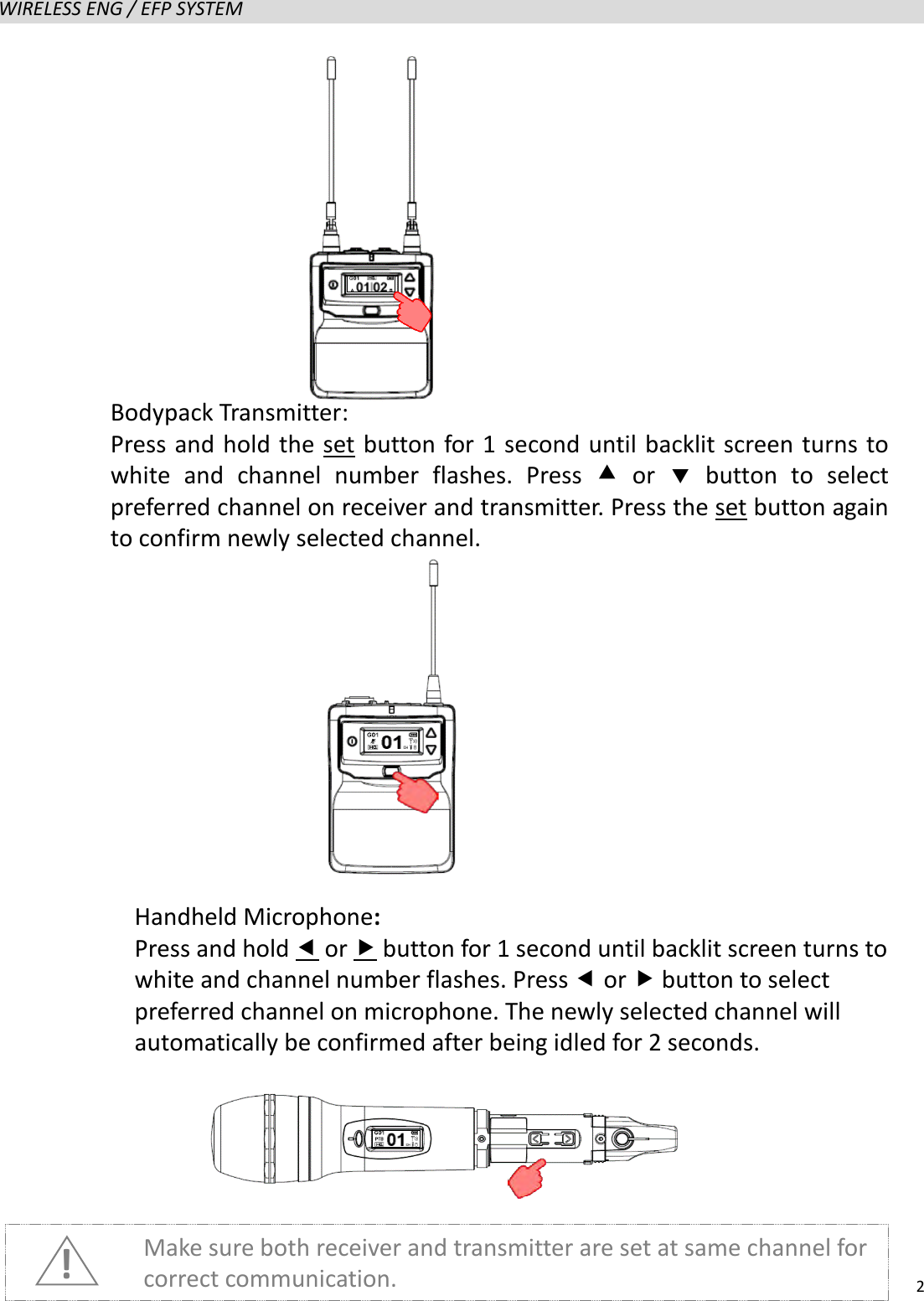
  2  WIRELESS ENG / EFP SYSTEM                      Make sure both receiver and transmitter are set at same channel for correct communication. ! Handheld Microphone: Press and hold  or  button for 1 second until backlit screen turns to white and channel number flashes. Press  or  button to select preferred channel on microphone. The newly selected channel will automatically be confirmed after being idled for 2 seconds.   Bodypack Transmitter:   Press and hold the set button for 1 second until backlit screen turns to white and channel number flashes. Press  or   button to select preferred channel on receiver and transmitter. Press the set button again to confirm newly selected channel.
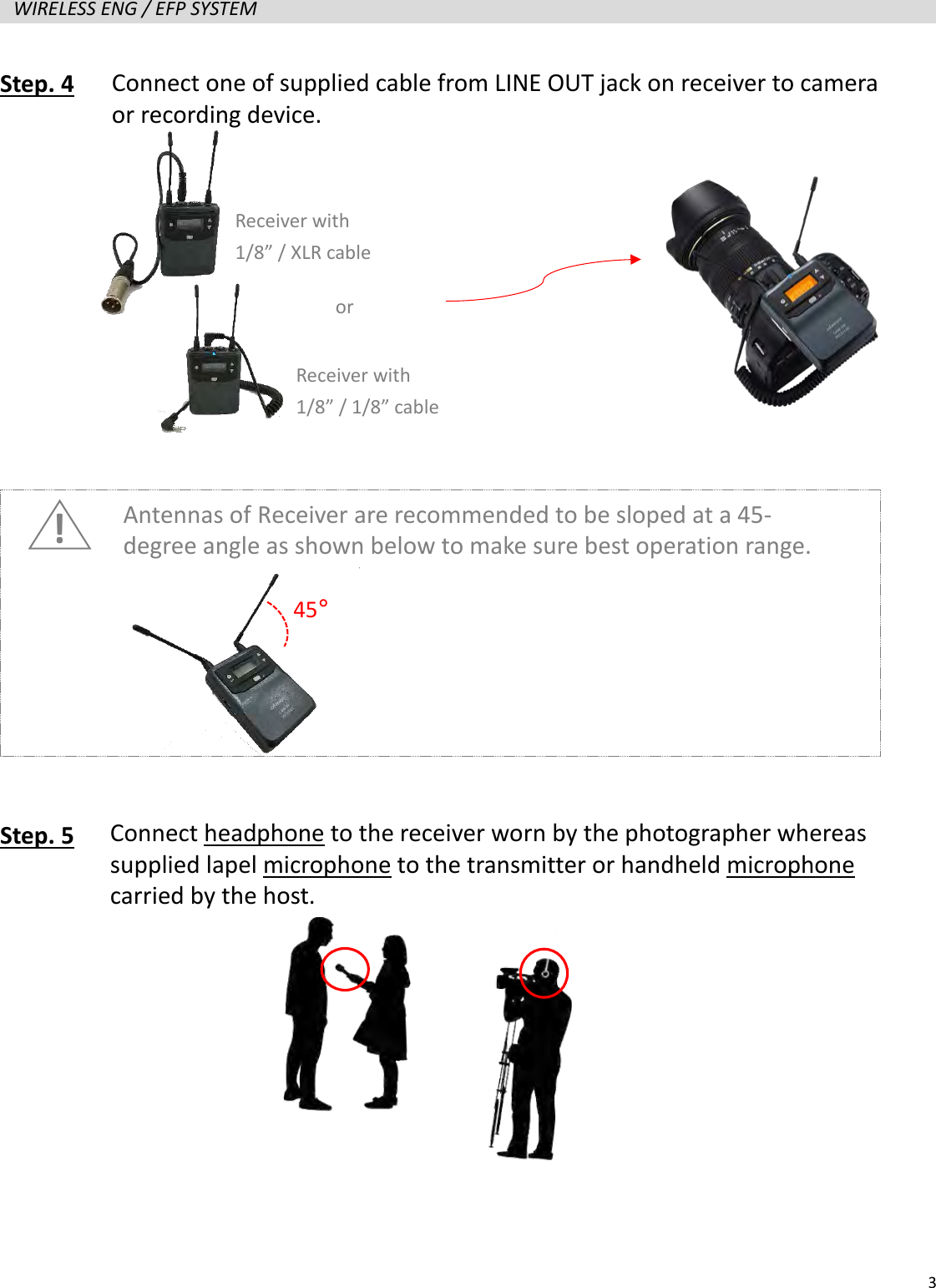
  3  WIRELESS ENG / EFP SYSTEM   Step. 4               Step. 5          Connect one of supplied cable from LINE OUT jack on receiver to camera or recording device. Connect headphone to the receiver worn by the photographer whereas supplied lapel microphone to the transmitter or handheld microphone carried by the host.  Receiver with 1/8” / 1/8” cable Receiver with 1/8” / XLR cable or ! Antennas of Receiver are recommended to be sloped at a 45-degree angle as shown below to make sure best operation range. 45°
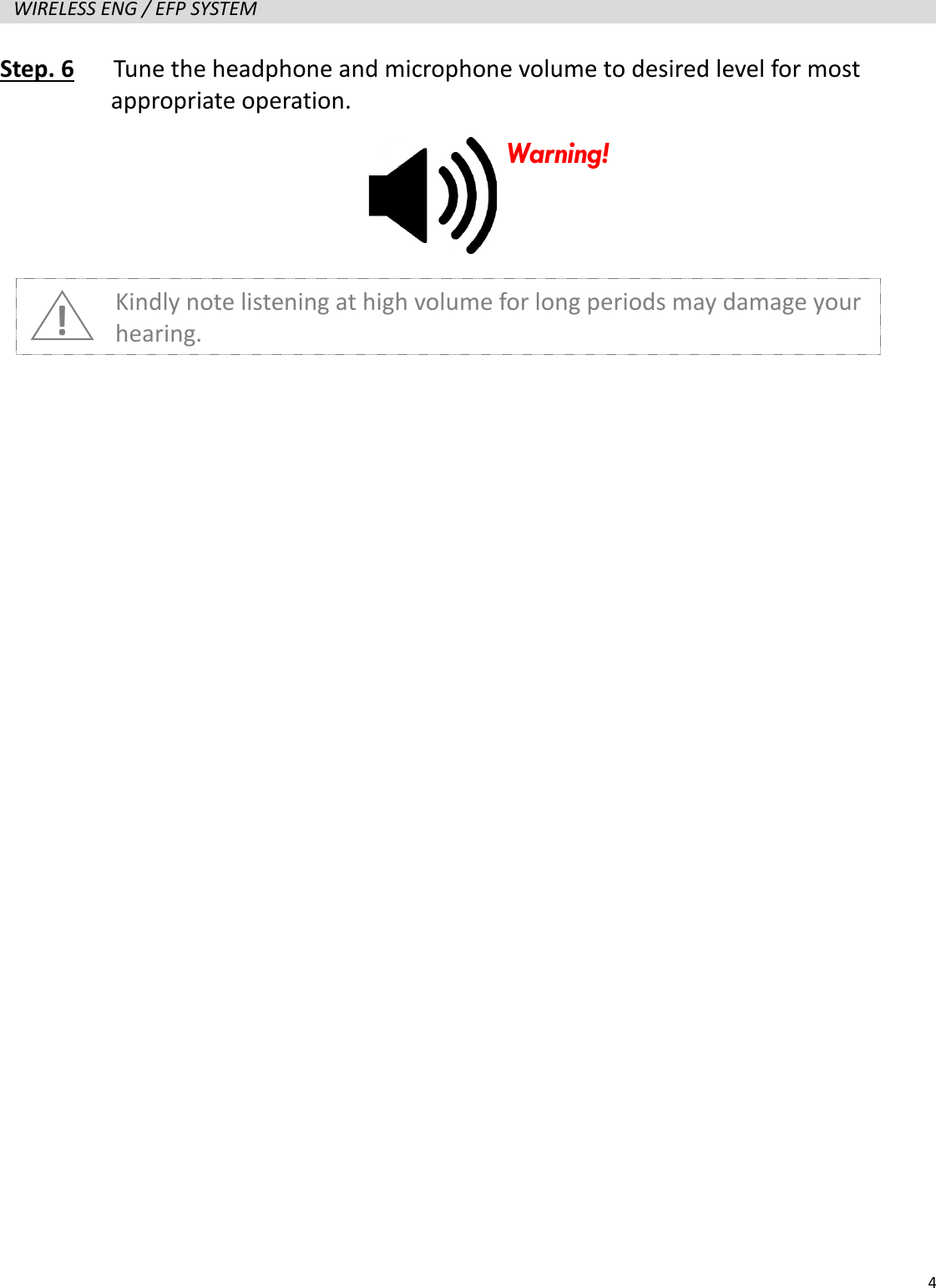
  4  WIRELESS ENG / EFP SYSTEM   Step. 6   Tune the headphone and microphone volume to desired level for most   appropriate operation.                   ! Kindly note listening at high volume for long periods may damage your hearing. Warning!
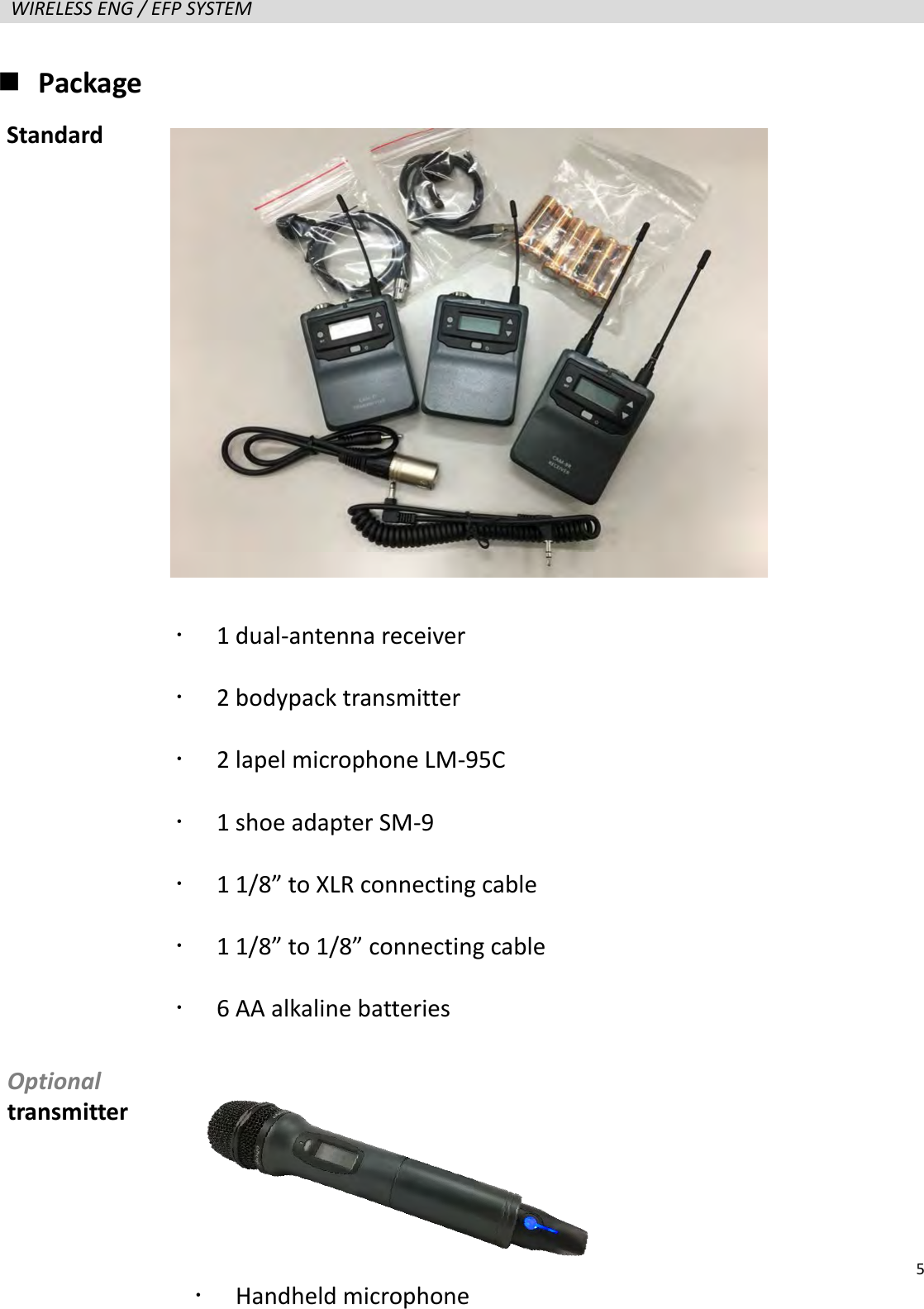
  5  WIRELESS ENG / EFP SYSTEM    Package                     1 dual-antenna receiver    2 bodypack transmitter    2 lapel microphone LM-95C  1 shoe adapter SM-9  1 1/8” to XLR connecting cable  1 1/8” to 1/8” connecting cable  6 AA alkaline batteries Standard Optional transmitter  Handheld microphone
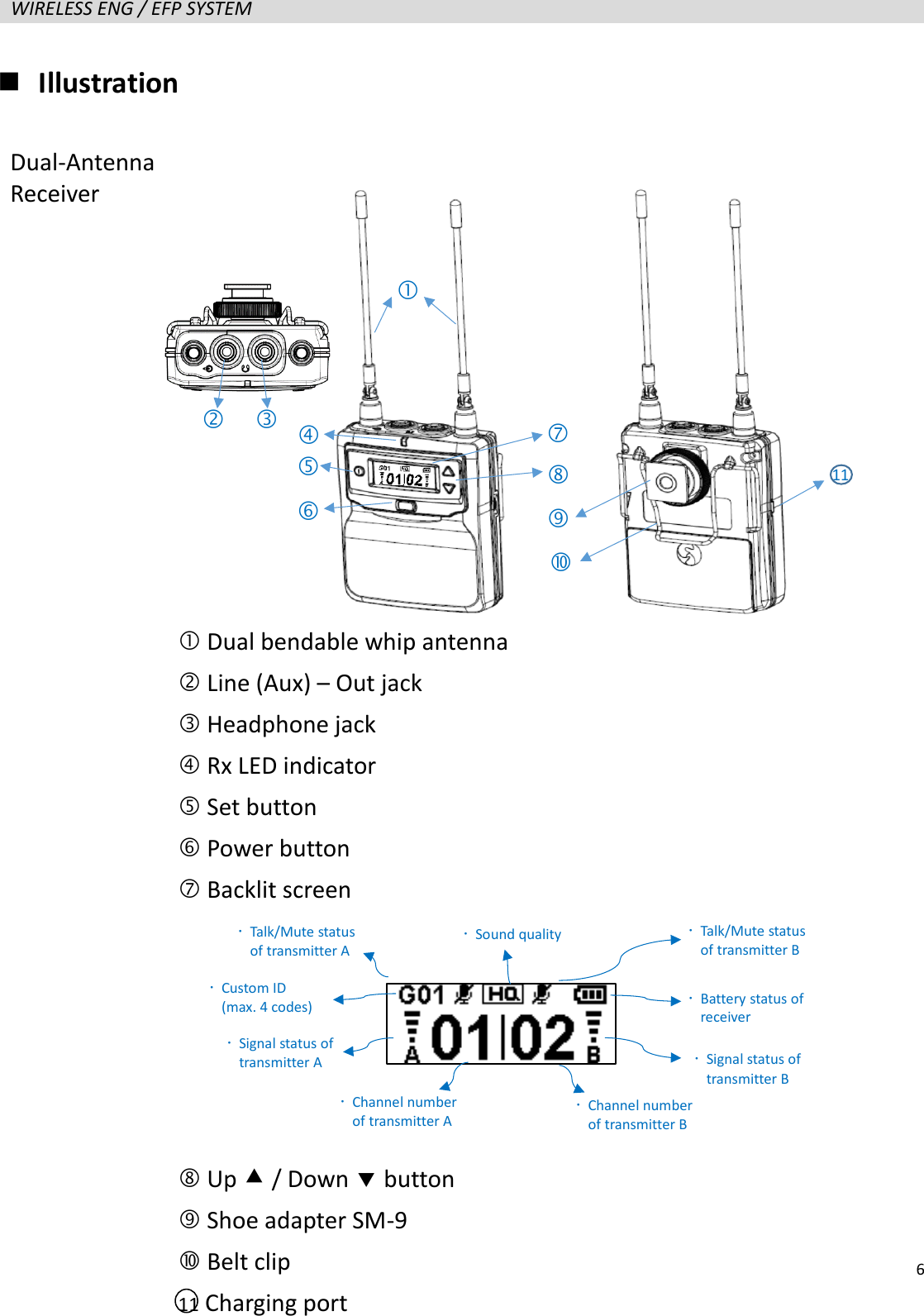
  6  WIRELESS ENG / EFP SYSTEM    Illustration                    Dual bendable whip antenna  Line (Aux) – Out jack  Headphone jack  Rx LED indicator  Set button  Power button  Backlit screen      Up  / Down  button  Shoe adapter SM-9  Belt clip 11 Charging port            Signal status of transmitter A  Custom ID (max. 4 codes)  Battery status of receiver  Signal status of transmitter B  Channel number of transmitter A  Channel number of transmitter B  Sound quality  Talk/Mute status of transmitter A  Talk/Mute status of transmitter B 11 Dual-Antenna Receiver
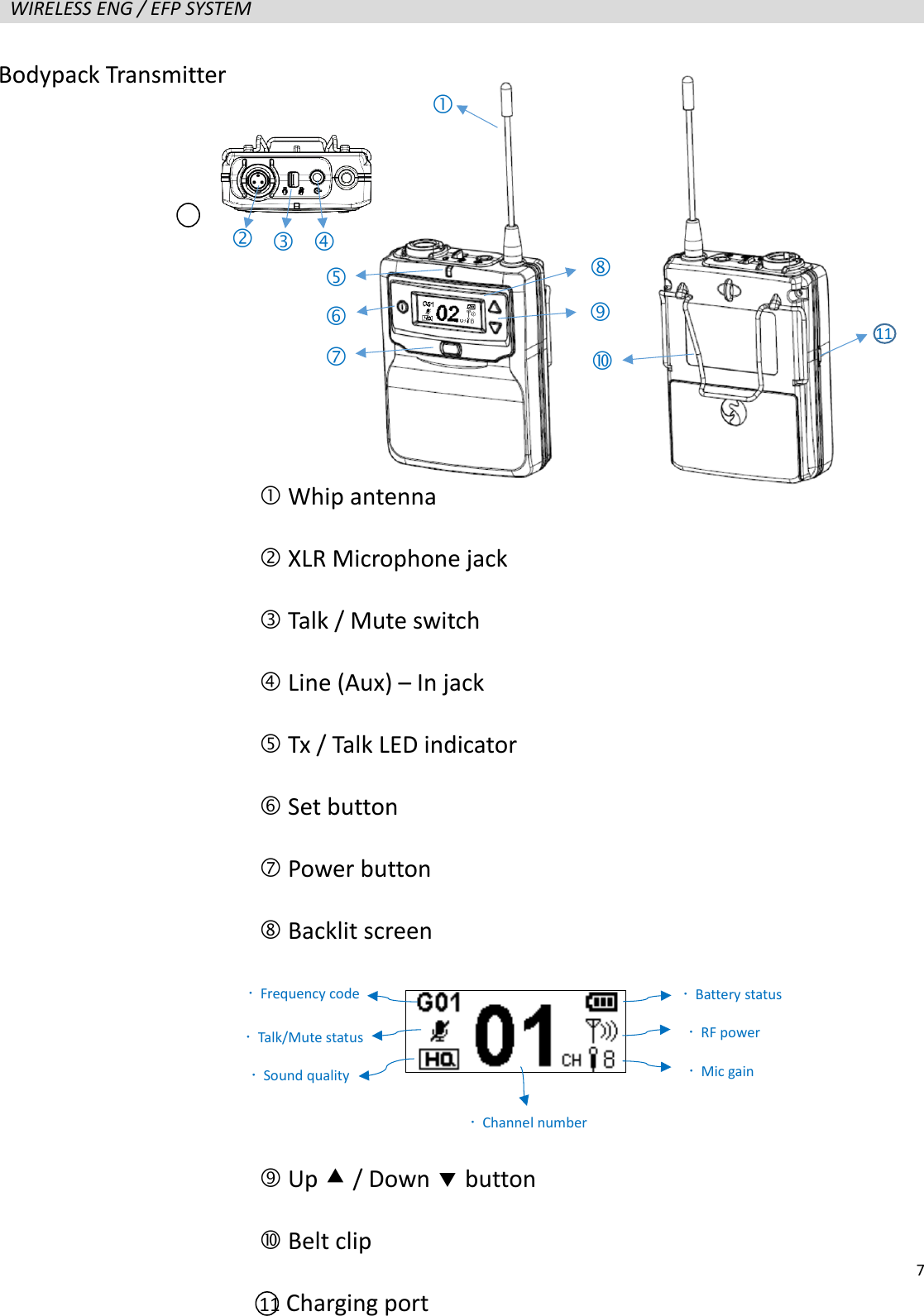
  7  WIRELESS ENG / EFP SYSTEM                      Bodypack Transmitter    Whip antenna  XLR Microphone jack    Talk / Mute switch  Line (Aux) – In jack  Tx / Talk LED indicator  Set button  Power button  Backlit screen     Up  / Down  button  Belt clip 11 Charging port            Frequency code  Talk/Mute status  Sound quality  Battery status  RF power  Mic gain  Channel number 11
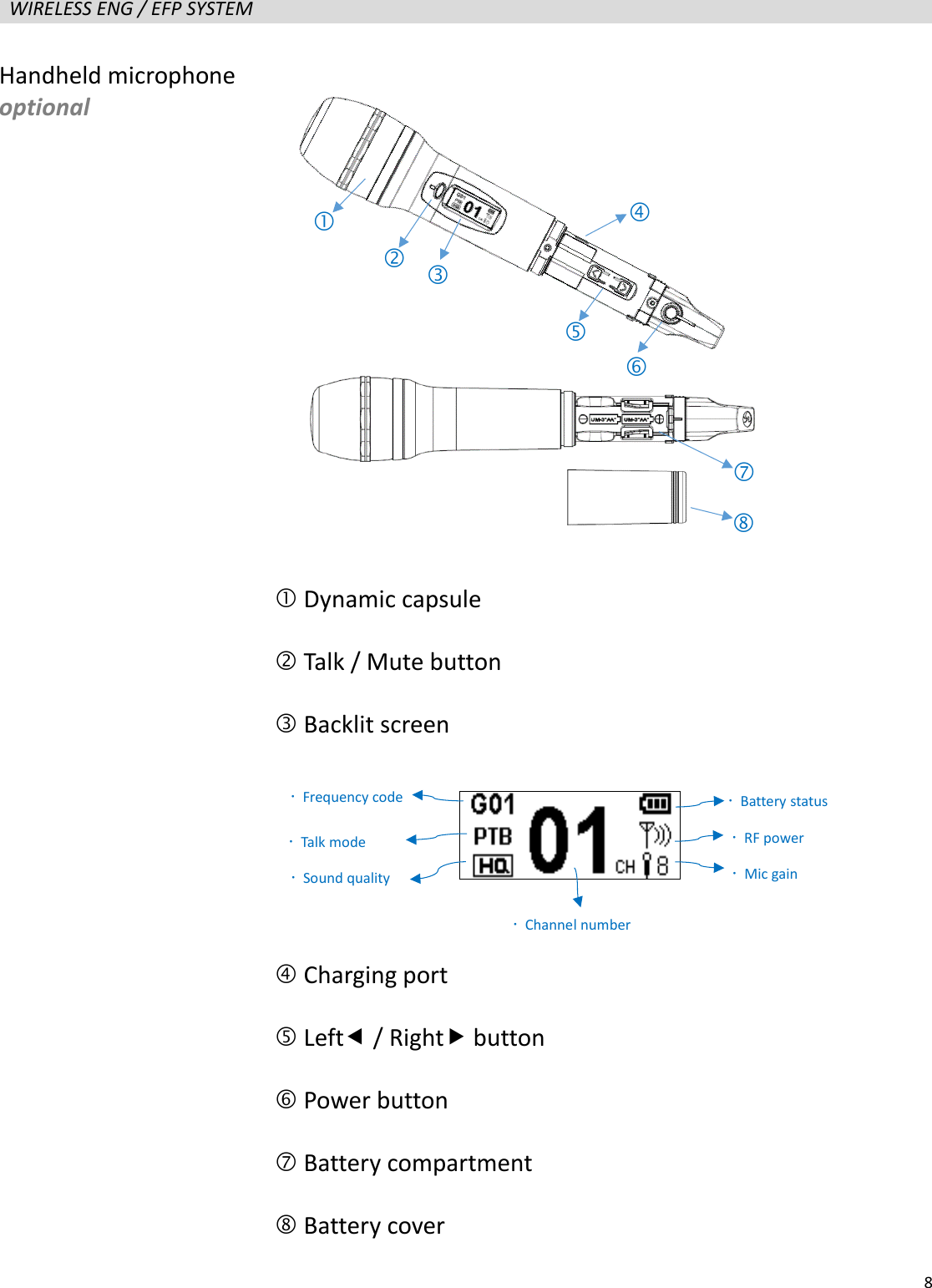
  8  WIRELESS ENG / EFP SYSTEM                      Handheld microphone optional  Dynamic capsule  Talk / Mute button  Backlit screen     Charging port  Left / Right button    Power button    Battery compartment  Battery cover         Frequency code  Talk mode  Sound quality  Battery status  RF power  Mic gain  Channel number 
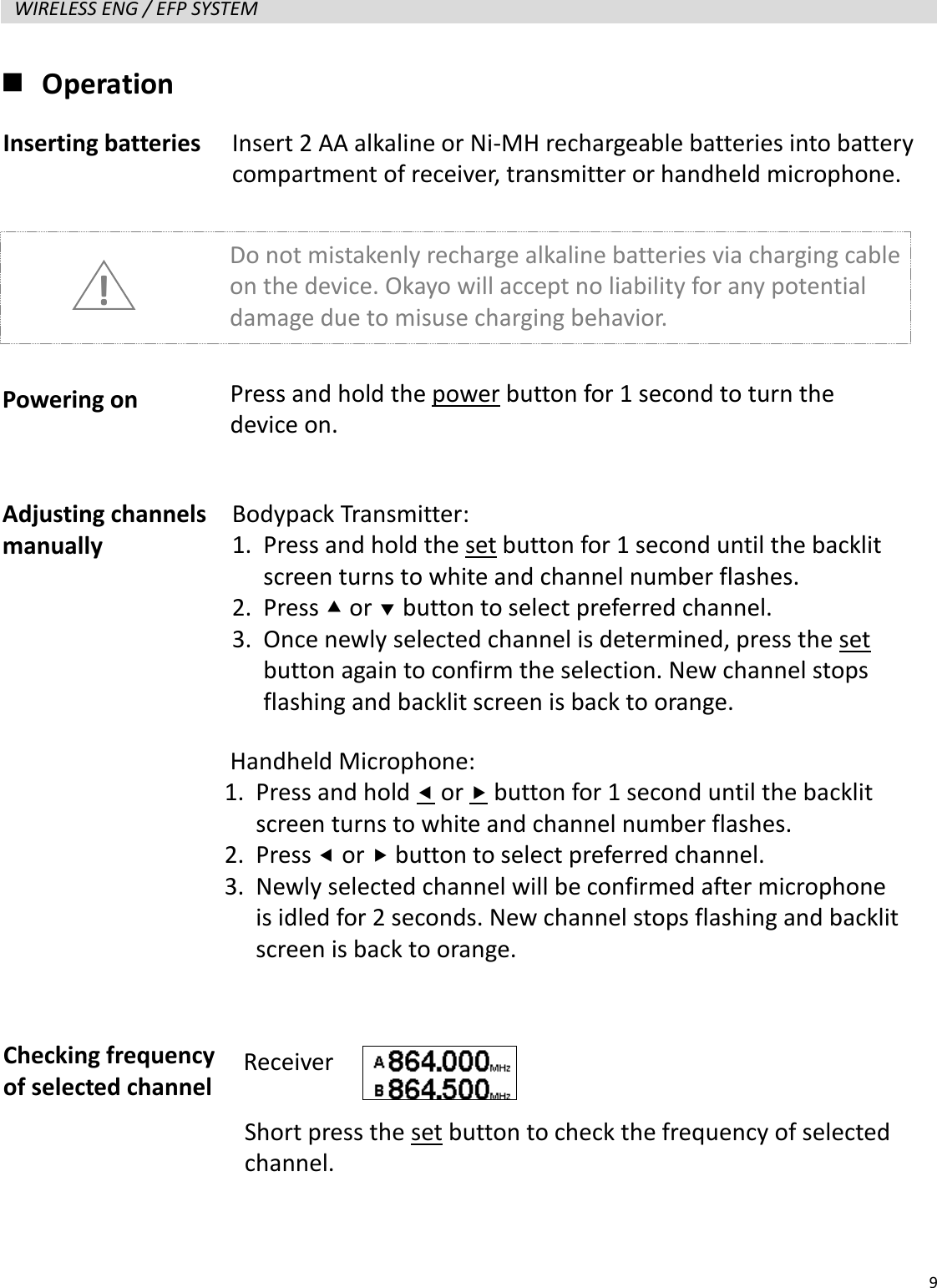
  9  WIRELESS ENG / EFP SYSTEM    Operation                   Inserting batteries Powering on Adjusting channels manually Insert 2 AA alkaline or Ni-MH rechargeable batteries into battery compartment of receiver, transmitter or handheld microphone. Do not mistakenly recharge alkaline batteries via charging cable on the device. Okayo will accept no liability for any potential damage due to misuse charging behavior.   ! Press and hold the power button for 1 second to turn the device on. Bodypack Transmitter: 1. Press and hold the set button for 1 second until the backlit screen turns to white and channel number flashes. 2. Press  or  button to select preferred channel. 3. Once newly selected channel is determined, press the set button again to confirm the selection. New channel stops flashing and backlit screen is back to orange. Checking frequency of selected channel Handheld Microphone:   1. Press and hold  or  button for 1 second until the backlit screen turns to white and channel number flashes. 2. Press  or  button to select preferred channel. 3. Newly selected channel will be confirmed after microphone is idled for 2 seconds. New channel stops flashing and backlit screen is back to orange. Receiver Short press the set button to check the frequency of selected channel.
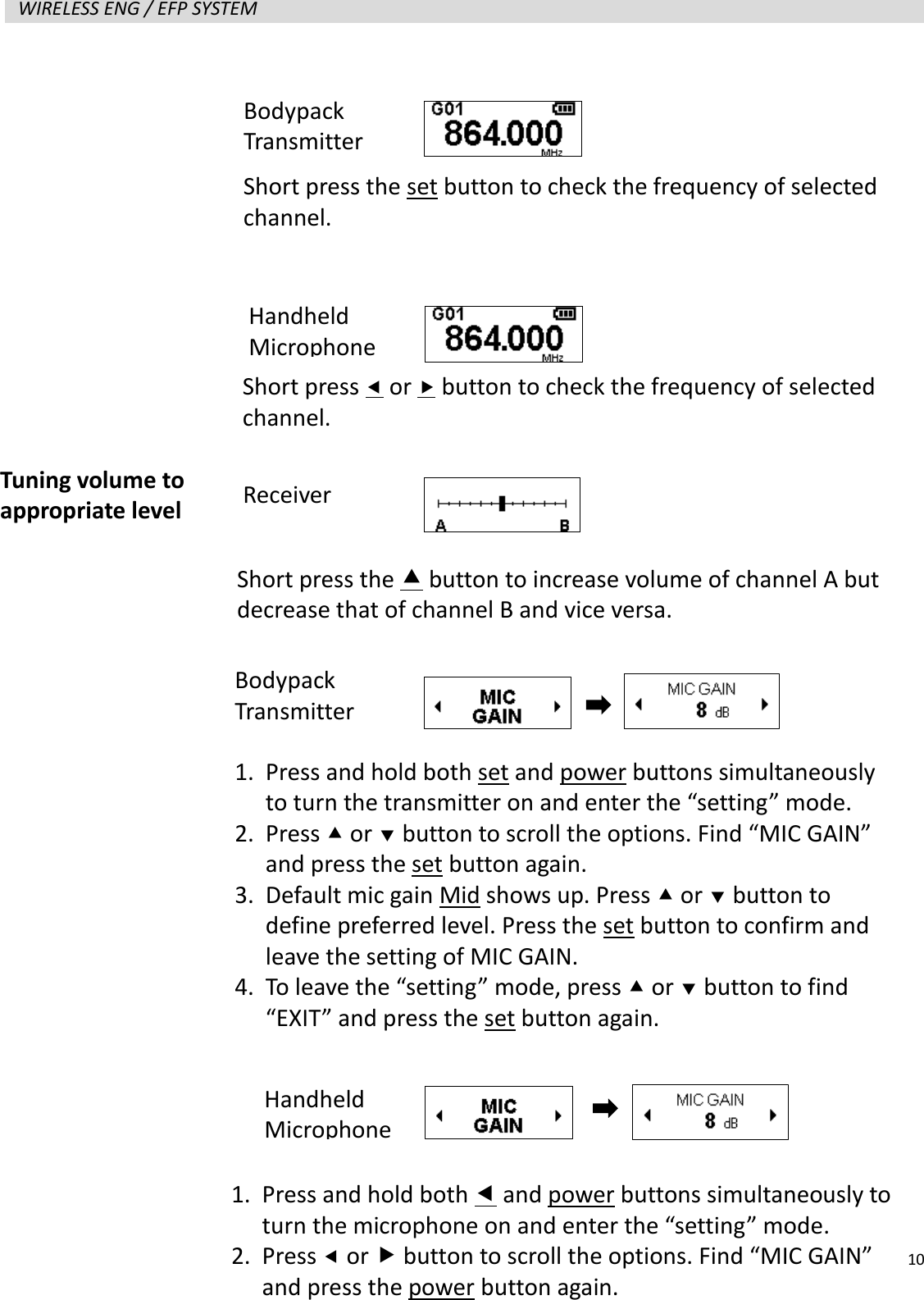
  10  WIRELESS ENG / EFP SYSTEM                      Tuning volume to appropriate level Short press the  button to increase volume of channel A but decrease that of channel B and vice versa. Receiver 1. Press and hold both set and power buttons simultaneously to turn the transmitter on and enter the “setting” mode. 2. Press  or  button to scroll the options. Find “MIC GAIN” and press the set button again. 3. Default mic gain Mid shows up. Press  or  button to define preferred level. Press the set button to confirm and leave the setting of MIC GAIN. 4. To leave the “setting” mode, press  or  button to find “EXIT” and press the set button again. 1. Press and hold both  and power buttons simultaneously to turn the microphone on and enter the “setting” mode. 2. Press  or  button to scroll the options. Find “MIC GAIN” and press the power button again. Short press  or  button to check the frequency of selected channel. Bodypack Transmitter Short press the set button to check the frequency of selected channel. Handheld Microphone Bodypack Transmitter Handheld Microphone
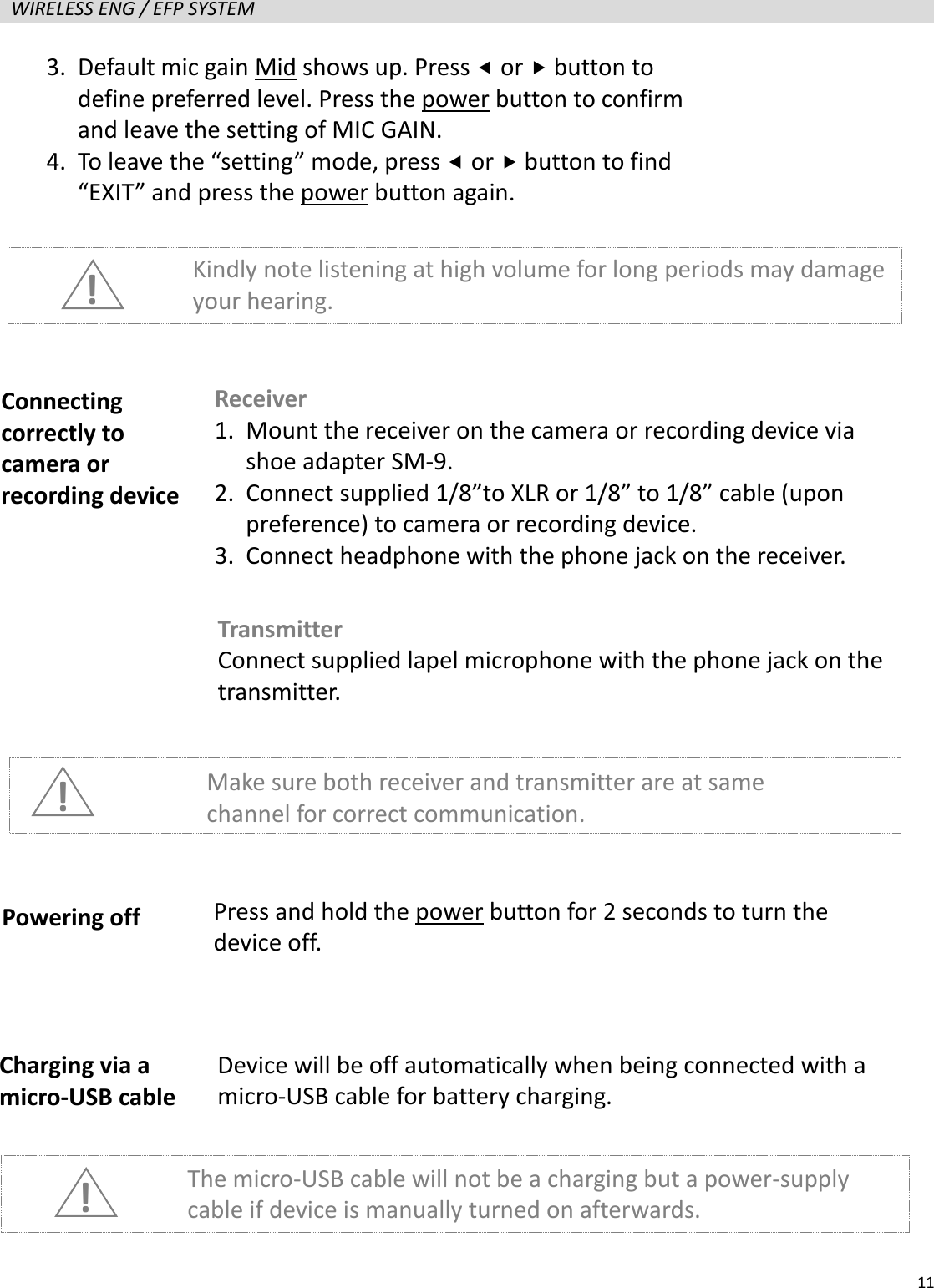
  11  WIRELESS ENG / EFP SYSTEM                      ! Kindly note listening at high volume for long periods may damage your hearing. Connecting correctly to camera or recording device Receiver 1. Mount the receiver on the camera or recording device via shoe adapter SM-9. 2. Connect supplied 1/8”to XLR or 1/8” to 1/8” cable (upon preference) to camera or recording device. 3. Connect headphone with the phone jack on the receiver. Transmitter Connect supplied lapel microphone with the phone jack on the transmitter. ! Make sure both receiver and transmitter are at same channel for correct communication. Powering off Press and hold the power button for 2 seconds to turn the device off. Charging via a micro-USB cable Device will be off automatically when being connected with a micro-USB cable for battery charging. The micro-USB cable will not be a charging but a power-supply cable if device is manually turned on afterwards. ! 3. Default mic gain Mid shows up. Press  or  button to define preferred level. Press the power button to confirm and leave the setting of MIC GAIN. 4. To leave the “setting” mode, press  or  button to find “EXIT” and press the power button again.
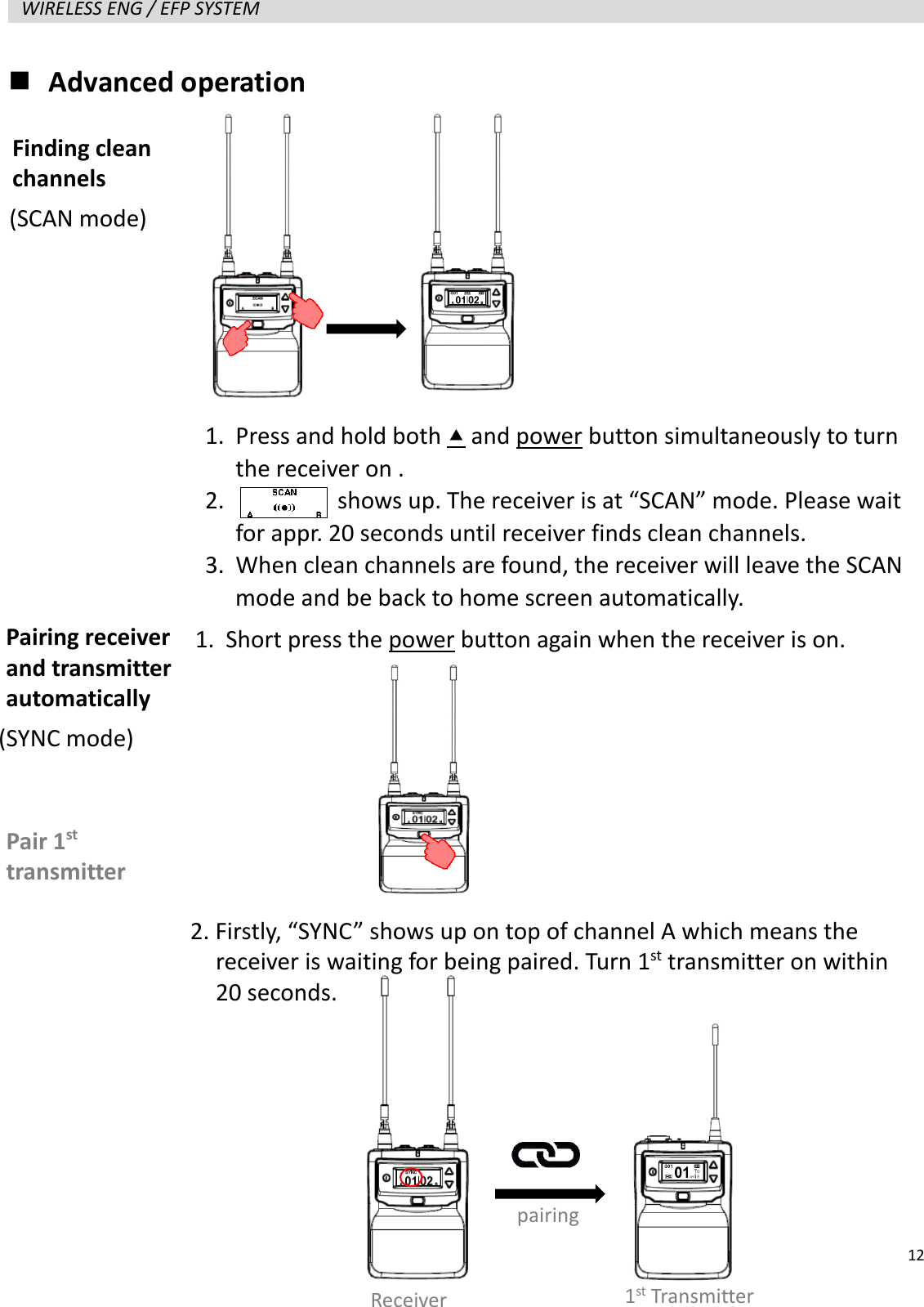
  12  WIRELESS ENG / EFP SYSTEM    Advanced operation                   Finding clean channels Pairing receiver and transmitter automatically 1. Press and hold both  and power button simultaneously to turn the receiver on . 2.         shows up. The receiver is at “SCAN” mode. Please wait for appr. 20 seconds until receiver finds clean channels. 3. When clean channels are found, the receiver will leave the SCAN mode and be back to home screen automatically. 1. Short press the power button again when the receiver is on. Pair 1st transmitter Receiver pairing 1st Transmitter 2. Firstly, “SYNC” shows up on top of channel A which means the   receiver is waiting for being paired. Turn 1st transmitter on within   20 seconds. (SCAN mode) (SYNC mode)
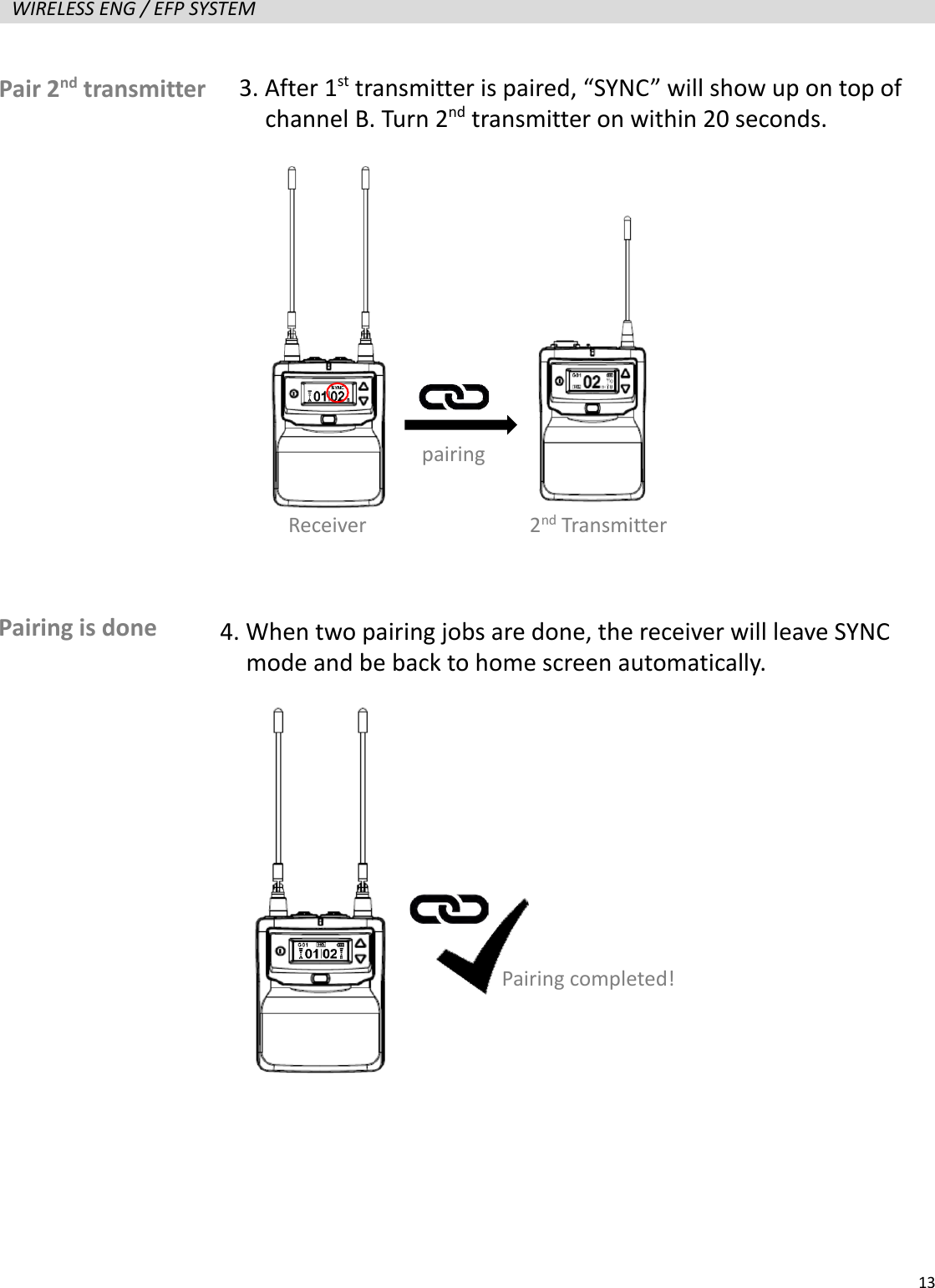
  13  WIRELESS ENG / EFP SYSTEM                      Pair 2nd transmitter 3. After 1st transmitter is paired, “SYNC” will show up on top of   channel B. Turn 2nd transmitter on within 20 seconds. pairing Receiver 2nd Transmitter Pairing is done 4. When two pairing jobs are done, the receiver will leave SYNC   mode and be back to home screen automatically. Pairing completed!
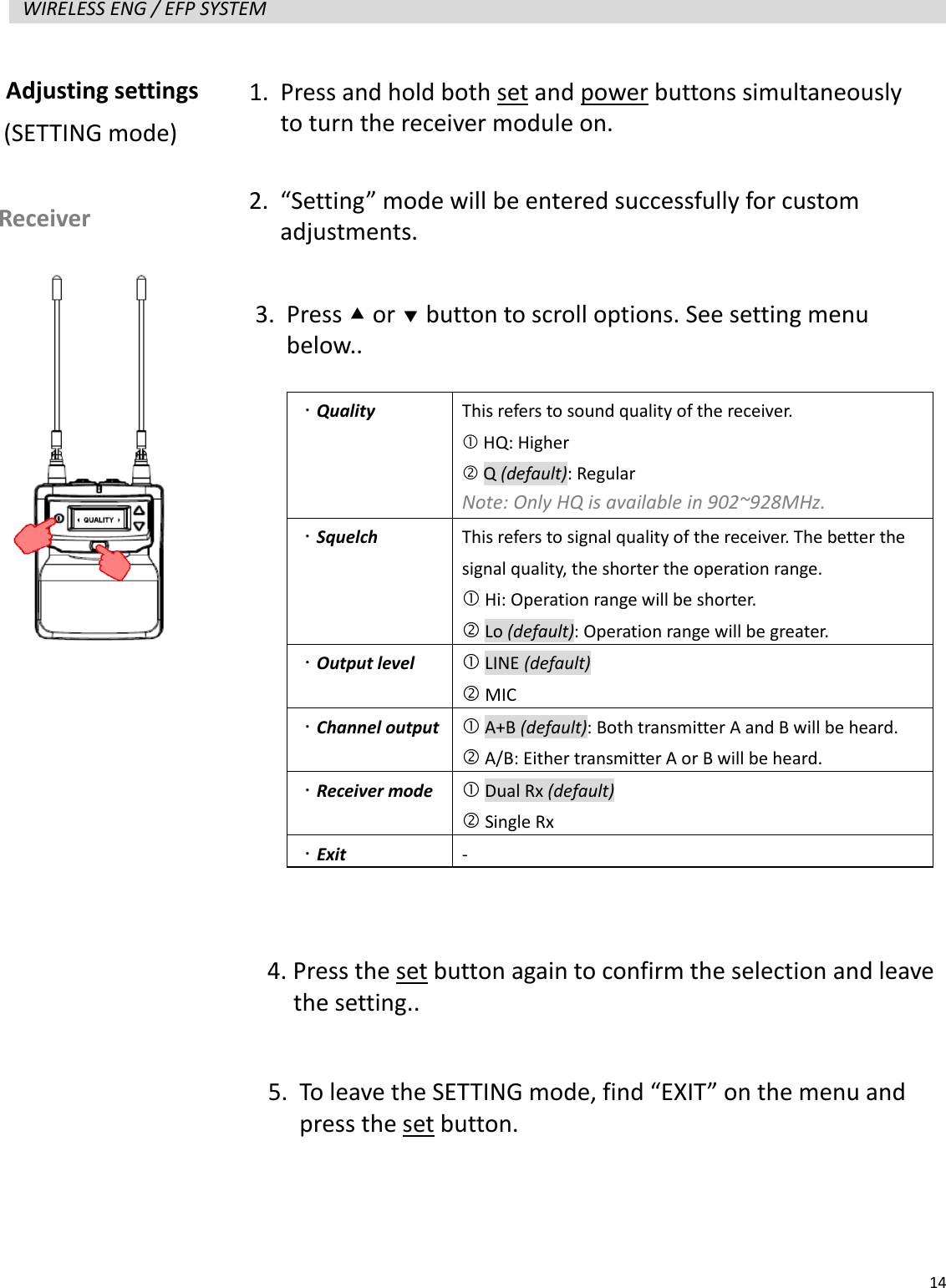
  14  WIRELESS ENG / EFP SYSTEM                      Adjusting settings   Receiver (SETTING mode) 1. Press and hold both set and power buttons simultaneously to turn the receiver module on. 2. “Setting” mode will be entered successfully for custom adjustments. 3. Press  or  button to scroll options. See setting menu below..   Quality  This refers to sound quality of the receiver.    HQ: Higher  Q (default): Regular Note: Only HQ is available in 902~928MHz.  Squelch  This refers to signal quality of the receiver. The better the signal quality, the shorter the operation range.  Hi: Operation range will be shorter.  Lo (default): Operation range will be greater.  Output level  LINE (default)  MIC  Channel output   A+B (default): Both transmitter A and B will be heard.  A/B: Either transmitter A or B will be heard.  Receiver mode   Dual Rx (default)  Single Rx  Exit -  4. Press the set button again to confirm the selection and leave   the setting.. 5. To leave the SETTING mode, find “EXIT” on the menu and press the set button.
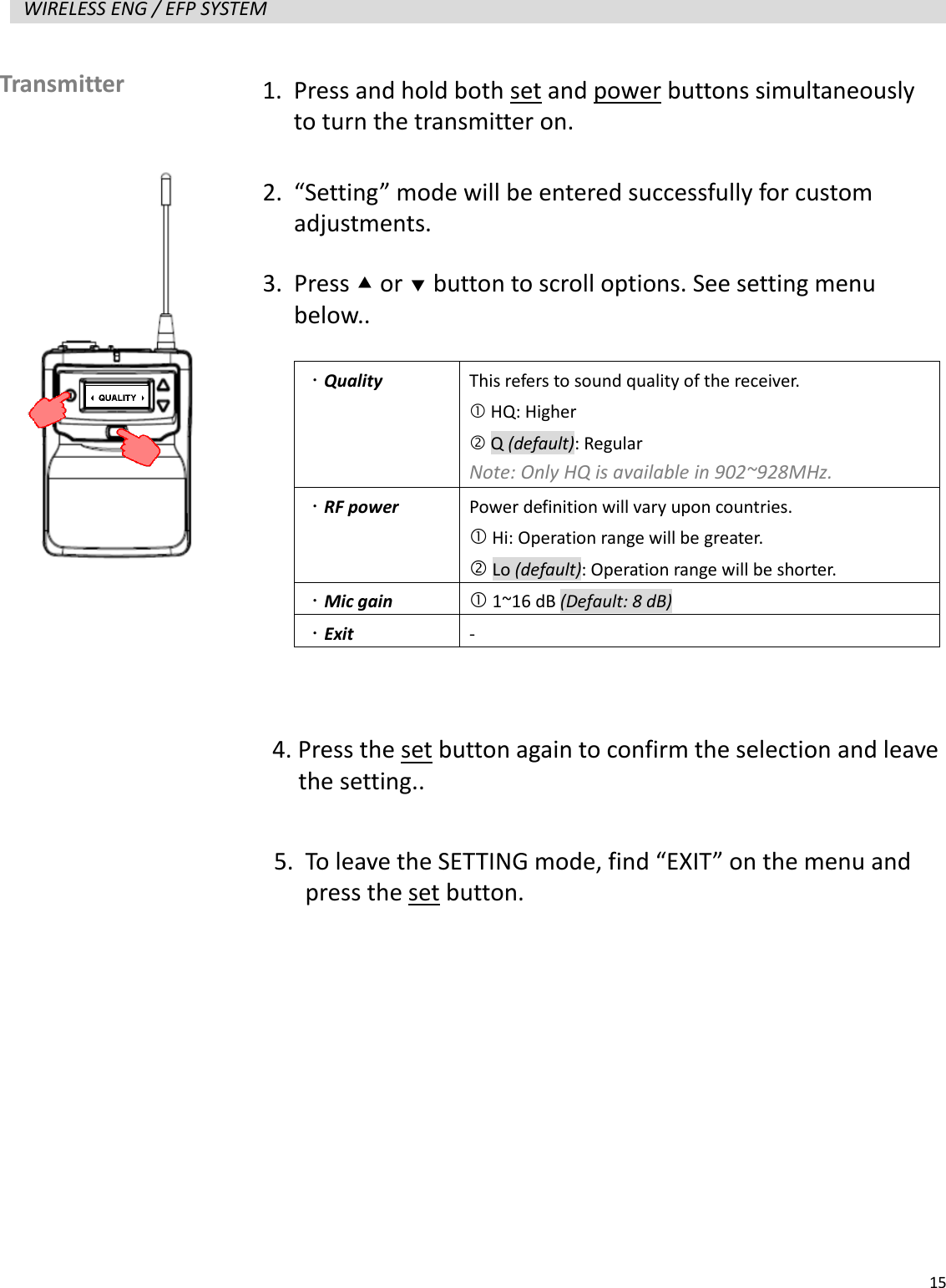
  15  WIRELESS ENG / EFP SYSTEM                      Transmitter   1. Press and hold both set and power buttons simultaneously to turn the transmitter on. 2. “Setting” mode will be entered successfully for custom adjustments. 3. Press  or  button to scroll options. See setting menu below..   Quality  This refers to sound quality of the receiver.    HQ: Higher  Q (default): Regular Note: Only HQ is available in 902~928MHz.  RF power  Power definition will vary upon countries.  Hi: Operation range will be greater.  Lo (default): Operation range will be shorter.  Mic gain  1~16 dB (Default: 8 dB)  Exit -  4. Press the set button again to confirm the selection and leave   the setting.. 5. To leave the SETTING mode, find “EXIT” on the menu and press the set button.
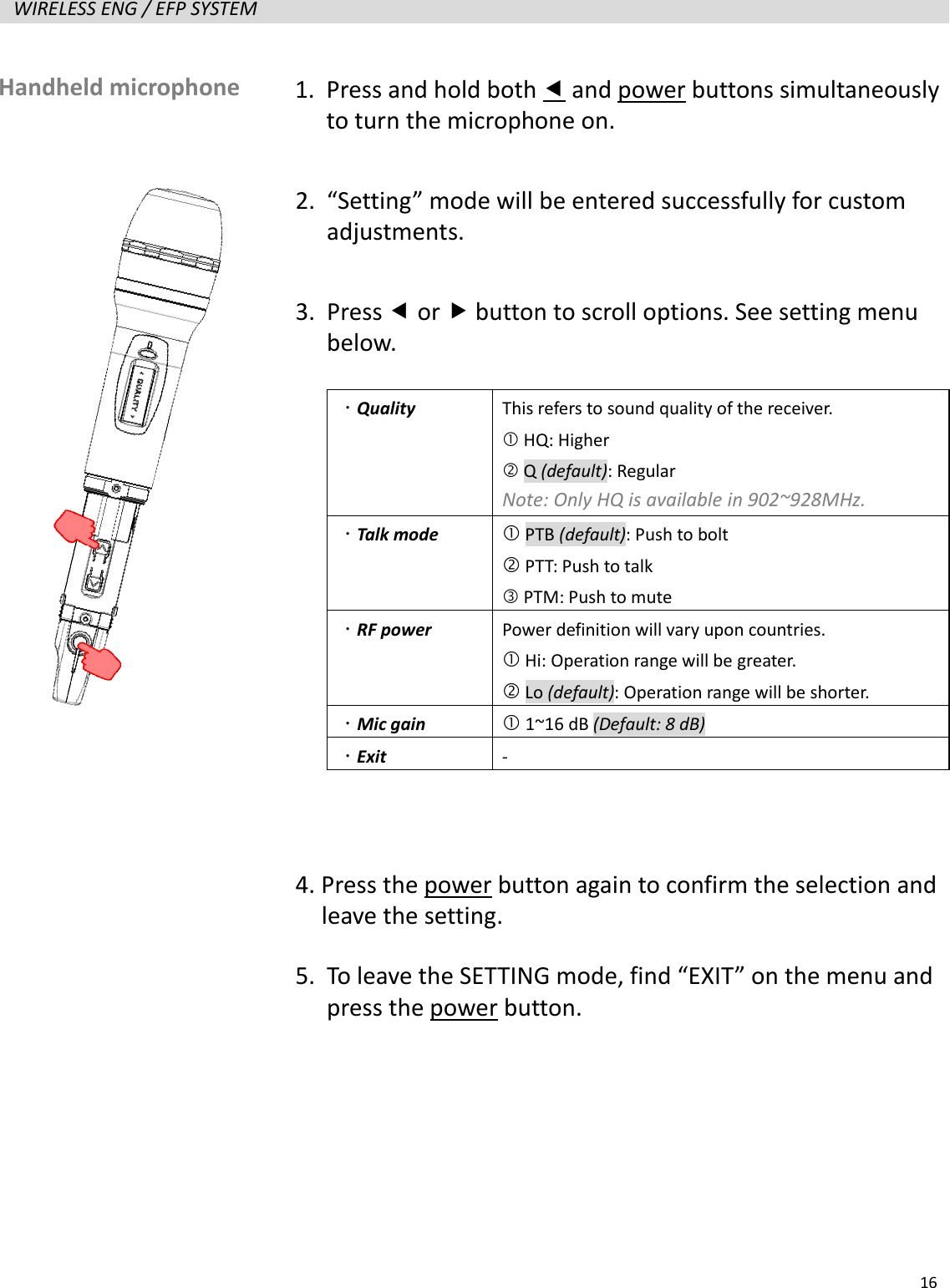
  16  WIRELESS ENG / EFP SYSTEM                      Handheld microphone   1. Press and hold both  and power buttons simultaneously to turn the microphone on. 2. “Setting” mode will be entered successfully for custom adjustments. 3. Press  or  button to scroll options. See setting menu below.   Quality  This refers to sound quality of the receiver.    HQ: Higher  Q (default): Regular Note: Only HQ is available in 902~928MHz.  Talk mode  PTB (default): Push to bolt  PTT: Push to talk  PTM: Push to mute  RF power  Power definition will vary upon countries.  Hi: Operation range will be greater.  Lo (default): Operation range will be shorter.  Mic gain  1~16 dB (Default: 8 dB)  Exit -  4. Press the power button again to confirm the selection and   leave the setting. 5. To leave the SETTING mode, find “EXIT” on the menu and press the power button.
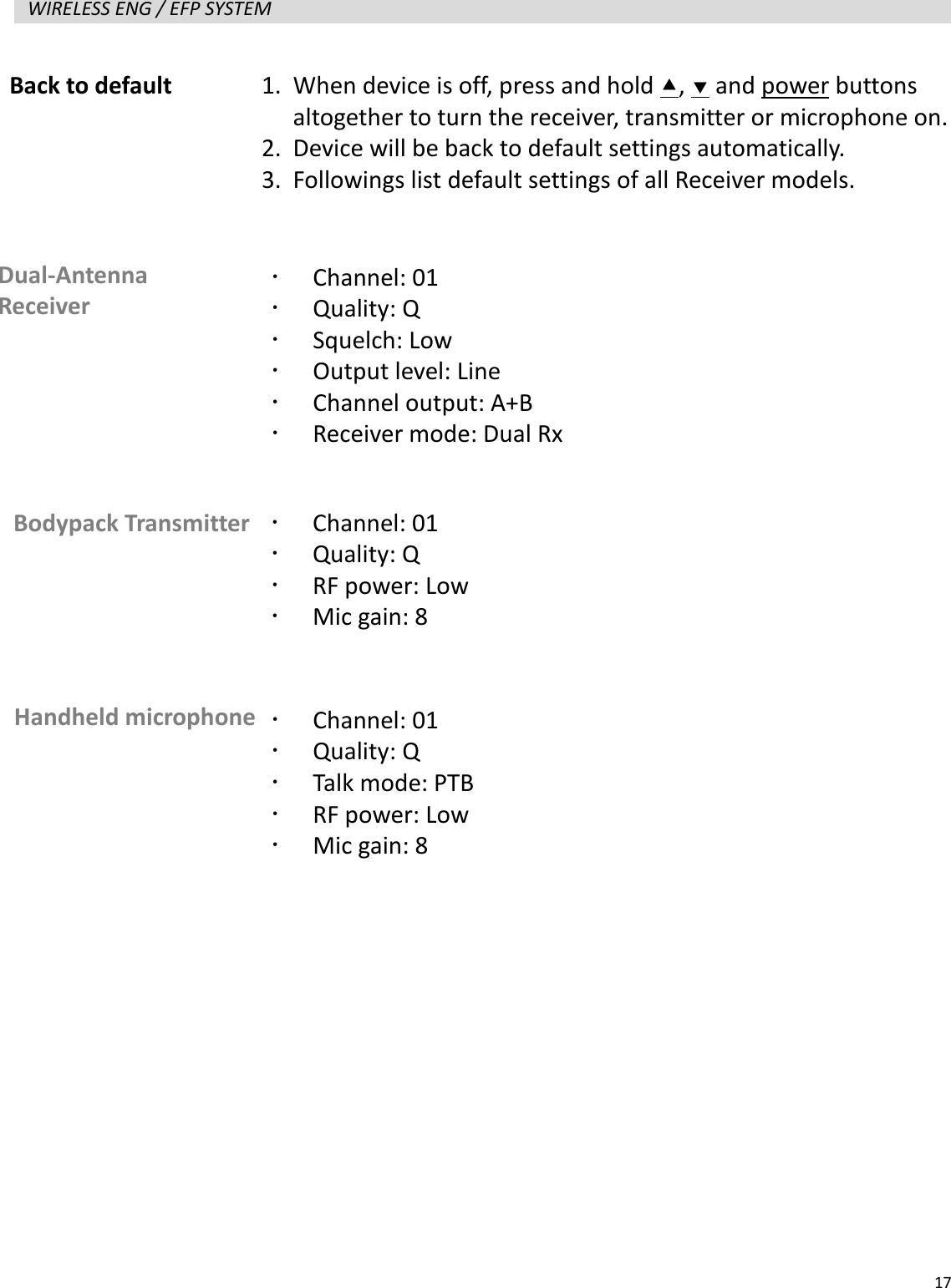
  17  WIRELESS ENG / EFP SYSTEM                       Back to default 1. When device is off, press and hold ,  and power buttons altogether to turn the receiver, transmitter or microphone on. 2. Device will be back to default settings automatically. 3. Followings list default settings of all Receiver models. Dual-Antenna Receiver    Channel: 01  Quality: Q  Squelch: Low  Output level: Line  Channel output: A+B  Receiver mode: Dual Rx Bodypack Transmitter    Channel: 01  Quality: Q  RF power: Low  Mic gain: 8 Handheld microphone   Channel: 01  Quality: Q  Talk mode: PTB  RF power: Low  Mic gain: 8
  18  WIRELESS ENG / EFP SYSTEM    Troubleshooting Not ready
  19  WIRELESS ENG / EFP SYSTEM    Specification   Not ready

Navigation menu