OKAYO Electronics DLR-9 Digital receiver User Manual DLR 9x
OKAYO Electronics Co., Ltd. Digital receiver Users Manual DLR 9x
User Manual
Wireless receiver DLR-9
Interface
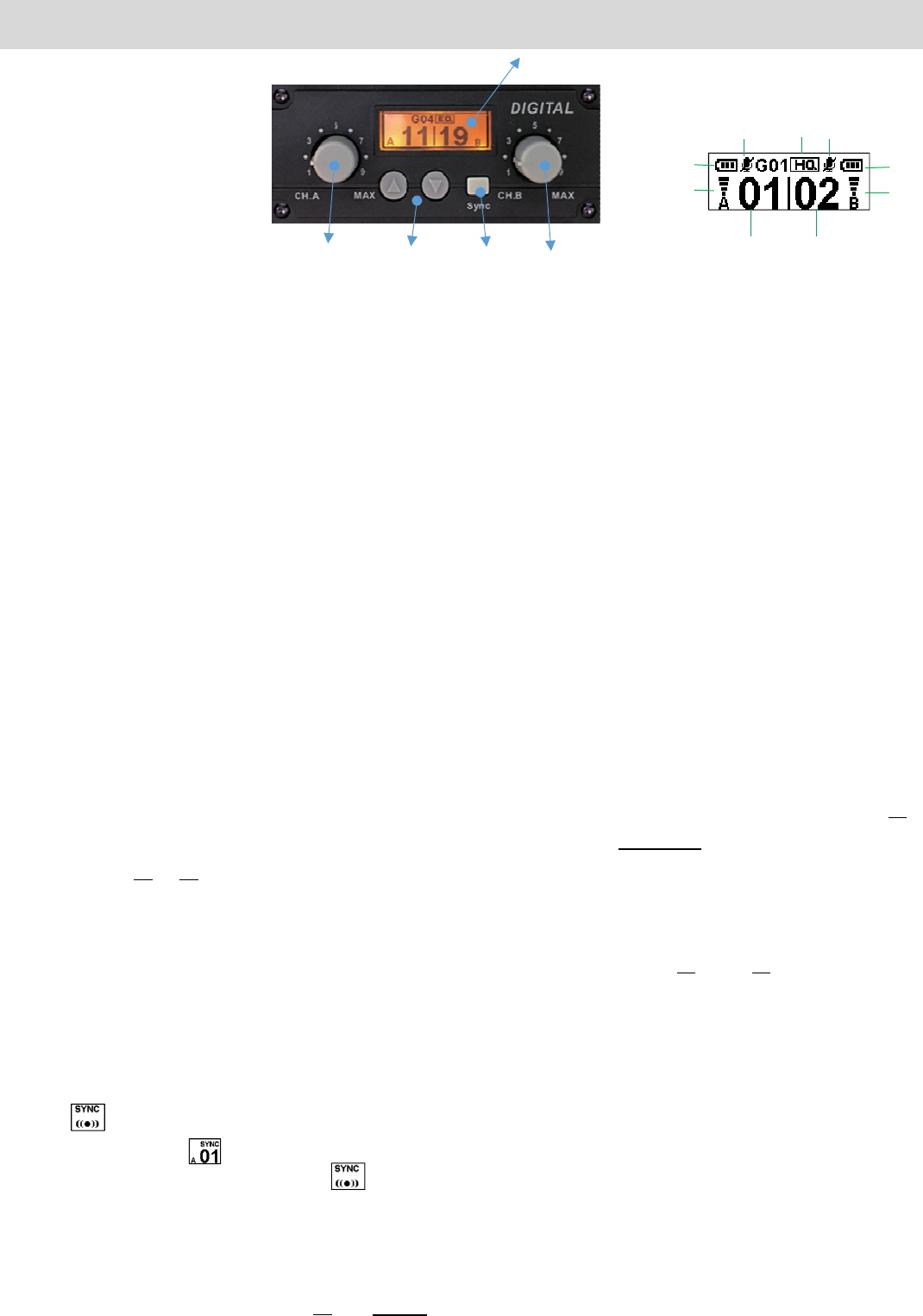
PowerandvolumeknobofchannelA
(Up)/(Down)button
Syncbutton
PowerandvolumeknobofchannelA
Display,figure1
a. Talk/MutestatusofchannelA
b. BatterystatusofchannelA
c. SignalstatusofchannelA
d. ChannelnumberofchannelA
e. ChannelnumberofchannelB
f. SignalstatusofchannelB
g. BatterystatusofchannelB
h. Talk/MutestatusofchannelB
i. Soundqualitypreset
Operation
1. SwitchonthemodulewiththeknobofchannelAfirst.Then,followsameoperationtoswitchon
channelB,ifnecessary.Adjustvolumeofchannelproperlywithsameknob.
2. Previouslyselectedchannelnumbershowsup.Tochangethechannel,pressandholdthebutton
for1secondtountilbacklitscreenturnstowhiteandnumberofchannelAflashes.Then,press
buttonortoselectanotherpreferrednumberofchannelA.Thenewlyselectedchannelwill
automaticallybeconfirmedafterbeingidledfor2seconds.Then,flashingindicationwillcometo
channelB.FollowsameoperationtohavepreferrednumberofchannelB.
3. TocheckspecificfrequencyofchannelAorB,simplyshortpressbutton(A)or(B).Thereceiver
modulewillcomebacktohomescreenafterbeingidledfor2seconds.
4. SwitchoffthemodulecounterclockwisewiththeknobofchannelA.
Channelsync
1. PressbuttonSYNCwhenthemoduleison.
2. showsuponchannelAandthemodulestartstolookforacleanchannelA(appr.10seconds)
untilnumbershowsup.Forthetimebeing,turn1
st
transmitteronwithin20secondsforpairing.
3. After1
st
transmitterispaired,willthenshowuponchannelB.Now,repeatstep2and3toget
2
nd
transmitterpaired.
4. When2transmittersfinishthepairing,themodulewillreturntohomescreenautomatically.
Settingmenu
1. Pressandholdbothbuttonsandpowersimultaneouslytoturnthereceivermoduleon.
2. “Setting”modewillbeenteredsuccessfullyforcustomadjustments.
Figure 1
a
b
c
de
f
g
h
i
Wireless receiver DLR-9
3. Pressbuttonortoscrolloptions.Seesettingmenubelow.
Quality:Thisreferstosoundqualityofthereceiverandchannelquantitywillvaryupondifferent
quality.
HQ:Higher
Q(default):Regular
Squelch:Thisreferstosignalqualityofthereceiver.Thebetterthesignalquality,theshorterthe
operationrange.
Hi:Operationrangewillbeshorter.
Lo(default):Operationrangewillbegreater.
Pairmode:OnlySync(default)isavailable.
Exit
4. PressthebuttonSYNCagaintoconfirmtheselectionandleavethesetting.
5. ToleavetheSETTINGmode,find“EXIT”onthemenuandpressthebuttonSYNC.
Manufacturer’sDeclaration
Thisproductmeetsthefollowingstandards:
FederalCommunicationsCommissionInterferenceStatement
1. This Transmitter must not be co‐located or operating in conjunction with any other antenna or transmitter.
2. This equipment complies with FCC RF radiation exposure limits set forth for an uncontrolled environment. This equipment
should be installed and operated with a minimum distance of 20 centimeters between the radiator and your body.
Wireless receiver DLR-9
Europe–EUDeclarationofConformity
ThisdevicecomplieswithDirective2014/53/EUissuedbytheCommissionoftheEuropeanCommunity.
WEEEStatement
Electricalandelectronicequipmentmustbedisposed
ofattheendoftheirlifespanseparatelyfromhouseholdwaste.
Pleasedisposeofthisequipmentatyourlocalwastecollection
Orrecyclingcenter.Pleasehelptoprotectourenvironment.
SafetyandElectromagneticEmissionsCertificates
StandardCompliance
RoHscompliant
EuropeanDirective2011/65/EU
Certificates
CE
FCC