OXTOP FXWS Wireless Surround User Manual Atrium sub10 sat30

OXTOP (DONGGUAN) Electronics Co., Ltd. Wireless Surround Atrium sub10 sat30

User Manual

OWNER’S MANUALWireless Surround Speaker System®Wireless Surround®DRAFT
Customer Service Hours of Operation: Monday-Friday, 9AM-6PM EST polkcs@polkaudio.com 54 Polk Audio Customer Service 800-377-7655 (Outside USA & Canada: 410-358-3600)PRODUCT DISPOSALCertain international, national and/or locallaws and/or regulations may apply regardingthe disposal of this product. For further de-tailed information, please contact the retailerwhere you purchased this product or the PolkAudio Importer/ Distributor in your country.A listing of Polk Audio Importer/ Distributorscan be found on the Polk Audio website www.polkaudio.comor by contacting Polk Audio at: 5601 Metro Drive, Baltimore,Maryland 21215, USA Phone: +1 410 358-3600.TECHNICAL ASSISTANCE OR SERVICEIf, after following the hookup directions, you experiencedifficulty, please double-check all wire connections.Should you isolate the problem to the speaker, contactthe authorized Polk Audio dealer where you made yourpurchase, or contact Polk Audio Customer Service800-377-7655 (M-F, 9am-6pm EST, US & Canada only)or via email polkcs@polkaudio.com. Outside the US& Canada, call 410-358-3600. More detailed informationincluding audio how-to articles, FAQs and online manualsare available on our award-winning website:www.polkaudio.com.The CAUTION marks shown here are locatedon the back of your F/X Wireless Surround.CAUTION: To prevent electric shock, matchwide blade of plug to wide slot, insert fully.CAUTION: No naked flame sources, such ascandles, should be placed on the apparatus.Class B Emissions LimitsThis Class B digital apparatus meets all requirements ofthe Canadian Interference–Causing Equipment Regulations.NOTE:This equipment has been tested and found to comply withthe limits for a Class B digital device, pursuant to part 15of the FCC Rules. These limits are designed to provide rea-sonable protection against harmful interference in a residen-tial installation. This equipment generates, uses and canradiate radio frequency energy, and, if not installed and usedin accordance with the instructions, may cause harmfulinterference to radio communications. However, there is noguarantee that interference will not occur in a particular in-stallation. If this equipment does cause harmful interferenceto radio or television reception, which can be determined byturning the equipment off and on, the user is encouragedto try to correct the interference by one or more of thefollowing measures:• Reorient or relocate the receiving antenna.• Increase the separation between the equipmentand receiver.• Connect the equipment into an outlet on a circuitdifferent from that to which the receiver is connected.• Consult the dealer or an experienced radio/TV technician for help.FCC WARNING STATEMENTFCC NOTE:THE MANUFACTURER IS NOT RESPONSIBLE FOR ANYRADIO OR TV INTERFERENCE CAUSED BY UNAUTHORIZEDMODIFICATIONS TO THIS EQUIPMENT.SUCH MODIFICATIONS COULD VOID THE USER’SAUTHORITY TO OPERATE THE EQUIPMENT.EnglishIMPORTANT SAFETY INSTRUCTIONSREAD BEFORE OPERATING EQUIPMENT1. Read these instructions.2. Keep these instructions.3. Heed all warnings.4. Follow all instructions.5. Do not use this apparatus near water.6. Clean only with dry cloth.7. Do not block any ventilation openings. Install in accordancewith the manufacturer’s instructions.8. Do not install near any heat sources such as radiators, heatregisters, stoves, or other apparatus (including amplifiers) thatproduce heat.9. Do not defeat the safety purpose of the polarized or grounding-typeplug. A polarized plug has two blades with one wider than theother. A grounding type plug has two blades and a third groundingprong. The wide blade or the third prong are provided for yoursafety. If the provided plug does not fit into your outlet, consult anelectrician for replacement of the obsolete outlet.10. Protect the power cord from being walked on or pinchedparticularly at plugs, convenience receptacles, and the point wherethey exit from the apparatus.11. Only use attachments/accessories specified by the manufacturer.12. Use only with the cart, stand, tripod, bracket, or table specified bythe manufacturer, or sold with the apparatus. When a cart is used,use caution when moving the cart/apparatus combination to avoidinjury from tip-over.13. Unplug this apparatus during lightning stormsor when unused for long periods of time.14. Refer all servicing to qualified service personnel. Servicing isrequired when the apparatus has been damaged in any way, suchas power-supply cord or plug is damaged, liquid has been spilledor objects have fallen into the apparatus, the apparatus has beenexposed to rain or moisture, does not operate normally, or hasbeen dropped.15. WARNING: To reduce the risk of fire or electric shock, thisapparatus should not be exposed to rain or moisture and objectsfilled with liquids, such as vases, should not be placed on thisapparatus.16. To completely disconnect this equipment from the mains,disconnect the power supply cord plug from the receptacle.17. The main plug of the power supply cord shall remain readilyoperable.WARNING: Listen CarefullyPolk Audio loudspeakers and subwoofers are capable of playing at ex-tremely high volume levels, which could cause serious or permanenthearing damage. Polk Audio, Inc. accepts no liability for hearing loss,bodily injury or property damage resulting from the misuse of its prod-ucts. Keep these guidelines in mind and always use your own goodjudgment when controlling volume: You should limit prolonged expo-sure to volumes that exceed 85 decibels(dB).For more about safe volume levels refer to the OccupationalHealth and Safety Administration (OSHA) guidelines atwww.osha.gov/dts/osta/otm/noise/standards_more.html.FCC Radiation Exposure StatementThis equipment complies with FCC radiation exposure limits set forth for an uncontrolled environment. This equipment should be installed and operated with minimum distance 20cm between the radiator & your bodyIC WARNINGOperation is subject to the following two conditions: (1) this device may not cause interference, and (2) this device must accept any interference, including interference that may cause undesired operation of the device.”To reduce potential radio interference to other users, the antenna type and its gain should be so chosen that the equivalent isotropic ally radiated power (e.i.r.p.) is not more than that permitted for successful communication.
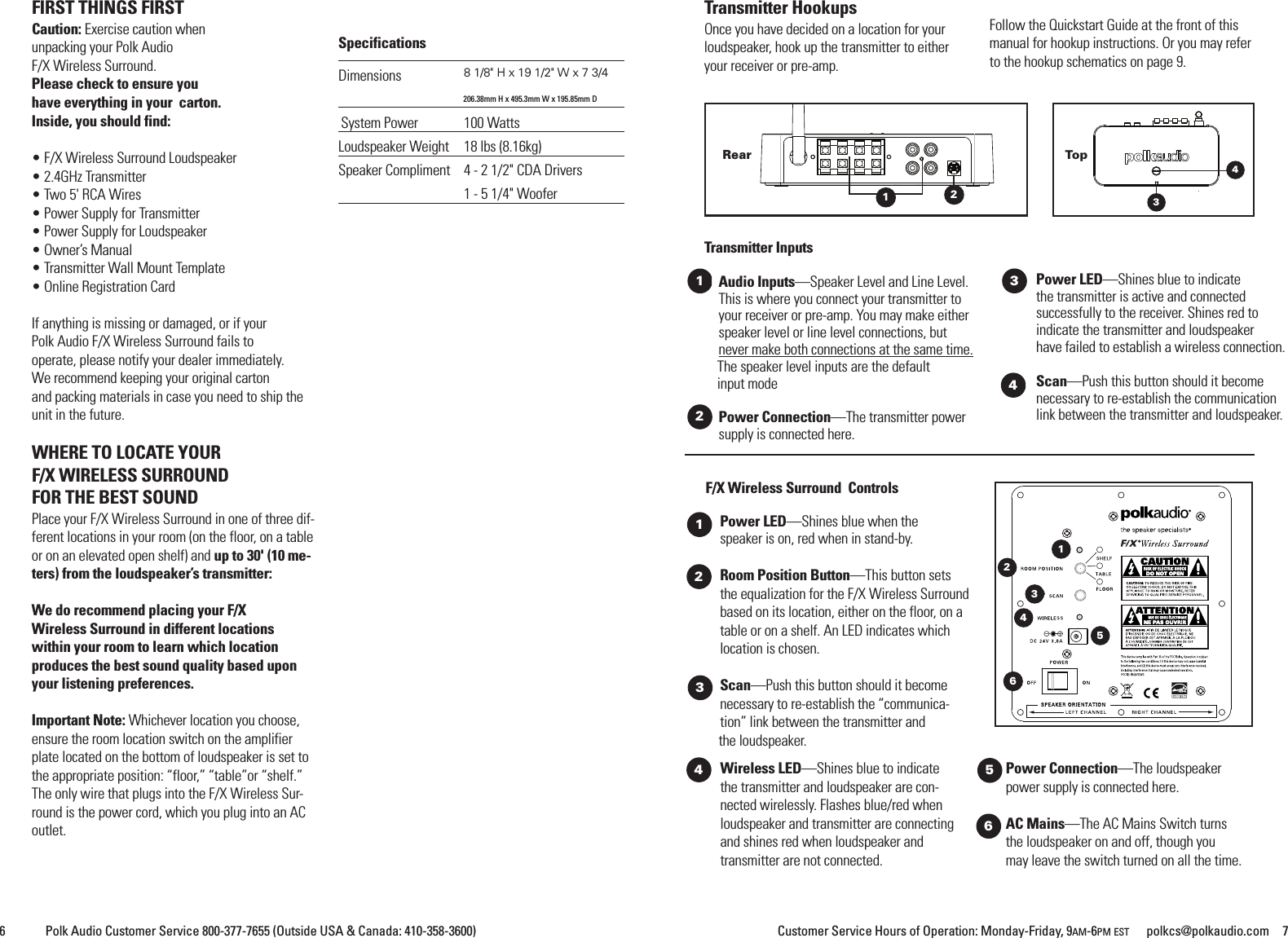
Customer Service Hours of Operation: Monday-Friday, 9AM-6PM EST polkcs@polkaudio.com 76 Polk Audio Customer Service 800-377-7655 (Outside USA & Canada: 410-358-3600)Wireless LED—Shines blue to indicatethe transmitter and loudspeaker are con-nected wirelessly. Flashes blue/red whenloudspeaker and transmitter are connectingand shines red when loudspeaker andtransmitter are not connected.Power Connection—The loudspeakerpower supply is connected here.AC Mains––The AC Mains Switch turnsthe loudspeaker on and off, though youmay leave the switch turned on all the time.F/X Wireless Surround ControlsPower LED—Shines blue when thespeaker is on, red when in stand-by.Room Position Button—This button setsthe equalization for the F/X Wireless Surroundbased on its location, either on the floor, on atable or on a shelf. An LED indicates whichlocation is chosen.Scan—Push this button should it becomenecessary to re-establish the “communica-tion” link between the transmitter andthe loudspeaker.12Rear43TopTransmitter InputsAudio Inputs—Speaker Level and Line Level.This is where you connect your transmitter toyour receiver or pre-amp. You may make eitherspeaker level or line level connections, butnever make both connections at the same time.The speaker level inputs are the defaultinput modePower Connection—The transmitter powersupply is connected here.Power LED—Shines blue to indicatethe transmitter is active and connectedsuccessfully to the receiver. Shines red toindicate the transmitter and loudspeakerhave failed to establish a wireless connection.Scan—Push this button should it becomenecessary to re-establish the communicationlink between the transmitter and loudspeaker.1234563412Transmitter HookupsOnce you have decided on a location for yourloudspeaker, hook up the transmitter to eitheryour receiver or pre-amp.Follow the Quickstart Guide at the front of thismanual for hookup instructions. Or you may referto the hookup schematics on page 9.FIRST THINGS FIRSTCaution: Exercise caution whenunpacking your Polk AudioF/X Wireless Surround.Please check to ensure youhave everything in your carton.Inside, you should find:• F/X Wireless Surround Loudspeaker• 2.4GHz Transmitter• Two 5' RCA Wires• Power Supply for Transmitter• Power Supply for Loudspeaker• Owner’s Manual• Transmitter Wall Mount Template• Online Registration CardIf anything is missing or damaged, or if yourPolk Audio F/X Wireless Surround fails tooperate, please notify your dealer immediately.We recommend keeping your original cartonand packing materials in case you need to ship theunit in the future.WHERE TO LOCATE YOURF/X WIRELESS SURROUNDFOR THE BEST SOUNDPlace your F/X Wireless Surround in one of three dif-ferent locations in your room (on the floor, on a tableor on an elevated open shelf) and up to 30' (10 me-ters) from the loudspeaker’s transmitter:We do recommend placing your F/XWireless Surround in different locationswithin your room to learn which locationproduces the best sound quality based uponyour listening preferences.Important Note: Whichever location you choose,ensure the room location switch on the amplifierplate located on the bottom of loudspeaker is set tothe appropriate position: “floor,” “table”or “shelf.”The only wire that plugs into the F/X Wireless Sur-round is the power cord, which you plug into an ACoutlet.SpecificationsDimensions 81/8" H x 19 1/2" W x 7 3/4206.38mm H x 495.3mm W x 195.85mm DSystem Power 100 WattsLoudspeaker Weight 18 lbs (8.16kg)Speaker Compliment 4 - 2 1/2" CDA Drivers1 - 5 1/4" Woofer623451
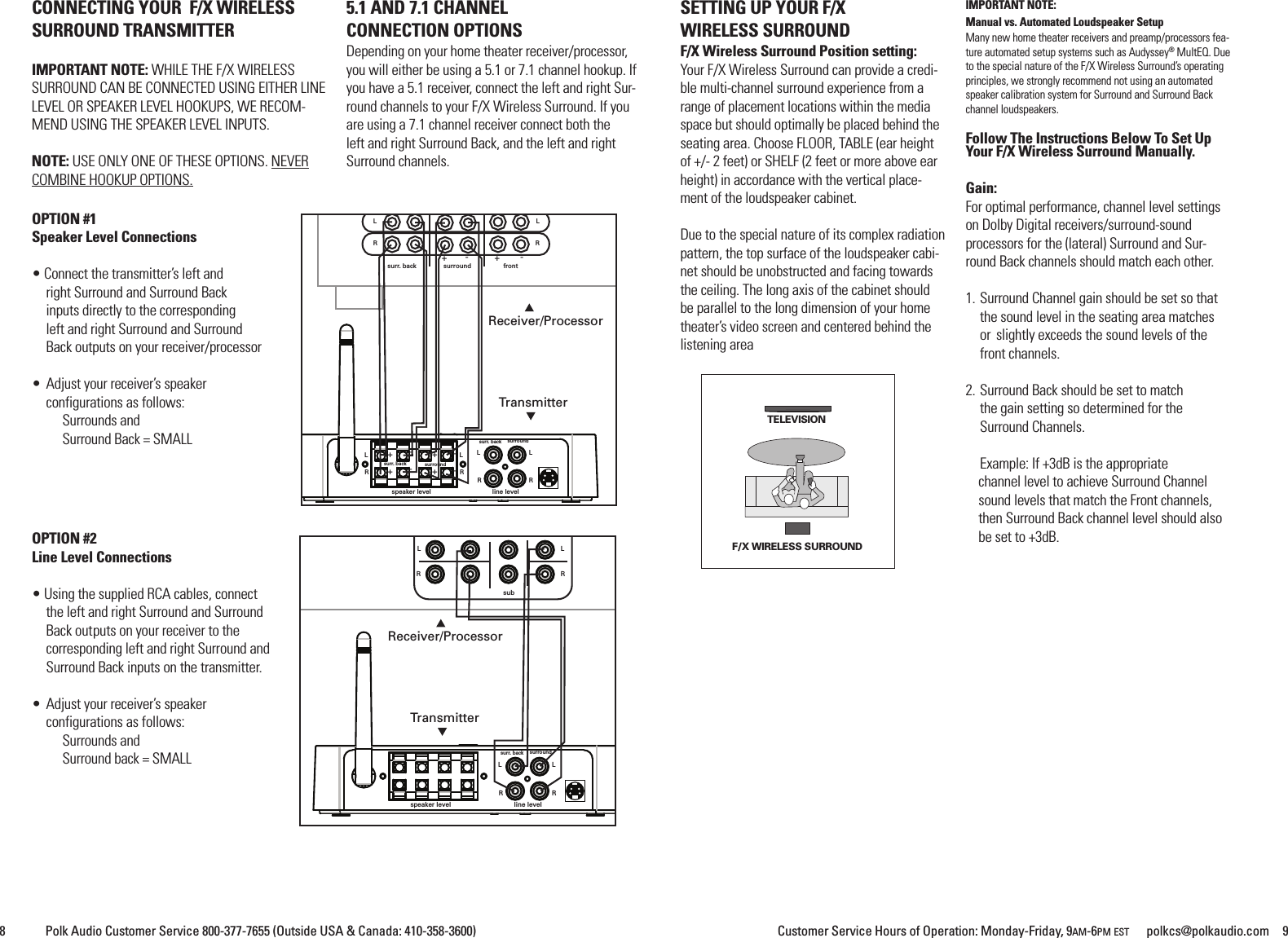
Customer Service Hours of Operation: Monday-Friday, 9AM-6PM EST polkcs@polkaudio.com 98 Polk Audio Customer Service 800-377-7655 (Outside USA & Canada: 410-358-3600)CONNECTING YOUR F/X WIRELESSSURROUND TRANSMITTERIMPORTANT NOTE: WHILE THE F/X WIRELESSSURROUND CAN BE CONNECTED USING EITHER LINELEVEL OR SPEAKER LEVEL HOOKUPS, WE RECOM-MEND USING THE SPEAKER LEVEL INPUTS.NOTE: USE ONLY ONE OF THESE OPTIONS. NEVERCOMBINE HOOKUP OPTIONS.5.1 AND 7.1 CHANNELCONNECTION OPTIONSDepending on your home theater receiver/processor,you will either be using a 5.1 or 7.1 channel hookup. Ifyou have a 5.1 receiver, connect the left and right Sur-round channels to your F/X Wireless Surround. If youare using a 7.1 channel receiver connect both theleft and right Surround Back, and the left and rightSurround channels.SETTING UP YOUR F/XWIRELESS SURROUNDF/X Wireless Surround Position setting:Your F/X Wireless Surround can provide a credi-ble multi-channel surround experience from arange of placement locations within the mediaspace but should optimally be placed behind theseating area. Choose FLOOR, TABLE (ear heightof +/- 2 feet) or SHELF (2 feet or more above earheight) in accordance with the vertical place-ment of the loudspeaker cabinet.Due to the special nature of its complex radiationpattern, the top surface of the loudspeaker cabi-net should be unobstructed and facing towardsthe ceiling. The long axis of the cabinet shouldbe parallel to the long dimension of your hometheater’s video screen and centered behind thelistening areaIMPORTANT NOTE:Manual vs. Automated Loudspeaker SetupMany new home theater receivers and preamp/processors fea-ture automated setup systems such as Audyssey®MultEQ. Dueto the special nature of the F/X Wireless Surround’s operatingprinciples, we strongly recommend not using an automatedspeaker calibration system for Surround and Surround Backchannel loudspeakers.Follow The Instructions Below To Set UpYour F/X Wireless Surround Manually.Gain:For optimal performance, channel level settingson Dolby Digital receivers/surround-soundprocessors for the (lateral) Surround and Sur-round Back channels should match each other.1. Surround Channel gain should be set so thatthe sound level in the seating area matchesor slightly exceeds the sound levels of thefront channels.2. Surround Back should be set to matchthe gain setting so determined for theSurround Channels.Example: If +3dB is the appropriatechannel level to achieve Surround Channelsound levels that match the Front channels,then Surround Back channel level should alsobe set to +3dB.OPTION #1Speaker Level Connections• Connect the transmitter’s left andright Surround and Surround Backinputs directly to the correspondingleft and right Surround and SurroundBack outputs on your receiver/processor• Adjust your receiver’s speakerconfigurations as follows:Surrounds andSurround Back = SMALLOPTION #2Line Level Connections• Using the supplied RCA cables, connectthe left and right Surround and SurroundBack outputs on your receiver to thecorresponding left and right Surround andSurround Back inputs on the transmitter.• Adjust your receiver’s speakerconfigurations as follows:Surrounds andSurround back = SMALLsubspeaker level line levelLLRRsurr. back surroundLLRRReceiver/ProcessorTransmitter+++---+-+-+-LLRRsurr. back surroundspeaker level line levelfrontLLRRLRLRsurr. back surroundsurr. back surroundReceiver/ProcessorTransmitterF/X WIRELESS SURROUNDTELEVISION
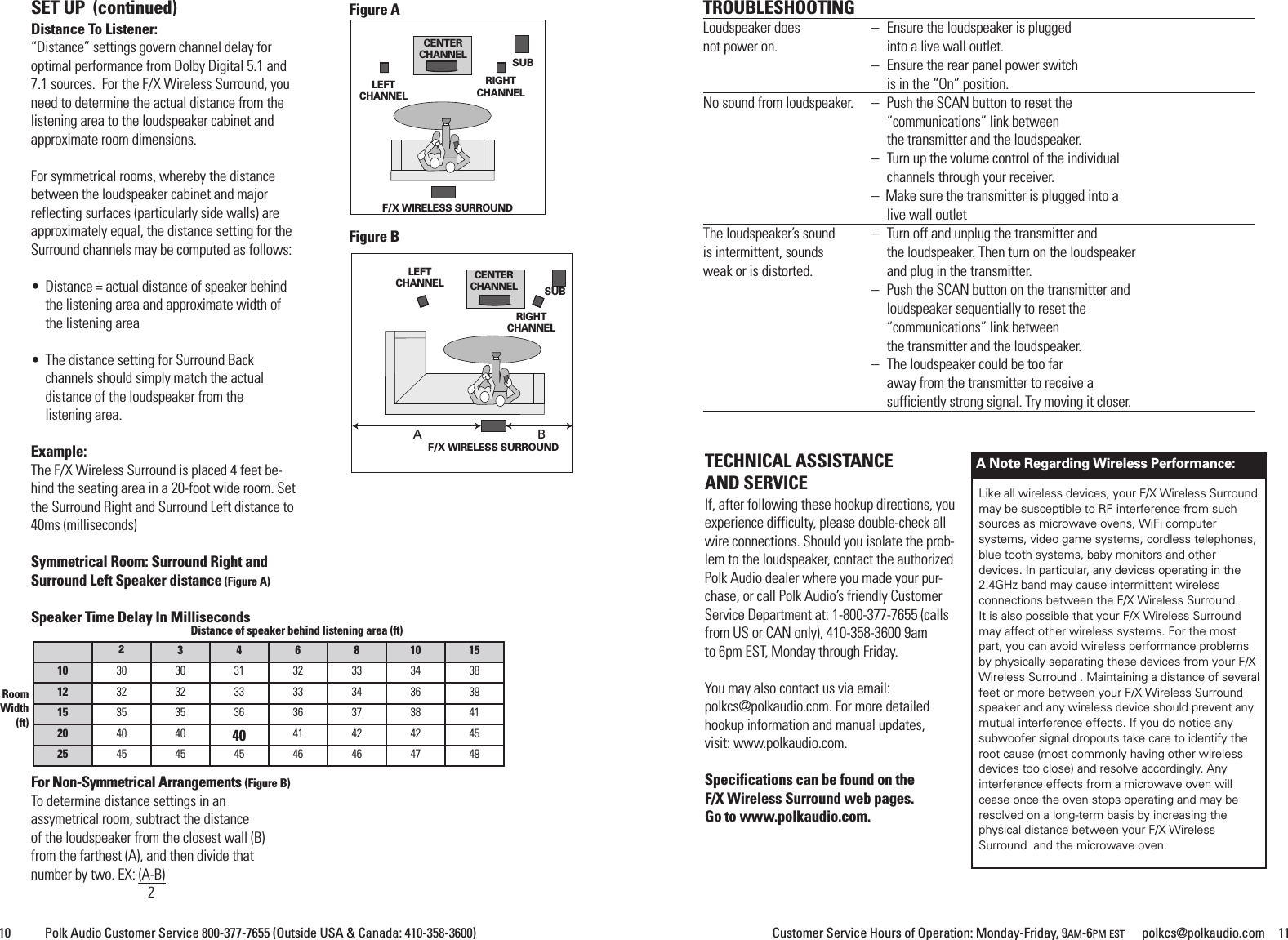
Customer Service Hours of Operation: Monday-Friday, 9AM-6PM EST polkcs@polkaudio.com 11SET UP (continued)Distance To Listener:“Distance” settings govern channel delay foroptimal performance from Dolby Digital 5.1 and7.1 sources. For the F/X Wireless Surround, youneed to determine the actual distance from thelistening area to the loudspeaker cabinet andapproximate room dimensions.For symmetrical rooms, whereby the distancebetween the loudspeaker cabinet and majorreflecting surfaces (particularly side walls) areapproximately equal, the distance setting for theSurround channels may be computed as follows:• Distance = actual distance of speaker behindthe listening area and approximate width ofthe listening area• The distance setting for Surround Backchannels should simply match the actualdistance of the loudspeaker from thelistening area.Example:The F/X Wireless Surround is placed 4 feet be-hind the seating area in a 20-foot wide room. Setthe Surround Right and Surround Left distance to40ms (milliseconds)Symmetrical Room: Surround Right andSurround Left Speaker distance (Figure A)Speaker Time Delay In MillisecondsFor Non-Symmetrical Arrangements (Figure B)To determine distance settings in anassymetrical room, subtract the distanceof the loudspeaker from the closest wall (B)from the farthest (A), and then divide thatnumber by two. EX: (A-B)210 Polk Audio Customer Service 800-377-7655 (Outside USA & Canada: 410-358-3600)23 4 6 8 10 1510 30 30 31 32 33 34 3812 32 32 33 33 34 36 3915 35 35 36 36 37 38 4120 40 40 40 41 42 42 4525 45 45 45 46 46 47 49Distance of speaker behind listening area (ft)RoomWidth(ft)TECHNICAL ASSISTANCEAND SERVICEIf, after following these hookup directions, youexperience difficulty, please double-check allwire connections. Should you isolate the prob-lem to the loudspeaker, contact the authorizedPolk Audio dealer where you made your pur-chase, or call Polk Audio’s friendly CustomerService Department at: 1-800-377-7655 (callsfrom US or CAN only), 410-358-3600 9amto 6pm EST, Monday through Friday.You may also contact us via email:polkcs@polkaudio.com. For more detailedhookup information and manual updates,visit: www.polkaudio.com.Specifications can be found on theF/X Wireless Surround web pages.Go to www.polkaudio.com.ABFigure AFigure BRIGHTCHANNELLEFTCHANNELCENTERCHANNEL SUBF/X WIRELESS SURROUNDRIGHTCHANNELLEFTCHANNEL CENTERCHANNEL SUBF/X WIRELESS SURROUNDTROUBLESHOOTINGLoudspeaker does – Ensure the loudspeaker is pluggednot power on. into a live wall outlet.– Ensure the rear panel power switchis in the “On” position.No sound from loudspeaker. – Push the SCAN button to reset the“communications” link betweenthe transmitter and the loudspeaker.– Turn up the volume control of the individualchannels through your receiver.– Make sure the transmitter is plugged into alive wall outletThe loudspeaker’s sound – Turn off and unplug the transmitter andis intermittent, sounds the loudspeaker. Then turn on the loudspeakerweak or is distorted. and plug in the transmitter.– Push the SCAN button on the transmitter andloudspeaker sequentially to reset the“communications” link betweenthe transmitter and the loudspeaker.– The loudspeaker could be too faraway from the transmitter to receive asufficiently strong signal. Try moving it closer.Like all wireless devices, your F/X Wireless Surroundmay be susceptible to RF interference from suchsources as microwave ovens, WiFi computersystems, video game systems, cordless telephones,blue tooth systems, baby monitors and otherdevices. In particular, any devices operating in the2.4GHz band may cause intermittent wirelessconnections between the F/X Wireless Surround.It is also possible that your F/X Wireless Surroundmay affect other wireless systems. For the mostpart, you can avoid wireless performance problemsby physically separating these devices from your F/XWireless Surround . Maintaining a distance of severalfeet or more between your F/X Wireless Surroundspeaker and any wireless device should prevent anymutual interference effects. If you do notice anysubwoofer signal dropouts take care to identify theroot cause (most commonly having other wirelessdevices too close) and resolve accordingly. Anyinterference effects from a microwave oven willcease once the oven stops operating and may beresolved on a long-term basis by increasing thephysical distance between your F/X WirelessSurround and the microwave oven.A Note Regarding Wireless Performance:
Customer Service Hours of Operation: Monday-Friday, 9AM-6PM EST polkcs@polkaudio.com 1312 Polk Audio Customer Service 800-377-7655 (Outside USA & Canada: 410-358-3600)LIMITED WARRANTYPolk Audio, Inc., warrants to the original retail purchaser only. This warranty will terminate automatically prior to its stated expirationif theoriginal retail purchaser sells or transfers the Product to any other party.Polk Audio, Inc., warrants, to the original retail purchaser only, that the LOUDSPEAKER(S), PASSIVE CROSSOVER COMPONENT(S) andENCLOSURE on this Polk Audio Loudspeaker Product will be free from defects in material and workmanship for a period of five (5)years from the date of original retail purchase from a Polk Audio Authorized Dealer.Furthermore, Polk Audio, Inc., warrants, to the original retail purchaser only, that any AMPLIFIER OR OTHER ELECTRONIC COMPO-NENT that may be included in this Polk Audio Loudspeaker Product will be free from defects in material and workmanship for a periodof three (3) years from the date of original retail purchase from a Polk Audio Authorized Dealer.To allow Polk Audio to offer the best possible warranty service, please register your new product online at: www.polkaudio.com/regis-tration or call Polk customer service 800-377-7655 in the USA and Canada (outside the USA: 410-358-3600) within ten (10) days of thedate of original purchase. Be sure to keep your original purchase receipt.Defective Products must be shipped, together with proof of purchase, prepaid insured to the Polk Audio Authorized Dealer from whomyou purchased the Product, or to the Factory at 1 Viper Way Vista, CA 92081. Products must be shipped in the original shipping con-tainer or its equivalent; in any case the risk of loss or damage in transit is to be borne by you. If upon examination at the Factory orPolk Audio Authorized Dealer it is determined that the unit was defective in materials or workmanship at any time during this War-ranty period, Polk Audio or the Polk Audio Authorized Dealer will, at its option, repair or replace this Product at no additional charge,except as set forth below. All replaced parts and Products become the property of Polk Audio. Products replaced or repaired under thiswarranty will be returned to you, within a reasonable time, freight prepaid.This warranty does not include service or parts to repair damage caused by accident, disaster, misuse, abuse, negligence, inadequatepacking or shipping procedures, commercial use, voltage inputs in excess of the rated maximum of the unit, cosmetic appearance ofcabinetry not directly attributable to defect in materials or workmanship, or service, repair, or modification of the Product which hasnot been authorized or approved by Polk Audio. This warranty shall terminate if the Serial number on the Product has been removed,tampered with or defaced.This warranty is in lieu of all other expressed Warranties. All implied warranties on this Product are limited to the duration of this ex-pressed Warranty. Some states do not allow limitation on how long an implied Warranty lasts, so the above limitations may not applyto you. This Warranty gives you specific legal rights, and you also may have other rights which vary from state to state.If this Product is defective in materials or workmanship as warranted above, your sole remedy shall be repair or replacement as pro-vided above. This warranty does not cover service, parts, or supplies to repair damage to property other than the Product. In no eventwill Polk Audio, Inc. be liable to you for any incidental or consequential damages arising out of the use or in-ability to use the Product,even if Polk Audio, Inc. or a Polk Audio Authorized Dealer has been advised of the possibility of such damages, or for any claim by anyother party. Some statesdo not allow the exclusion or limitation of incidental or consequential damages, so the above limitation and exclusion may not applyto you.This Warranty applies only to Products purchased in Canada, the United States of America, its possessions, and U.S. and NATO armedforces exchanges and audio clubs. The Warranty terms and conditions applicable to Products purchased in other countries are avail-able from the Polk Audio Authorized Distributors in such countries.GARANTIE LIMITÉELa garantie de Polk Audio, Inc., n’est valide que pour l’acheteur au détail original. La garantie sera automatiquement annulée avant sadate d’expiration spécifiée si l’acheteur original vend ou transfère le produit à tout autre parti.Polk Audio, Inc., garantit - à l’acheteur au détail original seulement - que le ou les HAUT-PARLEUR(S), COMPOSANTE(S) DE FILTRE PAS-SIF et CAISSON(S) de ce produit Polk Audio seront exempts de tout défaut attribuable aux pièces d’origine et à la main d’oeuvre pourune période de cinq (5) ans à partir de la date de l’achat au détail original chez un revendeur agréé Polk Audio.En outre, Polk Audio, Inc., garantit - à l’acheteur au détail original seulement - que TOUT AMPLIFICATEUR OU TOUT AUTRE COM-POSANTE ÉLECTRONIQUE qui pourrait faire partie ce produit Polk Audio sera exempt de tout défaut attribuable aux pièces d’origine etàla main d’oeuvre pour une période de trois (3) ans à partir de la date de l’achat au détail original chez un revendeur agréé Polk Audio.Pour permettre à Polk Audio de vous offrir le meilleur service de garantie possible, veuillez enregistrer votre nouveau produit en ligne àl’adresse web www.polkaudio.com/registration - ou contactez le Service à la Clientèle de Polk au 800-377-7655 aux États-Unis et auCanada (à l’extérieur des É.U.:410-358-3600) dans les dix (10) jours suivant la date de l’achat original. Assurez-vous de conserver votrereçu d’achat original.Les produits défectueux doivent être expédiés, avec une preuve d’achat, francs de port et assurés, au revendeur agree Polk Audio dequi vous avez acheté le produit, ou à l’usine Polk Audio,1 Viper Way Vista, CA 92081.Les produits doivent être expédiés dans leur carton d’expédition original ou dans un contenant équivalent. Le propriétaire doit assumertout risque de perte ou de dommage en transit.Si, suite à l’examen du produit à l’usine Polk ou chez le marchand agréé Polk Audio, il est déterminé que la défectuosité est imputableaux matériaux d’origine ou à la main d’oeuvre au cours de la période de la garantie spécifiée, Polk Audio ou le revendeur Polk Audio, àsa guise, réparera ou remplacera le produit sans frais additionnels et selon les conditions décrites ci-dessous.Toute pièce ou produit remplacé devient la propriété de Polk Audio. Les produits réparés ou remplacéssous la garantie vous seront expédiés francs de port dans un délai raisonnable.Cette garantie n’inclut pas le service ou les pièces nécessaires à la réparation des dommages provoqués par accident, désastre, abus,négligence, mode d'expédition ou emballage inadéquat, utilisation commerciale, tensions supérieures au maximum prescrit pour l’u-nité, aspect visuel du meuble non directement attribuable à un défaut de pièces d’origine ou de main d’oeuvre, ou par le service, laréparation, ou toute modification du produit qui n’a pas été autorisé ou approuvé par Polk Audio. Cette garantie sera annulée si lenuméro de série sur le produit a été enlevé, altéré ou falsifié.Cette garantie prend préséance sur toutes autres garanties énoncées. Si la défectuosité de ce produit est imputable aux pièces d’orig-ine ou à la main d’oeuvre selon les conditions de la garantie exprimées ci-dessus, votre seul recourt sera la réparation ou le remplace-ment selon les conditions décrites ci-dessus.Dans aucun cas Polk Audio, Inc. pourra-t-elle être tenue responsable pour tout dommage accessoire ou indirect cause par l’utilisationou par l’incapacité d’utilisation du produit, même si Polk Audio, Inc. ou un revendeur agréé Polk Audio, a été avisé de la possibilité detel dommage, ou pour toute réclamation par tout autre parti.Certains états ne permettant pas l’exclusion ou la limitation des dommages indirects, les limitationset exclusions exprimées ci-dessus pourraient ne pas s'appliquer dans votre cas.Toutes les garanties tacites sur ce produit sont limitées à la durée de la garantie énoncée. Certains états ne permettant pas la limita-tion de la durée d’une garantie tacite, les limitations ci-dessus pourraient ne pas s’appliquer dans votre cas. Cette garantie vous ac-corde des droits légaux spécifiques; vous pourriez également avoir d’autres droits qui pourraient varier d’état en état.Cette garantie s’applique seulement aux produits achetés au Canada, aux États-Unis d’Amérique et ses possessions, et dans les clubsaudio et d’échange des forces armées des É.U. et de l’OTAN. Les modalités et les conditions de garantie applicables aux produitsachetés dans d’autres pays sont disponibles chez les distributeurs agréés Polk Audio établis dans ces pays.
5601 Metro DriveBaltimore, MD 21215800-377-7655 (US & CAN, Outside US 410-358-3600)www.polkaudio.comPolk Audio is a DEI Holdings, Inc. Company. Polk Audio, Polk,The Speaker Specialists and F/X are registered tradmarks ofPolk Audio, Inc.

Navigation menu