Ogemray Technology WF53721MX USB Wireless Module User Manual GWF 1M01 Spec V1 1

Shenzhen Ogemray Technology Co.,Ltd USB Wireless Module GWF 1M01 Spec V1 1

User manual

 Information in this document is subject to change without prior notice.              Page 1 of 13              IEEE 802.11 b/g/n   300Mbps WiFi Module  Product Specifications  Model: GWF-1M01  Version: 1.1  2012-11-20
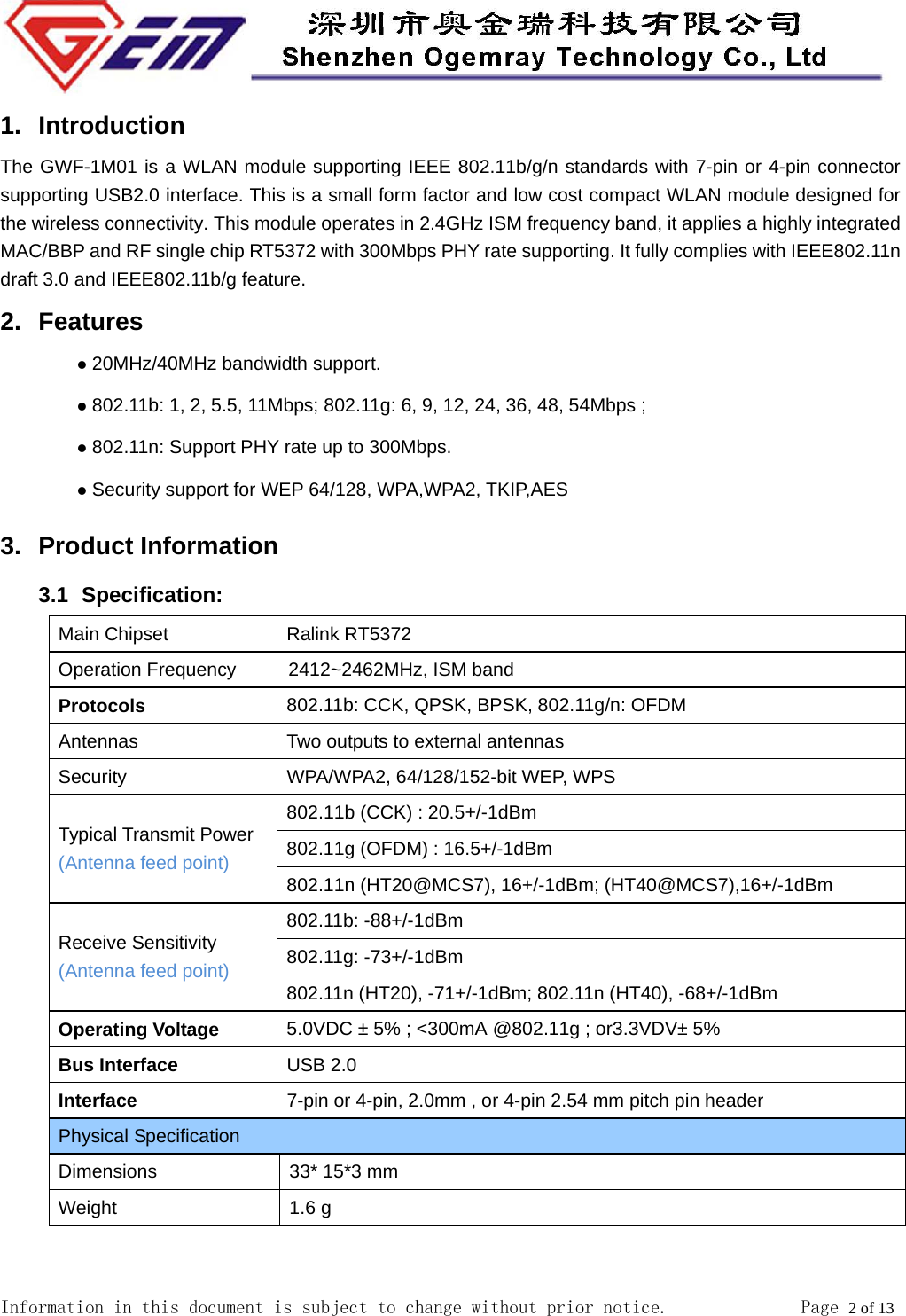
 Information in this document is subject to change without prior notice.              Page 2 of 13  1. Introduction The GWF-1M01 is a WLAN module supporting IEEE 802.11b/g/n standards with 7-pin or 4-pin connector supporting USB2.0 interface. This is a small form factor and low cost compact WLAN module designed for the wireless connectivity. This module operates in 2.4GHz ISM frequency band, it applies a highly integrated MAC/BBP and RF single chip RT5372 with 300Mbps PHY rate supporting. It fully complies with IEEE802.11n draft 3.0 and IEEE802.11b/g feature. 2. Features z 20MHz/40MHz bandwidth support.   z 802.11b: 1, 2, 5.5, 11Mbps; 802.11g: 6, 9, 12, 24, 36, 48, 54Mbps ; z 802.11n: Support PHY rate up to 300Mbps. z Security support for WEP 64/128, WPA,WPA2, TKIP,AES 3. Product Information 3.1   Specification: Main Chipset  Ralink RT5372 Operation Frequency          2412~2462MHz, ISM band Protocols 802.11b: CCK, QPSK, BPSK, 802.11g/n: OFDM Antennas  Two outputs to external antennas   Security  WPA/WPA2, 64/128/152-bit WEP, WPS Typical Transmit Power (Antenna feed point) 802.11b (CCK) : 20.5+/-1dBm 802.11g (OFDM) : 16.5+/-1dBm 802.11n (HT20@MCS7), 16+/-1dBm; (HT40@MCS7),16+/-1dBm Receive Sensitivity (Antenna feed point) 802.11b: -88+/-1dBm 802.11g: -73+/-1dBm 802.11n (HT20), -71+/-1dBm; 802.11n (HT40), -68+/-1dBm Operating Voltage 5.0VDC ± 5% ; <300mA @802.11g ; or3.3VDV± 5%   Bus Interface USB 2.0 Interface 7-pin or 4-pin, 2.0mm , or 4-pin 2.54 mm pitch pin header Physical Specification Dimensions  33* 15*3 mm Weight 1.6 g
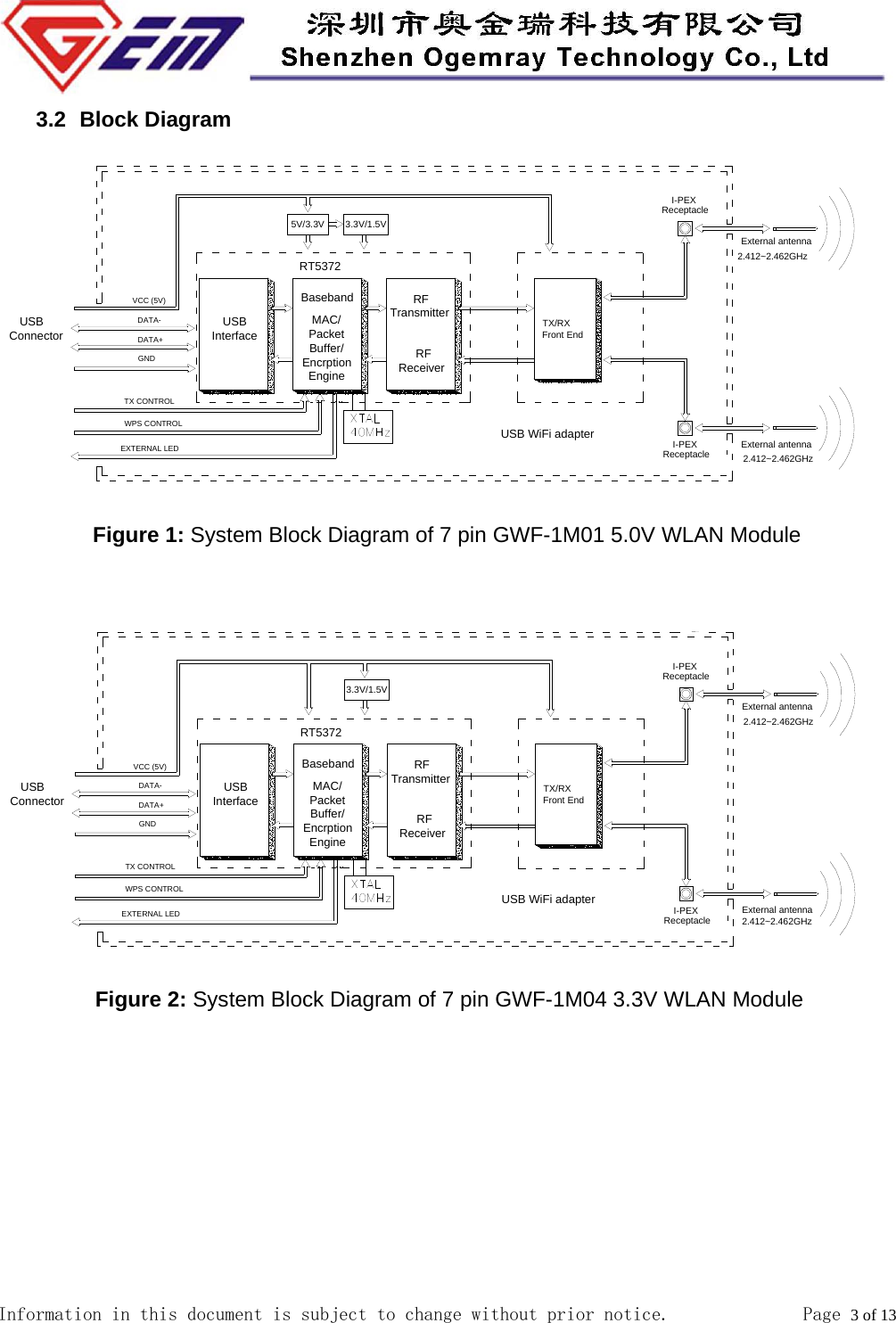
 Information in this document is subject to change without prior notice.              Page 3 of 13  3.2   Block  Diagram      RFReceiver       RFTransmitterBasebandMAC/PacketBuffer/EncrptionEngineDATA-    USB InterfaceVCC (5V)DATA+GND RT5372 3.3V/1.5V 5V/3.3VI-PEXReceptacle   USB ConnectorUSB WiFi adapterTX CONTROLEXTERNAL LEDTX/RXFront EndWPS CONTROLI-PEXReceptacle External antennaExternal antenna2.412~2.462GHz           Figure 1: System Block Diagram of 7 pin GWF-1M01 5.0V WLAN Module       RFReceiver       RFTransmitterBasebandMAC/PacketBuffer/EncrptionEngineDATA-    USB InterfaceVCC (5V)DATA+GND RT5372 3.3V/1.5VI-PEXReceptacle   USB ConnectorUSB WiFi adapterTX CONTROLEXTERNAL LEDTX/RXFront EndWPS CONTROLI-PEXReceptacle External antennaExternal antenna          Figure 2: System Block Diagram of 7 pin GWF-1M04 3.3V WLAN Module           2.412~2.462GHz2.412~2.462GHz2.412~2.462GHz
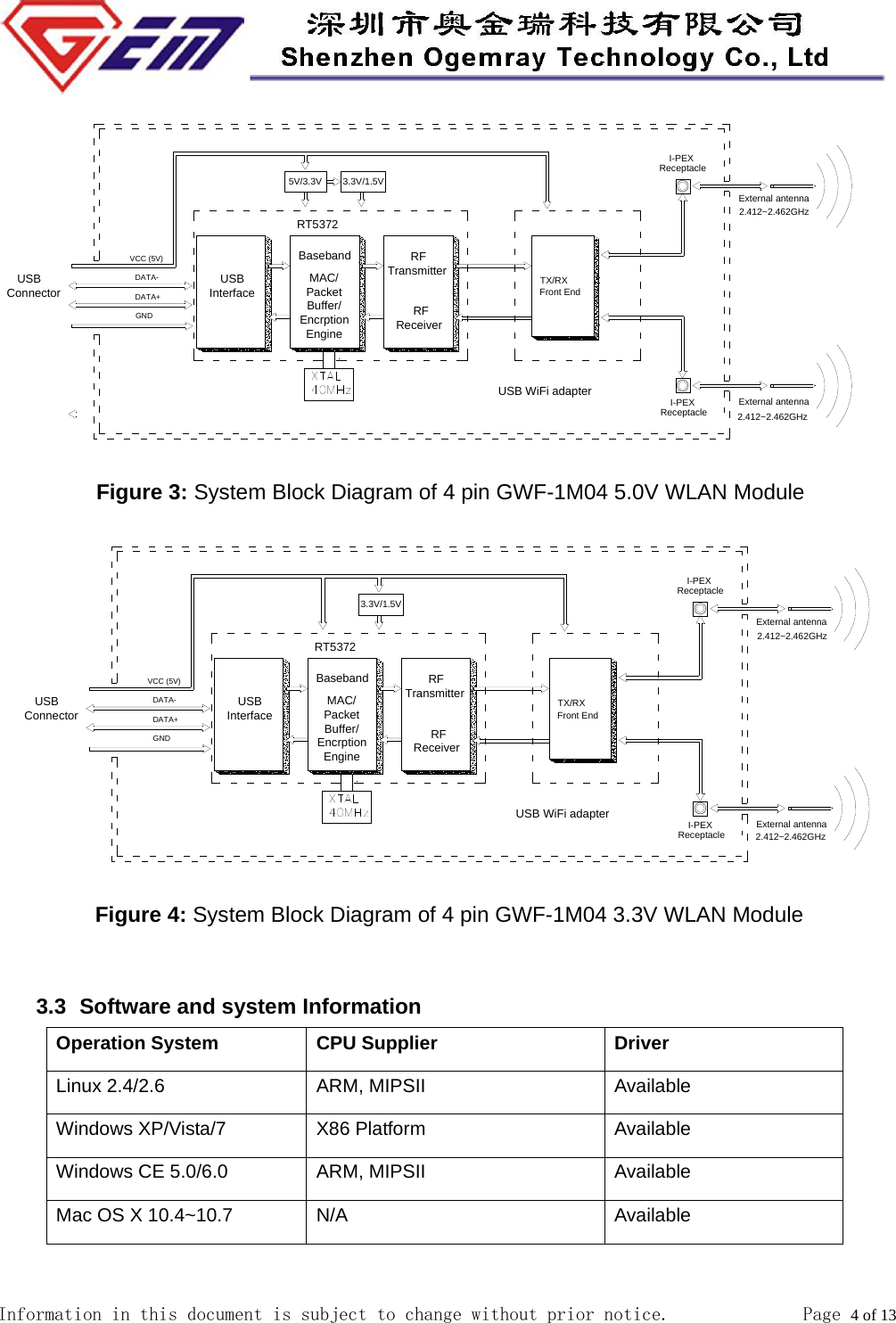
 Information in this document is subject to change without prior notice.              Page 4 of 13       RFReceiver       RFTransmitterBasebandMAC/PacketBuffer/EncrptionEngineDATA-    USB InterfaceVCC (5V)DATA+GND RT5372 3.3V/1.5V 5V/3.3VI-PEXReceptacle   USB ConnectorUSB WiFi adapterTX/RXFront EndI-PEXReceptacle External antennaExternal antenna Figure 3: System Block Diagram of 4 pin GWF-1M04 5.0V WLAN Module      RFReceiver       RFTransmitterBasebandMAC/PacketBuffer/EncrptionEngineDATA-    USB InterfaceVCC (5V)DATA+GND RT5372I-PEXReceptacle   USB ConnectorUSB WiFi adapterTX/RXFront EndI-PEXReceptacle External antennaExternal antenna 3.3V/1.5V          Figure 4: System Block Diagram of 4 pin GWF-1M04 3.3V WLAN Module           3.3   Software and system Information Operation System CPU Supplier Driver Linux 2.4/2.6 ARM, MIPSII Available Windows XP/Vista/7 X86 Platform Available Windows CE 5.0/6.0 ARM, MIPSII Available Mac OS X 10.4~10.7 N/A Available  2.412~2.462GHz2.412~2.462GHz2.412~2.462GHz2.412~2.462GHz
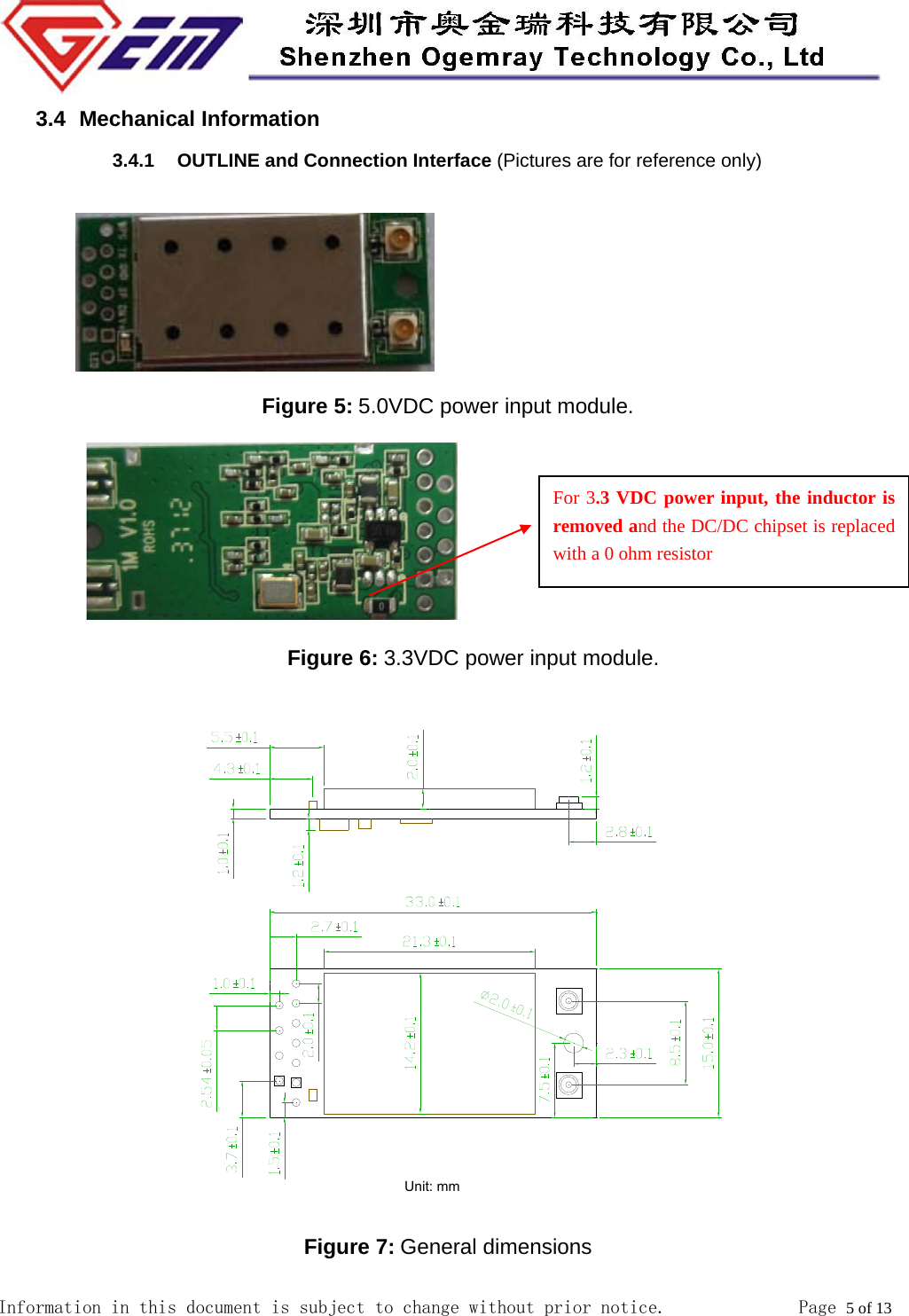
 Information in this document is subject to change without prior notice.              Page 5 of 13  3.4   Mechanical  Information 3.4.1  OUTLINE and Connection Interface (Pictures are for reference only)       Figure 5: 5.0VDC power input module.                                Figure 6: 3.3VDC power input module.  Figure 7: General dimensions For 3.3 VDC power input, the inductor is removed and the DC/DC chipset is replaced with a 0 ohm resistor
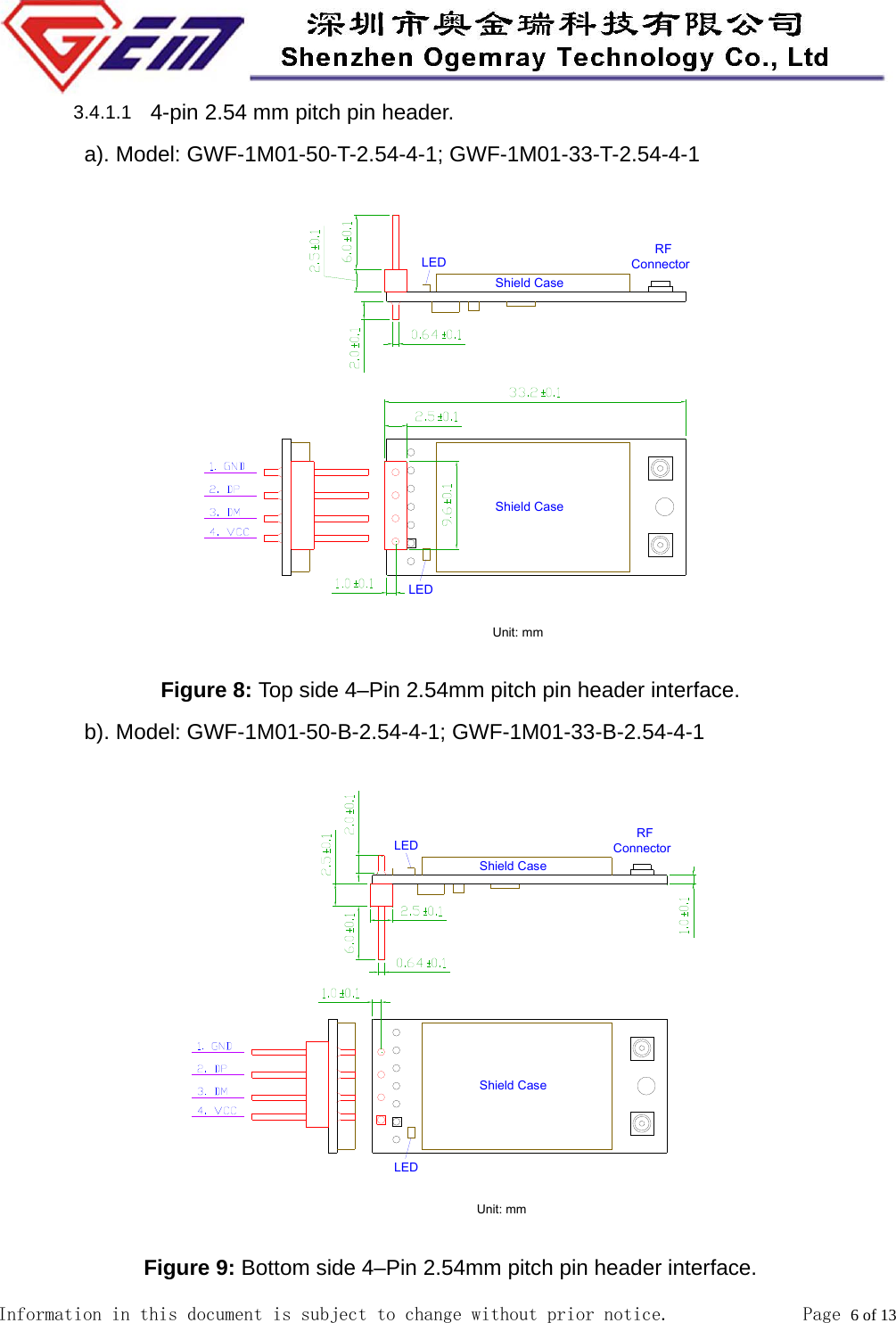
 Information in this document is subject to change without prior notice.              Page 6 of 13          3.4.1.1  4-pin 2.54 mm pitch pin header.         a). Model: GWF-1M01-50-T-2.54-4-1; GWF-1M01-33-T-2.54-4-1  Figure 8: Top side 4–Pin 2.54mm pitch pin header interface.         b). Model: GWF-1M01-50-B-2.54-4-1; GWF-1M01-33-B-2.54-4-1  Figure 9: Bottom side 4–Pin 2.54mm pitch pin header interface.
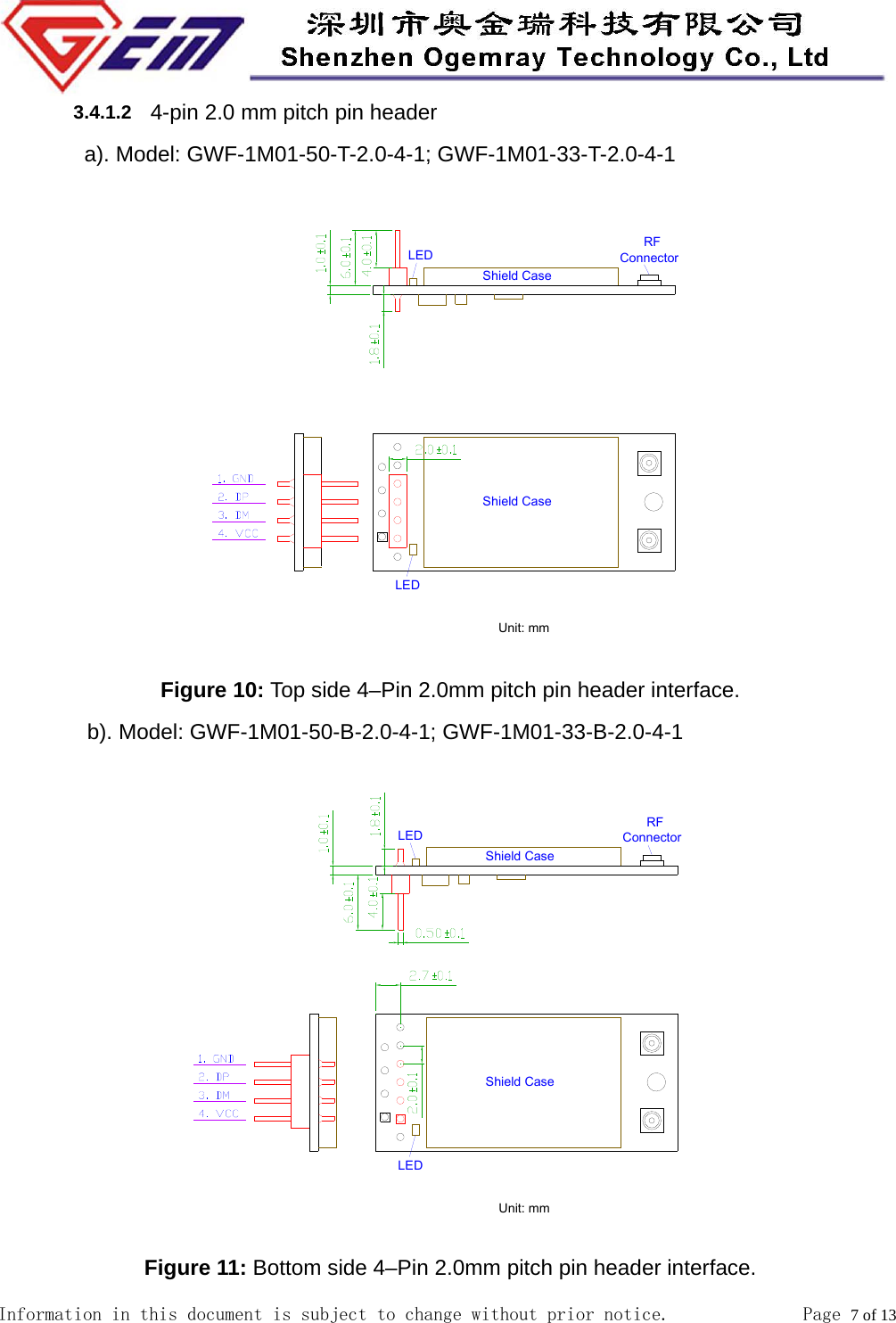
 Information in this document is subject to change without prior notice.              Page 7 of 13         3.4.1.2  4-pin 2.0 mm pitch pin header         a). Model: GWF-1M01-50-T-2.0-4-1; GWF-1M01-33-T-2.0-4-1  Figure 10: Top side 4–Pin 2.0mm pitch pin header interface. b). Model: GWF-1M01-50-B-2.0-4-1; GWF-1M01-33-B-2.0-4-1  Figure 11: Bottom side 4–Pin 2.0mm pitch pin header interface.
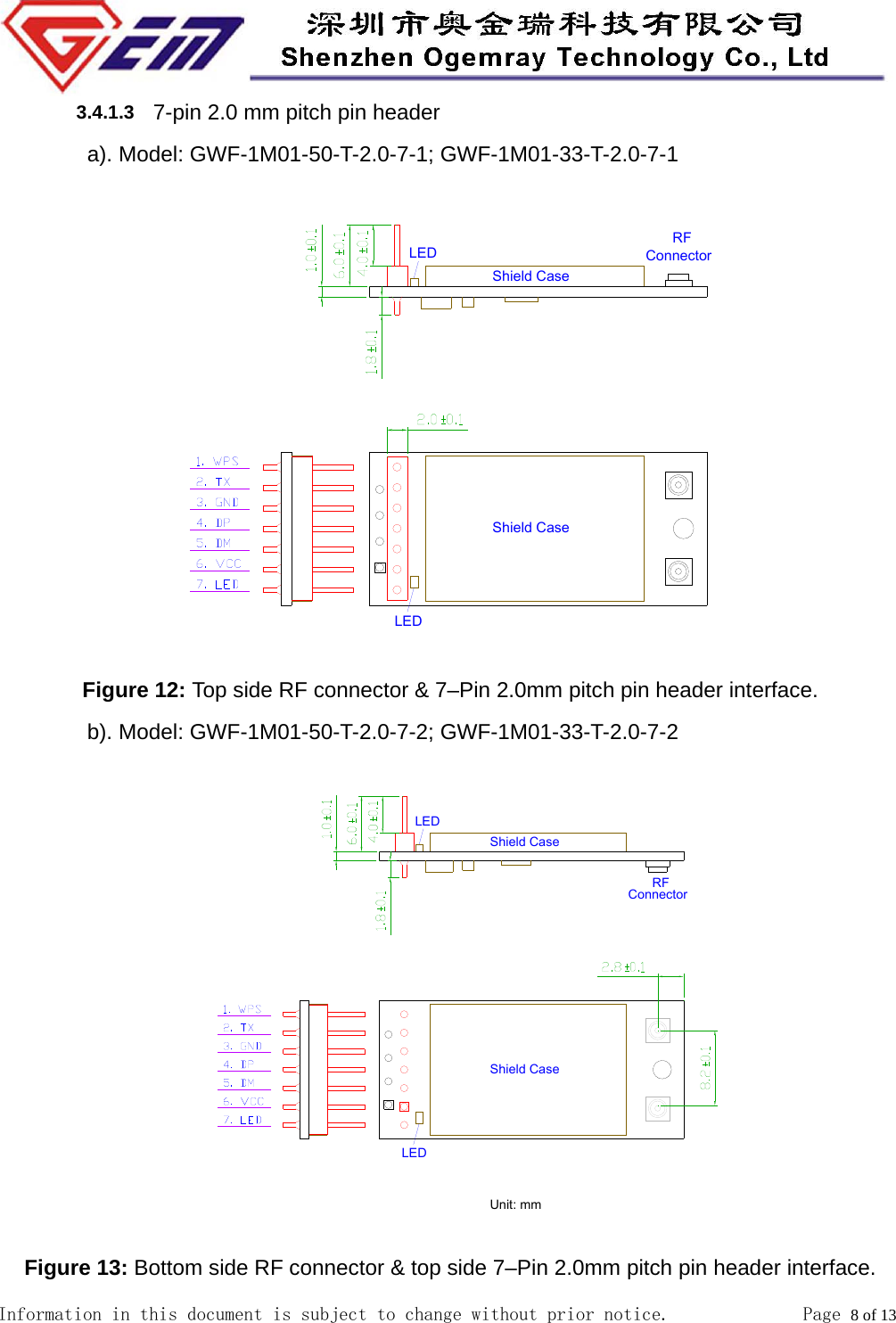
 Information in this document is subject to change without prior notice.              Page 8 of 13  3.4.1.3  7-pin 2.0 mm pitch pin header   a). Model: GWF-1M01-50-T-2.0-7-1; GWF-1M01-33-T-2.0-7-1   Figure 12: Top side RF connector & 7–Pin 2.0mm pitch pin header interface. b). Model: GWF-1M01-50-T-2.0-7-2; GWF-1M01-33-T-2.0-7-2   Figure 13: Bottom side RF connector & top side 7–Pin 2.0mm pitch pin header interface.
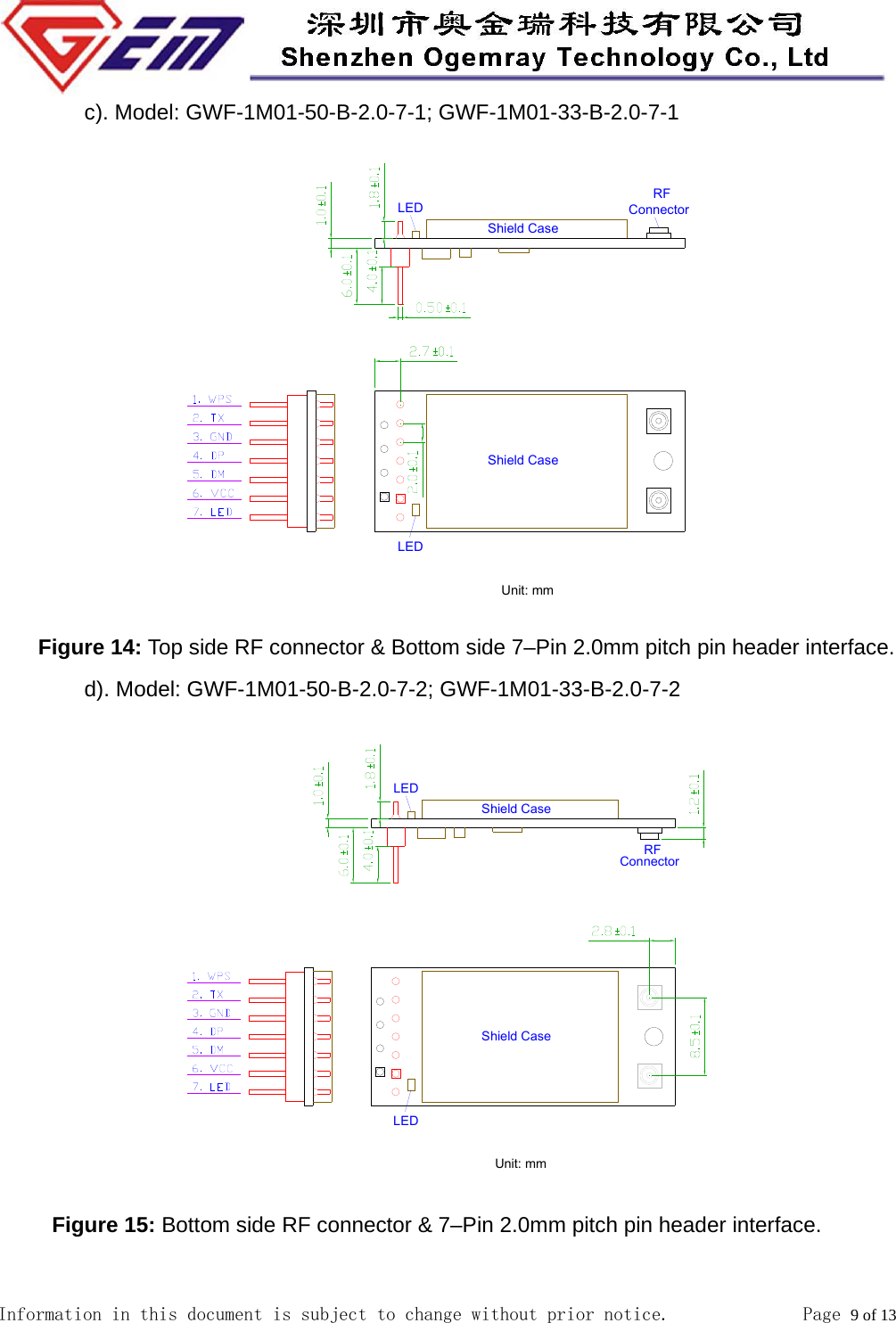
 Information in this document is subject to change without prior notice.              Page 9 of 13          c). Model: GWF-1M01-50-B-2.0-7-1; GWF-1M01-33-B-2.0-7-1     Figure 14: Top side RF connector & Bottom side 7–Pin 2.0mm pitch pin header interface.         d). Model: GWF-1M01-50-B-2.0-7-2; GWF-1M01-33-B-2.0-7-2       Figure 15: Bottom side RF connector & 7–Pin 2.0mm pitch pin header interface.
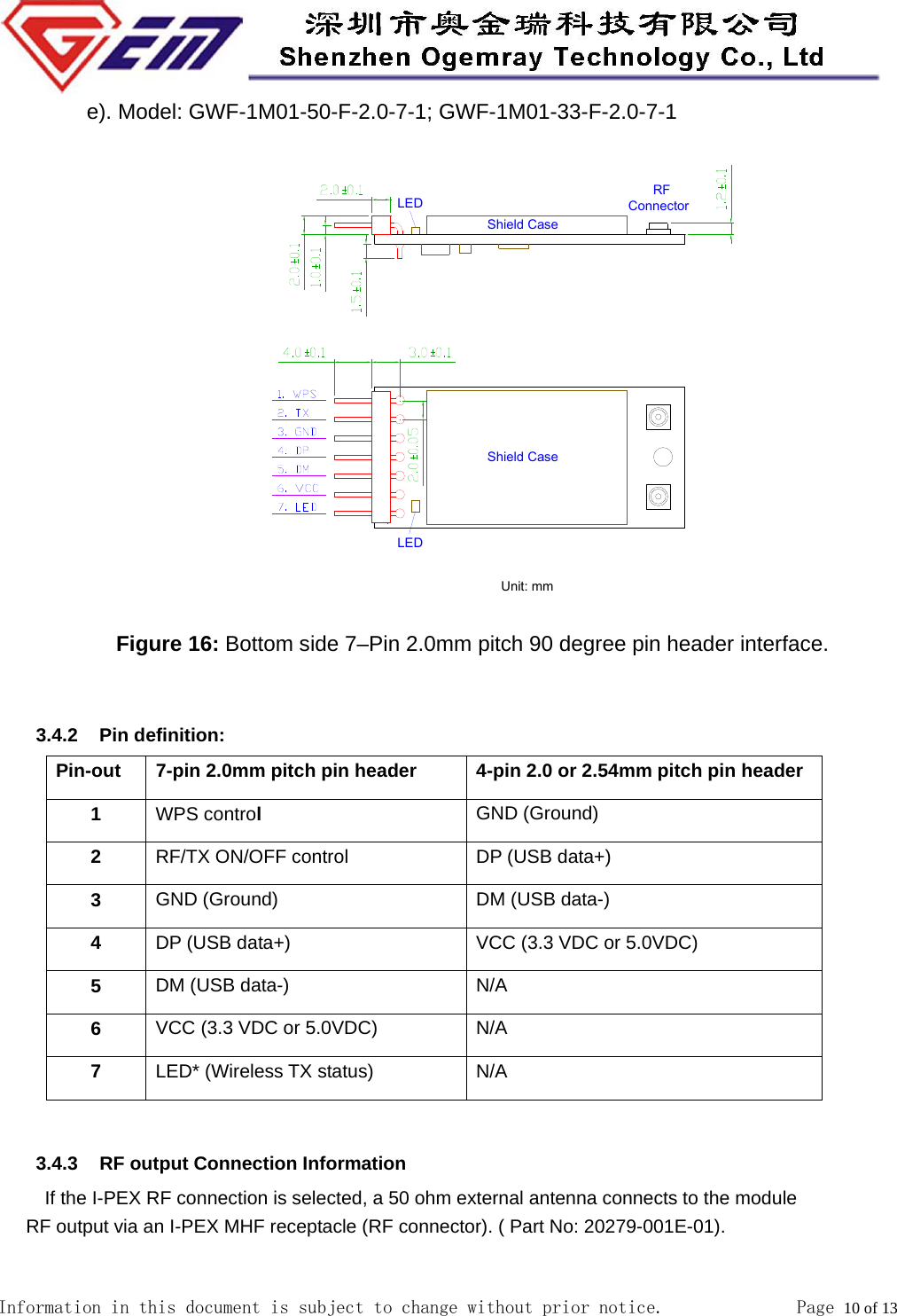
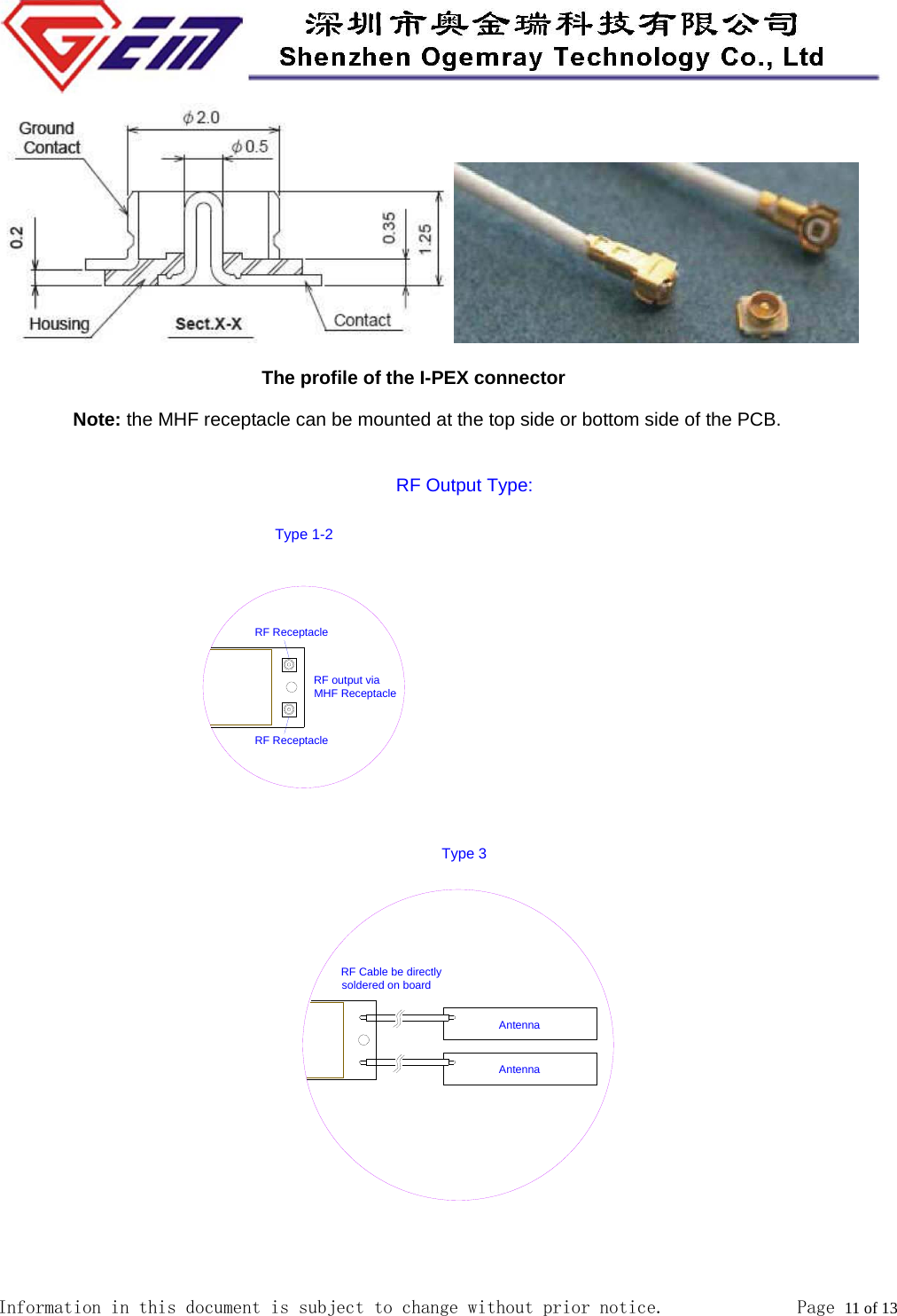
 Information in this document is subject to change without prior notice.              Page 10 of 13  e). Model: GWF-1M01-50-F-2.0-7-1; GWF-1M01-33-F-2.0-7-1             Figure 16: Bottom side 7–Pin 2.0mm pitch 90 degree pin header interface.                           3.4.2 Pin definition: Pin-out  7-pin 2.0mm pitch pin header  4-pin 2.0 or 2.54mm pitch pin header 1  WPS control  GND (Ground) 2  RF/TX ON/OFF control  DP (USB data+) 3  GND (Ground)  DM (USB data-) 4  DP (USB data+) VCC (3.3 VDC or 5.0VDC) 5  DM (USB data-) N/A 6  VCC (3.3 VDC or 5.0VDC) N/A 7  LED* (Wireless TX status) N/A  3.4.3  RF output Connection Information           If the I-PEX RF connection is selected, a 50 ohm external antenna connects to the module       RF output via an I-PEX MHF receptacle (RF connector). ( Part No: 20279-001E-01).
 Information in this document is subject to change without prior notice.              Page 11 of 13                               The profile of the I-PEX connector Note: the MHF receptacle can be mounted at the top side or bottom side of the PCB. RF Output Type:Type 1-2RF Cable be directly soldered on boardType 3RF ReceptacleAntennaAntennaRF output via MHF ReceptacleRF Receptacle
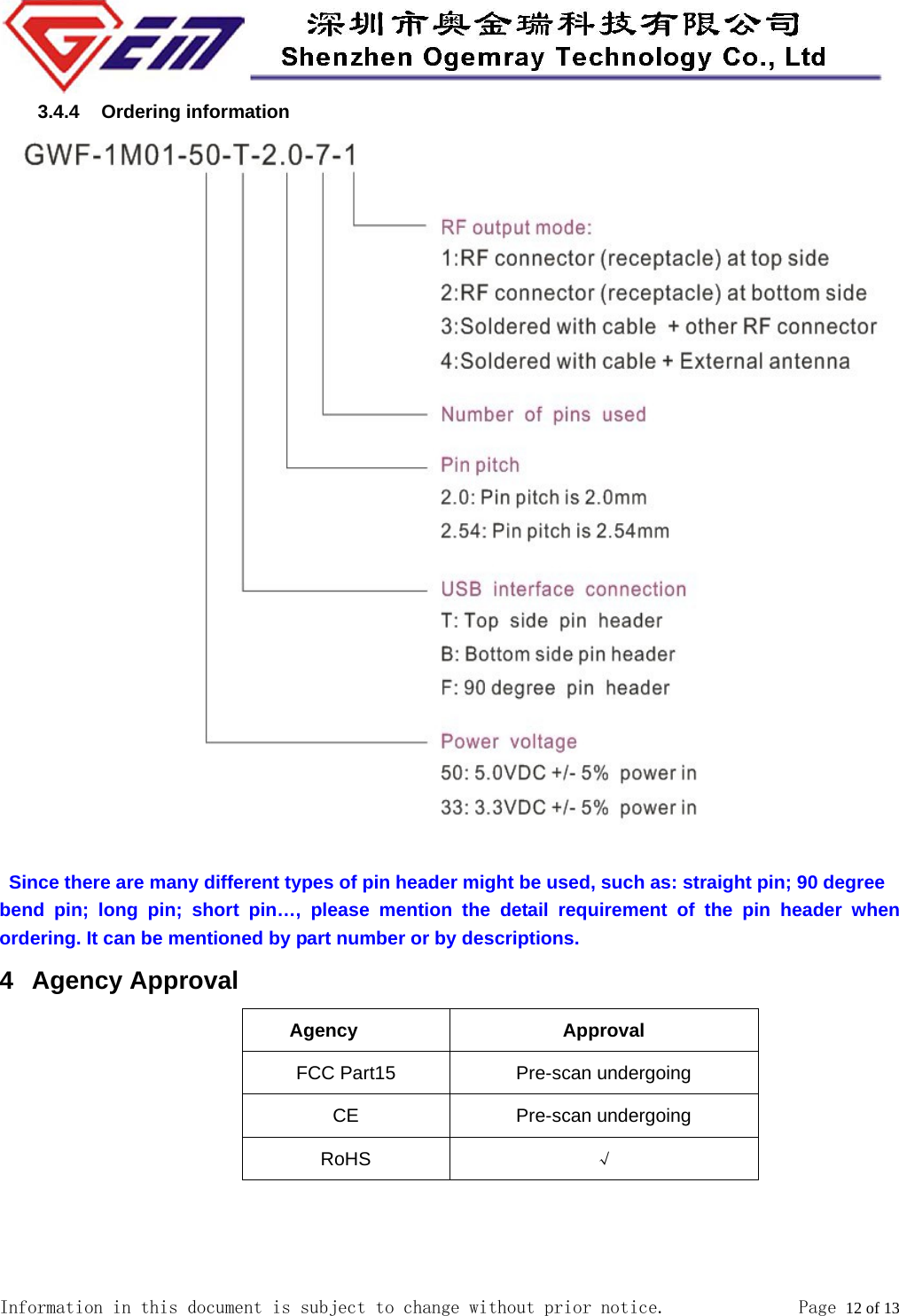
 Information in this document is subject to change without prior notice.              Page 12 of 13  3.4.4 Ordering information                                          Since there are many different types of pin header might be used, such as: straight pin; 90 degree bend pin; long pin; short pin…, please mention the detail requirement of the pin header when ordering. It can be mentioned by part number or by descriptions. 4 Agency Approval    Agency Approval FCC Part15 Pre-scan undergoing CE Pre-scan undergoing RoHS √
 Information in this document is subject to change without prior notice.              Page 13 of 13  5 Environment 5.1 Temperature 5.1.1 Operating Temperature    Continuous reliable operation in ambient temperature: -10ºC to +60ºC. 5.1.2 Storage Temperature     The product is not damaged or degraded when keeping in -20ºC to +85ºC. 5.2 Humidity 5.2.1  Operating Humidity Conditions      The product should be capable of continuous reliable operation when subjected to relative humidity in the range of 20% to 80% (non-condensing) . 5.2.2  Non-Operating Humidity Conditions (including warehouse)    The product should not be damaged or degraded when kept in the place (where relative humidity range is in the range of 20% to 80%) for 36 hours. 6 Disclaimer THESE MATERIALS AND INFORMATION ARE PROVIDED “AS IS” WITHOUT WARRANTY OF ANY KIND, EITHER EXPRESS OR IMPLIED , INCLUDING BUT NOT LIMITED TO, THE IMPLIED WARRANTIES OF MERCHANTABILITY, FITNESS FOR A PARTICULAR PURPOSE OR NON-INFRINGEMENT. We uses reasonable efforts to include accurate and up-to-date information on this document; it does not, however, make any representations as to its accuracy or completeness of the information, text, graphics, links or other items contained within these materials. Your use of this Document is at your own risk. Ogemray, its suppliers, and other parties involved in creating and delivering this Document’s contents shall not be liable for any special, indirect, incidental, or consequential damages, including without limitation, lost revenues or lost profits.
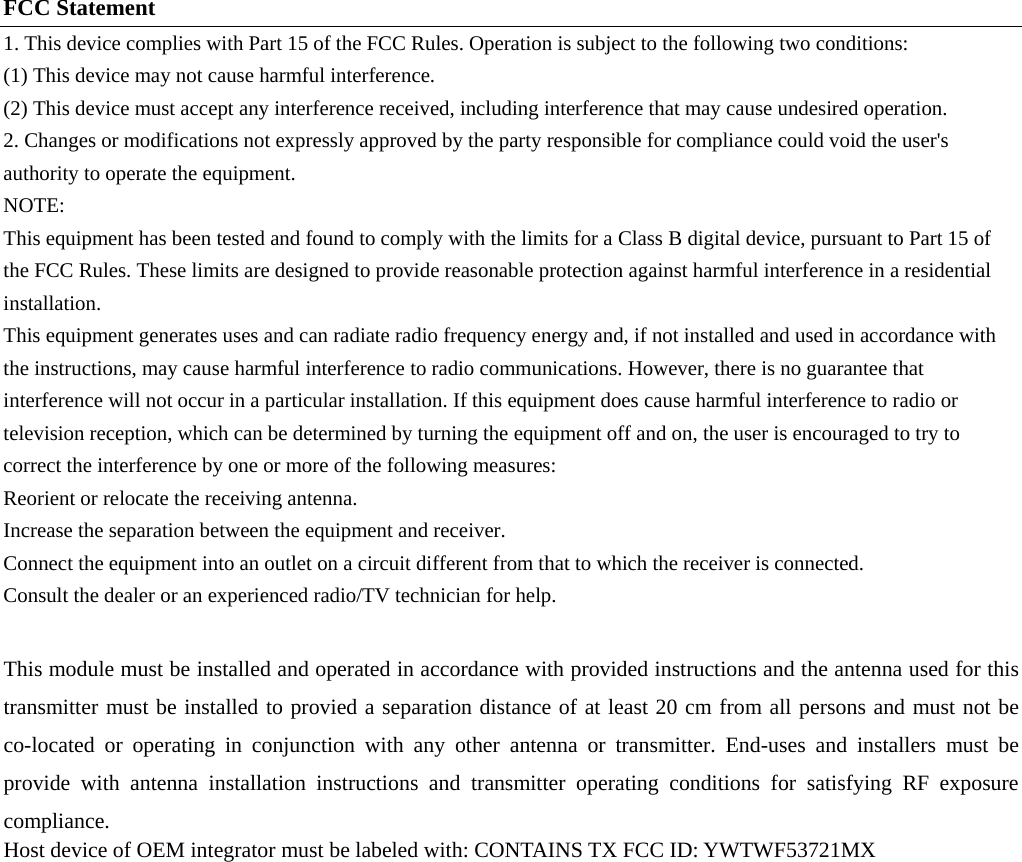
FCC Statement 1. This device complies with Part 15 of the FCC Rules. Operation is subject to the following two conditions: (1) This device may not cause harmful interference. (2) This device must accept any interference received, including interference that may cause undesired operation. 2. Changes or modifications not expressly approved by the party responsible for compliance could void the user's authority to operate the equipment. NOTE:  This equipment has been tested and found to comply with the limits for a Class B digital device, pursuant to Part 15 of the FCC Rules. These limits are designed to provide reasonable protection against harmful interference in a residential installation. This equipment generates uses and can radiate radio frequency energy and, if not installed and used in accordance with the instructions, may cause harmful interference to radio communications. However, there is no guarantee that interference will not occur in a particular installation. If this equipment does cause harmful interference to radio or television reception, which can be determined by turning the equipment off and on, the user is encouraged to try to correct the interference by one or more of the following measures: Reorient or relocate the receiving antenna. Increase the separation between the equipment and receiver. Connect the equipment into an outlet on a circuit different from that to which the receiver is connected.   Consult the dealer or an experienced radio/TV technician for help.  This module must be installed and operated in accordance with provided instructions and the antenna used for this transmitter must be installed to provied a separation distance of at least 20 cm from all persons and must not be co-located or operating in conjunction with any other antenna or transmitter. End-uses and installers must be provide with antenna installation instructions and transmitter operating conditions for satisfying RF exposure compliance.  Host device of OEM integrator must be labeled with: CONTAINS TX FCC ID: YWTWF53721MX

Navigation menu