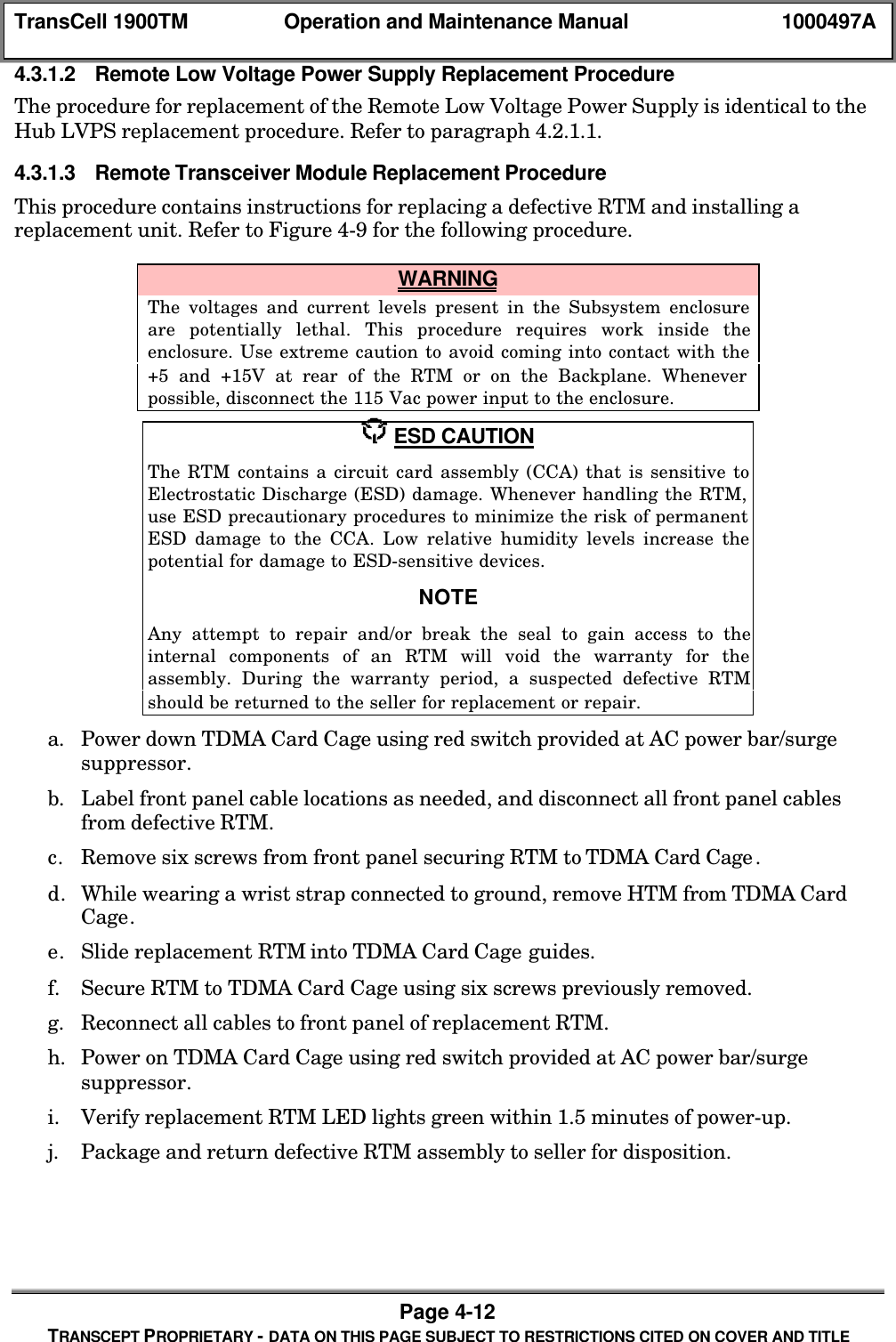
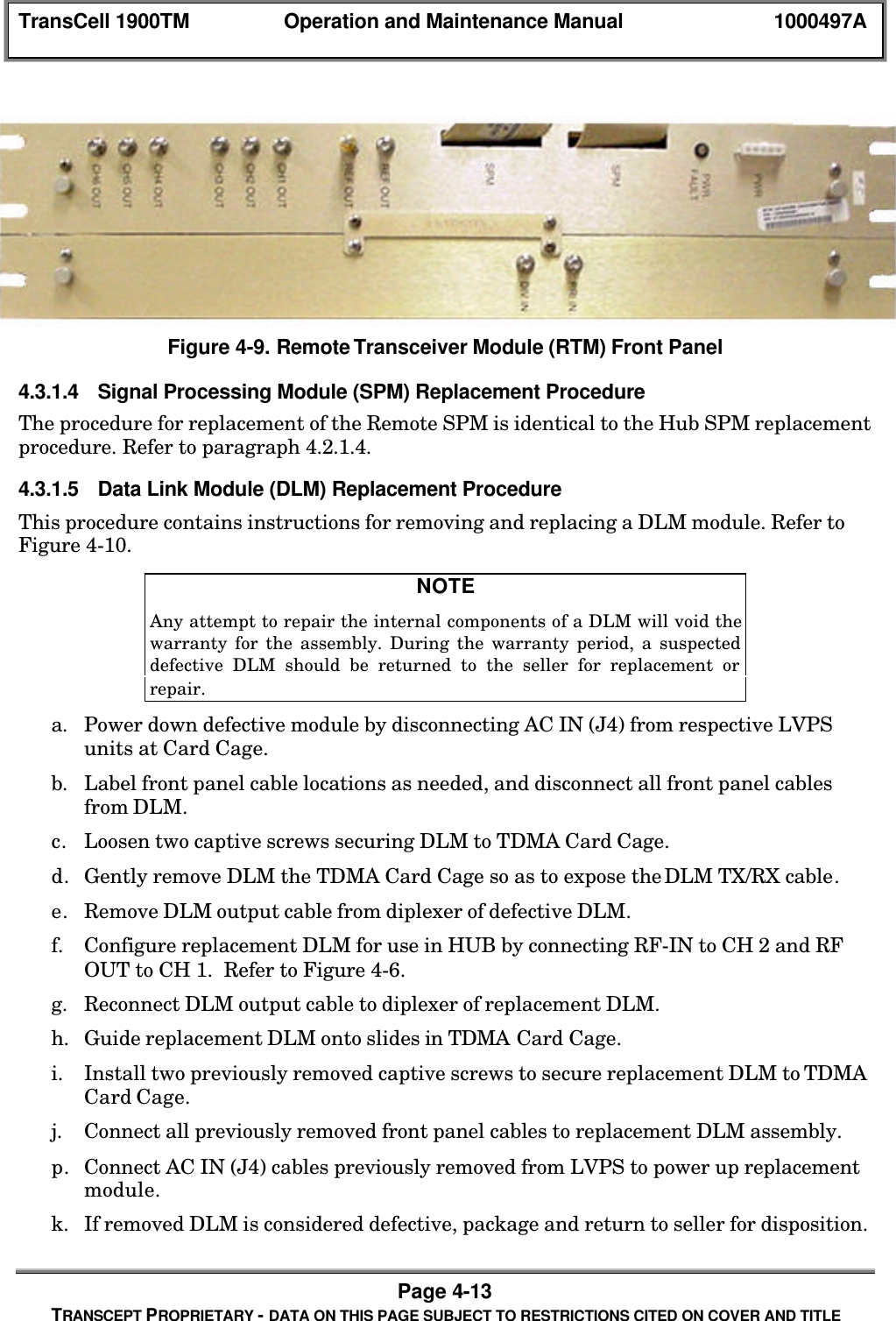
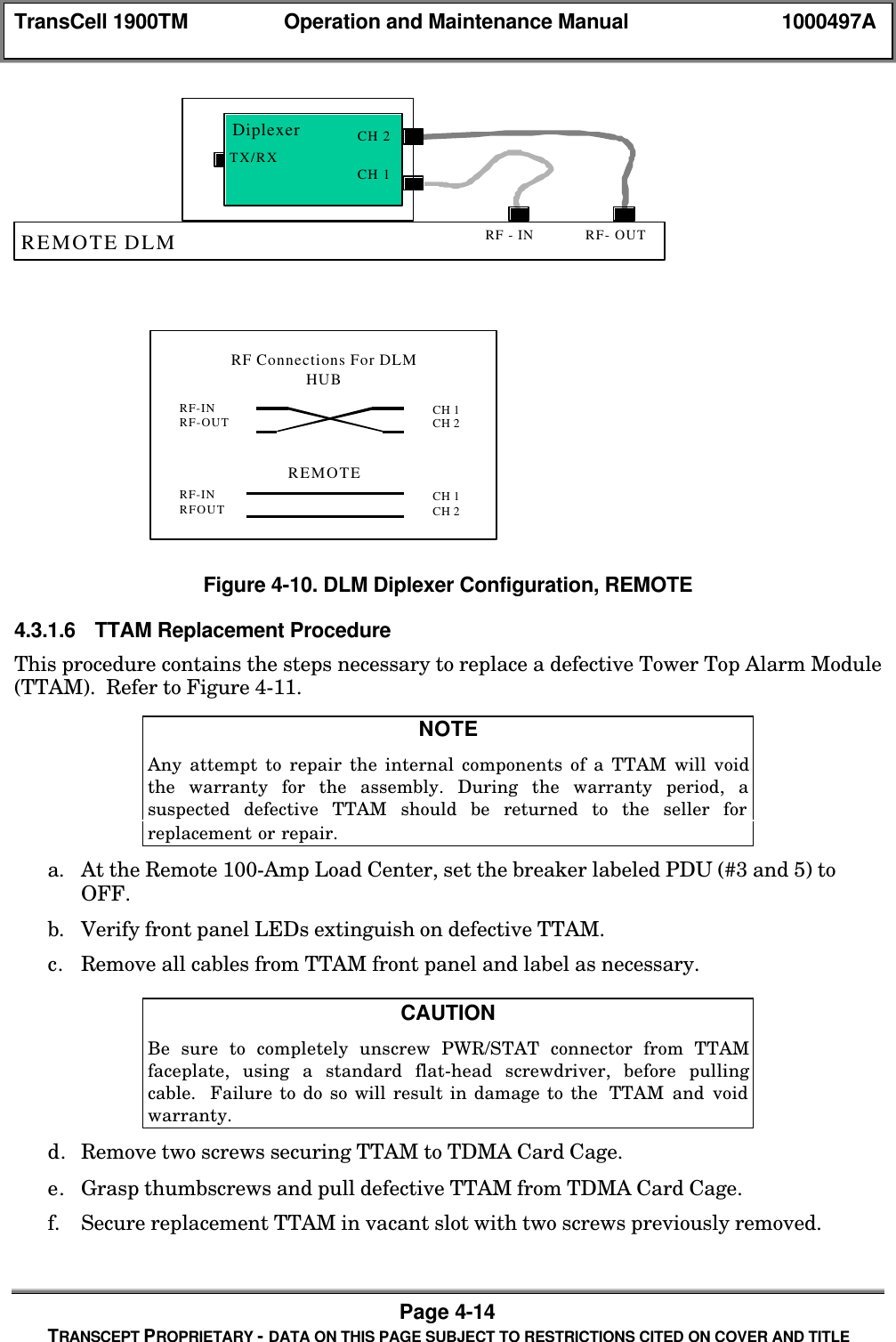
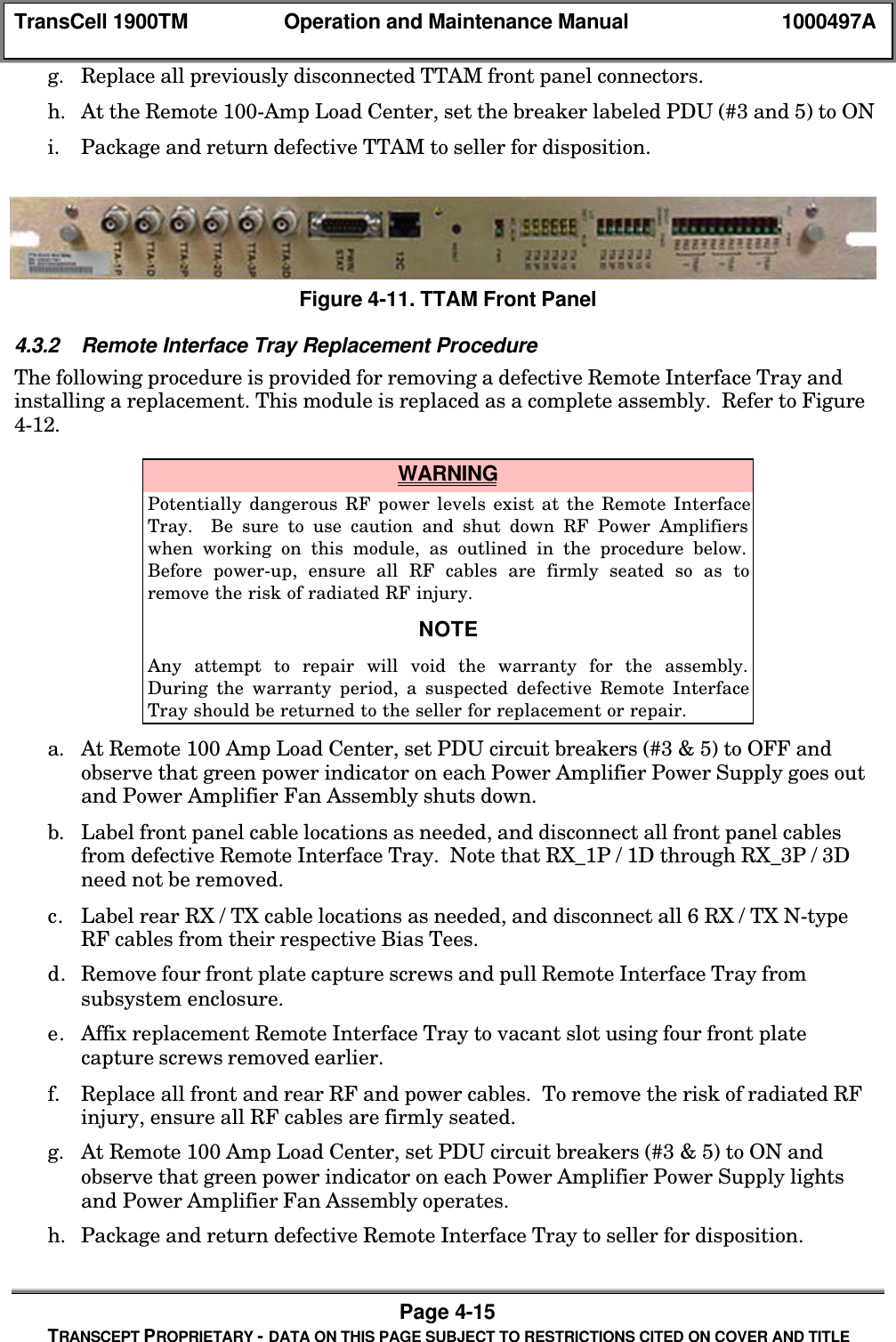
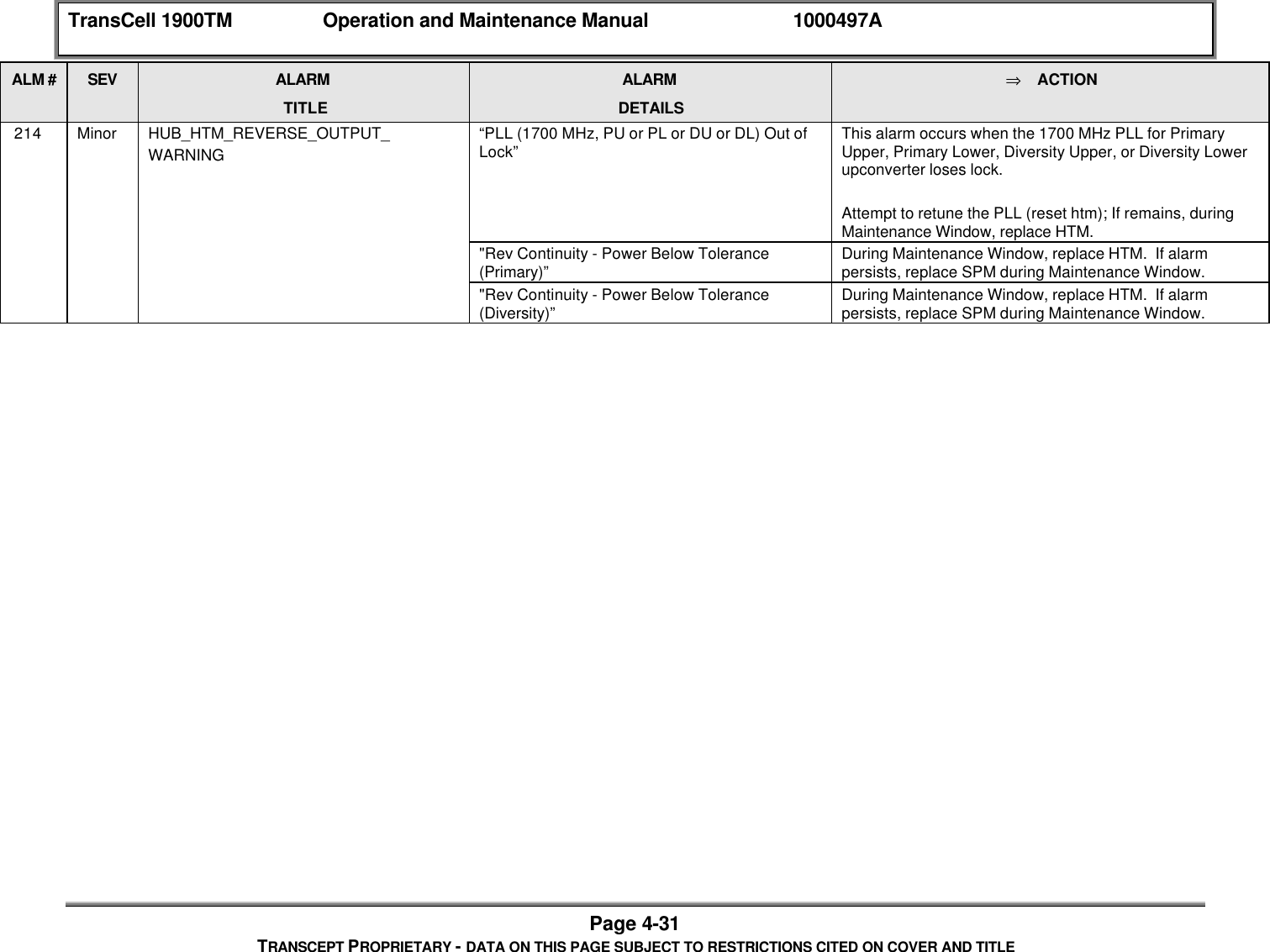
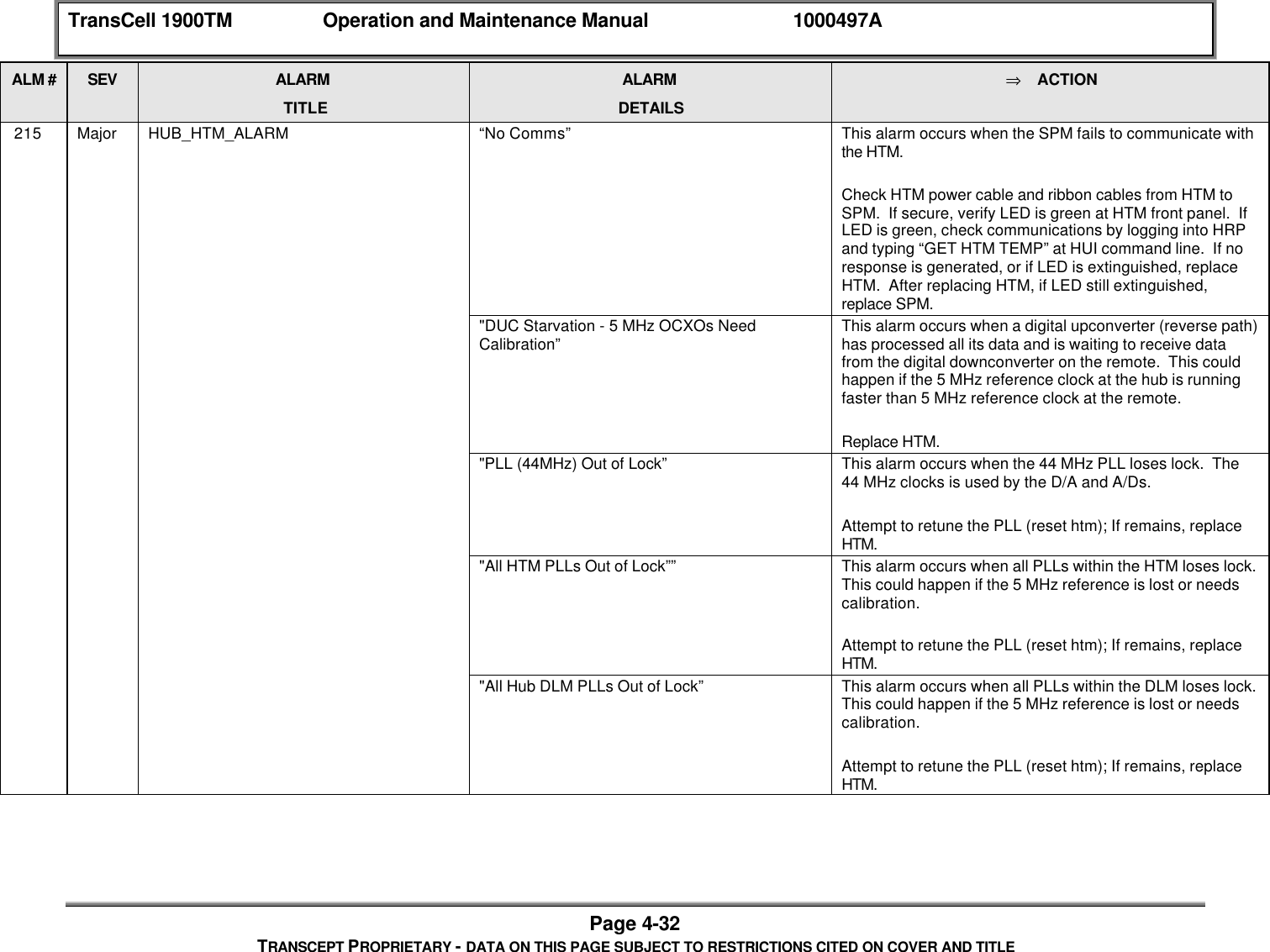
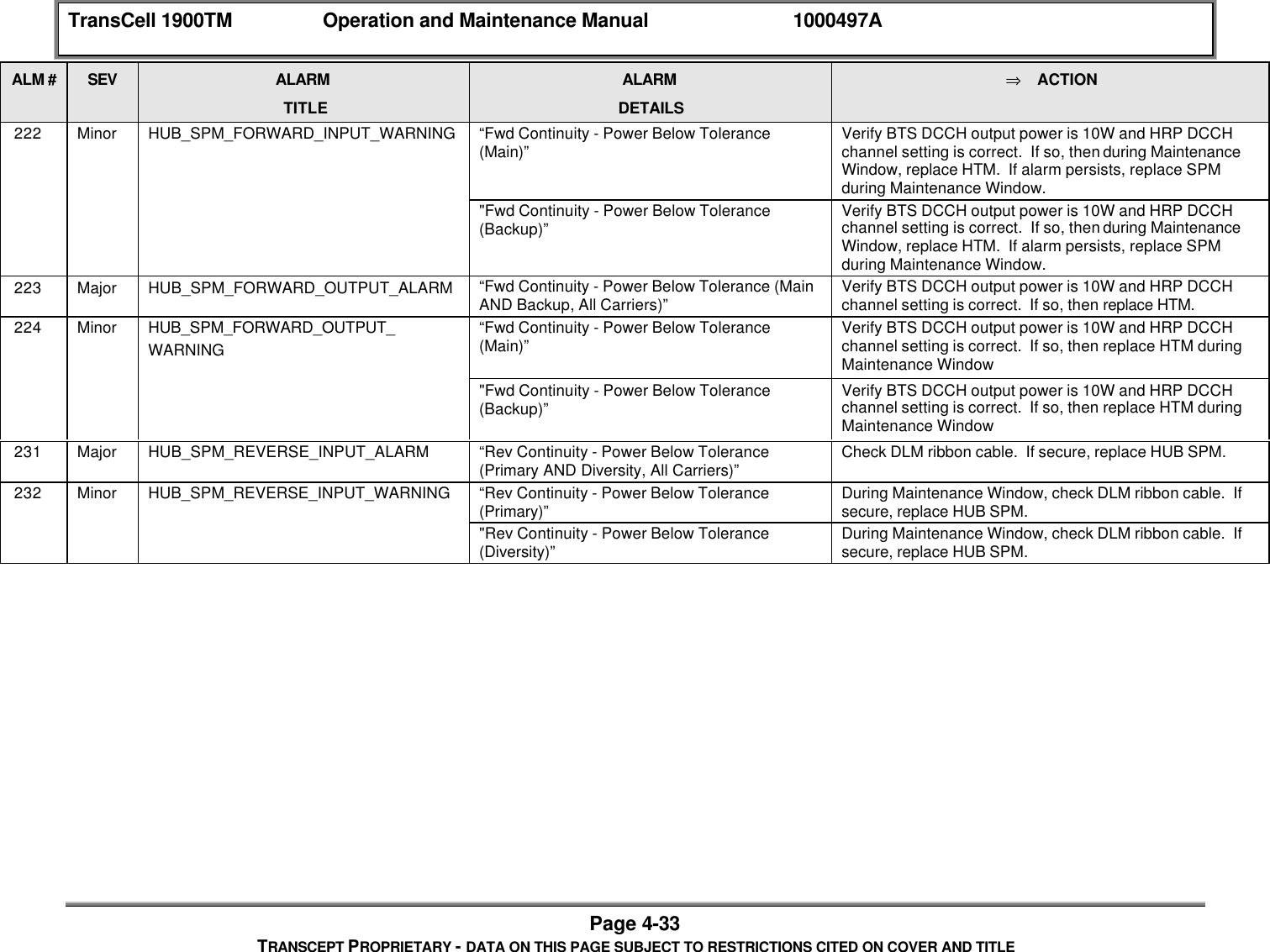
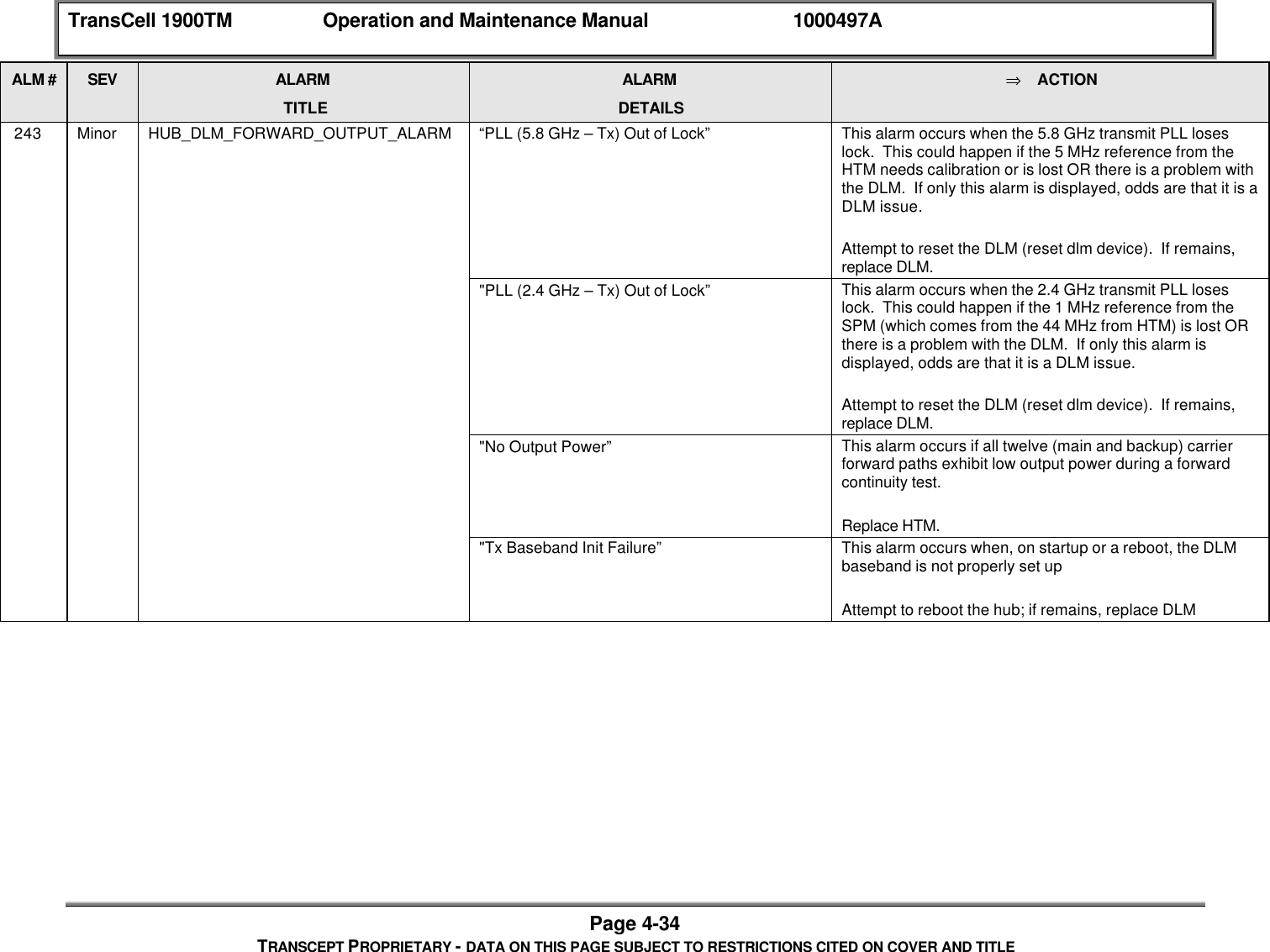
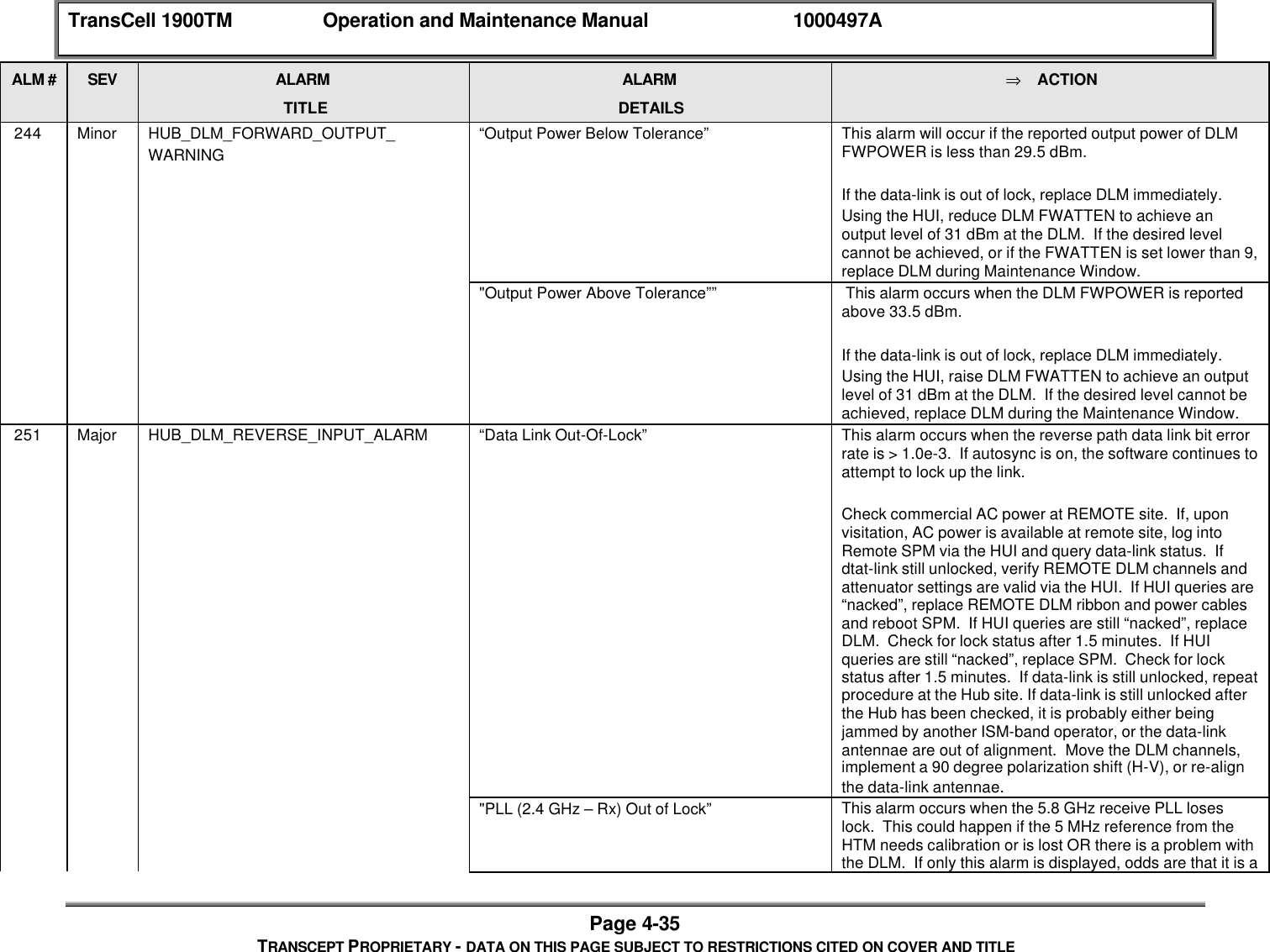
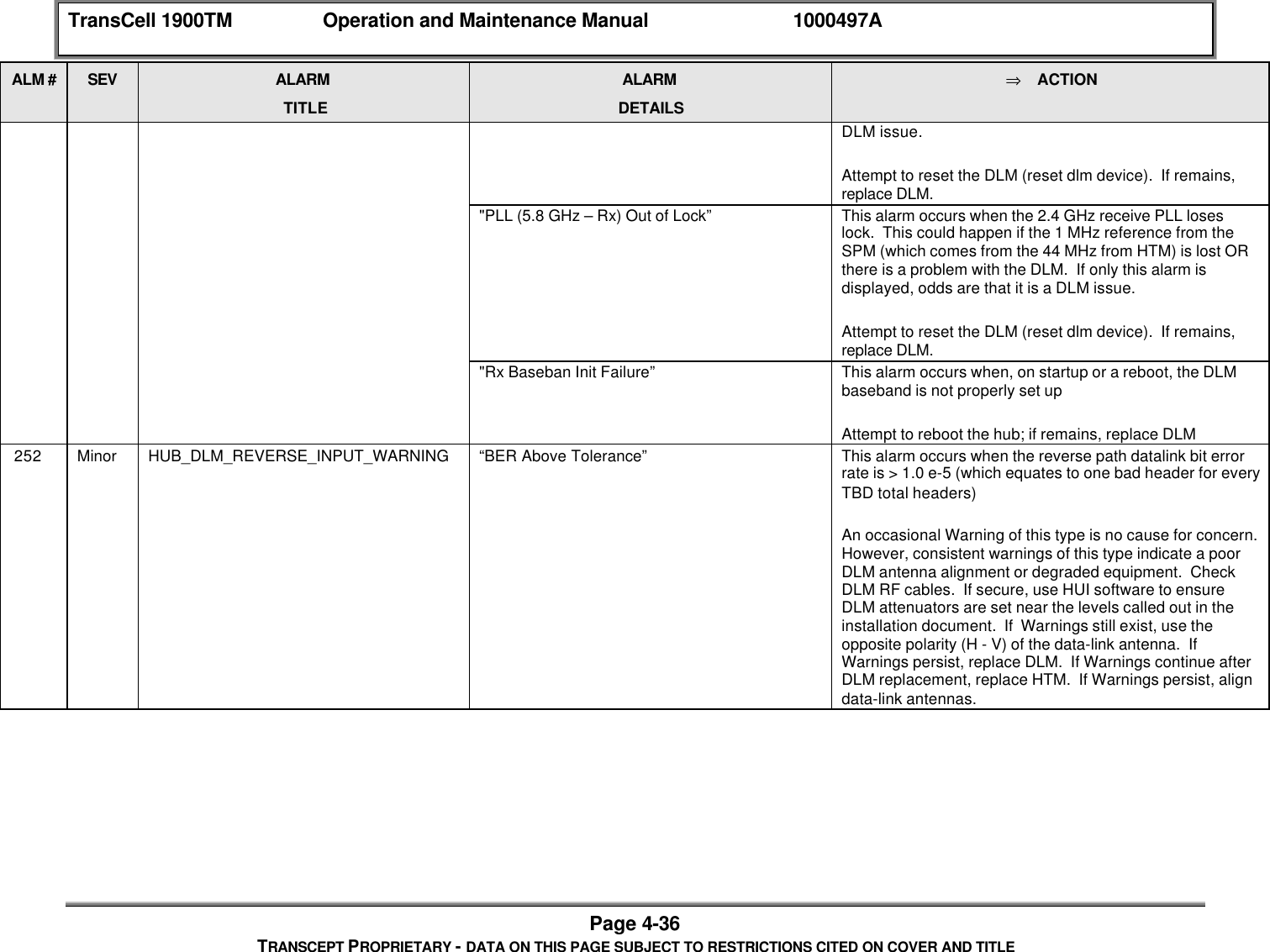
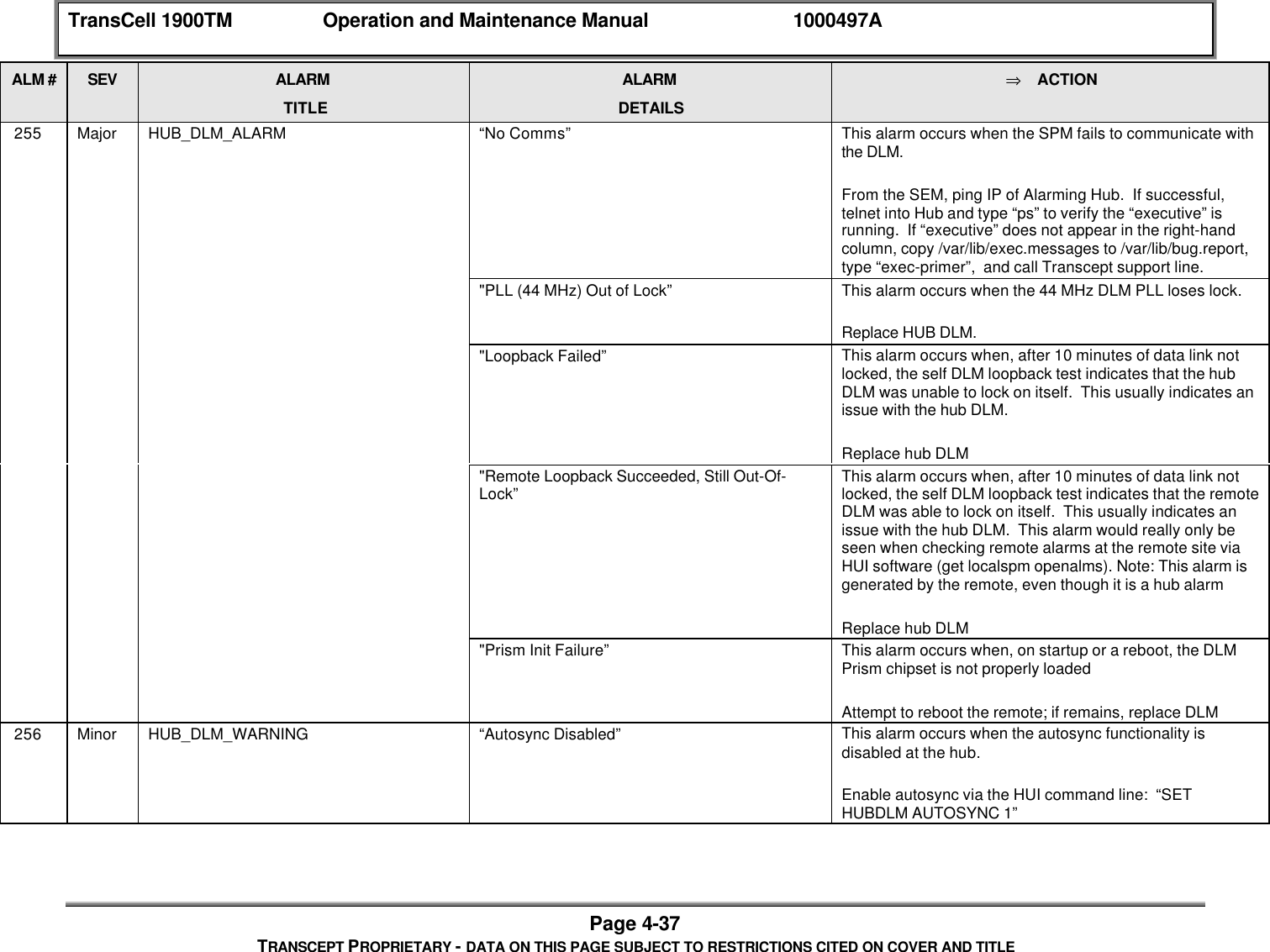
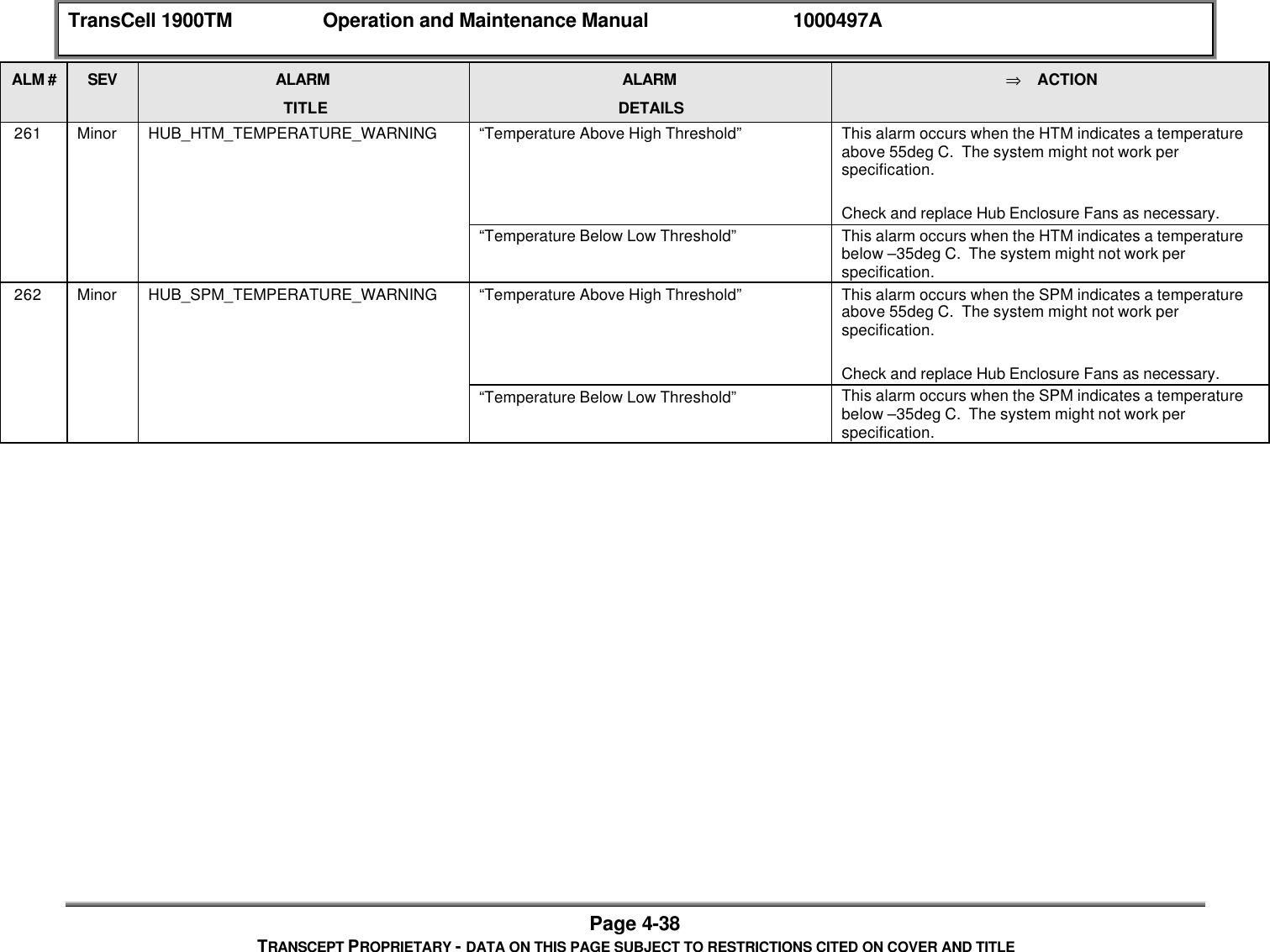
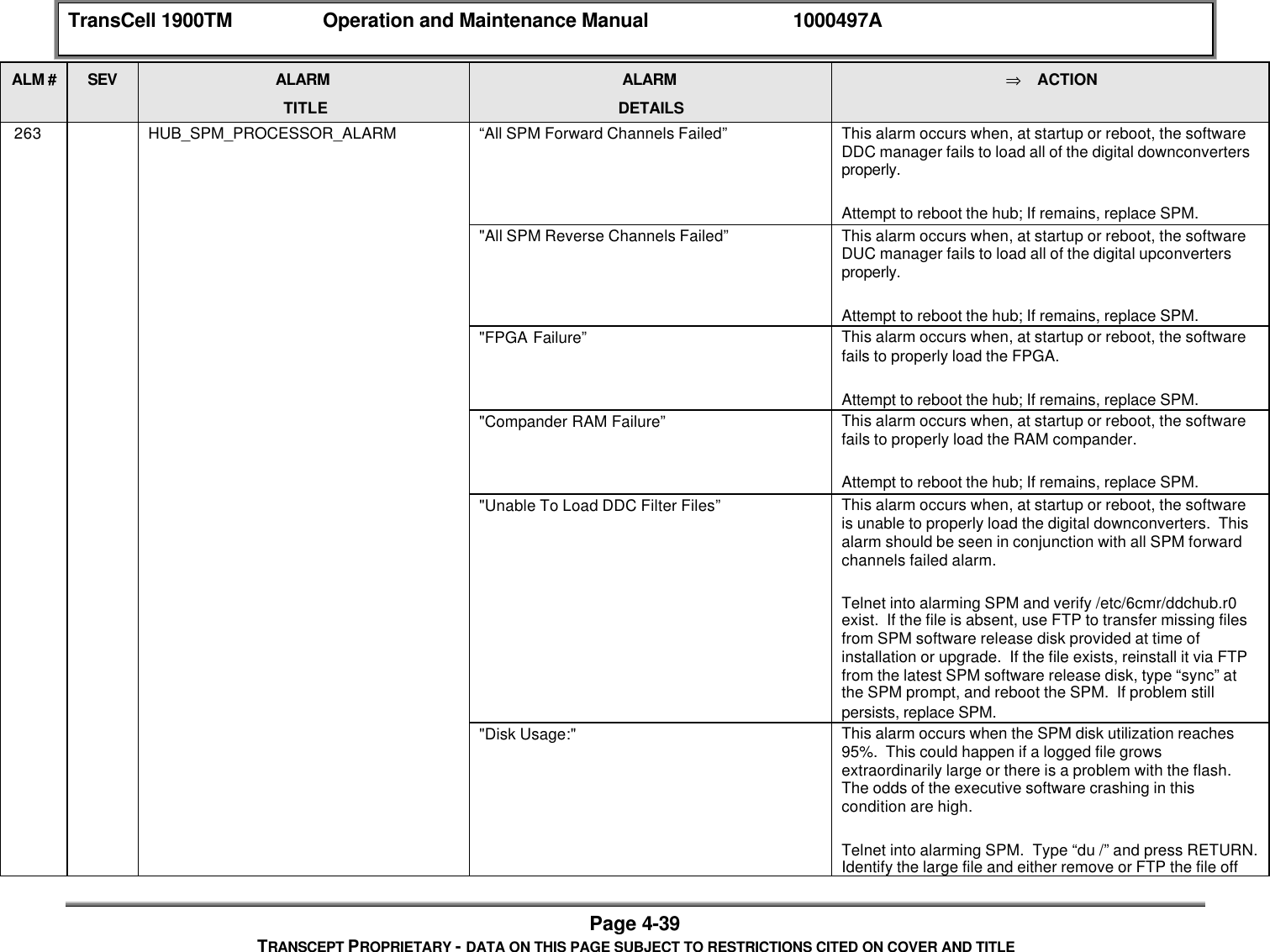
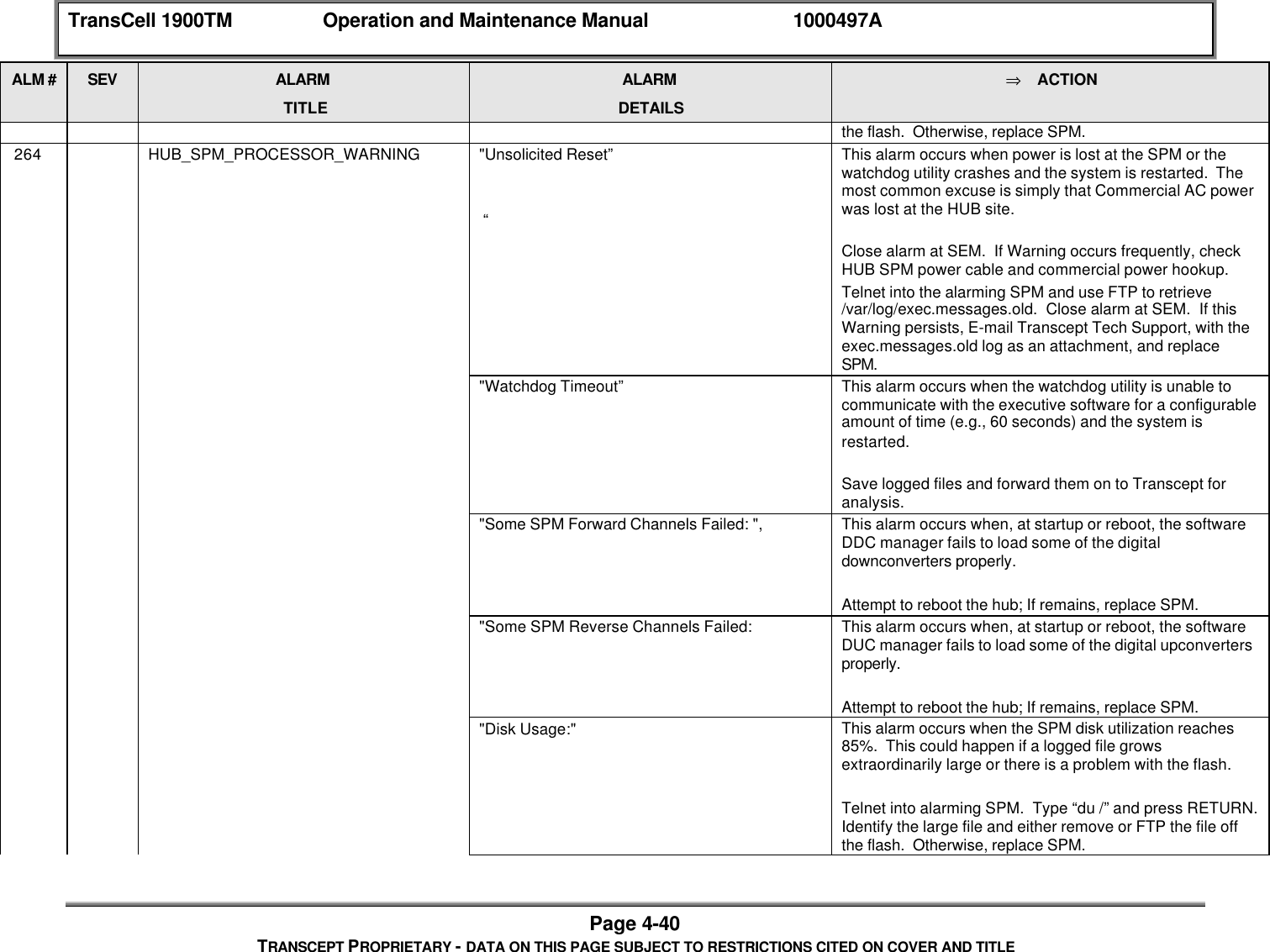
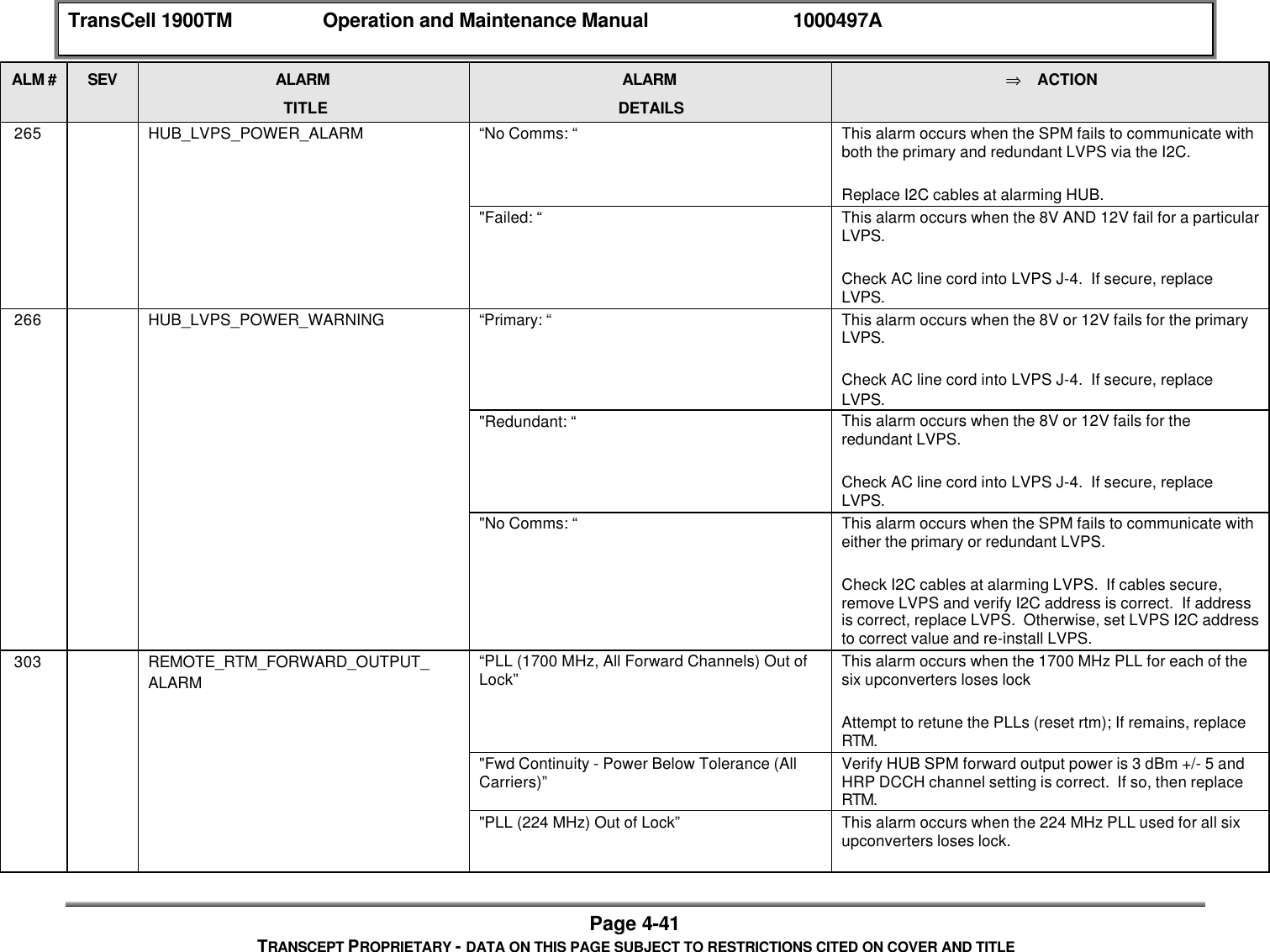
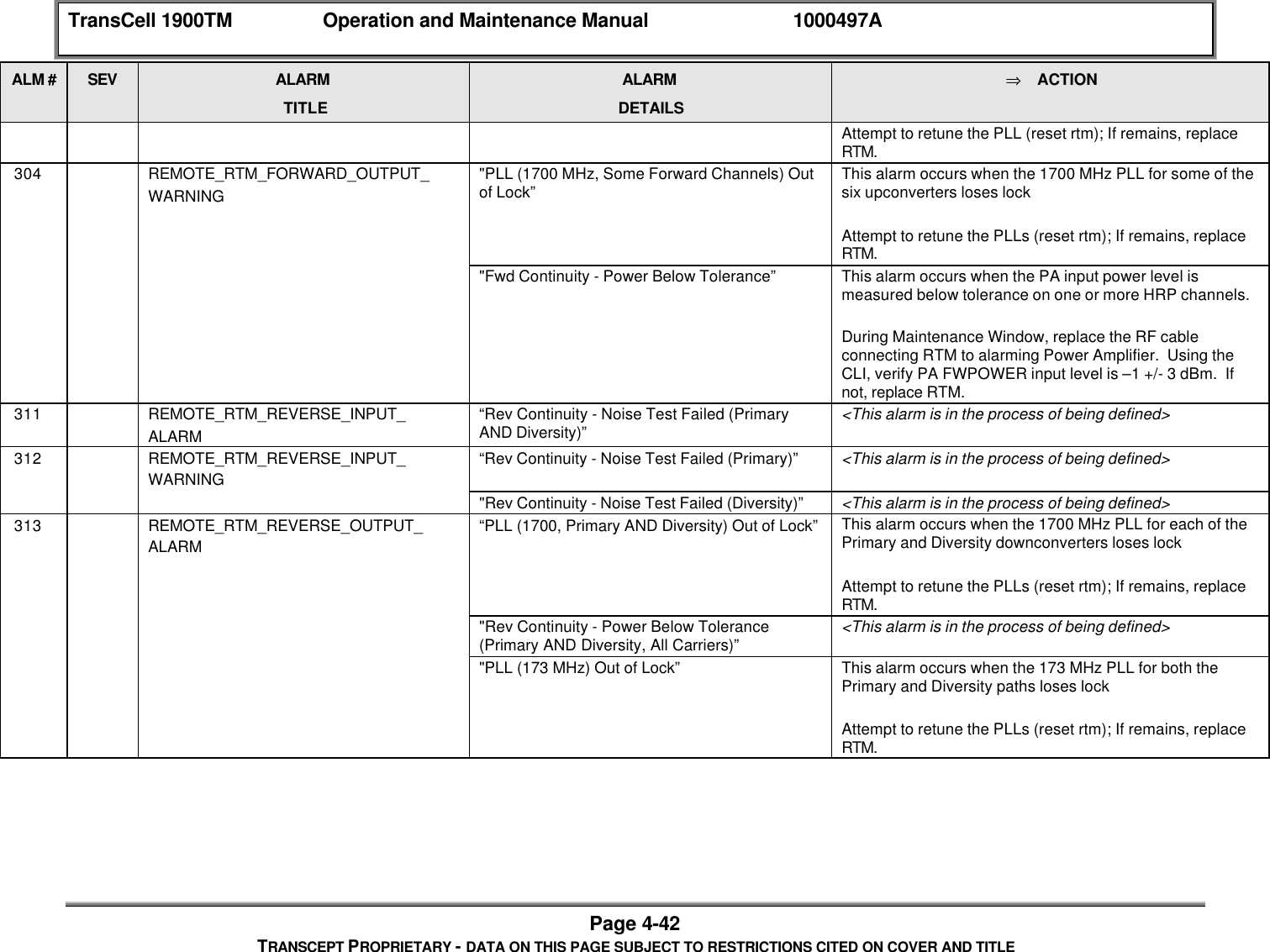
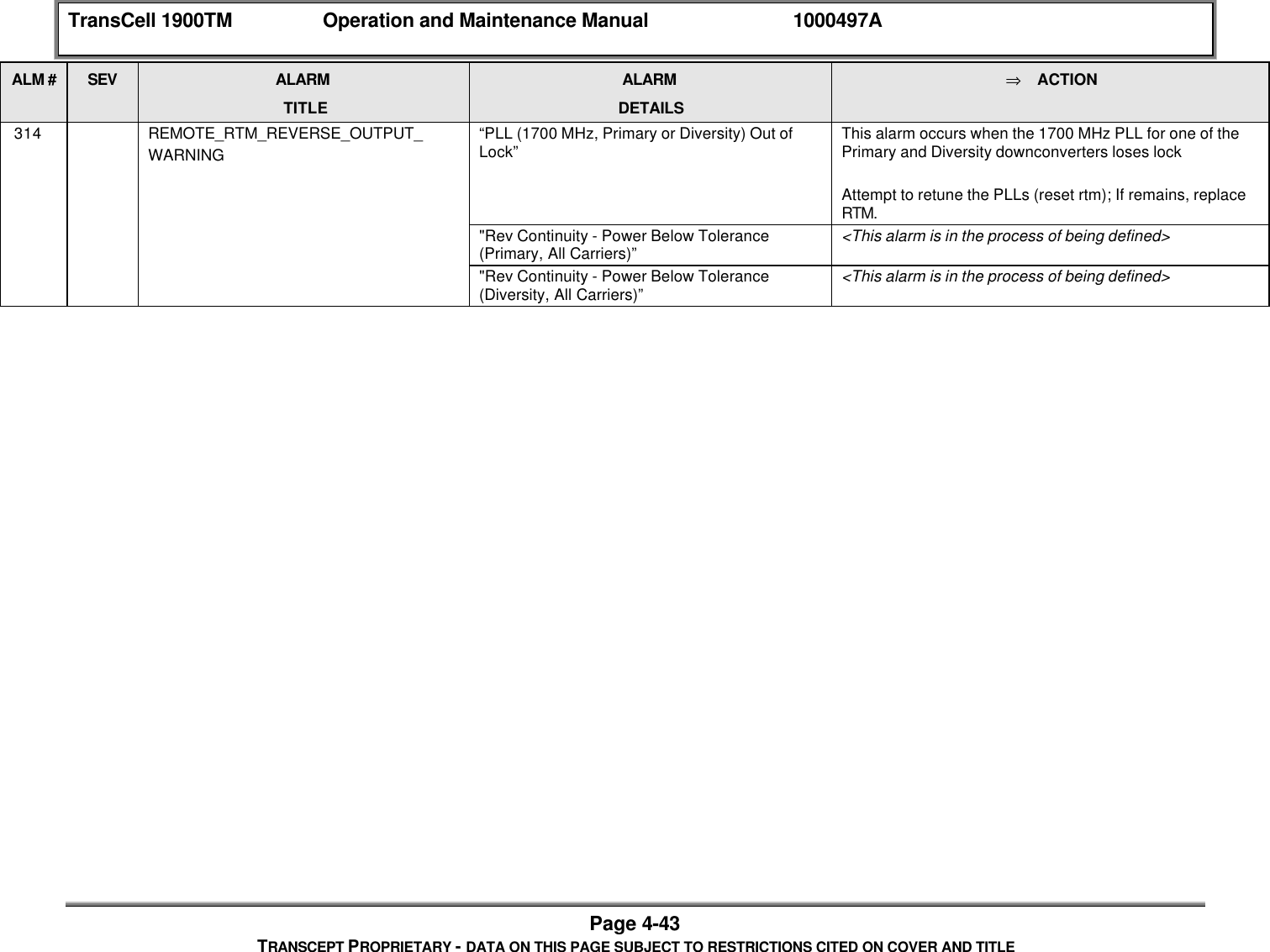
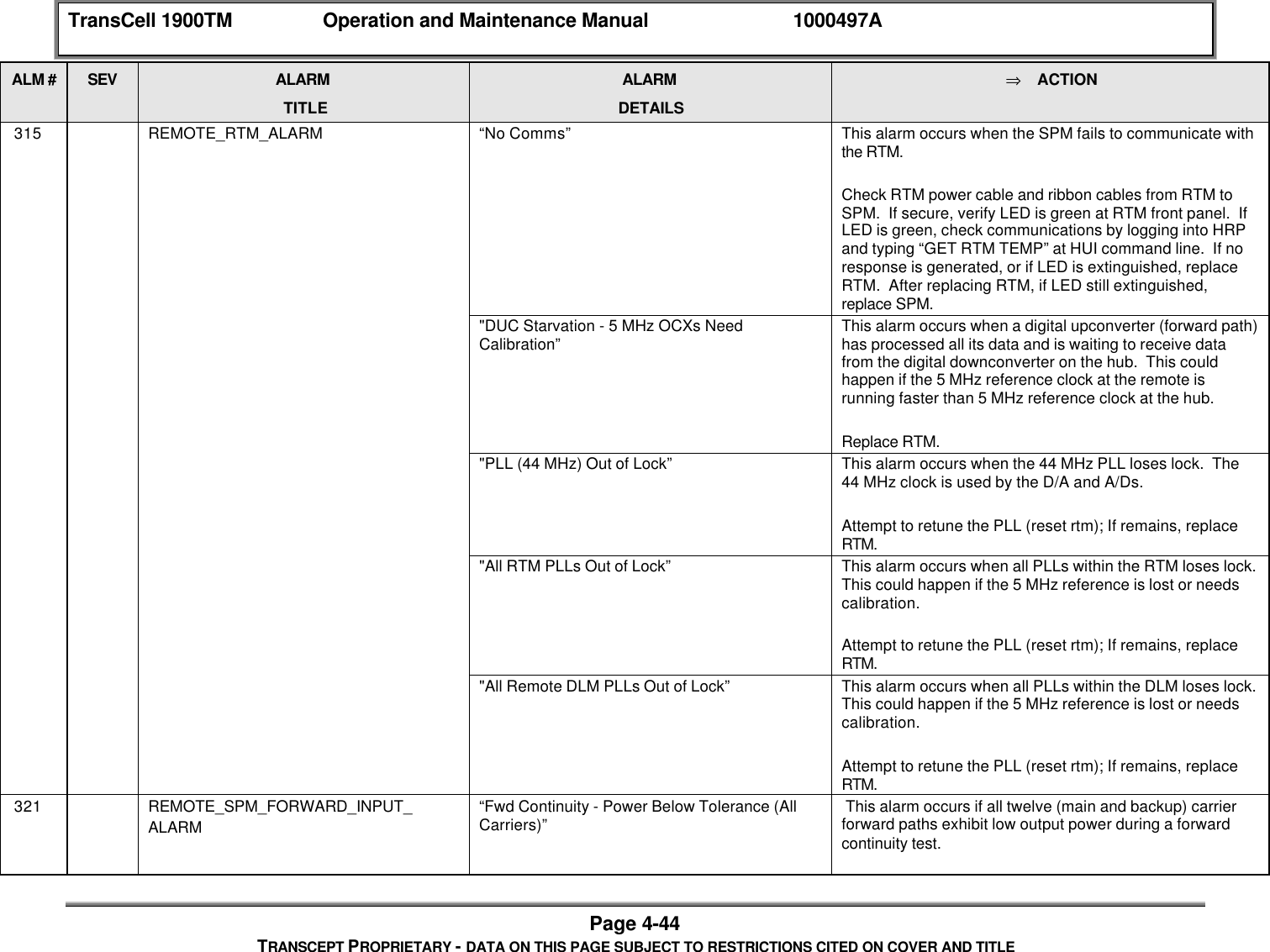
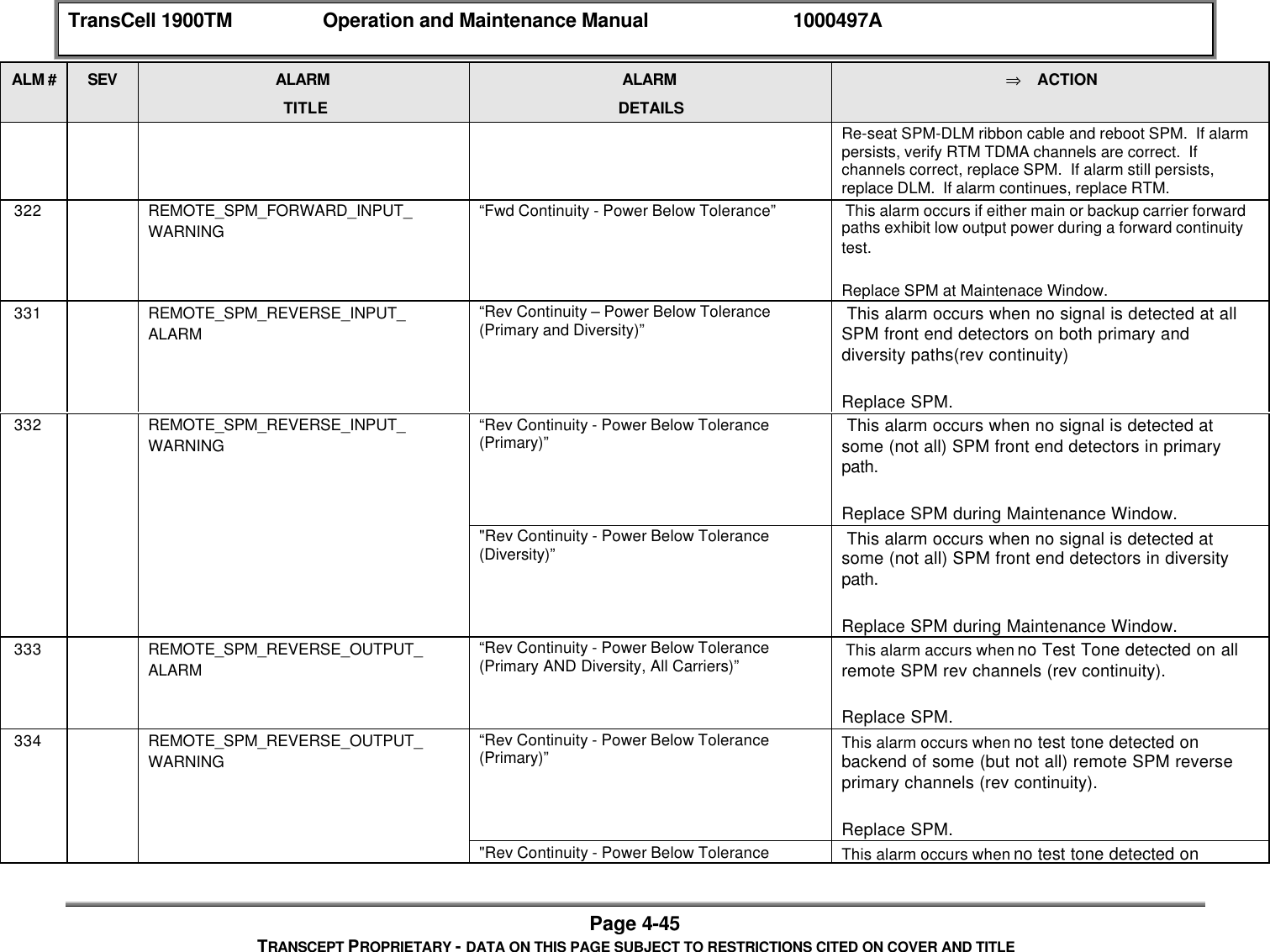
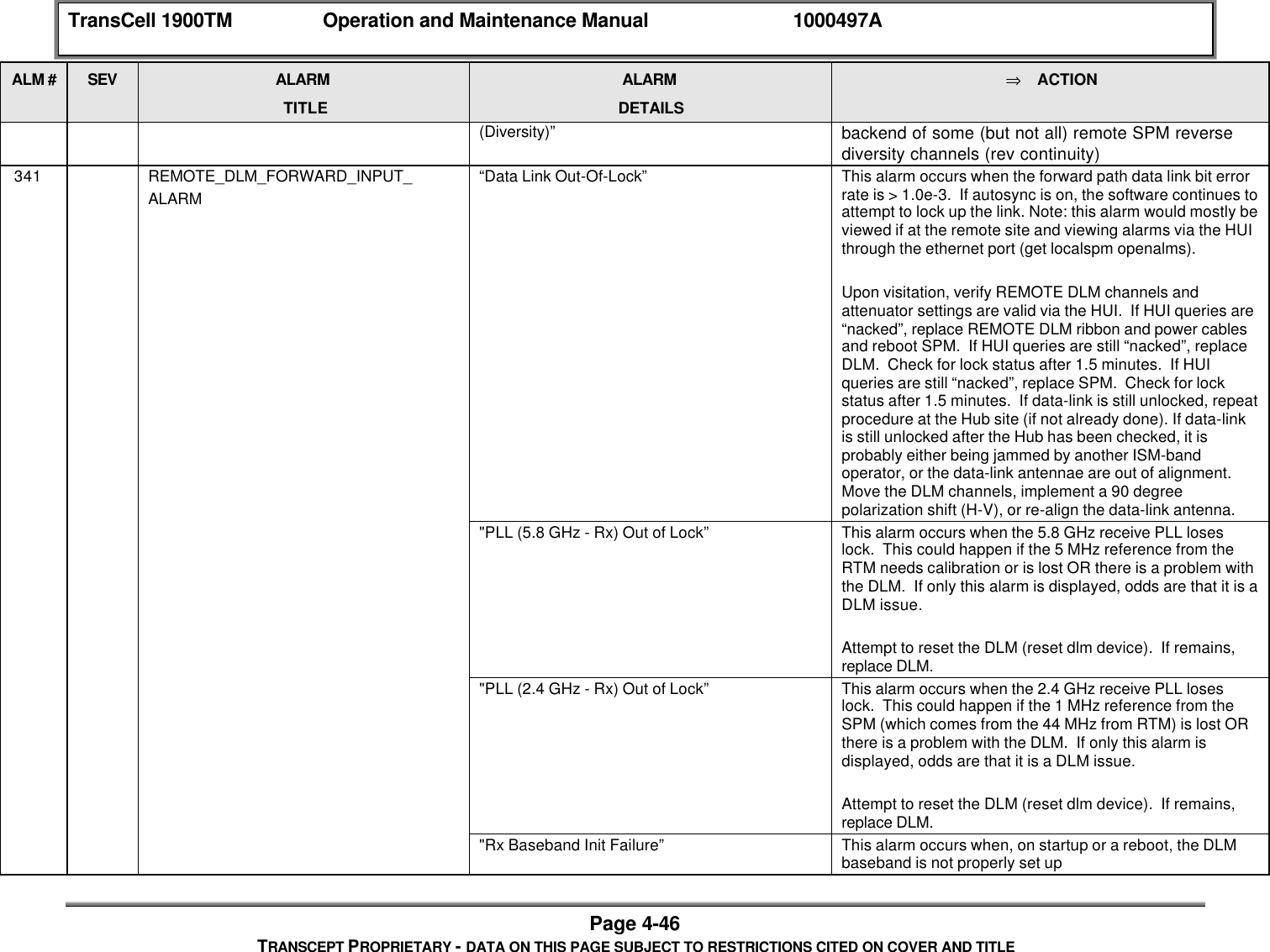
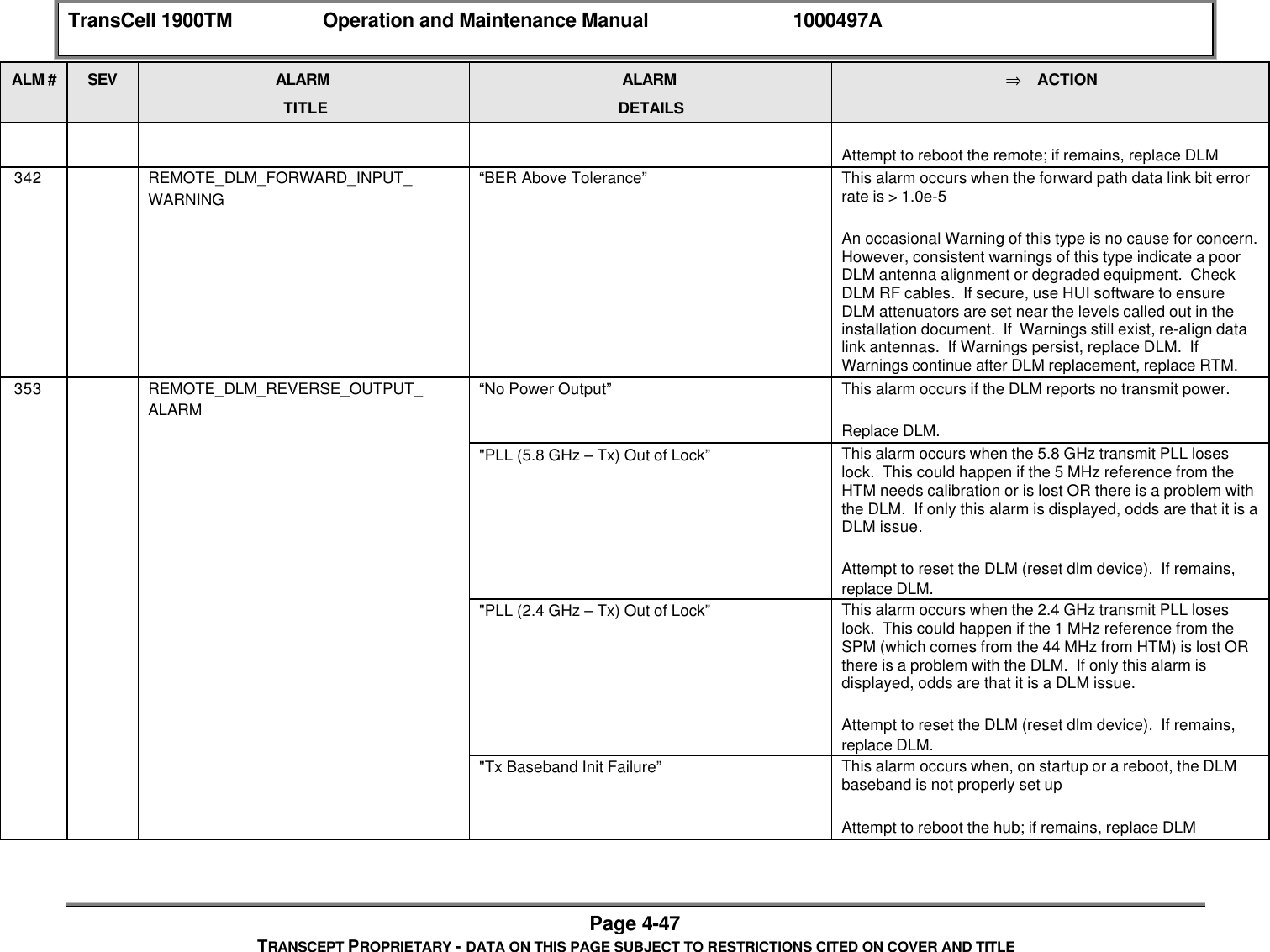
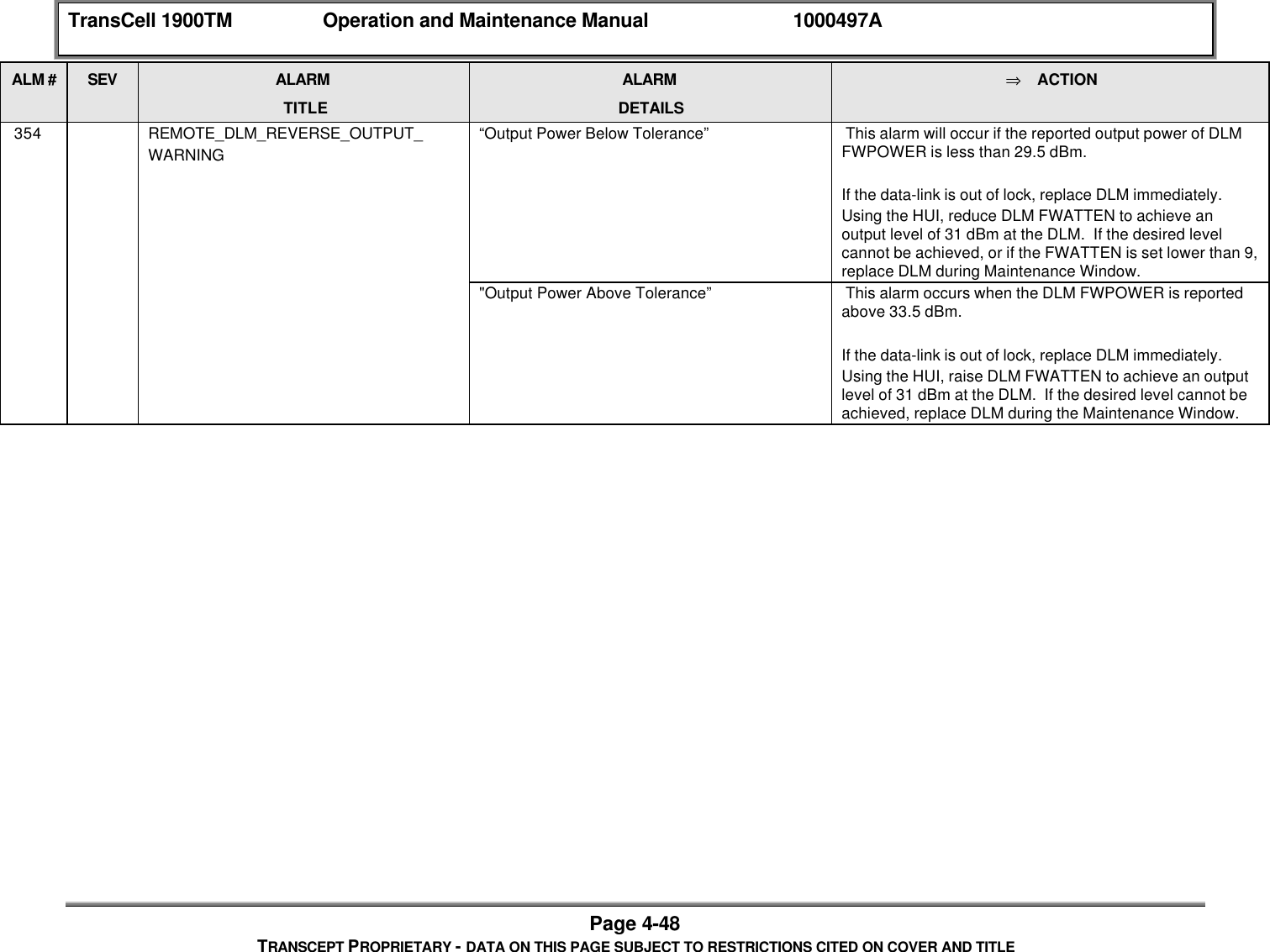
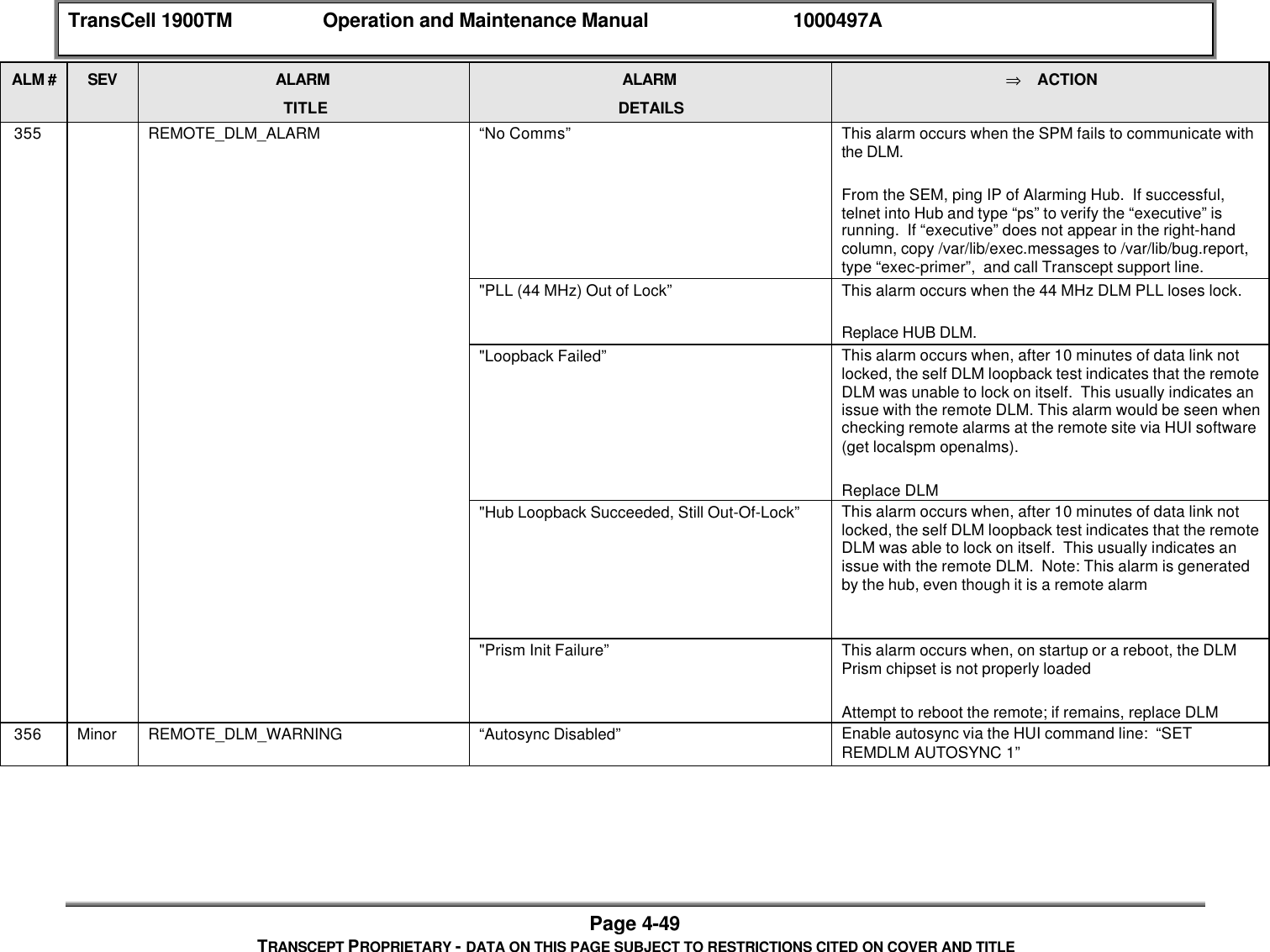
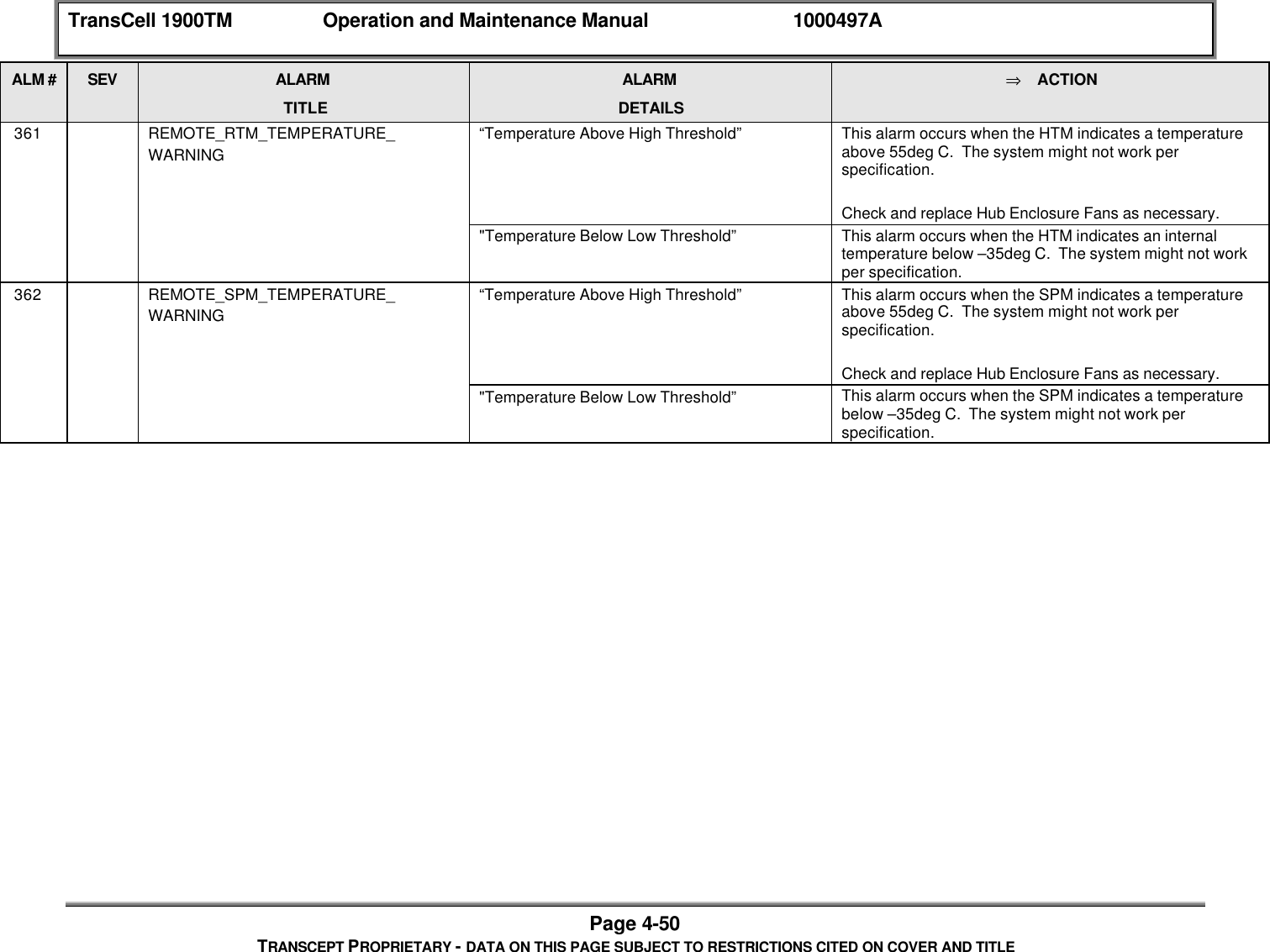
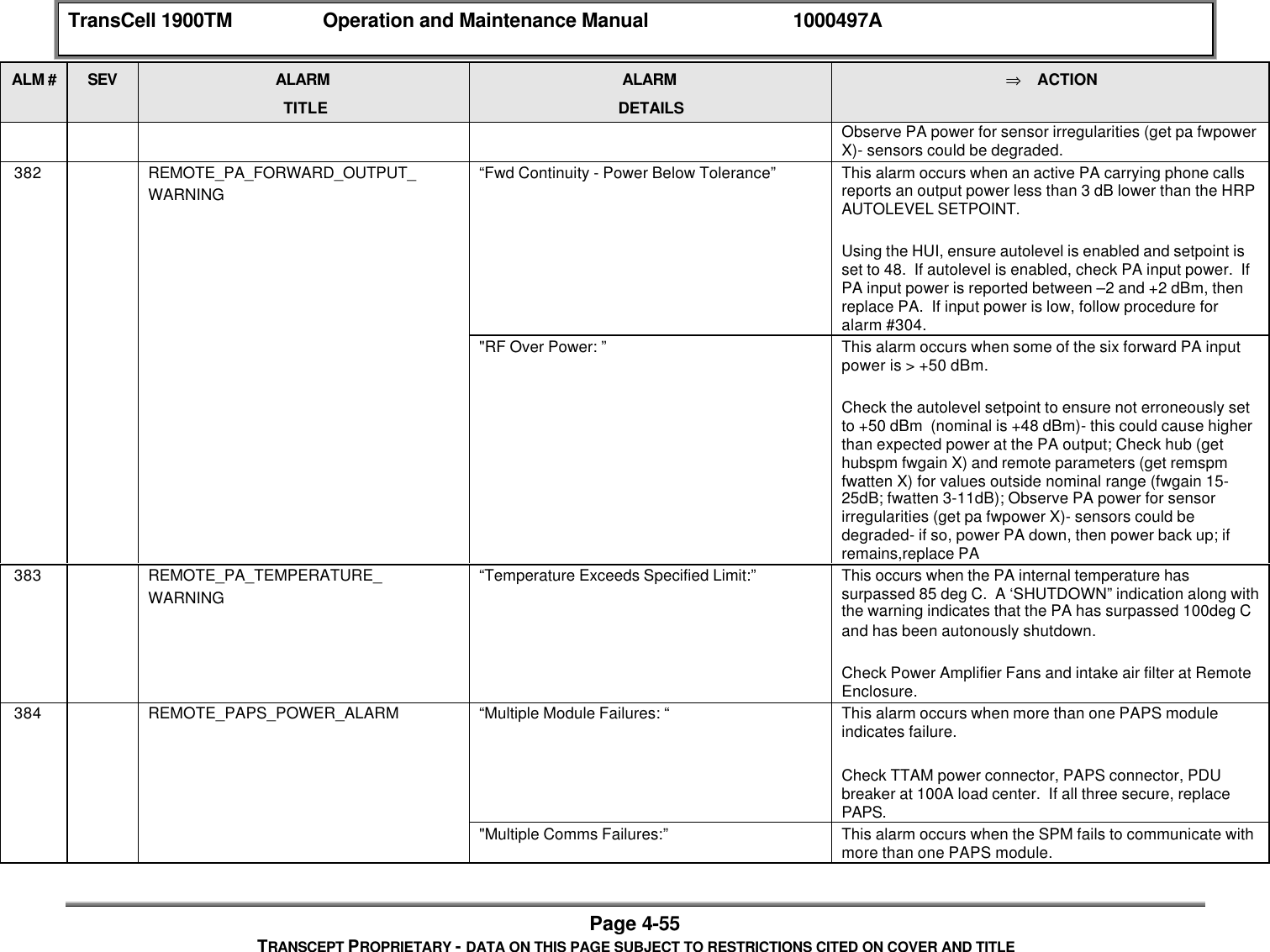
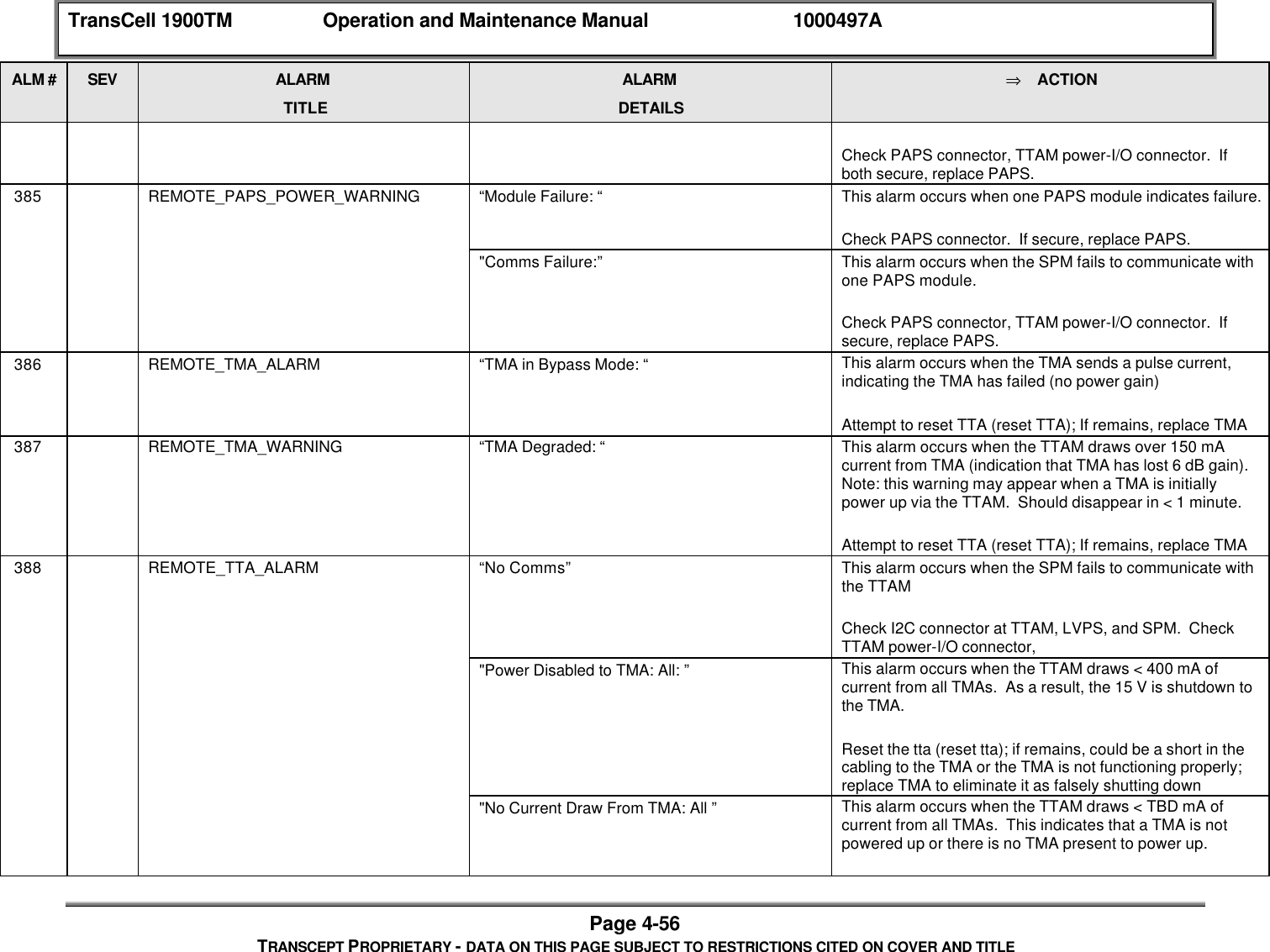
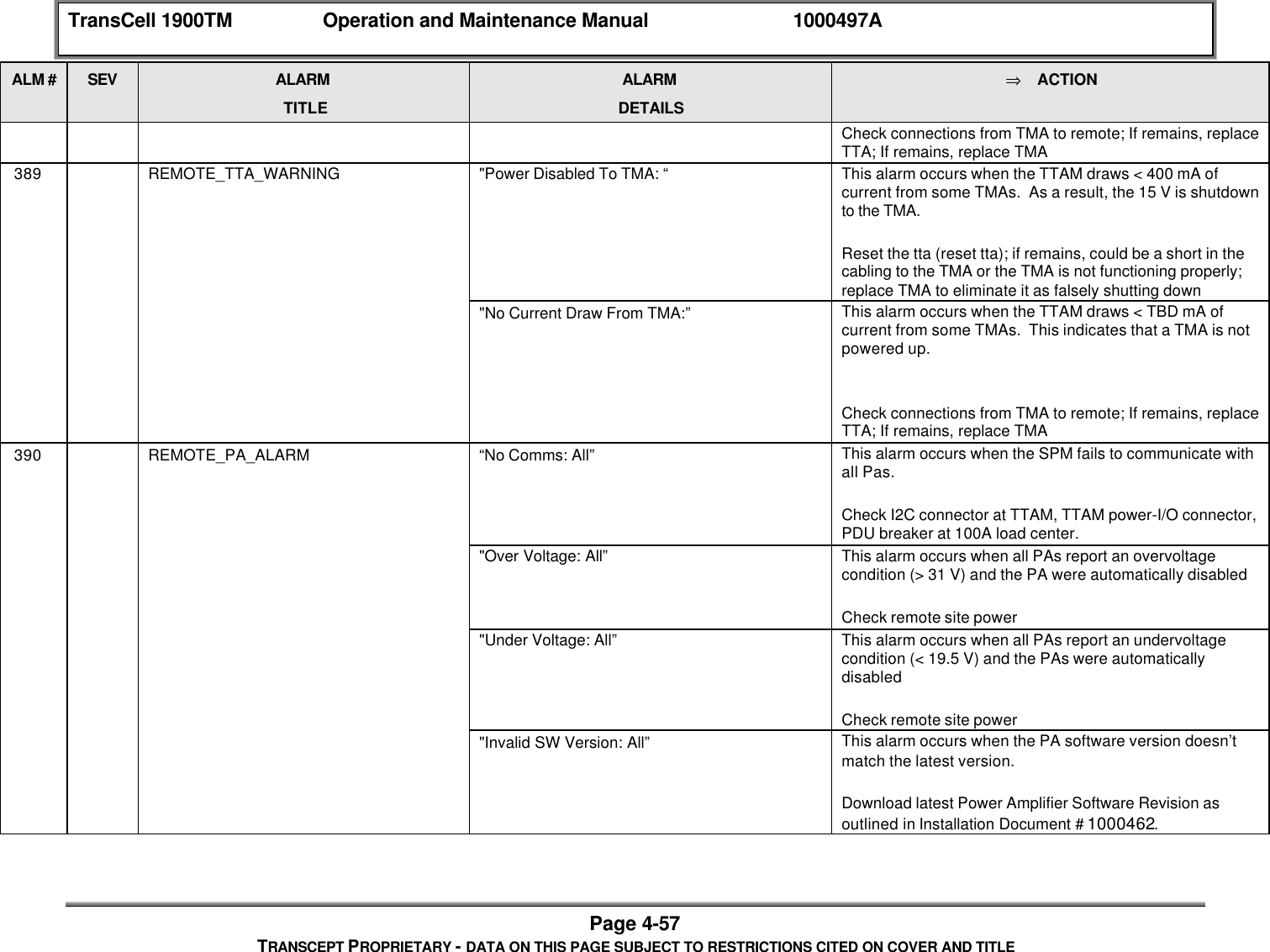
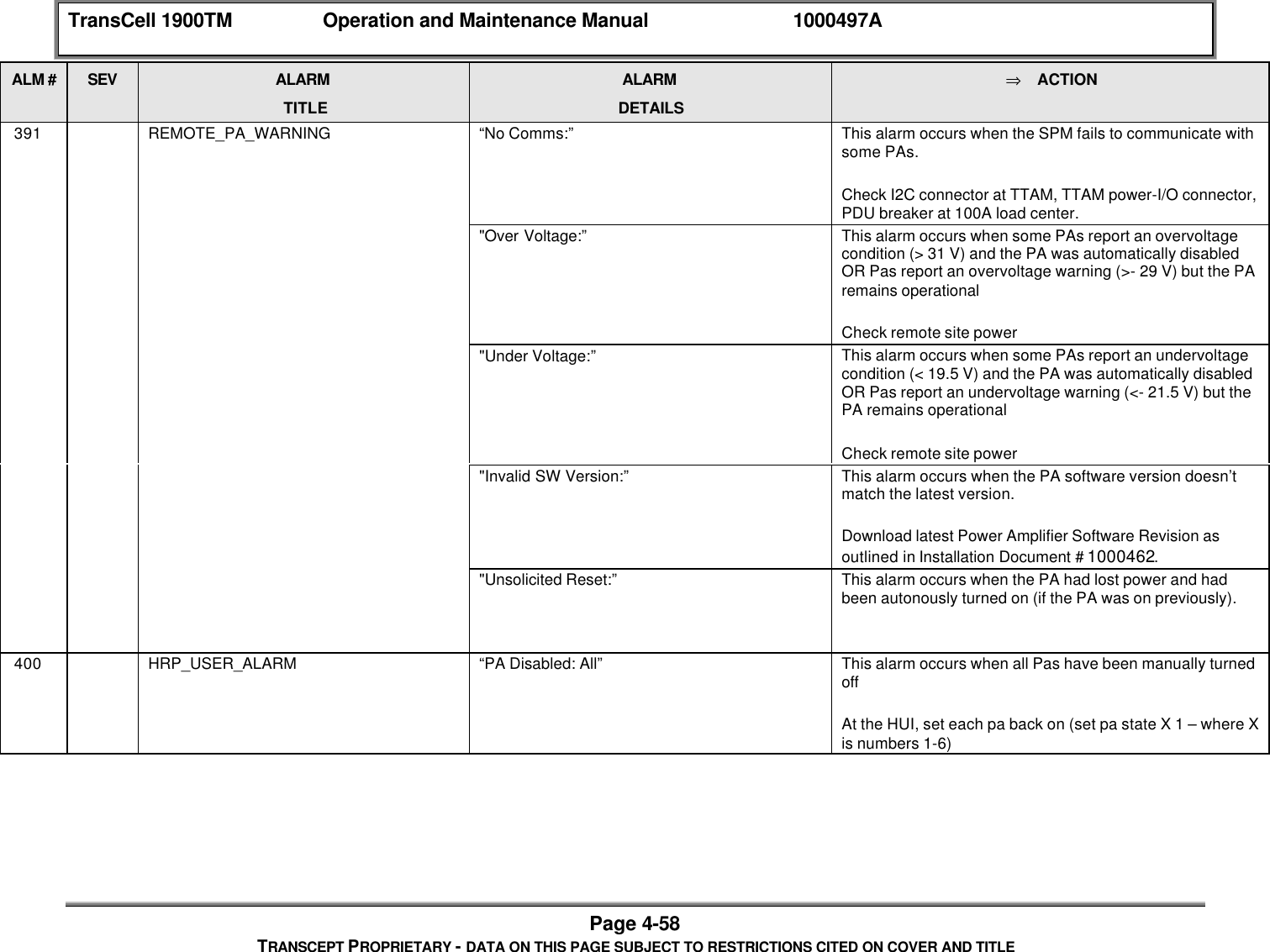
OpenCell TCELL1900TM TransCell 1900TM User Manual O M Manual 1000497A

OpenCell Corp TransCell 1900TM O M Manual 1000497A

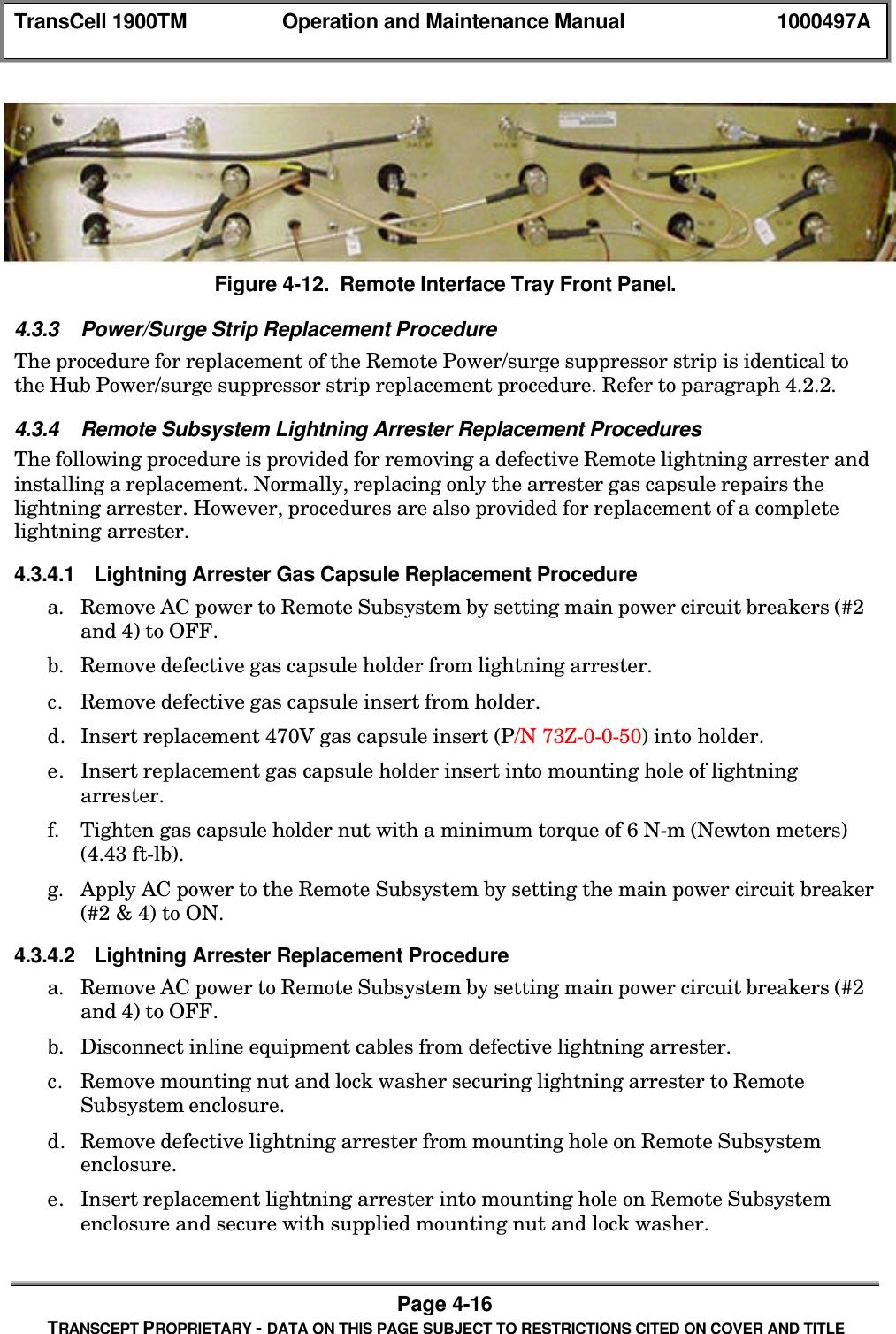
Exhibit D users maunal part 2
TRANSCEPT PROPRIETARYTRANSCEPT PROPRIETARY TransCell 1900TM System Operation and Maintenance ManualDocument No. 1000497Revision  A08 March 2001THIS DOCUMENT CONTAINS PROPRIETARY INFORMATION OF TRANSCEPT, INC. AND ISTO BE USED ONLY IN ACCORDANCE WITH THE NONDISCLOSURE AGREEMENT UNDERWHICH THIS DOCUMENT IS PROVIDED.  THIS DOCUMENT IS NOT TO BE DUPLICATED INWHOLE OR IN PART WITHOUT PRIOR WRITTEN PERMISSION FROM A DULY AUTHORIZEDREPRESENTATIVE OF TRANSCEPT, INC.THE REVISION STATUS OF ALL PAGES IN THIS DOCUMENT IS THE SAME AS THATSTATED ON THIS COVER.Copyright  1999, 2001 Transcept, Inc.All rights reserved.
TRANSCEPT PROPRIETARYTRANSCEPT PROPRIETARY TransCell 1900TM Operation and Maintenance ManualREVIEW AND CONCURRENCEC. STRAW, TDMA TECHNICAL LEAD DATES. Maniglia, TDMA Project Manager DATEP. Yelle, TDMA Product Manager DATETHIS DOCUMENT CONTAINS PROPRIETARY INFORMATION OF TRANSCEPT, INC. AND IS NOT TO BE USEDFOR ANY PURPOSE, EXCEPT IN ACCORDANCE WITH CONTRACTUAL NONDISCLOSURE TERMS .  THISDOCUMENT IS NOT TO BE DUPLICATED IN WHOLE OR IN PART WITHOUT PRIOR WRITTEN PERMISSIONFROM A DULY AUTHORIZED REPRESENTATIVE OF TRANSCEPT.Document No.  1000497Revision A:  08 March 2001
TRANSCEPT PROPRIETARYTRANSCEPT PROPRIETARYDRAWING NO.DOCUMENT CHANGE HISTORYDATE REV DESCRIPTION APPD03/08/01 ARel to ECO control per RN 010308 km/CS
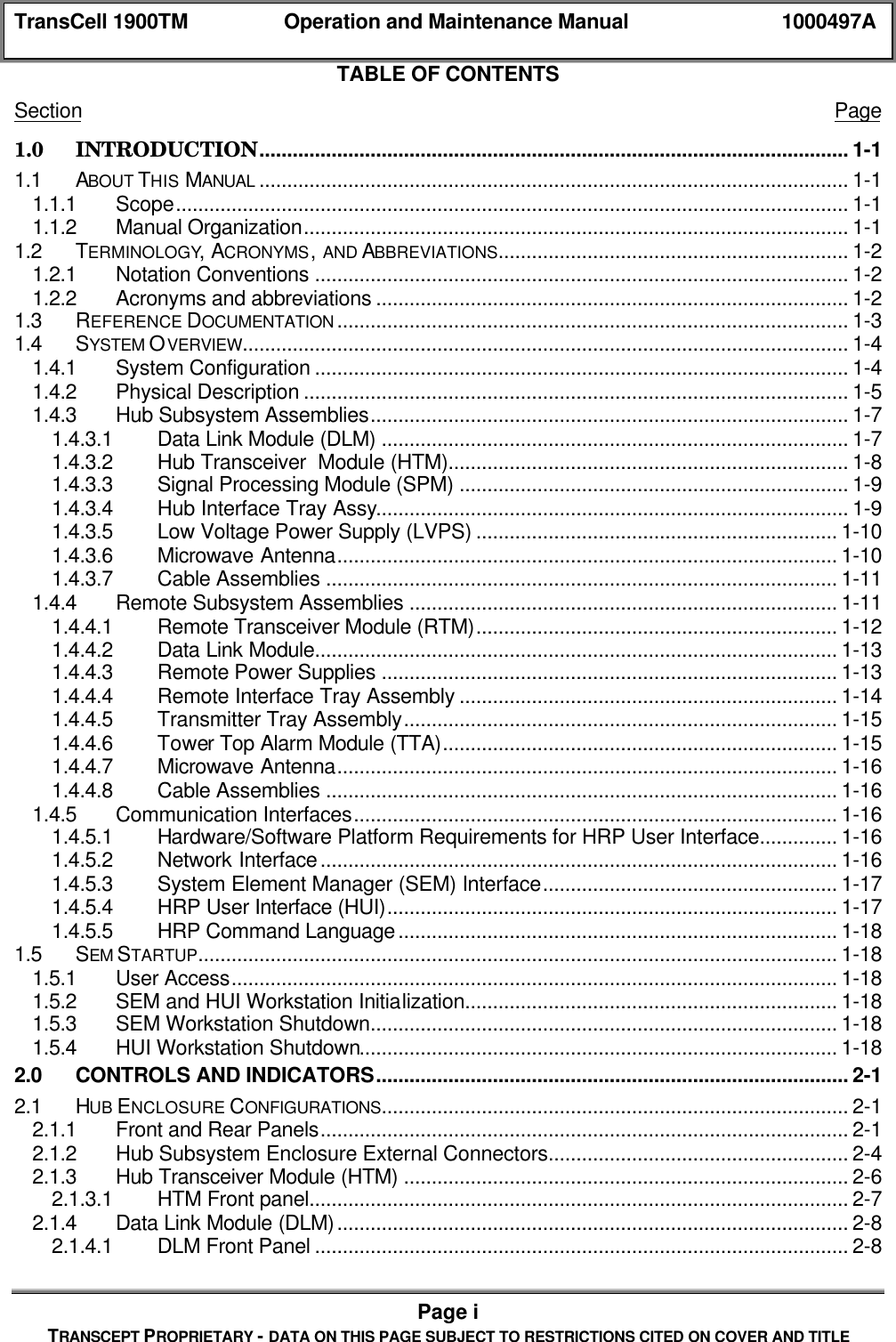
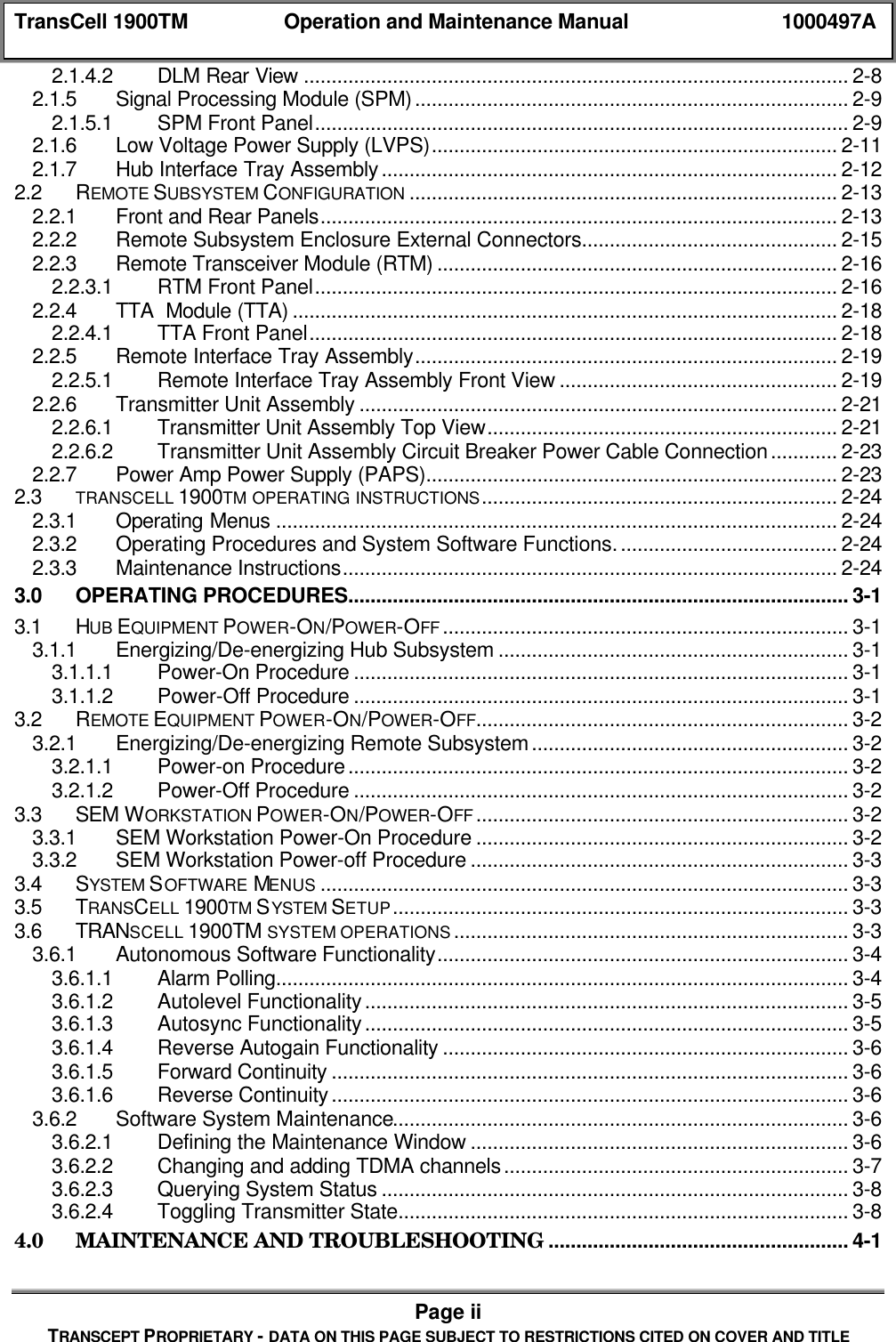
TransCell 1900TM Operation and Maintenance Manual 1000497APage iTRANSCEPT PROPRIETARY - DATA ON THIS PAGE SUBJECT TO RESTRICTIONS CITED ON COVER AND TITLETABLE OF CONTENTSSection Page1.0 INTRODUCTION.......................................................................................................... 1-11.1 ABOUT THIS MANUAL .......................................................................................................... 1-11.1.1 Scope......................................................................................................................... 1-11.1.2 Manual Organization.................................................................................................. 1-11.2 TERMINOLOGY, ACRONYMS, AND ABBREVIATIONS............................................................... 1-21.2.1 Notation Conventions ................................................................................................ 1-21.2.2 Acronyms and abbreviations ..................................................................................... 1-21.3 REFERENCE DOCUMENTATION ............................................................................................ 1-31.4 SYSTEM OVERVIEW............................................................................................................. 1-41.4.1 System Configuration ................................................................................................ 1-41.4.2 Physical Description .................................................................................................. 1-51.4.3 Hub Subsystem Assemblies...................................................................................... 1-71.4.3.1 Data Link Module (DLM) .................................................................................... 1-71.4.3.2 Hub Transceiver  Module (HTM)........................................................................ 1-81.4.3.3 Signal Processing Module (SPM) ...................................................................... 1-91.4.3.4 Hub Interface Tray Assy..................................................................................... 1-91.4.3.5 Low Voltage Power Supply (LVPS) ................................................................. 1-101.4.3.6 Microwave Antenna.......................................................................................... 1-101.4.3.7 Cable Assemblies ............................................................................................ 1-111.4.4 Remote Subsystem Assemblies ............................................................................. 1-111.4.4.1 Remote Transceiver Module (RTM)................................................................. 1-121.4.4.2 Data Link Module.............................................................................................. 1-131.4.4.3 Remote Power Supplies .................................................................................. 1-131.4.4.4 Remote Interface Tray Assembly .................................................................... 1-141.4.4.5 Transmitter Tray Assembly.............................................................................. 1-151.4.4.6 Tower Top Alarm Module (TTA)....................................................................... 1-151.4.4.7 Microwave Antenna.......................................................................................... 1-161.4.4.8 Cable Assemblies ............................................................................................ 1-161.4.5 Communication Interfaces....................................................................................... 1-161.4.5.1 Hardware/Software Platform Requirements for HRP User Interface.............. 1-161.4.5.2 Network Interface............................................................................................. 1-161.4.5.3 System Element Manager (SEM) Interface..................................................... 1-171.4.5.4 HRP User Interface (HUI)................................................................................. 1-171.4.5.5 HRP Command Language............................................................................... 1-181.5 SEM STARTUP................................................................................................................... 1-181.5.1 User Access............................................................................................................. 1-181.5.2 SEM and HUI Workstation Initialization................................................................... 1-181.5.3 SEM Workstation Shutdown.................................................................................... 1-181.5.4 HUI Workstation Shutdown...................................................................................... 1-182.0 CONTROLS AND INDICATORS..................................................................................... 2-12.1 HUB ENCLOSURE CONFIGURATIONS.................................................................................... 2-12.1.1 Front and Rear Panels............................................................................................... 2-12.1.2 Hub Subsystem Enclosure External Connectors...................................................... 2-42.1.3 Hub Transceiver Module (HTM) ................................................................................ 2-62.1.3.1 HTM Front panel................................................................................................. 2-72.1.4 Data Link Module (DLM)............................................................................................ 2-82.1.4.1 DLM Front Panel ................................................................................................ 2-8
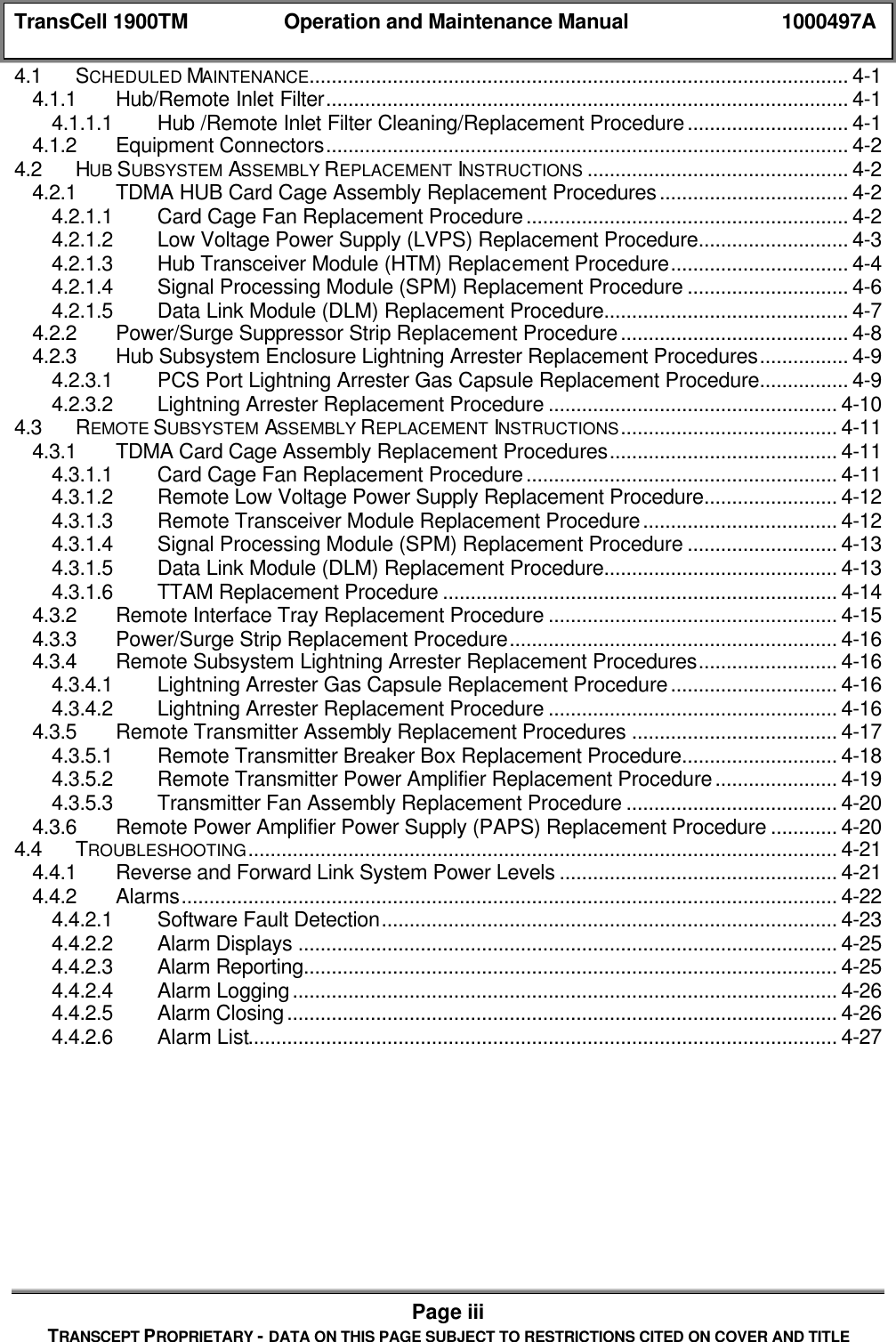
TransCell 1900TM Operation and Maintenance Manual 1000497APage iiTRANSCEPT PROPRIETARY - DATA ON THIS PAGE SUBJECT TO RESTRICTIONS CITED ON COVER AND TITLE2.1.4.2 DLM Rear View .................................................................................................. 2-82.1.5 Signal Processing Module (SPM).............................................................................. 2-92.1.5.1 SPM Front Panel................................................................................................ 2-92.1.6 Low Voltage Power Supply (LVPS)......................................................................... 2-112.1.7 Hub Interface Tray Assembly.................................................................................. 2-122.2 REMOTE SUBSYSTEM CONFIGURATION ............................................................................. 2-132.2.1 Front and Rear Panels............................................................................................. 2-132.2.2 Remote Subsystem Enclosure External Connectors.............................................. 2-152.2.3 Remote Transceiver Module (RTM) ........................................................................ 2-162.2.3.1 RTM Front Panel.............................................................................................. 2-162.2.4 TTA  Module (TTA) .................................................................................................. 2-182.2.4.1 TTA Front Panel............................................................................................... 2-182.2.5 Remote Interface Tray Assembly............................................................................ 2-192.2.5.1 Remote Interface Tray Assembly Front View .................................................. 2-192.2.6 Transmitter Unit Assembly ...................................................................................... 2-212.2.6.1 Transmitter Unit Assembly Top View............................................................... 2-212.2.6.2 Transmitter Unit Assembly Circuit Breaker Power Cable Connection............ 2-232.2.7 Power Amp Power Supply (PAPS).......................................................................... 2-232.3 TRANSCELL 1900TM OPERATING INSTRUCTIONS................................................................ 2-242.3.1 Operating Menus ..................................................................................................... 2-242.3.2 Operating Procedures and System Software Functions........................................ 2-242.3.3 Maintenance Instructions......................................................................................... 2-243.0 OPERATING PROCEDURES.......................................................................................... 3-13.1 HUB EQUIPMENT POWER-ON/POWER-OFF ......................................................................... 3-13.1.1 Energizing/De-energizing Hub Subsystem ............................................................... 3-13.1.1.1 Power-On Procedure ......................................................................................... 3-13.1.1.2 Power-Off Procedure ......................................................................................... 3-13.2 REMOTE EQUIPMENT POWER-ON/POWER-OFF................................................................... 3-23.2.1 Energizing/De-energizing Remote Subsystem......................................................... 3-23.2.1.1 Power-on Procedure.......................................................................................... 3-23.2.1.2 Power-Off Procedure ......................................................................................... 3-23.3 SEM WORKSTATION POWER-ON/POWER-OFF ................................................................... 3-23.3.1 SEM Workstation Power-On Procedure ................................................................... 3-23.3.2 SEM Workstation Power-off Procedure.................................................................... 3-33.4 SYSTEM SOFTWARE MENUS ............................................................................................... 3-33.5 TRANSCELL 1900TM SYSTEM SETUP.................................................................................. 3-33.6 TRANSCELL 1900TM SYSTEM OPERATIONS ....................................................................... 3-33.6.1 Autonomous Software Functionality.......................................................................... 3-43.6.1.1 Alarm Polling....................................................................................................... 3-43.6.1.2 Autolevel Functionality....................................................................................... 3-53.6.1.3 Autosync Functionality....................................................................................... 3-53.6.1.4 Reverse Autogain Functionality ......................................................................... 3-63.6.1.5 Forward Continuity ............................................................................................. 3-63.6.1.6 Reverse Continuity............................................................................................. 3-63.6.2 Software System Maintenance.................................................................................. 3-63.6.2.1 Defining the Maintenance Window .................................................................... 3-63.6.2.2 Changing and adding TDMA channels.............................................................. 3-73.6.2.3 Querying System Status .................................................................................... 3-83.6.2.4 Toggling Transmitter State................................................................................. 3-84.0 MAINTENANCE AND TROUBLESHOOTING ...................................................... 4-1
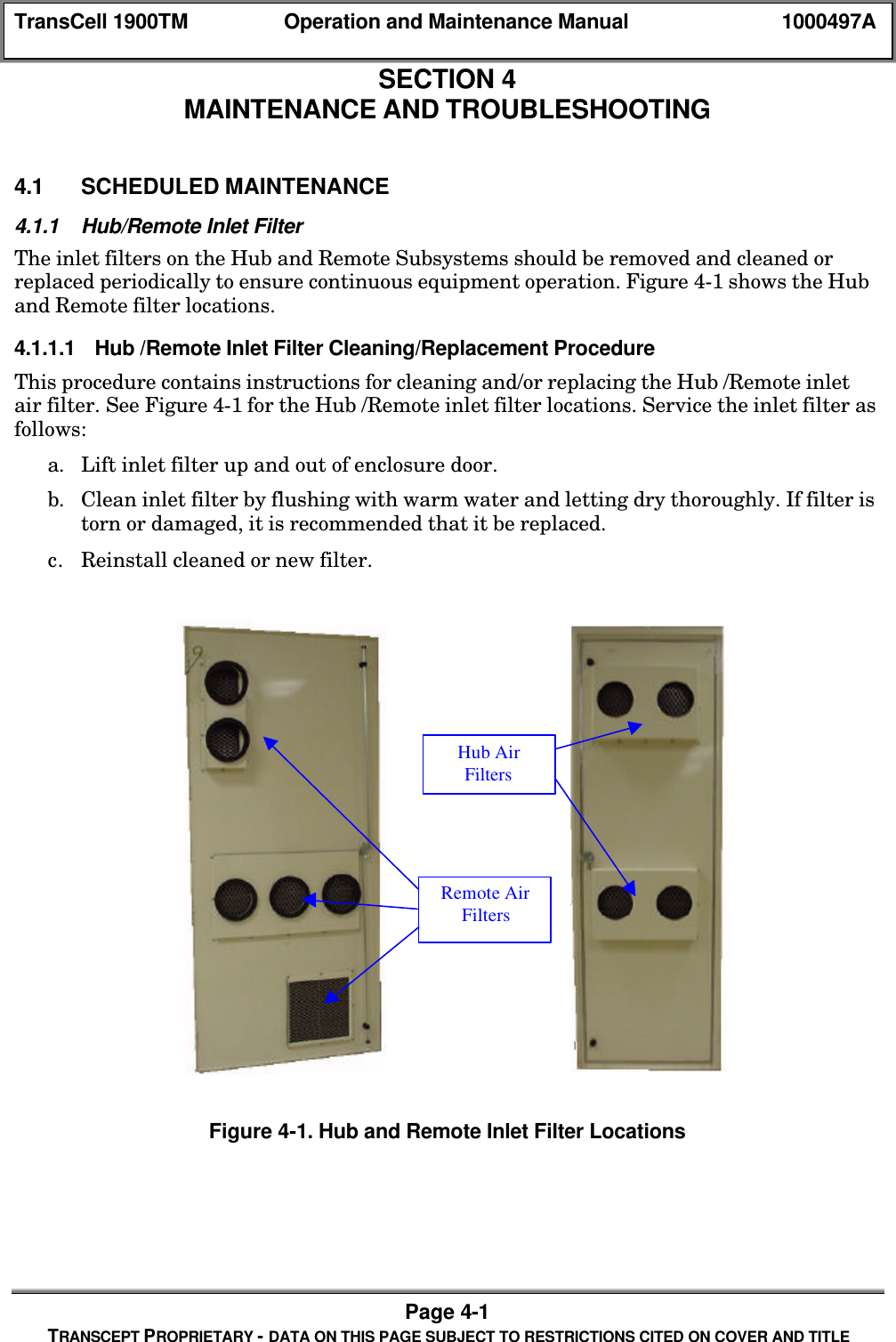
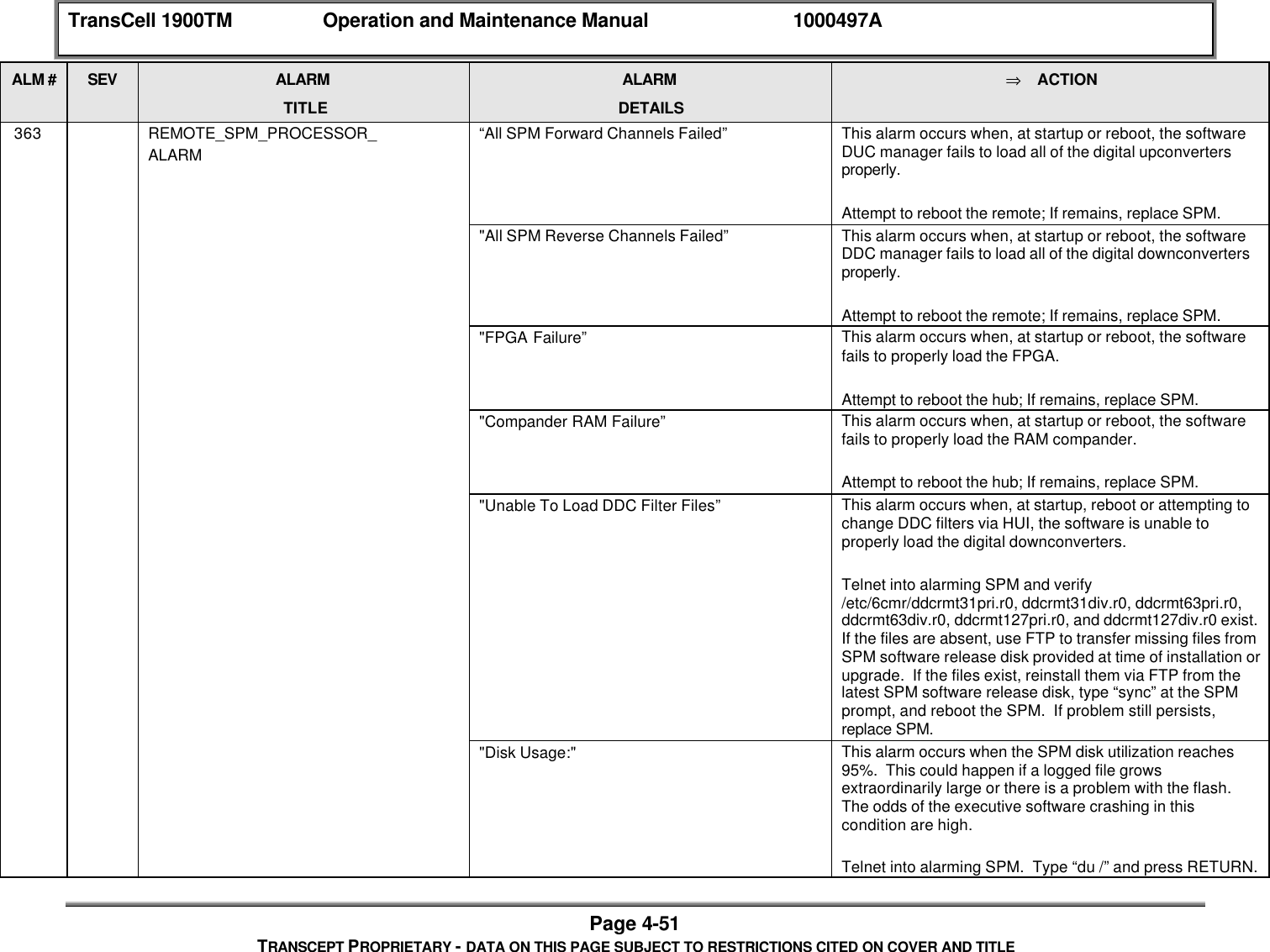
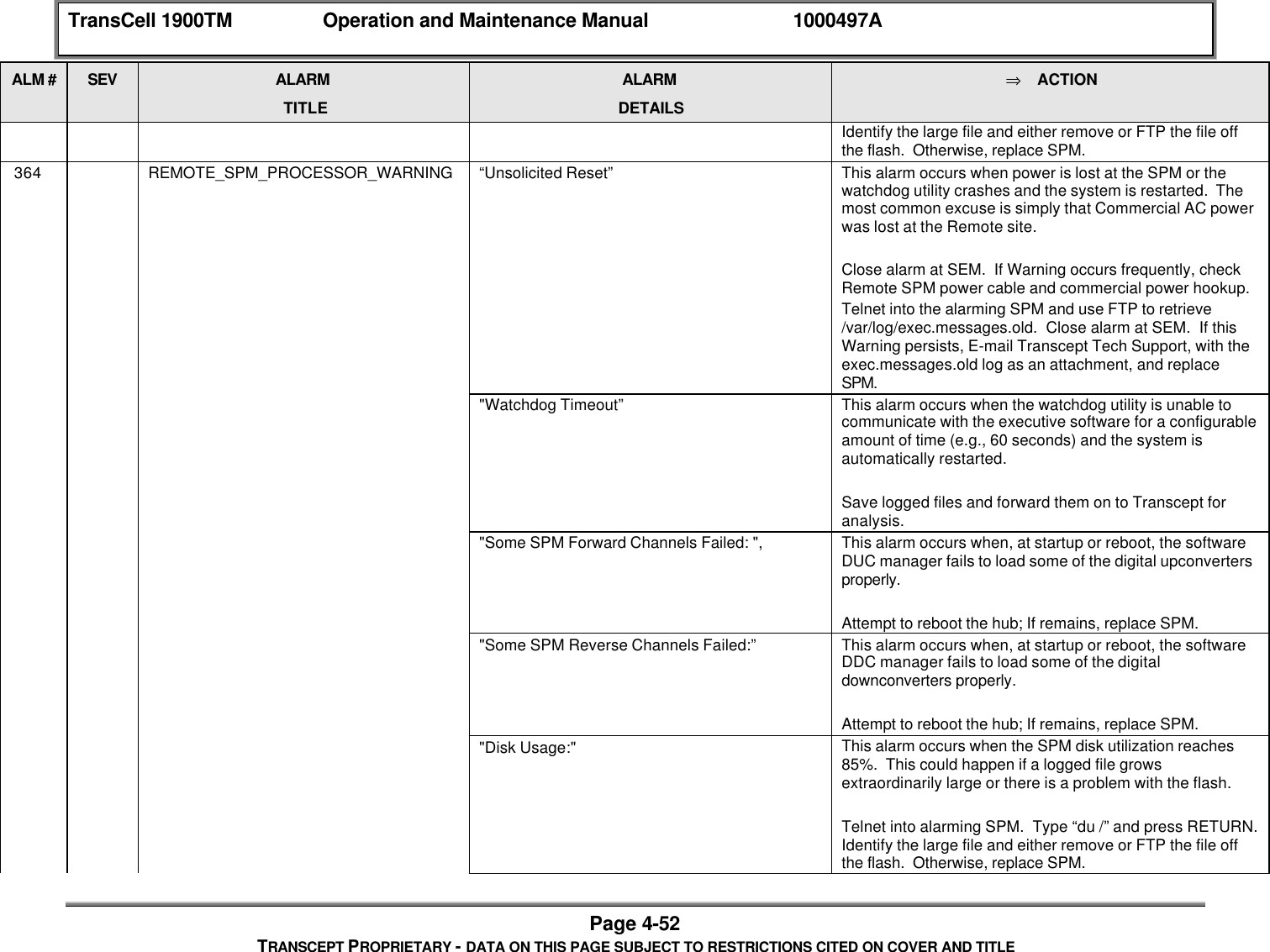
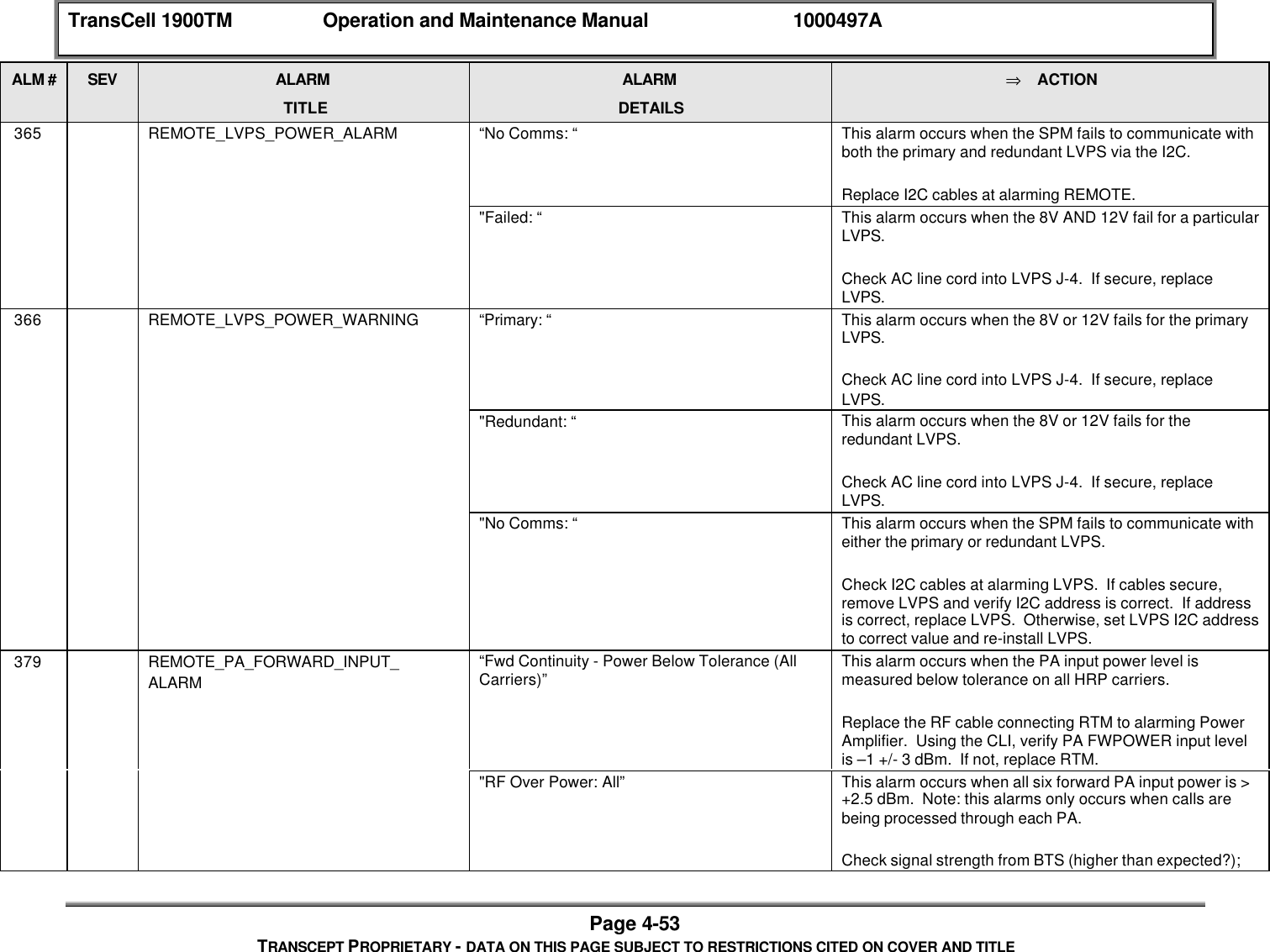
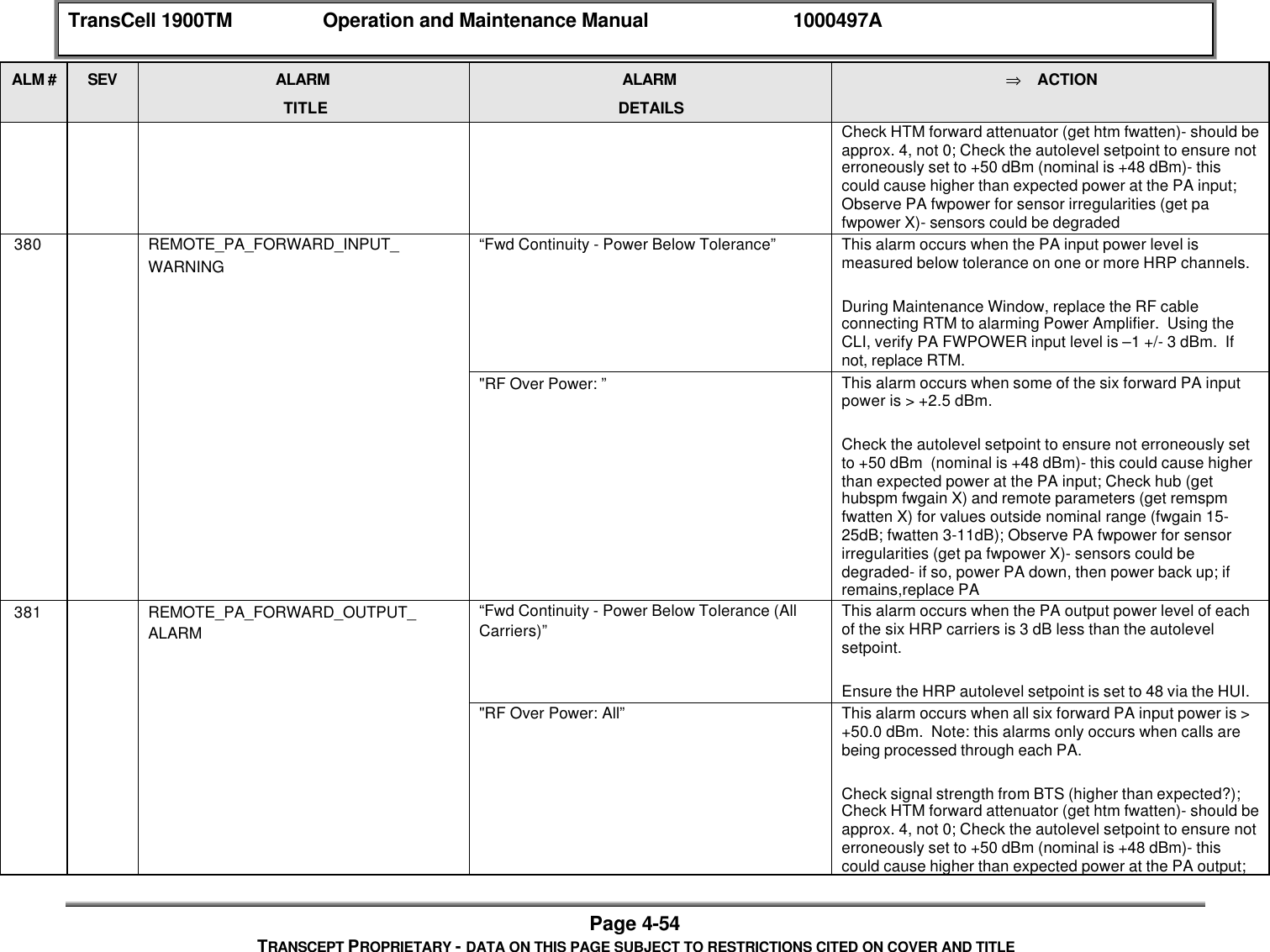
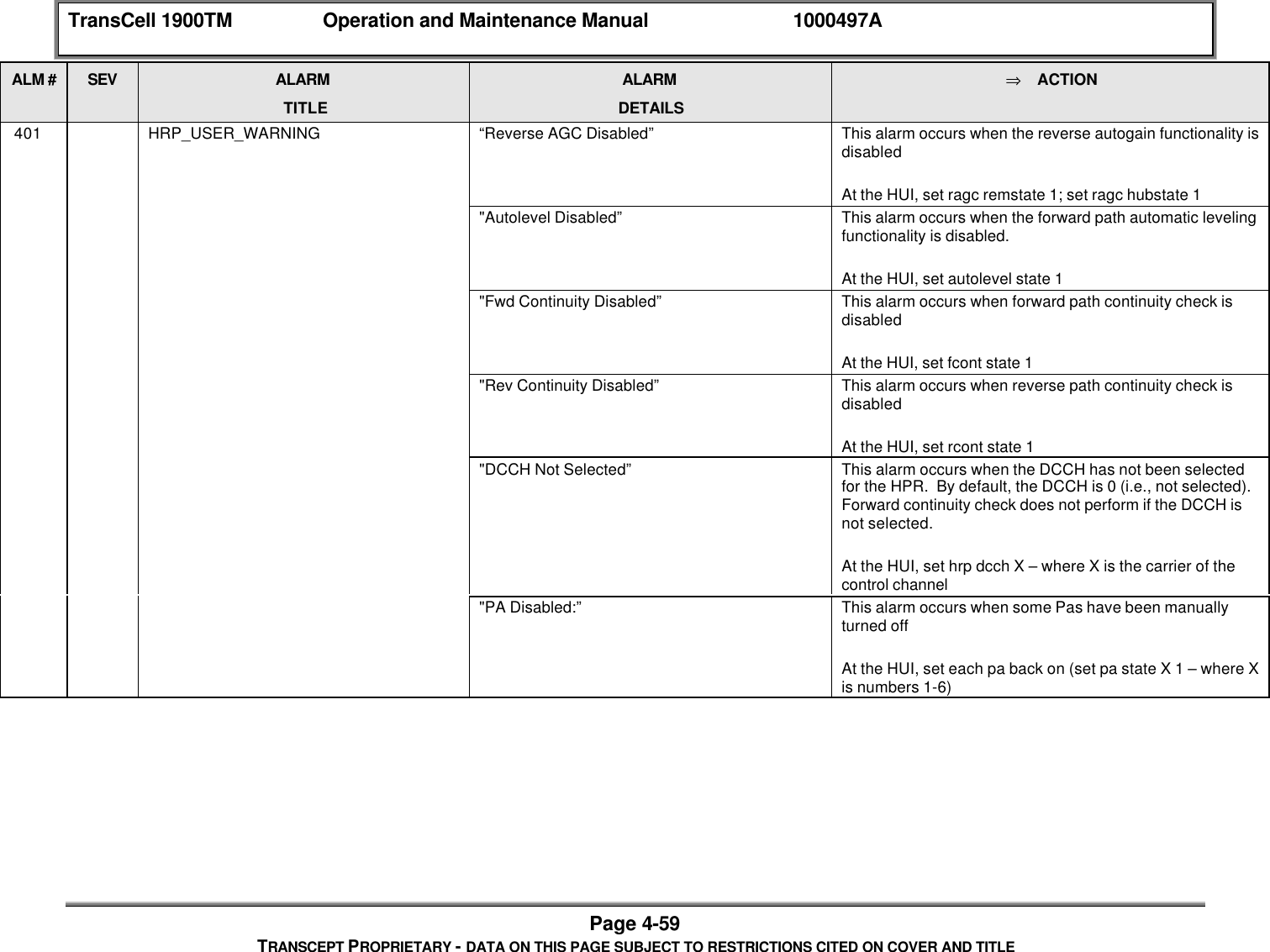
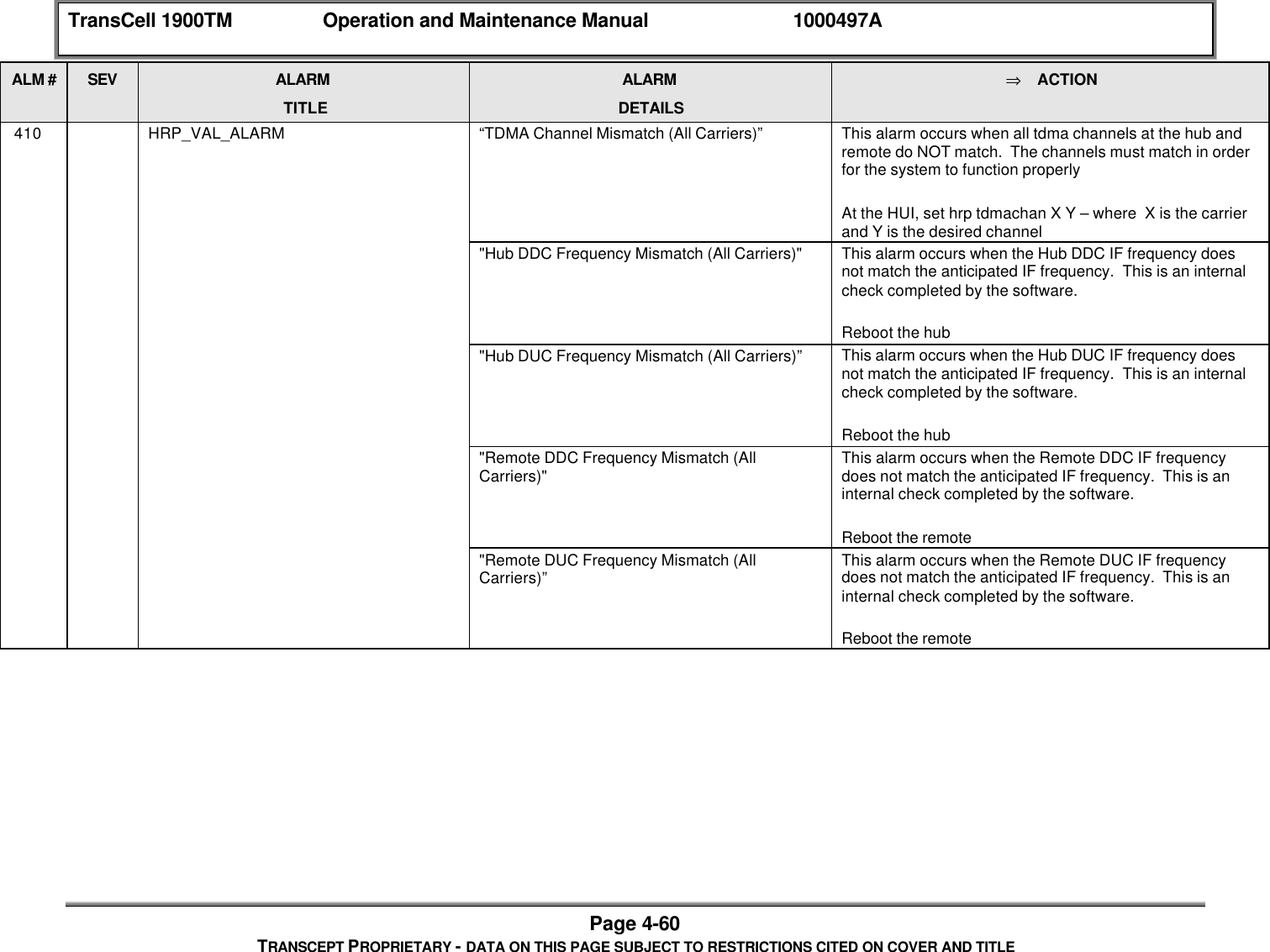
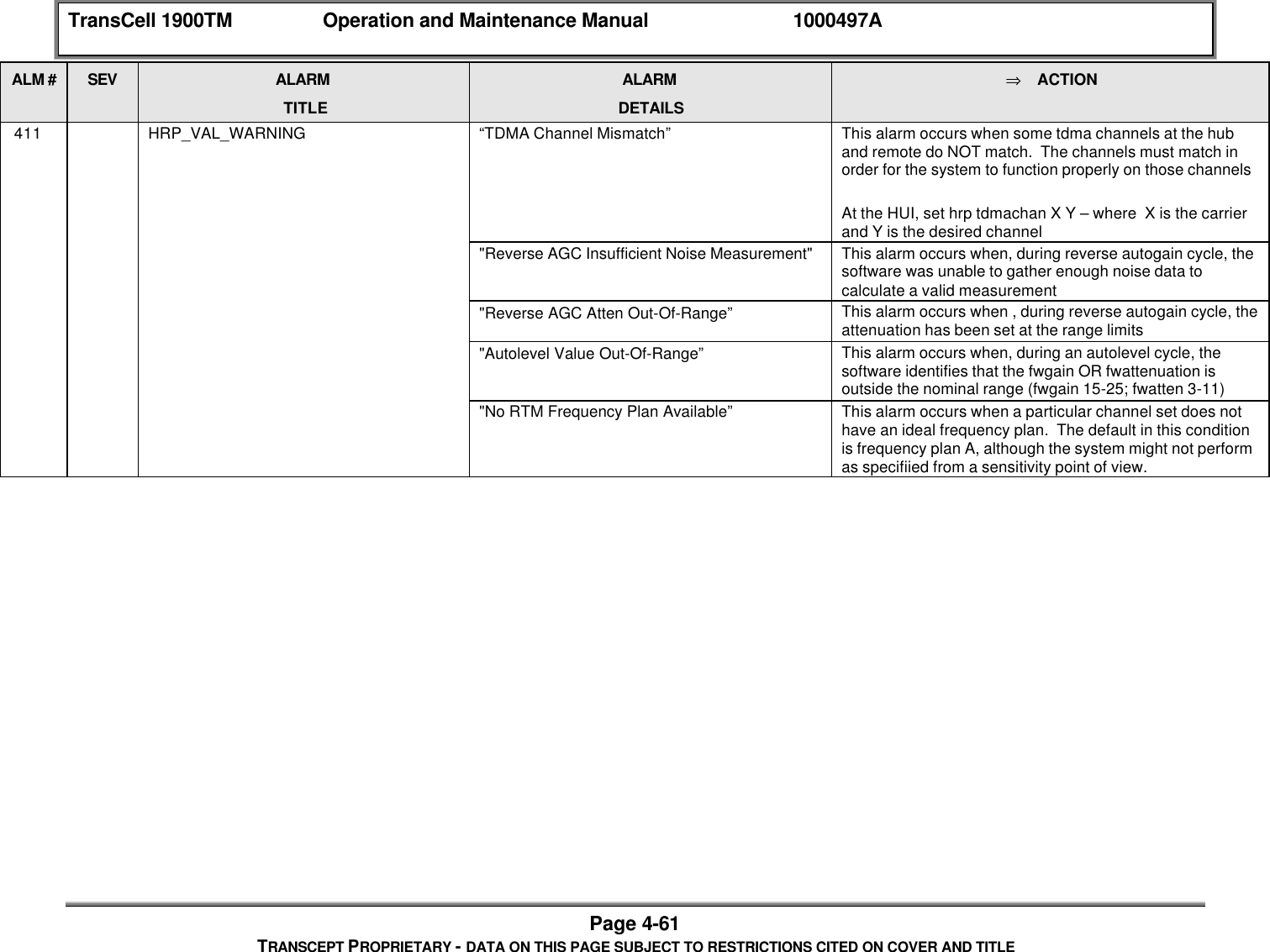
TransCell 1900TM Operation and Maintenance Manual 1000497APage iiiTRANSCEPT PROPRIETARY - DATA ON THIS PAGE SUBJECT TO RESTRICTIONS CITED ON COVER AND TITLE4.1 SCHEDULED MAINTENANCE................................................................................................. 4-14.1.1 Hub/Remote Inlet Filter.............................................................................................. 4-14.1.1.1 Hub /Remote Inlet Filter Cleaning/Replacement Procedure............................. 4-14.1.2 Equipment Connectors.............................................................................................. 4-24.2 HUB SUBSYSTEM ASSEMBLY REPLACEMENT INSTRUCTIONS ............................................... 4-24.2.1 TDMA HUB Card Cage Assembly Replacement Procedures.................................. 4-24.2.1.1 Card Cage Fan Replacement Procedure.......................................................... 4-24.2.1.2 Low Voltage Power Supply (LVPS) Replacement Procedure........................... 4-34.2.1.3 Hub Transceiver Module (HTM) Replacement Procedure................................ 4-44.2.1.4 Signal Processing Module (SPM) Replacement Procedure ............................. 4-64.2.1.5 Data Link Module (DLM) Replacement Procedure............................................ 4-74.2.2 Power/Surge Suppressor Strip Replacement Procedure......................................... 4-84.2.3 Hub Subsystem Enclosure Lightning Arrester Replacement Procedures................ 4-94.2.3.1 PCS Port Lightning Arrester Gas Capsule Replacement Procedure................ 4-94.2.3.2 Lightning Arrester Replacement Procedure .................................................... 4-104.3 REMOTE SUBSYSTEM ASSEMBLY REPLACEMENT INSTRUCTIONS....................................... 4-114.3.1 TDMA Card Cage Assembly Replacement Procedures......................................... 4-114.3.1.1 Card Cage Fan Replacement Procedure........................................................ 4-114.3.1.2 Remote Low Voltage Power Supply Replacement Procedure........................ 4-124.3.1.3 Remote Transceiver Module Replacement Procedure................................... 4-124.3.1.4 Signal Processing Module (SPM) Replacement Procedure ........................... 4-134.3.1.5 Data Link Module (DLM) Replacement Procedure.......................................... 4-134.3.1.6 TTAM Replacement Procedure ....................................................................... 4-144.3.2 Remote Interface Tray Replacement Procedure .................................................... 4-154.3.3 Power/Surge Strip Replacement Procedure........................................................... 4-164.3.4 Remote Subsystem Lightning Arrester Replacement Procedures......................... 4-164.3.4.1 Lightning Arrester Gas Capsule Replacement Procedure.............................. 4-164.3.4.2 Lightning Arrester Replacement Procedure .................................................... 4-164.3.5 Remote Transmitter Assembly Replacement Procedures ..................................... 4-174.3.5.1 Remote Transmitter Breaker Box Replacement Procedure............................ 4-184.3.5.2 Remote Transmitter Power Amplifier Replacement Procedure...................... 4-194.3.5.3 Transmitter Fan Assembly Replacement Procedure ...................................... 4-204.3.6 Remote Power Amplifier Power Supply (PAPS) Replacement Procedure ............ 4-204.4 TROUBLESHOOTING.......................................................................................................... 4-214.4.1 Reverse and Forward Link System Power Levels .................................................. 4-214.4.2 Alarms...................................................................................................................... 4-224.4.2.1 Software Fault Detection.................................................................................. 4-234.4.2.2 Alarm Displays ................................................................................................. 4-254.4.2.3 Alarm Reporting................................................................................................ 4-254.4.2.4 Alarm Logging.................................................................................................. 4-264.4.2.5 Alarm Closing................................................................................................... 4-264.4.2.6 Alarm List.......................................................................................................... 4-27
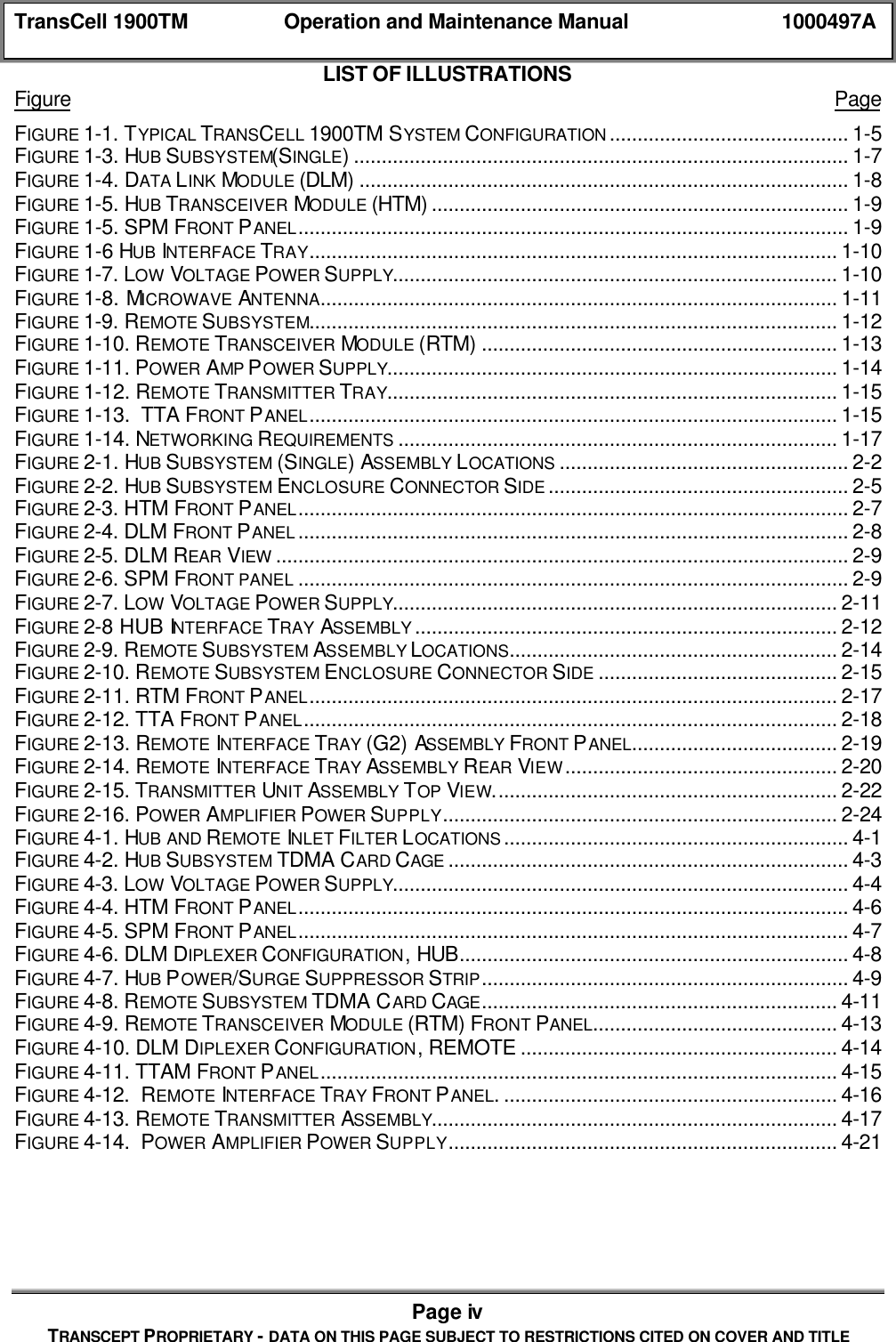
TransCell 1900TM Operation and Maintenance Manual 1000497APage ivTRANSCEPT PROPRIETARY - DATA ON THIS PAGE SUBJECT TO RESTRICTIONS CITED ON COVER AND TITLELIST OF ILLUSTRATIONSFigure PageFIGURE 1-1. TYPICAL TRANSCELL 1900TM SYSTEM CONFIGURATION ........................................... 1-5FIGURE 1-3. HUB SUBSYSTEM(SINGLE)......................................................................................... 1-7FIGURE 1-4. DATA LINK MODULE (DLM) ........................................................................................ 1-8FIGURE 1-5. HUB TRANSCEIVER MODULE (HTM) ........................................................................... 1-9FIGURE 1-5. SPM FRONT PANEL................................................................................................... 1-9FIGURE 1-6 HUB INTERFACE TRAY............................................................................................... 1-10FIGURE 1-7. LOW VOLTAGE POWER SUPPLY................................................................................ 1-10FIGURE 1-8. MICROWAVE ANTENNA............................................................................................. 1-11FIGURE 1-9. REMOTE SUBSYSTEM............................................................................................... 1-12FIGURE 1-10. REMOTE TRANSCEIVER MODULE (RTM) ................................................................ 1-13FIGURE 1-11. POWER AMP POWER SUPPLY................................................................................. 1-14FIGURE 1-12. REMOTE TRANSMITTER TRAY................................................................................. 1-15FIGURE 1-13.  TTA FRONT PANEL............................................................................................... 1-15FIGURE 1-14. NETWORKING REQUIREMENTS ............................................................................... 1-17FIGURE 2-1. HUB SUBSYSTEM (SINGLE) ASSEMBLY LOCATIONS .................................................... 2-2FIGURE 2-2. HUB SUBSYSTEM ENCLOSURE CONNECTOR SIDE ...................................................... 2-5FIGURE 2-3. HTM FRONT PANEL................................................................................................... 2-7FIGURE 2-4. DLM FRONT PANEL ................................................................................................... 2-8FIGURE 2-5. DLM REAR VIEW ....................................................................................................... 2-9FIGURE 2-6. SPM FRONT PANEL ................................................................................................... 2-9FIGURE 2-7. LOW VOLTAGE POWER SUPPLY................................................................................ 2-11FIGURE 2-8 HUB INTERFACE TRAY  ASSEMBLY ............................................................................ 2-12FIGURE 2-9. REMOTE SUBSYSTEM ASSEMBLY LOCATIONS........................................................... 2-14FIGURE 2-10. REMOTE SUBSYSTEM ENCLOSURE CONNECTOR SIDE ........................................... 2-15FIGURE 2-11. RTM FRONT PANEL............................................................................................... 2-17FIGURE 2-12. TTA FRONT PANEL................................................................................................ 2-18FIGURE 2-13. REMOTE INTERFACE TRAY (G2) ASSEMBLY FRONT PANEL..................................... 2-19FIGURE 2-14. REMOTE INTERFACE TRAY ASSEMBLY REAR VIEW................................................. 2-20FIGURE 2-15. TRANSMITTER UNIT ASSEMBLY TOP VIEW.............................................................. 2-22FIGURE 2-16. POWER AMPLIFIER POWER SUPPLY....................................................................... 2-24FIGURE 4-1. HUB AND REMOTE INLET FILTER LOCATIONS .............................................................. 4-1FIGURE 4-2. HUB SUBSYSTEM TDMA CARD CAGE ........................................................................ 4-3FIGURE 4-3. LOW VOLTAGE POWER SUPPLY.................................................................................. 4-4FIGURE 4-4. HTM FRONT PANEL................................................................................................... 4-6FIGURE 4-5. SPM FRONT PANEL................................................................................................... 4-7FIGURE 4-6. DLM DIPLEXER CONFIGURATION, HUB...................................................................... 4-8FIGURE 4-7. HUB POWER/SURGE SUPPRESSOR STRIP.................................................................. 4-9FIGURE 4-8. REMOTE SUBSYSTEM TDMA CARD CAGE................................................................ 4-11FIGURE 4-9. REMOTE TRANSCEIVER MODULE (RTM) FRONT PANEL............................................ 4-13FIGURE 4-10. DLM DIPLEXER CONFIGURATION, REMOTE ......................................................... 4-14FIGURE 4-11. TTAM FRONT PANEL............................................................................................. 4-15FIGURE 4-12.  REMOTE INTERFACE TRAY FRONT PANEL. ............................................................ 4-16FIGURE 4-13. REMOTE TRANSMITTER ASSEMBLY......................................................................... 4-17FIGURE 4-14.  POWER AMPLIFIER POWER SUPPLY...................................................................... 4-21
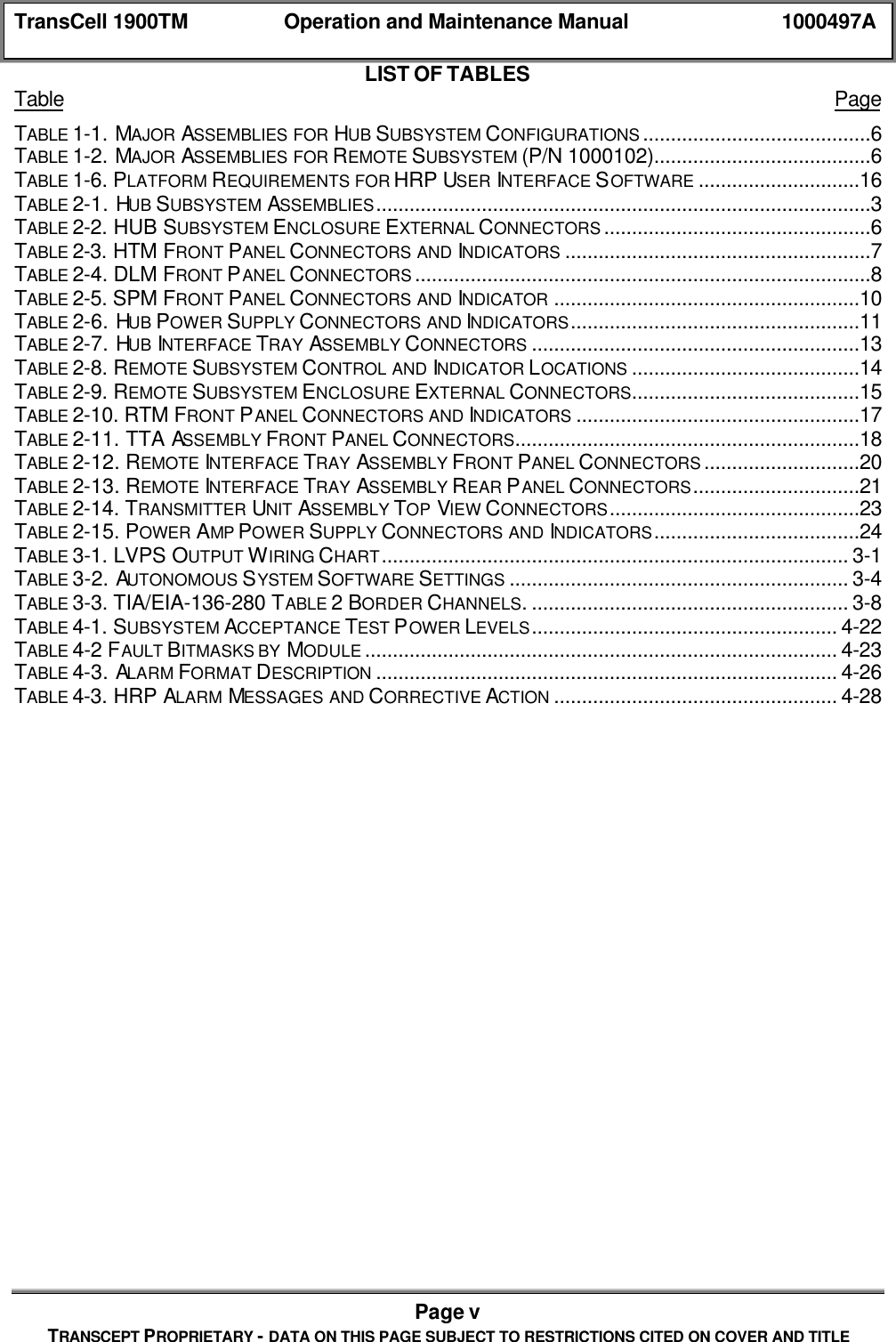
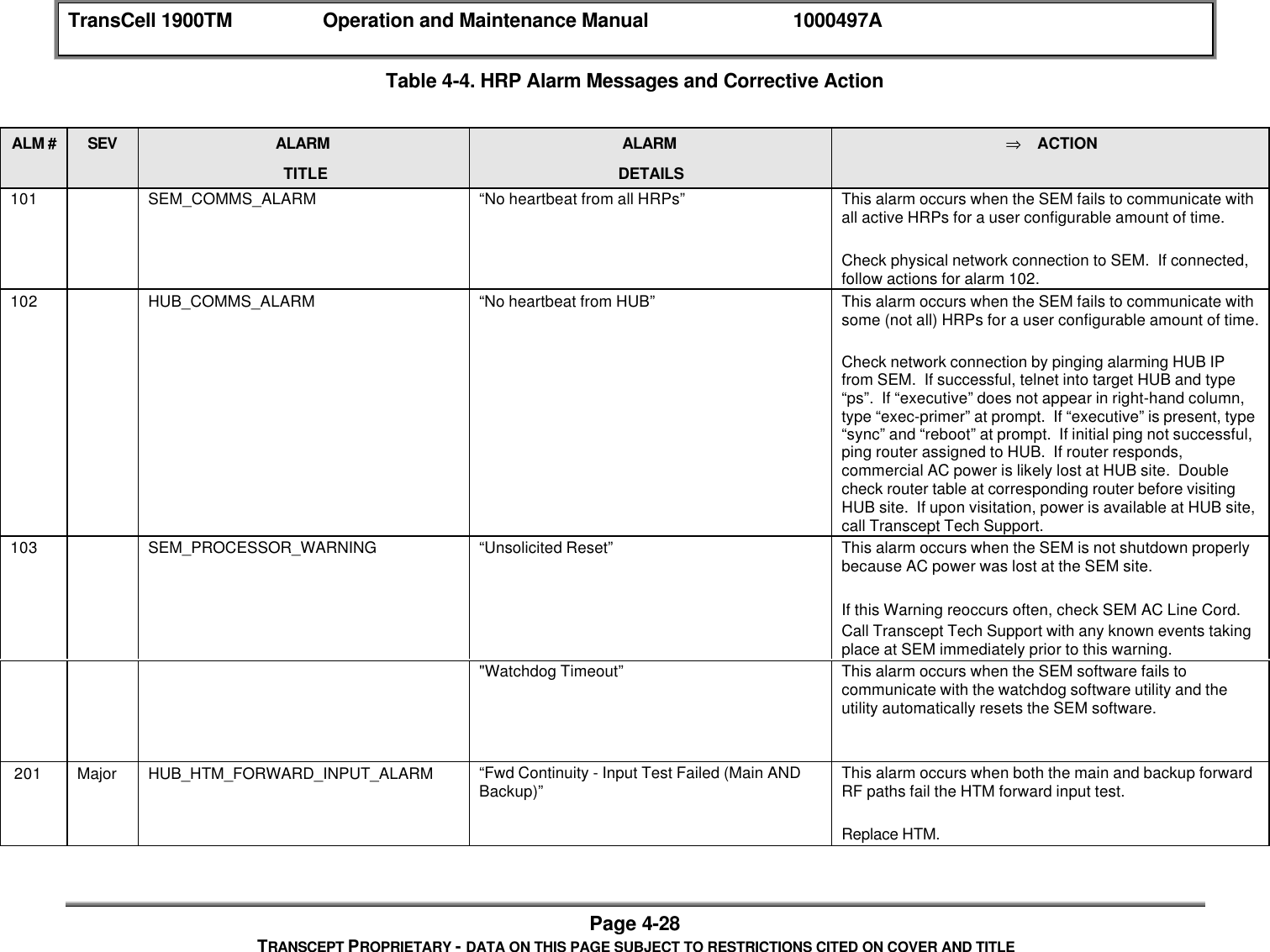
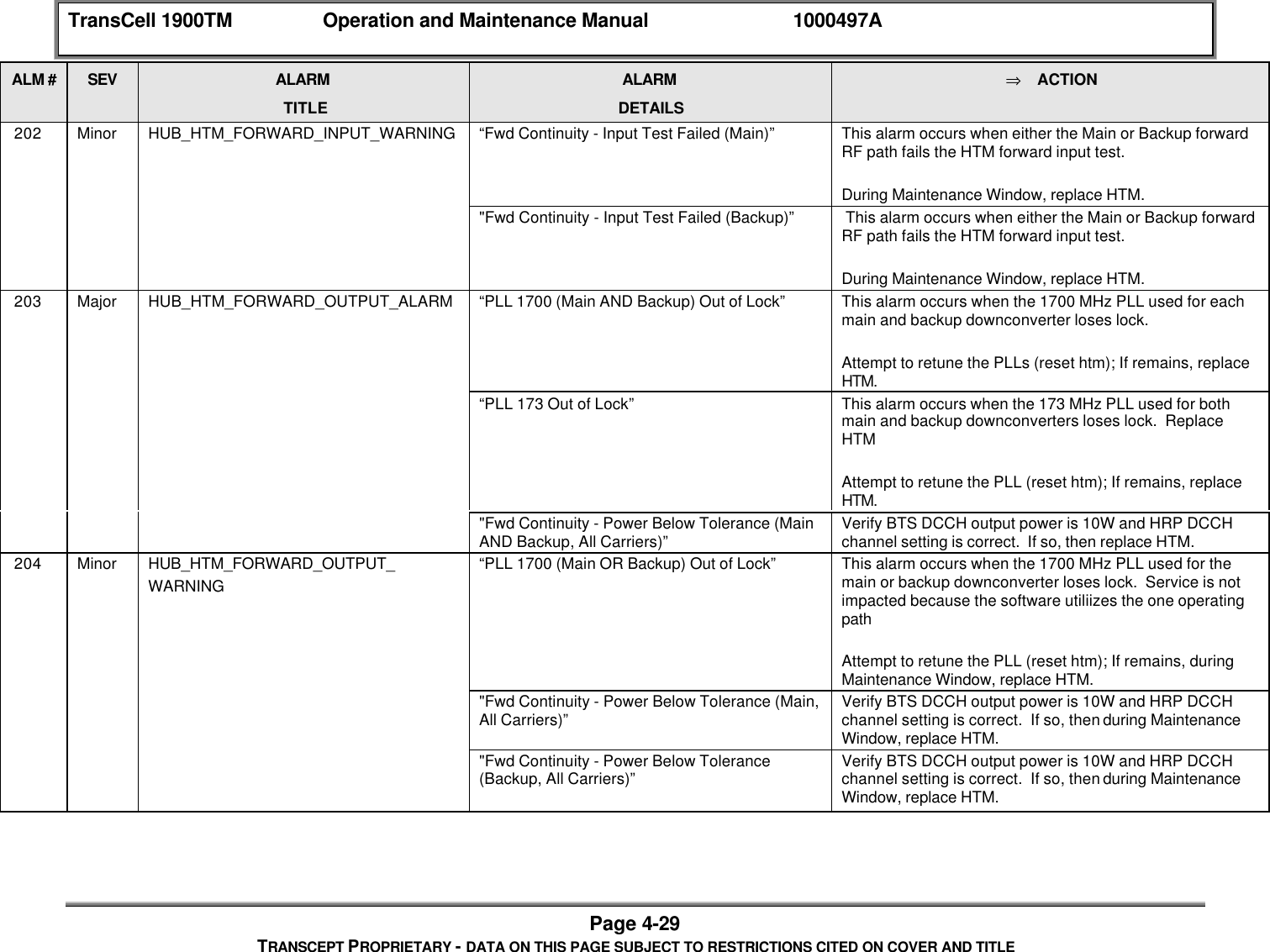
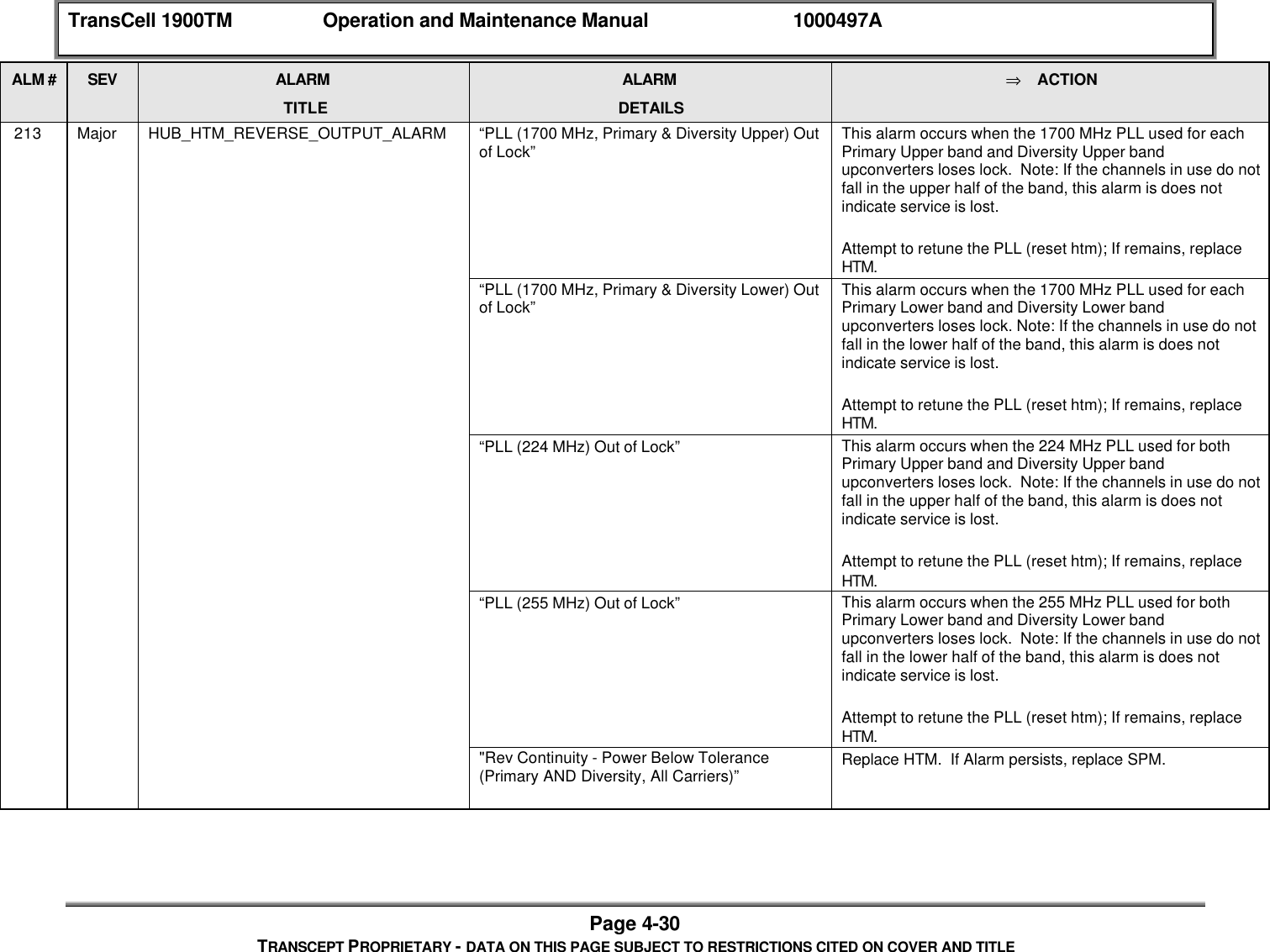
TransCell 1900TM Operation and Maintenance Manual 1000497APage vTRANSCEPT PROPRIETARY - DATA ON THIS PAGE SUBJECT TO RESTRICTIONS CITED ON COVER AND TITLELIST OF TABLESTable PageTABLE 1-1. MAJOR ASSEMBLIES FOR HUB SUBSYSTEM CONFIGURATIONS .........................................6TABLE 1-2. MAJOR ASSEMBLIES FOR REMOTE SUBSYSTEM (P/N 1000102).......................................6TABLE 1-6. PLATFORM REQUIREMENTS FOR HRP USER INTERFACE SOFTWARE .............................16TABLE 2-1. HUB SUBSYSTEM  ASSEMBLIES.........................................................................................3TABLE 2-2. HUB SUBSYSTEM ENCLOSURE EXTERNAL CONNECTORS ................................................6TABLE 2-3. HTM FRONT PANEL CONNECTORS AND INDICATORS .......................................................7TABLE 2-4. DLM FRONT PANEL CONNECTORS ..................................................................................8TABLE 2-5. SPM FRONT PANEL CONNECTORS AND INDICATOR .......................................................10TABLE 2-6. HUB POWER SUPPLY CONNECTORS AND INDICATORS....................................................11TABLE 2-7. HUB INTERFACE TRAY  ASSEMBLY CONNECTORS ...........................................................13TABLE 2-8. REMOTE SUBSYSTEM CONTROL AND INDICATOR LOCATIONS .........................................14TABLE 2-9. REMOTE SUBSYSTEM ENCLOSURE EXTERNAL CONNECTORS.........................................15TABLE 2-10. RTM FRONT PANEL CONNECTORS AND INDICATORS ...................................................17TABLE 2-11. TTA ASSEMBLY FRONT PANEL CONNECTORS..............................................................18TABLE 2-12. REMOTE INTERFACE TRAY  ASSEMBLY FRONT PANEL CONNECTORS ............................20TABLE 2-13. REMOTE INTERFACE TRAY  ASSEMBLY REAR PANEL CONNECTORS..............................21TABLE 2-14. TRANSMITTER UNIT ASSEMBLY TOP VIEW CONNECTORS.............................................23TABLE 2-15. POWER AMP POWER SUPPLY CONNECTORS AND INDICATORS.....................................24TABLE 3-1. LVPS OUTPUT WIRING CHART.................................................................................... 3-1TABLE 3-2. AUTONOMOUS SYSTEM SOFTWARE SETTINGS ............................................................. 3-4TABLE 3-3. TIA/EIA-136-280 TABLE 2 BORDER CHANNELS. ......................................................... 3-8TABLE 4-1. SUBSYSTEM ACCEPTANCE TEST POWER LEVELS....................................................... 4-22TABLE 4-2 FAULT BITMASKS BY  MODULE ..................................................................................... 4-23TABLE 4-3. ALARM FORMAT DESCRIPTION ................................................................................... 4-26TABLE 4-3. HRP ALARM  MESSAGES AND CORRECTIVE ACTION ................................................... 4-28
TransCell 1900TM Operation and Maintenance Manual 1000497APage viTRANSCEPT PROPRIETARY - DATA ON THIS PAGE SUBJECT TO RESTRICTIONS CITED ON COVER AND TITLE♦ High leakage current: The Hub and Remote environmental enclosures must be connected toProtective Earth ground before any connection is made to AC prime power.♦ High voltages (115 Vac and 220 Vac) are present within the Hub and Remote environmentalenclosures, respectively. Use extreme caution when working inside the enclosures.♦ High voltages may exist close to the Hub or Remote environmental enclosure location; usestandard industry safety practices when working on an installed enclosure. ESD CAUTIONThe Hub Transceiver Assembly, Remote Transceiver Assembly, and11-Mbps TDMA Chassis Assembly contain circuit card assemblies(CCAs) that are sensitive to Electrostatic Discharge (ESD) damage.Whenever handling these assemblies, use ESD precautionaryprocedures to minimize the risk of permanent ESD damage to theCCAs. Low relative humidity levels increase the potential for damageto ESD-sensitive devices.FCC License DataThe Hub and Remote assemblies are in the process of being licensed by the Federal CommunicationsCommission for operation in the frequency band as noted on the product label affixed to theenclosure.Any changes or modifications to this equipment (including software) must be expressly approved byTranscept. Failure to do so may void the user’s authority to operate this equipment. This equipmentcomplies with FCC rules when the antennas and cables having characteristics and part numbers asspecified below are used with the system. The user is responsible for ensuring that only the specifiedantennas and cables are used and properly installed.♦ PCS Antenna: Maximum gain 21 dBiThis system is designed to be used exclusively for fixed, point-to-point operations, as defined in47CFR15.247. The user is responsible for ensuring that the system is installed and operated in themanner described herein. Operation of this equipment in a manner other than fixed, point-to-pointmay constitute a violation of the FCC rules.
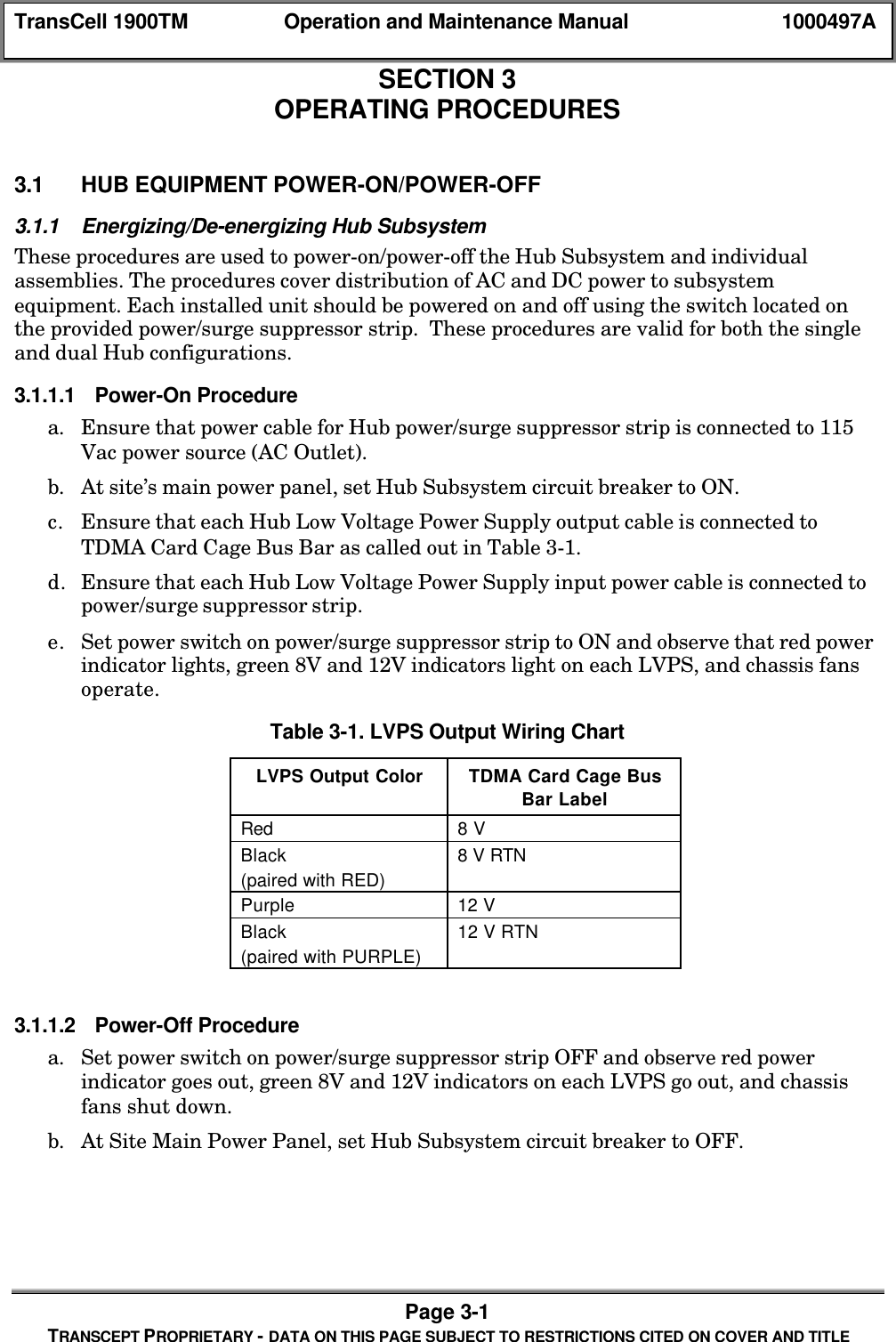
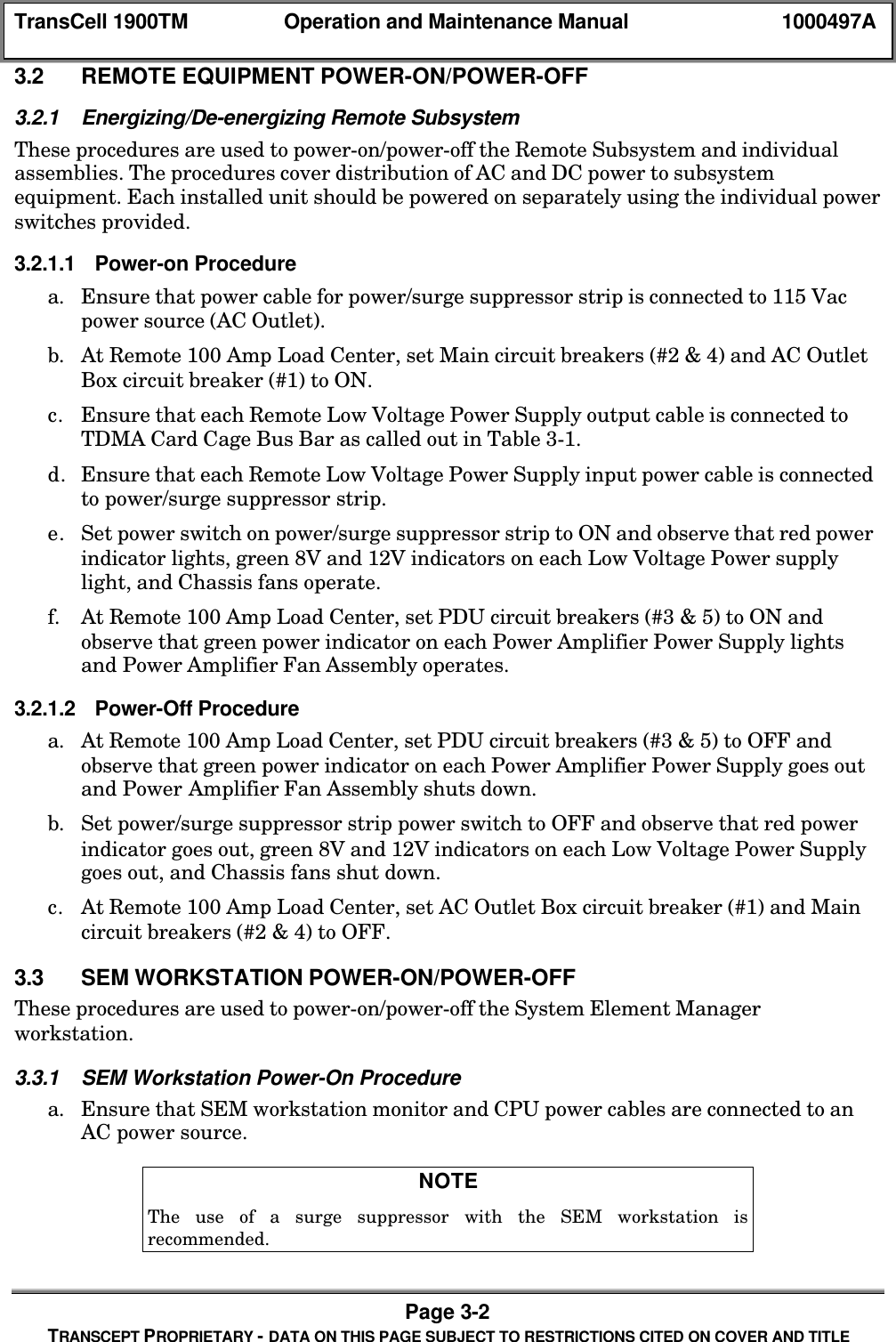
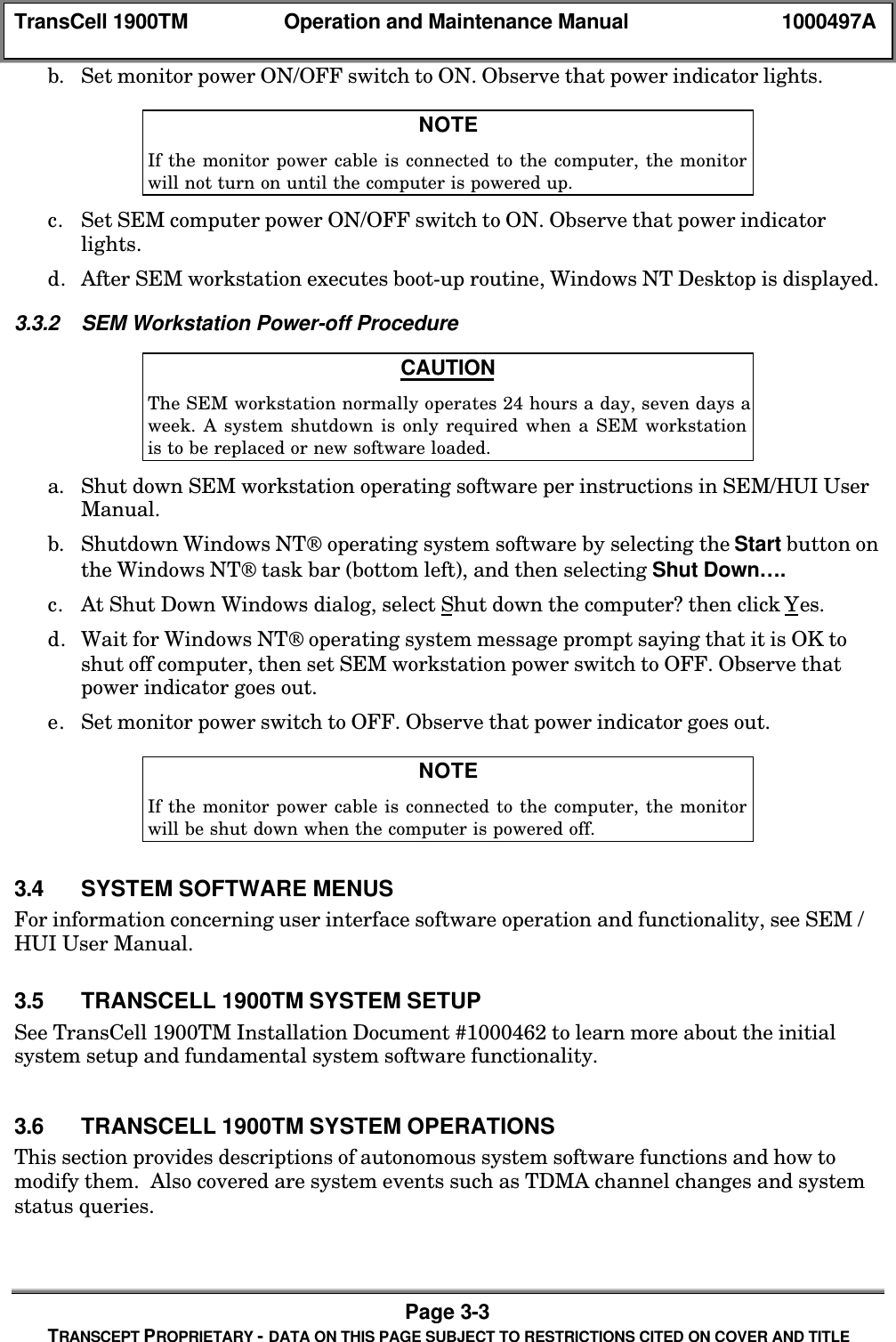
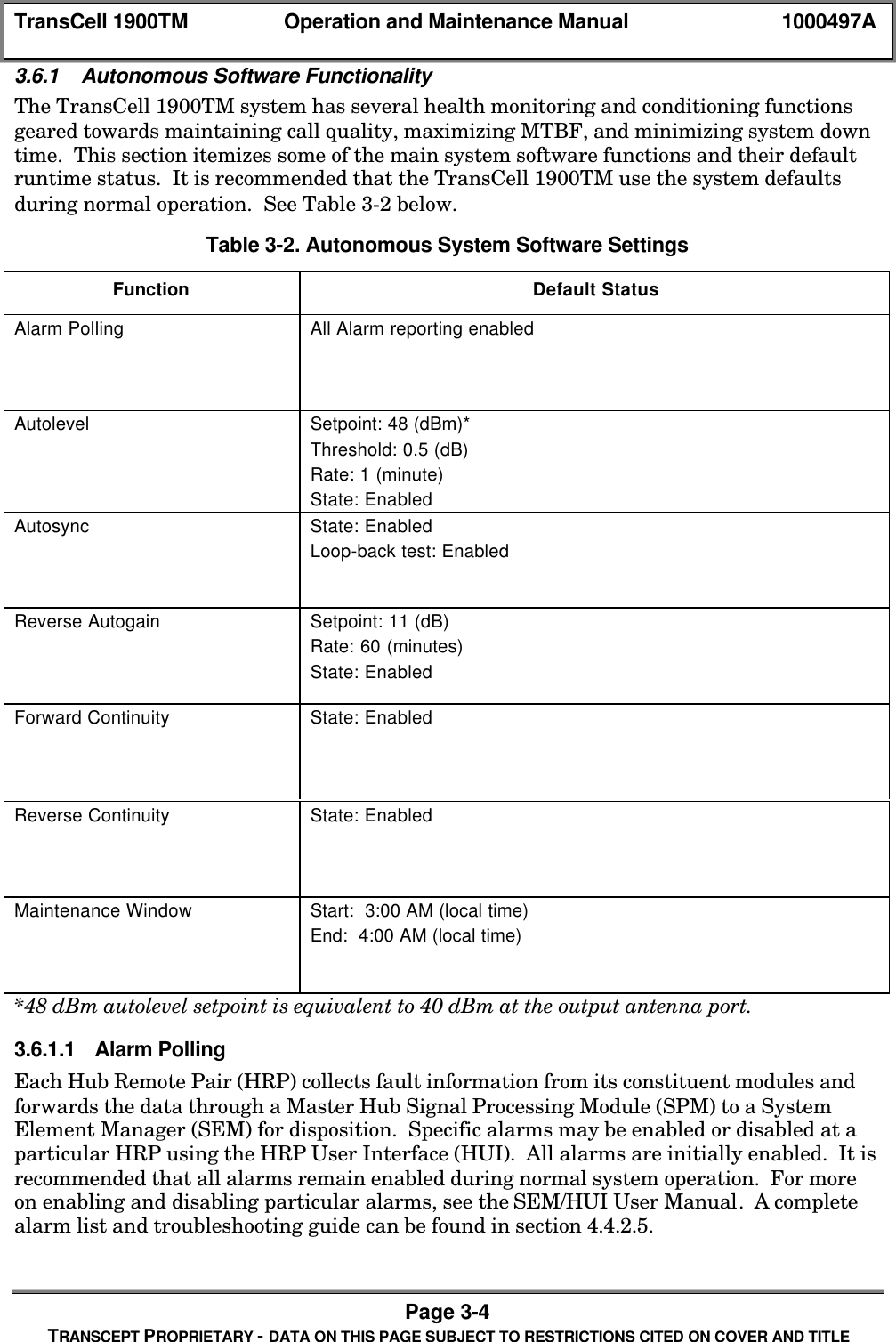
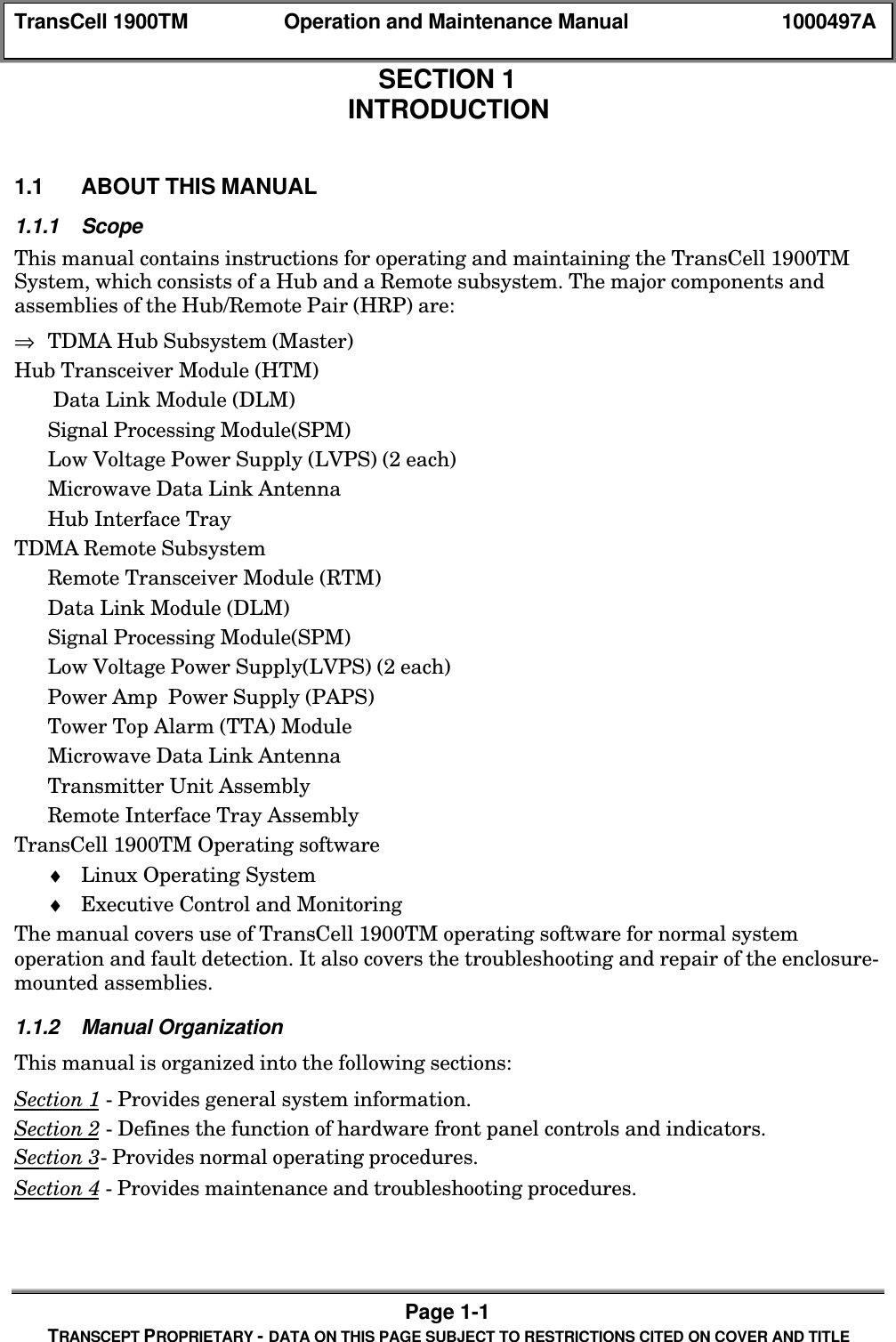
TransCell 1900TM Operation and Maintenance Manual 1000497APage 1-1TRANSCEPT PROPRIETARY - DATA ON THIS PAGE SUBJECT TO RESTRICTIONS CITED ON COVER AND TITLESECTION 1INTRODUCTION1.0 INTRODUCTION1.1 ABOUT THIS MANUAL1.1.1 ScopeThis manual contains instructions for operating and maintaining the TransCell 1900TMSystem, which consists of a Hub and a Remote subsystem. The major components andassemblies of the Hub/Remote Pair (HRP) are:⇒ TDMA Hub Subsystem (Master)Hub Transceiver Module (HTM) Data Link Module (DLM)Signal Processing Module(SPM)Low Voltage Power Supply (LVPS) (2 each)Microwave Data Link AntennaHub Interface TrayTDMA Remote SubsystemRemote Transceiver Module (RTM)Data Link Module (DLM)Signal Processing Module(SPM)Low Voltage Power Supply(LVPS) (2 each)Power Amp  Power Supply (PAPS)Tower Top Alarm (TTA) ModuleMicrowave Data Link AntennaTransmitter Unit AssemblyRemote Interface Tray AssemblyTransCell 1900TM Operating software♦ Linux Operating System♦ Executive Control and MonitoringThe manual covers use of TransCell 1900TM operating software for normal systemoperation and fault detection. It also covers the troubleshooting and repair of the enclosure-mounted assemblies.1.1.2 Manual OrganizationThis manual is organized into the following sections:Section 1 - Provides general system information.Section 2 - Defines the function of hardware front panel controls and indicators.Section 3- Provides normal operating procedures.Section 4 - Provides maintenance and troubleshooting procedures.
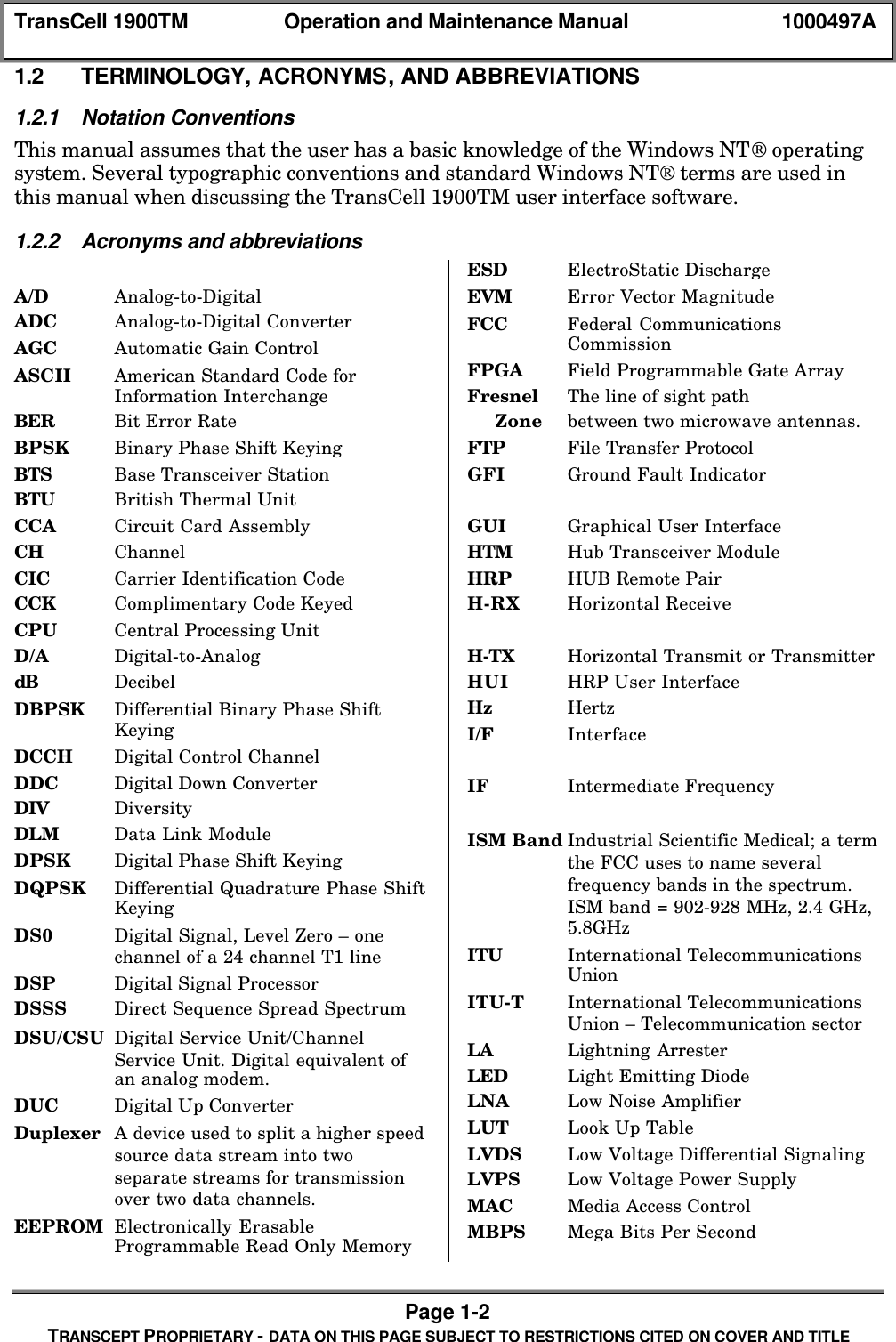
TransCell 1900TM Operation and Maintenance Manual 1000497APage 1-2TRANSCEPT PROPRIETARY - DATA ON THIS PAGE SUBJECT TO RESTRICTIONS CITED ON COVER AND TITLE1.2 TERMINOLOGY, ACRONYMS, AND ABBREVIATIONS1.2.1 Notation ConventionsThis manual assumes that the user has a basic knowledge of the Windows NT operatingsystem. Several typographic conventions and standard Windows NT terms are used inthis manual when discussing the TransCell 1900TM user interface software.1.2.2 Acronyms and abbreviationsA/D Analog-to-DigitalADC Analog-to-Digital ConverterAGC Automatic Gain ControlASCII American Standard Code forInformation InterchangeBER Bit Error RateBPSK Binary Phase Shift KeyingBTS Base Transceiver StationBTU British Thermal UnitCCA Circuit Card AssemblyCH ChannelCIC Carrier Identification CodeCCK Complimentary Code KeyedCPU Central Processing UnitD/A Digital-to-AnalogdB DecibelDBPSK Differential Binary Phase ShiftKeyingDCCH Digital Control ChannelDDC Digital Down ConverterDIV DiversityDLM Data Link ModuleDPSK Digital Phase Shift KeyingDQPSK Differential Quadrature Phase ShiftKeyingDS0 Digital Signal, Level Zero – onechannel of a 24 channel T1 lineDSP Digital Signal ProcessorDSSS Direct Sequence Spread SpectrumDSU/CSU Digital Service Unit/ChannelService Unit. Digital equivalent ofan analog modem.DUC Digital Up ConverterDuplexer A device used to split a higher speedsource data stream into twoseparate streams for transmissionover two data channels.EEPROM Electronically ErasableProgrammable Read Only MemoryESD ElectroStatic DischargeEVM Error Vector MagnitudeFCC Federal CommunicationsCommissionFPGA Field Programmable Gate ArrayFresnel The line of sight path     Zone between two microwave antennas.FTP File Transfer ProtocolGFI Ground Fault IndicatorGUI Graphical User InterfaceHTM Hub Transceiver ModuleHRP HUB Remote PairH-RX Horizontal ReceiveH-TX Horizontal Transmit or TransmitterHUI HRP User InterfaceHz HertzI/F InterfaceIF Intermediate FrequencyISM Band Industrial Scientific Medical; a termthe FCC uses to name severalfrequency bands in the spectrum.ISM band = 902-928 MHz, 2.4 GHz,5.8GHzITU International TelecommunicationsUnionITU-T International TelecommunicationsUnion – Telecommunication sectorLA Lightning ArresterLED Light Emitting DiodeLNA Low Noise AmplifierLUT Look Up TableLVDS  Low Voltage Differential SignalingLVPS Low Voltage Power SupplyMAC Media Access ControlMBPS Mega Bits Per Second
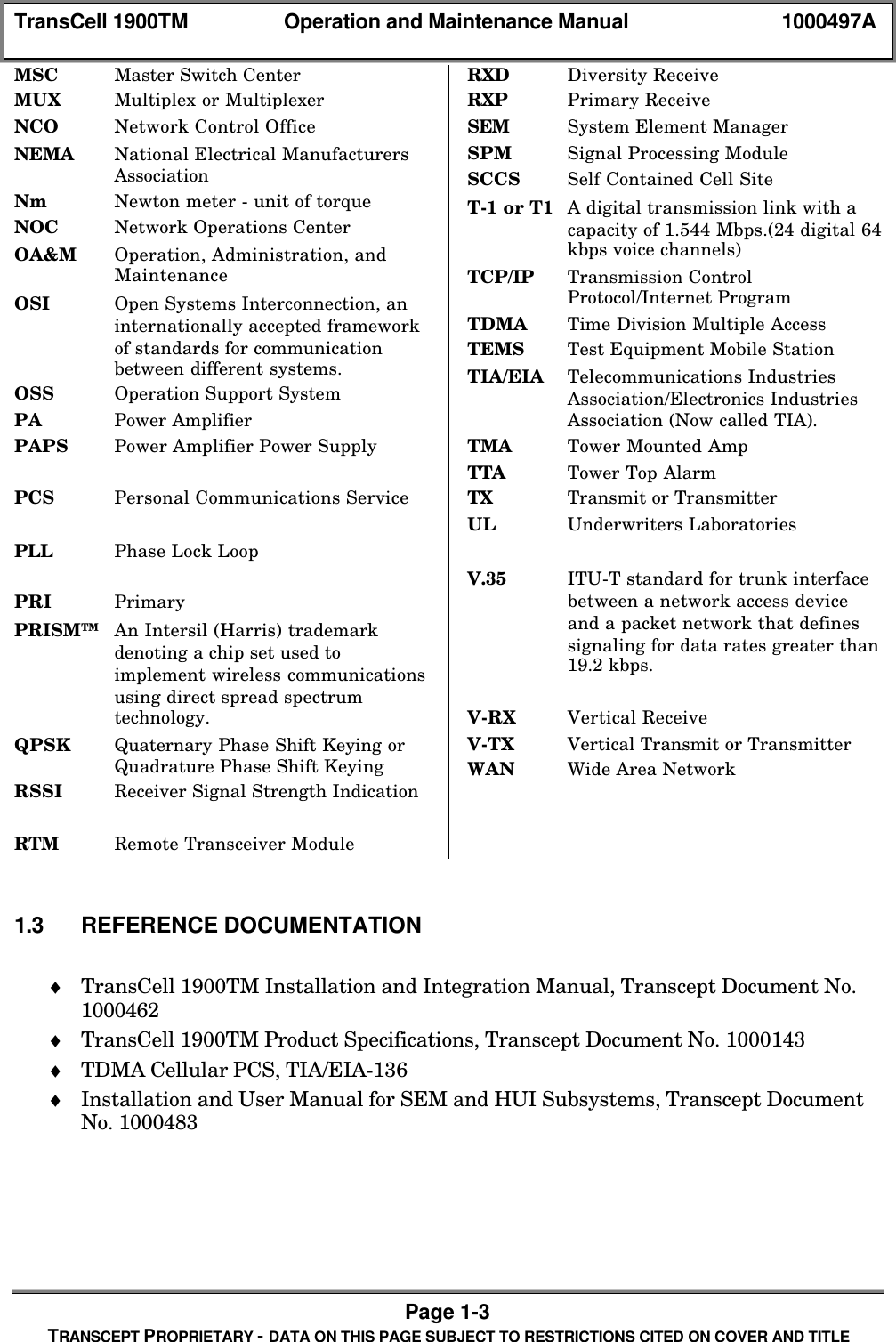
TransCell 1900TM Operation and Maintenance Manual 1000497APage 1-3TRANSCEPT PROPRIETARY - DATA ON THIS PAGE SUBJECT TO RESTRICTIONS CITED ON COVER AND TITLEMSC Master Switch CenterMUX Multiplex or MultiplexerNCO Network Control OfficeNEMA National Electrical ManufacturersAssociationNm Newton meter - unit of torqueNOC Network Operations CenterOA&M Operation, Administration, andMaintenanceOSI Open Systems Interconnection, aninternationally accepted frameworkof standards for communicationbetween different systems.OSS Operation Support SystemPA Power AmplifierPAPS Power Amplifier Power SupplyPCS Personal Communications ServicePLL Phase Lock LoopPRI PrimaryPRISM™ An Intersil (Harris) trademarkdenoting a chip set used toimplement wireless communicationsusing direct spread spectrumtechnology.QPSK Quaternary Phase Shift Keying orQuadrature Phase Shift KeyingRSSI Receiver Signal Strength IndicationRTM Remote Transceiver ModuleRXD Diversity ReceiveRXP Primary ReceiveSEM System Element ManagerSPM  Signal Processing ModuleSCCS Self Contained Cell SiteT-1 or T1 A digital transmission link with acapacity of 1.544 Mbps.(24 digital 64kbps voice channels)TCP/IP Transmission ControlProtocol/Internet ProgramTDMA Time Division Multiple AccessTEMS Test Equipment Mobile StationTIA/EIA Telecommunications IndustriesAssociation/Electronics IndustriesAssociation (Now called TIA).TMA Tower Mounted AmpTTA Tower Top AlarmTX Transmit or TransmitterUL Underwriters LaboratoriesV.35 ITU-T standard for trunk interfacebetween a network access deviceand a packet network that definessignaling for data rates greater than19.2 kbps.V-RX Vertical ReceiveV-TX Vertical Transmit or TransmitterWAN Wide Area Network1.3 REFERENCE DOCUMENTATION♦ TransCell 1900TM Installation and Integration Manual, Transcept Document No.1000462♦ TransCell 1900TM Product Specifications, Transcept Document No. 1000143♦ TDMA Cellular PCS, TIA/EIA-136♦ Installation and User Manual for SEM and HUI Subsystems, Transcept DocumentNo. 1000483
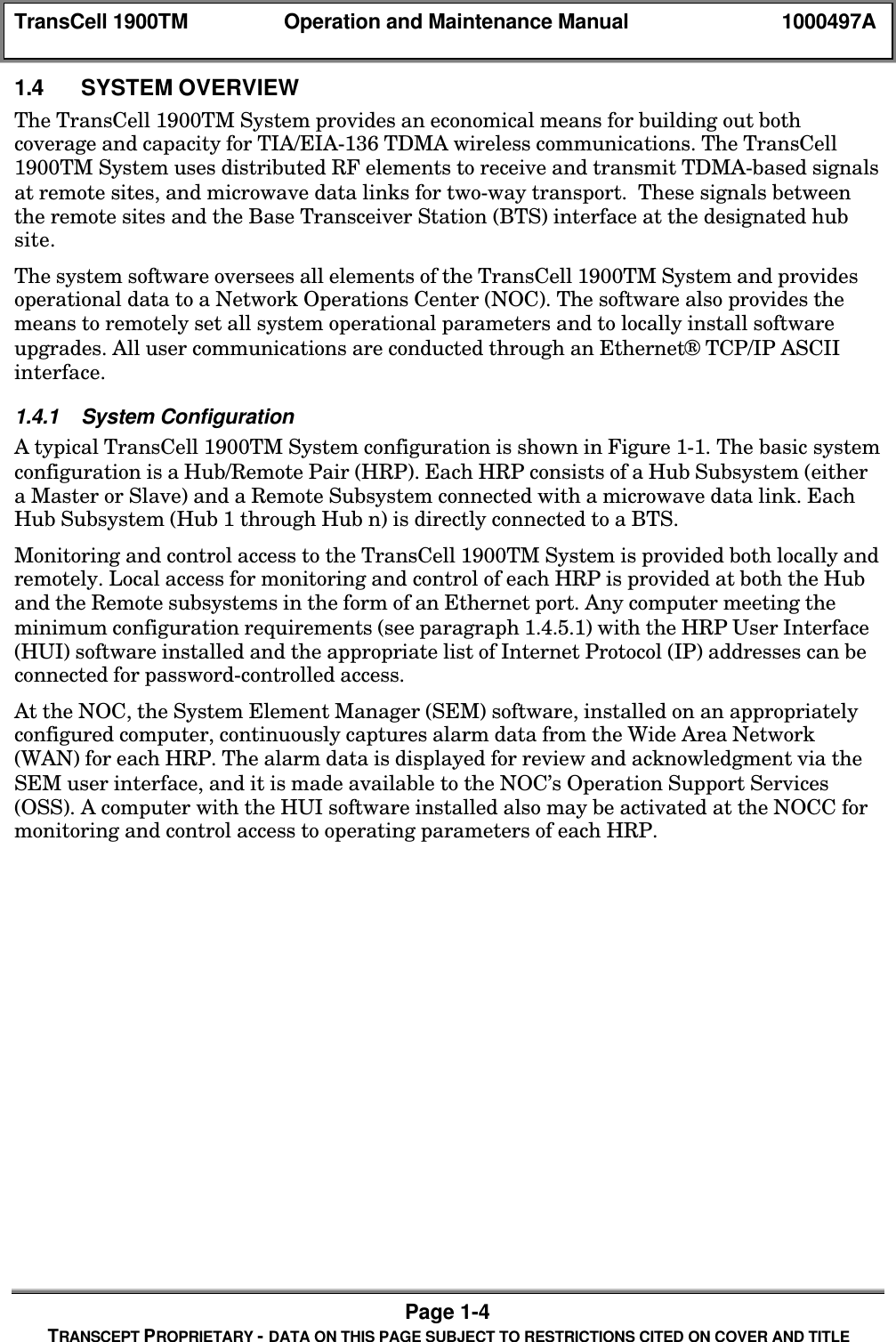
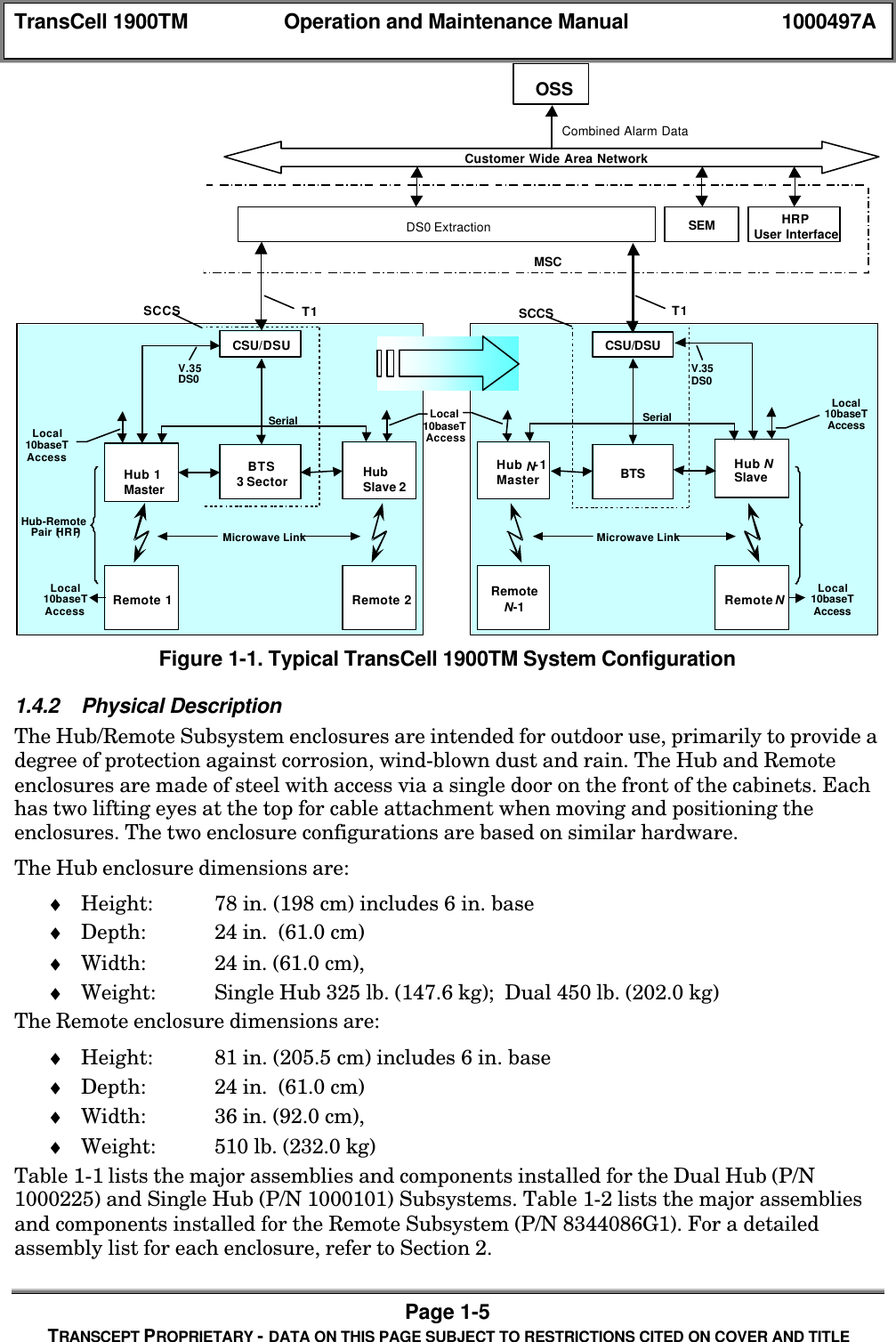
TransCell 1900TM Operation and Maintenance Manual 1000497APage 1-4TRANSCEPT PROPRIETARY - DATA ON THIS PAGE SUBJECT TO RESTRICTIONS CITED ON COVER AND TITLE1.4 SYSTEM OVERVIEWThe TransCell 1900TM System provides an economical means for building out bothcoverage and capacity for TIA/EIA-136 TDMA wireless communications. The TransCell1900TM System uses distributed RF elements to receive and transmit TDMA-based signalsat remote sites, and microwave data links for two-way transport.  These signals betweenthe remote sites and the Base Transceiver Station (BTS) interface at the designated hubsite.The system software oversees all elements of the TransCell 1900TM System and providesoperational data to a Network Operations Center (NOC). The software also provides themeans to remotely set all system operational parameters and to locally install softwareupgrades. All user communications are conducted through an Ethernet® TCP/IP ASCIIinterface.1.4.1 System ConfigurationA typical TransCell 1900TM System configuration is shown in Figure 1-1. The basic systemconfiguration is a Hub/Remote Pair (HRP). Each HRP consists of a Hub Subsystem (eithera Master or Slave) and a Remote Subsystem connected with a microwave data link. EachHub Subsystem (Hub 1 through Hub n) is directly connected to a BTS.Monitoring and control access to the TransCell 1900TM System is provided both locally andremotely. Local access for monitoring and control of each HRP is provided at both the Huband the Remote subsystems in the form of an Ethernet port. Any computer meeting theminimum configuration requirements (see paragraph 1.4.5.1) with the HRP User Interface(HUI) software installed and the appropriate list of Internet Protocol (IP) addresses can beconnected for password-controlled access.At the NOC, the System Element Manager (SEM) software, installed on an appropriatelyconfigured computer, continuously captures alarm data from the Wide Area Network(WAN) for each HRP. The alarm data is displayed for review and acknowledgment via theSEM user interface, and it is made available to the NOC’s Operation Support Services(OSS). A computer with the HUI software installed also may be activated at the NOCC formonitoring and control access to operating parameters of each HRP.
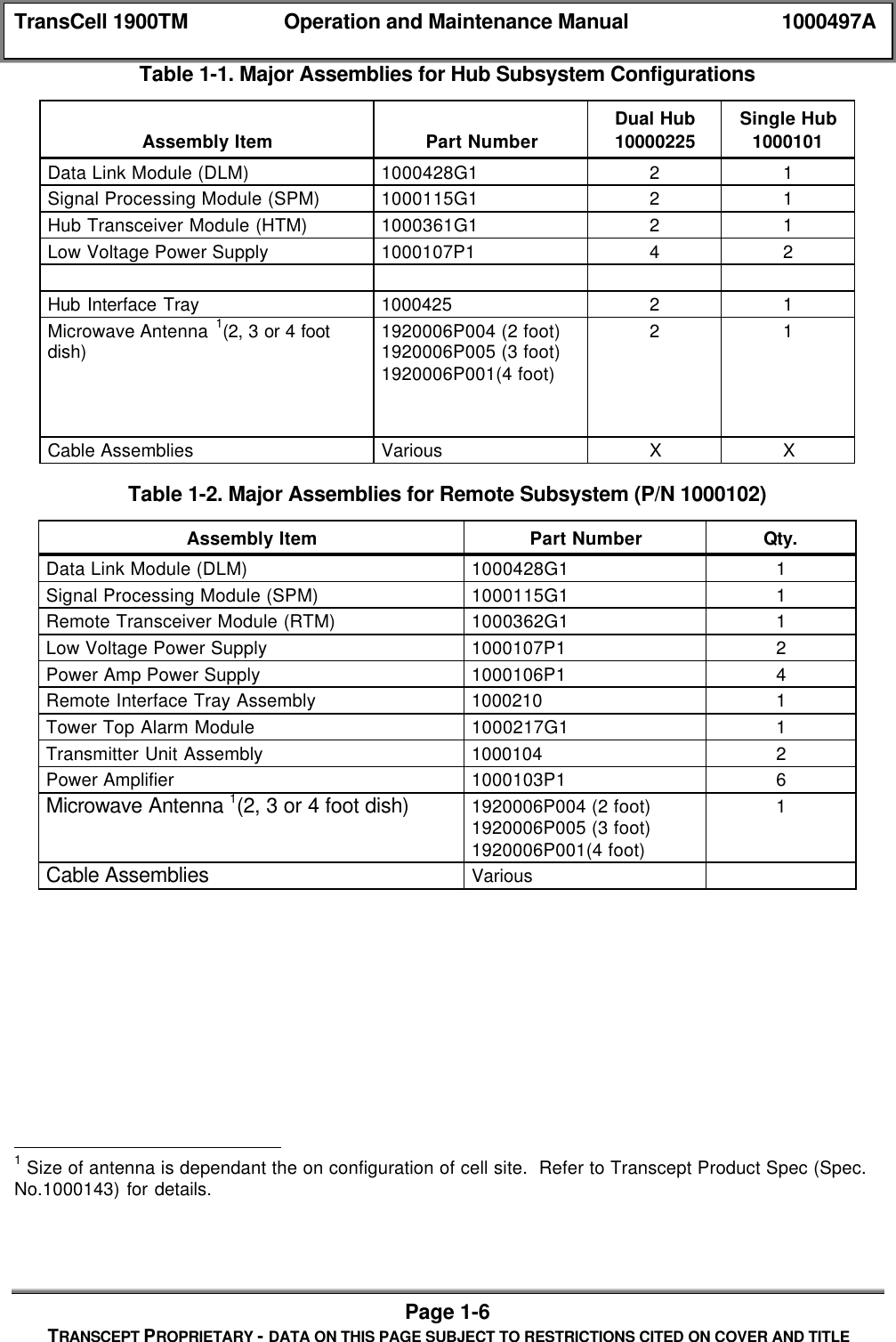
TransCell 1900TM Operation and Maintenance Manual 1000497APage 1-5TRANSCEPT PROPRIETARY - DATA ON THIS PAGE SUBJECT TO RESTRICTIONS CITED ON COVER AND TITLEBTS3 SectorCSU/DSUMicrowave LinkV.35DS0MSCT1 T1DS0 ExtractionCustomer Wide Area NetworkOSSHub-RemotePair (HRP)Combined Alarm DataSEM HRPUser InterfaceLocal10baseTAccessLocal10baseTAccess Remote 2SerialHubSlave 2Hub 1MasterRemote 1BTSCSU/DSUMicrowave LinkLocal10baseTAccessLocal10baseTAccessRemoteN-1Hub N-1MasterHub NSlaveRemoteNV.35DS0SCCS SCCSLocal10baseTAccessSerialFigure 1-1. Typical TransCell 1900TM System Configuration1.4.2 Physical DescriptionThe Hub/Remote Subsystem enclosures are intended for outdoor use, primarily to provide adegree of protection against corrosion, wind-blown dust and rain. The Hub and Remoteenclosures are made of steel with access via a single door on the front of the cabinets. Eachhas two lifting eyes at the top for cable attachment when moving and positioning theenclosures. The two enclosure configurations are based on similar hardware.The Hub enclosure dimensions are:♦ Height: 78 in. (198 cm) includes 6 in. base♦ Depth: 24 in.  (61.0 cm)♦ Width: 24 in. (61.0 cm),♦ Weight: Single Hub 325 lb. (147.6 kg);  Dual 450 lb. (202.0 kg)The Remote enclosure dimensions are:♦ Height: 81 in. (205.5 cm) includes 6 in. base♦ Depth: 24 in.  (61.0 cm)♦ Width: 36 in. (92.0 cm),♦ Weight: 510 lb. (232.0 kg)Table 1-1 lists the major assemblies and components installed for the Dual Hub (P/N1000225) and Single Hub (P/N 1000101) Subsystems. Table 1-2 lists the major assembliesand components installed for the Remote Subsystem (P/N 8344086G1). For a detailedassembly list for each enclosure, refer to Section 2.
TransCell 1900TM Operation and Maintenance Manual 1000497APage 1-6TRANSCEPT PROPRIETARY - DATA ON THIS PAGE SUBJECT TO RESTRICTIONS CITED ON COVER AND TITLETable 1-1. Major Assemblies for Hub Subsystem ConfigurationsAssembly Item Part NumberDual Hub10000225Single Hub1000101Data Link Module (DLM) 1000428G1 2 1Signal Processing Module (SPM) 1000115G1 2 1Hub Transceiver Module (HTM) 1000361G1 2 1Low Voltage Power Supply 1000107P1 4 2Hub Interface Tray 1000425 2 1Microwave Antenna 1(2, 3 or 4 footdish) 1920006P004 (2 foot)1920006P005 (3 foot)1920006P001(4 foot)2 1Cable Assemblies Various X XTable 1-2. Major Assemblies for Remote Subsystem (P/N 1000102)Assembly Item Part Number Qty.Data Link Module (DLM) 1000428G1 1Signal Processing Module (SPM) 1000115G1 1Remote Transceiver Module (RTM) 1000362G1 1Low Voltage Power Supply 1000107P1 2Power Amp Power Supply 1000106P1 4Remote Interface Tray Assembly 1000210 1Tower Top Alarm Module 1000217G1 1Transmitter Unit Assembly 1000104 2Power Amplifier 1000103P1 6Microwave Antenna 1(2, 3 or 4 foot dish) 1920006P004 (2 foot)1920006P005 (3 foot)1920006P001(4 foot)1Cable Assemblies Various                                                1 Size of antenna is dependant the on configuration of cell site.  Refer to Transcept Product Spec (Spec.No.1000143) for details.
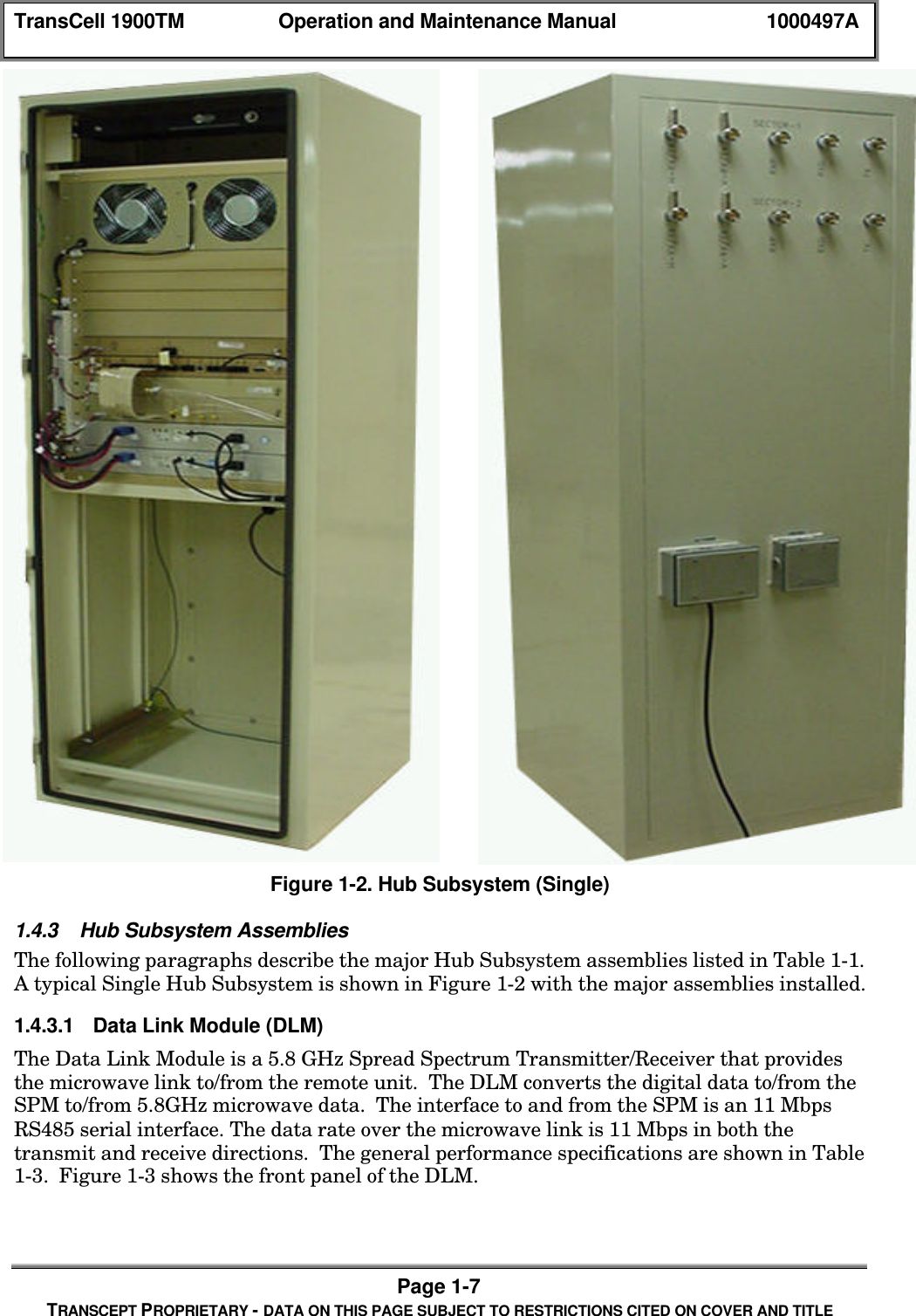
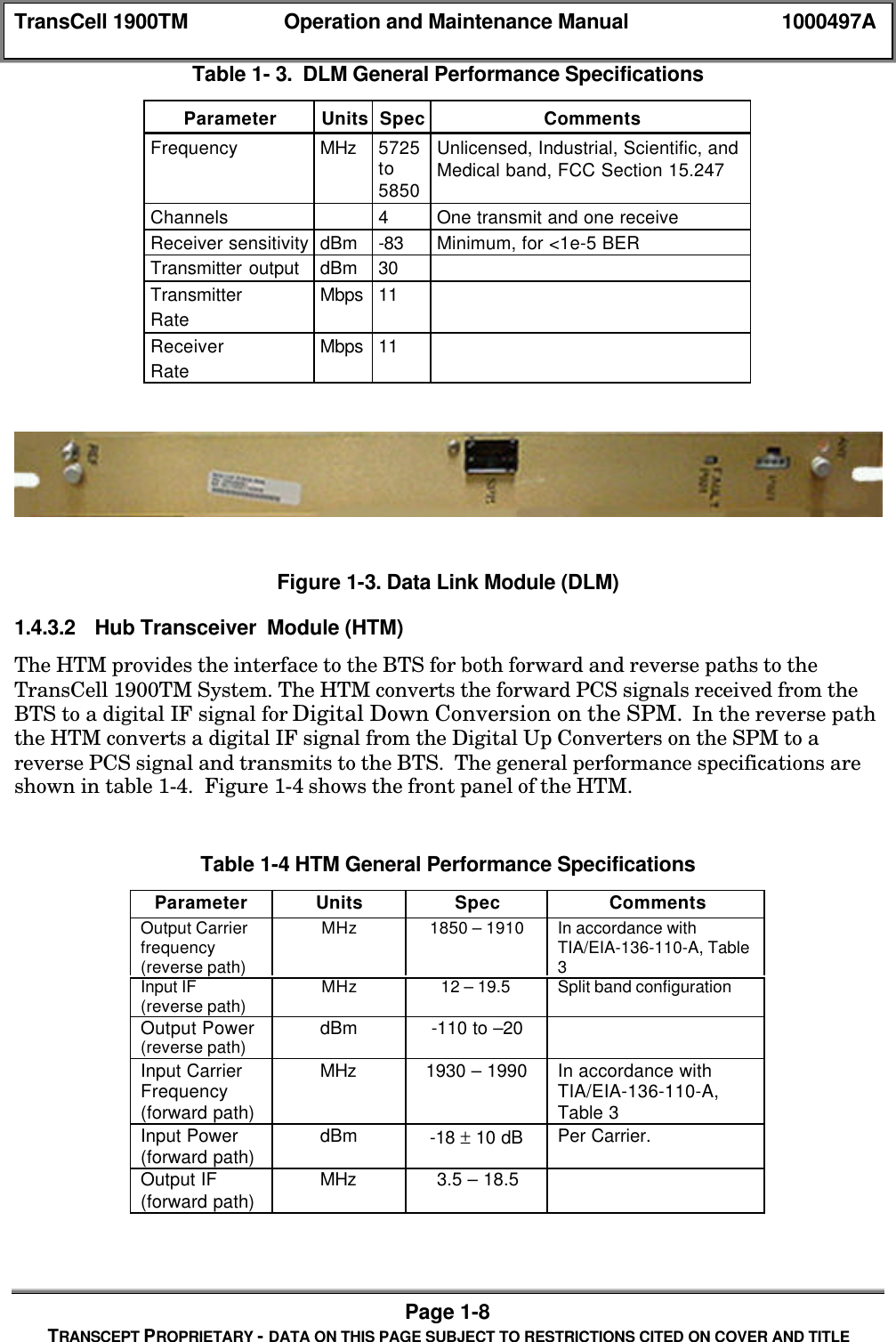
TransCell 1900TM Operation and Maintenance Manual 1000497APage 1-7TRANSCEPT PROPRIETARY - DATA ON THIS PAGE SUBJECT TO RESTRICTIONS CITED ON COVER AND TITLEFigure 1-2. Hub Subsystem (Single)1.4.3 Hub Subsystem AssembliesThe following paragraphs describe the major Hub Subsystem assemblies listed in Table 1-1.A typical Single Hub Subsystem is shown in Figure 1-2 with the major assemblies installed.1.4.3.1 Data Link Module (DLM)The Data Link Module is a 5.8 GHz Spread Spectrum Transmitter/Receiver that providesthe microwave link to/from the remote unit.  The DLM converts the digital data to/from theSPM to/from 5.8GHz microwave data.  The interface to and from the SPM is an 11 MbpsRS485 serial interface. The data rate over the microwave link is 11 Mbps in both thetransmit and receive directions.  The general performance specifications are shown in Table1-3.  Figure 1-3 shows the front panel of the DLM.
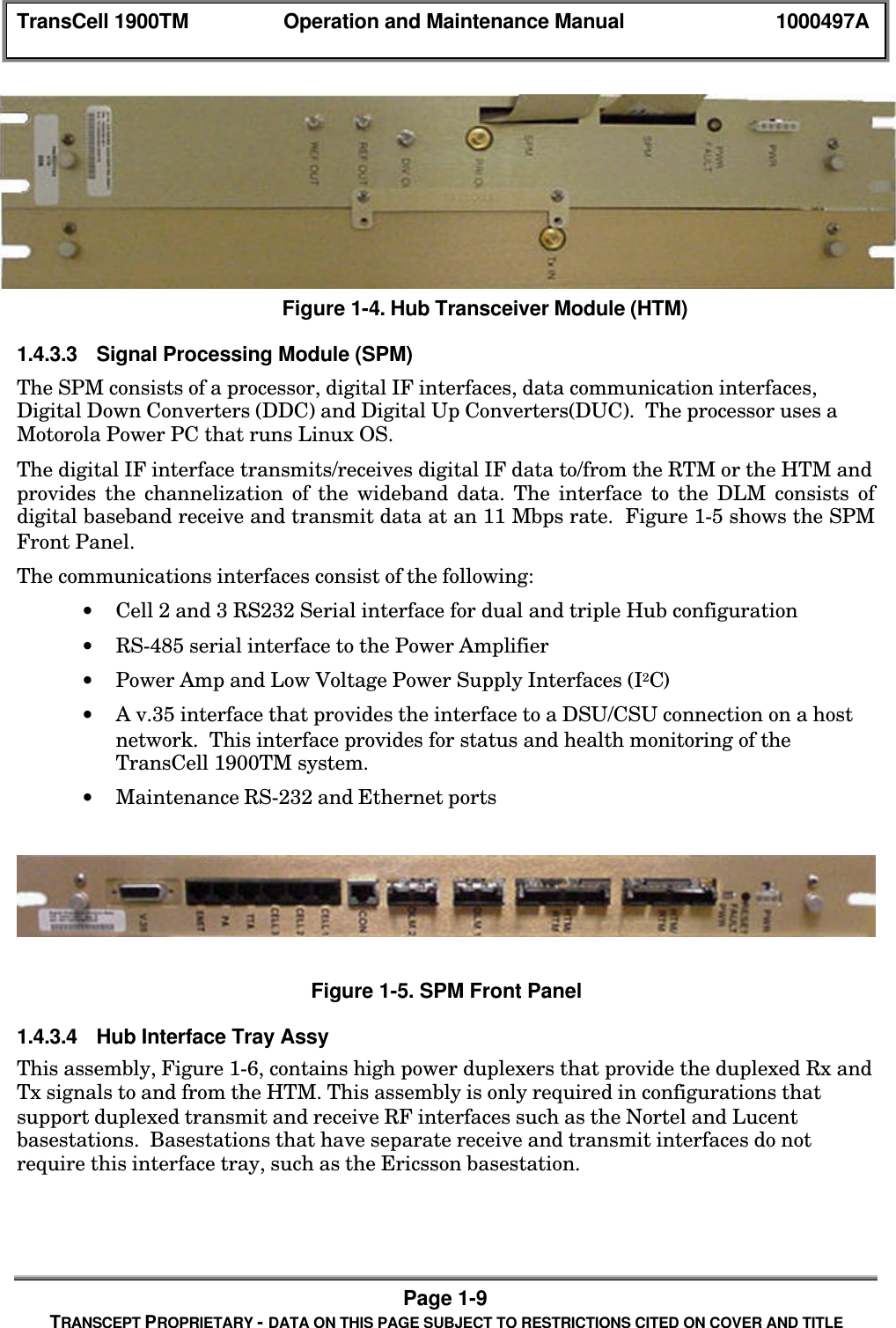
TransCell 1900TM Operation and Maintenance Manual 1000497APage 1-8TRANSCEPT PROPRIETARY - DATA ON THIS PAGE SUBJECT TO RESTRICTIONS CITED ON COVER AND TITLETable 1- 3.  DLM General Performance SpecificationsParameter Units Spec CommentsFrequency MHz 5725to5850Unlicensed, Industrial, Scientific, andMedical band, FCC Section 15.247Channels 4One transmit and one receiveReceiver sensitivity dBm -83 Minimum, for <1e-5 BERTransmitter output dBm 30TransmitterRateMbps 11ReceiverRateMbps 11Figure 1-3. Data Link Module (DLM)1.4.3.2 Hub Transceiver  Module (HTM)The HTM provides the interface to the BTS for both forward and reverse paths to theTransCell 1900TM System. The HTM converts the forward PCS signals received from theBTS to a digital IF signal for Digital Down Conversion on the SPM.  In the reverse paththe HTM converts a digital IF signal from the Digital Up Converters on the SPM to areverse PCS signal and transmits to the BTS.  The general performance specifications areshown in table 1-4.  Figure 1-4 shows the front panel of the HTM.Table 1-4 HTM General Performance SpecificationsParameter Units Spec CommentsOutput Carrierfrequency(reverse path)MHz 1850 – 1910 In accordance withTIA/EIA-136-110-A, Table3Input IF(reverse path) MHz 12 – 19.5 Split band configurationOutput Power(reverse path) dBm -110 to –20Input CarrierFrequency(forward path)MHz 1930 – 1990 In accordance withTIA/EIA-136-110-A,Table 3Input Power(forward path) dBm -18 ± 10 dB Per Carrier.Output IF(forward path) MHz 3.5 – 18.5
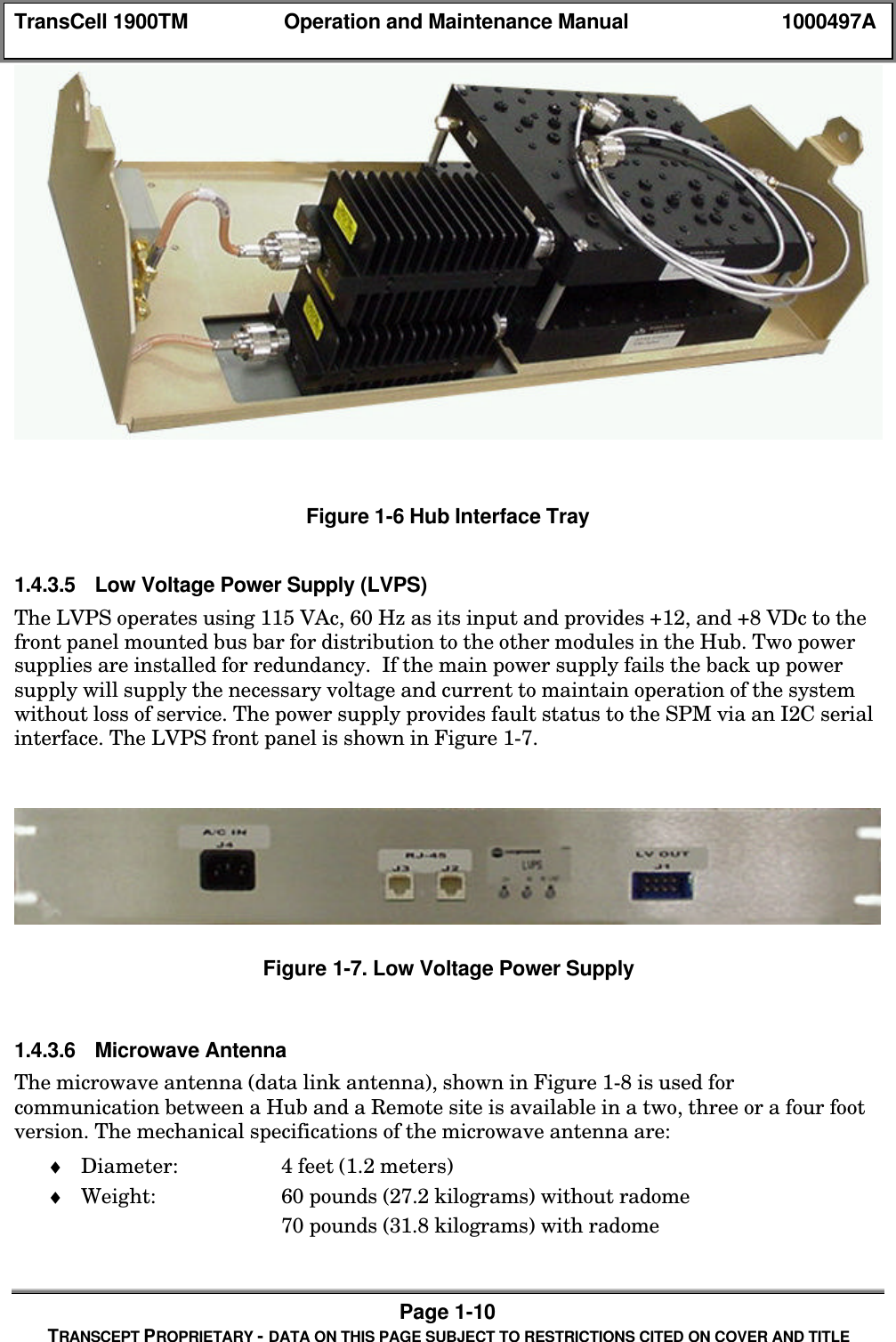
TransCell 1900TM Operation and Maintenance Manual 1000497APage 1-9TRANSCEPT PROPRIETARY - DATA ON THIS PAGE SUBJECT TO RESTRICTIONS CITED ON COVER AND TITLEFigure 1-4. Hub Transceiver Module (HTM)1.4.3.3 Signal Processing Module (SPM)The SPM consists of a processor, digital IF interfaces, data communication interfaces,Digital Down Converters (DDC) and Digital Up Converters(DUC).  The processor uses aMotorola Power PC that runs Linux OS.The digital IF interface transmits/receives digital IF data to/from the RTM or the HTM andprovides the channelization of the wideband data. The interface to the DLM consists ofdigital baseband receive and transmit data at an 11 Mbps rate.  Figure 1-5 shows the SPMFront Panel.The communications interfaces consist of the following:• Cell 2 and 3 RS232 Serial interface for dual and triple Hub configuration• RS-485 serial interface to the Power Amplifier• Power Amp and Low Voltage Power Supply Interfaces (I2C)• A v.35 interface that provides the interface to a DSU/CSU connection on a hostnetwork.  This interface provides for status and health monitoring of theTransCell 1900TM system.• Maintenance RS-232 and Ethernet portsFigure 1-5. SPM Front Panel1.4.3.4 Hub Interface Tray AssyThis assembly, Figure 1-6, contains high power duplexers that provide the duplexed Rx andTx signals to and from the HTM. This assembly is only required in configurations thatsupport duplexed transmit and receive RF interfaces such as the Nortel and Lucentbasestations.  Basestations that have separate receive and transmit interfaces do notrequire this interface tray, such as the Ericsson basestation.
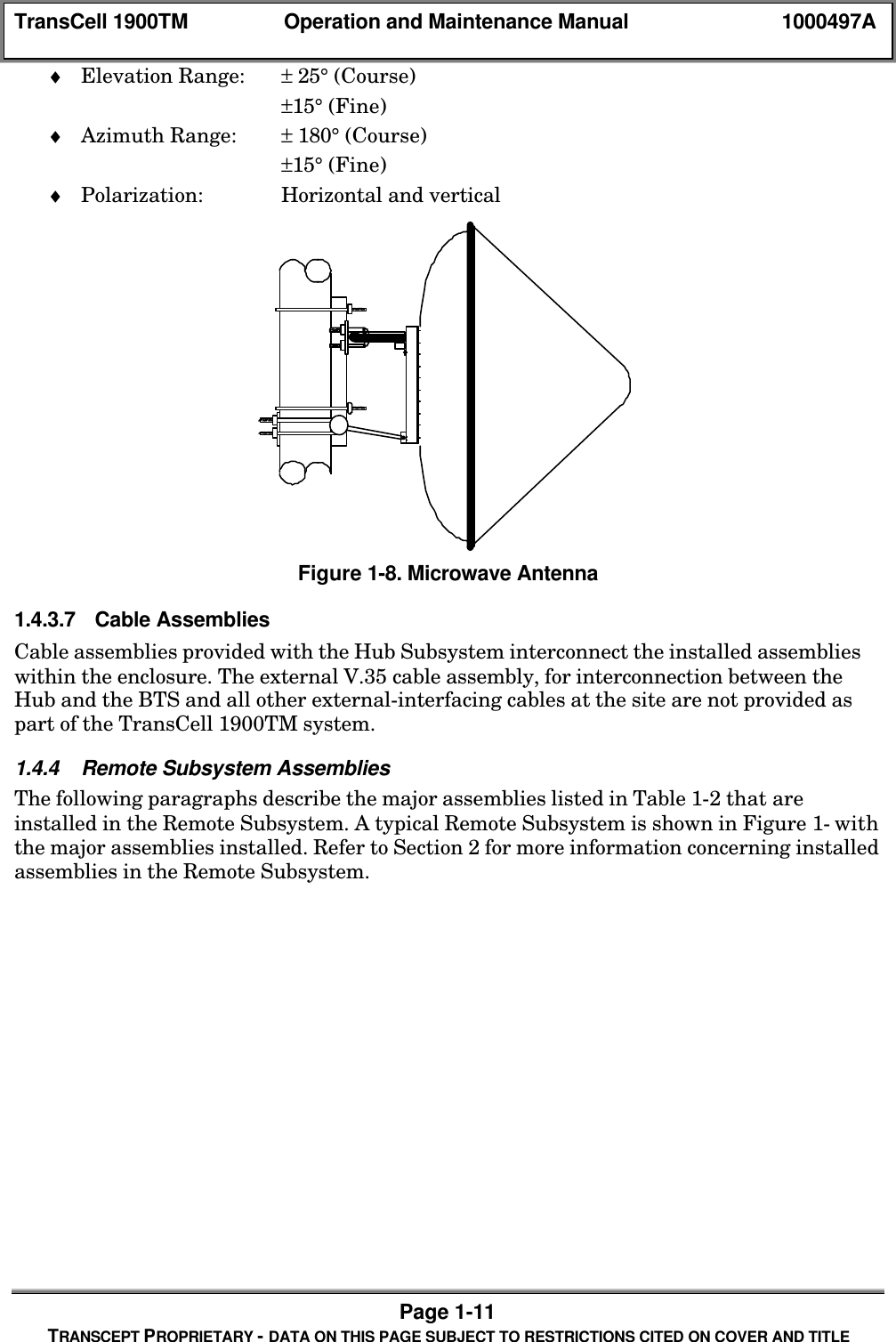
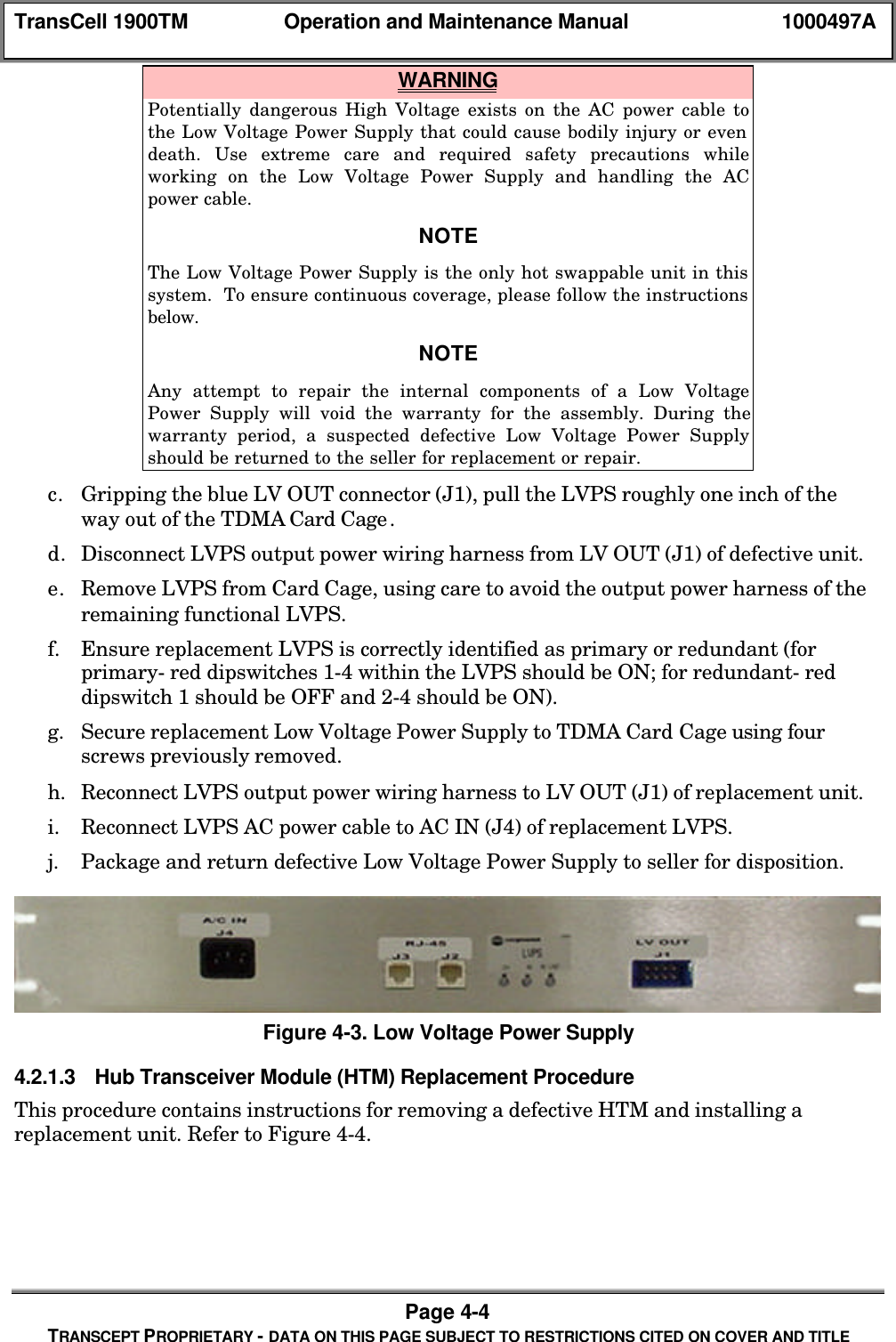
TransCell 1900TM Operation and Maintenance Manual 1000497APage 1-10TRANSCEPT PROPRIETARY - DATA ON THIS PAGE SUBJECT TO RESTRICTIONS CITED ON COVER AND TITLEFigure 1-6 Hub Interface Tray1.4.3.5 Low Voltage Power Supply (LVPS)The LVPS operates using 115 VAc, 60 Hz as its input and provides +12, and +8 VDc to thefront panel mounted bus bar for distribution to the other modules in the Hub. Two powersupplies are installed for redundancy.  If the main power supply fails the back up powersupply will supply the necessary voltage and current to maintain operation of the systemwithout loss of service. The power supply provides fault status to the SPM via an I2C serialinterface. The LVPS front panel is shown in Figure 1-7.Figure 1-7. Low Voltage Power Supply1.4.3.6 Microwave AntennaThe microwave antenna (data link antenna), shown in Figure 1-8 is used forcommunication between a Hub and a Remote site is available in a two, three or a four footversion. The mechanical specifications of the microwave antenna are:♦ Diameter: 4 feet (1.2 meters)♦ Weight: 60 pounds (27.2 kilograms) without radome70 pounds (31.8 kilograms) with radome
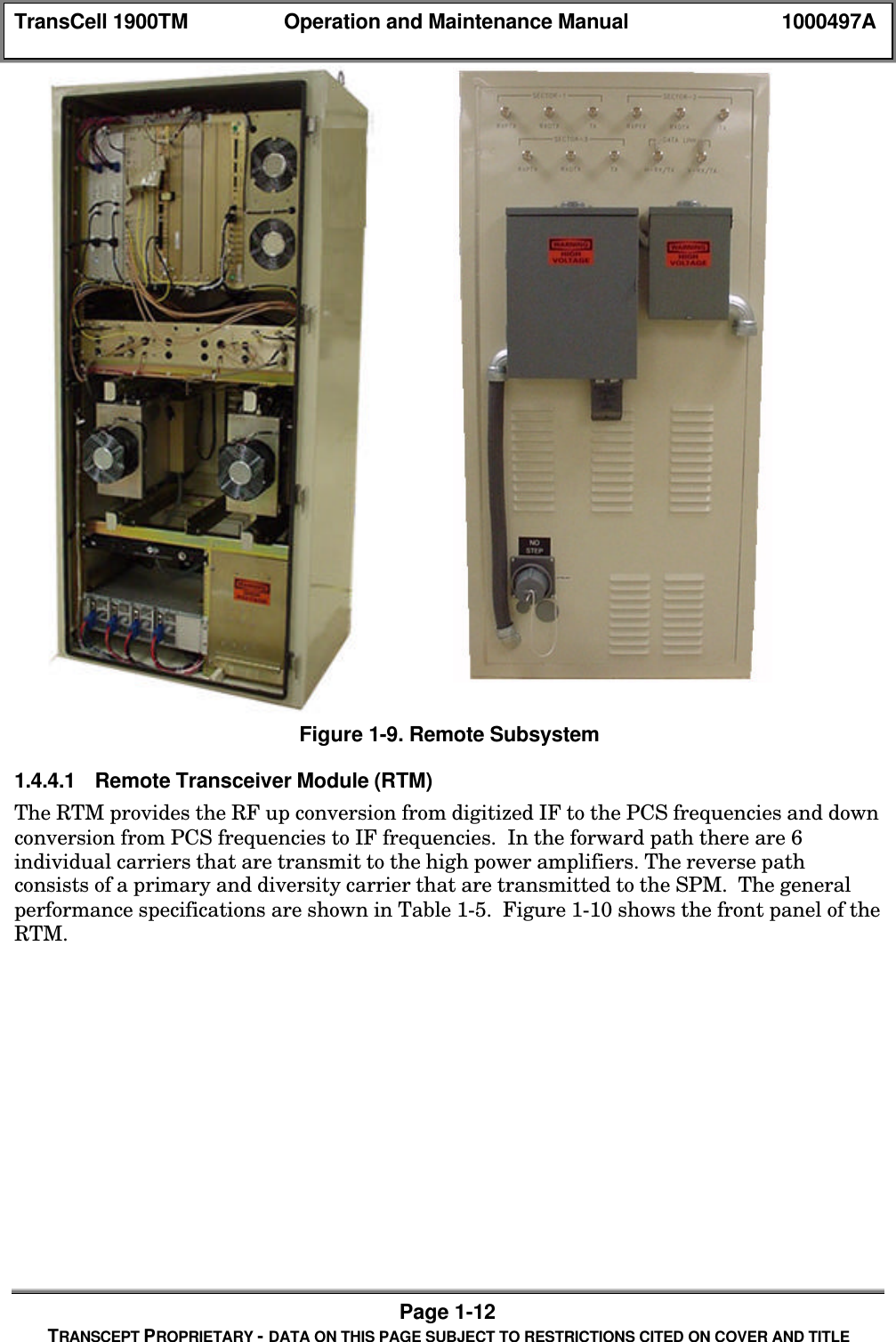
TransCell 1900TM Operation and Maintenance Manual 1000497APage 1-11TRANSCEPT PROPRIETARY - DATA ON THIS PAGE SUBJECT TO RESTRICTIONS CITED ON COVER AND TITLE♦ Elevation Range: ± 25° (Course)±15° (Fine)♦ Azimuth Range: ± 180° (Course)±15° (Fine)♦ Polarization: Horizontal and verticalFigure 1-8. Microwave Antenna1.4.3.7 Cable AssembliesCable assemblies provided with the Hub Subsystem interconnect the installed assemblieswithin the enclosure. The external V.35 cable assembly, for interconnection between theHub and the BTS and all other external-interfacing cables at the site are not provided aspart of the TransCell 1900TM system.1.4.4 Remote Subsystem AssembliesThe following paragraphs describe the major assemblies listed in Table 1-2 that areinstalled in the Remote Subsystem. A typical Remote Subsystem is shown in Figure 1- withthe major assemblies installed. Refer to Section 2 for more information concerning installedassemblies in the Remote Subsystem.
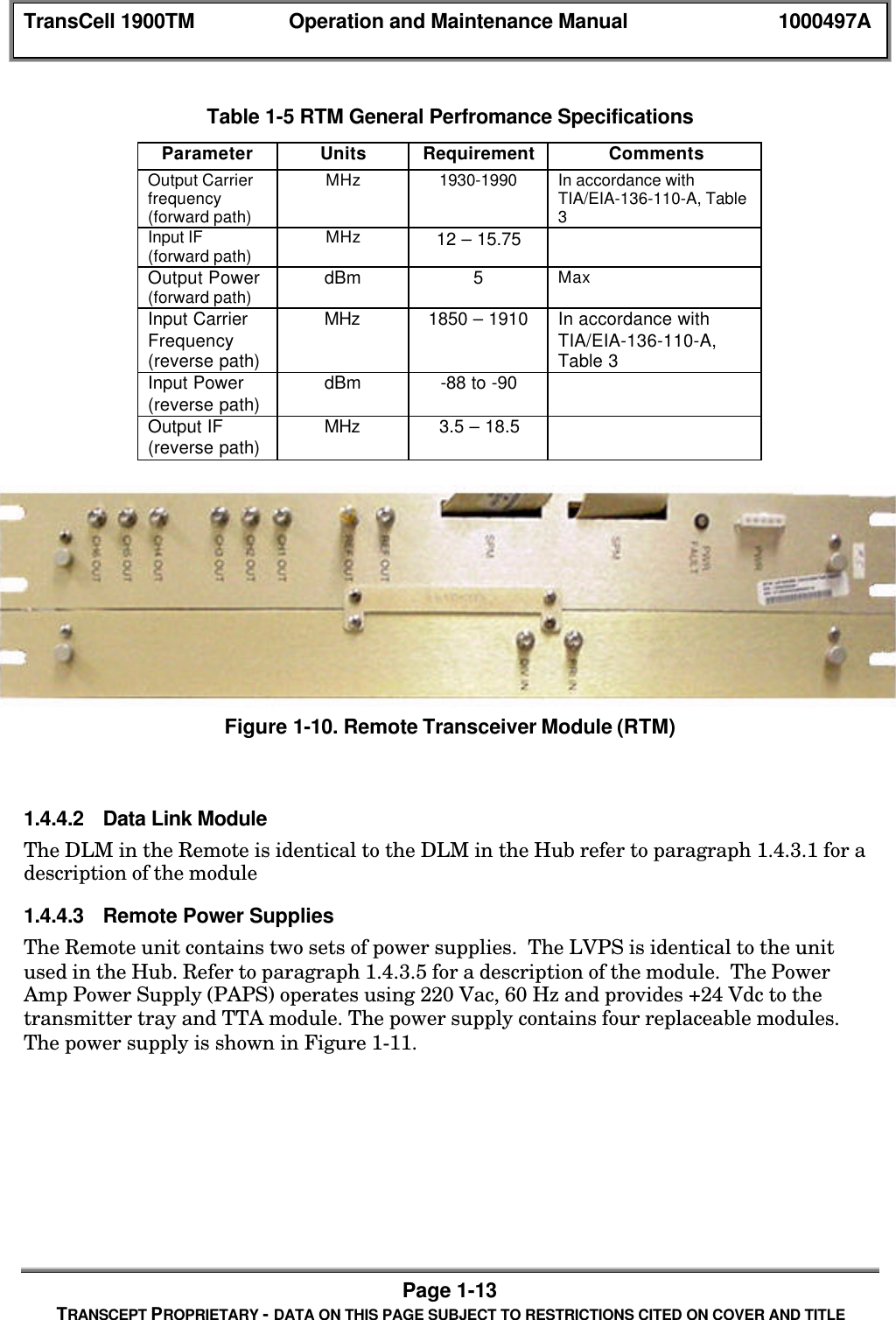
TransCell 1900TM Operation and Maintenance Manual 1000497APage 1-12TRANSCEPT PROPRIETARY - DATA ON THIS PAGE SUBJECT TO RESTRICTIONS CITED ON COVER AND TITLEFigure 1-9. Remote Subsystem1.4.4.1 Remote Transceiver Module (RTM)The RTM provides the RF up conversion from digitized IF to the PCS frequencies and downconversion from PCS frequencies to IF frequencies.  In the forward path there are 6individual carriers that are transmit to the high power amplifiers. The reverse pathconsists of a primary and diversity carrier that are transmitted to the SPM.  The generalperformance specifications are shown in Table 1-5.  Figure 1-10 shows the front panel of theRTM.
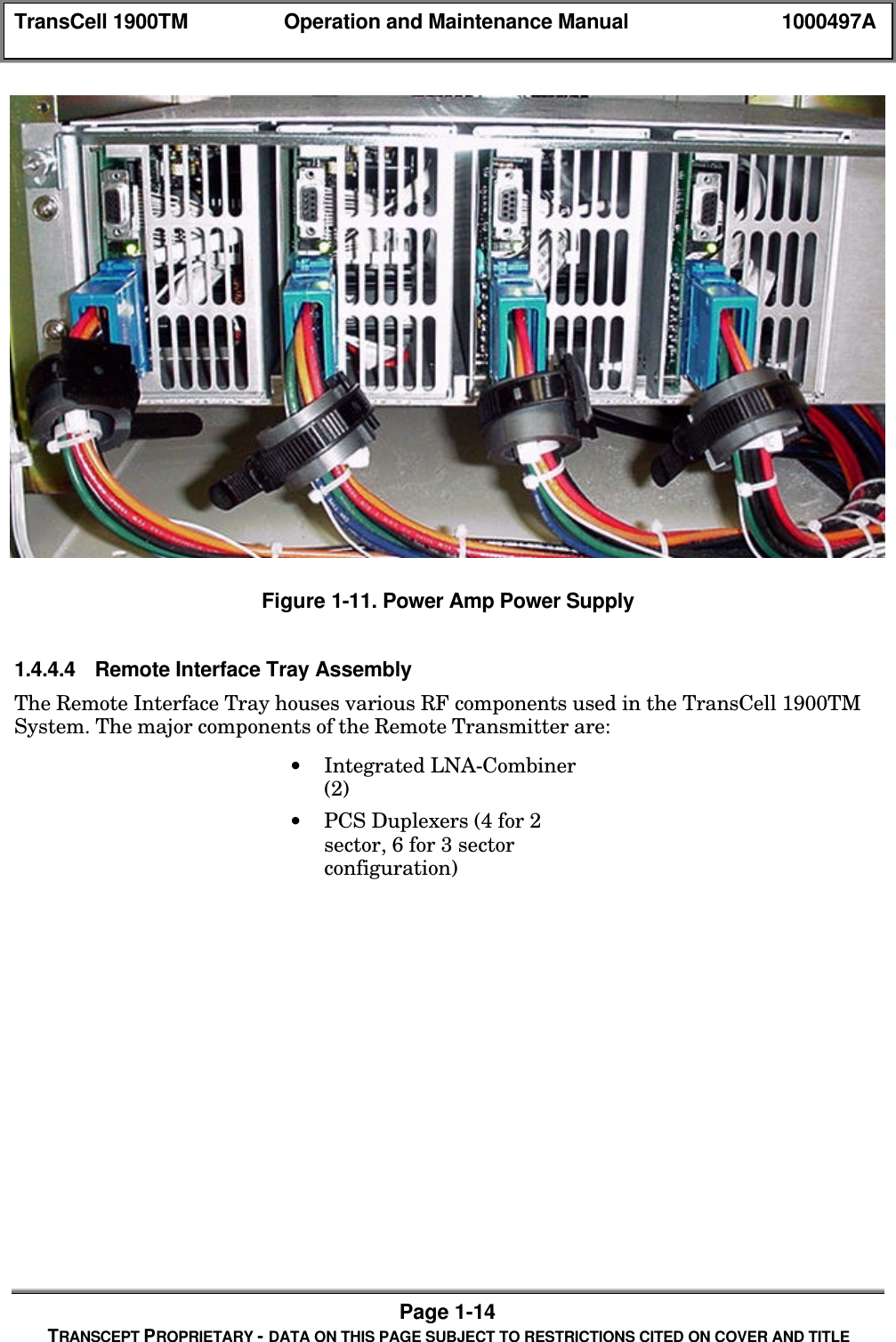
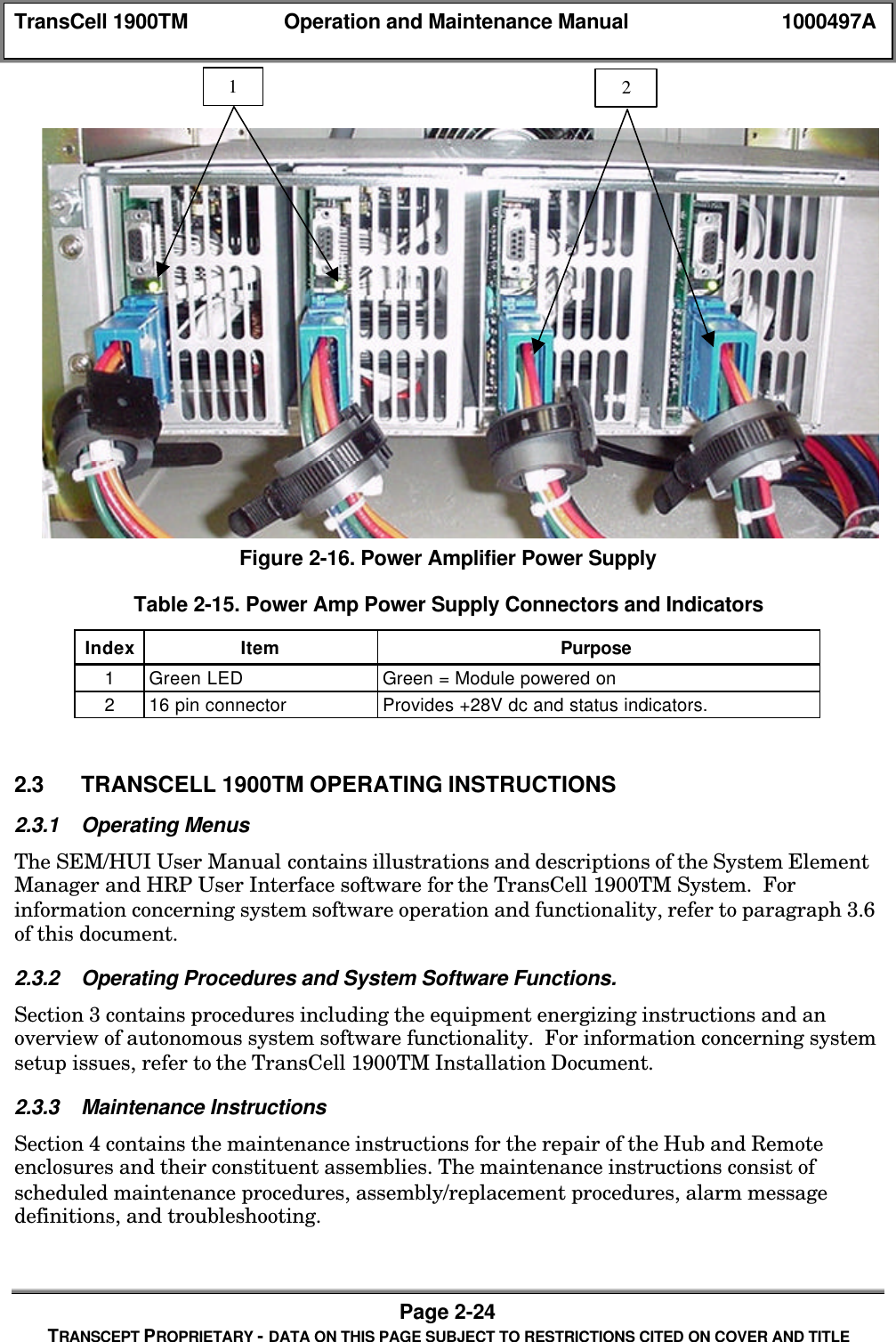
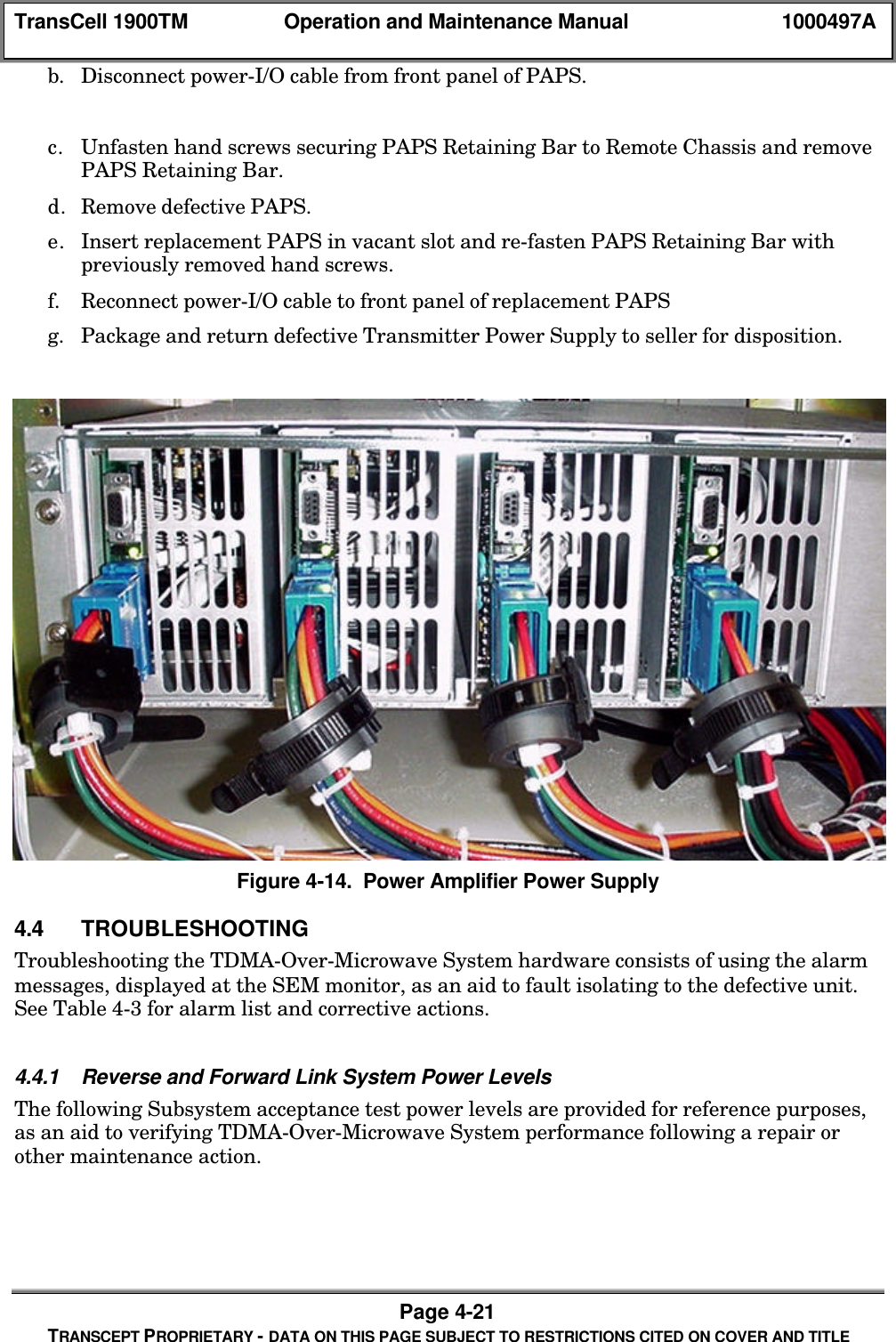
TransCell 1900TM Operation and Maintenance Manual 1000497APage 1-13TRANSCEPT PROPRIETARY - DATA ON THIS PAGE SUBJECT TO RESTRICTIONS CITED ON COVER AND TITLETable 1-5 RTM General Perfromance SpecificationsParameter Units Requirement CommentsOutput Carrierfrequency(forward path)MHz 1930-1990 In accordance withTIA/EIA-136-110-A, Table3Input IF(forward path) MHz 12 – 15.75Output Power(forward path) dBm 5MaxInput CarrierFrequency(reverse path)MHz 1850 – 1910 In accordance withTIA/EIA-136-110-A,Table 3Input Power(reverse path) dBm -88 to -90Output IF(reverse path) MHz 3.5 – 18.5Figure 1-10. Remote Transceiver Module (RTM)1.4.4.2 Data Link ModuleThe DLM in the Remote is identical to the DLM in the Hub refer to paragraph 1.4.3.1 for adescription of the module1.4.4.3 Remote Power SuppliesThe Remote unit contains two sets of power supplies.  The LVPS is identical to the unitused in the Hub. Refer to paragraph 1.4.3.5 for a description of the module.  The PowerAmp Power Supply (PAPS) operates using 220 Vac, 60 Hz and provides +24 Vdc to thetransmitter tray and TTA module. The power supply contains four replaceable modules.The power supply is shown in Figure 1-11.
TransCell 1900TM Operation and Maintenance Manual 1000497APage 1-14TRANSCEPT PROPRIETARY - DATA ON THIS PAGE SUBJECT TO RESTRICTIONS CITED ON COVER AND TITLEFigure 1-11. Power Amp Power Supply1.4.4.4 Remote Interface Tray AssemblyThe Remote Interface Tray houses various RF components used in the TransCell 1900TMSystem. The major components of the Remote Transmitter are:• Integrated LNA-Combiner(2)• PCS Duplexers (4 for 2sector, 6 for 3 sectorconfiguration)
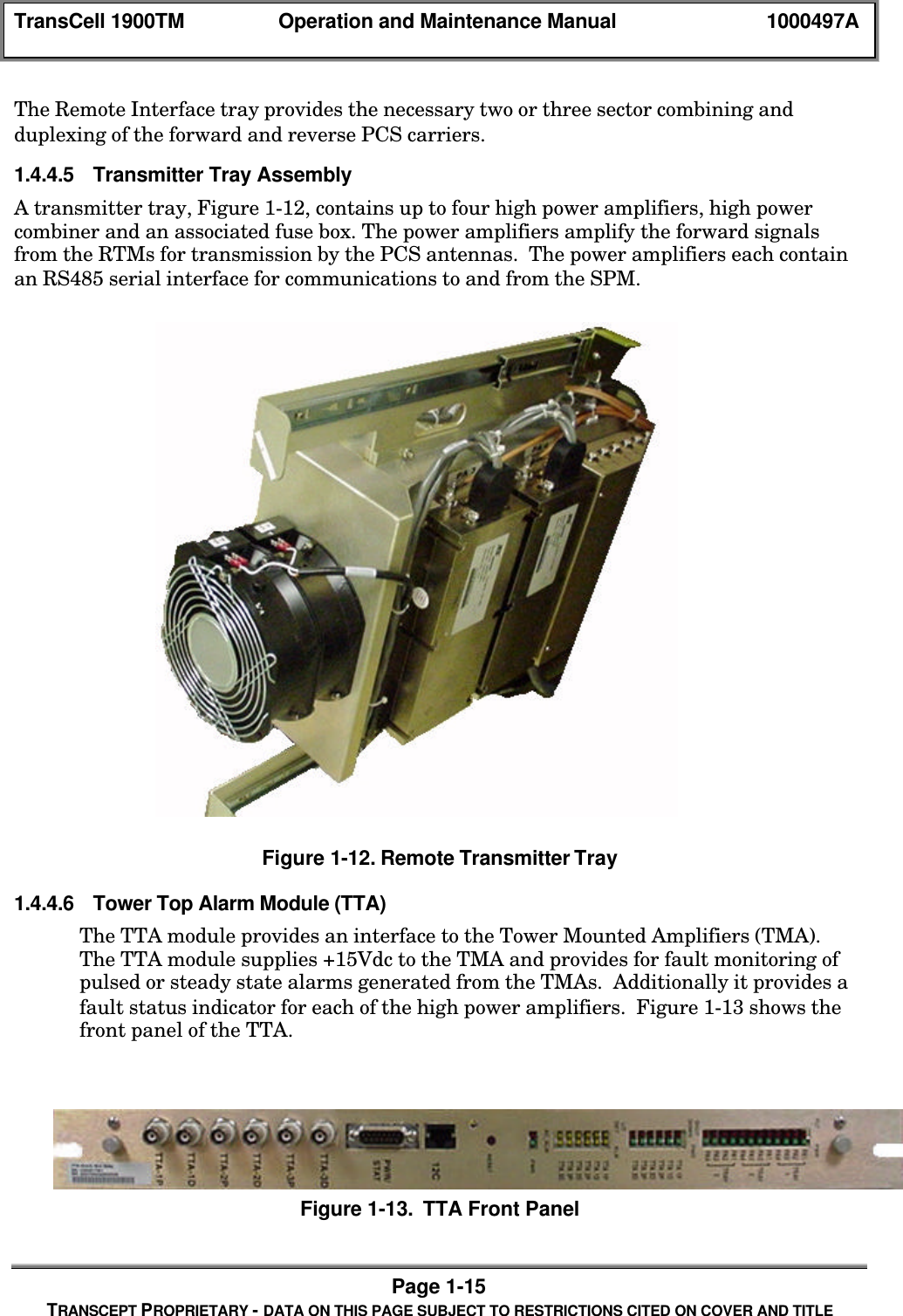
TransCell 1900TM Operation and Maintenance Manual 1000497APage 1-15TRANSCEPT PROPRIETARY - DATA ON THIS PAGE SUBJECT TO RESTRICTIONS CITED ON COVER AND TITLEThe Remote Interface tray provides the necessary two or three sector combining andduplexing of the forward and reverse PCS carriers.1.4.4.5 Transmitter Tray AssemblyA transmitter tray, Figure 1-12, contains up to four high power amplifiers, high powercombiner and an associated fuse box. The power amplifiers amplify the forward signalsfrom the RTMs for transmission by the PCS antennas.  The power amplifiers each containan RS485 serial interface for communications to and from the SPM.Figure 1-12. Remote Transmitter Tray1.4.4.6 Tower Top Alarm Module (TTA)The TTA module provides an interface to the Tower Mounted Amplifiers (TMA).The TTA module supplies +15Vdc to the TMA and provides for fault monitoring ofpulsed or steady state alarms generated from the TMAs.  Additionally it provides afault status indicator for each of the high power amplifiers.  Figure 1-13 shows thefront panel of the TTA.Figure 1-13.  TTA Front Panel
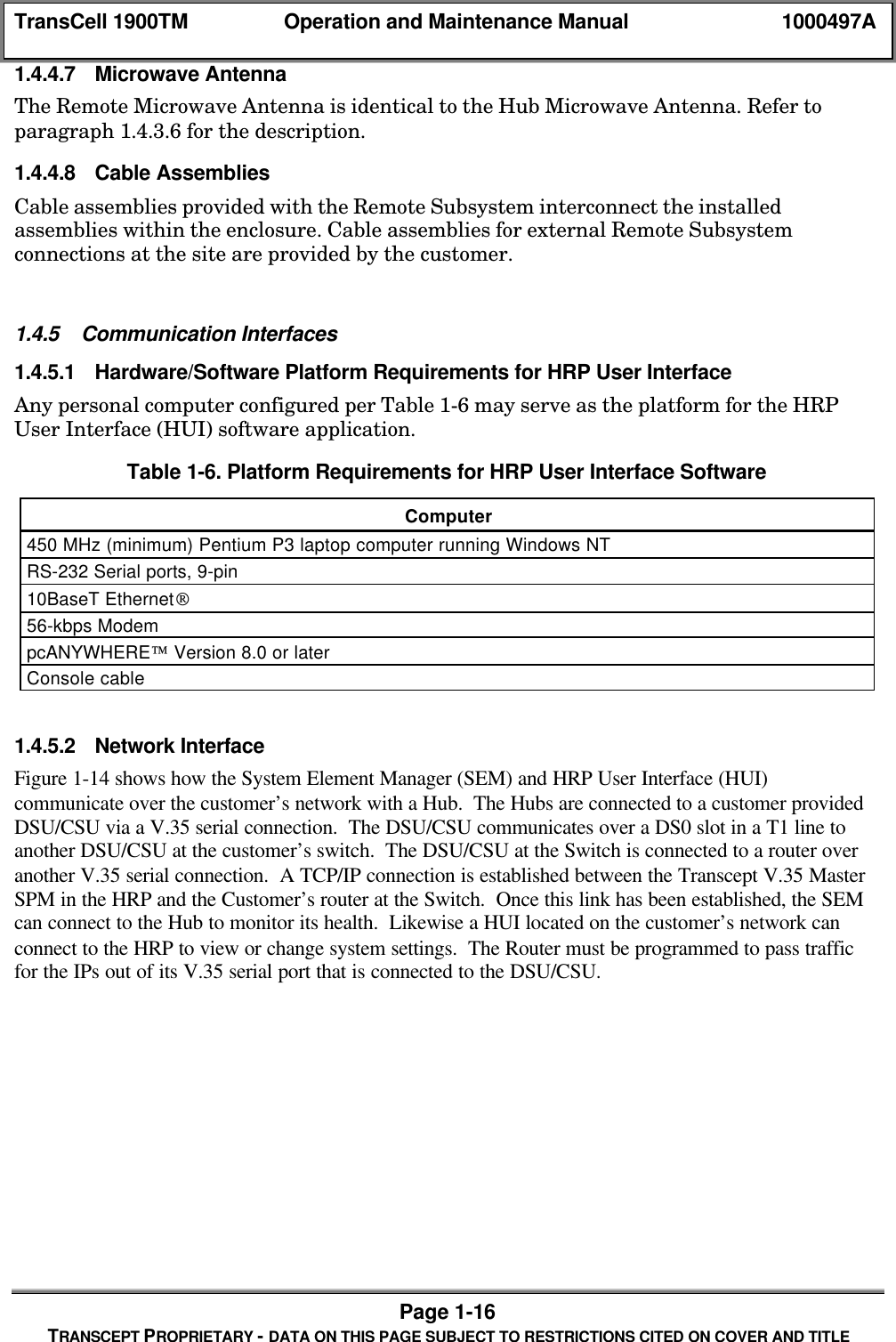
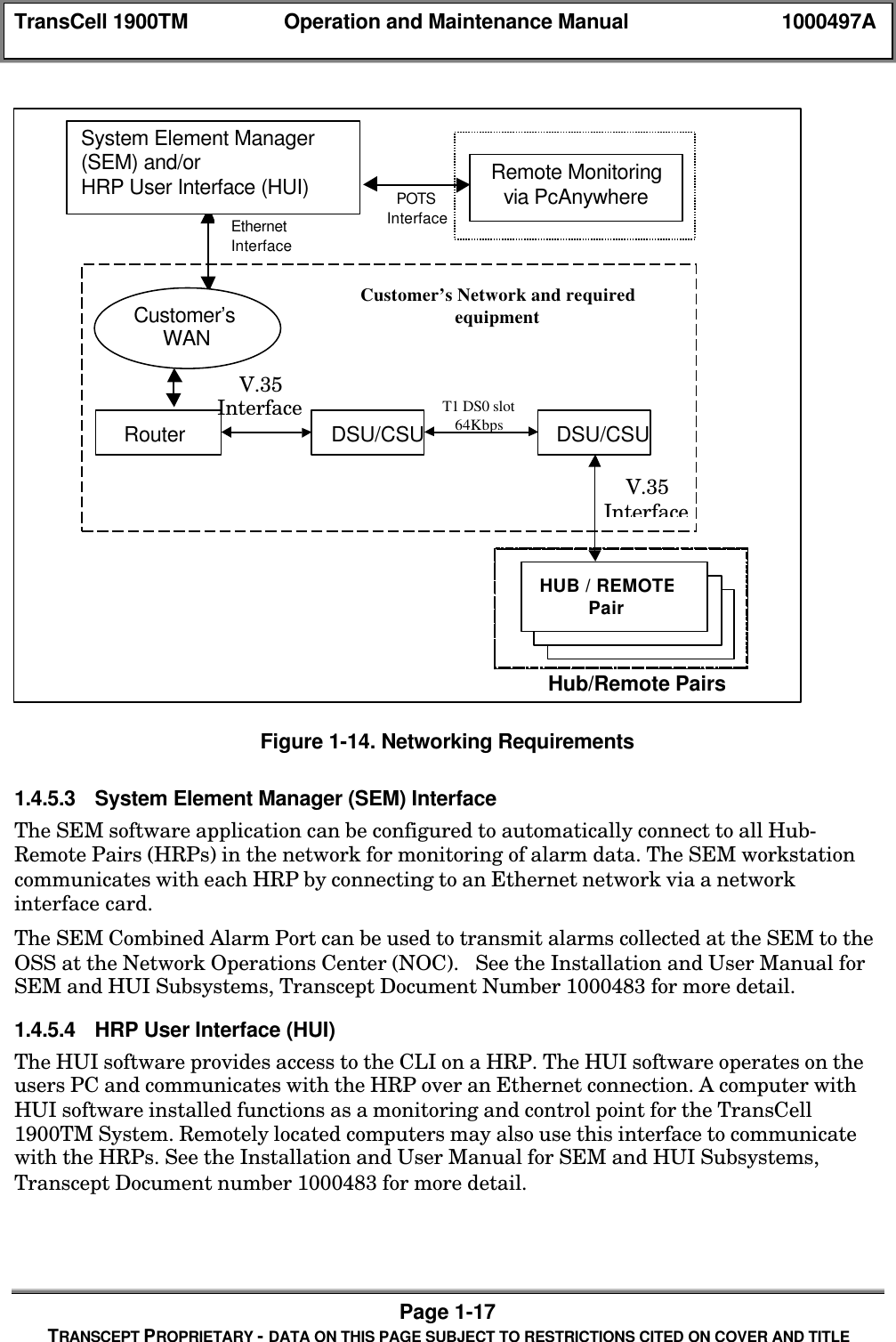
TransCell 1900TM Operation and Maintenance Manual 1000497APage 1-16TRANSCEPT PROPRIETARY - DATA ON THIS PAGE SUBJECT TO RESTRICTIONS CITED ON COVER AND TITLE1.4.4.7 Microwave AntennaThe Remote Microwave Antenna is identical to the Hub Microwave Antenna. Refer toparagraph 1.4.3.6 for the description.1.4.4.8 Cable AssembliesCable assemblies provided with the Remote Subsystem interconnect the installedassemblies within the enclosure. Cable assemblies for external Remote Subsystemconnections at the site are provided by the customer.1.4.5 Communication Interfaces1.4.5.1 Hardware/Software Platform Requirements for HRP User InterfaceAny personal computer configured per Table 1-6 may serve as the platform for the HRPUser Interface (HUI) software application.Table 1-6. Platform Requirements for HRP User Interface SoftwareComputer450 MHz (minimum) Pentium P3 laptop computer running Windows NTRS-232 Serial ports, 9-pin10BaseT Ethernet56-kbps ModempcANYWHERE Version 8.0 or laterConsole cable1.4.5.2 Network InterfaceFigure 1-14 shows how the System Element Manager (SEM) and HRP User Interface (HUI)communicate over the customer’s network with a Hub.  The Hubs are connected to a customer providedDSU/CSU via a V.35 serial connection.  The DSU/CSU communicates over a DS0 slot in a T1 line toanother DSU/CSU at the customer’s switch.  The DSU/CSU at the Switch is connected to a router overanother V.35 serial connection.  A TCP/IP connection is established between the Transcept V.35 MasterSPM in the HRP and the Customer’s router at the Switch.  Once this link has been established, the SEMcan connect to the Hub to monitor its health.  Likewise a HUI located on the customer’s network canconnect to the HRP to view or change system settings.  The Router must be programmed to pass trafficfor the IPs out of its V.35 serial port that is connected to the DSU/CSU.
TransCell 1900TM Operation and Maintenance Manual 1000497APage 1-17TRANSCEPT PROPRIETARY - DATA ON THIS PAGE SUBJECT TO RESTRICTIONS CITED ON COVER AND TITLEFigure 1-14. Networking Requirements1.4.5.3 System Element Manager (SEM) InterfaceThe SEM software application can be configured to automatically connect to all Hub-Remote Pairs (HRPs) in the network for monitoring of alarm data. The SEM workstationcommunicates with each HRP by connecting to an Ethernet network via a networkinterface card.The SEM Combined Alarm Port can be used to transmit alarms collected at the SEM to theOSS at the Network Operations Center (NOC).   See the Installation and User Manual forSEM and HUI Subsystems, Transcept Document Number 1000483 for more detail.1.4.5.4 HRP User Interface (HUI)The HUI software provides access to the CLI on a HRP. The HUI software operates on theusers PC and communicates with the HRP over an Ethernet connection. A computer withHUI software installed functions as a monitoring and control point for the TransCell1900TM System. Remotely located computers may also use this interface to communicatewith the HRPs. See the Installation and User Manual for SEM and HUI Subsystems,Transcept Document number 1000483 for more detail.POTSInterfaceRouter DSU/CSU DSU/CSUT1 DS0 slot64KbpsV.35InterfaceHub/Remote PairsCustomer’s Network and requiredequipmentV.35InterfaceHUB / REMOTEPairEthernetInterfaceRemote Monitoringvia PcAnywhereSystem Element Manager(SEM) and/orHRP User Interface (HUI)Customer’sWAN
TransCell 1900TM Operation and Maintenance Manual 1000497APage 1-18TRANSCEPT PROPRIETARY - DATA ON THIS PAGE SUBJECT TO RESTRICTIONS CITED ON COVER AND TITLE1.4.5.5 HRP Command LanguageCommand language in the form of ASCII text strings is used to send commands to andreceive messages from the HRP. For example, a command to set the forward attenuation ofRemote RTM carrier number 1 to 4 would be written in HRP Command Language as:$ SET RTM FWATTEN 1 4For a complete list of commands see the Installation and User Manual for SEM and HUISubsystems, Transcept Document number 1000483.1.5 SEM STARTUP1.5.1 User AccessThe TransCell 1900TM System provides an operator log-in and log-out capability throughthe HRP User Interface software. To log-in, the operator must enter a password, whichdefines the authorized user privilege level: The User level typically allows only viewing ofoperational parameters and status, while the Super-User level allows changing ofoperational parameters. A valid password is comprised of up to eight alphanumericcharacters (no special characters). The HUI validates the password and allows the operatorto gain access to the menus to perform required functions.The Super-User has the privileges necessary to monitor, control, and modify the systemparameters. See the Installation and User Manual for SEM and HUI Subsystems,Transcept Document number 1000483 for more detail.1.5.2 SEM and HUI Workstation InitializationWhen power is applied to the SEM workstation, it executes its power-up diagnostics, andthen it starts all the necessary processes, initializes all communication interfaces, andwaits for input from the operator. The HUI requires the user to start the process.  Oncestarted the HUI will start the necessary processes, initializes all communication interfaces,and wait for input from the operator. See the Installation and User Manual for SEM andHUI Subsystems, Transcept Document number 1000483 for more detail.1.5.3 SEM Workstation ShutdownNormally the SEM operates 24 hours a day, seven days a week. A system shutdown is onlynecessary when a SEM workstation is to be replaced or new software is to be downloaded. Ashutdown of the system closes all logging functions, terminates communications links, andcloses all the SEM processes. Refer to Section 4 for a more detailed description.1.5.4 HUI Workstation ShutdownTo shut down a HUI workstation, the user logs out and then exits from the HUI software ina manner similar to most other Windows NT based programs, and powers down thecomputer. See the Installation and User Manual for SEM and HUI Subsystems, TransceptDocument number 1000483 for more detail.
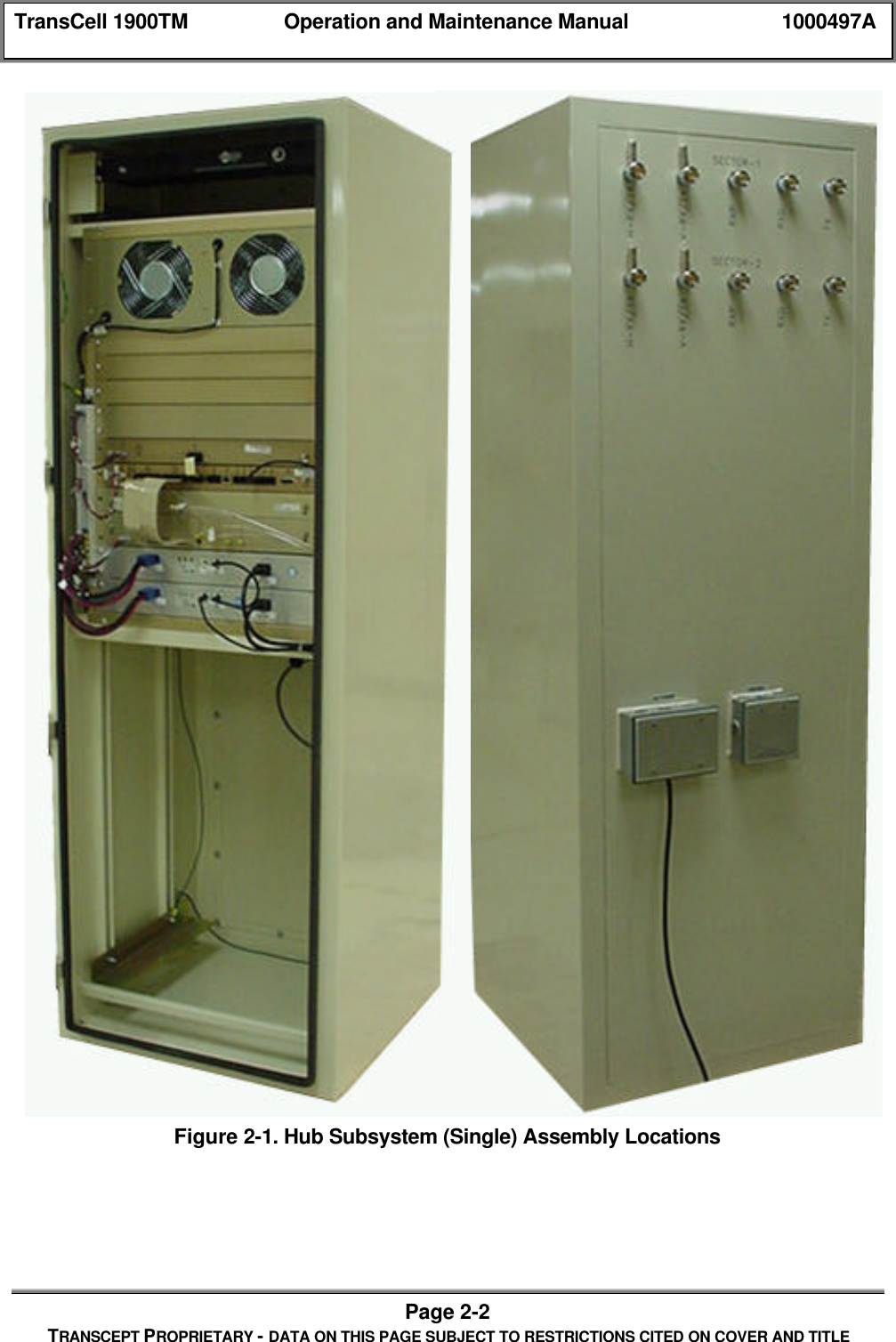
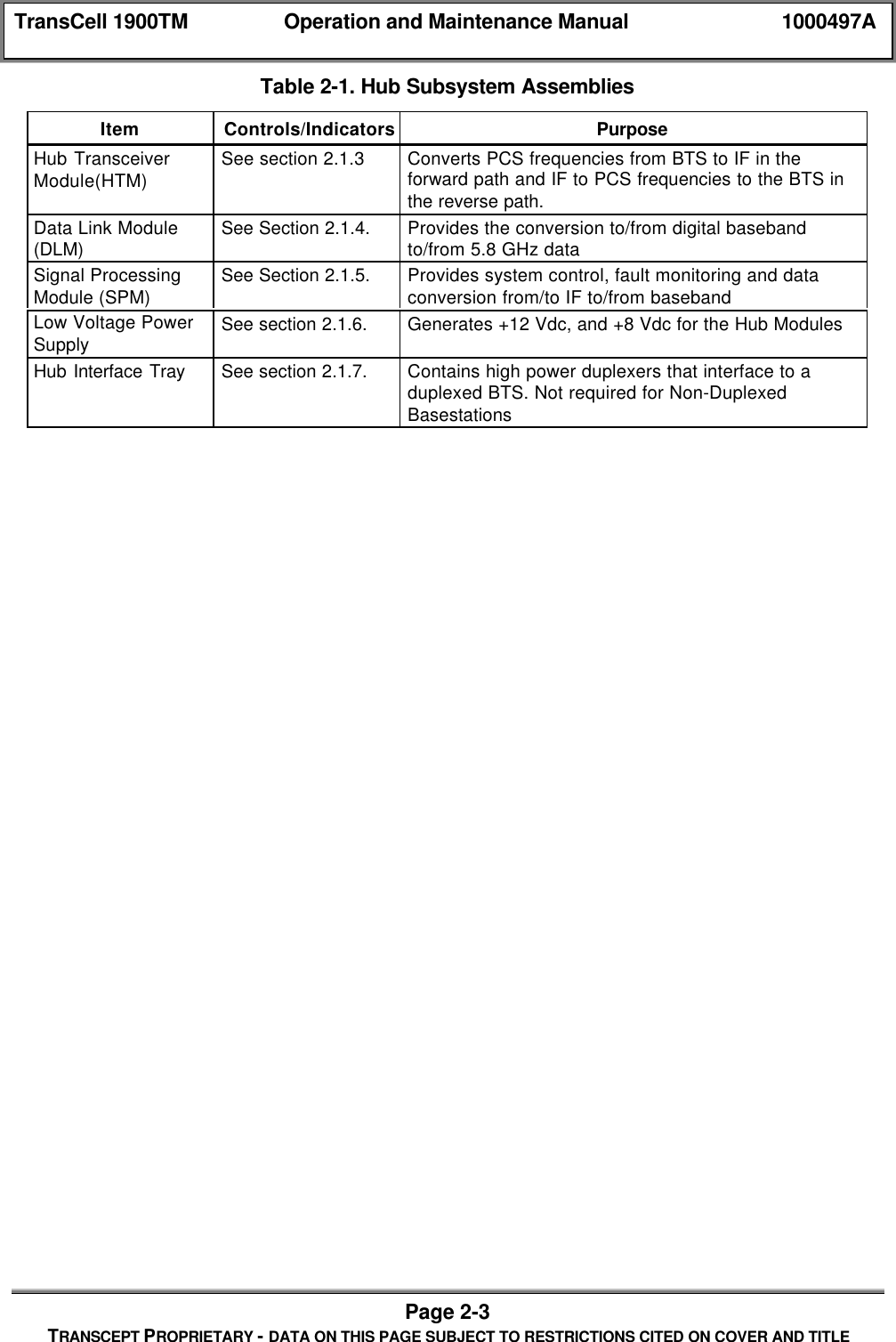
TransCell 1900TM Operation and Maintenance Manual 1000497APage 2-1TRANSCEPT PROPRIETARY - DATA ON THIS PAGE SUBJECT TO RESTRICTIONS CITED ON COVER AND TITLESECTION 2CONTROLS AND INDICATORS2.0 CONTROLS AND INDICATORS2.1 HUB ENCLOSURE CONFIGURATIONS2.1.1 Front and Rear PanelsThe front and rear views of the Hub are shown below in Figure 2-1. A Single Hubconfiguration only is shown.  A dual Hub configuration is very similar.  In a dual Hubconfiguration an additional chassis would be installed with the exact compliment of CCAsthat are in the single Hub chassis.  Table 2-1 lists all of the major assemblies of a Hub.
TransCell 1900TM Operation and Maintenance Manual 1000497APage 2-2TRANSCEPT PROPRIETARY - DATA ON THIS PAGE SUBJECT TO RESTRICTIONS CITED ON COVER AND TITLEFigure 2-1. Hub Subsystem (Single) Assembly Locations
TransCell 1900TM Operation and Maintenance Manual 1000497APage 2-3TRANSCEPT PROPRIETARY - DATA ON THIS PAGE SUBJECT TO RESTRICTIONS CITED ON COVER AND TITLETable 2-1. Hub Subsystem AssembliesItem Controls/Indicators PurposeHub TransceiverModule(HTM) See section 2.1.3 Converts PCS frequencies from BTS to IF in theforward path and IF to PCS frequencies to the BTS inthe reverse path.Data Link Module(DLM) See Section 2.1.4. Provides the conversion to/from digital basebandto/from 5.8 GHz dataSignal ProcessingModule (SPM) See Section 2.1.5. Provides system control, fault monitoring and dataconversion from/to IF to/from basebandLow Voltage PowerSupply See section 2.1.6. Generates +12 Vdc, and +8 Vdc for the Hub ModulesHub Interface Tray See section 2.1.7. Contains high power duplexers that interface to aduplexed BTS. Not required for Non-DuplexedBasestations
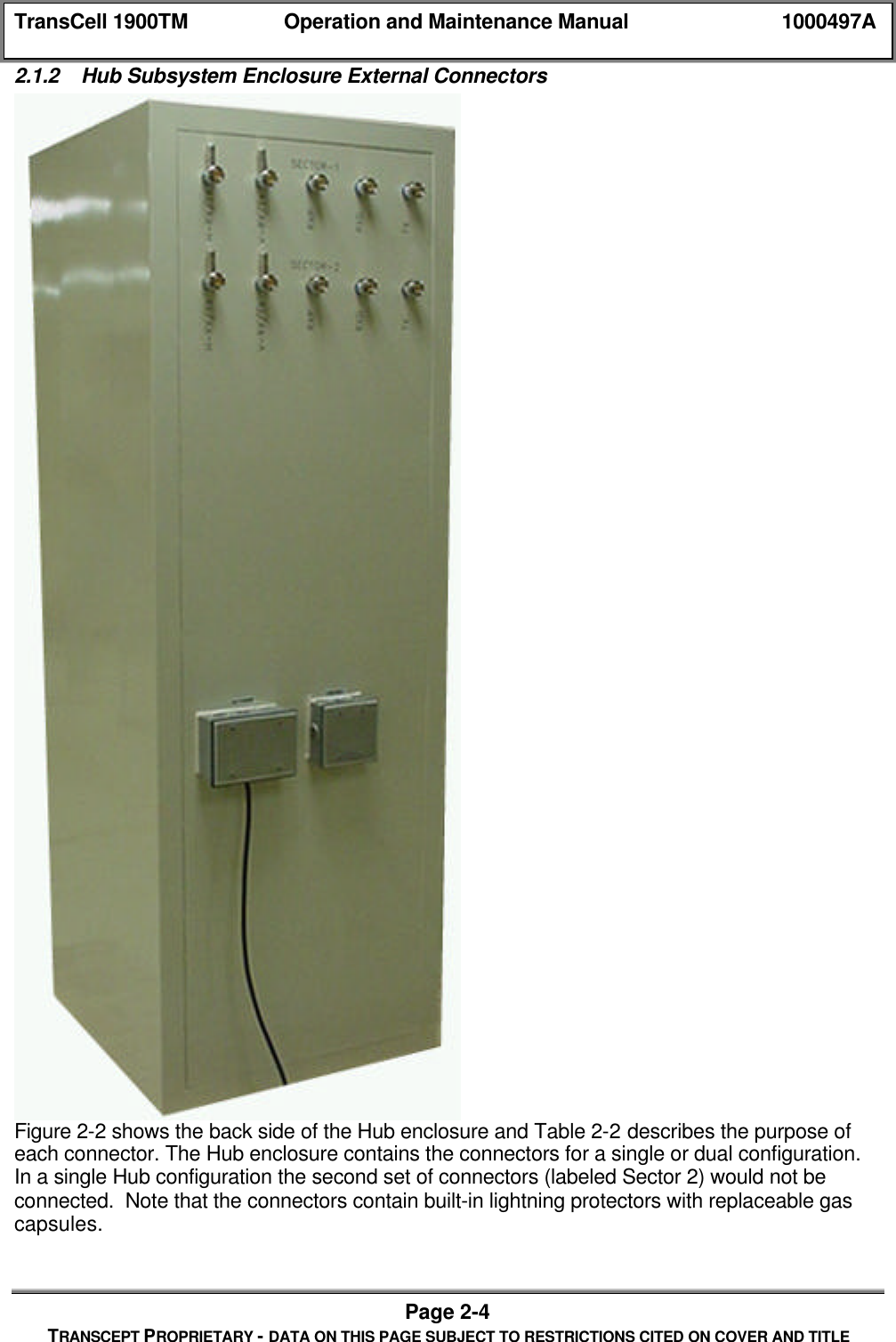
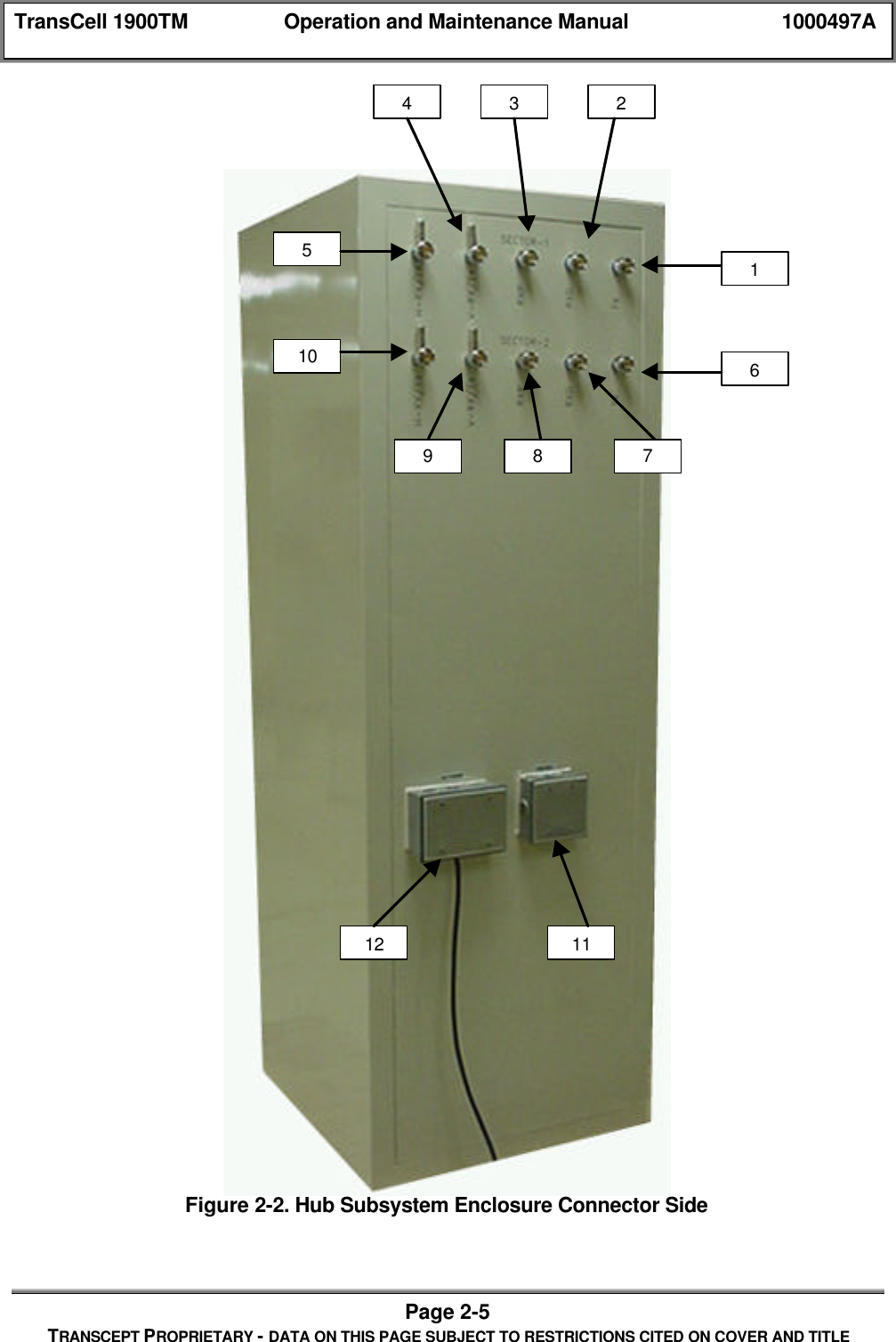
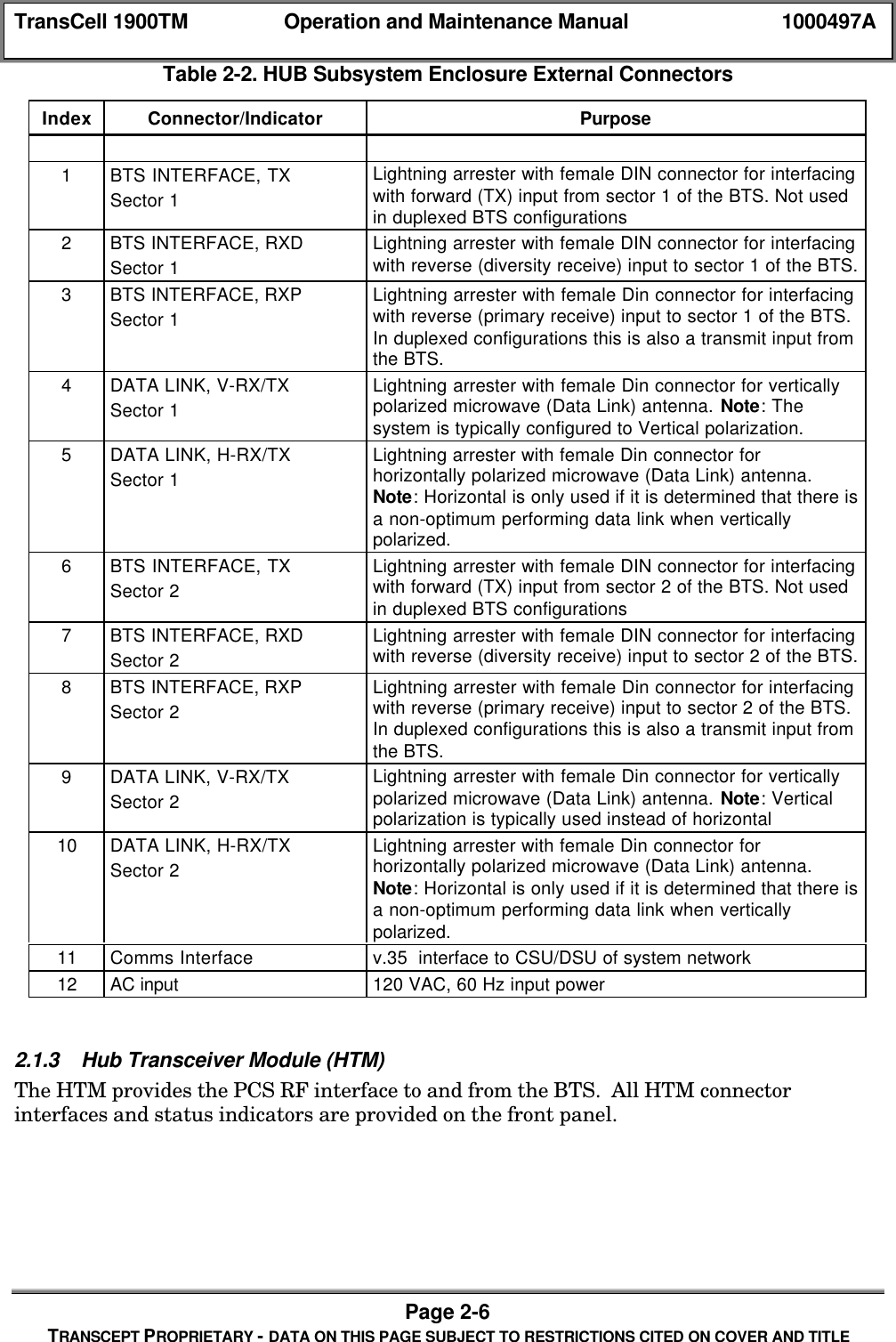
TransCell 1900TM Operation and Maintenance Manual 1000497APage 2-4TRANSCEPT PROPRIETARY - DATA ON THIS PAGE SUBJECT TO RESTRICTIONS CITED ON COVER AND TITLE2.1.2 Hub Subsystem Enclosure External ConnectorsFigure 2-2 shows the back side of the Hub enclosure and Table 2-2 describes the purpose ofeach connector. The Hub enclosure contains the connectors for a single or dual configuration.In a single Hub configuration the second set of connectors (labeled Sector 2) would not beconnected.  Note that the connectors contain built-in lightning protectors with replaceable gascapsules.
TransCell 1900TM Operation and Maintenance Manual 1000497APage 2-5TRANSCEPT PROPRIETARY - DATA ON THIS PAGE SUBJECT TO RESTRICTIONS CITED ON COVER AND TITLEFigure 2-2. Hub Subsystem Enclosure Connector Side164327891051112
TransCell 1900TM Operation and Maintenance Manual 1000497APage 2-6TRANSCEPT PROPRIETARY - DATA ON THIS PAGE SUBJECT TO RESTRICTIONS CITED ON COVER AND TITLETable 2-2. HUB Subsystem Enclosure External ConnectorsIndex Connector/Indicator Purpose1BTS INTERFACE, TXSector 1Lightning arrester with female DIN connector for interfacingwith forward (TX) input from sector 1 of the BTS. Not usedin duplexed BTS configurations2BTS INTERFACE, RXDSector 1Lightning arrester with female DIN connector for interfacingwith reverse (diversity receive) input to sector 1 of the BTS.3BTS INTERFACE, RXPSector 1Lightning arrester with female Din connector for interfacingwith reverse (primary receive) input to sector 1 of the BTS.In duplexed configurations this is also a transmit input fromthe BTS.4DATA LINK, V-RX/TXSector 1Lightning arrester with female Din connector for verticallypolarized microwave (Data Link) antenna. Note: Thesystem is typically configured to Vertical polarization.5DATA LINK, H-RX/TXSector 1Lightning arrester with female Din connector forhorizontally polarized microwave (Data Link) antenna.Note: Horizontal is only used if it is determined that there isa non-optimum performing data link when verticallypolarized.6BTS INTERFACE, TXSector 2Lightning arrester with female DIN connector for interfacingwith forward (TX) input from sector 2 of the BTS. Not usedin duplexed BTS configurations7BTS INTERFACE, RXDSector 2Lightning arrester with female DIN connector for interfacingwith reverse (diversity receive) input to sector 2 of the BTS.8BTS INTERFACE, RXPSector 2Lightning arrester with female Din connector for interfacingwith reverse (primary receive) input to sector 2 of the BTS.In duplexed configurations this is also a transmit input fromthe BTS.9DATA LINK, V-RX/TXSector 2Lightning arrester with female Din connector for verticallypolarized microwave (Data Link) antenna. Note: Verticalpolarization is typically used instead of horizontal10 DATA LINK, H-RX/TXSector 2Lightning arrester with female Din connector forhorizontally polarized microwave (Data Link) antenna.Note: Horizontal is only used if it is determined that there isa non-optimum performing data link when verticallypolarized.11 Comms Interface v.35  interface to CSU/DSU of system network12 AC input 120 VAC, 60 Hz input power2.1.3 Hub Transceiver Module (HTM)The HTM provides the PCS RF interface to and from the BTS.  All HTM connectorinterfaces and status indicators are provided on the front panel.
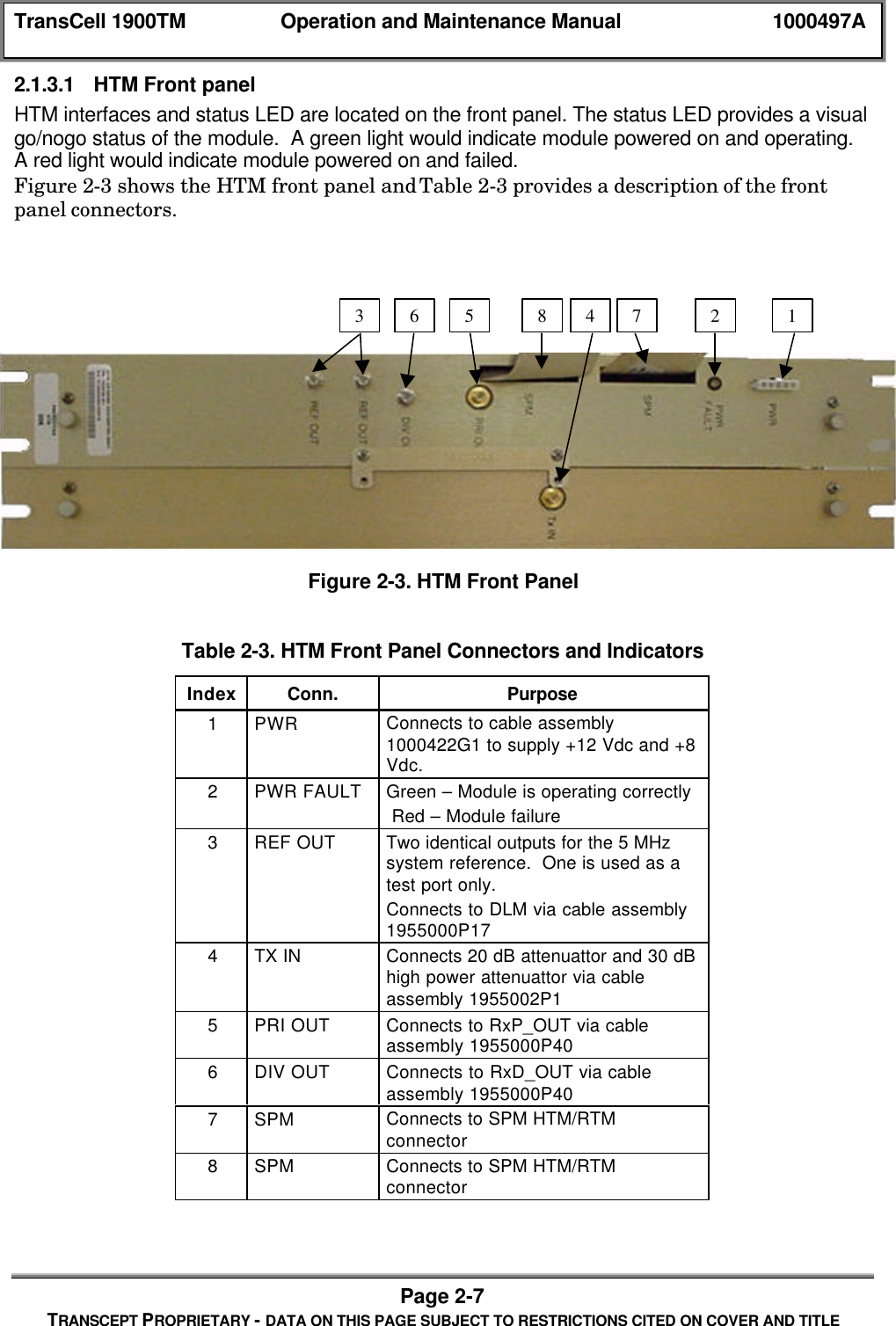
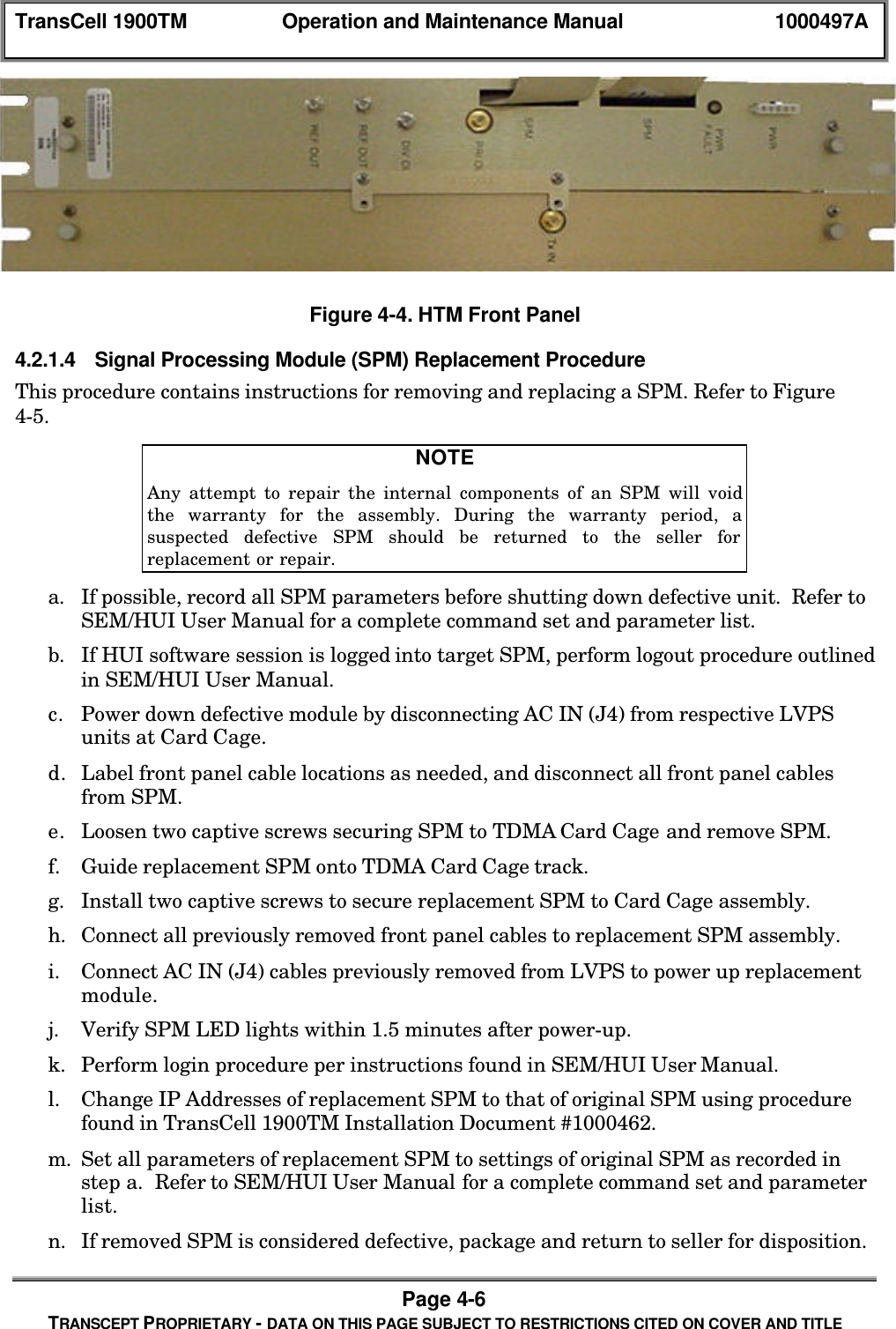
TransCell 1900TM Operation and Maintenance Manual 1000497APage 2-7TRANSCEPT PROPRIETARY - DATA ON THIS PAGE SUBJECT TO RESTRICTIONS CITED ON COVER AND TITLE2.1.3.1 HTM Front panelHTM interfaces and status LED are located on the front panel. The status LED provides a visualgo/nogo status of the module.  A green light would indicate module powered on and operating.A red light would indicate module powered on and failed.Figure 2-3 shows the HTM front panel and Table 2-3 provides a description of the frontpanel connectors.Figure 2-3. HTM Front PanelTable 2-3. HTM Front Panel Connectors and IndicatorsIndex Conn. Purpose1PWR Connects to cable assembly1000422G1 to supply +12 Vdc and +8Vdc.2PWR FAULT Green – Module is operating correctly Red – Module failure3REF OUT Two identical outputs for the 5 MHzsystem reference.  One is used as atest port only.Connects to DLM via cable assembly1955000P174TX IN Connects 20 dB attenuattor and 30 dBhigh power attenuattor via cableassembly 1955002P15PRI OUT Connects to RxP_OUT via cableassembly 1955000P406DIV OUT Connects to RxD_OUT via cableassembly 1955000P407SPM Connects to SPM HTM/RTMconnector8SPM Connects to SPM HTM/RTMconnector1275 863 4
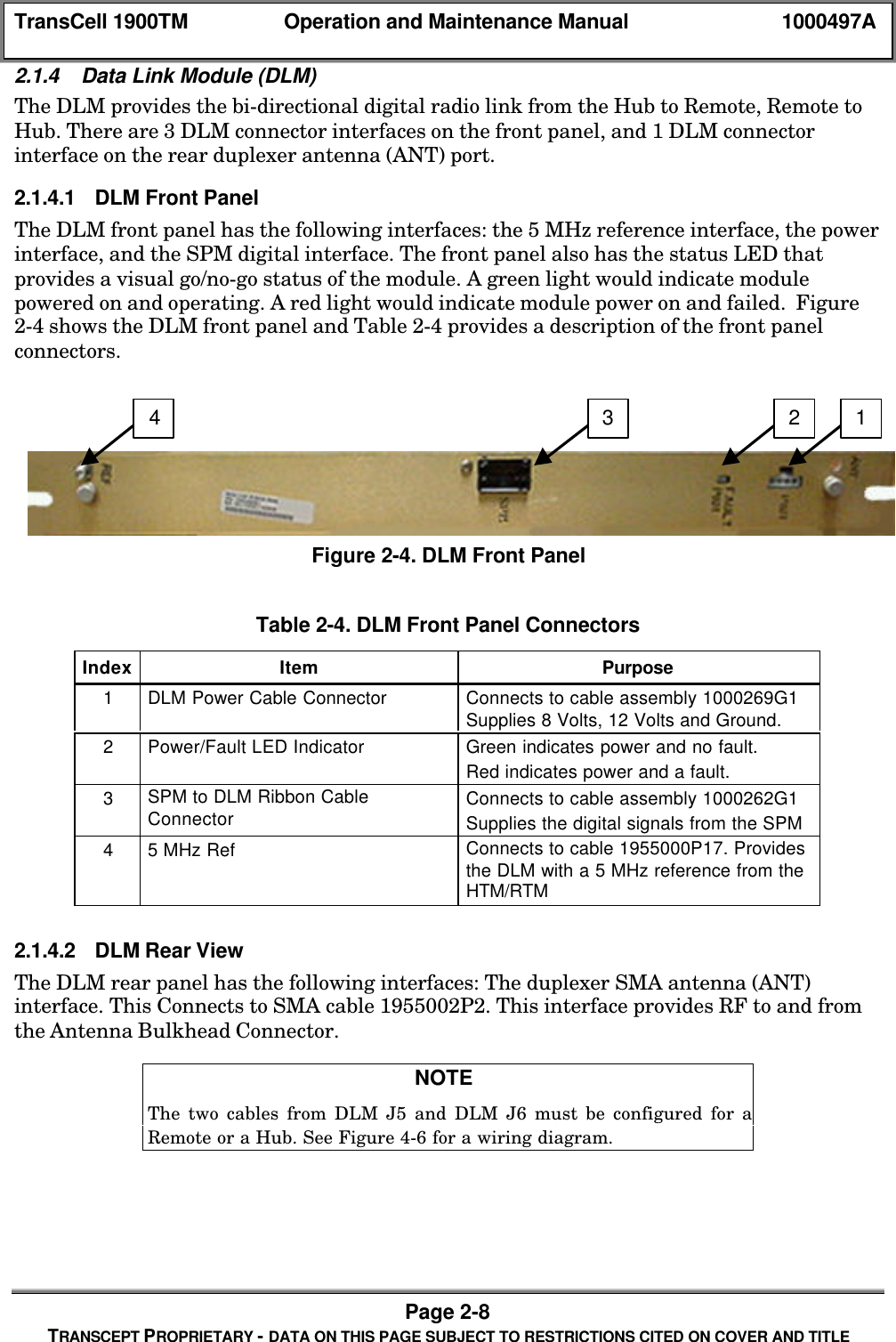
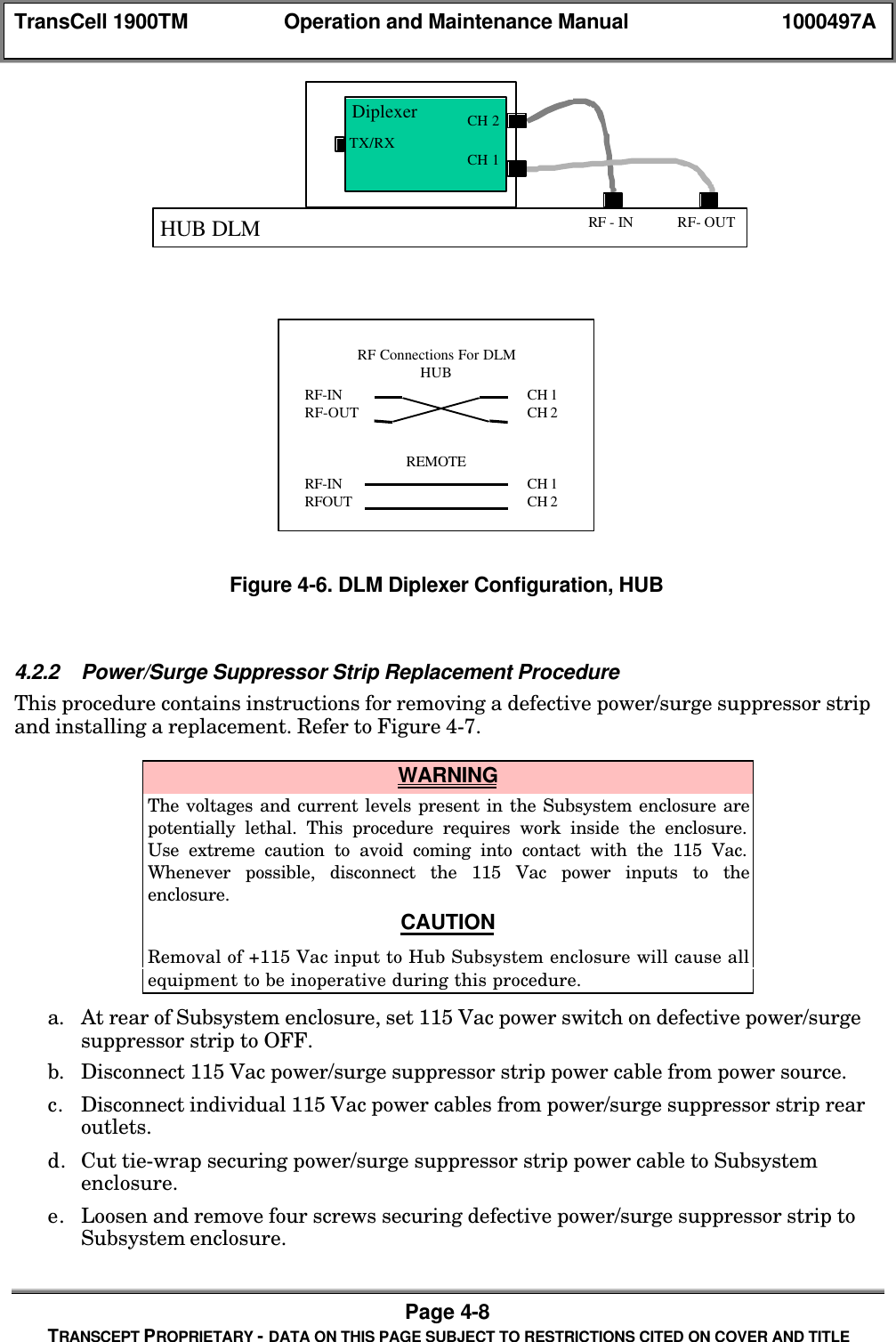
TransCell 1900TM Operation and Maintenance Manual 1000497APage 2-8TRANSCEPT PROPRIETARY - DATA ON THIS PAGE SUBJECT TO RESTRICTIONS CITED ON COVER AND TITLE2.1.4 Data Link Module (DLM)The DLM provides the bi-directional digital radio link from the Hub to Remote, Remote toHub. There are 3 DLM connector interfaces on the front panel, and 1 DLM connectorinterface on the rear duplexer antenna (ANT) port.2.1.4.1 DLM Front PanelThe DLM front panel has the following interfaces: the 5 MHz reference interface, the powerinterface, and the SPM digital interface. The front panel also has the status LED thatprovides a visual go/no-go status of the module. A green light would indicate modulepowered on and operating. A red light would indicate module power on and failed.  Figure2-4 shows the DLM front panel and Table 2-4 provides a description of the front panelconnectors.Figure 2-4. DLM Front PanelTable 2-4. DLM Front Panel ConnectorsIndex Item Purpose1DLM Power Cable Connector Connects to cable assembly 1000269G1Supplies 8 Volts, 12 Volts and Ground.2Power/Fault LED Indicator Green indicates power and no fault.Red indicates power and a fault.3SPM to DLM Ribbon CableConnector Connects to cable assembly 1000262G1Supplies the digital signals from the SPM45 MHz Ref Connects to cable 1955000P17. Providesthe DLM with a 5 MHz reference from theHTM/RTM2.1.4.2 DLM Rear ViewThe DLM rear panel has the following interfaces: The duplexer SMA antenna (ANT)interface. This Connects to SMA cable 1955002P2. This interface provides RF to and fromthe Antenna Bulkhead Connector.NOTE The two cables from DLM J5 and DLM J6 must be configured for aRemote or a Hub. See Figure 4-6 for a wiring diagram.4 3 2 1
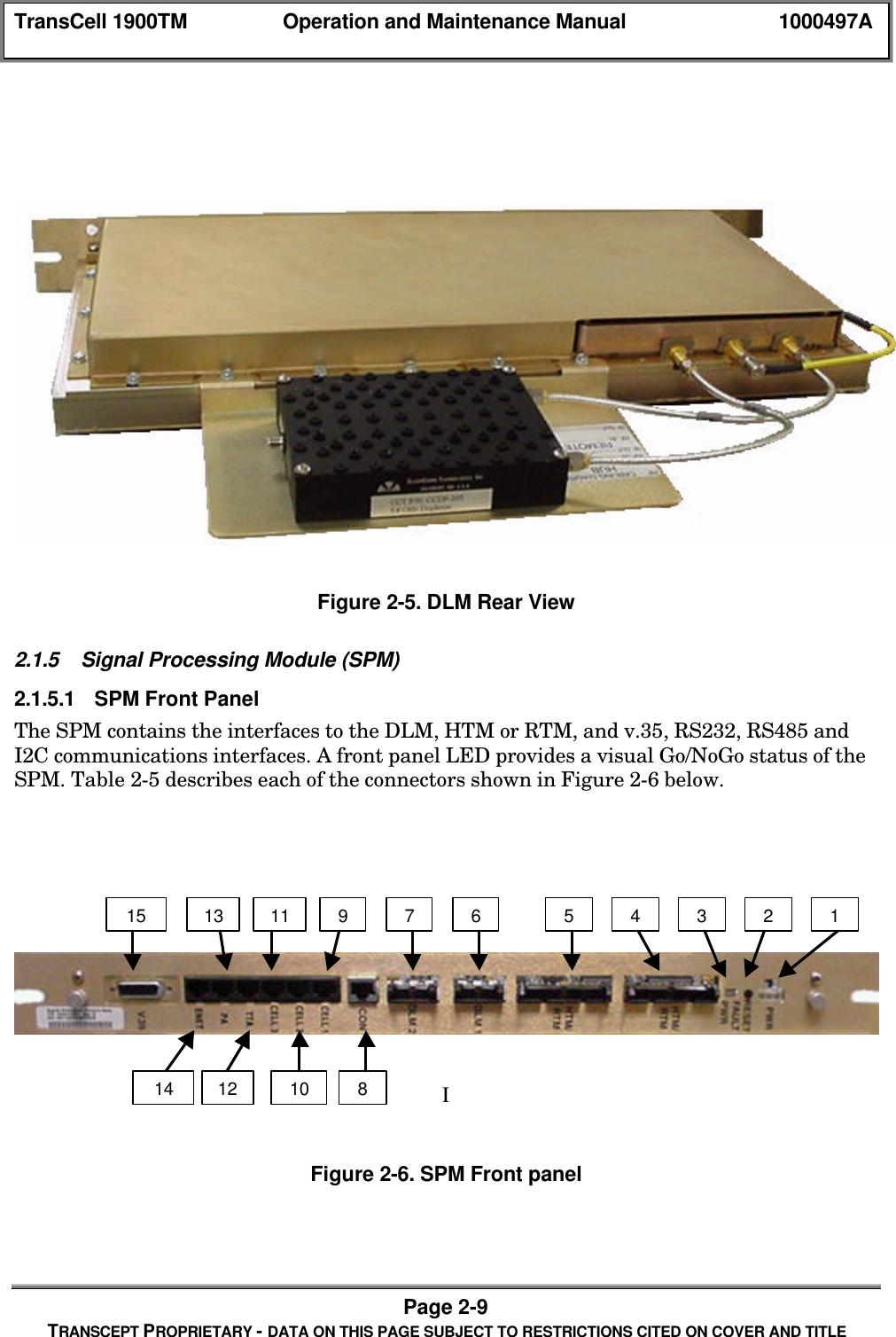
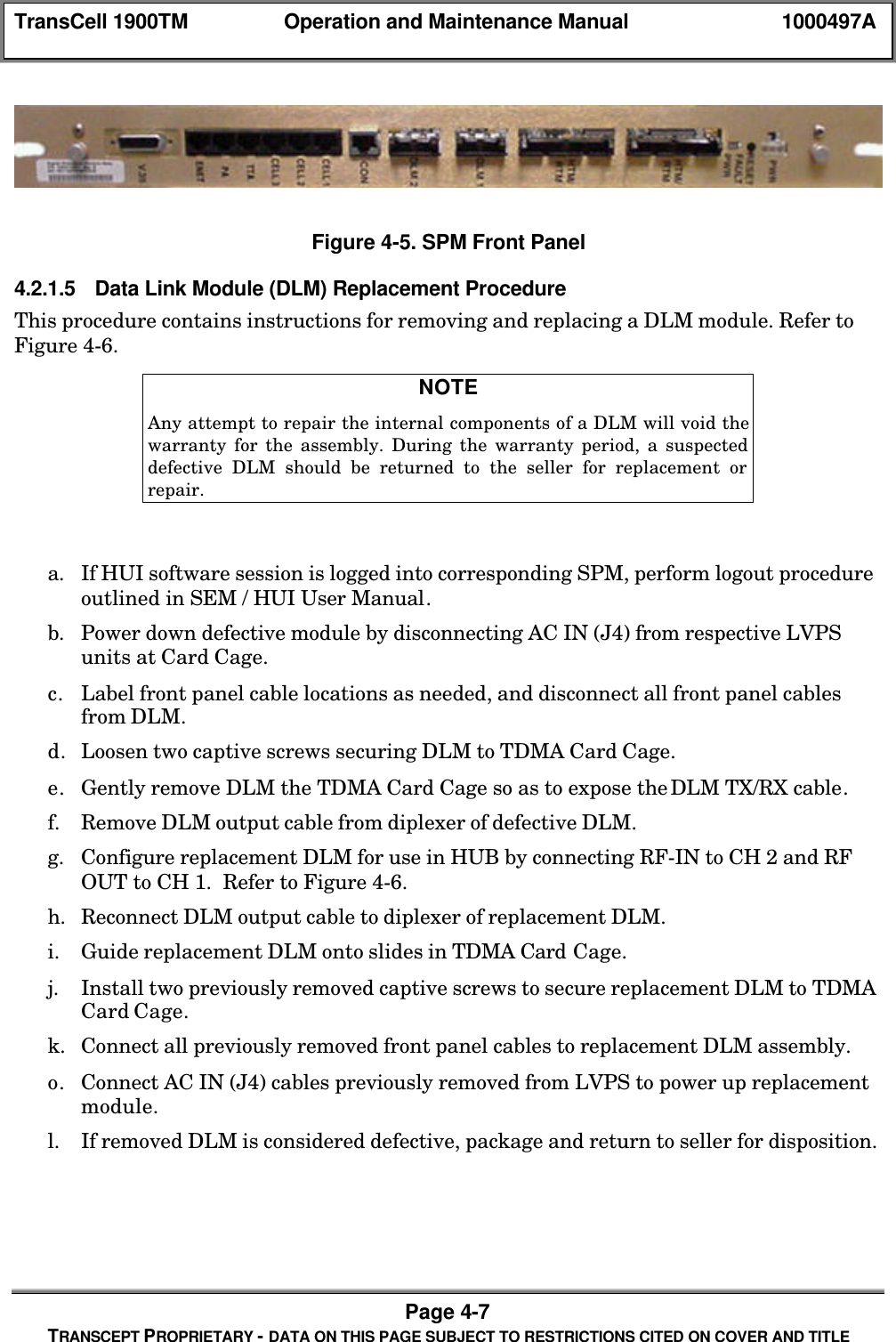
TransCell 1900TM Operation and Maintenance Manual 1000497APage 2-9TRANSCEPT PROPRIETARY - DATA ON THIS PAGE SUBJECT TO RESTRICTIONS CITED ON COVER AND TITLEFigure 2-5. DLM Rear View2.1.5 Signal Processing Module (SPM)2.1.5.1 SPM Front PanelThe SPM contains the interfaces to the DLM, HTM or RTM, and v.35, RS232, RS485 andI2C communications interfaces. A front panel LED provides a visual Go/NoGo status of theSPM. Table 2-5 describes each of the connectors shown in Figure 2-6 below.IFigure 2-6. SPM Front panel149765321315111210814
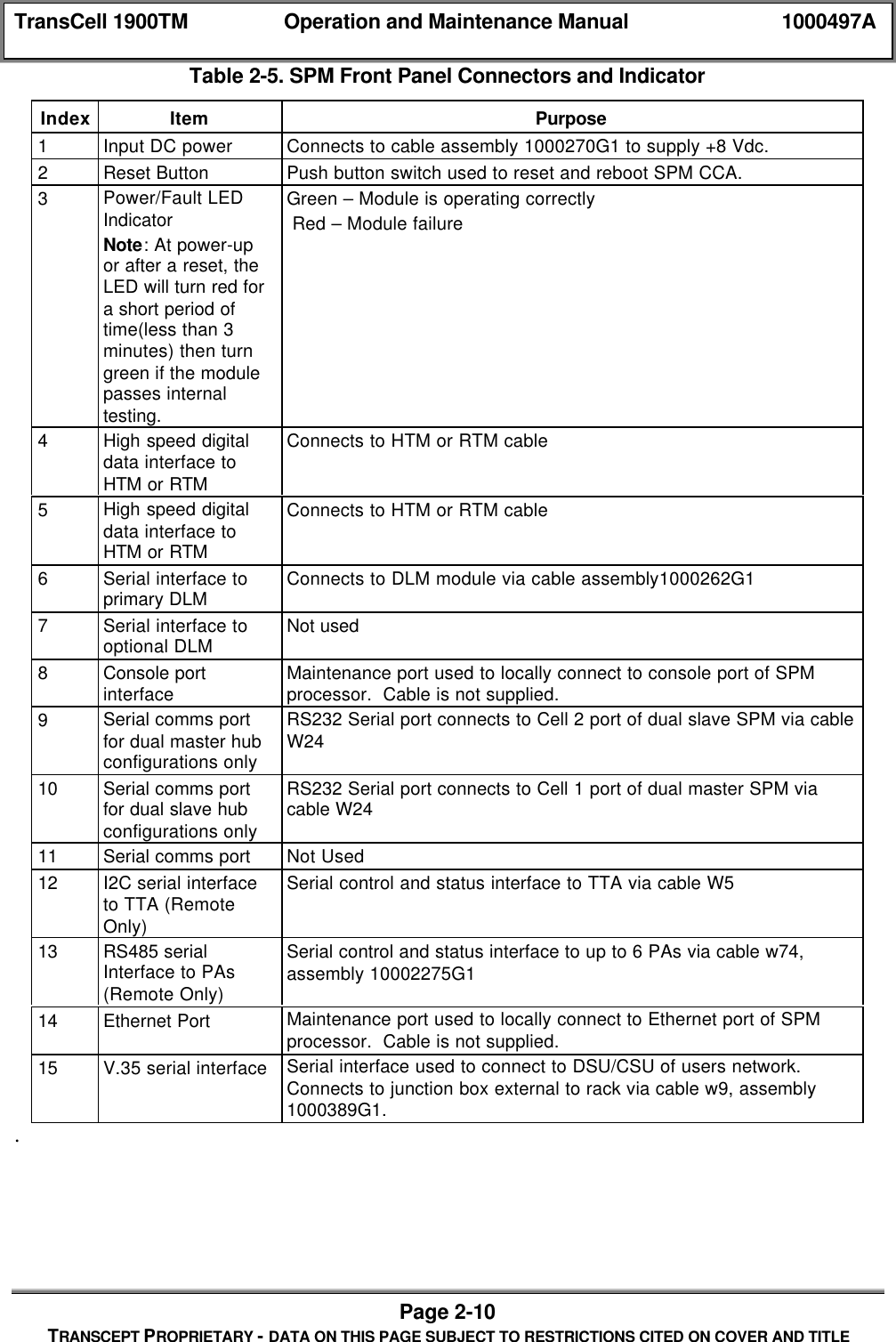
TransCell 1900TM Operation and Maintenance Manual 1000497APage 2-10TRANSCEPT PROPRIETARY - DATA ON THIS PAGE SUBJECT TO RESTRICTIONS CITED ON COVER AND TITLETable 2-5. SPM Front Panel Connectors and IndicatorIndex Item Purpose1Input DC power Connects to cable assembly 1000270G1 to supply +8 Vdc.2Reset Button Push button switch used to reset and reboot SPM CCA.3Power/Fault LEDIndicatorNote: At power-upor after a reset, theLED will turn red fora short period oftime(less than 3minutes) then turngreen if the modulepasses internaltesting.Green – Module is operating correctly Red – Module failure4High speed digitaldata interface toHTM or RTMConnects to HTM or RTM cable5High speed digitaldata interface toHTM or RTMConnects to HTM or RTM cable6Serial interface toprimary DLM Connects to DLM module via cable assembly1000262G17Serial interface tooptional DLM Not used8Console portinterface Maintenance port used to locally connect to console port of SPMprocessor.  Cable is not supplied.9Serial comms portfor dual master hubconfigurations onlyRS232 Serial port connects to Cell 2 port of dual slave SPM via cableW2410 Serial comms portfor dual slave hubconfigurations onlyRS232 Serial port connects to Cell 1 port of dual master SPM viacable W2411 Serial comms port Not Used12 I2C serial interfaceto TTA (RemoteOnly)Serial control and status interface to TTA via cable W513 RS485 serialInterface to PAs(Remote Only)Serial control and status interface to up to 6 PAs via cable w74,assembly 10002275G114 Ethernet Port Maintenance port used to locally connect to Ethernet port of SPMprocessor.  Cable is not supplied.15 V.35 serial interface Serial interface used to connect to DSU/CSU of users network.Connects to junction box external to rack via cable w9, assembly1000389G1..
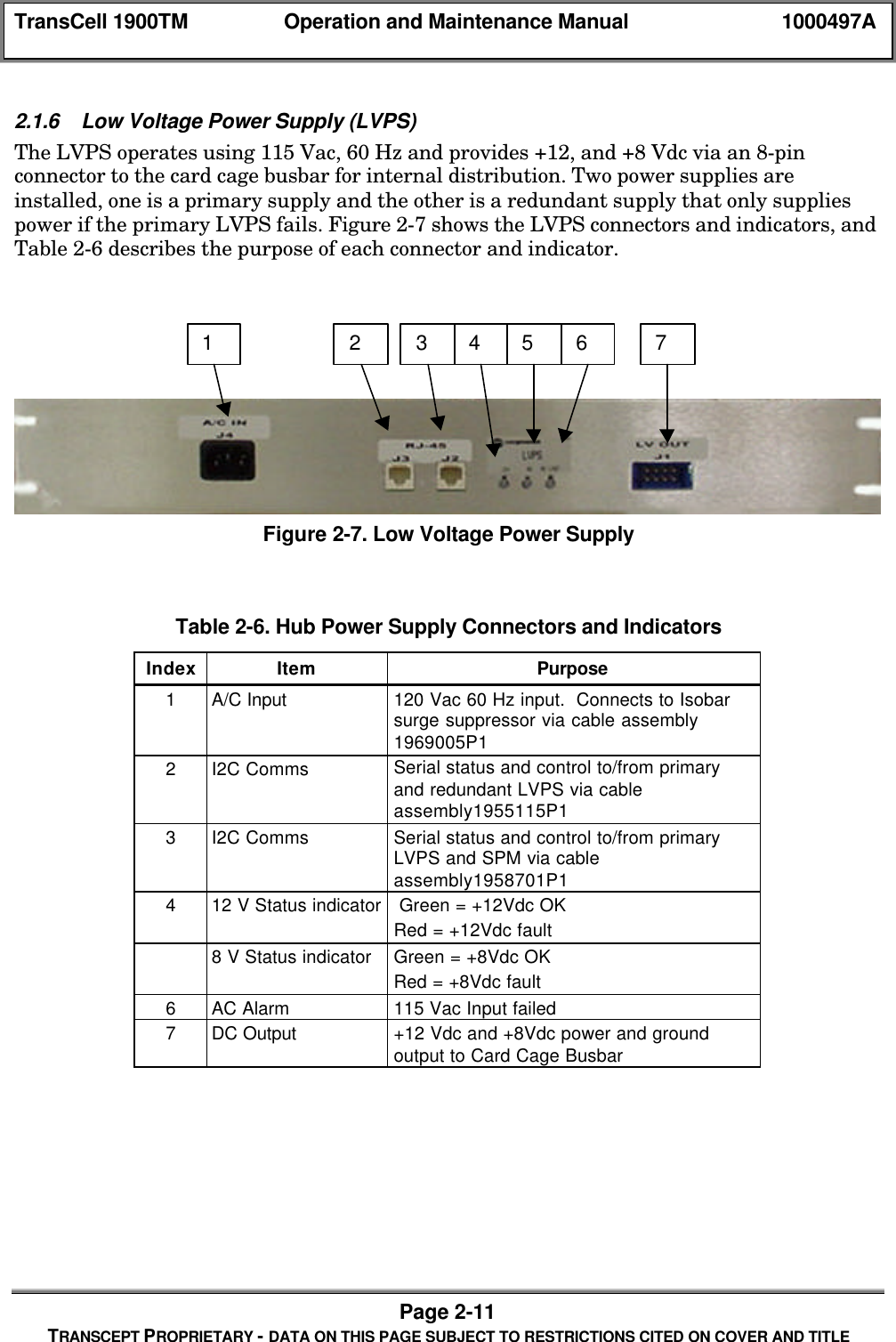
TransCell 1900TM Operation and Maintenance Manual 1000497APage 2-11TRANSCEPT PROPRIETARY - DATA ON THIS PAGE SUBJECT TO RESTRICTIONS CITED ON COVER AND TITLE2.1.6 Low Voltage Power Supply (LVPS)The LVPS operates using 115 Vac, 60 Hz and provides +12, and +8 Vdc via an 8-pinconnector to the card cage busbar for internal distribution. Two power supplies areinstalled, one is a primary supply and the other is a redundant supply that only suppliespower if the primary LVPS fails. Figure 2-7 shows the LVPS connectors and indicators, andTable 2-6 describes the purpose of each connector and indicator.Figure 2-7. Low Voltage Power SupplyTable 2-6. Hub Power Supply Connectors and IndicatorsIndex Item Purpose1A/C Input 120 Vac 60 Hz input.  Connects to Isobarsurge suppressor via cable assembly1969005P12I2C Comms Serial status and control to/from primaryand redundant LVPS via cableassembly1955115P13I2C Comms Serial status and control to/from primaryLVPS and SPM via cableassembly1958701P1412 V Status indicator  Green = +12Vdc OKRed = +12Vdc fault8 V Status indicator Green = +8Vdc OKRed = +8Vdc fault6AC Alarm 115 Vac Input failed7DC Output +12 Vdc and +8Vdc power and groundoutput to Card Cage Busbar1 2 3 4 5 6 7
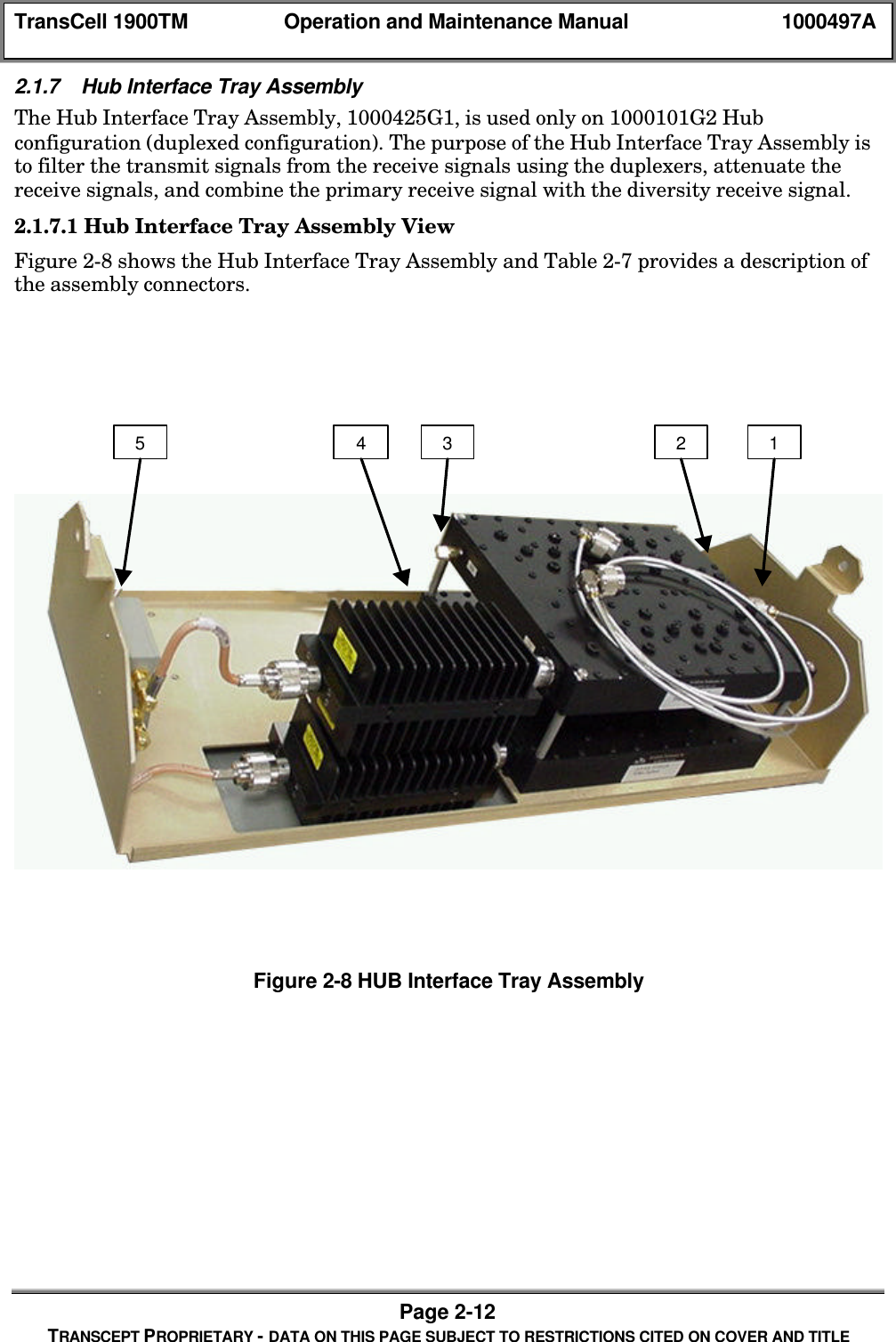
TransCell 1900TM Operation and Maintenance Manual 1000497APage 2-12TRANSCEPT PROPRIETARY - DATA ON THIS PAGE SUBJECT TO RESTRICTIONS CITED ON COVER AND TITLE2.1.7 Hub Interface Tray AssemblyThe Hub Interface Tray Assembly, 1000425G1, is used only on 1000101G2 Hubconfiguration (duplexed configuration). The purpose of the Hub Interface Tray Assembly isto filter the transmit signals from the receive signals using the duplexers, attenuate thereceive signals, and combine the primary receive signal with the diversity receive signal.2.1.7.1 Hub Interface Tray Assembly ViewFigure 2-8 shows the Hub Interface Tray Assembly and Table 2-7 provides a description ofthe assembly connectors.Figure 2-8 HUB Interface Tray Assembly12345
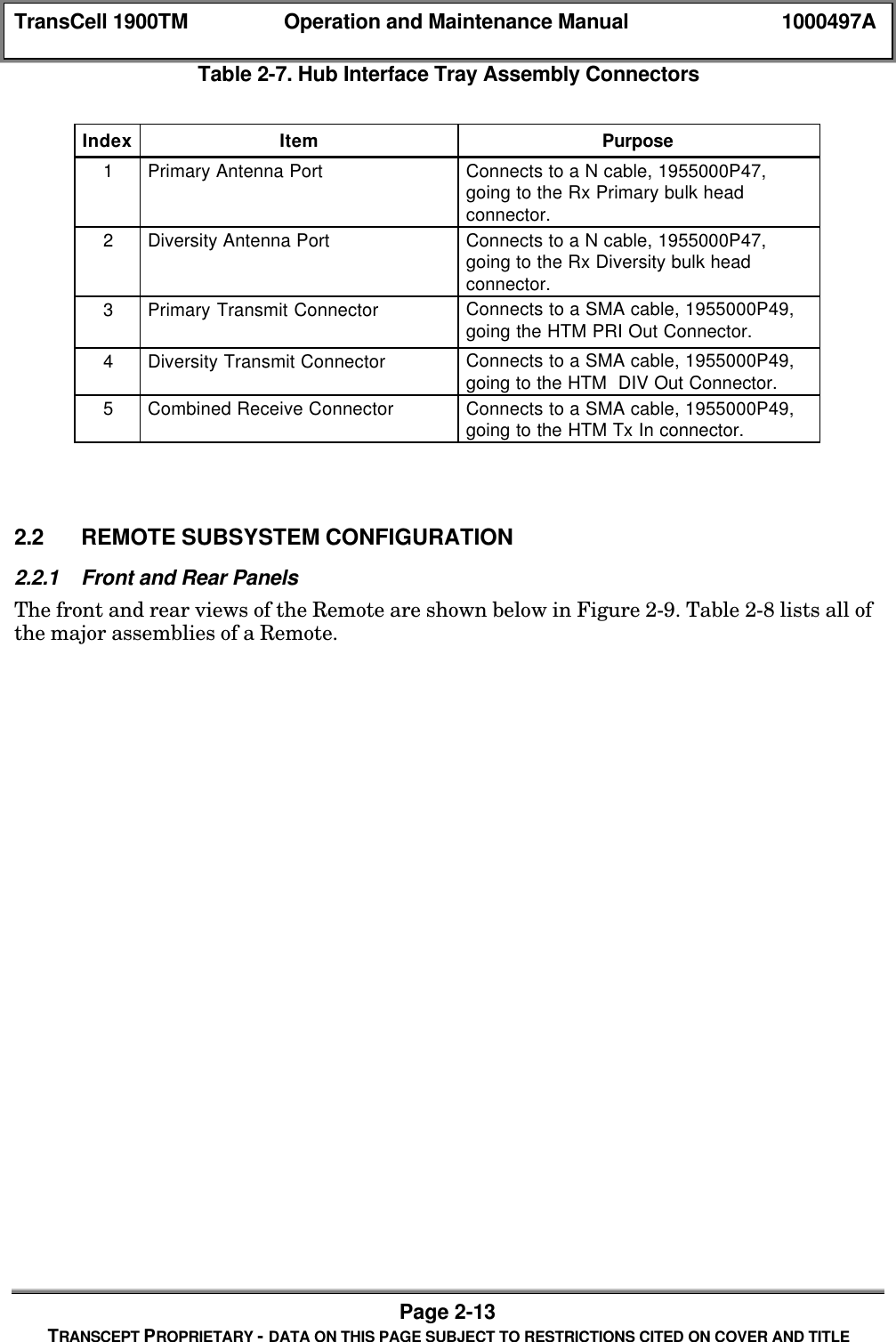
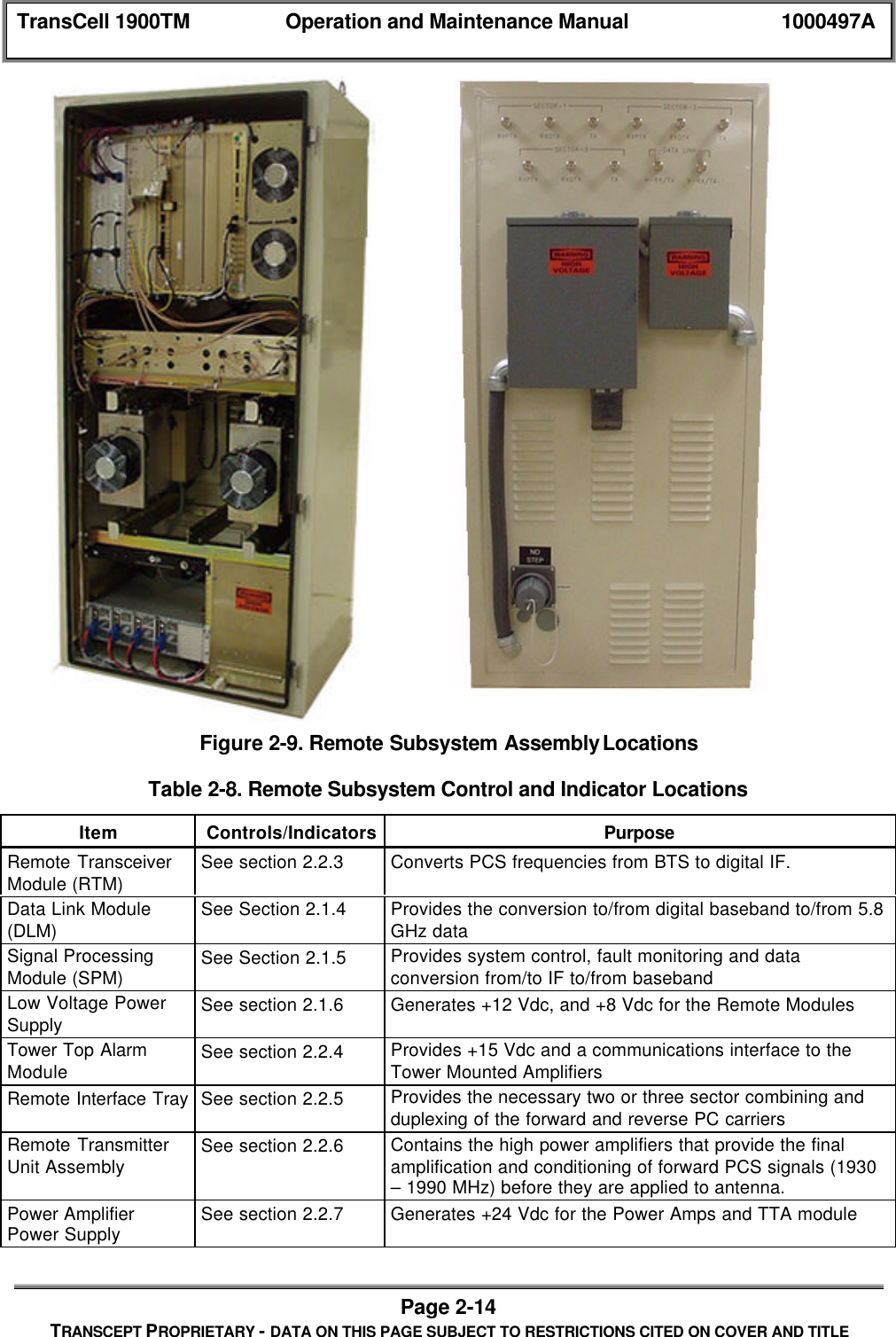
TransCell 1900TM Operation and Maintenance Manual 1000497APage 2-13TRANSCEPT PROPRIETARY - DATA ON THIS PAGE SUBJECT TO RESTRICTIONS CITED ON COVER AND TITLETable 2-7. Hub Interface Tray Assembly ConnectorsIndex Item Purpose1Primary Antenna Port Connects to a N cable, 1955000P47,going to the Rx Primary bulk headconnector.2Diversity Antenna Port Connects to a N cable, 1955000P47,going to the Rx Diversity bulk headconnector.3Primary Transmit Connector Connects to a SMA cable, 1955000P49,going the HTM PRI Out Connector.4Diversity Transmit Connector Connects to a SMA cable, 1955000P49,going to the HTM  DIV Out Connector.5Combined Receive Connector Connects to a SMA cable, 1955000P49,going to the HTM Tx In connector.2.2 REMOTE SUBSYSTEM CONFIGURATION2.2.1 Front and Rear PanelsThe front and rear views of the Remote are shown below in Figure 2-9. Table 2-8 lists all ofthe major assemblies of a Remote.
TransCell 1900TM Operation and Maintenance Manual 1000497APage 2-14TRANSCEPT PROPRIETARY - DATA ON THIS PAGE SUBJECT TO RESTRICTIONS CITED ON COVER AND TITLEFigure 2-9. Remote Subsystem Assembly LocationsTable 2-8. Remote Subsystem Control and Indicator LocationsItem Controls/Indicators PurposeRemote TransceiverModule (RTM) See section 2.2.3 Converts PCS frequencies from BTS to digital IF.Data Link Module(DLM) See Section 2.1.4 Provides the conversion to/from digital baseband to/from 5.8GHz dataSignal ProcessingModule (SPM) See Section 2.1.5 Provides system control, fault monitoring and dataconversion from/to IF to/from basebandLow Voltage PowerSupply See section 2.1.6 Generates +12 Vdc, and +8 Vdc for the Remote ModulesTower Top AlarmModule See section 2.2.4 Provides +15 Vdc and a communications interface to theTower Mounted AmplifiersRemote Interface Tray See section 2.2.5 Provides the necessary two or three sector combining andduplexing of the forward and reverse PC carriersRemote TransmitterUnit Assembly See section 2.2.6 Contains the high power amplifiers that provide the finalamplification and conditioning of forward PCS signals (1930– 1990 MHz) before they are applied to antenna.Power AmplifierPower Supply See section 2.2.7 Generates +24 Vdc for the Power Amps and TTA module
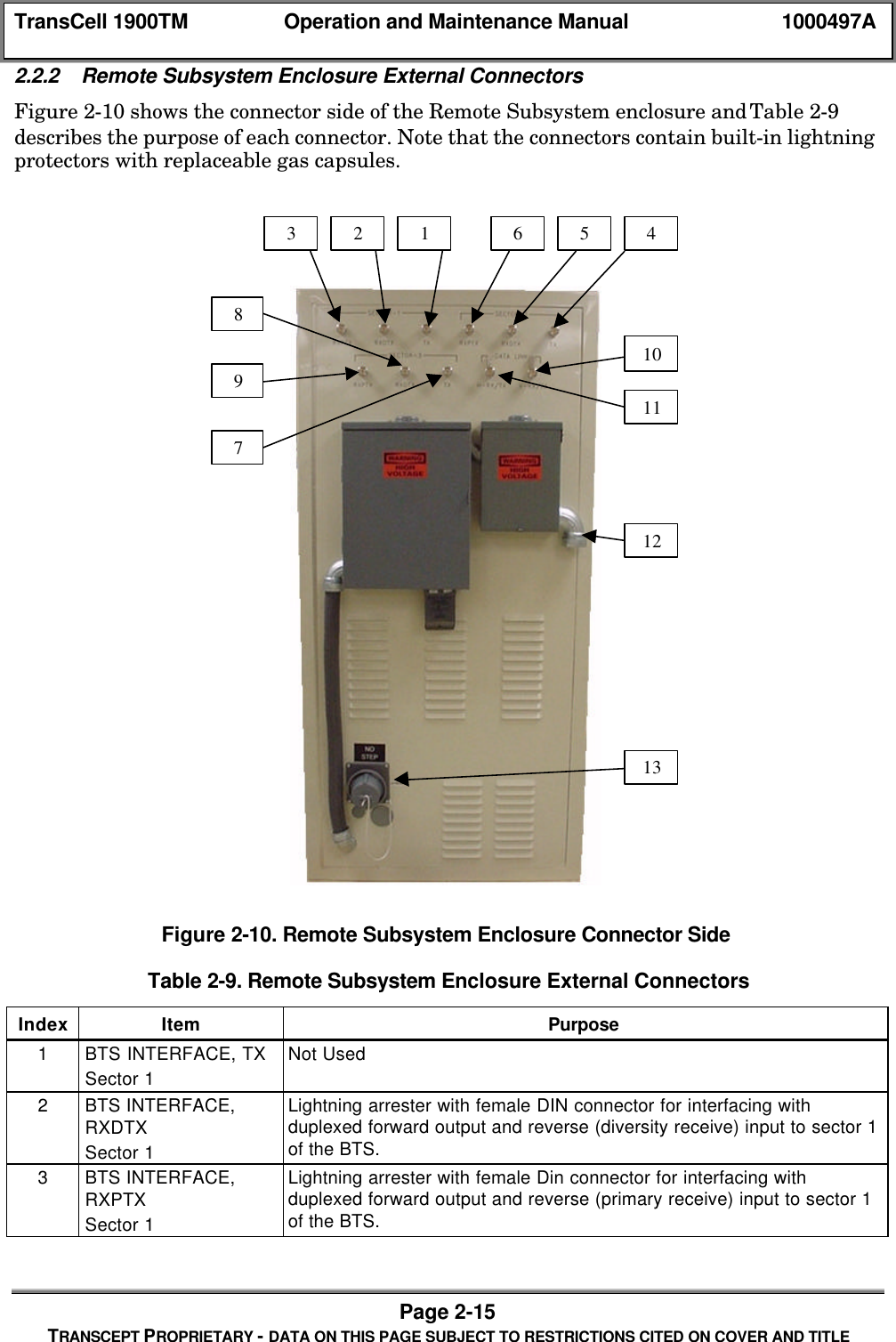
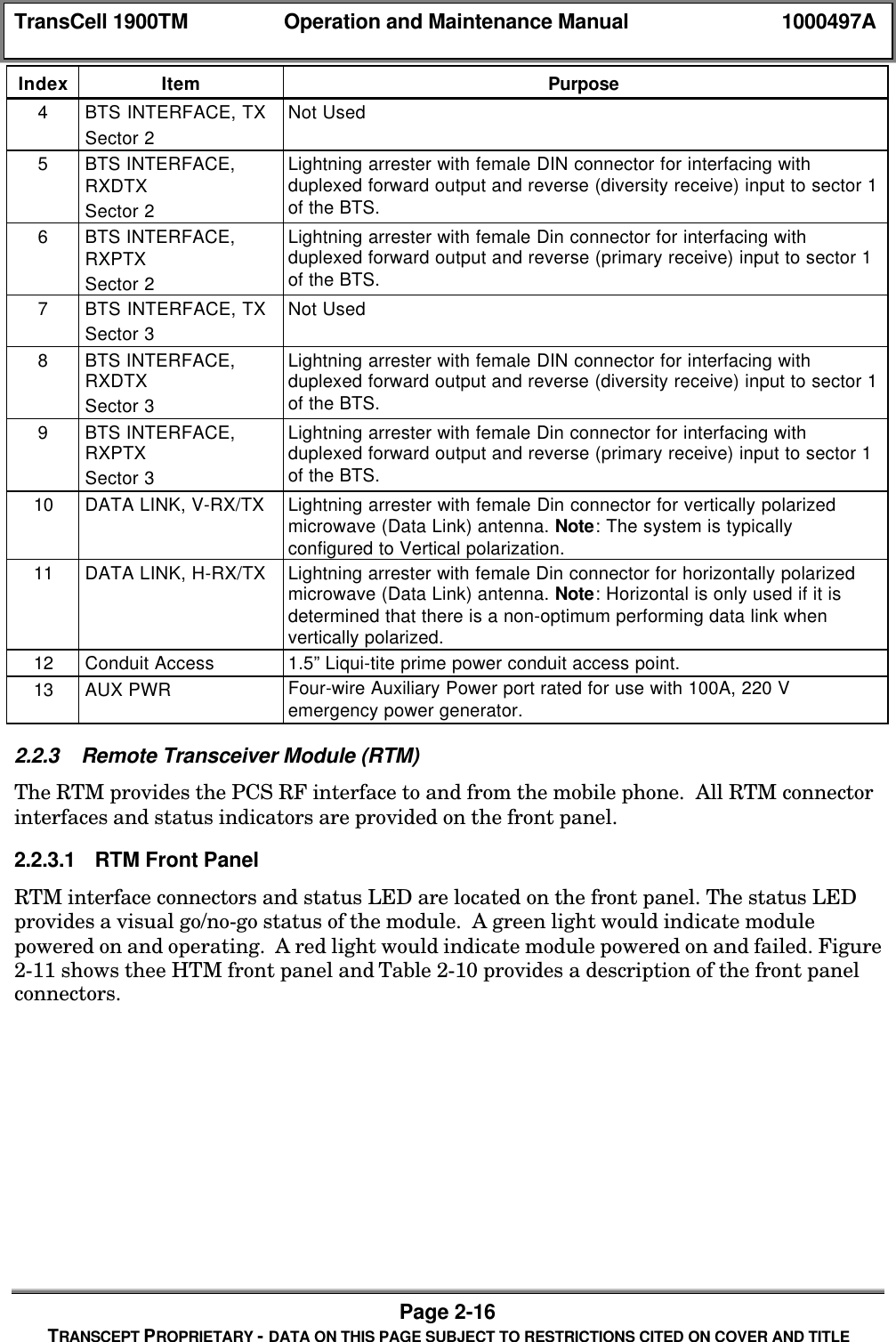
TransCell 1900TM Operation and Maintenance Manual 1000497APage 2-15TRANSCEPT PROPRIETARY - DATA ON THIS PAGE SUBJECT TO RESTRICTIONS CITED ON COVER AND TITLE2.2.2 Remote Subsystem Enclosure External ConnectorsFigure 2-10 shows the connector side of the Remote Subsystem enclosure and Table 2-9describes the purpose of each connector. Note that the connectors contain built-in lightningprotectors with replaceable gas capsules.Figure 2-10. Remote Subsystem Enclosure Connector SideTable 2-9. Remote Subsystem Enclosure External ConnectorsIndex Item Purpose1BTS INTERFACE, TXSector 1Not Used2BTS INTERFACE,RXDTXSector 1Lightning arrester with female DIN connector for interfacing withduplexed forward output and reverse (diversity receive) input to sector 1of the BTS.3BTS INTERFACE,RXPTXSector 1Lightning arrester with female Din connector for interfacing withduplexed forward output and reverse (primary receive) input to sector 1of the BTS.10978321465111213
TransCell 1900TM Operation and Maintenance Manual 1000497APage 2-16TRANSCEPT PROPRIETARY - DATA ON THIS PAGE SUBJECT TO RESTRICTIONS CITED ON COVER AND TITLEIndex Item Purpose4BTS INTERFACE, TXSector 2Not Used5BTS INTERFACE,RXDTXSector 2Lightning arrester with female DIN connector for interfacing withduplexed forward output and reverse (diversity receive) input to sector 1of the BTS.6BTS INTERFACE,RXPTXSector 2Lightning arrester with female Din connector for interfacing withduplexed forward output and reverse (primary receive) input to sector 1of the BTS.7BTS INTERFACE, TXSector 3Not Used8BTS INTERFACE,RXDTXSector 3Lightning arrester with female DIN connector for interfacing withduplexed forward output and reverse (diversity receive) input to sector 1of the BTS.9BTS INTERFACE,RXPTXSector 3Lightning arrester with female Din connector for interfacing withduplexed forward output and reverse (primary receive) input to sector 1of the BTS.10 DATA LINK, V-RX/TX Lightning arrester with female Din connector for vertically polarizedmicrowave (Data Link) antenna. Note: The system is typicallyconfigured to Vertical polarization.11 DATA LINK, H-RX/TX Lightning arrester with female Din connector for horizontally polarizedmicrowave (Data Link) antenna. Note: Horizontal is only used if it isdetermined that there is a non-optimum performing data link whenvertically polarized.12 Conduit Access 1.5” Liqui-tite prime power conduit access point.13 AUX PWR Four-wire Auxiliary Power port rated for use with 100A, 220 Vemergency power generator.2.2.3 Remote Transceiver Module (RTM)The RTM provides the PCS RF interface to and from the mobile phone.  All RTM connectorinterfaces and status indicators are provided on the front panel.2.2.3.1 RTM Front PanelRTM interface connectors and status LED are located on the front panel. The status LEDprovides a visual go/no-go status of the module.  A green light would indicate modulepowered on and operating.  A red light would indicate module powered on and failed. Figure2-11 shows thee HTM front panel and Table 2-10 provides a description of the front panelconnectors.
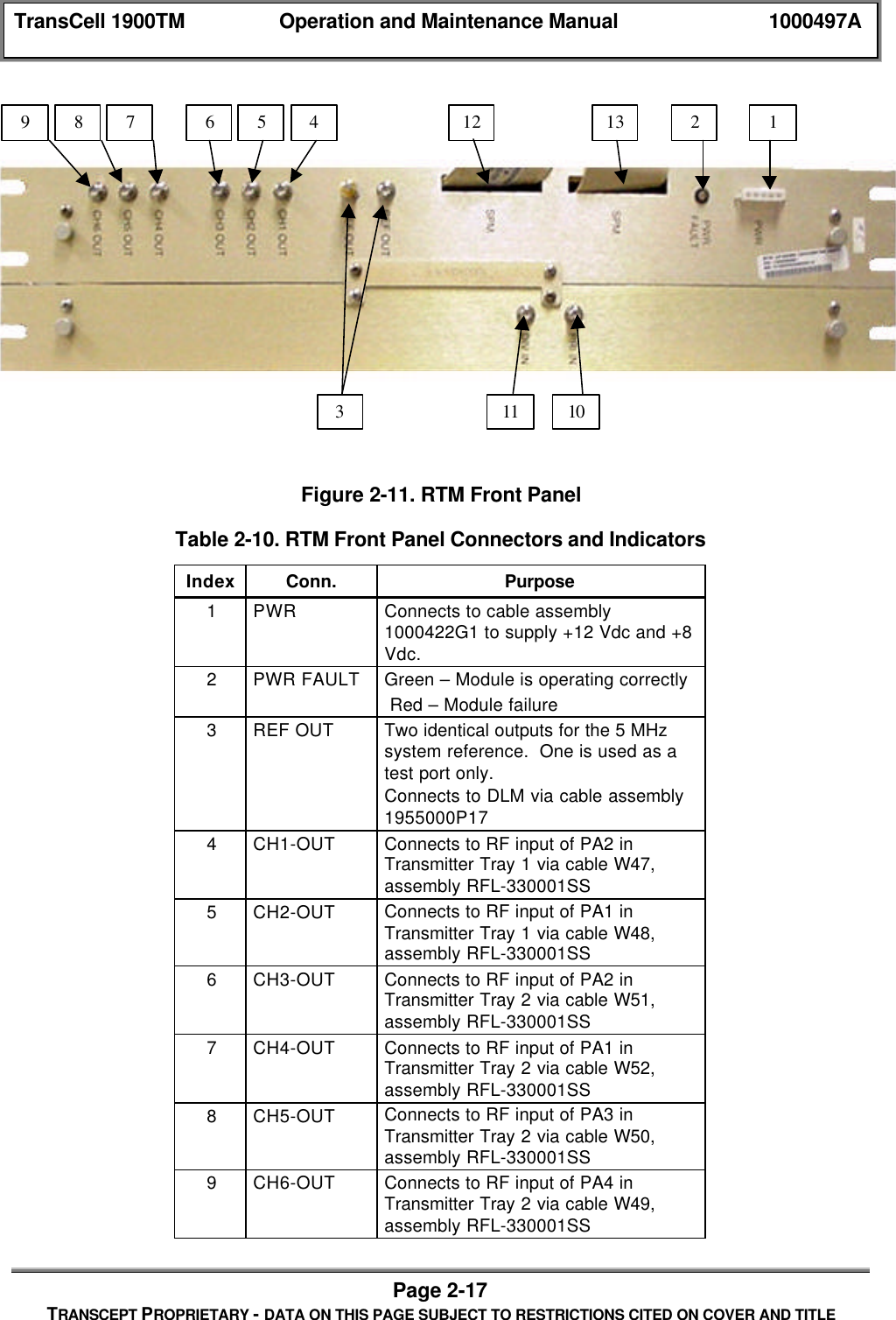
TransCell 1900TM Operation and Maintenance Manual 1000497APage 2-17TRANSCEPT PROPRIETARY - DATA ON THIS PAGE SUBJECT TO RESTRICTIONS CITED ON COVER AND TITLEFigure 2-11. RTM Front PanelTable 2-10. RTM Front Panel Connectors and IndicatorsIndex Conn. Purpose1PWR Connects to cable assembly1000422G1 to supply +12 Vdc and +8Vdc.2PWR FAULT Green – Module is operating correctly Red – Module failure3REF OUT Two identical outputs for the 5 MHzsystem reference.  One is used as atest port only.Connects to DLM via cable assembly1955000P174CH1-OUT Connects to RF input of PA2 inTransmitter Tray 1 via cable W47,assembly RFL-330001SS5CH2-OUT Connects to RF input of PA1 inTransmitter Tray 1 via cable W48,assembly RFL-330001SS6CH3-OUT Connects to RF input of PA2 inTransmitter Tray 2 via cable W51,assembly RFL-330001SS7CH4-OUT Connects to RF input of PA1 inTransmitter Tray 2 via cable W52,assembly RFL-330001SS8CH5-OUT Connects to RF input of PA3 inTransmitter Tray 2 via cable W50,assembly RFL-330001SS9CH6-OUT Connects to RF input of PA4 inTransmitter Tray 2 via cable W49,assembly RFL-330001SS987654311 10121321
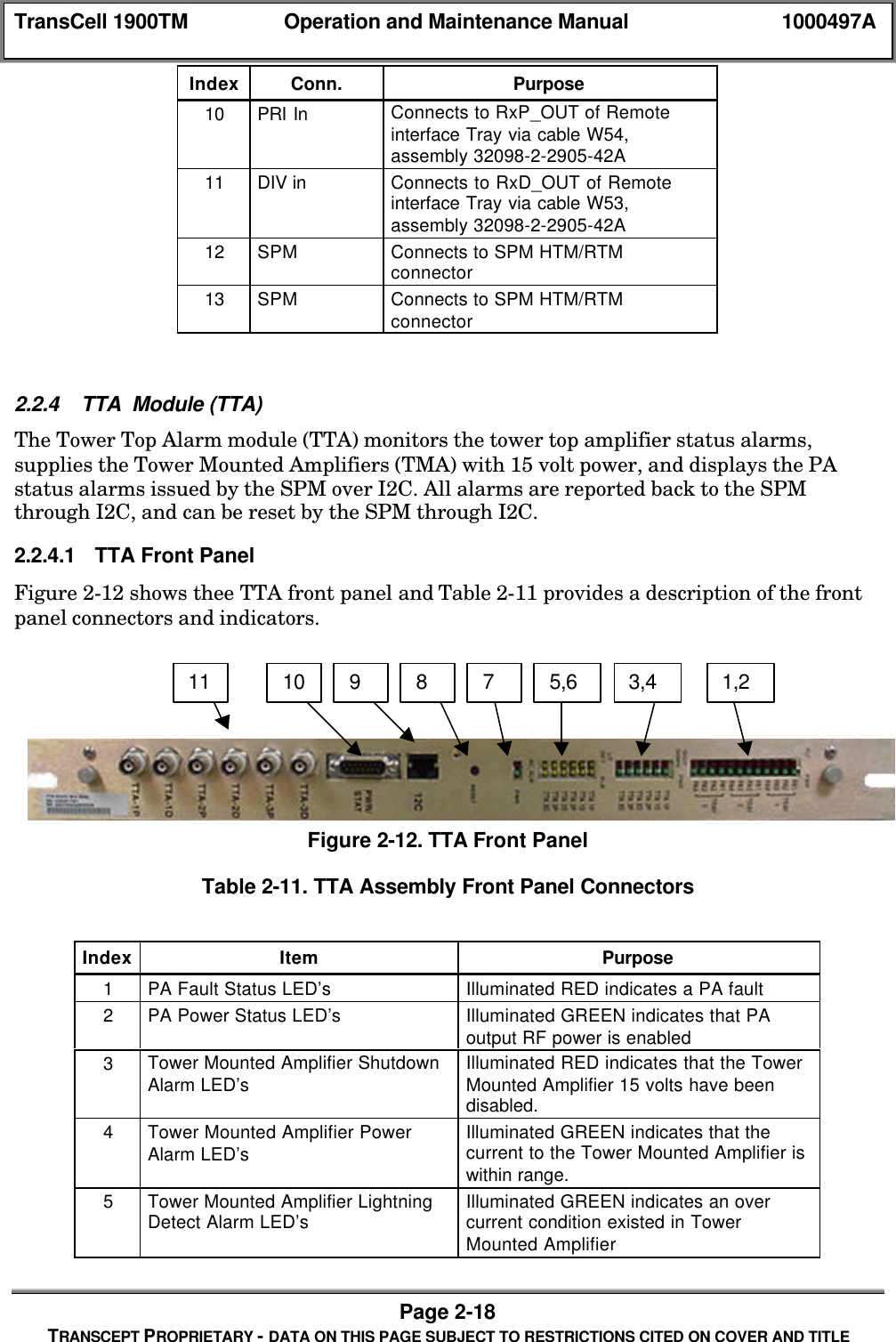
TransCell 1900TM Operation and Maintenance Manual 1000497APage 2-18TRANSCEPT PROPRIETARY - DATA ON THIS PAGE SUBJECT TO RESTRICTIONS CITED ON COVER AND TITLEIndex Conn. Purpose10 PRI In Connects to RxP_OUT of Remoteinterface Tray via cable W54,assembly 32098-2-2905-42A11 DIV in Connects to RxD_OUT of Remoteinterface Tray via cable W53,assembly 32098-2-2905-42A12 SPM Connects to SPM HTM/RTMconnector13 SPM Connects to SPM HTM/RTMconnector2.2.4 TTA  Module (TTA)The Tower Top Alarm module (TTA) monitors the tower top amplifier status alarms,supplies the Tower Mounted Amplifiers (TMA) with 15 volt power, and displays the PAstatus alarms issued by the SPM over I2C. All alarms are reported back to the SPMthrough I2C, and can be reset by the SPM through I2C.2.2.4.1 TTA Front PanelFigure 2-12 shows thee TTA front panel and Table 2-11 provides a description of the frontpanel connectors and indicators.Figure 2-12. TTA Front PanelTable 2-11. TTA Assembly Front Panel ConnectorsIndex Item Purpose1PA Fault Status LED’s Illuminated RED indicates a PA fault2PA Power Status LED’s Illuminated GREEN indicates that PAoutput RF power is enabled3Tower Mounted Amplifier ShutdownAlarm LED’s Illuminated RED indicates that the TowerMounted Amplifier 15 volts have beendisabled.4Tower Mounted Amplifier PowerAlarm LED’s Illuminated GREEN indicates that thecurrent to the Tower Mounted Amplifier iswithin range.5Tower Mounted Amplifier LightningDetect Alarm LED’s Illuminated GREEN indicates an overcurrent condition existed in TowerMounted Amplifier1,23,45,67891011
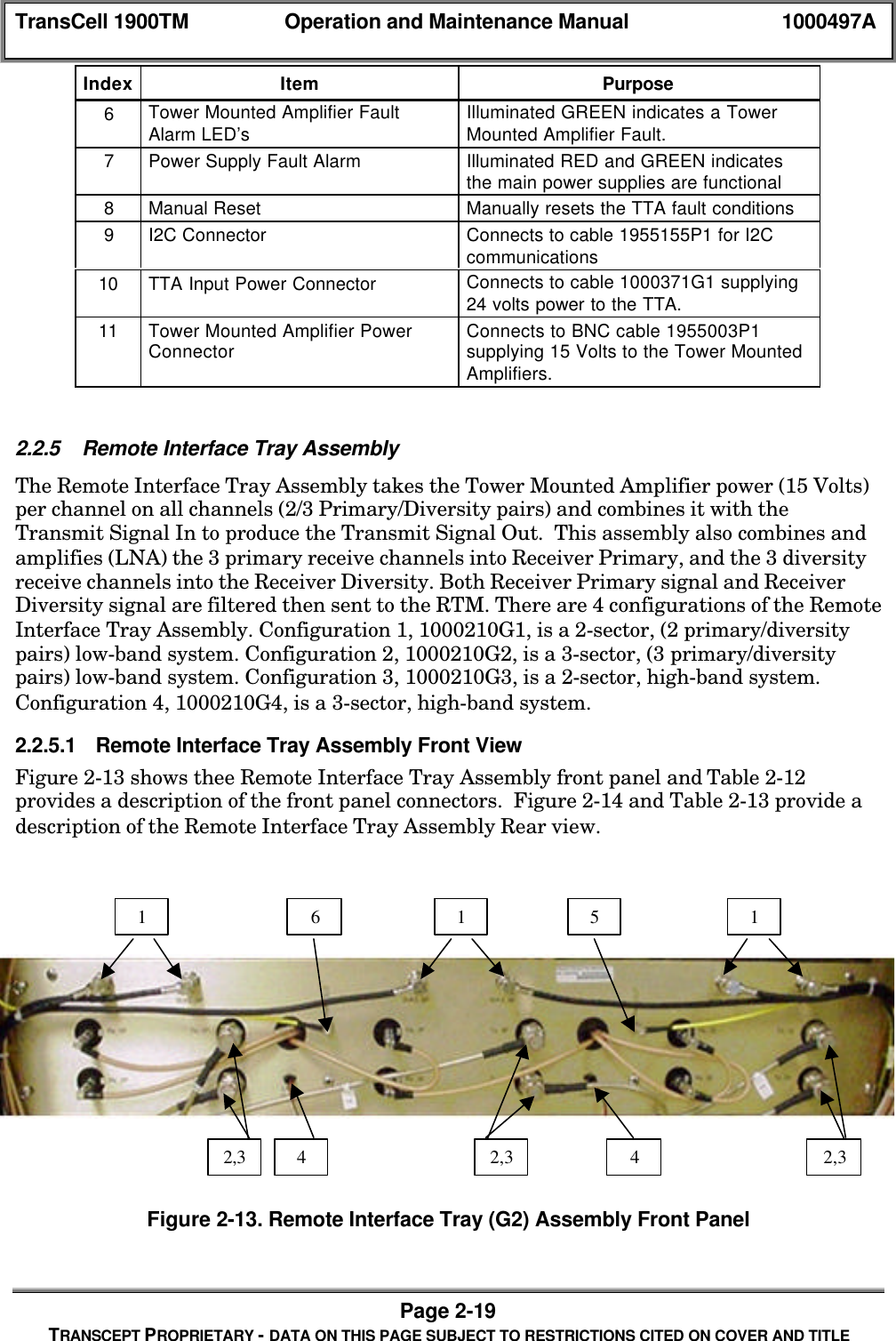
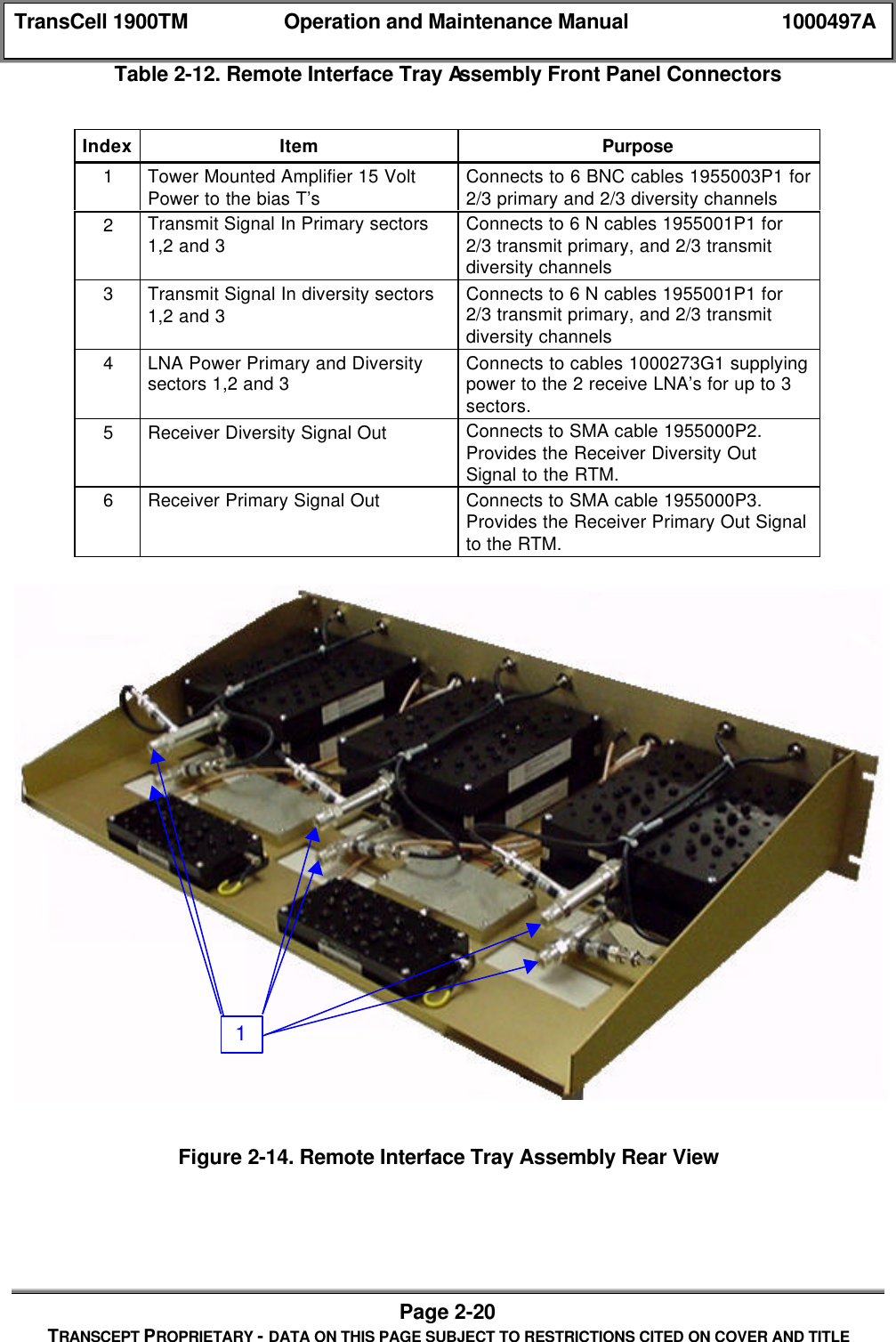
TransCell 1900TM Operation and Maintenance Manual 1000497APage 2-19TRANSCEPT PROPRIETARY - DATA ON THIS PAGE SUBJECT TO RESTRICTIONS CITED ON COVER AND TITLEIndex Item Purpose6Tower Mounted Amplifier FaultAlarm LED’s Illuminated GREEN indicates a TowerMounted Amplifier Fault.7Power Supply Fault Alarm Illuminated RED and GREEN indicatesthe main power supplies are functional8Manual Reset Manually resets the TTA fault conditions9I2C Connector Connects to cable 1955155P1 for I2Ccommunications10 TTA Input Power Connector Connects to cable 1000371G1 supplying24 volts power to the TTA.11 Tower Mounted Amplifier PowerConnector Connects to BNC cable 1955003P1supplying 15 Volts to the Tower MountedAmplifiers.2.2.5 Remote Interface Tray AssemblyThe Remote Interface Tray Assembly takes the Tower Mounted Amplifier power (15 Volts)per channel on all channels (2/3 Primary/Diversity pairs) and combines it with theTransmit Signal In to produce the Transmit Signal Out.  This assembly also combines andamplifies (LNA) the 3 primary receive channels into Receiver Primary, and the 3 diversityreceive channels into the Receiver Diversity. Both Receiver Primary signal and ReceiverDiversity signal are filtered then sent to the RTM. There are 4 configurations of the RemoteInterface Tray Assembly. Configuration 1, 1000210G1, is a 2-sector, (2 primary/diversitypairs) low-band system. Configuration 2, 1000210G2, is a 3-sector, (3 primary/diversitypairs) low-band system. Configuration 3, 1000210G3, is a 2-sector, high-band system.Configuration 4, 1000210G4, is a 3-sector, high-band system.2.2.5.1 Remote Interface Tray Assembly Front ViewFigure 2-13 shows thee Remote Interface Tray Assembly front panel and Table 2-12provides a description of the front panel connectors.  Figure 2-14 and Table 2-13 provide adescription of the Remote Interface Tray Assembly Rear view.Figure 2-13. Remote Interface Tray (G2) Assembly Front Panel1 6 1 5 12,3 42,3 42,3
TransCell 1900TM Operation and Maintenance Manual 1000497APage 2-20TRANSCEPT PROPRIETARY - DATA ON THIS PAGE SUBJECT TO RESTRICTIONS CITED ON COVER AND TITLETable 2-12. Remote Interface Tray Assembly Front Panel ConnectorsIndex Item Purpose1Tower Mounted Amplifier 15 VoltPower to the bias T’s Connects to 6 BNC cables 1955003P1 for2/3 primary and 2/3 diversity channels2Transmit Signal In Primary sectors1,2 and 3 Connects to 6 N cables 1955001P1 for2/3 transmit primary, and 2/3 transmitdiversity channels3Transmit Signal In diversity sectors1,2 and 3 Connects to 6 N cables 1955001P1 for2/3 transmit primary, and 2/3 transmitdiversity channels4LNA Power Primary and Diversitysectors 1,2 and 3 Connects to cables 1000273G1 supplyingpower to the 2 receive LNA’s for up to 3sectors.5Receiver Diversity Signal Out Connects to SMA cable 1955000P2.Provides the Receiver Diversity OutSignal to the RTM.6Receiver Primary Signal Out Connects to SMA cable 1955000P3.Provides the Receiver Primary Out Signalto the RTM.Figure 2-14. Remote Interface Tray Assembly Rear View1
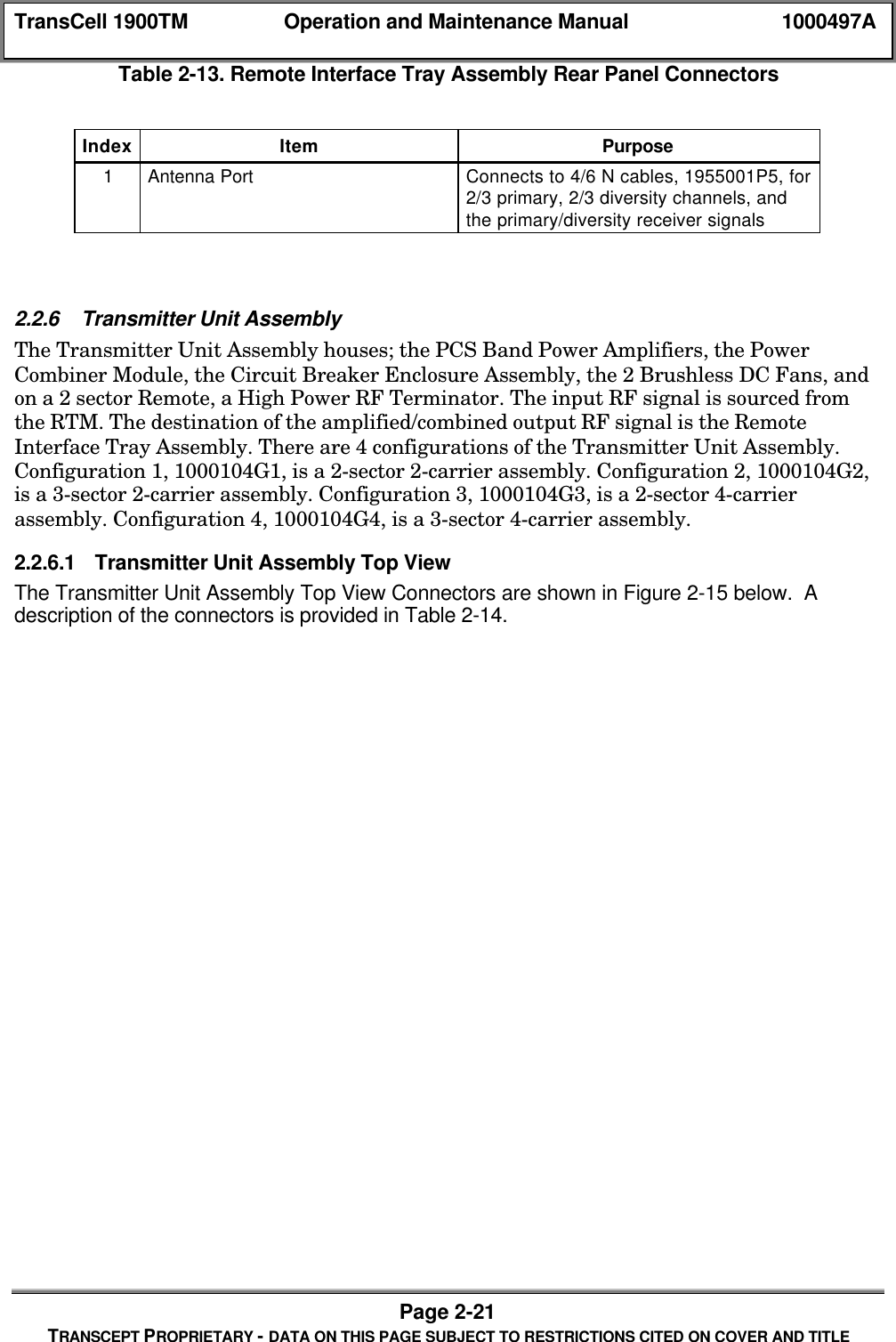
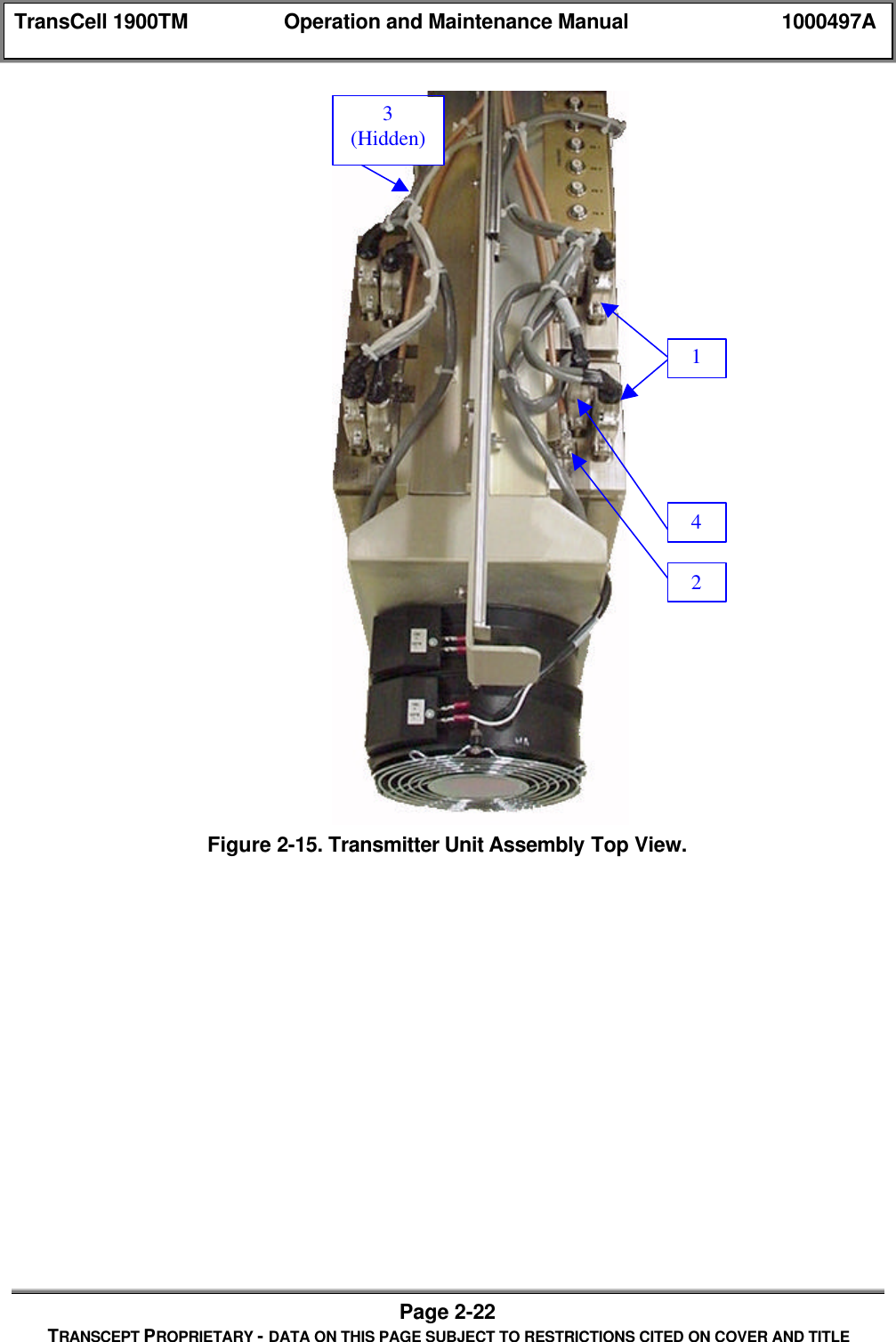
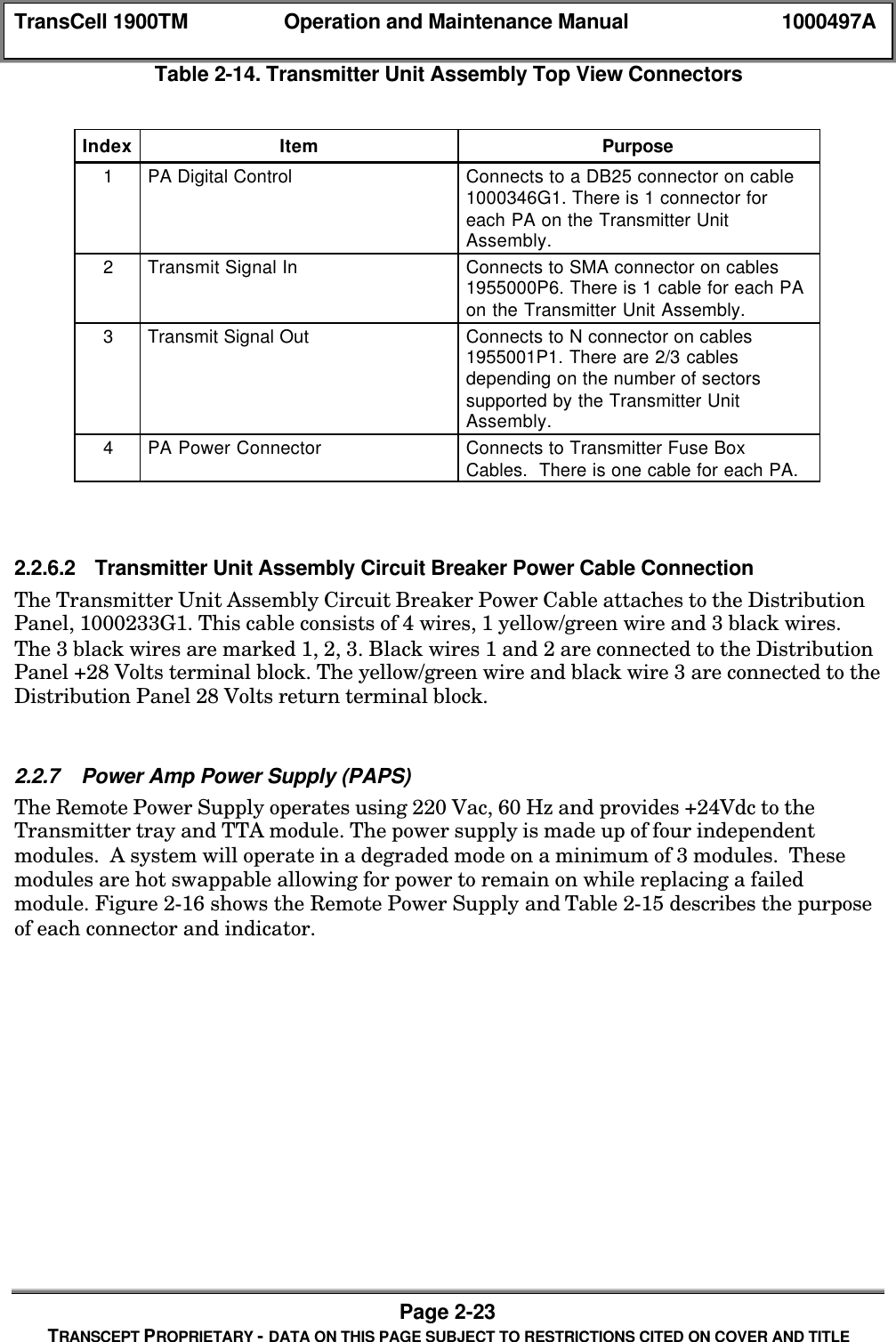
TransCell 1900TM Operation and Maintenance Manual 1000497APage 2-21TRANSCEPT PROPRIETARY - DATA ON THIS PAGE SUBJECT TO RESTRICTIONS CITED ON COVER AND TITLETable 2-13. Remote Interface Tray Assembly Rear Panel ConnectorsIndex Item Purpose1Antenna Port Connects to 4/6 N cables, 1955001P5, for2/3 primary, 2/3 diversity channels, andthe primary/diversity receiver signals2.2.6 Transmitter Unit AssemblyThe Transmitter Unit Assembly houses; the PCS Band Power Amplifiers, the PowerCombiner Module, the Circuit Breaker Enclosure Assembly, the 2 Brushless DC Fans, andon a 2 sector Remote, a High Power RF Terminator. The input RF signal is sourced fromthe RTM. The destination of the amplified/combined output RF signal is the RemoteInterface Tray Assembly. There are 4 configurations of the Transmitter Unit Assembly.Configuration 1, 1000104G1, is a 2-sector 2-carrier assembly. Configuration 2, 1000104G2,is a 3-sector 2-carrier assembly. Configuration 3, 1000104G3, is a 2-sector 4-carrierassembly. Configuration 4, 1000104G4, is a 3-sector 4-carrier assembly.2.2.6.1 Transmitter Unit Assembly Top ViewThe Transmitter Unit Assembly Top View Connectors are shown in Figure 2-15 below.  Adescription of the connectors is provided in Table 2-14.
TransCell 1900TM Operation and Maintenance Manual 1000497APage 2-22TRANSCEPT PROPRIETARY - DATA ON THIS PAGE SUBJECT TO RESTRICTIONS CITED ON COVER AND TITLEFigure 2-15. Transmitter Unit Assembly Top View.23(Hidden)41
TransCell 1900TM Operation and Maintenance Manual 1000497APage 2-23TRANSCEPT PROPRIETARY - DATA ON THIS PAGE SUBJECT TO RESTRICTIONS CITED ON COVER AND TITLETable 2-14. Transmitter Unit Assembly Top View ConnectorsIndex Item Purpose1PA Digital Control Connects to a DB25 connector on cable1000346G1. There is 1 connector foreach PA on the Transmitter UnitAssembly.2Transmit Signal In Connects to SMA connector on cables1955000P6. There is 1 cable for each PAon the Transmitter Unit Assembly.3Transmit Signal Out Connects to N connector on cables1955001P1. There are 2/3 cablesdepending on the number of sectorssupported by the Transmitter UnitAssembly.4PA Power Connector Connects to Transmitter Fuse BoxCables.  There is one cable for each PA.2.2.6.2 Transmitter Unit Assembly Circuit Breaker Power Cable ConnectionThe Transmitter Unit Assembly Circuit Breaker Power Cable attaches to the DistributionPanel, 1000233G1. This cable consists of 4 wires, 1 yellow/green wire and 3 black wires.The 3 black wires are marked 1, 2, 3. Black wires 1 and 2 are connected to the DistributionPanel +28 Volts terminal block. The yellow/green wire and black wire 3 are connected to theDistribution Panel 28 Volts return terminal block.2.2.7 Power Amp Power Supply (PAPS)The Remote Power Supply operates using 220 Vac, 60 Hz and provides +24Vdc to theTransmitter tray and TTA module. The power supply is made up of four independentmodules.  A system will operate in a degraded mode on a minimum of 3 modules.  Thesemodules are hot swappable allowing for power to remain on while replacing a failedmodule. Figure 2-16 shows the Remote Power Supply and Table 2-15 describes the purposeof each connector and indicator.
TransCell 1900TM Operation and Maintenance Manual 1000497APage 2-24TRANSCEPT PROPRIETARY - DATA ON THIS PAGE SUBJECT TO RESTRICTIONS CITED ON COVER AND TITLEFigure 2-16. Power Amplifier Power SupplyTable 2-15. Power Amp Power Supply Connectors and IndicatorsIndex Item Purpose1Green LED Green = Module powered on216 pin connector Provides +28V dc and status indicators.2.3 TRANSCELL 1900TM OPERATING INSTRUCTIONS2.3.1 Operating MenusThe SEM/HUI User Manual contains illustrations and descriptions of the System ElementManager and HRP User Interface software for the TransCell 1900TM System.  Forinformation concerning system software operation and functionality, refer to paragraph 3.6of this document.2.3.2 Operating Procedures and System Software Functions.Section 3 contains procedures including the equipment energizing instructions and anoverview of autonomous system software functionality.  For information concerning systemsetup issues, refer to the TransCell 1900TM Installation Document.2.3.3 Maintenance InstructionsSection 4 contains the maintenance instructions for the repair of the Hub and Remoteenclosures and their constituent assemblies. The maintenance instructions consist ofscheduled maintenance procedures, assembly/replacement procedures, alarm messagedefinitions, and troubleshooting.12
TransCell 1900TM Operation and Maintenance Manual 1000497APage 3-1TRANSCEPT PROPRIETARY - DATA ON THIS PAGE SUBJECT TO RESTRICTIONS CITED ON COVER AND TITLESECTION 3OPERATING PROCEDURES3.0 OPERATING PROCEDURES3.1 HUB EQUIPMENT POWER-ON/POWER-OFF3.1.1 Energizing/De-energizing Hub SubsystemThese procedures are used to power-on/power-off the Hub Subsystem and individualassemblies. The procedures cover distribution of AC and DC power to subsystemequipment. Each installed unit should be powered on and off using the switch located onthe provided power/surge suppressor strip.  These procedures are valid for both the singleand dual Hub configurations.3.1.1.1 Power-On Procedurea. Ensure that power cable for Hub power/surge suppressor strip is connected to 115Vac power source (AC Outlet).b. At site’s main power panel, set Hub Subsystem circuit breaker to ON.c. Ensure that each Hub Low Voltage Power Supply output cable is connected toTDMA Card Cage Bus Bar as called out in Table 3-1.d. Ensure that each Hub Low Voltage Power Supply input power cable is connected topower/surge suppressor strip.e. Set power switch on power/surge suppressor strip to ON and observe that red powerindicator lights, green 8V and 12V indicators light on each LVPS, and chassis fansoperate.Table 3-1. LVPS Output Wiring ChartLVPS Output Color TDMA Card Cage BusBar LabelRed 8 VBlack(paired with RED)8 V RTNPurple 12 VBlack(paired with PURPLE)12 V RTN3.1.1.2 Power-Off Procedurea. Set power switch on power/surge suppressor strip OFF and observe red powerindicator goes out, green 8V and 12V indicators on each LVPS go out, and chassisfans shut down.b. At Site Main Power Panel, set Hub Subsystem circuit breaker to OFF.
TransCell 1900TM Operation and Maintenance Manual 1000497APage 3-2TRANSCEPT PROPRIETARY - DATA ON THIS PAGE SUBJECT TO RESTRICTIONS CITED ON COVER AND TITLE3.2 REMOTE EQUIPMENT POWER-ON/POWER-OFF3.2.1 Energizing/De-energizing Remote SubsystemThese procedures are used to power-on/power-off the Remote Subsystem and individualassemblies. The procedures cover distribution of AC and DC power to subsystemequipment. Each installed unit should be powered on separately using the individual powerswitches provided.3.2.1.1 Power-on Procedurea. Ensure that power cable for power/surge suppressor strip is connected to 115 Vacpower source (AC Outlet).b. At Remote 100 Amp Load Center, set Main circuit breakers (#2 & 4) and AC OutletBox circuit breaker (#1) to ON.c. Ensure that each Remote Low Voltage Power Supply output cable is connected toTDMA Card Cage Bus Bar as called out in Table 3-1.d. Ensure that each Remote Low Voltage Power Supply input power cable is connectedto power/surge suppressor strip.e. Set power switch on power/surge suppressor strip to ON and observe that red powerindicator lights, green 8V and 12V indicators on each Low Voltage Power supplylight, and Chassis fans operate.f. At Remote 100 Amp Load Center, set PDU circuit breakers (#3 & 5) to ON andobserve that green power indicator on each Power Amplifier Power Supply lightsand Power Amplifier Fan Assembly operates.3.2.1.2 Power-Off Procedurea. At Remote 100 Amp Load Center, set PDU circuit breakers (#3 & 5) to OFF andobserve that green power indicator on each Power Amplifier Power Supply goes outand Power Amplifier Fan Assembly shuts down.b. Set power/surge suppressor strip power switch to OFF and observe that red powerindicator goes out, green 8V and 12V indicators on each Low Voltage Power Supplygoes out, and Chassis fans shut down.c. At Remote 100 Amp Load Center, set AC Outlet Box circuit breaker (#1) and Maincircuit breakers (#2 & 4) to OFF.3.3 SEM WORKSTATION POWER-ON/POWER-OFFThese procedures are used to power-on/power-off the System Element Managerworkstation.3.3.1 SEM Workstation Power-On Procedurea. Ensure that SEM workstation monitor and CPU power cables are connected to anAC power source.NOTEThe use of a surge suppressor with the SEM workstation isrecommended.
TransCell 1900TM Operation and Maintenance Manual 1000497APage 3-3TRANSCEPT PROPRIETARY - DATA ON THIS PAGE SUBJECT TO RESTRICTIONS CITED ON COVER AND TITLEb. Set monitor power ON/OFF switch to ON. Observe that power indicator lights.NOTEIf the monitor power cable is connected to the computer, the monitorwill not turn on until the computer is powered up.c. Set SEM computer power ON/OFF switch to ON. Observe that power indicatorlights.d. After SEM workstation executes boot-up routine, Windows NT Desktop is displayed.3.3.2 SEM Workstation Power-off ProcedureCAUTIONThe SEM workstation normally operates 24 hours a day, seven days aweek. A system shutdown is only required when a SEM workstationis to be replaced or new software loaded.a. Shut down SEM workstation operating software per instructions in SEM/HUI UserManual.b. Shutdown Windows NT operating system software by selecting the Start button onthe Windows NT task bar (bottom left), and then selecting Shut Down….c. At Shut Down Windows dialog, select Shut down the computer? then click Yes.d. Wait for Windows NT operating system message prompt saying that it is OK toshut off computer, then set SEM workstation power switch to OFF. Observe thatpower indicator goes out.e. Set monitor power switch to OFF. Observe that power indicator goes out.NOTEIf the monitor power cable is connected to the computer, the monitorwill be shut down when the computer is powered off.3.4 SYSTEM SOFTWARE MENUSFor information concerning user interface software operation and functionality, see SEM /HUI User Manual.3.5 TRANSCELL 1900TM SYSTEM SETUPSee TransCell 1900TM Installation Document #1000462 to learn more about the initialsystem setup and fundamental system software functionality.3.6 TRANSCELL 1900TM SYSTEM OPERATIONSThis section provides descriptions of autonomous system software functions and how tomodify them.  Also covered are system events such as TDMA channel changes and systemstatus queries.
TransCell 1900TM Operation and Maintenance Manual 1000497APage 3-4TRANSCEPT PROPRIETARY - DATA ON THIS PAGE SUBJECT TO RESTRICTIONS CITED ON COVER AND TITLE3.6.1 Autonomous Software FunctionalityThe TransCell 1900TM system has several health monitoring and conditioning functionsgeared towards maintaining call quality, maximizing MTBF, and minimizing system downtime.  This section itemizes some of the main system software functions and their defaultruntime status.  It is recommended that the TransCell 1900TM use the system defaultsduring normal operation.  See Table 3-2 below.Table 3-2. Autonomous System Software SettingsFunction Default StatusAlarm Polling All Alarm reporting enabledAutolevel Setpoint: 48 (dBm)*Threshold: 0.5 (dB)Rate: 1 (minute)State: EnabledAutosync State: EnabledLoop-back test: EnabledReverse Autogain Setpoint: 11 (dB)Rate: 60 (minutes)State: EnabledForward Continuity State: EnabledReverse Continuity State: EnabledMaintenance Window Start:  3:00 AM (local time)End:  4:00 AM (local time)*48 dBm autolevel setpoint is equivalent to 40 dBm at the output antenna port.3.6.1.1 Alarm PollingEach Hub Remote Pair (HRP) collects fault information from its constituent modules andforwards the data through a Master Hub Signal Processing Module (SPM) to a SystemElement Manager (SEM) for disposition.  Specific alarms may be enabled or disabled at aparticular HRP using the HRP User Interface (HUI).  All alarms are initially enabled.  It isrecommended that all alarms remain enabled during normal system operation.  For moreon enabling and disabling particular alarms, see the SEM/HUI User Manual.  A completealarm list and troubleshooting guide can be found in section 4.4.2.5.
TransCell 1900TM Operation and Maintenance Manual 1000497APage 3-5TRANSCEPT PROPRIETARY - DATA ON THIS PAGE SUBJECT TO RESTRICTIONS CITED ON COVER AND TITLE3.6.1.2 Autolevel FunctionalityThe Forward Path Automatic Power Leveling (“Autolevel”) function regulates power levelsthroughout all Hub Remote Pair (HRP) forward carriers to maintain a specific output ateach Remote Transmitter Antenna Port, thereby stabilizing the system’s RF footprint whilemaintaining signal quality throughout the system.  It does so serially, beginning with HRPcarrier one and cycling through all six carriers in turn.  The frequency of each full visitationcycle can be modified.  Also under user control is the Autolevel Setpoint, which is the RFpower level to be maintained at the Transmitter, and the Autolevel Threshold, which is themargin under which the Autolevel routine will consider the measured RF power closeenough to the desired level.  For default settings, see Table 3-2.  Autolevel can be enabledand disabled using the HRP User Interface (HUI).  It is recommended that this functionremain enabled during normal operation.  For a complete list of HUI commands and validparameter ranges, see the SEM/HUI User Manual.NOTEAutolevel is not intended to prohibit rapid RF power increases, but tocompensate for gain variation due to temperature fluctuation or BaseStation Radio replacements.  Instantaneous overpower conditions arehandled autonomously at the Remote Transmitter via PowerAmplifier shutdown.  Shutdown will occur at an output power of 37.2watts peak (worst case) measured at the enclosure antenna terminal.However, the Autolevel function does detect when an overpowercondition has passed, and will return the Transmitter to itsoperational state.3.6.1.3 Autosync FunctionalityThe Microwave Datalink Automatic Synchronization ("Autosync”) function uses a staggeredcycle operation to autonomously lock Hub and Remote Data Link Forward and Reversepaths.  This function uses a fixed frequency approach, so it is imperative that both the Huband Remote Data Link Modules (DLM) are tuned to the correct channels. Default channelsare 1 and 6, and are user controllable.  Typical time to completion of a successful Data Linklock from cold start (both Hub and Remote simultaneously powered on) is 2 minutes.  If nolock occurs within 11 minutes at the Hub Subsystem, Autosync enters a loop-back mode todetermine if there is an equipment problem with the local DLM.  After the success orfailure of a local loop-back test is noted in the corresponding HUB DLM OUTPUT orREMOTE DLM INPUT ALARM, Autosync restarts the lock process.  This cycle is repeatedindefinitely until the Data Link is locked between Hub and Remote DLMs.  AlthoughAutosync can be enabled and disabled via the HRP User Interface (HUI), it should never bedisabled in normal operation.  For a complete list of HUI commands and valid DLMparameter ranges, see the SEM/HUI User Manual.NOTEIn simulcast configurations the loop-back test may periodically de-sense the donor base-station.  It is recommended that, upon receivinga loop-back alarm in a simulcast system, the operator disable furtherloop-back testing until the alarm is resolved on site.
TransCell 1900TM Operation and Maintenance Manual 1000497APage 3-6TRANSCEPT PROPRIETARY - DATA ON THIS PAGE SUBJECT TO RESTRICTIONS CITED ON COVER AND TITLE WARNINGDisabling the Autosync function may lead to extended down time, asany momentary break in Data-Link lock would then require a sitevisit to the Remote Enclosure to re-enable Autosync and re-lock theData-Link.  Autosync should only be disabled during specificinstallation procedures called out in the TransCell 1900TMInstallation Document #1000462.3.6.1.4 Reverse Autogain FunctionalityThe Reverse Path Automatic Gain (“Reverse Autogain”) function uses a noise figuremeasurement to adjust the reverse HRP carrier gain to maintain specified sensitivitylevels.  Like Autolevel, Reverse Autogain has a user controlled visit time, gain levelsetpoint, and toggle state.  For default settings, see Table 3-2.  For a complete list of HUIcommands and valid Reverse Autogain parameter ranges, see the SEM/HUI User Manual.3.6.1.5 Forward ContinuityThe “Forward Continuity” function is used to detect a lost DCCH signal and to determinethe exact location of any disconnect within the system’s forward path.  When a fault isdetected, an alarm is generated and sent to the System Element Manager (SEM) fordisposition.  This function has two main time cycles.  Operating outside the MaintenanceWindow, Forward Continuity validates power levels at each point in the forward pathoccupied by the DCCH only.  This phase is non-intrusive to the system.  Operating Insidethe Maintenance Window, Forward Continuity uses the DCCH and internal test tones tovalidate the power levels of each HRP forward carrier.  During this phase, call processing isbriefly interrupted at the beginning and end of the Maintenance Window. ForwardContinuity is enabled by default and can be enabled and disabled via the HRP UserInterface (HUI).  For a complete list of HUI commands and valid parameter ranges, see theSEM/HUI User Manual.3.6.1.6 Reverse ContinuityThe “Reverse Continuity” function is used to detect and determine the location of anydisconnect with the system’s reverse path.   When a fault is detected, an alarm is generatedand sent to the System Element Manager (SEM) for disposition.  This function brieflyinterrupts call processing at the beginning and end of the Maintenance Window to run therequired RF testing.  Reverse Continuity is enabled by default and can be enabled anddisabled via the HRP User Interface (HUI).  For a complete list of HUI commands and validparameter ranges, see the SEM/HUI User Manual.3.6.2 Software System MaintenanceThis section delineates specific system procedures likely to be needed during routinemaintenance of the TransCell 1900TM system.  For a more complete list of system setupprocedures, see the Transcell 1900TM Installation Document #1000462.3.6.2.1 Defining the Maintenance WindowThe Maintenance Window is a period of time in which an HRP may audit the system’schannels in a manner that prohibits phone calls.  As is discussed in sections 3.6.1.5 and3.6.1.6, this disruption occurs at each end of the Maintenance Window.  If the Maintenance
TransCell 1900TM Operation and Maintenance Manual 1000497APage 3-7TRANSCEPT PROPRIETARY - DATA ON THIS PAGE SUBJECT TO RESTRICTIONS CITED ON COVER AND TITLEWindow start and end times are set to the same value, the channel auditing functionalitywill only execute once a night.  To disable the TransCell 1900TM channel auditingfunctionality completely or in part, see section 3.6.1.  Widening the Maintenance Windowimproves system availability, as channel audits are performed over a more statisticallysignificant portion of each day.  The Maintenance Window start and end times may bemodified via the HRP User Interface (HUI). For a complete list of HUI commands and validparameter ranges, see the SEM / HUI User Manual.3.6.2.2 Changing and adding TDMA channelsThe procedure for adding TDMA channels can be found in the Transcell 1900TMInstallation Document.  The procedure for changing channels is as follows.a. Login to target Hub Remote Pair (HRP) using the HRP User Interface (HUI).b. Type GET HTM BAND and GET RTM BAND to see if the HRP is in the desired PCSband.c. If the HTM and RTM are in the incorrect band, type SET HTM BAND X and SETRTM BAND X, where X is the desired PCS band of operation. WARNINGThis step retunes the HTM and RTM to default frequencies in thedesired PCS band, and therefore disrupts current phone traffic on allchannels.  If only a subset of carriers is to be changed, skip this step.d. Type SET HRP TDMACHAN X Y, where X is the carrier designator through theTransCell 1900TM system (1-6), and Y is the desired TDMA channel assignment.For example, to assign TDMA channel 123 to HRP carrier 6, the command wouldread SET TDMACHAN 6 123. WARNINGThe TransCell 1900TM system is a multi-band system meetingTIA/EIA-136 channel specifications.  However, it is a single bandsystem at any given time, blocking channel changes that would rangeoutside the set PCS band.  The liability for operating in a PCS bandnot licensed to the operator rests entirely with the operator.NOTEIf a Maintenance Window parameter is adjusted during the currentMaintenance Window, the desired changes will not take effect until thenew start time is reached.  Furthermore, a change to MaintenanceWindow parameter while inside the Maintenance Window triggers thetermination cycle of the current Maintenance Window.
TransCell 1900TM Operation and Maintenance Manual 1000497APage 3-8TRANSCEPT PROPRIETARY - DATA ON THIS PAGE SUBJECT TO RESTRICTIONS CITED ON COVER AND TITLEIn addition, the ability to tune to what the TIA/EIA-136 specificationcalls “Border Channels” exists in the TransCell 1900TM system.  Theuse of these channels is allowable provided the operator owns bothPCS bands in which these border channels exist.  Otherwise, the useof the TDMA border channels violates FCC 47 CFR 24.235.  See Table3-3 for a list of border channels.e. Repeat previous step for each desired channel change. WARNINGIn the event where some HRP carriers are unused, it is imperativethat these unused carriers are not mapped to TDMA channels whichare active elsewhere in that HRP.  Failure to tune inactive carriersaway from active TDMA channels may result in degraded systemperformance.Table 3-3. TIA/EIA-136-280 Table 2 Border Channels.Band Channel Number Forward Frequency(MHz)Reverse Frequency(MHz)A, D 499, 500, 501 1944.99 – 1945.05 1864.95 – 1865.01D, B 666, 667 1950.00, 1950.03 1869.96, 1869.99B, E 1166, 1167 1965.00, 1965.03 1884.96, 1884.99E, F 1333, 1334 1970.01, 1970.04 1889.97, 1890.00F, C 1499, 1500, 1501 1974.99 – 1975.05 1894.95 – 1895.013.6.2.3 Querying System StatusThe HRP User Interface (HUI) has a complete command set for querying any TransCell1900TM system on the operator’s network.  For a complete list of commands, see the SEM /HUI User Manual.  The recommended method to status the entire HRP is by using thescript SYSTAT.TXT.  The contents of  SYSTAT.TXT include a few “GET” commands andseveral calls to subordinate script files, which the HUI executes in sequence.  To useSYSTAT.TXT, login to the target HRP and type @systat.txt.  There are several bundledscripts which status specific modules and groups of modules in the TransCell 1900TMsystem.  A tutorial on creating and using script files as well as a complete listing of bundledscripts can be found in the SEM/HUI Manual.3.6.2.4 Toggling Transmitter StateDuring normal operation, the Remote Transmitter Power Amplifier (PA) should alwaysremain enabled.  However, during some maintenance actions (such as removing or adding aBTS radio) the operator may wish to toggle the PA output at the corresponding HubRemote Pair (HRP) for safety purposes.  The following is the procedure for toggling one ormore PA states.a. Login to target HRPb. If all PA states require enabling, type @PAON.TXT at the HRP User Interface (HUI)command line.c. If all PA states require disabling, type @PAOFF.TXT at the HUI command line.
TransCell 1900TM Operation and Maintenance Manual 1000497APage 3-9TRANSCEPT PROPRIETARY - DATA ON THIS PAGE SUBJECT TO RESTRICTIONS CITED ON COVER AND TITLE WARNINGDue to safety concerns, a manual Remote Transmitter PowerAmplifier (PA) shutdown will not be reversed by autonomous systemsoftware.  Be sure to re-enable all desired PA outputs beforereturning the TransCell 1900TM system to normal operation.Failure to do so will result in degraded call processing statistics.d. To toggle individual PA states, type SET PA STATE N B, where N is the PA number(1-6) and B is a boolean integer (0=off, 1 =on).  For example, to disable the PApertaining to carrier four, the message would read SET PA STATE 4 0.e. Repeat previous step for each desired PA state toggle.
TransCell 1900TM Operation and Maintenance Manual 1000497APage 4-1TRANSCEPT PROPRIETARY - DATA ON THIS PAGE SUBJECT TO RESTRICTIONS CITED ON COVER AND TITLESECTION 4MAINTENANCE AND TROUBLESHOOTING4.0 MAINTENANCE AND TROUBLESHOOTING4.1 SCHEDULED MAINTENANCE4.1.1 Hub/Remote Inlet FilterThe inlet filters on the Hub and Remote Subsystems should be removed and cleaned orreplaced periodically to ensure continuous equipment operation. Figure 4-1 shows the Huband Remote filter locations.4.1.1.1 Hub /Remote Inlet Filter Cleaning/Replacement ProcedureThis procedure contains instructions for cleaning and/or replacing the Hub /Remote inletair filter. See Figure 4-1 for the Hub /Remote inlet filter locations. Service the inlet filter asfollows:a. Lift inlet filter up and out of enclosure door.b. Clean inlet filter by flushing with warm water and letting dry thoroughly. If filter istorn or damaged, it is recommended that it be replaced.c. Reinstall cleaned or new filter.Figure 4-1. Hub and Remote Inlet Filter LocationsRemote AirFiltersHub AirFilters
TransCell 1900TM Operation and Maintenance Manual 1000497APage 4-2TRANSCEPT PROPRIETARY - DATA ON THIS PAGE SUBJECT TO RESTRICTIONS CITED ON COVER AND TITLE4.1.2 Equipment ConnectorsAll equipment interface connections should be checked periodically to ensure that they aretight. Poor connections can cause additional signal loss, external interference ordegradation of signal quality.4.2 HUB SUBSYSTEM ASSEMBLY REPLACEMENT INSTRUCTIONS4.2.1 TDMA HUB Card Cage Assembly Replacement ProceduresThe following procedure is provided for removing and replacing defective TDMA Card CageModules. Procedures are provided below for field replacement of the TDMA Card CageFans, LVPS, HTM, SPM, and DLM. Refer to Figure 4-2. WARNINGThe voltages and current levels present in the Subsystem enclosureare potentially lethal. This procedure requires work inside theenclosure. Use extreme caution to avoid coming into contact with the+12V and +8V at TDMA  Card Cage Bus Bar. Whenever possible,disconnect the 115 Vac power input to the enclosure. ESD CAUTIONThe TDMA Card Cage contains circuit card assemblies (CCAs) thatare sensitive to Electrostatic Discharge (ESD) damage. Wheneverhandling the TDMA Card Cage, use ESD precautionary procedures tominimize the risk of permanent ESD damage to the CCAs. Lowrelative humidity levels increase the potential for damage to ESD-sensitive devices.4.2.1.1 Card Cage Fan Replacement ProcedureThis procedure is used to replace a defective TDMA Card Cage fan.  It can be performed atany time without affecting call statistics. The TDMA Card Cage Fans aid convectionthrough the card cage. In the Remote Enclosure, the uppermost fan exhausts warm air,while the lower fan intakes cool air.  See Figure 4-2.  In the Hub Enclosure, the TDMACard Cage has been rotated left 90 degrees, putting the exhaust fan to the left and theintake fan to the right.  For ease of installation, each fan has an airflow direction indicatorvisible on its shroud.a. Remove white wires connected to 12V at TDMA Card Cage Bus Bar and observeChassis fans cease to operate.b. Remove 6 faceplate screws and swing panel out to expose fans.c. Remove DC power wires from defective fan.d. Locate and note which way the airflow direction indicator is pointing. WARNINGFailure to install replacement fan in the correct airflow direction maydamage modules that reside in the TDMA Card Cage.  Such damageis not under warranty.
TransCell 1900TM Operation and Maintenance Manual 1000497APage 4-3TRANSCEPT PROPRIETARY - DATA ON THIS PAGE SUBJECT TO RESTRICTIONS CITED ON COVER AND TITLEe. Remove 4 nuts which hold fan to panel and detach fan from TDMA Card Cage frontpanel.f. Using the 4 nuts removed previously, fasten replacement fan on TDMA Card Cagefront panel, ensuring the airflow direction indicator points as noted in step d.g. Attach DC power wires to replacement fan as follows:  BLACK WIRE = “- (BLACK)”TERMINAL; WHITE WIRE = “+ (RED)” TERMINAL.h. Fasten Chassis fan panel to TDMA Card Cage using the 6 screws previouslyremoved.i. Reconnect previously disconnected white wires to 12V at TDMA Card Cage Bus Barand observe that both Chassis Fans operate.j. Package and return the defective TDMA Card Cage fan to seller for disposition.Figure 4-2. Hub Subsystem TDMA Card Cage4.2.1.2 Low Voltage Power Supply (LVPS) Replacement ProcedureThis procedure contains instructions for removing a single defective Low Voltage PowerSupply and installing a replacement. As the LVPS units are hot swappable and redundant,this procedure can be performed at any time without affecting call statistics. Refer toFigure 4-3.a. Disconnect Low Voltage Power Supply AC power cable from AC IN (J4) of defectiveunit.b. Remove four screws securing LVPS to TDMA Card Cage.LVPSHTMSPMDLMPowerBus BarCard CageFans
TransCell 1900TM Operation and Maintenance Manual 1000497APage 4-4TRANSCEPT PROPRIETARY - DATA ON THIS PAGE SUBJECT TO RESTRICTIONS CITED ON COVER AND TITLE WARNINGPotentially dangerous High Voltage exists on the AC power cable tothe Low Voltage Power Supply that could cause bodily injury or evendeath. Use extreme care and required safety precautions whileworking on the Low Voltage Power Supply and handling the ACpower cable.NOTEThe Low Voltage Power Supply is the only hot swappable unit in thissystem.  To ensure continuous coverage, please follow the instructionsbelow.NOTEAny attempt to repair the internal components of a Low VoltagePower Supply will void the warranty for the assembly. During thewarranty period, a suspected defective Low Voltage Power Supplyshould be returned to the seller for replacement or repair.c. Gripping the blue LV OUT connector (J1), pull the LVPS roughly one inch of theway out of the TDMA Card Cage.d. Disconnect LVPS output power wiring harness from LV OUT (J1) of defective unit.e. Remove LVPS from Card Cage, using care to avoid the output power harness of theremaining functional LVPS.f. Ensure replacement LVPS is correctly identified as primary or redundant (forprimary- red dipswitches 1-4 within the LVPS should be ON; for redundant- reddipswitch 1 should be OFF and 2-4 should be ON).g. Secure replacement Low Voltage Power Supply to TDMA Card Cage using fourscrews previously removed.h. Reconnect LVPS output power wiring harness to LV OUT (J1) of replacement unit.i. Reconnect LVPS AC power cable to AC IN (J4) of replacement LVPS.j. Package and return defective Low Voltage Power Supply to seller for disposition.Figure 4-3. Low Voltage Power Supply4.2.1.3 Hub Transceiver Module (HTM) Replacement ProcedureThis procedure contains instructions for removing a defective HTM and installing areplacement unit. Refer to Figure 4-4.
TransCell 1900TM Operation and Maintenance Manual 1000497APage 4-5TRANSCEPT PROPRIETARY - DATA ON THIS PAGE SUBJECT TO RESTRICTIONS CITED ON COVER AND TITLE WARNINGThe voltages and current levels present in the Subsystem enclosureare potentially lethal. This procedure requires work inside theenclosure. Use extreme caution to avoid coming into contact with the+24V at front of the HTM or on the Card Cage Bus Bar. Wheneverpossible, disconnect the 115 Vac power input to the enclosure. ESD CAUTIONThe HTM contains a circuit card assembly (CCA) that is sensitive toElectrostatic Discharge (ESD) damage. Whenever handling the HTM,use ESD precautionary procedures to minimize the risk of permanentESD damage to the CCA. Low relative humidity levels increase thepotential for damage to ESD-sensitive devices.NOTEAny attempt to repair and/or break the seal to gain access to theinternal components of a HTM assembly will void the HTM warranty.During the warranty period, a suspected defective HTM should bereturned to the seller for replacement or repair.a. Power down defective module by disconnecting AC IN (J4) from respective LVPSunits at Card Cage.b. Remove HTM power connection.c. Tag locations of all other front panel cables as needed, and disconnect all front panelcables from HTM.d. Remove six screws from front panel that secures HTM to Subsystem enclosure.e. Remove HTM from TDMA Card Cage.f. Slide replacement HTM into TDMA Card Cage guides.g. Secure HTM to Card Cage using six screws previously removed.h. Connect HTM power cable and all other previously disconnected cables toreplacement HTM front panel.i. Connect AC IN (J4) cables previously removed from LVPS to power up replacementmodule.j. Verifiy HTM LED lights green within 1.5 minutes after power-up.k. Package and return defective HTM to the seller for disposition.
TransCell 1900TM Operation and Maintenance Manual 1000497APage 4-6TRANSCEPT PROPRIETARY - DATA ON THIS PAGE SUBJECT TO RESTRICTIONS CITED ON COVER AND TITLEFigure 4-4. HTM Front Panel4.2.1.4 Signal Processing Module (SPM) Replacement ProcedureThis procedure contains instructions for removing and replacing a SPM. Refer to Figure4-5.NOTEAny attempt to repair the internal components of an SPM will voidthe warranty for the assembly. During the warranty period, asuspected defective SPM should be returned to the seller forreplacement or repair.a. If possible, record all SPM parameters before shutting down defective unit.  Refer toSEM/HUI User Manual for a complete command set and parameter list.b. If HUI software session is logged into target SPM, perform logout procedure outlinedin SEM/HUI User Manual.c. Power down defective module by disconnecting AC IN (J4) from respective LVPSunits at Card Cage.d. Label front panel cable locations as needed, and disconnect all front panel cablesfrom SPM.e. Loosen two captive screws securing SPM to TDMA Card Cage and remove SPM.f. Guide replacement SPM onto TDMA Card Cage track.g. Install two captive screws to secure replacement SPM to Card Cage assembly.h. Connect all previously removed front panel cables to replacement SPM assembly.i. Connect AC IN (J4) cables previously removed from LVPS to power up replacementmodule.j. Verify SPM LED lights within 1.5 minutes after power-up.k. Perform login procedure per instructions found in SEM/HUI User Manual.l. Change IP Addresses of replacement SPM to that of original SPM using procedurefound in TransCell 1900TM Installation Document #1000462.m. Set all parameters of replacement SPM to settings of original SPM as recorded instep a.  Refer to SEM/HUI User Manual for a complete command set and parameterlist.n. If removed SPM is considered defective, package and return to seller for disposition.
TransCell 1900TM Operation and Maintenance Manual 1000497APage 4-7TRANSCEPT PROPRIETARY - DATA ON THIS PAGE SUBJECT TO RESTRICTIONS CITED ON COVER AND TITLEFigure 4-5. SPM Front Panel4.2.1.5 Data Link Module (DLM) Replacement ProcedureThis procedure contains instructions for removing and replacing a DLM module. Refer toFigure 4-6.NOTEAny attempt to repair the internal components of a DLM will void thewarranty for the assembly. During the warranty period, a suspecteddefective DLM should be returned to the seller for replacement orrepair.a. If HUI software session is logged into corresponding SPM, perform logout procedureoutlined in SEM / HUI User Manual.b. Power down defective module by disconnecting AC IN (J4) from respective LVPSunits at Card Cage.c. Label front panel cable locations as needed, and disconnect all front panel cablesfrom DLM.d. Loosen two captive screws securing DLM to TDMA Card Cage.e. Gently remove DLM the TDMA Card Cage so as to expose the DLM TX/RX cable.f. Remove DLM output cable from diplexer of defective DLM.g. Configure replacement DLM for use in HUB by connecting RF-IN to CH 2 and RFOUT to CH 1.  Refer to Figure 4-6.h. Reconnect DLM output cable to diplexer of replacement DLM.i. Guide replacement DLM onto slides in TDMA Card Cage.j. Install two previously removed captive screws to secure replacement DLM to TDMACard Cage.k. Connect all previously removed front panel cables to replacement DLM assembly.o. Connect AC IN (J4) cables previously removed from LVPS to power up replacementmodule.l. If removed DLM is considered defective, package and return to seller for disposition.
TransCell 1900TM Operation and Maintenance Manual 1000497APage 4-8TRANSCEPT PROPRIETARY - DATA ON THIS PAGE SUBJECT TO RESTRICTIONS CITED ON COVER AND TITLEHUB DLMDiplexerRF - IN RF- OUTTX/RXCH 2CH 1RF Connections For DLMHUBREMOTE RF-INRF-OUTRF-INRFOUTCH 1CH 2CH 1CH 2Figure 4-6. DLM Diplexer Configuration, HUB4.2.2 Power/Surge Suppressor Strip Replacement ProcedureThis procedure contains instructions for removing a defective power/surge suppressor stripand installing a replacement. Refer to Figure 4-7. WARNINGThe voltages and current levels present in the Subsystem enclosure arepotentially lethal. This procedure requires work inside the enclosure.Use extreme caution to avoid coming into contact with the 115 Vac.Whenever possible, disconnect the 115 Vac power inputs to theenclosure.CAUTIONRemoval of +115 Vac input to Hub Subsystem enclosure will cause allequipment to be inoperative during this procedure.a. At rear of Subsystem enclosure, set 115 Vac power switch on defective power/surgesuppressor strip to OFF.b. Disconnect 115 Vac power/surge suppressor strip power cable from power source.c. Disconnect individual 115 Vac power cables from power/surge suppressor strip rearoutlets.d. Cut tie-wrap securing power/surge suppressor strip power cable to Subsystemenclosure.e. Loosen and remove four screws securing defective power/surge suppressor strip toSubsystem enclosure.
TransCell 1900TM Operation and Maintenance Manual 1000497APage 4-9TRANSCEPT PROPRIETARY - DATA ON THIS PAGE SUBJECT TO RESTRICTIONS CITED ON COVER AND TITLEf. Position and secure replacement power/surge suppressor strip to Subsystemenclosure with four screws previously removed.g. With power/surge suppressor strip secured, connect 115 Vac power cables ofindividual assemblies to rear noise filtered (white) outlets.h. Bundle power/surge suppressor strip power cable and secure it to Subsystemenclosure with a tie-wrap.i. Reconnect replacement 115 Vac power/surge suppressor strip power cable to a powersource.j. Set +115 Vac power switch on replacement power/surge suppressor strip to ON.k. Return Hub Subsystem to normal operation.l. Package and return defective power/surge suppressor strip to seller for disposition.SurgeProtectedWhen LitXXXX15AMPWwSENTREX™High PerformanceSurgeProtectedWhen LitFrontRearFigure 4-7. Hub Power/Surge Suppressor Strip4.2.3 Hub Subsystem Enclosure Lightning Arrester Replacement ProceduresThe following procedure is provided for removing a defective Hub lightning arrester andinstalling a replacement. Normally, replacing only the arrester gas capsule repairs the PCSport lightning arrester (PN PTR7AFONF60SW).  However, the DLM port lightning arrestor(PN QWSNA7A5.8K) does not have a removeable gas capsule.  Therefore, additionalprocedures are provided for replacement of a complete lightning arrester of both the PCSand DLM port types.4.2.3.1 PCS Port Lightning Arrester Gas Capsule Replacement Procedurea. Remove AC power to Hub Subsystem enclosure by setting Hub Power / SurgeSupressor Strip switch to OFF.b. Remove defective gas capsule holder from lightning arrester (PNPTR7AFONF60SW).c. Remove defective gas capsule insert from holder.d. Insert replacement gas capsule insert into holder.  (PN 400-001-12.)e. Insert replacement gas capsule insert into mounting hole of lightning arrester.f. Tighten gas capsule holder nut with a minimum torque of 6 N-m (Newton meters)(4.43 ft-lb).
TransCell 1900TM Operation and Maintenance Manual 1000497APage 4-10TRANSCEPT PROPRIETARY - DATA ON THIS PAGE SUBJECT TO RESTRICTIONS CITED ON COVER AND TITLEg. Apply AC power to Hub Subsystem enclosure by setting HUB Power / SurgeSupressor Strip switch to ON.4.2.3.2 Lightning Arrester Replacement Procedurea. Remove AC power to Hub Subsystem enclosure by setting HUB site Prime Powerswitch to OFF.b. Disconnect inline equipment cables from defective lightning arrester.c. Remove mounting nut and lock washer securing defective lightning arrester toSubsystem enclosure.d. Remove defective lightning arrester from mounting hole on Hub Subsystemenclosure.e. Insert replacement lightning arrester into mounting hole on Hub Subsystemenclosure and secure with supplied mounting nut and lock washer.NOTEThe lightning arrestors used in the TransCell 1900 TM system arespecifically tuned to each port’s carrier frequency band.  Be sure touse part number PTR7AFONF60SW when replacing PCS TX/RX PortLightning Arresters, and part number QWSNA7A5.8K whenreplacing DLM TX/RX Port Lightning Arresters.f. Tighten mounting nut on replacement lightning arrester with a minimum torque of20 N-m (Newton meters) (25.8 ft-lb) to ensure appropriate contact resistancebetween body of lightning arrester and Subsystem enclosure.g. Reconnect inline equipment cables to replacement lightning arrester.h. Apply AC power to Hub Subsystem enclosure by setting HUB Power / SurgeSupressor Strip switch to ON.
TransCell 1900TM Operation and Maintenance Manual 1000497APage 4-11TRANSCEPT PROPRIETARY - DATA ON THIS PAGE SUBJECT TO RESTRICTIONS CITED ON COVER AND TITLE4.3 REMOTE SUBSYSTEM ASSEMBLY REPLACEMENT INSTRUCTIONS4.3.1 TDMA Card Cage Assembly Replacement ProceduresThe following procedure is provided for removing and replacing defective TDMA Card CageModules. Procedures are provided below for field replacement of the LVPS, HTM, SPM,DLM, and TTAM. Refer to Figure 4-8. WARNINGThe voltages and current levels present in the Subsystem enclosureare potentially lethal. This procedure requires work inside theenclosure. Use extreme caution to avoid coming into contact with the+24V at TDMA  Card Cage Bus Bar. Whenever possible, disconnectthe 115 Vac power input to the enclosure. ESD CAUTIONThe TDMA Card Cage contains circuit card assemblies (CCAs) thatare sensitive to Electrostatic Discharge (ESD) damage. Wheneverhandling the TDMA Card Cage, use ESD precautionary procedures tominimize the risk of permanent ESD damage to the CCAs. Lowrelative humidity levels increase the potential for damage to ESD-sensitive devices.Figure 4-8. Remote Subsystem TDMA Card Cage4.3.1.1 Card Cage Fan Replacement ProcedureThe procedure for replacement of a Remote Card Cage Fan is identical to the Hub CardCage Fan replacement procedure. Refer to paragraph 4.2.1.1.LVPS RTM SPM DLM TTAMPower BusBar Card CageFans
TransCell 1900TM Operation and Maintenance Manual 1000497APage 4-12TRANSCEPT PROPRIETARY - DATA ON THIS PAGE SUBJECT TO RESTRICTIONS CITED ON COVER AND TITLE4.3.1.2 Remote Low Voltage Power Supply Replacement ProcedureThe procedure for replacement of the Remote Low Voltage Power Supply is identical to theHub LVPS replacement procedure. Refer to paragraph 4.2.1.1.4.3.1.3 Remote Transceiver Module Replacement ProcedureThis procedure contains instructions for replacing a defective RTM and installing areplacement unit. Refer to Figure 4-9 for the following procedure. WARNINGThe voltages and current levels present in the Subsystem enclosureare potentially lethal. This procedure requires work inside theenclosure. Use extreme caution to avoid coming into contact with the+5 and +15V at rear of the RTM or on the Backplane. Wheneverpossible, disconnect the 115 Vac power input to the enclosure. ESD CAUTIONThe RTM contains a circuit card assembly (CCA) that is sensitive toElectrostatic Discharge (ESD) damage. Whenever handling the RTM,use ESD precautionary procedures to minimize the risk of permanentESD damage to the CCA. Low relative humidity levels increase thepotential for damage to ESD-sensitive devices.NOTEAny attempt to repair and/or break the seal to gain access to theinternal components of an RTM will void the warranty for theassembly. During the warranty period, a suspected defective RTMshould be returned to the seller for replacement or repair.a. Power down TDMA Card Cage using red switch provided at AC power bar/surgesuppressor.b. Label front panel cable locations as needed, and disconnect all front panel cablesfrom defective RTM.c. Remove six screws from front panel securing RTM to TDMA Card Cage.d. While wearing a wrist strap connected to ground, remove HTM from TDMA CardCage.e. Slide replacement RTM into TDMA Card Cage guides.f. Secure RTM to TDMA Card Cage using six screws previously removed.g. Reconnect all cables to front panel of replacement RTM.h. Power on TDMA Card Cage using red switch provided at AC power bar/surgesuppressor.i. Verify replacement RTM LED lights green within 1.5 minutes of power-up.j. Package and return defective RTM assembly to seller for disposition.
TransCell 1900TM Operation and Maintenance Manual 1000497APage 4-13TRANSCEPT PROPRIETARY - DATA ON THIS PAGE SUBJECT TO RESTRICTIONS CITED ON COVER AND TITLEFigure 4-9. Remote Transceiver Module (RTM) Front Panel4.3.1.4 Signal Processing Module (SPM) Replacement ProcedureThe procedure for replacement of the Remote SPM is identical to the Hub SPM replacementprocedure. Refer to paragraph 4.2.1.4.4.3.1.5 Data Link Module (DLM) Replacement ProcedureThis procedure contains instructions for removing and replacing a DLM module. Refer toFigure 4-10.NOTEAny attempt to repair the internal components of a DLM will void thewarranty for the assembly. During the warranty period, a suspecteddefective DLM should be returned to the seller for replacement orrepair.a. Power down defective module by disconnecting AC IN (J4) from respective LVPSunits at Card Cage.b. Label front panel cable locations as needed, and disconnect all front panel cablesfrom DLM.c. Loosen two captive screws securing DLM to TDMA Card Cage.d. Gently remove DLM the TDMA Card Cage so as to expose the DLM TX/RX cable.e. Remove DLM output cable from diplexer of defective DLM.f. Configure replacement DLM for use in HUB by connecting RF-IN to CH 2 and RFOUT to CH 1.  Refer to Figure 4-6.g. Reconnect DLM output cable to diplexer of replacement DLM.h. Guide replacement DLM onto slides in TDMA Card Cage.i. Install two previously removed captive screws to secure replacement DLM to TDMACard Cage.j. Connect all previously removed front panel cables to replacement DLM assembly.p. Connect AC IN (J4) cables previously removed from LVPS to power up replacementmodule.k. If removed DLM is considered defective, package and return to seller for disposition.
TransCell 1900TM Operation and Maintenance Manual 1000497APage 4-14TRANSCEPT PROPRIETARY - DATA ON THIS PAGE SUBJECT TO RESTRICTIONS CITED ON COVER AND TITLEREMOTE DLMDiplexerRF - IN RF- OUTTX/RXCH 2CH 1RF Connections For DLMHUBREMOTE RF-INRF-OUTRF-INRFOUTCH 1CH 2CH 1CH 2Figure 4-10. DLM Diplexer Configuration, REMOTE4.3.1.6 TTAM Replacement ProcedureThis procedure contains the steps necessary to replace a defective Tower Top Alarm Module(TTAM).  Refer to Figure 4-11.NOTEAny attempt to repair the internal components of a TTAM will voidthe warranty for the assembly. During the warranty period, asuspected defective TTAM should be returned to the seller forreplacement or repair.a. At the Remote 100-Amp Load Center, set the breaker labeled PDU (#3 and 5) toOFF.b. Verify front panel LEDs extinguish on defective TTAM.c. Remove all cables from TTAM front panel and label as necessary.CAUTIONBe sure to completely unscrew PWR/STAT connector from TTAMfaceplate, using a standard flat-head screwdriver, before pullingcable.  Failure to do so will result in damage to the  TTAM and voidwarranty.d. Remove two screws securing TTAM to TDMA Card Cage.e. Grasp thumbscrews and pull defective TTAM from TDMA Card Cage.f. Secure replacement TTAM in vacant slot with two screws previously removed.
TransCell 1900TM Operation and Maintenance Manual 1000497APage 4-15TRANSCEPT PROPRIETARY - DATA ON THIS PAGE SUBJECT TO RESTRICTIONS CITED ON COVER AND TITLEg. Replace all previously disconnected TTAM front panel connectors.h. At the Remote 100-Amp Load Center, set the breaker labeled PDU (#3 and 5) to ONi. Package and return defective TTAM to seller for disposition.Figure 4-11. TTAM Front Panel4.3.2 Remote Interface Tray Replacement ProcedureThe following procedure is provided for removing a defective Remote Interface Tray andinstalling a replacement. This module is replaced as a complete assembly.  Refer to Figure4-12. WARNINGPotentially dangerous RF power levels exist at the Remote InterfaceTray.  Be sure to use caution and shut down RF Power Amplifierswhen working on this module, as outlined in the procedure below.Before power-up, ensure all RF cables are firmly seated so as toremove the risk of radiated RF injury.NOTEAny attempt to repair will void the warranty for the assembly.During the warranty period, a suspected defective Remote InterfaceTray should be returned to the seller for replacement or repair.a. At Remote 100 Amp Load Center, set PDU circuit breakers (#3 & 5) to OFF andobserve that green power indicator on each Power Amplifier Power Supply goes outand Power Amplifier Fan Assembly shuts down.b. Label front panel cable locations as needed, and disconnect all front panel cablesfrom defective Remote Interface Tray.  Note that RX_1P / 1D through RX_3P / 3Dneed not be removed.c. Label rear RX / TX cable locations as needed, and disconnect all 6 RX / TX N-typeRF cables from their respective Bias Tees.d. Remove four front plate capture screws and pull Remote Interface Tray fromsubsystem enclosure.e. Affix replacement Remote Interface Tray to vacant slot using four front platecapture screws removed earlier.f. Replace all front and rear RF and power cables.  To remove the risk of radiated RFinjury, ensure all RF cables are firmly seated.g. At Remote 100 Amp Load Center, set PDU circuit breakers (#3 & 5) to ON andobserve that green power indicator on each Power Amplifier Power Supply lightsand Power Amplifier Fan Assembly operates.h. Package and return defective Remote Interface Tray to seller for disposition.
TransCell 1900TM Operation and Maintenance Manual 1000497APage 4-16TRANSCEPT PROPRIETARY - DATA ON THIS PAGE SUBJECT TO RESTRICTIONS CITED ON COVER AND TITLEFigure 4-12.  Remote Interface Tray Front Panel.4.3.3 Power/Surge Strip Replacement ProcedureThe procedure for replacement of the Remote Power/surge suppressor strip is identical tothe Hub Power/surge suppressor strip replacement procedure. Refer to paragraph 4.2.2.4.3.4 Remote Subsystem Lightning Arrester Replacement ProceduresThe following procedure is provided for removing a defective Remote lightning arrester andinstalling a replacement. Normally, replacing only the arrester gas capsule repairs thelightning arrester. However, procedures are also provided for replacement of a completelightning arrester.4.3.4.1 Lightning Arrester Gas Capsule Replacement Procedurea. Remove AC power to Remote Subsystem by setting main power circuit breakers (#2and 4) to OFF.b. Remove defective gas capsule holder from lightning arrester.c. Remove defective gas capsule insert from holder.d. Insert replacement 470V gas capsule insert (P/N 73Z-0-0-50) into holder.e. Insert replacement gas capsule holder insert into mounting hole of lightningarrester.f. Tighten gas capsule holder nut with a minimum torque of 6 N-m (Newton meters)(4.43 ft-lb).g. Apply AC power to the Remote Subsystem by setting the main power circuit breaker(#2 & 4) to ON.4.3.4.2 Lightning Arrester Replacement Procedurea. Remove AC power to Remote Subsystem by setting main power circuit breakers (#2and 4) to OFF.b. Disconnect inline equipment cables from defective lightning arrester.c. Remove mounting nut and lock washer securing lightning arrester to RemoteSubsystem enclosure.d. Remove defective lightning arrester from mounting hole on Remote Subsystemenclosure.e. Insert replacement lightning arrester into mounting hole on Remote Subsystemenclosure and secure with supplied mounting nut and lock washer.
TransCell 1900TM Operation and Maintenance Manual 1000497APage 4-17TRANSCEPT PROPRIETARY - DATA ON THIS PAGE SUBJECT TO RESTRICTIONS CITED ON COVER AND TITLENOTEEnsure that gas capsule is 470V P/N 73Z-0-0-50.f. Tighten mounting nut with a minimum torque of 20 N-m (Newton meters) (25.8 ft-lb) to ensure appropriate contact resistance between lightning arrester and RemoteSubsystem enclosure.g. Reconnect inline equipment cables to lightning arrester.h. Apply AC power to Remote Subsystem by setting main power circuit breakers (#2and 4) to ON.4.3.5 Remote Transmitter Assembly Replacement ProceduresThe replacement procedures for the Remote Transmitter Assembly consist of instructionsfor removing a defective Remote Transmitter component/assembly and installing areplacement. Refer to Figure 4-13. The major components/assemblies that may requirereplacement are:♦ Remote Transmitter Breaker Box Assembly♦ Remote Transmitter Power Amplifier♦ Remote Transmitter Fan AssemblyFigure 4-13. Remote Transmitter Assembly
TransCell 1900TM Operation and Maintenance Manual 1000497APage 4-18TRANSCEPT PROPRIETARY - DATA ON THIS PAGE SUBJECT TO RESTRICTIONS CITED ON COVER AND TITLENOTEAny attempt to repair and/or break the seal to gain access to theinternal components of an Remote Transmitter Assembly will voidthe warranty for the assembly. During the warranty period, asuspected defective Remote Transmitter Assembly should be returnedto the seller for replacement or repair.4.3.5.1 Remote Transmitter Breaker Box Replacement ProcedureThis section includes procedures for replacing a Remote Transmitter Upper Panel andindividual breakers.  Refer to Figure 4-13.4.3.5.1.1 BREAKER BOX ASSEMBLY REPLACEMENT PROCEDUREa. At the Remote 100-Amp Load Center, set the breaker labeled PDU (#3 and 5) toOFF.b. After taking note of cable routing, remove power cables from each Transmitter thatis serviced by the defective Transmitter Breaker Box.c. Remove four screws securing Transmitter Breaker Box to Power Amplifier Rack andremove Transmitter Breaker Box.d. Position replacement Transmitter Breaker Box and secure using four screwspreviously removed.e. Reconnect power cables to each Transmitter that is serviced by the replacementTransmitter Breaker Box.f. At the Remote 100-Amp Load Center, set the breaker labeled PDU (#3 and 5) to ON.g. Package and return defective Transmitter Breaker Box to seller for disposition.4.3.5.1.2 TRANSMITTER BREAKER REPLACEMENT PROCEDUREa. Follow procedure for removing the Transmitter Breaker Box as outlined in 4.3.5.1.1.b. To open Transmitter Breaker Box, remove four screws capturing lid.c. Remove wires from defective breaker, and unfasten ring nut located around breakerreset switch to remove breaker.d. Since there are two breaker ratings employed by the Transmitter Breaker Box,ensure replacement breaker matches the rating of the breaker being replaced.e. Orient replacement breaker so that the red number on the breaker switch reads inthe same direction as the other existing breakers and insert replacement breakerinto vacant hole.f. Fasten replacement breaker using ring nut previously removed.g. Fasten Transmitter Breaker Box lid using four screws previously removed.h. Return Transmitter Breaker Box to original position using the procedure outlined in4.3.5.1.1.
TransCell 1900TM Operation and Maintenance Manual 1000497APage 4-19TRANSCEPT PROPRIETARY - DATA ON THIS PAGE SUBJECT TO RESTRICTIONS CITED ON COVER AND TITLE4.3.5.2 Remote Transmitter Power Amplifier Replacement ProcedureThis procedure contains instructions for removing a defective Remote Transmitter PowerAmplifier and installing a replacement. Refer to Figure 4-13.NOTEAny attempt to repair and/or break the seal to gain access to theinternal components of an Remote Transmitter Power Amplifier willvoid the warranty for the assembly. During the warranty period, asuspected defective Remote Transmitter Power Amplifier should bereturned to the seller for replacement or repair.i. At the Remote 100-Amp Load Center, set the breaker labeled PDU (#3 and 5) toOFF.j. Disconnect RF input, RF output, power, and control cables from defective PowerAmplifier.k. When necessary, black plastic interlocks may be opened to slide target PowerAmplifier further out of the enclosure than the Power Amplifier Rack normallyallows, thereby gaining easier access. WARNINGThe Power Amplifier Rack is not designed to operate at maximumdeflection.  Removing the safety interlocks should be done with care,and the Power Amplifier Rack should never be deflected more than 4inches past the interlocked point.  Moving the Power Amplifier rackbeyond this limit may result in personal injury and/or equipmentdamage.NOTETo open interlocks, push interlock levers down.  Interlocksautomatically close when rack is slid back into the enclosure.l. While supporting Power Amplifier, remove six screws securing Power Amplifier tothe Power Amplifier Rack.m. Support replacement Power Amplifier while affixing it to the Power Amplifier Rackwith the six screws removed previously.n. Connect RF input, RF output, power, and control cables and slide Power AmplifierRack back into enclosure.o. At the Remote 100-Amp Load Center, set the breaker labeled PDU (#3 and 5) to ON.p. Package and return defective Power Amplifier to seller for disposition.
TransCell 1900TM Operation and Maintenance Manual 1000497APage 4-20TRANSCEPT PROPRIETARY - DATA ON THIS PAGE SUBJECT TO RESTRICTIONS CITED ON COVER AND TITLE4.3.5.3 Transmitter Fan Assembly Replacement ProcedureThis procedure contains instructions for removing a defective Remote Transmitter FanAssembly and installing a replacement.  The fan assembly is a stack of two fans working intandem.  Refer to Figure 4-13.a. At the Remote 100-Amp Load Center, set the breaker labeled PDU (#3 and 5) toOFF.b. Remove DC power wires (black and white) from defective fan assembly.c.  Remove four screws and lock nuts securing fan to Power Amplifier Rack, or totandem fan.d. Remove defective fan.e. Position replacement fan on Power Amplifier Rack, or tandem fan, so the airflowdirection indicator points into the enclosure, and secure replacement fan with fourpreviously removed screws and lock washers.NOTETransmitter Fan Assembly intakes air from the environment andpushes it through the Power Amplifier Rack for cooling purposes.Ensure that the airflow direction indicator on each fan points into thePower Amplifier Rack before operation.  Improper fan installationmay result in system degradation as Power Amplifiers heat up andshut down.f. Reconnect DC power wires (black and white) to replacement fan.g. At the Remote 100-Amp Load Center, set the breaker labeled PDU (#3 and 5) to ON.h. Package and return defective Fan assembly to seller for disposition.4.3.6 Remote Power Amplifier Power Supply (PAPS) Replacement ProcedureThis procedure contains instructions for removing a defective Remote Power AmplifierPower Supply and installing a replacement. These modules are redundant and cantherefore be hot-swapped without affecting service.  Refer to Figure 4-14.a. Locate defective PAPS module at the bottom of the Remote Subsystem Chassis.  ThePAPS modules are numbered from the left, 1 through 4. WARNINGPotentially dangerous High Voltage exists in the power cable to thePower Amplifier Power Supply that could cause bodily injury or evendeath. Use extreme care and required safety precautions whileworking with the Power Amplifier Power Supply.NOTEAny attempt to repair and/or break the seal to gain access to theinternal components of a Power Amplifier Power Supply will void thewarranty for the assembly. During the warranty period, a suspecteddefective Power Amplifier Power Supply should be returned to theseller for replacement or repair.
TransCell 1900TM Operation and Maintenance Manual 1000497APage 4-21TRANSCEPT PROPRIETARY - DATA ON THIS PAGE SUBJECT TO RESTRICTIONS CITED ON COVER AND TITLEb. Disconnect power-I/O cable from front panel of PAPS.c. Unfasten hand screws securing PAPS Retaining Bar to Remote Chassis and removePAPS Retaining Bar.d. Remove defective PAPS.e. Insert replacement PAPS in vacant slot and re-fasten PAPS Retaining Bar withpreviously removed hand screws.f. Reconnect power-I/O cable to front panel of replacement PAPSg. Package and return defective Transmitter Power Supply to seller for disposition.Figure 4-14.  Power Amplifier Power Supply4.4 TROUBLESHOOTINGTroubleshooting the TDMA-Over-Microwave System hardware consists of using the alarmmessages, displayed at the SEM monitor, as an aid to fault isolating to the defective unit.See Table 4-3 for alarm list and corrective actions.4.4.1 Reverse and Forward Link System Power LevelsThe following Subsystem acceptance test power levels are provided for reference purposes,as an aid to verifying TDMA-Over-Microwave System performance following a repair orother maintenance action.
TransCell 1900TM Operation and Maintenance Manual 1000497APage 4-22TRANSCEPT PROPRIETARY - DATA ON THIS PAGE SUBJECT TO RESTRICTIONS CITED ON COVER AND TITLETable 4-1. Subsystem Acceptance Test Power LevelsHub Subsystem Parameter Value CommentHTM Forward Input Power -18 +1, -4 dBmHTM Primary Power Output Level -39 ± 3 dBm -50 dBm input at PCS antenna.HTM Diversity Power Output Level -39 ± 3 dBm -50 dBm input at PCS antenna.SPM Forward Output Power Level 3.0 ± 3 dBm Measured via HUI software.PRX Output Power Level -42 ± 3 dBm -50 dBm input at PCS antenna.DRX Output Power Level -42 ± 3 dBm -50 dBm input at PCS antenna.H-Tx Output Power Level 27 ± 3 dBm @ ISM Band Frequencies Measured at H-Rx/Tx LightningArrester on Hub EnclosureV-Tx Output Power Level 27 ± 3 dBm @ ISM Band Frequencies Measured at V-Rx/Tx LightningArrester on Hub EnclosureH-Rx Output Power Level 27 ± 3 dBm @ ISM Band Frequencies Measured at H-Rx/Tx LightningArrester on Hub EnclosureV-Rx Output Power Level 27 ± 3 dBm @ ISM Band Frequencies Measured at V-Rx/Tx LightningArrester on Hub EnclosureRemote Subsystem Parameter Value CommentRTM – PRI Input Power Level -29 dBm ± 3 dBm -50 dBm input at PCS antenna.RTM – DIV Input Power Level -29 dBm ± 3 dBm -50 dBm input at PCS antenna.SPM – PRI RX Power Level 6 ± 3 dBm Measured via HUI software,-50 dBm input at PCS antenna.SPM – DIV RX Power Level 6 ± 3 dBm Measured via HUI software,-50 dBm input at PCS antenna.H-Tx Data Link Signal Power Level 27 ± 3 dBm @ ISM Band Frequencies Measured at H-Rx/Tx LightningArrester on Remote EnclosureV-Tx Data Link Signal Power Level 27 ± 3 dBm @ ISM Band Frequencies Measured at V-Rx/Tx LightningArrester on Remote EnclosureH-Rx Data Link Signal Power Level 27 ± 3 dBm @ ISM Band Frequencies Measured at H-Rx/Tx LightningArrester on Remote EnclosureV-Rx Data Link Signal Power Level 27 ± 3 dBm @ ISM Band Frequencies Measured at V-Rx/Tx LightningArrester on Remote EnclosurePower Amplifier Output Power Level 48 ± 2 dBm @ PCS Frequencies Measured via HUI software.Power Amplifier Input Power Level -1 ± 2  dBm @ PCS Frequencies Measured via HUI software.4.4.2 AlarmsAlarms are system messages that alert the operator about conditions that may be affectingsystem performance, and they serve as the impetus for taking appropriate corrective action.Alarms are determined by the Hub-Remote Pairs (HRPs) from the detected faultsgenerated by the Hub and Remote hardware.The SPM in each Hub and Remote Subsystem acts as the HRP fault manager, monitoringthe respective equipment for conditions that are out of normal operating limits. Faults arefiltered and/or correlated by the SPM to generate alarms. All faults are monitored andlogged by the HRPs. The alarms are then reported to the MSC via the SEM workstation.Current alarms can also be gathered on site using the HRP User Interface software.  Bylogging into the local SPM via the HUI, the user is able to retrieve active alarms by typingGET LOCALSPM OPENALMS.
TransCell 1900TM Operation and Maintenance Manual 1000497APage 4-23TRANSCEPT PROPRIETARY - DATA ON THIS PAGE SUBJECT TO RESTRICTIONS CITED ON COVER AND TITLE4.4.2.1 Software Fault DetectionThe SPMs in the Hub and Remote Subsystems perform fault detection on a scheduled basis.The software in the SPM monitors for new fault occurrences and absence of previousoccurrences. New faults are analyzed to determine if a new alarm should be generated. Thenon-repetition of previously detected faults results in the closing of one or more activealarms.  Each TransCell 1900TM modulel has a hexidecimal fault bitmask which can bemodified to disable certain faults at a module level.  However, this practice is notrecommended.  See Table 4-2 for a complete bitmask list. If an alarm activity must bedisabled, it is recommended that it is disabled usint the alarm number via the HUI.  Referto SEM/HUI User's Guide. The Hub and the Remote alarm statuses are reported to theSEM workstation through messages in SPM command language format.The Hub and Remote Subsystems are equipped with hardware watchdog timers. If thesoftware does not reset the watchdog timer during a preset time period, the watchdog timertimes out and issues a hardware reset to the Hub and Remote SPM processors.Table 4-2 Fault Bitmasks by ModuleModule BIT FaultLVPS [0] 8 Volt Fault for both Prim/Red[1] 12 Volt Fault for both Prim/Red[2] Lost AC Fault for both Prim/RedPAPS [0] Comms loss faultTTAM [0] 3 dB Loss[1] >=6 dB Loss[2] Power Disabled[3] DC Power[4] Battery backupSPM [0] Too Hot[1] Too Cold[2] No CommsPower Amp [0] Over Temperature Fault[1] Input Over Power Fault[2] Output Over Power Fault[3] Over Voltage Fault[4] Under Voltage Fault[5] Output VSWR Fault[6] Low Gain Fault[7] High Gain Fault[8] Warmup Period Fault[9] Reset Indication Fault[10] Spare 2[11] Spare 3
TransCell 1900TM Operation and Maintenance Manual 1000497APage 4-24TRANSCEPT PROPRIETARY - DATA ON THIS PAGE SUBJECT TO RESTRICTIONS CITED ON COVER AND TITLE[12] Spare 4[13] Spare 5[14] Spare 6[15] Spare 7[16] AA Over Temperature Fault[17] AA Input Over Power Fault[18] AA Output Over Power Fault[19] AA Over Voltage Fault[20] AA Under Voltage Fault[21] AA Output Reduction 1[22] AA Output Reduction 2[23] AA Output Reduction 3[24] Version Check Fault[25] Disabled Fault[26] CONT DCCH Input Fault[27] CONT DCCH Output FaultDLM [0] Out of Lock Fault[1] High BER Fault[2] No I2C Comms Fault[3] PLL 24 TX Unlock Fault[4] PLL 24 RX Unlock Fault[5] PLL 58 TX Unlock Fault[6] PLL 58 RX Unlock Fault[7] PLL 44 Unlock Fault[8] Prism Init Fault[9] Baseband TX Init Fault[10] Baseband RX Init Fault[11] Loopback Good Fault[12] Loopback Bad Fault[13] Low Output Power Fault[14] High Output Power Fault[15] Output Power Out Fault[16] Autosync Disabled FaultHTM [0] No I2C Comms Fault[1] 203_0 Fault 17000 PLLs (Main AND Backup)[2] 203_1 Fault 173 PLL[3] 204 Fault 1700 PLL (Main OR Backup)[4] 213_0 Fault 1700 PLL (Prim AND Div Upper)[5] 213_1 Fault 1700 PLL (Prime AND Div Lower)[6] 213_2 Fault 224 PLL[7] 213_3 Fault 255 PLL[8] 214_0 Fault 1700 PLL (Prime OR Div Upper)[9] 214_3 Fault 1700 PLL (Prime OR Div Lower)[10] 215_0 Fault 44 PLL[11] 215_1 Fault ALL HTM PLLs[12] 261_HI Fault High Temp[13] 261_LO Fault Low Temp
TransCell 1900TM Operation and Maintenance Manual 1000497APage 4-25TRANSCEPT PROPRIETARY - DATA ON THIS PAGE SUBJECT TO RESTRICTIONS CITED ON COVER AND TITLE[14] Prim Test Tone Fault[15] Div Test Tone FaultRTM [0] No I2C Comms Fault[1] 303_0 Fault 1700 PLL (All Forward)[2] 303_1 Fault 224 PLL[3] 304 Fault 1700 PLL (Some Forward)[4] 313_0 Fault 1700 PLL (Prime AND Div)[5] 313_1 Fault 173 PLL[6] 314 Fault 1700 PLL (Prim OR Div)[7] 315_0 Fault 44 MHz PLL[8] 315_1 Fault All RTM PLLs[9] 361_HI Fault High Temp[10] 361_LO Fault Low Temp[11] No Acceptable Freq Plan Fault[12] Check DCCH FaultRAGC4.4.2.2 Alarm DisplaysThe user interface at the SEM workstation displays both new and closed alarms. A user isable to view all active (open) alarms via the Active Alarms display. The Logged Alarmsdisplay can be used to view a single alarm file or the last 400 logged (closed) alarms inchronological order. The severity of the alarms is categorized using the following color-coding scheme:♦ Red: Critical Alarm - Loss of service on multiple HRPs♦ Yellow: Major Alarm - Loss of service on a single HRP♦ Blue: Minor Alarm - Possible loss of service in the near future and/or degradationin performance♦ White: Informational/Other - Abnormal event detected, not currently affectingservice♦ Green: Unalarmed - No alarms detected4.4.2.3 Alarm ReportingAlarms (both new and closed alarms) are reported on an unsolicited basis. Alarm events arereported to the SEM via TCP/IP from the SPM. Alarm events are reported to the MSC viaTCP/IP from the SEM Alarm Port.  The alarm format is shown below and each formatelement is described in Table 4-.<HRPID><\t><DATE><space><TIME><\t><STATUS><\t><ALARMNUMBER><\t><ALARM NAME><\t><FAULT NUMBER><\t><ALARM DETAILS><\t><SEVERITY><\t><CARRIER ID><\t><CLOSABLE><\t><IP ADDRESS>
TransCell 1900TM Operation and Maintenance Manual 1000497APage 4-26TRANSCEPT PROPRIETARY - DATA ON THIS PAGE SUBJECT TO RESTRICTIONS CITED ON COVER AND TITLETable 4-3. Alarm Format DescriptionFormat Element Description<HRP_ID> User configurable text string (1-31 characters)<\t> Tab character<DATE> Date in MM/DD/YYYY format (MM = month(1-12), DD = day(1-31), YYYY = 4 digit year)<space> Space character<TIME> 24 hour time code, HH:MM:SS, HH = 00-23 hours, MM = 0-59 minutes, SS = 0-59seconds, GMT<STATUS> Status of alarm, either NEW or CLOSED<ALARM#> Unique number assigned to each alarm<ALARM_NAME> Unique text string for each alarm<Fault #> Used for sub-element identification, such as primary / diversity #1-3 TTA in the TTAM<DETAILS> 0-127 character string specifying the reason for the alarm<SEVERITY> Alarm severity, CRITICAL, MAJOR, MINOR or INFO<CARRIER ID> Designated which HRP carrier the fault originated from (1-6)<CLOSEABLE> Indicates whether or not the alarm is manually (user) closeable<IP ADDRESS> IP address of SPM sending the alarm<cr> Carriage return<lf> Line feed4.4.2.4 Alarm LoggingThe SEM software logs alarm events to disk via a database. All alarms are time stamped.The format of a logged alarm is equivalent to that of the alarm message discussed in section4.4.2.3.  For details on alarm database utilities and functionality, see SEM / HUI UserManual.4.4.2.5 Alarm ClosingThe TransCell 1900TM system employs many autonomous functions in an effort to rectifyalarm conditions.  When an alarm condition is no longer occurring, the HRP will auto-closethe corresponding alarm.  The exception to this model is the case where one-shot alarms aregenerated.  One-shot alarms report a condition that is either rectified prior to or as part ofthe reporting process, or a condition that cannot be determined by a thirty second cycle.  Ifthese alarms were allowed to auto-close, they would only be active for one cycle, potentiallyescaping detection by the SEM operator.  Therefore, to facilitate the operator’s awareness ofpotential issues, these one-shot alarms are “user-closeable” alarms.  Except in the case ofcontinuity alarms, user-closeable alarms do not auto-close.  Alarms with “Continuity”included in their details will close if the next continuity cycle produces no errors. For moreinformation on continuity cycles, see paragraphs 3.6.1.4 and 3.6.1.5. The SEM operator mayclose any user-closeable alarm after taking the appropriate action, as necessary, to resolvethe issue.  To close an alarm, select its entry in the SEM active alarm window and click onthe “close” button which appears below the active alarm list.  The following criteria define aUser-Closeable Alarm:♦ All alarms/warnings  which include the word “Continuity” in their details section.♦ All HUB_SPM_PROCESSOR_WARNINGs♦ All REM_SPM_PROCESSOR_WARNINGs
TransCell 1900TM Operation and Maintenance Manual 1000497APage 4-27TRANSCEPT PROPRIETARY - DATA ON THIS PAGE SUBJECT TO RESTRICTIONS CITED ON COVER AND TITLE4.4.2.6 Alarm ListTable 4-3 provides a list of alarm messages associated with faults detected in the HRP. Thedescription of each alarm includes:♦ Alarm Number – Alarm identification number♦ Severity - see paragraph 4.4.2.2♦ Alarm Name – Module interface specific alarm name♦ Alarm Details – the cause of the alarm or other details♦ Corrective Action – Suggested corrective action.NOTEIf corrective action outlined in Table 4-4 does not solve alarm issue,contact Transcept Technical Support.  Transcept Technical Supportcontact sheet included with documents provided at time ofinstallation.Whenever module power cables or communications cables arereplaced or tightened, cycle power at the corresponding TDMA CardCage.
TransCell 1900TM Operation and Maintenance Manual 1000497APage 4-28TRANSCEPT PROPRIETARY - DATA ON THIS PAGE SUBJECT TO RESTRICTIONS CITED ON COVER AND TITLETable 4-4. HRP Alarm Messages and Corrective ActionALM # SEV ALARMTITLEALARMDETAILS⇒ ACTION101 SEM_COMMS_ALARM “No heartbeat from all HRPs” This alarm occurs when the SEM fails to communicate withall active HRPs for a user configurable amount of time.Check physical network connection to SEM.  If connected,follow actions for alarm 102.102 HUB_COMMS_ALARM “No heartbeat from HUB” This alarm occurs when the SEM fails to communicate withsome (not all) HRPs for a user configurable amount of time.Check network connection by pinging alarming HUB IPfrom SEM.  If successful, telnet into target HUB and type“ps”.  If “executive” does not appear in right-hand column,type “exec-primer” at prompt.  If “executive” is present, type“sync” and “reboot” at prompt.  If initial ping not successful,ping router assigned to HUB.  If router responds,commercial AC power is likely lost at HUB site.  Doublecheck router table at corresponding router before visitingHUB site.  If upon visitation, power is available at HUB site,call Transcept Tech Support.103 SEM_PROCESSOR_WARNING “Unsolicited Reset” This alarm occurs when the SEM is not shutdown properlybecause AC power was lost at the SEM site.If this Warning reoccurs often, check SEM AC Line Cord.Call Transcept Tech Support with any known events takingplace at SEM immediately prior to this warning."Watchdog Timeout” This alarm occurs when the SEM software fails tocommunicate with the watchdog software utility and theutility automatically resets the SEM software. 201 Major HUB_HTM_FORWARD_INPUT_ALARM “Fwd Continuity - Input Test Failed (Main ANDBackup)” This alarm occurs when both the main and backup forwardRF paths fail the HTM forward input test.Replace HTM.
TransCell 1900TM Operation and Maintenance Manual 1000497APage 4-29TRANSCEPT PROPRIETARY - DATA ON THIS PAGE SUBJECT TO RESTRICTIONS CITED ON COVER AND TITLEALM # SEV ALARMTITLEALARMDETAILS⇒ ACTION 202 Minor HUB_HTM_FORWARD_INPUT_WARNING “Fwd Continuity - Input Test Failed (Main)” This alarm occurs when either the Main or Backup forwardRF path fails the HTM forward input test.During Maintenance Window, replace HTM."Fwd Continuity - Input Test Failed (Backup)”  This alarm occurs when either the Main or Backup forwardRF path fails the HTM forward input test.During Maintenance Window, replace HTM. 203 Major HUB_HTM_FORWARD_OUTPUT_ALARM “PLL 1700 (Main AND Backup) Out of Lock” This alarm occurs when the 1700 MHz PLL used for eachmain and backup downconverter loses lock.Attempt to retune the PLLs (reset htm); If remains, replaceHTM.“PLL 173 Out of Lock” This alarm occurs when the 173 MHz PLL used for bothmain and backup downconverters loses lock.  ReplaceHTMAttempt to retune the PLL (reset htm); If remains, replaceHTM."Fwd Continuity - Power Below Tolerance (MainAND Backup, All Carriers)” Verify BTS DCCH output power is 10W and HRP DCCHchannel setting is correct.  If so, then replace HTM. 204 Minor HUB_HTM_FORWARD_OUTPUT_WARNING“PLL 1700 (Main OR Backup) Out of Lock” This alarm occurs when the 1700 MHz PLL used for themain or backup downconverter loses lock.  Service is notimpacted because the software utiliizes the one operatingpathAttempt to retune the PLL (reset htm); If remains, duringMaintenance Window, replace HTM."Fwd Continuity - Power Below Tolerance (Main,All Carriers)” Verify BTS DCCH output power is 10W and HRP DCCHchannel setting is correct.  If so, then during MaintenanceWindow, replace HTM."Fwd Continuity - Power Below Tolerance(Backup, All Carriers)” Verify BTS DCCH output power is 10W and HRP DCCHchannel setting is correct.  If so, then during MaintenanceWindow, replace HTM.
TransCell 1900TM Operation and Maintenance Manual 1000497APage 4-30TRANSCEPT PROPRIETARY - DATA ON THIS PAGE SUBJECT TO RESTRICTIONS CITED ON COVER AND TITLEALM # SEV ALARMTITLEALARMDETAILS⇒ ACTION 213 Major HUB_HTM_REVERSE_OUTPUT_ALARM “PLL (1700 MHz, Primary & Diversity Upper) Outof Lock” This alarm occurs when the 1700 MHz PLL used for eachPrimary Upper band and Diversity Upper bandupconverters loses lock.  Note: If the channels in use do notfall in the upper half of the band, this alarm is does notindicate service is lost.Attempt to retune the PLL (reset htm); If remains, replaceHTM.“PLL (1700 MHz, Primary & Diversity Lower) Outof Lock” This alarm occurs when the 1700 MHz PLL used for eachPrimary Lower band and Diversity Lower bandupconverters loses lock. Note: If the channels in use do notfall in the lower half of the band, this alarm is does notindicate service is lost.Attempt to retune the PLL (reset htm); If remains, replaceHTM.“PLL (224 MHz) Out of Lock” This alarm occurs when the 224 MHz PLL used for bothPrimary Upper band and Diversity Upper bandupconverters loses lock.  Note: If the channels in use do notfall in the upper half of the band, this alarm is does notindicate service is lost.Attempt to retune the PLL (reset htm); If remains, replaceHTM.“PLL (255 MHz) Out of Lock” This alarm occurs when the 255 MHz PLL used for bothPrimary Lower band and Diversity Lower bandupconverters loses lock.  Note: If the channels in use do notfall in the lower half of the band, this alarm is does notindicate service is lost.Attempt to retune the PLL (reset htm); If remains, replaceHTM."Rev Continuity - Power Below Tolerance(Primary AND Diversity, All Carriers)” Replace HTM.  If Alarm persists, replace SPM.
TransCell 1900TM Operation and Maintenance Manual 1000497APage 4-31TRANSCEPT PROPRIETARY - DATA ON THIS PAGE SUBJECT TO RESTRICTIONS CITED ON COVER AND TITLEALM # SEV ALARMTITLEALARMDETAILS⇒ ACTION 214 Minor HUB_HTM_REVERSE_OUTPUT_WARNING“PLL (1700 MHz, PU or PL or DU or DL) Out ofLock” This alarm occurs when the 1700 MHz PLL for PrimaryUpper, Primary Lower, Diversity Upper, or Diversity Lowerupconverter loses lock.Attempt to retune the PLL (reset htm); If remains, duringMaintenance Window, replace HTM."Rev Continuity - Power Below Tolerance(Primary)” During Maintenance Window, replace HTM.  If alarmpersists, replace SPM during Maintenance Window."Rev Continuity - Power Below Tolerance(Diversity)” During Maintenance Window, replace HTM.  If alarmpersists, replace SPM during Maintenance Window.
TransCell 1900TM Operation and Maintenance Manual 1000497APage 4-32TRANSCEPT PROPRIETARY - DATA ON THIS PAGE SUBJECT TO RESTRICTIONS CITED ON COVER AND TITLEALM # SEV ALARMTITLEALARMDETAILS⇒ ACTION 215 Major HUB_HTM_ALARM “No Comms” This alarm occurs when the SPM fails to communicate withthe HTM.Check HTM power cable and ribbon cables from HTM toSPM.  If secure, verify LED is green at HTM front panel.  IfLED is green, check communications by logging into HRPand typing “GET HTM TEMP” at HUI command line.  If noresponse is generated, or if LED is extinguished, replaceHTM.  After replacing HTM, if LED still extinguished,replace SPM."DUC Starvation - 5 MHz OCXOs NeedCalibration” This alarm occurs when a digital upconverter (reverse path)has processed all its data and is waiting to receive datafrom the digital downconverter on the remote.  This couldhappen if the 5 MHz reference clock at the hub is runningfaster than 5 MHz reference clock at the remote.Replace HTM."PLL (44MHz) Out of Lock” This alarm occurs when the 44 MHz PLL loses lock.  The44 MHz clocks is used by the D/A and A/Ds.Attempt to retune the PLL (reset htm); If remains, replaceHTM."All HTM PLLs Out of Lock”” This alarm occurs when all PLLs within the HTM loses lock.This could happen if the 5 MHz reference is lost or needscalibration.Attempt to retune the PLL (reset htm); If remains, replaceHTM."All Hub DLM PLLs Out of Lock” This alarm occurs when all PLLs within the DLM loses lock.This could happen if the 5 MHz reference is lost or needscalibration.Attempt to retune the PLL (reset htm); If remains, replaceHTM.
TransCell 1900TM Operation and Maintenance Manual 1000497APage 4-33TRANSCEPT PROPRIETARY - DATA ON THIS PAGE SUBJECT TO RESTRICTIONS CITED ON COVER AND TITLEALM # SEV ALARMTITLEALARMDETAILS⇒ ACTION 222 Minor HUB_SPM_FORWARD_INPUT_WARNING “Fwd Continuity - Power Below Tolerance(Main)” Verify BTS DCCH output power is 10W and HRP DCCHchannel setting is correct.  If so, then during MaintenanceWindow, replace HTM.  If alarm persists, replace SPMduring Maintenance Window."Fwd Continuity - Power Below Tolerance(Backup)” Verify BTS DCCH output power is 10W and HRP DCCHchannel setting is correct.  If so, then during MaintenanceWindow, replace HTM.  If alarm persists, replace SPMduring Maintenance Window. 223 Major HUB_SPM_FORWARD_OUTPUT_ALARM “Fwd Continuity - Power Below Tolerance (MainAND Backup, All Carriers)” Verify BTS DCCH output power is 10W and HRP DCCHchannel setting is correct.  If so, then replace HTM. 224 Minor HUB_SPM_FORWARD_OUTPUT_WARNING“Fwd Continuity - Power Below Tolerance(Main)” Verify BTS DCCH output power is 10W and HRP DCCHchannel setting is correct.  If so, then replace HTM duringMaintenance Window"Fwd Continuity - Power Below Tolerance(Backup)” Verify BTS DCCH output power is 10W and HRP DCCHchannel setting is correct.  If so, then replace HTM duringMaintenance Window 231 Major HUB_SPM_REVERSE_INPUT_ALARM “Rev Continuity - Power Below Tolerance(Primary AND Diversity, All Carriers)” Check DLM ribbon cable.  If secure, replace HUB SPM. 232 Minor HUB_SPM_REVERSE_INPUT_WARNING “Rev Continuity - Power Below Tolerance(Primary)” During Maintenance Window, check DLM ribbon cable.  Ifsecure, replace HUB SPM."Rev Continuity - Power Below Tolerance(Diversity)” During Maintenance Window, check DLM ribbon cable.  Ifsecure, replace HUB SPM.
TransCell 1900TM Operation and Maintenance Manual 1000497APage 4-34TRANSCEPT PROPRIETARY - DATA ON THIS PAGE SUBJECT TO RESTRICTIONS CITED ON COVER AND TITLEALM # SEV ALARMTITLEALARMDETAILS⇒ ACTION 243 Minor HUB_DLM_FORWARD_OUTPUT_ALARM “PLL (5.8 GHz – Tx) Out of Lock” This alarm occurs when the 5.8 GHz transmit PLL loseslock.  This could happen if the 5 MHz reference from theHTM needs calibration or is lost OR there is a problem withthe DLM.  If only this alarm is displayed, odds are that it is aDLM issue.Attempt to reset the DLM (reset dlm device).  If remains,replace DLM."PLL (2.4 GHz – Tx) Out of Lock” This alarm occurs when the 2.4 GHz transmit PLL loseslock.  This could happen if the 1 MHz reference from theSPM (which comes from the 44 MHz from HTM) is lost ORthere is a problem with the DLM.  If only this alarm isdisplayed, odds are that it is a DLM issue.Attempt to reset the DLM (reset dlm device).  If remains,replace DLM."No Output Power” This alarm occurs if all twelve (main and backup) carrierforward paths exhibit low output power during a forwardcontinuity test.Replace HTM."Tx Baseband Init Failure” This alarm occurs when, on startup or a reboot, the DLMbaseband is not properly set upAttempt to reboot the hub; if remains, replace DLM
TransCell 1900TM Operation and Maintenance Manual 1000497APage 4-35TRANSCEPT PROPRIETARY - DATA ON THIS PAGE SUBJECT TO RESTRICTIONS CITED ON COVER AND TITLEALM # SEV ALARMTITLEALARMDETAILS⇒ ACTION 244 Minor HUB_DLM_FORWARD_OUTPUT_WARNING“Output Power Below Tolerance” This alarm will occur if the reported output power of DLMFWPOWER is less than 29.5 dBm.If the data-link is out of lock, replace DLM immediately.Using the HUI, reduce DLM FWATTEN to achieve anoutput level of 31 dBm at the DLM.  If the desired levelcannot be achieved, or if the FWATTEN is set lower than 9,replace DLM during Maintenance Window."Output Power Above Tolerance””  This alarm occurs when the DLM FWPOWER is reportedabove 33.5 dBm.If the data-link is out of lock, replace DLM immediately.Using the HUI, raise DLM FWATTEN to achieve an outputlevel of 31 dBm at the DLM.  If the desired level cannot beachieved, replace DLM during the Maintenance Window. 251 Major HUB_DLM_REVERSE_INPUT_ALARM “Data Link Out-Of-Lock” This alarm occurs when the reverse path data link bit errorrate is > 1.0e-3.  If autosync is on, the software continues toattempt to lock up the link.Check commercial AC power at REMOTE site.  If, uponvisitation, AC power is available at remote site, log intoRemote SPM via the HUI and query data-link status.  Ifdtat-link still unlocked, verify REMOTE DLM channels andattenuator settings are valid via the HUI.  If HUI queries are“nacked”, replace REMOTE DLM ribbon and power cablesand reboot SPM.  If HUI queries are still “nacked”, replaceDLM.  Check for lock status after 1.5 minutes.  If HUIqueries are still “nacked”, replace SPM.  Check for lockstatus after 1.5 minutes.  If data-link is still unlocked, repeatprocedure at the Hub site. If data-link is still unlocked afterthe Hub has been checked, it is probably either beingjammed by another ISM-band operator, or the data-linkantennae are out of alignment.  Move the DLM channels,implement a 90 degree polarization shift (H-V), or re-alignthe data-link antennae."PLL (2.4 GHz – Rx) Out of Lock” This alarm occurs when the 5.8 GHz receive PLL loseslock.  This could happen if the 5 MHz reference from theHTM needs calibration or is lost OR there is a problem withthe DLM.  If only this alarm is displayed, odds are that it is a
TransCell 1900TM Operation and Maintenance Manual 1000497APage 4-36TRANSCEPT PROPRIETARY - DATA ON THIS PAGE SUBJECT TO RESTRICTIONS CITED ON COVER AND TITLEALM # SEV ALARMTITLEALARMDETAILS⇒ ACTIONDLM issue.Attempt to reset the DLM (reset dlm device).  If remains,replace DLM."PLL (5.8 GHz – Rx) Out of Lock” This alarm occurs when the 2.4 GHz receive PLL loseslock.  This could happen if the 1 MHz reference from theSPM (which comes from the 44 MHz from HTM) is lost ORthere is a problem with the DLM.  If only this alarm isdisplayed, odds are that it is a DLM issue.Attempt to reset the DLM (reset dlm device).  If remains,replace DLM."Rx Baseban Init Failure” This alarm occurs when, on startup or a reboot, the DLMbaseband is not properly set upAttempt to reboot the hub; if remains, replace DLM 252 Minor HUB_DLM_REVERSE_INPUT_WARNING “BER Above Tolerance” This alarm occurs when the reverse path datalink bit errorrate is > 1.0 e-5 (which equates to one bad header for everyTBD total headers)An occasional Warning of this type is no cause for concern.However, consistent warnings of this type indicate a poorDLM antenna alignment or degraded equipment.  CheckDLM RF cables.  If secure, use HUI software to ensureDLM attenuators are set near the levels called out in theinstallation document.  If  Warnings still exist, use theopposite polarity (H - V) of the data-link antenna.  IfWarnings persist, replace DLM.  If Warnings continue afterDLM replacement, replace HTM.  If Warnings persist, aligndata-link antennas.
TransCell 1900TM Operation and Maintenance Manual 1000497APage 4-37TRANSCEPT PROPRIETARY - DATA ON THIS PAGE SUBJECT TO RESTRICTIONS CITED ON COVER AND TITLEALM # SEV ALARMTITLEALARMDETAILS⇒ ACTION 255 Major HUB_DLM_ALARM “No Comms” This alarm occurs when the SPM fails to communicate withthe DLM.From the SEM, ping IP of Alarming Hub.  If successful,telnet into Hub and type “ps” to verify the “executive” isrunning.  If “executive” does not appear in the right-handcolumn, copy /var/lib/exec.messages to /var/lib/bug.report,type “exec-primer”,  and call Transcept support line."PLL (44 MHz) Out of Lock” This alarm occurs when the 44 MHz DLM PLL loses lock.Replace HUB DLM."Loopback Failed” This alarm occurs when, after 10 minutes of data link notlocked, the self DLM loopback test indicates that the hubDLM was unable to lock on itself.  This usually indicates anissue with the hub DLM.Replace hub DLM"Remote Loopback Succeeded, Still Out-Of-Lock” This alarm occurs when, after 10 minutes of data link notlocked, the self DLM loopback test indicates that the remoteDLM was able to lock on itself.  This usually indicates anissue with the hub DLM.  This alarm would really only beseen when checking remote alarms at the remote site viaHUI software (get localspm openalms). Note: This alarm isgenerated by the remote, even though it is a hub alarmReplace hub DLM"Prism Init Failure” This alarm occurs when, on startup or a reboot, the DLMPrism chipset is not properly loadedAttempt to reboot the remote; if remains, replace DLM 256 Minor HUB_DLM_WARNING “Autosync Disabled” This alarm occurs when the autosync functionality isdisabled at the hub.Enable autosync via the HUI command line:  “SETHUBDLM AUTOSYNC 1”
TransCell 1900TM Operation and Maintenance Manual 1000497APage 4-38TRANSCEPT PROPRIETARY - DATA ON THIS PAGE SUBJECT TO RESTRICTIONS CITED ON COVER AND TITLEALM # SEV ALARMTITLEALARMDETAILS⇒ ACTION 261 Minor HUB_HTM_TEMPERATURE_WARNING “Temperature Above High Threshold” This alarm occurs when the HTM indicates a temperatureabove 55deg C.  The system might not work perspecification.Check and replace Hub Enclosure Fans as necessary.“Temperature Below Low Threshold” This alarm occurs when the HTM indicates a temperaturebelow –35deg C.  The system might not work perspecification. 262 Minor HUB_SPM_TEMPERATURE_WARNING “Temperature Above High Threshold” This alarm occurs when the SPM indicates a temperatureabove 55deg C.  The system might not work perspecification.Check and replace Hub Enclosure Fans as necessary.“Temperature Below Low Threshold” This alarm occurs when the SPM indicates a temperaturebelow –35deg C.  The system might not work perspecification.
TransCell 1900TM Operation and Maintenance Manual 1000497APage 4-39TRANSCEPT PROPRIETARY - DATA ON THIS PAGE SUBJECT TO RESTRICTIONS CITED ON COVER AND TITLEALM # SEV ALARMTITLEALARMDETAILS⇒ ACTION 263 HUB_SPM_PROCESSOR_ALARM “All SPM Forward Channels Failed” This alarm occurs when, at startup or reboot, the softwareDDC manager fails to load all of the digital downconvertersproperly.Attempt to reboot the hub; If remains, replace SPM."All SPM Reverse Channels Failed” This alarm occurs when, at startup or reboot, the softwareDUC manager fails to load all of the digital upconvertersproperly.Attempt to reboot the hub; If remains, replace SPM."FPGA Failure” This alarm occurs when, at startup or reboot, the softwarefails to properly load the FPGA.Attempt to reboot the hub; If remains, replace SPM."Compander RAM Failure” This alarm occurs when, at startup or reboot, the softwarefails to properly load the RAM compander.Attempt to reboot the hub; If remains, replace SPM."Unable To Load DDC Filter Files” This alarm occurs when, at startup or reboot, the softwareis unable to properly load the digital downconverters.  Thisalarm should be seen in conjunction with all SPM forwardchannels failed alarm.Telnet into alarming SPM and verify /etc/6cmr/ddchub.r0exist.  If the file is absent, use FTP to transfer missing filesfrom SPM software release disk provided at time ofinstallation or upgrade.  If the file exists, reinstall it via FTPfrom the latest SPM software release disk, type “sync” atthe SPM prompt, and reboot the SPM.  If problem stillpersists, replace SPM."Disk Usage:" This alarm occurs when the SPM disk utilization reaches95%.  This could happen if a logged file growsextraordinarily large or there is a problem with the flash.The odds of the executive software crashing in thiscondition are high.Telnet into alarming SPM.  Type “du /” and press RETURN.Identify the large file and either remove or FTP the file off
TransCell 1900TM Operation and Maintenance Manual 1000497APage 4-40TRANSCEPT PROPRIETARY - DATA ON THIS PAGE SUBJECT TO RESTRICTIONS CITED ON COVER AND TITLEALM # SEV ALARMTITLEALARMDETAILS⇒ ACTIONthe flash.  Otherwise, replace SPM. 264 HUB_SPM_PROCESSOR_WARNING "Unsolicited Reset” “This alarm occurs when power is lost at the SPM or thewatchdog utility crashes and the system is restarted.  Themost common excuse is simply that Commercial AC powerwas lost at the HUB site.Close alarm at SEM.  If Warning occurs frequently, checkHUB SPM power cable and commercial power hookup.Telnet into the alarming SPM and use FTP to retrieve/var/log/exec.messages.old.  Close alarm at SEM.  If thisWarning persists, E-mail Transcept Tech Support, with theexec.messages.old log as an attachment, and replaceSPM."Watchdog Timeout” This alarm occurs when the watchdog utility is unable tocommunicate with the executive software for a configurableamount of time (e.g., 60 seconds) and the system isrestarted.Save logged files and forward them on to Transcept foranalysis."Some SPM Forward Channels Failed: ", This alarm occurs when, at startup or reboot, the softwareDDC manager fails to load some of the digitaldownconverters properly.Attempt to reboot the hub; If remains, replace SPM."Some SPM Reverse Channels Failed: This alarm occurs when, at startup or reboot, the softwareDUC manager fails to load some of the digital upconvertersproperly.Attempt to reboot the hub; If remains, replace SPM."Disk Usage:" This alarm occurs when the SPM disk utilization reaches85%.  This could happen if a logged file growsextraordinarily large or there is a problem with the flash.Telnet into alarming SPM.  Type “du /” and press RETURN.Identify the large file and either remove or FTP the file offthe flash.  Otherwise, replace SPM.
TransCell 1900TM Operation and Maintenance Manual 1000497APage 4-41TRANSCEPT PROPRIETARY - DATA ON THIS PAGE SUBJECT TO RESTRICTIONS CITED ON COVER AND TITLEALM # SEV ALARMTITLEALARMDETAILS⇒ ACTION 265 HUB_LVPS_POWER_ALARM “No Comms: “ This alarm occurs when the SPM fails to communicate withboth the primary and redundant LVPS via the I2C.Replace I2C cables at alarming HUB."Failed: “ This alarm occurs when the 8V AND 12V fail for a particularLVPS.Check AC line cord into LVPS J-4.  If secure, replaceLVPS. 266 HUB_LVPS_POWER_WARNING “Primary: “ This alarm occurs when the 8V or 12V fails for the primaryLVPS.Check AC line cord into LVPS J-4.  If secure, replaceLVPS."Redundant: “ This alarm occurs when the 8V or 12V fails for theredundant LVPS.Check AC line cord into LVPS J-4.  If secure, replaceLVPS."No Comms: “ This alarm occurs when the SPM fails to communicate witheither the primary or redundant LVPS.Check I2C cables at alarming LVPS.  If cables secure,remove LVPS and verify I2C address is correct.  If addressis correct, replace LVPS.  Otherwise, set LVPS I2C addressto correct value and re-install LVPS. 303 REMOTE_RTM_FORWARD_OUTPUT_ALARM“PLL (1700 MHz, All Forward Channels) Out ofLock” This alarm occurs when the 1700 MHz PLL for each of thesix upconverters loses lockAttempt to retune the PLLs (reset rtm); If remains, replaceRTM."Fwd Continuity - Power Below Tolerance (AllCarriers)” Verify HUB SPM forward output power is 3 dBm +/- 5 andHRP DCCH channel setting is correct.  If so, then replaceRTM."PLL (224 MHz) Out of Lock” This alarm occurs when the 224 MHz PLL used for all sixupconverters loses lock.
TransCell 1900TM Operation and Maintenance Manual 1000497APage 4-42TRANSCEPT PROPRIETARY - DATA ON THIS PAGE SUBJECT TO RESTRICTIONS CITED ON COVER AND TITLEALM # SEV ALARMTITLEALARMDETAILS⇒ ACTIONAttempt to retune the PLL (reset rtm); If remains, replaceRTM. 304 REMOTE_RTM_FORWARD_OUTPUT_WARNING"PLL (1700 MHz, Some Forward Channels) Outof Lock” This alarm occurs when the 1700 MHz PLL for some of thesix upconverters loses lockAttempt to retune the PLLs (reset rtm); If remains, replaceRTM."Fwd Continuity - Power Below Tolerance” This alarm occurs when the PA input power level ismeasured below tolerance on one or more HRP channels.During Maintenance Window, replace the RF cableconnecting RTM to alarming Power Amplifier.  Using theCLI, verify PA FWPOWER input level is –1 +/- 3 dBm.  Ifnot, replace RTM. 311 REMOTE_RTM_REVERSE_INPUT_ALARM“Rev Continuity - Noise Test Failed (PrimaryAND Diversity)” <This alarm is in the process of being defined> 312 REMOTE_RTM_REVERSE_INPUT_WARNING“Rev Continuity - Noise Test Failed (Primary)” <This alarm is in the process of being defined>"Rev Continuity - Noise Test Failed (Diversity)” <This alarm is in the process of being defined> 313 REMOTE_RTM_REVERSE_OUTPUT_ALARM“PLL (1700, Primary AND Diversity) Out of Lock” This alarm occurs when the 1700 MHz PLL for each of thePrimary and Diversity downconverters loses lockAttempt to retune the PLLs (reset rtm); If remains, replaceRTM."Rev Continuity - Power Below Tolerance(Primary AND Diversity, All Carriers)” <This alarm is in the process of being defined>"PLL (173 MHz) Out of Lock” This alarm occurs when the 173 MHz PLL for both thePrimary and Diversity paths loses lockAttempt to retune the PLLs (reset rtm); If remains, replaceRTM.
TransCell 1900TM Operation and Maintenance Manual 1000497APage 4-43TRANSCEPT PROPRIETARY - DATA ON THIS PAGE SUBJECT TO RESTRICTIONS CITED ON COVER AND TITLEALM # SEV ALARMTITLEALARMDETAILS⇒ ACTION 314 REMOTE_RTM_REVERSE_OUTPUT_WARNING“PLL (1700 MHz, Primary or Diversity) Out ofLock” This alarm occurs when the 1700 MHz PLL for one of thePrimary and Diversity downconverters loses lockAttempt to retune the PLLs (reset rtm); If remains, replaceRTM."Rev Continuity - Power Below Tolerance(Primary, All Carriers)” <This alarm is in the process of being defined>"Rev Continuity - Power Below Tolerance(Diversity, All Carriers)” <This alarm is in the process of being defined>
TransCell 1900TM Operation and Maintenance Manual 1000497APage 4-44TRANSCEPT PROPRIETARY - DATA ON THIS PAGE SUBJECT TO RESTRICTIONS CITED ON COVER AND TITLEALM # SEV ALARMTITLEALARMDETAILS⇒ ACTION 315 REMOTE_RTM_ALARM “No Comms” This alarm occurs when the SPM fails to communicate withthe RTM.Check RTM power cable and ribbon cables from RTM toSPM.  If secure, verify LED is green at RTM front panel.  IfLED is green, check communications by logging into HRPand typing “GET RTM TEMP” at HUI command line.  If noresponse is generated, or if LED is extinguished, replaceRTM.  After replacing RTM, if LED still extinguished,replace SPM."DUC Starvation - 5 MHz OCXs NeedCalibration” This alarm occurs when a digital upconverter (forward path)has processed all its data and is waiting to receive datafrom the digital downconverter on the hub.  This couldhappen if the 5 MHz reference clock at the remote isrunning faster than 5 MHz reference clock at the hub.Replace RTM."PLL (44 MHz) Out of Lock” This alarm occurs when the 44 MHz PLL loses lock.  The44 MHz clock is used by the D/A and A/Ds.Attempt to retune the PLL (reset rtm); If remains, replaceRTM."All RTM PLLs Out of Lock” This alarm occurs when all PLLs within the RTM loses lock.This could happen if the 5 MHz reference is lost or needscalibration.Attempt to retune the PLL (reset rtm); If remains, replaceRTM."All Remote DLM PLLs Out of Lock” This alarm occurs when all PLLs within the DLM loses lock.This could happen if the 5 MHz reference is lost or needscalibration.Attempt to retune the PLL (reset rtm); If remains, replaceRTM. 321 REMOTE_SPM_FORWARD_INPUT_ALARM“Fwd Continuity - Power Below Tolerance (AllCarriers)”  This alarm occurs if all twelve (main and backup) carrierforward paths exhibit low output power during a forwardcontinuity test.
TransCell 1900TM Operation and Maintenance Manual 1000497APage 4-45TRANSCEPT PROPRIETARY - DATA ON THIS PAGE SUBJECT TO RESTRICTIONS CITED ON COVER AND TITLEALM # SEV ALARMTITLEALARMDETAILS⇒ ACTIONRe-seat SPM-DLM ribbon cable and reboot SPM.  If alarmpersists, verify RTM TDMA channels are correct.  Ifchannels correct, replace SPM.  If alarm still persists,replace DLM.  If alarm continues, replace RTM. 322 REMOTE_SPM_FORWARD_INPUT_WARNING“Fwd Continuity - Power Below Tolerance”  This alarm occurs if either main or backup carrier forwardpaths exhibit low output power during a forward continuitytest.Replace SPM at Maintenace Window. 331 REMOTE_SPM_REVERSE_INPUT_ALARM“Rev Continuity – Power Below Tolerance(Primary and Diversity)”  This alarm occurs when no signal is detected at allSPM front end detectors on both primary anddiversity paths(rev continuity)Replace SPM. 332 REMOTE_SPM_REVERSE_INPUT_WARNING“Rev Continuity - Power Below Tolerance(Primary)”  This alarm occurs when no signal is detected atsome (not all) SPM front end detectors in primarypath.Replace SPM during Maintenance Window."Rev Continuity - Power Below Tolerance(Diversity)”  This alarm occurs when no signal is detected atsome (not all) SPM front end detectors in diversitypath.Replace SPM during Maintenance Window. 333 REMOTE_SPM_REVERSE_OUTPUT_ALARM“Rev Continuity - Power Below Tolerance(Primary AND Diversity, All Carriers)”  This alarm accurs when no Test Tone detected on allremote SPM rev channels (rev continuity).Replace SPM. 334 REMOTE_SPM_REVERSE_OUTPUT_WARNING“Rev Continuity - Power Below Tolerance(Primary)” This alarm occurs when no test tone detected onbackend of some (but not all) remote SPM reverseprimary channels (rev continuity).Replace SPM."Rev Continuity - Power Below Tolerance This alarm occurs when no test tone detected on
TransCell 1900TM Operation and Maintenance Manual 1000497APage 4-46TRANSCEPT PROPRIETARY - DATA ON THIS PAGE SUBJECT TO RESTRICTIONS CITED ON COVER AND TITLEALM # SEV ALARMTITLEALARMDETAILS⇒ ACTION(Diversity)” backend of some (but not all) remote SPM reversediversity channels (rev continuity) 341 REMOTE_DLM_FORWARD_INPUT_ALARM“Data Link Out-Of-Lock” This alarm occurs when the forward path data link bit errorrate is > 1.0e-3.  If autosync is on, the software continues toattempt to lock up the link. Note: this alarm would mostly beviewed if at the remote site and viewing alarms via the HUIthrough the ethernet port (get localspm openalms).Upon visitation, verify REMOTE DLM channels andattenuator settings are valid via the HUI.  If HUI queries are“nacked”, replace REMOTE DLM ribbon and power cablesand reboot SPM.  If HUI queries are still “nacked”, replaceDLM.  Check for lock status after 1.5 minutes.  If HUIqueries are still “nacked”, replace SPM.  Check for lockstatus after 1.5 minutes.  If data-link is still unlocked, repeatprocedure at the Hub site (if not already done). If data-linkis still unlocked after the Hub has been checked, it isprobably either being jammed by another ISM-bandoperator, or the data-link antennae are out of alignment.Move the DLM channels, implement a 90 degreepolarization shift (H-V), or re-align the data-link antenna."PLL (5.8 GHz - Rx) Out of Lock” This alarm occurs when the 5.8 GHz receive PLL loseslock.  This could happen if the 5 MHz reference from theRTM needs calibration or is lost OR there is a problem withthe DLM.  If only this alarm is displayed, odds are that it is aDLM issue.Attempt to reset the DLM (reset dlm device).  If remains,replace DLM."PLL (2.4 GHz - Rx) Out of Lock” This alarm occurs when the 2.4 GHz receive PLL loseslock.  This could happen if the 1 MHz reference from theSPM (which comes from the 44 MHz from RTM) is lost ORthere is a problem with the DLM.  If only this alarm isdisplayed, odds are that it is a DLM issue.Attempt to reset the DLM (reset dlm device).  If remains,replace DLM."Rx Baseband Init Failure” This alarm occurs when, on startup or a reboot, the DLMbaseband is not properly set up
TransCell 1900TM Operation and Maintenance Manual 1000497APage 4-47TRANSCEPT PROPRIETARY - DATA ON THIS PAGE SUBJECT TO RESTRICTIONS CITED ON COVER AND TITLEALM # SEV ALARMTITLEALARMDETAILS⇒ ACTIONAttempt to reboot the remote; if remains, replace DLM 342 REMOTE_DLM_FORWARD_INPUT_WARNING“BER Above Tolerance” This alarm occurs when the forward path data link bit errorrate is > 1.0e-5An occasional Warning of this type is no cause for concern.However, consistent warnings of this type indicate a poorDLM antenna alignment or degraded equipment.  CheckDLM RF cables.  If secure, use HUI software to ensureDLM attenuators are set near the levels called out in theinstallation document.  If  Warnings still exist, re-align datalink antennas.  If Warnings persist, replace DLM.  IfWarnings continue after DLM replacement, replace RTM. 353 REMOTE_DLM_REVERSE_OUTPUT_ALARM“No Power Output” This alarm occurs if the DLM reports no transmit power.Replace DLM."PLL (5.8 GHz – Tx) Out of Lock” This alarm occurs when the 5.8 GHz transmit PLL loseslock.  This could happen if the 5 MHz reference from theHTM needs calibration or is lost OR there is a problem withthe DLM.  If only this alarm is displayed, odds are that it is aDLM issue.Attempt to reset the DLM (reset dlm device).  If remains,replace DLM."PLL (2.4 GHz – Tx) Out of Lock” This alarm occurs when the 2.4 GHz transmit PLL loseslock.  This could happen if the 1 MHz reference from theSPM (which comes from the 44 MHz from HTM) is lost ORthere is a problem with the DLM.  If only this alarm isdisplayed, odds are that it is a DLM issue.Attempt to reset the DLM (reset dlm device).  If remains,replace DLM."Tx Baseband Init Failure” This alarm occurs when, on startup or a reboot, the DLMbaseband is not properly set upAttempt to reboot the hub; if remains, replace DLM
TransCell 1900TM Operation and Maintenance Manual 1000497APage 4-48TRANSCEPT PROPRIETARY - DATA ON THIS PAGE SUBJECT TO RESTRICTIONS CITED ON COVER AND TITLEALM # SEV ALARMTITLEALARMDETAILS⇒ ACTION 354 REMOTE_DLM_REVERSE_OUTPUT_WARNING“Output Power Below Tolerance”  This alarm will occur if the reported output power of DLMFWPOWER is less than 29.5 dBm.If the data-link is out of lock, replace DLM immediately.Using the HUI, reduce DLM FWATTEN to achieve anoutput level of 31 dBm at the DLM.  If the desired levelcannot be achieved, or if the FWATTEN is set lower than 9,replace DLM during Maintenance Window."Output Power Above Tolerance”  This alarm occurs when the DLM FWPOWER is reportedabove 33.5 dBm.If the data-link is out of lock, replace DLM immediately.Using the HUI, raise DLM FWATTEN to achieve an outputlevel of 31 dBm at the DLM.  If the desired level cannot beachieved, replace DLM during the Maintenance Window.
TransCell 1900TM Operation and Maintenance Manual 1000497APage 4-49TRANSCEPT PROPRIETARY - DATA ON THIS PAGE SUBJECT TO RESTRICTIONS CITED ON COVER AND TITLEALM # SEV ALARMTITLEALARMDETAILS⇒ ACTION 355 REMOTE_DLM_ALARM “No Comms” This alarm occurs when the SPM fails to communicate withthe DLM.From the SEM, ping IP of Alarming Hub.  If successful,telnet into Hub and type “ps” to verify the “executive” isrunning.  If “executive” does not appear in the right-handcolumn, copy /var/lib/exec.messages to /var/lib/bug.report,type “exec-primer”,  and call Transcept support line."PLL (44 MHz) Out of Lock” This alarm occurs when the 44 MHz DLM PLL loses lock.Replace HUB DLM."Loopback Failed” This alarm occurs when, after 10 minutes of data link notlocked, the self DLM loopback test indicates that the remoteDLM was unable to lock on itself.  This usually indicates anissue with the remote DLM. This alarm would be seen whenchecking remote alarms at the remote site via HUI software(get localspm openalms).Replace DLM"Hub Loopback Succeeded, Still Out-Of-Lock” This alarm occurs when, after 10 minutes of data link notlocked, the self DLM loopback test indicates that the remoteDLM was able to lock on itself.  This usually indicates anissue with the remote DLM.  Note: This alarm is generatedby the hub, even though it is a remote alarm"Prism Init Failure” This alarm occurs when, on startup or a reboot, the DLMPrism chipset is not properly loadedAttempt to reboot the remote; if remains, replace DLM 356 Minor REMOTE_DLM_WARNING “Autosync Disabled” Enable autosync via the HUI command line:  “SETREMDLM AUTOSYNC 1”
TransCell 1900TM Operation and Maintenance Manual 1000497APage 4-50TRANSCEPT PROPRIETARY - DATA ON THIS PAGE SUBJECT TO RESTRICTIONS CITED ON COVER AND TITLEALM # SEV ALARMTITLEALARMDETAILS⇒ ACTION 361 REMOTE_RTM_TEMPERATURE_WARNING“Temperature Above High Threshold” This alarm occurs when the HTM indicates a temperatureabove 55deg C.  The system might not work perspecification.Check and replace Hub Enclosure Fans as necessary."Temperature Below Low Threshold” This alarm occurs when the HTM indicates an internaltemperature below –35deg C.  The system might not workper specification. 362 REMOTE_SPM_TEMPERATURE_WARNING“Temperature Above High Threshold” This alarm occurs when the SPM indicates a temperatureabove 55deg C.  The system might not work perspecification.Check and replace Hub Enclosure Fans as necessary."Temperature Below Low Threshold” This alarm occurs when the SPM indicates a temperaturebelow –35deg C.  The system might not work perspecification.
TransCell 1900TM Operation and Maintenance Manual 1000497APage 4-51TRANSCEPT PROPRIETARY - DATA ON THIS PAGE SUBJECT TO RESTRICTIONS CITED ON COVER AND TITLEALM # SEV ALARMTITLEALARMDETAILS⇒ ACTION 363 REMOTE_SPM_PROCESSOR_ALARM“All SPM Forward Channels Failed” This alarm occurs when, at startup or reboot, the softwareDUC manager fails to load all of the digital upconvertersproperly.Attempt to reboot the remote; If remains, replace SPM."All SPM Reverse Channels Failed” This alarm occurs when, at startup or reboot, the softwareDDC manager fails to load all of the digital downconvertersproperly.Attempt to reboot the remote; If remains, replace SPM."FPGA Failure” This alarm occurs when, at startup or reboot, the softwarefails to properly load the FPGA.Attempt to reboot the hub; If remains, replace SPM."Compander RAM Failure” This alarm occurs when, at startup or reboot, the softwarefails to properly load the RAM compander.Attempt to reboot the hub; If remains, replace SPM."Unable To Load DDC Filter Files” This alarm occurs when, at startup, reboot or attempting tochange DDC filters via HUI, the software is unable toproperly load the digital downconverters.Telnet into alarming SPM and verify/etc/6cmr/ddcrmt31pri.r0, ddcrmt31div.r0, ddcrmt63pri.r0,ddcrmt63div.r0, ddcrmt127pri.r0, and ddcrmt127div.r0 exist.If the files are absent, use FTP to transfer missing files fromSPM software release disk provided at time of installation orupgrade.  If the files exist, reinstall them via FTP from thelatest SPM software release disk, type “sync” at the SPMprompt, and reboot the SPM.  If problem still persists,replace SPM."Disk Usage:" This alarm occurs when the SPM disk utilization reaches95%.  This could happen if a logged file growsextraordinarily large or there is a problem with the flash.The odds of the executive software crashing in thiscondition are high.Telnet into alarming SPM.  Type “du /” and press RETURN.
TransCell 1900TM Operation and Maintenance Manual 1000497APage 4-52TRANSCEPT PROPRIETARY - DATA ON THIS PAGE SUBJECT TO RESTRICTIONS CITED ON COVER AND TITLEALM # SEV ALARMTITLEALARMDETAILS⇒ ACTIONIdentify the large file and either remove or FTP the file offthe flash.  Otherwise, replace SPM. 364 REMOTE_SPM_PROCESSOR_WARNING “Unsolicited Reset” This alarm occurs when power is lost at the SPM or thewatchdog utility crashes and the system is restarted.  Themost common excuse is simply that Commercial AC powerwas lost at the Remote site.Close alarm at SEM.  If Warning occurs frequently, checkRemote SPM power cable and commercial power hookup.Telnet into the alarming SPM and use FTP to retrieve/var/log/exec.messages.old.  Close alarm at SEM.  If thisWarning persists, E-mail Transcept Tech Support, with theexec.messages.old log as an attachment, and replaceSPM."Watchdog Timeout” This alarm occurs when the watchdog utility is unable tocommunicate with the executive software for a configurableamount of time (e.g., 60 seconds) and the system isautomatically restarted.Save logged files and forward them on to Transcept foranalysis."Some SPM Forward Channels Failed: ", This alarm occurs when, at startup or reboot, the softwareDUC manager fails to load some of the digital upconvertersproperly.Attempt to reboot the hub; If remains, replace SPM."Some SPM Reverse Channels Failed:” This alarm occurs when, at startup or reboot, the softwareDDC manager fails to load some of the digitaldownconverters properly.Attempt to reboot the hub; If remains, replace SPM."Disk Usage:" This alarm occurs when the SPM disk utilization reaches85%.  This could happen if a logged file growsextraordinarily large or there is a problem with the flash.Telnet into alarming SPM.  Type “du /” and press RETURN.Identify the large file and either remove or FTP the file offthe flash.  Otherwise, replace SPM.
TransCell 1900TM Operation and Maintenance Manual 1000497APage 4-53TRANSCEPT PROPRIETARY - DATA ON THIS PAGE SUBJECT TO RESTRICTIONS CITED ON COVER AND TITLEALM # SEV ALARMTITLEALARMDETAILS⇒ ACTION 365 REMOTE_LVPS_POWER_ALARM “No Comms: “ This alarm occurs when the SPM fails to communicate withboth the primary and redundant LVPS via the I2C.Replace I2C cables at alarming REMOTE."Failed: “ This alarm occurs when the 8V AND 12V fail for a particularLVPS.Check AC line cord into LVPS J-4.  If secure, replaceLVPS. 366 REMOTE_LVPS_POWER_WARNING “Primary: “ This alarm occurs when the 8V or 12V fails for the primaryLVPS.Check AC line cord into LVPS J-4.  If secure, replaceLVPS."Redundant: “ This alarm occurs when the 8V or 12V fails for theredundant LVPS.Check AC line cord into LVPS J-4.  If secure, replaceLVPS."No Comms: “ This alarm occurs when the SPM fails to communicate witheither the primary or redundant LVPS.Check I2C cables at alarming LVPS.  If cables secure,remove LVPS and verify I2C address is correct.  If addressis correct, replace LVPS.  Otherwise, set LVPS I2C addressto correct value and re-install LVPS. 379 REMOTE_PA_FORWARD_INPUT_ALARM“Fwd Continuity - Power Below Tolerance (AllCarriers)” This alarm occurs when the PA input power level ismeasured below tolerance on all HRP carriers.Replace the RF cable connecting RTM to alarming PowerAmplifier.  Using the CLI, verify PA FWPOWER input levelis –1 +/- 3 dBm.  If not, replace RTM."RF Over Power: All” This alarm occurs when all six forward PA input power is >+2.5 dBm.  Note: this alarms only occurs when calls arebeing processed through each PA.Check signal strength from BTS (higher than expected?);
TransCell 1900TM Operation and Maintenance Manual 1000497APage 4-54TRANSCEPT PROPRIETARY - DATA ON THIS PAGE SUBJECT TO RESTRICTIONS CITED ON COVER AND TITLEALM # SEV ALARMTITLEALARMDETAILS⇒ ACTIONCheck HTM forward attenuator (get htm fwatten)- should beapprox. 4, not 0; Check the autolevel setpoint to ensure noterroneously set to +50 dBm (nominal is +48 dBm)- thiscould cause higher than expected power at the PA input;Observe PA fwpower for sensor irregularities (get pafwpower X)- sensors could be degraded 380 REMOTE_PA_FORWARD_INPUT_WARNING“Fwd Continuity - Power Below Tolerance” This alarm occurs when the PA input power level ismeasured below tolerance on one or more HRP channels.During Maintenance Window, replace the RF cableconnecting RTM to alarming Power Amplifier.  Using theCLI, verify PA FWPOWER input level is –1 +/- 3 dBm.  Ifnot, replace RTM."RF Over Power: ” This alarm occurs when some of the six forward PA inputpower is > +2.5 dBm.Check the autolevel setpoint to ensure not erroneously setto +50 dBm  (nominal is +48 dBm)- this could cause higherthan expected power at the PA input; Check hub (gethubspm fwgain X) and remote parameters (get remspmfwatten X) for values outside nominal range (fwgain 15-25dB; fwatten 3-11dB); Observe PA fwpower for sensorirregularities (get pa fwpower X)- sensors could bedegraded- if so, power PA down, then power back up; ifremains,replace PA 381 REMOTE_PA_FORWARD_OUTPUT_ALARM“Fwd Continuity - Power Below Tolerance (AllCarriers)”This alarm occurs when the PA output power level of eachof the six HRP carriers is 3 dB less than the autolevelsetpoint.Ensure the HRP autolevel setpoint is set to 48 via the HUI."RF Over Power: All” This alarm occurs when all six forward PA input power is >+50.0 dBm.  Note: this alarms only occurs when calls arebeing processed through each PA.Check signal strength from BTS (higher than expected?);Check HTM forward attenuator (get htm fwatten)- should beapprox. 4, not 0; Check the autolevel setpoint to ensure noterroneously set to +50 dBm (nominal is +48 dBm)- thiscould cause higher than expected power at the PA output;
TransCell 1900TM Operation and Maintenance Manual 1000497APage 4-55TRANSCEPT PROPRIETARY - DATA ON THIS PAGE SUBJECT TO RESTRICTIONS CITED ON COVER AND TITLEALM # SEV ALARMTITLEALARMDETAILS⇒ ACTIONObserve PA power for sensor irregularities (get pa fwpowerX)- sensors could be degraded. 382 REMOTE_PA_FORWARD_OUTPUT_WARNING“Fwd Continuity - Power Below Tolerance” This alarm occurs when an active PA carrying phone callsreports an output power less than 3 dB lower than the HRPAUTOLEVEL SETPOINT.Using the HUI, ensure autolevel is enabled and setpoint isset to 48.  If autolevel is enabled, check PA input power.  IfPA input power is reported between –2 and +2 dBm, thenreplace PA.  If input power is low, follow procedure foralarm #304."RF Over Power: ” This alarm occurs when some of the six forward PA inputpower is > +50 dBm.Check the autolevel setpoint to ensure not erroneously setto +50 dBm  (nominal is +48 dBm)- this could cause higherthan expected power at the PA output; Check hub (gethubspm fwgain X) and remote parameters (get remspmfwatten X) for values outside nominal range (fwgain 15-25dB; fwatten 3-11dB); Observe PA power for sensorirregularities (get pa fwpower X)- sensors could bedegraded- if so, power PA down, then power back up; ifremains,replace PA 383 REMOTE_PA_TEMPERATURE_WARNING“Temperature Exceeds Specified Limit:” This occurs when the PA internal temperature hassurpassed 85 deg C.  A ‘SHUTDOWN” indication along withthe warning indicates that the PA has surpassed 100deg Cand has been autonously shutdown.Check Power Amplifier Fans and intake air filter at RemoteEnclosure. 384 REMOTE_PAPS_POWER_ALARM “Multiple Module Failures: “ This alarm occurs when more than one PAPS moduleindicates failure.Check TTAM power connector, PAPS connector, PDUbreaker at 100A load center.  If all three secure, replacePAPS."Multiple Comms Failures:” This alarm occurs when the SPM fails to communicate withmore than one PAPS module.
TransCell 1900TM Operation and Maintenance Manual 1000497APage 4-56TRANSCEPT PROPRIETARY - DATA ON THIS PAGE SUBJECT TO RESTRICTIONS CITED ON COVER AND TITLEALM # SEV ALARMTITLEALARMDETAILS⇒ ACTIONCheck PAPS connector, TTAM power-I/O connector.  Ifboth secure, replace PAPS. 385 REMOTE_PAPS_POWER_WARNING “Module Failure: “ This alarm occurs when one PAPS module indicates failure.Check PAPS connector.  If secure, replace PAPS."Comms Failure:” This alarm occurs when the SPM fails to communicate withone PAPS module.Check PAPS connector, TTAM power-I/O connector.  Ifsecure, replace PAPS. 386 REMOTE_TMA_ALARM “TMA in Bypass Mode: “ This alarm occurs when the TMA sends a pulse current,indicating the TMA has failed (no power gain)Attempt to reset TTA (reset TTA); If remains, replace TMA 387 REMOTE_TMA_WARNING “TMA Degraded: “ This alarm occurs when the TTAM draws over 150 mAcurrent from TMA (indication that TMA has lost 6 dB gain).Note: this warning may appear when a TMA is initiallypower up via the TTAM.  Should disappear in < 1 minute.Attempt to reset TTA (reset TTA); If remains, replace TMA 388 REMOTE_TTA_ALARM “No Comms” This alarm occurs when the SPM fails to communicate withthe TTAMCheck I2C connector at TTAM, LVPS, and SPM.  CheckTTAM power-I/O connector,"Power Disabled to TMA: All: ” This alarm occurs when the TTAM draws < 400 mA ofcurrent from all TMAs.  As a result, the 15 V is shutdown tothe TMA.Reset the tta (reset tta); if remains, could be a short in thecabling to the TMA or the TMA is not functioning properly;replace TMA to eliminate it as falsely shutting down"No Current Draw From TMA: All ” This alarm occurs when the TTAM draws < TBD mA ofcurrent from all TMAs.  This indicates that a TMA is notpowered up or there is no TMA present to power up.
TransCell 1900TM Operation and Maintenance Manual 1000497APage 4-57TRANSCEPT PROPRIETARY - DATA ON THIS PAGE SUBJECT TO RESTRICTIONS CITED ON COVER AND TITLEALM # SEV ALARMTITLEALARMDETAILS⇒ ACTIONCheck connections from TMA to remote; If remains, replaceTTA; If remains, replace TMA 389 REMOTE_TTA_WARNING "Power Disabled To TMA: “ This alarm occurs when the TTAM draws < 400 mA ofcurrent from some TMAs.  As a result, the 15 V is shutdownto the TMA.Reset the tta (reset tta); if remains, could be a short in thecabling to the TMA or the TMA is not functioning properly;replace TMA to eliminate it as falsely shutting down"No Current Draw From TMA:” This alarm occurs when the TTAM draws < TBD mA ofcurrent from some TMAs.  This indicates that a TMA is notpowered up.Check connections from TMA to remote; If remains, replaceTTA; If remains, replace TMA 390 REMOTE_PA_ALARM “No Comms: All” This alarm occurs when the SPM fails to communicate withall Pas.Check I2C connector at TTAM, TTAM power-I/O connector,PDU breaker at 100A load center."Over Voltage: All” This alarm occurs when all PAs report an overvoltagecondition (> 31 V) and the PA were automatically disabledCheck remote site power"Under Voltage: All” This alarm occurs when all PAs report an undervoltagecondition (< 19.5 V) and the PAs were automaticallydisabledCheck remote site power"Invalid SW Version: All” This alarm occurs when the PA software version doesn’tmatch the latest version.Download latest Power Amplifier Software Revision asoutlined in Installation Document # 1000462.
TransCell 1900TM Operation and Maintenance Manual 1000497APage 4-58TRANSCEPT PROPRIETARY - DATA ON THIS PAGE SUBJECT TO RESTRICTIONS CITED ON COVER AND TITLEALM # SEV ALARMTITLEALARMDETAILS⇒ ACTION 391 REMOTE_PA_WARNING “No Comms:” This alarm occurs when the SPM fails to communicate withsome PAs.Check I2C connector at TTAM, TTAM power-I/O connector,PDU breaker at 100A load center."Over Voltage:” This alarm occurs when some PAs report an overvoltagecondition (> 31 V) and the PA was automatically disabledOR Pas report an overvoltage warning (>- 29 V) but the PAremains operationalCheck remote site power"Under Voltage:” This alarm occurs when some PAs report an undervoltagecondition (< 19.5 V) and the PA was automatically disabledOR Pas report an undervoltage warning (<- 21.5 V) but thePA remains operationalCheck remote site power"Invalid SW Version:” This alarm occurs when the PA software version doesn’tmatch the latest version.Download latest Power Amplifier Software Revision asoutlined in Installation Document # 1000462."Unsolicited Reset:” This alarm occurs when the PA had lost power and hadbeen autonously turned on (if the PA was on previously). 400 HRP_USER_ALARM “PA Disabled: All” This alarm occurs when all Pas have been manually turnedoffAt the HUI, set each pa back on (set pa state X 1 – where Xis numbers 1-6)
TransCell 1900TM Operation and Maintenance Manual 1000497APage 4-59TRANSCEPT PROPRIETARY - DATA ON THIS PAGE SUBJECT TO RESTRICTIONS CITED ON COVER AND TITLEALM # SEV ALARMTITLEALARMDETAILS⇒ ACTION 401 HRP_USER_WARNING “Reverse AGC Disabled” This alarm occurs when the reverse autogain functionality isdisabledAt the HUI, set ragc remstate 1; set ragc hubstate 1"Autolevel Disabled” This alarm occurs when the forward path automatic levelingfunctionality is disabled.At the HUI, set autolevel state 1"Fwd Continuity Disabled” This alarm occurs when forward path continuity check isdisabledAt the HUI, set fcont state 1"Rev Continuity Disabled” This alarm occurs when reverse path continuity check isdisabledAt the HUI, set rcont state 1"DCCH Not Selected” This alarm occurs when the DCCH has not been selectedfor the HPR.  By default, the DCCH is 0 (i.e., not selected).Forward continuity check does not perform if the DCCH isnot selected.At the HUI, set hrp dcch X – where X is the carrier of thecontrol channel"PA Disabled:” This alarm occurs when some Pas have been manuallyturned offAt the HUI, set each pa back on (set pa state X 1 – where Xis numbers 1-6)
TransCell 1900TM Operation and Maintenance Manual 1000497APage 4-60TRANSCEPT PROPRIETARY - DATA ON THIS PAGE SUBJECT TO RESTRICTIONS CITED ON COVER AND TITLEALM # SEV ALARMTITLEALARMDETAILS⇒ ACTION 410 HRP_VAL_ALARM “TDMA Channel Mismatch (All Carriers)” This alarm occurs when all tdma channels at the hub andremote do NOT match.  The channels must match in orderfor the system to function properlyAt the HUI, set hrp tdmachan X Y – where  X is the carrierand Y is the desired channel"Hub DDC Frequency Mismatch (All Carriers)" This alarm occurs when the Hub DDC IF frequency doesnot match the anticipated IF frequency.  This is an internalcheck completed by the software.Reboot the hub"Hub DUC Frequency Mismatch (All Carriers)” This alarm occurs when the Hub DUC IF frequency doesnot match the anticipated IF frequency.  This is an internalcheck completed by the software.Reboot the hub"Remote DDC Frequency Mismatch (AllCarriers)" This alarm occurs when the Remote DDC IF frequencydoes not match the anticipated IF frequency.  This is aninternal check completed by the software.Reboot the remote"Remote DUC Frequency Mismatch (AllCarriers)” This alarm occurs when the Remote DUC IF frequencydoes not match the anticipated IF frequency.  This is aninternal check completed by the software.Reboot the remote
TransCell 1900TM Operation and Maintenance Manual 1000497APage 4-61TRANSCEPT PROPRIETARY - DATA ON THIS PAGE SUBJECT TO RESTRICTIONS CITED ON COVER AND TITLEALM # SEV ALARMTITLEALARMDETAILS⇒ ACTION 411 HRP_VAL_WARNING “TDMA Channel Mismatch” This alarm occurs when some tdma channels at the huband remote do NOT match.  The channels must match inorder for the system to function properly on those channelsAt the HUI, set hrp tdmachan X Y – where  X is the carrierand Y is the desired channel"Reverse AGC Insufficient Noise Measurement" This alarm occurs when, during reverse autogain cycle, thesoftware was unable to gather enough noise data tocalculate a valid measurement"Reverse AGC Atten Out-Of-Range” This alarm occurs when , during reverse autogain cycle, theattenuation has been set at the range limits"Autolevel Value Out-Of-Range” This alarm occurs when, during an autolevel cycle, thesoftware identifies that the fwgain OR fwattenuation isoutside the nominal range (fwgain 15-25; fwatten 3-11)"No RTM Frequency Plan Available” This alarm occurs when a particular channel set does nothave an ideal frequency plan.  The default in this conditionis frequency plan A, although the system might not performas specifiied from a sensitivity point of view.
TRANSCEPT PROPRIETARYTRANSCEPT PROPRIETARY

Navigation menu