Orient RFID Technology ECL208 Electronic Cabinet Lock User Manual

Orient RFID Technology Limited Electronic Cabinet Lock

User Manual

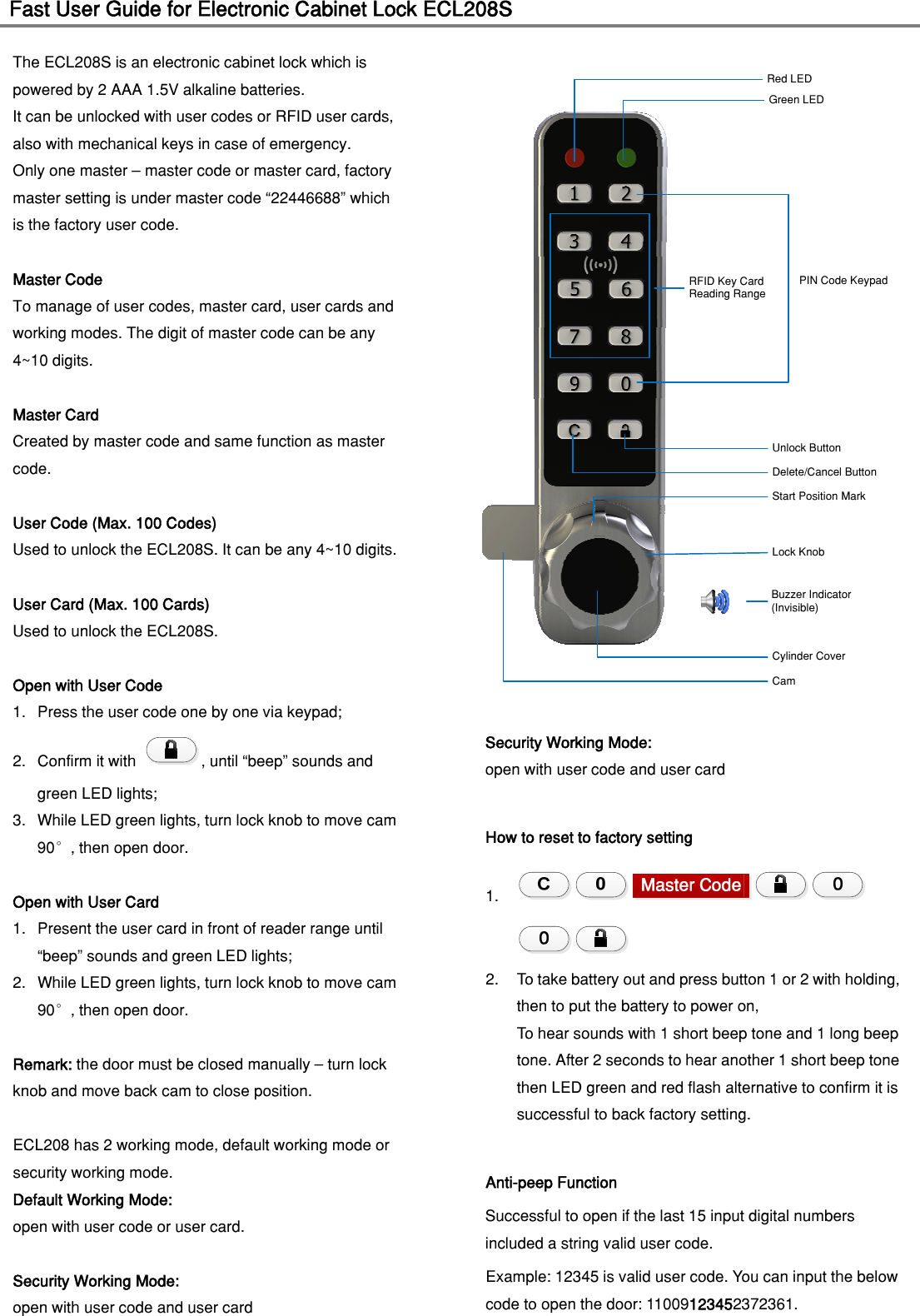
Fast User Guide for Electronic Cabinet Lock ECL208S                                   The ECL208S is an electronic cabinet lock which is powered by 2 AAA 1.5V alkaline batteries.   It can be unlocked with user codes or RFID user cards, also with mechanical keys in case of emergency.   Only one master – master code or master card, factory master setting is under master code “22446688” which is the factory user code. Master Code To manage of user codes, master card, user cards and working modes. The digit of master code can be any 4~10 digits.  Master Card Created by master code and same function as master code.  User Code (Max. 100 Codes) Used to unlock the ECL208S. It can be any 4~10 digits.  User Card (Max. 100 Cards) Used to unlock the ECL208S.  Open with User Code 1. Press the user code one by one via keypad; 2. Confirm it with  , until “beep” sounds and green LED lights; 3. While LED green lights, turn lock knob to move cam 90°, then open door.  Open with User Card 1. Present the user card in front of reader range until “beep” sounds and green LED lights; 2. While LED green lights, turn lock knob to move cam 90°, then open door.  Remark: the door must be closed manually – turn lock knob and move back cam to close position.  ECL208 has 2 working mode, default working mode or   security working mode. Default Working Mode:   open with user code or user card.  Security Working Mode: open with user code and user card Red LEDGreen LEDDelete/Cancel ButtonUnlock ButtonStart Position MarkLock KnobCylinder CoverRFID Key CardReading RangePIN Code KeypadBuzzer Indicator(Invisible)CamSecurity Working Mode: open with user code and user card  How to reset to factory setting 1.  2. To take battery out and press button 1 or 2 with holding, then to put the battery to power on,   To hear sounds with 1 short beep tone and 1 long beep tone. After 2 seconds to hear another 1 short beep tone then LED green and red flash alternative to confirm it is successful to back factory setting.  Anti-peep Function Successful to open if the last 15 input digital numbers included a string valid user code.   Example: 12345 is valid user code. You can input the below code to open the door: 11009123452372361.
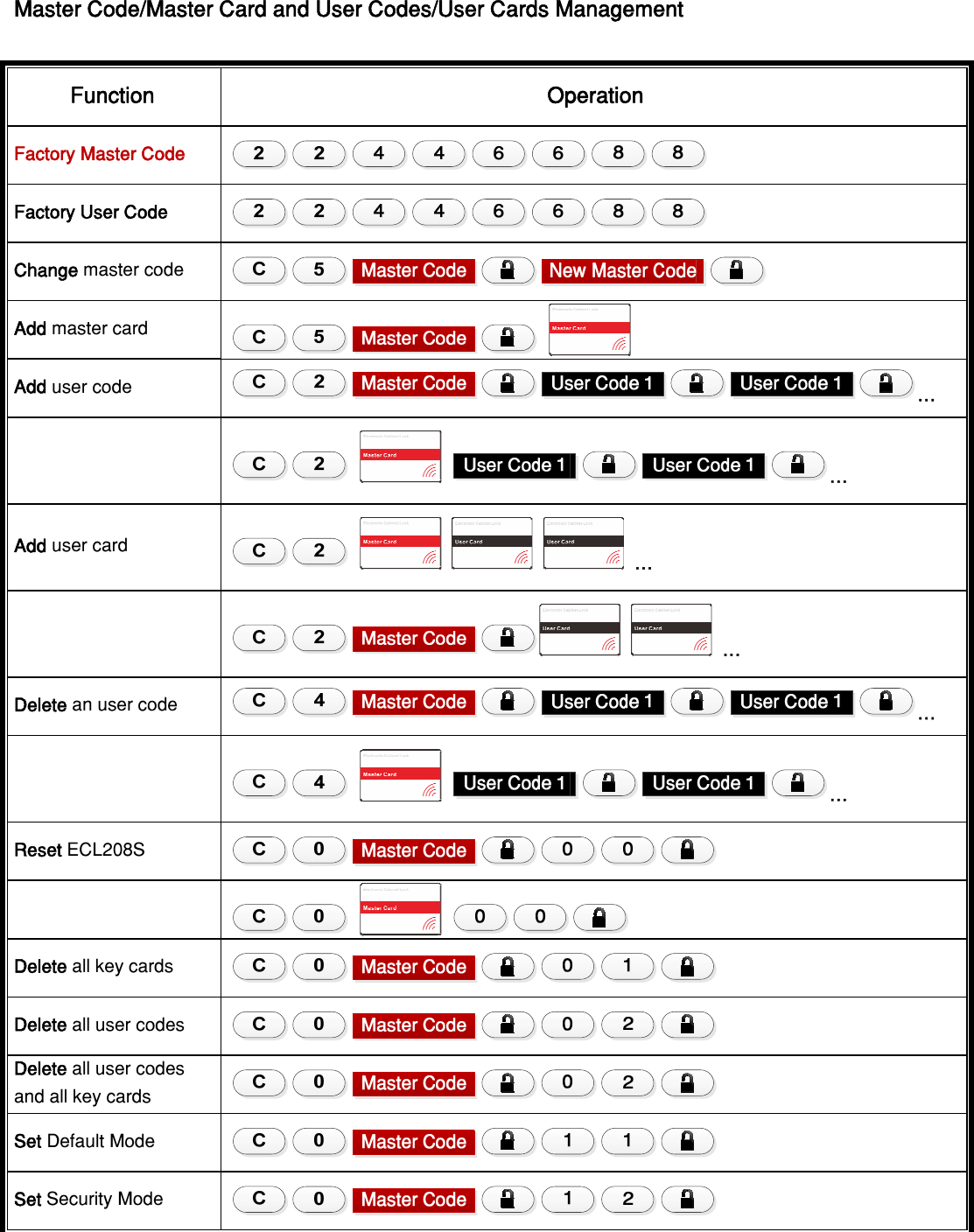
 Master Code/Master Card and User Codes/User Cards Management Function Operation Factory Master Code  Factory User Code   Change master code   Add master card Add user code  …     … Add user card      …    … Delete an user code  …     … Reset ECL208S     Delete all key cards   Delete all user codes   Delete all user codes and all key cards   Set Default Mode   Set Security Mode
FCC STATEMENT: This device complies with Part 15 of the FCC Rules. Operation is subject to the following two conditions: (1) This device may not cause harmful interference, and (2) This device must accept any interference received, including interference that may cause undesired operation. Warning: Changes or modifications not expressly approved by the party responsible for compliance could void the user's authority to operate the equipment.  NOTE: This equipment has been tested and found to comply with the limits for a Class B digital device, pursuant to Part 15 of the FCC Rules. These limits are designed to provide reasonable protection against harmful interference in a residential installation. This equipment generates uses and can radiate radio frequency energy and, if not installed and used in accordance with the instructions, may cause harmful interference to radio communications. However, there is no guarantee that interference will not occur in a particular installation. If this equipment does cause harmful interference to radio or television reception, which can be determined by turning the equipment off and on, the user is encouraged to try to correct the interference by one or more of the following measures:  Reorient or relocate the receiving antenna.  Increase the separation between the equipment and receiver. Connect the equipment into an outlet on a circuit different from that to which the receiver is connected.  Consult the dealer or an experienced radio/TV technician for help.

Navigation menu