Ortek Electronics TD-650 Car Radio User Manual

Shanghai Ortek Electronics Co.,LTD Car Radio

User Manual

Shanghai Ortek Electronics Co., Ltd. P0B650X04A61 | P a g eTD - 650Car Radio User ManualShanghai Ortek Electronics Co.,LTD.Address: Bridge 16 southern, Cao’an Road, Jiading District, Shanghai, ChinaT:021-3911 7568F:021-3911 7569#8031PC:201812E-Mai:mail@orteksh.com
Shanghai Ortek Electronics Co., Ltd. P0B650X04A62 | P a g eThanks for choosing our product TD-650. To ensure safety and good user experience, please readthis user manual thoroughly before starting to use the product.Important Note:1. Please use the rated voltage stated on the product for power supply.2. Please remain open circuit for BAT connection to avoid short circuit.3. Please study the connection requirements carefully.4. Please change a rated fuse if necessary.5. Please do not knock down the product without professional guidance.6. Please do not let metal or other things go into the inner part of the product to avoidunnecessary accident.7. Please contact our aftersales service department by (86) 021-39117568 #8011.FCC Requirement(1)、changes or modifications not expressly approved by the party responsible for compliancecould void the user’s authority to operate the equipment.This device complies with Part 15 of the FCC Rules. Operation is subject to the following twoconditions:(1) this device may not cause harmful interference, and(2) this device must accept any interference received, including interference that may causeundesired operation.(2)、Note: This equipment has been tested and found to comply with the limits for a Class Bdigital device, pursuant to Part 15 of the FCC Rules. These limits are designed to providereasonable protection against harmful interference in a residential installation. This equipmentgenerates, uses, and can radiate radio frequency energy, and if not installed and used inaccordance with the instructions, may cause harmful interference to radio communications.However, there is no guarantee that interference will not occur in a particular installation. If thisequipment does cause harmful interference to radio or television reception, which can bedetermined by turning the equipment off and on, the user is encouraged to try to correct theinterference by one or more of the following measures:– Reorient or relocate the receiving antenna.– Increase the separation between the equipment and receiver.– Connect the equipment into an outlet on a circuit different from that to which the receiver isconnected.– Consult the dealer or an experienced radio/TV technician for help.(5)、This equipment complies with FCC radiation exposure limits set forth for an uncontrolledenvironment. This equipment should be installed and operated with a minimum distance of 20cmbetween the radiator & your body. This transmitter must not be co-located or operating inconjunction with any other antenna or transmitter.
Shanghai Ortek Electronics Co., Ltd. P0B650X04A63 | P a g eContentsControlpanel.……………………………………………………………………………………………………………..P.4LCDDisplay.………………………………………………………………………………………………………………..P.5Power Up /Down………………………………………………………………………………………………………..P.6TimeSetting.………………………………………………………………………………………………………………P.6~7ModeSwitching……………….…………………………………………………………………………………………P.7Reset……………………………………………………………………………………………………………………………P.7TuneOperation……………………………………………………………………………………………………………P.8~11Auto Seek FunctionManual Seek FunctionAuto Preset StationsManual Preset StationsMultiple Region Frequency SelectionUSBPlay………………………………………………………………………………………………………………………P12~13USB Mode OperationSoundSetting………………………………………………………………………………………………………………P.14Sound EffectSetting…………………………………………………………..…………………………………………P.14LoudFunction……………………………………………………………………………………………………………..P.15BluetoothOperation……………………………………………………………………………………………………P.15~17
Shanghai Ortek Electronics Co., Ltd. P0B650X04A64 | P a g eBluetooth ConnectionBluetooth Music PlayerBluetooth Phone FunctionAUX INMode…..……….…………………………………………………………………………………………………P17Definitions………………………………………………………………………..………………………………………….P.18Connector and Pin Definitions(Reference)…………………………………………………………………..P.19Assembling Demonstration(Reference)………………………..………………………………………………P.20Maintenance…………………………………………………………………………………………………………………P.20FAQ…………………………………….…………………………………………………………………………………………P.20
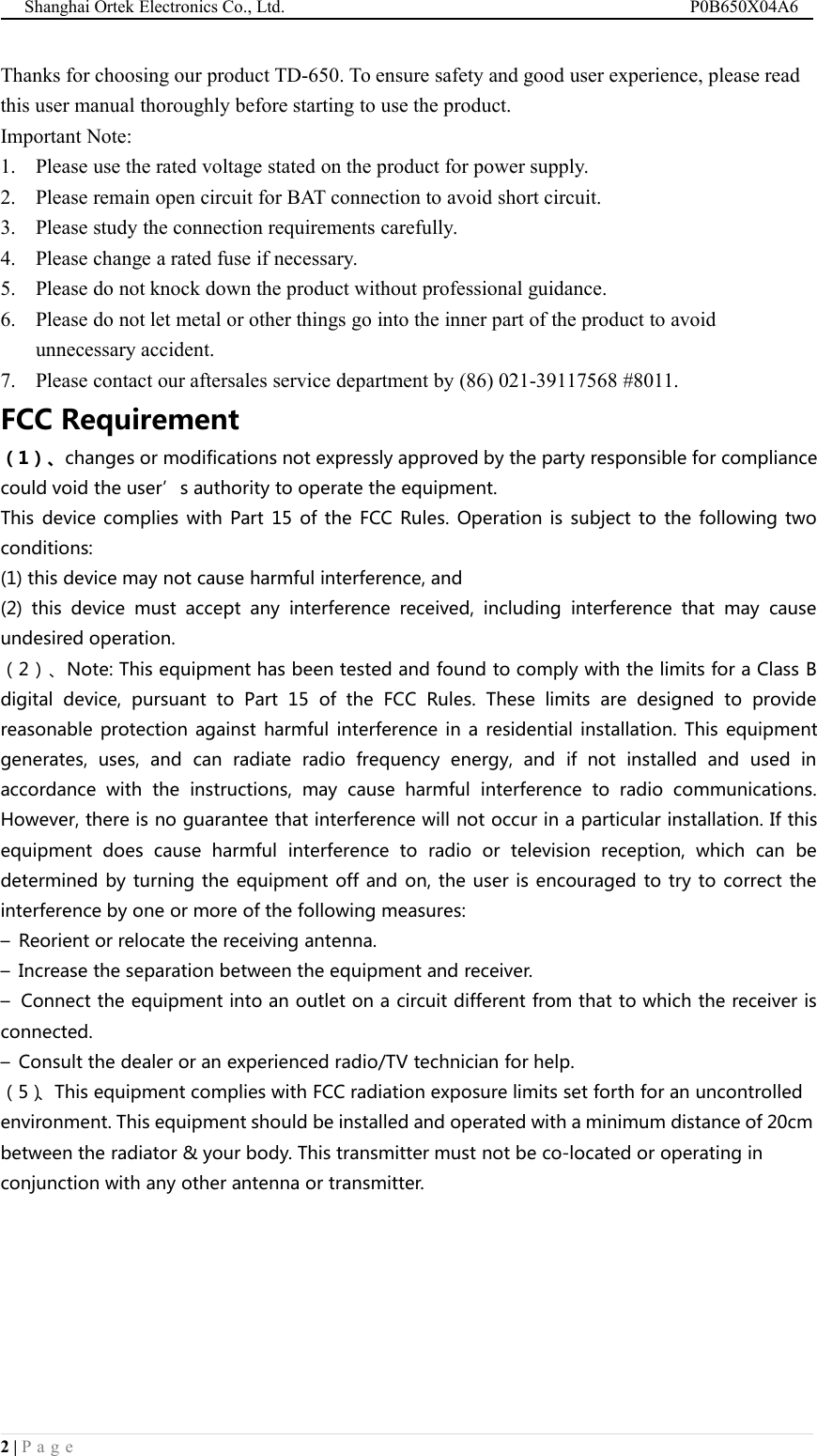
Shanghai Ortek Electronics Co., Ltd. P0B650X04A65 | P a g eControl Panel1Microphone2Loud / End of phone call / Refuse to pick up3Mode4Reset5Volume control / Menu / Call pick up6Preset radio stations / songs7FM / AM selection8Power on9Clock display / Clock setting10 Preset station 1 / Play / Stop11 Preset station 2 / Pre-play song (fast scan)12 Preset station 3 / Repeat13 Preset station 4 / Random14 Preset station 5 / Next 10 songs15 Preset station 6 / Previous 10 songs16 Tune down / Next song17 Tune Up / Previous song18 USB / AUX connector19 LCD display
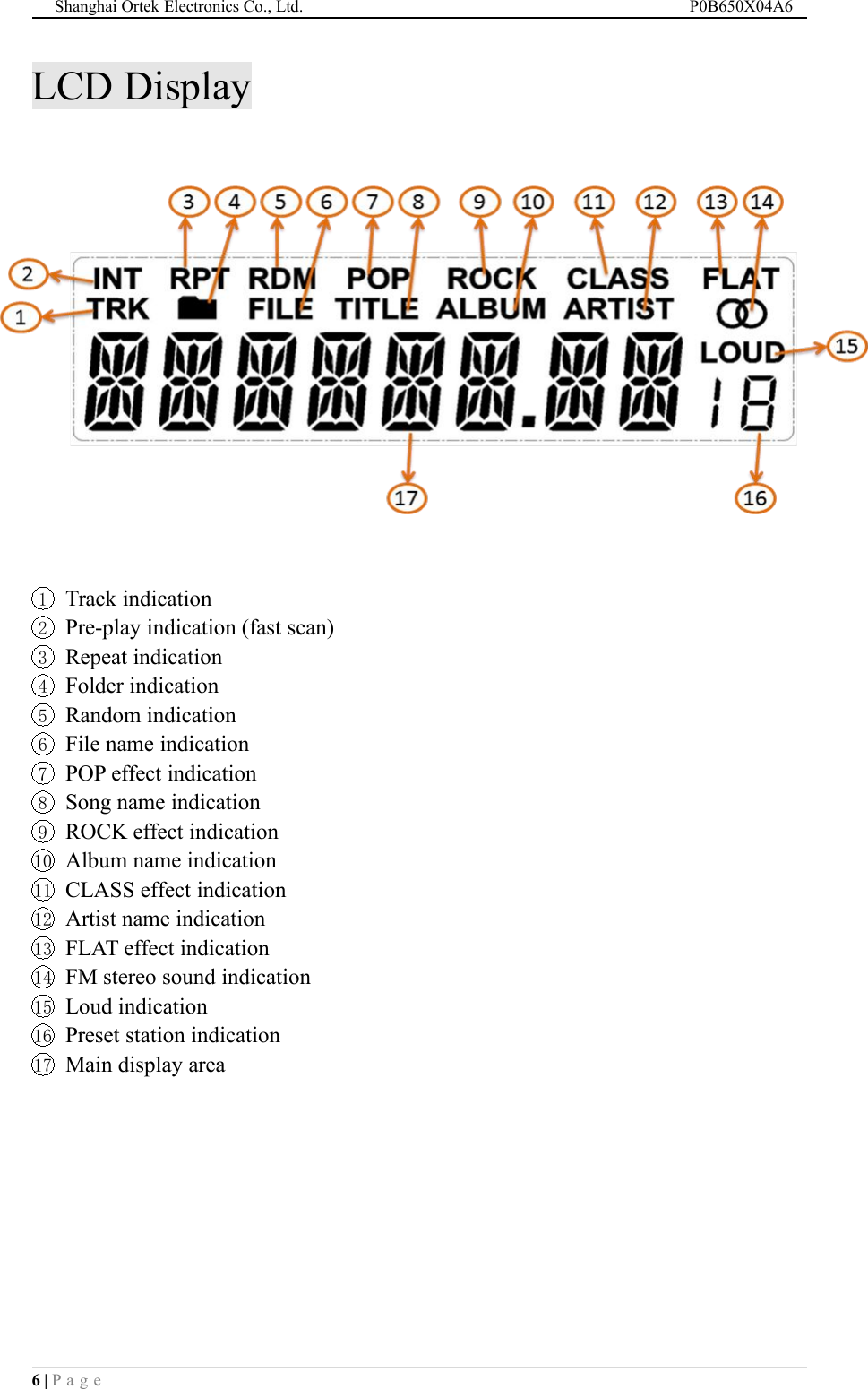
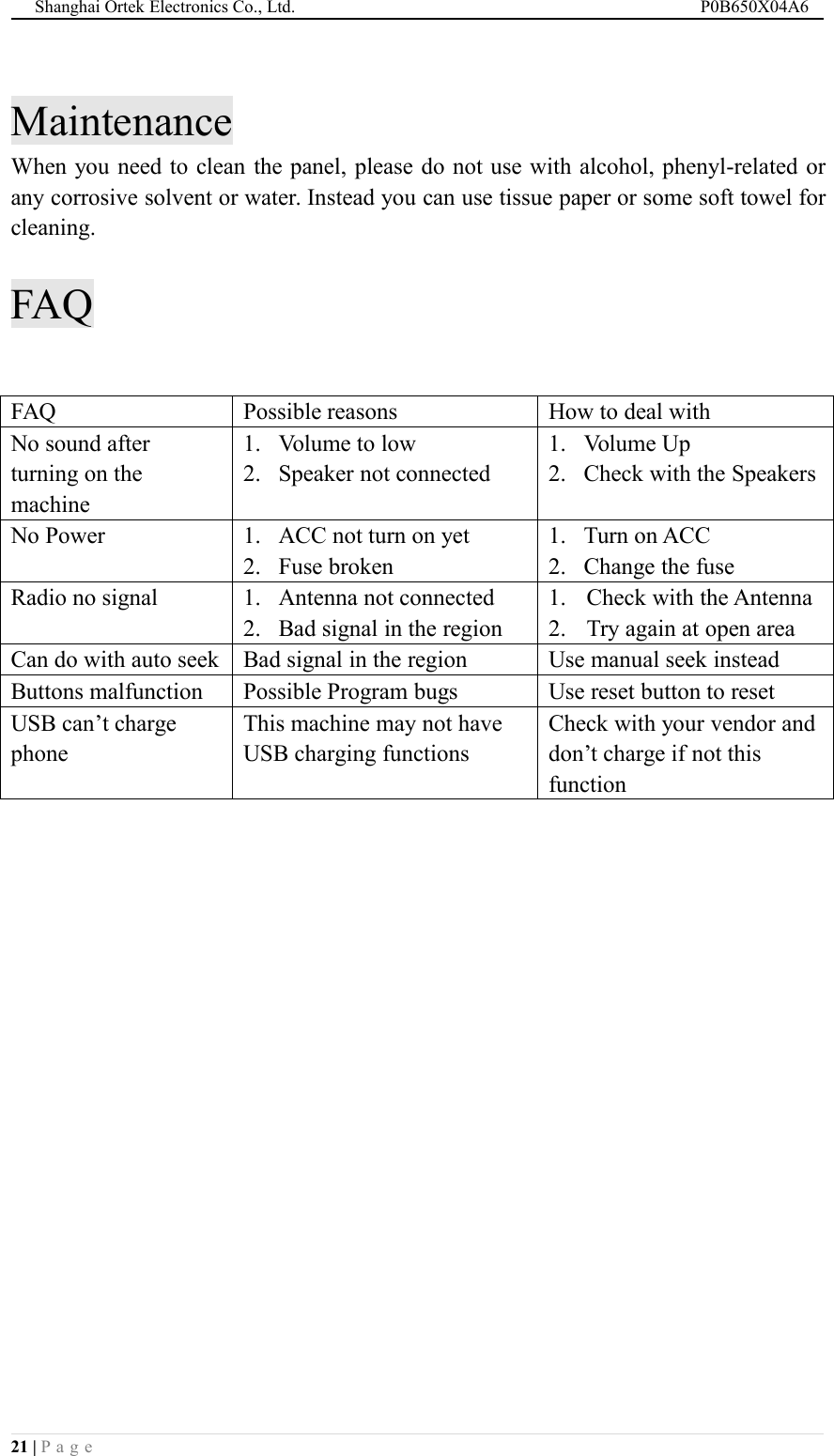
Shanghai Ortek Electronics Co., Ltd. P0B650X04A66 | P a g eLCD Display1Track indication2Pre-play indication (fast scan)3Repeat indication4Folder indication5Random indication6File name indication7POP effect indication8Song name indication9ROCK effect indication10 Album name indication11 CLASS effect indication12 Artist name indication13 FLAT effect indication14 FM stereo sound indication15 Loud indication16 Preset station indication17 Main display area
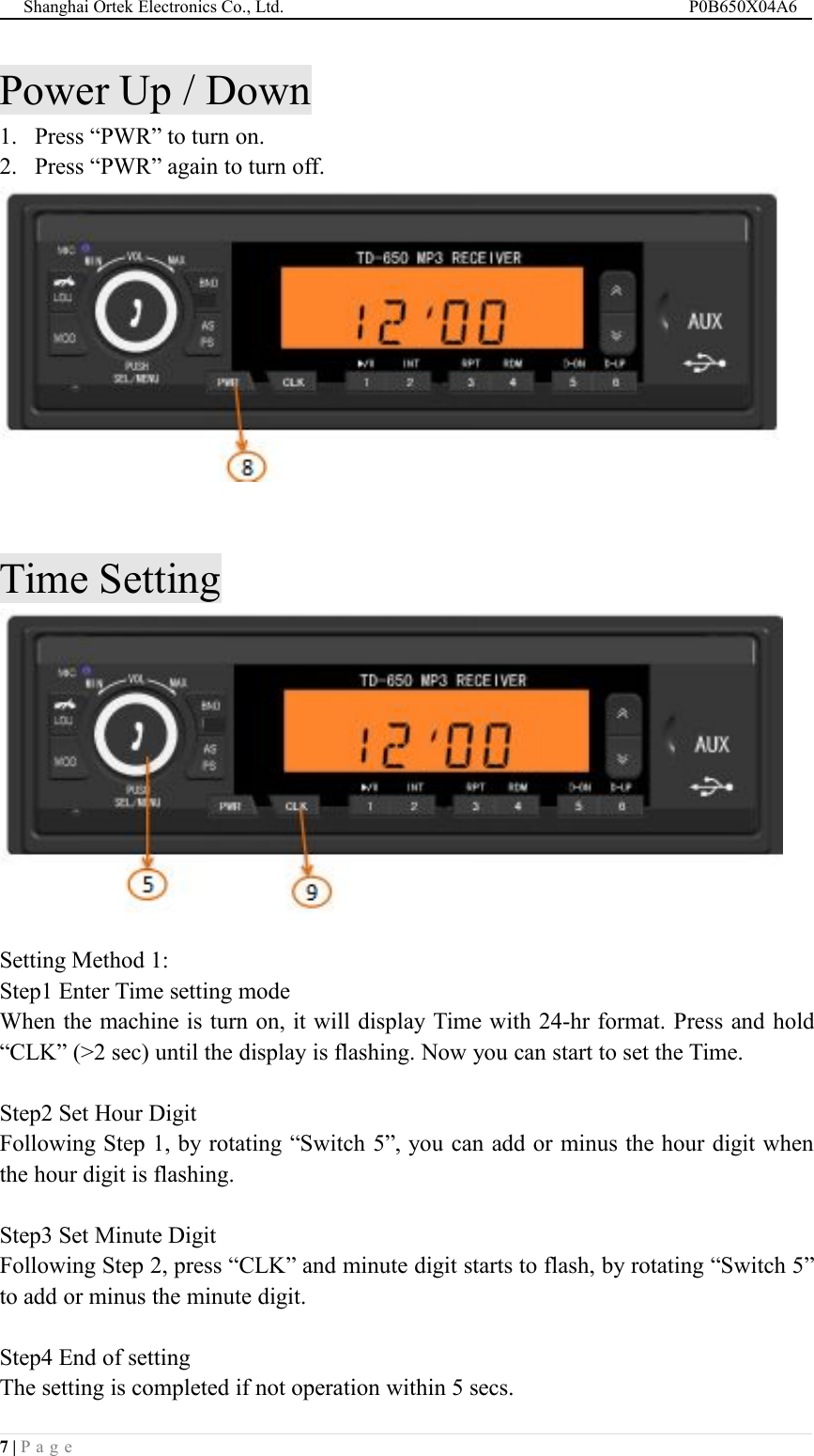
Shanghai Ortek Electronics Co., Ltd. P0B650X04A67 | P a g ePower Up / Down1. Press “PWR” to turn on.2. Press “PWR” again to turn off.Time SettingSetting Method 1:Step1 Enter Time setting modeWhen the machine is turn on, it will display Time with 24-hr format. Press and hold“CLK” (>2 sec) until the display is flashing. Now you can start to set the Time.Step2 Set Hour DigitFollowing Step 1, by rotating “Switch 5”, you can add or minus the hour digit whenthe hour digit is flashing.Step3 Set Minute DigitFollowing Step 2, press “CLK” and minute digit starts to flash, by rotating “Switch 5”to add or minus the minute digit.Step4 End of settingThe setting is completed if not operation within 5 secs.
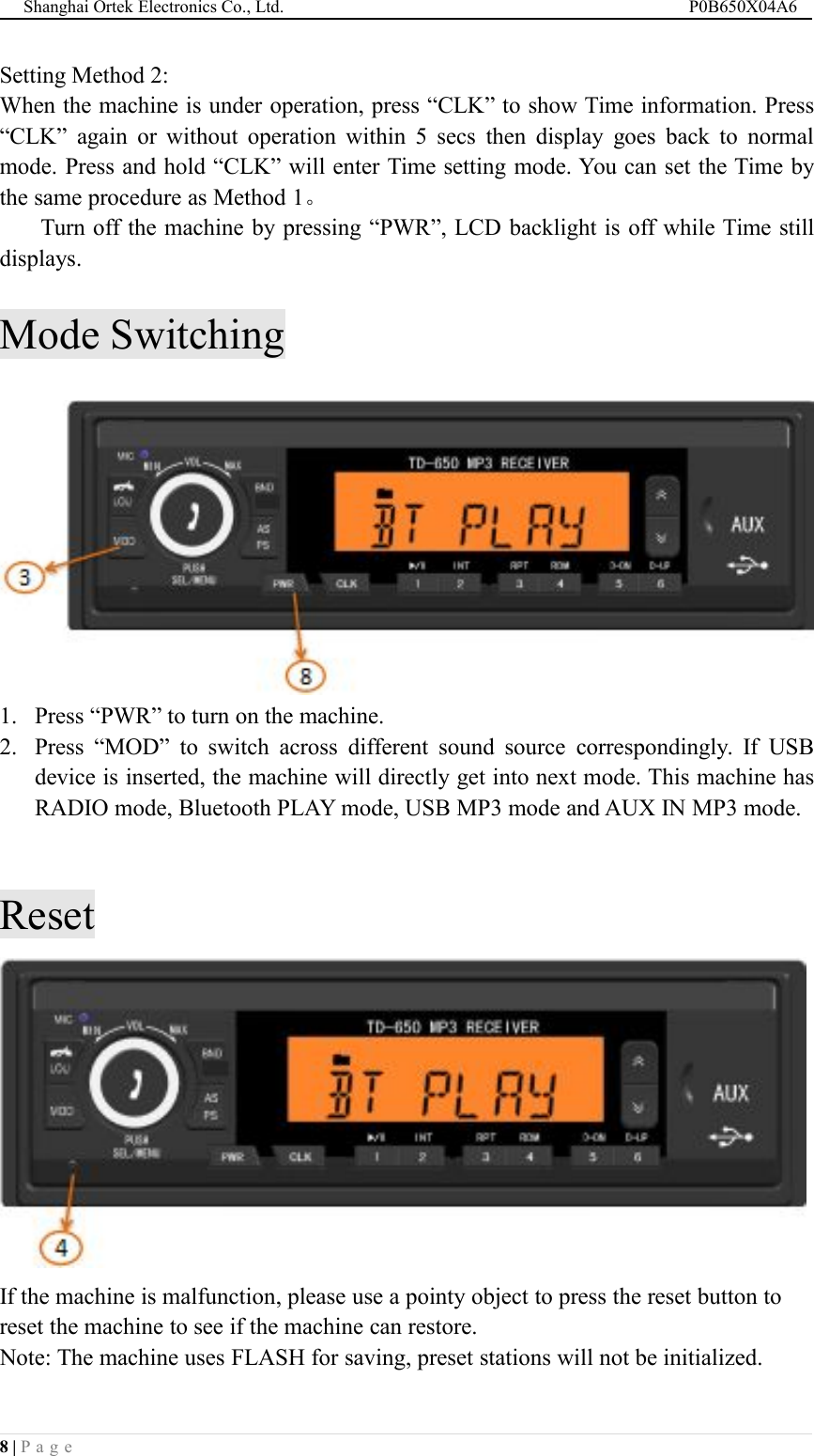
Shanghai Ortek Electronics Co., Ltd. P0B650X04A68 | P a g eSetting Method 2:When the machine is under operation, press “CLK” to show Time information. Press“CLK” again or without operation within 5 secs then display goes back to normalmode. Press and hold “CLK” will enter Time setting mode. You can set the Time bythe same procedure as Method 1。Turn off the machine by pressing “PWR”, LCD backlight is off while Time stilldisplays.Mode Switching1. Press “PWR” to turn on the machine.2. Press “MOD” to switch across different sound source correspondingly. If USBdevice is inserted, the machine will directly get into next mode. This machine hasRADIO mode, Bluetooth PLAY mode, USB MP3 mode and AUX IN MP3 mode.ResetIf the machine is malfunction, please use a pointy object to press the reset button toreset the machine to see if the machine can restore.Note: The machine uses FLASH for saving, preset stations will not be initialized.
Shanghai Ortek Electronics Co., Ltd. P0B650X04A69 | P a g eTune OperationFrequencies of FM1, FM2, and FM3 are the same (E.g. for China range of FMfrequency is 87.5 – 108.0MHz).Frequencies of AM1 and AM2 are the same (E.g. for China range of AM frequency is522 - 1620 KHz).The machine can store the last frequency after turning off. If the FM signal is goodthen FM stereo sound indicator is “ ”lit up.Auto Seek Function1. Press “BND” to switch from FM1, FM2, FM3, AM1 or AM2.2. Press “ ” or “ ” to seek radio stations by tuning up or down respectively. Theseeking will be stopped when station is sought.3. Press “ ” or “ ” during auto seek, seeking will be stopped by interruption.
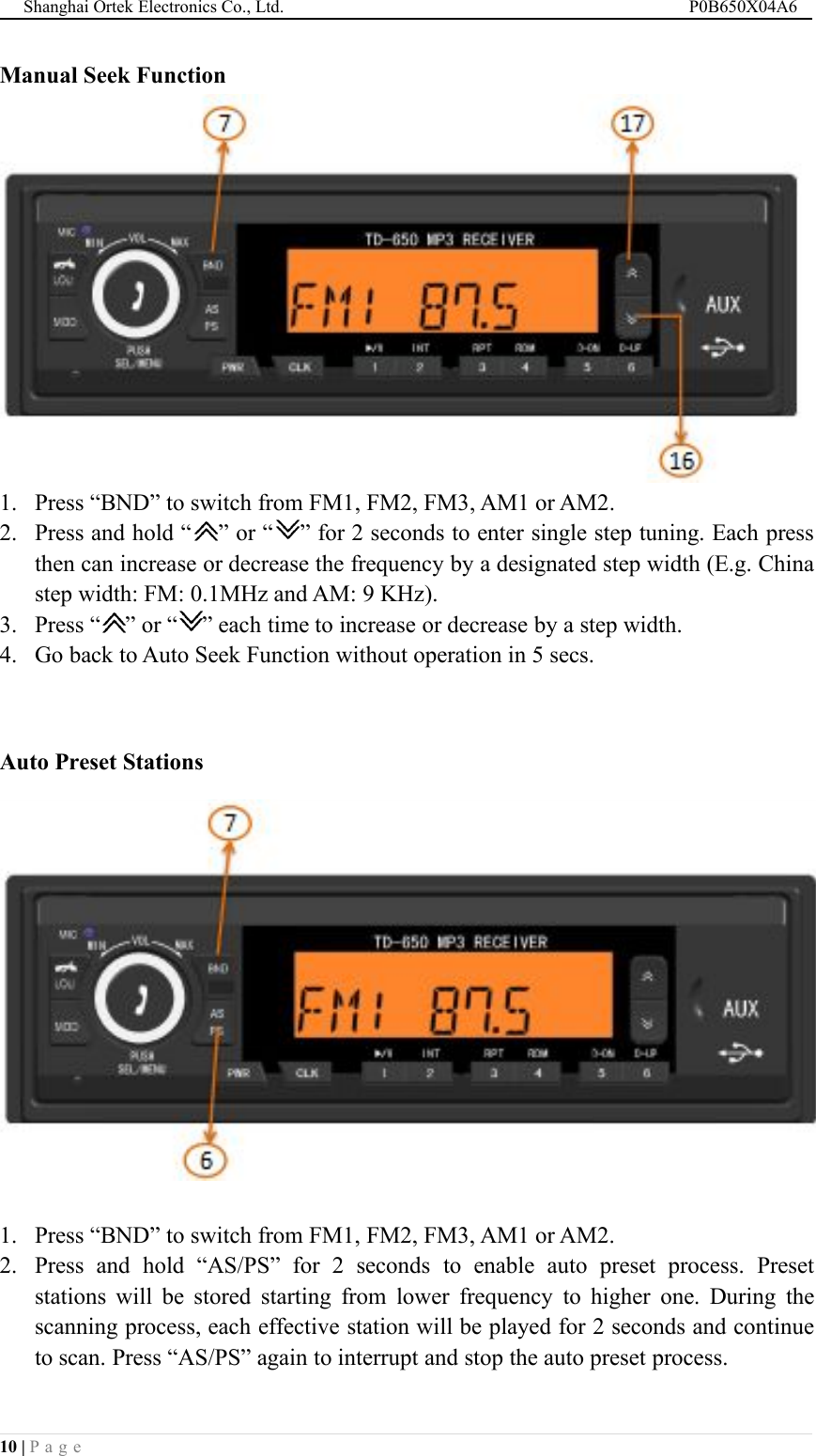
Shanghai Ortek Electronics Co., Ltd. P0B650X04A610 | P a g eManual Seek Function1. Press “BND” to switch from FM1, FM2, FM3, AM1 or AM2.2. Press and hold “ ” or “ ” for 2 seconds to enter single step tuning. Each pressthen can increase or decrease the frequency by a designated step width (E.g. Chinastep width: FM: 0.1MHz and AM: 9 KHz).3. Press “ ” or “ ” each time to increase or decrease by a step width.4. Go back to Auto Seek Function without operation in 5 secs.Auto Preset Stations1. Press “BND” to switch from FM1, FM2, FM3, AM1 or AM2.2. Press and hold “AS/PS” for 2 seconds to enable auto preset process. Presetstations will be stored starting from lower frequency to higher one. During thescanning process, each effective station will be played for 2 seconds and continueto scan. Press “AS/PS” again to interrupt and stop the auto preset process.
Shanghai Ortek Electronics Co., Ltd. P0B650X04A611 | P a g eEvery Preset station set can store 6 stations. Preset stations are based on strongersignal, higher priority to be stored.After Auto preset station setting, “Preset button 1” will show the correspondingradio station. (Below is reference)If you reset again the preset stations, the previous preset stations maybe overwrite.(Below is for reference)Manual Preset Stations1. Press “BND” to switch from FM1, FM2, FM3, AM1 or AM2.2. Press “ ” or “ ” to tune until the frequency needed to be stored.3. Press and hold any “1” ……“6” for 2 seconds to overwrite current frequencyto preset station memory correspondingly.4. Repeat the above procedures, FM1, FM2, FM3, AM1 and AM2 can stored atmost 6 preset stations. If there is already a preset station previously, the newpreset station will overwrite the previous one. (Below is for reference)
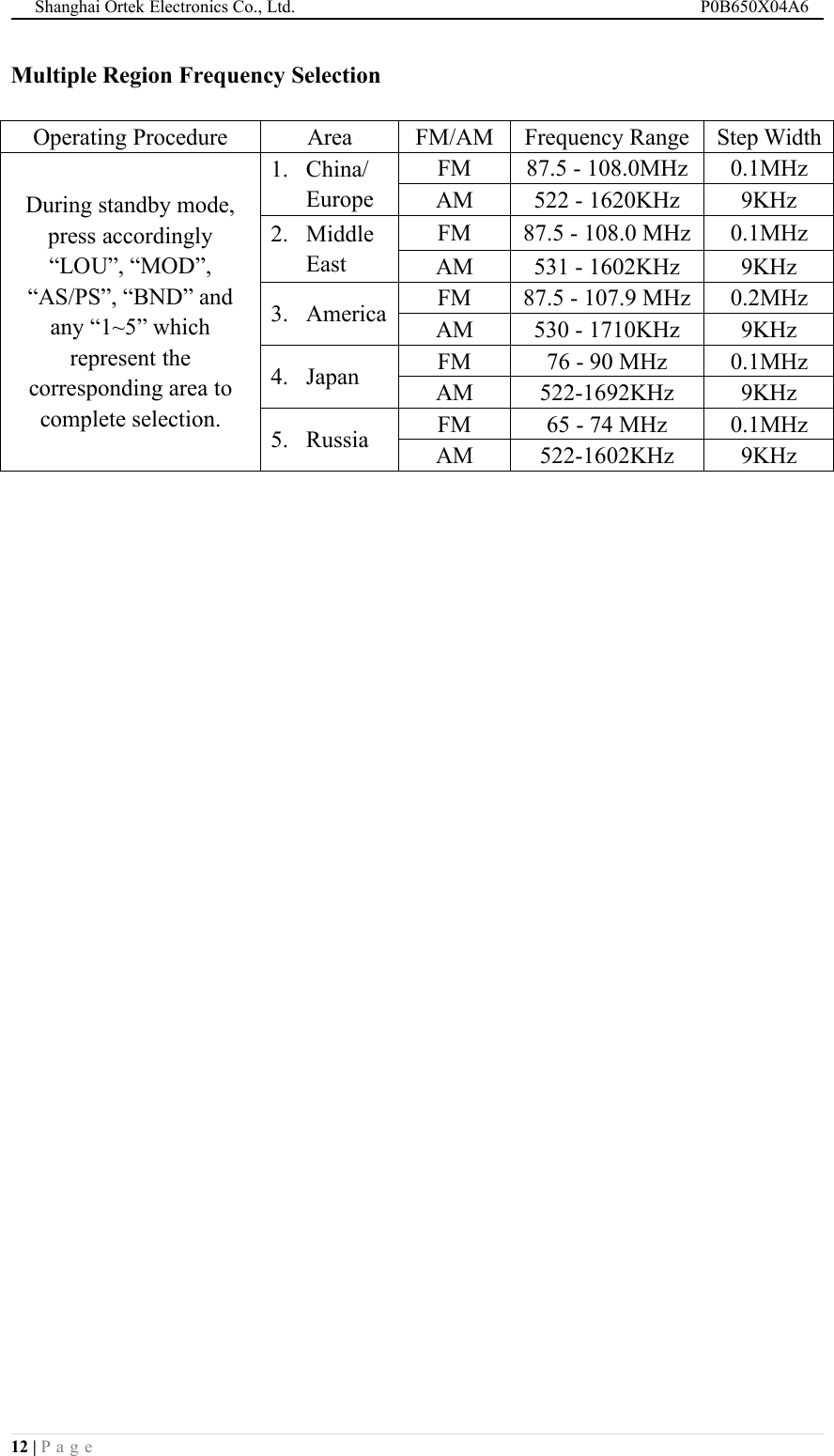
Shanghai Ortek Electronics Co., Ltd. P0B650X04A612 | P a g eMultiple Region Frequency SelectionOperating ProcedureAreaFM/AMFrequency RangeStep WidthDuring standby mode,press accordingly“LOU”, “MOD”,“AS/PS”, “BND” andany “1~5” whichrepresent thecorresponding area tocomplete selection.1. China/EuropeFM87.5 - 108.0MHz0.1MHzAM522 - 1620KHz9KHz2. MiddleEastFM87.5 - 108.0 MHz0.1MHzAM531 - 1602KHz9KHz3. AmericaFM87.5 - 107.9 MHz0.2MHzAM530 - 1710KHz9KHz4. JapanFM76 - 90 MHz0.1MHzAM522-1692KHz9KHz5. RussiaFM65 - 74 MHz0.1MHzAM522-1602KHz9KHz
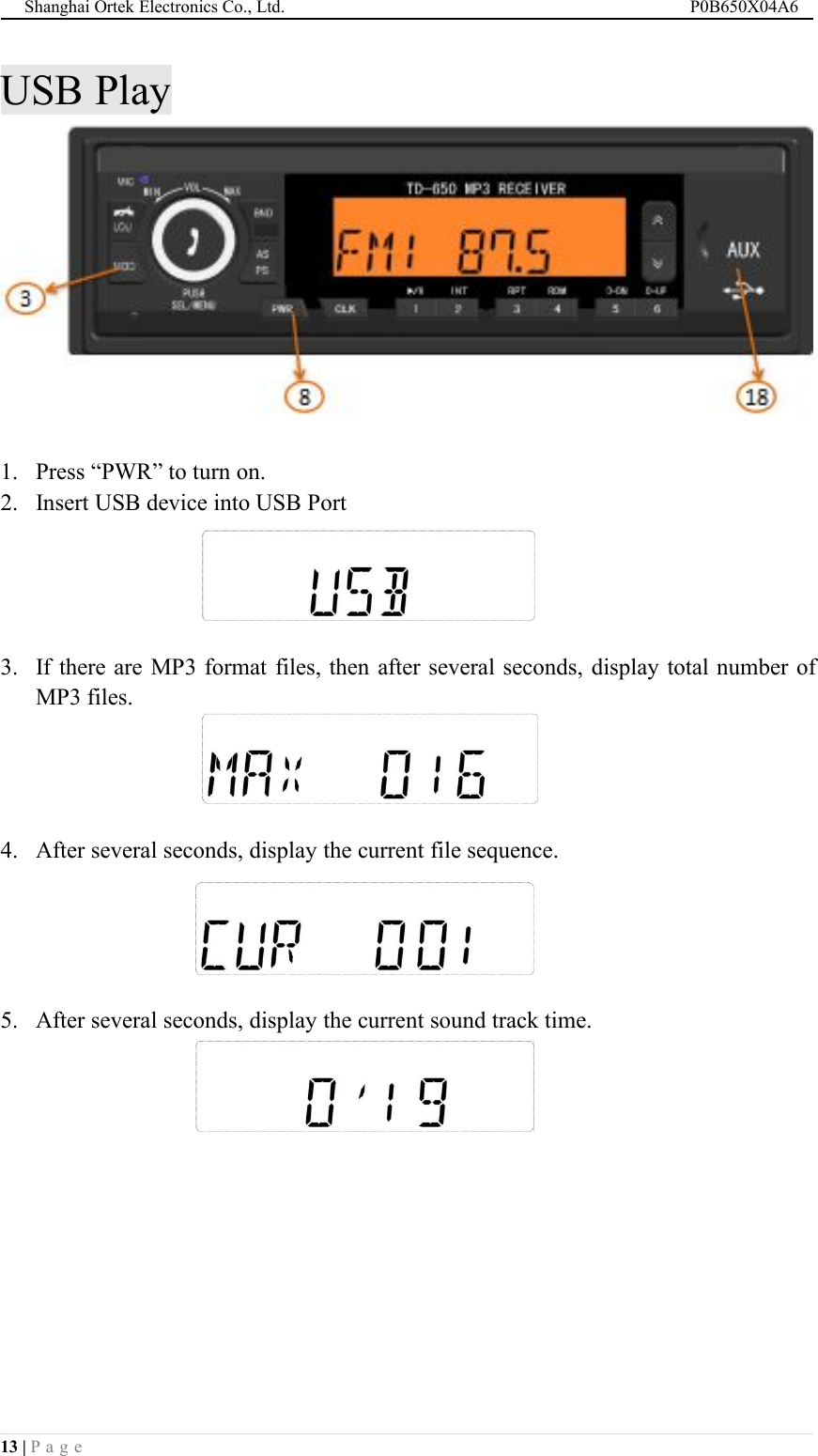
Shanghai Ortek Electronics Co., Ltd. P0B650X04A613 | P a g eUSB Play1. Press “PWR” to turn on.2. Insert USB device into USB Port3. If there are MP3 format files, then after several seconds, display total number ofMP3 files.4. After several seconds, display the current file sequence.5. After several seconds, display the current sound track time.
Shanghai Ortek Electronics Co., Ltd. P0B650X04A614 | P a g eUSB Mode OperationButtonFunction Descriptions under USB ModePress to pause or start to play, press and hold to stop.Press to play next song, press and hold for fast forward.Press to play previous song, press and hold for fast backward.Press to skip 10 songs and play the next 10th song.Press to skip 10 songs and play the previous 10th song.Press “INT” and LCD displays “INT”. Starting from next song, each songwill be played for 8 seconds and jump to next song until pressing “INT”again.Press “RPT” and LCD displays “RPT”. The current song will be playedrepeatedly until pressing “RPT” again.Press “RDM” and LCD displays “RDM”. The play list will become randomand until pressing “RDM” again.
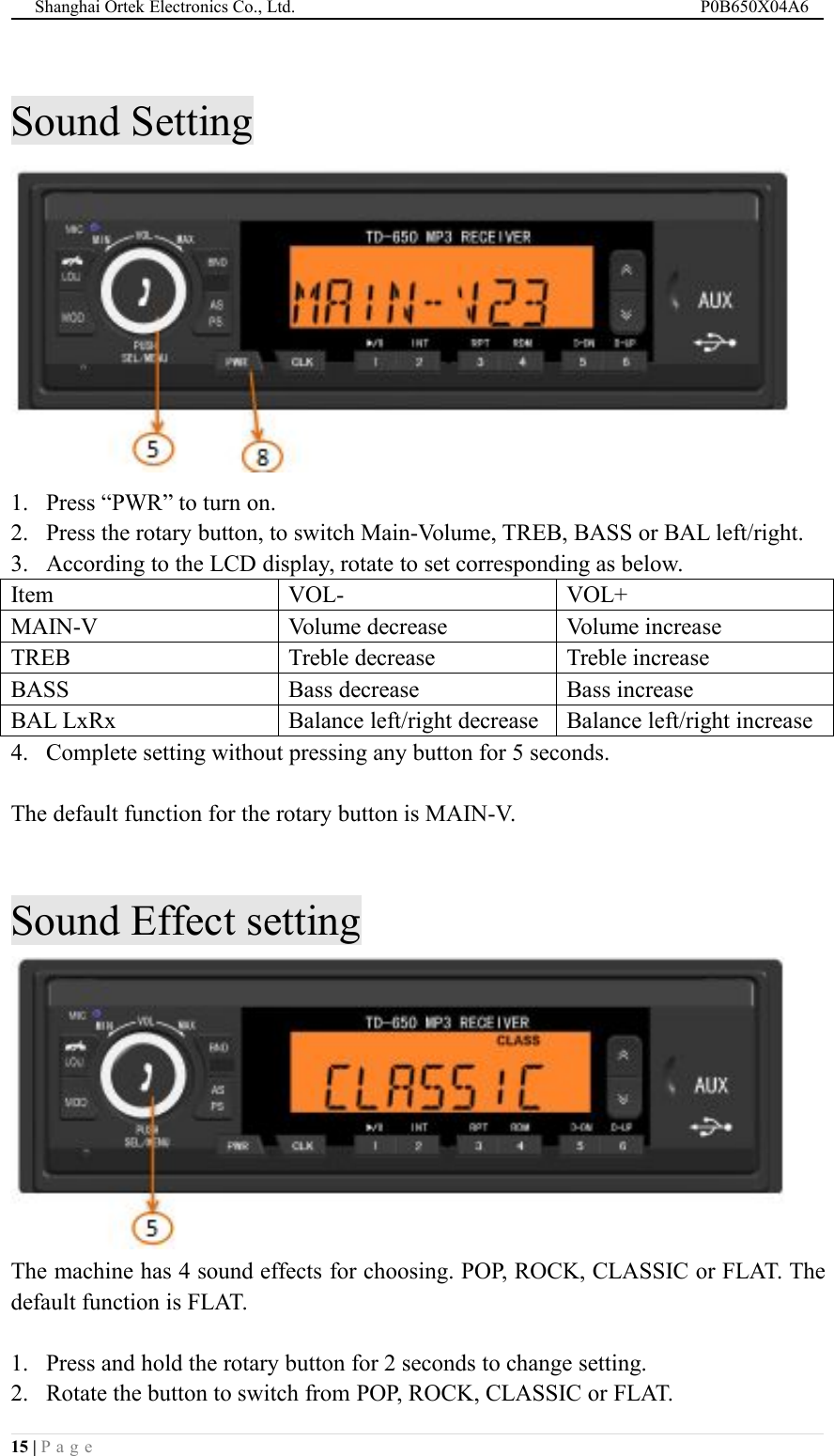
Shanghai Ortek Electronics Co., Ltd. P0B650X04A615 | P a g eSound Setting1. Press “PWR” to turn on.2. Press the rotary button, to switch Main-Volume, TREB, BASS or BAL left/right.3. According to the LCD display, rotate to set corresponding as below.ItemVOL-VOL+MAIN-VVolume decreaseVolume increaseTREBTreble decreaseTreble increaseBASSBass decreaseBass increaseBAL LxRxBalance left/right decreaseBalance left/right increase4. Complete setting without pressing any button for 5 seconds.The default function for the rotary button is MAIN-V.Sound Effect settingThe machine has 4 sound effects for choosing. POP, ROCK, CLASSIC or FLAT. Thedefault function is FLAT.1. Press and hold the rotary button for 2 seconds to change setting.2. Rotate the button to switch from POP, ROCK, CLASSIC or FLAT.
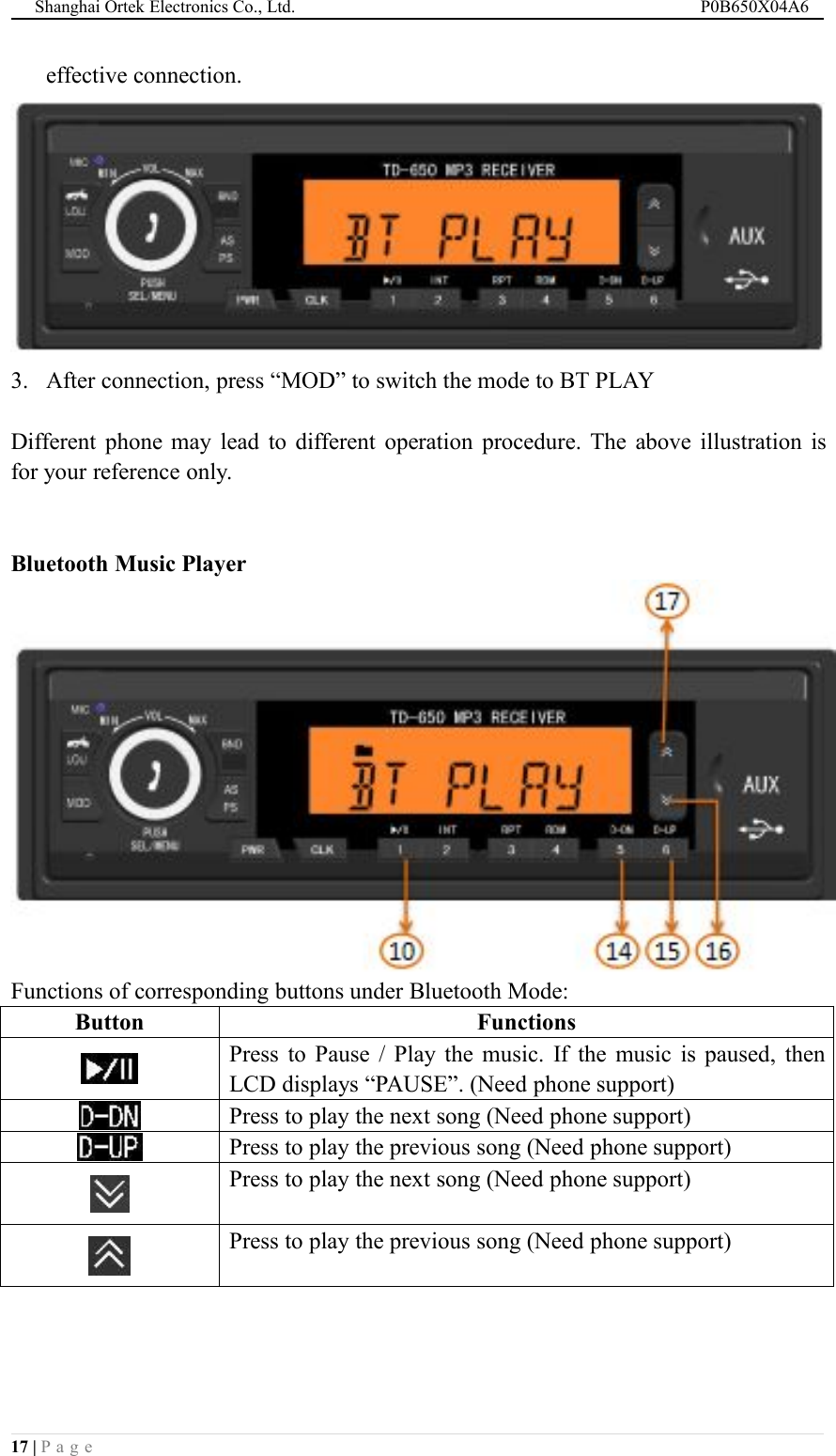
Shanghai Ortek Electronics Co., Ltd. P0B650X04A616 | P a g e3. Complete setting without pressing any button for 5 seconds.Loud FunctionPress “LOU” to amplify the sound source especially when the volume is low. TheLCD will display “LOUD ON”. Press again to turn off this function.Bluetooth OperationWhen you need to use the Bluetooth function, please enable the Bluetooth module ofthe phone device needed to be connected. Search and connect to our machine named:ORTEK_TD650. Connect successfully to start the below.Bluetooth Connection1. Turn on phone Bluetooth.2. Search for new device. When the machine is detected by the phone, click“connect”. When the connection is successful, LCD will display “ ” to represent
Shanghai Ortek Electronics Co., Ltd. P0B650X04A617 | P a g eeffective connection.3. After connection, press “MOD” to switch the mode to BT PLAYDifferent phone may lead to different operation procedure. The above illustration isfor your reference only.Bluetooth Music PlayerFunctions of corresponding buttons under Bluetooth Mode:ButtonFunctionsPress to Pause / Play the music. If the music is paused, thenLCD displays “PAUSE”. (Need phone support)Press to play the next song (Need phone support)Press to play the previous song (Need phone support)Press to play the next song (Need phone support)Press to play the previous song (Need phone support)
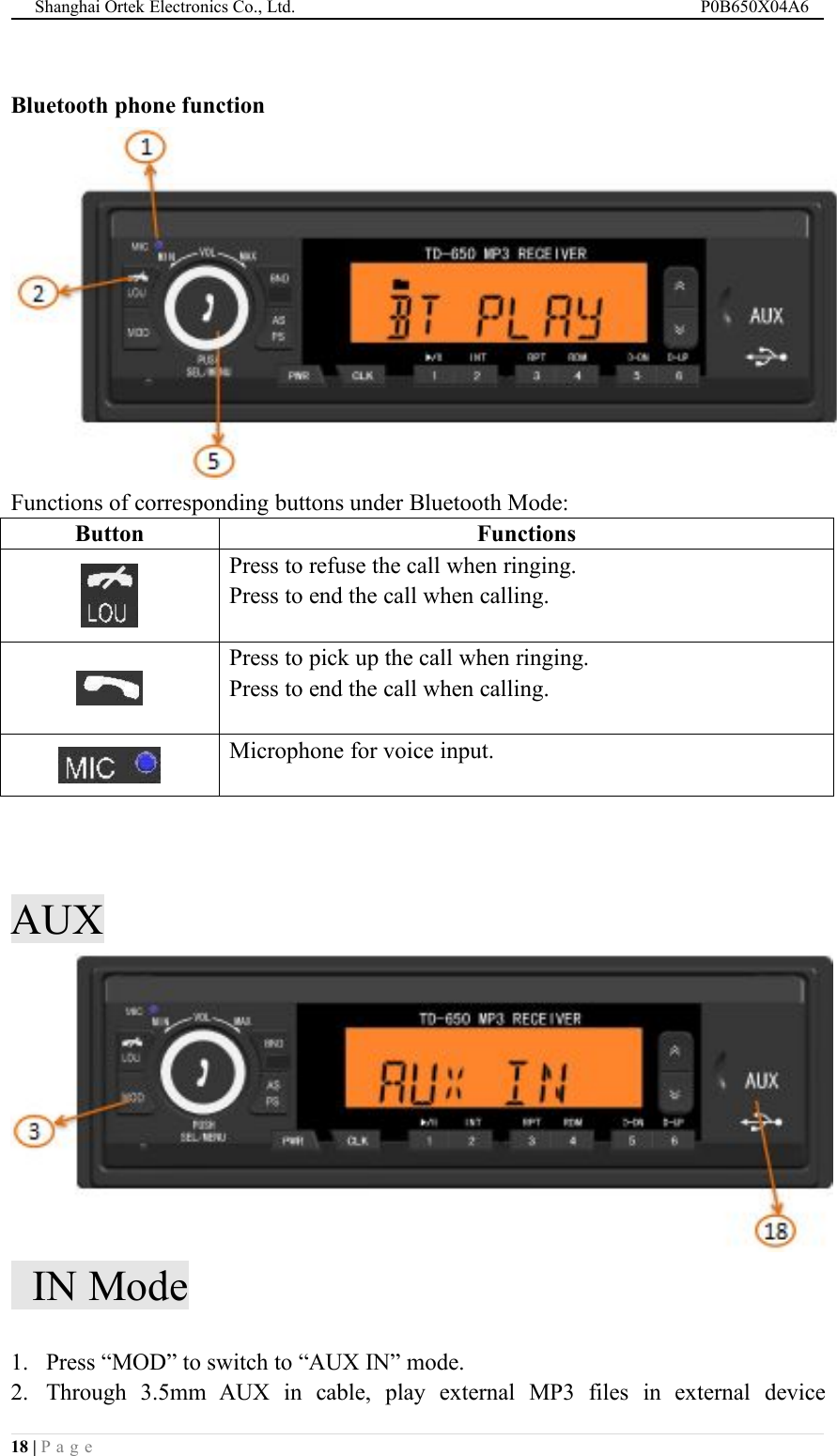
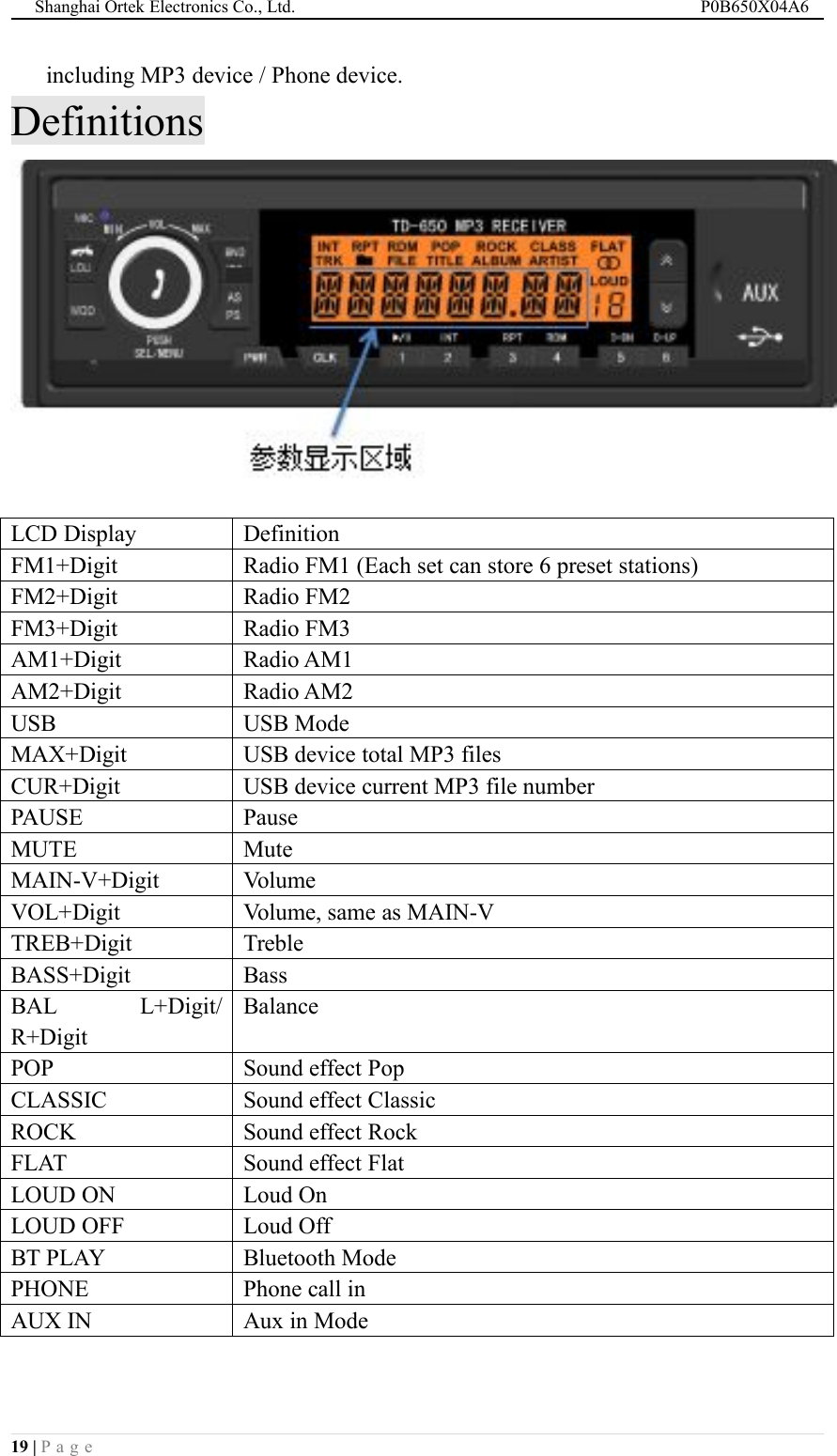
Shanghai Ortek Electronics Co., Ltd. P0B650X04A618 | P a g eBluetooth phone functionFunctions of corresponding buttons under Bluetooth Mode:ButtonFunctionsPress to refuse the call when ringing.Press to end the call when calling.Press to pick up the call when ringing.Press to end the call when calling.Microphone for voice input.AUXIN Mode1. Press “MOD” to switch to “AUX IN” mode.2. Through 3.5mm AUX in cable, play external MP3 files in external device
Shanghai Ortek Electronics Co., Ltd. P0B650X04A619 | P a g eincluding MP3 device / Phone device.DefinitionsLCD DisplayDefinitionFM1+DigitRadio FM1 (Each set can store 6 preset stations)FM2+DigitRadio FM2FM3+DigitRadio FM3AM1+DigitRadio AM1AM2+DigitRadio AM2USBUSB ModeMAX+DigitUSB device total MP3 filesCUR+DigitUSB device current MP3 file numberPAUSEPauseMUTEMuteMAIN-V+DigitVolumeVOL+DigitVolume, same as MAIN-VTREB+DigitTrebleBASS+DigitBassBAL L+Digit/R+DigitBalancePOPSound effect PopCLASSICSound effect ClassicROCKSound effect RockFLATSound effect FlatLOUD ONLoud OnLOUD OFFLoud OffBT PLAYBluetooth ModePHONEPhone call inAUX INAux in Mode
Shanghai Ortek Electronics Co., Ltd. P0B650X04A620 | P a g eConnector and Pin Definitions (Reference)Fuse(ATY-N 5A)ConnectorPin No.Definition of each Pin for connector is shown as below:Pin No.FunctionPin No.Function1Battery +(BAT+)2Battery -(GND)3ACC4——5Light Control(+12/24V)6——7Antenna(9V)8——9——10——11——12——13Left Speaker -14Left Speaker +15Right Speaker -16Right Speaker +The above connector and Pin definition is for reference only. You have to check withyour engineer or our aftersales service department for more information.
Shanghai Ortek Electronics Co., Ltd. P0B650X04A621 | P a g eMaintenanceWhen you need to clean the panel, please do not use with alcohol, phenyl-related orany corrosive solvent or water. Instead you can use tissue paper or some soft towel forcleaning.FAQFAQPossible reasonsHow to deal withNo sound afterturning on themachine1. Volume to low2. Speaker not connected1. Volume Up2. Check with the SpeakersNo Power1. ACC not turn on yet2. Fuse broken1. Turn on ACC2. Change the fuseRadio no signal1. Antenna not connected2. Bad signal in the region1. Check with the Antenna2. Try again at open areaCan do with auto seekBad signal in the regionUse manual seek insteadButtons malfunctionPossible Program bugsUse reset button to resetUSB can’t chargephoneThis machine may not haveUSB charging functionsCheck with your vendor anddon’t charge if not thisfunction

Navigation menu